Infiniti QX80 (2023 year). Manual in english - page 12
 

  Index      Manuals     Infiniti QX80 (2023 year). Manual in english


Search            copyright infringement  


Content      ..     10      11      12      13     ..


Infiniti QX80 (2023 year). Manual in english - page 12


5-54

Starting and driving

The radar sensors

detect an approaching

vehicle. The sonar sensors

detect station-

ary objects behind the vehicle. Refer to the
illustration for approximate zone coverage
areas

.

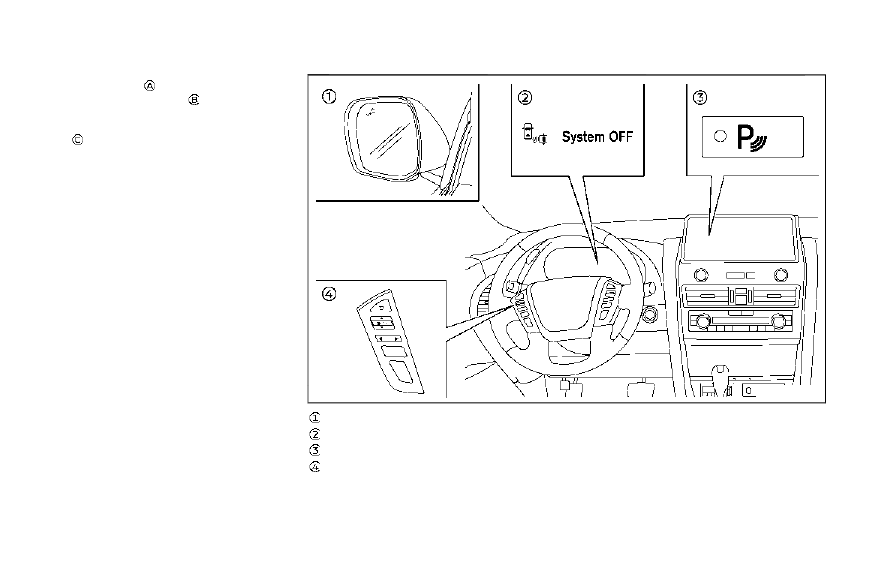
WAF0738X

Side indicator light
BCI OFF indicator
“P” key (on the touch screen display)
Steering-wheel-mounted controls (left
side)

CarManuals2.com

-------------------------------------------------------------------------------------------------------------------------------------------------------------

JVS0173X

BCI SYSTEM OPERATION

When the shift lever is in the R (Reverse)
position and the vehicle speed is less than
approximately 5 MPH (8 km/h), the BCI
system operates.
If the radar detects a vehicle approaching
from the side or the sonar detects close
stationary objects behind the vehicle, the
system gives visual and audible warnings. If
the driver does not apply the brakes, the
system automatically applies the brake for a
moment when the vehicle is moving back-
wards. After the automatic brake applica-
tion, the driver must depress the brake pedal
to maintain brake pressure. If the driver’s
foot is on the accelerator pedal, the system

pushes the accelerator upward before ap-
plying the brake. If you continue to accel-
erate, the system will not engage the brake.

WAE0785X

When the shift lever is placed in the R
(Reverse) position, the indicator on the “P”
key

illuminates on the touch screen dis-

play.

Starting and driving

5-55

CarManuals2.com

-------------------------------------------------------------------------------------------------------------------------------------------------------------

5-56

Starting and driving

WAF0739X

Side indicator light

WAE0786X

If the radar detects an approaching vehicle
from the side, the system chimes (once), the
side indicator light on the side the vehicle is
approaching from flashes and a yellow
rectangular frame

appears on the touch

screen display.

JVS0172X

Illustration 1

JVS0173X

Illustration 2

CarManuals2.com

-------------------------------------------------------------------------------------------------------------------------------------------------------------

.

In the case of several vehicles approach-

ing in a row (Illustration 1) or in the
opposite direction (Illustration 2), a
chime may not be issued to the BCI
system after the first vehicle passes the
sensors.

.

The sonar system chime indicating there

is an object behind the vehicle has a
higher priority than the BCI chime (single
beep) indicating an approaching vehicle.
If the sonar system detects an object
behind the vehicle and the BCI system
detects an approaching vehicle at the
same time, the following indications are
provided:
— The sonar system chime sounds
— The side indicator light on the side of

the approaching vehicle flashes, and

— A yellow rectangular frame appears in

the touch screen display.

WAE0786X

If an approaching vehicle or close object
behind the vehicle is detected when your
vehicle is backing up, a red frame

will

appear in the touch screen display and the
system will chime three times. Then, the
brakes will be applied momentarily. After the
automatic brake application, the driver must
depress the brake pedal to maintain brake
pressure.
If the driver’s foot is on the accelerator
pedal, the system moves the accelerator
pedal upward before the braking is applied.
However, if you continue to accelerate, the
system will not engage the brakes.

The BCI system does not operate if the
object is very close to the bumper.

WAE0785X

WAF0781X

BCI OFF indicator

Starting and driving

5-57

CarManuals2.com

-------------------------------------------------------------------------------------------------------------------------------------------------------------

5-58

Starting and driving

The BCI system can be turned off tempora-
rily by touching the “P” key

on the touch

screen display. The indicator on the “P” key
turns off and the BCI OFF indicator appears
on the vehicle information display.
When the shift lever is placed in the R
(Reverse) position again, the BCI system is
turned on.

NOTE:

.

When the “P” key is touched, the

indicator light on the key will turn off
and the BCI system will turn off tem-
porarily. The Moving Object Detection
(MOD) and the sonar systems will also
be turned off at the same time.

.

When the sonar and MOD systems are

turned off on the settings menu in the
touch screen display, the “P” key will
disappear.

To enable or disable the BCI system, use the
vehicle information display. See “How to
enable/disable the BCI system” (P.5-58).

WAF0718X

Steering-wheel-mounted control (left
side)
Vehicle information display

HOW TO ENABLE/DISABLE THE
BCI SYSTEM

1. Push the

button until “Settings”

appears in the vehicle information dis-
play. Use the

button to select “Driver

Assistance”. Then push the OK button.

CarManuals2.com

-------------------------------------------------------------------------------------------------------------------------------------------------------------

2. Select “Intervention(BCI)” and use the

OK button to turn the system on or off.

NOTE:

The BCI system will be automatically turned
on when the engine is restarted.

JVS0479X

BCI SYSTEM PRECAUTIONS

WARNING

Listed below are the system limitations
for the BCI system. Failure to operate

the vehicle in accordance with these
system limitations could result in serious
injury or death.

.

Always check your surroundings and
turn to check what is behind you
before backing up.

Starting and driving

5-59

CarManuals2.com

-------------------------------------------------------------------------------------------------------------------------------------------------------------

5-60

Starting and driving

.

The radar sensors detect approach-
ing (moving) vehicles. The radar sen-
sors cannot detect every object such
as:

— Pedestrians, bicycles, animals or

child operated toy vehicles

— A vehicle that passing at speeds

greater than approximately 15
MPH (24 km/h)

.

The radar sensors may not detect
approaching vehicles in certain situa-
tions:

— Illustration a. When a vehicle

parked next to you obstructs the
beam of the radar sensor.

— Illustration b. When the vehicle is

parked in an angled parking space.

— Illustration c. When the vehicle is

parked on inclined ground.

— Illustration d. When an approach-

ing vehicle turns into your vehi-
cle’s parking lot aisle.

— Illustration e. When the angle

formed by your vehicle and ap-
proaching vehicle is small.

.

The following conditions may reduce
the ability of the radar sensors to
detect other vehicles:

— Severe weather

— Road spray

— Ice/frost/dirt build up on the

vehicle

.

Do not attach stickers (including
transparent material), install acces-
sories or apply additional paint near
the radar sensors. These conditions
may reduce the ability of the radar
sensors to detect other vehicles.

.

The sonar sensors detect stationary
objects behind the vehicle. The sonar
sensor may not detect:

— Small or moving objects

— Wedge-shaped objects

— Object close to the bumper (less

than approximately 1 ft (30 cm))

— Thin objects such as rope, wire

and chain, etc.

.

The brake engagement by the BCI
system is not as effective on a slope
as it is on flat ground. When on a
steep slope the system may not
function properly.

.

Do not use the BCI system under the
following conditions because the sys-
tem may not function properly.

— When driving with a tire that is

not within normal tire conditions
(for example, tire wear, low tire
pressure, installation of spare tire,
tire chains, non-standard wheels).

— When the vehicle is equipped with

non-original brake parts or sus-
pension parts.

.

When towing a trailer or other ve-
hicle, turn the BCI system off to
prevent the occurrence of an unex-
pected accident resulting from sud-
den system operation. (See “BCI
system operation” (P.5-55).)

.

Excessive noise (for example, audio
system volume, open vehicle window)
will interfere with the chime sound,
and it may not be heard.

CarManuals2.com

-------------------------------------------------------------------------------------------------------------------------------------------------------------

WAF0301X

Vehicle information display

SYSTEM TEMPORARILY UNA-
VAILABLE

When any of the following messages appear
on the vehicle information display

, a chime

will sound and the BCI system will be turned
off automatically.

.

“Unavailable: High Accelerator Tempera-

ture”:
If the vehicle is parked in direct sunlight
under high temperature conditions (over
approximately 104°F (40°C)).

.

“Unavailable Side Radar Obstruction”:

When side radar blockage is detected.

Turn off the BCI system and turn it on again
when the above conditions no longer exist.

SYSTEM MALFUNCTION

If the BCI system malfunctions, it will turn
off automatically, a chime will sound and
“Malfunction” warning message will appear
in the vehicle information display

.

Action to take

Stop the vehicle in a safe location and place
the shift lever in the P (Park) position. Turn
the engine off and restart the engine. If the
warning message continues to appear, have
the system checked. It is recommended you
visit an INFINITI retailer for this service.

JVS1146X

SYSTEM MAINTENANCE

The two radar sensors

for the BCI system

are located near the rear bumper. Always
keep the area near the radar sensors clean.
The radar sensors may be blocked by
temporary ambient conditions such as
splashing water, mist or fog.
The blocked condition may also be caused by
objects such as ice, frost or dirt obstructing
the radar sensors.
Check for and remove objects obstructing
the area around the radar sensors.
Do not attach stickers (including transparent
material), install accessories or apply addi-
tional paint near the radar sensors.

Starting and driving

5-61

CarManuals2.com

-------------------------------------------------------------------------------------------------------------------------------------------------------------

5-62

Starting and driving

Do not strike or damage the area around the
radar sensors.
It is recommended you visit an INFINITI
retailer if the area around the radar sensors
is damaged due to a collision.

Radio frequency statement

For USA:

FCC ID: OAYSRR3B
This device complies with Part 15 of the FCC
Rules. Operation is subject to the following
two conditions:

(1)

this device may not cause harmful
interference, and

(2) this device must accept any interfer-

ence received, including interference
that may cause undesired operation.

CAUTION TO USERS

Changes or modifications not expressly
approved by the party responsible for com-
pliance could void the user’s authority to
operate the equipment.

For Canada:

IC: 4135A-SRR3B
This device contains licence-exempt trans-
mitter(s)/receiver(s) that comply with Inno-
vation, Science and Economic Development
Canada’s licence-exempt RSS(s). Operation
is subject to the following two conditions:

1. This device may not cause interference.
2. This device must accept any interference,
including interference that may cause un-
desired operation of the device.
Radiofrequency radiation exposure informa-
tion:
This equipment complies with radiation ex-
posure limits set forth for an uncontrolled
environment. This equipment should be in-
stalled and operated with minimum distance
of 20 cm between the radiator and your
body.

JVS0306X

PRECAUTIONS ON CRUISE
CONTROL

.

If the cruise control system malfunctions,

it will cancel automatically. The cruise
indicator (green) in the vehicle informa-
tion display will then blink to warn the
driver.

.

If the engine coolant temperature be-

comes excessively high, the cruise con-
t r o l

s y s t e m

w i l l

b e

c a n c e l e d

automatically.

.

If the cruise indicator (green) blinks, turn

the cruise control main switch off and
have the system checked. It is recom-
mended you visit an INFINITI retailer for

CRUISE CONTROL (if so equipped)

CarManuals2.com

-------------------------------------------------------------------------------------------------------------------------------------------------------------

this service.

.

The cruise indicator (green) may some-

times blink when the cruise control main
switch is turned ON while pushing the
CANCEL or control switch. To properly
set the cruise control system, perform
the steps below in the order indicated.

WARNING

Do not use the cruise control when
driving under the following conditions:

.

when it is not possible to keep the
vehicle at a set speed

.

in heavy traffic or in traffic that
varies in speed

.

on winding or hilly roads

.

on slippery roads (rain, snow, ice,
etc.)

.

in very windy areas

Doing so could cause a loss of vehicle
control and result in an accident.

WAF1256X

1.

RES+ operation

2.

SET- operation

3.

CANCEL switch

4.

Control switch

5.

Cruise control MAIN switch

CRUISE CONTROL OPERATIONS

The cruise control allows driving at a speed
between 25 to 90 MPH (40 to 144 km/h)
without keeping your foot on the accelerator
pedal.

To turn on the cruise control,

push the

MAIN switch on. The cruise indicator (white)
illuminates in the vehicle information display.

To set cruising speed,

accelerate your

vehicle to the desired speed, push down
the conrtol switch to SET- and release it.
The cruise indicator (green) illuminates in the
vehicle information display. Take your foot
off the accelerator pedal. Your vehicle will
maintain the set speed.

.

To pass another vehicle,

depress the

accelerator pedal. When you release the
pedal, the vehicle will return to the
previously set speed.

.

The vehicle may not maintain the set

speed on winding or hilly roads. If this
happens, drive without the cruise con-
trol.

To cancel the preset speed,

follow any of

these methods:

.

Push the CANCEL switch.

.

Tap the brake pedal.

.

Turn the MAIN switch off.

After any of the above operations is per-
formed, the color of the cruise indicator will
change from green to white.

.

If you depress the brake pedal while

pushing up or down the control switch
and reset the cruising speed, the cruise
control will disengage. Turn the MAIN
switch off once and then turn it on again.

.

The cruise control will automatically

cancel if the vehicle slows more than 8
MPH (13 km/h) below the set speed.

Starting and driving

5-63

CarManuals2.com

-------------------------------------------------------------------------------------------------------------------------------------------------------------

5-64

Starting and driving

.

If you move the shift lever to N (Neutral)

position, the cruise control will be can-
celed.

To reset at a faster cruising speed,

use one

of the following methods:

.

Depress the accelerator pedal. When the

vehicle attains the desired speed, push
down the conrtol switch to SET- and
release it.

.

Push up and hold the control switch to

RES+. When the vehicle attains the
speed you desire, release the switch.

.

Push up the control switch to RES+ and

then quickly release it. Each time you do
this, the set speed will increase by about
1 MPH (1.6 km/h).

To reset at a slower cruising speed,

use one

of the following methods:

.

Lightly tap the brake pedal. When the

vehicle attains the desired speed, push
down the conrtol switch to SET- and
release it.

.

Push down and hold the control switch to

SET-. Release the switch when the
vehicle slows down to the desired speed.

.

Push down the control switch to SET-

and then quickly release it. Each time you
do this, the set speed will decrease by
about 1 MPH (1.6 km/h).

To resume the preset speed,

push up the

control switch to RES+ and release it. The

vehicle will resume the last set cruising speed
when the vehicle speed is over 25 MPH (40
km/h).

WARNING

Failure to follow the warnings and
instructions for proper use of the ICC
system could result in serious injury or
death.

.

ICC is not a collision avoidance or
warning device. For highway use only
and it is not intended for congested
areas or city driving. Failure to apply
the brakes could result in an accident.

.

Always observe posted speed limits
and do not set the speed over them.

.

Always drive carefully and atten-
tively when using either cruise con-
trol mode. Read and understand the
Owner’s Manual thoroughly before
using the cruise control. To avoid
serious injury or death, do not rely
on the system to prevent accidents or
to control the vehicle’s speed in
emergency situations. Do not use
cruise control except in appropriate
road and traffic conditions.

.

In the conventional (fixed speed)
cruise control mode, a warning chime
will not sound to warn you if you are
too close to the vehicle ahead. Pay
special attention to the distance
between your vehicle and the vehicle

INTELLIGENT CRUISE CONTROL
(ICC) (if so equipped)

CarManuals2.com

-------------------------------------------------------------------------------------------------------------------------------------------------------------

ahead of you or a collision could
occur.

The ICC system maintains a selected dis-
tance from the vehicle in front of you within
the speed range of 0 to 90 MPH (0 to 144
km/h) up to the set speed. The set speed can
be selected by the driver between 20 to 90
MPH (30 to 144 km/h).
The vehicle travels at a set speed when the
road ahead is clear.
The ICC system can be set to one of two
cruise control modes.

.

Vehicle-to-vehicle distance control

mode:
For maintaining a selected distance
between your vehicle and the vehicle in
front of you up to the preset speed.

.

Conventional (fixed speed) cruise control

mode:
For cruising at a preset speed.

WAF0745X

Displays and indicators
ICC switches
MAIN (ON·OFF) switch

Push the MAIN switch

to choose the

cruise control mode between the vehicle-to-
vehicle distance control mode and the con-
ventional (fixed speed) cruise control mode.

Once a control mode is activated, it cannot
be changed to the other cruise control mode.
To change the mode, push the MAIN switch

once to turn the system off. Then push the

MAIN switch

again to turn the system

back on and select the desired cruise control
mode.

Starting and driving

5-65

CarManuals2.com

-------------------------------------------------------------------------------------------------------------------------------------------------------------

5-66

Starting and driving

Always confirm the setting in the ICC system
display.
For the vehicle-to-vehicle distance control
mode, see “Vehicle-to-vehicle distance con-
trol mode” (P.5-66).
For the conventional (fixed speed) cruise
control mode, see “Conventional (fixed
speed) cruise control mode” (P.5-81).

WAF0746X

HOW TO SELECT THE CRUISE
CONTROL MODE

Selecting vehicle-to-vehicle dis-
tance control mode

To choose the vehicle-to-vehicle distance
control mode

, quickly push and release the

MAIN switch

.

Selecting the conventional (fixed
speed) cruise control mode

To choose the conventional (fixed speed)
cruise control mode

, push and hold the

MAIN switch

for longer than approxi-

mately 1.5 seconds. See “Conventional (fixed

speed) cruise control mode” (P.5-81).

VEHICLE-TO-VEHICLE DIS-
TANCE CONTROL MODE

In the vehicle-to-vehicle distance control
mode, the ICC system automatically main-
tains a selected distance from the vehicle
traveling in front of you according to that
vehicle’s speed (up to the set speed), or at
the set speed when the road ahead is clear.

CarManuals2.com

-------------------------------------------------------------------------------------------------------------------------------------------------------------

JVS1154X

The system is intended to enhance the
operation of the vehicle when following a
vehicle traveling in the same lane and
direction.
If the radar sensor

detects a slower

moving vehicle ahead, the system will reduce
the vehicle speed so that your vehicle
follows the vehicle in front at the selected
distance.
The system automatically controls the throt-
tle and applies the brakes (up to approxi-
mately 40% of vehicle braking power) if
necessary.
The detection range of the sensor is approxi-
mately 650 ft (200 m) ahead.

Vehicle-to-vehicle distance control
mode operation

The vehicle-to-vehicle distance control
mode is designed to maintain a selected
distance and reduce the speed to match the
slower vehicle ahead; the system will de-
celerate the vehicle as necessary and if the
vehicle ahead comes to a stop, the vehicle
decelerates to a standstill. However, the ICC
system can only apply up to approximately
40% of the vehicle’s total braking power.
This system should only be used when traffic
conditions allow vehicle speeds to remain
fairly constant or when vehicle speeds
change gradually. If a vehicle moves into
the traveling lane ahead or if a vehicle
traveling ahead rapidly decelerates, the
distance between vehicles may become
closer because the ICC system cannot
decelerate the vehicle quickly enough. If this
occurs, the ICC system will sound a warning
chime and blink the system display to notify
the driver to take necessary action.
The system will cancel and a warning chime
will sound if the speed is below approxi-
mately 15 MPH (25 km/h) and a vehicle is
not detected ahead. The system will also
disengage when the vehicle goes above the
maximum set speed.
See “Approach warning” (P.5-74).

The following items are controlled in the
vehicle-to-vehicle distance control mode:

.

When there are no vehicles traveling

ahead, the vehicle-to-vehicle distance
control mode maintains the speed set
by the driver. The set speed range is
between approximately 20 and 90 MPH
(30 and 144 km/h).

.

When there is a vehicle traveling ahead,

the vehicle-to-vehicle distance control
mode adjusts the speed to maintain the
distance, selected by driver, from the
vehicle ahead. The adjusting speed range
is up to the set speed. If the vehicle
ahead comes to a stop, the vehicle
decelerates to a standstill within the
limitations of the system. The system
will cancel once it judges a standstill with
a warning chime.

.

When the vehicle traveling ahead has

moved out from its lane of travel, the
vehicle-to-vehicle distance control mode
accelerates and maintains vehicle speed
up to the set speed.

The ICC system does not control vehicle
speed or warn you when you approach
stationary and slow moving vehicles. You
must pay attention to vehicle operation to
maintain proper distance from vehicles
ahead when approaching toll gates or traffic
congestion.

Starting and driving

5-67

CarManuals2.com

-------------------------------------------------------------------------------------------------------------------------------------------------------------

5-68

Starting and driving

SSD0254

When driving on the freeway at a set speed
and approaching a slower traveling vehicle
ahead, the ICC system will adjust the speed
to maintain the distance, selected by the
driver, from the vehicle ahead. If the vehicle
ahead changes lanes or exits the freeway,
the ICC system will accelerate and maintain
the speed up to the set speed. Pay attention
to the driving operation to maintain control
of the vehicle as it accelerates to the set
speed.
The vehicle may not maintain the set speed
on winding or hilly roads. If this occurs, you
will have to manually control the vehicle
speed.
Normally when controlling the distance to a

vehicle ahead, this system automatically
accelerates or decelerates your vehicle ac-
cording to the speed of the vehicle ahead.
Depress the accelerator to properly accel-
erate your vehicle when acceleration is
required for a lane change. Depress the
brake pedal when deceleration is required
to maintain a safe distance to the vehicle
ahead due to its sudden braking or if a
vehicle cuts in. Always stay alert when using
the ICC system.

WAF1257X

Vehicle-to-vehicle distance control
mode switches

The system is operated by a MAIN switch
and four control switches, all mounted on
the steering wheel.
1. RES+ operation:

Resumes set speed or increases speed
incrementally.

2. SET- operation:

Sets desired cruise speed, reduces speed
incrementally.

3. DISTANCE switch:

Changes the vehicle’s following distance:

CarManuals2.com

-------------------------------------------------------------------------------------------------------------------------------------------------------------

.

Long

.

Middle

.

Short

4. Control switch:

Controls RES+ or SET- operation.

5. CANCEL switch:

Deactivates the system without erasing
the set speed.

6. MAIN switch:

Master switch to activate the system.

WAF0304X

Vehicle-to-vehicle distance control
mode display and indicators

The display is located between the speed-
ometer and tachometer.
1. MAIN switch indicator:

Indicates that the MAIN switch is ON.

2. Vehicle ahead detection indicator:

Indicates whether it detects a vehicle in
front of you.

3. Set distance indicator:

Displays the selected distance between
vehicles set with the DISTANCE switch.

4. Indicates your vehicle

5. This indicator indicates the ICC system

status depending on a color.

.

Intelligent Cruise Control system ON

indicator (gray): Indicates that the
MAIN switch is ON.

.

Intelligent Cruise Control system set

indicator (green): Indicates that cruis-
ing speed is set.

.

Intelligent Cruise Control system

warning (yellow): Indicates that if
there is a malfunction in the ICC
system.

6. Set vehicle speed indicator:

Indicates the set vehicle speed.
For Canadian models, the speed is dis-
played in km/h.

Starting and driving

5-69

CarManuals2.com

-------------------------------------------------------------------------------------------------------------------------------------------------------------

5-70

Starting and driving

WAF0748X

Operating vehicle-to-vehicle dis-
tance control mode

To turn on the cruise control,

quickly push

and release the MAIN switch

on. The

MAIN switch indicator, set distance indica-
tor and set vehicle speed indicator come on
and in a standby state for setting.

WAF0749X

To set cruising speed,

accelerate your

vehicle to the desired speed, push down
the control switch to SET- and release it.
(Vehicle ahead detection indicator, set dis-
tance indicator and set vehicle speed indi-
cator come on.) Take your foot off the
accelerator pedal. Your vehicle will maintain
the set speed.

WAF0307X

When the control switch is pushed down to
SET- under the following conditions, the
system cannot be set and the ICC indicators
will blink for approximately 2 seconds:

.

When traveling below 20 MPH (30

km/h) and the vehicle ahead is not
detected

.

When the shift lever is not in the D (Drive)

or manual shift mode

.

When the parking brake is applied

.

When the brakes are operated by the

driver

When the control switch is pushed down to
SET- under the following conditions, the
system cannot be set.

CarManuals2.com

-------------------------------------------------------------------------------------------------------------------------------------------------------------

A warning chime will sound and a message
will pop up.

.

“Currently unavailable/Currently not

available”:
— When the SNOW mode is pushed

(SNOW mode switch) (To use the
ICC system, turn off the SNOW mode
switch, push the MAIN switch to turn
off the ICC and reset the ICC switch
by pushing the MAIN switch again.)
For details about the SNOW mode
switch, see “SNOW mode” (P.5-125).

— When the 4WD shift switch is in the

4H or 4L position. (To use the ICC
system, place the 4WD shift switch in
the AUTO position, push the MAIN
switch to turn off the ICC system and
reset the ICC switch by pushing the
MAIN switch again (for 4WD mod-
els).
For details about the 4WD shift
switch, see “INFINITI all-mode
4WD

®

” (P.5-116).

— When the VDC system is off (To use

the ICC system, turn on the VDC
system. Push the MAIN switch to
turn off the ICC system and reset the
ICC switch by pushing the MAIN
switch again.)
For details about the VDC system,
see “Vehicle Dynamic Control (VDC)
system” (P.5-135).

.

“Not available: Poor Road Conditions”:

— When the VDC (including the traction

control system) is operating

— When a wheel is slipping (To use the

ICC system, make sure the wheels are
no longer slipping. Push the MAIN
switch to turn off the ICC, and reset
the ICC system by pushing the MAIN
switch again.)

Starting and driving

5-71

CarManuals2.com

-------------------------------------------------------------------------------------------------------------------------------------------------------------

5-72

Starting and driving

WAF0308X

System set display with vehicle ahead
System set display without vehicle
ahead

The driver sets the desired vehicle speed
based on the road conditions. The ICC
system maintains the set vehicle speed,
similar to standard cruise control, as long
as no vehicle is detected in the lane ahead.
The ICC system displays the set speed.

Vehicle detected ahead:

When a vehicle is detected in the lane ahead,
the ICC system decelerates the vehicle by
controlling the throttle and applying the
brakes to match the speed of a slower
vehicle ahead. The system then controls the

vehicle speed based on the speed of the
vehicle ahead to maintain the driver selected
distance.

NOTE:

.

The stoplights of the vehicle come on

when braking is performed by the ICC
system.

.

When the brake operates, a noise may be

heard and/or vibration may be felt. This
is not a malfunction.

When a vehicle ahead is detected, the
vehicle ahead detection indicator comes on.
The ICC system will also display the set
speed and selected distance.

Vehicle ahead not detected:

When a vehicle is no longer detected ahead,
the ICC system gradually accelerates your
vehicle to resume the previously set vehicle
speed. The ICC system then maintains the
set speed.
When a vehicle is no longer detected the
vehicle ahead detection indicator turns off.
If a vehicle ahead appears during accelera-
tion to the set vehicle speed or any time the
ICC system is in operation, the system
controls the distance to that vehicle.
When a vehicle is no longer detected under
approximately 15 MPH (25 km/h), the
system will be canceled.

CarManuals2.com

-------------------------------------------------------------------------------------------------------------------------------------------------------------

WAF0309X

When passing another vehicle,

the set speed

indicator will flash when the vehicle speed
exceeds the set speed. The vehicle detect
indicator will turn off when the area ahead
of the vehicle is open. When the pedal is
released, the vehicle will return to the
previously set speed.
Even though your vehicle speed is set in the
ICC system, you can depress the accelerator
pedal when it is necessary to accelerate your
vehicle rapidly.

How to change set vehicle speed

To cancel the preset speed,

use any of these

methods:

.

Push the CANCEL switch. The set vehicle

speed indicator will go out.

.

Tap the brake pedal. The set vehicle

speed indicator will go out.

.

Turn the MAIN switch off. Both the

MAIN switch indicator and set vehicle
speed indicator will go out.

To reset at a faster cruising speed,

use one

of the following methods:

.

Depress the accelerator pedal. When the

vehicle attains the desired speed, push
down the control switch to SET- and
release it.

.

Push up and hold the control switch to

RES+. The set vehicle speed will increase
by approximately 5 MPH (5 km/h for
Canada).

.

Push up the control switch to RES+ and

then quickly release it. Each time you do
this, the set speed will increase by
approximately 1 MPH (1 km/h for Ca-
nada).

To reset at a slower cruising speed,

use one

of the following methods:

.

Lightly tap the brake pedal. When the

vehicle attains the desired speed, push
down the conrtol switch to SET- and

release it.

.

Push down and hold the control switch to

SET-. The set vehicle speed will decrease
by approximately 5 MPH (5 km/h for
Canada).

.

Push down the control switch to SET-

and then quickly release it. Each time you
do this, the set speed will decrease by
approximately 1 MPH (1 km/h for Ca-
nada).

To resume the preset speed,

push up the

control switch to RES+ and release it. The
vehicle will resume the last set cruising speed
when the vehicle speed is over 20 MPH (30
km/h).

Starting and driving

5-73

CarManuals2.com

-------------------------------------------------------------------------------------------------------------------------------------------------------------

5-74

Starting and driving

WAF0750X

How to change set distance to
vehicle ahead

The distance to the vehicle ahead can be
selected at any time depending on the traffic
conditions.
Each time the DISTANCE switch

is

pushed, the set distance will change to long,
middle, short and back to long again in that
sequence.

WAF0310X

.

The distance to the vehicle ahead will

change according to the vehicle speed.
The higher the vehicle speed, the longer
the distance.

.

If the engine is stopped, the set distance

becomes “long”. (Each time the engine is
started, the initial setting becomes
“long”.)

Approach warning

If your vehicle comes closer to the vehicle
ahead due to rapid deceleration of that
vehicle or if another vehicle cuts in, the
system warns the driver with the chime and
ICC system display. Decelerate by depres-
sing the brake pedal to maintain a safe

CarManuals2.com

-------------------------------------------------------------------------------------------------------------------------------------------------------------

vehicle distance if:

.

The chime sounds.

.

The vehicle ahead detection and set

distance indicator blink.

The warning chime may not sound in some
cases when there is a short distance be-
tween vehicles. Some examples are:

.

When the vehicles are traveling at the

same speed and the distance between
vehicles is not changing

.

When the vehicle ahead is traveling

faster and the distance between vehicles
is increasing

.

When a vehicle cuts in near your vehicle

The warning chime will not sound when:

.

Your vehicle approaches other vehicles

that are parked or moving slowly.

.

The accelerator pedal is depressed, over-

riding the system.

NOTE:

The approach warning chime may sound
and the system display may blink when the
radar sensor detects objects on the side of
the vehicle or on the side of the road. This
may cause the ICC system to decelerate or
accelerate the vehicle. The radar sensor may
detect these objects when the vehicle is
driven on winding roads, narrow roads, hilly
roads or when entering or exiting a curve. In
these cases you will have to manually

control the proper distance ahead of your
vehicle.

Also, the sensor sensitivity can be affected
by vehicle operation (steering maneuver or
driving position in the lane) or traffic or
vehicle condition (for example, if a vehicle is
being driven with some damage).

Automatic cancellation

A chime sounds under the following condi-
tions and the control is automatically can-
celed.

.

When the vehicle ahead is not detected

and your vehicle is traveling below the
speed of 15 MPH (25 km/h)

.

When the system judges the vehicle is at

standstill

.

When the shift lever is not in the D (Drive)

or manual shift mode

.

When the parking brake is applied

.

When the SNOW mode switch is pushed

on

.

When the 4WD shift switch is in the 4H

or 4L position (for 4WD models)

.

When the VDC system is turned off

.

When the VDC (including the traction

control system) operates

.

When distance measurement becomes

impaired due to adhesion of dirt or
obstruction to the sensor

.

When a wheel slips

.

When the radar signal is temporarily

interrupted

Vehicle-to-vehicle distance control
mode limitations

WARNING

Listed below are the system limitations
for the ICC system. Failure to operate
the vehicle in accordance with these
system limitations could result in serious
injury or death.

.

The system is primarily intended for
use on straight, dry, open roads with
light traffic. It is not advisable to use
the system in city traffic or con-
gested areas.

.

This system will not adapt automati-
cally to road conditions. This system
should be used in evenly flowing
traffic. Do not use the system on
roads with sharp curves, or on icy
roads, in heavy rain or in fog.

.

As there is a performance limit to the
distance control function, never rely
solely on the ICC system. This system
does not correct careless, inattentive
or absent-minded driving, or over-

Starting and driving

5-75

CarManuals2.com

-------------------------------------------------------------------------------------------------------------------------------------------------------------

5-76

Starting and driving

come poor visibility in rain, fog, or
other bad weather. Decelerate the
vehicle speed by depressing the brake
pedal, depending on the distance to
the vehicle ahead and the surround-
ing circumstances in order to main-
tain a safe distance between vehicles.

.

If the vehicle ahead comes to a stop,
the vehicle decelerates to a standstill
within the limitations of the system.
The system will cancel once it judges
that the vehicle has come to a
standstill and sound a warning chime.
To prevent the vehicle from moving,
the driver must depress the brake
pedal.

.

Always pay attention to the opera-
tion of the vehicle and be ready to
manually control the proper follow-
ing distance. The vehicle-to-vehicle
distance control mode of the ICC
system may not be able to maintain
the selected distance between vehi-
cles (following distance) or selected
vehicle speed under some circum-
stances.

.

The system may not detect the
vehicle in front of you in certain road
or weather conditions. To avoid ac-
cidents, never use the ICC system
under the following conditions:

— On roads where the traffic is

heavy or there are sharp curves

— On slippery road surfaces such as

on ice or snow, etc.

— During bad weather (rain, fog,

snow, etc.)

— When rain, snow or dirt adhere to

the system sensor

— On steep downhill roads (the

vehicle may go beyond the set
vehicle speed and frequent brak-
ing may result in overheating the
brakes)

— On repeated uphill and downhill

roads

— When traffic conditions make it

difficult to keep a proper distance
between vehicles because of fre-
quent acceleration or deceleration

.

Do not use the ICC system if you are
towing a trailer. The system may not
detect a vehicle ahead.

.

In some road or traffic conditions, a
vehicle or object can unexpectedly
come into the sensor detection zone
and cause automatic braking. You
may need to control the distance
from other vehicles using the accel-
erator pedal. Always stay alert and

avoid using the ICC system when it is
not recommended in this section.

The radar sensor will not detect the follow-
ing objects:

.

Stationary and slow moving vehicles

.

Pedestrians or objects in the roadway

.

Oncoming vehicles in the same lane

.

Motorcycles traveling offset in the travel

lane

The sensor generally detects the signals
returned from the vehicle ahead. Therefore,
if the sensor cannot detect the reflection
from the vehicle ahead, the ICC system may
not maintain the selected distance.
The following are some conditions in which
the sensor cannot detect the signals:

.

When the snow or road spray from

traveling vehicles reduces the sensor’s
visibility

.

When excessively heavy baggage is

loaded in the rear seat or the luggage
area of your vehicle

.

When your vehicle is towing a trailer, etc.

The ICC system is designed to automatically
check the sensor’s operation within the
limitation of the system. When the sensor
is covered with dirt or is obstructed, the
system will automatically be canceled. If the
sensor is covered with ice, a transparent or

CarManuals2.com

-------------------------------------------------------------------------------------------------------------------------------------------------------------

translucent vinyl bag, etc., the ICC system
may not detect them. In these instances, the
vehicle-to-vehicle distance control mode
may not cancel and may not be able to
maintain the selected following distance
from the vehicle ahead. Be sure to check
and clean the sensor regularly.

SSD0252

The detection zone of the ICC sensor is
limited. A vehicle ahead must be in the
detection zone for the vehicle-to-vehicle
distance detection mode to maintain the
selected distance from the vehicle ahead.
A vehicle ahead may move outside of the
detection zone due to its position within the
same lane of travel. Motorcycles may not be
detected in the same lane ahead if they are
traveling offset from the centerline of the
lane. A vehicle that is entering the lane ahead
may not be detected until the vehicle has
completely moved into the lane.

If this

occurs, the ICC system may warn you by
blinking the system indicator and sounding
the chime. The driver may have to manually

control the proper distance away from
vehicle traveling ahead.

Starting and driving

5-77

CarManuals2.com

-------------------------------------------------------------------------------------------------------------------------------------------------------------

5-78

Starting and driving

SSD0253

When driving on some roads, such as wind-
ing, hilly, curved, narrow roads, or roads
which are under construction, the ICC sensor
may detect vehicles in a different lane, or
may temporarily not detect a vehicle travel-
ing ahead. This may cause the ICC system to
decelerate or accelerate the vehicle.
The detection of vehicles may also be
affected by vehicle operation (steering man-
euver or traveling position in the lane, etc.) or
vehicle condition.

If this occurs, the ICC

system may warn you by blinking the
system indicator and sounding the chime
unexpectedly. You will have to manually
control the proper distance away from the
vehicle traveling ahead.

CarManuals2.com

-------------------------------------------------------------------------------------------------------------------------------------------------------------

WAF0751X

ICC system warning (yellow)
ICC switches
MAIN (ON·OFF) switch

System temporarily unavailable

Condition A:

Under the following conditions, the ICC
system is automatically canceled. The chime
will sound and the system will not be able to
be set.

.

When the VDC is turned off

.

When the VDC operates

.

When a tire slips

.

When the SNOW mode switch is pushed

on

.

When the 4WD shift switch is in the 4H

or 4L position (for 4WD models)

.

When the radar signal is temporarily

interrupted

Action to take:

When the conditions listed above are no
longer present, turn the system off using the
MAIN switch

. Turn the ICC system back

on to use the system.

Condition B:

Under the following conditions, making it
impossible to detect a vehicle ahead, the ICC
system is automatically canceled.
The chime will sound and the “Forward
Driving Aids temporarily disabled Front
Sensor blocked See Owner’s Manual” warn-
ing message will appear in the vehicle
information display.

.

When the radar sensor area of the front

bumper is covered with dirt or is ob-
structed

Action to take:

If the warning message appears, stop the
vehicle in a safe place, place the shift lever in

Starting and driving

5-79

CarManuals2.com

-------------------------------------------------------------------------------------------------------------------------------------------------------------

5-80

Starting and driving

the P (Park) position and turn the engine off.
When the radar signal is temporarily inter-
rupted, clean the sensor area of the front
bumper and restart the engine. If the warn-
ing message continues to be displayed, have
the ICC system checked. It is recommended
you visit an INFINITI retailer for this service.

.

When driving on roads with limited road

structures or buildings (for example, long
bridges, deserts, snow fields, driving next
to long walls)

Action to take:

When the above conditions no longer exist,
the ICC system will resume automatically.

JVS0968X

Condition C:

When the ICC system is not operating
properly, the chime sounds and the ICC
system warning (yellow) will come on.

Action to take:

If the warning light comes on, park the
vehicle in a safe place. Turn the engine off,
restart the engine, resume driving and set
the ICC system again.

If it is not possible to set the system or the
indicator stays on, it may indicate that the
ICC system is malfunctioning. Although the
vehicle is still driveable under normal con-
ditions, have the vehicle checked. It is
recommended you visit an INFINITI retailer

for this service.

CarManuals2.com

-------------------------------------------------------------------------------------------------------------------------------------------------------------

JVS1154X

System maintenance

The sensor for the ICC system

is located

below the front bumper.
To keep the ICC system operating properly,
be sure to observe the following:

.

Always keep the sensor area of the front

bumper clean.

.

Do not strike or damage the areas around

the sensor.

.

Do not cover or attach stickers or similar

objects on the front bumper near the
sensor area. This could cause failure or
malfunction.

.

Do not attach metallic objects near the

sensor area (brush guard, etc.). This

could cause failure or malfunction.

.

Do not alter, remove or paint the front

bumper. It is recommended you contact
an INFINITI retailer before customizing
or restoring the front bumper.

Radio frequency statement

Model: ARS4–A
IC: 4135A-ARS4A
FCC ID: OAYARS4A
This device complies with Part 15 of the FCC
Rules and with Industry Canada licence
exempt RSS standard(s). Operation is sub-
ject to the following two conditions:

(1)

This device may not cause harmful
interference, and

(2) This device must accept any interfer-

ence received, including interference
that may cause undesired operation.

CONVENTIONAL (fixed speed)
CRUISE CONTROL MODE

This mode allows driving at a speed between
25 to 90 MPH (40 to 144 km/h) without
keeping your foot on the accelerator pedal.

WARNING

.

In the conventional (fixed speed)
cruise control mode, a warning chime

does not sound to warn you if you are
too close to the vehicle ahead, as
neither the presence of the vehicle
ahead nor the vehicle-to-vehicle dis-
tance is detected.

.

Pay special attention to the distance
between your vehicle and the vehicle
ahead of you or a collision could
occur.

.

Always confirm the setting in the ICC
system display.

.

Do not use the conventional (fixed
speed) cruise control mode when
driving under the following condi-
tions.

— when it is not possible to keep the

vehicle at a set speed

— in heavy traffic or in traffic that

varies in speed

— on winding or hilly roads

— on slippery roads (rain, snow, ice,

etc.)

— in very windy areas

Doing so could cause a loss of vehicle
control and result in an accident.

Starting and driving

5-81

CarManuals2.com

-------------------------------------------------------------------------------------------------------------------------------------------------------------

5-82

Starting and driving

WAF1258X

Conventional (fixed speed) cruise
control switch

1. RES+ operation:

Resumes set speed or increases speed
incrementally.

2. SET- operation:

Sets the desired cruise speed, reduces
speed incrementally.

3. Control switch:

Controls RES+ or SET- operation.

4. CANCEL switch:

Deactivates the system without erasing
the set speed.

5. MAIN switch:

Master switch to activate the system.

WAF0312X

Conventional (fixed speed) cruise
control mode display and indicators

The indicators are displayed in the vehicle
information display.
1. Cruise indicator:

This indicator indicates the condition of
the ICC system depending on a color.

.

Cruise control ON indicator (gray):

Indicates that the ICC switch is ON.

.

Cruise control set indicator (green):

Indicates that the cruising speed is
set.

.

Cruise control system warning (yel-

low):

CarManuals2.com

-------------------------------------------------------------------------------------------------------------------------------------------------------------

Indicates that there is a malfunction in
the ICC system.

2. Set vehicle speed indicator:

This indicator indicates the set vehicle
speed.

WAF0753X

Operating conventional (fixed
speed) cruise control mode

To turn on the conventional (fixed speed)
cruise control mode,

push and hold the

MAIN switch

for longer than about 1.5

seconds.
When pushing the MAIN switch on, the
conventional (fixed speed) cruise control
mode display and the MAIN switch indicator
are displayed on the vehicle information
display. After you hold the MAIN switch on
for longer than about 1.5 seconds, the ICC
system display goes out. The MAIN switch
indicator stays lit. You can now set your
desired cruising speed. Pushing the MAIN

switch again will turn the system completely
off.
When the ignition switch is pushed to the
OFF position, the system is also automati-
cally turned off.
To use the ICC system again, quickly push
and release the MAIN switch (vehicle-to-
vehicle distance control mode) or push and
hold it (conventional cruise control mode)
again to turn it on.
When the Distance Control Assist (DCA)
system is on, the conventional (fixed speed)
cruise control mode cannot be turned on
even though the MAIN switch is pushed and
held.
To turn on the conventional (fixed speed)
cruise control mode, turn off the DCA
system. See “Distance Control Assist
(DCA)” (P.5-85).

CAUTION

To avoid accidentally engaging cruise
control, make sure to turn the MAIN
switch off when not using the ICC
system.

Starting and driving

5-83

CarManuals2.com

-------------------------------------------------------------------------------------------------------------------------------------------------------------

5-84

Starting and driving

WAF0754X

To set cruising speed,

accelerate your

vehicle to the desired speed, push down
the control switch to SET- and release it.
(The color of the cruise indicator changes to
green and set vehicle speed indicator comes
on.) Take your foot off the accelerator pedal.
Your vehicle will maintain the set speed.

.

To pass another vehicle,

depress the

accelerator pedal. When you release the
pedal, the vehicle will return to the
previously set speed.

.

The vehicle may not maintain the set

speed when going up or down steep hills.
If this happens, manually maintain vehi-
cle speed.

To cancel the preset speed,

use any of the

following methods:

.

Push the CANCEL switch. The set vehicle

speed indicator will turn off.

.

Tap the brake pedal. The set vehicle

speed indicator will turn off.

.

Turn the MAIN switch off. Both the

MAIN switch indicator and set vehicle
speed indicator will turn off.

To reset at a faster cruising speed,

use one

of the following three methods:

.

Depress the accelerator pedal. When the

vehicle attains the desired speed, push
down the control switch to SET- and
release it.

.

Push up and hold the control switch to

RES+. When the vehicle attains the
speed you desire, release the switch.

.

Push up the control switch to RES+ and

then quickly release it. Each time you do
this, the set speed will increase by about
1 MPH (1.6 km/h).

To reset at a slower cruising speed,

use one

of the following three methods:

.

Lightly tap the brake pedal. When the

vehicle attains the desired speed, push
down the control switch to SET- and
release it.

.

Push down and hold the control switch to

SET-. Release the switch when the
vehicle slows down to the desired speed.

.

Push down the control switch to SET-

and then quickly release it. Each time you
do this, the set speed will decrease by
about 1 MPH (1.6 km/h).

To resume the preset speed,

push up the

control switch to RES+ and release it. The
vehicle will resume the last set cruising speed
when the vehicle speed is over 25 MPH (40
km/h).

System temporarily unavailable

Under the following condition, a chime will
sound and the system control is automati-
cally canceled.

.

When the vehicle slows down more than

8 MPH (13 km/h) below the set speed

.

When the shift lever is shifted to the N

(Neutral) position

.

When the parking brake is applied

.

When the VDC (including the traction

control system) operates

.

When a wheel slips

CarManuals2.com

-------------------------------------------------------------------------------------------------------------------------------------------------------------

WAF0315X

Warning light

When the system is not operating properly,
the chime sounds and the system warning
(yellow) will come on.

Action to take:

If the warning comes on, park the vehicle in a
safe place. Turn the engine off, restart the
engine, resume driving and then perform the
setting again.

If it is not possible to set or the indicator
stays on, it may indicate that the system is
malfunctioning. Although the vehicle is still
driveable under normal conditions, have the
vehicle checked. It is recommended you visit
an INFINITI retailer for this service.

WARNING

Failure to follow the warnings and
instructions for proper use of the DCA
system could result in serious personal
injury or death.

.

Always drive carefully and atten-
tively when using the DCA system.
Read and understand the Owner’s
Manual thoroughly before using the
DCA system. To avoid serious injury
or death, do not rely on the system to
prevent accidents or to control the
vehicle’s speed in emergency situa-
tions. Do not use the DCA system
except in appropriate road and traffic
conditions.

.

This system is only an aid to assist the
driver and is not a collision warning or
avoidance device. It is the driver’s
responsibility to stay alert, drive
safely and be in control of the vehicle
at all times.

.

As there is a performance limit to the
distance control function, never rely
solely on the DCA system. This sys-
tem does not correct careless, inat-
tentive or absent-minded driving, or
overcome poor visibility in rain, fog,
or other bad weather. Decelerate the

vehicle speed by depressing the brake
pedal, depending on the distance to
the vehicle ahead and the surround-
ing circumstances in order to main-
tain a safe distance between vehicles.

.

Always pay attention to the opera-
tion of the vehicle and be ready to
manually decelerate to maintain the
proper following distance. The DCA
system may not be able to decelerate
the vehicle under some circum-
stances.

.

This system only brakes and moves
the accelerator pedal upward to help
assist the driver to maintain a follow-
ing distance from the vehicle ahead.
Acceleration should be operated by
the driver.

.

The DCA system does not control
vehicle speed or warn you when you
approach stationary and slow moving
vehicles. You must pay attention to
vehicle operation to maintain proper
distance from vehicles ahead.

.

The DCA system automatically de-
celerates your vehicle to help assist
the driver to maintain a following
distance from the vehicle ahead.
Manually brake when deceleration is
required to maintain a safe distance
upon sudden braking by the vehicle

Starting and driving

5-85

DISTANCE CONTROL ASSIST
(DCA) (if so equipped)

CarManuals2.com

-------------------------------------------------------------------------------------------------------------------------------------------------------------


Content      ..     10      11      12      13     ..