Infiniti QX80 (2023 year). Manual in english - page 10
 

  Index      Manuals     Infiniti QX80 (2023 year). Manual in english


Search            copyright infringement  


Content      ..     8      9      10      11     ..


Infiniti QX80 (2023 year). Manual in english - page 10


4-64

Monitor, climate, audio, phone and voice recognition systems

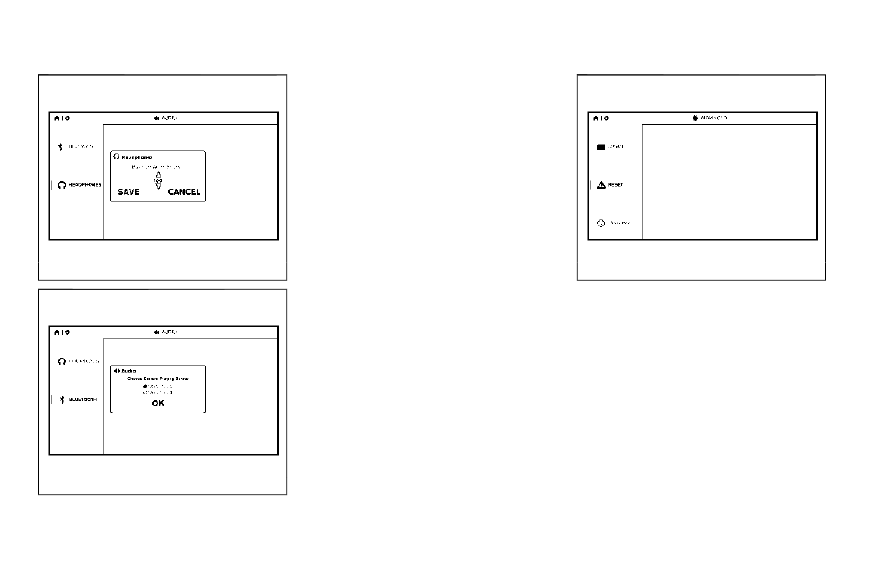
WAE0744X

WAE0745X

Audio settings

Headphones

For hearing protection, there is a maximum
volume setting to limit the audio output of
the front panel 3.5mm headphone output.
Select the desired maximum volume from 0 ~
100 and select Save to store the value.

Bluetooth Source

The RSI system can connect to the vehicle’s
audio system as a Bluetooth streaming
audio player. When Bluetooth

®

is enabled

and a connection is established to the
vehicle’s stereo system, choose the monitor
to be used as the source to stream audio
from. Select Monitor A to stream audio from
the Driver side monitor or select Monitor B
to stream audio from the Passenger side
monitor. Select "OK" to confirm and store
the desired monitor.

NOTE:

.

When monitor A is selected as the source

to stream from, the audio output to the
wireless and wired headphones will be
disabled (only on monitor A).

.

To use the wireless or wired headphones

with monitor A, you must turn off the
Bluetooth

®

streaming feature. For ad-

ditional information, see “Bluetooth

®

streaming” (P.4-66).

WAE0746X

Advanced settings

Language

The system language used for the GUI
(Graphic User Interface) can be changed to
any of the following languages English,
Spanish, French, Arabic, Simplified Chinese,
Traditional Chinese, and Hebrew. To change
the language, highlight and select the cur-
rent language and a drop-down list will
appear containing the available languages.
Choose the desired language and select
"Save" to display the confirmation dialog
box. Select "Yes" to confirm and reboot the
RSI system.

CarManuals2.com

-------------------------------------------------------------------------------------------------------------------------------------------------------------

Reset

A master reset will return the RSI system
settings to the factory defaults. Any user
options and customization will be lost and
reset back to factory default settings. To
reset the system, select "Yes" when the
dialog confirmation box appears.

Update

Displays the current software version infor-
mation. Select "Update" to begin a software
update (reserved for future use).

WAE0747X

Customize settings

Background

Customize the RSI system by changing the
background image of the main menu screen
on each monitor. Select a source to load the
image from. Options include USB, SD card,
or Local (internal memory).
Select a source then navigate the content
and select the new background image.
Choose the desired image and display the
confirmation dialog box. Select "Yes" to
confirm. Press

to view the new back-

ground image.

NOTE:

.

Each monitor can have its own back-

ground image.

.

The Local source stores the 10 most

recent background images.

.

To restore the default background im-

age, perform a factory reset. For addi-
tional information, see “Advanced
settings” (P.4-64).

Monitor, climate, audio, phone and voice recognition systems

4-65

CarManuals2.com

-------------------------------------------------------------------------------------------------------------------------------------------------------------

4-66

Monitor, climate, audio, phone and voice recognition systems

WAE0748X

Bluetooth

®

streaming

To access “BLUETOOTH” from the home
screen, use the directional pad on the remote
and navigate to “SETTINGS” then “BLUE-
TOOTH”. Status button indicates if the
Bluetooth

®

is enabled when green or dis-

abled when red. Highlight and press

to

enable or disable Bluetooth

®

.

Once enabled, the RSI will automatically
search for available devices in pairing mode.
Using the directional pad on the remote,
select "Device name" then “Connect” to pair.
Input the PIN from connecting device (if
prompted). Device name will display "Con-
nected" once paired properly. Select “OK” to
confirm changes and close the window. To

unpair a Bluetooth

®

device, select Device

name then Unpair.
If the device is not listed, select Refresh
Symbol and the device will appear in Avail-
able device list. If device does not appear,
double check that the device is in pairing
mode (refer to the device’s manual for
instructions).
Bluetooth

®

equipped vehicles can stream

audio from the display through vehicle’s
sound system once paired. For additional
information, refer to the separate INFINITI
InTouch

®

Owner’s Manual.

WAE0729X

Lip-Sync adjustment

Lip-Sync adjustments can be accessed by
pressing

on the remote, then selecting

“BLUETOOTH”. Highlight the numerical va-
lue and press

. Use the directional pad to

synchronize video and audio playback due to
small delay inherent in some Bluetooth

®

devices. Press

to set value. Highlight

save and press

to exit.

To select which Monitor will stream Blue-
tooth

®

, using the directional pad on the

remote select “SETTINGS: then “AUDIO”
then “BLUETOOTH” from the home screen.
Highlight “MONITOR A” or “MONITOR B”
and press

. Selecting Monitor A or B to

stream Bluetooth

®

can also be achieved by

CarManuals2.com

-------------------------------------------------------------------------------------------------------------------------------------------------------------

pressing

while video is playing.

Press

then “BLUETOOTH”, then “SE-

LECT”. Highlight “MONITOR A”, “OFF”, or
“MONITOR B”. Highlight “SAVE” and press

to set configuration and close the

window.

Monitor, climate, audio, phone and voice recognition systems

4-67

CarManuals2.com

-------------------------------------------------------------------------------------------------------------------------------------------------------------

4-68

Monitor, climate, audio, phone and voice recognition systems

TROUBLESHOOTING

Symptom

Remedy

Monitor does not power on

Verify the vehicle is in the ON or ACC position.

Verify the battery is installed correctly in the remote control.

Verify the in-line fuse protection is good. Refer to the RSI system installation instructions for vehicle-specific
fuse location.

Monitor front panel controls flash red

For further diagnosis, it is recommended that you visit an INFINITI retailer.

System frozen - will not respond

Soft reset the system by pressing and holding the power button on the top of the driver side monitor for 5
seconds.

Hard reset the system by turning the ignition off, then back on.

No picture

Check that the signal source is connected.

Check the menu source setting. Match your monitor mode with the source correctly.

No sound or distorted sound

Make sure that the external media device is connected properly, and all cables are securely inserted into the
appropriate jacks.

Verify that the batteries in the headphones are fresh.

If you are using the wireless headphones, make sure you turn on the power and select the correct monitor (A or
B).

Verify the volume is turned up on headphones and the system.

Verify nothing is blocking the path between the monitor IR sensor and headphones.

When placing the headphones on your head, make sure to observe the Left and Right orientation. The
headphones must be oriented correctly (facing forward) to receive the audio signal.

Monitor feels warm

When the monitor is in use for a long period of time, the surface will be warm. This is normal.

Cannot connect mobile device to the internal
RSI Wi-Fi network

Check to make sure Wi-Fi is enabled on the mobile device.

Check to make sure RSI is set to Access Point mode.

Check to make sure the correct password is used. For additional information, see “Using Wi-Fi” (P.4-61).

Cannot connect RSI system to an external Wi-
Fi network

Check to make sure RSI is set to Client Mode. Check to make sure the correct password is used. For additional
information, see “Using Wi-Fi” (P.4-61).

CarManuals2.com

-------------------------------------------------------------------------------------------------------------------------------------------------------------

Symptom

Remedy

Cannot establish a Bluetooth

®

connection

Check to make sure Bluetooth

®

is enabled on the RSI system. For additional information, see “Bluetooth

®

streaming” (P.4-66).

Cannot establish a Miracast

®

connection to

the RSI system

Check to make sure mobile device supports Miracast

®

. Visit www.wi-fi.org for a current list of Miracast

®

certified devices.

Check to make sure Miracast

®

is enabled on the mobile device.

Select Miracast

®

source from the RSI main menu.

Cannot play certain files from USB or SD cards

Audio/video files embedded with DRM are not compatible.

Some USB storage devices and SD cards may not be compatible. Replace the external storage device (USB,
SD).

Due to ongoing technological advancements, some USB flash drives and SD cards may be incompatible with
this system.

Cannot connect to external Singbox

®

Check to make sure RSI is set to Client Mode. For additional information, see “Using Wi-Fi” (P.4-61).

Check network upload speed from your home (or wherever the Singbox

®

is located).

Confirm hotspot or Wi-Fi download speed/connection quality.

Check that your Singbox

®

is properly set up.

Cannot share content from a mobile device to
the RSI system

A compatible UPnP app is required to be installed on the mobile device.

Audio/video files embedded with DRM cannot be streamed to the RSI system.
A compatible HDMI converter cable is necessary for iOS connections. When using Apple products, official
Apple HDMI converter cables may create the best functionality for iOS connection. INFINITI does not warrant
the function or reliability of any specific brand of HDMI converter cable.

Cannot share content between mobile devices
using the internal Wi-Fi network

Check to make sure Wi-Fi is enabled on the mobile device.

Check to make sure RSI is set to Access Point mode. For additional information, see “Using Wi-Fi” (P.4-61).

Monitor, climate, audio, phone and voice recognition systems

4-69

CarManuals2.com

-------------------------------------------------------------------------------------------------------------------------------------------------------------

4-70

Monitor, climate, audio, phone and voice recognition systems

SPECIFICATIONS

LCD Backlight Type

LED

Display Type

8.0 inch (Diagonal) a-Si TFT Active Matrix, 1024 x 3 (RGB) x 600 resolution

Frequency Response

3.5mm Audio Output: 200Hz ~ 16kHz +/- 6dB

HDMI Support

Version 1.4b, HDCP 2.1 Compliant

MHL Support

Version 2.0, 900mA Maximum Charging Output

Wireless Audio

2-Channel Stereo Headphone Operation, (Typical Infrared Reception/Range: 0.9m; 80°, 1.8m; 50°)

Wi-Fi Network

802.11b/g/n, TX/RX Frequency: 2412 MHz - 2484 MHz, Antenna 1: 802.11b, 802.11g, 802.11n HT20,

802.11n HT40, MIMO Antenna 1+2: 802.11n HT20

Wi-Fi Modulation

802.11b: DSSS (DBPSK / DQPSK / CCK), 802.11g/n: OFDM (BPSK / QPSK / 16QAM / 64QAM)

Bluetooth

®

Support

Version 4.1

Bluetooth

®

BR/EDR

TX/RX Frequency: 2402 MHz - 2480 MHz, Channels: 79, Bluetooth BR (1Mbps): GFSK Modulation,

Bluetooth EDR (2Mbps): π/4-DQPSK Modulation, Bluetooth EDR (3Mbps): 8-DPSK Modulation

Bluetooth

®

LE

TX/RX Frequency: 2402 MHz - 2480 MHz, Channels: 40, Carrier Frequency of Each Channel:, (37 hopping +

3 Advertising channel), Type of Modulation: Bluetooth LE: GFSK

USB Support

Version 1.1, Version 2.0 High Speed, 10 watt (2 Amp) Maximum Charging Output

SD Card Support

SD, SDHC, SDXC

CarManuals2.com

-------------------------------------------------------------------------------------------------------------------------------------------------------------

COMPLIANCE INFORMATION

FCC Notice

This device complies with Part 15 of FCC
Rules and Industry Canada license-exempt
RSS standard(s). Operation is subject to the
following two conditions: (1) this device may
not cause interference, and (2) this device
must accept any interference, including
interference that may cause undesired op-
eration of this device.
This transmitter must not be co-located or
operated in conjunction with any other
antenna or transmitter. The Bluetooth

®

antenna cannot be removed (or replaced)
by user.
Alteration or modifications carried out with-
out appropriate authorization may invali-
date the user’s right to operate the
equipment.
This equipment has been tested and found
to comply with the limits for a Class B digital
device, pursuant to Part 15 of the FCC
Rules. These limits are designed to provide
reasonable protection against harmful inter-
ference in a residential installation. This
equipment generates, uses and can radiate
radio frequency energy and, if not installed
and used in accordance with the instruc-
tions, may cause harmful interference to
radio communications. However, there is no

guarantee that interference will not occur in
a particular installation. If this equipment
does cause harmful interference to radio or
television reception, which can be deter-
mined by turning the equipment off and on,
the user is encouraged to try to correct the
interference by one or more of the following
measures:

.

Reorient or relocate the receiving anten-

na.

.

Increase the separation between the

equipment and receiver.

.

Connect the equipment into an outlet on

a circuit different from that to which the
receiver is connected.

.

Consult the dealer or an experienced

radio/ TV technician for help.

WAE0752X

Bluetooth

®

The Bluetooth

®

word mark and logos are

registered trademarks owned by the Blue-
tooth SIG, Inc. and any use of such marks by
Voxx Automotive Corporation is under
license. Other trademarks and trade names
are those of their respective owners.

AAC

AAC is short for Advanced Audio Coding
and refers to an audio compression technol-
ogy standard used with MPEG-2 and
MPEG-4. Several applications can be used
to encode AAC files, but file formats and
extensions differ depending on the applica-
tion which is used to encode.

Monitor, climate, audio, phone and voice recognition systems

4-71

CarManuals2.com

-------------------------------------------------------------------------------------------------------------------------------------------------------------

4-72

Monitor, climate, audio, phone and voice recognition systems

FLAC

Copyright © 2000-2009 Josh Coalson
Copyright © 2011-2013 Xiph.Org Founda-
tion
Redistribution and use in source and binary
forms, with or without modification, are
permitted provided that the following con-
ditions are met:
Redistributions of source code must retain
the above copyright notice, this list of
conditions and the following disclaimer.
Redistributions in binary form must repro-
duce the above copyright notice, this list of
conditions and the following disclaimer in
the documentation and/or other materials
provided with the distribution.
Neither the name of the Xiph.org Founda-
tion nor the names of its contributors may be
used to endorse or promote products de-
rived from this software without specific
prior written permission.
THIS SOFTWARE IS PROVIDED BY THE
COPYRIGHT HOLDERS AND CONTRIBU-
TORS “AS IS” AND ANY EXPRESS OR
IMPLIED WARRANTIES, INCLUDING,
BUT NOT LIMITED TO, THE IMPLIED
WARRANTIES OF MERCHANTABILITY
AND FITNESS FOR A PARTICULAR PUR-
POSE ARE DISCLAIMED. IN NO EVENT
SHALL THE FOUNDATION OR CONTRI-

BUTORS BE LIABLE FOR ANY DIRECT,
INDIRECT, INCIDENTAL, SPECIAL, EX-
EMPLARY, OR CONSEQUENTIAL DA-
MAGES (INCLUDING, BUT NOT LIMITED
TO, PROCUREMENT OF SUBSTITUTE
GOODS OR SERVICES; LOSS OF USE,
DATA, OR PROFITS; OR BUSINESS IN-
TERRUPTION) HOWEVER CAUSED AND
O N A N Y T H E O R Y O F L I A B I L I T Y ,
WHETHER IN CONTRACT, STRICT LIABI-
LITY, OR TORT (INCLUDING NEGLI-
GENCE OR OTHERWISE) ARISING IN
ANY WAY OUT OF THE USE OF THIS
SOFTWARE, EVEN IF ADVISED OF THE
POSSIBILITY OF SUCH DAMAGE.

WMA/WMV

Windows Media is either a registered trade-
mark or trademark of Microsoft Corporation
in the United States and/or other countries.
This product includes technology owned by
Microsoft Corporation and cannot be used
or distributed without a license from Micro-
soft Licensing, Inc.

SD/SDHC/SDXC

SD, SDHC and SDXC Logos are trademarks
or registered trademarks of SD-3C LLC in
the United States, other countries or both.

WAE0753X

HDMI

The terms HDMI and HDMI High-Definition
Multimedia Interface, and the HDMI Logo
are trademarks or registered trademarks of
HDMI Licensing, LLC in the United States
and other countries.

MHL

MHL, the MHL Logo, and Mobile High-
Definition Link are trademarks or registered
trademarks of MHL, LLC in the United
States and other countries.

CarManuals2.com

-------------------------------------------------------------------------------------------------------------------------------------------------------------

WAE0754X

Dolby Digital

This product will down-mix Dolby Digital
signals internally and the sound will be
output in stereo. Manufactured under li-
cense from Dolby Laboratories. Dolby and
the double-D symbol are trademarks of
Dolby Laboratories.

European Waste Electrical and
Electronic Equipment (WEEE) No-
tice

In accordance with Directive 2012/19/EU
of the European Parliament on waste elec-
trical and electronic equipment (WEEE):

WAE0755X

The symbol above indicates that separate
collection of electrical and electronic equip-
ment is required. When this product has
reached the end of its serviceable life, it
cannot be disposed of as unsorted municipal
waste. It must be collected and treated
separately. It has been determined by the
European Parliament that there are poten-
tial negative effects on the environment and
human health as a result of the presence of
hazardous substances in electrical and elec-
tronic equipment. It is the users‘ responsi-
bility to utilize the available collection system
to ensure WEEE is properly treated.
All other trademarks and their respective
logos cited herein are the property of their
respective owners.

Monitor, climate, audio, phone and voice recognition systems

4-73

CarManuals2.com

-------------------------------------------------------------------------------------------------------------------------------------------------------------

4-74

Monitor, climate, audio, phone and voice recognition systems

MEMO

CarManuals2.com

-------------------------------------------------------------------------------------------------------------------------------------------------------------

5 Starting and driving

Precautions when starting and driving ...................... 5-4

Exhaust gas (carbon monoxide) .............................. 5-4
Three-way catalyst ..................................................... 5-4
Tire Pressure Monitoring System (TPMS) ........... 5-5
Avoiding collision and rollover ................................. 5-8
On-pavement and off-road
driving precautions ..................................................... 5-8
Off-road recovery ....................................................... 5-9
Rapid air pressure loss ............................................... 5-9
About lowering of the rear of the vehicle ......... 5-10
Drinking alcohol/drugs and driving ..................... 5-10
Driving safety precautions ..................................... 5-10

Push-button ignition switch ........................................ 5-12

Operating range for engine start function ........ 5-12
Push-button ignition switch positions ................ 5-13
Emergency engine shut off .................................... 5-14
Intelligent Key battery discharge .......................... 5-14

Before starting the engine ........................................... 5-15
Starting the engine ......................................................... 5-15

Remote start (if so equipped) ................................ 5-16

Driving the vehicle .......................................................... 5-17

Engine protection mode .......................................... 5-17
Automatic transmission ........................................... 5-18

Parking brake ................................................................... 5-22

Lane Departure Warning (LDW) ............................... 5-22

LDW system operation ......................................... 5-24
How to enable/disable the LDW system ........ 5-24
LDW system limitations ........................................ 5-25
System temporarily unavailable .......................... 5-26
System malfunction ................................................ 5-26
System maintenance .............................................. 5-27

Lane Departure Prevention (LDP) (if
so equipped) .................................................................... 5-27

LDP system operation ........................................... 5-29
How to enable/disable the LDP system ......... 5-30
LDP system limitations ........................................ 5-30
System temporarily unavailable .......................... 5-32
System malfunction ................................................ 5-33
System maintenance .............................................. 5-33

Blind Spot Warning (BSW) ......................................... 5-34

BSW system operation .......................................... 5-35
How to enable/disable the BSW system ......... 5-36
BSW system limitations ........................................ 5-36
BSW driving situations .......................................... 5-37
System temporarily unavailable ......................... 5-40
System malfunction ............................................... 5-40
System maintenance .............................................. 5-41

CarManuals2.com

-------------------------------------------------------------------------------------------------------------------------------------------------------------

Blind Spot Intervention

®

(BSI) (if so equipped) ...... 5-42

BSI system operation ............................................... 5-43
How to enable/disable the BSI system .............. 5-45
BSI system limitations ............................................. 5-45
BSI driving situations ............................................... 5-47
System temporarily unavailable ............................ 5-51
System malfunction .................................................. 5-51
System maintenance ................................................ 5-51

Back-up Collision Intervention (BCI) ......................... 5-53

BCI system operation .............................................. 5-55
How to enable/disable the BCI system ............. 5-58
BCI system precautions ........................................... 5-59
System temporarily unavailable ............................ 5-61
System malfunction .................................................. 5-61
System maintenance ................................................ 5-61

Cruise control (if so equipped) .................................... 5-62

Precautions on cruise control ................................ 5-62
Cruise control operations ....................................... 5-63

Intelligent Cruise Control (ICC) (if so equipped) ..... 5-64

How to select the cruise control mode ............... 5-66
Vehicle-to-vehicle distance control mode ......... 5-66
Conventional (fixed speed) cruise
control mode .............................................................. 5-81

Distance Control Assist (DCA) (if so equipped) ..... 5-85

DCA system operation ........................................... 5-87
How to enable/disable the DCA system .......... 5-90
DCA system display and indicators ..................... 5-91
DCA system limitations ........................................... 5-91

System temporarily unavailable .......................... 5-93
System malfunction ................................................ 5-94
System maintenance .............................................. 5-94

Forward Emergency Braking (FEB) with
Pedestrian Detection system ...................................... 5-95

FEB with Pedestrian Detection
system operation ..................................................... 5-96
Turning the FEB with Pedestrian Detection
system ON/OFF ..................................................... 5-98
FEB with Pedestrian Detection
system limitations ................................................... 5-98
System temporarily unavailable ....................... 5-102
System malfunction ............................................. 5-103
System maintenance ........................................... 5-103

Predictive Forward Collision Warning
(PFCW) .......................................................................... 5-104

PFCW system operation .................................... 5-106
Turning the PFCW system ON/OFF ............. 5-107
PFCW system limitations .................................. 5-109
System temporarily unavailable ....................... 5-110
System malfunction .............................................. 5-111
System maintenance ............................................ 5-111

Driver Attention Alert (DAA) .................................... 5-112

DAA system operation ........................................ 5-113
How to enable/disable the DAA system ....... 5-113
DAA system limitations ....................................... 5-114
System malfunction .............................................. 5-114

Break-in schedule ......................................................... 5-114
Fuel efficient driving tips ........................................... 5-115

CarManuals2.com

-------------------------------------------------------------------------------------------------------------------------------------------------------------

Increasing fuel economy ............................................. 5-116
INFINITI all-mode 4WD

®

(if so equipped) ............ 5-116

INFINITI all-mode 4WD

®

system ....................... 5-117

4WD shift switch ................................................... 5-120
4WD shift indicator ................................................ 5-121
4WD warning light ................................................. 5-121

Hill Start Assist system ............................................... 5-123
Parking/parking on hills ............................................. 5-124
TOW mode ..................................................................... 5-125
SNOW mode .................................................................. 5-125
Front and rear sonar system ..................................... 5-126

System operation .................................................... 5-127
Sonar function settings ........................................ 5-128
Turning on and off the sonar function ............ 5-130
Sonar limitations ..................................................... 5-131
System temporarily unavailable .......................... 5-132
System maintenance .............................................. 5-132

Power steering .............................................................. 5-132

Brake system ................................................................. 5-133

Braking precautions .............................................. 5-133
Parking brake break-in ........................................ 5-133

Brake assist ................................................................... 5-134

Brake assist ............................................................ 5-134
Anti-lock Braking System (ABS) ...................... 5-134

Vehicle Dynamic Control (VDC) system ................ 5-135

Vehicle Dynamic Control (VDC)
OFF switch ............................................................. 5-137

Cold weather driving ................................................... 5-137

Freeing a frozen door lock ................................. 5-137
Antifreeze ................................................................ 5-137
Battery ..................................................................... 5-137
Draining of coolant water .................................. 5-137
Tire equipment ...................................................... 5-138
Special winter equipment .................................. 5-138
Driving on snow or ice ........................................ 5-138
Engine block heater (if so equipped) .............. 5-138

CarManuals2.com

-------------------------------------------------------------------------------------------------------------------------------------------------------------

5-4

Starting and driving

WARNING

.

Do not leave children or adults who
would normally require the support
of others alone in your vehicle. Pets
should not be left alone either. They
could accidentally injure themselves
or others through inadvertent opera-
tion of the vehicle. Also, on hot,
sunny days, temperatures in a closed
vehicle could quickly become high
enough to cause severe or possibly
fatal injuries to people or animals.

.

Properly secure all cargo to help
prevent it from sliding or shifting.
Do not place cargo higher than the
seatbacks. In a sudden stop or colli-
sion, unsecured cargo could cause
personal injury.

EXHAUST GAS (carbon monoxide)

WARNING

.

Do not breathe exhaust gases; they
contain colorless and odorless carbon
monoxide. Carbon monoxide is dan-
gerous. It can cause unconsciousness
or death.

.

If you suspect that exhaust fumes are
entering the vehicle, drive with all
windows fully open, and have the
vehicle inspected immediately.

.

Do not run the engine in closed spaces
such as a garage.

.

Do not park the vehicle with the
engine running for any extended
length of time.

.

Keep the liftgate closed while driving,
otherwise exhaust gases could be
drawn into the passenger compart-
ment. If you must drive with the
liftgate open, follow these precau-
tions:

1) Open all the windows.

2) Set the

air recirculation to

off and the fan control to high to
circulate the air.

.

If electrical wiring or other cable
connections must pass to a trailer
through the seal on the liftgate or the
body, follow the manufacturer’s re-
commendation to prevent carbon
monoxide entry into the vehicle.

.

The exhaust system and body should
be inspected by a qualified mechanic
whenever:

— The vehicle is raised for service.

— You suspect that exhaust fumes

are entering into the passenger
compartment.

— You notice a change in the sound

of the exhaust system.

— You have had an accident invol-

ving damage to the exhaust sys-
tem, underbody, or rear of the
vehicle.

THREE-WAY CATALYST

The three-way catalyst is an emission con-
trol device installed in the exhaust system.
Exhaust gases in the three-way catalyst are
burned at high temperatures to help reduce
pollutants.

WARNING

.

The exhaust gas and the exhaust
system are very hot. Keep people,
animals or flammable materials away
from the exhaust system compo-
nents.

.

Do not stop or park the vehicle over
flammable materials such as dry
grass, waste paper or rags. They
may ignite and cause a fire.

PRECAUTIONS WHEN STARTING
AND DRIVING

CarManuals2.com

-------------------------------------------------------------------------------------------------------------------------------------------------------------

CAUTION

.

Do not use leaded gasoline. Deposits
from leaded gasoline seriously reduce
the three-way catalyst’s ability to
help reduce exhaust pollutants.

.

Keep your engine tuned up. Malfunc-
tions in the ignition, fuel injection, or
electrical systems can cause overrich
fuel flow into the three-way catalyst,
causing it to overheat. Do not keep
driving if the engine misfires, or if
noticeable loss of performance or
other unusual operating conditions
are detected. Have the vehicle in-
spected promptly. It is recommended
you visit an INFINITI retailer for this
service.

.

Avoid driving with an extremely low
fuel level. Running out of fuel could
cause the engine to misfire, damaging
the three-way catalyst.

.

Do not race the engine while warming
it up.

.

Do not push or tow your vehicle to
start the engine.

TIRE PRESSURE MONITORING
SYSTEM (TPMS)

Each tire, including the spare (if provided),
should be checked monthly when cold and
inflated to the inflation pressure recom-
mended by the vehicle manufacturer on the
vehicle placard or tire inflation pressure
label. (If your vehicle has tires of a different
size than the size indicated on the vehicle
placard or tire inflation pressure label, you
should determine the proper tire inflation
pressure for those tires.)
As an added safety feature, your vehicle has
been equipped with a Tire Pressure Mon-
itoring System (TPMS) that illuminates a low
tire pressure telltale when one or more of
your tires is significantly under-inflated.
Accordingly, when the low tire pressure
telltale illuminates, you should stop and
check your tires as soon as possible, and
inflate them to the proper pressure. Driving
on a significantly under-inflated tire causes
the tire to overheat and can lead to tire
failure. Under-inflation also reduces fuel
efficiency and tire tread life, and may affect
the vehicle’s handling and stopping ability.
Please note that the TPMS is not a sub-
stitute for proper tire maintenance, and it is
the driver’s responsibility to maintain correct
tire pressure, even if under-inflation has not
reached the level to trigger illumination of

the TPMS low tire pressure telltale.
Your vehicle has also been equipped with a
TPMS malfunction indicator to indicate
when the system is not operating properly.
The TPMS malfunction indicator is com-
bined with the low tire pressure telltale.
When the system detects a malfunction, the
telltale will flash for approximately one
minute and then remain continuously illumi-
nated. This sequence will continue upon
subsequent vehicle start-ups as long as the
malfunction exists. When the malfunction
indicator is illuminated, the system may not
be able to detect or signal low tire pressure
as intended. TPMS malfunctions may occur
for a variety of reasons, including the
installation of replacement or alternate tires
or wheels on the vehicle that prevent the
TPMS from functioning properly. Always
check the TPMS malfunction telltale after
replacing one or more tires or wheels on your
vehicle to ensure that the replacement or
alternate tires and wheels allow the TPMS
to continue to function properly.

Additional information

.

Since the spare tire is not equipped with

the TPMS, the TPMS does not monitor
the tire pressure of the spare tire.

.

The TPMS will activate only when the

vehicle is driven at speeds above 16
MPH (25 km/h). Also, this system may

Starting and driving

5-5

CarManuals2.com

-------------------------------------------------------------------------------------------------------------------------------------------------------------

5-6

Starting and driving

not detect a sudden drop in tire pressure
(for example, a flat tire while driving).

.

The low tire pressure warning light does

not automatically turn off when the tire
pressure is adjusted. After the tire is
inflated to the recommended pressure,
the vehicle must be driven at speeds
above 16 MPH (25 km/h) to activate the
TPMS and turn off the low tire pressure
warning light. Use a tire pressure gauge
to check the tire pressure.

.

The “Tire Pressure Low Add Air” warning

appears in the vehicle information dis-
play when the low tire pressure warning
light is illuminated and low tire pressure
is detected. The “Tire Pressure Low Add
Air” warning turns off when the low tire
pressure warning light turns off.
The “Tire Pressure Low Add Air” warning
appears each time the ignition switch is
placed in the ON position as long as the
low tire pressure warning light remains
illuminated.
The “Tire Pressure Low Add Air” warning
does not appear if the low tire pressure
warning light illuminates to indicate a
TPMS malfunction.

.

Tire pressure rises and falls depending on

the heat caused by the vehicle’s opera-
tion and the outside temperature. Do not
reduce the tire pressure after driving
because the tire pressure rises after

driving. Low outside temperature can
lower the temperature of the air inside
the tire which can cause a lower tire
inflation pressure. This may cause the
low tire pressure warning light to illumi-
nate. If the warning light illuminates in
low ambient temperature, check the tire
pressure for all four tires.

.

You can also check the pressure of all

tires (except the spare tire) on the vehicle
information display. (See “10. Tire pres-
sures” (P.2-36).)

For additional information, see “Low tire
pressure warning light” (P.2-16) and “Tire
Pressure Monitoring System (TPMS) ” (P.6-
3).

WARNING

.

If the low tire pressure warning light
illuminates while driving, avoid sud-
den steering maneuvers or abrupt
braking, reduce vehicle speed, pull
off the road to a safe location and
stop the vehicle as soon as possible.
Driving with under-inflated tires may
permanently damage the tires and
increase the likelihood of tire failure.
Serious vehicle damage could occur
and may lead to an accident and
could result in serious personal injury.

Check the tire pressure for all four
tires. Adjust the tire pressure to the
recommended COLD tire pressure
shown on the Tire and Loading
Information label to turn the low tire
pressure warning light OFF. If the
light still illuminates while driving
after adjusting the tire pressure, a
tire may be flat or the TPMS may be
malfunctioning. If you have a flat tire,
replace it with a spare tire as soon as
possible. If no tire is flat and all tires
are properly inflated, it is recom-
mended you consult an INFINITI
retailer.

.

Since the spare tire is not equipped
with the TPMS, when a spare tire is
mounted or a wheel is replaced, the
TPMS will not function and the low
tire pressure warning light will flash
for approximately 1 minute. The light
will remain on after 1 minute. Have
your tires replaced and/or TPMS
system reset as soon as possible. It
is recommended you visit an INFINITI
retailer for these services.

.

Replacing tires with those not origin-
ally specified by INFINITI could affect
the proper operation of the TPMS.

.

Do not inject any tire liquid or aerosol
tire sealant into the tires, as this may

CarManuals2.com

-------------------------------------------------------------------------------------------------------------------------------------------------------------

cause a malfunction of the tire pres-
sure sensors.

CAUTION

.

The TPMS may not function properly
when the wheels are equipped with
tire chains or the wheels are buried in
snow.

.

Do not place metalized film or any
metal parts (antenna, etc.) on the
windows. This may cause poor recep-
tion of the signals from the tire
pressure sensors, and the TPMS will
not function properly.

Some devices and transmitters may tem-
porarily interfere with the operation of the
TPMS and cause the low tire pressure
warning light to illuminate. Some examples
are:

.

Facilities or electric devices using similar

radio frequencies are near the vehicle.

.

If a transmitter set to similar frequencies

is being used in or near the vehicle.

.

If a computer (or similar equipment) or a

DC/AC converter is being used in or near
the vehicle.

Low tire pressure warning light may illumi-

nate in the following cases.

.

If the vehicle is equipped with a wheel

and tire without TPMS.

.

If the TPMS has been replaced and the ID

has not been registered.

.

If the wheel is not originally specified by

INFINITI.

FCC Notice:

For USA:

This device complies with Part 15 of the
FCC Rules. Operation is subject to the
following two conditions: (1) This device
may not cause harmful interference, and (2)
this device must accept any interference
received, including interference that may
cause undesired operation.

Note: Changes or modifications not ex-
pressly approved by the party responsible
for compliance could void the user’s author-
ity to operate the equipment.

For Canada:

This device contains licence-exempt trans-
mitter(s)/receiver(s) that comply with In-
n o v a t i o n , S c i e n c e a n d E c o n o m i c
Development Canada’s licence-exempt
RSS(s). Operation is subject to the follow-
ing two conditions: (1) This device may not
cause interference. (2) This device must
accept any interference, including interfer-
ence that may cause undesired operation of

the device.

TPMS with Tire Inflation Indicator

When adding air to an under-inflated tire,
the TPMS with Tire Inflation Indicator
provides visual and audible signals outside
the vehicle to help you inflate the tires to the
recommended COLD tire pressure.

Vehicle set-up:

1. Park the vehicle in a safe and level place.
2. Apply the parking brake and place the

shift lever in the P (Park) position.

3. Place the ignition switch in the ON

position. Do not start the engine.

Operation:

1. Add air to the tire.
2. After a few seconds, the hazard indica-

tors will start flashing.

3. When the designated pressure is

reached, the horn beeps once and the
hazard indicators stop flashing.

4. Perform the above steps for each tire.

.

If the tire is over-inflated more than

approximately 4 psi (30 kPa), the horn
beeps and the hazard indicators flash 3
times. To correct the pressure, push the
core of the valve stem on the tire briefly
to release pressure. When the pressure
reaches the designated pressure, the

Starting and driving

5-7

CarManuals2.com

-------------------------------------------------------------------------------------------------------------------------------------------------------------

5-8

Starting and driving

horn beeps once.

.

If the hazard indicator does not flash

within approximately 15 seconds after
starting to inflate the tire, it indicates
that the Tire Inflation Indicator is not
operating.

.

The TPMS will not activate the Tire

Inflation Indicator under the following
conditions:
— If there is interference from an ex-

ternal device or transmitter

— The air pressure from the inflation

device such as those using a power
socket is not sufficient to inflate the
tire

— If an electrical equipment is being used

in or near the vehicle

— There is a malfunction in the TPMS

system

— There is a malfunction in the horn or

hazard indicators

.

If the Tire Inflation Indicator does not

operate due to TPMS interference, move
the vehicle about 3 ft (1m) backward or
forward and try again.

If the Tire Inflation Indicator is not working,
use a tire pressure gauge.

AVOIDING COLLISION AND
ROLLOVER

WARNING

Failure to operate this vehicle in a safe
and prudent manner may result in loss of
control or an accident.

Be alert and drive defensively at all times.
Obey all traffic regulations. Avoid excessive
speed, high speed cornering, or sudden
steering maneuvers, because these driving
practices could cause you to lose control of
your vehicle.

As with any vehicle, a loss of

control could result in a collision with other
vehicles or objects, or cause the vehicle to
rollover, particularly if the loss of control
causes the vehicle to slide sideways.

Be

attentive at all times, and avoid driving when
tired. Never drive when under the influence
of alcohol or drugs (including prescription or
over-the-counter drugs which may cause
drowsiness). Always wear your seat belt as
outlined in the “Seat belts” (P.1-18), and also
instruct your passengers to do so.
Seat belts help reduce the risk of injury in
collisions and rollovers.

In a rollover crash,

an unbelted or improperly belted person is
significantly more likely to be injured or

killed than a person properly wearing a seat
belt.

ON-PAVEMENT AND OFF-ROAD
DRIVING PRECAUTIONS

Utility vehicles have a significantly higher
rollover rate than other types of vehicles.

They have higher ground clearance than
passenger cars to make them capable of
performing in a variety of on-pavement and
off-road applications. This gives them a
higher center of gravity than ordinary cars.
An advantage of higher ground clearance is
a better view of the road, allowing you to
anticipate problems. However, they are not
designed for cornering at the same speeds as
conventional passenger cars any more than
low-slung sports cars are designed to per-
form satisfactorily under off-road condi-
tions. If at all possible, avoid sharp turns or
abrupt maneuvers, particularly at high
speeds. As with other vehicles of this type,
failure to operate this vehicle correctly may
result in loss of control or vehicle rollover.
Seat belts help reduce the risk of injury in
collisions and rollovers. In a rollover crash, an
unbelted or improperly belted person is
significantly more likely to be injured or killed
than a person properly wearing a seat belt.
Be sure to read “Driving safety precautions”
(P.5-10).

CarManuals2.com

-------------------------------------------------------------------------------------------------------------------------------------------------------------

OFF-ROAD RECOVERY

While driving, the right side or left side
wheels may unintentionally leave the road
surface. If this occurs, maintain control of
the vehicle by following the procedure
below. Please note that this procedure is
only a general guide. The vehicle must be
driven as appropriate based on the condi-
tions of the vehicle, road and traffic.
1. Remain calm and do not overreact.
2. Do not apply the brakes.
3. Maintain a firm grip on the steering

wheel with both hands and try to hold
a straight course.

4. When appropriate, slowly release the

accelerator pedal to gradually slow the
vehicle.

5. If there is nothing in the way, steer the

vehicle to follow the road while the
vehicle speed is reduced. Do not attempt
to drive the vehicle back onto the road
surface until vehicle speed is reduced.

6. When it is safe to do so, gradually turn

the steering wheel until both tires return
to the road surface. When all tires are on
the road surface, steer the vehicle to stay
in the appropriate driving lane.

.

If you decide that it is not safe to

return the vehicle to the road surface
based on vehicle, road or traffic

conditions, gradually slow the vehicle
to a stop in a safe place off the road.

RAPID AIR PRESSURE LOSS

Rapid air pressure loss or a “blow-out” can
occur if the tire is punctured or is damaged
due to hitting a curb or pothole. Rapid air
pressure loss can also be caused by driving
on under-inflated tires.
Rapid air pressure loss can affect the
handling and stability of the vehicle, espe-
cially at highway speeds.
Help prevent rapid air pressure loss by
maintaining the correct air pressure and
visually inspect the tires for wear and
damage. See “Wheels and tires” (P.8-27).
If a tire rapidly loses air pressure or “blows-
out” while driving maintain control of the
vehicle by following the procedure below.
Please note that this procedure is only a
general guide. The vehicle must be driven as
appropriate based on the conditions of the
vehicle, road and traffic.

WARNING

The following actions can increase the
chance of losing control of the vehicle if
there is a sudden loss of tire air pressure.
Losing control of the vehicle may cause a

collision and result in personal injury.

.

The vehicle generally moves or pulls
in the direction of the flat tire.

.

Do not rapidly apply the brakes.

.

Do not rapidly release the accelerator
pedal.

.

Do not rapidly turn the steering
wheel.

1. Remain calm and do not overreact.
2. Maintain a firm grip on the steering

wheel with both hands and try to hold
a straight course.

3. When appropriate, slowly release the

accelerator pedal to gradually slow the
vehicle.

4. Gradually steer the vehicle to a safe

location off the road and away from
traffic if possible.

5. Lightly apply the brake pedal to gradu-

ally stop the vehicle.

6. Turn on the hazard warning flashers and

either contact a roadside emergency
service to change the tire or see “Chan-
ging a flat tire” (P.6-4).

Starting and driving

5-9

CarManuals2.com

-------------------------------------------------------------------------------------------------------------------------------------------------------------

5-10

Starting and driving

ABOUT LOWERING OF THE
REAR OF THE VEHICLE

If the loaded vehicle is not moved for a long
time, the vehicle rear body may be to lower.
But it is normal. Once the engine starts, It
will automatically adjust vehicle height.

DRINKING ALCOHOL/DRUGS
AND DRIVING

WARNING

Never drive under the influence of alco-
hol or drugs. Alcohol in the bloodstream
reduces coordination, delays reaction
time and impairs judgement. Driving
after drinking alcohol increases the like-
lihood of being involved in an accident
injuring yourself and others. Addition-
ally, if you are injured in an accident,
alcohol can increase the severity of the
injury.

INFINITI is committed to safe driving. How-
ever, you must choose not to drive under the
influence of alcohol. Every year thousands of
people are injured or killed in alcohol-related
accidents. Although the local laws vary on
what is considered to be legally intoxicated,
the fact is that alcohol affects all people

differently and most people underestimate
the effects of alcohol.
Remember, drinking and driving don’t mix!
And that is true for drugs, too (over-the-
counter, prescription, and illegal drugs).
Don’t drive if your ability to operate your
vehicle is impaired by alcohol, drugs, or some
other physical condition.

DRIVING SAFETY PRECAUTIONS

Your INFINITI is designed for both normal
and off-road use. However, avoid driving in
deep water or mud as your INFINITI is
mainly designed for leisure use, unlike a
conventional off-road vehicle.
Remember that Two-Wheel Drive (2WD)
models are less capable than Four-Wheel
Drive (4WD) models for rough road driving
and extrication when stuck in deep snow,
mud, or the like.
Please observe the following precautions:

WARNING

.

Drive carefully when off the road and
avoid dangerous areas. Every person
who drives or rides in this vehicle
should be seated with their seat belt
fastened. This will keep you and your
passengers in position when driving

over rough terrain.

.

Do not drive across steep slopes.
Instead drive either straight up or
straight down the slopes. Off-road
vehicles can tip over sideways much
more easily than they can forward or
backward.

.

Many hills are too steep for any
vehicle. If you drive up them, you
may stall. If you drive down them,
you may not be able to control your
speed. If you drive across them, you
may roll over.

.

Do not shift ranges while driving on
downhill grades as this could cause
loss of control of the vehicle.

.

Stay alert when driving to the top of
a hill. At the top there could be a
drop-off or other hazard that could
cause an accident.

.

If your engine stalls or you cannot
make it to the top of a steep hill,
never attempt to turn around. Your
vehicle could tip or roll over. Always
back straight down in R (Reverse)
range. Never back down in N (Neu-
tral), using only the brake, as this
could cause loss of control.

.

Heavy braking going down a hill
could cause your brakes to overheat

CarManuals2.com

-------------------------------------------------------------------------------------------------------------------------------------------------------------

and fade, resulting in loss of control
and an accident. Apply brakes lightly
and use a low range to control your
speed.

.

Unsecured cargo can be thrown
around when driving over rough
terrain. Properly secure all cargo so
it will not be thrown forward and
cause injury to you or your passen-
gers.

.

To avoid raising the center of gravity
excessively, do not exceed the rated
capacity of the roof rack (if so
equipped) and evenly distribute the
load. Secure heavy loads in the cargo
area as far forward and as low as
possible. Do not equip the vehicle
with tires larger than specified in this
manual. This could cause your vehicle
to roll over.

.

Do not grip the inside or spokes of the
steering wheel when driving off-
road. The steering wheel could move
suddenly and injure your hands. In-
stead drive with your fingers and
thumbs on the outside of the rim.

.

Before operating the vehicle, ensure
that the driver and all passengers
have their seat belts fastened.

.

Always drive with the floor mats in
place as the floor may became hot.

.

Lower your speed when encountering
strong crosswinds. With a higher
center of gravity, your INFINITI is
more affected by strong side winds.
Slower speeds ensure better vehicle
control.

.

Do not drive beyond the performance
capability of the tires, even with
4WD engaged.

.

For 4WD equipped vehicles, do not
attempt to raise two wheels off the
ground and shift the transmission to
any drive or reverse position with the
engine running. Doing so may result
in drivetrain damage or unexpected
vehicle movement which could result
in serious vehicle damage or personal
injury.

.

Do not attempt to test a 4WD
equipped vehicle on a 2-wheel dy-
namometer (such as the dynam-
ometers used by some states for
emissions testing), or similar equip-
ment even if the other two wheels are
raised off the ground. Make sure you
inform test facility personnel that
your vehicle is equipped with 4WD
before it is placed on a dynamometer.
Using the wrong test equipment may
result in drivetrain damage or unex-
pected vehicle movement which could

result in serious vehicle damage or
personal injury (4WD models).

.

When a wheel is off the ground due
to an unlevel surface, do not spin the
wheel excessively.

.

Accelerating quickly, sharp steering
maneuvers or sudden braking may
cause loss of control.

.

If at all possible, avoid sharp turning
maneuvers, particularly at high
speeds. Your vehicle has a higher
center of gravity than a conventional
passenger car. The vehicle is not
designed for cornering at the same
speeds as conventional passenger
cars. Failure to operate this vehicle
correctly could result in loss of con-
trol and/or a rollover accident.

.

Always use tires of the same type,
size, brand, construction (bias, bias-
belted or radial), and tread pattern
on all four wheels. Install tire chains
on the rear wheels when driving on
slippery roads and drive carefully.

.

Be sure to check the brakes immedi-
ately after driving in mud or water.
See “Brake system” (P.5-133) for
wet brakes.

.

Avoid parking your vehicle on steep
hills. If you get out of the vehicle and

Starting and driving

5-11

CarManuals2.com

-------------------------------------------------------------------------------------------------------------------------------------------------------------

5-12

Starting and driving

it rolls forward, backward or side-
ways, you could be injured.

.

W h e n e v e r y o u d r i v e o f f - r o a d
through sand, mud or water as deep
as the wheel hub, more frequent
maintenance may be required. See
the maintenance schedules shown in
the "9. Maintenance and schedules"
section.

.

Spinning the rear wheels on slippery
surfaces may cause the 4WD warn-
ing light to flash. The 4WD system
may also automatically switch from
the 4WD mode to the 2WD mode.
This could reduce traction. Be espe-
cially careful when towing a trailer
(4WD models).

WARNING

Do not operate the push-button ignition
switch while driving the vehicle except in
an emergency. (The engine will stop
when the ignition switch is pushed 3
consecutive times or the ignition switch
is pushed and held for more than 2
seconds.) If the engine stops while the
vehicle is being driven, this could lead to
a crash and serious injury.

Before operating the push-button ignition
switch, be sure to move the shift lever to the
P (Park) position.

SSD0436

OPERATING RANGE FOR EN-
GINE START FUNCTION

The operating range for starting the engine
inside the vehicle

is shown in the illustra-

tion.

.

If the Intelligent Key is on the instrument

panel, cargo area, inside the glove box or
door pocket, or the corner of interior
compartment, it may not be possible to
start the engine.

.

If the Intelligent Key is near the door or

door glass outside the vehicle, it may be
possible to start the engine.

PUSH-BUTTON IGNITION SWITCH

CarManuals2.com

-------------------------------------------------------------------------------------------------------------------------------------------------------------

SSD1021

When the ignition switch is pushed without
depressing the brake pedal, the ignition
switch position will change as follows:

.

Push center once to change to ACC.

.

Push center two times to change to ON.

.

Push center three times to change to

OFF. (No position illuminates.)

.

Push center four times to return to ACC.

.

Open or close any door to return to

LOCK during the OFF position.

The ignition lock is designed so that the
ignition switch position cannot be switched
to LOCK until the shift lever is moved to the
P (Park) position.
When the ignition switch cannot be pushed
toward the LOCK position, proceed as

follows:
1. Move the shift lever into the P (Park)

position.

2. Push the ignition switch to the OFF

position. The ignition switch position
indicator will not illuminate.

3. Open the door. The ignition switch will

change to the LOCK position.

The shift lever can be moved from the P
(Park) position if the ignition switch is in the
ON position and the brake pedal is de-
pressed.

If the battery of the vehicle is discharged,
the push-button ignition switch cannot be
turned from the LOCK position.

Some indicators and warnings for operation
are displayed on the vehicle information
display between the speedometer and tach-
ometer. (See “Vehicle information display”
(P.2-20).)

PUSH-BUTTON IGNITION
SWITCH POSITIONS

LOCK (Normal parking position)

The ignition switch can only be locked in this
position.
The ignition switch will be unlocked when it
is pushed to the ACC position while carrying
the Intelligent Key.

ACC (Accessories)

This position activates electrical accessories
such as the radio, when the engine is not
running.
ACC has a battery saver feature that will
turn the ignition switch to the OFF position
after a period of time under the following
conditions:

.

all doors are closed.

.

shift lever is in P (Park).

.

turn signal/hazard indicator lights are

not flashing.

The battery saver feature will be cancelled if
any of the following occur:

.

any door is opened.

.

shift lever is moved out of P (Park).

.

ignition switch changes position.

ON (Normal operating position)

This position turns on the ignition system
and electrical accessories.
ON has a battery saver feature that will turn
the ignition switch to the OFF position, if the
vehicle is not running, after some time under
the following conditions:

.

all doors are closed.

.

shift lever is in P (Park).

.

turn signal/hazard indicator lights are

not flashing.

Starting and driving

5-13

CarManuals2.com

-------------------------------------------------------------------------------------------------------------------------------------------------------------

5-14

Starting and driving

The battery saver feature will be cancelled if
any of the following occur:

.

any door is opened.

.

shift lever is moved out of P (Park).

.

ignition switch changes position.

OFF

The engine can be turned off in the position.
The ignition lock is designed so that the
ignition switch cannot be switched to the
LOCK position until the shift lever is moved
to the P (Park) position.

CAUTION

Do not leave the vehicle with the push-
button ignition switch in ACC or ON
positions when the engine is not running
for an extended period. This can dis-
charge the battery.

EMERGENCY ENGINE SHUT OFF

To shut off the engine in an emergency
situation while driving, perform the follow-
ing procedure:

.

Rapidly push the push-button ignition

switch 3 consecutive times in less than
1.5 seconds, or

.

Push and hold the push-button ignition

switch for more than 2 seconds.

JVS0404X

INTELLIGENT KEY BATTERY DIS-
CHARGE

If the battery of the Intelligent Key is
discharged, or environmental conditions in-
terfere with the Intelligent Key operation,
start the engine according to the following
procedure:
1. Move the shift lever to the P (Park)

position.

2. Firmly apply the foot brake.
3. Touch the ignition switch with the

Intelligent Key as illustrated. (A chime
will sound.)

4. Push the ignition switch while depressing

CarManuals2.com

-------------------------------------------------------------------------------------------------------------------------------------------------------------

the brake pedal within 10 seconds after
the chime sounds. The engine will start.

After step 3 is performed, when the ignition
switch is pushed without depressing the
brake pedal, the ignition switch position will
change to ACC.

NOTE:

.

When the ignition switch is pushed to

the ACC or ON position or the engine is
started by the above procedures, the
“Key Battery Low” message appears on
the vehicle information display even if
the Intelligent Key is inside the vehicle.
This is not a malfunction. To turn off the
Intelligent Key battery discharge indi-
cator, touch the ignition switch with the
Intelligent Key again.

.

If the “Key Battery Low” message

appears, replace the battery as soon as
possible. (See “Battery” (P.8-11).)

.

Make sure the area around the vehicle is

clear.

.

Check fluid levels such as engine oil,

coolant, brake fluid and window washer
fluid as frequently as possible, or at least
whenever you refuel.

.

Check that all windows and lights are

clean.

.

Visually inspect tires for their appearance

and condition. Also check tires for proper
inflation.

.

Lock all doors.

.

Position seat and adjust head restraints/

headrests.

.

Adjust inside and outside mirrors.

.

Fasten seat belts and ask all passengers

to do likewise.

.

Check the operation of warning lights

when the ignition switch is pushed to the
ON position. (See “Warning lights, in-
dicator lights and audible reminders”
(P.2-11).)

1. Apply the parking brake.
2. Move the shift lever to the P (Park) or N

(Neutral) position. (P is recommended.)
The starter is designed not to operate
unless the shift lever is in either of the
above positions.

3. Push the ignition switch to the ON

position. Firmly depress the brake pedal
and push the ignition switch to start the
engine.
To start the engine immediately, push
and release the ignition switch while
depressing the brake pedal with the
ignition switch in any position.

.

If the engine is very hard to start in

extremely cold weather or when re-
starting, depress the accelerator ped-
al a little (approximately 1/3 to the
floor) and while holding, crank the
engine. Release the accelerator pedal
when the engine starts.

.

If the engine is very hard to start

because it is flooded, depress the
accelerator pedal all the way to the
floor and hold it. Push the ignition
switch to the ON position to start
cranking the engine. After 5 or 6
seconds, stop cranking by pushing
the ignition switch to OFF. After
cranking the engine, release the accel-
erator pedal. Crank the engine

with

Starting and driving

5-15

BEFORE STARTING THE ENGINE

STARTING THE ENGINE

CarManuals2.com

-------------------------------------------------------------------------------------------------------------------------------------------------------------

5-16

Starting and driving

your foot off the accelerator pedal

by

depressing the brake pedal and push-
ing the push-button ignition switch to
start the engine. If the engine starts,
but fails to run, repeat the above
procedure.

CAUTION

Do not operate the starter for more than
15 seconds at a time. If the engine does
not start, push the ignition switch to
OFF and wait 10 seconds before crank-
ing again, otherwise the starter could be
damaged.

4.

Warm-up

Allow the engine to idle for at least 30
seconds after starting. Do not race the
engine while warming it up. Drive at
moderate speed for a short distance
first, especially in cold weather. In cold
weather, keep the engine running for a
minimum of 2 - 3 minutes before shut-
ting it off. Starting and stopping the
engine over a short period of time may
make the vehicle more difficult to start.
When racing the engine up to 4,000 rpm
or more under the no load condition, the
engine will enter the fuel cut mode.

5. To stop the engine, shift the shift lever to

the P (Park) position and push the
ignition switch to the OFF position.

In preparation for the next engine start, the
engine may have a slightly delayed shutoff
after placing the ignition switch in the OFF
position, depending on the driving condi-
tions.

NOTE:

Care should be taken to avoid situations
that can lead to potential battery discharge
and potential no-start conditions such as:

1.

Installation or extended use of electro-
nic accessories that consume battery
power when the engine is not running
(Phone chargers, GPS, DVD players,
etc.)

2.

Vehicle is not driven regularly and/or
only driven short distances.

In these cases, the battery may need to be
charged to maintain battery health.

REMOTE START (if so equipped)

Vehicles started with the remote engine
start function require the ignition switch to
be placed in the ON position before the shift
lever can be moved from the P (Park)
position. To place the ignition switch in the
ON position, perform the following steps:

1. Make sure that the Intelligent Key is on

you.

2. Depress the brake pedal.
3. Push the ignition switch once to the ON

position.

For additional information about the remote
engine start function, see “Remote engine
start” (P.3-19).

CarManuals2.com

-------------------------------------------------------------------------------------------------------------------------------------------------------------

ENGINE PROTECTION MODE

The engine has an engine protection mode to
reduce the chance of damage if the coolant
temperature becomes too high (for example,
when climbing steep grades in high tem-
perature with heavy loads, such as when
towing a trailer).
When the engine temperature reaches a
certain level:

.

The engine coolant temperature gauge

will move toward the H position.

.

Engine power may be reduced.

.

The air conditioning cooling function may

be automatically turned OFF for a short
time (the blower will continue to oper-
ate).

Engine power and, under some conditions,
vehicle speed will decrease. Vehicle speed
can be controlled with the accelerator pedal,
but the vehicle may not accelerate at the
desired speed. The transmission will down-
shift or upshift as it reaches prescribed shift
points. You can also shift manually.
As driving conditions change and engine
coolant temperature is reduced, vehicle
speed can be increased using the accelerator
pedal, and air conditioning cooling function
will automatically be turned back ON.

If:
1. The engine coolant temperature is not

reduced.

2. The air conditioning cooling function

does not turn back ON.

3. The engine oil pressure warning light

illuminates or engine coolant tempera-
ture gauge does not return to the normal
range from the H position, this may
indicate a malfunction. Move the vehicle
off the road to a safe area and allow the
engine to cool. If after checking the oil
and coolant, the

remains on or

engine coolant temperature does not
return to the normal range, do not
continue to drive. It is recommended
you contact an INFINITI retailer.

The Malfunction Indicator Light (MIL)
may also come ON. You do not need to have
your vehicle towed, unless it remains on, but
have it inspected soon. It is recommended
you visit an INFINITI retailer for this service.
See “Warning lights, indicator lights and
audible reminders” (P.2-11).

WARNING

Overheating can result in reduced engine
power and vehicle speed. The reduced
speed may be lower than other traffic,

which could increase the chance of a
collision. Be especially careful when
driving. If the vehicle cannot maintain a
safe driving speed, pull to the side of the
road in a safe area. Allow the engine to
cool and return to normal operation. See
“If your vehicle overheats” (P.6-14).

CAUTION

Running the engine with the engine oil
pressure warning light on could cause
serious damage to the engine almost
immediately. Such damage is not cov-
ered by warranty. Turn off the engine as
soon as it is safe to do so.

Starting and driving

5-17

DRIVING THE VEHICLE

CarManuals2.com

-------------------------------------------------------------------------------------------------------------------------------------------------------------

5-18

Starting and driving

AUTOMATIC TRANSMISSION

7 speed automatic transmission

The automatic transmission in your vehicle is
electronically controlled by a transmission
control module to produce maximum effi-
ciency and smooth operation.
Shown on the following pages are the
recommended operating procedures for this
transmission. Follow these procedures for
maximum vehicle performance and driving
enjoyment.

Starting the vehicle

After starting the engine, fully depress the
foot brake pedal and push the shift lever
button before shifting the shift lever to the R
(Reverse), N (Neutral), D (Drive) or Manual
shift mode position. Be sure the vehicle is
fully stopped before attempting to shift the
shift lever.

This automatic transmission model is de-
signed so that the foot brake pedal must be
depressed before shifting from P (Park) to
any drive position while the ignition switch
position is ON.

The shift lever cannot be moved out of the P
(Park) position and into any of the other
gear positions if the ignition switch is
pushed to the LOCK, OFF or ACC position.

1. Keep the foot brake pedal depressed and

push the shift lever button to shift into a
driving gear.

2. Release the parking brake and foot

brake, then gradually start the vehicle in
motion.

WARNING

.

Do not depress the accelerator pedal
while shifting from P (Park) or N
(Neutral) to R (Reverse), D (Drive) or
manual shift mode. Always depress
the brake pedal until shifting is
completed. Failure to do so could
cause you to lose control and have
an accident.

.

Cold engine idle speed is high, so use
caution when shifting into a forward
or reverse gear before the engine has
warmed up.

.

Never shift to either P (Park) or R
(Reverse) position while the vehicle is
moving forward and P (Park) or D
(Drive) position while the vehicle is
moving reversing. This could cause an
accident or damage the transmission.

.

Do not downshift abruptly on slip-
pery roads. This may cause a loss of
control.

CAUTION

.

To avoid possible damage to your
vehicle; when stopping the vehicle on
an uphill grade, do not hold the
vehicle by depressing the accelerator
pedal. The foot brake should be used
for this purpose.

.

Except in an emergency, do not shift
to the N (Neutral) position while
driving. Coasting with the transmis-
sion in the N (Neutral) position may
cause serious damage to the trans-
mission.

CarManuals2.com

-------------------------------------------------------------------------------------------------------------------------------------------------------------

WAF0350X

Shift lever

To move the shift lever,

:

Push the button while depressing the
brake pedal,

:

Push the button,

:

Just move the shift lever.

Shifting

The shift lever position indicator light (next
to the shift lever) will be illuminated for
approximately 30 minutes after the ignition
switch is turned off. The indicator light may
also illuminate when the vehicle receives
radio waves. This is not a malfunction.
After starting the engine, fully depress the
brake pedal and shift the shift lever from P

(Park) to R (Reverse), N (Neutral), D (Drive)
or Manual shift mode position.
Push the button to shift into P (Park) or R
(Reverse). All other positions can be selected
without pushing the button.

WARNING

Apply the parking brake if the shift lever
is in any position while the engine is not
running. Failure to do so could cause the
vehicle to move unexpectedly or roll
away and result in serious personal
injury or property damage.

CAUTION

Make sure the vehicle is completely
stopped and the transmission is in the
P (Park) position.

P (Park) position:

Use this position when the vehicle is parked
or when starting the engine. Make sure the
vehicle is completely stopped.

The brake

pedal must be depressed and the shift lever
button pushed in to move the shift lever
from the N (Neutral) position or any drive

position to the P (Park) position.

Apply the

parking brake. When parking on a hill, apply
the parking brake first, then move the shift
lever to the P (Park) position.

CAUTION

Use this position only when the vehicle is
completely stopped.

R (Reverse):

Use this position to back up. Always be sure
the vehicle is completely stopped before
selecting the R (Reverse) position.

The brake

pedal must be depressed and the shift lever
button pushed in to move the shift lever
from the P (Park) position, the N (Neutral)
position or any drive position to the R
(Reverse) position.

N (Neutral):

Neither forward nor reverse gear is engaged.
The engine can be started in this position.
You may shift to the N (Neutral) position and
restart a stalled engine while the vehicle is
moving.

D (Drive):

Use this position for all normal forward
driving.

Starting and driving

5-19

CarManuals2.com

-------------------------------------------------------------------------------------------------------------------------------------------------------------

5-20

Starting and driving

Manual shift mode

When the shift lever is in the manual shift
gate, the transmission is ready for the
manual shift mode. Shift ranges can be
selected manually by moving the shift lever
up or down.
When shifting up, move the shift lever to the
+ (up) side. The transmission shifts to the
higher range.
When shifting down, move the shift lever to
the − (down) side. The transmission shifts to
the lower range.
When canceling the manual shift mode,
return the shift lever to the D (Drive)
position. The transmission returns to the
normal driving mode.
In the manual shift mode, the shift range is
displayed in the vehicle information display
between the speedometer and tachometer.
Shift ranges up or down one by one as
follows:

M

1

?

/

M

2

?

/

M

3

?

/

M

4

?

/

M

5

?

/

M

6

?

/

M

7

M

7 (7th):

Use this position for all normal forward
driving at highway speeds.

M

6 (6th) and

M

5 (5th):

Use these positions when driving up long
slopes, or for engine braking when driving
down long slopes.

M

4 (4th),

M

3 (3rd) and

M

2 (2nd):

Use these positions for hill climbing or engine
braking on downhill grades.

M

1 (1st):

Use this position when climbing steep hills
slowly or driving slowly through deep snow,
or for maximum engine braking on steep
downhill grades.

.

Remember not to drive at high speeds for

extended periods of time in lower than
7th gear. This reduces fuel economy.

.

Moving the shift lever rapidly to the same

side twice will shift the ranges in succes-
sion.

.

In the manual shift mode, the transmis-

sion may not shift to the selected gear
or may automatically shift to the other
gear. This helps maintain driving per-
formance and reduces the chance of
vehicle damage or loss of control.

.

When the transmission does not shift to

the selected gear, the Automatic Trans-
mission (AT) position indicator (in the
vehicle information display) will blink
and the buzzer will sound.

.

In the manual shift mode, the transmis-

sion automatically shifts down to 1st
gear before the vehicle comes to a stop.
When accelerating again, it is necessary
to shift up to the desired range.

Accelerator downshift — In D (Drive)
position —

For passing or hill climbing, fully depress the
accelerator pedal to the floor. This shifts the
transmission down into the lower gear,
depending on the vehicle speed.

Fail-safe

When the fail-safe operation occurs, note
that the transmission will be locked in any of
the forward gears according to the condi-
tion.

If the vehicle is driven under extreme
conditions, such as excessive wheel spinning
and subsequent hard braking, the fail-safe
system may be activated. This will occur
even if all electrical circuits are functioning
properly. In this case, push the switch to the
OFF position and wait for 3 seconds. Then
push the ignition switch back to the ON
position. The vehicle should return to its
normal operating condition. If it does not
return to its normal operating condition,
have the transmission checked and re-
paired, if necessary. It is recommended you

CarManuals2.com

-------------------------------------------------------------------------------------------------------------------------------------------------------------

visit an INFINITI retailer for this service.

WAF0351X

Shift lock release

If the battery charge is low or discharged,
the shift lever may not be moved from the P
(Park) position even with the brake pedal
depressed and the shift lever button pushed.
To move the shift lever, perform the follow-
ing procedure:
1. Push the ignition switch to the OFF or

LOCK position.

2. Apply the parking brake.
3. Remove the shift lock cover

using a

suitable tool.

4. Push down the shift lock

as illustrated.

5. Push the shift lever button

and move

the shift lever to N (Neutral) position
while holding down the shift lock.

The vehicle may be moved to the desired
location.
If the lever cannot be moved out of P (Park),
have the automatic transmission system
checked as soon as possible. It is recom-
mended you visit an INFINITI retailer for this
service.

Starting and driving

5-21

CarManuals2.com

-------------------------------------------------------------------------------------------------------------------------------------------------------------


Content      ..     8      9      10      11     ..