Infiniti QX80 (2023 year). Manual in english - page 7
 

  Index      Manuals     Infiniti QX80 (2023 year). Manual in english


Search            copyright infringement  


Content      ..     5      6      7      8     ..


Infiniti QX80 (2023 year). Manual in english - page 7


3-10

Pre-driving checks and adjustments

doors.

.

Do not pull the door handle before

pushing the door handle request switch.
The door will be unlocked but will not
open. Release the door handle once and
pull it again to open the door.

.

The Intelligent Key system (opening/

closing doors with the door handle
request switch) can be set to remain
inactive. (See “Vehicle settings” (P.2-
23).)

SPA2408

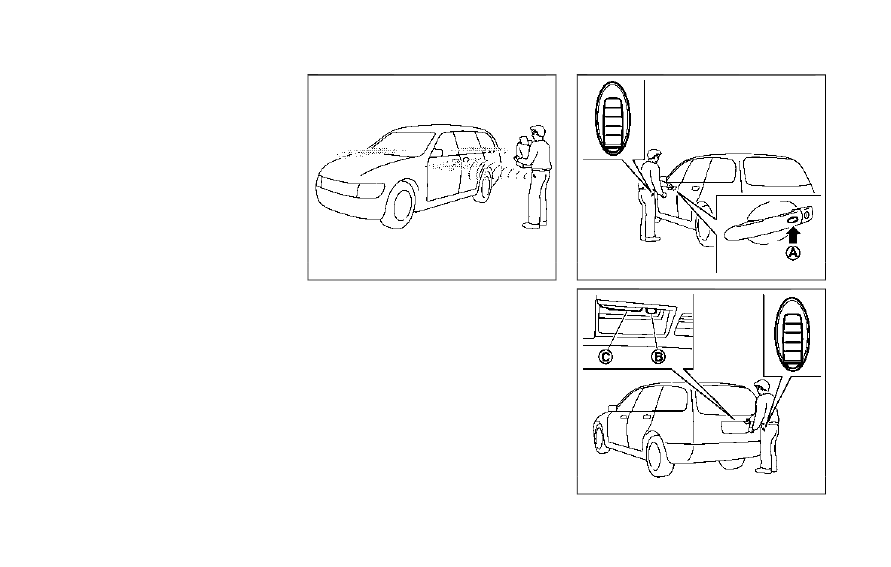
INTELLIGENT KEY OPERATION

You can lock or unlock the doors without
taking the key out from your pocket or bag.

JVP0196X

JVP0197X

CarManuals2.com

-------------------------------------------------------------------------------------------------------------------------------------------------------------

When you carry the Intelligent Key with you,
you can lock or unlock all doors by pushing
the door handle request switch (driver’s or
front passenger’s)

or the liftgate request

switch

within the range of operation.

When you lock or unlock the doors or the
liftgate, the hazard indicator will flash and
the horn (or the outside chime) will sound as
a confirmation. For details, see “Setting
hazard indicator and horn mode” (P.3-17).

Welcome light and farewell light
function

When you lock or unlock the doors including
the liftgate, the parking lights, tail lights and
the license plate light will illuminate for a
period of time. The welcome light and fare-
well light function can be disabled. For
information about disabling the welcome
light and farewell light function, it is recom-
mended you see an INFINITI retailer.

Locking doors

1. Move the shift lever to the P (Park)

position, push the ignition switch to the
OFF position and make sure you carry
the Intelligent Key with you.*1

2. Close all the doors.*2
3. Push the door handle request switch

(driver’s or front passenger’s)

or the

liftgate request switch

while carrying

the Intelligent Key with you.*3

4. All the doors will lock.
5. The hazard indicator flashes twice and

the outside chime sounds twice.

*1: Doors will lock with the Intelligent Key
while the ignition switch is in the ACC or ON
position.
*2: Doors will not lock with the Intelligent
Key while any door is open.
*3: Doors will not lock by pushing the door
handle request switch with the Intelligent
Key inside the vehicle.
However, when an Intelligent Key is inside
the vehicle, doors can be locked with another
registered Intelligent Key.

NOTE:

Request switches for all doors can be
deactivated when the “Ext. Door Switch”
is turned off in the Vehicle Settings of the
vehicle information display. See “Vehicle
settings” (P.2-23).

CAUTION

.

After locking the doors using the
request switch, make sure that the
doors have been securely locked by
operating the door handles.

.

When locking the doors using the
request switch, make sure to have the
Intelligent Key in your possession
before operating the request switch
to prevent the Intelligent Key from
being left in the vehicle.

.

The request switch is operational
only when the Intelligent Key has
been detected by the Intelligent Key
system.

Lockout protection:

To prevent the Intelligent Key from being
accidentally locked in the vehicle, lockout
protection is equipped with the Intelligent
Key system.
When the driver’s side door is open, the
doors are locked, and then the Intelligent
Key is put inside the vehicle and all the doors
are closed; the lock will automatically unlock
and the door buzzer sounds.

NOTE:

The doors may not lock when the Intelligent
Key is in the same hand that is operating the
request switch to lock the door. Put the
Intelligent Key in a purse, pocket or your
other hand.

Pre-driving checks and adjustments

3-11

CarManuals2.com

-------------------------------------------------------------------------------------------------------------------------------------------------------------

3-12

Pre-driving checks and adjustments

CAUTION

The lockout protection may not function
under the following conditions:

.

When the Intelligent Key is placed on
top of the instrument panel.

.

When the Intelligent Key is placed
inside the glove box or a storage bin.

.

When the Intelligent Key is placed
inside the door pockets.

.

When the Intelligent Key is placed
inside or near metallic materials.

Unlocking doors

1. Push the door handle request switch

(driver’s or front passenger’s)

or the

liftgate request switch

once while

carrying the Intelligent Key with you.
When you approach the vehicle with the
Intelligent Key, the puddle light and the
passenger cabin illumination will illumi-
nate and stay on for a short period of
time. (See “Welcome light” (P.2-78).)

2. The hazard indicator flashes once and

outside chime sounds once. The corre-
sponding door will unlock.

3. Push the door handle request switch

again within 60 seconds.

4. The hazard indicator flashes once and

outside chime sounds once again. All the
doors will unlock.

The liftgate can be unlocked and opened by
pushing the liftgate opener switch. See
“Liftgate” (P.3-22).
All doors will be locked automatically unless
one of the following operations is performed
within 1 minute after pushing the request
switch while the doors are locked. If during
this 1-minute time period, the request switch
is pushed, all doors will be locked automa-
tically after another 1 minute.

.

Opening any door

.

Pushing the ignition switch

NOTE:

The unlocking operation can be changed in
selective unlock in the Vehicle Settings of
the vehicle information display. See “Vehicle
settings” (P.2-23).

Power liftgate open

1. Carry the Intelligent Key.
2. Push the power liftgate opener switch

.

3. The liftgate will unlock and automatically

open.

4. The hazard indicator flashes 4 times and

the outside chime sounds.

BATTERY SAVER SYSTEM

When all the following conditions are met
for a period of time, the battery saver
system will cut off the power supply to
prevent battery discharge.

.

The ignition switch is in the ACC position,

and

.

All doors are closed, and

.

The shift lever is in the P (Park) position.

WARNING SIGNALS

To help prevent the vehicle from moving
unexpectedly by erroneous operation of the
Intelligent Key listed on the following chart
or to help prevent the vehicle from being
stolen, chime or beep sounds inside and
outside the vehicle and a warning displays in
the vehicle information display.
When a chime or beep sounds or the warning
displays, be sure to check the vehicle and
Intelligent Key.
See “Troubleshooting guide” (P.3-13) and
“Vehicle information display” (P.2-20).

CarManuals2.com

-------------------------------------------------------------------------------------------------------------------------------------------------------------

TROUBLESHOOTING GUIDE

Symptom

Possible cause

Action to take

When pushing the ignition
switch to stop the engine

The Shift to Park warning appears on the
display and the inside warning chime
sounds continuously or for a few seconds.

The shift lever is not in the P (Park)
position.

Shift the shift lever to the P (Park)
position.

When shifting the shift lever to
the P (Park) position.

The inside warning chime sounds continu-
ously.

The ignition switch is in the ACC or
ON position.

Push the ignition switch to the OFF
position.

When opening the driver’s door
to get out of the vehicle

The inside warning chime sounds continu-
ously.

The ignition switch is in the ACC
position.

Push the ignition switch to the OFF
position.

When closing the door after
getting out of the vehicle

The No Key Detected warning appears on
the display, the outside chime sounds 3
times and the inside warning chime sounds
for a few seconds.

The ignition switch is in the ACC or
ON position.

Push the ignition switch to the OFF
position.

The Rear Door Alert warning message
appears on the display, the horn sounds
three times twice and Check Rear Seat for
all articles warning appears on the display.

The rear door alert is activated.

Open a rear door and check the rear seat
for all articles to clear the warning
message.

The Shift to Park warning appears on the
display and the outside chime sounds
continuously.

The ignition switch is in the ACC or
OFF position and the shift lever is not
in the P (Park) position.

Move the shift lever to the P (Park)
position and push the ignition switch to
the OFF position.

When closing the door with the
inside lock knob turned to
LOCK

The outside chime sounds for a few
seconds and all the doors unlock.

The Intelligent Key is inside the
vehicle or cargo area.

Carry the Intelligent Key with you.

When pushing the request
switch or the LOCK

but-

ton on the Intelligent Key to
lock the door

The outside chime sounds for a few
seconds.

The Intelligent Key is inside the
vehicle.

Carry the Intelligent Key with you.

A door is not closed securely.

Close the door securely.

Pre-driving checks and adjustments

3-13

CarManuals2.com

-------------------------------------------------------------------------------------------------------------------------------------------------------------

3-14

Pre-driving checks and adjustments

Symptom

Possible cause

Action to take

When pushing the door handle
request switch to lock the door

The outside chime sounds for a few
seconds.

The Intelligent Key is inside the
vehicle or cargo area.

Carry the Intelligent Key with you.

A door is not closed securely.

Close the door securely.

The door handle request switch is
pushed before the door is closed.

Push the door handle request switch
after the door is closed.

When pushing the ignition
switch to start the engine

The Key Battery Low indicator appears on
the display.

The battery charge is low.

Replace the battery with a new one. (See
“Battery” (P.8-11).)

The No Key Detected warning appears on
the display and the inside warning chime
sounds for a few seconds.

The Intelligent Key is not in the
vehicle.

Carry the Intelligent Key with you.

When pushing the ignition
switch

The Key System Error warning appears on
the display.

It warns of a malfunction with the
Intelligent Key system.

It is recommended that you contact an
INFINITI retailer.

CarManuals2.com

-------------------------------------------------------------------------------------------------------------------------------------------------------------

WARNING

The Intelligent Key transmits radio
waves when the buttons are pushed.
The FAA advises that radio waves may
affect aircraft navigation and commu-
nication systems. Do not operate the
Intelligent Key while on an airplane.
Make sure the buttons are not operated
unintentionally when the unit is stored
for a flight.

It is possible to lock/unlock all doors,
activate the panic alarm and open the
windows by pushing the buttons on the
Intelligent Key from outside the vehicle.

Before locking the doors, make sure the
Intelligent Key is not left in the vehicle.

The LOCK/UNLOCK button on the Intelli-
gent Key can operate at a distance of
approximately 33 ft (10 m) from the vehicle.
(The effective distance depends upon the
conditions around the vehicle.)
As many as 4 Intelligent Keys can be used
with one vehicle. For information concerning
the purchase and use of additional Intelli-
gent Keys, contact an INFINITI retailer.
The lock and unlock buttons on the Intelli-
gent Key will not operate when:

.

the distance between the Intelligent Key

and the vehicle is over 33 ft (10 m).

.

the Intelligent Key battery runs down.

After locking with the remote keyless entry
function, pull the door handle to make sure
the doors are securely locked.
The LOCK/UNLOCK operating range varies
depending on the environment. To securely
operate the lock and unlock buttons, ap-
proach the vehicle to about 3 ft (1 m) from
the door.

SPA2718

Type A

JVP0156X

Type B

Pre-driving checks and adjustments

3-15

REMOTE KEYLESS ENTRY SYSTEM

CarManuals2.com

-------------------------------------------------------------------------------------------------------------------------------------------------------------

3-16

Pre-driving checks and adjustments

LOCK button
UNLOCK button
Power liftgate button
PANIC button
Remote engine start button

HOW TO USE REMOTE KEYLESS
ENTRY SYSTEM

When you lock or unlock the doors or the
liftgate, the hazard indicator will flash and
the horn (or the outside chime) will sound as
a confirmation. For details, see “Setting
hazard indicator and horn mode” (P.3-17).

Locking doors

1. Move the shift lever to the P (Park)

position, push the ignition switch to the
OFF position and make sure you carry
the Intelligent Key with you.*

2. Close all the doors and the liftgate.
3. Push the LOCK

button

on the

Intelligent Key.

4. All the doors and the liftgate will lock.
5. The hazard indicator flashes twice and

the horn chirps once.

*: Doors will lock with the Intelligent Key
while the ignition switch is in the ACC or ON
position.

Unlocking doors

1. Push the UNLOCK

button

on the

Intelligent Key once.

2. The hazard indicator flashes once. The

driver’s door will unlock.
The puddle light and the passenger cabin
illumination will illuminate and stay on
for a short period of time.

3. Push the UNLOCK

button on the

Intelligent Key again within 60 seconds.

4. The hazard indicator flashes once again.

All the doors will unlock.

All doors will be locked automatically unless
one of the following operations is performed
within 1 minute after pushing the UNLOCK
button on the Intelligent Key while the doors
are locked. If during this 1-minute time
period, the UNLOCK button on the Intelli-
gent Key is pushed, all doors will be locked
automatically after another 1 minute.

.

Opening any door

.

Pushing the ignition switch

NOTE:

The unlocking operation can be changed in
selective unlock in the Vehicle Settings of
the vehicle information display. See “Vehicle
settings” (P.2-23).

Opening windows

To open the windows, push the door UN-
LOCK

button on the Intelligent Key for

about 3 seconds

after the door is unlocked.

To stop opening, release the UNLOCK
button.
Window cannot be closed using the Intelli-
gent Key.
The door windows can be opened or closed
by turning the mechanical key in a door lock.
(See “Doors” (P.3-4).)

Opening/closing liftgate

1. Push the power liftgate button

for more than 1 second.

2. The liftgate will automatically open.
The hazard indicator flashes 4 times and the
outside chime sounds for approximately 3
seconds.
To close the liftgate, push the power liftgate
button

for more than 1 second.

The liftgate will automatically close.
If the button

is pushed while the

liftgate is being opened or closed, the
liftgate will reverse.

Using panic alarm

If you are near your vehicle and feel
threatened, you may activate the alarm to

CarManuals2.com

-------------------------------------------------------------------------------------------------------------------------------------------------------------

call attention as follows:
1. Push the PANIC

button

on the

Intelligent Key for

more than 1 second.

2. The theft warning alarm and headlights

will stay on for 25 seconds.

3. The panic alarm stops when:

.

It has run for 25 seconds, or

.

Any of the buttons on the Intelligent

Key are pushed. (Note: Panic button
or power liftgate button should be
pushed for more than 1 second.)

Remote engine start (if so equipped)

The remote engine start

button

is on

the Intelligent Key if the vehicle has remote
engine start function. This function allows
the engine to start from outside the vehicle.
See “Remote engine start” (P.3-19).

Setting hazard indicator and horn
mode

This vehicle is set in hazard indicator and
horn mode when you first receive the vehicle.
In hazard indicator and horn mode, when the
LOCK

button is pushed, the hazard

indicator flashes twice and the horn chirps
once. When the UNLOCK

button is

pushed, the hazard indicator flashes once.
If horns are not necessary, the system can be
switched to the hazard indicator mode.

In hazard indicator mode, when the LOCK

button is pushed, the hazard indicator

flashes twice. When the UNLOCK
button is pushed, neither the hazard indica-
tor nor the horn operates.

Pre-driving checks and adjustments

3-17

CarManuals2.com

-------------------------------------------------------------------------------------------------------------------------------------------------------------

3-18

Pre-driving checks and adjustments

Hazard indicator and horn mode:

DOOR LOCK

DOOR UNLOCK

Intelligent Key system

(Using door handle request switch)

HAZARD -

twice

OUTSIDE CHIME -

twice

HAZARD -

once

OUTSIDE CHIME -

once

Remote keyless entry system

(Using

or

button)

HAZARD -

twice

HORN -

once

HAZARD -

once

HORN - none

Hazard indicator mode:

DOOR LOCK

DOOR UNLOCK

Intelligent Key system

(Using door handle request switch)

HAZARD -

twice

HAZARD - none

Remote keyless entry system

(Using

or

button)

HAZARD -

twice

HAZARD - none

Switching procedure:

Push the LOCK

and UNLOCK

buttons on the Intelligent Key simulta-
neously for more than 2 seconds to switch
the mode from one to the other.
When pushing the buttons to set the hazard
indicator mode, the hazard indicator flashes
3 times.
When pushing the buttons to set the hazard
indicator and horn mode, the hazard indica-
tor flashes once and the horn chirps once.

CarManuals2.com

-------------------------------------------------------------------------------------------------------------------------------------------------------------

WARNING

To avoid risk of injury or death, do not
use the remote engine start function
when the vehicle is in an enclosed area
such as a garage.

JVP0445X

The remote engine start

button is on the

Intelligent Key if the vehicle has remote
engine start function. This function allows
the engine to start from outside the vehicle.
Some systems, such as the air conditioner
system, will turn on during a remote engine
start, if the system was on the last time the
ignition switch was turned off.
Laws in some local communities may restrict
the use of remote engine starters. For
example, some laws require a person using
remote engine start to have the vehicle in
view. Check local regulations for any re-
quirements.
Other conditions may affect the remote
engine start function. See “Conditions the

remote engine start will not work” (P.3-20).
Other conditions can affect the performance
of the Intelligent Key transmitter. See “In-
telligent Key system” (P.3-7) for additional
information.

REMOTE ENGINE START OPER-
ATING RANGE

The remote engine start function can only be
used when the Intelligent Key is within the
specified operating range from the vehicle.
When the Intelligent Key battery is dis-
charged or other strong radio wave sources
are present near the operating location, the
Intelligent Key operating range becomes
narrower, and the Intelligent Key may not
function properly.
The remote engine start operating range is
approximately 197 ft (60 m) from the
vehicle.

REMOTE STARTING THE ENGINE

To use the remote engine start function to
start the engine, perform the following:
1. Aim the Intelligent Key at the vehicle.
2. Push the “LOCK”

button to lock all

doors.

3. Within 5 seconds push and hold the

remote engine start

button until

the turn signal lights flash and the tail

Pre-driving checks and adjustments

3-19

REMOTE ENGINE START (if so equipped)

CarManuals2.com

-------------------------------------------------------------------------------------------------------------------------------------------------------------

3-20

Pre-driving checks and adjustments

lights illuminate. If the vehicle is not
within view, push and hold the remote
engine start

button for at least 2

seconds.

The following events will occur when the
engine starts:

.

The front parking lights will turn on and

remain on as long as the engine is
running.

.

The doors will be locked and the air

conditioner system may turn on.

.

The engine will continue to run for about

10 minutes. Repeat the steps to extend
the time for an additional 10 minutes.
See “Extending engine run time” (P.3-
20).

Depress and hold the brake pedal, then place
the ignition switch in the ON position before
driving. For further instructions, see “Driving
the vehicle” (P.5-17).

EXTENDING ENGINE RUN TIME

The remote engine start function can be
extended one time by performing the steps
listed in “Remote starting the engine” (P.3-
19). Run time will be calculated as follows:

.

The first 10 minute run time will start

when the remote engine start function is
performed.

.

The second 10 minutes will start imme-

diately when the remote engine start

function is performed. For example, if
the engine has been running for 5
minutes, and 10 minutes are added, the
engine will run for a total of 15 minutes.

.

Extending engine run time will count

towards the two remote engine start
limit.

A maximum of two remote engine starts, or
a single start with an extension, are allowed
between ignition cycles.
The ignition switch must be cycled to the ON
position and then back to the OFF position
before the remote engine start procedure
can be used again.

CANCELING A REMOTE ENGINE
START

To cancel a remote engine start, perform one
of the following:

.

Aim the Intelligent Key at the vehicle and

push and hold the remote engine start

button until the front parking lights

turn off.

.

Turn on the hazard indicator flashers.

.

Cycle the ignition switch ON and then

OFF.

.

The extended engine run time has ex-

pired.

.

The first 10 minute timer has expired.

.

The engine hood has been opened.

.

The shift lever is moved out of the P

(Park) position.

.

The theft alarm sounds due to illegal

entry into the vehicle.

.

The ignition switch is pushed without an

Intelligent Key in the vehicle.

.

The ignition switch is pushed with an

Intelligent Key in the vehicle but the
brake pedal is not depressed.

CONDITIONS THE REMOTE EN-
GINE START WILL NOT WORK

The remote engine start will not operate if
any of the following conditions are present:

.

The ignition switch is placed in the ON

position.

.

The hood is not securely closed.

.

The hazard indicator flashers are on.

.

The engine is still running. The engine

must be completely stopped. Wait at
least 6 seconds if the engine goes from
running to off. This is not applicable
when extending engine run time.

.

The remote engine start

button is

not pushed and held for at least 2
seconds.

.

The remote engine start

button is

not pushed and held within 5 seconds of
pushing the “LOCK”

button.

CarManuals2.com

-------------------------------------------------------------------------------------------------------------------------------------------------------------

.

The brake pedal is depressed.

.

The doors are not closed and locked.

.

The liftgate is open.

.

An Intelligent Key warning message is

displayed in the vehicle information dis-
play.

.

An Intelligent Key is left inside the

vehicle.

.

The theft alarm sounds due to illegal

entry into the vehicle.

.

Two remote engine starts, or a single

remote engine start with an extension,
have already been used.

.

The shift lever is not in the P (Park)

position.

The remote engine start may display a
warning or indicator in the vehicle informa-
tion display. For an explanation of the
warning or indicator, see “Operational in-
dicators” (P.2-28).

JVP0567X

1. Pull the hood lock release handle

located below the instrument panel; the
hood will then spring up slightly.

2. Pull the lever

sideways at the front of

the hood with your fingertips and raise
the hood.

3. When closing the hood, slowly close the

hood down and make sure it locks into
place.

WARNING

.

Make sure the hood is completely
closed and latched before driving.

Failure to do so could cause the hood
to fly open and result in an accident.

.

If you see steam or smoke coming
from the engine compartment, to
avoid injury do not open the hood.

Pre-driving checks and adjustments

3-21

HOOD

CarManuals2.com

-------------------------------------------------------------------------------------------------------------------------------------------------------------

3-22

Pre-driving checks and adjustments

WARNING

.

Always be sure the liftgate has been
closed securely to prevent it from
opening while driving.

.

Do not drive with the liftgate open.
This could allow dangerous exhaust
gases to be drawn into the vehicle.
See “Exhaust gas (carbon monoxide)”
(P.5-4).

.

Do not leave children unattended
inside the vehicle. They could un-
knowingly activate switches or con-
trols. Unattended children could
become involved in serious accidents.

.

Always be sure that hands and feet
are clear of the door frame to avoid
injury while closing the liftgate.

JVP0569X

OPERATING MANUAL LIFTGATE

To open the liftgate, unlock it and push the
liftgate opener switch

. Pull up the liftgate

to open.
The liftgate can be unlocked by:

.

pushing the unlock button

on the

Intelligent Key twice.

.

pushing the liftgate request switch with

the Intelligent Key carried on you.

.

pushing the door handle request switch

twice with the Intelligent Key carried on
you.

.

pushing the power door lock switch to

the unlock position.

.

inserting the mechanical key into the

driver’s door key cylinder and turning it
to the rear of the vehicle twice.

To close the liftgate, pull down until it
securely locks.

OPERATING POWER LIFTGATE

To operate the power liftgate, the shift lever
must be in the P (Park) position.
The power liftgate will not operate if the
battery voltage is low.

LIFTGATE

CarManuals2.com

-------------------------------------------------------------------------------------------------------------------------------------------------------------

SPA2547

Power liftgate main switch

The power liftgate operation can be turned
on or off by the power liftgate main switch
on the instrument panel.
When the power liftgate main switch is
pushed to the OFF position, the power
operation is not available by the power
liftgate switch on the liftgate and liftgate
opener switch.
The liftgate can still be operated by the
power liftgate switch on the instrument
panel and the power liftgate button on the
Intelligent Key.

SPA2793

Power liftgate switch — Instrument panel

JVP0568X

Liftgate opener switch

JVP0214X

Intelligent Key

SPA2796

Power liftgate switch — Liftgate

Pre-driving checks and adjustments

3-23

CarManuals2.com

-------------------------------------------------------------------------------------------------------------------------------------------------------------

3-24

Pre-driving checks and adjustments

Power open

When the liftgate is fully closed, the liftgate
will fully open automatically by:

.

pushing the power liftgate switch

on

the instrument panel

.

pushing the liftgate opener switch

.

pushing the power liftgate button

on

the Intelligent Key for more than 1
second

The hazard flashes 4 times and the outside
chime sounds when the liftgate starts open-
ing.

NOTE:

The liftgate can be opened by the power
liftgate switch

, the liftgate opener switch

or the liftgate button

even if the

liftgate is locked. The liftgate will individu-
ally unlock and open.

Power close

When the liftgate is fully opened, the liftgate
will fully close automatically by:

.

pushing the power liftgate switch

on

the instrument panel

.

pushing the liftgate release button

on

the Intelligent Key for more than 1
second

.

pushing the power liftgate switch

on

the lower part of the liftgate

The hazard flashes 4 times and the outside
chime sounds when the liftgate starts clos-
ing.

NOTE:

When the liftgate is closed, it remains
unlocked. Manually lock the liftgate.

Reverse function

The power liftgate will reverse immediately
if one of the following actions is performed
during power open or power close.

.

pushing the power liftgate switch

on

the instrument panel

.

pushing the liftgate button

on

the Intelligent Key.

.

pushing the liftgate switch

on the

lower part of the liftgate

The outside chime sounds when the liftgate
starts to reverse.

Auto reverse function

The auto-reverse function enables the lift-
gate to automatically reverse when some-
thing is caught in the liftgate as it is opening
or closing. When the control unit detects an
obstacle, the liftgate will reverse and return
to the full open or full close position.
If a second obstacle is detected, the liftgate
motion will stop and the drive motor will
disengage. The liftgate will enter the manual

mode.
A pinch sensor is mounted on each side of
the liftgate. If an obstacle is detected by the
pinch sensor during power close, the liftgate
will reverse and return to the full open
position immediately.

NOTE:

If the pinch sensor is damaged or removed,
the power close function will not operate.

WARNING

There is a small distance immediately
before the closed position that cannot be
detected. Make sure that all passengers
keep their hands, etc., clear from the
liftgate opening before closing the lift-
gate.

Manual mode

If power operation is not available, the
liftgate can be operated manually. Power
operation may not be available if multiple
obstacles have been detected in a single
power cycle or if the battery voltage is low.
When the power liftgate main switch is in
the OFF position, the liftgate can be opened
manually by pushing the liftgate opener
switch. If the power liftgate opener switch

CarManuals2.com

-------------------------------------------------------------------------------------------------------------------------------------------------------------

is pushed during power open or close, the
power operation will be canceled and the
liftgate can be operated manually.

SPA2777

Safe Mode

If the gas stays of the liftgate

lose

pressure, the power liftgate safe mode is
activated. When the safe mode is activated,
the liftgate intermittently closes. Then the
liftgate will be pulled to the closed and
latched position by a motor.
The power liftgate cannot be opened using
the switches at any time in the safe mode.
Do not operate the liftgate again until it is
checked. It is recommended you visit an
INFINITI retailer for this service.

CAUTION

.

If the power liftgate does not stay
open or if the liftgate unexpectedly
closes at any time, do not operate the
liftgate. There may be a pressure loss
in one or both of the liftgate gas
stays. Have the liftgate inspected. It
is recommended you visit an INFINITI
retailer for this service.

.

Do not activate the power liftgate if
one or both of the liftgate gas stays
are removed. Damage to the liftgate
or power liftgate mechanisms may
occur.

AUTO CLOSURE

If the liftgate is pulled down to a partly open
position, the liftgate will pull itself to the
closed position.

Do not apply excessive force when the auto
closure is operating. Excessive force applied
may cause the mechanism to malfunction.

CAUTION

.

The liftgate will automatically close
from a partly open position. To avoid

Pre-driving checks and adjustments

3-25

CarManuals2.com

-------------------------------------------------------------------------------------------------------------------------------------------------------------

3-26

Pre-driving checks and adjustments

pinching, keep hands and fingers
away from liftgate opening.

.

Do not let children operate the lift-
gate.

SPA2778

LIFTGATE RELEASE LEVER

If the liftgate cannot be opened with the
door lock switch due to a discharged battery,
follow these steps.
1. Remove the cover

inside of the liftgate

using a suitable tool.

2. Move the lever

as illustrated to open

the liftgate.

It is recommended you contact an INFINITI
retailer as soon as possible for repair.

WAD0273X

OPENING THE FUEL-FILLER
DOOR

To open the fuel-filler door, push the upper
right side of fuel-filler door.

FUEL-FILLER CAP

WARNING

.

Gasoline is extremely flammable and
highly explosive under certain condi-
tions. You could be burned or ser-
iously injured if it is misused or
mishandled. Always stop engine and
do not smoke or allow open flames or

FUEL-FILLER DOOR

CarManuals2.com

-------------------------------------------------------------------------------------------------------------------------------------------------------------

sparks near the vehicle when refuel-
ing.

.

Do not attempt to top off the fuel
tank after the fuel pump nozzle shuts
off automatically. Continued refuel-
ing may cause fuel overflow, resulting
in fuel spray and possibly a fire.

.

Use only an original equipment type
fuel-filler cap as a replacement. It has
a built-in safety valve needed for
proper operation of the fuel system
and emission control system. An in-
correct cap can result in a serious
malfunction and possible injury. It
could also cause the malfunction
indicator light to come on.

.

Never pour fuel into the throttle body
to attempt to start your vehicle.

.

Do not fill a portable fuel container in
the vehicle or trailer. Static electricity
can cause an explosion of flammable
liquid, vapor or gas in any vehicle or
trailer. To reduce the risk of serious
injury or death when filling portable
fuel containers:

— Always place the container on the

ground when filling.

— Do not use electronic devices

when filling.

— Keep the pump nozzle in contact

with the container while you are
filling it.

— Use only approved portable fuel

containers for flammable liquid.

CAUTION

.

If fuel is spilled on the vehicle body,
flush it away with water to avoid
paint damage.

.

Insert the cap straight into the fuel-
filler tube, then tighten until the fuel-
filler cap clicks. Failure to tighten the
fuel-filler cap properly may cause the

malfunction indicator light (MIL)

to illuminate. If the

light illumi-

nates because the fuel-filler cap is
loose or missing, tighten or install the
cap and continue to drive the vehicle.
The

light should turn off after a

few driving trips. If the

light does

not turn off after a few driving trips,
have the vehicle inspected. It is
recommended you visit an INFINITI
retailer for this service.

.

The Loose Fuel Cap warning will
appear if the fuel-filler cap is not
properly tightened. It may take a few

driving trips for the message to be
displayed. Failure to tighten the fuel-
filler cap properly after the Loose
Fuel Cap warning appears may cause
the

Malfunction Indicator Light

(MIL) to illuminate.

Turn the cap counterclockwise to remove.
To tighten, turn the cap clockwise until a
single click is heard.

Pre-driving checks and adjustments

3-27

CarManuals2.com

-------------------------------------------------------------------------------------------------------------------------------------------------------------

3-28

Pre-driving checks and adjustments

SPA2753

To remove the fuel-filler cap:
1. Turn the fuel-filler cap counterclockwise

to remove.

2. Put the fuel-filler cap on the cap holder

while refueling.

To install the fuel-filler cap:
1. Insert the fuel-filler cap straight into the

fuel-filler tube.

2. Turn the fuel-filler cap clockwise until a

single click is heard.

WAD0274X

Loose Fuel Cap warning

The Loose Fuel Cap warning appears on the
vehicle information display when the fuel-
filler cap is not tightened correctly after the
vehicle has been refueled. It may take a few
driving trips for the warning to be displayed.
To turn off the warning, perform the
following:
1. Remove and install the fuel-filler cap as

soon as possible. (See “Fuel-filler cap”
(P.3-26).)

2. Tighten the fuel-filler cap until it clicks.
3. Push the

switch

on the

steering wheel to turn off the Loose
Fuel Cap warning after tightening the

fuel-filler cap.

CarManuals2.com

-------------------------------------------------------------------------------------------------------------------------------------------------------------

WARNING

.

Do not adjust the steering wheel
while driving. You could lose control
of your vehicle and cause an accident.

.

Do not adjust the steering wheel any
closer to you than is necessary for
proper steering operation and com-
fort. The driver’s air bag inflates with
great force. If you are unrestrained,
leaning forward, sitting sideways or
out of position in any way, you are at
greater risk of injury or death in a
crash. You may also receive serious or
fatal injuries from the air bag if you
are up against it when it inflates.
Always sit back against the seatback
and as far away as practical from the
steering wheel. Always use the seat
belts.

SPA2754

ELECTRIC OPERATION

Tilt or telescopic operation

Move the lever

to adjust the steering

wheel up or down, forward or rearward to
the desired position.

Entry/Exit function operation:

The memory seat system will make the
steering wheel move up automatically when
the driver’s door is opened with the ignition
switch in the LOCK position. This lets the
driver get into and out of the seat more
easily.
For more information, see “Memory seat”
(P.3-39).

SIC3451

Pre-driving checks and adjustments

3-29

TILT/TELESCOPIC STEERING

SUN VISORS

CarManuals2.com

-------------------------------------------------------------------------------------------------------------------------------------------------------------

3-30

Pre-driving checks and adjustments

CAUTION

.

Do not store the main sun visor
before storing the extension sun
visor.

.

Do not pull the extension sun visor
forcedly downward.

1. To block out glare from the front, swing

down the main sun visor

.

2. To block glare from the side, remove the

main sun visor from the center mount
and swing it to the side

.

3. Draw out the extension sun visor

from

the main sun visor to block from further
glare.

SPA2447

INSIDE MIRROR

Adjust the height and the angle of the inside
mirror to the desired position.

SPA2450-A

Automatic anti-glare type (if so
equipped)

The inside mirror is designed so that it
automatically changes reflection according
to the intensity of the headlights of the
following vehicle.
The anti-glare system will be automatically
turned on when the ignition switch is pushed
to the ON position.
When the anti-glare system is turned on, the
indicator light

will illuminate and excessive

glare from the headlights of the vehicle
behind you will be reduced.
Push the “

*

” switch

to make the inside

rearview mirror operate normally. The in-

MIRRORS

CarManuals2.com

-------------------------------------------------------------------------------------------------------------------------------------------------------------

dicator light will turn off. Push the “I” switch

to turn the system on.

Do not allow any object to cover the sensors

or apply glass cleaner on them. Doing so

will reduce the sensitivity of the sensor,
resulting in improper operation.

For the HomeLink

®

Universal Transceiver

operation, see “HomeLink

®

Universal Trans-

ceiver (Type A)” (P.2-81).

Smart Rearview Mirror (if so
equipped)

WARNING

.

Failure to follow the warnings and
instructions for proper use of the
Smart Rearview Mirror could result
in serious injury or death.

— The Smart Rearview Mirror is a

convenience feature but it is not a
substitute for proper vehicle op-
eration. The system has areas
where objects cannot be viewed.
Check the blind spot of the Smart
Rearview Mirror before vehicle
operation. The driver is always
responsible for safe driving.

— Do not disassemble or modify the

Smart Rearview Mirror, the cam-

era unit or wirings. If you do, it
may result in accidents or fire. In
case you notice smoke or smell
coming from the Smart Rearview
Mirror, stop using the system
immediately. It is recommended
that you see an INFINITI retailer
for servicing.

— Do not operate the Smart Rear-

view Mirror while driving. Doing
so can be a distraction and it could
lose control of your vehicle and
cause an accident or serious in-
jury.

— Do not gaze into the Smart Rear-

view Mirror display during driv-
ing. It may cause a distraction and
it could lose control of your vehi-
cle and cause an accident or
serious injury.

— Do not put a cigarette or flames

to the Smart Rearview Mirror, the
camera unit or wirings. It may
cause a fire.

.

Be sure to adjust the Smart Rearview
Mirror before driving. Switch the
system to the conventional rearview
mirror mode and be properly seated
on the driver’s seat. Then adjust the
mirror so as to see the rear window

properly. Driving without adjusting
the mirror may cause difficulty in
watching the display at Smart Rear-
view Mirror mode (camera view
mode) due to the reflection from the
surface of the mirror.

.

If the Smart Rearview Mirror mal-
functions, immediately switch the
system to the conventional rearview
mirror mode.

.

When strong light (for example, sun-
light or high beams from following
vehicles) enters the camera, a light
beam or a glaring light may appear on
the monitor screen of the Smart
Rearview Mirror. In that case, switch
the system to the conventional rear-
view mirror mode appropriately.

.

If dirt, rain or snow accumulates on
the exterior glass surface covering
the camera, the Smart Rearview
Mirror may not display objects
clearly. Use of the rear window
wiper/washer may improve visibility,
but if not, switch the Smart Rearview
Mirror to the conventional rearview
mirror mode until a time the glass
covering the camera can be cleaned.

Pre-driving checks and adjustments

3-31

CarManuals2.com

-------------------------------------------------------------------------------------------------------------------------------------------------------------

3-32

Pre-driving checks and adjustments

WAD0190X

MENU button
Left button
Right button
Mode select lever
HomeLink

®

buttons (1-3)

Components:

Smart Rearview Mirror provides a clear
rearview from a camera located on the rear
of the vehicle. Smart Rearview Mirror has
two modes: conventional rearview mirror
mode and Smart Rearview Mirror mode
(camera view mode). You can switch these
two modes by the mode select lever

.

When the Smart Rearview Mirror mode is
selected, the indicator

is displayed.

For the operation of the HomeLink

®

buttons

, see “HomeLink

®

Universal Transceiver

(Type B)” (P.2-85).

WAD0191X

How to change the mode:

The mode can be switched when the ignition
switch is in the ON position.

.

Pull the mode select lever

to switch to

the Smart Rearview Mirror mode (cam-
era view mode).

.

Push the mode select lever

to switch to

the conventional rearview mirror mode.

CarManuals2.com

-------------------------------------------------------------------------------------------------------------------------------------------------------------

WAD0192X

How to make settings of Smart Rearview
Mirror:

You can choose display settings of the Smart
Rearview Mirror such as brightness, camera
angle, textual indication ON or OFF and
language.
When the Smart Rearview Mirror mode is
on, setting menu can be selected by pushing
the MENU button

. Each time the MENU

button

is pushed, the setting menu will

change as follows:
MENU (initial screen)

?

BRIGHTNESS

?

DOWN/UP

?

LEFT/RIGHT

?

ROTATION

?

INDICATION

?

DIMMING MIRROR

?

LANGUAGE

?

MENU (initial screen)

NOTE:

.

To switch the image quality adjustment

items with the MENU button

, push

the button within 5 seconds after
completing the adjustment of the pre-
vious item. If 5 seconds or more pass,
the monitor will return to MENU (initial
screen).

.

When one of the HomeLink

®

buttons is

pushed, the monitor will display the
HomeLink

®

screen.

WAD0193X

BRIGHTNESS

The brightness of the display screen can be
adjusted.

.

Push the left button

to dim the screen.

.

Push the right button

to brighten the

screen.

Pre-driving checks and adjustments

3-33

CarManuals2.com

-------------------------------------------------------------------------------------------------------------------------------------------------------------

3-34

Pre-driving checks and adjustments

WAD0194X

DOWN/UP

The vertical camera angle of the display
screen can be adjusted.

.

Push the left button

to down the

camera angle.

.

Push the right button

to up the camera

angle.

WAD0199X

LEFT/RIGHT

The horizontal camera angle of the display
screen can be adjusted.

.

Push the left button

to move the

camera angle to the left.

.

Push the right button

to move the

camera angle to the right.

WAD0195X

ROTATION

The camera angle of the display screen can
be rotated.

.

Push the left button

to rotate the

camera angle to the left.

.

Push the right button

to rotate the

camera angle to the right.

CarManuals2.com

-------------------------------------------------------------------------------------------------------------------------------------------------------------

WAD0196X

INDICATION

The textual indication can be turned on or
off on the Smart Rearview Mirror display
screen.

.

Push the right button

to disable the

textual indication on the display screen.

.

Push the left button

to enable the

textual indication on the display screen.

WAD0197X

DIMMING MIRROR

The mirror is designed so that it automati-
cally changes reflection according to the
intensity of the headlights of the following
vehicle. You can enable or disable the
automatic anti-glare mode.

.

Push the left button

to enable the

automatic anti-glare mode.

.

Push the right button

to disable the

automatic anti-glare mode.

WAD0198X

LANGUAGE

The language of the textual indication can be
selected on the Smart Rearview Mirror
display screen.
Select the language by using the

or

button. You can select English, French or
Spanish. The language setting will be re-
tained even if the engine is restarted.

Smart Rearview Mirror system precautions:

NOTE:

.

Long-term use of this system in stop-

ping engine may cause battery to be
discharged.

.

Do not attach an antenna of wireless

device near the Smart Rearview Mirror.

Pre-driving checks and adjustments

3-35

CarManuals2.com

-------------------------------------------------------------------------------------------------------------------------------------------------------------

3-36

Pre-driving checks and adjustments

Electric wave from wireless device may
cause disturbed image in Smart Rear-
view Mirror.

.

Do not push buttons excessively or

operating the lever roughly may cause
a system failure or the Smart Rearview
Mirror itself to drop.

.

Never turn the body of Smart Rearview

Mirror by 90° or more. It may damage
the Smart Rearview Mirror.

.

Do not apply strong shocks to the body

of Smart Rearview Mirror. It may cause
a system failure.

.

Do not apply heavy load to the camera

and camera-cover on the rear of the
vehicle. It may cause the camera to be
removed or may cause a system failure.

.

If it is difficult to see the Smart Rearview

Mirror display screen because of a
strong external light, switch the mode
to the conventional rearview mirror
mode for better use.

.

Close the sunshade (if so equipped)

when the Smart Rearview Mirror dis-
play screen is unclear due to strong
external light.

JVP0559X

Flicker image (example)

.

When LED headlights are viewed on the

Smart Rearview Mirror display, the
images may flicker. This is normal.

.

Due to diffused reflection from external

environment, images on the screen may
flicker. This is not a malfunction.

.

A quick movement of a thing may not be

able to display on the camera view
screen. This is not a malfunction.

.

Turn on the headlights at twilight or in a

tunnel, etc.

.

The Smart Rearview Mirror mode (cam-

era view mode) display is different from
the conventional rearview mirror. Ob-
jects in the display may differ from

actual distance. Do not solely rely on
the Smart Rearview Mirror. Always rely
on your own operation to avoid acci-
dents.

.

If the brightness of the camera view

display is adjusted to excessive bright
level, it may cause an eyestrain in the
driving. Adjust the brightness properly.

.

Use the rear window wiper when it rains.

If the camera view image is still unclear
when the rear window wiper is in
operation, check the deterioration of
the rear window wiper blade.

.

When using the rear window wiper,

images on the screen may flicker. This
is not a malfunction.

.

Defog the rear window with defroster

when rear window is fogged. Use the
conventional rearview mirror mode until
the rear window is fully defogged.

.

The display of the Smart Rearview

Mirror may become hot. This is not a
malfunction.

.

The color of an object in the distance or

in the dark may be difficult to be
recognized. This is not a malfunction.

System maintenance (Smart Rearview
Mirror):

.

Always keep the mirror and camera area

of the rear window clean.

CarManuals2.com

-------------------------------------------------------------------------------------------------------------------------------------------------------------

.

Clean the mirror and the camera lens

with a dry soft cloth.

.

When cleaning the camera area of the

rear window, use a soft cloth dampened
with water and a neutral detergent. Then
dry it with a dry soft cloth.

.

If the image on the Smart Rearview

Mirror display screen is still unclear even
after cleaning the camera area of the
rear window, an oil film may be adhering
to the rear window glass. Clean the rear
window glass with an oil film remover.

.

Never use alcohol, benzine, thinner, or

any similar material to clean the mirror or
camera lens. It will cause a discoloration,
deterioration or a system malfunction.

.

Do not attach a sticker (including trans-

parent material) on the camera area of
the rear window.

OUTSIDE MIRRORS

WARNING

.

Objects viewed in the outside mirror
on the passenger side are closer than
they appear. Be careful when moving
to the right. Using only this mirror
could cause an accident. Use the
inside mirror or glance over your
shoulder to properly judge distances

to other objects.

.

Do not adjust the mirrors while
driving. You could lose control of
your vehicle and cause an accident.

SPA2739

Adjusting outside mirrors

The outside mirror control switch is located
on the driver’s door armrest.
The outside mirror will operate only when
the ignition switch is in the ACC or ON
position.
Move the switch right or left to select the
right or left side mirror

, then adjust using

the control switch

.

Defrosting outside mirrors

The outside mirrors will be heated when the
rear window defroster switch is operated.
(See “Rear window and outside mirror
defroster switch” (P.2-43).)

Pre-driving checks and adjustments

3-37

CarManuals2.com

-------------------------------------------------------------------------------------------------------------------------------------------------------------

3-38

Pre-driving checks and adjustments

SPA2738

Power foldable outside mirrors

CAUTION

.

Do not touch the mirrors while they
are moving. Your hand may be
pinched, and the mirror may malfunc-
tion.

.

Do not drive with the mirrors stored.
You will be unable to see behind the
vehicle.

.

If the mirrors were folded or unfolded
by hand, there is a chance that the
mirror will move forward or back-
ward during driving. If the mirrors

were folded or unfolded by hand, be
sure to adjust them again electrically
before driving.

The outside rearview mirror remote control
operates when the ignition switch is in the
ACC or ON position.
To fold the outside rearview mirrors, push
the outside rearview mirror folding switch to
the “CLOSE” position

. To unfold, push to

the “OPEN” position

.

If mirrors are manually operated or bumped,
the mirror body can become loose at the
pivot point. To correct electronic mirror
operation, cycle the mirrors by pushing
“CLOSE” until completely closed, then push
“OPEN” until the mirrors are in the open
position.

Reverse tilt-down feature

When backing up the vehicle, the right and
left outside mirrors will turn downward
automatically to provide better rear visibility.
1. Push the ignition switch to the ON

position.

2. Move the shift lever to the R (Reverse)

position.

3. Choose either the right or left outside

mirror by operating the outside mirror
control switch.

4. The outside mirror surfaces move down-

ward.

When one of the following conditions has
occurred, the outside mirror surfaces will
return to their original positions.

.

The shift lever is moved to any position

other than R (Reverse).

.

The outside mirror control switch is set to

the center position.

.

The ignition switch is placed in to the

OFF position.

Automatic anti-glare

The outside rearview mirrors are designed so
that its automatically change reflection
according to the intensity of the headlights
of the vehicle following you.
The anti-glare system will be automatically
turned on when you place the ignition switch
in the ON position.

CarManuals2.com

-------------------------------------------------------------------------------------------------------------------------------------------------------------

SIC4448

VANITY MIRROR

To use the front vanity mirror, pull down the
sun visor and pull up the cover.

JVP0250X

SET/memory switches

The memory seat system has three features:

.

Entry/exit function

.

Memory storage

.

Setting memory function

ENTRY/EXIT FUNCTION

This system is designed so that the driver’s
seat and steering column will automatically
move when the automatic transmission shift
lever is in the P (Park) position. This allows
the driver to get into and out of the driver’s
seat more easily.
The driver’s seat will slide backward and the
steering wheel will move up when the
driver’s door is opened with the ignition

switch in the LOCK position.
The driver’s seat and steering wheel will
return to the previous positions when the
ignition switch is pushed to the ACC posi-
tion.
The driver’s seat will not return to the
previous positions if the seat or steering
adjusting switch is operated when the seat is
at the exit position.

Cancel or activate entry/exit func-
tion

The shift lever must be in the P (Park)
position with the ignition switch in the OFF
position.
The entry/exit function can be activated or
canceled by pressing and holding the SET
switch for more than 10 seconds.
The entry/exit function can be canceled
through “Vehicle settings” in the vehicle
information display by performing the fol-
lowing:

.

Switch the “Exit Seat Slide” ON to OFF.

For additional information, refer to “Ve-
hicle settings” (P.2-23).

.

Switch the “Exit Steering Up” ON to OFF.

For additional information, refer to “Ve-
hicle settings” (P.2-23).

Pre-driving checks and adjustments

3-39

MEMORY SEAT

CarManuals2.com

-------------------------------------------------------------------------------------------------------------------------------------------------------------

3-40

Pre-driving checks and adjustments

Initialize entry/exit function

If the battery cable is disconnected, or if the
fuse opens, the entry/exit function will not
work though this function was set on before.
In such a case, after connecting the battery
or replacing with a new fuse, open and close
the driver’s door more than two times after
the ignition switch is turned from the ON
position to the LOCK position. The entry/
exit function will be activated.

MEMORY STORAGE

Two positions for the driver’s seat, steering
column and outside mirrors can be stored in
the memory switch. Follow these procedures
to use the memory system.
1. Move the shift lever to the P (Park)

position.

2. Adjust the driver’s seat, steering column

and outside mirrors to the desired posi-
tions by manually operating each adjust-
ing switch. For additional information,
see “Seats” (P.1-3) and “Tilt/telescopic
steering” (P.3-29) and “Outside mirrors”
(P.3-37).

3. Push the SET switch and, within 5

seconds, push the memory switch (1 or
2) fully for at least 1 second.
The indicator light for the pushed mem-
ory switch will stay on for approximately

5 seconds after pushing the switch.
When the memory is stored in the
memory switch (1 or 2), a buzzer will
sound.
If memory is stored in the same memory
switch, the previous memory will be
deleted.

Linking Intelligent Key to a stored
memory position

The Intelligent Key can be linked to a stored
memory position with the following proce-
dure.
1. Follow the steps for storing a memory

position.

2. While the indicator light for the memory

switch being set is illuminated for 5
seconds, push the

button on the

Intelligent Key. If the indicator light
blinks, the Intelligent Key is linked to
that memory setting.

Push the ignition switch to the OFF position,
and then push the

button on the

Intelligent Key. The driver’s seat, steering
wheel and outside mirrors will move to the
memorized position.

Confirming memory storage

.

Push the ignition switch to the ON

position and push the SET switch. If the
main memory has not been stored, the
indicator light will come on for approxi-
mately 0.5 second. When the memory
has stored in position, the indicator light
will stay on for approximately 5 seconds.

.

If the battery cable is disconnected, or if

the fuse opens, the memory will be
canceled. In this case, reset the desired
position using the previous procedure.

.

If optional Intelligent Keys are added to

your vehicle, the memory storage proce-
dure to switch 1 or 2 and linking
Intelligent Key procedure to a stored
memory position should be performed
again for each Intelligent Key. For addi-
tional Intelligent Key information, see
“Keys” (P.3-2).

Selecting the memorized position

1. Move the shift lever to the P (Park)

position.

2. Use one of the following methods to

move the driver’s seat, the outside
mirrors and the steering wheel.

.

Push the memory switch (1 or 2) fully

for at least 1 second.

The driver’s seat, steering column and
outside mirrors will move to the memor-

CarManuals2.com

-------------------------------------------------------------------------------------------------------------------------------------------------------------

ized position or to the exit position when
the entry/exit function is set to active
with the indicator light flashing, and then
the light will stay on for approximately 5
seconds.

SETTING MEMORY FUNCTION

The status of the following settings can be
linked to the Intelligent Key and the memor-
ized settings can be available for each
Intelligent Key.

.

Air conditioner system

.

Navigation system

.

Audio system

To use the memory function, lock the doors
with the Intelligent Key that is linked to the
settings.
To enable the memorized settings:
1. Carry the Intelligent Key that is linked to

the settings, and unlock the doors by
pushing the driver’s door handle request
switch or “UNLOCK”

button on the

Intelligent Key.

2. Place the ignition switch in the ON

position. The memorized settings are
available.

SYSTEM OPERATION

The memory seat system will not work or
will stop operating under the following
conditions:

.

When the vehicle speed is above 0 MPH

(0 km/h) or 4 MPH (7 km/h) for some
limited functions such linking an Intelli-
gent Key to the vehicle when the power
source is turned on from off or during the
Exit function.

.

When any of the memory switches are

pushed while the memory seat is operat-
ing.

.

When the adjusting switch for the dri-

ver’s seat and steering column is turned
on while the memory seat is operating.

.

When the seat has already been moved

to the memorized position.

.

When no seat position is stored in the

memory switch.

.

When the shift lever is moved from the P

(Park) position to any other position.

Pre-driving checks and adjustments

3-41

CarManuals2.com

-------------------------------------------------------------------------------------------------------------------------------------------------------------


Content      ..     5      6      7      8     ..