Infiniti QX60 (2023 year). Manual in english - page 15
 

  Index      Manuals     Infiniti QX60 (2023 year). Manual in english


Search            copyright infringement  


Content      ..     13      14      15      16     ..


Infiniti QX60 (2023 year). Manual in english - page 15


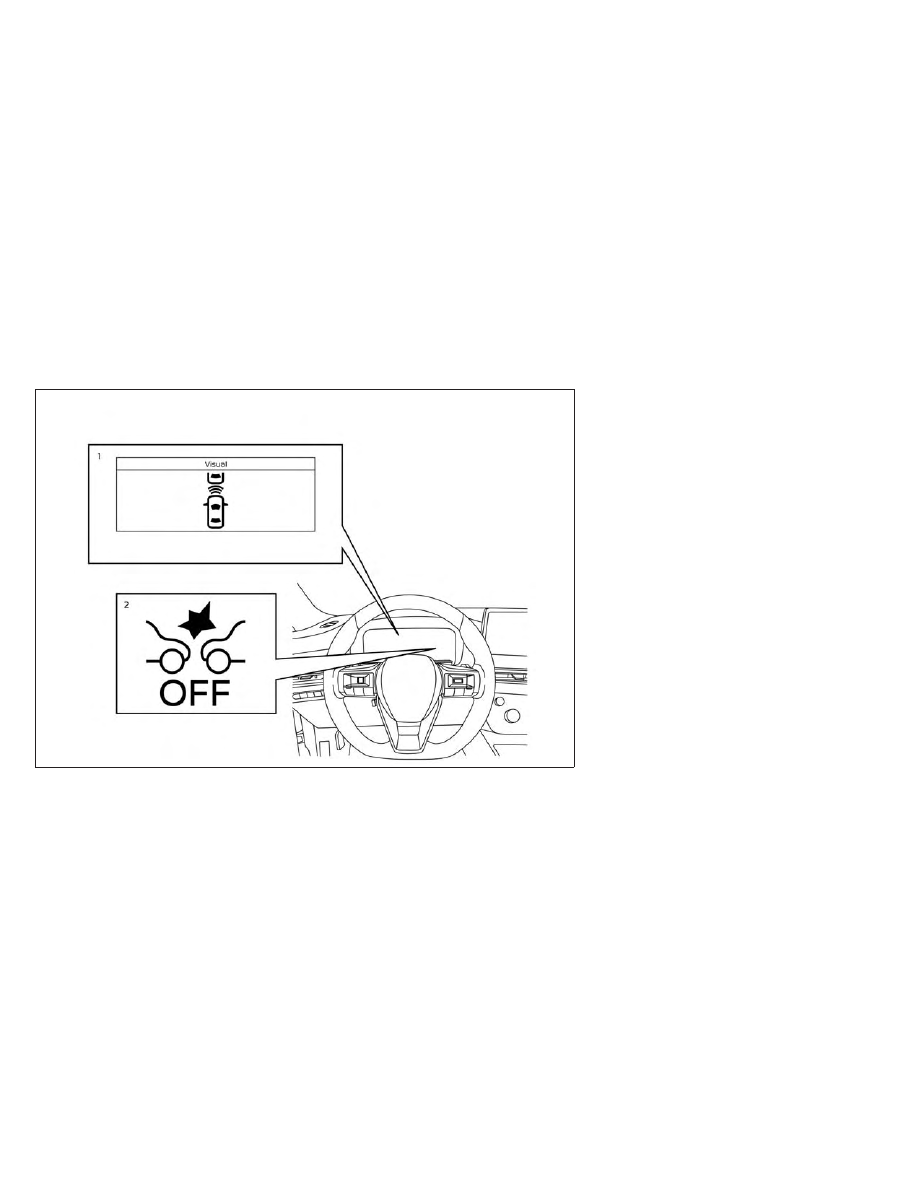
1. Vehicle ahead detection indicator

2. FEB with Pedestrian Detection system

warning light

LSD4530

For vehicles with the 12.3 inch (31.2 cm) display

5-142

Starting and driving

CarManuals2.com

-------------------------------------------------------------------------------------------------------------------------------------------------------------

PFCW SYSTEM OPERATION

The PFCW system operates at speeds above
approximately 3 mph (5 km/h).

If there is a potential risk of a forward colli-
sion, the PFCW system will warn the driver
by blinking the vehicle ahead detection indi-
cator, and sounding an audible alert.

LSD2263

Starting and driving

5-143

CarManuals2.com

-------------------------------------------------------------------------------------------------------------------------------------------------------------

TURNING THE PFCW SYSTEM
ON/OFF

Perform the following steps to turn the
PFCW system ON or OFF.

1. Press the

button until “Settings” dis-

plays in the vehicle information display.
Use the scroll dial to select “Driver Assis-
tance.” Then press the OK button.

2. Select “Emergency Assist” and press the

OK button.

3. Select “Front” and press the OK button to

turn the system on or off.

When the PFCW system is turned off, the
FEB with Pedestrian Detection system
warning light illuminates.

LSD4649

For vehicles with the 7 inch (18 cm) display

5-144

Starting and driving

CarManuals2.com

-------------------------------------------------------------------------------------------------------------------------------------------------------------

NOTE:

• The PFCW system will be automatically

turned on when the engine is restarted.

• The PFCW system is integrated into the

FEB with Pedestrian Detection system.
There is not a separate selection in the ve-
hicle information display for the PFCW
system. When the FEB with Pedestrian
Detection is turned off, the PFCW system
is also turned off.

LSD4650

For vehicles with the 12.3 inch (31.2 cm) display

Starting and driving

5-145

CarManuals2.com

-------------------------------------------------------------------------------------------------------------------------------------------------------------

PFCW SYSTEM LIMITATIONS

LSD2312

Illustration A

5-146

Starting and driving

CarManuals2.com

-------------------------------------------------------------------------------------------------------------------------------------------------------------

WARNING

Listed below are the system limitations for
the PFCW system. Failure to operate the
vehicle in accordance with these system
limitations could result in serious injury or
death.

The PFCW system cannot detect all ve-
hicles under all conditions.

The radar sensor does not detect the fol-
lowing objects:

Pedestrians, animals or obstacles in
the roadway

Oncoming vehicles

Crossing vehicles

(Illustration A) The PFCW system does
not function when a vehicle ahead is a
narrow vehicle, such as a motorcycle.

The radar sensor may not detect a ve-
hicle ahead in the following conditions:

Snow or heavy rain

Dirt, ice, snow or other material cov-

ering the radar sensor.

Interference by other radar sources.

Snow or road spray from traveling

vehicles.

Driving in a tunnel

Towing a trailer

(Illustration B) When the vehicle ahead is
being towed.

(Illustration C) When the distance to the
vehicle ahead is too close, the beam of
the radar sensor is obstructed.

LSD2265

Illustration B

Starting and driving

5-147

CarManuals2.com

-------------------------------------------------------------------------------------------------------------------------------------------------------------

(Illustration D) When driving on a steep
downhill slope or roads with sharp
curves.

The system is designed to automatically
check the sensor’s functionality, within
certain limitations. The system may not
detect some forms of obstruction of the
sensor area such as ice, snow, stickers,
etc. In these cases, the system may not
be able to warn the driver properly. Be
sure that you check, clean and clear the
sensor area regularly.

Excessive noise will interfere with the
warning chime sound, and the chime may
not be heard.

5-148

Starting and driving

CarManuals2.com

-------------------------------------------------------------------------------------------------------------------------------------------------------------

LSD2266

Illustration C

Starting and driving

5-149

CarManuals2.com

-------------------------------------------------------------------------------------------------------------------------------------------------------------

LSD2313

Illustration D

5-150

Starting and driving

CarManuals2.com

-------------------------------------------------------------------------------------------------------------------------------------------------------------

When driving on some roads, such as wind-
ing, hilly, curved, narrow roads, or roads
which are under construction, the radar sen-
sor may detect vehicles in a different lane, or
may temporarily not detect a vehicle traveling
ahead. This may cause the PFCW system to
work inappropriately. The detection of ve-
hicles may also be affected by vehicle opera-
tion (steering maneuver or traveling position
in the lane, etc.) or vehicle condition.

If this

occurs, the system may warn you by blinking
the vehicle ahead detection indicator and
sounding the chime unexpectedly. You will
have to manually control the proper distance
away from the vehicle traveling ahead.

SSD0253

Starting and driving

5-151

CarManuals2.com

-------------------------------------------------------------------------------------------------------------------------------------------------------------

SYSTEM TEMPORARILY
UNAVAILABLE

Condition A

When the radar sensor picks up interference
from another radar source, making it impos-
sible to detect a vehicle ahead, the PFCW
system is automatically turned off.

The FEB with Pedestrian Detection system
OFF warning light (orange) will flash.

Action to take

When the above conditions no longer exist,
the PFCW system will resume automatically.

Condition B

When there is inclement weather (rain, fog,
snow, etc.) blocking the front radar sensor,
the PFCW system will automatically be can-
celed and the “Forward Driving Aids tempo-
rarily disabled Front Sensor blocked See
Owner’s Manual” warning message will ap-
pear in the vehicle information display.

LSD4433

For vehicles with the 7 inch (18 cm) display

5-152

Starting and driving

CarManuals2.com

-------------------------------------------------------------------------------------------------------------------------------------------------------------

Action to take:

When the conditions listed above are no lon-
ger present, the warning message will no
longer be available in the vehicle information
display. If the “Forward Driving Aids tempo-
rarily disabled Front Sensor blocked See
Owner’s Manual” warning message contin-
ues to be displayed, have the system checked.
It is recommended that you visit an INFINITI
retailer for this service.

Condition C

When the radar sensor of the front bumper is
covered with dirt or is obstructed, the PFCW
system will automatically be canceled. The
chime will sound and the “Forward Driving
Aids temporarily disabled Front Sensor
blocked See Owner’s Manual” warning mes-
sage will appear in the vehicle information
display.

LSD4434

For vehicles with the 12.3 inch (31.2 cm) display

Starting and driving

5-153

CarManuals2.com

-------------------------------------------------------------------------------------------------------------------------------------------------------------

Action to take:

If the warning message appears, stop the
vehicle in a safe place, push the park button
to engage the P (Park) position, and turn the
engine off. When the radar signal is tempo-
rarily interrupted, clean the sensor area of the
front bumper and restart the engine. If the
“Forward Driving Aids temporarily disabled
Front Sensor blocked See Owner’s Manual”
warning message continues to be displayed,
have the system checked. It is recommended
that you visit an INFINITI retailer for this
service.

Condition D

When driving on roads with limited road
structures or buildings (for example, long
bridges, deserts, snowfields, driving next to
long walls), the system may illuminate the
system warning light and display the “For-
ward Driving Aids temporarily disabled Front
Sensor

blocked

See

Owner’s

Manual”

warning message.

Action to take:

When the above driving conditions no longer
exist, turn the system back on.

SYSTEM MALFUNCTION

If the PFCW system malfunctions, it will be
turned off automatically, a chime will sound,
the FEB with Pedestrian Detection system
warning light (orange) will illuminate and the
warning message [Malfunction] will appear
in the vehicle information display.

Action to take

If the warning light (orange) comes on, stop
the vehicle in a safe location, push the park
button to engage the P (Park) position, turn
the engine off and restart the engine. If the
warning light continues to illuminate, have
the PFCW system checked. It is recom-
mended that you visit an INFINITI retailer for
this service.

LSD4448

5-154

Starting and driving

CarManuals2.com

-------------------------------------------------------------------------------------------------------------------------------------------------------------

SYSTEM MAINTENANCE

The sensor

O

1

is located on the front of the

vehicle.

To keep the system operating properly, be
sure to observe the following:
• Always keep the sensor area of the front

bumper/emblem clean.

• Do not strike or damage the areas around

the sensor.

• Do not cover or attach stickers or similar

objects on the front bumper near the sen-
sor area. This could cause failure or
malfunction.

• Do not attach metallic objects near the

sensor area (brush guard, etc.). This could
cause failure or malfunction.

• Do not alter, remove or paint the front

bumper. Before customizing or restoring
the front bumper, it is recommended that
you visit an INFINITI retailer.

Radio frequency statement

For USA

Type approval number:

FCC ID: NF3–FR5CPEC

User Manual statement according to §15.19

This device complies with Part 15 of the FCC
Rules.

Operation is subject to the following two
conditions:

1. this device may not cause harmful inter-

ference, and

2. this device must accept any interference

received, including interference that may
cause undesired operation.

User Manual statement according to §15.21:

Changes or modifications made to this equip-
ment not expressly approved by Robert BO-
SCH GmbH may void the FCC authorization
to operate this equipment.

User Manual statement according to §15.105:

This equipment has been tested and found to
comply with the limits for a Class A digital
device, pursuant to Part 15 of the FCC Rules.
These limits are designed to provide reason-
able protection against harmful interference
when the equipment is operated in a com-
mercial environment. This equipment gener-
ates, uses, and can radiate radio frequency
energy and, if not installed and used in accor-
dance with the instruction manual, may cause
harmful interference to radio communica-
tions. Operation of this equipment in a resi-
dential area is likely to cause harmful interfer-
ence in which case the user will be required to
correct the interference at his own expense.

LSD4516

Starting and driving

5-155

CarManuals2.com

-------------------------------------------------------------------------------------------------------------------------------------------------------------

RF Exposure Information according 2.1091/
2.1093/OET bulletin 65:

Radiofrequency radiation exposure information:

This equipment complies with FCC radiation
exposure limits set forth for an uncontrolled
environment. This equipment should be in-
stalled and operated with minimum distance
of 20 cm between the radiator and your
body.

The transmitter must not be co-located or
operating in conjunction with any other an-
tenna or transmitter.

For Canada

Type approval number:

IC: 3387A-FR5CPEC

Legal warning for RF equipment:

This device complies with Industry Canada
licence-exempt RSS standard(s). Operation is
subject to the following two conditions: (1)
this device may not cause interference, and
(2) this device must accept any interference,
including interference that may cause unde-
sired operation of the device.

WARNING

Failure to follow the warnings and instruc-
tions for proper use of the DAA system
could result in serious injury or death.

The DAA system is only a warning to in-
form the driver of a potential lack of
driver attention or drowsiness. It will not
steer the vehicle or prevent loss of
control.

The DAA system does not detect and
provide an alert of the driver’s lack of
attention or fatigue in every situation.

It is the driver’s responsibility to:

stay alert,

drive safely,

keep the vehicle in the traveling lane,

be in control of the vehicle at all
times,

avoid driving when tired,

avoid distractions (texting, etc.).

The DAA system helps alert the driver if the
system detects a lack of attention or driving
fatigue.

The system monitors driving style and steer-
ing behavior over a period of time, and it
detects changes from the normal pattern. If
the system detects that driver attention is
decreasing over a period of time, the system
uses audible and visual warnings to suggest
that the driver take a break.

DRIVER ATTENTION ALERT (DAA)
(if so equipped)

5-156

Starting and driving

CarManuals2.com

-------------------------------------------------------------------------------------------------------------------------------------------------------------

DRIVER ATTENTION ALERT
(DAA) SYSTEM OPERATION

If the system detects driver fatigue or that
driver attention is decreasing, the message
“Take a break?” appears in the vehicle infor-
mation display and a chime sounds when the
vehicle is driven at speeds above 37 mph (60
km/h).

The system continuously monitors driver at-
tention and can provide multiple warnings
per trip.

The system resets and starts reassessing
driving style and steering behavior when the
ignition switch is cycled from the ON to the
OFF position and back to the ON position.

LSD4438

Starting and driving

5-157

CarManuals2.com

-------------------------------------------------------------------------------------------------------------------------------------------------------------

HOW TO ENABLE/DISABLE THE
DRIVER ATTENTION ALERT

(DAA) SYSTEM

Perform the following steps to enable or dis-
able the DAA system.

1. Press the

button until “Settings” dis-

plays in the vehicle information display.
Use the scroll dial to select “Driver Assis-
tance.” Then press the OK button.

2. Select “Driver Alertness” and press the OK

button to turn the system on or off.

NOTE:
The setting will be retained even if the
engine is restarted.

DRIVER ATTENTION ALERT
(DAA) SYSTEM LIMITATIONS

WARNING

Listed below are the system limitations for
the DAA system. Failure to operate the
vehicle in accordance with these system
limitations could result in serious injury or
death.

The DAA system may not operate prop-
erly and may not provide an alert in the
following conditions:

Poor road conditions such as an un-

even road surface or pot holes.

Strong side wind.

LSD4439

5-158

Starting and driving

CarManuals2.com

-------------------------------------------------------------------------------------------------------------------------------------------------------------

If you have adopted a sporty driving

style with higher cornering speeds or
higher rates of acceleration.

Frequent lane changes or changes to

vehicle speed.

The DAA system will not provide an alert
in the following conditions:

Vehicle speeds lower than 37 mph (60

km/h).

Short lapses of attention.

Instantaneous distractions such as

dropping an object.

System malfunction

If the Driver Attention Alert system malfunc-
tions, the system warning message will ap-
pear in the vehicle information display and
the function will be stopped automatically.

Action to take

Stop the vehicle in a safe location, press the
park button to engage the P (Park) position,
turn the engine off and restart the engine. If
the system warning message continues to
appear, have the system checked. It is recom-
mended that you visit an INFINITI retailer for
this service.

CAUTION

During the first 1,200 miles (2,000 km),
follow these recommendations to obtain
maximum engine performance and ensure
the future reliability and economy of your
new vehicle. Failure to follow these recom-
mendations may result in shortened engine
life and reduced engine performance.

• Avoid driving for long periods at constant

speed, either fast or slow, and do not run
the engine over 4,000 RPM.

• Do not accelerate at full throttle in any

gear.

• Avoid quick starts.
• Avoid hard braking as much as possible.
• Do not tow a trailer for the first 500 miles

(805 km). Your engine, axle or other parts
could be damaged.

LIC3125

BREAK-IN SCHEDULE

Starting and driving

5-159

CarManuals2.com

-------------------------------------------------------------------------------------------------------------------------------------------------------------

Follow these easy-to-use Fuel Efficient Driv-
ing Tips to help you achieve the most fuel
economy from your vehicle.

1.

Use Smooth Accelerator and Brake Pedal
Application

• Avoid rapid starts and stops.
• Use smooth, gentle accelerator and

brake application whenever possible.

• Maintain constant speed while com-

muting and coast whenever possible.

2.

Maintain Constant Speed

• Look ahead to try and anticipate and

minimize stops.

• Synchronizing your speed with traffic

lights allows you to reduce your number
of stops.

• Maintaining a steady speed can mini-

mize red light stops and improve fuel
efficiency.

3.

Use Air Conditioning (A/C) at Higher Ve-
hicle Speeds

• Below 40 mph (64 km/h), it is more

efficient to open windows to cool the
vehicle due to reduced engine load.

• Above 40 mph (64 km/h), it is more

efficient to use A/C to cool the vehicle
due to increased aerodynamic drag.

• Recirculating the cool air in the cabin

when the A/C is on reduces cooling
load.

4.

Drive

at

Economical

Speeds

and

Distances

• Observing the speed limit and not ex-

ceeding 60 mph (97 km/h) (where le-
gally allowed) can improve fuel effi-
ciency due to reduced aerodynamic
drag.

• Maintaining a safe following distance

behind other vehicles reduces unneces-
sary braking.

• Safely monitoring traffic to anticipate

changes in speed permits reduced brak-
ing and smooth acceleration changes.

• Select a gear range suitable to road

conditions.

5.

Use Cruise Control

• Using cruise control during highway

driving helps maintain a steady speed.

• Cruise control is particularly effective in

providing fuel savings when driving on
flat terrains.

6.

Plan for the Shortest Route

• Utilize a map or navigation system to

determine the best route to save time.

7.

Avoid Idling

• Shutting off your engine when safe for

stops exceeding 30–60 seconds saves
fuel and reduces emissions.

8.

Buy an Automated Pass for Toll Roads

• Automated passes permit drivers to use

special lanes to maintain cruising speed
through the toll and avoid stopping and
starting.

9.

Winter Warm Up

• Limit idling time to minimize impact to

fuel economy.

• Vehicles typically need no more than 30

seconds of idling at start-up to effec-
tively circulate the engine oil before
driving.

• Your vehicle will reach its ideal operat-

ing temperature more quickly while driv-
ing versus idling.

10.

Keeping your Vehicle Cool

• Park your vehicle in a covered parking

area or in the shade whenever possible.

• When entering a hot vehicle, opening

the windows will help to reduce the in-
side temperature faster, resulting in re-
duced demand on your A/C system.

FUEL EFFICIENT DRIVING TIPS

5-160

Starting and driving

CarManuals2.com

-------------------------------------------------------------------------------------------------------------------------------------------------------------

• Keep your engine tuned up.
• Follow

the

recommended

scheduled

maintenance.

• Keep the tires inflated to the correct pres-

sure. Low tire pressure increases tire wear
and lowers fuel economy.

• Keep all the wheels in correct alignment.

Improper alignment increases tire wear and
lowers fuel economy.

• Use the recommended viscosity engine oil.

For additional information, see “Engine oil
and oil filter recommendations” (P. 10-6).

If any malfunction occurs in the Intelligent
AWD system while the engine is running,
messages are displayed in the meter.

If the AWD error warning message is dis-
played, there may be a malfunction in the
Intelligent AWD system. Reduce vehicle
speed and have your vehicle checked as soon
as possible. It is recommended that you visit
an INFINITI retailer for this service.

The AWD high temperature message may be
displayed when the oil temperature of the
powertrain parts increases due to the differ-
ence in rotation between the front and rear
wheels is large (wheel slip), such as when
driving on rough roads, driving through sand
or mud, or feeling a stuck vehicle. If this
warning is displayed, stop the vehicle with the
engine idling, as soon as it is safe to do so. In
these cases, the AWD changes to 2WD to
protect the powertrain parts. Then if the
warning turns off, you can continue AWD
driving.

LSD4536

LSD4537

INCREASING FUEL ECONOMY

INTELLIGENT ALL-WHEEL DRIVE
(AWD) (if so equipped)

Starting and driving

5-161

CarManuals2.com

-------------------------------------------------------------------------------------------------------------------------------------------------------------

The tire size message may be displayed if
there is a large difference between the diam-
eters of front and rear wheels and tires. Pull
off the road in a safe area, with the engine
idling. Check that all tire sizes, brand, con-
struction and tread pattern are the same, that
the tire pressures are correct and that the
tires are not excessively worn. If you have any
problems, change tires or adjust tire pres-
sures correctly. Do not select the SNOW
mode with the INFINITI Drive Mode Selector
and do not drive fast.

If any warning messages continue to be dis-
played, have your vehicle checked as soon as
possible. It is recommended that you visit an
INFINITI retailer for this service.

WARNING

Do not drive beyond the performance ca-
pability of the tires. Accelerating quickly,
sharp steering maneuvers or sudden
braking may cause loss of control, even
with Intelligent AWD engaged.

For AWD equipped vehicles, do not at-
tempt to raise two wheels off the ground
and shift the transmission to any drive or
reverse position with the engine running.
Doing so may result in drivetrain damage
or unexpected vehicle movement which
could result in serious personal injury or
vehicle damage.

Do not attempt to test an AWD
equipped vehicle on a 2-wheel dyna-
mometer (such as the dynamometers
used by some states for emissions test-
ing) or similar equipment even if the
other two wheels are raised off the
ground. Make sure that you inform the
test facility personnel that your vehicle is
equipped with AWD before it is placed
on a dynamometer. Using the wrong test
equipment may result in drivetrain dam-
age or unexpected vehicle movement
which could result in serious personal in-
jury or vehicle damage.

CAUTION

Do not operate the engine on a free roller
when any of the wheels are raised.

If you use the free roller, rotate four
wheels with the same speed without
raising any wheels.

If an AWD warning message is displayed
while driving there may be a malfunction
in the AWD system. Reduce the vehicle
speed immediately and have your vehicle
checked as soon as possible. It is recom-
mended that you visit an INFINITI re-
tailer for this service.

LSD4538

5-162

Starting and driving

CarManuals2.com

-------------------------------------------------------------------------------------------------------------------------------------------------------------

The powertrain may be damaged if you
continue

driving

with

AWD

error

warning on.

If the AWD high temperature message is
displayed while you are driving, pull off
the road in a safe area, and idle the en-
gine. The driving mode will change to
2WD to prevent the AWD system from
malfunctioning. If the warning message
turns off, you can drive again.

If the tire size incorrect message is dis-
played while you are driving, pull off the
road in a safe area with the engine idling.
Check that all tire sizes are the same,
that the tire pressure is correct and that
the tires are not excessively worn.

If a warning message continues to be dis-
played after the above operations, have
your vehicle checked as soon as possible.
It is recommended that you visit an
INFINITI retailer for this service.

When the vehicle is in the P (Park) position,
the operation noise may be heard from the
lower part of the vehicle. This is not a
malfunction.

WARNING

Do not stop or park the vehicle over
flammable materials such as dry grass,
waste paper or rags. They may ignite and
cause a fire.

Safe parking procedures require that
both the parking brake be set and the
transmission placed into P (Park). Fail-
ure to do so could cause the vehicle to
move unexpectedly or roll away and re-
sult in an accident. Make sure the shift
lever has been pushed as far forward as it
can go and cannot be moved without de-
pressing the foot brake pedal.

Never leave the engine running while the
vehicle is unattended.

Do not leave children unattended inside
the vehicle. They could unknowingly ac-
tivate switches or controls or make the
vehicle move. Unattended children could
become involved in serious accidents.

WSD0050

PARKING/PARKING ON HILLS

Starting and driving

5-163

CarManuals2.com

-------------------------------------------------------------------------------------------------------------------------------------------------------------

To help avoid risk of injury or death
through unintended operation of the ve-
hicle and/or its systems, do not leave
children, people who require the assis-
tance of others or pets unattended in
your vehicle. Additionally, the tempera-
ture inside a closed vehicle on a warm day
can quickly become high enough to cause
a significant risk of injury or death to
people and pets.

1. Firmly apply the parking brake.

2. Push the park button to engage the P

(Park) position.

3. To help prevent the vehicle from rolling

into traffic when parked on an incline, it is
a good practice to turn the wheels as
illustrated.

HEADED DOWNHILL WITH CURB

O

A

:

Turn the wheels into the curb and move
the vehicle forward until the curb side
wheel gently touches the curb.

HEADED UPHILL WITH CURB

O

B

:

Turn the wheels away from the curb and
move the vehicle back until the curb side
wheel gently touches the curb.

HEADED UPHILL OR DOWNHILL, NO
CURB

O

C

:

Turn the wheels toward the side of the
road so the vehicle will move away from
the center of the road if it moves.

4. Place the ignition switch in the LOCK

position.

WARNING

If the engine is not running or is turned
off while driving, the power assist for the
steering will not work. Steering will be
harder to operate.

When

the

electric

power

steering

warning light illuminates with the engine
running, there will be no power assist for
the steering. You will still have control of
the vehicle, but the steering will be
harder to operate. Have the power
steering system checked. It is recom-
mended that you visit an INFINITI re-
tailer for this service.

The power steering system is designed to
provide power assist while driving to operate
the steering wheel with light force.

When the steering wheel is operated repeat-
edly or continuously while parking or driving
at a very low speed, the power assist for the
steering wheel will be reduced. This is to pre-
vent overheating of the power steering sys-
tem and protect it from getting damaged.
While the power assist is reduced, steering
wheel operation will become heavy. When
the temperature of the power steering sys-
tem goes down, the power assist level will

POWER STEERING

5-164

Starting and driving

CarManuals2.com

-------------------------------------------------------------------------------------------------------------------------------------------------------------

return to normal. Avoid repeating such steer-
ing wheel operations that could cause the
power steering system to overheat.

You may hear a sound when the steering
wheel is operated quickly. However, this is
not a malfunction.

If the electric power steering warning light
illuminates while the engine is running, it may
indicate the power steering system is not
functioning properly and may need servicing.
Have the power steering system checked. It is
recommended that you visit an INFINITI re-
tailer for this service.

When the electric power steering warning
light illuminates with the engine running,
there will be no power assist for the steering,
but you will still have control of the vehicle. At
this time, greater steering effort is required to
operate the steering wheel, especially in
sharp turns and at low speeds.

For additional information, see “Electric
power steering warning light” (P. 2-17).

The brake system has two separate hydraulic
circuits. If one circuit malfunctions, you will
still have braking at two wheels.

BRAKE PRECAUTIONS

Vacuum assisted brakes

The brake booster aids braking by using en-
gine vacuum. If the engine stops, you can
stop the vehicle by depressing the brake
pedal. However, greater foot pressure on the
brake pedal will be required to stop the ve-
hicle and stopping distance will be longer.

Using the brakes

Avoid resting your foot on the brake pedal
while driving. This will overheat the brakes,
wear out the brake pads faster, and reduce
gas mileage.

To help reduce brake wear and to prevent the
brakes from overheating, reduce speed and
downshift to a lower gear before going down
a slope or long grade. Overheated brakes
may reduce braking performance and could
result in loss of vehicle control.

WARNING

While driving on a slippery surface, be
careful when braking, accelerating or
downshifting. Abrupt braking or accel-
erating could cause the wheels to skid
and result in an accident.

If the engine is not running or is turned
off while driving, the power assist for the
brakes will not work. Braking will be
harder.

Wet brakes

When the vehicle is washed or driven through
water, the brakes may get wet. As a result,
your braking distance will be longer and the
vehicle may pull to one side during braking.

To dry the brakes, drive the vehicle at a safe
speed while lightly pressing the brake pedal to
heat up the brakes. Do this until the brakes
return to normal. Avoid driving the vehicle at
high speeds until the brakes function correctly.

Parking brake break-in

Break in the parking brake shoes whenever
the stopping effect of the parking brake is
weakened or whenever the parking brake
shoes and/or rotors are replaced, in order to
assure the best brake performance.

BRAKE SYSTEM

Starting and driving

5-165

CarManuals2.com

-------------------------------------------------------------------------------------------------------------------------------------------------------------

This procedure is described in the INFINITI
Service Manual. It is recommended that you
visit an INFINITI retailer for this service.

ANTI-LOCK BRAKING SYSTEM
(ABS)

WARNING

The ABS is a sophisticated device, but it
cannot prevent accidents resulting from
careless or dangerous driving tech-
niques. It can help maintain vehicle con-
trol during braking on slippery surfaces.
Remember that stopping distances on
slippery surfaces will be longer than on
normal surfaces even with ABS. Stop-
ping distances may also be longer on
rough, gravel or snow covered roads, or
if you are using tire chains. Always main-
tain a safe distance from the vehicle in
front of you. Ultimately, the driver is re-
sponsible for safety.

Tire type and condition may also affect
braking effectiveness.

When replacing tires, install the

specified size of tires on all four
wheels.

When installing a spare tire, make

sure that it is the proper size and type
as specified on the Tire and Loading
Information label. For additional in-
formation, see “Tire and Loading In-
formation label” (P. 8-30).

For

additional

information,

see

“Wheels and tires” (P. 8-28).

The ABS controls the brakes so the wheels do
not lock during hard braking or when braking
on slippery surfaces. The system detects the
rotation speed at each wheel and varies the
brake fluid pressure to prevent each wheel
from locking and sliding. By preventing each
wheel from locking, the system helps the
driver maintain steering control and helps to
minimize swerving and spinning on slippery
surfaces.

Using the system

Depress the brake pedal and hold it down.
Depress the brake pedal with firm steady
pressure, but do not pump the brakes. The
Anti-lock Braking System will operate to pre-
vent the wheels from locking up. Steer the
vehicle to avoid obstacles.

WARNING

Do not pump the brake pedal. Doing so may
result in increased stopping distances.

Self-test feature

The Anti-lock Braking System (ABS) includes
electronic sensors, electric pumps, hydraulic
solenoids and a computer. The computer has
a built-in diagnostic feature that tests the
system each time you start the engine and
move the vehicle at a low speed in forward or
reverse. When the self-test occurs, you may
hear a “clunk” noise and/or feel a pulsation in
the brake pedal. This is normal and does not
indicate a malfunction. If the computer
senses a malfunction, it switches the ABS off
and illuminates the ABS warning light on the
instrument panel. The brake system then op-
erates

normally

but

without

anti-lock

assistance.

If the ABS warning light illuminates during
the self-test or while driving, have the vehicle
checked. It is recommended that you visit an
INFINITI retailer for this service.

5-166

Starting and driving

CarManuals2.com

-------------------------------------------------------------------------------------------------------------------------------------------------------------

Normal operation

The Anti-lock Braking System (ABS) operates
at speeds above 3 - 6 mph (5 - 10 km/h). The
speed varies according to road conditions.

When the ABS senses that one or more
wheels are close to locking up, the actuator
rapidly applies and releases hydraulic pres-
sure. This action is similar to pumping the
brakes very quickly. You may feel a pulsation
in the brake pedal and hear a noise from
under the hood or feel a vibration from the
actuator when it is operating. This is normal
and indicates that the ABS is operating prop-
erly. However, the pulsation may indicate
that road conditions are hazardous and extra
care is required while driving.

BRAKE ASSIST

When the force applied to the brake pedal
exceeds a certain level, the Brake Assist is
activated generating greater braking force
than a conventional brake booster even with
light pedal force.

WARNING

The Brake Assist is only an aid to assist
braking operation and is not a collision
warning or avoidance device. It is the driv-
er’s responsibility to stay alert, drive safely
and be in control of the vehicle at all times.

• The ABLS system uses automatic braking

to transfer power from a slipping drive
wheel to the wheel on the same axle with
more traction. The ABLS system applies
braking to the slipping wheel, which helps
redirect power to the other wheel.

• The ABLS system is always on. In some

conditions, the system may automatically
turn the ABLS system off. If the system is
automatically turned off, normal brake
function will continue. ABLS will function
even when the Vehicle Dynamic Control
system is turned off.

• The ABLS does not operate if both wheels

on a drive axle are slipping.

WARNING

The ABLS system helps provide in-
creased traction, but will not prevent ac-
cidents due to abrupt steering operation
or by careless driving or dangerous driv-
ing practices. Reduce vehicle speed and
be especially careful when driving and
cornering on slippery surfaces. Always
drive carefully.

ACTIVE BRAKE LIMITED SLIP (ABLS)
SYSTEM

Starting and driving

5-167

CarManuals2.com

-------------------------------------------------------------------------------------------------------------------------------------------------------------

Do not modify the vehicle’s suspension.
If suspension parts such as shock ab-
sorbers, struts, springs, stabilizer bars,
bushings and wheels are not INFINITI
approved for your vehicle or are ex-
tremely deteriorated, the ABLS system
may not operate properly. This could ad-
versely affect vehicle handling perfor-
mance, and the slip indicator light may
illuminate.

If brake related parts such as brake pads,
rotors and calipers are not INFINITI rec-
ommended or are extremely deterio-
rated, the ABLS system may not operate
properly and the slip indicator light may
illuminate.

If wheels or tires other than the INFINITI
recommended ones are used, the ABLS
system may not operate properly and
the slip indicator light may illuminate.

The VDC system uses various sensors to
monitor driver inputs and vehicle motion. Un-
der certain driving conditions, the VDC sys-
tem helps to perform the following functions:
• Controls brake pressure to reduce wheel

slip on one slipping drive wheel so power is
transferred to a non-slipping drive wheel
on the same axle.

• Controls brake pressure and engine output

to reduce drive wheel slip based on vehicle
speed (traction control function).

• Controls

brake

pressure

at

individual

wheels and engine output to help the driver
maintain control of the vehicle in the fol-
lowing conditions:

– Understeer (vehicle tends to not follow

the steered path despite increased steer-
ing input)

– Oversteer (vehicle tends to spin due to

certain road or driving conditions)

The VDC system can help the driver to main-
tain control of the vehicle, but it cannot prevent
loss of vehicle control in all driving situations.

When the VDC system operates, the
indicator light in the instrument panel flashes
to note the following:
• The road may be slippery or the system may

determine some action is required to help
keep the vehicle on the steered path.

• You may feel a pulsation in the brake pedal

and hear a noise or vibration from under the
hood. This is normal and indicates that the
VDC system is working properly.

• Adjust your speed and driving to the road

conditions.

For additional information, see “Slip indicator
light” (P. 2-20) and ”Vehicle Dynamic Control
(VDC) OFF indicator light” (P. 2-20).

If a malfunction occurs in the system, the

and

indicator lights come on in the

instrument panel. The VDC system automati-
cally turns off when these indicator lights are
on.

The vehicle information display is used to turn
off the VDC system. The

indicator light

and the FEB with Pedestrian Detection sys-
tem warning light illuminate to indicate the
VDC system is off.

When the vehicle information display is used
to turn off the system, the VDC system still
operates to prevent one drive wheel from
slipping by transferring power to a non-
slipping drive wheel. The

indicator light

flashes if this occurs. All other VDC functions
are off and the

indicator light will not

flash.

VEHICLE DYNAMIC CONTROL (VDC)
SYSTEM

5-168

Starting and driving

CarManuals2.com

-------------------------------------------------------------------------------------------------------------------------------------------------------------

The VDC system is automatically reset to on
when the ignition switch is placed in the OFF
position then back to the ON position.

The computer has a built-in diagnostic fea-
ture that tests the system each time you start
the engine and move the vehicle forward or in
reverse at a slow speed. When the self-test
occurs, you may hear a clunk noise and/or
feel a pulsation in the brake pedal. This is
normal and is not an indication of a
malfunction.

WARNING

The VDC system is designed to help the
driver maintain controllability but does
not prevent accidents due to abrupt
steering operation at high speeds or by
careless or dangerous driving tech-
niques. Reduce vehicle speed and be es-
pecially careful when driving and corner-
ing on slippery surfaces and always drive
carefully.

Do not modify the vehicle's suspension.
If suspension parts such as shock ab-
sorbers, struts, springs, stabilizer bars,
bushings and wheels are not INFINITI
recommended for your vehicle or are ex-
tremely deteriorated, the VDC system
may not operate properly. This could ad-
versely affect vehicle handling perfor-
mance, and the

indicator light may

flash or both the

and

indicator

lights may illuminate.

If brake related parts such as brake pads,
rotors and calipers are not INFINITI rec-
ommended or are extremely deterio-
rated, the VDC system may not operate
properly and both the

and the

indicator lights may illuminate.

If engine control related parts are not
INFINITI recommended or are extremely
deteriorated, both the

and

indicator lights may illuminate.

When driving on extremely inclined sur-
faces such as higher banked corners, the
VDC system may not operate properly
and the

indicator light may flash or

both the

and

indicator lights

may illuminate. Do not drive on these
types of roads.

When driving on an unstable surface
such as a turntable, ferry, elevator or
ramp, the

indicator light may flash

or both the

and

indicator

lights may illuminate. This is not a mal-
function. Restart the engine after driv-
ing onto a stable surface.

If wheels or tires other than the INFINITI
recommended ones are used, the VDC
system may not operate properly and
the

indicator light may flash or both

the

and

indicator lights may

illuminate.

The VDC system is not a substitute for
winter tires or tire chains on a snow cov-
ered road.

BRAKE FORCE DISTRIBUTION

During braking while driving through turns,
the system optimizes the distribution of force
to each of the four wheels depending on the
radius of the turn.

Starting and driving

5-169

CarManuals2.com

-------------------------------------------------------------------------------------------------------------------------------------------------------------

WARNING

The VDC system is designed to help the
driver maintain controllability but does
not prevent accidents due to abrupt
steering operation at high speeds or by
careless or dangerous driving tech-
niques. Reduce vehicle speed and be es-
pecially careful when driving and corner-
ing on slippery surfaces and always drive
carefully.

Do not modify the vehicle’s suspension.
If suspension parts such as shock ab-
sorbers, struts, springs, stabilizer bars,
bushings and wheels are not INFINITI
recommended for your vehicle or are ex-
tremely deteriorated, the VDC system
may not operate properly. This could ad-
versely affect vehicle handling perfor-
mance, and the

indicator light may

flash or both the

and

indicator

lights may illuminate.

If brake related parts such as brake pads,
rotors and calipers are not INFINITI rec-
ommended or are extremely deterio-
rated, the VDC system may not operate
properly and both the

and the

indicator lights may illuminate.

If engine control related parts are not
INFINITI recommended or are extremely
deteriorated, both the

and

indicator lights may illuminate.

When driving on extremely inclined sur-
faces such as higher banked corners, the
VDC system may not operate properly
and the

indicator light may flash or

both the

and

indicator lights

may illuminate. Do not drive on these
types of roads.

When driving on an unstable surface
such as a turntable, ferry, elevator or
ramp, the

indicator light may flash

or both the

and

indicator

lights may illuminate. This is not a mal-
function. Restart the engine after driv-
ing onto a stable surface.

If wheels or tires other than the INFINITI
recommended ones are used, the VDC
system may not operate properly and
the

indicator light may flash or both

the

and

indicator lights may

illuminate.

The VDC system is not a substitute for
winter tires or tire chains on a snow cov-
ered road.

The chassis control is an electric control mod-
ule that includes the following functions:
• Active Trace Control
• Active Ride Control (if so equipped)

ACTIVE TRACE CONTROL

This system senses driving based on the driv-
er’s steering and acceleration/braking pat-
terns, and controls brake pressure at indi-
vidual wheels to aid tracing at corners and
help smooth vehicle response.

When the PERSONAL mode is selected, the
Active Trace Control can be set to ON (en-
abled) or OFF (disabled). For additional infor-
mation see “INFINITI Drive Mode Selector”
(P. 5-29).

When the VDC system is turned off, the Ac-
tive Trace Control is also turned off.

Amount of brake control is changed depend-
ing on the mode selected by the INFINITI
Drive Mode Selector.

When the Active Trace Control is not func-
tioning properly, the master warning light il-
luminates, and the warning message “Chassis
Control System Error” will also appear in the
vehicle information display.

CHASSIS CONTROL

5-170

Starting and driving

CarManuals2.com

-------------------------------------------------------------------------------------------------------------------------------------------------------------

If the chassis control warning message ap-
pears in the vehicle information display, it
may indicate that the Active Trace Control is
not functioning properly. Have the system
checked as soon as possible. It is recom-
mended that you visit an INFINITI retailer for
this service. For additional information, see
“Vehicle information display warnings and in-
dicators” (P. 2-37) or (P. 2-60).

WARNING

The Active Trace Control may not be effec-
tive depending on the driving condition. Al-
ways drive carefully and attentively.

When the Active Trace Control is operating,
you may feel a pulsation in the brake pedal
and hear a noise. This is normal and indicates
that the Active Trace Control is operating
properly. You may also feel deceleration
when the Active Trace Control is operating.
However, this is not a malfunction.

ACTIVE RIDE CONTROL (if so
equipped)

This system senses upper body motion and
controls four wheel brake pressure. This will
enhance ride comfort in an effort to restrain
uncomfortable upper body movement when
passing over undulated road surfaces. When
the VDC system is turned off, the Active Ride
Control is also turned off.

If the chassis control warning message ap-
pears in the vehicle information display, it
may indicate that the Active Ride Control is
not functioning properly. Have the system
checked as soon as possible. It is recom-
mended that you visit an INFINITI retailer for
this service.

WARNING

The Active Ride Control may not be effec-
tive depending on the driving condition. Al-
ways drive carefully and attentively.

When the Active Ride Control is operating,
you may feel a pulsation in the brake pedal
and hear a noise. This is normal and indicates
that the Active Ride Control is operating
properly. You may also feel deceleration
when the Active Ride Control is operating.
However, this is not a malfunction.

WARNING

Never rely solely on the hill start assist
system to prevent the vehicle from mov-
ing backward on a hill. Always drive
carefully and attentively. Depress the
brake pedal when the vehicle is stopped
on a steep hill. Be especially careful when
stopped on a hill on frozen or muddy
roads. Failure to prevent the vehicle
from rolling backwards may result in a
loss of control of the vehicle and possible
serious injury or death.

The hill start assist system is not de-
signed to hold the vehicle at a standstill
on a hill. Depress the brake pedal when
the vehicle is stopped on a steep hill. Fail-
ure to do so may cause the vehicle to roll
backwards and may result in a collision or
serious personal injury.

The hill start assist system may not pre-
vent the vehicle from rolling backwards
on a hill under all load or road conditions.
Always be prepared to depress the brake
pedal to prevent the vehicle from rolling
backwards. Failure to do so may result in
a collision or serious personal injury.

HILL START ASSIST SYSTEM

Starting and driving

5-171

CarManuals2.com

-------------------------------------------------------------------------------------------------------------------------------------------------------------

When the vehicle is stopped on a hill, the hill
start assist system automatically keeps the
brakes applied to help prevent the vehicle
from rolling backward in the time it takes the
driver to release the brake pedal and apply
the accelerator.

The hill start assist system will operate auto-
matically under the following conditions:
• The transmission is shifted to a forward or

reverse gear.

• The vehicle is stopped completely on a hill

by applying the brake. The maximum hold-
ing time is 2 seconds. After 2 seconds the
vehicle will begin to roll back and the hill
start assist system will stop operating
completely.

The hill start assist system will not operate
when the shift position is placed in the N
(Neutral) or P (Park) position or on a flat and
level road.

The sonar system sounds a tone to inform the
driver of obstacles around the vehicle using
the sonar sensors located in the front and
rear bumpers..

When the sonar system is turned on, the
sonar view will automatically appear in the
vehicle information display.

WARNING

The sonar system is a convenience but it
is not a substitute for proper parking.

The driver is always responsible for
safety during parking and other maneu-
vers. Always look around and check that
it is safe to do so before parking.

Read and understand the limitations of
the sonar system as contained in this
section. The colors of the corner sonar
indicator indicates different distances to
the object.

Inclement weather or ultrasonic sources
such as an automatic car wash, a truck's
compressed-air brakes or a pneumatic
drill may affect the function of the sys-
tem; this may include reduced perfor-
mance or a false activation.

The sonar system is designed as an aid to
the driver in detecting large stationary
objects to help avoid damaging the
vehicle.

The sonar system is not designed to pre-
vent contact with small or moving ob-
jects. Always move slowly. The system
will not detect small objects below the
bumper, and may not detect objects
close to the bumper or on the ground.

The sonar system may not detect the fol-
lowing objects: fluffy objects such as
snow, cloth, cotton, glass, wool, etc.;
thin objects such as rope, wire and chain,
etc.; or wedge-shaped objects.

LSD4335

FRONT AND REAR SONAR SYSTEM
(if so equipped)

5-172

Starting and driving

CarManuals2.com

-------------------------------------------------------------------------------------------------------------------------------------------------------------

If your vehicle sustains damage to the bum-
per fascia, leaving it misaligned or bent, the
sensing zone may be altered causing inaccu-
rate measurement of obstacles or false
alarms.

CAUTION

Excessive noise (such as audio system
volume or an open vehicle window) will
interfere with the tone and it may not be
heard.

Keep the sonar sensors (located on the
bumper fascias) free from snow, ice and
large accumulations of dirt. Do not clean
the sensors with sharp objects. If the
sensors are covered, the accuracy of the
sonar function will be diminished.

SYSTEM OPERATION

1

Center sonar sensors

2

Corner sonar sensors

The system informs with a visual and audible
alert of:
• front obstacles when the shift lever is in the

D (Drive) position

• front and rear obstacles when the shift le-

ver is in the R (Reverse) position

How the system alerts of obstacles:

The system is deactivated at speeds above 6
mph (10 km/h). It is reactivated at lower
speeds.

The intermittent tone will stop after several
seconds when the obstacle is identified only
with the center sensor. The tone will stop
when the obstacle gets away from the
vehicle.

When the object is detected, the indicator
(green) appears and blinks and the tone
sounds intermittently. When the vehicle
moves closer to the object, the color of the
indicator turns yellow and the rate of the
blinking increases. When the vehicle is very
close to the object, the indicator stops blink-
ing and turns red, and the tone sounds
continuously.

LSD4336

Starting and driving

5-173

CarManuals2.com

-------------------------------------------------------------------------------------------------------------------------------------------------------------


Content      ..     13      14      15      16     ..