Infiniti QX60 (2023 year). Manual in english - page 13
 

  Index      Manuals     Infiniti QX60 (2023 year). Manual in english


Search            copyright infringement  


Content      ..     11      12      13      14     ..


Infiniti QX60 (2023 year). Manual in english - page 13


RCTA SYSTEM LIMITATIONS

WARNING

Listed below are the system limitations for
the RCTA system. Failure to operate the
vehicle in accordance with these system
limitations could result in serious injury or
death.

Always check surroundings and turn to
check what is behind you before backing
up. The radar sensors detect approach-
ing (moving) vehicles. The radar sensors
cannot detect every object such as:

Pedestrians, bicycles, motorcycles,

animals or child-operated toy ve-
hicles

A vehicle that is passing at speeds

greater than approximately 19 mph
(30 km/h)

A vehicle that is passing at speeds

lower than approximately 5 mph (8
km/h)

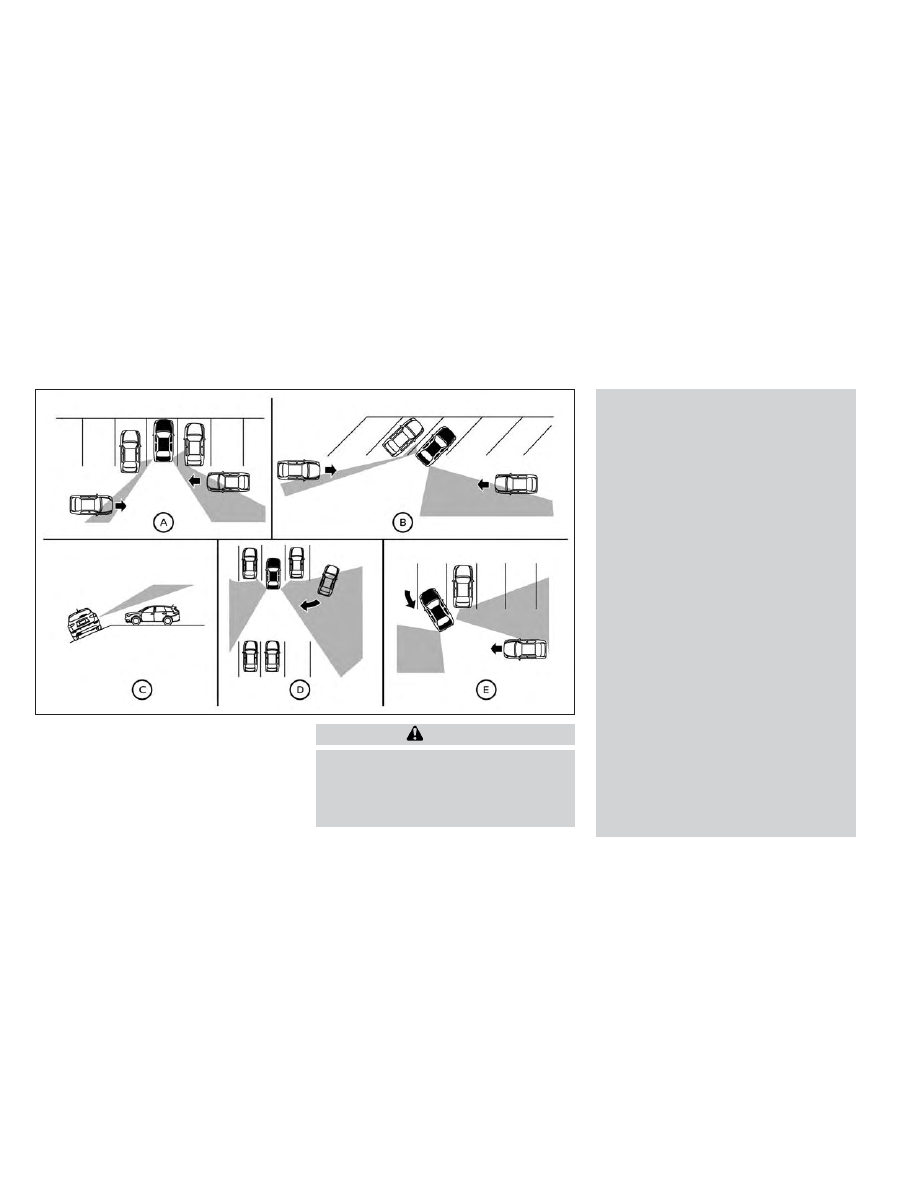
The radar sensors may not detect ap-
proaching vehicles in certain situations:

Illustration

O

A

:

When

a

vehicle

parked next to you obstructs the
beam of the radar sensor.

Illustration

O

B

: When the vehicle is

parked in an angled parking space.

Illustration

O

C

: When the vehicle is

parked on inclined ground.

Illustration

O

D

: When an approaching

vehicle turns into your vehicle's park-
ing lot aisle.

Illustration

O

E

: When the angle

formed by your vehicle and ap-
proaching vehicle is small

LSD3195

5-78

Starting and driving

CarManuals2.com

-------------------------------------------------------------------------------------------------------------------------------------------------------------

The following conditions may reduce the
ability of the radar to detect other ve-
hicles:

Severe weather

Road spray

Ice/frost/snow/dirt build-up on the

vehicle

Do not attach stickers (including trans-
parent material), install accessories or
apply additional paint near the radar
sensors. These conditions may reduce
the ability of the radar to detect other
vehicles

Excessive noise (e.g., audio system vol-
ume, open vehicle window) will interfere
with the chime sound, and it may not be
heard.

NOTE:

In the case of several vehicles approaching in
a row (Illustration 1) or in the opposite direc-
tion (Illustration 2), a chime may not be
sounded by the RCTA system after the first
vehicle passes the sensors.

LSD2043

Illustration 1

LSD2044

Illustration 2

Starting and driving

5-79

CarManuals2.com

-------------------------------------------------------------------------------------------------------------------------------------------------------------

SYSTEM TEMPORARILY
UNAVAILABLE

When radar blockage is detected, the system
will be deactivated automatically. The “Un-
available: Side Radar Obstruction” warning
message will appear in the vehicle informa-
tion display.

The systems are not available until the condi-
tions no longer exist.

The radar sensors may be blocked by tempo-
rary ambient conditions such as splashing
water, mist or fog.

The blocked condition may also be caused by
conditions such as ice, snow, frost or dirt
obstructing the radar sensors.

NOTE:

If the BSW system stops working, the RCTA
and BSI systems (if so equipped) will also
stop working.

Action to take

When the above conditions no longer exist,
the system will resume automatically.

LSD4412

For vehicles with the 7 inch (18 cm) display

5-80

Starting and driving

CarManuals2.com

-------------------------------------------------------------------------------------------------------------------------------------------------------------

Malfunction

When the RCTA system malfunctions, it will
turn off automatically. The system malfunc-
tion warning message will appear in the ve-
hicle information display.

NOTE:

If the BSW system stops working, the RCTA
and BSI systems (if so equipped) will also
stop working.

Action to take

Stop the vehicle in a safe location, push the
park button to engage the P (Park) position,
turn the engine off and restart the engine. If
the message continues to appear, have the
system checked. It is recommended that you
visit an INFINITI retailer for this service.

LSD4413

For vehicles with the 12.3 inch (31.2 cm) display

Starting and driving

5-81

CarManuals2.com

-------------------------------------------------------------------------------------------------------------------------------------------------------------

SYSTEM MAINTENANCE

The two radar sensors

O

1

for the BSW sys-

tem are located near the rear bumper. Always
keep the area near the radar sensors clean.

The radar sensors may be blocked by tempo-
rary ambient conditions such as splashing
water, mist or fog.

The blocked condition may also be caused by
objects such as ice, frost or dirt obstructing
the radar sensors.

Check for and remove objects obstructing
the area around the radar sensors.

Do not attach stickers (including transparent
material), install accessories or apply addi-
tional paint near the radar sensors.

Do not strike or damage the area around the
radar sensors. It is recommended that you
visit an INFINITI retailer if the area around
the radar sensors is damaged due to a
collision.

Radio frequency statement

For USA

FCC ID: LTQRN5TR

CAUTION TO USERS

Changes or modifications not expressly ap-
proved by the party responsible for compli-
ance could void the user’s authority to oper-
ate the equipment.

This device complies with Part 15 of the FCC
Rules and with the RSS of the Industry
Canada. Operation is subject to the follow-
ing two conditions:

1.

This device may not cause harmful inter-
ference, and

2.

this device must accept any interference
received, including interference that may
cause undesired operation.

For Canada

IC: 3659A-RN5TR

This

device

contains

licence-exempt

transmitter(s)/receiver(s) that comply with
Innovation, Science and Economic Develop-
ment Canada’s licence-exempt RSS(s). Op-
eration is subject to the following two
conditions:

(1) This device may not cause interference.

(2) This device must accept any interference,
including interference that may cause unde-
sired operation of the device.

L’émetteur/récepteur exempt de licence
contenu dans le présent appareil est con-
forme aux CNR d’Innovation, Sciences et
Développement économique Canada appli-
cables aux appareils radio exempts de li-
cence. L’exploitation est autorisée aux deux
conditions suivantes:

(1) L’appareil ne doit pas produire de
brouillage;

(2) L’appareil doit accepter tout brouillage
radioélectrique subi, même si le brouillage
est

susceptible

d’en

compromettre

le

fonctionnement.

LSD4407

5-82

Starting and driving

CarManuals2.com

-------------------------------------------------------------------------------------------------------------------------------------------------------------

PRECAUTIONS ON CRUISE
CONTROL

1. ACCEL/RES switch

2. COAST/SET switch

3. CANCEL switch

4. ON/OFF switch
• If the cruise control system malfunctions, it

will cancel automatically. The SET indicator
in the vehicle information display will blink
to warn the driver.

• If the engine coolant temperature becomes

excessively high, the cruise control system
will be canceled automatically.

• If the SET indicator blinks, turn the ON/

OFF switch off and have the system
checked. It is recommended that you visit
an INFINITI retailer for this service.

• The SET indicator may sometimes blink

when the ON/OFF switch is turned on
while pushing the ACCEL/RES, COAST/
SET or CANCEL switch. To properly set
the cruise control system, perform the
steps below.

WARNING

Do not use the cruise control when driving
under the following conditions:

When it is not possible to keep the ve-
hicle at a set speed

In heavy traffic or in traffic that varies in
speed

On winding or hilly roads

On slippery roads (rain, snow, ice, etc.)

In very windy areas

Doing so could cause a loss of vehicle con-
trol and result in an accident.

CRUISE CONTROL OPERATIONS

The cruise control allows driving at a speed
between 25 - 89 mph (40 - 144 km/h) with-
out keeping your foot on the accelerator
pedal.

To turn on the cruise control,

push the cruise

control ON/OFF switch on. The

indica-

tor (white) in the vehicle information display
will illuminate.

To set cruising speed,

accelerate the vehicle

to the desired speed, push the SET- switch
and release it. The

indicator (green) in

the vehicle information display will illuminate.
Take your foot off the accelerator pedal.
Your vehicle maintains the set speed.

To pass another vehicle,

depress the accel-

erator pedal. When you release the pedal,
the vehicle returns to the previously set
speed.

• The vehicle may not maintain the set speed

when going up or down steep hills. If this
happens, drive without the cruise control.

To cancel the preset speed,

use one of the

following three methods:
• Push the CANCEL switch; the

indica-

tor (green) in the vehicle information display
goes out.

LSD4169

CRUISE CONTROL (if so equipped)

Starting and driving

5-83

CarManuals2.com

-------------------------------------------------------------------------------------------------------------------------------------------------------------

• Tap the brake pedal; the

indicator

(green) goes out.

• Push the cruise control ON/OFF switch

off. The

indicator in the vehicle infor-

mation display go out.

The cruise control is automatically canceled
and the

indicator (green) in the vehicle

information display goes out if:
• You depress the brake pedal while pushing

the RES+ or SET- switch. The preset speed
is deleted from memory.

• The vehicle slows down more than 8 mph

(13 km/h) below the set speed.

• You move the shift lever to N (Neutral).

To reset at a faster cruising speed,

use one of

the following three methods:
• Depress the accelerator pedal. When the

vehicle attains the desired speed, push and
release the SET- switch.

• Push and hold the RES+ switch. When the

vehicle attains the speed you desire, release
the switch.

• Push and release the RES+ switch. Each

time you do this, the set speed increases by
about 1 mph (1.6 km/h).

To reset at a slower cruising speed,

use one

of the following three methods:
• Lightly tap the brake pedal. When the ve-

hicle attains the desired speed, push the
SET- switch and release it.

• Push and hold the SET- switch. Release the

switch when the vehicle slows to the de-
sired speed.

• Push and release the SET- switch. Each

time you do this, the set speed decreases by
about 1 mph (1.6 km/h).

To resume the preset speed,

push and re-

lease the RES+ switch. The vehicle returns to
the last set cruising speed when the vehicle
speed is over 25 mph (40 km/h).

WARNING

Failure to follow the warnings and instruc-
tions for proper use of the ProPILOT Assist
system could result in serious injury or
death.

ProPILOT Assist is not a self-driving
system. Within the limits of its capabili-
ties, as described in this manual, it helps
the driver with certain driving activities.

The ProPILOT Assist system is not a re-
placement for proper driving procedures
and is not designed to correct careless,
inattentive or absent-minded driving.
ProPILOT Assist will not always steer
the vehicle to keep it in the lane. The Pro-
PILOT Assist system is not designed to
prevent loss of control. It is the driver’s
responsibility to stay alert, drive safely,
keep the vehicle in the traveling lane, and
be in control of the vehicle at all times.

There are limitations to the ProPILOT
Assist system capability. The ProPILOT
Assist system does not function in all
driving, traffic, weather, and road condi-
tions. It is the driver’s responsibility to
stay alert, drive safely, keep the vehicle
in the traveling lane, and be in control of
the vehicle at all times.

PROPILOT ASSIST (if so equipped)

5-84

Starting and driving

CarManuals2.com

-------------------------------------------------------------------------------------------------------------------------------------------------------------

The ProPILOT Assist system is only an
aid to assist the driver and is not a colli-
sion warning or avoidance device.

The ProPILOT Assist system is for high-
way use only and is not intended for city
driving. Failure to apply the brakes or
steer the vehicle when necessary may re-
sult in a serious accident.

Always observe posted speed limits and
do not set the speed over them.

Never take your hands off the steering
wheel when driving. Always keep your
hands on the steering wheel and drive
your vehicle safely.

Never unfasten your safety belt when
using ProPILOT Assist. Doing so auto-
matically cancels the ProPILOT Assist
system.

The ProPILOT Assist system does not
react to stationary and slow moving
vehicles.

Always drive carefully and attentively
when using the ProPILOT Assist system.
Read and understand the Owner’s
Manual thoroughly before using the
ProPILOT Assist system. To avoid seri-
ous injury or death, do not rely on the
system to prevent accidents or to control
the vehicle’s speed in emergency situa-
tions. Do not use the ProPILOT Assist
system except in appropriate road and
traffic conditions.

The ProPILOT Assist system is intended to
enhance the operation of the vehicle when
following a vehicle traveling in the same lane
and direction.
The ProPILOT Assist system uses a multi-
sensing front camera

O

A

installed behind the

windshield and a radar sensor located on the
front of the vehicle

O

B

to measure the distance

to the vehicle ahead in the same lane and to
monitor the lane markers. If the vehicle detects
a slower moving vehicle ahead, the system will
reduce the vehicle speed so that your vehicle
follows the vehicle in front at the selected dis-
tance. The system will also help keep the ve-
hicle centered in the traveling lane when clear
lane markings are detected.

LSD4514

Starting and driving

5-85

CarManuals2.com

-------------------------------------------------------------------------------------------------------------------------------------------------------------

PROPILOT ASSIST SYSTEM
OPERATION

1

Steering-wheel-mounted control (left)

2

Vehicle information display

3

Steering-wheel-mounted control (right)

4

ProPILOT Assist switch

The ProPILOT Assist system has the follow-
ing two functions:

1.

Intelligent Cruise Control (ICC)

The ICC system can be set to one of two
cruise control modes:

Conventional (fixed speed) cruise control
mode:

For cruising at a preset speed

NOTE:

Steering Assist is not available in the con-
ventional (fixed speed) cruise control mode.

Vehicle-to-vehicle distance control mode:

The ICC system maintains a selected dis-
tance from the vehicle in front of you within
the speed range of 0 to 90 mph (0 to 144
km/h) up to the set speed. The set speed
can be selected by the driver between 20 to
90 mph (32 to 144 km/h). When the ve-
hicle ahead slows to a stop, your vehicle
gradually decelerates to a standstill. When
the vehicle is stopped, the ICC system
maintains braking force to keep your ve-
hicle stopped.

NOTE:

When your vehicle is stopped for less than 3
seconds and the vehicle ahead begins to
move, your vehicle will start moving again
automatically.

LSD4204

5-86

Starting and driving

CarManuals2.com

-------------------------------------------------------------------------------------------------------------------------------------------------------------

When your vehicle is at a standstill
for more than 3 seconds and the ve-
hicle ahead begins to accelerate,
push the RES+ switch or lightly de-
press the accelerator pedal. The ICC
system starts to follow the vehicle
ahead.

When no vehicle is detected ahead
within the driver selected distance,
the vehicle travels at the speed set
by the driver. The speed must be
above 20 mph (32 km/h) to use this
function.

• For vehicles equipped with ProPILOT As-

sist with Navi-link and only when on a lim-
ited access freeway (as identified in the
navigation map data):

– The time the vehicle can remain stopped

and automatically restart is extended
from 3 seconds to 30 seconds.

– If a vehicle ahead cuts in or out of the

lane ahead, the vehicle may not auto-
matically start when the traffic ahead
begins to move. You need to push up the
RES+ switch or lightly depress the accel-
erator pedal to follow the vehicle directly
ahead when it is safe to do so.

NOTE:

Even if the Forward Emergency Braking
(FEB) with Pedestrian Detection setting is
turned off by the driver using the “Settings”
menu in the vehicle information display, FEB
with Pedestrian Detection will be automati-
cally turned on when ICC is used.

2.

Steering Assist

The Steering Assist function controls the
steering system to help keep your vehicle
within the traveling lane.

When there is no vehicle ahead, Steering
Assist is not available at speeds under 37
mph (60 km/h).

ProPILOT Assist switches

LSD4173

Starting and driving

5-87

CarManuals2.com

-------------------------------------------------------------------------------------------------------------------------------------------------------------

1

RES+ switch:

Resumes set speed or increases speed
incrementally

2

ProPILOT Assist switch:

Turns the ProPILOT Assist system on or off

3

DISTANCE switch:

– Long
– Middle
– Short

4

SET- switch:

Sets desired cruise speed or reduces speed
incrementally

5

CANCEL switch:

Deactivates the ProPILOT Assist system

6

Steering Assist switch:

Turns the Steering Assist function on or off

NOTE:

For

ProPILOT

Assist

with

Navi-link

equipped vehicles: When Manual mode is se-
lected in the “Spd. Limit Assist” menu, oper-
ating the RES+ or SET- switch can apply the
indicated speed limit to the vehicle set speed.
For additional information, see “Speed Limit
Assist — a feature of ProPILOT Assist with
Navi-link” (P. 5-102).

The ProPILOT Assist system
display and indicators

1.

ProPILOT Assist activation

Displays once the ProPILOT Assist sys-
tem is activated

2.

Vehicle ahead detection indicator

Indicates whether the system detects a
vehicle in front of you

3.

Steering Assist indicator

Indicates the status of the Steering Assist
function by the color of the indicator

LSD4423

LSD4317

5-88

Starting and driving

CarManuals2.com

-------------------------------------------------------------------------------------------------------------------------------------------------------------

• Steering Assist indicator (gray): Steering

Assist standby

• Steering Assist indicator (green): Steer-

ing Assist active

4.

Set distance indicator

Displays the selected distance

5.

Lane marker indicator

Indicates whether the system detects lane
markers

• No lane markers displayed: Steering

Assist is turned off

• Lane marker indicator (gray): No lane

markers detected

• Lane marker indicator (green): Lane mark-

ers detected, Steering Assist is active

• Lane marker indicator (yellow): Lane de-

parture is detected

6.

ProPILOT Assist status indicator

Indicates the status of the ProPILOT As-
sist system by the color of the indicator

– ProPILOT

Assist

status

indicator

(white): ProPILOT Assist is on but in
standby.

– ProPILOT Assist status indicator (blue):

ProPILOT Assist active

7.

Steering Assist status indicator/warning

Displays the status of the Steering Assist
by the color of the indicator/warning
• No Steering Assist status indicator dis-

played: Steering Assist is turned off

• Steering Assist indicator (gray): Steering

Assist standby

• Steering Assist indicator (green): Steer-

ing Assist active

• Steering Assist indicator (yellow): Steer-

ing Assist malfunction

8.

Speed control status indicator/set dis-
tance indicator/lane marker indicator

(

)

Displays the status of speed control by
the color of the indicator, and displays the
selected distance by the number of hori-
zontal bars shown

• Speed control status indicator (white):

ICC standby

• Speed control status indicator (green):

ICC (distance control mode) is active

– Green vehicle icon displayed: Vehicle

detected ahead

– No vehicle icon shown: No vehicle de-

tected ahead (Your vehicle maintains the
driver-selected set speed.)

• Speed control status indicator (orange):

Indicates an ICC malfunction

For the lane marker indicator, see “Steering
Assist display and indicators” (P. 5-112).

9.

Set vehicle speed indicator

Indicates the set vehicle speed

Starting and driving

5-89

CarManuals2.com

-------------------------------------------------------------------------------------------------------------------------------------------------------------

10.

Vehicle set speed indicator (if so
equipped)

(

)

Indicates the vehicle set speed

11.

Road

information

indicator

(if

so

equipped)

(

,

)

Indicates the detected road information.

For additional information, see “Speed
Adjust by Route - a feature of ProPILOT
Assist with Navi-link” (P. 5-104).

12.

Detected speed limit indicator (if so
equipped)

(

)

Indicates the currently detected speed
limit.

For additional information, see “Speed
Limit Assist - a feature of ProPILOT As-
sist with Navi-link” (P. 5-102).

13.

Speed Limit Assist indicator (if so
equipped)

( A ,

,

)

Indicates the Speed Limit Assist activa-
tion mode or system operation.

For additional information, see “Speed
Limit Assist - a feature of ProPILOT As-
sist with Navi-link” (P. 5-102).

TURNING THE CONVENTIONAL
(fixed speed) CRUISE CONTROL
MODE ON

NOTE:

ProPILOT Assist provides no approach
warnings, automatic braking, or steering as-
sist in the conventional (fixed speed) cruise
control mode.

To choose the conventional (fixed speed)
cruise control mode, push and hold the Pro-
PILOT Assist switch for longer than approxi-
mately 1.5 seconds. For additional informa-
tion, see “Conventional (fixed speed) cruise
control mode” (P. 5-117).

OPERATING PROPILOT ASSIST

When the driving aids are enabled:

Zone

Driving Aid

Display

For-
ward

Forward Emergency
Braking (FEB) with
Pedestrian Detection

Outline

Predictive Forward
Collision Warning
(PFCW)

LSD4318

Example (all enabled)

5-90

Starting and driving

CarManuals2.com

-------------------------------------------------------------------------------------------------------------------------------------------------------------

Zone

Driving Aid

Display

Lane

Lane Departure
Warning (LDW)

Outline

Lane Departure Pre-
vention (LDP)

Shaded

Blind
Spot

Blind Spot Warning
(BSW)

Outline

Blind Spot Intervention
(BSI)

Shaded

1. Push the ProPILOT Assist switch

O

A

. This

turns on the ProPILOT Assist system.
• The ProPILOT Assist status indicator

O

B

illuminates in white.

2. A screen is displayed for a period of time

that indicates the status of the driving aid
functions.

• When any of the “Warning” systems are

enabled, the “

” is shown in each zone.

• When any of the “Intervention” systems are

enabled, the “

” mark is shown in each

zone.

• When no system is enabled, “OFF” is

shown in each zone.

To change the status of the driving aids, use
the

O

1

or

O

2

button to navigate

the settings screen. For additional informa-
tion, see “How to use the vehicle information
display” (P. 2-44).

LSD4210

LSD4211

Starting and driving

5-91

CarManuals2.com

-------------------------------------------------------------------------------------------------------------------------------------------------------------

3. Accelerate or decelerate your vehicle to

the desired speed and push down the
SET- switch

O

C

.

4. The ProPILOT Assist system begins to

automatically maintain the set speed. The
ProPILOT Assist activation indicator

O

D

and ProPILOT Assist status indicator

O

E

illuminate (blue). When a vehicle ahead is
traveling at a speed of 20 mph (32 km/h)
or below and the SET- switch is pushed,
the set speed of your vehicle is 20 mph
(32 km/h).

NOTE:

When the LDP and BSI systems are enabled
in the settings menu of the vehicle informa-
tion display, turning the ProPILOT Assist
system on will turn on the LDP and BSI sys-
tems at the same time. If the LDP system is
disabled in the settings menu, the LDP sys-
tem will automatically be turned on when
the Steering Assist system is active. For ad-
ditional information, see “Lane Departure
Prevention (LDP)” (P. 5-43) 
and “Blind Spot
Intervention (BSI)” (P. 5-61).

When the SET- switch is pushed under the
following conditions, the ProPILOT Assist
system cannot be set and the set vehicle
speed indicator

O

1

blinks for approximately 2

seconds:
• When traveling below 20 mph (32 km/h)

and the vehicle ahead is not detected

• When the shift lever is not in the D (Drive)

position or manual shift mode

• When the parking brake is applied
• When the brakes are operated by the driver
• When the VDC system is off. For additional

information, see “Vehicle Dynamic Control
(VDC) system” (P. 5-168).

LSD4303

LSD4214

5-92

Starting and driving

CarManuals2.com

-------------------------------------------------------------------------------------------------------------------------------------------------------------

• When the VDC system (including the trac-

tion control system) is operating

• When a wheel is slipping
• When any door is open
• When the driver’s seat belt is not fastened
• When the SNOW mode is selected

How to change the set vehicle
speed

The set vehicle speed can be adjusted.

To change to a faster cruising speed:
• Push up and hold the RES+ switch

O

1

. The

set vehicle speed increases by approxi-
mately 5 mph (5 km/h).

• Push up, then quickly release, the RES+

switch

O

1

. Each time you do this, the set

speed increases by approximately 1 mph
(1 km/h).

To change to a slower cruising speed:
• Push down and hold the SET- switch

O

2

.

The set vehicle speed decreases by ap-
proximately 5 mph (5 km/h).

• Push down, then quickly release, the SET-

switch

O

2

. Each time you do this, the set

speed decreases by approximately 1 mph
(1 km/h).

How to momentarily accelerate or
decelerate

• Depress the accelerator pedal when accel-

eration is required. Release the accelerator
pedal to resume the previously set vehicle
speed.

• Depress the brake pedal when deceleration

is required. Control by the ProPILOT Assist
system is canceled. Push the RES+ switch
to resume the previously set vehicle speed.

LSD4319

Starting and driving

5-93

CarManuals2.com

-------------------------------------------------------------------------------------------------------------------------------------------------------------

WARNING

When the accelerator pedal is depressed
and you are approaching the vehicle ahead,
the ICC system will neither control the
brake nor warn the driver with the chime
and display. The driver must manually con-
trol the vehicle speed to maintain a safe
distance to the vehicle ahead. Failure to do
so could result in severe personal injury or
death.

NOTE:

When you accelerate by depressing the ac-
celerator pedal or decelerate by pushing the
SET- switch and the vehicle travels faster
than the speed set by the driver, the set
speed vehicle indicator will blink.

How to change the set distance to
the vehicle ahead

The distance to the vehicle ahead can be
selected at any time.

Each time the DISTANCE switch

O

A

is

pushed, the set distance will change to long,
middle, short and back to long again in that
sequence.

LSD4216

5-94

Starting and driving

CarManuals2.com

-------------------------------------------------------------------------------------------------------------------------------------------------------------

Distance

Approximate distance at 60
mph (100 km/h) [ft (m)]

1.

Long

200 (60)

2.

Middle

150 (45)

3.

Short

90 (30)

• The distance to the vehicle ahead changes

automatically according to the vehicle
speed. The higher the vehicle speed, the
longer the distance.

• The distance setting will remain at the cur-

rent setting even if the engine is restarted.

LSD4321

Starting and driving

5-95

CarManuals2.com

-------------------------------------------------------------------------------------------------------------------------------------------------------------

HOW TO ENABLE/DISABLE THE
STEERING ASSIST

1

Steering-wheel-mounted control (left)

2

Vehicle information display

3

Steering Assist switch

Use the following methods to enable or dis-
able the Steering Assist.

Steering Assist switch:

To turn the Steering Assist on or off, push the
Steering Assist switch

O

3

on the instrument

panel.

NOTE:

• When the Steering Assist switch is used to

turn the system on or off, the system re-
members the setting even if the ignition
switch is cycled. The switch must be
pushed again to change the setting to on
or off.

• The Steering Assist switch changes the

status of the “Steering Assist” selection
made in the “Settings” screen in the vehicle
information display.

Setting in the vehicle information display:

1. Press the

button on the steering

wheel

O

1

until “Settings” displays in the

vehicle information display

O

2

.

2. Use the scroll dial

O

1

to select “Driver

Assistance.” Then press the OK button

O

1

.

3. Use the scroll dial

O

1

to select “Steering

Assist” and then press the OK button

O

1

to turn the system on or off.

LSD4424

5-96

Starting and driving

CarManuals2.com

-------------------------------------------------------------------------------------------------------------------------------------------------------------

NOTE:

• When the Cruise screen is displayed on the

vehicle information display, press the OK
button on the steering wheel to call up the
“Driving Aids” setting display.

• When

enabling/disabling

the

system

through the vehicle information display or
when pushing the Steering Assist switch,
the system retains the current settings
even if the engine is restarted.

How to cancel the ProPILOT Assist
system

To cancel the ProPILOT Assist system, use
one of the following methods:
• Push the CANCEL switch.
• Tap the brake pedal (except at a standstill).
• Push the ProPILOT Assist switch to turn

the system off. The ProPILOT Assist status
indicator will go out.

When the ProPILOT Assist system is canceled
while the vehicle is stopped, the electronic
parking brake is automatically activated.

WARNING

To prevent the vehicle from moving or roll-
ing unexpectedly, which could result in se-
rious personal injury or property damage,
before exiting the vehicle make sure to
push the ProPILOT Assist switch to turn
the system off, press the park button to
shift to the P (Park) position, and turn the
engine off.

INTELLIGENT CRUISE CONTROL
(ICC) (for vehicles with ProPILOT
Assist)

WARNING

Failure to follow the warnings and instruc-
tions for proper use of the ICC system
could result in serious injury or death.

The ICC system is only an aid to assist the
driver and is not a collision warning or
avoidance device. It is recommended for
highway use only and it is not intended
for city driving. It is the driver’s respon-
sibility to stay alert, drive safely, and be
in control of the vehicle at all times.

There are limitations to the ICC system
capability. The ICC system does not
function in all driving, traffic, weather,
and road conditions. It is the driver’s re-
sponsibility to stay alert, drive safely,
keep the vehicle in the traveling lane, and
be in control of the vehicle at all times.

Always observe posted speed limits and
do not set the speed over them.

The ICC system does not react to sta-
tionary and slow moving vehicles.

Always drive carefully and attentively
when using the ICC system. Read and
understand the Owner’s Manual thor-
oughly before using the ICC system. To
avoid serious injury or death, do not rely
on the system to prevent accidents or to
control the vehicle’s speed in emergency
situations. Do not use the ICC system
except in appropriate road and traffic
conditions.

Starting and driving

5-97

CarManuals2.com

-------------------------------------------------------------------------------------------------------------------------------------------------------------

ICC system operation

The ICC system is designed to maintain a
selected distance from the vehicle in front of
you and can reduce the speed to match a
slower vehicle ahead. The system decelerates
the vehicle as necessary and if the vehicle
ahead comes to a stop, the vehicle deceler-
ates to a standstill. However, the ICC system
can only apply up to 40% of the vehicle’s total
braking power. This system should only be
used when traffic conditions allow vehicle
speeds to remain fairly constant or when ve-
hicle speeds change gradually. If a vehicle
moves into the traveling lane ahead or if a
vehicle traveling ahead rapidly decelerates,
the distance between vehicles may become
closer because the ICC system cannot decel-
erate the vehicle quickly enough. If this oc-
curs, the ICC system sounds a warning chime
and blinks the system display to notify the
driver to take necessary action.

The ICC system cancels and a warning chime
sounds if the speed is below approximately
15 mph (24 km/h) and a vehicle is not de-
tected ahead. For ProPILOT Assist with
Navi-link equipped vehicles on a limited ac-
cess freeway as identified in the navigation
map data, the ICC system cancels and a
warning chime sounds if your vehicle is at a
standstill for more than approximately 3 sec-
onds and a vehicle is not detected ahead.

The ICC system operates as follows:
• When there are no vehicles traveling ahead,

the ICC system maintains the speed set by
the driver. The set speed range is between
approximately 20 and 90 mph (32 and 144
km/h).

• When there is a vehicle traveling ahead, the

ICC system adjusts the speed to maintain
the distance, selected by the driver, from
the vehicle ahead. If the vehicle ahead
comes to a stop, the vehicle decelerates to
a standstill. Once your vehicle stops, the
ICC system keeps the vehicle stopped.

• When your vehicle is stopped for less than

3 seconds and the vehicle ahead begins to
move, your vehicle will start moving again
automatically.

• When your vehicle is at a standstill for more

than 3 seconds and the vehicle ahead be-
gins to accelerate, push the RES+ switch or
lightly depress the accelerator pedal. The
ICC system starts to follow the vehicle
ahead.

• When the vehicle traveling ahead moves to

a different traveling lane, the ICC system
accelerates and maintains vehicle speed up
to the set speed.

The ICC system does not control vehicle
speed or warn you when you approach sta-
tionary and slow moving vehicles. You must
pay attention to vehicle operation to main-
tain proper distance from vehicles ahead
when approaching toll gates or traffic
congestion.

5-98

Starting and driving

CarManuals2.com

-------------------------------------------------------------------------------------------------------------------------------------------------------------

When driving on the freeway at a set speed
and approaching a slower traveling vehicle
ahead, the ICC system adjusts the speed to
maintain the distance, selected by the driver,
from the vehicle ahead. If the vehicle ahead
changes lanes or exits the freeway, the ICC
system accelerates and maintains the speed
up to the set speed. Pay attention to the
driving operation to maintain control of the
vehicle as it accelerates to the set speed.

The vehicle may not maintain the set speed
on winding or hilly roads. If this occurs, you
will have to manually control the vehicle
speed.

Normally when controlling the distance to a
vehicle ahead, the system automatically ac-
celerates or decelerates your vehicle accord-
ing to the speed of the vehicle ahead.

Depress the accelerator to properly acceler-
ate your vehicle when acceleration is required
for a lane change. Depress the brake pedal
when deceleration is required to maintain a
safe distance to the vehicle ahead due to
sudden braking or if a vehicle cuts in. Always
stay alert when using the ICC system.

No vehicle detected ahead

The driver sets the desired vehicle speed
based on the road conditions. The ICC sys-
tem maintains the set vehicle speed, similar to
standard cruise control, as long as no vehicle
is detected in the lane ahead. The ICC system
displays the set speed.

SSD0254

LSD4219

Starting and driving

5-99

CarManuals2.com

-------------------------------------------------------------------------------------------------------------------------------------------------------------

Vehicle detected ahead

When a vehicle is detected in the lane ahead,
the ICC system decelerates the vehicle by
controlling the throttle and applying the
brakes to match the speed of a slower vehicle
ahead. The ICC system then controls the ve-
hicle speed based on the speed of the vehicle
ahead

to

maintain

the

driver

selected

distance.

NOTE:

• The stop lights of the vehicle come on when

braking is performed by the ICC system.

• When the brake is applied by the system,

a noise may be heard. This is not a
malfunction.

When the ICC system detects a vehicle
ahead, the vehicle ahead detection indicator
and the speed control status indicator (dis-
tance control mode) illuminates (solid green

).

Vehicle ahead stops

When the vehicle ahead decelerates to stop,
your vehicle decelerates to a standstill. Once
your vehicle stops, the ICC system automati-
cally applies the brakes to keep the vehicle
stopped. When your vehicle is at a standstill,
the “(RES+) Press to start” message is dis-
played on the vehicle information display.

NOTE:

When your vehicle stops for less than 3 sec-
onds, your vehicle will automatically follow
the vehicle as it accelerates from a stop.

Vehicle ahead accelerates

• When your vehicle is stopped for less than

approximately 3 seconds and the vehicle
ahead begins to move, your vehicle will
start moving again automatically.

• When your vehicle is at a standstill for more

than approximately 3 seconds and the ve-
hicle ahead begins to accelerate, push up
the RES+ switch or lightly depress the ac-
celerator pedal. The ICC system starts to
follow the vehicle ahead.

• Always check surroundings before restart-

ing the vehicle.

• For vehicles equipped with ProPILOT As-

sist with Navi-link and only when on a lim-
ited access freeway (as identified in the
navigation map data):

– The time the vehicle can remain stopped

and automatically restart is extended
from 3 seconds to 30 seconds.

– If a vehicle ahead cuts in or out of the

lane ahead, the vehicle may not auto-
matically start when the traffic ahead
begins to move. You need to push up the
RES+ switch or lightly depress the accel-
erator pedal to follow the vehicle directly
ahead when it is safe to do so.

Vehicle ahead not detected

When a vehicle is no longer detected ahead,
the ICC system gradually accelerates your
vehicle to resume the previously set vehicle
speed. The ICC system then maintains the set
speed.

LSD4220

5-100

Starting and driving

CarManuals2.com

-------------------------------------------------------------------------------------------------------------------------------------------------------------

When a vehicle is no longer detected, the
vehicle ahead detection indicator turns off
and speed control status indicator (maintain
speed control mode) illuminates (green out-
line

).

The ICC system gradually accelerates to the
set speed, but you can depress the accelera-
tor pedal to quickly accelerate. When a ve-
hicle is no longer detected and your vehicle
is traveling under approximately 15 mph (24
km/h), the ICC system automatically cancels.

When passing another vehicle, the set speed
indicator

O

A

flashes when the vehicle speed

exceeds the set speed. The vehicle ahead
detection indicator turns off when the area
ahead of the vehicle is open. When the pedal
is released, the vehicle returns to the previ-
ously set speed. Even though your vehicle
speed is set in the ICC system, you can de-
press the accelerator pedal when it is neces-
sary to accelerate your vehicle rapidly.

Cut-in detection

If a vehicle moves into your traveling lane
near your vehicle, the ICC system may inform
the driver by flashing the vehicle ahead de-
tection indicator.

Approach warning

If your vehicle comes closer to the vehicle
ahead due to rapid deceleration of that ve-
hicle or if another vehicle cuts in, the system
warns the driver with the chime and ICC sys-
tem display. Decelerate by depressing the
brake pedal to maintain a safe vehicle dis-
tance if:
• The chime sounds.
• The vehicle ahead detection indicator

blinks.

• You judge it necessary to maintain a safe

distance.

The warning chime may not sound in some
cases when there is a short distance between
vehicles. Some examples are:
• When the vehicles are traveling at the same

speed and the distance between vehicles is
not changing.

LSD4515

Starting and driving

5-101

CarManuals2.com

-------------------------------------------------------------------------------------------------------------------------------------------------------------

• When the vehicle ahead is traveling faster

and the distance between vehicles is
increasing.

• When a vehicle cuts in near your vehicle.

The warning chime will not sound when:
• Your vehicle approaches other vehicles that

are parked or moving slowly.

• The accelerator pedal is depressed, over-

riding the system.

NOTE:

The approach warning chime may sound and
the system display may flash when the radar
sensor detects objects on the side of the ve-
hicle or on the side of the road. This may
cause the ICC system to decelerate or accel-
erate the vehicle. The radar sensor may de-
tect these objects when the vehicle is driven
on winding, narrow, or hilly roads or when
the vehicle is entering or exiting a curve. In
these cases, you will have to manually con-
trol the proper distance ahead of your
vehicle.

Also, the sensor sensitivity can be affected
by vehicle operation (steering maneuver or
driving position in the lane) or traffic or ve-
hicle conditions (for example, if a vehicle is
being driven with some damage).

Acceleration when passing

When the ICC system is engaged above 43
mph and following a slower vehicle (below
ICC set speed), and the turn signal is acti-
vated to the left, the ICC system will auto-
matically start to accelerate the vehicle to
help initiate passing on the left and will begin
to reduce the distance to vehicle directly
ahead. Only the left side turn signal operates
this feature. As the driver steers the vehicle
and moves into the passing lane, if no vehicle
is detected ahead the ICC system will con-
tinue to accelerate to the ICC system set
speed. If another vehicle is detected ahead,
then the vehicle will accelerate up to the fol-
lowing speed of that vehicle. If the vehicle is
not steered into the left lane to pass, the
acceleration will stop after a short time and
regain the set following distance. Accelera-
tion can be stopped at any point by depress-
ing the brake pedal or the CANCEL switch on
the steering wheel.

WARNING

In order to reduce the risk of a collision that
may result in serious injury or death, please
be aware of the following:

This function is only activated with the
left turn signal and will briefly accelerate
the vehicle even if a lane change is not
initiated. This can include non-passing
situations such as left side exits.

Ensure that when passing another ve-
hicle, the adjacent lane is clear before ini-
tiating the pass. Sudden changes in traf-
fic may occur while passing- always
manually steer or brake as needed- never
solely rely on the system.

Speed Limit Assist - a feature of
ProPILOT Assist with Navi-link
(if so equipped)

When the ProPILOT Assist with Navi-link is
active and it detects a change of the speed
limit, the new speed limit is indicated and it
can be applied to the vehicle set speed auto-
matically or manually.

5-102

Starting and driving

CarManuals2.com

-------------------------------------------------------------------------------------------------------------------------------------------------------------

The Speed Limit Assist operates:
• When the detected speed limit is 20 mph

(30 km/h) and above.

• The “Spd. Limit Assist” is enabled in the

settings menu of the vehicle information
display.

NOTE:

While the accelerator pedal is operated
with AUTO mode selected, the Speed
Limit Assist will function (automatically
adjusts the vehicle set speed) only when
the detected speed limit is faster than the
vehicle set speed.

In the following situations, the Speed
Limit Assist will not operate:

When an increase in the posted speed
limit is detected, but the vehicle set
speed is already faster than the new
speed limit.

When a decrease in the posted speed
limit is detected, but the vehicle set
speed is already lower than the new
speed limit.

System display and indicators

1. Detected speed limit indicator

Displays the currently detected speed
limit. For additional information, see
“Traffic Sign Recognition (TSR)” (P. 5-34).

2. Applied speed limit indicator (green frame)

Indicates the detected speed limit can be
applied to vehicle set speed.

3. Speed Limit Assist indicator

Indicates the system activation mode or
system operation.

“ : Manual mode is activated and a

new speed limit (faster speed value) is
indicated.

“ : Manual mode is activated and a

new speed limit (lower speed value) is
indicated.

“A” : Auto mode is activated.

Operating the system

When the system detects a different speed
limit, the new speed value is indicated. The
vehicle set speed can be changed to the indi-
cated speed limit automatically or manually.

When Manual mode is selected on settings
menu (factory default setting):

• To accept the newly indicated speed limit,

operate the RES+ switch (in case of speed
limit up) or SET- switch (in case of speed
limit down).

• The Speed Limit Assist indicator (

or

) will turn off after approximately 10

seconds if the RES+ or SET- switch is not
operated. (The Speed Limit Assist indicator
can be turned off immediately by operating
the opposite switch from the direction indi-
cated by the Speed Limit Assist indicator.)

The system will not activate if a speed limit
change is not detected.

LSD4325

Starting and driving

5-103

CarManuals2.com

-------------------------------------------------------------------------------------------------------------------------------------------------------------

When Auto mode is selected on the settings
menu:

• The indicated speed limit is applied to the

vehicle set speed automatically when on a
limited access freeway as identified in the
navigation map data. Also, if the ProPILOT
Assist with Navi-link system is on, but not
set (active), and a new speed limit is de-
tected, the vehicle set speed is automati-
cally updated.

• The Auto mode may not be available in

some regions or on roads other than limited
access freeways. In this case, the system
operates as the Manual mode.

NOTE:

Auto mode will not function in Hawaii or US
island territories.

How to activate or deactivate the
system:

1. Press the

button on the steering

wheel until “Settings” appears in the ve-
hicle information display, and press the
OK button

2. Use the scroll dial to select “Driver Assis-

tance” and then press the OK button.

3. Select “Spd. Limit Assist”, and press the

OK button to select “Auto” or “Manual” to
enable (not activate) the system. To deac-
tivate the system, select “OFF”.

NOTE:

The system will retain current settings in the
vehicle information display even if the en-
gine is restarted.

Speed Adjust by Route - a feature
of ProPILOT Assist with Navi-link
(if so equipped)

When the ProPILOT Assist with Navi-link is
active on a limited access freeway (as identi-
fied in the navigation map data), the Speed
Adjust by Route uses road information pro-
vided by the navigation system and can ad-
just the vehicle speed depending on curves,
junctions or exits and the driver may need to
apply additional braking at any time.

When the vehicle is through the curve or junc-
tion, the vehicle will accelerate again to the
set speed. When exiting the limited access
freeway, the driver will need to apply braking
at the end of the exit.

NOTE:

The system does not operate when the ac-
celerator pedal is depressed.

The system may not operate depending on
the set distance to the vehicle ahead and
vehicles detected ahead.

5-104

Starting and driving

CarManuals2.com

-------------------------------------------------------------------------------------------------------------------------------------------------------------

System display and indicators

1. Road information indicator

Appears when the system adjusts the
speed depending on turns or exits.

Curves and junctions

Exits

How to activate or deactivate the
system:

1. Press the

button on the steering

wheel until “Settings” appears in the ve-
hicle information display, and press the
OK button

2. Use the scroll dial to select “Driver Assis-

tance” and then press the OK button.

3. Select “Speed Adjust by Route”, and press

the OK button to turn the system on or
off.

NOTE:

The system will retain current settings in the
vehicle information display even if the en-
gine is restarted.

ICC system limitations

WARNING

Listed below are the system limitations for
the ICC system. Failure to operate the ve-
hicle in accordance with these system limi-
tations could result in serious injury or
death:

The ICC system is primarily intended for
use on straight, dry, open roads with
light traffic. It is not advisable to use the
ICC system in city traffic or congested
areas.

The ICC system will not adapt automati-
cally to road conditions. This system
should be used in evenly flowing traffic.
Do not use the system on roads with
sharp curves or on icy roads, in heavy rain
or in fog.

As there is a performance limit to the
distance control function, never rely
solely on the ICC system. This system
does not correct careless, inattentive or
absentminded driving or overcome poor
visibility in rain, fog, or other bad
weather. Decelerate the vehicle speed by
depressing the brake pedal, depending
on the distance to the vehicle ahead and
the surrounding circumstances in order
to maintain a safe distance between
vehicles.

When the ICC system automatically
brings the car to a stop, your vehicle can
automatically accelerate if the vehicle is
stopped for less than approximately 3
seconds. Be prepared to stop your ve-
hicle if necessary.

LSD4327

Starting and driving

5-105

CarManuals2.com

-------------------------------------------------------------------------------------------------------------------------------------------------------------

Always check surroundings before re-
starting the vehicle.

Always pay attention to the operation of
the vehicle and be ready to manually
control the proper following distance.
The ICC system may not be able to main-
tain the selected distance between ve-
hicles (following distance) or selected
vehicle speed under some circumstances.

The system may not detect the vehicle in
front of you in certain road or weather
conditions. To avoid accidents, never use
the ICC system under the following con-
ditions:

On roads with heavy, high-speed

traffic or sharp curves

On slippery road surfaces such as on

ice or snow, etc.

During bad weather (rain, fog, snow,

etc.)

When rain, snow or dirt adhere to the

bumper around the distance sensor

On steep downhill roads (the vehicle

may go beyond the set vehicle speed
and frequent braking may result in
overheating the brakes)

On repeated uphill and downhill roads

When traffic conditions make it diffi-

cult to keep a proper distance be-
tween vehicles because of frequent
acceleration or deceleration

Interference by other radar sources.

Do not use the ICC system if you are
towing a trailer. The system may not de-
tect a vehicle ahead.

In some road or traffic conditions, a ve-
hicle or object can unexpectedly come
into the sensor detection zone and cause
automatic braking. Always stay alert
and avoid using the ICC system where
not

recommended

in

this

warning

section.

The ICC system will not detect the following
objects:
• Stationary or slow moving vehicles
• Pedestrians or objects in the roadway
• Oncoming vehicles in the same lane
• Motorcycles traveling offset in the travel

lane

The following are some conditions in which
the radar sensor cannot properly detect a
vehicle ahead and the system may not oper-
ate properly:

• When the sensor detection is reduced (con-

ditions such as rain, snow, fog, dust storms,
sandstorms, and road spray from other
vehicles)

• Driving on a steep downhill slope or roads

with sharp curves

• Driving on a bumpy road surface, such as

an uneven dirt road

• If dirt, ice, snow or other material is cover-

ing the radar sensor area

• A complicated-shaped vehicle such as a car

carrier trailer or flatbed truck/trailer is near
the vehicle ahead.

• Interference by other radar sources
• When your vehicle is towing a trailer, etc.
• When excessively heavy baggage is loaded

in the rear seat or cargo area of your
vehicle.

The ICC system is designed to automatically
check the radar sensor’s operation within the
limitations of the system.

The detection zone of the radar sensor is
limited. A vehicle ahead must be in the detec-
tion zone for the ICC system to maintain the
selected distance from the vehicle ahead. A
vehicle ahead may move outside of the de-
tection zone due to its position within the
same lane of travel. Motorcycles may not be
detected in the same lane ahead if they are

5-106

Starting and driving

CarManuals2.com

-------------------------------------------------------------------------------------------------------------------------------------------------------------

traveling offset from the center line of the
lane. A vehicle that is entering the lane ahead
may not be detected until the vehicle has
completely moved into the lane.

If this occurs, the ICC system may warn you
by blinking the system indicator and sounding
the chime. The driver may have to manually
control the proper distance away from the
vehicle traveling ahead.

The ICC system (with ProPILOT Assist) uses
a multi-sensing front camera. The following
are some conditions in which the camera may
not properly detect a vehicle and detection of
a vehicle ahead may be delayed:
• Poor visibility (conditions such as rain,

snow, fog, dust storms, sandstorms, and
road spray from other vehicles)

• The camera area of the windshield is

fogged up or covered with dirt, water
drops, ice, snow, etc.

• Strong light (for example, sunlight or high

beams from oncoming vehicles) enters the
front camera

• A sudden change in brightness occurs (for

example, when the vehicle enters or exits a
tunnel or shaded area or lightning flashes)

SSD0252

Starting and driving

5-107

CarManuals2.com

-------------------------------------------------------------------------------------------------------------------------------------------------------------

When driving on some roads, such as wind-
ing, hilly, curved, narrow roads, or roads
which are under construction, the radar sen-
sor may detect vehicles in a different lane, or
may temporarily not detect a vehicle traveling
ahead. This may cause the radar system to
decelerate or accelerate the vehicle.

The detection of vehicles may also be af-
fected by vehicle operation (steering maneu-
ver or traveling position in the lane, etc.) or
vehicle condition.

If this occurs, the ICC system may warn you
by blinking the system indicator and sounding
the chime unexpectedly. You will have to
manually control the proper distance away
from the vehicle traveling ahead.

System Temporarily Unavailable

The following are conditions in which the ICC
system may be temporarily unavailable. In
these instances, the ICC system may not can-
cel and may not be able to maintain the se-
lected following distance from the vehicle
ahead.

Condition A

Under the following conditions, the ICC sys-
tem is automatically canceled. A chime will
sound and the system will not be able to be
set:
• Any door is open.
• The driver’s seat belt is not fastened.
• The vehicle ahead is not detected and your

vehicle is traveling below the speed of 15
mph (24 km/h). For ProPILOT Assist with
Navi-link equipped vehicles on a limited ac-
cess freeway as identified in the navigation
map data, the ICC system cancels and a
warning chime sounds if your vehicle is at a
standstill for more than approximately 3
seconds and a vehicle is not detected
ahead.

• Your vehicle has been stopped by the ICC

system for approximately 3 minutes or
longer.

• The shift lever is not in the D (Drive) position

or manual shift mode.

• The electronic parking brake is applied.
• The VDC system is turned off.
• The FEB with Pedestrian Detection applies

harder braking.

• VDC (including the traction control system)

operates.

SSD0253

5-108

Starting and driving

CarManuals2.com

-------------------------------------------------------------------------------------------------------------------------------------------------------------

• The SNOW mode is selected.
• A wheel slips.
• When the front radar is impaired due to dirt

or another obstruction blocking the radar
sensor.

• When the radar signal is temporarily

interrupted.

Action to take:

When the conditions listed above are no lon-
ger present, turn the system off using the
ProPILOT Assist switch. Turn the ProPILOT
Assist system back on to use the system.

NOTE:
When the ICC system is canceled under
the following conditions at a standstill,
the electronic parking brake is automati-
cally activated:

• Any door is open.
• The driver’s seat belt is not fastened.
• Your vehicle has been stopped by the ICC

system for approximately 3 minutes or
longer.

• The shift lever is not in the D (Drive) posi-

tion or manual shift mode.

• The VDC system is turned off.

• When distance measurement becomes im-

paired due to adhesion of dirt or obstruc-
tion to the sensor.

• When the radar signal is temporarily

interrupted.

Condition B

When there is inclement weather (rain, fog,
snow, etc.) blocking the front radar sensor,
the ICC system will automatically be can-
celed, the chime will sound and the “Forward
Driving Aids temporarily disabled Front Sen-
sor blocked See Owner’s Manual” warning
message will appear in the vehicle informa-
tion display.

Action to take:

When the conditions listed above are no lon-
ger present, the warning message will no
longer be available in the vehicle information
display and the system will operate normally.
If the “Forward Driving Aids temporarily dis-
abled Front Sensor blocked See Owner’s
Manual” warning message continues to be
displayed, have the system checked. It is rec-
ommended that you visit an INFINITI retailer
for this service.

Condition C

When the radar sensor of the front bumper is
covered with dirt or is obstructed, the ICC
system will automatically be canceled.

The chime will sound and the “Forward Driv-
ing Aids temporarily disabled Front Sensor
blocked See Owner’s Manual” warning mes-
sage will appear in the vehicle information
display.

Action to take:

If the warning message appears, stop the
vehicle in a safe place, push the park button
to engage the P (Park) position, and turn the
engine off. When the radar signal is tempo-
rarily interrupted, clean the sensor area of the
front bumper and restart the engine. If the
“Forward Driving Aids temporarily disabled
Front Sensor blocked See Owner’s Manual”
warning message continues to be displayed,
have the system checked. It is recommended
that you visit an INFINITI retailer for this
service.

Starting and driving

5-109

CarManuals2.com

-------------------------------------------------------------------------------------------------------------------------------------------------------------


Content      ..     11      12      13      14     ..