Infiniti QX60 (2023 year). Manual in english - page 9
 

  Index      Manuals     Infiniti QX60 (2023 year). Manual in english


Search            copyright infringement  


Content      ..     7      8      9      10     ..


Infiniti QX60 (2023 year). Manual in english - page 9


Entry/Exit function (if so equipped)

The memory seat will make the steering
wheel move up automatically when the driv-
er's door is opened and the ignition switch is
in the LOCK position. This lets the driver get
into and out of the seat more easily. The
steering wheel moves back into position
when the driver's door is closed and the igni-
tion switch is pushed.

For additional information, see “Memory
seat” (P. 3-43).

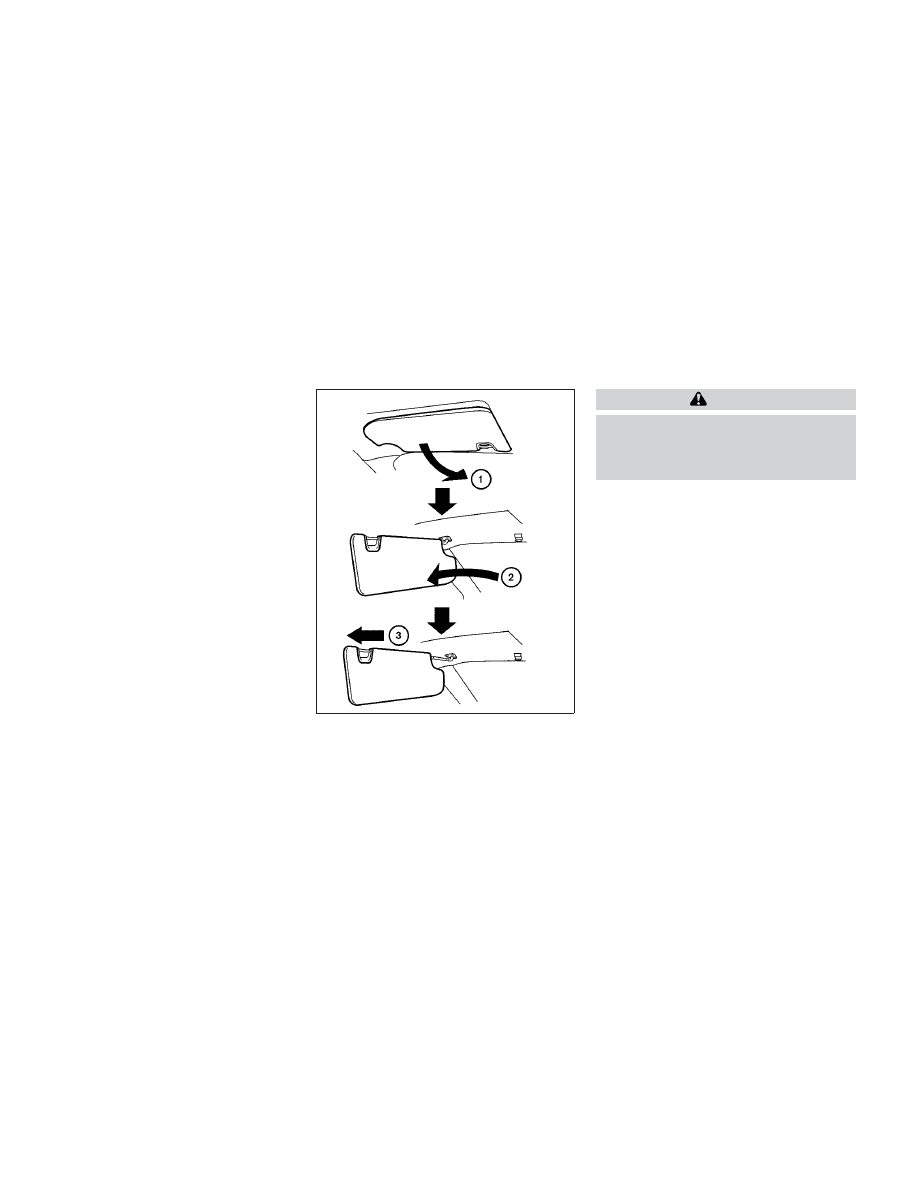
1. To block glare from the front, swing down

the sun visor

O

1

.

2. To block glare from the side, remove the

sun visor from the center mount and
swing the visor to the side

O

2

.

3. Slide the sun visor extension

O

3

in or out

as needed.

CAUTION

Do not store the sun visor before return-
ing the extension to its original position.

Do not pull the extension sun visor
forcedly downward.

LPD2154

SUN VISORS

3-32

Pre-driving checks and adjustments

CarManuals2.com

-------------------------------------------------------------------------------------------------------------------------------------------------------------

VANITY MIRRORS

To access the vanity mirror, pull the sun visor
down and flip open the mirror cover. The
vanity mirror will illuminate when the mirror
cover is open.

CARD HOLDER

To use the card holder, slide card into the clip.
Do not view information while operating the
vehicle.

AUTOMATIC ANTI-GLARE
REARVIEW MIRROR (if so
equipped)

The inside mirror is designed so that it auto-
matically dims during nighttime conditions
and according to the intensity of the head-
lights of the vehicle following you. The auto-
matic anti-glare feature is activated when
the ignition switch is in the ON position.

NOTE:

Do not hang any objects over the sensors

O

1

or apply glass cleaner to the sensors. Doing
so will reduce the sensitivity of the sensors,
resulting in improper operation.

LPD3174

LPD3156

Driver’s and passenger’s side

MIRRORS

Pre-driving checks and adjustments

3-33

CarManuals2.com

-------------------------------------------------------------------------------------------------------------------------------------------------------------

Type A (if so equipped)

For additional information on HomeLink® Uni-
versal Transceiver operation, see “HomeLink®
Universal Transceiver” (P. 2-116).

NOTE:

Do not hand any objects over the sensors

O

1

or apply glass cleaner to the sensors. Doing
so will reduce the sensitivity of the sensors,
resulting improper operation.

Type B (if so equipped)

NOTE:

Do not hand any objects over the sensors

O

1

or apply glass cleaner to the sensors. Doing
so will reduce the sensitivity of the sensors,
resulting improper operation.

SMART REAR VIEW MIRROR
(if so equipped)

WARNING

Failure to follow the warnings and instruc-
tions for proper use of the Smart Rear View
Mirror could result in serious injury or
death.

The Smart Rear View Mirror is a conve-
nience feature but it is not a substitute
for proper vehicle operation. The system
has areas where objects cannot be
viewed. Check the blind spot of the
Smart Rear View Mirror before vehicle
operation. The driver is always respon-
sible for safe driving.

Do not disassemble or modify the Smart
Rear View Mirror, the camera unit or
wirings. If you do, it may result in acci-
dents or fire. In case you notice smoke or
smell coming from the Smart Rear View
Mirror, stop using the system immedi-
ately. It is recommended that you see an
INFINITI retailer for servicing.

Do not operate the Smart Rear View
Mirror while driving. Doing so can be a
distraction and it could lose control of
your vehicle and cause an accident or se-
rious injury.

LPD3328

LPD3329

3-34

Pre-driving checks and adjustments

CarManuals2.com

-------------------------------------------------------------------------------------------------------------------------------------------------------------

Do not gaze into the Smart Rear View
Mirror display during driving. It may
cause a distraction and it could lose con-
trol of your vehicle and cause an accident
or serious injury.

Do not put a cigarette or flames to the
Smart Rear View Mirror, the camera unit
or wirings. It may cause a fire.

Be sure to adjust the Smart Rear View
Mirror before driving. Switch the system
to the conventional rearview mirror
mode and be properly seated on the driv-
er’s seat. Then adjust the mirror so as to
see the rear window properly. Driving
without adjusting the mirror may cause
difficulty in watching the display at
Smart Rear View Mirror (camera view
mode) due to the reflection from the sur-
face of the mirror.

If the Smart Rear View Mirror malfunc-
tions, immediately switch the system to
the conventional rearview mirror mode.

When strong light (for example, sunlight
or high beams from following vehicles)
enters the camera, a light beam or a glar-
ing light may appear on the monitor
screen of the Smart Rear View Mirror. In
that case, switch the system to the con-
ventional

rearview

mirror

mode

appropriately.

If dirt, rain or snow accumulates on the
exterior glass surface covering the cam-
era, the Smart Rear View Mirror may not
display object clearly. Use of the rear
window wiper/washer may improve vis-
ibility, but if not, switch the Smart Rear
View Mirror to the conventional rear-
view mirror mode until a time the glass
covering the camera can be cleaned.

Components:

Smart Rear View Mirror provides a clear rear-
view from a camera located on the rear of the
vehicle. Smart Rear View Mirror has two
modes: conventional rearview mirror mode
and Smart Rear View Mirror mode (camera
view mode). You can switch these two modes
by the mode select lever

O

4

.

LPD3204

1. MENU button

2. Left button

3. Right button

4. Mode select lever

Pre-driving checks and adjustments

3-35

CarManuals2.com

-------------------------------------------------------------------------------------------------------------------------------------------------------------

For additional information on HomeLink®
Universal Transceiver (if so equipped) opera-
tion, see “HomeLink® Universal Transceiver”
(P. 2-116).

How to change the mode:

The mode can be switched when the ignition
switch is in the ON position.
• Pull the mode select lever

O

A

to switch to

the Smart Rear View Mirror mode (camera
view mode).

• Push the mode select lever

O

B

to switch to

the conventional rearview mirror mode.

How to make settings of Smart Rear View
Mirror:

You can choose display settings of the Smart
Rear View Mirror such as brightness, camera
angle, textual indication ON or OFF and lan-
guage. When the Smart Rear View Mirror
mode is on, setting menu can be selected by
pushing the MENU button

O

1

. Each time the

MENU button

O

1

is pushed, the setting menu

will change as follows:
MENU (initial screen)

BRIGHTNESS

DOWN/UP

LEFT/RIGHT

ROTATION

INDICATION

DIMMING MIRROR

LANGUAGE

MENU (initial screen)

LPD3205

LPD3206

3-36

Pre-driving checks and adjustments

CarManuals2.com

-------------------------------------------------------------------------------------------------------------------------------------------------------------

NOTE:

To switch the image quality adjustment
items with MENU button

O

1

, push the but-

ton within 5 seconds after completing the
adjustment of the previous item. If 5 seconds
or more pass, the monitor will return to
MENU (initial screen).

BRIGHTNESS

The brightness of the display screen can be
adjusted.

O

3

• Push the left button

O

2

to dim the screen.

• Push the right button

O

3

to brighten the

screen.

DOWN/UP

The vertical camera angle of the display
screen can be adjusted.
• Push the left button

O

2

to pan the camera

angle down.

• Push the right button

O

3

to pan the camera

angle up.

LPD3207

LPD3209

Pre-driving checks and adjustments

3-37

CarManuals2.com

-------------------------------------------------------------------------------------------------------------------------------------------------------------

LEFT/RIGHT

The horizontal camera angle of the display
screen can be adjusted.
• Push the left button

O

2

to pan the camera

angle left.

• Push the right button

O

3

to pan the camera

angle right.

ROTATION

The camera angle of the display screen can
be rotated.
• Push the left button

O

2

to rotate the cam-

era angle to the left.

• Push the right button

O

3

to rotate the cam-

era angle to the right.

INDICATION

The textual indication can be turned on or off
on the Smart Rear View Mirror display
screen.
• Push the right button

O

3

to disable the

textual indication on the display screen.

• Push the left button

O

2

to enable the tex-

tual indication on the display screen.

LPD3268

LPD3212

LPD3210

3-38

Pre-driving checks and adjustments

CarManuals2.com

-------------------------------------------------------------------------------------------------------------------------------------------------------------

DIMMING MIRROR

The mirror is designed so that it automatically
changes reflection according to the intensity
of the headlights of the following vehicle. You
can enable or disable the automatic anti-
glare mode.
• Push the left button

O

2

to enable the auto-

matic anti-glare mode.

• Push the right button

O

3

to disable the

automatic anti-glare mode.

LANGUAGE

The language of textual indication can be
selected on the Smart Rear View Mirror dis-
play screen. Select the language by using the

O

2

or

O

3

button. You can select English,

French and Spanish. The language setting
will be retained even if the engine is restarted.

Smart Rear View Mirror system precautions:

NOTE:

• Long-term use of this system while the en-

gine is stopped may cause the battery to
be discharged.

• Do not attach an antenna of wireless de-

vice near the Smart Rear View Mirror.
Electric wave from wireless device may
cause disturbed image in Smart Rear View
Mirror.

• Do not push buttons excessively or oper-

ate the lever roughly as it may cause the
Smart Rear View Mirror itself to drop.

• Never turn the body of the Smart Rear

View Mirror by 90° or more. It may dam-
age the Smart Rear View Mirror.

• Do not apply strong shocks to the body of

Smart Rear View Mirror. It may cause a
system failure.

• Do not apply heavy load to the camera and

camera-cover on the rear of the vehicle. It
may cause the camera to be removed or
may cause a system failure.

• If it is difficult to see the Smart Rear View

Mirror display screen because of a strong
external light, switch the mode to the con-
ventional rearview mirror mode for better
use.

LPD3208

LPD3211

Pre-driving checks and adjustments

3-39

CarManuals2.com

-------------------------------------------------------------------------------------------------------------------------------------------------------------

• Close the sunshade (if so equipped) when

the Smart Rear View Mirror display screen
is unclear due to the strong external light.

• When LED headlights are viewed on the

Smart Rear View Mirror display, the im-
ages may flicker. This is normal.

• Due to diffuse reflection from external en-

vironment, images on the screen may
flicker. This is not a malfunction.

• A quick movement of an object may not be

able to display on the camera view screen.
This is not a malfunction.

• Turn on the headlights at twilight or in a

tunnel, etc.

• The Smart Rear View Mirror mode (cam-

era view mode) display is different from
the conventional rearview mirror. Objects
in the display may differ from actual dis-
tance. Do not solely rely on the Smart Rear
View Mirror. Always rely on your own op-
eration to avoid accidents.

• Eyestrain may occur if he brightness of the

camera view display is adjusted to an ex-
cessively bright level. Adjust the bright-
ness properly to avoid eyestrain.

• Use the rear window wiper when it rains. If

the camera view image is still unclear when
the rear window wiper is in operation,
check the deterioration of the rear win-
dow wiper blade.

• When using the rear window wiper, image

on the screen may flicker. This is not a
malfunction.

• Defog rear window with defroster when

rear window is fogged. Use the conven-
tional rearview mirror mode until the rear
window is fully defogged.

• The display of the Smart Rear View Mirror

may become hot. This is not a malfunction.

• The color of an object in the distance or in

the dark may be difficult to recognize. This
is not a malfunction.

System maintenance (Smart Rear View Mir-
ror):

• Always keep the mirror and camera area of

the rear window clean.

• Clean the mirror and the camera lens with

dry soft cloth.

• When cleaning the camera area of the rear

window, use a soft cloth dampened with a
little neutral detergent. Dry with a soft
cloth.

• If the image on the Smart Rear View Mirror

display screen is still unclear even after
cleaning the camera area of the rear win-
dow, an oil film may be adhering to the rear
window glass. Clean the rear window glass
with an oil film remover.

• Never use alcohol, benzine, thinner, or any

similar material to clean the mirror or cam-
era lens. It will cause a discoloration, dete-
rioration or a system malfunction.

• Do not attach a sticker (including transpar-

ent material) on the camera area of the rear
window.

3-40

Pre-driving checks and adjustments

CarManuals2.com

-------------------------------------------------------------------------------------------------------------------------------------------------------------

OUTSIDE MIRRORS

The outside mirror remote control will oper-
ate only when the ignition switch is in the
ACC or ON position.

Push the switch

O

1

or

O

2

to select the left or

right mirror. Adjust each mirror to the desired
position using the large switch

O

3

. Push the

switch

O

1

or

O

2

and make sure that the cor-

responding light is off, to prevent accidentally
moving the mirror.

WARNING

Objects viewed in the outside mirror on
the passenger side are closer than they
appear. Be careful when moving to the
right. Using only this mirror could cause
an accident. Use the inside mirror or
glance over your shoulder to properly
judge distances to other objects.

Do not adjust the mirrors while driving.
You could lose control of your vehicle and
cause an accident.

Power folding outside mirrors

CAUTION

Do not touch the mirrors while they are
moving. Your hand may be pinched, and
the mirror may malfunction.

Do not drive with the mirrors stored. You
will be unable to see behind the vehicle.

Push the switch

O

1

to close the mirrors. Push

the switch again to open the mirrors.

LPD3277

LPD3186

Pre-driving checks and adjustments

3-41

CarManuals2.com

-------------------------------------------------------------------------------------------------------------------------------------------------------------

If one of the mirrors are manually operated or
bumped, the mirror body can become loose
at the pivot point. To correct electronic mirror
operation, cycle the mirrors by pushing the
switch

O

1

until completely closed, then push

the switch again until the mirrors are in the
open position

Automatic anti-glare outside mirror
(if so equipped)

The outside mirror will automatically dim dur-
ing nighttime conditions to reduce the glare
from the headlights of trailing vehicles. The
automatic anti-glare feature operates only
when the ignition switch is placed in the ON
position.

The automatic anti-glare feature will be on
when starting the vehicle. The indicator light
on the automatic anti-glare rearview mirror
will illuminate when the automatic anti-glare
feature is operating.

For additional information, see “Automatic
anti-glare rearview mirror” (P. 3-33).

Heated mirrors

The electric control type outside mirrors can
be heated to defrost, defog, or de-ice for
improved visibility. For additional informa-
tion, see “Rear window and outside mirror (if
so equipped) defroster switch” (P. 4-32).

Reverse tilt-down feature

The reverse tilt-down feature will turn the
selected left or right mirror surface down-
ward to provide better rear visibility close to
the vehicle. The mirror control switch must be
in either the L or R position.

The mirror automatically returns to the origi-
nal position when you shift out of R (Reverse).

The outside mirror surface will return to the
original position when one of the following
conditions has occurred:
• The shift lever is moved to any position

other than R (Reverse).

• The outside mirror control switch is set to

the neutral or center position.

• The ignition switch is placed in the OFF

position.

The reverse tilt position can be changed.
While in R (Reverse), adjust the glass position
to the desired location. The next time the
vehicle is shifted into R (Reverse), the glass
position will go to the newly set position.
Additionally, the changed reverse tilt position
can be saved to a memory seat position. After
the reverse tilt glass position has been
changed, vehicle is shifted back into park and
glass has returned to the original position,
push the Set switch and press the desired
memory switch (1 or 2) to assign the new
reverse tilt position memory.

NOTE:

If the outside mirror control switch is in the
center position, the mirror surface will NOT
turn downward when the shift lever is
moved to R (Reverse).

For additional information, see “Memory
seat” (P. 3-43).

3-42

Pre-driving checks and adjustments

CarManuals2.com

-------------------------------------------------------------------------------------------------------------------------------------------------------------

The memory seat system has three features:
• Memory storage function (Key-link) (if so

equipped)

• Memory storage function (Switch)
• Entry/exit function

Key-link (if so equipped), when enabled, au-
tomatically retains the driver’s or passenger’s
(if so equipped) last seat, automatic steering
wheel, and outside mirror positions for that
specific key when the ignition is positioned
from ON to OFF.

Each memory switch button (1 or 2) on the
driver’s door or passenger’s door (if so
equipped) can also store one additional posi-
tion which is independent of the key-linked
position.

MEMORY STORAGE FUNCTION

Two positions for the driver's seat, steering
wheel, and outside mirrors or passenger’s
seat (if so equipped) can be stored in the
memory seat system.

NOTE:

• The vehicle should be stopped while set-

ting the memory.

• The driver’s and passenger’s memory stor-

age functions are separate from each
other.

Follow these procedures to use the memory
system.

1. Place the ignition in the ON or ACC

position.

2. Adjust the driver's seat, steering wheel,

and outside mirrors or passenger’s seat (if
so equipped) to the desired positions by
manually operating each adjusting switch.
For additional information, see “Seats”
(P. 1-2), “Steering wheel” (P. 3-30) and
“Outside mirrors” (P. 3-41).

3. Push the SET switch and, within 5 sec-

onds, push the memory switch (1 or 2).

4. The indicator light for the pushed memory

switch will come ON and stay ON for
approximately 5 seconds.

5. The chime will sound when the memory

has been stored.

NOTE:

If a new memory position is stored in the
same memory switch, the previous memory
position will be overwritten by the new
stored position.

LPD3223

Memory seat switch (Driver’s side shown;

passenger side (if so equipped) similar)

MEMORY SEAT

Pre-driving checks and adjustments

3-43

CarManuals2.com

-------------------------------------------------------------------------------------------------------------------------------------------------------------

Confirming memory storage

• Push the SET switch.
• If a memory position has been stored in the

switch (1 or 2) then the indicator light for
the respective switch will stay on for ap-
proximately 5 seconds.

ENTRY/EXIT FUNCTION

This system is designed so that the driver's
seat and automatic operation steering wheel
will automatically move. This allows the
driver to get into and out of the driver’s seat
more easily.

The driver’s seat will slide backward and the
steering wheel will move up:
• When the driver’s door is opened with the

ignition switch placed in the OFF position.

• When the ignition switch is changed from

ACC to OFF with the driver’s door open.

The driver’s seat and steering wheel will re-
turn to the previous position:
• When the ignition switch is changed from

ACC or ON while the shift position is in the
P (Park) position.

The entry/exit function can be adjusted or
canceled through “Vehicle Settings” in the ve-
hicle information display by performing the
following:
• Switch the Exit Seat Slide from “On” to

“Off”.

• Switch the Exit Steering Up from “On” to

“Off”.

SETTING MEMORY FUNCTION

The position of the following settings can be
linked to the Intelligent Key and the memo-
rized settings can be available for each Intel-
ligent Key.

To use the memory function, set the climate,
navigation and audio systems to the driver's
preferred settings. Lock the doors with the
Intelligent Key. Each Intelligent Key may be
set with the driver's individual preferences.
When a new Intelligent Key is used, “Connec-
tion with the key has been done” will be dis-
played on the vehicle information display and
the memorized settings are available.

To engage the memorized settings, perform
the following:

1. Carry the Intelligent Key that is linked to

the memorized settings.

2. Unlock the doors by wrapping hand

around the capacitive door handle or the

button on the Intelligent Key.

3. Place the ignition switch in the ON posi-

tion. The settings linked to the Intelligent
Key will start. .

For additional information, see “INFINITI In-
Touch™ Owner’s Manual” (P. 4-2) and
“Heater and air conditioner (automatic)”
(P. 4-29).

SYSTEM OPERATION

The memory seat system will not work or will
stop

operating

under

the

following

conditions:
• When the vehicle speed is above 4 mph (7

km/h).

• When any of the memory switches are

pushed while the memory seat is operating.

• When the switch for the driver’s seat,

steering wheel or passenger’s seat (if so
equipped) is pushed while the memory seat
is operating.

• When the seat has already been moved to

the memorized position.

• When no seat position is stored in the

memory switch.

• When the shift position is moved from P

(Park) to any other position.

3-44

Pre-driving checks and adjustments

CarManuals2.com

-------------------------------------------------------------------------------------------------------------------------------------------------------------

4 Monitor, climate, audio, phone and voice
recognition systems

INFINITI InTouch™ Owner’s Manual . . . . . . . . . . . . . .4-2
RearView Monitor (if so equipped) . . . . . . . . . . . . . . . .4-3

RearView Monitor system operation . . . . . . . . . . .4-4
How to read the displayed lines . . . . . . . . . . . . . . . .4-4
Difference between predicted and actual
distances . . . . . . . . . . . . . . . . . . . . . . . . . . . . . . . . . . . . .4-5
How to park with predicted course lines . . . . . . .4-6
Adjusting the screen . . . . . . . . . . . . . . . . . . . . . . . . . 4-8
How to turn on and off predicted course
lines . . . . . . . . . . . . . . . . . . . . . . . . . . . . . . . . . . . . . . . . . 4-8
RearView Monitor system limitations . . . . . . . . . 4-8
System maintenance . . . . . . . . . . . . . . . . . . . . . . . . . .4-9

Around View® Monitor (if so equipped) . . . . . . . . . 4-10

Around View® Monitor system operation . . . . .4-11
Difference between predicted and actual
distances . . . . . . . . . . . . . . . . . . . . . . . . . . . . . . . . . . . 4-16
How to park with predicted course lines . . . . . .4-17
How to switch the display . . . . . . . . . . . . . . . . . . . 4-19
Adjusting the screen . . . . . . . . . . . . . . . . . . . . . . . . 4-19
Around View® Monitor system
limitations . . . . . . . . . . . . . . . . . . . . . . . . . . . . . . . . . . 4-20

System maintenance . . . . . . . . . . . . . . . . . . . . . . . . 4-22

Moving Object Detection (MOD)
(if so equipped) . . . . . . . . . . . . . . . . . . . . . . . . . . . . . . . . 4-23

MOD system operation . . . . . . . . . . . . . . . . . . . . . 4-24
Turning MOD on and off . . . . . . . . . . . . . . . . . . . . 4-26
MOD system limitations . . . . . . . . . . . . . . . . . . . . . 4-26
System maintenance . . . . . . . . . . . . . . . . . . . . . . . . 4-27

Vents . . . . . . . . . . . . . . . . . . . . . . . . . . . . . . . . . . . . . . . . . . 4-28
Heater and air conditioner (automatic) . . . . . . . . . . 4-29

Automatic operation . . . . . . . . . . . . . . . . . . . . . . . . 4-30
Manual operation . . . . . . . . . . . . . . . . . . . . . . . . . . . 4-31
Operating tips . . . . . . . . . . . . . . . . . . . . . . . . . . . . . . 4-32
Automatic Climate Control System
(if so equipped) . . . . . . . . . . . . . . . . . . . . . . . . . . . . . 4-33
Rear automatic air conditioning system . . . . . . 4-34

Servicing air conditioner . . . . . . . . . . . . . . . . . . . . . . . . 4-36
Antenna . . . . . . . . . . . . . . . . . . . . . . . . . . . . . . . . . . . . . . . 4-36
Car phone or CB radio . . . . . . . . . . . . . . . . . . . . . . . . . 4-37
iPod®/iPhone® . . . . . . . . . . . . . . . . . . . . . . . . . . . . . . . . 4-37

CarManuals2.com

-------------------------------------------------------------------------------------------------------------------------------------------------------------

Refer to the digital INFINITI InTouch™ Own-
er’s manual using the QR code on this page,
or your printed INFINITI InTouch™ Owner’s
manual (if so equipped). This manual includes
the following information:
• INFINITI InTouch™ Services
• Navigation system (if so equipped)
• Audio system
• Apple CarPlay®
• Android Auto™
• Bluetooth® Hands-Free Phone system
• Viewing information
• Other settings

• Voice recognition
• General system information

LHA5679

INFINITI INTOUCH™ OWNER’S
MANUAL

4-2

Monitor, climate, audio, phone and voice recognition systems

CarManuals2.com

-------------------------------------------------------------------------------------------------------------------------------------------------------------

1.

button

2. CAMERA button

WARNING

Failure to follow the warnings and in-
structions for proper use of the Rear-
View Monitor system could result in se-
rious injury or death.

RearView Monitor is a convenience fea-
ture and is not a substitute for proper
backing. Always turn and look out the
windows and check mirrors to be sure
that it is safe to move before operating
the vehicle. Always back up slowly.

LHA5526

REARVIEW MONITOR (if so
equipped)

Monitor, climate, audio, phone and voice recognition systems

4-3

CarManuals2.com

-------------------------------------------------------------------------------------------------------------------------------------------------------------

The system is designed as an aid to the
driver in showing large stationary ob-
jects directly behind the vehicle, to help
avoid damaging the vehicle.

The distance guide line and the vehicle
width line should be used as a reference
only when the vehicle is on a level paved
surface. The distance viewed on the
monitor is for reference only and may be
different than the actual distance be-
tween the vehicle and displayed objects.

CAUTION

Do not scratch the camera lens when clean-
ing dirt or snow from the front of the
camera.

The RearView Monitor system automatically
shows a rear view of the vehicle when the
shift lever is shifted into the R (Reverse) posi-
tion. When activating the RearView Monitor,
the guide lines, the icons and the messages
may not be displayed immediately. The radio
can still be heard while the RearView Monitor
is active.

To display the rear view, the RearView Moni-
tor system uses a camera located in back
door finisher

O

1

.

REARVIEW MONITOR SYSTEM
OPERATION

With the ignition switch in the ON position,
move the shift lever to the R (Reverse) posi-
tion to operate the RearView Monitor. When
activating the RearView Monitor, the guide
lines, the icons and the messages may not be
displayed immediately.

HOW TO READ THE DISPLAYED
LINES

Guiding lines which indicate the vehicle width
and distances to objects with reference to
the vehicle body line

O

A

are displayed on the

monitor.

Distance guide lines

Indicate distances from the vehicle body.
• Red line

O

1

: approx. 1.5 ft (0.5 m)

• Yellow line

O

2

: approx. 3 ft (1 m)

• Green line

O

3

: approx. 7 ft (2 m)

LHA5550

LHA4805

4-4

Monitor, climate, audio, phone and voice recognition systems

CarManuals2.com

-------------------------------------------------------------------------------------------------------------------------------------------------------------

Vehicle width guide lines

O

4

Indicate the vehicle width when backing up.

Predicted course lines

O

5

Indicate the predicted course when backing
up. The predicted course lines will be dis-
played on the monitor when the shift lever is
in the R (Reverse) position and the steering
wheel is turned. The predicted course lines
will move depending on how much the steer-
ing wheel is turned and will not be displayed
while the steering wheel is in the straight-
ahead position.

The vehicle width guide lines and the width of
the predicted course lines are wider than the
actual width and course.

DIFFERENCE BETWEEN
PREDICTED AND ACTUAL
DISTANCES

The displayed guidelines and their locations
on the ground are for approximate reference
only. Objects on uphill or downhill surfaces or
projecting objects will be actually located at
distances different from those displayed in
the monitor relative to the guidelines (refer to
illustrations). When in doubt, turn around and
view the objects as you are backing up, or
park and exit the vehicle to view the position-
ing of objects behind the vehicle.

Backing up on a steep uphill

When backing up the vehicle up a hill, the
distance guide lines and the vehicle width
guide lines are shown closer than the actual
distance. Note that any object on the hill is
further than it appears on the monitor.

Backing up on a steep downhill

When backing up the vehicle down a hill, the
distance guide lines and the vehicle width
guide lines are shown farther than the actual
distance. Note that any object on the hill is
closer than it appears on the monitor.

LHA5197

LHA5198

Monitor, climate, audio, phone and voice recognition systems

4-5

CarManuals2.com

-------------------------------------------------------------------------------------------------------------------------------------------------------------

Backing up near a projecting object

The predicted course lines

O

A

do not touch

the object in the display. However, the vehicle
may hit the object if it projects over the actual
backing up course.

Backing up behind a projecting
object

The position

O

C

is shown farther than the

position

O

B

in the display. However, the po-

sition

O

C

is actually at the same distance as

the position

O

A

. The vehicle may hit the object

when backing up to the position

O

A

if the

object projects over the actual backing up
course.

HOW TO PARK WITH
PREDICTED COURSE LINES

WARNING

If the tires are replaced with different
sized tires, the predicted course lines
may be displayed incorrectly.

On a snow-covered or slippery road,
there may be a difference between the
predicted course line and the actual
course line.

If the battery is disconnected or becomes
discharged, the predicted course lines
may be displayed incorrectly. If this oc-
curs, please perform the following
procedures:

Turn the steering wheel from lock to
lock while the engine is running.

Drive the vehicle on a straight road
for more than 5 minutes.

When the steering wheel is turned with
the ignition switch in the ACC position,
the predicted course lines may be dis-
played incorrectly.

LHA4995

LHA5199

4-6

Monitor, climate, audio, phone and voice recognition systems

CarManuals2.com

-------------------------------------------------------------------------------------------------------------------------------------------------------------

1. Visually check that the parking space is

safe before parking your vehicle.

2. The rear view of the vehicle is displayed on

the screen

O

A

when the shift lever is

moved to the R (Reverse) position. When
activating the RearView Monitor, the
guide lines, the icons and the messages
may not be displayed immediately.

3. Slowly back up the vehicle adjusting the

steering wheel so that the predicted
course lines

O

B

enter the parking space

O

C

.

LHA5043

LHA4770

Monitor, climate, audio, phone and voice recognition systems

4-7

CarManuals2.com

-------------------------------------------------------------------------------------------------------------------------------------------------------------

4. Maneuver the steering wheel to make the

vehicle width guide lines

O

D

parallel to the

parking space

O

C

while referring to the

predicted course lines.

5. When the vehicle is parked in the space

completely, press the park button to en-
gage the P (Park) position and apply the
parking brake.

ADJUSTING THE SCREEN

1. Press the CAMERA button.

2. Touch the “Display Settings” key.

3. Touch the “Brightness”, “Contrast”, Tint”,

“Color”, or “Black Level” key.

4. Adjust the item by touching the “+” or “–”

key on the touch-screen display.

NOTE:

Do not adjust the Brightness, Contrast,
Black Level, Tint, and Color of the RearView
Monitor while the vehicle is moving. Make
sure the parking brake is firmly applied.

HOW TO TURN ON AND OFF
PREDICTED COURSE LINES

To toggle on and off the predicted course
lines while in the P (Park) position:

1. Press the CAMERA button.

2. Touch the “Predicted Course Lines” key to

turn the feature on or off.

REARVIEW MONITOR SYSTEM
LIMITATIONS

WARNING

Listed below are the system limitations for
RearView Monitor. Failure to operate the
vehicle in accordance with these system
limitations could result in serious injury or
death.

The system cannot completely eliminate
blind spots and may not show every
object.

Underneath the bumper and the corner
areas of the bumper cannot be viewed on
the RearView Monitor because of its
monitoring range limitation. The system
will not show small objects below the
bumper, and may not show objects close
to the bumper or on the ground.

LHA5659

4-8

Monitor, climate, audio, phone and voice recognition systems

CarManuals2.com

-------------------------------------------------------------------------------------------------------------------------------------------------------------

Objects viewed in the RearView Monitor
differ from actual distance because a
wide-angle lens is used.

Objects in the RearView Monitor will ap-
pear visually opposite compared to when
viewed in the rearview and outside
mirrors.

Use the displayed lines as a reference.
The lines are highly affected by the num-
ber of occupants, fuel level, vehicle posi-
tion, road conditions and road grade.

Make sure that the liftgate is securely
closed when backing up.

Do not put anything on the rearview
camera. The rearview camera is located
in back door finisher.

When washing the vehicle with high
pressure water, be sure not to spray it
around the camera. Otherwise, water
may enter the camera unit causing water
condensation on the lens, a malfunction,
fire or an electric shock.

Do not strike the camera. It is a precision
instrument. Otherwise, it may malfunc-
tion or cause damage resulting in a fire or
an electric shock.

The following are operating limitations and
do not represent a system malfunction:
• When the temperature is extremely high or

low, the screen may not clearly display
objects.

• When strong light directly shines on the

camera, objects may not be displayed
clearly.

• Vertical lines may be seen in objects on the

screen. This is due to strong reflected light
from the bumper.

• The screen may flicker under fluorescent

light.

• The colors of objects on the RearView

Monitor may differ somewhat from the ac-
tual color of objects.

• Objects on the monitor may not be clear in

a dark environment.

• There may be a delay when switching be-

tween views.

• If dirt, rain or snow accumulates on the

camera, the RearView Monitor may not
display objects clearly. Clean the camera.

• Do not use wax on the camera lens. Wipe

off any wax with a clean cloth dampened
with a diluted mild cleaning agent, then
wipe with a dry cloth.

SYSTEM MAINTENANCE

CAUTION

Do not use alcohol, benzine or thinner to
clean

the

camera.

This

will

cause

discoloration.

Do not damage the camera as the moni-
tor screen may be adversely affected.

If dirt, rain or snow accumulates on the cam-
era

O

1

, the RearView Monitor may not dis-

play objects clearly. Clean the camera by wip-
ing it with a cloth dampened with a diluted
mild cleaning agent and then wiping it with a
dry cloth.

LHA5550

Monitor, climate, audio, phone and voice recognition systems

4-9

CarManuals2.com

-------------------------------------------------------------------------------------------------------------------------------------------------------------

1.

button

2. CAMERA button

LHA5526

AROUND VIEW® MONITOR (if so
equipped)

4-10

Monitor, climate, audio, phone and voice recognition systems

CarManuals2.com

-------------------------------------------------------------------------------------------------------------------------------------------------------------

WARNING

Failure to follow the warnings and in-
structions for the proper use of the
Around View® Monitor system could re-
sult in serious injury or death.

The Around View® Monitor is a conve-
nience feature and is not a substitute for
proper vehicle operation because it has
areas where objects cannot be viewed.
The four corners of the vehicle in particu-
lar, are areas where objects do not al-
ways appear in the bird’s-eye, front, or
rear views. Always check your surround-
ings to be sure that it is safe to move
before operating the vehicle. Always op-
erate the vehicle slowly.

The driver is always responsible for
safety

during

parking

and

other

maneuvers.

CAUTION

Do not scratch the camera lens when clean-
ing dirt or snow from the front of the
camera.

The Around View® Monitor system is de-
signed as an aid to the driver in situations
such as slot parking or parallel parking.

The monitor displays various views of the
position of the vehicle in a split screen format.
Not all views are available at all times.

Available views:

• Front View

An approximately 150–degree view of the
front of the vehicle.

• Rear View

An approximately 150–degree view of the
rear of the vehicle.

• Bird's-Eye View

The surrounding views of the vehicle from
above.

• Front-Side View

The view around and ahead of the front
passenger's side wheel.

• Front-Wide View

An approximately 180–degree view of the
front the vehicle.

• Rear-Wide View

An approximately 180–degree view of the
rear of the vehicle.

To display the multiple views, the Around
View® Monitor system uses cameras located
in the front grille, on the vehicle’s outside
mirrors and one located in back door finisher

O

1

.

AROUND VIEW® MONITOR
SYSTEM OPERATION

With the ignition switch in the ON position,
move the shift lever to the R (Reverse) posi-
tion or press the CAMERA button to operate
the Around View® Monitor. When activating
the Around View® Monitor, the guide lines,
the icons and the messages may not be dis-
played immediately.

LHA5508

Monitor, climate, audio, phone and voice recognition systems

4-11

CarManuals2.com

-------------------------------------------------------------------------------------------------------------------------------------------------------------

When the camera is first activated with the
bird’s-eye view in the display, a red icon will
flash on the screen. This indicates that the
sonar system is activated. For additional in-
formation on the front and rear sonar system,
see “Front and rear sonar system” (P. 5-172).

The screen displayed on the Around View®
Monitor will automatically return to the pre-
vious screen 3 minutes after the CAMERA or

button has been pressed with the shift

lever in a position other than the R (reverse)
position

Available views

WARNING

The distance guide lines and the vehicle
width lines should be used as a reference
only when the vehicle is on a paved, level
surface. The apparent distance viewed
on the monitor may be different than the
actual distance between the vehicle and
displayed objects.

Use the displayed lines and the bird’s-
eye view as a reference. The lines and the
bird’s-eye view are greatly affected by
the number of occupants, cargo, fuel
level, vehicle position, road condition
and road grade.

If the tires are replaced with different
sized tires, the predicted course lines and
the bird's-eye view may be displayed
incorrectly.

When driving the vehicle up a hill, objects
viewed in the monitor are further than
they appear. When driving the vehicle
down a hill, objects viewed in the monitor
are closer than they appear.

Objects in the rear view will appear visu-
ally opposite compared to when viewed
in the monitor and outside mirrors.

Use the mirrors or actually look to prop-
erly judge distances to other objects.

On a snow-covered or slippery road,
there may be a difference between the
predicted course lines and the actual
course line.

The vehicle width and predicted course
lines are wider than the actual width and
course.

Front and rear view

Guiding lines that indicate the approximate
vehicle width and distance to objects with
reference to the vehicle body line

O

A

are dis-

played on the monitor.

Distance guide lines:

Indicate distances from the vehicle body:
• Red line

O

1

: approximately 1.5 ft (0.5 m)

• Yellow line

O

2

: approximately 3 ft (1 m)

• Green line

O

3

: approximately 7 ft (2 m)

• Green line

O

4

: approximately 10 ft (3 m) (if

so equipped)

SAA1840

Front view

4-12

Monitor, climate, audio, phone and voice recognition systems

CarManuals2.com

-------------------------------------------------------------------------------------------------------------------------------------------------------------

Vehicle width guide lines

O

5

:

Indicate the approximate vehicle width when
backing up.

Predicted course lines

O

6

:

Indicate the predicted course when operating
the vehicle. The predicted course lines will be
displayed on the monitor when the steering
wheel is turned. The predicted course lines
will move depending on how much the steer-
ing wheel is turned and will not be displayed
while the steering wheel is in the straight-
ahead position.

The front view will not be displayed when the
vehicle speed increases above approximately
6 mph (10 km/h).

NOTE:

When the monitor displays the front view
and the steering wheel turns about 90 de-
grees or less from the straight-ahead posi-
tion, both the right and left predicted course
lines

O

6

are displayed. When the steering

wheel turns about 90 degrees or more, a line
is displayed only on the opposite side of the
turn.

Bird’s-eye view

The bird's-eye view shows the overhead view
of the vehicle, which helps confirm the vehicle
position and the predicted course to a park-
ing space.

The vehicle icon

O

1

shows the position of the

vehicle. Note that the apparent distance be-
tween objects viewed in the bird's-eye view
may differ somewhat from the actual dis-
tance to the vehicle.

The areas that the cameras cannot cover

O

2

are indicated in black.

LHA4992

Rear view

LHA4546

Front view

Monitor, climate, audio, phone and voice recognition systems

4-13

CarManuals2.com

-------------------------------------------------------------------------------------------------------------------------------------------------------------

The non-viewable area

O

2

is highlighted in

yellow for several seconds after the bird’s-
eye view is displayed. It will be shown only the
first time after the ignition switch is placed in
the ON position.

The driver can check the approximate direc-
tion and angle of the tire on the display by the
tire icon

O

3

when driving the vehicle forward

or backward.

Predicted course lines

O

4

indicate the pre-

dicted course when operating the vehicle.
The predicted course lines will be displayed
on the monitor when the steering wheel is
turned. The predicted course lines will move
depending on how much the steering wheel is
turned and will not be displayed while the
steering wheel is in the neutral position.

When the monitor displays the front view and
the steering wheel turns about 90 degrees or
less from the neutral position, the two green
predicted course lines are shown in front of
the vehicle.

When the steering wheel turns about 90 de-
grees or more, one green predicted course
line is shown in front of the vehicle and the
other predicted course line is shown at the
side of the vehicle.

When the monitor displays the rear view, the
predicted course lines are shown at the back
of the vehicle.

WARNING

Objects in the bird's-eye view will appear
further than the actual distance.

Tall objects, such as a curb or vehicle,
may be misaligned or not displayed at
the seam of the views.

Objects that are above the camera can-
not be displayed.

The view of the bird's-eye view may be
misaligned when the camera position
alters.

A line on the ground may be misaligned
and is not seen as being straight at the
seam of the views. The misalignment will
increase as the line proceeds away from
the vehicle.

Tire angle display does not indicate the
actual tire angle.

LHA4547

Rear view

4-14

Monitor, climate, audio, phone and voice recognition systems

CarManuals2.com

-------------------------------------------------------------------------------------------------------------------------------------------------------------

Front-side view

Guiding lines

Guiding lines that indicate the approximate
width and the front end of the vehicle are
displayed on the monitor.

The front-of-vehicle line

O

1

shows the front

part of the vehicle.

The side-of-vehicle line

O

2

shows the ap-

proximate vehicle width including the outside
mirrors.

The extensions

O

3

of both the front

O

1

and

side

O

2

lines are shown with a green dotted

line.

Front-wide and rear-wide view

The front-wide and rear-wide views show a
wider area on the entire screen and allows
the checking of the blind corners on right and
left sides. The rear-wide view displays an
approximately 180-degree area while the
front-view and rear-view display an approxi-
mately 150-degree area.

Distance guide lines

Indicates distances from the vehicle body:
• Red line

O

1

: approximately 1.5 ft (0.5 m)

• Yellow line

O

2

: approximately 3 ft (1 m)

• Green line

O

3

: approximately 7 ft (2 m)

• Green line

O

4

: approximately 10 ft (3 m) (if

so equipped)

Vehicle width guide lines

O

5

Indicate the vehicle width when backing up.

LHA2652

LHA4630

Front-wide view

LHA5217

Rear-wide view

Monitor, climate, audio, phone and voice recognition systems

4-15

CarManuals2.com

-------------------------------------------------------------------------------------------------------------------------------------------------------------

DIFFERENCE BETWEEN
PREDICTED AND ACTUAL
DISTANCES

The displayed guidelines and their locations
on the ground are for approximate reference
only. Objects on uphill or downhill surfaces or
projecting objects will be actually located at
distances different from those displayed in
the monitor relative to the guidelines (refer to
illustrations). When in doubt, turn around and
view the objects as you are backing up, or
park and exit the vehicle to view the position-
ing of objects behind the vehicle.

Backing up on a steep uphill

When backing up the vehicle up a hill, the
distance guide lines and the vehicle width
guide lines are shown closer than the actual
distance. Note that any object on the hill is
further than it appears on the monitor.

Backing up on a steep downhill

When backing up the vehicle down a hill, the
distance guide lines and the vehicle width
guide lines are shown farther than the actual
distance. Note that any object on the hill is
closer than it appears on the monitor.

LHA5197

LHA5198

4-16

Monitor, climate, audio, phone and voice recognition systems

CarManuals2.com

-------------------------------------------------------------------------------------------------------------------------------------------------------------

Backing up near a projecting object

The predicted course lines

O

A

do not touch

the object in the display. However, the vehicle
may hit the object if it projects over the actual
backing up course.

Backing up behind a projecting
object

The position

O

C

is shown farther than the

position

O

B

in the display. However, the po-

sition

O

C

is actually at the same distance as

the position

O

A

. The vehicle may hit the object

when backing up to the position

O

A

if the

object projects over the actual backing up
course.

HOW TO PARK WITH
PREDICTED COURSE LINES

WARNING

If the tires are replaced with different
sized tires, the predicted course lines
may be displayed incorrectly.

On a snow-covered or slippery road,
there may be a difference between the
predicted course line and the actual
course line.

If the battery is disconnected or becomes
discharged, the predicted course lines
may be displayed incorrectly. If this oc-
curs, please perform the following
procedures:

Turn the steering wheel from lock to
lock while the engine is running.

Drive the vehicle on a straight road
for more than 5 minutes.

When the steering wheel is turned with
the ignition switch in the ACC position,
the predicted course lines may be dis-
played incorrectly.

LHA4995

LHA5199

Monitor, climate, audio, phone and voice recognition systems

4-17

CarManuals2.com

-------------------------------------------------------------------------------------------------------------------------------------------------------------

1. Visually check that the parking space is

safe before parking your vehicle.

2. The rear view of the vehicle is displayed on

the screen

O

A

when the shift lever is

moved to the R (Reverse) position. When
activating the Around View® Monitor, the
guide lines, the icons and the messages
may not be displayed immediately.

3. Slowly back up the vehicle adjusting the

steering wheel so that the predicted
course lines

O

B

enter the parking space

O

C

.

LHA5043

LHA4770

4-18

Monitor, climate, audio, phone and voice recognition systems

CarManuals2.com

-------------------------------------------------------------------------------------------------------------------------------------------------------------

4. Maneuver the steering wheel to make the

vehicle width guide lines

O

D

parallel to the

parking space

O

C

while referring to the

predicted course lines.

5. When the vehicle is parked in the space

completely, press the park button to en-
gage the P (Park) position and apply the
parking brake.

HOW TO SWITCH THE DISPLAY

With the ignition switch in the ON position,
press the CAMERA button or move the shift
lever to the R (Reverse) position to operate
the Around View® Monitor.

The Around View® Monitor displays differ-
ent split screen views depending on the posi-
tion of the shift lever. When activating the
Around View® Monitor, the guide lines, the
icons and the messages may not be displayed
immediately. Press the CAMERA button to
switch between the available views.

If the shift lever is in the R (Reverse) position,
the available views are:
• Rear view/bird’s-eye view split screen
• Rear view/front-side view split screen
• Rear-wide view

If the shift position is in the P (Park) or D
(Drive) position, the available views are:
• Front view/bird’s-eye view split screen
• Front view/front-side view split screen
• Front-wide view

The display will switch from the Around
View® Monitor screen when:
• The shift lever is in the D (Drive) position

and the vehicle speed increases above ap-
proximately 6 mph (10 km/h)

• A different screen is selected.

ADJUSTING THE SCREEN

1. Touch the “Settings” key.

2. Touch the “Camera” key.

3. Touch the “Display Settings” key.

4. Touch the “Brightness”, “Contrast”, Tint”,

“Color”, or “Black Level” key.

5. Adjust the item by touching the “+” or “–”

key on the touch-screen display.

LHA5659

Monitor, climate, audio, phone and voice recognition systems

4-19

CarManuals2.com

-------------------------------------------------------------------------------------------------------------------------------------------------------------


Content      ..     7      8      9      10     ..