Infiniti QX60 (2023 year). Manual in english - page 4
 

  Index      Manuals     Infiniti QX60 (2023 year). Manual in english


Search            copyright infringement  


Content      ..     2      3      4      5     ..


Infiniti QX60 (2023 year). Manual in english - page 4


Tampering with the side air bag system
may result in serious personal injury. For
example, do not change the front seats
by placing material near the seatbacks or
by installing additional trim material,
such as seat covers, around the side air
bag.

It is recommended that you visit an
INFINITI retailer for work on and around
the side air bag and curtain air bag. It is
also recommended that you visit an
INFINITI retailer for installation of elec-
trical equipment. The SRS wiring har-
nesses* should not be modified or dis-
connected. Unauthorized electrical test
equipment and probing devices should
not be used on the side air bag or curtain
air bag systems.

* The SRS wiring harness or connectors are
yellow or orange for easy identification.

When selling your vehicle, we request that
you inform the buyer about the side air bags
and curtain air bag system and guide the
buyer to the appropriate sections in this
Owner's Manual.

Driver and front passenger
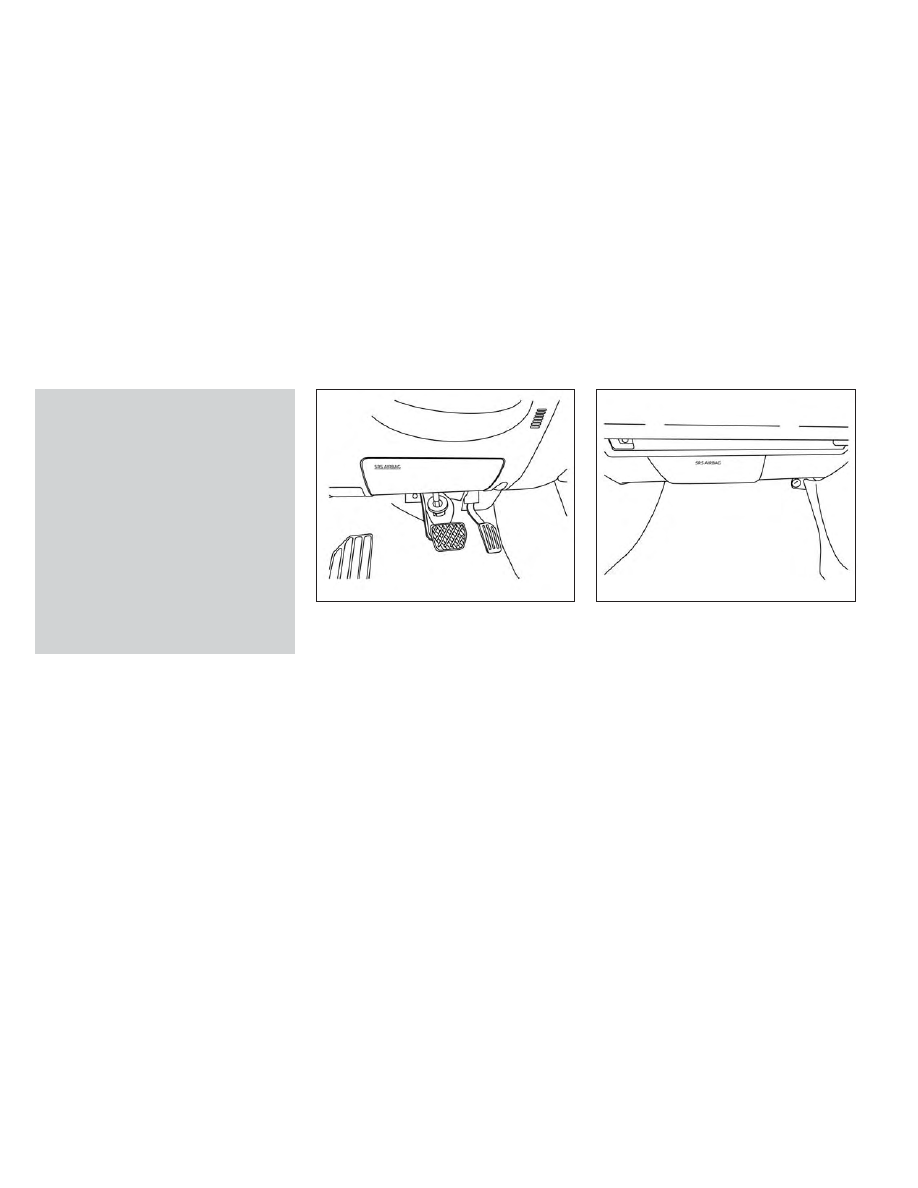
supplemental knee air bag

The knee air bag is located in the knee bolster,
on the driver’s and passenger’s side.

All of the

information, cautions and warnings in this
manual apply and must be followed.

The

knee air bag is designed to inflate in higher
severity frontal collisions, although it may in-
flate if the forces in another type of collision
are similar to those of a higher severity fron-
tal impact. It may not inflate in certain
collisions.

Vehicle damage (or lack of it) is not always an
indication of proper knee air bag operation.

When the knee air bag inflates, a fairly loud
noise may be heard, followed by release of
smoke. This smoke is not harmful and does
not indicate a fire. Care should be taken not
to inhale it, as it may cause irritation and
choking. Those with a history of a breathing
condition should get fresh air promptly.

The knee air bag helps to cushion the impact
force on the knees of the driver and passenger.
It can help reduce serious injuries. However, an
inflating knee air bag may cause abrasions or

LRS3449

Driver’s side

LRS3450

Passenger’s side

1-72

Safety-Seats, seat belts and supplemental restraint system

CarManuals2.com

-------------------------------------------------------------------------------------------------------------------------------------------------------------

other injuries. The knee air bag provides re-
straint to the lower body.

The knee air bag inflates quickly in order to
help protect the occupants. Because of this,
the force of the knee air bag inflating can
increase the risk of injury if the occupant is
too close to, or is against, this air bag module
during inflation. The knee air bag will deflate
quickly after the collision is over OR the knee
air bag will remain inflated for a short time.

The knee air bag operates only when the ig-
nition switch is placed in the ON position.

After placing the ignition switch in the ON
position, the supplemental air bag warning
light illuminates. The supplemental air bag
warning light will turn off after about 7 sec-
onds if the system is operational.

WARNING

Do not place any objects between the
knee bolster and the driver’s or passen-
ger’s seat. Such objects may become
dangerous projectiles and cause injury if
a knee air bag inflates.

Right after inflation, the knee air bag sys-
tem components will be hot. Do not touch
them; you may severely burn yourself.

No unauthorized changes should be
made to any components or wiring of the
knee air bag system. This is to prevent
damage to or accidental inflation of the
knee air bag system.

Do not make unauthorized changes to
your vehicle's electrical system or sus-
pension system. This could affect proper
operation of the knee air bag system.

Tampering with the knee air bag system
may result in serious personal injury. For
example, do not change the driver or
passenger knee bolster or install addi-
tional trim material around the knee air
bag.

It is recommended that you visit an
INFINITI retailer for work on and around
the knee air bag. It is also recommended
that you visit an INFINITI retailer for in-
stallation of electrical equipment. The
SRS wiring harnesses* should not be
modified or disconnected. Unauthorized
electrical test equipment and probing
devices should not be used on the knee
air bag system.

*The SRS wiring harness or connectors are
yellow or orange for easy identification.

When selling your vehicle, we request that
you inform the buyer about the knee air bag
system and guide the buyer to the appropri-
ate sections in this manual.

Seat belt with pretensioner(s) (front
and 2nd row outboard seats)

WARNING

The pretensioner(s) cannot be reused af-
ter activation. They must be replaced to-
gether with the retractor and buckle as a
unit.

If the vehicle becomes involved in a colli-
sion but pretensioner(s) are not acti-
vated, be sure to have the pretensioner
system checked and, if necessary, re-
placed. It is recommended that you visit
an INFINITI retailer for this service.

No unauthorized changes should be
made to any components or wiring of the
pretensioner system. This is to prevent
damage to or accidental activation of the
pretensioner(s). Tampering with the pre-
tensioner system may result in serious
personal injury.

Safety-Seats, seat belts and supplemental restraint system

1-73

CarManuals2.com

-------------------------------------------------------------------------------------------------------------------------------------------------------------

It is recommended that you visit an
INFINITI retailer for work on and around
the pretensioner system. It is also recom-
mended that you visit an INFINITI re-
tailer for installation of electrical equip-
ment.

Unauthorized

electrical

test

equipment and probing devices should
not be used on the pretensioner system.

If you need to dispose of the pretension-
er(s) or scrap the vehicle, it is recom-
mended that you visit an INFINITI re-
tailer for this service. Incorrect disposal
procedures could cause personal injury.

The pretensioner system may activate with
the supplemental air bag system in certain
types of collisions. Working with the seat belt
retractor, the pretensioner(s) help tighten the
seat belt when the vehicle becomes involved
in certain types of collisions, helping to re-
strain front and 2nd row outboard seat
occupants.

The pretensioner(s) are encased within the
seat belt retractor and to the seat belt anchor
affixed to the floor of the vehicle. These seat
belts are used the same way as conventional
seat belts.

When pretensioner(s) activate, smoke is re-
leased and a loud noise may be heard. This
smoke is not harmful and does not indicate a
fire. Care should be taken not to inhale it, as it
may cause irritation and choking. Those with
a history of a breathing condition should get
fresh air promptly.

After the pretensioner(s’) activation, load lim-
iters allow the seat belt to release webbing (if
necessary) to reduce forces against the chest.

The supplemental air bag warning light
is used to indicate malfunctions in the preten-
sioner system. For additional information,
see "Supplemental air bag warning light"
(P. 1-75). If the operation of the supplemental
air bag warning light indicates there is a mal-
function, have the system checked. It is rec-
ommended that you visit an INFINITI retailer
for this service.

When selling your vehicle, we request that
you inform the buyer about the pretensioner
system and guide the buyer to the appropri-
ate sections in this Owner's Manual.

SUPPLEMENTAL AIR BAG
WARNING LABELS

Warning labels about the supplemental
front-impact air bag system are placed in the
vehicle as shown in the illustration.

WARNING

Do not use a rear-facing child restraint on a
seat protected by an air bag in front of it. If
the air bag deploys, it may cause serious
injury or death.

WRS0885

1. SRS Air bag warning labels

The warning labels are located on the sur-
face of the sun visor.

1-74

Safety-Seats, seat belts and supplemental restraint system

CarManuals2.com

-------------------------------------------------------------------------------------------------------------------------------------------------------------

SUPPLEMENTAL AIR BAG
WARNING LIGHT

The supplemental air bag warning light, dis-
playing

in the instrument panel, moni-

tors the circuits for the air bag systems, pre-
tensioner(s) and all related wiring. When the
ignition switch is placed in the ON position,
the supplemental air bag warning light illumi-
nates for about 7 seconds and then turns
OFF. This means the system is operational.

If any of the following conditions occur, the
front air bag, side air bag, knee air bag, cur-
tain air bag and pretensioner systems need
servicing:
• The supplemental air bag warning light re-

mains on after approximately 7 seconds.

• The supplemental air bag warning light

does not come on at all.

Under these conditions, the front air bag, side
air bag, knee air bag, curtain air bag or pre-
tensioner systems may not operate properly.
They must be checked and repaired. It is rec-
ommended that you visit an INFINITI retailer
for this service.

WARNING

If the supplemental air bag warning light is
on, it could mean that the front air bag, side
air bag, knee air bag, curtain air bag and/or
pretensioner systems will not operate in an
accident. To help avoid injury to yourself or
others, have your vehicle checked as soon
as possible. It is recommended that you
visit an INFINITI retailer for this service.

Repair and replacement procedure

The front air bags, side air bags, knee air
bags, curtain air bags and pretensioner(s) are
designed to inflate on a one-time-only basis.
As a reminder, unless it is damaged, the
supplemental air bag warning light remains
illuminated after inflation has occurred.
These systems should be repaired and/or re-
placed as soon as possible. It is recom-
mended that you visit an INFINITI retailer for
this service.

When maintenance work is required on the
vehicle, the front air bags, side air bags, knee
air bags, curtain air bags, pretensioner(s) and
related parts should be pointed out to the
person performing the maintenance. The ig-
nition switch should always be in the LOCK
position when working under the hood or
inside the vehicle.

LRS0100

Safety-Seats, seat belts and supplemental restraint system

1-75

CarManuals2.com

-------------------------------------------------------------------------------------------------------------------------------------------------------------

WARNING

Once a front air bag, side air bag, knee air
bag, or curtain air bag has inflated, the
air bag module will not function again
and must be replaced. Additionally, the
activated pretensioner(s) must also be
replaced. The air bag module and preten-
sioner(s) should be replaced. It is recom-
mended that you visit an INFINITI re-
tailer for this service. However, the air
bag module and pretensioner(s) cannot
be repaired.

The front air bag, side air bag, knee air
bag, curtain air bag systems and the pre-
tensioner system should be inspected if
there is any damage to the front end or
side portion of the vehicle. It is recom-
mended that you visit an INFINITI re-
tailer for this service.

If you need to dispose of a supplemental
air bag or pretensioner systems or scrap
the vehicle, it is recommended that you
visit an INFINITI retailer. Incorrect dis-
posal procedures could cause personal
injury.

If there is an impact to your vehicle from
any direction, your Occupant Classifica-
tion Sensor (OCS) should be checked to
verify it is still functioning correctly. It is
recommended that you visit an INFINITI
retailer for this service. The OCS should
be checked even if no air bags deploy as a
result of the impact. Failure to verify
proper OCS function may result in an im-
proper air bag deployment resulting in
injury or death.

1-76

Safety-Seats, seat belts and supplemental restraint system

CarManuals2.com

-------------------------------------------------------------------------------------------------------------------------------------------------------------

2 Instruments and controls

Instrument panel . . . . . . . . . . . . . . . . . . . . . . . . . . . . . . . . .2-4
Meters and gauges . . . . . . . . . . . . . . . . . . . . . . . . . . . . . .2-6

Speedometer and odometer . . . . . . . . . . . . . . . . . . .2-6
Tachometer . . . . . . . . . . . . . . . . . . . . . . . . . . . . . . . . . .2-8
Engine coolant temperature gauge . . . . . . . . . . . .2-9
Fuel gauge . . . . . . . . . . . . . . . . . . . . . . . . . . . . . . . . . 2-10
Distance To Empty (DTE) . . . . . . . . . . . . . . . . . . . 2-10

Warning lights, indicator lights and audible
reminders . . . . . . . . . . . . . . . . . . . . . . . . . . . . . . . . . . . . . . .2-12

Checking lights . . . . . . . . . . . . . . . . . . . . . . . . . . . . . . 2-14
Warning/Indicator lights (red) . . . . . . . . . . . . . . . 2-14
Warning/Indicator lights (yellow) . . . . . . . . . . . . 2-16
Warning/Indicator lights (other) . . . . . . . . . . . . . .2-21
Audible reminders . . . . . . . . . . . . . . . . . . . . . . . . . . . 2-22

Vehicle information display 7 inch (18 cm) Type
A (if so equipped) . . . . . . . . . . . . . . . . . . . . . . . . . . . . . . 2-22

How to use the vehicle information
display . . . . . . . . . . . . . . . . . . . . . . . . . . . . . . . . . . . . . . 2-23
Startup display . . . . . . . . . . . . . . . . . . . . . . . . . . . . . . 2-23
Trip computer . . . . . . . . . . . . . . . . . . . . . . . . . . . . . . 2-24
Oil control system (if so equipped) . . . . . . . . . . . 2-27
Settings . . . . . . . . . . . . . . . . . . . . . . . . . . . . . . . . . . . . 2-27
Vehicle information display warnings and
indicators . . . . . . . . . . . . . . . . . . . . . . . . . . . . . . . . . . . 2-37

Vehicle information display 12.3 inch (31 cm)
Type B (if so equipped) . . . . . . . . . . . . . . . . . . . . . . . . . 2-44

How to use the vehicle information
display . . . . . . . . . . . . . . . . . . . . . . . . . . . . . . . . . . . . . . 2-44
Startup display . . . . . . . . . . . . . . . . . . . . . . . . . . . . . . 2-45
Trip computer . . . . . . . . . . . . . . . . . . . . . . . . . . . . . . 2-46
Changing the meter screen view . . . . . . . . . . . . . 2-49
Oil control system (if so equipped) . . . . . . . . . . . 2-49
Settings . . . . . . . . . . . . . . . . . . . . . . . . . . . . . . . . . . . . 2-50
Vehicle information display warnings and
indicators . . . . . . . . . . . . . . . . . . . . . . . . . . . . . . . . . . . 2-60

Security systems . . . . . . . . . . . . . . . . . . . . . . . . . . . . . . . .2-71

Vehicle security system . . . . . . . . . . . . . . . . . . . . . . .2-71
INFINITI Vehicle Immobilizer System . . . . . . . . . 2-72

Wiper and washer switch . . . . . . . . . . . . . . . . . . . . . . 2-73

Switch operation . . . . . . . . . . . . . . . . . . . . . . . . . . . . 2-73
Rain-sensing auto wiper system . . . . . . . . . . . . . 2-75
Rear switch operation . . . . . . . . . . . . . . . . . . . . . . . 2-76

Rear window and outside mirror
(if so equipped) defroster switch . . . . . . . . . . . . . . . . .2-77
Headlight and turn signal switch . . . . . . . . . . . . . . . . .2-77

Headlight control switch . . . . . . . . . . . . . . . . . . . . .2-77
LED Daytime Running Lights (DRL)
system . . . . . . . . . . . . . . . . . . . . . . . . . . . . . . . . . . . . . 2-82
Instrument brightness control . . . . . . . . . . . . . . . . 2-83
Turn signal switch . . . . . . . . . . . . . . . . . . . . . . . . . . . 2-83

Horn . . . . . . . . . . . . . . . . . . . . . . . . . . . . . . . . . . . . . . . . . . 2-84

CarManuals2.com

-------------------------------------------------------------------------------------------------------------------------------------------------------------

Climate controlled seat switches
(if so equipped) . . . . . . . . . . . . . . . . . . . . . . . . . . . . . . . . 2-84
Heated seat switches (if so equipped) . . . . . . . . . . . 2-85
Heated 2nd row seat switches (if so equipped) . . 2-86
Heated steering wheel switch (if so equipped) . . . 2-87
Steering Assist switch (for vehicles with
ProPILOT Assist) (if so equipped) . . . . . . . . . . . . . . . 2-88
Seat massage switch (if so equipped) . . . . . . . . . . . 2-88
Head Up Display (HUD) (if so equipped) . . . . . . . . . 2-89

How to use the HUD . . . . . . . . . . . . . . . . . . . . . . . . 2-90
Driver Assistance/Navigation linking . . . . . . . . . 2-91

Emergency call (SOS) button . . . . . . . . . . . . . . . . . . . 2-92
Rear Door Alert . . . . . . . . . . . . . . . . . . . . . . . . . . . . . . . . 2-92
Power outlets . . . . . . . . . . . . . . . . . . . . . . . . . . . . . . . . . 2-94

12v outlets . . . . . . . . . . . . . . . . . . . . . . . . . . . . . . . . . 2-94
120v outlet (if so equipped) . . . . . . . . . . . . . . . . . 2-95

USB/iPod® charging ports . . . . . . . . . . . . . . . . . . . . . 2-96
Wireless charger . . . . . . . . . . . . . . . . . . . . . . . . . . . . . . . 2-97

Wireless charger indicator . . . . . . . . . . . . . . . . . . . 2-98
Wireless charger operation . . . . . . . . . . . . . . . . . . 2-98

Extended storage switch . . . . . . . . . . . . . . . . . . . . . . . 2-99
Storage . . . . . . . . . . . . . . . . . . . . . . . . . . . . . . . . . . . . . . 2-100

Front-door pockets . . . . . . . . . . . . . . . . . . . . . . . . 2-100

Lower console storage tray . . . . . . . . . . . . . . . . 2-100
Seatback pockets . . . . . . . . . . . . . . . . . . . . . . . . . . 2-101
Glove box . . . . . . . . . . . . . . . . . . . . . . . . . . . . . . . . . . 2-101
Console box . . . . . . . . . . . . . . . . . . . . . . . . . . . . . . . 2-102
Second row console (if so equipped) . . . . . . . . 2-102
Overhead sunglasses storage . . . . . . . . . . . . . . . 2-103
Cup holders . . . . . . . . . . . . . . . . . . . . . . . . . . . . . . . . 2-104
Cargo area storage bin . . . . . . . . . . . . . . . . . . . . . 2-106
Luggage hooks . . . . . . . . . . . . . . . . . . . . . . . . . . . . 2-106
Roof rack (if so equipped) . . . . . . . . . . . . . . . . . . 2-107

Windows . . . . . . . . . . . . . . . . . . . . . . . . . . . . . . . . . . . . . 2-108

Power windows . . . . . . . . . . . . . . . . . . . . . . . . . . . 2-108
Rear door sunshade (if so equipped) . . . . . . . . 2-111

Power moonroof . . . . . . . . . . . . . . . . . . . . . . . . . . . . . 2-111

Automatic moonroof and sunshade . . . . . . . . . 2-112

Interior lights . . . . . . . . . . . . . . . . . . . . . . . . . . . . . . . . . 2-114

Console light . . . . . . . . . . . . . . . . . . . . . . . . . . . . . . . 2-114
Map lights . . . . . . . . . . . . . . . . . . . . . . . . . . . . . . . . . 2-115
Personal lights . . . . . . . . . . . . . . . . . . . . . . . . . . . . . 2-115
Cargo light . . . . . . . . . . . . . . . . . . . . . . . . . . . . . . . . 2-115

HomeLink® Universal Transceiver
(if so equipped) . . . . . . . . . . . . . . . . . . . . . . . . . . . . . . . 2-116

Programming HomeLink® . . . . . . . . . . . . . . . . . . 2-116

CarManuals2.com

-------------------------------------------------------------------------------------------------------------------------------------------------------------

-------------------------------------------------------------------------------------------------------------------------------------------------------------

1.

Vent (P. 4-28)

2.

Headlight/turn signal switch (P. 2-77)
Instrument brightness control (P. 2-83)

3.

Meters and gauges (P. 2-6)
Warning and indicator lights (P. 2-12)
Vehicle information display (P. 2-22 or
2-44)

4.

Driver supplemental air bag (P. 1-54)
Horn (P. 2-84)

5.

Wiper and washer switch (P. 2-73)
Rear wiper and washer switch (P. 2-76)

6.

Driver side heated seat switch
(if so equipped) (P. 2-85)
Driver side climate controlled seat switch
(if so equipped) (P. 2-84)
Audio system controls*

7.

Center display*
Navigation system* (if so equipped)

8.

Heated steering wheel switch
(if so equipped) (P. 2-87)

9.

Automatic heater and air conditioner
controls (P. 4-29)

10.

Hazard warning flasher switch (P. 6-2)

11.

Front passenger air bag status light
(P. 1-65)

12.

Passenger side heated seat switch
(if so equipped) (P. 2-85)
Passenger side climate controlled seat
switch (if so equipped) (P. 2-84)

13.

Front passenger supplemental air bag
(P. 1-69)

14.

Front passenger supplemental knee air
bag (P. 1-72)

15.

Glove box (P. 2-101)

16.

Wireless charger (P. 2-97)

17.

Rear window and outside mirror
defroster switch (if so equipped) (P. 2-77)

18.

Shift lever (P. 5-19)

LII2702

INSTRUMENT PANEL

2-4

Instruments and controls

CarManuals2.com

-------------------------------------------------------------------------------------------------------------------------------------------------------------

19.

Center multi-function control buttons*

20.

Push-button ignition switch (P. 5-13)

21.

Electronic parking brake (P. 5-25)
Automatic brake hold switch (P. 5-27)

22.

Idling Stop System switch (P. 5-178)

23.

INFINITI Drive Mode Selector (P. 5-29)

24.

Cruise control switches (if so equipped)
(P. 5-83)
ProPILOT Assist switches
(if so equipped) (P. 5-84)
Bluetooth® Hands-Free Phone System*

25.

Driver supplemental knee air bag
(P. 1-72)

26.

Tilt and telescopic steering wheel control
(P. 3-30)

27.

Hood release (P. 3-21)

28.

Control panel and vehicle information
display switches (P. 2-22 or 2-44)
Steering wheel switch for audio control*

29.

Liftgate instrument panel switch
(P. 3-22)
Steering Assist switch (if so equipped)
(P. 2-88)
Head Up Display (HUD) switch
(if so equipped) (P. 2-89)

*: Refer to the separate INFINITI InTouch

tm

Owner's Manual (if so equipped).

Refer to the page number indicated in paren-
theses for operating details.

Instruments and controls

2-5

CarManuals2.com

-------------------------------------------------------------------------------------------------------------------------------------------------------------

1.

Tachometer

2.

Warning and indicator lights

3.

Vehicle information display
Odometer
Twin trip odometer

4.

Speedometer

5.

Fuel gauge

6.

Engine coolant temperature gauge

SPEEDOMETER AND
ODOMETER

This vehicle is equipped with a speedometer
and odometer. The speedometer is located
on the right side of the meter cluster (if so
equipped) or the right side of the vehicle in-
formation display. The odometer is located
within the vehicle information display.

LIC4666

METERS AND GAUGES

2-6

Instruments and controls

CarManuals2.com

-------------------------------------------------------------------------------------------------------------------------------------------------------------

Speedometer

The speedometer indicates vehicle speed.

LIC2218

7 inch (18 cm) Type A (if so equipped)

LIC4857

12.3 inch (31 cm) Type B (if so equipped)

LIC4858

12.3 inch (31 cm) Type C (if so equipped)

Instruments and controls

2-7

CarManuals2.com

-------------------------------------------------------------------------------------------------------------------------------------------------------------

Odometer

The odometer

O

1

is displayed in the vehicle

information display when the ignition switch
is placed in the ON position.

The odometer records the total distance the
vehicle has been driven.

TACHOMETER

The tachometer indicates engine speed in
revolutions per minute (rpm). Do not rev the
engine into the red zone

O

1

.

CAUTION

When engine speed approaches the red
zone, reduce engine speed. Operating the
engine in the red zone may cause serious
engine damage.

LIC4732

LIC4854

7 inch (18 cm) Type A (if so equipped)

LIC4859

12.3 inch (31 cm) Type B (if so equipped)

2-8

Instruments and controls

CarManuals2.com

-------------------------------------------------------------------------------------------------------------------------------------------------------------

ENGINE COOLANT
TEMPERATURE GAUGE

The gauge indicates the engine coolant tem-
perature. The engine coolant temperature is
within the normal range

O

1

when the gauge

needle points within the zone shown in the
illustration.

The engine coolant temperature varies with
the outside air temperature and driving
conditions.

CAUTION

If the gauge indicates coolant temperature
near the hot (H) end of the normal range,
reduce vehicle speed to decrease tempera-
ture. If the gauge is over the normal range,
stop the vehicle as soon as safely possible.
If the engine is overheated, continued op-
eration of the vehicle may seriously dam-
age the engine. For additional information,
see “If your vehicle overheats” (P. 6-14).

LIC4860

12.3 inch (31 cm) Type C (if so equipped)

LIC3538

7 inch (18 cm) Type A (if so equipped)

LIC4916

12.3 inch (31 cm) Type B (if so equipped)

Instruments and controls

2-9

CarManuals2.com

-------------------------------------------------------------------------------------------------------------------------------------------------------------

FUEL GAUGE

The gauge indicates the

approximate

fuel

level in the tank.

The gauge may move slightly during braking,
turning, acceleration, or going up or down
hills.

The gauge needle returns to 0 (Empty) after
the ignition switch is placed in the OFF
position.

The low fuel warning message shows in the
vehicle information display when the amount
of fuel in the tank is getting low.

Refill the fuel tank before the gauge regis-
ters 0 (Empty).

The

indicates that the fuel-filler door is

located on the driver's side of the vehicle.

CAUTION

If the vehicle runs out of fuel, the
Malfunction Indicator Light (MIL) may
come on. Refuel as soon as possible. Af-
ter a few driving trips, the

light

should turn off. If the light remains on
after a few driving trips, have the vehicle
inspected. It is recommended that you
visit an INFINITI retailer for this service.

For additional information, see “Mal-
function Indicator Light (MIL)” (P. 2-19)
or

“Malfunction

Indicator

(MIL)”

(P. 2-64).

DISTANCE TO EMPTY (DTE)

Displays the estimated distance the vehicle
can be driven before refueling. The value is
calculated based on recent fuel economy, the
amount of fuel remaining in the fuel tank, and
the actual fuel consumption.

Changes in driving patterns or conditions can
cause the DTE value to vary. As a result, the
value displayed may differ from the actual
distance that can be driven.

DTE display will change to “---” when the fuel
level in the tank is getting low, prior to the fuel
gauge reaching 0 (Empty).

LIC2222

7 inch (18 cm) Type A (if so equipped)

LIC4670

12.3 inch (31 cm) Type B (if so equipped)

2-10

Instruments and controls

CarManuals2.com

-------------------------------------------------------------------------------------------------------------------------------------------------------------

NOTE:

• The DTE value after refill is estimated

based on recent fuel economy and amount
of fuel added.

• If a small amount of fuel is added, or the

ignition is on during refueling, the display
may not be updated.

• Conditions that affect the fuel economy

will also affect the estimated DTE value
(city/highway driving, idle time, remote
start time, terrain, seasonal weather,
added vehicle weight, added deflectors,
roof racks, etc.).

Instruments and controls

2-11

CarManuals2.com

-------------------------------------------------------------------------------------------------------------------------------------------------------------

Warning/Indicator light (red)

Warning/Indicator light (yellow)

Warning/Indicator light (other)

or

Brake warning light

or

Anti-lock Braking System (ABS)
warning light

Automatic brake hold indicator light
(white/green) (if so equipped)

Charge warning light

Electric power steering warning light

High Beam Assist indicator light (green)
(if so equipped)

Electric shift control system warning light
(if so equipped)

Electronic parking brake warning light
(if so equipped)

High beam indicator light (blue)
(if so equipped)

or

Electronic parking brake
indicator light

Forward Emergency Braking (FEB) with
Pedestrian Detection system warning light

Low beam indicator light (green)
(if so equipped)

Engine oil pressure warning light
(if so equipped)

Front passenger air bag status light

Side light and headlight indicator light
(green) (if so equipped)

Master warning light (if so equipped)

Low tire pressure warning light
(if so equipped)

Turn signal/hazard indicator lights (green)
(if so equipped)

Seat belt warning light (if so equipped)

Malfunction Indicator Light (MIL)
(if so equipped)

WARNING LIGHTS, INDICATOR
LIGHTS AND AUDIBLE REMINDERS

2-12

Instruments and controls

CarManuals2.com

-------------------------------------------------------------------------------------------------------------------------------------------------------------

Warning/Indicator light (red)

Warning/Indicator light (yellow)

Warning/Indicator light (other)

Steering Assist Hands Off warning light
(if so equipped)

Master warning light (if so equipped)

Supplemental air bag warning light

Rear Automatic Braking (RAB) warning light
(if so equipped)

Slip indicator light

Vehicle Dynamic Control (VDC) OFF
indicator light

Instruments and controls

2-13

CarManuals2.com

-------------------------------------------------------------------------------------------------------------------------------------------------------------

CHECKING LIGHTS

With all doors closed, apply the parking
brake, fasten the seat belts and place the
ignition switch in the ON position without
starting the engine. The following lights (if so
equipped) will come on:

or

,

or

,

,

,

,

,

The following lights (if so equipped) come on
briefly and then go off:

,

or

,

,

,

,

,

If any light fails to come on or operate in a
way other than described, it may indicate a
burned-out bulb and/or a system malfunc-
tion. Have the system checked. It is recom-
mended that you visit an INFINITI retailer for
this service.

Some indicators and warnings are also dis-
played in the vehicle information display be-
tween the speedometer and tachometer. For
additional information, see “Vehicle informa-
tion display–7 inch (18 cm) Type A” (P. 2-22)
or “Vehicle information display—12.3 inch (31
cm) Type B” (P. 2-44).

WARNING/INDICATOR LIGHTS
(red)

For additional information on warnings and
indicators, see “Vehicle information display–7
inch (18 cm) Type A” (P. 2-22) or “Vehicle
information display—12.3 inch (31 cm) Type
B” (P. 2-44).

or

Brake warning
light

This light functions for both the parking brake
and the foot brake systems.

Parking brake indicator

When the ignition switch is placed in the ON
position, the light comes on when the parking
brake is applied.

Low brake fluid warning light

When the ignition switch is placed in the ON
position, the light warns of a low brake fluid
level. If the light comes on while the engine is
running, with the parking brake not applied,
stop the vehicle and perform the following:

1. Check the brake fluid level. Add brake fluid

as necessary. For additional information,
see “Brake fluid” (P. 8-11).

2. If the brake fluid level is correct, have the

warning system checked. It is recom-
mended that you visit an INFINITI retailer
for this service.

WARNING

Your brake system may not be working
properly if the warning light is on. Driv-
ing could be dangerous. If you judge it to
be safe, drive carefully to the nearest
service station for repairs. Otherwise,
have your vehicle towed because driving
it could be dangerous.

Pressing the brake pedal with the engine
stopped and/or a low brake fluid level
may increase your stopping distance and
braking will require greater pedal effort
as well as pedal travel.

If the brake fluid level is below the MINI-
MUM or MIN mark on the brake fluid
reservoir, do not drive until the brake
system has been checked. It is recom-
mended that you visit an INFINITI re-
tailer for this service.

2-14

Instruments and controls

CarManuals2.com

-------------------------------------------------------------------------------------------------------------------------------------------------------------

Charge warning light

If this light comes on while the engine is run-
ning, it may indicate the charging system is
not functioning properly. Turn the engine off
and check the generator belt. If the belt is
loose, broken, or missing or if the light re-
mains on, have the system checked. It is rec-
ommended that you visit an INFINITI retailer
for this service.

CAUTION

Do not continue driving if the generator
belt is loose, broken or missing.

Electric shift control system
warning light (if so equipped)

This light illuminates when a malfunction oc-
curs in the electric shift control system. When
the master warning light illuminates, the
chime sounds and the following message is
displayed in the vehicle information display:
“When parked apply parking brake”.

When the ignition is placed in the OFF posi-
tion, the chime sounds continuously. Ensure
the parking brake is applied

Have the system checked. It is recommended
that you visit an INFINITI retailer for this
service.

or

Electronic parking
brake indicator
light

This light illuminates when the electronic
parking brake system is operating.

When the ignition switch is placed in the ON
position, the electronic parking brake indica-
tor light illuminates. When the engine is
started and the parking brake is released, the
indicator light turns off.

If the parking brake is not released, the elec-
tronic parking brake indicator light remains
illuminated. Ensure the electronic parking
brake indicator light has turned off before
driving.

If the electronic parking brake indicator light
illuminates or flashes while the electronic
parking brake warning light

(yellow)

illuminates, it may indicate that the electronic
parking brake system is not functioning prop-
erly. Have the system checked. It is recom-
mended that you visit an INFINITI retailer for
this service.

For additional information, see “Electronic
parking brake (switch type)” (P. 5-25).

Engine oil pressure warning
light (if so equipped)

This light warns of low engine oil pressure. If
the light flickers or comes on during normal
driving, pull off the road in a safe area, stop
the engine

immediately

and call an INFINITI

retailer or other authorized repair shop.

The engine oil pressure warning light is not
designed to indicate a low oil level.

Use the

dipstick to check the oil level. For additional
information, see “Engine oil”
(P. 8-6 ).

CAUTION

Running the engine with the engine oil
pressure warning light on could cause se-
rious damage to the engine almost im-
mediately. Such damage is not covered
by warranty. Turn off the engine as soon
as it is safe to do so.

The engine oil pressure warning light is
not designed to indicate oil level. The oil
level should be checked using the dip-
stick. For additional information, see
“Engine oil” (P. 8-6 
).

Instruments and controls

2-15

CarManuals2.com

-------------------------------------------------------------------------------------------------------------------------------------------------------------

Master warning light (if so
equipped)

When the ignition is in the ON position, the
master warning light illuminates if a warning
message appears in the vehicle information
display.

For additional information, see “Vehicle in-
formation display–7 inch (18 cm) Type A”
(P. 2-22) or “Vehicle information display—
12.3 inch (31 cm) Type B” (P. 2-44).

Seat belt warning light (if so
equipped)

The light and chime reminds you to fasten the
driver and front passenger seat belts.

The 2nd and 3rd row seats may also be
equipped with a seat belt reminder.

For additional information, see “Seat belts”
(P. 1-17).

Steering Assist Hands Off
warning light (if so equipped)

When the Steering Assist is activated, it
monitors the driver’s steering wheel opera-
tion. If the steering wheel is not operated or
the driver takes his/her hands off the steering
wheel for a period of time, the warning light
illuminates. If the driver does not operate the

steering wheel after the warning light has
been illuminated, an audible alert sounds and
the warning flashes in the vehicle information
display, followed by a quick brake application
to request the driver to take control of the
vehicle again. If the driver remains unrespon-
sive, the vehicle will automatically turn on the
hazard lights and slow to a complete stop.

For additional information, see “Steering As-
sist” (P. 5-111).

Supplemental air bag
warning light

When the ignition switch is placed in the ON
position, the supplemental air bag warning
light illuminates for about 7 seconds and
then turns off. This means the system is
operational.

If any of the following conditions occur, the
front air bag, side air bag, curtain air bag,
and pretensioner seat belt systems need
servicing:
• The supplemental air bag warning light re-

mains on after approximately 7 seconds.

• The supplemental air bag warning light

does not come on at all.

It is recommended that you visit an INFINITI
retailer for these services.

Unless checked and repaired, the supplemen-
tal restraint system (air bag system) and/or
the pretensioners may not function properly.
For additional information, see “Supplemen-
tal Restraint System (SRS)” (P. 1-54).

WARNING

If the supplemental air bag warning light is
on, it could mean that the front air bag, side
air bag, curtain air bag and/or preten-
sioner systems will not operate in an acci-
dent. To help avoid injury to yourself or
others, have your vehicle checked as soon
as possible. It is recommended that you
visit an INFINITI retailer for this service.

WARNING/INDICATOR LIGHTS
(yellow)

For additional information on warnings and
indicators, see “Vehicle information display–
7 inch (18 cm) Type A” (P. 2-22) or “Vehicle
information display—12.3 inch (31 cm) Type
B” (P. 2-44).

2-16

Instruments and controls

CarManuals2.com

-------------------------------------------------------------------------------------------------------------------------------------------------------------

or

Anti-lock Braking
System (ABS)
warning light

When the ignition switch is placed in the ON
position, the ABS warning light illuminates
and then turns off. This indicates the ABS is
operational.

If the ABS light comes on while the engine is
running, it may indicate the anti-lock braking
system is not functioning properly. Have the
system checked. It is recommended that you
visit an INFINITI retailer for this service.

If an ABS malfunction occurs, the anti-lock
function is turned off. The brake system then
operates normally, but without anti-lock as-
sistance. For additional information, see
“Brake system” (P. 5-165).

Electric power steering
warning light

WARNING

If the engine is not running or is turned
off while driving, the power assist for the
steering will not work. Steering will be
harder to operate.

When

the

electric

power

steering

warning light illuminates with the engine
running, there will be no power assist for
the steering. You will still have control of
the vehicle but the steering will be harder
to operate. Have the power steering sys-
tem checked. It is recommended that you
visit an INFINITI retailer for this service.

When the ignition switch is placed in the ON
position, the electric power steering warning
light illuminates. After starting the engine, the
electric power steering warning light turns
off. This indicates that the electric power
steering system is operational.

If the electric power steering warning light
illuminates while the engine is running, it may
indicate the power steering system is not
functioning properly and may need servicing.
Have the hydraulic pump electric power
steering system checked. It is recommended
that you visit an INFINITI retailer for this
service.

When the electric power steering warning
light illuminates with the engine running,
there will be no power assist for the steering
but you will still have control of the vehicle. At
this time, greater steering effort is required to
operate the steering wheel, especially in
sharp turns and at low speeds.

For additional information, see “Power steer-
ing” (P. 5-164).

Electronic parking brake
warning light (if so equipped)

When the ignition switch is in the ON posi-
tion, the electronic parking brake warning
light illuminates and then turns off.

The electronic parking brake system warning
light functions for the electronic parking
brake system. If the warning light illuminates,
it may indicate the electronic parking brake
system is not functioning properly. Have the
system checked. It is recommended that you
visit an INFINITI retailer for this service.

For additional information, see “Parking
brake” (P. 5-25).

Forward Emergency Braking
(FEB) with Pedestrian
Detection system warning
light

This light comes on when the ignition switch
is placed in the ON position. It turns off after
the engine is started.

This light illuminates when the FEB with Pe-
destrian Detection system or the Predictive

Instruments and controls

2-17

CarManuals2.com

-------------------------------------------------------------------------------------------------------------------------------------------------------------

Forward Collision Warning (PFCW) system is
set to OFF in the vehicle information display.

If the light illuminates when the FEB with
Pedestrian Detection system is on, it may
indicate that the system is unavailable. For
additional information, see “Forward Emer-
gency Braking (FEB) with Pedestrian Detec-
tion system” (P. 5-128) and “Predictive For-
ward Collision Warning (PFCW)” (P. 5-140).

Front passenger air bag
status light

The front passenger air bag status light will
be lit and the passenger front air bag will be
off depending on how the front passenger
seat is being used.

For additional information, see “Front pas-
senger air bag and status light” (P. 1-65).

Low tire pressure warning
light (if so equipped)

Your vehicle is equipped with a Tire Pressure
Monitoring System (TPMS) that monitors the
tire pressure of all tires except the spare.

The low tire pressure warning light warns of
low tire pressure or indicates that the TPMS
is not functioning properly.

After the ignition switch is placed in the ON
position, this light illuminates for about 1 sec-
ond and turns off.

Low tire pressure warning

If the vehicle is being driven with low tire
pressure, the warning light will illuminate. A
“Tire Pressure Low - Add Air” warning also
appears in the vehicle information display.

When the low tire pressure warning light il-
luminates, you should stop and adjust the
tire pressure of all four tires to the recom-
mended COLD tire pressure shown on the
Tire and Loading Information label located in
the driver's door opening. The low tire pres-
sure warning light does not automatically
turn off when the tire pressure is adjusted.
After the tire is inflated to the recommended
pressure, the vehicle must be driven at
speeds above 16 mph (25 km/h) to activate
the TPMS and turn off the low tire pressure
warning light. Use a tire pressure gauge to
check the tire pressure.

The “Tire Pressure Low - Add Air” warning
appears each time the ignition switch is
placed in the ON position as long as the
low tire pressure warning light remains
illuminated.

For additional information, see “Vehicle in-
formation display–7 inch (18 cm) Type A”
(P. 2-22) or “Vehicle information display—
12.3 inch (31 cm) Type B” (P. 2-44), “Tire
Pressure Monitoring System (TPMS)” (P. 5-5)
or (P. 6-3).

TPMS malfunction

If the TPMS is not functioning properly, the
low tire pressure warning light will flash for
approximately 1 minute when the ignition
switch is placed in the ON position. The light
will remain on after 1 minute. Have the sys-
tem checked. It is recommended that you visit
an INFINITI retailer for this service. The "Tire
Pressure Low — Add Air" warning does not
appear if the low tire pressure warning light
illuminates to indicate a TPMS malfunction.

For additional information, see “Tire Pressure
Monitoring System (TPMS)” (P. 5-5) and “Tire
pressure” (P. 8-28).

WARNING

Radio waves could adversely affect elec-
tric medical equipment. Those who use a
pacemaker should contact the electric
medical equipment manufacturer for the
possible influences before use.

2-18

Instruments and controls

CarManuals2.com

-------------------------------------------------------------------------------------------------------------------------------------------------------------

If the light does not illuminate with the
ignition switch placed in the ON position,
have the vehicle checked as soon as pos-
sible. It is recommended that you visit an
INFINITI retailer for this service.

If the light illuminates while driving, avoid
sudden steering maneuvers or abrupt
braking, reduce vehicle speed, pull off the
road to a safe location and stop the vehicle
as soon as possible. Driving with under-
inflated tires may permanently damage
the tires and increase the likelihood of tire
failure. Serious vehicle damage could oc-
cur and may lead to an accident and could
result in serious personal injury or death.
Check the tire pressure for all four tires.
Adjust the tire pressure to the recom-
mended COLD tire pressure show on the
Tire and Loading Information label lo-
cated in the driver’s door opening to turn
the low tire pressure warning light OFF. If
the light still illuminates while driving af-
ter adjusting the tire pressure, a tire may
be flat or the TPMS may be malfunction-
ing. If you have a flat tire, replace it with a
spare tire as soon as possible. If no tire is
flat and all tires are properly inflated, have
the vehicle checked. It is recommended
that you visit an INFINITI retailer for this
service.

When using a wheel without the TPMS
such as the spare tire, the TPMS will not
function and the low tire pressure
warning light will flash for approxi-
mately 1 minute. The light will remain on
after 1 minute. Have your tires replaced
and/or TPMS system reset as soon as
possible. It is recommended that you
visit an INFINITI retailer for these
services.

Replacing tires with those not originally
specified by INFINITI could affect the
proper operation of the TPMS.

CAUTION

The TPMS is not a substitute for the
regular tire pressure check. Be sure to
check the tire pressure regularly.

If the vehicle is being driven at speeds of
less than 16 mph (25 km/h), the TPMS
may not operate correctly.

Be sure to install the specified size of
tires to the four wheels correctly.

Malfunction Indicator Light
(MIL) (if so equipped)

If this indicator light comes on steady or
blinks while the engine is running, it may indi-
cate

a

potential

emission

control

malfunction.

The MIL may also come on steady if the
vehicle runs out of fuel. Check to make sure
that the vehicle has at least 3 gal (11.4 L) of
fuel in the fuel tank.

After a few driving trips, the

light should

turn off if no other potential emission control
system malfunction exists.

If this indicator light comes on steady for
20 seconds and then blinks for 10 seconds
when the engine is not running, it indicates
that the vehicle is not ready for an emission
control system inspection/maintenance test.
For additional information, see “Readiness
for

inspection/maintenance

(I/M)

test”

(P. 10-34).

Instruments and controls

2-19

CarManuals2.com

-------------------------------------------------------------------------------------------------------------------------------------------------------------

Operation

The MIL will come on in one of two ways:
• MIL on steady — An emission control sys-

tem malfunction has been detected. Have
the vehicle inspected. It is recommended
that you visit an INFINITI retailer for this
service. You do not need to have your ve-
hicle towed to the retailer.

• MIL blinking — An engine misfire has been

detected which may damage the emission
control system. To reduce or avoid emis-
sion control system damage:

– do not drive at speeds above 45 mph (72

km/h).

– avoid hard acceleration or deceleration.
– avoid steep uphill grades.
– if possible, reduce the amount of cargo

being hauled or towed.

The MIL may stop blinking and come on
steady. Have the vehicle inspected. It is rec-
ommended that you visit an INFINITI retailer
for this service. You do not need to have your
vehicle towed to the retailer.

CAUTION

Continued vehicle operation without hav-
ing the emission control system checked
and repaired as necessary could lead to
poor driveability, reduced fuel economy,
and possible damage to the emission con-
trol system.

Master warning light (if so
equipped)

When the ignition is in the ON position, the
master warning light illuminates if a warning
message appears in the vehicle information
display.

For additional information, see “Vehicle in-
formation display–7 inch (18 cm) Type A”
(P. 2-22) or “Vehicle information display—
12.3 inch (31 cm) Type B” (P. 2-44).

Rear Automatic Braking
(RAB) warning light (if so
equipped)

This light comes on when the ignition switch
is placed in the ON position. It turns off after
the engine is started.

This light illuminates when the RAB system is
turned off in the vehicle information display.

If the light illuminates when the RAB system
is on, it may indicate that the system is un-
available. For additional information, see
“Rear Automatic Braking (RAB)” (P. 5-121).

Slip indicator light

This indicator will blink when the VDC system
is operating, thus alerting the driver to the
fact that the road surface is slippery and the
vehicle is nearing its traction limits.

You may feel or hear the system working; this
is normal.

The light will blink for a few seconds after the
VDC system stops limiting wheel spin.

The

indicator light also comes on when

you place the ignition switch in the ON posi-
tion. The light will turn off after approxi-
mately 2 seconds if the system is operational.
If the light does not come on have the system
checked. It is recommended that you visit an
INFINITI retailer for this service.

Vehicle Dynamic Control
(VDC) OFF indicator light

This indicator light comes on when the VDC
system is disabled in the vehicle information
display. This indicates the VDC has been
turned off.

2-20

Instruments and controls

CarManuals2.com

-------------------------------------------------------------------------------------------------------------------------------------------------------------

Enable the VDC system in the vehicle infor-
mation display again or restart the engine and
the system will be reactivated. For additional
information, see “Vehicle Dynamic Control
(VDC) system” (P. 5-168).

The VDC light also comes on when the igni-
tion switch is placed in the ON position. The
light will turn off after about 2 seconds if the
system is operational. If the light stays on or
comes on along with the

indicator light

while you are driving, have the VDC system
checked. It is recommended that you visit an
INFINITI retailer for this service.

WARNING

VDC should remain on unless freeing a ve-
hicle from mud or snow.

While the VDC system is operating, you
might feel a slight vibration or hear the sys-
tem working when starting the vehicle or ac-
celerating, but this is normal.

WARNING/INDICATOR LIGHTS
(other)

For additional information on warnings and
indicators, see “Vehicle information display–7
inch (18 cm) Type A” (P. 2-22) or “Vehicle
information display—12.3 inch (31 cm) Type
B” (P. 2-44).

Automatic brake hold
indicator light (white/green)
(if so equipped)

The automatic brake hold indicator light
(white) illuminates when the automatic brake
hold system is on standby.

The automatic brake hold indicator light
(green) illuminates when the automatic brake
hold system is operating.

For additional information, see “Automatic
brake hold” (P. 5-27).

High Beam Assist indicator
light (green) (if so equipped)

This indicator light illuminates when the
headlights come on while the headlight
switch is in the AUTO position with the high
beams selected. This indicates that the high
beam assist is operational.

For additional information, see “Headlight
and turn signal switch” (P. 2-77).

High beam indicator light
(blue) (if so equipped)

This blue light comes on when the headlight
high beams are on and goes out when the
low beams are selected.

The high beam indicator light also comes on
when the passing signal is activated.

Low beam indicator light
(green) (if so equipped)

This light comes on when the switch is turned
to the

position. The headlights will come

on; and the front side, tail, number plate, and
instrument lights remain on.

Side light and headlight
indicator light (green) (if so
equipped)

The side light and headlight indicator light
illuminates when the side light or headlight
position is selected. For additional informa-
tion, see “Headlight and turn signal switch”
(P. 2-77).

Turn signal/hazard indicator
lights (green) (if so equipped)

The appropriate light flashes when the turn
signal switch is activated.

Both lights flash when the hazard switch is
turned on.

Instruments and controls

2-21

CarManuals2.com

-------------------------------------------------------------------------------------------------------------------------------------------------------------

AUDIBLE REMINDERS

Brake pad wear warning

The disc brake pads have audible wear warn-
ings. When a disc brake pad requires replace-
ment, it makes a high pitched scraping sound
when the vehicle is in motion, whether or not
the brake pedal is depressed. Have the brakes
checked as soon as possible if the warning
sound is heard.

Lane Departure Warning (LDW)
and Lane Departure Prevention
(LDP) warning chime (if so
equipped)

When the LDW or LDP system is on, the
chime sounds if the vehicle is traveling close
to either the left or the right of a traveling
lane with detectable lane markers.

For additional information, see “Lane Depar-
ture Warning (LDW) system” (P. 5-36) or
“Lane Departure Prevention (LDP) system”
(P. 5-43).

Light reminder chime

With the ignition switch placed in the OFF
position, a chime sounds when the driver's
door is opened if the headlights or parking
lights are on.

Turn the headlight control switch off before
leaving the vehicle.

Door lock warning chime

When the chime sounds, be sure to check
both the vehicle and the Intelligent Key.

For additional information, see “Trouble-
shooting guide” (P. 3-16).

The vehicle information display is located to
the left of the speedometer. It displays such
items as:
• Vehicle settings
• Indicators and warnings
• Information/warning messages
• Tire pressure information
• Drive computer information
• Cruise control system information
• Driving Aids (if so equipped)
• ProPILOT Assist (if so equipped)
• INFINITI

Intelligent

Key

operation

information

LIC3224

VEHICLE INFORMATION DISPLAY 7
INCH (18 cm) TYPE A (if so equipped)

2-22

Instruments and controls

CarManuals2.com

-------------------------------------------------------------------------------------------------------------------------------------------------------------

• Audio information
• Compass and navigation information (if so

equipped)

• Shift position
• Distance to empty
• Odometer
• Clock and outside temperature

HOW TO USE THE VEHICLE
INFORMATION DISPLAY

The vehicle information display can be navi-
gated using the

,

buttons and

scroll dial located on the steering wheel.

1.

,

— navigate through the items in

the vehicle information display.

2. Scroll dial — Use the scroll dial to navigate

through the items and change or select an
item in the vehicle information display.
The scroll dial allows up or down naviga-
tion and press to select.

3. Short cut menu button— Press this button

to open a shortcut menu.

4.

— go back to the previous menu

STARTUP DISPLAY

When the vehicle in placed in the ON position
the screens that display in the vehicle infor-
mation include:
• Active system status (if so equipped)
• Drive computer
• Fuel economy
• Distance to empty
• Tire pressure information
• Intelligent AWD (if so equipped)
• Navigation (if so equipped)
• Audio
• Warnings

Warnings will only display if there are any
present. For additional information on warn-
ings and indicators see “Vehicle information
display warnings and indicators” (P. 2-37).

To control what items display in the vehicle
information display, see “Customize Display”
(P. 2-34).

LIC4871

Instruments and controls

2-23

CarManuals2.com

-------------------------------------------------------------------------------------------------------------------------------------------------------------

TRIP COMPUTER

1. Home

The Home mode shows the following infor-
mation:
• Vehicle speed

• Navigation (if so equipped)
• Audio

The Home display will switch to the Audio
display by pressing the OK button.

LIC4922

2-24

Instruments and controls

CarManuals2.com

-------------------------------------------------------------------------------------------------------------------------------------------------------------

2. Speed and Average speed (if so
equipped)

The Speed and Average speed mode shows
the current vehicle speed and the average
vehicle speed since the last reset. The Speed
and Average speed mode has three modes of
operation. You can switch between Manual
Reset1, Manual Reset2 or Auto Refuel by
pushing the scroll dial.

Manual Reset1 can be reset manually by us-
ing the scroll dial.

Manual Reset2 (if so equipped) can be reset
manually by using the scroll dial or will be
reset automatically each time the ignition
switch is placed in the OFF position.

Auto Refuel will be reset automatically each
time when refueling.

3. Drive Computer

Average fuel consumption:

The average fuel consumption shows the av-
erage fuel consumption since the last reset.

Average speed:

The average speed shows the average ve-
hicle speed since the last reset.

Trip odometer:

The trip odometer shows the total distance the
vehicle has been driven since the last reset.

Elapsed time:

The elapsed time shows the time since the
last reset.

The Drive computer mode has three modes
of operation. You can switch between
Manual Reset1, Manual Reset2 or Auto Re-
fuel by pushing the scroll dial.

Manual Reset1 can be reset manually by us-
ing the scroll dial.

Manual Reset2 (if so equipped) can be reset
manually by using the scroll dial or will be
reset automatically each time the ignition
switch is placed in the OFF position.

Auto Refuel will be reset automatically each
time when refueling.

4. Fuel economy display

Current fuel consumption:

The Fuel economy display mode shows the
current fuel consumption.

Average fuel consumption:

The Fuel economy display mode shows the
average fuel consumption since the last reset.

The Fuel economy display mode has three
modes of operation. You can switch between
Manual Reset1, Manual Reset2 or Auto Re-
fuel by pushing the scroll dial.

Manual Reset1 can be reset manually by us-
ing the scroll dial.

Manual Reset2 (if so equipped) can be reset
manually by using the scroll dial or will be
reset automatically each time the ignition
switch is placed in the OFF position.

Auto Refuel will be reset automatically each
time when refueling.

5. Eco Pedal Guide

When the ECO mode is selected, you can
view ECO Pedal Guide function for improv-
ing fuel economy.

The ECO Pedal Guide mode has three modes
of operation. You can switch between
Manual Reset1, Manual Reset2 or Auto Re-
fuel by pushing the scroll dial.

Manual Reset1 can be reset manually by us-
ing the scroll dial.

Manual Reset2 (if so equipped) can be reset
manually by using the scroll dial or will be
reset automatically each time the ignition
switch is placed in the OFF position.

Instruments and controls

2-25

CarManuals2.com

-------------------------------------------------------------------------------------------------------------------------------------------------------------

Auto Refuel will be reset automatically each
time when refueling.

For additional information, see “ECO Mode”
(P. 5-32).

6. Tire Pressures

The tire pressure mode shows the pressure of
all four tires while the vehicle is driven.

With the “Tire Pres ECO advice” function ON,
when the tire pressure is getting low, “Check
Tire Pressures for Best Fuel Economy” or
“Add air for Best Fuel Economy” appears. For
additional information, see “ECO Mode Set-
ting” (P. 2-29) or “Tire Pres ECO advice”
(P. 2-29).

When the “Tire Pressure Low — Add Air”
warning appears, the display can be switched
to the tire pressure mode by pushing the
scroll dial to reveal additional details on the
displayed warning.

7. Intelligent All-Wheel Drive (AWD)
torque distribution display (if so
equipped)

When the Intelligent AWD torque distribution
display is selected, you can view the distribu-
tion ratio of the transmission torque to the
front and rear wheels during driving.

8. Compass (if so equipped)

This display indicates the direction the vehicle
is heading.

9. Navigation (if so equipped)

When the route guidance is set in the naviga-
tion system, this item shows the navigation
route information.

10. Audio

The audio mode shows the status of audio
information.

11. Driver Assistance

The Driver Assistance mode shows the oper-
ating condition for the following systems (if
so equipped):
• Forward

–– Forward Emergency Braking with Pe-

destrian Detection system

–– Predictive Forward Collision Warning

(PFCW)

• Lane:

–– Lane Departure Warning (LDW)
–– Lane Departure Prevention (LDP)

• Blind Spot:

–– Blind Spot Warning (BSW)

–– Blind Spot Intervention® (BSI) (if so

equipped)

For additional information, see “Blind Spot
Intervention® (BSI)” (P. 5-61), “Blind Spot
Warning (BSW)” (P. 5-49), “Lane Departure
Warning (LDW)” (P. 5-36), “Forward Emer-
gency Braking (FEB) with Pedestrian Detec-
tion” (P. 5-128), “Predictive Forward Collision
Warning (PFCW)” (P. 5-140) or “Lane Depar-
ture Prevention (LDP)” (P. 5-43).

12. ProPILOT Assist (if so
equipped)

The ProPILOT Assist mode shows operating
conditions for the following systems:
• Intelligent Cruise Control (ICC)
• Steering Assist

The display will also be shown when the Pro-
PILOT Assist is turned on. For additional in-
formation, see “ProPILOT Assist” (P. 5-84).

13. Traffic Sign Recognition (if so
equipped)

The Traffic Sign Recognition (TSR) system
provides the driver with information about
the most recently detected speed limit.

For additional information, see “Traffic Sign
Recognition (TSR) (P. 5-34).

2-26

Instruments and controls

CarManuals2.com

-------------------------------------------------------------------------------------------------------------------------------------------------------------

14. Idling Stop System

The Idling Stop System provides the driver
with information about the amount of fuel
saved while using the system.

For additional information, see “Idling Stop
System” (P. 5-178).

OIL CONTROL SYSTEM (if so
equipped)

The oil control system can be accessed in the
Maintenance portion of the vehicle informa-
tion display settings.

Engine oil information informs the distance
to oil change. Never exceed one year or
10,000 miles (16,000 km) between oil
change intervals for the 3.5L 6 cylinder
(VQ35DD engine model).

Display when
ignition is ON

Display timing

Action Required

Engine Oil Ser-
vice due in xxx
miles

Remaining oil
life is less than
940 miles
(1500 km).

Plan to have
your vehicle
serviced.

Engine Oil Ser-
vice due

Remaining oil
life is 0 miles (0
km).

Have your ve-
hicle serviced
within two
weeks or less
than 500 miles
(800 km).

The oil change interval cannot be adjusted
manually.

The distance to oil change interval is calcu-
lated depending on the driving conditions and
set automatically by the oil control system. A
reminder will be displayed when approaching
the end of the service interval.

When the Factory Reset option is selected in
the vehicle information display, the oil control
system will also be reset to initial value.
Please change the engine oil when Factory
Reset is selected.

CAUTION

If the oil replacement indicator is displayed,
change the engine oil within two weeks or
less than 500 miles (800 km).

Operating the vehicle with deteriorated oil
can damage the engine.

To reset oil control system:

1. Place the ignition switch in the ON

position.

2. Push the

and

buttons located

on the steering wheel until “Settings” dis-
plays in the vehicle information display.
Use the scroll dial to select “Maintenance”.
Then, press the scroll dial.

3. Select “Service” and press the scroll dial.

4. Press the scroll dial according to the reset

instructions displayed at the bottom of
the “Service” maintenance screen.

For additional information, see “Mainte-
nance” (P. 2-33).

SETTINGS

The setting mode allows you to change the
information displayed in the vehicle informa-
tion display:
• VDC Setting
• Driver Assistance
• ECO Mode Setting
• TPMS Setting
• Clock
• Vehicle Settings
• Maintenance
• Customize Display
• Unit/Language
• Key-Linked Settings (if so equipped)
• Factory Reset

Instruments and controls

2-27

CarManuals2.com

-------------------------------------------------------------------------------------------------------------------------------------------------------------


Content      ..     2      3      4      5     ..