Infiniti QX50 (2023 year). Manual in english - page 10
 

  Index      Manuals     Infiniti QX50 (2023 year). Manual in english


Search            copyright infringement  


Content      ..     8      9      10      11     ..


Infiniti QX50 (2023 year). Manual in english - page 10


WARNING

Failure to follow the warnings and instruc-
tions for proper use of the LDW system
could result in serious injury or death.

This system is only a warning device to
inform the driver of a potential unin-
tended lane departure. It will not steer
the vehicle or prevent loss of control. It is
the driver’s responsibility to stay alert,
drive safely, keep the vehicle in the trav-
eling lane, and be in control of the vehicle
at all times.

The LDW system will operate when the ve-
hicle is driven at speeds of approximately
37 mph (60 km/h) and above, and only when
the lane markings are clearly visible on the
road.

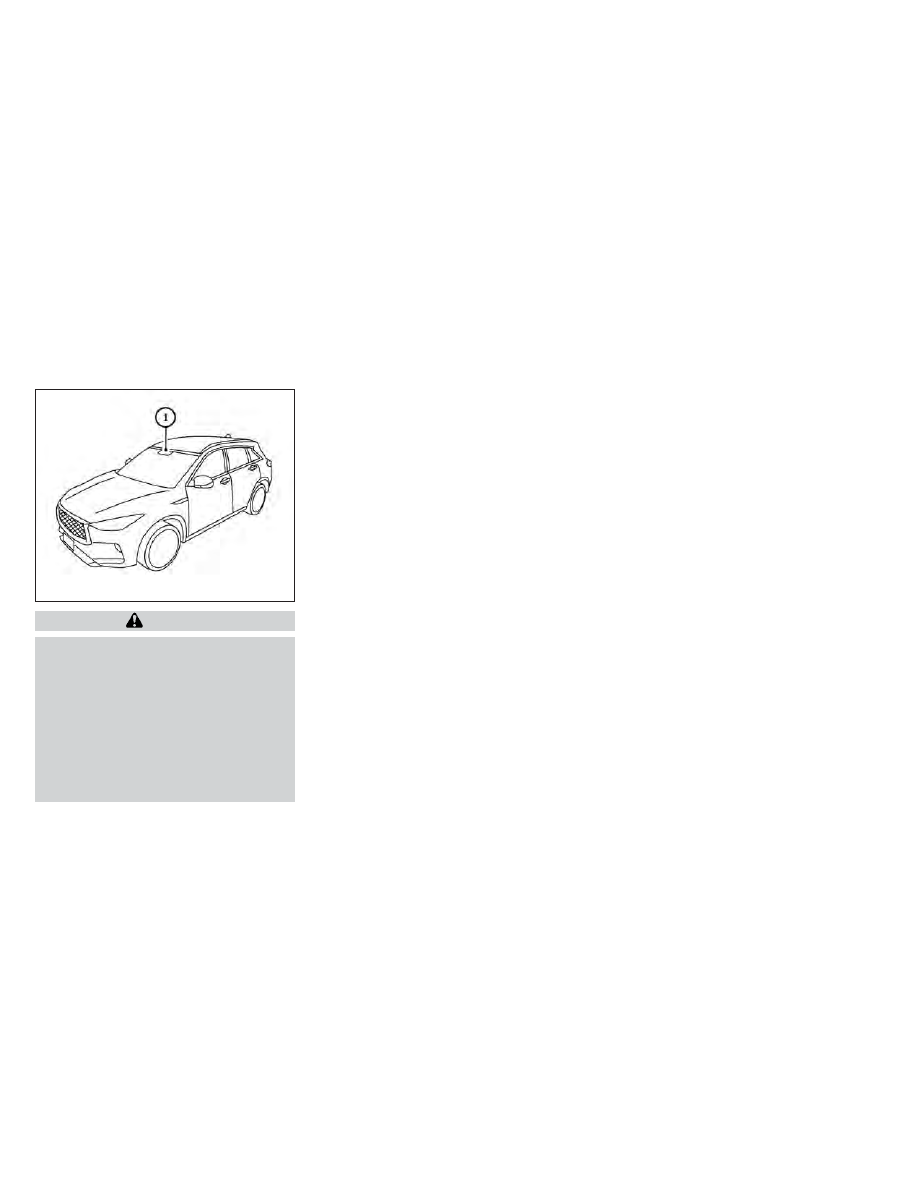
The LDW system monitors the lane markers
on the traveling lane using the camera unit

O

1

located above the inside mirror.

The LDW system warns the driver with an
indicator in the vehicle information display
and the steering wheel will vibrate, indicating
that the vehicle is beginning to leave the
driving lane. For additional information, see
“LDW system operation” (P. 5-36).

LSD2823

LANE DEPARTURE WARNING (LDW)

Starting and driving

5-35

CarManuals2.com

-------------------------------------------------------------------------------------------------------------------------------------------------------------

LDW SYSTEM OPERATION

The LDW system provides a lane departure
warning function when the vehicle is driven at
speeds of approximately 37 mph (60 km/h)
and above and the lane markings are clear.
When the vehicle approaches either the left
or the right side of the traveling lane, the
steering wheel will vibrate and the LDW indi-
cator on the instrument panel will blink to
alert the driver.

The warning function will stop when the ve-
hicle returns inside of the lane markers.

LSD4818

5-36

Starting and driving

CarManuals2.com

-------------------------------------------------------------------------------------------------------------------------------------------------------------

HOW TO ENABLE/DISABLE THE

LDW SYSTEM

Perform the following steps to enable or dis-
able the LDW system:

1. Press the MENU button below the lower

display screen.

2. Select “Driver Assistance.”

3. Select “Lane Assist.”

4. Select “ON” to turn the “Lane Departure

Warning” system on or off.

LSD4819

Starting and driving

5-37

CarManuals2.com

-------------------------------------------------------------------------------------------------------------------------------------------------------------

LDW SYSTEM LIMITATIONS

WARNING

Listed below are the system limitations for
the LDW system. Failure to follow the
warnings and instructions for proper use of
the LDW system could result in serious in-
jury or death.

This system is only a warning device to
inform the driver of a potential unin-
tended lane departure. It will not steer
the vehicle or prevent loss of control. It is
the driver’s responsibility to stay alert,
drive safely, keep the vehicle in the trav-
eling lane, and be in control of the vehicle
at all times.

The system will not operate at speeds
below approximately 37 mph (60 km/h)
or if it cannot detect lane markers.

Do not use the LDW system under the
following conditions as it may not func-
tion properly:

During bad weather (rain, fog, snow,

etc.).

When driving on slippery roads, such

as on ice or snow.

When driving on winding or uneven

roads.

When there is a lane closure due to

road repairs.

When driving in a makeshift or tem-

porary lane.

When driving on roads where the lane

width is too narrow.

When driving without normal tire con-

ditions (for example, tire wear, low tire
pressure, installation of spare tire, tire
chains, nonstandard wheels).

When the vehicle is equipped with

non-original brake parts or suspen-
sion parts.

When you are towing a trailer or other

vehicle.

The system may not function properly under
the following conditions:
• On roads where there are multiple parallel

lane markers; lane markers that are faded
or not painted clearly; yellow painted lane
markers; non-standard lane markers; or
lane markers covered with water, dirt,
snow, etc.

• On roads where the discontinued lane

markers are still detectable.

• On roads where there are sharp curves.

• On roads where there are sharply contrast-

ing objects, such as shadows, snow, water,
wheel ruts, seams or lines remaining after
road repairs. (The LDW system could de-
tect these items as lane markers.)

• On roads where the traveling lane merges

or separates.

• When the vehicle’s traveling direction does

not align with the lane marker.

• When traveling close to the vehicle in front

of you, which obstructs the lane camera
unit detection range.

• When rain, snow, dirt or an object adheres

to the windshield in front of the lane cam-
era unit.

• When the headlights are not bright due to

dirt on the lens or if the aiming is not ad-
justed properly.

• When strong light enters the lane camera

unit. (For example, the light directly shines
on the front of the vehicle at sunrise or
sunset.)

• When a sudden change in brightness oc-

curs. (For example, when the vehicle enters
or exits a tunnel or under a bridge.)

5-38

Starting and driving

CarManuals2.com

-------------------------------------------------------------------------------------------------------------------------------------------------------------

SYSTEM TEMPORARILY
UNAVAILABLE

If the vehicle is parked in direct sunlight under
high temperature conditions (over approxi-
mately 104°F [40°C]) and then started, the
LDW system may be deactivated automati-
cally and the following message will appear
in the vehicle information display: “Not avail-
able: High Camera Temp.”

When the interior temperature is reduced,
the LDW system will resume operating
automatically.

The LDW system is not designed to warn
under the following conditions:
• When you operate the lane change signal

and change traveling lanes in the direction
of the signal. (The LDW system will become
operable again approximately 2 seconds
after the lane change signal is turned off.)

• When the vehicle speed lowers to less than

approximately 37 mph (60 km/h).

After the above conditions have finished and
the necessary operating conditions are satis-
fied, the LDW functions will resume.

SYSTEM MALFUNCTION

If the LDW system malfunctions, it will cancel
automatically and “Malfunction” will appear
in the vehicle information display. If “Mal-
function” appears in vehicle information dis-
play, pull off the road to a safe location and
stop the vehicle. Place the shift position in the
P (Park) position and ignition switch in the
OFF position and restart the engine. If “Mal-
function” continues to appear in vehicle infor-
mation display, have the system checked. It is
recommended that you visit an INFINITI re-
tailer for this service.

SYSTEM MAINTENANCE

The lane camera unit

O

1

for the LDW system

is located above the inside mirror. To keep the
proper operation of the LDW system and
prevent a system malfunction, be sure to
observe the following:
• Always keep the windshield clean.
• Do not attach a sticker (including transpar-

ent material) or install an accessory near
the camera unit.

LSD3075

Starting and driving

5-39

CarManuals2.com

-------------------------------------------------------------------------------------------------------------------------------------------------------------

• Do not place reflective materials, such as

white paper or a mirror, on the instrument
panel. The reflection of sunlight may ad-
versely affect the camera unit’s capability
of detecting the lane markers.

• Do not strike or damage the areas around

the camera unit. Do not touch the camera
lens or remove the screw located on the
camera unit. If the camera unit is damaged
due to an accident, it is recommended that
you visit an INFINITI retailer.

WARNING

Failure to follow the warnings and instruc-
tions for proper use of the LDP system
could result in serious injury or death.

The LDP system will not steer the vehicle
or prevent loss of control. It is the driv-
er’s responsibility to stay alert, drive
safely, keep the vehicle in the traveling
lane, and be in control of the vehicle at all
times.

The LDP system is primarily intended for
use on well-developed freeways or high-
ways. It may not detect the lane markers
in certain road, weather, or driving
conditions.

The LDP system will operate when the ve-
hicle is driven at speeds of approximately 37
mph (60 km/h) and above, and only when the
lane markings are clearly visible on the road.

The LDP system warns the driver with a
warning indicator in the vehicle information
display, the steering wheel will vibrate and
helps assist the driver to return the vehicle to
the center of the traveling lane by applying
the brakes to the left or right wheels individu-
ally (for a short period of time).

The LDP system monitors the lane markers
on the traveling lane using the camera unit

O

1

located above the inside mirror.

LSD2823

LANE DEPARTURE PREVENTION
(LDP)

5-40

Starting and driving

CarManuals2.com

-------------------------------------------------------------------------------------------------------------------------------------------------------------

LDP SYSTEM OPERATION

1. LDP indicator

2. Lower display buttons

3. LDP ON indicator

4. ProPILOT Assist switch

The LDP system operates above approxi-
mately 37 mph (60 km/h). When the vehicle
approaches either the left or the right side of
the traveling lane, the steering wheel will vi-
brate and the LDP indicator (orange) on the
instrument panel will blink to alert the driver.
Then, the LDP system will automatically
apply the brakes for a short period of time to
help assist the driver to return the vehicle to
the center of the traveling lane.

To turn on the LDP system, push the Pro-
PILOT Assist switch on the steering wheel
after starting the engine. The LDP ON indi-
cator on the instrument panel will illuminate.
Push the ProPILOT Assist switch on the
steering wheel again to turn off the LDP
system. The LDP ON indicator will turn off.

LSD3896

Starting and driving

5-41

CarManuals2.com

-------------------------------------------------------------------------------------------------------------------------------------------------------------

HOW TO ENABLE/DISABLE THE
LDP SYSTEM

When the LDP system is enabled in the lower
display, the system can be turned off tempo-
rarily by pushing the ProPILOT Assist switch
on the steering wheel.

Perform the following steps to enable or dis-
able the LDP system.

1. Press the MENU button below the lower

display screen.

2. Select “Driver Assistance.”

3. Select “Lane Assist.”

4. Select “ON” to turn the “Lane Interven-

tion” system on or off.

NOTE:

Turning on the ProPILOT Assist system will
turn on the LDP system at the same time.
For additional information, see “ProPILOT
Assist” (P. 5-73).

LSD4819

5-42

Starting and driving

CarManuals2.com

-------------------------------------------------------------------------------------------------------------------------------------------------------------

LDP SYSTEM LIMITATIONS

WARNING

Listed below are the system limitations for
the LDP system. Failure to follow the
warnings and instructions for proper use of
the LDP system could result in serious in-
jury or death.

The LDP system may activate if you
change lanes without first activating
your turn signal or, for example, if a con-
struction zone directs traffic to cross an
existing lane marker. If this occurs you
may need to apply corrective steering to
complete your lane change.

Because the LDP may not activate under
the road, weather, and lane marker con-
ditions described in this section, it may
not activate every time your vehicle be-
gins to leave its lane and you will need to
apply corrective steering.

The LDP system will not operate at speeds
below approximately 37 mph (60 km/h)
or if it cannot detect lane markers.

Do not use the LDP system under the
following conditions as it may not func-
tion properly:

During bad weather (rain, fog, snow,

etc.).

When driving on slippery roads, such

as on ice or snow.

When driving on winding or uneven

roads.

When there is a lane closure due to

road repairs.

When driving in a makeshift or tem-

porary lane.

When driving on roads where the lane

width is too narrow.

When driving without normal tire con-

ditions (for example, tire wear, low tire
pressure, installation of spare tire, tire
chains, non-standard wheels).

When the vehicle is equipped with

nonoriginal brake parts or suspen-
sion parts.

When you are towing a trailer or

other vehicle.

The system may not function properly un-
der the following conditions:

On roads where there are multiple paral-
lel lane markers; lane markers that are
faded or not painted clearly; yellow
painted lane markers; non-standard lane
markers; or lane markers covered with
water, dirt, snow, etc.

On roads where discontinued lane mark-
ers are still detectable.

On roads where there are sharp curves.

On roads where there are sharply con-
trasting objects, such as shadows, snow,
water, wheel ruts, seams or lines remain-
ing after road repairs. (The LDP system
could detect these items as lane markers.)

On roads where the traveling lane
merges or separates.

When the vehicle’s traveling direction
does not align with the lane marker.

When traveling close to the vehicle in
front of you, which obstructs the lane
camera unit detection range.

When rain, snow or dirt adheres to the
windshield in front of the lane camera
unit.

When the headlights are not bright due
to dirt on the lens or if the aiming is not
adjusted properly.

When strong light enters the lane cam-
era unit. (For example, the light directly
shines on the front of the vehicle at sun-
rise or sunset.)

When a sudden change in brightness oc-
curs. (For example, when the vehicle en-
ters or exits a tunnel or under a bridge.)

Starting and driving

5-43

CarManuals2.com

-------------------------------------------------------------------------------------------------------------------------------------------------------------

While the LDP system is operating, you may
hear a sound of brake operation. This is nor-
mal and indicates that the LDP system is
operating properly.

SYSTEM TEMPORARILY
UNAVAILABLE

Condition A:

The warning and assist functions of the LDP
system are not designed to work under the
following conditions:
• When you operate the lane change signal

and change the traveling lanes in the direc-
tion of the signal. (The LDP system will be
deactivated for approximately 2 seconds
after the lane change signal is turned off.)

• When the vehicle speed lowers to less than

approximately 37 mph (60 km/h).

After the above conditions have finished and
the necessary operating conditions are satis-
fied, the warning and assist functions will
resume.

Condition B:

The assist function of the LDP system is not
designed to work under the following condi-
tions (warning is still functional):
• When the brake pedal is depressed.

• When the steering wheel is turned as far as

necessary for the vehicle to change lanes.

• When the vehicle is accelerated during LDP

system operation.

• When the Intelligent Cruise Control (ICC)

approach warning occurs.

• When the hazard warning flashers are

operated.

• When driving on a curve at high speed.

After the above conditions have finished and
the necessary operating conditions are satis-
fied, the LDP system application of the
brakes will resume.

Condition C:

If the following messages appear in the ve-
hicle information display the LDP system will
be turned off automatically:
• “Not Available Poor Road Conditions”:

When the VDC system (except Traction
Control System [TCS] function) or ABS
operates.

• “Currently not available”:

When the VDC system is turned off.

Action to take:

When the above conditions no longer exist,
turn off the LDP system. Push the ProPILOT
Assist switch on the steering wheel again to
turn the LDP system back on.

Temporary disabled status at high
temperature:

If the vehicle is parked in direct sunlight under
high temperature conditions (over approxi-
mately 104°F [40°C]) and then the LDP sys-
tem is turned on, the LDP system may be
deactivated automatically and the following
message will appear on the vehicle informa-
tion display: “Not available: High Camera
Temp.” When the interior temperature is re-
duced, the system will resume operating
automatically.

SYSTEM MALFUNCTION

If the LDP system malfunctions, it will cancel
automatically. The LDP indicator (orange)
will illuminate in the display. If the LDP indi-
cator (orange) illuminates in the display, pull
off the road to a safe location and stop the
vehicle. Turn the engine off and restart the
engine. If the LDP indicator (orange) contin-
ues to illuminate, have the LDP system
checked. It is recommended that you visit an
INFINITI retailer for this service.

5-44

Starting and driving

CarManuals2.com

-------------------------------------------------------------------------------------------------------------------------------------------------------------

SYSTEM MAINTENANCE

The lane camera unit

O

1

for the LDP system

is located behind the inside mirror. To keep
the proper operation of the LDP system and
prevent a system malfunction, be sure to ob-
serve the following:
• Always keep the windshield clean.
• Do not attach a sticker (including transpar-

ent material) or install an accessory near
the camera unit.

• Do not place reflective materials, such as

white paper or a mirror, on the instrument
panel. The reflection of sunlight may ad-
versely affect the camera unit’s capability
of detecting the lane markers.

• Do not strike or damage the areas around

the camera unit. Do not touch the camera
lens or remove the screw located on the
camera unit. If the camera unit is damaged
due to an accident, it is recommended that
you visit an INFINITI retailer.

WARNING

Failure to follow the warnings and instruc-
tions for proper use of the BSW system
could result in serious injury or death.

The BSW system is not a replacement for
proper driving procedures and is not de-
signed to prevent contact with vehicles
or objects. When changing lanes, always
use the side and rear mirrors and turn
and look in the direction your vehicle will
move to ensure it is safe to change lanes.
Never rely solely on the BSW system.

The BSW system helps alert the driver of
other vehicles in adjacent lanes when chang-
ing lanes.

LSD3075

BLIND SPOT WARNING (BSW)

Starting and driving

5-45

CarManuals2.com

-------------------------------------------------------------------------------------------------------------------------------------------------------------

The BSW system uses radar sensors

O

1

in-

stalled near the rear bumper to detect other
vehicles in an adjacent lane.

The radar sensors can detect vehicles on ei-
ther side of your vehicle within the detection
zone shown as illustrated. This detection
zone starts from the outside mirror of your
vehicle and extends approximately 10 ft
(3.0 m) behind the rear bumper, and approxi-
mately 10 ft (3.0 m) sideways.

LSD2920

SSD1030

Detection zone

5-46

Starting and driving

CarManuals2.com

-------------------------------------------------------------------------------------------------------------------------------------------------------------

1. Side Indicator Light

2. BSW Indicator

BSW SYSTEM OPERATION

The BSW system operates above approxi-
mately 20 mph (32 km/h).

If the radar sensors detect a vehicle in the
detection zone, the side indicator light

O

1

illuminates. If the turn signal is then activated,
the system chimes (twice) and the side indi-
cator light flashes. The side indicator light
continues to flash until the detected vehicle
leaves the detection zone.

The side indicator light illuminates for a few
seconds when the ignition switch is placed in
the ON position.

If a vehicle comes into the detection zone
after the driver activates the turn signal, then
only the side indicator light flashes and no
chime sounds. For additional information, see
“BSW driving situations” (P. 5-50).

LSD2921

Starting and driving

5-47

CarManuals2.com

-------------------------------------------------------------------------------------------------------------------------------------------------------------

HOW TO ENABLE/DISABLE THE

BSW SYSTEM

Perform the following steps to enable or dis-
able the BSW system.

1. Press the MENU button below the lower

display screen.

2. Select “Driver Assistance.”

3. Select “Blind Spot Assist.”

4. Select “ON” to turn the “Blind Spot

Warning” system on or off.

NOTE:

• When enabling/disabling the system, the

system will retain current settings even if
the engine is restarted.

• The RCTA system is integrated into the

BSW system. There is not a separate se-
lection in the lower display for the RCTA
system. When the BSW is disabled, the
RCTA system is also disabled.

LSD4820

5-48

Starting and driving

CarManuals2.com

-------------------------------------------------------------------------------------------------------------------------------------------------------------

BSW SYSTEM LIMITATIONS

WARNING

Listed below are the system limitations for
the BSW system. Failure to operate the
vehicle in accordance with these system
limitations could result in serious injury or
death.

The BSW system cannot detect all ve-
hicles under all conditions.

The radar sensors may not be able to de-
tect and activate BSW when certain ob-
jects are present such as:

Pedestrian, bicycles, animals.

Vehicles such as motorcycles, low

height vehicles, or high ground clear-
ance vehicles.

Oncoming vehicles.

Vehicles remaining in the detection

zone when you accelerate from a stop.

A vehicle merging into an adjacent

lane at a speed approximately the
same as your vehicle.

A vehicle approaching rapidly from

behind.

A vehicle which your vehicle over-

takes rapidly.

A vehicle that passes through the de-

tection zone quickly.

When overtaking several vehicles in a

row, the vehicles after the first ve-
hicle may not be detected if they are
traveling close together.

The radar sensors’ detection zone is de-
signed based on a standard lane width.
When driving in a wider lane, the radar
sensors may not detect vehicles in an ad-
jacent lane. When driving in a narrow
lane, the radar sensors may detect ve-
hicles driving two lanes away.

The radar sensors are designed to ignore
most stationary objects; however, ob-
jects such as guardrails, walls, foliage
and parked vehicles may occasionally
be detected. This is a normal operation
condition.

The following conditions may reduce the
ability of the radar to detect other ve-
hicles:

Severe weather

Road spray

Ice/frost/snow/dirt build-up on the

vehicle

Do not attach stickers (including trans-
parent material), install accessories or
apply additional paint near the radar
sensors. These conditions may reduce
the ability of the radar to detect other
vehicles.

Excessive noise (for example, audio sys-
tem volume, open vehicle window) will
interfere with the chime sound, and it
may not be heard.

Starting and driving

5-49

CarManuals2.com

-------------------------------------------------------------------------------------------------------------------------------------------------------------

BSW DRIVING SITUATIONS

Indicator on

Indicator off

Indicator flashing

Another vehicle approaching from
behind

Illustration 1:

The side indicator light illumi-

nates if a vehicle enters the detection zone
from behind in an adjacent lane.

NOTE:

The radar sensors may not detect vehicles
which are approaching rapidly from behind.

Illustration 2:

If the driver activates the turn

signal when another vehicle is in the detec-
tion zone, then the system chimes (twice) and
the side indicator light flashes.

NOTE:

• The radar sensors may not detect vehicles

which are approaching rapidly from behind.

• If the driver activates the turn signal be-

fore a vehicle enters the detection zone,
the side indicator light will flash but no
chime will sound when the other vehicle is
detected.

LSD2299

Illustration 1 – Approaching from behind

LSD2300

Illustration 2 – Approaching from behind

5-50

Starting and driving

CarManuals2.com

-------------------------------------------------------------------------------------------------------------------------------------------------------------

Overtaking another vehicle

Illustration 3:

The side indicator light illumi-

nates if you overtake a vehicle and that ve-
hicle stays in the detection zone for approxi-
mately 2 seconds.

Illustration 4:

If the driver activates the turn

signal while another vehicle is in the detection
zone, then the system chimes (twice) and the
side indicator light flashes.

NOTE:

• When overtaking several vehicles in a row,

the vehicles after the first vehicle may not
be detected if they are traveling close
together.

• The radar sensors may not detect slower

moving vehicles if they are passed quickly.

• If the driver activates the turn signal be-

fore a vehicle enters the detection zone,
the side indicator light will flash but no
chime will sound when the other vehicle is
detected.

LSD2302

Illustration 3 – Overtaking another vehicle

LSD2303

Illustration 4 – Overtaking another vehicle

Starting and driving

5-51

CarManuals2.com

-------------------------------------------------------------------------------------------------------------------------------------------------------------

Entering from the side

Illustration 5:

The side indicator light illumi-

nates if a vehicle enters the detection zone
from either side.

Illustration 6:

If the driver activates the turn

signal while another vehicle is in the detection
zone, then the system chimes (twice) and the
side indicator light flashes.

NOTE:

• If the driver activates the turn signal be-

fore a vehicle enters the detection zone,
the side indicator light will flash but no
chime will sound when the other vehicle is
detected.

• The radar sensors may not detect a vehicle

which is traveling at about the same speed
as your vehicle when it enters the detec-
tion zone.

SYSTEM TEMPORARILY
UNAVAILABLE

When radar blockage is detected, the system
will be deactivated automatically. The “Un-
available: Side Radar Obstruction” warning
message will appear in the vehicle informa-
tion display.

The system is not available until the condi-
tions no longer exist.

The radar sensors may be blocked by tempo-
rary ambient conditions such as splashing
water, mist or fog. The blocked condition
may also be caused by objects such as ice,
frost or dirt obstructing the radar sensors.

NOTE:

If the BSW system stops working, the RCTA
system will also stop working.

Action to take:

When the above conditions no longer exist,
the system will resume automatically.

LSD2305

Illustration 5 – Entering from the side

LSD2308

Illustration 6 – Entering from the side

5-52

Starting and driving

CarManuals2.com

-------------------------------------------------------------------------------------------------------------------------------------------------------------

Malfunction

If the BSW system malfunctions, it will turn
off automatically. The system malfunction
warning message will appear in the vehicle
information display.

NOTE:

If the BSW system stops working, the RCTA
system will also stop working.

Action to take:

Stop the vehicle in a safe location, place the
vehicle in the P (Park) position, turn the en-
gine off and restart the engine. If the mes-
sage continues to appear, have the system
checked. It is recommended that you visit an
INFINITI retailer for this service.

SYSTEM MAINTENANCE

The two radar sensors

O

1

for the BSW sys-

tem are located near the rear bumper. Always
keep the area near the radar sensors clean.

The radar sensors may be blocked by tempo-
rary ambient conditions such as splashing
water, mist or fog.

The blocked condition may also be caused by
objects such as ice, frost or dirt obstructing
the radar sensors.

Check for and remove objects obstructing
the area around the radar sensors.

Do not attach stickers (including transparent
material), install accessories or apply addi-
tional paint near the radar sensors.

Do not strike or damage the area around the
radar sensors. It is recommended that you
visit an INFINITI retailer if the area around
the radar sensors is damaged due to a
collision.

Radio frequency statement

For USA

FCC ID: OAYSRR3B

This device complies with Part 15 of the FCC
Rules.

Operation is subject to the following two
conditions:

(1) this device may not cause harmful inter-
ference, and

(2) this device must accept any interference
received, including interference that may
cause undesired operation.

LSD2920

Starting and driving

5-53

CarManuals2.com

-------------------------------------------------------------------------------------------------------------------------------------------------------------

CAUTION TO USERS

Changes or modifications not expressly ap-
proved by the party responsible for compli-
ance could void the user’s authority to oper-
ate the equipment.

For Canada

Model: SRR3–B

Applicable law: Canada 310

This device complies with Industry Canada’s
RSS — 310.

Operation is subject to the condition that this
device must not cause harmful interference
and must accept any interference, including
interference that may cause undesired op-
eration of the device.

Cet appareil est conforme au RSS — 310
d’Industrie Canada.

Le fonctionnement est soumis à la condi-
tion que cet appareil ne provoque pas
d’interférences nuisibles et accepte toute
interférence, y compris les interférences sus-
ceptibles de provoquer un fonctionnement
indésirable de l’appareil.

WARNING

Failure to follow the warnings and instruc-
tions for proper use of the BSI system could
result in serious injury or death.

The BSI system is not a replacement for
proper driving procedure and is not de-
signed to prevent contact with vehicles
or objects. When changing lanes, always
use the side and rear mirrors and turn
and look in the direction you will move to
ensure it is safe to change lanes. Never
rely solely on the BSI system.

There is a limitation to the detection ca-
pability of the radar or the sonar. Not
every moving object or vehicle will be de-
tected. Using the BSI system under some
road, ground, lane marker, traffic or
weather conditions could lead to im-
proper system operation. Always rely on
your own operation to avoid accidents.

The BSI system helps alert the driver of other
vehicles in adjacent lanes when changing
lanes and helps assist the driver to return the
vehicle to the center of the traveling lane.

The BSI system uses radar sensors

O

2

in-

stalled near the rear bumper to detect other
vehicles in an adjacent lane. In addition to the
radar sensors, the BSI system uses a camera

O

1

installed behind the windshield to monitor

the lane markers of your traveling lane.

LSD2924

BLIND SPOT INTERVENTION® (BSI)

5-54

Starting and driving

CarManuals2.com

-------------------------------------------------------------------------------------------------------------------------------------------------------------

The radar sensors can detect vehicles on ei-
ther side of your vehicle within the detection
zone shown as illustrated. This detection
zone starts from the outside mirror of your
vehicle and extends approximately 10 ft
(3.0 m) sideways.

BSI SYSTEM OPERATION

1. Side indicator light

2. BSW indicator

3. BSI ON indicator

4. ProPILOT Assist switch

SSD1030

Detection zone

LSD3899

Starting and driving

5-55

CarManuals2.com

-------------------------------------------------------------------------------------------------------------------------------------------------------------

The BSI system operates above approxi-
mately 37 mph (60 km/h).

If the radar sensors detect a vehicle in the
detection zone, the side indicator light (1)
illuminates.

If the turn signal is then activated, the system
chimes (twice) and the side indicator light
flashes. The side indicator light continues to
flash until the detected vehicle leaves the
detection zone.

If the BSI system is on and your vehicle ap-
proaches a lane marker while another vehicle
is in the detection zone, the system chimes
(three times) and the side indicator light
flashes. The BSI system activates to help re-
turn the vehicle back to the center of the
driving lane. The BSI system operates regard-
less of turn signal usage.

NOTE:

• BSI warning and system application will

only be activated if the side indicator light
is already illuminated when your vehicle
approaches a lane marker. If another ve-
hicle comes into the detection zone after
your vehicle has crossed a lane marker, no
BSI warning or system application will be
activated. For additional information, see
“BSI driving situations” (P. 5-59 
).

• The BSI system is typically activated ear-

lier than the Lane Departure Prevention
(LDP) system when your vehicle is ap-
proaching a lane marker.

The BSI system turns on when the ProPILOT
Assist switch on the steering wheel is pushed
when the “Blind Spot Intervention” is enabled
in the “Driver Assistance” menu in the lower
display. The BSI ON indicator on the instru-
ment panel illuminates when the BSI system
is turned on.

The BSI system provides a chime and turns on
or flashes the side indicator light even if the
BSW system is off.

5-56

Starting and driving

CarManuals2.com

-------------------------------------------------------------------------------------------------------------------------------------------------------------

HOW TO ENABLE/DISABLE THE
BSI SYSTEM

When the BSI system is enabled in the lower
display, the system can be turned off tempo-
rarily by pushing the ProPILOT Assist switch
on the steering wheel.

Perform the following steps to enable or dis-
able the BSI system:

1. Press the MENU button below the lower

display screen.

2. Select “Driver Assistance.”

3. Select “Blind Spot Assist.”

4. Select “ON” to turn the “Blind Spot Inter-

vention” system on or off.

• Select the “Blind Spot Indicator” to set it to

either “Bright”, “Dark” or “Standard”.

LSD4820

Starting and driving

5-57

CarManuals2.com

-------------------------------------------------------------------------------------------------------------------------------------------------------------

BSI SYSTEM LIMITATIONS

WARNING

Listed below are the system limitations for
the BSI system. Failure to operate the ve-
hicle in accordance with these system limi-
tations could result in serious injury or
death.

The BSI system cannot detect all vehicles
under all conditions.

The radar sensors may not be able to de-
tect and activate BSI when certain ob-
jects are present such as:

Pedestrians, bicycles, or animals.

Vehicles such as motorcycles, low

height vehicles, or high ground clear-
ance vehicles.

Oncoming vehicles.

Vehicles remaining in the detection

zone when you accelerate from a
stop. For additional information, see
“BSI driving situations” (P. 5-59).

A vehicle merging into an adjacent

lane at a speed approximately the
same as your vehicle. For additional
information, see “BSI driving situa-
tions” (P. 5-59).

A vehicle approaching rapidly from

behind. For additional information,
see “BSI driving situations” (P. 5-59).

A vehicle which your vehicle over-

takes rapidly. For additional infor-
mation, see “BSI driving situations”
(P. 5-59).

A vehicle that passes through the de-

tection zone quickly.

When overtaking several vehicles in a

row, the vehicles after the first ve-
hicle may not be detected if they are
traveling close together.

The radar sensors’ detection zone is de-
signed based on a standard lane width.
When driving in a wider lane, the radar
sensors may not detect vehicles in an
adjacent lane. When driving in a narrow
lane, the radar sensors may detect ve-
hicles driving two lanes away.

The radar sensors are designed to ignore
most stationary objects; however, ob-
jects such as guardrails, walls, foliage
and parked vehicles may occasionally
be detected. This is a normal driving
condition.

The following conditions may reduce the
ability of the radar to detect other ve-
hicles:

Severe weather

Road spray

Ice/frost/dirt build-up on the vehicle

Do not attach stickers (including trans-
parent material), install accessories or
apply additional paint near the radar
sensors. These conditions may reduce
the ability of the radar to detect other
vehicles.

The camera may not detect lane markers
in the following situations and the BSI
system may not operate properly:

On roads where there are multiple

parallel lane markers; lane markers
that are faded or not painted clearly;
yellow painted lane markers; non-
standard lane markers; lane markers
covered with water, dirt, snow, etc.

On roads where discontinued lane

markers are still detectable.

On roads where there are sharp curves.

On roads where there are sharply

contrasting objects, such as shad-
ows, snow, water, wheel ruts, seams
or lines remaining after road repairs.

5-58

Starting and driving

CarManuals2.com

-------------------------------------------------------------------------------------------------------------------------------------------------------------

On roads where the traveling lane

merges or separates.

When the vehicle’s traveling direction

does not align with the lane markers.

When traveling close to the vehicle in

front of you, which obstructs the lane
camera unit detection range.

When rain, snow or dirt adheres to

the windshield in front of a lane cam-
era unit.

When the headlights are not bright

due to dirt on the lens or if aiming is
not adjusted properly.

When strong light enters a lane cam-

era unit (e.g., light directly shines on
the front of the vehicle at sunrise or
sunset).

When a sudden change in brightness

occurs (e.g., when the vehicle enters
or exits a tunnel or under a bridge).

Do not use the BSI system under the fol-
lowing conditions because the system
may not function properly:

During bad weather (e.g., rain, fog,

snow, etc.).

When driving on slippery roads, such

as on ice or snow, etc.

When driving on winding or uneven

roads.

When there is a lane closure due to

road repairs.

When driving in a makeshift lane.

When driving on roads where the lane

width is too narrow.

When driving with a tire that is not

within normal tire conditions (e.g.,
tire wear, low tire pressure, installa-
tion of spare tire, tire chains, non-
standard wheels).

When the vehicle is equipped with

non-original brake parts or suspen-
sion parts.

Do not use the BSI system when towing a
trailer.

Excessive noise (e.g., audio system vol-
ume, open vehicle window) will interfere
with the chime sound, and it may not be
heard.

BSI DRIVING SITUATIONS
Another vehicle approaching from
behind

Illustration 1: The side indicator light illumi-
nates if a vehicle enters the detection zone
from behind in an adjacent lane.

However, if the overtaking vehicle is traveling
much faster than your vehicle, the indicator
light may not illuminate before the detected
vehicle is beside your vehicle. Always use the
side and rear mirrors and turn and look in the
direction your vehicle will move to ensure it is
safe to change lanes.

SSD1026

Illustration 1 – Approaching from behind

Starting and driving

5-59

CarManuals2.com

-------------------------------------------------------------------------------------------------------------------------------------------------------------

Illustration 2: If the driver activates the turn
signal then the system chimes a sound (twice)
and the side indicator light flashes.

NOTE:

If the driver activates the turn signal before
a vehicle enters the detection zone, the side
indicator light will flash but no chime will
sound when the other vehicle is detected.

Illustration 3: If the BSI system is on and your
vehicle is approaching a lane marker and a
vehicle is in the detection zone, the system
chimes a sound (three times), and the side
indicator light flashes. Then the BSI system
slightly applies the brakes on one side to help
return the vehicle back to the center of the
driving lane.

NOTE:

Illustration 4: If you accelerate from a stop
with a vehicle in the detection zone, the
other vehicle may not be detected.

SSD1031

Illustration 2 – Approaching from behind

LSD2048

Illustration 3 – Approaching from behind

SSD1032

Illustration 4 – Accelerate from a stop

5-60

Starting and driving

CarManuals2.com

-------------------------------------------------------------------------------------------------------------------------------------------------------------

Overtaking another vehicle

Illustration 5: The side indicator light illumi-
nates if you overtake a vehicle and that ve-
hicle stays in the detection zone for approxi-
mately 3 seconds.

The radar sensors may not detect slower
moving vehicles if they are passed quickly.

Illustration 6: If the driver activates the turn
signal while another vehicle is in the detection
zone, then the system chimes a sound (twice)
and the side indicator light flashes.

Illustration 7: If the BSI system is on and your
vehicle approaches a lane marker while an-
other vehicle is in the detection zone the sys-
tem chimes a sound (three times) and the side
indicator light flashes. Then, the BSI system
slightly applies the brakes on the appropriate
side to help return the vehicle back to the
center of the driving lane.

SSD1033

Illustration 5 – Overtaking another vehicle

SSD1034

Illustration 6 – Overtaking another vehicle

LSD2072

Illustration 7 – Overtaking another vehicle

Starting and driving

5-61

CarManuals2.com

-------------------------------------------------------------------------------------------------------------------------------------------------------------

NOTE:

Illustration 8: When overtaking several ve-
hicles in a row, the vehicles after the first
vehicle may not be detected if they are trav-
eling close together.

Entering from the side

Illustration 9: The side indicator light illumi-
nates if a vehicle enters the detection zone
from either side.

NOTE:

The radar sensors may not detect a vehicle
which is traveling at about the same speed as
your vehicle when it enters the detection
zone.

SSD1036

Illustration 8 – Overtaking several vehicles

LSD2050

Illustration 9 – Entering from the side

5-62

Starting and driving

CarManuals2.com

-------------------------------------------------------------------------------------------------------------------------------------------------------------

Illustration 10: If the driver activates the turn
signal while another vehicle is in the detection
zone, then the side indicator light flashes and
a chime will sound twice.

NOTE:

If the driver activates the turn signal before
a vehicle enters the detection zone, the side
indicator light will flash but no chime will
sound when another vehicle is detected.

Illustration 11: If the BSI system is on and
your vehicle approaches the lane marker
while another vehicle is in the detection zone,
the side indicator light flashes and a chime
will sound three times. Then, the BSI system
slightly applies the brakes on the appropriate
side to help return the vehicle back to the
center of the driving lane.

NOTE:

• Illustration 12: The BSI system will not op-

erate if your vehicle is on a lane marker
when another vehicle enters the detection
zone. In this case, only the BSW system
operates.

• BSI braking will not operate or will stop

operating and only a warning chime will
sound under the following conditions:

– When the brake pedal is depressed.
– When the vehicle is accelerated during

BSI system operation.

– When steering quickly.

SSD1038

Illustration 10 – Entering from the side

SSD1094

Illustration 11 – Entering from the side

LSD2051

Illustration 12 – Entering from the side

Starting and driving

5-63

CarManuals2.com

-------------------------------------------------------------------------------------------------------------------------------------------------------------

– When the ICC, PFCW or FEB with Pe-

destrian Detection warnings sound.

– When the hazard warning flashers are

operated.

– When driving on a curve at a high speed.

SYSTEM TEMPORARILY
UNAVAILABLE

When any of the following messages appear
on the vehicle information display, a chime
will sound and the BSI system will be turned
off automatically.
• “Not Available Poor Road Conditions”:

When the VDC system (except traction
control system function) or ABS operates.

• “Currently Not Available”:

When the VDC system is turned off.

• “Not Available: High Camera Temp”:

When the camera detects that the interior
temperature is high (over approximately
104°F [40°C]).

• “Unavailable: Side Radar Obstruction”:

When side radar blockage is detected.

Turn off the BSI system and turn it on again
when the above conditions no longer exist.

SYSTEM MALFUNCTION

When the BSI system malfunctions, it will be
turned off automatically, a chime will sound
and the warning message will appear in the
vehicle information display.

Action to take:
Stop the vehicle in a safe location, place the
vehicle in the P (Park) position, turn the en-
gine off and restart the engine. If the warning
light (orange) continues to illuminate, have
the system checked. It is recommended that
you visit an INFINITI retailer for this service.

SYSTEM MAINTENANCE

The lane camera unit

O

1

for the BSI system is

located above the inside mirror. The two ra-
dar sensors

O

2

for the BSI system are located

near the rear bumper. To keep the proper
operation of the BSI system and prevent a
system malfunction, be sure to observe the
following:
• Always keep the windshield and the area

near the radar sensors clean.

LSD2924

5-64

Starting and driving

CarManuals2.com

-------------------------------------------------------------------------------------------------------------------------------------------------------------

• The radar sensors may be blocked by tem-

porary ambient conditions such as splash-
ing water, mist or fog. The blocked condi-
tion may also be caused by objects such as
ice, frost or dirt obstructing the radar sen-
sors. Check for and remove objects ob-
structing

the

area

around

the

radar

sensors.

• Do not attach stickers (including transpar-

ent material), install accessories or apply
additional paint near the camera unit or
radar sensors.

• Do not place reflective materials, such as

white paper or a mirror, on the instrument
panel. The reflection of sunlight may ad-
versely affect the camera unit’s capability
of detecting the lane markers.

• Do not strike or damage the area around

the radar sensors. Do not touch the camera
lens or remove the screw located on the
camera unit. It is recommended that you
visit an INFINITI retailer if the camera unit
and/or area around the radar sensors is
damaged due to a collision.

Radio frequency statement

For USA

FCC ID: OAYSRR3B

This device complies with Part 15 of the FCC
Rules.

Operation is subject to the following two
conditions:

(1) this device may not cause harmful inter-
ference, and

(2) this device must accept any interference
received, including interference that may
cause undesired operation.

CAUTION TO USERS

Changes or modifications not expressly ap-
proved by the party responsible for compli-
ance could void the user’s authority to oper-
ate the equipment.

For Canada

Model: SRR3–B

Applicable law: Canada 310

This device complies with Industry Canada’s
RSS — 310.

Operation is subject to the condition that this
device must not cause harmful interference
and must accept any interference, including
interference that may cause undesired op-
eration of the device.

Cet appareil est conforme au RSS — 310
d’Industrie Canada.

Le fonctionnement est soumis à la condi-
tion que cet appareil ne provoque pas
d’interférences nuisibles et accepte toute
interférence, y compris les interférences sus-
ceptibles de provoquer un fonctionnement
indésirable de l’appareil.

Starting and driving

5-65

CarManuals2.com

-------------------------------------------------------------------------------------------------------------------------------------------------------------

WARNING

Failure to follow the warnings and instruc-
tions for proper use of the RCTA system
could result in serious injury or death.

The RCTA system is not a replacement
for proper driving procedures and is not
designed to prevent contact with ve-
hicles or objects. When backing out of a
parking space, always use the side and
rear mirrors and turn and look in the di-
rection your vehicle will move. Never rely
solely on the RCTA system.

The RCTA system will assist you when back-
ing out from a parking space. When the ve-
hicle is in reverse, the system is designed to
detect other vehicles approaching from the
right or left of the vehicle. If the system de-
tects cross traffic, it will alert you.

RCTA SYSTEM OPERATION

1. Side indicator light

The RCTA system can help alert the driver of
an approaching vehicle when the driver is
backing out of a parking space.

LSD3608

REAR CROSS TRAFFIC ALERT
(RCTA)

5-66

Starting and driving

CarManuals2.com

-------------------------------------------------------------------------------------------------------------------------------------------------------------


Content      ..     8      9      10      11     ..