Infiniti QX50 (2023 year). Manual in english - page 8
 

  Index      Manuals     Infiniti QX50 (2023 year). Manual in english


Search            copyright infringement  


Content      ..     6      7      8      9     ..


Infiniti QX50 (2023 year). Manual in english - page 8


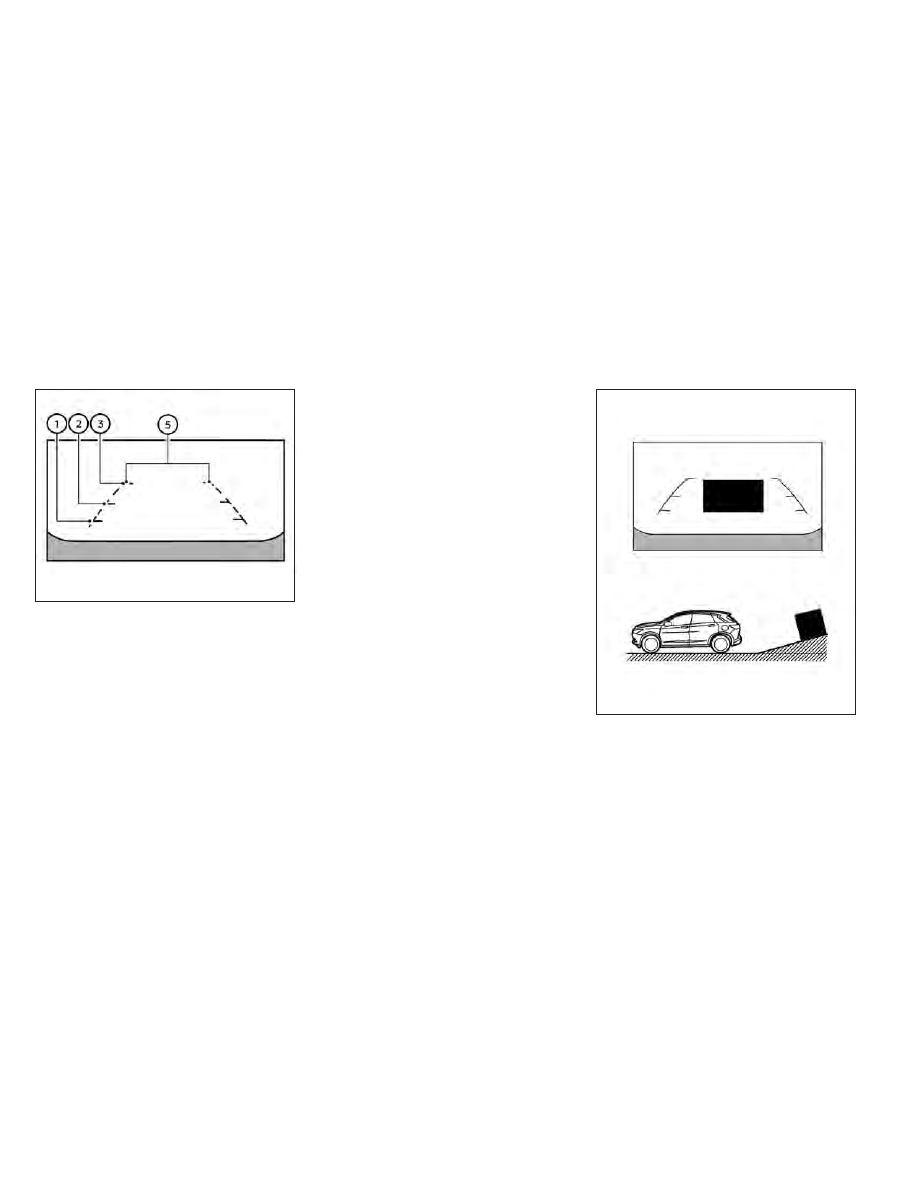
Distance guide lines

Indicates distances from the vehicle body:
• Red line

O

1

: approximately 1.5 ft (0.5 m)

• Yellow line

O

2

: approximately 3 ft (1 m)

• Green line

O

3

: approximately 7 ft (2 m)

• Green line

O

4

: approximately 10 ft (3 m)

(if so equipped)

Vehicle width guide lines

O

5

Indicate the vehicle width when backing up.

DIFFERENCE BETWEEN
PREDICTED AND ACTUAL
DISTANCES

The displayed guidelines and their locations
on the ground are for approximate reference
only. Objects on uphill or downhill surfaces or
projecting objects will be actually located at
distances different from those displayed in
the monitor relative to the guidelines (refer to
illustrations). When in doubt, turn around and
view the objects as you are backing up, or
park and exit the vehicle to view the position-
ing of objects behind the vehicle.

Backing up on a steep uphill

When backing up the vehicle up a hill, the
distance guide lines and the vehicle width
guide lines are shown closer than the actual
distance. Note that any object on the hill is
further than it appears on the upper display.

LHA5217

Rear-wide view

LHA5287

Monitor, climate, audio, phone and voice recognition systems

4-17

CarManuals2.com

-------------------------------------------------------------------------------------------------------------------------------------------------------------

Backing up on a steep downhill

When backing up the vehicle down a hill, the
distance guide lines and the vehicle width
guide lines are shown farther than the actual
distance. Note that any object on the hill is
closer than it appears on the upper display.

Backing up near a projecting object

The predicted course lines

O

A

do not touch

the object in the display. However, the vehicle
may hit the object if it projects over the actual
backing up course.

Backing up behind a projecting
object

The position

O

C

is shown farther than the

position

O

B

in the display. However, the po-

sition

O

C

is actually at the same distance as

the position

O

A

. The vehicle may hit the object

LHA5288

LHA4995

LHA5289

4-18

Monitor, climate, audio, phone and voice recognition systems

CarManuals2.com

-------------------------------------------------------------------------------------------------------------------------------------------------------------

when backing up to the position

O

A

if the

object projects over the actual backing up
course.

HOW TO PARK WITH
PREDICTED COURSE LINES

WARNING

If the tires are replaced with different
sized tires, the predicted course lines
may be displayed incorrectly.

On a snow-covered or slippery road,
there may be a difference between the
predicted course line and the actual
course line.

If the battery is disconnected or becomes
discharged, the predicted course lines may
be displayed incorrectly. If this occurs,
please perform the following procedures:

Turn the steering wheel from lock to
lock while the engine is running.

Drive the vehicle on a straight road
for more than 5 minutes.

When the steering wheel is turned with
the ignition switch in the ON position,
the predicted course lines may be dis-
played incorrectly.

1. Visually check that the parking space is

safe before parking your vehicle.

2. The rear view of the vehicle is displayed on

the screen

O

A

when the shift lever is

moved to the R (Reverse) position. When
activating the Around View® Monitor, the
guide lines, the icons and the messages
may not be displayed immediately.

3. Slowly back up the vehicle adjusting the

steering wheel so that the predicted
course lines

O

B

enter the parking space

O

C

.

LHA5043

LHA4770

Monitor, climate, audio, phone and voice recognition systems

4-19

CarManuals2.com

-------------------------------------------------------------------------------------------------------------------------------------------------------------

4. Maneuver the steering wheel to make the

vehicle width guide lines

O

D

parallel to the

parking space

O

C

while referring to the

predicted course lines.

5. When the vehicle is parked in the space

completely, press the P (Park) button lo-
cated near the shift lever to place the
vehicle in the P (Park) position and apply
the parking brake.

HOW TO SWITCH THE DISPLAY

With the ignition switch in the ON position,
press the

CAMERA button or with the

engine running, move the shift lever to the R
(Reverse) position to operate the Around
View® Monitor.

The Around View® Monitor displays differ-
ent split screen views depending on the posi-
tion of the shift lever. When activating the
Around View® Monitor, the guide lines, the
icons and the messages may not be displayed
immediately. Press the

CAMERA but-

ton or touch the “Change View” key to switch
between the available views.

If the shift lever is in the R (Reverse) position,
the available views are:
• Rear view/bird’s-eye view split screen
• Rear view/front-side view split screen
• Rear-wide view

If the shift position is in the P (Park) or D
(Drive) position, the available views are:
• Front view/bird’s-eye view split screen
• Front view/front-side view split screen
• Front-wide view

The display will switch from the Around
View® Monitor screen when:
• The shift lever is in the D (Drive) position

and the vehicle speed increases above ap-
proximately 6 mph (10 km/h).

• A different screen is selected.

AROUND VIEW® MONITOR
SETTINGS

To set up the Around View® Monitor to your
preferred settings, press the MENU button,
touch the “Settings” key, then touch the
“Camera” key on the lower display then touch
the “Camera” key again.
For additional information about the sonar,
see “Camera aiding sonar (parking sensor)”
(P. 4-24). For information about the display
screen adjustment, see “Adjusting the screen”
(P. 4-21).

LHA5460

4-20

Monitor, climate, audio, phone and voice recognition systems

CarManuals2.com

-------------------------------------------------------------------------------------------------------------------------------------------------------------

Designs and items displayed on the screen
may vary depending on model.

Moving Object Detection:

When this item is turned on, the MOD is
activated. When this item is turned off
(indicator turns off), the MOD system is
deactivated.

MOD Volume:

Adjusts the MOD volume between “High”,
“Medium” or “Low” by touching the key on the
display screen.

Unviewable Area Reminder:

With this item turned on, the non-viewable
area is highlighted in yellow for three seconds
after the bird's-eye view is displayed. It will
only be shown the first time after the ignition
switch is placed in the ON position.

Predicted Course Lines:

When this item is turned on, the predicted
course lines are displayed in the front view,
rear view and bird's-eye view.

Auto Show Sonar Image:

When the sonar detects an object while this
item is turned on, the Around View® Monitor
will interrupt the current view in the display to
show the surrounding area of the vehicle.

ADJUSTING THE SCREEN

The Around View® Monitor settings can be
changed with the following procedure on the
upper display.

1. Press the MENU button.

2. Touch the “Settings” key and then the

“Camera” key.

3. Touch the “Display Settings” key. Select a

preferred item, “Brightness”, ”Contrast”,
Tint”, “Color”, and “Black Level” of the
Around View® Monitor and adjust the
value by touching the “+” or “-” key.

You can also press and hold the

CAM-

ERA button and either turn or move the
INFINITI controller to the left or the right to
adjust the day/night settings. Pressing and
holding the

CAMERA button again will

switch the screen to AUTO mode. While the
adjustment screen is shown on the upper or
lower display you can also touch either “+” or
“-” key.

NOTE:

Do not adjust the Brightness, Contrast, Tint,
Color, and Black Level of the Around View®
Monitor while the vehicle is moving. Make
sure the parking brake is firmly applied.

LHA5228

Monitor, climate, audio, phone and voice recognition systems

4-21

CarManuals2.com

-------------------------------------------------------------------------------------------------------------------------------------------------------------

AROUND VIEW® MONITOR
SYSTEM LIMITATIONS

WARNING

Listed below are the system limitations for
Around View® Monitor. Failure to operate
the vehicle in accordance with these sys-
tem limitations could result in serious in-
jury or death.

Do not use the Around View® Monitor
with the outside mirrors in the stored po-
sition, and make sure that the liftgate is
securely closed when operating the ve-
hicle using the Around View® Monitor.

The apparent distance between objects
viewed on the Around View® Monitor
differs from the actual distance.

The cameras are installed on the front
grille, the outside mirrors and above the
rear license plate. Do not put anything on
the vehicle that covers the cameras.

When washing the vehicle with high
pressure water, be sure not to spray it
around the cameras. Otherwise, water
may enter the camera unit causing water
condensation on the lens, a malfunction,
fire or an electric shock.

Do not strike the cameras. They are pre-
cision instruments. Doing so could cause
a malfunction or cause damage resulting
in a fire or an electric shock.

There are some areas where the system will
not show objects and the system does not
warn of moving objects. When in the front or
rear view display, an object below the bum-
per or on the ground may not be viewed

O

1

.

When in the bird’s-eye view, a tall object near
the seam

O

2

of the camera viewing areas will

not appear in the monitor.

The following are operating limitations and
do not represent a system malfunction:
• There may be a delay when switching be-

tween views.

• When the temperature is extremely high or

low, the screen may not display objects
clearly.

• When strong light directly shines on the

camera, objects may not be displayed
clearly.

• The screen may flicker under fluorescent

light.

• The colors of objects on the Around View®

Monitor may differ somewhat from the ac-
tual color of objects.

• Objects on the Around View® Monitor may

not be clear and the color of the object may
differ in a dark environment.

LHA4348

4-22

Monitor, climate, audio, phone and voice recognition systems

CarManuals2.com

-------------------------------------------------------------------------------------------------------------------------------------------------------------

• There may be differences in sharpness

between each camera view of the bird's-
eye view.

• Do not use wax on the camera lens. Wipe

off any wax with a clean cloth that has
been dampened with a diluted mild clean-
ing agent, then wipe with a dry cloth.

System temporarily unavailable

When the “!” icon is displayed on the screen,
there are abnormal conditions in the Around
View® Monitor. This will not hinder normal
driving operation but the system should be
inspected. It is recommended that you visit an
INFINITI retailer for this service.

When the “[X]” icon is displayed on the
screen, the camera image may be receiving
temporary electronic disturbances from sur-
rounding devices. This will not hinder normal
driving operation but the system should be
inspected. It is recommended that you visit an
INFINITI retailer for this service.

LHA5236

LHA5237

Monitor, climate, audio, phone and voice recognition systems

4-23

CarManuals2.com

-------------------------------------------------------------------------------------------------------------------------------------------------------------

SYSTEM MAINTENANCE

CAUTION

Do not use alcohol, benzine or thinner
to clean the camera. This will cause
discoloration.

Do not damage the cameras as the moni-
tor screen may be adversely affected.

If dirt, rain or snow accumulates on any of the
cameras

O

1

, the Around View® Monitor may

not display objects clearly. Clean the camera
by wiping with a cloth dampened with a di-
luted mild cleaning agent and then wiping
with a dry cloth.

WARNING

Failure to follow the warnings and instruc-
tions for proper use of the sonar function
as outlined in this section could result in
serious injury or death.

The sonar is a convenience feature. It is
not a substitute for proper parking.

This function is designed as an aid to the
driver in detecting large stationary ob-
jects to help avoid damaging the vehicle.

The driver is always responsible for safety
during parking and other maneuvers.

Always look around and check that it is
safe to move before parking.

Read and understand the limitations of
the sonar as contained in this section.

The sonar function helps to inform the driver
of large stationary objects around the vehicle
when parking by issuing an audible and visual
alert.

LHA4554

CAMERA AIDING SONAR (parking
sensor) (if so equipped)

4-24

Monitor, climate, audio, phone and voice recognition systems

CarManuals2.com

-------------------------------------------------------------------------------------------------------------------------------------------------------------

SONAR SYSTEM OPERATION

1. Upper touch-screen display (upper display)

2. Sonar indicator

3.

CAMERA button

4. Lower touch-screen display (lower display)

5. MENU button

The system gives the tone for front objects
when the shift lever is in the “D” (Drive) posi-
tion and both front and rear objects when the
shift lever is in the “R” (Reverse) position.

When the camera image is shown on the
upper display, the system shows the sonar
indicator regardless of the shift lever position.

The system is deactivated at speeds above
6 mph (10 km/h). It is reactivated at lower
speeds.

The colors of the sonar indicators and the
distance guide lines in the front, front-wide,
rear, and rear-wide views indicate different
distances to the object.

When the objects are detected, the indicator
(green) appears and blinks and the tone
sounds intermittently. When the vehicle
moves closer to the object, the color of the
indicator turns yellow and the rate of the
blinking and the rate of the tone increase.
When the vehicle is very close to the object,
the indicator stops blinking and turns red, and
the tone sounds continuously.

The intermittent tone will stop after 3 seconds
when an object is detected by only the corner
sonar and the distance does not change.

The tone will stop when the object is no longer
near the vehicle.

LHA5711

Monitor, climate, audio, phone and voice recognition systems

4-25

CarManuals2.com

-------------------------------------------------------------------------------------------------------------------------------------------------------------

TURNING ON AND OFF THE
SONAR FUNCTION

When the “

” key

O

A

is selected, the

indicator

O

B

will turn off and the sonar will be

turned off temporarily. The Moving Object
Detection (MOD) system will also be turned
off at the same time. For additional informa-
tion, see “Moving Object Detection (MOD)”
(P. 4-29). When the “

” key

O

A

is selected

again, the indicator will turn on and the sonar
will turn back on.

In the below cases, the sonar will be turned
back on automatically:
• When the shift lever is placed in the “R”

(Reverse) position.

• When the

CAMERA button is pressed

and a screen other than the camera view is
shown on the display.

• When vehicle speed decreases below ap-

proximately 6 mph (10 km/h).

• When the ignition switch is placed in the

“OFF” position and turned back to the “ON”
position again.

To prevent the sonar system from activating
altogether, use the “Sonar” menu. For addi-
tional information, see “Sonar function set-
tings” (P. 4-27).

LHA5239

LHA5230

4-26

Monitor, climate, audio, phone and voice recognition systems

CarManuals2.com

-------------------------------------------------------------------------------------------------------------------------------------------------------------

Sonar function settings

To set up the sonar function to your preferred
settings, press the MENU button, touch the
“Settings” key, and then touch the “Parking
Sonar” key on the lower display.

Designs and items displayed on the screen
may vary depending on the models.

Auto Show Sonar Image (if so equipped):

When the sonar detects an object while this
item is turned on, the Around View® Monitor
will interrupt the current view in the display to
show the surrounding area of the vehicle.

Front (if so equipped):

When this item is

turned on, the front sonar sensors are active
and a sonar indicator

O

C

will appear at the

corner of the vehicle to inform the driver
when an obstacle is near. Another sonar indi-
cator

O

D

may also appear on either a side

view, front or rear-wide view Around View®
Monitor screen to aid the driver when an
object is near.

Rear:

When this item is turned on, the rear

sonar sensors are active and a sonar indicator

O

C

will appear at the corner of the vehicle to

inform the driver when an obstacle is near.
Another sonar indicator

O

D

may also appear

on either a side view, front or rear-wide view
Around View® Monitor screen to aid the
driver when an object is near.

Distance:

Adjust the sensitivity level of the

sonar to “Short”, “Medium”, or “Long”.

Volume:

Adjust the volume of the buzzer to

“High”, “Medium”, or “Low”.

LHA5275

LHA5276

Monitor, climate, audio, phone and voice recognition systems

4-27

CarManuals2.com

-------------------------------------------------------------------------------------------------------------------------------------------------------------

SONAR SYSTEM LIMITATIONS

WARNING

Listed below are the system limitations for
the sonar function. Failure to operate the
vehicle in accordance with these system
limitations could result in serious injury or
death.

Inclement weather or ultrasonic sources
such as an automatic car wash, a truck’s
compressed-air brakes or a pneumatic
drill may affect the function of the sys-
tem, including reduced performance or a
false activation.

The system is not designed to prevent
contact with small or moving objects.

The system will not detect small objects
below the bumper, and may not detect
objects close to the bumper or on the
ground.

The system may not detect the following
objects:

Fluffy objects such as snow, cloth,

cotton, grass or wool.

Thin objects such as rope, wire or

chain.

Wedge-shaped objects.

If your vehicle sustains damage to the
bumper fascia, leaving it misaligned or
bent, the sensing zone may be altered
causing inaccurate measurement of ob-
jects or false alarms.

CAUTION

Excessive noise (such as audio system vol-
ume or an open vehicle window) will inter-
fere with the tone and it may not be heard.

System temporarily unavailable

When the amber markers are displayed at the
corners of the vehicle icon and the function
cannot be activated from the Camera setting
menu (the setting items are grayed out), the
sonar system may be malfunctioning.

SYSTEM MAINTENANCE

CAUTION

Keep the surface of the sonar sensors (lo-
cated on the front and rear bumper fascia)
free from accumulations of snow, ice and
dirt. Do not scratch the surface of the sonar
sensors when cleaning. If the sensors are
covered, the accuracy of the sonar function
will be diminished.

4-28

Monitor, climate, audio, phone and voice recognition systems

CarManuals2.com

-------------------------------------------------------------------------------------------------------------------------------------------------------------

1. Upper touch-screen display (upper display)

2. Lower touch-screen display (lower display)

3. MENU button

4.

CAMERA button

LHA5712

MOVING OBJECT DETECTION
(MOD) (if so equipped)

Monitor, climate, audio, phone and voice recognition systems

4-29

CarManuals2.com

-------------------------------------------------------------------------------------------------------------------------------------------------------------

WARNING

Failure to follow the warnings and in-
structions for proper use of the Moving
Object Detection system could result in
serious injury or death.

The MOD system is not a substitute for
proper vehicle operation and is not de-
signed to prevent contact with objects
surrounding the vehicle. When maneu-
vering, always use the outside mirrors
and rearview mirror and turn and check
the surroundings to ensure it is safe to
maneuver.

The system is deactivated at speeds
above 6 mph (10 km/h). It is reactivated
at lower speeds.

The MOD system is not designed to de-
tect surrounding stationary objects.

The MOD system can inform the driver of
moving objects near the vehicle when back-
ing out of garages, maneuvering in parking
lots and in other such instances.

The MOD system detects moving objects by
using image processing technology on the
image shown in the display.

MOD SYSTEM OPERATION

The MOD system will turn on automatically
under the following conditions:
• When the shift lever is in the R (Reverse)

position. When activating the Around
View® Monitor, the guide lines, the icons
and the messages may not be displayed
immediately.

• When the

CAMERA button is pressed

to activate the camera view on the display.

• When vehicle speed decreases below ap-

proximately 6 mph (10 km/h) and the cam-
era screen is shown in the upper display.

The MOD system operates in the following
conditions

when

the

camera

view

is

displayed:
• When the shift position is in the P (Park) or

N (Neutral) position and the vehicle is
stopped, the MOD system detects moving
objects in the bird’s-eye view. The MOD
system will not operate if the outside mir-
rors are moving in or out, in the stowed
position, or if either front door is opened.

LHA5241

Front and bird’s-eye views

4-30

Monitor, climate, audio, phone and voice recognition systems

CarManuals2.com

-------------------------------------------------------------------------------------------------------------------------------------------------------------

• When the shift lever is in the D (Drive) po-

sition and the vehicle speed is below ap-
proximately 6 mph (10 km/h), the MOD
system detects moving objects in the front
view or front-wide view.

• When the shift lever is in the R (Reverse)

position and the vehicle speed is below ap-
proximately 6 mph (10 km/h), the MOD
system detects moving objects in the rear
view or rear-wide view. When activating
the Around View® Monitor, the guide lines,
the icons and the messages may not be
displayed immediately. The MOD system
will not operate if the liftgate is open.

The MOD system does not detect moving
objects in the front-side view. The MOD icon
is not displayed on the screen when in this
view.

NOTE:

When activating the Around View® Moni-
tor, the guide lines, the icons and the mes-
sages may not be displayed immediately.

When the MOD system detects moving ob-
jects near the vehicle, a yellow frame will be
displayed on the view where the objects are
detected. While the MOD system continues

to detect moving objects, the yellow frame
continues to be displayed.

NOTE:

While the sonar (if so equipped) is beeping,
the MOD system does not chime.

In the bird’s-eye view, the yellow frame

O

1

is

displayed on each camera image (front, rear,
right, left) depending on where moving ob-
jects are detected.

The yellow frame

O

2

is displayed on each

view in the front view and rear view modes.

LHA5242

Front-wide view

LHA5290

Rear and bird’s-eye views

LHA5291

Rear and front-side views

Monitor, climate, audio, phone and voice recognition systems

4-31

CarManuals2.com

-------------------------------------------------------------------------------------------------------------------------------------------------------------

A blue or green MOD icon

O

3

is displayed in

the view where the MOD system is operative.
A gray MOD icon is displayed in the view
where the MOD system is not operative.

If the MOD system is turned off, the MOD
icon

O

3

is not displayed.

TURNING MOD ON AND OFF

1. Press the MENU button beneath the

lower display.

2. Touch the “Settings” key

3. Touch the “Camera’ key then the “Cam-

era” key again.

4. Touch “Moving Object Detection” on the

menu screen to switch between on and
off.

You can also turn MOD on and off by touch-
ing the “

” key

O

4

on the upper display.

When MOD is on, the indicator will turn yel-
low. When MOD is off, the indicator will turn
black.

When the sonar or MOD system is com-
pletely turned off from the setting menu, the

” will turn black.

MOD SYSTEM LIMITATIONS

WARNING

Listed below are the system limitations for
MOD. Failure to operate the vehicle in ac-
cordance with these system limitations
could result in serious injury or death.

Do not use the MOD system when tow-
ing a trailer. The system may not func-
tion properly.

Excessive noise (for example, audio sys-
tem volume or open vehicle window) will
interfere with the chime sound, and it
may not be heard.

The MOD system performance will be
limited according to environmental con-
ditions and surrounding objects such as:

When there is low contrast between

background and the moving objects.

When there is a blinking source of

light.

When strong light such as another

vehicle’s headlight or sunlight is
present.

When camera orientation is not in its

usual position, such as when a mirror
is folded.

When there is dirt, water drops or

snow on the camera lens.

When the position of the moving ob-

jects in the display is not changed.

The MOD system might detect flowing
water droplets on the camera lens, white
smoke from the muffler, moving shad-
ows, etc.

The MOD system may not function
properly depending on the speed, direc-
tion, distance or shape of the moving
objects.

LHA5292

Rear-wide view

4-32

Monitor, climate, audio, phone and voice recognition systems

CarManuals2.com

-------------------------------------------------------------------------------------------------------------------------------------------------------------

If your vehicle sustains damage to the
parts where the camera is installed, leav-
ing it misaligned or bent, the sensing
zone may be altered and the MOD sys-
tem may not detect objects properly.

When the temperature is extremely high
or low, the screen may not display ob-
jects clearly. This is not a malfunction.

NOTE:

The blue or green MOD icon will change to
orange if one of the following has occurred:

When the system is malfunctioning.

When the component temperature reaches
a high level (icon will blink).

When the rearview camera has detected a
blockage (icon will blink).

If the icon light continues to illuminate
orange, have the MOD system checked. It
is recommended that you visit an INFINITI
retailer for this service.

SYSTEM MAINTENANCE

CAUTION

Do not use alcohol, benzine or thinner to
clean

the

camera.

This

will

cause

discoloration.

Do not damage the camera as the moni-
tor screen may be adversely affected.

If dirt, rain or snow accumulates on any of the
cameras

O

1

, the MOD system may not oper-

ate properly. Clean the camera by wiping
with a cloth dampened with a diluted mild
cleaning agent and then wiping with a dry
cloth.

LHA4554

Monitor, climate, audio, phone and voice recognition systems

4-33

CarManuals2.com

-------------------------------------------------------------------------------------------------------------------------------------------------------------

Adjust air flow direction for the center vents

O

1

, driver’s and passenger's side vents

O

2

,

rear console vents

O

3

, by moving the vent

slide and/or vent assemblies.

Open or close the vents using the dial. Move
the dial toward the

to open the vents or

toward the

to close them.

LHA4575

VENTS

4-34

Monitor, climate, audio, phone and voice recognition systems

CarManuals2.com

-------------------------------------------------------------------------------------------------------------------------------------------------------------

1. Lower touch-screen display (lower display)
2.

Temperature control increase button

(passenger’s side)

3.

Temperature control decrease button

(passenger’s side)

4.

Air recirculation button

5.

Front defroster button

6.

Rear window and outside mirror

defroster switch

7. ON-OFF button
8.

Heated seat switches (if so equipped)

9.

Climate controlled seat switches (if so

equipped)

10.

CLIMATE button

11.

MENU button

12.

Manual air flow control button

13.

Fan speed decrease button

14.

Fan speed increase button

15.AUTO button
16.

Temperature control decrease button

(driver’s side)

17.

Temperature control increase button

(driver’s side)

WARNING

The air conditioner cooling function op-
erates only when the engine is running.

Do not leave children or adults who
would normally require the assistance of
others alone in your vehicle. Pets should
also not be left alone. They could acci-
dentally injure themselves or others
through inadvertent operation of the
vehicle. Also, on hot, sunny days, tem-
peratures in a closed vehicle could
quickly become high enough to cause
severe or possibly fatal injuries to people
or animals.

Do not use the recirculation mode for
long periods as it may cause the interior
air to become stale and the windows to
fog up.

LHA5475

HEATER AND AIR CONDITIONER
(automatic)

Monitor, climate, audio, phone and voice recognition systems

4-35

CarManuals2.com

-------------------------------------------------------------------------------------------------------------------------------------------------------------

Start the engine and operate the controls to
activate the air conditioner.

NOTE:

• Odors from inside and outside the vehicle

can build up in the air conditioner unit.
Odor can enter the passenger compart-
ment through the vents.

• When parking, set the heater and air con-

ditioner controls to turn off air recircula-
tion to allow fresh air into the passenger
compartment. This should help reduce
odors inside the vehicle

AUTOMATIC OPERATION

Press the AUTO button to set the automatic
control mode that keeps the air distribution,
temperature and the fan speed auto-
matically.

Cooling and/or dehumidified
heating (AUTO)

This mode may be used all year round as the
system automatically works to keep a con-
stant temperature. Air flow distribution, air
intake control, and fan speed are also con-
trolled automatically.

1. Press the

CLIMATE button on the

lower display menu. The CLIMATE screen
will display on the lower display.

2. Press the AUTO button on. (The indicator

on the button will illuminate and AUTO
will be displayed on the CLIMATE screen.)

3. Press the

temperature control

buttons on the driver’s side to set the de-
sired temperature.

• The temperature of the passenger com-

partment will be maintained automatically.
Air flow distribution, air intake control and
fan speed are also controlled automatically.

• A visible mist may be seen coming from the

vents in hot, humid conditions as the air is
cooled rapidly. This does not indicate a
malfunction.

Dehumidified defrosting or
defogging

1. Press the

front defroster button on.

(The indicator light on the button will
come on.)

2. Operate the

temperature con-

trol

buttons

to

set

the

desired

temperature.

• To quickly remove ice from the outside of

the windows, use the

fan speed con-

trol button or the “

” key to set the fan

speed to maximum.

• As soon as possible after the windshield is

clean, press the AUTO button to return to
the automatic mode.

• When the

front defroster button is

pressed, the air conditioner will automatically
be turned on at outside temperatures ap-
proximately 32°F (0°C) to defog the wind-
shield. The air recirculate mode automatically
turns off, allowing outside air to be drawn
into the passenger compartment to further
improve the defogging performance.

Remote Engine Start with
Intelligent Climate Control (if so
equipped)

Vehicles equipped with automatic climate con-
trols and Remote Engine Start function may go
into automatic heating or cooling mode when
Remote Engine Start is activated depending on
outside and cabin temperatures. During this
period, the climate control display and buttons
will be inoperable until the ignition switch is
placed in the ON position. In Remote Engine
Start defrosting mode, the rear window de-
froster, heated seat (if so equipped) and heated
steering wheel (if so equipped) may be acti-
vated automatically. In Remote Engine Start
cooling mode, the climate controlled seat (if so
equipped) may be activated automatically.

4-36

Monitor, climate, audio, phone and voice recognition systems

CarManuals2.com

-------------------------------------------------------------------------------------------------------------------------------------------------------------

Voice Recognition logic (if so
equipped)

When the climate control system is on, the
fan speed may be automatically lowered so
that commands are more easily recognized.
Fan speed can be adjusted using the

fan

speed decrease and

increase buttons, if

desired.

MANUAL OPERATION

Fan speed control

Press the

fan speed increase and

fan speed decrease buttons to manually con-
trol the fan speed. Fan speed can also be
controlled by touching the “

” or “

keys on the lower display.

Press the AUTO button to return to auto-
matic control of the fan speed.

Temperature control

Press the

temperature control

buttons up or down to set the desired
temperature.

The temperature can be set within the fol-
lowing range:
• For U.S.: 60 to 90°F (16 to 32°C)
• For Canada: 64 to 90°F (18 to 32°C)

Air recirculation

Press the

air recirculation button to

recirculate interior air inside the vehicle. The

indicator light on the button will come

on.

The air recirculation cannot be activated
when the air conditioner is in the

front

defrosting mode.

When the outside temperature exceeds 70°F
(21°C), the air conditioning system may de-
fault to air recirculation mode automatically
to reduce overall power consumption. To exit
air recirculation mode, deselect the

air

recirculation button (indicator will turn off) to
enter fresh air mode.

Automatic intake air control

In the AUTO mode, the intake air will be
controlled automatically. To manually control
the intake air, press the

air recirculation

button. To return to the automatic control
mode, press and hold the

air recircula-

tion button for about 2 seconds. The indica-
tor light will flash twice, and then the intake
air will be controlled automatically.

Air flow control

Press the

button to manually control air

flow. Pressing the button repeatedly will
cycle through the available modes and dis-
play the corresponding icon on the lower dis-
play. Air flow can also be controlled by touch-
ing the “

” key on the lower display:

Air flows from center and side
vents.

Air flows from center and side
vents and foot outlets.

Air flows mainly from foot out-
lets.

Air flows from defroster and
foot outlets.

To turn system off

Press the ON-OFF button.

CLIMATE button

Press the

CLIMATE button to show the

CLIMATE screen on the lower display.

Rear window and outside mirror
defroster switch

For additional information, see “Rear window
defroster, outside mirror defroster, and wiper
deicer switch” (P. 2-39).

Monitor, climate, audio, phone and voice recognition systems

4-37

CarManuals2.com

-------------------------------------------------------------------------------------------------------------------------------------------------------------

Heated seat switches (if so equipped)

For additional information, see “Heated
seats” (P. 2-49).

Climate controlled seat switches
(if so equipped)

For additional information, see “Climate con-
trolled seat switches” (P. 2-48).

OPERATING TIPS

The sensors,

O

A

and

O

B

on the instrument

panel, help the system maintain a constant
temperature. Do not put anything on or
around these sensors.

• When the engine coolant temperature and

outside air temperature are low, the air may
flow from defroster or foot outlets to ini-
tialize automatic heating mode. This is not a
malfunction. After the coolant temperature
warms up, air will flow normally from the
foot outlets

• A visible mist may be seen coming from the

ventilators in hot, humid conditions as the
air is cooled rapidly. This does not indicate a
malfunction.

LHA4686

4-38

Monitor, climate, audio, phone and voice recognition systems

CarManuals2.com

-------------------------------------------------------------------------------------------------------------------------------------------------------------

CLIMATE SETTING SCREEN

Climate control settings can be changed on
the screen.

Available setting items may vary depending
on models and specifications.

Press the

CLIMATE button on the

lower display menu. The CLIMATE screen
will display on the lower display.

Heating (A/C off)

The air conditioner does not activate in this
mode. When you need to heat only, use this
mode.

1. Press the

CLIMATE button.

2. If the Climate system is off, press the

ON-OFF button to turn the system on.

3. If the

A/C indicator is on, touch the

A/C” key to turn the A/C off.

4. Press the

temperature control

buttons on the driver’s side to set the
desired temperature.

• When in AUTO mode, the temperature of

the passenger compartment will be main-
tained automatically. Air flow distribution
and

fan

speed

are

also

controlled

automatically.

• Do not set the temperature lower than the

outside air temperature or the system may
not work properly.

• This procedure is not recommended if win-

dows fog up.

When the outside temperature decreases to
approximately 32°F (0°C), the A/C function
does not activate even if the

A/C indi-

cator light illuminates.

Air conditioning (A/C)

Touch the “

A/C” key to turn the A/C

mode on or off. Turn on the A/C mode for
effective cooling and dehumidifying. When
the A/C indicator light is on, the A/C mode
is on.

LHA5299

Type A (if so equipped)

LHA5457

Type B (if so equipped)

Monitor, climate, audio, phone and voice recognition systems

4-39

CarManuals2.com

-------------------------------------------------------------------------------------------------------------------------------------------------------------

Sync mode setting

The driver’s, passenger’s and rear (if so
equipped) temperature setpoints can be syn-
chronized using the “

SYNC” key on the

lower display. When the key is touched, tem-
perature settings become synchronized and
the SYNC indicator turns on.
• If the driver’s side temperature buttons are

pressed, the driver’s side, passenger’s side,
and rear (if so equipped) temperature set-
tings will update simultaneously.

• If the passenger’s side or rear (if so equipped)

temperature buttons are pressed, Sync mode
will exit, the indicator light will go off, and the
temperature will update based on the button
pressed. Driver’s side temperature will re-
main the same until manually changed.

Steering wheel heater (if so
equipped)

The heated steering wheel system is de-
signed to operate only when the surface tem-
perature of the steering wheel is below 68°F
(20°C).

If the surface temperature of the steering
wheel is below 68°F (20°C), the system will
heat the steering wheel and cycle off and
on to maintain a temperature above 68°F

(20°C). The indicator light will remain on as
long as the system is on.

Touch the “

Steering Heater” key on the

CLIMATE screen on the lower display to turn
the steering wheel heater on or off. When the
steering wheel heater is on, the indicator light
is on.

NOTE:

Once activated, your heated steering
wheel will automatically turn on and off to
maintain a temperature above 68°F
(20°C). The heated steering wheel will turn
off automatically after 30 minutes of use.

When the temperature of the steering
wheel is above 122°F (50°C) and the
heated steering wheel is turned on, the
system will not heat the steering wheel.
This does not indicate a malfunction.

Automatic Climate Control System
(if so equipped)

The Automatic Climate Control System
keeps the air inside of the vehicle clean, using
the automatic air recirculation control with
the exhaust gas/outside odor detecting sen-
sor with ion control.

O

1

“Auto Recirc” key

Touch to turn on the automatic recirculation
mode.

O

2

Plasmacluster® icon

Indicates the Plasmacluster® ion emission
status.

Ion control:

The Automatic Climate Control System unit
generates highly concentrated Plasmaclus-
ter® ions into the air blown from the ventila-
tors to reduce odor absorbed into the interior

LHA5458

4-40

Monitor, climate, audio, phone and voice recognition systems

CarManuals2.com

-------------------------------------------------------------------------------------------------------------------------------------------------------------

trim and to suppress airborne bacteria. The
high-density Plasmacluster® ions also have a
proven skin moisture preserving effect.

The Plasmacluster® icon on the CLIMATE
screen indicates the status of the Plasma-
cluster® ion emission from the system and
changes with the amount of the air flow.

Automatic air recirculation control with the
exhaust gas/outside odor detection sensor:

The Automatic Climate Control System comes
with an exhaust gas detection/outside odor
sensor. When the automatic air circulation
control is activated, the sensor detects odors
outside the vehicle such as pulp or chemicals,
and exhaust such as gasoline or diesel. When
such odors or gases are detected the display
and the system automatically change from
fresh air mode to the recirculation mode.

When the automatic air recirculation is on, for
the first 5 minutes, the air recirculation mode
is selected to prevent dust, dirt, and pollen
from entering the vehicle and to clean the air
inside of the vehicle.

After 5 minutes, the sensor detects exhaust
gas and automatically alternates between
the air recirculation mode and the fresh air
mode.

The automatic air recirculation mode can be
activated under the following conditions.
• The air flow control is not in the front de-

froster mode (the indicator light on the

front defroster button is turned off).

• The outside temperature is about 32°F

(0°C) or more.

REAR CLIMATE CONTROL (if so
equipped)

1.

Rear temperature display

2.

Rear temperature control increase

button

3.

Rear temperature control decrease

button

You can adjust the climate control system for
rear seat passengers using the buttons on the
back of the console.

Press the

to increase the rear

temperature.

LHA4582

Rear temperature switch (if so equipped)

Monitor, climate, audio, phone and voice recognition systems

4-41

CarManuals2.com

-------------------------------------------------------------------------------------------------------------------------------------------------------------

Press the

to decrease the rear

temperature.

If front passengers touch the “

SYNC”

key on the Climate screen, the rear tempera-
ture settings will synchronize with the driver’s
and passenger’s side settings.

Heated 2nd row seat switches
(if so equipped)

For additional information, see “Heated 2nd
row seat switches” (P. 2-50).

Heater and air conditioner settings can be
changed on the screen.

1. Press the

MENU button on the

lower display menu.

2. Using the arrow, tab over to the next

screen and touch the “Settings” key.
Touch the arrow again to get to the next
screen and touch “Others”.

3. Touch the “CLIMATE” key.

Available setting items may vary depending
on models and specifications.

Available settings

Use A/C While Idle (if so equipped)

Touch to turn on/off the Idling Stop Prior-
ity mode. While this item is turned on and
the engine is on, the Climate Control will
not be affected by the Idling Stop activa-
tion. Otherwise, when the engine is off by
the Idle Stop function, the Climate Control
System will be able to heat and cool the
cabin.

Steering Wheel Heater

Touch to turn the steering wheel heater on
and off.

Auto Steering Wheel Heater

The automatic control mode for the
steering-wheel heating can be turned on
and off. When the item is turned on, the
steering-wheel heating will turn on auto-
matically if the temperature inside the ve-
hicle compartment is low at the time when
the ignition switch is placed in the ON
position. Regardless of the temperature,
the steering-wheel heating will turn off
after 30 minutes. If the steering-wheel
heater is turned on or off manually by
touching

on the CLIMATE screen,

the automatic steering-wheel heating
control mode will be canceled and will re-
turn to the manual mode.

LHA5459

HEATER AND AIR CONDITIONER
SETTINGS (if so equipped)

4-42

Monitor, climate, audio, phone and voice recognition systems

CarManuals2.com

-------------------------------------------------------------------------------------------------------------------------------------------------------------

–– If the surface temperature of the

steering-wheel is above the temperature
within which the system is designed to
operate, the system will not heat the
steering-wheel. This is not a malfunction.

The air conditioner system in your INFINITI
vehicle is charged with a refrigerant designed
with the environment in mind.

This refrigerant does not harm the earth's
ozone layer.

Special charging equipment and lubricant is
required when servicing your INFINITI air
conditioner. Using improper refrigerants or
lubricants will cause severe damage to your
air conditioner system. For additional infor-
mation, see “Air conditioner system refriger-
ant and oil recommendations” (P. 10-7).

It is recommended that you visit an INFINITI
retailer for servicing your “environmentally
friendly” air conditioning system.

WARNING

The air conditioner system contains refrig-
erant under high pressure. To avoid per-
sonal injury, any air conditioner service
should be done only by an experienced
technician with proper equipment.

ROOF MOUNTED ANTENNA

The antenna is located on the rear part of the
vehicle roof and an antenna pattern is printed
inside the rear window.

CAUTION

A build-up of ice on the antenna can af-
fect radio performance. Remove the ice
to restore radio reception.

When removing snow from the roof, do
not apply strong force to the antenna.
That may cause broken antenna and roof
panel dent.

When using a high pressure car wash,
keep the high pressure nozzle away from
the antenna. The seal may be deformed
or damaged.

The radio performance may be affected
if cargo carried on the roof blocks the
radio signal. If possible, do not put cargo
near the antenna.

Do not place metalized film near the rear
window glass or attach any metal parts to
it. This may cause poor reception or noise.

When cleaning the inside of the rear win-
dow, be careful not to scratch or damage
the rear window antenna. Lightly wipe
along the antenna with a dampened soft
cloth.

SERVICING AIR CONDITIONER

ANTENNA

Monitor, climate, audio, phone and voice recognition systems

4-43

CarManuals2.com

-------------------------------------------------------------------------------------------------------------------------------------------------------------

When installing a CB, ham radio or car phone
in your vehicle, be sure to observe the follow-
ing precautions; otherwise, the new equip-
ment may adversely affect the engine control
system and other electronic parts.

WARNING

A cellular phone should not be used for
any purpose while driving so full atten-
tion may be given to vehicle operation.
Some jurisdictions prohibit the use of
cellular phones while driving.

If you must make a call while your vehicle
is in motion, the hands free cellular phone
operational

mode

is

highly

recom-

mended. Exercise extreme caution at all
times so full attention may be given to
vehicle operation.

If you are unable to devote full attention
to vehicle operation while talking on the
phone, pull off the road to a safe location
and stop your vehicle.

CAUTION

Keep the antenna as far away as possible
from the electronic control modules.

Keep the antenna wire more than 8 in
(20 cm) away from the electronic control
system harnesses. Do not route the an-
tenna wire next to any harness.

Adjust the antenna standing-wave ratio
as recommended by the manufacturer.

Connect the ground wire from the CB
radio chassis to the body.

For additional information, it is recom-
mended that you visit an INFINITI re-
tailer for servicing.

“Made for iPod”, “Made for iPhone” and
“Made for iPad” mean that an electronic ac-
cessory has been designed to connect spe-
cifically to iPod, iPhone or iPad, respectively,
and has been certified by the developer to
meet Apple performance standards. Apple is
not responsible for the operation of this de-
vice or its compliance with safety and regu-
latory standards. Please note that the use of
this accessory with iPod, iPhone or iPad may
affect wireless performance.

iPad, iPhone, iPod classic, iPod nano, iPod
shuffle and iPod touch are trademarks of
Apple Inc., registered in the U.S. and other
countries. Lightning is a trademark of Apple
Inc.

CAR PHONE OR CB RADIO

iPod®/iPhone®

4-44

Monitor, climate, audio, phone and voice recognition systems

CarManuals2.com

-------------------------------------------------------------------------------------------------------------------------------------------------------------

MEMO

Monitor, climate, audio, phone and voice recognition systems

4-45

CarManuals2.com

-------------------------------------------------------------------------------------------------------------------------------------------------------------

5 Starting and driving

Precautions when starting and driving . . . . . . . . . . . .5-4

Exhaust gas (carbon monoxide) . . . . . . . . . . . . . . . .5-4
Three-way catalyst . . . . . . . . . . . . . . . . . . . . . . . . . . .5-4
Tire Pressure Monitoring System (TPMS) . . . . . .5-5
On-pavement and off-road driving
precautions . . . . . . . . . . . . . . . . . . . . . . . . . . . . . . . . . . .5-8
Avoiding collision and rollover . . . . . . . . . . . . . . . . .5-8
Off-road recovery . . . . . . . . . . . . . . . . . . . . . . . . . . . .5-9
Rapid air pressure loss . . . . . . . . . . . . . . . . . . . . . . . .5-9
Drinking alcohol/drugs and driving . . . . . . . . . . . 5-10
Driving safety precautions . . . . . . . . . . . . . . . . . . . 5-10
Intelligent All-Wheel Drive (AWD) driving
safety precautions (if so equipped) . . . . . . . . . . . .5-12

Push-button ignition switch . . . . . . . . . . . . . . . . . . . . 5-13

Operating range . . . . . . . . . . . . . . . . . . . . . . . . . . . . 5-14
Push-button ignition switch positions . . . . . . . . 5-14
Emergency engine shut off . . . . . . . . . . . . . . . . . . .5-15
INFINITI Intelligent Key battery
discharge . . . . . . . . . . . . . . . . . . . . . . . . . . . . . . . . . . . .5-15
INFINITI Vehicle Immobilizer System . . . . . . . . . 5-16

Before starting the engine . . . . . . . . . . . . . . . . . . . . . . 5-16
Starting the engine . . . . . . . . . . . . . . . . . . . . . . . . . . . . . 5-16

Remote Engine Start . . . . . . . . . . . . . . . . . . . . . . . . .5-17

Driving the vehicle . . . . . . . . . . . . . . . . . . . . . . . . . . . . . 5-18

Continuously Variable Transmission
(CVT) . . . . . . . . . . . . . . . . . . . . . . . . . . . . . . . . . . . . . . . 5-18

Electronic parking brake . . . . . . . . . . . . . . . . . . . . . . . . 5-24

Automatic operation . . . . . . . . . . . . . . . . . . . . . . . . 5-24
Manual operation . . . . . . . . . . . . . . . . . . . . . . . . . . . 5-25
When towing a trailer . . . . . . . . . . . . . . . . . . . . . . . 5-26

Automatic brake hold . . . . . . . . . . . . . . . . . . . . . . . . . . 5-26

How to activate/deactivate the
automatic brake hold function . . . . . . . . . . . . . . . 5-27
How to use the automatic brake hold
function . . . . . . . . . . . . . . . . . . . . . . . . . . . . . . . . . . . . 5-28

INFINITI Drive Mode Selector . . . . . . . . . . . . . . . . . . 5-29

Standard mode . . . . . . . . . . . . . . . . . . . . . . . . . . . . . 5-29
Sport mode . . . . . . . . . . . . . . . . . . . . . . . . . . . . . . . . . 5-29
Personal mode . . . . . . . . . . . . . . . . . . . . . . . . . . . . . . 5-30
ECO mode . . . . . . . . . . . . . . . . . . . . . . . . . . . . . . . . . 5-31

Traffic Sign Recognition (TSR) (if so equipped) . . . . .5-32

System operation . . . . . . . . . . . . . . . . . . . . . . . . . . . 5-33
Turning the Traffic Sign Recognition
(TSR) system on and off . . . . . . . . . . . . . . . . . . . . . 5-34
System temporarily unavailable . . . . . . . . . . . . . . 5-34
System malfunction . . . . . . . . . . . . . . . . . . . . . . . . . 5-34
System maintenance . . . . . . . . . . . . . . . . . . . . . . . . 5-34

Lane Departure Warning (LDW) . . . . . . . . . . . . . . . . 5-35

LDW system operation . . . . . . . . . . . . . . . . . . . . . . 5-36
How to enable/disable the LDW system . . . . . 5-37
LDW system limitations . . . . . . . . . . . . . . . . . . . . . 5-38
System temporarily unavailable . . . . . . . . . . . . . . 5-39

CarManuals2.com

-------------------------------------------------------------------------------------------------------------------------------------------------------------

System malfunction . . . . . . . . . . . . . . . . . . . . . . . . . 5-39
System maintenance . . . . . . . . . . . . . . . . . . . . . . . . 5-39

Lane Departure Prevention (LDP) . . . . . . . . . . . . . . . 5-40

LDP system operation . . . . . . . . . . . . . . . . . . . . . . . 5-41
How to enable/disable the LDP system . . . . . . 5-42
LDP system limitations . . . . . . . . . . . . . . . . . . . . . . 5-43
System temporarily unavailable . . . . . . . . . . . . . . 5-44
System malfunction . . . . . . . . . . . . . . . . . . . . . . . . . 5-44
System maintenance . . . . . . . . . . . . . . . . . . . . . . . . 5-45

Blind Spot Warning (BSW) . . . . . . . . . . . . . . . . . . . . . 5-45

BSW system operation . . . . . . . . . . . . . . . . . . . . . . 5-47
How to enable/disable the BSW system . . . . . 5-48
BSW system limitations . . . . . . . . . . . . . . . . . . . . . 5-49
BSW driving situations . . . . . . . . . . . . . . . . . . . . . . 5-50
System temporarily unavailable . . . . . . . . . . . . . . 5-52
System maintenance . . . . . . . . . . . . . . . . . . . . . . . . 5-53

Blind Spot Intervention® (BSI) . . . . . . . . . . . . . . . . . . 5-54

BSI system operation . . . . . . . . . . . . . . . . . . . . . . . 5-55
How to enable/disable the BSI system . . . . . . . 5-57
BSI system limitations . . . . . . . . . . . . . . . . . . . . . . . 5-58
BSI driving situations . . . . . . . . . . . . . . . . . . . . . . . . 5-59
System temporarily unavailable . . . . . . . . . . . . . . 5-64
System malfunction . . . . . . . . . . . . . . . . . . . . . . . . . 5-64
System maintenance . . . . . . . . . . . . . . . . . . . . . . . . 5-64

Rear Cross Traffic Alert (RCTA) . . . . . . . . . . . . . . . . 5-66

RCTA system operation . . . . . . . . . . . . . . . . . . . . . 5-66
How to enable/disable the RCTA system . . . . 5-68
RCTA system limitations . . . . . . . . . . . . . . . . . . . . 5-69
System temporarily unavailable . . . . . . . . . . . . . . .5-71
System maintenance . . . . . . . . . . . . . . . . . . . . . . . . 5-72

ProPILOT Assist . . . . . . . . . . . . . . . . . . . . . . . . . . . . . . . 5-73

ProPILOT Assist system operation . . . . . . . . . . 5-75
Turning the conventional (fixed speed)
cruise control mode on . . . . . . . . . . . . . . . . . . . . . . 5-78
Operating ProPILOT Assist . . . . . . . . . . . . . . . . . 5-78
How to enable/disable the Steering
Assist . . . . . . . . . . . . . . . . . . . . . . . . . . . . . . . . . . . . . . 5-83
Intelligent Cruise Control (ICC)
(for vehicles with ProPILOT Assist) . . . . . . . . . . 5-84
Steering Assist . . . . . . . . . . . . . . . . . . . . . . . . . . . . . . 5-95
Conventional (fixed speed) cruise control
mode . . . . . . . . . . . . . . . . . . . . . . . . . . . . . . . . . . . . . . 5-101

Rear Automatic Braking (RAB) . . . . . . . . . . . . . . . . . 5-104

RAB system operation . . . . . . . . . . . . . . . . . . . . . 5-105
Turning the RAB system on/off . . . . . . . . . . . . 5-106
RAB system limitations . . . . . . . . . . . . . . . . . . . . . 5-107
System malfunction . . . . . . . . . . . . . . . . . . . . . . . . 5-108
System maintenance . . . . . . . . . . . . . . . . . . . . . . . 5-108

CarManuals2.com

-------------------------------------------------------------------------------------------------------------------------------------------------------------

Forward Emergency Braking (FEB) with
Pedestrian Detection system . . . . . . . . . . . . . . . . . . 5-109

System operation . . . . . . . . . . . . . . . . . . . . . . . . . . 5-110
Turning the FEB with Pedestrian
Detection system on/off . . . . . . . . . . . . . . . . . . . 5-112
FEB with Pedestrian Detection system
limitations . . . . . . . . . . . . . . . . . . . . . . . . . . . . . . . . . 5-113
System temporarily unavailable . . . . . . . . . . . . . 5-117
System malfunction . . . . . . . . . . . . . . . . . . . . . . . . 5-118
System maintenance . . . . . . . . . . . . . . . . . . . . . . . 5-118

Predictive Forward Collision Warning (PFCW) . . . 5-120

PFCW system operation . . . . . . . . . . . . . . . . . . . 5-122
Turning the PFCW system on/off . . . . . . . . . . 5-123
PFCW system limitations . . . . . . . . . . . . . . . . . . . 5-124
System temporarily unavailable . . . . . . . . . . . . . 5-129
System malfunction . . . . . . . . . . . . . . . . . . . . . . . . 5-130
System maintenance . . . . . . . . . . . . . . . . . . . . . . . 5-130

Break-in schedule . . . . . . . . . . . . . . . . . . . . . . . . . . . . . 5-132
Fuel efficient driving tips . . . . . . . . . . . . . . . . . . . . . . 5-132
Increasing fuel economy . . . . . . . . . . . . . . . . . . . . . . . 5-133
Intelligent All-Wheel Drive (AWD) (if so
equipped) . . . . . . . . . . . . . . . . . . . . . . . . . . . . . . . . . . . . . 5-133
Parking/parking on hills . . . . . . . . . . . . . . . . . . . . . . . 5-136

Power steering . . . . . . . . . . . . . . . . . . . . . . . . . . . . . . . 5-137

Electric power steering type . . . . . . . . . . . . . . . . 5-137
Direct Adaptive Steering® type . . . . . . . . . . . . . 5-138

Brake system . . . . . . . . . . . . . . . . . . . . . . . . . . . . . . . . . 5-140

Brake precautions . . . . . . . . . . . . . . . . . . . . . . . . . . 5-140
Anti-lock Braking System (ABS) . . . . . . . . . . . . . 5-140
Brake Assist . . . . . . . . . . . . . . . . . . . . . . . . . . . . . . . 5-141

Vehicle Dynamic Control (VDC) system . . . . . . . . 5-142

Brake force distribution . . . . . . . . . . . . . . . . . . . . 5-143

Chassis Control . . . . . . . . . . . . . . . . . . . . . . . . . . . . . . . 5-144

Active Trace Control . . . . . . . . . . . . . . . . . . . . . . . 5-144
Active Engine Brake . . . . . . . . . . . . . . . . . . . . . . . . 5-145
Active Ride Control . . . . . . . . . . . . . . . . . . . . . . . . 5-146

Hill start assist system . . . . . . . . . . . . . . . . . . . . . . . . 5-146
Front and rear sonar system (if so equipped) . . . 5-147

System operation . . . . . . . . . . . . . . . . . . . . . . . . . . 5-148
How to enable/disable the sonar system . . . . 5-150
Sonar limitations . . . . . . . . . . . . . . . . . . . . . . . . . . . 5-152
System temporarily unavailable . . . . . . . . . . . . . 5-152
System maintenance . . . . . . . . . . . . . . . . . . . . . . . 5-152

Cold weather driving . . . . . . . . . . . . . . . . . . . . . . . . . . 5-153

Freeing a frozen door lock . . . . . . . . . . . . . . . . . . 5-153
Antifreeze . . . . . . . . . . . . . . . . . . . . . . . . . . . . . . . . . 5-153

CarManuals2.com

-------------------------------------------------------------------------------------------------------------------------------------------------------------


Content      ..     6      7      8      9     ..