Infiniti Q50 (2023 year). Manual in english - page 9
 

  Index      Manuals     Infiniti Q50 (2023 year). Manual in english


Search            copyright infringement  


Content      ..     7      8      9      10     ..


Infiniti Q50 (2023 year). Manual in english - page 9


5-42

Starting and driving

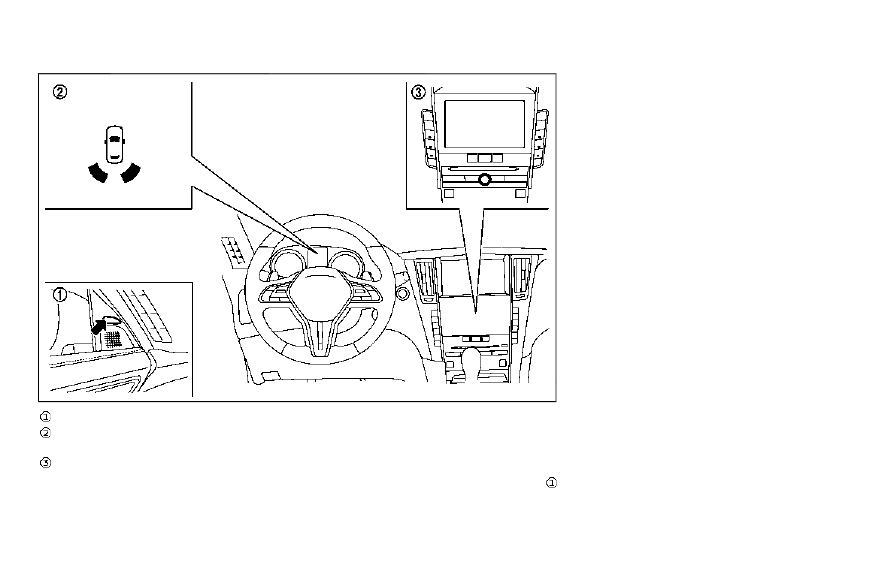
JVS0827X

Side indicator light
Driver assist system blind spot indica-
tor (on the vehicle information display)
Lower display

BSW SYSTEM OPERATION

The BSW system operates above approxi-
mately 20 MPH (32 km/h).
If the radar sensors detect a vehicle in the
detection zone, the side indicator light
illuminates.

If the turn signal is then activated, the
system chimes (twice) and the side indicator
light flashes. The side indicator light con-
tinues to flash until the detected vehicle
leaves the detection zone.

NOTE:

.

The side indicator lights illuminate for a

few seconds when the ignition switch is
placed in the ON position.

.

The brightness of the side indicator

lights is adjusted automatically depend-
ing on the brightness of the ambient
light.

.

If a vehicle comes into the detection zone

after the driver activates the turn
signal, then only the side indicator light
flashes and no chime sounds. (See “BSW
driving situations” (P.5-44).)

CarManuals2.com

-------------------------------------------------------------------------------------------------------------------------------------------------------------

JVS0246X

HOW TO ENABLE/DISABLE THE
BSW SYSTEM

Perform the following steps to enable or
disable the BSW system.
1. Push the MENU button

and touch

[Driver Assistance] on the lower display.

2. Touch [Blind Spot Assist].
3. Touch [Blind Spot Warning] to enable or

disable the system.

The displayed keys on the lower display may
vary depending on models, specifications
and software versions.

Setting the side indicator light
brightness

The brightness of the side indicator lights
can be changed using the following steps:
1. Push the MENU button

and touch

[Driver Assistance] on the lower display.

2. Touch [Blind Spot Assist].
3. Touch [Blind Spot Indicator] to select

[Bright], [Standard] or [Dark].

When the brightness setting is changed, the
side indicator lights illuminate for a few
seconds.
The displayed keys on the lower display may
vary depending on models, specifications
and software versions.

BSW SYSTEM LIMITATIONS

WARNING

Listed below are the system limitations
for the BSW system. Failure to operate
the vehicle in accordance with these
system limitations could result in serious
injury or death.

.

The BSW system cannot detect all
vehicles under all conditions.

.

The radar sensors may not be able to
detect and activate BSW when cer-
tain objects are present such as:

— Pedestrians, bicycles, animals.

— Vehicles such as motorcycles, low

height vehicles, or high ground
clearance vehicles.

— Oncoming vehicles.

— Vehicles remaining in the detec-

tion zone when you accelerate
from a stop.

— A vehicle merging into an adja-

cent lane at a speed approxi-
mately the same as your vehicle.

— A vehicle approaching rapidly

from behind.

— A vehicle which your vehicle over-

takes rapidly.

— A vehicle that passes through the

detection zone quickly.

.

The radar sensor’s detection zone is
designed based on a standard lane
width. When driving in a wider lane,
the radar sensors may not detect
vehicles in an adjacent lane. When
driving in a narrow lane, the radar
sensors may detect vehicles driving
two lanes away.

Starting and driving

5-43

CarManuals2.com

-------------------------------------------------------------------------------------------------------------------------------------------------------------

5-44

Starting and driving

.

The radar sensors are designed to
ignore most stationary objects, how-
ever objects such as guardrails, walls,
foliage and parked vehicles may oc-
casionally be detected. This is a
normal operation condition.

.

The following conditions may reduce
the ability of the radar to detect
other vehicles:

— Severe weather

— Road spray

— Ice/frost/snow build-up on the

vehicle

— Dirt build-up on the vehicle

.

Do not attach stickers (including
transparent material), install acces-
sories or apply additional paint near
the radar sensors. These conditions
may reduce the ability of the radar to
detect other vehicles.

.

Excessive noise (for example, audio
system volume, open vehicle window)
will interfere with the chime sound,
and it may not be heard.

BSW DRIVING SITUATIONS

Indicator on

Indicator off

Indicator flashing

JVS0737X

Illustration 1 – Approaching from behind

Another vehicle approaching from
behind

Illustration 1: The side indicator light illumi-
nates if a vehicle enters the detection zone
from behind in an adjacent lane.

CarManuals2.com

-------------------------------------------------------------------------------------------------------------------------------------------------------------

JVS0738X

Illustration 2 – Approaching from behind

Illustration 2: If the driver activates the turn
signal, then the system chimes (twice) and
the side indicator light flashes.

NOTE:

.

The radar sensors may not detect vehi-

cles which are approaching rapidly from
behind.

.

If the driver activates the turn signal

before a vehicle enters the detection
zone, the side indicator light will flash
but no chime will sound when the other
vehicle is detected.

JVS0739X

Illustration 3 – Overtaking another vehicle

Overtaking another vehicle

Illustration 3: The side indicator light illumi-
nates if you overtake a vehicle and that
vehicle stays in the detection zone for
approximately 3 seconds.
The radar sensors may not detect slower
moving vehicles if they are passed quickly.

JVS0740X

Illustration 4 – Overtaking another vehicle

Illustration 4: If the driver activates the turn
signal while another vehicle is in the detec-
tion zone, then the system chimes (twice)
and the side indicator light flashes.

NOTE:

.

When overtaking several vehicles in a

row, the vehicles after the first vehicle
may not be detected if they are travel-
ing close together.

.

The radar sensors may not detect slower

moving vehicles if they are passed
quickly.

.

If the driver activates the turn signal

before a vehicle enters the detection
zone, the side indicator light will flash

Starting and driving

5-45

CarManuals2.com

-------------------------------------------------------------------------------------------------------------------------------------------------------------

5-46

Starting and driving

but no chime will sound when the other
vehicle is detected.

JVS0741X

Illustration 5 – Entering from the side

Entering from the side

Illustration 5: The side indicator light illumi-
nates if a vehicle enters the detection zone
from either side.

WAF0555X

Illustration 6 – Entering from the side

Illustration 6: If the driver activates the turn
signal, then the system chimes (twice) and
the side indicator light flashes.

NOTE:

.

The radar sensors may not detect a

vehicle which is traveling at about the
same speed as your vehicle when it
enters the detection zone.

.

If the driver activates the turn signal

before a vehicle enters the detection
zone, the side indicator light will flash
but no chime will sound when the other
vehicle is detected.

CarManuals2.com

-------------------------------------------------------------------------------------------------------------------------------------------------------------

JVS0824X

Vehicle information display

SYSTEM TEMPORARILY UNA-
VAILABLE

When radar blockage is detected, the BSW
system will be turned off automatically, a
chime will sound and the “side radar ob-
struction” warning message will appear in
the vehicle information display

.

The system is not available until the condi-
tions no longer exist.
The radar sensors may be blocked by
temporary ambient conditions such as
splashing water, mist or fog. The blocked
condition may also be caused by objects
such as ice, frost or dirt obstructing the radar

sensors.

Action to take:

When the above conditions no longer exist,
the system will resume automatically.
If the “side radar obstruction” warning
message continues to appear, have the
system checked. It is recommended you visit
an INFINITI retailer for this service.

SYSTEM MALFUNCTION

When the BSW system malfunctions, it will
be turned off automatically, a chime will
sound, and the system “malfunction” warn-
ing message with the driver assist system
blind spot indicator (orange) will appear in
the vehicle information display.

Action to take:

Stop the vehicle in a safe location and place
the shift lever in the P (Park) position. Turn
the engine off and restart the engine. If the
system “malfunction” warning message with
the driver assist system blind spot indicator
(orange) continues to be displayed, have the
BSW system checked. It is recommended
you visit an INFINITI retailer for this service.

JVS1122X

SYSTEM MAINTENANCE

The two radar sensors

for the BSW

system are located near the rear bumper.
Always keep the area near the radar sensors
clean.
The radar sensors may be blocked by
temporary ambient conditions such as
splashing water, mist or fog.
The blocked condition may also be caused by
objects such as ice, frost or dirt obstructing
the radar sensors.
Check for and remove objects obstructing
the area around the radar sensors.
Do not attach stickers (including transparent
material), install accessories or apply addi-

Starting and driving

5-47

CarManuals2.com

-------------------------------------------------------------------------------------------------------------------------------------------------------------

5-48

Starting and driving

tional paint near the radar sensors.
Do not strike or damage the area around the
radar sensors.
It is recommended you visit an INFINITI
retailer if the area around the radar sensors
is damaged due to a collision.

Precautions on repairing the bum-
per

When repairing the bumper, take cautious
because the radar sensors are installed on
the bumper.

WBF0182X

Radar signal
Reflected signal

Mechanism of the radar sensor:

The radar sensor detects objects by emitting
a radar signal and then measuring its reflec-
tion.

CarManuals2.com

-------------------------------------------------------------------------------------------------------------------------------------------------------------

WBF0183X

Normal condition (before the repair)
Poor condition (after the improper repair)

Radar signal
Reflected signal
Radar sensor
Vehicle bumper
Film layer
Putty
Touch-up layer
Repaint
Radar signal diffusion

Repairing the bumper:

If an improper repair is performed on the
bumper (for example, application of putty

made from different materials, repaint, etc.),
the radar signal could be weaken or pre-
vented from functioning properly. This may
cause the radar sensor not to detect objects
correctly.

Radio frequency statement

For USA

FCC ID: OAYSRR3B

This device complies with part 15 of the
FCC Rules. Operation is subject to the
following two conditions:

(1) this device may not cause harmful
interference, and

(2) this device must accept any interference
received, including interference that may
cause undesired operation.

CAUTION TO USERS

Changes or modifications not expressly
approved by the party responsible for
compliance could void the user’s authority
to operate the equipment.

For Canada

This device complies with Industry Canada

licence-exempt RSS standard(s). Operation
is subject to the following two conditions:
(1) this device may not cause interference,
and (2) this device must accept any inter-
ference, including interference that may
cause undesired operation of the device.

Frequency bands: 24.05 – 24.25 Ghz

The field strength of SRR3-B is below 250
millivolts/m measured at 3 metres with an
average detector.

Starting and driving

5-49

CarManuals2.com

-------------------------------------------------------------------------------------------------------------------------------------------------------------

5-50

Starting and driving

This device contains licence-exempt trans-
mitter(s)/receiver(s) that comply with In-
n o v a t i o n , S c i e n c e a n d E c o n o m i c
Development Canada’s licence-exempt
RSS(s). Operation is subject to the follow-
ing two conditions:

1. This device may not cause interference.

2. This device must accept any interference,
including interference that may cause un-
desired operation of the device.

Radiofrequency radiation exposure infor-
mation:

This equipment complies with radiation
exposure limits set forth for an uncontrolled
environment. This equipment should be
installed and operated with minimum dis-
tance of 20 cm between the radiator and
your body.

WARNING

Failure to follow the warnings and
instructions for proper use of the BSI
system could result in serious injury or
death.

.

The BSI system is not a replacement
for proper driving procedures and is
not designed to prevent contact with
vehicles or objects. When changing
lanes, always use the side and rear
mirrors and turn and look in the
direction your vehicle will move to
ensure it is safe to change lanes.
Never rely solely on the BSI system.

.

There is a limitation to the detection
capability of the radar. Not every
moving object or vehicle will be
detected. Using the BSI system under
some road, ground, lane marker,
traffic or weather conditions could
lead to improper system operation.
Always rely on your own operation to
avoid accidents.

The BSI system helps alert the driver of other
vehicles in adjacent lanes when changing
lanes, and helps assist the driver to return
the vehicle to the center of the traveling
lane.

JVS1125X

The BSI system uses radar sensors
installed near the rear bumper to detect
other vehicles in an adjacent lane. In addition
to the radar sensors, the BSI system uses a
camera

installed behind the windshield to

monitor the lane markers of your traveling
lane.

BLIND SPOT INTERVENTION

®

(BSI) (if so equipped)

CarManuals2.com

-------------------------------------------------------------------------------------------------------------------------------------------------------------

SSD1030

Detection zone

The radar sensors can detect vehicles on
either side of your vehicle within the detec-
tion zone shown as illustrated.
This detection zone starts from the outside
mirror of your vehicle and extends approxi-
mately 10 ft (3.0 m) behind the rear bumper,
and approximately 10 ft (3.0 m) sideways.

JVS0828X

Side indicator light
Driver assist system blind spot indica-
tor (on the vehicle information display)
Dynamic driver assistance switch
Lower display

Starting and driving

5-51

CarManuals2.com

-------------------------------------------------------------------------------------------------------------------------------------------------------------

5-52

Starting and driving

BSI SYSTEM OPERATION

The BSI system operates above approxi-
mately 37 MPH (60 km/h).
If the radar sensors detect a vehicle in the
detection zone, the side indicator light
illuminates.
If the turn signal is then activated, the
system chimes (twice) and the side indicator
light flashes. The side indicator light con-
tinues to flash until the detected vehicle
leaves the detection zone.
If the BSI system is ON and your vehicle
approaches a lane marker while another
vehicle is in the detection zone, the system
chimes (three times) and the side indicator
light flashes. The BSI system activates to
help return the vehicle back to the center of
the driving lane. The BSI system operates
regardless of turn signal usage.

NOTE:

.

BSI warning and system application will

only be activated if the side indicator
light is already illuminated when your
vehicle approaches a lane marker. If
another vehicle comes into the detection
zone after your vehicle has crossed a
lane marker, no BSI warning or system
application will be activated. (For addi-
tional information, see “BSI driving
situations” (P.5-56).)

.

The BSI system is typically activated

earlier than the Lane Departure Preven-
tion (LDP) system when your vehicle is
approaching a lane marker.

CarManuals2.com

-------------------------------------------------------------------------------------------------------------------------------------------------------------

JVS0829X

Driver assist system blind spot indica-
tor (green) (on the vehicle information
display)
Dynamic driver assistance switch
Lower display

TURNING THE BSI SYSTEM ON/
OFF

To turn on the BSI system, push the dynamic
driver assistance switch

on the steering

wheel after starting the engine. The driver
assist system blind spot indicator (green)
in the vehicle information display will illumi-

nate.
Push the dynamic driver assistance switch
again to turn off the BSI system. The driver
assist system blind spot indicator

will turn

off.
The dynamic driver assistance switch

is

used for Active Lane Control, Blind Spot
Intervention (BSI), Lane Departure Preven-
tion (LDP) and Distance Control Assist
(DCA) systems. When the dynamic driver
assistance switch

is pushed, Active Lane

Control, LDP and DCA systems will also turn
on or off simultaneously. The BSI system can
be individually set to on or off on the lower
display

.

If the system is set to off, the system will not
turn on even if the dynamic driver assistance
switch

is pushed to on. To set the system

to on or off on the lower display, see “How
to enable/disable the BSI system” (P.5-54).

Starting and driving

5-53

CarManuals2.com

-------------------------------------------------------------------------------------------------------------------------------------------------------------

5-54

Starting and driving

JVS0246X

HOW TO ENABLE/DISABLE THE
BSI SYSTEM

Perform the following steps to enable or
disable the BSI system.
1. Push the MENU button

and touch

[Driver Assistance] on the lower display.

2. Touch [Blind Spot Assist].
3. Touch [Blind Spot Intervention] to en-

able or disable the system.

The displayed keys on the lower display may
vary depending on models, specifications
and software versions.

Setting the side indicator light
brightness

The brightness of the side indicator lights
can be changed using the following steps:
1. Push the MENU button

and touch

[Driver Assistance] on the lower display.

2. Touch [Blind Spot Assist].
3. Touch [Blind Spot Indicator] to select

[Bright], [Standard] or [Dark].

When the brightness setting is changed, the
side indicator lights illuminate for a few
seconds.
The displayed keys on the lower display may
vary depending on models, specifications
and software versions.

BSI SYSTEM LIMITATIONS

WARNING

Listed below are the system limitations
for the BSI system. Failure to operate
the vehicle in accordance with these
system limitations could result in serious
injury or death.

.

The BSI system cannot detect all
vehicles under all conditions.

.

The radar sensors may not be able to
detect and activate BSI when certain
objects are present such as:

— Pedestrians, bicycles, animals.

— Vehicles such as motorcycles, low

height vehicles, or high ground
clearance vehicles.

— Vehicles remaining in the detec-

tion zone when you accelerate
from a stop.

— Oncoming vehicles.

— A vehicle merging into an adja-

cent lane at a speed approxi-
mately the same as your vehicle.

— A vehicle approaching rapidly

from behind.

— A vehicle which your vehicle over-

takes rapidly.

— A vehicle that passes through the

detection zone quickly.

.

The radar sensor’s detection zone is
designed based on a standard lane
width. When driving in a wider lane,
the radar sensors may not detect
vehicles in an adjacent lane. When
driving in a narrow lane, the radar
sensors may detect vehicles driving
two lanes away.

CarManuals2.com

-------------------------------------------------------------------------------------------------------------------------------------------------------------

.

The radar sensors are designed to
ignore most stationary objects, how-
ever objects such as guardrails, walls,
foliage and parked vehicles may oc-
casionally be detected. This is a
normal operation condition.

.

The camera may not detect lane
markers in the following situations
and the BSI system may not operate
properly.

— On roads where there are multi-

ple parallel lane markers; lane
markers that are faded or not
painted clearly; yellow painted
lane markers; nonstandard lane
markers; lane markers covered
with water, dirt, snow, etc.

— On roads where discontinued lane

markers are still detectable.

— On roads where there are sharp

curves.

— On roads where there are sharply

contrasting objects, such as sha-
dows, snow, water, wheel ruts,
seams or lines remaining after
road repairs.

— On roads where the traveling lane

merges or separates.

— When the vehicle’s traveling di-

rection does not align with the
lane markers.

— When traveling close to the ve-

hicle in front of you, which ob-
structs the lane camera unit
detection range.

— When rain, snow or dirt adheres

to the windshield in front of a lane
camera unit.

— When the headlights are not

bright due to dirt on the lens or
if aiming is not adjusted properly.

— When strong light enters a lane

camera unit. (For example: light
directly shines on the front of the
vehicle at sunrise or sunset.)

— When a sudden change in bright-

ness occurs. (For example: when
the vehicle enters or exits a tunnel
or under a bridge.)

.

Do not use the BSI system under the
following conditions because the sys-
tem may not function properly.

— During bad weather. (For exam-

ple: rain, fog, snow, etc.)

— When driving on slippery roads,

such as on ice or snow, etc.

— When driving on winding or un-

even roads.

— When there is a lane closure due

to road repairs.

— When driving in a makeshift or

temporary lane.

— When driving on roads where the

lane width is too narrow.

— When driving with a tire that is

not within normal tire conditions
(for example, tire wear, low tire
pressure, installation of spare tire,
tire chains, non-standard wheels).

— When the vehicle is equipped with

non-original steering parts or sus-
pension parts.

.

Excessive noise (for example, audio
system volume, open vehicle window)
will interfere with the chime sound,
and it may not be heard.

Starting and driving

5-55

CarManuals2.com

-------------------------------------------------------------------------------------------------------------------------------------------------------------

5-56

Starting and driving

BSI DRIVING SITUATIONS

Indicator on

Indicator off

Indicator flashing

JVS0737X

Illustration 1 – Approaching from behind

Another vehicle approaching from
behind

Illustration 1: The side indicator light illumi-
nates if a vehicle enters the detection zone
from behind in an adjacent lane.

JVS0738X

Illustration 2 – Approaching from behind

Illustration 2: If the driver activates the turn
signal then the system chimes a sound
(twice) and the side indicator light flashes.

CarManuals2.com

-------------------------------------------------------------------------------------------------------------------------------------------------------------

JVS0760X

Illustration 3 - Approaching from behind

Illustration 3: If the BSI system is on and your
vehicle approaches a lane marker while
another vehicle is in the detection zone, the
system chimes (three times) and the side
indicator light flashes. The BSI system
activates to help return the vehicle back to
the center of the driving lane.

NOTE:

.

The radar sensors may not detect vehi-

cles which are approaching rapidly from
behind.

.

If the driver activates the turn signal

before a vehicle enters the detection
zone, the side indicator light will flash
but no chime will sound when the other

vehicle is detected.

JVS0739X

Illustration 4 - Overtaking another vehicle

Overtaking another vehicle

Illustration 4: The side indicator light illumi-
nates if you overtake a vehicle and that
vehicle stays in the detection zone for
approximately 3 seconds.

Starting and driving

5-57

CarManuals2.com

-------------------------------------------------------------------------------------------------------------------------------------------------------------

5-58

Starting and driving

JVS0740X

Illustration 5 - Overtaking another vehicle

Illustration 5: If the driver activates the turn
signal while another vehicle is in the detec-
tion zone, then the system chimes (twice)
and the side indicator light flashes.

JVS0761X

Illustration 6 - Overtaking another vehicle

Illustration 6: If the BSI system is on and your
vehicle approaches a lane marker while
another vehicle is in the detection zone, the
system chimes (three times) and the side
indicator light flashes. The BSI system
activates to help return the vehicle back to
the center of the driving lane.

NOTE:

.

When overtaking several vehicles in a

row, the vehicles after the first vehicle
may not be detected if they are travel-
ing close together.

.

The radar sensors may not detect slower

moving vehicles if they are passed
quickly.

.

If the driver activates the turn signal

before a vehicle enters the detection
zone, the side indicator light will flash
but no chime will sound when the other
vehicle is detected.

CarManuals2.com

-------------------------------------------------------------------------------------------------------------------------------------------------------------

JVS0741X

Illustration 7 - Entering from the side

Entering from the side

Illustration 7: The side indicator light illumi-
nates if a vehicle enters the detection zone
from either side.

NOTE:

The radar sensors may not detect a vehicle
which is traveling at about the same speed
as your vehicle when it enters the detection
zone.

WAF0555X

Illustration 8 - Entering from the side

Illustration 8: If the driver activates the turn
signal while another vehicle is in the detec-
tion zone, then the side indicator light
flashes and a chime will sound twice.

NOTE:

If the driver activates the turn signal before
a vehicle enters the detection zone, the side
indicator light will flash but no chime will
sound when another vehicle is detected.

JVS0761X

Illustration 9 - Entering from the side

Illustration 9: If the BSI system is on and your
vehicle approaches the lane marker while
another vehicle is in the detection zone, the
system chimes (three times) and the side
indicator light flashes. The BSI system
activates to help return the vehicle back to
the center of the driving lane.

Starting and driving

5-59

CarManuals2.com

-------------------------------------------------------------------------------------------------------------------------------------------------------------

5-60

Starting and driving

JVS0742X

Illustration 10 - Entering from the side

Illustration 10: The BSI system will not
operate if your vehicle is on a lane marker
when another vehicle enters the detection
zone. In this case only the BSW system
operates.

NOTE:

.

The radar sensors may not detect a

vehicle which is traveling at about the
same speed as your vehicle when it
enters the detection zone.

.

If the driver activates the turn signal

before a vehicle enters the detection
zone, the side indicator light will flash
but no chime will sound when the other
vehicle is detected.

.

BSI will not operate or will stop operat-

ing and only a warning chime will sound
under the following conditions.

When the brake pedal is depressed.
(models without Direct Adaptive
Steering)

When the vehicle is accelerated dur-
ing BSI system operation

When steering quickly

When the ICC, DCA, PFCW or FEB
warnings sound.

When the hazard warning flashers
are operated.

When driving on a curve at a high
speed.

JVS0826X

Vehicle information display
Dynamic driver assistance switch

SYSTEM TEMPORARILY UNA-
VAILABLE

Under the following conditions, a chime will
sound, the “currently unavailable” warning
message will appear in the vehicle informa-
tion display

and the BSI system will be

turned off automatically. The BSI system will
not be available until the conditions no
longer exist.

.

When the VDC system (except TCS

function) or ABS operates.

.

When the VDC system is turned off.

CarManuals2.com

-------------------------------------------------------------------------------------------------------------------------------------------------------------

.

When the INFINITI Drive Mode Selector

is turned to the SNOW mode.

Action to take

:

When the above conditions no longer exist,
push the dynamic driver assistance switch
again to turn the BSI system back on.
When radar blockage is detected, the BSI
system will be turned off automatically, a
chime will sound and the “side radar ob-
struction” warning message will appear in
the vehicle information display

.

The BSI system is not available until the
conditions no longer exist. For additional
information, see “System maintenance”
(P.5-61).

Action to take:

When the above conditions no longer exist,
turn the BSI system on again. If the “side
radar obstruction” warning message ap-
pears even after the BSI system is turned
on again, stop the vehicle in a safe location,
place the shift lever in the P (Park) position
and turn the engine off. Check for and
remove objects obscuring the radar sensors
on the rear bumper, and restart the engine.
If the vehicle is parked in direct sunlight
under high temperature conditions (over
approximately 104°F (40°C)) and then the
BSI system is turned on, the BSI system may
be deactivated automatically. The “high
cabin temperature” warning message will

appear in the vehicle information display

.

Action to take:

When the interior temperature is reduced,
push the dynamic driver assistance switch
again to turn the BSI system back on.

SYSTEM MALFUNCTION

When the BSI system malfunctions, it will be
turned off automatically, a chime will sound,
and the system “malfunction” warning mes-
sage with the driver assist system blind spot
indicator (orange) will appear in the vehicle
information display.

Action to take:

Stop the vehicle in a safe location and place
the shift lever in the P (Park) position. Turn
the engine off and restart the engine. If the
system “malfunction” warning message with
the driver assist system blind spot indicator
(orange) continues to be displayed, have the
BSI system checked. It is recommended you
visit an INFINITI retailer for this service.

JVS1125X

SYSTEM MAINTENANCE

The two radar sensors

for the BSI system

are located near the rear bumper. Always
keep the area near the radar sensors clean.
The radar sensors may be blocked by
temporary ambient conditions such as
splashing water, mist or fog.
The blocked condition may also be caused by
objects such as ice, frost or dirt obstructing
the radar sensors.
Check for and remove objects obstructing
the area around the radar sensors.
Do not attach stickers (including transparent
material), install accessories or apply addi-
tional paint near the radar sensors.

Starting and driving

5-61

CarManuals2.com

-------------------------------------------------------------------------------------------------------------------------------------------------------------

5-62

Starting and driving

Do not strike or damage the area around the
radar sensors.
It is recommended you visit an INFINITI
retailer if the area around the radar sensors
is damaged due to a collision.
The lane camera unit

for BSI system is

located above the inside mirror. To keep the
proper operation of BSI and prevent a
system malfunction, be sure to observe the
following:

.

Always keep the windshield clean.

.

Do not attach a sticker (including trans-

parent material) or install an accessory
near the camera unit.

.

Do not place reflective materials, such as

white paper or a mirror, on the instru-
ment panel. The reflection of sunlight
may adversely affect the camera unit’s
capability of detecting the lane markers.

.

Do not strike or damage the areas around

the camera unit. Do not touch the
camera lens or remove the screw located
on the camera unit. It is recommended
you contact an INFINITI retailer if the
camera unit is damaged due to an
accident.

Precautions on repairing the bum-
per

When repairing the bumper, take cautious
because the radar sensors are installed on

the bumper. For more details, see “Precau-
tions on repairing the bumper” (P.5-48).

Radio frequency statement

For USA

FCC ID: OAYSRR3B

This device complies with part 15 of the
FCC Rules. Operation is subject to the
following two conditions:

(1) this device may not cause harmful
interference, and

(2) this device must accept any interference
received, including interference that may
cause undesired operation.

CAUTION TO USERS

Changes or modifications not expressly
approved by the party responsible for
compliance could void the user’s authority
to operate the equipment.

For Canada

This device complies with Industry Canada

licence-exempt RSS standard(s). Operation
is subject to the following two conditions:
(1) this device may not cause interference,
and (2) this device must accept any inter-
ference, including interference that may
cause undesired operation of the device.

Frequency bands: 24.05 – 24.25 Ghz

The field strength of SRR3-B is below 250
millivolts/m measured at 3 metres with an
average detector.

This device contains licence-exempt trans-
mitter(s)/receiver(s) that comply with In-
n o v a t i o n , S c i e n c e a n d E c o n o m i c
Development Canada’s licence-exempt
RSS(s). Operation is subject to the follow-
ing two conditions:

1. This device may not cause interference.

2. This device must accept any interference,
including interference that may cause un-
desired operation of the device.

Radiofrequency radiation exposure infor-
mation:

This equipment complies with radiation
exposure limits set forth for an uncontrolled
environment. This equipment should be
installed and operated with minimum dis-
tance of 20 cm between the radiator and
your body.

CarManuals2.com

-------------------------------------------------------------------------------------------------------------------------------------------------------------

WARNING

Failure to follow the warnings and
instructions for proper use of the BCI
system could result in serious injury or
death.

.

The BCI system is not a replacement
for proper driving procedure, is not
designed to prevent contact with
vehicles or objects and does not
provide full brake power. When back-
ing out of parking spaces, always use
the inside and rear mirrors and turn
and look in the direction you will
move. Never rely solely on the BCI
system.

.

There is a limitation to the detection
capability of the radar or the sonar.
Using the BCI system under some
road, ground, traffic or weather con-
ditions could lead to improper system
operation. Always rely on your own
operation to avoid accidents.

The BCI system can help alert the driver of
an approaching vehicle or objects behind the
vehicle when the driver is backing out of a
parking space.

JVS1121X

The BCI system uses radar sensors
installed on both sides near the rear bumper
to detect an approaching vehicle and sonar
sensors

to detect objects in the rear.

JVS0173X

JVS0234X

Starting and driving

5-63

BACK-UP COLLISION
INTERVENTION (BCI) (if so equipped)

CarManuals2.com

-------------------------------------------------------------------------------------------------------------------------------------------------------------

5-64

Starting and driving

The radar sensors

detect an approaching

vehicle from up to approximately 49 ft (15
m) away. The sonar sensors

detect

stationary objects behind the vehicle up to
approximately 4.9 ft (1.5 m). Refer to the
illustration for approximate zone coverage
areas

.

WAF0278X

Side indicator light
BCI system key
BCI system indicator
Upper display
Lower display

CarManuals2.com

-------------------------------------------------------------------------------------------------------------------------------------------------------------

JVS0173X

BCI SYSTEM OPERATION

When the shift lever is in the R (Reverse)
position and the vehicle speed is less than
approximately 5 MPH (8 km/h), the BCI
system operates.
If the radar detects a vehicle approaching
from the side or the sonar detects close
stationary objects behind the vehicle, the
system gives visual and audible warnings. If
the driver does not apply the brakes, the
system automatically applies the brake for a
moment when the vehicle is moving back-
wards. After the automatic brake applica-
tion, the driver must depress the brake pedal
to maintain brake pressure. If the driver’s
foot is on the accelerator pedal, the system

pushes the accelerator upward before ap-
plying the brake. If you continue to accel-
erate, the system will not engage the brake.

WAF0283X

Upper display

When the shift lever is placed in the R
(Reverse) position, the indicator on the BCI
system key

illuminates on the upper

display.

Starting and driving

5-65

CarManuals2.com

-------------------------------------------------------------------------------------------------------------------------------------------------------------

5-66

Starting and driving

SSD1028

Side indicator light

WAF0284X

Upper display

If the radar detects an approaching vehicle
from the side, the system chimes (once), the
side indicator light on the side the vehicle is
approaching from flashes and a yellow
rectangular frame

appears on the upper

display.

JVS0172X

Illustration 1

JVS0173X

Illustration 2

CarManuals2.com

-------------------------------------------------------------------------------------------------------------------------------------------------------------

NOTE:

.

In the case of several vehicles approach-

ing in a row (Illustration 1) or in the
opposite direction (Illustration 2), a
chime may not be sounded by the BCI
system after the first vehicle passes the
sensors.

.

The sonar system chime indicating there

is an object behind the vehicle has a
higher priority than the BCI chime
(single beep) indicating an approaching
vehicle. If the sonar system detects an
object behind the vehicle and the BCI
system detects an approaching vehicle
at the same time, the following indica-
tions are provided:

The sonar system chime sounds

The side indicator light on the side of
the approaching vehicle flashes, and

A yellow rectangular frame appears
in the display.

WAF0284X

Upper display

If an approaching vehicle or object behind
the vehicle is detected when your vehicle is
backing up, a red frame

will appear on the

upper display and the system will chime
three times. Then, the brakes will be applied
momentarily. After the automatic brake
application, the driver must depress the
brake pedal to maintain brake pressure.
If the driver’s foot is on the accelerator
pedal, the system moves the accelerator
pedal upward before the braking is applied.
However, if you continue to accelerate, the
system will not engage the brakes.

The BCI system does not operate if the
object is very close to the bumper.

WAF0283X

Upper display

TURNING THE BCI SYSTEM ON/
OFF

The BCI system automatically turns on every
time the engine is started.
The BCI system can be turned off tempora-
rily by touching the BCI system key

on the

upper display. The indicator on the BCI
system key turns off. When the shift lever
is placed in the R (Reverse) position again,
the BCI system is turned on.

Starting and driving

5-67

CarManuals2.com

-------------------------------------------------------------------------------------------------------------------------------------------------------------

5-68

Starting and driving

JVS0246X

HOW TO ENABLE/DISABLE THE
BCI SYSTEM (if so equipped)

The BCI system can be turned off perma-
nently using the lower display. Perform the
following steps to enable or disable the BCI
system.
1. Push the MENU button

and touch

[Settings] on the lower display.

2. Touch [Camera].
3. Touch [Camera].
4. Touch [Back-up Collision Intervention]

to enable/disable the system.

When the BCI system is disabled by touching
[Back-up Collision Intervention], the BCI

system does not turn on automatically by
the following operations:

.

When the shift lever is placed in the R

(Reverse) position

.

When the engine is restarted

The displayed keys on the lower display may
vary depending on models, specifications
and software versions.

CarManuals2.com

-------------------------------------------------------------------------------------------------------------------------------------------------------------

JVS0479X

BCI SYSTEM LIMITATIONS

WARNING

Listed below are the system limitations
for the BCI system. Failure to operate

the vehicle in accordance with these
system limitations could result in serious
injury or death.

.

Always check your surroundings and
turn to check what is behind you
before backing up.

.

The radar sensors detect approach-
ing (moving) vehicles. The radar sen-
sors cannot detect every object such
as:

— Pedestrians, bicycles, animals or

child operated toy vehicles

— A vehicle that is passing at speeds

greater than approximately 15
MPH (24 km/h)

.

The radar sensors may not detect
approaching vehicles in certain situa-
tions:

— Illustration a. When a vehicle

parked next to you obstructs the
beam of the radar sensor.

— Illustration b. When the vehicle is

parked in an angled parking space.

— Illustration c. When the vehicle is

parked on inclined ground.

— Illustration d. When an approach-

ing vehicle turns into your vehi-
cle’s parking lot aisle.

— Illustration e. When the angle

formed by your vehicle and ap-
proaching vehicle is small.

.

The following conditions may reduce
the ability of the radar sensors to
detect other vehicles:

Starting and driving

5-69

CarManuals2.com

-------------------------------------------------------------------------------------------------------------------------------------------------------------

5-70

Starting and driving

— Severe weather

— Road spray

— Ice/frost/dirt build up on the

vehicle

.

Do not attach stickers (including
transparent material), install acces-
sories or apply additional paint near
the radar sensors. These conditions
may reduce the ability of the radar
sensors to detect other vehicles.

.

The sonar sensors detect stationary
objects behind the vehicle. The sonar
sensor may not detect:

— Small or moving objects

— Wedge-shaped objects

— Object close to the bumper (less

than approximately 1 ft (30 cm))

— Thin objects such as rope, wire

and chain, etc.

.

The brake engagement by the BCI
system is not as effective on a slope
as it is on flat ground. When on a
steep slope the system may not
function properly.

.

Do not use the BCI system under the
following conditions because the sys-
tem may not function properly.

— When driving with a tire that is

not within normal tire conditions
(for example, tire wear, low tire
pressure, installation of spare tire,
tire chains, non-standard wheels).

— When the vehicle is equipped with

non-original brake parts or sus-
pension parts.

.

Excessive noise (for example, audio
system volume, open vehicle window)
will interfere with the chime sound,
and it may not be heard.

JVS0824X

Vehicle information display

SYSTEM TEMPORARILY UNA-
VAILABLE

If the following message appears in the
vehicle information display

, a chime will

sound and the BCI system will be turned off
automatically.

.

“Unavailable High Accelerator Temp.”:

If the vehicle is parked in direct sunlight
under high temperature conditions (over
approximately 104 °F (40 °C)) and then
started, the BCI system may be deacti-
vated automatically.

Action to take:

When the interior temperature is re-

CarManuals2.com

-------------------------------------------------------------------------------------------------------------------------------------------------------------

duced, turn off the BCI system and turn
it on again.

.

“Unavailable Side Radar Obstruction”:

When side radar blockage is detected.

Action to take:

When the blockage is removed, turn off
the BCI system and turn it on again.

SYSTEM MALFUNCTION

If the BCI system malfunctions, it will turn
off automatically, a chime will sound and BCI
system “malfunction” warning message will
appear in the vehicle information display

.

Action to take:

Stop the vehicle in a safe location and place
the shift lever in the P (Park) position. Turn
the engine off and restart the engine. If the
warning message continues to appear, have
the system checked. It is recommended you
visit an INFINITI retailer for this service.

JVS1122X

SYSTEM MAINTENANCE

The two radar sensors

for the BCI system

is located near the rear bumper. Always keep
the area near the radar sensors clean.
The radar sensors may be blocked by
temporary ambient conditions such as
splashing water, mist or fog.
The blocked condition may also be caused by
objects such as ice, frost or dirt obstructing
the radar sensors.
Check for and remove objects obstructing
the area around the radar sensors.
Do not attach stickers (including transparent
material), install accessories or apply addi-
tional paint near the radar sensors.

Do not strike or damage the area around the
radar sensors.
It is recommended you visit an INFINITI
retailer if the area around the radar sensors
is damaged due to a collision.

Precautions on repairing the bum-
per

When repairing the bumper, take cautious
because the radar sensors are installed on
the bumper. For more details, see “Precau-
tions on repairing the bumper” (P.5-48).

Radio frequency statement

For USA

FCC ID: OAYSRR3B

This device complies with part 15 of the
FCC Rules. Operation is subject to the
following two conditions:

(1) this device may not cause harmful
interference, and

(2) this device must accept any interference
received, including interference that may
cause undesired operation.

CAUTION TO USERS

Changes or modifications not expressly
approved by the party responsible for
compliance could void the user’s authority
to operate the equipment.

Starting and driving

5-71

CarManuals2.com

-------------------------------------------------------------------------------------------------------------------------------------------------------------

5-72

Starting and driving

For Canada

This device complies with Industry Canada

licence-exempt RSS standard(s). Operation
is subject to the following two conditions:
(1) this device may not cause interference,
and (2) this device must accept any inter-
ference, including interference that may
cause undesired operation of the device.

Frequency bands: 24.05 – 24.25 Ghz

The field strength of SRR3-B is below 250
millivolts/m measured at 3 metres with an
average detector.

This device contains licence-exempt trans-
mitter(s)/receiver(s) that comply with In-
n o v a t i o n , S c i e n c e a n d E c o n o m i c
Development Canada’s licence-exempt
RSS(s). Operation is subject to the follow-
ing two conditions:

1. This device may not cause interference.

2. This device must accept any interference,
including interference that may cause un-
desired operation of the device.

Radiofrequency radiation exposure infor-
mation:

This equipment complies with radiation
exposure limits set forth for an uncontrolled
environment. This equipment should be
installed and operated with minimum dis-
tance of 20 cm between the radiator and

your body.

PRECAUTIONS ON CRUISE
CONTROL

.

If the cruise control system malfunctions,

it will cancel automatically. The cruise
indicator (green) in the vehicle informa-
tion display will then blink to warn the
driver.

.

If the engine coolant temperature be-

comes excessively high, the cruise con-
t r o l

s y s t e m

w i l l

b e

c a n c e l e d

automatically.

.

If the cruise indicator (green) blinks, turn

the cruise control MAIN switch off and
have the system checked. It is recom-
mended you visit an INFINITI retailer for
this service.

.

The cruise indicator (green) may some-

times blink when the cruise control MAIN
switch is turned ON while pushing the
SET/COAST (-), RESUME/ACCELER-
ATE (+) or CANCEL switch. To properly
set the cruise control system, perform
the steps below in the order indicated.

WARNING

Do not use the cruise control when
driving under the following conditions:

.

when it is not possible to keep the
vehicle at a set speed

CRUISE CONTROL (if so equipped)

CarManuals2.com

-------------------------------------------------------------------------------------------------------------------------------------------------------------

.

in heavy traffic or in traffic that
varies in speed

.

on winding or hilly roads

.

on slippery roads (rain, snow, ice,
etc.)

.

in very windy areas

Doing so could cause a loss of vehicle
control and result in an accident.

JVS0867X

1.

RESUME/ACCELERATE (+) switch

2.

SET/COAST (-) switch

3.

CANCEL switch

4.

MAIN (ON·OFF) switch

JVS0306X

Cruise indicator

CRUISE CONTROL OPERATIONS

The cruise indicator and the set vehicle
speed are displayed in the vehicle informa-
tion display. The cruise indicator indicates
the status of the cruise control system by the
color.
The cruise control allows driving at a speed
between 25 to 90 MPH (40 to 144 km/h)
without keeping your foot on the accelerator
pedal.

To turn on the cruise control,

push the

MAIN switch on. The cruise indicator (white)
will come on.

To set cruising speed,

accelerate your

Starting and driving

5-73

CarManuals2.com

-------------------------------------------------------------------------------------------------------------------------------------------------------------


Content      ..     7      8      9      10     ..