Infiniti Q50 (2018 year). Instruction - part 10
 

  Index      Infiniti     Infiniti Q50 (2018 year) - instruction in english


Search            copyright infringement  


Content      ..     8      9      10      11     ..


Infiniti Q50 (2018 year). Instruction - part 10


3-8

Pre-driving checks and adjustments

CAUTION

Do not allow the Intelligent Key,

which contains electrical compo-
nents, to come into contact with
water or salt water. This could affect
the system function.

Do not drop the Intelligent Key.
Do not strike the Intelligent Key

sharply against another object.

Do not change or modify the Intelli-

gent Key.

Wetting may damage the Intelligent

Key. If the Intelligent Key gets wet,
immediately wipe until it is comple-
tely dry.

Do not place the Intelligent Key for

an extended period in an area where
temperatures exceed 140°F (60°C).

If the outside temperature is below

14°F (−10°C), the battery of the
Intelligent Key may not function
properly.

Do not attach the Intelligent Key

with a key holder that contains a
magnet.

Do not place the Intelligent Key near

equipment that produces a magnetic
field, such as a TV, audio equipment

and personal computers.

If an Intelligent Key is lost or stolen, INFINITI
recommends erasing the ID code of that
Intelligent Key from the vehicle. This may
prevent the unauthorized use of the Intelli-
gent Key to operate the vehicle. For infor-
mation regarding the erasing procedure,
contact an INFINITI retailer.

JVP0225X

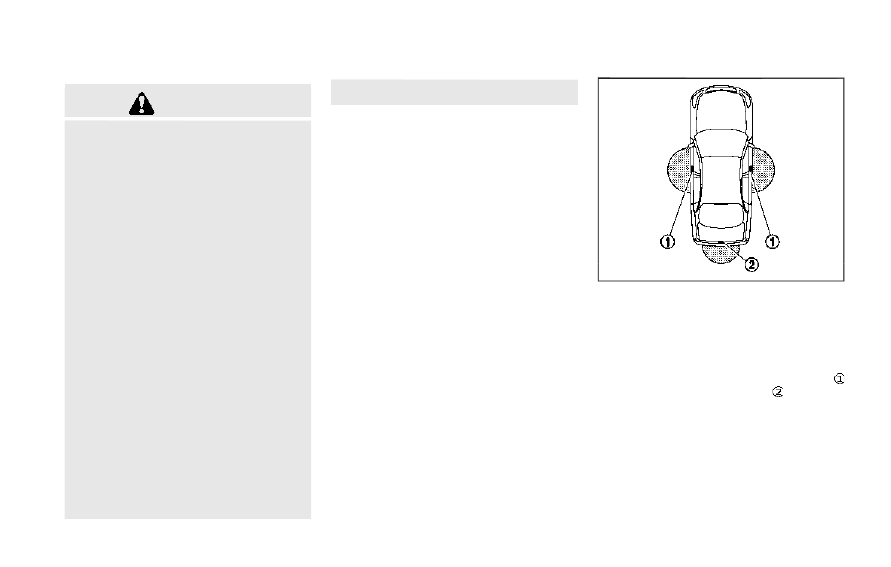
INTELLIGENT KEY OPERATING
RANGE

The Intelligent Key functions can only be
used when the Intelligent Key is within the
specified operating range from the one
touch unlock sensor/door request switch
and trunk open request switch

.

When the Intelligent Key battery is dis-
charged or strong radio waves are present
near the operating location, the Intelligent
Key system’s operating range becomes nar-
rower, and the Intelligent Key may not
function properly.
The operating range is within 31.50 in (80
cm) from each one touch unlock sensor/door

-------------------------------------------------------------------------------------------------------------------------------------------------------------

handle request switch

and trunk open

request switch

.

If the Intelligent Key is too close to the door
glass, handle or rear bumper, the one touch
unlock sensor and request switches may not
function.
When the Intelligent Key is within the
operating range, it is possible for anyone
who does not carry the Intelligent Key to use
the one touch unlock sensor or request
switches to lock or unlock the doors and
open the trunk lid.

SPA2407

DOOR LOCKS/UNLOCKS PRE-
CAUTION

. Do not push the door handle request

switch with the Intelligent Key held in
your hand as illustrated. The close dis-
tance to the door handle will cause the
Intelligent Key system to have difficulty
recognizing that the Intelligent Key is
outside the vehicle.

. Within 2 seconds after the door are

locked using the door handle request
switch, make sure that the doors have
been securely locked by operating the
door handles. If you keep holding the
door handle for more than 2 seconds
after locking the doors using the door

handle request switch, the door will be
unlocked.

. To prevent the Intelligent Key from being

left inside the vehicle or the trunk, make
sure you carry the key with you and then
lock the doors or the trunk.

. The Intelligent Key system (opening/

closing doors with the door handle
request switch or one touch unlock
sensor) can be set to remain inactive.
(See the Infiniti InTouch Owner’s Man-
ual.)

. The door cannot be unlocked using one

touch unlock operation after locking the
door within 2 seconds. To unlock the
door, release the one touch unlock
sensor once and touch it again.

. If a large amount of water runs down on

the door handle (for example, when
washing the vehicle or in a heavy rain),
the door may unlock if the Intelligent Key
is within the range of operation. To
prevent the door from being unlocked,
the Intelligent Key should be away from
the vehicle more than 7 ft (2 m).

. Do not hold and pull the door handle

quickly. The door will be unlocked but will
not open. Release the door handle once
and pull it again to open the door.

. If you pull the door handle with your

gloved hand, the one touch unlock
operation may not function.

Pre-driving checks and adjustments

3-9

-------------------------------------------------------------------------------------------------------------------------------------------------------------

3-10

Pre-driving checks and adjustments

JVP0415X

INTELLIGENT KEY OPERATION

You can lock or unlock the doors without
taking the key out from your pocket or bag.

JVP0233X

When you carry the Intelligent Key with you,
you can lock all doors by pushing the door
handle request switch

(driver’s or front

passenger’s) within the range of operation.

JVP0350X

You can also unlock the corresponding door
by touching the one touch unlock sensor
(driver’s or front passenger’s) within the
range of operation, and can unlock the other
doors using the door handle request switch

.

When you lock or unlock the doors or the
trunk lid, the hazard indicator will flash and
the horn (or the outside chime) will sound as
a confirmation. For details, see “Setting
hazard indicator and horn mode” (P.3-19).

-------------------------------------------------------------------------------------------------------------------------------------------------------------

CAUTION

After locking the doors using the

request switch, make sure that the
doors have been securely locked by
operating the door handles.

When locking the doors using the

request switch, make sure to have the
Intelligent Key in your possession
before operating the request switch
to prevent the Intelligent Key from
being left in the vehicle.

The request switch and one touch

unlock sensor are operational only
when the Intelligent Key has been
detected by the Intelligent Key sys-
tem.

Welcome light and farewell light
function

When you lock or unlock the doors and fuel-
filler door, front and rear side marker lights,
parking lights, tail lights and the license plate
light will illuminate for a period of time. The
welcome light and farewell light function can
be disabled. For information about disabling
the welcome light and farewell light func-
tion, see the Infiniti InTouch Owner’s Man-
ual.

Lockout protection

To prevent the Intelligent Key from being
accidentally locked in the vehicle, lockout
protection is equipped with the Intelligent
Key system.
When the driver’s side door is open, the
doors are locked, and then the Intelligent
Key is put inside the vehicle and all the doors
are closed; the lock will automatically unlock
and the door buzzer sounds.

NOTE:
The doors may not lock when the Intelligent
Key is in the same hand that is operating the
request switch to lock the door. Put the
Intelligent Key in a purse, pocket or your
other hand.

CAUTION

The lockout protection may not function
under the following conditions:
When the Intelligent Key is placed on

top of the instrument panel.

When the Intelligent Key is placed

inside the glove box or a storage bin.

When the Intelligent Key is placed

inside the door pockets.

When the Intelligent Key is placed

inside or near metallic materials.

Pre-driving checks and adjustments

3-11

-------------------------------------------------------------------------------------------------------------------------------------------------------------

3-12

Pre-driving checks and adjustments

JVP0233X

Locking doors, trunk lid and fuel-
filler door

1. Push the ignition switch to the OFF

position and make sure you carry the
Intelligent Key with you.*1

2. Close all the doors.*2
3. Push the door handle request switch

(driver’s or front passenger’s)

while

carrying the Intelligent Key with you.*3

4. All the doors, trunk lid and fuel-filler door

will lock.

5. The hazard indicator flashes twice and

the outside chime sounds twice.

*1: Doors will lock with the Intelligent Key

while the ignition switch is in the ACC
or ON position.

*2: Doors will not lock with the Intelligent

Key while any door is open.

*3: Doors will not lock by pushing the door

handle request switch with the Intelli-
gent Key inside the vehicle. However,
when an Intelligent Key is inside the
vehicle, doors can be locked with
another registered Intelligent Key.

JVP0350X

Unlocking doors and fuel-filler door

1. Touch the one touch unlock sensor

(driver’s or front passenger’s) while car-
rying the Intelligent Key with you.

2. The hazard indicator flashes once and

the outside chime sounds once. The
corresponding door will unlock.

3. Push the door handle request switch

within 1 minute.

4. The hazard indicator flashes once and

the outside chime sounds once again. All
the doors, trunk lid and fuel-filler door
will unlock.

All doors, trunk lid and fuel-filler door will be
locked automatically unless one of the

-------------------------------------------------------------------------------------------------------------------------------------------------------------

following operations is performed within 1
minute after pushing the request switch or
touch unlock operation while the doors are
locked.
. Opening any door

. Pushing the ignition switch
During this 1-minute time period, if the
UNLOCK

button on the Intelligent Key

is pushed, all doors will be locked automa-
tically after another 1 minute.

JVP0416X

SPA2732

Opening trunk lid

1. Push the trunk open request switch

for

more than 1 second while carrying the
Intelligent Key with you.

2. The trunk will unlatch. An outside chime

will sound four times.

3. Raise the trunk lid to open the trunk.

Lockout protection:
To prevent the Intelligent Key from being
accidentally locked in the trunk, lockout
protection is equipped with the Intelligent
Key system.
When the trunk lid is closed with the
Intelligent Key inside the trunk, the outside
chime will sound and the trunk will open.

BATTERY SAVER SYSTEM

When all the following conditions are met
for a period of time, the battery saver
system will cut off the power supply to
prevent battery discharge.
. The ignition switch is in the ACC position,

and

. All doors are closed, and

. The shift lever is in the P (Park) position.

Pre-driving checks and adjustments

3-13

-------------------------------------------------------------------------------------------------------------------------------------------------------------

3-14

Pre-driving checks and adjustments

WARNING SIGNALS

To help prevent the vehicle from moving
unexpectedly by erroneous operation of the
Intelligent Key listed on the following chart
or to help prevent the vehicle from being
stolen, chime or beep sounds inside and
outside the vehicle and a warning displays in
the vehicle information display.
When a chime or beep sounds or the warning
displays, be sure to check the vehicle and
Intelligent Key.
See “Troubleshooting guide” (P.3-15) and
“Vehicle information display” (P.2-19).

-------------------------------------------------------------------------------------------------------------------------------------------------------------

TROUBLESHOOTING GUIDE

Symptom

Possible cause

Action to take

When pushing the ignition
switch to stop the engine

The SHIFT P warning appears on the
display and the inside warning chime
sounds continuously.

The shift lever is not in the P (Park)
position.

Shift the shift lever to the P (Park)
position.

When shifting the shift lever to
the P (Park) position.

The inside warning chime sounds continu-
ously.

The ignition switch is in the ACC or
ON position.

Push the ignition switch to the OFF
position.

When opening the driver’s door
to get out of the vehicle

The inside warning chime sounds continu-
ously.

The ignition switch is in the ACC
position.

Push the ignition switch to the OFF
position.

When closing the door after
getting out of the vehicle

The NO KEY warning appears on the
display, the outside chime sounds 3 times
and the inside warning chime sounds for a
few seconds.

The ignition switch is in the ACC or
ON position.

Push the ignition switch to the OFF
position.

The SHIFT P warning appears on the
display and the outside chime sounds
continuously.

The ignition switch is in the ACC or
OFF position and the shift lever is not
in the P (Park) position.

Move the shift lever to the P (Park)
position and push the ignition switch to
the OFF position.

When closing the door with the
inside lock knob turned to
LOCK

The outside chime sounds for a few
seconds and all the doors unlock.

The Intelligent Key is inside the
vehicle or trunk.

Carry the Intelligent Key with you.

When pushing the request
switch or LOCK button on the
Intelligent Key to lock the door

The outside chime sounds for a few
seconds.

The Intelligent Key is inside the
vehicle or trunk.

Carry the Intelligent Key with you.

A door is not closed securely.

Close the door securely.

When closing the trunk lid

The outside chime sounds for approxi-
mately 10 seconds and the trunk lid opens.

The Intelligent Key is inside the trunk. Carry the Intelligent Key with you.

Pre-driving checks and adjustments

3-15

-------------------------------------------------------------------------------------------------------------------------------------------------------------

3-16

Pre-driving checks and adjustments

LOG-IN FUNCTION

After setting up the user information, the
system will automatically recognize the user
upon turning on the vehicle.
There will be a personalized welcome greet-
ing and screen prompt to log-in.
This feature allows 4 drivers to use their
own registration, drive mode, driving posi-
tion, air conditioner, and auto settings and
memorizes these custom settings.
The log-in user can be changed on the
welcome greeting screen or the User List
screen. For more details, see the Infiniti
InTouch Owner’s Instruction.

The log-in function is linked to the following
items:
. Meter

. Audio

. Navigation system display (if so

equipped)

. Navigation settings (if so equipped)

. Air conditioner

. Automatic drive positioner (if so

equipped)

. Engine/Transmission

. Steering

. Suspension (if so equipped)

. Active trace control system

. Driver assistance* (if so equipped)

. Body Control Module (BCM)
*: except for the Forward Emergency Brak-
ing (FEB) system

WARNING

The Intelligent Key transmits radio
waves when the buttons are pushed.
The FAA advises that the radio waves
may affect aircraft navigation and com-
munication systems. Do not operate the
Intelligent Key while on an airplane.
Make sure the buttons are not operated
unintentionally when the unit is stored
during a flight.

It is possible to lock/unlock all doors and
fuel-filler door, open the trunk lid, activate
the panic alarm and open the windows by
pushing the buttons on the Intelligent Key
from outside the vehicle.
Before locking the doors, make sure the
Intelligent Key is not left in the vehicle.
The remote keyless entry function can
operate at a distance of approximately 33
ft (10 m) from the vehicle. (The effective
distance depends upon the conditions
around the vehicle.)
As many as 4 Intelligent Keys can be used
with one vehicle. For information concerning
the purchase and use of additional Intelli-
gent Keys, contact an INFINITI retailer.
The buttons on the Intelligent Key will not
operate when:

REMOTE KEYLESS ENTRY SYSTEM

-------------------------------------------------------------------------------------------------------------------------------------------------------------

. the distance between the Intelligent Key

and the vehicle is over 33 ft (10 m).

. the Intelligent Key battery is discharged.
After locking with the remote keyless entry
function, pull the door handle to make sure
the doors are securely locked.
The LOCK/UNLOCK operating range varies
depending on the environment. To securely
operate the lock and unlock buttons, ap-
proach the vehicle to about 3 ft (1 m) from
the door.

SPA2100

Type A (if so equipped)

JVP0409X

Type B (if so equipped)

1.

LOCK button

2.

UNLOCK button

3.

TRUNK button

4.

PANIC button

5.

Remote engine start button

HOW TO USE REMOTE KEYLESS
ENTRY SYSTEM

When you lock or unlock the doors or the
trunk lid, the hazard indicator will flash and
the horn (or the outside chime) will sound as
a confirmation. For details, see “Setting
hazard indicator and horn mode” (P.3-19).

Locking doors, trunk lid and fuel-
filler door

1. Push the ignition switch to the OFF

position and make sure you carry the
Intelligent Key with you.*1

2. Close all the doors.
3. Push the LOCK

button

on the

Intelligent Key.

4. All the doors, trunk lid and fuel-filler door

will lock.

5. The hazard indicator flashes twice and

the horn chirps once.

*1: Doors will lock with the Intelligent Key

while the ignition switch is in the ACC
or ON position.

Pre-driving checks and adjustments

3-17

-------------------------------------------------------------------------------------------------------------------------------------------------------------

3-18

Pre-driving checks and adjustments

Unlocking doors, trunk lid and fuel-
filler door

1. Push the UNLOCK

button

on the

Intelligent Key once.

2. The hazard indicator flashes once. The

driver’s door will unlock.

3. Push the UNLOCK

button

on the

Intelligent Key again within 1 minute.

4. The hazard indicator flashes once again.

All the doors, trunk lid and the fuel-filler
door will unlock.

All doors, trunk lid and the fuel-filler door
will be locked automatically unless one of
the following operations is performed within
1 minute after pushing the UNLOCK
button on the Intelligent Key while the doors
are locked. If during this 1-minute time
period, the UNLOCK

button on the

Intelligent Key is pushed, all doors will be
locked automatically after another 1 minute.
. Opening any door

. Pushing the ignition switch

Opening windows (if so equipped)

The UNLOCK

button

operation also

allows you to open the window that is
equipped with the automatic open/close
function. (See “Power windows” (P.2-50).)
To open the window, push the door UN-

LOCK

button on the Intelligent Key

for about 3 seconds after the door is
unlocked.
To stop opening, release the UNLOCK
button

.

If the window open operation is stopped in
mid-operation while pushing the UNLOCK

button

, release and push the

UNLOCK

button

again until the

window opens completely.
Window cannot be closed using the Intelli-
gent Key.
The door window can also be operated by
turning the mechanical key in a door lock.
(See “Doors” (P.3-4).)

Opening moonroof (if so equipped)

The moonroof can be opened by pushing the
UNLOCK

button

on the Intelligent

Key. This function will not operate while the
moonroof timer is activated or when the
windows need to be initialized.
To open the moonroof, push the UNLOCK

button

on the Intelligent Key for

about 3 seconds after the door is unlocked.
To stop opening, release the UNLOCK
button

.

Opening trunk lid

1. Push the TRUNK

button

on the

Intelligent Key for more than 1 second.

2. The trunk will unlatch.
3. Raise the trunk lid to open the trunk.

Using panic alarm

If you are near your vehicle and feel
threatened, you may activate the alarm to
call attention as follows:
1. Push the PANIC

button

on the key

for more than 1 second.

2. The theft warning alarm and headlights

will stay on for 25 seconds.

3. The panic alarm stops when:

.

It has run for 25 seconds, or

.

Any of the buttons on the Intelligent

Key are pushed. (Note: PANIC
button

or TRUNK

button

should be pushed for more than 1
second.)

Remote engine start (if so equipped)

The remote engine start

button

is on

the Intelligent Key if the vehicle has remote
engine start function. This function allows
the engine to start from outside the vehicle.
See “Remote engine start” (P.3-20) for more
details.

-------------------------------------------------------------------------------------------------------------------------------------------------------------

Setting hazard indicator and horn
mode

This vehicle is set in hazard indicator and
horn mode when you first receive the vehicle.
In hazard indicator and horn mode, when the
LOCK

button

is pushed, the hazard

indicator flashes twice and the horn chirps
once. When the UNLOCK

button

is

pushed, the hazard indicator flashes once.
If horns are not necessary, the system can be
switched to the hazard indicator mode.
In hazard indicator mode, when the LOCK

button

is pushed, the hazard indicator

flashes twice. When the UNLOCK
button

is pushed, neither the hazard

indicator nor the horn operates.

Hazard indicator and horn mode:

DOOR LOCK

DOOR UNLOCK

TRUNK UNLOCK

Intelligent Key system

(Using door handle or trunk

request switch)

HAZARD - twice
OUTSIDE CHIME -
twice

HAZARD - once
OUTSIDE CHIME -
once

HAZARD - none
OUTSIDE CHIME - 4
times

Remote keyless entry system
(Using

,

or

button)

HAZARD - twice
HORN - once

HAZARD - once
HORN - none

HAZARD - none
HORN - none

Hazard indicator mode:

DOOR LOCK

DOOR UNLOCK

TRUNK UNLOCK

Intelligent Key system

(Using door handle or trunk

request switch)

HAZARD - twice
OUTSIDE CHIME -
none

HAZARD - none
OUTSIDE CHIME -
none

HAZARD - none
OUTSIDE CHIME - 4
times

Remote keyless entry system
(Using

,

or

button)

HAZARD - twice
HORN - none

HAZARD - once
HORN - none

HAZARD - none
HORN - none

Pre-driving checks and adjustments

3-19

-------------------------------------------------------------------------------------------------------------------------------------------------------------

3-20

Pre-driving checks and adjustments

Switching procedure:
To switch the hazard indicator and horn
(chime) operation, push the LOCK

and

UNLOCK

buttons on the Intelligent

Key simultaneously for more than 2 seconds.
. When the hazard indicator mode is set,

the hazard indicator flashes 3 times.

. When the hazard indicator and horn

mode is set, the hazard indicator flashes
once and the horn chirps once.

WARNING

To avoid risk of injury or death, do not
use the remote engine start function
when the vehicle is in an enclosed area
such as a garage.

JVP0437X

The remote engine start

button is on the

Intelligent Key if the vehicle has remote
engine start function. This function allows
the engine to start from outside the vehicle.
Automatic climate control system will auto-
matically adjust the passenger compartment
to be the set appropriate temperature when
the remote engine start function is used.
Laws in some local communities may restrict
the use of remote starters. For example,
some laws require a person using remote
start to have the vehicle in view. Check local
regulations for any requirements.
Other conditions may affect the remote
engine start function. See “Conditions the
remote start will not work” (P.3-22).

REMOTE ENGINE START (if so equipped)

-------------------------------------------------------------------------------------------------------------------------------------------------------------

Other conditions can affect the performance
of the Intelligent Key transmitter. See “In-
telligent Key system” (P.3-7) for additional
information.

REMOTE ENGINE START OPER-
ATING RANGE

The remote engine start function can only be
used when the Intelligent Key is within the
specified operating range from the vehicle.
When the Intelligent Key battery is dis-
charged or other strong radio wave sources
are present near the operating location, the
Intelligent Key operating range becomes
narrower, and the Intelligent Key may not
function properly.
The remote engine start operating range is
approximately 197 ft (60 m) from the
vehicle.

REMOTE STARTING THE ENGINE

To use the remote start function to start the
engine, perform the following:
1. Aim the Intelligent Key at the vehicle.
2. Push the LOCK

button to lock all

doors.

3. Within 5 seconds push and hold the

remote engine start

button until

the turn signal lights flash and the tail
lights illuminate. If the vehicle is not

within view, push and hold the remote
engine start

button for at least 2

seconds.

The following events will occur when the
engine starts:
. The front parking lights will turn on and

remain on as long as the engine is
running.

. The doors will be locked and the air

conditioner system may turn on.

. The engine will continue to run for about

10 minutes. Repeat the steps to extend
the time for an additional 10 minutes.
See “Extending engine run time” (P.3-
21).

Depress and hold the brake pedal, then place
the ignition switch in the ON position before
driving. For further instructions, see “Driving
the vehicle” (P.5-16).

EXTENDING ENGINE RUN TIME

The remote engine start function can be
extended one time by performing the steps
listed in “Remote starting the engine” (P.3-
21). Run time will be calculated as follows:
. The first 10 minute run time will start

when the remote engine start function is
performed.

. The second 10 minutes will start imme-

diately when the remote engine start
function is performed. For example, if

the engine has been running for 5
minutes, and 10 minutes are added, the
engine will run for a total of 15 minutes.

. Extending engine run time will count

towards the two remote start limit.

A maximum of two remote starts, or a single
start with an extension, are allowed be-
tween ignition cycles.
The ignition switch must be cycled to the ON
position and then back to the OFF position
before the remote engine start procedure
can be used again.

CANCELING A REMOTE START

To cancel a remote start, perform one of the
following:
. Aim the Intelligent Key at the vehicle and

push and hold the remote engine start

button until the parking lights turn

off.

. Turn on the hazard warning flashers.

. Cycle the ignition switch ON and then

OFF.

. The extended engine run time has ex-

pired.

. The first 10 minute timer has expired.

. The engine hood has been opened.

. The shift lever is moved out of P (Park).

. The alarm sounds due to illegal entry into

the vehicle.

Pre-driving checks and adjustments

3-21

-------------------------------------------------------------------------------------------------------------------------------------------------------------

3-22

Pre-driving checks and adjustments

. The ignition switch is pushed without an

Intelligent Key in the vehicle.

. The ignition switch is pushed with an

Intelligent Key in the vehicle but the
brake pedal is not depressed.

CONDITIONS THE REMOTE
START WILL NOT WORK

The remote start will not operate if any of
the following conditions are present:
. The ignition switch is placed in the ON

position.

. The hood is not securely closed.

. The hazard warning lights are on.

. The engine is still running. The engine

must be completely stopped. Wait at
least 6 seconds if the engine goes from
running to off. This is not applicable
when extending engine run time.

. The remote engine start

button is

not pushed and held for at least 2
seconds.

. The remote engine start

button is

not pushed and held within 5 seconds of
pushing the LOCK button.

. The brake pedal is depressed.

. The doors are not closed and locked.

. The trunk is open.

. The Intelligent Key warning message is

displayed in the vehicle information dis-

play.

. The alarm sounds due to illegal entry into

the vehicle.

. Two remote vehicle starts, or a single

remote start with an extension, have
already been used.

. The vehicle is not in P (Park).

. The remote engine start function has

been switched to OFF in the settings
menu on the lower display. For additional
information, see the Infiniti InTouch
Owner’s Instruction.

The remote engine start may display a
warning or indicator in the vehicle informa-
tion display. For an explanation of the
warning or indicator, see “Indicators for
operation” (P.2-21).

-------------------------------------------------------------------------------------------------------------------------------------------------------------

JVP0234X

1. Pull the hood lock release handle

located below the instrument panel; the
hood will then spring up slightly.

2. Pull the lever

up at the front of the

hood with your fingertips and raise the
hood.

3. When closing the hood, slowly close the

hood down to latch both the right and
left locks. Push the hood down to lock
the hood securely into place.

WARNING

Make sure the hood is completely

closed and latched before driving.
Failure to do so could cause the hood
to fly open and result in an accident.

If you see steam or smoke coming

from the engine compartment, to
avoid injury do not open the hood.

WARNING

Do not drive with the trunk lid open.

This could allow dangerous exhaust
gases to be drawn into the vehicle.
See “Exhaust gas (carbon monoxide)”
(P.5-4) of this manual.

Closely supervise children when they

are around cars to prevent them from
playing and becoming locked in the
trunk where they could be seriously
injured. Keep the car locked, with the
trunk closed, when not in use, and
prevent children’s access to Intelli-
gent Keys.

Pre-driving checks and adjustments

3-23

HOOD

TRUNK LID

-------------------------------------------------------------------------------------------------------------------------------------------------------------


Content      ..     8      9      10      11     ..