Infiniti Q50 (2018 year). Instruction - part 11
 

  Index      Infiniti     Infiniti Q50 (2018 year) - instruction in english


Search            copyright infringement  


Content      ..     9      10      11      12     ..


Infiniti Q50 (2018 year). Instruction - part 11


3-24

Pre-driving checks and adjustments

JVP0202X

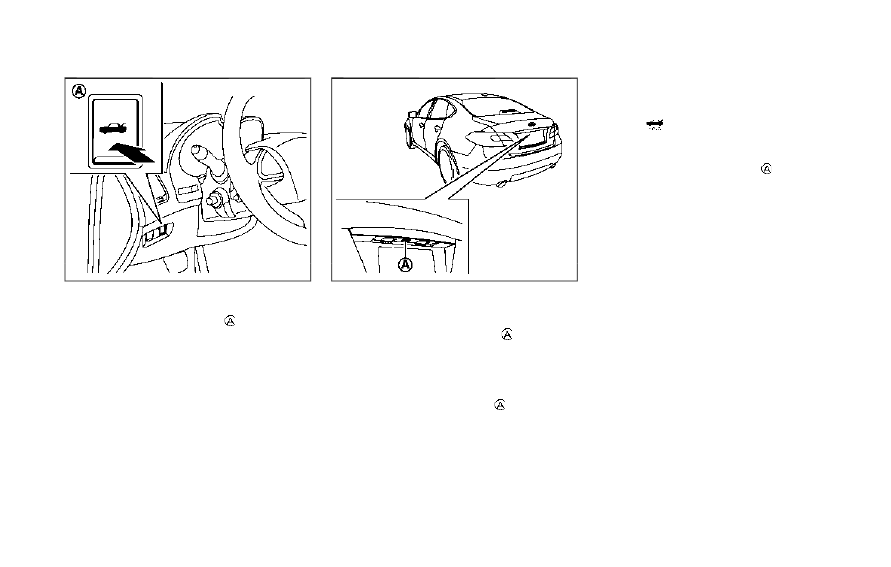
TRUNK LID RELEASE SWITCH

The trunk lid release switch

is located on

the instrument panel.
To open the trunk lid, push the release
switch. To close, push the trunk lid down.

SPA2732

TRUNK OPEN REQUEST SWITCH

The trunk lid can be opened by pushing the
trunk open request switch

when the

Intelligent Key is within the operating range
of the trunk lock/unlock function regardless
of the inside lock knob position.
The trunk lid can be opened by pushing the
trunk open request switch

even if the

Intelligent Key is not within the operating
range of the trunk lock/unlock function,
when all doors are unlocked by the power
door lock system, and the automatic unlock
function.
(See “Intelligent Key system” (P.3-7).)

TRUNK BUTTON

The trunk lid can be opened by pushing the
TRUNK

button on the Intelligent Key for

more than 1 second.
The trunk lid can be opened by pushing the
trunk open request switch

even if the

Intelligent Key is not within the operating
range of the trunk lock/unlock function,
when all doors are unlocked by the power
door lock system, and the automatic unlock
function.
(See “Remote keyless entry system” (P.3-
16).)

-------------------------------------------------------------------------------------------------------------------------------------------------------------

JVP0203X

TRUNK RELEASE POWER CAN-
CEL SWITCH

When the switch located inside the glove
box is in the OFF position

, the power to

the trunk lid will be canceled and the trunk lid
cannot be opened by the trunk lid release
switch, the trunk open request switch or the
TRUNK button on the Intelligent Key.
When you have to leave the vehicle with a
valet and want to keep your belongings safe
in the glove box and the trunk, push this
switch to OFF and lock the glove box with
the mechanical key. Then leave the vehicle
and the Intelligent Key with the valet and
keep the mechanical key with you.

(See “Keys” (P.3-2).)
To connect the power to the trunk lid, push
the switch to the ON

position.

SPA2768

INTERIOR TRUNK LID RELEASE

WARNING

Closely supervise children when they are
around cars to prevent them from play-
ing and becoming locked in the trunk
where they could be seriously injured.
Keep the car locked, with the trunk lid
securely latched, when not in use, and
prevent children’s access to Intelligent
Keys.

The interior trunk lid release mechanism
allows opening of the trunk lid in the event

Pre-driving checks and adjustments

3-25

-------------------------------------------------------------------------------------------------------------------------------------------------------------

3-26

Pre-driving checks and adjustments

that people become locked inside the trunk
or in the event of the loss of electrical power
such as a discharged battery.

Releasing inside the trunk

To open the trunk lid from the inside, pull the
release handle

until the lock releases and

push up on the trunk lid. The release lever is
made of a material that glows in the dark
after a brief exposure to ambient light.
The handle is located on the back of the
trunk lid as illustrated.

Releasing from the rear seat

You can access the release handle through
the trunk pass-through (rear seat armrest).
(See “Armrest” (P.1-7).)
To open the trunk lid from the rear seat, pull
the release handle towards front of vehicle
until the lock releases.
If you cannot reach the release handle,
contact an INFINITI retailer.

SPA2735

OPENING THE FUEL-FILLER
DOOR

To open the fuel-filler door, unlock the fuel-
filler door by using one of the following
operations, then push the upper left side of
the door.
. Touch the one touch unlock sensor on

one of the front door handles and then
push the door handle request switch
while carrying the Intelligent Key.

. Push the UNLOCK button on the Intel-

ligent Key twice.

. Insert the mechanical key into the door

lock cylinder and turn it to the rear of the
vehicle twice.

. Push the power door lock switch to the

UNLOCK position.

To lock, close the fuel-filler door securely
and lock all doors by operating the door
handle request switch, the LOCK button on
the Intelligent Key, the mechanical key or the
power door lock switch.

FUEL-FILLER CAP

WARNING

Gasoline is extremely flammable and

highly explosive under certain condi-
tions. You could be burned or ser-
iously injured if it is misused or
mishandled. Always stop engine and
do not smoke or allow open flames or
sparks near the vehicle when refuel-
ing.

Do not attempt to top off the fuel

tank after the fuel pump nozzle shuts
off automatically. Continued refuel-
ing may cause fuel overflow, resulting
in fuel spray and possibly a fire.

Use only an original equipment type

fuel-filler cap as a replacement. It has
a built-in safety valve needed for
proper operation of the fuel system
and emission control system. An in-
correct cap can result in a serious

FUEL-FILLER DOOR

-------------------------------------------------------------------------------------------------------------------------------------------------------------

malfunction and possible injury. It
could also cause the Malfunction
Indicator Light (MIL) to come on.

Never pour fuel into the throttle body

to attempt to start your vehicle.

Do not fill a portable fuel container in

the vehicle or trailer. Static electricity
can cause an explosion of flammable
liquid, vapor or gas in any vehicle or
trailer. To reduce the risk of serious
injury or death when filling portable
fuel containers:

— Always place the container on the

ground when filling.

— Do not use electronic devices

when filling.

— Keep the pump nozzle in contact

with the container while you are
filling it.

— Use only approved portable fuel

containers for flammable liquid.

CAUTION

If fuel is spilled on the vehicle body,

flush it away with water to avoid
paint damage.

Insert the cap straight into the fuel-

filler tube, then tighten the fuel-filler
cap until a single click is heard. Failure
to tighten the fuel-filler cap properly
may cause the

Malfunction In-

dicator Light (MIL) to illuminate. If
the

light illuminates because the

fuel-filler cap is loose or missing,
tighten or install the cap and con-
tinue to drive the vehicle. The
light should turn off after a few
driving trips. If the

light does

not turn off after a few driving trips,
have the vehicle inspected. It is
recommended you visit an INFINITI
retailer for this service.

The Loose Fuel Cap warning will

appear if the fuel-filler cap is not
properly tightened. It may take a few
driving trips for the warning to be
displayed. Failure to tighten the fuel-
filler cap properly after the Loose
Fuel Cap warning appears may cause
the

Malfunction Indicator Light

(MIL) to illuminate.

For additional information, see “Mal-

function Indicator Light (MIL)” (P.2-
17).

JVP0204X

To remove the fuel-filler cap:
1. Turn the fuel-filler cap counterclockwise

to remove.

2. Put the fuel-filler cap on the cap holder

while refueling.

To install the fuel-filler cap:
1. Insert the fuel-filler cap straight into the

fuel-filler tube.

2. Turn the fuel-filler cap clockwise until a

single click is heard.

Pre-driving checks and adjustments

3-27

-------------------------------------------------------------------------------------------------------------------------------------------------------------

3-28

Pre-driving checks and adjustments

JVP0455X

Loose Fuel Cap warning

The Loose Fuel Cap warning appears in the
vehicle information display when the fuel-
filler cap is not tightened correctly after the
vehicle has been refueled. It may take a few
driving trips for the warning to be displayed.
To turn off the warning, perform the
following:
1. Remove and install the fuel-filler cap as

soon as possible. (See “Fuel-filler cap”
(P.3-26).)

2. Tighten the fuel-filler cap until a single

click is heard.

3. Push the

or

switch

on the

steering wheel for longer than 1 second

to turn off the Loose Fuel Cap warning
after tightening the fuel-filler cap.

WARNING

Do not adjust the steering wheel

while driving. You could lose control
of your vehicle and cause an accident.

Do not adjust the steering wheel any

closer to you than is necessary for
proper steering operation and com-
fort. The driver’s air bag inflates with
great force. If you are unrestrained,
leaning forward, sitting sideways or
out of position in any way, you are at
greater risk of injury or death in a
crash. You may also receive serious or
fatal injuries from the air bag if you
are up against it when it inflates.
Always sit back against the seatback
and as far away as practical from the
steering wheel. Always use the seat
belts.

TILT/TELESCOPIC STEERING

-------------------------------------------------------------------------------------------------------------------------------------------------------------

SPA2328

MANUAL OPERATION (if so
equipped)

Tilt or telescopic operation

Pull the lock lever

down and adjust the

steering wheel up, down, forward or rear-
ward to the desired position.
Push the lock lever up securely to lock the
steering wheel in place.

JVP0205X

ELECTRIC OPERATION (if so
equipped)

Tilt or telescopic operation

Move the switch to adjust the steering
wheel up or down, forward or rearward to
the desired position.

Entry/Exit function operation:
The automatic drive positioner system will
make the steering wheel move up automa-
tically when the driver’s door is opened with
the ignition switch in the LOCK position.
This lets the driver get into and out of the
seat more easily.

For more information, see “Automatic drive
positioner” (P.3-33).

Pre-driving checks and adjustments

3-29

-------------------------------------------------------------------------------------------------------------------------------------------------------------

3-30

Pre-driving checks and adjustments

SPA2471

1. To block glare from the front, swing

down the sun visor

.

2. To block glare from the side, remove the

sun visor from the center mount and
swing the visor to the side

.

3. Slide the sun visor

in or out as needed.

SPA2447

INSIDE MIRROR

Adjust the height and the angle of the inside
mirror to the desired position.

SUN VISORS

MIRRORS

-------------------------------------------------------------------------------------------------------------------------------------------------------------

SPA2450-A

Automatic anti-glare type

The inside mirror is designed so that it
automatically changes reflection according
to the intensity of the headlights of the
following vehicle.
The anti-glare system will be automatically
turned on when the ignition switch is pushed
to the ON position.
The anti-glare system also operates for the
outside mirrors (if so equipped).
When the anti-glare system is turned on, the
indicator light

will illuminate and excessive

glare from the headlights of the vehicle
behind you will be reduced.
Push the “

*” switch

to make the inside

mirror operate normally. The indicator light
will turn off. Push the “I” switch

to turn the

system on.
Do not allow any object to cover the sensors

or apply glass cleaner on them. Doing so

will reduce the sensitivity of the sensor,
resulting in improper operation.
For the HomeLink® Universal Transceiver
operation, see “HomeLink® Universal Trans-
ceiver” (P.2-58).

OUTSIDE MIRRORS

WARNING

Objects viewed in the outside mirror on
the passenger side are closer than they
appear. Be careful when moving to the
right. Using only this mirror could cause
an accident. Use the inside mirror or
glance over your shoulder to properly
judge distances to other objects.

JVP0246X

Adjusting outside mirrors

The outside mirror control switch is located
on the driver’s armrest.
The outside mirror will operate only when
the ignition switch is in the ACC or ON
position.
Move the switch

right or left to select the

right or left side mirror, then adjust using the
control switch

.

Defrosting outside mirrors

The outside mirrors will be heated when the
rear window defroster switch is operated.

Pre-driving checks and adjustments

3-31

-------------------------------------------------------------------------------------------------------------------------------------------------------------

3-32

Pre-driving checks and adjustments

SPA1829

Foldable outside mirrors

Fold the outside mirror by pushing it toward
the rear of the vehicle.

Reverse tilt-down feature (if so
equipped)

When backing up the vehicle, the right and
left outside mirrors will turn downward
automatically to provide better rear visibility.
1. Push the ignition switch to the ON

position.

2. Move the shift lever to the R (Reverse)

position.

3. Select the right or left side mirror by

operating the outside mirror control

switch.

4. The outside mirror surface moves down-

ward.

When one of the following conditions has
occurred, the outside mirror surface will
return to its original position.
. The shift lever is moved to any position

other than R (Reverse).

. The outside mirror control switch is set to

the center position.

. The ignition switch is pushed to the OFF

position.

Automatic anti-glare (if so
equipped)

The outside mirrors are designed so that
they automatically change reflection ac-
cording to the intensity of the headlights of
the vehicle following you.
The anti-glare system will be automatically
turned on when the ignition switch is placed
in the ON position.

SIC3869

VANITY MIRROR

To use the front vanity mirror, pull down the
sun visor and pull up the cover.

-------------------------------------------------------------------------------------------------------------------------------------------------------------

The automatic drive positioner system has
two features:
. Entry/exit function

. Memory storage

ENTRY/EXIT FUNCTION

This system is designed so that the driver’s
seat and steering column will automatically
move when the shift lever is in the P (Park)
position. This allows the driver to get into
and out of the driver’s seat more easily.
The driver’s seat will slide backward and the
steering wheel will move up when the
driver’s door is opened with the ignition
switch in the LOCK position.
The driver’s seat and steering wheel will
return to the previous positions when the
ignition switch is pushed to the ACC posi-
tion.
The driver’s seat will not return to the
previous positions if the seat or steering
adjusting switch is operated when the seat is
at the exit position.

Cancel or activate entry/exit func-
tion

All the following conditions must be met
before cancelling or activating the entry/exit
function.
. The ignition switch is placed in the LOCK

position.

. The entry/exit function is not in opera-

tion.

. The following switches are not operated.

— Seat memory switches
— Power seat switches
— Electric tilting/telescopic steering

wheel switch

The entry/exit function can be activated or
canceled by pushing and holding the SET
switch for more than 10 seconds.
The entry/exit function can also be acti-
vated or canceled if the [Lift Steering Wheel
on Exit] or [Slide Driver Seat Back on Exit]
key is turned to ON or OFF in the [Settings]
menu on the lower display. (See the Infiniti
InTouch Owner’s Instruction.)

Initialize entry/exit function

If the battery cable is disconnected, or if the
fuse opens, the entry/exit function will not
work though this function was set on before.
In such a case, after connecting the battery
or replacing with a new fuse, open and close
the driver’s door more than two times after
the ignition switch is switched from the ON
position to the LOCK position. The entry/
exit function will be activated.

JVP0240X

MEMORY STORAGE

Two positions for the driver’s seat, steering
column and outside mirrors can be stored in
the automatic drive positioner memory.
Follow these procedures to use the memory
system.
1. Adjust the driver’s seat, steering column

and outside mirrors to the desired posi-
tions by instructionly operating each adjust-
ing switch. For additional information,
see “Seats” (P.1-2), “Tilt/telescopic
steering” (P.3-28) and “Outside mirrors”
(P.3-31).

2. Push the SET switch and, within 5

seconds, push the memory switch (1 or

Pre-driving checks and adjustments

3-33

AUTOMATIC DRIVE POSITIONER
(if so equipped)

-------------------------------------------------------------------------------------------------------------------------------------------------------------

3-34

Pre-driving checks and adjustments

2) fully for at least 1 second.
The indicator light for the pushed mem-
ory switch will stay on for approximately
5 seconds after pushing the switch.
When the memory is stored in the
memory switch (1 or 2), a buzzer will
sound.
If memory is stored in the same memory
switch, the previous memory will be
deleted.

Confirming memory storage

Push the SET switch. If the main memory
has not been stored, the indicator light will
come on for approximately 0.5 seconds.
When the memory has stored in position,
the indicator light will stay on for approxi-
mately 5 seconds.

Selecting the memorized position

1. Move the shift lever to the P (Park)

position.

2. Push the memory switch (1 or 2) fully for

at least 1 second.
The driver’s seat, steering column and
outside mirrors will move to the memor-
ized position with the indicator light
flashing, and then the light will stay on
for approximately 5 seconds.

Linking log-in function to a stored
memory position

The log-in function can be linked to a stored
memory position with the following proce-
dure.
1. Place the ignition switch in the ON

position while carrying an Intelligent
Key that was registered to the vehicle
with the log-in function. For more de-
tails, see “Log-in function” (P.3-16).

2. Adjust the position of the driver’s seat,

steering column and outside mirrors
instructionly. See “Seats” (P.1-2), “Tilt/tele-
scopic steering” (P.3-28) and “Outside
mirrors” (P.3-31).

3. Place the ignition switch in the OFF

position.

The next time you log in (selecting the user
on the display) after placing the ignition
switch in the ON position while carrying the
Intelligent Key, the system will automatically
adjust to the memorized driving position.

SYSTEM OPERATION

The automatic drive positioner system will
not work or will stop operating under the
following conditions:
. When the vehicle speed is above 0 MPH

(0 km/h) or 4 MPH (7 km/h) for some
limited functions such linking an Intelli-

gent Key to the vehicle when the power
source is turned on from off or during the
Exit function.

. When any of the memory switches are

pushed while the automatic drive posi-
tioner is operating.

. When the adjusting switch for the dri-

ver’s seat and steering column is turned
on while the automatic drive positioner is
operating.

. When the seat has already been moved

to the memorized position.

. When no seat position is stored in the

memory switch.

. When the shift lever is moved from the P

(Park) position to any other position.

-------------------------------------------------------------------------------------------------------------------------------------------------------------

-------------------------------------------------------------------------------------------------------------------------------------------------------------

4-2

Monitor, climate, audio, phone and voice recognition systems

Refer to the Infiniti InTouch Owner’s Instruction
that includes the following information.
. Infiniti InTouch Services

. Navigation system (if so equipped)

. Audio system

. Bluetooth® Hands-Free Phone system

. Heater and air conditioner

. Viewing information

. Other settings

. Voice recognition (if so equipped)

. Monitor system

. Meter settings

. General system information

JVH0510X

Center ventilators

JVH0511X

Side ventilators

JVH0574X

Rear ventilators

Open or close, and adjust the air flow
direction of ventilators.

: This symbol indicates that the ventilators

are closed.

: This symbol indicates that the ventilators

are open.

INFINITI INTOUCH OWNER’S MANUAL

VENTILATORS

-------------------------------------------------------------------------------------------------------------------------------------------------------------

WINDOW ANTENNA

The antenna pattern is printed inside the
rear window.

CAUTION

Do not place metalized film near the

rear window glass or attach any
metal parts to it. This may cause poor
reception or noise.

When cleaning the inside of the rear

window, be careful not to scratch or
damage the rear window antenna.
Lightly wipe along the antenna with
a dampened soft cloth.

JVH0641X

SATELLITE ANTENNA

There is a satellite antenna on the rear part
of the vehicle roof.
A buildup of ice on the satellite radio
antenna can affect satellite radio perfor-
mance. Remove the ice to restore satellite
radio reception.

When installing a car phone or a CB radio in
your vehicle, be sure to observe the follow-
ing cautions, otherwise the new equipment
may adversely affect the electronic control
modules and electronic control system har-
ness.

WARNING

A cellular phone should not be used

for any purpose while driving so full
attention may be given to vehicle
operation. Some jurisdictions prohibit
the use of cellular phones while
driving.

If you must make a call while your

vehicle is in motion, the hands-free
cellular phone operational mode (if so
equipped) is highly recommended.
Exercise extreme caution at all times
so full attention may be given to
vehicle operation.

If a conversation in a moving vehicle

requires you to take notes, pull off
the road to a safe location and stop
your vehicle before doing so.

Monitor, climate, audio, phone and voice recognition systems

4-3

ANTENNA

CAR PHONE OR CB RADIO

-------------------------------------------------------------------------------------------------------------------------------------------------------------

4-4

Monitor, climate, audio, phone and voice recognition systems

CAUTION

Keep the antenna as far away as

possible from the electronic control
modules.

Keep the antenna wire more than 8 in

(20 cm) away from the electronic
control system harness. Do not route
the antenna wire next to any harness.

Adjust the antenna standing-wave

ratio as recommended by the manu-
facturer.

Connect the ground wire from the CB

radio chassis to the body.

For details, it is recommended you

visit an INFINITI retailer.

-------------------------------------------------------------------------------------------------------------------------------------------------------------

5 Starting and driving

Precautions when starting and driving........................ 5-4

Exhaust gas (carbon monoxide)............................... 5-4
Three-way catalyst...................................................... 5-5
Tire Pressure Monitoring System (TPMS)............ 5-5
Avoiding collision and rollover.................................. 5-9
Off-road recovery........................................................ 5-9
Rapid air pressure loss................................................ 5-9
Drinking alcohol/drugs and driving....................... 5-10
Intelligent All-Wheel Drive (AWD) driving
safety precautions (AWD models)......................... 5-10

Push-button ignition switch......................................... 5-11

Operating range for engine start function.......... 5-12
Push-button ignition switch operation................ 5-12
Push-button ignition switch positions................. 5-13
Emergency engine shut off...................................... 5-13
Intelligent Key battery discharge........................... 5-14

Before starting the engine............................................ 5-14
Starting the engine.......................................................... 5-15

Remote start (if so equipped)................................. 5-15

Driving the vehicle ........................................................... 5-16

Automatic transmission............................................ 5-16

Parking brake.................................................................... 5-21
INFINITI Drive Mode Selector ..................................... 5-22

STANDARD mode...................................................... 5-22
SPORT+ mode (if so equipped) .............................. 5-23

SPORT mode............................................................. 5-23
SNOW mode.............................................................. 5-23
ECO mode (if so equipped) ................................... 5-23
PERSONAL mode.................................................... 5-25

Active Lane Control (if so equipped)......................... 5-26

Active Lane Control operation............................. 5-28
Turning Active Lane Control ON/OFF.............. 5-29
How to enable/disable Active Lane Control.... 5-30
Active Lane Control limitations............................ 5-31
System temporarily unavailable........................... 5-32
System malfunction................................................. 5-32
System maintenance ............................................... 5-33

Lane Departure Warning (LDW)/Lane Departure
Prevention (LDP) (if so equipped).............................. 5-34

LDW system operation........................................... 5-35
How to enable/disable the LDW system.......... 5-36
LDP system operation............................................ 5-36
Turning the LDP system ON/OFF ..................... 5-37
How to enable/disable the LDP system........... 5-38
LDW/LDP system limitations .............................. 5-38
System temporarily unavailable........................... 5-39
System malfunction................................................ 5-40
System maintenance .............................................. 5-40

Blind Spot Warning (BSW) (if so equipped)............ 5-41

BSW system operation........................................... 5-43

-------------------------------------------------------------------------------------------------------------------------------------------------------------


Content      ..     9      10      11      12     ..