FM 3-22.91 MORTAR FIRE DIRECTION PROCEDURES (July 2008) - page 7
Chapter 13
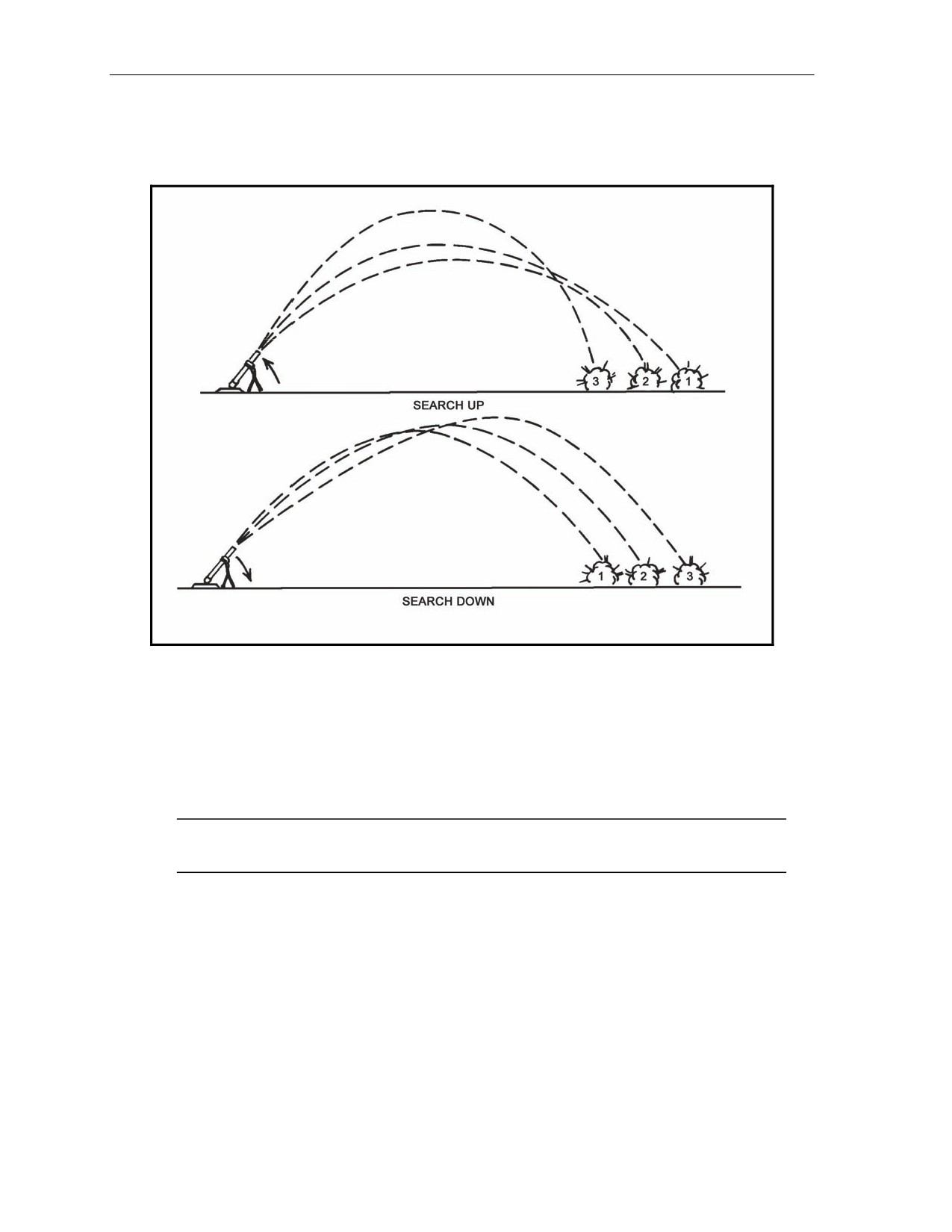
13-9. The only difference between a search up mission and a search down mission is the starting point.
Normally, a search mission is fired by searching up. This allows the FO to better observe the effect of the
rounds on a target, as the rounds walk toward him (Figure 13-7).
Figure 13-7. Fall of rounds during a search mission.
ILLUMINATION
13-10. Illumination assists friendly forces with light for night operations. The M16/M19 can be set up for
illumination as any of the three types of firing charts. Determining firing data is the same as with any type
of mission, only now the FDC uses one of the flank mortars to adjust the illumination, leaving the base
mortar ready to adjust HE. The FO enters range corrections for the illumination rounds.
NOTE: Deviation corrections are no less than 200 meters, and height corrections (up/down) are
no less than 50 meters.
OBSERVERS
13-11. Observers who adjust illumination should be informed when 81-mm mortars are firing M301A3
illumination rounds.
z
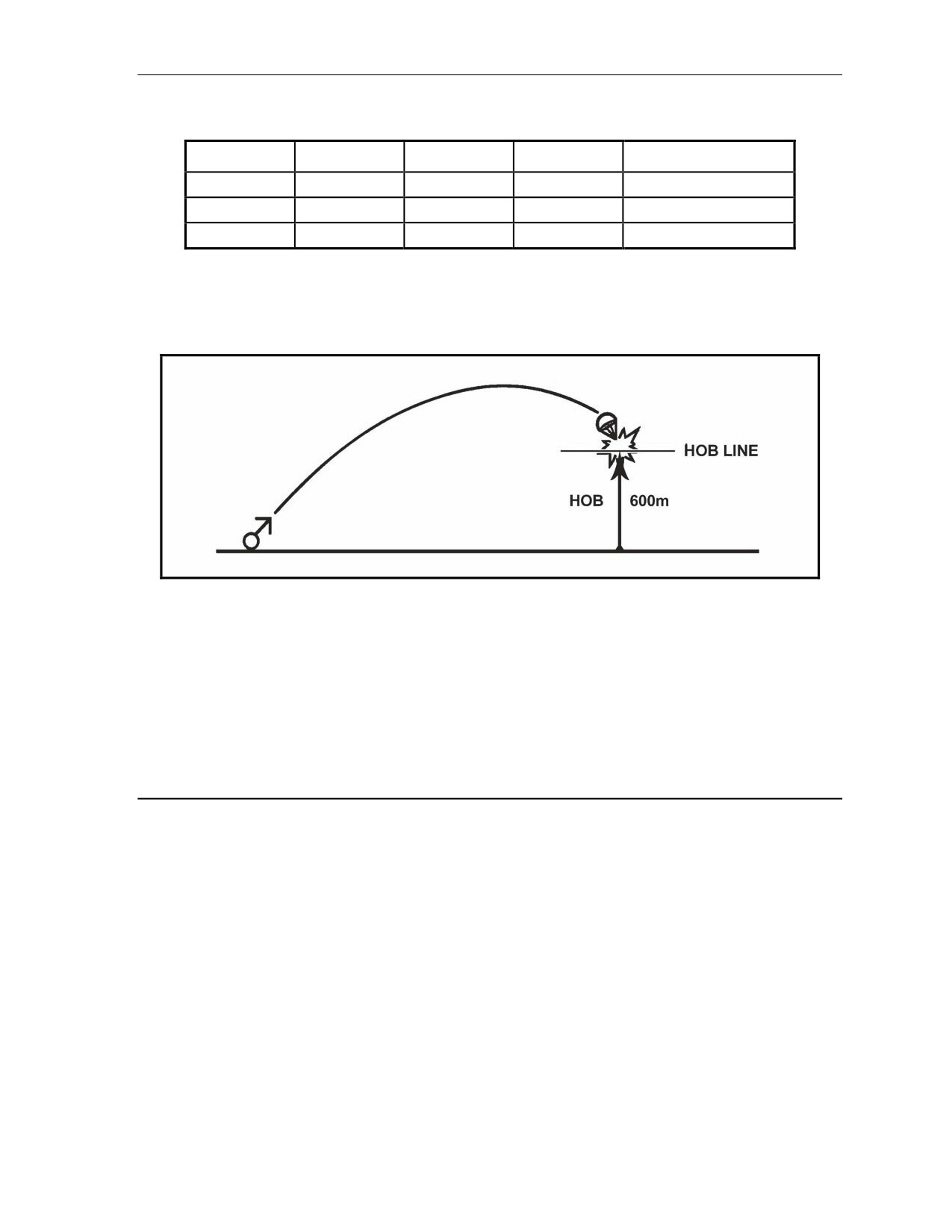
The M301A3 has a HOB of 600 meters (Figure 13-8), while the M301A1 and M301A2 rounds
have a 400-meter HOB.
z
There is a difference in adjustment procedures. M301A1 and M301A2 rounds are adjusted to a
ground-level burnout; the M301A3 round should have a burnout of 150 to 200 meters above the
ground. This procedure is based on the fact that all three of the rounds fall at a rate of 6 meters
per second (Table 13-2).
13-12
FM 3-22.91
17 July 2008
Types of Missions
Table 13-2. Example of illumination adjustment.
ROUNDS
RATE OF FALL
BURN TIME
HOB
FALL BEFORE BURNOUT
(MPS)
(SECONDS)
(METERS)
(METERS)
M301A1
6
60
400
6 x 60 = 360
M301A2
6
60
400
6 x 60 = 360
M301A3
6
60
600
6 x 60 = 360
CORRECTIONS
13-12. Corrections to the HOB are used to move the round up or down in relation to the HOB line
(Figure 13-8).
Figure 13-8. Height of burst line for an M301A3.
ADJUSTMENTS
13-13. Adjustments are made after the initial illumination CFF has been made. This is done by observing
the initial illumination burst in relation to the target. The observer will call in his corrections to the FDC.
FIRST EXAMPLE
13-14. The example will help illustrate the adjustments computed by the FDC. Once information has been
given to the FDC from the FO, the FDC computes the data and sends the corrections to the gun section.
EXAMPLE
Consider the chart range to the first round fired: 2,525 meters.
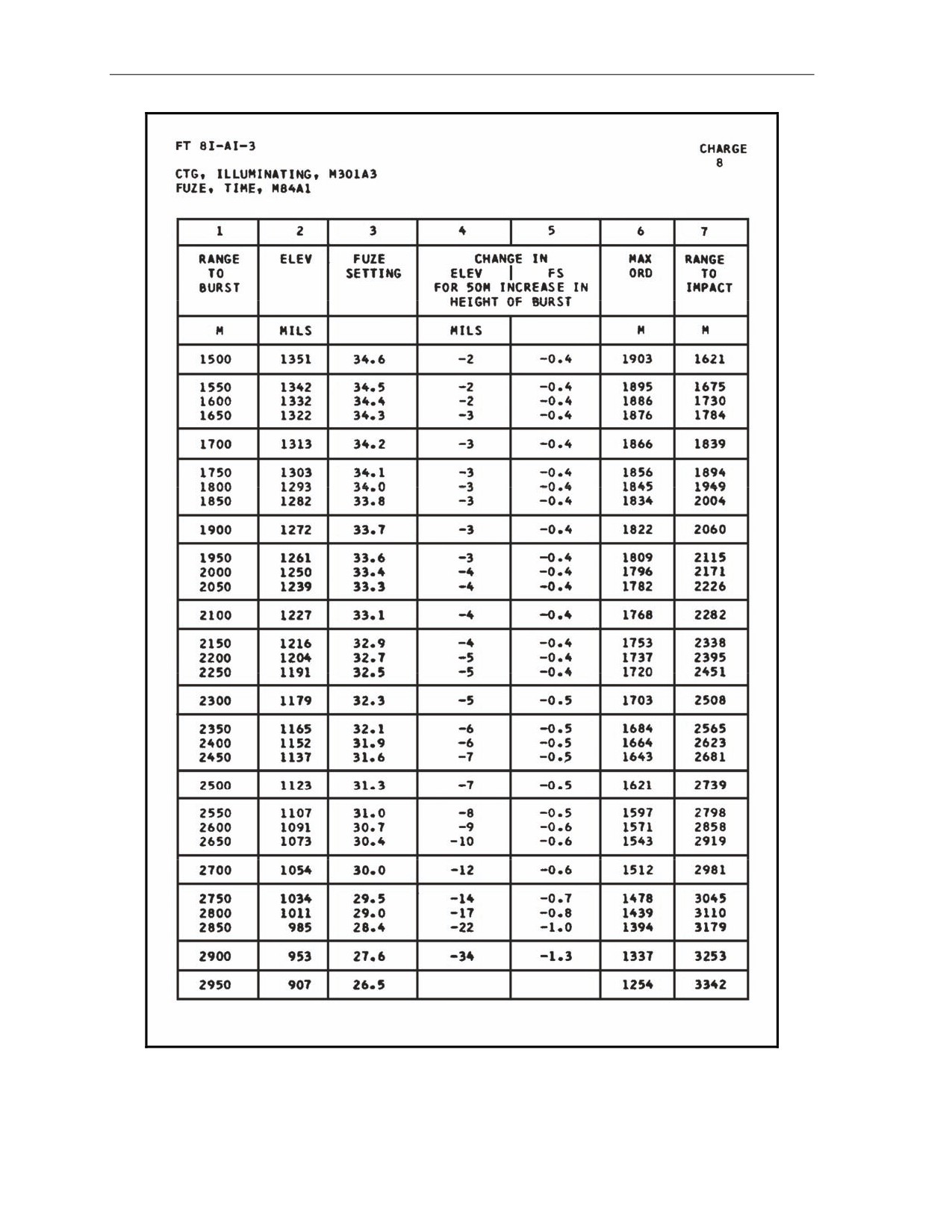
(1) Enter 2,550 meters into FT 81-A1-3 (Figure 13-9).
Optimum charge to use: charge 8
(2) Columns 1 (Range to Burst), 2 (Elevation), and 3 (Fuze Setting) of Basic Data will give
the basic HOB for 600 meters above the mortar position.
Range to burst
=
2,550 meters
Elevation
=
1107 mils
Fuze setting
=
31.0
17 July 2008
FM 3-22.91
13-13
Chapter 13
Figure 13-9. FT 81-A1-3, charge 8, used in determination of location of round
in relation to the height of burst.
13-14
FM 3-22.91
17 July 2008
Types of Missions
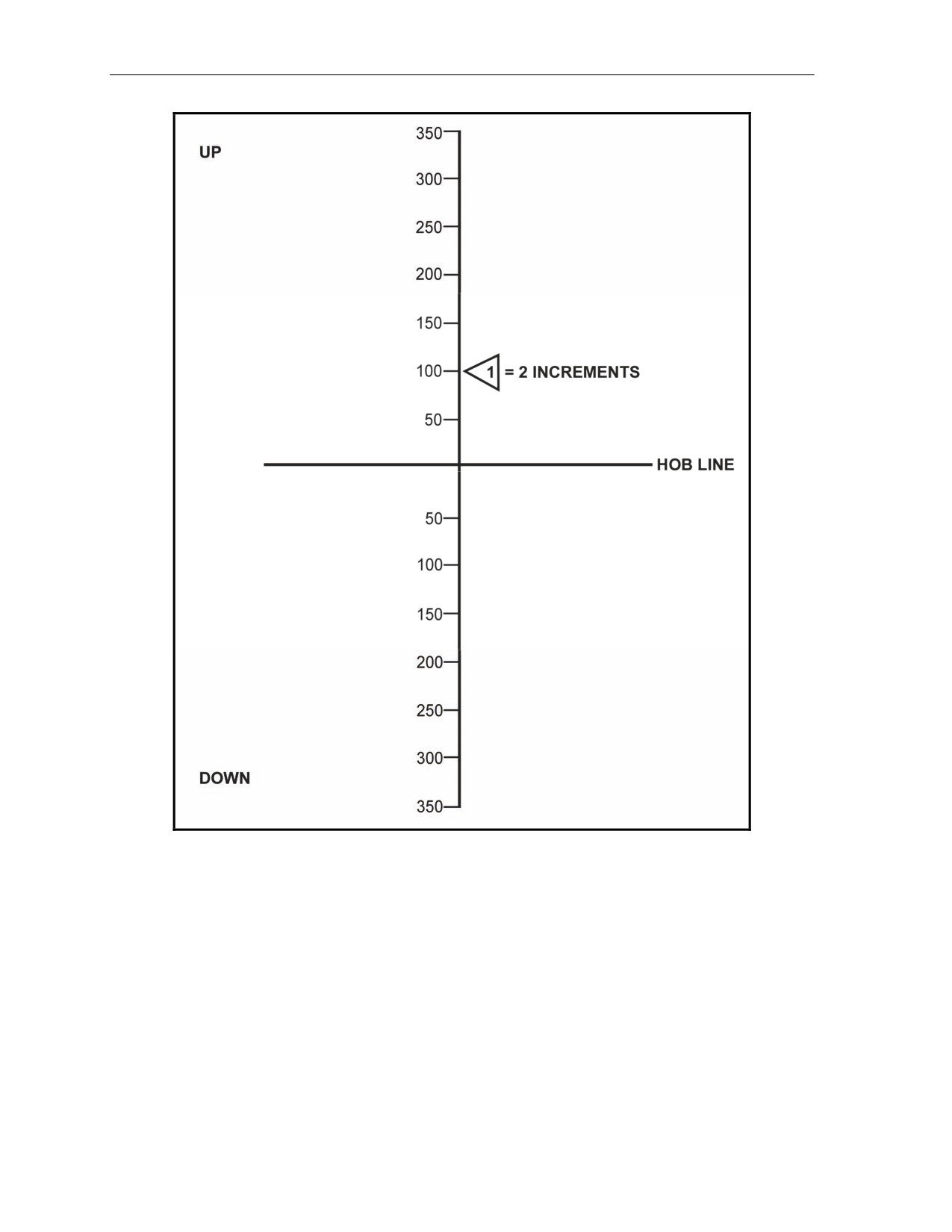
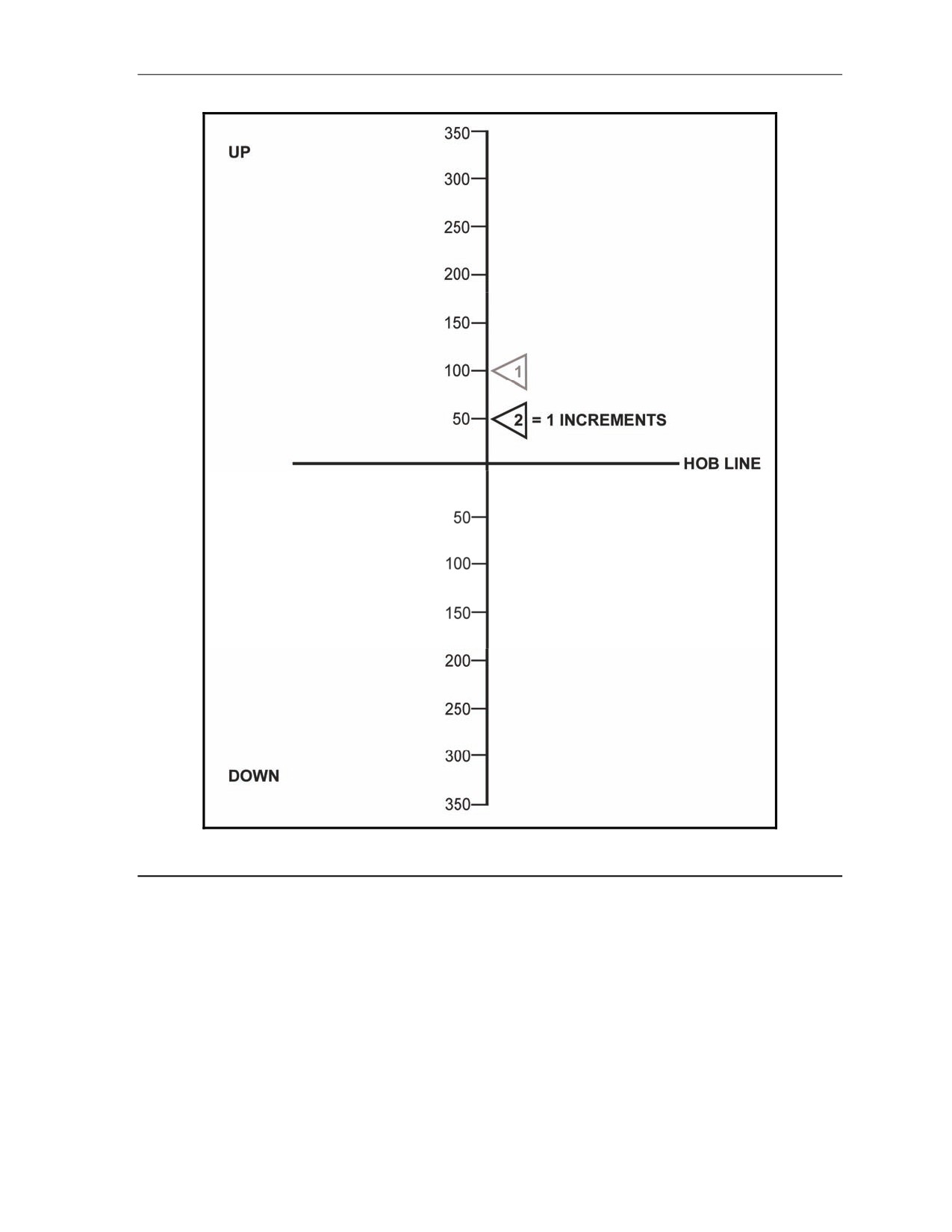
(3) The round is fired, and the FO sends, "Add two zero zero (200). Up one zero zero
(100)" (Figure 13-10). The computed range is now:
2,725 = 2,750
The Basic Data only gave a HOB of 600 meters, but the FO requested an "up 100"
correction, meaning that the round needs more height.
(4) To compute this change, determine where this round will be in relation to the HOB line.
HOB = 600 meters
"Up 100" is two increments above the HOB line.
(5) Once the number of increments has been determined, go to column 4 (Change in
Elevation for 50-meter Increase in HOB) and column 5 (Changes in Fuze Setting for 50-
meter Increase in HOB).
(6) Multiply the increments by the correction factors given in these columns. Use FT 81-A1-
3, charge 8 (Figure 13-9).
Range to burst: 2,750 meters, +2 increments
Column 4 = -14
-14 (number in column 4) x 2 (increments)
(100 meters above HOB) = -28 mils
Column 5 = -0.7
-0.7 (number in column 5) x 2 increments
(100 meters above HOB) = -1.4 seconds
(7) Basic data:
1034 mils (number in column 2) -28 mils = 1006 mils (elevation)
29.5 (number in column 3) -1.4 sec = 28.1 (fuze setting)
17 July 2008
FM 3-22.91
13-15
Chapter 13
Figure 13-10. Firing adjustment.
(8) Assume that the second round is fired and the FO sends, "Down fifty (50)" (Figure 13-
11). Note that a range change was not sent, but a HOB correction was sent.
(9) Again, determine the relation to the HOB line, and apply the correction factors to the
Basic Data to obtain the firing data.
Range to burst 2,750 meters, charge 8, down 50.
The computer is now working with one increment above the HOB line.
Increments (relationship to HOB, 600 meters)
1 x -14 (number in column 4) = -14
1 x -0.7 (number in column 5) = -0.7
New data:
1034 mils (basic data) -14 = 1020 mils (elevation)
29.5 (basic data) -0.7 = 28.8 (fuze setting)
13-16
FM 3-22.91
17 July 2008
Types of Missions
Figure 13-11. Firing adjustment.
17 July 2008
FM 3-22.91
13-17
Chapter 13
SECOND EXAMPLE
13-15. This example will help illustrate the adjustments that the FDC computes when the round is below
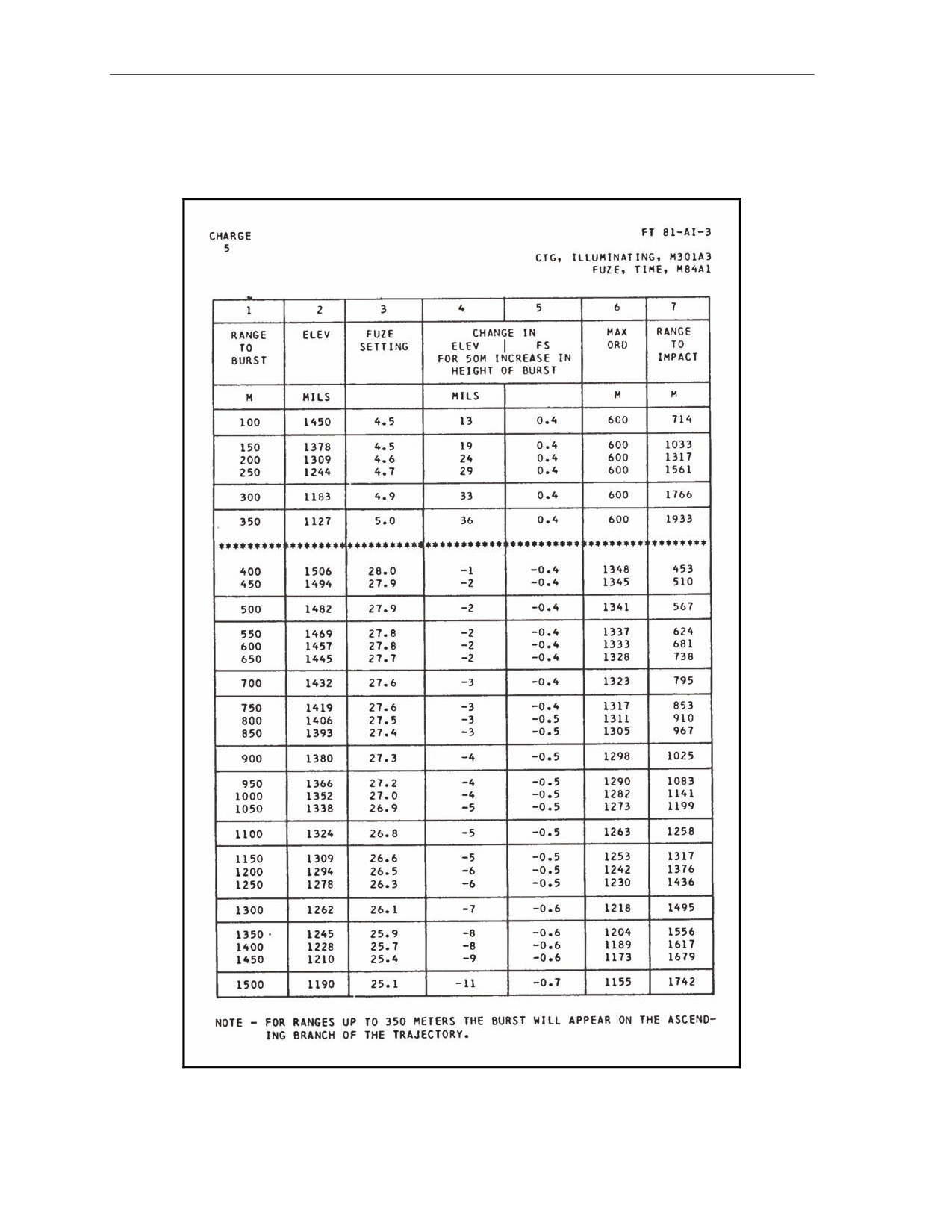
the HOB line. Charge 5 will be used, as shown in FT 81-A1-3 (Figure 13-12).
Figure 13-12. FT 81-A1-3, charge 5, used in determination of location of round
in relation to the height of burst.
13-18
FM 3-22.91
17 July 2008
Types of Missions
CAUTION
When the correction is below the HOB line, use the sign opposite of
that found in columns 4 and 5 to obtain the same HOB.
EXAMPLE
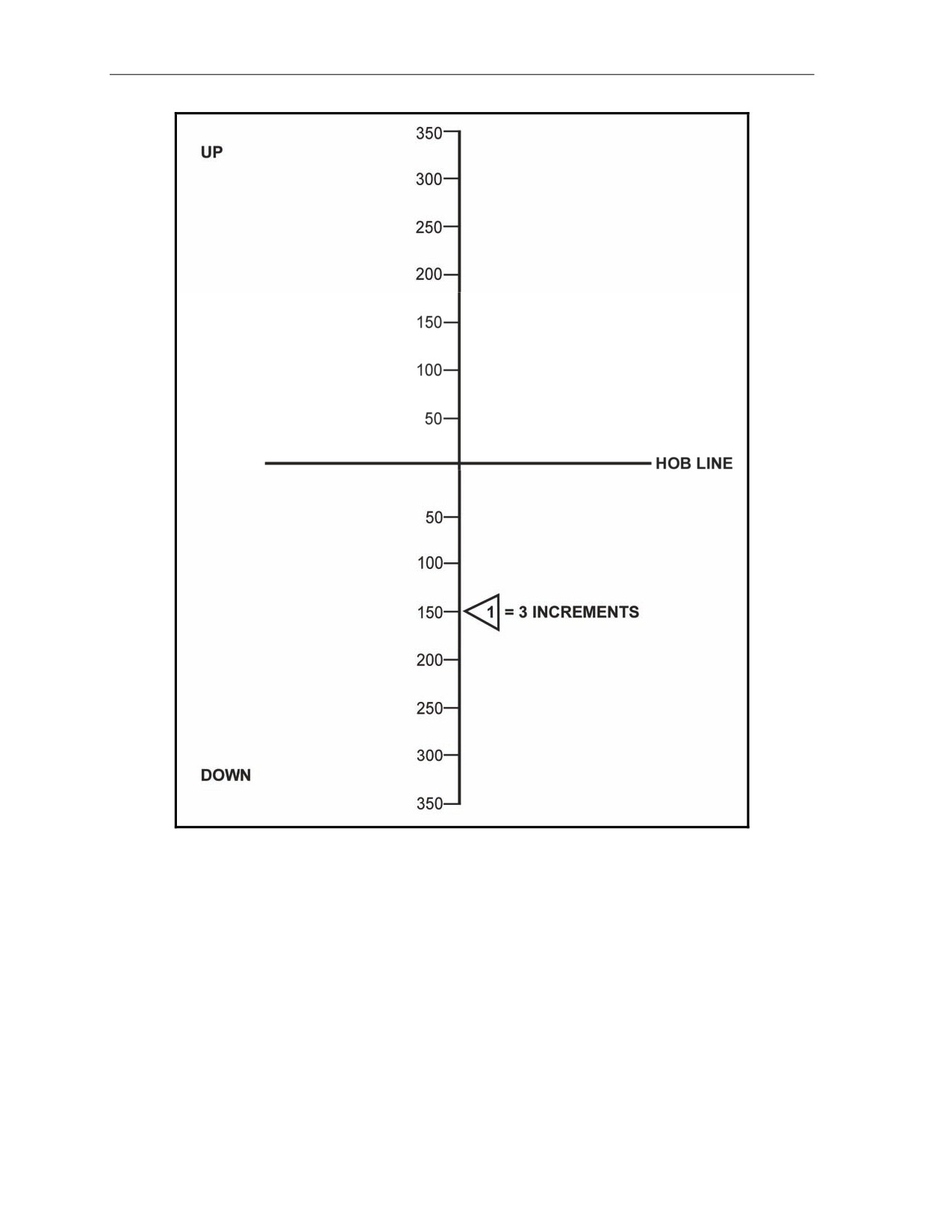
The FO sends, "Drop two zero zero (200). Down one five zero (150)" (Figure 13-13). Assume that the
new range is 1,325 meters (= 1,350), and the optimum charge is 5. The procedure for determining
the increments is the same as with the last example.
600-meter basic HOB, down 150 = 3 increments below the HOB line
(1) Determine the correction factors as before, but reverse the signs since columns 4 and 5
are set up for increases in HOB.
3 x -8 (number in column 4) = -24 mils = +24 mils
3 x -0.6 (number in column 5) = -1.8 sec = +1.8 sec
(2) Determine new firing data as before.
Basic data:
1245 mils (number in column 2) +24 mils = 1269 mils (elevation)
25.9 (number in column 3) +1.8 sec = 27.7 (fuze setting)
(3) Assume that the second round is fired, and the FO sends, "Drop two zero zero (-200),"
and the new range is 1,150 meters. Note that a range change is given, but not a HOB
correction.
NOTE: When only a range change is sent, only the increments below the HOB line for
the old range must be applied to the new range to keep the HOB correct.
(4) To determine the data, apply the steps as before.
Increments below HOB = 3
Correcting factors: 3 (increments) x -5 = -15 = +15 (sign reversed)
3 (increments) x -0.5 = -1.5 = +1.5 (sign reversed)
New data:
1309 mils + 15 mils = 1,324 mils elevation
26.6 + 1.5 = 28.1 (fuze setting)
17 July 2008
FM 3-22.91
13-19
Chapter 13
Figure 13-13. Firing adjustment.
13-20
FM 3-22.91
17 July 2008
Chapter 14
Special Considerations
This chapter discusses special procedures applied to some missions to effectively
engage targets.
REGISTRATION AND SHEAF ADJUSTMENT
14-1. Firing the registration is the first mission that will be completed if time and the tactical situation
permit.
FIRING COORDINATED AND NONCOORDINATED MISSIONS
14-2. Two types of registration missions are fired on the surveyed chart: coordinated and noncoordinated.
Firing Coordinated Missions
14-3. The FDC and FO coordinate the location of the RP before the FO joins the unit to support it. Once
the FO is in position, the FDC sends a message telling the FO to prepare to register RP 1. The FO sends the
OT direction to the RP.
Firing Noncoordinated Missions
14-4. The FO, upon joining the unit to support it, checks the area of responsibility and selects a point to be
used as the RP. This point must be identifiable both on the ground and on the map to allow a valid eight-
digit grid to be determined. The FO then sends the CFF to register the RP.
CONSTRUCTING SURVEYED FIRING CHART
14-5. The surveyed firing chart is the most accurate chart that can be constructed. It can be used to
determine all the correcting factors that are needed to fire more first-round FFE missions than the other
firing charts. Three items must be known to construct the surveyed chart: a grid intersection to represent
the pivot point, a surveyed mortar position, and a surveyed RP. The construction of the surveyed chart is
similar to the modified-observed chart.
(1) To obtain the DOF after constructing the chart, align the mortar position with the RP. Determine
the DOF to the nearest mil.
(2) To determine the mounting azimuth, round off the DOF to the nearest 50 mils.
(3) To superimpose the deflection scale, the referred deflection is received from the section
sergeant. Then, construct the deflection scale in the same manner as for the modified-observed
chart.
NOTE: The procedure to obtain the firing data is the same as with all firing charts.
(4) Determine correction factors after the registration has been completed. Apply these factors to all
other targets within the transfer limits of the RP.
17 July 2008
FM 3-22.91
14-1
Chapter 14
OBTAINING FIRING DATA
14-6. Obtaining the firing data is the same as with any mission, except that the FO continues to adjust until
a 50-meter bracket is split and the last fired round is within 25 meters of the target (Figure 14-1).
Refinement corrections are sent to the FDC and the mission is ended. Table 14-1 provides information to
be used in setting up the plotting boards to fire a surveyed registration.
NOTE: See FM 6-30 for more information.
Figure 14-1. Splitting of a 50-meter bracket.
Table 14-1. Plotting of a surveyed registration.
MORTAR GRID: 0086 6158
ALT: 0520
RP 1 GRID: 9953 5884
ALT: 0470
GRID INTERSECTION:
01/59
DOF:
3660 MILS
MAZ:
3650 MILS
REF DEF:
2800 MILS
INIT DEF (1ST RD):
2790 MILS
ADJUSTING THE SHEAF
14-7. The purpose of adjusting the sheaf is to align the fires of all of the mortars. Mortars are positioned
with gun No. 1 through 4 for 81-mm and 120-mm mortars (when employed as a platoon), or No. 1 through
2 for all other mortar systems (when employed as a section) from right to left as seen from behind the guns.
There is normally a 10-second interval between rounds. The FO needs that time to observe the impact of
the rounds and to determine corrections. If the corrections are 50 meters or more (deviation left/right only),
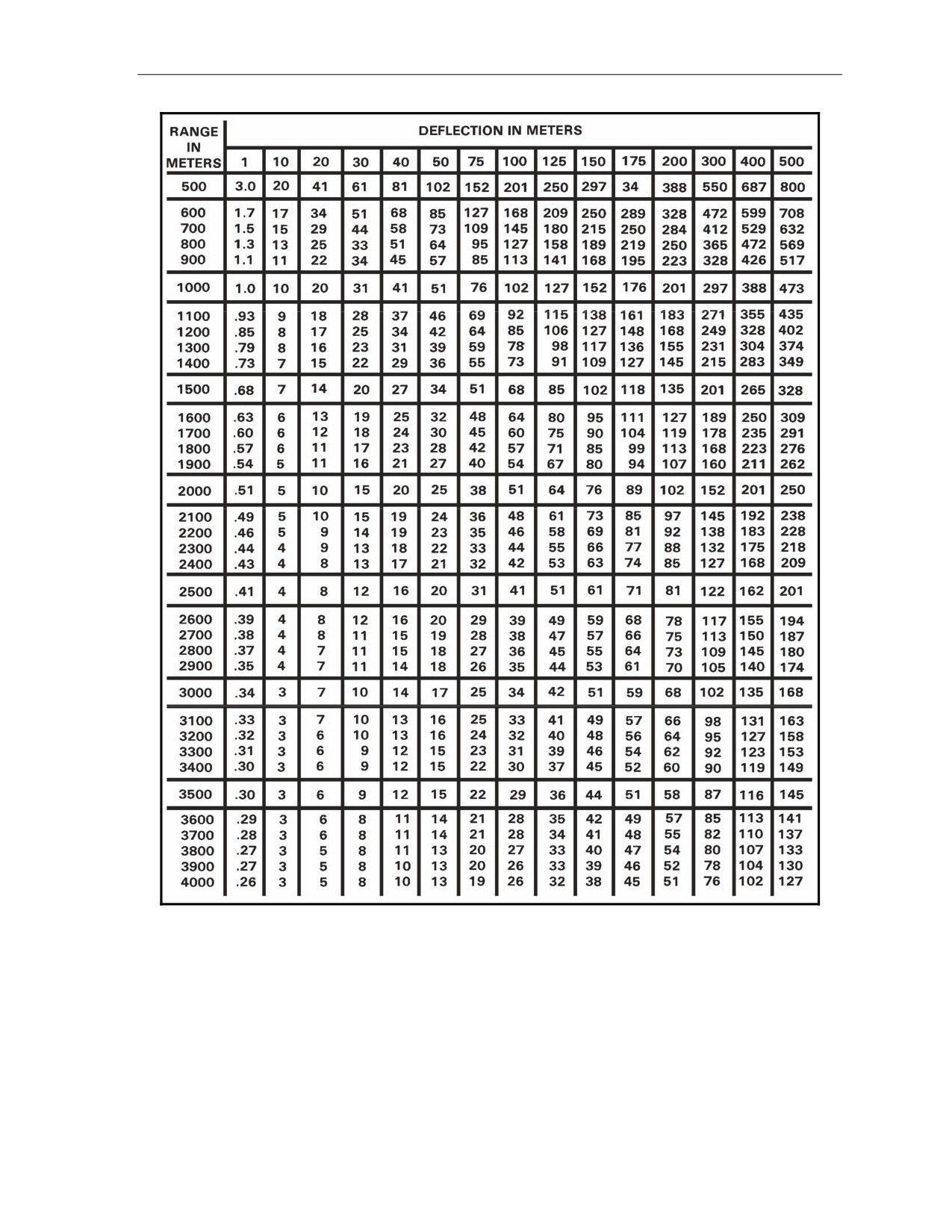
the mortar must be refired. The corrections can be plotted on the board, or the DCT can be used to
determine the number of mils to add or subtract from the base mortar deflection (Figure 14-2).
NOTE: If the target has been mechanically surveyed, enter the DCT at the initial range plot. If
the target is a nonsurveyed target (even if it is an eight-digit grid), enter the DCT at the final
range plot.
14-2
FM 3-22.91
17 July 2008
Special Considerations
Figure 14-2. Deflection conversion table.
17 July 2008
FM 3-22.91
14-3
Chapter 14
EXAMPLE
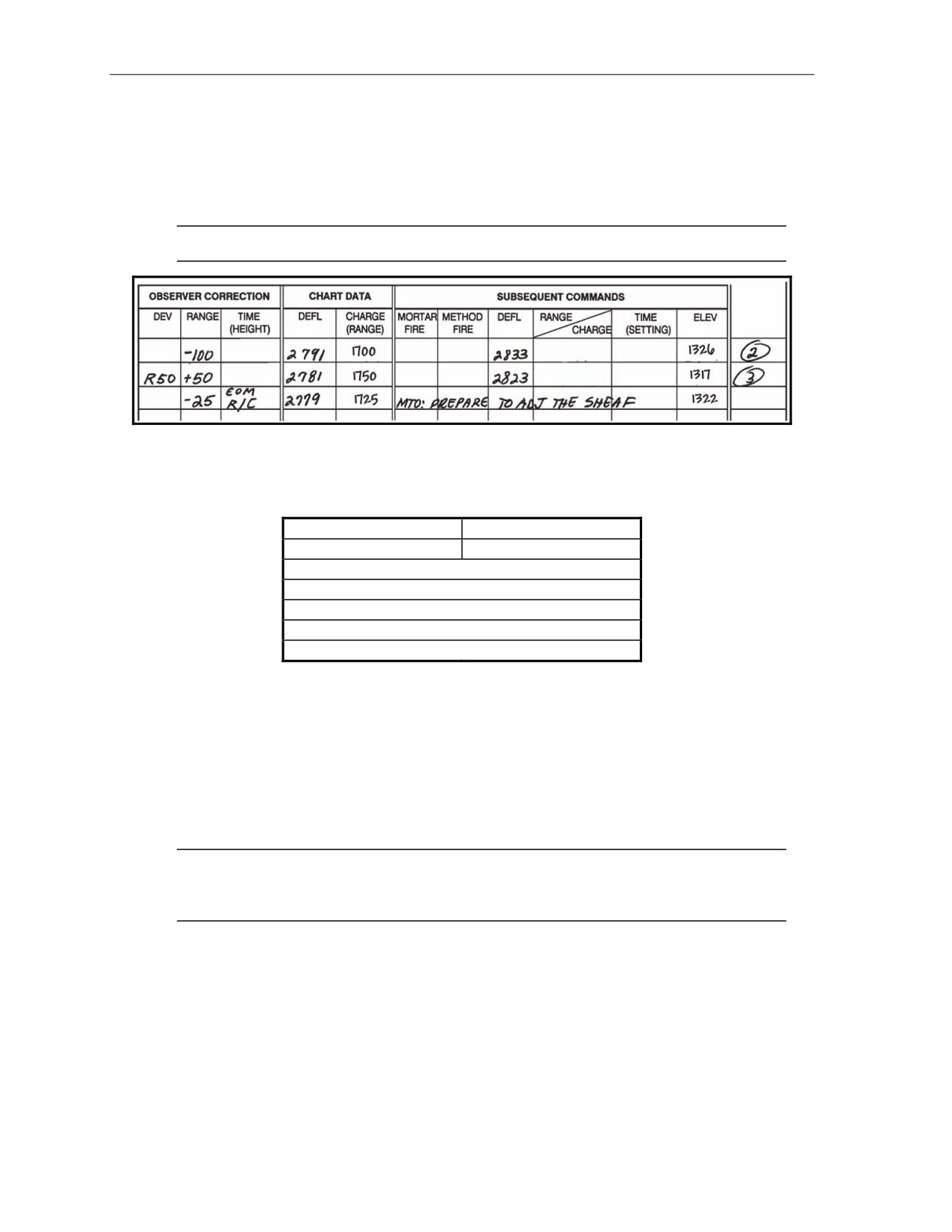
The sheaf of an 81-mm platoon is being adjusted. No. 2 mortar conducted the registration. The
FDC has requested to prepare to adjust the sheaf. The FO requests section right. The entire
platoon then fires, in order, starting at the right (No. 1, 3, 4) with 10-second intervals between
rounds. The mortar that was used to register
(No.
2) will not fire. The sheaf is adjusted
perpendicular to the gun-target line. The observer notes where each round lands and sends back
deviation corrections in meters; range corrections are ignored if less than 50 meters. If a deviation
correction is 50 meters or more, it must be refired. Corrections to be refired should always be
transmitted first by the FO.
If angle T is greater than 499 mils, each piece is adjusted onto the RP, and
the FDC computes the data for the sheaf. In adjusting the sheaf, all rounds
must be adjusted on line at about the same range (within 50 meters) and with
the lateral spread between rounds equal to the bursting diameter of the
ammunition used.
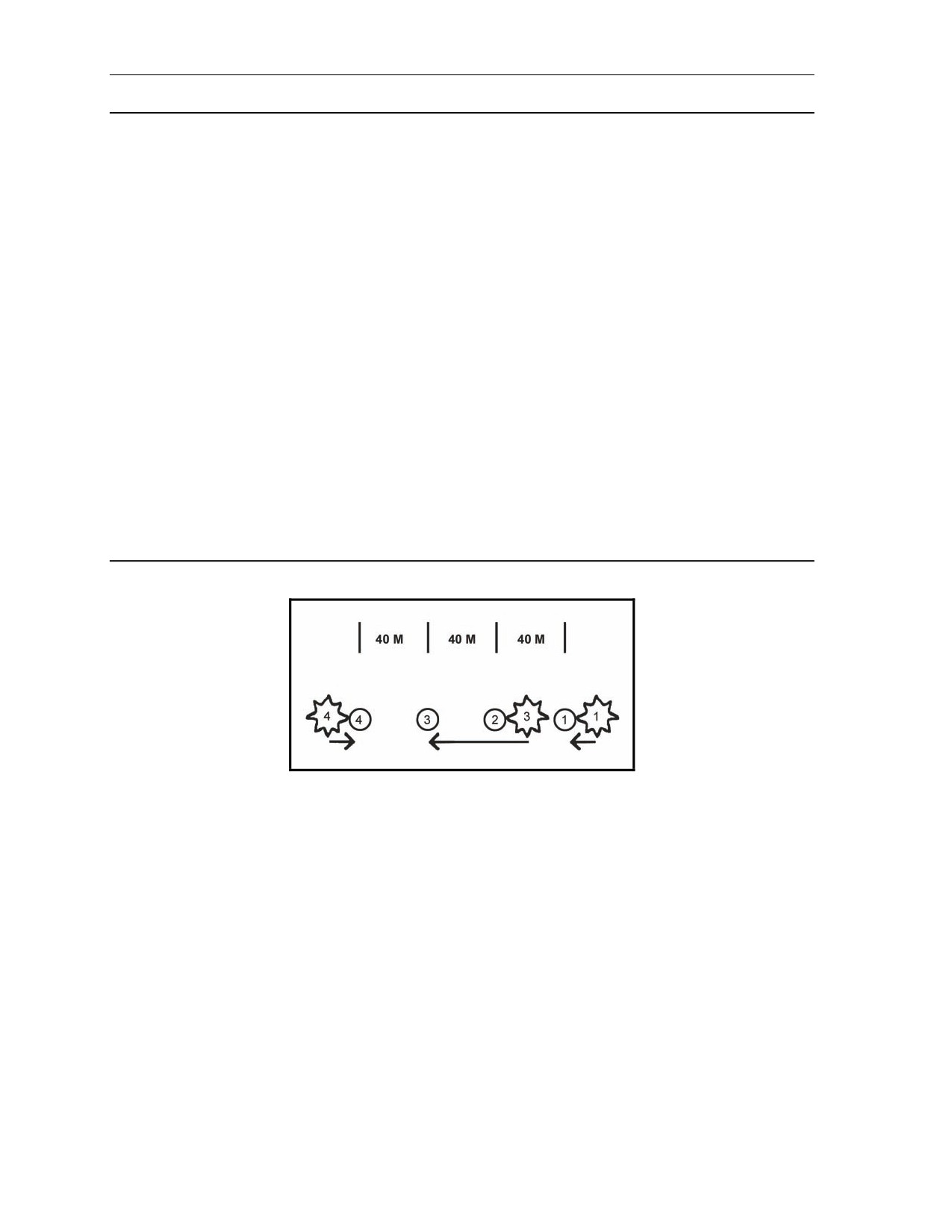
The spottings from the FO are No. 4, right 20, No. 3, left 60, and No. 1, left 30 (Figure 14-3). The FO
then sends these corrections to the FDC; No. 3, right 60 (it is transmitted first because it needs to be
refired [since it is greater than 50 meters]), No. 4, left 20 No.4 is adjusted, and finally No.1, right 30
No. 1 is adjusted. The No. 3 mortar is now fired, and the round impacts 10 meters right of the desired
burst point. The FO would then send: No. 3, left 10, No. 3 is adjusted, sheaf is adjusted, end of
mission.
Figure 14-3. No. 1, No. 3, and No. 4 mortars out of sheaf.
OBTAINING CORRECTIONS USING THE DEFLECTION CONVERSION TABLE
14-8. The computer enters the DCT at the initial chart range rounded to the nearest 100 meters: 3,050 =
3,100. Remember that the RP is at a surveyed grid and it has not moved. Using the deflection-in-meters
line at the top of the table, the computer finds the meters needed to correct the sheaf. Where the range line
and the correction line meet is the number of mils needed to apply. He applies the mils to the base
deflection. When working with deflections, use the LARS rule. Once the FO has given EOM, “Sheaf
adjusted,” the section is given, “Section, refer deflection two eight zero one (2801), realign aiming posts,”
(2801 was the base mortar’s hit deflection). This procedure allows all mortars to be fired with the same
data, and the resulting sheaf will be linear.
14-4
FM 3-22.91
17 July 2008
Special Considerations
DETERMINING FIRING CORRECTIONS
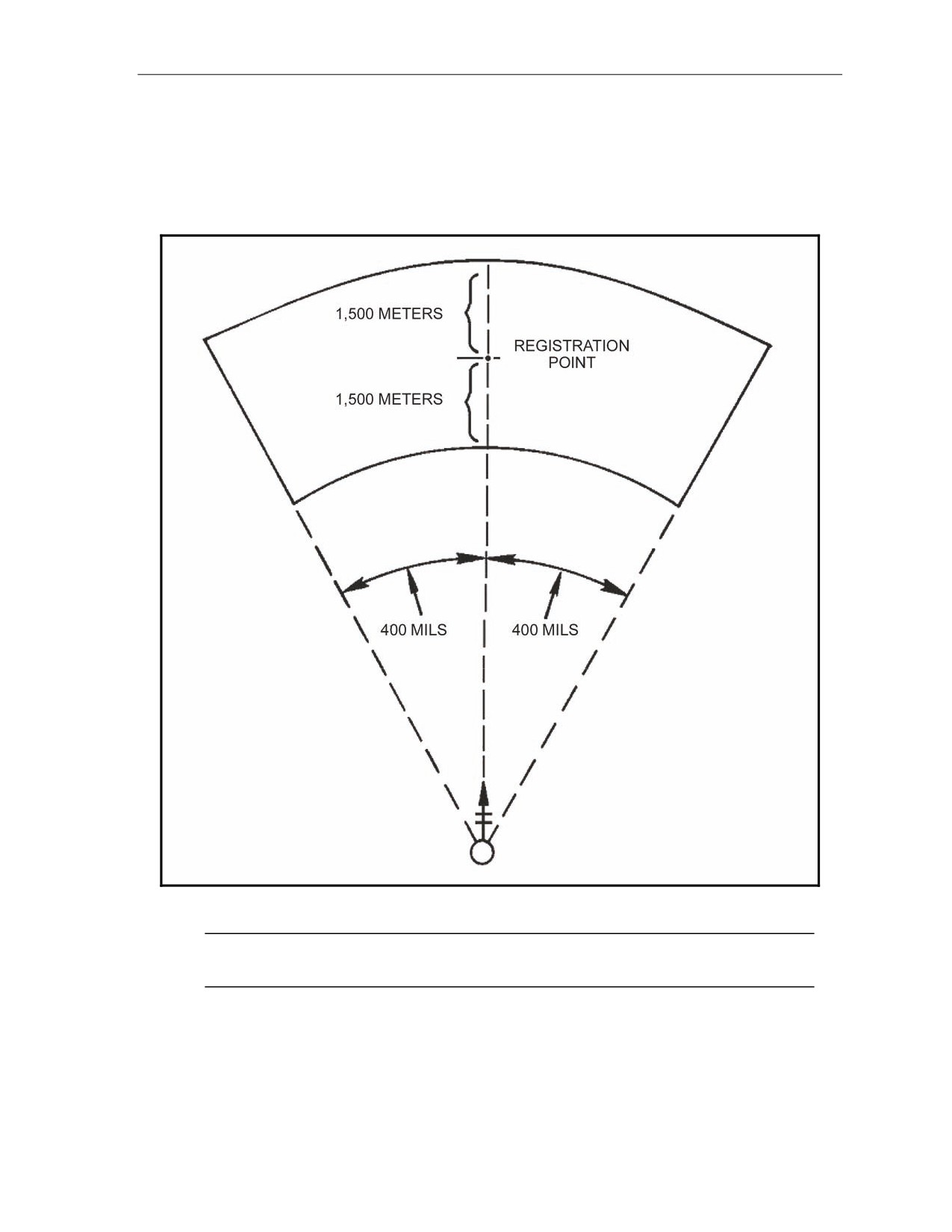
14-9. Once registration is completed, the firing corrections
(range correction factor and deflection
correction) are applied to all targets within the transfer limits of the RP (Figure 14-4). The computer
applies correction factors to correct for nonstandard conditions (weather and equipment wear) affecting the
round.
Figure 14-4. Transfer limits for one registration point.
NOTE: If a target is plotted outside of the transfer limits, the range correction factor and
deflection correction are no longer applied.
17 July 2008
FM 3-22.91
14-5
Chapter 14
DETERMINING MULTIPLE REGISTRATION POINTS
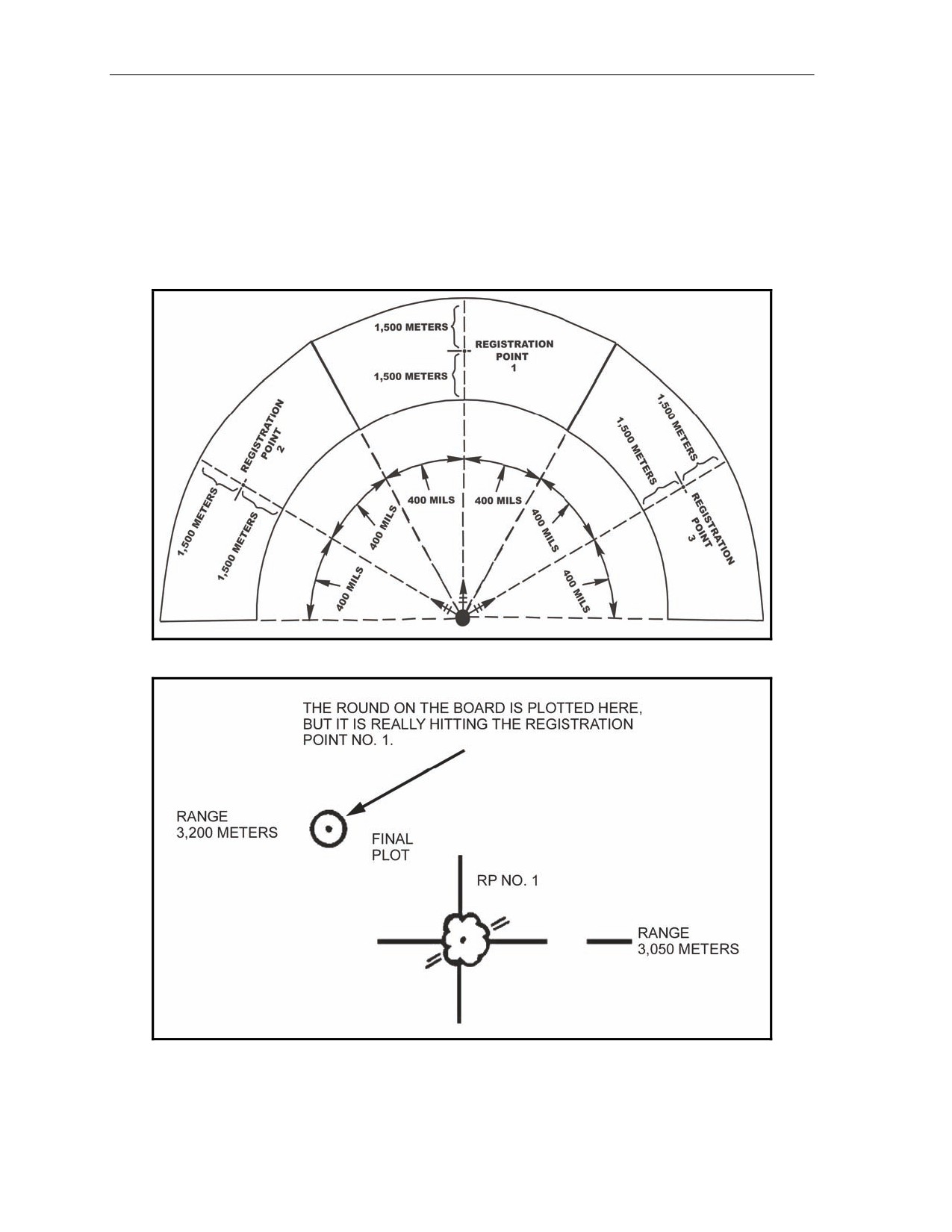
14-10. The ideal situation would be to have multiple RPs, if the tactical situation permits (Figure 14-5).
Keep in mind each RP has its own range correction factor and deflection correction. Range correction is
the difference in meters between the initial chart range and the final chart range for the RP. As the
registration mission is fired and completed, the rounds on the plotting board may not be plotted at the point
where the RP was plotted. Because of wind and weather, the rounds may have to be fired at a greater or
lesser range and to the right or left of the target to hit it. As shown in Figure 14-6, the initial chart range to
the RP was 3,050 meters; the final adjusted chart range (range used to hit the RP) was 3,200.
Figure 14-5. Multiple transfer limits.
Figure 14-6. Plotting of rounds.
14-6
FM 3-22.91
17 July 2008
Special Considerations
DETERMINING RANGE DIFFERENCE
14-11. The computer compares the initial chart range and the final adjusted chart range and subtracts the
smaller from the larger. This gives the range difference. If the initial chart range is larger than the final
adjusted chart range, then the range correction is a minus (-). If it is smaller, then the range correction is a
plus (+).
EXAMPLE
Initial chart range smaller: 3,050; final adjusted chart range: 3,200
Then, 3,200 - 3,050 = +150 meters.
Initial chart range larger: 3,200; final adjusted chart range: 3,050
Then 3,200 - 3,050 = -150 meters.
Range Correction Factor
14-12. The RCF is the number of meters per thousand to be applied to the initial chart range of a target
within the transfer limits resulting in a range correction for that mission. Continuing the preceding
example, since the ranges to other targets will be different from the 3,050 range to the RP, the RCF (+150)
will also differ. Range corrections must be determined for each target. Once the range difference has been
determined, round the initial chart range to the nearest 100, and then express that number in thousandths.
Determine to the nearest whole meter and use the sign of the range correction.
EXAMPLE
Range difference:
+150
Initial chart range:
3,050
Rounded to nearest 100:
3,100
Expressed in thousandths:
3.1
Divide the range in thousandths into the range difference. To get the range correction factor,
round the result to the nearest whole number.
+150 ÷ 3.1 = 48.3 = +48 RCF
17 July 2008
FM 3-22.91
14-7
Chapter 14
Deflection Correction
14-13. The deflection correction is the number of mils needed to correct the deflection to hit the target
since nonstandard conditions again caused the plots on the board to be either left or right of the initial chart
deflection (Figure 14-7). Compare the initial chart deflection and the final chart deflection and subtract the
smaller from the larger.
RULE:
Final chart deflection
(hit) larger
= LEFT deflection correction; final chart
deflection (hit) smaller = RIGHT deflection correction.
EXAMPLE
Hit Larger
Final chart deflection: 2,801
Initial chart deflection: 2,790
(2,801 - 2,790 = L11)
Hit Smaller
Final chart deflection: 2,790
Initial chart deflection: 2,801
(2,790 - 2,801 = R11)
14-14. Range and deflection corrections are applied to all other targets within the transfer limits of the
RP.
FIRING OF A TOTAL RANGE CORRECTION MISSION
14-15. The procedure for a TRC mission on the surveyed chart is the same as with the modified-observed
chart. However, now the firing corrections are applied to chart data to obtain command data (firing data
sent to the mortars). For example, the computer assumes that the board is still set up on the information for
the registration mission, and the mission in Figure 14-7 has been received. It is within the transfer limits.
14-8
FM 3-22.91
17 July 2008
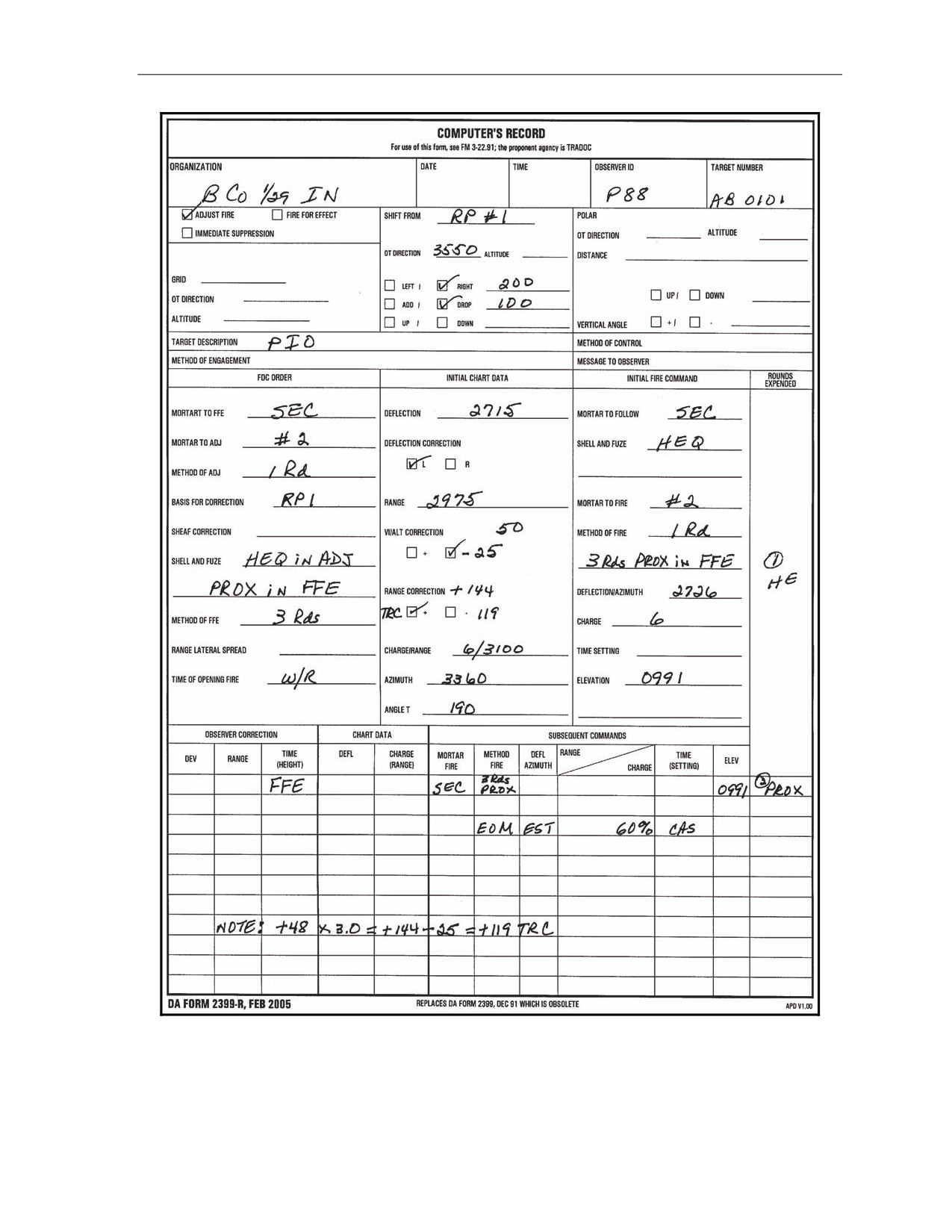
Special Considerations
Figure 14-7. Example of completed DA Form 2399-R (Computer's Record) for firing a total
range correction mission on the surveyed chart.
17 July 2008
FM 3-22.91
14-9
Chapter 14
APPLYING FIRING CORRECTIONS
14-16. Once the chart data have been determined, the computer applies the deflection correction by either
adding or subtracting the deflection correction to the chart data determined. When working with deflection
corrections, the computer uses the LARS rule. The deflection correction must be applied to each chart
deflection throughout the mission.
EXAMPLE
2,715 + L11 = 2,726
Range Correction
14-17. Determine the initial chart range, then round to the nearest hundred and express it in thousandths;
for example, 2975 = 3000 = 3.0. Multiply the range in thousandths times the RCF and use the sign of the
RCF: 3.0 x +48 = +144. This gives the range correction for this target.
Total Range Correction
14-18. The TRC is the total correction that must be applied to get the command range to fire the target.
TRC is the range correction (RCF x range in thousandths) plus or minus the altitude correction.
EXAMPLE
Range correction = +144 - 25 (altitude correction) = +119 TRC
14-19. The two factors (RCF and altitude correction) are compared. If one of these factors is a negative,
subtract the smaller from the larger. The sign of the larger is used for the TRC. If both factors are negative
or positive, then add the two factors to get the TRC. This must be applied to every chart range to obtain
command range. To enter the firing tables, the command range is rounded to the nearest 25 meters.
FIRING REREGISTRATION
14-20. The FDC must consider weather changes to ensure the accuracy of the firing data (firing
corrections) from the surveyed chart. Two methods can be used to do this: reregistration on the RP or MET
message. Of those two methods, reregistration is the better because all the unknown (nonstandard) factors
are fired out. However, due to countermortar-radar, determining and applying the MET messages may be
safer. The choice is dictated by the tactical situation and the availability of MET messages.
(1) Fire the reregistration at the established RP using only the mortar that originally fired the
registration (Figure 14-8). (The FDC assumes that the sheaf is still parallel; therefore, the sheaf
should not need adjusting again.) The chart data are the same as with the initial registration.
Apply the firing corrections to obtain the command data (Figure 14-8). A blank reproducible
copy of DA Form 2188-R (Figure 14-9) is located at the back of this manual.
14-10
FM 3-22.91
17 July 2008
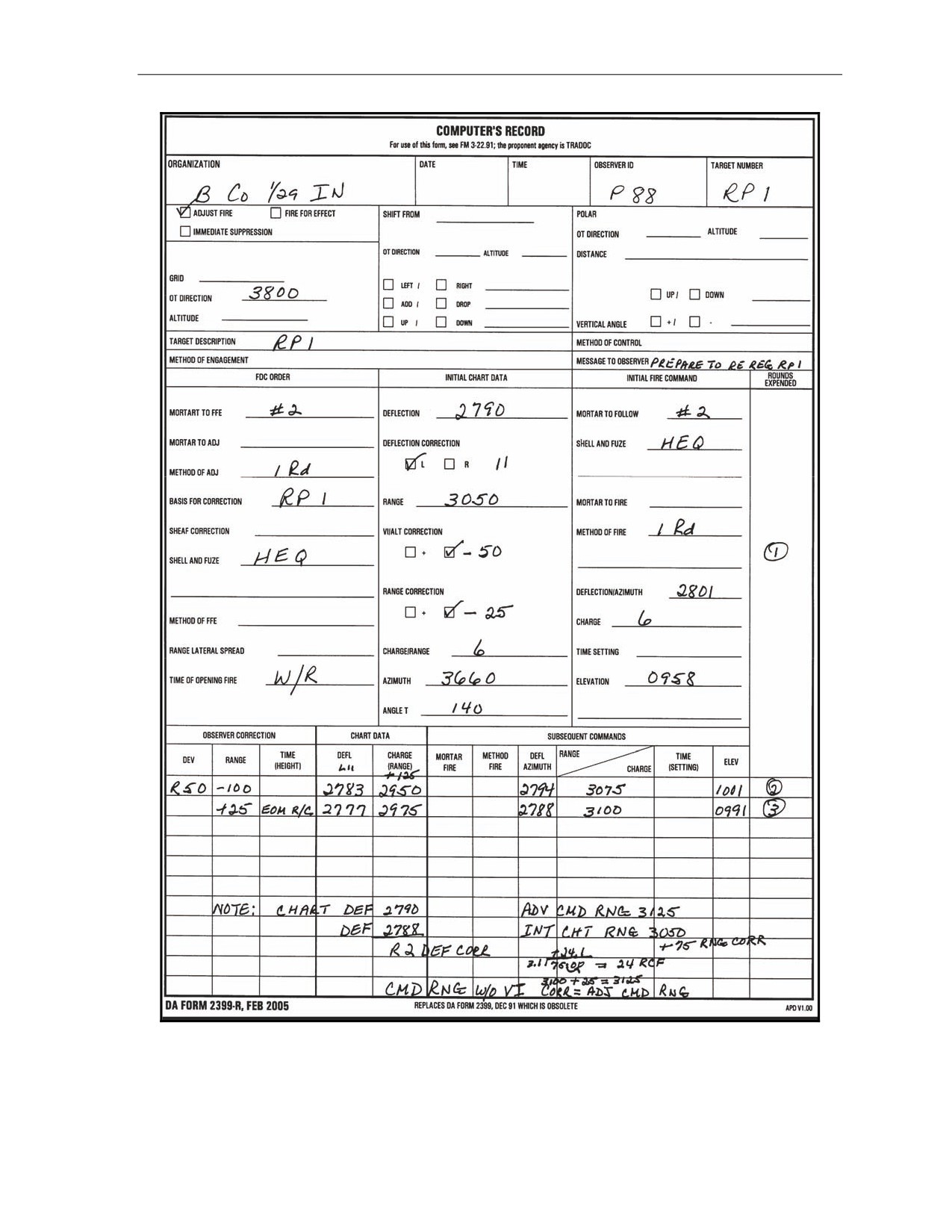
Special Considerations
Figure 14-8. Example of completed DA Form 2399-R (Computer's Record)
for a reregistration.
17 July 2008
FM 3-22.91
14-11
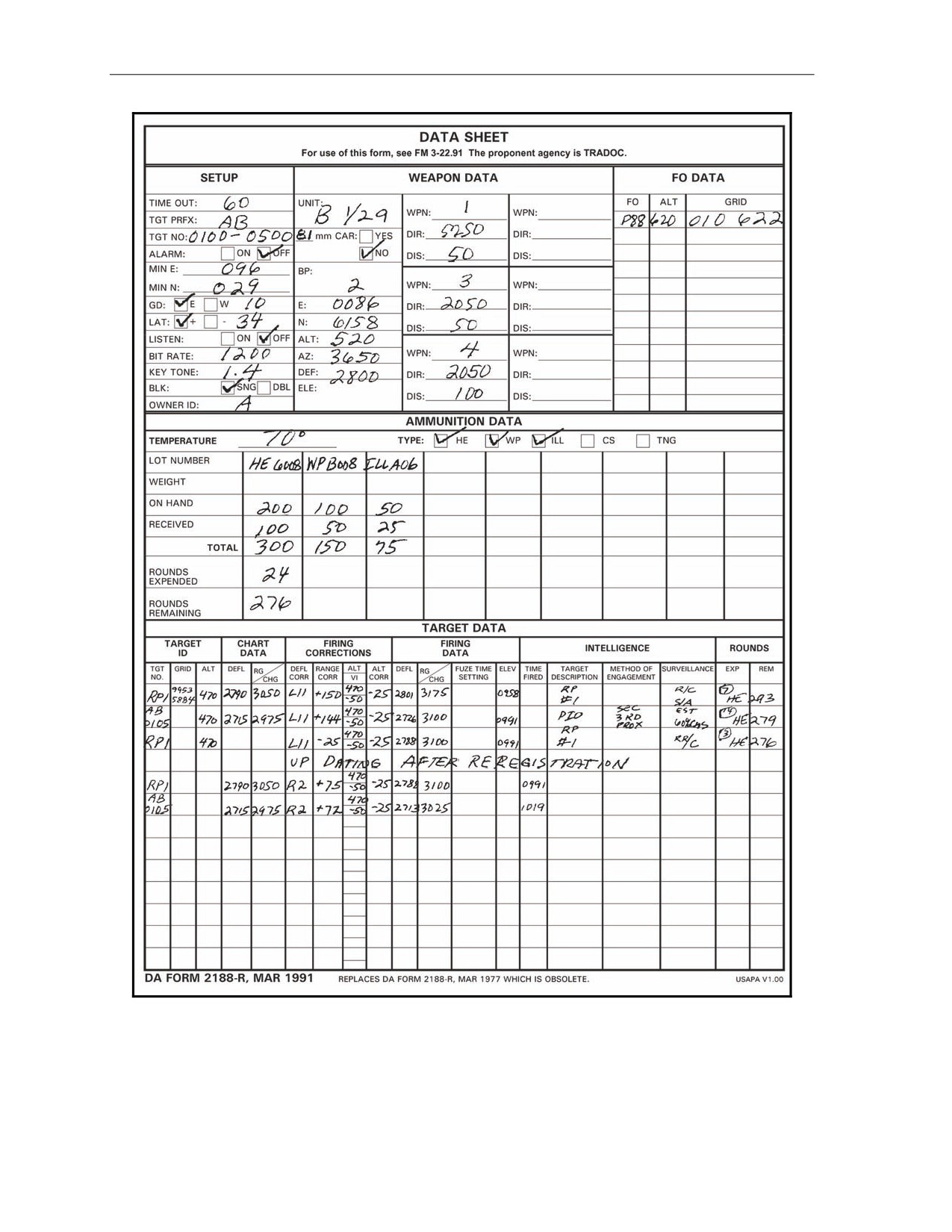
Chapter 14
Figure 14-9. Example of completed DA Form 2188-R (Data Sheet).
14-12
FM 3-22.91
17 July 2008
Special Considerations
(2) The chart deflection plus or minus deflection correction equals command deflection. The chart
range plus or minus the range correction plus or minus the altitude correction equals the
command range.
(3) Carry out the mission the same as with the initial registration. Once the EOM, “Registration
complete,” has been given, determine firing corrections again.
(4) In the initial registration, the FDC compared the initial chart range and the final chart range
difference. Determining the range difference after the reregistration is the same; however, now
determine the final adjusted range. During the reregistration, firing corrections were applied for
each round. Now apply those same corrections.
(5) Adjusted range is the final range with the correction for altitude correction deleted.
EXAMPLE
Final command range: 3,100 meters; altitude correction: -25
Final adjusted range: 3,100 + 25 = 3,125
The altitude correction is added since it was initially subtracted. If the altitude correction had
been a plus (+), then it would have been subtracted to obtain the final adjusted range.
(6) Once the final adjusted range has been determined, compare the initial chart and the final
adjusted range. Subtract the smaller from the larger to determine the RCF. The sign (+/-) would
be determined as with the initial registration. Again, divide the range (initial chart range rounded
to the nearest 100 expressed in thousandths) into the new range correction to determine the new
RCF.
(7) To determine the deflection correction, compare the initial chart deflection and the final
command deflection. Subtract the smaller from the larger and determine the sign (L or R) to
apply.
(8) Apply the new firing corrections to all targets that have been and are fired within the transfer
limits. For those targets that are already plotted on the board, apply the new firing corrections
and update the target data. The chart data does not change. The target does not move; however,
the weather conditions do change.
MEAN POINT OF IMPACT REGISTRATION
14-21. The FDC uses MPI registration during darkness and on featureless terrain to determine firing
corrections. Two M2 aiming circles or radar must be used to conduct an MPI registration. MPI registration
can also be used for reregistration.
CONDUCT OF A MEAN POINT OF IMPACT REGISTRATION
14-22. To fire the MPI registration, the FDC must proceed as follows:
(1) Set up the M16/M19 plotting board as a surveyed firing chart (eight-digit grids to the mortar
position and RP).
(2) Plot the location and altitudes of the two FO points to be used. Because the FOs will be sending
azimuth readings for the impact points of the rounds, they must see the area of the RP using the
M2 aiming circle.
(3) Record all data on DA Form 2188-R. To determine each FO’s direction to the RP, rotate the
azimuth disk until the FO’s position is aligned with the RP. Read the azimuth scale to the
nearest mil. To determine each FO’s vertical angle (VA), compare the altitudes of each FO’s
location and the RP, and subtract the smaller from the larger. This remainder is the VI, which is
used to determine the vertical angle and carries the sign of the larger. Determine the range from
each FO’s location. Round the range to the nearest 100 and express it in thousandths. Divide the
17 July 2008
FM 3-22.91
14-13
Chapter 14
range expressed in thousandths into the VI and determine the product to the nearest whole mil.
The sign (+/-) of the VA is the same as the VI sign (+/-).
EXAMPLE
Assume that the VI is -80 for FO 1 and +50 for FO 2.
The range for FO 1 is 2,525 meters; for FO 2 is 3,000 meters.
FO 1: 2,525 = 2,500 = -800 ÷ 25 = -32
VA: -32 mils
FO 2: 3,000 = 3,000 = +500.0 ÷ 30 = +16.6 VA: +17 mils
Send the direction and VA to the FOs so they can set up their M2 aiming circles.
(4)
To determine the firing data, align the mortar position with the RP. Determine the chart data and
apply the range correction for altitude between the mortar and target. During the registration,
only the range correction for altitude is used. Give the firing command to the base mortar. Three
to six rounds will be fired at 10-second to 20-second intervals. The FO uses this interval to give
himself time to determine the azimuth readings to each round. If the azimuth for one or more
rounds is determined to be 50 or more mils different, then another round may be fired for each
erratic round. Six rounds are needed for the most accurate MPI registration, but as few as three
rounds give correction data.
(5)
As the rounds are fired, the FO reads the azimuth to each round and records it. When the last
round has been fired, he sends the data recorded to the FDC. Once the rounds are fired and the
readings are recorded in the FDC, plot the MPI as follows:
Determine the total by adding all the readings from each FO.
Divide the total by the number of readings to determine the average of the readings to the
nearest mil.
EXAMPLE
FO 1
FO 2
1
6104
0400
2
6110
0402
3
6105
0404
4
6106
0405
5
6107
0401
6
6109
0400
TOTAL
36,641 mils
2,412 mils
36,641 ÷ 6 =
6,106.8
=
6,107 mils (average azimuth)
2,412
÷ 6 =
402
=
402 mils (average azimuth)
NOTE: FDC may send the average azimuth.
Once the average azimuth for each FO has been determined, index the average azimuth and
draw a line from each FO position toward the top of the board; where the lines intersect is the
MPI. Determine and record the eight-digit grid coordinates and altitude of the MPI.
14-14
FM 3-22.91
17 July 2008
Special Considerations
DETERMINATION OF RANGE CORRECTION FACTORS
14-23. With the MPI and RP on the board and the altitude determined, correction factors to be applied to
other targets within the transfer limits of the RP must be determined. Again, because of the effects of
interior and exterior ballistics on the round, the MPI may not be plotted in the same location on the plotting
board as the surveyed point. Therefore, the corrections to hit that surveyed point must be determined.
These corrections are noted on DA Form 5472-R (Computer’s Record [MPI]) (Figure 14-10). A blank
reproducible copy of DA Form 5472-R is located at the back of this manual.
Range Difference
(1) Compare the command range to the MPI point (minus the altitude correction) and the initial chart
range to the RP.
EXAMPLE
Command range MPI = M Alt 500 mils, MPI Alt 450 mils, VI = -50, Alt Corr -25. Adjusted chart range
to the MPI = command range 2,650 M + 25 (to delete altitude correction, reverse the sign) = 2,675
adjusted chart range to the MPI.
(2) The sign of the range difference is determined by how the move from the MPI to the RP must be
made. If the RP range is larger, the difference is a plus (+); if smaller, it is a minus (-).
EXAMPLE
Initial chart range to the RP is 2,600 meters; adjusted chart range to the MPI is 2,675 meters.
2,675 - 2,600 = -75 range difference
17 July 2008
FM 3-22.91
14-15
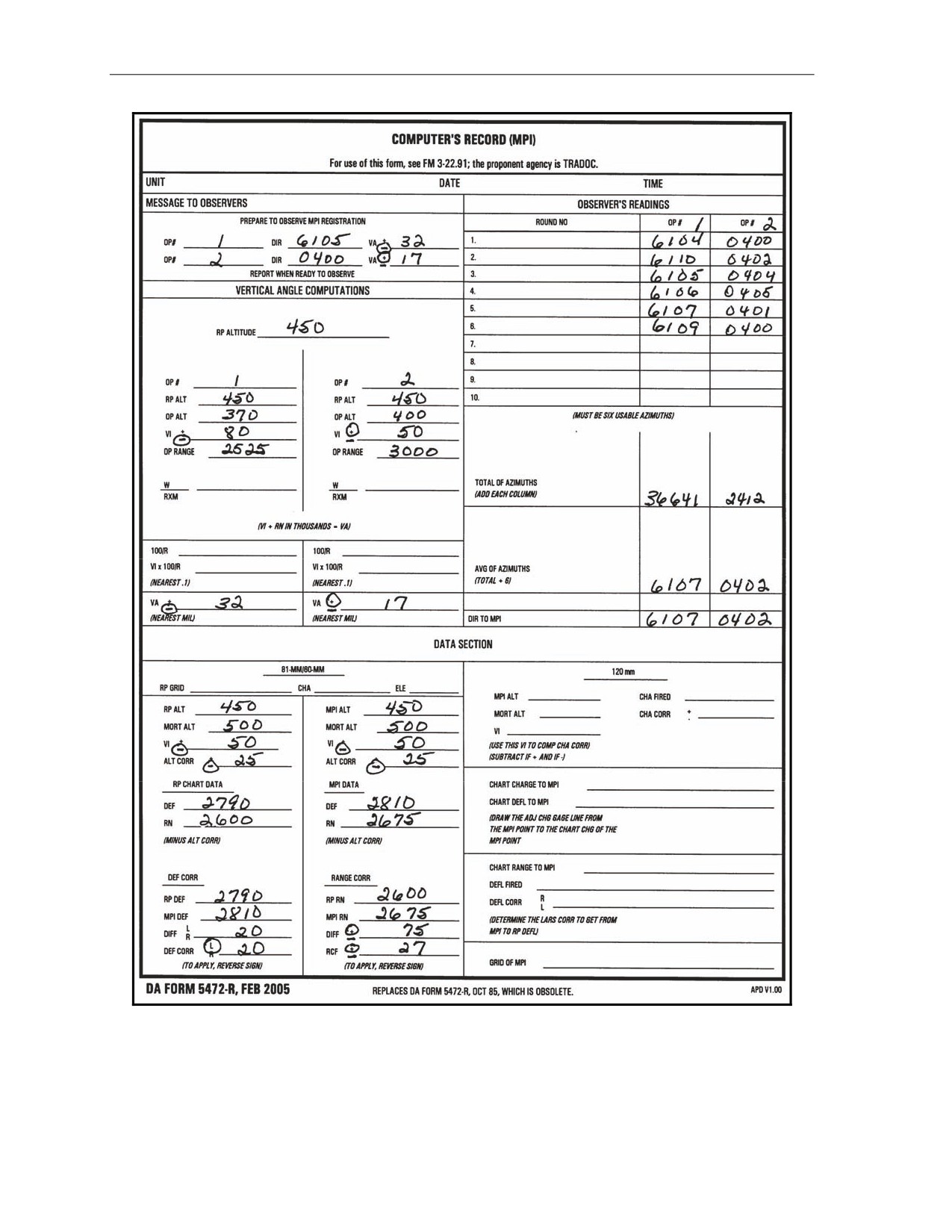
Chapter 14
Figure 14-10. Example of completed DA Form 5472-R (Computer’s Record [MPI]).
14-16
FM 3-22.91
17 July 2008
Special Considerations
Range Correction Factor
14-24. Once the range difference has been determined, divide it by the chart range to the MPI rounded to
the nearest 100 expressed in thousandths and round it to the nearest whole meter. The sign is the same as
the range difference.
EXAMPLE
Range difference - 75
Chart range to MPI
2,675 meters
Round to the nearest 100
= 2,700 meters
Express in thousandths
= 2.7
-75.00 ÷ 2.7 = -28 meters RCF
Deflection Correction
14-25. Compare the chart deflection of the MPI and the chart deflection of the RP to determine the
deflection correction (Figure 14-10). The sign of the deflection correction will be determined by how the
move from the MPI to the RP must be made.
RULE: RP deflection is greater than the MPI deflection = LEFT deflection correction. RP
deflection is less than MPI deflection = RIGHT deflection correction.
EXAMPLE
MPI chart deflection = 2810; RP chart deflection = 2,790
2,810 - 2,790 = L20 (correction to apply R20)
14-26. The application of the correction factors to other targets, within the transfer limit of the RP, is the
same as with the other registration corrections except that the sign of the corrections must be reversed.
NOTE: The only time the corrections will be applied with the signs as determined is when the
corrections are being applied to move the strike of the round from the MPI to the RP.
VERTICAL INTERVAL CORRECTION FACTORS
14-27. When the mortar position is known to surveyed accuracy and a map is being used, the computer
can work with altitude differences and the correction factor for those altitude differences. As noted earlier,
the term used for altitude difference is VI.
DETERMINATION OF VERTICAL INTERVAL
14-28. The computer compares the altitude of the mortar position and the altitude of the target being
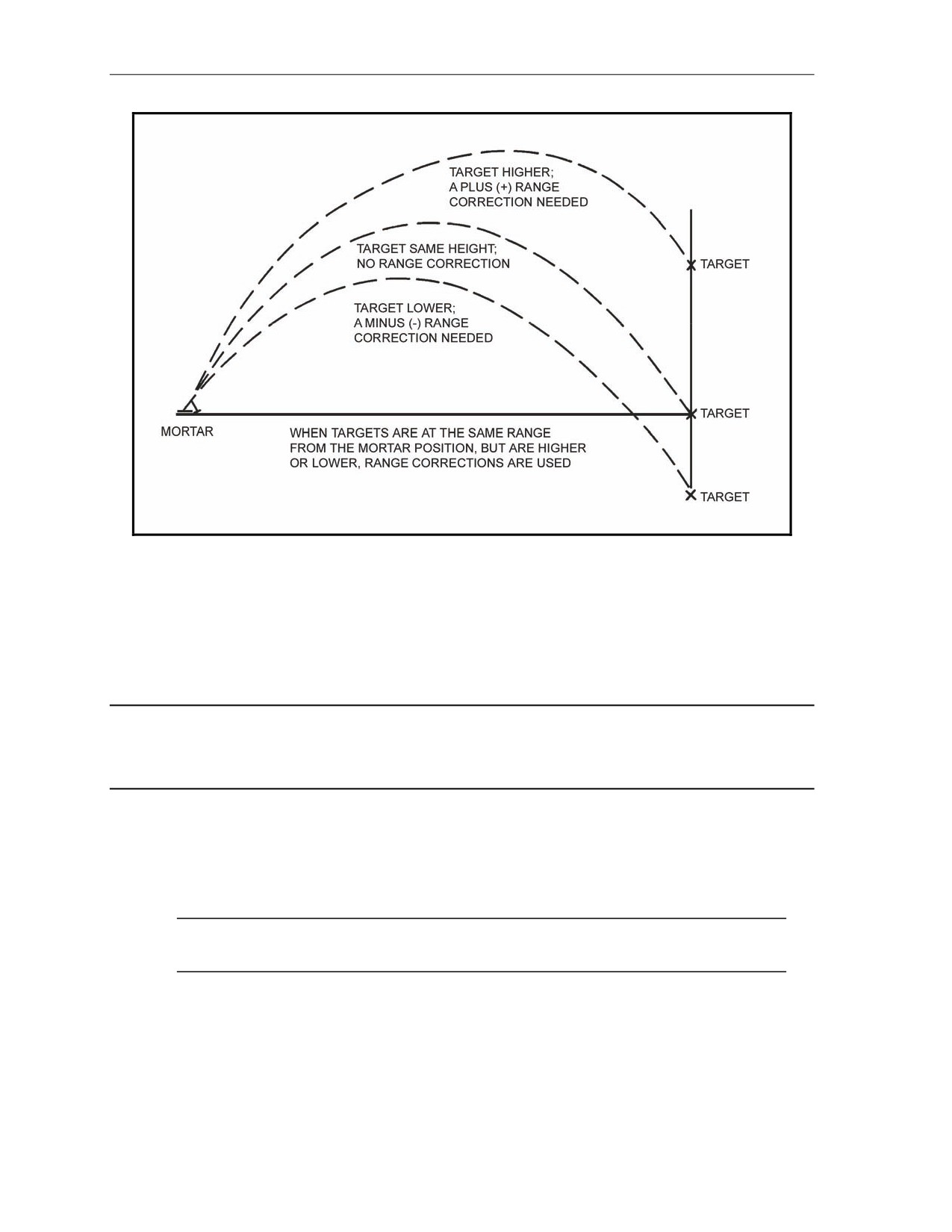
engaged. If the altitude of the target is higher than that of the mortar position, then the VI will be a plus
(+); if lower, it will be a minus (-) (Figure 14-11).
17 July 2008
FM 3-22.91
14-17
Chapter 14
Figure 14-11. Altitude correction.
CORRECTION FOR VERTICAL INTERVAL
14-29. Because of the VI, a range correction must be applied to the chart range to obtain the range to be
fired (command). The range correction to apply is half of the VI; it is determined to the nearest whole
meter.
EXAMPLE
VI = 75 meters
1/2 = 38 meters (altitude [range] correction)
14-30. The altitude (range) correction must be 25 meters or more to be applied. The range correction is
then added to or subtracted from the chart range. If the target is higher than the mortar, the computer adds
the range correction; if lower, the computer subtracts to get the altitude to be fired (command). The altitude
correction is applied to every chart range throughout the mission.
NOTE: A VI of less than 50 meters is not used when working with the modified-observed
chart.
DETERMINATION OF VERTICAL INTERVAL FOR DIFFERENT MISSIONS
14-31. When there is a difference in altitude between the mortar position and the target, a range
correction is made. Since the mortar round has a steep angle of fall, corrections are made only when
differences of 50 meters or more in altitude exist. The chart range is corrected by one-half the difference in
altitude expressed in meters. The correction is added when the target is above the mortar, and subtracted
14-18
FM 3-22.91
17 July 2008
Special Considerations
when the target is below the mortar. Difference in altitude can be determined from contour maps, by
estimating, or by measuring the angle of sight, and by using the mil-relation formula.
Grid Missions
14-32. The target is plotted on the map and the altitude determined. If the altitude of the target cannot be
determined, then the computer assumes that it is the same as that of the mortars.
Shift From a Known Point Missions
14-33. The target is assumed to be the same altitude as the point being shifted from unless, in the CFF,
the FO sends a vertical shift (up or down). Therefore, that shift is applied to the point being shifted from,
and that is the altitude of the new target.
Polar Plot Missions
14-34. The altitude of the target is assumed to be the same as that of the FO’s position if no vertical shift
is given. If one is given, then the computer applies the shift to the FO’s altitude, and that is the altitude of
the new target. Once the computer has determined the altitude of the target, then it is possible to determine
the VI for the mission and, finally, the altitude correction to apply. Remember, VI is the difference in
altitude between the mortars and the target.
RADAR REGISTRATION
14-35. Radar registration is another method used by the FDC to obtain firing corrections to apply to the
firing data to obtain better accuracy.
14-36. Two types of radar units can be used: AN/PPS-5, which gives direction and distance to impact;
and AN/PPS-4, which gives grid of impact. The one used will determine which method the FDC will use
during the registration. At the unit level, the AN/PPS-5 will probably be used for the 60-mm and 81-mm
mortars; the AN/PPS-4 for the 120-mm mortars.
NOTE: Registration of the AN/PPS-5 is explained here for the 60-mm and 81-mm mortars.
14-37. The M16/M19 plotting board must be set up as a surveyed firing chart. That is, the mortar
position, RP, and radar site must be plotted to surveyed accuracy. The procedure for obtaining firing data is
the same as with a regular registration mission. The altitude correction is the only firing correction used.
Because this is a polar-type mission, the VI is now obtained as with a polar plot mission. The firing
corrections are obtained in the same manner as with the regular registration mission.
14-38. After the board is set up and the direction and distance from the radar to the target have been
determined, the FDC informs the radar operator of this information. The radar operator then orients the
radar set using the information and calls the FDC when the set is ready. Once the radar is ready, the FDC
then gives the initial data to the mortar section. The base mortar will adjust and then the sheaf will be
established.
(1) When the first round impacts, the radar operator sends the FDC the direction and distance to that
round.
(2) The FDC then indexes that direction and plots the round at the distance sent (the plot is made
from the radar position plot, using the distance sent).
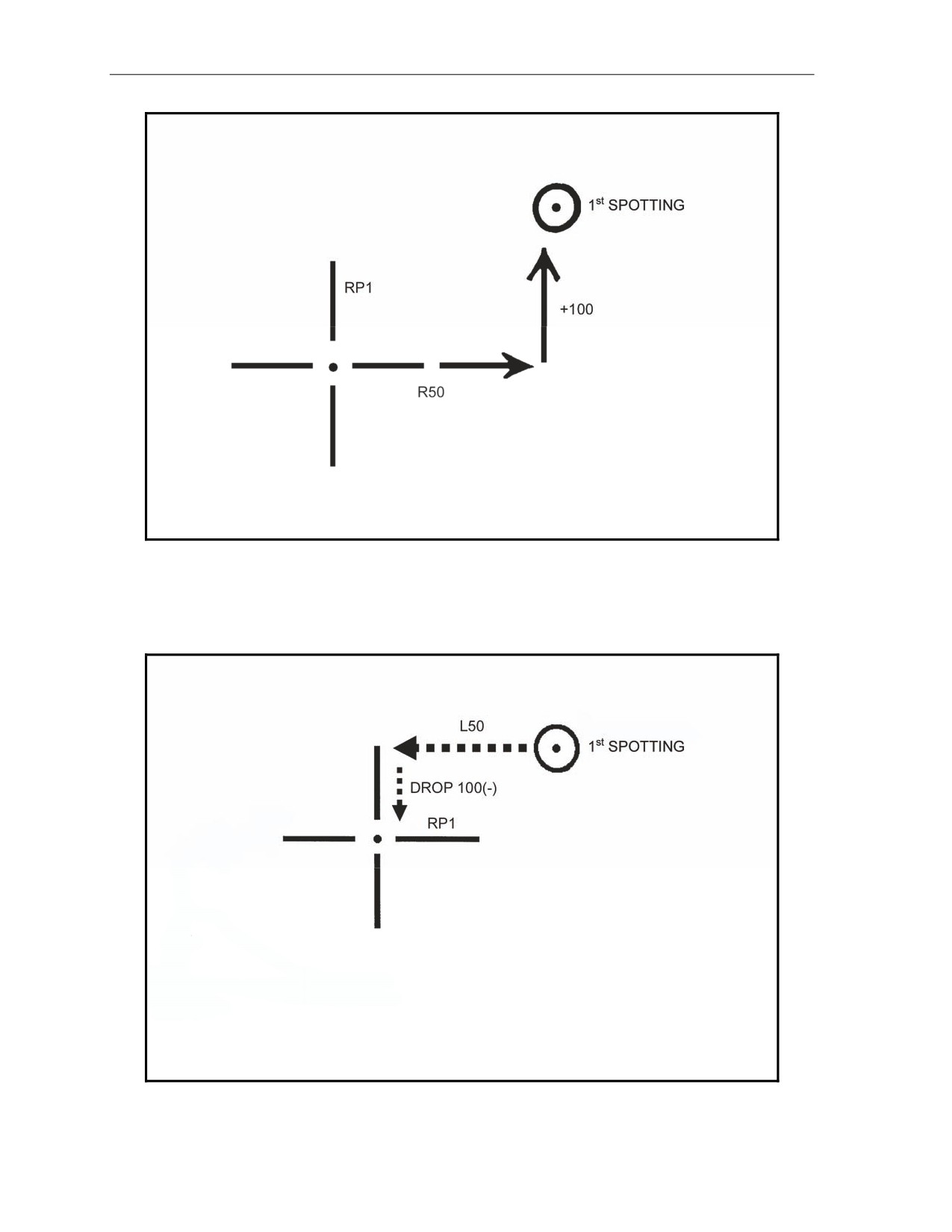
(3) The FDC indexes the mortar RP azimuth and determines the spotting by comparing the round’s
impact plot with the RP plot. The FDC, acting as the FO, determines all spottings
(Figure 14-12).
17 July 2008
FM 3-22.91
14-19
Chapter 14
Figure 14-12. Determination of a spotting.
(4) Once the spotting has been determined, the FDC converts the spotting into a correction to fire
the second round. He does this by reversing the signs of the spotting. He then applies that to the
RP on the azimuth of the radar position (Figure 14-13).
Figure 14-13. Application of correction to fire the second round.
14-20
FM 3-22.91
17 July 2008
Special Considerations
(5) The firing data are then obtained by aligning the new plot with the mortar position.
(6)
The spottings for additional rounds are spotted from the initial RP, but the corrections
(spotting reversed) are applied to the last fired plot. This procedure is repeated for all adjustment
rounds until a range correction of 50 meters is split.
FINAL PROTECTIVE FIRES
14-39. The highest priority mission for the mortar section is FPF. The FPF is a barrier of steel designed to
stop the enemy. It is integrated with the other weapons of the unit being supported to cover dead space or
likely avenues of approach. The FPF is a last-ditch effort to stop the enemy force from overrunning the
unit. Normally, it is placed not more than 200 meters in front of friendly forces; however, the exact
position of the FPF is based on the tactical situation.
14-40. The M16/M19 plotting board can be set up as any one of the three firing charts for FPF. With
regard to the area of an FPF, the 60-mm and 81-mm mortar platoons can fire up to three FPF (one for each
mortar).
14-41. The target location given in the CFF is not the location of the FPF. A 200- to 400-meter safety
factor is added to the location of the FPF by the FO. This is the location given in the CFF.
NOTE: The computer never adds a safety factor.
14-42. An FPF adjustment can be fired in three ways:
z
Adjust each mortar onto the FPF (most desirable method).
z
Adjust only the danger close mortar, using the attitude of the target and mortar position to
compute data for the other mortars.
z
Using the attitude of both the mortar section and the FPF, compute only the data for the FPF,
with no rounds being fired (least desirable method).
14-43. Obtaining the firing data is still performed by aligning the mortar location with the plot being
engaged and using the azimuth disk and vernier scale.
NOTE: If the FPF is within 200 meters of friendly troops, the FO should call for HE delay in
adjustment (preferred method) and use the creeping method of adjustment.
17 July 2008
FM 3-22.91
14-21
Chapter 14
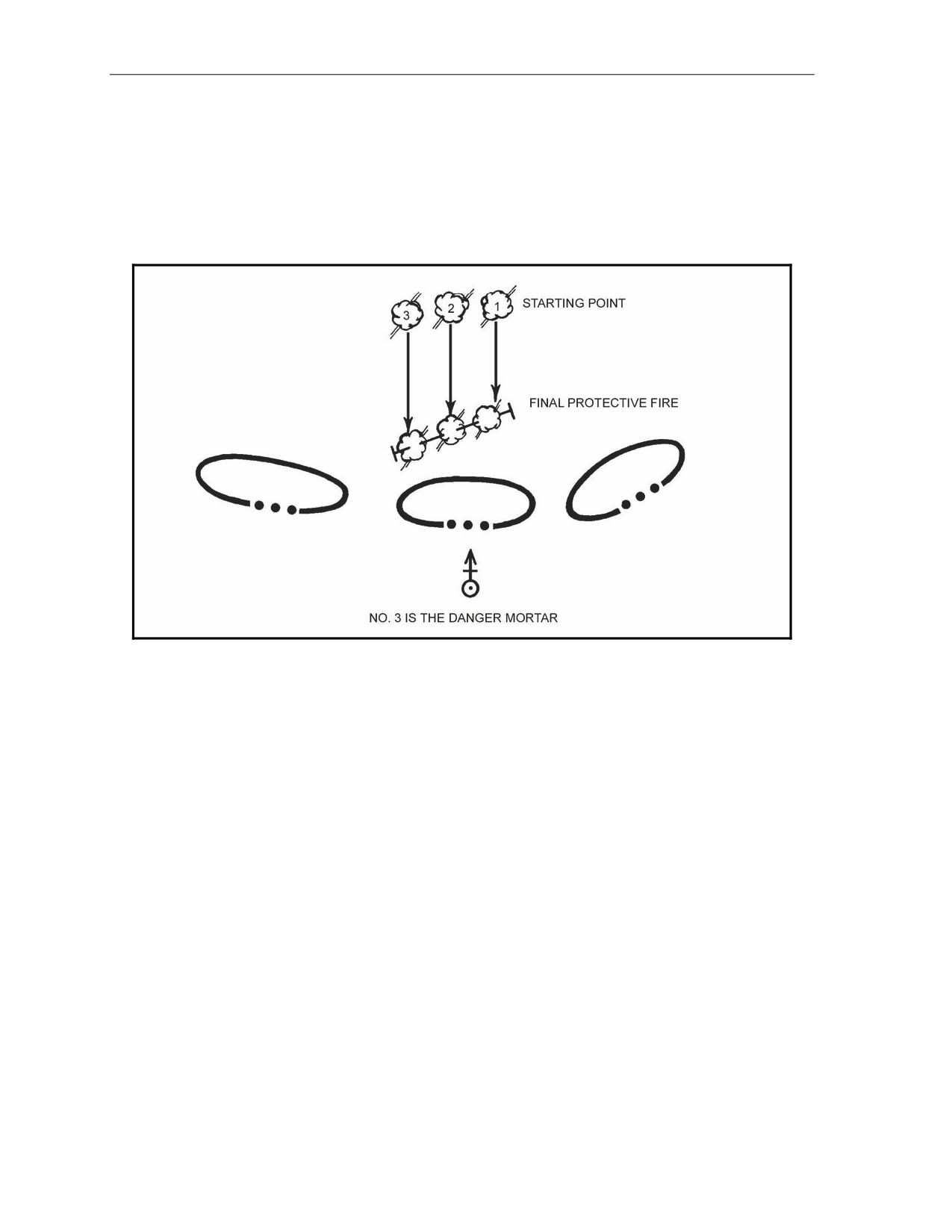
14-44. When adjusting each mortar, the FO may (in the CFF) give a section left (SL) or section right (SR)
to determine the danger close mortar. The danger close mortar is the one impacting closest to friendly
troops.
(1) Once the danger mortar is known, it is adjusted onto the FPF line (Figure 14-14).
(2) Once the danger mortar has been adjusted, the next mortar (No. 2) is given the danger mortar
data and fired. The firing of the same data should put the impact of the next mortar 40 meters
left or right of the adjusted mortar.
Figure 14-14. Determination of danger mortar.
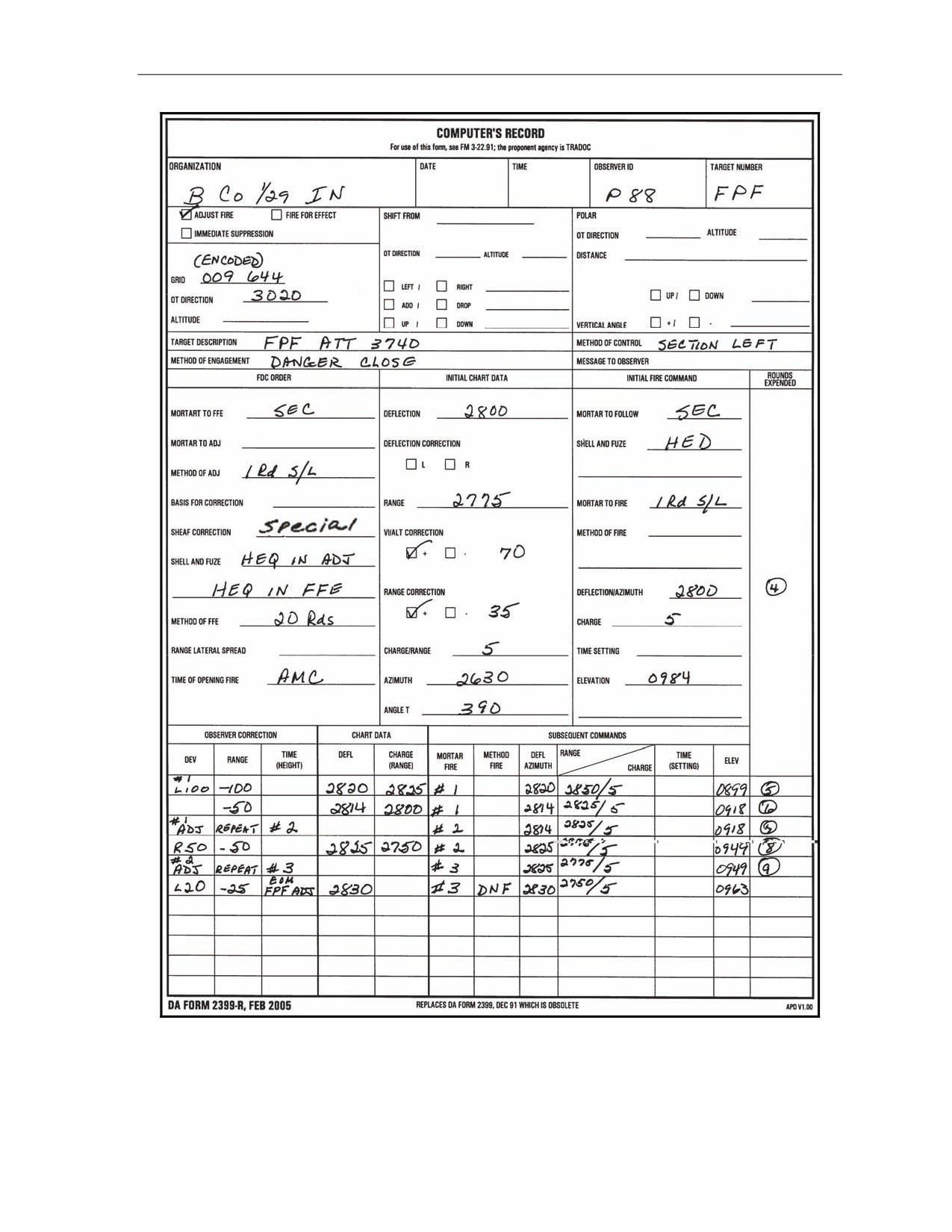
(3) This procedure is used for the remaining mortars until each is on the FPF line. As each mortar is
adjusted to the FPF line, the data are then given to each mortar and placed on the mortar after
each mission. Also, the predetermined number (unit SOP) of rounds is set aside ready to fire
(Figure 14-15).
14-22
FM 3-22.91
17 July 2008
Special Considerations
Figure 14-15. Example of completed DA Form 2399-R (Computer's Record) for
computing final protective fire missions.
17 July 2008
FM 3-22.91
14-23
Chapter 14
14-45. When adjusting only the danger close mortar, the computer is given the attitude of the target in the
CFF.
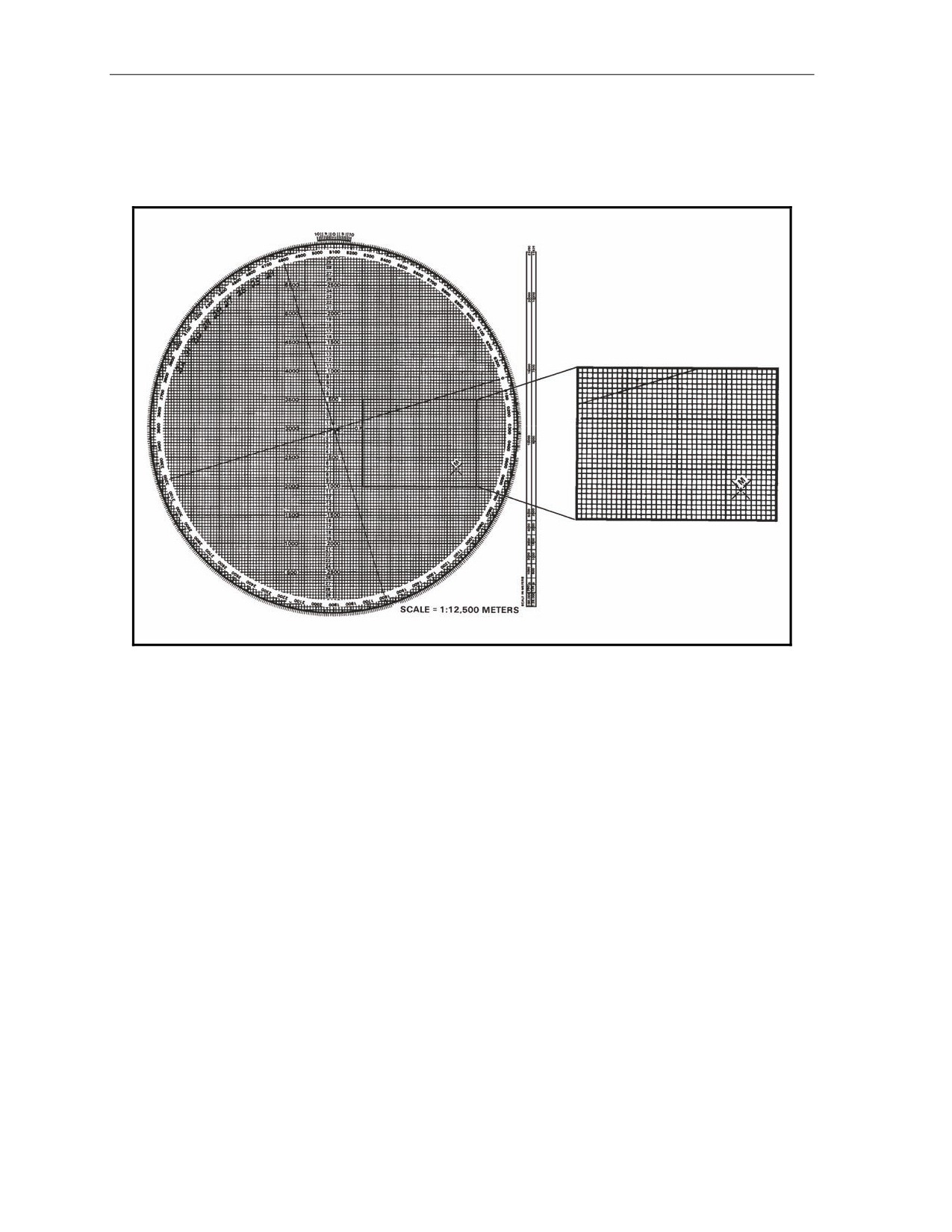
(1) The FDC can determine the danger close mortar by indexing the target attitude and drawing a
line from the initial FPF plot (given in the CFF) 50 meters above and below (Figure 14-16).
Figure 14-16. Drawing final protective fire symbol with attitude indexed.
14-24
FM 3-22.91
17 July 2008
Special Considerations
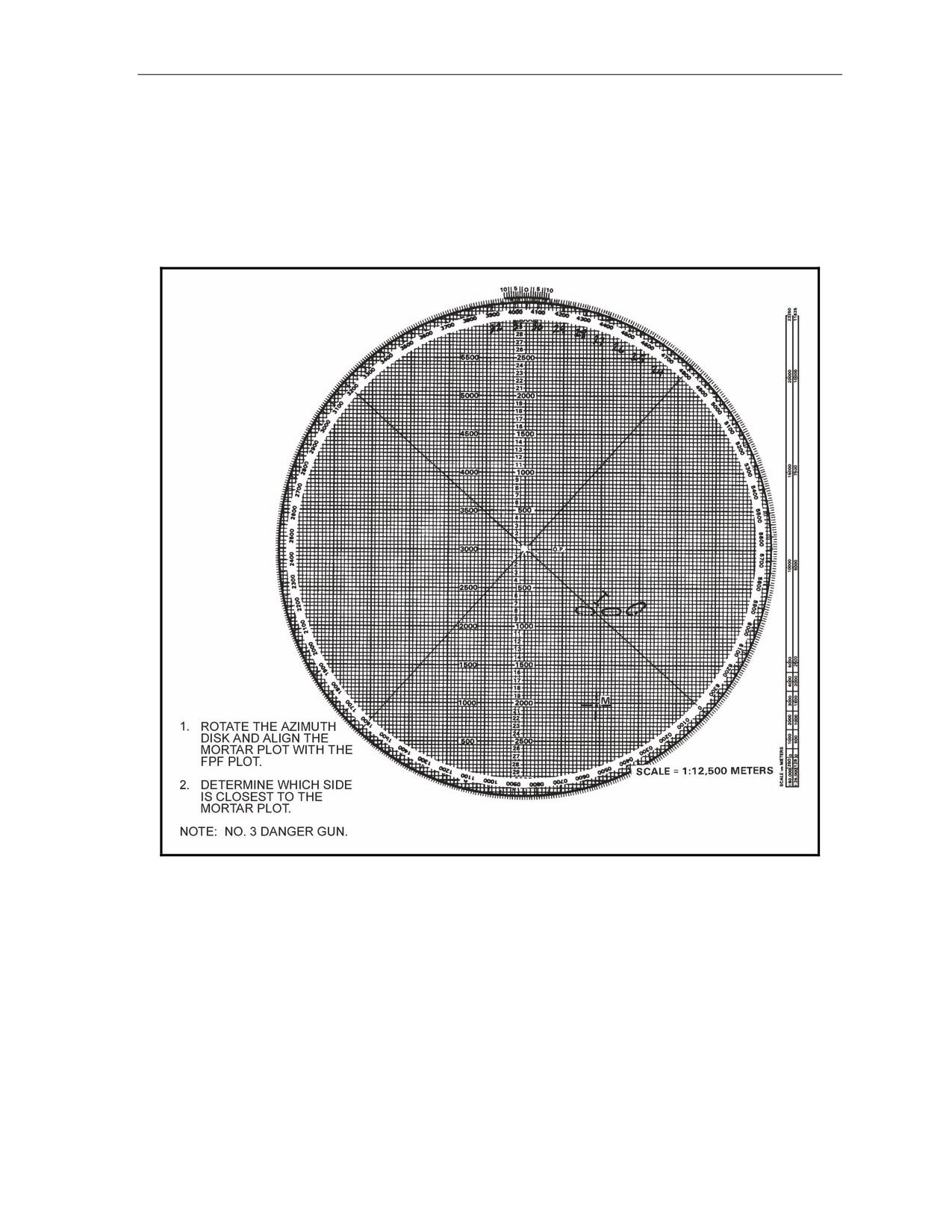
(2) After drawing the FPF line, the computer rotates the azimuth disk and aligns the mortar plot
with the FPF plot to see which side of the line is closest to the friendly troops (Figure 14-17).
To use this method, the frontline trace of the supported unit must be plotted on the board.
Once the danger mortar has been determined, that danger mortar is fired and adjusted to the
FPF line.
(3) After the danger mortar is adjusted to the FPF line, the computer then indexes the FPF attitude
and erases all but the last plot.
Figure 14-17. Determination of danger mortar.
17 July 2008
FM 3-22.91
14-25
Chapter 14
(4) Using the last plot, the computer draws the FPF symbol by extending a line 90 meters long
toward the top of the board and 10 meters long from the plot towards the bottom of the board.
This shows the full 100-meter width of the FPF.
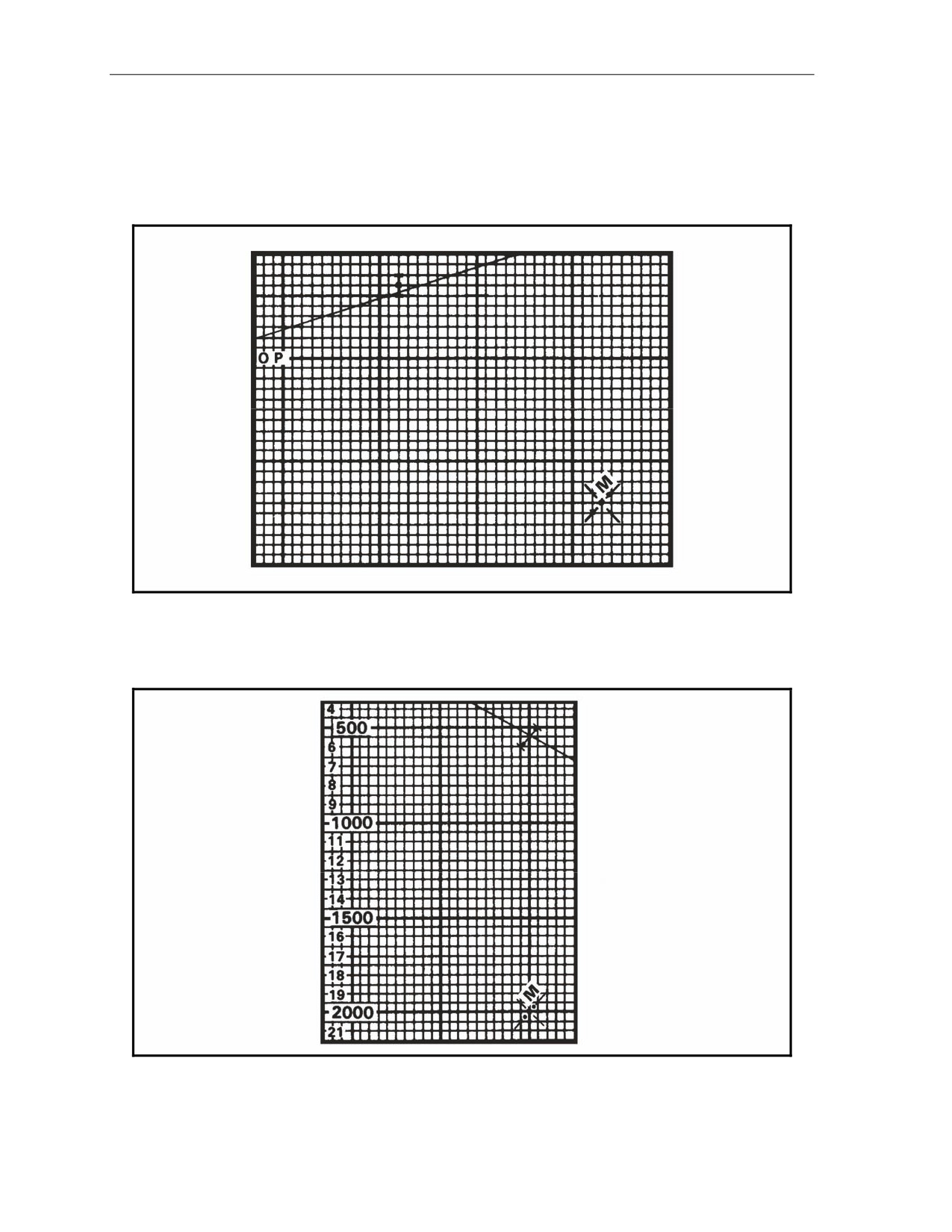
(5) The remaining plots for the No. 1, No. 2, and No. 3 mortars are then plotted 40 meters apart
(Figure 14-18).
Figure 14-18. Plotting of No. 1, No. 2, and No. 3 mortars.
(6) Once the plots are on the plotting board, the computer determines the firing data for each mortar
by aligning each mortar plot with its intended impact plot (Figure 14-19).
Figure 14-19. Alignment of each mortar with its impact point.
(7) Again, these data are placed on the mortar after each mission, and the rounds are readied to fire.
14-26
FM 3-22.91
17 July 2008
Special Considerations
14-46. To compute data for FPF without adjustment, the computer indexes the attitude of the FPF line
and makes a plot 40 meters above and below the FPF starting plot.
(1) The computer then indexes the attitude of the mortar section and plots the No. 1, No. 3, and No.
4 mortars 40 meters above and below the No. 2 mortar plot.
(2) Once the FPF and mortars have been plotted, each mortar is aligned with its impact plot, and the
data determined.
(3) These data are given to the mortars and, again, are set on the mortars between missions.
(4) This method is used when ammunition is low and time or the tactical situation does not permit
the adjustment of the FPF.
17 July 2008
FM 3-22.91
14-27
This page intentionally left blank.
Part Five
Mortar Fire Control System
Chapter 15
Introduction
The Mortar Fire Control System (MFCS) provides a complete, fully-integrated,
digital, onboard fire control system for the carrier-mounted 120-mm mortar. It
provides a “shoot and scoot” capability to the carrier-mounted M121 mortar.
With the MFCS, the mortar FDC computes fire commands to execute fire
missions and controls its gun tracks. The carrier-mounted MFCS components
work together to compute targeting solutions, direct the movement of vehicles
into firing positions, allow real-time orientation, and present gun orders to the
gunner.
SECTION I. INITIALIZATION AND CONFIGURATION
This section discusses the introduction, initialization, and configuration of the MFCS.
DESCRIPTION
15-1.
The MFCS is an automated fire control system designed to improve the command and control
of mortar fires and the speed of employment, accuracy, and survivability of mortars. The commander’s
interface (CI) microprocessor, controlled by a software operating system, manages computer activities,
performs computations, and controls the interface with peripheral and external devices. The CI
operator enters data at the keypad and composes messages using the liquid crystal display (LCD).
Completed messages are then transmitted digitally or by radio. Should the FDC become disabled, each
mortar crew can compute its own fire missions if the FDC is configured as a gun/FDC. System
accuracy is increased through the use of a Global Positioning System (GPS), an onboard azimuth
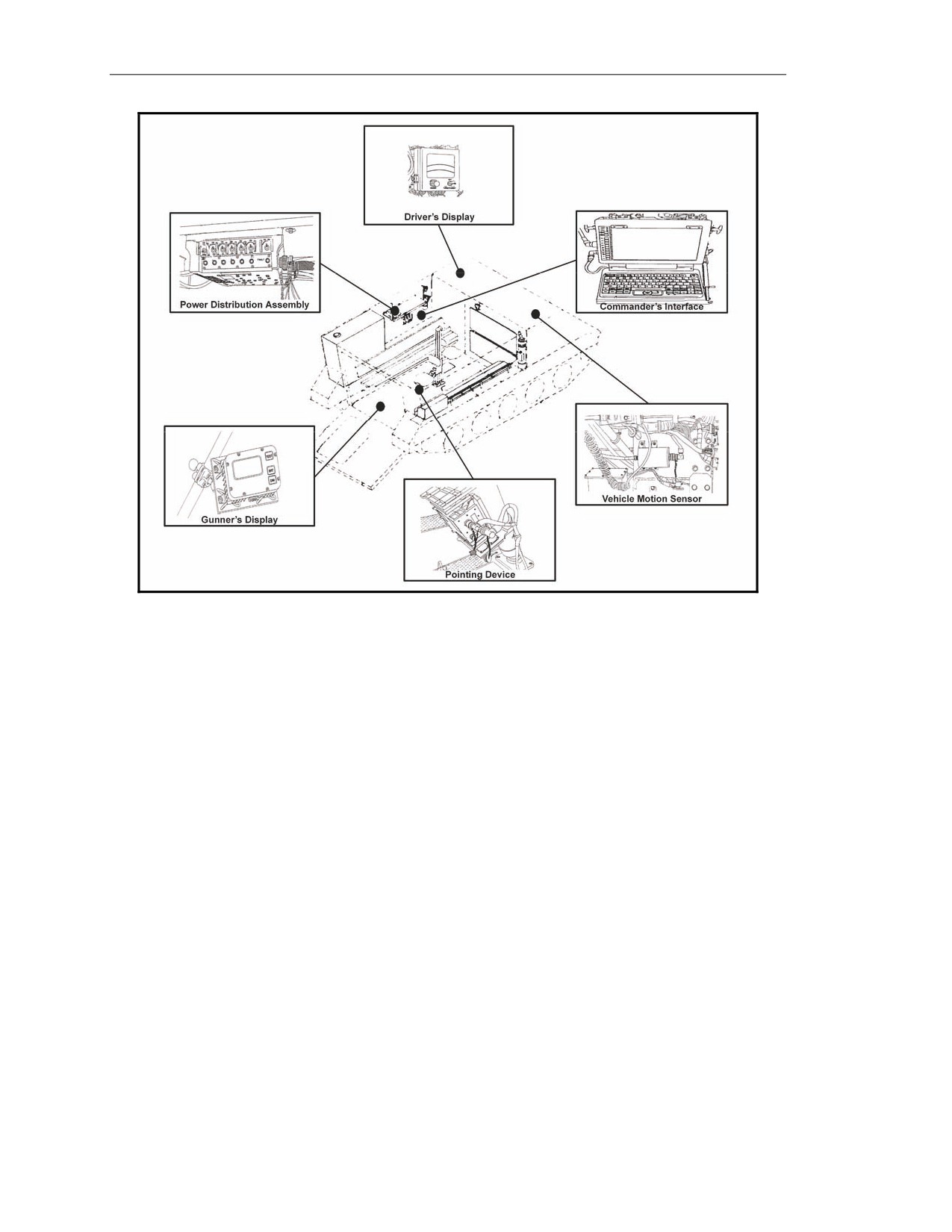
reference for the gun, and digital MET updates. The MFCS (Figure 15-1) enables self-surveying
mortars, digital call for fire exchange, and automated ballistic solutions.
NOTE: For more information about the MFCS, see TM 9-1220-248-10 and FM 3-22.90.
17 July 2008
FM 3-22.91
15-1
Chapter 15
Figure 15-1. Mortar Fire Control System.
COMMANDER’S INTERFACE
15-2.
The CI (Figure 15-2) is a computer terminal that provides high-speed data processing, an
LCD, and a QWERTY-style keyboard similar to that of a common personal computer. It has a built-in
modem, allowing a wide variety of data exchange requirements. The operator works with the CI’s
graphic user interface (GUI) to operate the system using the built-in mouse or the keyboard to point
and click buttons and tabs. Data are presented on screens designed for specific missions and
operations. The CI’s keys and their functions are as follows.
Function Keys
15-3.
Although the primary method of operating the CI is the built-in mouse, the operator can use
the F1 through F10 function keys (1, Figure 15-2) to make selections in the software (F11 and F12 are
not used). Table 15-1 identifies the assignment of keys.
15-2
FM 3-22.91
17 July 2008

Introduction
Table 15-1. Function keys.
FUNCTION KEY
ASSIGNMENT
F1
This Menu
F2
Use All
F3
Undo Changes
F4
FSCMs
F5
Hipshoot
F6
Final Protective Fire (FPF)
F7
Boresight
F8
Safety Fan
F9
Checkfire
F10
To Be Determined
F11
Not Used
F12
Not Used
Keyboard Backlighting Control
15-4.
This control (2, Figure 15-2) adjusts the intensity of the light (with off, low, and high
settings).
Number Lock Key and Indicator
15-5.
With blue numerals and arithmetic functions, these keys can be used as a number pad.
Inadvertent use of the Number Lock (NUM LK) key (3, Figure 15-2) may result in the inability to
perform other desired functions. When activated, the indicator light is illuminated.
Mouse
15-6.
The mouse (4, Figure 15-2) allows the operator to move the cursor on the screen and make
selections.
Windows Key
15-7.
The Windows key (5, Figure 15-2) is not used by the operator.
Alpha, Numeric, and Special Character Keys
15-8.
The alpha, numeric, and special character keys (6, Figure 15-2) function as a standard
keyboard to compose messages and enable operators to enter data into the system.
Blackout Key
15-9.
The Blackout key (7, Figure 15-2) blacks out the screen to guard against enemy detection in a
tactical environment.
Right, Left, Down, and Up Direction Arrow Keys
15-10. The right, left, down, and up direction arrow keys (11 through 14, Figure 15-2) enable
operators to make selections in the software. Mouse or keyboard use is recommended.
Enter Key
15-11. The Enter (ENT) key (15, Figure 15-2) brings up a menu of function keys.
Control, Alternate, and Escape Keys
15-12. The Control (CTL), Alternate (ALT), and Escape (ESC) keys (16 through 18, Figure 15-2)
are not used in this application.
17 July 2008
FM 3-22.91
15-3