FM 3-22.91 MORTAR FIRE DIRECTION PROCEDURES (July 2008) - page 5

Chapter 8
8-52. After the adjustment is complete, the FDC must perform the following procedures:
(1) Divide the target into equal segments by dividing the target's width by the number of mortars in
the FFE.
EXAMPLE
Target's width = 300 meters
Number of mortars in the FFE = 3
300/3 = 100 meters each mortar has to cover
(2) Determine and apply the modification
(either
+/í range correction or left/right deviation
correction). Divide the segment width by 2 to determine the appropriate modification. For
example, 100/2 = 50. Use one of the following methods to apply the modification.
Use Table 8-2 to determine the direction (plus or minus) for the modification.
Table 8-2. Gun-target azimuth chart.
GUN-TARGET AZIMUTH 4901-1499
TRAVERSE LEFT (+)
TRAVERSE RIGHT (-)
GUN-TARGET AZIMUTH 1500-1700
ATTITUDE < 1600
ATTITUDE > 1600
TRAVERSE LEFT (-)
TRAVERSE LEFT (+)
TRAVERSE RIGHT (+)
TRAVERSE RIGHT (-)
GUN-TARGET AZIMUTH 1701-4699
TRAVERSE LEFT (-)
TRAVERSE RIGHT (+)
GUN-TARGET AZIMUTH 4700-4900
ATTITUDE < 1600
ATTITUDE > 1600
TRAVERSE LEFT (+)
TRAVERSE LEFT (-)
TRAVERSE RIGHT (-)
TRAVERSE RIGHT (+)
EXAMPLE
Consider a GT of 5300 mils, traverse right. Since the GT azimuth falls in the azimuth block of 4901-
1499, the modification will be a plus if traversing left and a minus if traversing right. Since the mortars
will traverse right, their modification will be −50.
OR
When the FDC finds itself without the GT azimuth chart, personnel need an alternative
method of computing the modification. Therefore, draw the situation to help new FDC
personnel understand how and why the MBC computes the traverse data.
8-16
FM 3-22.91
17 July 2008
Types of Missions
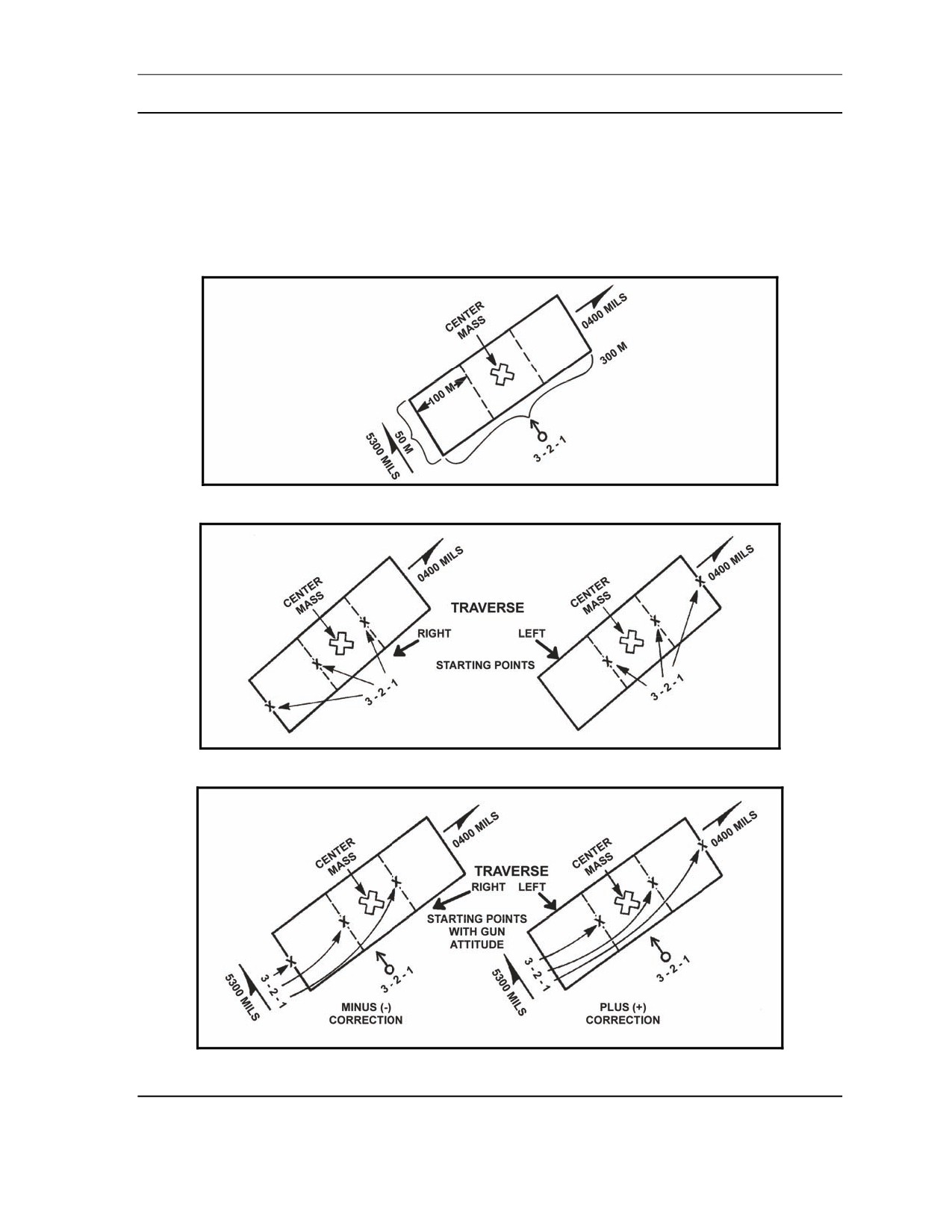
EXAMPLE (Figures 8-3 through 8-5)
Target = 300 x 50 meters
Attitude (TGT) = 0400 mils
GT azimuth (DOF) = 5300 mils
Three-mortar section
Guns must be placed so they are using the direction of the target's attitude (400 mils). The FDC
determines if it needs a plus or minus correction to get to the starting point.
Figure 8-3. Example situation chart number 1.
Figure 8-4. Example situation charts numbers 2 and 3.
Figure 8-5. Example situation charts numbers 4 and 5.
17 July 2008
FM 3-22.91
8-17
Chapter 8
OR
Use the following procedure:
(1) Determine the perpendicular to the attitude (add or subtract 1600 mils; use whichever
is closer to the final azimuth of fire), and apply the modification as a left or right
correction. When computing for firing data using the perpendicular, copy the range
and burst point grid coordinates, and the final azimuth of fire.
(2) Add or subtract 1600 mils from the target's attitude. Use the answer that comes closest
to the final azimuth of fire for the direction correction in the ADJ menu.
(3) Select the ADJ switch, and change the direction to the perpendicular azimuth.
(4) Make a deviation correction instead of making a range correction (as in previous
examples). This correction is one-half the distance each mortar must cover.
(5) Enter a right deviation correction if traversing left; enter a left deviation correction if
traversing right.
(3)
Once the modification has been entered into the ADJ menu of the MBC, press the TFC switch,
and change or enter the following data:
Change SHEAF:PRL to read SHEAF:SPECIAL.
Change ADJ PT:FLANK to read ADJ PT:CENTER.
Enter the target's width (total area to be covered in the CFF), such as 300 x 50 meters.
Enter target's attitude, such as 400 mils.
Change CON:AF to read CON:FFE.
Press the COMPUTE switch and receive firing data.
(4)
Determine the number of rounds for each segment.
EXAMPLE
Assume that the target is 350 meters wide.
(1) Divide the area into equal segments: 350/3 = 116. Each mortar covers 116 meters of
the target area.
(2) Determine the number of rounds needed to cover one segment: 4 rounds (for 100
meters) + 1 round (for the remaining 16 meters) = 5 rounds per segment.
(5) Determine the mil width of one segment; the other segments are the same. Use one of two
methods to determine the number of mils for one segment:
In the first method, the start point deflections for all the mortars are given. Compare the mil
difference between either No. 1 mortar and No. 2 mortar or No. 2 mortar and No. 3 mortar
(or No. 3 mortar and No. 4 mortar, if available). For example, No. 1 mortar has a deflection
of 2719 mils, and No. 2 mortar has a deflection of 2773 mils. The mil difference is 54 mils
(subtract the smaller from the larger: 2773 - 2719 = 54 mils).
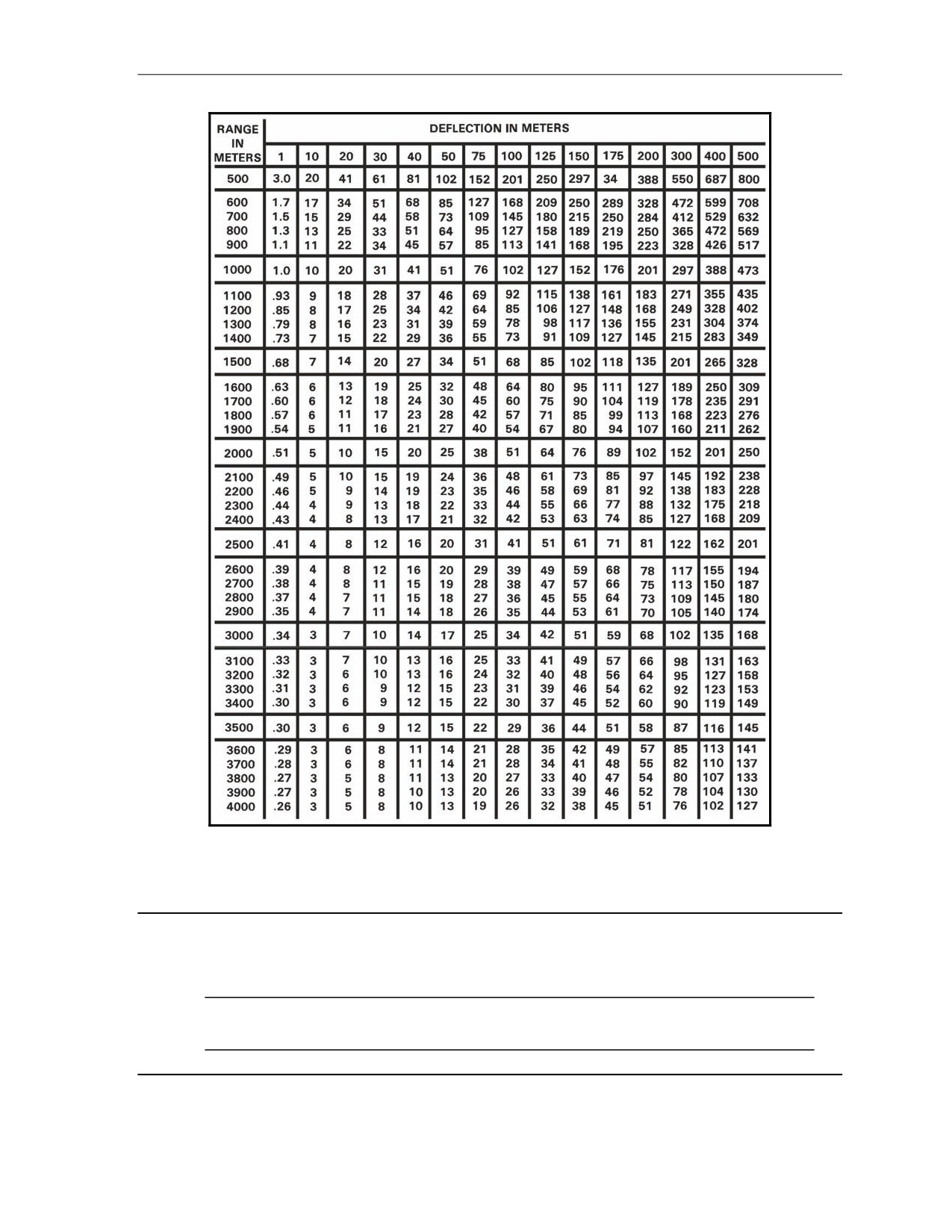
The second method uses the deflection conversion table (DCT, shown in Figure 8-6). Enter
the DCT at the final range, rounded off to the nearest 100. Follow the deflection in meters
line to the closest meters to cover the segment. The point at which the range line and the
deflection line meet is the number of mils that will cover the segment.
8-18
FM 3-22.91
17 July 2008
Types of Missions
Figure 8-6. Example of deflection conversion table.
(6) To determine the number of turns it will take to cover one segment, divide the number of mils
for each turn on the traversing handcrank by the mil width of one segment.
EXAMPLE
10 (number of mils for each turn) ÷ 54 = 5.4 (rounded off to the nearest 1/2 turn) or 5 1/2 turns to
cover 116 meters
NOTE: Divide by 5 (mils per turn) when using the 120-mm mortar. There are 10 mils
per turn of the deflection handwheel for both the 60-mm and 81-mm mortars.
17 July 2008
FM 3-22.91
8-19
Chapter 8
(7) To compute the number of turns between rounds, the number of rounds to be fired must be
known for each segment (FFE). This information is in the FDC order. To determine the turns
between rounds, divide the total turns by the intervals (always one less than the number of
rounds) between rounds.
EXAMPLE
5 rounds
=
4 intervals; 5.5 (total turns) ÷ 4 (intervals):
5.5 ÷ 4
=
1.3 (rounded to nearest 1/2 turn)
1.3
=
1 1/2 turns between rounds
SEARCHING FIRE
8-53. Mortars use searching fires to effectively engage area targets that have more depth than a linear sheaf
covers. Targets having more depth than 50 meters can be covered by mortars by elevating or depressing the
barrel during the FFE.
8-54. In the CFF, the FO sends the target's size and attitude. He gives the width and depth on the target's
attitude. Attitude is the direction (azimuth) through the target's long axis.
8-55. All mortar systems use searching fire. Before determining the search data, the FDC must compute
any corrections sent with the FFE command and record the burst point grid coordinates.
(1) Press the ADJ switch, and enter the target's attitude in place of the direction.
NOTE: Whether searching up or down, always determine the firing data for the far edge of the
target area first. This saves time if the charge designated at the near edge differs from the one
designated at the far edge.
(2) When using searching fire, enter an add correction that is half the total target length. This places
the mortars on the far edge of the target.
(3) Compute and record the firing data for the far edge.
(4) Enter a correction to place the mortars on the opposite edge of the target. The correction will be
a drop, and the distance will be the entire length of the target area.
(5) Compare the charge needed to hit the near edge of the target with the charge needed to hit the
far edge. The charges must be the same. If they are not, select the charge designated for the far
edge using the WPN/AMMO menu, and recompute the near edge firing data.
(6) Determine the number of turns between rounds by determining the mil distance needed to cover
the target area and dividing it by 10 (approximate number of mils in one turn of the elevation
handcrank). Round off the answer to the nearest one-half turn. Compute the distribution of
mortar fire to cover area targets (depth or width) at one round for each 30 meters and four
rounds for each 100 meters.
Compare the far edge elevation to the near edge elevation, and subtract the smaller from the
larger.
Divide the mil distance by 10 (divide by 5 for the 120-mm mortar), and round off to the
nearest half turn.
(7) Determine the turns between rounds by dividing the intervals into the turns and rounding off to
the nearest half turn. The intervals are always one less than the number of rounds in the FFE.
8-20
FM 3-22.91
17 July 2008
Types of Missions
ILLUMINATION
8-56. Illumination assists friendly forces with light for night operations.
8-57. The FDC uses one of the flank mortars to adjust the illumination, leaving the base mortar ready to
adjust HE rounds if a target is detected.
NOTE: Normally, when a four-mortar section is firing, the No. 4 mortar is used to adjust the
illumination, leaving the No. 2 mortar as the base mortar. When the No. 1 mortar is used to
adjust illumination, the No. 3 mortar becomes the base mortar.
8-58. The FO makes range and deviation corrections for illumination rounds in increments of no less than
200 meters. He also makes corrections for height of burst (up or down) in increments of no less than 50
meters.
8-59. Multiple mortar illumination procedures are used when single mortar illumination does not provide
enough light or when visibility is poor. Two mortars, usually side-by-side, fire rounds at the same time at
the same deflection, charge, and time setting to provide a large amount of light in a small area. If the FO
suspects a large target or if he is uncertain of the target's location and wishes for a larger area to be
illuminated, he may call for illumination:
z
Range.
z
Lateral.
z
Range-lateral spread.
RANGE SPREAD
8-60. Two mortars fire one round each at the same deflection, but with different charges so that rounds
burst at different ranges along the same line.
8-61. The spread between the rounds depends on the type of mortar firing the mission. The 120-mm
mortar rounds have 1,500 meters between bursts, and the 81-mm mortar rounds have 500 meters between
bursts.
8-62. When four mortars are present in the firing section, the No. 2 and No. 3 mortars normally fire the
range spread. When firing a three-mortar section, the range spread may be fired with just one mortar,
which fires both rounds. Follow these procedures:
(1) Enter the type of target location called in by the FO into the MBC to initiate the mission. The
weapon selected by the FDC in the WPN/AMMO menu (to activate the section) should be one
of the mortars that will fire the mission. The initial firing data determined for the mission are
center of mass target data. These data are not fired, but are used as the starting point for
adjustment of the spread.
(2) Enter the ADJ menu. Change the OT direction to GT direction, and enter a correction for the
first round of the spread. Compute and record the firing data.
(3) Select the ADJ menu, and enter a correction to achieve the required distance between rounds,
which depends on the mortar system being used.
(4) Compute and record the firing data, and fire the two rounds for the range spread.
NOTE: The two rounds should burst at the same time. The far round must be fired first, with
the near round being fired afterward, at the difference between the time settings.
17 July 2008
FM 3-22.91
8-21
Chapter 8
EXAMPLE
Assume the mortar selected to fire is the No. 2 mortar.
(1) Enter the initial target location, and determine the center of mass data.
(2) Enter the ADJ menu, and give the No. 2 mortar a correction of +250 (for 81-mm
mortars) or +750 (for 120-mm mortars).
(3) Compute and record these data.
(4) Enter the ADJ menu again, and make a correction of -500 (for 81-mm mortars) or -1500
(for 120-mm mortars).
(5) Compute and record these data.
(6) Use both sets of data to fire the rounds; rounds will burst at the desired length (1,500
meters for 120-mm mortars, and 500 meters for 81-mm mortars) between the rounds
on the GT line.
NOTE: A range spread should be fired with one mortar firing both rounds— one long and one
short.
LATERAL SPREAD
8-63. When using lateral spread, two mortars fire one round each at different deflections, but with the
same charge. Therefore, the rounds burst at the same range, along the same attitude.
(1) Use the No. 2 mortar to process the CFF, and determine firing data for the center of mass.
(2) Use the ADJ menu to enter left and right corrections. Use the GT as the direction, and enter the
first correction.
NOTE: The No. 2 mortar is used for the initial round. The first correction can be either a right
or left correction. For example, the first correction for the 81-mm mortar round is 250; the first
correction for the 120-mm mortar round is L 750.
(3) Compute and record the firing data.
(4) Select the ADJ menu, and enter the reverse of the first correction, the entire distance required
between rounds: L/R 500 meters for the 81-mm mortar, or L/R 1,500 meters for the 120-mm
mortar.
8-22
FM 3-22.91
17 July 2008
Types of Missions
RANGE-LATERAL SPREAD
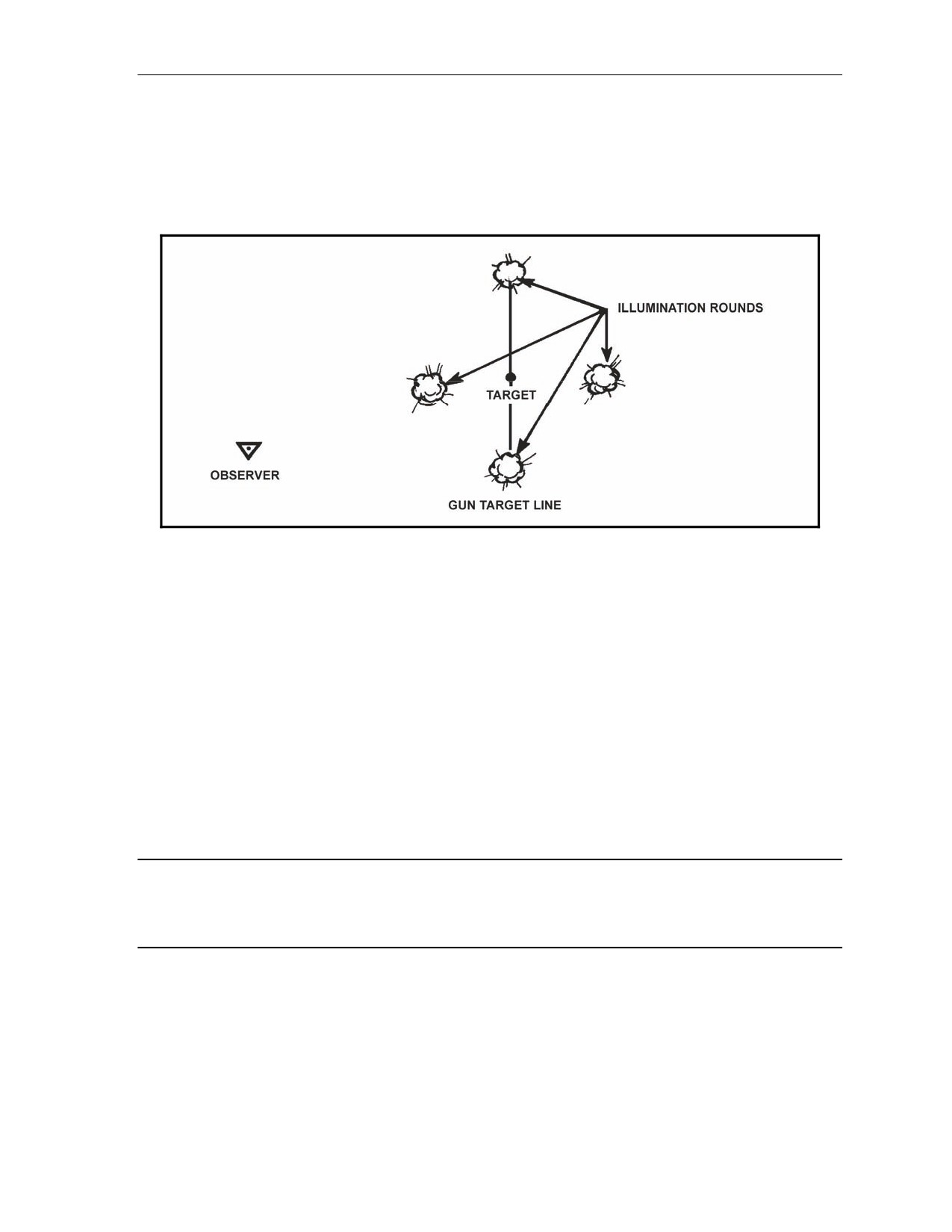
8-64. If the target area is extremely large or if visibility is limited, the FO may call for a range-lateral
spread (Figure 8-7). This procedure combines the two methods to form a large diamond-shaped pattern of
bursts. Using flank mortars for the lateral spread and center mortars for the range spread removes the
danger of rounds crossing in flight.
Figure 8-7. Range-lateral spread.
COORDINATED ILLUMINATION
8-65. When a suspected area is illuminated and produces a target, coordinated illumination is used to
engage the target.
(1) The illumination round has been adjusted over the target area. The computer receives a CFF for
coordinated illumination.
(2) The mark method is the method of coordinated illumination most commonly used. The FDC and
the FO must know for which round the illumination mark will be given.
(3) When the illumination round has been adjusted to provide the best light on the target, the FO
gives the command, "Mark illumination." The FDC times the flight of the round from the time it
is fired until the command, "Mark."
(4) Before computing the time to fire the HE round, the computer drops all tenths and subtracts the
time of flight for the HE round and the illumination round.
EXAMPLE
Illumination round - 53 seconds and the HE round - 19 seconds = time to fire the
HE round will be 34 seconds after the illumination round is fired
(5) When firing coordination missions, the computer operator uses a new DA Form 2399-R to
record the illumination mission. The data used to fire the first illumination round is taken from
the DA Form 2399-R used to adjust the illumination mission.
(6) The FO sends corrections and precedes each correction with the type of round the correction is
intended for. For example, "Illumination. Up five zero. HE. Right five zero. Add five zero." He
records each correction on separate lines. The FDC keeps track of the 50-meter increments by
using the DA Form 2399-R of the illumination mission.
17 July 2008
FM 3-22.91
8-23
Chapter 8
(7) There are two methods normally used to adjust illumination (mark method and shell) and HE.
Coordinated illumination using the mark method involves the FDC controlling the firing of both
the HE and illumination rounds, and coordinated illumination using the shell method involves
FO commands. The FO controls the firing of each round. The FO sends corrections and
computes the data that is sent to the mortars from the FDC. The mortars then report when they
are up. The FDC notifies the FO, and the FO gives the command to fire each round.
(8) When the FO is certain that he can hit the target with the next round, he commands,
"Continuous illumination. Fire for effect" or "Continuous illumination. HE. Drop twenty-five.
Fire for effect."
(9) By requesting the continuous illumination, the FO is telling the FDC that he wants the target
illuminated both during and after the fire for effect to allow him to make his target surveillance.
Upon completion of the mission, he records the data on the DA Form 2188-R.
8-24
FM 3-22.91
17 July 2008
Chapter 9
Special Procedures
Procedures for basic fire missions are simple and require little coordination by the
indirect fire team. The one element that is lacking in these procedures is accuracy,
which the indirect fire team strives to improve. In-depth planning and prior
coordination between the elements of the indirect fire team help ensure the delivery
of timely and accurate fires. This chapter discusses the special procedures needed to
conduct registration missions, FPF, and quick or immediate smoke.
REGISTRATION AND SHEAF ADJUSTMENT
9-1. If time and the tactical situation permit, the registration is the first mission completed. The two types
of registration missions are coordinated and uncoordinated.
COORDINATED REGISTRATION
9-2. A coordinated registration is a planned mission using an available surveyed RP, known to at least an
eight-digit grid coordinate. Firing corrections may be determined and applied after the registration mission
is fired. The FDC usually initiates this mission.
UNCOORDINATED REGISTRATION
9-3. An uncoordinated registration is not planned, and units may not have a surveyed RP to fire upon.
This registration is used mainly to adjust the sheaf and to establish a known point within the area of
responsibility. If the RP is not surveyed, firing data corrections cannot be determined or applied. The FO
usually initiates this mission.
MBC REGISTRATION PROCEDURES
9-4. When using the MBC for registration, the computer processes the mission as a standard grid mission
until the FO determines that the registration is complete. He adjusts the basepiece onto the RP as in any
standard adjust mission. Once the FDC receives a “Registration complete” call from the FO, he computes
any refinement corrections received with the command. After these data are given to the mortars, the
section fires a section left or a section right. The basepiece does not fire.
EXAMPLE
Consider a final correction of “Drop 25, registration complete,” sent by the FO. Perform the following
actions:
(1) Use the ADJ menu to enter the correction of −25.
(2) Press the COMPUTE switch to process the refinement data.
NOTE: Step 3 applies to coordinated registrations only.
(3) Press the REG fire mission switch once the refinement firing data are available.
(4) The registration number and FO identification (if the FO was entered with the CFF) are
displayed.
17 July 2008
FM 3-22.91
9-1
Chapter 9
(5) Press the SEQ switch.
(6) The mission target numbers are displayed.
(7) Press the SEQ switch.
(8) The FO’s direction to the target is displayed.
(9) Press the SEQ switch.
(10)The RP grid is displayed.
NOTE: This grid is the initial grid used from the CFF, not the adjusting point grid.
(11)Press the SEQ switch.
(12)The altitude of the RP is displayed.
(13)Press the SEQ switch.
(14)The weapon caliber and number of the adjusted piece are displayed.
(15)Press the SEQ switch.
(16)The charge used to reach the RP is displayed.
(17)Press the SEQ switch.
(18)The MBC provides a prompt to push COMPUTE to determine the firing corrections.
(19)Press the COMPUTE switch.
(20)The assigned RP number is displayed.
(21)Press the SEQ switch.
(22)The type of MET used and the range correction factor (RCF) are displayed.
(23)Press the SEQ switch.
(24)The type of MET used and the deflection correction are displayed.
(25)Press the SEQ switch.
(26)"READY" is displayed.
9-5. As shown in the example above, the MBC has determined the firing corrections; while it will not
apply them to any subsequent data during this mission, it automatically applies the correction factors to all
following missions that are within the transfer limits of this RP. The FDC copies this data to the
appropriate spaces on the DA Form 2188-R.
9-6. To prepare the MBC for sheaf adjustments, the computer uses the TFC menu to change the control
from "CON:AF" to "CON:FFE,"and then presses the COMPUTE switch.
NOTE: The operator must change "CON:AF" to "CON:FFE" and press COMPUTE before
adjusting individual guns.
9-7. The FDC initiates the sheaf adjustment by telling the FO, “Prepare to adjust the sheaf.” The FO
responds with, “Section left/right.” The section left/right is fired without the basepiece, unless the FO
specifies otherwise. The operator prepares to receive corrections for each mortar not firing within the
sheaf. Then, he records the corrections and computes them separately.
NOTE: The MBC can only compute one correction at a time; therefore, if the computer records
the corrections, he may compute for the corrections as he desires. Smaller corrections should be
entered first since the mortars will not likely be fired again.
9-2
FM 3-22.91
17 July 2008
Special Procedures
9-8.
To adjust the sheaf—
(1) Press ADJ.
(2) Sequence to "ADJ:AUF" ("Adjusting:Adjusting Unit of Fire").
(3) Change the "AUF" to "SHEAF."
(4) Sequence to "WPN:."
(5) Enter the number of the weapon that requires adjustment.
NOTE: The correction impacts only the weapon identified. Other weapons will still use the last
firing data.
(6) Enter the correction.
(7) Compute the correction.
NOTE: If a correction is over 50 meters, the mortar will be refired. If the correction is less than
50 meters, the mortar will not be refired, but the correction will be made.
(8) Use the ADJ switch, and sequence to "WPN:NXT CONT."
The abbreviation "WPN" is for weapon.
The abbreviation "NXT" is for the next mortar to adjust.
The abbreviation "CONT" means continue with the same mortar identified above.
(9) Sequence to "WPN:."
(10) Enter the weapon that requires adjustment and the correction.
(11) Compute the correction.
(12) Use the firing data menu to sequence through the data and record the new fire commands.
9-9.
After the sheaf has been adjusted, the section/platoon must refer the sight and realign the aiming post
on the last deflection of the basepiece used for the registration. The mission is ended using the EOM menu.
9-10. The computer uses the REG DATA menu to store and update information concerning the RP. Then,
the MBC applies the correction factors to all subsequent fire requests that are within the transfer limits of
the RP.
9-11. The RP must be updated for any MET data or reregistrations. To update or reregister on the RP, the
computer follows the same procedures as a grid mission until the FO determines that the update or
reregistration is complete. The operator will then—
(1) Press the REG DATA switch.
(2) Press the display switch under "NXT."
(3) "RP00" is displayed.
(4) Press the display switch under "CLR."
(5) "CLEAR RP 00 *" is displayed.
(6) Press the display switch under "*."
(7) "RP: NXT CLR" is displayed.
(8) Press the BACK switch until "READY" appears.
(9) Press the REG switch.
(10) Sequence through until "PUSH COMPUTE" appears.
(11) Press the COMPUTE switch for a new deflection correction and RCF.
(12) Press the EOM switch instead of EOMRAT. Data is stored already from the initial registration
mission.
17 July 2008
FM 3-22.91
9-3
Chapter 9
MEAN POINT OF IMPACT REGISTRATION
9-12. Special procedures permit registration under unusual conditions. This paragraph discusses one of the
special procedures available, the mean point of impact (MPI) registration. Fire cannot be visually adjusted
onto an RP at night without illumination. During desert, jungle, or arctic operations, clearly defined RPs
are not usually available.
9-13. In an MPI registration, two FOs are normally used. For accuracy, the computer must know the
location and altitude of each FO and enter the information into the MBC using the FO LOC menu. The
computer must also know the expected point of impact and mortar position.
9-14. To determine the initial firing data—
(1) Start the mission using the GRID menu.
(2) Enter the expected burst point (as the grid to the target) and altitude.
NOTE: An FO ID and direction should not be entered using this menu.
(3) Use the WPN/AMMO menu to assign the mission to an adjusting piece.
(4) Press COMPUTE to determine the firing data and record the necessary information, such as the
burst point to the target.
NOTE: The MBC does not allow access to the MPI menu under the ADJ switch until a mission
has been activated using the GRID and WPN/AMMO menus.
9-15. After the FOs' locations and the target point are known, the FDC computes and reports the orienting
data to the FOs.
NOTE: The FOs must be given their orienting data before firing.
9-16. To determine the observer's orienting data—
(1) Press the ADJ switch.
(2) Select "MPI:."
(3) "FILE CONT INIT" is displayed.
(4) Select "INIT" to initialize the MPI mission.
(5) "INIT YES NO" is displayed.
(6) Select "YES."
(7) The MBC provides a prompt for one of the FOs' IDs.
(8) Enter one of the FOs' IDs.
(9) Press the SEQ switch.
(10) The orienting direction for the FO entered displays.
(11) Press the SEQ switch.
(12) The vertical angle for the FO entered displays.
(13) Press the SEQ switch.
(14) Enter the target number.
(15) Press the SEQ switch.
(16) The orienting data are ready to be transmitted to the FO. If the MBC is DMD-supported, select
"YES" to digitally transmit the information. If the MBC is not DMD-supported, select "NO."
(17) The MBC provides a prompt for the other FO's ID.
(18) Follow steps (8) through (16) for the other FO.
9-4
FM 3-22.91
17 July 2008
Special Procedures
(19) If the MBC is not DMD-supported, transmit the orienting data to the FOs using the following
format:
FDC: Prepare to observe MPI registration. Hotel 42. Direction 2580. Vertical angle
+40. Hotel 41. Direction 2850. Vertical angle +10. Report when ready to
observe.
9-17. The FOs should announce, “Ready to observe,” after they have received their orienting data and
have set up their instruments.
9-18. The section leader/chief computer directs the firing of the orienting round using the computed firing
data. The FOs use the round to check the orientation of their instruments. The orienting round should be
within 50 mils of the expected point of impact.
z
If the round lands 50 mils or more away from the expected point of impact, the FO reorients his
instrument and announces the new direction to the FDC. If one FO reorients his instrument, the
other FO's spotting is disregarded. When either of the FOs must reorient, the operator enters the
new direction using the ADJ menu and follows these procedures:
Enter the ADJ menu.
Press the ADJ switch.
Select "MPI."
Select "INIT."
Reenter the FO’s ID when prompted.
z
If the burst impacts less than 50 mils away from the expected point of impact, the FO sends the
FDC a spotting. The spotting contains the number of mils left or right of the expected point of
impact.
9-19. When both FOs report that their instruments are ready, the adjusting mortar fires the number of
rounds needed to get six usable spottings. The FDC enters these spottings into the MBC.
9-20. To enter the spottings into the MBC—
(1) Press the ADJ switch.
(2) Select "MPI."
(3) The computer displays "FILE CONT INIT."
(4) Select "FILE" to enter the spottings.
(5) The MBC requests the sighting number.
(6) Enter the sighting number.
(7) Press the SEQ switch.
(8) Determine the azimuth from the FO to the target using the RALS (right add, left subtract) rule.
Add or subtract this correction from the FO’s referred (orienting) direction. Enter the azimuth as
the FO’s direction.
(9) Press the SEQ switch.
(10) The MBC prompts for the vertical angle from the FO to the round. Enter the vertical angle, if
any.
(11) Press the SEQ switch.
(12) The second FO’s ID is displayed.
(13) Enter the sighting number.
(14) Determine the azimuth from the FO to the target using the RALS rule. Add or subtract the
correction from the FO’s referred direction. Enter the azimuth as the FO’s direction.
17 July 2008
FM 3-22.91
9-5
Chapter 9
NOTE: The MBC computes for only one vertical angle correction. This correction applies only
to the first FO entry. When the vertical angle entry must be computed, the operator ensures that
the proper FO is entered.
(15) Press the SEQ switch.
(16) The MBC prompts the operator for the next sighting.
(17) Press the COMPUTE switch.
(18) Enter the FOs' sightings as described until all sightings have been entered. After the last sighting
has been entered, select "END" on this display.
(19) Press the COMPUTE switch.
(20) Sequence to view the RP corrections.
(21) Press the EOM switch to end the mission.
RADAR REGISTRATION
9-21. The radar registration requires only one OP: radar. It requires less survey, fewer communication
facilities, and less coordination. Radar registration can be conducted quickly and during poor visibility.
NOTE: Radar registrations may be conducted as grid or polar plot missions. Grid mission
procedures are discussed below.
9-22. Radar registration missions are coordinated missions and are conducted as normal grid missions with
the following exceptions:
z
The FO does not send corrections; he sends grid coordinates to the impact of the rounds fired.
z
The FDC, instead of the FOs, converts spottings to corrections.
9-23. The following example depicts a radar registration mission and outlines the proper procedures.
EXAMPLE
(1) The FDC sends an MTO: “Prepare to register RP 1, grid 03817158.”
(2) The radar operator orients his radar set and tells the FDC, “Ready to observe.”
(3) The first round is fired, and the radar operator sends a grid of the round's impact point
to the FDC.
(4) The FDC records the eight-digit grid coordinates and compares it to the RP grid
coordinates to determine the spotting. Then, he sends a grid (03557120) to the first
round fired.
Easting
Northing
RP grid
0381(0)
7158(0)
First round grid
- 0355(0)
- 7120(0)
26(0)
38(0)
NOTE: To use 10-digit grid coordinates, add a zero to the end of each easting or
northing coordinate until there are 10 digits. For example, the grid 123456 becomes
1230045600.
9-6
FM 3-22.91
17 July 2008
Special Procedures
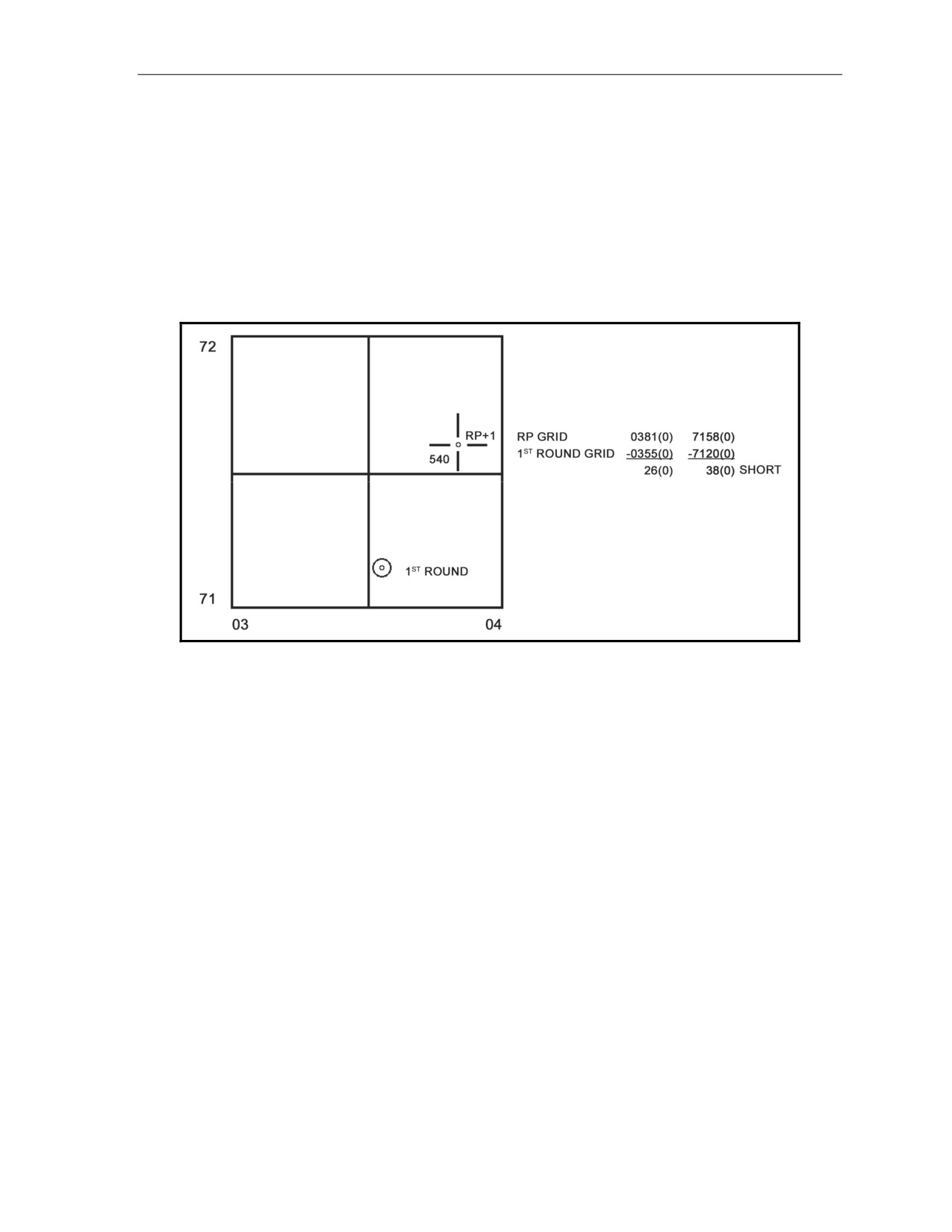
Using a blank piece of scrap paper, the FDC draws a large square to represent a
1,000-meter grid square.
The FDC labels the bottom left corner of the square with the grid intersection of the
RP (03/71) (Figure 9-1).
He divides the large square into four smaller squares by drawing a line through the
center of the box from top to bottom and from left to right.
He estimates the location of both grid coordinates and plots them inside the box.
By looking at these plots, the FDC can tell whether the round is left or right and
over or short of the RP. This is the spotting of the round. For this example, the
spotting is left (260 meters) and short (380 meters).
Figure 9-1. Determination of a spotting.
The spotting is then converted to a correction by converting the left spotting to a
right correction (R 260) and the short spotting to an add correction(+ 380). Using
the ADJ menu, the operator enters the corrections:
o Change the direction to 6400 (or 0000).
o Enter "R 0260" for the deviation correction.
o Enter "+ 0380" for the range correction.
o Sequence to "READY."
The operator then computes the firing data and sends it to the guns.
(5) The second round is fired, and the FO sends the grid coordinates (04007180). The
second correction follows the same process as the first correction.
The FDC compares the grids and determines the spotting ("Right 190" and "Over
220").
The corrections (L 190 and - 220) are made in the ADJ menu, and the firing data
are sent to the mortars.
(6) The computer repeats this procedure until the spotting is within 25 meters of the RP
and the FO has given “End of mission, registration complete.” The FDC—
Enters the final correction through the ADJ menu and computes the data.
Presses the REG switch and sequences through the REG menu. He ensures that
the data pertaining to the RP are correct.
Presses COMPUTE when indicated at the end of the REG menu to determine the
RCF and deflection correction (DEFK).
17 July 2008
FM 3-22.91
9-7
Chapter 9
(7) After the registration is completed, the FDC informs the FO, “Prepare to adjust the
sheaf.” To adjust the sheaf—
The FDC converges the sheaf on the RP. Using the TFC switch, the operator
changes the method of control (CON) from "AF" to "FFE."
The operator sequences through the menu, ensuring that all data match with the FDC
order. He presses the COMPUTE switch when the MBC reads "PUSH COMPUTE."
All mortars are fired (except the BP) at 10- to 20-second intervals.
The radar operator sends the FDC the grid coordinates of the impact of each round fired.
The FDC compares the impact grid coordinates with the grid coordinates of the RP
and determines the deviation corrections for each mortar. THE FDC DOES NOT
USE RANGE CORRECTIONS.
NOTES:
1. The operator compares the full grid coordinates of all rounds fired. Any
extreme deviation or range spotting means that there is a problem in the
setup of that mortar position.
2. If the operator is using the MBC to apply these corrections, he must first
enter and compute all corrections under 50 meters.
All corrections more than 50 meters are refired, the new grids are compared to the
RP grid, and the new data are computed for those weapons.
(8) Once the sheaf is adjusted, the FDC must open the sheaf. Using the DCT, the FDC opens
the sheaf mathematically the distance required based on the mortar system used.
(9) The FDC now has the mortars refer their sights to the hit data (the deflection, elevation,
and charge used to hit the RP).
FINAL PROTECTIVE FIRES
9-24. FPFs are the highest priority missions that the mortar section/platoon fires. They are prearranged
barriers of fire designed to protect friendly troops and to stop the enemy’s advance. When integrated with
the supported units' other weapons, FPF cover dead space and likely avenues of approach. Normally,
mortar FPFs are targeted on an avenue of likely dismounted attack. They can be any distance from the
friendly position that fits into the ground commander’s situation, but are always within the range of organic
direct-fire weapons (normally within 100 to 400 meters of friendly troops) (Table 9-1).
NOTE: The approximate widths below are based on linear sheaves.
Table 9-1. Normal final protective fire dimensions, for each number of mortars.
AMMUNITION
NUMBER OF
WIDTH
DEPTH
SIZE
TYPE
SERIES
MORTARS
(in meters)
120-mm
M120
M9xxxx
4 (platoon)
240
70
120-mm
M120
M9xxxx
2 (section)
120
70
81-mm
M252
M3xxxx
4 (platoon)
140
40
81-mm
M252
M3xxxx
2 (section)
70
40
81-mm
M252
M8xxxx
4 (platoon)
160
50
81-mm
M252
M8xxxx
2 (section)
80
50
60-mm
M224
M7xxxx
2 (section)
50
30
9-8
FM 3-22.91
17 July 2008
Special Procedures
NOTE: Ammunition is listed by series. M8xxxx represents all ammunition beginning with the
prefix M8, such as M821 or M889.
PRECAUTIONS
9-25. The target location given in the CFF is not the FPF's location. The FO must add a 200- to 400-meter
safety factor to the FPF's location, but the FDC never adds a safety factor. Since the FPF is adjusted to
within 200 meters of friendly forces—
• The adjustment is danger close.
• The creeping method of adjustment is used.
PROCEDURES
9-26. FPF adjustments can be fired using one of two methods (in order of preference):
z
Adjusting mortar-by-mortar.
z
Adjusting danger close mortar only.
Adjustment Mortar-by-Mortar
9-27. In the CFF, the FO may give a section left or a section right to determine the danger close mortar
(the one impacting closest to friendly forces).
9-28. The operator uses the FPF switch to enter, compute, adjust, review, and delete data for FPFs. Three
FPFs may be stored and identified as line 1, 2, or 3, with each line located by a set of grid coordinates
marking the left or right limit. The stored data include the line number and fire commands for each weapon
assigned (up to six) for that line.
9-29. Then the altitude, width, and attitude are entered. When the corrections for each adjusting weapon
have been entered and recomputed, they are stored. Further corrections are not applied after advancing to
the next weapon. The corrections made to each mortar are automatically applied to the next weapon to be
adjusted. Follow these procedures:
NOTES:
1. The FO will tell the FDC the left or right limit grid (for example, L140 versus
FPF grid).
2. All adjusting rounds should be set for fuze delay to further reduce the danger to
friendly forces. After entering the FPF line, a safety fan may be entered.
(1) Press the FPF switch.
(2) Select "INIT."
(3) Enter the line number (1, 2, or 3) and the section/weapon number.
(4) The display shows "LINE: 1 WPN:A1."
(5) Press the SEQ switch.
NOTE: The default entry for shell/fuze combination (HE PD) is normally not changed.
(6) Press the SEQ switch.
(7) Select the GT, or enter the FO's direction to target.
(8) Press the SEQ switch.
(9) Enter the FPF right or left limit.
17 July 2008
FM 3-22.91
9-9
Chapter 9
NOTE: If the right limit grid coordinates are entered for the FPF, adjust the right flank mortar
first. If the left limit grid coordinates are entered for the FPF, adjust the left flank mortar first.
(10) Press the SEQ switch.
(11) Enter the FPF altitude (if known).
(12) Press the SEQ switch.
(13) Enter the left or right limit and the FPF line width in meters.
(14) The display shows "L R WID: L 350." The coordinate point becomes the left or right limit.
NOTE: The direction of the FPF should be left if the right flank mortar (No. 1) is adjusting and
right if the left flank mortar (No. 3 or No. 4) is adjusting.
(15) Press the SEQ switch.
(16) Enter the attitude of the FPF.
NOTE: The attitude of the FPF is a MANDATORY ENTRY.
(17) Press the SEQ switch.
(18) Follow the MBC's instructions.
(19) Press the COMPUTE switch to receive firing data.
(20) Sequence through the firing data until "ADJ *" is displayed.
NOTE: If the "ADJ*" selection is passed, the MBC displays "READY." To continue adjusting
the FPF, press the FPF mission switch, and select "ADJ." Proceed to step 22.
(21) Select the display key beneath the asterisk (*).
(22) Enter the number of the weapon that requires adjustment. If another weapon is to be adjusted,
select NXT.
NOTE: The MBC considers the previous weapon adjusted, and it saves the firing commands in
the FPF data file. When the last weapon is adjusted, select NXT in this display to end the
mission. The MBC displays "FPF ADJUSTED."
(23) Press the SEQ switch.
(24) The MBC displays the direction to the target.
(25) Press the SEQ switch.
(26) Enter the deviation correction from the FO (if any).
(27) Press the SEQ switch.
(28) Enter the range correction (if any).
(29) Press the SEQ switch. (The operator may change the height corrections from meters [default] to
feet.)
(30) Press the SEQ switch.
(31) Enter the vertical correction from the FO (if any).
(32) Press the SEQ switch.
(33) The MBC displays "PRESS COMPUTE."
(34) Press the COMPUTE switch to receive the firing data.
(35) Repeat the procedures in steps 20 through 34 until each weapon in the section has been adjusted.
Repeat the procedures in steps 20 through 21 to end the mission.
9-10
FM 3-22.91
17 July 2008
Special Procedures
Adjustment of Danger Close Mortar Only
9-30. In the CFF, the FDC is given the attitude of the target area. From this attitude, the FDC can
determine the danger close mortar.
z
The operator uses the FPF menu to fire and adjust as with the mortar-by-mortar method.
z
Once the danger close mortar is adjusted, the other mortars involved in the FPF will have firing
data already computed.
z
The difference between this method and the mortar-by-mortar adjustment method is that each
mortar will not actually fire on the FPF. Rather, the firing data for the nonfiring mortars are
calculated based on the firing data for the danger close mortar and the attitude of the target area.
DATA REVIEW
9-31. The FPF data for the section may be reviewed at any time using the FPF menu switch. To review the
data—
(1) Press the FPF switch, and select "DATA."
(2) Press the SEQ switch, and enter the line number of the FPF to be displayed.
(3) Sequence through the display to review each mortar’s data.
SAFETY DATA
9-32. After an FPF has been initiated, the operator can review the safety data at any time. To review the
data—
(1) Press the FPF mission switch. The sequence indicator should blink, indicating that another
choice is available (for multiple entries).
(2) Press the SEQ switch.
(3) The fifth choice, "SFTY," is displayed.
(4) Select the display key beneath the flashing cursor to select "SFTY."
(5) Press the SEQ switch.
(6) Enter the line number of the FPF safety data to be viewed.
(7) Press the SEQ switch.
(8) The MBC provides a prompt to press the SEQ switch to view the burst-point grid coordinate.
(9) Press the SEQ switch.
(10) The easting and northing are displayed.
(11) Press the SEQ switch.
(12) The maximum ordinate of the last round to its burst-point is displayed.
(13) Press the SEQ switch.
(14) The time of flight is displayed.
(15) Press the SEQ switch.
(16) "READY" is displayed.
17 July 2008
FM 3-22.91
9-11

Chapter 9
IMMEDIATE SMOKE OR IMMEDIATE SUPPRESSION
9-33. When engaging a planned target or a target of opportunity that has taken friendly forces under fire,
the FO announces (in the CFF) either immediate smoke or IS. The delivery of fires is performed as quickly
as possible; immediate response is more important than the accuracy of these fires.
z
FOs use immediate smoke missions to obscure the enemy’s vision for short periods. This aids
maneuver elements in breaking contact or evading enemy direct fire; these missions are not
intended as screening missions.
NOTE: Immediate smoke missions can cover an area of 160 meters or less (four guns, 81-mm
mortars; 240 meters, four guns, 120-mm mortars).
z
FOs use immediate suppression missions to indicate that the unit is receiving enemy fire. This
request should be processed at once. Planned and delivered to suppress the enemy, these fires
hamper enemy operation and limit his ability to perform his mission in the target area.
9-34. The procedures for firing an IS or immediate smoke mission are the same except for the ammunition
used. High-explosive quick
(HEQ) is used for the immediate suppression mission, and WP or red
phosphorus is used in the immediate smoke mission.
9-35. The procedures for firing these missions follow:
(1) The FDC receives a CFF from the FO. In the warning order, the word "immediate" will precede
either "suppression" or "smoke."
(2) The target location is normally expressed using grid coordinates. The FDC processes this CFF
as a normal grid mission using the GRID menu with one exception. After the WPN/AMMO
menu displays, the FDC will immediately use the TFC switch and change the method of control
(CON) from "AF" to "FFE."
NOTE: The TFC menu may be deleted from this procedure if the mortars to fire are parallel to
the rest of the section and if they are all the same distance apart (a perfect linear position).
WARNING
Using the default firing data for all guns in the firing section may
cause rounds to be fired outside of the safety fan or firing zone.
Therefore, always use the TFC menu when a safety fan or firing zone
is used. The MBC will warn the operator if any of the rounds for a
weapon will land outside the safety fan or firing zone. For
revision III/A, the operator must override the message in order to
continue.
(3) If any adjustments are needed, the entire section conducts them, firing the same number of
rounds each time, as in the previous command.
9-12
FM 3-22.91
17 July 2008
Special Procedures
QUICK SMOKE
9-36. The techniques that mortar units use to attack targets with smoke are influenced by factors
independent of the mission. These factors include—
z
Weather.
z
Terrain.
z
Dispersion.
z
Adjustment.
z
Distribution of fire.
z
Ammunition availability.
9-37. Clearance to fire, ammunition requirements, and general considerations discussed in this segment
apply to all mortars.
9-38. The mortar unit establishes screening smoke between the enemy and friendly units or installations. It
uses smoke to—
z
Hamper observation.
z
Reduce observed fire.
z
Hamper and confuse hostile operations.
z
Deceive the enemy as to friendly operations.
9-39. The main consideration in planning for a smoke screen is that it must accomplish its purpose without
interfering with the activities of friendly forces. This requires much planning. Authority to fire smoke
missions rests with the highest commander whose troops will be affected. The unit commander must ensure
that flank unit commanders who may be affected have been informed.
9-40. Normally, the section/platoon is given a smoke mission through command channels. The methods
used to accomplish the mission are not usually prescribed, but are developed by the section leader/chief
computer and the FO who will conduct the mission. The following factors help in deciding how to engage
the target.
AMMUNITION
9-41. The number of rounds required to establish and maintain a screen is based on the target's size and the
weather conditions affecting the dispersion of the smoke. The chief computer cannot accurately determine
the weather conditions that will exist at the time the mission is fired, but he does determine the amount of
ammunition for the most unfavorable conditions that might be expected.
9-42. A quick smoke mission is usually conducted in three phases:
z
Phase 1: Adjustment Phase. The computer adjusts the upwind flank mortar to the upwind edge
of the target area using HE ammunition. At the end of this phase, one round of WP is fired to
see if it hits the desired location.
z
Phase 2: Establishment Phase. The computer establishes the screen by firing twice the number
of rounds required to maintain the screen for one minute, but not less than 12 rounds. These
rounds are fired as quickly as possible (FFE phase for any other mission).
z
Phase 3: Maintenance Phase. The computer maintains the screen by firing the determined
number of rounds per minute (RPM), times the length of time the screen is to be in place.
17 July 2008
FM 3-22.91
9-13
Chapter 9
9-43. The computer uses the smoke chart to compute the number of rounds needed to maintain a screen for
one minute (Tables 9-2 and 9-3). This chart is prepared for various weather conditions and a screen 500
meters wide. Other widths are computed by scaling the values proportionally. To extract the proper value
from the chart, the FDC must know the—
z
Wind speed (confirmed by the FO before firing).
z
Wind direction (confirmed by the FO before firing).
z
Relative humidity (obtained from the battalion S2 or by estimation).
z
Temperature gradient (obtained from the battalion S2 or by estimation).
9-44. The temperature gradient is a measure of how air temperature changes with altitude. It determines
which line to use. Neutral occurs when there is no appreciable temperature change with an increase in
altitude (midday). It is the most common condition. Lapse conditions exist when the temperature changes
with an increase in altitude (evening). Inversion conditions exist when the temperature rises with an
increase in altitude (early morning).
9-45. The wind speed in knots determines which column to use. The box where the proper row and
column intersect contains the number of RPM needed to maintain a screen 500 meters wide for one minute
with a flank wind. The result (8.0, in this example) is always rounded up (no less than 12 rounds will be
fired in the establishment phase). Each mortar fires as follows:
z
120-mm mortar four gun platoon, 3 rounds each.
z
120-mm mortar two gun section, 6 rounds each.
z
81-mm mortar platoon, 3 rounds each.
z
81-mm mortar section, 6 rounds each.
EXAMPLE
For conditions of 60 percent humidity, a neutral temperature gradient, and a 4-knot wind, it would
take 4 rounds per minute to maintain a 500-meter screen with a flank wind. This is the smoke
chart table value.
To scale the screen to a different width, use the following procedure:
(1) Express the width as hundreds of meters.
400 meters would be expressed as 4.
(2) Multiply this number by 0.2 (the 500-meter scaling factor) to get the width factor.
4 (the width, in 100s of meters) x 0.2 (the 500-meter scaling factor) = 0.8 (width factor)
(3) Multiply the width factor by the table value for total rounds per minute.
0.8 (width factor) × 4 (table value) = 3.2
(4) Round this value (3.2) to the nearest whole number. This is the total number of rounds
to maintain for 1 minute.
3.2 = 4 (rounds per minute)
9-14
FM 3-22.91
17 July 2008
Special Procedures
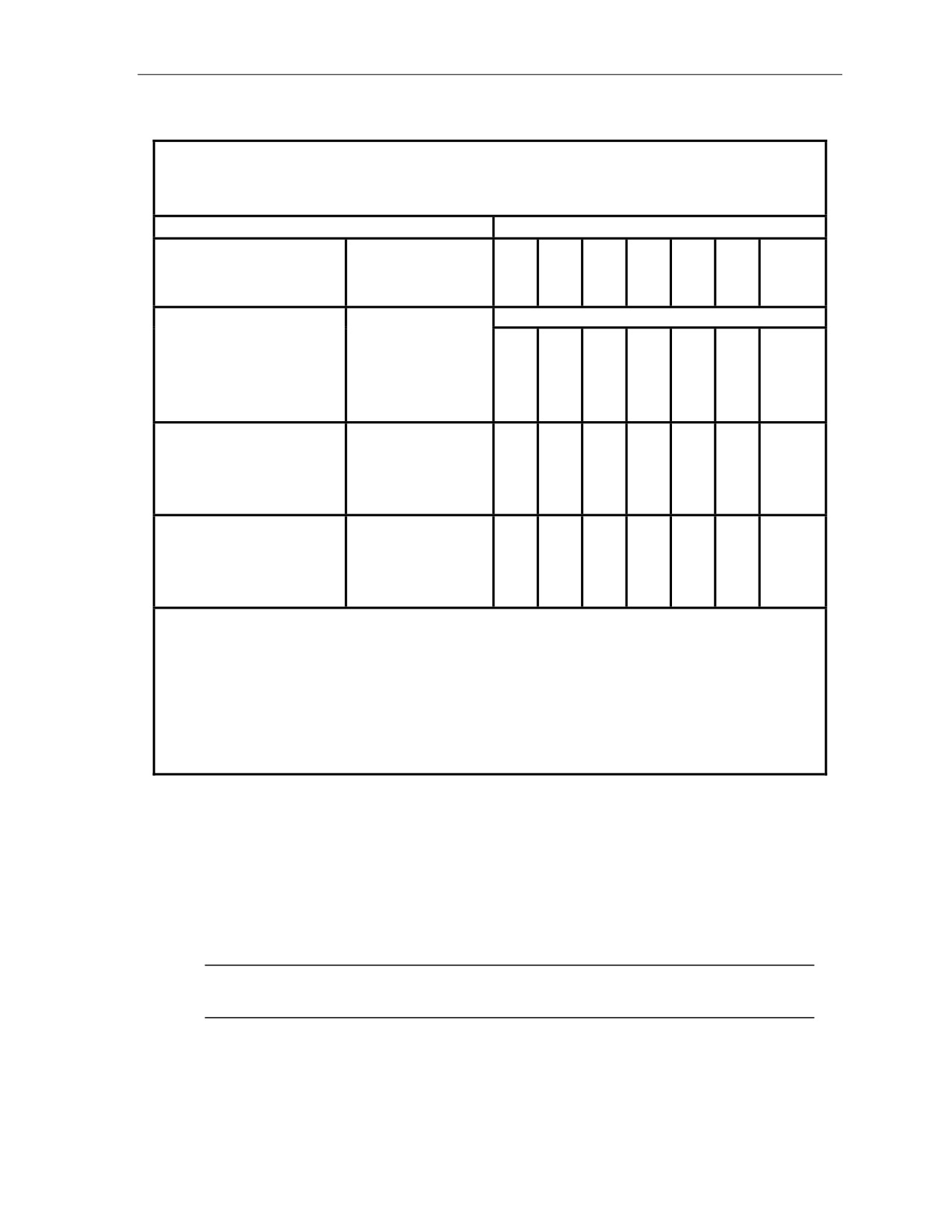
Table 9-2. Smoke chart for the 120-mm M929 WP.
Smoke Ammunition Requirements for 120-mm M929 WP
Number of M929 WP rounds per minute to maintain a smoke curtain on a 500-meter
front in flank winds. See items (1), (2), and (3) below.
WIND SPEED (KNOTS)
RELATIVE HUMIDITY
TEMPERATURE
2
4
9
13
18
22
26
(PERCENT)
GRADIENT
ROUNDS REQUIRED
30
LAPSE
12
6
6
6
6
8
12
NEUTRAL
12
6
4
4
INVERSION
6
6
3
LAPSE
12
4
4
6
6
6
8
60
NEUTRAL
12
4
3
4
INVERSION
6
6
3
LAPSE
8
4
3
4
4
6
6
90
NEUTRAL
8
3
3
3
INVERSION
6
4
3
(1) Employ volley fire to establish a smoke curtain, using a two-minute ammunition requirement (but not
less than 12 rounds). Equally space rounds on the front to be curtained.
(2) For quartering winds, multiply table values by 2; for tail winds, by 2; and for head winds, by 2 1/2.
Values for head and tail winds are based on curtain impact lines of 500 meters in front of enemy lines.
Wind directions are indicated with respect to the enemy target or the smoke screen. If the curtain impact
line is 500 meters, ammunition requirements will be considerably larger. OBSERVERS MUST CONTROL
FIRES AT ALL TIMES.
(3) The upwind adjustments point is 100 meters.
(See FM 3-50 or FM 6-30 for an explanation of temperature gradient conditions.)
The total number of smoke rounds needed for the mission is computed as follows:
Adjustment phase
=
1 round (confirmation round)
Establishment phase
=
2 x number of rounds to maintain for one minute;
must be at least 12 rounds
Maintenance phase
=
Number of rounds to maintain for one minute times
the total number of minutes
Total rounds for the mission
=
adjustment phase
+ establishment phase
+
maintenance phase
NOTE: The time used during the establishment phase is not to be considered to be
part of the maintenance phase.
17 July 2008
FM 3-22.91
9-15
Chapter 9
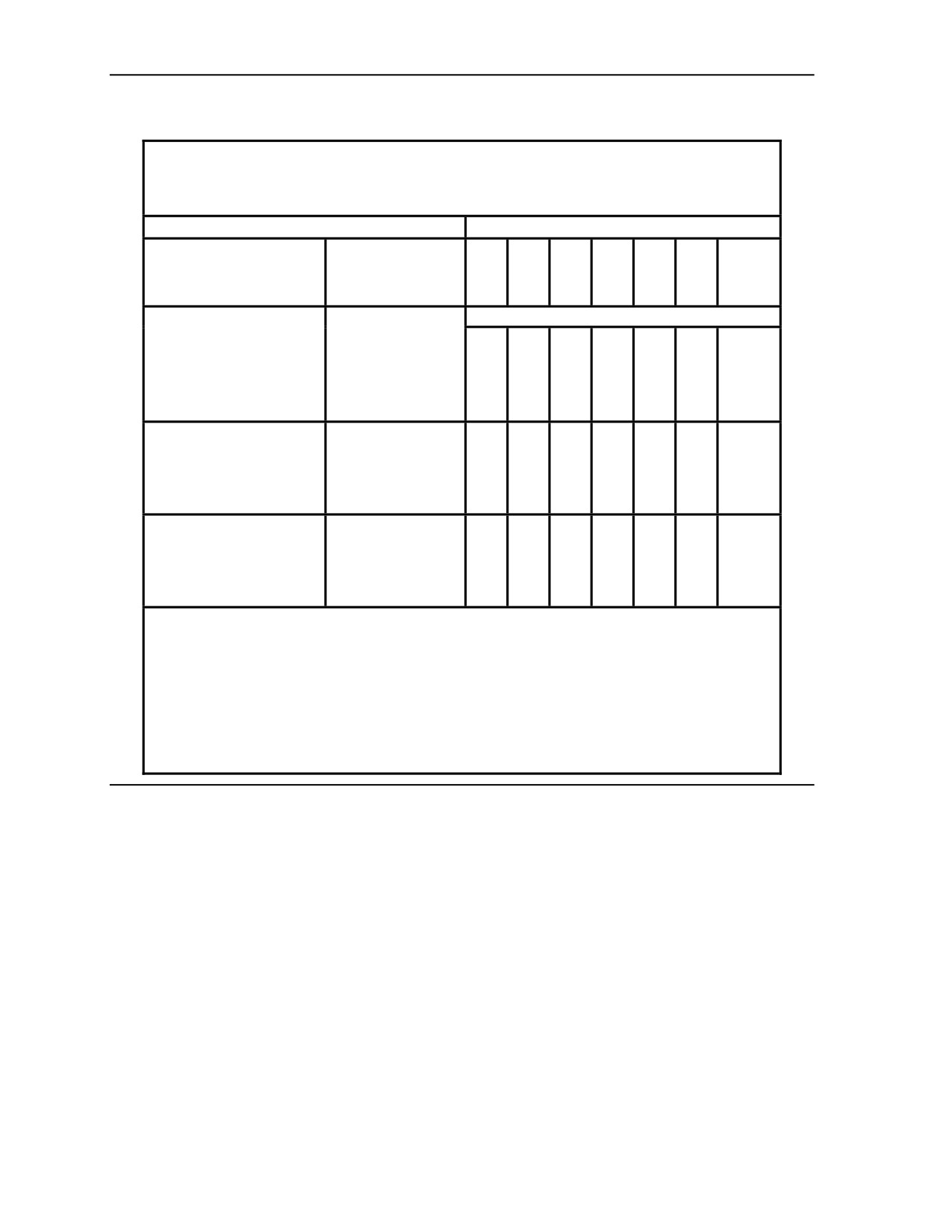
Table 9-3. Smoke chart for the 81-mm M819 red phosphorus.
Smoke Ammunition Requirements for 81-mm M819 red phosphorus
Number of M819 RP rounds per minute to maintain a smoke curtain on a 500-meter
front in flank winds. See items (1), (2), and (3) below.
WIND SPEED (KNOTS)
RELATIVE HUMIDITY
TEMPERATURE
2
4
9
13
18
22
26
(PERCENT)
GRADIENT
ROUNDS REQUIRED
30
LAPSE
6
6
12
12
16
24
24
NEUTRAL
2
4
8
8
16
INVERSION
2
3
8
LAPSE
6
6
8
8
16
16
24
60
NEUTRAL
2
3
6
8
12
INVERSION
2
2
6
LAPSE
2
3
8
8
12
12
16
90
NEUTRAL
2
2
6
8
8
INVERSION
1
2
4
(1) Employ volley fire to establish a smoke curtain, using a two-minute ammunition requirement (but
not less than 12 rounds). Equally space rounds on the front to be curtained.
(2) For quartering winds, multiply table values by 2; for tail winds, by 2; and for head winds, by 2 1/2.
Values for head and tail winds are based on curtain impact lines of 500 meters in front of enemy
lines. Wind directions are indicated with respect to the enemy target or the smoke screen. If the
curtain impact line is 500 meters, ammunition requirements will be considerably larger.
OBSERVERS MUST CONTROL FIRES AT ALL TIMES.
(3) The upwind adjustments point is 100 meters.
(See FM 3-50 or FM 6-30 for an explanation of temperature gradient conditions.)
9-16
FM 3-22.91
17 July 2008
Special Procedures
MORTARS REQUIRED
9-46. Under favorable conditions, a 120-mm mortar platoon can screen an area about 800 meters wide and
an 81-mm mortar platoon can screen an area about 500 meters wide.
NOTE: 60-mm mortar sections are not normally used to produce large-scale smoke screens.
They can be used to augment the screening smoke of a larger caliber mortar unit, and they can
produce useful point obscuration during urban operations.
9-47. A limitation, however, is their maximum and sustained rates of fire. For the entire platoon, the rates
of fire are multiplied by the number of mortars firing. If the required number of RPM exceeds the rate of
fire, the platoon must request supporting fire from flank units or artillery.
EFFECTS DESIRED
9-48. If smoke is to be placed directly on the target for blinding or casualty-producing effects, the FO
adjusts the center of impact of the rounds onto the center of the target. The number of RPM to produce this
effect is twice that for a normal quick smoke mission.
ORDERING OF AMMUNITION
9-49. When ordering ammunition for a mission, the FDC estimates the weather conditions, remembering
that it is better to have too much ammunition than too little.
BRIEFING OF THE OBSERVER
9-50. Due to the many clearances required to fire the mission, the FDC chief or section leader normally
has ample time to brief the FO on the quick smoke screen. This briefing should include a map
reconnaissance of the area to be screened so that the FO can identify it on the ground and select an OP
from which the screen can be observed.
CALL FOR FIRE
9-51. At the appointed time, usually 10 to 20 minutes before the mission is to be fired, the FO sends the
CFF. This provides the time needed for the FDC to process the data and prepare the necessary ammunition.
NOTE: The CFF should specify the wind direction.
EXACT AMMUNITION REQUIREMENT
9-52. About the time that the CFF is received, the chief computer/section leader makes a final check on the
weather and directs the computation of the exact ammunition requirements for the mission. The
section/platoon breaks down (at least) this amount of ammunition and prepares it to be fired.
17 July 2008
FM 3-22.91
9-17
Chapter 9
MISSION COMPUTATION
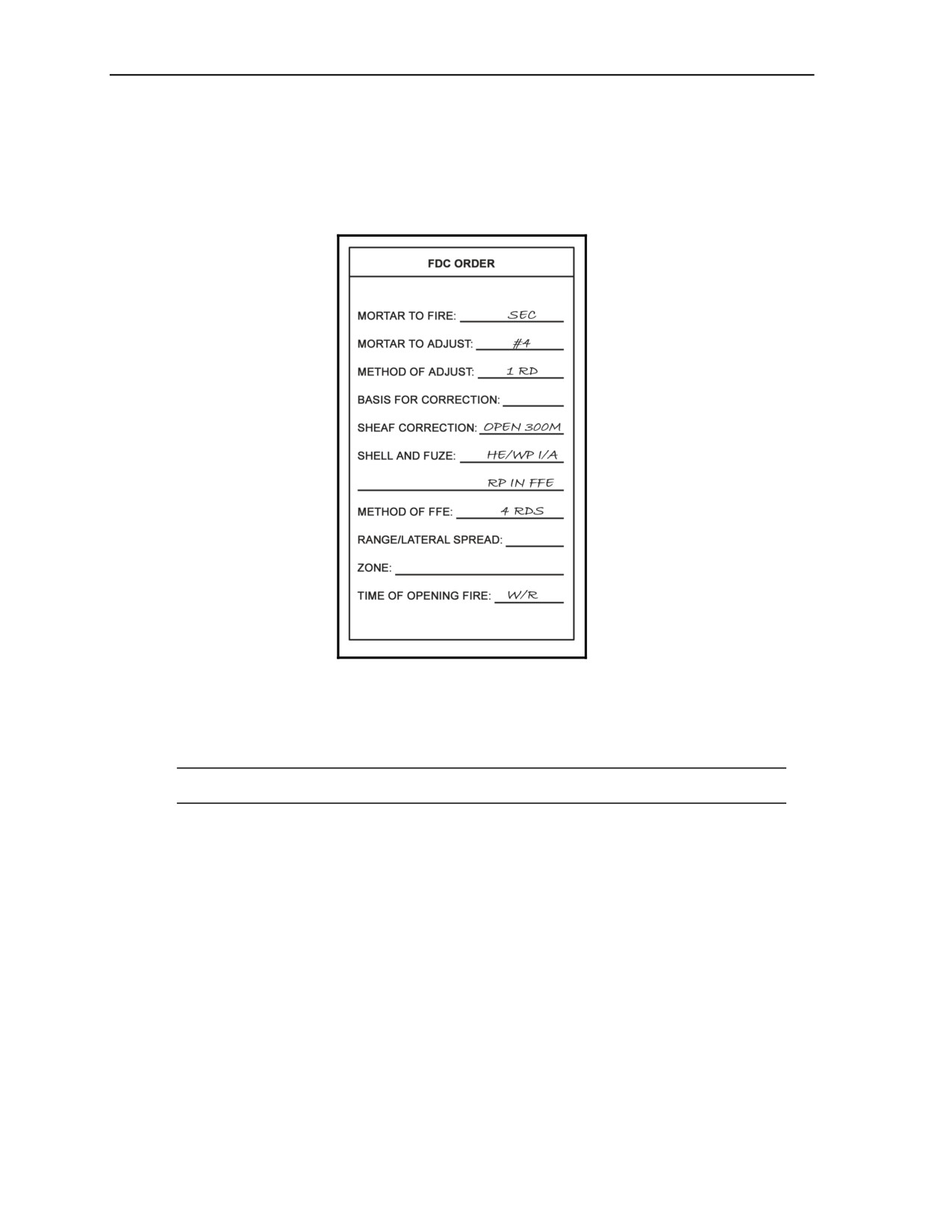
9-53. The chief computer/section leader issues the FDC order (Figure 9-2). The method of FFE is the
number of rounds computed to establish the screen, divided by the number of mortars to FFE. The chief
computer/section leader commands the time of opening fire. Once the first round of smoke is fired, all
commands should be such that they can be applied with minimal reaction time.
Figure 9-2. Fire direction center order.
9-54. The following procedures are used in mission computation:
(1) Upon receipt of the FDC order, the MBC operator processes the fire commands as he would a
normal grid mission until the final correction.
NOTE: HE is adjusted to within 100 meters of the adjusting point.
(2) The FO splits the 100-meter bracket and calls for one round of WP (in adjustment) to see if it
will strike the adjusting point and if the weather conditions are affecting the smoke as predicted.
(3) The MBC operator uses the WPN/AMMO menu to change the shell and fuze combination.
(4) After the shell and fuze correction is entered, the MBC operator computes the final adjustment
and relays this information to the adjusting mortar.
(5) The FO makes corrections for the WP. When the FO requests FFE, the FDC tells the mortars
how many rounds to fire (employing volley fire).
(6) The maintenance phase begins almost immediately after the establishment phase. If the FO
notices the screen thinning in one place (usually the upwind end), the rate of fire may be
doubled for one or more mortars. The FO can adjust the placement of the WP during any part of
the maintenance phase by specifying which gun(s) will continue firing or by transmitting a
correction.
9-18
FM 3-22.91
17 July 2008
Special Procedures
FOUR PHASES TO SCREENING MISSION
9-55. When a linear sheaf will not cover the area, a screening mission is conducted. Screening missions
have four phases:
z
Phase 1. Using HE ammunition, the FO adjusts the upwind flank mortar to the upwind edge of
the area to be screened.
z
Phase 2. At the end of the adjustment phase, the mortars fire one round of smoke to see if it hits
the adjustment point.
z
Phase 3. The FO calls for the sheaf to be opened.
NOTE: Do not confuse this step with a normal open sheaf.
z
Phase 4. The FDC presses the TFC switch and performs the following procedures:
(1) Change "SHEAF:PRL" to "SPECIAL."
(2) Select "ADJ PT:FLANK."
(3) Enter the direction and size of the screen based on the adjusting (upwind) mortar. If No. 1
mortar is adjusting, select "L "(Left) and enter the size of the area to be screened. If the No.
3 (or 4) mortar is adjusting, select "R" (Right) and enter the size of the area to be screened.
(4) Enter the attitude of the target area.
(5) Change "CON:AF" to "CON:FFE."
(6) Push COMPUTE and observe the firing data.
END OF MISSION
9-56. The control in ending the screening mission rests with the commander who ordered it established.
Normally, screens are fired according to a time schedule; however, the commander may order the screen to
be maintained beyond the scheduled termination time. In the absence of external control, the FDC controls
the timing, ordering the section/platoon to cease fire. Squad leaders give the FDC a count of the rounds
expended (or remaining) at the end of the mission.
SPECIAL KEYS AND FUNCTIONS
9-57. This paragraph describes some of the functions of the following special keys:
z
Message (MSG).
z
Review (REVIEW).
z
Survey (SURV).
z
Mission (MSN).
z
Transmit (XMIT).
z
Safety Data (SFTY DATA).
17 July 2008
FM 3-22.91
9-19

Chapter 9
MESSAGE SWITCH
9-58. A maximum of three incoming digital messages can be stored. Incoming messages are of two types:
fire request and information-only.
9-59. When the message indicator is lit or the audio alarm sounds and the MSG switch is pressed, the first
line of the first message received is displayed. When the message is a fire request, the MBC automatically
assigns a mission and target number, unless there are already three active missions. If so, the MBC displays
"NO AVAIL MSN" and discards the message. This menu includes the information outlined in Table 9-4.
Table 9-4. Message switch entries and related information.
ENTRY
RELATED INFORMATION
FR GRID (SHIFT,
Fire request using grid coordinates, shift from a known point, polar plot corrections, or laser
POLAR, or LASER)
data
OBS LOC
FO location data
SUBQ ADJ
Subsequent adjustment to a fire request
SA COORDS
Subsequent adjustment using coordinates
PREC ADJ
Precision adjustment
SA LASER
Subsequent adjustment to a laser fire request
EOM & SURV
End of mission and surveillance data
FPF
Request for FPF
QF KNPT or
Quick fire request on a known point or known target
QF TGT
ASKNPT
FO request to assign a known point number
FO CMD
FO command message
HB/MPI
High burst/mean point of impact
FL TRACE
Front-line trace data
RDR REG
Radar registration data
FREE TEXT
Free text form messages
REVIEW SWITCH
9-60. The REVIEW switch returns the display to the first line of a message or to the beginning of the last
main menu selected.
SURVEY SWITCH
9-61. The SURV switch can be used to solve three survey problems:
z
Resection (RES).
z
Intersection (INT).
z
Traverse (TRV).
9-62. These functions are used to determine the coordinates and altitude of an unknown point using
measurements from known point(s). Computed coordinates may be stored as a—
z
Basepiece.
z
FO.
z
Known point.
z
Target.
NOTE: Before using any of the SURV functions, the operator must enter the known points into
the MBC using the KNPT/TGT menu.
9-20
FM 3-22.91
17 July 2008

Special Procedures
MISSION SWITCH
9-63. The MSN switch is used to review current active fire mission data and to specify which mission is
operational. The MBC can store data for three active fire missions and compute fire commands for each of
these missions one at a time.
9-64. The MBC assigns a mission and target number to a mission each time the GRID, SHIFT, or POLAR
switch is pressed. Use these switches only when starting a fire mission to avoid misuse of target numbers.
NOTES:
1. The operator can enter or change data for operational missions only.
2. A mission must be active before the WPN AMMO, REG, TFC, SFTY DATA,
EOM, and REPLOT switches can be used to input or display data.
TRANSMIT SWITCH
9-65. The XMIT switch is used to display or send MTO and command messages when operating in
manual or digital mode. This menu includes the information outlined in Table 9-5.
Table 9-5. Transmit switch entries and related information.
ENTRY
RELATED INFORMATION
NR VOL
The number of volleys for the FFE
NR UNITS
The number of units to be used in the FFE
PR ERR:
The probable error entered by the MBC
ADJ SF
Adjusting shell/fuze entered by the MBC
1ST SF:
Shell/fuze for the first round for FFE entered by the computer
SUBS SF
Shell/fuze combination for subsequent rounds for FFE entered by the MBC
MOE
Method of engagement
NOTE: Use the default value.
CON: WR AF
Method of control (WR = when ready, and AF = adjust fire)
TOF
Time of flight for the next (or last) round
ANG T
Angle T entered by the computer
SAFETY DATA SWITCH
9-66. The SFTY DATA switch is used to review the safety factors in effect for a current fire mission. This
menu includes the information outlined in Table 9-6.
Table 9-6. Safety Data switch entries and related information.
ENTRY
RELATED INFORMATION
RN: AZ
Range and azimuth from the guns to the target (GT)
BURST POINT SEQF
The coordinate of impact for the round fired can be found by sequencing forward (SEQF).
BP
Burst point easting and northing grid coordinates
MAX ORD
The maximum ordinate (top of the trajectory) of the round fired, measured in meters from sea level
SAFETY DIAGRAM
Entries can be made to store up to three safety fans (one for each section/platoon in WPN
DATA menu) identified as A, B, or C
LLAZ
Left limit azimuth in mils
RLAZ
Right limit azimuth in mils
MAX RN
Maximum range in meters
MIN RN
Minimum range in meters
MIN:_ MAX
Minimum and maximum charges
17 July 2008
FM 3-22.91
9-21
This page intentionally left blank.
Chapter 10
Digital Device Support
The MBC may transmit and receive digital communications using a DMD or the
FOS. This ability reduces the mission processing time and provides a more secure
communication network.
APPLICATION
10-1. All DMD-supported missions occur in response to the receipt of an FO message. The input data for
the mission are supplied by digital transmission from the FO’s DMD and automatically entered into the
MBC's memory.
10-2. To conduct a digital communications check—
(1) Press the SELF-TEST switch.
(2) The MBC displays "MICR SW DSP MOD." The sequence indicator blinks, indicating that
another choice is available.
(3) Press the SEQ switch.
(4) The MBC displays "XMIT TEST MSG."
(5) Select XMIT.
(6) The MBC displays "ROUTE: *XMIT." The route is found in the SOI.
(7) Enter the route.
(8) Select XMIT.
(9) The MBC displays "XMITING."
10-3. The MBC transmits the test message to the DMD. When the DMD accepts the message, it transmits
an acknowledgement (ACK). If the message is not accepted, the MBC displays "NO RESP RETRY 1."
The operator should try to retransmit the message at least three times. If the message is still not accepted,
the communication system should be repaired.
COMMUNICATIONS
10-4. The MBC can store a maximum of three incoming digital messages. Incoming messages are of two
types: fire mission messages and information-only messages. When the message indicator is lit or the audio
alarm sounds and the MSG switch is pressed, the MBC displays the first line of the first message received.
When a message is a fire mission, the MBC automatically assigns mission and target numbers, unless three
active missions have already been stored. In this case, the MBC displays "NO AVAIL MSN," and discards
the message.
RECEIVING MESSAGES
10-5. The flashing MSG indicator tells the operator that a message has been received.
10-6. To view a message—
(1) Select the MSG switch.
(2) The MBC displays a heading to identify the type of message. If the message is not a fire request,
the applicable data are automatically stored in the correct menu.
(3) Select the SEQ switch.
17 July 2008
FM 3-22.91
10-1
Chapter 10
(4) The MBC displays the FO and net identification. The FO authentication code is displayed.
(5) Select the SEQ switch.
(6) Validate the code in the authentication table.
(7) Select the SEQ switch.
(8) Review each line of the message.
NOTE: After the FDC order has been completed, the operator clears the message from the
message buffer. If the message is a fire request, the mission is automatically activated. The
operator must assign the mission using the WPN/AMMO switch and compute the firing data.
TRANSMITTING MESSAGES TO OBSERVER
10-7. When the MBC is DMD-supported, the FO must receive an MTO and a shot/splash.
10-8. To prepare and send an MTO—
(1) Select the XMIT switch.
(2) Select MTO using the display key directly below the flashing cursor on MTO.
(3) The mission and target numbers entered by the MBC are displayed.
(4) Select the SEQ switch.
(5) The adjusting weapon is displayed.
(6) Select the SEQ switch.
(7) Enter the number of volleys to be fired.
(8) Select the SEQ switch.
(9) The number of weapons firing is displayed. The display should indicate only one weapon when
adjusting.
(10) Select the SEQ switch.
(11) The probable error is displayed as "PR ERR: NOT GVN" (probable error: not given).
(12) Select the SEQ switch.
(13) The ADJ shell/fuze is displayed.
(14) Select the SEQ switch.
(15) The shell/fuze for the first round of the FFE is displayed. This was received in the fire request
the FO sent.
(16) Select the SEQ switch.
(17) The shell/fuze for subsequent rounds of the FFE is displayed.
(18) Select the SEQ switch.
(19) Use the multiple choice entry to select the proper method of engagement: HI (high angle) or DC
(danger close).
(20) Select the SEQ switch.
(21) The method of control (CON: WR AF) is displayed.
(22) Select the SEQ switch.
(23) The time of flight is displayed.
(24) Select the SEQ switch.
(25) The angle T is displayed.
(26) Select the SEQ switch.
(27) The mission number for the current mission is displayed.
(28) Select the SEQ switch.
(29) The FO's identification is displayed.
(30) Enter the appropriate route.
10-2
FM 3-22.91
17 July 2008
Digital Device Support
(31) Select the SEQ switch.
(32) Enter the authentication code.
(33) Select the flashing asterisk (*) to transmit the MTO to the FO.
(34) When the message is received, the MBC displays "ACK."
TRANSMITTING SHOT/SPLASH
10-9. To transmit the shot/splash to the FO—
(1) Select the XMIT switch.
(2) Use the multiple choice entry to select CMD.
(3) The mission and target numbers are displayed.
(4) Select the SEQ switch.
(5) The type of firing information being sent is displayed. The MBC defaults to SHOT. Splash is
automatically transmitted about five seconds before the round impacts. The operator may decide
to transmit only splash by changing the display from SHOT to SPLASH.
(6) Select the SEQ switch.
(7) Select DIGITAL when the MBC is DMD-supported.
NOTE: Select MANUAL for the MBC to notify (with an audio warning) the operator when to
orally transmit the splash. If manual is selected, the MBC displays "*SHOT." The operator
presses the asterisk (*) when the round is fired. The MBC notifies (with an audio warning) the
operator when to transmit the splash. The MBC displays "READY," when any key is pressed.
(8) Select the SEQ switch.
(9) The FO identification is displayed.
(10) Enter the route number.
(11) Select the SEQ switch.
(12) Enter the authentication (COMSEC) code from the SOI to transmit SHOT.
(13) Select the SEQ switch.
(14) Enter the authentication (COMSEC) code from the SOI to transmit SPLASH.
(15) Select the SEQ switch.
(16) The MBC displays "*XMIT." When the command to fire is given, press the asterisk (*), and the
shot is automatically transmitted to the FO. XMITTING is displayed until it is time to send the
splash. The splash is momentarily displayed, and then XMITTING. ACK is received when the
DMD accepts the message.
17 July 2008
FM 3-22.91
10-3
This page intentionally left blank.
Part Four
M16 and M19 Plotting Boards
Chapter 11
Introduction
M16 and M19 plotting boards are the secondary means of fire control for all
forms of digital mortar fire control. Using these tools, the computer can
determine deflections, azimuths, and ranges.
CAPABILITIES
11-1. Computers use plotting boards when determining azimuths, deflections, and ranges.
z
The computer determines the azimuth by rotating the azimuth disk to the correct alignment.
z
Before the deflection can be determined, the computer must establish a mounting azimuth
and index the referred deflection.
z
Range is determined by measuring the distance between the plotted mortar position and the
plotted target. M16 and M19 plotting boards use different scales for determining range.
NOTE: See Chapter 12 for more information about the different scales for determining
range.
CAUTION
When plotting on the plotting board, use a soft lead pencil. NEVER
use map pins, needles, ink pens, or grease pencils since these
can damage the board.
11-2. The straightedge of the plotting board should always be on the computer’s right. Each plot is
circled and numbered for identification. To avoid distortion, the computer should place his eye directly
over the location of a plot and hold the pencil perpendicular to the board. The plot should be so small
that it is difficult to see. The computer must be careful when placing a plot on the disk, since a small
plotting error could cause the final data to be off by as much as 25 meters in range and more than 10
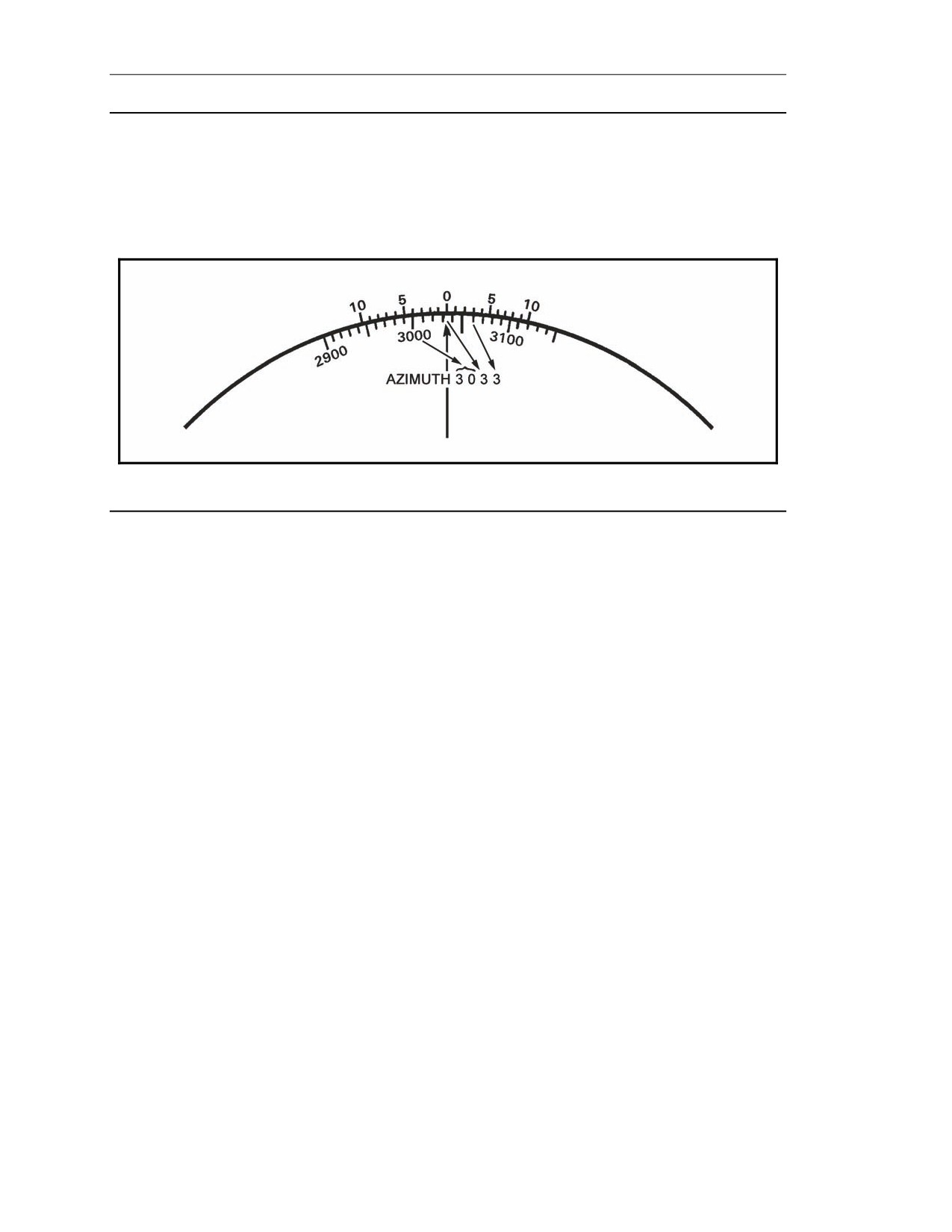
mils in deflection. For example, to determine azimuths—
(1) Read the first three numbers from the azimuth disk, left of the index mark.
(2) Read the fourth number, or the last mil, using the azimuth disk and the right side of the
vernier scale (Figure 11-1).
17 July 2008
FM 3-22.91
11-1
Chapter 11
EXAMPLE
Consider azimuth 3033 in Figure 11-1. The first and second numbers are the first 100-mil
indicator to the left of the index mark
(30). To obtain the third number, count the
10-mil
graduations between the 100-mil indicator and the index mark (3). The fourth number, or the last
mil, is read by counting the 1-mil graduations from 0 to the right on the vernier scale until one of
the 1-mil graduations align with one of the 10-mil graduations on the azimuth disk (3).
Figure 11-1. Vernier scale.
M16 PLOTTING BOARD
11-3. The M16 plotting board is the secondary means of fire control for 81-mm and 120-mm mortars.
It consists of a base, azimuth disk, and a range arm or range scale arm (Figure 11-2).
BASE
11-4. The base is a white plastic sheet bonded to a magnesium alloy backing. The grid system printed
on the base is to a scale of 1:12,500, making each square 50 meters by 50 meters and each large square
500 meters by 500 meters. At the center of the base is the pivot point to which the azimuth disk is
attached. Extending up and down from the pivot point is the vertical centerline. The vertical centerline
range scale is graduated every 50 meters and numbered every 100 meters from 0 (pivot point) to 3,100
meters, with a total range from the pivot point of 3,200 meters. The vertical centerline ends with an
arrowhead at the top of the board.
11-5. The arrowhead, known as the index mark pointer, is used in determining azimuths and
deflections to the nearest 10 mils. It points to the index mark of the vernier scale (0 mark), which is
used to determine azimuths and deflections to the nearest mil. The vernier scale is divided every mil
and numbered every 5 mils, with a total of 10 mils left and right of the 0.
11-6. To the left of the vertical centerline is the secondary range scale. The secondary range scale is
numbered every 500 meters (from 0 to 6,000), with a total range of 6,400 meters. It is used to
determine range when the mortar position is plotted at points other than the pivot point. Two
additional range scales; 1:50,000 and 1:25,000; are on the right edge of the base. They are used with
maps in determining ranges.
11-2
FM 3-22.91
17 July 2008
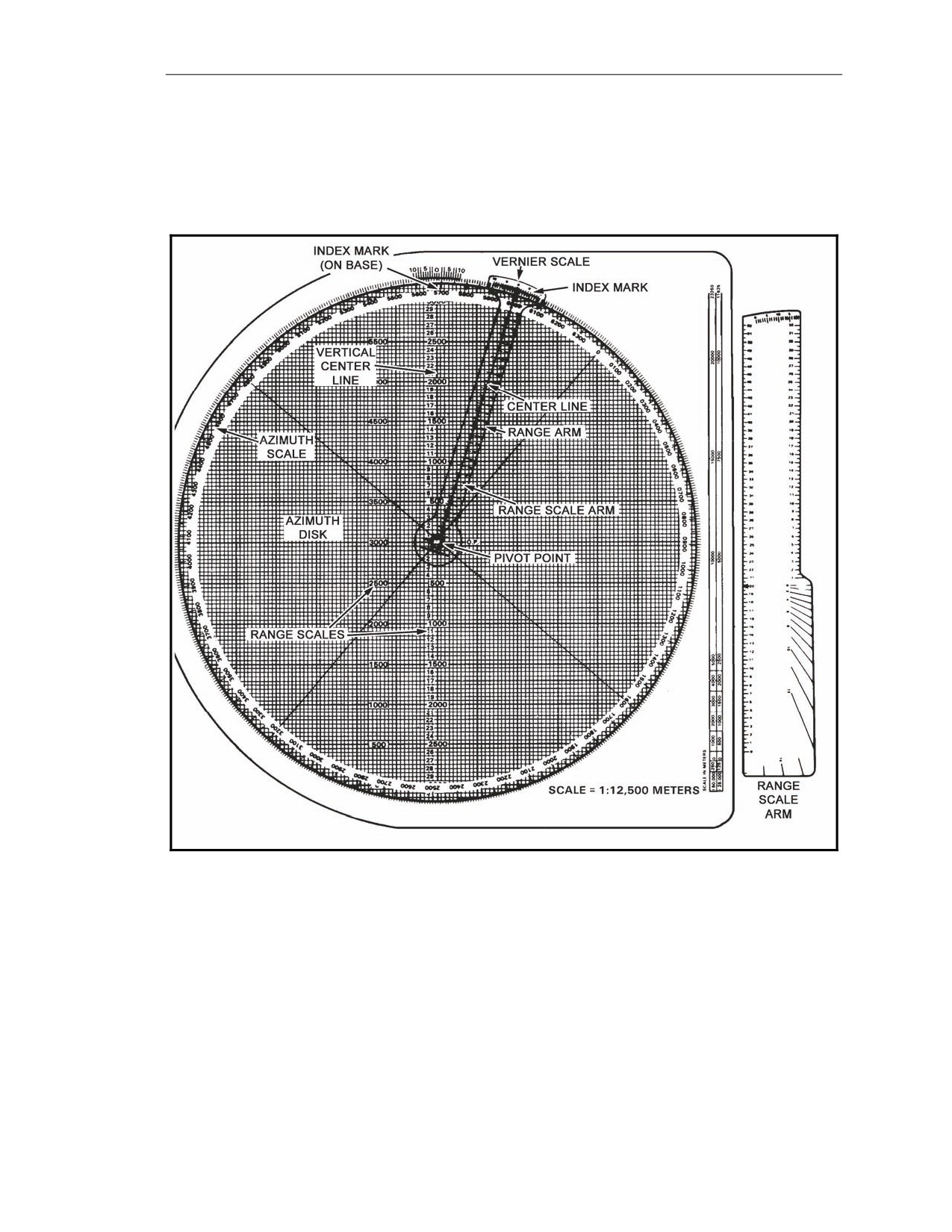
Introduction
AZIMUTH DISK
11-7. The azimuth disk, made of clear plastic, is roughened on one side so that it can be written on
with a soft lead pencil. The azimuth scale on the outer edge is numbered every 100 mils (from 0 to
6300) and divided every 10 mils with a longer line at every 50 mils, giving a complete circle of 6400
mils.
Figure 11-2. M16 plotting board.
RANGE ARM
11-8. Made of plastic, the range arm is used when the mortars are plotted at the pivot point. The arm
has a vertical centerline with a range scale and a vernier scale, both of which are the same as on the
base.
RANGE SCALE ARM
11-9. The range scale arm, a transparent plastic device, has a knob with a pivot pin, two range scales
(one on each edge), a protractor on the right bottom, and a vernier scale across the top. The range
scales are numbered every 100 meters and graduated every 50 meters. The protractor is graduated
every 100 mils from 0 to 1600 mils.
17 July 2008
FM 3-22.91
11-3
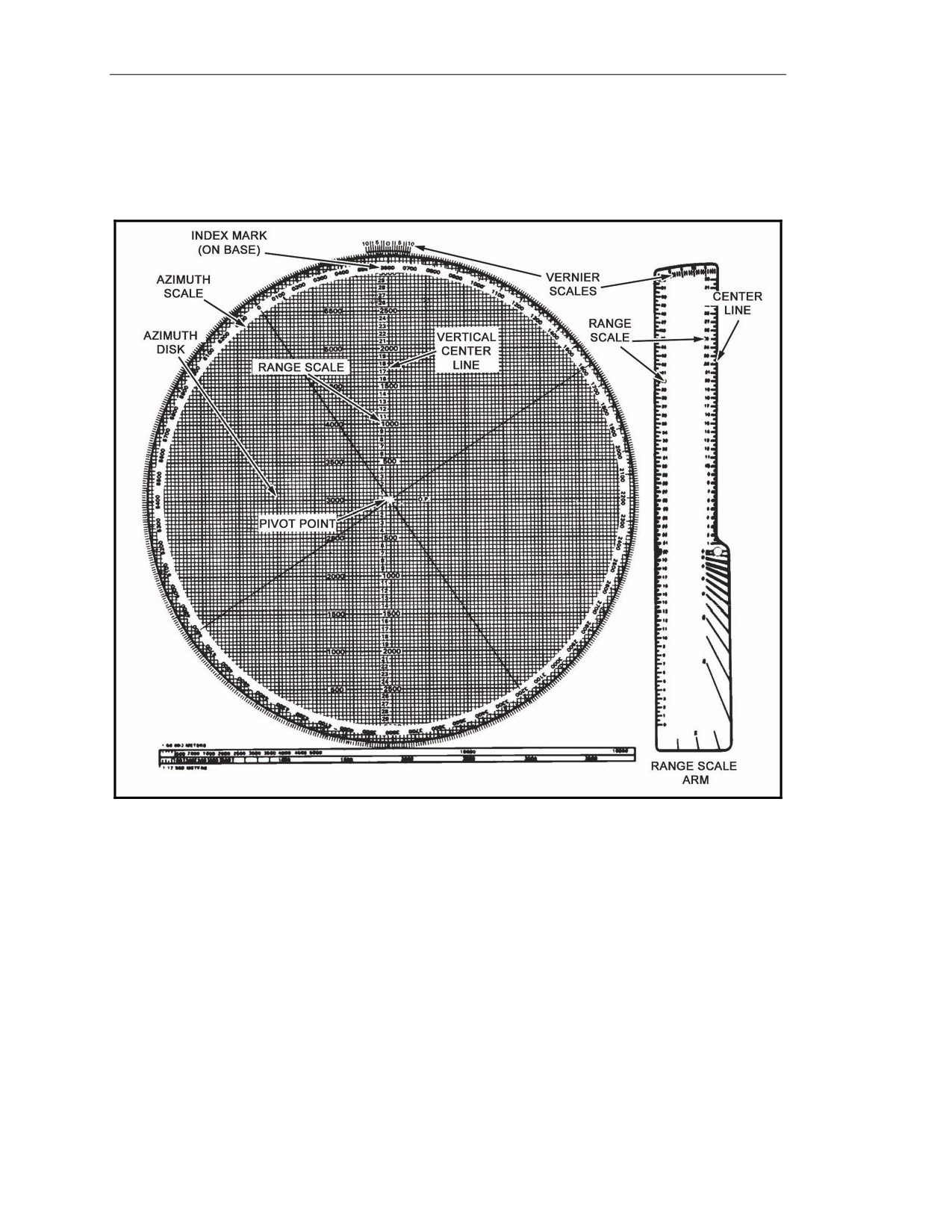
Chapter 11
M19 PLOTTING BOARD
11-10. The M19 plotting board is the secondary means of fire control for the 60-mm mortar. It
consists of a rotating disk of transparent plastic and a removable range arm, both attached to a flat grid
base (Figure 11-3).
Figure 11-3. M19 plotting board.
BASE
11-11. The base is a white plastic sheet bonded to a magnesium alloy backing. A grid is printed on
the base (in green) at a scale of 1:25,000. The vertical centerline is graduated and numbered up and
down (from 0 through 32) from the center (pivot point) in hundreds of meters, with a maximum range
of 3,200 meters. Each small grid square is 100 meters by 100 meters.
11-12. The index mark points to the center of the vernier scale at the top edge of the plotting board. It
is the point at which deflections or azimuths may be read to the nearest 10 mils. When plotting at the
pivot point, the pivot point represents the location of the No. 2 mortar.
11-13. In addition to the grid pattern, a vernier scale is printed on the base. It is used to obtain greater
accuracy when reading the mil scale on the azimuth disk. The vernier scale permits the operator to
read azimuths and deflections accurately to the nearest mil.
11-4
FM 3-22.91
17 July 2008
Introduction
11-14. On the bottom of the base, a double map scale in meters with representative fractions of
1:50,000 and 1:12,500 is used to transfer to and from a map that has one of those scales.
AZIMUTH DISK
11-15. The rotating azimuth disk is made of plastic. Its upper surface is roughened for marking and
writing. A mil scale on the outer edge is used for plotting azimuths and angles. It reads clockwise to
conform to the azimuth scale of a compass. The scale is divided into 10-mil increments (from 0 to
6400) and is numbered every 100 mils. Also, the disk has two black lines called centerlines. These
centerlines are printed across the center of the disk from 0 to 3200 and from 1600 to 4800 mils.
RANGE SCALE ARM
11-16. The range scale arm is used when mortars are plotted at the pivot point. It is made of plastic
and can be plugged into the pivot point. Two range scales are on the range scale arm. On the right
edge is a range scale that corresponds to the range scale found on the vertical centerline. An alternative
range scale ranging from 0 to 6,000 meters is on the left edge of the range scale arm and is used when
plotting away from the pivot point. The vernier scale at the upper end of the range scale arm is used to
read azimuths or deflection when plotting at the pivot point without rotating the disk back to the
vertical centerline. The direction of the FO can be indexed at the index point. The vernier scale on the
range scale arm is read in reverse of the one on the grid base. The left portion is read for azimuth, and
the right portion is read for deflection. The protractor lines below the range scale arm knob may be
used to place a sector of fire on the disk.
z
To read the azimuth to 1 mil, read the left portion, starting at 0, and read to the 10 in
the center.
z
To read deflections, start at the right edge of the range scale arm and read to 10.
17 July 2008
FM 3-22.91
11-5