FM 3-22.91 MORTAR FIRE DIRECTION PROCEDURES (July 2008) - page 4
Chapter 6
INITIALIZATION SWITCHES
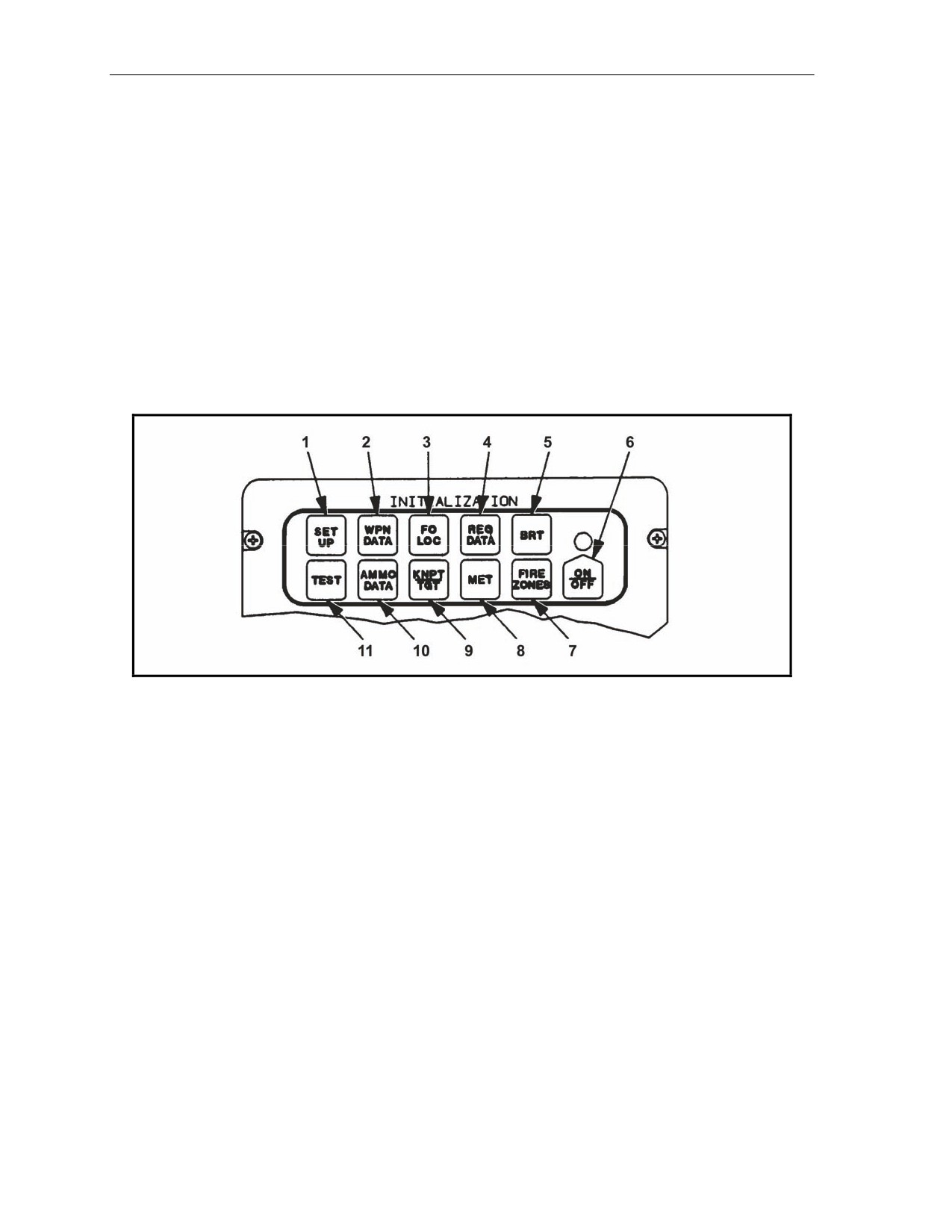
6-2. The initialization switches (Figure 6-2) for the MBC include—
z
SET UP switch.
z
WPN DATA switch.
z
FO LOC switch.
z
REG DATA switch.
z
BRT switch.
z
ON/OFF switch.
z
FIRE ZONES switch.
z
MET switch.
z
KNPT/TGT switch.
z
AMMO DATA switch.
z
TEST switch.
Figure 6-2. Initialization switches.
SET UP Switch
6-3. The SET UP switch (1, Figure 6-2) displays the menu for entering setup data. This menu contains
the following:
z
Timeout.
z
Target prefix and block number range.
z
Audio alarm.
z
Minimum easting and northing coordinates.
z
Location grid declination.
z
Latitude.
z
Listen-only mode.
z
Message transmission rate.
z
Transmitter warm-up delay time.
z
Single or double message block mode.
z
Owner identification.
6-2
FM 3-22.91
17 July 2008
Introduction
WPN DATA Switch
6-4. The WPN DATA switch (2, Figure 6-2) displays menus for entering or reviewing weapon data for
each unit. This menu allows the operator to select as many as three firing sections and allows him to
enter—
z
As many as six individual gun locations for each section.
z
The weapon type, carrier- or ground-mounted, altitude, azimuth of fire (AOF), and referred
deflection being used.
FO LOC Switch
6-5. The FO LOC switch (3, Figure 6-2) displays a menu for entering data. This menu contains the
following:
z
FO number (12 FOs maximum).
z
Grid location.
z
Altitude.
REG DATA Switch
6-6. The REG DATA switch (4, Figure 6-2) displays menus for manually entering a registration data file
for an RP or reviewing RP data. These menus contain the following:
z
0RP number.
z
Location.
z
Altitude.
z
Weapon unit and number.
z
Charge for 60-, 81-, and 120-mm mortars.
z
Type of MET data used when the RP was fired, including range and deflection correction factors.
BRT Switch
6-7. The BRT switch (5, Figure 6-2) controls the level of brightness for the display area and the
background lighting for the keyboard.
NOTES:
1. The MBC can be operated in total darkness if the brightness is set at low.
2. When set at low, the keyboard is still lit.
ON/OFF Switch
6-8. The ON/OFF switch (6, Figure 6-2) turns the MBC on or off.
NOTE: When turned on, the display temporarily shows "POWERUP TEST," and then shows
"READY."
17 July 2008
FM 3-22.91
6-3
Chapter 6
FIRE ZONES Switch
6-9. The FIRE ZONES switch (7, Figure 6-2) displays menus for entering or reviewing fire zone and fire
line boundaries. These menus contain the following:
z
Location points for fire lines.
z
Zone numbers.
z
Number of points for a fire zone (no-fire area).
z
Location points for fire zone boundaries.
MET Switch
6-10. The MET switch (8, Figure 6-2) displays menus for entering nonstandard MET data. These menus
contain the following:
z
MET station data and location.
z
Nine lines of MET data, including wind direction, speed, temperature, and pressure for each
line.
KNPT/TGT Switch
6-11. The KNPT/TGT switch (9, Figure 6-2) displays menus for entering known points or target reference
points. These menus contain the following:
z
Known point or target number.
z
Grid location.
z
Altitude.
AMMO DATA Switch
6-12. The AMMO DATA switch (10, Figure 6-2) displays menus for entering ammunition data for each
caliber of weapon in use. These menus contain the following:
z
Ammunition types.
z
Powder temperature change.
z
Correction factors for projectile weight.
TEST Switch
6-13. The TEST switch (11, Figure 6-2) allows the user to manually begin a self-test of the microprocessor
(ROM, RAM, and instruction set) for all switches and keys, the display (character generation), the modem
(communication device), the software revision number, and communications (transmit test message).
ACTION SWITCHES
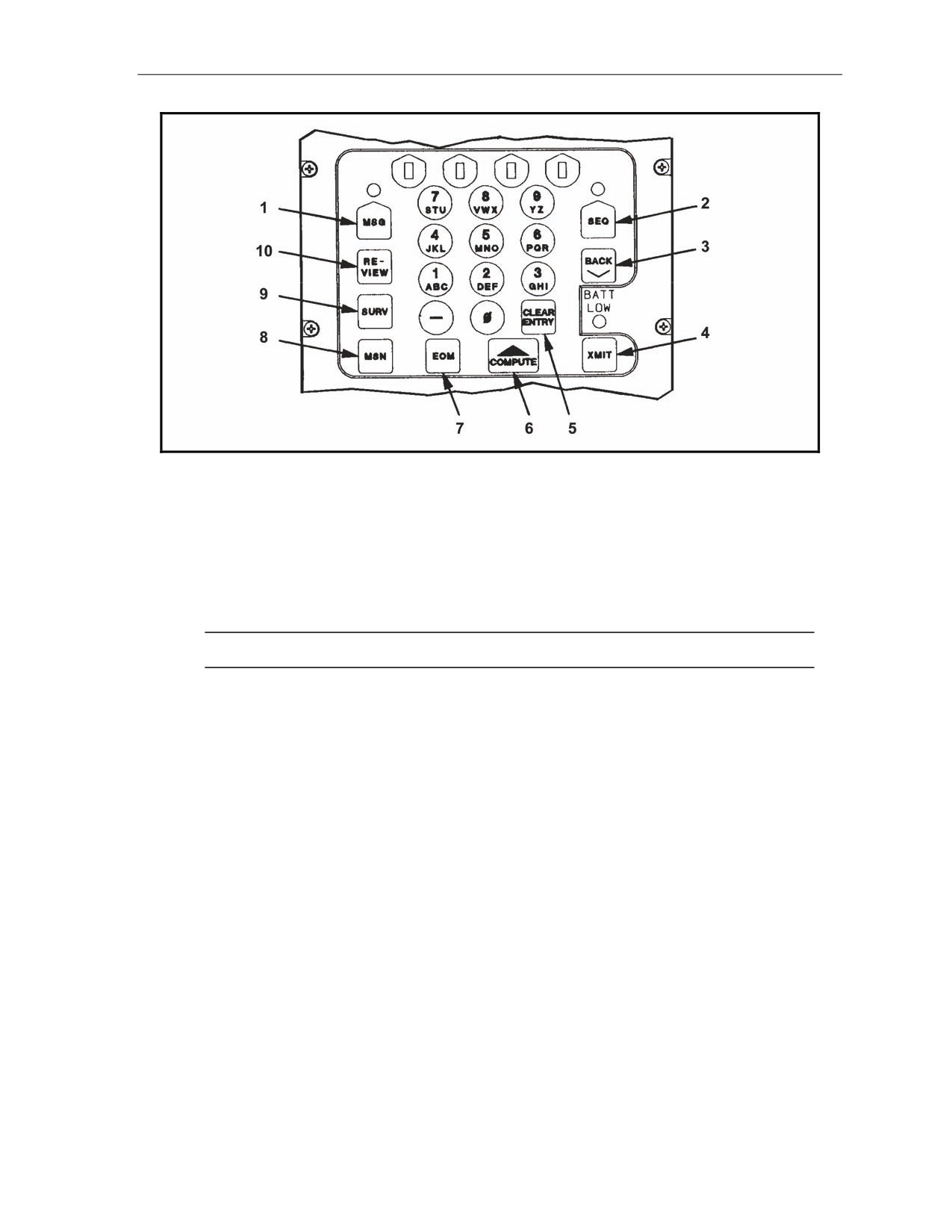
6-14. The action switches (Figure 6-3) include—
z
MSG switch.
z
SEQ switch.
z
BACK switch.
z
XMIT switch.
z
CLEAR ENTRY switch.
z
COMPUTE switch.
z
EOM switch.
z
MSN switch.
z
SURV switch.
z
REVIEW switch.
6-4
FM 3-22.91
17 July 2008
Introduction
Figure 6-3. Action switches.
MSG Switch
6-15. The MSG switch (1, Figure 6-3) displays the first line of a message transmitted by a DMD.
SEQ Switch
6-16. The SEQ switch (2, Figure 6-3) displays the next line of a menu to allow viewing or entry of data.
NOTE: Press the SEQ switch to store data entered from the keyboard.
BACK Switch
6-17. The BACK switch (3, Figure 6-3) displays the previous menu line to allow reviewing or data
changes.
XMIT Switch
6-18. The XMIT switch (4, Figure 6-3) starts MTO and command message to observer (CMD) menus for
entering and transmitting firing information to the observer.
CLEAR ENTRY Switch
6-19. The CLEAR ENTRY switch (5, Figure 6-3) removes the last (right-most) character from a data field
and allows re-keying of an entry.
COMPUTE Switch
6-20. The COMPUTE switch (6, Figure 6-3) initiates computation of fire mission data, survey data,
registration data, and adjustments.
17 July 2008
FM 3-22.91
6-5
Chapter 6
EOM Switch
6-21. The EOM switch (7, Figure 6-3) displays menus for manually entering end-of-mission instructions,
such as delete all mission data or end the active mission, and storing the final target grid location in the
target file.
MSN Switch
6-22. The MSN switch (8, Figure 6-3) displays menus for reviewing current fire mission data and
assigning a mission number, which makes the mission operational, allows changes to mission buffers, and
enables corrections to a subsequent mission to be applied.
SURV Switch
6-23. The SURV switch (9, Figure 6-3) displays menus for manually entering survey data for computation.
z
Survey types are resection, intersection, and traverse.
z
Data entries are horizontal and vertical angles, and distances.
6-24. Computed answers may be stored as a known point, target, FO location, or base mortar location.
REVIEW Switch
6-25. The REVIEW switch (10, Figure 6-3) returns the display to the first line of a message or to a main
menu currently in use.
ALPHANUMERIC AND MINUS SIGN KEYS
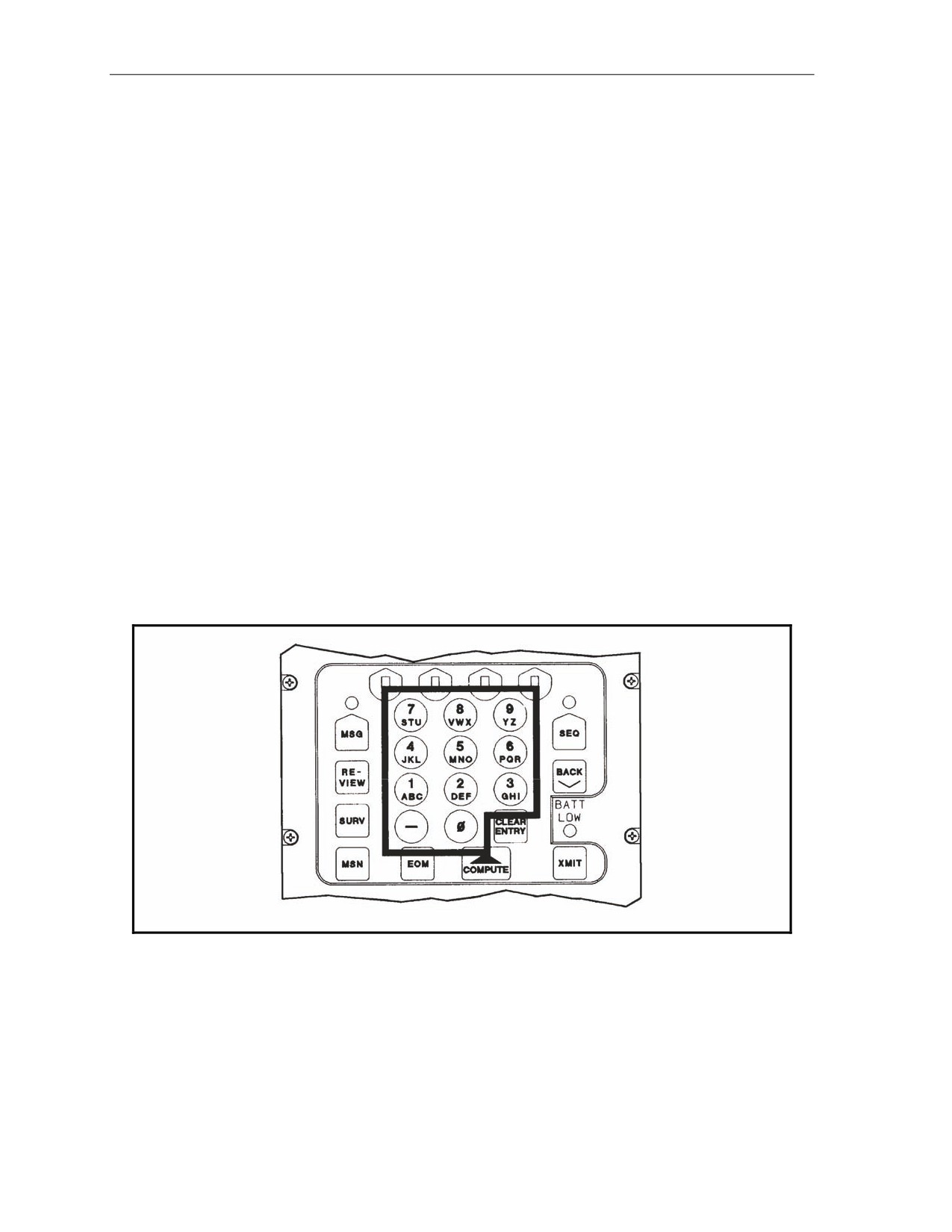
6-26. Eleven keys are used to enter alphanumeric characters and the minus sign (Figure 6-4). For
combination keys, alpha or numeric selection is either automatic or menu-selectable.
Figure 6-4. Alphanumeric and minus sign keys.
6-6
FM 3-22.91
17 July 2008
Introduction
FIRE MISSION KEYS
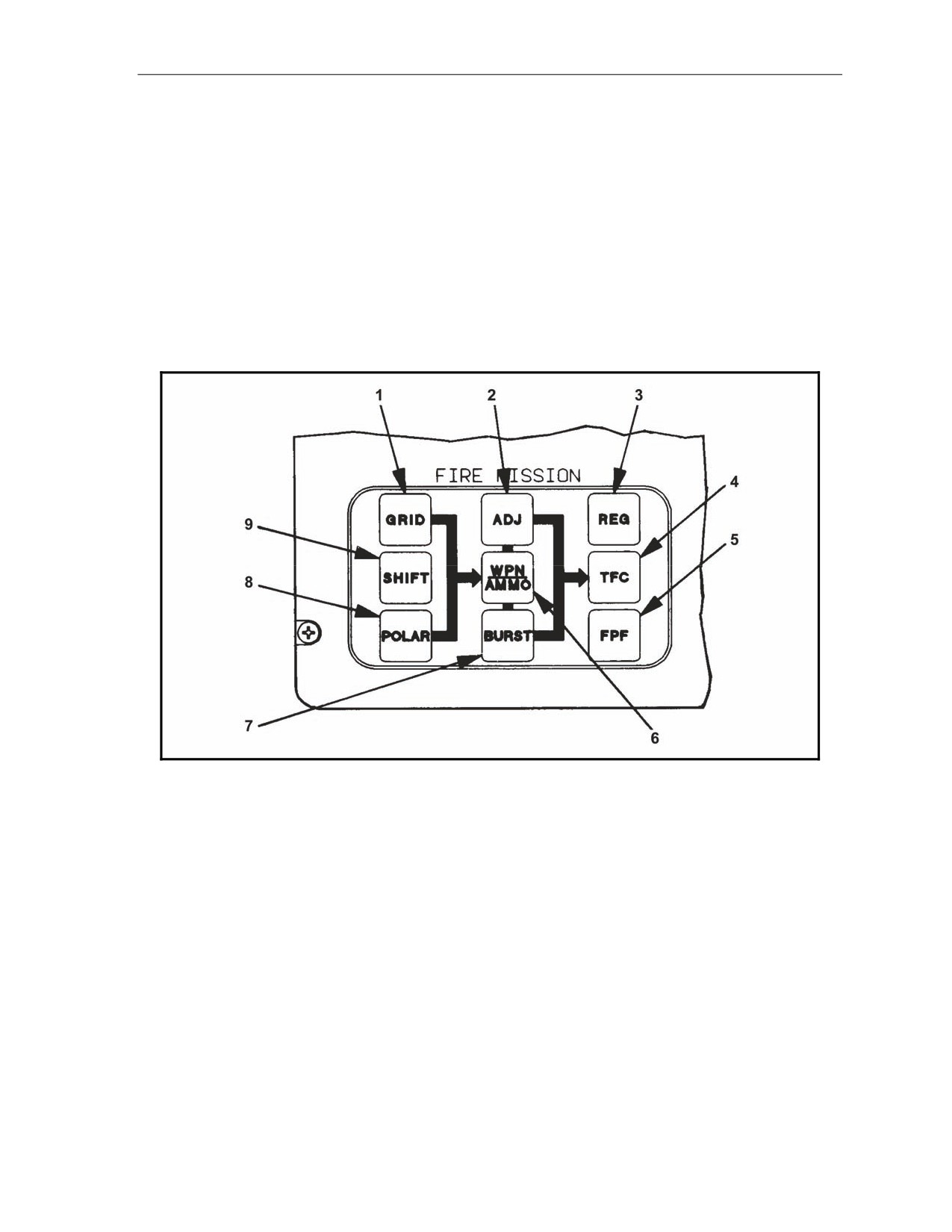
6-27. The fire mission keys (Figure 6-5) include—
z
GRID key.
z
ADJ key.
z
REG key.
z
TFC key.
z
FPF key.
z
WPN/AMMO key.
z
BURST key.
z
POLAR key.
z
SHIFT key.
Figure 6-5. Fire mission keys.
GRID Key
6-28. The GRID key (1, Figure 6-5) is used to manually enter grid fire mission data when the target
location is identified by grid coordinates. Entries are—
z
FO ID number.
z
FO direction to target.
z
Target location.
z
Altitude, when known.
ADJ Key
6-29. The ADJ key (2, Figure 6-5) is used to manually enter fire mission adjustment data (corrections)
from the FO. Correction entries are—
z
Left or right deviations.
z
Plus or minus range.
z
Up or down height.
17 July 2008
FM 3-22.91
6-7
Chapter 6
REG Key
6-30. The REG key (3, Figure 6-5) is used to review registration data, and to compute and store RP
correction factors. The computation results in a range correction factor and a deflection correction amount.
TFC Key
6-31. The TFC key (4, Figure 6-5) is used to manually enter or change technical firing data, such as the
sheaf, method of control, and weapons to fire.
FPF Key
6-32. The FPF key (5, Figure
6-5) is used to manually enter the FPF line data, safety fan, and
minimum/maximum charge. Entries are—
z
FPF location.
z
Target altitude.
z
Target width.
z
Attitude.
WPN/AMMO Key
6-33. The WPN/AMMO key (6, Figure 6-5) is used to manually enter or change the weapon or
ammunition data for a fire mission. Entries are—
z
Weapon unit and number (A section, number 3 gun).
z
Shell and fuze combination.
z
Charge (60- and 81-mm mortars).
NOTE: When 120-mm mortar data becomes available, the computer must be updated.
BURST Key
6-34. The BURST key (7, Figure 6-5) is used to manually enter burst location data (corrections) supplied
by a laser-equipped FO. Entries, from laser to burst, are—
z
Direction.
z
Distance.
z
Vertical angle.
POLAR Key
6-35. The POLAR key (8, Figure 6-5) is used to manually enter polar plot data for normal and laser-
designated polar plot fire missions.
z
Normal polar plot mission targets are identified by direction, distance, and up/down height from
an FO.
z
Laser polar plot mission targets are identified by laser direction, laser distance, and laser vertical
angle.
6-8
FM 3-22.91
17 July 2008
Introduction
SHIFT Key
6-36. The SHIFT key (9, Figure 6-5) is used to manually enter shift from a known point fire mission data
when a target location is identified using a shift from a known point. Entries are—
z
FO ID.
z
Known/target number of direction to target.
z
Direction.
z
Amount of shift.
OUTPUT SWITCHES
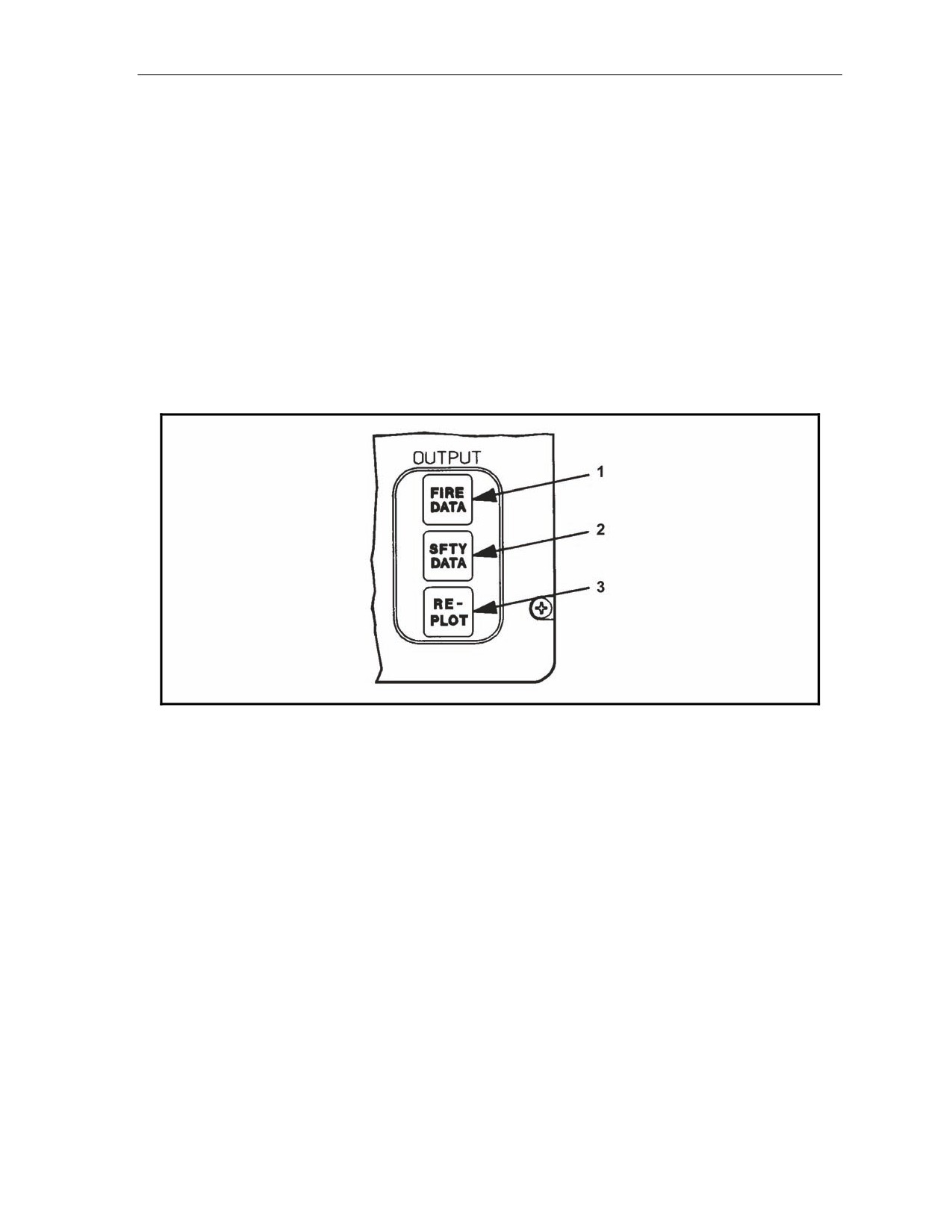
6-37. The output switches (Figure 6-6) include—
z
FIRE DATA switch.
z
SFTY DATA switch.
z
REPLOT switch.
Figure 6-6. Output switches.
FIRE DATA Switch
6-38. The FIRE DATA switch (1, Figure 6-6) is used for reviewing the fire commands of active fire
missions. Data are the same as the COMPUTE switch output.
SFTY DATA Switch
6-39. The SFTY DATA switch (2, Figure 6-6) allows the operator to review safety factors by accessing
data menus for active fire missions. These menus allow the operator to enter boundaries for a safe firing
area or a minimum and maximum charge for the safety area.
REPLOT Switch
6-40. The REPLOT switch (3, Figure 6-6) is used to review target replot data and to increase target
location accuracy.
6-41. To compute a new grid location, the operator enters a new target altitude, and then presses the
REPLOT switch.
17 July 2008
FM 3-22.91
6-9
Chapter 6
DISPLAY SWITCHES
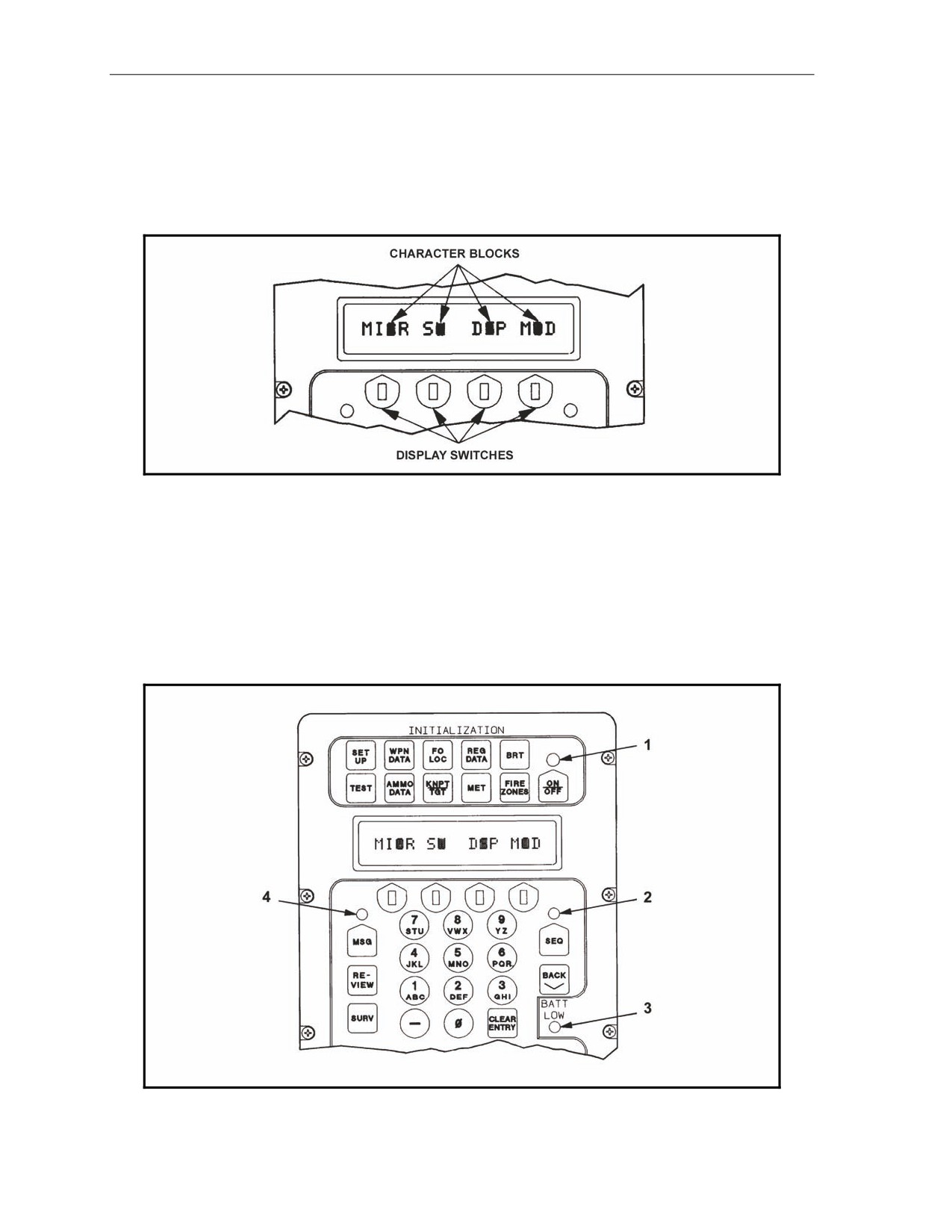
6-42. The display area features up to 16 alphanumeric characters (Figure 6-7). A flashing character block
signals a need for an operator action. To respond, the operator presses the display switch below the
flashing block or the SEQ switch. Any combination of blocks (or none) may flash. If no block is flashing,
no action is required, and the operator cannot change what is shown on the display.
Figure 6-7. Display switches.
LIGHT-EMITTING DIODE INDICATORS
6-43. The corresponding keys for the light-emitting diode (LED) indicators (Figure 6-8) include—
z
Standby indicator.
z
Sequence indicator.
z
BATT LOW indicator.
z
Message indicator.
Figure 6-8. Light-emitting diode indicators.
6-10
FM 3-22.91
17 July 2008
Introduction
Standby Indicator
6-44. The standby indicator (1, Figure 6-8) flashes when the display timeout period has expired. It flashes
once every six seconds while the display is “timed out.” To return to the last display, press any key once.
NOTE: Using the FIRE MISSION keys to turn the display back on is not recommended. Some
of these keys are highly sensitive and a fire mission can be initiated accidentally. The safest key
to use is the sequence key.
Sequence Indicator
6-45. The sequence indictor (2, Figure 6-8) flashes when more data are available for the current menu or
display.
BATT LOW Indicator
6-46. The BATT LOW indicator (3, Figure 6-8) flashes when the internal 12-volt battery is low. This
indicator starts flashing when the battery output reaches 11 volts, and the MBC shuts off at 10 volts. If the
BATT LOW indicator starts flashing during a fire mission, continue with the mission, and change the
battery as soon as possible.
Message Indicator
6-47. The message indicator (4, Figure 6-8) flashes when the MBC has received one or more digital
messages. The flash rate increases with the number of messages received. Flash rates are:
z
1.25 times per second = one message.
z
2.5 times per second = two or more messages.
z
5 times per second = one or more FO CMD messages.
AUDIO ALARM
6-48. The internal audio alarm beeps continuously when digital messages are received. The alarm beeps
noticeably faster for an FO CMD message than for other message types. To turn off the beeping alarm, the
operator presses any switch or key.
NOTE: To turn the alarm off or on, access the SET UP switch function.
17 July 2008
FM 3-22.91
6-11
Chapter 6
CAPABILITIES
6-49. The MBC communicates with the DMD. There are two types of incoming messages: fire request
messages and information-only messages. When the message indicator is lit or the audio alarm sounds and
the MSG switch is pressed, the first line of the first message received is displayed. When the message is a
fire mission, the MBC automatically assigns a mission and target number, unless three active fire missions
are in progress. If so, the MBC displays, “NO AVAIL MSN,” and discards the message.
6-50. The MBC:
z
Computes and applies registration and MET corrections.
z
Computes firing data for all fire mission types.
z
Allows mortar dispersion up to 999 meters from the basepiece.
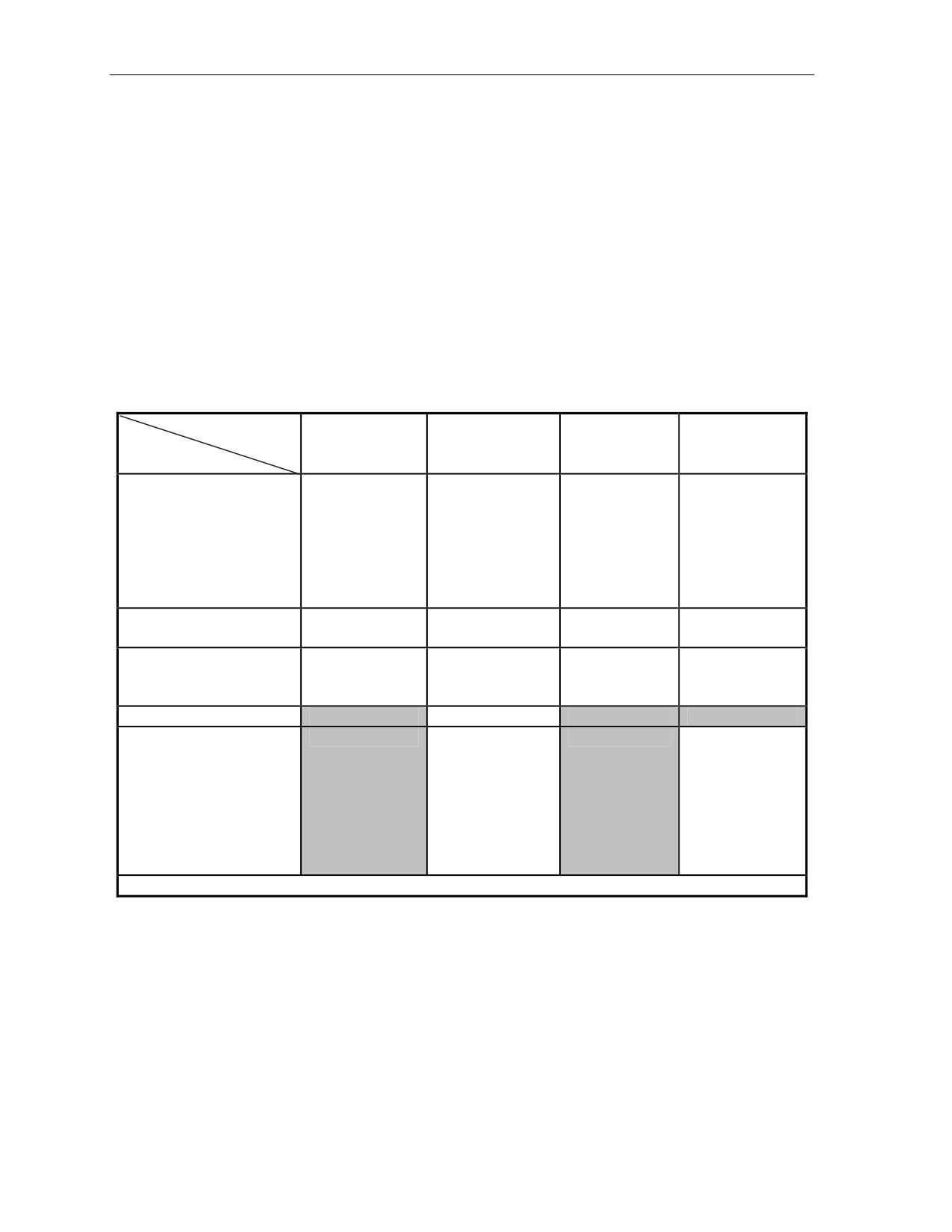
6-51. The ammunition file in the MBC contains only the ammunition depicted in Table 6-1.
Table 6-1. Mortars and corresponding ammunition.
MORTAR
M224, 60-mm
M252 AND ##M29,
120-mm
M303 INSERT,
MORTAR
81-mm MORTARS
MORTAR
81-mm MORTAR
TYPE OF
AMMUNITION
HIGH-EXPLOSIVE
*M720
*##M374
M933
*M374
##M49A4
M374A2
*M934
M37A42
M888
M374A3
##M57
M374A3
M821
M889
#M889A1
#M821A1
ILLUMINATION
*M83A3
*M301A3
M91
M301A3
M721
M853A1
*M930
WHITE PHOSPHORUS
*M302A1
##M375
##M68
M375
#M302A2
*M375A2
*M929
*M375A2
M722
##M375A3
M375A3
RED PHOSPHORUS
M819
TRAINING/PRACTICE
(Ground-mounted
M880
mode only)
*##M1
##M68
M879
#M880
NOTE:
* = Default ammunition
# = Revision III/A
## = No longer in inventory
6-12
FM 3-22.91
17 July 2008
Introduction
MEMORY STORAGE CAPACITY
6-52. The MBC can store—
z
3 active fire missions.
z
3 messages in the message buffer.
z
Up to 18 weapon systems—3 sections/platoons with up to 6 mortars each.
z
12 FO locations with their call signs.
NOTE: At this time, the MBC revision III/A does not allow entries with the same identifier.
For example, once the identifier B02 is used, the number 02 cannot be used again.
z
50 known points/targets.
z
16 RPs.
z
3 firing sections.
z
10 no-fire zones with between 3 and 8 points each; 80 total points are available. All zones share
the 80-point pool.
z
3 FPF files, 1 for each section/platoon.
z
3 safety fans, 1 for each section/platoon, with each diagram capable of having 10 fans (0 to 9).
z
1 no-fire line.
NOTE: Error messages may occur while using the MBC. Appendix F discusses the possible
errors and provides actions to correct the problem.
17 July 2008
FM 3-22.91
6-13
This page intentionally left blank.
Chapter 7
Preparation of Fire Control Equipment
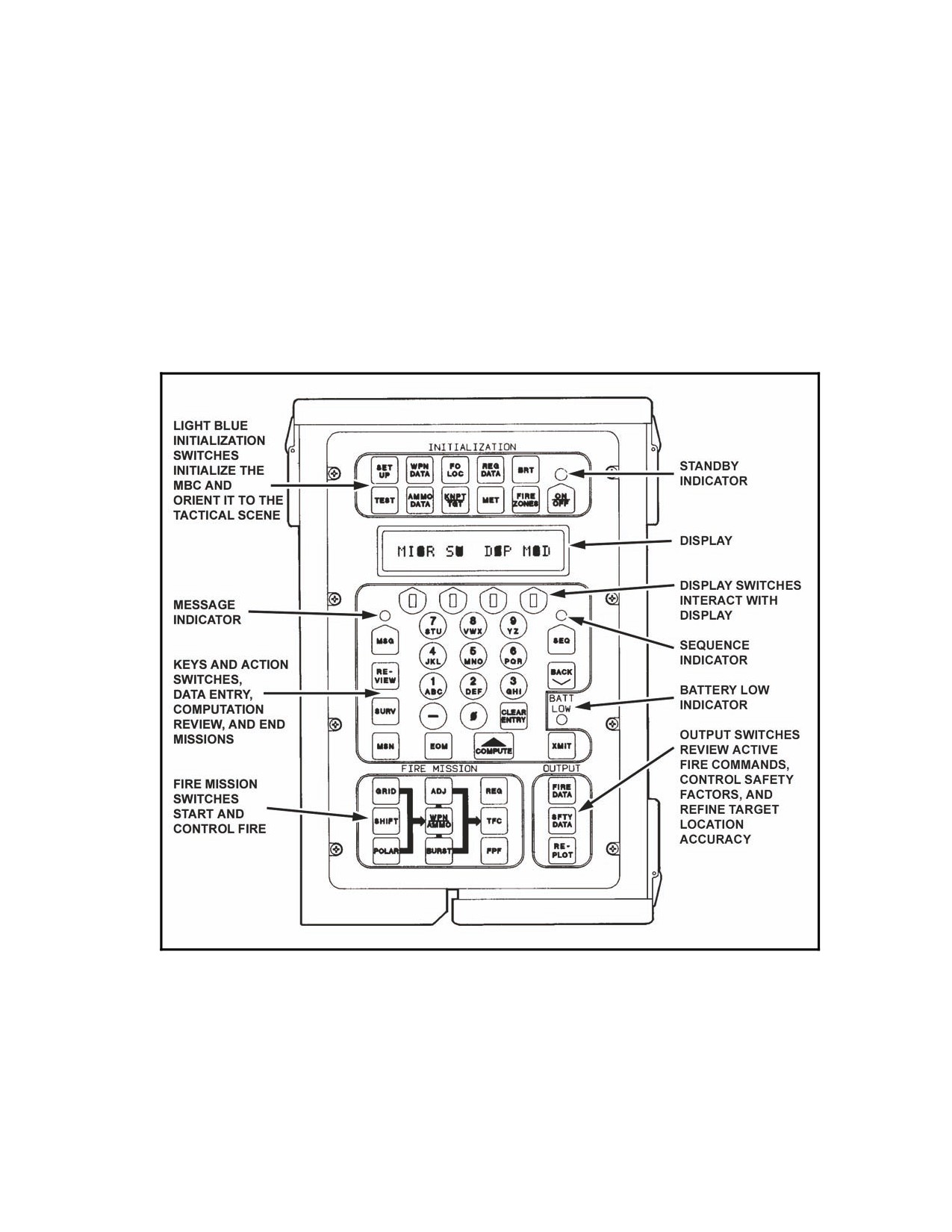
This chapter discusses the different types of data entry for the MBC. The different
levels of initialization are also explained. Figure 7-1 provides an overview of the
groupings of switches and indicators used when setting up the MBC for the tactical
scene.
Figure 7-1. Mortar ballistic computer switch panel.
17 July 2008
FM 3-22.91
7-1
Chapter 7
TYPES OF DATA ENTRY
7-1. The types of MBC data entry are—
z
Default (computer-selected).
z
Alphabetical.
z
Numerical.
z
Correction.
z
Minimum easting and minimum northing.
z
Direction.
z
Multiple choice.
7-2. The following examples use only the SET UP menu to demonstrate each type of data entry. The data
entry examples apply to all menus.
7-3. Before entering data, press the ON/OFF switch to activate the MBC. The display shows,
“POWERUP TEST,” and then shows, “READY.”
NOTE: The self-test should be conducted when the MBC is turned on. However, the operator
must first know how to make menu selections to conduct the self-test.
DEFAULT ENTRY
7-4. Default entries are those that the computer automatically uses until the operator manually changes
the data. One example would be the default setup data:
(1) Press the SET UP switch. The MBC displays the menu for setup data: timeout, target prefix,
target number block, grid declination, message transmission rate, transmitter warm-up delay
time, transmission single or double block mode, and owner identification.
(2) The display window of the MBC shows, “TIME OUT: 15.” Timeout means that the computer
will automatically turn off the display if another switch is not selected before the given time runs
out.
NOTE: The screen will darken if the time runs out. The computer is not off, just conserving
energy. To reactivate the display screen, press any key (except the fire mission keys, which are
Grid, Shift, and Polar).
(3) The flashing cursor on the display indicates that the computer's timeout setting can be changed.
The timeout can be set to 15, 30, 45, or 60 seconds. The computer defaults to a timeout period of
15 seconds, thereby maintaining the highest energy conservation. During training, the timeout
period should be changed to 60 seconds.
(4) Select the blue display switch beneath the flashing cursor in the display window. The display
shows, “15 30 45 60,” with flashing cursors on each number. The four blue display switches
interact with the numbers displayed directly above them. For example, if the switches were
numbered from left to right (1, 2, 3, and 4), and the timeout is to be changed to 60 seconds,
select display switch 4. The computer now shows, “TIME OUT: 60.”
ALPHABETICAL ENTRY
7-5. First, the operator must enter the alphabetical portion of the target number block, the target prefix.
For example, the mortar platoon is assigned a target number block, AH0001 - AH0099. To enter the target
prefix, AH, in the underlined blanks on the display—
(1) Press the SEQ switch. The display shows, “TGT PRFX:_ _.”
(2) Press the 1/ABC key. The display shows, “A B C.” Since a numerical entry is not required at
this time, the MBC automatically deletes the number 1 from the screen.
7-2
FM 3-22.91
17 July 2008
Preparation of Fire Control Equipment
(3) Press display switch 1 to select A. The display shows, “TGT PRFX:A _.”
(4) Press the 3/GHI key. The display shows, “G H I.” Since a numerical entry is not required at this
time, the MBC automatically deletes the number 3 from the display screen.
(5) Press display switch 2 to select H. The display shows, “TGT PRFX:AH.”
(6) Once the prefix has been entered, press the SEQ switch to activate the computer's memory
storage.
7-6. The target prefix selected will be used to identify all of the targets that are programmed into the
MBC. The prefix will be used until changed or until the computer is cleared.
NUMERICAL ENTRY
7-7. After the SEQ switch is selected to store the target prefix, the display screen asks for the numerical
half of the target block number, 0001 - 0099. The display shows, “TN:_ _ _ _ - _ _ _ _.” To make the
numerical entry—
(1) Press the 0 key three times. The screen shows, “TN:0 0 0 _ - _ _ _ _.”
(2) Press the
1/ABC key. Since an alphabetical entry is not required at this time, the MBC
automatically displays the number 1. The display shows, “TN:0 0 0 1 - _ _ _ _.”
(3) Press the 0 key twice and the 9/YZ key twice. Once again, since an alphabetical entry is not
required at this time, the MBC automatically displays the number
9. The screen shows,
"TN:0 0 0 1 - 0 0 9 9."
(4) Press the SEQ switch to store the target block entries in the MBC's memory. The computer may
now use the target numbers.
7-8. If a mistake is made when entering the target block numbers, the operator must make a correction
entry.
7-9. If the SEQ switch is pressed before making the correction entry, press the BACK key to return to the
last screen of information.
z
Clearing the right-most character only.
EXAMPLE
The last digit entered for the target block number is a 9, but is supposed to be a 5.
(1) Press the CLEAR ENTRY switch one time, and the display shows,
"TN:0 0 0 1 - 0 0 9 _."
(2) Now, select the proper number. Press the 5/MNO key. The display shows, "TN:0 0 0 1 -
0 0 9 5."
z
Clearing the entire field.
EXAMPLE
During firing, your section leader tells you that the target block numbers have been changed from AH-
0095 to AH-8000. The flashing cursors above display switches 1 and 3 indicate that both fields may
be changed. To clear the entire field, in this case the 0095, follow these instructions:
(1) Press display key 3. The field is cleared, and the display shows, "TN:0 0 0 1 - _ _ _ _ ."
(2) Enter the new number by pressing the 8/VWX key once and the 0 key three times. The
display shows, "TN:0 0 0 1 - 8 0 0 0."
17 July 2008
FM 3-22.91
7-3
Chapter 7
CORRECTION ENTRY
7-10. A correction entry is any change made to the default alphabetical or numerical entries discussed in
the paragraphs above.
NOTE: The ALARM OFF/ON function display is discussed in Chapter 9. Press the SEQ
switch once to advance to the next display. The computer defaults the selection to "ALARM:
OFF."
MINIMUM EASTING AND MINIMUM NORTHING ENTRIES
7-11. The next two displays, "MIN E:_ _ _ 0 0 0" and "MIN N:_ _ _ 0 0 0," are entered with numerical
selections. The minimum easting (MIN E) and the minimum northing (MIN N) are the coordinates at the
lower left corner of a map sheet. Each of these coordinates are entered into the MBC preceded by a 0—for
example, the grid intersection of a map sheet (lower left corner) is 50/89. The MIN E is entered into the
computer as 050, and the MIN N is entered as 089. The three trailing zeros are automatically entered for
each display.
DIRECTION ENTRY (DISPLAY-SELECTABLE)
7-12. Select the SEQ switch, and the display shows, "E W GD:_ _ _." This display is one example of a
direction entry with an amount. East (E) or west (W) must be selected from the display before filling in the
underlined blanks for grid declination (GD).
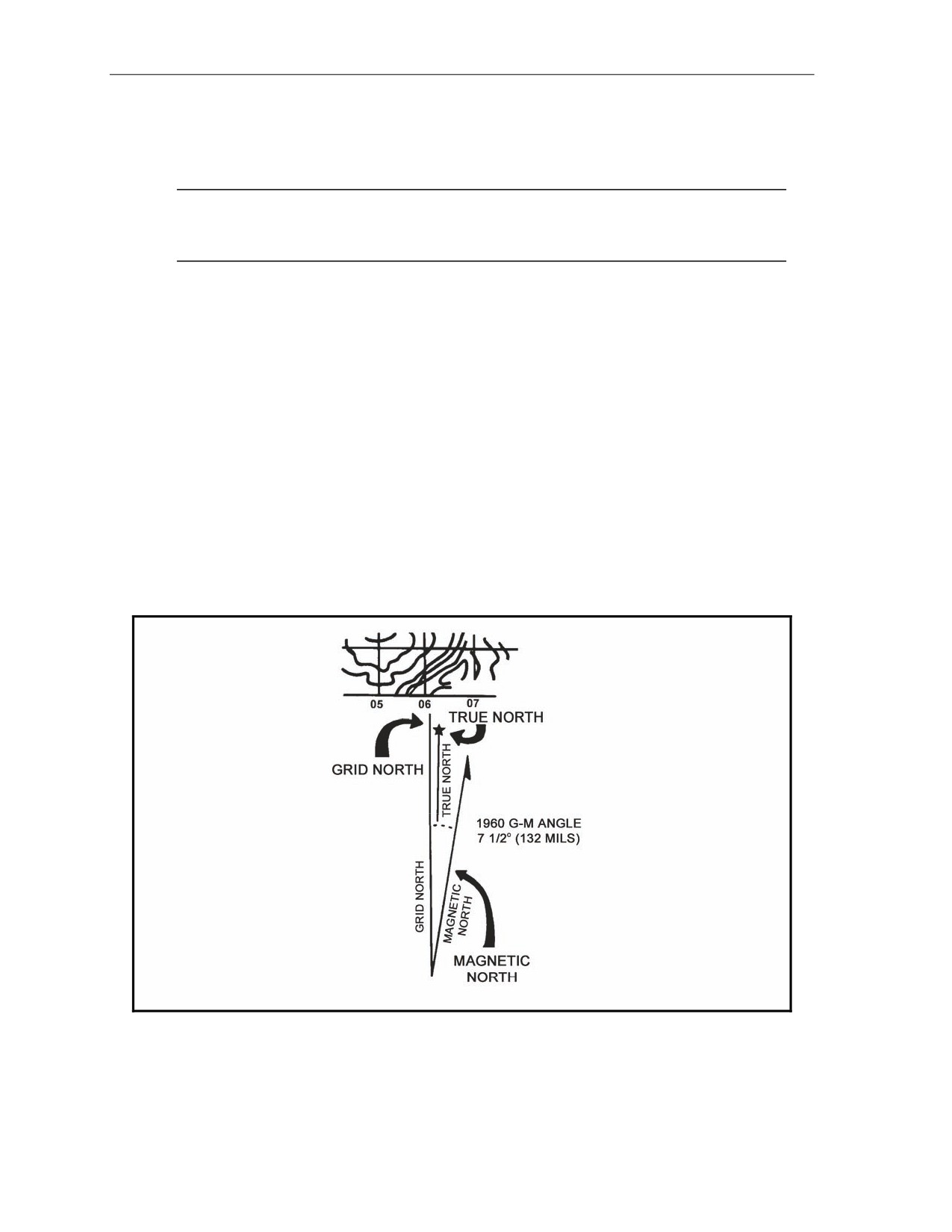
(1) Locate the GD in the map sheet legend of the area of operations. Before entering the GD, round
it off to the nearest 10, and express it in tenths. For example, a GD of 132 is 130; expressed in
tenths is 13 (Figure 7-2).
Figure 7-2. Declination diagram.
7-4
FM 3-22.91
17 July 2008
Preparation of Fire Control Equipment
(2) Since the GD is easterly, select the display switch beneath the E. The display shows, "E W GD:
E _ _." The declination diagram shows the declination in both degrees and mils. Use the mils
value given. The difference between grid north and magnetic north is 100 mils, but is entered
into the MBC in tens of mils. Press the 1/ABC key once and the 0 key once. The display shows,
"E W GD: E 1 0."
NOTE: Additional direction indicators found in other menus are—
H = Horizontal
S = Slant
L = Left
R = Right
U = Up
D = Down
+ = Add
í = Drop
+ = North
í = South
When these symbols appear in later chapters, their meaning will be discussed in depth.
(3) Select the SEQ switch once to store the grid declination in the computer.
NOTE: Latitude ( LAT -/+) comes from a map sheet of an area of operations. Enter plus (+) for
the northern hemisphere or minus (í) for the southern hemisphere. The latitude is an optional
entry.
MULTIPLE CHOICE ENTRY
7-13. The keytone is the length of time required for a communications device (FM radio) to enable the
transmitter before sending data. When a radio is hot from frequent use, it takes a lower keytone to send a
message. Similarly, if the radio is cold from the outside temperature, it takes longer to send a message. The
normal or default value is 1.4 seconds. For this example, change the keytone to 3.5 seconds as follows:
NOTE: The next three screens are explained in later chapters. Press the SEQ switch four times
to advance the display to the keytone menu.
(1) Press display switch 3 under the flashing cursor. This rejects the default value and gives the first
four selections: 0.2
0.7 1.4 2.1. The selection 3.5 is not available on this display. The sequence
indicator bulb is flashing to indicate that there are more selections to be viewed.
(2) Press the SEQ switch again, and the remaining selections appear in the display: 2.8
3.5
4.2
4.8. Press the display switch under 3.5. The display shows, "KEYTONE: 3.5."
(3) Return to the READY display. Press the SEQ switch twice to advance to the last fill-in-the-
blank selection in the SET UP menu. The display shows, "OWN ID:
__." The owner
identification code found in the signal operation instructions (SOI) must be entered here, A
through Z or 0 through 9. For this example, enter 1. Press the 1/ABC key once. Press display
key 4 (under the 1) once. The display now shows, "OWN ID: 1."
NOTE: The FO and FDC must coordinate to ensure that both know the owner’s identification
when using DMD.
INITIALIZATION
7-14. This paragraph discusses the initialization switches and how they are affected by the different modes
of operation.
17 July 2008
FM 3-22.91
7-5
Chapter 7
SELF-TEST
7-15. The MBC can perform its own internal tests. When the operator turns on the MBC or suspects a
malfunction, he should initiate the self-test.
NOTE: The test should be performed when time is available.
(1) Press the ON/OFF switch; the MBC shows, "POWERUP TEST," while performing internal
circuit checks, and then it shows, "READY."
NOTE: If any other display appears, turn in the MBC to the sustainment maintenance team. If
the BATT LOW indicator flashes or the display does not appear, replace the battery or check the
power connections.
(2) Perform the four self-tests in any sequence. The SELF-TEST switch provides testing of the
microprocessor (MICR), all switches and keys (SW), the display and indicators (DSP), and the
modem (MOD).
(3) Press the TEST switch. The software revision number (Revision 3/A) displays.
NOTE: If the correct software revision number is not displayed, turn in the MBC to the
sustainment maintenance team.
Microprocessor
(1) Press the SEQ switch.
(2) Use the multiple choice entry to select MICR. The test begins.
(3) Once the test is complete (about 38 seconds), the display shows, " MICR: PASS."
NOTE: If any other display appears, turn in the MBC to the sustainment maintenance team.
Switches and Keys
(1) Use the multiple choice entry to select SW.
(2) Press the switch or key indicated in the display.
(3) When a switch fails or is pressed out of sequence, the display shows, "ERROR." The display
returns to the name of the switch to be pressed. If the specified switch is pressed and an error
occurs, the switch is inoperative.
NOTE: If the MBC doesn't respond to normal keystrokes, the keyboard assembly may be
malfunctioning, and the MBC must be turned in to the sustainment maintenance team.
(4) After all of the switches and keys have been tested, the display shows, "END OF TEST," and
then "READY."
Display
(1) Use the multiple choice entry to select DSP.
(2) Press the SEQ switch three times to check for unlit dot segments in each character space.
(3) During the first part of the display test, make sure all dot segments are lit in the 16-character
display.
(4) In the second part of the test, check for character generation and indicators.
7-6
FM 3-22.91
17 July 2008
Preparation of Fire Control Equipment
NOTE: Even if one or more dot segments are out, use the MBC if the characters are readable.
If the characters are not readable or an indicator is not flashing, turn in the MBC to the
sustainment maintenance team.
CAUTION
Do not test the modem while connected to a radio. This could cause
internal damage to the MBC.
Modem
(1) Use the multiple choice entry to select MOD.
(2) After the modem test (about 20 seconds), the display shows, "MODEM PASS" or "MODEM
FAIL."
NOTE: If "MODEM FAIL" shows, message transmission and reception are inoperative. The
MBC still accepts manual input data and computes fire missions.
BASIC DATA INPUT
7-16. Before computing a fire mission, the operator must use certain initialization switches to input basic
data. Overall MBC initialization is directly related to the tactical scene. Operators must always initialize
SET UP, WPN DATA, and AMMO DATA switches, initializing other switches as needed.
Manual Mode
7-17. When the MBC is not connected to an external communication device, all data are manually entered.
Digital Mode
7-18. When the MBC is connected to an external device (DMD-supported), data are digitally entered into
the appropriate switch memory. Data entered digitally may be reviewed or supplemented manually.
MINIMUM INITIALIZATION
7-19. Minimum initialization is the least amount of data needed to compute a standard mission. For
minimum initialization, operators use the sequence outlined in the following paragraphs.
TEST and BRT Switches
7-20. These switches are used to check overall MBC operation and to set the display brightness.
NOTE: The low setting in the BRT menu lights up the keyboard for night or limited visibility
use.
SET UP and WPN DATA Switches
7-21. These two switches must be initialized. They are always manually entered in the MBC. Data will
never change due to other switch action; however, the operator may review and update data as needed.
17 July 2008
FM 3-22.91
7-7
Chapter 7
When the AMMO DATA switch default values are suitable, this switch is not needed for initialization. The
default values are:
z
60-mm mortar: HE, M720; WP, M302A1; and ILLUM, M83A3.
z
81-mm mortar: HE, M374; WP, M375; ILLUM, M301A3; TNG, M1; and smoke M819 (red
phosphorus).
z
120-mm mortar: HE, M933, M934; WP, M929; and ILLUM, M930.
z
120-mm mortar (insert): HE, M374; WP, M375A2; and ILLUM, M301A3.
MINIMUM MISSION DATA
7-22. Once the MBC is turned on and the self-test is conducted, the following minimum Mission Data
must be entered to compute for a standard grid mission.
EXAMPLE
SET UP (menu)
Timeout: 60 seconds
Target prefix: AH
Target numbering block: 0001 - 0200
Easting (area of operation): 096000
Northing (area of operation): 029000
NOTE: Precede each easting and northing coordinate with a zero.
(Digital communications data)
Computer owner's identification:
WPN DATA (menu)
Unit: A (section)
Caliber: 120-mm
Carrier-mounted: YES
Basepiece: A2
Basepiece location: E: 0400, N: 4700
Altitude: 0750 meters
Azimuth of fire: 0800 mils
NOTE: If firing a parallel sheaf with all mortars online, the only weapon needed is the
basepiece. When the situation allows, enter the rest of the section.
Weapon No. 1: Direction - 1600 mils
Distance - 060 meters
Weapon No. 3: Direction - 4800 mils
Distance -
060 meters
Weapon No. 4: Direction - 4800 mils
Distance -
120 meters
7-8
FM 3-22.91
17 July 2008
Preparation of Fire Control Equipment
WARNING
Using the default firing data for all guns in the firing section may
cause rounds to be fired outside of the safety fan or firing zone.
Therefore, always use the technical fire control (TFC) menu when
a safety fan or firing zone is used. This gives the MBC operator a
warning message to indicate if any rounds will land outside of the
safety fan or firing zone. For Revision 3/A, the operator must
override the message to continue.
(1)
Press the ON/OFF switch. The display shows, "POWERUP TEST," momentarily, and then
shows, "READY."
(2)
Use the TEST switch to manually start the MBC self-test. Perform the self-test as the situation
permits or as advised by the supervisor.
(3)
Use the BRT switch to select the level of display character brightness (LOW, MED, HI, or
MAX). Use the LOW level to turn on the keyboard background lighting. Character brightness is
always set at high when the MBC is turned on or when the BRT switch is pressed.
(4)
Press the SEQ switch. The display shows, "READY." Press the SET UP switch. Use the
multiple choice entry to change the timeout to the desired number of seconds (15, 30, 45, or 60).
(5)
Press the SEQ switch. Using alphabetical entry, enter the target prefix, AH.
(6)
Press the SEQ switch. Using numerical entry, enter the target numbering block, 0001 - 9999.
(7)
Press the SEQ switch. Use the default shown (ALARM:OFF). Use the message alarm for DMD-
supported missions, if needed.
(8)
Press the SEQ switch. Using numerical entry, enter the minimum easting coordinate, 096.
(9)
Press the SEQ switch. Using numerical entry, enter the minimum northing coordinate, 029.
(10) Press the SEQ switch until the display shows, "OWN ID:
_." "E W GD:," " + í
LAT:," "LISTEN ONLY: OFF," "BIT RATE: 1200," "KEYTONE: 1.4," and "BLK: SNG"
information may be entered for expanded initialization.
(11) The final entry in the SET UP menu is the OWN ID. Enter the unit identification code located in
the SOI.
Weapon Data
7-23. Use the WPN DATA switch to enter the weapon data for section A, B, and or C. Assign weapons to
one, two, or all three sections. A total of 18 weapons may be assigned (six for each section): A1 through
A6, B1 through B6, and C1 through C6. The first weapon entered in a section becomes the basepiece. The
basepiece is the reference point for the MBC to locate and add weapons to a section.
NOTE: The basepiece does not have to be the number 2 gun or adjusting piece. It is preferable
that the basepiece is the centermost gun in the sheaf to ensure balanced fires when firing a
parallel sheaf.
(1) Press the WPN DATA switch. Use the multiple choice entry to select the desired section (A).
With the weapon types displayed, select the caliber, 81-/120-mm.
(2) After the caliber of weapon is selected, the choice of carrier- or ground-mount is next (except
for the 60-mm mortar). The MBC defaults to "CARRIER: NO," indicating that the section is to
be ground-mounted. Ensure that all weapons in the section are mounted the same. Using the
multiple choice entry, select "CARRIER: YES," which indicates that the section is to be carrier-
mounted. After entering the selection of carrier-mounted, press the SEQ switch, and the display
shows, "CARRIER MV ENTERED." The muzzle velocity is figured differently for ground-
17 July 2008
FM 3-22.91
7-9
Chapter 7
mounted and carrier-mounted mortars; carrier-mounted muzzle velocity corrections for that
section are entered into the MBC's memory.
(3) Press the SEQ switch. Enter the basepiece number using multiple choice entry (A2). The
basepiece is a reference for the MBC to locate the other mortars in that section. Time and effort
are usually saved if one of the flank mortars is used as the basepiece.
(4) Press the SEQ switch. Enter the basepiece easting and northing grid coordinates. Most mortar
locations are known to within eight-digit grid coordinates. To enter the coordinates, follow these
instructions:
Given the grid location for the basepiece as 04004700, enter the first four easterly digits by
pressing the alphanumeric key for that number, followed with a zero. Press the 0 key. The
display shows, "E:0_ _ _ _ N:_ _ _ _ _." Enter the rest of the coordinates. The final display
shows, "E:04000 N:47000." Do the same if only a six-digit coordinate is known—for
example, "123456" is entered as "12300 45600."
NOTES:
1. Only numbers can be entered; letters are not part of the selection process for
grid coordinates.
2. All easting and northing grid coordinates require five-digit entries.
Press the SEQ switch. Use the multiple choice entry to enter the altitude of the basepiece in
meters (0750). The altitude is a mandatory entry. If the FDC does not know the altitude, an
entry of 0000 is used. This entry tells the MBC to compute from sea level. Altitude entries
may range from 9999 meters to -999 meters.
Press the SEQ switch. Use a multiple choice entry to enter the direction of fire (azimuth
0800) and referred deflection (2800) in mils.
Press the SEQ switch, and the display shows, "CONT END." Select Continue (CONT) if
the rest of the section is to be entered at this time. If not, select END, and the computer
shows, "READY."
To continue entering weapons, select CONT, and the MBC shows, "WPN:A_ NXT CLR."
Enter the weapon number (1) using the 1/ABC alphanumeric key.
Press the SEQ switch. Use the multiple choice entry to enter weapon direction (1600 mils)
and distance (035 meters) from the basepiece.
Press the SEQ switch. Repeat the steps in the paragraphs above until all guns in the section
have been entered. Select END, and the MBC display shows, "READY."
Ammunition Data Default Values
7-24. If the AMMO DATA default values are suitable, the minimum initialization is complete. If suitable,
the operator uses the AMMO DATA to select shell types for each ammunition type for the caliber in use.
Powder temperature default is 70 degrees and is correctable. When corrections are entered, the word "NO"
on the right side of the display is changed to "CR." Weight changes are entered in pounds or squares.
When pounds or squares are entered, a conversion is made to show both unit entries.
(1) Press the AMMO DATA switch. The display shows, "60 81 120 TEMP." Select the caliber of
weapon being used by pressing display switch 3 beneath the number.
(2) The display now shows, "HE: _____
:NO_____." Flashing cursors are on the 2 and the N,
which means that the display may be changed. However, the round also comes in different
weights as explained earlier. Once the entry has been made by weight in pounds or in squares,
press the SEQ switch, and the display shows, "HE: _____ :CR._____."
(3) Press the SEQ switch. Continue the above procedures until all ammunition requirements are
entered.
NOTE: The ammunition menus for all the mortars are similar in format.
7-10
FM 3-22.91
17 July 2008
Preparation of Fire Control Equipment
EXPANDED INITIALIZATION
7-25. Expanded initialization includes the MET, FIRE ZONES, Forward Observer Location (FO LOC),
Known Point/Target (KNPT/TGT, and Registration Data (REG DATA). These data are initialized as they
become available.
z
Always manually initialize MET when entering nonstandard MET data. If the MET switch is
not used, the MBC uses standard conditions for MET data. When the MET is entered, ensure
that the SET UP menu has the current data for the grid declination and latitude (LAT).
z
Always manually initialize and update FIRE ZONES information, when needed.
z
Manually initialize and update FO LOC information when using the manual mode. When the
MBC is DMD-supported, input is automatically entered when a valid observer location message
is received. This is also a good time to update the SET UP menu. The communication data are
"LISTEN ONLY: OFF," "BIT RATE: 1200," "KEYTONE: 1.4," and "BLK:SNG."
NOTE: The bit rate and transmit block mode are located in the SOI.
z
Initialize and update KNPT/TGT information at any time, regardless of the mode of operation.
The KNPT/TGT switch may be updated automatically using the EOM, REPLOT, and SURV
switches, or by receiving digital messages related to the known point/target.
z
Manually initialize REG DATA to maintain a registration file when enough data are known
from conducting a fire mission. Normally, registration data are generated automatically using
the REG switch during fire mission processing, but data manually entered with the REG DATA
switch are automatically updated when the REG switch is used to compute registration.
17 July 2008
FM 3-22.91
7-11
This page intentionally left blank.
Chapter 8
Types of Missions
All fire missions, except FPFs, begin with the GRID, SHIFT, or POLAR switches.
The necessary elements of the fire request are entered into the MBC. The
WPN/AMMO switch is used to identify the section and the adjusting piece. The
firing data are displayed after pressing the COMPUTE switch.
GRID MISSION SWITCH
8-1. The GRID mission switch is used to begin a fire mission when the target is located with grid
coordinates. The following paragraphs describe the procedures for conducting a grid mission.
8-2. Press the GRID switch (red) to start the GRID menu. "FR GRID" displays. Press the SEQ switch,
and perform the following:
(1) Enter the FO's call sign in the FO LOC menu (W/12).
NOTE: Entry of the FO's call sign may be omitted.
(2) Press the SEQ switch.
(3) Enter MSN:1.
(4) "TN:AA0001" is displayed, indicating that this is the first mission out of a possible three. The
display also shows the target number assigned to this mission by the MBC.
(5) Press the SEQ switch.
(6) Enter the OT direction (DIR:0500). If the OT direction is not known, the GT may be selected using
display switch 1. When this entry is omitted, the MBC automatically inputs the GT direction.
(7) Press the SEQ switch.
(8) Enter the target’s grid coordinates (E:06670 N:48832).
(9) Press the SEQ switch.
(10) Enter the target's altitude (ALT:0600).
(11) Press the SEQ switch.
(12) The Ready light will display.
8-3.
Select the WPN/AMMO switch (red), and perform the following:
(1) Sequence past the following:
FO calling in the fire mission ( FO:W/12\-).
Mission and target numbers assigned to the mission (MSN:1 TN:AA0001).
(2) Enter the adjusting weapon (WP:A2).
(3) Press the SEQ switch.
NOTE: Once the firing section is selected, the weapon type is displayed along with the
adjusting weapon (120mm WPN:A2).
(4) Review the shell and fuze combination (SH/FZ:HE PD). If other combinations are needed, use
display switch 3 for shell changes and display switch 4 for fuze changes.
(5) Sequence "CHG:" to "READY."
17 July 2008
FM 3-22.91
8-1
Chapter 8
NOTE: The MBC selects the lowest charge possible, or the operator can manually input the
charge of his choice.
8-4.
Push the COMPUTE switch (green) to receive firing data.
(1) The display "AF STD RP" indicates the following:
Method of control used.
o AF = adjust fire.
o FFE = fire for effect.
Type of MET.
o STD = standard.
o CURR = current.
Registration point (when used).
(2) Press the SEQ switch.
NOTE: When the COMPUTE switch is pressed before the WPN/AMMO switch, the computer
automatically enters the WPN/AMMO menu.
(3) Review the deflection and charge (A2DF:2611 CH:2).
(4) Press the SEQ switch.
(5) Review the fuze setting and elevation (A2FS: EL:1161).
(6) Press the SEQ switch.
NOTE: The fuze setting applies only to the fuzes that require a time setting.
(7) The time of flight is displayed (A2 TOF:40.0).
(8) Press the SEQ switch.
(9) "READY" is displayed.
8-5.
Push the SFTY DATA switch (orange) to receive safety information.
(1) The display, "RN:3238 AZ:0987," indicates the following:
Range from the gun position to the target.
Azimuth from the gun position to the target.
NOTE: At this point, it is not necessary to continue in the SFTY DATA menu.
(2) Press the BACK switch (green) to "READY."
8-6.
Push the XMIT switch (green) to receive or format messages to the observer.
(1) Press display switch 1 under "MTO" (MSN:1). The target number displays (TN:AA0001).
NOTE: In most cases, angle T information is the only concern.
(2) Press the SEQ switch
11 times to receive the angle T. The angle T displays
(ANG
T:0200MILS).
(3) To exit out of this menu, press the MSN switch (light green), and then press the BACK switch.
(4) "READY" is displayed.
8-2
FM 3-22.91
17 July 2008
Types of Missions
8-7.
Wait for FO adjustments (if any). To make FO adjustments—
(1) Press the ADJ switch (red).
(2) "ADJ MPI" is displayed.
(3) Press display switch 1 under the ADJ switch.
(4) "ENT REV" is displayed.
(5) To enter adjustments, select ENT. To review the last adjustment, select REV.
(6) Press display switch 1, "ENT."
(7) "ADJUST FO:W/12\-" is displayed.
(8) Press the SEQ switch.
(9) The mission and target numbers assigned to the mission display (MSN:1 TN:AA0001).
(10) Press the SEQ switch.
(11) Current registration and MET data display (REG/MET: NO, no current registration or MET data
apply to this mission).
(12) Press the SEQ switch.
(13) The type of MET displays (MET:STD - MET to be applied to this mission will be standard).
(14) Press the SEQ switch.
(15) The FO’s direction to the target is displayed (GT DIR:0987).
(16) Press the SEQ switch.
(17) "L R DEV" is displayed.
NOTE: During the initial input of the mission, the MBC operator bypasses the direction entry.
The direction shown is the GT direction, also known as the initial azimuth. At this point, the
MBC operator ensures that the FO’s direction is shown. To clear the portion of the display
showing the direction, press display switch 3 under the flashing display cursor, or press the
CLEAR ENTRY switch once to clear a digit at a time. Once the GT azimuth is cleared, the FO’s
direction (0500) may be inserted.
(18) Enter the lateral deviation adjustment (if any) by selecting the corresponding display switch
under the deviation direction letter. Follow the entry with the number of meters to deviate in
lateral adjustment (R0050).
(19) Press the SEQ switch.
(20) "+ í RN:" is displayed.
(21) Enter the range adjustment (if any) by selecting the corresponding display switch under the
range adjustment letter. Follow the entry with the number of meters to adjust in range (í0050).
(22) Press the SEQ switch.
(23) "HGT: MTR" is displayed.
(24) Enter the height adjustment that applies. Height entries are in meters. This can be changed to
feet by pressing display switch 2 and selecting "FT" (display switch 2).
(25) Press the SEQ switch.
(26) "U D HT:" is displayed.
(27) Enter the altitude adjustment (if any) by selecting the corresponding display switch under the
height adjustment letter. Follow the entry with the number of meters (or feet) to adjust in height.
8-8.
Push the COMPUTE switch (green) to receive firing data.
(1) The method of control used, type of MET, and RP (when used) display (AF STD RP).
(2) Press the SEQ switch.
(3) The deflection and charge display (A2DF:2589 CH:2).
(4) Press the SEQ switch.
(5) The fuze setting and elevation display (A2FS: . EL:1165).
(6) Press the SEQ switch.
17 July 2008
FM 3-22.91
8-3
Chapter 8
(7) The time of flight is displayed (A2 TOF:40.1).
(8) Press the SEQ switch.
(9) "READY" is displayed.
8-9. Once all adjustments have been made or the FO requests FFE, decide how to engage the target.
Based on the information given by the FO in the CFF, use the TFC key.
8-10. Press the TFC switch (red), and conduct the following procedures:
(1) The call sign of the FO calling in the fire mission displays (TFC FO:W/12\-).
(2) Press the SEQ switch.
(3) The mission and target numbers assigned to the mission display (MSN:1 TN:AA0001).
(4) Press the SEQ switch.
(5) The sheaf type preferred by the FDC for this mission displays (SHEAF:PRL).
NOTE: The preferred sheaf type can be changed when necessary.
(6) Press the SEQ switch.
(7) The method of control displays (CON:AF).
NOTE: The method of control can be changed when necessary.
(8) Enter FFE.
(9) Press the SEQ switch.
(10) The section and the weapons assigned to the FFE display (GUNS:A2 13).
NOTE: The section and the weapons assigned to the FFE can be changed when necessary.
(11) Press the SEQ switch.
(12) Current registration or MET data that apply to this mission display (REG/MET:NO - no current
registration or MET data apply to this mission).
NOTE: Current registration or MET data that apply to this mission can be changed when
necessary.
(13) Press the SEQ switch.
(14) The type of MET displays (MET:STD - MET to be applied to this mission will be standard).
NOTE: The type of MET can be changed when necessary.
(15) Press the SEQ switch.
(16) "PUSH COMPUTE" is displayed.
8-11. Press the COMPUTE switch (green) to receive firing data. Press the SEQ switch to receive firing
data for each gun.
NOTE: Once EOM is received, use the SFTY DATA switch to obtain the burst point
coordinates (06691 48764).
8-4
FM 3-22.91
17 July 2008
Types of Missions
8-12. Press the EOM switch (green) to end the mission.
z
EOM ends the mission without saving.
z
EOMRAT ends the mission and records it as a target or known point.
NOTE: The flashing red light over the SEQ switch indicates that additional information is
available for the current menu or display.
z
EOMFPF ends the mission and records it as an FPF.
8-13. Press EOM (green key), then EOMRAT. Sequence and save the mission as known point 00.
Sequence to "READY."
SHIFT MISSION SWITCH
8-14. The SHIFT mission switch is used to initiate a fire request that uses the shift from a known point
method of target location. The following paragraphs describe the procedures for conducting a shift from a
known point mission.
8-15. Press the SHIFT switch. "FR SHIFT" is displayed. Press the SEQ switch.
(1) "FO:/00\-" is displayed.
(2) Enter the FO call sign (W12).
(3) Press the SEQ switch.
(4) "FROM:TGT KNPT" is displayed.
(5) Select a target or known point to shift from (ENTER KP00).
(6) Press the SEQ switch.
(7) "GT DIR:" is displayed.
(8) Enter the direction from the CFF (DIR 0500).
(9) Press the SEQ switch.
(10) The mission and target numbers assigned to the mission display (MSN:* TN:******, * denotes
the target number assigned by the MBC).
(11) Press the SEQ switch.
(12) "L R DEV" is displayed.
(13) Enter the lateral deviation correction that applies (L0500).
(14) Press the SEQ switch.
(15) "+ − RN:" is displayed.
(16) Enter the range correction that applies (-0100).
(17) Press the SEQ switch.
(18) "U D HGT:" is displayed.
(19) Enter the altitude correction that applies (U100).
(20) Press the SEQ switch.
(21) "READY" is displayed.
8-16. Press the WPN/AMMO switch. "WPN/AMMO" is displayed. Press the SEQ switch.
(1) The call sign of the FO calling in the fire mission displays (FO:*/**\-).
(2) Press the SEQ switch.
(3) The mission and target numbers assigned to the mission display (MSN:* TN:******).
(4) Press the SEQ switch.
(5) "WPN:" is displayed.
(6) Enter the adjusting weapon (WPN:A2).
(7) Press the SEQ switch.
(8) The shell and fuze combination displays (SH/FZ: HE PD).
17 July 2008
FM 3-22.91
8-5
Chapter 8
(9) Change the shell and fuze combination, if needed.
(10) Sequence past "CHG:" to "READY."
8-17. Push the COMPUTE switch to receive firing data.
(1) Sequence past "AF STD RP."
(2) Review the deflection and charge (A2DF:2725 CH:2).
(3) Press the SEQ switch.
(4) Review the fuze setting and elevation (A2FS: . EL:1212).
(5) Press the SEQ switch.
(6) The time of flight is displayed (A2 TOF:40.3).
(7) Press the SEQ switch.
(8) "READY" is displayed.
8-18. Push the SFTY DATA switch to receive safety information.
(1) Review the range and azimuth (RN:2916 AZ:0872).
(2) Press the BACK switch to "READY."
8-19. Push the XMIT switch to receive or format the message to the observer.
(1) Press display switch 1 under "MTO."
(2) Press the SEQ switch 11 times to receive the angle T (ANG T:0200 mils).
(3) To exit this menu, press the MSN switch (light green), and then press the BACK switch.
(4) "READY" is displayed.
8-20. Wait for FO adjustments (if any). To make these adjustments—
(1) Press the ADJ switch.
(2) "ADJ MPI" is displayed.
(3) Press display switch 1 under "ADJ."
(4) "ENT REV" is displayed.
(5) Press display switch 1.
(6) "ENT" is displayed.
(7) Sequence to GT.
(8) The FO’s direction to the target displays (DIR:****).
(9) Press the SEQ switch.
(10) "L R DEV" is displayed.
(11) Enter the lateral deviation correction that applies (L0050).
(12) Press the SEQ switch.
(13) "+ í RN:" is displayed.
(14) Enter the range correction that applies (+0050).
(15) Press the SEQ switch.
(16) The height entry is displayed (HGT:MTR).
(17) Press the SEQ switch.
NOTE: Height entries appear in meters, but can be changed to feet by pressing display switch 2
and selecting "FT" (display switch 2).
(18) "U D HT:" is displayed.
(19) Enter the altitude adjustment (D0050).
(20) Press the SEQ switch.
(21) "READY" is displayed.
8-6
FM 3-22.91
17 July 2008
Types of Missions
8-21. Push the COMPUTE switch to receive firing data, and then follow these procedures:
(1) Sequence past "AF STD RP."
(2) Review the deflection and charge (A2DF:2748 CH:2).
(3) Press the SEQ switch.
(4) Review the fuze setting and elevation (A2FS . EL:1209).
(5) Press the SEQ switch.
(6) The time of flight is displayed (A2 TOF:40.5).
(7) Press the SEQ switch.
(8) "READY" is displayed.
8-22. Once all adjustments have been made or the FO requests FFE, decide how to engage the target.
Based on the information given by the FO in the CFF, press the TFC switch, and follow these procedures:
(1) The call sign of the FO calling in the fire mission displays (TFC FO:*/**\-).
(2) Press the SEQ switch.
(3) The mission and the target numbers assigned to the mission display (MSN:* TN:******).
(4) Press the SEQ switch.
(5) The sheaf type preferred by the FDC for this mission displays (SHEAF:PRL).
NOTE: The preferred sheaf type can be changed when necessary.
(6) Press the SEQ switch.
(7) The method of control displays (CON:AF).
NOTE: The method of control can be changed when necessary.
(8) Enter FFE.
(9) Press the SEQ switch.
(10) The section and the weapons assigned to the FFE display (GUNS:A2 13).
NOTE: The section and the weapons assigned to the FFE can be changed when necessary.
(11) Press the SEQ switch.
(12) Current registration or MET data that apply to this mission display (REG/MET:NO - no current
registration or MET data apply to this mission).
NOTE: Current registration or MET data that apply to this mission can be changed when
necessary.
(13) Press the SEQ switch.
(17) The type of MET displays (MET:STD - MET to be applied to this mission will be standard).
NOTE: The type of MET can be changed when necessary.
(14) "PUSH COMPUTE" is displayed.
8-23. Press the COMPUTE switch to receive firing data. Then, press the SEQ switch to receive the firing
data for each gun.
17 July 2008
FM 3-22.91
8-7
Chapter 8
8-24. Press the EOM switch (green) to end the mission.
z
EOM ends the mission without saving.
z
EOMRAT ends the mission and records it as a target or known point.
NOTE: The flashing red light over the SEQ switch indicates that additional information is
available for the current menu or display.
z
EOMFPF ends the mission and records it as an FPF.
8-25. Press EOM, then EOMRAT. Sequence and save the mission as known point 01. Now, sequence to
"READY."
POLAR MISSION SWITCH
8-26. The POLAR switch is used to initialize a mission that uses the polar plot method of target location.
The following paragraphs describe the procedures for conducting a polar plot mission.
8-27. Press the POLAR switch.
(1) "NORMAL LASER" is displayed.
(2) Select "NORMAL."
NOTE: The FO conducts this mission in the normal mode. NORMAL is a method of target
location using a map or any nonlaser device. LASER is a method of target location using laser
equipment.
(3) "FR POLAR" is displayed.
(4) Press the SEQ switch.
(5) "FO:/00\-" is displayed.
(6) Enter the FO's call sign (W/12).
(7) Press the SEQ switch.
(8) The mission and target numbers assigned by the MBC display (MSN:* TN:******, * denotes
the target number).
(9) Press the SEQ switch.
(10) "DIR:" is displayed.
(11) Enter the direction from the CFF (DIR:0800).
(12) Press the SEQ switch.
(13) "DIS:" is displayed.
(14) Enter the distance from the CFF (DIS:2000).
(15) Press the SEQ switch.
(16) "U D HGT:" is displayed.
(17) Enter the altitude correction that will be applied (D050).
(18) Press the SEQ switch.
(19) "READY" is displayed.
8-28. Press the WPN/AMMO switch.
(1) "WPN/AMMO" is displayed.
(2) Press the SEQ switch.
(3) The FO's call sign entered in step 1 displays (FO:*/**\-, * denotes the FO’s call sign).
(4) Press the SEQ switch.
(5) The mission and target numbers assigned by the MBC display (MSN:* TN:******, * denotes
the target number).
8-8
FM 3-22.91
17 July 2008
Types of Missions
(6) Enter the adjusting weapon (WPN:A2).
(7) Press the SEQ switch.
(8) The shell and fuze combination displays (SH/FZ: HE PD).
(9) Change the shell and fuze combination, if needed.
(10) Press the SEQ switch.
(11) "CHG:" displays. The operator can manually set the charge.
(12) Press the SEQ switch.
(13) "READY” displays.
8-29. Push the COMPUTE switch to receive firing data.
(1) Sequence past "AF STD RP."
(2) Review the deflection and the charge (A2DF:2452 CH:1).
(3) Press the SEQ switch.
(4) Review the fuze setting and elevation (A2FS. EL:1139).
(5) Press the SEQ switch.
(6) The time of flight is displayed (A2 TOF:31.5).
(7) Press the SEQ switch.
(8) "READY" is displayed.
8-30. Push the SFTY DATA switch to receive safety information.
(1) Review the range and azimuth (RN:2121 AZ:1146).
(2) Press the BACK switch to "READY."
8-31. Push the XMIT switch to receive and format messages to the
observer
by performing
these
procedures:
(1) Press display switch 1 under "MTO."
(2) Press the SEQ switch 11 times to receive the angle T (ANG T:0300 MILS).
(3) To exit out of the menu, press the MSN switch (light green), and then press the BACK switch.
"READY" is displayed.
8-32. Wait for FO adjustments (if any). To make adjustments—
(1) Press the ADJ switch.
(2) "ADJ MIP" is displayed.
(3) Press display switch 1 under "ADJ."
(4) "ENT REV" is displayed.
(5) Press display switch 1, "ENT."
(6) Sequence to the FO’s direction to the target (GT DIR:****).
(7) Press the SEQ switch.
(8) "L R DEV" is displayed.
(9) Enter the lateral deviation correction that applies (L0050).
(10) Press the SEQ switch.
(11) "+ - RN" is displayed.
(12) Enter the range correction that applies (+0025).
(13) Press the SEQ switch.
(14) "U D HT" is displayed.
(15) Enter the altitude correction that applies.
(16) Press the SEQ switch.
(17) "READY" is displayed.
17 July 2008
FM 3-22.91
8-9
Chapter 8
8-33. Push the COMPUTE switch to receive firing data.
(1) Sequence past "AF STD RP."
(2) Review the deflection and charge (A2DF:2479 CH:1).
(3) Press the SEQ switch.
(4) Review the fuze setting and elevation (A2FS: . EL:1138).
(5) Press the SEQ switch.
(6) The time of flight is displayed (AZ TOF:31.5).
(7) Press the SEQ switch.
(8) "READY" is displayed.
8-34. Once all adjustments have been made or the FO requests an FFE, decide how to engage the target.
Based on the information given by the FO in the CFF, use the TFC key.
(1) Press the TFC key.
(2) The FO calling in the fire mission displays (TFC FO:*/**\-).
(3) Press the SEQ switch.
(4) The mission and target numbers assigned to the mission display (MSN:* TN:******).
(5) Press the SEQ switch.
(6) The sheaf type preferred by the FDC for this mission displays (SHEAF:PRL).
NOTE: The preferred sheaf type can be changed when necessary.
(7) Press the SEQ switch.
(8) The method of control displays (CON:AF).
NOTE: The method of control can be changed when necessary.
(9) Enter FFE.
(10) Press the SEQ switch.
(11) The section and the weapons assigned to the FFE display (GUNS:A2 13).
NOTE: The section and the weapons assigned to the FFE can be changed when necessary.
(12) Press the SEQ switch.
(13) Current registration or MET data that apply to this mission display (REG/MET:NO - no current
registration or MET data apply to this mission).
NOTE: Current registration or MET data that apply to this mission can be changed when
necessary.
(14) Press the SEQ switch.
(15) The type of MET displays (MET:STD - MET to be applied to this mission will be standard).
NOTE: The type of MET can be changed when necessary.
(16) "PUSH COMPUTE" is displayed.
8-10
FM 3-22.91
17 July 2008
Types of Missions
8-35. Press COMPUTE to receive firing data.
(1) Press the SEQ switch.
(2) Firing data for each gun is displayed.
NOTE: Once EOM is received, the MBC operator uses the SFTY DATA switch to obtain the
burst point coordinates.
8-36. Press the EOM switch (green) to end the mission.
z
EOM ends the mission without saving.
z
EOMRAT ends the mission and records it as a target or known point.
NOTE: The flashing red light over the SEQ switch indicates that additional information is
available for the current menu or display.
z
EOMFPF ends the mission and records it as an FPF.
8-37. Press EOM (green key), and then "EOM 1," the display switch under EOM.
TECHNICAL FIRE CONTROL
8-38. Based on information given in the CFF, the FDC chief/section leader decides how best to engage the
target. Once the FO enters the FFE phase, the MBC operator can use the technical fire control (TFC)
switch to engage the target (as directed by the FDC order).
8-39. The TFC control menu allows the FDC to enter or change information for the following default values:
z
Sheaf: Parallel.
z
Method of control: Adjust fire.
z
Weapons to fire: Basepiece selected.
z
Registration data: No.
z
MET data: Standard.
8-40. When all of the defaults are acceptable, the TFC switch is not needed. Table 8-1 provides a brief
description of the TFC menu abbreviations and their uses.
NOTE: Always use the TFC switch when using a safety fan or fire zones.
17 July 2008
FM 3-22.91
8-11

Chapter 8
Table 8-1. TFC menu abbreviations and their uses.
ABBREVIATIONS
USES
SHEAF:PRL
The type of sheaf needed to engage the target
Selections include—
•
PRL (parallel).
•
CVG (converge).
•
SPECIAL.
CON:AF: CON
Means of controlling fires
Selections include—
•
AF (adjust fire).
•
FFE (fire for effect).
•
DST (destruction).
•
REG (registration).
NOTE: In the adjust fire mode, only the weapon selected through the WPN AMMO switch
is shown. When the operator enters FFE, all assigned available weapons in that section
are included in the computation of fire data. When control is FFE or DST, some weapons
(not the adjusting weapon) may be deleted by using a correction entry.
GUNS
Mortars available for the designated control of fires
For example, if AF appears on the previous screen, the only mortar shown on this display
is the piece designated by the MBC operator in the WPN/AMMO menu.
REG/MET
If a MET has been entered and made current, this display would show REG/MET: YES.
This tells the operator that MET or registration corrections will be applied to the target
firing data.
If the display shows REG/MET: NO, no corrections are applied.
MET:STD
Type of MET corrections used for the fire mission
Selections include STD (standard) and CURR (current).
SHEAVES
8-41. The term sheaf denotes the lateral distribution of the bursts of two or more weapons firing at the
same target at the same time. The distribution of bursts is the pattern of bursts in the area of the target.
Normally, all weapons of the platoon or section fire with the same deflection, charge, and elevation.
However, since targets may be various shapes and sizes and the weapons may be deployed irregularly, it is
best to adjust the pattern of bursts to the shape and size of the target.
8-42. Individual weapon corrections for deflection, charge, and elevation are computed and applied to
obtain a specific pattern of bursts. These corrections, called special corrections, are computed and applied
based on the target's attitude, width, length, and adjusting point.
8-43. When the mortar section or platoon engages a target, different sheaves can be used. The types of
sheaves include—
z
Parallel.
z
Converged.
z
Open.
z
Linear (standard).
z
Special.
NOTE: See Chapter 4 for more information.
8-12
FM 3-22.91
17 July 2008
Types of Missions
PARALLEL SHEAF
8-44. When mortars fire a parallel sheaf, the distance between impacts of rounds is the same as the
distance between mortars. The mortars all fire using the same firing data. Parallel sheaves are normally
used on area targets.
CONVERGED SHEAF
8-45. When mortars fire a converged sheaf, rounds from two or more mortars impact on the same point in
the target area. This sheaf is normally used on point targets, such as bunkers or machine gun positions.
OPEN SHEAF
8-46. When mortars fire an open sheaf, the distance between impacts of rounds is half the distance
between mortars. Normally, 120-mm mortars are positioned 60 to 75 meters apart, and 81-mm are
positioned 35 to 40 meters apart; thus, in an open sheaf, rounds should land about 60 meters apart. For
60-mm mortars, which are normally positioned 25 to 30 meters apart, rounds should land about 45 meters
apart. All mortars fire using different deflections. Open sheaves are used when the target is slightly wider
than the area a linear sheaf would cover.
LINEAR (STANDARD) SHEAF
8-47. When mortars fire a linear sheaf, rounds impact within the total effective width of the bursts,
regardless of the mortar locations.
SPECIAL SHEAF
8-48. When mortars fire a special sheaf, each mortar has a certain point to engage. The mortars may have
different deflections, charges, and elevations. This sheaf is normally used in an attitude mission.
NOTE: When mortars fire an open or linear sheaf, the operator must use the special sheaf
function and enter the appropriate data to obtain the desired results.
TRAVERSING FIRE
8-49. Mortars use traversing fire when the target is wider than the area a standard or open sheaf would
cover. They engage wide targets using a distributed FFE. Each mortar of the section covers a portion of the
total target area and traverses the area. The mortars are manipulated for deflection between rounds until the
number of rounds given in the fire command has been fired.
NOTES:
1. The target's attitude should be within 100 mils of the mortar section's attitude
(WPN DATA menu).
2. The target's attitude should be perpendicular to the gun’s direction of fire. When
firing at targets using anything other than perpendicular angles, a combination
of traverse and search will result.
17 July 2008
FM 3-22.91
8-13
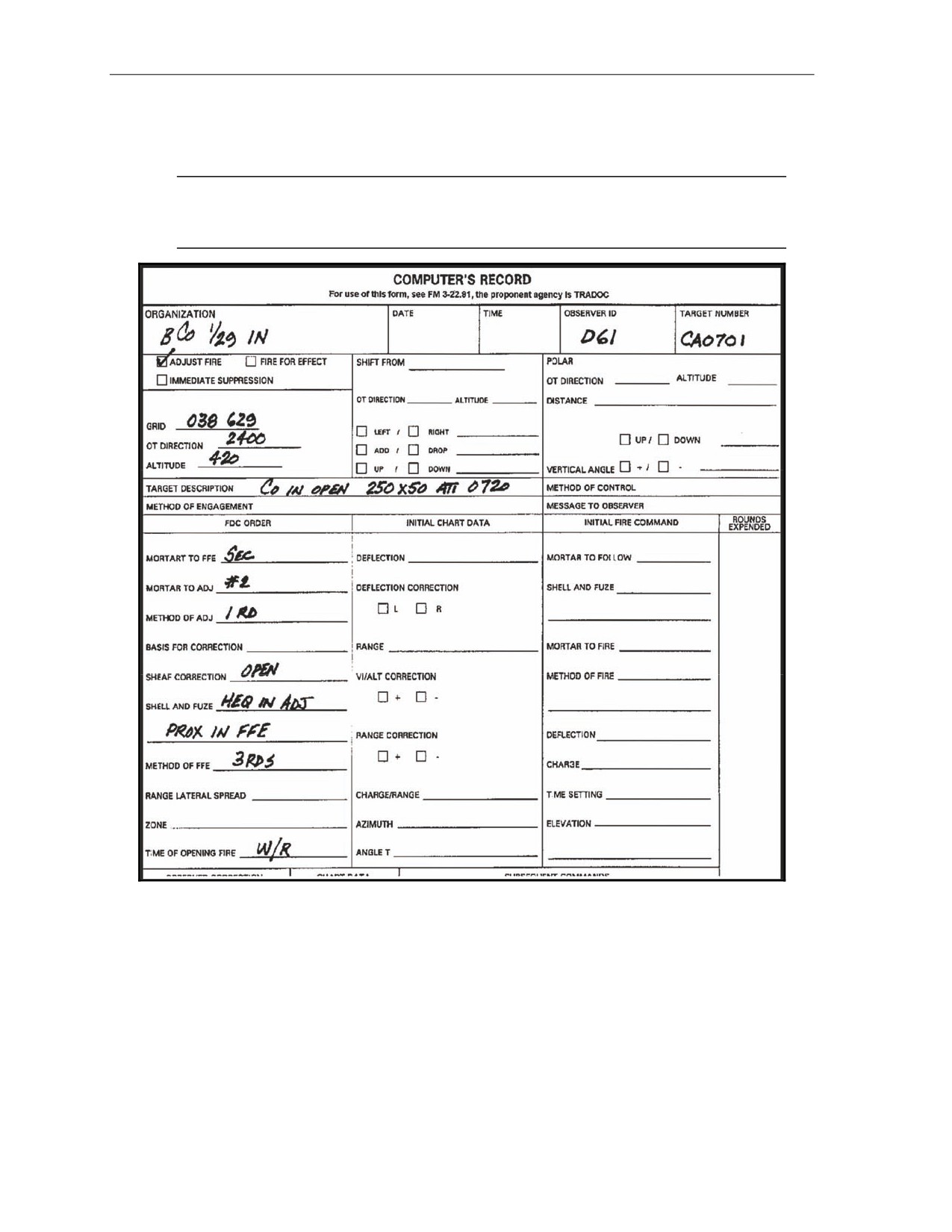
Chapter 8
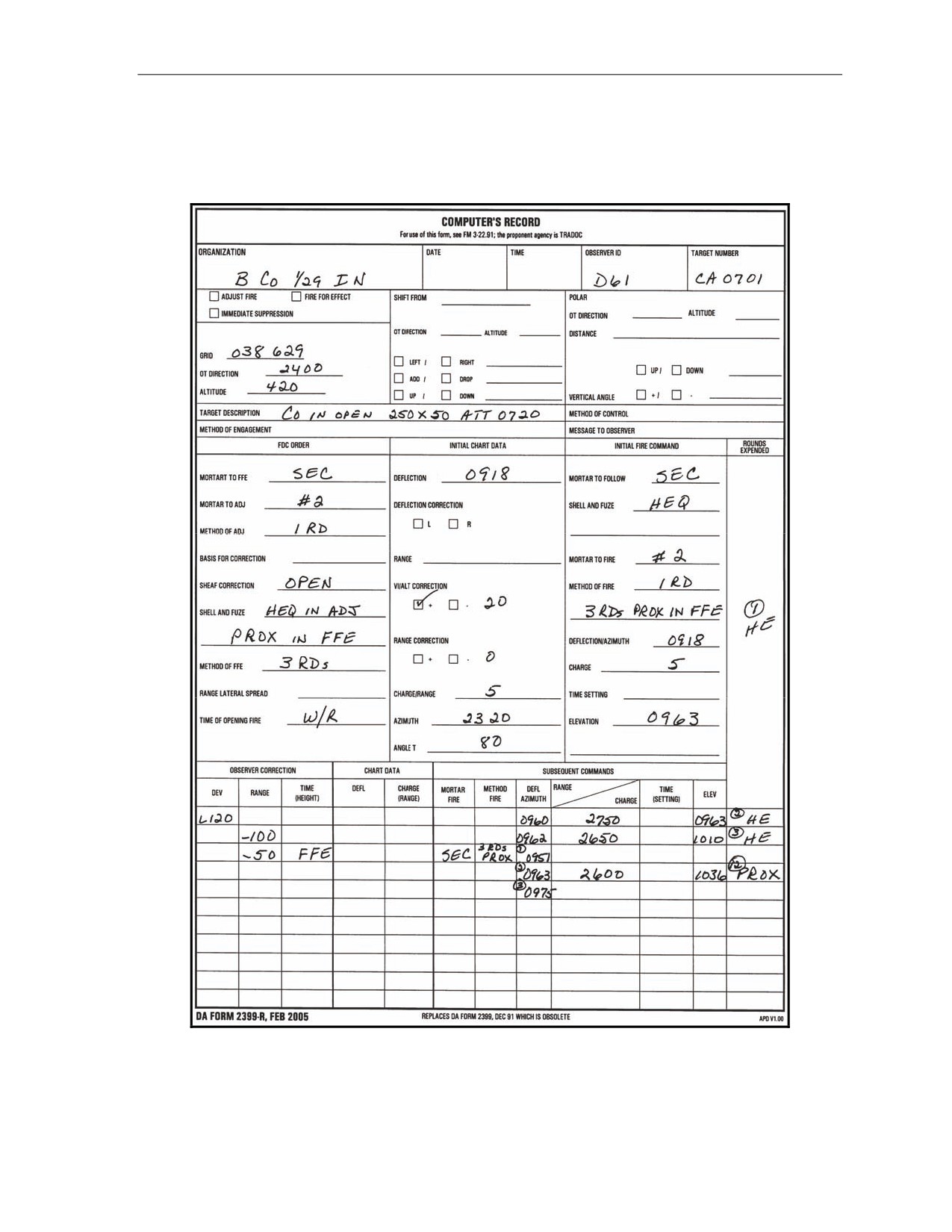
8-50. Upon receiving the CFF, the section leader/chief computer determines from the size and description
of the target that (in this example) traversing fire will be used to cover the target. He then issues the FDC
order (Figure 8-1).
NOTE: Distribution of mortar fire to cover area targets (depth or width) is computed at one
round for each 30 meters and four rounds for each 100 meters for 81-mm mortars, and one
round for each 60 meters and 2 rounds for each 100 meters for 120-mm mortars.
Figure 8-1. Excerpt from example DA Form 2399-R (Computer's Record)
with call for fire and FDC order completed.
8-14
FM 3-22.91
17 July 2008
Types of Missions
8-51. When using the information in the CFF, FDC order, and FO corrections, the FDC computes the data
to adjust the base mortar (usually the No. 2 mortar) onto the center of mass for the target area. He
computes the firing data to the center of mass. The FDC selects the SFTY DATA switch and records the
range and burst point grid coordinates on DA Form 2399-R (Figure 8-2).
Figure 8-2. Example of completed DA Form 2399-R (Computer's Record) for adjustment.
17 July 2008
FM 3-22.91
8-15