FM 3-22.90 Mortars (December 2007) - page 5
Chapter 5
given deflection and elevation must be indexed, without error. The bubbles are centered (within the
outer red lines). The vertical crossline is within ± 2 mils of an aligned or compensated sight picture.
The traversing mechanism is within four turns of center traverse. The traversing extension is locked in
the center position. The gunner receives deflection and elevation changes from the FDC in the form of
a fire command. If a deflection change is required, it precedes the elevation change.
(1)
Upon receiving the fire command, the gunner places the data on the sight and elevates or
depresses the mortar to “float” the elevation bubble.
If in low range—
o Gunner unlocks the low range support latch.
o Gunner places his left hand on the bipod leg and his right hand on the traversing
mechanism.
o Assistant gunner places his right hand on the bipod leg and his left hand on the
traversing mechanism
o Gunner and assistant gunner together raise the bipod into high range
o The assistant gunner inserts the high range-locking pin to secure the bipod.
If in high range—
o Gunner and assistant gunner together lower the bipod into low range
o Gunner pulls the high range-locking pin
o Gunner places his left hand on the bipod leg and his right hand on the traversing
mechanism.
o Assistant gunner places his right hand on the bipod leg and his left hand on the
traversing mechanism.
(2)
The assistant gunner “dead levels” the elevation bubble.
(3)
The gunner looks into his sight to determine if he has to shift the mortar and announces to
the assistant gunner to unlock the turntable.
(4)
The gunner looks through his sight and, with the assistant gunner’s help, shifts the mortar
until the vertical cross line is aligned with the aiming posts.
(5)
The gunner cross-levels the deflection bubble and looks into the sight. If the vertical cross
line is still within 20 mils of the aiming posts, the gunner tells the assistant gunner to “lock
it” (referring to locking the turntable).
(6)
With the turntable in the locked position, the gunner continues to traverse and cross-level
until the vertical cross line is lined up with the aiming posts and the deflection bubble is
level.
(7)
The gunner levels his elevation bubble and rechecks his data, bubbles and four turns of
center.
(8)
Gunner announces “GUN UP.”
REMOVAL OF A MISFIRE ON A CARRIER-MOUNTED 120-mm
MORTAR
5-51. The following procedures are used when a misfire occurs while using the Mortar Fire Control
System (MFCS).
NOTE: The squad leader immediately alerts the FDC of the misfire. The squad leader
supervises the removal of the misfire using a printed copy of the current misfire
procedures.
REMOVING A MISFIRED CARTRIDGE USING A CARTRIDGE EXTRACTOR
5-52. The following steps are taken from the time a misfire is identified to the time the misfired
cartridge is extracted using a cartridge extractor.
(1) When a misfire occurs, all crewmembers shout, “MISFIRE!”
5-30
FM 3-22.90
7 December 2007
120-mm Mortars, M120 and M121
WARNING
During peacetime live-fire training, all personnel, except the
gunner, move 100 meters or farther to the rear of the mortar.
WARNING
Never change from high-range elevation to low-range
elevation to perform misfire procedures.
(2) The gunner ensures that the cross-leveling locking knob is as tight as possible, stands to the
left rear of the mortar, and kicks the barrel above the mounting bracket for the pointing
device several times with the heel of his boot in an attempt to dislodge the round. If the
round fires, the mortar is swabbed and re-laid on the aiming point, and the firing mission
continues.
NOTE: Avoid kicking the pointing device and its mounting bracket.
WARNING
During peacetime live-fire training, if the round does not fire
after the gunner kicks the barrel, the gunner joins the crew
and waits one minute to avoid personal injury due to cookoff.
After one minute, the gunner returns to the mortar.
(3) The gunner checks for heat by starting from just below the muzzle and working down to the
base with his fingertips. If the cannon is too hot to be handled, he cools it with water or
snow and checks it one minute later. If no water or snow is available, the cannon is air-
cooled until it can be easily handled with bare hands.
NOTES:
1. Liquids must never be poured into the cannon.
2. During peacetime live-fire training, the gunner signals the squad to come
forward once the cannon is cool. All crewmembers enter from the front of
the vehicle.
(4) When the mortar is cool enough to handle, the gunner removes the firing pin by turning the
firing pin wrench counterclockwise. If necessary to provide easier access to the firing pin,
the gunner depresses the cannon until the firing pin can be completely removed from the
breech cap. After removing the firing pin, the gunner shouts, “Firing pin is removed,” and
hands the firing pin to the squad leader. If the mortar cannon is equipped with the old style
of breech cap, the gunner places the safety mechanism on SAFE (“S” showing) and shouts,
“The safety mechanism is in the SAFE position.” The squad leader confirms that the gunner
has performed the correct actions, and misfire procedures continue. The gunner then
depresses the barrel to its lowest elevation, leaving 0.25 inches (0.64 cm) of inner elevating
sleeve showing. The squad leader confirms that the firing pin has been removed.
NOTE: Removing the firing pin ensures that the mortar will not fire should the round
slip down the cannon during the subsequent drill.
7 December 2007
FM 3-22.90
5-31
Chapter 5
WARNING
When depressing the elevation using the elevating
handwheel, ensure that no metal-to-metal contact is made.
WARNINGS
1. Keep your head and body away from the front of the mortar
when removing a misfire.
2. Do not stand directly behind the mortar when removing a
misfire.
3. Do not open the buffer housing assembly when removing a
misfire, except when using the barrel tip method.
(5) The gunner rotates the gunner’s display until it is out of the way. If the carrier ramp is
raised, the driver lowers it.
(6) When the M67 sight is installed, the gunner locks the deflection/elevation on the sightunit
using the locking knobs and places the sightunit in the carrying case. The squad leader
confirms that the gunner’s actions were performed correctly.
(7) The assistant gunner removes the BAD from the barrel and stows it in a safe place. The
squad leader confirms that the assistant gunner’s actions were performed correctly.
(8) The assistant gunner inspects the catches on the cartridge extractor to ensure that they are in
the latest configuration (as indicated by a 1/8 inch [0.32 cm] hole in the face of the catch)
and to be sure that the catches are free of burrs, wear, rust, or corrosion that would impair
proper function. Then, the assistant gunner tests each catch to ensure free operation and that
each catch will snap into its original position. If the cartridge extractor fails to meet
inspection standards, the cartridge extractor is not mission capable and must not be used.
The squad leader confirms that the assistant gunner’s actions were performed correctly.
NOTE: If the cartridge extractor is not mission capable and there are no other cartridge
extractors available, or if there are no functional artillery cleaning staffs
available, use the barrel tip method to remove the misfired cartridge
(see
paragraphs 5-33 to 5-35).
(9) The assistant gunner ensures that the artillery cleaning staff assembly section sleeves are
fully extended and tightly locked so that the staff assembly will not extend or retract. If the
section sleeves can’t be tightly locked, the cartridge extractor assembly is not mission
capable and must not be used. The squad leader confirms that the assistant gunner’s actions
were performed correctly.
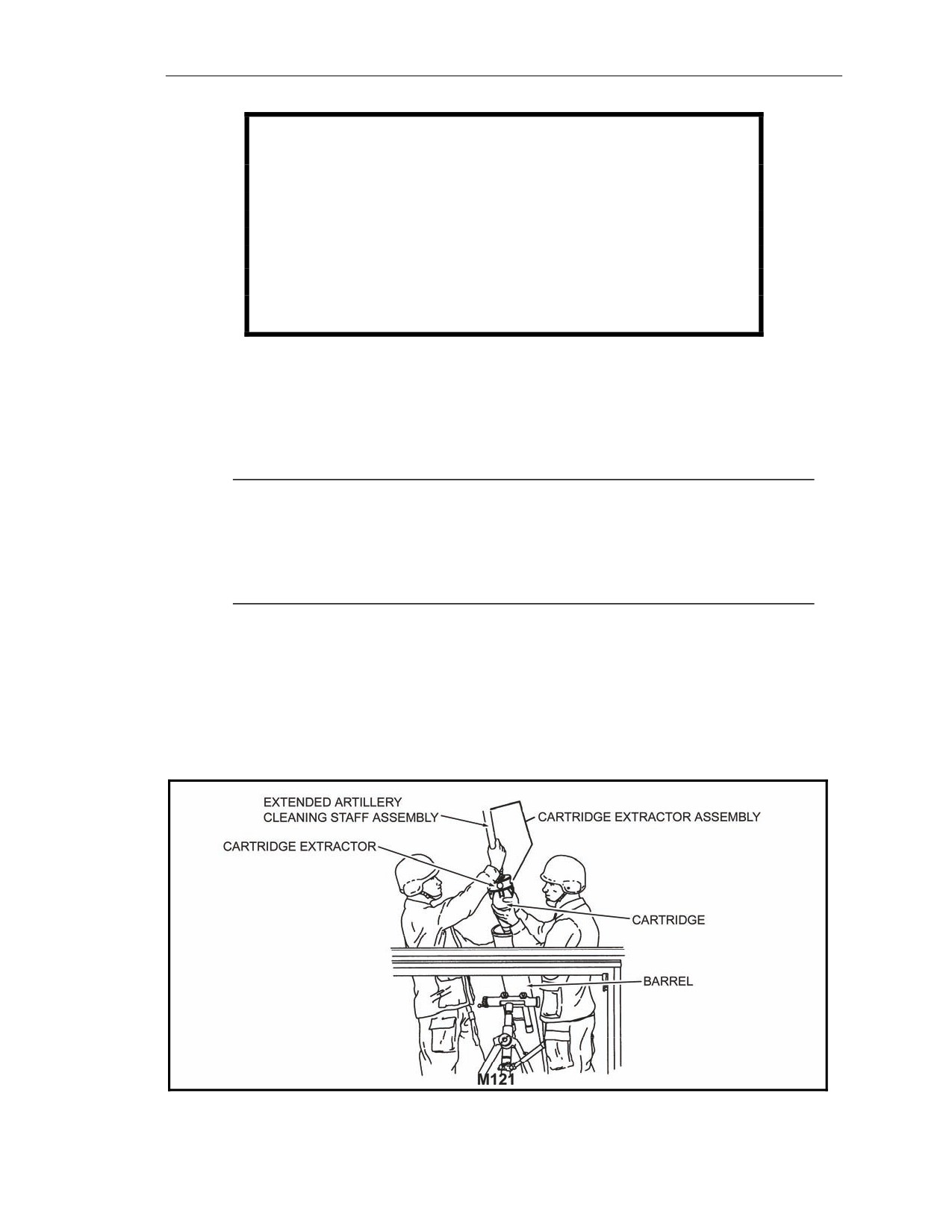
(10) The assistant gunner attaches the cartridge extractor securely to the extended artillery
cleaning staff assembly. The squad leader confirms that the assistant gunner’s actions were
performed correctly.
5-32
FM 3-22.90
7 December 2007
120-mm Mortars, M120 and M121
WARNINGS
1. To avoid injury to the crew, if the bipod assembly is in the
high range of bipod support, do not lower it to low range. If
the bipod assembly is in the low range of bipod support,
do not raise it to high range except when using the barrel
tip method.
2. To avoid serious injury, do not stand in front of or behind
the barrel when removing the cartridge.
(11) The assistant gunner rotates the artillery cleaning staff assembly until the cartridge extractor
is secure against it. Then, he inserts the cartridge extractor into the barrel slowly (hand to
hand) until it rests on the cartridge and will descend no further.
(12) The assistant gunner slowly rotates the cartridge extractor until it grasps the cartridge. As
the cartridge extractor grasps the cartridge, the assistant gunner feels the spring-loaded
catches click into the holes on the cartridge body. The assistant gunner continues to rotate
the cartridge extractor an additional quarter of a turn.
NOTE: The assistant gunner should feel much more resistance to rotating the extractor.
If not, the cartridge extractor has not successfully connected to the cartridge, and
the assistant gunner must continue to slowly rotate the cartridge extractor until it
grasps the cartridge. If the assistant gunner still feels no extra resistance, he
removes the extractor assembly from the barrel and uses the barrel tip method to
remove the misfired cartridge (see paragraphs 5-53 to 5-55).
(13) When the assistant gunner feels resistance, he slightly relaxes his grip on the artillery
cleaning staff assembly for a moment. Then, without rotating, he slowly pulls the staff
assembly slightly to ensure that the cartridge is grasped. If the assistant gunner feels
resistance, he, with the gunner’s hands at the muzzle, withdraws the cartridge from the
barrel with the cartridge extractor, pulling the artillery staff with both hands (Figure 5-14).
When the assistant gunner pulls the staff as high as he is able, he slides his lower hand down
the staff and then slides his upper hand to his lower hand (hand to hand), maintaining
positive control at all times. He repeats this action until the cartridge is exposed.
Figure 5-14. Withdrawing the cartridge from the barrel, M121.
7 December 2007
FM 3-22.90
5-33

Chapter 5
NOTE: If the assistant gunner can grasp the cartridge but can’t withdraw it, he uses the
barrel tip method (see paragraphs 5-53 to 5-55). If the assistant gunner feels no
resistance, he removes the cartridge extractor assembly and uses the barrel tip
method (see paragraphs 5-53 to 5-55).
WARNING
1. When removing the cartridge, do not touch the primer, and
do not stand directly in front of the barrel.
2. Care must be taken to ensure that the extractor catches are
not depressed while removing the round from the barrel.
NOTE: Due to the weight of the round, the gunner may assist during the entire
extraction process.
(14) The gunner grasps the body of the cartridge as it comes out of the barrel. The gunner and
assistant gunner secure the artillery staff, extractor, and misfired cartridge; move under the
cross-member; and proceed down the carrier ramp to a location outside of the vehicle. The
ammunition bearer assists in releasing the cartridge from the extractor by pressing all four
extractor catches at the same time.
NOTE: Do not place the cartridge on the ground when removing the cartridge extractor.
(15) The gunner inspects the cartridge to see if the primer has been dented and gives the
cartridge to the ammunition bearer. The ammunition bearer attempts to replace the safety
wire (if applicable), places the cartridge in the dud pit, and tags the cartridge. The safety
officer notifies EOD.
NOTE: If the primer has been dented, perform steps (4) through (8) of paragraph 5-55
before continuing with step (19). If the primer hasn’t been dented, proceed to the
next step. If two consecutive misfires occur and the primer has not been dented,
perform steps (4) through (8) of paragraph 5-55.
(16) The assistant gunner swabs the barrel; the gunner inserts the firing pin into the breech cap
and rotates the gunner’s display into position; and the mission is continued.
REMOVING A MISFIRED CARTRIDGE USING THE BARREL TIP METHOD
5-53. The barrel tip method is used as circumstances dictate. Follow the steps outlined in paragraph 5
54 only if the extractor assembly is unserviceable or if extractor methods have failed. The steps
outlined in paragraph 5-55 apply when the round is grasped by the cartridge extractor but can’t be
removed.
5-54. Follow these steps to remove a misfired cartridge if the extractor assembly is unserviceable or if
extractor methods have failed.
(1) The squad leader shuts down the pointing device using the commander’s interface (CI, refer
to TM 9-1220-248-10). When “No Position Available” appears, turn off the pointing device
and gunner’s display at the power distribution assembly (PDA).
5-34
FM 3-22.90
7 December 2007
120-mm Mortars, M120 and M121
WARNING
Ensure that power is turned off at the PDA before
disconnecting cables.
(2) The gunner disconnects the cables from the pointing device and the cable from the gunner’s
display. If the gunner’s display is mounted on a bipod leg, remove the gunner’s display from
the bipod assembly and store it in a safe place.
(3) The gunner and assistant gunner carefully lower the bipod assembly into the lowest position
in low range.
(4) The assistant gunner supports the bipod assembly, with his left hand grasping the left side of
the traversing mechanism and his right hand grasping the right side of the traversing
mechanism.
(5) The gunner cradles the barrel with his right arm near the muzzle and braces his left hand
against the cross-member of the carrier for support.
(6) The ammunition bearer cradles the barrel with his right arm above the buffer housing
assembly and unlocks the clamp handle assembly with his left hand, releasing the buffer
housing assembly.
(7) The assistant gunner lowers the bipod assembly to the ramp. If the squad leader determines
that the bipod assembly can interfere with the removal of the cannon, the bipod support pins
are removed, and the bipod assembly is moved outside of the carrier.
WARNING
Once the cannon is horizontal, the rear of the cannon must
not be lowered back down until the round is extracted. If the
round slips down the cannon before extraction, it could ignite,
causing death or personal injury.
(8) The gunner and ammunition bearer lift (approximately 60 degrees) and then rotate the barrel
so that the white line is in the down position and the breech cap can be removed from the
socket. Then, they remove the barrel from the breech cap socket and raise it to the
horizontal position.
(9) Keeping the barrel horizontal and pointed in the direction of fire, the gunner, ammunition
bearer, and crewmembers carry the barrel to a location outside of the carrier.
(10) The assistant gunner places the meaty portions of his thumbs over the edges of the muzzle,
grasping the barrel with his fingers.
WARNING
1. When removing the cartridge, do not touch the primer, and
do not stand directly in front of the barrel.
2. Care must be taken to ensure that the extractor catches are
not depressed while removing the round from the barrel.
(11) At the assistant gunner’s command, crewmembers lift the cannon’s breech cap assembly,
causing the cartridge to slide down to the assistant gunner’s hands.
7 December 2007
FM 3-22.90
5-35
Chapter 5
(12) The assistant gunner removes the cartridge, inspects the cartridge to see if the primer has
been dented, attempts to replace the safety wire (if applicable), places the cartridge in the
dud pit, and tags the cartridge. The safety officer notifies EOD.
NOTE: If the primer has been dented, perform steps (4) through (8) of 5-55 before
continuing with step (13). If the primer has not been dented, proceed to the next
step.
(13) The assistant gunner swabs the bore; the gunner inserts the firing pin into the breech cap;
and the barrel is returned to action.
(14) The gunner installs the gunner’s display, connects the cables to the gunner’s display and
pointing device, powers up, and checks the system. The mission is continued.
5-55. Follow these steps if the round is grasped by the cartridge extractor, but cannot be removed.
(1) The assistant gunner loosens the sleeve on the artillery cleaning staff assembly, depresses
the ball-bearing spring lock, slowly lowers the upper staff section into the lower staff
section, and tightens the sleeve.
(2) Perform steps (1) through (8) of paragraph 5-54.
NOTE: Prior to having EOD dispose of the barrel, notify field-level maintenance to
remove the pointing device and its mounting bracket.
(3) Keeping the barrel horizontal and pointed in the direction of fire, the gunner, assistant
gunner, and crewmembers carry the barrel from the carrier (with the extractor still attached
to the round) to the dud pit. The safety officer notifies EOD.
NOTE: The following steps are part of the breech cap removal. These steps are used
before firing, during firing, if two or more misfires occur, and after firing is
completed. If the primer has been dented and time permits, perform steps (4)
through (8).
(4) The assistant gunner and ammunition bearer place the barrel on two empty ammunition
boxes and stabilize the barrel. The gunner inserts the breech cap removal tool into the cross
bore of the breech cap and taps the end of the tool with a hammer to turn it clockwise. Then,
he unscrews and removes the breech cap assembly from the barrel, and wipes away any
debris from the inner part of the breech cap.
(5) The gunner inspects the firing pin housing on the breech cap assembly and removes any dirt
or debris. The gunner replaces the firing pin by hand, ensuring that the threads are aligned;
turns the firing pin clockwise until it is hand tight; and then tightens it further using the
firing pin wrench.
(6) Using the firing pin gauge, the gunner measures the protrusion of the firing pin. The firing
pin must protrude above the MIN and below the MAX cutouts. The gunner replaces the
firing pin if it is defective.
(7) Using a wiping rag, the gunner cleans the inner threads of the breech cap assembly and
outer threads of the barrel. The gunner applies a light coat of grease to the threads of the
breech cap assembly and installs the breech cap on the barrel. He tightens the breech cap
assembly using the breech cap removal tool found in the breech cap bore and backs off a
quarter of a turn using a jerking motion to tighten.
(8) The barrel is returned to action.
NOTE: The white stripe on the barrel must align with the firing pin.
(9) Both the squad leader and the section leader confirm that the crew performed the actions
correctly.
5-36
FM 3-22.90
7 December 2007
120-mm Mortars, M120 and M121
(10) The assistant gunner swabs the barrel; the gunner rotates the gunner’s display into position;
and the mission is continued.
TAKING THE MORTAR OUT OF ACTION (GROUND-MOUNTED
TO M1064A3 CARRIER-MOUNTED)
5-56. The procedures for mounting the mortar on the carrier from a ground-mounted position are
described herein.
(1) The squad leader commands, “OUT OF ACTION, PREPARE TO MARCH.”
(2) If the mortar cannon is equipped with the old style of breech cap, the gunner places the
weapon on SAFE (“S” showing).
(3) The gunner places a deflection of 3200 mils and an elevation of 0800 mils on the M67 sight.
(4) The gunner removes the sight from the dovetail slot. He places the sight in the sight case
and secures it on the carrier.
(5) The gunner then replaces the sight mount cover and snaps it closed.
(6) The ammunition bearer retrieves the aiming posts and the aiming post lights and stows them
on the carrier.
(7) The assistant gunner kneels down and secures the bipod and lowers it to its lowest elevation
leaving about 1/4 of a turn of the shaft showing.
(8) The gunner opens the buffer housing assembly with his left hand while securing the cannon
assembly with his right hand.
(9) The gunner and ammunition bearer rotate the cannon assembly until the white line is on the
bottom. They raise the cannon to about a 60-degree angle and lift it from the baseplate
socket. They carry the cannon assembly to the carrier.
(10) The gunner and ammunition bearer make sure the clamping support assembly is open. They
ensure the bipod support assembly is in the low-range position and the turntable is centered
and locked.
(11) The gunner and ammunition bearer position the mortar cannon assembly just above the
clamping support assembly with the white line facing down.
(12) The gunner and ammunition bearer carefully insert the breech cap ball into the socket. They
raise the mortar cannon assembly and rotate it until the white line is in the up position. They
install the muzzle plug and lower the mortar cannon assembly onto the clamping support
assembly and lock it.
(13) The assistant gunner takes the bipod assembly to the carrier.
(14) The assistant gunner rests the bipod assembly on the carrier ramp with the cross-leveling
mechanism pointing toward the gunner’s position.
(15) The assistant gunner removes the pins and leg extensions from the bipod legs and stows
them in the step.
(16) The assistant gunner removes the handles from the bipod support assembly. He ensures the
arrows are facing each other.
(17) The assistant gunner slides the bipod legs onto the attaching slot on the bipod support
assembly.
(18) With the arrows facing each other and the holes matching, the assistant gunner inserts the
handles through the bipod support assembly slot and legs. He turns the handles so that the
arrows point toward the bipod legs and attaches the safety pins.
(19) The assistant gunner slides the buffer housing assembly up along the cannon assembly until
it stops. He tightens the clamp handle assembly until he hears a metallic click.
(20) The assistant gunner and ammunition bearer carry the baseplate to the carrier,
(21) The assistant gunner and ammunition bearer make sure the pin is removed and the handle is
up.
(22) The assistant gunner and ammunition bearer lift the baseplate with the spades away from the
carrier and place the two corners without handles inside the rims of the lower brackets.
7 December 2007
FM 3-22.90
5-37
Chapter 5
(23) The assistant gunner and ammunition bearer tilt the baseplate toward the carrier and pull the
handle down and lock it with the pin.
(24) The squad leader inspects to ensure all equipment is accounted for and properly secured.
(25) The squad leader announces, “Number two gun up and prepared for march.”
RECIPROCALLY LAYING THE MORTAR CARRIER SECTION
5-57. To reciprocally lay the mortar, follow the procedures discussed below.
(1) The aiming circle operator lays the vertical cross line on the mortar sight and announces,
“Aiming point this instrument.”
(2) The gunner refers the sight (using the deflection micrometer knob) to the aiming circle with
the vertical cross line splitting the lens of the aiming circle and announces, “Number
(number of gun) gun, aiming point identified.”
(3) The aiming circle operator turns the azimuth micrometer knob of the aiming circle until the
vertical cross lines are laid on the center of the gun sight lens. He reads the deflection
micrometer scales and announces, for example, “Number (number of gun) gun, deflection,
two three one five (2315).”
(4) The gunner indexes the deflection announced by the aiming circle operator on the sight and
re-lays on the center of the aiming circle lens by telling the driver to start the carrier.
Looking through the sight, he tells the driver which direction to move the carrier (if
necessary) and cross-levels. He ensures he has a correct sight picture (cross line splitting the
aiming circle lens), and the elevation and deflection bubbles are leveled. Once he has
accomplished this, he announces, “Number (number of gun) gun, ready for recheck.”
(5) The aiming circle operator gives the new deflection, and the process is repeated until the
gunner announces, “Number (number of gun) gun, zero mils (or one mil); mortar laid.”
(6) As the squad announces, “Mortar laid,” the aiming circle operator commands the squad to
place the referred deflection (normally 2800) on the sight and to place out aiming posts.
(7) The gunner turns the deflection micrometer knob only and indexes a deflection of 2800 mils
on his sight without disturbing the lay of the mortar.
(8) The ammunition bearer runs with the aiming posts along the referred deflection about 100
meters from the mortar, dropping one post halfway (about 50 meters).
(9) Once the far aiming post is placed out as described, the gunner uses arm-and-hand signals to
guide the ammunition bearer to place out the near aiming post.
(10) Once the correct sight picture is obtained, the gunner announces, “Number (number of gun)
gun, up.”
SECTION VI. AMMUNITION
This section implements STANAG 2321.
The four types of ammunition for the 120-mm mortar are: HE, smoke, ILLUM, and training. All mortar
cartridges, except training cartridges, are packaged as a complete round and have three major
components—a fuze, body, and tail fin with propulsion system assembly.
CLASSIFICATION AND TYPES OF AMMUNITION
5-58. The ammunition used with M120 and M121 mortars can be classified by its use. The following
cartridges can be fired from both M120 and M121 mortars, except for M91 ILLUM cartridges, which
can only be fired from M120 and ground-mounted M121 mortars.
5-38
FM 3-22.90
7 December 2007
120-mm Mortars, M120 and M121
HIGH-EXPLOSIVE AMMUNITION
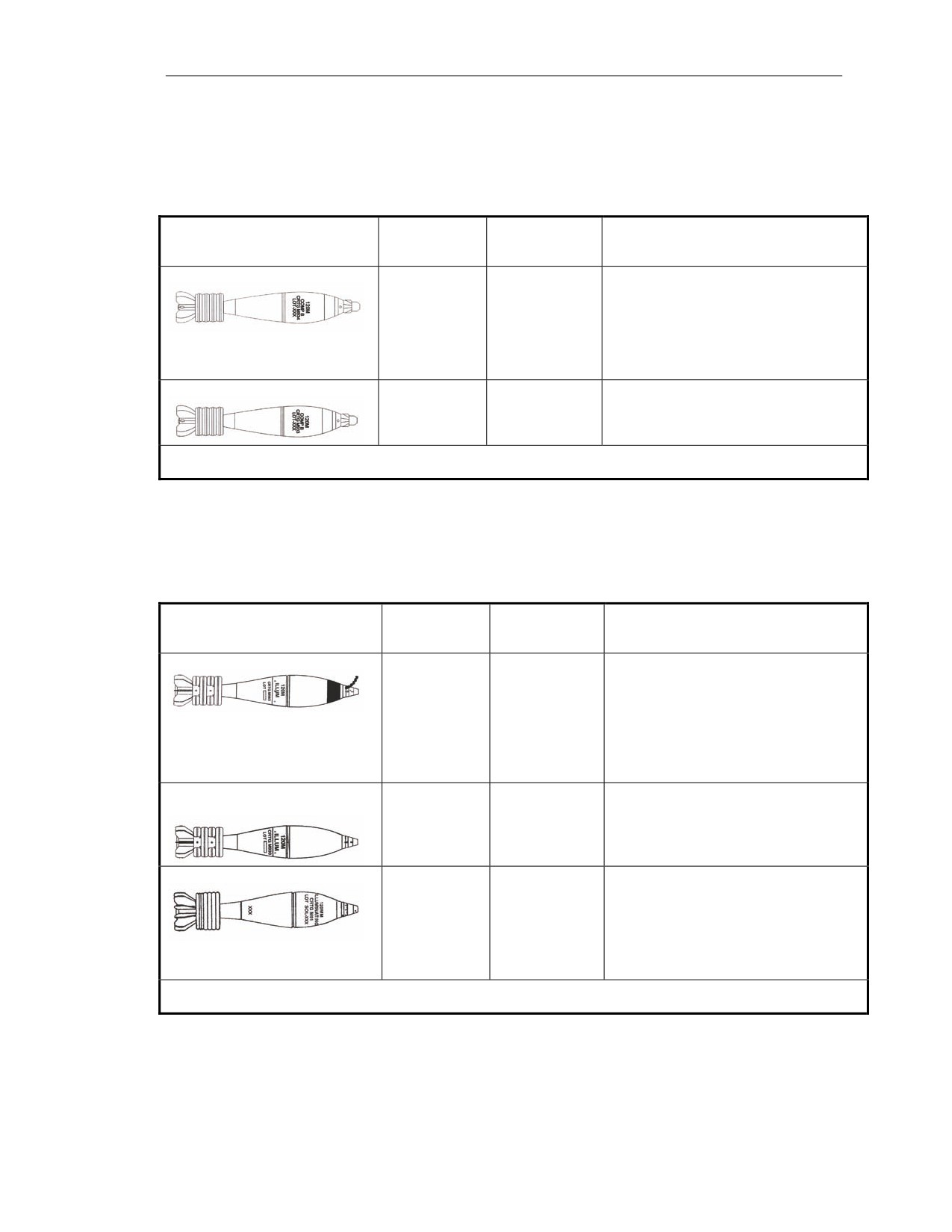
5-59. HE ammunition is used against enemy personnel and light materiel targets. Table 5-3 details the
HE ammunition that can be used when firing M120 and M121 mortars.
Table 5-3. High-explosive ammunition for 120-mm mortars, M120 and M121.
CARTRIDGE/TYPE
MAXIMUM
FUZE
CHARACTERISTICS AND
RANGE
LIMITATIONS
(METERS)
M934/M934A1 HE cartridges
7,200
M734
These cartridges’ maximum range is
multioption
achieved at charge
4. They weigh
(M934) fuze
30.17 pounds.
M734A1
multioption
(M934A1) fuze
M933 HE cartridge
7,200
M745 PD fuze
This cartridge is identical to M934 and
M934A1 HE cartridges, except for the
fuze. It weighs 30.17 pounds.
NOTE: All rounds have a minimum range of 200 meters at charge 0 (charge may vary in firing table and whiz
wheel).
ILLUMINATION AMMUNITION
5-60. ILLUM ammunition is used for battlefield illumination and signaling. Table 5-4 details the
ILLUM ammunition that can be used when firing M120 and M121 mortars.
Table 5-4. Illumination ammunition for 120-mm mortars, M120 and M121.
CARTRIDGE/TYPE
MAXIMUM
FUZE
CHARACTERISTICS AND
RANGE
LIMITATIONS
(METERS)
M983 IR ILLUM cartridge
6,675
M776 MTSQ
This cartridge is identical to the M930,
fuze
except for the illuminating candle
composition. It weighs 30.6 pounds.
The candle provides IR illumination for
50 to
60 seconds and is used to
support troops with night vision
devices.
M930 and M930E1 ILLUM
6,675 (M930)
M776 MTSQ
These cartridges weigh 30.6 pounds.
cartridges
fuze
7,225
The filler in these cartridges provides
(M930E1)
an illumination of one million
candlepower for 50 to 60 seconds.
M91 ILLUM cartridge
7,100
M776 MTSQ
The filler provides an illumination of one
fuze
million candlepower for
46 to
60
seconds.
This cartridge can only be fired from
M120 and ground-mounted M121
mortars. It weighs 27.01 pounds.
NOTE: All rounds have a minimum range of 200 meters at charge 0 (charge may vary in firing table and whiz
wheel).
7 December 2007
FM 3-22.90
5-39
Chapter 5
SMOKE, WHITE PHOSPHORUS CARTRIDGES
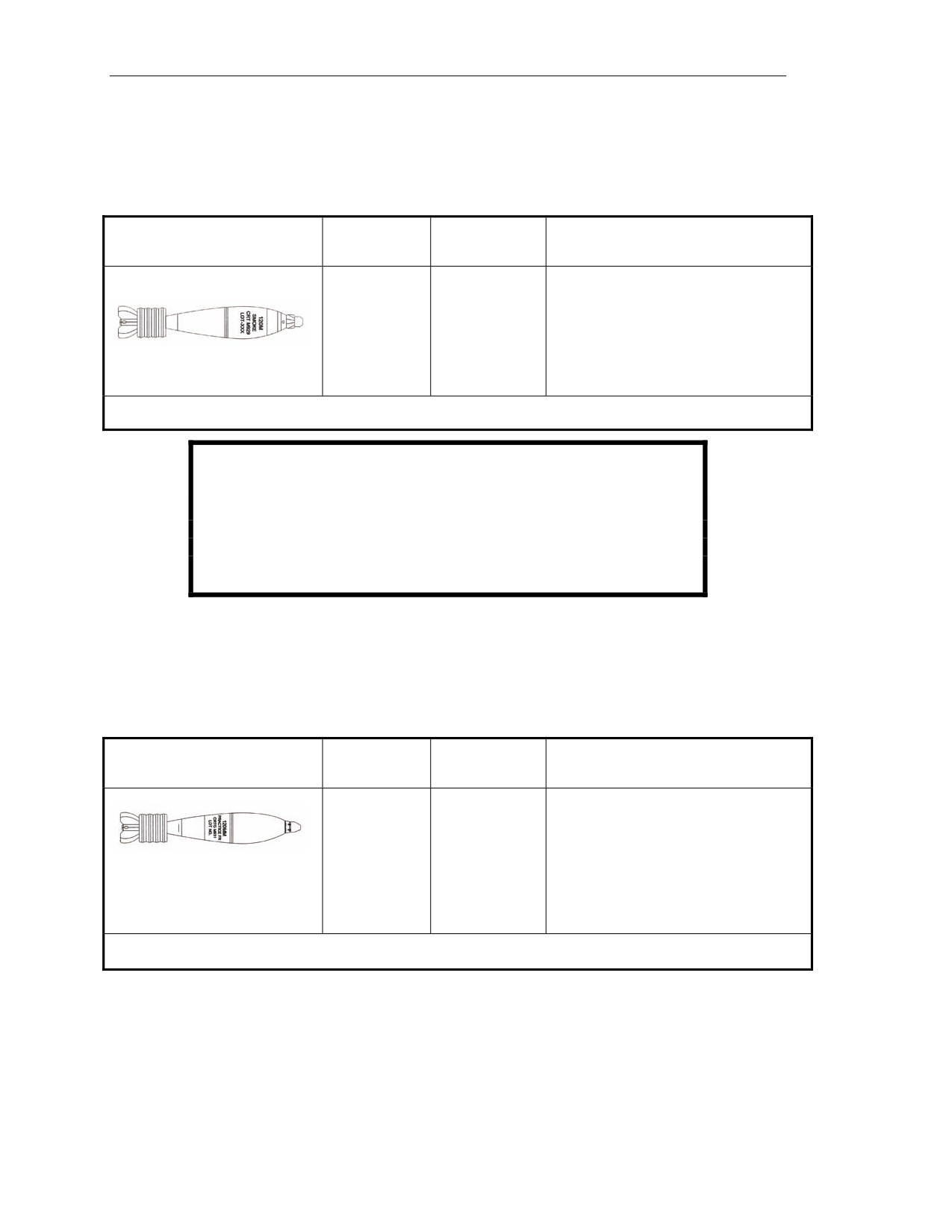
5-61. Smoke cartridges with WP filler are used for screening and spotting. Table 5-5 details the smoke
WP ammunition that can be used when firing M120 and M121 mortars.
Table 5-5. Smoke, white phosphorus ammunition for 120-mm mortars, M120 and M121.
CARTRIDGE/TYPE
MAXIMUM
FUZE
CHARACTERISTICS AND
RANGE
LIMITATIONS
(METERS)
M929/XM929 smoke WP
7,200
M734A1
These cartridges weigh 30 pounds.
cartridges
multioption
(M929) fuze
The current M929 utilizes the M734A1
multioption fuze and should be set to
M745
PD
PROX for smoke curtains/screens.
(XM929) fuze
The XM929, a redesign of the original
M929, utilizes the M745 PD fuze.
NOTE: All rounds have a minimum range of 200 meters at charge 0 (charge may vary in firing table and whiz
wheel).
WARNING
At temperatures exceeding 111.4 degrees Fahrenheit (44.1
degrees centigrade) (melting point of WP), store and transport
WP rounds in a vertical position (nose up) to prevent voids in
the WP.
TRAINING PRACTICE AMMUNITION
5-62. TP cartridges are used when training crews and indirect fire teams (less expensive than service
ammunition) or when the use of service ammunition is restricted. Table 5-6 details the training
ammunition that can be used when firing M120 and M121 mortars.
Table 5-6. Training practice ammunition for 120-mm mortars, M120 and M121.
CARTRIDGE/TYPE
MAXIMUM
FUZE
CHARACTERISTICS AND
RANGE
LIMITATIONS
(METERS)
M931 FRTC
7,200
M781 PD fuze
This cartridge matches the M934 HE
cartridge in size, shape, and weight,
and has similar ballistic characteristics.
It weighs 30.82 pounds.
The M781 PD practice fuze produces a
flash, a bang, and a smoke signature
that provides audio-visual feedback to
the mortar crew and FO.
NOTE: All rounds have a minimum range of 200 meters at charge 0 (charge may vary in firing table and whiz
wheel).
FUZES
5-63. The fuzes used with cartridges for the 120-mm mortar are described in the following paragraphs.
5-40
FM 3-22.90
7 December 2007
120-mm Mortars, M120 and M121
MECHANICAL TIME SUPERQUICK FUZE, M776
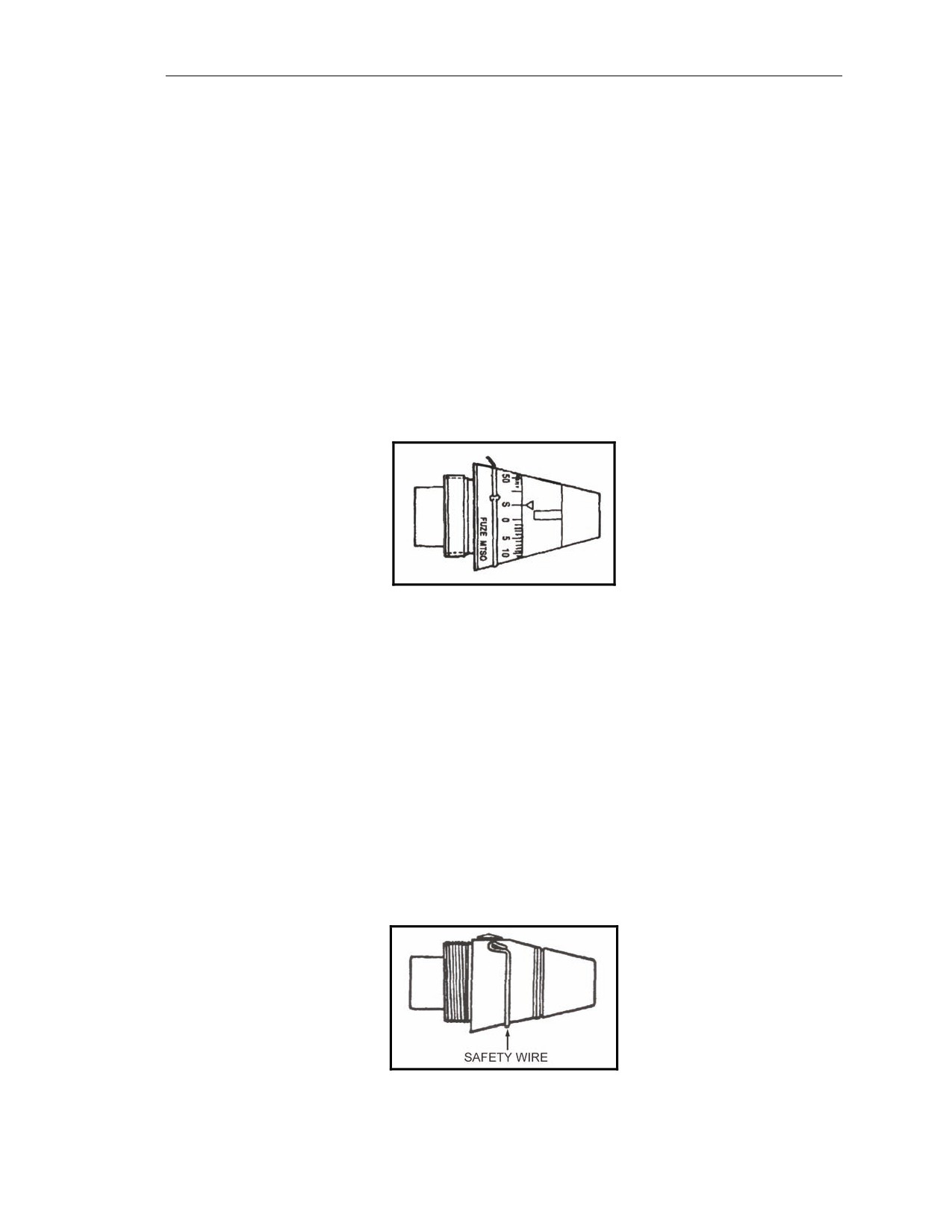
5-64. The M776 MTSQ fuze (Figure 5-15) has a mechanical arming and timing device, an IMP fuze,
an expulsion charge, and a safety wire or pin.
Functions: Air burst or impact.
Settings: 6 to 52 seconds.
Setting the Fuze
5-65. Use the fuze setter to rotate the head of the fuze to the left (counterclockwise) until the inverted
triangle or index line is aligned with the correct line and number of seconds of the time scale. If the
desired setting is passed, continue counterclockwise to reach the desired setting. Try to index the
desired setting in as few rotations as possible.
Resetting the Fuze
5-66. Rotate the head of the fuze (counterclockwise) until the safe line (S or inverted triangle of the
time scale) is aligned with the index line of the fuze body. Replace the safety wire.
Figure 5-15. Mechanical time superquick fuze, M776.
POINT-DETONATING FUZE, M935
5-67. The M935 PD fuze (Figure 5-16) has a safety wire.
Functions: Impact.
Settings: SQ or 0.05-second delay action.
Setting the Fuze
5-68. These fuzes are shipped preset to function superquick on impact. Verify the setting before firing.
The selector slot should be aligned with the SQ mark. To set the delay action, turn the selector slot in a
clockwise direction until the slot is aligned with the DLY mark. Use a coin or a flat-tip screwdriver to
change settings.
Resetting the Fuze
5-69. Align the selector slot with the SQ mark.
Figure 5-16. Point-detonating fuze, M935.
7 December 2007
FM 3-22.90
5-41
Chapter 5
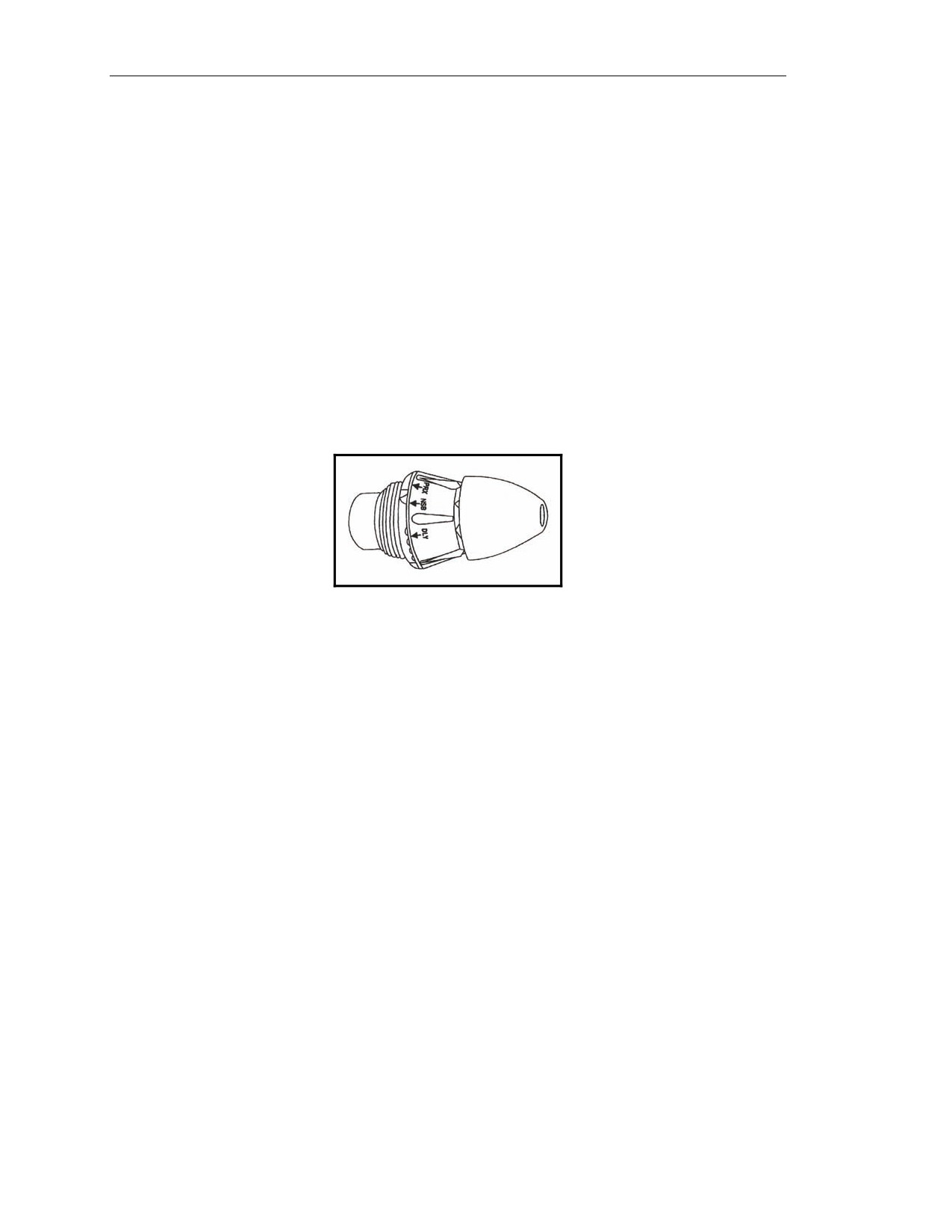
MULTIOPTION FUZE, M734
5-70. This fuze (Figure 5-17) can be set by hand.
Functions: PROX, NSB, IMP, or DLY.
Settings: PRX, NSB, IMP, or DLY.
Setting the Fuze
5-71. The fuze can be set by rotating the fuze head (clockwise) until the correct marking (PRX, NSB,
IMP, or DLY) is over the index line.
PRX—The fuze comes set to PRX. Burst height is 3 to 13 feet (1 to 4 meters).
NSB (nonjamming)—Burst height is 0 to 3 feet (0 to 1 meter).
IMP (SQ).
DLY (0.050 seconds).
Resetting the Fuze
5-72. Rotate the fuze head (counterclockwise) until the PRX marking is over the index line.
Figure 5-17. Multioption fuze, M734.
MULTIOPTION FUZE, M734A1
5-73. The air-powered M734A1 multioption fuze has four selectable functions:
PRX 120.
PRX 60/81.
IMP.
DLY.
5-74. In HE PROX mode, the HOB remains constant over all types of targets. The IMP mode causes
the round to function on contact with the target and is the first backup function for either PROX
setting. In the DLY mode, the fuze functions about 30 to 200 milliseconds after target contact. The
DLY mode is the backup for the IMP and PRX modes. The IMP and DLY modes have not changed
from the current M734 multioption fuze.
5-75. Radio frequency jamming can affect the functioning of PROX fuzes. Radio frequency jamming
initiates a gradual desensitizing of the fuze electronics to prevent premature fuze function. Once the
fuze is out of jamming range, the fuze electronics recover and function in the PROX mode if the
designed HOB has not been passed. To limit the time of fuze radio frequency radiation, the proximity
turn-on is controlled by an apex sensor that does not allow initiation of the fuze proximity electronics
until after the apex of the ballistic trajectory has been passed.
5-76. In compliance with the safety requirements of military standard 1316C, the M734A1 uses ram
air and setback to provide two independent environment sensors.
5-42
FM 3-22.90
7 December 2007
120-mm Mortars, M120 and M121
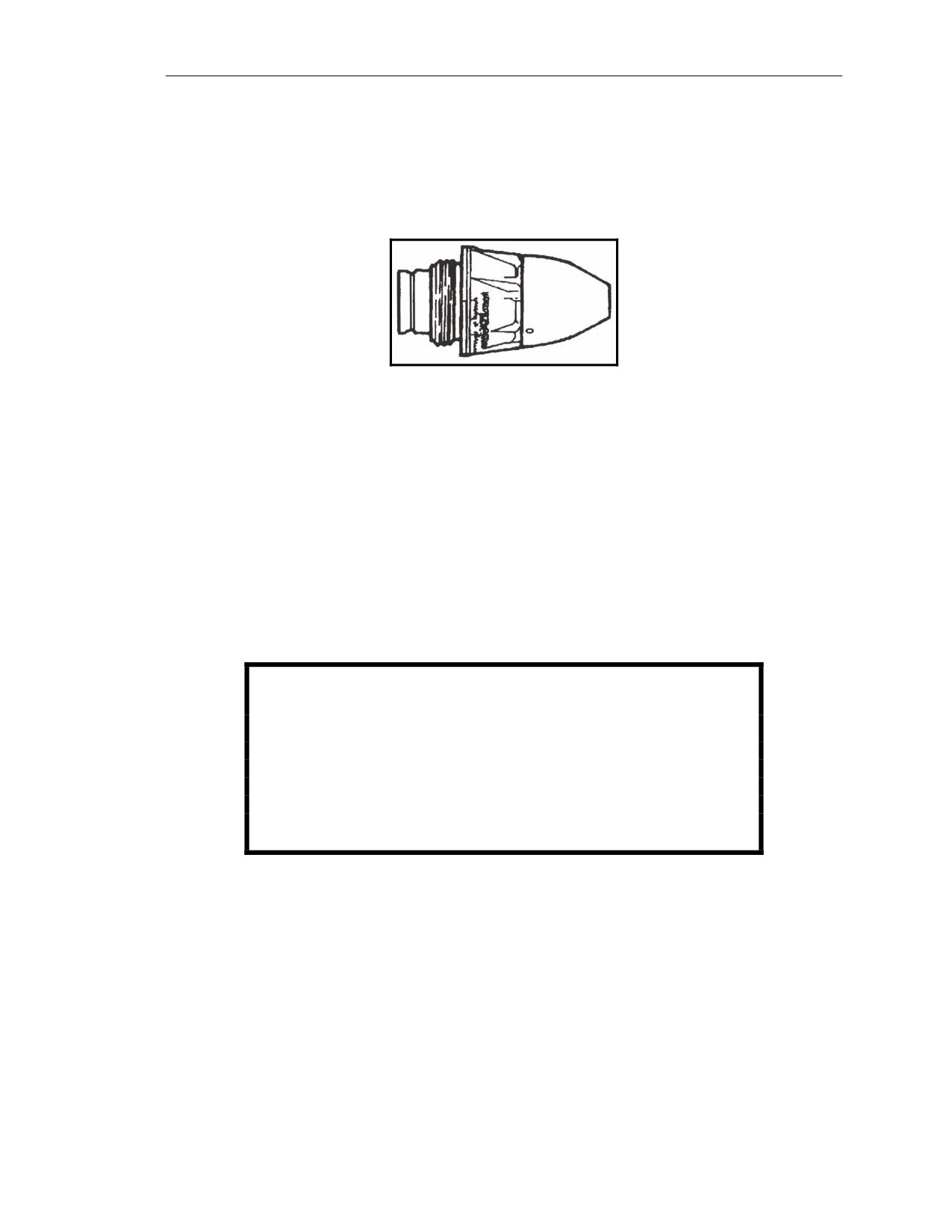
POINT-DETONATING FUZE, M745
5-77. The M745 fuze (Figure 5-18) functions on impact with SQ action only. Disregard the markings
(PRX, NSB, IMP, and DLY) on the fuze head.
Functions: Impact.
Settings: None (no setting or resetting is required).
Figure 5-18. Point-detonating fuze, M745.
CARTRIDGE PREPARATION
5-78. Cartridges are prepared as close to the actual firing period as possible.
UNPACKING
5-79. Remove the protective bag and any desiccants secured to or protecting the fin assemblies. Also
remove the plastic shell/insert assembly (if any) surrounding the propelling charges.
INSPECTION OF THE CARTRIDGE
5-80. Examine the cartridge fin assembly for any visible damage or looseness. Examine the fuze and
propelling charges for any visible damage. Tighten loose fin assemblies by hand. Cartridges with
damaged (bent) fin assemblies, fuzes, or propelling charges are turned in to the ASP as unserviceable.
WARNING
The M781 fuze on the M931 FRPC may be armed if the packing
clip is missing or the red band on the striker is protruding
from the nose cap. Any force applied to the nose of an armed
fuze can result in ignition of the propelling charge. Do not
attempt to fire the cartridge. Remove it to the dud pit without
striking the nose of the fuze.
PREPARATION TO FIRE
5-81. When the ammunition bearer receives a fire command, he prepares the ammunition for firing.
The number of cartridges, type of cartridge, fuze setting, and charge are all included in the fire
command. To apply the data, the ammunition bearer selects the proper cartridge, sets the fuze, and
adjusts (removes or replaces) the number of propelling charges on the quantity of cartridges called for
in the fire command. He inspects each cartridge for cleanliness and serviceability. He also ensures that
all packing material is removed and that there is no glue or other foreign substance adhering to the
cartridge, especially around the obturator band. Any safety wires are pulled just before firing.
7 December 2007
FM 3-22.90
5-43
Chapter 5
WARNINGS
Always check the mask and overhead clearance before firing.
PD and PROX fuzes may prematurely function when fired
through extremely heavy rainfall.
Do not fire ammunition in temperatures above +146 degrees
Fahrenheit (+63 degrees centigrade) or below -28 degrees
Fahrenheit (-3 degrees centigrade).
Short rounds and misfires can occur if an excessive amount
of oil or water is in the cannon during firing.
Before loading the cartridge, ensure the cannon and cartridge
are free of sand, mud, moisture, snow, wax, or other foreign
matter.
Ensure that all packing materials (packing stops, supports,
and plastic bags) are removed from the cartridge.
Remove any glue or other foreign substance adhering to the
cartridge, particularly at or near the obturator band. If the
substance cannot be removed, the cartridge should not be
fired.
NOTE: The ammunition bearer adjusts the number of charges immediately in a FFE
mission. In an adjust-fire mission, he prepares the cartridge but delays adjusting
the charges until the FFE is entered because the charge may change during the
subsequent adjustment of fire.
UNFIRED CARTRIDGES
5-82. If a cartridge is not fired, replace the safety wire/clip if it was removed from the fuze. Re-install
the propellant increments so that the cartridge has a full charge in the proper order. Install the packing
stop, and repack the cartridge in its original packaging.
NOTES:
1. If the safety pins cannot be fully inserted into the fuze, notify EOD.
2. M68 and M91 cartridges should have seven propellant charges. The correct
order is one brown, two blue, and four white. Use the original increments
and do not mix propelling charge models or lots.
CARE AND HANDLING OF CARTRIDGES
5-83. To properly care for and handle cartridges, the squad uses the following procedures.
Do not throw or drop live ammunition.
Do not break the moisture resistant seal of the ammunition container until the cartridges are
to be fired.
Protect cartridges when removed from the ammunition container. Protect ammunition from
rain and snow. Do not remove the plastic shell or insert assembly around the propelling
charge until the propelling charge is to be adjusted. If protective bags were packed with the
cartridge, cover the fin assembly and propelling charge to prevent moisture contamination.
5-44
FM 3-22.90
7 December 2007
120-mm Mortars, M120 and M121
Stack cartridges on top of empty ammunition boxes or on 4 to 6 inches (10 to 15
centimeters) of dunnage. Cover cartridges with the plastic sheets provided.
Do not expose cartridges to direct sunlight, extreme temperatures, flame, or other sources
of heat.
Shield cartridges from small-arms fire.
Store WP-loaded cartridges at temperatures below 111.4 degrees Fahrenheit (44.1 degrees
centigrade) to prevent melting of the WP filler. If this is not possible, WP-loaded cartridges
must be stored fuze-end up so that WP will resolidify with the void space in the nose end of
the cartridge
(after temperature returns below
111.4 degrees Fahrenheit [44.1 degrees
centigrade]). Failure to observe this precaution could result in rounds with erratic flight.
Store WP-loaded ammunition separately from other types of ammunition.
Notify EOD of leaking WP cartridges. Avoid contact with any cartridges that leak.
Protect the primer of cartridges during handling.
Do not handle duds other than when performing misfire procedures.
7 December 2007
FM 3-22.90
5-45
This page intentionally left blank.
Chapter 6
Mortar Fire Control System
The Mortar Fire Control System (MFCS) provides a complete, fully-integrated,
digital, onboard fire control system for the carrier-mounted 120-mm mortar. It
provides a “shoot and scoot” capability to the carrier-mounted M121 mortar.
With the MFCS, the mortar FDC continues to compute fire commands to execute
fire missions and controls its gun tracks. The carrier-mounted MFCS components
work together to compute targeting solutions, direct the movement of vehicles
into firing positions, allow real-time orientation, and present gun orders to the
gunner.
DESCRIPTION
6-1. The MFCS is an automated fire control system designed to improve the command and control of
mortar fires and the speed of employment, accuracy, and survivability of mortars. The commander’s
interface (CI) microprocessor, controlled by a software operating system, manages computer activities,
performs computations, and controls the interface with peripheral and external devices. The CI
operator enters data at the keypad and composes messages using the liquid crystal display (LCD).
Completed messages are then transmitted digitally or by radio. Should the FDC become disabled, each
mortar crew can compute its own fire missions if the FDC is configured as a gun/FDC. System
accuracy is increased through the use of a Global Positioning System (GPS), an onboard azimuth
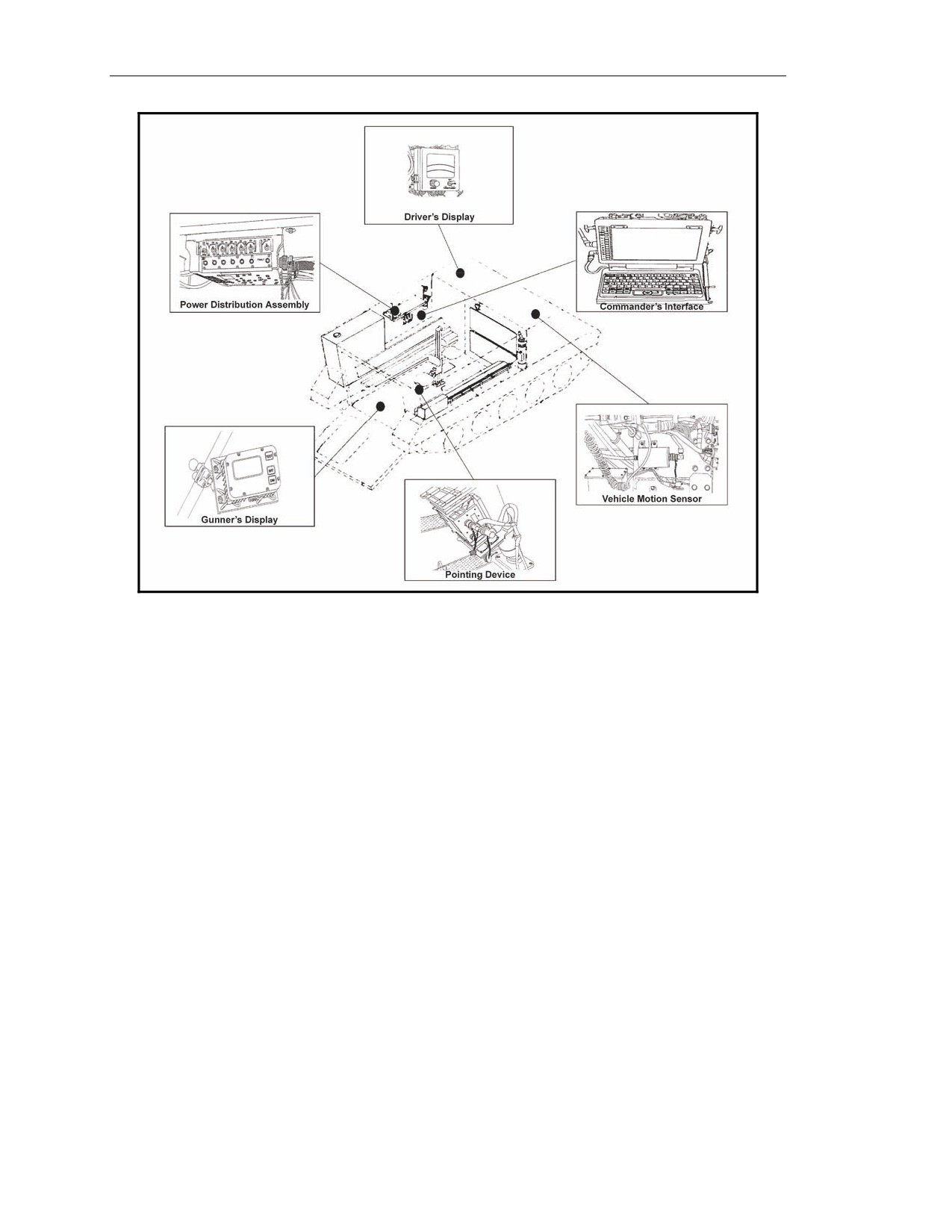
reference for the gun, and digital meteorological data (MET) updates. The MFCS (Figure 6-1) provides
the capability to have self-surveying mortars, digital CFF exchange, and automated ballistic solutions.
NOTE: For more information about the MFCS, see TM 9-1220-248-10 and FM 3-22.91.
7 December 2007
FM 3-22.90
6-1
Chapter 6
Figure 6-1. Mortar Fire Control System.
COMMANDER’S INTERFACE
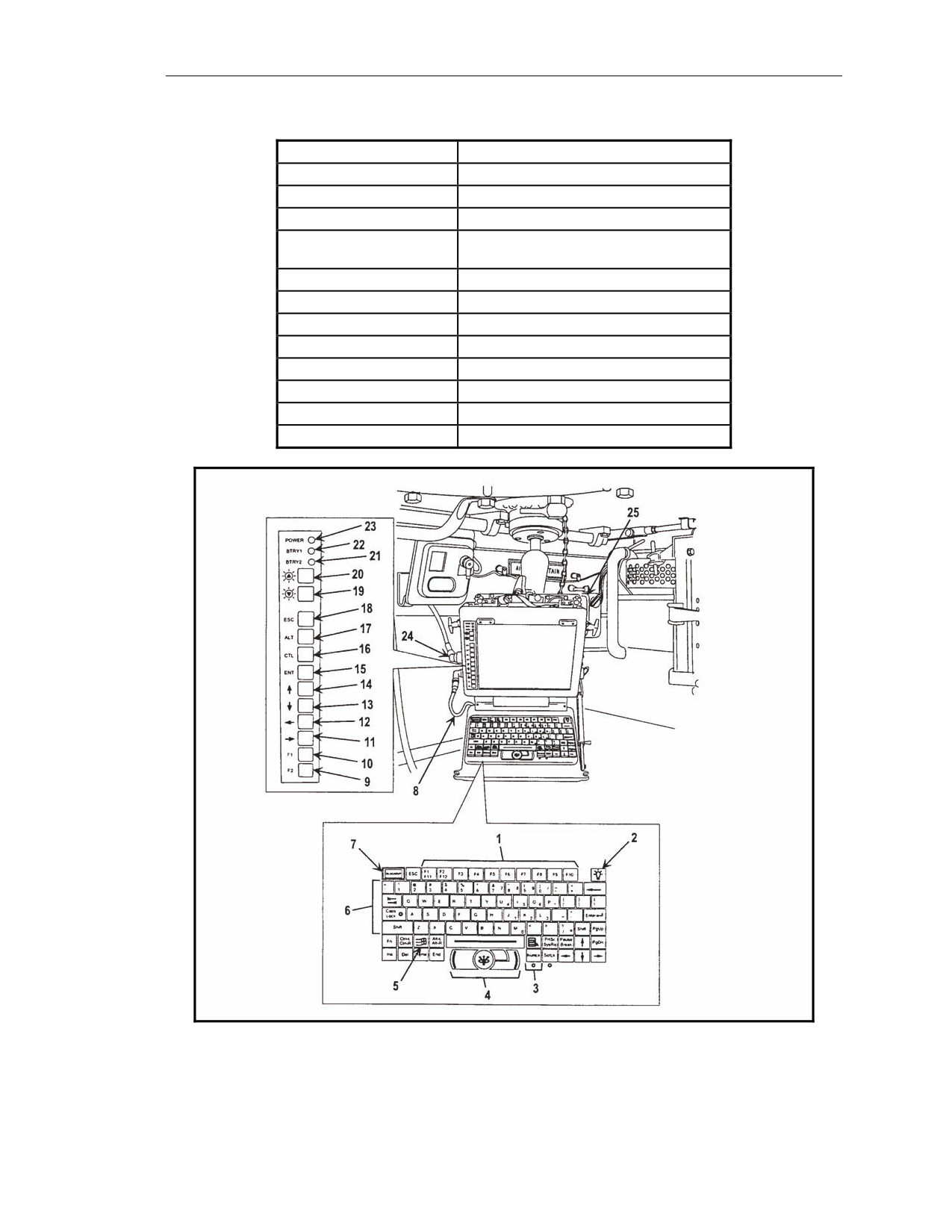
6-2. The commander’s interface (CI, shown in Figure 6-2) is a computer terminal that provides high-
speed data processing, an LCD, and a QWERTY-style keyboard similar to a common personal
computer. It has a built-in modem allowing a wide variety of data exchange requirements. The
operator works with the CI’s graphic user interface (GUI) to operate the system by using the built-in
mouse or the keyboard and pointing and clicking buttons and tabs. Data are presented on screens
designed for specific missions and operations. The CI’s keys and their functions are as follows.
F1-F12 Function Keys
6-3. Although the primary method of operating the CI is the built-in mouse, the operator can use the
F1 through F10 function keys (1, Figure 6-2) to make selections in the software (F11 and F12 are not
used). Table 6-1 identifies the assignment of keys.
6-2
FM 3-22.90
7 December 2007
Mortar Fire Control System
Table 6-1. Function keys.
FUNCTION KEY
ASSIGNMENT
F1
This Menu
F2
Use All
F3
Undo Changes
F4
Fire Support Coordination Measures
(FSCMs)
F5
Hipshoot
F6
Final Protective Fire (FPF)
F7
Boresight
F8
Safety Fan
F9
Checkfire
F10
To Be Determined
F11
Not Used
F12
Not Used
Figure 6-2. Commander’s interface.
7 December 2007
FM 3-22.90
6-3
Chapter 6
Keyboard Backlighting Control
6-4. This control (2, Figure 6-2) adjusts the intensity of the light (with off, low, and high settings).
Number Lock Key and Indicator
6-5. Keys with blue numerals and arithmetic functions can be used as a number pad. Inadvertent use
of the number lock (NUM LK) key (3, Figure 6-2) may result in the inability to perform other desired
functions. When activated, the indicator light is illuminated.
Mouse
6-6. The mouse (4, Figure 6-2) allows the user to move the cursor on the screen.
Windows Key
6-7. The Windows key (5, Figure 6-2) is not used by the operator.
Alphabetic, Numeric, and Special Character Keys
6-8. These alphabetic, numeric, and special character keys (6, Figure 6-2) function as a standard
keyboard to compose messages, and are another method to enter data into the system.
Blackout Key
6-9. The blackout key (BLACKOUT, as shown in 7, Figure 6-2) blacks out the screen to guard
against enemy detection in a tactical environment.
F1 and F2 Function Keys
6-10. The F1 and F2 function keys (9 and 10, Figure 6-2) make a selection in the software. Mouse or
keyboard use is recommended.
Right, Left, Down, and Up Direction Arrow Keys
6-11. The right, left, down, and up direction arrow keys (11, 12, 13, and 14, Figure 6-2) make a
selection in the software. Mouse or keyboard use is recommended.
Enter Key
6-12. The enter (ENT) key (15, Figure 6-2) brings up a menu of function keys.
Control, Alternate, and Escape Keys
6-13. The control (CTL), alternate (ALT), and escape (ESC) keys (16, 17, and 18, Figure 6-2) are not
used in this application.
Screen Brightness Intensity Buttons
6-14. The screen brightness intensity buttons (19 and 20, Figure 6-2) decrease and increase the
brightness of the LCD screen.
Battery 1 and Battery 2 Indicators
6-15. The battery 1 (BTRY1) and battery 2 (BTRY2) indicators (21 and 22, Figure 6-2) illuminate
with a green light when the capacity of the respective battery is 50 to 100 percent of power, with amber
light when capacity is 25 to 50 percent, and with no illumination when capacity drops below 25
percent.
6-4
FM 3-22.90
7 December 2007
Mortar Fire Control System
Power Indicator
6-16. The power indicator (23, Figure 6-2) illuminates with green light when the computer is being
powered with external power (PDA, AC/DC adapter) and with amber light when battery power only is
used.
POWER DISTRIBUTION ASSEMBLY
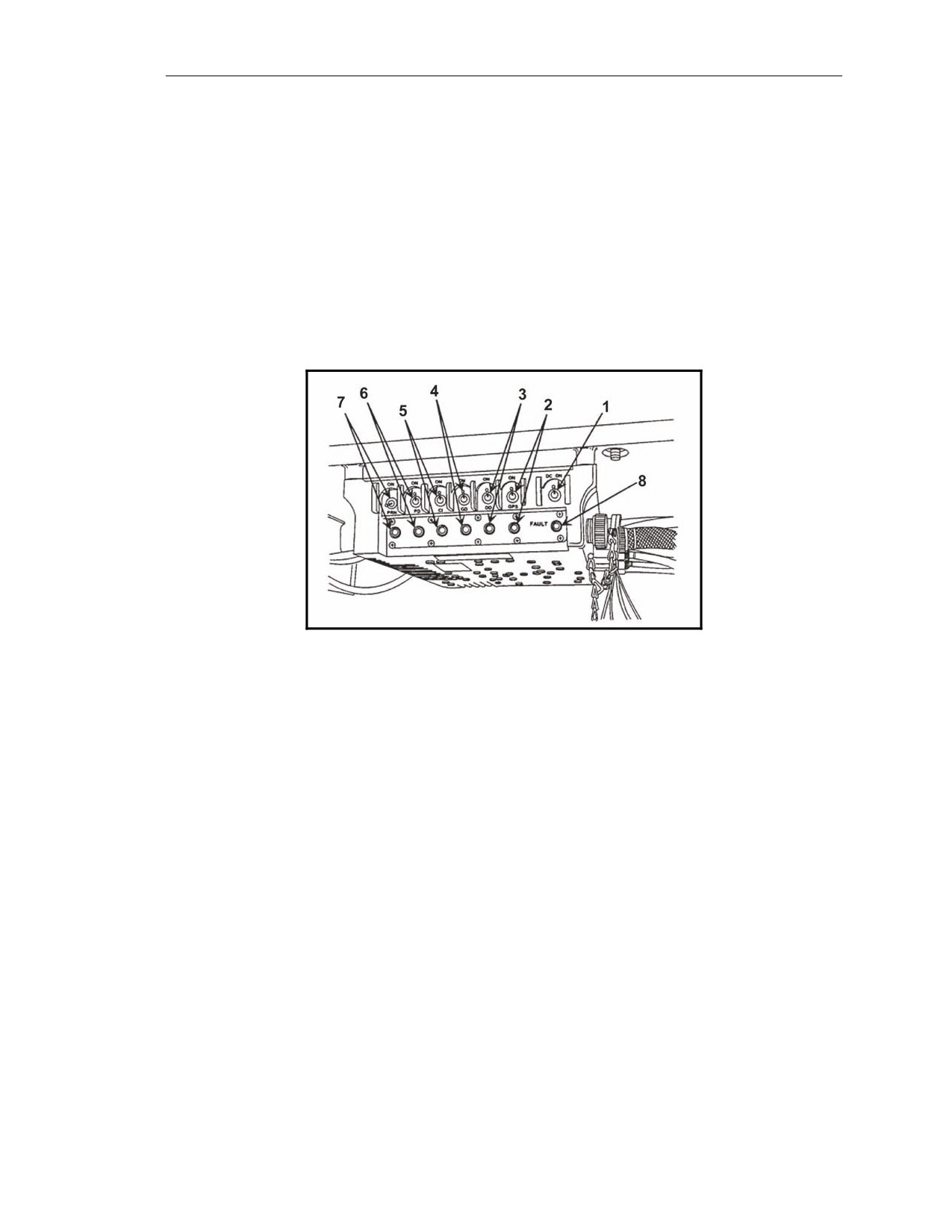
6-17. The power distribution assembly (PDA, shown in Figure 6-3) accepts direct current (DC) and
alternating current (AC) to power the MFCS components. It filters vehicle power through a DC-to-DC
power system that isolates the MFCS components from fluctuations in vehicle power, including
vehicle starting. It also provides protection to the MFCS components against reverse polarity and
power surges. The PDA also provides a 115-220v AC interface for connection to available line power
that supports classroom training as well as nonfield usage, which preserves the battery charge level.
Figure 6-3. Power distribution assembly.
Power ON Switch
6-18. The power ON switch (1, Figure 6-3) turns the PDA on and off for DC power only.
Switch and LED Indicator for Global Positioning System
6-19. This switch (2, Figure 6-3) distributes power to the precision lightweight GPS receiver (PLGR)
on the M1064 only. The LED turns green when the switch is ON.
Switch and LED Indicator for Driver’s Display
6-20. This switch (3, Figure 6-3) distributes power to the driver's display (DD) on the M1064 only.
The LED turns green when the switch is ON.
Switch and LED Indicator for Gunner’s Display
6-21. This switch (4, Figure 6-3) distributes power to the gunner's display (GD) on the M1064 only.
The LED turns green when the switch is ON.
Switch and LED Indicator for Commander’s Interface
6-22. This switch (5, Figure 6-3) distributes power to the CI. The LED turns green when the switch is
ON.
7 December 2007
FM 3-22.90
6-5
Chapter 6
Switch and LED Indicator for Pointing Device
6-23. This switch (6, Figure 6-3) distributes power to the pointing device on the M1064 only. The
LED turns green when the switch is ON.
Switch and LED Indicator for Printer
6-24. This switch (7, Figure 6-3) distributes power to the printer (PRN) or, in an emergency, the PRN
port can be used to power the pointing device. The LED turns green when the switch is ON. This
switch is not used in MFCS application except in an emergency situation.
FAULT LED Indicator
6-25. The FAULT LED indicator (8, Figure 6-3) illuminates with amber light and, possibly, flickers if
the PDA malfunctions.
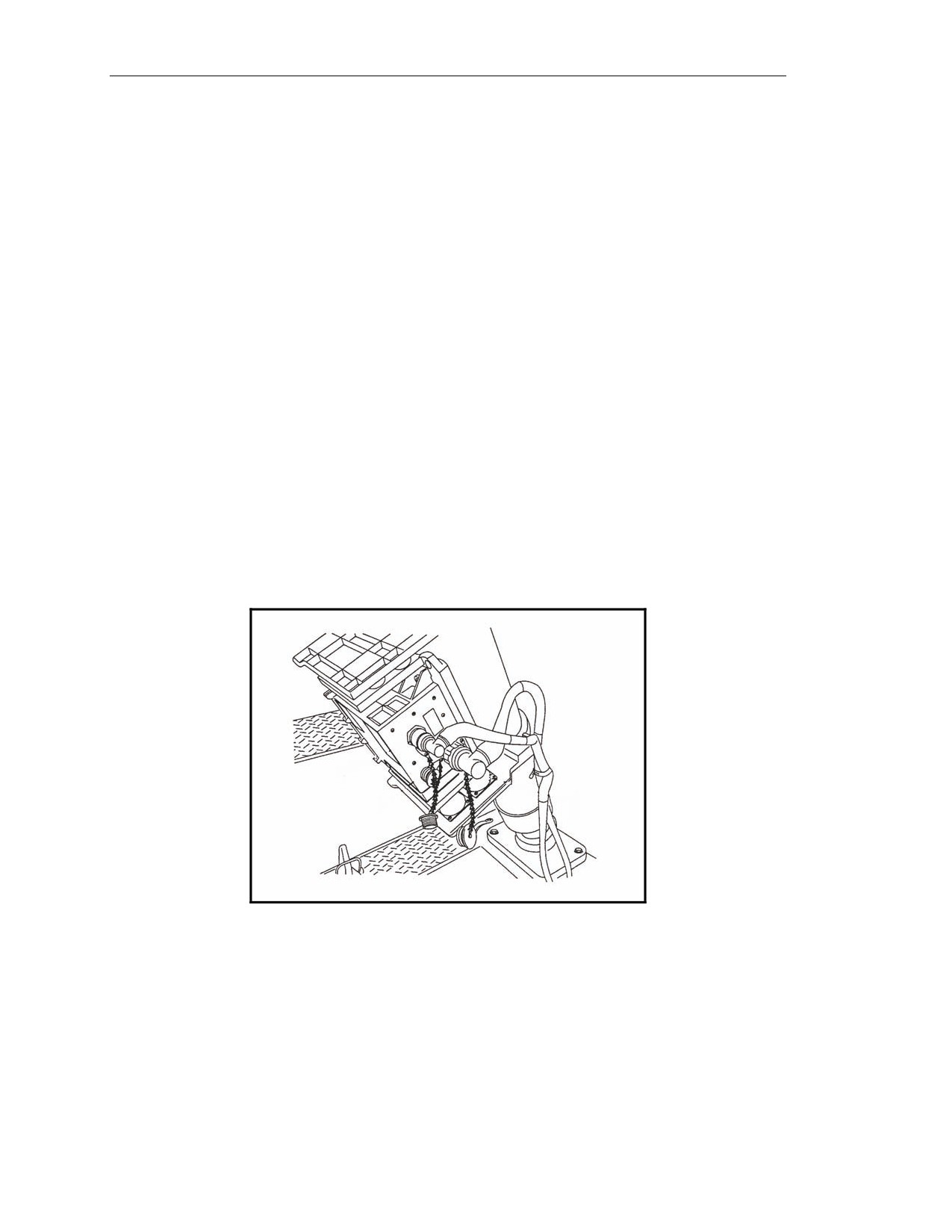
POINTING DEVICE
6-26. The pointing device (PD, shown in Figure 6-4) is mounted in the M1064 mortar carrier and
aligns the M121 mortar. It can maintain alignment and accuracy within 3 mils of azimuth and 1 mil of
elevation in all conditions. It provides pointing and positional performance at an operational range of
80 degrees south to 84 degrees north latitude. An inertial measurement unit (IMU) provides the
weapon with absolute knowledge of vehicle position and mortar barrel azimuth and elevation. The
IMU can determine the orientation of the mortar barrel without the need for survey control points,
aiming circles, or aiming posts, which allows the mortar platoon to emplace at any location and at any
time. To maintain a high degree of accuracy, the IMU incorporates information from the GPS and a
vehicle motion sensor (VMS). The design of the pointing device allows for the loss of the GPS, the
VMS, or both devices without substantial degradation of overall performance.
Figure 6-4. Pointing device.
6-6
FM 3-22.90
7 December 2007
Mortar Fire Control System
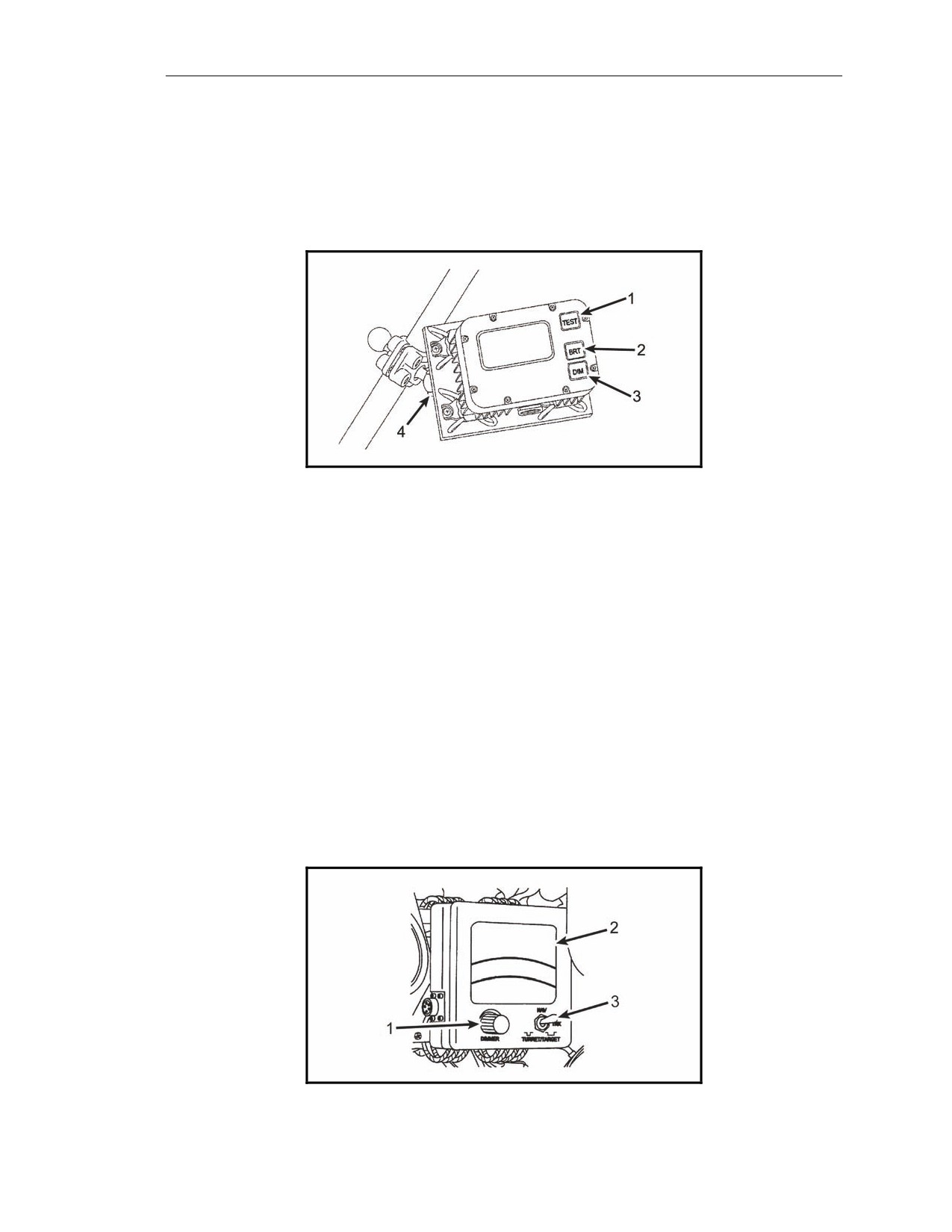
GUNNER’S DISPLAY
6-27. The gunner’s display (GD, shown in Figure 6-5) provides the gunner with the necessary
information to aim and fire the mortar by displaying deflection and elevation commands. It also
displays “check fire” and CFF commands. It is mounted to the left center bipod leg. Function keys are
used to start various displays that cover the gunner’s functional needs for information, status, and
reporting.
Figure 6-5. Gunner’s display.
TEST Key
6-28. The TEST key (1, Figure 6-5) initiates the internal built-in test (BIT) display.
BRT and DIM Keys
6-29. The BRT and DIM keys (2 and 3, Figure 6-5) increase and decrease the brightness of the LCD.
Locking Clamp
6-30. The locking clamp (4, Figure 6-5) is used to allow the gunner to adjust the position of the
display.
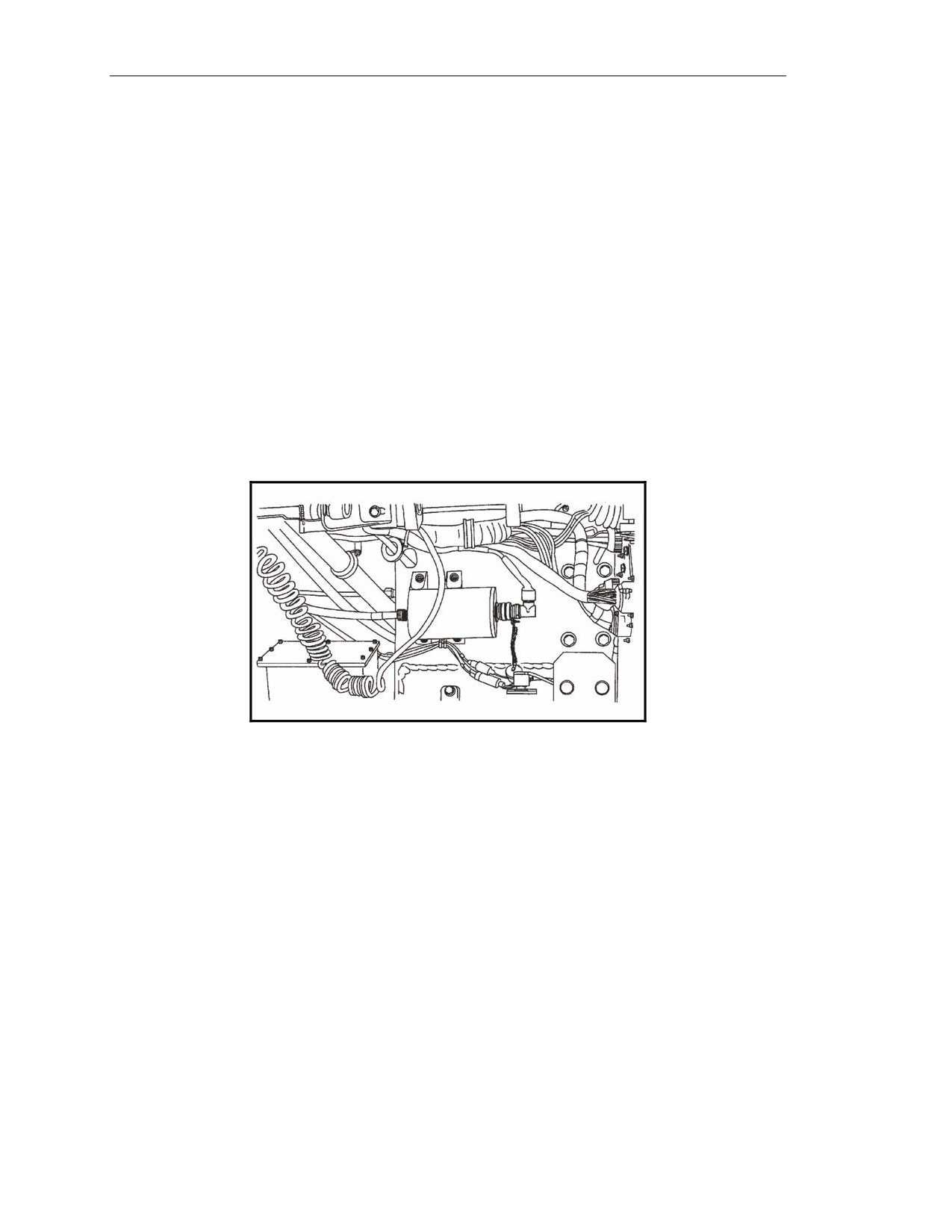
DRIVER’S DISPLAY
6-31. Located within the driver’s vision, the driver’s display (DD, shown in Figure 6-6) provides the
driver with the steering directions and compass orientation to move the vehicle to the next firing
location or waypoint. It also provides information to correctly orient the vehicle at the next
emplacement. Information is graphically displayed for steering directions and compass orientation, and
numerically for distance and heading.
Figure 6-6. Driver’s display.
7 December 2007
FM 3-22.90
6-7
Chapter 6
Dimmer Knob
6-32. The dimmer knob (1, Figure 6-6) controls the brightness of the LCD.
Liquid Crystal Display
6-33. The liquid crystal display (LCD, shown in 2, Figure 6-6) displays directions to the next position.
Blinking of the LCD indicates a CFF.
Toggle Switch
6-34. With the toggle switch (3, Figure 6-6) turned to NAV, the LCD displays directional instructions.
The TRK and TURRET/TARGET toggle positions are not used.
Vehicle Motion Sensor
6-35. The vehicle motion sensor (VMS, Figure 6-7) provides the pointing device with vehicle velocity
data to reduce the vertical position error and improve location accuracy. Rotation of the drive wheels,
and, thus, motion of the vehicle, creates a pulse, which represents forward or backward motion of the
vehicle. The VMS is mounted inside the engine compartment in front of the driver’s cab on the M1064
carrier.
Figure 6-7. Vehicle motion sensor.
CAPABILITIES
6-36. The computer design permits the system to be upgraded to match expanding demands on field
terminal equipment. Currently, the MFCS is capable of storing—
Eighteen gun positions.
Three gun sections.
Fifty known points.
Fifty known targets.
Sixteen registration points.
Three FPFs.
Twelve FO locations.
6-8
FM 3-22.90
7 December 2007
Mortar Fire Control System
COMMANDER’S INTERFACE PROCESSING CAPABILITIES
6-37. The CI can simultaneously process up to six active fire missions consisting of one to six guns in
a mission as long as no mission consists of guns from different sections and no gun is assigned to more
than one mission concurrently. It can also—
Accept up to 100 digital messages.
Handle a full range of mortar ammunition per type.
Conduct registration missions and apply all registration corrections automatically.
Receive, compute, and automatically apply all MET corrections.
Store a maximum of 10 safety fans.
Provide a 13-digit grid to impact for all rounds.
Provide azimuth and range from gun to impact for each round.
Connect to radio or wire for digital communications.
6-38. The CI can be powered with dual nickel metal hydride (NiMh) rechargeable lithium batteries.
Power can also be supplied through power adapter options of 12- to 32-volt DC, or 110- or 220-volt
AC power. The CI also contains power saving circuitry.
6-39. The CI accepts digital messages from the Forward Observer System (FOS), the Advanced Field
Artillery Tactical Data System
(AFATDS), and other digital messaging devices to support the
following FSCMs, maneuver control measures, and airspace coordinating measures. It has an integral
speaker and software to control its output and provides the following safety geometry:
No-fire areas (NFAs).
Coordinating fire lines (CFLs).
Restrictive fire areas (RFAs).
Restrictive fire lines (RFLs).
Lateral boundaries (LBs).
Airspace coordination areas (ACAs).
Forward line of own troops (FLOT).
COMMANDER’S INTERFACE BATTERY SPECIFICATIONS
6-40. The CI holds two rechargeable NiMh batteries, which are for backup power purposes only. The
CI can operate without batteries. Features include—
Single batteries can be replaced while the system is in operation.
Batteries cannot be installed incorrectly.
Battery power will last approximately four hours total at ambient conditions.
SOLDIER GRAPHIC USER INTERFACE
6-41. A Soldier GUI is a display that allows the operator to use menus, windows, and icons rather than
type in complicated commands (Figure 6-8).
SCREEN AREA
6-42. The screen area is located on the screen of the laptop computer. The screen will display an image
with buttons, tabs, fields, and menus. It displays the classification of the information on the current
screen in the upper center of the screen.
7 December 2007
FM 3-22.90
6-9
Chapter 6
Control Button Area
6-43. The control button area displays the buttons to access all available functions of the MFCS for the
gun and is located on the right side of the GUI. The buttons include—
SETUP
POINTING DEVICE (PD)
AMMO/STATUS
NAVIGATION/EMPLACEMENT (NAV/EMPLACE)
FIRE COMMAND (FIRE CMD)
CHECK FIRE
PLAIN TEXT MESSAGES (PTM)
ALERTS.
NOTE: The control button area displays only those buttons available for the function
currently being used. For example, the setup display above does not include the
fire mission functions of FPF, FSCM, MET, and so on.
Tabs
6-44. Tabs are similar to buttons and are displayed on the top of the screen after one of the control
buttons has been selected. When a tab is selected, the appropriate screen appears and the operator can
review and enter information and execute actions.
Work Area
6-45. The work area is located in the center of the screen. This is where information can be viewed,
selected, or modified.
Work Area Buttons
6-46. Work area buttons are located in the center and at the bottom of the screen. They are used to
accept, process, or refuse data presented in the work area.
Position Location
6-47. Position location is in the upper right corner of the screen. It can be the actual position, a series
of question marks if the position is not established, or a note such as
“POSITION NOT
AVAILABLE.”
Unit Name and Long Name
6-48. These are located just below the position location.
COMMON ACTIONS
6-49. When using the MFCS, the operator repeatedly uses the same commands. These are usually
done by clicking a button in the working button area of the screen or in response to a query in a
message box. These commands include: operationally acknowledge (OpACK), message to observer
(MTO) accept or deny, process or delete, selecting the guns to fire the mission, confirming gun orders,
and accepting or modifying data.
Operationally Acknowledge
6-50. Clicking the operationally acknowledge (OpACK) button acknowledges receipt of a message
and, if turned on, deactivates the audio alarm. The phrase “Click the OpACK button,” is used
throughout the chapter to indicate this action.
6-10
FM 3-22.90
7 December 2007
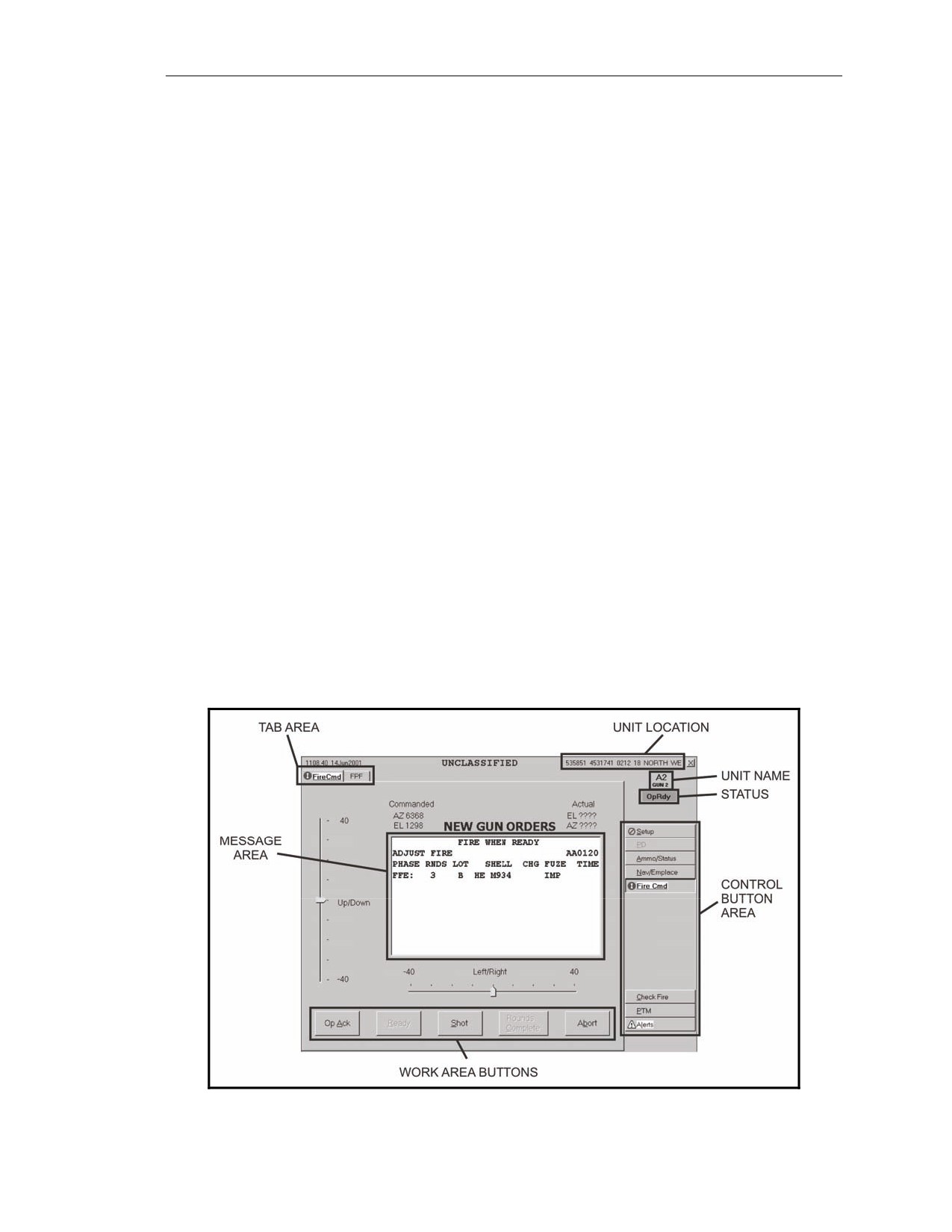
Mortar Fire Control System
Recording Data
6-51. Data is recorded throughout the process to maintain a record and to preserve data should the
MFCS fail. Data is transcribed onto DA Form 2399 (Computer’s Record) or DA Form 2188-R (Data
Sheet). The phrase “Record data,” is used throughout the chapter to indicate this action.
MTO ACCEPT or MTO DENY
6-52. The MFCS uses the terms MTO ACCEPT to accept the mission and MTO DENY to refuse the
mission. If the operator selects MTO DENY, the DELETE button becomes visible and, when clicked,
deletes the mission. If an error is beyond FDC control, the only choice is MTO DENY. The phrases
“Click MTO ACCEPT” to accept the mission or “Click MTO DENY” to refuse the mission are used
throughout the chapter to indicate this action.
Process or Delete
6-53. The MFCS usually presents a choice to process or delete the fire mission. The operator can click
PROCESS to continue with the mission or DELETE to stop the mission. The terms “PROCESS” or
“DELETE” are used throughout the chapter to indicate this action.
Selecting the Guns to Fire the Mission
6-54. Guns for the mission are preselected by the software and are checked in the SEL box in GUN
SELECT. The operator has the option to modify these selections by clicking in the SEL box to select
or deselect any operationally ready (OpRDY) gun. The operator select can also select all or none of the
guns listed by clicking ALL or NONE. The term “Select guns” is used throughout the chapter to
indicate this action.
Accepting or Modifying Data
6-55. If required, the operator makes adjustments to the mission data. To undo any changes, he clicks
UNDO CHANGES and the data fields display the original data. To accept all the changes made, click
USE ALL. If no changes are made, click USE ALL. The phrase “Modify data if necessary” is used
throughout the chapter to indicate this action.
Figure 6-8. Graphic user interface.
7 December 2007
FM 3-22.90
6-11
Chapter 6
STARTUP
6-56. Starting the MFCS on the M1064 must be done in sequence to ensure the system performs
properly. Follow these steps to start the MFCS and its ancillary equipment. (See TM 9-1220-248-10
for more detailed information).
(1) Ensure that the radios are in the stand-by mode and turn on the vehicular or AC power.
Check to ensure sufficient vehicular or auxiliary power is available by checking the power
gauge meter on the driver’s instrument panel.
(2) Turn on the PDA. The PDA distributes power to the MFCS components and the PLGR. It
has a toggle switch to turn on power for each.
(3) Turn on the PLGR. The PLGR self-test is successfully performed when the PLGR screen
states, “NO FAULTS FOUND.” For all MFCS operations, the PLGR must have current
communications security (COMSEC) codes installed.
(4) Turn on the pointing device. The PLGR screen displays “REMOTE CONTROL only
ZEROIZED key activated.”
(5) Turn on the CI. Check to see if the batteries are installed in the battery compartment and the
power cable is connected to the computer. Turn the switch on the PDA to the ON position
for the CI. If the POWER indicator illuminates with amber light, the CI is not receiving
external power. If the POWER indicator illuminates with a green light, the CI has external
power.
(6) Establish continuous mode for the PLGR. The upper left portion of the PLGR screen should
display “CONT.”
(7) Turn on the radios.
(8) Turn on the driver’s display.
(9) Turn on the gunner’s display.
LOG-IN PROCEDURES
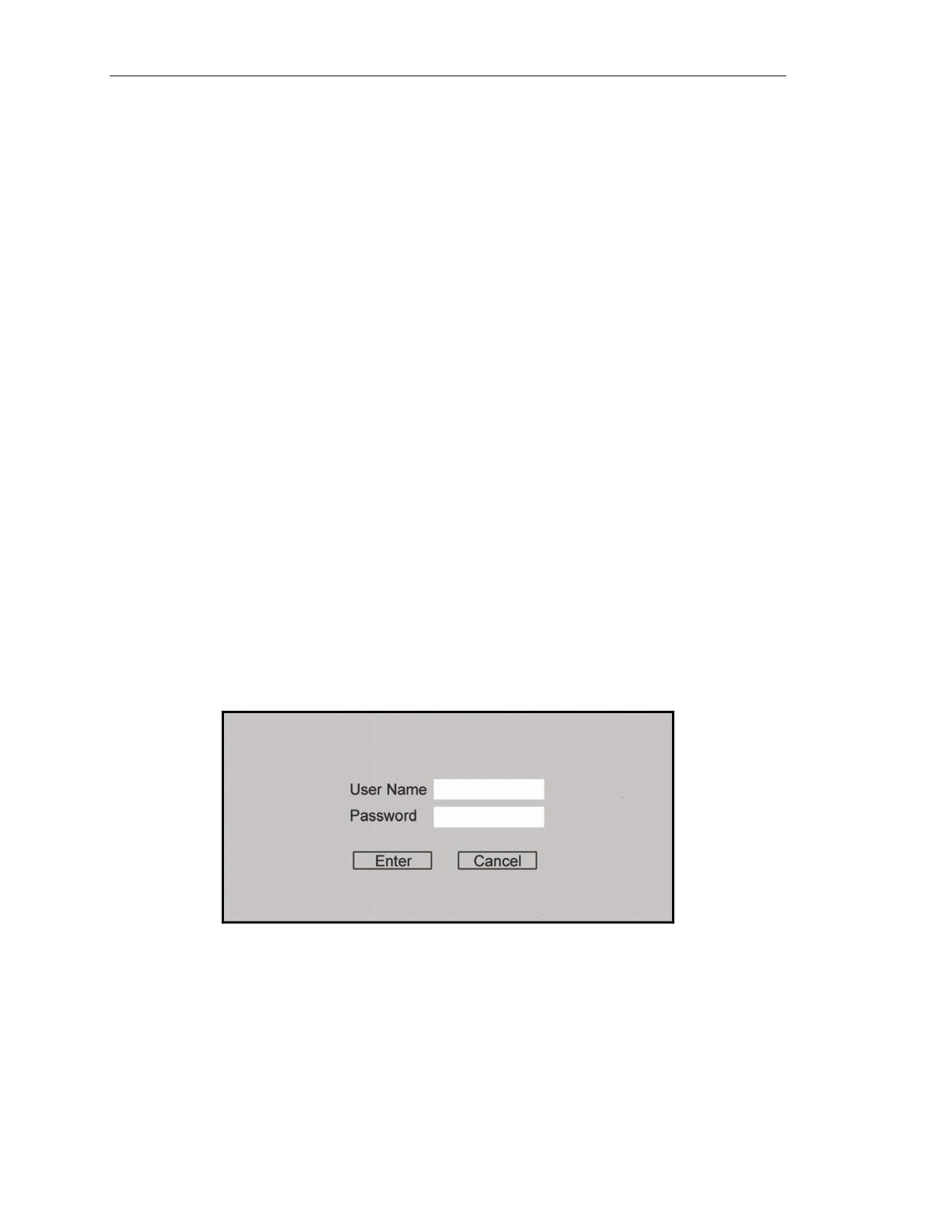
6-57. The log-in screen is displayed after system startup is complete (Figure 6-9). The log-in screen
ensures only authorized personnel have access to the system. The user enters his name and password.
The operator then clicks the ENTER button.
Figure 6-9. Log-in screen.
DATA INITIALIZATION AND SYSTEM CONFIGURATION
6-58. CI initialization and configuration is performed after the startup is completed. The user inputs or
selects information for fields to provide the system with the necessary information to function
correctly. The user configures the system to the platform using the mouse or keyboard. Various
symbols or icons may appear on the screen while using the CI. These symbols assist the operator by
highlighting actions that must be completed such as status of operations and changes to data. (See TM
9-1220-248-10 for a list of these icons.)
6-12
FM 3-22.90
7 December 2007
Mortar Fire Control System
6-59. The following screens appear as the operator initializes and configures the MFCS. The user must
enter, modify, or confirm the information on each of these screens.
The “Unit List” screen lists all of the units assigned or used by the FDC. It allows the
operator to view, enter, edit, or delete a unit name, unit reference number (URN), long
(explanatory) name, devices, and observer number (OBSNUM).
The “Configuration” screen provides the means to enter or reconfigure information on the
operator’s vehicle by selecting one of the options on the drop-down menus for—
Platform.
Role.
Mode.
Security.
Unit.
Controlling FDC fires cell (FC).
The “Data” screen provides the means to verify, view, or set the system date/time, audio
alarm, target number, and splash offset.
The
“Geographical Reference” screen provides the means to set the geographical
positioning system by choosing the ELLIPSOID, DATUM, and MAP MOD fields.
The “Position” screen provides the means to view or update the operator’s current position
and other units’ position.
The “Channel A” and “Channel B” screens provide the means to enter, view, or update
communication net parameters for Channel A or B subscribers.
6-60. Until the system is configured, only the SETUP and ALERT buttons appear. The SETUP button
is located at the top of the control button area. Once the operator clicks the SETUP button, the “Unit
List” screen appears. The UNIT LIST and CONFIG tabs are the only tabs shown. After the operator
enters the required information for these screens, all other setup tabs display. To complete the setup,
data must be entered and accepted on the following screens:
Unit List.
Configuration.
Data.
Geographic Reference.
Position.
Channels A and B.
7 December 2007
FM 3-22.90
6-13
Chapter 6
“UNIT LIST” SCREEN—SETUP
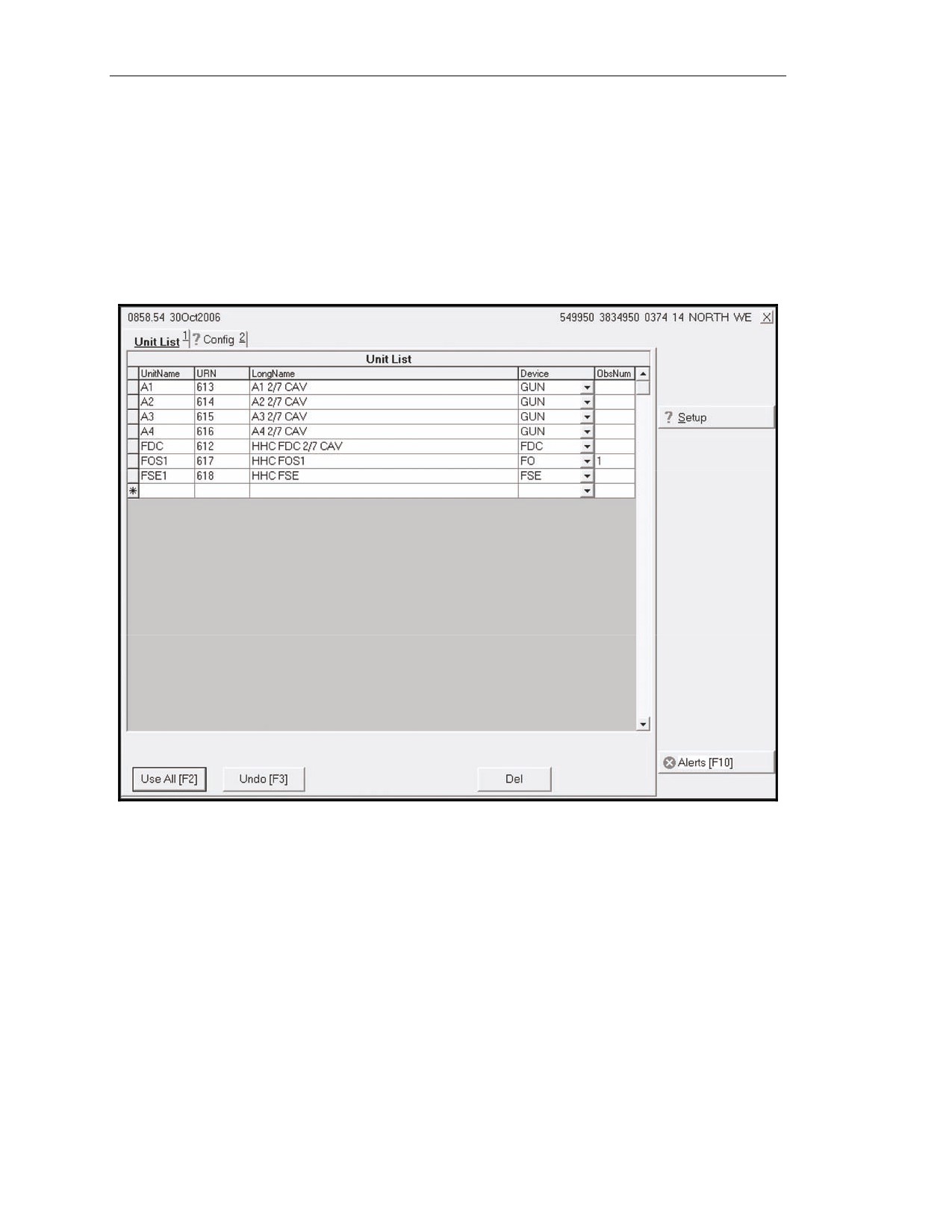
6-61. The “Unit List” screen (Figure 6-10) is the default screen; therefore, it appears after the operator
clicks the SETUP button. If previously configured, the system defaults to the data already entered.
There is a limit of 100 unit entries. A lock icon displays in the index box at the beginning of a row
when that platform has already been assigned a unit name. The unit name must be two to four
characters long, and the first character must be a letter. The URN must be unique to the unit, and the
long name must be less than 30 characters long. The operator accesses the drop-down menu in the
DEVICE field to select FDC, GUN, FO, FSE, or OTHER. In the last field, OBSNUM, the operator
assigns a number to each FO. Once complete, the operator accepts the existing or modified data.
Figure 6-10. “Unit List” screen.
6-14
FM 3-22.90
7 December 2007
Mortar Fire Control System
“CONFIGURATION” SCREEN—SETUP
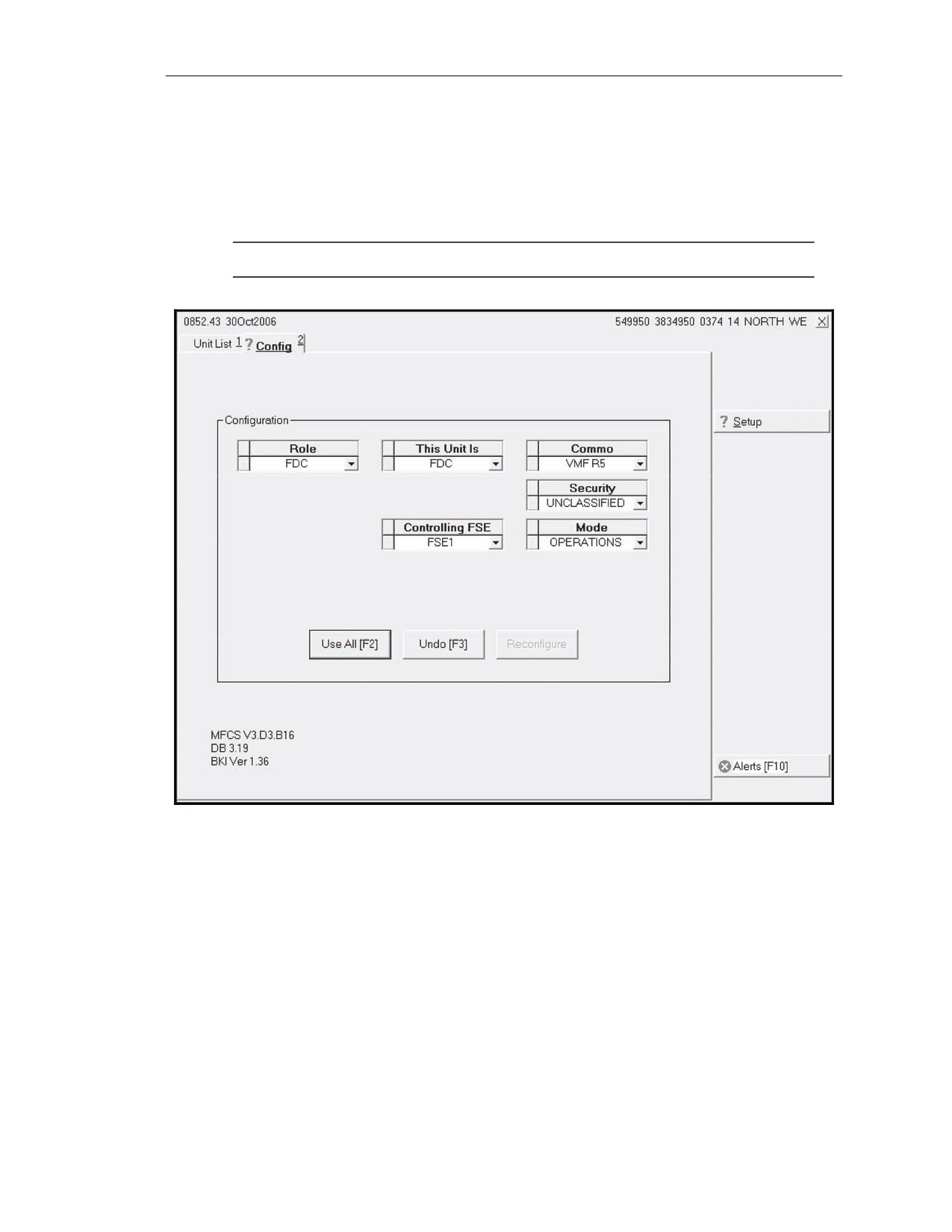
6-62. The operator selects the USE ALL working area button on the “Unit List” screen to display the
“Configuration” screen
(Figure
6-11). This screen allows the operator to enter or reconfigure
information by selecting one of the options on the drop-down menus. If previously configured, the
system defaults to the data already entered. A red question mark displays on the CONFIG tab until the
operator clicks USE ALL.
NOTE: GUN/FDC is the role used for units that do not have an independent FDC.
Figure 6-11. “Configuration” screen.
7 December 2007
FM 3-22.90
6-15
Chapter 6
“DATA” SCREEN—SETUP
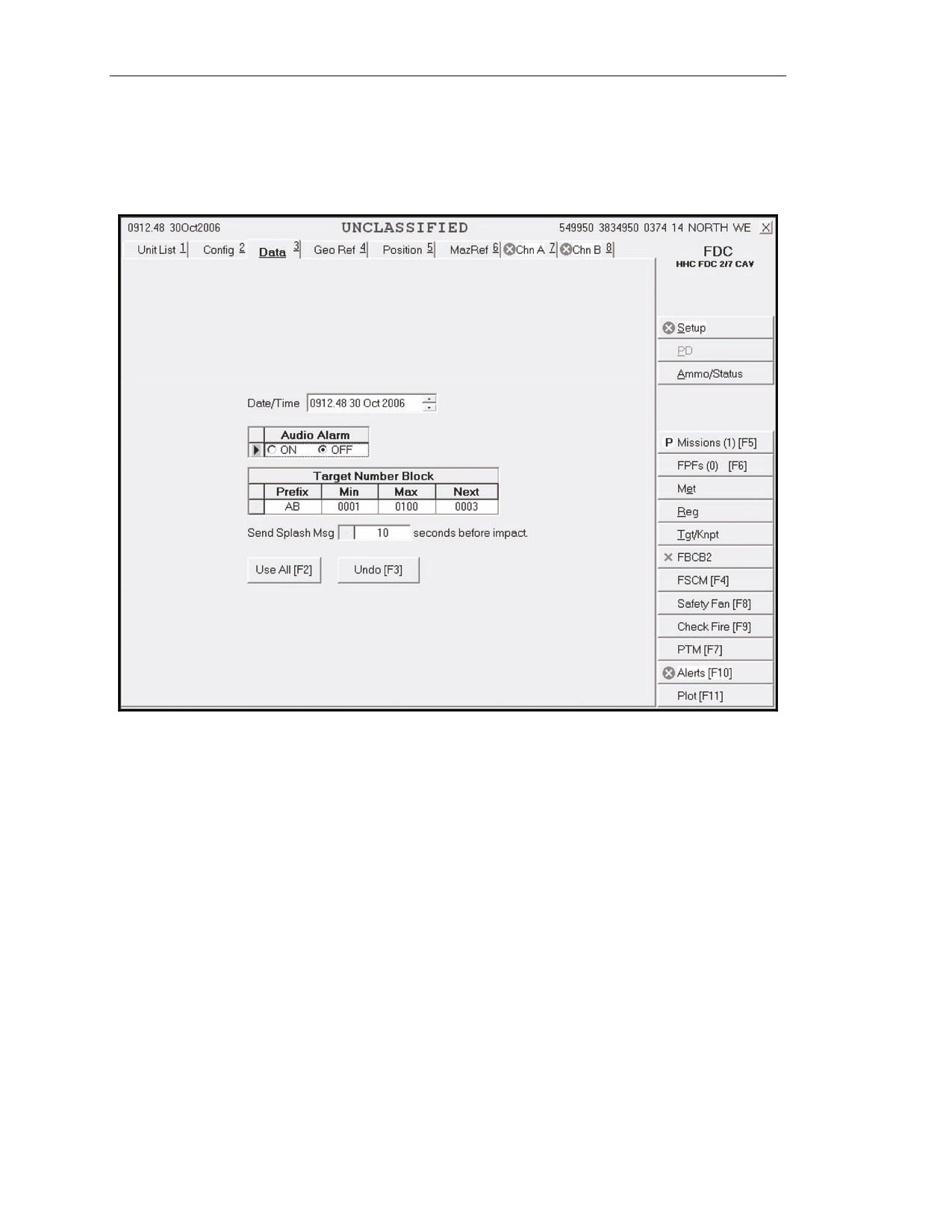
6-63. The operator selects the DATA tab to display the “Data” screen (Figure 6-12). This screen
allows the operator to verify, view, or set the system date/time, audio alarm, target number, and splash
offset.
Figure 6-12. “Data” screen.
6-16
FM 3-22.90
7 December 2007
Mortar Fire Control System
“GEOGRAPHIC REFERENCE” SCREEN—SETUP
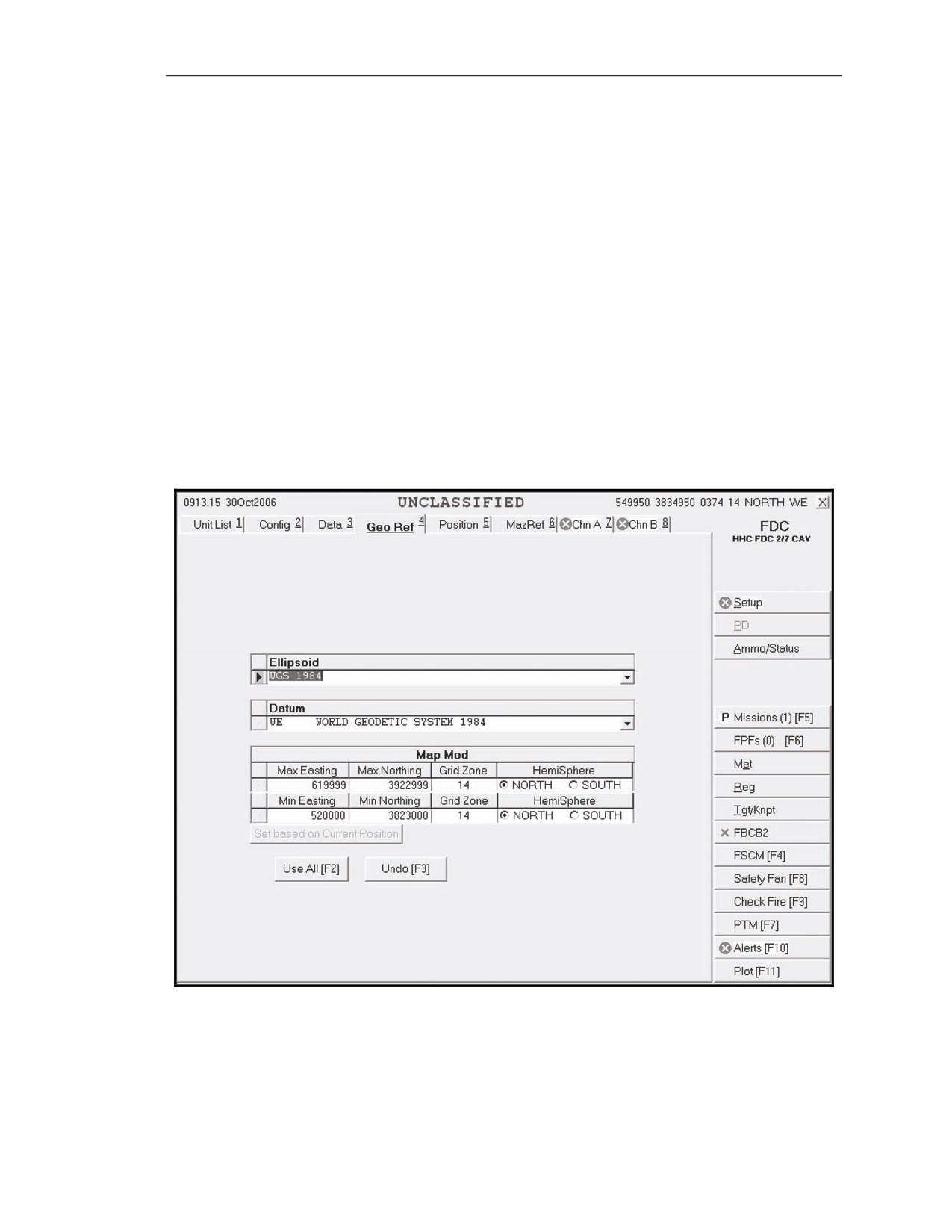
6-64. This screen (Figure 6-13) allows the operator to set the geographic positioning system by filling
the ELLIPSOID, DATUM, and MAP MOD fields.
ELLIPSOID and DATUM fields
6-65. The operator clicks the down arrow in the ELLIPSOID field, and then selects the appropriate
choice. The corresponding default datum for the ellipsoid automatically displays in the DATUM field.
The operator can change the DATUM field by choosing another option. The screen value is updated,
and a pencil icon displays in the index box at the beginning of each row. To undo the changes, the
operator clicks UNDO CHANGES; any unsaved changes (indicated by a pencil icon) are refreshed
with the original data.
MAP MOD field
6-66. The MAX EASTING and MAX NORTHING fields are “read only” and automatically filled
when the operator enters the MIN EASTING or MIN NORTHING fields. The GRID ZONE and
HEMISPHERE fields in the MAXIMUM field row are also “read only” and automatically filled and
updated when the operator enters the MINIMUM values. The MIN EASTING and MIN NORTHING
fields are disabled if there are any active missions.
Figure 6-13. “Geographic Reference” screen.
7 December 2007
FM 3-22.90
6-17
Chapter 6
“POSITION” SCREEN—SETUP
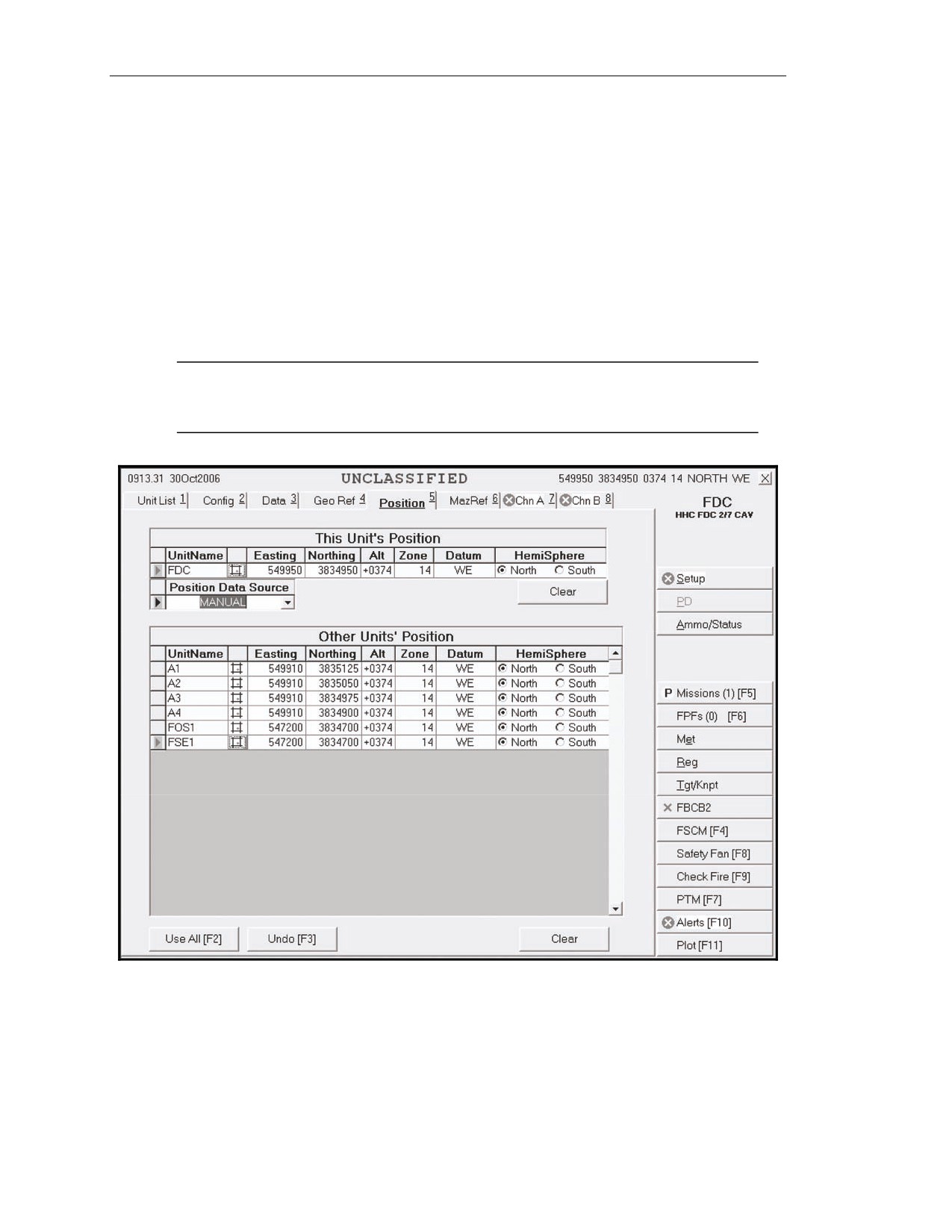
6-67. The operator selects the POSITION tab to display the “Position” screen (Figure 6-14). This
screen allows the operator to view or update his and other units’ current positions. The operator must
update the position if a red circle with an X through it displays on the POSITION tab. The
UNITNAME field is “read only” and automatically filled with the unit names selected in the
“Configuration” screen. The ZONE and DATUM fields are also “read only” and automatically filled
when the operator enters the MAP MOD field. The operator can also manually update or modify the
fields as follows:
The EASTING field with six digits.
The NORTHING field with seven digits.
The ALT field with a range of values from -400 to 9999 meters.
The HEMISPHERE field with the appropriate hemisphere.
NOTE: If the pointing device is available and operational, the operator must ensure that
the position data source is set to PD or GPS. The CI cannot process digital input
from the pointing device when the position data source is set to FBCB2.
Figure 6-14. “Position” screen.
6-18
FM 3-22.90
7 December 2007
Mortar Fire Control System
“MOUNTING AZIMUTH AND REFERENCE” SCREEN—SETUP
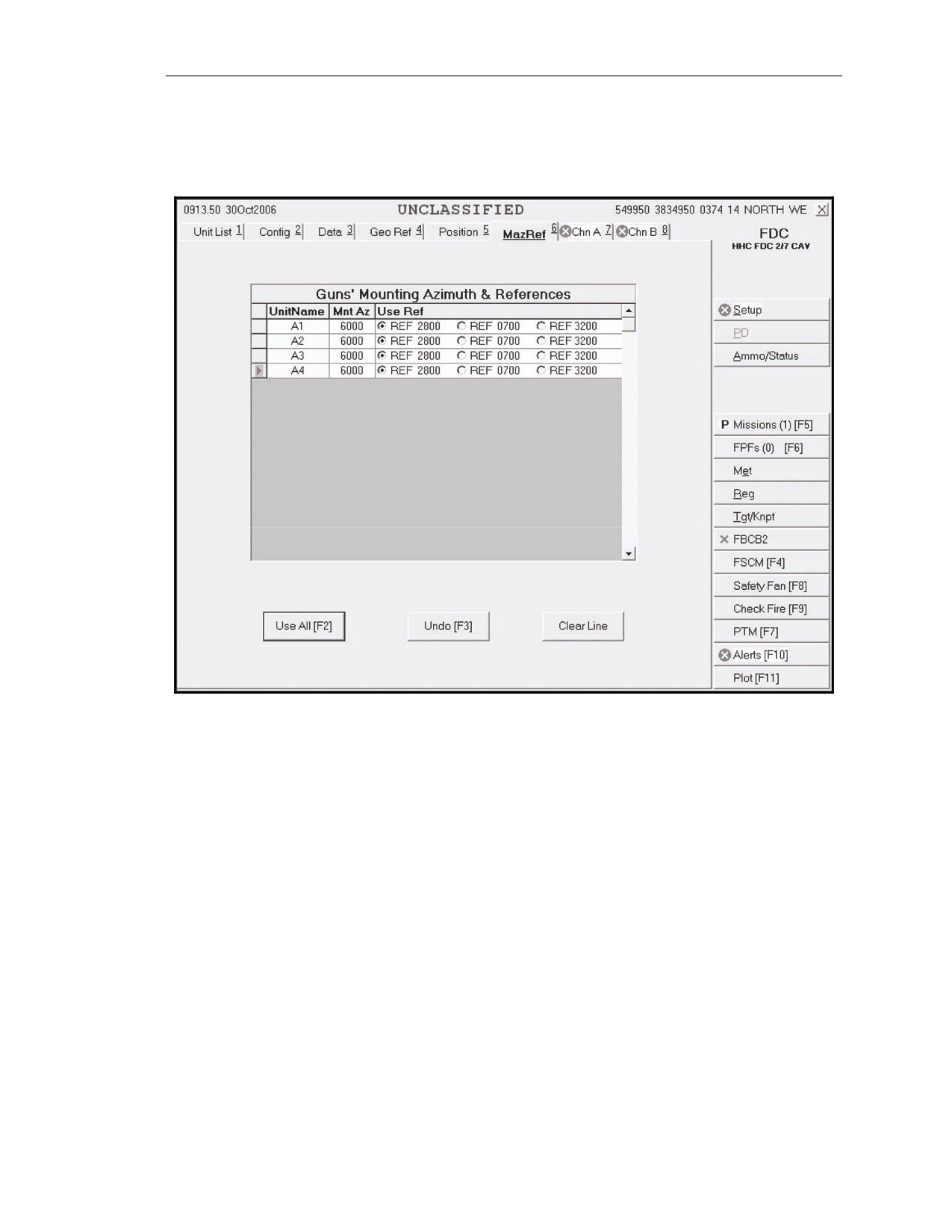
6-68. This screen (Figure 6-15) is utilized for degraded mode setup. If the pointing device is not
operational or unavailable, solutions in deflection are necessary.
Figure 6-15. “Mounting Azimuth and Reference” screen.
7 December 2007
FM 3-22.90
6-19
Chapter 6
“CHANNEL A” AND “CHANNEL B” SCREENS—SETUP
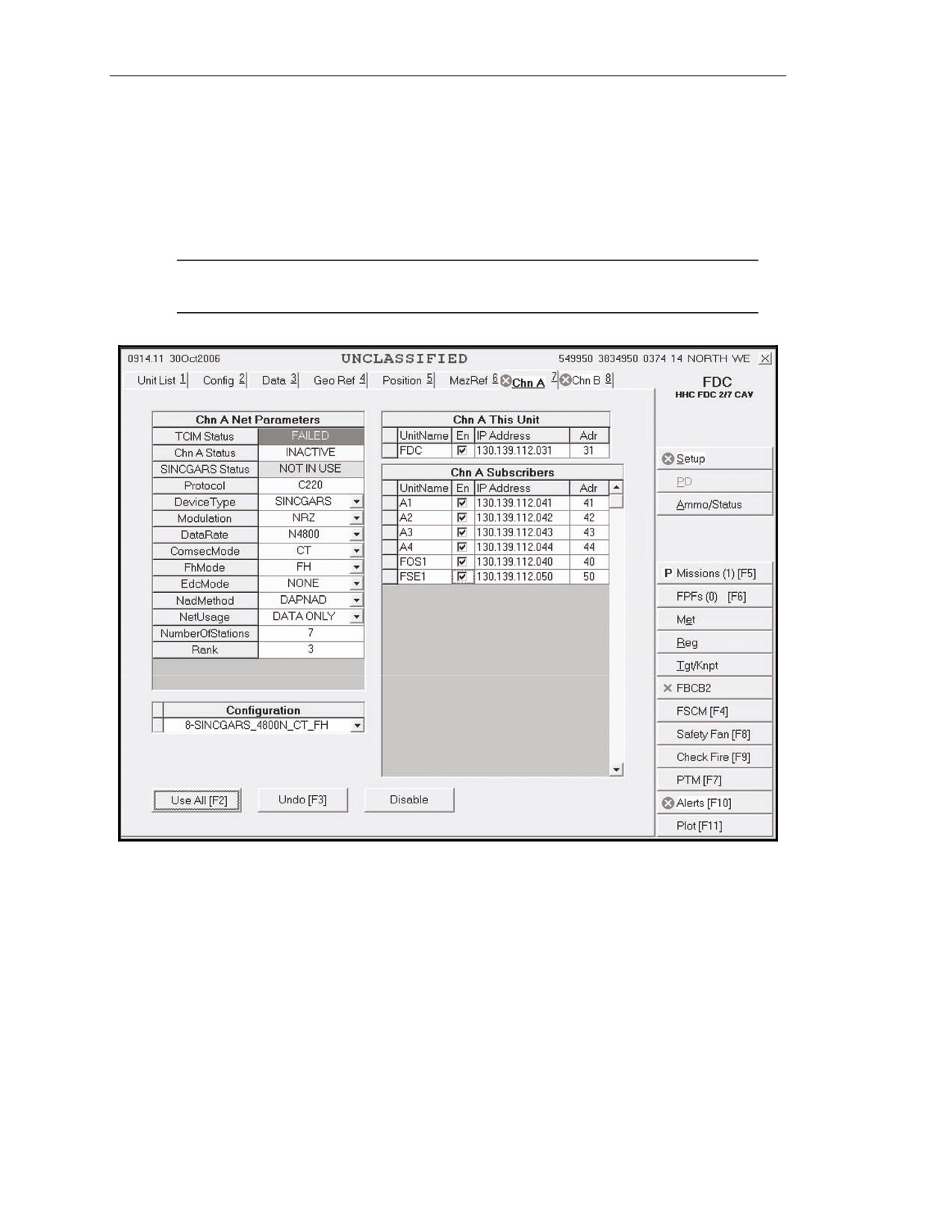
6-69. These screens (Figure 6-16) allow the operator to enter, view, or update net parameters and
Channel A or B subscribers. Both channels share the same setup procedures and can be set up for
Single Channel Ground and Airborne Radio System (SINCGARS), but only Channel A can be set up
for wire. Using CHN A for SINCGARS and digital communication between the FDC and the gun
tracks is recommended. If a red circle with an X through it displays on the CHN A or CHN B tab, the
parameters and subscribers must be set up.
NOTE: When using SINCGARS FSK188-C, ensure that SINCGARS is indicated as the
device type.
Figure 6-16. “Channel A” screen.
CHANNEL A and CHANNEL B NET PARAMETERS Fields
6-70. Tactical communication interface modem
(TCIM) STATUS, CHN A STATUS, CHN B
STATUS, and PROTOCOL are “read only” and automatically filled. TCIM STATUS and CHN
A/CHN B STATUS reflect the current status. The operator sets the radio or wire defaults or manually
selects the parameters to set the net parameters. To determine the parameters, he coordinates with the
communications officer to receive the number of stations and rank, and enters this information.
SET RADIO DEFAULTS Button
6-71. To set the radio defaults, the user clicks the SET RADIO DEFAULTS working area button for
the device type, modulation, data rate (baud), COMSEC mode, frequency hopping (FH) mode, error
detection and correction (EDC) mode, net access delay (NAD) method, and net usage.
6-20
FM 3-22.90
7 December 2007
Mortar Fire Control System
SET WIRE DEFAULTS Button
6-72. To set the wire defaults (for Channel A only), the user selects SET WIRE DEFAULTS. To
manually set the net parameters, he clicks the down arrows in each field and selects the appropriate
choice. He also enters the number of stations and rank, as supplied by the communications officer.
CHANNEL A and CHANNEL B THIS UNIT Fields
6-73. The UNITNAME field is “read only” and automatically filled with the unit name listed in the
“Unit List” screen. To update or enter the Internet protocol (IP) address, the user types the correct
address.
CHANNEL A and CHANNEL B SUBSCRIBER Fields
6-74. The UNITNAME field is “read only” and automatically filled with the unit names listed in the
“Unit List” screen. In the IP ADDRESS field, the user enters the last two digits of the IP address for
each unit name. The rest of the address (ADR) is automatically filled when he moves to another field.
Then, he clicks the EN box for each unit name to enable communication with that subscriber. To undo
any changes, the operator clicks UNDO CHANGES; any unsaved changes (indicated by a pencil icon
at the beginning of the row) are refreshed with the original data. The user clicks the USE ALL working
area button to save all screen information and activate the channel status, which will cause CHN A
STATUS to go from inactive to loading to active, and TCIM STATUS to go from operating to
downloading to operating. If disabling communication becomes necessary at any time, the user clicks
DISABLE.
ADDITIONAL FUNCTIONS
6-75. Additional functions and procedures of the MFCS are listed below:
Determining ammunition status.
Transmitting check fires.
Sending and receiving PTMs.
Using the Alerts function.
Using the Plot function.
6-76. This paragraph displays the sequences used to review, modify, and use data during FDC
operations. As previously discussed, the MFCS operator uses the GUI or keystrokes to navigate and
use the system.
AMMO/STATUS FUNCTION
6-77. Ammunition information about the unit, lot, shell, lot number, and quantity is transmitted
digitally from the gun tracks. This function allows the operator to enter, modify, delete, and sort these
data. This button also includes procedures for checking, entering, or changing ammunition status.
When the operator presses the AMMO/STATUS button, three tabs display: AMMO FIRE UNIT,
AMMO ROLL UP, and STATUS FIRE UNIT.
7 December 2007
FM 3-22.90
6-21
Chapter 6
“Ammo Fire Unit” Screen
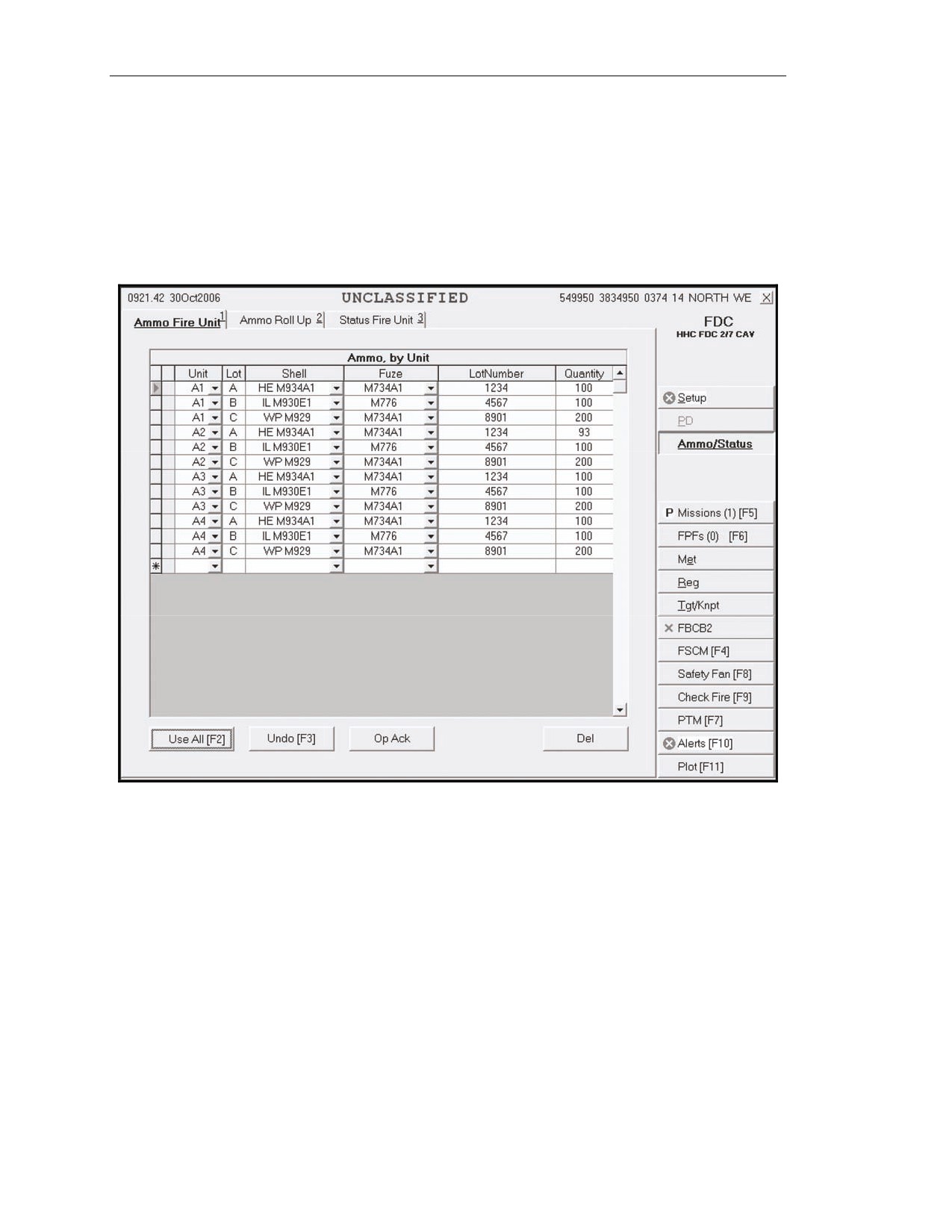
6-78. The operator clicks the AMMO/STATUS button in the control button area, and then clicks the
AMMO FIRE UNIT tab to display the “Ammo Fire Unit” screen (Figure 6-17). An exclamation
point (!) indicator in the index box at the beginning of a row indicates that the FDC has updated
ammunition. Ammunition information about the unit, lot, shell, fuze, lot number, and quantity is
received digitally from the gun. A green sunburst icon on the AMMO/STATUS button indicates that
the ammunition has been changed. The system automatically arranges ammunition alphabetically by
lot, but the operator can click another column heading to sort data by another field.
Figure 6-17. “Ammo Fire Unit” screen.
6-22
FM 3-22.90
7 December 2007
Mortar Fire Control System
“Ammo Roll-Up” Screen
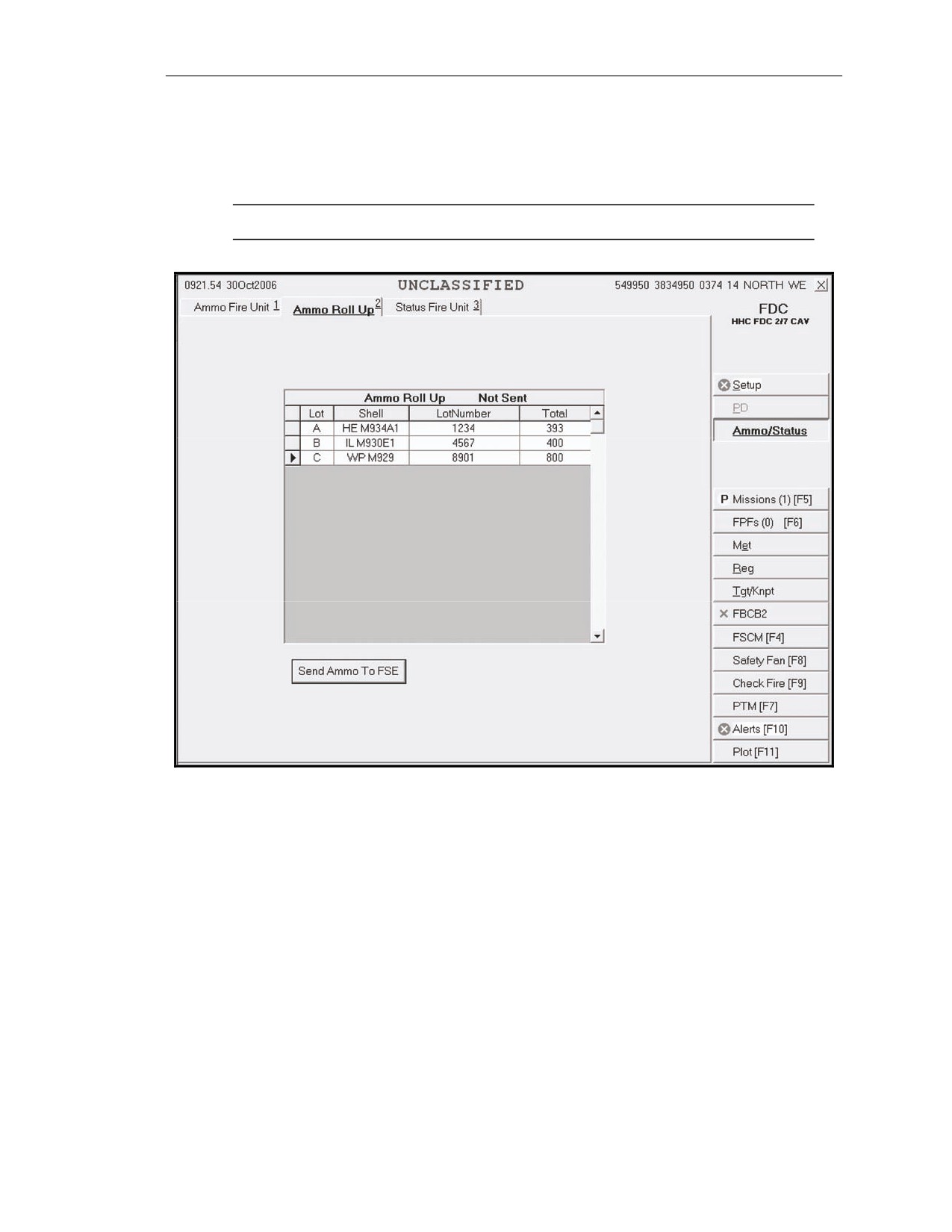
6-79. This screen (Figure 6-18) displays all of the ammunition carried by the gun carrier. Ammunition
information is “read only” and automatically filled, and includes lot, shell, lot number, and total
number of rounds.
NOTE: Fire unit ammunition will roll up by lot.
Figure 6-18. “Ammo Roll-up” screen.
7 December 2007
FM 3-22.90
6-23