FM 3-25.26 MAP READING AND LAND NAVIGATION (January 2005) - page 6
FM 3-25.26
NOTE: The same orienteering range may serve in both cross-country and score events.
However, a separate set of competitor maps, master maps, and event cards are
necessary.
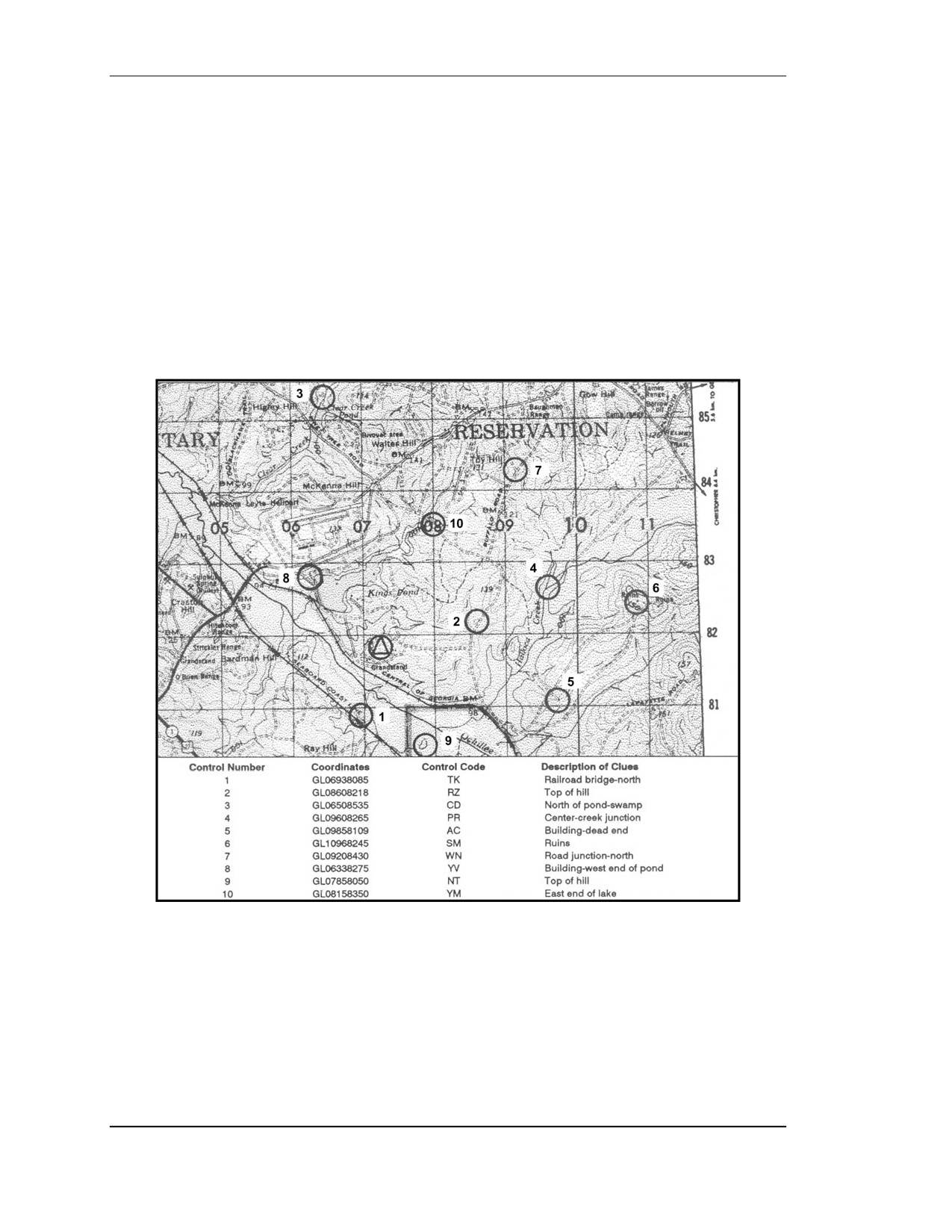
(4) Score Orienteering. In this event, the area chosen for the competition is blanketed
with many control points (Figure E-3). The controls near the start/finish point (usually
identical in this event) have a low point value, while those more distant or more difficult to
locate have a high point value. This event requires the competitor to locate as many control
markers as he can within the specified time (usually 90 minutes). Points are awarded for
each control visited and deducted for exceeding the specified time. The competitor with the
highest point score is the winner.
Figure E-3. A score orienteering map.
(a) Conducting a score event is basically the same as the cross-country event at the start.
The competitor is given a map and an event card. The event card lists all the controls with
their different point values. When released to the master map, the competitor finds the circles
and numbers indicating the location of all the controls listed on his event card. He copies all
the red circles on his map. Then he chooses any route he wishes to take in amassing the
highest possible point score in the time available. The course is designed to ensure that there
E-4
FOUO
18 January 2005
FM 3-25.26
are more control points than can possibly be visited in the allotted time. Again, each control
marker visited must be indicated on the event card.
(b) It is important for the competitor to take time initially to plot the most productive
route. A good competitor may spend up to 6 minutes in the master map area while plotting
the ideal route.
(c) There is no reward for returning early with time still available to find more points, so
the good competitor must be able to coordinate time and distance with his ability in land
navigation in running the course.
E-5. OFFICIALS
The same officials can be used at the start and finish. Although more officials or assistants
can be used, the following paragraphs list the minimum that can be used for a competition.
a. At the Start. These officials or assistants are needed at the start.
(1) Course Organizer⎯Briefs the orienteers in the assembly area, issues event cards and
maps, and calls orienteers forward to start individually.
(2) Recorder⎯Records orienteer’s name and start time on recorder’s sheet, checks
orienteer’s name and start number on his event card, and issues any last-minute instructions.
(3) Timer⎯Controls the master clock and releases the orienteers across the start line at
their start time (usually at one-minute intervals) to the master map area.
b. At the Finish. These officials or assistants are needed at the finish.
(1) Timer⎯Records finish time of each orienteer on the orienteer’s event card and
passes the card to the recorder.
(2) Recorder⎯Records finish time of each orienteer on the orienteer’s event card and
passes the card to the course organizer.
(3) Course Organizer⎯Verifies correctness of names, finish times, and final score;
posts orienteers’ positions on results board; and accounts for all orienteers at the end of
event.
E-6. START/FINISH AREA
The layout of the start/finish areas for orienteering events is basically the same for all forms.
a. Assembly Area. This is where orienteers register and receive instructions, maps,
event cards, and start numbers. They may also change into their orienteering clothes if
facilities are available, study their maps, and fill out their event cards here. Sanitation
facilities should be available in this area.
b. Start. At the start, the orienteer reports to the recorder’s and timer’s table to be
logged in by the recorder and released by the timer.
c. Master Map Area. There are three to five master maps 20 to 50 meters from the
start. When the orienteer arrives at this area, he must mark his map with all the course’s
control points. Having done this, he must decide on the route that he is to follow. A good
orienteer takes the time to orient his map and carefully plot his route before rushing off. It is
a good idea to locate the master map area out of sight of the start point to preclude orienteers
tracking one another.
d. Equipment. The following is a list of equipment needed by the host of an
orienteering event:
• Master maps, three to five, mounted.
FOUO
E-5
18 January 2005
FM 3-25.26
• Competitor maps, one each.
• Event cards, one each.
• Recorder’s sheets, two.
• Descriptive clue cards, one each.
• Time clocks, two.
• Rope, 100 to 150 feet, with pegs for finish tunnel.
• Card tables, one or two.
• Folding chairs, two or three.
• Results board.
• Control markers, one per point.
• Extra compasses.
• Whistle, for starting.
• First aid kit.
• Colored tape or ribbon for marking route to master map and from last control
point to finish.
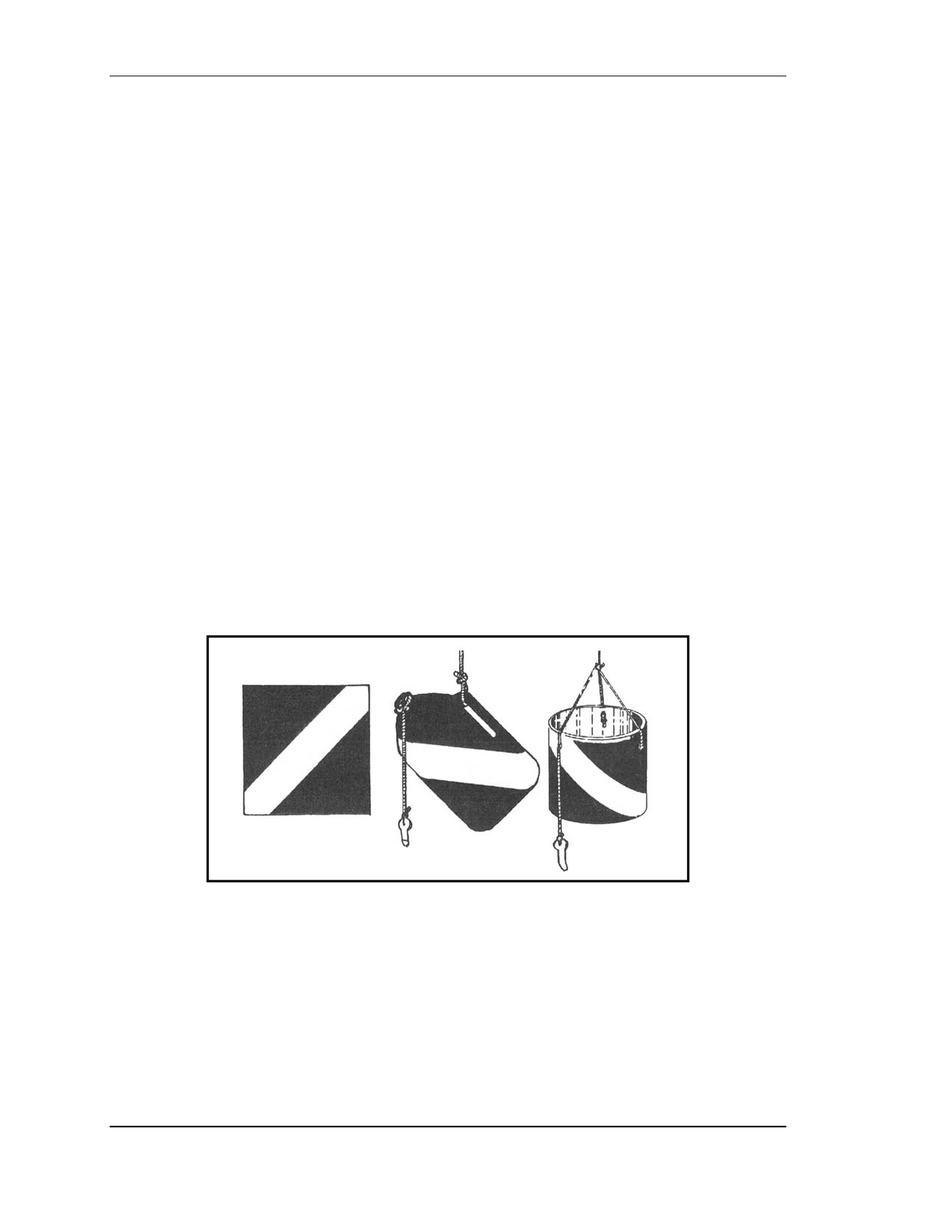
e. Control Markers. These are orange-and-white markers designating each control
point (Figure E-4). Ideally, they should have three vertical square faces, forming a triangle
with the top and bottom edges. Each face should be 12 inches on a side and divided
diagonally into red and white halves or cylinders (of similar size) with a large, white,
diagonal stripe dividing the red cylinder. For economy or expediency, 1-gallon milk cartons,
5-gallon ice cream tubs, 1-gallon plastic bleach bottles, or foot-square plaques, painted in the
diagonal or divided red and white colors of orienteering, may be used.
Figure E-4. Control markers.
(1) Each marker should have a marking or identification device for the orienteer to use to
indicate his visit to the control. This marker may be the European-style punch pliers, a
self-inking marker, different colored crayons at each point, different letter combinations,
different number combinations, or different stamps or coupons. The marking device must be
unique, simple, and readily transcribable to the orienteers’ event cards.
(2) The control marker should normally be visible from at least 10 meters. It should not
be hidden.
E-6
FOUO
18 January 2005
FM 3-25.26
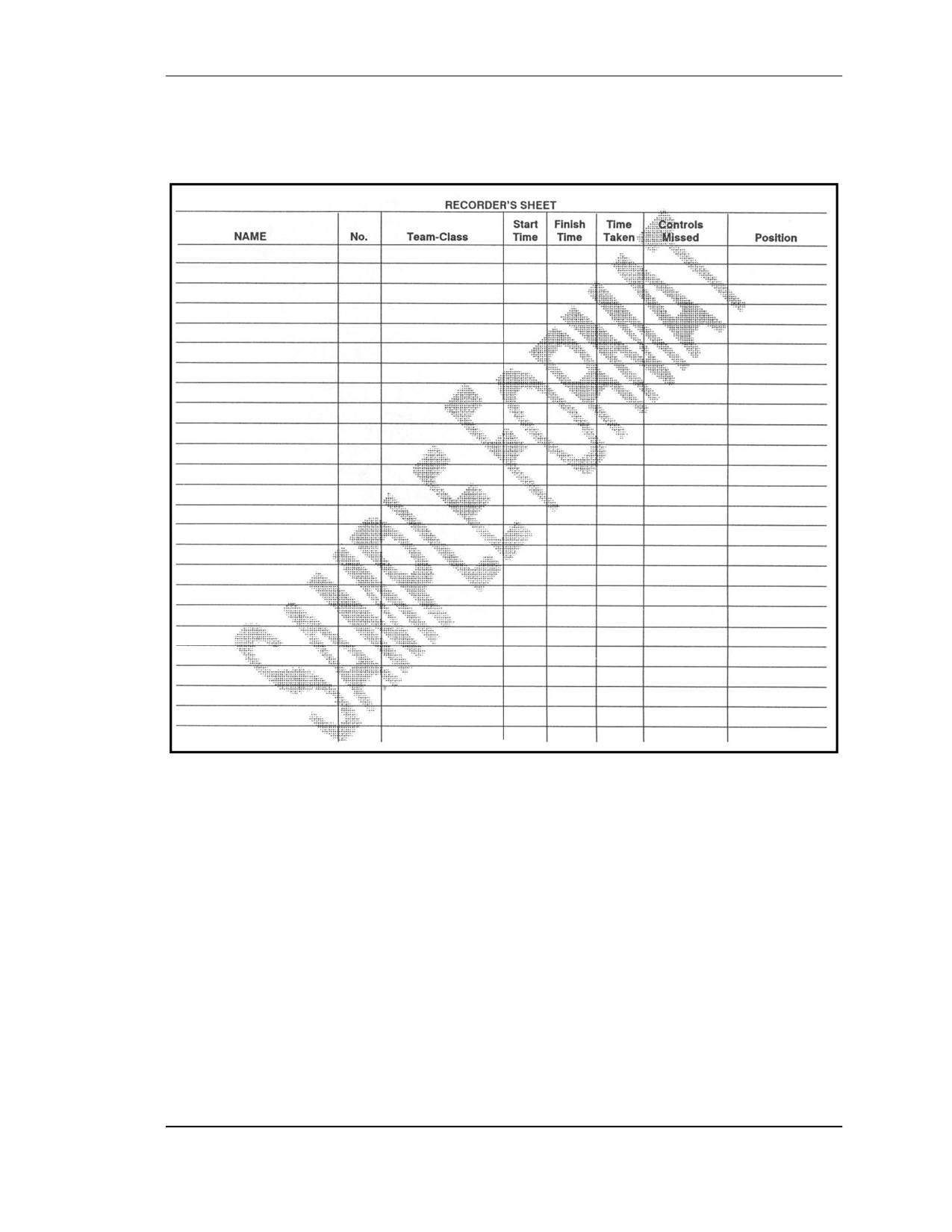
f. Recorder’s Sheets. A suggested format for the recorder’s sheet is depicted in
Figure E-5.
Figure E-5. Sample recorder’s sheet.
FOUO
E-7
18 January 2005
FM 3-25.26
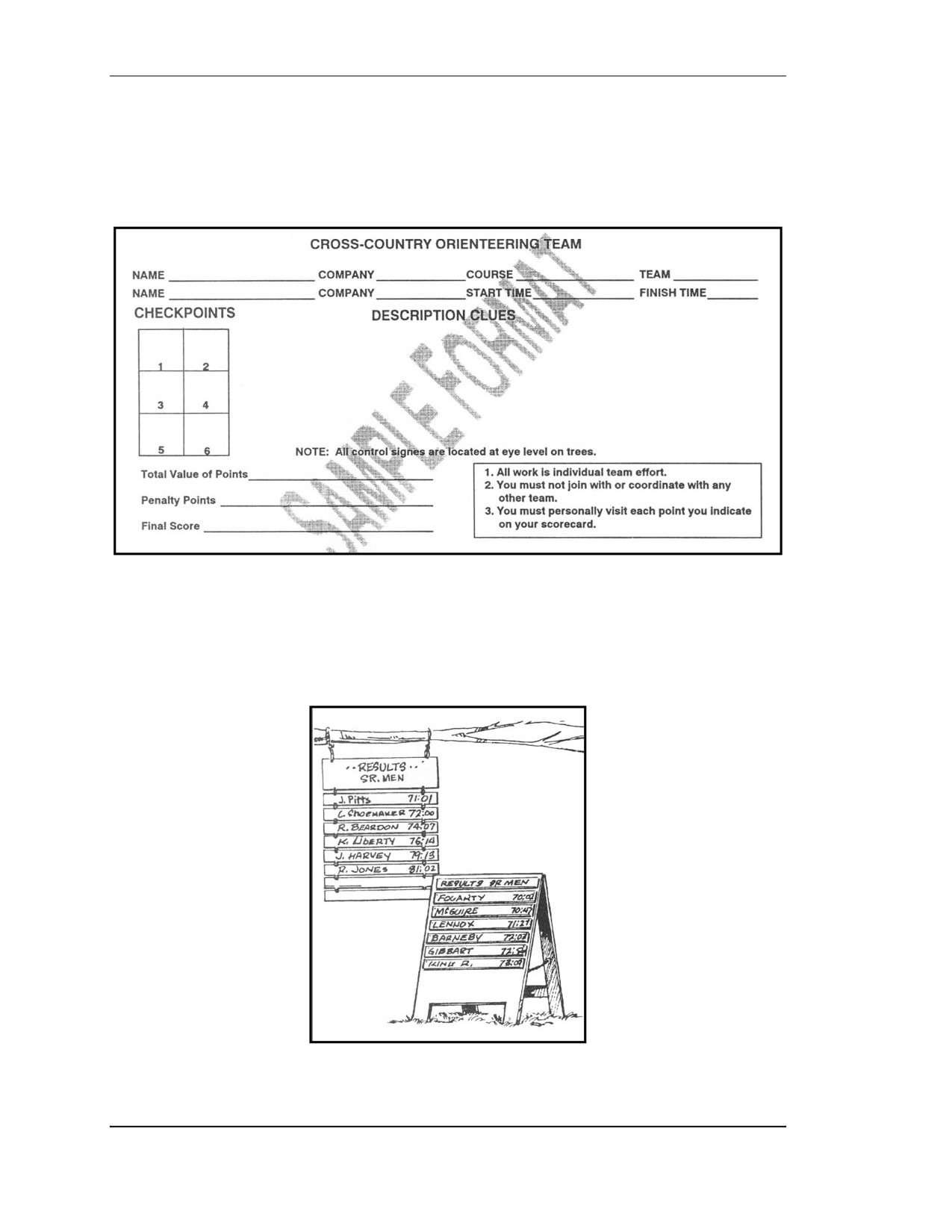
g. Event Card. The event card can be made before the event and should be as small as
possible, as it is carried by the competitor. It must contain the following items: name, start
number, start time, finish time, total time, place, and enough blocks for marking the control
points. As indicated earlier, it may also contain a listing of descriptive clues (Figure E-6).
Figure E-6. Sample cross-country orienteering event card.
h. Results Board. This board displays the orienteer’s position in the event at the finish
(Figure E-7). There are a variety of ways of displaying the results, from blackboard to
ladder-like to a clothesline-type device where each orienteer’s name, point score, and times
are listed.
Figure E-7. Sample results board.
E-8
FOUO
18 January 2005
FM 3-25.26
i.
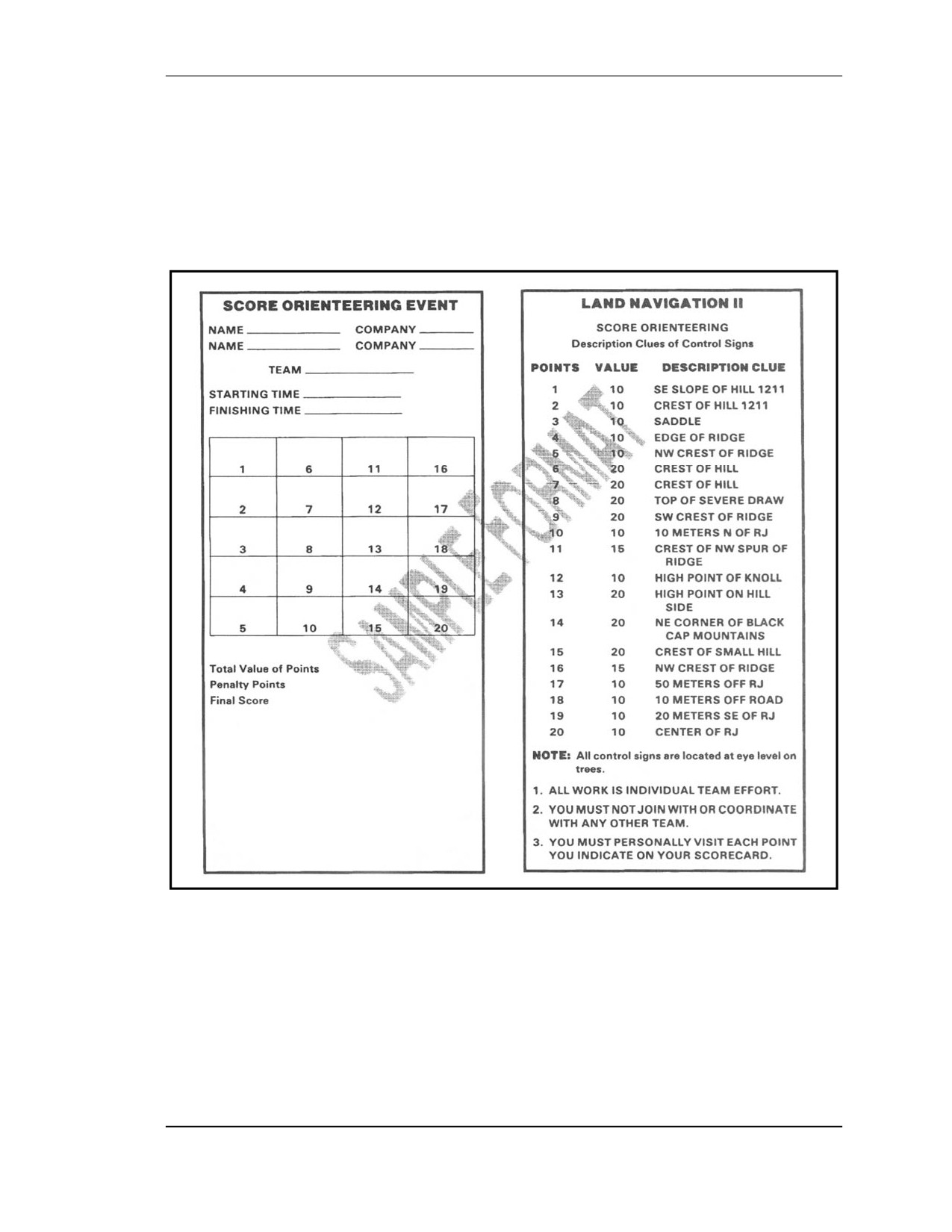
Clue Description Card. These cards are prepared with the master maps after the
course is set. They contain the descriptive clues for each control point, control code, grid
coordinate references, returning time for competitors, removal times for each location, and
panic azimuth (Figure E-8). The terminology on these must be identical to that listed in the
definition section. These cards and the master maps must be kept confidential until the
orienteers start the event.
Figure E-8. Sample clue description card.
j.
Scoring. The cross-country or free event is scored by the orienteer’s time alone. All
control points must be visited; failure to visit one results in disqualification. In this event, the
fastest time wins.
(1) A variation that can be introduced for novices is to have a not-later-than return time
at the finish and add minutes to the orienteer’s final time for minutes late and control points
not located.
FOUO
E-9
18 January 2005
FM 3-25.26
(2) The score event requires the amassing of as many points as possible within the time
limit. Points are deducted for extra time spent on the course, usually one point for each
10 seconds extra.
k. Prizes. A monetary prize is not awarded. A suggested prize for beginners is an
orienteering compass or some other practical outdoor-sports item.
E-7. SAFETY ON THE COURSE
A first aid kit must be available at the start and finish. One of the officials should be trained
in first aid or have a medic at the event. Other safety measures include:
a. Control Points. Locate the controls where the safety of the competitor is not
jeopardized by hazardous terrain or other circumstances.
b. Safety Lane. Have a location, usually linear, on the course where the competitor may
go if injured, fatigued, or lost. A good course will usually have its boundary as a safety lane.
Then a competitor can set a panic azimuth on the compass and follow it until he reaches the
boundary.
c. Finish Time. All orienteering events must have a final return time. At this time, all
competitors must report to the finish line even if they have not completed the course.
d. Search-and-Rescue Procedures. If all competitors have not returned by the end of
the competition, the officials should drive along the boundaries of the course to pick up the
missing orienteers.
E-8. CONTROL POINT GUIDELINES
When the control point is marked on the map as well as on the ground, the description of that
point is prefaced by the definite article the; for example, the pond. When the control point is
marked on the ground but is not shown on the map, then the description of the point is
prefaced by the indefinite article a; for example, a trail junction. In this case, care must be
taken to ensure that no similar control exists within at least 25 meters. If it does, then either
the control must not be used or it must be specified by a directional note in parentheses; for
example, a depression (northern). Other guidelines include:
a. Points of the compass are denoted by capital letters; for example, S, E, SE.
b. Control points within 100 meters of each other or different courses are not to be on
the same features or on features of the same description or similar character.
c. For large (up to 75 meters across) features or features that are not possible to see
across, the position of the control marker on the control point should be given in the
instructions. For example, the east side of the pond; the north side of the building.
d. If a very large (100 to 200 meters) feature is used, the control marker should be
visible from most directions from at least 25 meters.
e. If a control point is near but not on a conspicuous feature, this fact and the location of
the marker should be clearly given; for example, 10 meters E of the junction. Avoid this kind
of control point.
f. Use trees in control descriptions only if they are prominent and a totally different
species from those surrounding. Never use bushes and fauna as control points.
g. Number control points in red on the master map.
h. For cross-country events, join all control points by a red line indicating the course’s
shape.
E-10
FOUO
18 January 2005
FM 3-25.26
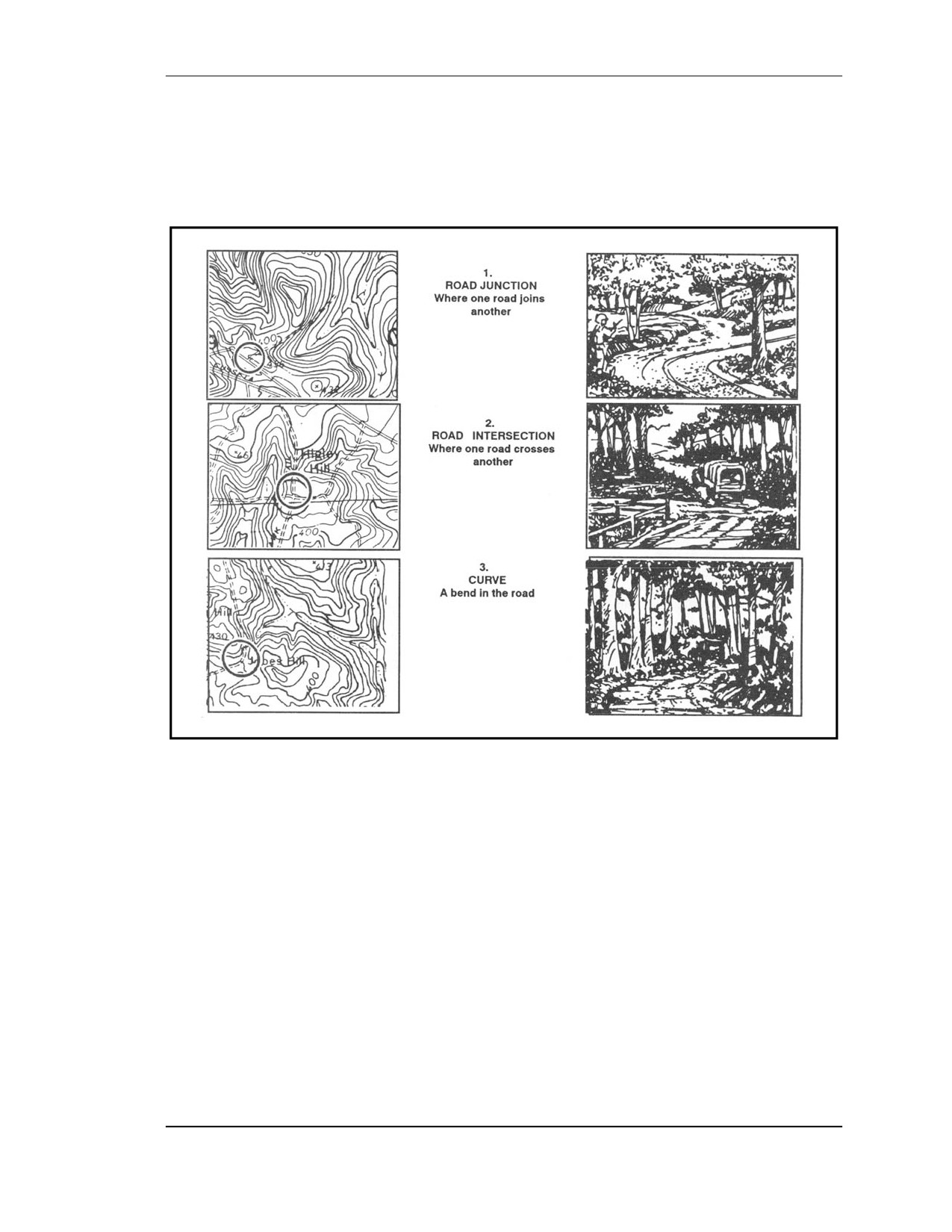
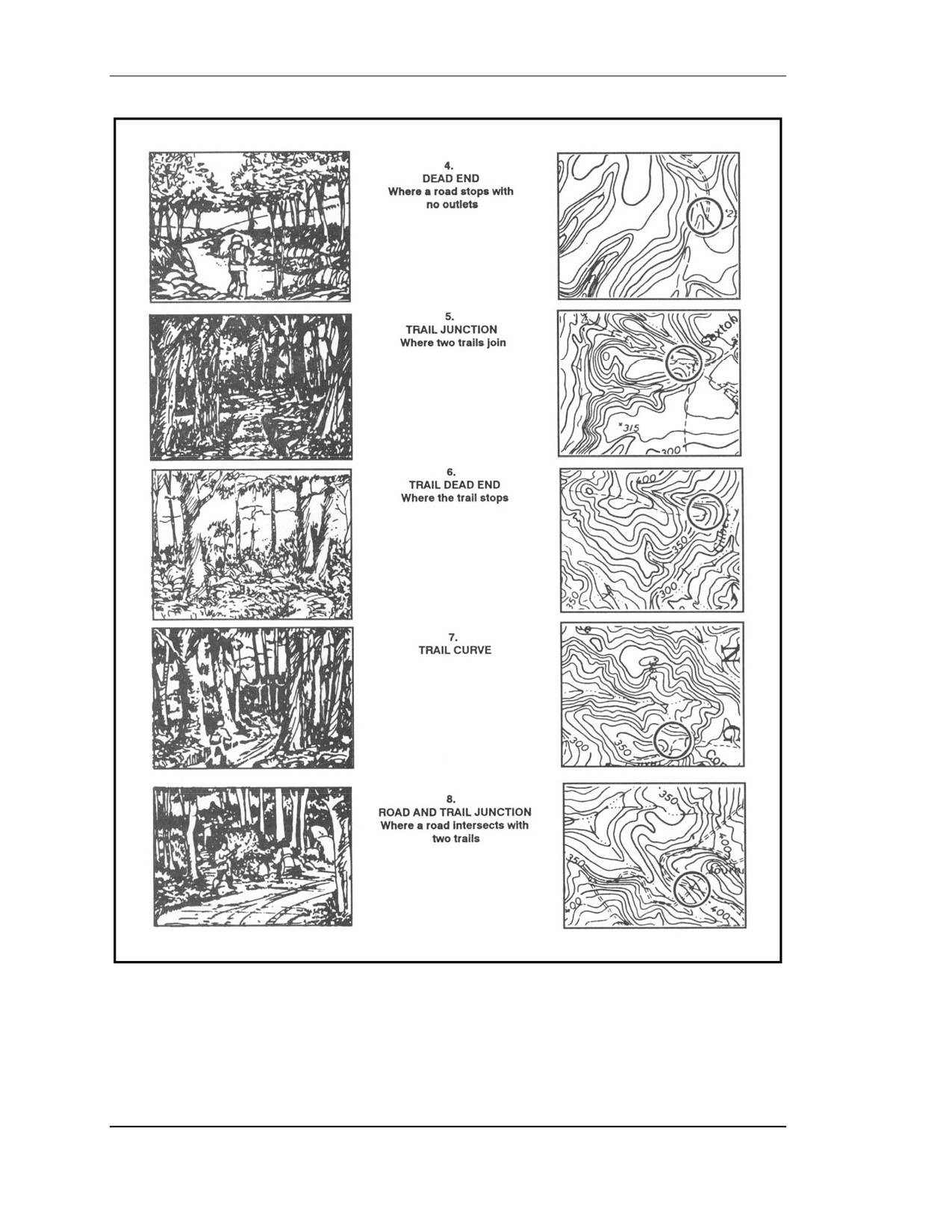
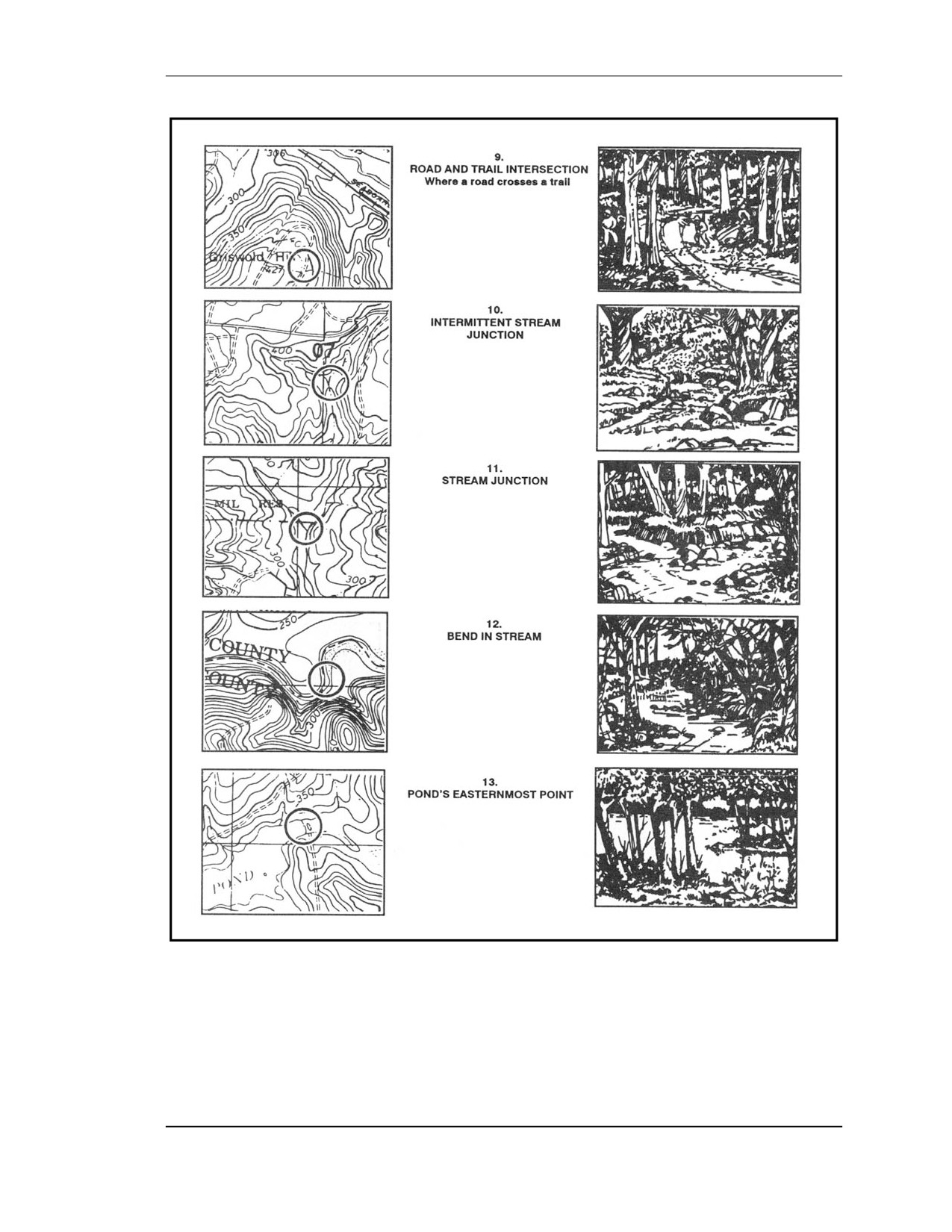
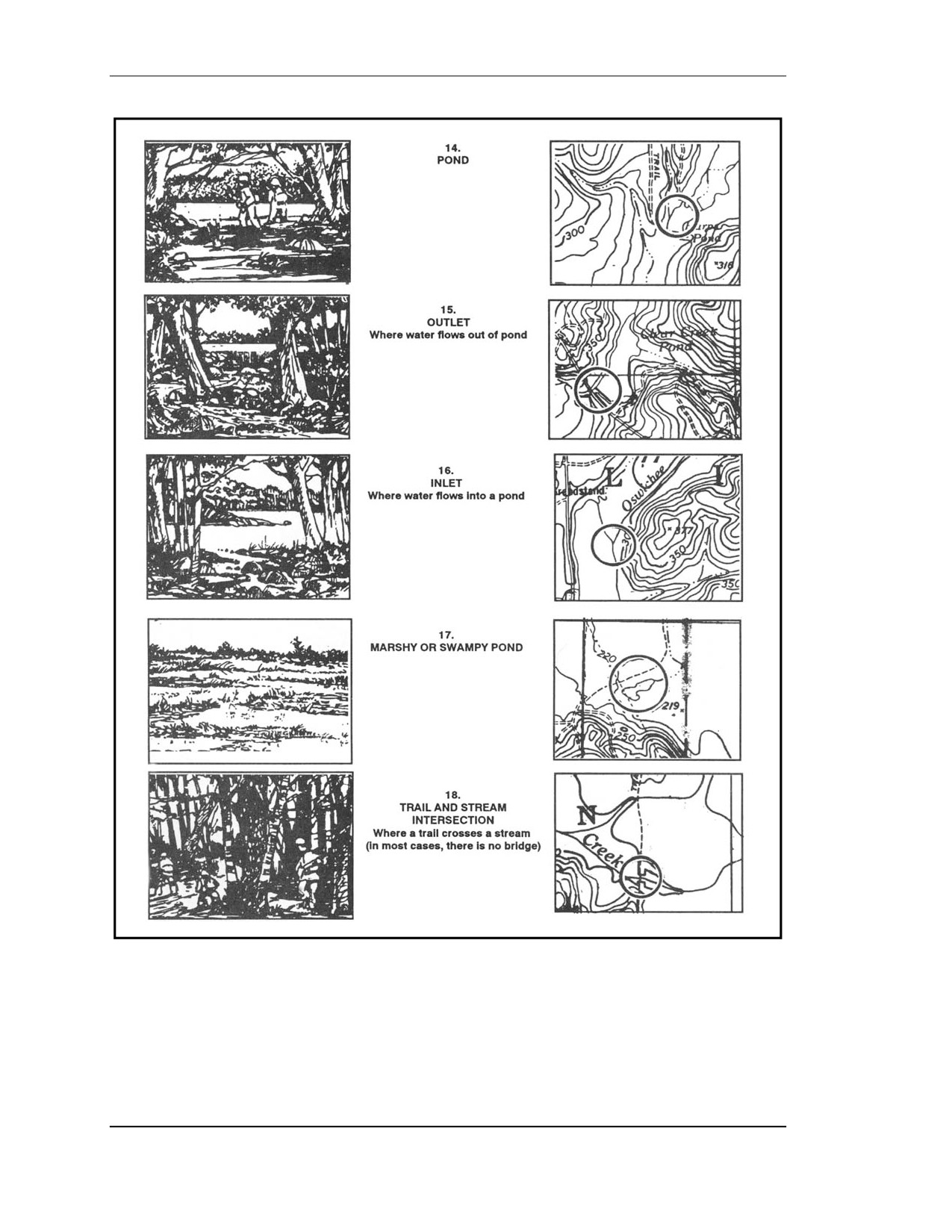
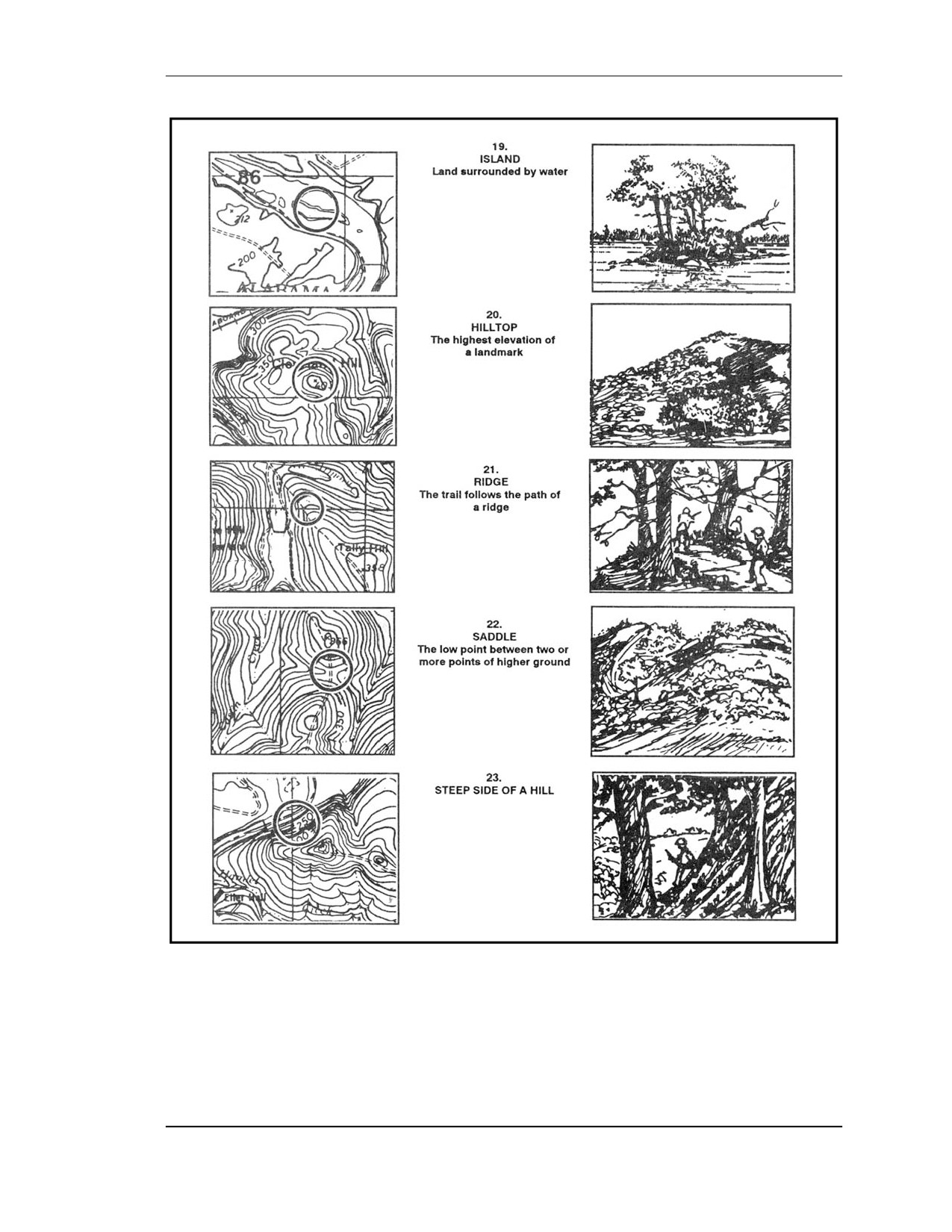
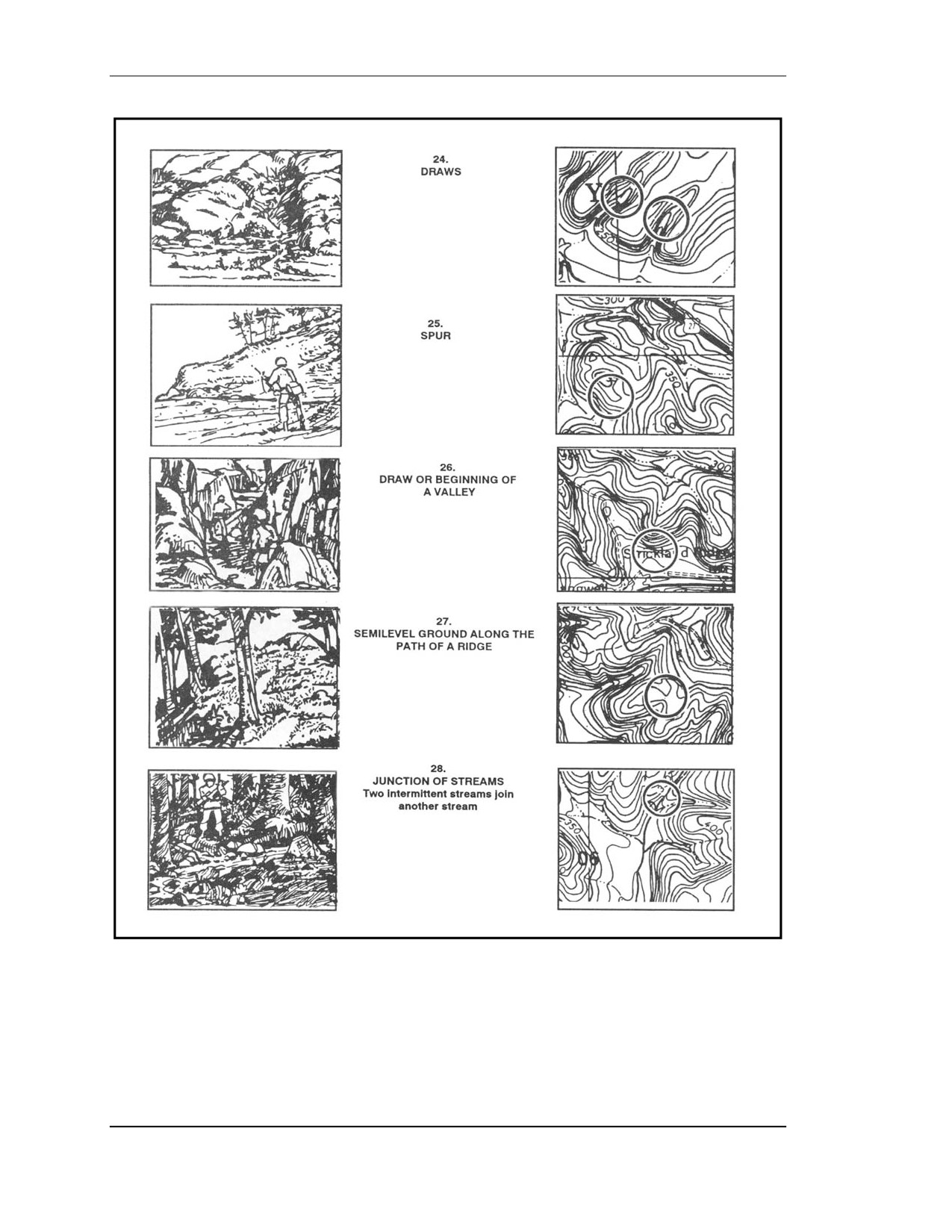
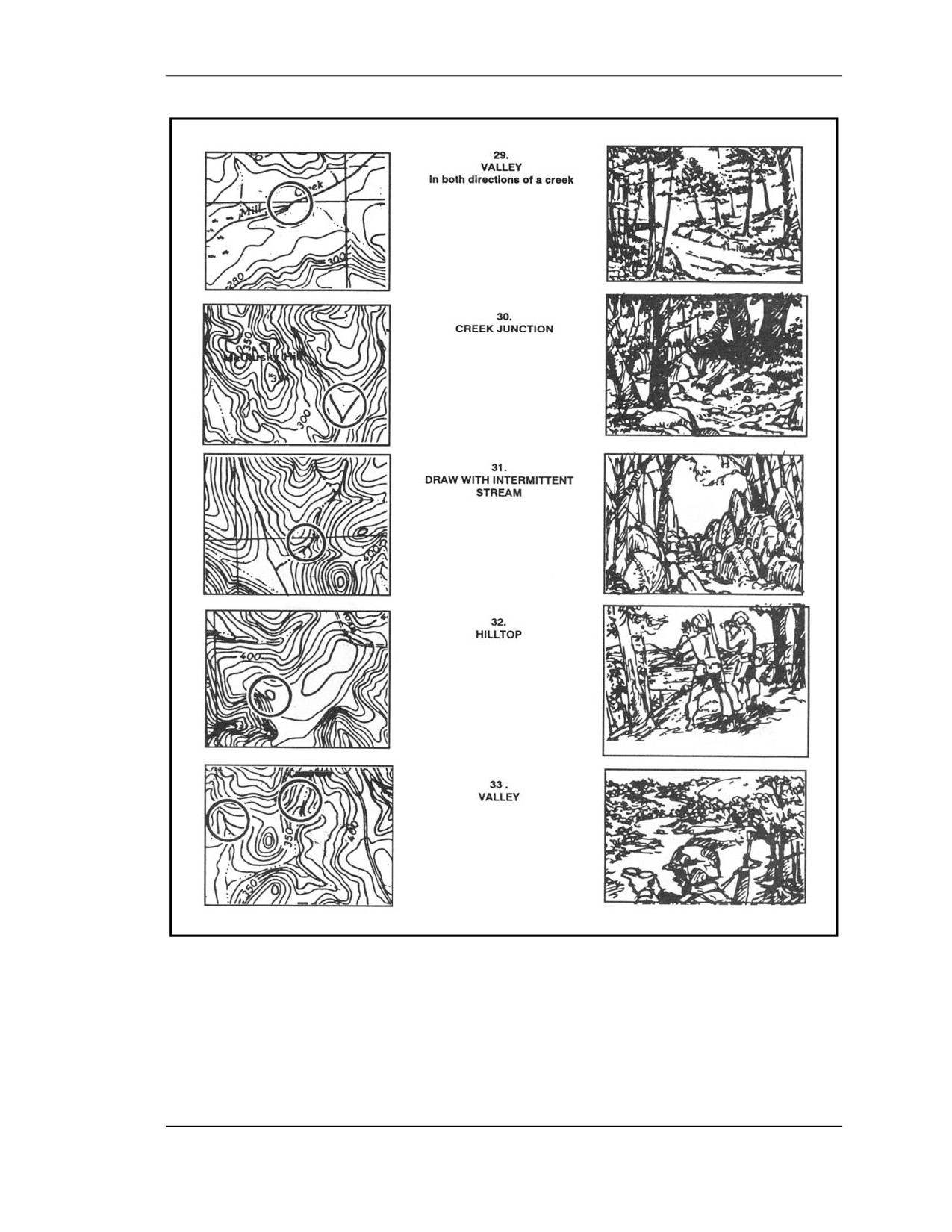
E-9. MAP SYMBOLS
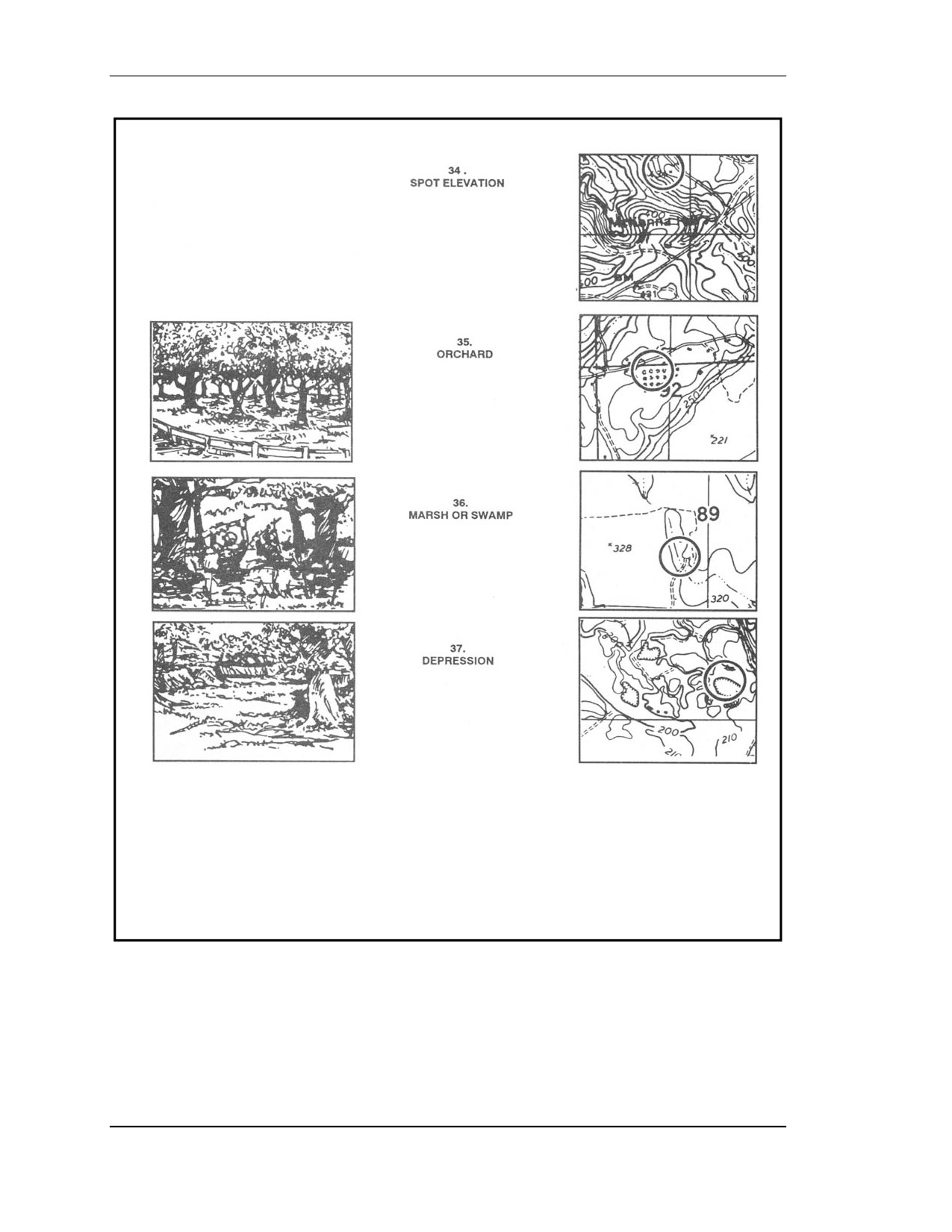
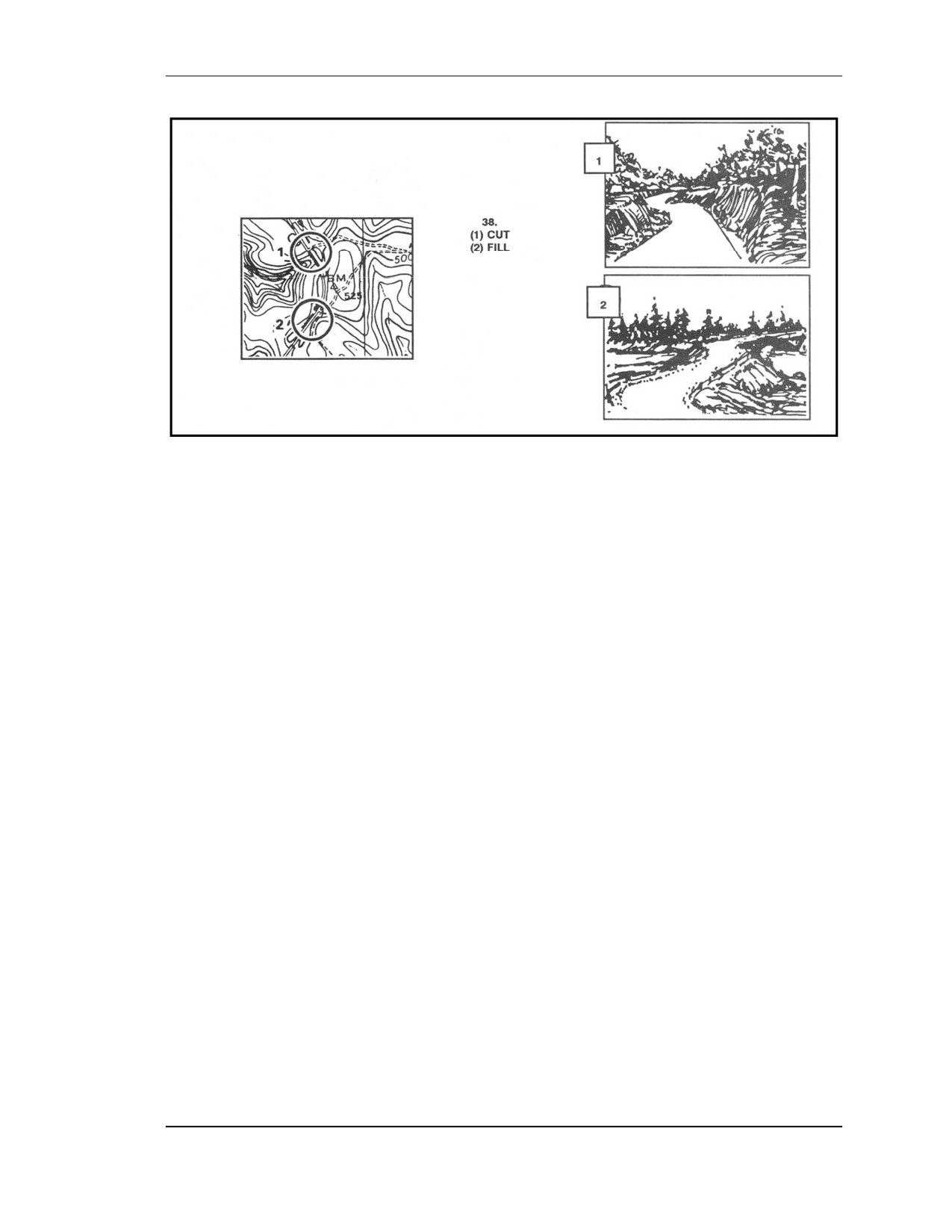
The map symbols in Figure E-9 are typical topographic and cultural symbols that can be
selected for orienteering control points. The map cutouts have been selected from DMA
maps.
Figure E-9. Map symbols.
FOUO
E-11
18 January 2005
FM 3-25.26
Figure E-9. Map symbols (continued).
E-12
FOUO
18 January 2005
FM 3-25.26
Figure E-9. Map symbols (continued).
FOUO
E-13
18 January 2005
FM 3-25.26
Figure E-9. Map symbols (continued).
E-14
FOUO
18 January 2005
FM 3-25.26
Figure E-9. Map symbols (continued).
FOUO
E-15
18 January 2005
FM 3-25.26
Figure E-9. Map symbols (continued).
E-16
FOUO
18 January 2005
FM 3-25.26
Figure E-9. Map symbols (continued).
FOUO
E-17
18 January 2005
FM 3-25.26
Figure E-9. Map symbols (continued).
E-18
FOUO
18 January 2005
FM 3-25.26
Figure E-9. Map symbols (continued).
E-10. ORIENTEERING TECHNIQUES
The orienteer should try not to use the compass to orient the map. The terrain association
technique is recommended instead. The orienteer should learn the following techniques:
a. Pacing. One of the basic skills that the orienteer should develop early is how to keep
track of distance traveled while walking and running. This is done on a 100-meter pace
course.
b. Thumbing. This technique is very simple, but the map has to be folded small to use
it. The orienteer finds his location on the map and places his thumb directly next to it. He
moves from point to point on the ground without moving his thumb from his initial location.
To find the new location, the only thing that he has to do is look at the map and use his
thumb as a point of reference for his last location. This technique prevents the orienteer from
looking all over the map for his location.
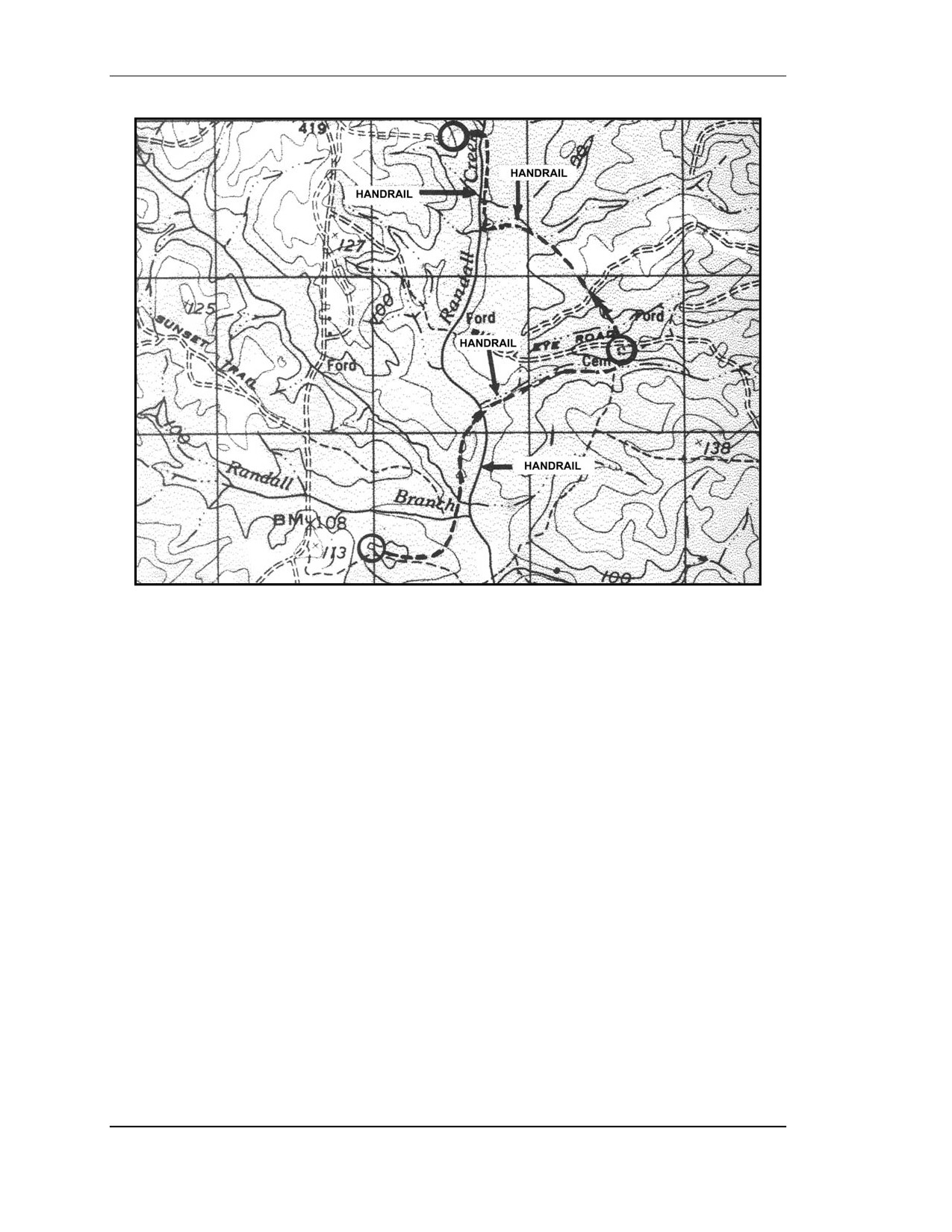
c. Handrails. This technique enables the orienteer to move rapidly on the ground by
using existing linear features (such as trails, fences, roads, and streams) that are plotted along
his route. They can also be used as limits or boundaries between control points (Figure E-10,
page E-20).
d. Attack Points. These are permanent known landmarks that are easily identified on
the ground. They can be used as points of reference to find control points located in the
woods. Some examples of attack points are stream junctions, bridges, and road intersections.
FOUO
E-19
18 January 2005
FM 3-25.26
Figure E-10. Handrails.
E-11. CIVILIAN ORIENTEERING
Civilian orienteering is conducted under the guidelines of the United States Orienteering
Federation with at least 70 clubs currently affiliated. Although civilian orienteering is a form
of land navigation, the terms, symbols, and techniques are different from the military.
a. An expert military map reader/land navigator is by no means ready to compete in a
civilian orienteering event. However, military experience in navigating on the ground and
reading maps will help individuals to become good orienteers. Several orienteering practices
and complete familiarization with the map symbols and terms before participating in a real
orienteering event is recommended.
(1) Map. The standard orienteering map is a very detailed, 1:15,000-scale, colored
topographical map. All orienteering maps contain only north-south lines that are
magnetically drawn; this eliminates any declination conversions. Because of the absence of
horizontal lines, grid coordinates cannot be plotted and therefore are not needed.
(2) Symbols (Legend). Despite standard orienteering symbols, the legend in orienteering
maps has a tendency to change from map to map. A simple way to overcome this problem is
to become familiar with the legend every time a different map is used.
(3) Scale. The scale of orienteering maps is 1:15,000. This requires an immediate
adjustment for the military land navigator, especially while moving from point to point. It
takes a while for a person that commonly uses a 1:50,000 scale to get used to the
orienteering map.
(4) Contours. The normal contour interval in an orienteering map is 5 meters. This
interval, combined with the scale, makes the orienteering maps so meticulously detailed that
E-20
FOUO
18 January 2005
FM 3-25.26
a 1-meter boulder, a 3-meter shallow ditch, or a 1-meter depression will show on the map.
This may initially shock a new orienteer.
(5) Terms and Description of Clues. The names of landforms are different from those
commonly known to the military. For example, a valley or a draw is known as a reentrant; an
intermittent stream is known as a dry ditch. These terms, with a description of clues
indicating the position and location of the control points, are used instead of grid
coordinates.
b. The characteristics of the map, the absence of grid coordinates, the description of
clues, and the methods used in finding the control points are what make civilian orienteering
different from military land navigation.
FOUO
E-21
18 January 2005
This Page intentionally left blank.
FM 3-25.26
APPENDIX F
M2 COMPASS
The M2 compass is a rustproof and dustproof magnetic instrument that
provides slope, angle of site, and azimuth readings. One of the most
important features of the M2 compass is that it is graduated in mils and does
not require a conversion from degrees to mils as does the M1 compass. It can
be calibrated to provide a grid azimuth or it can be used without calibration
to determine a magnetic azimuth.
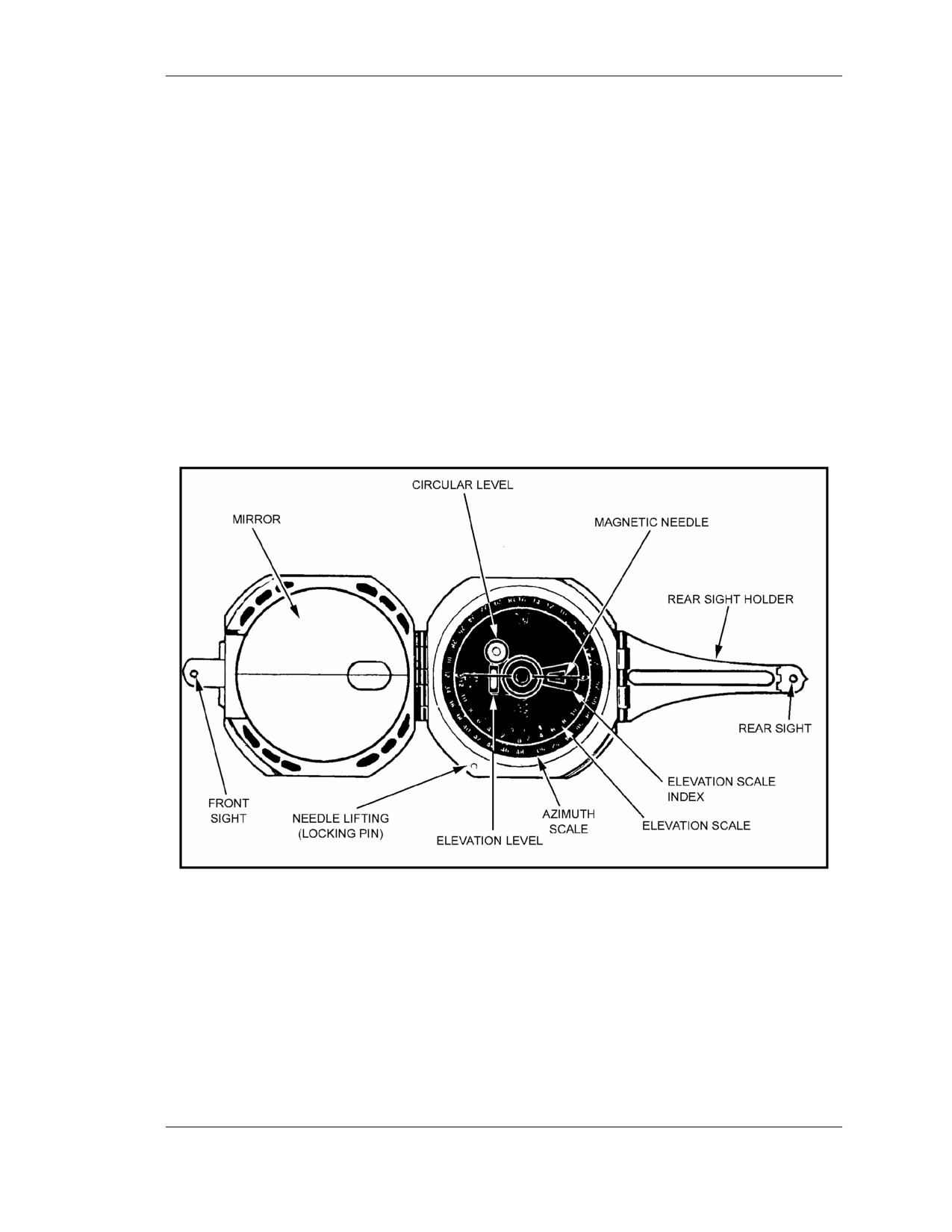
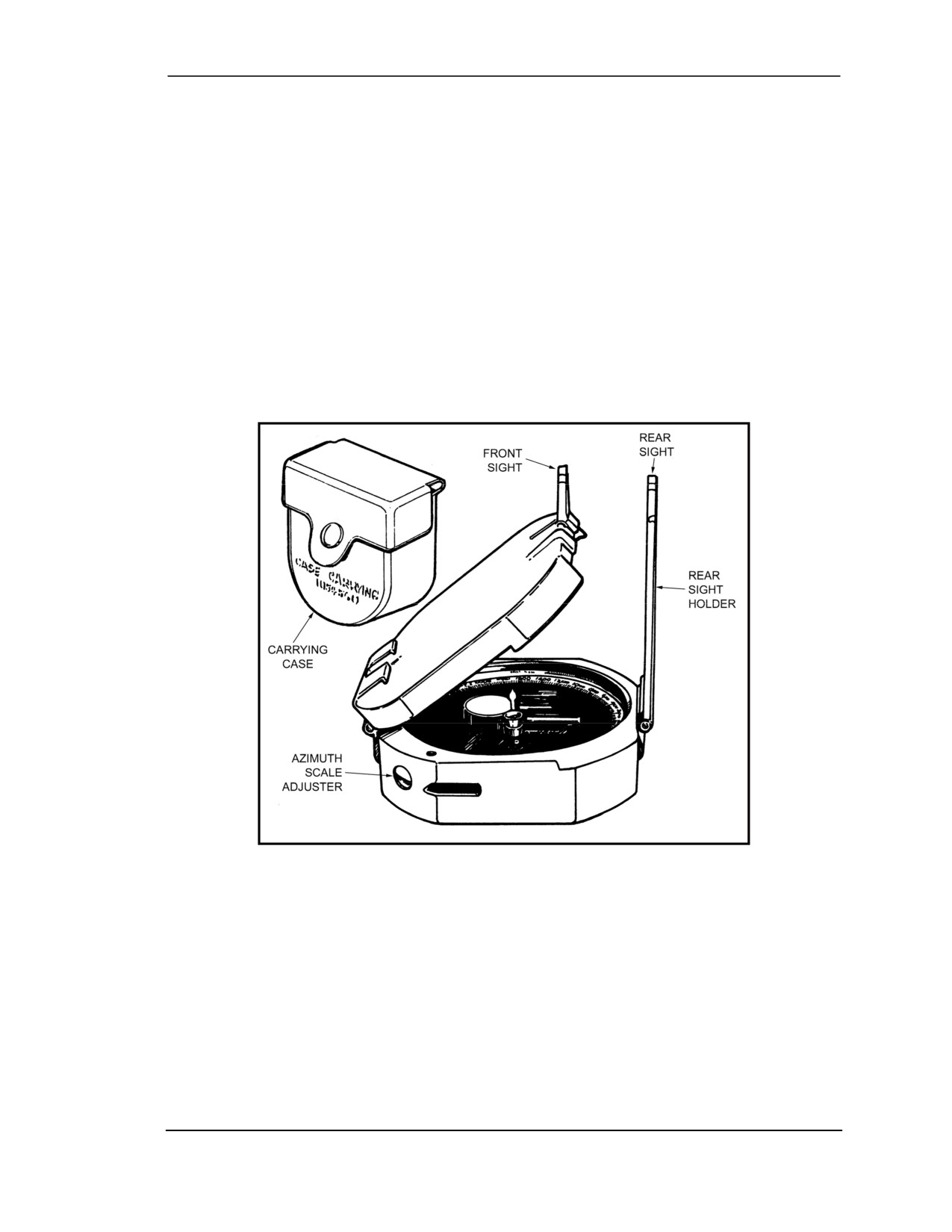
The M2 compass (Figure F-1; Figure F-2, page F-3; and Figure F-3,
page F-4) is a multiple-purpose instrument used primarily to obtain azimuths
and angles of site. It also measures grid azimuths after the instrument has
been declinated for the locality.
(For more detailed information, see
TM 9-1290-333-15.)
Figure F-1. Compass, M2, (top view).
F-1. CHARACTERISTICS
The main characteristics of the M2 compass are:
• Angle-of-site scale: 1200-0-1200 mils.
• Azimuth scale: 0 to 6400 mils.
• Dimensions closed: 2 3/4 inches by 1 1/8 inches.
• Weight: 8 ounces.
F-2. DESCRIPTION
The principal parts of the compass are described herein.
FOUO
F-1
18 January 2005
FM 3-25.26
a. Compass Body Assembly. This assembly consists of a nonmagnetic body and a
circular glass window that covers the instrument, and keeps dust and moisture from its
interior, protecting the compass needle and angle-of-site mechanism. A hinge assembly
holds the compass cover in the position in which it is placed. A hole in the cover coincides
with a small oval window in the mirror on the inside of the cover. A sighting line is etched
across the face of the mirror.
b. Angle-of-Site Mechanism. The angle-of-site mechanism is attached to the bottom of
the compass body. It consists of an actuating (leveling) lever located on the back of the
compass, a leveling assembly with a tubular elevation level, and a circular level. The
instrument is leveled with the circular level to read azimuths and with the elevation level to
read angles of site. The elevation (angle-of-site) scale and the four points of the compass,
represented by three letters and a star, are engraved on the inside bottom of the compass
body. The elevation scale is graduated in two directions; in each direction it is graduated
from 0 to 1200 mils in 20-mil increments and numbered every 200 mils.
c. Magnetic Needle and Lifting Mechanism. The magnetic needle assembly consists
of a magnetized needle and a jewel housing that serves as a pivot. The north-seeking end of
the needle is white. (The newer compasses have the north and south ends of the needle
marked “N” and “S” in raised, white lettering.) On some compasses a thin piece of copper
wire is wrapped around the needle for counterbalance. A lifting pin projects above the top
rim of the compass body. The lower end of the pin engages the needle-lifting lever. When
the cover is closed, the magnetic needle is automatically lifted from its pivot and held firmly
against the window of the compass.
d. Azimuth Scale and Adjuster. The azimuth scale is a circular dial geared to the
azimuth scale adjuster. This permits rotation of the azimuth scale about 900 mils in either
direction. The azimuth index provides a means of orienting the azimuth scale at 0 or the
declination constant of the locality. The azimuth scale is graduated from 0 to 6400 in 20-mil
increments and numbered at 200-mil intervals.
e. Front and Rear Sight. The front sight is hinged to the compass cover. It can be
folded across the compass body, and the cover closed. The rear sight is made in two parts—a
rear sight and a holder. When the compass is not being used, the rear sight and holder are
folded across the compass body and the cover is closed.
F-3. USE
The compass should be held as steadily as possible to obtain accurate readings. The use of a
sitting or prone position, a rest for the hand or elbows, or a solid nonmetallic support helps
eliminate unintentional movement of the instrument. When being used to measure azimuths,
the compass must not be near metallic objects.
a. To measure a magnetic azimuth—
(1) Zero the azimuth scale by turning the scale adjuster.
(2) Place the cover at an angle of about 45 degrees to the face of the compass so that the
scale reflection is viewed in the mirror.
(3) Adjust the front and rear sights to the desired position. Sight the compass by any of
these methods:
(a) Raise the front sight and the extended rear sight assembly perpendicular to the face of
the compass (Figure F-2 and Figure F-3, page F-4). Sight over the tips of the front and rear
sights. If the object is above the line of sighting, fold the rear sight toward the eye as needed.
F-2
FOUO
18 January 2005
FM 3-21.26 (FM 21-26)
The instrument is correctly aligned when, with the level centered, the operator sees the tips
of the sights and the center of the object at the same time.
(b) Raise the rear sight approximately perpendicular to the face of the compass. Sight on
the object through the opening in the rear sight holder and through the window in the cover.
Keep the compass level and raise or lower the eye along the opening in the rear sight holder
until the black center line of the window bisects the object and the opening in the rear sight
holder.
(c) Fold the rear sight holder out parallel with the face of the compass with the rear sight
perpendicular to its holder. Sight through or over the rear sight and view the object through
the window in the cover. If the object sighted is at a lower elevation than the compass, raise
the rear sight holder as needed. The compass is correctly sighted when the compass is level
and the operator sees the black center line of the window bisecting the rear sight and the
object sighted.
Figure F-2. Compass, M2 (side view).
F-3
18 January 2005
FM 3-25.26
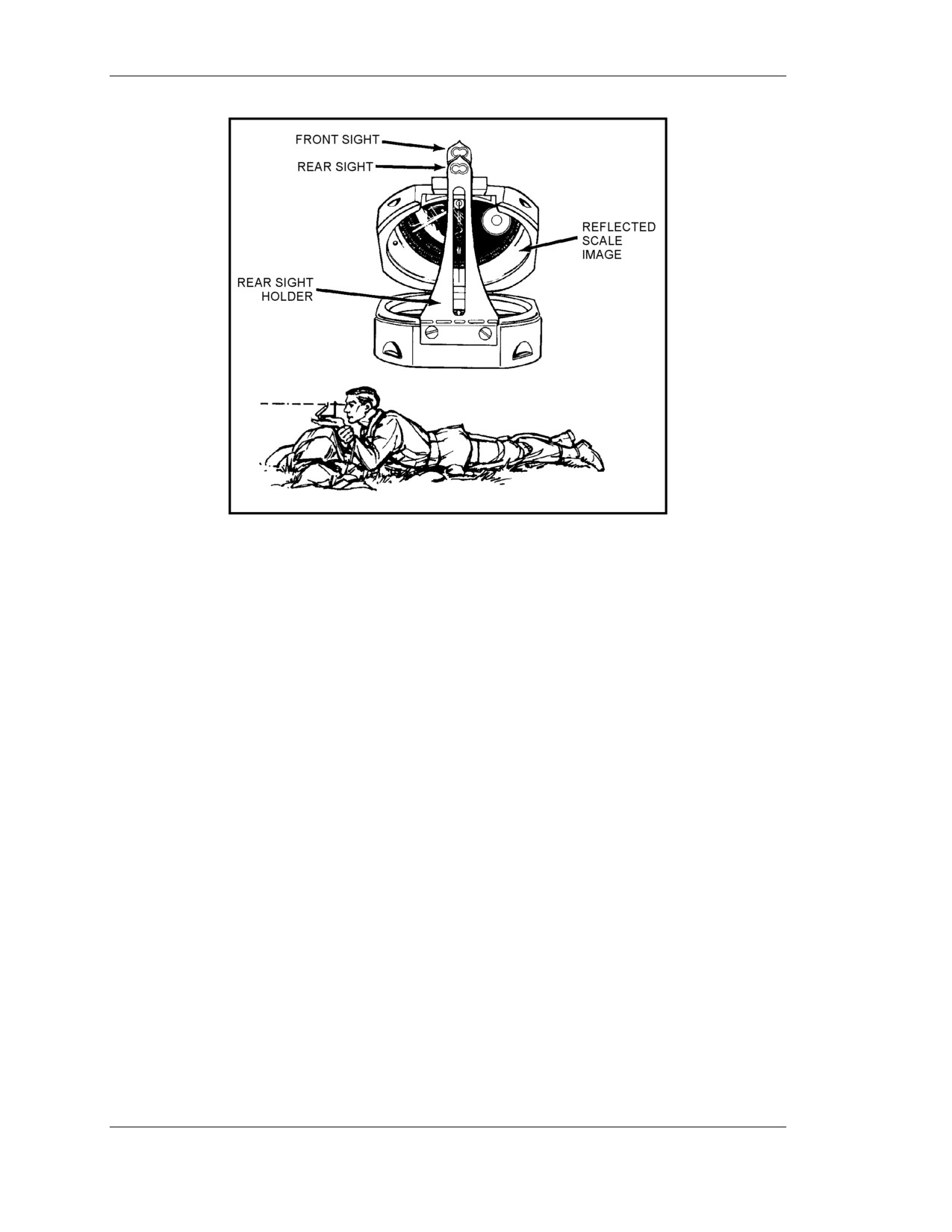
Figure F-3. Compass, M2 (user’s view).
(4) Hold the compass in both hands, at eye level, with the arms braced against the body
and the rear sight near the eyes. For precise measurements, rest the compass on a nonmetallic
stake or object.
(5) Level the instrument by viewing the circular level in the mirror and moving the
compass until the bubble is centered. Sight on the object, look in the mirror, and read the
azimuth indicated by the black (south) end of the magnetic needle.
b. To measure a grid azimuth—
(1) Index the known declination constant on the azimuth scale by turning the azimuth
scale adjuster. Be sure to loosen the locking screw on the bottom of the compass. (The
lightweight [plastic] M2 compass has no locking screw.)
(2) Measure the azimuth as described above. The azimuth measured is a grid azimuth.
c. To measure an angle of site or vertical angle from the horizontal—
(1) Hold the compass with the left side down (cover to the left) and fold the rear sight
holder out parallel to the face of the compass, with the rear sight perpendicular to the holder.
Position the cover so that, when looking through the rear sight and the aperture in the cover,
the elevation vial is reflected in the mirror.
(2) Sight on the point to be measured.
(3) Center the bubble in the elevation level vial (reflected in the mirror) with the level
lever.
(4) Read the angle on the elevation scale opposite the index mark. The section of the
scale graduated counterclockwise from 0 to 1200 mils measures plus angles of site. The
section of the scale graduated clockwise from 0 to 1200 mils measures minus angles of site.
F-4
FOUO
18 January 2005
FM 3-25.26
APPENDIX G
ADDITIONAL AIDS
This appendix provides information on the operation and function of
already fielded, and soon to be fielded, devices that can be used as aids to
navigation.
G-1. AN/PVS-5/5A, NIGHT VISION GOGGLES
These goggles are passive night vision devices. An infrared light source and positive control
switch permit close-in viewing under limited illumination. The AN/PVS-5/5A has a field of
view of 40 degrees and a range of 150 meters.
a. The device has the capability for continuous passive operation over a 15-hour period
without battery replacement. It weighs 1.5 pounds and is face-mounted. An eyepiece diopter
is provided so the device can be worn without corrective lenses.
b. The device is designed to assist the following tasks: command and control, fire
control, reconnaissance, close-in surveillance, terrain navigation, first aid, operation and
maintenance of vehicles, selection of positions, traffic control, rear and critical area security,
patrolling, combat engineer tasks, radar team employment, resupply activities, and flight-line
functions.
c. It is a fielded system used by combat, CS, and CSS elements. The infantry, armor, air
defense, field artillery, aviation, engineer, intelligence, military police, transportation, signal,
quartermaster, chemical, maintenance, missile, and munitions units all use the device to help
accomplish their missions.
d. The AN/PVS-5/5A can assist the land navigator under limited visibility conditions.
Chemical lights may be placed at selected intervals along the unit’s route of movement, and
they can be observed through the AN/PVS-5/5A. Another navigation technique is to have
one person reading the map while another person reads the terrain, both using
AN/PVS-5/5As. This allows the map reader and the terrain interpreter to exchange
information on what terrain is observed, both on the map and on the ground. It allows each
user to concentrate the AN/PVS-5/5A on one task. Land navigation, especially mounted, is a
task better performed by more than one person. The above technique allows one soldier to
perform map interpretation in the cargo portion of the vehicle while another soldier, possibly
the driver, transmits to him information pertaining to the terrain observed on the ground.
G-2. AN/PVS-7B/D, NIGHT VISION GOGGLES
The AN/PVS-7B/D is a lightweight (1.5 pounds), image intensification, passive night-vision
device that uses ambient light conditions. It has the same applications as the AN/PVS-5/5A.
It is designed to be used in the same way as, and by the same units as, the AN/PVS-5/5A.
The AN/PVS-7B/D has a field of view of 40 meters and a range of 300 meters in moonlight
and 150 meters in starlight.
G-3. ENHANCED POSITION LOCATION REPORTING SYSTEM USER UNIT
The enhanced Position Location Reporting System (EPLRS)/Joint Tactical Information
Distribution System (JTIDS) hybrid (PJH) is a computer-based system. It provides near
real-time, secure data communications, identification, navigation, position location, and
FOUO
G-1
18 January 2005
FM 3-25.26
automatic reporting to support the need of commanders for information on the location,
identification, and movement of friendly forces.
a. The EPLRS is based on synchronized radio transmissions in a network of users
controlled by a master station. The major elements of an EPLRS community include the
airborne, surface vehicular, and man-pack users; the EPLRS master station; and an alternate
master station. The system can handle 370 user units in a division-size deployment per
master station with a typical location accuracy at 15 meters. The man-pack unit weighs
23 pounds and includes the basic user unit, user readout, antenna, backpack, and two
batteries.
b. The EPLRS is deployed at battalion and company level. Its use allows⎯
(1) Infantry or tank platoons to locate their positions, know the location of their friendly
units, navigate to predetermined locations, and be informed when near or crossing
boundaries.
(2) Artillery batteries to locate forward observers and friendly units, and position firing
batteries.
(3) Aircraft to locate their exact positions; know the location of other friendly units;
navigate to any friendly units, or a location entered by the pilot; navigate in selected flight
corridors; and be alerted when entering or leaving corridors or boundaries.
(4) Command and control elements at all echelons to locate and control friendly
units/aircraft.
c. The network control station is located at brigade level to provide position
location/navigation and identification services. It also provides interface between the
battalion and company systems, and the JTIDS terminals.
d. The EPLRS is fielded to infantry, armor, field artillery, military police, engineer,
intelligence, aviation, signal, and air defense artillery units.
e. The EPLRS is a system that allows units to navigate from one point to another with
the capability of locating itself and other friendly units equipped with the same system.
G-4. GLOBAL POSITIONING SYSTEM
The GPS is a space-based, radio-positioning navigation system that provides accurate
passive position, speed, distance, and bearing of other locations to suitably equipped users.
a. The system assists the user in performing such missions as siting, surveying, tactical
reconnaissance, sensor emplacement, artillery forward observing, close air support, general
navigation, mechanized maneuver, engineer surveying, amphibious operations, signal
intelligence operations, electronic warfare operations, and ground-based forward air control.
b. It can be operated in all weather, day or night, anywhere in the world; it may also be
used during nuclear, biological, and chemical warfare.
c. It has been widely fielded in both active and reserve component units. (See
Appendix I for more information on the GPS.)
G-5. POSITION AND AZIMUTH DETERMINING SYSTEM
The PADS is a highly mobile, self-contained, passive, all-weather, survey-accurate
position/navigation instrument used by field artillery and air defense artillery units for fire
support missions. Its basis of issue is two sets per artillery battalion. The device is about the
size of a 3-kilowatt generator and weighs 322.8 pounds in operational configuration.
G-2
FOUO
18 January 2005
FM 3-25.26
a. The two-man PADS survey party uses the HMMWV, the commercial utility cargo
vehicle, the small-unit support vehicle, or the M151 1/4-ton utility truck. The system can be
transferred while operating into the light observation helicopter (OH-58A) or driven into the
CH-47 medium cargo helicopter.
b. The system provides real-time, three-dimensional coordinates in meters and a grid
azimuth in mils. It also gives direction and altitude.
c. The PADS can be used by the land navigator to assist in giving accurate azimuth and
distance between locations. A unit requiring accurate information as to its present location
can also use PADS to get it. The PADS, if used properly, can assist many units in the
performance of their mission.
WARNING
Laser devices are potentially dangerous. Their rays can and will
burn someone's eyes if they look directly at them. Users should
not direct the beams at friendly positions or where they could
reflect off shiny surfaces into friendly positions. Other soldiers
must know where lasers are being used and take care not to look
directly at the laser beam.
G-6. GROUND-VEHICULAR LASER LOCATOR DESIGNATOR
The G/VLLD is the Army’s long-range designator for precision-guided semi-active laser
weapons. It is two-man portable for short distances and can be mounted on the M113A1
interim FIST vehicle when it has the vehicle adapter assembly. The G/VLLD provides
accurate observer-to-target distance, vertical angle, and azimuth data to the operator. All
three items of information are visible in the operator’s eyepiece display.
a. The G/VLLD is equipped with an AN/TAS-4 nightsight. This nightsight increases
the operator’s ability to detect and engage targets during reduced visibility caused by
darkness or battlefield obscuration.
b. The G/VLLD can give the navigator accurate line-of-sight distance to an object. The
system can be used to determine its present location using resection and can assist the
navigator in determining azimuth and distance to his objective.
G-7. QUICK RESPONSE MULTICOLOR PRINTER
The QRMP is a self-contained, laser, xerography printer capable of reproducing maps,
photographs, annotated graphics, transparent originals, and digital terrain data in full color
on transparent material or standard map paper. The QRMP system consists of a QRMP
housed in an 8- by 8- by 20-foot ISO shelter mounted on a 5-ton truck with a dedicated
military-standard 30-kilowatt generator. Each system will carry at least a seven-day supply
of all necessary materials.
a. The QRMP system has map size (24- by 30-inch paper size and 22.5- by 29-inch
image size), color printing, scanning and electronics subsystems. It produces the first copy in
less than five minutes in full color and sustains a copy rate of 50 to 100 copies per hour for
full color products. The system uses a charged couple device array for scanning and
FOUO
G-3
18 January 2005
FM 3-25.26
sophisticated electronic signal processing to electrostatically discharge a selenium
photoreceptor drum.
b. The QRMP has the capability to print terrain and other graphics directly from digital
output from the digital topographic support system or another QRMP.
G-4
FOUO
18 January 2005
FM 3-25.26
APPENDIX H
FOREIGN MAPS
The use of foreign maps poses several problems to the land navigator.
These products are often inferior in both content reliability and topographic
accuracy to those produced by the DMA. Clues to these weaknesses are the
apparent crudeness of the maps, unusually old compilation dates, or
differences in mapped and actual terrain. The following characteristics
should be examined closely.
H-1. HYDROGRAPHY
Of all the symbols on foreign maps, those for hydrography conform most closely to NGA
usage. The use of blue lines and areas to depict streams, rivers, lakes, and seas seems to be
universally accepted. The one caution to be observed is that foreign cartographers use
different sets of rules to govern what is and what is not included on the map. Distinction
between perennial and intermittent streams is usually not made.
H-2. VEGETATION
The classification and symbols for vegetation on most foreign maps are different to those
used on NGA maps. The vegetation included on many foreign maps is often extensive,
identifying not only vegetated areas, but also the specific types of vegetation present. Green
is the predominant color used to represent vegetation although blue and black are sometimes
used. The symbols that depict the various types of vegetation differ greatly from one foreign
map to another.
H-3. CULTURAL AND LINEAR FEATURES
Perhaps the most striking difference between NGA and foreign maps is the set of symbols
used to portray cultural features. Some symbols found on foreign maps are very unusual.
Symbols for linear features on foreign maps are also likely to confuse the user who is
accustomed to NGA symbols. NGA uses ten basic road symbols to portray different classes
of roads and trails; foreign cartographers use many more.
H-4. TERRAIN RELIEF
Foreign maps generally use contour lines to portray terrain relief, but substantial variability
exists in the contour intervals employed. They may range from 5 to 100 meters.
H-5. SCALE
Scales found on foreign maps include
1:25,000,
1:63,360,
1:63,600,
1:75,000, and
1:100,000. Most foreign large-scale topographic maps have been overprinted with 1,000-
meter grid squares so it is unlikely that the variable scales will have much effect on your
ability to use them. However, you must learn to estimate grid coordinates because your
1:25,000 and 1:50,000 grid coordinate scales may not work.
FOUO
H-1
18 January 2005
FM 3-25.26
H-6. STEPS TO INTERPRETING FOREIGN MAPS
After discussing the many difficulties and limited advantages encountered when using
foreign maps, it is only appropriate that some strategy be offered to help you with the task.
a. In the August 1942 issue of The Military Engineer, Robert B. Rigg, Lieutenant,
Cavalry, suggested a five-step process for reading and interpreting foreign maps. It is as
appropriate today as it was when he first proposed it.
Step 1.
Look for the date of the map first. There are generally four dates: survey
and compilation, publication, printing and reprinting, and revision. The
date of the survey and compilation is most important. A conspicuous date
of revision generally means that the entire map was not redrawn—only
spot revisions were made.
Step 2.
Note whether the publisher is military, government, or civilian. Maps
published by the government or the military are generally most accurate.
Step 3.
Look at the composition. To a great extent, this will reveal the map’s
accuracy. Was care taken in the cartography? Are symbols and labels
properly placed? Is the draftsmanship precise? Is the coastline or river
bank detailed?
Step 4.
Observe the map’s color. Does it enhance your understanding or does it
obscure and confuse? The importance of one subject (coloring) must
warrant canceling others. If it confuses, the map is probably not very
accurate.
Step 5.
Begin to decode the various map colors, symbols, and terms. Study these
items by examining one feature classification at a time
(culture,
hydrography, topography, and vegetation). As an accomplished
navigator, you should already have a good understanding of your area of
operations, so translation of the map’s symbols should not present an
impossible task. Use your notebook to develop an English version of the
legend or create a new legend of your own.
b.
In dealing with the challenge of using a foreign map, be certain to use these five
steps. In doing so, you are also encouraged to bring to bear all that you know about the
geographic area and your skills in terrain analysis, map reading, map interpretation, and
problem solving. After careful and confident analysis, you will find that what you do know
about the foreign map is more than what you do not know about it. The secret often lies in
the fact that the world portrayed on a map represents a kind of international language of its
own, which allows you to easily determine the map’s accuracy and to decode its colors,
symbols, and labels.
H-2
FOUO
18 January 2005
FM 3-25.26
APPENDIX I
GLOBAL POSITIONING SYSTEM
The ability to accurately determine position location has always been a
major problem for soldiers. However, the global positioning system has
solved that problem. Soldiers will now be able to determine their position
accurately to within 10 meters.
I-1.
DEFINITION
The GPS is a satellite-based, radio navigational system. It consists of a constellation with 24
active satellites that interfaces with a ground-, air-, or sea-based receiver. Each satellite
transmits data that enables the GPS receiver to provide precise position and time to the user.
The GPS receivers come in several configurations; hand-held, vehicular-mounted,
aircraft-mounted, and watercraft-mounted.
I-2.
OPERATION
The GPS is based on satellite ranging. It figures the user’s position on earth by measuring
the distance from a group of satellites in space to the user’s location. For accurate
three-dimensional data, the receiver must track four or more satellites. Most GPS receivers
provide the user with the number of satellites that it is tracking, and whether or not the
signals are good. Some receivers can be manually switched to track only three satellites if
the user knows his altitude. This method provides the user with accurate data much faster
than that provided by tracking four or more satellites. Each type receiver has a number of
mode keys that have a variety of functions. To better understand how the GPS receiver
operates, refer to the operator’s manual.
I-3.
CAPABILITIES
The GPS provides worldwide, 24-hour, all-weather, day or night coverage when the satellite
constellation is complete. The GPS can locate the position of the user accurately to within 21
meters—95 percent of the time. However, the GPS has been known to accurately locate the
position of the user within 8 to 10 meters. It can determine the distance and direction from
the user to a programmed location or the distance between two programmed locations called
way points. It provides exact date and time for the time zone in which the user is located.
The data supplied by the GPS is helpful in performing several techniques, procedures, and
missions that require soldiers to know their exact location. Some examples are:
• Sighting.
• Surveying.
• Sensor or minefield emplacement.
• Forward observing.
• Close air support.
• Route planning and execution.
• Amphibious operations.
• Artillery and mortar emplacement.
• Fire support planning.
I-1
18 January 2005
FM 3-25.26
I-4.
LIMITATIONS
A constellation of 24 satellites broadcasts precise signals for use by navigational sets. The
satellites are arranged in six rings that orbit the earth twice each day. The GPS navigational
signals are similar to light rays, so anything that blocks the light will reduce or block the
effectiveness of the signals. The more unobstructed the view of the sky, the better the system
performs.
I-5.
COMPATABILITY
All GPS receivers have primarily the same function, but the input and control keys vary
between the different receivers. The GPS can reference and format position coordinates in
any of the following systems:
• Degrees, Minutes, Seconds (DMS): Latitude/longitude-based system with
position expressed in degrees, minutes, and seconds.
• Degrees, Minutes
(DM): Latitude/longitude-based system with position
expressed in degrees and minutes.
• Universal Traverse Mercator (UTM): Grid zone system with the northing and
easting position expressed in meters.
• Military Grid Reference System (MGRS): Grid zone/grid square system with
coordinates of position expressed in meters.
The following is a list of land navigation subjects from other sections of this manual in
which GPS can be used to assist soldiers in navigating and map reading:
a. Grid Coordinates (Chapter 4). GPS makes determining a 4-, 6-, 8-, and 10-digit
grid coordinate of a location easy. On most GPS receivers, the position mode will give the
user a 10-digit grid coordinate to their present location.
b. Distance (Chapter 5) and Direction (Chapter 6). The mode for determining
distance and direction depends on the GPS receiver being used. One thing the different types
of receivers have in common is that to determine direction and distance, the user must enter
at least one way point (WPT). When the receiver measures direction and distance from the
present location or from way point to way point, the distance is measured in straight line
only. Distance can be measured in miles, yards, feet, kilometers, meters, or nautical knots or
feet. For determining direction, the user can select degrees, mils, or rads. Depending on the
receiver, the user can select true north, magnetic north, or grid north.
c. Navigational Equipment and Methods (Chapter 9). Unlike the compass, the GPS
receiver when set on navigation mode (NAV) will guide the user to a selected way point by
actually telling the user how far left or right the user has drifted from the desired azimuth.
With this option, the user can take the most expeditious route possible, moving around an
obstacle or area without replotting and reorienting.
d. Mounted Land Navigation (Chapter 12). While in the NAV mode, the user can
navigate to a way point using steering and distance, and the receiver will tell the user how far
he has yet to travel, and at the current speed, how long it will take to get to the way point.
e. Navigation in Different Types of Terrain (Chapter 13). The GPS is capable of
being used in any terrain, especially more open terrain like the desert.
f. Unit Sustainment (Chapter 14). The GPS can be used to read coordinates to
quickly and accurately establish and verify land navigation courses.
I-2
FOUO
18 January 2005
FM 3-25.26
APPENDIX J
PRECISION LIGHTWEIGHT GPS RECEIVER
The precision lightweight GPS receiver (PLGR) is a highly accurate
satellite signal navigation set (referred to in this appendix as AN/PSN-11).
J-1.
CONCEPT OF OPERATION
The AN/PSN-11 is designed for battlefield use anywhere in the world. It is sealed
watertight for all-weather day or night operation. The AN/PSN-11 is held in the left hand
and operated with the thumb of the left hand. Capability is included for installation in
ground facilities, and air, sea, and land vehicles. The AN/PSN-11 is operated stand-alone
using prime battery power and integral antenna. It can be used with external power
source and external antenna.
a. The AN/PSN-11 provides the user with position coordinates, time, and navigation
information under all conditions, if―
• No obstructions block the line-of-sight satellite signal from reaching the
antenna.
• Valid crypto keys are used to protect the AN/PSN-11 from intentionally
degraded satellite signals.
b. Many data fields, such as elevation, display units of information. The format of
the units can be changed to your most familiar format.
c. Map coordinates are entered as a waypoint. When a waypoint is selected as a
destination, the AN/PSN-11 provides steering indications, azimuth, and range
information to the destination. A desired course to a waypoint is entered. Offset distance
from this course line is shown.
d. Up to 999 waypoints can be entered, stored, and selected as a destination. A route
is defined for navigation either start-to-end or end-to-start. The route consists of up to
nine legs (ten waypoints) linked together.
J-2.
CAPABILITIES
Data provided by the AN/PVS-11 helps complete missions such as:
• Siting.
• Surveying.
• Tactical reconnaissance.
• Sensor emplacement.
• Artillery forward observing.
• Close air support.
• General navigation.
• Mechanized maneuvers.
• Engineer surveying.
• Amphibious operations.
• Parachute operations.
• Signal intelligence.
FOUO
J-1
18 January 2005
FM 3-25.26
• Electronic warfare.
• Ground-based forward air control.
This data is displayed on the AN/PSN-11display. It is also available from a serial
data port.
J-3.
CHARACTERISTICS
The AN/PSN-11 is less than 9.5 inches long, 4.1 inches wide, and 2.6 inches deep. It
weighs 2.75 pounds with all batteries in place. The small size and light weight make the
set easy to carry and use. The durable plastic case is sealed for all-weather use. The
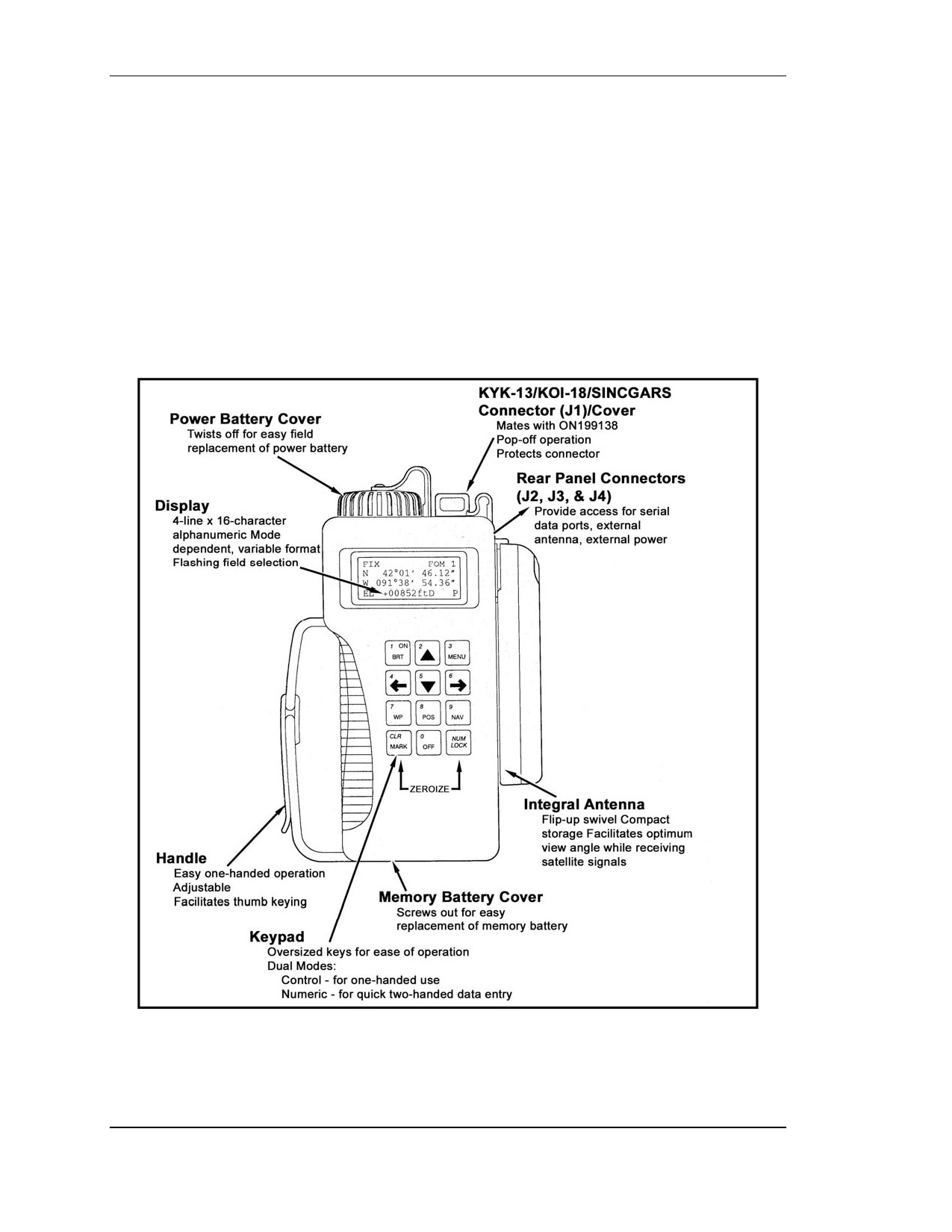
AN/PSN-11 features make it easy to use. (These features are highlighted in the physical
description in Figure J-1).
Figure J-1. Physical features of the AN/PSN-11.
J-2
FOUO
18 January 2005
FM 3-25.26
J-4.
SETUP AND CONTROL
Setting up the operation parameters of the AN/PSN-11 is critical. This section describes
the display and the procedures and principles used in setting the display to suit the needs
of the user. This display consists of seven pages that allows the user to control the
following parameters:
• Operating mode.
• Type of satellites to use.
• Coordinate system.
• Units.
• Magnetic variation.
• Display customization.
• Navigation Display mode.
• Elevation hold mode.
• Time and error formats.
• Datum.
• Automatic off timer.
• Datum port configuration.
• AutoMark mode.
Perform the following procedures to set up the AN/PSN-11 for continuous operation:
a. Turn the AN/PSN-11 ON. Once it has completed its built-in-test (BIT) press the
MENU key and move the cursor to SETUP (Figure J-2). Activate the SETUP function.
<move>
select
STATUS
SETUP
INIT
TEST
HELP
<MORE> P
Figure J-2. SETUP.
b. The first screen (Figure J-3) allows the operator to set the operating mode and
SV-type. Scroll through the operating modes and select CONT and for the SV-type
Mixed.
SETUP MODE: CONT
Continuous
POS
and VEL update
SV-TYPE: mixed P
Figure J-3. Operating mode and SV-type.
FOUO
J-3
18 January 2005
FM 3-25.26
c. The second screen (Figure J-4) allows the operator to set up the units. Scroll
through the available coordinates and select MGRS-New and Metric. For the Elevation
select meter and MSL and for the Angle select degrees and magnetic.
SETUP
UNITS
MGRS-New
Metric
Elev: meter
MSL
ANGL: Deg Mag P
Figure J-4. Set up the units.
d. The third screen (Figure J-5) should be set for the MAGVAR (magnetic variation
or GM angle for your area). The operator can select “calculate the degree” or manually
enter degrees as an Easterly or Westerly GM angle; for example, E021.0 for the TENINO
map sheet.
SETUP
MAGVAR
TYPE: Calc
deg
WWM
1995
P
Figure J-5. Magnetic variation or GM angle setup.
e. The fourth screen (Figure J-6) of setup allows the operator to set the elevation
hold, time, and error. The operator should set the ELHOLD to automatic. As for time,
the operator needs to know, from their present location, how many hours they are ahead
of or behind Greenwich mean time. For example, during daylight savings time, Fort
Benning, GA. is Loc=Z-0400. To set the ERR, the operator selects -+m to let him know
in meters how accurate the PLGR is operating.
SETUP
ELHold : automatic
TIME:
Loc=Z-0400
ERR: +-m
P
Figure J-6. Set elevation, time, hold, and error.
f. The fifth screen (Figure J-7) of setup allows the operator to set the AN/PSN-11
datum to his area of operation and to set the automatic off timer. The AN/PSN-11 has
fifty-two map datum sets available. The operator should set the datum to his area of
operation. For example, if your map datum is WGS-84, the operator sets the AN/PSN-11
J-4
FOUO
18 January 2005
FM 3-25.26
to WGS-84. If the map is 1927 North America datum, the operator sets the datum to
NAS-C. The automatic timer off is used to turn the AN/PSN-11 off after a prescribed
time once it has acquired a fixed position. The operator should set this mode to OFF.
SETUP DTM:NAS-C
NA27CONUS /Clk66
AUTOMATIC OFF
TIMER: off
P
Figure J-7. Set the PLGR datum.
g. The sixth screen (Figure J-8) in setup is the in/out port screen. This page allows
the operator to control serial communications, HAVEQUICK and 1PPS options. Select
Standard unless otherwise directed and select OFF for HAVEQUICK and 1PPS.
SETUP I/O
SERIAL: Standard
HAVEQUICK: Off
1PPS: Off
P
Figure J-8. In/out port screen.
h. The seventh screen (Figure J-9) is setup AUTOMARK. This feature allows the
operator to have the AN/PSN-11 periodically wake up, acquire a position fix, store the
position as a waypoint, or return to the mode of operation it was previously in. The
operator should set this mode to OFF. The remaining pages for SETUP are for advanced
GPS users.
SETUP AUTOMARK
MODE: off WP002
26-04-01
0935L
REPEAT 00h00m P
Figure J-9. AUTOMARK setup.
i.
Once the AN/PSN-11 is set up, the operator can obtain a position. This procedure
is accomplished by activating the position (POS) key. The position displayed is old
information until the receiver collects and calculates satellite data and displays the current
position. The receiver must be tracking three satellites to obtain a two-dimensional fix
position and four or more satellites for a three-dimensional fix position. The third
dimension is elevation.
FOUO
J-5
18 January 2005
FM 3-25.26
J-5.
WAYPOINT OPERATIONS
A waypoint is the location of a point on a desired course described by coordinates or a
physical location. A normal mission consists of a series of waypoints. The waypoints
available on the AN/PSN-11 are 999 (numbered 01 through 999).
a. This paragraph describes the AN/PSN-11 waypoint displays and waypoint
operations. The waypoint display pages are used to perform the following operations:
• Enter, edit, or review waypoints.
• Copy waypoints.
• Determine the distance between waypoints.
• Calculate a new waypoint.
• Clear waypoints.
• Define a mission route.
b. To enter a waypoint, the operator needs to press the waypoint
(WP) key
(Figure J-10). When the waypoint menu appears, the ENTER function flashes. The
operator presses the down arrow key to activate this field. Now the operator enters a
waypoint name, grid zone designator, 100,000-meter grid square identifier, 10-digit grid
coordinate, and elevation.
WP
<move> sel
ENTER EDIT COPY
SR-CALC RNG CALC
DIST CLEAR ROUTE
Figure J-10. Enter a waypoint.
c. To enter a waypoint name, the operator presses the right arrow key until the first
letter of the word UNUSED(WP#) is flashing (Figure J-11). Scroll up or down through
the alphabet changing the letter U to whatever is desired. For example, if the operator
wanted to name their waypoint NORTH STAR, the operator scrolls down the alphabet
until the letter U is changed to the letter N (Figure J-12). The operator repeats this
process for the remaining letters.
WP002 UNUSED002
B
MGRS-New
AN 00000e
00000n
No EL
CLR P
Figure J-11. Unused.
J-6
FOUO
18 January 2005
FM 3-25.26
WP002 NORTHSTAR
10T
MGRS-New
EG 13130e
95750n
No EL
CLR N
Figure J-12. Change a name.
d. Second line, the operator enters the grid zone designator for his area of operation.
For example, the Fort Benning area falls in the 16S zone.
e. Third line, the operator must enter a
10-digit grid coordinate with its
100,000-meter grid square identifier. For example, if the waypoint location is Offutt
Lake, Tenino map sheet, the 100,000-meter grid square identifier is EG. Then, the
operator plots the grid coordinates on the map and enters it into the AN/PSN-11.
NOTE: Operator plots 8-digit grid coordinates, however a 10-digit coordinate is
entered. Therefore, the 5th and 10th digit entered is a zero (0).
f. For the fourth line, if the elevation of the waypoint is known, the operator can
enter it. If the elevation is not known the operator can just leave the data as zero or No
EL. The operator moves the cursor until the up and down arrow symbol appears before
the letter P or N in the bottom right corner. When activating the down arrow key the
operator stores the waypoint into the AN/PSN-11’s memory. The AN/PSN-11 notifies the
operator that the waypoint has been stored.
NOTE: When entering numbers, the NUM LOCK can be activated. The letter N
appears in the bottom right corner allowing the operator to use the numbers on
the keypad rather then scrolling up or down.
J-6.
NAVIGATION
Navigation (nav) is using the AN/PSN-11 to find your present position, relative to other
points. The AN/PSN-11 provides azimuth, range, and steering information in a variety of
formats. There are four navigation display modes that may be accessed and selected.
The navigation display mode selected determines the type of information shown on the
navigation displays. These navigation displays give the user the most useful information
for a certain mission profile: SLOW, 2D FAST, 3D FAST OR CUSTOM.
• In SLOW navigation mode, the AN/PSN-11 performs two-dimensional (2D)
navigation. SLOW navigation mode is used for land or sea navigation, when the
user cannot maintain the minimum speed necessary (about 1.5 kilometers per
hour).
• In 2D FAST navigation mode, the AN/PSN-11 performs two-dimensional (2D)
navigation. 2D FAST navigation mode is used for land or sea navigation, when
the user can maintain the minimum speed necessary for GPS to compute
navigation parameters based on velocity.
FOUO
J-7
18 January 2005
FM 3-25.26
• In 3D FAST navigation mode, the AN/PSN-11 performs three-dimentional (3D)
navigation. 3D FAST navigation mode has an APPROACH sub-mode. 3D FAST
navigation mode is used for air navigation, when the user can travel in three
dimensions and can maintain the minimum speed necessary for GPS to compute
navigation parameters based on velocity.
• In CUSTOM navigation mode, the AN/PSN-11 performs the user’s navigational
display pages as so desired. It can be set up to support the individual user’s
performances or mission requirements. The custom display modes available are
Direct, Course To, Course From, Route, and Approach.
To navigate on land using a dead-reckoning method, the AN/PSN-11 navigation mode is
accomplished as follows.
a. The operator presses the NAV key activating the navigation function. The first
screen that appears is the navigation mode (Figure J-13). For example, SLOW, 2D
FAST, 3D FAST, CUSTOM, DIRECT, CRS TO, and CRS FROM.
2D FAST
DIRECT
WP002 NORTHSTAR002
P
Figure J-13. Navigation mode.
b. The operator selects the 2D FAST and DIRECT. The second line is the waypoint
to be navigated. (Scroll through the waypoints that are stored to choose the desired
waypoint.)
c. To see the azimuth that the navigator should be traveling on, go to the next page
by pressing the down arrow key (Figure J-14). This page tells the navigator what azimuth
they are heading on (TRK=tracking), and the actual azimuth the navigator should be
heading on (AZ). The fourth line tells the navigator steering (STR), a direction (< >), and
a number of degrees the navigator needs to move to travel on the actual azimuth.
NORTHSTAR002
+-30m
TRK
305.3 M
AZ
311.3 M
STR
> 6
P
Figure J-14. Azimuth.
J-8
FOUO
18 January 2005
FM 3-25.26
d. The third screen (Figure J-15) tells the navigator the range or distance to their
waypoint and how much time (TTG2) it will take them to get to their waypoint. This
page also lets the navigator know what the elevation difference is from their present
location to the waypoint and by how much they will miss their waypoint by (MMD).
RNG 3598.55km
TTG2
0036:05
ELD
-00050m
MMD2 30m
P
Figure J-15. Range or distance.
FOUO
J-9
18 January 2005