FM 3-22.37 COMBAT MISSILE SYSTEM, MEDIUM (March 2008) - page 6
Appendix D
POSSIBLE REASONS
D-24. The CLU BIT FAILURE indicators light up if any or all of the following conditions exist:
z
CLU fails continuous BIT.
z
CLU does not initiate software download to the missile.
z
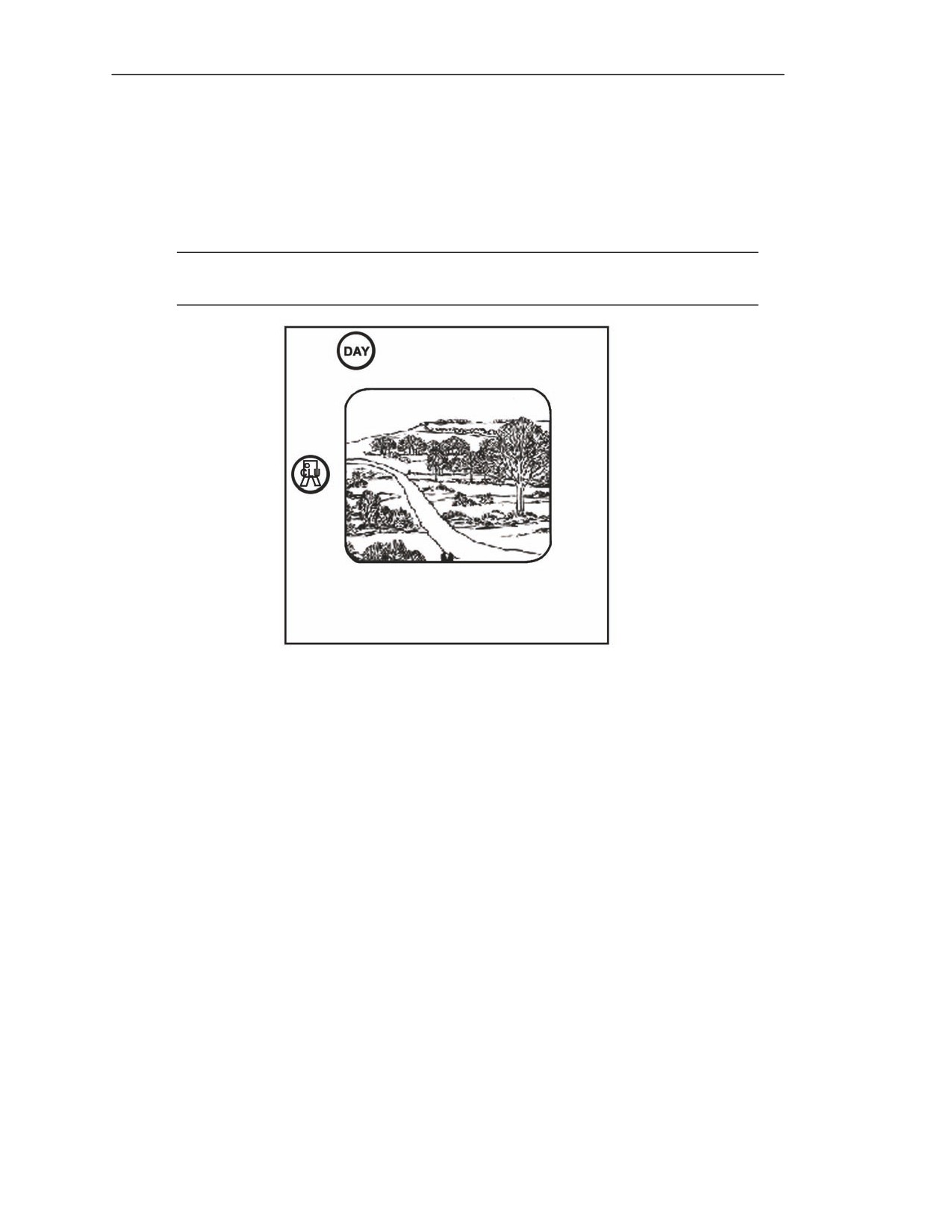
CLU battery is spent and CLU reverts to day FOV (Figure D-7).
NOTE: If the CLU BIT FAILURE indicator comes on after seeker activation, attempt to
launch the missile (if appropriate) and report it.
Figure D-7. CLU BIT FAILURE indicator.
GUNNER’S CORRECTIVE ACTION
D-25. If the gunner is engaging a target and has activated the seeker, complete the target engagement,
if possible (Table D-6). If the gunner is not engaging a target or cannot complete the engagement, he
performs the following:
(1) Turns the power switch to the OFF position.
(2) Removes the Javelin from the shoulder and places it on the ground with the CLU handgrips
pointing up.
(3) Keeps the Javelin pointed in the direction of the enemy target. Ensures the backblast area
remains clear at all times.
(4) Presses the latch release and disconnects the CLU from the round for use with a new CLU.
(5) Obtains a new CLU and connects the new CLU to the round.
(6) During training situations, turns power switch to OFF, disconnects the CLU from the round,
and notifies the squad leader or range safety personnel.
D-8
FM 3-22.37
20 March 2008
Warning Indicators and Malfunctions
Table D-6. Gunner corrective action for CLU BIT FAILURE indicator.
INDICATOR—
MEANING
EFFECT
CORRECTIVE
RED
ACTION
CLU BIT Failure
1. CLU failed continuous BIT.
Missile
launch
not
Replace the CLU.
possible.
2. CLU did not initiate software download to
Missile
launch
not
Replace the CLU.
missile.
possible.
On
3. CLU did not complete software download
Missile
launch
not
Replace the CLU
to missile.
possible.
battery.
4. CLU battery spent.
CLU powers down and
Replace the CLU
switches to day FOV.
battery.
MISSILE BUILT-IN TEST FAILURE
D-26. The following describes what the MISSILE BIT FAILURE indicator looks like and the reason
the light comes on. The gunner takes corrective action when this light comes on.
INDICATOR
D-27. This light is red and is a malfunction indicator.
POSSIBLE REASONS
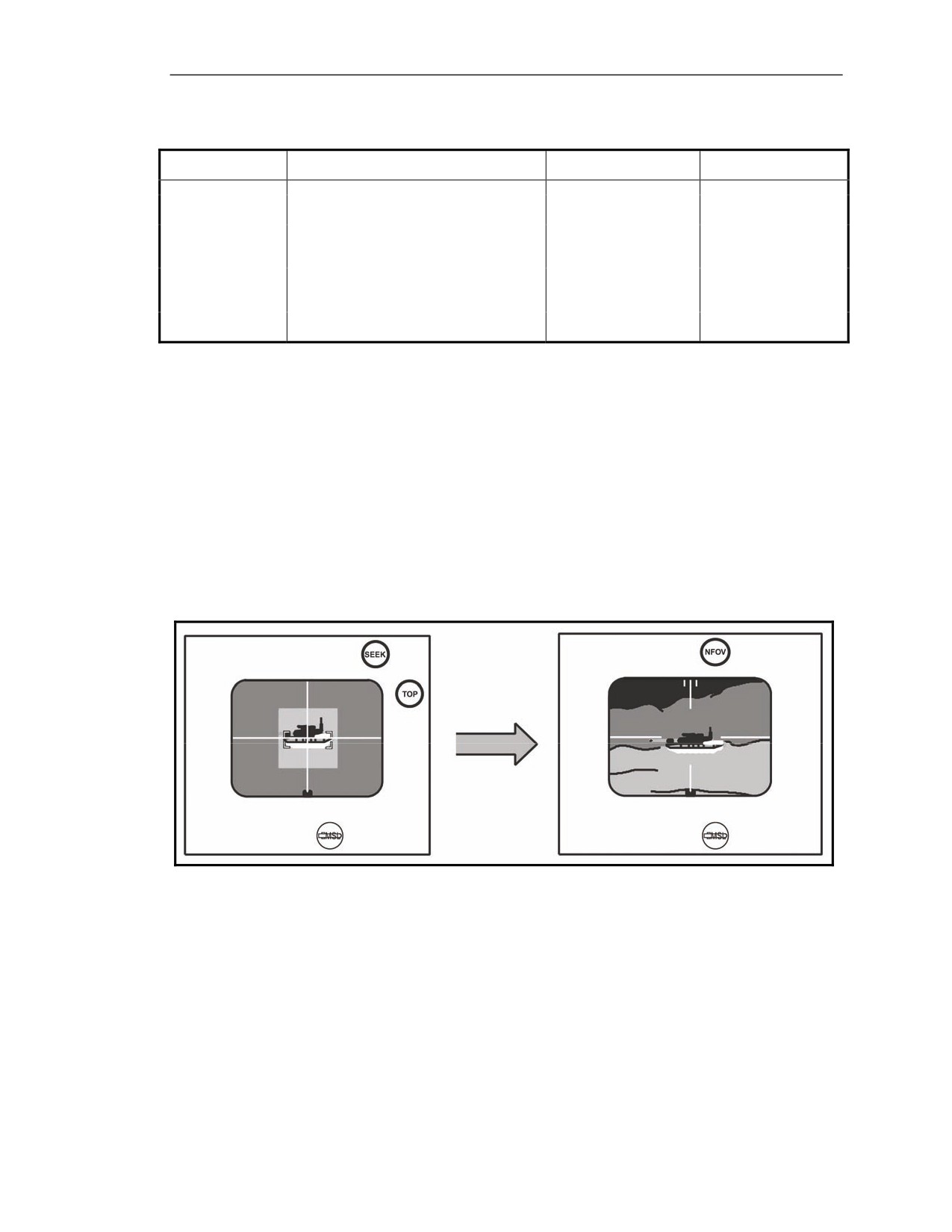
D-28. The missile BIT software has detected a failure in the missile (Figure D-8). When the missile
fails BIT, the MISSILE BIT FAILURE indicator lights up, the missile powers down, and the CLU
display reverts to the previous FOV. The missile must be replaced.
Figure D-8. MISSILE BIT FAILURE indicator―solid on.
20 March 2008
FM 3-22.37
D-9
Appendix D
GUNNER’S CORRECTIVE ACTION
D-29. See Table D-7.
Table D-7. Gunner corrective action for MISSILE BIT FAILURE indicator.
INDICATOR—
MEANING
EFFECT
CORRECTIVE
RED
ACTION
Red
Missile BIT Failure
On (Solid)
Missile BIT has detected a fault
Missile
launch
not
Replace round.
within the missile or CLU is not
possible,
CLU display
communicating with the missile.
reverts to previous FOV.
MISFIRE
D-30. The following describes what the BIT FAILURE indicator looks like and the reason the light
comes on. The gunner takes corrective action when this light comes on.
INDICATOR
D-31. This light is a red and is a malfunction indicator. The MISSILE BIT FAILURE indicator may or
may not be flashing.
POSSIBLE REASONS
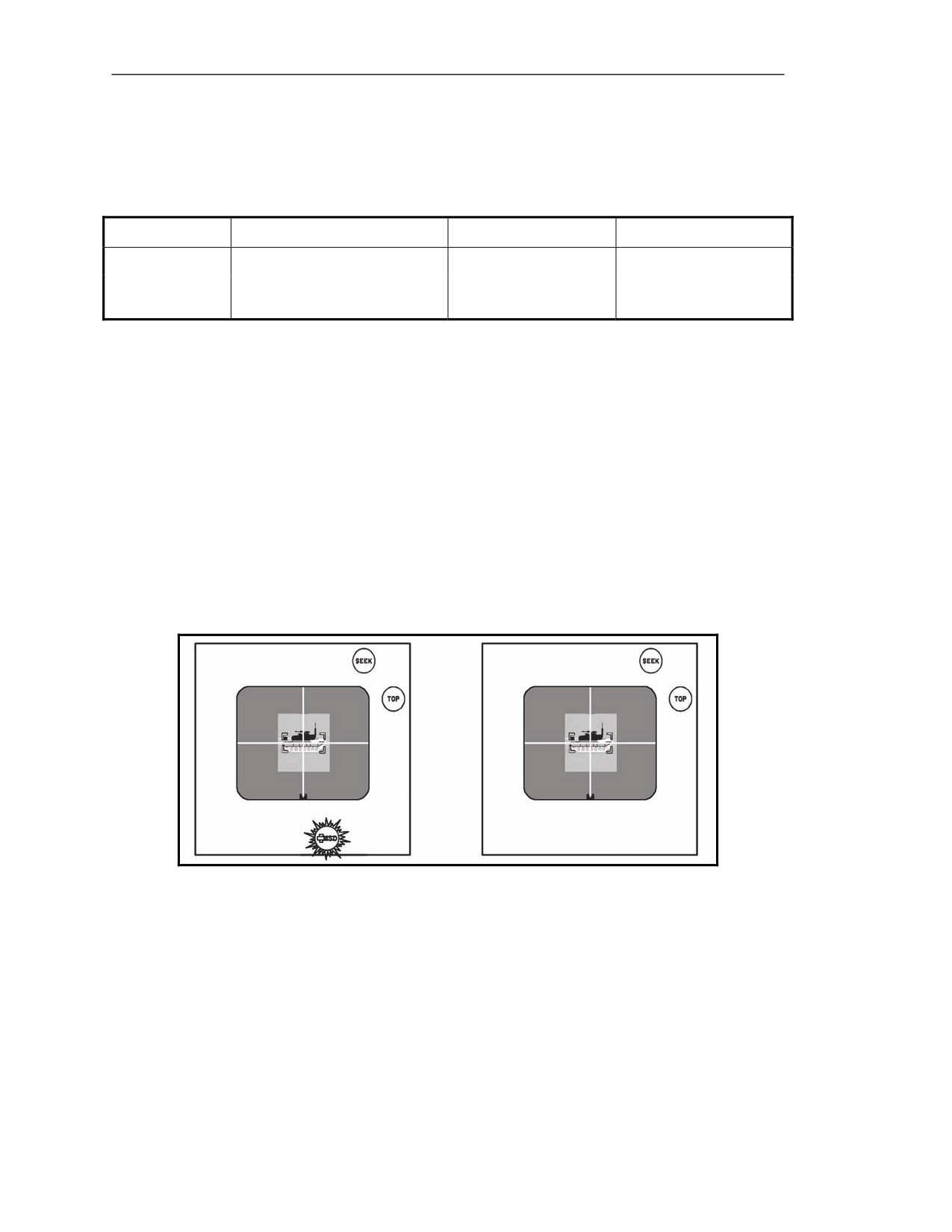
D-32. A misfire occurs when the gunner locks onto a target, squeezes the trigger and the missile does
not launch. One of two things will happen with the status indicator: no malfunction indicators or a red
MSL flashes (Figure D-9). In either case the seeker FOV remains on the CLU display and the green
SEEK and TOP indicators remain lit.
Figure D-9. Misfire—with and without warning indicators.
GUNNER’S CORRECTIVE ACTION
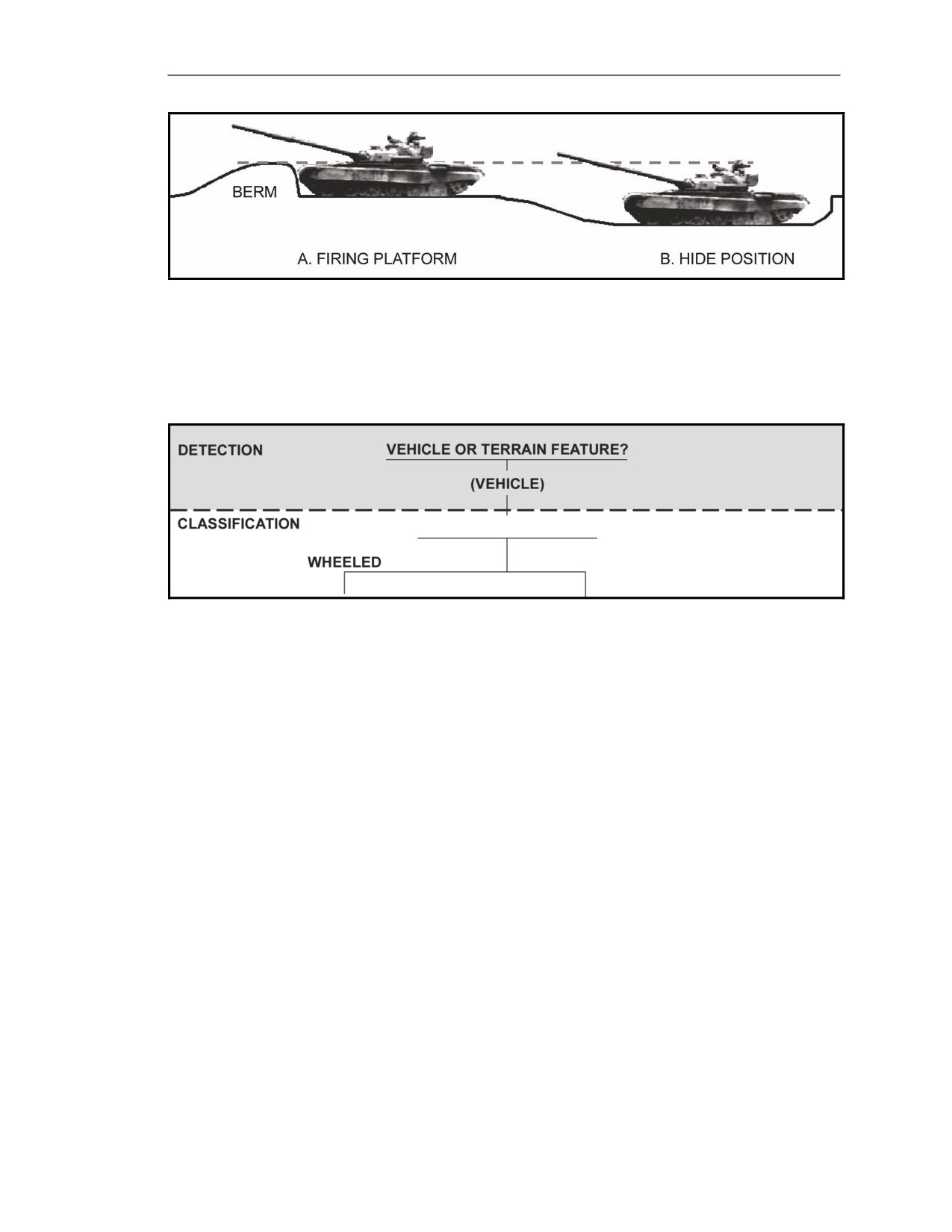
D-33. When a misfire happens after the trigger squeeze occurs with or without warning indicators, the
missile does not launch (See Table D-8.). The gunner performs immediate action procedures for a
misfire:
(1) Attempts to engage the target again.
Releases the seeker and fire triggers.
Acquires the target again, if necessary.
Attempts to lock-on again.
Attempts to fire the Javelin again.
D-10
FM 3-22.37
20 March 2008
Warning Indicators and Malfunctions
(2)
If the Javelin misfires again, the gunner:
Turns off the CLU.
Places the Javelin on the ground with the CLU handgrips pointing up.
Keeps the Javelin pointed in the direction of the enemy target while keeping the
backblast area clear.
(3)
Checks the interface connectors:
Presses the latch release, disconnects the CLU from the round, and checks for dirt and
debris.
Reconnects the CLU to the same round.
Turns ON the CLU.
(4)
Attempts to engage the target again. Repeats the procedures for Step 1. If the Javelin still
fails to fire:
Turns off the CLU.
Grounds the Javelin, again keeping the missile pointed toward the enemy.
Disconnects the CLU from the round.
Moves at least 25 meters away from the round or moves the round 25 meters away
from the firing position.
Stays clear of the forward and aft ends of the round at all times.
Obtains a replacement round and connects CLU to the new round.
Continues the mission.
(5)
If the misfire continues on the new round, the gunner obtains a new CLU. Always
remember to replace the BCU on the round.
Table D-8. Gunner corrective action for MISSILE MISFIRE indicator.
INDICATOR—
MEANING
EFFECT
CORRECTIVE
RED
ACTION
Flashing or None
Red (On)
Misfire
Missile may not launch.
Refer to paragraph D-33.
ACTIONS DURING TRAINING EXERCISES
D-34. The gunnerʊ
(1) Announces “Misfire” loud enough for all Soldiers in the immediate area to hear.
(2) Attempts to engage the target again.
Releases the seeker and fire triggers.
Acquires the target again, if necessary.
Attempts lock-on again.
Attempts to fire the Javelin again.
(3) If the Javelin continues to misfire:
Turns off the CLU.
Places the Javelin on the ground with the CLU handgrips pointing up.
Keeps the Javelin pointed in the direction of the enemy target while keeping the
backblast area clear.
(4) Checks the interface connectors:
Presses the latch release and disconnects the CLU from the round.
Checks the CLU and round interface connector for foreign objects.
Connects the CLU again to the same round.
Turns on the CLU.
20 March 2008
FM 3-22.37
D-11
Appendix D
(5) Attempts to engage the target again. Repeats the procedures for Step 1. If the Javelin still
fails to fire:
Turns off the CLU.
Grounds the Javelin, again keeping it facing toward the target.
Disconnects the CLU from the round.
Moves the round 25 meters away from the firing position.
(6) Notifies the range safety officer/NCO of the type of malfunction.
HANGFIRE
D-35. The following describes what the HANGFIRE indicator looks like and the reason the light
comes on. The gunner takes corrective action when this light comes on.
INDICATOR
D-36. This light is red and is a malfunction indicator.
POSSIBLE REASONS
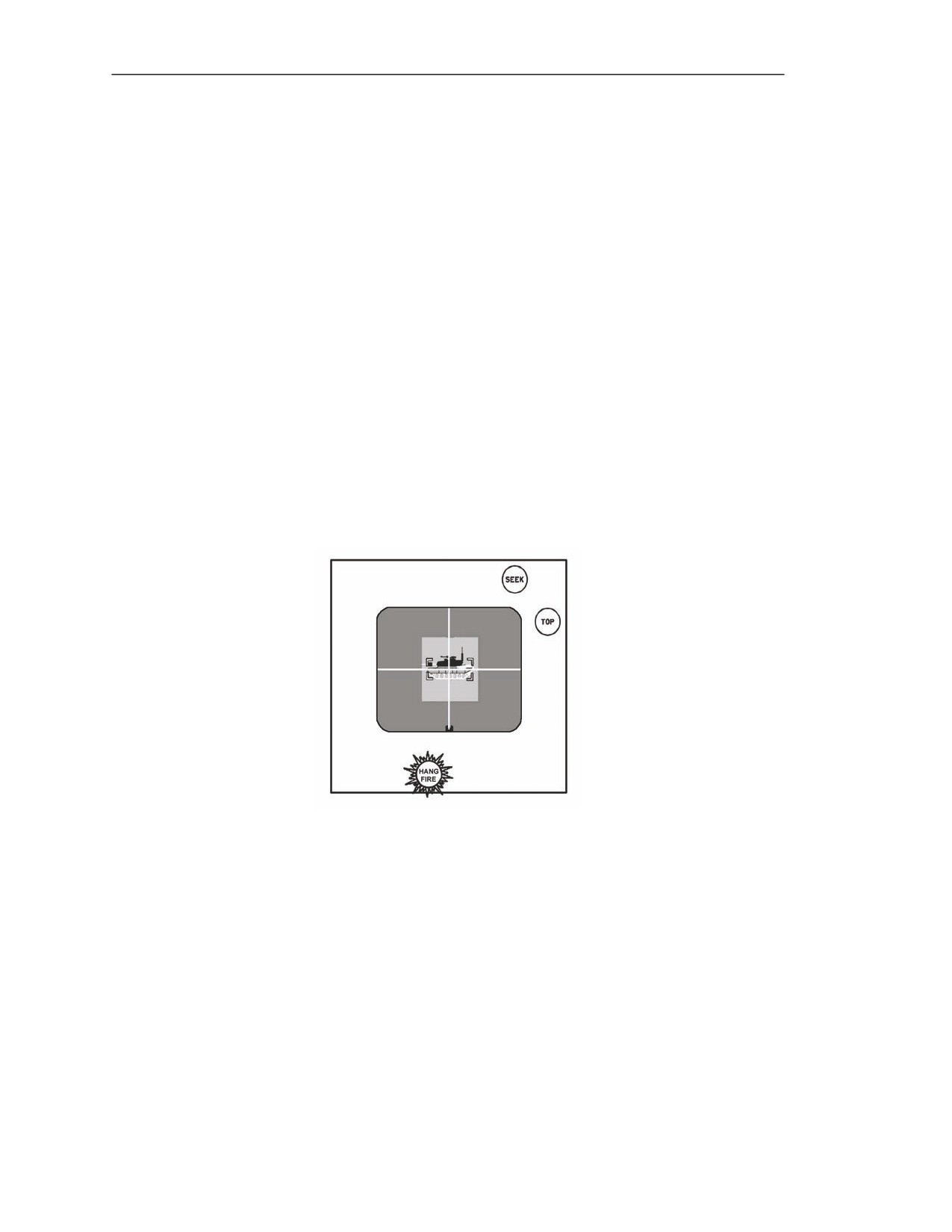
D-37. A hangfire occurs when the gunner squeezes the fire trigger but the missile does not launch and
the HANGFIRE indicator flashes on the CLU display (Figures D-10). If a hangfire occurs during a
combat situation, release the fire and seeker triggers. Continue pointing the missile in the direction of
the enemy target for at least 60 seconds. After waiting 60 seconds, perform the procedures outlined in
Table D-9.
Figure D-10. HANGFIRE indicator.
GUNNER’S CORRECTIVE ACTION
D-38. The gunnerʊ
(1) Turns off the CLU.
(2) Removes the Javelin from the shoulder and places it on the ground with the CLU handgrips
pointing up.
(3) Keeps the Javelin pointed in the direction of the enemy target. Ensures the backblast area
remains clear.
(4) Removes the CLU. Presses the latch release and disconnects the CLU from the round.
(5) Moves at least 25 meters away from the round. If in a firing position, moves the round to a
position at least 25 meters from the firing position. Stays clear of the forward and aft end of
the round at all times.
(6) Obtains a replacement round and connects the CLU to the new round.
D-12
FM 3-22.37
20 March 2008
Warning Indicators and Malfunctions
Table D-9. Gunner corrective action for HANGFIRE indicator.
INDICATOR—
MEANING
EFFECT
CORRECTIVE
RED
ACTION
HANGFIRE
Flashing
Missile does not fire.
Activated missile in LTA, could still
Refer to paragraph D-38.
possibly launch.
ACTIONS DURING TRAINING EXERCISES
D-39. The missile did not fire. The gunnerʊ
(1) Announces “Hangfire” loud enough for everyone to hear.
(2) Keeps the missile pointed down-range. Releases the seeker and fire triggers.
(3) Waits 5 minutes before completing HANGFIRE procedures:
Turns off the CLU.
Removes the Javelin from the shoulder and places it on the ground with the CLU
handgrips pointing up.
(4) Disconnects the CLU from the round.
(5) Moves at least 25 meters away from the round. If in a firing position, moves the round to a
position at least 25 meters from the firing position. Stays clear of the forward end and aft
end of the round at all times.
(6) Obtains a replacement round and connects the CLU to the new round.
GENERAL PRACTICAL EXERCISES FOR WARNINGS AND
MALFUNCTIONS
D-40. The BST is designed to reproduce all the warning conditions and malfunctions. Trainers should
include in their training exercises with as many warnings and malfunctions as time will allow. It is
essential that the gunner understand exactly what is going on at all times. Battlefield conditions do not
allow for hesitation; therefore, the gunner’s reaction must be automatic.
20 March 2008
FM 3-22.37
D-13
This page intentionally left blank.
Appendix E
FORWARD LOOKING INFRARED
This appendix provides the gunner with a greater understanding of how the
Javelin acquires its target. Visible light is seen either directly from a light source
or indirectly as the light reflects from an object into the eye. The Javelin is able to
create images using the infrared (IR) part of the spectrum in a process referred to
as imaging infrared system (I2R).
INTRODUCTION
E-1. The Javelin allows the gunner to see a target at night and during light rain, fog, haze, or dusty
atmospheric conditions by taking advantage of a type of energy similar to visible light, known as
“infrared.”
ELECTROMAGNETIC SPECTRUM
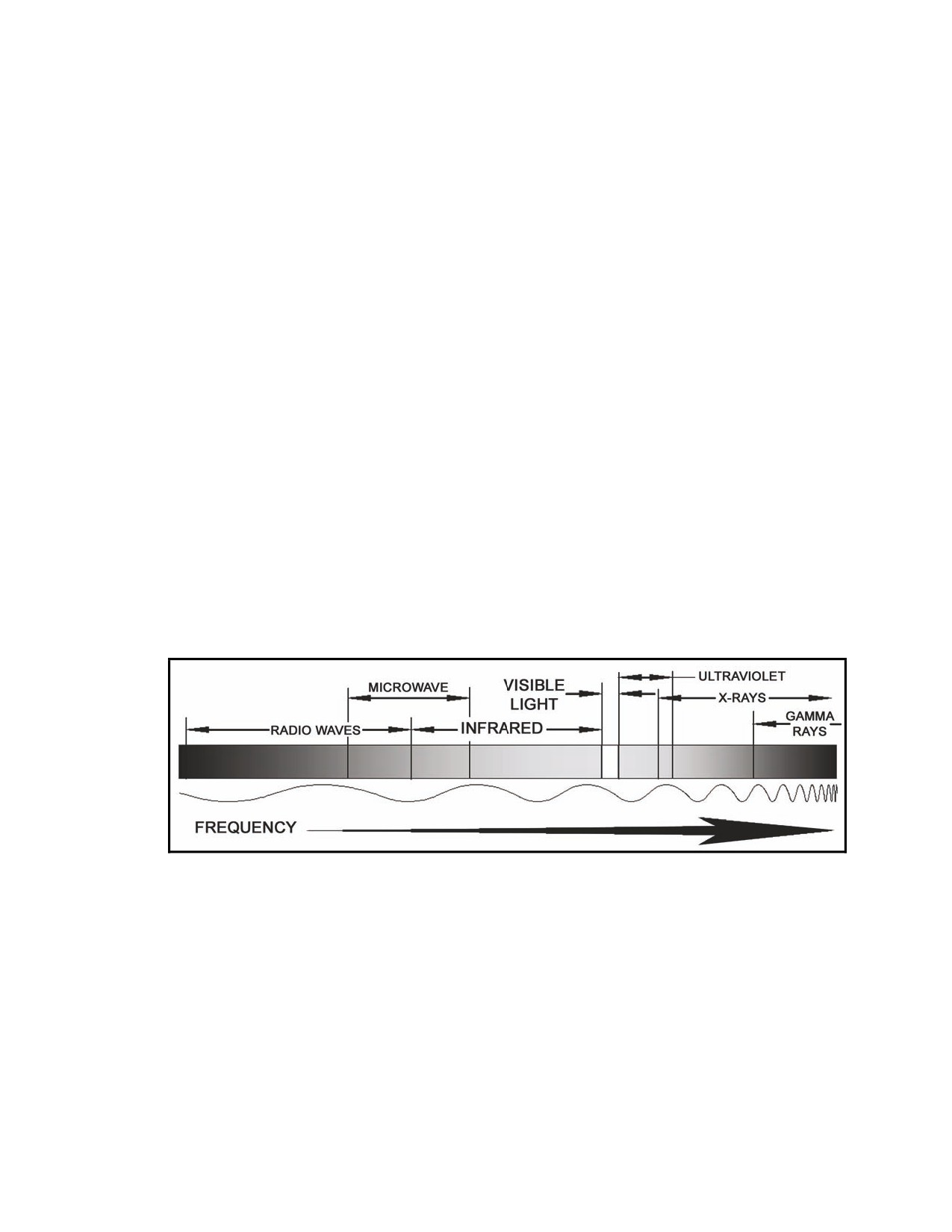
E-2. The electromagnetic spectrum (Figure E-1) contains various forms of energy including radio and
television transmission spectrums, x-rays, and visible light humans can see. Visible light is a very
small portion of the overall electromagnetic spectrum. Each type of energy is assigned a place in the
spectrum according to its frequency—from lowest to highest. As the frequency changes, the
characteristics change, so types of energy are bundled into groups of frequencies, or bands, which have
similar characteristics. The Javelin uses the IR band for its sights (NVS and seeker).
Figure E-1. Electromagnetic spectrum.
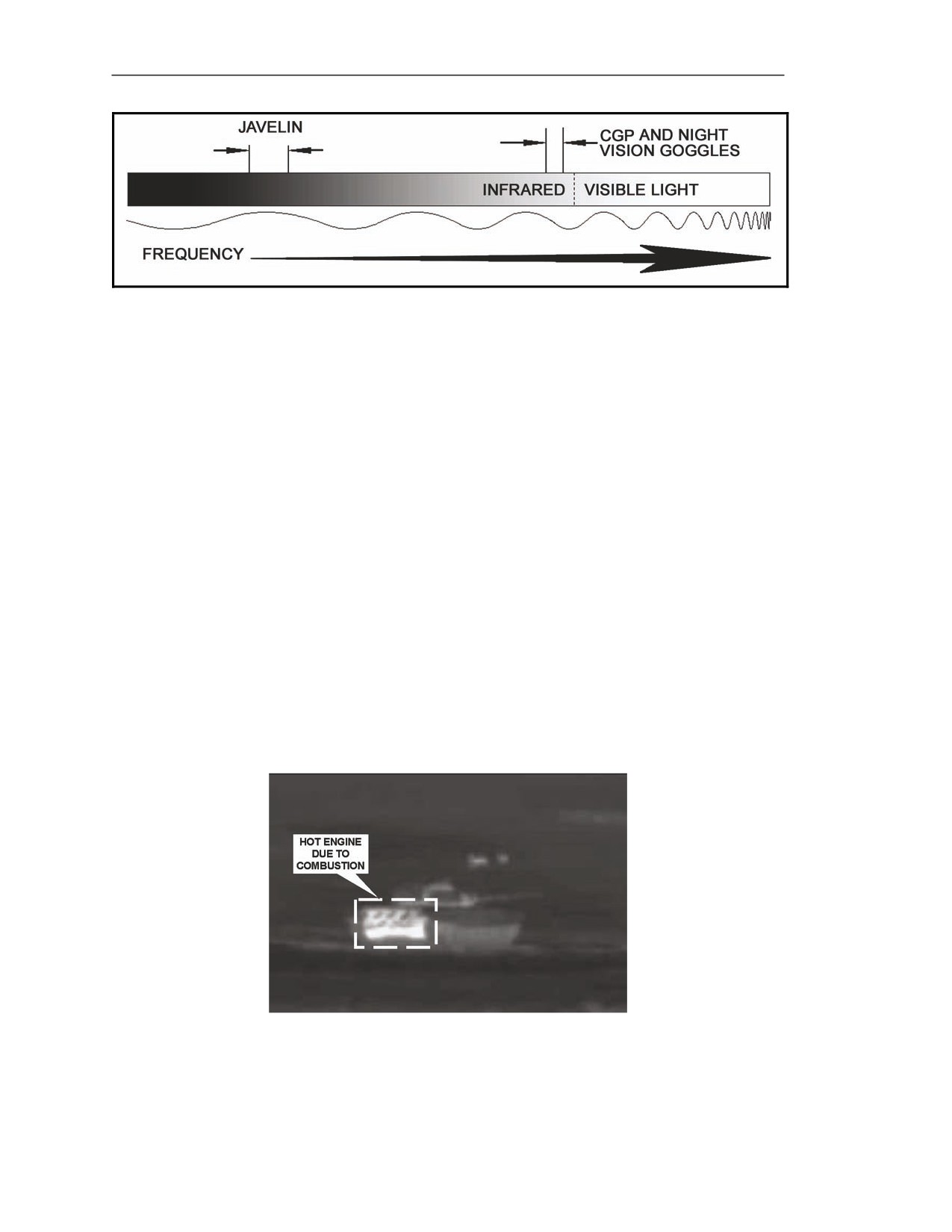
E-3. The Javelin operates, using frequencies in only a small part of the IR band (Figure E-2). Other
weapon systems operate in this same area, such as the TOW and Dragon, which means the gunner
should be able to see anything with the TOW and the Dragon that he can see with the Javelin.
E-4. Other systems operate using frequencies in other parts of the IR band. This operation includes
such equipment as the commander’s ground pointer (CGP) and night vision goggles (NVGs). Using
the CGP and NVGs as an example, when the platoon leader points to a target with the CGP, the gunner
can see what the platoon leader points at because the NVGs that the gunner wears operates at the same
IR frequency as the CGP. Using the Javelin, the gunner cannot see where the CGP points because it
emits a beam outside the IR band that the Javelin uses.
20 March 2008
FM 3-22.37
E-1
Appendix E
Figure E-2. Infrared band.
INFRARED WAVES
E-5. The IR waves are a radiant, an electromagnetic form of heat. Heat creates IR waves and IR
waves create heat. For instance, the heat lamps at fast-food restaurants are above the food, yet they
keep the food warm even though heat rises. The reason is that the lamps radiate IR waves down onto
the food, and when the IR strikes the food, the food warms up. IR can be emitted in any direction.
INFRARED SOURCES
E-6. Everything on the face of the earth emits IR in the IR band used by the Javelin. Hotter objects
emit more IR, and cooler objects emit less. Some objects are classified as IR sources meaning they are
able to stay hot by themselves using another form of energy—such as nuclear energy, combustion, and
friction—to generate heat energy.
Nuclear Energy
E-7. Nuclear energy is produced either by splitting atomic particles (called fission) or combining
atomic particles together in different forms (called fusion). The sun uses a nuclear reaction to generate
heat and is our primary source of IR energy.
Combustion
E-8. Combustion (Figure E-3) means there is heat produced by a slow (such as a bonfire) or very
quick (such as a controlled explosion) burning. Vehicle engines generate heat due to combustion.
Figure E-3. Heat caused by combustion.
E-2
FM 3-22.37
20 March 2008
Forward Looking Infrared
Friction
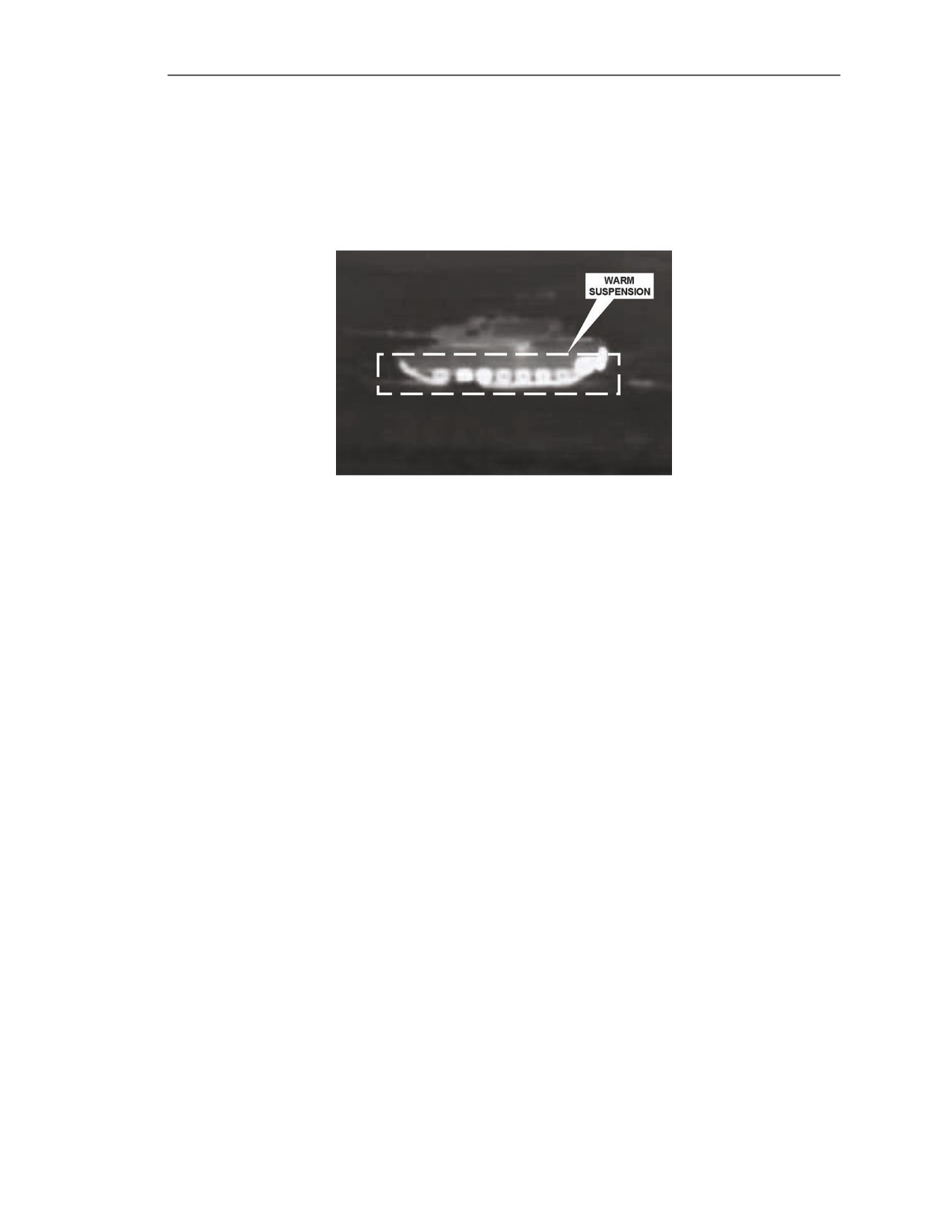
E-9. Friction produces heat by rubbing objects together. For example, when you rub your hands
together very quickly, friction causes your hands to warm up, which causes them to give off more IR.
The same reaction occurs when a vehicle moves. Its suspension and motion mechanism (tires or tracks)
creates friction moving against themselves or against the ground causing the suspension parts to warm
up and produce IR (Figure E-4).
Figure E-4. Heat caused by friction.
INFRARED CHARACTERISTICS
E-10. All objects have the IR characteristics of reflection (if IR energy is reflected as in a mirror),
absorption (if IR energy is absorbed as in friction), and emission (if IR energy comes from an IR
source as in combustion). Like visible light, IR is affected by being transmitted through the
atmosphere.
Reflecting Versus Absorbing
E-11. All objects reflect and absorb IR energy in varying amounts. What is not absorbed is reflected.
Objects that reflect IR well do not absorb it well. Plant life, such as trees and grass, reflects IR well.
This reflection makes the plants appear to heat up instantly when the sun strikes them and to cool off
instantly when the sun blocks the plants.
E-12. Absorbing is the opposite of reflecting. Objects that absorb IR well do not reflect it well. Objects
such as tanks and rocks absorb IR well. When the sun comes up, this absorption makes these objects
stay cold or cool for a longer time when everything else is warm. When the sun goes down, these
objects stay hot much longer than other objects in the target scene. For example, illumination tape that
becomes dimmer the longer it glows.
Emitting Infrared
E-13. Emitting is closely associated with absorbing. Just like illumination tape that absorbs light
before it glows, objects are heated to emit IR. For example, an emitting source is like a combustion
engine that generates heat or the human body. When an object absorbs IR, it warms up. As it warms
up, it emits more IR. When the heat source is removed, the object continues to emit IR, which causes it
to cool off, and the amount of IR that it emits steadily decreases.
Transmitting Infrared
E-14. Just like light, IR is affected by particles in the atmosphere known as obscurants because they
obscure the gunner’s view of the target scene. Obscurants include such things as dust, snow, hail, sleet,
fog, and so forth. The effect these obscurants have on IR is noticeably less than their effect on light.
Unlike light, some obscurants have no effect on the ability to see an IR image.
20 March 2008
FM 3-22.37
E-3
Appendix E
E-15. Obscurants with large-sized particles—snow, sleet, rain, fog, and some forms of smoke—affect
the amount of IR that reaches the NVS. As these obscurants become thicker or heavier, the amount of
IR that reaches the NVS decreases, which decreases the range at which a gunner can see a target with
the NVS.
PHYSICAL PROPERTIES
E-16. When the sun comes up, some natural or manmade objects may heat up faster than others do
because they have different IR characteristics. An object’s IR characteristics are determined by its
physical properties—its mass, density, color, and texture. These properties combine to enhance an
object’s ability to reflect or absorb the IR that comes into contact with it.
Color
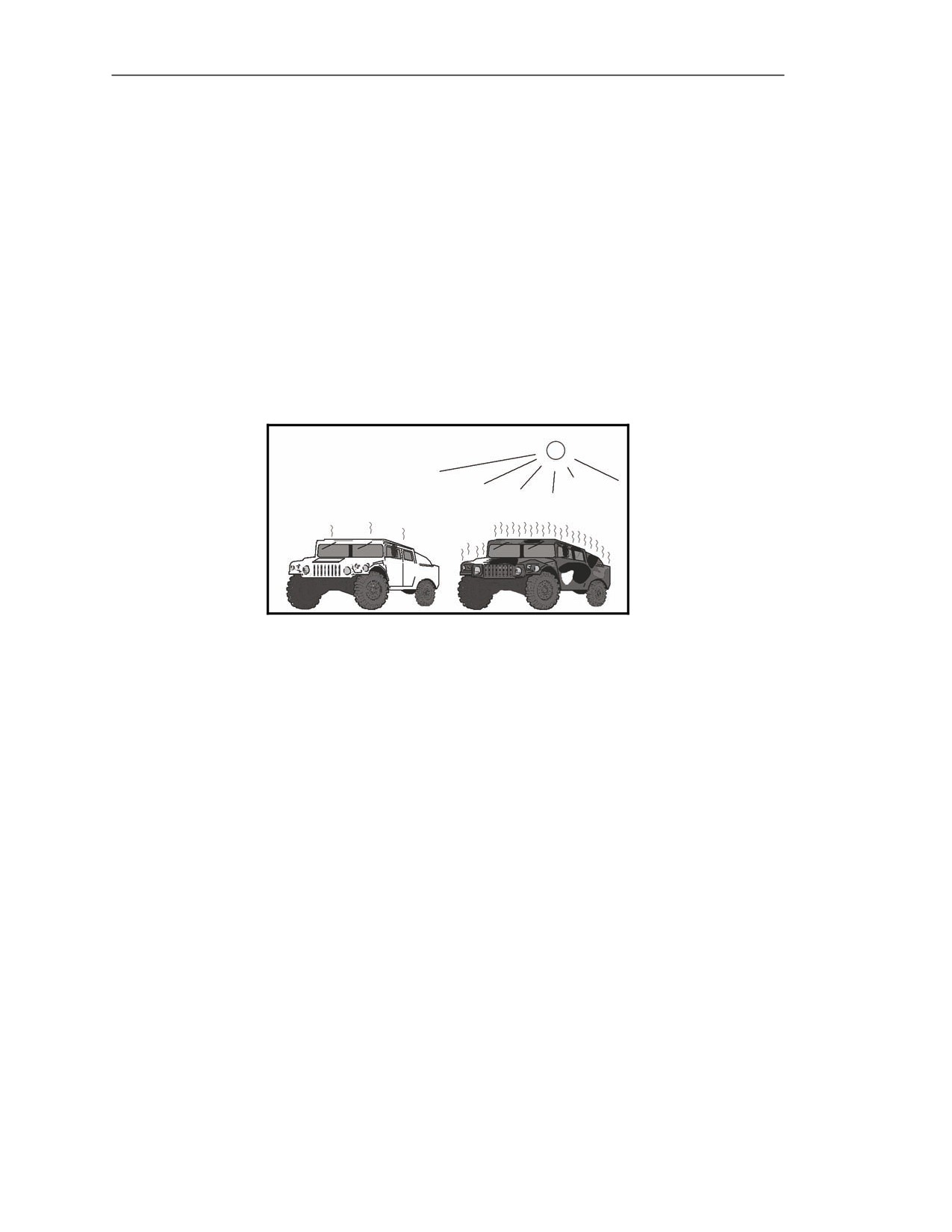
E-17. Light colored objects, such as a vehicle with desert camouflage, reflect more IR than they
absorb, and heat slowly in the sun (Figure E-5). Dark colored objects, such as a vehicle with woodland
camouflage, absorb more IR than they reflect, and heat quickly in the sun.
Figure E-5. Infrared affected by color.
Density
E-18. When objects such as trees and grass are exposed to sunlight, they do not become too hot to
touch because they do not absorb IR well. As a result, they do not emit IR well, either. The reason is
because the material they are made of is not very dense or heavy.
E-19. When objects such as vehicles and rocks are exposed to sunlight, they can become too hot to
touch because they absorb and emit IR well. The reason is because these objects are denser or heavier
than the trees and grass.
Surface Texture
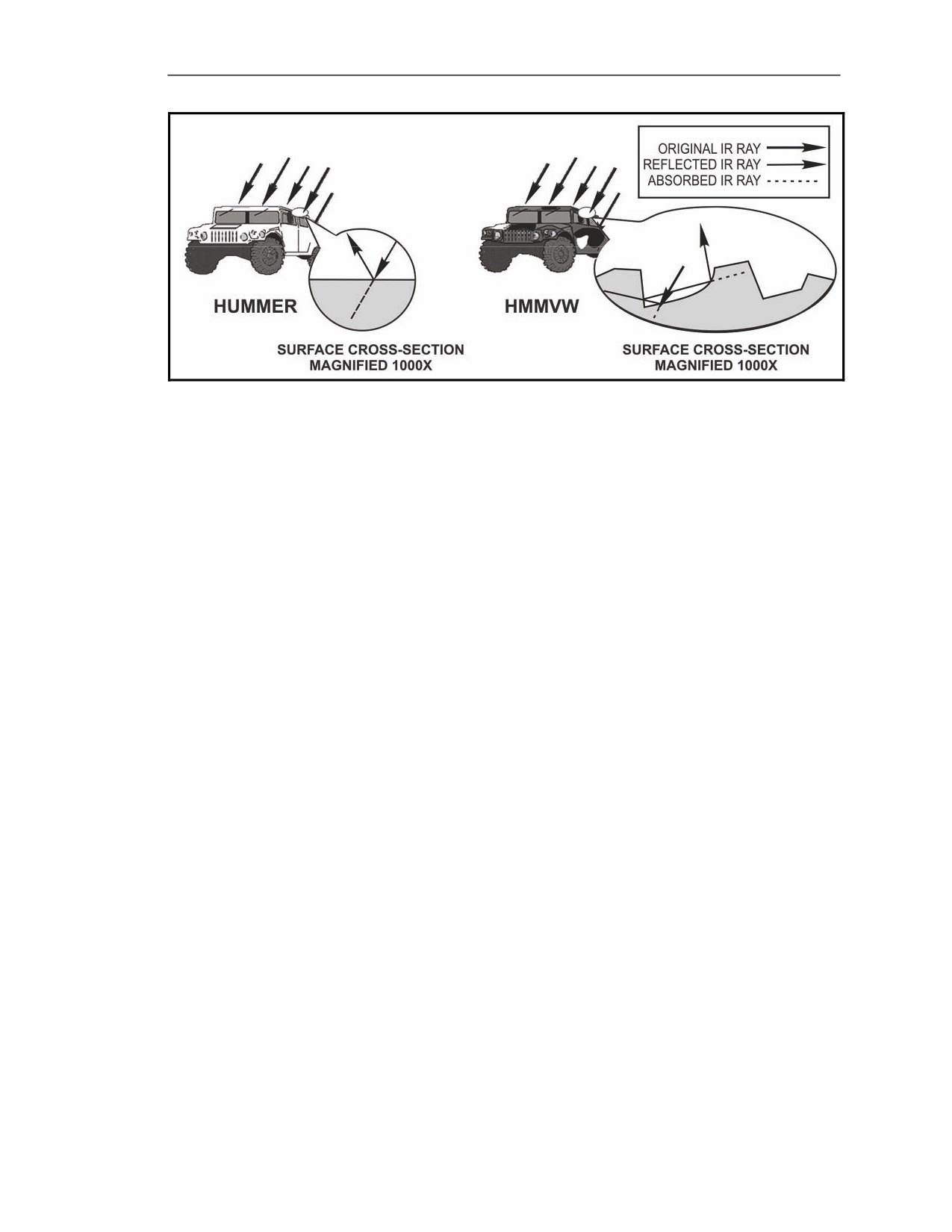
E-20. Although a military high-mobility multipurpose wheeled vehicle (HMMWV) and the civilian
version (Hummer) both become hot when exposed to sunlight, the Hummer does not heat up as fast as
the HMMWV does. The reason for this is the difference in the surface texture, or finish, on the two
vehicles. The Hummer has a smooth, waxed surface which tends to reflect well, whereas the HMMWV
has a rough surface due to the chemical-agent resistant coating (CARC) paint that tends to absorb well
(Figure E-6).
E-4
FM 3-22.37
20 March 2008
Forward Looking Infrared
Figure E-6. Smooth versus rough surface texture.
Mass
E-21. The more mass an object has, the more IR it can absorb, the longer it takes to heat up, the longer
it can emit IR, and the longer it takes to cool off.
E-22. When both a tank and an M16 are in the sun, the armor plates on the tank take longer to heat up
than the barrel of the M16 because they have more mass. As a result, the armor plates absorb more IR,
and they take longer to heat up to the same temperature as the M16 barrel. Once they are hot, the armor
plates emit IR for a much longer time than the barrel of the M16 and they take longer to cool off.
INFRARED SYSTEMS
E-23. There are two types of IR systems: non-imaging and imaging.
NON-IMAGING SYSTEMS
E-24. Non-imaging systems, such as the Stinger surface-to-air missile, are known as heat seekers. Heat
seekers do not provide an IR image of the target.
IMAGING SYSTEMS
E-25. The imaging systems convert IR into a visible-light image. The Javelin is an imaging system providing an IR
image that can be used to engage a target. When the missile is launched, it uses a similar image to guide it to the target.
ΔT
E-26. The NVS and seeker use IR to create images regardless of visible light levels. The images they
display are made possible by the presence of ΔTs. ΔTs allow us to distinguish between one part of the
target scene and another—whether it is different parts of the same object or different objects in the
target scene. The gunner can use the Javelin’s IR imagery during the day as well as at night.
DEFINITION
E-27. ΔT is an abbreviation for change in temperature or difference in temperature. Delta (Δ) is a
Greek letter that stands for change or difference. T stands for temperature.
20 March 2008
FM 3-22.37
E-5
Appendix E
TEMPERATURE/INFRARED RELATIONSHIP
E-28. As the temperature of an object increases, so does the amount of IR it emits. For example, the
engine compartment on a tank with its engine running emits more IR than the front of the hull.
DISPLAY OF INFRARED LEVELS
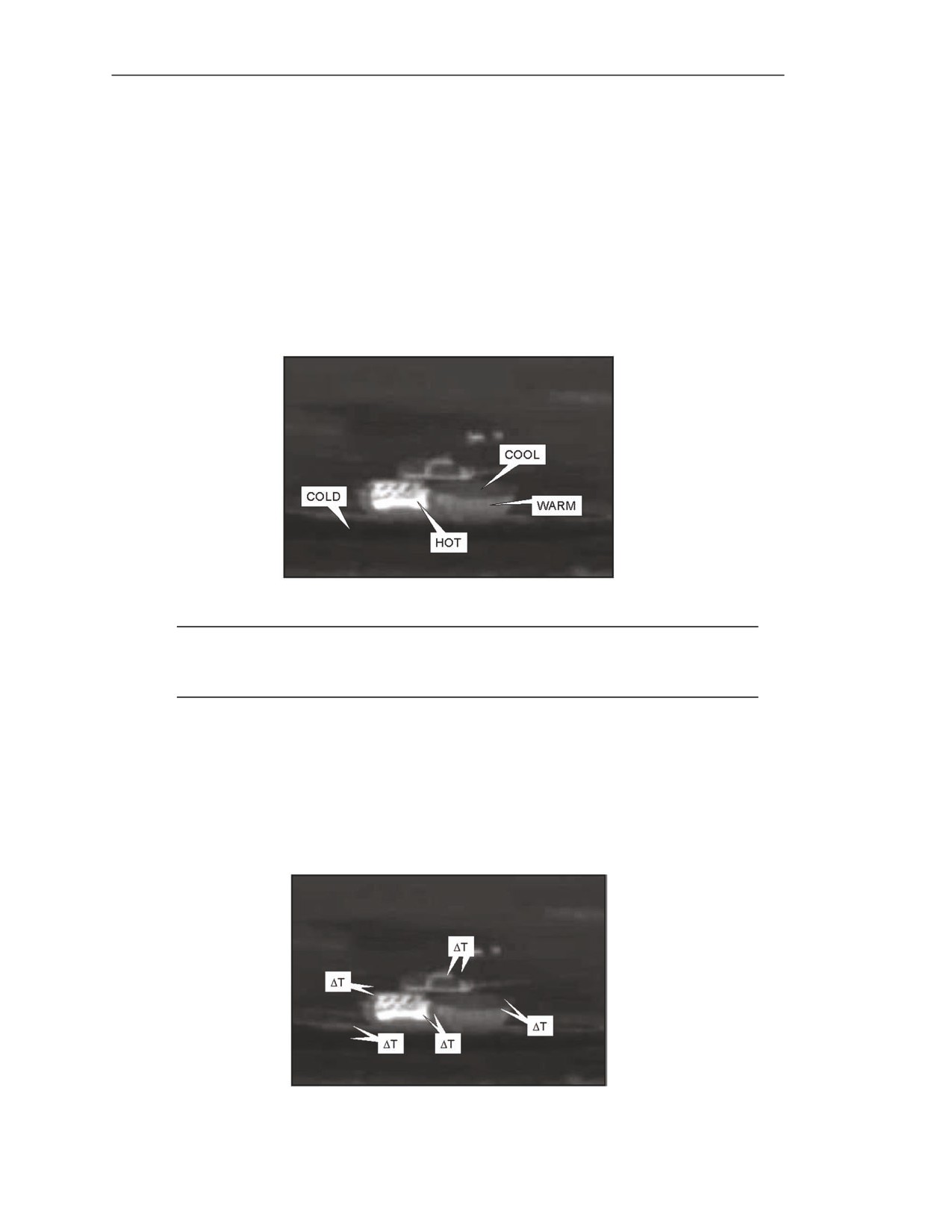
E-29. The NVS and seeker display IR levels as a change in brightness, according to each object’s
temperature. The coldest objects in a target scene appear black; the hottest appear bright green.
Everything in between appears as increasingly brighter shades of green as each object’s temperature
increases. For example, the engine compartment on a tank with its engine running appears bright green
(Figure E-7). Since the hull generally is the coldest part of a tank, it appears black. The suspension, which
is hotter than the hull but cooler than the engine compartment, appears in a different shade of green.
Figure E-7. Display of infrared levels.
NOTE: In the figures shown, the coldest objects appear black and the hottest appear white
(bright green in the CLU). Everything in between appears as increasingly brighter shades of
gray (shades of green in the CLU).
ΔT TO VISIBLE IMAGE
E-30. ΔTs occur between different objects in the target scene and between the different parts of a
target. This technique allows the gunner to see different objects in the target scene, and to distinguish
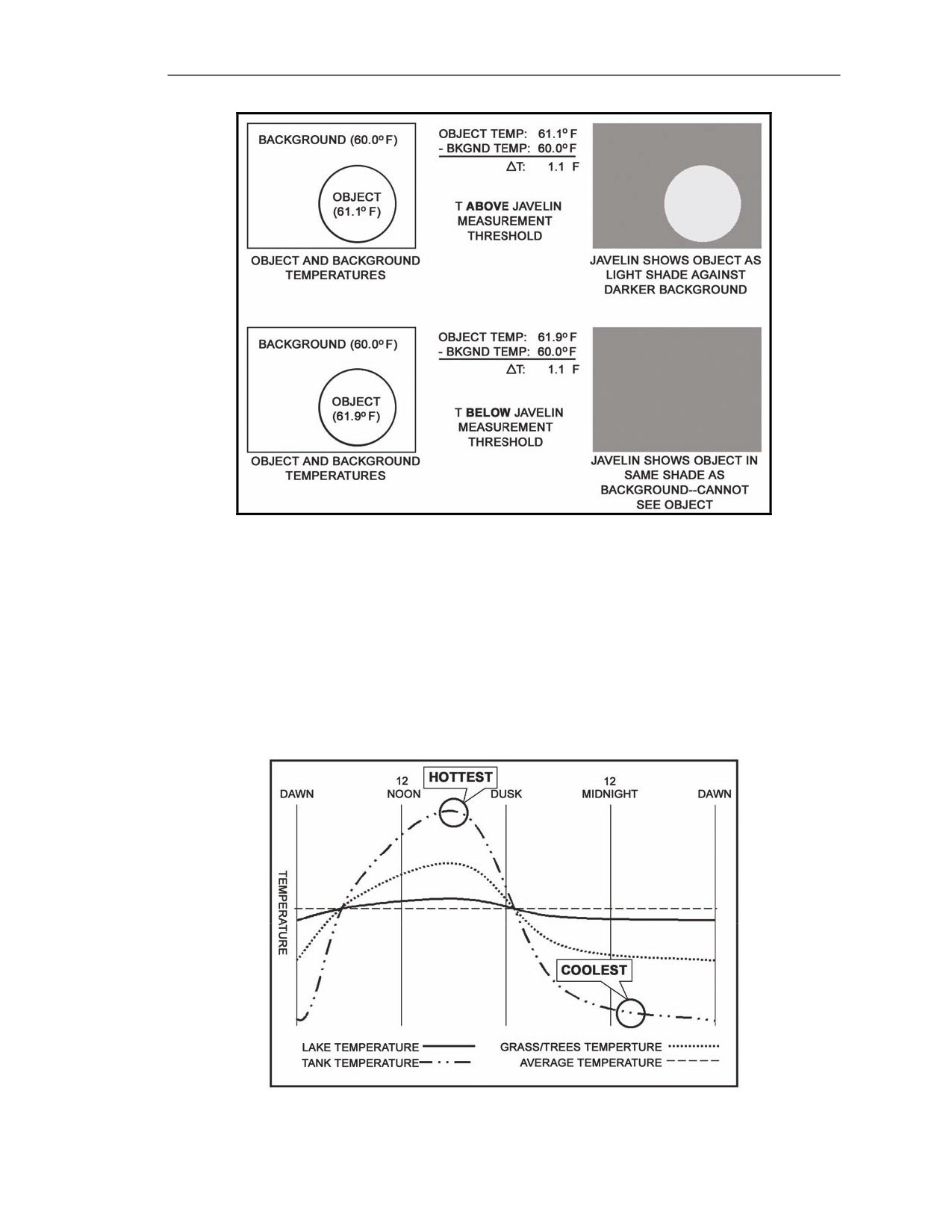
between different parts of a target (Figure E-8). For the gunner to see a target with the Javelin, a
measurable ΔT which, for Javelin, is a difference between objects of 1 degree Fahrenheit or greater
must exist between the target and its background (Figure E-9).
Figure E-8. ΔTs.
E-6
FM 3-22.37
20 March 2008
Forward Looking Infrared
Figure E-9. Measurable ΔT.
ΔTS OVER A 24-HOUR PERIOD
E-31. The temperature relationship between one object and another changes during the day due to
heating and cooling as the sun rises and sets.
E-32. The gunner knows that vehicles, buildings, and asphalt roads get hot in the sun. Grass and trees
become warm but not so hot they cannot be touched. Large bodies of water do not warm up noticeably
in one day. Objects that heat up the most during the day tend to become the coldest at night. Objects
that heat up very little during the day tend to cool off very little at night (Figure E-10). To illustrate,
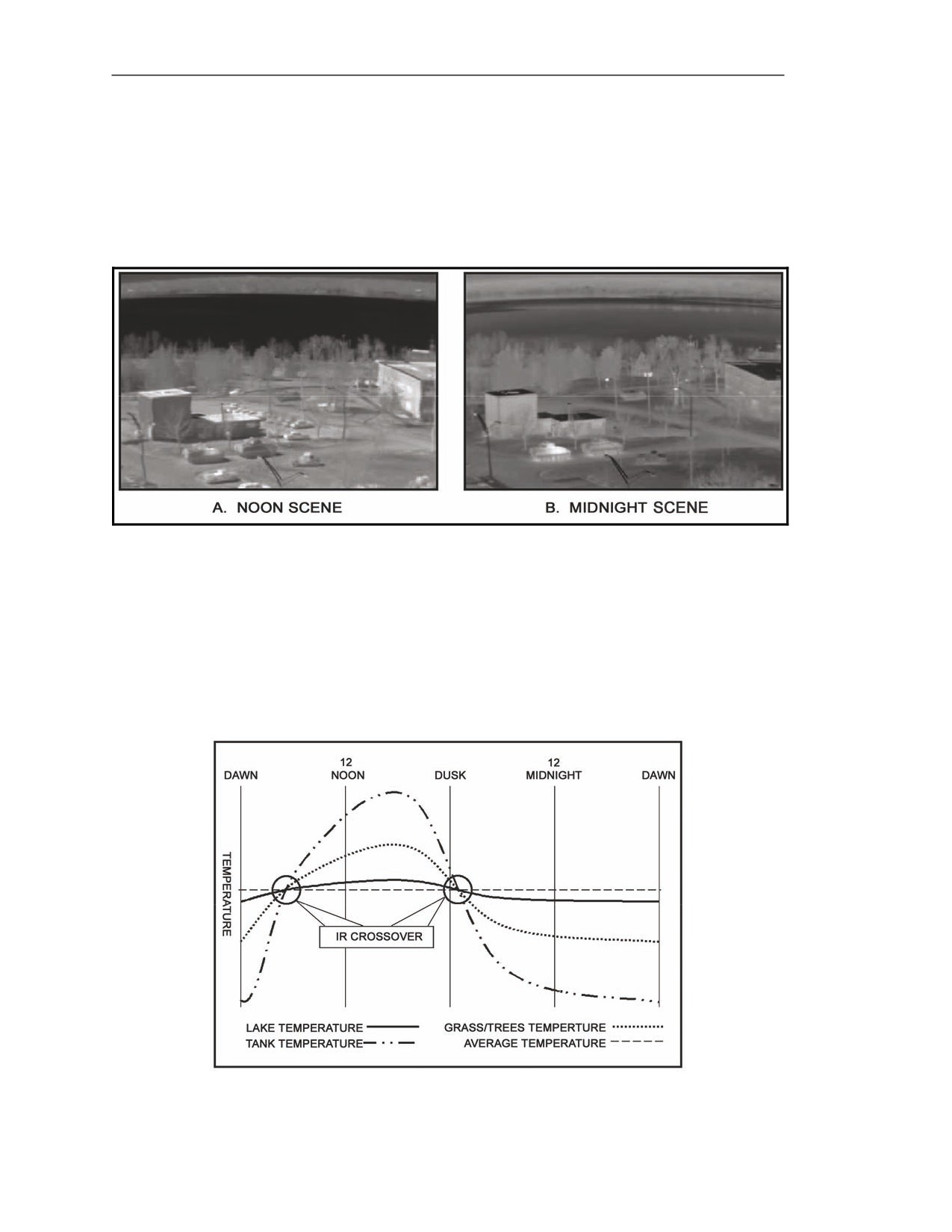
two images are seen on the same terrain (one at noon and the other at midnight).
Figure E-10. Temperatures of objects during 24-hour period.
20 March 2008
FM 3-22.37
E-7
Appendix E
E-33. In the noon example (Figure E-11A), notice the buildings, roads, and vehicles are the hottest
objects in the scene. The grassy areas and trees are shaded to indicate they are warm, and the river is
black, which indicates it is the coolest object in the target scene.
E-34. In the midnight example (Figure E-11B), notice how the ΔTs changed. Now, the river is the
warmest, the grass and trees are next, with the roads and vehicles being the coolest, with the exception
of the engine compartment and exhaust on the vehicles. This example shows how the relationship of
ΔTs changes among objects in a target scene over the course of a day.
Figure E-11. ΔT changes from day to night.
Infrared Crossover
E-35. Twice a day, around dawn and dusk, the temperatures of the tank, grass, and trees cross over
from being hotter than the river to being cooler (Figure E-12). These two periods are known as IR
crossover because of the change in the temperature relationships and the visual effect that it produces.
During these two periods, everything in the target scene is about the same temperature, which means
there are few, if any measurable ΔTs. As shown earlier, when there is no measurable ΔT, the gunner
cannot distinguish a target from its background.
Figure E-12. Crossover periods.
E-8
FM 3-22.37
20 March 2008
Forward Looking Infrared
INFRARED IMAGE ADJUSTMENT
E-36. Proper image adjustment is vital to accomplish the mission because it allows the gunner to see
targets that may otherwise be hidden. There is no perfect image adjustment. Image adjustment is
subjective and should be done according to what the gunner prefers.
FOCUS ADJUSTMENTS
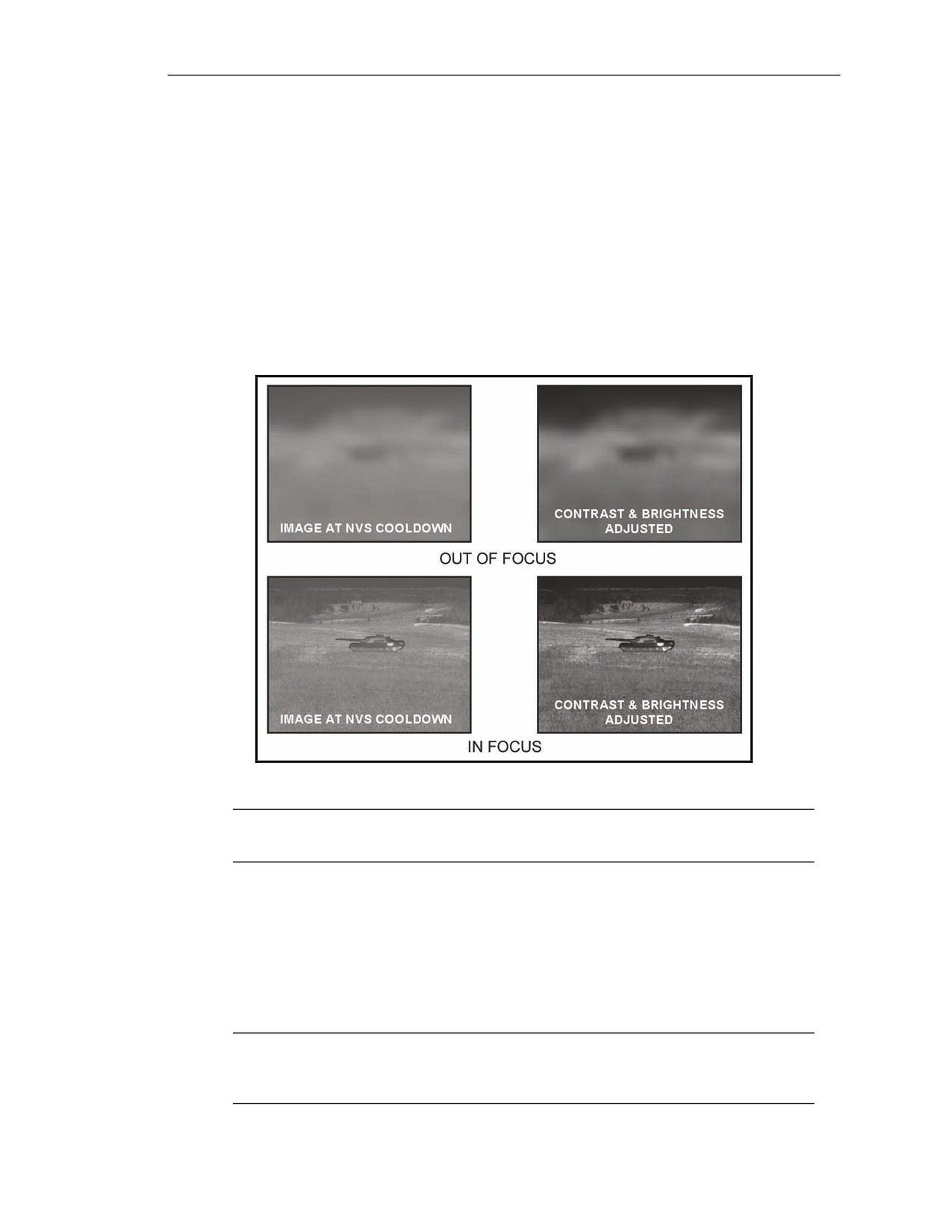
E-37. The FOCUS switch adjusts NVS image focus. (An object is in focus when the gunner can easily
identify its details or features.) Just like a camera, when an object is in focus in the NVS, anything
closer or further away appears out of focus. When the gunner first uses the NVS after cooldown, he
adjusts the focus before he adjusts the contrast and brightness. Otherwise, the edges of objects in the
target scene are blurred, and the gunner is not able to adjust contrast and brightness properly (Figure
E-13).
Figure E-13. Focus adjustments.
NOTE: Before focusing the NVS image, focus the CLU display with the diopter adjust
ring.
Initial Adjustment
E-38. To adjust focus initially—
(1) Pick an object in the target scene, such as a far tree line.
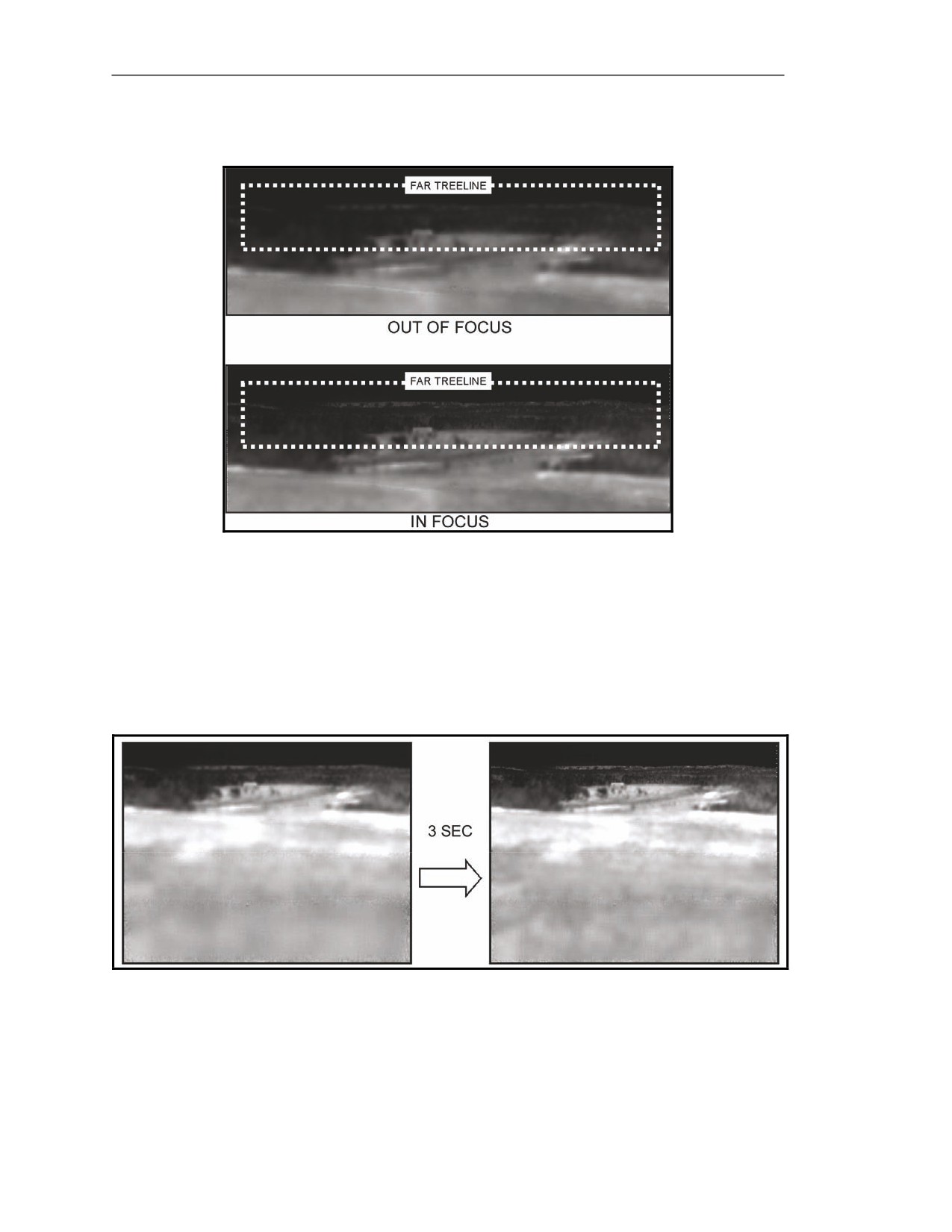
(2) Press the FOCUS switch in either direction until the tree line is in focus (Figure E-14).
(3) If the tree line becomes more blurred, release the FOCUS switch and press it in the other
direction.
NOTE: If adjusting the focus to either limit, the applicable FOV indicator (WFOV or
NFOV) flashes to indicate the NVS is at a focus limit. Release the FOCUS switch and
adjust it in the other direction.
20 March 2008
FM 3-22.37
E-9
Appendix E
(4) When the tree line comes into focus, release the FOCUS switch. If the focus adjustment
overshoots, press the FOCUS switch back and forth to make minor adjustments.
Figure E-14. Focus on far tree line.
Adjustment Speed
E-39. The NVS focus adjustment has two speeds available (press and release or press and hold).
Minor Adjustments
E-40. When the gunner presses and releases the FOCUS switch in either direction, the focus adjusts at
a slow speed (Figure E-15). This procedure allows for fine-tuning the focus for a specific object.
Figure E-15. Slow focus adjustment.
E-10
FM 3-22.37
20 March 2008
Forward Looking Infrared
Major Adjustments
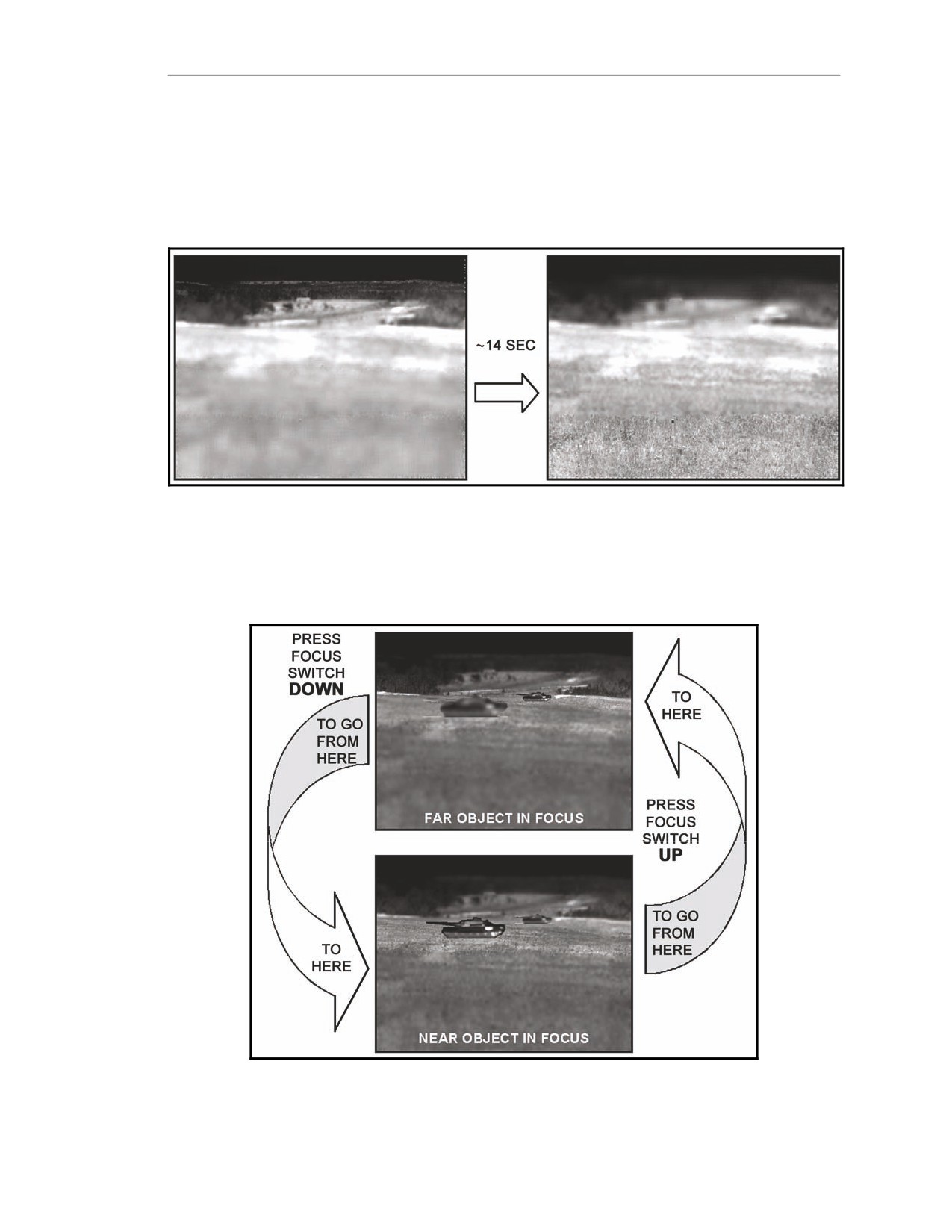
E-41. When the gunner presses and holds the FOCUS switch in one direction, the focus adjusts at a
slow speed for the first three seconds. After that, focus automatically changes to high speed until the
gunner either releases the switch or reaches a focus limit (Figure E-16). The high adjustment speed lets
him focus quickly on another object that is much closer or much farther away.
Figure E-16. Fast focus adjustment.
Focus Direction
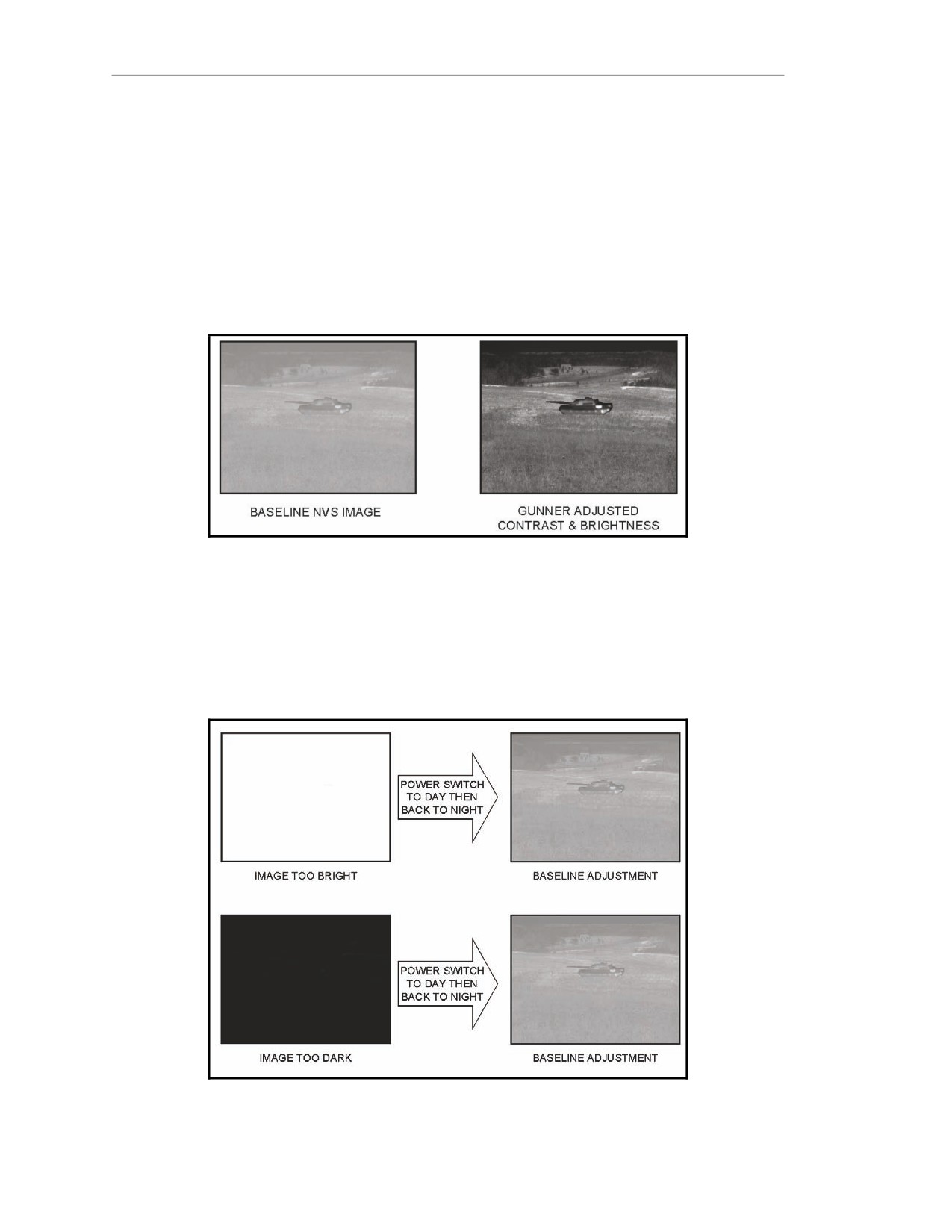
E-42. To focus on objects farther away, press the FOCUS switch up (Figure E-17). To focus on objects
that are near, press the FOCUS switch down.
Figure E-17. Focus direction.
20 March 2008
FM 3-22.37
E-11
Appendix E
CONTRAST AND BRIGHTNESS ADJUSTMENT
E-43. Once the image is in focus, it may be necessary to adjust the contrast and the brightness. As the
situation changes, the gunner adjusts the focus, the contrast, and the brightness to help in target
acquisition.
Command Launch Unit Power-Up
E-44. When the power switch is turned to NIGHT and the NVS reaches cooldown, the NVS
automatically adjusts contrast and brightness for the IR in the target scene (Figure E-18). This gives
the gunner a baseline image for making an initial focus adjustment only. He still needs to fine tune the
contrast and brightness according to the task.
Figure E-18. Night vision sight initial contrast and brightness baseline.
Contrast and Brightness
E-45. The gunner adjusts the contrast and the brightness to an extreme (all black or all bright green)
and cannot readjust to obtain a usable image.
E-46. The gunner takes corrective action by turning the power switch to DAY, then back to NIGHT.
The NVS adjusts itself to the baseline image (Figure E-19).
Figure E-19. Return to baseline from an extreme contrast/brightness adjustment.
E-12
FM 3-22.37
20 March 2008
Forward Looking Infrared
Good Adjustment
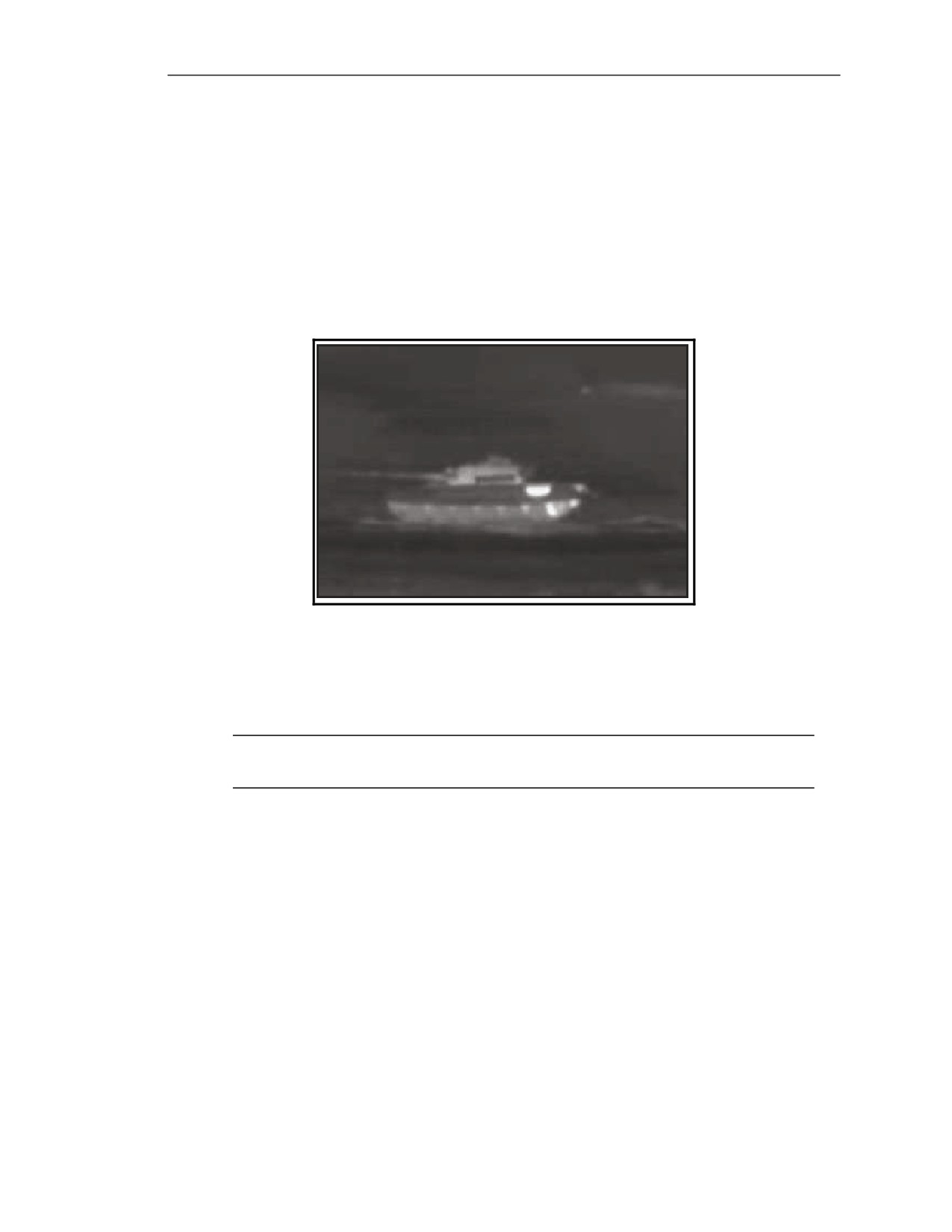
E-47. A properly adjusted target image is one in which the gunner sees a few black spots (the coldest
objects) and a few bright green spots (the hottest objects) (Figure E-20). Everything else should be
distributed across the shades of green.
E-48. Adjusting the brightness affects the contrast, and adjusting the contrast affects the brightness.
The gunner adjusts one, then the other, in small increments, until he has a target image that looks good
to him for the task he is doing.
E-49. If the gunner cannot tell whether to adjust the contrast or the brightness first because the entire
screen appears bright green or the entire screen appears black, he adjusts the brightness first. If the
gunner can see everything in the target scene, he adjusts the contrast first.
Figure E-20. Properly adjusted contrast and brightness.
Contrast Adjustment
E-50. Contrast adjusts the difference between the bright green objects and the black objects with
respect to the middle shades of green.
NOTE: In this manual, bright green objects in the CLU appear white in the figures used
here. Objects that are shades of green in the CLU appear in shades of gray in the figures.
20 March 2008
FM 3-22.37
E-13
Appendix E
Contrast Too High
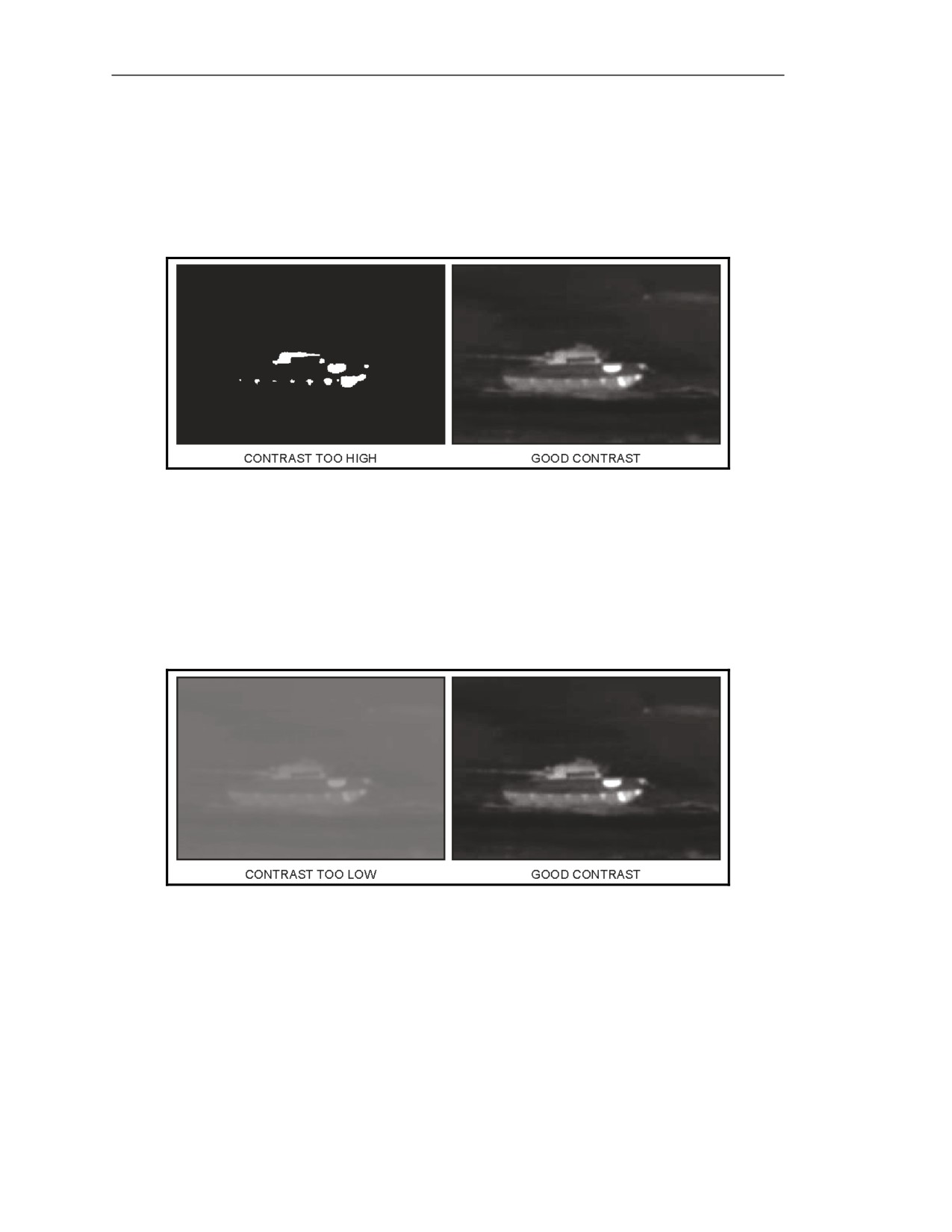
E-51. When contrast is too high (Figure E-21), all objects are adjusted away from the shades of green
in the middle toward the two extremes, so they appear either bright green or black.
E-52. The gunner takes corrective action by decreasing the contrast by moving the GATE ADJ/CTRS
& BRT switch left. This decrease brings objects back from the two extremes into the shades of green.
Figure E-21. High versus good contrast adjustments.
Contrast Too Low
E-53. When contrast is too low (Figure E-22), all objects are adjusted into the shades of green in the
middle away from the two extremes, so nothing appears black or bright green.
E-54. The gunner takes corrective action by increasing the contrast by moving the GATE ADJ/CTRS
& BRT switch right. This increase spreads the objects out from the middle shades of green back
toward the extremes of bright green and black.
Figure E-22. Low versus good contrast adjustments.
Brightness Adjustment
E-55. Adjusting the brightness changes the intensity, or brightness, of the objects in a target scene in
the same direction. Increasing brightness makes all objects brighter, and decreasing it makes them
darker.
E-14
FM 3-22.37
20 March 2008
Forward Looking Infrared
Brightness Too High
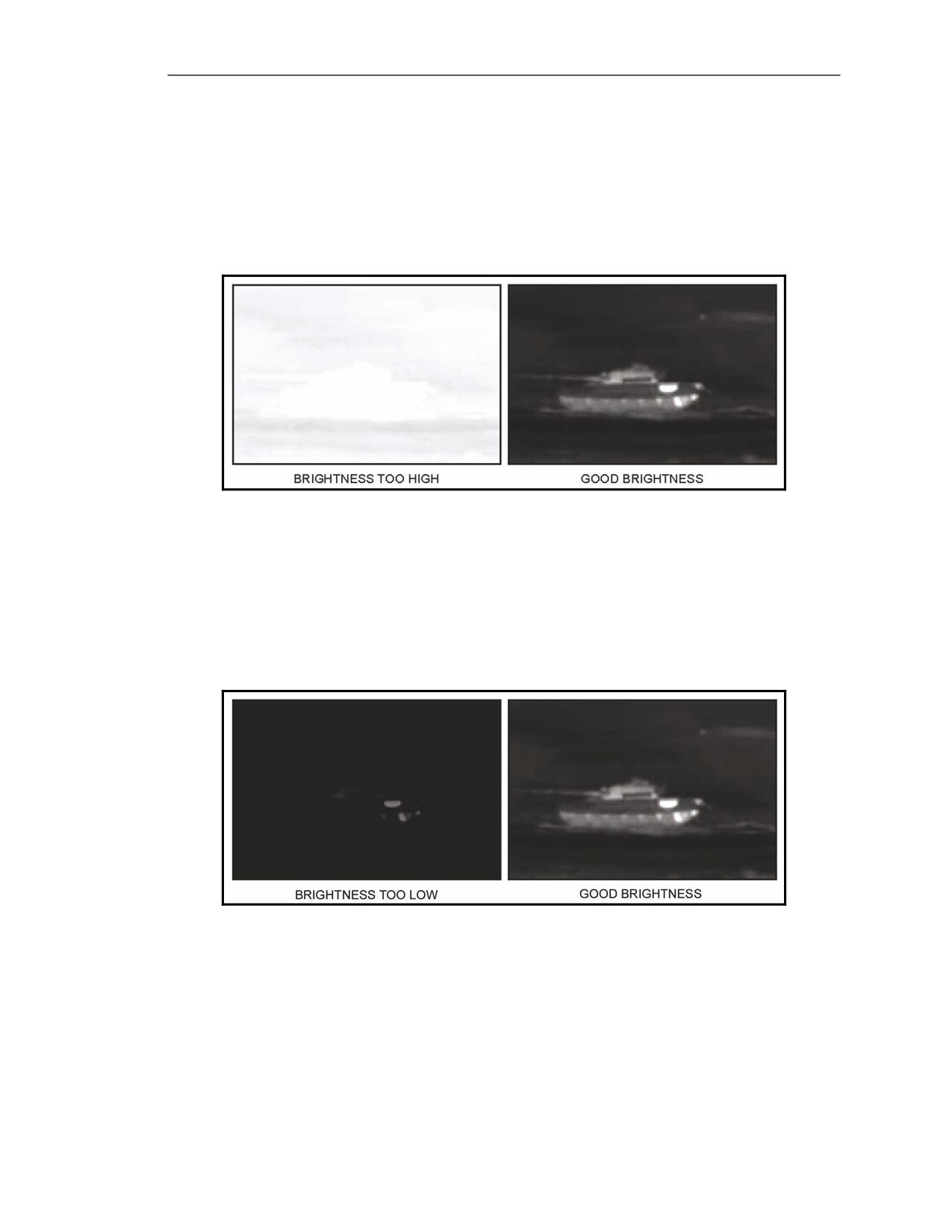
E-56. When the brightness is too high (Figure E-23), almost all objects in the target scene appear
bright green, a few appear in shades of green, and none are black.
E-57. The gunner takes corrective action by decreasing the brightness by moving the GATE
ADJ/CTRS & BRT switch down. This decrease drives down the intensity of all objects until some of
them appear black.
Figure E-23. High versus good brightness adjustments.
Brightness Too Low
E-58. When brightness is too low (Figure E-24), almost all objects appear black, a few appear as
shades of green, and none appear bright green.
E-59. The gunner takes corrective action by increasing the brightness by moving the GATE
ADJ/CTRS & BRT switch up. This increase drives up the intensity of all objects until some areas
appear bright green.
Figure E-24. Low versus good contrast adjustments.
FACTORS THAT AFFECT INFRARED TARGET IMAGES AND ΔTs
E-60. Conditions that affect the gunner’s ability to acquire a target include limited visibility conditions,
solar heating, human activity, and range to the target.
20 March 2008
FM 3-22.37
E-15
Appendix E
LIMITED VISIBILITY CONDITIONS (NATURAL AND MAN-MADE)
E-61. Rain, snow, sleet, fog, haze, smoke, dust, and darkness are referred to collectively as limited
visibility conditions. These conditions affect the gunner’s ability to acquire and engage targets with the
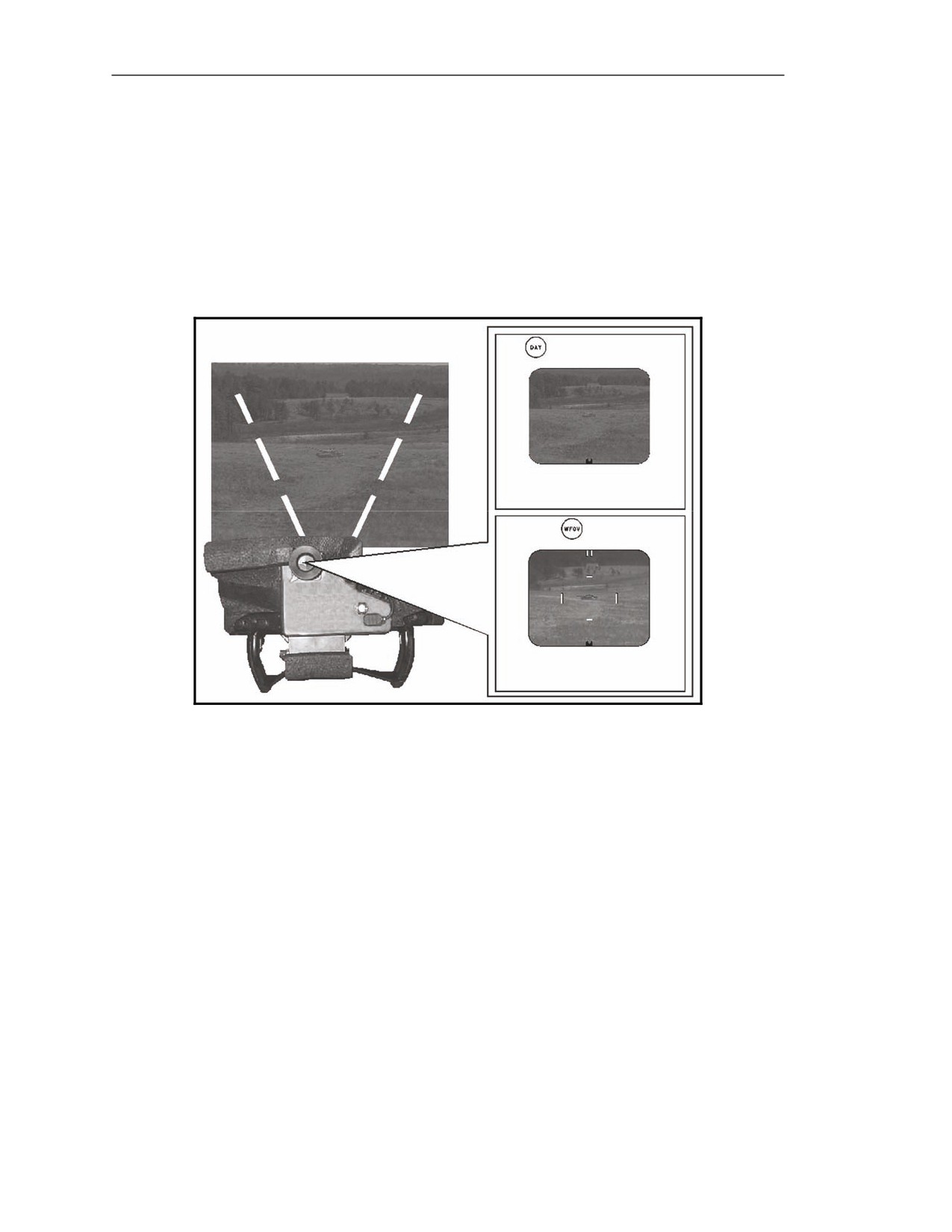
Javelin especially when using day FOV (Figure E-25). The gunner uses the NVS to overcome
darkness, haze, and some smoke systems.
E-62. The NVS can see through low levels of these obscurants better than the daysight. Its capability
is restricted at higher levels of obscurations (Figure E-25). The effect on the NVS image is a decrease
in contrast.
Figure E-25. Day vision sight versus night vision sight operation during
high levels of obscuration.
SOLAR HEATING
E-63. Solar heating is the single greatest influence on the target scene ΔT changes. Solar heating also
causes IR clutter and IR crossover, both of which can restrict the gunner’s ability to engage a target.
Weather
E-64. Weather can greatly change the amount of solar heat on objects. Objects observed during clear
weather have good ΔTs due to the high amount of solar heating. In addition, the objects can change
their appearance during a 24-hour period. During periods of precipitation (snow, rain, sleet, and so
forth), there is little solar heating and the ΔTs are low.
Infrared Clutter
E-65. IR clutter is a term used to describe a pattern of ΔTs in the target scene that prevents the gunner
from distinguishing a target from its background. This pattern is similar to the effect that is attempted
when a Soldier wears the Army combat uniform (ACU). The reason ACUs have a certain color pattern
is the ACU pattern blends with the background, cluttering the gunner’s outline and making it difficult
for an enemy to see him.
E-16
FM 3-22.37
20 March 2008
Forward Looking Infrared
E-66. IR clutter can be natural or man-made, and there are several differences between the two
including cause or origin, effect on the target scene, area of coverage, time and location of appearance,
and temperature of the clutter objects relative to the target.
E-67. The sun creates natural IR clutter, which generally covers large areas of terrain, such as a field,
scattered rocks, or a hillside, which is a disadvantage when trying to engage a target. (This clutter can
prevent the gunner from seeing a target and its movement with the NVS, but not with the daysight.)
Natural clutter is unpredictable, so the gunner cannot tell if or when the target is visible. The gunner
needs to pay attention to areas of clutter so he can keep track of moving targets that enter these areas.
Natural clutter is caused either by solar heating or by IR reflecting off objects in the target scene.
Clutter From Solar Heating
E-68. When solar heating causes clutter, the clutter stays in the same place and keeps the same
appearance for a long time. ΔTs are present in the target and in the background, but the two ΔT
patterns match so closely that the gunner may not be able to distinguish the target from the background
(Figure E-26). In addition, the range of temperatures in the clutter is the same as those in the target.
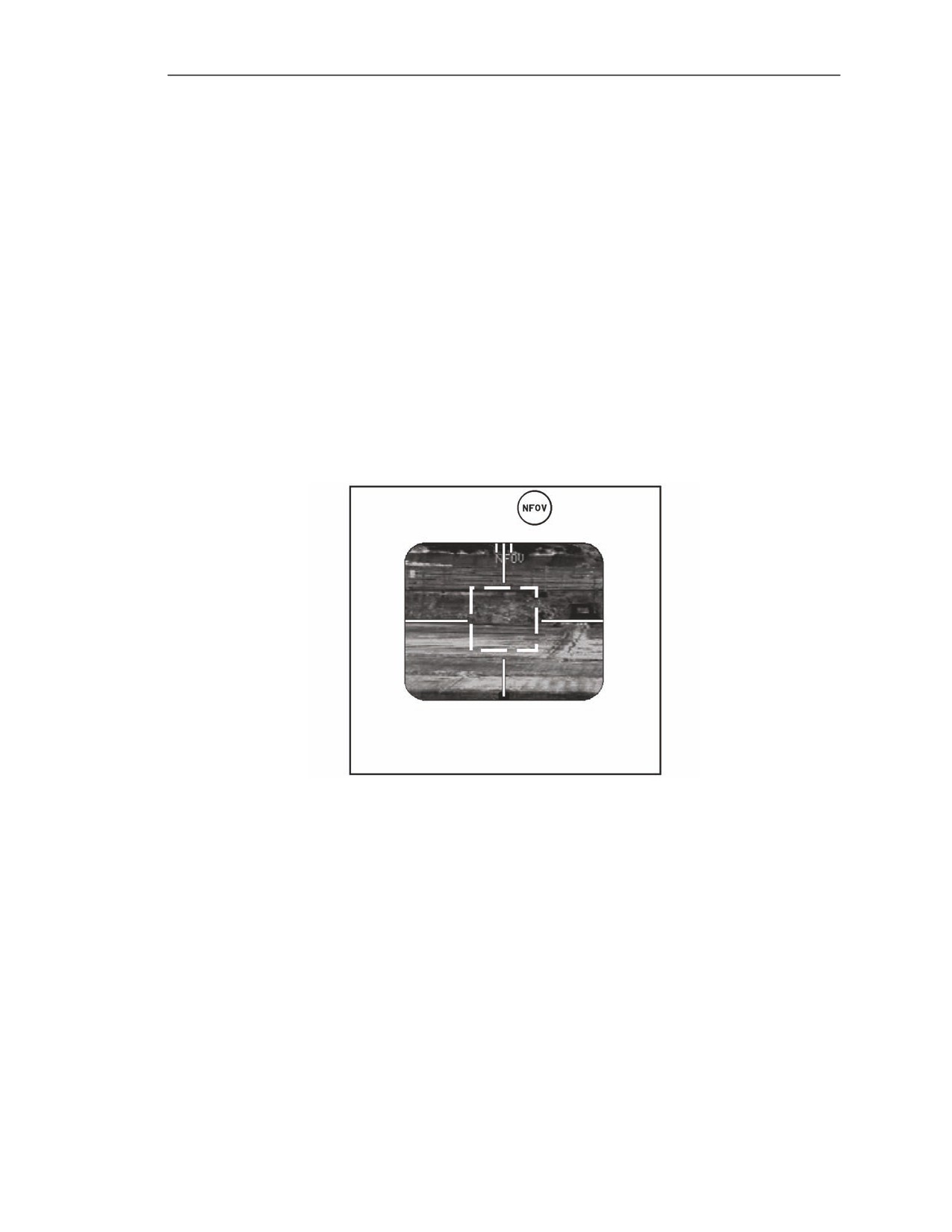
E-69. The gunner can first adjust the contrast and the brightness. He may find that contrast and
brightness adjustments do not bring out the target from its background. In that case, the gunner must
wait for the target to move out of the clutter or wait for the ΔTs to change.
Figure E-26. Infrared clutter―background ΔT pattern matches target ΔT pattern.
20 March 2008
FM 3-22.37
E-17
Appendix E
Clutter From Reflected Infrared
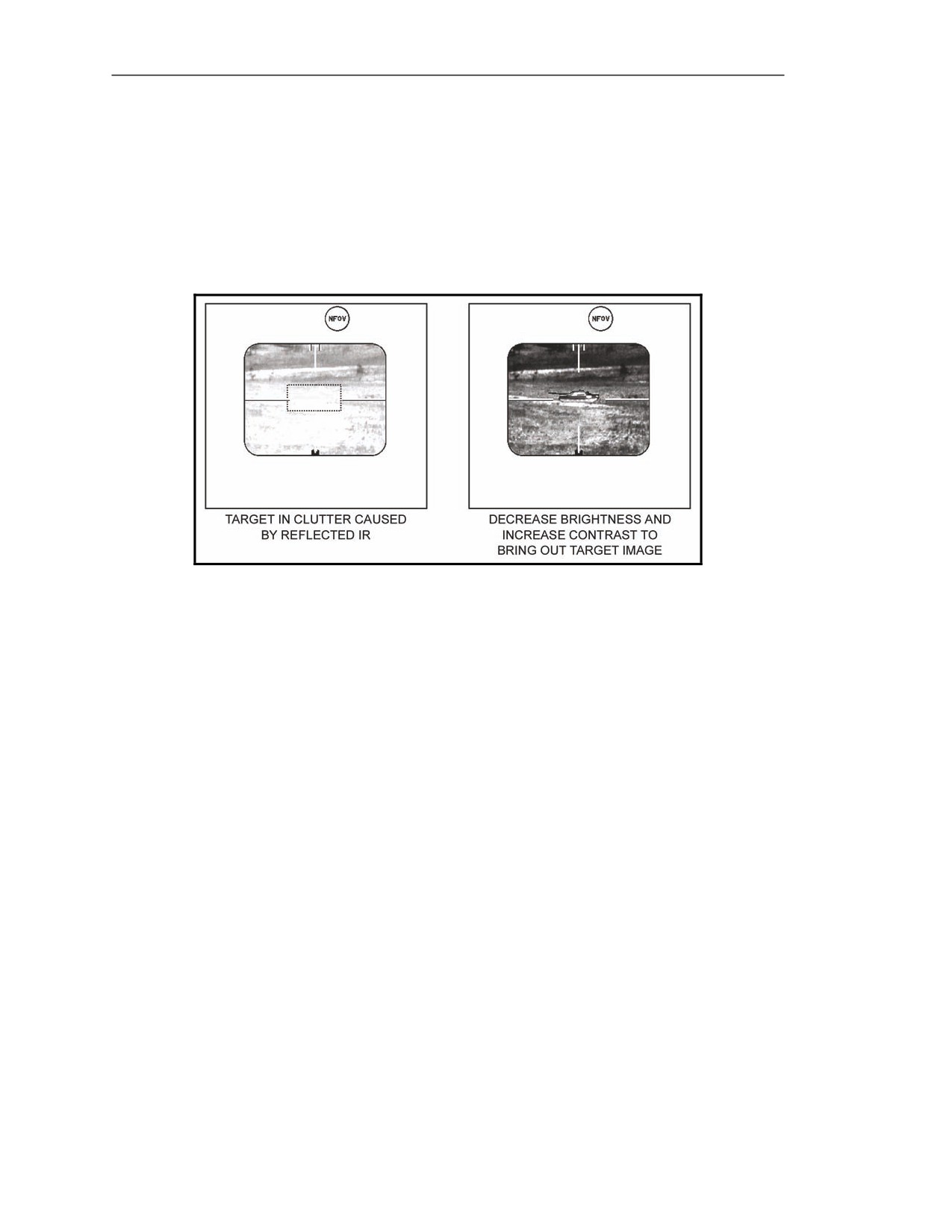
E-70. When reflected IR causes IR clutter, the clutter comes and goes randomly with the appearance of
the sun, and at different locations. (This can cause the gunner to suddenly lose a target that was visible
or make a target appear suddenly that was hidden from him.) Its appearance is such that the target and
the clutter look like one large area of uniform temperature (Figure E-27).
E-71. Generally, a gunner can defeat this type of clutter by increasing the contrast and decreasing the
brightness. If not, he must wait for the target to move out of the clutter or wait for the ΔTs to change.
Figure E-27. Defeating clutter caused by reflected infrared.
E-72. Although natural IR clutter can prevent the gunner from seeing the target, it usually occurs
during the day when the daysight sight works well for surveillance. However, if he cannot see the
target with the NVS, the gunner will not be able to see it with the seeker either.
Man-Made Infrared Clutter
E-73. Man-made clutter exists when conditions influenced by human activity affect objects in the
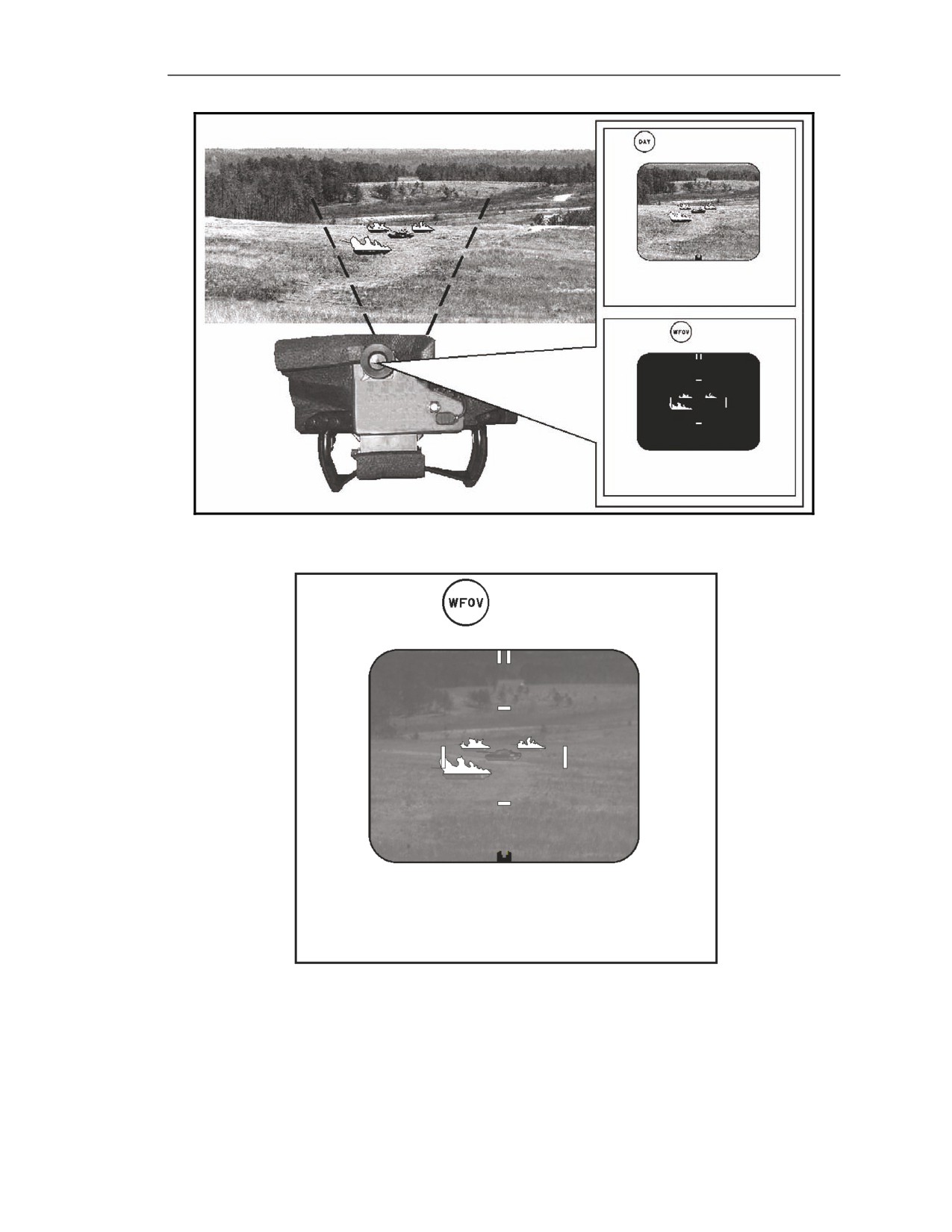
target scene. When an enemy vehicle (the target) is in an area with burning vehicles or buildings, the
vehicle may be able to use the flames to hide, thus making it difficult for the seeker to obtain a lock-on.
However, based on the ΔTs, the gunner may be able to detect the target (Figure E-28).
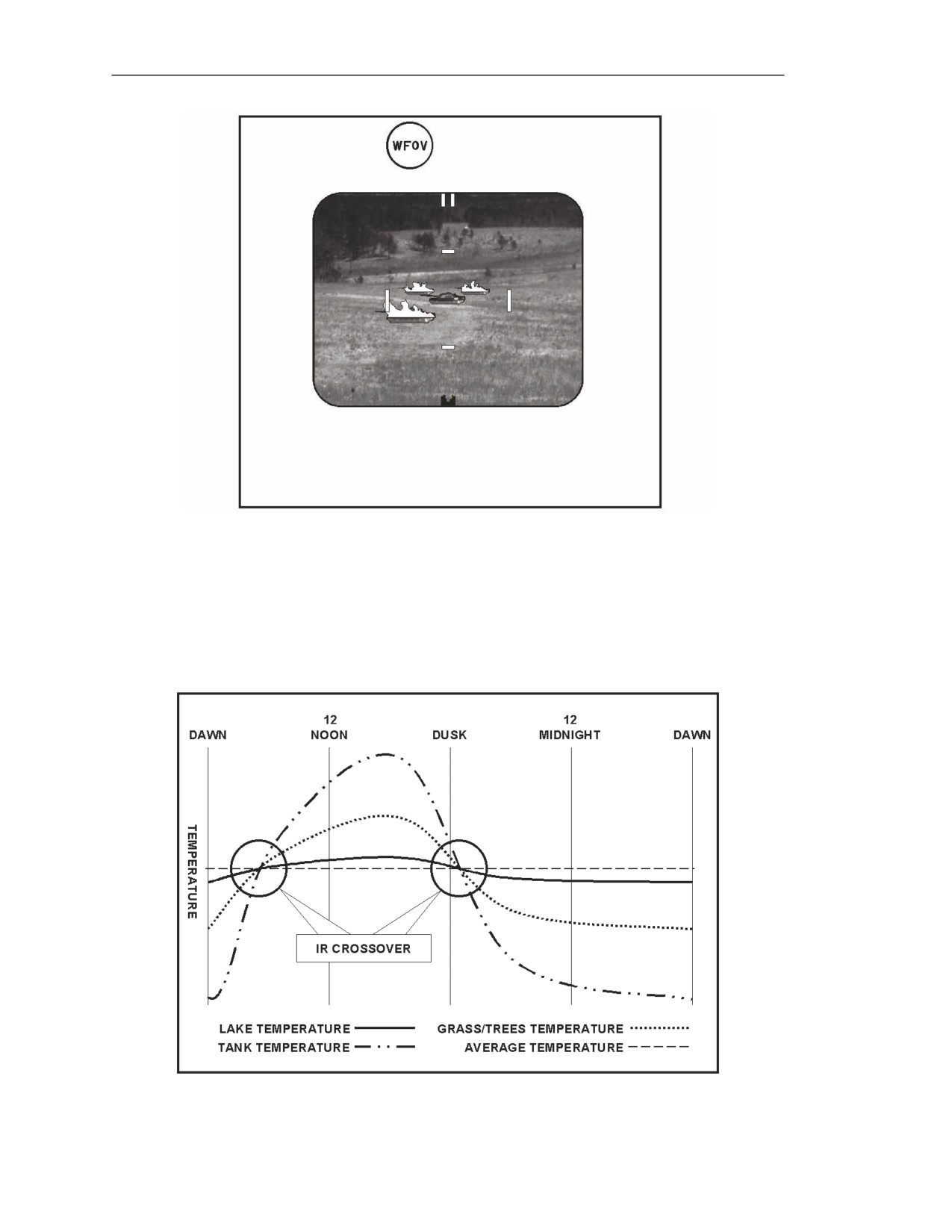
E-74. The gunner must change the contrast and brightness based on the appearance of the target. The
gunner should start by adjusting the brightness first (Figure E-29), then the contrast (Figure E-30). The
gunner does this until he has a good target scene. Although the gunner may be able to counter the
effects of IR clutter in the NVS (WFOV or NFOV) by adjusting the contrast and brightness, he may
not be able to see the target in seeker FOV. If the corrective action does not work the target scene and
allow the gunner to acquire the target, he should do the following:
z
Wait for the target to leave the area of IR clutter.
z
Wait for the target to change in temperature, and then try to engage the target.
z
Wait for the objects causing the IR clutter to change in temperature, and then try to engage
the target.
E-18
FM 3-22.37
20 March 2008
Forward Looking Infrared
Figure E-28. Effects of man-made clutter on night vision sight target scene.
Figure E-29. Counteracting man-made clutter Step 1―adjust brightness.
20 March 2008
FM 3-22.37
E-19
Appendix E
Figure E-30. Counteracting man-made clutter Step 2―adjust contrast.
Infrared Crossover
E-75. IR crossover prevents the gunner from seeing the target because everything in the target scene
(the background terrain and the target) is about the same temperature. This occurs twice in a 24-hour
period at dawn and again at dusk. During this time, the target is nearly the same temperature as its
background, so the ΔT between the target and its background is low (Figures E-31). The Javelin
detects ΔTs as low as 1 degree Fahrenheit.
Figure E-31. Infrared crossover times.
E-20
FM 3-22.37
20 March 2008
Forward Looking Infrared
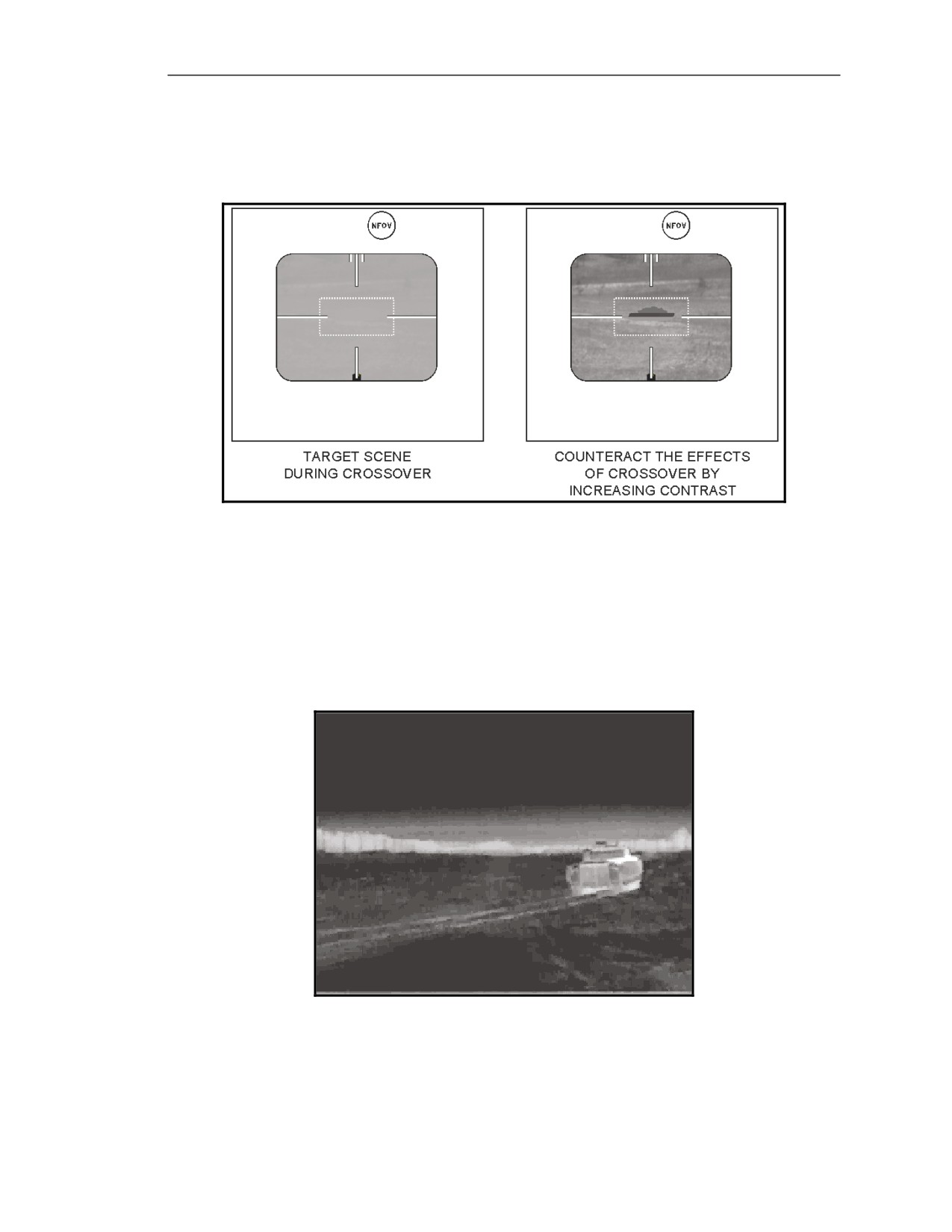
E-76. The gunner can use this capability to overcome the effects of crossover by adjusting contrast and
brightness. In addition, crossover will not occur for all parts of the target at the same time. Part of the
target will always have a measurable ΔT between it and the background so the gunner can determine
the target’s location (Figure E-32).
Figure E-32. Infrared crossover effects.
Human Activity
E-77. Human activity has an effect on the amount of IR in objects in the target scene, which disrupts
the natural changes that should occur in their IR images. For example, at night, vehicles and asphalt
roads should appear dark green. When a vehicle is driven for a while, it appears bright green around
the engine, exhaust, and suspension as a direct result of human activity. When enough vehicles drive
on a road, it will appear as light green where wheel or track friction causes the road surface
temperature to increase (Figure E-33).
Figure E-33. Road temperature increases
due to friction from vehicle tracks.
20 March 2008
FM 3-22.37
E-21
Appendix E
Range to Target
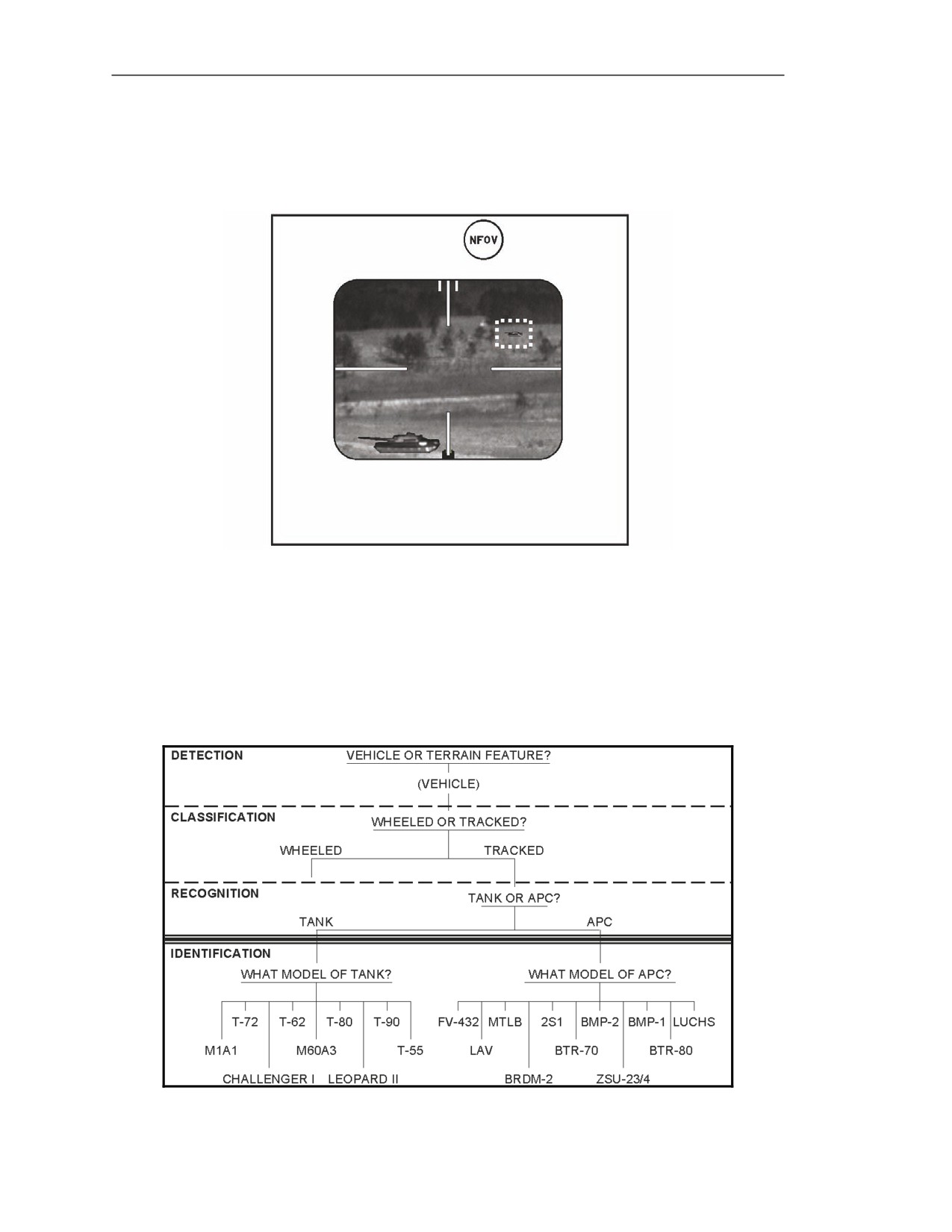
E-78. The gunner’s ability to distinguish a target at maximum range from its background is restricted
due to limitations of the NVS magnification, image resolution, and obscurants. When the target moves
toward the gunner, the clarity of target details increases as range to the target decreases (Figure E-34).
Figure E-34. Effects of range on target details.
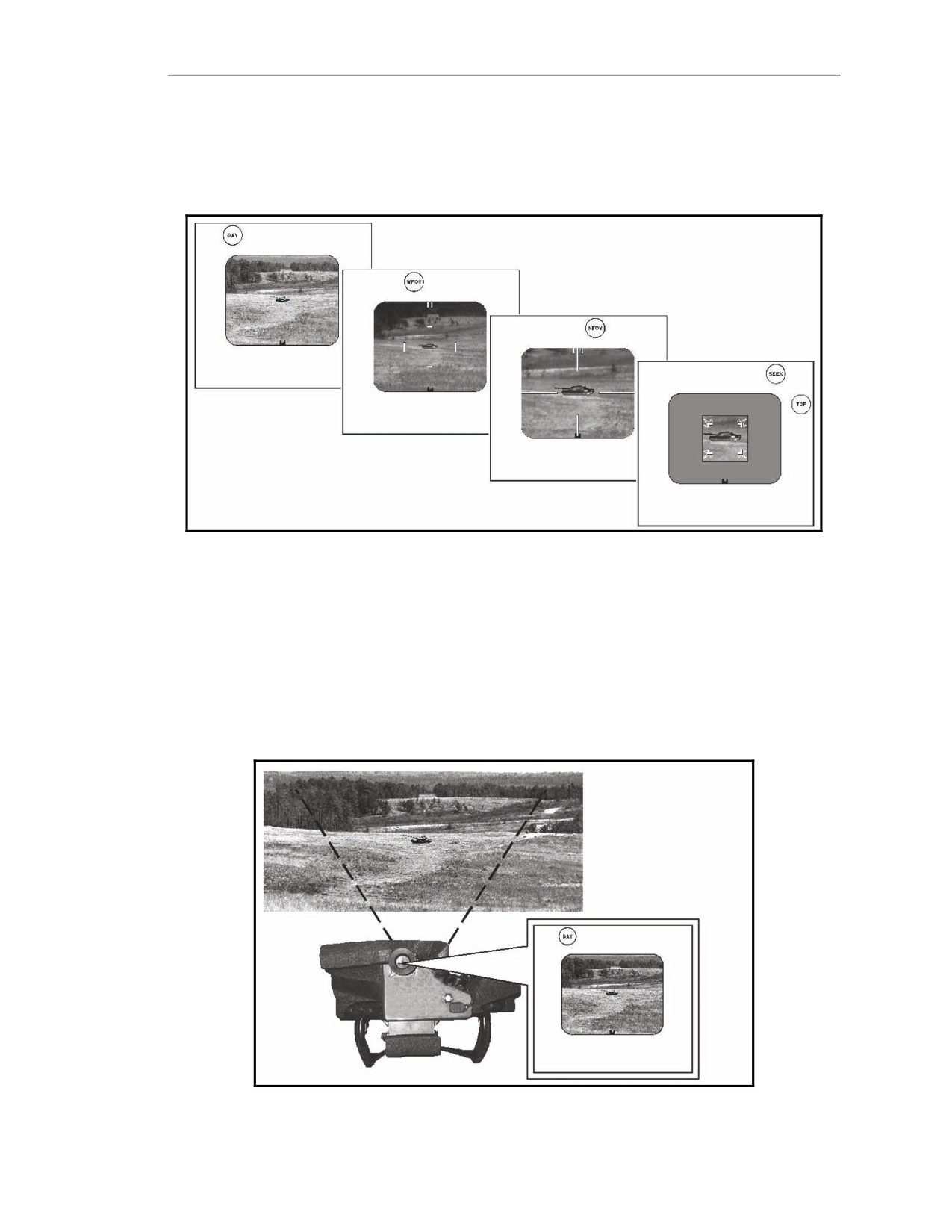
TARGET ACQUISITION
E-79. Target acquisition consists of target detection, classification, recognition, and identification,
(Figure E-35). Each step has a specific FOV associated with it. These FOV steps allow the gunner to
progress efficiently into target engagement. The first three steps are discussed in the target acquisition
process only. Target identification is taught at the unit level. Various media is available to assist the
unit in this training.
Figure E-35. Target acquisition steps.
E-22
FM 3-22.37
20 March 2008
Forward Looking Infrared
FIELD-OF-VIEW SEQUENCE
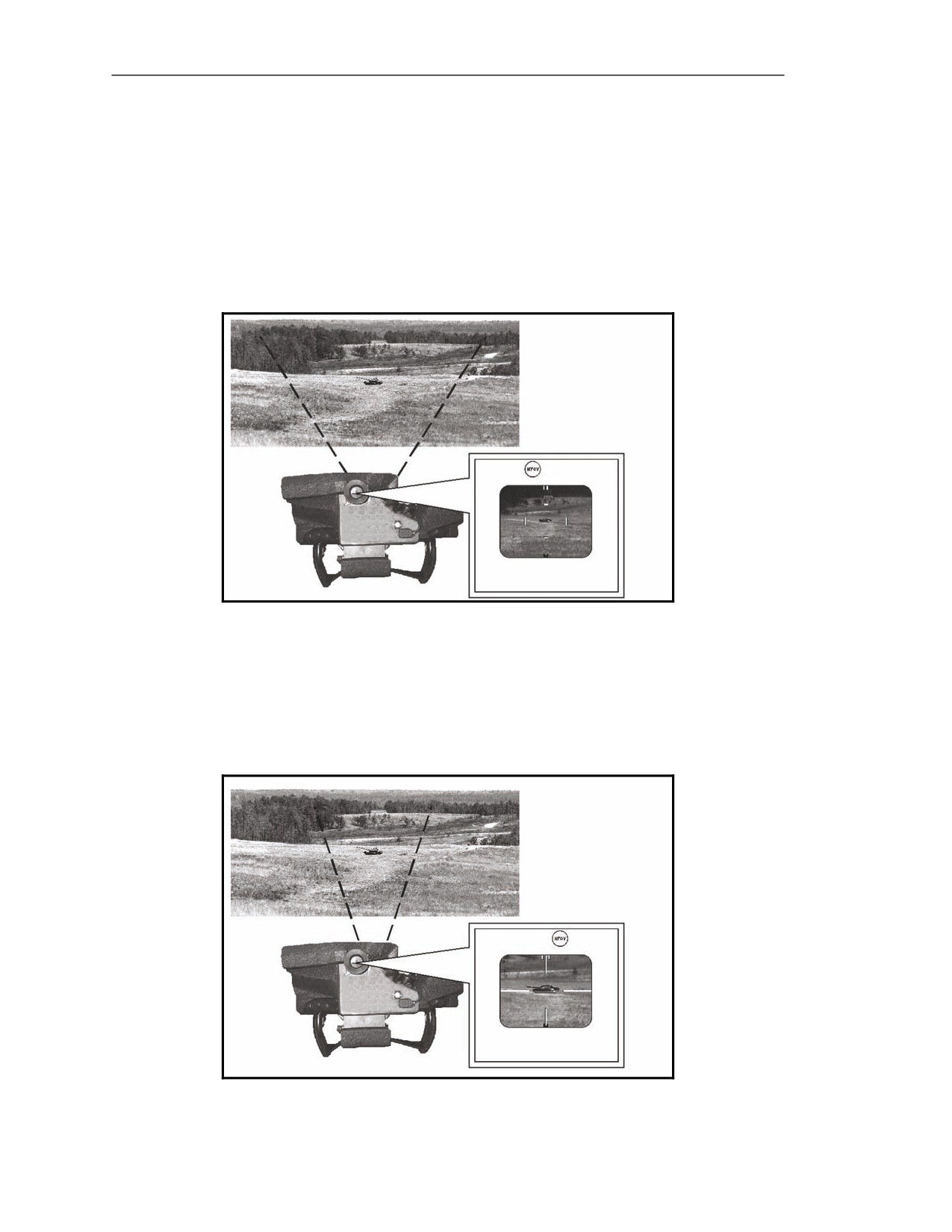
E-80. As the gunner detects, classifies, and recognizes a target, then, determines its engageability, he
must change the FOV, as the task requires. The FOV sequence is day FOV, WFOV, NFOV, and seeker
FOV (Figure E-36).
Figure E-36. Target engagement field-of-view sequence.
Day Field-of-View
E-81. Day FOV provides a full-color, visible-light target image with 4x magnification (Figure E-37).
Day FOV imagery is only useful during daylight hours with clear weather. The gunner should use it
primarily during NVS cooldown or when the IR conditions make it difficult for him to see the target in
the NVS. Day FOV covers a large area and is used primarily for surveillance and target detection. The
4x magnification limits the gunner’s ability to make out target details that are required for target
classification, recognition, and identification. However, the gunner may activate the seeker in this FOV
to perform a quick engagement.
Figure E-37. Day field-of-view image and area of coverage.
20 March 2008
FM 3-22.37
E-23
Appendix E
Night Vision Sight
E-82. The NVS provides two fields of view: WFOV and NFOV. Both provide IR images and can be
used at any time of day under any weather conditions. The NVS is the gunner’s primary sight.
Wide Field-of-View
E-83. WFOV provides 4.2x magnification of the target scene (Figure E-38). WFOV is ideal for use
during surveillance and target detection due to its large area of coverage. The low magnification means
the gunner cannot see the target details very well, which makes it a poor tool for target classification,
recognition, and identification.
Figure E-38. Wide field-of-view image and area of coverage.
Narrow Field-of-View
E-84. NFOV provides about
9x magnification of the target scene
(Figure E-39). Its higher
magnification means that NFOV is useful for seeing target details for target classification, recognition,
and identification. At the same time, the restricted area of coverage makes it difficult to use for target
detection.
Figure E-39. Narrow field-of-view image and area of coverage.
E-24
FM 3-22.37
20 March 2008
Forward Looking Infrared
Seeker Field-of-View
E-85. Seeker FOV provides an IR image with about 9x magnification (Figure E-40). The seeker FOV
has a limited coverage area and image resolution, and should be used only for engaging targets.
Figure E-40. Seeker field-of-view image and area of coverage.
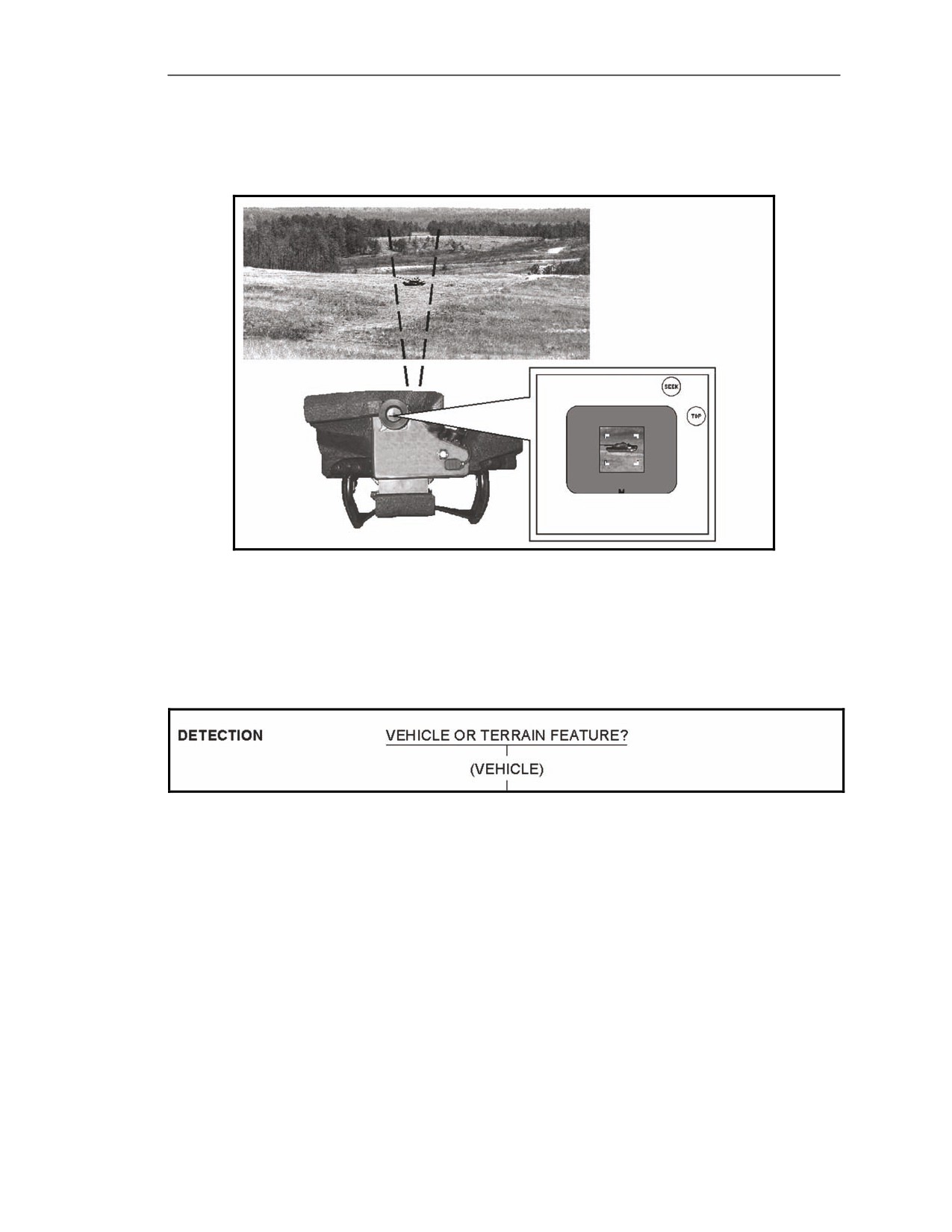
TARGET DETECTION
E-86. The first step in the target acquisition process is target detection (Figure E-41). During this step,
the gunner scans his sector of fire to find or acquire a target using the CLU, mainly the NVS. Some
techniques that help detect targets are discussed in the following paragraphs.
Figure E-41. Target acquisition―detection.
Definition
E-87. Target detection describes the process by which the gunner visually locates and distinguishes the
features of a vehicle from the surrounding terrain features.
Scanning for Targets
E-88. The gunner shouldʊ
z
Scan the entire sector of fire using WFOV.
z
Scan slowly and steadily in a consistent, systematic pattern.
z
Pay special attention to those positions in which a target might appear.
z
Identify the location of objects, such as TRPs, trees, roads, buildings, and previously killed
targets that have a distinct IR signature. This procedure enables the gunner to quickly locate
targets in his sector of fire.
z
Look for man-made shapes that have straight lines and block angles.
20 March 2008
FM 3-22.37
E-25
Appendix E
Scanning Techniques
E-89. The gunner must scan his sector of fire at all times for the enemy using rapid scan, slow scan,
and detailed search.
Rapid Scan
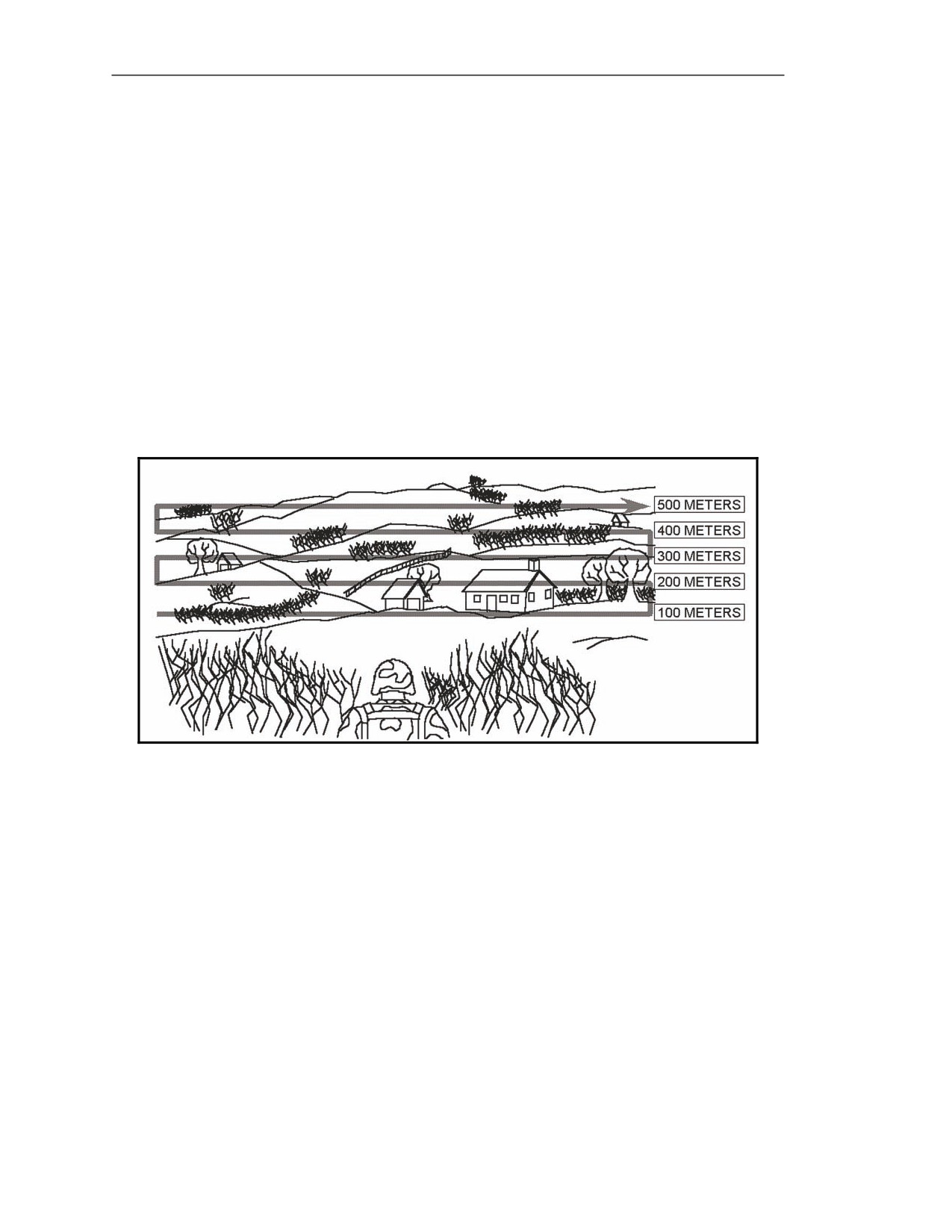
E-90. The rapid scan search technique (Figure E-42) is used to detect obvious signs of enemy activity.
It is usually the first method the gunner uses. To conduct a rapid scan—
z
Search a strip of terrain about 100 meters deep, from left-to-right, pausing at short intervals.
z
Search another 100-meter strip farther out, from right to left, overlapping the first strip
scanned and pausing at short intervals.
z
Continue this method until the entire sector of fire has been searched.
Slow Scan
E-91. The slow scan search technique uses the same process as the rapid scan but much more
deliberately, which means a slower side to side movement and more frequent pauses. When a possible
target has been detected, stop and search the immediate area thoroughly using the detailed search.
Figure E-42. Rapid/slow scan pattern.
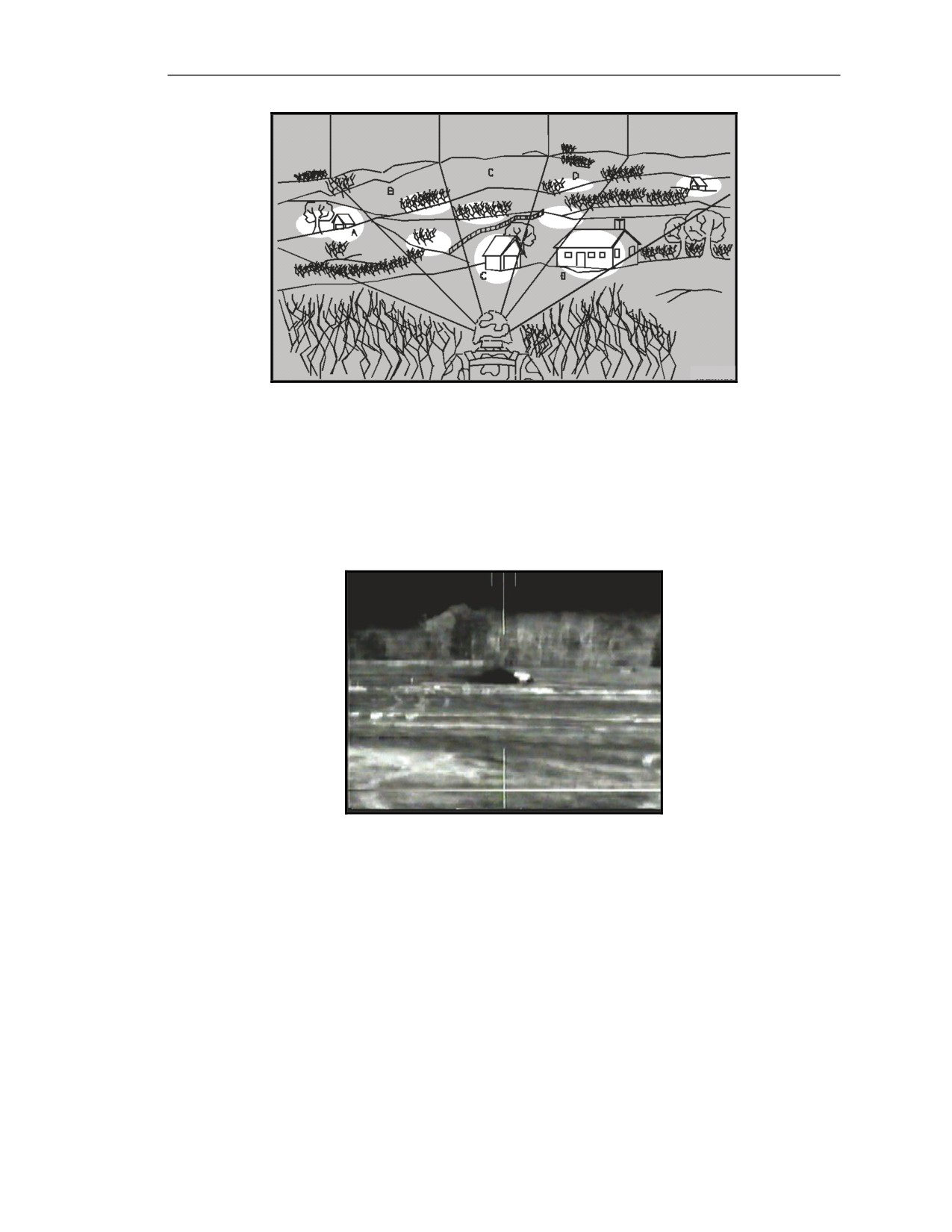
Detailed Search
E-92. If the gunner finds no targets using either the rapid or slow scan techniques, he makes a careful,
detailed search of the target area using NFOV (Figure E-43). The detailed search is like the slow scan,
but searching smaller areas with frequent pauses and almost incremental movement. The detailed
search, even more than the rapid or slow scan, depends on breaking a larger sector into smaller sectors
to ensure everything is covered in detail and no possible enemy positions are overlooked.
z
Concentrate on likely vehicle positions and suspected AAs.
z
Look for target signatures around prominent terrain features, such as road junctions, hills,
and lone buildings. Also, look at areas with cover and concealment, such as tree lines and
draws.
E-26
FM 3-22.37
20 March 2008
Forward Looking Infrared
Figure E-43. Detailed search.
DEFENSIVE OPERATIONS (MOVING TARGETS)
E-93. When trying to detect the enemy, the gunner should look and listen for signs of enemy presence:
Dust or Vehicle Exhaust
E-94. Moving vehicles often raise dust. Stay alert for dust because it can be spotted at long ranges (Figure E-44).
Figure E-44. Dust cloud from moving vehicle.
Vehicle Movement
E-95. Look for enemy movement along high-speed AAs. Search along terrain features that offer
masking, such as tree lines and draws.
Flashing Hot Spots
E-96. As a vehicle moves over small gullies and hills at a distance, its hot spots appear to be flashing
and appear to become visible, then invisible as the vehicle drops below the observation line.
Sounds
E-97. Equipment or vehicle sounds can alert the gunner to the direction or general location of the
enemy. These sounds may not pinpoint the enemy's exact location, but if a sound alerts the gunner to a
general area, he is more likely to spot the enemy in that area using the detailed search technique.
20 March 2008
FM 3-22.37
E-27
Appendix E
Image Adjustment
E-98. The gunner can spot moving targets easily due to the hot signatures from the suspension, engine
compartment, and exhaust, and due to the changes in the target aspect as the target moves in his sector
of fire. When the gunner is in a defensive position, he adjusts the image so he can see all of the terrain
features (Figure E-45). This procedure helps him locate any targets moving in his sector of fire.
Figure E-45. Image adjustment for defensive position.
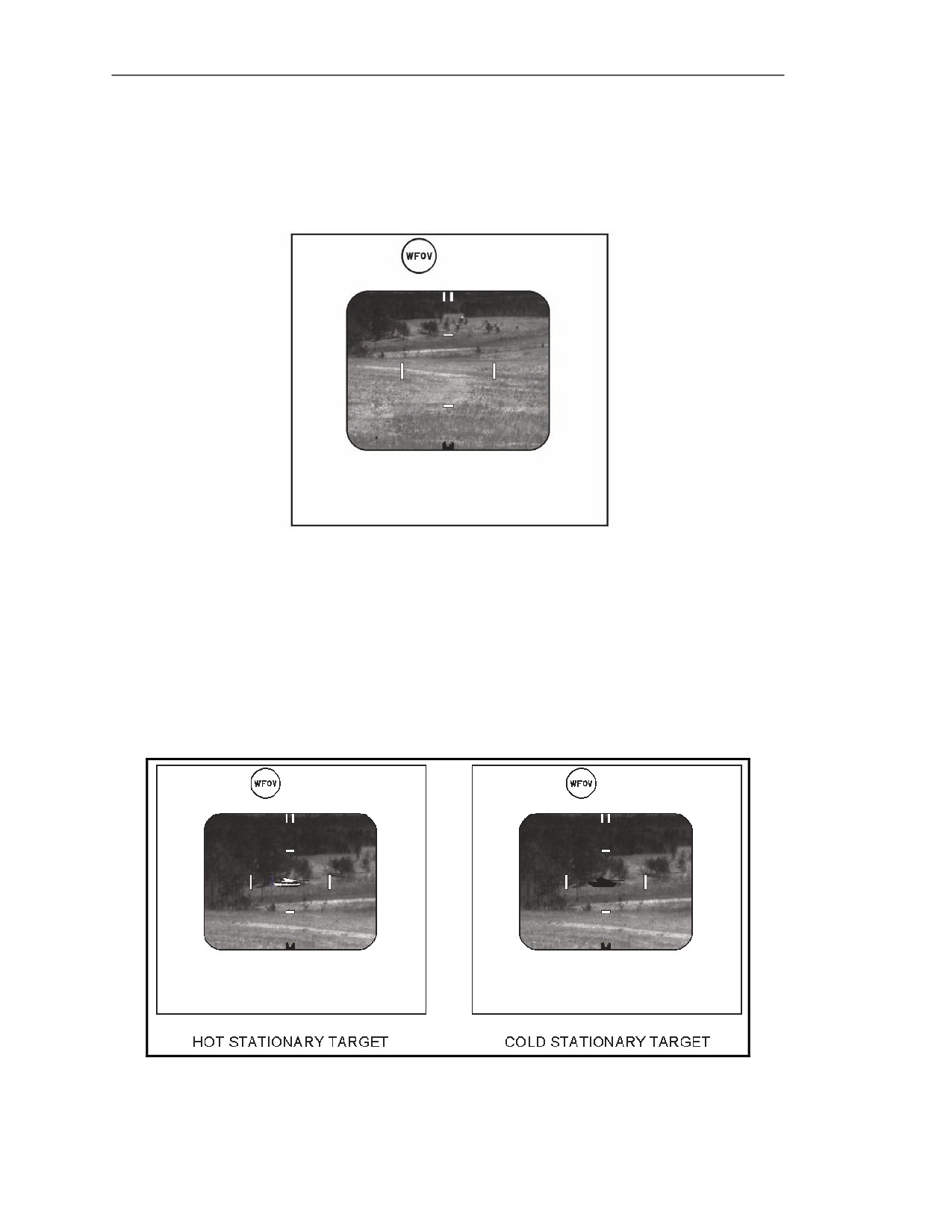
OFFENSIVE OPERATIONS (STATIONARY TARGETS)
E-99. During offensive operations, the gunner may encounter stationary targets. A stationary target is
more difficult to detect than a moving target, because it does not give away its location by moving, but
can be partly or completely concealed by a terrain feature. Key IR signatures may be cold. Depending
on how long the target has been stationary, the gunner may see hot, cold, or partly cool signatures. The
IR image of a hot, stationary target is much easier to detect than that of a cold, stationary target (Figure
E-46). The gunner can augment his visual search to find an enemy emplacement. The difficulty in
detecting a target is directly affected by the temperature of the surrounding terrain.
Figure E-46. Hot and cold stationary targets.
E-28
FM 3-22.37
20 March 2008
Forward Looking Infrared
Sounds
E-100. Listen for equipment and vehicle sounds.
Vehicle Exhaust
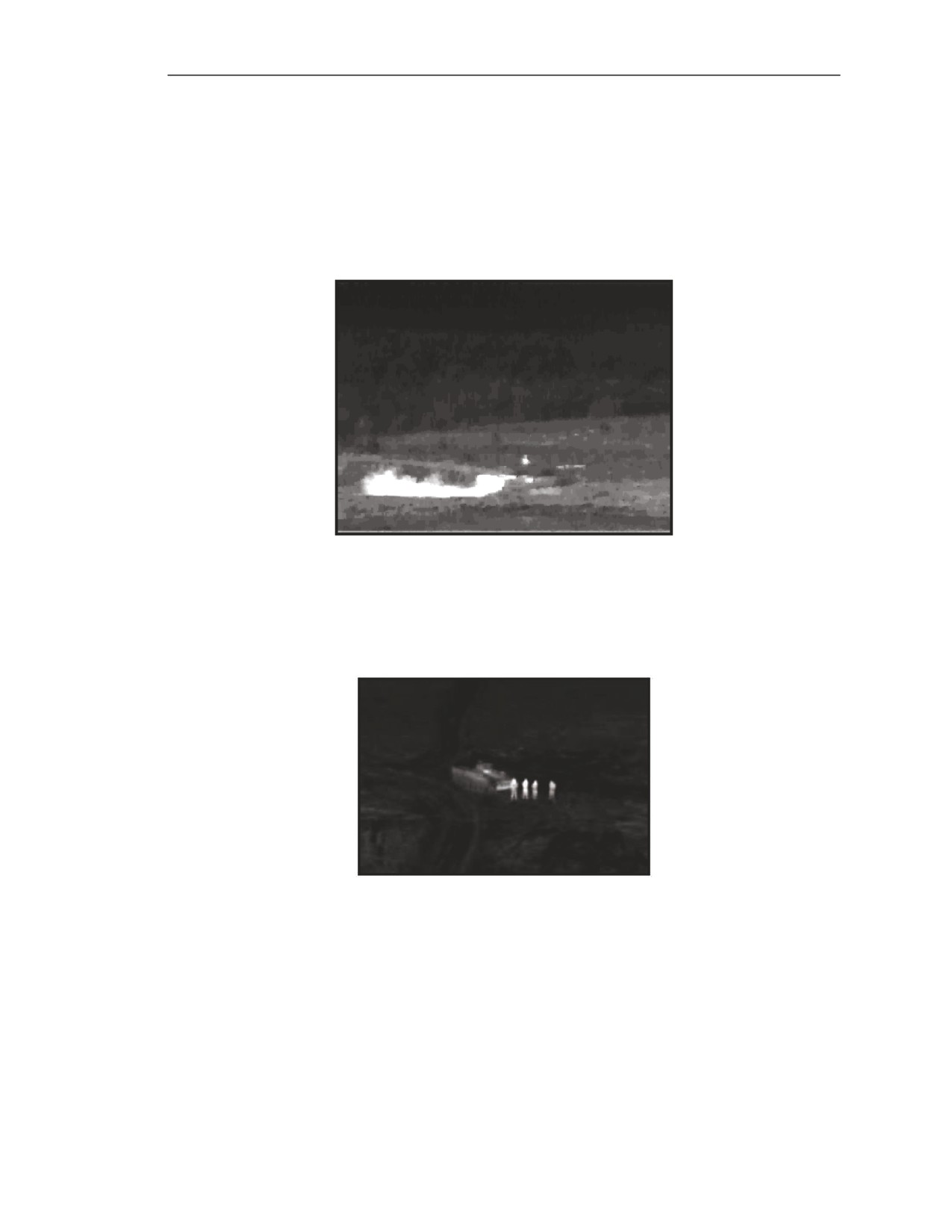
E-101. Be alert to the presence of vehicle exhaust. Tanks need their engines started every few hours
to charge the batteries, which creates a large plume of exhaust (Figure E-47) and a distinctive smell,
which may linger even after the engine has been turned off.
Figure E-47. Vehicle exhaust.
Dismounted Troops
E-102. The human body is a good IR source, and appears as a hot image. Watch for dismounted troop
movement (Figure E-48) that can give away the position of a mechanized force.
Figure E-48. Dismounted troops as infrared source.
Vehicle Positions
E-103. Look for enemy positions in obvious places, such as road junctions, hilltops, and lone
buildings. Observe areas with cover and concealment, such as wood lines and draws.
Image Adjustment
E-104. The gunner may have to adjust the image several times to detect stationary targets due to
various circumstances and examine the following:
z
In what aspect (frontal or flank) the gunner sees the targets, which affects what IR
signatures he is able to see.
20 March 2008
FM 3-22.37
E-29
Appendix E
z
If the targets are partly hidden by a terrain feature, such as when it is in defilade or in a tree
line.
z
Whether targets are hot from recent activity or solar heating, partly cool due to reduced
activity, or cold due to long inactivity.
HOT STATIONARY TARGETS
E-105. Hot stationary targets are the easiest to detect. When a stationary target has hot signatures, the
gunner can assume there has been recent activity or solar heating. To find hot signatures easily, adjust
contrast up and brightness down so that only the hottest signatures appear in the FOV, and the rest of
the scene is black (Figure E-49). When the gunner thinks he has detected a target, he adjusts the
contrast and brightness so he can see the rest of the target’s features. Depending on the target’s
exposure and aspect, some of the signatures to look for include the suspension system, engine
compartment/exhaust, gun tube or barrel, and an indirect signature called backlighting.
Figure E-49. Image adjustment for detecting hot stationary targets.
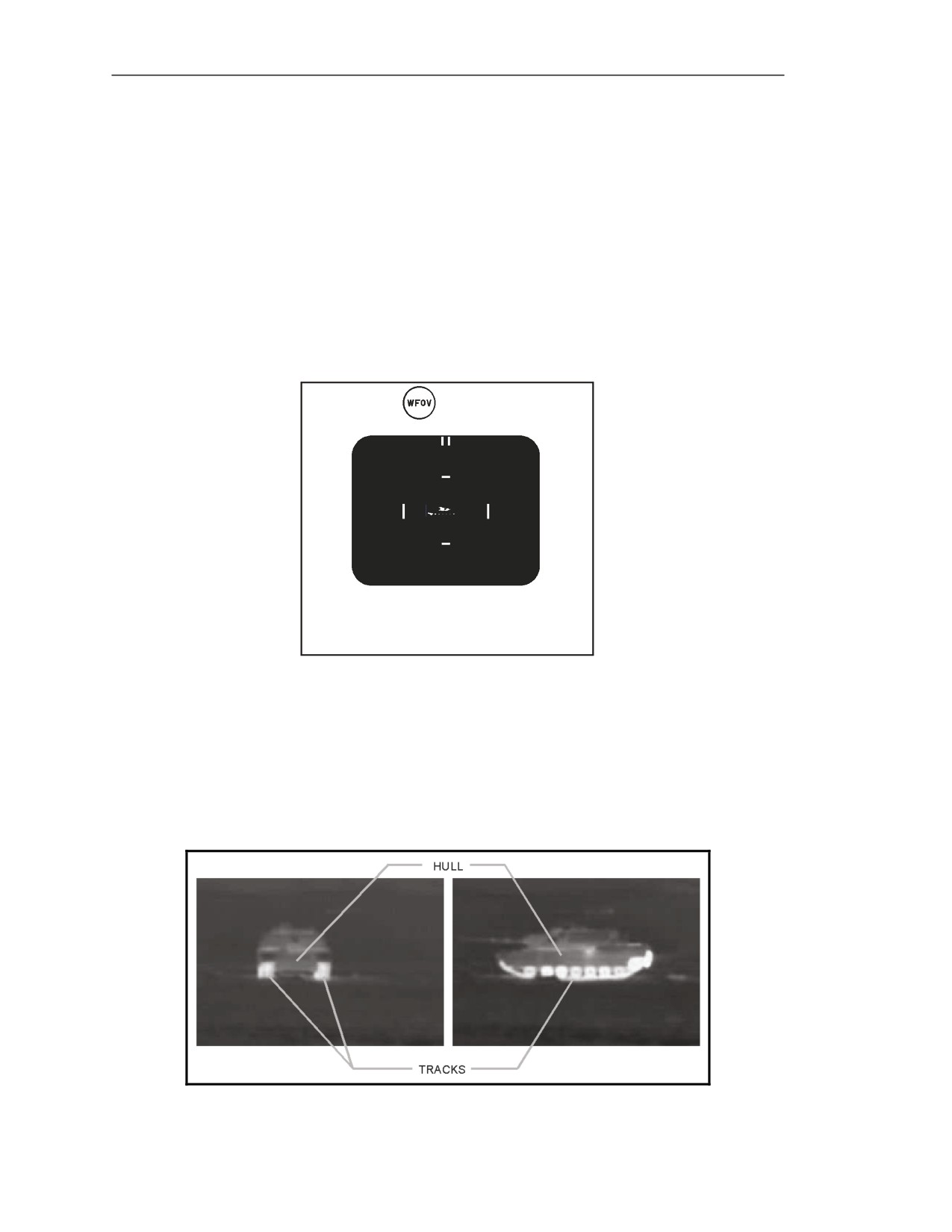
Suspension System
E-106. When a target has moved recently, its suspension presents a hot IR signature. The track area
presents hot spots due to heating from friction. When viewed from the front, the tracks are normally
visible as two IR signatures on either side of and below a larger dark area (the hull) (Figure E-50). If
viewed from the flank, the tracks and road wheels normally are visible as a hot signature beneath a
larger dark area (the hull).
Figure E-50. Track and hull signatures.
E-30
FM 3-22.37
20 March 2008
Forward Looking Infrared
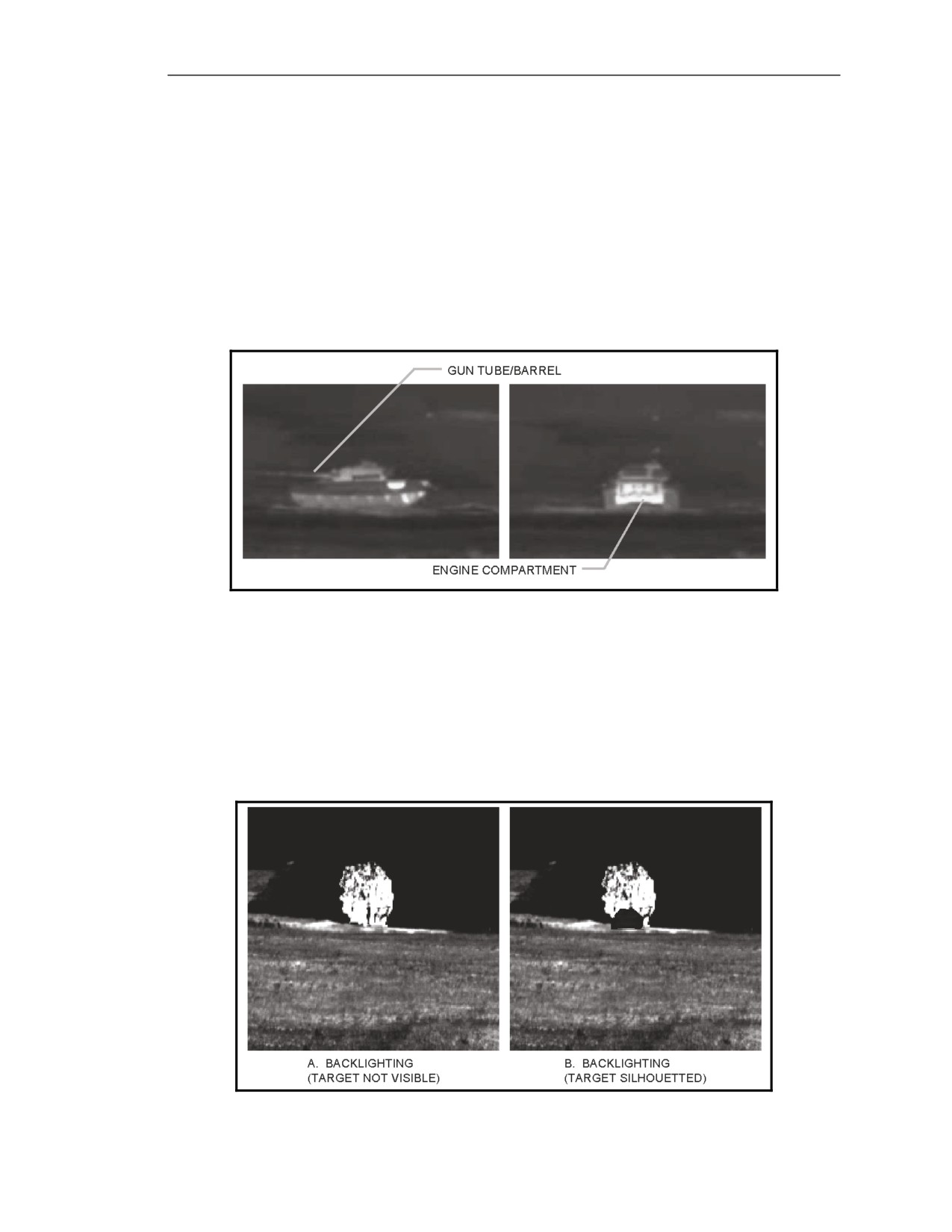
Engine Compartment
E-107. The engine compartment (Figure E-51) is usually a reliable IR signature for the following reasons:
Due to the extreme heat generated by the engine and the large mass of metal of which it is made, a
stationary vehicle's engine compartment gives off a hot IR signature for several hours after the vehicle
is stopped. The engine takes longer to cool than the rest of the hull. A stationary vehicle engine must
be started after long periods of inactivity to keep its battery charged. This situation keeps the IR image
hot.
Gun Tube/Barrel
E-108. The gun tube or barrel is another area to look for heat (Figure E-51). When the gun has been
fired recently, it appears hotter than its background.
Figure E-51. Engine compartment and gun tube/barrel.
Backlighting
E-109. Backlighting is an indirect IR signature that indicates the presence of a target. It is called an
indirect IR signature because, though it is not physically part of the target, it is caused by heat from the
target—usually, from the exhaust. Backlighting occurs when an IR source, such as a tank’s exhaust,
emits IR, which reflects off another object, such as a tree. Even though the gunner may not see a
vehicle, backlighting warns him of its presence (Figure E-52A). When the target is between the gunner
and the backlighting, the target may appear as a silhouette (Figure E-52B).
Figure E-52. Backlighting.
20 March 2008
FM 3-22.37
E-31
Appendix E
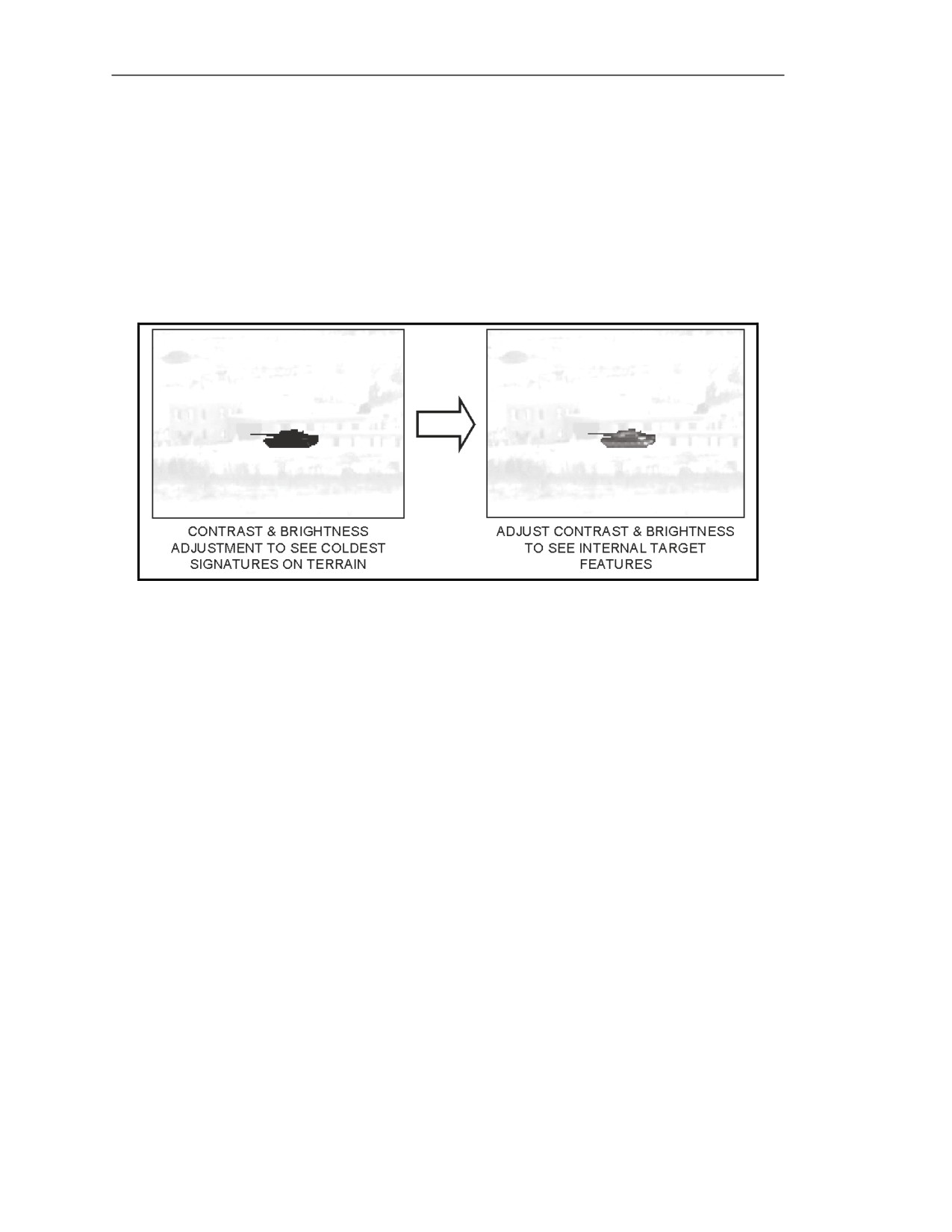
COLD STATIONARY TARGETS
E-110. When the gunner sees a cold stationary target, he can assume there has been no recent activity.
A cold target is cooler than its background. It appears as a dark green or black image against a lighter
green background. Look for an IR signature that resembles a silhouette of a wheeled or tracked vehicle
(Figure E-53).
E-111. To find cold targets easily, adjust contrast up and brightness up so only the coldest signatures
appear in the gunner’s FOV and the rest of the scene is bright green.
E-112. When the gunner thinks he has detected a target, he adjusts the contrast and the brightness so
he can see the rest of the target’s features.
Figure E-53. Image adjustment for detecting cold, stationary targets.
PARTIALLY COOL STATIONARY TARGETS
E-113. When stationary targets are partially cooled, the gunner can assume there has been some
activity. Partially cool stationary targets are especially difficult to detect because their signatures are
closer to the same temperature as the surrounding terrain. Their signatures also become distorted and
incomplete as they cool. This procedure causes the signatures to blend with the background. To find
partially cool targets, the gunner has to adjust the contrast and the brightness in various combinations
while he scans his sector of fire.
HULL DEFILADE TARGETS (TANKS)
E-114. Hull defilade targets are the most difficult to detect because they are not visible at all times.
When a tank is in defilade, it moves back-and-forth between a firing platform and its hide position.
Firing Platform Position
E-115. The tank stays on the firing platform long enough to fire its main gun (Figure E-54A). During
the short period of time that it is in this position, the gunner sees only the turret and gun tube. As soon
as the tank fires, it moves to its hide position.
Hide Position
E-116. When a tank is in its hide position (Figure E-54B), the gunner cannot see the target, but he
may be able to see the tank commander’s head.
E-32
FM 3-22.37
20 March 2008
Forward Looking Infrared
Figure E-54. Tank in defilade.
TARGET CLASSIFICATION
E-117. Once the gunner detects a potential target, he begins the process of elimination to determine
the target’s classification (Figure E-55).
Figure E-55. Target acquisition process―classification step.
CLASSIFICATION FEATURES
E-118. There are specific features that the gunner looks for to classify a vehicle. These features
include the suspension system, location of the engine compartment, and presence of a gun tube.
Whether or not a feature is visible depends on the target aspect (frontal or flank).
Suspension System
E-119. The suspension type defines the target’s classification.
Wheeled Vehicle (Flank)
E-120. A wheeled vehicle has two- to five-round hot spots at its base that appear large compared to
the rest of the vehicle (Figure E-56A).
Tracked Vehicle (Flank)
E-121. A tracked vehicle has five- to seven-round hot spots created by the road wheels that look small
compared to the rest of the vehicle. The tracks may be visible, and depending on the vehicle
configuration, the gunner may see return rollers or skirts (Figure E-56A).
Wheeled and Tracked Vehicles (Frontal)
E-122. On frontal targets, the suspensions for wheeled and tracked vehicles look similar in the NVS
(Figure E-56B).
20 March 2008
FM 3-22.37
E-33