FM 3-22.37 COMBAT MISSILE SYSTEM, MEDIUM (March 2008) - page 4
Chapter 5
WEAPON SYSTEM (BLOCK 1)
5-2. The Javelin weapon system (Block 1) consists of the improved M98A2 CLU, the FGM-148
round, and a suite of training devices—the M78 BST, the M82 FTT, and the MSR.
COMMAND LAUNCH UNIT
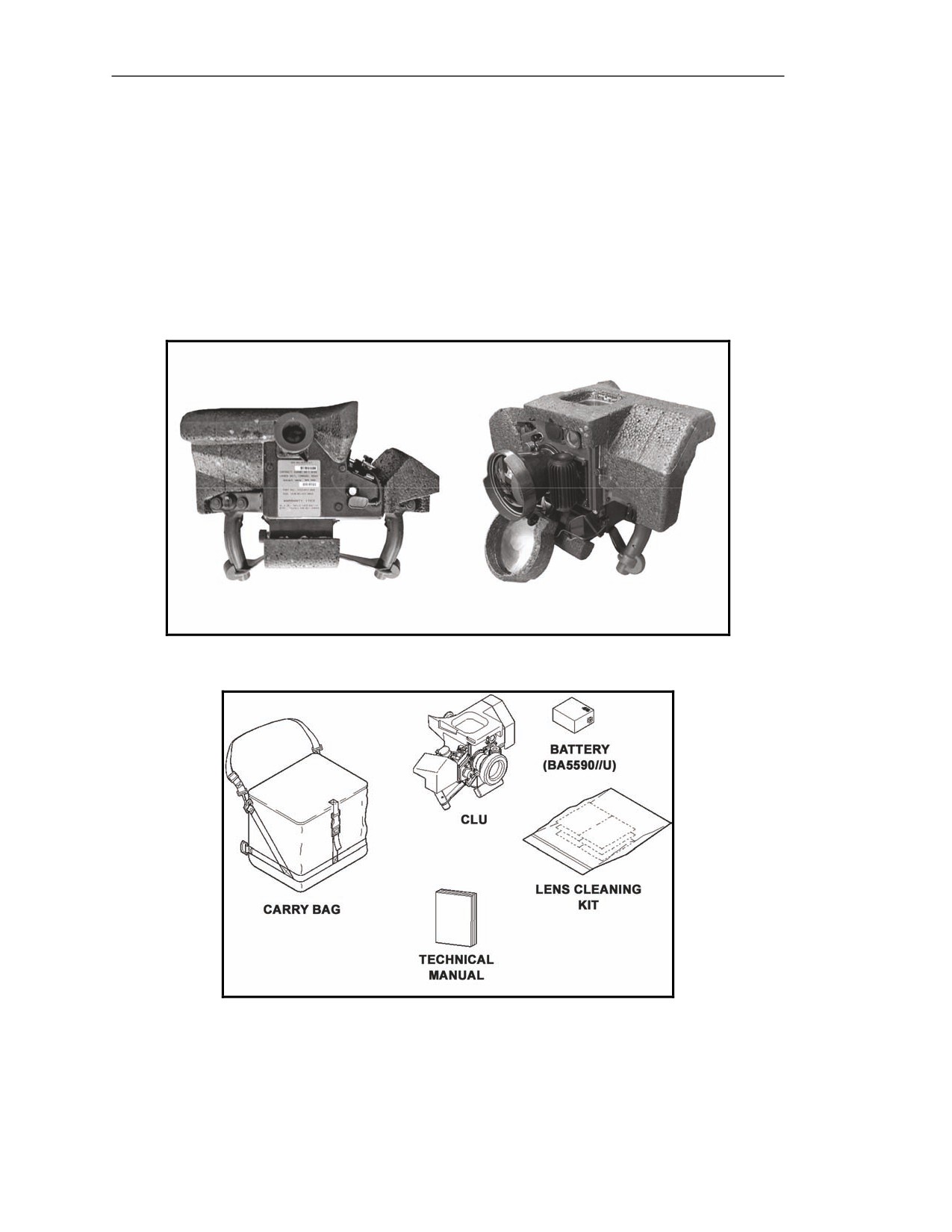
5-3. The CLU (Figure 5-2) is the reusable component of the Javelin. It is equipped with a daysight,
NVS, and controls and indicators used during Javelin operation. The CLU is issued with a carry bag,
which provides space to carry a CLU, a technical manual, a BA-5590/U lithium battery, and a lens
cleaning kit (Figure 5-3).
Figure 5-2. Javelin command launch unit.
Figure 5-3. Javelin command launch unit and accessories.
5-2
FM 3-22.37
20 March 2008
Block 1 Improvements
Daysight
5-4. The daysight allows the gunner to conduct surveillance operations on days with clear weather.
Night Vision Sight
5-5. The NVS allows the gunner to operate during the day and in low visibility conditions.
Controls
5-6. The controls allow the gunner to process all Javelin operations.
Indicators
5-7. The indicators provide the gunner with updates on operational changes within the Javelin.
ROUND
5-8. The round consists of an LTA, a BCU, and a missile.
Launch Tube Assembly
5-9. The LTA serves as the launch platform and carrying container for the missile.
Battery Coolant Unit
5-10. The BCU powers the missile and cools the seeker while the missile is in the LTA.
Missile
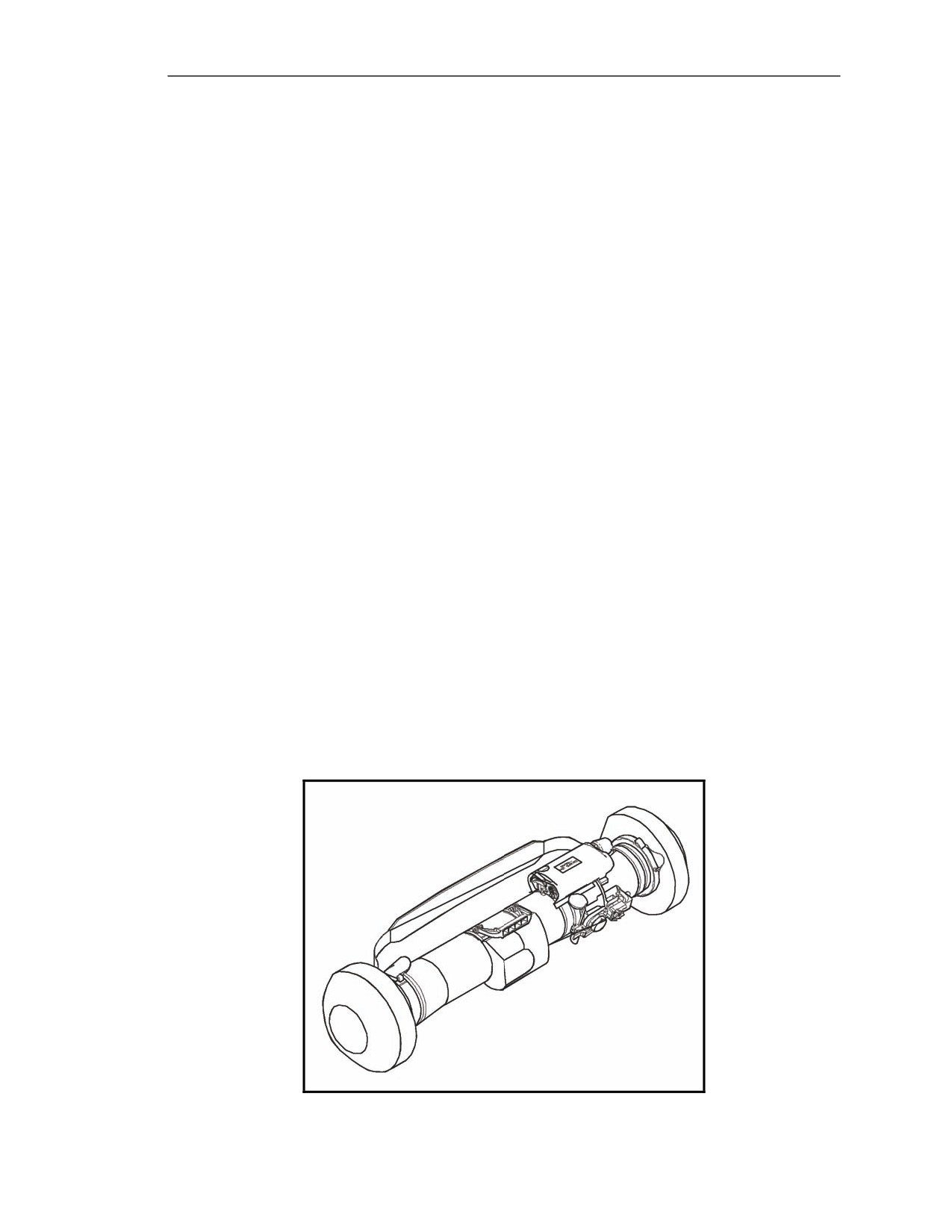
5-11. The missile (Figure 5-4) provides the means to engage and destroy tanks, APCs, and other
vehicles. It is composed of five sections:
z
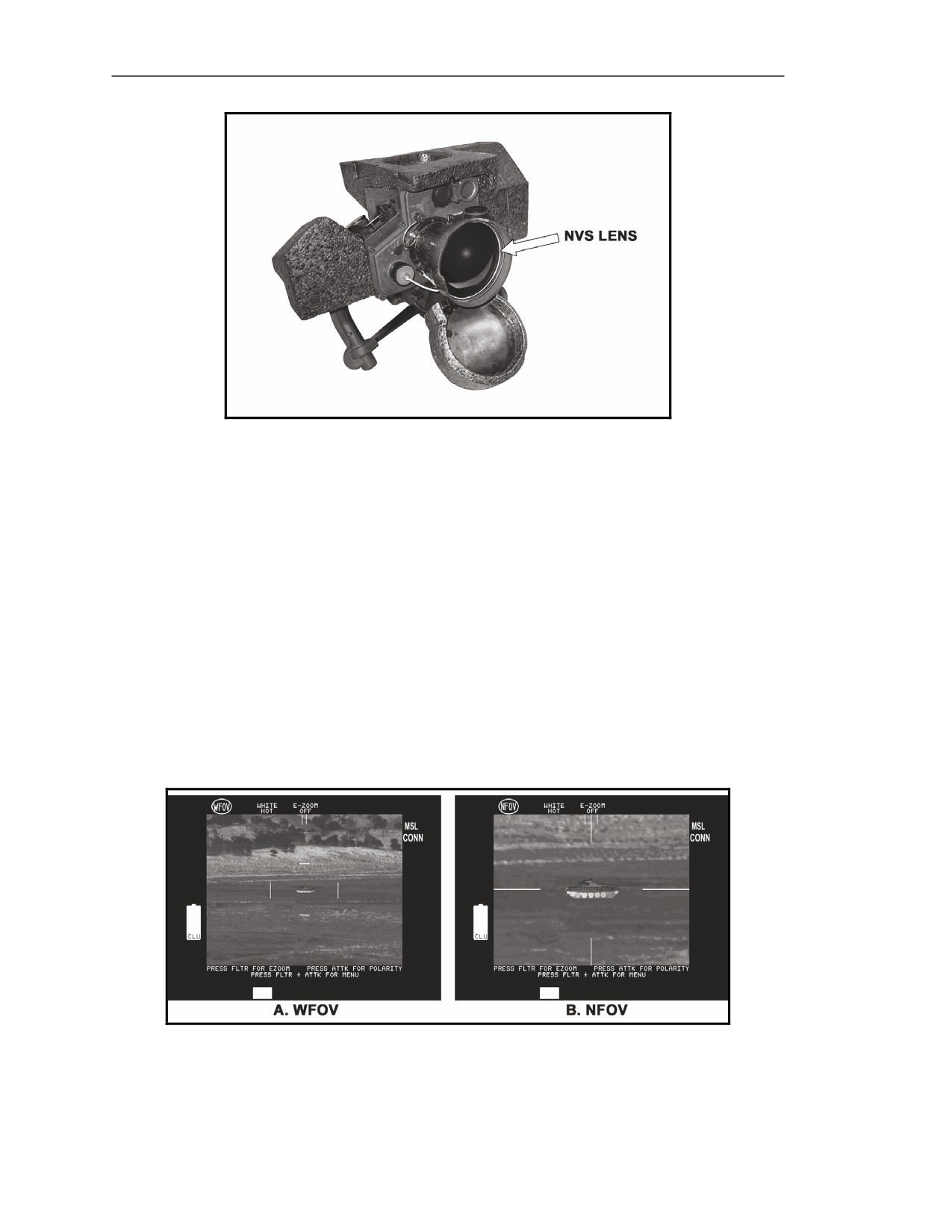
Guidance section.
z
Warhead section.
z
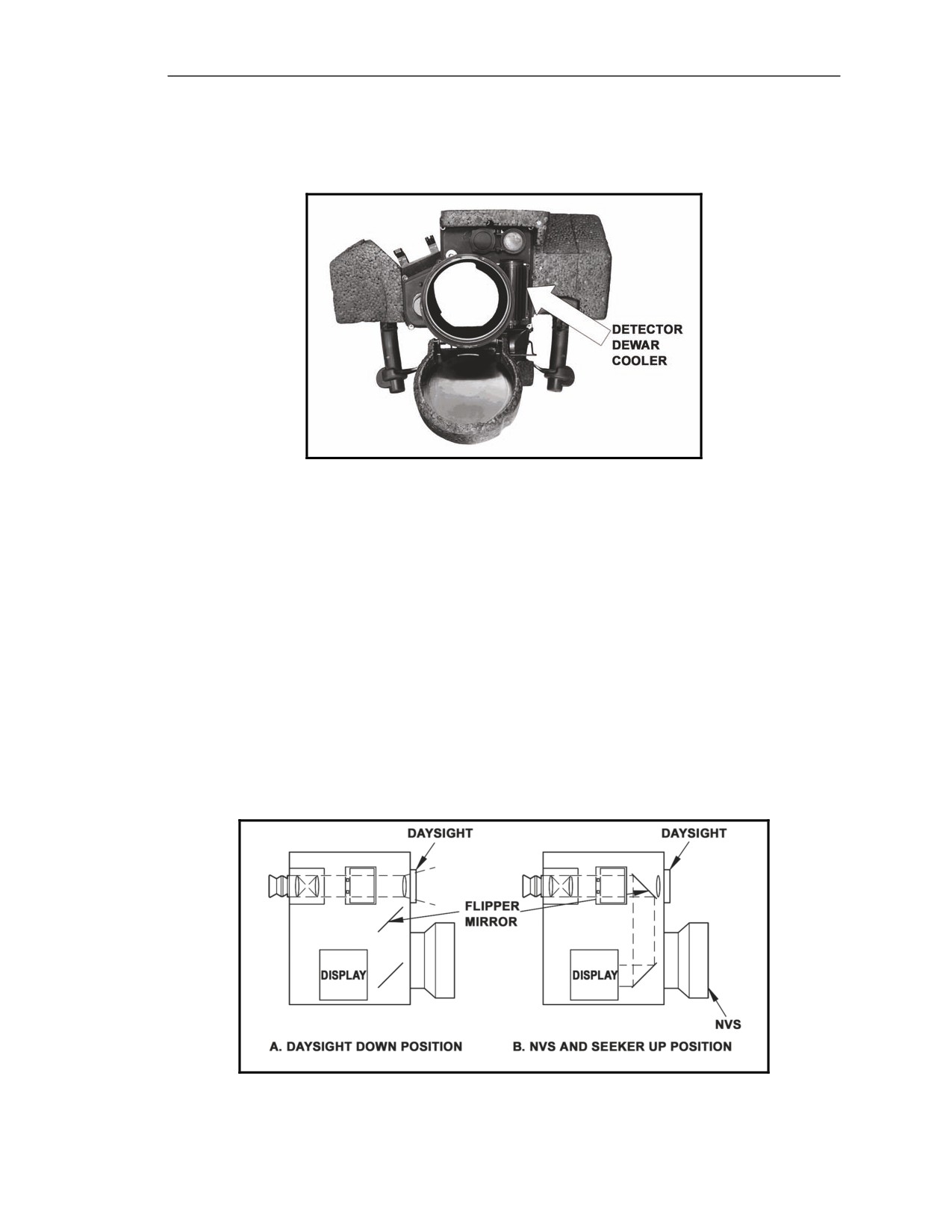
Mid-body section.
z
Propulsion section.
z
Control actuator section.
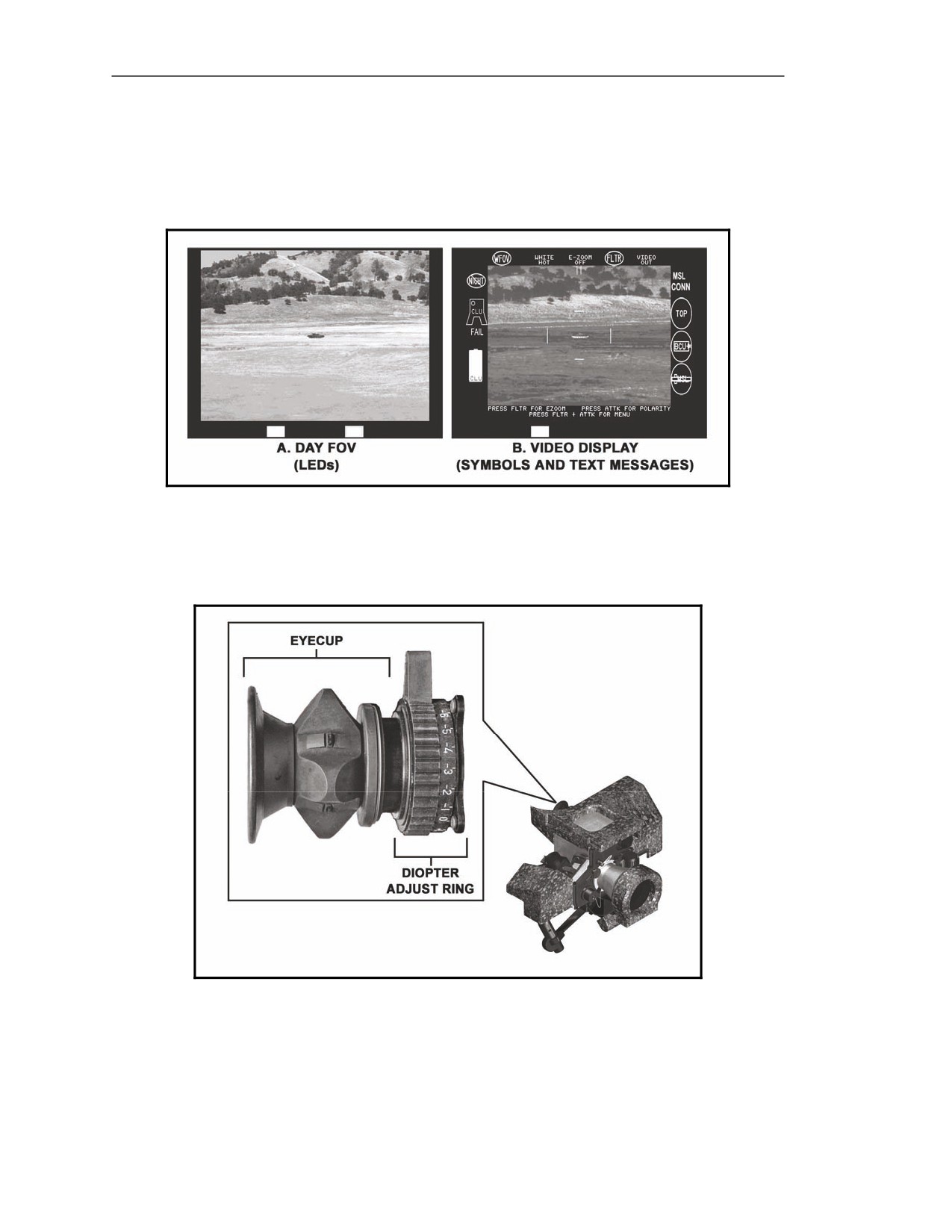
Figure 5-4. Javelin missile.
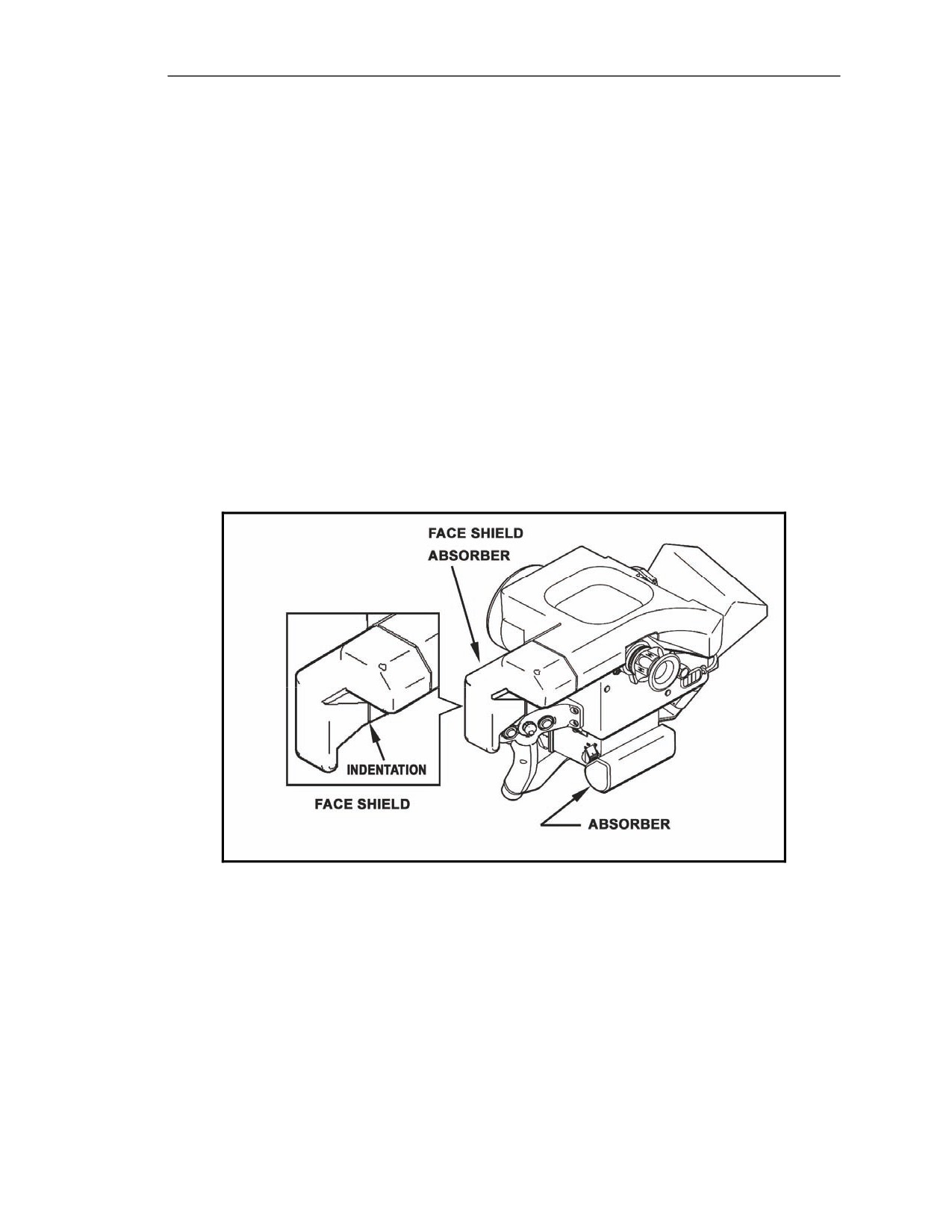
20 March 2008
FM 3-22.37
5-3
Chapter 5
TRAINING DEVICES
5-12. The three training devices associated with the Javelin system—the BST, the FTT, and the
MSR—provide unit leaders with the means to train new Javelin gunners and maintain unit Javelin
gunner proficiency without using live ammunition.
Basic Skills Trainer
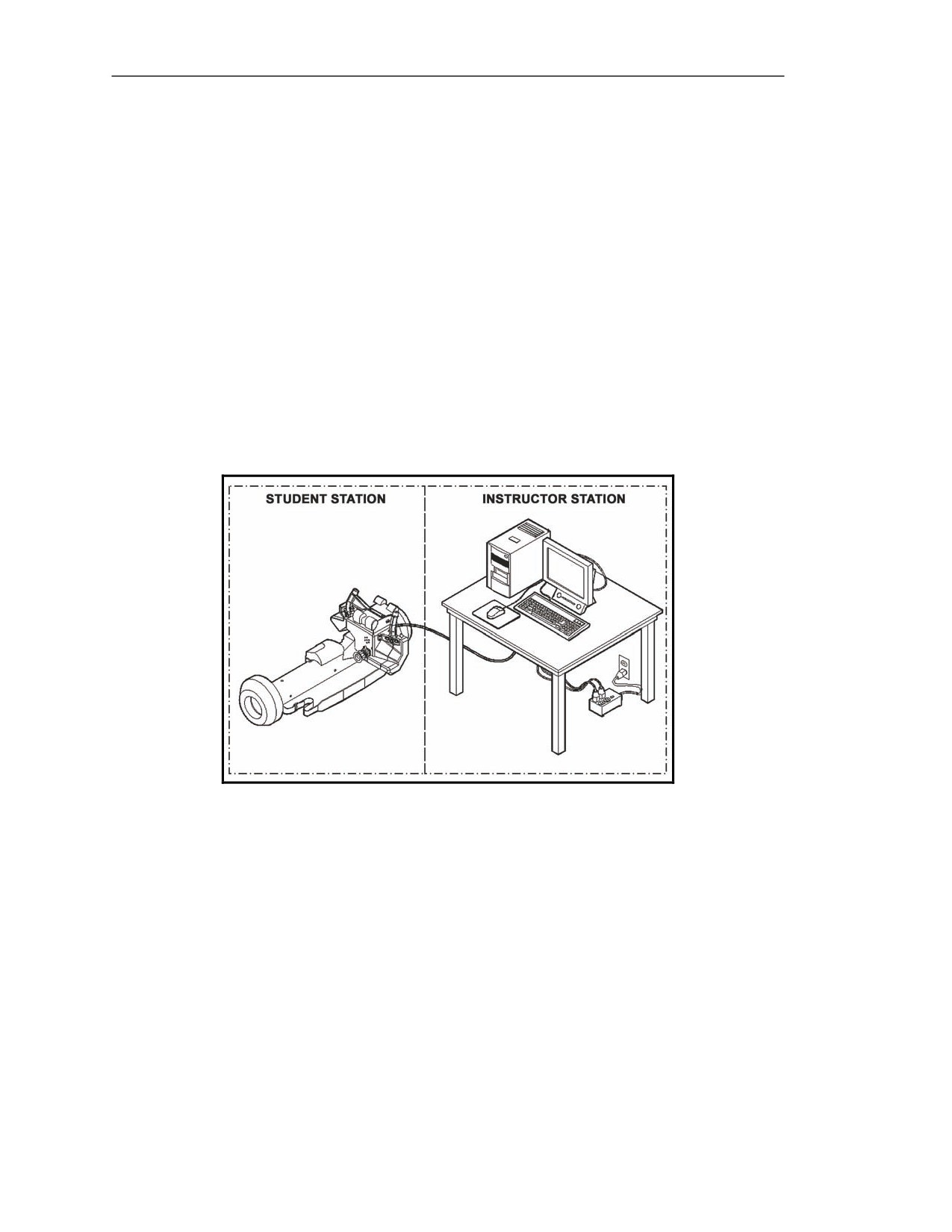
5-13. The BST (Figure 5-5) is an indoor training device consisting of a Soldier station and an
instructor station.
z
The Soldier station consists of a simulated CLU and an MSR, connected to the instructor
station by a W1 cable.
z
The instructor station consists of a desktop computer with a mouse, a keyboard, a monitor, a
surge suppressor, and power cables that connect the instructor station to the Soldier station.
5-14. BST training exercises are created using visible and IR images of real terrain and three-
dimensional target models that simulate target movement. To initiate gunner training, the instructor
selects an exercise using the instructor station monitor. As training continues, the gunner views the
exercises through the simulated CLU and reacts to the situations presented, and the instructor views the
progress on the instructor station monitor.
Figure 5-5. Basic skills trainer.
5-4
FM 3-22.37
20 March 2008
Block 1 Improvements
Field Tactical Trainer
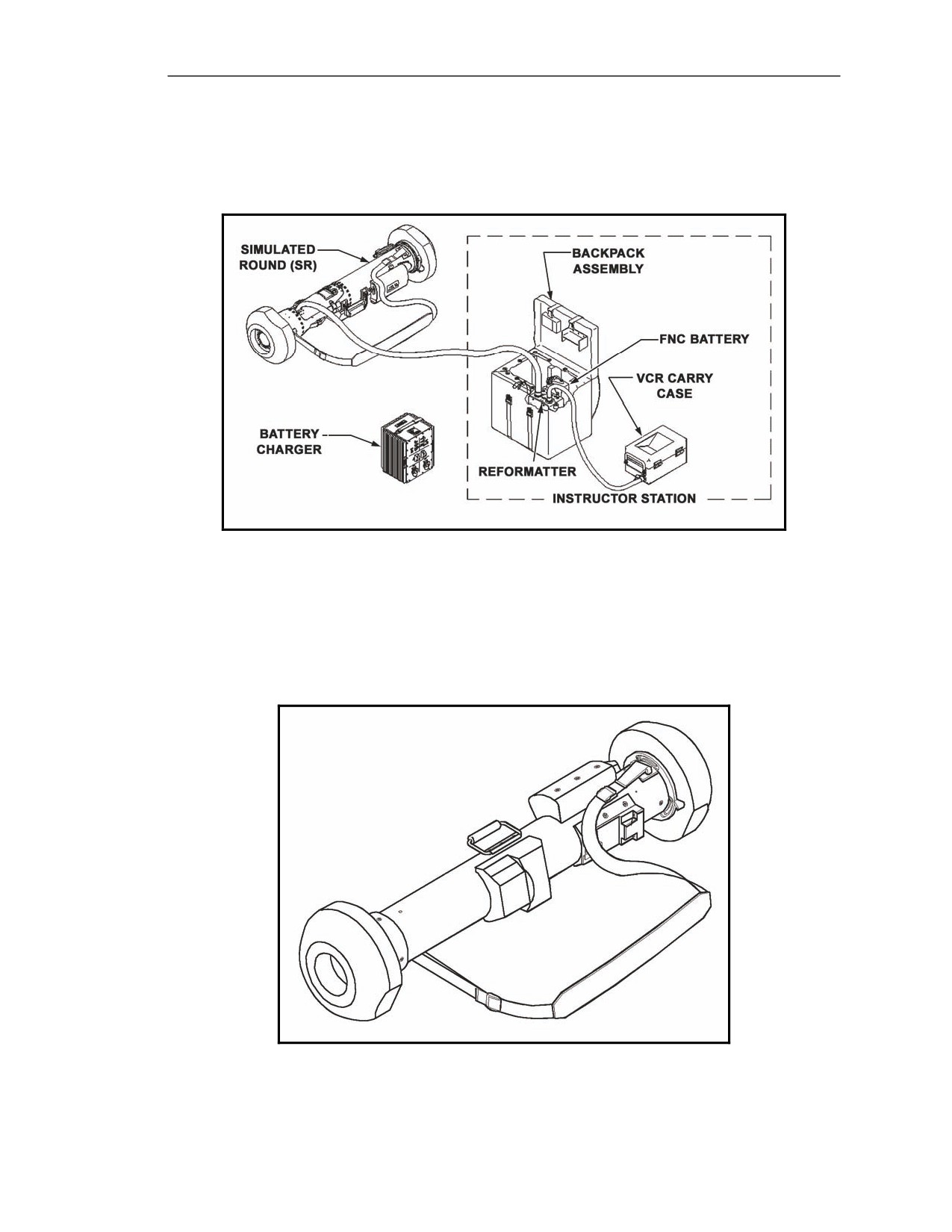
5-15. The FTT (Figure 5-6) is an outdoor training device consisting of a simulated round (equipped
with MILES for FTXs) and an instructor station. The FTT uses the CLU as an integral component.
Figure 5-6. Field tactical trainer.
Missile Simulation Round
5-16. The MSR (Figure 5-7) is a simulated Javelin round that contains no instruments or circuitry, but
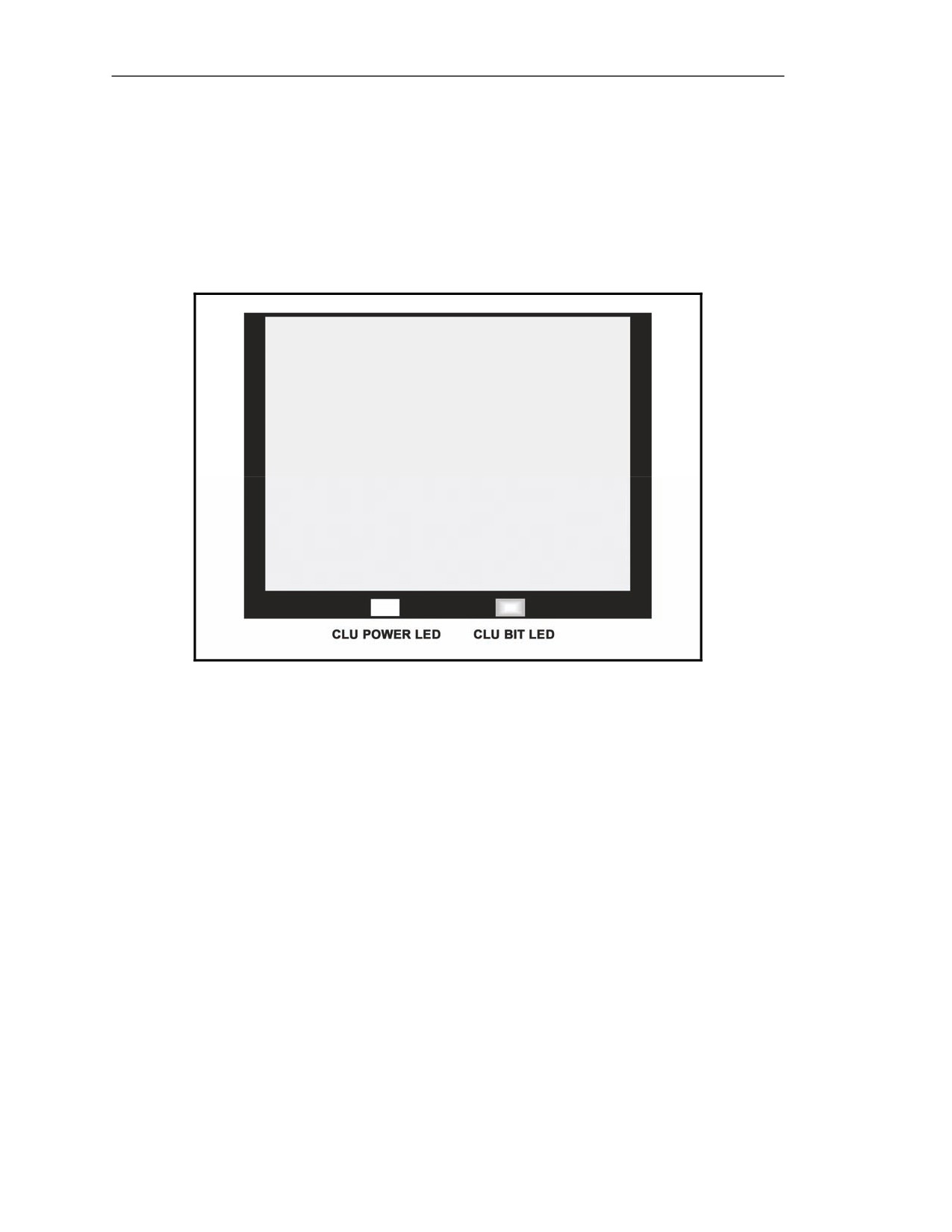
is designed to simulate the weight and balance of an actual round of ammunition. It is used to train
gunners on the techniques used to maintain, handle, and carry the round, and is also used with the BST
to allow the gunner to feel the weight and center of gravity when connected to the simulated CLU.
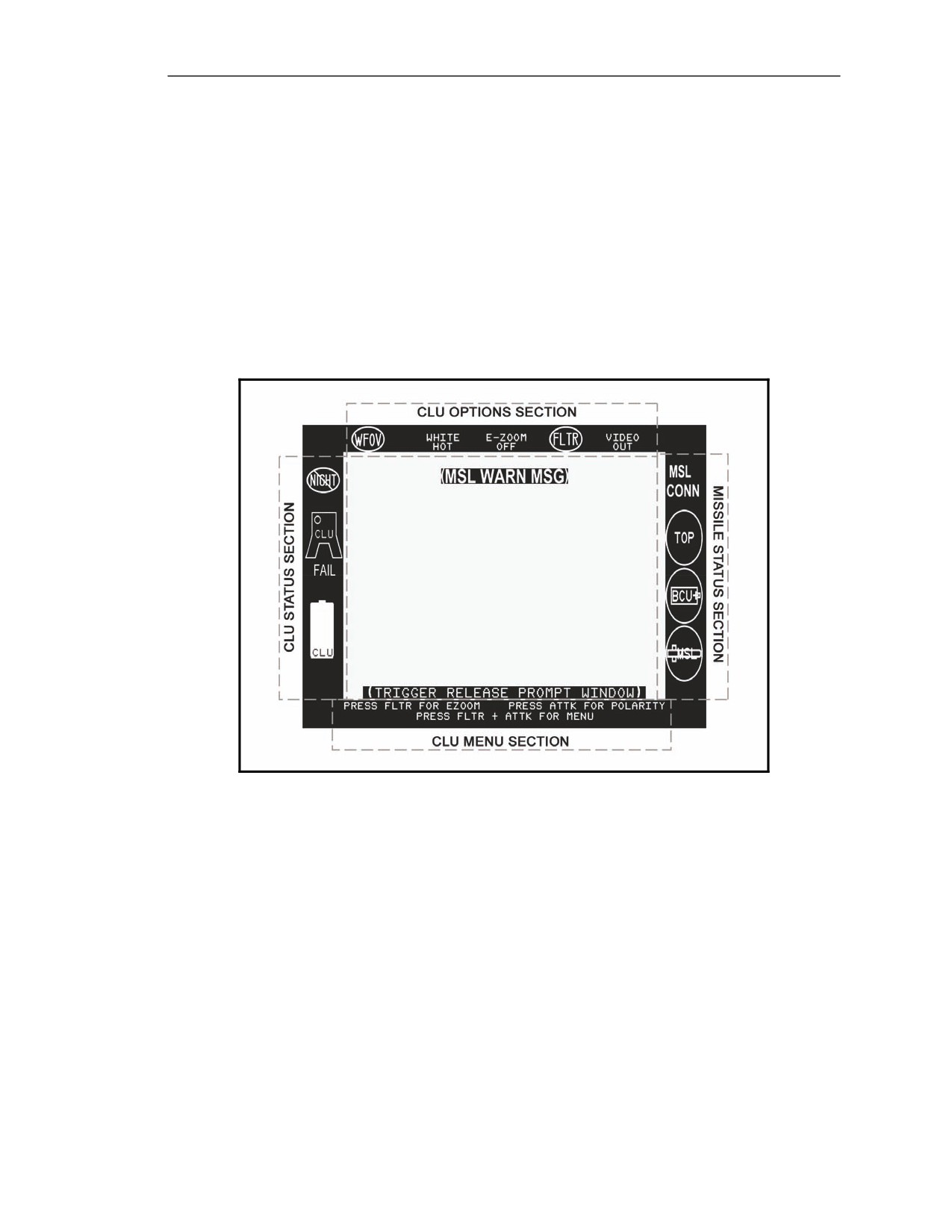
Figure 5-7. Missile simulation round.
20 March 2008
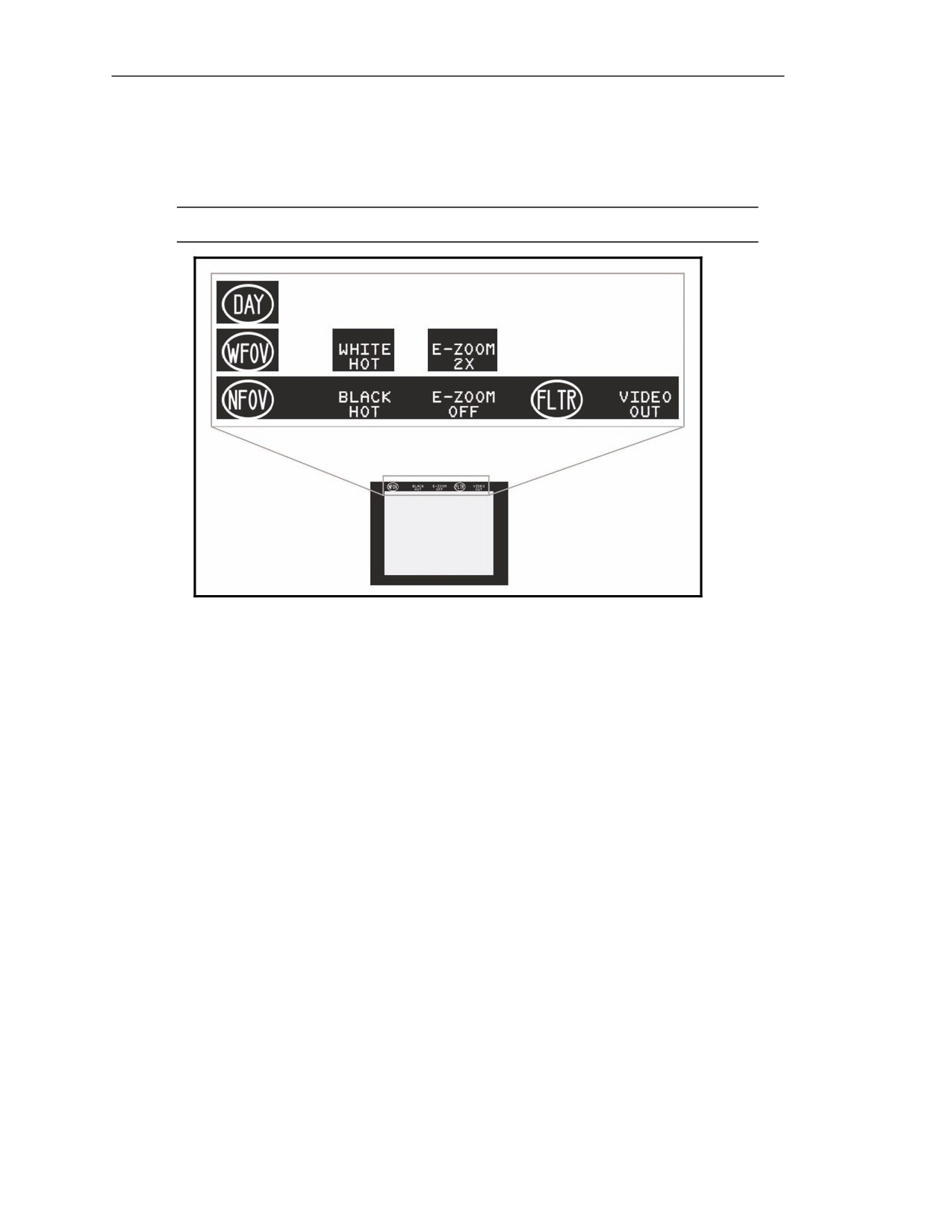
FM 3-22.37
5-5
Chapter 5
EQUIPMENT DATA AND DESCRIPTION
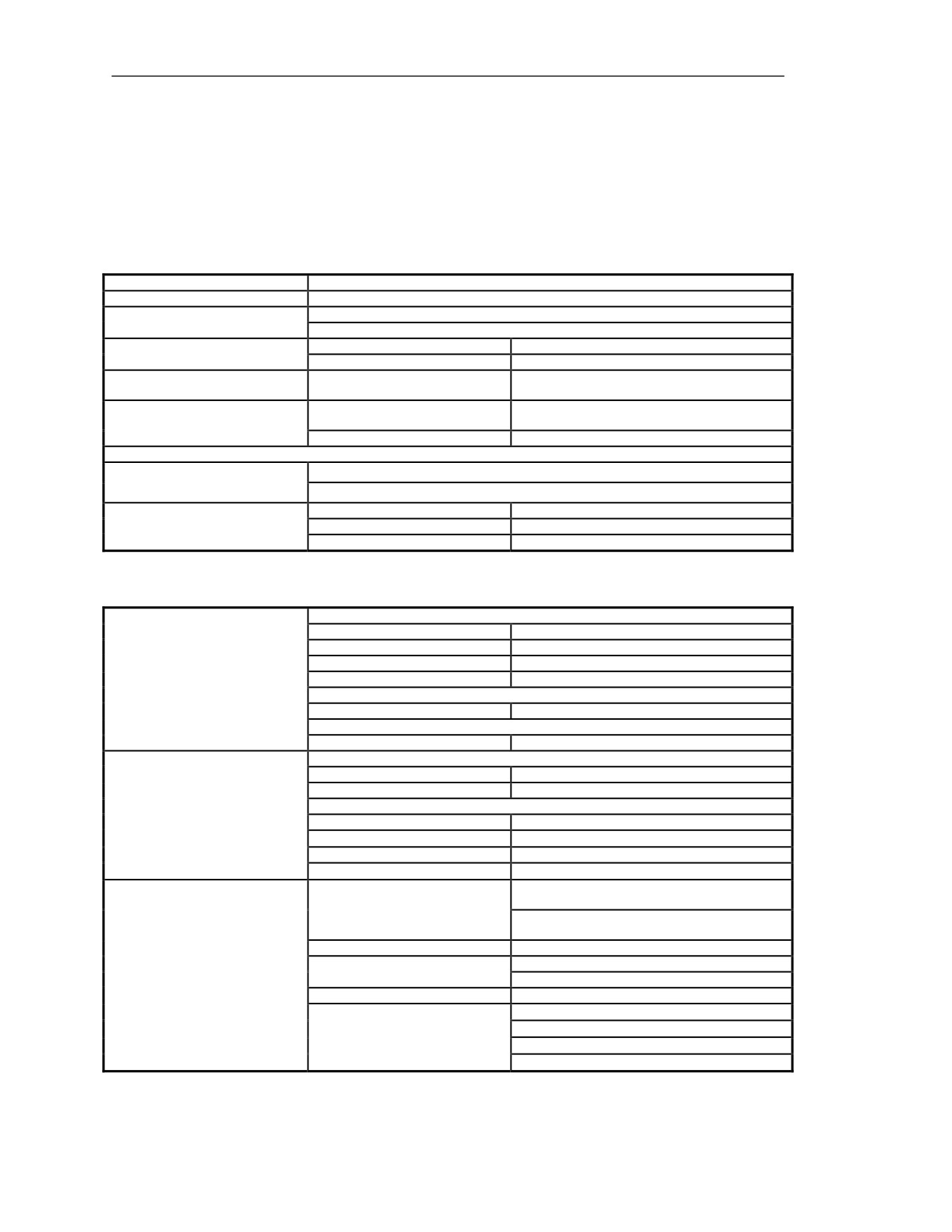
5-17. Tables
5-1 through
5-3 list the Javelin's capabilities and features, the CLU's physical
characteristics, and the round's physical characteristics. Although some information found in the
following tables is similar to that found in Chapter 1, the information helps in showing where
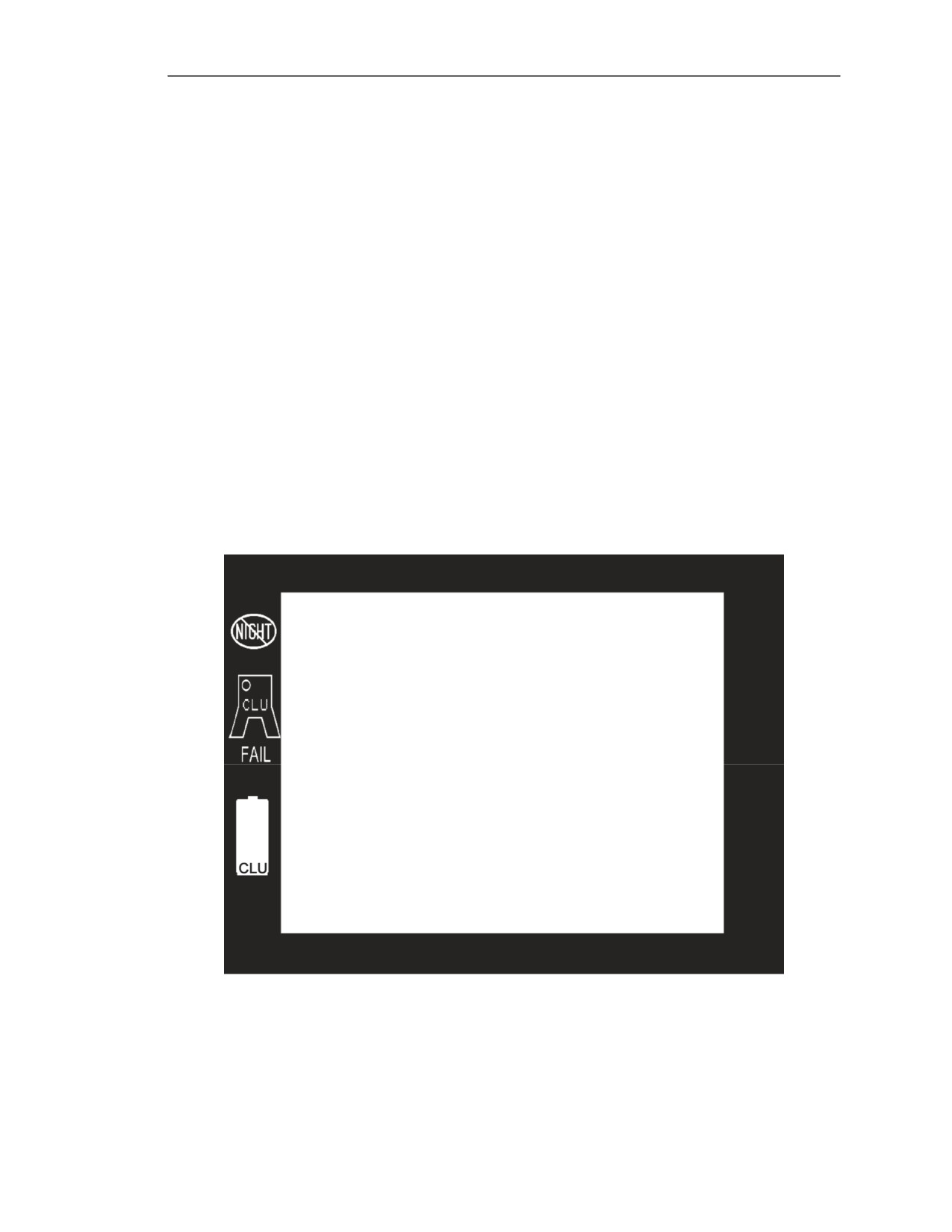
improvements were made to the Javelin.
Table 5-1. Javelin missile and weapon system capabilities and features.
Type of System
Fire and forget
Crew
One- to three-Soldier teams based on TOE
Top attack (default)
Missile Mode
Direct attack
Top attack mode
150 m
Minimum Effective Range
Direct attack mode
65 m
Direct attack and top attack
Maximum Effective Range
2,500 m
modes
Extends out
25 m at a
60-degree
(cone-
Primary danger zone
Backblast Area
shaped) angle
Caution zone
Extends the cone-shaped area out to 100 m
NOTE: See Figure 1-5 and Appendix A for safety factors.
Propulsion-
Launch motor ejects the missile about 15 ft from the LTA
Two-Stage Motor
Flight motor propels the missile to the target
Minimum room length
15 ft
Firing From Inside Enclosures
Minimum room width
12 ft
Minimum room height
7 ft
Table 5-2. Physical characteristics of the command launch unit.
CLU with Battery, Carry Bag, and Cleaning Kit
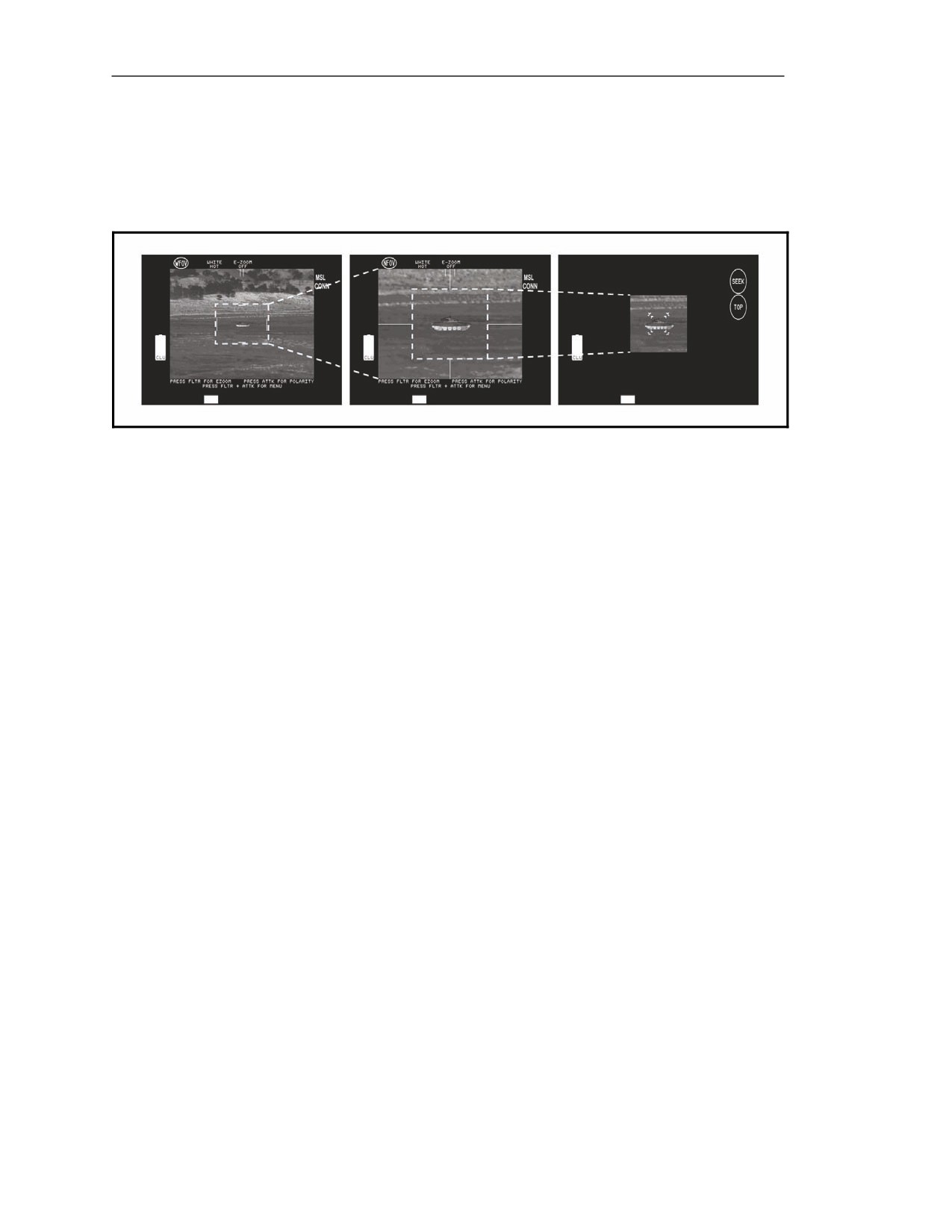
Weight
14.99 lb (6.80 kg)
Length
19.29 in (49.00 cm)
Height
13.00 in (33.02 cm)
Dimensions and Weight
Width
16.50 in (41.91 cm)
Carry Bag Only
Width
0.60 lb (0.27 kg)
CLU with Carry Bag and Cleaning Kit
Weight
12.77 lb (5.79 kg)
Daysight
Magnification
4x
FOV
6.4° x 4.8°
NVS
Sights
WFOV--magnification
4x
WFOV
6.11° x4.58°
NFOV--magnification
12x
NFOV
2° x 1.5° (approximately)
*Lithium sulfur dioxide battery,
BA-5590/U
(Non-rechargeable)
Type
**Nickel metal hydride battery,
BB-390A/U
rechargeable (training use only)
Number required
1
*6135-01-036-3495
Battery
National stock number (NSN)
** 6140-01-490-4317
Weight
2.22 lb (1.01 kg)
4.0 hr below 120°F (49°C)
3.0 hr between 50°F to 120°F (10°C to 49°C)
Life (NIGHT mode)
1.0 hr between -20°F to 50°F (-49°C to 10°C)
0.5 hr above 120°F (49°C)
5-6
FM 3-22.37
20 March 2008
Block 1 Improvements
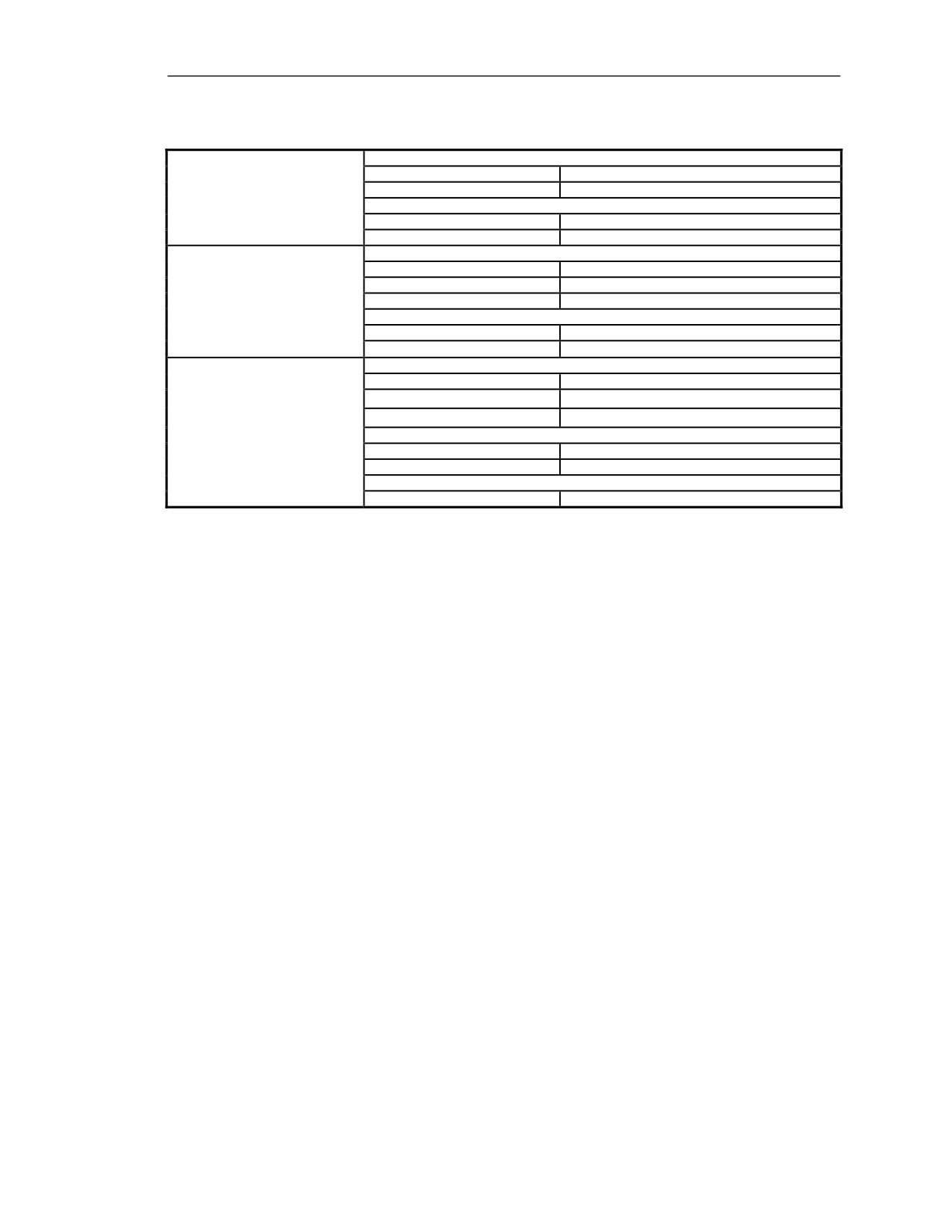
Table 5-3. Physical characteristics of the round.
Weight and Dimensions
Weight
34.16 lb (15.50 kg)
Round, Complete LTA With
Length
47.60 in (120.90 cm)
Missile BCU Installed
Diameter
Across end caps
11.75 in (29.85 cm)
Across LTA
5.515 in (14.00 cm)
Weight and Diameter
Weight
22.328 lb (10.128 kg)
Length
42.626 in (108.27 cm)
Missile Only
Diameter
5.000 in (12.70 cm)
Seeker FOV
FOV magnification
9x
FOV
1° x 1°
Weight and Diameter
Weight
2.91 lb (1.32 kg)
Length
8.160 in (20.726 cm)
Width
4.627 in (11.752 cm)
BCU
Battery Section
Type
Lithium iron disulfide (non-rechargeable)
Life Expectant
4 min minimum
Coolant Gas Section
Type
Argon
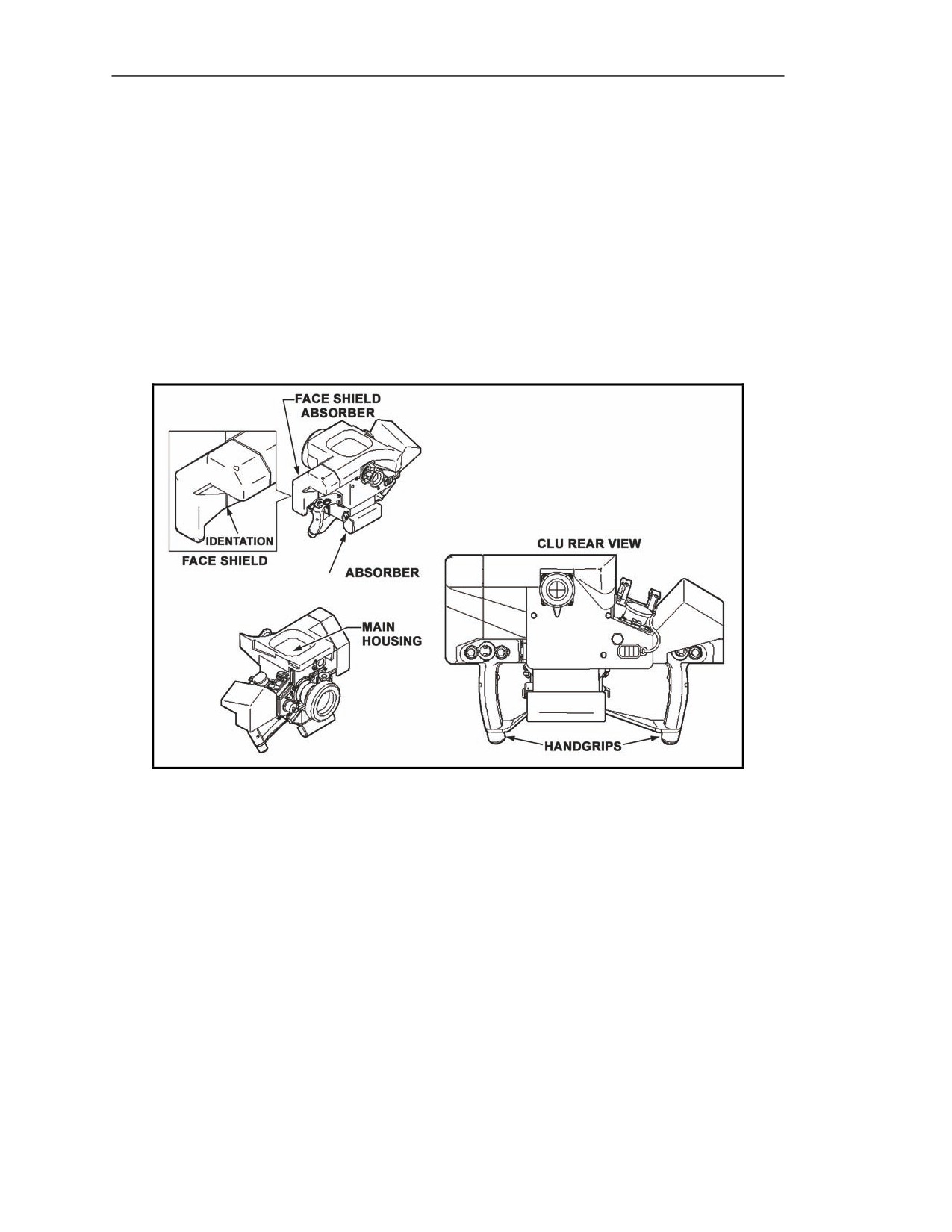
COMMAND LAUNCH UNIT
5-18. The enhanced operating software improves CLU performance by replacing the crossbar portion
with an improved design made from molded material and adding rubber shock absorbers on each end
to provide better shock absorption. The CLU consists of the main housing, shock absorbers, and
handgrips.
20 March 2008
FM 3-22.37
5-7
Chapter 5
MAIN HOUSING
5-19. The main housing (Figure 5-8) is the body of the CLU. It contains the CLU electronics and
various gunner controls. The main housing also includes the—
z
Battery compartment.
z
Test/interface connectors and humidity desiccant plug.
z
Sight video port.
z
Internal power time meter.
z
Day and night vision sights.
z
DDC.
z
Sight and status display.
z
Eyepiece.
Figure 5-8. Main housing.
5-8
FM 3-22.37
20 March 2008
Block 1 Improvements
Battery Compartment and Battery
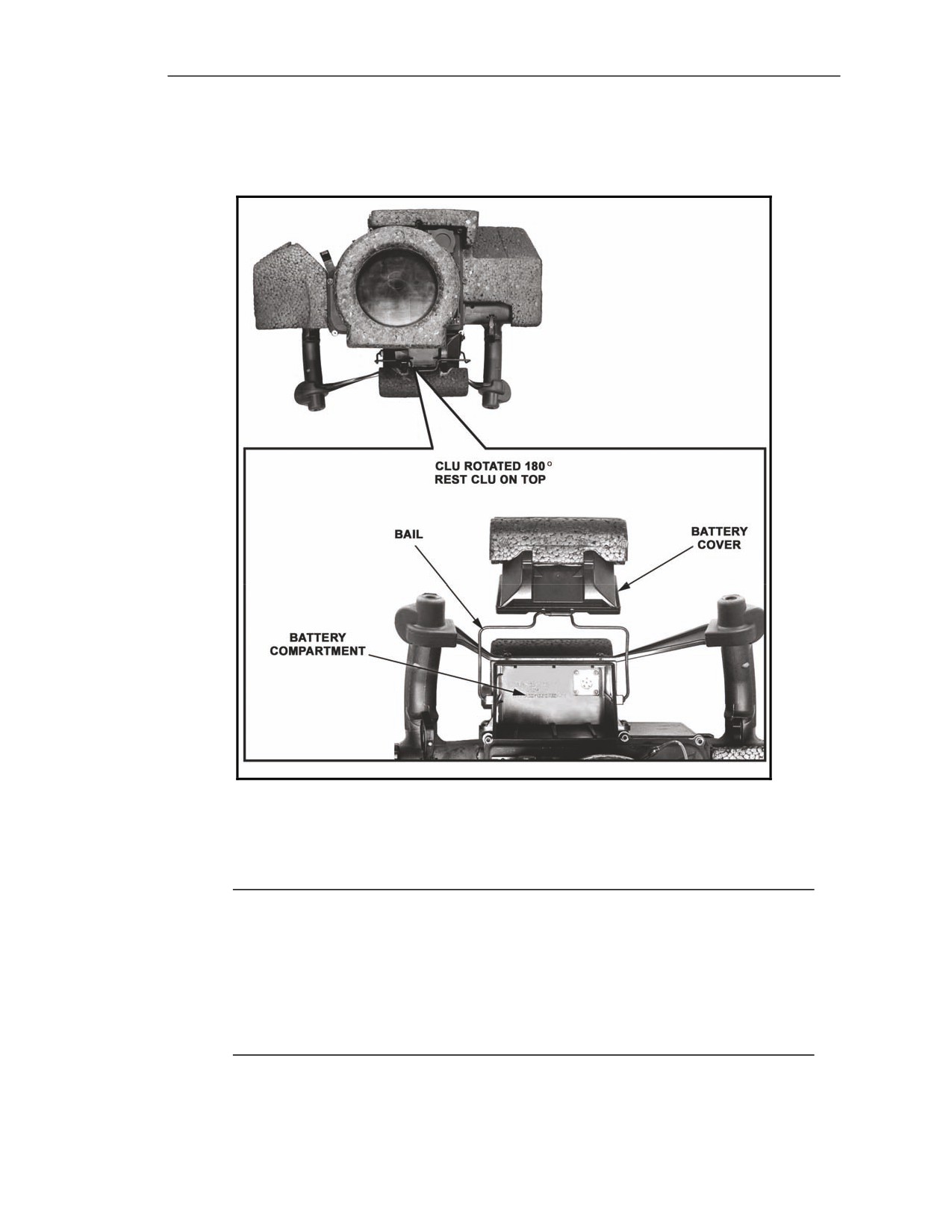
5-20. The battery compartment (Figure 5-9) is located on the bottom of the main housing.
Figure 5-9. Battery compartment.
5-21. The battery compartment houses the non-rechargeable BA-5590/U or the rechargeable
BB390A/U battery, and is equipped with a connector that mates with a corresponding connector on the
CLU battery. The CLU's battery lasts for at least 4 hours, depending on temperature conditions.
NOTES: 1. BA-5590/U and BB-390A/U batteries are also used in the SINCGARS and the
newer advanced systems improvement program (ASIP) SINCGARS. If the
battery is completely discharged and there is no replacement battery on hand,
the gunner can use a battery from either SINCGARS or ASIP SINCGARS.
2. For training purposes, the BB-390A/U rechargeable battery is used to power
the CLU. Refer to Army TM 11-6130-489-13&P for battery recharging
procedures.
20 March 2008
FM 3-22.37
5-9
Chapter 5
5-22. To install the CLU battery (Figure 2-16)—
(1) Turn the CLU 180 degrees to reveal the battery compartment.
(2) The battery compartment cover is held in place by a wire bail. Detach and move the wire
bail cover out of the way.
(3) The compartment is equipped with a battery connector. This connector mates with the
corresponding connector on the battery. Align the two connectors and attach.
(4) Replace the battery compartment cover, and reattach the wire bail.
Test/Interface Connectors and Humidity Protection
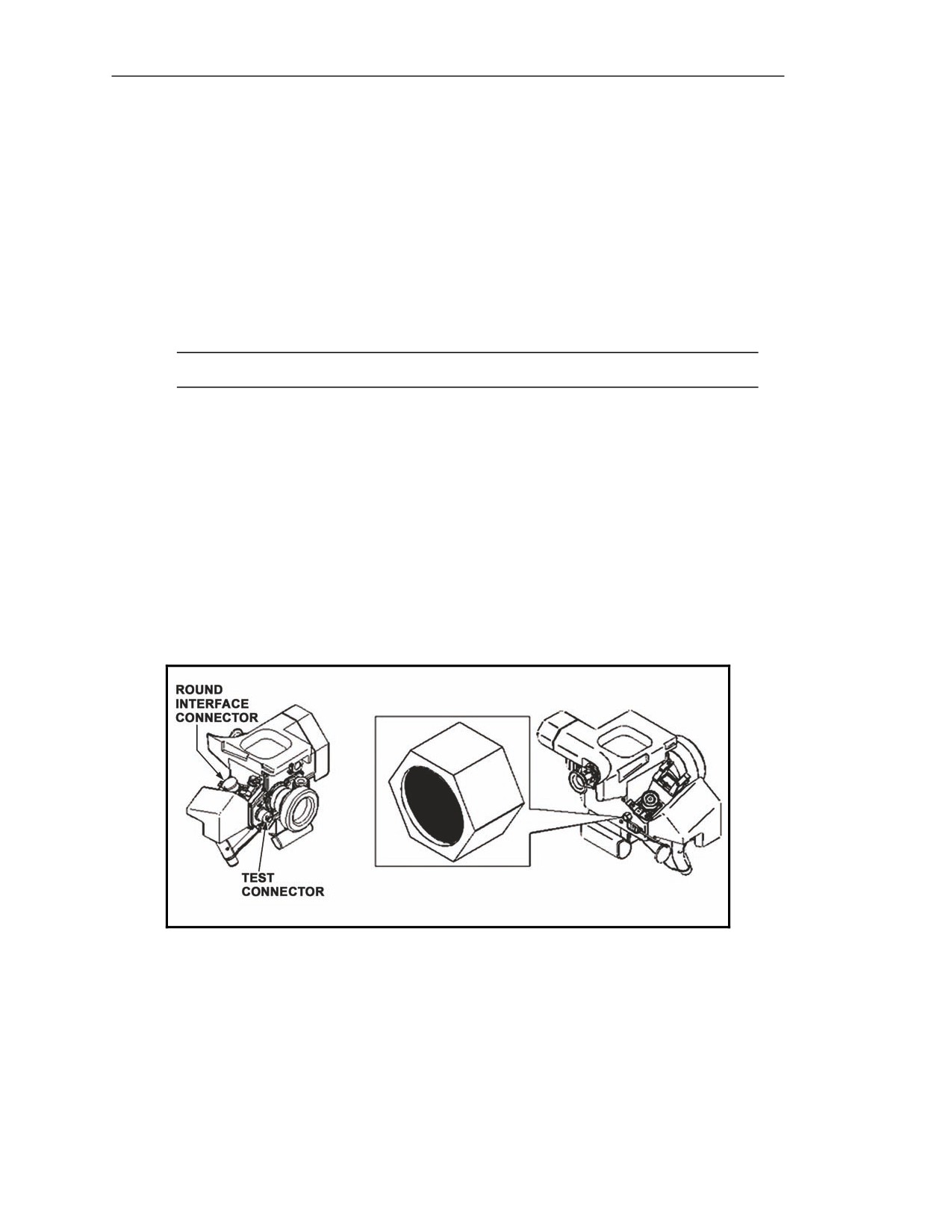
5-23. The CLU has several external connectors for testing electronics, a round interface connector, and
a moisture-absorbing desiccant plug.
NOTE: The CLU humidity indicator is no longer used.
Test Connector
5-24. The test connector (Figure 5-10) located on the front of the CLU is used to connect the CLU to
both direct support level test equipment for maintenance and to the FTT.
Round Interface Connector
5-25. The round interface connector (Figure 5-10) located on the right side of the CLU provides the
electrical connection between the CLU and the round.
Desiccant Plug
5-26. The desiccant plug (Figure 5-10) located on the back of the CLU removes moisture from the
CLU.
Figure 5-10. Test connector, round interface connector, and desiccant plug.
5-10
FM 3-22.37
20 March 2008
Block 1 Improvements
Video Port
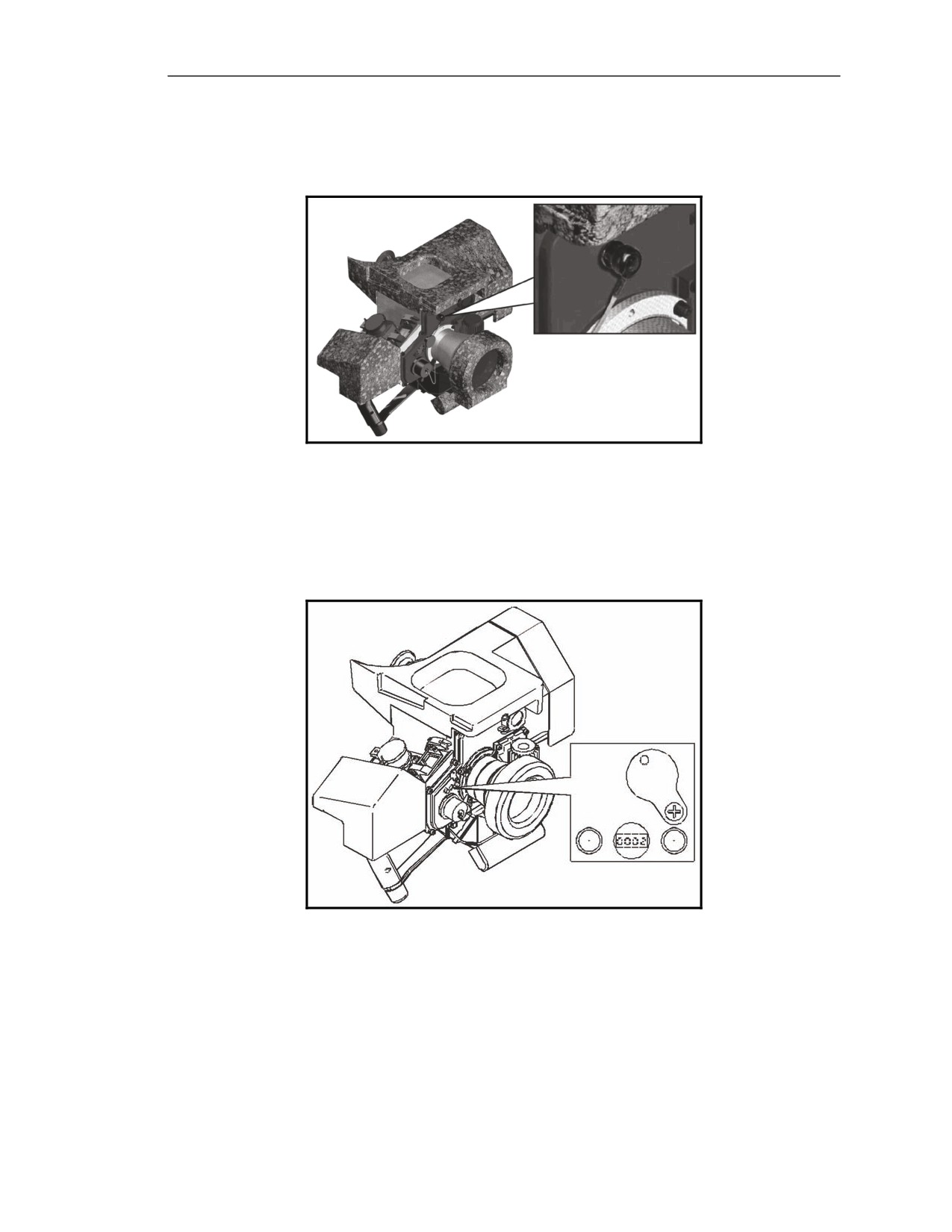
5-27. The video port (Figure 5-11) located on the front of the CLU (above the NVS lens) provides
video output or input.
Figure 5-11. Video port.
Elapsed Time Meter
5-28. The elapsed time meter (Figure 5-12) located on the front of the CLU is environmentally
protected by a black plastic cover. It records the amount of time that the CLU has been powered and is
used for maintenance records only.
Figure 5-12. Elapsed time meter.
Day and Night Vision Sights
5-29. The CLU's two optical systems, the daysight and the NVS, provide the gunner with three different FOVs.
20 March 2008
FM 3-22.37
5-11
Chapter 5
Daysight
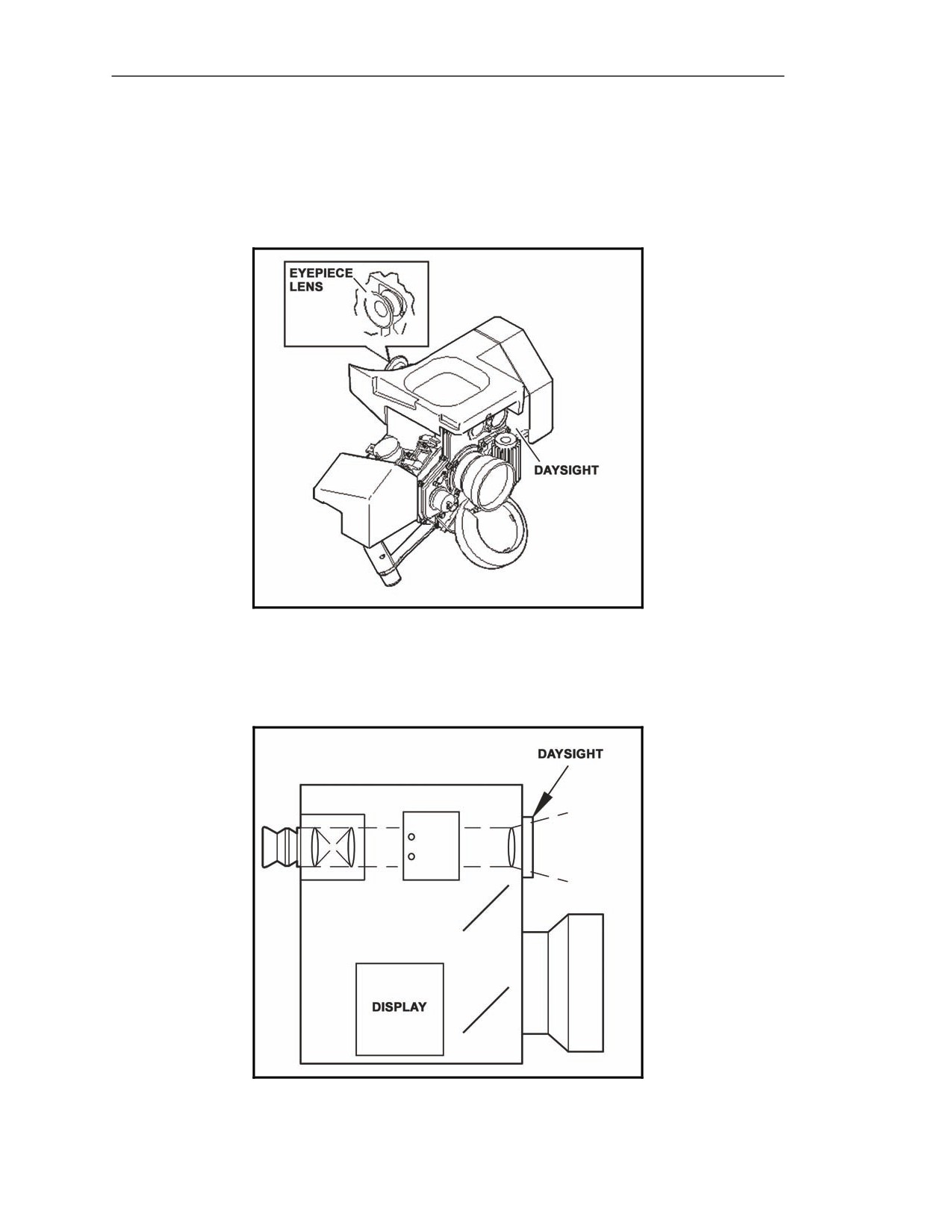
5-30. The daysight (Figure 5-13) is an optical system that works like a telescope. It provides the
gunner with a visible light image with 4x magnification for target viewing and battlefield surveillance,
but only during the day and when visibility conditions are good. It consists of the following
components: daysight lens, eyepiece, and status display.
Figure 5-13. Daysight.
Daysight Lens
5-31. The daysight optical path (Figure 5-14) starts at the lens and proceeds to the status display and
on to the eyepiece.
Figure 5-14. Daysight optical path.
5-12
FM 3-22.37
20 March 2008
Block 1 Improvements
Eyepiece
5-32. The gunner views the daysight images through the eyepiece.
Status Display
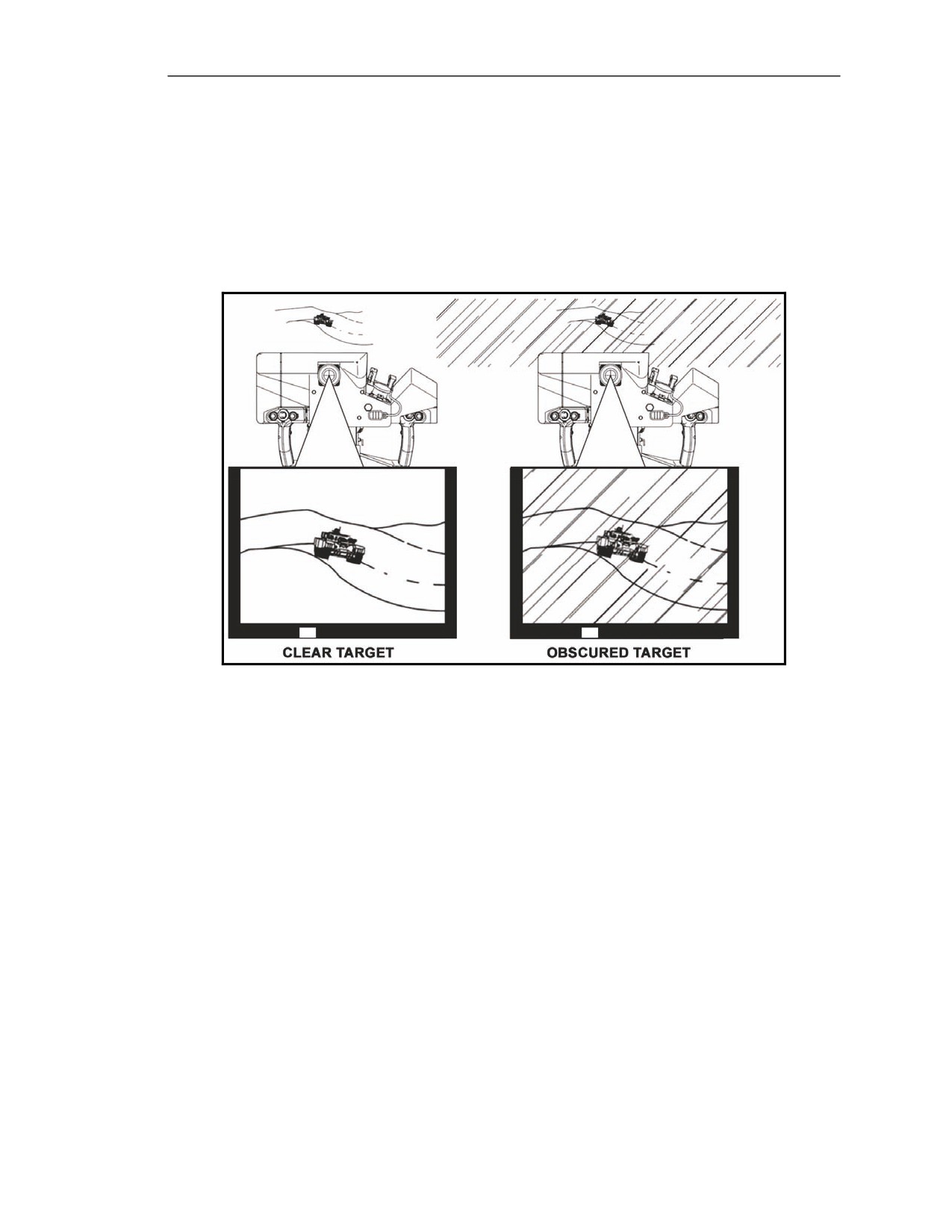
5-33. The daysight provides the gunner with the day FOV. The day FOV is used for scanning large
areas while waiting for the NVS to cool. While the day FOV is effective in good visibility conditions,
the gunner will be able to distinguish very little detail about objects seen during periods of limited
visibility (Figure 5-15).
Figure 5-15. Example daysight images—clear and rainy.
Night Vision Sight
5-34. The NVS (Figure 5-16) converts IR target images into visible target images. This allows the
gunner to see targets in wide and narrow fields of view during periods of limited visibility. The NVS
consists of the—
z
NVS lens.
z
DDC.
z
Video display.
z
Flipper mirror.
z
Status display.
z
Eyepiece.
20 March 2008
FM 3-22.37
5-13
Chapter 5
Figure 5-16. Night vision sight.
Night Vision Sight Lens
5-35. When in WFOV or NFOV, the NVS lens (Figure 5-16) focuses the incoming IR light onto the
DDC.
Wide Field-of-View
5-36. The WFOV (Figure 5-17A) provides the gunner with 4x magnification of the target scene. With
an area of coverage approximately 6º x 4º, WFOV covers a wide area so that the gunner can scan a
large general target scene to detect potential targets. However, the gunner will be able to distinguish
very little detail about any given object. As a result, WFOV is used only for general surveillance and
target detection.
Narrow Field-of-View
5-37. The NFOV (Figure 5-17B) provides the gunner with 12x magnification of the target scene. With
an area of coverage approximately 2º x 1.5º, NFOV covers a smaller area than the WFOV, but allows
the gunner to see potential targets with greater detail. Therefore, NFOV is used primarily to classify
and recognize targets, but it can also be used for BDA.
Figure 5-17. Night vision sight fields of view.
5-14
FM 3-22.37
20 March 2008
Block 1 Improvements
Detector Dewar Cooler
5-38. The DDC (Figure 5-18) converts the IR target images into electrical signals, which pass through
a signal processor to the display.
Figure 5-18. Detector dewar cooler.
Video Display
5-39. The video display converts the electrical signals from the DDC into visible images. Mirrors
inside the CLU reflect the images so they appear to come from the eyepiece.
Flipper Mirror
5-40. The flipper mirror allows the gunner to switch between the daysight and the NVS by pressing
the SGT SEL switch. This provides the Javelin with its integrated day and night sight capability.
Daysight Position
5-41. The flipper mirror is in the daysight position when the gunner powers up the CLU. When the
flipper mirror is in the down position, the gunner can see daysight images (day FOV) (Figure 5-19).
Night Vision Sight Position
5-42. When the flipper mirror is in the up position, the gunner can see NVS images (WFOV and
NFOV) (Figure 5-19).
Figure 5-19. Flipper mirror positions.
20 March 2008
FM 3-22.37
5-15
Chapter 5
Status Display
5-43. The status display provides information about equipment operation. Two light-emitting diodes
(LEDs) located at the bottom of the CLU display provide information during day FOV (Figure 5-20A).
On the video display, various icons and text messages surround the IR imagery in WFOV, NFOV, and
seeker FOV to provide more precise information (Figure 5-20B).
Figure 5-20. Night vision sight status display.
Eyepiece
5-44. The eyepiece (Figure 5-21) allows the gunner to view the status indicators and images from day
FOV, WFOV, NFOV, and seeker FOV. It includes a lens assembly, eyecup, and diopter adjust ring.
Figure 5-21. Eyepiece.
5-16
FM 3-22.37
20 March 2008
Block 1 Improvements
Lens Assembly
5-45. The lens assembly provides the gunner with the final focus of the CLU display images. It
contains a lens that moves in and out when the gunner moves the diopter adjust ring.
Eyecup
5-46. The eyecup is a rubber bellows equipped with four shutter pieces. To view CLU images, the
gunner must press his eye against the eyecup, which causes the bellows to collapse and the shutters to
open. The eyecup centers the eye on the lens assembly, assists in maintaining the proper distance from
the lens assembly to the eye for viewing the CLU images, and provides visible light security when the
CLU is on but the gunner is not looking inside.
Diopter Adjust Ring
5-47. The diopter adjust ring is located on the CLU eyepiece. It is a hand-rotated ring that adjusts the
focus of the CLU display image to gunner's vision level.
SHOCK ABSORBERS
5-48. The shock absorbers (Figure 5-22) attached to the outside of the CLU's main housing help
protect the equipment during field operations. One absorber is a face shield that protects the gunner's
face during missile launch.
Figure 5-22. Shock absorbers.
20 March 2008
FM 3-22.37
5-17
Chapter 5
HANDGRIPS
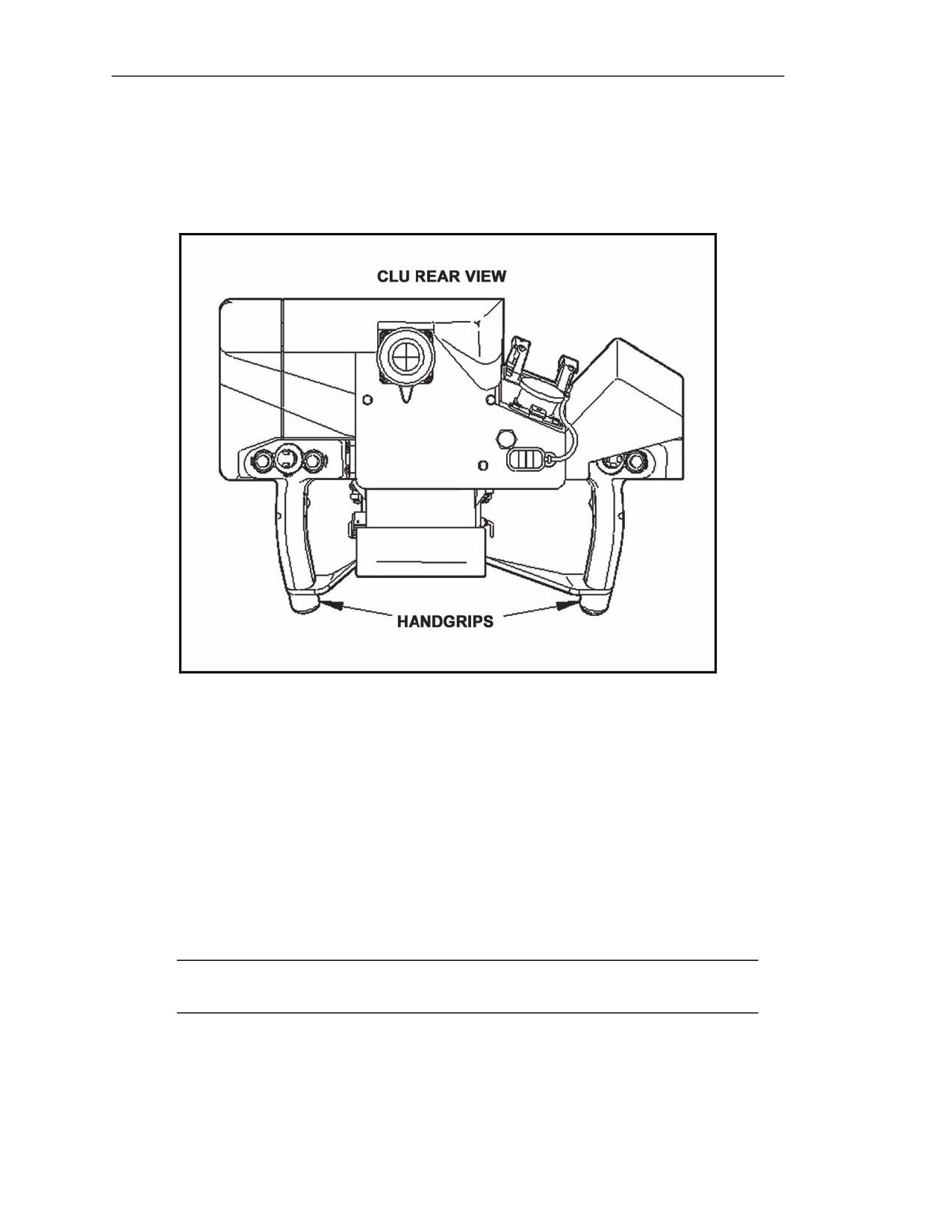
5-49. The handgrips (Figure 5-23) are attached to either side of the main housing. They provide a
means for the gunner to hold the CLU and are equipped with gunner controls that allow the gunner to
direct all Javelin operations.
Figure 5-23. Handgrips.
CONTROLS AND INDICATORS
5-50. Most of the controls are located on the handgrips, with the exception of the diopter adjust ring
and power switch. The diopter adjust ring is located on the eyepiece, and the power switch is located
on the CLU main housing.
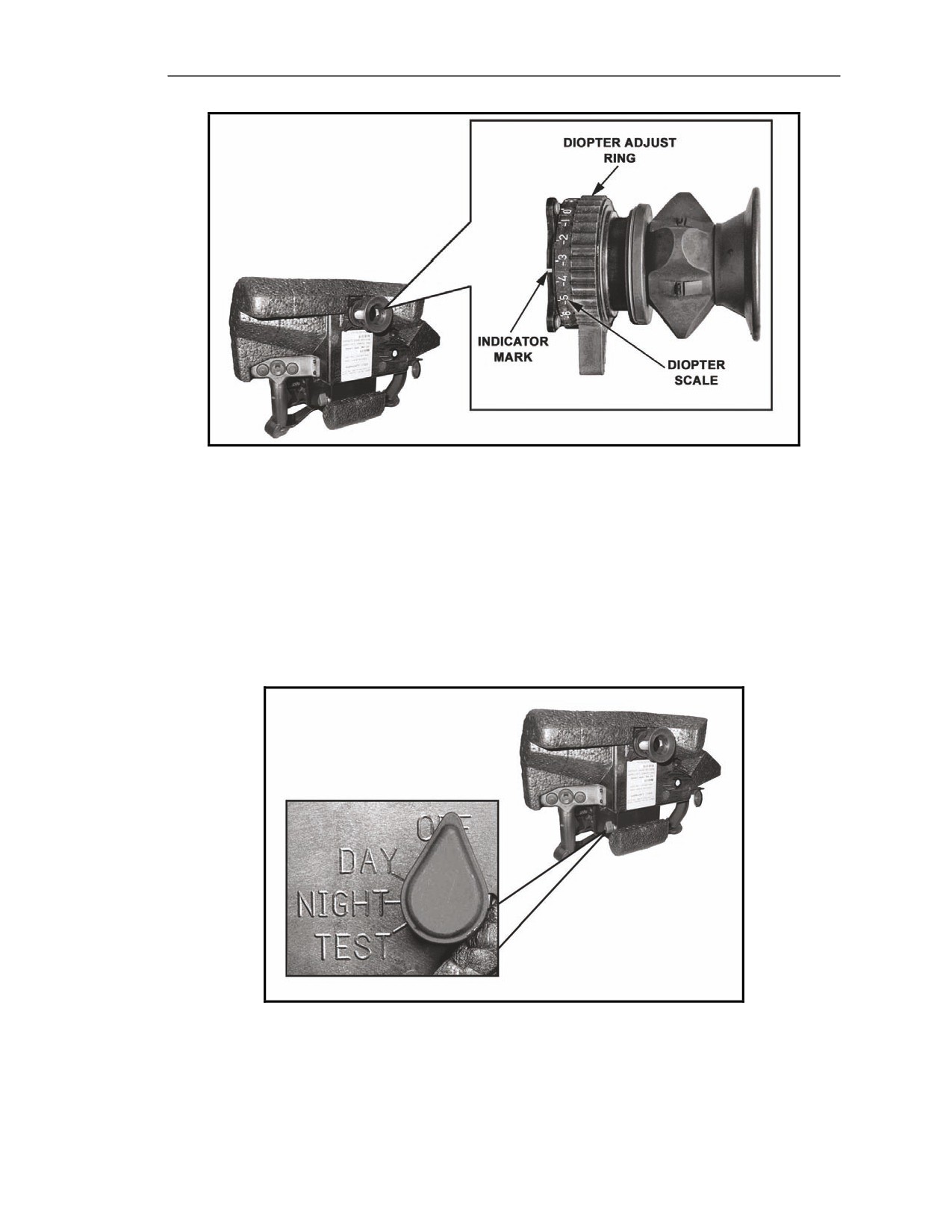
Diopter Adjust Ring
5-51. The diopter adjust ring (Figure 5-24) is hand-rotated to adjust the focus of the CLU display
images to the gunner's vision level. Any gunner with vision correctable to 20/20 can use the CLU and
see an in-focus image without using glasses. When wearing a protective mask, the gunner must use his
optical inserts if he wears glasses. This occurs because the gunner can no longer place his eye directly
on the eyecup.
NOTE: The white mark located on the left side of the mounting plate for the eyepiece is the
indicator for the diopter adjust ring.
5-18
FM 3-22.37
20 March 2008
Block 1 Improvements
Figure 5-24. Diopter adjust ring.
Power Switch
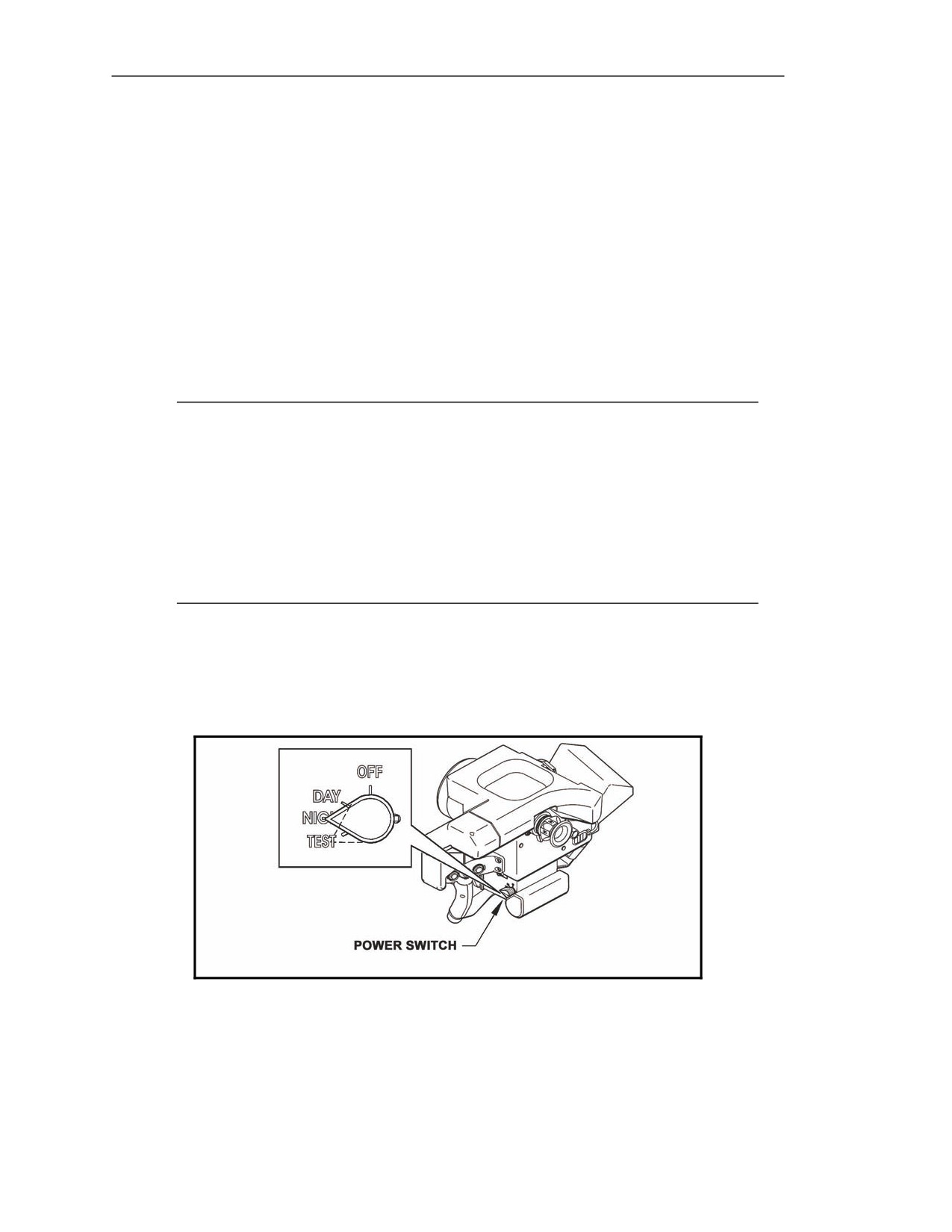
5-52. The power switch (Figure 5-25) is a rotary switch located on the left side of the CLU main
housing, at the lower rear corner. This switch controls the Javelin's mode of operation; each position
enables different Javelin capabilities. The power switch has four positions:
z
OFF.
z
DAY.
z
NIGHT.
z
TEST.
Figure 5-25. Power switch.
20 March 2008
FM 3-22.37
5-19
Chapter 5
OFF Position
5-53. When the power switch is in the OFF position, no battery power is applied to the Javelin. The
day FOV can be used for surveillance and target detection, but the NVS cannot be used, the seeker
cannot be activated, and the missile cannot be launched.
DAY Position
5-54. When the power switch is in the DAY position, power is applied to the CLU; the gunner has the
day FOV, but no NVS. The gunner can also activate the seeker, lock the missile onto a target, and
launch the missile.
NIGHT Position
5-55. When the power switch is placed in the NIGHT position, the gunner has full Javelin capability.
Once the NVS is cooled down (approximately 2.5 to 3.5 minutes), the gunner can select WFOV,
NFOV, and day FOV.
NOTES: 1. The CLU automatically enters a low-power mode (known as the SLEEP mode)
when the CLU is in the night mode, the NVS is cooled down, the CLU is not
attached to a round, and the CLU is in day FOV for at least 5 minutes. SLEEP
mode removes power from all nonessential functions to save battery power, but
power is supplied to the DDC to keep the NVS operational. SLEEP mode can
also be initiated by entering the CLU menu and selecting SLEEP.
2. The CLU is operational within 10 seconds of exiting the SLEEP mode. To exit
the SLEEP mode, press the sight select switch (SGT SEL) or attach the CLU to
a round.
TEST Position
5-56. When the power switch is in the TEST position (Figure 5-26), the CLU enters a routine BIT.
The power switch is spring-loaded when in this position; when the gunner moves the power switch to
the TEST position, it returns to the NIGHT position upon release.
Figure 5-26. Power switch in the TEST position.
OFF Position
5-57. Prior to turning the power switch to the OFF position, the gunner must leave the power switch at
DAY for at least one second to give the flipper mirror time to move to the daysight position.
5-20
FM 3-22.37
20 March 2008
Block 1 Improvements
Left Handgrip Controls
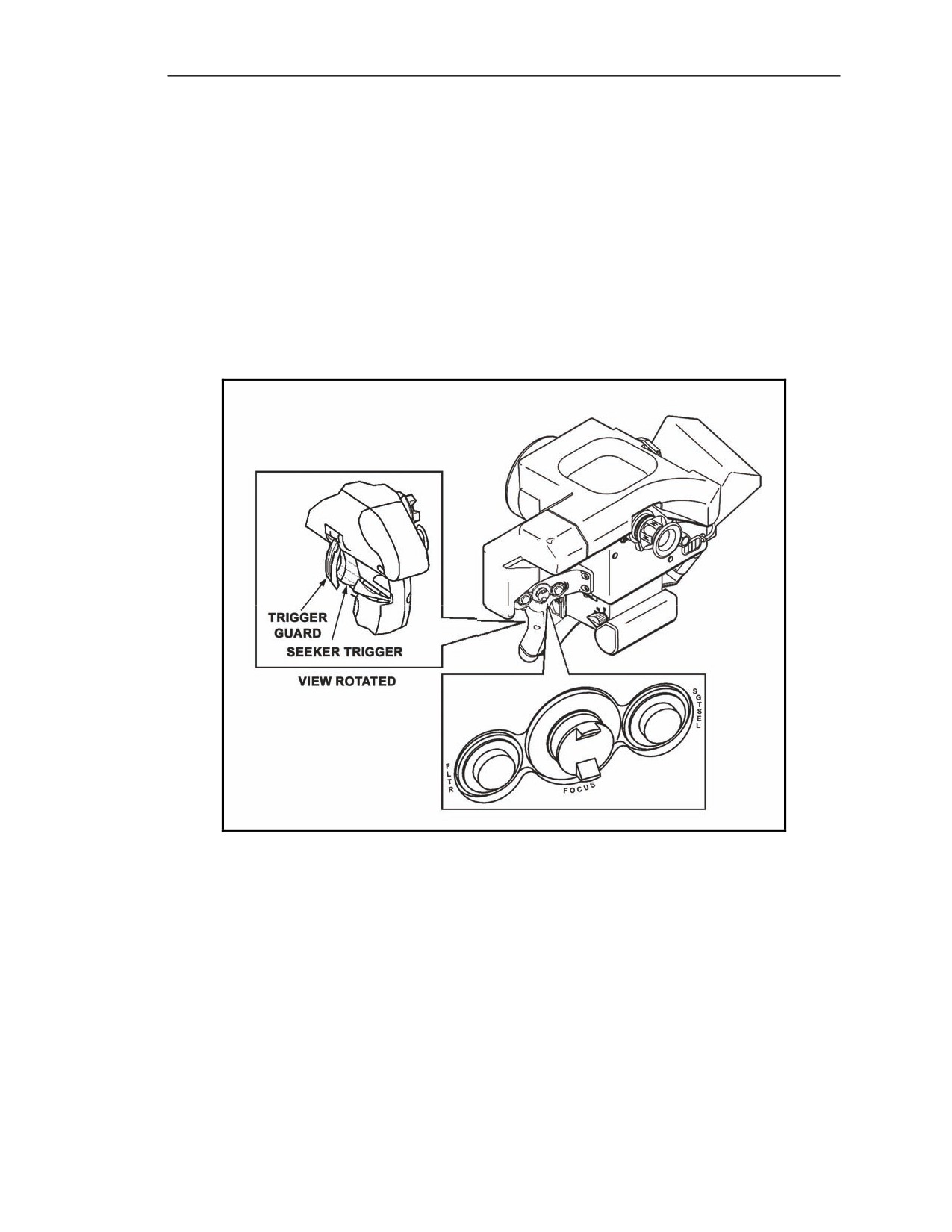
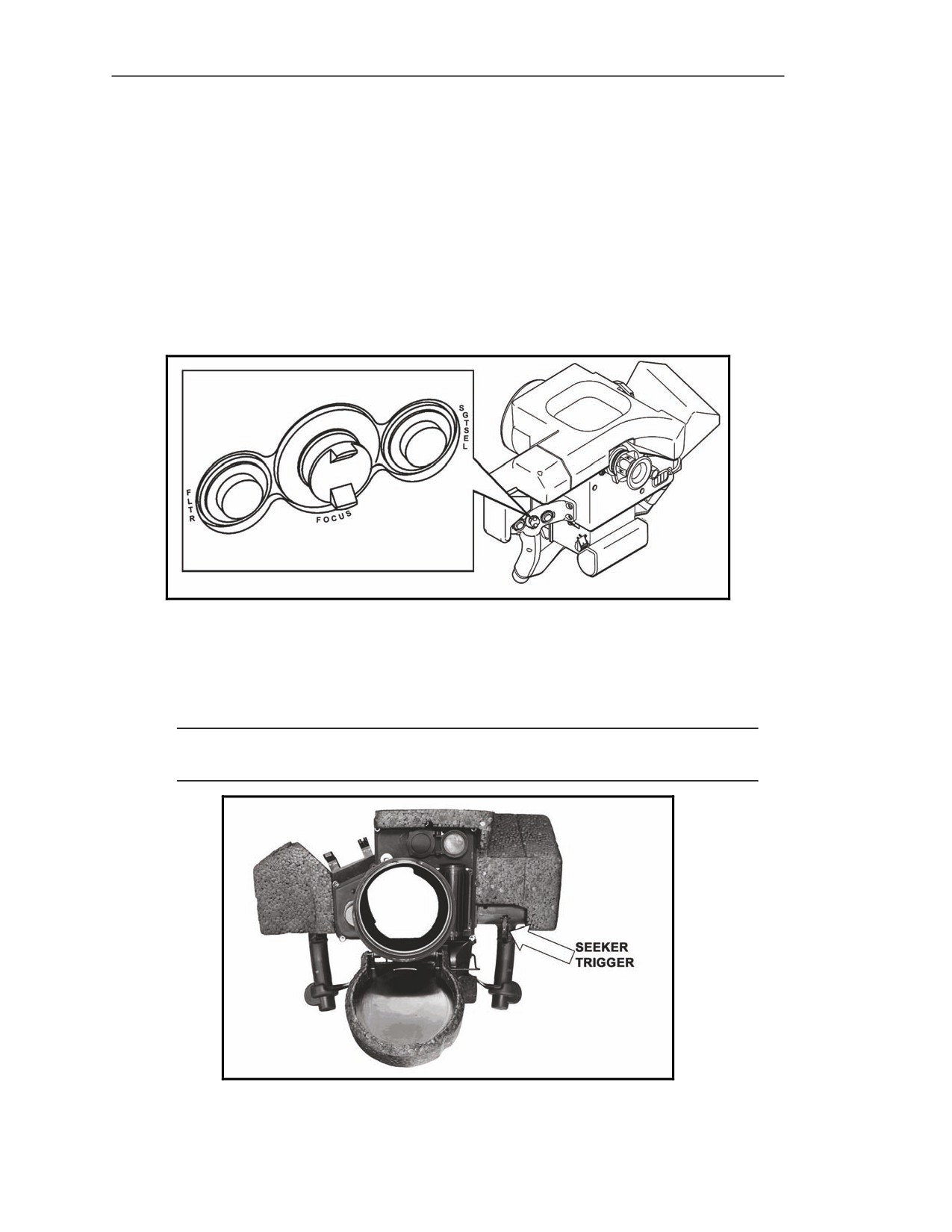
5-58. The left handgrip is equipped with the following controls (Figure 5-27): filter switch, focus
switch, sight select switch, and seeker trigger. These controls allow the gunner to perform the
following actions:
z
Select the E-ZOOM.
z
Adjust the NVS focus.
z
Change the FOV.
z
Activate the seeker.
z
Lock onto a target/enable the fire trigger.
z
Access the CLU menu.
z
Select CLU menu options.
Figure 5-27. Left handgrip controls.
Filter (FLTR) Switch
5-59. The left pushbutton switch, FLTR (Figure 5-28), allows the gunner to select the E-ZOOM,
which doubles the WFOV and NFOV magnification. The FLTR switch is also used with the ATTK
SEL switch to initiate the MENU function on the CLU. Once in the MENU, the FLTR switch is used
to select an option.
Focus (FOCUS) Switch
5-60. The center switch, FOCUS (Figure 5-28), is a spring-loaded, self-centering thumb switch that
moves up and down to adjust the focus of NVS images (WFOV and NFOV). It is not operational in the
day or seeker FOV.
20 March 2008
FM 3-22.37
5-21
Chapter 5
Sight Select (SGT SEL) Switch
5-61. The right pushbutton switch, SGT SEL (Figure 5-28), has two functions, depending on whether
the Javelin is in NVS or seeker operation.
Night Vision Sight Operation
5-62. The NVS function is not available until after NVS cooldown. After cooldown, the SGT SEL
switch cycles through day FOV, WFOV, and NFOV. The appropriate status indicator (DAY, WFOV,
NFOV) illuminates when the SGT SEL switch is pressed.
Seeker Operation
5-63. The seeker operation function reverts from the seeker FOV to the previous CLU FOV.
Figure 5-28. Filter, Focus, and Sight Select switches.
Seeker Trigger
5-64. The seeker trigger (Figure 5-29) located at the index finger position on the left handgrip
activates the seeker, locks the seeker onto the target, and enables the fire trigger.
NOTE: The seeker trigger is equipped with a trigger guard to prevent accidental seeker
activation.
Figure 5-29. Seeker trigger.
5-22
FM 3-22.37
20 March 2008
Block 1 Improvements
Right Handgrip Controls
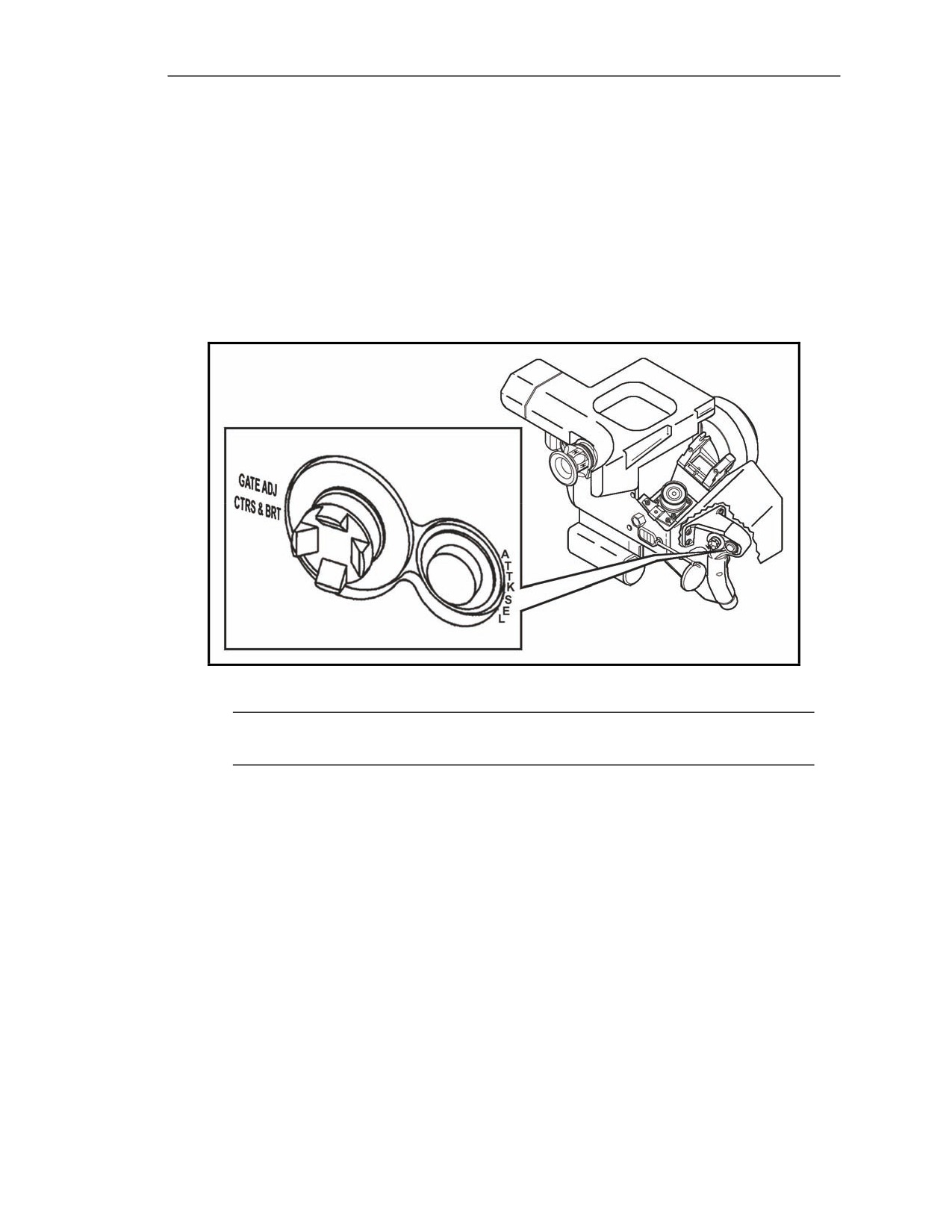
5-65. The right handgrip is equipped with the GATE ADJ/CTRS & BRT switch, the ATTK SEL switch,
and the fire trigger (Figure 5-30). These controls allow the gunner to perform the following actions:
z
Adjust NVS contrast and brightness (WFOV and NFOV).
z
Adjust the track gates (seeker FOV).
z
Change the missile mode.
z
Change NVS image polarity.
z
Launch the missile.
z
Access the CLU menu.
z
Change the highlighted CLU menu option.
Figure 5-30. Right handgrip controls.
NOTE: Contrast and brightness adjustment works only with the NVS, not with the daysight
or the seeker.
Gate Adjustment/Contrast and Brightness (GATE ADJ/CTRS & BRT) Switch
5-66. The left self-centering switch, GATE ADJ/CTRS & BRT (Figure 5-30), moves up, down, left, and
right to serve three functions (depending on whether the CLU display image is from the NVS or the seeker).
Night Vision Sight Images
5-67. When the CLU display shows an NVS image (WFOV or NFOV), the GATE ADJ/CTRS & BRT
switch can be used to adjust image contrast and brightness.
Seeker Images
5-68. In seeker FOV, the GATE ADJ/CTRS & BRT switch is used to adjust the track gates.
Menu Controls
5-69. When the CLU menu is displayed, the GATE ADJ/CTRS & BRT switch moves the white text from
one menu option to the next.
20 March 2008
FM 3-22.37
5-23
Chapter 5
Attack Select (ATTK SEL) Switch
5-70. The right switch, ATTK SEL, has three functions (Figure 5-30).
Missile Mode
5-71. In the seeker FOV, the gunner can select the missile mode for target engagement.
Image Polarity
5-72. In any other FOV, the gunner can change the NVS image polarity from white hot to black hot.
Command Launch Unit Menu
5-73. When activated at the same time as the FLTR switch, the gunner can access the CLU menu.
Fire Trigger
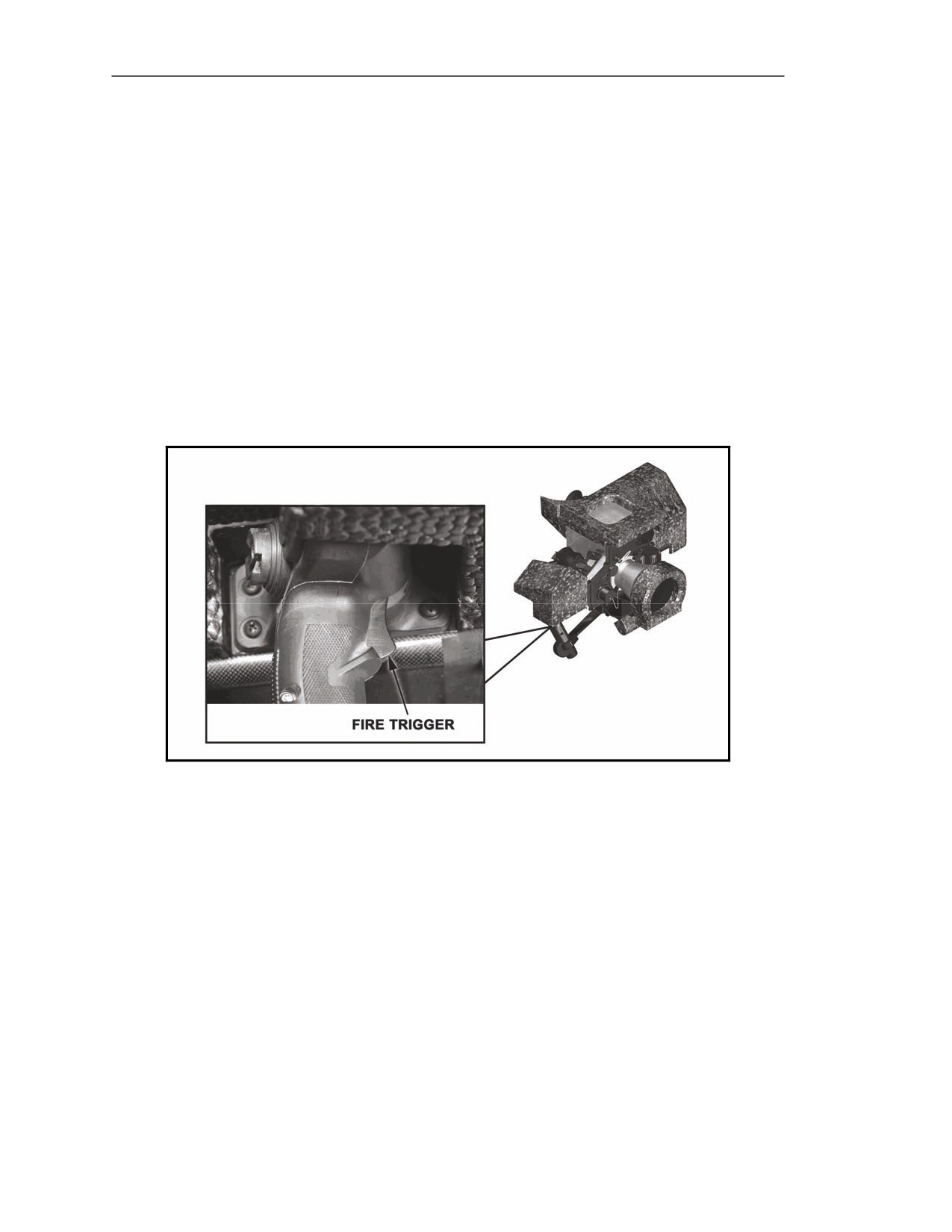
5-74. The fire trigger (Figure 5-31) is located at the index finger position. Once the missile is locked
onto the target, the gunner squeezes the fire trigger to launch the missile.
Figure 5-31. Fire trigger.
COMMAND LAUNCH UNIT STATUS INDICATORS
5-75. The CLU controls let the gunner tell the Javelin what to do; the CLU indicators let the Javelin
tell the gunner how it has responded to his control inputs. The CLU indicators include the status
indicators, reticles, track gates, and crosshairs. All are viewed by looking into the eyepiece.
5-24
FM 3-22.37
20 March 2008
Block 1 Improvements
STATUS INDICATORS
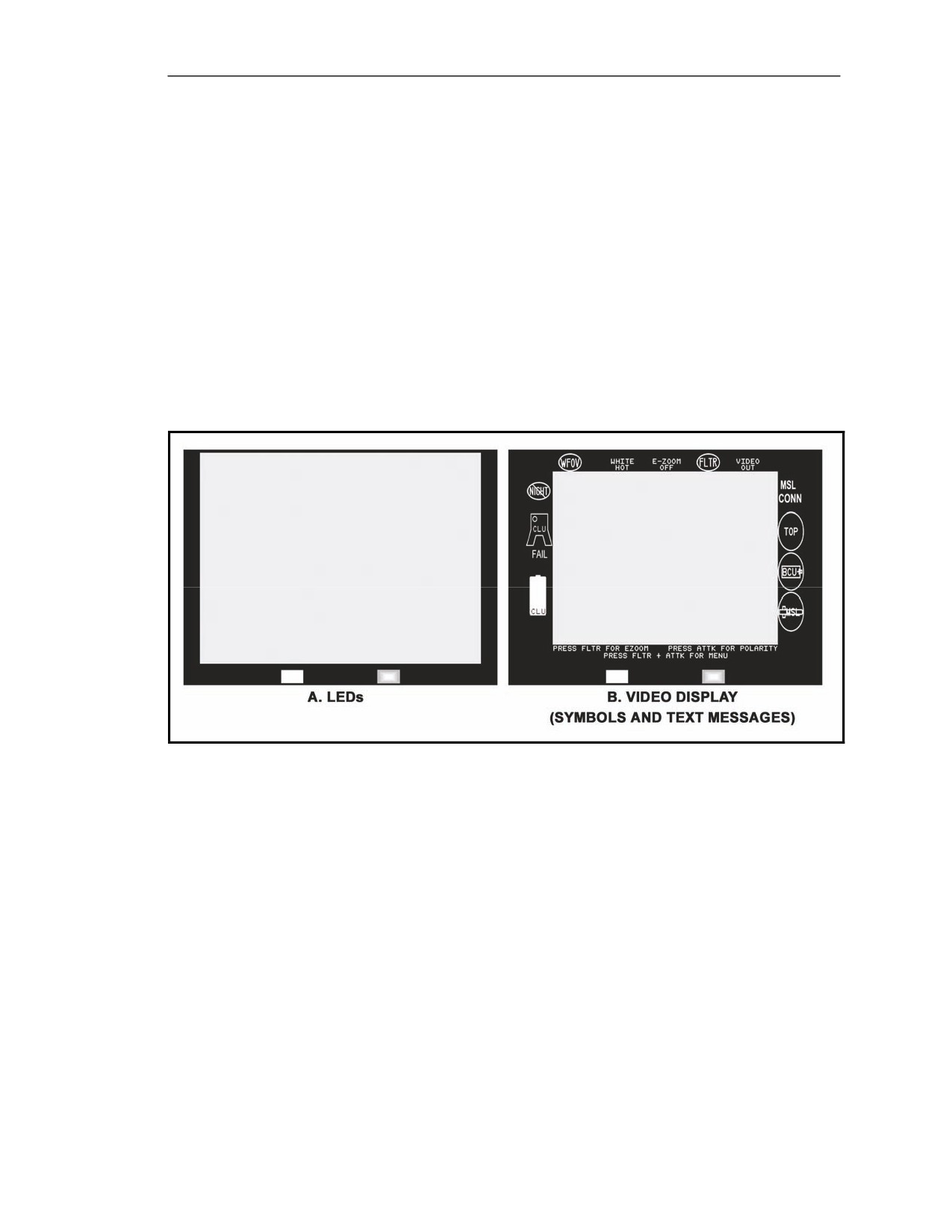
5-76. Green, amber, and red status indicators (Figure 5-32B) surrounding the CLU display identify
Javelin operational modes, conditions, and malfunctions. They include two LEDs, various symbols,
and text messages. The LEDs are located at the bottom of the CLU display and are visible in all FOVs;
the symbols and text messages appear on the video display (Figure 5-32A). All status indicators will
never illuminate at the same time during normal operation, but a few may illuminate simultaneously.
The status indicators may be flashing or solid.
z
A solid green indicator identifies normal operation (for information only).
z
A flashing green indicator identifies the normal operational equipment limit.
z
A solid amber indicator identifies a delay during normal operation.
z
A flashing amber indicator serves as a warning to take action before mission capability is
lost.
z
A solid red indicator signifies that equipment is inoperative.
z
A flashing red indicator signifies that corrective action must be taken immediately.
Figure 5-32. Status indicators.
Light-Emitting Diode Indicators
5-77. The LED indicators (Figure 5-33) are visible in all FOVs, but they are mainly used in the day
FOV due to the limited information they provide. The LED indicators include the CLU power LED
and CLU BIT LED.
Command Launch Unit Power Light-Emitting Diode
5-78. The CLU power LED (Figure 5-33) provides CLU battery status. Located at the bottom left of
the CLU display, this green LED has three operational states: solid, flashing, and off.
z
The CLU power LED is solid when the CLU battery power is good.
z
It flashes when the CLU battery has approximately 2 minutes of power remaining.
z
It is off when the CLU battery is dead and when the CLU power switch is in the OFF
position.
20 March 2008
FM 3-22.37
5-25
Chapter 5
Command Launch Unit Built-In Test Light-Emitting Diode
5-79. The CLU BIT LED (Figure 5-33) provides the CLU operational status and alerts. Located at the
bottom right of the CLU display, this red LED has three operational states: solid, flashing, and off.
z
The CLU BIT LED is solid when the CLU fails a BIT.
z
It flashes to prompt the gunner to release his trigger(s) or, if no triggers are squeezed, to go
to the video display (access the CLU menu if the NVS is not cooled down).
z
When the CLU BIT LED is off, Javelin operation is normal.
Figure 5-33. Light-emitting diode indicators.
5-26
FM 3-22.37
20 March 2008
Block 1 Improvements
Video Display Status Indicators
5-80. The video display status indicators (Figure 5-34) include icons and text messages. These status
indicators are viewed during operations that use the video display (CLU menu, WFOV, NFOV, and
seeker FOV); only during day FOV are they not visible. The status indicators are located around the
edges of the CLU video display and arranged in sections according to function:
z
CLU options (top)
z
CLU status (left side)
z
Missile status (right side)
z
CLU menu (bottom)
5-81. The imagery display area also contains two windows where text messages are displayed: the
missile warning message window and the trigger release prompt window.
Figure 5-34. Video display status indicators.
20 March 2008
FM 3-22.37
5-27
Chapter 5
COMMAND LAUNCH UNIT OPTIONS SECTION
5-82. The CLU options section (Figure 5-35) includes indicators and text messages that display
optional CLU settings.
NOTE: During seeker FOV, these indicators are not displayed.
Figure 5-35. Video display status indicators in the command launch unit options section.
Command Launch Unit Field-of-View Indicators
5-83. Three CLU FOV indicators (Figure 5-35) located at the far left of the CLU options section
display the current selected CLU FOV: the DAY indicator, WFOV indicator, and NFOV indicator. As
the CLU FOV changes, the corresponding indicator appears.
Day (DAY) Indicator
5-84. The green DAY indicator illuminates when the day FOV is selected and the power switch is in the
DAY or NIGHT position. However, it is observed only when the CLU menu is accessed during day FOV.
Wide Field-of-View (WFOV) Indicator
5-85. The green WFOV indicator illuminates when the WFOV is selected. It flashes when the NVS is
at a focus limit.
Narrow Field-of-View (NFOV) Indicator
5-86. The green NFOV indicator illuminates when the NFOV is selected. It flashes when the NVS is
at a focus limit.
Polarity Indicator
5-87. The green polarity indicator located at the left of the CLU display (Figure 5-35) is a text
message that displays how objects will appear in the WFOV, the NFOV, and the seeker FOV. It has
two settings: WHITE HOT (default) and BLACK HOT. When WHITE HOT is selected, hot objects
appear white (bright green) and cold objects appear black. When BLACK HOT is selected, the IR
image polarity changes so that hot objects appear black and cold objects appear white (bright green).
5-28
FM 3-22.37
20 March 2008
Block 1 Improvements
E-ZOOM Indicator
5-88. The green E-ZOOM indicator (Figure 5-35) at the right of the CLU display is a text message that
displays the NVS image size. It has two settings: E-ZOOM OFF (default) and E-ZOOM 2X. When E-
ZOOM OFF is displayed, NVS images are shown at their normal size. When E-ZOOM 2X is
displayed, NVS images are shown at twice their normal size.
Filter (FLTR) Indicator
5-89. The green FLTR indicator (Figure 5-35) located to the right of the E-ZOOM indicator indicates
the position of the NVS filter. When the FLTR indicator is OFF (default), the NVS filter is removed
from the NVS optical path. When the FLTR indicator illuminates, the NVS filter is selected and
inserted into the NVS optical path.
Video Port (VIDEO OUT) Indicator
5-90. The green video port indicator (VIDEO OUT) (Figure 5-35) located at the top far right of the
CLU video display displays the video port setting. This text message has two indications: OFF
(default) and VIDEO OUT. When the video port indicator is OFF, the video port is turned off. When
VIDEO OUT is displayed, the NVS/seeker video is provided through the video port.
COMMAND LAUNCH UNIT STATUS SECTION
5-91. Indicators in the CLU status section provide the gunner with information about the operational
status of the DDC, CLU electronics, and the CLU battery.
Figure 5-36. Video display status indicators in the command launch unit status section.
20 March 2008
FM 3-22.37
5-29
Chapter 5
Night Vision Sight Not Cool (NVS NOT COOL) Indicator
5-92. The amber NVS NOT COOL indicator (Figure 5-36) located at the top of the CLU status section
indicates the cooldown status of the DDC. It illuminates when the CLU power switch is turned to
NIGHT and the DDC is cooling down to its operating temperature. During this time, the indicator can
be observed only by accessing the CLU menu. The indicator turns off when the DDC is cooled down
to its operating temperature.
Command Launch Unit Built-In Test Failure (CLU BIT FAILURE) Indicator
5-93. The red CLU BIT FAILURE indicator (Figure 5-36) located on the left side of the CLU display
illuminates when the CLU fails an automatic BIT. It flashes to prompt the gunner to release his trigger(s).
Command Launch Unit Battery (CLU BATTERY) Indicator
5-94. The CLU BATTERY indicator (Figure 5-36) located at the left bottom of the CLU display
changes color as the charge on the CLU battery drops and includes a charge level indicator. When a
new CLU battery is installed, the battery indicator is green and has a full-level indicator. As the CLU
battery is used, the level indicator drops. When the CLU battery charge is at approximately 50 percent,
the battery indicator changes to amber, and the level indicator continues to drop. When the CLU
battery has approximately 2 minutes of charge remaining, the battery indicator flashes red and the level
indicator nears empty. When the CLU battery is spent, the CLU goes to day FOV.
MISSILE STATUS SECTION
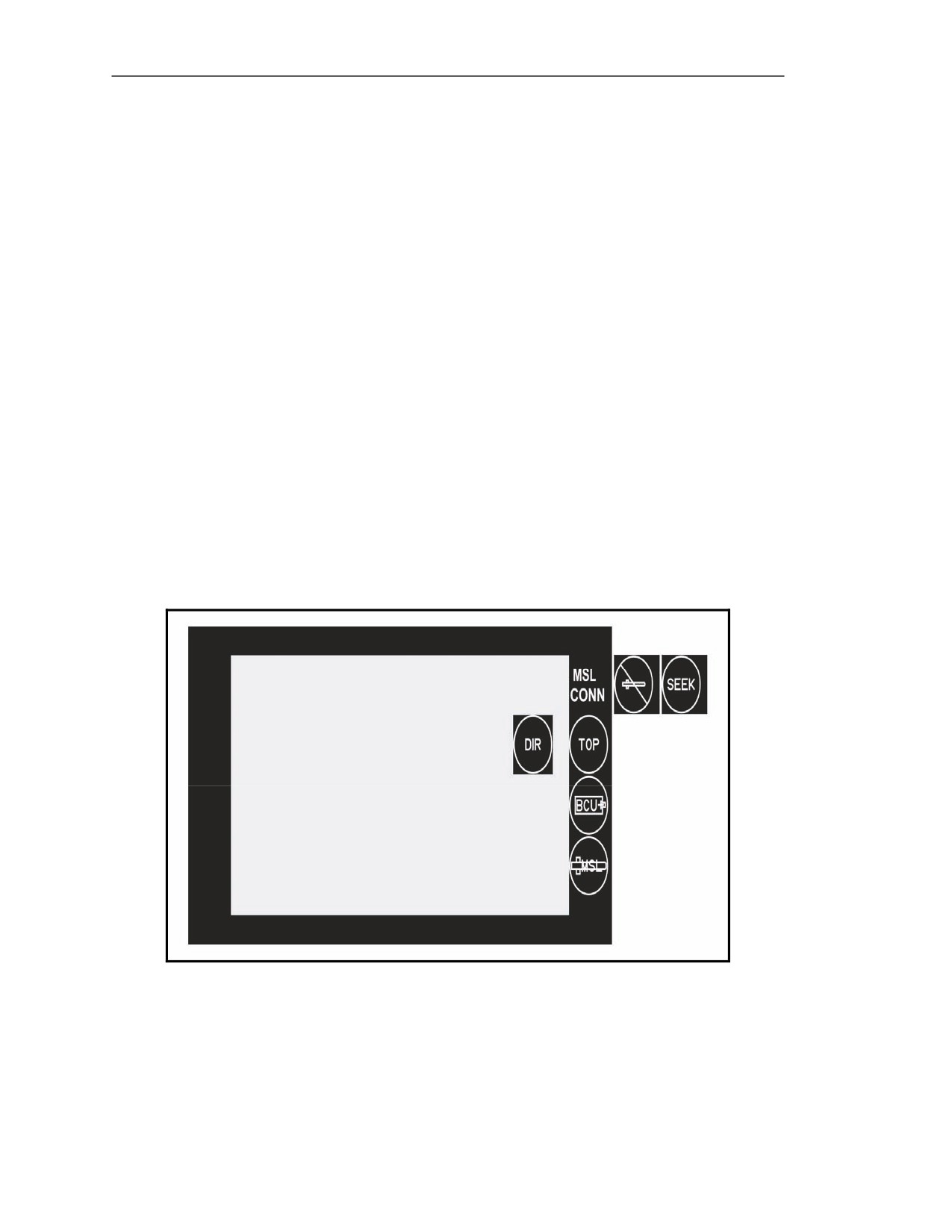
5-95. The indicators in the missile status section
(Figure
5-37) provide information on missile
activation, attack mode, BCU life, and missile BIT.
Figure 5-37. Video display status indicators in the missile status section.
5-30
FM 3-22.37
20 March 2008
Block 1 Improvements
Missile Activation Indicators
5-96. Missile activation indicators (Figure 5-37) displayed at the top of the missile status section
provide the activation status of the missile. These indicators include MISSILE CONNECTED,
MISSILE NOT READY, and the seeker FOV indicators; each indicator replaces the previous one on
the display.
NOTE: No indicator is displayed in this area when the CLU is not attached to a round and
when the seeker is activated, but the CLU is not in the seeker FOV.
Missile Connected (MSL CONN) Indicator
5-97. The green MSL CONN text message is displayed when the CLU has an electrical connection
with the round, but the seeker is not activated.
Missile Not Ready (MISSILE NOT READY) Indicator
5-98. The amber MISSILE NOT READY indicator illuminates during seeker cooldown. (During this
time, the missile downloads operating software from the CLU, runs a missile BIT, and cools the
seeker.) It flashes as an additional indication that the missile is approaching an overheat condition.
Seeker Field-of-View (SEEK) Indicator
5-99. The green SEEK indicator illuminates when the CLU is in the seeker FOV.
Attack Mode Indicators
5-100. The attack mode indicators (Figure 5-37) located just below the missile activation indicators
display the selected missile attack mode: TOP attack or DIR attack. They are displayed when the CLU
is in the seeker FOV.
Top Attack (TOP) Indicator
5-101. The green TOP indicator (Figure 5-37) illuminates when the CLU is in the seeker FOV and
the missile is in top attack mode (default).
Direct Attack (DIR) Indicator
5-102. The green DIR indicator (Figure 5-37) illuminates when the CLU is in the seeker FOV and the
missile is in direct attack mode.
Battery Coolant Unit Indicator
5-103. The amber/red BCU indicator (Figure 5-37) located below the attack mode indicators provides
status on the BCU at the end of life. The BCU indicator flashes amber when the BCU has
approximately 30 seconds of life remaining. It illuminates red when the BCU is expended.
Missile Built-In Test Failure (MISSILE BIT FAILURE) Indicator
5-104. The red MISSILE BIT FAILURE indicator (Figure 5-37) located at the bottom of the missile
status section notifies the gunner of a missile failure. It illuminates when a missile BIT detects a
missile failure. It flashes as an additional indication that the missile has failed to launch due to a
misfire.
20 March 2008
FM 3-22.37
5-31
Chapter 5
COMMAND LAUNCH UNIT MENU SECTION
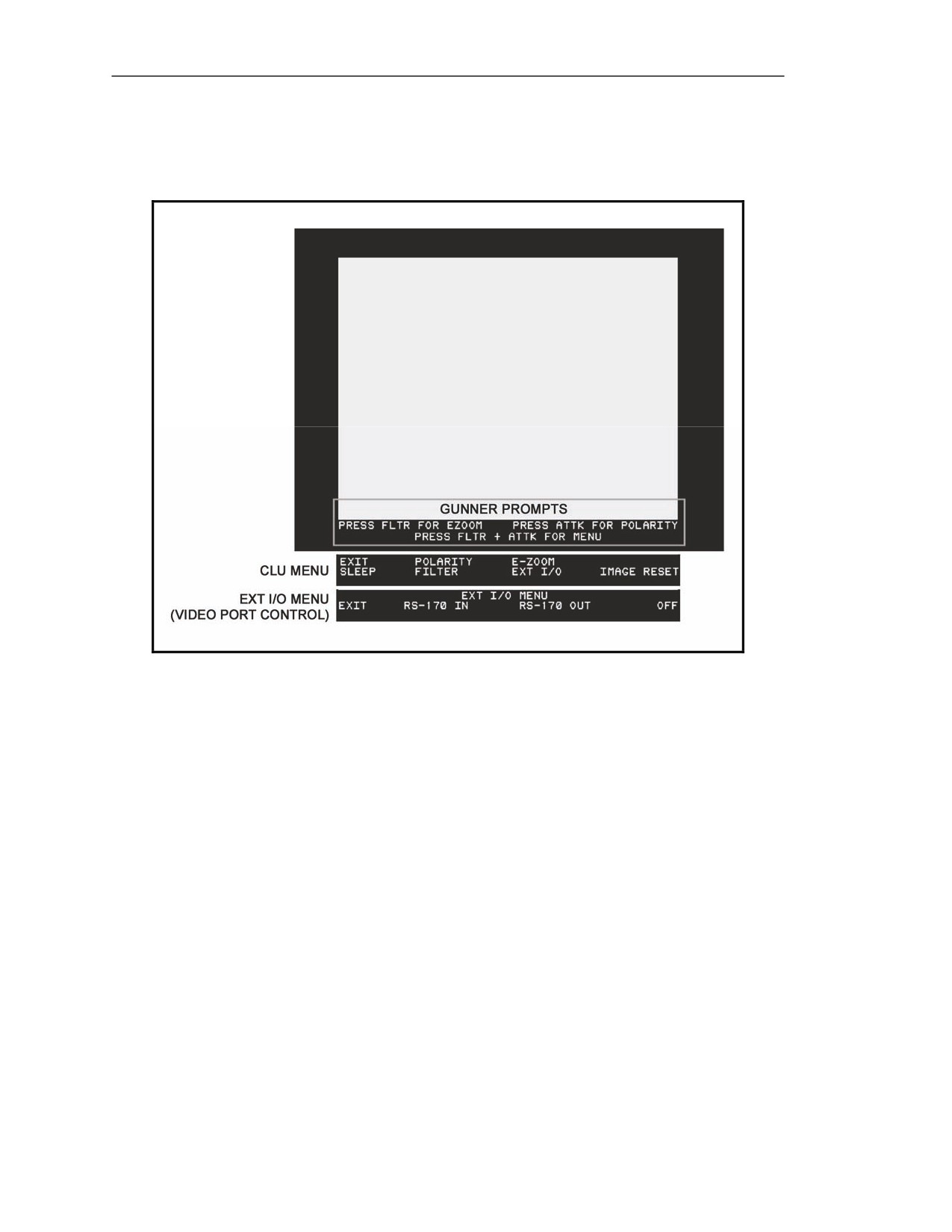
5-105. The CLU menu section displays gunner prompts, the CLU menu, and the EXT I/O menu.
Figure 5-38. Video display indicators in the command launch unit menu section.
Gunner Prompts
5-106. The gunner prompts (Figure 5-38) provide instructions to turn the E-ZOOM on or off, change
the IR image polarity, and access the CLU menu. They are displayed in the WFOV and the NFOV,
unless replaced by one of the menus. The prompts are not displayed in the seeker FOV when the
associated functions are disabled.
Command Launch Unit Menu
5-107. The CLU menu (Figure 5-38) allows the gunner to modify normal CLU operation. CLU menu
options include EXIT, POLARITY, E-ZOOM, SLEEP, FILTER, EXT I/O, and IMAGE RESET.
EXIT Option
5-108. The gunner selects the EXIT option to return the gunner prompts to the video display.
POLARITY Option
5-109. The gunner selects the POLARITY option to toggle the IR image polarity between white hot
and black hot. The polarity selected is displayed using the polarity indicator in the CLU options
section.
5-32
FM 3-22.37
20 March 2008
Block 1 Improvements
E-ZOOM Option
5-110. The gunner selects the E-ZOOM option to toggle between 2x magnification and no extra
magnification. The selection is displayed using the E-ZOOM indicator in the CLU options section.
SLEEP Option
5-111. Sleep mode removes power from all nonessential functions (removes power from the video
display and changes to day FOV) to save battery power, but power is supplied to provide full mission
capability as soon as the gunner requires it. To exit SLEEP mode, the gunner presses the ATTK SEL
switch or attaches the CLU to a round. When the CLU is attached to a round, the SLEEP mode is
disabled.
FILTER Option
5-112. The gunner selects the FLTR option to insert the NVS filter into or remove it from the NVS
optical path (according to the option selected). The option selected is displayed using the FLTR
indicator in the CLU options section.
EXT I/O Option
5-113. When the EXT I/O option is selected, the video display shows the EXT I/O menu.
IMAGE RESET Option
5-114. The gunner selects the IMAGE RESET option to reset the NVS image contrast and brightness
to their defaults.
External Input/Output Menu
5-115. The EXT I/O menu (Figure 5-38) controls the video port on the front of the CLU. The menu
options include EXIT, RS-170 IN, RS-170 OUT, and OFF.
EXIT Option
5-116. The gunner selects the EXIT option to return to the video display.
RS-170 IN Option
5-117. The gunner selects the RS-170 IN option to enable the video port, and video is fed to the CLU display.
RS-170 OUT Option
5-118. When the RS-170 OUT option is selected, the video port is enabled and NVS video is fed out
through the port. The video port indicator in the CLU options section changes to VIDEO OUT.
OFF Option
5-119. When the OFF option is selected, the video port is disabled so that video does not feed out
from or into the CLU. The video port indicator in the CLU options section is removed.
MENU NAVIGATION
5-120. To access the CLU menu, the gunner presses the FLTR and ATTK SEL switches at the same
time, and he uses the GATE ADJ/CTRS & BRT and FLTR switches to select options on the CLU and
EXT I/O menus.
z
Pressing the GATE ADJ/CTRS & BRT switch moves the white text from one option to the
next.
z
Pressing the FLTR switch selects the highlighted menu option.
20 March 2008
FM 3-22.37
5-33
Chapter 5
TEXT MESSAGE WINDOWS
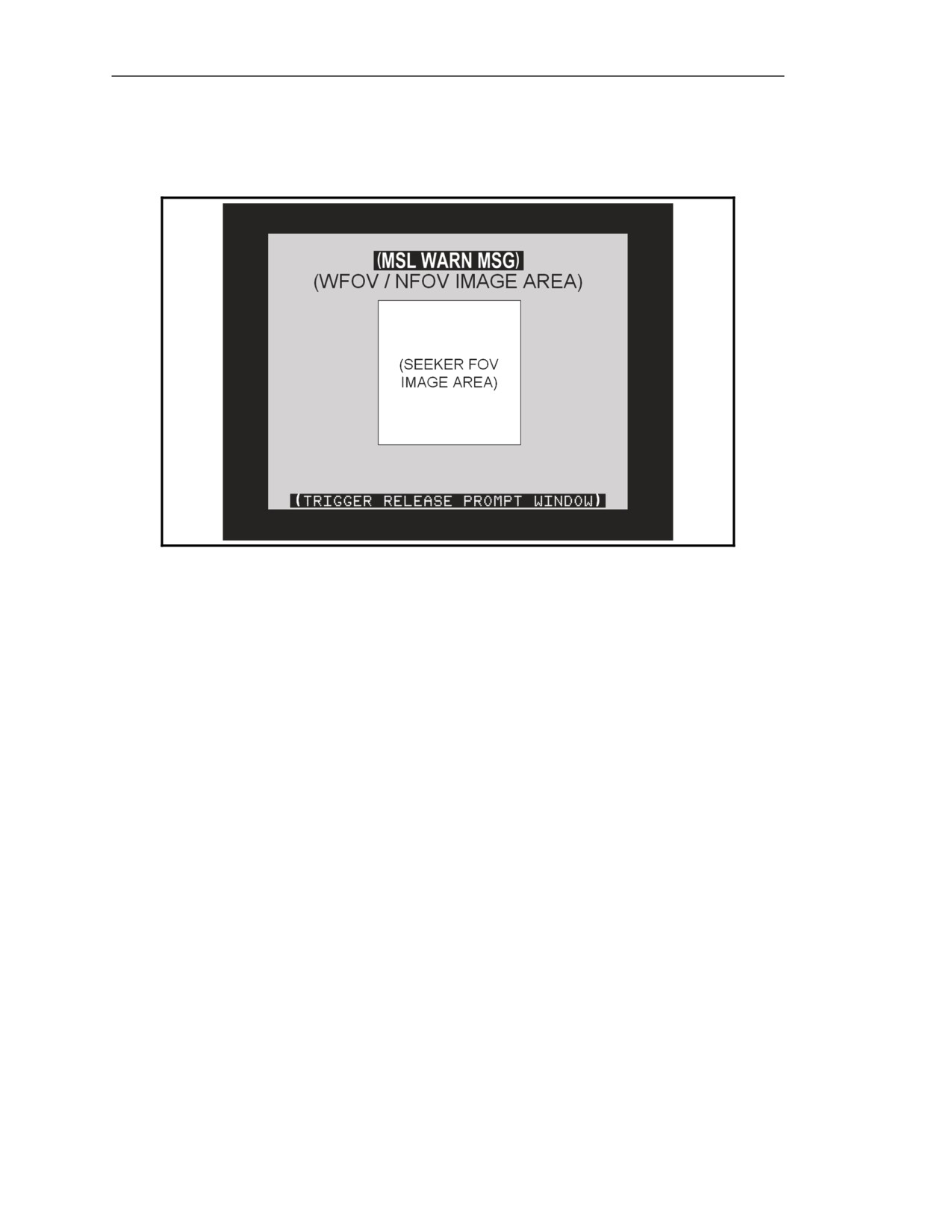
5-121. The NVS imagery area contains two windows where text messages are displayed: the missile
warning message window and the trigger release prompt window.
Figure 5-39. Text message windows.
Missile Warning Message Window
5-122. The missile warning message window (Figure 5-39) displays flashing text messages to warn
the gunner of situations that require immediate action. The message window is located just above the
seeker FOV image area so the flashing message will gain the gunner's attention without obstructing his
view of the target. The text messages displayed in this area include those for missile temperature high,
misfire, and hangfire.
Missile Temperature High Text Message
5-123. The amber MSL TEMP HIGH text message indicates that the missile is nearing an overheat
condition and must be launched as soon as possible.
Misfire Text Message
5-124.The red MISFIRE text message flashes to indicate that the missile failed to launch due to a misfire.
Hangfire Text Message
5-125. The red HANGFIRE text message flashes to indicate that the missile failed to launch due to a hangfire.
Trigger Release Prompt Window
5-126. The trigger release prompt window (Figure 5-39) located at the bottom of the WFOV/NFOV image area
(just above the CLU menu section) displays text messages that prompt the gunner to release his trigger(s) when
they no longer need to be squeezed or when they are squeezed inadvertently. The prompts displayed in this
window include RELEASE SEEKER TRIGGER, RELEASE FIRE TRIGGER, and RELEASE TRIGGERS.
5-34
FM 3-22.37
20 March 2008
Block 1 Improvements
COMMAND LAUNCH UNIT DISPLAY INDICATORS
5-127. Indicators that appear in the CLU display include stadia, reticles, track gates, and crosshairs.
STADIA
5-128. Stadia are seen in all CLU FOVs. They change their appearance and location according to the
FOV displayed.
RETICLES
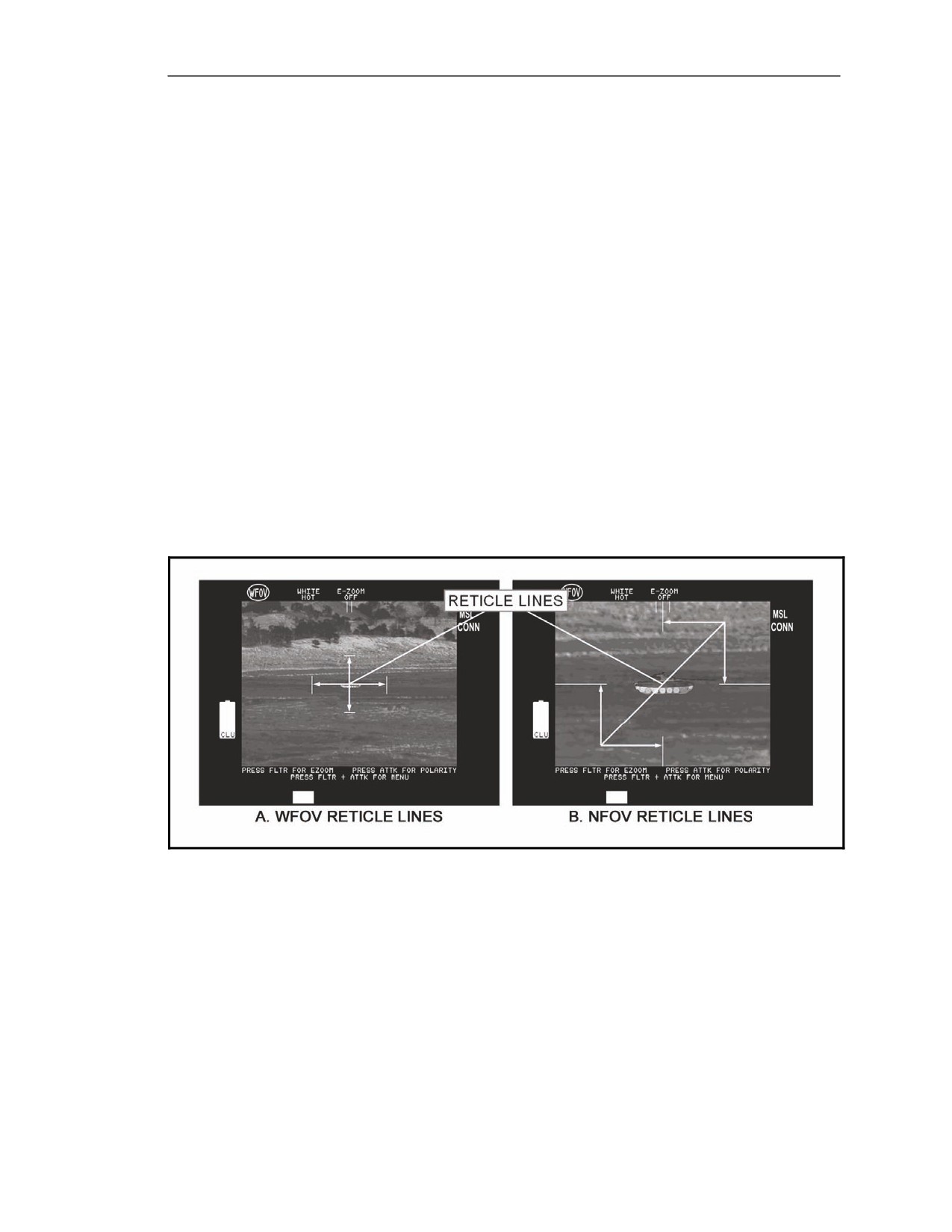
5-129. In WFOV and NFOV, reticles (Figure 5-40) appear on the CLU display. The configuration of
lines in the reticles changes from WFOV to NFOV, allowing the gunner to easily identify the FOV used.
Wide Field-of-View Reticle
5-130. In WFOV, the reticle looks like an open-cornered box (Figure 5-40A). The inside of this box
defines the area the gunner will see when he selects NFOV.
Narrow Field-of-View Reticle
5-131. In NFOV, the four reticle lines look like crosshairs with the center removed (Figure 5-40B).
The vertical lines split the day and NFOV stadia. The square area inside the ends of these lines defines
the area that the gunner will see when he selects seeker FOV.
Figure 5-40. Reticle lines.
20 March 2008
FM 3-22.37
5-35
Chapter 5
Field-of-View Change
5-132. The reticle allows the gunner to keep track of a target when he changes FOV (Figure 5-41). The reticle
defines an area within the current FOV that the gunner will see when he changes to the next FOV. As long as
the gunner keeps the target within the reticle, he will see the target in the next FOV when he changes it.
Figure 5-41. Reticle area versus field-of-view change.
TRACK GATES
5-133. See paragraphs 5-185 and 5-186.
CROSSHAIRS
5-134. See paragraph 5-194.
ROUND
5-135. The Javelin round is comprised of—
z
An LTA.
z
A BCU.
z
A missile.
5-36
FM 3-22.37
20 March 2008
Block 1 Improvements
LAUNCH TUBE ASSEMBLY
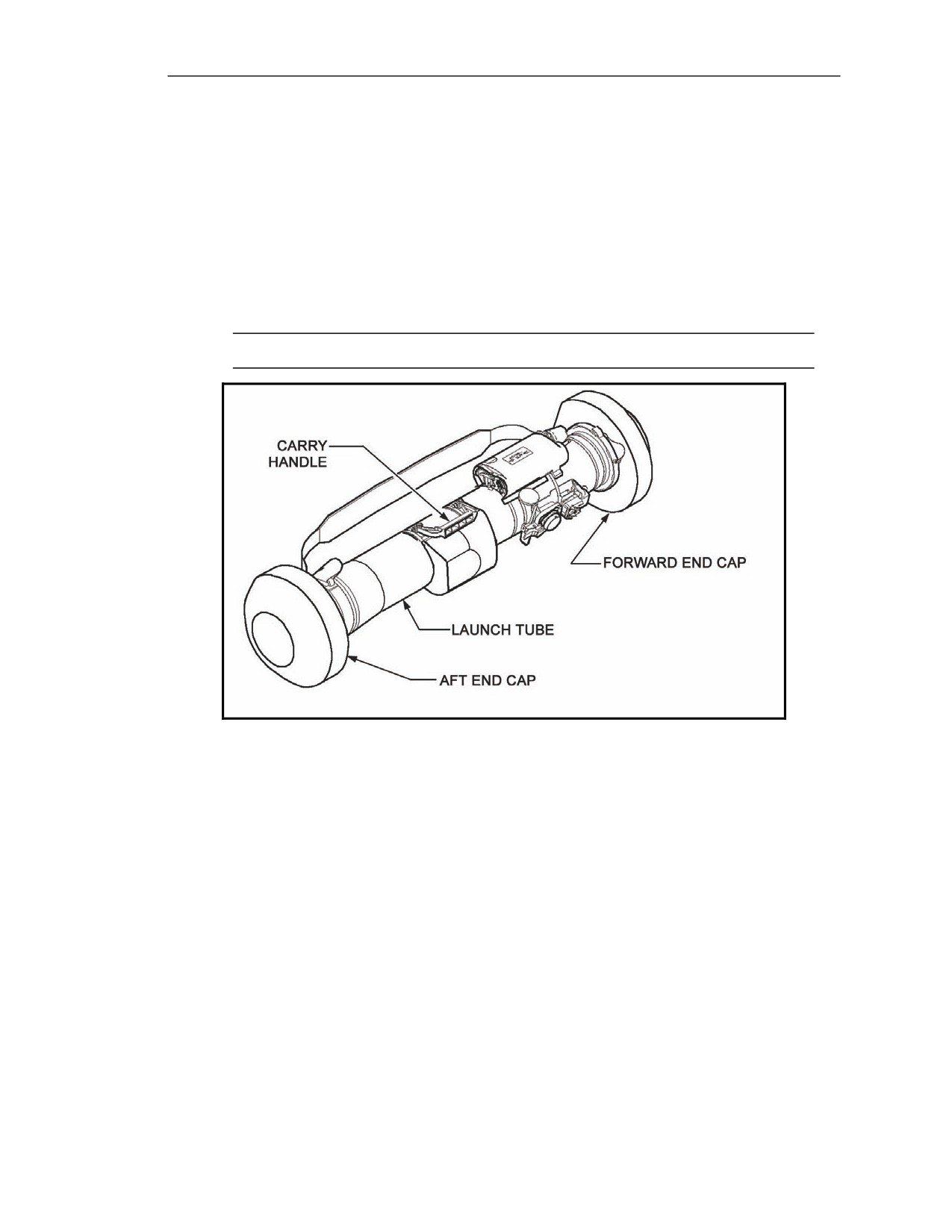
5-136. The LTA houses the missile and provides the connection with the CLU. It serves as the
missile's handling container and launch platform. The LTA (Figure 5-42) consists of a—
z
Launch tube.
z
Forward and aft end caps.
z
Carry handle.
z
Shoulder strap.
z
Latch assembly.
z
Shoulder pad.
NOTE: Once the missile is launched, the LTA is discarded.
Figure 5-42. Launch tube assembly.
Launch Tube
5-137. The launch tube (Figure 5-42) is a single-piece, composite graphite/epoxy container that
protects the missile from the environment before the missile is launched. All other LTA components
mount externally onto this tube.
Forward and Aft End Caps
5-138. The forward and aft end caps (Figure 5-42) are designed to protect the missile from damage
during transport and handling. Each has a foam shock absorber to protect the round from impact if it is
dropped or otherwise abused. The end caps also provide stability and support when the round is
strapped in vehicle transit racks or placed on the ground.
20 March 2008
FM 3-22.37
5-37
Chapter 5
Forward End Cap
5-139. The forward end cap protects the missile from moisture, dust, and other potential problems.
NOTE: The forward end cap should not be removed unless the missile is to be launched,
and only after the CLU is connected to the round. If the missile is not launched, the gunner
ensures that the round is free of foreign material and reinstalls the forward end cap to
prevent missile damage.
Aft End Cap
5-140. The aft end cap is permanently attached to the LTA. During launch, the center of the cap is
blown out by the blast of the missile launch motor.
Carry Handle
5-141. The carry handle (Figure 5-42) provides a convenient means for the gunner to lift and carry the round.
Latch Assembly
5-142. The latch assembly provides the electrical and mechanical connections between the round and
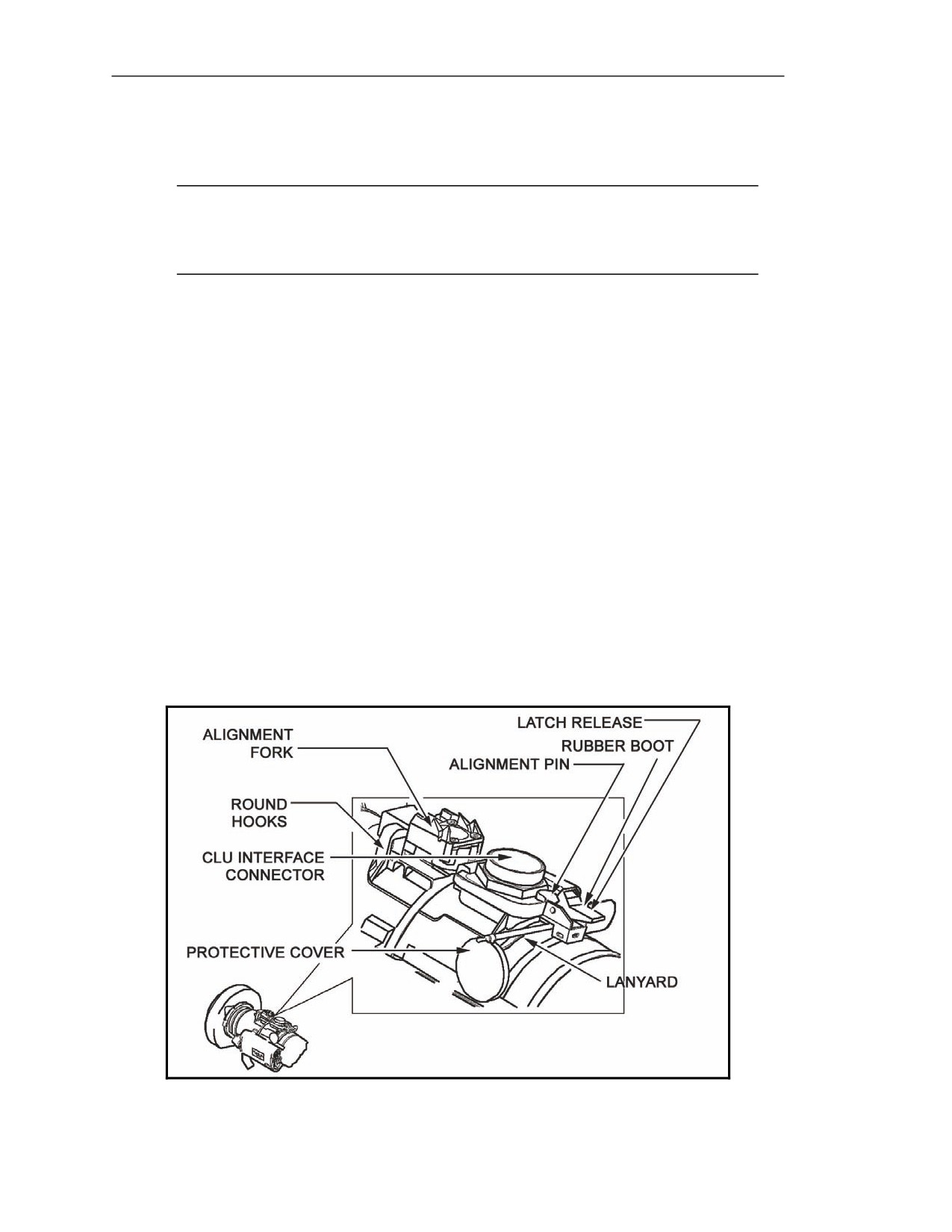
the CLU (Figure 5-43). The latch assembly consists of the following component parts:
z
Round hooks for securing the CLU to the LTA.
z
A latch release for securing the CLU to the LTA.
z
An alignment fork for aligning the CLU to the latching mechanism.
z
An alignment pin for maintaining alignment between the CLU and the LTA.
z
A CLU interface connector.
z
A rubber boot for protecting the LTA's internal components from moisture.
z
A lanyard for securing the protective cover to the LTA.
z
A protective cover for the CLU interface connector.
Figure 5-43. Command launch unit mounting brackets.
5-38
FM 3-22.37
20 March 2008
Block 1 Improvements
Round Hooks
5-143. The round hooks (Figure 5-43), two metal loops located at the front of the latch assembly,
hook into the forks on the CLU interface bracket to secure the CLU to the round.
Latch Release
5-144. The latch release (Figure 5-43), a spring-loaded mechanism located at the rear of the latch
assembly, engages the CLU interface catch to secure the CLU to the round.
Alignment Fork
5-145. The alignment fork (Figure 5-43) is a slotted metal device located behind and above the round
hooks. As the gunner connects the CLU to the round, the alignment fork engages the alignment bar on
the CLU. This guides the CLU into place to ensure proper engagement of the latching mechanism and
the interface connectors.
Alignment Pin
5-146. The alignment pin (Figure 5-43) is a conical post located on the rear of the latch assembly, just
below the latch release. It engages a hole in the round interface catch on the CLU to maintain
mechanical alignment between the CLU and the round.
Command Launch Unit Interface Connector
5-147. The CLU interface connector (Figure 5-43), the counterpart to the round interface connector
on the CLU, provides the electrical connections between the round and CLU. All signals between the
CLU and round—missile control signals, squib firing signals, and seeker video signals—pass through
this connector.
Rubber Boot
5-148. A rubber boot (Figure 5-43) located around the bottom of the CLU interface connector keeps
water, dirt, and debris out of the round internal components.
Lanyard
5-149. The lanyard (Figure 5-43), a rubber cable secured to the latch assembly chassis below the latch
release, secures the protective cover for the CLU interface connector to the LTA. The lanyard is equipped
with a tab that lets the gunner move the protective cover when connecting the CLU to the round.
Protective Cover
5-150. The protective cover (Figure 5-43), an aluminum cap that attaches to the CLU interface
connector, prevents dirt and debris from entering the CLU interface connector.
Shoulder Strap and Pad
5-151. The shoulder strap (Figure 5-42) adjusts for easy transport, and the shoulder pad allows the
gunner to balance and support the Javelin when it is placed on the shoulder.
20 March 2008
FM 3-22.37
5-39
Chapter 5
BATTERY COOLANT UNIT
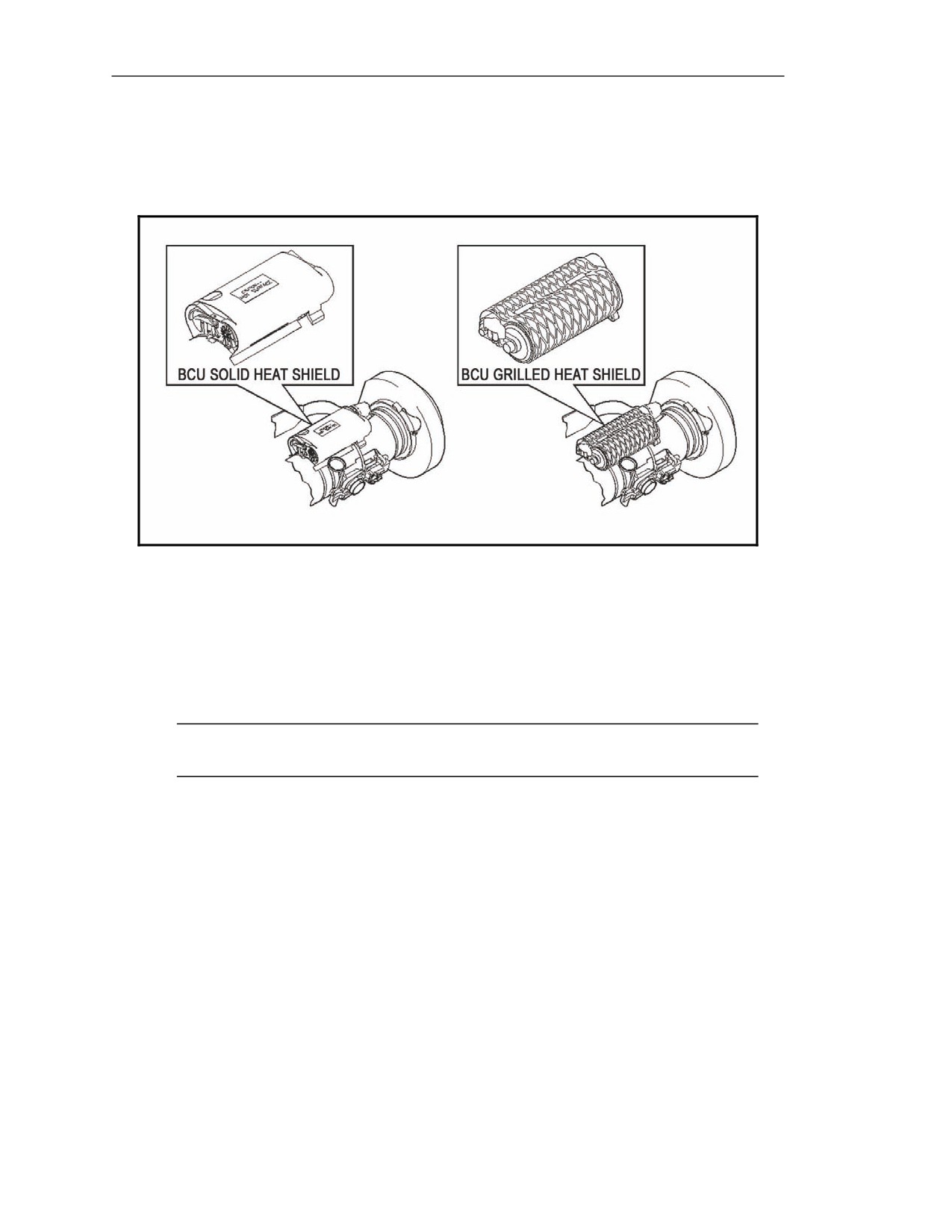
5-152. The BCU (Figure 5-44) cools and powers the missile. It consists of two sections: a battery
section and a compressed-gas coolant section.
Figure 5-44. Battery coolant unit.
Battery Section
5-153. The battery section powers the missile electronics prior to launch.
Coolant Section
5-154. The coolant section cools the seeker to its operating temperature prior to missile launch.
NOTE: There are two interchangeable versions of the BCU—one with a solid heat shield
and another with a grilled heat shield.
5-40
FM 3-22.37
20 March 2008
Block 1 Improvements
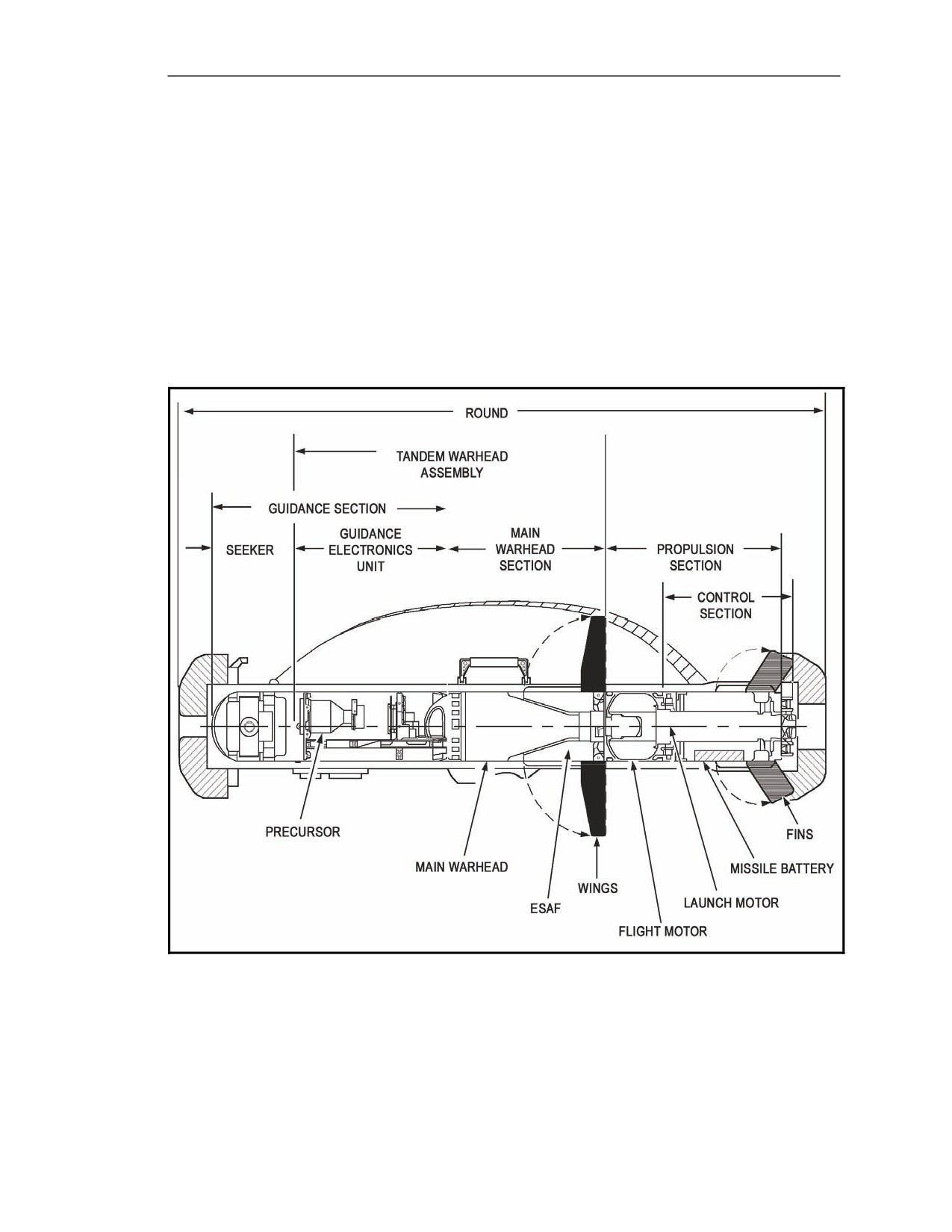
MISSILE OPERATION
5-155. The missile (Figure 5-45) carries all of the components necessary to deliver an HE shaped
charge to the target. It acquires a selected target, tracks the target during flight, directs itself to
intercept the target, and detonates the warhead on impact with the target. The Javelin missile consists
of several sections:
z
A guidance section.
z
A warhead section.
z
A mid-body section.
z
A propulsion section.
z
A control actuator section.
5-156. These sections work in unison from missile launch until target impact.
Figure 5-45. Javelin missile.
20 March 2008
FM 3-22.37
5-41