FM 3-22.37 COMBAT MISSILE SYSTEM, MEDIUM (March 2008) - page 5
Chapter 5
GUIDANCE SECTION
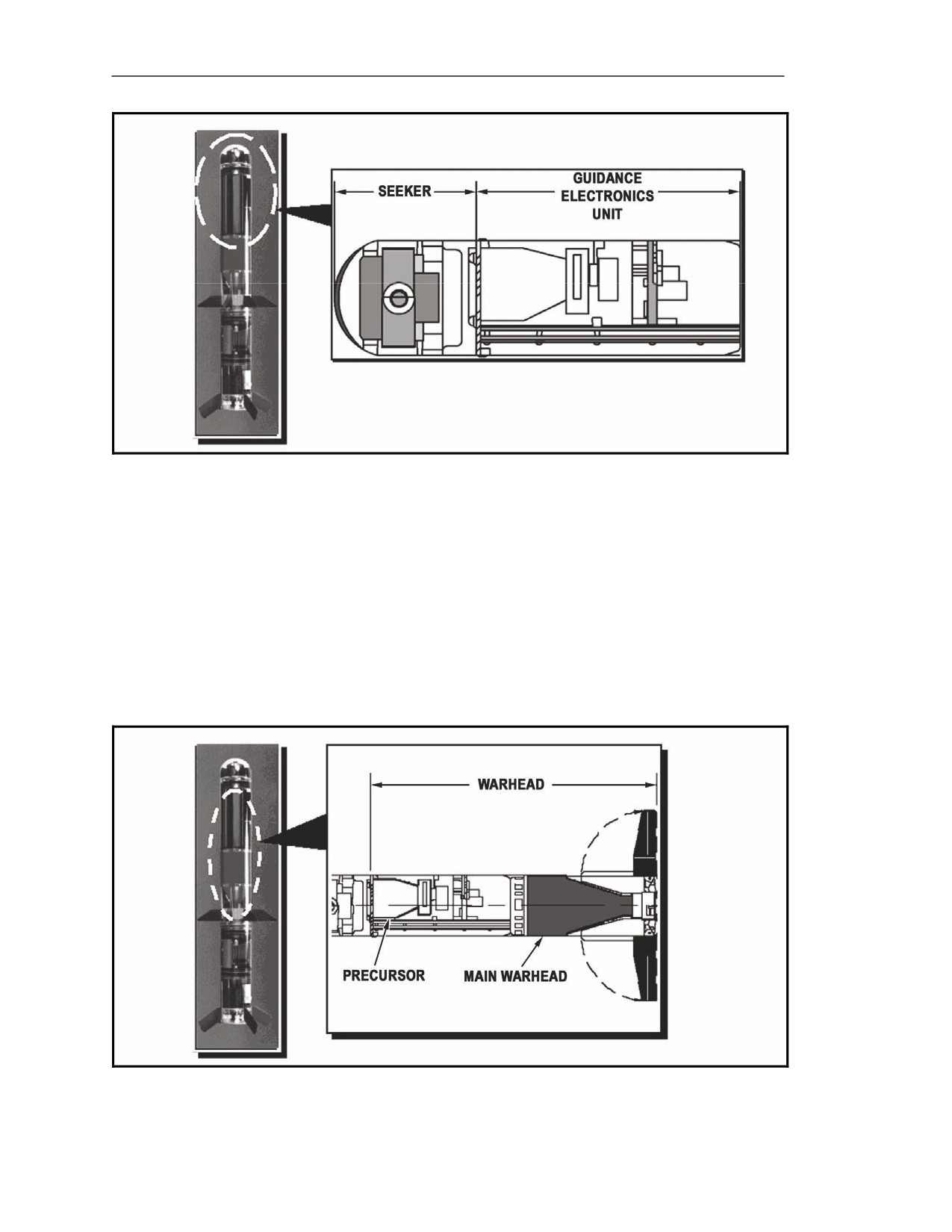
5-157. The forward section of the missile, the guidance section
(Figure
5-45), provides target
tracking and flight control signals. It includes the seeker head and the guidance electronics unit.
Seeker Head
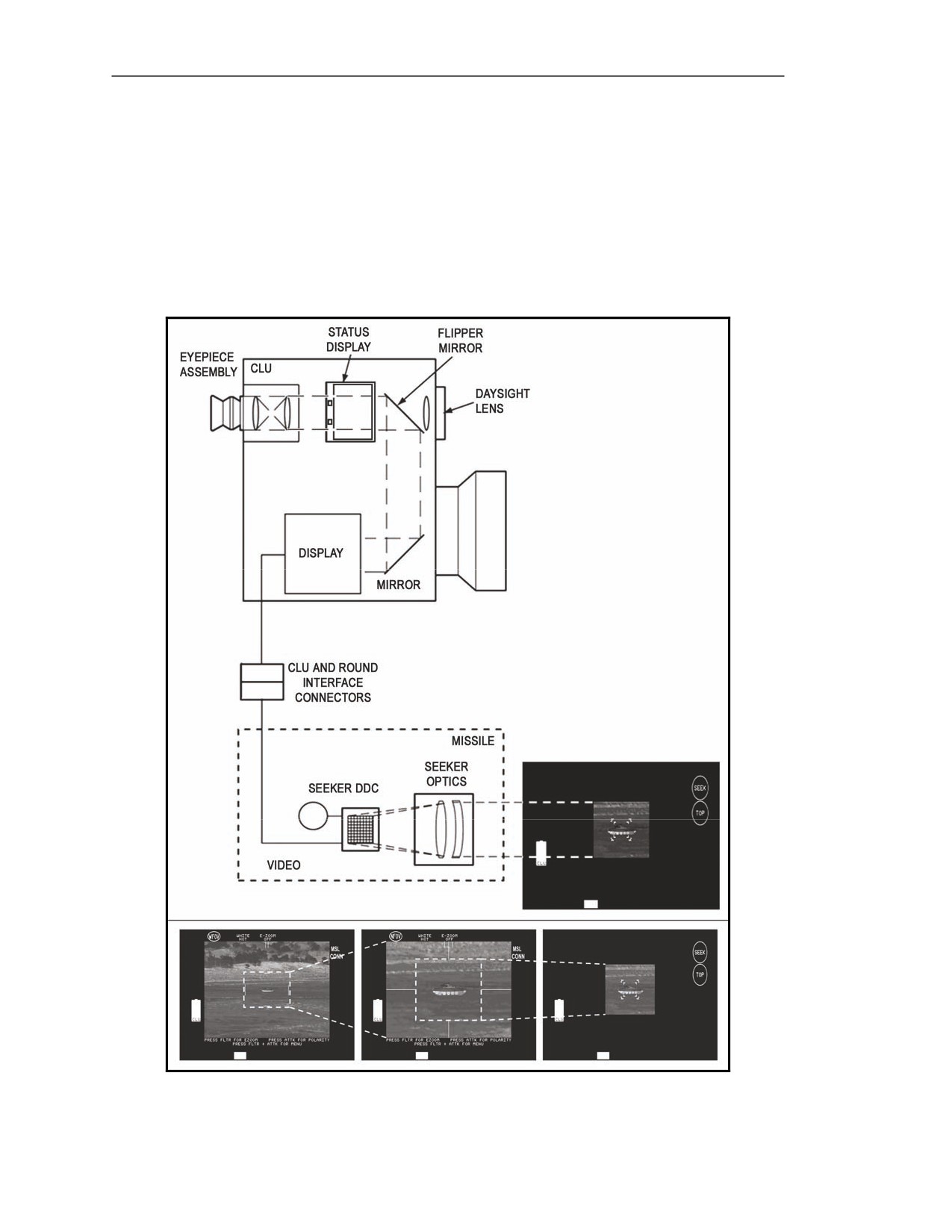
5-158. The seeker head provides 9x magnification of the target scene (seeker FOV [Figure 5-46]) and
creates an IR target image, similar to the NVS in the CLU. The seeker head houses the IR sight and the
crush switch.
Figure 5-46. Seeker field-of-view.
5-42
FM 3-22.37
20 March 2008
Block 1 Improvements
Infrared Sight
5-159. The IR sight, along with the guidance electronics unit and the control actuator section, gives
the missile its fire-and-forget capability. It contains the optics and the DDC for seeker FOV.
Optics
5-160. The optics focus the incoming IR light onto the seeker DDC.
Detector Dewar Cooler
5-161. The DDC converts the IR light into an electrical signal. Then, it sends it to the CLU display
through the CLU and round interface connectors. The display converts the electrical signals from the
seeker into visible images (seeker FOV), which are sent to the gunner by the same path as NVS images
(Figure 5-46).
5-162. After using NFOV to identify the target and determine whether or not it is engageable, the
gunner activates the seeker to engage the target. Upon missile launch, the seeker FOV image is sent to
the guidance electronics section. During flight to the target, the IR sight tracks the target and sends
target location information to the guidance electronics unit.
NOTES: 1. The missile seeker's FOV is used only to lock the missile onto a target.
2. Images in seeker FOV have fewer details than images from the NVS. However,
when you use seeker FOV, the gunner already knows what the target is, so
target image details are not necessary.
Crush Switch
5-163. The crush switch begins the detonation sequence for the warhead when the missile impacts
with the target.
Guidance Electronics Unit
5-164. The guidance electronics unit (Figure 5-47) serves the following functions:
z
Before missile launch, it communicates with the CLU by—
Sending video of the seeker FOV and messages about round status (BCU battery spent,
missile overheat, missile failure of BIT, misfire, and hangfire) to the CLU.
Responding to inputs from the GATE ADJ/CTRS & BRT switch, the ATTK SEL
switch, the seeker trigger, and the fire trigger.
z
After lock-on, it continuously points the seeker at the target.
z
After missile launch, it sends signals to the control actuator section to guide the missile to
the target during flight.
20 March 2008
FM 3-22.37
5-43
Chapter 5
Figure 5-47. Guidance section.
WARHEAD SECTION
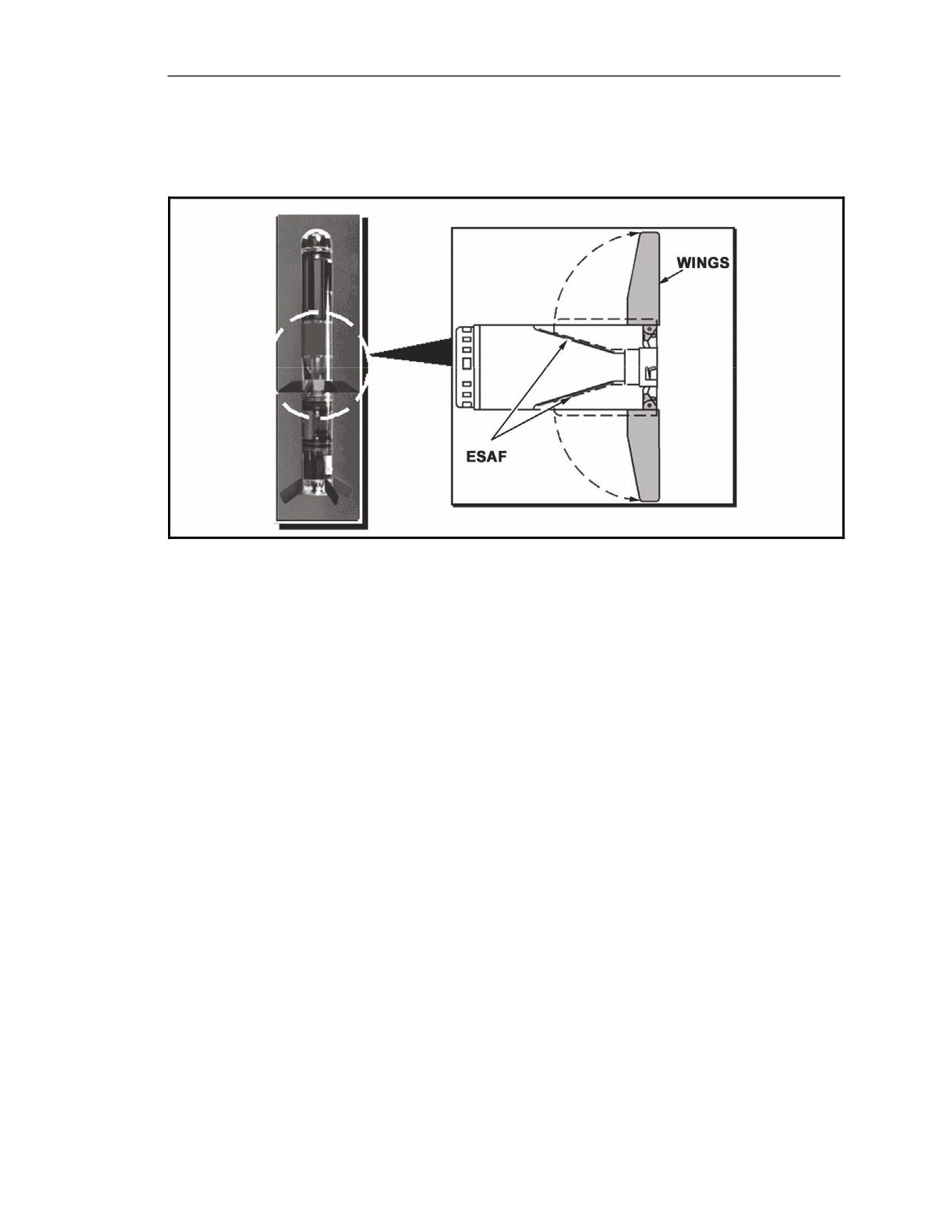
5-165. The warhead components (Figure 5-48) are located in the guidance section and in the mid-
body section. The components include a precursor charge and a main charge.
Precursor Charge
5-166. The precursor charge counteracts the effects of reactive armor.
Main Charge
5-167. The main charge penetrates the main hull armor.
Figure 5-48. Warhead section.
5-44
FM 3-22.37
20 March 2008
Block 1 Improvements
MID-BODY SECTION
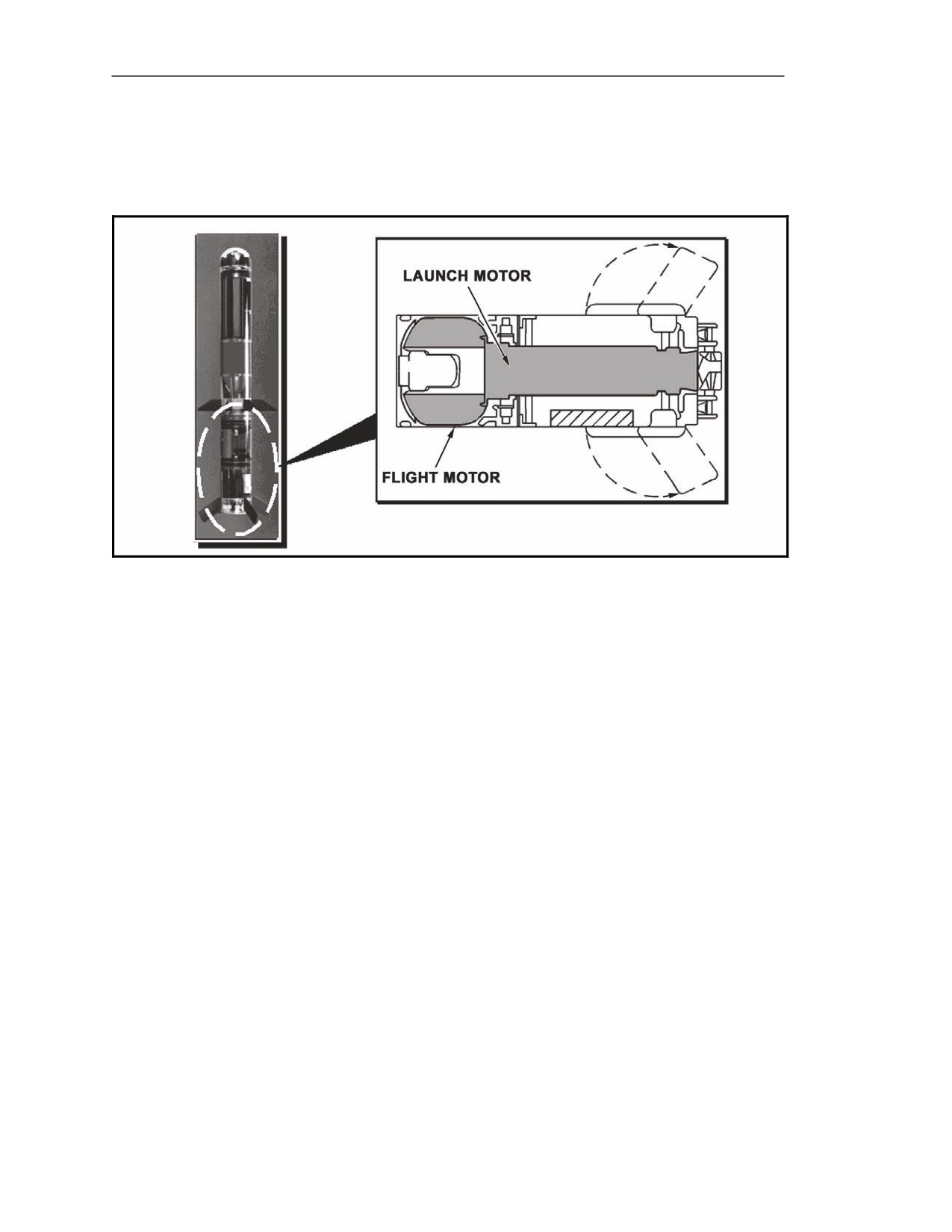
5-168. The mid-body section (Figure 5-49) includes the wings, the main charge, and the ESAF
electronics.
Figure 5-49. Mid-body section.
Flight Control Wings
5-169. Similar to the feathers on a dart, the wings provide aerodynamic stability as the missile flies to
the target. When the missile is in the LTA, the wings fold into slots in the missile's skin. Then, the
spring-loaded wings deploy into a fixed position when the missile is launched.
Electronic Safe, Arm, and Fire and Main Charge
5-170.The ESAF controls the initiation of the missile motors and the detonation of the warhead charges.
20 March 2008
FM 3-22.37
5-45
Chapter 5
PROPULSION SECTION
5-171. The propulsion section (Figure 5-50) provides thrust to propel the missile to the target. It has
two motors: the launch motor and the flight motor.
Figure 5-50. Propulsion section.
Launch Motor
5-172. The launch motor propels the missile approximately 15 feet away from the gunner to limit
blast effects of the flight motor.
Flight Motor
5-173. The flight motor propels the missile to the target at the rate of about 1000 meters per 7
seconds (approximately 514 kilometers per hour or 319 miles per hour).
5-46
FM 3-22.37
20 March 2008
Block 1 Improvements
CONTROL ACTUATOR SECTION
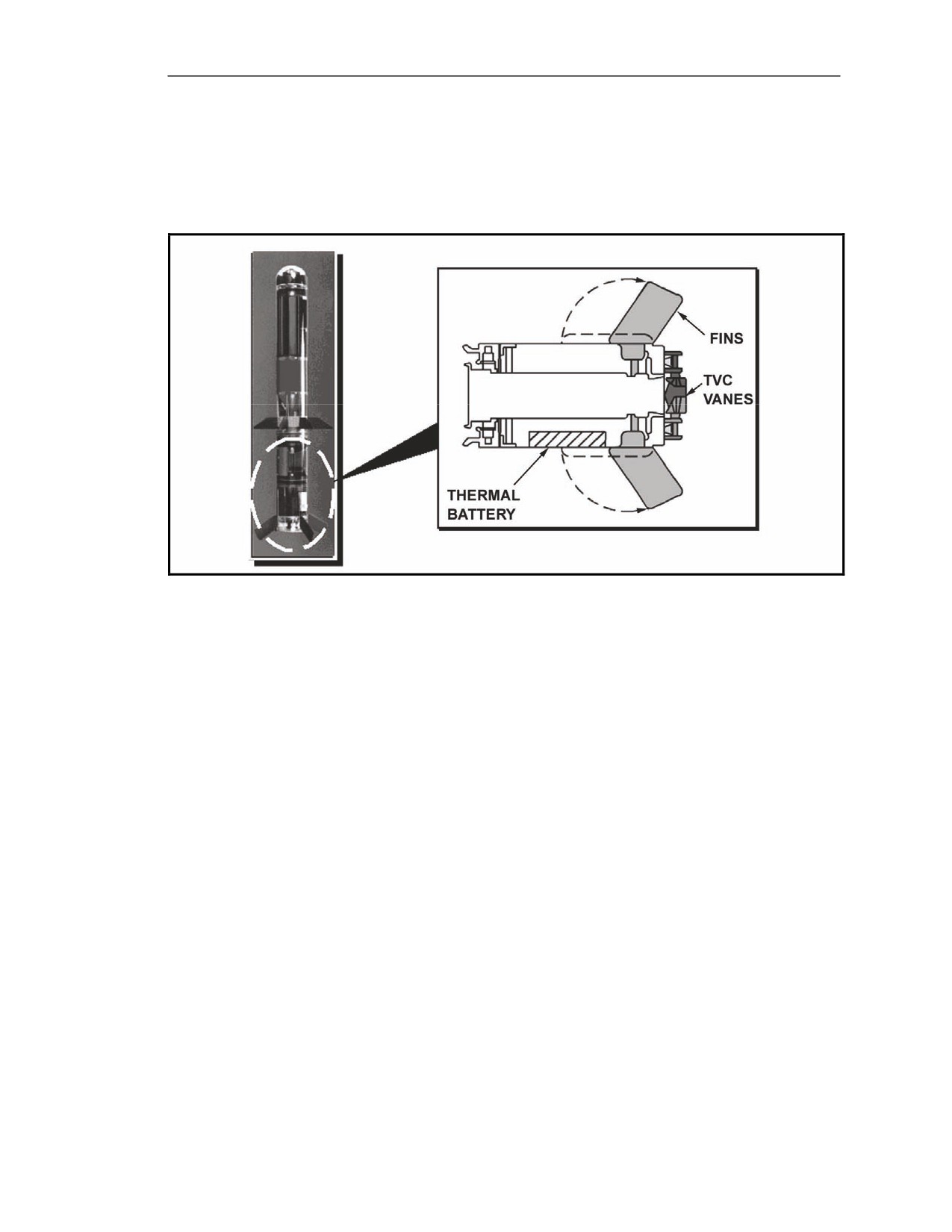
5-174. The control actuator section
(Figure
5-51) receives control signals from the guidance
electronics unit. In response to these signals, the control actuator section moves its flight control
surfaces to change the missile flight path.
Figure 5-51. Control actuator section.
ROUND CONTROLS
5-175. The Javelin round controls are located on the left handgrip, right handgrip, and forward end
cap of the CLU.
LEFT HANDGRIP CONTROLS
5-176. Two left handgrip controls are used during seeker operation: the seeker trigger and the SGT SEL switch.
20 March 2008
FM 3-22.37
5-47
Chapter 5
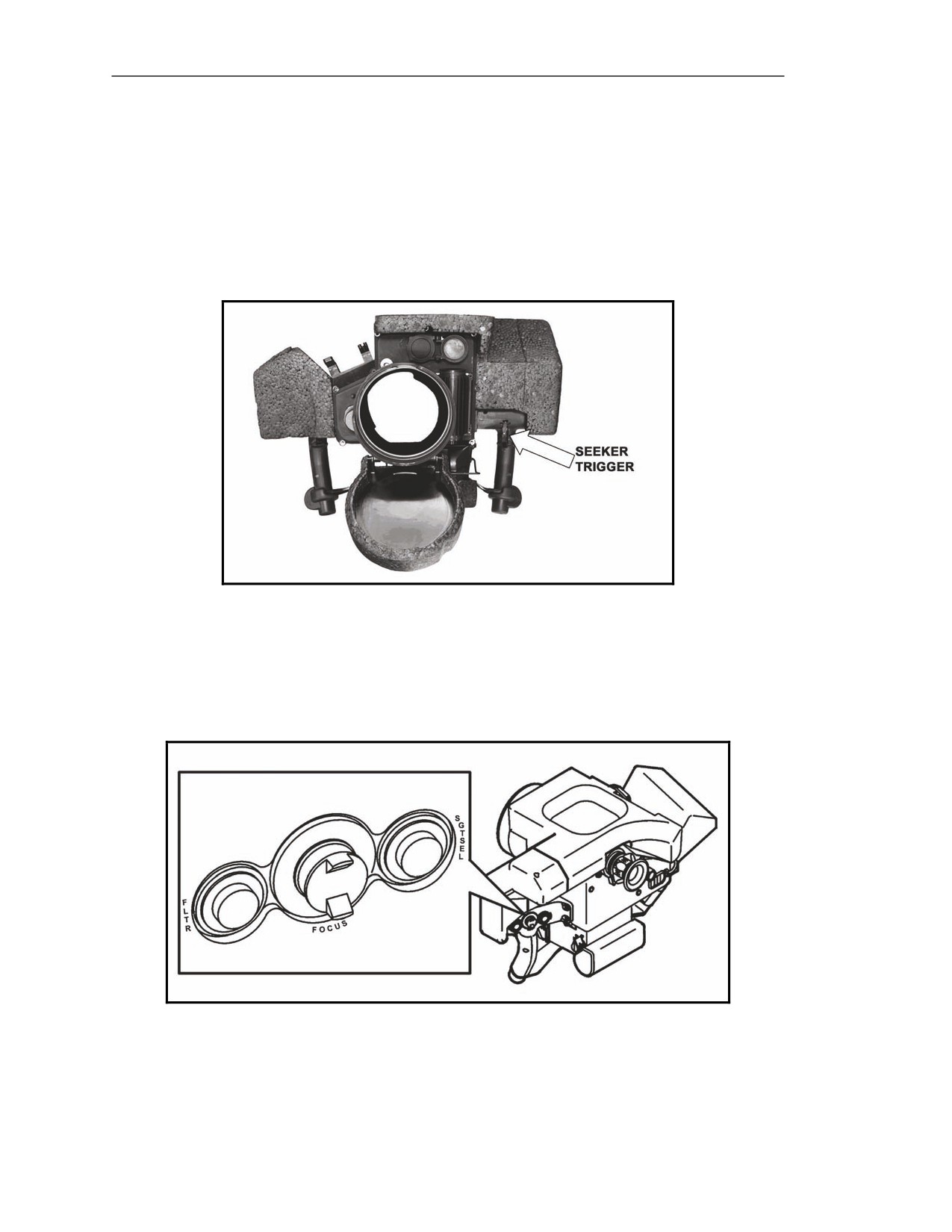
Seeker Trigger
5-177. The seeker trigger is located on the left handgrip at the index finger position (Figure 5-52).
The seeker trigger serves the following purposes:
z
Activates the seeker.
z
Locks the seeker on the target.
z
Enables the fire trigger.
5-178. A trigger guard covers the seeker trigger to prevent accidental activation of the BCU.
Figure 5-52. Seeker trigger.
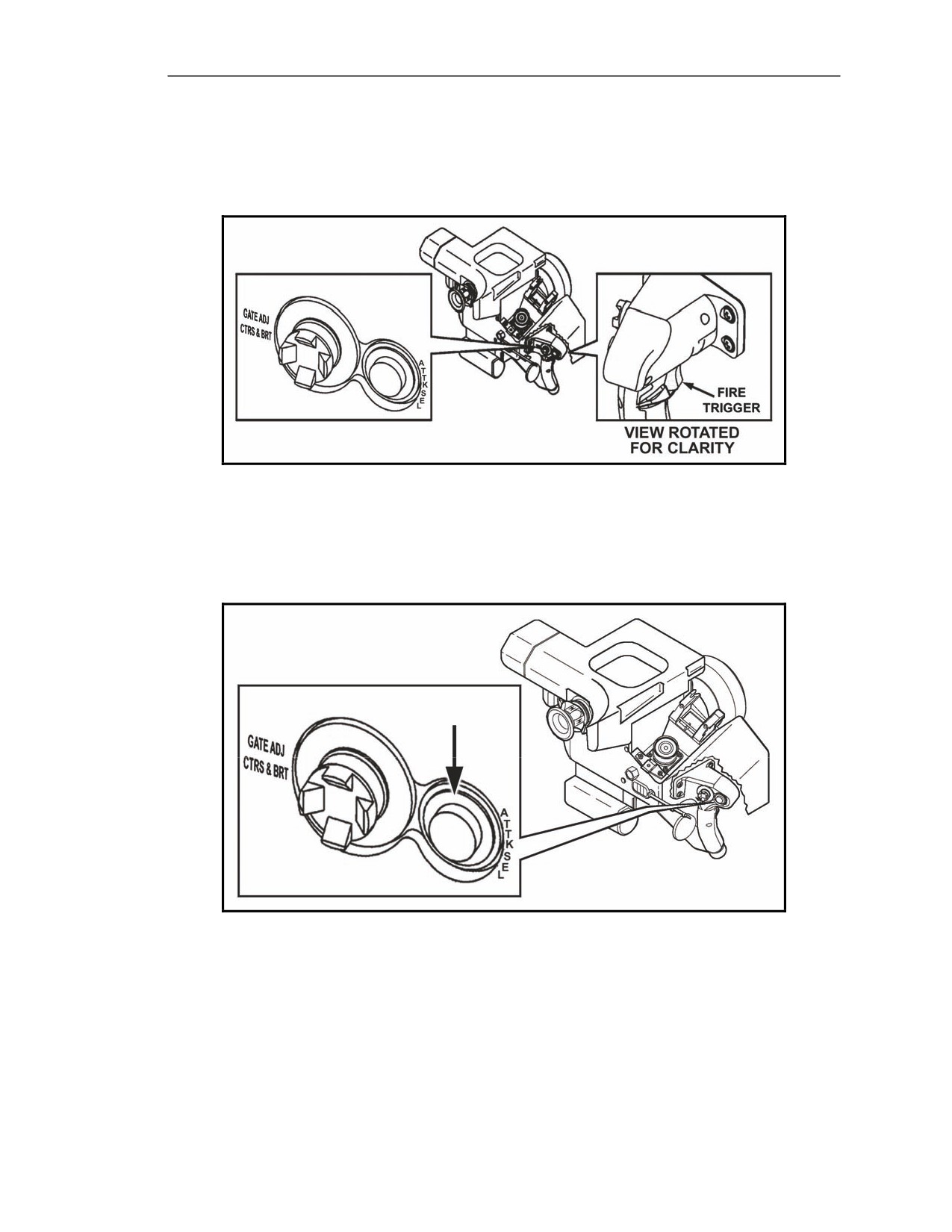
Sight Select (SGT SEL) Switch
5-179. The SGT SEL switch (Figure 5-53) allows the gunner to toggle between the seeker FOV and
the previous FOV (day FOV, WFOV, or NFOV). To return to the seeker FOV, the gunner squeezes
and releases the seeker trigger.
Figure 5-53. Sight Select switch.
5-48
FM 3-22.37
20 March 2008
Block 1 Improvements
RIGHT HANDGRIP CONTROLS
5-180. The round controls on the right handgrip (Figure 5-54) include the ATTK SEL switch, the
GATE ADJ/CTRS & BRT switch, and the fire trigger.
Figure 5-54. Right handgrip controls.
Attack Select (ATTK SEL) Switch
5-181. This pushbutton switch is located on the right side of the right handgrip (Figure 5-55). The
gunner uses the ATTK SEL switch to select top or direct attack mode when in the seeker FOV.
Figure 5-55. Attack Select switch.
20 March 2008
FM 3-22.37
5-49
Chapter 5
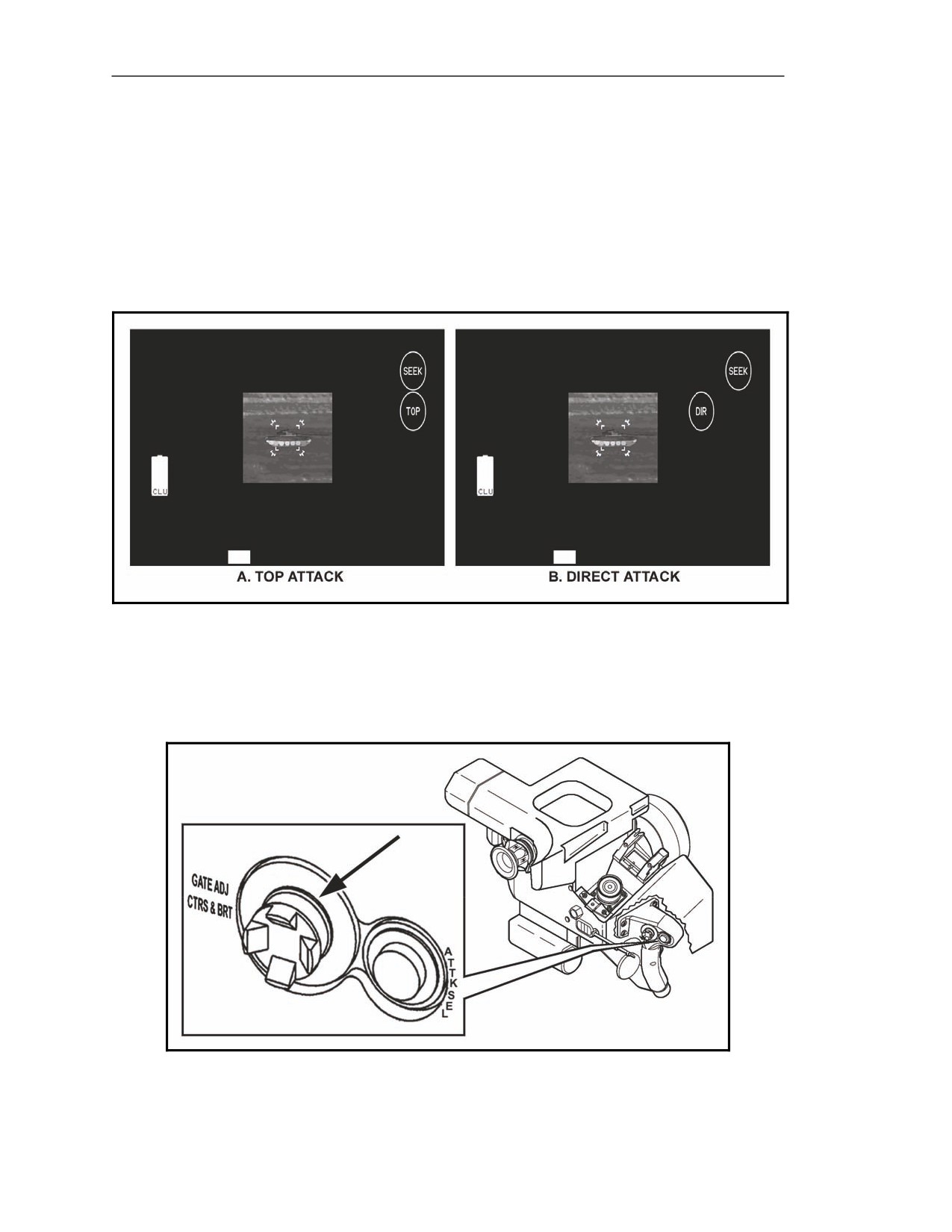
Top Attack Mode
5-182. Top attack is the default missile mode, as indicated by the TOP indicator on the CLU display
(Figure 5-56A).
Direct Attack Mode
5-183. To select the direct attack mode, the gunner presses the ATTK SEL switch; the DIR indicator
illuminates (Figure 5-56B). To toggle between the two missile attack modes, the gunner presses the
ATTK SEL switch.
Figure 5-56. Missile mode indicators.
Gate Adjust/Contrast and Brightness (GATE ADJ/CTRS & BRT) Switch
5-184. The gunner uses the GATE ADJ/CTRS & BRT switch (Figure 5-57) to adjust the track gates
in the seeker FOV.
Figure 5-57. Gate Adjust/Contrast and Brightness switch.
5-50
FM 3-22.37
20 March 2008
Block 1 Improvements
Down/Up Track Gate Adjustment
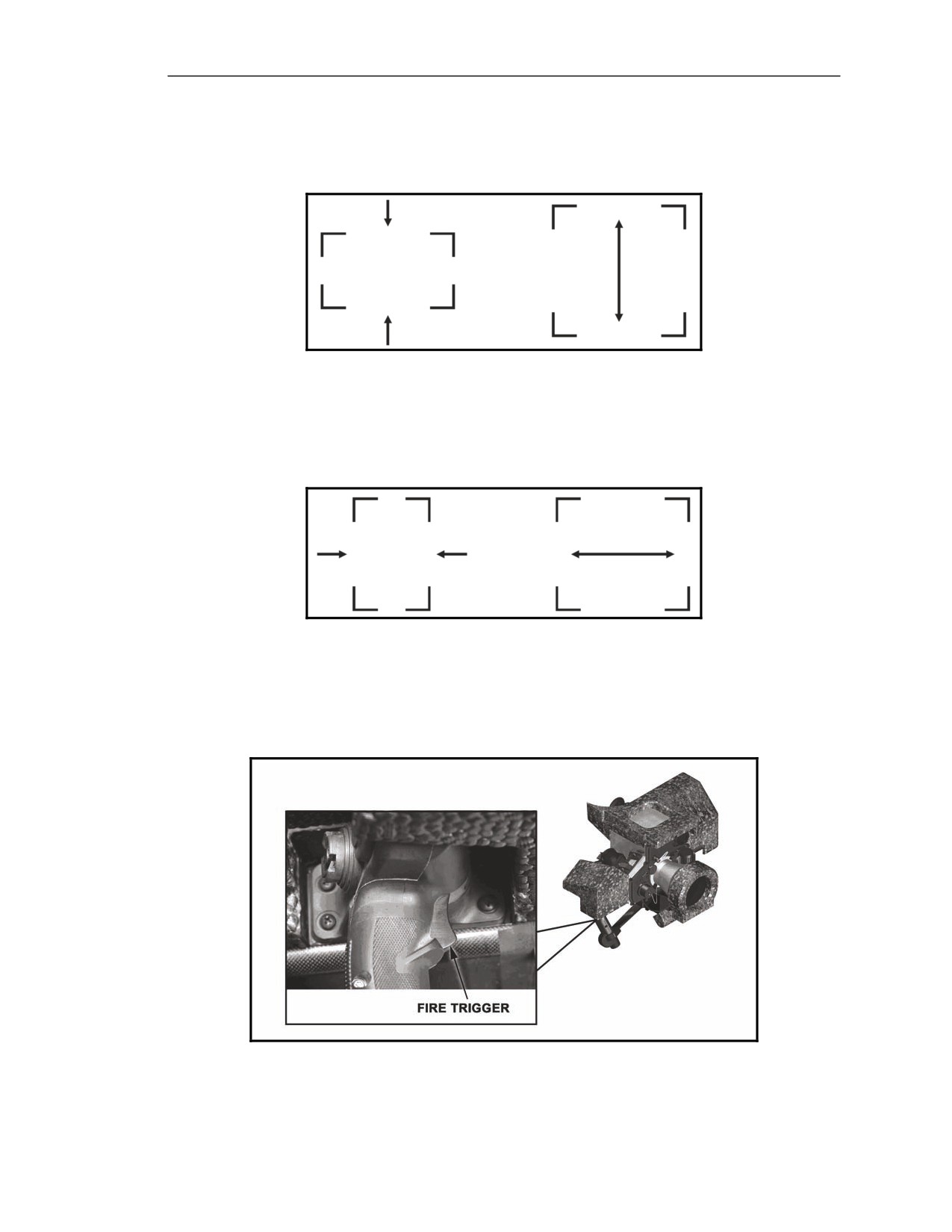
5-185. The gunner presses the GATE ADJ/CTRS & BRT switch down to decrease the height of the
track gates and up to increase it (Figure 5-58).
Figure 5-58. Track gate adjustment, down/up.
Left/Right Track Gate Adjustment
5-186. The gunner presses the GATE ADJ/CTRS & BRT switch left to decrease the width of the
track gates and right to increase it (Figure 5-59).
Figure 5-59. Track gate adjustment, left/right.
Fire Trigger
5-187. The fire trigger (Figure 5-60) is located on the right handgrip at the index finger position.
When the seeker is locked onto the target, the gunner squeezes the fire trigger to launch the missile.
Figure 5-60. Fire trigger.
20 March 2008
FM 3-22.37
5-51
Chapter 5
MANUAL RELEASE BUTTON
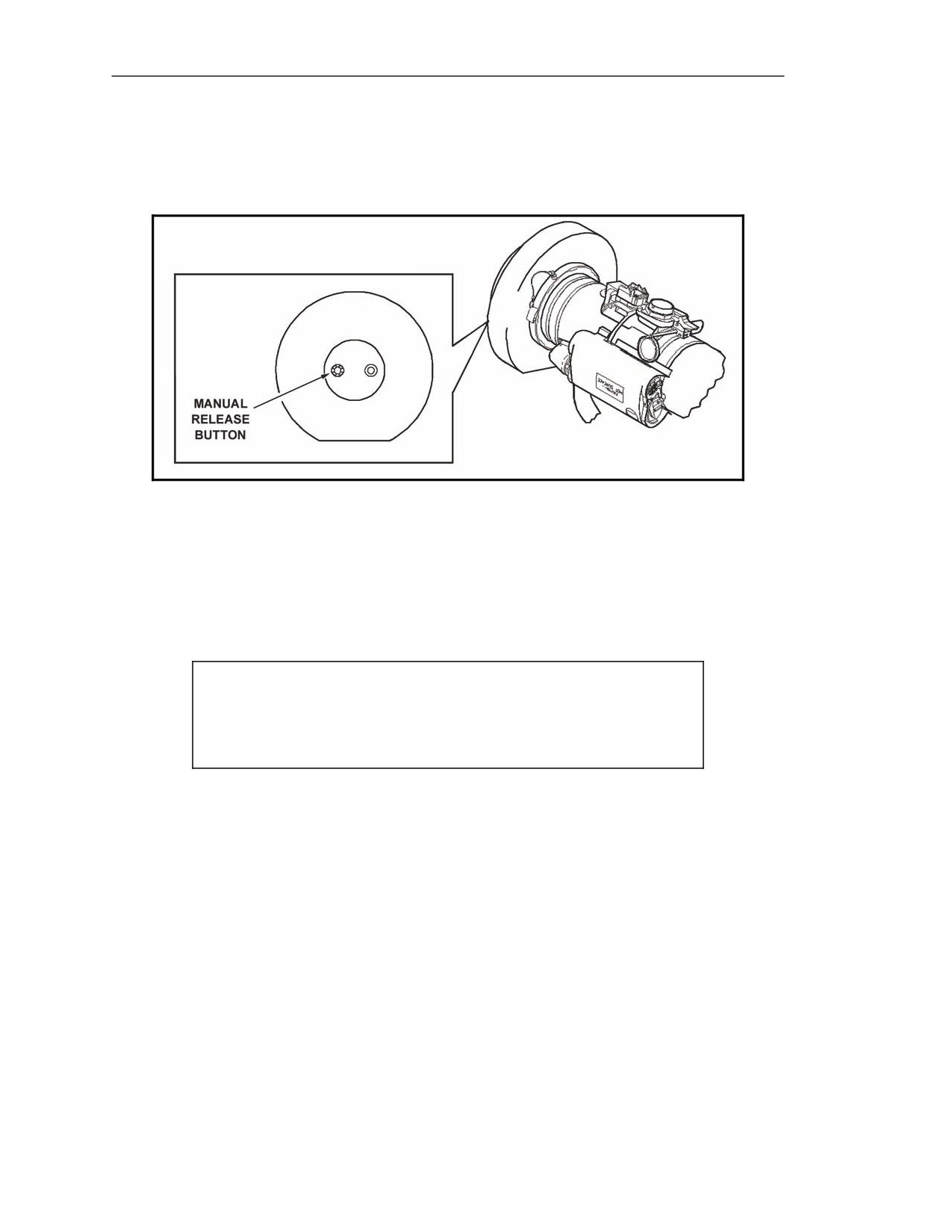
5-188. The manual release button (Figure 5-61) is located on the forward end cap. The gunner presses
this button to equalize the air pressure between the forward end cap and the seeker dome to allow easy
removal of the forward end cap.
Figure 5-61. Manual release button.
ROUND INDICATORS
5-189. Round indictors consist of a—
z
BCU status indicator.
z
Humidity indicator.
z
Seeker indicator.
CAUTION
The round BCU and humidity indicators should be checked before
mating the round to the CLU.
5-52
FM 3-22.37
20 March 2008
Block 1 Improvements
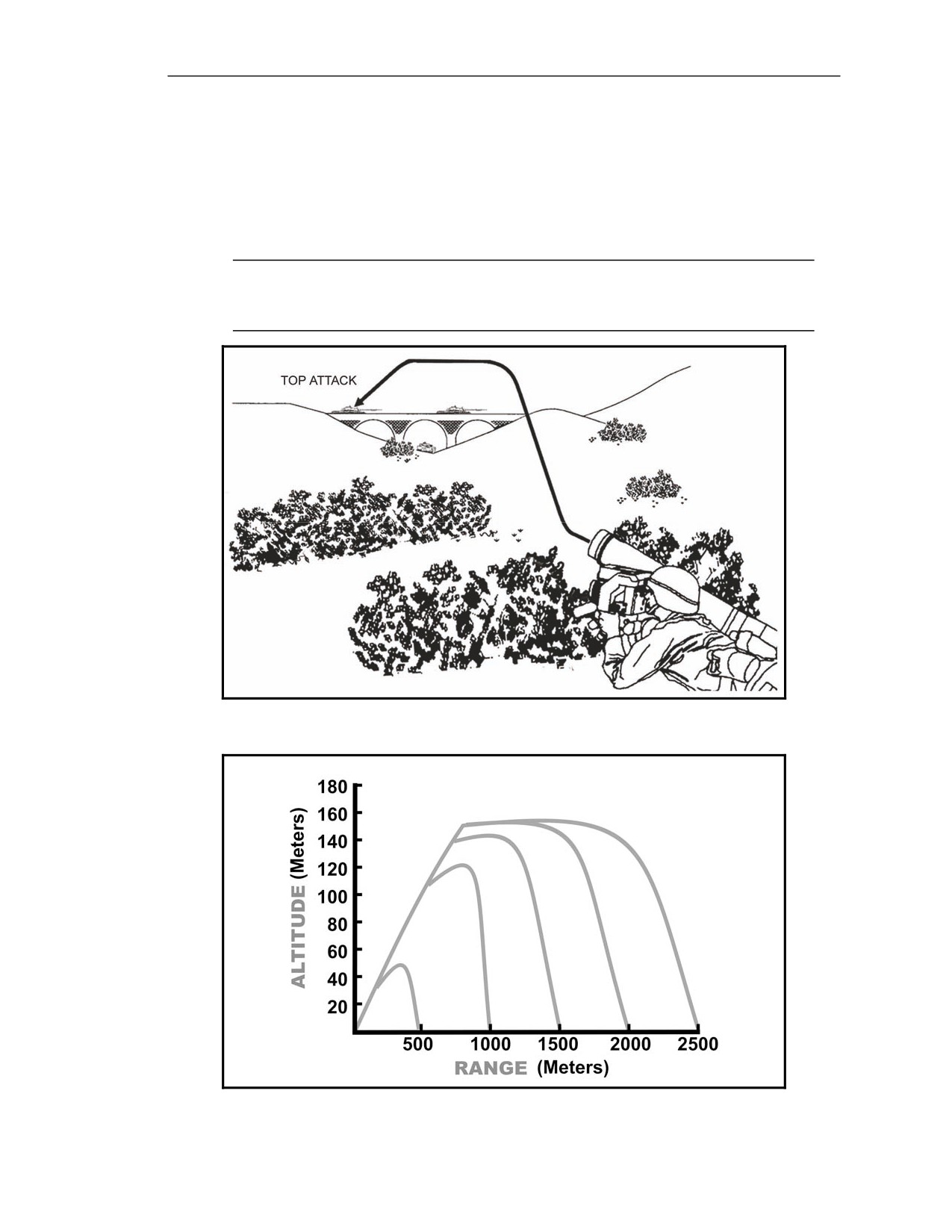
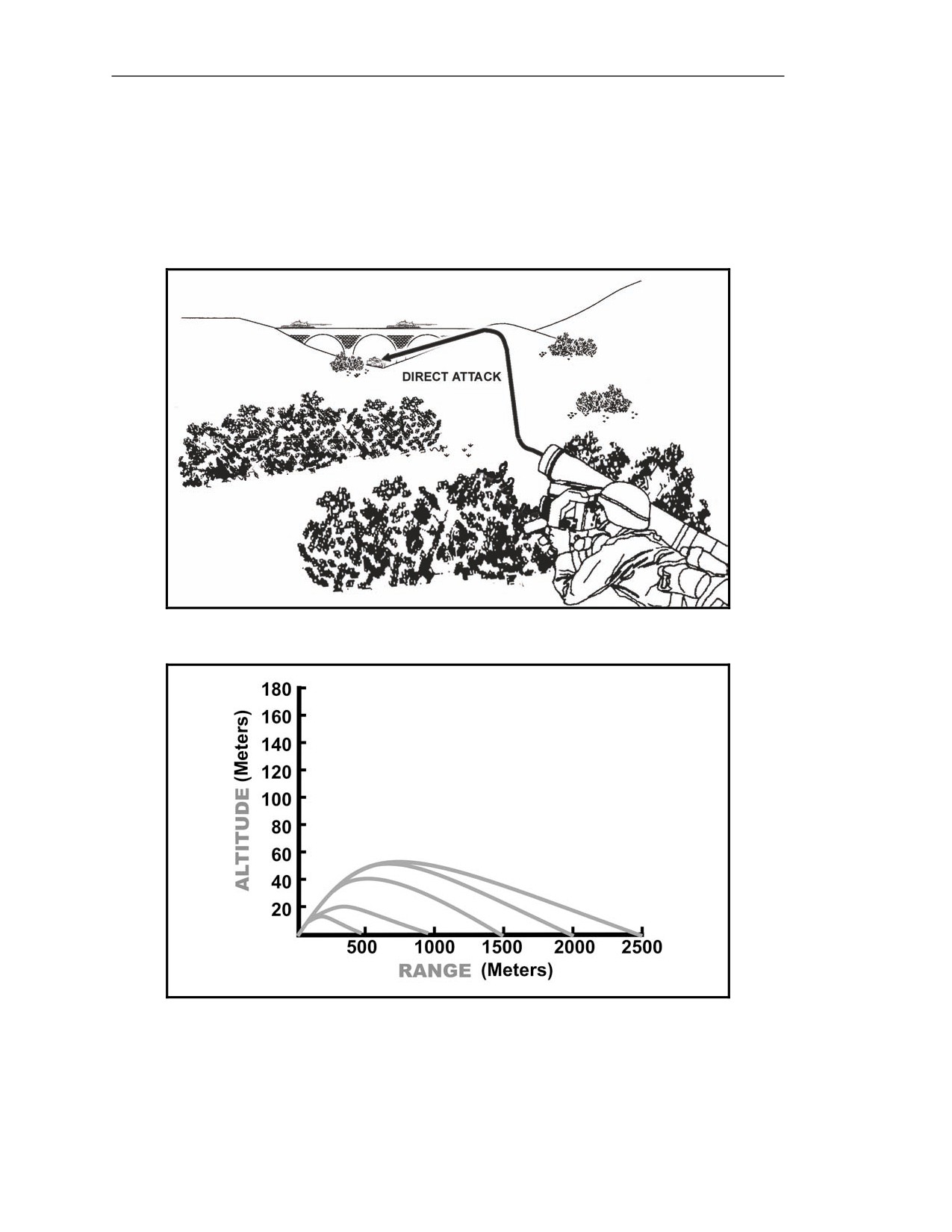
BATTERY COOLANT UNIT STATUS INDICATOR
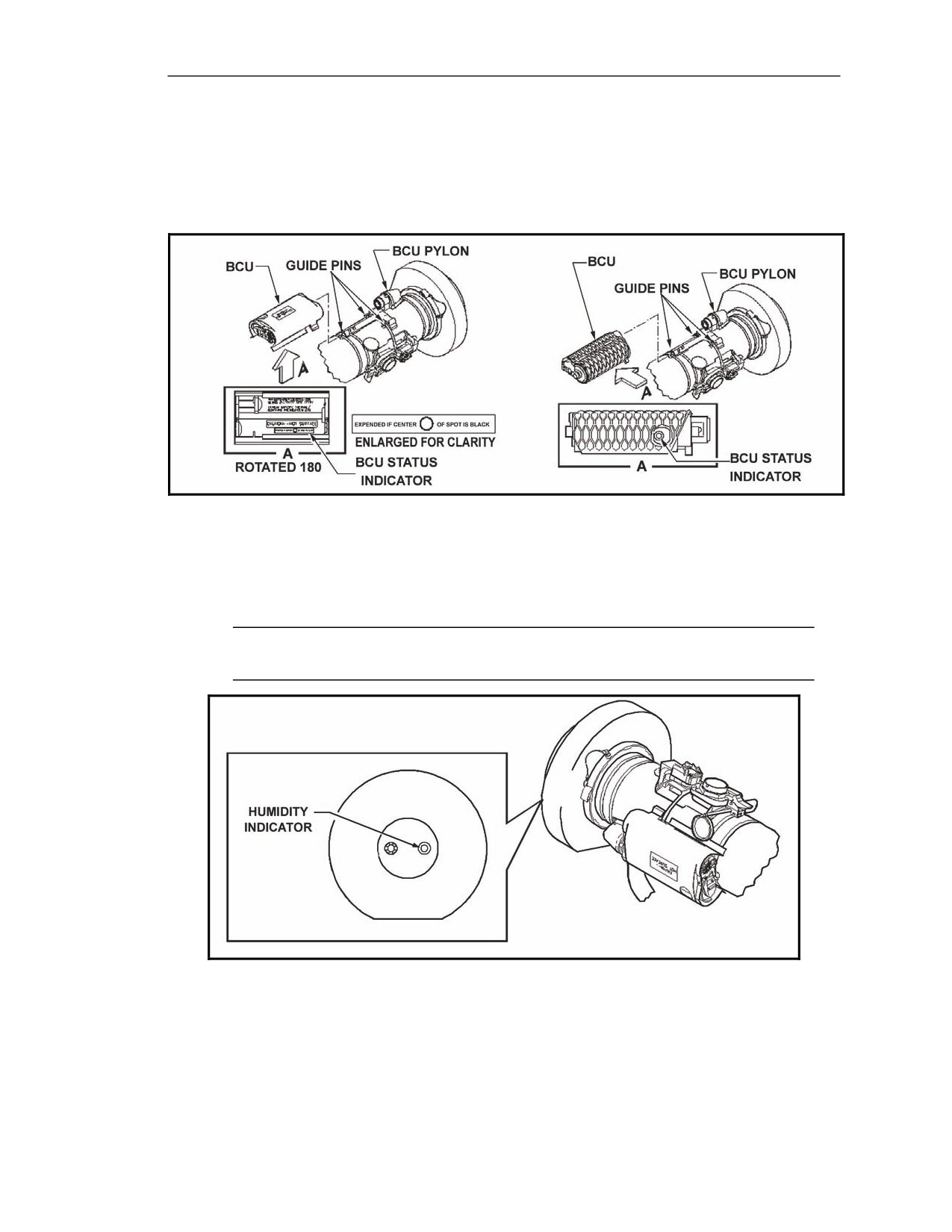
5-190. Located on the underside of the BCU, the BCU status indicator reflects the BCU's use. Prior
to use, the spot on the indicator decal is blank. When the BCU has been activated, the center spot turns
black (Figure 5-62).
Figure 5-62. Battery coolant unit status indicator.
HUMIDITY INDICATOR
5-191. The round is equipped with a humidity indicator, located at the center of the forward end cap
(Figure 5-63). The humidity indicator monitors moisture content of the round during storage.
NOTE: The humidity indicator does not determine the serviceability of the round. See the
Javelin operator’s manual for determining operational moisture levels.
Figure 5-63. Humidity indicator.
20 March 2008
FM 3-22.37
5-53
Chapter 5
SEEKER INDICATOR
5-192. The seeker indicator includes the—
z
Track gates to lock the seeker onto a target
z
Crosshairs the gunner must use to stay oriented with the target and to maintain tracking rate.
Track Gates
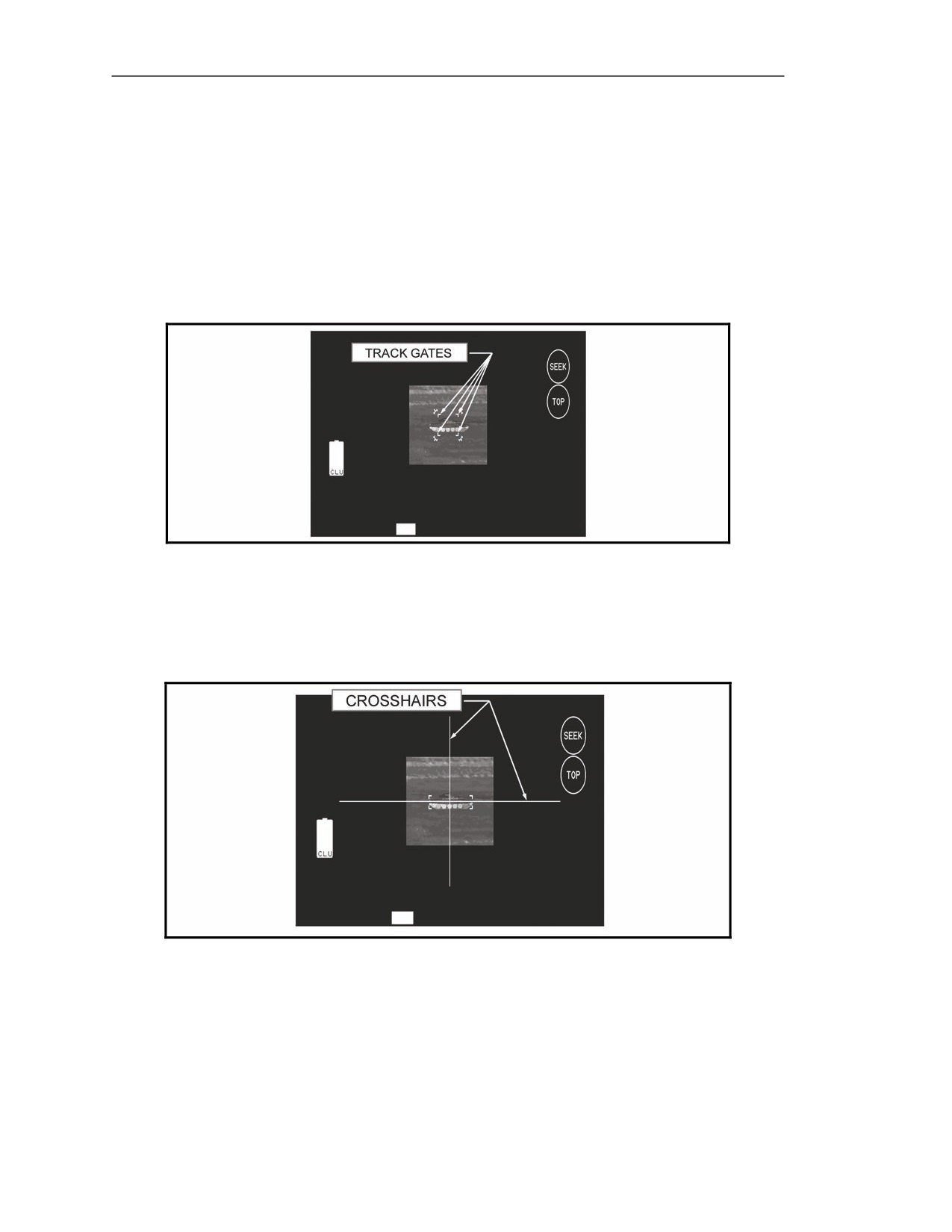
5-193. When the gunner activates the seeker, flashing track gates (Figure 5-64) appear in the CLU
display to indicate that the seeker is active but not locked onto the target.
Figure 5-64. Flashing track gates.
Crosshairs
5-194. When the gunner engages and holds the seeker trigger, flashing crosshairs appear. After
seeker lock-on, the track gates and crosshairs become solid (Figure 5-65).
Figure 5-65. Solid track gates and crosshairs.
CAPABILITIES AND FEATURES
5-195. The Javelin can kill targets up to 2500 meters away. In addition, the missile has two selectable
attack modes: top or direct. When in each mode, the missile travels a given flight path, or profile, to
reach the target. When in each mode, the missile's exact profile depends on the range to the target
(Figures 5-67 and 5-69), but the top attack mode also utilizes the missile's onboard software.
5-54
FM 3-22.37
20 March 2008
Block 1 Improvements
TOP ATTACK MODE
5-196. Top attack is the default missile mode. When in the top attack mode, the missile attacks the
target from above, detonating on top of the target (Figure 5-66) to greatly increase the probability of a
kill. This capability allows the gunner to attack a vehicle from a front, rear, or flank position. For
example, armored vehicles generally have less protection on top. By attacking from above, the missile
penetrates the vehicle and still has enough explosive force to cause extensive damage inside the
vehicle.
NOTE: When attacking targets under protective structures, use the direct attack mode.
Using the top attack mode may cause the missile to impact and detonate on the structure
instead of the target.
Figure 5-66. Top attack mode.
Figure 5-67. Top attack flight paths.
20 March 2008
FM 3-22.37
5-55
Chapter 5
DIRECT ATTACK MODE
5-197. In the direct attack mode, the missile flies a more direct route from the gunner to the target
vehicle, impacting and detonating on the side of the target. The direct attack mode of flight allows the
missile to reach targets located under protective structures at a maximum range of 2500 meters (Figure
5-68). To select the direct attack mode, the gunner activates the seeker and presses the ATTK SEL
switch located on the Javelin's right handgrip. As with the top attack mode, the exact profile of the
missile flight path depends on range to the target (Figure 5-69).
Figure 5-68. Direct attack mode.
Figure 5-69. Direct attack flight paths.
5-56
FM 3-22.37
20 March 2008
Appendix A
SAFETY
The hazards associated with Javelin operation include the backblast area, the
laser eye-safe distance, the handling of the round, and the use of lithium batteries.
This appendix provides units the necessary information to operate the Javelin
missile system safely. To supplement this appendix, units should develop local
directives and an SOP outlining safety requirements, individual responsibilities,
equipment required for handling munitions, location and sequence of operations,
protection of Soldiers, and clear designations and explanations of responsibilities
for operations. Javelin training safety applies to all types of ranges and training
sites.
BACKBLAST AREA
A-1. The Javelin produces backblast when the launch and flight motors fire. When the gunner fires
the Javelin, it ignites a launch motor, creating a rearward blast that propels the missile approximately
15 feet from the launch tube. The flight motor ignites at this distance, propelling the missile to the
target.
A-2. At launch, the Javelin has little recoil because the propellant gases escape to the rear of the
weapon. This rearward blast can propel missile debris, and missile overpressure from the flight motor
can cause ground debris. This backblast can damage equipment or seriously injure personnel who are
too close to the rear of the LTA at the time of firing. Before the gunner launches the missile, he must
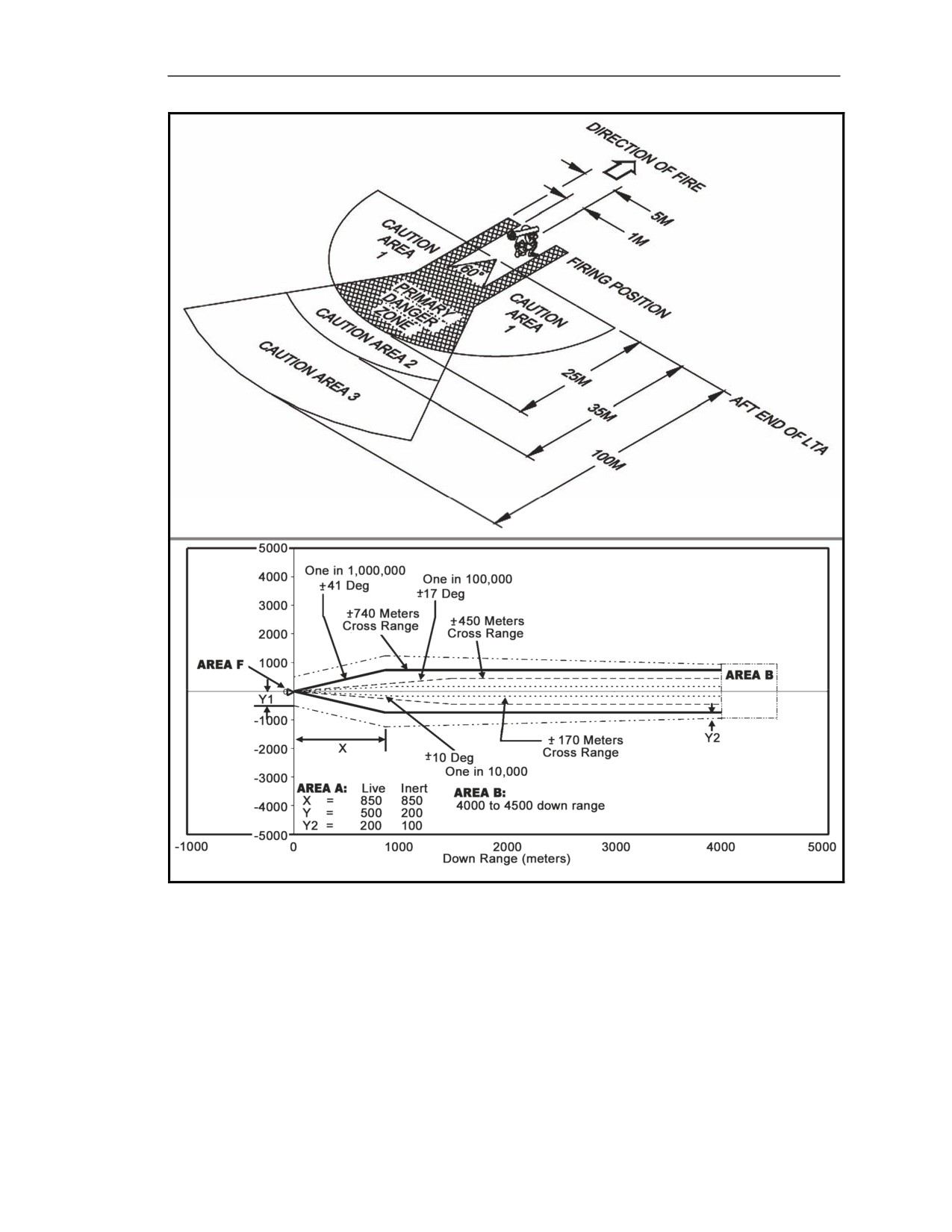
ensure that no personnel are in the backblast area (at least 100 meters to the rear and 25 meters to the
sides of the launcher). The 100-meter firing safe area is divided into a primary danger area and three
caution areas, forming a 60-degree firing zone (Figure A-1).
PRIMARY DANGER AREA
A-3. The primary danger area (Figure A-1A) is a 60-degree sector, with its apex at the aft end of the
missile launch motor. Its radius of curvature is 25 meters. A portion of the primary danger area extends
to the firing line, covering an area 1 to 5 meters left and right of the launch tube centerline. During
firing, personnel in this area may be seriously injured or killed.
CAUTION AREA 1
A-4. Caution Area 1 (Figure A-1A) extends radially (25 meters) from each side of the primary danger
zone to the firing line. Injury can occur from launcher debris, and frequent exposure to the backblast in
this area can cause serious hearing impairment or damage. Personnel should always wear approved
hearing and eye protection when positioned in Area 1.
CAUTION AREA 2
A-5. Caution Area 2 (Figure A-1A) extends radially (35 meters) from each side of the primary danger
zone to the firing line. Injury can occur from launcher debris and loose impediments dislodged during
launch motor ignition. Exposure to the backblast in the area 10 meters beyond the primary danger zone
can cause hearing impairment and eye damage. Personnel should always wear approved hearing and
eye protection when positioned in Area 2.
20 March 2008
FM 3-22.37
A-1
Appendix A
CAUTION AREA 3
A-6. Caution Area 3 (Figure A-1A), a 100-meter radius aft of the launcher and within the 60-degree
sector, is affected by the activation of the missile flight motor. Caution Area 3 extends to the rear of
the primary danger zone. Exposure to the backblast in the area 10 meters beyond the primary danger
zone can cause hearing impairment and eye damage. Personnel should always wear approved hearing
and eye protection when positioned in Area 3.
AREA A
A-7. Area A is 500 meters at its widest point for warhead rounds and 200 meters for inert rounds.
Area A is measured from the launch point extending 850 meters downrange (Figure A-1B). At this
point downrange, the flight motor is fully expended. The remaining downrange portion of Area A
tapers down to a 200-meter width for warhead rounds and 100-meter width for inert rounds at the
maximum range of 4,000 meters. The size of Area A was selected to contain missile and warhead
debris from impacts on the boundary and also contain portions of the missile that remain attached to
the propulsion section, which may continue to be propelled until flight motor burnout.
AREA B
A-8. Area B contains the debris scatter associated with missile landing at the forward edge of the
impact area. This area measures 500 meters deep and about 1,880 meters wide (Figure A-1A).
AREA F
A-9. The launcher danger zone (Area F) is the zone aft of the launch tube. Debris, heat, and noise
hazards are the major concerns within this area. Figure A-1B identifies the launcher danger zone and
related dimensions for normal missile firings.
ROUND HANDLING
A-10. Improper or careless handling of the Javelin round can damage its components and cause the
missile to malfunction when launched. If the gunner notices any sign that the round may have been
dropped or if the round is deformed or fractured, the gunner notifies his supervisor immediately and
follows proper handling procedures IAW TM 9-1425-688-12 and TM 9-1300-206.
FIRING FROM ENCLOSURES
A-11. The Javelin has a soft launch system, allowing it to be fired safely from inside of a building,
provided that the room is at least 7 feet high, 12 feet wide, and 15 feet deep. Before firing the Javelin
from inside of a building, the following precautions must be taken:
z
Remove debris and loose objects from behind the launch site. The backblast and
overpressure can scatter loose objects, and escaping gases from the missile’s first-stage
motor are hot and flammable, causing rugs, furniture, and curtains to catch fire. When
possible, keep a fire extinguisher nearby.
z
When possible, open all doors and windows within the launch area to allow the backblast
and overpressure to escape.
z
All personnel within 25 meters of the Javelin must wear hearing protection.
z
Use the CLU face shield to protect the gunner’s face. It is possible to damage the face shield
absorber between the indentation and the CLU main housing. If this part of the face shield is
missing, the gunner must switch from firing the Javelin with the right eye to the left eye.
A-2
FM 3-22.37
20 March 2008
Safety
Figure A-1. Javelin backblast area and surface danger zone.
20 March 2008
FM 3-22.37
A-3
Appendix A
FIGHTING POSITION
A-12. When firing from either a hasty or improved fighting position, the gunner must take into
consideration obstructions directly to his front, to his rear, and to the sides of the fighting position.
NOTE: For more information on fighting positions, see Chapter 4.
SAFETY PRECAUTIONS FOR THE MULTIPLE INTEGRATED
LASER ENGAGEMENT SYSTEM
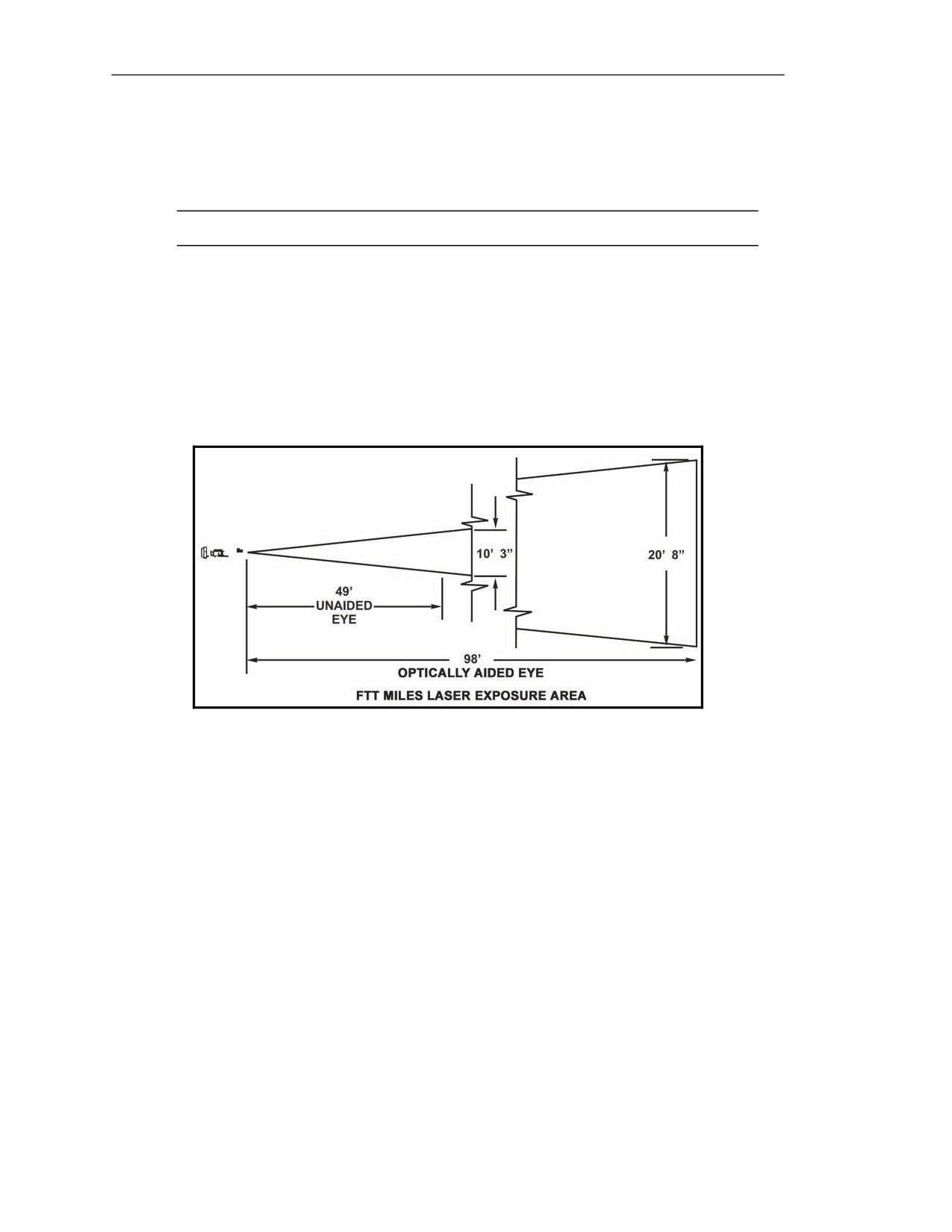
A-13. Avoid direct eye exposure to MILES laser radiation. The MILES laser is classified as a Class 3A
laser. Do not point the MILES laser at personnel within 49 feet with the unaided eye or 98 feet with the
aided eye (binoculars, laser range finders, etc.) (Figure A-2). Personnel within the beam path must wear
eye protection, since direct exposure to the laser radiation or reflection from the beam could cause serious
eye injury. If eye exposure to laser radiation is evident, seek medical attention immediately.
Figure A-2. Laser-safe eye distance.
SAFETY PRECAUTIONS FOR THE BATTERY COOLANT UNIT
A-14. Observe the following safety precautions when handling the BCU:
HEAT
A-15. Avoid skin contact with the BCU. The BCU can produce enough heat to cause serious burns. If
you experience burns from accidental contact with the BCU, seek medical attention immediately.
HAZARDOUS WASTE
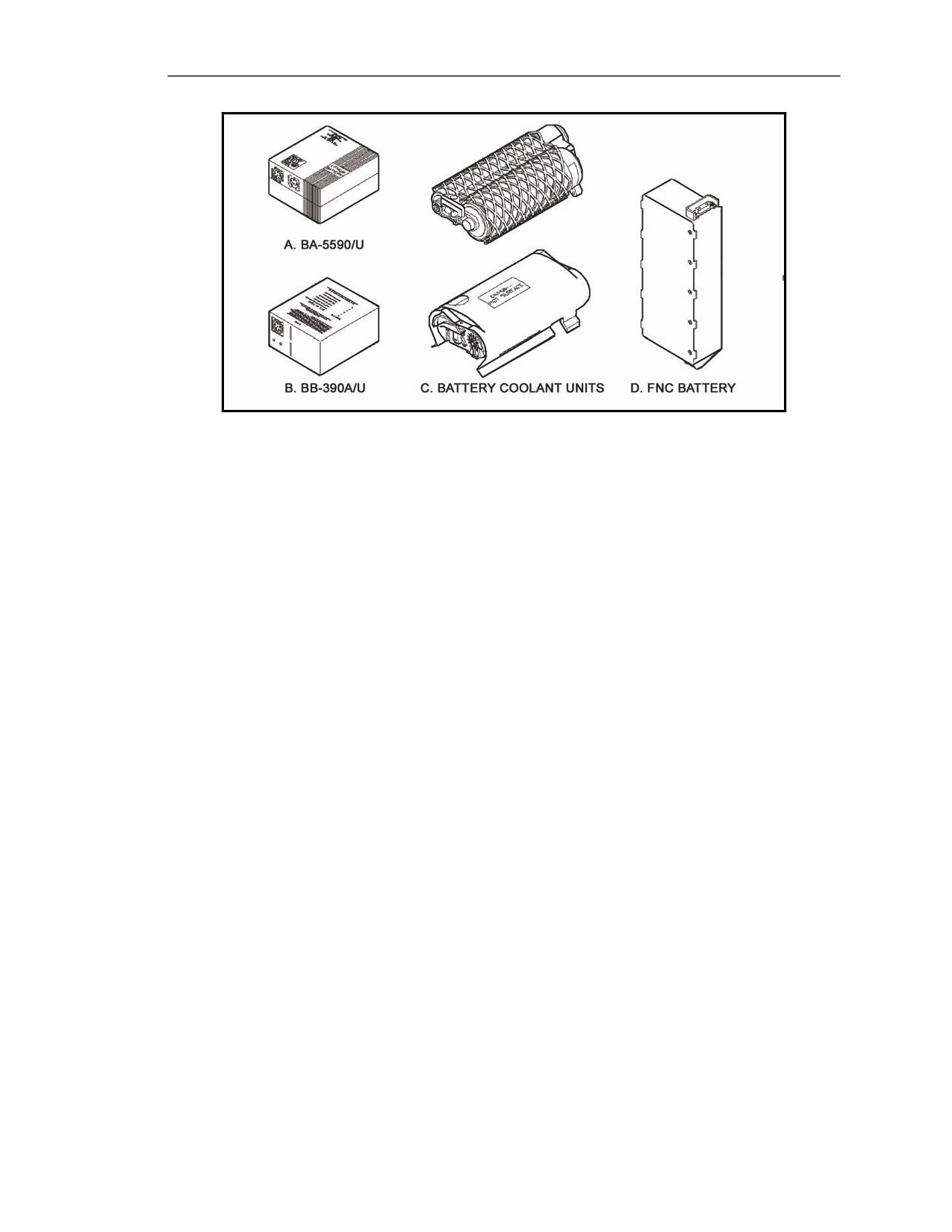
A-16. The BCU battery and the BA5590/U battery (Figure A-3) contain a lithium-alloy thermal material
considered to be hazardous waste. Disposal of these batteries after use must be IAW TM 43-0003-44.
A-4
FM 3-22.37
20 March 2008
Safety
Figure A-3. Javelin weapon system batteries.
SAFETY PRECAUTIONS FOR LIVE ROUNDS
A-17. Observe the following safety precautions when experiencing a weapon malfunction (misfire/hangfire)
during target engagement. See Appendix D for more information about recognizing misfire/hangfire
symptoms and corrective actions.
MISFIRE
A-18. Once a round is declared a misfire and will not launch, the gunner notifies his supervisor
immediately. Then, he removes the CLU from the round and places the round 25 meters from the firing
position, keeping the round's nose pointed downrange.
HANGFIRE
A-19. Once a round is declared a hangfire and will not launch, the gunner notifies his supervisor
immediately. Then, he removes the CLU from the round and places the round 25 meters from the firing
position, keeping the round's nose pointed downrange.
RISK MANAGEMENT
A-20. FM 7-1 states, "The risk management process parallels the training planning process and is integrated
throughout." Risk management involves—
z
Identifying and assessing hazards.
z
Developing controls and making decisions.
z
Implementing controls.
z
Supervising and evaluating training.
A-21. The risk planning process is continuous; it is performed for long-, short-, and near-term training.
ACCIDENT REPORTING
A-22. Report accidents involving injury to personnel or damage to materiel on DA Form 285 (U.S. Army
Accident Report) IAW AR 385-40. Report explosives and ammunition malfunctions IAW AR 75-1.
20 March 2008
FM 3-22.37
A-5
This page intentionally left blank.
Appendix B
STANDARD RANGE CARD
This appendix outlines the processes involved in preparing a range card. Gunners
use the standard range card in FM 3-21.71, slightly modified for use with the
Javelin medium close combat missile system. The range card is a sketch of the
Javelin’s emplacement within the platoon’s assigned sector of fire. It contains
information that helps in planning and controlling platoon fires, in detecting and
engaging targets, and in orienting replacement personnel. Using range cards
allows a Javelin gunner or replacement gunner to find and engage targets quickly.
DESCRIPTION
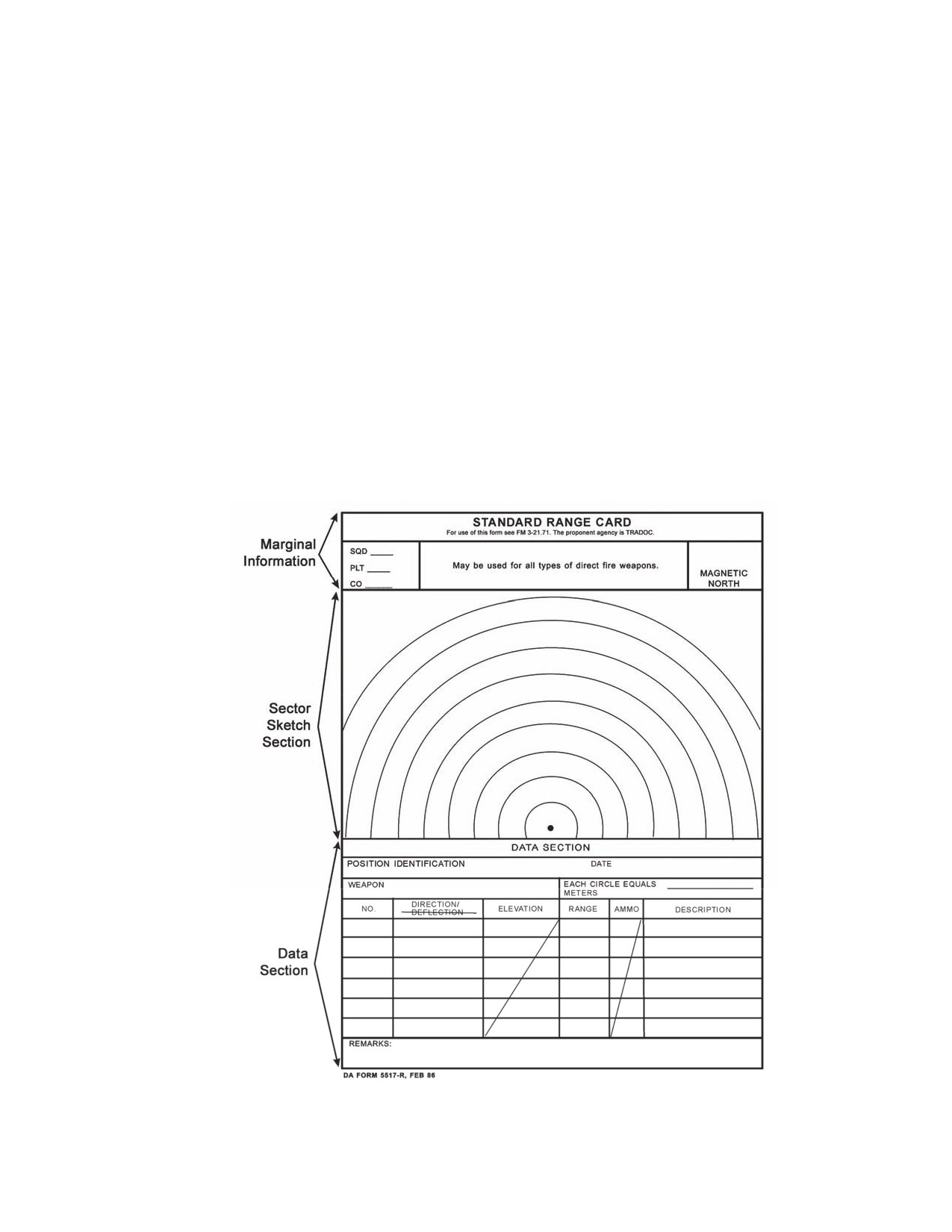
B-1. DA Form 5517-R (Figure B-1) is a record of the firing data for a weapon system on a given
sector of fire. This record facilitates target engagement during good or limited visibility conditions. It
is divided into three sections: marginal information, sector sketch section, and data section.
Figure B-1. Example of DA Form 5517-R.
20 March 2008
FM 3-22.37
B-1
Appendix B
GENERAL PROCEDURES
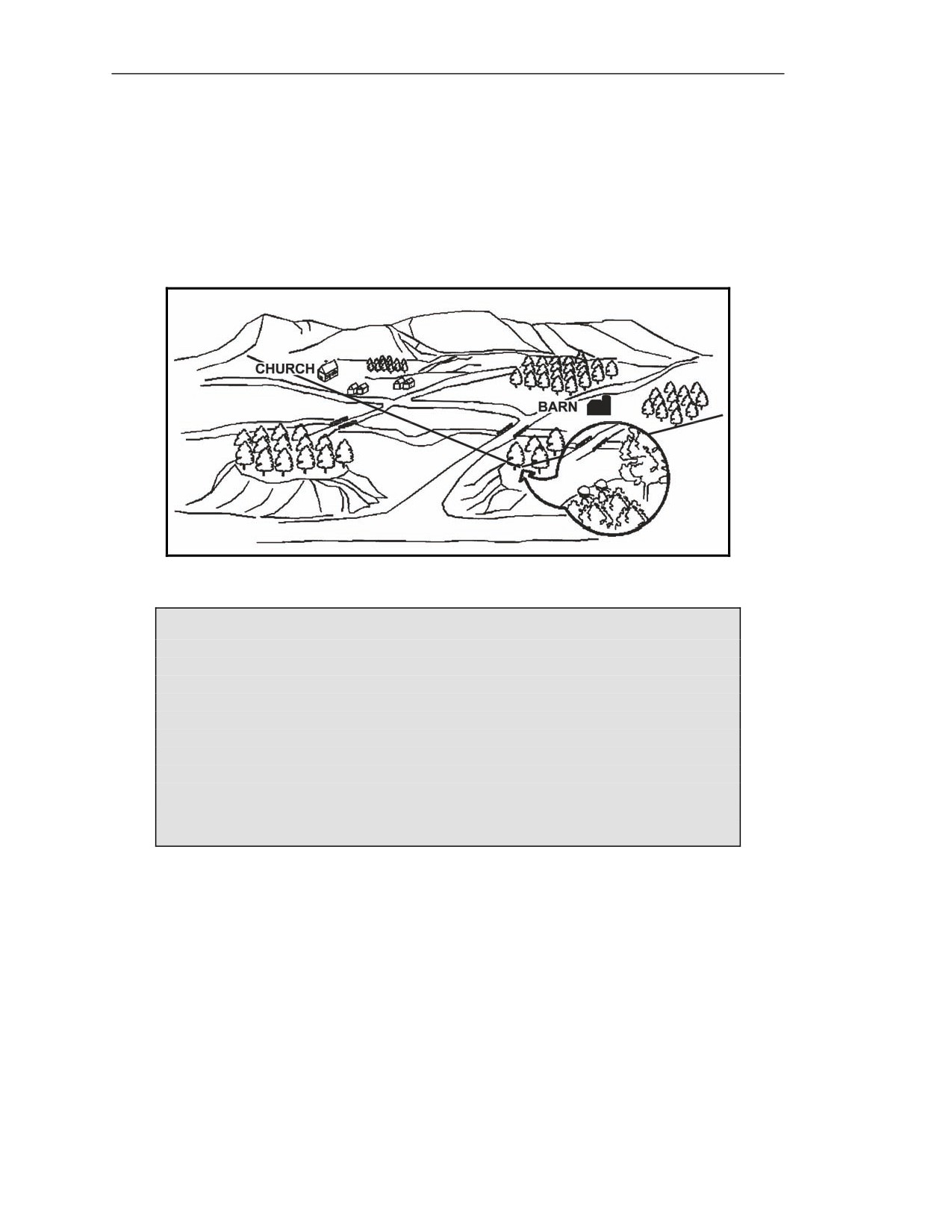
B-2. Before a gunner can prepare a range card, the leader must brief the gunner on (Figure B-2)—
z
Firing position.
z
Left and right limits of fire.
z
Maximum engagement line (MEL).
z
AAs.
z
TRPs.
Figure B-2. Gunner’s sector of fire.
Example of a Section Leader Briefing a Gunner
“I want you to cover a sector of fire that begins here, at your firing position, and
goes to a point about 500 meters beyond that church on the left; moves to the
right along the high ground at
200 meters behind the houses; through the
woodline; behind the hill, barn, and orchard, until it reaches a point about 300
meters beyond the right leading edge of the orchard; and returns to your firing
position. The enemy is approaching from the north, so they will probably use
those two roads to enter your sector. Plan to engage the enemy’s armor as soon
as they come within range on the road behind the barn and orchard. Engage the
enemy targets as soon as they appear on the second road, as they approach
from the left side of that large hill. There are two TRPs within your sector, so
copy them down: the church is TRP AB1670, and the barn is TRP AB1677.”
MARGINAL INFORMATION
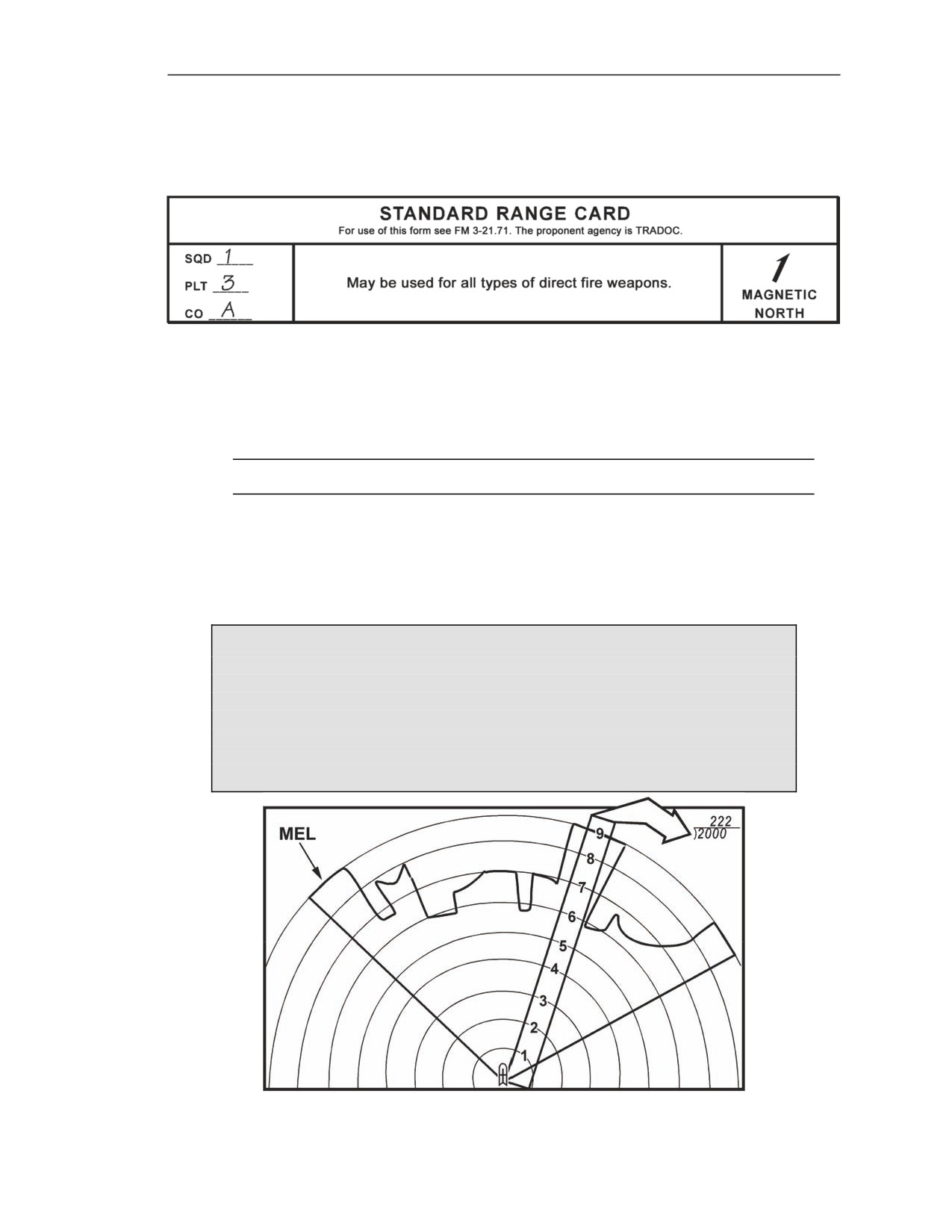
B-3. Use the following procedures to complete the marginal information at the top of the range card
(Figure B-3).
MAGNETIC NORTH
B-4. Take the range card and orient it with the assigned sector of fire. Use a lensatic compass to
determine magnetic north. Keep the range card oriented to the sector of fire and draw the magnetic
north symbol in the appropriate direction in the Magnetic North box.
B-2
FM 3-22.37
20 March 2008
Standard Range Card
UNIT DESCRIPTION
B-5. Use squad, platoon, and company designations. Do not list any designation for units higher than
company level (Figure B-3).
Figure B-3. Marginal information.
CALCULATE
B-6. Determine maximum engagement line (MEL) distances (EACH CIRCLE EQUALS _________
METERS).
NOTE: Remember, the Javelin’s maximum effective range is 2,000 meters.
(1) Using a map or leader-provided range data, determine the farthest point from the designated
firing position to the MEL.
(2) Divide the distance into 9, the number of circles on a range card.
(3) Round the results to the nearest 10 meters.
(4) Enter this number into the data section.
Examples
If the distance to the farthest point from the designated firing position to the MEL
is 2,000 meters, then 9 intervals into 2,000 meters = 222 meters. Round 222 to
220. Therefore, each circle equals 220 meters (Figure B-4).
If the distance to the farthest point from the designated firing position to the MEL
is
1,500 meters, then 9 intervals into 1,500 meters = 166.667 meters. Round
166.667 to 170. Therefore, each circle equals 170 meters.
Figure B-4. Determination of distance between circles.
20 March 2008
FM 3-22.37
B-3
Appendix B
SECTOR SKETCH SECTION DEVELOPMENT
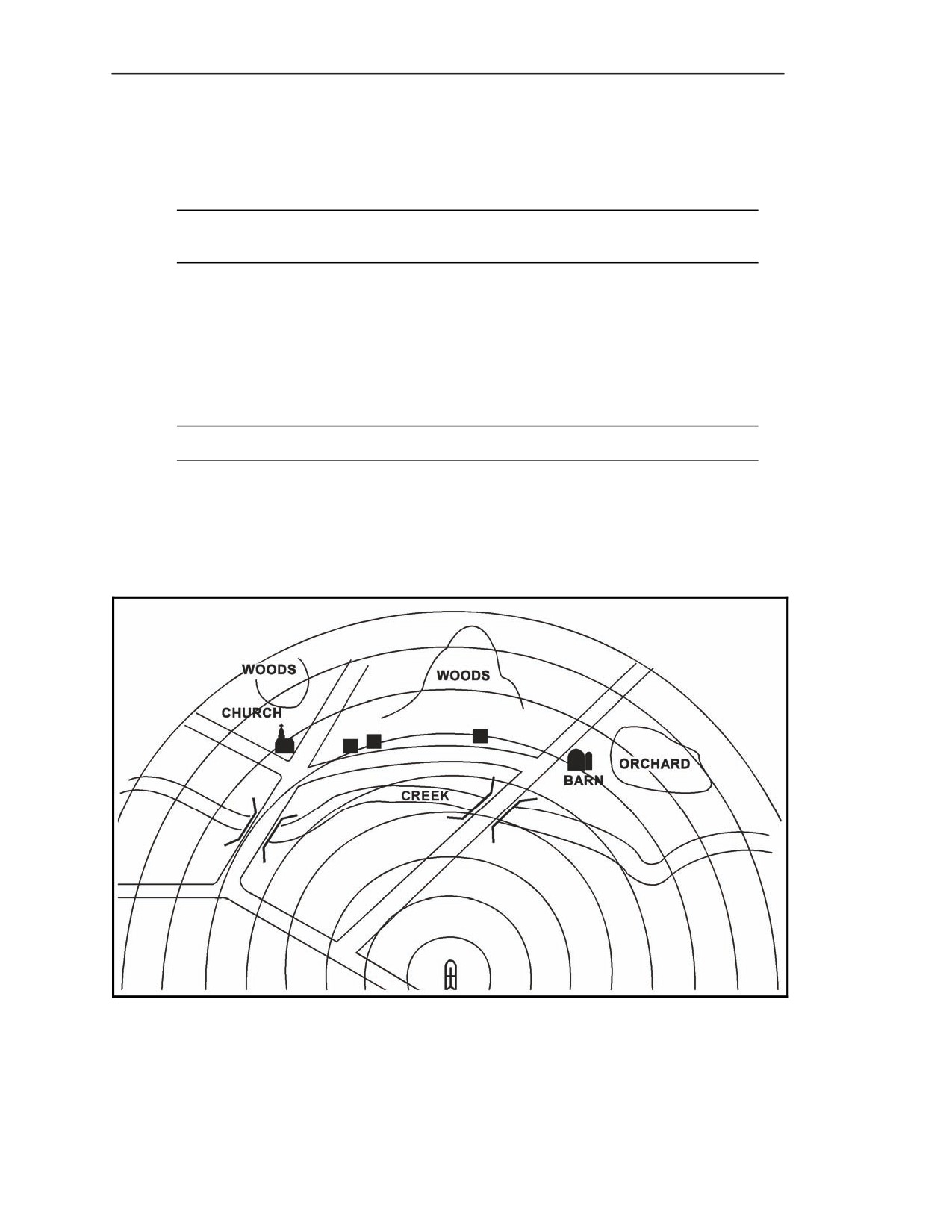
B-7. The sector sketch section is a graphic representation of a gunner’s sector of fire (Figure B-5).
The sector sketch of the terrain should be a good representation since it becomes vital during periods
of limited visibility.
NOTE: A gunner may be assigned more than one sector of fire. A separate range card is
prepared for each sector.
SKETCHES
B-8. The sketch should cover the entire assigned sector if possible. Make the sketch as large as
possible, but do not exceed the limits of the largest circle. When depicting large natural objects
(forests, hills, and so forth) or man-made objects (buildings, bridges, and so forth), draw the outline of
the object and label it appropriately (Figure B-5). When sketching objects in the sector, locate them on
or near the corresponding circle to denote range to the object.
NOTE: Do not attempt to depict contour lines on the sector sketch section.
GUNNER’S FIRING POSITION
B-9. The gunner’s firing position is designated by the black dot in the center of the smallest circle of
the range card. Draw a symbol of the Javelin over the black dot to designate that this range card is for a
Javelin.
Figure B-5. Sector sketch.
B-4
FM 3-22.37
20 March 2008
Standard Range Card
LEFT AND RIGHT LIMITS
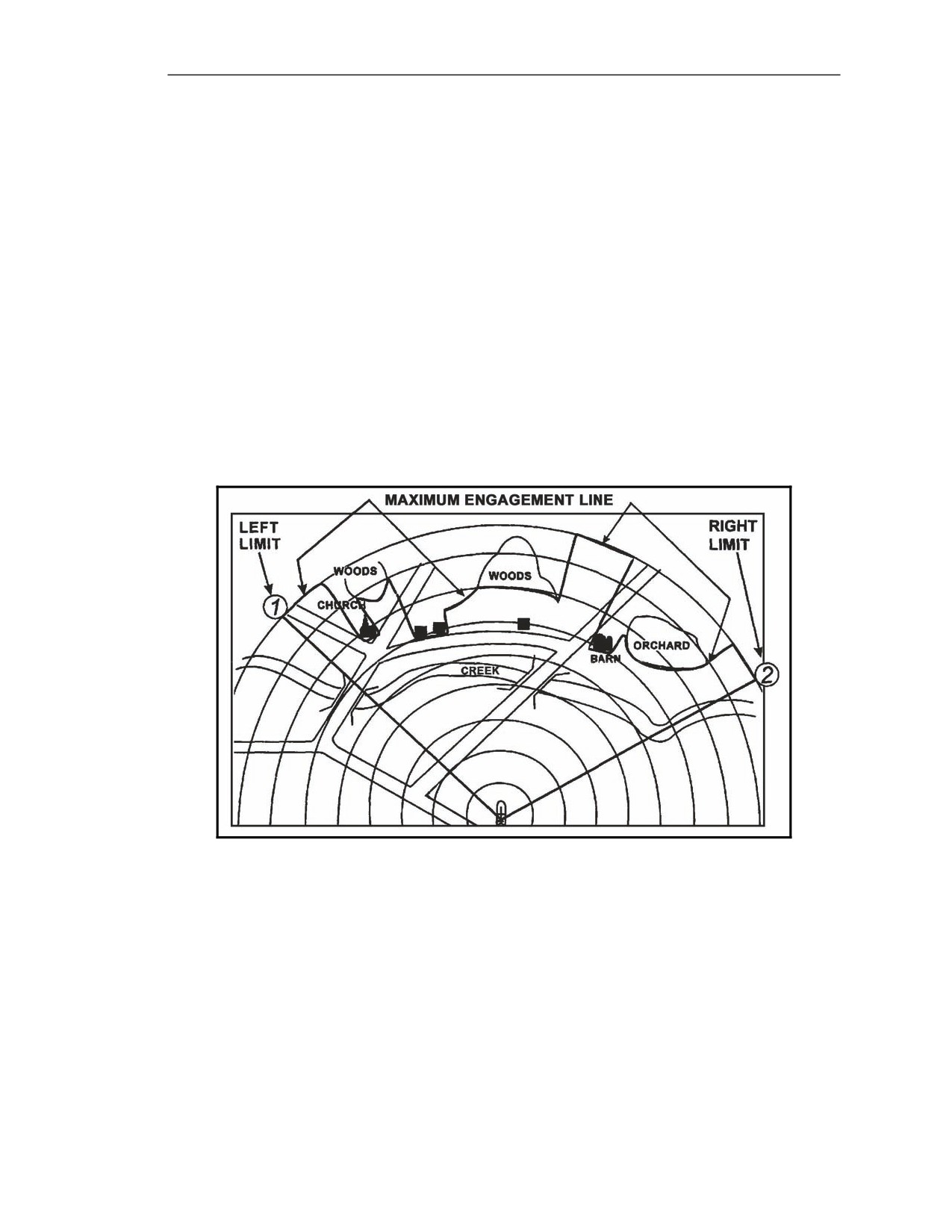
B-10. Left and right limits are imaginary lines from the gunner’s firing position to a designated point
on the ground (Figure B-6). Use terrain features when possible to designate left and right limits. Other
recognizable objects such as a building or other man-made structures can be used. The area between
the left and right limits depicts the gunner’s sector of fire or area of responsibility. Lines are drawn
from the designated firing position to the MEL in the area of the designated limits. Number the left
limit as No. 1, number the right limit No. 2, and place a circle around each number. Record the
azimuth and distance of each limit in the data section.
MAXIMUM ENGAGEMENT LINE
B-11. The MEL designates the maximum effective range of a weapon (Javelin) and the gunner’s line-
of-sight limitations due to the terrain in his given sector of fire (Figure B-6).
z
If there are no limitations, draw the MEL along the last circle in the sector sketch section.
The line should connect with the left and right limit labels.
z
If there are limitations, starting at the left limit, draw the MEL in front of the limiting terrain
features. The MEL should extend in front of and follow the limitations until it reaches the
right limit.
Figure B-6. Sector of fire and maximum engagement line.
AVENUES OF APPROACH
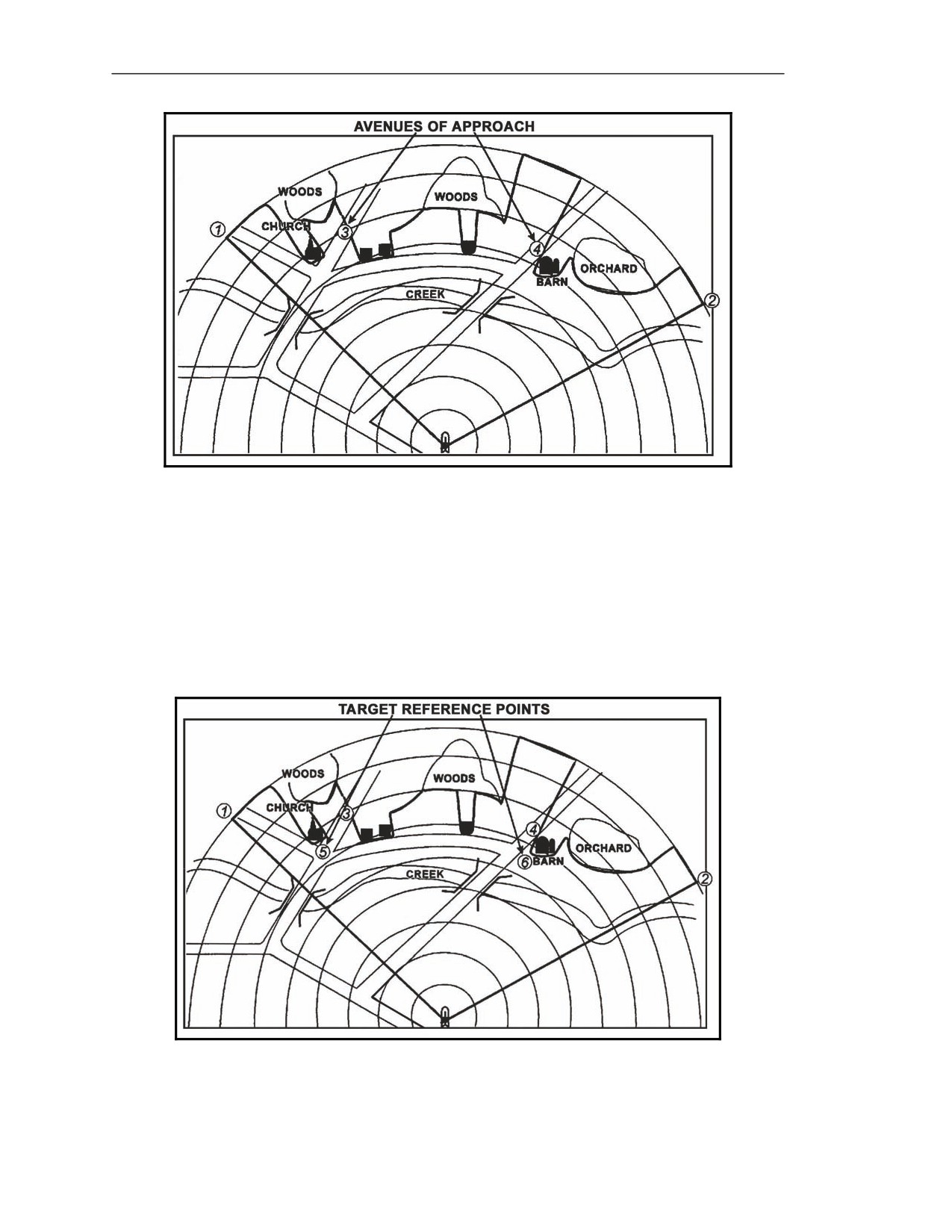
B-12. AAs are areas where a target is most likely to appear or most likely to travel. This area can be a
natural line of drift or a road. Tracked and wheeled vehicles may or may not use the same AA. Starting
from the left and working to the right, number the areas where targets are likely to appear. Start with
the number three since the numbers one and two have already been used to mark the left and right
limits. Place a circle around each number. Continue until all identified AAs have an assigned number
(Figure B-7). Record the azimuth and distance to each AA in the data section.
20 March 2008
FM 3-22.37
B-5
Appendix B
Figure B-7. Avenues of approach.
TARGET REFERENCE POINTS
B-13. Prominent terrain features and or easily recognizable man-made objects (for example, road
intersections, buildings, bridges, and so forth) are used as TRPs (Figure B-8). TRPs are used to locate
targets and adjust direct or indirect fires. Normally, the sector has at least one TRP in a sector, but no
more than three. Number each TRP and place a circle around each number starting with the next
available number after AA numbers. In Figure B-8, there are two AAs and two TRPs, numbers 5 and 6
are assigned to the TRPs for this example. Record the azimuth and distance to each TRP in the data
section.
Figure B-8. Target reference points.
B-6
FM 3-22.37
20 March 2008
Standard Range Card
DEAD SPACE
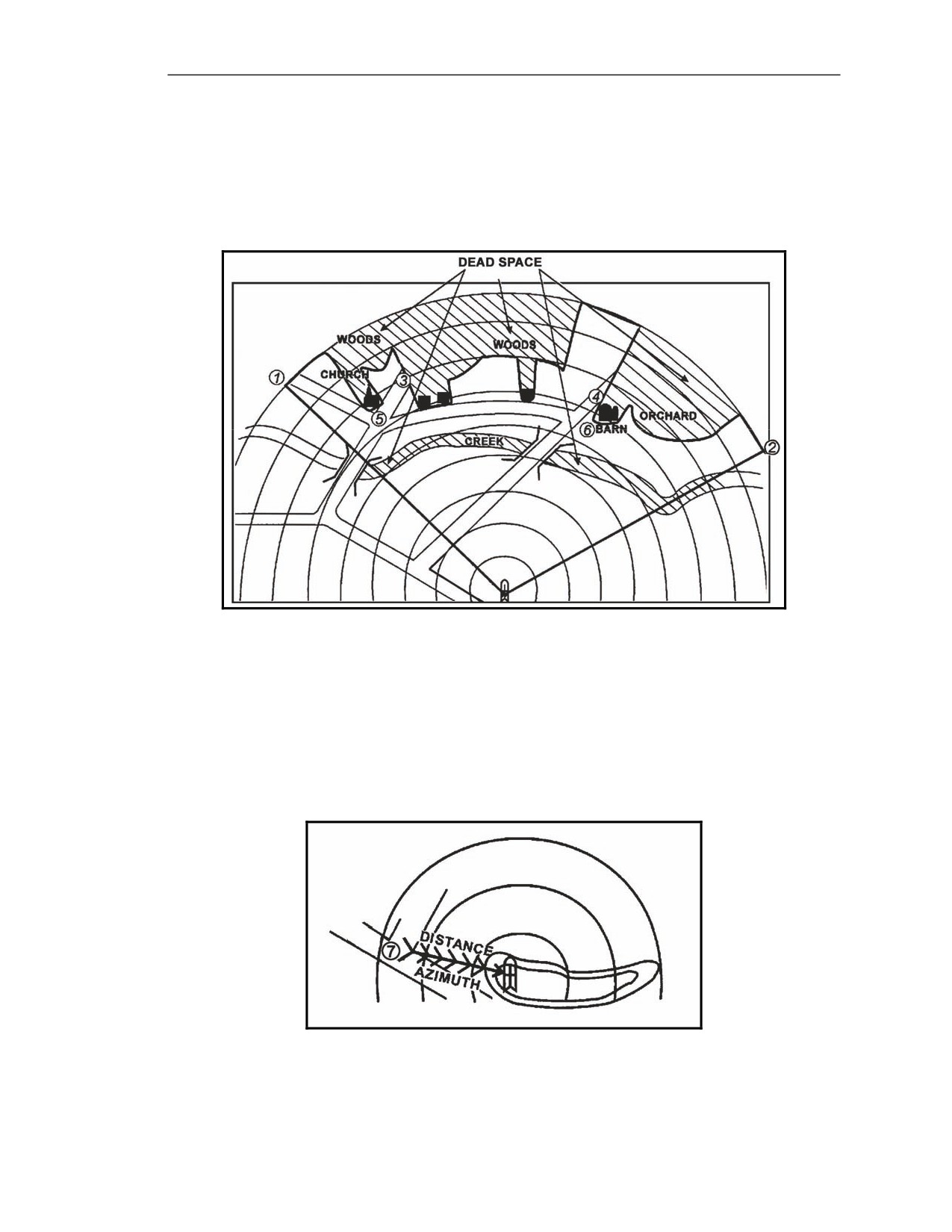
B-14. Dead space is an area inside a gunner’s sector of fire and inside the range of his weapon system
where he can neither observe nor place direct fire. Any area in which a gunner does not have line of
sight is considered dead space (Figure B-9). Buildings, trees, hills, or other terrain features can cause
dead space. Shade these areas using diagonal lines to indicate significant dead space in the sector.
These areas can then be identified as areas for indirect fire weapons.
Figure B-9. Dead space.
GUNNER’S REFERENCE POINT
B-15. The gunner’s reference point (GRP) serves as a point of reference when one unit is being
replaced by another (Figure B-10). The gunner locates a nearby recognizable terrain feature (such as
hilltop, road junction, and so forth) to the right, left, or rear of his firing position to use as his GRP.
Label the GRP and draw an arrow between it and the firing position to the terrain feature. The
direction of the arrow determines which azimuth to use. Record the azimuth and distance in the data
section.
Figure B-10. Gunner’s reference point and firing.
20 March 2008
FM 3-22.37
B-7
Appendix B
DATA SECTION
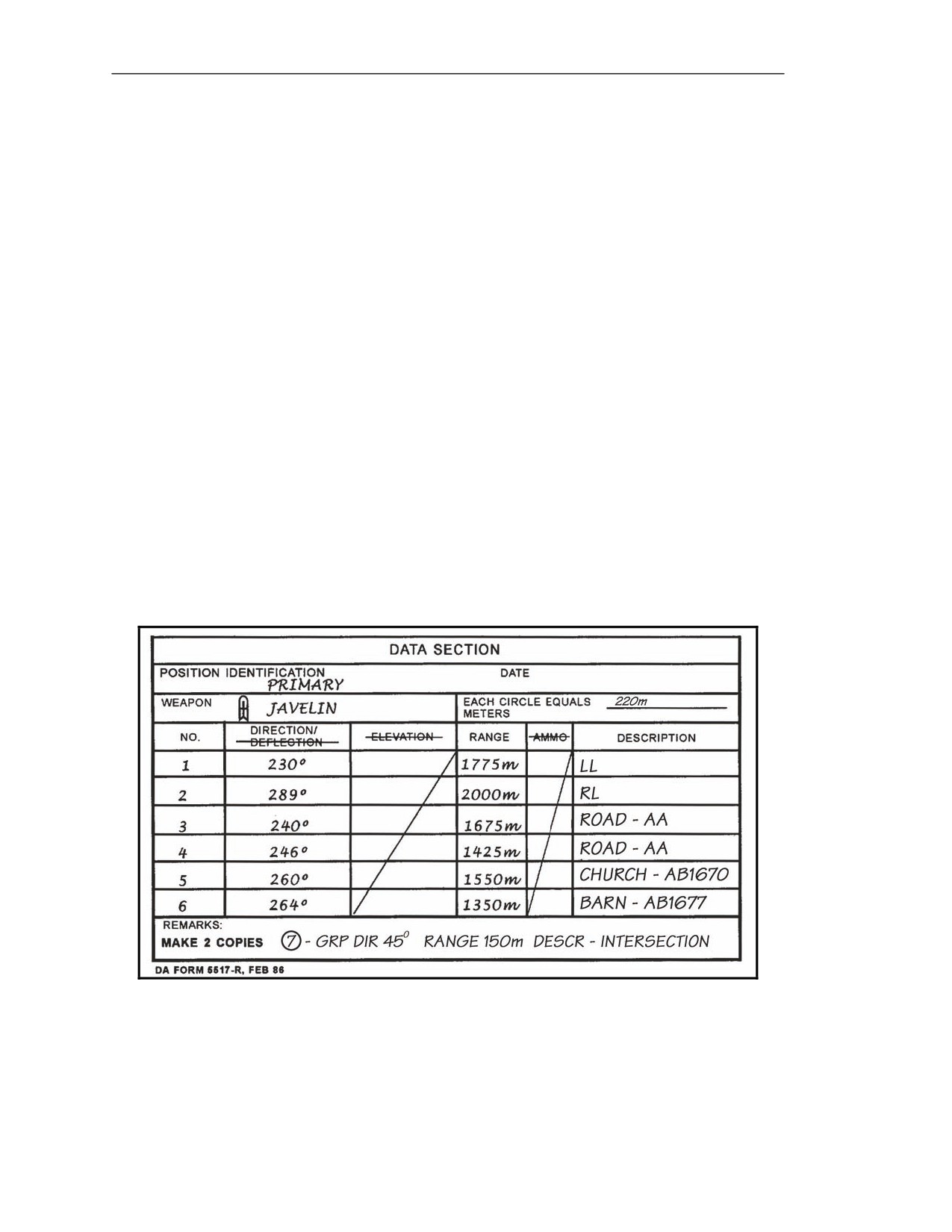
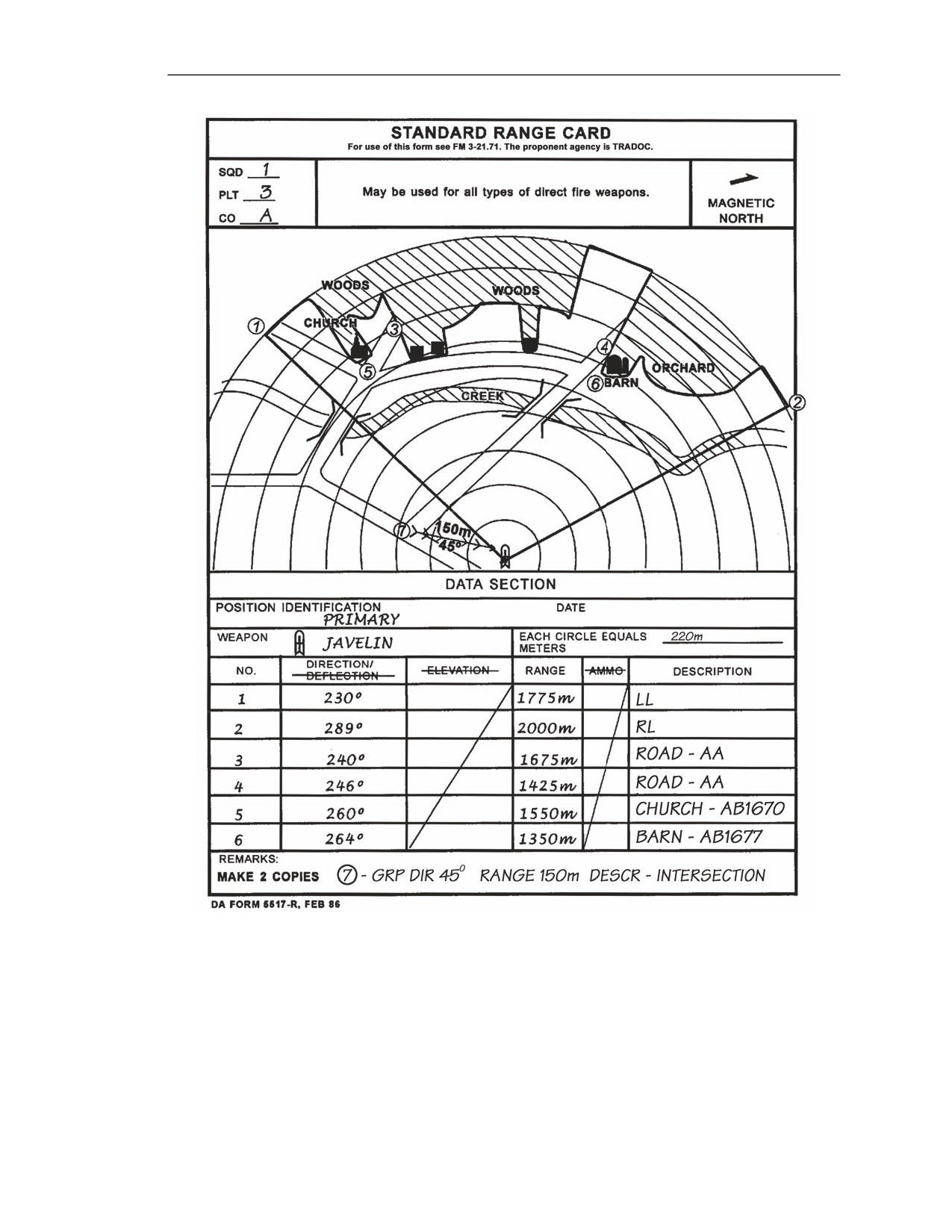
B-16. Fill in the DATA SECTION (Figure B-11) as follows. Figure B-12 shows a sample completed
range card for a Javelin position:
(1) POSITION IDENTIFICATION: Designate as either primary, alternate, or supplementary.
(2) DATE: Indicate only the day and month.
(3) WEAPON: Enter Javelin.
(4) NO. (number):Use the numbers 1 and 2 to represent the left and right limits. Starting with
the subsequent numbers designate s and then TRPs as designated in the sector sketch
section.
(5) DIRECTION/DEFLECTION: List only the DIRECTION, in degrees for the appropriate
item in the number (NO.) column. Line through the word DEFLECTION since it is not
applicable.
(6) ELEVATION: Line through the word ELEVATION since it is not applicable. Draw a
diagonal line through the boxes pertaining to ELEVATION.
(7) RANGE: Distance is measured in meters from the designated firing position to the target or
target engagement area. The most accurate way to measure distance is the laser range finder.
(8) AMMO: Line through the word AMMO since it is not applicable. Draw a diagonal line
through the columns pertaining to AMMO.
(9) DESCRIPTION: List the name of the item listed in the corresponding NO. column (for
example, road intersection, barn, church, and so forth). If the object is a TRP, list the TRP
number, if left limit or right limit enter LL or RL.
(10) REMARKS: Enter any information that is considered useful in helping understand the
range card. Enter the GRP data here if there is not sufficient room in the data section.
(Record the data.)
Figure B-11. DA Form 5517-R―data section.
B-8
FM 3-22.37
20 March 2008
Standard Range Card
Figure B-12. Example completed DA Form 5517-R.
20 March 2008
FM 3-22.37
B-9
Appendix B
FIELD-EXPEDIENT RANGE CARD
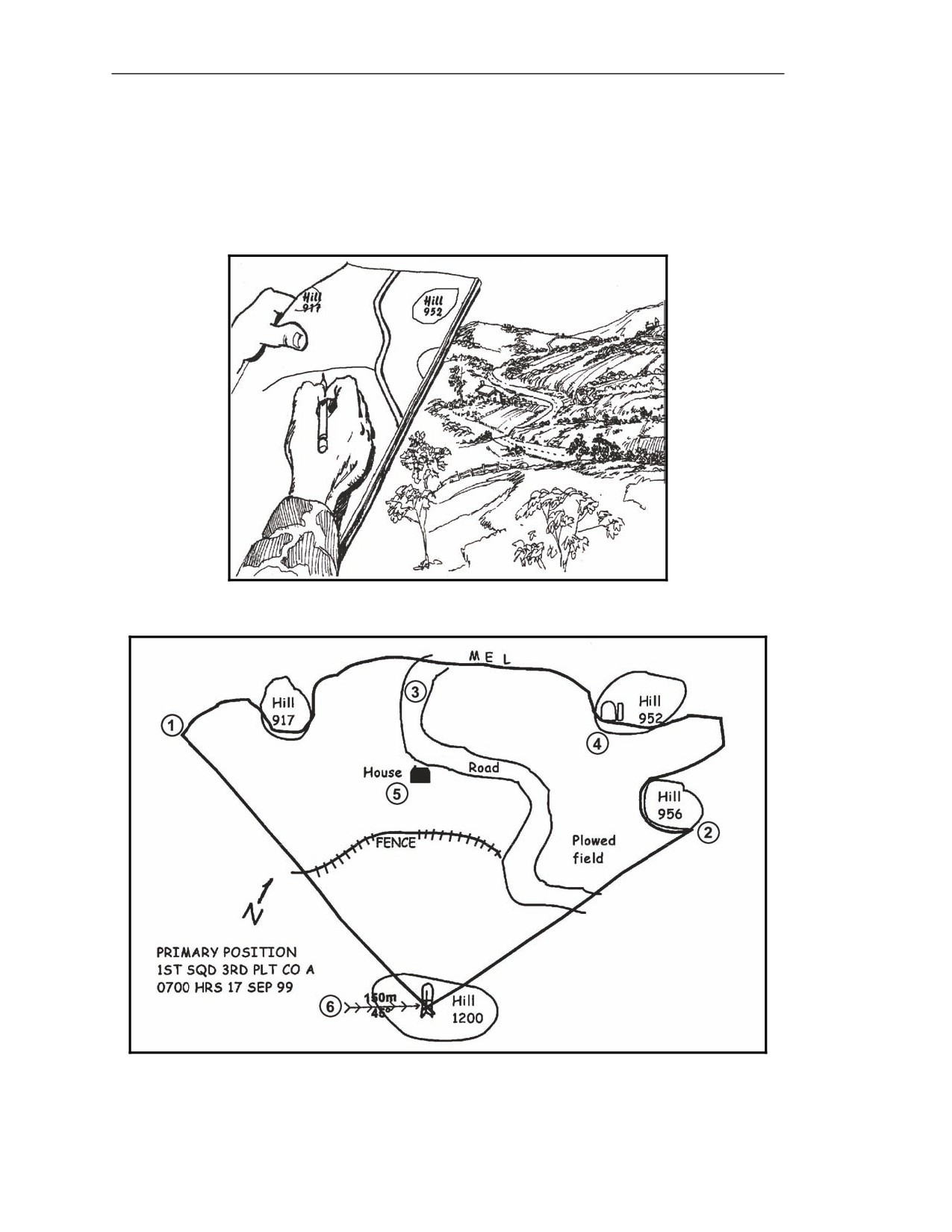
B-17. A field-expedient range card is used when DA Form 5517-R is not available. Preparation of a field-
expedient range card follows basically the same guidelines as a standard range card. The gunner can use just
about anything to draw on as long as the data is recorded. As one example, a discarded MRE box works
well (Figures B-13 and B-14).
Figure B-13. Terrain presentation.
Figure B-14. Field-expedient range card showing the terrain.
B-10
FM 3-22.37
20 March 2008
Appendix C
IMMEDIATE DECONTAMINATION AND DESTRUCTION
PROCEDURES
In combat, Soldiers may encounter chemical or biological agents. If this should
occur, Soldiers must understand how to recognize chemical or biological agents
and perform decontamination procedures. To accomplish this, decontamination
procedures should follow the steps and procedures outlined in FM 3-11.4 and FM
3-11.5 and be IAW the unit SOP. In combat situations, the Javelin team could be
ordered to destroy the Javelin system to prevent its capture or use by the enemy.
DECONTAMINATION PRINCIPLES
C-1. Decontamination is the removal or reduction in the hazardous level of chemical, biological,
radiological, nuclear (CBRN) contamination from personnel, weapons, and materiel. Once a Soldier is
aware of chemical or biological contamination, he initiates immediate decontamination techniques by
using his personal skin decontamination kit (SDK) or individual equipment decontamination kit
(IEDK). To remove radiological contamination from equipment and personnel, Soldiers brush it off or
use soap and water. The following steps for immediate decontamination of the round and the CLU
(Table C-1) reduce the spread or transfer of liquid contamination.
NOTES:
1. FM
3-11.5 and TM 3-4230-216-10 provide more information about
decontamination procedures for equipment and weapons.
2. The Soldier can use his M291 IEDK or M295 IEDK to remove H-series, G-
series, and V-series agents.
Table C-1. Javelin immediate decontamination procedures.
ROUND
CLU
Step 1 Decontaminate your gloves using the IEDK.
Step 1 Decontaminate your gloves using the IEDK.
Step 2 Decontaminate the round by patting it with the
Step 2 Decontaminate the CLU by patting it with the
IEDK, working from the front to the rear until the
IEDK. Pay special attention to the handgrips,
entire round is covered.
CLU carry handle, battery cover, round interface
NOTE: When the shoulder strap is grossly contaminated,
connector protective cover, switch boots, and
discard it.
absorbers.
Step 3 Repeat Step 1.
Step 3 Use a knife to cut the protective cover lanyard
from the protective cover, and remove it.
Step 4 Discard the IEDK.
Step 4 Repeat Step 1.
Step 5 Discard the IEDK.
WARNING
Do not apply IEDK to any optic lens. The charcoal inside the
IEDK is abrasive; it will damage the lens.
20 March 2008
FM 3-22.37
C-1
Appendix C
DESTRUCTION GUIDANCE
C-2. Unless otherwise directed, the destruction of the Javelin occurs only when the commander gives the
order. If the Javelin cannot be evacuated, the unit launches all remaining rounds and destroys the CLU.
NOTE: Destroy the same component in all weapon systems to prevent the enemy from
assembling a complete system.
COMMAND LAUNCH UNIT AND ROUND
C-3. Each unit having, maintaining, or storing Javelin systems must have an SOP for destroying
them. The destruction plan should be flexible enough to cover any situation, should state priorities and
methods of destruction, and should provide clear instructions on how to conduct each method of
destruction. The Javelin can be destroyed in several ways:
z
The most efficient way of destroying the CLU is by destroying its optics. Smash the CLU's
optics with an axe, pick, or crowbar; run over it with a tracked vehicle; or as a last resort,
destroy it using small-arms fire.
z
The best way of destroying the round is by launching it toward the enemy.
NOTE: If explosives are used, only Soldiers trained in their proper use should attempt to
destroy the CLU and the round.
WARNING
Do not use mechanical methods to destroy live missiles.
COMMAND LAUNCH UNIT BATTERY AND BATTERY COOLANT UNIT
C-4. Before the destruction of the CLU, remove the battery.
WARNINGS
1.The BA-5590/U battery contains pressurized sulfur dioxide
gas. This gas is highly toxic, irritating, and flammable. In a
well-ventilated area, destroy the battery using mechanical
tools. A small puncture will disable the battery.
2. Wear eye protection when destroying the CLU and CLU batteries.
C-2
FM 3-22.37
20 March 2008
Appendix D
WARNING INDICATORS AND MALFUNCTIONS
Understanding the proper procedures to correct malfunctions is an essential gunner
skill. There are nine different indicators on the CLU display requiring the gunner to
perform some type of action. Five indications occur or can occur during normal
Javelin operation. The remaining four indicate some sort of Javelin malfunction for
which there are immediate action procedures for the gunner to follow.
SECTION I. WARNING INDICATORS
Javelin warning indicators may illuminate during normal operations to alert the gunner of a system failure or
impending failure if corrective actions are not taken immediately. The five warning indicators are NVS NOT COOL,
NVS FOCUS ADJUSTMENT LIMIT, CLU BATTERY LOW, BCU LOW, and MISSILE NOT READY.
NIGHT VISION SIGHT NOT COOL
D-1. The following describes what the NVS NOT COOL indicator looks like and the reason the light
comes on. The gunner takes corrective action when this light comes on.
INDICATOR
D-2. This light is an amber warning indicator (Figure D-1).
POSSIBLE REASONS
D-3. When the CLU power switch is placed in the NIGHT position during the initial power up of the
Javelin, the NVS NOT COOL indicator comes on. It alerts the gunner that the DDC has not cooled
down the NVS to its normal operating temperature. The time for the DDC to cool is normally 2.5
minutes. When the DDC has cooled down, the NVS NOT COOL indicator automatically turns off. If
the NVS NOT COOL indicator comes back on after the NVS cooldown, the gunner places the power
switch in the DAY position and uses the day FOV to complete the mission.
Figure D-1. Amber NVS NOT COOL indicator―on.
20 March 2008
FM 3-22.37
D-1
Appendix D
GUNNER’S CORRECTIVE ACTION
D-4. See Table D-1.
Table D-1. Gunner corrective actions for NVS NOT COOL indicator.
INDICATOR—
MEANING
EFFECT
CORRECTIVE
AMBER
ACTION
NVS Not Cool
WFOV and NFOV are not
Use day FOV until NVS reaches
On
available for
2.5 minutes after
cooldown.
setting power switch to NIGHT.
Does not go out after 2.5
DDC not operating WFOV and
Replace the CLU or use day FOV
On
minutes.
NFOV not available.
for target engagement.
Goes out after NVS
After cooldown, WFOV and
Use WFOV and/or NFOV as
Off
reaches cooldown in 2.5
NFOV are available for use.
desired.
minutes.
DDC not cooling NVS.
NVS target image may be
Place power switch in the DAY
On
degraded.
position. If problem persists,
replace the CLU.
NIGHT VISION SIGHT FOCUS ADJUSTMENT LIMIT
D-5. The following describes what the NVS focus adjustment limit indicator looks like and the reason
the light comes on. The gunner takes corrective action when this light comes on.
INDICATOR
D-6. This light is green and is a warning indicator (Figure D-2).
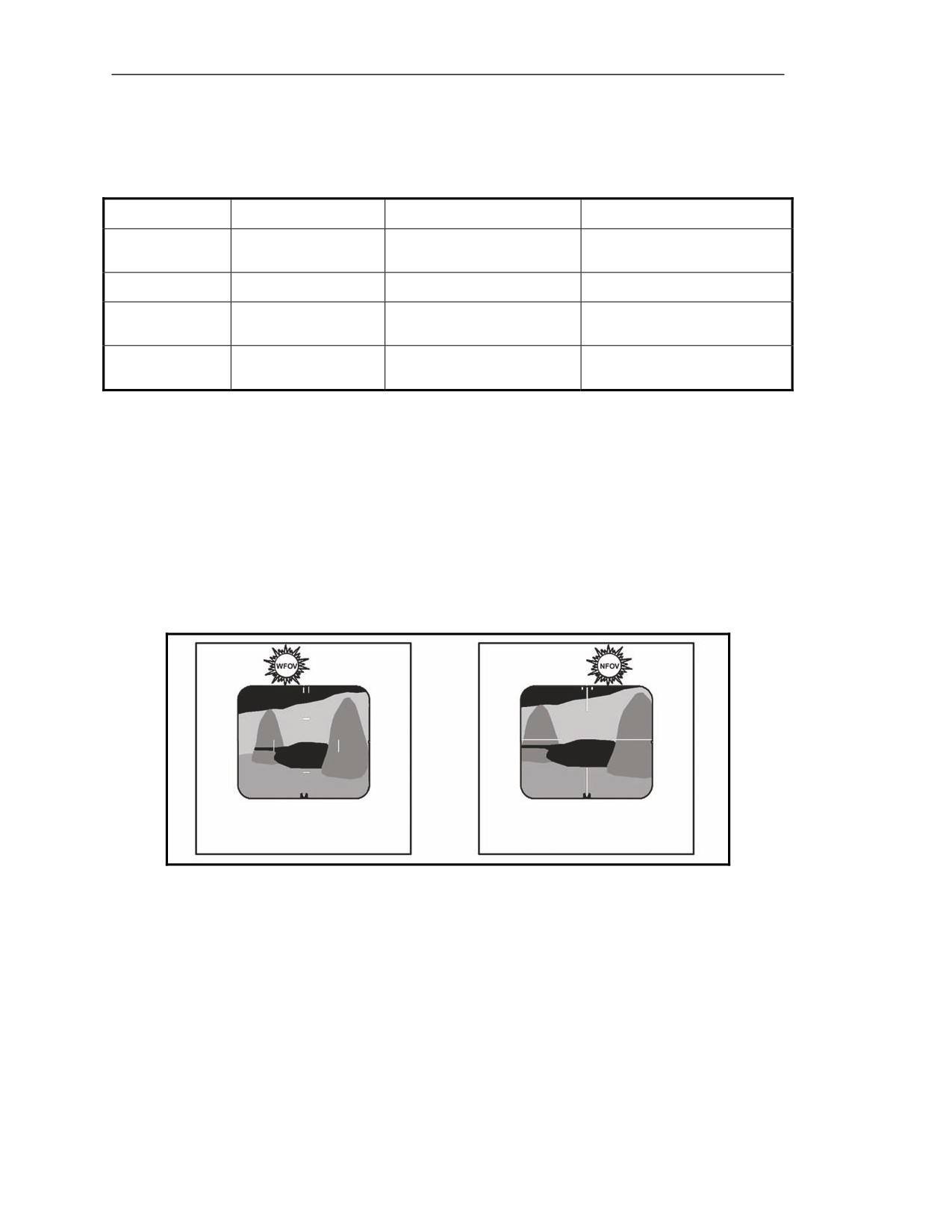
POSSIBLE REASONS
D-7. The WFOV or NFOV flashes when the NVS reaches a focus limit (near or far).
Figure D-2. WFOV or NFOV indicator―flashing.
D-2
FM 3-22.37
20 March 2008
Warning Indicators and Malfunctions
GUNNER’S CORRECTIVE ACTION
D-8. The respective WFOV/NFOV indicator flashes when the gunner moves the FOCUS switch in
the direction of the focus limit. The gunner stops moving the switch and reverses the direction (Table
D-2).
Table D-2. Gunner corrective action for flashing WFOV and NFOV indicators.
INDICATOR—
MEANING
EFFECT
CORRECTIVE
GREEN
ACTION
NVS Focus Limit
Adjust focus in the
Move the FOCUS switch in the
WFOV (Flashing)
(WFOV)
other direction.
opposite direction.
NVS Focus Limit
Adjust focus in the
Move the FOCUS switch in the
NFOV (Flashing)
NFOV)
other direction.
opposite direction.
COMMAND LAUNCH UNIT BATTERY LOW
D-9. The following describes what the CLU BATTERY LOW indicator looks like and the reason the
light comes on. The gunner takes corrective action this light comes on.
INDICATOR
D-10. This light is red and is a warning indicator (Figure D-3).
POSSIBLE REASONS
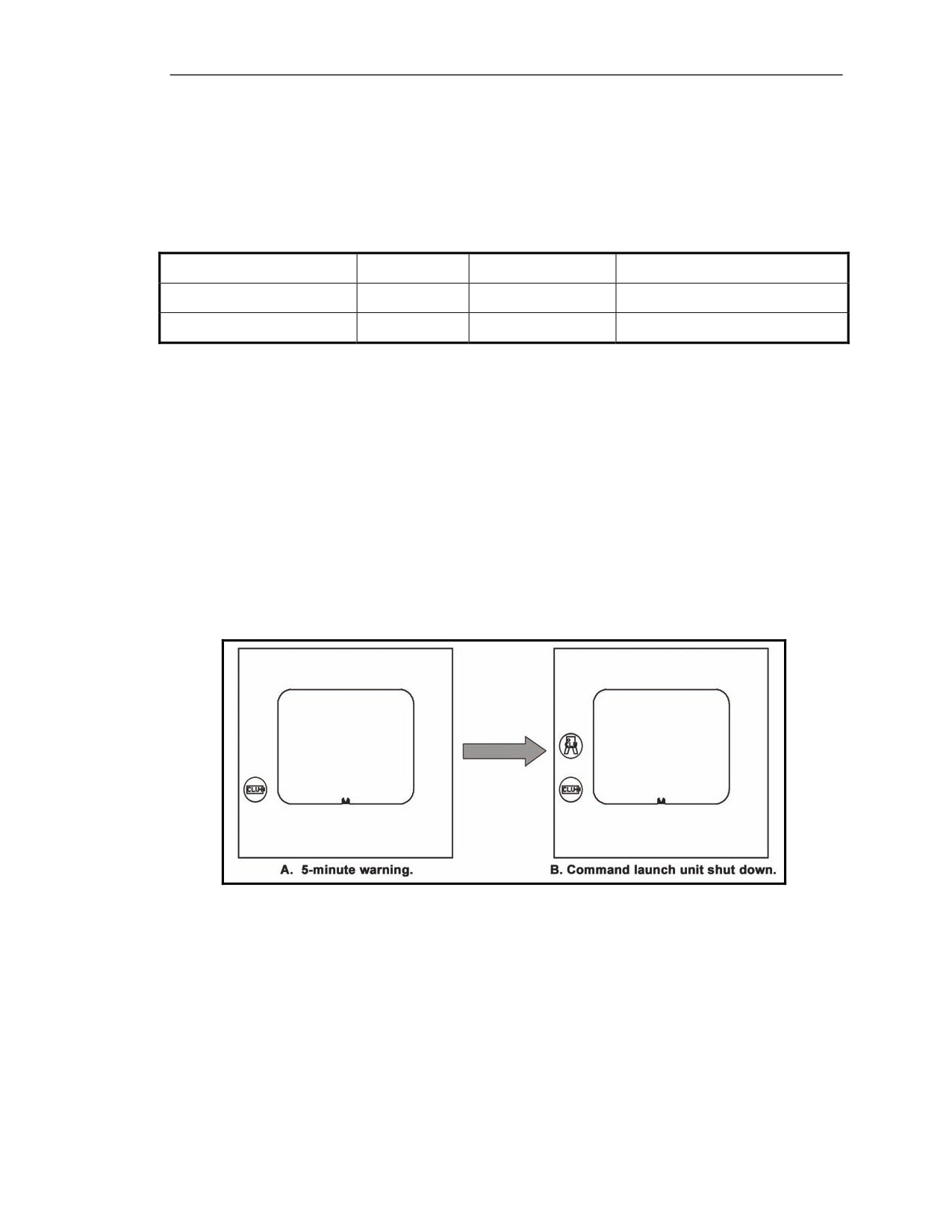
D-11. The CLU BATTERY LOW indicator comes on when the gunner has operated the Javelin about
4 hours. The CLU BATTERY LOW indicator alerts the gunner that he has about 5 minutes of
operating time remaining. If the gunner continues to operate the Javelin, the CLU display
automatically reverts to the day FOV.
Figure D-3. CLU BATTERY indicator―on.
20 March 2008
FM 3-22.37
D-3

Appendix D
GUNNER’S CORRECTIVE ACTION
D-12. The gunner immediately removes the spent battery when the CLU BIT FAILURE indicator
comes on (Table D-3).
Table D-3. Gunner corrective action for CLU BATTERY LOW indicator.
INDICATOR—
MEANING
EFFECT
CORRECTIVE
RED
ACTION
CLU Battery Low
Seeker can be activated and missile
Complete engagement
(if in
can be launched.
progress). If engagement is not
On
in progress, turn CLU off,
About
5 minutes until
replace CLU battery, resume
CLU power shutdown.
mission.
CLU power shutdown.
CLU automatically switches to day
Replace CLU battery.
FOV.
The CLU BIT FAILURE indicator
On
comes on. If the spent CLU battery is
not removed immediately, other
indicators around the CLU display
will start flashing and a clicking
sound can be heard by the gunner.
The missile cannot be launched.
BATTERY COOLANT UNIT LOW
D-13. The following describes what the BCU LOW indicator looks like (Figure D-4) and the reason
the light comes on (Table D-4). The gunner takes corrective action when this light comes on.
INDICATOR
D-14. This light is red and is a warning indicator.
POSSIBLE REASONS
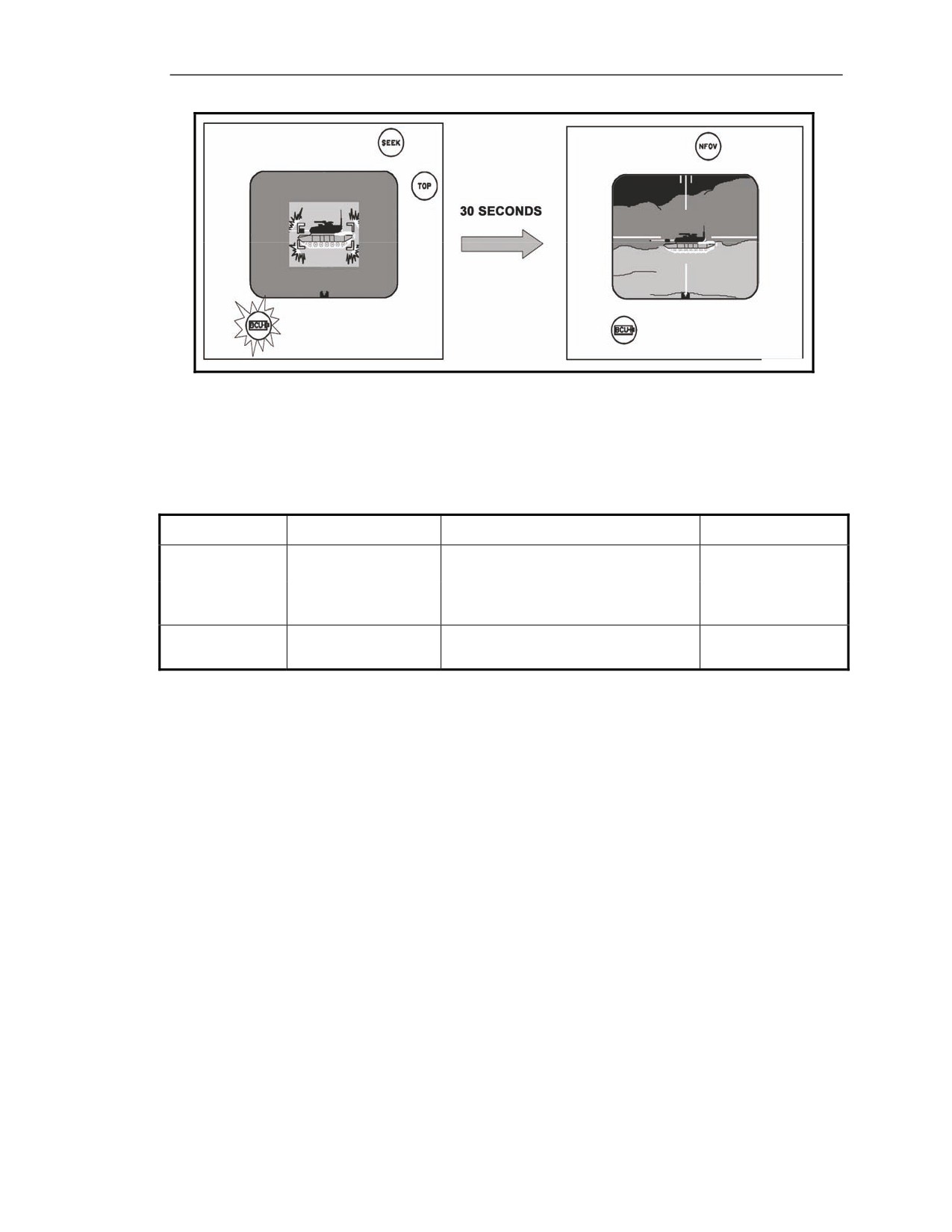
D-15. The gunner has a target in sight and is preparing to launch the missile. The gunner activates the
seeker and attempts to engage the target. The BCU has about 4 minutes of life once the gunner
activates it. The BCU indicator flashes when the BCU has about 30 seconds of operating time
remaining. At this point, the gunner can still launch the missile. When the BCU battery is spent, the
BCU indicator stops flashing and remains ON. The missile powers down, and the CLU display
automatically reverts back to the previous FOV.
D-4
FM 3-22.37
20 March 2008
Warning Indicators and Malfunctions
Figure D-4. BCU LOW indicator―flashing/on.
GUNNER’S CORRECTIVE ACTION
D-16. See Table D-4.
Table D-4. Gunner corrective action for BCU LOW indicator.
INDICATOR—
MEANING
EFFECT
CORRECTIVE
RED
ACTION
BCU Low:
Missile launch still possible before indicator
stops flashing.
Flashing
BCU has
about
30 seconds of operating
time remaining.
BCU is expended.
Missile has no power and cannot be
Replace the BCU.
On (Solid)
launched. CLU display reverts to previous
Resume the mission.
FOV.
MISSILE NOT READY
D-17. The following describes what the MISSILE NOT READY indicator looks like and the reason
the light comes on. The gunner takes corrective action when this light comes on.
INDICATOR
D-18. This light is a multipurpose warning indicator. It can indicate a normal operation or a
malfunction condition.
POSSIBLE REASONS
Normal Operation
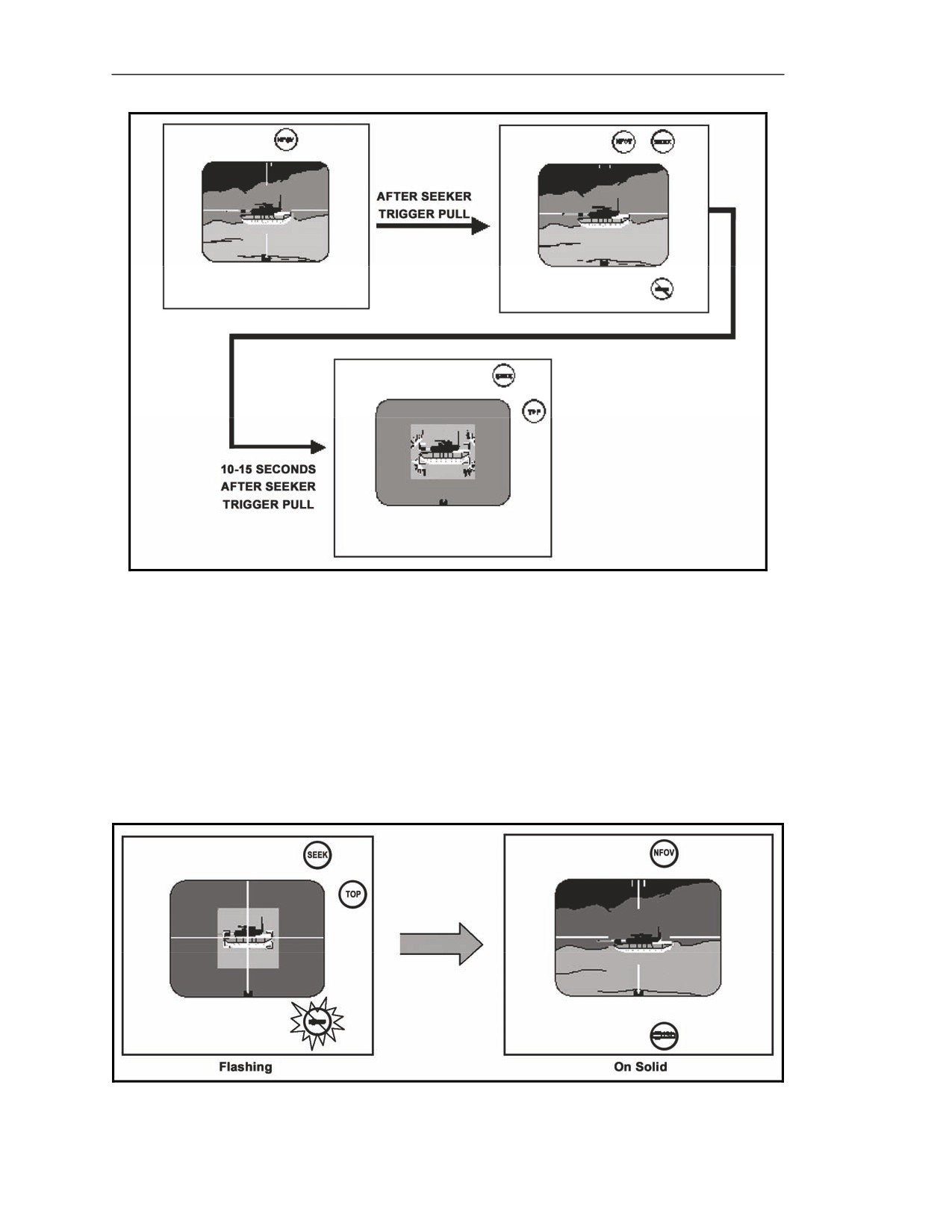
D-19. When the gunner squeezes the seeker trigger and the MISSILE NOT READY indicator lights
stays on for 10 to 15 seconds, the software download to the missile is not complete, missile BIT is not
complete, seeker is not cooled down, or seeker video is not ready. After the seeker is cool and the
software download is complete, the MISSILE NOT READY indicator goes off, and the seeker FOV is
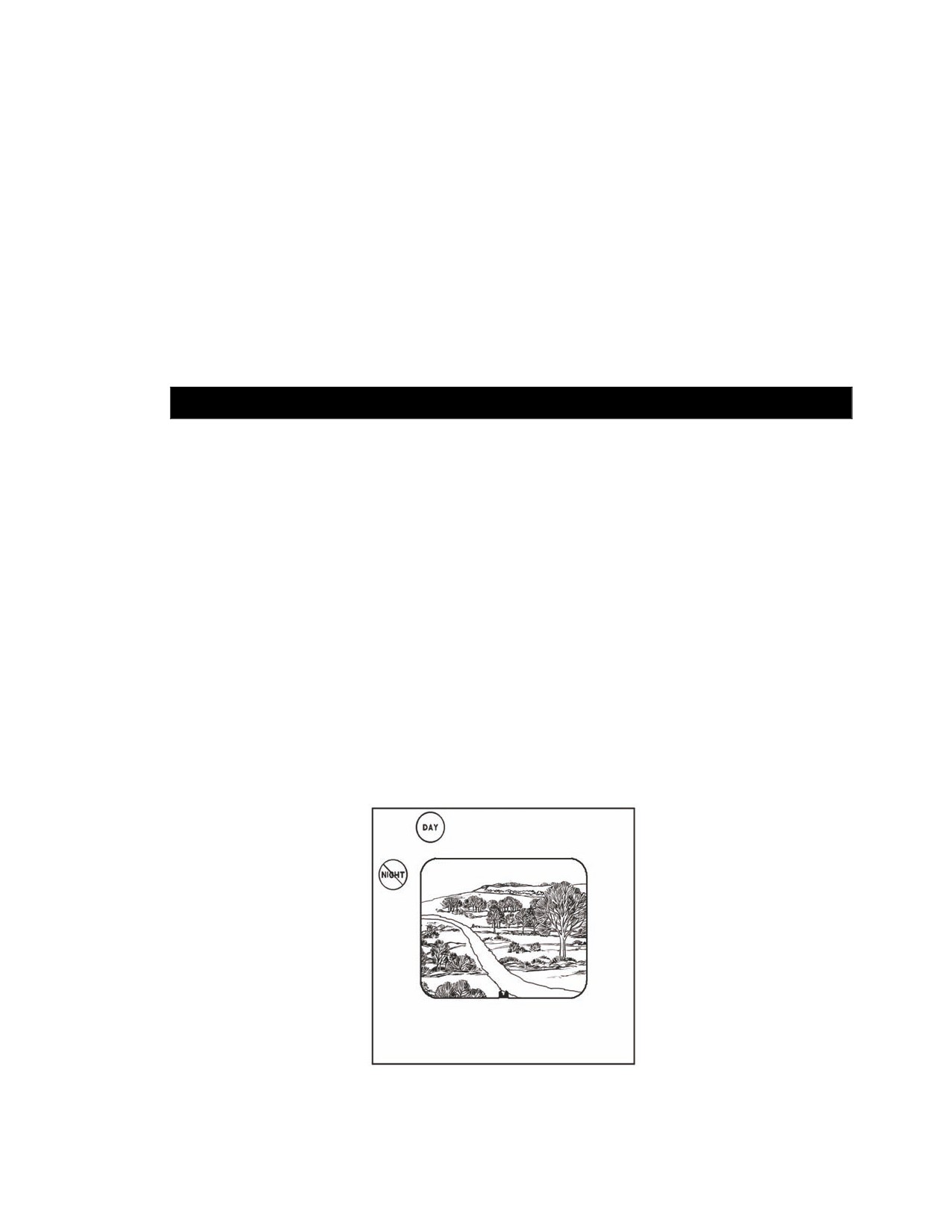
displayed on the CLU display (Figure D-5).
20 March 2008
FM 3-22.37
D-5
Appendix D
Figure D-5. NFOV to seeker FOV sequence.
Malfunctions
D-20. If the gunner has activated the seeker and not launched the missile, it is possible that the missile
will overheat when the BCU is replaced (Figure D-6).
z
After seeker cooldown and seeker FOV is available, attempt to re-engage the target. If the
BCU and the MISSILE NOT READY indicators start to flash, the missile is approaching an
overheat condition.
z
When the MISSILE NOT READY indicator goes off, the missile cannot be launched. The
missile powers down, the CLU reverts to the previous FOV, and the MISSILE BIT
FAILURE indicator comes on as a solid light.
Figure D-6. MISSILE NOT READY indicator.
D-6
FM 3-22.37
20 March 2008

Warning Indicators and Malfunctions
GUNNER’S CORRECTIVE ACTION
D-21. See Table D-5.
Table D-5. Gunner corrective action for MISSILE NOT READY indicator.
INDICATOR—
MEANING
EFFECT
CORRECTIVE
AMBER/RED
ACTIVE
Amber
Missile Not Ready
On
After pulling the seeker trigger.
Missile
cannot
be
Wait for indicator to go off before
Software download begins.
launched
until indicator
attempting any track gate
goes off.
adjustment.
Stays on
One or all of the following may
Missile
cannot
be
Wait for indicator to go off before
have occurred:
launched
until indicator
attempting any track gate
1. Software
download not
goes off.
adjustment.
completed.
2. Missile BIT not completed.
If indicator remains on longer
3. Seeker not cool.
than
15 seconds, replace the
4. Seeker video not ready.
round.
Off
1. Software download completed.
Missile launch available.
Track gate adjustment possible.
2. Missile BIT completed.
3. Seeker video available.
Flashing
After the seeker is activated, the
Missile launch is still
missile begins to overheat.
possible.
Off
MISSILE NOT READY
indicator goes off, the
missile
cannot
be
launched. Missile powers
down, the CLU reverts to
previous FOV, and the
MISSILE BIT FAILURE
indicator comes on solid.
Red (Solid)
Missile has overheated.
Missile
cannot
be
Turn off CLU. Replace the
launched. Missile powers
round.
down, the CLU reverts to
previous FOV, and the
MISSILE BIT FAILURE
indicator comes on solid.
SECTION II. MALFUNCTION INDICATORS
There are four malfunction indicators for which the gunner takes immediate action. These malfunction
indicators are CLU BIT FAILURE, MISSILE BIT FAILURE, MISFIRE, and HANGFIRE.
COMMAND LAUNCH UNIT BUILT-IN TEST FAILURE
D-22. The following describes what the CLU BIT FAILURE indicator looks like and the reason the
light comes on. The gunner takes corrective action when this light comes on.
INDICATOR
D-23. This light is red and is a malfunction indicator.
20 March 2008
FM 3-22.37
D-7