FM 6-02.90 UHF TACSAT /DAMA MULTI-SERVICE TACTICS, TECHNIQUES, AND PROCEDURES FOR ULTRA HIGH FREQUENCY TACTICAL SATELLITE AND DEMAND ASSIGNED MULTIPLE ACCESS OPERATIONS (AUGUST 2004) - page 3
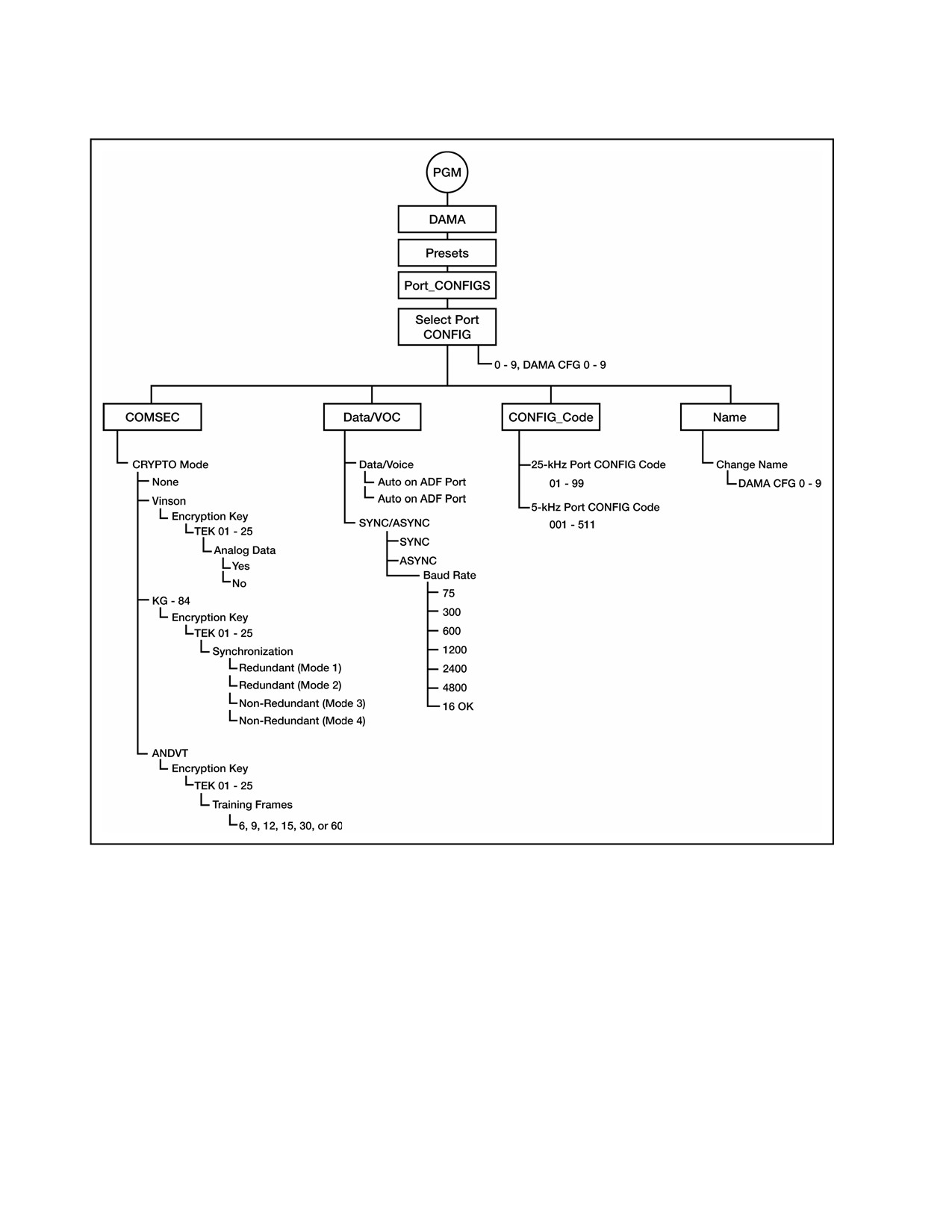
Figure C-6. DAMA Port Configuration Preset Programming Menu Tree
f. AN/PRC-117F DAMA destination presets may be used on any type of DAMA
channel. All necessary elements for each type of channel are included in the preset.
Table C-10 is the preset checklist and Figure C-7 is the preset programming tree.
C-14
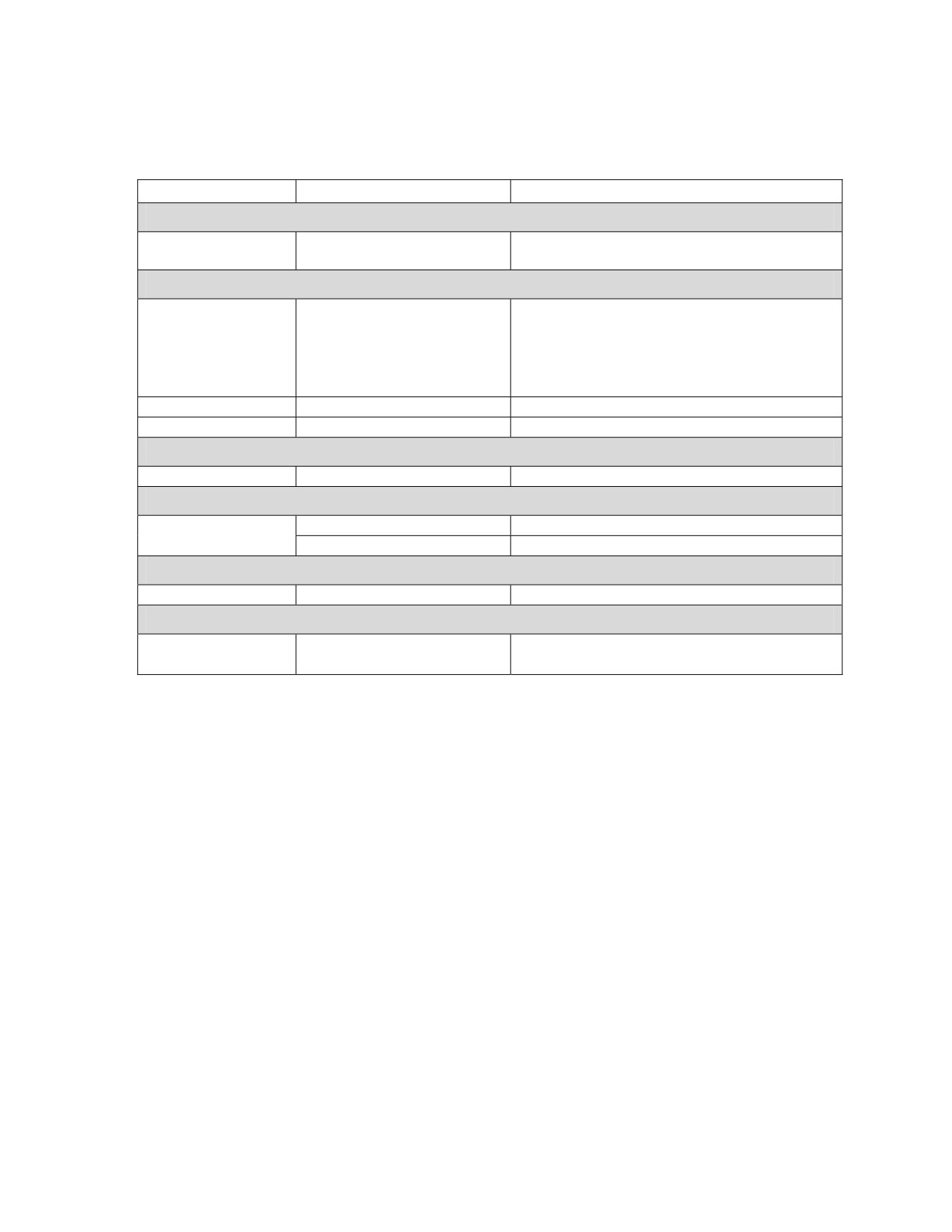
Table C-10. DAMA Destination Preset Programming Checklist
Menu Item
Options
Remarks
5-kHz
5-kHz channels allow calls only to one
Destination
TBA 00000 to 65535
address.
25-kHz AC
1: 00001 to 65535
2: 00001 to 65535
25-kHz AC operation allows up to five
Add
3: 00001 to 65535
addresses to be designated.
Destination to Add:
4: 00001 to 65535
Conference call capability.
5: 00001 to 65535
Review
Destination X of X
Allows checking of programmed addresses.
Delete
00000 to 65535
Remove an address.
25-kHz DC
Circuit Number
10000 to 10999
Enter authorized 25-kHz DC circuit number.
SEARCH
Search Area (5-kHz
Local
Local footprint only.
Only)
Global
Sets up 5-kHz MHOP operation.
NAME
Change Name
DAMADEST0 0 to 49
12-digit alphanumeric name.
CLEAR
YES
Used to clear all parameters in the preset
Are You Sure?
NO
being programmed.
C-15
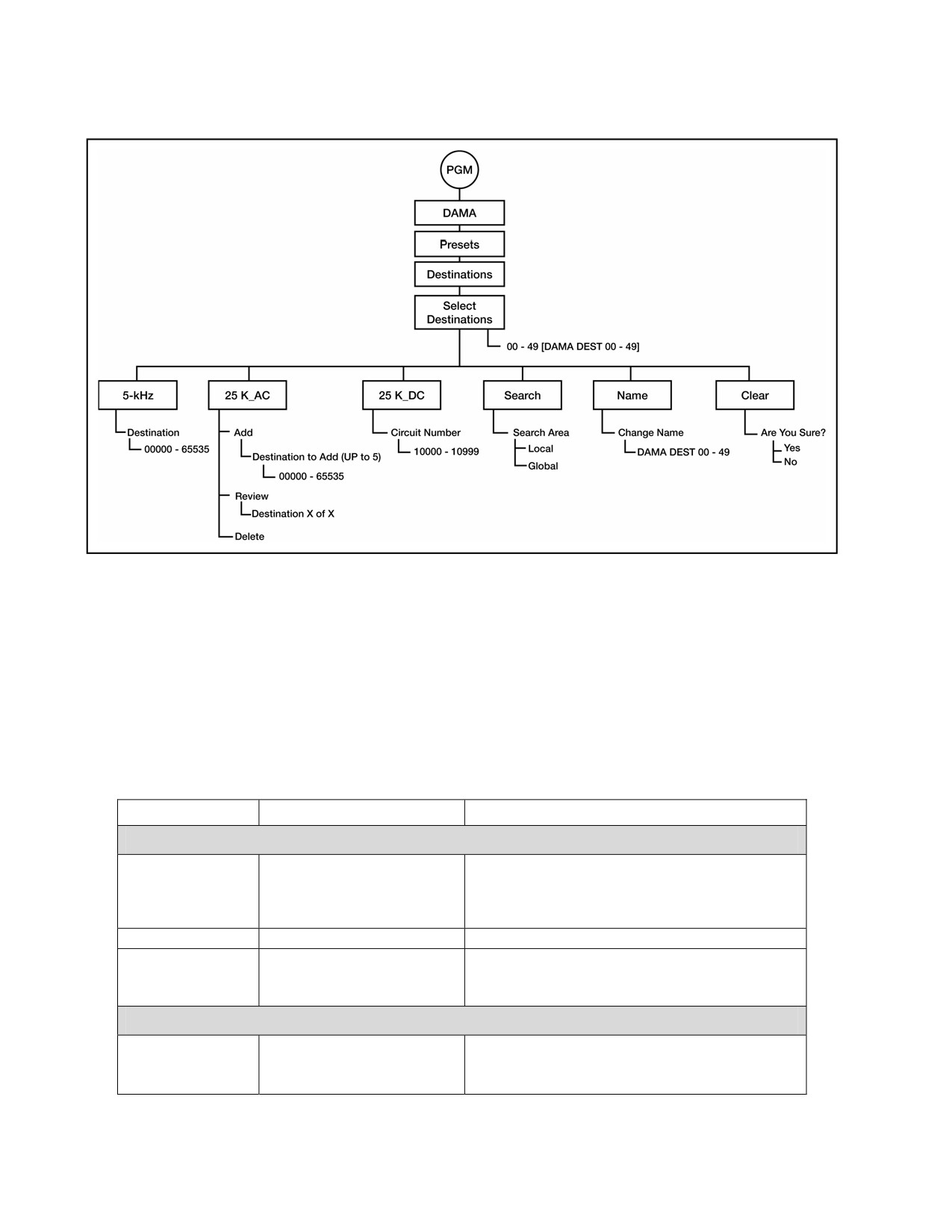
Figure C-7. DAMA Destination Preset Programming Menu Tree
g. DAMA defaults set which items appear as default values throughout the
AN/PRC-117F DAMA CALL menus. This speeds up operation by reducing the amount
of scrolling needed to reach the proper CALL parameters. All options for making calls
are still available in the CALL menus, regardless of DAMA defaults initially
programmed. Refer to Table C-11 for the checklist and Figure C-8 for the defaults
programming tree.
Table C-11. DAMA Defaults Programming Checklist
Menu Item
Options
Remarks
OUT OF SERVICE
Routine, Priority,
Immediate, Flash, Flash
Precedence
Use only authorized precedence.
Override, Emergency
Action
Reason Code
00 to 99
User developed codes.
Requires setting the amount and the units
# # # # - Seconds,
Duration
before pressing ENT.
Minutes, Hours, Days
Use 0000 for indefinite.
PAGE
1: # # # # #
Addresses to
2: # # # # #
00000 to 65535
Page
3: # # # # #
C-16
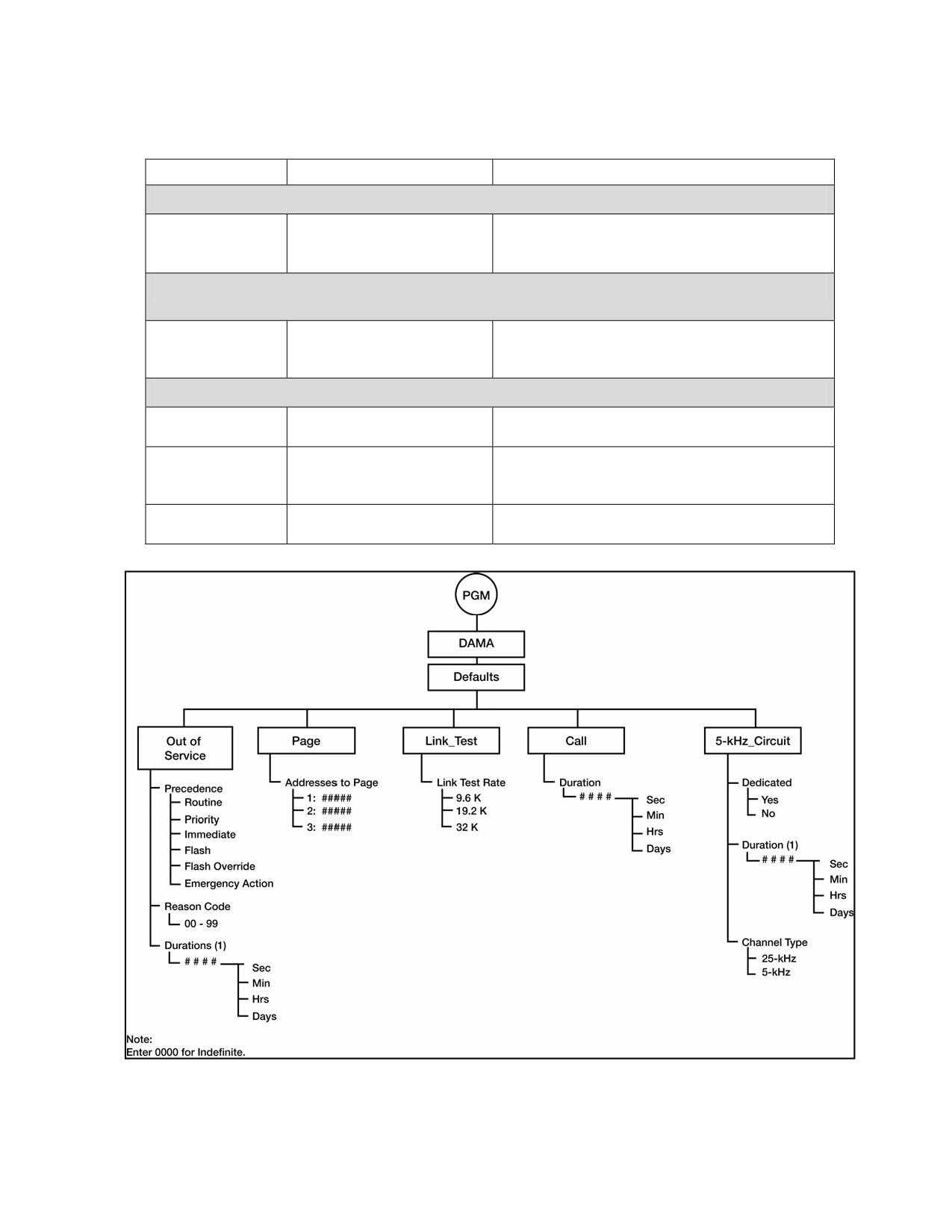
Table C-11. DAMA Defaults Programming Checklist
Menu Item
Options
Remarks
LINK _TEST
9.6k
Sets default link test data rate when
Link Test Rate
19.2k
conducting link tests. Refer to Table C-13 for
32k
times required to complete link tests.
CALL
Requires setting the amount and the units
# # # # - Seconds,
Duration
before pressing ENT.
Minutes, Hours, Days
Use 0000 for indefinite.
5-kHz CIRCUIT
YES
Set YES to make call default to dedicated
Dedicated
NO
DASA operation.
Requires setting the amount and the units
# # # # - Seconds,
Duration
before pressing ENT.
Minutes, Hours, Days
Use 0000 for indefinite.
25-kHz
Sets the default type of channel requested
Channel Type
5-kHz
when making dedicated DASA calls.
Figure C-8. DAMA Defaults Programming Menu Tree
C-17
h. Passive ranging and ephemeris data is used when the tactical situation dictates
the need to control emissions from the radio. Refer to Table C-12 to determine the
necessary elements required for passive ranging programming and operation.
Table C-12. DAMA Ranging Methods
Ranging
Transmit
Time
EPHEM
Location
5-kHz Log in
Method Used
Capability
(Options)
Data
Not
Not
Not
Over-the-Air or
Active
Full Silent
Required
Required
required
Preassigned
Full Silent
Over-the-Air or
Passive
Yes
Yes
Yes
(5-kHz) Yes
Preassigned
WARNING
Contact with the antenna or exposure directly in front of the antenna during
DAMA SATCOM transmissions may cause injury to personnel. In DAMA
SATCOM operation, the AN/PRC-117F interacts automatically with the channel
controller, transmitting and receiving as needed. This automatic transmission
may not be apparent to the operator; therefore, all personnel should avoid
contact with the antenna or exposure directly in front of the antenna.
i.
The 25-kHz DAMA UHF SATCOM is operated in either AC or DC. The
AN/PRC-117F uses the following types of DAMA presets to manage operating
parameters. These presets allow for quick configuration changes to any type of
operation.
(1) DAMA net presets, 10 each—0 to 9.
(2) DAMA port configuration presets, 10 each—0 to 9.
(3) DAMA destination presets, 50 each—00 to 49.
j.
Verify that the SATCOM antenna is oriented correctly using a magnetic compass
to point it on the proper azimuth, as determined from pointing slide rule graphs or
software applications. Make an approximate adjustment in the elevation angle as
needed. SATCOM RSSI test cannot be used in DAMA operation.
k. Initial operation calls may be either normal DAMA circuit service calls or DASA
dedicated calls. See Table C-9. Perform the following procedure for initial operation:
(1) Rotate function switch to CT.
(2) At the OPERATIONAL MODE prompt, select DAMA; press ENT.
(3) Select the desired DAMA net preset by pressing the left/right arrow keys on
the KDU to scroll to the NET preset number and use the KDU numeral keys to enter
the desired net preset number.
Note: In DAMA mode, the PRE + / - key on the KDU is disabled to prevent
inadvertently changing the net preset while in a net connected state.
C-18
(4) Press the circular change key to see that the proper DAMA port configuration
preset is selected for the intended DAMA service request. If a different DAMA port
configuration preset is desired, use the left/right arrow keys on the KDU to scroll to the
preset number. Enter the required preset number and press ENT.
(5) Begin radio operation. View main screen for network status changes in the
order listed:
(a) ACQUIRING.
(b) RANGING (active ranging method only).
(c) LOGGING IN (5-kHz only).
(d) CONNECTED.
(6) Network status of CONNECTED indicates the terminal is ready to request or
receive services in the DAMA network. If terminal does not become connected, check
antenna pointing, loading, and programming assignment of the proper EOW TSK and
TBA. ERROR network status indicates that no DAMA EOW TSK is loaded.
l.
The 25-kHz DAMA has two modes of operation: AC or DC. The channel
controller determines the frame format of the channel and the radio operates
accordingly.
m. Calls in 25-kHz AC DAMA may be made from one to five terminal or network
addresses. A network address is a predetermined group of terminals operated together
as a network. Determine the following before making a call request:
(1) Type of Service. Before placing the call, use the proper DAMA port
configuration preset for the service needed from the service state display screen. On
changing the port configuration preset with a connected terminal, the radio sends a
status report B RCCOW to the channel controller for notification of the new
configuration. For DASA dedicated calls in 25-kHz AC DAMA, a port configuration
preset with a configuration code to signify DASA must be used. Refer to current
configuration codes.
(2) Station(s) to be Called. DAMA destination presets are used in call menus to
select station(s) to be called. TBAs associated with this destination preset are shown on
the line below the DAMA destination preset name.
(3) Precedence of the Call. Use the proper precedence for the importance of the
required service. If a higher precedence than authorized is used, the call is denied. Not
all terminals have access to every precedence level. Check with organization DAMA
planners and authorization documents. At certain times, the channel controller can
place precedence restrictions. The AN/PRC-117F does not allow calls below this
precedence during these times.
(4) Duration of the Call. Request enough time to complete the required
communications; service is terminated automatically at the end of this time. See Figure
C-9. Perform the following procedure to place a call using 25-kHz AC DAMA:
(a) Press CALL key to bring up SELECT REQUEST TYPE.
(b) Select PLACE A CALL and press ENT.
C-19
(c) Select the destination to be called. Use the left/right arrow keys to select
the DAMA destination preset number field, then enter the preset number needed. As
an alternative, select the destination name field or scroll through the DAMA destination
presets names with the up/down arrow keys. Press ENT when proper destination
preset number or name is in view. The TBAs associated with this destination preset are
shown at the bottom of the display.
(d) At the next display screen, choose the precedence of the CALL and press
ENT.
Note: When the channel controller places system restrictions, it sets the
minimum precedence required to place a call on the DAMA channel.
When this happens, the call precedence not authorized is no longer
showm on AN/PRC-117F call menus.
(e) Enter the required call duration in number of seconds, minutes, hours or
days (or input 0000 for indefinite). Use the left/right arrow keys to select between
either the unit digits field or the units. Press ENT when correct time and units are
selected.
(f) The display returns to the main operational display. Service state
changes to PENDING. Wait for the radio to send the request to the channel controller.
(g) Observe the following service states:
• PENDING—Radio terminal is negotiating the sending of the call
request and action on it from the channel controller. Wait until it becomes active or a
system message is received concerning the request.
• ACTIVE—Service request has been granted, the normal indication to
commence operation with the requested service.
• QUEUED—Service request is being held and is granted when channel
resources are free. Wait until the service is granted or terminate the call and try again
later.
• DEDICATED—Indicates that DASA operation has been granted.
Operation in DASA is ruled by MIL-STD 188-181A covering 5-kHz and 25-kHz
dedicated UHF SATCOM.
• IDLE—The radio is not active or is setting up a service.
n. Terminate a 25-kHz AC DAMA call on completion. The user should terminate
the timed or indefinite call so the channel controller can reassign that channel to
another terminal user in the network.
o. The 25-kHz DAMA has two modes of operation: AC or DC. The channel
controller determines the frame format of the channel and the radio operates
accordingly.
p. Calls in 25-kHz AC DAMA can be made from one to five terminal or network
addresses. A network address is a predetermined group of terminals operated together
as a network. Determine the following before making a call request:
C-20
(1) Type of Service. Before placing the call, use the proper DAMA port
configuration preset (from the service state display screen) for the service needed. On
changing the port configuration preset with a connected terminal, the radio sends a
status report B RCCOW to the notify channel controller of the new configuration. For
DASA dedicated calls in 25-kHz AC DAMA, use a port configuration preset with a
configuration code to signify DASA. Refer to current configuration codes.
(2) Station(s) to be Called. DAMA destination presets are used in call menus to
select station(s) to be called. TBAs associated with this destination preset are shown on
the line below the DAMA destination preset name.
(3) Precedence of the Call. Use the proper precedence for the importance of the
required service. If a higher precedence than authorized is used, the call is denied. Not
all terminals have access to every precedence level. Check with organization DAMA
planners and authorization documents. At certain times, the channel controller can
place precedence restrictions. The AN/PRC-117F does not allow calls below this
precedence during restricted times.
(4) Duration of the Call. Request enough time to complete the required
communications; service is terminated automatically at the end of this time. See Figure
C-9. Perform the following procedure to place a call using 25-kHz AC DAMA:
(a) Press CALL key to bring up SELECT REQUEST TYPE.
(b) Select PLACE A CALL and press ENT.
(c) Select the destination to be called. Use the left/right arrow keys to
select the DAMA destination preset number field, then enter the preset number needed.
As an alternative, select the destination name field or scroll through the DAMA
destination presets names with the up/down arrow keys. Press ENT when proper
destination preset number or name is in view. The TBAs associated with this
destination preset are shown at the bottom of the display.
(d) At the next display screen, choose the precedence of the call and press
ENT.
Note: When the channel controller places system restrictions, it sets the
minimum precedence required to place a call on the DAMA channel. The
call precedence not authorized is no longer shown on AN/PRC-117F call
menus.
(e) Enter the required call duration in number of seconds, minutes, hours,
or days (or input 0000 for indefinite). Use the left/right arrow keys to select either the
unit digits field or the units field. Press ENT when correct time and units are selected.
(f) The display returns to the main operational display. Service state
changes to PENDING. Wait for the radio to send the request to the channel controller.
(g) Observe the following service states:
• PENDING—Radio terminal is negotiating the sending of the call
request and action on it from the channel controller. Wait until it becomes active or a
system message is received concerning the request.
C-21
• ACTIVE—Service request has been granted, the normal indication to
commence operation with the requested service.
• QUEUED—Service request is being held and is granted when channel
resources are free. Wait until the service is granted or terminate the call and try again
later.
• DEDICATED—Indicates that DASA operation has been granted.
Operation in DASA is ruled by MIL-STD 188-181A covering 5-kHz and 25-kHz
dedicated UHF SATCOM.
• IDLE—The radio is not active or is setting up a service.
C-22
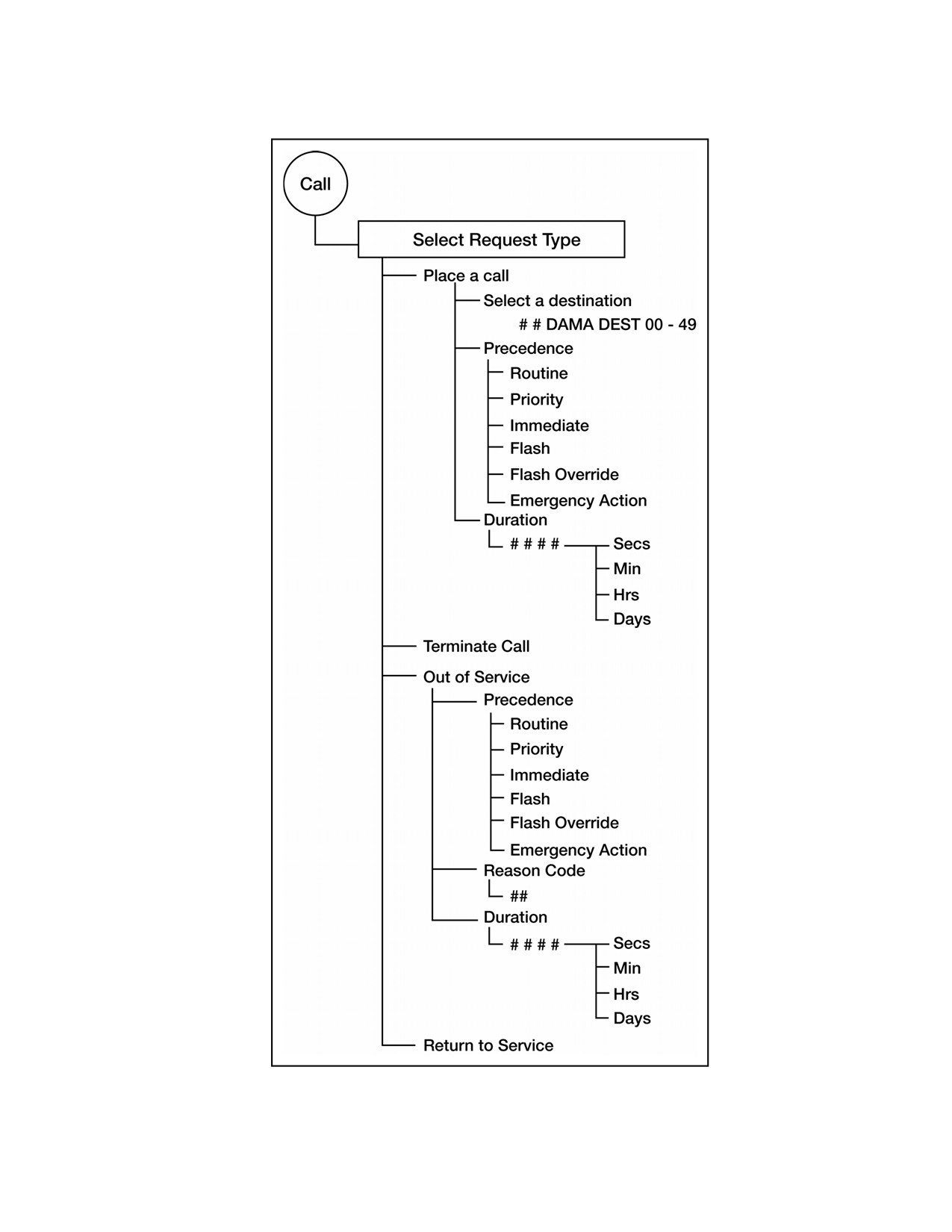
Figure C-9. DAMA 25-kHz AC Call Menu
C-23
q. Terminate 25-kHz AC DAMA calls on completion. The user should terminate a
timed or indefinite call so the channel controller can reassign that channel to another
terminal in the network. Perform the following procedures to terminate a call:
(1) From a service state display indicating ACTIVE and time remaining, press
CALL.
(2) From SELECT REQUEST TYPE display, select TERMINATE CALL with the
up/down arrow keys; press ENT.
(3) The TERMINATE CALL request is sent to the channel controller. The
channel controller tearsdown the service and the service state of the terminal returns to
one of the service states (IDLE, PENDING, or QUEUED), depending on other ongoing
requests.
r. Send a 25-kHz AC DAMA out-of-service request to the channel controller instead
of logging out as in 5-kHz DAMA. In these requests, the duration for being out of
service, precedence, and reason code is transmitted. If another station attempts to call
the terminal during the out-of-service period, the channel controller can report the
reason code and time to be out of service to that user. Perform the following procedures
to send an out-of-service request:
(1) Press CALL key to bring up SELECT REQUEST TYPE display.
(2) Select OUT OF SERVICE and press ENT.
(3) Select precedence for out-of-service request and press ENT.
(4) Enter two-digit numerical out-of-service code.
(5) Enter duration for the out of service period; use 0000 if it is to be indefinite.
Press ENT.
(6) The out-of-service request is sent to the channel controller. Watch the
display for acknowledgement from the channel controller.
s. To return to service in 25-kHz AC DAMA operation, send a status report B
RCCOW (menu item RETURN TO SERVICE) to the channel controller. This informs
the channel controller that the operator has returned. When an operational radio is
unmanned, it is not necessary to use this menu item when turning on after a power off.
The RCCOW sent to the channel controller when connected notifies the channel
controller of return to service. Perform the following procedure to return to service:
(1) Press CALL key to bring up SELECT REQUEST TYPE display.
(2) Select RETURN TO SERVICE and press ENT.
(3) A Status report B RCCOW is sent to the channel controller.
t. In 25-kHz UHF AC DAMA, an AN/PRC-117F terminal user can page up to three
other terminals. Paging is available only in 25-kHz AC DAMA. Using organization
network planners, determine the procedures on responding to pages. See Figure C-10.
Perform the following procedure to page:
(1) Press CALL key to bring up service request screen of SELECT REQUEST
TYPE.
(2) Select PAGE and press ENT.
C-24
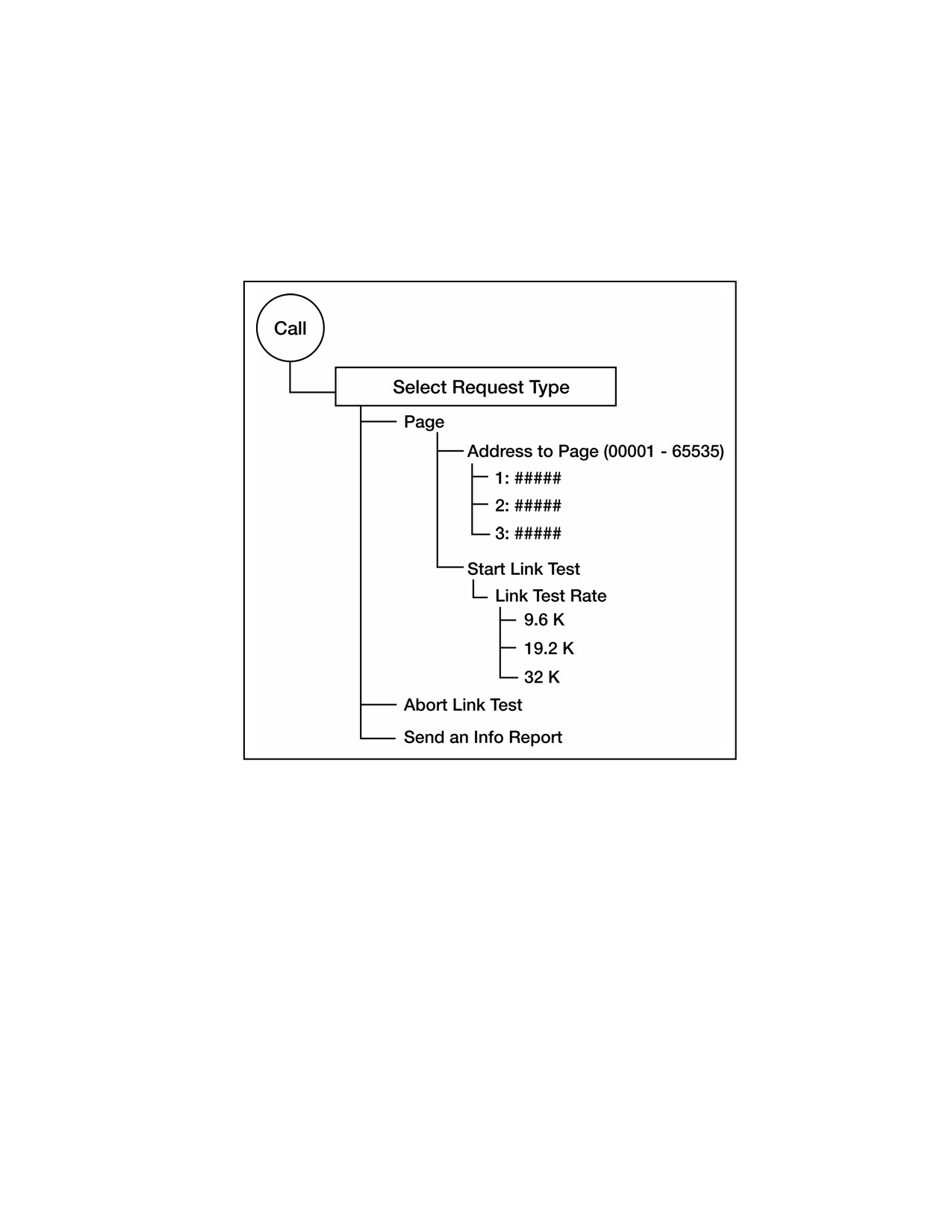
(3) Use KDU number keys to type in the first address to page; press ENT to
accept number.
(4) Repeat step 3above for the second and third addresses. (If no more addresses
need to be paged, type 0000 and press ENT.)
(5) The radio sends the page request to the channel controller. The paged
station should respond as unit procedure dictates.
Figure C-10. Twenty-five-kHz AC Paging and Link Test
u. To alleviate problems in 25-kHz AC DAMA operation, the channel controller can
send an information request code to request information (INFO Report, see Figure C-
10). from the terminal operator. The terminal operator must respond to the request
with an information report code to continue operation in DAMA. Perform the following
procedure to send an information report code at any other time:
(1) Press CALL to bring up SELECT REQUEST TYPE display.
(2) Select INFO REPORT from menu and press ENT.
(3) Enter the desired information report response code to send to the channel
controller and press ENT. The radio sends the code to the channel controller.
v. The 25-kHz DAMA has start-link test built into its frame format. Link testing
determines suitability for data operations using more robust frame formats that support
higher burst data rates. It does not reduce channel overhead allotted to supporting
C-25
communications. Slower data rate link tests require more time to complete. Refer to
Table C-13. Perform the following procedure to conduct a link test:
(1) Press CALL key to bring up SELECT REQUEST TYPE display.
(2) Select START LINK TEST and press ENT.
Note: This sends a link test request to the channel controller. When the link
test slot becomes available, the channel controller commands the radio to
begin the link test. On completion of the link test, the radio displays the
results in number of bit errors and missed acquisitions during the test.
Results are recorded automatically by the channel controller and used to
determine data burst rates. Terminals that show good results in link
tests are assigned frame formats supporting more robust burst data rates,
thereby increasing overall data throughput.
Table C-13. Link Test Data Rates, 25-kHz DAMA
Time Required to
Link Test Data Rate
Complete
9.6-kbps
6 to 7 minutes
19.2-kbps
2 minutes
32-kbps
1 minute
w. Abort link test (25-kHz AC or DC DAMA ) and use the radio for another purpose,
perform the following procedure:
(1) Press the CALL key to bring up the SELECT REQUEST TYPE display.
(2) Select ABORT LINK TEST and press ENT. The radio aborts the link test
process and terminates the link test.
x. View network status messages (all DAMA modes). The AN/PRC-117F displays
operational status messages that pop up on the display and are then placed into a
message database while DAMA operation continues. To determine the steps in an
operation while using DAMA, refer to the technical manual for a list of the messages
and their explanation. There are two methods that may be used to view messages while
operating in UHF DAMA SATCOM: message indicator method and options menu
method.
y. Perform the following procedure for the message indicator method:
(1) Press the left/right keys to scroll over to the envelope icon on the operational
display and press ENT.
(2) Use the up/down arrow keys to scroll through the message database.
(3) Press CLR to return to operational screens.
Note: When operations on a current DAMA net terminate, all the DAMA status
messages erase. Some pop-up messages require operator intervention to
continue.
C-26
z. In 5-kHz DAMA, calls can be made to a single terminal address for a point-to-
point capability or to a sub-net address giving network capability. The nine-second
frame format creates long delays for voice users. The 5-kHz DAMA network operation
was designed and, therefore, more suited for DATA operations. DASA dedicated service
requests are used to handle service requests greater than the DAMA channel can
handle. On entry into DAMA mode using a properly configured DAMA net preset, the
AN/PRC-117F automatically acquires, ranges, and logs in with the channel controller.
Network status shows CONNECTED, if successful. DASA call requests are placed with
precedence of the call and the desired duration. Service request can be granted, placed
in queue, or denied. Calls made with a precedence higher than authorized are denied.
The 5-kHz DAMA has two basic modes of operation of circuit or message service. The
AN/PRC-117F is placed in each mode by changing it on the display. The mode of
operation is selected prior to operation in that mode. If a service message is received
while in circuit mode, the radio is switched to message mode to download the message.
(1) Circuit service provides half-duplex encrypted voice or data service to a single
destination or to a network, or terminals grouped under a sub-network address.
(2) Message service is a specialized data mode that provides packet transmission
and reception of data messages up to 14 kilobytes. This requires an external data device
to input the message to the AN/PRC-117F.
aa. Place a call (5-kHz circuit service or dedicated call). (See Figure C-11.) Requests
for circuit service and dedicated calls are essentially the same. Dedicated service gives
a channel unhindered by the delay the long 5-kHz DAMA frame format. Not all users
have authorized use of dedicated service. Dedicated service is used to support data
rates and message lengths not adequately supported by circuit service. Consider the
following items before placing a call:
(1) Type of service. Use the proper DAMA port configuration preset for the
service needed. Select this preset from the service state display screen before placing
the call.
(2) Station(s) to be called. DAMA destination presets are used in call menus to
select station(s) to be called. TBAs associated with this destination preset are displayed
on the line below the DAMA destination preset name.
(3) Precedence of the call. Use the proper precedence for the importance of the
required service. If a higher precedence than authorized is used, the call is denied. Not
all terminals have access to every precedence level. Check with organization DAMA
planners and authorization documents.
(4) Duration of the call (DASA only). Request enough time to complete the
required communications. Service is terminated automatically at the end of this time.
Additionally, when making DASA calls, select either 5-kHz NB or 25-kHz WB channels.
Perform the following procedure to place a call using 5-kHz DAMA:
(a) Rotate function switch to CT.
(b) After the radio initializes, press MODE.
(c) At the OPERATIONAL MODE prompt, select DAMA; press ENT.
C-27
(d) Select the desired DAMA net by pressing the left/right arrow keys on the
KDU to scroll to the NET preset number. Use the KDU number keys to enter the
desired net preset number.
(e) Press the circular change key to view that the proper DAMA port
configuration preset is selected for the intended DAMA service request. If a different
DAMA port configuration preset is desired, use the left/right arrow keys on the KDU to
scroll to the preset number. Enter the required preset number and press ENT.
(f) Begin radio operation. View main screen for network status of
CONNECTED.
(g) Use the circular arrow key to check service state screen for 5-kHz CKT
mode. If in MSG mode, use the left/right arrow keys to scroll to mode and change to
CKT mode.
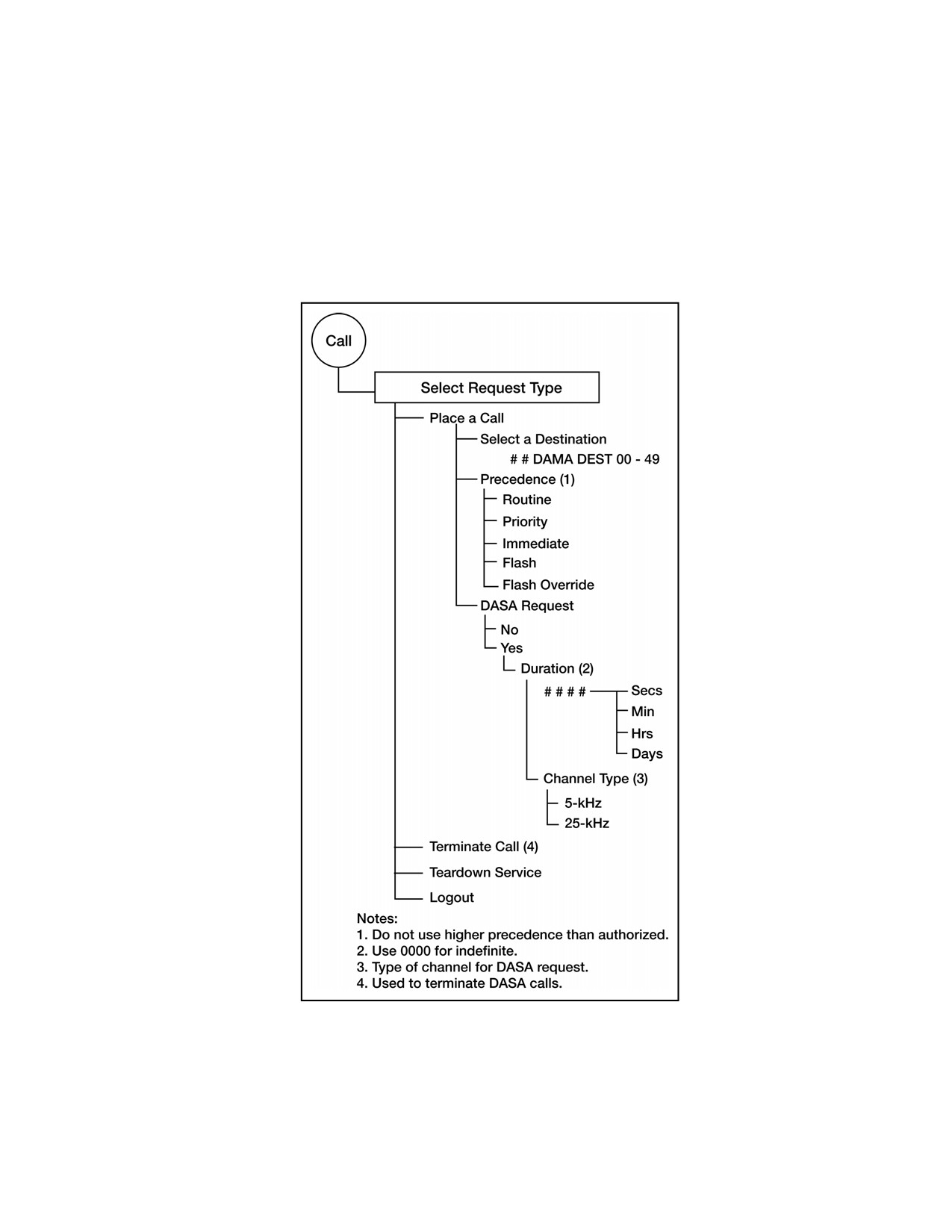
(h) Press CALL key to bring up SELECT REQUEST TYPE.
(i) Select PLACE A CALL and press ENT.
(j) To select the destination to be called, use either—
• The left/right arrow keys to select DAMA destination preset number for
numeric entry of the destination
• The up/down arrow keys to select the destination preset name for the
desired destination.
Note: The five-digit terminal addresses associated with this destination preset
show on the bottom line of the display.
(k) At next display screen, choose the precedence of the call and press ENT.
(l) At DASA REQUEST? prompt, select YES for dedicated service and NO
for regular DAMA circuit service.
(m) Enter the required DASA call duration in numerical units of seconds,
minutes, hours, or days (or use 0000 for indefinite). Press ENT when proper time and
units are selected. Time is not entered for normal DAMA calls.
(n) For DASA dedicated calls, channel type (5-kHz or 25-kHz) is also
requested in the call request. This menu option is not shown when making a normal
DAMA circuit service call.
(o) The display returns to the main operational display. Service state
changes to PENDING. Wait for the radio to send the request to the channel controller.
(p) Observe the service state display for the following indications:
• PENDING—Radio terminal is negotiating the sending of the call
request and action on it from the channel controller. Wait until it becomes active or a
system message appears concerning the request.
• ACTIVE—Service request is granted. This is the normal indication to
commence operation with the requested service.
C-28
• PREEMPTED—An active service is preempted by a higher priority
service. Wait for the service to become active again.
• DEDICATED—Indicates that DASA operation is granted. Operation in
DASA is ruled by MIL-STD 188-181B covering 5-kHz and 25-kHz dedicated UHF
SATCOM. Use the appropriate DAMA port configuration preset needed for the DASA
service.
• IDLE—The radio is inactive or setting up a service.
Figure C-11. Call Menu 5-kHz DAMA
bb. Perform teardown service (5-kHz). If time is still remaining or if indefinite time
period (0000) is selected, circuit service and dedicated service are torn down on
C-29
completion of the communications. Perform the following procedure for service
teardown:
(1) At end of using a DAMA service, press CALL key on KDU.
(2) Use up/down arrow keys to scroll to TEARDOWN. Press ENT to begin
teardown.
(3) Use the up/down arrow keys to select the desired service to teardown. Press
the circular arrow keys to view the second screen of the service state.
(4) Press ENT to teardown this service.
cc. Terminate call (5-kHz dedicated call only). If time is remaining, dedicated calls
should be terminated. Perform the following procedure to terminate a dedicated call:
(1) At the end of using DASA dedicated service, press CALL button on KDU.
(2) Use up/down arrow keys to scroll to TERMINATE CALL.
(3) Press ENT to terminate call.
(4) Service state goes to IDLE after reacquiring the network home channel.
dd. Send a message using 5-kHz DAMA message service. DATA messages of less
than 14 kilobytes are uploaded to radio and the packet is sent to the destination
address. The terminal prompts a message upload to the radio. Perform the following
procedure to send a message:
(1) Ensure the DATA device is connected to the J1 ADF connector or J3 data
connector and is ready for operation with a message to be transmitted.
(2) Select a DAMA port configuration preset that properly interfaces the data
device to the radio using KG-84C encryption.
(3) Press the circular arrow keys to move display screens to service state screen
to place radio in MSG mode. If radio is in CKT mode, use the left/right arrow keys to
scroll to MODE and change to MSG mode with the up/down arrow keys, then press
ENT.
(4) Press CALL key to bring up display for SELECT REQUEST TYPE. See
Figure C-12.
(5) Select SEND A MESSAGE and press ENT.
(6) Select DAMA destination preset to which the message is sent and press ENT.
TBAs associated with this preset are shown across the bottom line of the display.
(7) The next display is SELECT PRECEDENCE. The display shows the
precedence last used to call the selected destination. Press ENT to keep that precedence,
or scroll and select an alternate message precedence.
(8) After a brief configuring screen, the terminal prompts the user to ENTER
MESSAGE to the radio. Send the message on the data device to upload it into the
radio. Press CLR to abort.
(9) When uploading is complete, the service state indicates IDLE with a message
status of one (1) for outgoing. After the message is transmitted, the outgoing message
indicator number decreases.
C-30
ee. Receive a data message using 5-kHz DAMA message service. Depending on
operation of the particular data device, the radio is programmed to either automatically
download a received message from the radio buffer to the data device, or manually
download a received message after the data device is ready to accept it from the radio.
When using manual message release, remember to download messages so additional
messages are received without losing important data. When using 5-kHz message
service, the AN/PRC-117F is operated with a network state of CONNECTED and a
service state of IDLE. When a sender initiates sending a data message to the terminal,
the channel controller looks for the presence of the destination terminal and sets up a
service between the two terminals. On successful transmission, the AN/PRC-117F
indicates (in its message buffer) that it is holding a message for downloading. If the 5-
kHz MSG mode is set to AUTO instead of MANUAL, it sends the message immediately
to the interfaced output data device. Perform the following procedure to download a
message using 5-kHz message service with manual message mode:
(1) Verify there is a buffered message in the radio and the radio is in MSG mode.
(2) Connect the data device to either the J1 ADF connector or J3 data port, as
applicable, and ensure it (connector or port) is ready to receive the message.
(3) Press the CALL key and bring up SELECT REQUEST TYPE display.
(4) Select DOWNLOAD MESSAGE and press ENT.
(5) The service state changes to DOWNLOAD and the message is sent to the
data device. When complete, the service state changes back to IDLE.
(6) Check the data device for proper reception of the message. The incoming
message number is decremented.
C-31
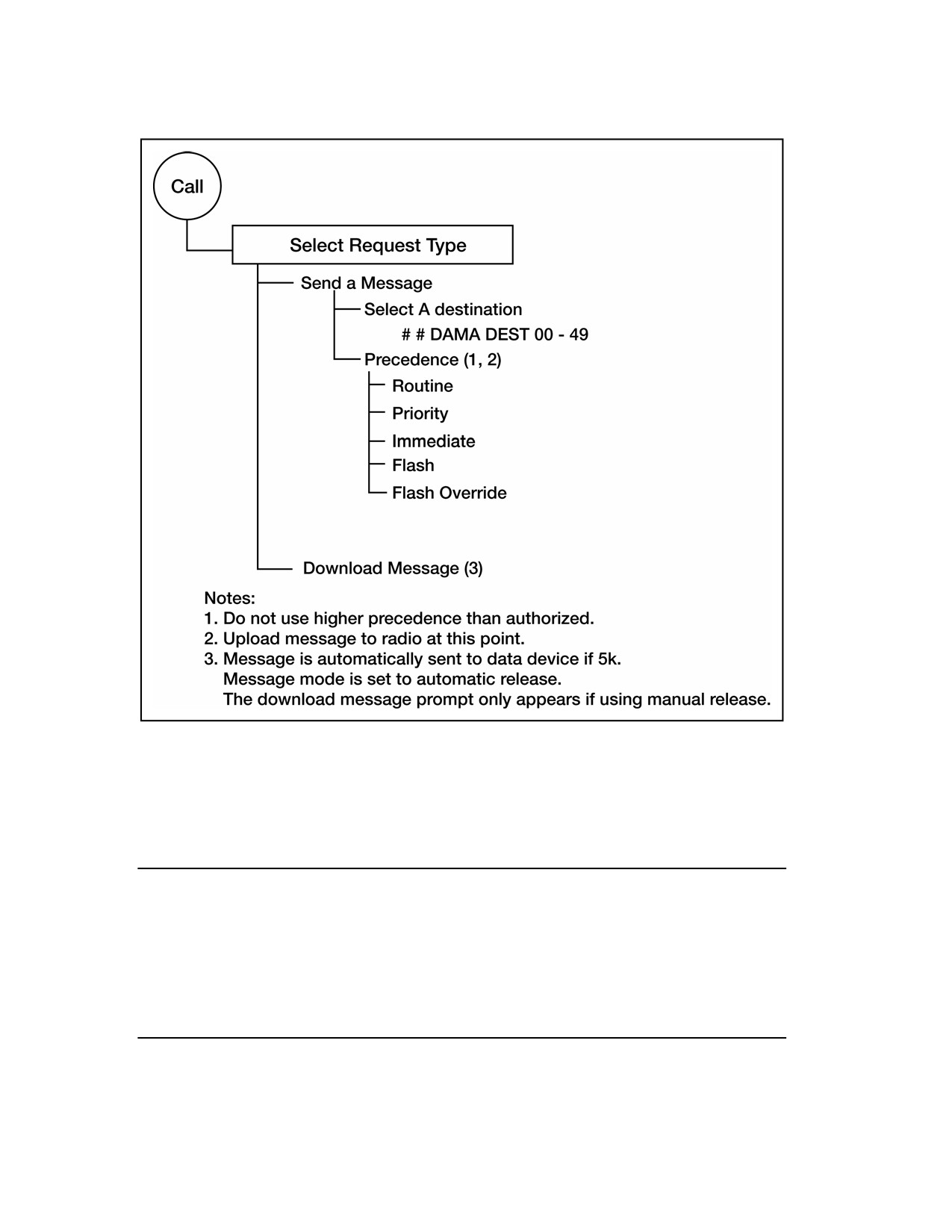
Figure C-12. MSG Service Call Menu, 5-kHz DAMA
ff. Log out of 5-kHz DAMA. To leave the 5-kHz DAMA channel, the terminal must
log out with the channel controller. Also, this is required if shutting the radio off for
any reason (such as changing the batteries or adjusting the antenna). Perform the
following procedure to log out of a 5-kHz DAMA net:
Note: If the radio goes off the net without logging out, the channel controller
automatically logs it out after it missed 200 ROWs (approximately 30
minutes). Until it logs out, the channel controller considers the terminal
logged in. If the terminal attempts to log in a second time, the channel
controller may reject the second log in attempt. If a log in is rejected, go
into net preset programming (Figure C-6) and change log in type to
preassigned. The terminal is connected again. Return setting to over-
the-air after the net connects again.
(1) Press the CALL key to bring up the SELECT REQUEST TYPE display
screen.
C-32
(2) Use the up/down arrow keys to select LOG OUT; press ENT to log out.
Note: The service state and network state switch to DISABLED after the
channel controller acknowledges the log out request. The radio is
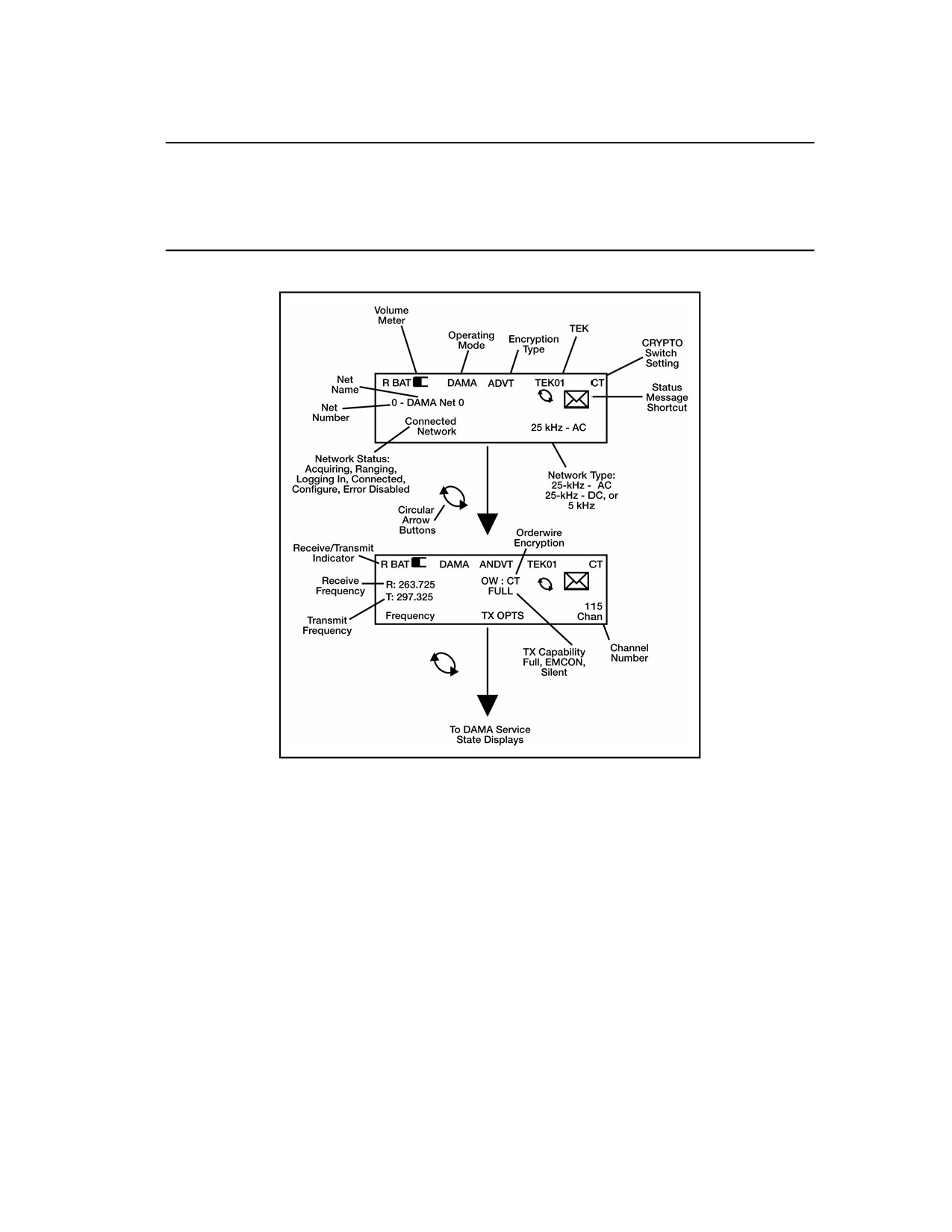
switched to another DAMA net preset, or turned off. Figure C-13, Figure
C-14, and Figure C-15 provide screen displays and descriptions for the
radio.
Figure C-13. DAMA Network State Displays, 5-kHz and 25-kHz
C-33
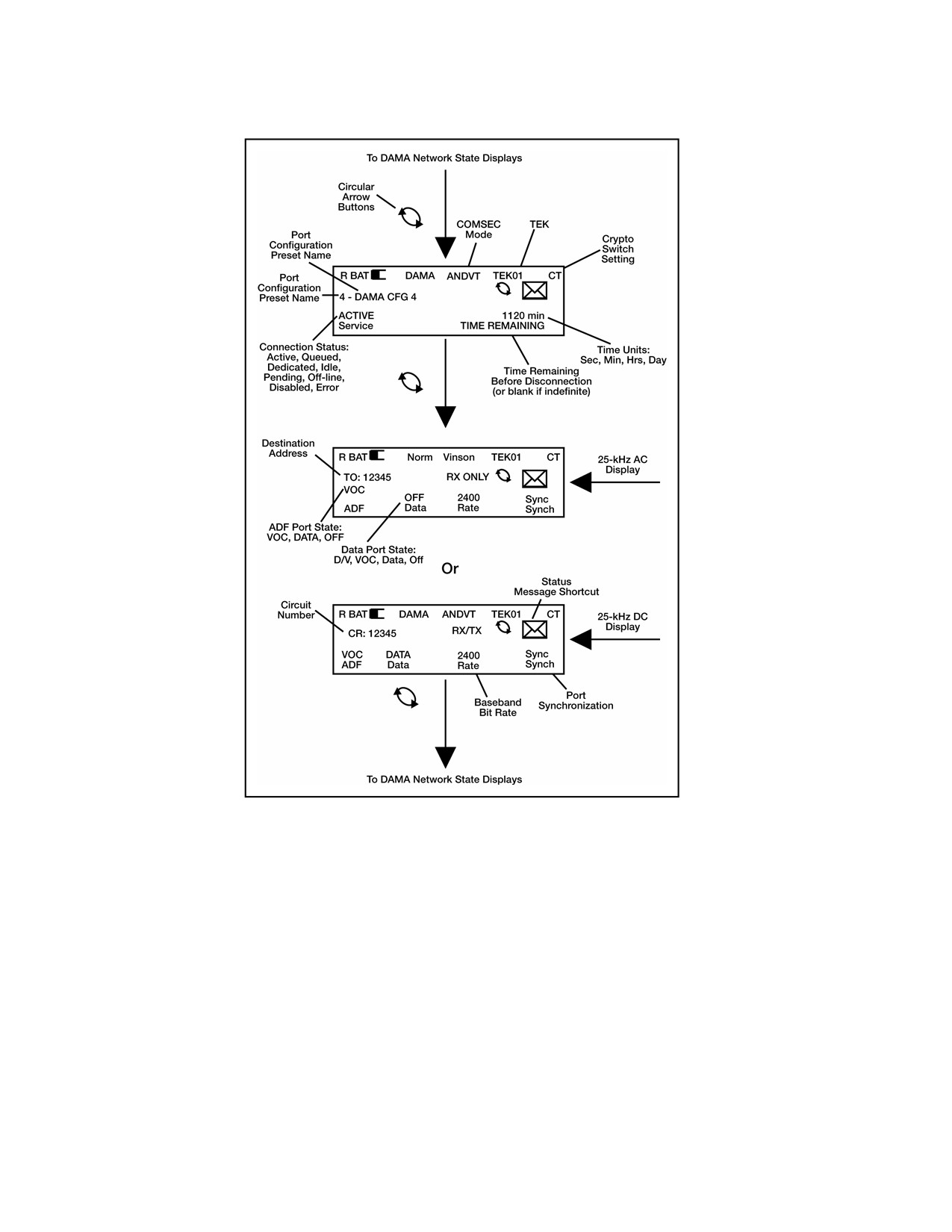
Figure C-14. DAMA Service State Displays, 25-kHz
C-34
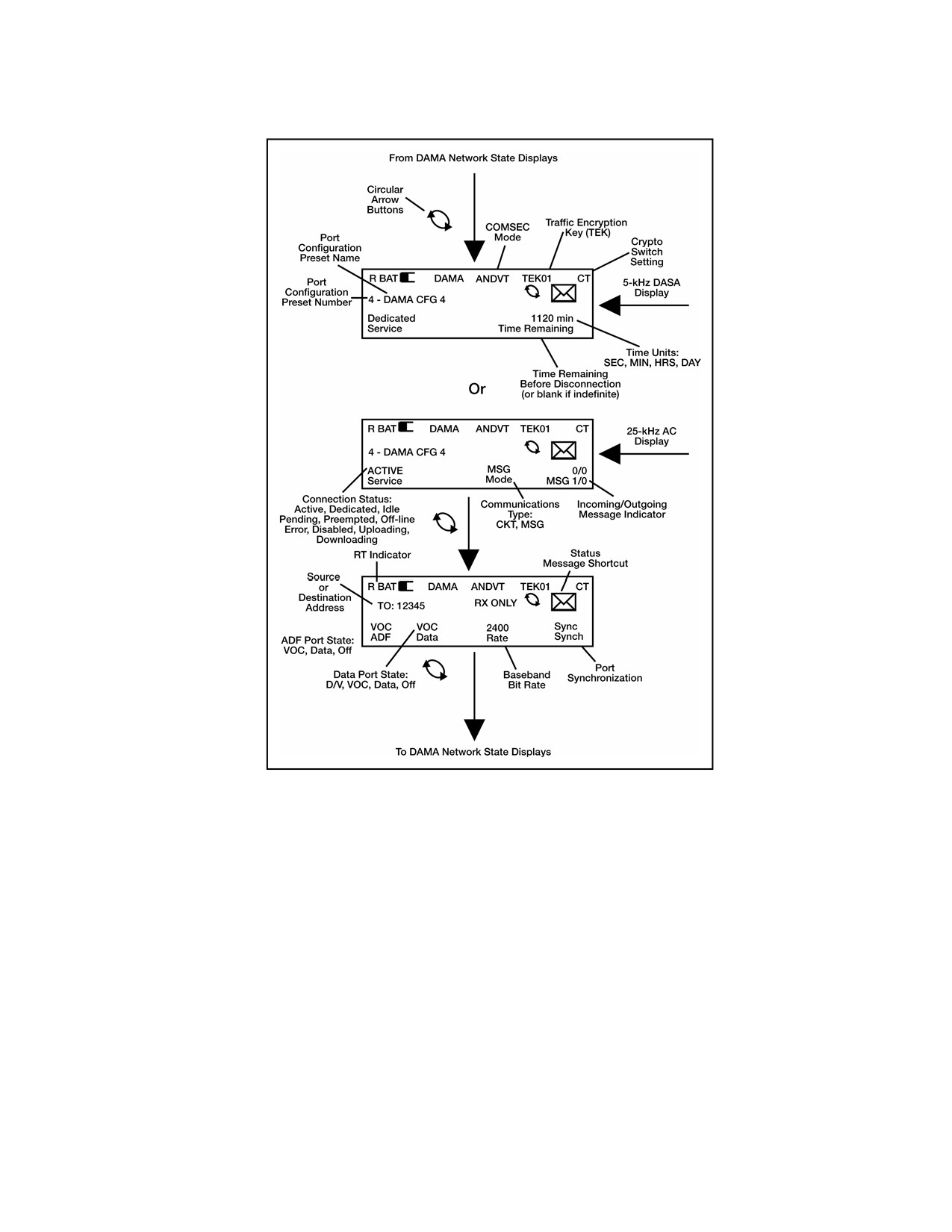
Figure C-15. DAMA Service State Displays, 5-kHz
C-35
Appendix D
AN/PSC-5 Series Radios
1. Line of Sight (LOS) Operations
a. Press ESC until the main menu is displayed.
b. Press 3 (set presets).
c. Press 1 (set mode presets).
d. Select LOS.
e. Enter the preset number (1 to 6).
SET PRESET
LOS
-P#
TEK#
Normal
R###.###
f. Enter the COMSEC key number (1 to 5).
g. Select modulation (amplitude modulation [AM], frequency modulation [FM] or
frequency-shift keying [FSK]).
h. Select encryption type (VINSN, FASCN, 3KG-84, 4KG-84).
i.
Select mode (V or D).
j.
Select data rate.
k. In orderwire encryption PT only, select normal.
l.
Select transmit power level (see Table D-1).
m. Enter receive frequency (030.000 to 399.975).
Table D-1. Lind of Sight (LOS) Operations
FREQs
Modulation
Power
30.000 to 87.975
FM/FSK
23 to 43 dbm
108.000 to 129.975
AM
23 to 38 dbm
23 to 38 AM
130.000 to 148.975
AM/FM/FSK
23 to 39 FM/FSK
156.000 to 173.975
FM/FSK
23 to 39 dbm
225.000 to 399.975
D-1
n. If the transmit frequency is the same as the receive frequency, press ENT.
Otherwise enter a new transmit frequency.
o. To load additional presets, repeat steps e through n.
p. Perform the following procedure for LOS operation.
(1) In the current mode screen, select LOS.
(2) Enter the preset number (1 to 6).
(3) Check all fields to ensure they are correct.
CURRENT MODE
LOS
-P#
Sq- -054
TEK# FM VINSN D16K
Normal Tpwr 37 dbm
q. Proceed with communications.
2.
SATCOM Operations
a. Press ESC until the main menu is displayed.
b. Enter 3 (set presets).
c. Enter 1 (set mode presets).
d. Select SATCOM.
e. Enter the preset number (1 to 6).
Note: Modulation is not selectable. Satellite loopback is not performed in FSK.
SET PRESET
SATCOM -P#
TEK# FSK VINSN V16K
Normal
Tpwr 43 dbm
f.
Enter COMSEC key (1 to 5).
g. Select encryption type (ANDVT, VINSN, 3KG-84, 4KG-84).
h. Select mode (V or D).
i.
Select data rate (1200, 2400, 9600, 16 kbps).
j.
Enter/select power level (23 to 43dbm).
Note: It may be necessary to re-enter the encryption type and data rate after
entering the channel number.
D-2
k. Enter channel number (009 to 239) or 999 to enter frequency pairs manually. Using
the home channel number is recommended. SATCOM loopback cannot be utilized if 999 is
the channel number.
Channel Number: ###
R###.###
T###.###
DIFF
l.
If 999 was entered in previous step, enter the receive and transmit frequencies
(225.000 to 399.995).
m. Select encoding type (DIFF or NDIFF). Radios must have the same encoding type to
communicate.
n. To load additional presets, repeat steps d through m.
o. Perform the following procedures for SATCOM operation.
(1) In the current mode screen, select SATCOM.
(2) Enter the preset number (1 to 6).
(3) Check all fields to ensure they are correct.
CURRENT MODE
SATCOM -P# Sq-__-030
TEK# FSK VINSN V16K
Normal
Tpwr 43 dbm
3. DAMA 5-kHz Operations
a. Perform the following to select 5-kHz input/output (I/O) rates. (See Table D-2 for I/O
data rates.)
Table D-2. I/O Data Rates for 5-kHz DAMA
Baud
KG-84 Data
ANDVT Data
ANDVT Voice
75
X
X
300
X
X
600
X
X
1200
X
X
2400
X
X
X
9600
X
16 k
X
(1) Press ESC until the main menu is displayed.
(2) Press 2 (database options).
(3) Press 4 (5-kHz I/O rates).
(4) Use NEXT/PREV to select a field.
D-3
(5) Use arrow keys to select (or deselect) each option, then press ENT. If voice is
used, 2400 is checked by default.
DAMA 5KHz I/O RATES
__75
__300
__600
__1200_
2400 __9600
__16k
(6) Repeat steps 4 and 5, as required.
(7) When completed, press ESC to return to the database menu.
b. To ensure the terminal receives communications from a terminal, place that
network address (common guard, private guard, or subnet) in the guard list (do not enter
the terminal address). To add to (or change) the guard list, follow the procedure below.
Note: The guard list is a set of addresses for which a terminal receives services.
The guard number is the address of a single terminal or network. Terminal
addresses from which communications need to be received by a specific
terminal are placed in the guard list. When a terminal address is placed in
the guard list, the control station logs that address into the network.
The guard list procedure is not recommended for 5-kHz DAMA. If a guard
list is used for a 5-kHz terminal, ensure the terminal addresses placed in the
guard list are not used by another active terminal.
The demarcation point divides addresses between single terminals and
networks. Addresses below the demarcation point (single terminals) should
usually be left off the guard list.
(1) Press ESC until the main menu is displayed.
(2) Press 2 (database options).
(3) Press 2 (guard list).
(4) Select desired action (add, delete, modify, or view).
(5) Perform the following, as required:
(a) Add/enter address.
(b) Delete—use NEXT/PREV to move to the desired address; press ENT.
(c) Modify—use NEXT/PREV to move to the desired address; enter the new
address.
(d) View—use NEXT/PREV to scroll through the list.
(e) When completed, press ESC to return to the database menu.
D-4
GUARD LIST
Note: 64000 is an
VIEW
example only. Do
not enter it as a
1
64000
------
-----
default setting.
4
-----
------
-----
7
-----
------
-----
10
-----
------
-----
13
-----
------
-----
c. Perform the following procedure to enter a DAMA preset.
(1) Press ESC until the main menu is displayed.
(2) Press 3 (set presets).
(3) Press 1 (set mode presets).
(4) Select DAMA..
(5) Enter preset number (1 to 6).
SET PRESET
DAMA -P#
TEK# PSK ANDVT V2400
5 KHz
Tpwr 35 dbm
Note: Modulation is not selectable.
(6) Enter the COMSEC key number (1 to 5).
(7) Select encryption type (ANDVT, 3KG-84, 4KG-84).
(8) Select mode (V or D).
(9) Select data rate (75 to 2400).
(10) Select DAMA type (5-kHz).
(11) Enter/select power level (23 to 43 dBm).
(12) Enter channel number (129 to 191, 194 to 239). Corresponding frequencies are
displayed on the next line.
Channel Number: ###
R###.###
T###.###
Code:##
OW:CT
Normal Range: Active
(13) Enter configuration code.
(14) Select orderwire encryption (PT or CT).
(15) Select mode of operation (normal, EMCON, silent).
(16) Select ranging (passive, active, maintenance).
(17) If passive ranging, enter satellite number (1 to 8).
(18) For 5-kHz DAMA, select log in (preassigned, over-the-air).
(19) If preassigned, select precedence (FO, F, I, P, R).
D-5
(20) If preassigned, enter demarcation number 49999. If demarcation number is not
entered in preset, the radio defaults to 16384.
Channel Number: ###
R###.###
T###.###
Code:##
OW:CT
Normal Range: Passive
Satellite ID: 4
Login: Preassigned
Prec:R Dmark:49999#
d. Perform the following procedure to enter a 5-kHz service preset.
(1) Press ESC until the main menu is displayed.
(2) Press 3 (set presets).
(3) Press 2 (5-kHz service).
(4) Enter preset number (01 to 20).
SET PRESET 5K
P01
CIR EN SYN V2400
Prec:R
D:#####
Code:###
(5) Select type of service (CIR or DASA).
(6) Select encryption (EN or UN).
(7) Select data communications (SYN or ASYN, see Table D-3). Use synchronous
unless sending asynchronous data in PT.
Table D-3. SYN/ASYN Settings
Data Device Type
Mode Switch
Selection
Synchronous
PT or CT
SYN
Asynchronous
PT
ASYN
Asynchronous
CT
SYN
(8) Select mode (V or D).
(9) Select data rate (75 to 16k). Data rate is selected in the 5-kHz I/O rates menu.
(10) Select precedence (FO, F, I, P, R).
(11) Enter destination address.
(12) Enter configuration code.
D-6
(13) For DASA only, enter time requested in hours and minutes, or select
INDEFINITE. Maximum time is 85 hours 15 minutes, in five-minute increments.
Indefinite is 85 hours 15 minutes.
SET PRESET 5K P01
DSA EN SYN V2400
Prec: R
D:#####
Code:###
INDEFINITE
(14) To load additional presets, repeat steps 4 through 13 above.
e.
Perform the following to enter a 5-kHz message preset.
(1) Press ESC until the main menu is displayed.
(2) Press 3 (set presets).
(3) Press 4 (5-kHz message).
(4) Enter preset number (01 to 20).
SET PRESET 5K MESG
XMIT P01
TEK1
3KG84
PREC: R EN D:#####
(5) Enter the COMSEC key number (1 to 5).
(6) Select encryption type (3KG-84, 4KG-84, ANDVT).
(7) Select precedence (FO, F, I, P, R).
(8) Select encryption (EN or UN).
(9) Enter destination address.
(10) To load additional presets, repeat steps 4 through 9 above.
f.
To start a 5-kHz DAMA network service quickly, perform the following.
(1) In the current mode screen, select DAMA.
(2) Enter preset (even if displayed already).
(3) Enter the service preset number (01 to 20).
Note: Verify terminal DAMA address is correct before continuing.
(4) Press ENT on start DAMA..
D-7
(5) Observe display. See Table D-4 if LOGIN is rejected by controller.
CURRENT MODE
DAMA -P1
-
-060
TEK1 PSK ANDVT V2400
5KHz
Tpwr 35 dbm
Channel Number: 136
R248.900
T302.500
Code: 060
OW:CT
Normal Range: Active
Login: Over The Air
Service Preset: 01
Start DAMA for 01000
DAMA
SQ - - 045
5K
Acquiring N
SRV-Idle
1-Service Setup
(a) Acquiring—Acquisition in process.
(b) Range—Wait while ranging in process.
(c) Log in—Manual log in required.
(d) Log in-Pnd—Login pending.
(e) Connected—Log in successful.
(6) At SRVC ASGND popup message, enter on ACCEPT. To reject the service, use
the arrow keys to select REJECT and press ENT key.
Note: When a warning or error message is displayed, refer to tables D-5 and D-6 for
proper corrective action.
Srvc Asgnd
CIR TEK ANDVT V2400
Prec:R
EN D:01000
SYN S:02000
{ACCEPT}
Note: When SRV-RX/TX appears on the display, the terminal is ready for normal
communications. See Table D-7 for hot keys to access additional tasks.
D-8
Table D-4. Messages, 5-kHz DAMA
Message
Action
A
Terminal is not receiving OW. Check azimuth, power out, and reposition
Acquisition Failed
antenna.
C
Circuit
Check previous status messages. If logged out, log in over-the-air. Other
Aborted
messages include circuit not available (especially DASA) and the reason.
Attempt to re-establish or establish a different type of service.
Circuit service request is denied for the stated reason. If condition is
Denied (Reason)
correctable, take appropriate action or try again later.
An incoming service is established but a mismatch is detected between the
Mismatch Detected
service and the current mode settings. Check setting of PT/CT mode and
type of attached data device.
The channel controller preempted the circuit. Wait for it to resume before
transmitting.
Preempted
Or
Contact was temporarily lost with the controller; wait for it to resume.
Receive Buffer
Check data device for incomplete message or errors in message. If needed,
Overflow
request source to retransmit message.
Service is queued for the reason supplied.
Local—terminal called is logged in but time-slot is unavailable.
Set up Queued
(Reason)
MHOP—terminal called is not logged in with controller. If it is in another
footprint, wait. If it is supposed to be in the current footprint, teardown and
try again later.
Service request is denied for the stated reason. Try again later unless one
of the following reasons is displayed.
Data Rate—Requested a DASA service at higher than 2400 bps—no 25-kHz
DASA channel available.
Not Assignable—The LQ from terminal or the destination terminal is poor.
Check LQ in network state menu. If LQ is low, check antenna or raise
Set up Rejected
power.
(Reason)
Prec. Violation—The precedence entered is not allowed. Check network
state menu for assigned values. Ensure previous messages do not state
logged out. If previous message stated logged out, log in over-the-air and
re-attempt service set up at lower precedence.
Service Restrict—Request for a 2400 bps circuit denied due to network
traffic. Reduce data rate or wait until LIO no longer displayed in network
state.
Terminated (Reason)
An existing service is terminated for the stated reason. Try again later.
COMMAND
Rejected
Check parameters and network; try again.
Rejected Port is busy
Request is rejected because of an existing active service. Ensure terminal is
(Check Current
idle before setting up a service.
Mode)
D-9
Table D-4. Messages, 5-kHz DAMA
Message
Action
CTIC
Alarm Invalid Key
Invalid OW key. Reload OW key in correct position.
Alarm Invalid Time-
Invalid time-slot number detected. Reload OW key in correct position.
slot Number
Alarm Unknown
Reload OW key in correct position.
Cause
I
Incoming Message
Message from another terminal aborted.
From: xxxxx Aborted
L
The controller logged the terminal off the network for the reason supplied.
Correct the error and perform an over-the-air log in.
Invalid Address on Guard—Check the addresses in the guard list.
Not Authorized—Terminal address is not in the database—contact the
controller if correcting it fails.
Logged Out
200 Missing FOWs—Once the terminal accumulates 200 FOWs the terminal
(Reason)
automatically logs itself off. Check antenna and radio. To clear count,
change current mode to LOS then return to DAMA. Start DAMA and
perform a preassigned log in.
Invalid Service Request—The terminal is not logged in the network. Log in
and resend the service request.
LOG IN
Command Rejected
More than one log in has been attempted; wait for the controller to respond.
Failed No PCC
Try again. If no response, the control station is down. Contact control
Response
station.
Terminal address must be in the range of one to the demarcation address
(49999). Other possibilities:
Log in already accomplished.
Rejected, Invalid Log
Logged in on a 25-kHz channel and now attempting to log in on a 5-kHz
in Address
channel.
Another operator has the terminal address in their guard list.
Trying to log in over-the-air in silent/EMCON mode.
To resume, log in preassigned.
Rejected, No
The current channel has no capacity. Call the controller.
Capacity
Rejected, Not
Terminal is not authorized to participate in the network. Call the controller.
Authorized
LOG OUT
Command Rejected
Attempted to log out more than once—wait the 18 seconds for response.
Failed No PCC
The controller has not responded to the log out request. Shut down the
Response
system.
MESSAGE
D-10
Table D-4. Messages, 5-kHz DAMA
Message
Action
Aborted To:xxxx
Message is aborted for the stated reason. Try again.
(Reason)
From: xxxx Encrypt
Mode switch (PT/CT) setting is different from the transmitting terminal.
Mismatch Detected
Contact distant end to correct.
Transmission rejected. Another operator is transmitting—try again later.
Input Rejected
Or
Radio is in idle—set up a service.
Transmission rejected. Another operator is transmitting—try again later.
Output Rejected
Or
Radio is in idle—set up a service.
Set up Rejected,
Message set up is rejected for the stated reason.
(Reason)
Terminated Frm: xxxx
Message is terminated for the stated reason. Try again later.
to:yyyy (Reason)
Mode Command
Terminal address is entered as zero. This is reserved for the controller.
Rejected, Node
Enter a valid terminal address.
Address is Zero
Msg Set up Rejected
Precedence entered is not allowed. Check network state menu for allowed
Precedence Violation
values and re-enter.
No Resources for
Terminal is busy and cannot receive a message from the other terminal.
Message From: xxxx
R
RANGING
Check current mode entries and antenna. Run BIT to verify terminal
Failed
operation.
A successful ranging attempt is not completed as scheduled. Transmission
Overdue Transmit
is denied. Check antenna. Transmit a ranging burst using the contention
Inhibited
ranging menu.
S
SERVICE SET UP
Command Rejected Verify connected and logged in and try again.
Rejected, Invalid Data
Ensure a valid data rate is selected.
Rate
T
Teardown Command
The terminal has rejected the teardown request. Verify Idle.
Rejected
Transmission rejected. Another operator is transmitting—try again later.
Transmission
Or
Rejected Re-Transmit
Radio is in idle—set up a service.
Tx Rejected, Check
Transmission rejected. Another operator is transmitting—try again later.
Mode & Status Msgs
Or
Retransmit
Radio is in idle —set up a service.
D-11
Table D-5. Service Assigned Errors and Warnings
Message
Action
a. ERROR. Attach asynchronous data device and accept service.
Verify I/O Device
b. WARNING. Attach synchronous data device and accept service.
I/O Device Present?
Attach data device and accept service.
Check PT/CT Switch
Set mode switch to other setting (PT or CT) and accept service.
Illegal Mode
Reject service.
Assuming Ext Encrypt
If using external encryption, accept service. Otherwise, reject service.
I/O Rate Invalid
Check for proper rate selection on the 5-K DAMA I/O rates menu.
Table D-6. Message Queue Errors
Message
Action
No Ext Dev?
Attach data device.
If using external encryption, continue. Otherwise, set mode switch to CT
Ext Encrypt?
and send encrypted data.
PT/CT?
If message is not encrypted, set mode switch to PT.
Sync Dev?
Attach synchronous device or set mode switch to PT.
Inv I/O Rate?
Check for proper data rate selection on 5-kHz DAMA I/O rates menu.
Table D-7. Hot Keys, 5-kHz DAMA
Key
Function
Screen
SERVICE SETUP
P##
Service Set up. Information on type of service
CIR
EN
SYN
V2400
requested so controller can set up communication
1
PREC: R
D: #####
with another party. Requests time on satellite for
CODE: ###
communication services (dials the phone).
{SEND}
TEARDOWN
1/3
Teardown. Ends current service; terminal remains
DESTIN ADD
02000 CIR
2
logged in to network (hangs up the phone) (hot key 1
D PT PREC: R
in DASA).
LOCAL ACTIVE
{SEND}
SERVICE STATE
1/3
Service State. Indicates status of up to three
DESTIN ADD
02000 CIR
3
services.
D
PT PREC: R
LOCAL ACTIVE
NETWORK STATE
Network State. Indicates status of current network.
4
PCC: #####
MHOP LIO
LQ should be greater than 36.0.
FOW MISS ###
LQ: ##.#
D-12
Table D-7. Hot Keys, 5-kHz DAMA
Key
Function
Screen
PREC MIN/MAX: R/FO
MSG ##:##Z
01 of 10
Status Messages. Displays last 10 stored
NETWORK
5
messages (hot key 2), when using dedicated service.
ACQUIRED
02
LOGOUT
6
Log out. Removes terminal from network.
OVER-THE-AIR
{SEND}
Contention Ranging. Ranges satellite when
CONTENTION RANGING
7
operating in silent mode. Contention ranging should
be performed initially, then once every 4.5 hours.
{SEND}
MESSAGE QUEUE
XMIT
P##
1 IN QUE
Message Queue. Accesses queue to send or
8
TEK # ANDVT
D2400
receive data messages.
Prec: R
EN D: #####
{SEND}
g.
Perform the following to set up a 5-kHz DAMA network manually.
(1) In the current mode screen, select DAMA.
(2) Enter preset (even if already displayed).
CURRENT MODE
DAMA -P1 Sq-
-045
TEK1 PSK ANDVT V2400
5KHz
Tpwr 35 dbm
Note: For manual service set up, ensure service preset is set to 00.
(3) Press ENT on start DAMA.
Channel Number: 136
R248.900
T302.500
Code: 060
OW:CT
Normal Range: Active
Login: Over The Air
Service Preset: 00
Start DAMA for 01000
(4) Observe display.
DAMA
Sq-
-045
5K
Acquiring
N
SRV-Idle
1−Service Setup
(a) Acquiring—Acquisition in process.
(b) Range—Wait while ranging in process.
D-13
DAMA
Sq-
-045
5K
LOGIN
SRV-Idle
LOGIN
(5) Select log in type (over-the-air or preassigned).
LOGIN
Over The Air
{SEND}
(6) For preassigned, select maximum assigned precedence (FO, F, I, P, R) and enter
demarcation address (49999).
(7) Press ENT on send.
LOGIN
Preassigned
Prec: R
Dmark:#####
{SEND}
Note:
“Connected” appears on display and the terminal is ready for service set up.
To set up a service, proceed to manual service set up by pressing Hot Key #1.
See Table D-7 for hot keys to access additional tasks.
DAMA
Sq-
-045
5K
Connected N
SRV-Idle
1-Service Setup
Note: Ensure current service state is idle (SRV-IDLE).
h. Circuit/DASA service set up (hot key #1).
(1) Enter on preset number 00 for manual service set up, or enter the service preset
number and proceed to step k.
(2) Select type of service CIR or DSA.
SERVICE SETUP P##
DSA EN SYN V2400
Prec: R ANDVT D: #####
Code:###
##hr ##min
{SEND}
(3) Select encryption (EN or UN).
(4) If using data service, select data type (SYN or ASYN).
(5) Select mode (V or D).
(6) Select data rate, if applicable.
(7) Select precedence (FO, F, I, P, R).
(8) Enter destination address.
D-14
(9) Enter configuration code, if required.
(10) If using DASA, specify length of service.
(11) For indefinite, press ENT on indefinite, then press ENT on send (indefinite for
DASA is 85 hours 15 minutes).
(12) For timed service, with indefinite highlighted, press right or left arrow key.
With hour highlighted press ENT. Move cursor to ## field and input number of hours, if
applicable, and press ENT. Move cursor to ## field and input number of minutes and press
ENT.
(13) Press ENT on send.
(14) At SRVC ASGND popup message, enter on ACCEPT. To reject the service, use
the arrow keys to select REJECT and press ENT key.
Srvc Asgnd
DSA TEK1 KG-84 D2400
Prec: R UN
D: 01320
SYN S:02000
{ACCEPT}
Note: When a warning or error message is displayed, refer to Table D-5 for proper
corrective action.
“SRV-Rx/Tx” appears on display, when terminal is ready for communications.
i.
Send a message (hot key #8).
(1) Ensure service is idle; select XMIT. The display indicates how many messages
are in the queue.
MESSAGE QUEUE
XMIT
P##
0 IN QUE
TEK 1
4KG-84 D2400
Prec: R
EN
D:#####
{SEND}
(2) Enter 00 if not using a service preset, or enter the preset number and proceed to
step 8.
(3) Enter the COMSEC key (1 to 5).
(4) Select encryption type (4KG-84, 3KG-84, VINSN, ANDVT) same as current
mode.
(5) Select precedence (FO, F, I, P, R).
(6) Select encryption (EN or UN).
(7) Enter address of the message recipient.
(8) Press ENT on SEND and observe display. See Table C-6 if an error message is
displayed.
(9) After “Enter Message Now” is displayed, key data device. (Message input from
the data device is confirmed by the message prompt “Msg Input Done” briefly displayed on
line 5 of the Msg Queue Display.)
D-15
Note: When sending a message to a terminal address with manual or automatic
release selected and the receiving operator downloads the message to their
data device within 60 seconds, two popup acknowledgement messages are
displayed. No acknowledgement is displayed if the message is sent to a
network address or if the message was not downloaded to the data device
within 60 seconds. If using AUTO message release, messages are
automatically sent to the data device and the following procedure is not
applicable.
j.
Receive a message (hot key #8).
(1) Ensure service is idle; select RCV. The display indicates how many messages are
in the queue.
(2) Enter the COMSEC key number (1 to 5).
MESSAGE QUEUE
RCV
1 IN QUE
TEK 1
4KG-84 D2400
Prec: R
EN D:#####
{RELEASE}
(3) Select encryption type (3KG-84, 4KG-84, ANDVT) same as current mode. See
Table D-5 if an error message is displayed.
(4) Select RELEASE to send the message to the data device, or DELETE to erase
the current message.
k. Teardown (hot key #2, hot key #1 for DASA).
(1) Select service (# / #) to teardown.
(2) View DESTIN or SOURCE address, and enter.
(3) Press ENT on SEND.
TEARDOWN
1/1
DESTIN ADD
02000 CIR
D PT
PREC:R
LOCAL ACTIVE
{SEND}
(4) Press ENT to verify teardown. The display changes to the network menu. A
status message confirms the result of the teardown.
TEARDOWN
Verify Teardown
{SEND}
l.
Log out (hot key #6).
Note: When logging out then back in, use the following as a rule of thumb: Log out
over-the-air—log back in over-the-air. Log out forced locally—log back in
preassigned.
D-16
(1) Select over-the-air, if the terminal is off for 30 minutes or longer. Select force
locally, if less than 30 minutes.
LOGOUT
Over The Air
{SEND}
(2) Press ENT on SEND.
Note: A status message confirms the result of the log out. If no log out was sent, or
if the terminal was off for more than 30 minutes after a force locally log out,
the JMINI logs the terminal out of the network.
MESSAGE
Input Rejected
Transmission rejected. Another operator is transmitting - try again later. Or, radio is in idle - set up a service.
Output Rejected
Transmission rejected. Another operator is transmitting - try again later. Or, radio is in idle - set up a service.
Setup Rejected,
Message setup is rejected for the stated reason.
(Reason)
Terminated
Message is terminated for the stated reason. Try again later.
Frm:xxxx to:yyyy
(Reason)
Mode Command
Terminal address is entered as zero. This is reserved for the controller. Enter a valid terminal address.
Rejected, Node
Address is Zero
Msg Setup Rejected
Precedence entered is not allowed. Check network state menu for allowed values and re-enter.
Precedence
Violation
No Resources for
Terminal is busy and cannot receive a message from the other terminal.
Message From:xxxx
R
RANGING
Failed
Check current mode entries and antenna. Run BIT to verify terminal operation.
Overdue Transmit
A successful ranging attempt has not been completed as scheduled. Transmission is denied. Check antenna.
Inhibited
Transmit a ranging burst using the contention ranging menu.
S
SERVICE SETUP
Command Rejected Verify connected and logged in and try again.
Rejected, Invalid
Ensure a valid data rate is selected.
Data Rate
T
Teardown Command The terminal has rejected the teardown request. Verify Idle.
Rejected
Transmission
Transmission rejected. Another operator is transmitting - try again later. Or, radio is in idle - set up a service.
Rejected Re-
Transmit
Tx Rejected, Check
Transmission rejected. Another operator is transmitting - try again later. Or, radio is in idle - set up a service.
Mode & Status Msgs
Retransmit
D-17
37.
C5594 (positions 3-4), IO = C5596
AN/PSC-5 25-kHz AD
ERROR CODE = DO THIS
(positions 1-2) (Must input the
HOC DAMA SETUP
same key set in positions). Do not
Load Orderwire Keys, LANT =
(PREVENTIVE MEASURE)
connect the cable until the ANCD
GUIDE
says “connect to radio”. Cycle the
77 = Talk to net NCS. NCS needs
radio to CT and return to F2 if it
1.
The following are required before
to check with the SMC/NCTAMS to
continually fails to load. Be patient.
setup:
ensure the network is on line.
38.
Go to Current Mode (1) and hit
a. AN/PSC-5
enter.
82 = Check the TBA entered into
b. Satellite Antenna
39.
Change mode back to DAMA; hit
the radio to ensure it is correct.
c.
Proper Crypto (ANDVT)
enter.
(PMCS).
d.
Proper Orderwire set
40.
Press Preset #1, hit the 1 key on
e.
Good batteries
90 = This is a busy signal. Call
the keypad; hit enter.
2.
Turn radio on to PT, Let the BIT
back later.
41.
Enter correct TEK#; hit enter.
finish, then ESC.
42.
Hit enter to confirm the remainder
92 = Indicates a conference call
3.
Go to Set Presets (3), enter.
of the settings until SEND STATUS
was made or more than one terminal
4.
Choose Set Mode Presets (1).
B YES/NO.
was called. At least one terminal is
5.
> to DAMA; hit enter.
43.
Verify connection to an antenna at
6.
Choose Preset number 1; hit enter.
not on the air but others are.
this time, with antenna on azimuth
7.
Choose COMSEC fill slot—
to satellite.
Troubleshooting DAMA problems—
•
Use TEK1 as the default fill slot for
44.
At SEND STATUS B, select YES,
ANDVT.
Problem: Fail to get past 25-kHz -
hit enter.
8.
Choose type of Crypto: ANDVT; hit
Acquiring - Idle when attempting first
45.
Select the desired service preset
enter.
connection after initial setup. No up and
(P01, P02, etc), hit enter twice.
9.
Choose Data transfer rate—
down arrows displayed on the right side
46.
Radio screen will blink, an arrow in
•
2400; hit enter.
of the screen.
the right side of the screen will go
10.
Choose 25-kHz, enter.
up and then down once or twice,
Solution: Ensure the current Orderwire
11.
TPWR select 43 dbm; enter.
then see acquiring, then range,
key segment is loaded in fill slots 1 - 4 in
12.
Channel number; enter.
then 25kHz AC connected-SRV-
F2. Lack of the current orderwire
13.
Code 60; enter.
idle.
COMSEC loaded and/or not in 1 - 4 will
14.
OW: CT; enter.
47.
NOTE: AD HOC DAMA ALLOWS
cause a connection stop at the 25-kHz
15.
Normal; enter.
TBA-TO-TBA, TBA-TO-
AC - Acquiring - Idle window during
16.
Range: Active, enter.
NETWORK, OR TBA TO
initial connection.
17.
Send Status B, YES.
MULTIPLE TBA CONNECTIONS.
18.
Hit ESC.
Problem: Cannot get the Orderwire
48.
Hit next to Service Setup (1),
19.
Select Current Mode; enter.
select R (Routine), then enter the
COMSEC to load.
20.
Change mode to LOS; enter.
TBA or NETWORK ADDRESS,
21.
Hit ESC.
Solution: Do not connect the ANCD
then enter desired connection
22.
Go to Database Options (2), enter.
cable to the radio until the ANCD
time, hit enter and then Send,
23.
Go to Guard List (2), enter.
displays Connect ANCD to Radio. Press
enter.
24.
> ADD, enter ##### (the Guard
the down arrow after connecting the
49.
Radio screen will show arrows on
list/NETWORK ID number from the
cable, follow on screen instructions.
the right going up and down and
SOI/SAA), enter. (DO NOT PUT
then the screen will display 25-kHz
Problem: COMSEC Alarm continues to
THE TBA HERE!)
AC SRV-RX/TX (the station called
popup.
25.
Hit ESC once.
will change at the same time).
26.
Go to Terminal Data (3), enter.
Solution: Refill ANDVT key in F1.
50.
Ready to talk as normal (be
27.
Enter ADDRESS ##### (the TBA,
patient).
from the SOI) hit enter. (DO NOT
Problem: CTIC alarm.
51.
To terminate setup, select
PUT THE NETWORK ADDRESS
Teardown (2) THE CONNECTION
Solution: Refill the orderwire key in the
HERE!)
MUST BE TORN DOWN AFTER
correct positions.
28.
Backlight Timer, (user pref), enter.
COMPLETING TRAFFIC TO
29.
Msg Release: Manual. Enter.
Problem: Data communications not
AVOID LOCKING UP THE OTHER
30.
ENTER N
getting through but voice
STATION AND BLOCKING
E
communications are.
OTHER TRAFFIC TO THAT
TIME = ZULU TIME
STATION. Terminal will be in 25-
(not required)
Solution: Run Link Test. It is item 7 in
kHz AC Connected SVC-idle
31.
Platform: Stationary, hit enter.
DAMA menu, needs to be run at 32
mode.
32.
Press ESC twice.
kbps, and the Symbol Errors need to be
33.
Change radio on/off switch to F1.
NOTE: To send data: (for
less than 100 when transmitting data.
34.
Input ANDVT in fill slot 1.
example, KL-43 or V-Mail) change the
Takes about a minute to run and lets the
35.
Follow the on screen instructions
V2400 to D2400.
operator know a better signal is needed.
for filling the key. Watch for the Key
Info Code 93 appears, send back
NOTE: If the radio is not working
information report and wait since
Filled message on the screen. Be
properly cycle the radio off/on, then
someone else is running the test.
patient.
filter tune the radio and run a second
36.
Change radio on/off switch to F2.
BIT.
D-18