FM 6-02.90 UHF TACSAT /DAMA MULTI-SERVICE TACTICS, TECHNIQUES, AND PROCEDURES FOR ULTRA HIGH FREQUENCY TACTICAL SATELLITE AND DEMAND ASSIGNED MULTIPLE ACCESS OPERATIONS (AUGUST 2004) - page 2
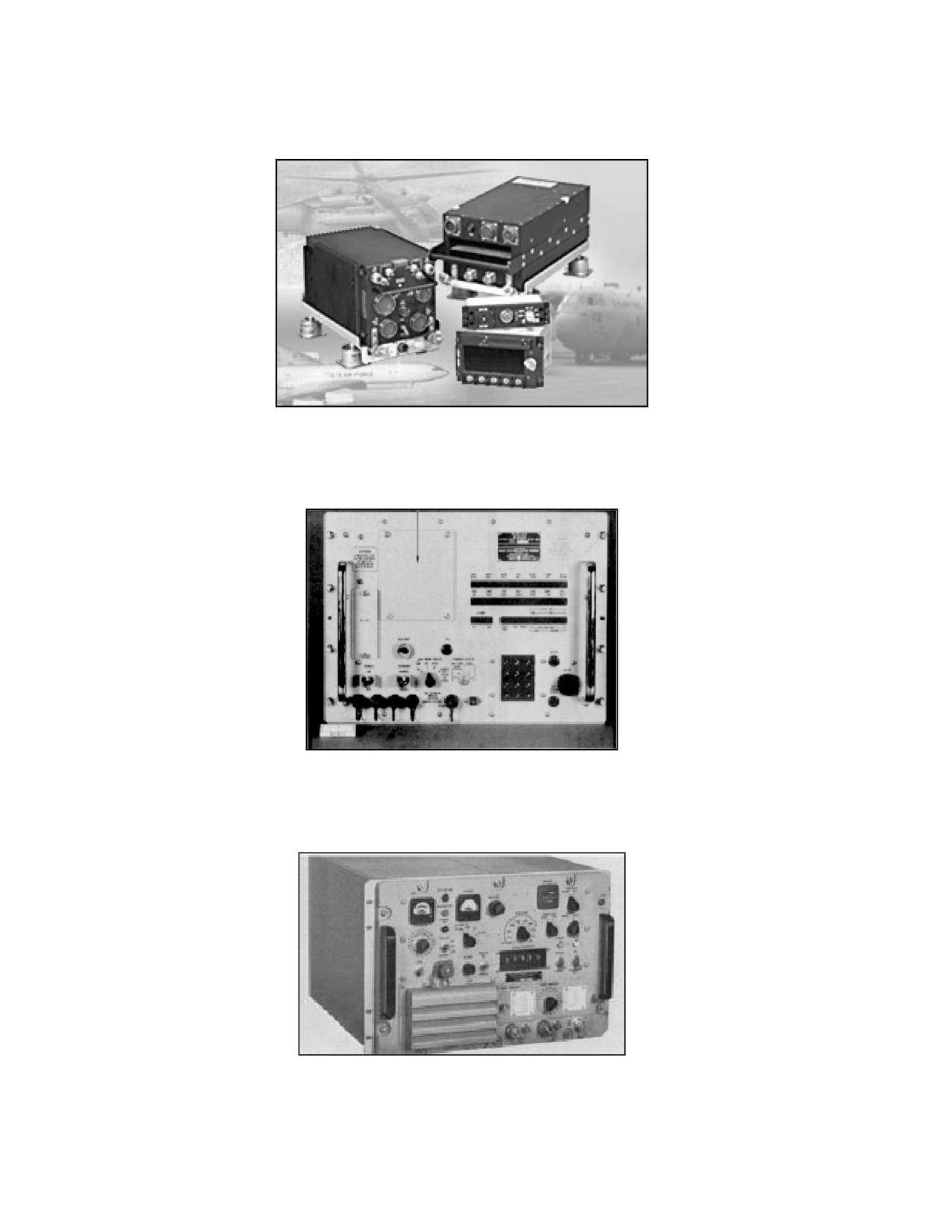
d. AN/ARC-231. (See Appendix F.)
Figure III-4. AN/ARC-231
e. AN/WSC-3. (See Appendix G.)
Figure III-5. AN/WSC-3
f. TD-1271B/U. (See Appendix G.)
Figure III-6. TD-1271B/U
III-4
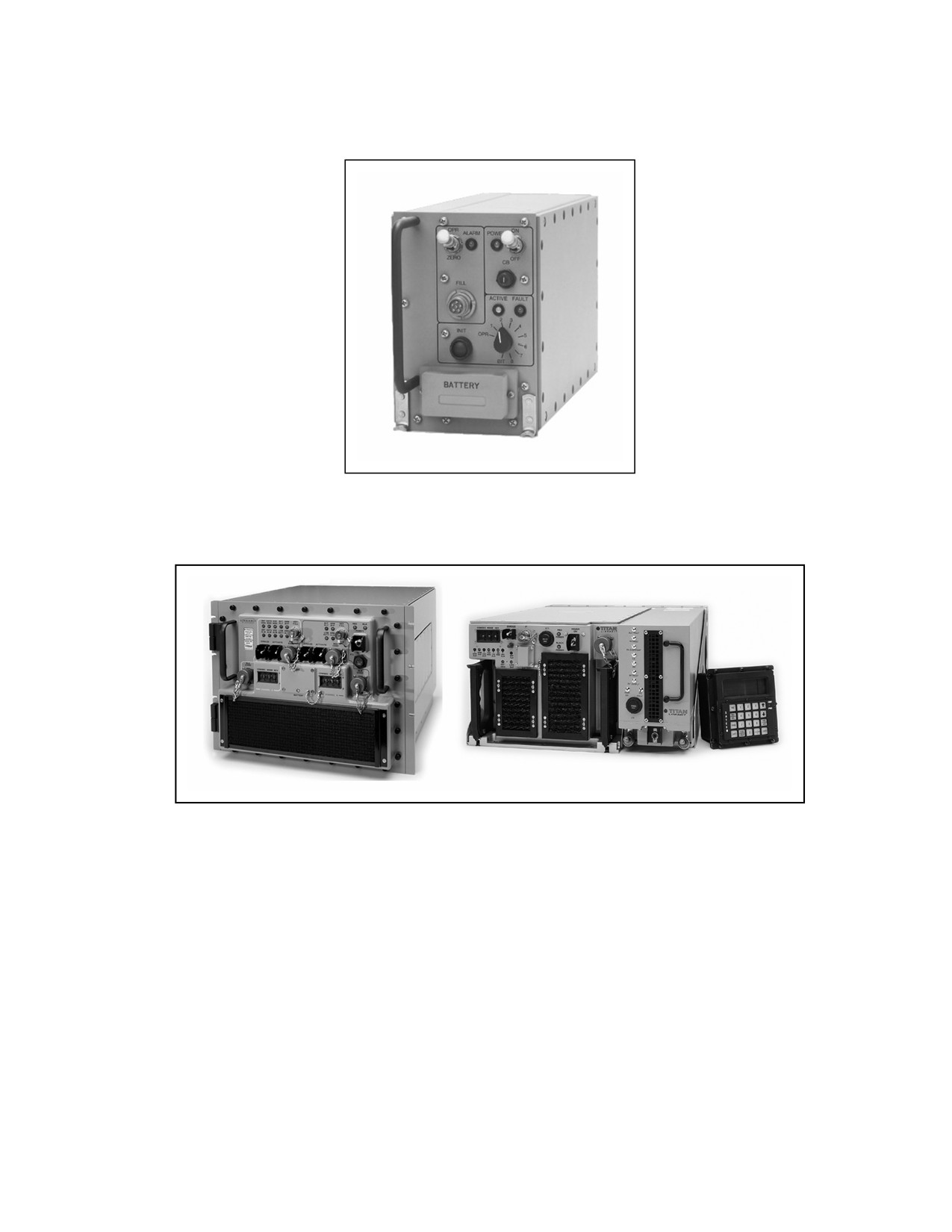
g. MD-1324 W/AN/WSC-3 or RT-1771. (Not available)
Figure III-7. MD-1324
h. Digital modular radio (DMR) (not available).
Figure III-8. DMR
III-5
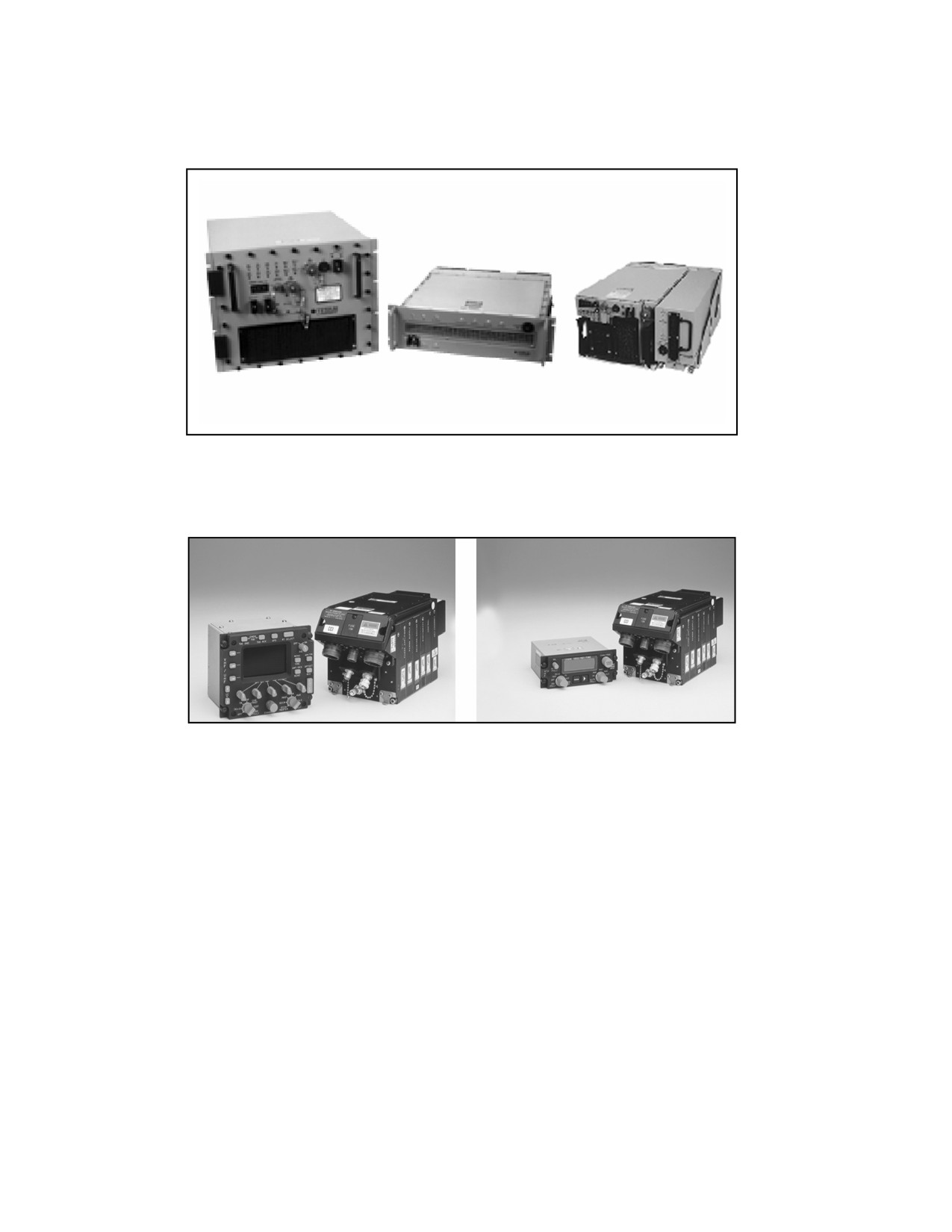
i.
USC-42(V)1, 2, 3 (mini-DAMA) (not available).
Figure III-9. USC-42(V)1, 2, 3
j.
AN/ARC-210 (not available).
Figure III-10. AN/ARC-210
3. Terminal Base Address (TBA) Management
a. All DAMA capable terminals must have a valid, unique TBA to operate in a
DAMA network. A TBA identifies the radio on the DAMA network and in the DAMA
controllers at the SMC. TBAs cannot be shared by terminals in a DAMA network. A
TBA functions in a DAMA network much like an IP address functions in a computer
network. For those radios with more than one port, additional addresses are required
and known as port addresses. Space and Naval Warfare Systems Command (SPAWAR)
Charleston, South Carolina assigns these port addresses based on the type of terminal
for which the unit requests an address. Joint UHF MILSATCOM DAMA maintains a
list of all TBAs in the call directory, fleet satellite communications system (FSCS)-211-
80-29-2. This directory may be downloaded periodically from SPAWAR’s Charleston,
Charleston, South Carolina TBA administrator at commerical phone number (COMM)
(843) 218-6620 or defense switched network (DSN) 588-6620.
III-6
b. Units request TBA from their higher headquarters to preclude proliferation of
unnecessary TBA. The headquarters coordinate with SPAWAR to acquire the required
TBAs. This ensures major commands have oversight of the procured TBAs available to
their units. Units should not interact with SPAWAR on a regular basis.
FSCS-217-98-00-1 provides guidance for requesting. (Point of contact at SPAWAR is
COMM (843) 218-6620.) Requests for TBAs should allow a 30 day turn around time for
the addresses to ensure the TBA is properly entered in the worldwide JMINI and SAC
databases and the TBA is recognized when it logs onto the network to access DAMA
network resources. Most units receiving the terminals must submit SARs in a timely
manner, therefore address requests should take place 60 to 90 days before receipt of
radios.
4. Orderwire (OW) Key Management
a. Unit COMSEC custodians maintain the OW keys used in DAMA. For a unit that
does not have keys available, the COMSEC custodian orders the keys from—
(1) Joint Chiefs of Staff ICP Manager, 7115 South Boundary Blvd, MacDill AFB,
FL 33608-2461.
(2) COMM (813) 828-2461 or DSN 968-2461.
Note: Only the requesting unit's COMSEC custodian with valid COMSEC
account is authorized to order these keys. The DAMA system consists of
four satellite coverage areas. Each satellite coverage area has a unique
OW key. The requesting activity must specify the satellite coverage area,
for example, continental United States (CONUS), Atlantic (LANT), Indian
Ocean (IO), or Pacific (PAC) for the OW key requested. The COMSEC
custodian receives a message stating which key segment is used for the
WEEKLY key.
b. The DAMA SAC and JMINI initial operational capability use keys in positions 0
to 7 while, the AN/PSC-5A (Spitfire) uses keys in positions 1 to 8. Careful coordination
is performed before executing any DAMA operations. Additionally, the key location
must be coordinated in each footprint that operations occur to ensure compatibility with
the DAMA controller in all areas of operation. A good technique is placing the same key
in the first four fill positions. The other four positions are reserved for future
over-the-air rekeying capabilities. The NCTAMS places the keys in the positions
indicated in Table III-2. Coordination is required to determine the key position for the
current week.
III-7
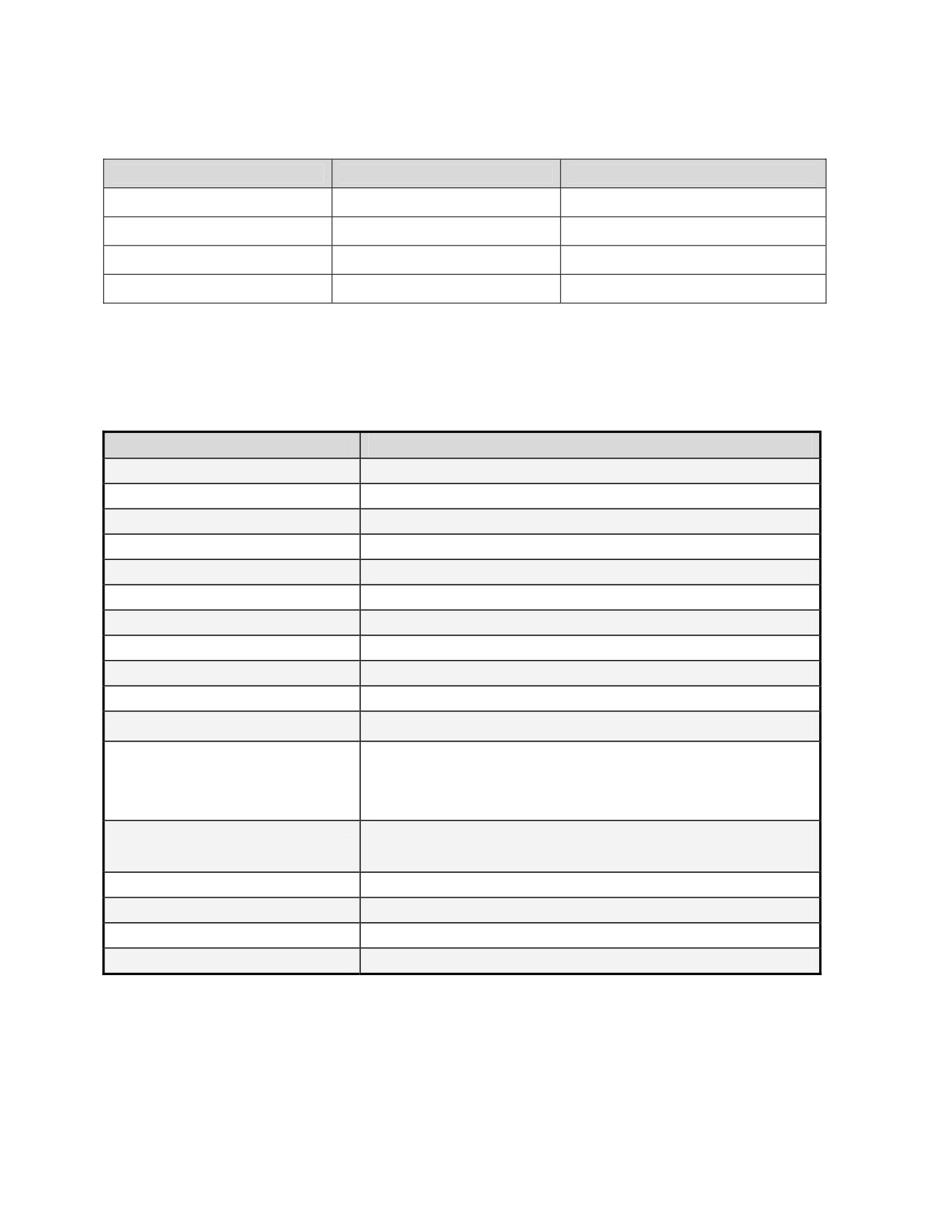
Table III-2. OW Key Positions
DAMA Controller (PCC)
Footprint
NCTAMS Key Position
NCTAMS LANT
CONUS
0 and 1
NCTAMS EURCENT
LANT (MED)
2 and 3
NCTAMS PAC
PAC
2 and 3
NCTAMS Guam
IO
0 and 1
5.
Samples of Checklists
a. Sample checklist, 5-kHz DAMA.
Table III-3. Checklist for 5-kHz DAMA
ITEM
OPTIONS
Modulation
PSK
Encryption
ANDVT
3KG-84
4KG-84
External
Mode
V
D
Data Rate
75
300
600
1200
2400
9600
Transmit Power
23 to 43 dBm
Channel Number
________ (129 to 191and 194 to 239)
Configuration Code
_______ (000 to 511 (use 060 for 2400bps))
Orderwire Encryption
PT
CT
Operation Mode
Normal
Silent
EMCON
Ranging
Passive
Active
(Maint)
Satellite ID
1
2
3
4
5
6
7
8
Longitude: ___° (0° to 180°)
Satellite Ephemeris
Ascension Time: ___:__ Zulu
Inclination: ______° (0° to 10°)
Latitude: N/S _____° (0° to 90°)
Terminal Position
Longitude: E/W _____° (0° to 180°)
Terminal Time
__:__ Zulu
Terminal Address
_______ (00000 to 49999)
Platform
Stationary
Mobile
Message Release
Manual
Auto
III-8
b. Sample Checklist, 25-kHz DAMA.
Table III-4. Checklist for 25-kHz DAMA
ITEM
OPTIONS
Service Type
AC
DC
Modulation
PSK
Encryption
ANDVT
3KG-84
4KG-84
VINSON
External
Mode
Voice
Data
Data Rate
75
300
600
1200
2400
4800
16000
32000
56000
64000
Transmit Power
23 to 43 dBm
Channel Number
009 to 128, 192, 193
_________________
Configuration Code
01 to 99 (Use code assigned in SAA)
Orderwire Encryption
PT
CT
Operation Mode
Normal
EMCON
Ranging
Active
Passive
(Maint)
Satellite ID
1 to 8
Longitude: ___° (0° to 180°)
Satellite Ephemeris
Ascension time: ___:__ Zulu
Inclination: ______° (0° to 10°)
Latitude: N/S _____° (0° to 90°)
Terminal Position
Longitude: E/W _____° (0° to 180°)
Terminal Time
___:__ Zulu
Terminal Address
________ (00000 to 65535)
Guard List
Up to 15 five-digit addresses
COMSEC Key
1 to 6
Orderwire Key
1 to 4
Call Precedence
EA
FO
F
I
P
R
Five-digit addresses
Destination
__________
__________
__________
__________
__________
Circuit Number
000 to 999 (DC mode only)
6.
Accessing a Dedicated Channel
a. A dedicated channel is a 5-kHz or 25-kHz satellite channel (uplink and downlink
frequency pair on a transponder) supporting a single communications network for a
designated period of time.
III-9
b. User requirements—
(1) Azimuth and elevation to satellite.
(2) Home channel/frequency pair/uplink and offset. (See Appendix A to verify
home channel number based on frequency pair.)
(3) COMSEC type, mode of operations, and data rate.
7. Accessing a DAMA Channel
a. Description—DAMA (called “demand assignment multiple access in the MIL-
STDs- is also correct) is a method of automated channel-sharing (multiplexing). User
terminals automatically interact with a control station, which allocates a portion of a
satellite channel for that terminal’s communications. Channel allocation is based on
current needs and priorities. Any unused DAMA resource is available on a precedence
basis and is shared by all users. The ad hoc nature of DAMA limits the waste caused by
long-term preassigned satellite resources. Channel-sharing is transparent to the
TACSAT user. Since there are two types of UHF satellite channels, 5-kHz and 25-kHz,
there are two types of DAMA.
b. User requirements—
(1) Azimuth and elevation to satellite.
(2) Home channel/frequency pair/uplink and offset. (See Appendix A to verify
home channel number based on frequency pair.)
(3) COMSEC type, mode of operations, and data rate.
(4) OW key and position.
(5) Type of channel—5-kHz or 25-kHz.
(6) Configuration code.
(7) Type of communications—normal, silent, EMCON.
(8) TBAs with assigned maximum precedence and net guard addresses.
(9) Demarcation number for 5-kHz DAMA.
(10) Type of ranging.
(11) Types of services
(a) 5-kHz—message, circuit, or DASA.
(b) 25-kHz—two-party or conference calls.
c. Fundamentals of DAMA operations—
(1) Acquiring the satellite. All terminals must be able to receive and decrypt
OWs transmitted by the DAMA controllers. Unless this is accomplished by the
individual terminal, access to the satellite channel is not obtained. The OWs include
the information required to decrypt messages. Common problems are using the wrong
OW key and placing the OW key in the wrong position.
(2) Ranging. For terminals to transmit in the proper time-slot, the radios must
have range reaching the satellite. Active ranging may be performed by the terminal. It
III-10
automatically determines the range and provides the information required for
transmissions. Passive ranging is an option where a terminal computes the range to
the satellite based on the terminal position, zulu time (z), and satellite ephemeris data
to obtain the information required for transmissions.
(3) Logging in. While terminology is different between the two types of DAMA,
each terminal must inform the controller the terminal is accessing the channel.
(a) In 5-kHz DAMA, the radio sends a log in message providing the
terminal information to the controller.
(b) In 25-kHz DAMA, the radio sends a status B message providing the
terminal information to the controller.
(4) Establishing communications. When the terminal completes the previous
steps, it must still request permission to access the channel.
(a) To communicate on 5-kHz DAMA, the type of service or call must be
decided before establishing communications with other terminals. The service or call is
limited to one address, so either a point-to-point or a net guard call is made. The types
of calls are circuit service, DASA service, and message service. Once communication is
complete, the call or service is automatically terminated or the operator terminates the
call or service manually. This releases the time-slot to be used by other terminals. The
system permits the controller to terminate the call or service, in case an operator
forgets, so the time-slot is available to other terminals.
(b) To communicate on 25-kHz DAMA, a call or service must be established
with the other terminals. The call or service is made to a net guard address, another
terminal address, or a conference call (up to six terminal addresses or a mixture of one
net guard address and terminal addresses). Once the call or service is established, the
individual terminal notifies the operator that communication is possible. In a true
DAMA environment, the operators use the time-slot assigned for transmissions and
then return the resource by tearing down/completing the call so others may use the
time-slot.
(5) Completing communications.
(a) In 5-kHz DAMA, completion of the call or service is based on the type of
service established. With a message service, the call or service automatically
terminates once the data is sent and received by the terminals. With a DASA service,
the operator must request a time limit (5 to 5115 minutes or indefinite, which is 5115
minutes). The call or service automatically terminates when the time expires. For a
circuit service, the individual operator terminates the call or service. In addition, the
controller monitors the service for communications and if none are detected, the
controller terminates the call or service.
(b) In 25-kHz DAMA, completion of the call or service is based on channel
set up. The operators may establish the communications with a time limit (01 to 59
seconds, minutes, hours, or days). Once the time limit is reached, the call or service
automatically terminates, releasing the time-slot. If a time limit is not set, the
operators must initiate the completion of the call or service. If the channel is set up so
time-slots are preassigned (also known as TDMA DAMA), the time-slot is not released
and completion of the call or service is not performed by the operator.
III-11
(6) Logging out.
(a) For 5-kHz DAMA, a log out message must be transmitted to notify the
controller the terminal is leaving the channel. Failure to send the log out OW effects
terminals when they reaccess the DAMA channels. Terminals on a 5-kHz DAMA
channel are monitored continuously and can be logged out by the control station when
they do not respond to periodic polling. This time limit is normally set at 30 minutes.
(b) For 25-kHz DAMA, an out of order service OW is transmitted to the
controller. This OW notifies the controller to take the terminal off line. The OW
requires use of a reason code. To date, 99 is the only code identified. Failure to send
the OW does not effect the terminal’s ability to reaccess the channel.
d. Common DAMA challenges.
(1) Wrong OW key loaded, OW key loaded in the wrong position or control
station has wrong OW key.
(2) Radio programmed improperly.
(3) Radio not programmed or contained incorrect TBA.
(4) Guard list loaded improperly in the radio.
(5) Radio loaded with the wrong home channel number/frequencies.
(6) JMINI or SAC improperly programmed at the NCTAMS.
(7) NCTAMS problems.
e. EMI resolution checklist sample. (See Appendix H.)
f. DAMA operations assistance.
Table III-5. DAMA Points of Contact
AGENCY/POSITIO
NAME
POSITION
PHONE
N
UHF Ops Support
COMM (719) 554-4151
UHF POC
ARSTRAT
Office
DSN 692-4151
Orderwire Key
ICP POC
ICP Manager
(813) 828-2461 DSN 968-2461
Ordering
SPAWAR
SPAWAR
SPAWAR
SPAWAR
SPAWAR Systems
DAMA/JMINI/DAMA
COMM (843) 218-5698
SPAWAR POC
Center Charleston,
SAC
DSN 588-5698
South Carolina
SPAWAR Systems
DAMA/JMINI/DAMA
COMM (843) 218-4546
SPAWAR POC
Center Charleston,
SAC
DSN 588-4546
South Carolina
SPAWAR Systems
DAMA/JMINI/DAMA
COMM (843) 218-4937
SPAWAR POC
Center Charleston,
SAC
DSN 588-4937
South Carolina
SPAWAR Systems
SPAWAR POC
COMM (843) 218-6620
TBAs
Center Charleston,
(TBAs)
DSN 588-6620
South Carolina
III-12
Table III-5. DAMA Points of Contact
SPAWAR Systems
1-877-4SPAWAR
Command
24 hours, 7 days a
ALL DAMA HELP
COMM (843) 974-5550
Consolidated Call
week
DSN 588-5550
Center (Level 1)
SPAWARSYSCEN
0600-1700 EST
Charleston UHF
COMM (843) 974-4546/4939
ALL DAMA HELP
Monday through
DAMA Help Desk
DSN 588-4546/4939
Friday
(Level 2)
CONUS
CONUS
CONUS
CONUS
COMM (757) 445-5461/5279
NCTAMS LANT
JMINI
DSN 565-5461/5279
COMM (757) 445-7111/7112
Tech Control/Watch
NCTAMS LANT
DAMA SAC
COMM (757) 445-5625/5626
Officer
DSN 565
Global SATCOM
SARs; DAMA
COMM (719) 554-4096
Support Center
Assistance; Satellite
DSN 312-692-4096
(USSTRATCOM)
Issues
COMM (719) 554-6000
GSSC
POC 24/7 number
DSN 312-692-6000
SARs; DAMA
Comm (813) 828-6840
RSSC CONUS
Assistance; Satellite
UHF CELL
DSN 968-6840
Issues
UHF SATCOM
UHF SATCOM
JFCOM
DSN 836-7683
Manager
Manager
COMM (305) 437-166
USSOUTHCOM
Frequency Manager
USSOUTHCOM
DSN 567-1661
POC
Fax 305-437-1951
COMM (757) 836-8006
USAF (CONUS)
JFMO LANT
DSN 836-8006
Fax (757) 836-8022
CONUS
CONUS
CONUS
CONUS
SOCCENT
Spectrum Manager
DSN 968-4079
SOCSOUTH
Spectrum Manager
DSN 865-3970
Frequency
Frequency Manager
JFMO LANT
COMM (757) 836-8014
Manager
FORSCOM
FORSCOM
FORSCOM
FORSCOM
FORSCOM
COMM (404) 464-5572
FORSCOM POC
FORSCOM
Spectrum Mgr
DSN 367-5572
COMM (404) 464-5807
FORSCOM POC
Frequency Manager
FORSCOM
DSN 367-5807
COMM (404) 464-6016
FORSCOM POC
Frequency Manager
FORSCOM
DSN 367-6016
Additional source of
AN/URC-133 Users
14th WPS/DOSCX
DSN 641-8830
reference.
Guide
Hurlbert Field, FL
USASOC
USASOC
USASOC
USASOC
USASFC G6
USASFC G6
COMM (910) 432-7427
Operations/Plans
Operations/Plans
USASOC
DSN 239-7427
NCO
NCO
USSOCOM, SOIO-
Spectrum Manager
Spectrum Manager
DSN 299-4855
CR
MARINE CORPS
MARINE CORPS
MARINE CORPS
MARINE CORPS
III-13
Table III-5. DAMA Points of Contact
Spectrum Manager
Spectrum Manager
Marine Forces
COMM (757) 444-5960
MARFORLANT;
Atlantic; Marine
DSN 564-5960
MARFORSOUTH
Forces South; Marine
Fax (757) 444- 6136
MARFORNORTH
Corps North
MARFORRES
MARFORRES
DSN 678-6777
MARFORPAC
MARFORPAC
DSN 315 477-8481
MARFOREUR
MARFOREUR
DSN 314 431-2343
EUROPE
EUROPE
EUROPE
EUROPE
NCTAMS
JMINI
DSN 314-626-6140
EURCENT
NCTAMS
Tech Control/Watch
COMM 011-39081-568-3350
DAMA SAC
EURCENT
Officer
DSN 314-626-3350
SARs; DAMA Assist;
49-711-686-39-5843/5711
RSSC EUR
Satellite Issues
DSN 314-434-5843/5711
Cell (49) 160-969-10238
RSSC EUR
RSSC EUR
DSN 314-434-5843/5711
SOCEUR
Spectrum Manager
DSN 314 430-4589
49-711-680-8853
USEUCOM
USEUCOM
DSN 430-8853
Fax 430-5006
MARFOREUR
MARFOREUR
DSN 314 431-2343
PACIFIC
PACIFIC
PACIFIC
PACIFIC
NCTAMS PAC
JMINI
DSN 315-453-0760
Tech Control/Watch
COMM (808) 653-0084/0090
NCTAMS PAC
DAMA SAC
Officer
DSN 315-453-0084/0321/0322/5544
COMM 671-355-5104
TECH CONTROL
NCTS GUAM
COMM (671) 355-5326
(DAMA SAC)
DSN 315-355COMM
SARs; DAMA Assist;
UHF SATCOM CELL
COMM (808) 656-0582/4700
RSSC PAC
Satellite Issues
RSSC PAC
DSN 315 456-0582/4700
COMM (808) 438-8219
USARPAC POC
Frequency Manager
USARPAC
DSN (315) 438-8219
SOCPAC
Spectrum Manager
SOCKOR
Spectrum Manager
MARFORPAC
Spectrum Manager
MARFORPAC
DSN 477-8481
8. COMSEC Equipment
a. VINSON. VINSON encryption is provided at 16 kbps only for voice and data
communications. It is used with 25-kHz channels, either dedicated or DAMA (with a 16
kbps time-slot).
b. ANDVT. ANDVT encryption is provided at 1.2 kbps or 2.4 kbps for voice and
data communications. It is used with 5-kHz and 25-kHz channels, either dedicated or
DAMA.
c. Mixed excitation linear predicative (MELP) voice encoder. MELP encryption is
provided for 2.4 kbps voice only, providing increased voice recognition, reliability, and
quality. It is used with 5-kHz and 25-kHz channels, either dedicated or DAMA.
III-14
d. KG-84. KG-84 encryption is primarily used for data communications and is used
with data rates from 75 bits per second (bps) up to 56 kbps. It is used with 5-kHz and
25-kHz channels, either dedicated or DAMA, depending on the data rate. It is the
encryption device used with the MIL-STD 188-181B data rates, providing up to 9.6 kbps
on 5-kHz dedicated and DASA channels and up to 56 kbps on 25-kHz dedicated and
DASA channels.
e. KGV-11. KGV-11 is used to provide OW encryption/decryption, either embedded
or external.
III-15

Appendix A
SATELLITE CHANNEL AUTHORIZATION LIST
Table A-1. Satellite Channel (Home Channel) Authorization List
Channel
Uplink Frequency
Downlink Frequency
Channel Bandwidth
Number
(MHz)
(MHz)
1
SHF
250.350
N/A
2
SHF
250.400
N/A
3
SHF
250.450
N/A
4
SHF
250.500
N/A
5
SHF
250.550
N/A
6
SHF
250.600
N/A
7
SHF
250.650
N/A
8
SHF
250.700
N/A
9
292.850
251.850
25-kHz
10
292.950
251.950
25-kHz
11
293.050
252.050
25-kHz
12
293.150
252.150
25-kHz
13
294.550
253.550
25-kHz
14
294.650
253.650
25-kHz
15
294.750
253.750
25-kHz
16
294.850
253.850
25-kHz
17
296.250
255.250
25-kHz
18
296.350
255.350
25-kHz
19
296.450
255.450
25-kHz
20
296.550
255.550
25-kHz
21
297.850
256.850
25-kHz
22
297.950
256.950
25-kHz
23
298.050
257.050
25-kHz
24
298.150
257.150
25-kHz
25
299.350
258.350
25-kHz
26
299.450
258.450
25-kHz
27
299.550
258.550
25-kHz
28
299.650
258.650
25-kHz
29
306.250
265.250
25-kHz
30
306.350
265.350
25-kHz
31
306.450
265.450
25-kHz
32
306.550
265.550
25-kHz
33
307.750
266.750
25-kHz
34
307.850
266.850
25-kHz
35
307.950
266.950
25-kHz
36
308.050
267.050
25-kHz
37
309.150
268.150
25-kHz
38
309.250
268.250
25-kHz
39
309.350
268.350
25-kHz
40
309.450
268.450
25-kHz
A-1

Table A-1. Satellite Channel (Home Channel) Authorization List
Channel
Uplink Frequency
Downlink Frequency
Channel Bandwidth
Number
(MHz)
(MHz)
41
310.650
269.650
25-kHz
42
310.750
269.750
25-kHz
43
310.850
269.850
25-kHz
44
310.950
269.950
25-kHz
45
293.950
260.350
25-kHz
46
293.975
260.375
25-kHz
47
294.000
260.400
25-kHz
48
294.025
260.425
25-kHz
49
294.050
260.450
25-kHz
50
294.075
260.475
25-kHz
51
294.100
260.500
25-kHz
52
294.125
260.525
25-kHz
53
294.150
260.550
25-kHz
54
294.175
260.575
25-kHz
55
294.200
260.600
25-kHz
56
294.225
260.625
25-kHz
57
294.250
260.650
25-kHz
58
294.275
260.675
25-kHz
59
294.300
260.700
25-kHz
60
294.325
260.725
25-kHz
61
294.350
260.750
25-kHz
62
294.375
260.775
25-kHz
63
294.400
260.800
25-kHz
64
294.425
260.825
25-kHz
65
294.450
260.850
25-kHz
66
295.050
261.450
25-kHz
67
295.075
261.475
25-kHz
68
295.100
261.500
25-kHz
69
295.125
261.525
25-kHz
70
295.150
261.550
25-kHz
71
295.175
261.575
25-kHz
72
295.200
261.600
25-kHz
73
295.225
261.625
25-kHz
74
295.250
261.650
25-kHz
75
295.275
261.675
25-kHz
76
295.300
261.700
25-kHz
77
295.325
261.725
25-kHz
78
295.350
261.750
25-kHz
79
295.375
261.775
25-kHz
80
295.400
261.800
25-kHz
81
295.425
261.825
25-kHz
82
295.450
261.850
25-kHz
83
295.475
261.875
25-kHz
84
295.500
261.900
25-kHz
85
295.525
261.925
25-kHz
A-2

Table A-1. Satellite Channel (Home Channel) Authorization List
Channel
Uplink Frequency
Downlink Frequency
Channel Bandwidth
Number
(MHz)
(MHz)
86
295.550
261.950
25-kHz
87
295.650
262.050
25-kHz
88
295.675
262.075
25-kHz
89
295.700
262.100
25-kHz
90
295.725
262.125
25-kHz
91
295.750
262.150
25-kHz
92
295.775
262.175
25-kHz
93
295.800
262.200
25-kHz
94
295.825
262.225
25-kHz
95
295.850
262.250
25-kHz
96
295.875
262.275
25-kHz
97
295.900
262.300
25-kHz
98
295.925
262.325
25-kHz
99
295.950
262.350
25-kHz
100
295.975
262.375
25-kHz
101
296.000
262.400
25-kHz
102
296.025
262.425
25-kHz
103
296.050
262.450
25-kHz
104
296.075
262.475
25-kHz
105
296.100
262.500
25-kHz
106
296.125
262.525
25-kHz
107
296.150
262.550
25-kHz
108
297.150
263.550
25-kHz
109
297.175
263.575
25-kHz
110
297.200
263.600
25-kHz
111
297.225
263.625
25-kHz
112
297.250
263.650
25-kHz
113
297.275
263.675
25-kHz
114
297.300
263.700
25-kHz
115
297.325
263.725
25-kHz
116
297.350
263.750
25-kHz
117
297.375
263.775
25-kHz
118
297.400
263.800
25-kHz
119
297.425
263.825
25-kHz
120
297.450
263.850
25-kHz
121
297.475
263.875
25-kHz
122
297.500
263.900
25-kHz
123
297.525
263.925
25-kHz
124
297.550
263.950
25-kHz
125
297.575
263.975
25-kHz
126
297.600
264.000
25-kHz
127
297.625
264.025
25-kHz
128
297.650
264.050
25-kHz
129
302.445
248.845
5-kHz
130
302.450
248.850
5-kHz
A-3

Table A-1. Satellite Channel (Home Channel) Authorization List
Channel
Uplink Frequency
Downlink Frequency
Channel Bandwidth
Number
(MHz)
(MHz)
131
302.455
248.855
5-kHz
132
302.465
248.865
5-kHz
133
302.475
248.875
5-kHz
134
302.485
248.885
5-kHz
135
302.495
248.895
5-kHz
136
302.500
248.900
5-kHz
137
302.505
248.905
5-kHz
138
302.515
248.915
5-kHz
139
302.525
248.925
5-kHz
140
302.535
248.935
5-kHz
141
302.545
248.945
5-kHz
142
302.550
248.950
5-kHz
143
302.555
248.955
5-kHz
144
302.565
248.965
5-kHz
145
302.575
248.975
5-kHz
146
302.585
248.985
5-kHz
147
302.595
248.995
5-kHz
148
302.600
249.000
5-kHz
149
302.605
249.005
5-kHz
150
302.615
249.015
5-kHz
151
302.625
249.025
5-kHz
152
302.635
249.035
5-kHz
153
302.645
249.045
5-kHz
154
302.650
249.050
5-kHz
155
302.655
249.055
5-kHz
156
302.665
249.065
5-kHz
157
302.675
249.075
5-kHz
158
302.685
249.085
5-kHz
159
302.695
249.095
5-kHz
160
302.700
249.100
5-kHz
161
302.705
249.105
5-kHz
162
302.715
249.115
5-kHz
163
302.725
249.125
5-kHz
164
302.735
249.135
5-kHz
165
302.745
249.145
5-kHz
166
302.750
249.150
5-kHz
167
302.755
249.155
5-kHz
168
302.765
249.165
5-kHz
169
302.775
249.175
5-kHz
170
302.785
249.185
5-kHz
171
302.795
249.195
5-kHz
172
302.800
249.200
5-kHz
173
302.805
249.205
5-kHz
174
302.815
249.215
5-kHz
175
302.825
249.225
5-kHz
A-4

Table A-1. Satellite Channel (Home Channel) Authorization List
Channel
Uplink Frequency
Downlink Frequency
Channel Bandwidth
Number
(MHz)
(MHz)
176
302.835
249.235
5-kHz
177
302.845
249.245
5-kHz
178
302.850
249.250
5-kHz
179
302.855
249.255
5-kHz
180
302.865
249.265
5-kHz
181
302.875
249.275
5-kHz
182
302.885
249.285
5-kHz
183
302.895
249.295
5-kHz
184
302.900
249.300
5-kHz
185
302.905
249.305
5-kHz
186
302.915
249.315
5-kHz
187
302.925
249.325
5-kHz
188
302.935
249.335
5-kHz
189
302.945
249.345
5-kHz
190
302.950
249.350
5-kHz
191
302.955
249.355
5-kHz
192
307.750
254.150
25-kHz
193
311.150
257.550
25-kHz
194
316.955
243.855
5-kHz
195
316.960
243.860
5-kHz
196
316.975
243.875
5-kHz
197
317.000
243.900
5-kHz
198
317.010
243.910
5-kHz
199
317.015
243.915
5-kHz
200
317.025
243.925
5-kHz
201
317.035
243.935
5-kHz
202
317.045
243.945
5-kHz
203
317.055
243.955
5-kHz
204
317.065
243.965
5-kHz
205
317.075
243.975
5-kHz
206
317.085
243.985
5-kHz
207
317.090
243.990
5-kHz
208
317.095
243.995
5-kHz
209
317.100
244.000
5-kHz
210
317.105
244.005
5-kHz
211
317.110
244.010
5-kHz
212
317.115
244.015
5-kHz
213
317.125
244.025
5-kHz
214
317.135
244.035
5-kHz
215
317.145
244.045
5-kHz
216
317.155
244.055
5-kHz
217
317.165
244.065
5-kHz
218
317.175
244.075
5-kHz
219
317.185
244.085
5-kHz
220
317.190
244.090
5-kHz
A-5

Table A-1. Satellite Channel (Home Channel) Authorization List
Channel
Uplink Frequency
Downlink Frequency
Channel Bandwidth
Number
(MHz)
(MHz)
221
317.195
244.095
5-kHz
222
317.200
244.100
5-kHz
223
317.205
244.105
5-kHz
224
317.210
244.110
5-kHz
225
317.215
244.115
5-kHz
226
317.225
244.125
5-kHz
227
317.235
244.135
5-kHz
228
317.245
244.145
5-kHz
229
317.255
244.155
5-kHz
230
317.265
244.165
5-kHz
231
317.275
244.175
5-kHz
232
317.285
244.185
5-kHz
233
317.290
244.190
5-kHz
234
317.295
244.195
5-kHz
235
317.300
244.200
5-kHz
236
317.305
244.205
5-kHz
237
317.310
244.210
5-kHz
238
317.315
244.215
5-kHz
239
317.325
244.225
5-kHz
240
307.550
253.950
25-kHz (& 25-kHz UK)
241
307.700
254.100
25-kHz
242
311.050
257.450
25-kHz (& 25-kHz UK)
243
311.200
257.600
25-kHz
244
307.750
254.150
25-kHz UK
245
311.250
257.650
25-kHz UK
246
307.650
254.050
25-kHz UK
247
311.150
257.550
25-kHz UK
248
294.800 to 314.800
253.650 to 254.350
25-kHz UK
249
298.300 to 313.300
257.150 to 257.850
25-kHz UK
A-6
Appendix B
Information Request Codes
Table B-1. Information Request Codes
Note: If action states contact NCTAMS - the RSSCs may be contacted for assistance.
Code
Condition
Action
1 to 3
Not used.
None.
4
Disconnect constant key offender.
Terminal has been transmitting for 17
The controller determined a constant key
minutes—waveform does not allow for
offender should be disconnected.
constant transmission. AN/PSC-5 terminal
does not provide a means to bypass this rule,
so all transmissions must be less than 17
consecutive minutes.
5 to 65
Not used.
None.
66
Terminal type cannot be connected to the
Information request code 66 is sent when a
requested guard number.
user requests to join/start a network service
The requested guard number is
using the wrong network address.
associated with terminals built to a
MIL-STD 188-183(-) uses the odd numbered
different version of the MIL-STD. Check
(primary) address; this is the AN/PSC-5,
the guard number and try connecting
AN/PRC-117F, and so forth.
again.
FSCS and MIL-STD 188-183(A) use the even
FSCS or 183A terminal requested to
numbered (alternate = primary + 1); for now
connect to a guard number associated
this is the TD-1271, since there are not any
with 183 (baseline) terminals.
certified 188-183(A) terminals yet.
183 (baseline) terminal requested to
Note: 117F and AN/PSC-5D are pending
connect to a guard number associated
upgrade to 183B capability.)
with FSCS and 183A terminals
The new DAMA SAC channel controller
software links the even/odd network address
pair to maintain interoperability between all
terminal types.
Example VOICE CMD NET:
Primary network address: 56001 for MIL-STD
188-183 (-).
Alternate network address: 56002 for TD-1271
and MIL-STD 188-183A terminals. The
DAMA SAC links 56001 and 56002 in its
software to the same data slot. Use of 56001
is required in the AN/PSC-5. Any TD-1271
and MIL-STD 188-183A terminals would use
56002.
B-1
Table B-1. Information Request Codes
Note: If action states contact NCTAMS - the RSSCs may be contacted for assistance.
Code
Condition
Action
67
Terminal cannot communicate on the
AN/PSC-5 terminals receive this code if
assigned channel.
mistakenly assigned a 5-kHz slave channel.
The requested service is assigned on a
AN/PSC-5 terminals cannot use these
channel a MIL-STD 188-183 (baseline), to
channels. Contact NCTAMS.
which the terminal cannot connect.
The channel is identified by an 8-bit
channel code and this terminal uses
channels identified by a 6-bit channel
code.
The channel is a 5-kHz slave channel.
68
Log out report has been ignored—
Should not receive this code—contact
terminal log out is performed only from
NCTAMS. AN/PSC-5 is a single port terminal
port 1.
and only uses port 1. In addition, start using
The log out information report was not
code 99 when sending the out of service
sent from port 1. Change to port 1 and
message. This performs log out on the DAMA
retry.
SAC.
69
Terminal identification (ID) duplicates an
Terminal address is the same as a PCC's.
existing operational address.
Check the terminal address.
The requesting terminal’s ID duplicates
the address of an operational controller.
70
Requesting party’s guard list does not
Enter the correct net guard address in the
contain guard address.
guard list.
The requesting user’s port guard list does
not contain the guard address of the
guard it is activating.
71
Service request access restriction
Send a status B message. Lower the
violation.
precedence and set up the service again.
The service requested either has a higher
precedence than allowed by the source’s
terminal access restriction level or it has a
lower precedence than the channel
access restriction level.
72
Requesting party already has an
Three things may have occurred—
outstanding queued request.
1. Already sent a service set up to the queue.
A user can have only one request in the
Only permitted one service on 25-kHz DAMA.
queue. This user already has a request
The operator must teardown and then set up
queued. Therefore, the current request is
the new service. 2. The control station
canceled.
believes a service is pending for the terminal.
Teardown and retry. If this does not work,
teardown, out-of-service, send status B, and
set up the service again. 3. Received a busy
signal from the distant end—try later or page
the terminal.
B-2
Table B-1. Information Request Codes
Note: If action states contact NCTAMS - the RSSCs may be contacted for assistance.
Code
Condition
Action
73
Requesting party is not authorized to
This code applies only if the service
activate All-Call.
addressed is—16383 or 65535. Check the
The current request is canceled because
service set up and ensure the correct address
only the controller operator activates a
was entered. If not, resend request with
service to the All-Call address.
correct address. If still receiving code 73—
JMINI identified address incorrectly—contact
NCTAMS.
74
Requested terminal is already connected
The terminal called is unavailable. Teardown
to a DASA service.
(if required) and try later.
The requested user is on a terminal
connected to a DASA service already;
therefore, it is unavailable.
75
Request canceled by user.
Received if teardown of the service is sent
The source of the service request
before the service is provided (after
canceled the request while it was queued
requesting a service setup; usually it is
and waiting for a resource.
queued). No action is required.
76
Queued call canceled; service queue
JMINI canceled service. Set up the service
time-out timer expired.
again.
The previously queued request from the
requesting user has been canceled due to
the controller imposed time-out limit on
queued service requests.
77
Terminal does not exist in the controller
Terminal address is missing from the
database.
database—check TBA for accuracy. If
The controller has no record of the
correct, contact NCTAMS.
requesting terminal’s address being
assigned.
78
Currently the request queue is full.
Should not receive this code. However,
The controller has too many requests in
received a busy signal again— try later.
the queue and cannot accept more at this
time.
79
Call in the queue canceled; connection is
Attempt the service set up again. If the
no longer possible.
terminal(s) called sent an out of service or
The controller deleted a request from the
radio is the only one active on the network, a
queue, either at the request of the
different code may be received providing
controller operator or because it was no
updated information. .
longer a valid request.
80
Enter a configuration code and retry.
Check for a configuration code, ensure it is
The terminal operator has not entered a
correct on the current menu, and set up the
configuration code into the port originating
service again.
the request since the terminal was
powered up or since an RCCOW, out-of-
service message was sent from this port.
81
Required data rate cannot be supported.
Requested a data rate different from the
The data rate required for this connection
original SAR submission. The channel cannot
is not supported by any channels
support changing to a different data rate. Set
operating on this satellite.
up service for original data rate and
configuration code (via current mode screen).
B-3
Table B-1. Information Request Codes
Note: If action states contact NCTAMS - the RSSCs may be contacted for assistance.
Code
Condition
Action
82
Requested party unknown. Check call
Check the terminal or network address in the
directory and retry.
service setup and retry. If the network
The requested user or guard does not
address is correct and terminals are active on
exist in the controller database.
the network, the controller may not have
activated the network address. Contact
NCTAMS. (If unable to contact NCTAMS, try
making a conference call.)
83
Cannot add users to this guard.
Terminal is not at SVC idle. Teardown and
The requesting party is connected to a
retry the call.
(Even if it says SVC idle, try this
guard and attempted to add user port(s)
procedure first.)
to the guard connection.
84
Cannot add a guard to an existing call.
Terminal is not at SVC idle. Teardown and
The requesting user is participating in a
retry the call.
(Even if it says SVC idle, try this
call and attempting to add a guard.
procedure first.)
85
Requesting party is not authorized to
The JMINI database marked the net guard
activate this guard.
address wrong. Contact NCTAMS to correct
The requesting user attempted to activate
error.
a guard, but this user is not authorized to
OR
activate the guard for one of the following
The unit requested a private guard and the
reason:
NCS has not or is not setting up the service to
• The requesting party attempted to
the network first.
activate a private guard, but is not a net
controller for this guard (All).
• This is a common guard and common
guards cannot be activated by a user
(SAC only).
• This common or private guard is
specified in the communications plan but
is not active at this time (SAC only).
86
Requesting party is not a member of this
Terminal not listed as part of the private
private guard.
network.
The requesting user attempted to join a
OR
private guard, but the user is not an
Called the wrong net guard address (check
authorized member of this private guard.
service set up). Contact NCTAMS.
87
JMINI controller sends this code.
Ensure terminal called the correct address. If
Requested user’s terminal is unauthorized
yes, contact NCTAMS about the address to
or zeroized.
determine why it is marked this way.
The user‘s terminal is marked in the
controller database as unauthorized or
zeroized.
B-4
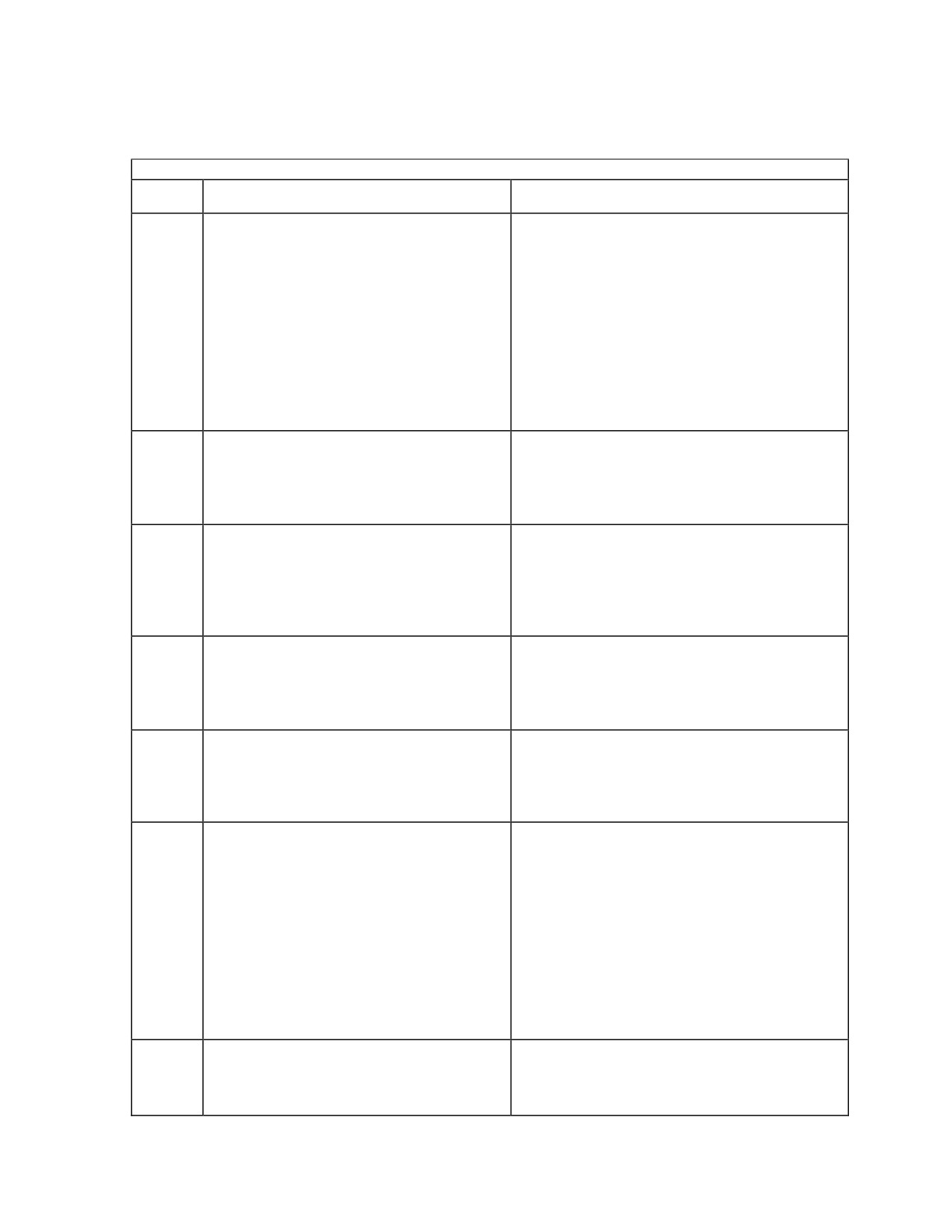
Table B-1. Information Request Codes
Note: If action states contact NCTAMS - the RSSCs may be contacted for assistance.
Code
Condition
Action
87
DAMA SAC sends.
Requested a service with a terminal and/or
Requested service requires a 5-kHz or
network address assigned to a different home
25-kHz slave channel, but the required
channel. Currently, no capability to assign
slave channel is not accessible from the
terminal to either a different home channel or
requestor’s home channel.
a slave channel associated with a different
home channel. If authorized to talk within this
network, check current mode screen to ensure
it is set up for the correct home channel. If
not, send an out of service message, make
changes, or select correct preset, reenter the
DAMA mode on the correct channel and set
up service again.
88
Requesting party’s device is incompatible
Configuration code does not match the JMINI
with this guard.
database for the net guard address. Check
The requesting port’s baseband device is
the code. If correct per the SAA, retry. If
incompatible with the baseband device
continued receipt of code—contact NCTAMS.
specified for this guard.
89
Requested party does not have a
Configuration code does not match the JMINI
compatible baseband device.
database for the terminal being called. Check
No port on the requested terminal is
the code. If correct, the distant end may have
configured for a baseband device
entered the wrong code. First, try again, then
compatible with the baseband port from
need to work with distant end.
originating the request.
90
None of the users requested are
Set up the service for a later time. If making a
available.
conference call, page the other terminals. If
Not enough requested users are capable
making a network call, there may not be any
and available (for various reasons) to
other active users on the network.
activate the service request.
91
Connection would cause contention.
Teardown and out of service then send status
The requested connection would cause
B and attempt to set up the service again. If
contention with an ongoing
this does not work—contact NCTAMS.
communication.
Mistakenly, the JMINI has the terminal in
service.
92
Not all requested parties could be
Set up a conference call but not all
connected.
participants received the service assigned
At least one, but not all, of the requested
message. Call all the stations and find out
parties could be connected. (This request
who is not connected. Before making a
is honored, connecting any available
conference call, page all users to ensure they
parties.)
are available for the call. This ensures the
terminal does not receive this message.
However, if a message is received, send a
status B message. The only way to add a
missed terminal into the service is for all to
teardown, and then have one terminal set up
the service again.
93
Other link test in progress.
Wait 2 to 5 minutes then rerun link test. Run it
Only one link test can be conducted on a
at 32-kbps first.
channel and currently another user
terminal is conducting a test.
B-5

Table B-1. Information Request Codes
Note: If action states contact NCTAMS - the RSSCs may be contacted for assistance.
Code
Condition
Action
94
Unable to connect parties from different
Requested a service with a terminal and/or
channels (JMINI sends).
network address assigned to a different home
OR
channel. Currently, there is no capability to
Unable to perform frequency switch
assign the terminal a different home channelIf
required for this connection (DAMA SAC
authorized to talk within this network, check
sends).
current mode screen to ensure it is set up for
the correct home channel. If not, send an out
Frequency switching is required to
of service, make changes or select correct
connect the requested service, but
preset, reenter the DAMA mode on the correct
frequency switching cannot be
channel and set up service again.
accomplished for any of the following
reasons:
• Terminal or terminals that must switch
• Communications and orderwire
channels are not on the same satellite.
• Required frame segment on the
communications and orderwire channels
match.
• Frame timing for the channels may not
be aligned
95
JMINI sends.
The JMINI database marked the net guard
Demand assigned activation disabled for
address wrong. Contact NCTAMS to correct
this guard.
the error.
This network is activated on a
preassigned basis only. In order for a
user to activate this network, the national
military strategy network management
system operator must check the "Allow
User to Activate" box in the network
definition.
95
DAMA SAC sends.
Should not receive this code—contact
DASA requests are reserved for guards
NCTAMS.
only.
The requesting user’s configuration code
indicates a DASA service and the user
have requested connection to another
user or users. Configuration codes 98
and 99 are reserved for DASA services
and only private guards can be assigned
to DASA channels.
96
No DASA channel available.
Should not receive this code—contact
NCTAMS.
B-6
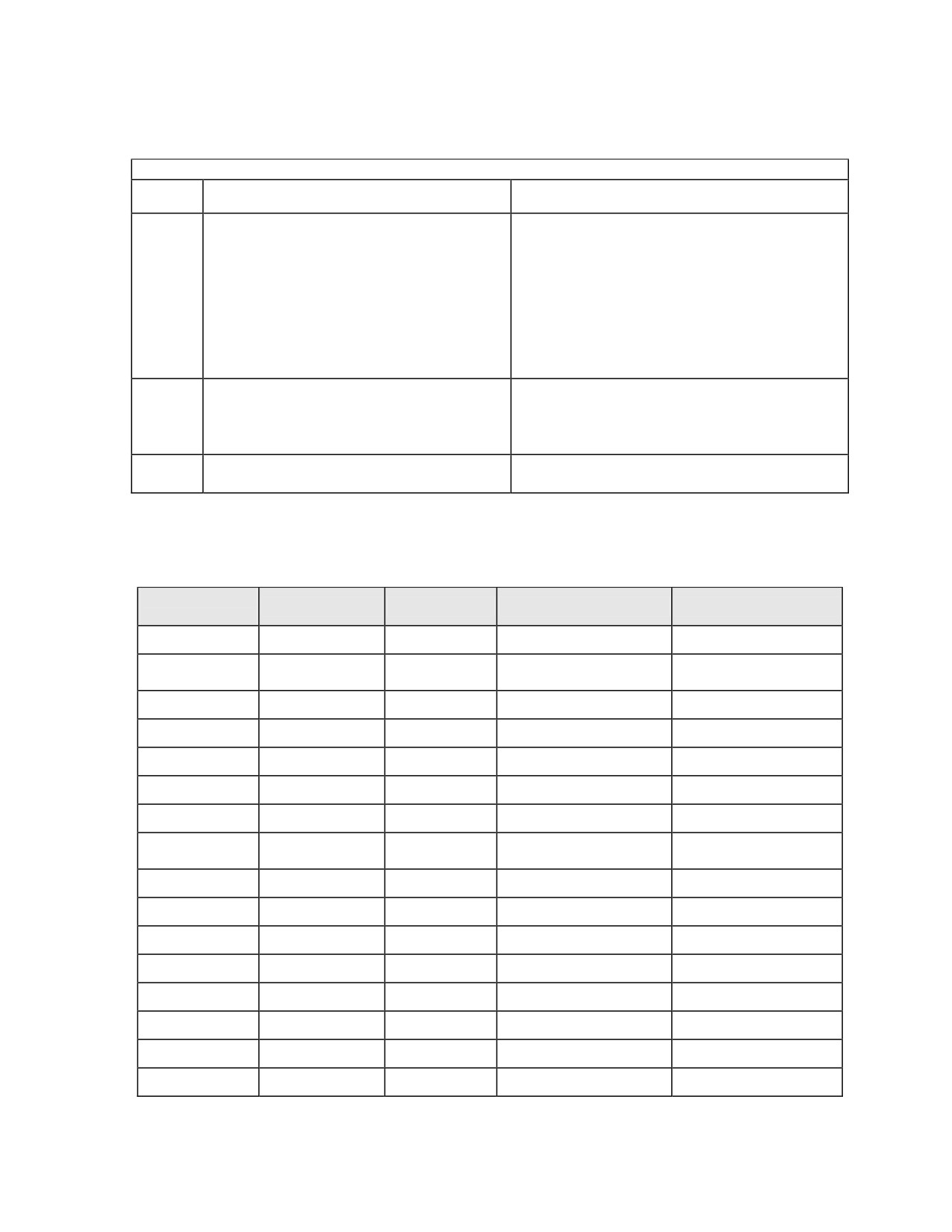
Table B-1. Information Request Codes
Note: If action states contact NCTAMS - the RSSCs may be contacted for assistance.
Code
Condition
Action
97
Party is connected to a DAMA time-slot
Should not receive this code—contact
already.
NCTAMS.
Cannot assign a DASA connection if
another user port on the
requested/requesting user’s terminal is
participating in a DAMA service of equal
or higher precedence. If it has a lower
precedence, the user could be preempted
out of the DAMA service.
98
Too many guards specified in this
Request can state only one network address.
request.
Use terminal addresses for the other four
More than one guard was specified in
addresses.
conference request.
99
Reserved for TD-1271 home channel
Should not receive this code—contact
change notification.
NCTAMS.
Table B-2. Configuration Codes
Configuration
Equipment
Data Rate
Protocol
Crypto
Code
0
Reserved
0
N/A
N/A
1
Network
75
IAW Network/Prearranged
IAW Network/Prearranged
(Prearranged)
2
Teletype
75
ASCII 8N2
KG-84A/C
3
Computer
75
ASCII 8N2
KG-84A/C
4
PSC-2A
75
PSC-2A
KG-84A/C
5
KL-43C/F
75
ASCII 8N2
KL-43C/F
6-14 Not Used
15
Network
300
IAW Network/Prearranged
IAW Network/Prearranged
(Prearranged)
16
Teletype
300
ASCII 8N2
KG-84A/C
17
Computer
300
ASCII 8N2
KG-84A/C
18
Fax
300
Fax
KG-84A/C
19
Fax
300
Fax
KYV-5, KY-99A/100
20
PSC-2A
300
PSC-2A
KG-84A/C
21
PSC-2A
300
PSC-2A
KYV-5, KY-99A/100
22
KL-43C/F
300
ASCII 8N2
KL-43C/F
23
Computer
300
ASCII 8N2
KYV-5, KY-99A/100
B-7
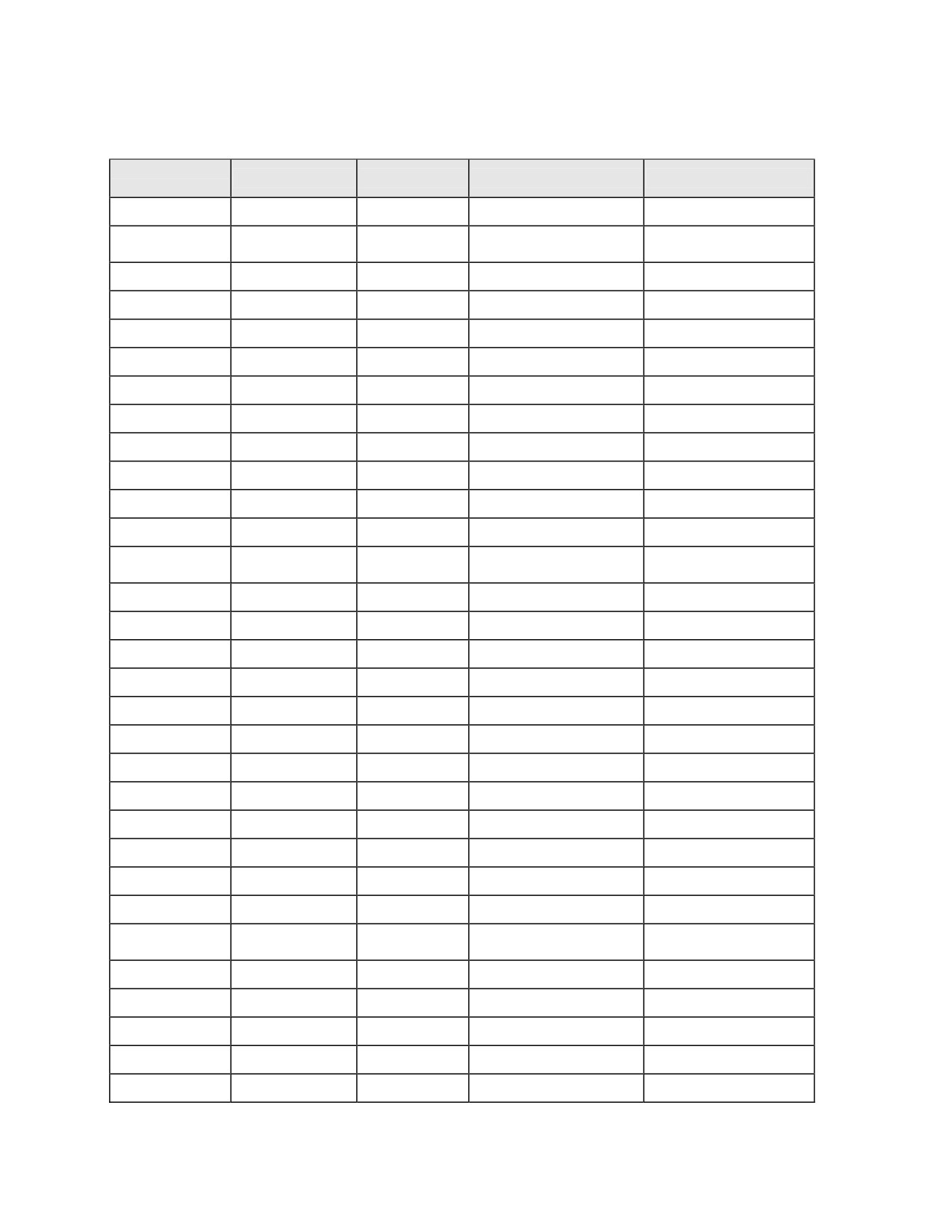
Table B-2. Configuration Codes
Configuration
Equipment
Data Rate
Protocol
Crypto
Code
24-29 Not Used
30
Network
600
IAW Network/Prearranged
IAW Network/Prearranged
(Prearranged)
31
Teletype
600
ASCII 8N2
KG-84A/C
32
Teletype
600
ASCII 8N2
KYV-5, KY-99A/100
33
Fax
600
Fax
KG-84A/C
34
PSC-2A
600
PSC-2A
KG-84A/C
35
PSC-2A
600
PSC-2A
KYV-5, KY-99A/100
36
KL-43C/F
600
ASCII 8N2
None
37
Computer
600
ASCII 8N2
KG-84A/C
38
Computer
600
ASCII 8N2
KYV-5, KY-99A/100
39
Fax
600
FAX
KYV-5, KY-99A/100
40-44 Not Used
45
Network
1200
IAW Network/Prearranged
IAW Network/Prearranged
(Prearranged)
46
Computer
1200
ASCII 8N2
KG-84A/C
47
Fax
1200
FAX
KYV-5, KY-99A/100
48
Fax
1200
FAX
KG-84A/C
49
PSC-2A
1200
PSC-2A
KG-84A/C
50
PSC-2A
1200
PSC-2A
KYV-5, KY-99A/100
51
DMDG
1200
DMDG
KG-84A/C
52
DMDG
1200
DMDG
KYV-5, KY-99A/100
53
KL-43C/F
1200
ASCII 8N2
KL-43C/F
54
Computer
1200
ASCII 8N2
KYV-5, KY-99A/100
55-56 Not Used
57
TEST2
Prearranged
Prearranged
Prearranged
58-59 Not Used
60
Network
2400
IAW Network/Prearranged
IAW Network/Prearranged
(Prearranged)
61
Fax
2400
Fax
KYV-5, KY-99A/100
62
Fax
2400
Fax
KG-84A/C
63
Hand Set/ANDVT
2400
Voice
KYV-5, KY-99A/100
64
Data/ANDVT
2400
Prearranged
Prearranged
65 Not Used
B-8
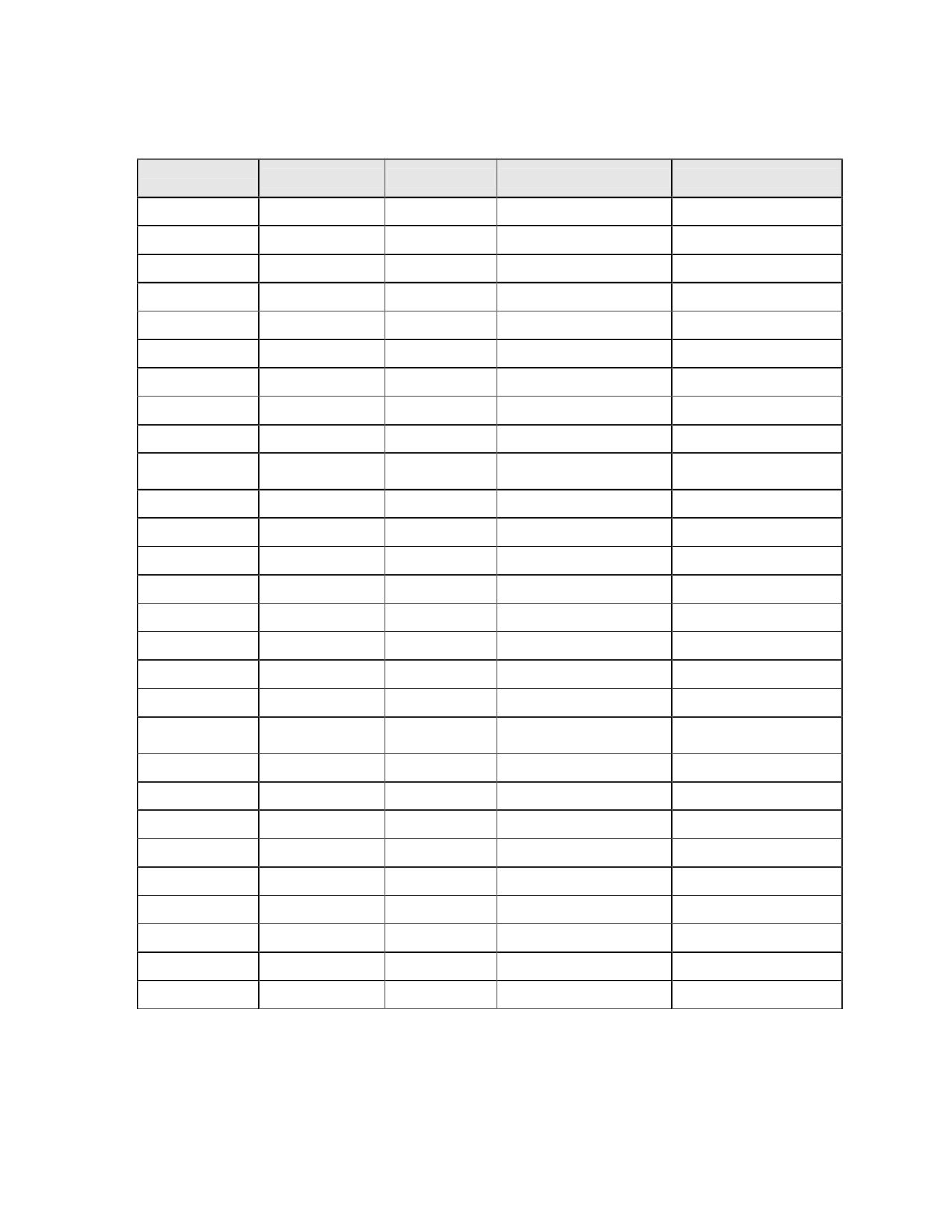
Table B-2. Configuration Codes
Configuration
Equipment
Data Rate
Protocol
Crypto
Code
66
PSC-2A
2400
PSC-2A
KG-84A/C
67
PSC-2A
2400
PSC-2A
KYV-5, KY-99A/100
68
KL-43C/F
2400
ASCII 8N2
KL-43C/F
69
Computer
2400
ASCII 8N2
KG-84A/C
70
Computer
2400
ASCII 8N2
KYV-5, KY-99A/100
71
Tactical Internet
2400
Tactical Internet
KG-84A/C
72
Personal Computer
2400
Prearranged
KG-84A/C
73
TEST1
Prearranged
Prearranged
Prearranged
74 Not Used
75
Network
4800
IAW Network/Prearranged
IAW Network/Prearranged
(Prearranged)
76
Fax
4800
Fax
KYV-5, KY-99A/100
77
Fax
4800
Fax
KG-84A/C
78
KL-43C/F
4800
ASCII 8N2
KL-43C/F
79
Tactical Internet
4800
Tactical Internet
KG-84A/C
80
Computer
4800
ASCII 8N2
KG-84A/C
81
Computer
4800
ASCII 8N2
KYV-5, KY-99A/100
82-88 Not Used
89
Fax
16000
Fax
KG-84A/C
90
Network
16000
IAW Network/Prearranged
IAW Network/Prearranged
(Prearranged)
91
Fax
16000
Fax
KY-57/58
92
Hand Set/ANDVT
16000
Voice
KY-57/58
93
PSC-2A
16000
PSC-2A
KYV-5, KY-99A/100
94
PSC-2A
16000
PSC-2A
KG-84A/C
95
Tactical Internet
16000
Tactical Internet
KG-84A/C
96
Computer
16000
Prearranged
KG-84A/C
97
Computer
16000
ASCII 8N2
KG-84A/C
98
DASA 5-kHz
Prearranged
Prearranged
Prearranged
99
DASA 25-kHz
Prearranged
Prearranged
Prearranged
B-9
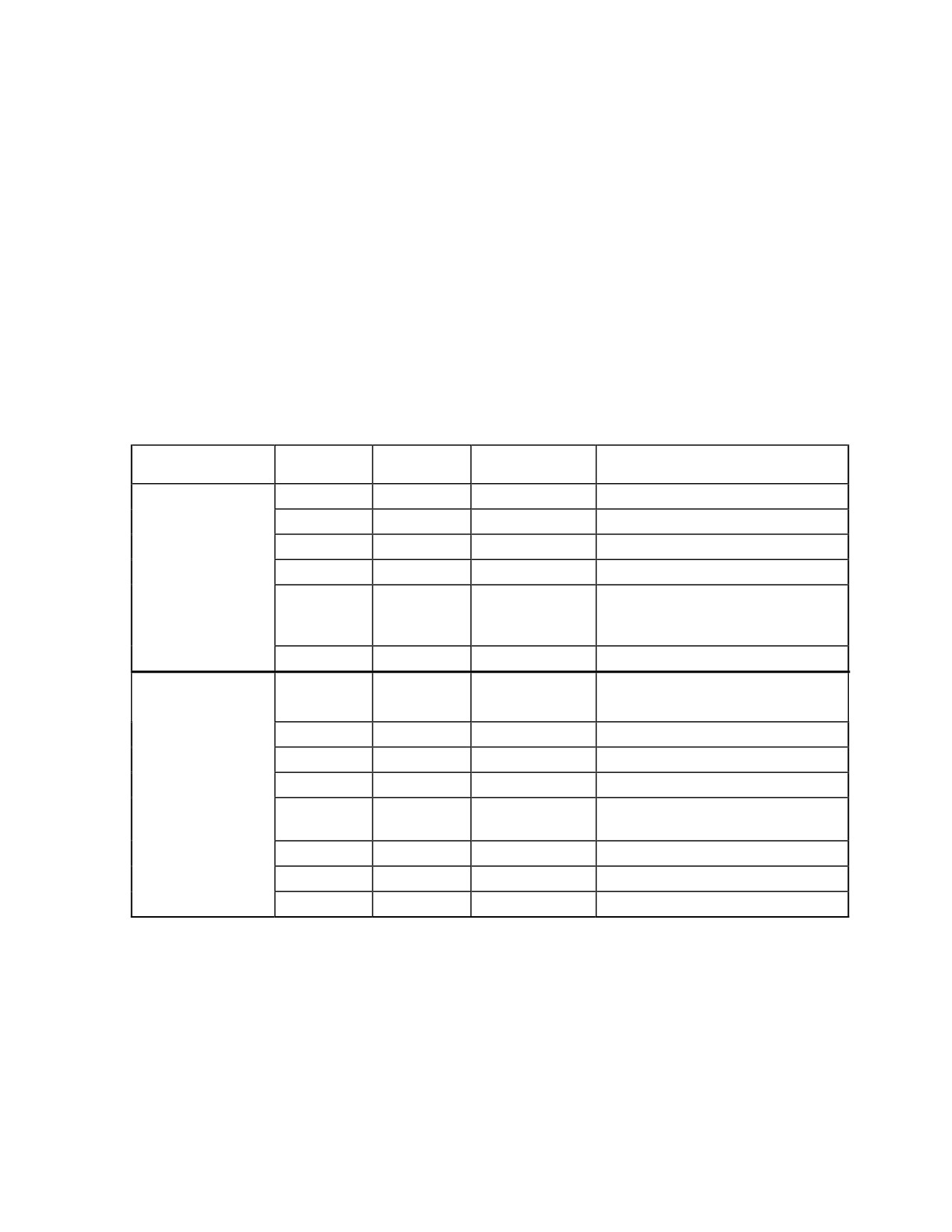
Appendix C
AN/PRC-117F Radios
1. AN/PRC-117F Dedicated UHF SATCOM Operation
The AN/PRC-117F operates in UHF SATCOM mode using MIL-STD 188-181B
modulation and HPW data operation. It supports encrypted voice and data
communications in wideband 25-kHz and narrowband 5-kHz channels. The AN/PRC-
117F in SATCOM mode is compatible with VINSON KY-57 (wideband 25-kHz), ANDVT
KY-99/99A, and KG-84C cryptographic equipment. Refer to tables C-1 through C-3 for
capabilities.
Table C-1. Dedicated UHF SATCOM Capabilities
Band of
Data Rates
MOD
COMSEC
DATA VOC
Operation
SYNC or ASYNC
MS181
PT-None
DATA only
1200, 2400
MS181
ANDVT
VOICE
2400
Dedicated
SATCOM
MS181
ANDVT
DATA
300, 600, 1200, 2400
5-kHz
MS181
KG-84C
DATA only
1200, 2400 using SBPSK
Narrowband
MS181
KG-84C
DATA only
4800, 6000, 7200, 8000, 9600
Channel
using Continuous Phase
20 Watts Max
Modulation (CPM)
HPW
KG-84C
DATA only
4 to 8.5 kbps - ARQ
MS181
PT-None
DATA only
1200, 2400, 9600
2 kbps, 16 kbps
MS181
VINSON
VOICE
16 kbps
Dedicated
MS181
VINSON
DATA
16 kbps
SATCOM
MS181
KG-84C
DATA only
1.2 k, 2.4 k, 9600, 16 k
25-kHz Wideband
Channel
MS181
KG-84C
DATA only
19.2, 28.8, 32, 38.4, 48, 56 kbps
using CPM
20 Watts Max
MS181
ANDVT
DATA
300, 600, 1200, 2400
MS181
FASC
VOICE
Special RETRANS Systems
HPW
KG-84C
DATA only
18 to 56 kbps - ARQ
C-1
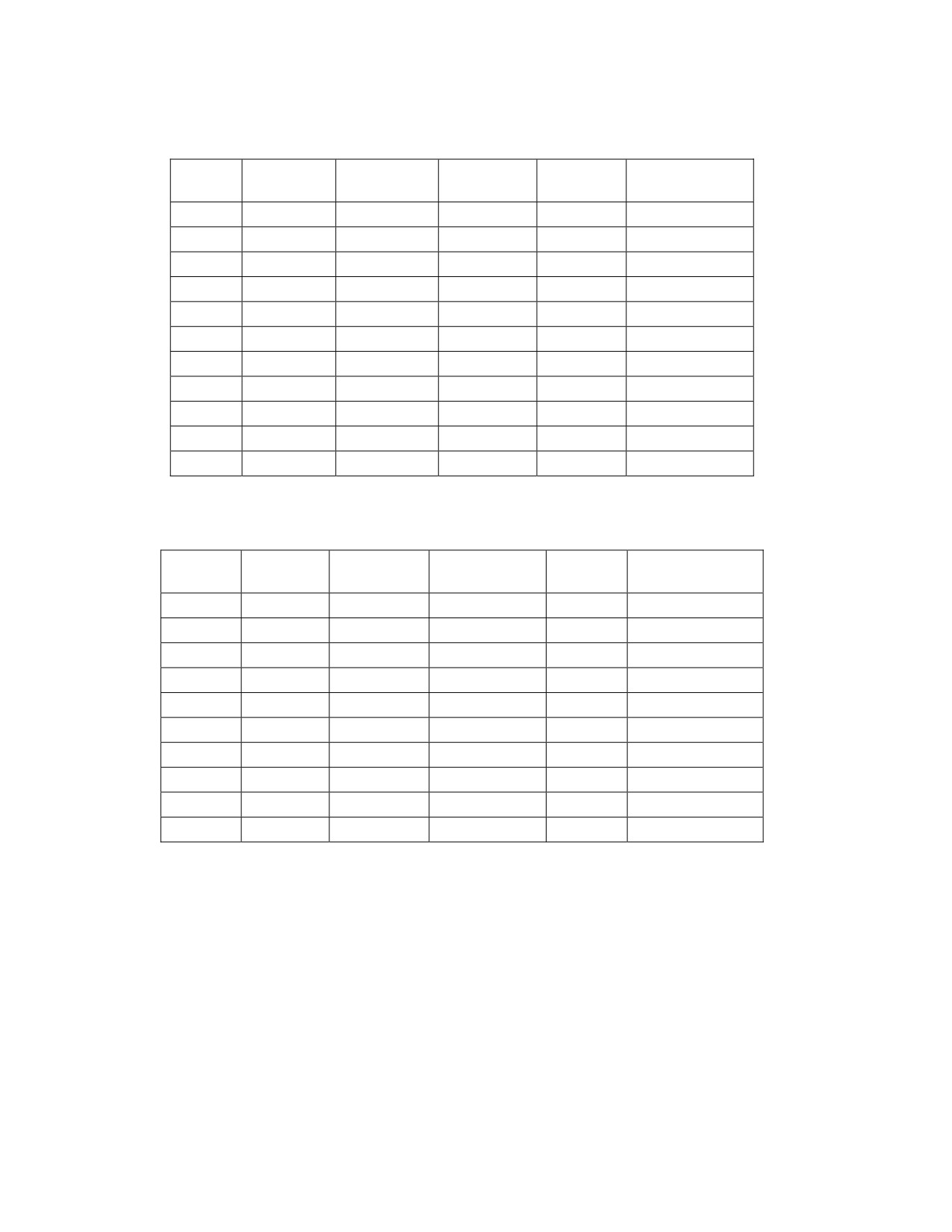
Table C-2. MIL-STD 188-181B Data Rate Options, 5-kHz
I/O Data
Modulation
Applicable
Voice or
Option
Remarks
Rate
Type
COMSEC
Data
008
1200
SBPSK
KG-84
DATA
010
2400
SBPSK
KG-84
DATA
181A
010
2400
SBPSK
ANDVT
D/V
181A NB Voice
A10
1200
SBPSK
ANDVT
DATA
B10
600
SBPSK
ANDVT
DATA
C10
300
SBPSK
ANDVT
DATA
013
4800
CPM
KG-84
DATA
016
6000
CPM
KG-84
DATA
018
7200
CPM
KG-84
DATA
020
8000
CPM
KG-84
DATA
021
9600
CPM
KG-84
DATA
Table C-3. MIL-STD 188-181B Data Rate Options, 25-kHz
I/O Data
Modulation
Applicable
Voice or
Option
Remarks
Rate
Type
COMSEC
Data
130
9600
SBPSK
KG-84
DATA
131
9600
CPM
KG-84
DATA
132
16 k
FSK
VINSON
D/V
181A WB Voice
F12
12 k
FSK
FASCINATOR
VOICE
137
19.2 k
CPM
KG-84
DATA
139
28.8 k
CPM
KG-84
DATA
141
32 k
CPM
KG-84
DATA
143
38.4 k
CPM
KG-84
DATA
144
48 k
CPM
KG-84
DATA
145
56 k
CPM
KG-84
DATA
C-2
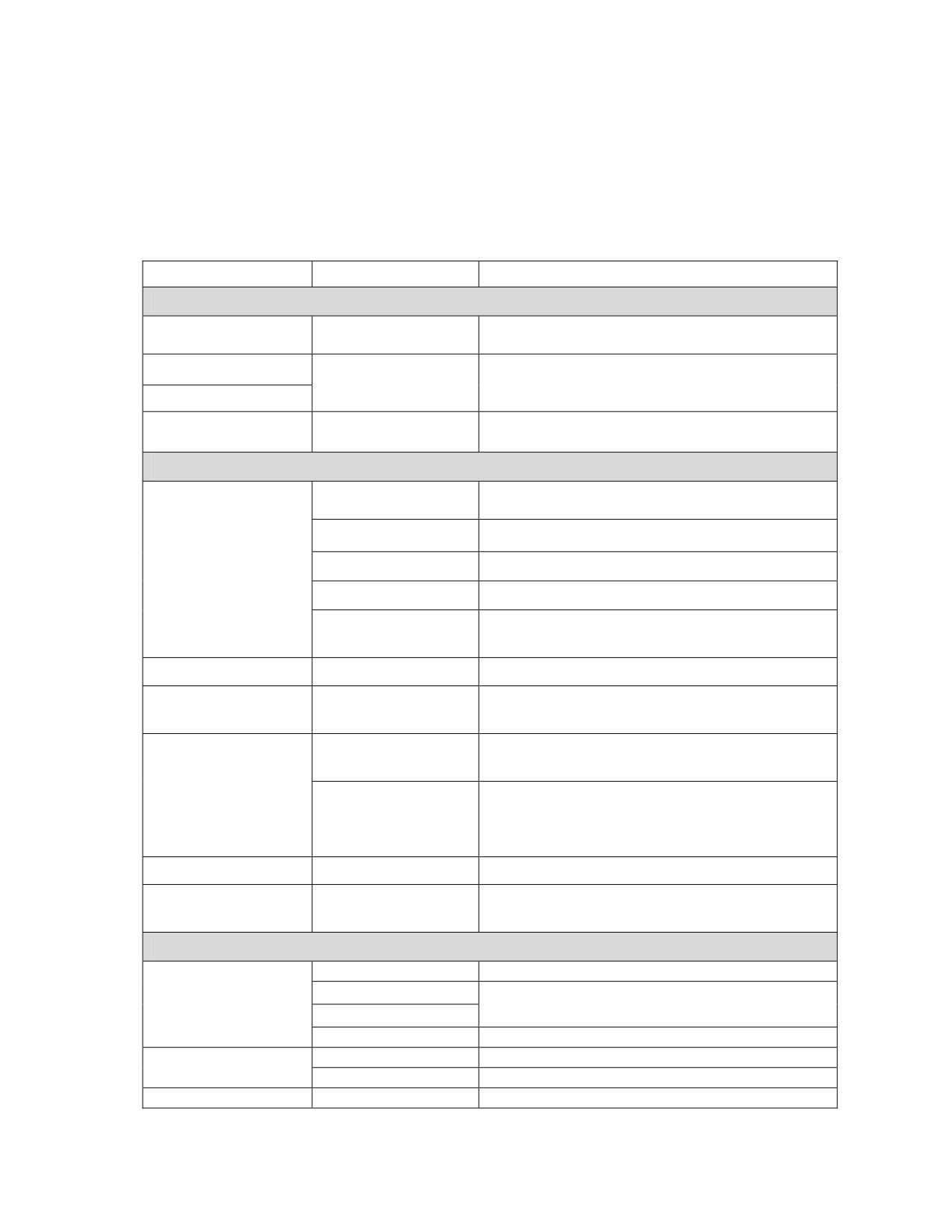
2. UHF Dedicated SATCOM Programming Checklist
Table C-4 outlines programming parameters necessary for dedicated UHF SATCOM
net presets. See Figures C-1 and C-2 for the sub menu and programming tree.
Table C-4. UHF SATCOM Programming Parameters
Menu Item
Options
Remarks
FREQUENCY
Channel Number
Frequency Code
Refer to Appendix A for list of FREQ codes.
001-249, or 999
Use 999 to manually enter non-standard uplink
Receive Frequency
999
and downlink frequencies.
Transmit Frequency
225.00000 to 511.99999 mHz
NO
Receive Only
YES for EMCON, no transmit.
YES
COMSEC
Function switch in PT, mode defaults to DATA
None
only.
VINSON
Not available on NB channels.
Crypto Mode
ANDVT
2400 max data rate.
KG-84
Data only in NB or WB.
Not available on NB channels. Available for
FASCINATOR
SATCOM to LOS BLACK RETRANS.
Encryption Key
TEK 01 to 25
Load TEKs first.
YES
External devices with own modem, eliminates
Analog Data
NO
crypto resyncs that interfere (KL-43C/F).
Redundant Mode 1
Match mode used in net.
Redundant Mode 2
KG-84
Non-Redundant
Synchronization
Mode 3
HPW operation requires Mode 1.
Non-Redundant
Mode 4
HPW Transec Key ID
TSK 01 to 25
TSK loaded in SATELLITE storage position.
Sets length of training frames sequence, 9 is
Training Frames
6, 9, 12, 15, 30, or 60
default.
DATA/VOICE
DATA
Only option w/KG-84 selected.
AUTO on ADF Port
Data/Voice
With VINSON, select port to receive DATA.
AUTO on DATA Port
DATA or VOICE
With ANDVT COMSEC.
MS181
Regular SATCOM
Modulation
HPW
Requires using KG-84 encryption in mode 1.
Sync/Async Select
ASYNC
ASYNC requires port programming.
C-3
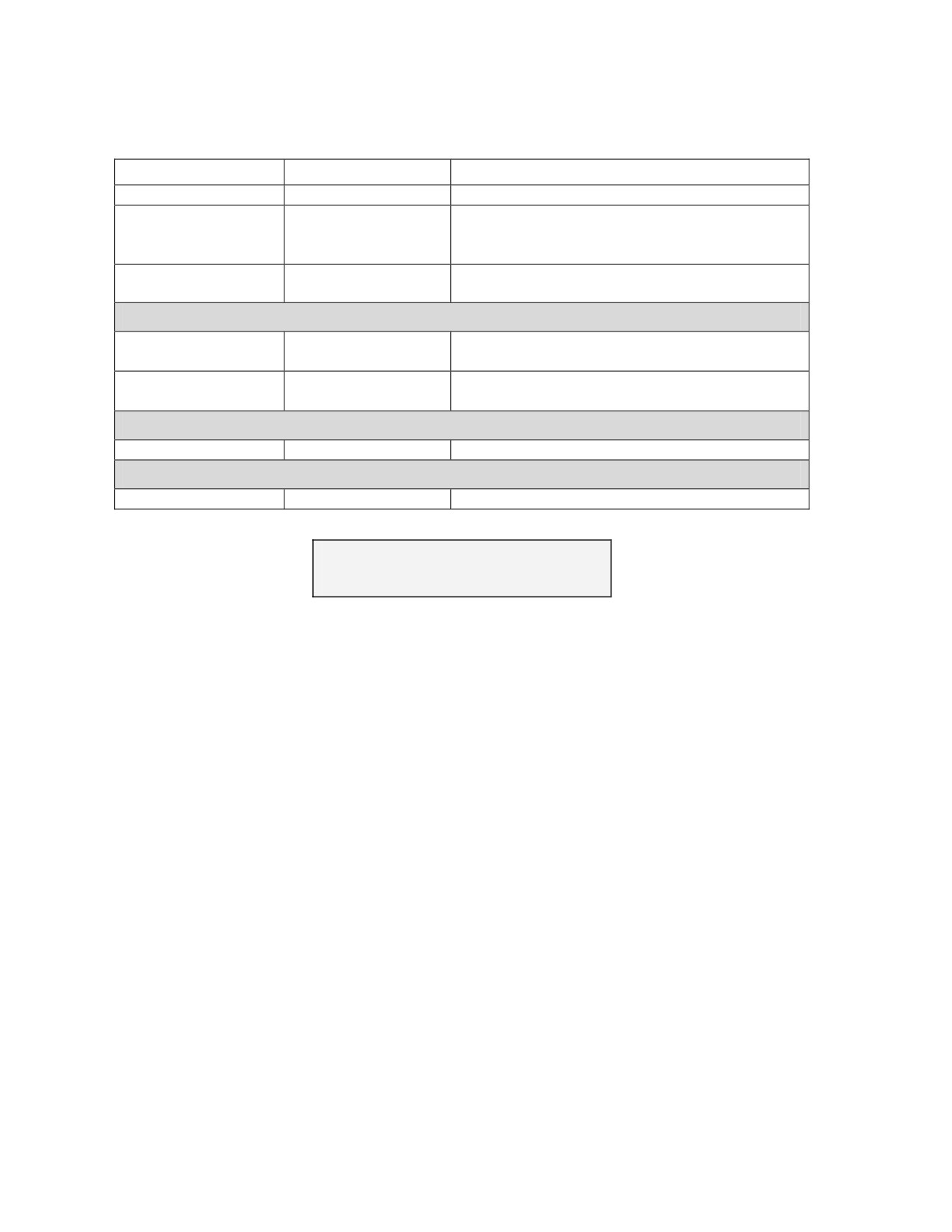
Table C-4. UHF SATCOM Programming Parameters
Menu Item
Options
Remarks
SYNC
Synchronous data systems
Baud Rate
(HPW) UFO (25-kHz)
Select type of satellite used, NB only on NB
WB (25-kHz)
channel when using FREQ code 999. Refer to
NB (5-kHz)
Appendix A
Option
Data Option Codes
Available options dependent on FREQ code and
COMSEC previously selected.
SQUELCH
Digital Squelch
ON
Digital squelch ON prevents PT override.
OFF
Digital Squelch
ON
Digital squelch ON prevents PT override.
OFF
POWER
TX Power Level
2 to 20 watts
Steps in one-dBm increments.
NAME
Change Net Name
NET 00 to 99
12 characters alphanumeric, no spaces.
FREQ CODE COMSEC DATA/VOC
SQUELCH
POWER NAME
USE ← → TO SELECT ITEMS
Figure C-1. UHF SATCOM Programming Sub Menu
C-4
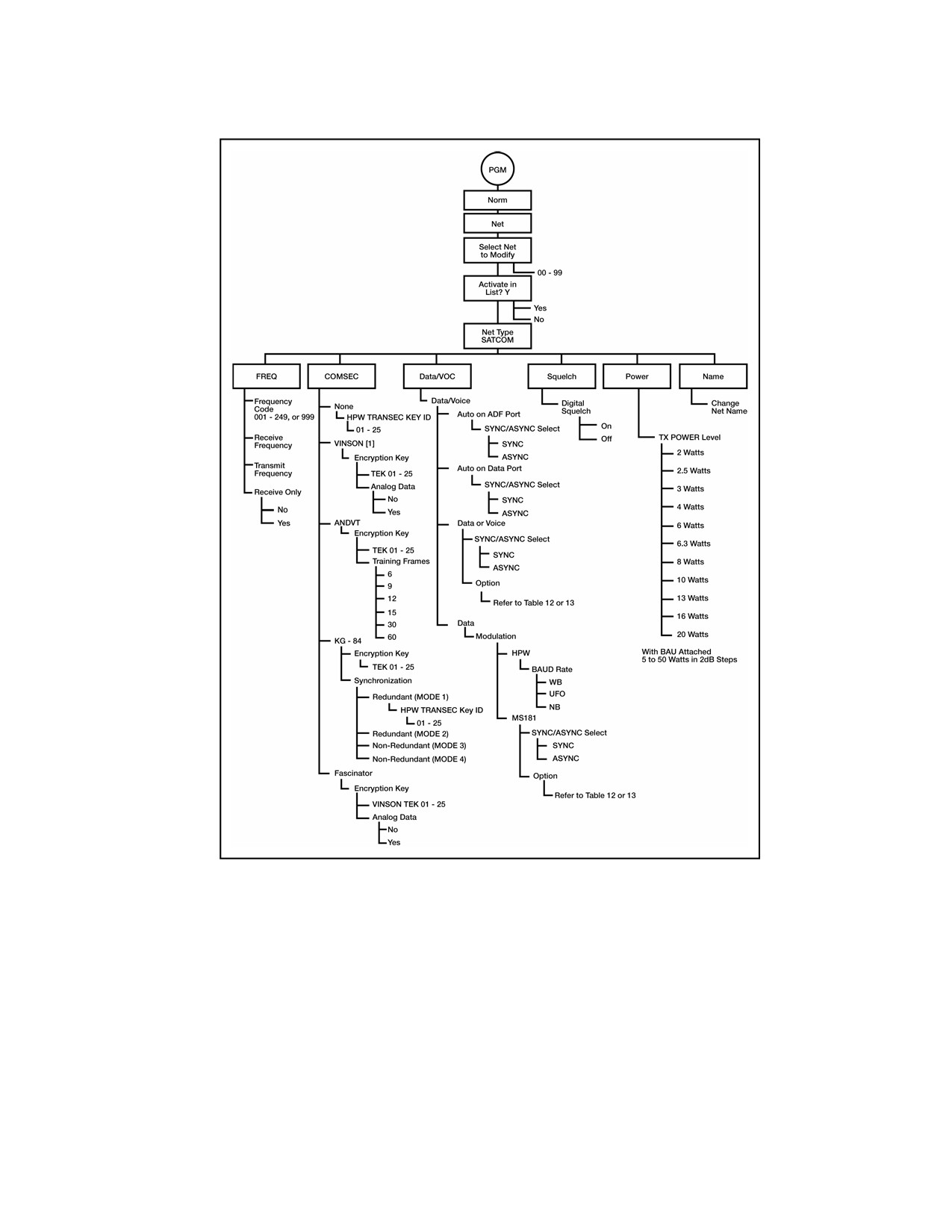
Figure C-2. SATCOM Programming Menu
3. Dedicated UHF SATCOM Operational Steps
a. To operate in dedicated UHF SATCOM mode, connect a medium or high gain
SATCOM antenna to VHF-HI/UHF J8 antenna connector with a coax cable. Analyze
terrain in planned areas of operation for satellite look-angle access. Verify the
SATCOM antenna is correctly oriented using a magnetic compass to point the antenna
on the proper horizontal azimuth to the satellite. Make an approximate antenna vertical
elevation adjustment. Pointing graphs and look-angle calculation software may assist
in this task. Azimuths from these graphs are not adjusted for local magnetic
declination. Table C-5 contains UHF satellite positions. To check SATCOM antenna
C-5
pointing using the SATCOM receive signal strength indicator (RSSI) test, complete the
following procedures:
Table C-5. UHF Satellite Positions
Footprint Name
Satellite Position
CONUS
100 and 105 dog W longitude
LANT
15 and 23 dog W longitude
IO
72 and 72. dog E longitude
PAC
172 and 177 dog E longitude
Note: The SATCOM RSSI test can be conducted only by using data operating
parameters of 1200 or 2400 bps. Preselect data operation using KG-84 or
ANDVT at one of these rates before initiating the test.
(1) After placing the AN/PRC-117F into normal mode dedicated SATCOM
operation, press the CALL button on the KDU.
(2) Press ENT to initiate the SATCOM RSSI test.
(3) Watch display for test completion. A relative signal strength score is
displayed with a value from 000 to 100. Repeat test and adjust pointing of the
SATCOM antenna to obtain a better than 80 score.
(4) Press CLR to exit SATCOM RSSI test.
b. Perform the following procedure for dedicated UHF SATCOM operation:
(1) Rotate function switch to cipher text (CT) or TD. The AN/PRC-117F does not
allow plain text (PT) non-secure voice operation in SATCOM to operate in a non-secure
SATCOM mode. The radio defaults to DATA only operation when PT is selected.
(2) After the radio initializes, press MODE.
(3) At the OPERATIONAL MODE prompt, select NORMAL; press ENT.
(4) Select the desired SATCOM net preset by pressing the PRE + or - switch.
(5) Begin radio operation. See Figure C-3 for SATCOM operational displays.
4. SATCOM 181B Data Operation Using KG-84 COMSEC and Continuous
Phase Modulation
a. When using a SATCOM net preset using KG-84 COMSEC and Continuous Phase
Modulation (CPM) modulation, the sender transmitting station decides in which CPM
data option to conduct the transmission. The receiving end must also use a CPM data
code of the same channel type. To change the data option code for the currently selected
SATCOM net preset—
(1) Press the circular arrow key to view the data option page of the SATCOM net
preset. See Figure C-3 for SATCOM displays.
(2) Use left/right arrow key to scroll over to data option field. With the up/down
arrow key, select the required code. Only the data option codes relating to the presently
selected COMSEC mode and/or satellite channel type can be selected.
C-6
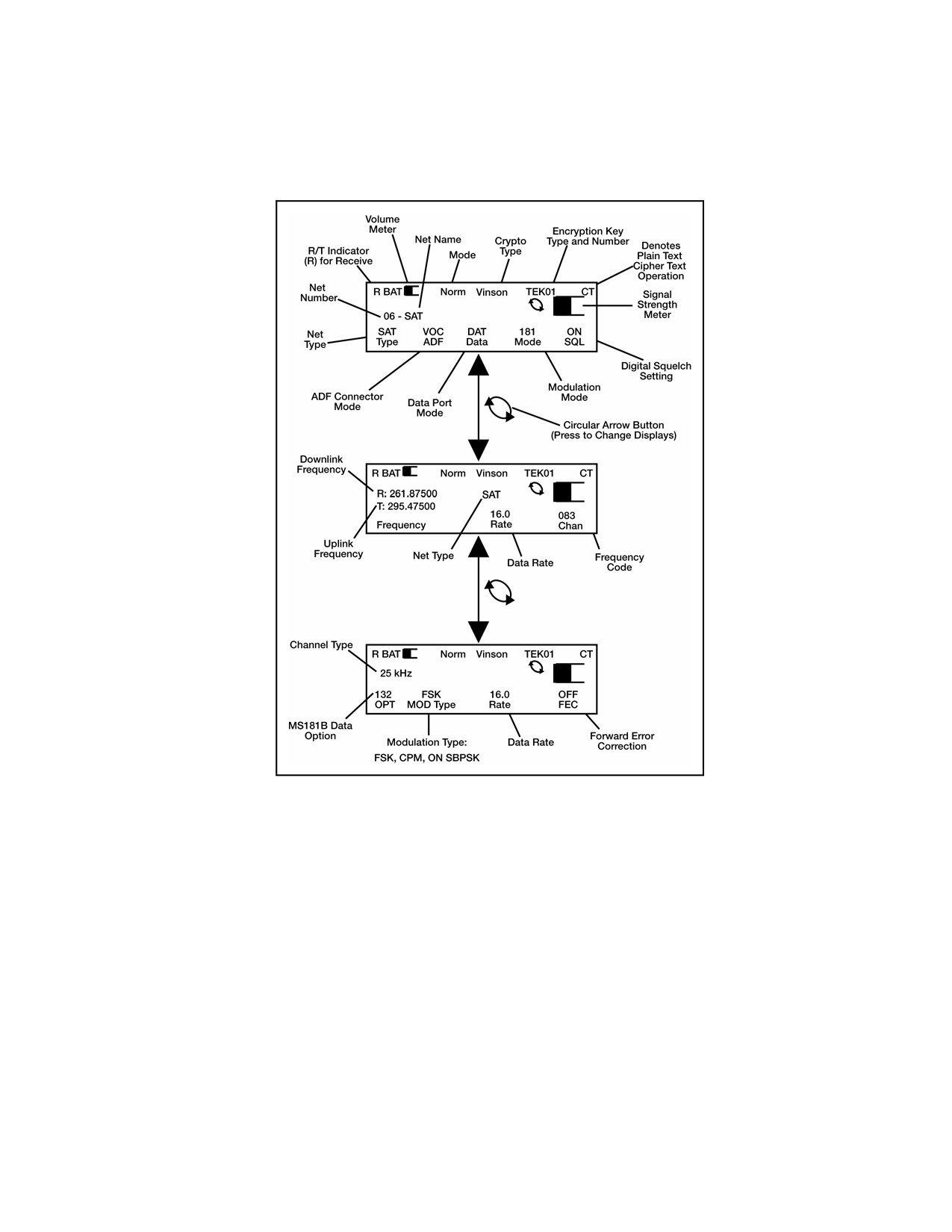
(3) Refer to Table C-6 AN/PRC-117F DAMA SATCOM capabilities. If COMSEC
mode needs to be changed to achieve required data option, use the COMSEC menu
under OPT key.
Figure C-3. Dedicated UHF SATCOM Displays
b. To send SATCOM DATA with CPM data option—
(1) Ensure net communications plan is for all outstations to use a CPM data
option from Table C-7 for the same channel type (5-kHz or 25-kHz). A synchronous data
transmission application is best.
(2) Sending station selects the desired CPM data option with which to transmit
the data message. On transmitting the message, the receiving radio automatically
matches speed of the sending station.
(3) If transmission is unsuccessful, (the receiving end does not acknowledge good
reception), it may be necessary to reduce the CPM data rate and re-attempt the data
transmission. If transmissions continue to be unsuccessful, troubleshoot the
communications software set up to determine the communications failure.
C-7

5. AN/PSC-117F DAMA UHF SATCOM
a. UHF DAMA SATCOM is a separate mode of operation in the AN/PRC-117F.
DAMA operation is available on 5-kHz and 25-kHz UHF SATCOM channels that have
been converted to DAMA control. THE 25-kHz DAMA is operated in either automatic
control (AC) or distributed control (DC). Refer to Table C-6 AN/PRC-117F DAMA
SATCOM for capabilites.
Table C-6. AN/PRC-117F DAMA SATCOM Capabilities
Channel Type
MOD
COMSEC
Data Voice
Data Rates
5K CKT
ANDVT
VOICE
2400
5K CKT
ANDVT
DATA
600, 1200, 2400
5K CKT
KG-84C
DATA
75, 300, 600, 1200, 2400
DAMA UHF
5K MSG
KG-84 C
DATA
75, 300, 600, 1200, 2400
SATCOM (AC)
25K AC
ANDVT
VOICE
2400
25K AC
ANDVT
DATA
600, 1200, 2400
25K AC
KG-84 C
DATA
75, 300, 600, 1200, 2400
25K DC
ANDVT
VOICE
2400
DAMA UHF
25K DC
ANDVT
DATA
600, 1200, 2400
SATCOM 25-kHz
25K DC
KG-84
DATA
75, 300, 600, 1200, 2400
(DC)
25K DC
VINSON
VOICE
16 kbps
25K DC
VINSON
DATA
16 kbps
25-kHz
VINSON
VOICE
16 kbps
25-kHz
VINSON
DATA
16 kbps
DAMA UHF
25-kHz
KG-84C
DATA
75, 300, 600, 1200, 2400,
SATCOM
4800, 16 kbps
Dedicated Calls
5-kHz
ANDVT
VOICE
2400
(DASA)
5-kHz
ANDVT
DATA
600, 1200, 2400
5-kHz
KG-84C
DATA
75, 300, 600, 1200, 2400
b. Figure C-4 depicts the overall DAMA UHF SATCOM programming menu tree.
Entry into DAMA programming takes the radio offline (not communicating).
C-8
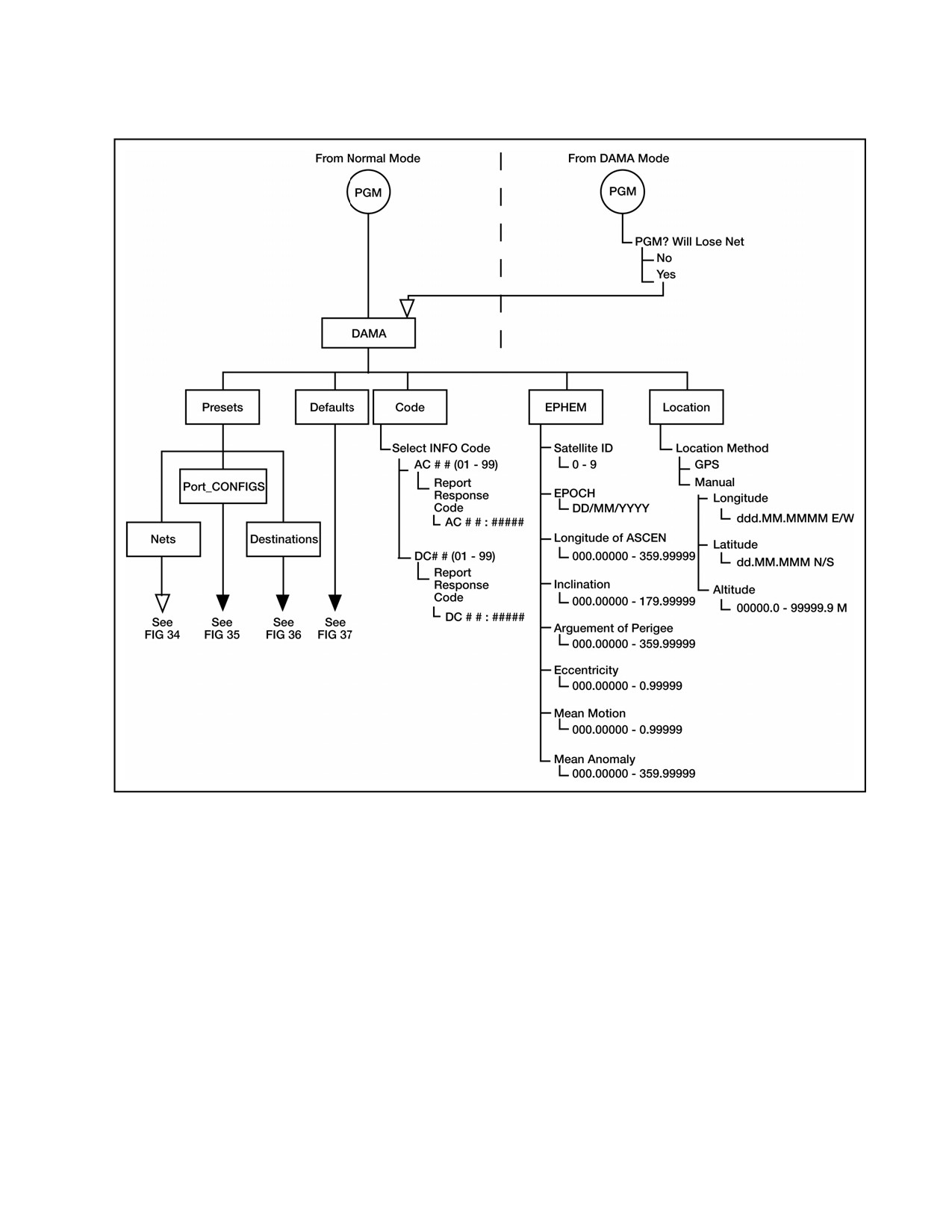
Figure C-4. Overall DAMA Programming Menu Tree
c. Table C-7 is the overall DAMA programming checklist. Figure C-5 is DAMA net
preset programming menu tree.
C-9
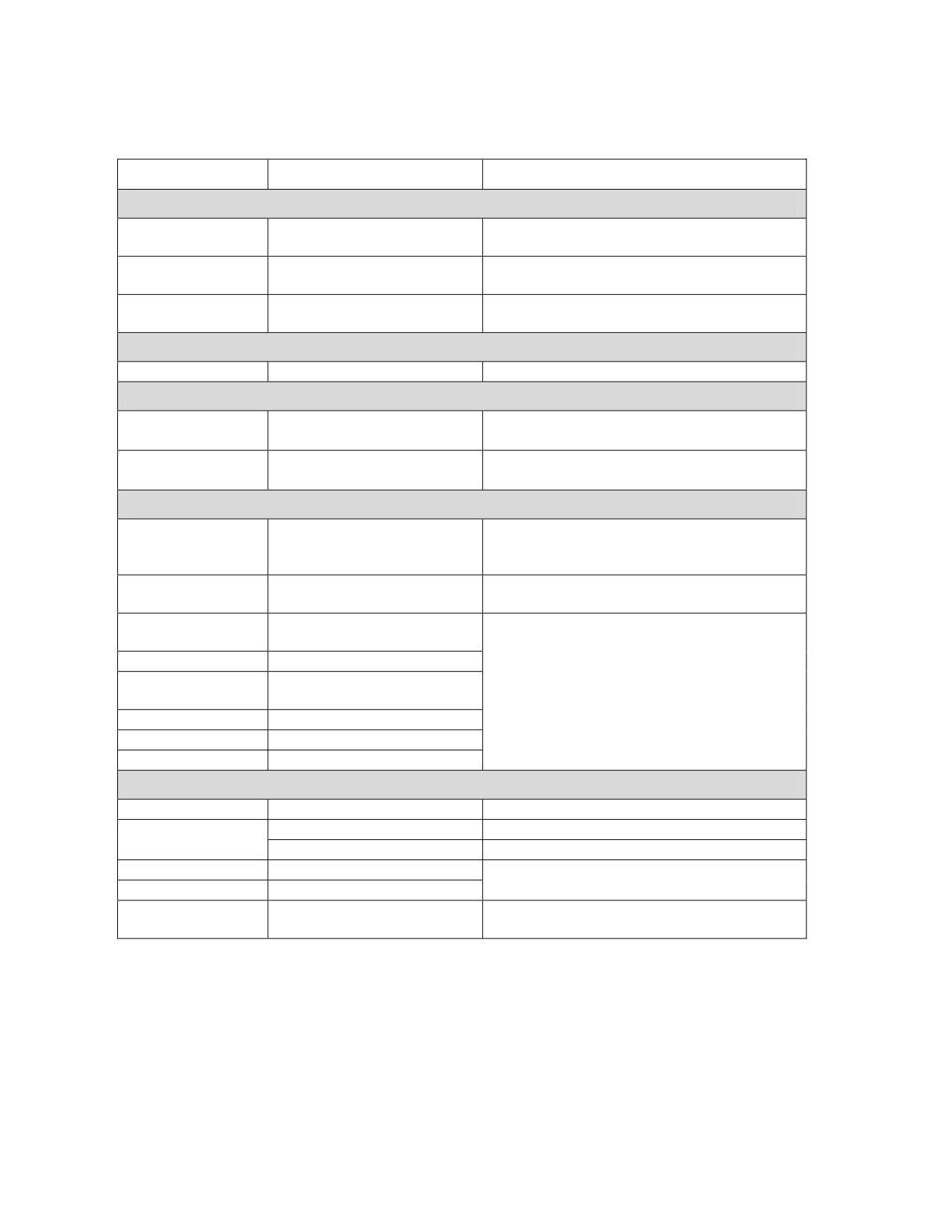
Table C-7. DAMA Programming Checklist
Menu Item
Options
Remarks
PRESETS
Sets up the parameters required to access a
Nets (10) 00 to 09
DAMA channel.
Port_Config (10)
Matches the DAMA channel with the desired
00 to 09
COMSEC and mode of operation.
Destinations (50)
Sets all the call parameters to use a TBA on
00 to 49
any type of DAMA channel.
DEFAULTS
Defaults
Sets defaults in CALL operating menu.
CODES
Select Info Code
Report Response Code
Allows programming of expected response
AC # # (01 to 99)
AC # # # # # # #
to report codes.
Select Info Code
Report Response Code
Allows for programming of expected
DC # # (01 to 99)
AC # # # # #
response to report codes.
EPHEM
Satellite ID
0 to 9
A storage location linking programmed data
to the corresponding number in the DAMA
net preset, not a UFO number.
EPOCH
DD/MM/YYYY
The data for the TLE data set being used,
not the current date unless the same.
Longitude of
000.00000 to 359.99999
Calculated from the TLE for the UFO being
ASCEN
ranged.
Inclination
000.00000 to 179.00000
Argument of
000.00000 to 359.99999
Perigee
Eccentricity
0.00000000 to 0.99999999
Mean Motion
0.00000000 to 0.99999999
Mean Anomaly
000.00000 to 359.99999
LOCATION
Menu Item
Options
Remarks
Location Method
GPS
Requires PLGR to radio interface.
Manual
Longitude
DDD MM.MMMM E/W
Decimal minutes format in WGS-84 datum.
Latitude
DD MM.MMM N/S
Altitude
+/- 00000.0 to 99999.9
meters
C-10
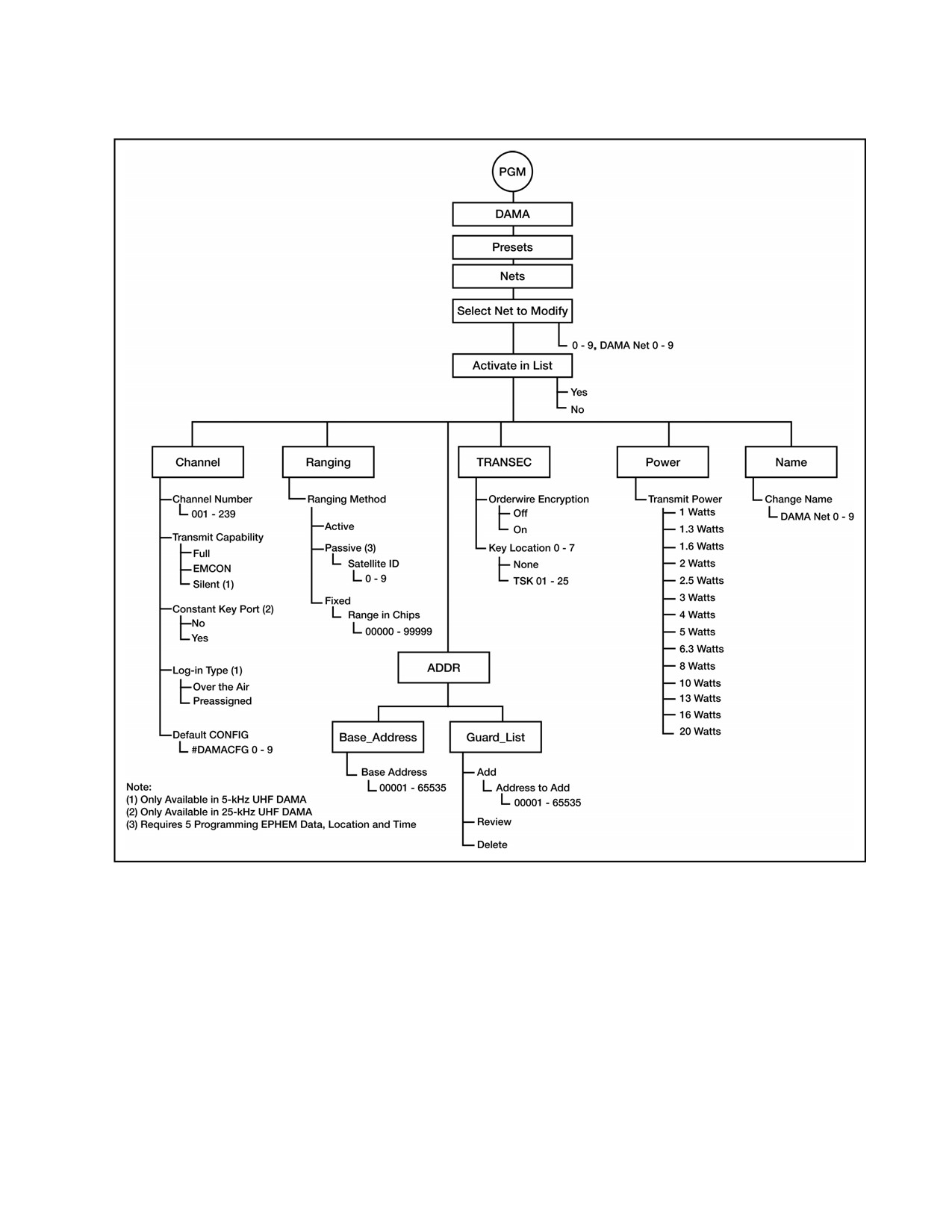
Figure C-5. DAMA Net Preset Programming Menu Tree
d. Table C-8 is the DAMA net preset programming parameters checklist.
C-11
Table C-8. DAMA Net Preset Parameters
Menu Item
Options
Remarks
TRANSEC
OFF
PT EOW operation.
Orderwire
ON by present doctrine. Requires TSKs to
Encryption
ON
be assigned to key locations.
None
Key Location 0
TSK 01 to 25
None
Key Location 1
TSK 01 to 25
None
Key Location 2
DAMA EOW TSKs loaded to SATELLITE
TSK 01 to 25
storage positions.
None
Key Location 3
TSK 01 to 25
Assign proper key where channel controller
None
Key Location 4
expects to find it.
TSK 01 to 25
None
Key Location 5
IF not known, assign key to all key locations.
TSK 01 to 25
None
Key Location 6
TSK 01 to 25
None
Key Location 7
TSK 01 to 25
ADDR
Base_Address
00001 to 65535
Address to add:
Add up to 15 TBA and/or network
00001 to 65535
addresses.
Guard_List
Review
View programmed addresses.
Delete
Removes an address.
POWER
Transmit Power
1 to 20 watts
Steps in one-dBm increments.
NAME
Change Net Name
DAMANET 0 to 9
12 characters alphanumeric, no spaces.
e. Table C-9 is the DAMA port configuration preset parameters. Figure C-6 is the
DAMA port configuration preset menu tree.
C-12
Table C-9. DAMA Port Configuration Preset Parameters
Menu Item
Options
Remarks
COMSEC
None
Function switch in PT.
VINSON
Not available on NB channels.
Crypto Mode
ANDVT
2400 max data rate.
KG-84
Data only.
Load TEKs first. Do not program empty
Encryption Key
TEK 01 to 25
position.
YES
External devices with own modem, such as
Analog Data
NO
KL-43C/F.
Redundant Mode 1
KG-84 SYNC
Redundant Mode 2
Match mode used in net. PSC-5 only
Mode
Non-Redundant Mode 3
compatible with Mode 4.
Non-Redundant Mode 4
Sets length of training frames sequence for
Training Frames
6, 9, 12, 15, 30, or 60
KY-99 compatibility, 9 is default setting.
DATA/VOICE
AUTO ON ADF PORT
With VINSON, select port on which to
AUTO ON DATA PORT
receive DATA.
Data/Voice
DATA or VOICE
With ANDVT COMSEC.
DATA
With KG-84 COMSEC.
SYNC/ASYNC
ASYNC
ASYNC requires port programming.
Select
SYNC
WB to 75, 300, 600, 1200,
2400, 4800, 16 kbps
Baud Rate
COMSEC mode and CHAN type dependent.
NB to 75, 300, 600, 1200,
2400
CONFIG_CODE
Use configuration code that matches
25-kHz Port Config
01 to 99
COMSEC type, data rate, and data device.
Code
Refer to Appendix B, Table B-2.
Add leading zero, same codes as in 25-kHz
5-kHz Port Config
DAMA. Use configuration code that
001 to 511
Code
matches COMSEC type, data rate, and data
device. Refer to Appendix B, table B-2.
NAME
Change Name
DAMACFG 0 to 9
12 characters alphanumeric, no spaces.
C-13