FMI 6-02.60 Tactics, Techniques, and Procedures (TTPs) for the Joint Network Node-Network (JNN-N) (SEPTEMBER 2006) - page 3
Joint Network Node Components and Connectivity
Table B-13. Representative Entries for a SIPRNET Tier 2 Router Configuration
description Interface to IA PP port 2
ip pim sparse-mode
no ip address
no shutdown
duplex auto
speed auto
no ip directed-broadcast
no ip mask-reply
no ip proxy-arp
!
interface Serial0/0
description Interface to FEC2/1 through CPP A-A5
ip unnumbered Loopback0
ip pim sparse-mode
no shutdown
pulse-time 5
ip ospf cost 22
encap ppp
no ip directed-broadcast
no ip mask-reply
no ip proxy-arp
!
interface Serial0/1
description Interface to FEC2/2 through CPP A-A6
ip unnumbered Loopback0
ip pim sparse-mode
pulse-time 5
ip ospf cost 22
encap ppp
no ip directed-broadcast
no ip mask-reply
no ip proxy-arp
no shutdown
!
interface Serial0/2
description Interface to KIV-19 #5 through CPP A-A11
ip unnumbered Loopback0
ip pim sparse-mode
no shutdown
pulse-time 5
ip ospf cost 22
encap ppp
no ip directed-broadcast
no ip mask-reply
no ip proxy-arp
!
5 September 2006
FMI 6-02.60
B-39
Appendix B
Table B-13. Representative Entries for a SIPRNET Tier 2 Router Configuration
interface Serial0/3
description Interface to KIV-19 #6 through CPP A-A12
ip unnumbered Loopback0
ip pim sparse-mode
no shutdown
pulse-time 5
ip ospf cost 22
encap ppp
no ip directed-broadcast
no ip mask-reply
no ip proxy-arp
!
interface FastEthernet1/0
description Interface to Taclane #2 CT
ip pim sparse-mode
no ip address shutdown
duplex auto
speed auto
no ip directed-broadcast
no ip mask-reply
no ip proxy-arp
no shutdown
!
interface FastEthernet1/1
description Interface to Taclane #1 PT
ip address Insert IP address and subnet mask
ip pim sparse-mode
duplex auto
speed auto
no ip directed-broadcast
no ip mask-reply
no ip proxy-arp
no shutdown
!
interface FastEthernet2/0
description Interface to MGT PC
switchport access vlan 222
no ip address
no ip proxy-arp
no shutdown
!
interface FastEthernet2/1
description Interface to MRV Terminal Server
switchport access vlan 222
no ip address
no ip proxy-arp
B-40
FMI 6-02.60
5 September 2006
Joint Network Node Components and Connectivity
Table B-13. Representative Entries for a SIPRNET Tier 2 Router Configuration
no shutdown
!
interface FastEthernet2/2
description Interface to Call Manager
switchport access vlan 58
no ip address
duplex auto
speed auto
no ip proxy-arp
no shutdown
!
interface FastEthernet2/3
description Interface to Avocent KVM Server
switchport access vlan 222
no ip address
no ip proxy-arp
no shutdown
!
interface FastEthernet2/4
description Interface to Vantage
switchport access vlan 58
no ip address
speed 100
no ip proxy-arp
no shutdown
!
interface FastEthernet2/5
description Spare interface used for test
ip pim sparse-mode
no ip address
no ip proxy-arp
no shutdown
!
interface FastEthernet2/6
description Interface to IDS LAN2 Port
switchport access vlan 222
no ip address
no ip proxy-arp
no shutdown
!
interface FastEthernet2/7
description Interface to Voice case ESW3750
switchport trunk allowed vlan 1-2,6,58,59,222,1002-1005
ip pim sparse-mode
switchport mode trunk
no ip address
5 September 2006
FMI 6-02.60
B-41
Appendix B
Table B-13. Representative Entries for a SIPRNET Tier 2 Router Configuration
no ip proxy-arp
no shutdown
!
interface FastEthernet2/8
description Interface to Data case 3745 RTR
switchport trunk allowed vlan 1-2,6,58,59,222,1002-1005
ip pim sparse-mode
switchport mode trunk
no ip address
duplex full
speed 100
no ip proxy-arp
no shutdown
!
interface FastEthernet2/9
description Interface to TOC RTR Vlan 6
switchport trunk allowed vlan 1-2,6,58,59,222,1002-1005
ip pim sparse-mode
switchport mode trunk
no ip address
duplex full
speed 100
no ip proxy-arp
no shutdown
!
interface FastEthernet2/10
description Interface to TOC RTR Vlan 6
switchport trunk allowed vlan 1-2,6,58,59,222,1002-1005
ip pim sparse-mode
switchport mode trunk
no ip address
duplex full
speed 100
no ip proxy-arp
no shutdown
!
interface FastEthernet2/11
no ip address
duplex full
speed 100
no ip proxy-arp
no shutdown
!
interface FastEthernet2/12
description Interface to IA PP port 3
no ip address
B-42
FMI 6-02.60
5 September 2006
Joint Network Node Components and Connectivity
Table B-13. Representative Entries for a SIPRNET Tier 2 Router Configuration
ip pim sparse-mode
no ip proxy-arp
no shutdown
!
interface FastEthernet2/13
description Interface to SVoice Gateway Router
switchport access vlan 58
no ip address
ip pim sparse-mode
no ip proxy-arp
no shutdown
!
interface FastEthernet2/14
no ip address
ip pim sparse-mode
no ip proxy-arp
no shutdown
!
interface FastEthernet2/15
description Spare interface used for test
no ip address
ip pim sparse-mode
no ip proxy-arp
no shutdown
!
interface Vlan1
no ip address
ip pim sparse-mode
no ip directed-broadcast
no ip mask-reply
no ip proxy-arp
no shutdown
!
interface Vlan222
ip address Insert IP address and subnet mask
ip pim sparse-mode
no ip directed-broadcast
no ip mask-reply
no ip proxy-arp
no shutdown
!
interface Vlan58
description Voice Vlan for CM and Phones
ip address Insert IP address and subnet mask
no ip directed-broadcast
no ip mask-reply
5 September 2006
FMI 6-02.60
B-43
Appendix B
Table B-13. Representative Entries for a SIPRNET Tier 2 Router Configuration
no ip proxy-arp
no shutdown
!
interface Vlan6
ip address Insert IP address and subnet mask
ip pim sparse-mode
no ip directed-broadcast
no ip mask-reply
no ip proxy-arp
no shutdown
!
router ospf 21
log-adjacency-changes
network Insert network and inverse mask area 0
network Insert IP address and subnet mask area 0
network Insert IP address and subnet mask area 0
network Insert IP address and subnet mask area 0
network Insert IP address and subnet mask area 0
!
ip classless
ip route Insert IP address and subnet mask
!
no ip http server
ip http authentication local
no ip http secure-server
!
!
ip pim bsr-candidate loopback 0 4 250
ip pim rp-candidate loopback 0 priority 5
ip pim spt-threshold infinity
ip pim rp-address Insert IP address
!
logging host Insert IP address
logging trap informational
logging facility local7
!
ntp server Insert IP address
snmp-server community Insert community string
snmp-server ifindex persist
!
banner exec %
ver. TRG.v19.1_NoACLs
%
!
banner motd c
ATTENTION!
B-44
FMI 6-02.60
5 September 2006
Joint Network Node Components and Connectivity
Table B-13. Representative Entries for a SIPRNET Tier 2 Router Configuration
THIS IS A DOD COMPUTER SYSTEM. BEFORE PROCESSING CLASSIFIED INFORMATION,
CHECK THE SECURITY ACCREDITATION LEVEL OF THIS SYSTEM. DO NOT PROCESS,
STORE OR TRANSMIT INFORMATION CLASSIFIED ABOVE ACCREDITATION LEVEL OF THIS
SYSTEM. THIS COMPUTER SYSTEM, INCLUDING ALL RELATED EQUIPMENT, NETWORKS
AND NETWORK DEVICES (INCLUDES INTERNET ACCESS) ARE PROVIDED ONLY FOR
AUTHORIZED U.S.GOVERNMENT USE. DOD COMPUTER SYSTEMS MAY BE MONITORED FOR
ALL LAWFUL PURPOSES, INCLUDING TO ENSURE THEIR USE IS AGAINST UNAUTHORIZED
ACCESS, AND TO VERIFY SECURITY PROCEDURES, SURVIVABILITY, AND OPERATIONAL
SECURITY. MONITORING INCLUDES, BUT IS NOT LIMITED TO, ACTIVE ATTACKS BY
AUTHORIZED DOD ENTITIES TO TEST OR VERIFY THE SECURITY OF THIS SYSTEM. DURING
MONITORING, INFORMATION MAY BE EXAMINED, RECORDED, COPIED, AND USED FOR
AUTHORIZED PURPOSES. ALL INFORMATION, INCLUDING PERSONAL INFORMATION,
PLACED ON OR SENT OVER THIS SYSTEM MAY BE MONITORED. USE OF THIS DOD
COMPUTER SYSTEM, AUTHORIZED OR UNAUTHORIZED, CONSTITUTES CONSENT TO
MONITORING. UNAUTHORIZED USE OF THIS DOD COMPUTER SYSTEM MAY SUBJECT YOU
TO CRIMINAL PROSECUTION. EVIDENCE OF UNAUTHORIZED USE COLLECTED DURING
MONITORING MAY BE USED FOR ADMINISTRATIVE, CRIMINAL OR OTHER ADVERSE ACTION.
USE OF THIS SYSTEM CONSTITUTES CONSENT TO MONITORING FOR ALL LAWFUL
PURPOSES.
c
!
!
line con 0
exec-timeout 5 0
login local
!
line aux 0
no exec
exec-timeout 0 10
transport input none
!
line vty 0 4
login local
exec-timeout 5 0
transport input telnet ssh
!
end
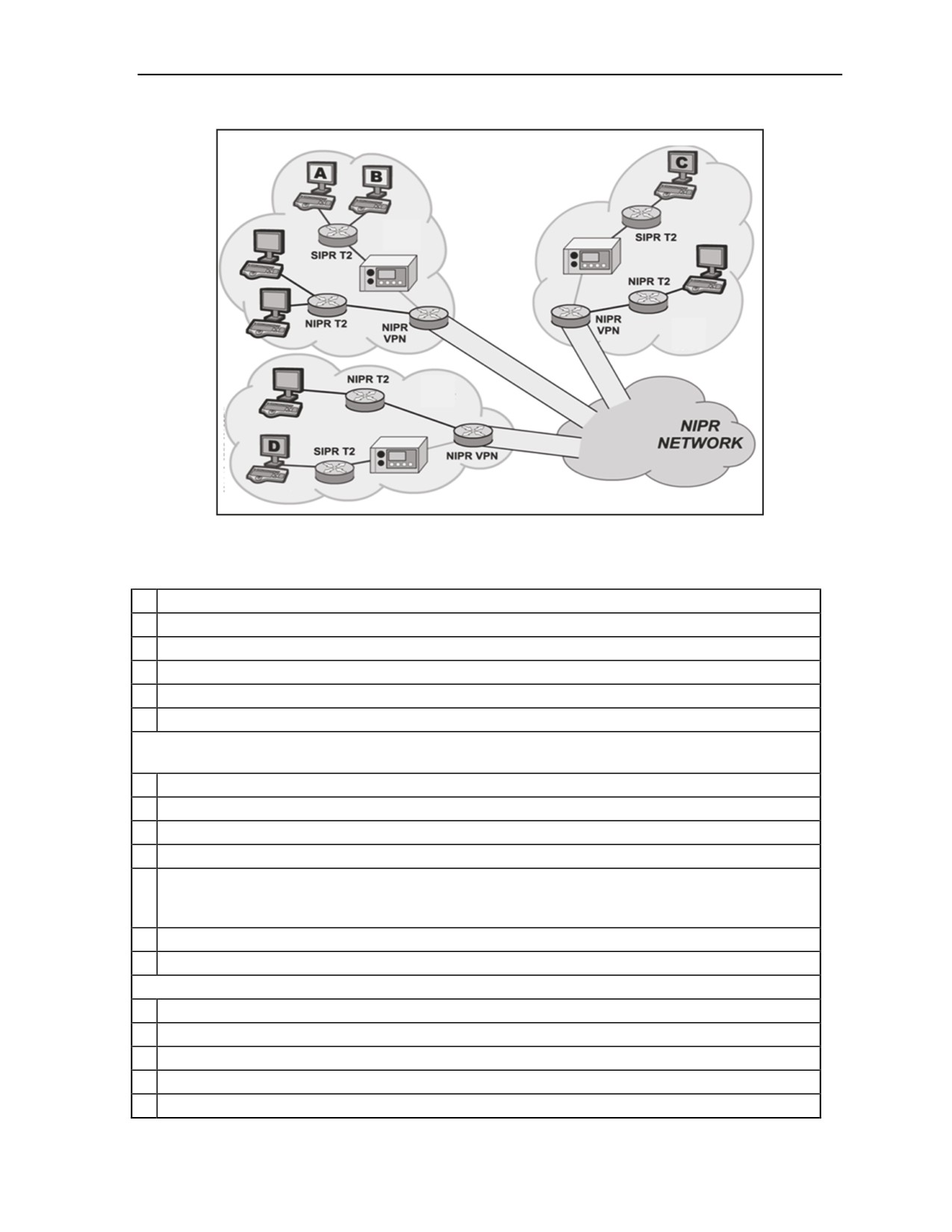
KG-175 TACLANE
B-32. The TACLANE is an INE that can encrypt IP traffic for transmission over IP networks. INEs are
used to “tunnel” traffic of one security level through networks of another security level. There are two
TACLANEs in the JNN shelter. The first TACLANE has its plain text Ethernet interface connected to the
NIPRNET interior router. The cipher text port is connected to the SIPRNET interior router. In this
configuration, data from the NIPRNET network can be encrypted and tunneled through the SIPRNET data
network. If required, the plain and cipher text connections on the TACLANE can be reconfigured by
cabling to tunnel SIPRNET through NIPRNET. The second TACLANE in the shelter has its cipher text
interface connected to the VPN router, and its plain text interface connected to the SIPRNET interior
router. The purpose of this configuration is to allow SIPRNET data to be encrypted as it traverses the Ku
TDMA transmission system. Figure B-7 illustrates the Secure Virtual Network with TACLANES, and
Table B-14 shows the steps for basic configuration of the KG-175.
5 September 2006
FMI 6-02.60
B-45
Appendix B
Figure B-7. Secure Virtual Network with TACLANEs
Table B-14. Configuring the TACLANE
1
To set date and time go to the OFFLINE MAIN MENU and select MAINT.
2
From Maintenance menu select DATE/TIME.
3
Use arrow keys to navigate to a particular digit of date and time.
4
Use +DIGIT and -DIGIT to increase or decrease each digit.
5
Select DONE when finished and YES to save changes.
6
Select YES to save changes and restart TACLANE.
Entering the TACLANE IP Address. NOTE: The TACLANE requires a Cipher Text IP address and
a Plain Text IP address as well as a Cipher Text and Plain Text default gateway.
1
From the Off Line Main Menu select CONFIG.
2
From the Configuration menu select NETWORK.
3
From the Configuration menu select IP COMM.
4
From the IP Communications menu select IP ADDRESS.
5
Use arrow keys to navigate to a particular digit of an IP address. Use +DIGIT and -DIGIT
function keys to increase or decrease each digit. Enter IP addresses for TL CT IP, TL PT IP,
GWY CT IP, and GWY PT IP.
6
Select DONE when finished.
7
Select YES to save changes, restart TACLANE , and return to Offline Main Menu.
Assign a Subnet Mask
1
From Offline menu select CONFIG.
2
From Configuration menu select NETWORK.
3
From Configuration Network menu select IP COMM.
4
From IP Communications menu select SUBNET MASK.
5
Use arrow keys to navigate to a particular digit of subnet mask. Use +DIGIT and -DIGIT
B-46
FMI 6-02.60
5 September 2006
Joint Network Node Components and Connectivity
Table B-14. Configuring the TACLANE
function keys to increase or decrease each digit. Enter CT and PT subnet mask.
6
Select DONE when finished.
7
Select YES to save changes and return to IP Communications menu.
Filling FIREFLY Vector Set. NOTE: The TACLANE must be offline with no security level selected.
Only one FireFly Vector Set may be filled. Any existing FireFly Vector Set must be deleted.
1
Attach end of fill cable to DTD serial fill port and the other end to TACLANE serial fill port.
2
From Offline Main Menu select KEY MGMT.
3
From Key Management window select FILL.
4
FILL FIREFLY VS menu is displayed.
5
Configure DTD to transmit operations FireFly Vector Set.
a
Power on DTD.
b
Highlight APPL and press ENTER.
c
Navigate down to Fill and press ENTER.
d
Use arrow key to highlight XMIT and press ENTER.
e
At Select a Transmit Mode highlight FILL and press ENTER.
f
Highlight Select and use down arrow to find required FireFly key. Each TACLANE in network
must have a unique FireFly key. Press ENTER.
g
Use arrow key to highlight Send and press ENTER.
h
At Send To screen highlight Direct and press ENTER.
i
At Connect to station press Send.
6
Select READY on TACLANE.
7
Screen displays “Initiate fill device operations or abort.” Transmit operations FireFly Vector
Set.
8
Select DONE and M_MENU to return to main menu.
Setting FireFly Security Level
1
From Offline Main Menu select Operations.
2
From Operations menu select SELECT LVL.
3
Select desired security level.
Configuring TACLANE static routing. NOTE: The TACLANE must be configured with routing
information for any remote TACLANE it will establish call paths with.
1
From Offline Main Menu select CONFIG.
2
From Configurations menu select SECURITY.
3
From Security menu select STATIC RTE.
4
From Static Route Generation menu select CREATE.
5
Enter network ID, subnet mask and TACLANE CT IP address of remote network you are
creating a route for.
6
Select DONE when finished and YES to save changes.
Bringing TACLANE online
1
From Offline Main Menu select OPERATION.
2
Select SECURE COMM.
3
The screen should display “SECURE COMM MAIN MENU” and classification level. The
TACLANE is ready for operation.
5 September 2006
FMI 6-02.60
B-47
Appendix B
CDIM
B-33. The JNN has three CTM-100C modems in the shelter. The purpose of the CDIMs is to convert the
NRZ data into CDI or fiber and to allow interfaces to be extended from the shelter using either CX11230
cable or FO cable. Each CTM-100 modem has two modem functions that convert NRZ data to either CDI
or FO data (three CTM-100s yield four modem functions per shelter). Each modem function can be
individually programmed for data circuit equipment (DCE) or data terminal equipment (DTE) operation.
The typical JNN application is for RS-530 DCE operation. The diphase output can, depending on data rate,
drive up to 2 miles. The fiber output, using multimode cable, can drive up to 10 miles at all data rates. Each
CTM-100 CDI interface has a corresponding normal through appearance on group patch panel A (modems
1 and 2) and group patch panel C (modem 3). This appearance is connected to a CX11230 SEP connection.
The CTM-100 fiber interfaces are directly connected to the TFOCA II SEP connections.
CSUM
B-34. There are two CSUMS in the JNN that are stand-alone units. Each of the two modems has four
corresponding binding posts on the SEP. The CSUMs have baseband RS-530 DCE interfaces to the GPP.
The function of the CSUM is to provide a modem to convert a network interface into a High-data-rate
Digital Subscriber Line (HDSL) for transmission over local telephone grade wire connections. The network
interfaces are RS-530 data components (TRC ports, NIPRNET serial router ports, KIV-7 encrypted
SIPRNET and NIPRNET router serial ports). The modulated output can operate in either one-loop or two-
loop mode. In one-loop mode, only one pair of wires is required for connection to the distant end. Data
payload in one-loop mode ranges from 128 to 2304 kbs in 64 kbs increments. In two-loop mode, two pairs
of wire are required for connection to the distant end. Near end pair one must connect to far end pair one,
and near end pair two must be connected to far end pair two. In two-loop mode, payload data rates vary
from 256 to 4608 kbs in 128 kbs increments. CSUM binding posts are provided for external wire
connection.
VOICE SWITCHING
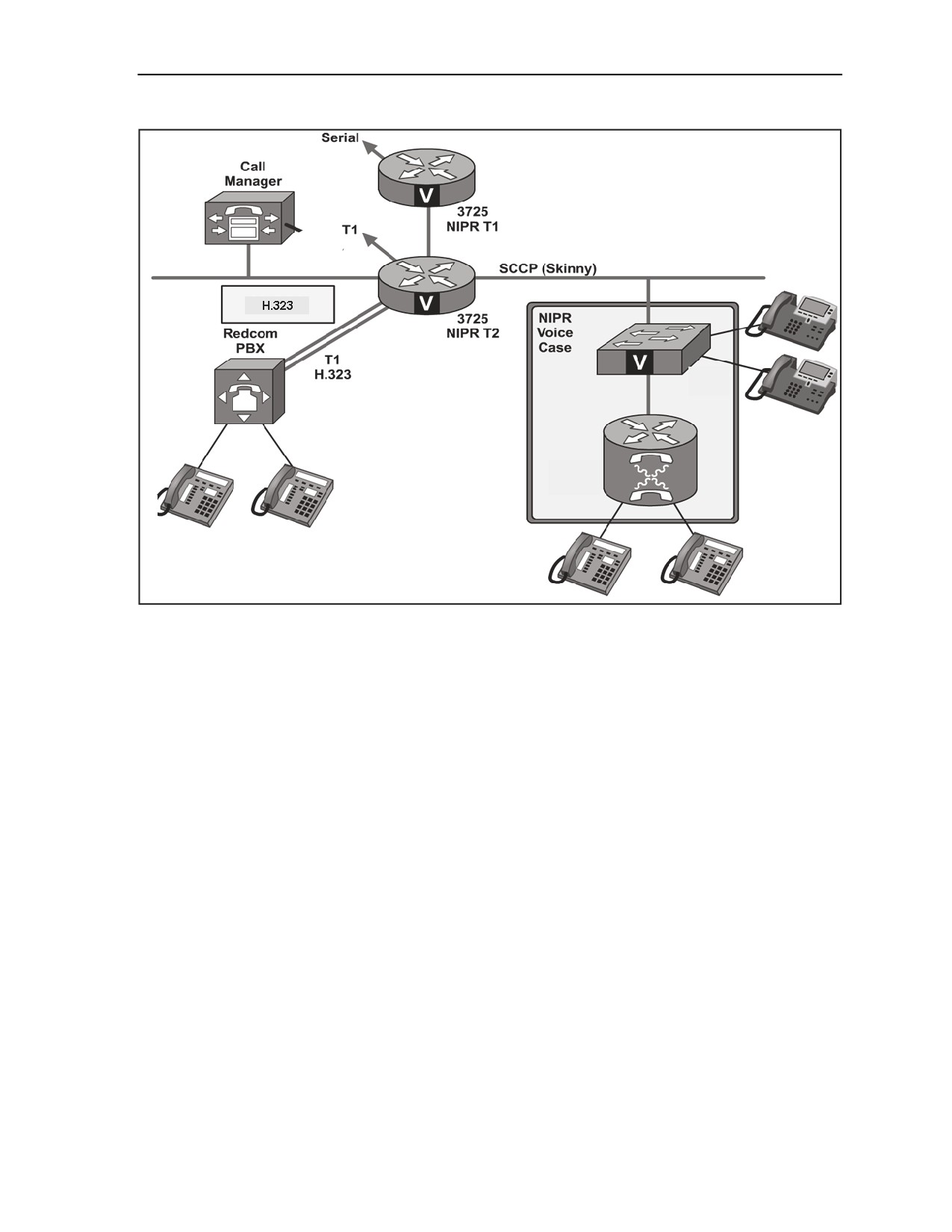
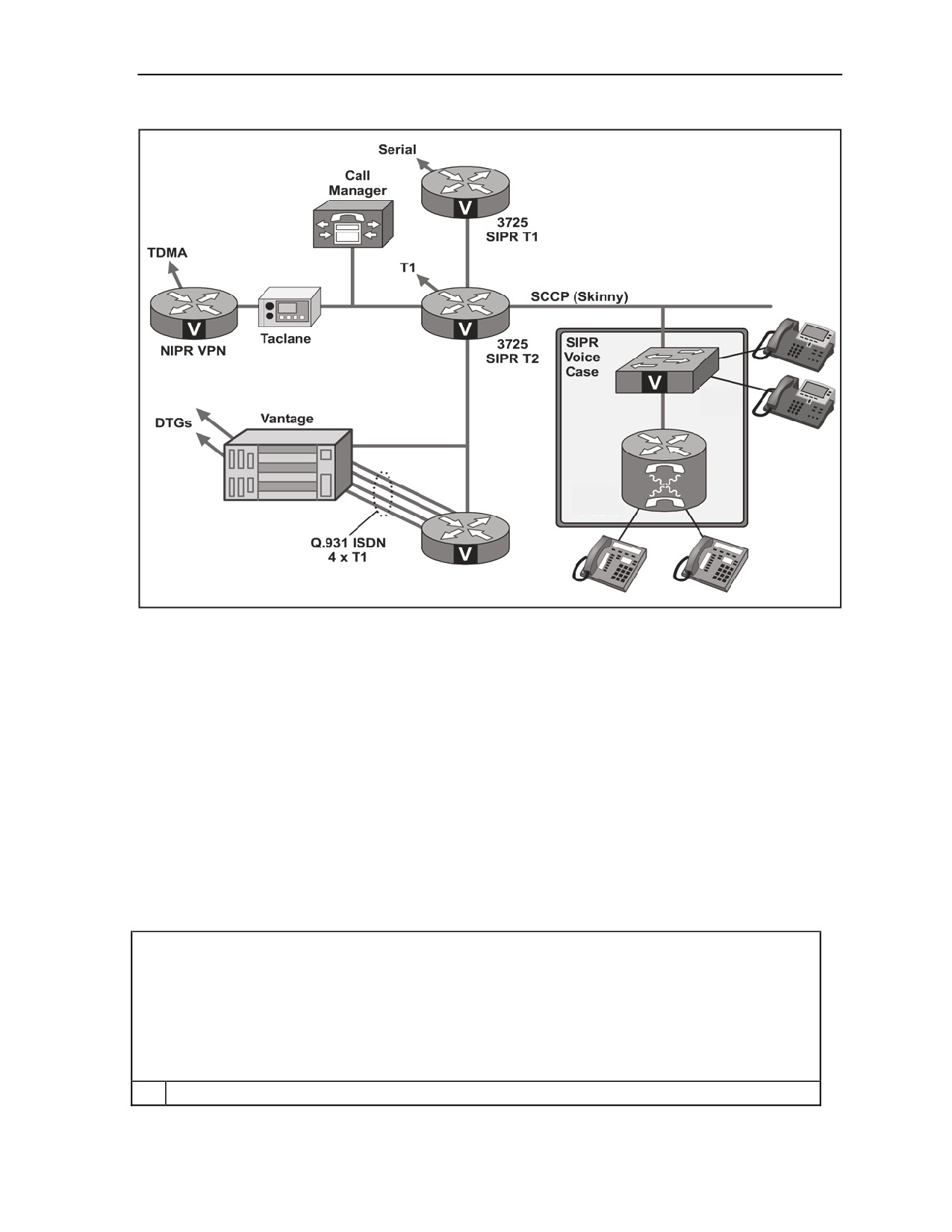
B-35. The JNN voice components are architected to interface with traditional tactical networks and to
combine tactical voice with data networks. The main voice components of the JNN voice system are the
PBX, Vantage, CM, and VG-248s. The PBX is a COTS voice switch mounted in the shelter. The Vantage
acts as an interface between the current forces tactical network and the VoIP network and can be used to
supply flood search routing, tactical numbering, and multi-level precedence and preemption for subscribers.
The CM software assists in call supervision and gateway call service for VoIP subscribers. Each VG248
converts 48 standard two-wire subscriber interfaces into CM compatible VoIP connections through the data
network to the CM. Also included as part of the voice network are the 3750 Ethernet switches (one per
security domain). The Ethernet switches are used to terminate and provide power to VoIP subscribers. With
the exception of the Ethernet switches and VG248s, all the voice components are mounted internal to the
shelter. Figure B-8 shows the NIPRNET voice switching, and Figure B-9 shows the SIPRNET voice
switching.
B-48
FMI 6-02.60
5 September 2006
Joint Network Node Components and Connectivity
Figure B-8. JNN NIPRNET Voice Diagram
5 September 2006
FMI 6-02.60
B-49
Appendix B
Figure B-9. JNN SIPRNET Voice Diagram
CM
B-36. The CM is a main component in the shelter voice architecture. There are two CMs in the shelter (one
dedicated to the NIPRNET domain, and another dedicated to the SIPRNET domain). The CM is physically
associated with a particular security domain by KVM and Ethernet connectivity to that domain. The CM
software function is hosted on a PC. The CM is a software-based call processing component providing
signaling and call control services to integrated telephony applications (e.g., VG-248 subscribers and IP
phones). The CM’s primary functions are as follows:
z
Call processing.
z
Signaling and device control.
z
Dial plan administration.
z
Phone feature administration.
B-37. Table B-15 contains the initial configuration steps for the NIPRNET and SIPRNET CM.
Table B-15. Configuring the Call Manager
NOTE When the Call Manager is installed, the following information is required to be configured:
Start Call Manager Server
Server Configuration
Call Manager Configuration
Gatekeeper
Trunk
Route Groups, Lists, Patterns
1
Install Call Manager software as supplied on the Call Manager Installation Disk.
B-50
FMI 6-02.60
5 September 2006

Joint Network Node Components and Connectivity
Table B-15. Configuring the Call Manager
2
Verify CallManager Services via the CallManager browser interface.
a
Open Internet Explorer and log in using admin account (jnnadmin, jnn1234$).
b
Select Application>Cisco CallManager Serviceability.
c
Select Tools/Service Activation, select jnncm and verify the following services are
enabled. If not. Enable and click update when done.
Cisco Call Manager.
Cisco TFTP.
Cisco Messaging Interface.
Cisco IP Voice Media Streaming App.
Cisco CTIManager.
Cisco MOH Audio Translator.
Cisco RIS Data Collector.
Cisco Database Layer Monitor.
Cisco CDR Insert.
3
Modifying Defaults.
a
Select Application>Cisco CallManager Serviceability.
b
Select your server.
c
Select Cisco CallManager.
d
Under Cluster Wide Parameter change t302 timer to 5000 msec.
4
Start Call Manager Server.
a
From the Call Manager Server desktop, double click Internet Explorer.
b
The Main Call Manager Administrator window opens.
5
Configure Call Manager Server.
a
From Call Manager Main menu, select System>Server.
b
Click Add a New Server or Modify the existing server.
c
Enter IP address of Server.
d
Click Update.
6
Configure Call Manager.
a
Choose System>Cisco CallManager.
b
Click Add a New Cisco Call Manager.
c
Enter appropriate settings:
Call Manager Name: <IP Address>.
Description : Same as the name.
Starting Directory Number: trunk prefix plus the start extension range.
Ending Directory Number: trunk prefix plus the highest directory number.
d
Click Insert to save Cisco CallManager configuration in database.
7
Configure Gatekeeper NOTE: Gatekeeper is only used in SIPRNET domain.
a
Choose Device>Gatekeeper. The Gatekeeper Configuration page displays.
b
Select Add a New Gatekeeper or Modify the existing one. Add the following information:
Hostname IP Address: <VantageGK IP>.
Description:
Registration Time to Live:
Registration Retry Timeout:
5 September 2006
FMI 6-02.60
B-51
Appendix B
Table B-15. Configuring the Call Manager
Enabled Device:
c
Click Insert. The page updates and name of new gatekeeper displays in Gatekeepers list.
8
Configure Intercluster Trunk.
a
Choose Device>Trunk.
b
Select Add a New Trunk. Enter the following information using pull down selection.
Trunk Type: Intercluster Trunk (Gatekeeper Controlled).
Device Protocol: Intercluster Trunk.
c
Click Next. The trunk Configuration screen appears.
d
Enter the following information:
Device Name: Name of the trunk.
Description: A description of the trunk.
Calling Party Selection: Originator.
Calling Party Presentation: Allowed.
(SIPRNET Domain only) Gatekeeper Name: Vantage IP address.
Terminal Type: Gatekeeper.
Technology Prefix: Trunk prefix number.
e
Click Insert. Page updates and name of new trunk displays in trunk list.
9
Configure Route Group.
a
Select Route Plan>Route Group.
b
Click Add a New Route Group.
c
Choose device name ports ALL set order #.
d
Click Insert.
10
Configure Route List.
a
Select Route Plan>Route List.
b
Click Add a New Route List.
c
Name and description.
d
Click Insert.
11
Configure Route Pattern.
a
Select Route Plan>Route Pattern.
b
Click Add a New Route Pattern.
c
Enter appropriate Route Pattern.
d
Click Insert.
12
Restart Call Manager to register with the Gatekeeper.
a
Select Application>Cisco Call Manager Serviceability.
b
Select Tools>Control Center.
c
Click on Server.
d
Select Cisco Call Manager.
e
Click Stop.
f
Click Start.
B-52
FMI 6-02.60
5 September 2006
Joint Network Node Components and Connectivity
VANTAGE AND GATEWAY ROUTER
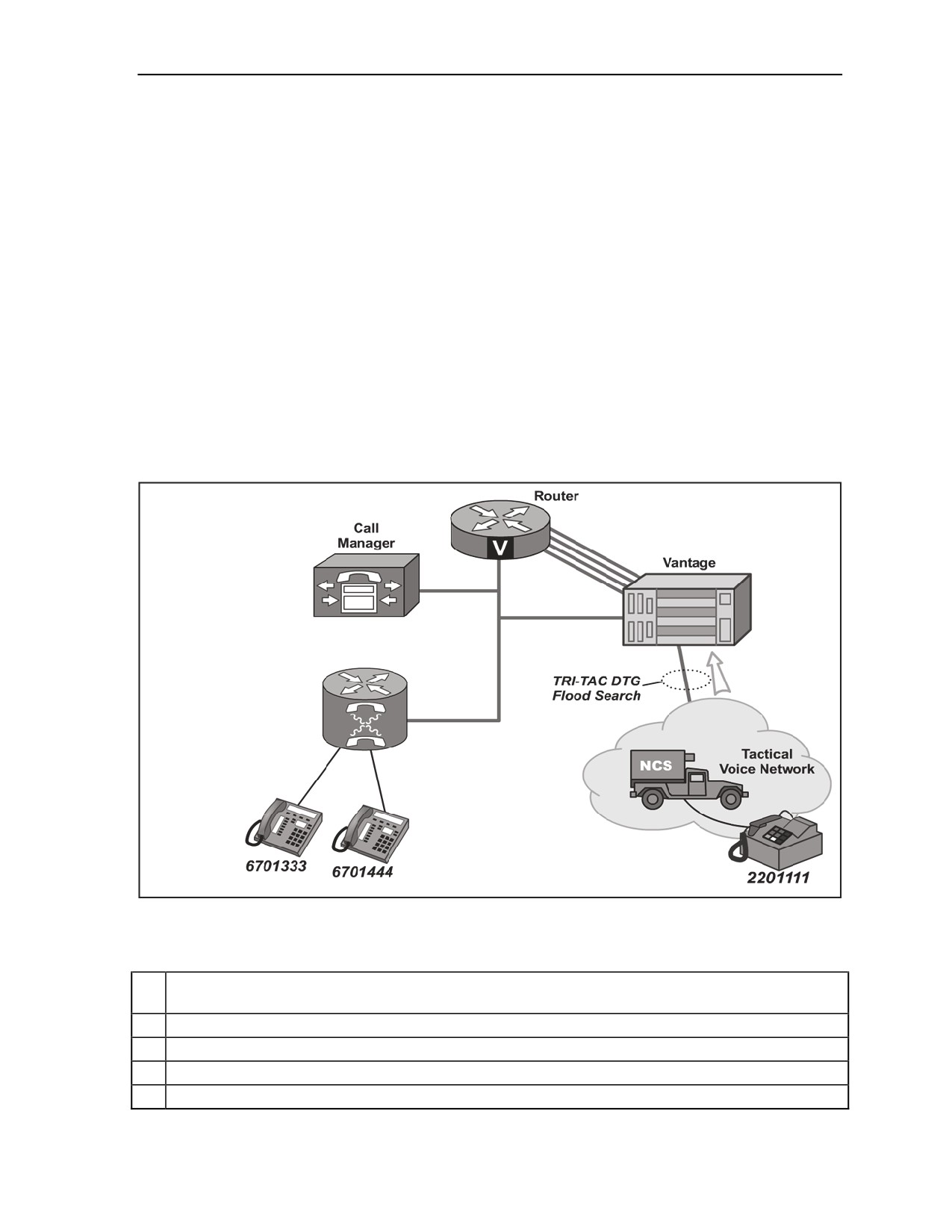
B-38. The Vantage and SIPRNET voice gateway router work together to provide a seamless interface
between the VoIP network and the tactical network. The Vantage acts as a H.323 gatekeeper providing
services such as routing, bandwidth, and link management to non-tactical SIPRNET JNN subscribers. The
Vantage allows JNN subscribers to invoke the tactical network flood search algorithms to locate and call
properly classmarked subscribers in the tactical network. Its digital transmission group interface to the
tactical network is a flood search DTG. The JNN Vantage is equipped with two DTG cards. Its diphase
outputs are cabled to the group patch panel (GPP). At the GPP, the Vantage DTGs are normal through
connected to CX-11230 SEP appearances. The cipher text (CT) and plain text (PT) interfaces for the
Vantage TED interfaces are patchable. The Vantage has two serial ports that connect to CPP-A. Each serial
port corresponds to a Tactical High Speed Data Network (THSDN) interface on each DTG. At CPP-A, the
Vantage serial connection can be patched either directly to a SIPRNET router port or to one of the four
FEC functions. From the FEC unit, they may then be patched to the SIPRNET routers. The Vantage
processor card has an Ethernet connection to the SIPRNET tier 2 router and monitor, mouse, and keyboard
connections to the domain. The Vantage is populated with a 16-port T1 card. Four of the T1 ports are
directly connected to four T1 ports on the SIPRNET voice gateway router. The SIPRNET voice gateway
router provides a gateway function between the VoIP network and the Vantage. Figure B-10 shows the
voice connectivity to MSE and TRI-TAC networks. Table B-16 shows the startup procedures for the
Vantage.
Figure B-10. Voice Connectivity to MSE and TRI-TAC Networks
Table B-16. Vantage Start up and Configuration
1
Verify all physical network connections have been made. Monitor, keyboard and mouse have
been attached to the Call Manager and IP address of Vantage Gatekeeper set.
2
Flip red main power switch on back of Vantage node to on.
3
Flip power switch on front of KIV-19’s to on.
4
Press main power button on front of Cisco Call Manager.
5
Wait for Vantage to completely boot.
5 September 2006
FMI 6-02.60
B-53

Appendix B
Table B-16. Vantage Start up and Configuration
6
Log into Vantage operating system from the Vantage Console.
Enter user name : administrator.
Enter password: password.
7
Double click Internet Explorer icon from desktop.
8
Observe the default homepage is the Vantage gatekeeper.
9
Log in with the appropriate username and password.
Enter User name: gdadmin.
Enter password: helicopter.
10
Select Registered Gateways under H.323 Entities header and verify that Cisco router
(JNN3725) and Call Manager (cm855_1) are displayed with their respective prefixes.
11
Select Node Configuration under the Node header and verify/configure IAC, Switch Code,
Operator Number, and …, fields as desired.
12
Select Affiliation Lists under Subscribers header, scroll down, and click on desired affiliation list
number. On Affiliation List Details screen select Affiliate.
13
Select Node Timing under Node header and verify/configure sources for Primary Master and
Backup timing.
14
Ensure that necessary COMSEC has been loaded into KIV-19s within Vantage node.
15
Ensure DTG at PBX has been configured and initialized.
16
Select DTG Characteristics under Node header. There are 2 available DTGs that can be (M)
Modified, (D) Deleted, and/or (R) Reset.
(M) Modify desired DTG's characteristics selecting associated blue M box. At Modify DTG
Characteristics screen, change desired DTG setting(s) and select OK button on top right of
screen when finished. It is recommended DTG be (R) Reset after modifications have been
made.
(D) Delete function will remove DTG assignment from Vantage and is not recommended without
consulting Quick Reference Guide.
(R) Reset desired DTG by selecting associated green R box. Select OK at acknowledgement
prompt. Note: Verify LED indicators on front of respective DTG card fall in sync (switch from red
to all green within approx. 30s after (R) Reset).
17
Using the Affiliated Subscribers command, verify that each affiliated subscriber has the following
information displayed:
TUID.
Personal Code.
Profile number.
Indication if subscriber is a PBX subscriber.
18
Select Node Timing from Menu and set the Primary Master and Backup.
19
Select OK.
PBX
B-39. The JNN PBX is a one-shelf COTS ISDN gateway switch (IGX). The T1 interfaces are directly
connected to the GPP. From the GPP, the T1s may be patched to the SEP or to TRC primary rate card
(PRC) ports. The 32 plain old telephone service (POTS) lines are directly connected to the SEP. The users
may be connected to the SEP via two standard 1077 junction boxes. One junction box will allow the
connection of 24 two-wire pairs or subscribers. The other will provide two two-wire terminations and direct
current (DC) closure commercial office lines (when the PBX is configured with its alternate population of a
DC closure card). It should be noted that from the timeslot perspective the IGX shelf is over-subscribed
with the 4 T1s and 32 POTS subscribers. It is likely that all 4 T1s will not be allocated. The PBX is
B-54
FMI 6-02.60
5 September 2006
Joint Network Node Components and Connectivity
configured via a console port interface. The PBX console interface is directly cabled to a port on the
NIPRNET terminal server. The operating system and feature sets have been installed according to the
defined configuration and card set provided with it. PBX translations are stored on the processor’s personal
computer memory card international association (PCMCIA) translation card (slot 1). These translations
contain the defined dialing plan, and routing for the JNN voice network. During system installation or
bootup, the PBX system will automatically load the translations from the PCMCIA translation card. An
alternate card is supplied with the JNN for connection to two ground-start/loop-start DC closure
commercial office trunks. This trunk card, ground-start loop-start ringdown, is installed in slot 9 and
replaces the T1 cards occupying slots 9 and 10.
TRC
B-40. The TRC is the means of interconnecting and controlling secured and unsecured digital trunks
between JNNs as well as a limited number of channel level telephony and data equipment. Connection
between any two like ports in the TRC network is possible if there is at least one path between the
respective stations. The connection between data points in the network is referenced as a call. This is
independent of whether the data path carries voice or data traffic. If a link in the network is broken, and a
path providing sufficient bandwidth is available, the TRC automatically reroutes the data calls. The TRC
also provides a demand-assigned bandwidth capability that dynamically allocates only the amount of
bandwidth needed to support a call (plus a minimal amount of overhead bandwidth). The TRC is a STEP
site compatible multiplexer. Configurable inputs for the TRC are serial interfaces, T1 circuits, and diphase
interfaces. The TRC can have three standard aggregate outputs. Additionally, the TRC is configured and
populated for T1 circuit voice compression and echo cancellation capabilities. The JNN configuration has
one shelf. The shelf is populated with TRC common equipment cards and feature cards. The shelf has 12
slot sets with two integral power supplies. A slot set is defined as a front and back card. (Note that some
card types do not require both front and back card slots to be simultaneously populated.) The TRC is
configurable via a serial interface to the NIPRNET configuration PC. The TRC is configured with trunk
modules, data modules, and voice modules. Typically, with the exception of the PrimeVoice Secure-12
(PVS-12) Module, a module is comprised of a front card and a back card.
PRC
B-41. The JNN TRC contains two PRC modules that consist of a PRC front card and a DS-1 rear interface
card. Each module has two T1 interfaces to yield a system capacity of four T1s. The fundamental purpose
of the T1 module is to allow T1 interfaces to be brought into the TRC fabric for multiplexing. The
secondary purpose of one of the four PRC interfaces is for system timing. The TRC can be configured to
recover and derive clock from a PRC’s T1 interface. Of the four T1 interfaces, one is cabled to be normal
through to a T1 output on the GPS. The timing T1 allows TRC timing to be taken directly from the GPS.
This is a core element in the JNN system-timing scheme. All four PRC T1 interfaces are connected to the
GPP. At the patch panel they may be connected to T1 interfaces off of the PBX, T1 interfaces from the
NIPRNET router, or to external T1s via a SEP patch connection.
PVS-12 Module
B-42. The PVS-12 Module consists of a single front card without a rear interface card. Each PVS-12
Module provides 12 channels of voice compression. With two cards supplied in the JNN, a total of 24 voice
ports may be compressed at any one time.
High Speed Data (HSD) Module
B-43. The JNN configuration has four HSD modules. Three are configured with dual RS-530 back cards,
and one has a dual CDI DCE back card. The purpose of the HSD card in the system is to allow serial data
to be brought into the TRC fabric. The 530 back cards allow RS-530 formatted data to be interfaced to the
TRC. The dual CDI card allows either 530 or conditioned diphase formatted data to be interfaced to the
TRC. Each of the four HSD modules has two back card RS-530 DCE ports cabled to the communication
patch panel. At the communication patch panel, the 530 ports may be patched to NIPRNET serial data
interfaces, KIV-7 encrypted SIPRNET serial interfaces, or modems to introduce data from devices external
5 September 2006
FMI 6-02.60
B-55
Appendix B
to the shelter to the TRC. The dual CDI back card has two additional CDI connections to the GPP. At the
GPP, the two HSD CDI ports can be connected to the Vantage DTG (not typical), CTM-100 outputs, or to
external interfaces via SEP appearances. It should be noted that though the dual CDI back card has both
530 and CDI interfaces for each of its two ports, only one mode can be invoked for a port at a time.
SA-TRK Module
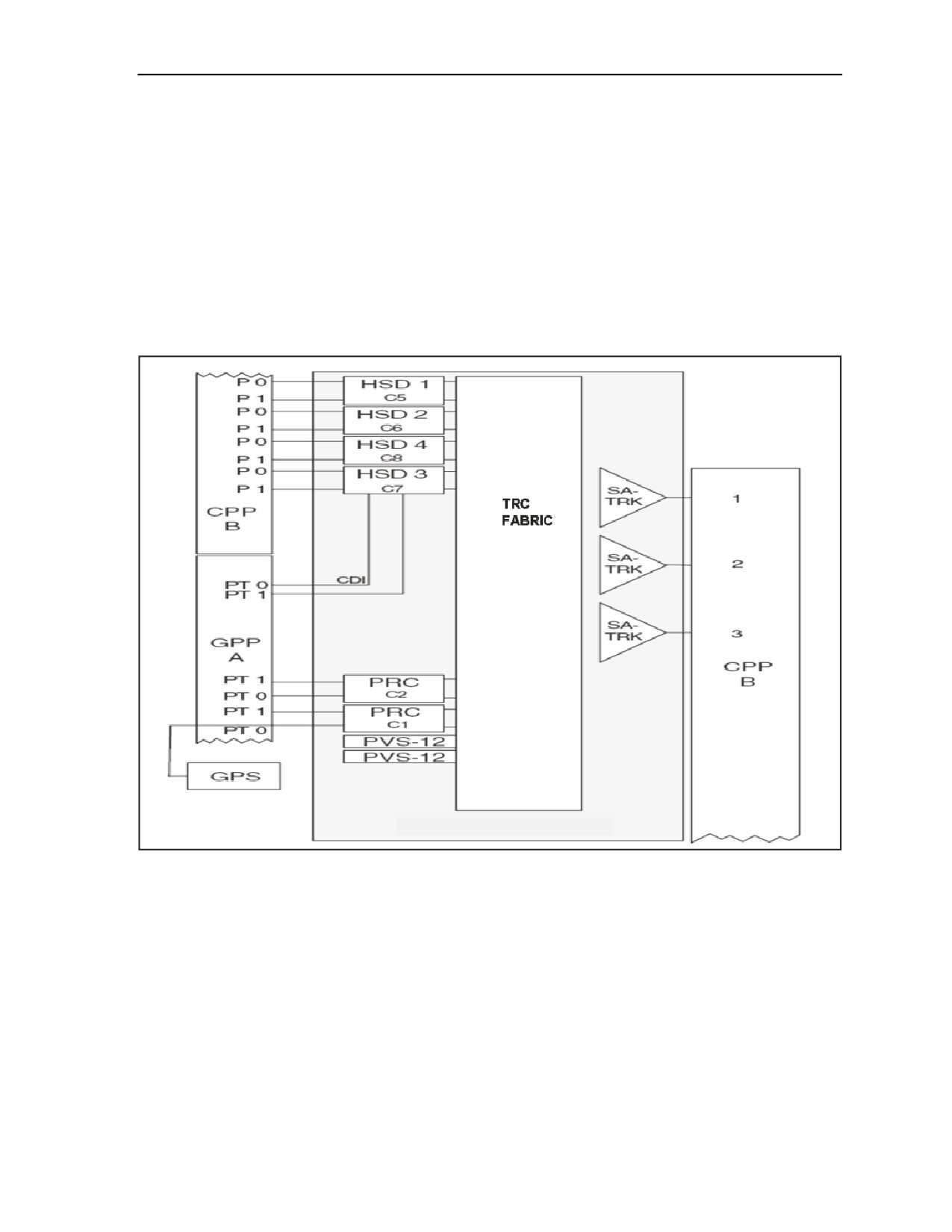
B-44. The TRC has three SA-TRK modules. Each module has one interface. The SA-TRK modules are the
main aggregate interfaces for the TRC. Information from other voice, data, and trunk modules can be
combined and routed out of the TRC via the SA-TRK modules. Each SA-TRK interface connects to the
communications patch panel. In a typical application, the SA-TRK will be patched to the plain text
interface of a TED KIV-19. The CT interface of the KIV-19 will be patched to a modem to exit the shelter.
Figure B-11depicts a TRC block diagram.
Figure B-11. TRC Block Diagram
TRC Timing
B-45. The TRC has the capability to recover timing from one of six external sources. The TRC is
configured to recover primary timing from the shelter GPS via a T1 on a PRC. Secondary timing may be
derived from any trunk interface (maximum of 2). Timing source configuration is done via software
strapping of the node and the interface cards. During TRC database initialization, the TRC prompts for
timing configuration information. The data for TRC timing may be entered at that time or later. If not
entering timing data during the database initialization process, it will be necessary to use the MODIFY
NODE command to enter the primary and alternate timing sources. A typical installation will use the PRC
digroup 0 to recover timing from the shelter GPS. A secondary backup timing source may be provided
from one of the trunk cards.
B-56
FMI 6-02.60
5 September 2006
Joint Network Node Components and Connectivity
TRC Domain
B-46. The TRC operates in a domain of nodes. Each individual network is called a domain. A domain is a
TRC network that can comprise from one up to 250 nodes. Domains are connected to each other by
gateway nodes. A gateway node is physically connected to its neighbor gateway node (NGW) in the other
domain through a gateway link (GWL). A gateway link is a trunk-side connection between two domains
that enables calls to originate in one domain and terminate in another domain. Local domain parameters are
set to the default values when the node is initialized. These parameters are used to specify and configure
domain information for the node.
FLEXMUX
B-47. The flexmux is a multi-channel synchronous time-division digital multiplexer combined with a
digital signal level 3 (DS3) FOM. In the JNN configuration, it has two multiplexed groups. It multiplexes
up to four inputs into a single coaxial cable 44.736 Mbs (megabits per second) which is applied to an
internal DS3 FOM card. The flexmux has built in self test diagnostics and must be configured through a
command line interface.
KIV-7 ENCRYPTION DEVICE
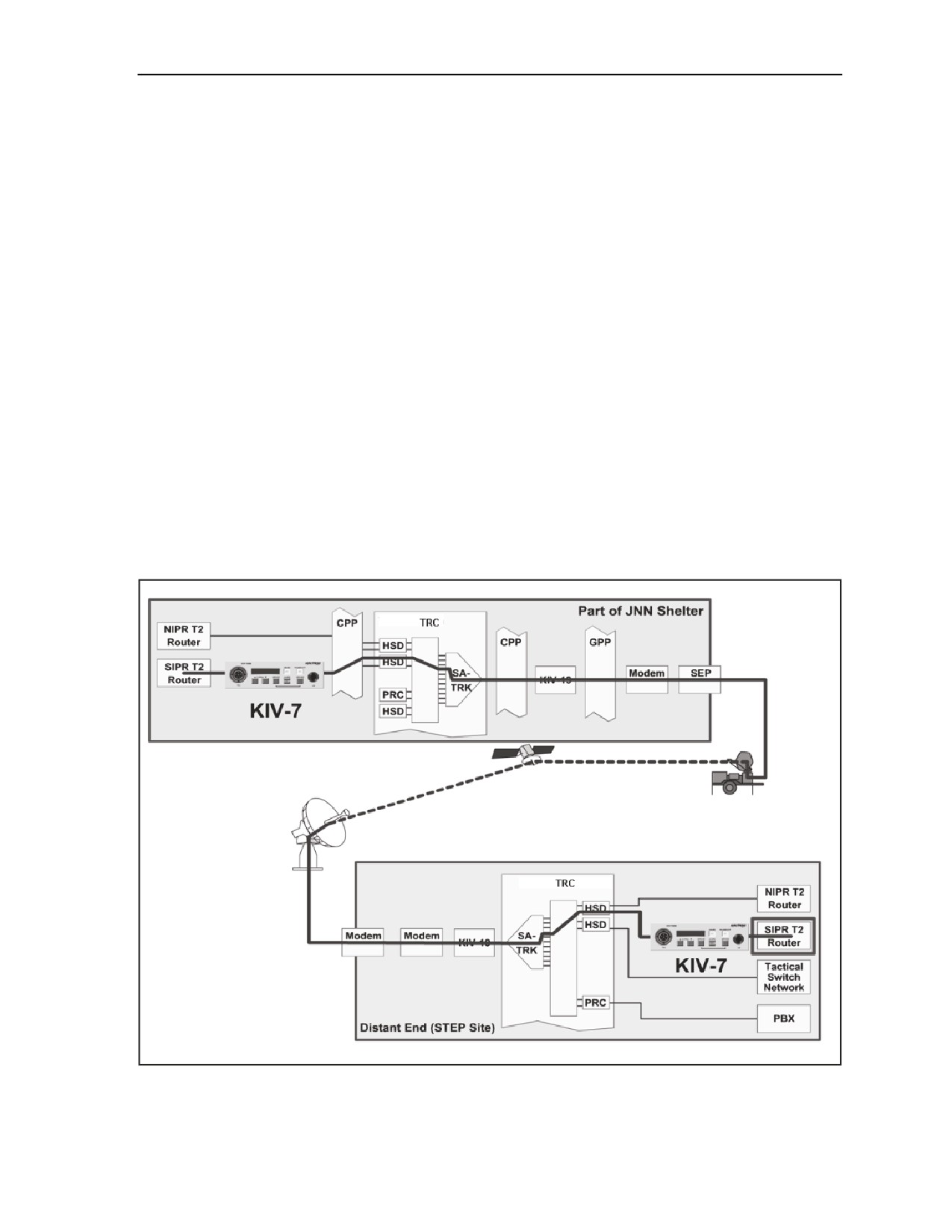
B-48. The JNN contains four KIV-7 data encryption devices to encrypt the red SIPRNET serial data lines
from the SIPRNET routers before they appear on the black patch panel. Once encrypted by the KIV-7s
(and rendered black), the serial lines from the SIPRNET router may be connected to other black interfaces
such as multiplexers and modems via the patch panel. A KIV-7, or compatible unit, is required at the far
end to decrypt the SIPRNET serial line and interface it to a red SIPRNET device. Figure B-12 shows
typical signal flow using a KIV-7.
Figure B-12. Signal Flow Using KIV-7
5 September 2006
FMI 6-02.60
B-57
Appendix B
TED
B-49. The JNN shelter has 12 KIV-19 TEDs to perform digital data encryption and decryption in full
duplex synchronous operation. They use identical key generators for transmit and receive. The KIV-19s
can operate at data rates between 9600 bps and 13 Mbs. When operated in “traditional crypto mode” the
KIV-19A is cryptographically compatible with the following equipment types: KG-81, KG-94, KG-94A,
KG-194, KG-194A, KG-95, and KIV-19s, when operated at operationally common data rates. The KIV-
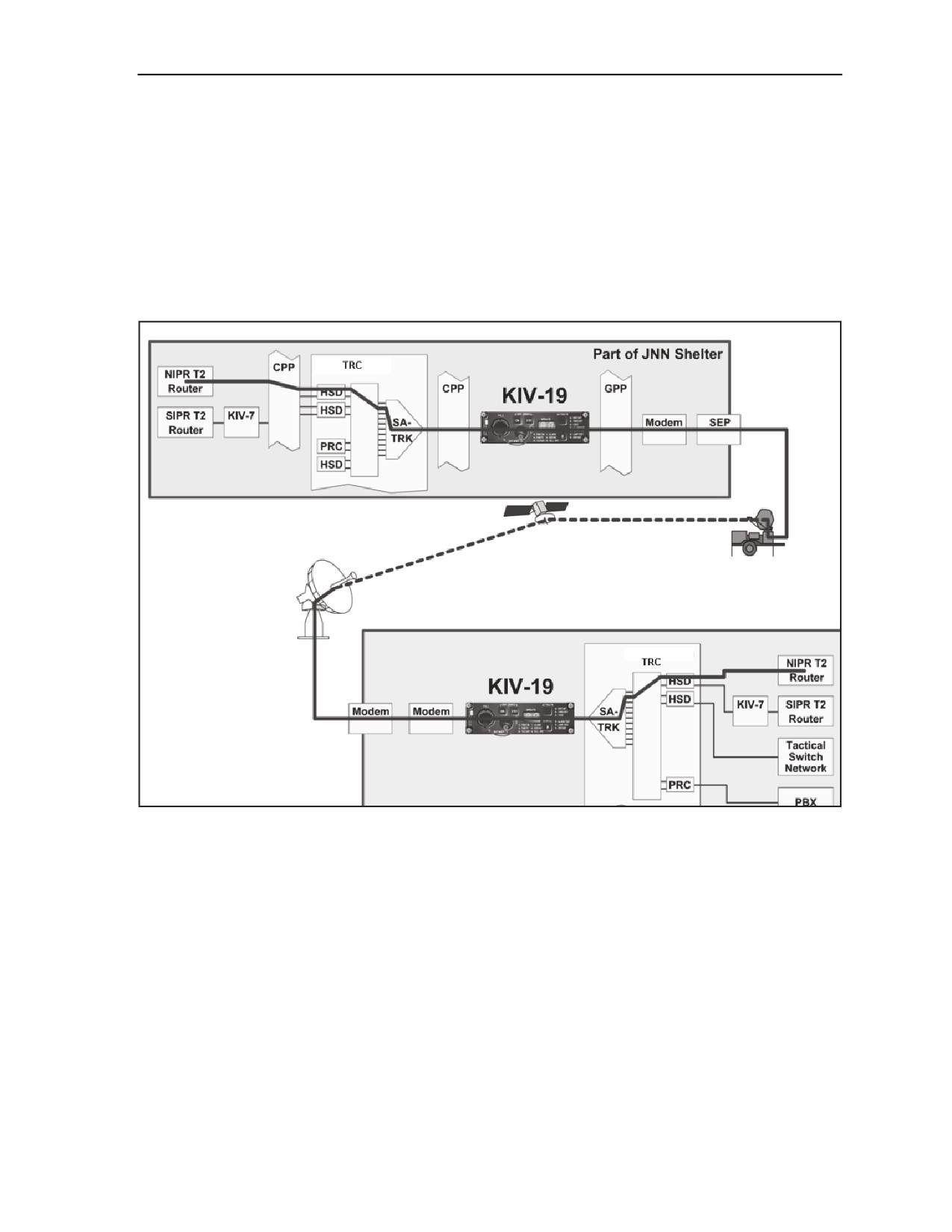
19s are used in the JNN system to bulk encrypt aggregate data streams (as from the TRC SA-TRK
interfaces), or to encrypt serial data streams from the SIPRNET router as a KIV -7 does. Because some
systems use the KIV-7 for this and some a KIV-19 and they are not compatible, the JNN has the ability to
use either for wider interface compatibility. Figure B-13 shows a typical application of the KIV-19.
Figure B-13. Typical KIV-19 Application
NETWORK MANAGEMENT
B-50. A Panasonic Toughbook laptop computer with related software is used within each security domain
to provide a manager platform. The node manager provides monitoring and control capabilities that report
on the condition of the network components. It also has the capability to build and save device
configurations.
SIGNAL ENTRY PANELS
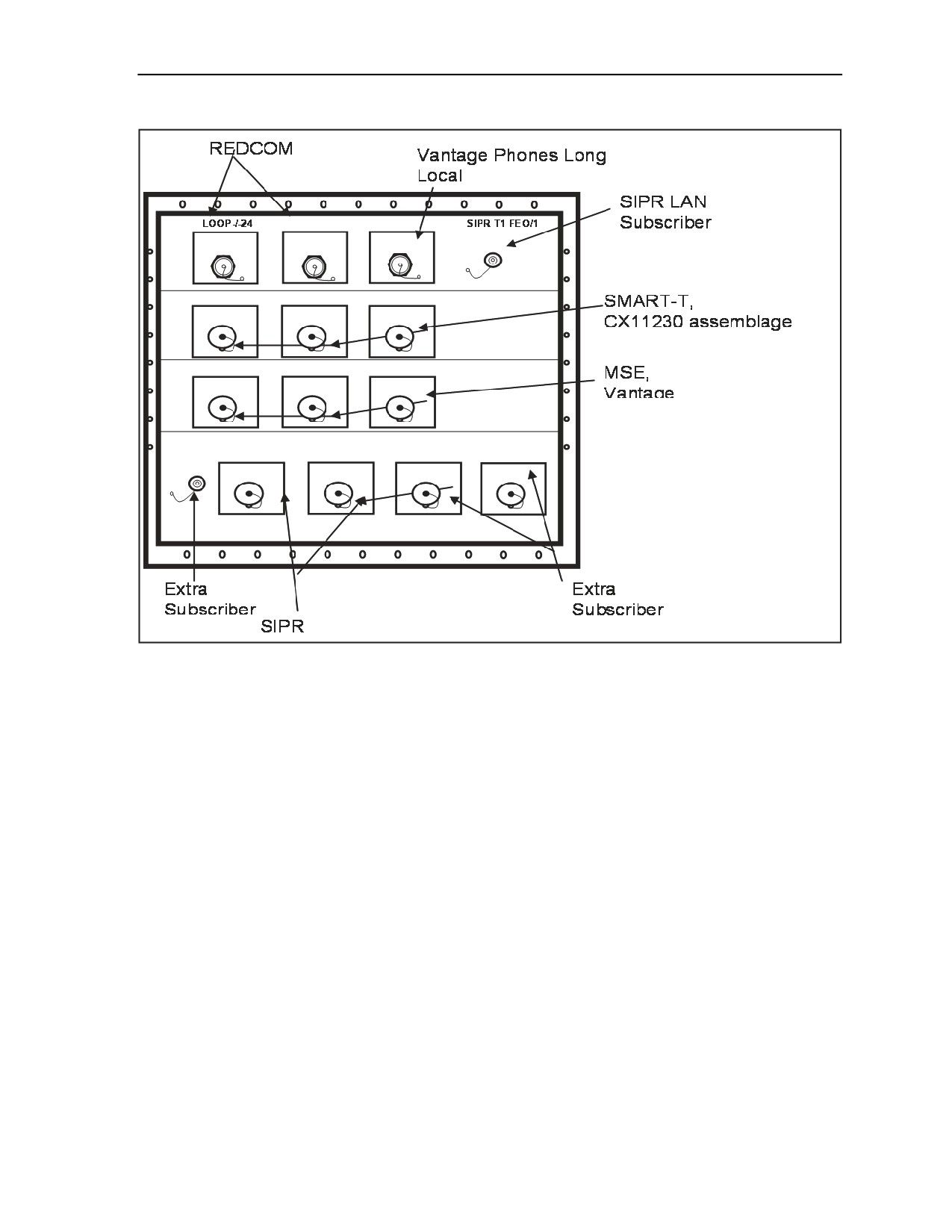
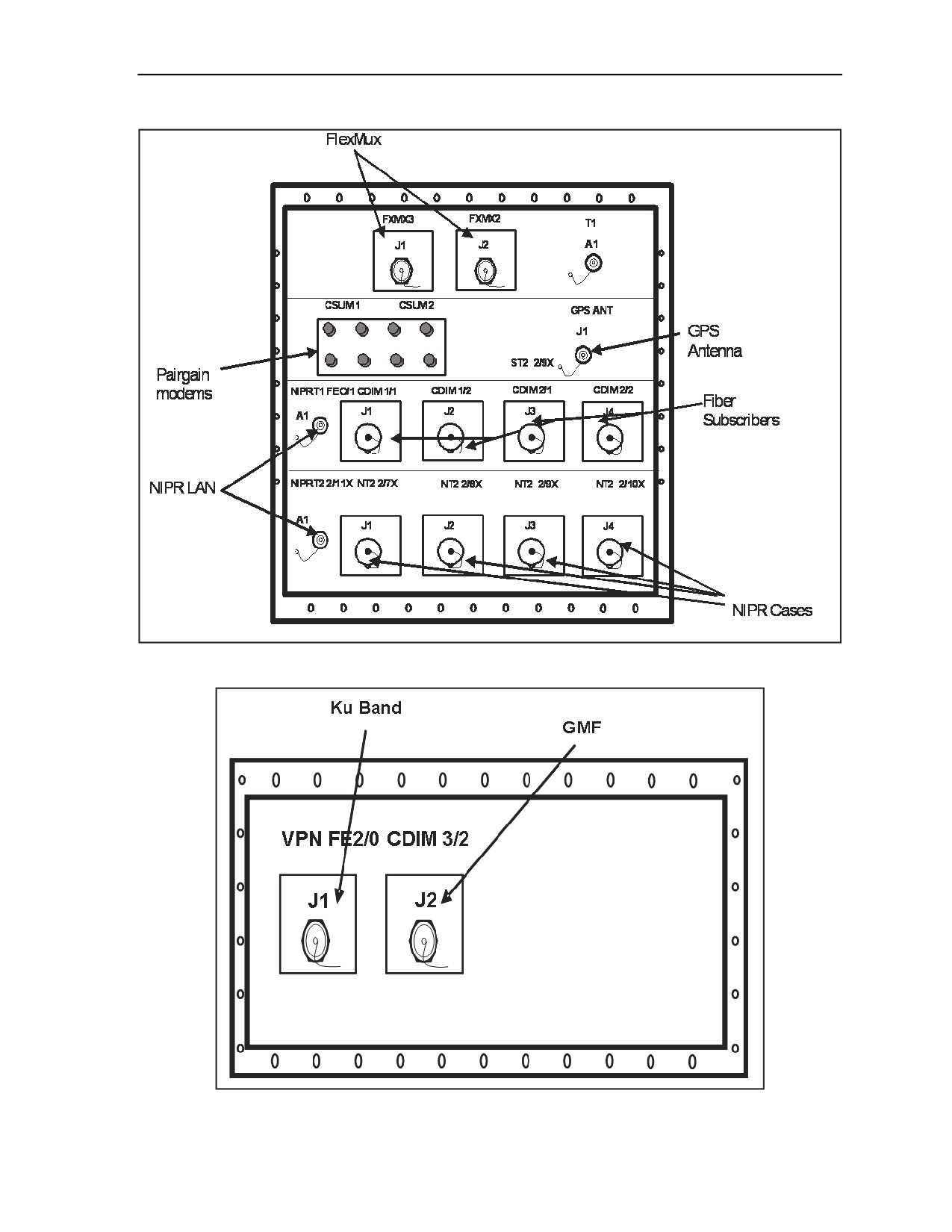
B-51. There are three SEPs on the JNN designated as Metal Plate (MP) 1, MP2 and MP3. MP1, as depicted
in Figure B-14, provides the cable connections for the SIPRNET domain as well for the current forces
DTGs to the Vantage. MP2, as depicted in Figure B-15, provides the cable connections for the NIPRNET
domain as well as the GPS and flexmux. MP3, as depicted in Figure B-16, provides the cable connections
for the Ku band and GMF.
B-58
FMI 6-02.60
5 September 2006
Joint Network Node Components and Connectivity
Figure B-14. Cable Connections for MP1
5 September 2006
FMI 6-02.60
B-59
Appendix B
Figure B-15. Cable Connections for MP2
Figure B-16. Cable Connections for MP3
B-60
FMI 6-02.60
5 September 2006
Joint Network Node Components and Connectivity
SATELLITE TRANSPORTABLE TERMINAL
B-52. The primary transmission means for the JNN is the satellite transportable terminal. It consists of a
2.4M Ku band antenna mounted on a tactical trailer with associated equipment to provide access to the Ku
band commercial satellite constellation. It is also configurable for Ka Band as it becomes available. It
supports FDMA and TDMA networks at the division or BCT level. See Appendix D for detailed
information on the satellite transportable terminal.
TRANSIT CASES
B-53. The JNN also has three SIPRNET data cases and two NIPRNET cases that are typically located in
the division and BCT TOCs, which provide subscriber support for voice and data. Refer to Appendix C of
this manual for detailed information on this equipment.
MAINTENANCE
B-54. The following is guidance for troubleshooting and performing operator-maintainer (MOS 25N) level
maintenance on the JNN. The maintenance on the JNN requires an operator-maintainer who is familiar
with the functional operation, information, and troubleshooting procedures contained in the maintenance
technical manuals for the JNN equipment.
B-55. Located in Technical Manual 11-5805-861-13&P-1, & P-2 (Operator, Unit and Direct Support
Maintenance Manual Including Repair Parts and Special Tools List Central Office, Telephone Automatic
AN/TTC-59(V1),(V2)) are troubleshooting charts, equipment indicators, displays, and fault isolation
procedures to assist the operator-maintainer with troubleshooting, repairing, and replacing equipment
within the JNN.
B-56. The troubleshooting procedures are based on fault indicator observations during normal operations.
Fault indicators can be generated by both visual alarms and generated user reports. The visual alarms
consist of LEDs which may consist of single or multiple indicators signaling minor or major alarms within
the equipment.
B-57. The operator-maintainer has several steps that must be exercised before determining equipment
failures. The primary troubleshooting objective is to isolate the failure at the lowest level. Flow charts are
provided in the technical manuals to assist in troubleshooting, along with alarm summaries which report
results of built in tests.
B-58. Once the failure has been identified, the proper procedures to correct the problem will require
knowledge of the process. Within the two level maintenance guidelines, the field level maintenance
requires the operator to replace COTS equipment from spares located on site. According to Standard
Operating Procedures (SOP) the equipment is forwarded to the S-6 on DA Form 2407 or DA Form 5504
and then to the BCT/DIV Customer Field Service Representative (CFSR).
5 September 2006
FMI 6-02.60
B-61
Appendix C
Command Post Node Component Listing, Startup, and
Maintenance Procedures
This appendix will cover the CPN component listing, startup, and maintenance
procedures. The CPN provides enhanced voice and data capabilities along with the
ability to interface directly to the Ku band or LOS radio transmission resources down
to the support battalions. The CPN interface cases located at the division and BCT
level are deployed with the JNN shelter. The SIPRNET and NIPRNET cases, at the
division and BCT level, provide data services and voice switching functions, which
provide VoIP, transmission system Ku band services (TDMA and FDMA), and user
LAN services for the subscriber to mesh into the GIG. The CPN cases located at the
BN are deployed separately with the battalions. The CPN SIPRNET cases provide
data services and voice functions which provide only TDMA service to the battalion
level.
DIVISION AND BRIGADE INTERFACE CASES
C-1. The division and brigade CPNs are lightweight deployable transit cases that consist of SIPRNET and
NIPRNET communication processing equipment for voice and data functions. Each division is fielded two
CPNs, whereas each BCT is fielded only one. Refer to Figure C-1 for SIPRNET and NIPRNET interface
components.
SYSTEM COMPONENTS
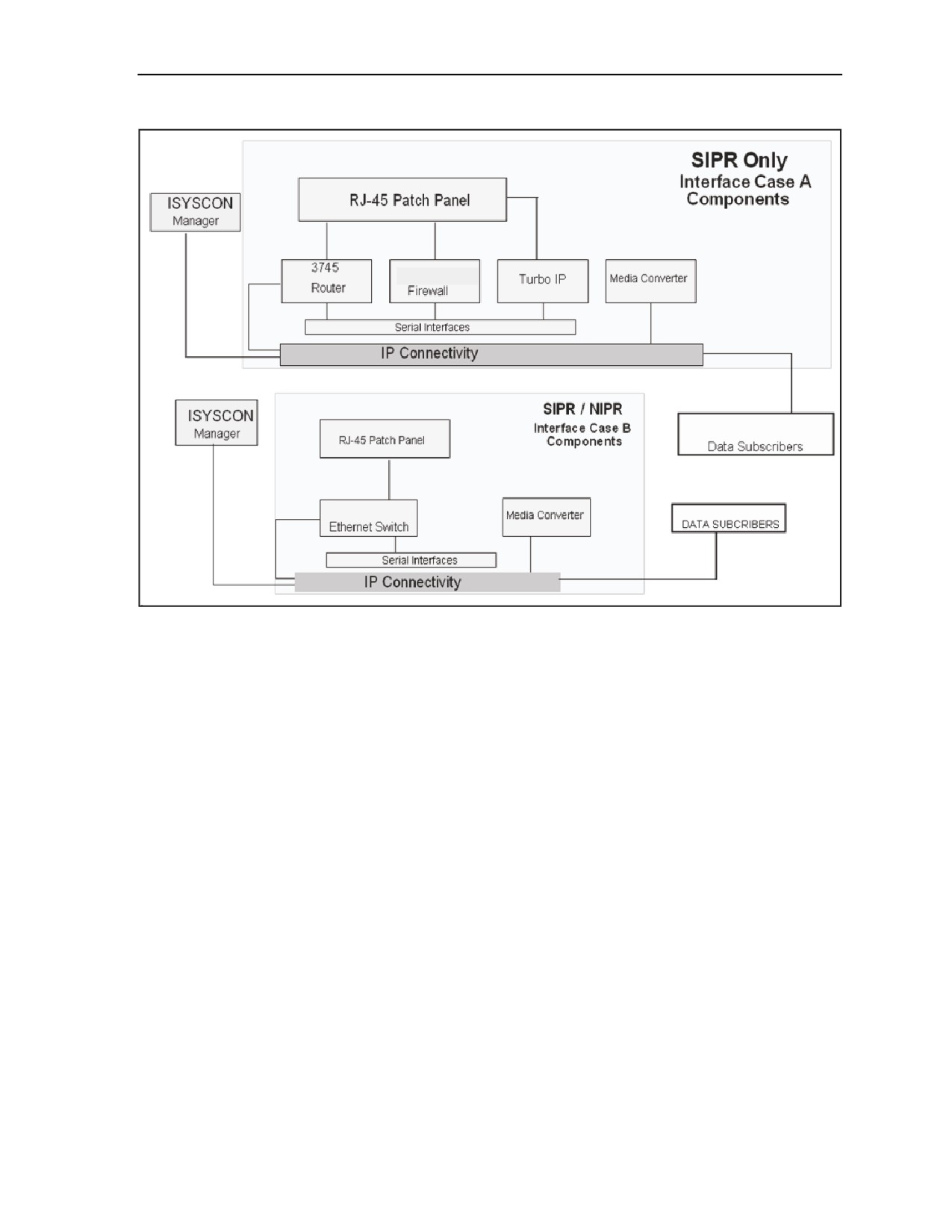
C-2. The division and BCT CPN configuration consists of SIPRNET and NIPRNET cases. The SIPRNET
cases are comprised of interface case A, interface case B, and an UPS case. The NIPRNET cases consist of
the interface case B and an UPS case. The BVTC/BITS connects to the SIPRNET voice case to interface
with the JNN.
INTERFACE CASE A COMPONENTS
C-3. Interface case A provides SIPRNET capability only. With this capability, the interface case provides
SIPRNET LAN access for users to the JNN. The SIPRNET interface case supports and provides Web
Cache, firewall screening to LAN users, and a transmission control protocol/internet protocol (TCP/IP)
performance enhancing proxy in order to provide IP capability over satellite links. The LOS case is
compatible with telephony case A to support connections for the SIPRNET data users.
5 September 2006
FMI 6-02.60
C-1
Appendix C
Figure C-1. SIPRNET and NIPRNET Domains
Turbo IP
C-4. The COTS Turbo IP equipment is designed to combat problems of TCP transmission over satellite
links. The Space Communications Protocol Standard (SCPS) is a standard-based transport protocol (SCPS-
TP) performance enhancement for satellite communication networks. The unit restores network efficiency
and overcomes the inherent limitations of TCP/IP on impaired links and enables implementation on a node-
by-node basis for deployment and end-to-end data transfer. TCP/IP bottlenecks in an impaired environment
(high delay, high bit error rate, or both) are minimized and interoperability with the TCP devices is
maintained.
Router
C-5. The COTS router optimizes high performance routing, integrated low density switching, security,
voice, IP telephony, and content networking in a single integrated modular unit. The unit incorporates
network modules (NMs), WAN interface cards (WICs), and Advance Integration Modules (AIMs) for
WAN access, voice gateway, security content, and dial applications. The unit also includes a doublewide
form factor that provides support for high density service modules (HDSMs) for higher port density and
high performance services.
Media Converter Chassis CPSMC0800-100
C-6. The media converter chassis can accommodate up to eight single-slot media converter slide-in
modules or four dual-slot media converters, allowing connection to dissimilar media. The unit is equipped
with alternating current (AC) or DC power supplies and fans to dissipate heat from the power supplies and
media converter modules.
C-2
FMI 6-02.60
5 September 2006
Command Post Node Component Listing, Startup, and Maintenance Procedures
Firewall
C-7. The firewall provides perimeter and or internal network protection for the IP network. The firewall
can be used to protect both the user’s LAN and WAN from harmful packets and attacks. The firewall has
four 10/100 auto-sensing ports. The unit can handle up to 100 Mbs of firewall traffic and 20 Mbs of 3 Data
Encryption Standard (DES) or AES VPN tunnel traffic simultaneously while using up to 500 policies to
filter traffic.
RJ-45 Patch Panel and SEP
C-8. The RJ-45 patch panel is used to extend the 34 RJ-45 Ethernet connections from the Ethernet switch.
Also extended to this panel is the console port of the Ethernet switch. The SEP has four TFOCA II
connectors; two are connected to the two media converter modules, and two are connected to the uplink
gigabyte interface converter (GBIC) modules, thus extending two Gigabit Ethernet and two Fast Ethernet
ports over the fiber link. The SEP also includes console ports for the router, the WebCache router module,
the Turbo IP, and the firewall. The four 25-pin RS-530 connectors are used for the four serial ports from
the WIC2 T router modules.
INTERFACE CASE B COMPONENTS
C-9. Interface case B provides capabilities for NIPRNET and SIPRNET applications to the end users.
Case B provides NIPRNET access to the JNN via fiber for up to 22 users. The Ethernet switch provides
terminations for locally connected data users. The media converters are used to convert Ethernet interfaces
to a fiber format for Ethernet switch connectivity to either the JNN shelter or to other case types. Case B is
also compatible with the JNN voice case, allowing a single point connection for NIPRNET data users and
allowing scalability of IP phone support. When the case is used with case A, it allows SIPRNET scalability
access for increased user accounts.
Media Converter Chassis CPSMC0200-200
C-10. The dual-slot chassis can accommodate one or two selectable media converter slide-in modules,
allowing connection of two dissimilar media. The unit is powered by an external power supply.
Switch
C-11. The COTS switch is equipped with 24, 10/100 Power over Ethernet (PoE) ports and two small form-
factor pluggable (SFP) uplink ports. The unit is capable of providing VoIP phones with in-line power as
well as standard IP connections to users. The SFP ports are populated with GLC-SX-SM modules
providing two 1000Base links over a multi-mode fiber cable and a wavelength of 850nm.
Media Converter CBFTF1013-100
C-12. This unit is a bridging media converter designed to connect a 10/100 Ethernet media using an RJ-45
connector to a 100Base-FX 1300 multi-mode fiber optic cable using two SC100BASE-FX connectors
(transmit and a receive).
RJ-45 Patch Panel and Power Entry Panel
C-13. The RJ-45 patch panel is used to extend the 22 RJ-35 connections from the Ethernet switch network
module in the router. The Ethernet ports from the firewall and the Turbo IP as well as an additional Fast
Ethernet port from the router’s FA0/0 are also extended through the patch panel. The SEP portion of the
panel includes four TFOCA II connectors that are connected to the four media converter modules to extend
two Gigabit and two Fast Ethernet ports over fiber. The power entry panel (PEP) connects to an external
power source and provides power to transit case equipment through a circuit breaker switch as well as
surge protection.
5 September 2006
FMI 6-02.60
C-3

Appendix C
UPS CASE
C-14. The UPS transit case supplies power to the JNN interface cases and battalion command post transit
cases. The UPS is a 1.0 kW, uninterruptible, AC power supply designed to provide continuous, filtered,
surge protected, isolated, and regulated AC power to a computer system. It accepts 120 VAC input power
and is provided with internal, rechargeable batteries which will power a 1.0 kW load for a minimum of 10
minutes if AC power input is not available. Batteries used in the UPS are a sealed, lead-acid type. The
batteries will not vent any gases, are spill-proof, maintenance free, and may be operated in any position.
The battery pack module for the UPS is self-contained. The battery pack module is accessible to the
operator from the front of the UPS and may be removed and installed without the use of tools. Electrical
connection to the UPS is achieved via a docking connector which connects on insertion of the battery pack
module into the UPS.
CONNECTING THE DIVISION, BRIGADE, AND BCT INTERFACE CASES
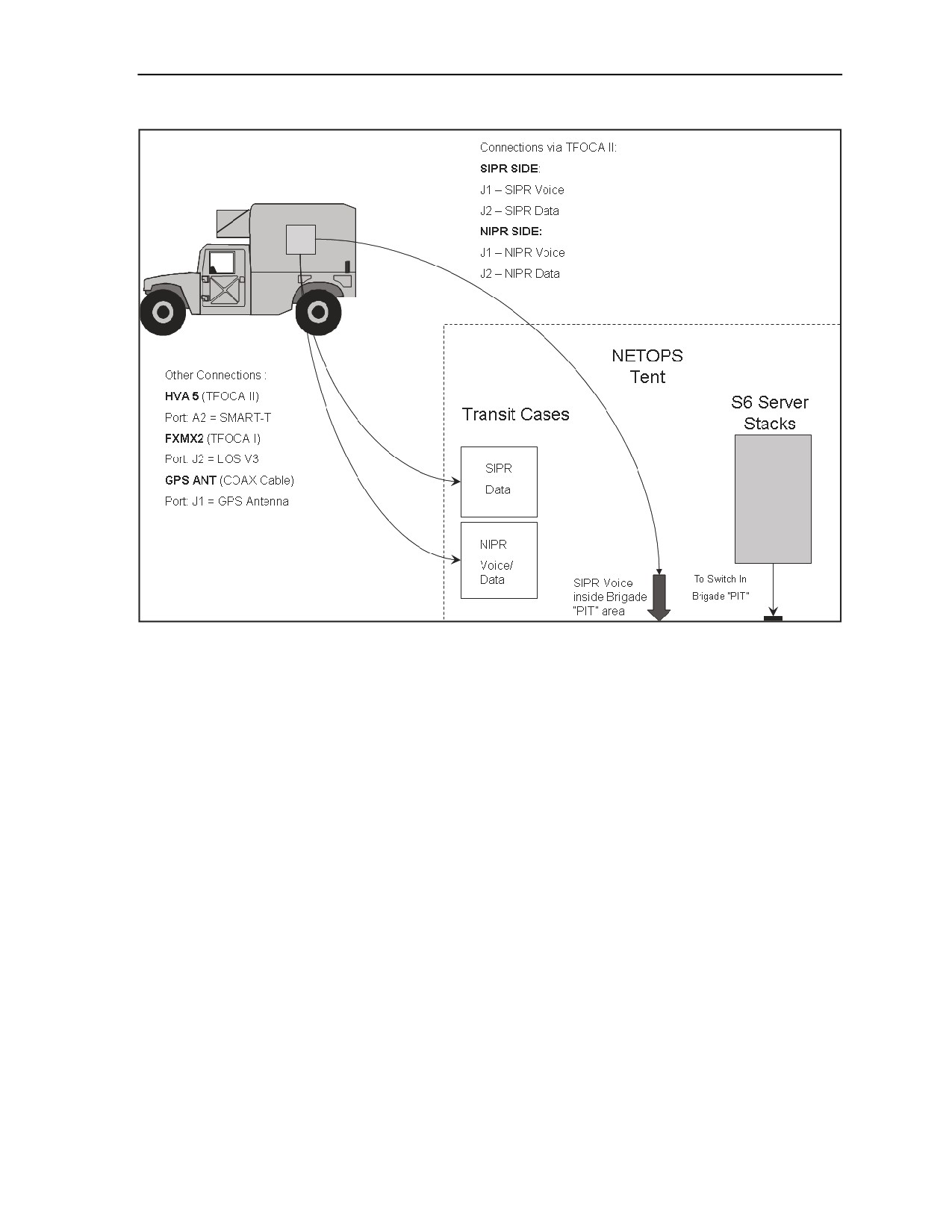
C-15. The division, brigade, and BCT interface transit cases connect to the JNN shelter via two separate
domains:
z
The SIPRNET domain.
z
The NIPRNET domain.
C-16. The connection points for both domains are via TFOCA II connector on the signal entry panels (MP1
and MP2). Each of the possible fiber connection points connect to a media converter inside the shelter. The
media converter converts the fiber media to a 100BaseT format. The 100BaseT interface then connects to
an Ethernet switch port on the tier 2 router. There are four possible connection points on each domain for
the BCT connection. Table C-1 and Table C-2 below depict the connection points for each domain. Refer
to Figure C-2 for the JNN case setup. Connect the BCT interface cases as follows:
z
Connect SIPRNET router case (Case A) 100BS circuit to MP1J2.
z
Connect NIPRNET Ethernet switch case (Case B) 100BS circuit to MP2J2.
Table C-1. SIPRNET Connection Points
SEP Position
Corresponding
Corresponding
Comment
Media Converter
SIPRNET Router Port
MP1A4J1
A7A6A1
Tier 2 port 2/7X
Preferred Connection Point
MP1A4J2
A7A6A2
Tier 2 port 2/8X
MP1A4J3
A7A6A3
Tier 2 port2/9X
MP1A4J4
A7A6A4
Tier 2 port 2/10X
Table C-2. NIPRNET Connection Points
SEP Position
Corresponding Media
Corresponding
Comment
Converter
NIPRNET Router
Port
MP2A4J1
A7A5A1
Tier 2 port 2/7X
MP2A4J2
A7A5A2
Tier 2 port 2/8X
Preferred Connection Point
MP2A4J3
A7A5A3
Tier 2 port 2/9X
MP2A4J4
A7A5A4
Tier 2 port 2/10X
C-4
FMI 6-02.60
5 September 2006
Command Post Node Component Listing, Startup, and Maintenance Procedures
Figure C-2. Connection between JNN and Interface Cases
C-17. The JNN signal entry panel provides one T1 circuit connection on panel MP2. There are no default
connections to the SEP T1 connector in the JNN; you must patch in one of the shelter’s T1 circuits using
the group patch panel A SEP T1 connection.
BVTC/BITS
C-18. The BVTC/BITS provides the capability to introduce video teleconferencing into the JNN system.
The JNN will provide one interface case which will connect to the JNN by means of an HDSL modem. The
BVTC/BITS connects thru the SIPRNET voice case, and then interfaces at the JNN SEP.
C-19. The BVTC/BITS capability is necessary to provide the commander with access to accurate, timely,
situational information while coordinating and interacting with different echelons and adjacent units. The
BVTC/BITS is more bandwidth efficient than current forces circuit switched video teleconference (VTC)
by giving bandwidth back to the users when it is not operational. The BVTC/BITS uses existing
communication LAN infrastructure at the TOCs and across the network backbone.
VOICE CASES
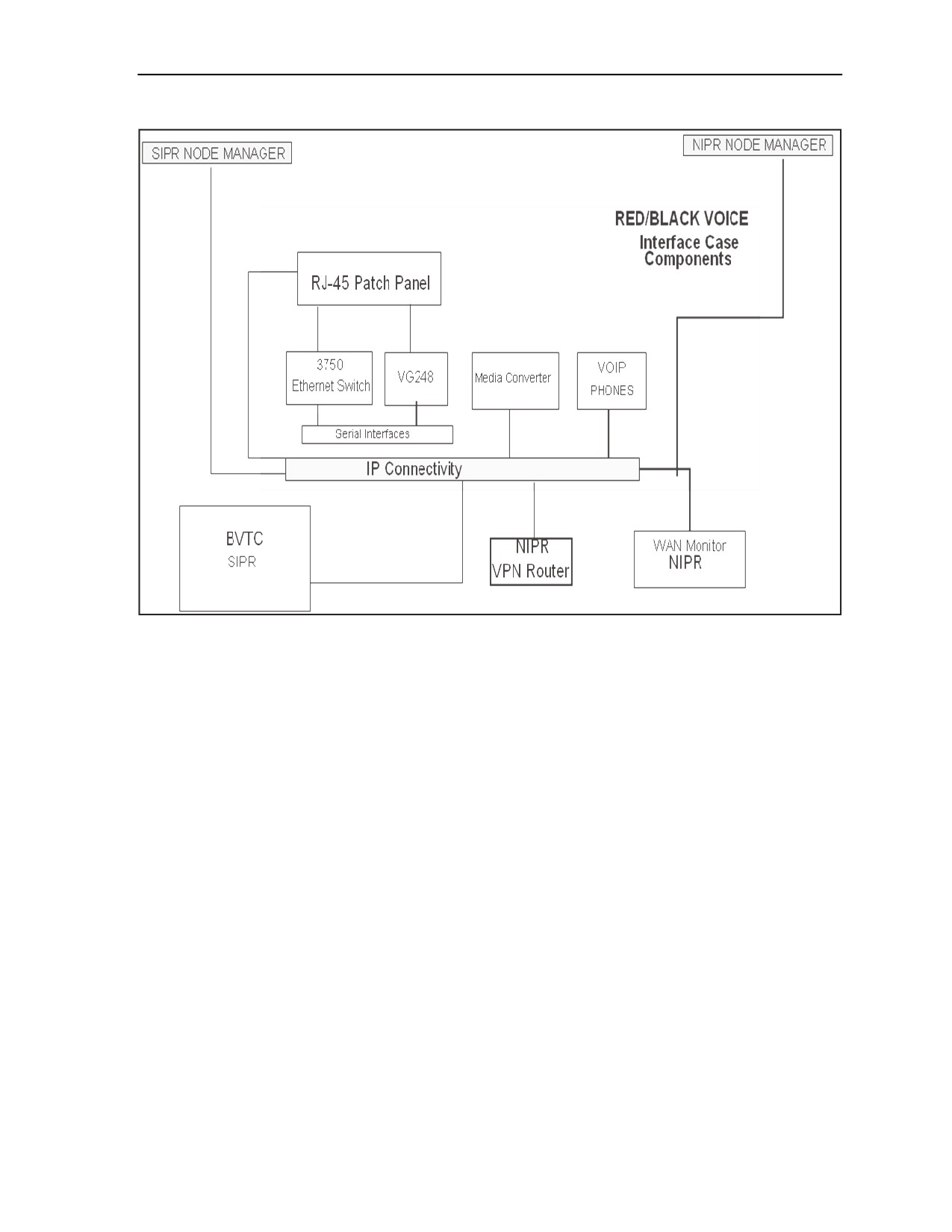
C-20. There is one set of JNN voice interface cases allocated for each domain. One set is used for RED
voice subscribers and the other is used for BLACK voice subscribers. The JNN voice telephony suite
provides IP telephone access and power for 30 VoIP phones. The voice telephony case provides IP
conversion for 48 POTS subscribers, Ethernet connectivity for the analog gateway and external server, and
a single connection point back to the JNN shelter. Refer to Figure C-3 for voice components.
5 September 2006
FMI 6-02.60
C-5
Appendix C
Figure C-3. Red and Black Voice Telephony Case
SIPRNET Media Converters
C-21. There are two 100BaseT to 100BaseFL slide-in media converters housed in a CPSMC0200-200
chassis. The media converters provide an RJ-45 to 100BaseT connection and an RX (receive) and TX
(transmit) SC100BaseFL connection to a multi-mode fiber optic cable.
Ethernet Switch
C-22. There is one Ethernet switch in the transit case that provides inline power to the VoIP phones.
VG-248
C-23. The VG-248 is an analog gateway that is managed and controlled by the CM software. The analog
gateway provides ports for 48 analog phones to connect POTS telephones, modems, and fax machines to
the CM IP telephony system. It is equipped with digital signal processing that converts analog voice into IP
packets for transport through the IP network using coder/decoder (CODEC). Subscribers receive a local
phone number and services from the CM server. After registration with the CM server, the POTS phones
may then register with the Vantage gatekeeper function to receive its TUID. Subscribers receive local
phone numbers and services from the CM server. Each VG-248 allows 48 analog phones to derive service
from the VoIP components in the system. Subscriber connection to each VG-248 is accomplished via RJ-
11 connectors on the SEP. Initial configuration of the VG-248 may be accomplished by directly connecting
a cable from the node manager laptop directly to the connector on the transit case that corresponds to the
VG-248 console port. Subsequent configuration may be either via the direct console port connection or
from telnet sessions to the device.
C-6
FMI 6-02.60
5 September 2006
Command Post Node Component Listing, Startup, and Maintenance Procedures
PEP
C-24. The voice interface case has a separate PEP installed into the case that connects to a government-
furnished external power source. The power and surge protection is supplied to the case equipment through
a circuit breaker switch. One grounding stud is present for means of a grounding point for the case.
Patch Panel
C-25. The patch panel is used to extend the connections from the various types of media that are used
within the system. On the patch panel there are extended console ports for the Ethernet switches, analog
gateway, and LAN ports. For signal entry, the panel has two TFOCA II connectors that are connected to the
media converter which will extend the 2 GB over fiber optic cable.
UPS
C-26. The UPS is housed in a deployable transit case. It supplies power for the JNN voice interface
equipment transit case. The UPS is a 1.0 kW, uninterruptible, AC power supply designed to provide
continuous, filtered, surge protected, isolated, and regulated AC power to a computer system. It accepts 120
VAC input power and is provided with internal, rechargeable batteries which will power a 1.0 kW load for
a minimum of 10 minutes if AC power inputs are not available. Batteries used in the UPS are valve
regulated, nonspillable, and flame retardant, lead-acid type. The batteries do not vent any gases, are
maintenance free, and may be operated in any position. The battery pack module for the UPS is self-
contained. The battery pack module is accessible to the operator from the front of the UPS. Electrical
connection to the UPS is achieved via a docking connector which mates on insertion of the battery pack
module into the UPS.
BATTALION COMMAND POST NODE SYSTEM COMPONENTS
C-27. The CPN cases at the battalion level are deployed with the battalions. There will be one CPN located
at the BN level to provided extended services. The CPN consists of a router case, a VPN case, an LOS
case, and two 1 kW UPS cases. The router case interfaces to the Ku TDMA transmission network through a
fiber optic connection to the VPN case. Since the Ku transmission network is a black network, and the
VPN case is also black, the Ethernet interface between the VPN and router cases is encrypted by a
TACLANE within the router case. The router case contains a firewall for local user protection. Local users
connect to the Ethernet switch through an RJ-45 connection block, mounted on the back of the case. The
router runs Call Manager Express software to provide a light CM package for local VoIP phone services.
The Ethernet switch can provide power to its connections to facilitate the use of VoIP subscribers requiring
PoE. To improve performance over satellite systems, a TCP/IP performance enhancement proxy is included
in the router case. The router case can support connections of up to 20 subscribers (voice or data). If
additional subscriber connectivity is required, then the Ethernet switch from the BCT and division case set
may be connected to augment subscriber connection counts. Refer to Figure C-4 for the BN CPN
interconnectivity diagram.
5 September 2006
FMI 6-02.60
C-7
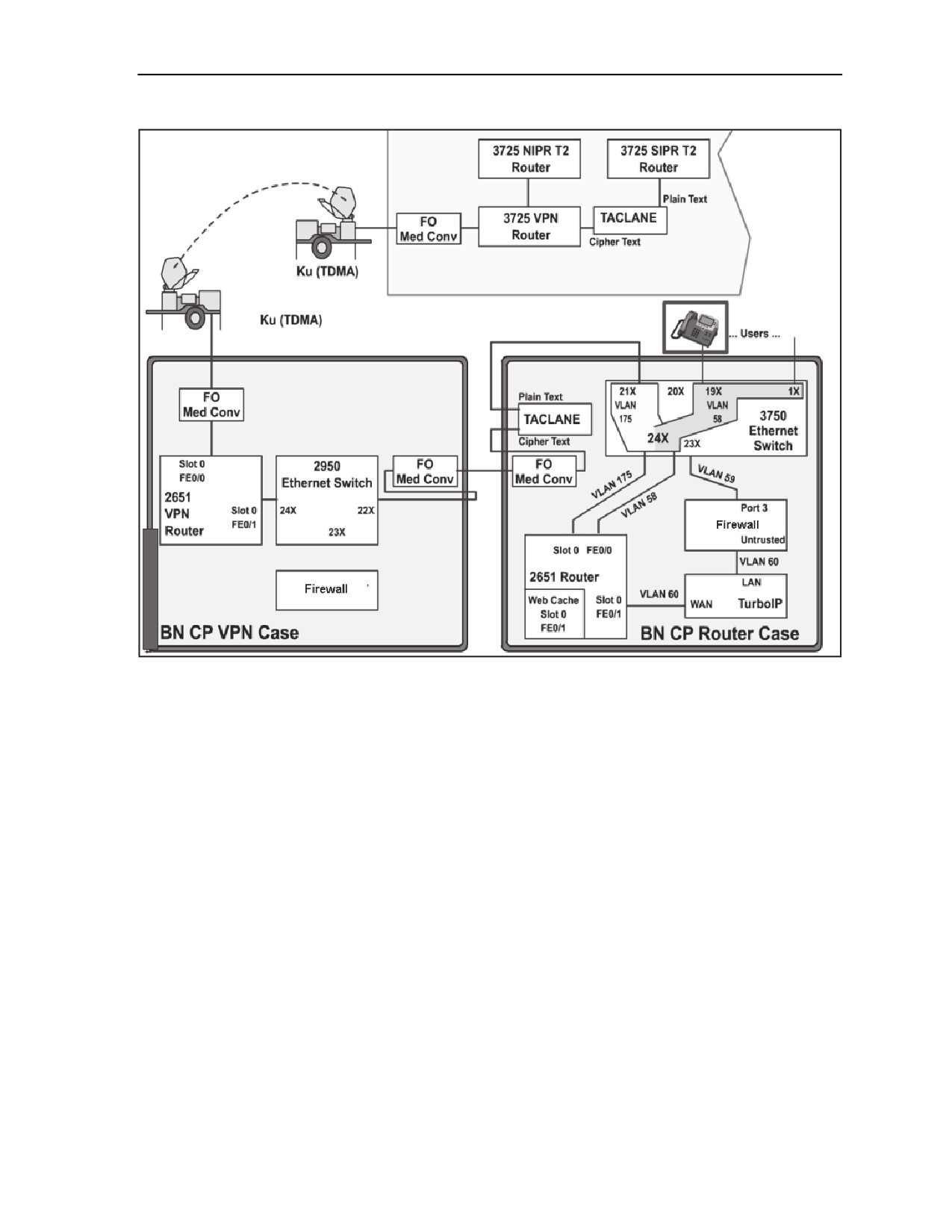
Appendix C
Figure C-4. Battalion Command Post Node Block Diagram
ROUTER TRANSIT CASE
C-28. The BN router case is used in the SIPRNET domain to provide connectivity to data and VoIP users.
The router case contains the following components:
z
TCP/IP performance enhancing proxy.
z
Media converters CBFTF1013-100.
z
TACLANE KG-175.
z
Firewall.
z
Access router.
z
Switch.
TCP/IP PERFORMANCE ENHANCING PROXY
C-29. The COTS TCP/IP performance enhancing proxy equipment is designed to combat problems of
TCP/IP transmissions over satellite links. The Space Communications Protocol Standard (SCPS) is a
standard-based transport protocol
(SCPS-TP) performance enhancement for satellite communication
networks. The unit restores network efficiency and overcomes the inherent limitations of TCP/IP on
impaired links and enables implementation on a node-by-node basis for deployment and end-to-end data
transfer. TCP/IP bottlenecks in an impaired environment (high delay, high bit error rate, or both) are
minimized and interoperability with the TCP/IP devices is maintained.
C-8
FMI 6-02.60
5 September 2006
Command Post Node Component Listing, Startup, and Maintenance Procedures
MEDIA CONVERTER CHASSIS CPSMC0200-200
C-30. The media converter dual-slot chassis can accommodate one or two selectable media converter slide-
in modules, allowing connection of two dissimilar media. The unit is powered by an external power supply.
This power converter is supplied as part of the media converter chassis and is mounted on the top rack of
the case.
MEDIA CONVERTER CBFTF1013-100
C-31. This unit is a bridging media converter designed to connect a 10/100 Ethernet media using an RJ-45
connector to a 100Base-FX 1300nm multi-mode fiber optic cable using two SC100BASE-FX connectors
(TX and RX). Two of these modular units populate the CPSMC0200-200 chassis.
KG-175S (TACLANE) INE
C-32. The TACLANE unit provides end-to-end encryption of IP packets over a strategic IP network
(SIPRNET). This function can be characterized as an encrypted tunnel through another network from one
TACLANE to another TACLANE to provide security.
FIREWALL
C-33. The firewall provides perimeter and internal network protection for the IP network. This firewall can
be used to protect both the LAN and the WAN from harmful packets and attacks. The firewall has five
10/100 auto-sensing ports. It can handle up to 70 Mbs of firewall traffic and 20 Mbs of three DES or AES
VPN tunnel traffic simultaneously while using up to 100 policies to filter traffic. It can handle 2000
concurrent sessions, ten site-to-site VPN tunnels, and 100 VPN users.
MULTISERVICE ROUTER
C-34. The multiservice router provides a one-network module slot platform with two fixed 10/100BaseT
Ethernet port(s), two integrated WIC-2T slots, and one Advanced Integration Module (AIM) slot, with
performance up to 40 kbs.
SWITCH
C-35. The COTS switch is a 24-port 10/100 PoE switch with two small form-factor pluggable (SFP) uplink
ports. The unit is capable of providing VoIP phones with in-line power as well as standard IP connections
to users. The SFP ports are populated with GLC-SX-SM providing two 1000Base links over a multi-mode
fiber cable and a wavelength of 850nm.
RJ-45 PATCH PANEL AND SEP
C-36. The RJ-45 patch panel is used to extend the 21 RJ-45 Ethernet connections from the Ethernet switch.
The SEP has four TFOCA II connectors; two are connected to the two media converter modules, and two
are connected to the uplink GBIC modules, extending two Gigabit Ethernet and two Fast Ethernet ports
over fiber. The SEP also includes console ports for the Ethernet switch, router, WebCache router module,
the Turbo IP, and the firewall. The two 25-pin RS-530 connectors are used for the two serial ports from the
WIC-2T module. The last connector is for the second media converter module 10/100 side.
VPN TRANSIT CASE EQUIPMENT
C-37. The BN VPN case provides the interface to the Ku TDMA transmission system. When used as part
of the Quick Shot Network, the case is regarded as black. The VPN case contains the following
components:
z
VPN access router.
z
Firewall.
5 September 2006
FMI 6-02.60
C-9
Appendix C
z
Media converters CBFTF1013-100.
z
Switch.
C-38. The firewall in the case is included for possible future expansion of the NIPRNET network to the
battalion command post and is therefore not presently configured. The VPN router is used to provide a
generic router encapsulation (GRE) tunnel encrypted by the AES algorithm through the TDMA network to
the other Ku endpoints. The media converters provide the conversion from the case’s internal Ethernet to
the external fiber connections going to both the Ku assembly and the BN LOS case.
MEDIA CONVERTER CPSMC0200-200 CHASSIS
C-39. The media converter CPSMC0200-200 dual-slot chassis can accommodate one or two selectable
media converter slide-in modules, allowing connection of two dissimilar media. The unit is powered by an
external power supply. The BN VPN case provides the interface to the Ku TDMA transmission system.
When used as part of the Quick Shot Network, the case is regarded as black. The VPN case contains the
following components:
z
Media converters CBFTF1013-100.
z
Switch.
z
Firewall.
z
VPN access router.
MEDIA CONVERTER CBFTF1013-100
C-40. This unit is a bridging media converter designed to connect a 10/100 Ethernet media using an RJ-45
connector to a 100Base-FX 1300nm multi-mode fiber optic cable using two SC100BASE-FX connectors
(transmit and receive).
SWITCH
C-41. The COTS switch is a 24-port 10/100 Ethernet switch capable of providing standard IP connections
to users. The switch offers internetwork operating system (IOS) functionality for basic data, video and
voice services as well as Standard Image (SI) software.
FIREWALL
C-42. The firewall features one Untrust 10/100BaseT Ethernet port, four Trust 10/100BaseT Ethernet ports
and provides 70 Mbs of firewall and 20 Mbs of 3DES VPN performance, protecting the LAN as well as
public servers such as mail, web, or FTP. The firewall has the following capabilities:
z
70 Mbs firewall - 2,000 concurrent sessions.
z
20 Mbs 3DES VPN - 10 IPSec tunnels.
z
100 policies.
z
4 Trust and 1 Untrust 10/100 BaseT.
LOS TRANSIT CASE EQUIPMENT
C-43. The LOS case is an interface used to access the LOS transmission system. It is used in conjunction
with either the CPN VPN case or the CPN router case. Current LOS transmission systems employ diphase
modulation as baseband inputs. The LOS case will connect with a serial interface, as from the VPN or
router case, and will apply forward error correction and then encrypt via the KIV-19. The signal is
modulated using a CTM-100 diphase modem when connected to the LOS transmission system via CX-
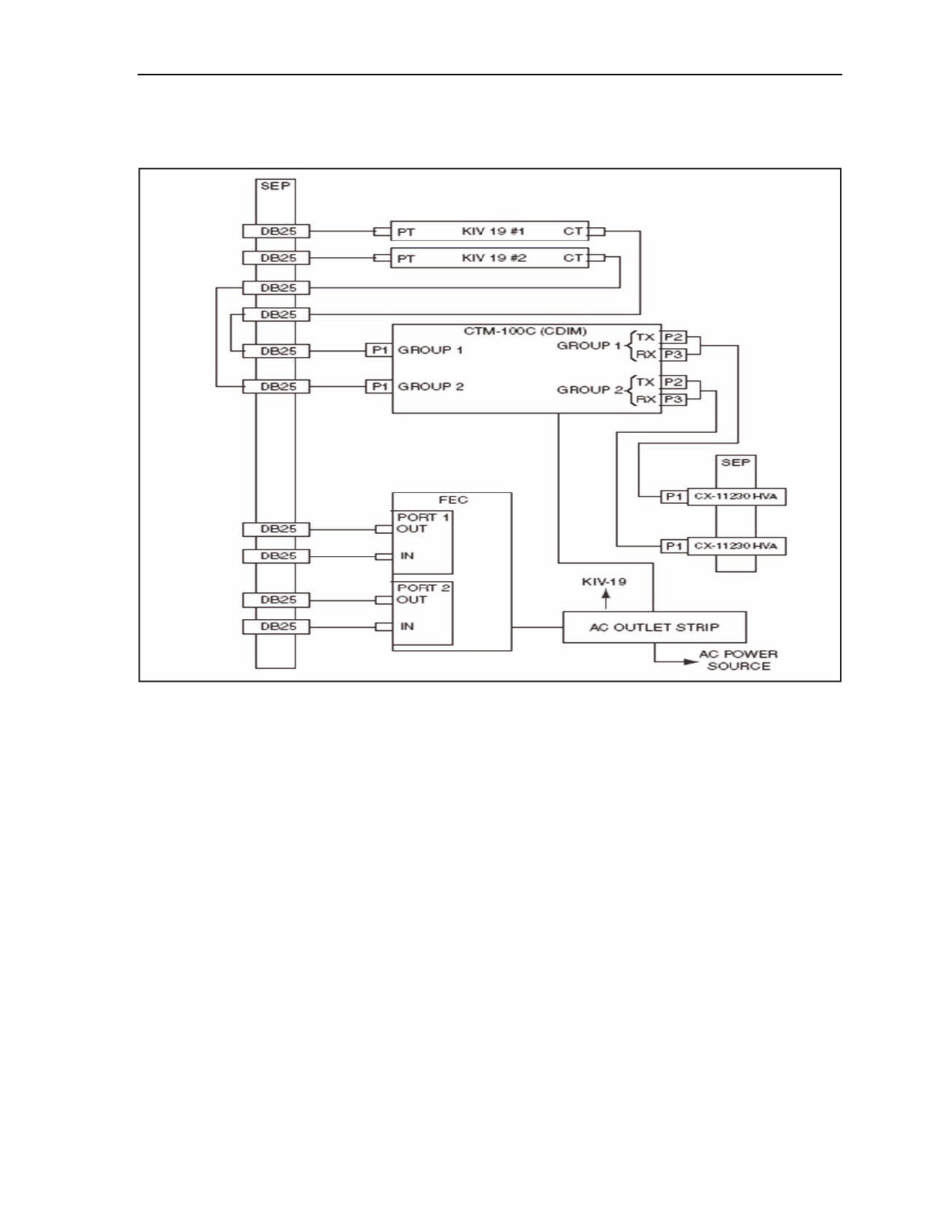
11230. The cable from the VPN case to the LOS case is a 25-pin, RS-530 cable connected to the SEPs. The
BN CPN LOS case is populated to support 2 LOS links as delivered. Refer to Figure C-5 for the LOS block
diagram. The LOS case contains the following components:
z
Conditioned Diphase Modem.
C-10
FMI 6-02.60
5 September 2006
Command Post Node Component Listing, Startup, and Maintenance Procedures
z
HSFEC unit.
z
KIV-19 (one or two units).
Figure C-5. LOS Block Diagram
CTM-100 Protocol Converter
C-44. The CTM-100 protocol converter is a dual-port multiplexer that converts two independent data
streams between NRZ, CDI, and fiber while meeting standard and current forces protocols. The unit can
also multiplex two high-speed groups of voice or data. This multi-port multiplexer (MUX) is compatible
with military switching equipment such as THSDN, MSE, and echelon above corps (EAC) Common
Baseline Circuit Switches (CBCS). The output of the MUX is a TRI-TAC framed compatible aggregate.
The CTM-100C supports cable drive distances up to 16 km at data rates up to 18.720 Mbs utilizing tactical
fiber cable CX-13295, as well as distances up to 3.2 km at data rates up to 4.608 Mbs via copper cables
such as CX-11230. The unit’s optical transceivers can drive circuits up to 16 km over single or multi-mode
cable.
KIV-19A Rackmount
C-45. The KIV-19A rackmount that houses two KIV-19A units and an AC/DC power supply in three
separate compartments is installed and secured to a mounting kit in the LOS case. The KIV-19As and the
power supply are removable from the front of the rackmount.
5 September 2006
FMI 6-02.60
C-11
Appendix C
KIV-19A TED
C-46. The KIV-19A is a trunk encryption device capable of performing digital data encryption and
decryption utilizing identical key generators for transmission and reception. It will provide cryptographic
security for all classifications of digital data traffic at rates from 9.6 Kbs to 13 Mbs.
PEP
C-47. The PEP is a rackmounted power strip that includes a power cord to connect to the UPS power
source, a circuit breaker to turn power on or off, and two utility outlets.
SEP
C-48. The SEP includes two CX11230 high power assemblies (HVAs) to connect the LOS to the protocol
converter in the LOS transit case.
UPS Transit Case
C-49. The UPS transit case houses an Uninterruptible Power Supply which supplies power for the JNN
interface and BN CPN transit cases.
UPS
C-50. The UPS is a 1.0 kW, uninterruptible, AC power supply designed to provide continuous, filtered,
surge protected, isolated, and regulated AC power to a computer system. It accepts 120 VAC input power
and is provided with internal, rechargeable batteries which will power a 1.0 kW load for a minimum of 10
minutes if AC power input is not available. Batteries used in the UPS are a sealed, lead-acid type. The
batteries will not vent any gasses, are spill-proof, maintenance free, and may be operated in any position.
The battery pack module for the UPS is self-contained. After the front UPS bezel has been removed, the
battery pack module is accessible to the operator from the front, and may be removed and installed.
Electrical connection to the UPS is achieved via a docking connector which mates on insertion of the
battery pack module into the UPS.
KIV-19A Power Supply
C-51. The KIV-19A power supply is installed in the middle compartment of the KIV-19A rackmount. The
unit is a redundant power supply capable of operating on AC or DC external power. External power is
applied through the rear panel of the KIV-19A rackmount.
HSFEC Unit
C-52. The HSFEC provides forward error correction over line of sight radio and satellite links to
compensate for inherent signal loss that is experienced in a tactical environment.
CONNECTING THE BN CPN LOS CASE
C-53. The battalion uses the LOS case to connect to the JNN via Ku band satellite and also to communicate
with other BNs. The battalions communicate to each other with their LOS case, in which the case will be
connected to a TRC-190 (V1) via CX11230 cable providing SIPR voice and data services.
CONNECTING THE CPN
C-54. The CPN equipment in each case is pre-mounted and the internal signal and power cables are
installed in the transit case.
C-55. When applying AC power to the transit cases, the power received is from an associated 1kW UPS.
The UPS provides conditioned AC power as well as battery backup protection to the transit cases.
C-56. Apply power to the transit case as follows:
C-12
FMI 6-02.60
5 September 2006