FMI 6-02.60 Tactics, Techniques, and Procedures (TTPs) for the Joint Network Node-Network (JNN-N) (SEPTEMBER 2006) - page 4
Command Post Node Component Listing, Startup, and Maintenance Procedures
z
Ensure that a 120 volts, alternating current (VAC) government-furnished equipment (GFE)
power source is connected to the transit case UPS and power up the GFE power source. The AC
INPUT LED on the front panel of associated UPS should illuminate green.
z
At the UPS front panel, press the ON button. Wait a few seconds and the battery level indicator
should cycle through the battery test. The UPS ON green indicator should illuminate and at least
one battery level indicator should illuminate green.
z
At associated transit case, set PEP circuit breaker (CB) 1 to ON. Apply power to all other
equipment connected to UPS outlets. The transit case units are now powered on.
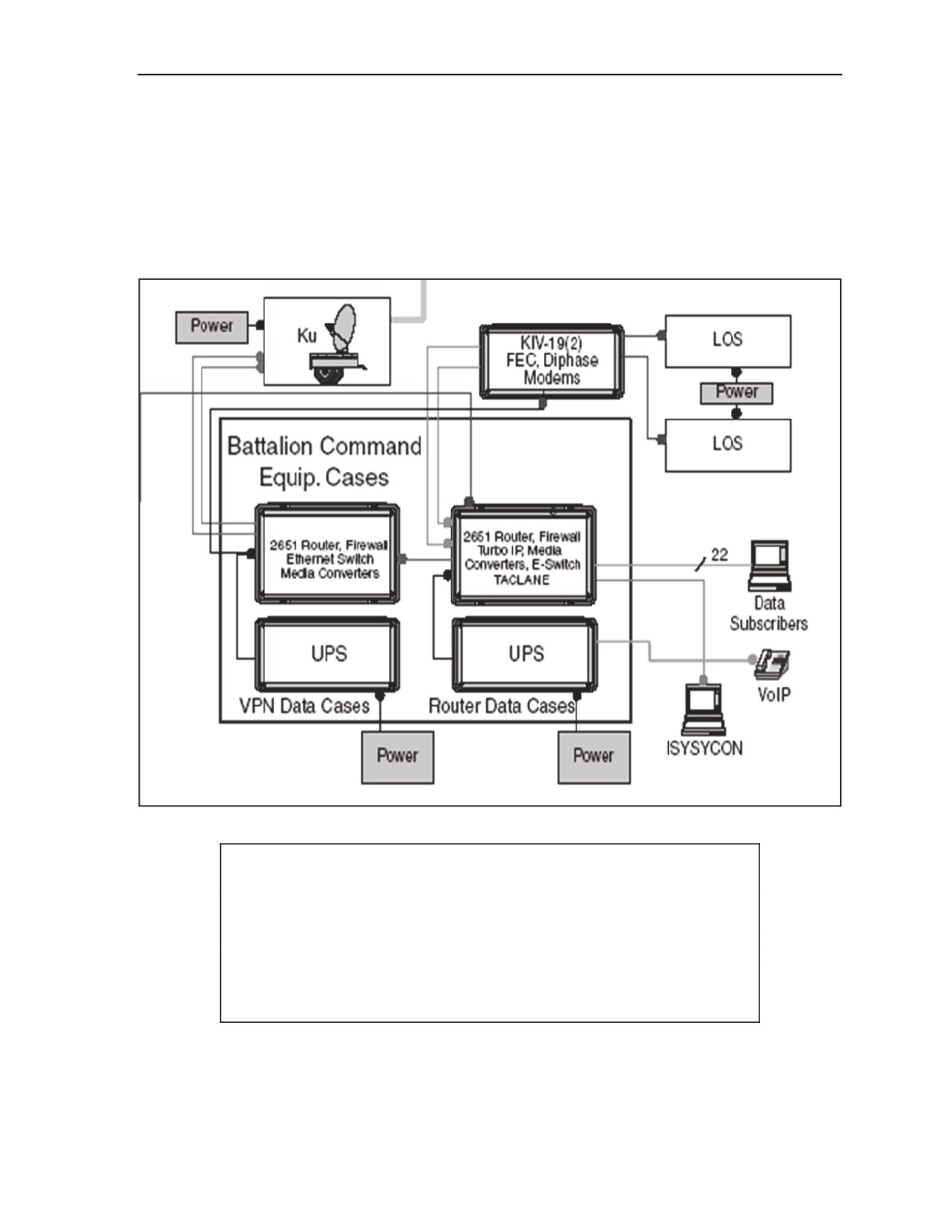
Figure C-6. Network Diagram of CPN Transit Cases and JNN
CAUTION
All units within the transit cases are powered through their respective
PEPs. Some units have individual power switches that are not readily
accessible from the rear of the transit cases. These switches should
remain on at all times and powered off from the PEP circuit breaker
CB1. 120 VAC power source is required. Connection to a power
source greater than 120 VAC will result in damage or loss of the UPS.
C-57. The signal cables are connected through the SEP. The following table (Table C-3) provides the
location through the connection for each connector on the router case.
z
The first step is to identify the location where to set up the operations. Ensure setup is at least up
to 300M away.
5 September 2006
FMI 6-02.60
C-13
Appendix C
z
If set up is for long durations, the transit cases cannot be stacked more than three high. The
preferred method of stacking is the heaviest box on the bottom (SIPRNET) with the lightest on
the top (UPS).
z
Once the boxes are in place, ground the equipment and run the TFOCA II cable out to the trailer.
The TFOCA II cable connects to the Ku port on the NIPRNET box, and to the TFOCA II
connecter beneath the main circuit panel outside of the generator on the trailer. The cable should
be run so that it will not be stepped on or driven over.
z
Should it be necessary to acquire power from the trailer, be certain that there is enough extension
cord to reach the boxes, that it is weather proof, and will not be damaged by vehicle or foot
traffic.
z
Connect the UPS to the power source and let the battery charge without turning the UPS on.
z
Connect the TFOCA II cable to the NIPRNET box and the NIPRNET and SIPRNET power
cables to the UPS box.
z
Connect the CAT5 cable from port 21 slot on the back of the SIPRNET box to the TACLANE
PT slot.
z
Connect an additional CAT5 cable from the TACLANE CT to the NIPRNET 22 slot.
Table C-3. CPN Router Case Connection Points
LOCATION
CONNECTOR
CONNECTION
FUNCTION
DESCRIPTION
Patch Panel
RJ-45
1X
Subscriber 1
Patch Panel
RJ-45
2X
Subscriber 2
Patch Panel
RJ-45
3X
Subscriber 3
Patch Panel
RJ-45
4X
Subscriber 4
Patch Panel
RJ-45
5X
Subscriber 5
Patch Panel
RJ-45
6X
Subscriber 6
Patch Panel
RJ-45
7X
Subscriber 7
Patch Panel
RJ-45
8X
Subscriber 8
Patch Panel
RJ-45
9X
Subscriber 9
Patch Panel
RJ-45
10X
Subscriber 10
Patch Panel
RJ-45
11X
Subscriber 11
Patch Panel
RJ-45
12X
Subscriber 12
Patch Panel
RJ-45
13X
Subscriber 13
Patch Panel
RJ-45
14X
Subscriber 14
Patch Panel
RJ-45
15X
Subscriber 15
Patch Panel
RJ-45
16X
Subscriber 16
Patch Panel
RJ-45
17X
Subscriber 17
Patch Panel
RJ-45
18X
Subscriber 18
Patch Panel
RJ-45
19X
Subscriber 19
Patch Panel
RJ-45
20X
Subscriber 20
Patch Panel
RJ-45
21X
Subscriber 21
Patch Panel
RJ-45
MC2TX
TACLANE
Patch Panel
RJ-45
WEB
2651 XM Router Web Cache
SEP
RJ-45
2651 Console
2651 Router Console
SEP
RJ-45
PEP Console
Turbo IP Console
SEP
RJ-45
FireWall Console
FireWall Console
C-14
FMI 6-02.60
5 September 2006

Command Post Node Component Listing, Startup, and Maintenance Procedures
Table C-3. CPN Router Case Connection Points
LOCATION
CONNECTOR
CONNECTION
FUNCTION
DESCRIPTION
SEP
RJ-45
3750 Console
3750 Switch Console
SEP
DB25
Serial RS530 Interface
SEP
DB25
Serial RS530 Interface
SEP
TFOCAII
SIPRNET Connection
SEP
TFOCAII
SIPRNET Connection
SEP
TFOCAII
SIPRNET Connection
SEP
TFOCAII
SIPRNET Connection
EQUIPMENT INITIALIZATION
C-58. These procedures contain information on installing equipment, software, and database information.
Individual equipment initialization is usually done after a component (that requires software or a database
to operate) has been removed and replaced. Individual equipment that has had its software or database
corrupted will also require initialization. Individual equipment initialization procedures must be performed
before the equipment’s function can be brought on-line.
Firewall
C-59. The firewalls are pre-configured with a default configuration. The JNN operators will receive
updated firewall configurations and policies from the IA hub operators. The following procedures can be
used by the JNN operator to monitor and download pre-created configurations on the NetScreen 5XT
firewalls. Refer to the installation instructions on the NIPRNET Firewall Install Disk.
CONFIGURING THE BATTALION ROUTER CASE
C-60. Table C-4 contains sample configuration files that will assist in the configuration of the CPN
SIPRNET router. The IP addresses and description lines of the interfaces are meant to be a general
representation. The actual entries will vary according to the mission.
Table C-4. Sample Configuration File for Battalion SIPRNET Case
ATTENTION!
THIS IS A DOD COMPUTER SYSTEM. BEFORE PROCESSING CLASSIFIED INFORMATION,
CHECK THE SECURITY ACCREDITATION LEVEL OF THIS SYSTEM. DO NOT PROCESS,
STORE OR TRANSMIT INFORMATION CLASSIFIED ABOVE ACCREDITATION LEVEL OF THIS
SYSTEM. THIS COMPUTER SYSTEM, INCLUDING ALL RELATED EQUIPMENT, NETWORKS
AND NETWORK DEVICES (INCLUDES INTERNET ACCESS) ARE PROVIDED ONLY FOR
AUTHORIZED U.S. GOVERNMENT USE. DOD COMPUTER SYSTEMS MAY BE MONITORED
FOR ALL LAWFUL PURPOSES, INCLUDING TO ENSURE THEIR USE IS AGAINST
UNAUTHORIZED ACCESS, AND TO VERIFY SECURITY PROCEDURES, SURVIVABILITY, AND
OPERATIONAL SECURITY. MONITORING INCLUDES, BUT IS NOT LIMITED TO, ACTIVE
ATTACKS BY AUTHORIZED DOD ENTITIES TO TEST OR VERIFY THE SECURITY OF THIS
SYSTEM. DURING MONITORING, INFORMATION MAY BE EXAMINED, RECORDED, COPIED,
AND USED FOR AUTHORIZED PURPOSES. ALL INFORMATION, INCLUDING PERSONAL
INFORMATION, PLACED ON OR SENT OVER THIS SYSTEM MAY BE MONITORED. USE OF
THIS DOD COMPUTER SYSTEM, AUTHORIZED OR UNAUTHORIZED, CONSTITUTES
CONSENT TO MONITORING. UNAUTHORIZED USE OF THIS DOD COMPUTER SYSTEM MAY
SUBJECT YOU TO CRIMINAL PROSECUTION. EVIDENCE OF UNAUTHORIZED USE
COLLECTED DURING MONITORING MAY BE USED FOR ADMINISTRATIVE, CRIMINAL OR
5 September 2006
FMI 6-02.60
C-15
Appendix C
Table C-4. Sample Configuration File for Battalion SIPRNET Case
OTHER ADVERSE ACTION. USE OF THIS SYSTEM CONSTITUTES CONSENT TO MONITORING
FOR ALL LAWFUL PURPOSES.
version 12.3
service timestamps debug datetime msec
service timestamps log datetime msec
service password-encryption
!
hostname BN11_T2
!
boot-start-marker
boot system flash flash:c2600-advipservicesk9-mz.123-8.T3.bin
boot-end-marker
username jnnadmin privilege 15 password 7 082B4240584B564356
username n privilege 15 password 7 0701
voice-card 0
dspfarm
no local-bypass
!
no aaa new-model
ip subnet-zero
ip dhcp excluded-address 192.168.0.97 192.168.0.99
ip dhcp excluded-address 192.168.0.109 192.168.0.110
ip dhcp excluded-address 192.168.0.193 192.168.0.195
ip dhcp pool cme
network 192.168.0.96 255.255.255.240
option 150 ip 192.168.0.97
default-router 192.168.0.97
!
ip dhcp pool laptops
network 192.168.0.192 255.255.255.240
default-router 192.168.0.193
dns-server 192.168.0.27
netbios-name-server 192.168.0.27
!
!
ip cef
no ip domain lookup
ip domain name gdc4s.com
ip ips po max-events 100
ip ssh time-out 60
ip ssh authentication-retries 2
no ftp-server write-enable
voice service voip
allow-connections h323 to h323
h323
C-16
FMI 6-02.60
5 September 2006
Command Post Node Component Listing, Startup, and Maintenance Procedures
Table C-4. Sample Configuration File for Battalion SIPRNET Case
call start slow
interface Tunnel21
description multipoint Tunnel to JNN
ip address 10.10.10.1 255.255.255.0
no ip redirects
ip mtu 1416
ip pim nbma-mode
ip pim sparse-mode
ip nhrp authentication sipr
ip nhrp map 10.10.10.9 172.16.0.188
ip nhrp map multicast 172.16.0.188
ip nhrp map 10.10.10.29 172.16.199.212
ip nhrp map multicast 172.16.199.212
ip nhrp network-id 99
ip nhrp holdtime 300
ip nhrp nhs 10.10.10.9
ip nhrp nhs 10.10.10.29
ip ospf network point-to-multipoint
ip ospf priority 0
tunnel source FastEthernet0/0.2
tunnel mode gre multipoint
tunnel key 100000
interface Loopback0
ip address 14.1.2.1 255.255.255.255
!
interface FastEthernet0/0
description Local LAN
no ip address
speed auto
full-duplex
interface FastEthernet0/0.1
encapsulation dot1Q 1 native
!
interface FastEthernet0/0.2
encapsulation dot1Q 175
ip address 172.16.0.124 255.255.255.248
!
interface FastEthernet0/0.58
encapsulation dot1Q 58
ip address 192.168.0.97 255.255.255.240
h323-gateway voip bind srcaddr 192.168.0.97
interface Serial0/0
no ip address
shutdown
no fair-queue
!
5 September 2006
FMI 6-02.60
C-17
Appendix C
Table C-4. Sample Configuration File for Battalion SIPRNET Case
interface FastEthernet0/1
description Interface to Turbo IP
ip address 192.168.0.121 255.255.255.248
speed 10
full-duplex
interface Content-Engine1/0
no ip address
ip wccp web-cache redirect in
service-module external ip address 192.168.0.194 255.255.255.240
service-module ip default-gateway 192.168.0.193
hold-queue 60 out
router ospf 21
log-adjacency-changes
redistribute connected subnets
redistribute static subnets
network 10.10.10.0 0.0.0.255 area 0
network 14.1.2.1 0.0.0.0 area 0
network 192.168.0.120 0.0.0.7 area 0
ip classless
ip route 172.16.0.112 255.255.255.248 172.16.0.123
ip route 172.16.0.184 255.255.255.248 172.16.0.123
ip route 172.16.199.208 255.255.255.248 172.16.0.123
ip route 192.168.0.192 255.255.255.240 192.168.0.123
ip http server
no ip http secure-server
ip http path flash:
!
!
snmp-server community jnnpublic RO
snmp-server community jnnprivate RW
snmp-server enable traps tty
!
!
tftp-server flash:P00303020214.bin
tftp-server flash:P00403020214.bin
!
control-plane
dial-peer voice 58 voip
description Primary route to MSE
preference 1
max-conn 1
destination-pattern 58
session target ipv4:192.168.0.33
codec g711ulaw
ip qos dscp cs5 signaling
dial-peer voice 9999 voip
C-18
FMI 6-02.60
5 September 2006
Command Post Node Component Listing, Startup, and Maintenance Procedures
Table C-4. Sample Configuration File for Battalion SIPRNET Case
description All other calls go to hub for routing
preference 2
max-conn 1
destination-pattern .T
session target ipv4:192.168.199.33
codec g711ulaw
dial-peer voice 670 voip
description Non JNN1 BGE calls to JNN users go to Hub
preference 2
max-conn 1
destination-pattern 670
session target ipv4:192.168.199.33
codec g711ulaw
gateway
!
!
!
telephony-service
load 7910 P00403020214
load 7960-7940 P00303020214
max-ephones 8
max-dn 48
ip source-address 192.168.0.97 port 2000
create cnf-files version-stamp 7960 Jun 14 2004 15:03:42
max-conferences 4
moh music-on-hold.au
web admin system name administrator password password
ephone-dn 1
number 6701101
!
!
ephone-dn 2
number 6701102
!
!
ephone-dn 3
number 6701103
!
!
ephone-dn 4
ephone 1
mac-address 0011.20F6.85B5
type 7940
button 1:3
!
!
5 September 2006
FMI 6-02.60
C-19
Appendix C
Table C-4. Sample Configuration File for Battalion SIPRNET Case
!
ephone 2
mac-address 0011.2111.1644
type 7940
button 1:2
line con 0
exec-timeout 0 0
logging synchronous
login local
line 33
no activation-character
no exec
transport preferred none
transport input all
transport output all
line aux 0
line vty 0 4
login local
transport input telnet ssh
!
!
End
CONFIGURING THE VIRTUAL PRIVATE NETWORK ROUTER
C-61. The following table contains sample configuration files that will assist in the configuration of the
CPN NIPRNET router. The IP addresses and description lines of the interfaces are meant to be a general
representation. The actual entries will vary according to the mission.
Table C-5. Sample Configuration File for Battalion NIPRNET Case
ATTENTION!
THIS IS A DOD COMPUTER SYSTEM. BEFORE PROCESSING CLASSIFIED INFORMATION,
CHECK THE SECURITY ACCREDITATION LEVEL OF THIS SYSTEM. DO NOT PROCESS,
STORE OR TRANSMIT INFORMATION CLASSIFIED ABOVE ACCREDITATION LEVEL OF THIS
SYSTEM. THIS COMPUTER SYSTEM, INCLUDING ALL RELATED EQUIPMENT, NETWORKS
AND NETWORK DEVICES (INCLUDES INTERNET ACCESS) ARE PROVIDED ONLY FOR
AUTHORIZED U.S. GOVERNMENT USE. DOD COMPUTER SYSTEMS MAY BE MONITORED
FOR ALL LAWFUL PURPOSES, INCLUDING TO ENSURE THEIR USE IS AGAINST
UNAUTHORIZED ACCESS, AND TO VERIFY SECURITY PROCEDURES, SURVIVABILITY, AND
OPERATIONAL SECURITY. MONITORING INCLUDES, BUT IS NOT LIMITED TO, ACTIVE
ATTACKS BY AUTHORIZED DOD ENTITIES TO TEST OR VERIFY THE SECURITY OF THIS
SYSTEM. DURING MONITORING, INFORMATION MAY BE EXAMINED, RECORDED, COPIED,
AND USED FOR AUTHORIZED PURPOSES. ALL INFORMATION, INCLUDING PERSONAL
INFORMATION, PLACED ON OR SENT OVER THIS SYSTEM MAY BE MONITORED. USE OF
THIS DOD COMPUTER SYSTEM, AUTHORIZED OR UNAUTHORIZED, CONSTITUTES
CONSENT TO MONITORING. UNAUTHORIZED USE OF THIS DOD COMPUTER SYSTEM MAY
SUBJECT YOU TO CRIMINAL PROSECUTION. EVIDENCE OF UNAUTHORIZED USE
COLLECTED DURING MONITORING MAY BE USED FOR ADMINISTRATIVE, CRIMINAL OR
C-20
FMI 6-02.60
5 September 2006
Command Post Node Component Listing, Startup, and Maintenance Procedures
Table C-5. Sample Configuration File for Battalion NIPRNET Case
OTHER ADVERSE ACTION. USE OF THIS SYSTEM CONSTITUTES CONSENT TO MONITORING
FOR ALL LAWFUL PURPOSES.
! Last configuration change at 15:46:07 UTC Fri Jun 18 2004
! NVRAM config last updated at 15:56:50 UTC Fri Jun 18 2004
!
version 12.3
service timestamps debug datetime msec
service timestamps log datetime msec
no service password-encryption
!
hostname BTN1_VPN
boot-start-marker
boot-end-marker
!
enable secret 5
$1$D.px$gd22yn0z3DduGIThkXgq5/
enable password Password
!
no aaa new-model
ip subnet-zero
no ip domain lookup
ip domain name cisco.com
ip audit notify log
ip audit po max-events 100
no ftp-server write-enable
crypto ca trustpoint cisco1
enrollment retry count 5
enrollment retry period 3
enrollment url http://172.16.0.69:80
revocation-check none
!
!
crypto ca certificate chain cisco1
certificate 03 nvram:cisco1ciscoc#5303.cer
certificate ca 01 nvram:cisco1ciscoc#5301CA.cer
crypto isakmp policy 10
encr aes
crypto isakmp key cisco123 address 0.0.0.0 0.0.0.0
!
!
crypto ipsec transform-set aes_set esp-aes esp-sha-hmac
!
crypto ipsec profile btn1
set transform-set aes_set
interface Tunnel2
ip address 10.0.0.2 255.255.0.0
5 September 2006
FMI 6-02.60
C-21
Appendix C
Table C-5. Sample Configuration File for Battalion NIPRNET Case
ip mtu 1416
ip nhrp authentication dont_say
ip nhrp map 10.0.0.1 172.16.0.81
ip nhrp map multicast 172.16.0.81
ip nhrp network-id 99
ip nhrp nhs 10.0.0.1
ip ospf network broadcast
tunnel source FastEthernet0/0
tunnel destination 172.16.0.81
tunnel key 100000
tunnel protection ipsec profile btn1
interface FastEthernet0/0
ip address 172.16.0.82 255.255.255.240
duplex auto
speed auto
no cdp enable
no mop enabled
!
interface FastEthernet0/1
no ip address
shutdown
duplex auto
speed auto
no cdp enable
router ospf 21
log-adjacency-changes
network 10.0.0.0 0.0.255.255 area 0
network 172.16.0.80 0.0.0.15 area 0
!
ip classless
!
ip http server
no ip http secure-server
!
!
dialer-list 1 protocol ip permit
!
!
!
!
control-plane
line con 0
exec-timeout 0 0
line 33
no activation-character
no exec
C-22
FMI 6-02.60
5 September 2006
Command Post Node Component Listing, Startup, and Maintenance Procedures
Table C-5. Sample Configuration File for Battalion NIPRNET Case
transport preferred none
transport input all
transport output all
line aux 0
line vty 0 4
password jnn1234$
login
!
ntp clock-period 17179888
ntp server 172.16.0.27
!
End
COMMAND POST NODE TRANSIT CASE MAINTENENANCE
C-62. The following provides guidance for troubleshooting and performing operator-maintainer,
Information Systems Specialist
(25B), level corrective maintenance on the CPN transit cases. The
maintenance on the CPN requires an operator-maintainer who must be familiar with the functional
operation, information, and troubleshooting procedures contained in the maintenance technical manuals for
the equipment.
C-63. Located in Technical Manuals 11-5895-1791-13&P, 11-5895-1804-13&P (Operator, Unit and Direct
Support Maintenance Manual Including Repair Parts and Special Tools List - Switching Group, Digital
Data OM-86/T, OM-97/T) are troubleshooting charts, equipment indicators, displays, and fault isolation
procedures to assist the operator-maintainer with troubleshooting, repairing, and replacing equipment
within the CPN.
C-64. Troubleshooting procedures are based on fault indicator observations during normal operations. Fault
indicators can be generated by both visual indicators and generated user reports. The visual alarms consist
of LEDs which may consist of single or multiple indicators signaling minor or major alarms within the
equipment.
C-65. The operator-maintainer has several steps that must be exercised before determining equipment
failures. The primary troubleshooting objective is to isolate the failure at the lowest level. Flow charts are
available in the technical manuals to assist in troubleshooting, along with alarm summaries which report
results of built in tests.
C-66. Once the failure has been identified, the proper procedures to correct the problem will require
knowledge of the repair, replace, and turn-in process. Within the two level maintenance guidelines, the
field level maintenance requires the operator to replace COTS equipment from spares located on site.
According to the Standard Operating Procedures (SOP) the equipment is then forwarded thru the Battalion
S6 on DA Form 2407 or 5504 and then to the BCT/DIV Customer Field Service Representative (CFSR).
5 September 2006
FMI 6-02.60
C-23
Appendix D
Ku Band Satellite Transportable Terminal
The Ku band consists of a 2.4M Ku antenna mounted on a satellite transportable
terminal. The electronic components that provide two-way digital communications
are mounted in two electronic equipment racks located in a cooled electronics
equipment compartment on the rear of the trailer. The trailer is designed to provide
voice and data connectivity from worldwide forward locations for intra- or inter-
theater operations. The terminal has many features that make it ideal for both short-
or long-term deployment, providing high capacity reach and reachback services. The
terminals can be operated in continuous, uninterrupted operations either manned or
unmanned as required.
CAPABILITIES
D-1. The satellite transportable trailer is based on TDMA and FDMA technology. The Ku band satellite
transportable terminal (AN/TSC-167A [V1]) currently fielded with the JNN at the division and BCT level,
supports both TDMA and FDMA satellite communications. The Ku band satellite transportable terminal
(AN/TSC-167A [V2]) currently being fielded at the battalion CPN level only supports TDMA satellite
communications. The difference between the two Ku band satellite transportable terminals is the additional
satellite modem and fiber-optic modem needed in the JNN to implement the FDMA communications
capability. Both versions of the trailer can support the optional MRT package. The environmentally
controlled electronics compartment has three rackmounts in which two of the three rackmounts are for the
standard electronic component racks, and one empty rackmount for an optional MRT.
D-2. FDMA is a transmission technology that allows multiple users to access the network separated by
frequency. Two frequencies are used per full duplex carrier. The link bandwidth is designed to carry
maximum nominal traffic and cannot expand to meet increased demand. The full bandwidth is always
utilized even when no traffic is present.
D-3. TDMA is a method of transmitting digital data that allows multiple users to access a single RF
carrier without interference by allocating unique time slots to each user within an RF carrier. The TDMA
technology allows multiple RF carriers on a spacecraft to be allocated to a TDMA network. For the satellite
transportable terminal network, each RF carrier represents a bandwidth pool that can be dynamically shared
between users through allocation of TDMA time slots on demand.
D-4. The Ku trailer terminal interfaces with the baseband and data communications equipment via fiber-
optic cable (TFOCA II 4 Channel Fiber Assembly). The trailer is supplied with two batteries which supply
electrical power to the electronic equipment and the HPA in case of shore power failure. The satellite
transportable terminal is designed to run on the batteries while the auxiliary power unit (APU) is started
and brought online. The ECU is not powered by the batteries, and will remain off until the APU is online or
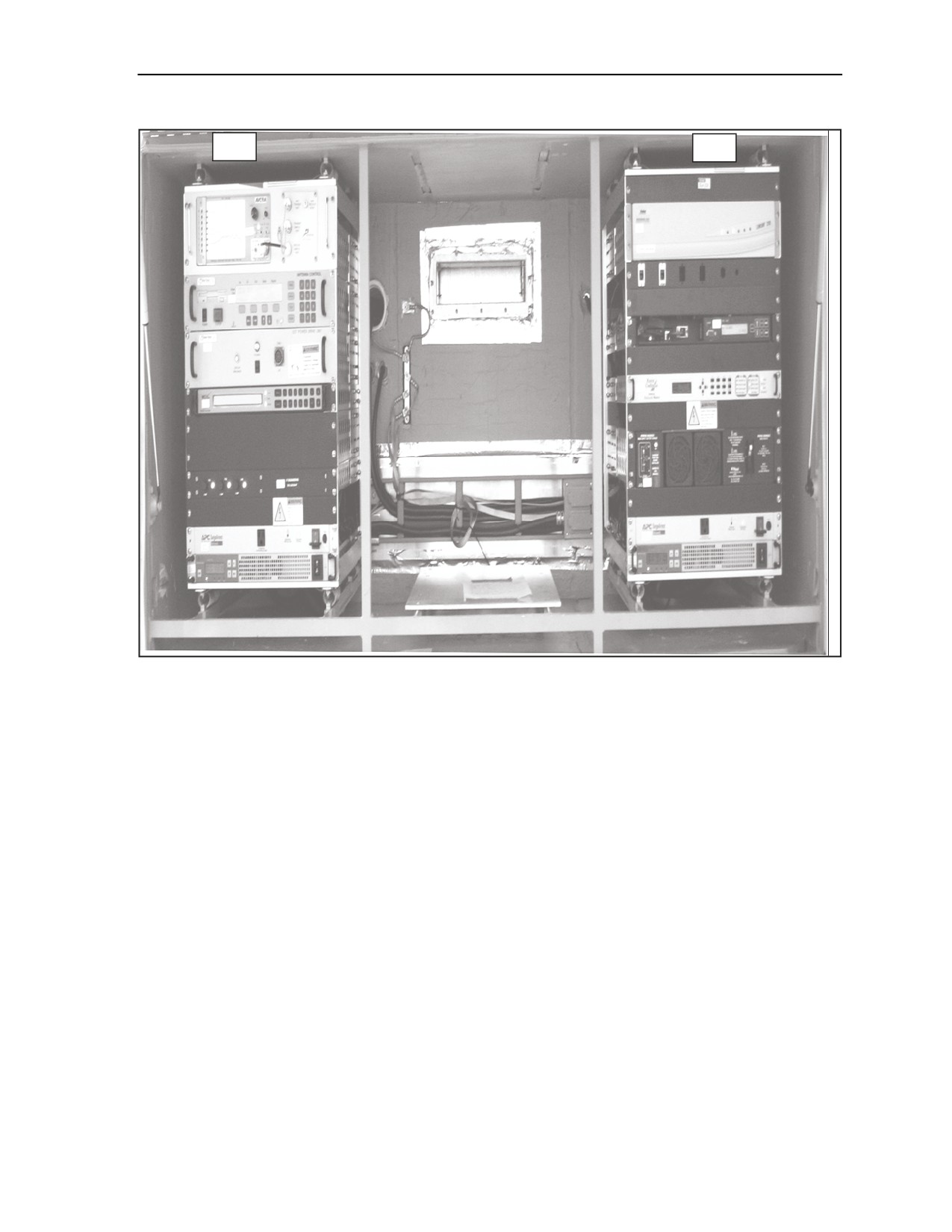
shore power is restored. The battery charger is located in rack A2. The inverters in rack A1 and rack A2 run
off the batteries in the event of a shore power failure. Refer to Figure D-1 for satellite transportable
terminal equipment rackmounts.
5 September 2006
FMI 6-02.60
D-1
Appendix D
A1
A2
Figure D-1. Equipment Racks
TRAILER
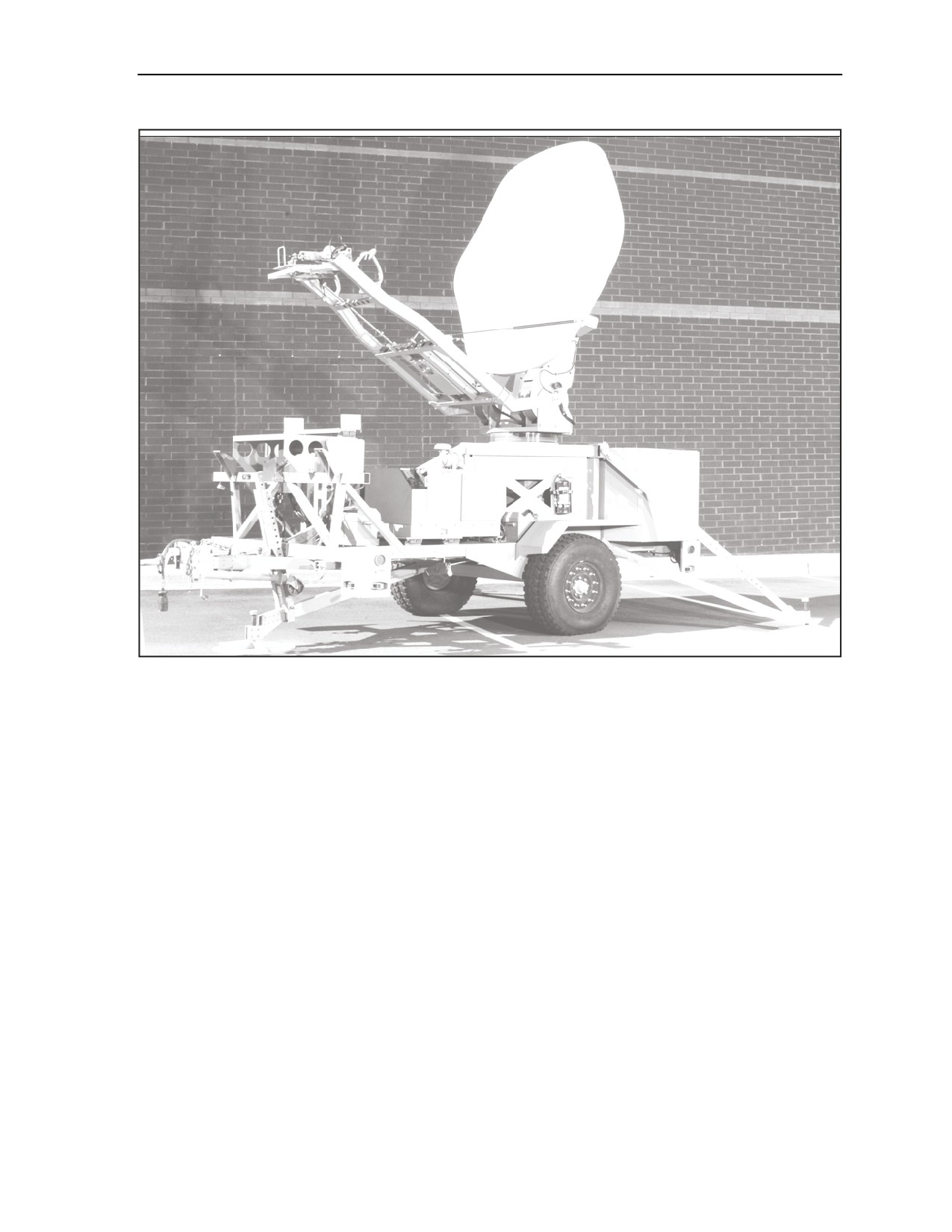
D-5. The trailer is the mobile platform supporting the satellite transportable terminal. The trailer can be
towed by a HMMWV, rail, or helicopter transport using lift points. The trailer is equipped with two hand
brakes (one for each wheel). The trailer has a tongue jack as well as three outrigger stabilizer jacks for use
during deployment. The trailer has an equipment compartment on the rear for the equipment racks. It also
has a general storage compartment located on the trailer curb side. Refer to Figure D-2 for the satellite
transportable terminal trailer.
2.4 METER ANTENNA
D-6. The Vertex 2.4M antenna is lightweight and compact integrating foldable panels for transportation.
The antenna is made up of the reflector, feed system and pedestal. The reflector is a composite carbon fiber
or foam core construction. The feed system is made up of the HPA with an integrated block upconverter
(BUC), low noise block (LNB) downconverter and feed unit mounted on support arms.
D-2
FMI 6-02.60
5 September 2006
Ku Band Satellite Transportable Terminal
Figure D-2. Satellite Transportable Terminal Trailer
KU BAND SATELLITE TRANSPORTABLE TERMINAL EQUIPMENT
DESCRIPTION
D-7. The Satellite Transportable Terminal has electronic components, mounted in two separate racks (A1
and A2), which provide voice and data connectivity for intratheater or intertheater operations.
SATELLITE TRANSPORTABLE TERMINAL EQUIPMENT RACK A1- ANTENNA CONTROL OR RF
EQUIPMENT
D-8. The following is the antenna control or RF equipment which is located in rack A1, on the Ku band
trailer:
z
Spectrum analyzer - PSA-45D.
z
Antenna control unit (ACU) - 123T-DC.
z
Traveling wave tube amplifier control panel.
z
PDU - ACU PDU.
z
10MHz reference or LNB power - chassis.
z
AC distribution - APC SurgeArrest.
z
Inverter.
5 September 2006
FMI 6-02.60
D-3
Appendix D
Spectrum Analyzer (PSA-45D)
D-9. The PSA-45D spectrum analyzer is a small, lightweight analyzer provided with the satellite
transportable terminal system. It is used to measure signal strength of the satellite to assist in acquiring an
initial satellite signal during setup. It is used for monitoring downlink and uplink L-band signals. It is also
used for isolation and resolution of terminal transmit and receive troubles. The spectrum analyzer is used to
monitor transmit and receive IF L-band signals.
ACU
D-10. The ACU provides manual and automatic antenna pointing and satellite acquisition. It uses the
terminal’s GPS and flux compass for location and pointing information. It calculates pointing angles to a
given satellite and sends pointing information to the antenna power drive unit. The ACU uses an integrated
L-band range tracking receiver to auto track and to acquire a selected satellite. The antenna control unit
used on the satellite transportable terminal is a Vertex 123T-DC. This antenna controller is designed for use
with elevation over azimuth antennas on mobile satellite uplink vehicles. It automates the process of
locating and locking onto a particular satellite.
ACU PDU
D-11. The ACU PDU receives drive commands from the ACU and provides drive power to the antenna
motors. When the antenna is commanded to move, the PDU receives antenna velocity as it checks limit
switch status. As the antenna moves, the PDU relays position data from the resolvers, pointing data from
the flux compass, and tilt data from the antenna tilt sensor. The PDU is powered by 90 to 264 VAC, 50/60
Hz +/- 5%.
HPA Control Panel
D-12. The control panel is a unit controller for the HPA. A multicolored alarm indicator reports HPA
alarms, faults, and communications faults at a glance.
10 MHz Reference or Low Noise Block (LNB) Power Chassis
D-13. The 10 MHz reference or LNB power chassis supplies +24 volts direct current (VDC) power and a
10MHz (0+/-1 dBm) reference signal to the LNB. The unit supplies only the 10MHz reference to the BUC
powered by the HPA. On the uplink side, the 10 MHz reference chassis inputs the L-band range uplink
carriers from the TDMA and FDMA modems and passes them to the BUC. On the downlink side, the unit
inputs the L-band range downlink signal from the LNB and passes it to the TDMA and FDMA modems via
a 2-way divider. Signal losses through the 10 MHz chassis is minimal. The unit also blocks all DC and
reference signals from the modems to the LNB and BUC. The 10 MHz reference chassis is powered by 85
to 264 VAC, 0.52-1.2A, 47 to 63H.
AC Output Distribution
D-14. The AC distribution panel is used to provide up to eight switched AC outputs. The AC output power
is 120 VAC, 50/60 Hz +/- 5 Hz at 15 amps. Power surge protection, which is designed to handle current
surges as high as 13000 amps, is provided for the eight switched outlets.
Inverter
D-15. The inverters supply conditioned AC voltage to the HPA and satellite transportable terminal
equipment racks A1 and A2. Inverter A1A7 is dedicated to supplying high power requirements to the HPA.
Inverter A2A7 supplies power to the equipment racks A1 and A2. The inverters are used to condition AC
input voltages or convert DC input voltages to an AC voltage. Input DC voltage range is 20 to 36 VDC
(rated at 100A at 18 VDC). Input over current protection is also provided at 140 amps. Each inverter
supplies 110 to 120 VAC 50/60 Hz (1500 watts) of output power. Power is drawn from the batteries and
inverted to supply electronic equipment power during shore power failure while the APU is started and
D-4
FMI 6-02.60
5 September 2006
Ku Band Satellite Transportable Terminal
brought online. The batteries will support the satellite transportable terminal for twelve minutes. The ECU
is not powered while the inverters are running off of the batteries.
SATELLITE TRANSPORTABLE TERMINAL EQUIPMENT RACK A2 - BASEBAND OR SIGNAL
MONITOR EQUIPMENT
D-16. The following is the baseband or signal monitor equipment which is located in rack A2, on the Ku
band trailer.
z
TDMA satellite modem.
z
Console interface.
z
FOM shelf (containing media converter and Codem) in JNN only trailer.
z
FDMAsatellite modem (JNN only).
z
AC distribution (PDU).
z
Battery charger.
z
Inverter.
z
Power indicator or DC cutoff switch control.
TDMA IP Modem
D-17. The TDMA IP modem is a multi-carrier, multi-rate, TDMA, VSAT-like platform. The TDMA IP
modem demodulates the data from the L-band carrier and provides the router and TDMA satellite modem
functionality for the terminal.
Console Interface Panel
D-18. The console interface panel is used for external user interface to the TDMA IP modem. A user
supplied PC can connect the PC’s serial port to the TDMA IP modem via a console cable assembly.
Another port is provided for loading DMD-20 modem firmware upgrades.
CDIM (JNN Only)
D-19. The CDIM is used to convert data from CDI on fiber optic transport (TFOCA II/100Base-FX) to
NRZ on copper transport. The modem is located on the JNN satellite transportable terminal only.
Media Converter
D-20. The media converter is used to convert network traffic to and from fiber optic (TFOCA II/100Base-
FX) media and copper (10/100BaseT) media.
FDMA Satellite Modem (JNN Only)
D-21. The FDMA satellite modem is programmable and provides FDMA functionality for the terminal.
The FDMA satellite modem is on the JNN satellite transportable terminal only.
Battery Charger PM-24-20
D-22. The battery charger is used to convert AC power to DC power. The DC power is used to charge the
satellite transportable terminal standby batteries. The input voltage for the unit is 85 - 135 VAC, 47 - 63
Hz at 16 amps. The output voltage is 27.2 VDC at 20 amps. Front panel test points are provided for
monitoring the DC output voltage.
L-band Combiner or Splitter Assembly and Battery
D-23. The L-band splitter assembly contains the downlink 2-way splitter and uplink two-way combiner.
The A8 assembly is mounted on the rear of equipment rack A2 and has no controls or indicators. The
downlink 2-way divider divides the L-band range signals from the 10 MHz reference chassis LNB power
and routes them to the FDMA and TDMA.
5 September 2006
FMI 6-02.60
D-5
Appendix D
D-24. The uplink 2-way combiner combines the two L-Band range signals from the FDMA and TDMA
modems and routes them to the 10 MHz reference chassis. This assembly also has a connection point for
the battery charger’s temperature sensor.
Inverters
D-25. The inverters supply conditioned AC voltage to the HPA, and satellite transportable terminal
equipment racks A1 and A2. Inverter A2A7 is totally dedicated to supplying power to the HPA because of
its high power requirements. Inverter A1A7 supplies power to equipment racks A1 and A2. The inverters
are used to condition AC input voltages or convert DC input voltages to an AC voltage. Input DC voltage
range is 20 to 36 VDC (rated at 100A at 18 VDC). Input over current protection is also provided at 140
amps. Each inverter supplies 110 to 120 VAC 50/60 Hz (1500 watts) of output power.
EQUIPMENT POWER UP
D-26. The site for the satellite transportable terminal trailer should have a clear view of the area of the sky
where the satellite is located. In the Northern hemisphere, a clear view of the Southern sky is needed. In the
Southern hemisphere, a clear view of the Northern sky is needed. The location should be a flat, stable
location. Check to make sure there are no overhead power lines. An overhead clearance of at least 50 feet is
recommended.
D-27. To turn on the equipment in equipment racks A1 and A2 follow the steps below:
z
At the inverter press the ON/OFF switch to the ON position and place the AC Output switch to
the ON position.
z
At the HPA AC indicator and DC cutoff switch control, turn the cutoff switch to the ON
position.
Note. The HPA ON/OFF switch should be ON. HPA will be in filament time delay for three
minutes. Verify the HPA fan on bottom of HPA is blowing.
z
Press the power switch to the ON position at the AC distribution assembly.
z
Press the power switch on the right to the ON position. Verify that the Inverter batteries are
charging. Measure the bottom set of test points and verify that the voltage is 24 - 27 VDC.
z
Set the power switch to the ON (up) position on the PDU.
z
Press power switch to the ON (up) position on the ACU.
z
Press the ON/OFF switch to the ON (up) position on the spectrum analyzer.
D-6
FMI 6-02.60
5 September 2006
Ku Band Satellite Transportable Terminal
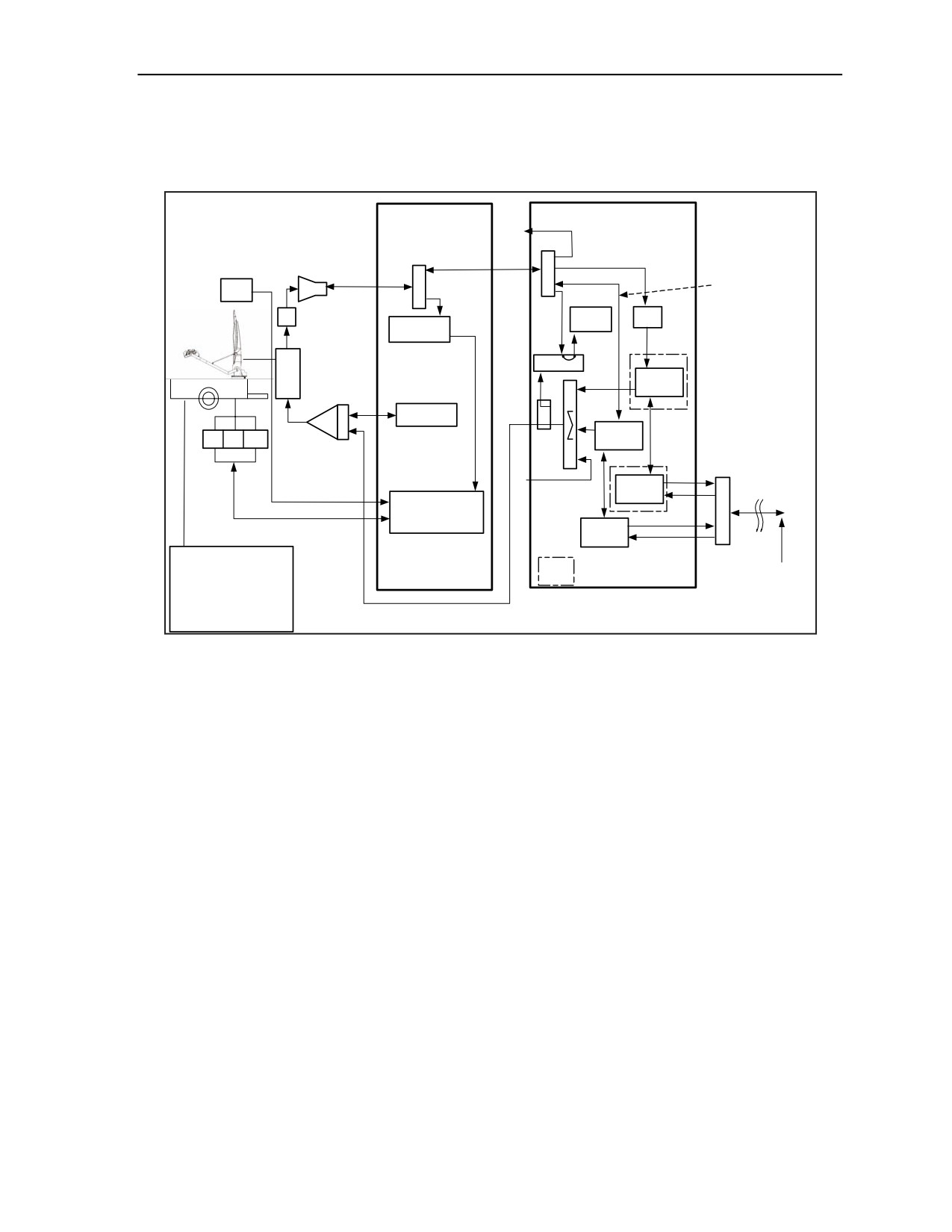
D-28. All equipment should be turned on, ensure all indicators are on. Check that the HPA is in standby
mode. If any equipment is not on, refer to troubleshooting flowcharts in Section 4 of the STT Operation
and Maintenance Manual AN/TSC-167 (V). Refer to Figure D-3 for the trailer block diagram.
Case A
To MRT
Case B
Case
4-way
2-way
DC Pass
75?
÷
LNB power
DC Pass
GPS Rcvr\
÷
and 10MHz
Compass
LNB
reference
2.4 METER
L-Band
75? to
TRF
Spectrum
Digital Tracking
Analyzer
50?
Receiver
2
L-Band Patch
PORT
TX/RX
FDMA
FEED
Modem
B
TWTA
50?
X
HPA
U
Controller
RS-530
C
-10dB
LINKWAY
AZ
EL
POL
Coupler
Modem
400 WATT Ku-Band
TWTA with
Tactical
integrated BUC
From MRT
Fiber
Case
ST
(4-Strand)
FOM
Conn
100M
(Codem)
Custome
Antenna Control Unit
Ethernet
TFOCA-
Auto Acquire and Auto
Flange
Tracking
Mount
FOM
ST
(Transition Ntwk)
Interface
Conn
TFOCA-II
TRAILER SUBSYSTEMS
Flange Mount
JNN only
- Air Conditioning
(X 10)
Interface
Demarc
- Generator
Point
- UPS
- Power plug for shore power
(Generator or Shore power)
Figure D-3. Block Diagram
5 September 2006
FMI 6-02.60
D-7
Glossary
ACRONYMS AND ABBREVIATIONS
Acronym
Definition
AC
alternating current
ACU
antenna control unit
AES
Advanced Encryption Standard
AIM
Advance Integration Module
AO
area of operations
AOR
area of responsibility
APU
auxiliary power unit
ARFOR
Army forces
BCP
Battle Command Post
BCT
brigade combat team
BDE
brigade
BITS
Battlefield Information Transmission System
BLOS
beyond line of sight
BN
battalion
BNOSC
brigade Nodal Operations Security Center
BOS
battlefield operating system
BPS
bits per second
BUC
block upconverter
BVTC
Battlefield Video Teleconferencing
CAISI
CSS Automated Information Systems Interface
CBCS
Common Baseline Circuit Switches
CDI
conditioned diphase
CDIM
conditioned diphase modem
CDS
Compact Digital Switch
C-E
communications-electronics
CECOM
communcations electronics command
CFSR
contractor field service representatives
CHS
common hardware software
CM
call manager
CND
computer network defense
CODEC
coder/decoder
COMSEC
communications security
CONUS
continental United States
COTS
commercial off-the-shelf
CP
command post
CPN
Command Post Node
CPP
communications patch panel
5 September 2006
FMI 6-02.60
GlossaryGlossary-1
Glossary
CSS
combat service support
CSUM
Channel Sevice Unit Modem
CT
cipher text
DC
direct current
DCE
Data Circuit Equipment
DCO
dial central office
DCSS
Defense Communication Satellite Subsystem
DED
dedicated encryption device
DES
Data Encryption Standard
DIBITS
digital in-band interswitch trunk signaling
DISA
Defense Information Systems Agency
DISN
Defense Information Systems Network
DMAIN
Division Main
DOD
Department of Defense
DPEM
Detailed Planning and Engineering Module
DRSN
Defense Red Switch Network
DS
direct support
DS3
digital signal level 3
DSCS
Defense Satellite Communications System
DTAC
division tactical
DTE
data terminal equipment
DTG
digital trunk group
DSN
Defense Switched Network
ECU
environmental control unit
EHF
extremely high frequency
FDMA
frequency divison multiple access
FES
forced entry switch
FLEXMUX
Flex Multiplexer
FO
fiber optic
FOM
Fiber Optic Modem
FMI
Field Manual Interim
FMTV
family of medium tactical vehicles
FTP
file transfer protocol
FTSAT
Flyaway Tri-band Satellite Terminal
FTX
field training exercise
GBIC
gigabit interface converter
GFE
governement-furnished equipment
GIG
Global Information Grid
GMF
ground mobile forces
GOTS
governemnt off-the-shelf
GPP
group patch panel
Glossary-2
FMI 6-02.60
5 September 2006
Glossary
GPS
global positioning system
GRE
generic router encapsulation
GWL
Gateway Link
HBCT
heavy brigade combat team
HCLOS
high capacity line of sight
HDSL
High-data-rate Digital Subscriber Line
HDSM
High Density Service Module
HMMWV
high-mobility multipurpose wheeled vehicle
HP
Hewlett Packard
HSD
High Speed Data Channel
HSFEC
High Speed Error Corrector
HVA
High Voltage Assembly
IA
information assurance
IBCT
infantry brigade combat team
IDS
intrusion detection system
IGX
ISDN gateway switch
INE
In-line Network Encryptors
IOS
internetwork operating system
IP
internet protocol
ISDN
Integrated Services Digital Network
ISYSCON
integrated system control
JFLCC
joint force land component commander
JNMS
Joint Network Management System
JNN
Joint Network Node
JNN-N
Joint Network Node-Network
JNTC-S
Joint Network Transport Capability-Spiral
JTF
joint task force
JV2020
Joint Vision 2020
JWICS
Joint Worldwide Intelligence Communications System
KVM
Keyboard, Video and Mouse
kW
kilowatt
LAN
local area network
LDR
low data rate
LED
light emitting diode
LEN
large extension node
LMS
Lightweight Modular Shelter
LNB
low noise block
LOS
line of sight
LPI
low probability of intercept
MAC
maintenance allocation chart
Mbps
megabytes per second
5 September 2006
FM 6-02.60
Glossary-3
Glossary
Mbs
megabits per second
MDMP
military decision-making process
MDR
medium data rate
MHz
megahertz
MI
military intelligence
MILSTAR
miltary strategic and tactical relay system
MOS
military occupational specialty
MP
Metal Plate
MRT
Master Reference Terminal
MSE
mobile subscriber equipment
MTOE
modified table of organization and equipment
MUX
multiplexer
NCS
Node Center Switch
NET
new equipment training
NETT
new equipment training team
NETCOM
Network Enterprise Technology Command
NETOPS
network operations
NIPRNET
Non-Secure Internet Protocol Router Network
NM
network management
NMF
Network Management Facility
NOSC
network operations and security center
NRZ
non-return-to-zero
NSA
National Security Agency
NSC
network support company
PBX
Private Brnach Exchange
PCMCIA
personal computer memory card international association
PDU
power drive unit
PEP
power entry panel
PLL
prescribed load list
PMCS
preventative maintenance checks and services
PoE
Power Over Ethernet
POTS
Plain Old Telephone System
PRC
Primary Rate Card
PT
plain text
PVS-12 Module
PrimeVoice Secure Module
QMUX
Quad Multiplexer
QoS
quality of service
RAU
radio access unit
RF
radio frequency
RSC
Regional Service Center
RX
receive
Glossary-4
FMI 6-02.60
5 September 2006
Glossary
S-6
command, control, communications and computers operations (C4 Ops) officer
SATCOM
satellite communications
SA-TRK
symmetrical-asymmetrical trunk module
SBCT
stryker brigade combat team
SCC-2
System Control Center-2
SCPC
Space Communications Protocol Standard
SEC
Software Engineering Center
SEN
small extension node
SEP
signal entry panel
SFP
small form-factor pluggable
SHF
super-high frequency
SIPRNET
SECRET Internet Protocol Router Network
SMART-T
Secure Mobile Anti-Jam Reliable Tactical Terminal
SMU
switch multiplexer unit
SNMP
Simple Network Management Protocol
SOP
standard operating procedures
SSS
single shelter switch
STE
secure telephone equipment
STEP
standard tactical entry point
STIG
security technical implementation guide
STP
Shielded Twisted Pair
STRATCOM
Strategic Command
TAC
tactical command post
TACLANE
tactical fastlane
TACSAT
tactical satellite
TCP/IP
transmission control protocol/internet protocol
TDM
time division multiplexer
TDMA
time division multiple access
TED
trunk ecryption device
TFOCA
Tactical Fiber Optical Cable Assembly
TFTP
Trivial File Transfer Protocol
TGRS
Transportable Ground Receive Suite
THSDN
Tactical High Speed Data Network
TI
Tactical Internet
TIMS
Tactical Information Management System
TK
Tool Kit
TOC
tactical operations center
TRC
Transmissions Resource Control
TRI-TAC
Tri-Service Tactical Communications Program
Trojan SPIRIT
Trojan Special Purpose Integrated Remote Intelligence Terminal
TROPO
trophospheric scatter
5 September 2006
FM 6-02.60
Glossary-5
Glossary
TS/SCI
top secret/sensitive compartmented information
TTP
tactics, techniques, and procedures
TUID
Tactical User Identification
TX
transmit
UA
unit of action
UHF
ultrahigh frequency
UHN
Unit Hub Node
ULLS
unit level logistics system
UPS
uninterruptible power source
VAC
volts, alternating current
VDC
volts, direct current
VoIP
Voice Over Internet Protocol
VPN
Virtual Private Network
VSAT
very small aperture terminal
VTC
video teleconferencing
WAN
wide-area network
WIC
WAN Interface Card
WIN-T
Warfighter Information Network-Tactical
WMI
Warfighter Machine Interface
Glossary-6
FMI 6-02.60
5 September 2006
References
These are the sources quoted or paraphrased in this publication.
Army Publications
DA Form 2028, Recommended Changes to Publications and Blank Forms.
FM 24-1, Command, Control, Communications and Computers (C4) Operations, 15 October 1990
(will be revised as FM 6-02).
FM 24-69, Signal Digital Equipment Procedural Guide, (will be revised as FM 6-02.69).
FMI 6-02.45 Signal Support to Theater Operations, 12 April 2004.
FMI 11-43, Tactical Signal Leaders Guide, 12 June 1995 (will be revised as FM 6-02.43).
FMI 11-50, LandWarNet Operations in the CORPS, Division, and Brigade Units, 4 April 1991 (will be
revised as FMI 6-02.50).
FMI 11-57, Tactical Wire and cable Techniques, 22 August 1966 (will be revised as FMI 6-02.57).
FMI 11-71, Network Operations (NETOPS), (will be revised as FMI 6-02.71).
FMI 24-2, Army Electromagnetic Spectrum Management Operations, 21 August 1991 (will be revised
as FMI 6-02-70).
5 September 2006
FMI 6-02.60
References-1