FMI 6-02.60 Tactics, Techniques, and Procedures (TTPs) for the Joint Network Node-Network (JNN-N) (SEPTEMBER 2006) - page 2
Appendix B
GPP
B-7. The JNN is equipped with three GPPs used to patch NRZ interfaces from the JNN equipment and to
patch modulated interfaces. NRZ interfaces are brought to the panel to allow access to individual signals.
This configuration allows the JNN operators to access and reconfigure portions of circuits for special
configurations or testing. Also the group patch panel is used to patch coaxial signals.
NON-SECURE DATA NETWORK
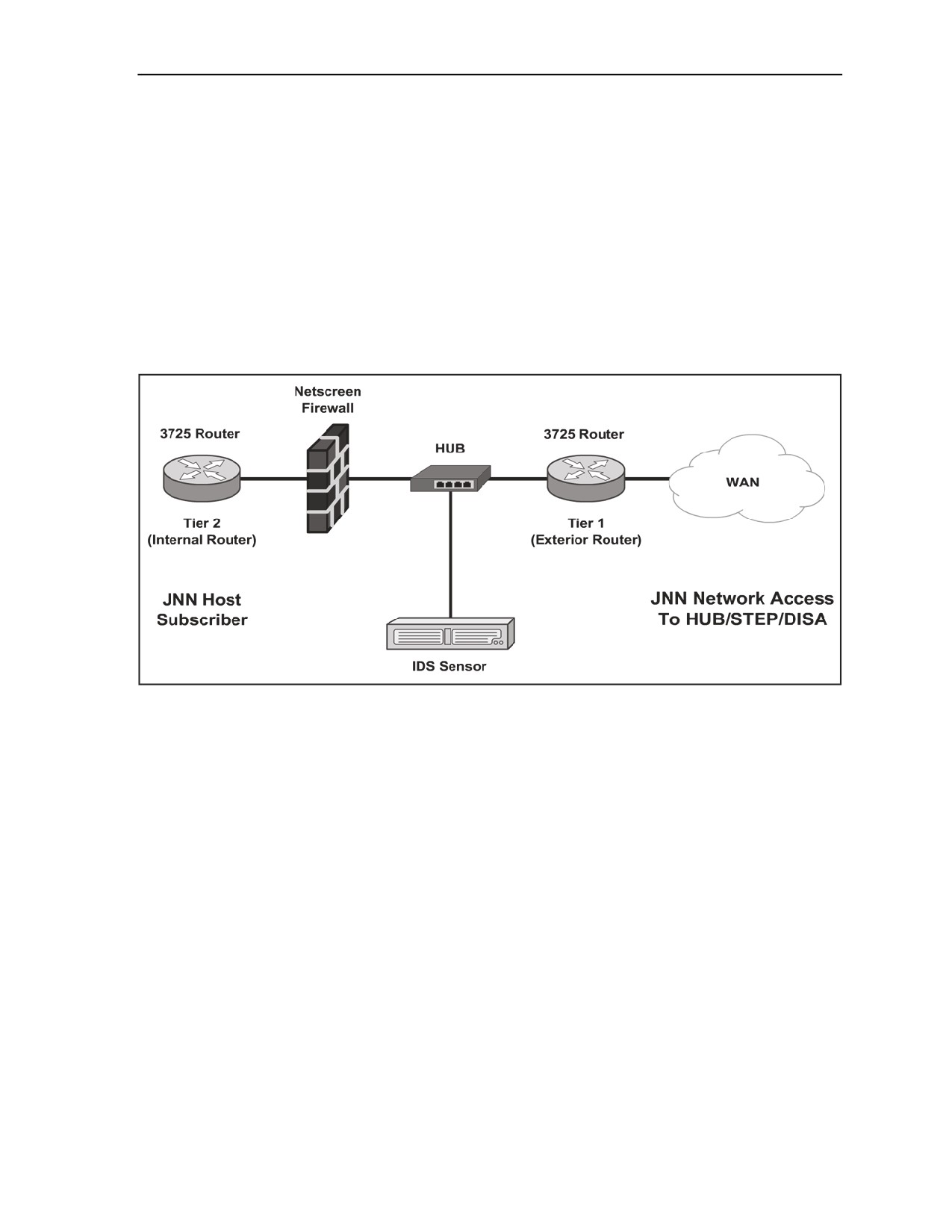
B-8. The NIPRNET data network components are laid out in an IA-based architecture. The IA
architecture consists primarily of a tier 1 and tier 2 router, separated by a firewall, with an Intrusion
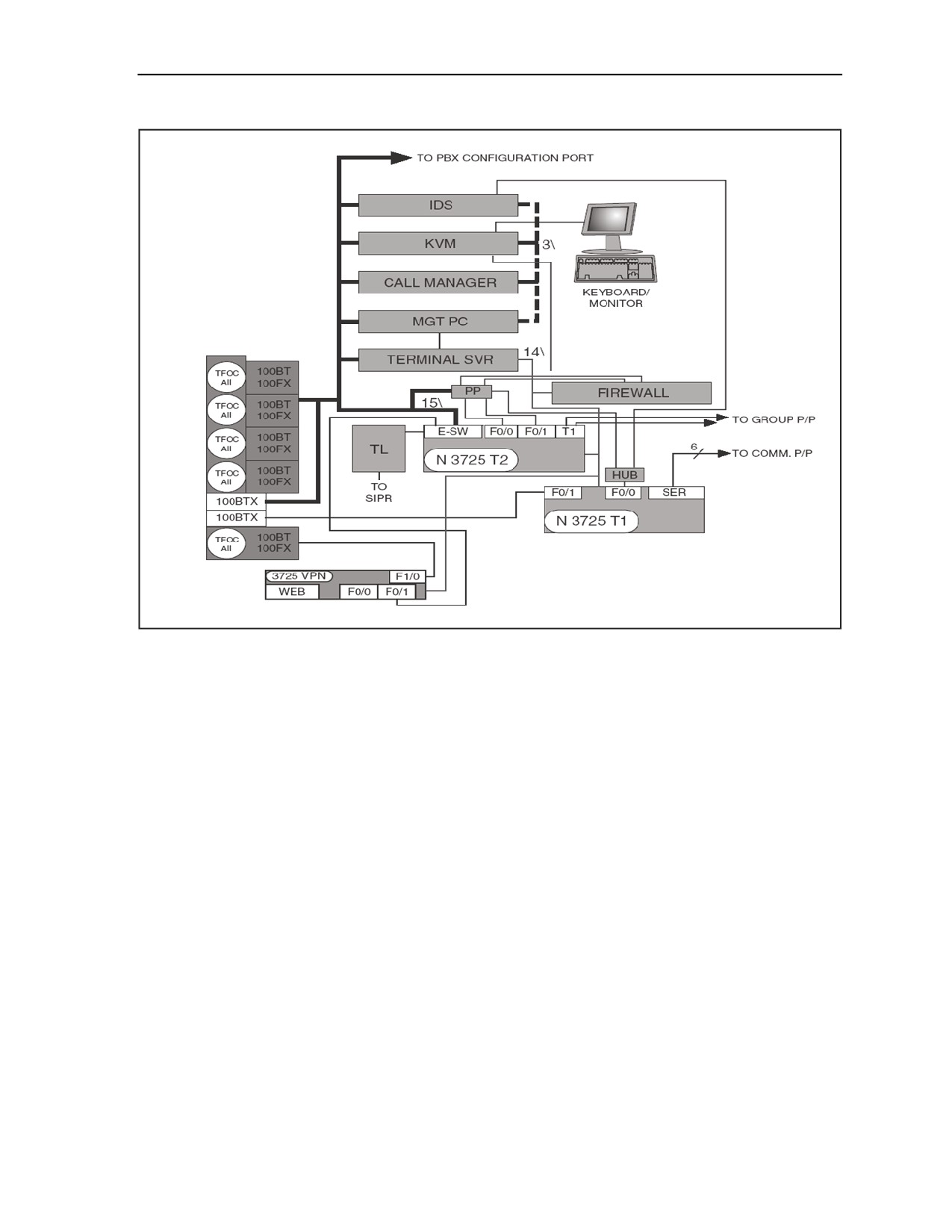
Detection System (IDS). Figure B-4 shows a representative IA-based architecture. The overall NIPRNET
data network is shown in Figure B-5. The following sections describe each individual component within
the NIPRNET data network.
Figure B-4. Information Assurance-based Architecture
B-4
FMI 6-02.60
5 September 2006
Joint Network Node Components and Connectivity
Figure B-5. NIPRNET Data Network
MEDIA CONVERTERS
B-9. There are five media converters used in the NIPRNET network to convert LAN interfaces from the
internal shelter NIPRNET data network to fiber interfaces. The fiber output of each of the media converters
appears on the shelter NIPRNET SEP as a TFOCA II connector. The fiber optic conversion allows devices
to be connected over greater distances than standard shielded twisted pair (STP) cable will allow. Four of
the five media converters are connected to the Ethernet switch module of the tier 2 NIPRNET router. The
fifth converter is connected to an Ethernet port on the VPN router. The VPN router fiber connection is
intended to be used to connect to the TDMA Ku transmission equipment.
NIPRNET TIER 1 ROUTER
B-10. The NIPRNET tier 1 router is used to create a three-part security domain, contains access lists, and
provides a first line of defense for security. It provides serial WAN connections and connects directly to the
hub for IDS and firewall access. The router has six serial interfaces to communication patch panel B, one
Ethernet interface to the NIPRNET hub, and one Ethernet interface to the SEP. The tier 1 router’s console
port connects to the NIPRNET terminal server. The terminal server allows the NIPRNET server’s WMI
function to access the router via its console port for configuration and management purposes.
CONFIGURING A NEW OR ERASED TIER 1 ROUTER
B-11. Using Trivial File Transfer Protocol (TFTP) to copy a known template or base configuration will
normally provide the most accurate results and is covered below. A command interpreter called exec is
provided. There are two levels of exec: User exec which is nondestructive and designated by an angle
bracket > and Privilege exec which allows parameters to be changed. All procedures in this document will
be run from Privilege exec unless otherwise noted. To enter Privilege exec, type: enable at the User exec
5 September 2006
FMI 6-02.60
B-5
Appendix B
prompt. An account and password may be required. The following user names and passwords may be
encountered if the unit is in the Group A configuration (initial checkout upon delivery) and should be
changed by the gaining unit: Account = jnnadmin, Password = jnn1234$. Table B-1 shows the basic steps
to configure a new or erased tier 1 router.
Table B-1. Configure a Tier 1 Router
1
Connect to the router console port via the terminal server or laptop.
2
Power up router.
3
After router boots and does not find the configuration file it will want to start auto config
routine. Answer "no" to start auto config.
4
At > prompt, enter enable, press Enter, prompt should change to #.
5
Enter conf t, press Enter. Prompt changes to router (config) #.
6
Enter interface FE0/0 and press Enter.
7
Enter "ip addr xxx.xxx.xxx.xxx yyy.yyy.yyy.yyy" where x is the IP of the port and y is the
subnet mask.
8
Enter no shut, CTRL-Z.
9
Verify TFTP Server port is active.
10
Tier 2 router and firewall are already configured. Ping NIPRNET management PC once
router port FE0/0 addressed, enabled and static addresses are added to the router.
11
Verify TFTP server application is open and the server has a valid configuration file in the
TFTP_files directory.
12
Verify TFTP server application can send and receive files (under security tab: SolarWinds
TFTP Server > File > Configure > Security Tab).
13
Enter copy TFTP start from the router to start the transfer of the file to the router via the
configured interface.
14
Enter the IP of the TFTP server when the router asks for the address of the remote host.
15
When the router asks for the source file name enter the exact name of the configuration file
that is stored on the TFTP server. File names are case sensitive.
16
Enter startupconfig when the router asks for the destination filename. This should be
specified as default and is the string within the [ ] of the prompt.
17
As data is transferred,! will appear to show successful data transfer.
B-12. Table B-2 shows representative entries for the configuration of a tier 1 router. The IP addresses and
description lines of the interfaces are not meant to be all inclusive. The actual entries will vary according to
the mission and current policies.
Table B-2. Representative Entries for Tier 1 Router Configuration
version 12.3
service timestamps debug datetime localtime show-timezone msec
service timestamps log datetime localtime show-timezone msec
clock timezone GMT 0
service password-encryption
no service finger
no service udp-small-servers
no service tcp-small-servers
no ip bootp server
no snmp-server
no ip http server
B-6
FMI 6-02.60
5 September 2006
Joint Network Node Components and Connectivity
Table B-2. Representative Entries for Tier 1 Router Configuration
no ip source-route
no service config
cdp run
service nagle
!
Hostname_ JNN 1
!
no ip domain-lookup
ip domain name jnn.army.mil
! crypto key generate rsa
!
boot-start-marker
boot system flash:c3725-advipservicesk9-mz.123-9.bin
boot-end-marker
!
logging buffered 51200 warnings
!
username jnn101 password us9876#
enable password us9876#
enable secret us9876#
ip subnet-zero
ip cef
!
ip multicast-routing
!
no ip domain lookup
ip audit po max-events 100
no ftp-server write-enable
!
!
no crypto isakmp enable
!
!
interface Loopback0
ip address 149.033.077.210 255.255.255.255
no ip directed-broadcast
no ip proxy-arp
!
interface FastEthernet0/0
description NIPR Hub Port 1
ip address
172.022.253.250 255.255.255.248
ip ospf cost 14
duplex auto
speed auto
no ip directed-broadcast
no ip mask-reply
no ip proxy-arp
5 September 2006
FMI 6-02.60
B-7
Appendix B
Table B-2. Representative Entries for Tier 1 Router Configuration
no shutdown
!
interface Serial0/0
description Interface to P-400 HSD 1-0 through CPP B-A1
ip unnumbered Loopback0
ip ospf cost 22
encap ppp
no shutdown
no ip directed-broadcast
no ip mask-reply
no ip proxy-arp
!
interface FastEthernet0/1
description To SEP MP2A3A1
ip address
duplex auto
speed auto
no ip directed-broadcast
no ip mask-reply
no ip proxy-arp
no shutdown
!
interface Serial0/1
description Interface to P-400 HSD 2-0 through CPP B-A3
ip unnumbered Loopback0
no ip directed-broadcast
no ip mask-reply
no ip proxy-arp
ip ospf cost 22
encap ppp
no shutdown
!
interface Serial0/2
description
ip unnumbered Loopback0
ip ospf cost 22
encap ppp
no shutdown
no ip directed-broadcast
no ip mask-reply
no ip proxy-arp
!
interface Serial0/3
description Interface to P-400 HSD 4-0 through CPP B-A7
ip unnumbered Loopback0
no shutdown
B-8
FMI 6-02.60
5 September 2006
Joint Network Node Components and Connectivity
Table B-2. Representative Entries for Tier 1 Router Configuration
ip ospf cost 22
encap ppp
no ip directed-broadcast
no ip mask-reply
no ip proxy-arp
!
interface Serial0/4
description Interface to KIV-19 #10 through CPP B-A16
ip unnumbered Loopback0
no shutdown
pulse-time 5
ip ospf cost 22
encap ppp
no ip directed-broadcast
no ip mask-reply
no ip proxy-arp
!
interface Serial0/5
description Interface to CPP B-A17
ip unnumbered Loopback0
no shutdown
ip ospf cost 22
encap ppp
no ip directed-broadcast
no ip mask-reply
no ip proxy-arp
!
router ospf 21
log-adjacency-changes
network 148.022.069.209 0.0.0.0 area 0
network 172.022.253.248 000.000.000.007 area 0
!
ip classless
!
ntp server 148.022.069.141
snmp-server community REAL RO
snmp-server ifindex persist
!
Typical configuration for the Tier 1 router to make an external BGP connection
Router ospf 1
network x.x.x.x x.x.x.x area x
default-information originate metric-type 1 metric 100 route-map SEND_DEFAULT_IF
Router BGP XX (Your Autonomous system number)
no synchronization
5 September 2006
FMI 6-02.60
B-9
Appendix B
Table B-2. Representative Entries for Tier 1 Router Configuration
redistribute ospf 1 route-map ALLOWED_ROUTES
neighbor x.x.x.x remote-as XXXX (neighbor AS number)
neighbor x.x.x.x route-map setMED out
no auto-summary
Access-list 1 permit 0.0.0.0
Access-list 2 permit x.x.x.x x.x.x.x (summary address of all subnets you want to advertise via BGP to
your neighbor)
Route-map SEND_DEFAULT_IF permit 10
match ip address 1
match ip next-hop x.x.x.x (your eBGP neighbor address)
Route-map ALLOWED_ROUTES permit 10
match ip address 2
Route-map setMED permit 10
set metric-type internal
banner motd c
ATTENTION!
THIS IS A DOD COMPUTER SYSTEM. BEFORE PROCESSING CLASSIFIED INFORMATION,
CHECK THE SECURITY ACCREDITATION LEVEL OF THIS SYSTEM. DO NOT PROCESS,
STORE OR TRANSMIT INFORMATION CLASSIFIED ABOVE ACCREDITATION LEVEL OF THIS
SYSTEM. THIS COMPUTER SYSTEM, INCLUDING ALL RELATED EQUIPMENT, NETWORKS
AND NETWORK DEVICES (INCLUDES INTERNET ACCESS) ARE PROVIDED ONLY FOR
AUTHORIZED U.S. GOVERNMENT USE. DOD COMPUTER SYSTEMS MAY BE MONITORED
FOR ALL LAWFUL PURPOSES, INCLUDING TO ENSURE THEIR USE IS AGAINST
UNAUTHORIZED ACCESS, AND TO VERIFY SECURITY PROCEDURES, SURVIVABILITY, AND
OPERATIONAL SECURITY. MONITORING INCLUDES, BUT IS NOT LIMITED TO, ACTIVE
ATTACKS BY AUTHORIZED DOD ENTITIES TO TEST OR VERIFY THE SECURITY OF THIS
SYSTEM. DURING MONITORING, INFORMATION MAY BE EXAMINED, RECORDED, COPIED,
AND USED FOR AUTHORIZED PURPOSES. ALL INFORMATION, INCLUDING PERSONAL
INFORMATION, PLACED ON OR SENT OVER THIS SYSTEM MAY BE MONITORED. USE OF
THIS DOD COMPUTER SYSTEM, AUTHORIZED OR UNAUTHORIZED, CONSTITUTES
CONSENT TO MONITORING. UNAUTHORIZED USE OF THIS DOD COMPUTER SYSTEM MAY
SUBJECT YOU TO CRIMINAL PROSECUTION. EVIDENCE OF UNAUTHORIZED USE
COLLECTED DURING MONITORING MAY BE USED FOR ADMINISTRATIVE, CRIMINAL OR
OTHER ADVERSE ACTION. USE OF THIS SYSTEM CONSTITUTES CONSENT TO MONITORING
FOR ALL LAWFUL PURPOSES.
c
!
line con 0
exec-timeout 5 0
login local
!
line aux 0
B-10
FMI 6-02.60
5 September 2006
Joint Network Node Components and Connectivity
Table B-2. Representative Entries for Tier 1 Router Configuration
no exec
exec-timeout 0 10
transport input none
!
line vty 0 4
login local
exec-timeout 5 0
transport input telnet ssh
!
end
NIPRNET TIER 2 ROUTER
B-13. The NIPRNET tier 2 router provides default gateway and routing functions for locally connected
NIPRNET hosts and shelter components. It is the access point for a TACLANE that is used to tunnel
through the SIPRNET data network. The router contains an Ethernet switch module used for shelter
component Ethernet connections. Five Ethernet switch ports appear at the SEP. Four of those five are fiber
optic converted and the fifth is a standard wire interface. The router has a T1 card that interfaces to the
group patch panel. It can serve as a gateway between VoIP subscribers and the shelter PBX and can be
configured to connect to the hub and firewall. The tier 2 router console port connects to the NIPRNET
terminal server. The terminal server allows the NIPRNET servers WMI function to access the router via its
console port for configuration and management purposes.
CONFIGURING A NEW OR ERASED TIER 2 ROUTER
B-14. Using TFTP to copy a known template or base configuration will normally provide the most accurate
results and is covered below. A command interpreter called exec is provided. There are two levels of exec:
User exec which is nondestructive and designated by an angle bracket > and Privilege exec which allows
parameters to be changed. All procedures in this document will be run from Privilege exec unless otherwise
noted. To enter Privilege exec, type: enable at the User exec prompt. An account and password may be
required. The following user names and passwords may be encountered if the unit is in the Group A
configuration (initial checkout upon delivery) and should be changed by the gaining unit: Account =
jnnadmin Password = jnn1234$. Table B-3 shows the basic steps to configure a new or erased tier 2 router.
Table B-3. Configure a Tier 2 Router
1
Connect to the router console port via the terminal server or laptop.
2
Power up router.
3
After router boots and does not find the configuration file it will want to start auto config
routine. Answer "no" to start auto config.
4
At > prompt, enter enable, press Enter, prompt should change to #
5
Enter conf t, press Enter. Prompt changes to router (config.
6
Enter interface VLAN1 and press Enter.
7
Enter "ip addr xxx.xxx.xxx.xxx yyy.yyy.yyy.yyy" where x is the IP of the port and y is the
subnet mask.
8
Enter no shut, CTRL-Z.
9
Verify TFTP Server port is active.
10
Verify TFTP server application is open and the server has a valid configuration file in the
TFTP_files directory.
5 September 2006
FMI 6-02.60
B-11

Appendix B
Table B-3. Configure a Tier 2 Router
11
Verify TFTP server application can send and receive files (under security tab: SolarWinds
TFTP Server > File > Configure > Security Tab).
12
Enter copy TFTP start from the router to start the transfer of the file to the router via the
configured interface.
13
Enter the IP of the TFTP server when the router asks for the address of the remote host.
14
When the router asks for the source file name enter the exact name of the configuration file
that is stored on the TFTP server. File names are case sensitive.
15
Enter startupconfig when the router asks for the destination filename. This should be
specified as default and is the string within the [ ] of the prompt.
16
As data is transferred, ! will appear to show successful data transfer.
B-15. Table B-4 shows representative entries for the configuration of a tier 2 router. The IP addresses and
description lines of the interfaces are not meant to be all inclusive. The actual entries will vary according to
the mission.
Table B-4. Representative Entries for Tier 2 Router Configuration
version 12.3
service timestamps debug datetime localtime show-timezone msec
service timestamps log datetime localtime show-timezone msec
clock timezone GMT 0
service password-encryption
no service finger
no service udp-small-servers
no service tcp-small-servers
no ip bootp server
no snmp-server
no ip http server
no ip source-route
no service config
no cdp run
service nagle
!
hostname JNN NTR2
!
no ip domain-lookup
ip domain name jnn.army.mil
!
boot-start-marker
boot system flash:c3725-advipservicesk9-mz.123-9.bin
boot-end-marker
!
logging buffered 51200 warnings
!
username jnn101 password us9876#
enable secret us9876#
!
no network-clock-participate slot 1
B-12
FMI 6-02.60
5 September 2006
Joint Network Node Components and Connectivity
Table B-4. Representative Entries for Tier 2 Router Configuration
voice-card 1
dspfarm
!
no aaa new-model
ip subnet-zero
ip cef
!
ip multicast-routing
!
ip dhcp excluded-address Insert IP Range
!
ip dhcp pool data
network Insert IP Address and Subnet Mask
default-router Insert IP Address
!
ip audit po max-events 100
no ftp-server write-enable
!
controller T1 1/0
framing esf
linecode b8zs
ds0-group 0 timeslots 1-24 type e&m-wink-start
!
controller T1 1/1
framing esf
linecode b8zs
ds0-group 0 timeslots 1-24 type e&m-wink-start
!
no crypto isakmp enable
!
interface Loopback0
ip address Insert IP Address and Subnet Mask
no ip directed-broadcast
no ip proxy-arp
!
interface FastEthernet0/0
description Interface to Tier 1 IA Panel Router
ip address Insert IP Address and Subnet Mask
duplex auto
speed auto
no ip directed-broadcast
no ip mask-reply
no ip proxy-arp
no shutdown
!
5 September 2006
FMI 6-02.60
B-13
Appendix B
Table B-4. Representative Entries for Tier 2 Router Configuration
interface FastEthernet0/1
no ip address
duplex auto
speed auto
no ip directed-broadcast
no ip mask-reply
no ip proxy-arp
no shutdown
!
interface FastEthernet2/0
description Interface to CM
switchport access vlan 58
no ip address
no ip proxy-arp
no shutdown
!
interface FastEthernet2/1
description Interface to MGT PC
no ip address
no shutdown
!
interface FastEthernet2/2
description Interface to KVM
no ip address
no shutdown
!
interface FastEthernet2/3
description Interface to Terminal Server
no ip address
no shutdown
!
interface FastEthernet2/4
description Interface to Redcom
no ip address
no shutdown
!
interface FastEthernet2/5
description Interface to VPN (Future Use)
no ip address
shutdown
!
interface FastEthernet2/6
description Interface to IDS
no ip address
no shutdown
B-14
FMI 6-02.60
5 September 2006
Joint Network Node Components and Connectivity
Table B-4. Representative Entries for Tier 2 Router Configuration
!
interface FastEthernet2/7
description Trunk to Voice Case
switchport trunk allowed vlan 1,2,58,1002-1005
switchport mode trunk
no ip address
no shutdown
!
interface FastEthernet2/8
description Trunk to Data case
switchport access vlan 59
switchport trunk allowed vlan 1,2,59,1002-1005
switchport mode trunk
no ip address
no shutdown
!
interface FastEthernet2/9
description Interface to SEP MC3
no ip address
no shutdown
!
interface FastEthernet2/10
description Interface to SEP MC4
no ip address
duplex full
speed 100
no shutdown
!
interface FastEthernet2/11
description Interface to SEP
no ip address
no shutdown
!
interface FastEthernet2/12
description Interface to IA Patch
no ip address
shutdown
!
interface FastEthernet2/13
description Interface to VPN router
switchport access vlan 67
no ip address
no shutdown
!
interface FastEthernet2/14
5 September 2006
FMI 6-02.60
B-15
Appendix B
Table B-4. Representative Entries for Tier 2 Router Configuration
description Interface to Taclane2 PT
no ip address
shutdown
!
interface FastEthernet2/15
description Interface to GPS NTP Port
no ip address
no shutdown
!
interface Vlan1
ip address Insert IP Address and Subnet Mask
no ip directed-broadcast
no ip mask-reply
no ip proxy-arp
no shutdown
!
interface Vlan58
ip address Insert IP Address and Subnet Mask
no ip directed-broadcast
no ip mask-reply
no ip proxy-arp
no shutdown
!
interface Vlan59
description Vlan for NIPR data case
ip address Insert IP Address and Subnet Mask
no ip directed-broadcast
no ip mask-reply
no ip proxy-arp
no shutdown
!
interface Vlan67
description Interface to VPN Router
ip address Insert IP Address and Subnet Mask
no ip directed-broadcast
no ip mask-reply
no ip proxy-arp
no shutdown
!
router ospf 21
log-adjacency-changes
network Insert Network and Inverse Mask area 0
network Insert Network and Inverse Mask area 0 ! FastEthernet 0/0
!
ip classless
!
B-16
FMI 6-02.60
5 September 2006
Joint Network Node Components and Connectivity
Table B-4. Representative Entries for Tier 2 Router Configuration
snmp-server community Insert Community String RO
snmp-server enable traps tty
banner motd _C
ATTENTION!
THIS IS A DOD COMPUTER SYSTEM. BEFORE PROCESSING CLASSIFIED INFORMATION,
CHECK THE SECURITY ACCREDITATION LEVEL OF THIS SYSTEM. DO NOT PROCESS,
STORE OR TRANSMIT INFORMATION CLASSIFIED ABOVE ACCREDITATION LEVEL OF THIS
SYSTEM. THIS COMPUTER SYSTEM, INCLUDING ALL RELATED EQUIPMENT, NETWORKS
AND NETWORK DEVICES (INCLUDES INTERNET ACCESS) ARE PROVIDED ONLY FOR
AUTHORIZED U.S. GOVERNMENT USE. DOD COMPUTER SYSTEMS MAY BE MONITORED
FOR ALL LAWFUL PURPOSES, INCLUDING TO ENSURE THEIR USE IS AGAINST
UNAUTHORIZED ACCESS, AND TO VERIFY SECURITY PROCEDURES, SURVIVABILITY, AND
OPERATIONAL SECURITY. MONITORING INCLUDES, BUT IS NOT LIMITED TO, ACTIVE
ATTACKS BY AUTHORIZED DOD ENTITIES TO TEST OR VERIFY THE SECURITY OF THIS
SYSTEM. DURING MONITORING, INFORMATION MAY BE EXAMINED, RECORDED, COPIED,
AND USED FOR AUTHORIZED PURPOSES. ALL INFORMATION, INCLUDING PERSONAL
INFORMATION, PLACED ON OR SENT OVER THIS SYSTEM MAY BE MONITORED. USE OF
THIS DOD COMPUTER SYSTEM, AUTHORIZED OR UNAUTHORIZED, CONSTITUTES
CONSENT TO MONITORING. UNAUTHORIZED USE OF THIS DOD COMPUTER SYSTEM MAY
SUBJECT YOU TO CRIMINAL PROSECUTION. EVIDENCE OF UNAUTHORIZED USE
COLLECTED DURING MONITORING MAY BE USED FOR ADMINISTRATIVE, CRIMINAL OR
OTHER ADVERSE ACTION. USE OF THIS SYSTEM CONSTITUTES CONSENT TO MONITORING
FOR ALL LAWFUL PURPOSES.
_
!
voice-port 1/0:0
timeouts interdigit 2
!
voice-port 1/1:0
!
dial-peer voice 1 voip
destination-pattern 6700…
session target ipv4: Insert IP Address
!
dial-peer voice 2 pots
destination-pattern .T
port 1/0:0
!
gateway
!
ntp server Insert IP Address
banner motd c
ATTENTION!
THIS IS A DOD COMPUTER SYSTEM. BEFORE PROCESSING CLASSIFIED INFORMATION,
CHECK THE SECURITY ACCREDITATION LEVEL OF THIS SYSTEM. DO NOT PROCESS,
STORE OR TRANSMIT INFORMATION CLASSIFIED ABOVE ACCREDITATION LEVEL OF THIS
SYSTEM. THIS COMPUTER SYSTEM, INCLUDING ALL RELATED EQUIPMENT, NETWORKS
AND NETWORK DEVICES (INCLUDES INTERNET ACCESS) ARE PROVIDED ONLY FOR
5 September 2006
FMI 6-02.60
B-17
Appendix B
Table B-4. Representative Entries for Tier 2 Router Configuration
AUTHORIZED U.S. GOVERNMENT USE. DOD COMPUTER SYSTEMS MAY BE MONITORED
FOR ALL LAWFUL PURPOSES, INCLUDING TO ENSURE THEIR USE IS AGAINST
UNAUTHORIZED ACCESS, AND TO VERIFY SECURITY PROCEDURES, SURVIVABILITY, AND
OPERATIONAL SECURITY. MONITORING INCLUDES, BUT IS NOT LIMITED TO, ACTIVE
ATTACKS BY AUTHORIZED DOD ENTITIES TO TEST OR VERIFY THE SECURITY OF THIS
SYSTEM. DURING MONITORING, INFORMATION MAY BE EXAMINED, RECORDED, COPIED,
AND USED FOR AUTHORIZED PURPOSES. ALL INFORMATION, INCLUDING PERSONAL
INFORMATION, PLACED ON OR SENT OVER THIS SYSTEM MAY BE MONITORED. USE OF
THIS DOD COMPUTER SYSTEM, AUTHORIZED OR UNAUTHORIZED, CONSTITUTES
CONSENT TO MONITORING. UNAUTHORIZED USE OF THIS DOD COMPUTER SYSTEM MAY
SUBJECT YOU TO CRIMINAL PROSECUTION. EVIDENCE OF UNAUTHORIZED USE
COLLECTED DURING MONITORING MAY BE USED FOR ADMINISTRATIVE, CRIMINAL OR
OTHER ADVERSE ACTION. USE OF THIS SYSTEM CONSTITUTES CONSENT TO MONITORING
FOR ALL LAWFUL PURPOSES.
c
!
line con 0
exec-timeout 5 0
login local
!
line aux 0
no exec
exec-timeout 0 10
NIPRNET VIRTUAL PRIVATE NETWORK (VPN) ROUTER
B-16. The NIPRNET VPN router is used to establish VPN links via the Ku TDMA network to the CPN,
UHN, and other JNN shelters. The VPN links are Advanced Encryption Standard (AES) encrypted. The
VPN router is configured as the Certificate Authority Server to support the encryption system. The VPN
router is populated and configured to use a web cache module.
(Note the Web Cache function is
independent of its other VPN and IP security functions.) The router has Ethernet connectivity to the
NIPRNET tier 2 router Ethernet switch module, the cipher text port of the TACLANE, and the SEP. The
purpose of the NIPRNET router interface is to allow NIPRNET data connectivity to access the VPN
networks. The TACLANE interface allows SIPRNET traffic to tunnel through the VPN Ku TDMA
network. The SEP interface is fiber optic modulated for connection to the external Ku TDMA transmission
equipment.
CONFIGURING A NEW OR ERASED VPN ROUTER
B-17. Using TFTP to copy a known template or base configuration will normally provide the most accurate
results and is covered below. A command interpreter called exec is provided. There are two levels of exec:
User exec which is nondestructive and designated by an angle bracket > and Privilege exec which allows
parameters to be changed. All procedures in this document will be run from Privilege exec unless otherwise
noted. To enter Privilege exec, type: enable at the User exec prompt. An account and password may be
required. The following user names and passwords may be encountered if the unit is in the Group A
configuration (initial checkout upon delivery) and should be changed by the gaining unit: Account =
jnnadmin Password = jnn1234$. Table B-5 shows the basic steps to configure a new or erased VPN router.
Table B-5. Configure a VPN Router
1
Connect to the router console port via the terminal server or laptop.
2
Power up router.
B-18
FMI 6-02.60
5 September 2006
Joint Network Node Components and Connectivity
Table B-5. Configure a VPN Router
3
After router boots and does not find the configuration file it will want to start auto config
routine. Answer "no" to start auto config.
4
At > prompt, enter enable, press Enter, prompt should change to #.
5
Enter conf t, press Enter. Prompt changes to router(config)#.
6
Enter interface FE0/0 and press Enter.
7
Enter "ip addr xxx.xxx.xxx.xxx yyy.yyy.yyy.yyy" where x is the IP of the port and y is the
subnet mask.
8
Enter no shut, CTRL-Z.
9
Verify TFTP Server port is active.
10
Tier 2 router is already configured. Ping NIPRNET management PC once router port FE0/1
addressed and enabled.
11
Verify TFTP server application is open and the server has a valid configuration file in the
TFTP_files directory.
12
Verify TFTP server application can send and receive files (under security tab: SolarWinds
TFTP Server > File > Configure > Security Tab).
13
Enter copy TFTP start from the router to start the transfer of the file to the router via the
configured interface.
14
Enter the IP of the TFTP server when the router asks for the address of the remote host.
15
When the router asks for the source file name enter the exact name of the configuration file
that is stored on the TFTP server. File names are case sensitive.
16
Enter startupconfig when the router asks for the destination filename. This should be
specified as default and is the string within the [ ] of the prompt.
17
As data is transferred, ! will appear to show successful data transfer.
B-18. Table B-6 shows representative entries for the configuration of a VPN router. The IP addresses and
description lines of the interfaces are not meant to be all inclusive. The actual entries will vary according to
the mission.
Table B-6. Representative Entries for a VPN Router Configuration
version 12.3
service timestamps debug datetime localtime show-timezone msec
service timestamps log datetime localtime show-timezone msec
clock timezone GMT 0
service password-encryption
no service finger
no service udp-small-servers
no service tcp-small-servers
no ip bootp server
no snmp-server
no ip http server
no ip source-route
no service config
no cdp run
service nagle
!
hostname Insert Hostname _BVR
5 September 2006
FMI 6-02.60
B-19
Appendix B
Table B-6. Representative Entries for a VPN Router Configuration
!
boot-start-marker
boot system flash:c3725-advipservicesk9-mz.123-9.bin
boot-end-marker
!
username Insert username for JNN Operators privilege 5 password Insert user password
username Insert username for JNN Administrators privilege 5 password Insert admin password
enable secret Insert enable secret password
no network-clock-participate slot 2
no aaa new-model
ip subnet-zero
ip cef
!
no ip domain-lookup
ip domain name Insert Domain name
!
ip audit po max-events 100
no ftp-server write-enable
ip multicast-routing
!
class-map match-all SIPRdata
match dscp af21
class-map match-all SIPRvoiceSig
match dscp af31
class-map match-all SIPRvoice
match dscp ef
class-map match-all Routing
match dscp cs6
class-map match-any Linkway
match class-map SIPRdata
match class-map SIPRvoiceSig
match class-map SIPRvoice
match class-map Routing
match class-map class-default
!
!
policy-map Aggregate
class SIPRvoice
priority percent 40
class SIPRvoiceSig
bandwidth remaining percent 3
class Routing
bandwidth remaining percent 2
class SIPRdata
bandwidth remaining percent 30
B-20
FMI 6-02.60
5 September 2006
Joint Network Node Components and Connectivity
Table B-6. Representative Entries for a VPN Router Configuration
class class-default
fair-queue
policy-map Linkway
class Linkway
shape average 4096000
service-policy Aggregate
!
crypto isakmp policy 10
! encr aes
authentication pre-share
crypto isakmp key Insert Key address Insert IP Address and Subnet Mask
! crypto isakmp keepalive 60 10
!
!
crypto ipsec transform-set aes_set esp-aes 256 esp-md5-hmac
mode transport
!
crypto ipsec profile jnn
set transform-set aes_set
!
interface Loopback0
ip address Insert IP Address and Subnet Mask
no ip directed-broadcast
no ip proxy-arp
!
interface Tunnel1
description DMVPN Multipoint Hub to BN Spokes
ip address Insert IP Address and Subnet Mask
no ip redirects
ip mtu 1420
ip nhrp authentication Insert Key
ip nhrp map multicast dynamic
ip nhrp map multicast Insert IP Address
ip nhrp map 1 Insert IP Address Insert IP Address
ip nhrp network-id Insert net id
ip nhrp holdtime 600
ip nhrp nhs Insert IP Address
ip ospf network broadcast
bandwidth 4096
ip ospf priority 2
tunnel source FastEthernet2/0
tunnel mode gre multipoint
tunnel key Insert Key
tunnel protection ipsec profile jnn
no ip directed-broadcast
no ip mask-reply
5 September 2006
FMI 6-02.60
B-21
Appendix B
Table B-6. Representative Entries for a VPN Router Configuration
no ip proxy-arp
no shutdown
!
interface FastEthernet0/0
description Interface to Taclane CT
ip address Insert IP Address and Subnet Mask
duplex auto
speed auto
no ip directed-broadcast
no ip mask-reply
no ip proxy-arp
no shutdown
!
interface FastEthernet0/1
description Interface to NIPR T2 Router Fa2/13
ip address Insert IP Address and Subnet Mask
duplex auto
speed auto
no ip directed-broadcast
no ip mask-reply
no ip proxy-arp
no shutdown
!
interface Content-Engine1/0
no ip address
shutdown
hold-queue 60 out
no ip proxy-arp
!
interface FastEthernet2/0
description Interface to TDMA modem
ip address Insert IP Address and Subnet Mask
service-policy output Linkway
duplex auto
speed auto
no ip directed-broadcast
no ip mask-reply
no ip proxy-arp
no shutdown
!
interface FastEthernet2/1
ip address Insert IP address and Subnet Mask
duplex auto
speed auto
no ip directed-broadcast
B-22
FMI 6-02.60
5 September 2006
Joint Network Node Components and Connectivity
Table B-6. Representative Entries for a VPN Router Configuration
no ip mask-reply
no ip proxy-arp
shutdown
!
router ospf 21
log-adjacency-changes
network Insert Network and Inverse Mask area 0
passive-interface FastEthernet2/0
!
router rip
version 2
network Insert Network Address
!
log-adjacency-changes
ip classless
ip http server
no ip http secure-server
ntp server Insert IP Address
!
snmp-server community Insert Community String RO
banner motd c
ATTENTION!
THIS IS A DOD COMPUTER SYSTEM. BEFORE PROCESSING CLASSIFIED INFORMATION,
CHECK THE SECURITY ACCREDITATION LEVEL OF THIS SYSTEM. DO NOT PROCESS,
STORE OR TRANSMIT INFORMATION CLASSIFIED ABOVE ACCREDITATION LEVEL OF THIS
SYSTEM. THIS COMPUTER SYSTEM, INCLUDING ALL RELATED EQUIPMENT, NETWORKS
AND NETWORK DEVICES (INCLUDES INTERNET ACCESS) ARE PROVIDED ONLY FOR
AUTHORIZED U.S. GOVERNMENT USE. DOD COMPUTER SYSTEMS MAY BE MONITORED
FOR ALL LAWFUL PURPOSES, INCLUDING TO ENSURE THEIR USE IS AGAINST
UNAUTHORIZED ACCESS, AND TO VERIFY SECURITY PROCEDURES, SURVIVABILITY, AND
OPERATIONAL SECURITY. MONITORING INCLUDES, BUT IS NOT LIMITED TO, ACTIVE
ATTACKS BY AUTHORIZED DOD ENTITIES TO TEST OR VERIFY THE SECURITY OF THIS
SYSTEM. DURING MONITORING, INFORMATION MAY BE EXAMINED, RECORDED, COPIED,
AND USED FOR AUTHORIZED PURPOSES. ALL INFORMATION, INCLUDING PERSONAL
INFORMATION, PLACED ON OR SENT OVER THIS SYSTEM MAY BE MONITORED. USE OF
THIS DOD COMPUTER SYSTEM, AUTHORIZED OR UNAUTHORIZED, CONSTITUTES
CONSENT TO MONITORING. UNAUTHORIZED USE OF THIS DOD COMPUTER SYSTEM MAY
SUBJECT YOU TO CRIMINAL PROSECUTION. EVIDENCE OF UNAUTHORIZED USE
COLLECTED DURING MONITORING MAY BE USED FOR ADMINISTRATIVE, CRIMINAL OR
OTHER ADVERSE ACTION. USE OF THIS SYSTEM CONSTITUTES CONSENT TO MONITORING
FOR ALL LAWFUL PURPOSES.
c
!
line con 0
exec-timeout 5 0
login local
!
line aux 0
5 September 2006
FMI 6-02.60
B-23
Appendix B
Table B-6. Representative Entries for a VPN Router Configuration
no exec
exec-timeout 0 10
transport input none
!
line vty 0 4
login local
exec-timeout 5 0
transport input telnet ssh
!
end
NIPRNET FIREWALL
B-19. The NIPRNET data network contains a firewall. The firewall can be positioned either between the
tier 1 and tier 2 router, or between the tier 2 router and its Ethernet switch module. The firewall forms a
boundary between the protected (inside) and unprotected (outside) networks. All JNN traffic between the
protected and unprotected networks flows through the JNN firewall to maintain security. The firewall is
locally managed via the security domain’s server. The firewall has a console port interface to the terminal
server for configuration. It has two Ethernet connections to the IA config panel.
CONFIGURING A FIREWALL
B-20. The firewall is preconfigured with a default configuration. The JNN operators will receive updated
firewall configurations and policies from the NETOPS cell. The following procedures can be used to
monitor and download precreated configurations on the firewall. The IP addresses shown are examples
only. Table B-7 shows the steps for connecting the device to a network and configuring the firewall using a
vt100 Terminal Emulator or Telnet.
Table B-7. Connecting and Configuring Firewall
1
Ensure the power switch is off.
2
Connect the power cable to the power outlet at the rear of the device and to a power source.
3
Connect a RJ-45 cross-over cable from trust zone interface (Ethernet port 1) to internal
switch, router or hub.
4
Connect a RJ-45 straight-through cable from untrust zone interface (Ethernet port 3) to
external router.
5
Flip power switch to on position.
6
Power LED glows green, Status-1 LED blinks green and Ethernet port LEDs for each
connected interface glow or blink green.
There are two ways to establish a console session with the firewall after connecting: vt100
Terminal Emulator through a RJ-45 serial cable connected to the console port or using Telnet
through a TCP/IP network connection. To establish a connection using a vt100 Terminal
Emulator:
1
Connect a RJ-45 serial cable between the console port on the firewall and serial port on your
computer.
2
Press ENTER for login prompt.
3
At Username prompt, type: netscreen.
B-24
FMI 6-02.60
5 September 2006
Joint Network Node Components and Connectivity
B-21. The default IP address for managing the firewall through the Trust zone interface (Ethernet port 1) is
192.68.1.1. This is the IP address used to manage the device through a Telnet session or with the WebUI
management application. If a different IP address is used, it needs to be assigned. Table B-8 shows the
steps to set the IP address of the Trust zone interface.
Table B-8. Set IP Address
1
Choose an unused IP address within the current address range of the Local Area Network.
2
Enter set interface ethernet1 ip ip_addr/mask.
3
To confirm new port settings enter get interface.
4
Observe that the IP address for the Trust zone interface is one set.
B-22. Table B-9 shows the steps to connect using Telnet.
Table B-9. Connect Using TELNET
1
Connect a RJ-45 cross-over cable from Trustzone interface (Ethernet port 1) on the firewall to
internal switch, router or Hub in the LAN.
2
Open a Telnet session to 192.168.1.1
3
At Username prompt, type: netscreen
4
At Password prompt, type: netscreen
Allowing Outbound Traffic
B-23. By default, the firewall does not allow inbound or outbound traffic. Access policies must be created
to permit specific kinds of traffic in the directions needed. Access policies to deny and tunnel traffic can
also be created. Configuration of the firewall and access policies is accomplished based on current policies
and the guidance currently in effect.
B-24. The Outgoing Policy Wizard in the WebUI management application may also be used to create
access policies for outbound traffic. Table B-10 shows the steps to access the device with the WebUI
management application.
Table B-10. Connect Using WebUI
1
Connect your computer to the Trust zone interface (Ethernet port 1).
2
Launch the browser , enter the IP address of the Trust zone interface in the URL field and
press enter.
3
Observe the Netscreen WebUI software displays login prompt.
4
Enter netscreen in the Admin Name field.
5
Enter netscreen in the Password field.
6
Click Login.
7
The NetScreen WebUI application window appears and configurations may be downloaded
or uploaded.
B-25. Table B-11 shows representative entries for the configuration of a firewall. The IP addresses and
description lines of the interfaces are not meant to be all inclusive. The actual entries will vary according to
the mission and current policies.
Table B-11. Representative Entries for a JNN Firewall Configuration
set clock ntp
set clock timezone 0
set vrouter trust-vr sharable
unset vrouter "trust-vr" auto-route-export
5 September 2006
FMI 6-02.60
B-25
Appendix B
Table B-11. Representative Entries for a JNN Firewall Configuration
id 0 set auth-server "Local"
set auth-server "Local" server-name “Local”
set auth default auth server "Local"
set admin name gdadmin
set admin password gd1234$gd1234
$
set admin auth timeout 10
set admin auth server "Local"
set admin auth banner secondary "This computer system, including all related equipment,
networks and network devices (specifically including Internet access) are provided only for
authorized U. S. Government use. DoD computer systems may be monitored for all lawful
purposes, to ensure that their use is authorized, for management of the system, to facilitate
protection against unauthorized access, and to verify security procedures, survivability and
operational security. Monitoring includes active attacks by authorized DoD entities to test or
verify security of this system. During monitoring, information may be examined, recorded, copied
and used for authorized purposes. All information, including personal information, placed on or
sent over this system may be monitored. Use of thisDoD computer system, authorized or
unauthorized, constitutes consent to monitoring of this system. Unauthorized use may subject
you to criminal prosecution. Evidence of unauthorized use collected during monitoring collected
during monitoring may be used for administrative, criminal or adverse action. Use of this system
constitutes consent to monitoring for these purposes."
set admin auth banner telnet login "This is a Department of Defense computer system."
set admin auth banner console login "This is a Department of Defense computer system."
set admin format dos
set zone "Trust" vrouter "trust-vr"
set zone “Untrust” vrouter "trust-vr"
set zone “DMZ” vrouter “trust-vr"
set zone “VLAN” vrouter “trust-vr”
set zone “Trust” tcp-rst
set zone "Untrust" block
unset zone "Untrust" tcp-rst
set zone”MGT” block
set zone “DMZ” tcp-rst
set zone “VLAN” block
set zone "VLAN" tcp-rst
set zone “Untrust” screen tear-drop
set zone "Untrust" screen syn-flood
set zone "Untrust" screen ping-death
set zone "Untrust" screen ip-filter-src
set zone "Untrust" screen land
set zone “V1-Untrust" screen tear-drop
set zone “V 1-Untrust" screen syn-flood
set zone “V 1-Untrust" screen ping-death
set zone “V 1-Untrust" screen ip-filter-src
set zone “V 1-Untrust" screen land
set interface ethernet1 phy full 100mb
set interface ethernet2 phy full 100m
set interface ethernet 3 phy half 100
B-26
FMI 6-02.60
5 September 2006
Joint Network Node Components and Connectivity
Table B-11. Representative Entries for a JNN Firewall Configuration
set interface ethernet4 phy full 100mb
set interface "ethernet1" zone "V1-Trust"
set interface "ethernet2" zone "Null"
set interface "ethernet3" zone "V1-Untrust”
set interface vlan1 ip
unset interface vlan1 bypass-others-ipsec
set vlan1 bypass-non-ip
set interface vlan1 ip manageable
set interface vlan1 broadcast arp
unset interface vlan1 manage telnet
set interface vlan1 ip m
set interface vlan1 broadcast
unset interface vlan1 manage telnet
unset interface vlan1 manage snmp
unset interface vlan1 manage ssl
unset interface vlan1 manage web
unset zone V1-Trust manage telnet
unset zone V1-Trust manage snmp
unset zone V1-Trust manage ssl
unset zone V1-Trust manage web
set zone V1-Trust manage ping
set zone V1-Trust manage ssh
set zone V1-Untrust manage ping
set zone V1-Untrust manage ssh
unset flow no-tcp-seq-check
set flow tcp-syn-check
set console timeout 5
set hostname JNN_
set ike respond-bad-spi 1
set pki authority default scep mode "auto"
set pki x509 default cert-path partial
set url protocol sc-cpa
exit
set policy id 1 from "V1-Trust" to "V1-Untrust" "Any" "Any" "ANY" permit log
set policy id 2 from "V1-Untrust" to "V1-Trust" "Any" "Any" "ANY" permit log
set alarm threshold CPU 90
set alarm threshold session percent 80
set firewall log-self
set nsmgmt bulkcli reboot-timeout 60
set ssh version v2
set ssh enable
set config lock timeout 5
set dl-buf size 4718592
set ntp server 144.104.1
set ntp interval 20
set snmp port listen 161
5 September 2006
FMI 6-02.60
B-27
Appendix B
Table B-11. Representative Entries for a JNN Firewall Configuration
set snmp port trap 162
set vrouter "untrust-vr"
exit
set vrouter "trust-vr"
unset add-default-route
set route 0.0.0.0/0 interface vlan1 gateway 144.104.133.145
exit
set vrouter "untrust-vr"
exit
set vrouter "trust-vr"
exit
IDS
B-26. The IDS used in the JNN consists of two main components: manager and sensor. A separate IDS is
used on the SIPRNET and NIPRNET domains.
IDS Manager
B-27. The IDS manger consists of software loaded on an IDS management server and usually resides in the
UHN and provides central management of all JNN network sensors. In the event a JNN is employed
autonomously, the management function may be performed by the JNN as part of the network management
push package provided.
IDS Sensor
B-28. The IDS sensor monitors connected network segments, analyzes traffic, and looks for intrusions and
signs of network abuse. It monitors network traffic in search of known attack signatures. A signature is a
code used to detect a specific security event. When an intrusion is detected, the IDS will respond in the
following ways:
z
Records the date and time.
z
Records source and target of event.
z
Records the content of the intrusion.
z
Notifies the administrator.
SECURE INTERNET PROTOCOL DATA NETWORK
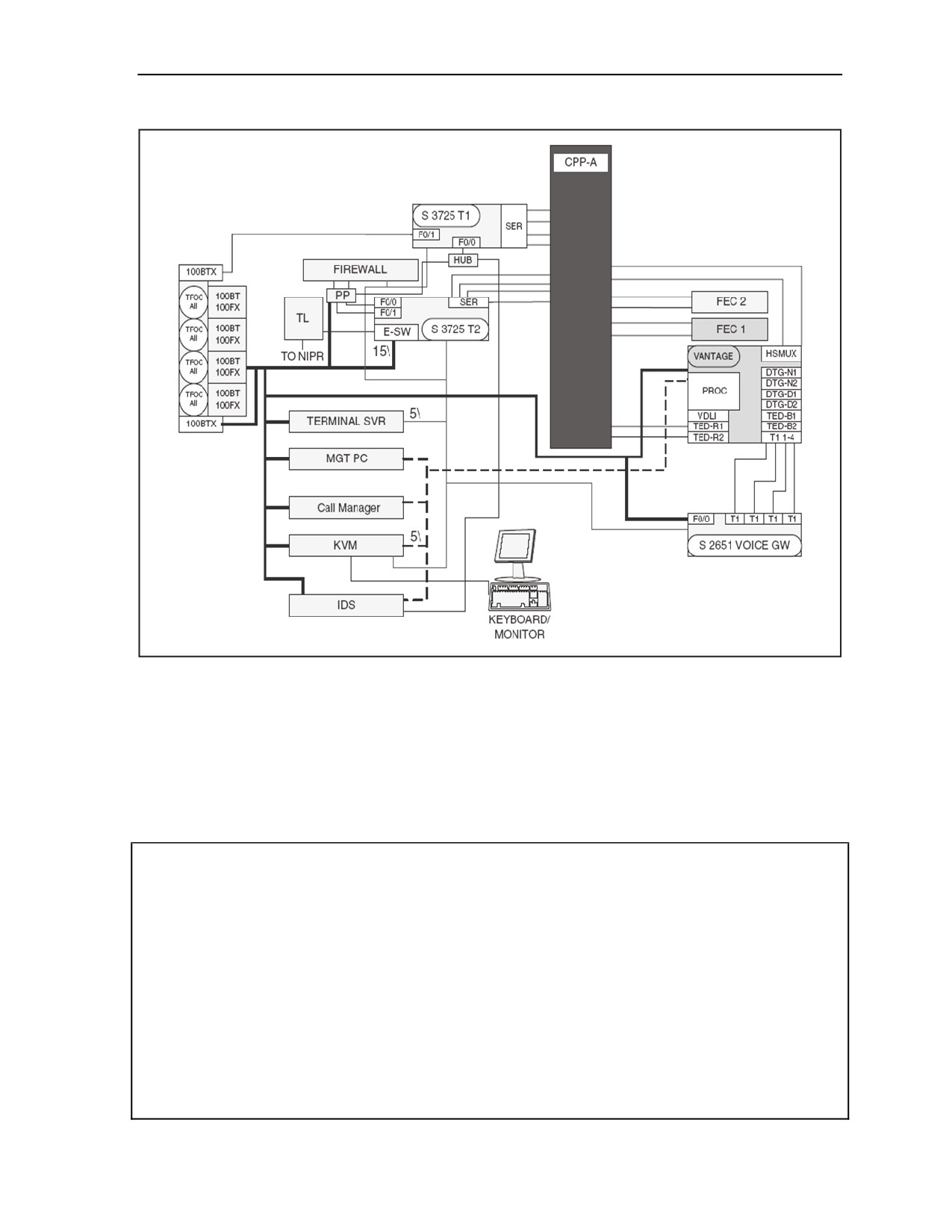
B-29. The SIPRNET data network mirrors the NIPRNET data network with few variations. Figure B-6
depicts the SIPRNET data network. The components and procedures are the same for both domains. Only
the differences between the NIPRNET data network and SIPRNET data network will be addressed here.
There is no VPN router on the SIPRNET domain. It uses a KG-175 (TACLANE) to interface with the
NIPRNET VPN router from the SIPRNET tier 2 router. TACLANES provide the capability of creating
Secure Virtual Networks overlaid upon existing networks as depicted in Figure B-7. The SIPRNET router
serial ports (from both the tier 1 and tier 2 router) connect to patch panel A. At patch panel A, the serial
ports can be patched to KIV-19s, KIV-7s, or FEC units. The SIPRNET connections cannot be patched to
black devices without first being interfaced to a crypto device. The Vantage appears on the SIPRNET
domain. The Vantage has an Ethernet connection to the SIPRNET tier 2 router Ethernet switch function.
The Vantage also has KVM connections to the SIPRNET KVM. Accompanying the Vantage is a router for
SIPRNET voice gateway functions. There are two HSFEC units. Each unit has two functions to yield a
total of four HSFEC channels. Each channel appears on CPP-A and can be patched in and configured for
standard serial or SIPRNET router serial data to one of the transport or encryption devices available on the
patch panel.
B-28
FMI 6-02.60
5 September 2006
Joint Network Node Components and Connectivity
Figure B-6. SIPRNET Data Network
SIPRNET TIER 1 ROUTER
B-30. The SIPRNET tier 1 router is initially configured the same as the NIPRNET tier 1 router. Table B-12
shows representative entries for the configuration of the SIPRNET tier 1 router. The IP addresses and
description lines of the interfaces are not meant to be all inclusive. The actual entries will vary according to
the mission.
Table B-12. Representative Entries for a SIPRNET Tier 1 Router Configuration
version 12.3
service timestamps debug datetime localtime show-timezone msec
service timestamps log datetime localtime show-timezone msec
clock timezone GMT 0
service password-encryption
no service finger
no service udp-small-servers
no service tcp-small-servers
no ip bootp server
no snmp-server
no ip http server
no ip source-route
no service config
5 September 2006
FMI 6-02.60
B-29
Appendix B
Table B-12. Representative Entries for a SIPRNET Tier 1 Router Configuration
cdp run
service nagle
!
hostname JNN1_68050_ST1R
!
no ip domain-lookup
ip domain-name jnn.army.smil.mil
!
! SSH must be configured.
ip ssh time-out 60
ip ssh authentication-retries 2
! AAA authentication and authorization must be configured for SCP to work.
aaa new-model
aaa authentication login default local
aaa authorization exec default local
! Enables SCP
ip scp server enable
! crypto key generate rsa
!
boot-start-marker
boot system flash:c3725-advipservicesk9-mz.123-9c.bin
boot-end-marker
!
logging buffered 51200 warnings
!
username Insert username for JNN Operators privilege 5 password Insert user password
username Insert username for JNN Administrators privilege 5 password Insert admin password
enable secret Insert enable secret password
ip subnet-zero
ip cef
!
ip multicast-routing
!
!
no ip domain lookup
ip audit po max-events 100
no ftp-server write-enable
!
!
no crypto isakmp enable
!
!
interface Loopback0
ip address Insert IP address and subnet mask
no ip directed-broadcast
B-30
FMI 6-02.60
5 September 2006
Joint Network Node Components and Connectivity
Table B-12. Representative Entries for a SIPRNET Tier 1 Router Configuration
no ip proxy-arp
!
interface FastEthernet0/0
description SIPR Hub Port1
ip address Insert IP address and subnet mask
ip pim sparse-mode
ip ospf cost 14
duplex half
speed auto
no ip directed-broadcast
no ip mask-reply
no ip proxy-arp
no shutdown
!
interface Serial0/0
description Interface to KIV-19 #3 through CPP A-A1
no ip address
ip pim sparse-mode
no shutdown
pulse-time 5
ip ospf cost 22
encap ppp
no ip directed-broadcast
no ip mask-reply
no ip proxy-arp
!
interface FastEthernet0/1
description To SEP MP1A1A1
ip address ! !
ip pim sparse-mode
duplex auto
speed auto
no ip directed-broadcast
no ip mask-reply
no ip proxy-arp
shutdown
!
interface Serial0/1
description Interface to KIV-19 #4 through CPP A-A2
ip unnumbered Loopback0
ip pim sparse-mode
no shutdown
pulse-time 5
ip ospf cost 22
encap ppp
no ip directed-broadcast
5 September 2006
FMI 6-02.60
B-31
Appendix B
Table B-12. Representative Entries for a SIPRNET Tier 1 Router Configuration
no ip mask-reply
no ip proxy-arp
!
interface Serial0/2
description Interface to FEC 1-1 through CPP A-A3
ip unnumbered Loopback0
ip pim sparse-mode
no shutdown
pulse-time 5
ip ospf cost 22
encap ppp
no ip directed-broadcast
no ip mask-reply
no ip proxy-arp
!
interface Serial0/3
description Interface to FEC 1-2 through CPP A-A4
ip unnumbered Loopback0
ip pim sparse-mode
no shutdown
pulse-time 5
ip ospf cost 22
encap ppp
no ip directed-broadcast
no ip mask-reply
no ip proxy-arp
!
interface Serial0/4
description Unused
ip unnumbered Loopback0
ip pim sparse-mode
shutdown
pulse-time 5
ip ospf cost 22
encap ppp
no ip directed-broadcast
no ip mask-reply
no ip proxy-arp
!
interface Serial0/5
description Unused
ip unnumbered Loopback0
ip pim sparse-mode
shutdown
pulse-time 5
ip ospf cost 22
B-32
FMI 6-02.60
5 September 2006
Joint Network Node Components and Connectivity
Table B-12. Representative Entries for a SIPRNET Tier 1 Router Configuration
encap ppp
no ip directed-broadcast
no ip mask-reply
no ip proxy-arp
!
router ospf 21
log-adjacency-changes
network Insert network and inverse mask area 0
network Insert network and inverse mask area 0
!
!
ip classless
!
!
logging host Insert IP address
logging trap informational
logging facility local7
!
ntp server Insert IP address
snmp-server community Insert community string
snmp-server ifindex persist
snmp-server enable traps tty
!
banner incoming %
****************************************
BGP configuration Guide for T1 router.
Configuration needed to make an external BGP connection to draw SIPR services
----------------------------------------------------------------------
Router ospf 1
network x.x.x.x x.x.x.x area x
default-information originate metric-type 1 metric 100 route-map SEND_DEFAULT_IF
Router BGP XX (Your Autonomous system number)
no synchronization
redistribute ospf 1 route-map ALLOWED_ROUTES
neighbor x.x.x.x remote-as XXXX (neighbor AS number)
neighbor x.x.x.x route-map setMED out
no auto-summary
Access-list 1 permit 0.0.0.0
Access-list 2 permit x.x.x.x x.x.x.x (summary address of all subnets you want to advertise via BGP to
your neighbor)
Route-map SEND_DEFAULT_IF permit 10
match ip address 1
5 September 2006
FMI 6-02.60
B-33
Appendix B
Table B-12. Representative Entries for a SIPRNET Tier 1 Router Configuration
match ip next-hop x.x.x.x (your eBGP neighbor address)
Route-map ALLOWED_ROUTES permit 10
match ip address 2
Route-map setMED permit 10
set metric-type internal
------------------------------------------------------------------------
Configuration of a lateral BGP connection: Connection with another
Division without being a transit AS)
--------------------------------------------------------------------------
Router ospf 1
network x.x.x.x x.x.x.x area x
default-information originate metric-type 1 metric 100 route-map SEND_DEFAULT_IF
redistribute bgp XX (Your AS number) metric 1000 subnets route-map ACCEPT_ROUTES
Router BGP XX (Your AS number)
no synchronization
redistribute ospf 1 route-map ALLOWED_ROUTES
neighbor x.x.x.x remote-as XXXX (remoteAS number)
neighbor x.x.x.x route-map setMED out
no auto-summary
Access-list 1 permit 0.0.0.0
Access-list 2 permit x.x.x.x x.x.x.x (summary address of all subnets you want to advertise via BGP to
your neighbor)
Access-list 3 permit x.x.x.x x.x.x.x (summary addresses of all subnets you want to recieve from your
BGP neighbor).
Route-map SEND_DEFAULT_IF permit 10
match ip address 1
match ip next-hop x.x.x.x (This IP address must be removed so a default route is not advertised from
this node
or a bogus address could exist in this space)
Route-map ALLOWED_ROUTES permit 10
match ip address 2
Route-map ACCEPT_ROUTES permit 10
match ip address 3
Route-map setMED permit 10
B-34
FMI 6-02.60
5 September 2006
Joint Network Node Components and Connectivity
Table B-12. Representative Entries for a SIPRNET Tier 1 Router Configuration
set metric-type internal
----------------------------------------------------------------------------
******************************************
%
!
banner exec %
ver. TRG.v19.1_NoACLs
%
!
banner motd c
ATTENTION!
THIS IS A DOD COMPUTER SYSTEM. BEFORE PROCESSING CLASSIFIED INFORMATION,
CHECK THE SECURITY ACCREDITATION LEVEL OF THIS SYSTEM. DO NOT PROCESS,
STORE OR TRANSMIT INFORMATION CLASSIFIED ABOVE ACCREDITATION LEVEL OF THIS
SYSTEM. THIS COMPUTER SYSTEM, INCLUDING ALL RELATED EQUIPMENT, NETWORKS
AND NETWORK DEVICES (INCLUDES INTERNET ACCESS) ARE PROVIDED ONLY FOR
AUTHORIZED U.S. GOVERNMENT USE. DOD COMPUTER SYSTEMS MAY BE MONITORED
FOR ALL LAWFUL PURPOSES, INCLUDING TO ENSURE THEIR USE IS AGAINST
UNAUTHORIZED ACCESS, AND TO VERIFY SECURITY PROCEDURES, SURVIVABILITY, AND
OPERATIONAL SECURITY. MONITORING INCLUDES, BUT IS NOT LIMITED TO, ACTIVE
ATTACKS BY AUTHORIZED DOD ENTITIES TO TEST OR VERIFY THE SECURITY OF THIS
SYSTEM. DURING MONITORING, INFORMATION MAY BE EXAMINED, RECORDED, COPIED,
AND USED FOR AUTHORIZED PURPOSES. ALL INFORMATION, INCLUDING PERSONAL
INFORMATION, PLACED ON OR SENT OVER THIS SYSTEM MAY BE MONITORED. USE OF
THIS DOD COMPUTER SYSTEM, AUTHORIZED OR UNAUTHORIZED, CONSTITUTES
CONSENT TO MONITORING. UNAUTHORIZED USE OF THIS DOD COMPUTER SYSTEM MAY
SUBJECT YOU TO CRIMINAL PROSECUTION. EVIDENCE OF UNAUTHORIZED USE
COLLECTED DURING MONITORING MAY BE USED FOR ADMINISTRATIVE, CRIMINAL OR
OTHER ADVERSE ACTION. USE OF THIS SYSTEM CONSTITUTES CONSENT TO MONITORING
FOR ALL LAWFUL PURPOSES.
c
!
line con 0
exec-timeout 5 0
login local
!
line aux 0
no exec
exec-timeout 0 10
transport input none
!
line vty 0 4
login local
exec-timeout 5 0
transport input telnet ssh
!
end
5 September 2006
FMI 6-02.60
B-35
Appendix B
SIPRNET TIER 2 ROUTER
B-31. The SIPRNET tier 2 router is initially configured the same as the NIPRNET tier 2 router. Table B-13
shows representative entries for the configuration of the SIPRNET tier 2 router. The IP addresses and
description lines of the interfaces are not meant to be all inclusive. The actual entries will vary according to
the mission.
Table B-13. Representative Entries for a SIPRNET Tier 2 Router Configuration
service timestamps debug datetime localtime show-timezone msec
service timestamps log datetime localtime show-timezone msec
clock timezone GMT 0
service password-encryption
no service finger
no service udp-small-servers
no service tcp-small-servers
no ip bootp server
no snmp-server
no ip http server
no ip source-route
no service config
cdp run
service nagle
hostname JNN1_ST2R
!
!
boot-start-marker
boot system flash:c3725-advipservicesk9-mz.123-9c.bin
boot-end-marker
!
logging buffered 51200 warnings
username Insert username for JNN Operators privilege 5 password Insert user password
username Insert username for JNN Administrators privilege 5 password Insert admin password
enable secret Insert enable secret password
!
no network-clock-participate slot 1
ip subnet-zero
ip cef
!
ip multicast-routing
!
ip dhcp excluded-address Insert IP Range
ip dhcp excluded-address Insert IP Range
ip dhcp pool voice
network Insert IP Address and Subnet Mask
default-router Insert IP address
option 150 ip Insert IP address
!
no ip domain-lookup
B-36
FMI 6-02.60
5 September 2006
Joint Network Node Components and Connectivity
Table B-13. Representative Entries for a SIPRNET Tier 2 Router Configuration
ip domain-name jnn.army.smil.mil
!
! SSH must be configured.
ip ssh time-out 60
ip ssh authentication-retries 2
! AAA authentication and authorization must be configured for SCP to work.
aaa new-model
aaa authentication login default local
aaa authorization exec default local
! Enables SCP
ip scp server enable
! crypto key generate rsa
!
ip audit po max-events 100
no ftp-server write-enable
!
class-map match-all SIPRdata
match not dscp af31
match not dscp ef
match input-interface Vlan222
match input-interface Vlan6
!
policy-map SIPRdata
class SIPRdata
set dscp af21
!
!
!
!
!
!
!
!
!
no crypto isakmp enable
!
!
!
!
interface Loopback0
ip address Insert IP address and subnet mask
no ip directed-broadcast
no ip proxy-arp
!
interface Tunnel1
description multi-point Tunnel to Bns
5 September 2006
FMI 6-02.60
B-37
Appendix B
Table B-13. Representative Entries for a SIPRNET Tier 2 Router Configuration
ip address Insert IP address and subnet mask
no ip redirects
ip mtu 1289
ip pim nbma-mode
ip pim sparse-mode
ip nhrp authentication Insert Key
ip nhrp map multicast dynamic
ip nhrp map multicast Insert IP address
ip nhrp map Insert IP addresses
ip nhrp network Insert network ID
ip nhrp holdtime 600
ip nhrp nhs Insert IP address
ip nhrp map multicast Insert IP address
ip nhrp map Insert IP address
ip nhrp nhs Insert IP address
!
!
!
!
!
ip ospf network broadcast
ip ospf priority 3
ip ospf cost 1050
service-policy output SIPRdata
bandwidth 3072
tunnel source FastEthernet1/1
tunnel mode gre multipoint
tunnel key 6805
no ip directed-broadcast
no ip mask-reply
no ip proxy-arp
no shutdown
!
interface FastEthernet0/0
description Interface to IA PP port 1
ip address Insert Ip address and subnet mask
ip pim sparse-mode
ip ospf cost 14
duplex auto
speed auto
no ip directed-broadcast
no ip mask-reply
no ip proxy-arp
no shutdown
!
interface FastEthernet0/1
B-38
FMI 6-02.60
5 September 2006