DB2 Server for VSE. Operations Guide / Handbooks (2004-2007) - page 36
ARI0801I DBS Utility started: 11/13/89 17:42:51
AUTOCOMMIT = OFF ERRORMODE = OFF
ISOLATION LEVEL = REPEATABLE READ
-----—> COMMENT ’***********************************************
-----—>
***
BLOCK FORMAT PRINTOUT EXAMPLE
***
-----—>
***********************************************’
-----—> CONNECT "MIKE
" IDENTIFIED BY ********;
ARI8004I User MIKE connected to database SQLDBA.
ARI0500I SQL processing was successful.
ARI0505I SQLCODE= 0
SQLSTATE = 00000
ROWCOUNT = 0
-----—> ALTER TABLE ACTIVITY ADD
-----—>
"FULL DESCRIPTION" VARCHAR(250);
ARI0500I SQL PROCESSING WAS SUCCESSFUL.
ARI0505I SQLCODE= 0
SQLSTATE = 00000
ROWCOUNT = 0
-----—> UPDATE ACTIVITY SET "FULL DESCRIPTION" = ’A FULL DESCRIPTION
-----—> OF ACTIVITIES WOULD BE DISPLAYED HERE. THE DESCRIPTION COU
-----—> LD OVERFLOW TO THE NEXT DISPLAY LINE FOR THE COLUMN BECAUSE
-----—> THE COLUMN CAN CONTAIN UP TO 250 DATA POSITIONS’;
ARI0500I SQL processing was successful.
ARI0505I SQLCODE= 0
SQLSTATE = 00000
ROWCOUNT = 0
-----—> SELECT * FROM ACTIVITY WHERE ACTNO < 30
SELECT * FROM ACTIVITY WHERE ACTNO < 30
PAGE 1
*****
1
*****
ACTNO:
10
ACTKWD: MANAGE
ACTDESC: MANAGE/ADVISE
FULL DESCRIPTION: A FULL DESCRIPTION OF ACTIVITIES WOULD BE DISPLAY
ED HERE. THE DESCRIPTION COULD OVERFLOW TO THE N
EXT DISPLAY LINE FOR THE COLUMN BECAUSE THE COLUM
N CAN CONTAIN UP TO 250 DATA POSITIONS
*****
2
*****
ACTNO:
20
ACTKWD: ECOST
ACTDESC: ESTIMATE COST
FULL DESCRIPTION: A FULL DESCRIPTION OF ACTIVITIES WOULD BE DISPLAY
ED HERE. THE DESCRIPTION COULD OVERFLOW TO THE N
EXT DISPLAY LINE FOR THE COLUMN BECAUSE THE COLUM
N CAN CONTAIN UP TO 250 DATA POSITIONS
ARI0850I SQL SELECT processing successful: Rowcount = 2
Figure 52. Sample Printout of Block Output Format
As in a tabular format query result, the block format has a heading and page
number; from there on, however, differences appear. Each row of the query result
is presented in a separate block of lines preceded by a subheading that identifies
the number of the row in the answer set. Individual fields of a row are preceded
by their column names and are to be read from left to right, and top to bottom.
The list form of output is similar to block form. Figure 53 on page 99 shows an
example of the list output format.
98
Database Services Utility
SELECT * FROM DEPARTMENT
PAGE 1
***ROW: 1
DEPTNO: A00
DEPTNAME: SPIFFY COMPUTER SERVICES DIV.
MGRNO:
000010
ADMRDEPT: A00
FULL DESCRIPTION: A FULL DESCRIPTION OF THE DEPARTMENT WOULD BE
DISPLAYED HERE. THE DESCRIPTION COULD OVERFLOW TO
THE NEXT DISPLAY LINE FOR THE COLUMN.
Figure 53. Sample Printout of List Output Format
The list output format resembles the block output format in that there is a heading
and page number. Each row of the query result is presented in a separate list of
records or lines preceded by a subheading that identifies the number of the row in
the answer set. Individual fields of a row are preceded by their column names and
are presented in separate records. The difference, however, is that with list output
format, the output for each selected row begins on a new page, and the column
name and data for each select-list column begins on a new output record or
display line.
You can specify the format used by the Database Services Utility for SQL SELECT
statement output by using either the SET FORMAT command or the FORMAT
control parameter. If you do not specify the format to be used, the Database
Services Utility uses column or block format as appropriate. For more information
on the SET FORMAT command, refer to “SET FORMAT” on page 217. For a
description of the control parameter FORMAT, see “Database Services Utility
Control Parameters” on page 115.
Using the LIST Parameter on a DATALOAD Command
The example in Figure 54 shows the output from a DATALOAD command that
was processed with the LIST(YES) option of the INFILE subcommand in effect.
———————> DATALOAD TABLE (SQLDBA.ACTIVITY) IF POS(1)=’Y’
———————> ACTNO
2—11
———————> ACTDESC
12—111
┌─────────┐
———————> INFILE (* LIST(YES) CONTINUED(YES))
│Record 1.│
ARI0852I DATALOAD PROCESSING STARTED.
└──┬──────┘
N2345678901THE DATA IN THIS RECORD IS NOT LOADED INTO THE TABLE.
◄───────────────┘
XY2345678902THIS DESCRIPTION OF AN ACTIVITY FILLS UP A WHOLE PHYSICAL INPUT
┌─────────┐
RECORD AND CONTINUES.
◄─────┤Record 2.│
XY2345678903THIS ACTIVITY DESCRIPTION DOES NOT FILL THE RECORD.
◄────────────┐ └─────────┘
◄────────────────────────┐
|
——————> ENDDATA
┌──┴───────────────┐
┌─┴───────┐
ARI0875I 2 row(s) loaded into table SQLDBA.ACTIVITY. │This blank line
│
│Record 3.│
ARI0855I DATALOAD processing successful.
│contains positions│
└─────────┘
│80-111 of data
│
│record 3.
│
└──────────────────┘
Figure 54. Using YES in the LIST Parameter
With continued record processing, each field of the records must contain the
maximum number of characters. The second and third records’ ACTDESC fields
Chapter 6. Interpreting the Output of the Database Services Utility
99
are 100 characters in length because they are to be loaded (position 1 is Y). The
system does not check the length of the first record’s ACTDESC field because this
record is not to be loaded (position 1 is N).
The example in Figure 55 shows output for a DATALOAD command that was
processed using the LIST(NO) option of the INFILE subcommand:
------> DATALOAD TABLE (SQLDBA.ACTIVITY) IF POS(1)=’Y’
------> ACTNO
2-11
------> ACTDESC
12-111
------> INFILE (* LIST(NO) CONTINUED(YES))
ARI0852I DATALOAD PROCESSING STARTED.
------> ENDDATA
ARI0875I 2 row(s) loaded into table SQLDBA.ACTIVITY.
ARI0855I DATALOAD processing successful.
Figure 55. Using NO in the LIST Parameter
Reading Report and Message-File Output in Error Recovery
Reading messages, command input, and data in output reports and message files
is an important task performed frequently by users of the Database Services Utility.
To read DB2 Server for VSE report output to recover from an error, proceed as
follows:
1.
Check the messages at the end of the report to determine whether the utility
job ended without error. Message records begin with ARI.
2.
If the job ran with errors, read all the messages, working backward from the
end until you reach the point of the (initial) error message. Note this spot in
the report so that you can easily return to it.
3.
If data is included in the report, scan the query result to see how serious the
error is.
4.
If you find the cause of the error, take corrective action and run the job again; if
you do not find the cause, inspect the command input for syntax errors.
Command-input lines begin with arrows (-----—>).
5.
If the cause of the error is still unknown, determine whether it is a DB2 Server
for VSE error or a Database Services Utility error. Look up the error message in
the DB2 Server for VSE Messages and Codes manual and follow the
recommended recovery procedure, as applicable.
6.
If the cause of the error appears to be related to the Database Services Utility,
review information in Chapter 9, “Error Handling and Debugging,” on page
223, and apply appropriate corrective action.
7.
If the error persists, see your database administrator.
To read DB2 Server for VM message file output to recover from an error, proceed
as follows:
1.
Print or display the message file to be read.
2.
Check the messages at the end of the file to determine whether the utility job
ended without error. Message lines begin with ARI.
3.
If the job did not run without errors, read all the message lines, working
backward from the end until you reach the point of the (initial) error message.
Note this spot in the message file so that you can easily return to it.
4.
If data is included in the message file, scan the query result to see how serious
the error is.
100
Database Services Utility
5. If you find the cause of the error, take corrective action and run the job again; if
you do not find the cause, inspect the command input for syntax errors.
Command-input lines begin with arrows (-----—>).
6. If the cause of the error is still unknown, determine whether it is a DB2 Server
for VM error or a Database Services Utility error. Look up the error message in
the DB2 Server for VM Messages and Codes, and follow the recommended
recovery procedure, as applicable.
7. If the cause of the error appears to be related to the Database Services Utility,
review information in Chapter 9, “Error Handling and Debugging,” on page
223, and apply appropriate corrective action.
8. If the error persists, see your database administrator.
Chapter 6. Interpreting the Output of the Database Services Utility
101
102
Database Services Utility
Part 2. Reference
This part of the manual presents additional information on the calling and running
of the Database Services Utility. The material in this section is of primary interest
to database application programmers and system programmers; it includes the
following topics:
v Database Services Utility use from application programs
v Database Services Utility commands: reference
v Database Services Utility error handling and debugging
v Database Services Utility performance considerations.
For further reference material in the form of sample tables, see Appendix A,
“Sample Tables.” Refer to Appendix B, “FILEDEF Command Syntax and Notes,”
on page 249, for a syntax diagram and usage notes about the CMS FILEDEF
command.
103
104
Database Services Utility
Chapter 7. Using the Database Services Utility from
Application Programs
This chapter describes the procedures required to initiate Database Services Utility
processing from application programs and how to use the Database Services Utility
application program interface. Rules for naming objects and lists of reserved words
are also provided.
In DB2
Server for VSE
The Database Services Utility is an application program; like any other program, it
must be preprocessed before you can run it. Usually, the utility is preprocessed
during database installation. At that time, the RUN privilege to use the utility is
granted to prospective users; you must possess the RUN privilege to use the
utility. Your system programmer can tell whether the Database Services Utility is
properly installed and whether you are authorized to use it.
The ddname parameter of a Database Services Utility command identifies an
EBCDIC, standard-label sequential data file needed by that command for input or
output. Magnetic tape with a fixed, unblocked record format and a logical record
length and block size of 2 048 bytes is used as a default for these sequential files.
(The record format required varies for each command.)
As indicated in the command descriptions, you can override the defaults and
assign files to a direct access storage device (DASD). A sequential file allocated to
magnetic tape can reside on any device supported by the VSE DTFMT macro; files
allocated to direct access storage can reside on any device supported by the VSE
DTFSD macro. An exception to this is VSAM managed SAM files, which do not
support spanned records. Spanned records are used by UNLOAD
TABLE/DBSPACE and RELOAD TABLE/DBSPACE processing and, in some cases,
by DATALOAD and DATAUNLOAD.
You can invoke the Database Services Utility in a VSE batch partition or in a
VSE/ICCF interactive partition. The Database Services Utility does not use VSE
dynamic device assignment. Logical units SYS004 and SYS005, respectively, must
be used for input and output files allocated to magnetic tape: SYS006 and SYS007,
respectively, must be used for input and output files allocated to direct access
storage. Under VSE, all magnetic tape files processed by the Database Services
Utility must be EBCDIC standard-label files, and only magnetic tape input files are
rewound.
Special consideration should be given to the database log when using the Database
Services Utility to load large amounts of data. The log must be large enough to
contain all the log data generated during Database Services Utility RELOAD
DBSPACE, RELOAD TABLE, or DATALOAD command processing. Log space used
as a result of Database Services Utility processing is not freed until an SQL
COMMIT or ROLLBACK is executed. If the log space is filled by Database Services
Utility processing, a Database Services Utility processing error occurs. Your system
programmer can tell whether there is enough log space to contain all the log data
generated during Database Services Utility command processing.
105
Single User Mode Job Control
A minimum 2000K byte virtual partition is recommended to execute the Database
Services Utility with single user mode for VSE archive mode on. The sample VSE
job control statements in Figure 56 invoke the Database Services Utility in single
user mode with DB2 Server for VSE archive mode on:
▌1▐
// JOB
DBSUTIL
▌2▐
// EXEC
PROC=ARIS75PL
// EXEC
PROC=ARIS75DB
▌3▐
// TLBL
file name,
▌4▐
// DLBL
file name,
▌5▐
// ASSGN
SYS004,
▌6▐
// ASSGN
SYS005,
▌7▐
// ASSGN
SYS006,
▌8▐
// ASSGN
SYS007,
▌9▐
// EXEC
ARISQLDS,SIZE=AUTO,PARM=’SYSMODE=S,LOGMODE=A,PROGNAME=ARIDBS’
▌10▐
Database Services Utility control commands and optional user data
▌11▐ /*
▌12▐ /&
Figure 56. Single User Mode Job Control
Each job control statement is described below:
▌1▐JOB Statement
Identifies and initiates the job control.
▌2▐EXEC PROC=ARIS75PL and EXEC PROC=ARIS75DB
When the database manager is installed, your installations have the option
of generating a starter database as described in the DB2 Server for VSE
Program Directory. The procedure ARIS75PL contains the job control
statements that identify the DB2 Server for VSE & VM library. Procedure
ARIS75DB contains the job control statements that are required to access
the starter database. You must execute a different procedure to access a
different database. Alternatively, you can code the actual DB2 Server for
VSE database and library definition job control statements in place of the
EXECUTE PROCEDURE statements.
To determine the database and library definition statements required,
contact the person who installed the database or refer to the DB2 Server for
VSE Program Directory, which contains a description of the starter database
and library definition job control statements and procedures.
▌3▐TLBL Statement
This job control statement is optional. It identifies a sequential (SAM)
magnetic tape file used for Database Services Utility input and/or output
data. The file can reside on any type of volume supported by the VSE
DTFMT macro.
Note: Tape files processed by the Database Services Utility under VSE
must be EBCDIC, standard-label files.
Any number of these commands (each having a unique file name) can be
included in the job control. Each file name defined is normally referenced
by a ddname parameter in a Database Services Utility command that is
contained in the SYSIPT control command input. Input magnetic tapes are
rewound by Database Services Utility OPEN processing, but output
106
Database Services Utility
magnetic tapes are not rewound. For input files other than the first file on
a tape volume, a file sequence number must be specified, corresponding to
the original position of that file on the tape.
▌4▐DLBL Statement
This job control statement is optional. It identifies a sequential (SAM)
DASD file used for Database Services Utility input or output data. The file
can reside on any type of volume supported by the VSE DTFSD macro.
Any number of these statements (each having a unique file name) can be
included in the job control. Each file name defined is normally referenced
by a ddname parameter in a Database Services Utility command contained
in the SYSIPT control command input. Job control EXTENT statements are
required to complete the description of the file identified by the DLBL
statement.
▌5▐ASSGN SYS004 (Tape Input File)
This job control statement is required if a Database Services Utility
sequential (SAM) input data file is allocated to a magnetic tape device. It
defines the logical unit SYS004 for a tape input file.
▌6▐ASSGN SYS005 (Tape Output File)
This job control statement is needed if a Database Services Utility
sequential (SAM) output data file is allocated to a magnetic tape device. It
defines the logical unit SYS005 for a tape output file. A large block size is
recommended for a tape output file to improve performance.
▌7▐ASSGN SYS006 (DASD Input File)
This job control statement is needed if a Database Services Utility
sequential (SAM) input data file is allocated to a direct access device. It
defines the logical unit SYS006 for a DASD input file.
▌8▐ASSGN SYS007 (DASD Output File)
This job control statement is needed if a Database Services Utility
sequential (SAM) output data file is allocated to a direct access device. It
defines the logical unit SYS007 for a DASD output file.
▌9▐EXEC Statement for Single User Mode
This statement identifies the database entry point (ARISQLDS), and
contains the required SIZE=AUTO specification and the job control
parameters to execute the Database Services Utility program with single
user mode.
The job control parameters that you must specify are:
v SYSMODE=S
v PROGNAME=ARIDBS
SYSMODE=S indicates that you want single user execution mode.
PROGNAME=ARIDBS identifies the Database Services Utility program
entry point. LOGMODE=A identifies that the database manager should
operate with archive and logging on.
All single user mode startup parameters and log mode considerations are
described in the DB2 Server for VSE System Administration manual. Consult
a system programmer about the startup parameters; your installation
might specify additional parameters for performance reasons.
Chapter 7. Using the Database Services Utility from Application Programs
107
▌10▐SYSIPT Control Statement and User Data Input
Database Services Utility control commands and user data input.
▌11▐End SYSIPT Control Statement Input Indicator
Indicates the end of Database Services Utility SYSIPT input when SYSIPT
is assigned to the reader file.
▌12▐End of Job Indicator
Indicates the end of the job.
Single User Mode Job Control Example
The sample job control and commands shown in Figure 57 run the Database
Services Utility with single user mode to perform the following functions:
v Unload the table SQLDBA.DEPARTMENT to the first file on a scratch tape.
v Unload the table SQLDBA.ACTIVITY to the second file on the tape.
// JOB DBS UTILITY EXAMPLE VSE SINGLE USER MODE JOB CONTROL
// EXEC PROC=ARIS75PL
<--DB2 Server for VSE Production Library Definition
// EXEC PROC=ARIS75DB
<--DB2 Server for VSE Starter Database Definition
// TLBL TAPE1,’DBSU-FILE1’,0,SQLDAT,1,1
<--Tape File#1
// TLBL TAPE2,’DBSU-FILE2’,0,SQLDAT,1,2
<--Tape File#2
// ASSGN SYS005,280
<--Tape output
// MTC REW,SYS005
<--Rewind tape
// EXEC ARISQLDS,SIZE=AUTO,PARM=’SYSMODE=S,LOGMODE=Y,PROGNAME=ARIDBS’
CONNECT SQLDBA IDENTIFIED BY SQLDBAPW;
UNLOAD TABLE(DEPARTMENT) OUTFILE(TAPE1)
UNLOAD TABLE(ACTIVITY) OUTFILE(TAPE2)
/*
/&
Figure 57. Single User Mode Job Control Example
Multiple User Mode Job Control
The VSE job control statements in Figure 58 invokes the Database Services Utility
in multiple user mode:
// JOB
DBSUTIL
// EXEC PROC=ARIS75PL
<--DB2 Server for VSE Production Library Definition
// TLBL file name,
// DLBL file name,
// ASSGN SYS004,
// ASSGN SYS005,
// ASSGN SYS006,
// ASSGN SYS007,
// EXEC PGM=ARIDBS,SIZE=AUTO,PARM=’DBNAME(SQLDB1_TOR_INV)’
....DBS control commands and optional user data
/*
/&
Figure 58. Multiple User Mode Job Control
The job control statements in Figure 58 do the same things as the corresponding
statements in Figure 56 on page 106. The database manager must already be
running when you invoke the Database Services Utility (or any other application
program) with multiple user mode. To execute the Database Services Utility with
multiple user mode, at least a 200K byte virtual partition is recommended.
108
Database Services Utility
DBNAME=SQLDB1_TOR_INV identifies the application server on which to process
the Database Services Utility job. If the DBNAME parameter is not specified, the
default application server is accessed.
Multiple User Mode Job Control Example
The example job control and commands shown in Figure 59 run the Database
Services Utility with multiple user mode to perform the following functions:
v Unload the dbspace PUBLIC.SAMPLE to a DASD file.
v Reload the dbspace PUBLIC.SAMPLE from the same DASD file to reorganize
the data for all tables in the dbspace.
// JOB DBS UTILITY EXAMPLE VSE MULTIPLE USER MODE JOB CONTROL
// EXEC PROC=ARIS75PL
<--DB2 Server for VSE Production Library Definition
// DLBL DASDI,’DBSU-FILE’,0
<--DASD input file
// EXTENT SYS006,sqlwkl,1,0,57,76
<--DASD input file
// ASSGN SYS006,150
<--DASD input
// DLBL DASD0,’DBSU-FILE’,0
<--DASD output file
// EXTENT SYS007,sqlwkl,1,0,57,76
<--DASD output file
// ASSGN SYS007,150
<--DASD output
// EXEC PGM=ARIDBS,SIZE=AUTO,PARM=’DBNAME(SQLDB1_TOR_INV)’
CONNECT SQLDBA IDENTIFIED BY SQLDBAPW;
UNLOAD DBSPACE(PUBLIC.SAMPLE) OUTFILE(DASD0 PDEV(DASD))
RELOAD DBSPACE(PUBLIC.SAMPLE) PURGE INFILE(DASDI PDEV(DASD) BLKSZ(2048))
/*
/&
Figure 59. Multiple User Mode Job Control Example
In DB2 Server for VM
The Database Services Utility operates in the user’s virtual machine with the
application server in either single user mode or multiple user mode.
The IBM-supplied SQLDBSU EXEC invokes the utility. This EXEC accepts optional
parameters identifying the Database Services Utility input control file
(ddname=SYSIN) and the Database Services Utility output message file
(ddname=SYSPRINT). It also accepts other parameters necessary to run the database
system in single or multiple user mode.
If the optional parameters identifying the Database Services Utility SYSIN and
SYSPRINT files are not specified during startup of the SQLDBSU EXEC, the user
can either define these files by using the CMS FILEDEF commands or run the
utility with the SQLDBSU EXEC defaults, which assign the SYSIN and SYSPRINT
file to the terminal.
Other DASD or tape input or output data files referenced by the Database Services
Utility commands in the control file must be defined by the user with CMS
FILEDEF commands before the SQLDBSU EXEC command is issued. Tape file
processing and file definition restrictions apply to Database Services Utility input
and output data files. Refer to the DB2 Server for VM System Administration manual
for a description of tape file processing support. The VM/ESA: CMS Command
Reference manual describes the CMS FILEDEF command.
Chapter 7. Using the Database Services Utility from Application Programs
109
Notes:
1. VM/ESA system in ESA mode is supported in the Database Services Utility
only in XA-toleration mode. In this mode, the utility is always loaded and run
below 16MB.
2. CMS subset mode is not supported by the Database Services Utility.
Names and Identifiers
General Rules for Naming Data Objects
The DB2 Server for VSE & VM Application Programming manual contain the formal
definition of the SQL language and naming conventions. Briefly, the names of data
objects (such as tables, columns, indexes, synonyms, or dbspaces) must be a
particular kind of character string called an identifier. SQL identifiers must begin
with a letter or number. They can contain up to 18 uppercase and lowercase letters,
numbers, and underscores.
Note: If you need national language character translation for lowercase terminal
input, the CMS SET INPUT xx yy command can be used. Refer to the
VM/ESA: CMS Command Reference manual for more information.
The preprocessor used by the Database Services Utility for dynamic SQL statement
processing converts DB2 Server for VSE & VM identifiers to uppercase if they are
not in double quotation marks. For example, these two identifiers are identical to
the system:
department
DEPARTMENT
If you want the system to recognize the lowercase letters in the identifier, enclose
the identifier in double quotation marks. For example:
"department"
Qualifying Object Names
If a data object (such as a table, dbspace, or view) is owned by another user, you
need to qualify references to the object by concatenating the owner’s user identifier
as in the following figure:
SMITH.DEPARTMENT
──┬── ────┬─────
│
│
┌───────────┐
│
└───────►
│table name │
│
└───────────┘
│
│
┌───────────────────┐
└───────────────►
│owner of the table |
└───────────────────┘
Figure 60. Object Names
The period (.) is the concatenation symbol.
You can access another user’s table only if you know that person’s user identifier
and have the appropriate authorization to access that table.
110
Database Services Utility
When you concatenate a user ID to a table name, you fully qualify the table. That
is, owner.table-name uniquely identifies a table in the database. For example, there
can never be two SMITH.DEPARTMENT tables in the database at the same time.
Use fully qualified object names until you are an experienced DB2 Server for VSE
& VM user. By fully qualifying database object names, you avoid confusion and
errors.
Using Special Characters and Blanks within Identifiers
An identifier can contain blanks (but must not begin or end with blanks) or special
symbols if you enclose them in double quotation marks. For example:
"RESEARCH EMPLOYEES"
You should not, however, use double quotation marks within an SQL identifier.
The following is not a valid identifier:
"EMP"13"TABLE"
Reserved Words
SQL Reserved Words
A list of SQL reserved keywords can be found on “SQL Reserved Words” on page
xvii. Do not use these words in SQL statements except:
v With their defined meaning in the SQL syntax
v As host variables (preceded by a colon).
In particular, do not use them as names for tables, indexes, columns, views, or
dbspaces unless they are enclosed in double quotation marks (").
Database Services Utility Reserved Words
In addition to the SQL reserved keywords, do not use the following keywords in
Database Services Utility commands as the name for a table, view, column, or
dbspace unless you enclose the name in double quotation marks ("):
Table 6. Names to Avoid Using
DATALOAD
INMOD
RELOAD
SCHEMA
DATAUNLOAD
OUTFILE
REORGANIZE
UNLOAD
INFILE
REBIND
Using Reserved Words as Identifiers
If an identifier is the same as one of the SQL keywords listed in this chapter, you
must enclose the name in quotation marks. For example, you can use
"SELECT"
as a name, but if it is not delimited with quotation marks,
SELECT
is interpreted as a keyword.
Chapter 7. Using the Database Services Utility from Application Programs
111
Using the Database Services Utility from Programming Languages
You can invoke the Database Services Utility program from an assembler language,
PL/I, C, or COBOL program by using the Database Services Utility entry point
ARIDBS. (You cannot invoke the Database Services Utility from a Fortran
program.)
DB2 Server for VSE
If the Database Services Utility program is link-edited with a user program, you
must link-edit these modules in addition to those required for a normal DB2 Server
for VSE application program:
ARISYSDD
ARIDSQLA
ARIDDFP
If you use an assembler language CDLOAD instruction in the calling program, you
need not link-edit the above modules. (See the following section “Using the
Database Services Utility from an Assembler Program” on page 113.)
You need not have an SQL CONNECT statement in the input control card file if
the application that invokes the utility has already executed one. All authorization
checking is based on the user ID supplied in the last CONNECT statement that
was executed by the database manager.
ASSGN, TLBL, and DLBL commands required by the Database Services Utility
must be present in the job control, and SIZE=AUTO must be specified on the
EXEC command for the main program. The Database Services Utility processes all
input control card file records from SYSIPT before returning control to the routine
that invoked it.
DB2 Server for VM
The application program must be link-edited with ARIDBS, a member in the
ARISQLLD LOADLIB, along with any other modules required for a normal DB2
Server for VM application program.
The application program can execute a CONNECT statement, supply a CONNECT
statement in the Database Services Utility control file input, or take advantage of
the implicit CONNECT support. All authorization checking is based on the
connected user ID.
The FILEDEF commands for the Database Services Utility input control file, the
output message file, and any input/output data files referenced by Database
Services Utility commands must be executed before the utility is invoked. The
utility processes all control file records from SYSIN before returning control to the
program that invoked it.
Addressing Mode
Although the database manager can be run in 24-bit or 31-bit addressing mode,
you must run the Database Services Utility in 24-bit mode.
In single user mode, if the database manager is being run in 31-bit mode, the
addressing mode is switched to 24-bit mode before the Database Services Utility is
started. When you call the Database Services Utility from an application program,
the addressing mode is switched to 24-bit mode and the addressing mode of the
112
Database Services Utility
application program is restored upon return. You must, however, ensure that any
parameters passed by the application program to the Database Services Utility do
not reside above the 16MB (MB equals 1,048,576 bytes) line.
See the DB2 Server for VSE System Administration or the DB2 Server for VM System
Administration manuals for more information on addressing modes.
Register Contents for Database Services Utility Dynamic
Startup
The Database Services Utility uses the following register content on entry:
v Register 0 is not used in DB2 Server for VSE; in DB2 Server for VM, it can
contain the same content as Register 1.
v Register 1 can contain the address of a standard parameter address list to pass
control parameters to the Database Services Utility program.
v Registers 2-12 are ignored.
v Register 13 contains the address of an area of 18 full-words to be used as a
register-save area by the Database Services Utility program.
v Register 14 contains the return address for the Database Services Utility
program.
v Register 15 contains the Database Services Utility entry point address.
When dynamically invoked, all registers except register 15 are restored by the
Database Services Utility before to returning by way of register 14 to the invoking
program. Register 15 contains the final return code from Database Services Utility
processing.
Using the Database Services Utility from an Assembler
Program
DB2 Server for VM
You can invoke the Database Services Utility program from an assembler language
program. You must include the Database Services Utility program in the load
module with the invoking program and follow the register conventions described
above. The format of the CALL to invoke the utility is:
CALL ARIDBS
DB2 Server for VSE
You can invoke the Database Services Utility program from an assembler program
in either of the ways described in the CALL macro description contained in the
VSE/Advanced Functions Macro Reference. If you include the Database Services
Utility program in the load module with the invoking program, the format of the
CALL statement is the same as in DB2 Server for VM.
If you do not include the Database Services Utility program in the load module
with the invoking program, use the following sequence of instructions to invoke
the Database Services Utility program:
CDLOAD ARIDBS
LR
15,1
CALL
(15)
When using the above sequence of instructions, do not specify SIZE=AUTO on the
EXEC command for the main program.
Chapter 7. Using the Database Services Utility from Application Programs
113
Using the Database Services Utility from a C Program
You can invoke the Database Services Utility program from a C program. ARIDBS
must be declared to the compiler as an external entry point. ARIDBS must also be
defined as having OS linkage using #pragma linkage (ARIDBS, OS);. The format of
the C CALL command is:
ARIDBS(CLTYPEID,PARMSTR);
where CLTYPEID and PARMSTR can be declared as:
static char CLTYPEID[7]="DBSU01 ";
struct{short int
PARMLEN;
char
PARMDATA [80];
}PARMSTR;
Using the Database Services Utility from a COBOL Program
A main program written in COBOL can invoke the Database Services Utility
program by using the linkage conventions described for calling assembler
programs in the DOS Full American National Standard COBOL Compiler and Library,
Version 3, Programmer’s Guide. The Database Services Utility entry point name
ARIDBS must be used in the COBOL CALL command used to invoke the Database
Services Utility program. The format of the COBOL CALL command varies
depending on whether the COBOL compiler was generated with single (') or
double (") quotes as delineators:
CALL ’ARIDBS’ USING CALLTYPEID PARMSTRING.
or
CALL "ARIDBS" USING CALLTYPEID PARMSTRING.
where CALLTYPEID and PARMSTRING can be declared as:
01 CALLTYPEID
PIC X(6) VALUE’DBSU01’.
01 PARMSTRING.
49 PARMLEN
PIC S9(4) COMP.
49 PARMDATA
PIC X(80).
Using the Database Services Utility from a PL/I Program
You can invoke the Database Services Utility program from a PL/I program by
using the facilities of the IBM PL/I Optimizing Compiler Program Product.
ARIDBS must be declared to the compiler as an external entry point with the
ASSEMBLER and INTER options. The format of the PL/I CALL command is:
CALL ARIDBS(CLTYPEID,PARMSTR);
where CLTYPEID and PARMSTR can be declared as:
DCL 1 CLTYPEID
CHAR(6) INIT(’DBSU01’);
DCL 1 PARMSTR,
2 PARMLEN
BINARY FIXED(15),
2 PARMDATA
CHAR(80);
Using the Database Services Utility Application Program
Interface
The interface described in this section allows a calling program or EXEC (in VM)
to pass Database Services Utility control parameters or a single SQL statement or
both. These utility control parameters provide the caller with the means to:
114
Database Services Utility
v Suppress all or portions of the messages written by Database Services Utility
processing
v Identify the SQL SELECT statement output format
v Suppress SQL COMMIT and SQL ROLLBACK processing
v Determine the location where print data begins in the message file record
v Control the isolation level under which the Database Services Utility operates.
The calling program or EXEC can also pass a single SQL statement to the Database
Services Utility for immediate processing by means of the call parameter list. Only
SQL statements currently supported by Database Services Utility processing can be
supplied. If an invalid parameter or Database Services Utility command is passed
in the parameter list, it is processed as an SQL statement, and an error occurs.
Figure 61 shows the control parameters that can be used when invoking the
Database Services Utility.
LINEWIDTH(www) or LW(www)PROMPTS(NO)
MESSAGES(SQLONLY)
MESSAGES(NONE)
FORMAT(CL)
FORMAT(LO)
PAGECTL(NO)
ENDLUW(NO)
ISOL(CS)
ISOL(UR)
Figure 61. Control Parameters
Control Parameters
Database Services Utility Control Parameters: This section lists and describes the
Database Services Utility control parameters.
LINEWIDTH(www) or LW(www)
specifies the maximum number of print data positions used in a message file
record containing SQL SELECT statement output. The default value for www is
120. In DB2 Server for VM, if the Database Services Utility message file
(ddname=SYSPRINT) is assigned to the terminal, the number of print data
positions used for the SQL SELECT statement defaults to 80. The value www
can range from 60 to 256 but must be less than the logical record length of the
report or message file. For example, if the logical record length is 100, the
widest line you can set is LINEWIDTH(99).
Notes:
1. The utility always supplies an American Standards Association (ASA)
control character in the first position of the print record. The second
through nth positions of the print record are the print data positions. If the
value www+1 is less than the print record length, all unused print data
positions in the print record contain a blank (hex 40).
2. The Database Services Utility report record length is always 121.
3. The minimum message file record length is 81. If the control parameter
PAGECTL(NO) is specified, the minimum message file record length is 80.
4. If the value www is equal to or greater than the print record length, an
error occurs.
Chapter 7. Using the Database Services Utility from Application Programs
115
PROMPTS(NO)
suppresses Database Services Utility write-to-operator (WTO) messages. The
WTO messages appear on the user’s terminal or, in VSE, on the operator
console display.
MESSAGES(SQLONLY)
suppresses the messages normally generated by Database Services Utility
processing except for:
v SQL messages (ARI0500 through ARI0519)
v Message ARI0803E identifies an invalid command
v Message ARI0838E identifies an invalid CONNECT statement
v Message ARI0850I is generated after an SQL SELECT statement is
successfully processed
v Message ARI0856E is generated when an error occurs during the execution
of an SQL statement initiated by Database Services Utility processing
v Message ARI0884I indicates a command was processed
v Message ARI8999E: indicates an invalid control parameter or command was
passed by means of the Database Services Utility parameter list
v Other Database Services Utility messages normally written to the terminal,
or in VSE, to the operator console display device.
MESSAGES(NONE)
suppresses all Database Services Utility messages. Only the Database Services
Utility return codes indicate the status of the processing performed.
FORMAT(CB)
is not supported.
FORMAT(CL)
formats the output of an SQL SELECT statement in either column format or
list format.
FORMAT(LO)
formats the output of an SQL SELECT statement using only the list format.
PAGECTL(NO)
causes the Database Services Utility to:
v Use a default of 32767 lines per page for Database Services Utility report or
message file output instead of 60 lines per page
v Write display lines to the Database Services Utility report or message file
without a printer control character in position 1
v Suppress page number heading line(s) in SQL SELECT statement output.
The SET LINECOUNT command can override the default lines per page used
by Database Services Utility processing.
116
Database Services Utility
DB2 Server for VM Only
A user-supplied FILEDEF command defining SYSPRINT to the terminal
should specify RECFM F or RECFM FB. If RECFM F or RECFM FB is not
specified, the first character of each Database Services Utility message file
display line is truncated.
The default FILEDEF SYSPRINT command issued by the SQLDBSU
EXEC defines the Database Services Utility message file record without a
printer control character. This default command is:
FILEDEF SYSPRINT TERMINAL (RECFM F LRECL 120
ENDLUW(NO)
indicates that the Database Services Utility should not end the logical unit of
work before returning to the calling program or, in VM, EXEC. The Database
Services Utility does not issue an SQL COMMIT statement at the end of
Database Services Utility processing if this parameter is specified.
Only the end of Database Services Utility COMMIT processing is suppressed
by this control parameter. Other Database Services Utility COMMIT and
ROLLBACK processing is not suppressed. However, when the ENDLUW(NO)
control parameter is specified, and ERRORMODE CONTINUE is in effect, all
Database Services Utility COMMIT and ROLLBACK processing is suppressed.
In a VM system note that the SET ERRORMODE CONTINUE command is in
effect when the Database Services Utility input control file is assigned to a
terminal or a SET ERRORMODE CONTINUE command is processed. And, in a
VSE system, the SET ERRORMODE CONTINUE command is in effect when a
SET ERRORMODE CONTINUE command is processed.
Note: System-initiated COMMIT or ROLLBACK processing cannot be
suppressed by any means.
ISOL(CS), ISOL(UR)
indicates that the Database Services Utility should operate under cursor
stability or uncommitted read isolation level. The default mode of utility
processing is repeatable read isolation level; however, if you are accessing a
remote application server, the isolation level for the Database Services Utility is
always set to CS and the SET ISOLATION command has no effect.
SQL Statement Parameter: If an SQL statement is supplied by means of the call
parameter list, the Database Services Utility does not read the (input) control file
SYSIPT. Any SQL statement currently supported by Database Services Utility
processing can be supplied. This includes all SQL statements except those restricted
to use in SQL application programs. One or more of the utility control parameters
may precede the SQL statement. Utility commands are not supported in the call
parameter list.
If an invalid parameter or a Database Services Utility command is passed in the
parameter list, it is processed as an SQL statement, causing an error.
When an SQL statement is supplied in the Database Services Utility parameter list
and it is not preceded by the ENDLUW(NO) control parameter, Database Services
Utility processing ends the logical unit of work after the command is processed.
Chapter 7. Using the Database Services Utility from Application Programs
117
An SQL COMMIT statement is issued if the command is processed without errors.
An SQL ROLLBACK statement is issued if a command error occurs.
If the ENDLUW(NO) control parameter precedes the SQL statement, the Database
Services Utility issues neither an SQL COMMIT statement nor an SQL ROLLBACK
statement after the SQL statement is processed.
Using Control Parameters with DB2 Server for VM: Use control parameters in a
calling program or an EXEC when you want to set up the Database Services Utility
environment and execute all the commands from one file. Figure 62 shows a REXX
EXEC that directs the output messages to the terminal, executes the Database
Services Utility, and passes control parameters and an SQL statement to the utility.
You do not need to define the input requirements because the SQL statement is in
the EXEC.
/* Example DBS Utility Control Parameters in REXX EXEC */
ADDRESS CMS
’FILEDEF ARISQLLD DISK ARISQLLD LOADLIB Q (NOCHANGE’
’FILEDEF SYSPRINT TERMINAL (NOCHANGE RECFM F LRECL 120’
’NUCXLOAD ARIDBS ARIDBS ARISQLLD’
’ARIDBS PROMPTS(NO) FORMAT(LO) ENDLUW(NO) SELECT * FROM DEPARTMENT’
ADDRESS
EXIT RC
Figure 62. Using the Database Services Utility Control Parameters in DB2 Server for VM
Using the Database Services Utility Interface Conventions
Database Services Utility control parameters or an SQL statement or both can be
supplied using standard program (or in VM, EXEC interface) conventions.
Note: All system parameter string restrictions apply to Database Services Utility
processing. These restrictions are not overridden by Database Services
Utility parameter processing.
DB2 Server for VM Convention Formats: There are two format conventions; they
are:
Format 1 - EXEC Program Interface Conventions: Your EXEC or program must
follow these register conventions:
Register 0
The address of the parameter address list
Register 13
The address of the invoking program’s 18 full-word save area
Register 14
The Database Services Utility return address
Register 15
The Database Services Utility entry point address on entry; the
Database Services Utility processing return code on exit.
Your EXEC or program Database Services Utility parameter address list is to follow
these conventions:
Position (per Byte)
Contents
1-4
Address of command identifier (not
checked)
5-8
Address of PARAMETERSTRING
9-12
Address of PARAMETERSTRINGEND+1
118
Database Services Utility
Register 0 Parameter List Considerations:
Database Services Utility processing determines whether startup parameters are
identified by register 0 by interrogating the contents of register 0 on entry to the
Database Services Utility. Register 0 parameter processing is not performed if any
of the following conditions occurs:
v Register 0 contains the address of the ARIDBS module.
v Content of register 0 equals 0.
v Length of the parameter string is less than 1.
v Length of the parameter string is greater than 8192.
Note: EXEC parameter string restrictions must also be considered.
PARAMETERSTRING
identifies the start of the Database Services Utility parameter string. The
parameter string can contain Database Services Utility control parameters or an
SQL statement, or both. Blanks or commas can be used to separate Database
Services Utility control parameters from each other or from an SQL statement.
The first entry in the parameter can be the command name ARIDBS.
The parameter string format is:
<optional control parameters> <optional SQL statement>
PARAMETERSTRINGEND+1
identifies the position following the Database Services Utility parameter string.
Format 2 - Program Interface Conventions: Your program must follow these register
conventions:
Register 1
The address of the Database Services Utility parameter address list
Register 13
The address of the invoking program’s 18 full-word save area
Register 14
The Database Services Utility return address
Register 15
The Database Services Utility entry point address on entry; the
Database Services Utility processing return code on exit.
Your program Database Services Utility parameter address list must follow these
conventions:
Position (per Byte)
Contents
1-4
Address of CALLTYPEID
5-8
Address of PARAMETERSTRING
where:
CALLTYPEID
is the address of an area defined as CHAR(6) that contains the Database
Services Utility call type identifier. This area must contain the character string
value DBSU01.
PARAMETERSTRING
identifies the start of the Database Services Utility parameter string. The
parameter string can contain Database Services Utility control parameters or an
SQL statement, or both. Blanks or commas can be used to separate Database
Services Utility control parameters from each other or from an SQL statement.
The first entry in the parameter can be the command name ARIDBS.
Chapter 7. Using the Database Services Utility from Application Programs
119
The parameter string format is:
LL
<optional control parameters> <optional SQL
statement>
where:
LL is defined as a FIXED(15) value representing the length of the following
parameter string. The maximum length of the parameter string passed to
the Database Services Utility is 8192 not including the length field.
Register 1 Parameter List Considerations:
Database Services Utility processing determines if startup parameters are identified
by register 1 by interrogating the contents of register 1 on entry to the Database
Services Utility. Register 1 parameter processing is not performed if any of the
following conditions occur:
v Register 1 contains the address of the ARIDBS module.
v Content of register 1 equals 0.
v A valid parameter list is passed by means of register 0.
v Content of register 1 addresses the character string value ARIDBS.
v First address in the Database Services Utility parameter address list equals 0.
v First address in the Database Services Utility parameter address list does not
address the character string value DBSU01.
v Length of the parameter string is less than 1 or greater than 8192.
DB2 Server for VSE Program Interface Conventions: Your program must follow
these register conventions:
Register 1
The address of the Database Services Utility parameter address list
Register 13
The address of the invoking program’s 18 full-word save area
Register 14
The Database Services Utility return address
Register 15
The Database Services Utility entry point address on entry; the
Database Services Utility processing return code on exit.
Your program Database Services Utility parameter address list must follow these
conventions:
Position (per Byte)
Contents
1-4
Address of CALLTYPEID
5-8
Address of PARAMETERSTRING
where:
CALLTYPEID
is the address of an area defined as CHAR(6) that contains the Database
Services Utility call type identifier. This area must contain the character string
value DBSU01.
PARAMETERSTRING
identifies the start of the Database Services Utility parameter string. The
parameter string can contain Database Services Utility control parameters or an
SQL statement, or both. Blanks or commas can be used to separate Database
Services Utility control parameters from each other or from an SQL statement.
120
Database Services Utility
The parameter string format is:
LL
<optional control parameters> <optional SQL
statement>
where:
LL is defined as a FIXED(15) value representing the length of the following
parameter string. The maximum length of the parameter string passed to
the Database Services Utility is 8192 not including the length field but you
must also consider VSE job control restrictions.
Register 1 Parameter List Considerations: Database Services Utility processing
determines if startup parameters are identified by register 1 by interrogating the
contents of register 1 on entry to the Database Services Utility. Register 1
parameter processing is not performed if any of the following conditions occur:
v Register 1 contains the address of the ARIDBS module.
v Content of register 1 equals 0.
v Content of register 1 addresses the character string value ARIDBS.
v First address in the Database Services Utility parameter address list equals 0.
v First address in the Database Services Utility parameter address list does not
address the character string value DBSU01.
v Length of the parameter string is less than 1 or greater than 8192.
Sample Programs
Sample DB2 Server for VM EXEC Procedure: Invoke the Database Services
Utility: The sample EXEC in Figure 63 invokes the Database Services Utility
against the application server in multiple user mode. The example is written in the
REXX language.
/* EXAMPLE DBS UTILITY REXX EXEC */
ARG PARMS
ADDRESS CMS
’FILEDEF ARISQLLD DISK ARISQLLD LOADLIB Q (NOCHANGE’
’FILEDEF SYSPRINT TERMINAL (NOCHANGE RECFM F LRECL 120’
’FILEDEF SYSIN TERMINAL (NOCHANGE’
’NUCXLOAD ARIDBS ARIDBS ARISQLLD’
’ARIDBS MESSAGES(SQLONLY) FORMAT(CL)’ PARMS
ADDRESS
EXIT RC
Figure 63. Sample REXX EXEC to Invoke the Database Services Utility
The EXEC performs the following functions:
v Unconditionally invokes the utility with the control parameters
MESSAGES(SQLONLY) and FORMAT(CL). These can be overridden by control
parameters specified as EXEC command parameters.
- If MESSAGES(NONE) is specified as an EXEC command parameter, it
overrides the MESSAGES(SQLONLY) parameter.
- If the FORMAT(LO) control parameter is specified as an EXEC command
parameter, it overrides the FORMAT(CL) parameter.
v Accepts optional Database Services Utility control parameters as EXEC
command parameters and passes them to the utility for processing. Database
Chapter 7. Using the Database Services Utility from Application Programs
121
Services Utility control parameters must be specified as EXEC command
parameters before any SQL statement is issued.
v Accepts an optional SQL statement as the last EXEC command parameter string
and passes it to the Database Services Utility for processing. Any Database
Services Utility parameters must be specified as EXEC command parameters
before the SQL statement.
- If no SQL statement is specified as an EXEC command parameter, the
Database Services Utility processing invoked by the example EXEC allows
you to enter one or more SQL or Database Services Utility commands from
the CMS command line. You are prompted to enter the first or next
command.
v Displays the results of Database Services Utility processing to the terminal.
If you create the CMS file SQL EXEC fm (where fm is the file mode) containing the
sample EXEC in Figure 63 on page 121, SQL statements can then be run from the
CMS command line. Some examples of running one sample EXEC are in Figure 64
on page 122.
Note: DB2 Server for VM user machine must identify the database to be accessed
by running the SQLINIT EXEC before running the sample EXEC or a similar
EXEC. Also, the VM terminal logical line-editing symbols (character delete,
line delete, line end, and escape) must not conflict with the SQL language
operators used in the SQL statements entered in the CMS command line.
Enter--> sql select creator,tname from system.sysaccess
(SELECT output will be displayed in column format)
Enter--> sql format(lo) select creator,tname from system.sysaccess
(SELECT output will be displayed in list format)
Enter--> sql
When prompted:
Enter--> select creator,tname from system.sysaccess
(SELECT output will be displayed in column format)
When prompted:
Enter--> exit or another SQL statement
Figure 64. CMS Command Line Entries to Run a Sample EXEC
DB2 Server for VM Sample User Program: Link-Edit User Programs and the
Database Services Utility: The following is a general example of the way to
link-edit and run a user-written program (VMUCALL) that invokes the Database
Services Utility. In Figure 65 on page 123 the example program is written in
COBOL. The user program is run from a user library (USERLOAD LOADLIB A).
This example assumes that the user program VMUCALL needs to be compiled first
and that the VMUCALL TEXT A file does not exist.
A sample link-edit REXX EXEC is shown in Figure 66 on page 123. The contents of
the user link-edit control file (VMULINK TEXT A) are shown in Figure 67 on page
123. Note that for the COBOL program, you must also link edit the TEXT file
ARIPADR4. Figure 68 on page 123 shows a sample REXX EXEC for running the
user program with multiple user mode.
122
Database Services Utility

***************************************************************
* Example COBOL Program Calling the Database Services Utility *
***************************************************************
IDENTIFICATION DIVISION.
PROGRAM-ID. VMUCALL
ENVIRONMENT DIVISION.
DATA DIVISION.
WORKING-STORAGE SECTION.
01
CALLTYPEID
PIC X(6) VALUE ’DBSU01’.
01
PARMSTRING.
49 PARMLEN
PIC S9(4) COMP VALUE 42.
49 PARMDATA
PIC X(42) VALUE
’FORMAT(LO) SELECT * FROM SYSTEM.SYSOPTIONS’.
PROCEDURE DIVISION.
CALL ’ARIDBS’ USING CALLTYPEID PARMSTRING.
FINIS.
STOP RUN.
Figure 65. Sample COBOL Program Calling the Database Services Utility
/* Example REXX EXEC to Link-Edit a COBOL program with DBS Utility */
ADDRESS ’COMMAND’
’COBOL2 VMUCALL (APOST’
’FILEDEF SYSLIB DISK VSC2LTXT TXTLIB Y’
’FILEDEF ARISQLLD DISK ARISQLLD LOADLIB Q (RECFM U’
’FILEDEF VMUCALL DISK VMUCALL TEXT A (RECFM F LRECL 80’
’FILEDEF ARIRVSTC DISK ARIRVSTC TEXT Q (RECFM F LRECL 80’
’FILEDEF ARIPADR4 DISK ARIPADR4 TEXT Q (RECFM F LRECL 80’
’FILEDEF SYSLMOD DISK USERLOAD LOADLIB A (RECFM U’
’LKED VMULINK (LET RENT NAME VMUMOD LIST TERM PRINT’
EXIT
Figure 66. Sample EXEC to Link-Edit a User Program with the Database Services Utility
INCLUDE VMUCALL
INCLUDE ARIRVSTC
INCLUDE ARIPADR4
<---- For user COBOL program only
INCLUDE ARISSQLD(ARIDBS)
ENTRY VMUCALL
Note: Position 1 of each record must be blank.
Figure 67. Sample User Link-Edit Control File
/* Example REXX EXEC to Run a User Program Calling DBS Utility */
ADDRESS ’COMMAND’
’FILEDEF USERLOAD DISK USERLOAD LOADLIB A’
’FILEDEF SYSIN
TERMINAL (RECFM F LRECL 120’
’FILEDEF SYSPRINT TERMINAL (RECFM F LRECL 120’
’NUCXLOAD VMUMOD VMUMOD USERLOAD’
’VMUMOD’
’NUCXDROP VMUMOD’
EXIT
Figure 68. Sample EXEC to Run a User Program Link-Edited with the Database Services
Utility
Chapter 7. Using the Database Services Utility from Application Programs
123
DB2 Server for VSE Sample COBOL Program: Call the Database Services
Utility: The following is a basic example of a user-written COBOL program and
the job control statements that call Database Services Utility to run SQL statements:
// JOB CONTROL TO RUN A USER PROGRAM THAT CALLS THE DBS UTILITY
// OPTION CATAL
PHASE COBDBSU,S
// EXEC IGYCRCTL
CBL TRUNC(BIN)
APOST
*********************************************
* Example COBOL program calling Database Services Utility *
*********************************************
IDENTIFICATION DIVISION.
PROGRAM-ID. COBDBSU
ENVIRONMENT DIVISION.
DATA DIVISION.
WORKING-STORAGE SECTION.
01
CALLTYPEID
PIC X(6) VALUE ’DBSU01’.
01
PARMSTRING.
02
PARMLEN
PIC S9(4) COMP.
02
PARMDATA
PIC X(80).
PROCEDURE DIVISION.
MOVE 49 TO PARMLEN.
MOVE ’ENDLUW(NO) CONNECT SQLDBA IDENTIFIED BY SQLDBAPW;’
TO PARMDATA.
CALL ’ARIDBS’ USING CALLTYPEID PARMSTRING.
MOVE 32 TO PARMLEN.
MOVE ’SELECT * FROM SYSTEM.SYSOPTIONS;’
TO PARMDATA.
CALL ’ARIDBS’ USING CALLTYPEID PARMSTRING.
FINIS.
STOP RUN.
/*
INCLUDE ARIPRDID
INCLUDE ARIPADR4
INCLUDE ARISYSDD
INCLUDE ARIDSQLA
INCLUDE ARIDDFP
INCLUDE ARITDSSD
//
EXEC LNKEDT
//
EXEC PGM=COBDBSU
/*
/&
Figure 69. Sample COBOL Program to Call the Database Services Utility
Sample Assembler Program: Load and Invoke the Database Services Utility:
The following are basic examples of user-written assembler language programs
and the job control statements that invoke the Database Services Utility to run SQL
statements. In DB2 Server for VSE these statements run with single user mode.
124
Database Services Utility
// JOB CONTROL FOR USER PROGRAM THAT CDLOADS AND RUNS THE DBS UTILITY
// OPTION CATAL
PHASE VSELOAD,S
// EXEC ASSEMBLY
VSELOAD CSECT
R0
EQU
0
R1
EQU
1
R12
EQU
12
R13
EQU
13
R14
EQU
14
R15
EQU
15
STM
R14,R12,12(R13)
STORE THE CALLER’S REGISTERS
BALR
R12,0
ESTABLISH ADDRESSABILITY
USING
*,R12
REGISTER 12 WILL BE BASE REGISTER
LA
R15,SAVE
GET ADDRESS OF MY SAVE AREA
ST
R15,8(R13)
STORE FORWARD SAVE AREA POINTER
ST
R13,4(R15)
STORE BACKWARD SAVE AREA POINTER
LR
R13,R15
MAKE MY SAVE AREA CURRENT
CDLOAD ARIDBS
DBS ADDRESS RETURNED IN R1
ST
R1,DBSADDR
SAVE DBS UTILITY ADDRESS
Figure 70. DB2 Server for VSE Sample Load-and-Invoke Assembler Program for the
Database Services Utility (Part 1 of 2)
MVI
PSTRINGT,C’ ’
CLEAR PARAMETER AREA
MVC
PSTRINGT+1(L’PSTRINGT-1),PSTRINGT CLEAR PARAMETER AREA
MVC
PSTRINGT(L’PARMDAT1),PARMDAT1
MOVE FIRST COMMAND
LA
R0,L’PSTRINGT
LOAD PARAMETER STRING LENGTH
STH
R0,PSTRINGL
SET PARAMETER STRING LENGTH
LA
R1,PARMLIST
LOAD PARAMETER LIST ADDRESS
L
R15,DBSADDR
LOAD DBS ADDRESS
BALR
R14,R15
CALL THE DBS UTILITY
MVI
PSTRINGT,C’ ’
CLEAR PARAMETER AREA
MVC
PSTRINGT+1(L’PSTRINGT-1),PSTRINGT CLEAR PARAMETER AREA
MVC
PSTRINGT(L’PARMDAT2),PARMDAT2
MOVE SECOND COMMAND
LA
R1,PARMLIST
LOAD PARAMETER LIST ADDRESS
L
R15,DBSADDR
LOAD DBS ADDRESS
BALR
R14,R15
CALL THE DBS UTILITY
L
R13,4(R13)
GET ADDRESS OF CALLER’S SAVE AREA
L
R14,12(R13)
RESTORE CALLER’S R14
LM
R0,R12,20(R13)
RESTORE CALLER’S R0-R12
BR
R14
RETURN. R15=DBS RETURN CODE
SAVE
DS
18F
DBSADDR
DS
F
DBS ADDRESS SAVE AREA
PARMLIST DS
0F
PARAMETER LIST
DC
A(CTYPEID)
**ADDRESS OF CALL TYPE IDENTIFIER
DC
A(PSTRING)
**ADDRESS OF PARAMETER STRING
CTYPEID DC
CL6’DBSU01’
PSTRING DS
0H
PARAMETER LIST
PSTRINGL DS
H
** PARAMETER AREA LENGTH
PSTRINGT DS
CL250
** PARAMETER AREA
PARMDAT1 DC
C’CONNECT SQLDBS IDENTIFIED BY SQLDBAPW’
PARMDAT2 DC
C’FORMAT(LO) SELECT * FROM SYSTEM.SYSOPTIONS’
END
VSELOAD
/*
// EXEC LNKEDT
// EXEC ARISQLDS,SIZE=AUTO,PARM=’SYSMODE=S,LOGMODE=N,PROGNAME=VSELOAD’
/*
/&
Figure 70. DB2 Server for VSE Sample Load-and-Invoke Assembler Program for the
Database Services Utility (Part 2 of 2)
Chapter 7. Using the Database Services Utility from Application Programs
125
VMULOAD CSECT
R0
EQU
0
R1
EQU
1
R12
EQU
12
R13
EQU
13
R14
EQU
14
R15
EQU
15
STM
R14,R12,12(R13)
STORE THE CALLER’S REGISTERS
BALR
R12,0
ESTABLISH ADDRESSABILITY
USING
*,R12
REGISTER 12 WILL BE BASE REGISTER
LA
R15,SAVE
GET ADDRESS OF MY SAVE AREA
ST
R15,8(R13)
STORE FORWARD SAVE AREA POINTER
ST
R13,4(R15)
STORE BACKWARD SAVE AREA POINTER
LR
R13,R15
MAKE MY SAVE AREA CURRENT
LOAD
EP=ARIDBS
DBS ADDRESS RETURNED IN R0
ST
R0,DBSADDR
SAVE DBS ADDRESS
MVI
PSTRINGT,C’ ’
CLEAR PARAMETER AREA
MVC
PSTRINGT+1(L’PSTRINGT-1),PSTRINGT CLEAR PARAMETER AREA
MVC
PSTRINGT(L’PARMDATA),PARMDATA
SET PARAMETER
LA
R0,L’PSTRINGT
LOAD PARAMETER STRING LENGTH
STH
R0,PSTRINGL
SET PARAMETER STRING LENGTH
SR
R0,R0
CLEAR REGISTER 0 (R1=PARM ADDRESS)
LA
R1,PARMLIST
LOAD PARAMETER LIST ADDRESS
L
R15,DBSADDR
LOAD DBS ADDRESS
BALR
R14,R15
CALL THE DBS UTILITY
L
R13,4(R13)
GET ADDRESS OF CALLER’S SAVE AREA
L
R14,12(R13)
RESTORE CALLER’S R14
LM
R0,R12,20(R13)
RESTORE CALLER’S R0-R12
BR
R14
RETURN. R15=DBS RETURN CODE
SAVE
DS
18F
DBSADDR
DS
F
DBS ADDRESS SAVE AREA
PARMLIST DS
0F
PARAMETER LIST
DC
A(CTYPEID)
**ADDRESS OF CALL TYPE IDENTIFIER
DC
A(PSTRING)
**ADDRESS OF PARAMETER STRING
CTYPEID
DC
CL6’DBSU01’
PSTRING
DS
0H
PARAMETER LIST
PSTRINGL DS
H
** PARAMETER AREA LENGTH
PSTRINGT DS
CL250
** PARAMETER AREA
PARMDATA DC
C’FORMAT(LO) SELECT * FROM SYSTEM.SYSOPTIONS’
END
VMULOAD
Figure 71. DB2 Server for VM Sample Load-and-Invoke Assembler Program for the Database
Services Utility
Assuming that the DB2 Server for VM sample program is contained in the CMS
file VMULOAD ASSEMBLE A, you can run the program with multiple user mode
by entering the commands in Figure 72:
/* Example Database Services Utility to Run an ASSEMBLER Program Calling */
/* DBS Utility
*/
ADDRESS ’COMMAND’
’GLOBAL MACLIB OSMACRO’
’GLOBAL LOADLIB ARISQLLD’
<---- Identifies DB2 Server for VM load library
’ASSEMBLE VMULOAD’
’LOAD VMULOAD’
’FILEDEF SYSPRINT TERMINAL (RECFM F LRECL 120’
’START’
EXIT
Figure 72. REXX EXEC to Run an Assembler Program That Loads the DBS Utility
126
Database Services Utility
Note: Before attempting to run the user program, identify the application server to
be accessed by using the SQLINIT EXEC.
Sample Assembler Program: Call the Database Services Utility: The following
are examples of user-written assembler language programs that invokes the
Database Services Utility. In DB2 Server for VSE, the Utility is invoked by means of
a CALL macro to process commands in a file defined as SYSIPT. The VSE job
control statements to assemble, link-edit, and run the user program with single
user mode are shown in the example. In DB2 Server for VM, the Utility in
invoked, by means of a CALL macro to process commands in a file defined as
SYSIN. All necessary CMS FILEDEF commands must be entered before this
program is executed.
// JOB CONTROL TO RUN A USER PROGRAM THAT CALLS THE DBS UTILITY
// OPTION CATAL
PHASE VSECALL,S
// EXEC ASSEMBLY
VSECALL CSECT
R0
EQU
0
R1
EQU
1
R12
EQU
12
R13
EQU
13
R14
EQU
14
R15
EQU
15
STM
R14,R12,12(R13)
STORE THE CALLER’S REGISTERS
BALR
R12,0
ESTABLISH ADDRESSABILITY
USING
*,R12
REGISTER 12 WILL BE BASE REGISTER
LA
R15,SAVE
GET ADDRESS OF MY SAVE AREA
ST
R15,8(R13)
STORE FORWARD SAVE AREA POINTER
ST
R13,4(R15)
STORE BACKWARD SAVE AREA POINTER
LR
R13,R15
MAKE MY SAVE AREA CURRENT
LA
R0,0
CLEAR REGISTER 0
LA
R1,0
INDICATE NO PARAMETER LIST PASSED
CALL
ARIDBS
L
R13,4(R13)
GET ADDRESS OF CALLER’S SAVE AREA
L
R14,12(R13)
RESTORE CALLER’S R14
LM
R0,R12,20(R13)
RESTORE CALLER’S R0-R12
BR
R14
RETURN. R15=DBS RETURN CODE
SAVE
DS
18F
END
VSECALL
/*
INCLUDE ARISYSDD
INCLUDE ARIDSQLA
INCLUDE ARIDDFP
INCLUDE ARIPRDID
INCLUDE ARITDSSD
// EXEC LNKEDT
// EXEC ARISQLDS,SIZE=AUTO,PARM=’SYSMODE=S,LOGMODE=N,PROGNAME=VSECALL’
/*
/&
Figure 73. DB2 Server for VSE Sample Assembler Program to Call the Database Services
Utility
Chapter 7. Using the Database Services Utility from Application Programs
127
VMUCALL CSECT
R0
EQU
0
R1
EQU
1
R12
EQU
12
R13
EQU
13
R14
EQU
14
R15
EQU
15
STM
R14,R12,12(R13)
STORE THE CALLER’S REGISTERS
BALR
R12,0
ESTABLISH ADDRESSABILITY
USING
*,R12
REGISTER 12 WILL BE BASE REGISTER
LA
R15,SAVE
GET ADDRESS OF MY SAVE AREA
ST
R15,8(R13)
STORE FORWARD SAVE AREA POINTER
ST
R13,4(R15)
STORE BACKWARD SAVE AREA POINTER
LR
R13,R15
MAKE MY SAVE AREA CURRENT
LA
R0,0
CLEAR REGISTER 0
LA
R1,0
INDICATE NO PARAMETER LIST PASSED
CALL
ARIDBS
L
R13,4(R13)
GET ADDRESS OF CALLER’S SAVE AREA
L
R14,12(R13)
RESTORE CALLER’S R14
LM
R0,R12,20(R13)
RESTORE CALLER’S R0-R12
BR
R14
RETURN. R15=DBS RETURN CODE
SAVE
DS
18F
END
VMUCALL
Figure 74. DB2 Server for VM Sample Assembler Program to Call the Database Services
Utility
Running the DB2 Server for VM Database Services Utility with
Multiple User Mode
With multiple user mode, the Database Services Utility runs as an application
program in the user’s virtual machine. It cannot run either in the CMS/DOS
environment or in CMS subset with multiple user mode.
Use the SQLINIT EXEC to specify the default database that you want to access. For
additional information on the SQLINIT EXEC, refer to the DB2 Server for VSE &
VM Database Administration manual.
Running the Database Services Utility with Single User Mode
When the Database Services Utility is run with single user mode, the database
manager is started by means of the SQLSTART EXEC, which is invoked by the
SQLDBSU EXEC. The database manager then loads the Database Services Utility
program and transfers control to the program ARIDBS. All startup and
initialization parameters cannot be directly supplied by means of the SQLDBSU
EXEC. The SQLDBSU EXEC parameters that can be supplied, however, and that
are applicable only to running the utility with single user mode are: DBNAME,
DCSSID, LOGMODE, and PARMID. These parameters are supplied to the
SQLSTART EXEC by the SQLDBSU EXEC when the database manager is started.
The SQLDBSU EXEC also supplies the initialization parameter,
PROGNAME(ARIDBS), to direct the database manager to execute the Database
Services Utility program ARIDBS. The IBM-supplied SQLSTART EXEC and the
startup and initialization parameters are described in the DB2 Server for VM System
Administration manual.
Single or Multiple User Mode: The sample commands shown below run the
Database Services Utility with single user mode and with multiple user mode to
perform the following functions:
v Unload all tables in the SQLDBA database dbspace PUBLIC.SAMPLE to a DASD
file
128
Database Services Utility
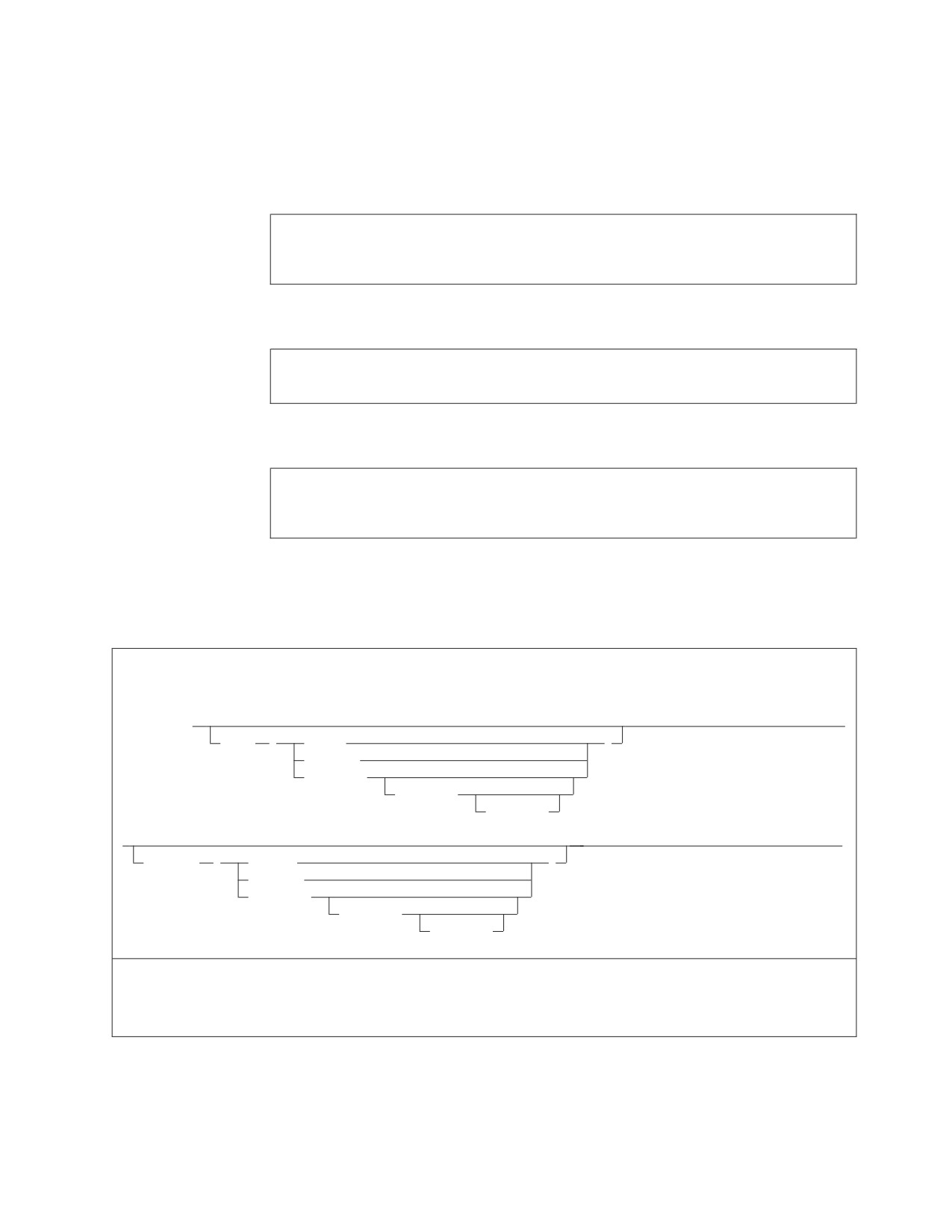
v Reload the dbspace PUBLIC.SAMPLE from the DASD file to reorganize the data
for all tables in the dbspace.
The CMS file DBSU COMMANDS A contains the following Database Services
Utility command input:
CONNECT SQLDBA IDENTIFIED BY SQLDBAPW;
UNLOAD DBSPACE(PUBLIC.SAMPLE) OUTFILE(DASD1)
RELOAD DBSPACE(PUBLIC.SAMPLE) PURGE INFILE(DASD1)
To run the utility with single user mode, enter the following commands:
FILEDEF DASD1 DISK DBSUFILE DATA A4 (RECFM VBS BLOCK 2048
SQLDBSU DBNAME(SQLDBA) SYSIN(DBSU COMMANDS A) SYSPRINT(TERMINAL)
To run the utility with multiple user mode, enter the following commands:
SQLINIT DBNAME(SQLDBA)
FILEDEF DASD1 DISK DBSUFILE DATA A4 (RECFM VBS BLOCK 2048
SQLDBSU SYSIN(DBSU COMMANDS A) SYSPRINT(TERMINAL)
Using the SQLDBSU EXEC
SQLDBSU EXEC Format: The following syntax diagrams show the format for
invoking the Database Services Utility with single or multiple user mode.
Format:
Multiple User Mode Parameters
►► SQLDBSU
►
sysIN
(
Reader
)
Terminal
file_name
file_type
file_mode
►
►◄
sysPRint
(
Printer
)
Terminal
file_name
file_type
file_mode
Multiple User Mode Examples:
SQLDBSU SYSIN(T) SYSPRINT(PR)
SQLDBSU
Notes:
1. When running the Database Services Utility in multiple user mode, you must
issue the SQLINIT EXEC before using the SQLDBSU EXEC. The SQLINIT
EXEC initializes the LASTING GLOBALV file and the database manager
Chapter 7. Using the Database Services Utility from Application Programs
129

bootstrap routines on your A-disk. These routines identify the application
server that you want to access and the method for loading the multiple user
mode support system routines.
The SQLINIT EXEC does not need to be run prior to each SQLDBSU command.
You need only to run the SQLINIT EXEC when you want to establish access to
a different application server, to vary the method of loading the multiple user
mode support system routines, or to change other characteristics of the
application requester.
An alternative method for connecting to another application server is to issue
the CONNECT command. See “CONNECT” on page 20, for more information
about using this command.
2. When the Database Services Utility (program ARIDBS) is run with multiple
user mode, it is loaded from load library ARISQLLD LOADLIB Q by using a
CMS NUCXLOAD command. Consequently, the SQLDBSU EXEC cannot be
run in the CMS/DOS environment with multiple user mode.
Format:
Single User Mode Parameters
►► SQLDBSU
►
sysIN
(
Reader
)
Terminal
file_name
file_type
file_mode
►
►◄
sysPRint
(
Printer
)
Terminal
file_name
file_type
file_mode
►► Dbname
(server_name)
►◄
dcssID
(dcss_id)
LOGmode
(
A
)
PARMID
(file_name)
L
N
Y
Single User Mode Example: SQLDBSU IN(T) PR(DBSU LIST A) D(SQLDBA) ID(SUF1) LOG(Y) PARMID(SQL1)
Notes:
1. In single user mode, the console and program stack buffers are purged by the
SQLSTART EXEC. If you use multiple-volume tape files for Database Services
Utility processing with multiple user mode, the console and program stack
buffers should not contain any information. Empty buffers ensure that any
prompts issued by the multiple tape volume tape support can be properly
processed.
The following is a description of the parameters for the Database Services Utility
SQLDBSU EXEC.
sysIN (file_name file_type file_mode)
identifies the file name and optionally the file type and file mode of the CMS
file containing the Database Services Utility input commands. The file type
defaults to DBSINPUT and the file mode defaults to A.
130
Database Services Utility
If you supply this form of the SYSIN parameter, the SQLDBSU EXEC issues
the following CMS FILEDEF command for the Database Services Utility control
file:
FILEDEF SYSIN DISK file_name file_type file_mode . . .
(RECFM FB LRECL 80 BLOCK 800
sysIN (Reader)
specifies that the Database Services Utility input control file is a virtual reader
file. If you specify SYSIN(Reader), the SQLDBSU EXEC issues the following
CMS FILEDEF command for the Database Services Utility control file:
FILEDEF SYSIN READER (RECFM F LRECL 80
sysIN (Terminal)
specifies that the Database Services Utility input control file is the terminal. If
you specify SYSIN(Terminal), the SQLDBSU EXEC issues the following CMS
FILEDEF command for the Database Services Utility control file:
FILEDEF SYSIN TERMINAL (RECFM F LRECL 80
Notes:
1.
The Database Services Utility control file is also assigned to the terminal if
you did not specify the SYSIN parameter, and you did not issue a CMS
FILEDEF command for the ddname=SYSIN before issuing the SQLDBSU
command.
2.
If the Database Services Utility control file is assigned to the terminal:
a.
Most Database Services Utility commands and all SQL statements must
be terminated by a semicolon. Database Services Utility commands
restricted to a single control file record (command line) do not require a
terminating semicolon. As a general rule, use a semicolon to terminate
all commands entered through the terminal.
b.
The end of Database Services Utility input is indicated by entering a
null line. Prompts are issued to you after you use the ENTER key to
enter a null line. Your response depends on whether or not a command
has been partially entered and on the type of command entered. This
way, you cannot end Database Services Utility processing by mistakenly
using the ENTER key. If prompted to quit and you want to do so, enter
QUIT or HX.
c.
Positions 1-80 of the input record are checked for command
information. Therefore, command records contained in files identified by
READ FILE commands entered through the terminal cannot contain
sequence numbers in positions 73-80. The READ FILE command has
the format:
READ FILE file_name file_type file_mode
If you use the READ FILE command, it must be the first command after
you issued the EXEC SQLDBSU command. It must not be preceded by
any other commands.
d.
If Database Services Utility input entered from the terminal must
contain lowercase values, you must issue the following FILEDEF before
issuing the SQLDBSU EXEC without the SYSIN parameter specification:
FILEDEF SYSIN TERMINAL (RECFM F LRECL 80 LOWCASE
If you issue this FILEDEF command, all the Database Services Utility
command and SQL statement keywords must be entered in uppercase.
sysPRint (file_name file_type file_mode)
identifies the file name and optionally the file type and file mode of the CMS
Chapter 7. Using the Database Services Utility from Application Programs
131
file to be used for the Database Services Utility messages. The file type
specification defaults to DBSLIST and the file mode specification defaults to A.
If you specify this form of the SYSPRINT parameter, the SQLDBSU EXEC
issues the following CMS FILEDEF command for the Database Services Utility
message file:
FILEDEF SYSPRINT DISK file-name file-type file-mode . . .
(RECFM FBA LRECL 121 BLOCK 1210
Note: Position 1 of the Database Services Utility message file
(ddname=SYSPRINT) print records contains American Standards
Association (ASA) control characters. If the message file is a CMS file
and is printed with the CMS PRINT command, the option CC should be
specified in the CMS PRINT command. Refer to the VM/ESA: CMS
Command Reference manual for a description of the CMS PRINT
command.
sysPRint (Printer)
specifies that the Database Services Utility message file should be assigned to
the virtual printer.
If you specify SYSPRINT (Printer), the SQLDBSU EXEC issues the following
CMS FILEDEF command for the Database Services Utility message file:
FILEDEF SYSPRINT PRINTER (RECFM FA LRECL 121
sysPRint (Terminal)
specifies that the Database Services Utility message file should be assigned to
the terminal.
If your specify SYSPRINT (Terminal), the SQLDBSU EXEC issues the following
CMS FILEDEF command for the Database Services Utility message file:
FILEDEF SYSPRINT TERMINAL (RECFM F LRECL 120
Note: The Database Services Utility message file is also assigned to the
terminal if the SYSPRINT parameter is not specified, and you did not
issue a CMS FILEDEF command for the ddname=SYSPRINT before
issuing the SQLDBSU EXEC.
Dbname(server_name)
indicates that the Database Services Utility should be run with single user
mode. It also identifies the name of the database to be accessed by the
commands contained in the Database Services Utility control file.
If you specify this parameter, the SQLSTART EXEC parameters
DBNAME(server_name) are specified. The initialization parameters
SYSMODE=S, and PROGNAME=ARIDBS are also supplied in the SQLSTART
EXEC PARM parameter.
If you omit the DBNAME parameter, the Database Services Utility is run with
multiple user mode.
dcssID (dcss_id)
applies to running the Database Services Utility with single user mode. It
identifies the method by which all database manager modules are to be loaded
for execution. If you specify this parameter, you must also specify the
DBNAME parameter.
If you specify this parameter, it is supplied to the SQLSTART EXEC. The
SQLSTART EXEC then uses the database manager bootstrap routines with the
specified dcss-id to load the database manager code.
132
Database Services Utility
If you omit this parameter, it is not supplied as an SQLSTART EXEC
parameter.
LOGmode (A|L|N|Y)
applies only to running the Database Services Utility with single user mode.
This one-character field indicates how the logs are to be maintained:
A means maintain the logs and automatically archive the database.
L means maintain the logs and automatically archive the log when the
specified level has been reached.
N means do not maintain the logs for recovery.
Y means maintain the logs.
If you specify this parameter, you must also specify the DBNAME parameter.
It identifies the value to be used for the database initialization LOGMODE
parameter when the database manager is started in single user mode.
If you omit this parameter and you specify the DBNAME parameter, the
LOGMODE parameter is not supplied as an initialization parameter in the
SQLSTART EXEC.
PARMID (file_name)
applies only to running the Database Services Utility with single user mode. If
you specify this parameter, you must also specify the DBNAME parameter. It
identifies the file name of the CMS file that contains the database initialization
override parameters. The file type must be SQLPARM.
If you omit this parameter and you specify the DBNAME parameter, the
PARMID parameter is not supplied as an initialization parameter in the
SQLSTART EXEC.
For more information on the PARMID parameter, see the description of
SQLSTART in the DB2 Server for VM System Administration manual.
Notes:
1. If virtual console spooling is started and either SYSIN or SYSPRINT is
assigned to the terminal, the virtual console is spooled HOLD.
2. If the virtual printer is spooled NOHOLD, it is spooled HOLD, closed, and
then spooled NOHOLD.
3. When running the Database Services Utility, set the CP SET command EMSG
option to ON. The SQLDBSU EXEC checks the current EMSG option setting
and, if necessary, resets it to ON. If the EMSG option is reset, the original
setting is restored during the SQLDBSU EXEC termination processing. The
original EMSG setting is not restored if SQLDBSU EXEC execution is
abnormally terminated. Refer to the VM/ESA: CP Command and Utility
Reference for a description of the SET command’s EMSG option.
4. When running the Database Services Utility, the VM terminal logical
line-editing symbols (character delete, line delete, line end, and escape) must
be defined as follows:
LINEND # LINEDEL OFF CHARDEL OFF ESCAPE 1/2
The SQLDBSU EXEC checks the current settings for these symbols and, if
necessary, resets the symbols as described previously. If the symbols are reset,
the original symbols are restored during the SQLDBSU EXEC termination
processing. The symbols are not reset if SQLDBSU EXEC execution is
Chapter 7. Using the Database Services Utility from Application Programs
133
abnormally terminated. Refer to the VM/ESA: CP Command and Utility
Reference for a description of the TERMINAL command and the logical
line-editing symbols.
5.
The Database Services Utility control file (ddname=SYSIN) logical record length
(LRECL) must be 80. The record format (RECFM) should be fixed or fixed
blocked.
6.
The Database Services Utility message file (ddname=SYSPRINT) logical record
length (LRECL) must be at least 81. The record format (RECFM) should be
fixed or fixed blocked with ASA print control characters (F or FB).
If the Database Services Utility control parameter PAGECTL(NO) is specified,
the minimum message file record length is 80. The record format should be
fixed or fixed blocked (F or FB).
7.
Database Services Utility and SQL statement information must be in positions
1-72 of the control file (ddname=SYSIN) records except when SYSIN defines the
input control file as the terminal. If the terminal is the control file, you can put
Database Services Utility and SQL statement information in positions 1-80 of a
command line that you enter from the terminal. If you enter a DB2 Server for
VM READ FILE file_name file_type file_mode command from the terminal, the
CMS file containing SQL statements or Database Services Utility commands
cannot have sequence numbers in positions 73-80 because the Database
Services Utility searches positions 1-80 for command information. For more
information on the READ FILE command, see the DB2 Server for VM Program
Directory.
You can always reference all 80 positions of data records contained in the
Database Services Utility control file as data field positions.
8.
You must define all input or output data file ddnames referenced in the
Database Services Utility commands supplied in the Database Services Utility
control file through the CMS FILEDEF commands before issuing the
SQLDBSU command.
If you define DASD CMS files with variable-length spanned records for
Database Services Utility command input/output, you must use the file mode
number 4.
9.
If you do not specify the SYSIN information in the EXEC parameters, and you
do not define the Database Services Utility control file (ddname=SYSIN) with
the CMS FILEDEF command before issuing the SQLDBSU command, the
SQLDBSU EXEC issues the following default FILEDEF command:
FILEDEF SYSIN TERMINAL (RECFM F LRECL 80
If you do not specify the SYSIN information in the EXEC parameters, but you
define the Database Services Utility control file (ddname=SYSIN) with a CMS
FILEDEF command before issuing the SQLDBSU command, the SQLDBSU
EXEC uses the user-defined Database Services Utility control file. Specify a
logical record length (LRECL) of 80 for a user-defined Database Services
Utility control file.
10.
If you do not specify SYSPRINT information, and you do not define the
Database Services Utility message file (ddname=SYSPRINT) with a CMS
FILEDEF command before issuing the SQLDBSU command, the SQLDBSU
EXEC issues this FILEDEF command:
FILEDEF SYSPRINT TERMINAL (RECFM F LRECL 120
If you define the Database Services Utility message file with a CMS FILEDEF
command, the minimum logical record length (LRECL) is 81. If you specify
the Database Services Utility control parameter as PAGECTL(NO), the
minimum message file record length is 80.
134
Database Services Utility
Chapter 8. Command Reference
The Database Services Utility can process commands that are unique to the
Database Services Utility and SQL statements that are not restricted to use in
user-written programs. This chapter provides descriptions of the Database Services
Utility commands and general rules governing how you type the commands. (SQL
statements are described in the DB2 Server for VSE & VM SQL Reference.)
Command Processing
Two kinds of commands that you can specify in the Database Services Utility are
Database Services Utility commands and SQL statements.
The difference between an SQL statement and a Database Services Utility
command is that a Database Services Utility command can only be issued within
the Database Services Utility. If you try to issue a Database Services Utility
command outside of the utility itself, it fails. On the other hand, an SQL statement
can be issued in both ISQL and the Database Services Utility.
Here is a summary of the Database Services Utility commands:
DATALOAD
DATAUNLOAD
RELOAD
UNLOAD
SET
COMMENT
REORGANIZE INDEX
SCHEMA
REBIND PACKAGE
Control commands are entered by means of one or more 80-byte input records in
the (input) control file. The utility usually reads only the first 72 positions of these
command records; you can use positions 73 through 80 for sequence numbers.
When control command input is being read directly from a DB2 Server for VM
terminal, all 80 positions of the command record can contain command
information. Some Database Services Utility commands allow you to place data
within the (input) control file; these data records are not restricted to the first 72
positions and can have information in all 80 positions.
In DB2 Server for VSE, lowercase information supplied in an input control card file
and read by the Database Services Utility is not converted to uppercase by
Database Services Utility processing. ISQL, on the other hand, converts lowercase
information to uppercase. Use uppercase in the input control card file to avoid a
case mismatch, especially for a table or dbspace name. In DB2 Server for VM,
lowercase information supplied in commands read by the utility is converted to
uppercase only when the control file (SYSIN) is assigned to the terminal. If you
require lowercase information and the utility reads commands from the terminal,
specify LOWCASE when you issue a CMS FILEDEF command to define the
control file (SYSIN). Alternatively, you can use the CMS SET INPUT xx yy
command to reset the hexadecimal code xx to the hexadecimal code yy. Refer to
the VM/ESA: CMS Command Reference manual for more information.
135
Except where noted, the control commands can span multiple 80-byte input
records. Individual keywords or parameter values must never span input records,
or a Database Services Utility processing error results. For example, these records
are correct:
┌──────────────────────────────────────────────────────────────────────────────┐
│ 1
┌───────────────┐
col 72
80 |
│ │────────────────────
| INPUT RECORDS |
─────────────────────────|
| |
│ │
└───────────────┘
|
│ │
│ ø
ø
ø |
│
SELECT MFB001 |
│ EMPNO, LASTNAME FROM SQLDBA.EMPLOYEE;
MFB002 |
│
┌───────────┐
|
│
│ Correct.
│
|
│
└───────────┘
|
│
|
└──────────────────────────────────────────────────────────────────────────────┘
Figure 75. Example of Correct Records
MFB001 and MFB002 are sequence numbers that the Database Services Utility
ignores. Note that SELECT ends in position 72 in the above example. Conceptually,
the Database Services Utility inserts a single blank character between input records;
the above records are interpreted as:
SELECT EMPNO, LASTNAME FROM SQLDBA.EMPLOYEE;
The following input records are incorrect:
┌──────────────────────────────────────────────────────────────────────────────┐
│ 1
┌───────────────┐
col 72
80 |
│ │────────────────────
| INPUT RECORDS |
─────────────────────────┤
│ |
│ │
└───────────────┘
|
│ │
│ ø
ø
ø |
│
SELE MFB001 |
│ CT EMPNO, LASTNAME FROM SQLDBA.EMPLOYEE;
MFB002 |
│
┌──────────────────────┐
|
│
| Incorrect!
|
|
│
| Don’t split keywords |
|
│
└──────────────────────┘
|
│
|
└──────────────────────────────────────────────────────────────────────────────┘
Figure 76. Example of Incorrect Records
The Database Services Utility inserts a blank after column 72, and thus interprets
the input records as:
SELE CT EMPNO, LASTNAME FROM SQLDBA.EMPLOYEE;
The Database Services Utility does not recognize SELE as a Database Services
Utility command, and an error results.
There is an exception to the rule that individual keywords or parameter values
must not span input records. This exception occurs when a parameter is enclosed
in either single (') or double (") quotation marks. For these parameters, the
Database Services Utility does not insert a blank after position 72. Consider the
following example in which a character string constant spans multiple input
records. The character constant is delimited by a single quotation mark ('):
136
Database Services Utility
┌──────────────────────────────────────────────────────────────────────────────┐
│ 1
┌───────────────┐
col 72
80 |
│ │────────────────────
| INPUT RECORDS |
─────────────────────────|
│ |
│ │
└───────────────┘
|
│ │
│ ø
ø
ø |
│
SELECT ’AVERA MFB001 |
│ GE’, AVG(BONUS) FROM SQLDBA.EMPLOYEE;
MFB002 |
│
┌──────────────────────┐
|
│
| Correct.
|
|
│
| You can split
|
|
│
| quoted strings.
|
|
│
└──────────────────────┘
|
│
|
└──────────────────────────────────────────────────────────────────────────────┘
Figure 77. Example of a Character String Constant Spanning Multiple Input Records
The Database Services Utility interprets the above records as:
SELECT ’AVERAGE’, AVG(BONUS) FROM SQLDBA.EMPLOYEE;
Each Database Services Utility command or SQL statement must begin on a new
(input) control file input record.
DB2 Server for VM
Database Services Utility commands are terminated by a semicolon, by the
start of the next command, or by the end of the input control records.
Terminate Database Services Utility commands with a semicolon when
Database Services Utility control command input is being read directly from a
terminal.
In the Database Services Utility environment, SQL statements must be
terminated with a semicolon. Do not use the SQL continuation character
(required by ISQL) in an SQL statement that spans record boundaries in
either a batch or an interactive environment.
Database Services Utility processing ends when all the input records are processed.
You cannot reorganize a catalog index by using the REORGANIZE INDEX
command. To reorganize the catalog index in VM, use the SQLCIREO utility. In
VSE, set the STARTUP initialization parameter to one to reorganize the catalog
index.
Note: You can only reorganize a primary key index or a unique index by using the
ALTER TABLE ACTIVATE PRIMARY KEY and ALTER TABLE ACTIVATE
UNIQUE statements.
COMMENT
With the COMMENT command, you can document input by supplying Database
Services Utility COMMENT commands at appropriate points within the Database
Services Utility control command input stream. The utility displays the comments
in the report or message file listing. You cannot use SQL comments within
Database Services Utility COMMENT commands.
Chapter 8. Command Reference
137