DB2 Server for VSE. Operations Guide / Handbooks (2004-2007) - page 37
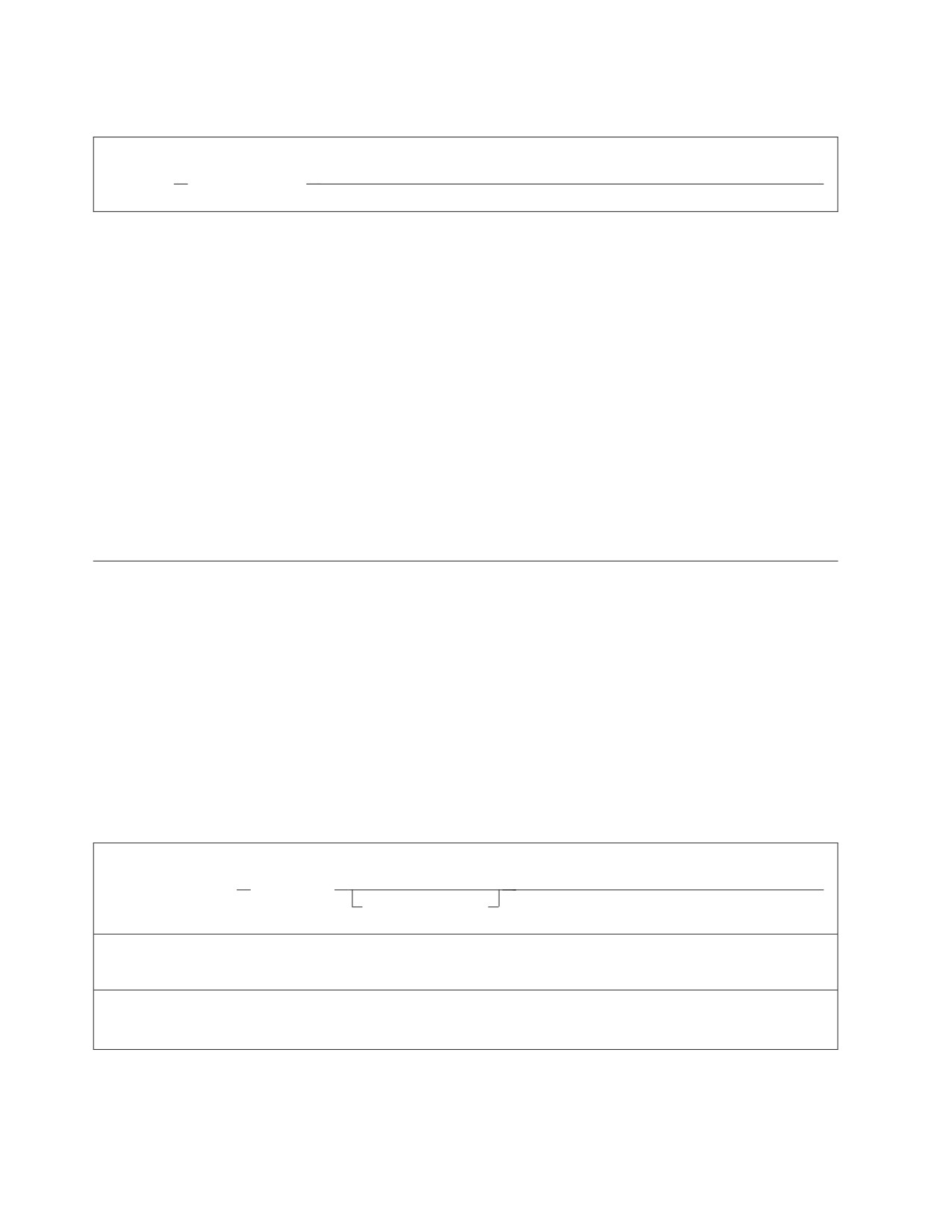
COMMENT Format
Format:
►► COMMENT
’string_constant’
►◄
COMMENT
identifies a Database Services Utility COMMENT command. At least one blank
must appear after the command identifier.
'string-constant'
is the comment text delimited by single quotation marks. The string-constant
can span control command input records, but must begin in the same record
that contains the command identifier. All positions of a control command
record containing comment text are displayed. A COMMENT command is
terminated when a control command input record containing comment text
ends with a single quotation mark or a single quotation mark immediately
followed by a semicolon. All control command input record positions
(normally positions 1-72) after the terminating single quotation mark or single
quotation mark and semicolon must be blank. Positions 73-80 of comment text
records can still contain sequence numbers (except in DB2 Server for VM when
Database Services Utility control command input is being read directly from a
terminal).
REORGANIZE INDEX
The REORGANIZE INDEX command allows you to correct index fragmentation,
and correct the skewing of index key values without having to drop the index and
then recreate it using the DROP INDEX and CREATE INDEX SQL statements.
REORGANIZE INDEX also revalidates an invalid index.
As with other Database Services Utility commands, you can use the REORGANIZE
INDEX command with both single user mode and multiple user mode.
Note: The REORGANIZE INDEX command is not supported if you are using
DRDA flow.
REORGANIZE INDEX Format
Format:
►► REORGANIZE INDEX
(index_name)
►◄
PCTFREE = integer
Example:
REORGANIZE INDEX(SMITH.INDEXINV) PCTFREE = 50
Authorization: You must own the index or have DBA authority.
Note: In DB2 Server for VSE, to reorganize a catalog index, you must start the database manager in single user
mode and specify STARTUP=I.
INDEX (index-name)
identifies the index to be reorganized. You can further identify the index by
specifying the owner and server-name of the index. For more information about
identifying the index, see “Qualifying Object Names” on page 110 for details.
138
Database Services Utility
When reorganizing an invalid index, the database manager uses a sort similar
to the one used for a CREATE INDEX statement.
PCTFREE = integer
allows you to control the amount of free space that REORGANIZE reserves in
the index for later insertions and updates.
integer
is a number from 0 to 99 representing a percentage of the total index space.
For practical purposes, it should not exceed 50.
If you do not specify PCTFREE, the amount of free space remains unchanged from
the previous PCTFREE value.
The REORGANIZE INDEX command consists of several separate internal steps.
Some steps might be completed even though the whole REORGANIZE INDEX
command is not completed successfully.
The following unusual situations can occur when rolling back or recovering from a
REORGANIZE INDEX command:
v Although a REORGANIZE INDEX command is successfully completed during
forward processing, it might not be completed during rollback or recovery
because the system has run out of physical or logical pages (or both).
Checkpoints for sufficient storage can interrupt only during forward processing.
As a result, the recovered index is marked invalid.
v If an index reorganization is rolled back or undone, the recovered index is
nevertheless reorganized. In REORGANIZE INDEX processing, the index is
effectively dropped and re-created, resulting in a reorganized index. If you
changed the PCTFREE value, however, that value is set back to the original
value defined before the REORGANIZE INDEX command.
v If the system ends abnormally after an index reorganization is interrupted by a
checkpoint and an attempt is made to restart the database manager without the
current log (because of a loss of the log or log reconfiguration), the reorganized
index will be marked as invalid. It must be recovered by dropping the dbspace
and re-creating it, or by restoring a previous database archive.
v The updating of index statistics is not supported during rollback or recovery.
The previous index statistics are recovered, but the recovered index (which is
nevertheless reorganized) may not match them.
DBSS prevents a REORGANIZE INDEX or CREATE INDEX command from
proceeding if the command can overflow the invalid index limit. During rollback
or recovery, if the maximum number of invalid indexes (30) is reached, the system
ends abnormally. When the system is brought up again for recovery, it is very
likely to end again for the same reason. If the large number of invalid indexes
exists because of a lack of physical pages, add a dbextent to the system before
attempting to recover again. If the large number of invalid indexes exists because
of a lack of logical index pages, use filtered log recovery to skip over the index
reorganizations that are causing the invalid indexes. For information about adding
a dbextent, see the DB2 Server for VM System Administration and DB2 Server for VSE
System Administration manuals. To find out more about using filtered log recovery,
see the DB2 Server for VSE & VM Diagnosis Guide and Reference manual. Additional
information on the REORGANIZE INDEX command is in the DB2 Server for VSE &
VM Database Administration manual.
Chapter 8. Command Reference
139
You cannot reorganize a catalog index by using the REORGANIZE INDEX
command. To reorganize the catalog index in VM, use the SQLCIREO utility. In
VSE, set the STARTUP initialization parameter to I to reorganize the catalog index.
Note: You can only reorganize a primary key index or a unique index by using the
ALTER TABLE ACTIVATE PRIMARY KEY and ALTER TABLE ACTIVATE
UNIQUE statements.
SCHEMA
A schema file specifies an authorization ID and a list of table, view, and privilege
definitions using the syntax of the CREATE TABLE, CREATE VIEW, and GRANT
statements. The SCHEMA command reads and processes the statements from a
schema file.
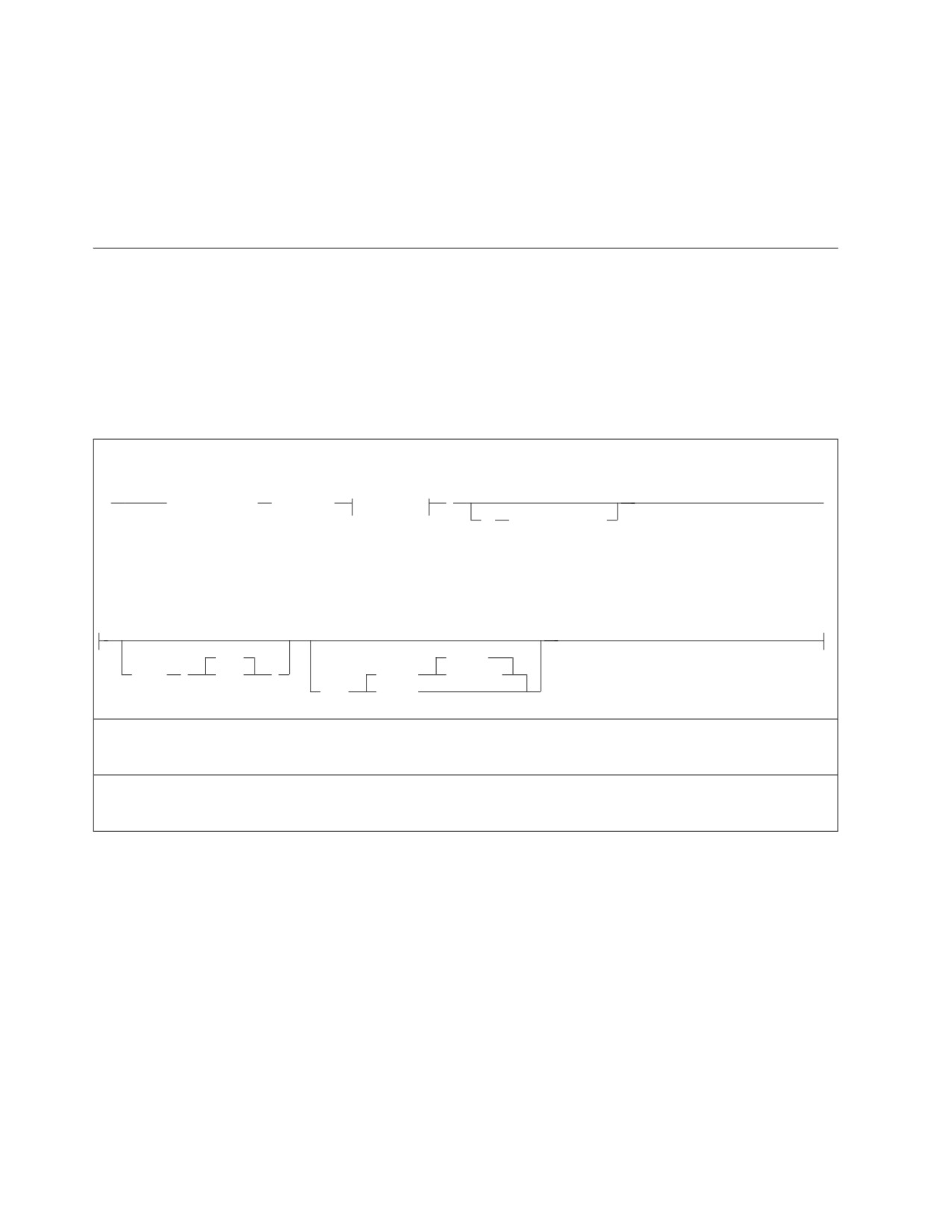
SCHEMA Format
Table 7. SCHEMA Command Syntax
Format:
(1)
►►
SCHEMA INFILE
( ddname
option-c
)
►◄
IN
(dbspace_name)
Notes:
1
Option C is valid in DB2 Server for VSE only.
option-c:
2000
REWIND
BLKSZ
(
size
)
(TAPE)
NOREWIND
PDEV
(DASD)
Example:
SCHEMA INFILE(IN1 BLKSZ(800))
Authorization:
You must be connected as the AUTHORIZATION ID specified in the CREATE SCHEMA statement.
INFILE (ddname)
identifies the sequential input file containing the schema.
ddname
in DB2 Server for VSE: this is the TLBL or DLBL job control statement file
name for the sequential input file. The file must have a record format of
fixed-length blocked and a record length of 80.
Alternatively, SCHEMA can read its input from SYSIPT by using a READ
MEMBER. You use the READ MEMBER NOCONT option to properly close
the SYSIPT file. An example of using READ MEMBER with NOCONT is:
SCHEMA INFILE(SYSIPT)
READ MEMBER schema-member (NOCONT
140
Database Services Utility
If you do not specify the NOCONT option, the database manager reads in
the SYSIPT records following the READ MEMBER statement as part of the
SCHEMA file; then SYSIPT can provide additional input after the READ
MEMBER statement.
in DB2 Server for VM: this is the name of the sequential input file. It must
have records with a fixed length of 80 characters. The file characteristics
specified in the FILEDEF command or the default FILEDEF options are the
source of the input record definition information for the Database Services
Utility. Do not specify SYSIN or SYSPRINT as the ddname.
dbspace-name
specifies the name of the dbspace where the table is to be placed if no
dbspace-name is given in the CREATE TABLE statement. If the CREATE
TABLE statement in the SCHEMA input file specifies a dbspace-name then
this overrides the name of the dbspace given in the SCHEMA command.
BLKSZ (size) (DB2 Server for VSE Only)
is a parameter that specifies the block size of the sequential input file. The
default block size is 2 000 bytes per block.
PDEV (TAPE or DASD) (DB2 Server for VSE Only)
is an optional parameter that specifies the device type (DASD or TAPE) of the
sequential (SAM) input file. If PDEV(DASD) is specified, the file resides on any
device supported by the VSE DTFSD macro. VSAM-managed SAM does not
support spanned records. If PDEV(TAPE) is specified, the file resides on any
device supported by the VSE DTFMT macro. The default is PDEV(TAPE).
NOREWIND or REWIND
controls tape file rewind processing performed during OPEN processing.
This parameter is valid only if you specify TAPE for PDEV. The default
processing is REWIND.
NOREWIND
specifies that the tape file is not to be rewound by OPEN processing. If
NOREWIND is specified for input tape files referenced by a series of
SCHEMA commands, you must ensure that the tape files being
referenced are in ascending sequence. For example, if NOREWIND is
specified in a sequence of two SCHEMA commands and the first
command reads tape file 2, then the second command must reference
tape file 3 or a higher number. If it references tape file 1, an OPEN
error occurs.
REWIND
specifies OPEN processing to rewind the tape file.
Chapter 8. Command Reference
141
Table 8. Contents of the Schema (in a Sequential Input File)
Format:
;
▼
►► CREATE SCHEMA AUTHORIZATION authorization_id
►◄
;
schema_statement
Example:
-- create table TAB1 and give Jones SELECT privilege
CREATE SCHEMA AUTHORIZATION SMITH
CREATE TABLE SMITH.TAB1 (COL1 CHAR(4))
GRANT
SELECT ON
TAB1
TO JONES
The first line of the above example is a comment line. To insert comments within
the schema file:
v Mark the beginning of a comment with two consecutive hyphens (--)
v Begin the comment anywhere on a record or line
v End the comment with the end of the record or line.
The sequential input file must contain only one CREATE SCHEMA statement,
which must be the first statement in the file (unless the preceding lines are
comments); otherwise, the Database Services Utility issues an error message and
stops processing the SCHEMA command.
AUTHORIZATION authorization id
You must be connected as the authorization id in the AUTHORIZATION clause.
If a schema statement does not specify an owner, the statement is processed for
the authorization ID. For example, in Table 8 the SELECT privilege in the
GRANT statement is granted on SMITH.TAB1.
schema-statement
refers to every statement following the CREATE SCHEMA statement. Valid
schema statements are:
v CREATE TABLE
v CREATE VIEW
v GRANT (INSERT, SELECT, UPDATE, REFERENCES, ALL and DELETE
privileges).
The schema statements must be entered in uppercase. See the DB2 Server for
VSE & VM SQL Reference for the correct syntax of valid schema statements.
Successful statements are committed if the Database Services Utility
AUTOCOMMIT indicator is ON.
The Database Services Utility issues an error message if any invalid statement
is in the schema, and might or might not continue processing on the next
statement, depending on the setting of ERRORMODE.
142
Database Services Utility
You can change the setting of the ERRORMODE and AUTOCOMMIT indicators before the SCHEMA
command by issuing the Database Services Utility SET ERRORMODE and SET AUTOCOMMIT
commands. If ERRORMODE is set to CONTINUE, processing continues on the next statement
following a minor error on any sequential input file statement other than the CREATE SCHEMA
statement. If AUTOCOMMIT is ON, the work is committed after each successful statement. For a
complete description of these commands, see “SET ERRORMODE” on page 215 and “SET
AUTOCOMMIT” on page 214.
Using File Definitions with the DB2 Server for VM SCHEMA
Command
The schema file must have a fixed length of 80 characters. This format is used if
you do not specify any FILEDEF options when you define a schema file. For
example, you can create a FILEDEF such as this:
FILEDEF DBSFILE DISK DBSFILE SCHEMIN A
where DBSFILE is the name of the schema file as you refer to it in the SCHEMA
command.
For a procedure to construct a FILEDEF command, see “Using File Definitions” on
page 14. For more information about FILEDEF parameters and options, see
Appendix B, “FILEDEF Command Syntax and Notes,” on page 249.
SQL Statement Processing
The SQL statements that you can enter from the (input) control file are:
v SELECT statements (without an INTO clause or host variables)
v Data manipulation statements
v Data control statements
v Data definition statements
v Authorization statements.
You cannot enter some SQL statements in the Database Services Utility (input)
control file. You receive an error message if you attempt to use these statements:
v SELECT statements with an INTO clause or host variables
v Cursor management statements (DECLARE, OPEN, FETCH, CLOSE)
v Commands that support dynamic SQL statement execution (PREPARE,
DESCRIBE, EXECUTE, EXECUTE IMMEDIATE)
v Exception handling statements (WHENEVER statements)
v INCLUDE statements (INCLUDE SQLCA or INCLUDE SQLDA).
SQL statements entered from a Database Services Utility (input) control file must
not be prefixed by EXEC SQL (as they are when embedded within application
programs). In DB2 Server for VM, no information should be placed in the input
record after the semicolon. This restriction does not apply to positions 73 through
80 of a control-file record when the Database Services Utility control file is
assigned as a CMS file. In DB2 Server for VSE, use a semicolon to indicate the end
of each SQL statement. Do not use the continuation character required by ISQL for
SQL statements that span record boundaries. Except for positions 73 through 80, no
information should be placed in the input record after the semicolon.
SELECT and Arithmetic Exceptions
Database Services Utility flags arithmetic exceptions in outer select-lists by filling
the corresponding fields with number (or pound) signs (#). When one or more of
these exceptions occur, (for example, when a number is divided by zero) a
Chapter 8. Command Reference
143
Database Services Utility and an SQLCODE message are issued after the results are
retrieved. If more than one arithmetic exception occurs, only one
message—referring to the first exception—is issued. This is to alert you to any
warnings occurring during Database Services Utility (input) control file processing.
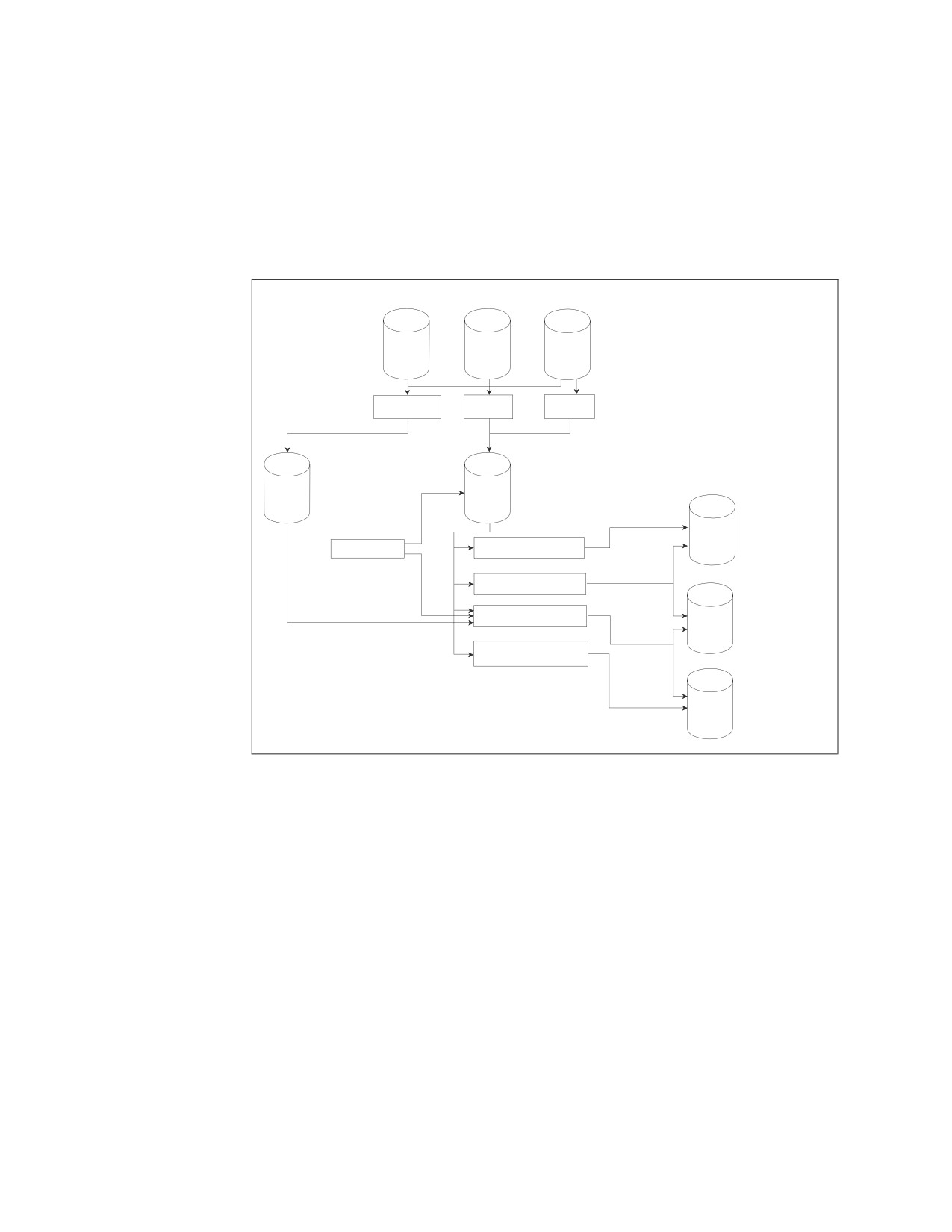
Processing Summary
Figure 78 summarizes the Database Services Utility processing that you can
perform on tables and views.
Table
View
Multiple
Tables
UNLOAD
UNLOAD
DATAUNLOAD
TABLE
DBSPACE
(Note that the SAM
1
1
SAM File
SAM File
files could also be
on magnetic tape.)
Table
User Program
RELOAD TABLE NEW
RELOAD TABLE PURGE
3
DATALOAD TABLE
2
View
RELOAD DBSPACE
NEW OR PURGE
One or
More
Tables
Figure 78. Database Services Utility Processing
Notes:
1. See Database Services Utility UNLOAD record format description in
“UNLOAD DBSPACE” on page 201 and “UNLOAD TABLE” on page 204.
2. View definitions must not violate any of the rules related to SQL INSERT
processing. In general, the view must be:
v Defined only on one table
v Defined to include all the NOT NULL columns of the underlying table
v Defined without using virtual column definitions.
3. If SAM files created by Database Services Utility UNLOAD processing are used
as input to Database Services Utility DATALOAD processing, the rules below
must be followed. (This description assumes that you are thoroughly familiar
with the Database Services Utility UNLOAD record formats and the contents of
each Database Services Utility UNLOAD record type.)
v All input data records selected for DATALOAD processing must contain data
fields in the same position in each data record up to the last position of a
data record type referenced by DATALOAD commands.
144
Database Services Utility

This rule implies that all input data record varying-length fields must have
the same length. Any fields that permit nulls must all be null or must all
contain data.
v The DATALOAD input-record-id-clause must be employed to select at least
the UNLOAD record type 60 for DATALOAD processing.
v The position of the column data in the input data record must be computed
from the following information:
- Order of column definition in source table or view
- Actual length of column data at time of UNLOAD
- Fixed “overhead” in data records created by Database Services Utility
UNLOAD processing.
Load-Data Commands
DATALOAD TABLE
The DATALOAD command and subcommands are contained on more than one
input record. If, for example, you want to load data into 10 columns of a table, the
first input record contains the DATALOAD command, and the next 10 input
records contain the Table Column Identification (TCI) subcommands.
The DATALOAD command cannot be continued onto a second input record; it
must be completed on a single record. The record immediately following the
DATALOAD command must contain a TCI subcommand.
DATALOAD TABLE Format
Format:
►► DATALOAD TABLE
(table_name)
►◄
input_record_id_clause
►► table_column_id_subcommand
►◄
►►
infile_subcommand
►◄
▼
user_data_record
ENDDATA
Note: Detailed syntax is shown in the following pages.
Example:
DATALOAD TABLE(SMITH.ACTIVITY)
ACTNO 1-3
ACTKWD 5-10
ACTDESC 12-21
INFILE(NEWACT)
<-------in DB2 Server for VM
INFILE(NEWACT BLKSZ (2048) PDEV (TAPE) NOREWIND RECFM(FB)) <-in DB2 Server for VSE
Chapter 8. Command Reference
145
Authorization: You must have the INSERT and SELECT privilege on the tables
affected by the command.
TABLE (table_name)
identifies the table (called table_name) to be loaded. (The table must already
exist.) You can further identify the table by specifying the owner of the table.
For more information about identifying tables see “Qualifying Object Names”
on page 110. A synonym cannot be used as table_name. You can specify a view
name instead of a table name if the view meets the following requirements:
v The view is defined on a single table.
v The view definition includes all NOT NULL columns in the table. That is, all
columns outside of the view definition must permit the insertion of nulls.
v The view does not contain a column that is a virtual column.
A virtual column is a column of a view that is not derived directly from a
column of a table. For example, view columns defined with expressions such
as BONUS+COMM, PRSTAFF*1.5, or AVG(BONUS) are virtual columns.
When loading data into a view that was created using the WITH CHECK
OPTION clause, the database manager checks all inserts and updates to the
view against the view definition and rejects them if the row to be inserted or
updated does not conform to the view definition.
table_name
identifies the table to be loaded.
input_record_id_clause
is optional; it allows you to selectively load records into the table. Records are
used for DATALOAD processing only if they contain the value specified in the
input_record_id_clause. All input data records are loaded into the table if you
omit this parameter.
If multiple DATALOAD commands are supplied before an INFILE command
and an input_record_id_clause appears on one of them, all the DATALOAD
commands must have the clause. Database Services Utility error messages are
generated and no DATALOAD processing is performed if you break this rule.
The parameters of input_record_id_clause are:
startpos
identifies the starting position in the input record of the identification value.
Position 1 of the input record is the first position of the logical record. If
variable-length input records are used, startpos 1 to 4 refers to the record length
control field. As a result, startpos 5 refers to the first data position.
endpos
identifies the last position of the identification value. If the value occupies only
one position, you need only specify startpos. Blanks are not allowed between
the starting position, hyphen, or ending position values.
constant
identifies the identification value. If an input record contains this value in the
specified location, it is used for loading the specified table.
The value cannot be continued onto a second input record. It can be one of the
following:
v A character-string constant that satisfies both of these requirements:
- Must be enclosed in single quotation marks (')
- Has a value of maximum length equal to endpos−startpos+1.
v A one-position unsigned integer constant (range is 0 to 255)
146
Database Services Utility

v A two-position optionally signed integer constant (default is a positive
value)
v A four-position optionally signed integer constant (default is a positive
value).
Notice that one-, two-, or four-position refers to the length the value occupies
in the input record, not the length it occupies in the clause itself. See Figure 79
through Figure 82 for examples to clarify this definition.
Examples of Input-Record-Id-Clause
IF POS (20-22) =
’RT1’
▌1▐
IF POS (20-21) ¬= ’01’
▌1▐
To be used for DATALOAD, positions 20 to 22 of the input data record
must contain the character string RT1.
Figure 79. Character-String Constant Value Used in the Input-Record-Id-Clause
IF POS (20)
= 255
▌1▐
IF POS (16)
¬= 25
IF POS (35)
>
3
▌1▐
To be used for DATALOAD, positions 20 of the input data record
must contain a hex FF value.
Figure 80. One-Position Integer Constant Value Used in the Input_Record_Id_Clause
IF POS (20-21)
= 1
▌1▐
IF POS (35-36)
<> 50
IF POS (5-6)
>=
+32767
IF POS (3-4)
<=
32767
▌1▐
To be used for DATALOAD, positions 20 through 21 of the input
record must contain a hex 0001 value.
Figure 81. Two-Position Integer Constant Value Used in the Input_Record_Id_Clause
IF POS (20-23)
= 15
▌1▐
IF POS (16-19)
¬= 50
IF POS (21-24)
>=
+2000123563
IF POS (20-23)
<
1839107489
▌1▐
To be used for DATALOAD, positions 20 through 23 of the input
record must contain a hex 0000000F value.
Figure 82. Four-Position Integer Constant Value Used in the Input_Record_Id_Clause
Chapter 8. Command Reference
147
Table_Column_Id Subcommand
Format:
►► column_name startpos
options
null_current_clause
►◄
options
CHARacter
▼
-endpos
data_type
The next record following the DATALOAD command must contain a Table
Column Identification (TCI) subcommand. If it does not, the Database Services
Utility issues an error message. TCI subcommands identify the location in the
input records of the data for a table column. Only one TCI subcommand can
appear in an input record. The command parameters must not span input records,
and the column_name, startpos, and endpos parameters must be specified first in the
command and in that order.
The data must be in the same record positions in all records that relate to the table.
column_name
specifies the name of the table column where the input data is to be stored.
startpos
identifies the starting position of the data in each input data record. Position 1
of the input record corresponds to the first position of the logical input record.
If variable-length input records are used, startpos 1 to 4 will refer to the record
length control information. As a result, startpos 5 refers to the first data
position.
endpos
identifies the end position of the data in each input data record. You can omit
this parameter if the data occupies only one position in the input record. If you
specify this parameter, do not place blanks between the starting position and
the hyphen, or between the hyphen and the ending position.
data-type
identifies whether character, fixed-binary, floating-point, zoned, packed
decimal, or graphic data values are contained in the record positions specified.
The data type specification can appear either before or after null or current if
both parameters are entered. The data type parameter is optional, and the
default data type is character. The valid data type identifiers that you can
specify are:
CHAR or CHARACTER
If the column-type is CHAR, an all-blank input record data field results in
a sequence of blanks being inserted in the table.
If the table column is defined with a column-type of VARCHAR, trailing
blanks are removed from the input record data field before the length of
the field is established. An all-blank input record data field targeted for a
148
Database Services Utility
varying-length character column results in a length of 0. (A sequence of
blanks is not inserted in the database.)
If extended DBCS is in effect for a database, character input data can
contain DBCS characters with shift-in and shift-out delimiters, but the
Database Services Utility does not ensure that shift-in and shift-out
delimiters are balanced.
If the table column is defined as numeric (SMALLINT, INTEGER,
DECIMAL, or FLOAT), character (EBCDIC) input data must be in the form
of an SQL INTEGER, DECIMAL, or FLOAT constant. The character input
data is then converted by Database Services Utility processing.
Note: If a data field contains an EBCDIC numeric value that is not in the
form of an SQL INTEGER, DECIMAL, or FLOAT constant, (or if it
contains an implied decimal point), the data field can meet the
requirements of a DATALOAD ZONED input data field.
The type of representation allowed for numeric values in character (CHAR
or CHARACTER) input data fields depends on the data type of the target
numeric column:
v A value in an SQL INTEGER constant format is valid for a SMALLINT
or INTEGER column.
v A value in an SQL INTEGER or DECIMAL constant format is valid for a
DECIMAL column.
v A value in an SQL INTEGER, DECIMAL, or FLOAT constant format is
valid for a FLOAT column.
The number is converted regardless of its position in the field, but leading
and trailing blanks are ignored. If you specify a data field in positions 1 to
5 and type a 2-character number in positions 4 and 5, the number is
recognized. In the example below, the TCI subcommand says that data for
ACTNO (which has a SMALLINT data type) is in record positions 1
through 5. Additionally, it identifies that the data within those record
positions is character. Thus, the Database Services Utility must convert the
character data on the input record to a SMALLINT value before it can
insert it into the ACTNO column shown in Figure 83.
DATALOAD TABLE(ACTIVITY)
ACTNO 1-5 CHAR
Input Record:
1
5
V
V
In both of these cases, the utility
recognizes 45 and ignores the leading
45
or trailing blanks when performing
45
data conversion.
Figure 83. Character Input Data Used in Data type-n
Chapter 8. Command Reference
149
The precision and scale represented in the CHAR field targeted for a table
column with a data type of DECIMAL must be less than or equal to the
precision and scale defined for the column. Leading zeros after the
optional sign are ignored; thus, you can code:
+000000011.1
on an input data record, and it fits into a column with a data type of
DECIMAL(3,1).
Character is the default data type for input records.
DATE
If the table column is defined with a column type of DATE, input data can
be in one of the following formats:
yyyy-mm-dd
(ISO, JIS format)
dd.mm.yyyy
(EUR format)
mm/dd/yyyy
(USA format)
installation defined
(Local format)
where:
yyyy is the year
mm is the month
dd is the day
Local Date Format
A database administrator can change the date default format, which is
defined in the SYSTEM.SYSOPTIONS table, from ISO (which is the
system-supplied database default form) to any installation-defined
format. See the DB2 Server for VSE System Administration, or DB2 Server
for VM System Administration manuals for information about
installation-defined formats and their interface.
Note: You can omit leading zeros from months and days, but do not
replace them with blanks. For example, 2000-1-1 is valid while
2000-1-1 is not.
TIME
If the table column is defined with a column type of TIME, input data can
be in one of the following formats:
hh:mm AM or hh:mm PM
(USA format)
hh.mm[.ss]
(ISO, EUR format)
hh:mm[:ss]
(JIS format)
installation defined
(Local format)
where:
hh is the hour
0 <= hh <= 12
for USA format
0 <= hh <= 24
for ISO, EUR, JIS format
mm is the minutes
ss is the seconds
In the USA time format, you can specify zero in the hh field only for 00:00
a.m.
Local Time Format
A database administrator can change the time default format, which is
defined in the SYSTEM.SYSOPTIONS table, from ISO (which is the
system-supplied database default form) to any installation-defined
format. See the DB2 Server for VSE System Administration or the DB2
150
Database Services Utility
Server for VM System Administration manual for information about
installation-defined formats and their interface.
Note: Leading zeros can be omitted from hours. The specification of
seconds is optional.
TIMESTAMP
If the table column is defined with a column type of TIMESTAMP, input
data must be in the following format:
yyyy-mm-dd-hh.mm.ss[.[nnnnnn]]
where
yyyy-mm-dd is the date (see ISO DATE format)
hh.mm.ss is the time (see ISO TIME format)
nnnnnn is the microseconds
Notes:
1. Leading zeros can be omitted from the month, day, and hour.
2. The microsecond format is optional.
FIXED or INT or INTEGER
If the table column is defined with a data type of SMALLINT, the input
can be in a 1-byte or 2-byte binary data field. Table columns defined with a
data type of INTEGER can be loaded from a 1-byte, 2-byte, or 4-byte
binary input data field.
The value ranges for binary input data fields are:
v A 1-byte binary data field can contain an 8-bit binary integer with a
value range of 0 to 255.
v A 2-byte binary data field can contain a 15-bit binary integer with the
value range described for a table column defined with the data type
SMALLINT.
v A 4-byte binary data field can contain a 31-bit binary integer with the
value range described for a table column defined with the data type
INTEGER.
FLOAT or REAL
If FLOAT is specified for 4-byte floating-point binary input data, set
startpos and endpos so that (endpos−startpos+1) = 4. The table column
identified must be defined with a data type of REAL or FLOAT(n) where n
is from 1 to 21.
FLOAT or DOUBLE PRECISION
If FLOAT is specified for 8-byte floating-point binary input data, set
startpos and endpos so that (endpos−startpos+1) = 8. The table column
identified must be defined with a data type of FLOAT, DOUBLE
PRECISION, or FLOAT(n) where n is from 22 to 53.
Note: If 8-byte floating-point binary data is loaded into a 4-byte
floating-point table column, a number of digits of precision are lost.
DECIMAL or DEC (scalevalue)
If you have packed decimal input data, the table column must be defined
with a DECIMAL data type. The precision of the input decimal data field
value must be equal to or less than the precision of the target decimal
column. The Database Services Utility takes the scale (number of positions
to the right of the implied decimal point) of an input record decimal data
value from the scale of the target column unless you specify the optional
DECIMAL(scalevalue) form of the command parameter.
Chapter 8. Command Reference
151
The optional scalevalue is an integer value (0 through 31) identifying the
number of scale positions in the input record decimal data value. A
scalevalue equal to or less than the scale of the target DECIMAL column is
allowed. A Database Services Utility processing error occurs if the scalevalue
is greater than the scale of the target DECIMAL column.
If the DECIMAL(scalevalue) form of the parameter is used, no blanks are
allowed within the parameter specification.
Columns defined as NUMERIC are treated as DECIMAL data types.
ZONED (scalevalue)
If the input record data field has a zoned value, the target table column
must be defined as numeric (SMALLINT, INTEGER, DECIMAL, FLOAT).
See Figure 84 on page 154 for examples.
Three variations or types of zoned data input are supported (see
description below). The type of zoned data is identified by Database
Services Utility processing. Database Services Utility processing converts
the zoned data to the data type of the target numeric column.
Note: If a data field contains an EBCDIC numeric value with an explicit
decimal point, or otherwise does not meet the requirements of a
zoned input data field, the data field can meet the requirements of a
DATALOAD character (CHAR) input data field. DATALOAD
character input data is described in this section.
If the zoned field is for a DECIMAL column, it must contain a value with a
precision less than or equal to the precision of the target DECIMAL
column. The Database Services Utility uses the scale (number of positions
to the right of the implied decimal point) of the target DECIMAL column
for the scale of a zoned value in the input record unless the optional
ZONED(scalevalue) form of the command parameter is specified.
The optional scalevalue is an integer value (0 through 31) identifying the
number of scale positions in each input record zoned data field value. A
scalevalue equal to or less than the scale of the target DECIMAL column is
allowed. A Database Services Utility processing error occurs if scalevalue is
greater than the scale of the target DECIMAL column.
If the ZONED(scalevalue) form of the parameter is used, no blanks are
allowed within the parameter specification. Also, scalevalue is ignored if the
target column is defined as a SMALLINT, INTEGER, or FLOAT column.
The Database Services Utility zoned data support is based on the definition
of a zoned field that is described in the publication IBM System/370
Principles of Operation manual. It includes support for standard and
extended decimal items (zoned decimal items).
The following three variations of a zoned input data field are supported:
1. A standard zoned data field.
A numeric value within a standard zoned data field has the following
format:
v Each digit of a number is represented by a single byte.
v The 4 high-order bits of each byte are zone bits except for the 4
high-order bits of the low-order byte, which represent the sign of the
number.
v The 4 low-order bits of each byte contain the value of the digit.
The valid zone bit configuration for a standard zoned data field is:
152
Database Services Utility
1111
(hex F)
The valid plus-sign bit configurations for a standard zoned data field
are:
1010
(hex A)
1100
(hex C)
1110
(hex E)
1111
(hex F)
The valid minus-sign bit configurations for a standard zoned data field
are:
1011
(hex B)
1101
(hex D)
2.
A zoned field with a leading sign.
A zoned data field value with a leading sign has a format identical to
the zoned data format described above except that the 4 high-order bits
of the high-order byte represent the sign of the number. The 4
high-order bits of the low-order bytes contain zone bits.
The valid plus-sign bit configuration for a zoned data field with a
leading sign is:
1100
(hex C)
The valid minus-sign bit configuration for a zoned data field with a
leading sign is:
1101
(hex D)
The valid zone bit configurations for a zoned data field with a leading
sign is:
1111
(hex F)
3.
A zoned field with a trailing sign in a separate position.
A numeric value within a zoned data field with a trailing sign in a
separate position has a format similar to the zoned data format
described above except that the high-order 4 bits of the high-order and
low-order numeric value bytes contain zone bits. The sign of the
numeric data value is contained in a separate low-order data value
byte.
The valid zone bit configuration for the numeric value bytes in a zoned
data field with a trailing sign in a separate position is:
1111
(hex F)
A plus-sign is represented in the separate low-order data field position
by an EBCDIC plus (+) sign (hex 4E) or by a blank (hex 40). A
minus-sign is represented in the low-order data field position by an
EBCDIC minus (−) sign (hex 60).
Chapter 8. Command Reference
153
┌────────────────┬─────────────────────────────────────────────────────┐
│ HEXADECIMAL
│ DESCRIPTION OF VALUE LOADED INTO NUMERIC COLUMN
│
│ CONTENTS OF
├─────────────────────────────────────────────────────┤
│FIVE(5) POSITION├───────────┬───────────┬────────────────┬────────────┤
│ZONED DATA FIELD│ SMALLINT
│ INTEGER
│ DECIMAL(5,2)
│ FLOAT
│
├────────────────┼───────────┼───────────┼────────────────┼────────────┤
│
│
│
│
│
│
│ (...System/370* Zoned Data Formats...) │
│
│
│ F1F1F1F1A1
│
11111
│
11111
│
111.11 │ 1.1111E+04
│
│ F1F1F1F1B1
│
─11111
│
─11111
│
─111.11 │─1.1111E+04
│
│ F1F1F1F1C1
│
11111
│
11111
│
111.11 │ 1.1111E+04
│
│ F1F1F1F1D1
│
─11111
│
─11111
│
─111.11 │─1.1111E+04
│
│ F1F1F1F1E1
│
11111
│
11111
│
111.11 │ 1.1111E+04
│
│ F1F1F1F1F1
│
11111
│
11111
│
111.11 │ 1.1111E+04
│
│
│
│
│
│
│
│ (...COBOL Standard Zoned Data...)
│
│
│
│ F1F1F1F1F1
│
11111
│
11111
│
111.11 │ 1.1111E+04
│
│ F1F1F1F1C1
│
11111
│
11111
│
111.11 │ 1.1111E+04
│
│ F1F1F1F1D1
│
─11111
│
─11111
│
─111.11 │─1.1111E+04
│
│
│
│
│
│
│
│ (...COBOL Zoned Data with Leading Sign...)
│
│
│ F1F1F1F1F1
│
11111
│
11111
│
111.11 │ 1.1111E+04
│
│ C1F1F1F1F1
│
11111
│
11111
│
111.11 │ 1.1111E+04
│
│ D1F1F1F1F1
│
─11111
│
─11111
│
─111.11 │─1.1111E+04
│
│
│
│
│
│
│
│ (...COBOL Zoned Data with Trailing Sign in Separate Position...)
│
│ F1F1F1F140
│
1111
│
1111
│
11.11 │
1.111E+03
│
│ F1F1F1F14E
│
1111
│
1111
│
11.11 │
1.111E+03
│
│ F1F1F1F160
│
─1111
│
─1111
│
─11.11 │ ─1.111E+03
│
│
│
│
│
│
│
│ (...Miscellaneous Other Formats Accepted...)
│
│
│
4040404040
│
0
│
0
│
0 │
0.0E0
│
│
404040F0F2
│
2
│
2
│
.02 │
2.0E+00
│
│
4040F24040
│
2
│
2
│
.02 │
2.0E+00
│
│
40C1F1F1F1
│
1111
│
1111
│
11.11 │
1.111E+03
│
│
40D1F1F1F1
│
─1111
│
─1111
│
─11.11 │ ─1.111E+03
│
│
404040F24E
│
2
│
2
│
.02 │
2.0E+00
│
│ F24E404040
│
2
│
2
│
.02 │
2.0E+00
│
│
404040F260
│
─2
│
─2
│
─.02 │
─2.0E+00
│
│ F260404040
│
─2
│
─2
│
─.02 │
─2.0E+00
│
└────────────────┴───────────┴───────────┴────────────────┴────────────┘
Figure 84. Examples of Valid Zoned Data Input
GRAPHIC or GR or G
If the input field contains double-byte character set (DBCS) data, the table
columns must be defined with a data type of GRAPHIC, VARGRAPHIC,
or long fields.
One DBCS character is contained in 2 data-field bytes. The input data field
must be an even number (2, 4, 6...100, and so forth) of positions (bytes) in
length, or a Database Services Utility processing error occurs.
The shift-out and shift-in delimiters are optional in the input data field.
If the first position of the input data field contains a shift-out delimiter
(hex 0E), the last position of the data field must contain a shift-in delimiter
(hex 0F); if it does not, a Database Services Utility processing error occurs.
If the first position of the input data field does not contain a shift-out
delimiter, no shift-in delimiter is expected.
See Table 9 on page 165 for a summary of data type conversions.
154
Database Services Utility
null-current-clause
allows you to specify that a NULL, CURRENT DATE, CURRENT TIME, or
CURRENT TIMESTAMP is to be loaded in place of the input record data for a
table column. To determine when a null or current value is to be loaded, a
comparison is done between two values. The first value is taken from the input
record; you specify the positions of the input record that contain this value.
The second value is specified in the null or current clause.
No embedded blanks are allowed in the null or current clause within the left
and right parentheses enclosing the startpos and endpos values. The format of
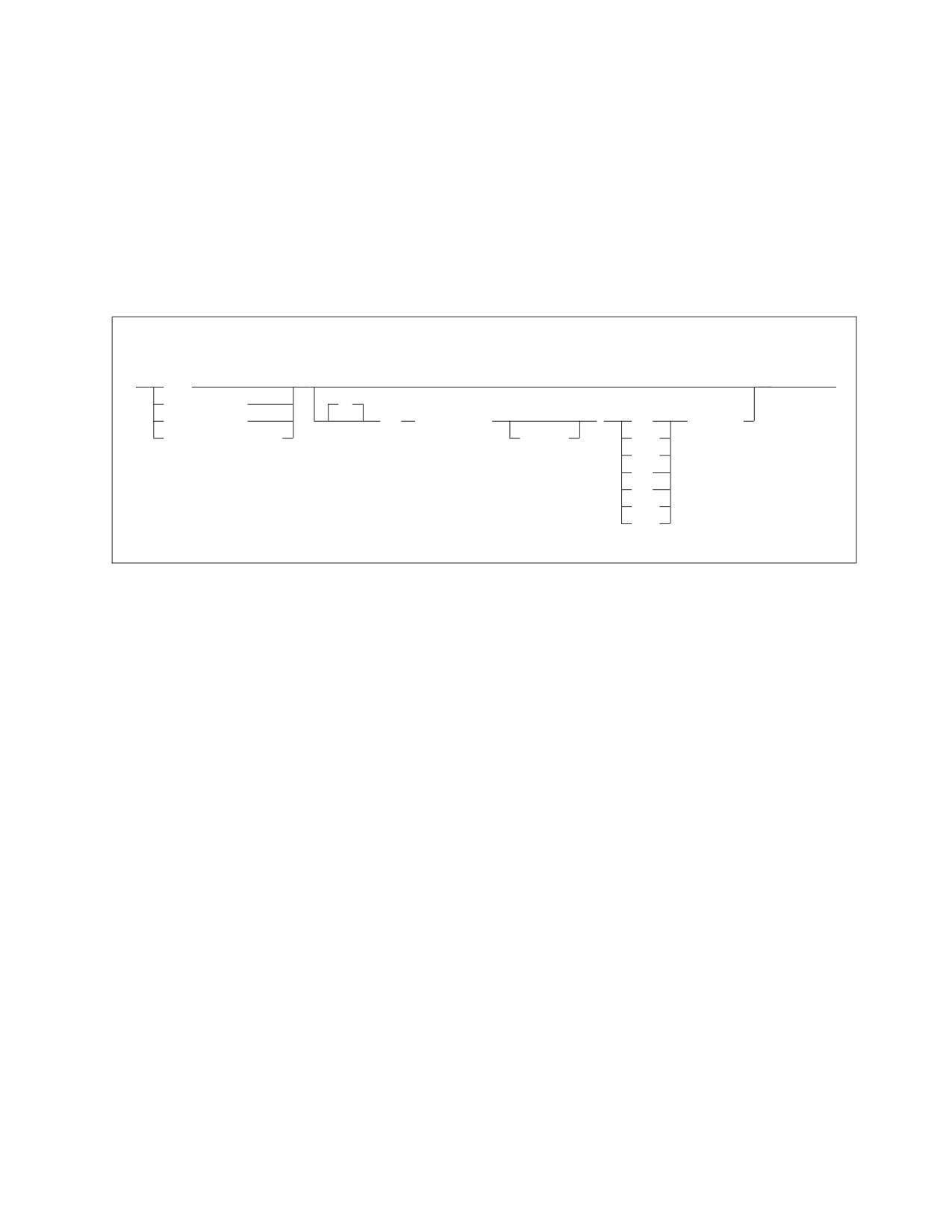
the null or current clause is:
null-current-clause
►►
NULL
►◄
CURRENT DATE
IF
CURRENT TIME
POS
( startpos
)
=
constant
CURRENT TIMESTAMP
-endpos
<>
^=
<
>
<=
>=
where the following is true, as appropriate:
v NULL IF POS is for null columns.
v CURRENT DATE IF POS is for date columns.
v CURRENT TIME IF POS is for time columns.
v CURRENT TIMESTAMP IF POS is for timestamp columns.
These special registers identify the start of a null or current clause. Note that IF
is optional; for example, you can specify the keyword phrase NULL IF POS or
NULL POS.
Note: CURRENT TIMEZONE is not supported.
When CURRENT DATE, CURRENT TIME, or CURRENT TIMESTAMP is to be
loaded, you must provide a value for the endpos parameter of the TCI
subcommand so that the correct length of the data field can be loaded. You
need a minimum of 10 bytes for CURRENT DATE, a minimum of 5 bytes for
CURRENT TIME, and a minimum of 19 bytes for CURRENT TIMESTAMP.
These values follow the rules for ISO formats. To ensure that each data field is
sufficiently large to accommodate the maximum value that can be entered for
the field, you should define 10 bytes for CURRENT DATE, 8 bytes for
CURRENT TIME, and 26 bytes for CURRENT TIMESTAMP. Refer to the input
data formats required for date, time, and timestamp.
startpos
identifies the starting position in the input data record of the value that
identifies a null or current table-column value. Position 1 of the input data
record is the first position of the logical record. If variable-length input records
are used, startpos 1 to 4 will refer to the record length control information. As a
Chapter 8. Command Reference
155
result, startpos 5 refers to the first data position. The null or current identifier
value positions can be the same as, or different from, those specified for the
associated data field.
endpos
identifies the last input data record position of the null or current table column
identification value. If the value occupies only one input data record position,
this parameter is not required.
constant
specifies the null or current table column identification value. The value cannot
be continued to a second input record but can be one of the following:
v A character-string constant that:
- Must be enclosed in single quotation marks (')
- Has a value of maximum length equal to endpos−startpos+1.
See Figure 85 on page 158 for examples.
v A one-position unsigned integer constant (range 0 to 255). See Figure 86 on
page 158 for examples.
v A two-position optionally signed integer constant (default is a positive
value). See Figure 87 on page 158 for examples.
v A four-position optionally signed integer constant (default is a positive
value). See Figure 88 on page 158 for examples.
156
Database Services Utility
Overlapping Column Position Specifications
The startpos and endpos in the null-current-clause need not depend on the
positions occupied by data fields in the sequential input file specified in the
INFILE subcommand; however, if the positions of the data fields and the
positions specified by startpos and endpos in the null-current-clause overlap,
data can be overlaid.
During DATALOAD processing, the database manager generates an input
buffer to hold one row of data for the table. When a TCI subcommand is
encountered, one row of the data, either embedded or in the specified input
file, is written to the input buffer. The TCI subcommand then writes the
CURRENT DATE, CURRENT TIME or NULL characters to the buffer as
required. The data from the specified positions in the input buffer is then
written to the table. This process is performed for every row in the table. If
the positions of the data fields and the positions specified by startpos and
endpos in the null-current-clause overlap, the data in the buffer may be overlaid
and cause unexpected results or errors. The following example illustrates how
data may be overlaid.
CREATE TABLE TIMING
( START_DATE
DATE,
START_TIME
TIME);
DATALOAD TABLE(TIMING)
START_DATE 3-12 CURRENT DATE IF POS(1-10) = ’
’
START_TIME 5-12 CURRENT TIME IF POS(4-11) = ’
’
INFILE(*)
-- FIRST 12 COLUMNS ARE BLANK
ENDDATA;
In this example, the START_DATE, START_TIME and the startpos and endpos
of the IF POS clause overlap. The first row of the embedded data is loaded
into the input buffer. The first TCI subcommand in the DATALOAD
command checks column 1 to 10 in the buffer and determines that POS(1-10)
='
' is true. The CURRENT DATE is then written into positions 3
to 12 in the input buffer. The second TCI subcommand checks positions 4 to
11 of the input buffer; however, positions 3 to 12 contain part of CURRENT
DATE; therefore the IF POS(4-11) '
' clause is not true. The data for
START_TIME is then taken from column 5 to 12 in the input buffer when the
START_TIME column is written to the TIMING table. Because positions 5 to
12 in the input buffer were already overwritten by the first TCI command,
those positions now contain part of CURRENT DATE and the data for
START_TIME is not in the correct time format. A syntax error therefore
occurs.
Chapter 8. Command Reference
157
Examples of Null-Current-Clause
NULL IF POS(20-23) = ’SKIP’
CURRENT DATE IF POS(20-21) ¬= ’
’
CURRENT TIME IF POS(20-21) >= ’01’
CURRENT TIMESTAMP IF POS(20-21) <> ’XX’
Figure 85. Character-String Constant Value Used in the Null-Current-Clause
NULL IF POS(20) = 255
CURRENT DATE IF POS(16) ¬= 25
CURRENT TIME IF POS(35) < 3
CURRENT TIMESTAMP IF POS(50) > 16
Figure 86. One-Position Integer Constant Value Used in the Null-Current-Clause
NULL IF POS (20-21) = 1
CURRENT DATE IF POS (35-36) ¬= 50
CURRENT TIME IF POS (5-6)
<= +32767
CURRENT TIMESTAMP IF POS(9-10) >= 116
NULL IF POS (3-4)
> -32768
Figure 87. Two-Position Integer Constant Value Used in the Null-Current-Clause
NULL IF POS (20-23) = 1
CURRENT DATE IF POS (16-19) ¬= 50
CURRENT TIME IF POS (21-24) <= +2000123563
CURRENT TIMESTAMP IF POS (20-23) >= -1839107489
Figure 88. Four-Position Integer Constant Value Used in the Null-Current-Clause
158
Database Services Utility
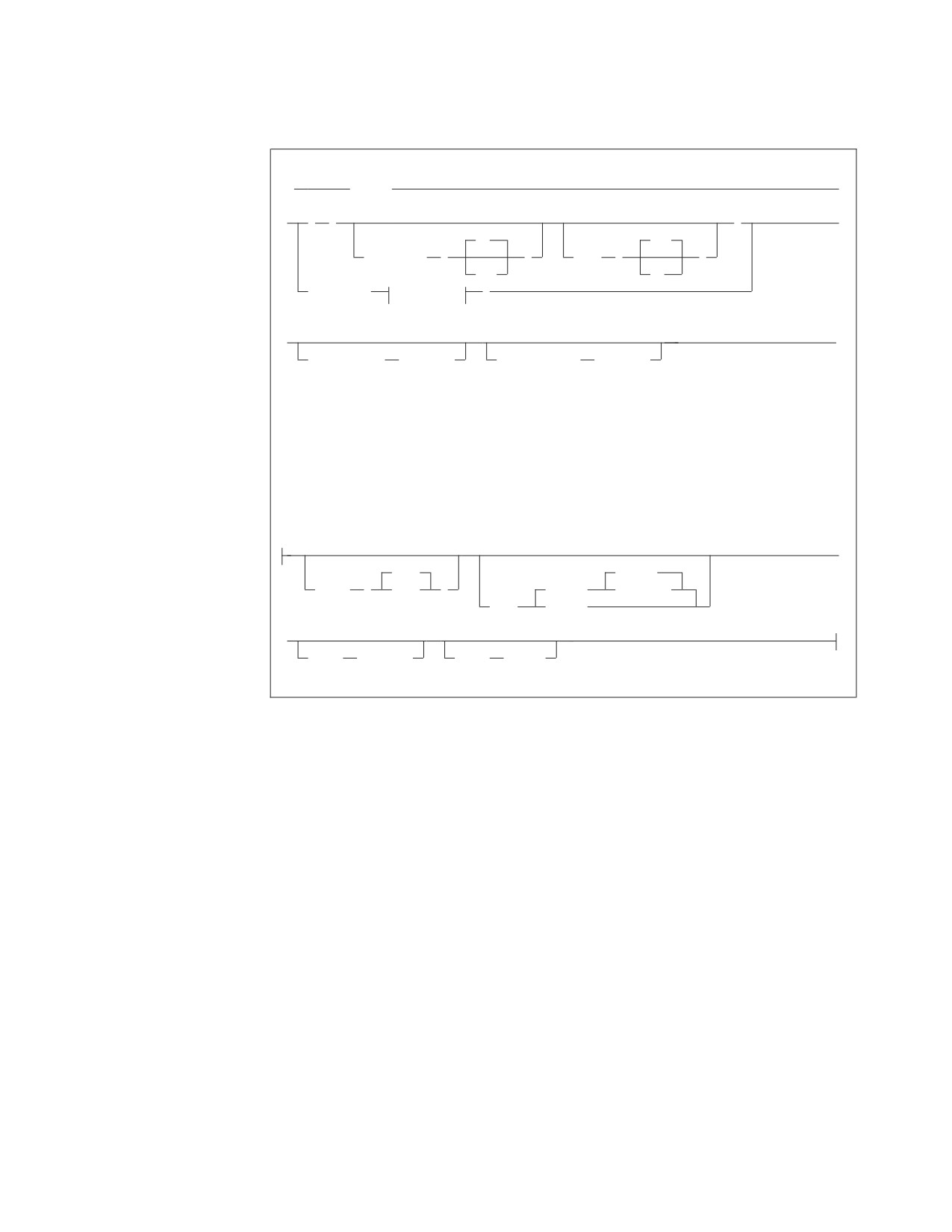
INFILE Subcommand
(1)
►►
INFILE
►
►
(
)
►
No
Yes
CONTINUED
(
)
LIST
(
)
Yes
No
( ddname
option_b
)
►
►◄
COMMITCOUNT
(ccount)
RESTARTCOUNT
(rcount)
Notes:
1
Option B is valid in DB2 Server for VSE only.
option-b:
tape/disk options for DB2 Server for VSE:
►
2048
REWIND
BLKSZ
(
size
)
(TAPE)
NOREWIND
PDEV
(DASD)
►
RECFM
(format)
RECSZ
(size)
The INFILE subcommand identifies the sequential input file containing the data
referenced by the preceding DATALOAD and Table Column Identification
subcommands.
This INFILE subcommand not only tells the utility the file the data is in, but also
tells it to read that file and load the data into the table(s) identified by the previous
DATALOAD TABLE command(s).
The sequential input file can contain fixed, variable, or variable-length spanned
records. The records can be blocked or unblocked.
* identifies that input data is embedded within the control statements
immediately following this control statement. Subsequent records are processed
as user data records until an ENDDATA statement is encountered. If the
(input) control file is exhausted before an ENDDATA statement is encountered,
a Database Services Utility processing error occurs, and the current logical unit
of work is rolled back.
Note: The CONTINUED and LIST parameters are applicable only if the *
parameter has been specified.
CONTINUED (No or Yes)
indicates whether or not the input data that is embedded within the
control statements can span more than one (input) control file record.
Chapter 8. Command Reference
159
Continued record processing is supported only for data records embedded
within the (input) control file because data records in sequential tape or
DASD are not restricted to a maximum length of 80 positions. No blanks
are allowed between or within this parameter keyword and value
specification.
No
indicates that the input data does not span (input) control file records.
Specify either NO or N. This is the default.
Yes
indicates that the input data can span (input) control file records.
Specify either YES or Y.
If you specify CONTINUED(YES), the actual input data is constructed from
one or more (input) control file data records. An input data record with a
nonblank value in position 1 indicates that the input data is continued in the
next (input) control file data record. An input data record with a blank (hex 40)
in position 1 indicates that the input data is not continued in the next (input)
control file data record. The first position (position 1) of each (input) control
file data record is not included in the actual input data. Data for a column can
then be contained in more than one (input) control file data record.
For example, if 10 input control card file data records are required to contain
the data for each row of a table, DATALOAD processing constructs a single
input data record from 10 consecutive input control card file data records. The
relationship between the positions of each of the 10 input control card file data
records and the positions of the actual input data record is:
Control File
Actual Input
Data
Data Record
Data Record
Record
Positions
Positions
1
2-80
1-79
2
2-80
80-158
3
2-80
159-237
4
2-80
238-316
5
2-80
317-395
6
2-80
396-474
7
2-80
475-553
8
2-80
554-632
9
2-80
633-711
10
2-80
712-790
Figure 89. Relationship of Data Records
The maximum possible length of the input data is calculated from the highest
endpos value specified in any DATALOAD command or TCI subcommand
comprising the DATALOAD command set. The endpos value specified for an
input record data field or the endpos value specified in an input-record-id-clause
or null or current clause is included in this consideration. The maximum
length of the actual input data (rounded to the next multiple of 80) is
computed by the following formula:
160
Database Services Utility
Maximum Length
highest endpos value + 80
Actual Input
=
-------------------------------- X
80
Data Record
80
Figure 90. Formula
Notes:
1. Any continuation records that would cause the actual input data record
length to exceed the length computed by this formula are read and ignored
by DATALOAD processing.
2. Actual input data records containing data to be loaded into a table must be
at least as long as the highest endpos value specified in a TCI subcommand.
LIST (Yes or No)
indicates whether or not the input data that is embedded within the
control statements should be displayed in the report or message file. The
LIST parameter is applicable only if the data records are embedded within
the (input) control file. No blanks are allowed between or within this
parameter keyword and value specification.
Yes
indicates that the embedded data records should be displayed in the
report or message file. Specify either YES or Y as the parameter value.
The default is LIST(YES).
No
indicates that the embedded data records should not be displayed in
the report or message file. Specify either NO or N as the parameter
value.
If a data field error is detected in an input data record while the LIST(NO)
and CONTINUED(NO) are in effect, the input data record is displayed in
the report or message file before the message describing the error.
If LIST(NO) and CONTINUED(YES) are in effect, no input data is
displayed in the report or message file if a data field error occurs. A
meaningful display of the input data record might not be possible because
the data for a record might span multiple 80-byte data records or the data
field in error might span input data records. Also, it is likely that
continued records contain unprintable data. The commands and input data
can be rerun with LIST(YES) specified if the problem cannot be identified.
ddname
in DB2 Server for VM is the name of the sequential input file defined with
a CMS FILEDEF command. The file characteristics specified in the
FILEDEF command or the default FILEDEF specifications are the source of
the input record definition information for the Database Services Utility.
Input files with RECFM U, A, or M are not supported.
If you define DATALOAD CMS input files with variable-length spanned
records (RECFM=VS or RECFM=VBS), you must use the file-mode number
4. DATALOAD processing changes the record format from VS or VBS to
VB.
Note: The RECFM, RECSZ and BLKSIZE information displayed in the
message ARI0868I depends on the CMS FILEDEF command
specifications for the DATALOAD input file. If you define
DATALOAD input files as VS or VBS, DATALOAD processing
Chapter 8. Command Reference
161
changes the record format to VB and the RECFM, RECSZ and
BLKSIZE information displayed in the message ARI0868I will
indicate this change.
If variable-length input records are used, the data fields referenced by the
TCI subcommands must be in the same position for each occurrence of the
data record type.
Do not specify SYSIN or SYSPRINT as the ddname.
in DB2 Server for VSE: is the TLBL or DLBL job control statement file
name for the sequential (SAM) input file or for SYSIPT if you are using the
READ member statement. For more information, refer to the DB2 Server for
VSE Program Directory manual.
You must specify the ddname parameter first; that is, you cannot specify
BLKSZ, PDEV, RECFM, and RECSZ before the ddname. You can specify the
other keyword parameters in any order.
BLKSZ (size) (DB2 Server for VSE Only)
is a parameter that specifies the block size of the sequential input file. The
default block size is 2048 bytes per block.
PDEV (TAPE or DASD) (DB2 Server for VSE Only)
is an optional parameter that specifies the device type (DASD or TAPE) of
the sequential (SAM) input file. If PDEV(DASD) is specified, the file
resides on any device supported by the VSE DTFSD macro. Managed SAM
does not support spanned records. If PDEV(TAPE) is specified, the file
resides on any device supported by the VSE DTFMT macro. The default is
PDEV(TAPE).
NOREWIND or REWIND (DB2 Server for VSE Only)
controls tape file rewind processing performed during OPEN
processing. This parameter is valid only if you specify TAPE for PDEV.
The default processing is REWIND.
NOREWIND (DB2 Server for VSE Only)
specifies that the tape file will not be rewound by OPEN
processing. If NOREWIND is specified for input tape files
referenced by a series of DATALOAD commands, you must ensure
that the tape files being referenced are in ascending sequence. For
example, if NOREWIND is specified in a sequence of two
DATALOAD commands and the first command reads tape file 2,
then the second command must reference tape file 3 or a higher
number. If it references tape file 1, an OPEN error occurs.
REWIND (DB2 Server for VSE Only)
specifies OPEN processing to rewind the tape file.
RECFM (format) (DB2 Server for VSE Only)
is an optional parameter that specifies the format of the records in the
input data file. For format, substitute one of the following values:
162
Database Services Utility
Value
Meaning
F
fixed, unblocked
FB
fixed, blocked
V
variable, unblocked
VB
variable, blocked
S
variable spanned, unblocked
SB
variable spanned, blocked
The default is RECFM(F).
If variable-length input records are used, the data fields referenced by the
TCI subcommands must be in the same position for each occurrence of the
data record type.
RECSZ(size) (DB2 Server for VSE Only)
is a parameter that specifies the length of a logical record for the input
data file.
Default record size values are specified as follows:
v If RECFM = F or FB, the default record size is the block size.
v If RECFM = V or VB, the default record size is the block size minus four.
v If RECFM = S or SB, the default record size is the block size minus four
or the highest input record position referenced, whichever is greater.
COMMITCOUNT (ccount)
identifies the frequency of COMMIT action during DATALOAD
processing.
ccount
is a number from 1 to 2,147,483,647 indicating that a COMMIT
statement should be executed after the number of input data records
equal to ccount are processed by DATALOAD.
Database Services Utility AUTOCOMMIT ON processing must be in effect
when you use DATALOAD COMMITCOUNT processing. If
AUTOCOMMIT is OFF and the COMMITCOUNT parameter is used, an
error message is written. DATALOAD command processing is not
performed.
If a SET ERRORMODE CONTINUE command is in effect during
DATALOAD COMMITCOUNT processing, input data records with
incorrect data fields might not be used. The incorrect input records are
skipped if:
v Multiple DATALOAD commands were used preceding an INFILE
subcommand and the records were not used for successful inserts by
any other DATALOAD commands.
v An SQL insert error occurs identified by SQLCODE -405, -424, -530, -802,
or -803, followed by message ARI0862E, and insert blocking is not in
effect.
Insert blocking is not in effect under the following conditions:
v Database Services Utility is running with single user mode.
v Database Services Utility is running with multiple user mode, but was
preprocessed with the NOBLOCK option.
v Insert blocking is suppressed by the database manager.
Chapter 8. Command Reference
163
Note: For more information, refer to “Skipping Bad Records” on page 45.
If an invalid ccount value is specified, an error message is written, and
DATALOAD command processing is not performed.
For DATALOAD CONTINUED record processing, the ccount value refers to
the number of physical input data records, not the number of logical
records constructed from input records. A COMMIT statement is
performed when the number of physical input data records processed
equals or exceeds the ccount value.
RESTARTCOUNT (rcount)
identifies the restart point for DATALOAD processing.
rcount
is a number from 1 to 2147483647 that indicates the number of input
data records to be skipped before DATALOAD record processing
begins.
If this parameter is omitted, no records are skipped and DATALOAD
processing begins with the first input data record.
If an invalid rcount value is specified, an error message is written and
DATALOAD processing is not performed.
If an end-of-file condition occurs before the number of records specified by
the rcount value are read, an error condition exists. Error message
ARI0844E is written to the message file before DATALOAD processing
ends.
For DATALOAD CONTINUED processing, the rcount value refers to the
number of physical input data records, not the number of logical records
constructed from input records. If the rcount+1 input record is not the first
physical record of a set of physical records comprising a logical record,
error message ARI0887E is issued.
ENDDATA Subcommand
Format:
►► ENDDATA
►◄
The ENDDATA subcommand identifies the end of user data embedded within the
(input) control file. This command is valid only if the previous Database Services
Utility command processed was an INFILE(*) subcommand.
No other information is allowed in this subcommand. If ENDDATA is not alone on
the input record, the utility reads it as data. If ENDDATA is terminated by a
semicolon (;), no blanks are permitted between the keyword and the semicolon.
SQL comments are not allowed on the ENDDATA subcommand.
During CONTINUED(YES) processing, an ENDDATA command is recognized only
if the previous (input) control file data record contains a blank (hex 40) in position
164
Database Services Utility
1. If the previous (input) control file data record contains a nonblank in position 1,
the ENDDATA command is processed as a continuation data record.
DATALOAD Data Conversion Summary
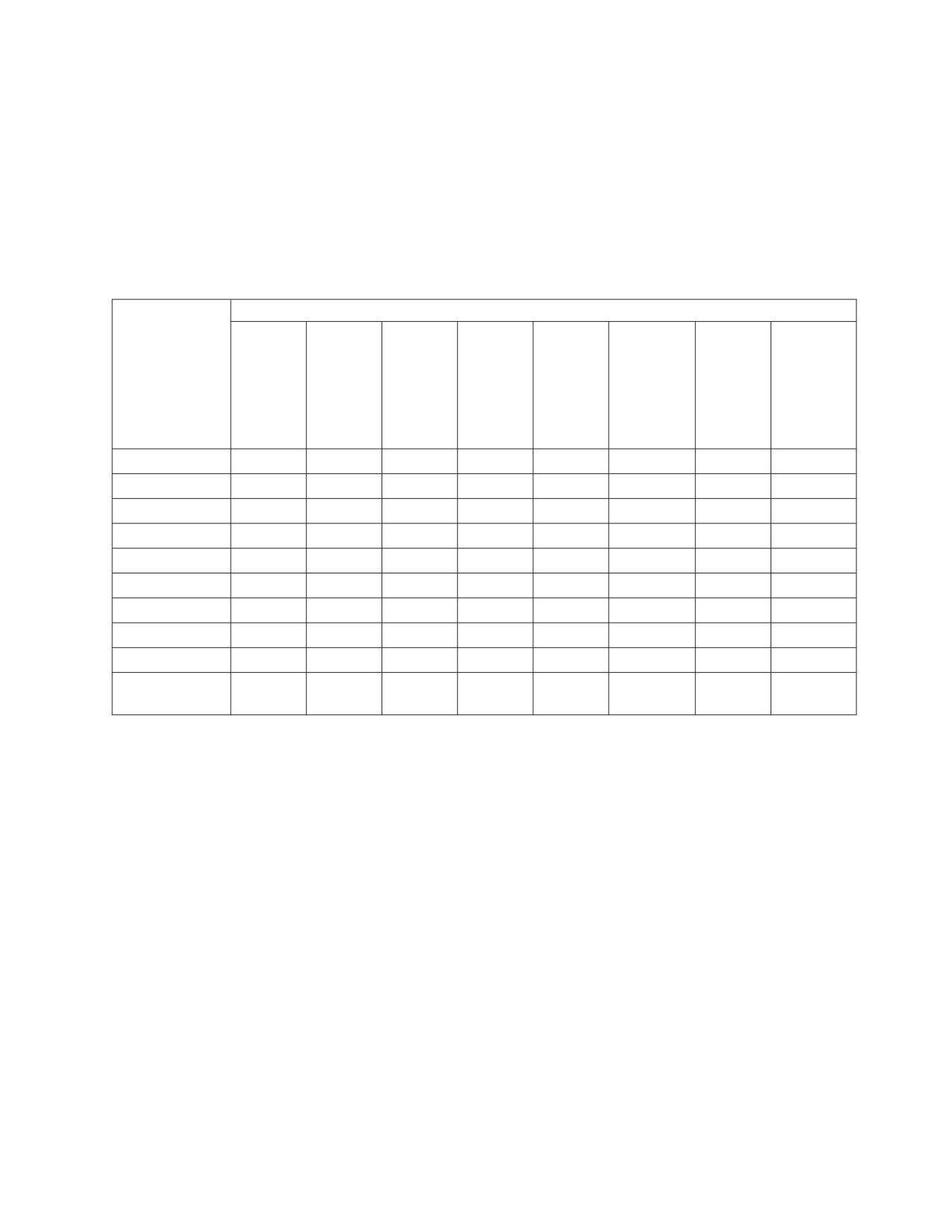
Table 9 summarizes the data conversion performed by DATALOAD processing.
YES means that the utility performs the conversion; NO means that the utility
cannot convert the input data into the data type of the target column. The numbers
in the chart refer to the notes below.
Table 9. DATALOAD Data Conversion Table
Target Column Data Type
DBCS
CHAR,
GRAPHIC,
VAR-
VAR-
CHAR, or
DATE,
GRAPHIC,
LONG
DOUBLE
TIME or
or LONG
Input Field Data
VAR-
SMALL-
PRECI-
TIME-
VAR-
Type
CHAR
DECIMAL
INT
INTEGER
REAL11
SION12
STAMP13
GRAPHIC
CHAR
Yes1,4
Yes2
Yes2
Yes2
Yes2
Yes2
Yes
No
1-Byte FIXED
No
No
Yes
Yes
No
No
No
No
2-Byte FIXED
No
No
Yes
Yes
No
No
No
No
4-Byte FIXED
No
No
No
Yes
No
No
No
No
4-Byte FLOAT
No
No
No
No
Yes
Yes10
No
No
8-Byte FLOAT
No
No
No
No
Yes9
Yes
No
No
DECIMAL
No
Yes3
No
No
No
No
No
No
ZONED
No
Yes5,6
Yes5
Yes5
Yes5
Yes5
No
No
GRAPHIC (G)
No
No
No
No
No
No
No
Yes7
DATE, TIME, or
No
No
No
No
No
No
Yes8
No
TIME-STAMP
Chapter 8. Command Reference
165
Notes for Table 9:
1.
Character (CHAR) input data fields for VARCHAR or long field columns have
trailing (low-order) blanks truncated before the length of the varying column
is established. All-blank CHAR input data fields result in a length of 0.
2.
The first trailing blank after the number within a character (CHAR) input data
field terminates the character string used for character-to-numeric data
conversion. An all-blank CHAR field or a CHAR field with only a sign (+ or
-) results in a numeric value of 0. The data can be in the form of an integer,
decimal, or float constant.
3.
Decimal (DECIMAL) input data fields should contain data with a precision
less than or equal to the precision of the target DECIMAL column. The
Database Services Utility uses the scale defined for the target column for the
input data unless a scale value equal to or less than that defined for the target
column is specified. A Database Services Utility processing error occurs if the
scale specified for the input data field is greater than that of the target
column.
4.
Character (CHAR) input data fields for CHAR columns are padded with
trailing blanks if they are less than the length of the target column. CHAR
input data fields with a length greater than the length of the target CHAR,
VARCHAR, or long field columns are not allowed.
5.
Leading and trailing blank positions within a zoned input data field are
ignored. An all-blank zoned input data field results in a numeric (SMALLINT,
INTEGER, DECIMAL, or FLOAT) column value of 0. A zoned data input field
containing only an EBCDIC plus (+) sign or minus (-) sign is not valid.
6.
A zoned (ZONED) data input field should contain a value with a precision
less than or equal to the precision of the target DECIMAL column. The
Database Services Utility uses the scale defined for the target column as the
scale for the zoned data value unless a scale value equal to or less than the
scale of the target column is specified. A Database Services Utility processing
error occurs if the scale specified for the input data field is greater than that of
the target column.
7.
A DBCS input data field must be an even number (2, 4, 6,...100, and so forth)
of positions (bytes) in length. The shift-out (hex 0E) and shift-in (hex 0F)
delimiters can be in the first position (startpos) and last position ( endpos) of
the data field. A two-position DBCS data field containing only the shift-out
and shift-in delimiter values is treated as a blank input data field.
If the shift-out and shift-in delimiters are present in the data field, the
Database Services Utility treats data field positions startpos+1 to endpos−1 as
DBCS data. The hex value 4040 is treated as a blank DBCS character.
A DBCS input data field for VARGRAPHIC or a long field has trailing
(low-order) DBCS blank characters truncated before the length of the varying
column is established. An all-blank DBCS input data field results in a column
value with a length = 0 for columns defined with the data type
VARGRAPHIC or long field.
8.
The datetime data type input and target type must match; for example, the
input data type of TIME is valid only for the target column data type of
TIME.
9.
When 8-byte floating-point data is loaded into a 4-byte floating-point table
column, a number of digits of precision are lost. The fraction (mantissa) is
reduced from 14 to 6 digits of precision. If an error occurs during the
conversion process, the message ARI0864E is generated, and processing of the
DATALOAD command stops.
10.
4-byte floating-point data is padded with hex 0000 0000.
166
Database Services Utility
11. The REAL input data field represents single-precision floating-point data and
is synonymous with FLOAT(N), where 1 is less than or equal to N, and N is
less than or equal to 21.
12. DOUBLE PRECISION represents double-precision floating-point data and is
synonymous with FLOAT or FLOAT(N), where 22 is less than or equal to N,
and N is less than or equal to 53.
13. When a current date, current time, or current timestamp value is to be loaded,
you must provide a value for the endpos parameter of the TCI subcommand so
that the correct length of the data field can be loaded. You need a minimum of
10 bytes for current date, a minimum of 5 bytes for current time, and a
minimum of 19 bytes for current timestamp. These values follow the rules for
ISO formats. To ensure that each data field is sufficiently large to
accommodate the maximum value that can be entered for the field, you
should define 10 bytes for current date, 8 bytes for current time, and 26 bytes
for current timestamp. Refer to the input data formats required for date, time,
and timestamp.
Chapter 8. Command Reference
167
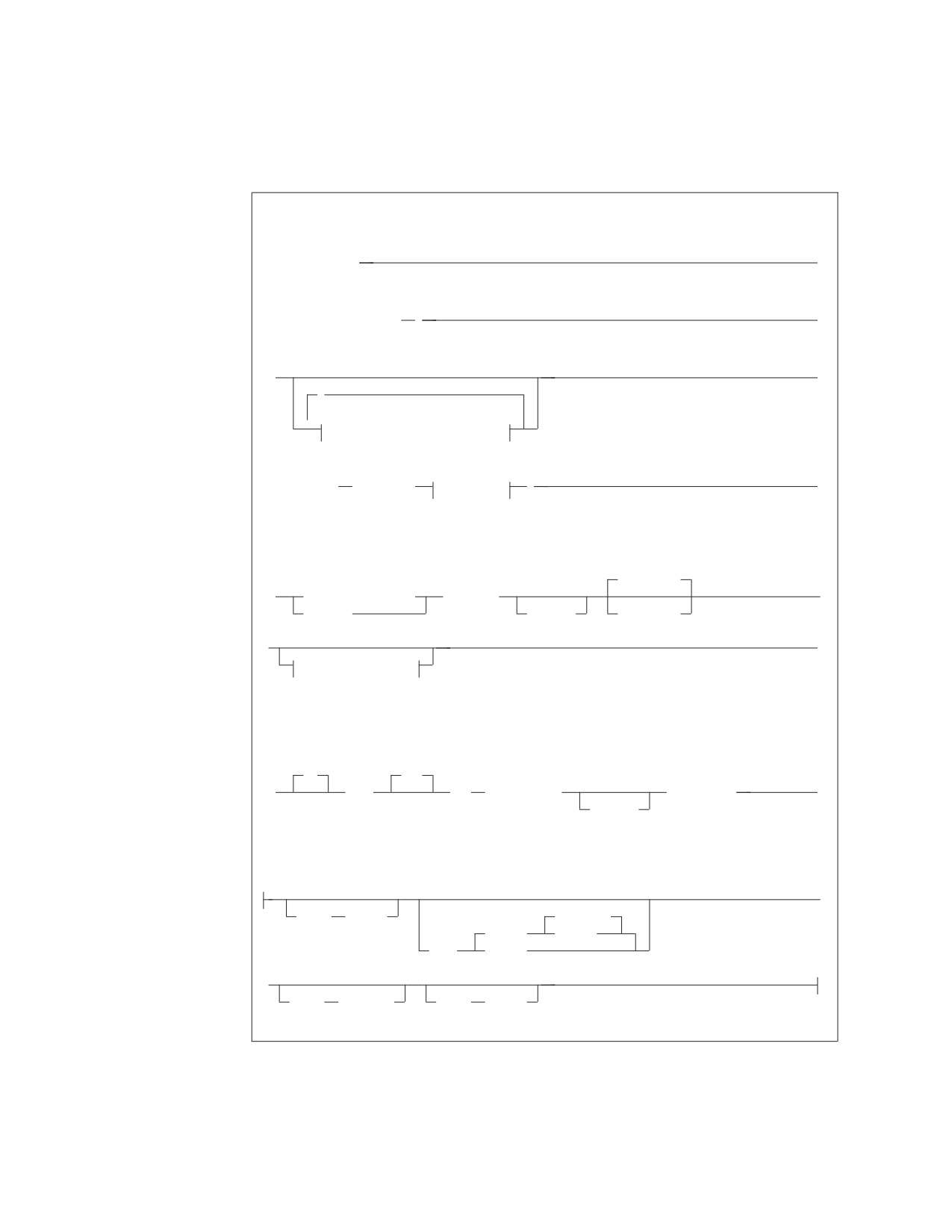
DATAUNLOAD
DATAUNLOAD Format
Format:
►► DATAUNLOAD
►◄
►► select_statement
;
►◄
►►
►◄
,
▼
data_field_id Subcommand
►► OUTFILE
( ddname
option_a
)
►◄
data_field_id subcommand (DFI)
CHARacter
►►
column_reference
startpos
►
integer
-endpos
data_type
►
►◄
set_null_clause
set_null_clause
IF
SET
►►
NULL
POS
( startpos
) = value
►◄
-endpos
option_a valid in DB2 Server for VSE only:
►
BLKSZ
(size)
NOREWIND
(TAPE)
REWIND
PDEV
(DASD)
►
RECFM
(format)
RECSZ
(size)
168
Database Services Utility
Example 1:
DATAUNLOAD
SELECT AVG(BONUS) FROM EMPLOYEE;
OUTFILE(EXTRA)
Example 2:
DATAUNLOAD
SELECT SALARY FROM EMPLOYEE;
SALARY 1-10 CHAR
OUTFILE(REGULAR)
Authorization:
All normal SELECT privilege ground rules apply.
DATAUNLOAD
identifies the start of the DATAUNLOAD command sequence. A Database
Services Utility processing error occurs if other information is present in the
(input) control file record after the command identifier DATAUNLOAD.
select-statement
is any valid SQL SELECT statement without host variables. The SQL SELECT
statement must begin in the next (input) control file record following the one
containing the DATAUNLOAD command. A semicolon must be used to
terminate the SQL SELECT statement.
The results of the SQL SELECT statement supplied after a DATAUNLOAD
command are not written to the Database Services Utility report or message
file. An output file data record is written for each row (except those containing
data values that exceed the capacity of numeric output record data fields)
returned as a result of executing the SQL SELECT statement.
If the user-supplied SQL SELECT statement is not valid, or is not terminated
by a semicolon, a Database Services Utility processing error occurs.
If an arithmetic exception occurs, the DATAUNLOAD command handles it in a
way similar to arithmetic exceptions under the SELECT statement. (See “SELECT
and Arithmetic Exceptions” on page 143 for a description of the way arithmetic
exceptions are handled under the SELECT statement.) If an arithmetic exception
occurs when the data is to be placed into an output numeric data type field
(FIXED, FLOAT, DECIMAL, or ZONED), an error message is issued and
processing is terminated because the DB2 Server for VSE & VM system incorrectly
reads the number (or pound) symbols (#) used under SELECT as real data.
Stopping the processing prevents the arithmetic exception from generating
incorrect output.
Chapter 8. Command Reference
169
Data_Field_Id Subcommand
Format:
CHARacter
►►
column_reference
startpos
►◄
integer
-endpos
data_type
set_null_clause
The next record following the end of the SQL SELECT statement can contain one
or more Data Field Identification (DFI) subcommands or an OUTFILE
subcommand. If the OUTFILE subcommand is missing, a Database Services Utility
processing error occurs. If DFI subcommands are omitted, the default output
record format described in the section “DATAUNLOAD Output Data Field
Defaults” on page 179 is used.
A DFI subcommand identifies the location in the output record where the data for
a column in the select-list should be placed. The subcommand also identifies the
output record data-field data type. If the output record data-field data type is
different from the select-list column data type, the Database Services Utility
converts the column data. The data conversions performed by DATAUNLOAD
processing are described in Table 13 on page 187.
Only one DFI subcommand can appear in an input record. The command
parameters must not span input records, and the column_reference, startpos, and
endpos parameters must be specified first in the command and in that order.
If DFI subcommands are specified, only the data for the select-list columns
referenced by these subcommands is unloaded to the output data record. The data
for a column in the select-list (explicitly specified, or implicitly specified by the *
specification in the SQL SELECT) not referenced by a DFI subcommand is not
unloaded. A Database Services Utility warning message identifies each select-list
column that is ignored by DATAUNLOAD processing.
The data for the same column in the select-list can be unloaded to more than one
output record data field by specifying two or more DFI subcommands that
reference the column.
column_reference
identifies the select-list column to be used as the source of the output data
field value. Column_reference can be any valid form of a table column name or
integer that refers to a select-list column. For example, the integer value 1 (hex
F1) refers to the first item in the select-list; the integer value 10 (hex F1F0)
refers to the 10th item in the select-list.
A Database Services Utility processing error occurs if:
v The column name specified in the DFI subcommand is not in the select-list.
v The integer value identifying the column name exceeds the number of
columns in the select-list.
Use the integer notation for column_reference to identify the column if:
v The select-list contains columns from different tables with the same column
name. For example:
170
Database Services Utility
SELECT...,EMPLOYEE.EMPNO,EMP_ACT.EMPNO,
...FROM EMPLOYEE,EMPLOYEE.ACTIVITY...;
v The select-list contains a column that is a constant or is derived from an
expression or function:
SELECT...,’SALARY(+6%)=’,SALARY*1.06,MAX(SALARY)
...FROM EMPLOYEE...;
startpos
identifies the starting position (byte) of the data in each output data record.
Position 1 of the output record corresponds to the first position of the logical
output record. If variable-length input records are used, startpos 1 to 4 refers to
the record length control field. As a result, startpos 5 refers to the first data
position.
endpos
identifies the end position (byte) of the data in each output data record. You
can omit this parameter if the data occupies only one position in the output
record. If you specify this parameter, do not place blanks between the starting
position and the hyphen, or between the hyphen and the ending position.
To unload a column defined with a double-byte character set (DBCS) data
type, the length of the output data field must be an even number (4, 6, ..., 100,
...) of positions (bytes) other than 2. A Database Services Utility processing
error occurs if DBCS data is identified for an output record data field with an
odd number of positions, or with only two positions.
data-type
identifies whether character, graphic, fixed-binary, floating-point, packed
decimal, or zoned data values should be placed in the output data record
positions specified. The data type specification must appear after the
startpos-endpos values in the subcommand. The default data type is character.
The valid data type identifiers that you can specify are:
CHAR or CHARACTER
If the table column data type is anything but GRAPHIC, you can create a
CHAR output data field.
CHAR output data derived from a CHAR, VARCHAR, DATE, TIME,
TIMESTAMP, or long field select-list column is left-justified and padded on
the right with blanks (hex 40). Trailing (low-order) data is truncated if the
output data field length is less than the length of the column data except
for TIME, DATE, and TIMESTAMP. For TIME and DATE, an error occurs if
the output data field length is less than the length of the column data. For
TIMESTAMP, if the output data field length is less than 19 bytes, an error
occurs; if the output data field length is less than 26 but greater than or
equal to 19 bytes, trailing digits of the MICROSECONDS part of the
timestamp are truncated.
The CHAR output data can also be derived from select-list columns with
data type SMALLINT, INTEGER, DECIMAL, and FLOAT. See the section,
“DATAUNLOAD Data Conversion Summary” on page 187, for a
description of the content of CHAR output data fields derived from
numeric column data types.
If extended DBCS processing is in effect, character data can contain
DBCS/EBCDIC mixed data. See page 231 for a discussion of extended
DBCS support.
When an arithmetic exception occurs and the data is to be placed into an
output data type field, no error message is issued and processing
Chapter 8. Command Reference
171
continues. Number (or pound) symbols (#) are used, as under SELECT, to
fill the data type field and to indicate that an exception occurred during
processing.
CHAR is the default data type specification.
GRAPHIC or GR or G
If the table column is defined with the data type GRAPHIC,
VARGRAPHIC, or long field, you can create a DBCS output data field.
The startpos and endpos for a DBCS output record data field reflect the
number of bytes the data field occupies in the data record; they do not
reflect the number of DBCS characters that the data field contains.
The startpos of the output data field contains a shift-out (hex 0E) delimiter.
The endpos of the output data field contains a shift-in (hex 0F) delimiter.
Two intervening positions are required for each DBCS character.
The DBCS output record data field must occupy an even number of bytes
in the data record, or a Database Services Utility processing error occurs.
DBCS column data is truncated if the length of the output record data field
is less than the column data length plus 2. For a DBCS column, the column
data length equals the number of DBCS characters times 2.
A blank DBCS output data field contains the hex 40 value in all positions
except for the first and the last. A null source column value also results in
a blank output record data field.
DATE
If the table column is defined with a column type of DATE, output data is
in one of the following formats:
yyyy-mm-dd
(ISO, JIS format)
dd.mm.yyyy
(EUR format)
mm/dd/yyyy
(USA format)
installation defined
(Local format)
where:
yyyy is the year
mm is the month
dd is the day
The format is dependent on the SYSOPTIONS default format value or is
specified by the CHAR function in the SELECT statement.
Local Date Format
A database administrator can change the date default format, which is
defined in the SYSTEM.SYSOPTIONS table, from ISO (which is the
system-supplied database default form) to any installation-defined
format. See the DB2 Server for VM System Administration and DB2
Server for VSE System Administration manuals for information about
installation-defined formats and their interface.
Note: See page 169 for information on arithmetic error handling.
TIME
If the table column is defined with a column type of TIME, output data is
in one of the following formats:
hh:mm AM or hh:mm PM
(USA format)
hh.mm[.ss]
(ISO, EUR format)
hh:mm[:ss]
(JIS format)
installation defined
(Local format)
172
Database Services Utility
where:
hh is the hour
0 <= hh <= 12
for USA format
0 <= hh <= 24
for ISO, EUR, JIS format
mm is the minutes
ss is the seconds
The format is dependent on the SYSOPTIONS default format value or is
specified by the CHAR function in the SELECT statement.
Local Time Format
A database administrator can change the time default format, which is
defined in the SYSTEM.SYSOPTIONS table, from ISO (which is the
system-supplied database default form) to any installation-defined
format. See the DB2 Server for VSE System Administration, or DB2 Server
for VM System Administration manual for information about
installation-defined formats and their interface.
Note: See page 169 for information on arithmetic error handling.
TIMESTAMP
If the table column is defined with a column type of TIMESTAMP, output
data is in the following format:
yyyy-mm-dd-hh.mm.ss[.[nnnnnn]]
where
yyyy-mm-dd is the date (see ISO DATE format)
hh.mm.ss is the time (see ISO TIME format)
nnnnnn is microseconds
If the output data field length is less than 19 bytes long, an error occurs. If
the output data field is less than 26 bytes, but greater than or equal to 19
bytes, trailing digits of the microseconds part of the timestamp are
truncated.
FIXED or INT or INTEGER
If the table column is defined with a data type of SMALLINT or INTEGER,
you can define a fixed-point binary-output data field. If a row selected
from the database by the SQL SELECT statement supplied for
DATAUNLOAD processing contains a column value that exceeds the
capacity of a 1-byte or 2-byte FIXED output data field, an error message is
issued, and no output data file record is written for the row.
The value ranges for binary-output data fields are:
v A 1-byte binary data field can contain an 8-bit binary integer with a
value range of 0 to 255.
v A 2-byte binary data field can contain a 15-bit binary integer with the
value range described for a table column defined with the data type
SMALLINT.
v A 4-byte binary data field can contain a 31-bit binary integer with the
value range described for a table column defined with the data type
INTEGER.
Note: See page 169 for information on arithmetic error handling.
FLOAT or REAL
If the table column is defined with a data type of REAL or FLOAT(n),
Chapter 8. Command Reference
173
where n is from 1 to 21, you can define 4-byte floating-point binary-output
data, where (endpos−startpos+1) = 4. If a row selected from the database
by the SQL SELECT statement supplied for DATAUNLOAD processing
contains a column value that exceeds the capacity of the FLOAT output
data field, an error message is issued, and no output data file record is
written for the row.
Note: See page 169 for information on arithmetic error handling.
FLOAT or DOUBLE PRECISION
If the table column is defined with a data type of FLOAT, DOUBLE
PRECISION, or FLOAT(n), where n is from 22 to 53, you can define 8-byte
floating-point binary-output data, where (endpos−startpos+1) = 8.
Note: If 8-byte floating-point binary data is unloaded into a 4-byte
floating-point output data field, a number of digits of precision is
lost. If a row selected from the database by the SQL SELECT
statement supplied for DATAUNLOAD processing contains a
column value that exceeds the capacity of the FLOAT output data
field, an error message is issued, and no output data file record is
written for the row.
See page 169 for information on arithmetic error handling.
DECIMAL or DEC
If the table column is defined with a DECIMAL data type, you can specify
DECIMAL or DEC for packed decimal output data.
The length of the output data field must be large enough to accommodate
all significant digits of the column data value. The minimum length of an
output field derived from DECIMAL column data is (column scale/2)+1.
The implied scale of the output data field value is the same as that defined
for column.
If a row selected from the database by the SQL SELECT statement supplied
for DATAUNLOAD processing contains a column value that exceeds the
capacity of a decimal output data field, an error message is issued, and no
output data file record is written for the row.
Columns defined as NUMERIC are treated as DECIMAL data types.
Note: See page 169 for information on arithmetic error handling.
ZONED
If the table column is defined with a data type of SMALLINT, INTEGER,
or DECIMAL, you can specify ZONED for zoned output data. The length
of a zoned output record data field derived from a DECIMAL column
must be equal to or greater than the column scale.
Each digit of the table column value is represented by a single byte in the
zoned output data field. The 4 high-order bits of each byte are the zone
bits. The 4 high-order bits of the low-order byte are the sign of the value.
The 4 low-order bits of each byte contain the value of the digit.
The zone bits are 1111 (hex F). A plus-sign is represented by the bits 1100
(hex C), and a minus-sign is represented by the bits 1101 (hex D).
The output data field value is right-justified. Leading (high-order) zeros are
either added to, or truncated from, the column value depending on the
length of the output data field.
174
Database Services Utility
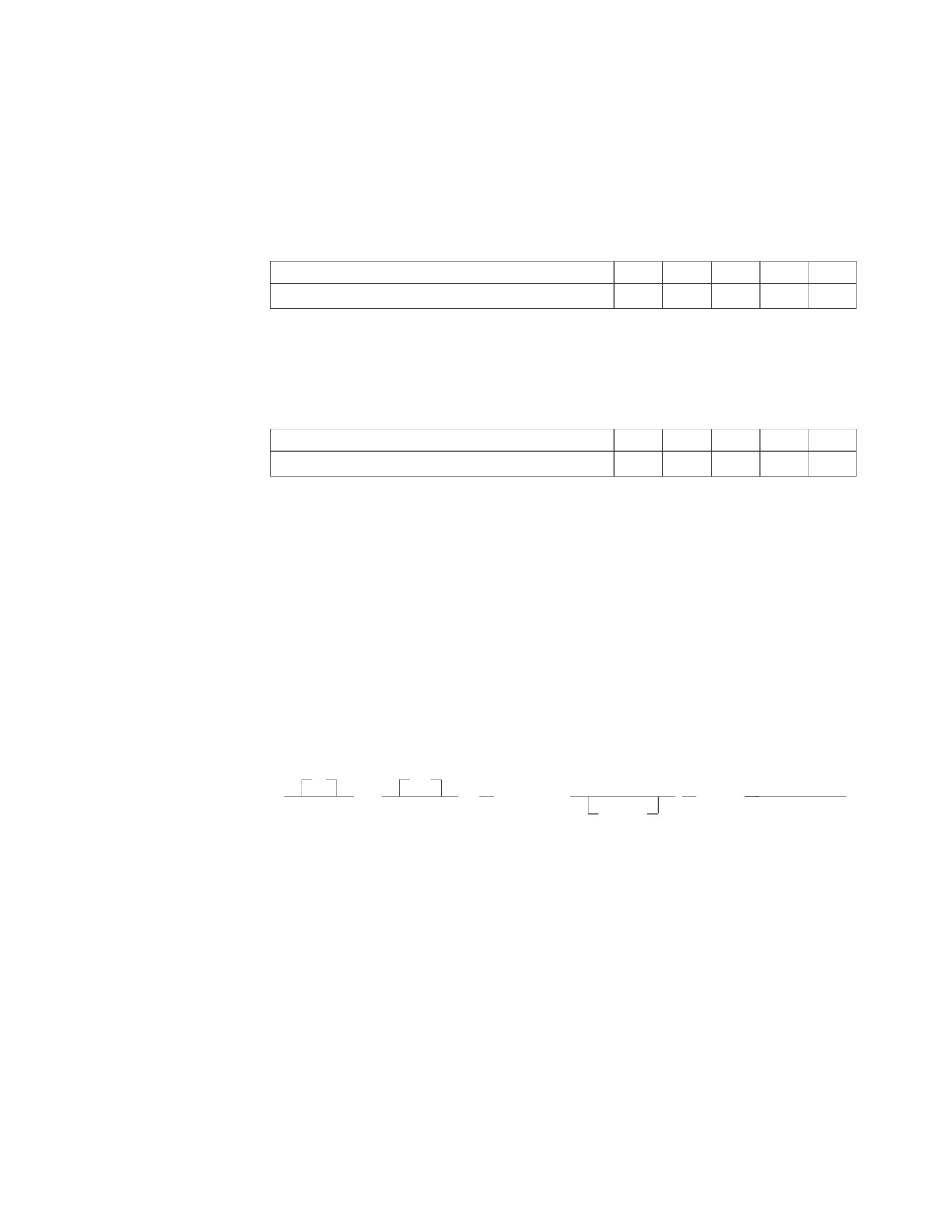
If a row selected from the database by the SQL SELECT statement supplied
for DATAUNLOAD processing contains a column value that exceeds the
capacity of a zoned output data field, an error message is issued, and no
output data file record is written for the row.
Examples of zoned output data fields:
The hexadecimal content of a 5-position zoned data field containing the
value +00011 is:
Hexadecimal Value
F0
F0
F0
F1
C1
Field Position
1
2
3
4
5
Note: See page 169 for information on arithmetic error handling.
The hexadecimal content of a 5-position zoned data field containing the
value -00011 is:
Hexadecimal Value
F0
F0
F0
F1
D1
Field Position
1
2
3
4
5
See Table 13 on page 187 for a table summarizing the data conversion performed
by Database Services Utility DATAUNLOAD processing.
set_null_clause
specifies the output data record position and value that identifies a null table
column value. The null identifier value can be a character or an integer value
(see below); it does not assume the data type specified for the output record
data field.
The set_null_clause must appear after the startpos-endpos values in the
subcommand. No embedded blanks are allowed in the set_null_clause within
the left and right parentheses enclosing the startpos and endpos values.
set_null_clause:
IF
SET
►►
NULL
POS
( startpos
)
= value
►◄
-endpos
The parameters are:
IF NULL SET POS
identifies the start of the set_null_clause. You can use either the keyword phrase
IF NULL SET POS or NULL POS.
startpos
identifies the starting position (byte) in the output data record of the value that
identifies a null table column value. The null identifier value positions can
overlap the positions assigned to an output record data field.
Position 1 of the output data record is the first position of the logical record. If
variable-length output records are used, startpos 1 to 4 refer to the record
length control information and the data begins at startpos 5.
Chapter 8. Command Reference
175
endpos
identifies the last output data record position (byte) of the null table column
identification value. If the value occupies only one output data record position,
this parameter is not required.
value
specifies the null table column identification value. If an occurrence of the
column value is null, the value specified is placed in the output data record
positions specified after the data field value for the default output record is set.
If an occurrence of the column value is not null, no value is placed in the
output data record positions specified in the set_null_clause. These positions
contain blanks (hex 40) if they do not contain a default output record data field
value for null column data.
The set_null_clause value cannot be continued to a second output record. It can
be one of the following:
v A character-string constant that:
- Must be enclosed in single quotation marks (')
- Has a maximum length equal to endpos −startpos+1.
v A one-position unsigned integer constant (0 to 255)
v A two-position optionally signed integer constant (default is a positive
value)
v A four-position optionally signed integer constant (default is a positive
value).
Examples of Set-Null-Clause:
v Character-string constant:
IF NULL SET POS(20-23) = ’NULL’
IF NULL SET POS(20-22) = ’ ? ’
v One-position integer constant:
IF NULL SET POS(20) = 255
v Two-position integer constant:
IF NULL SET POS(20-21) = 32767
v Four-position integer constant:
IF NULL SET POS(20-23) = -1839107489
176
Database Services Utility
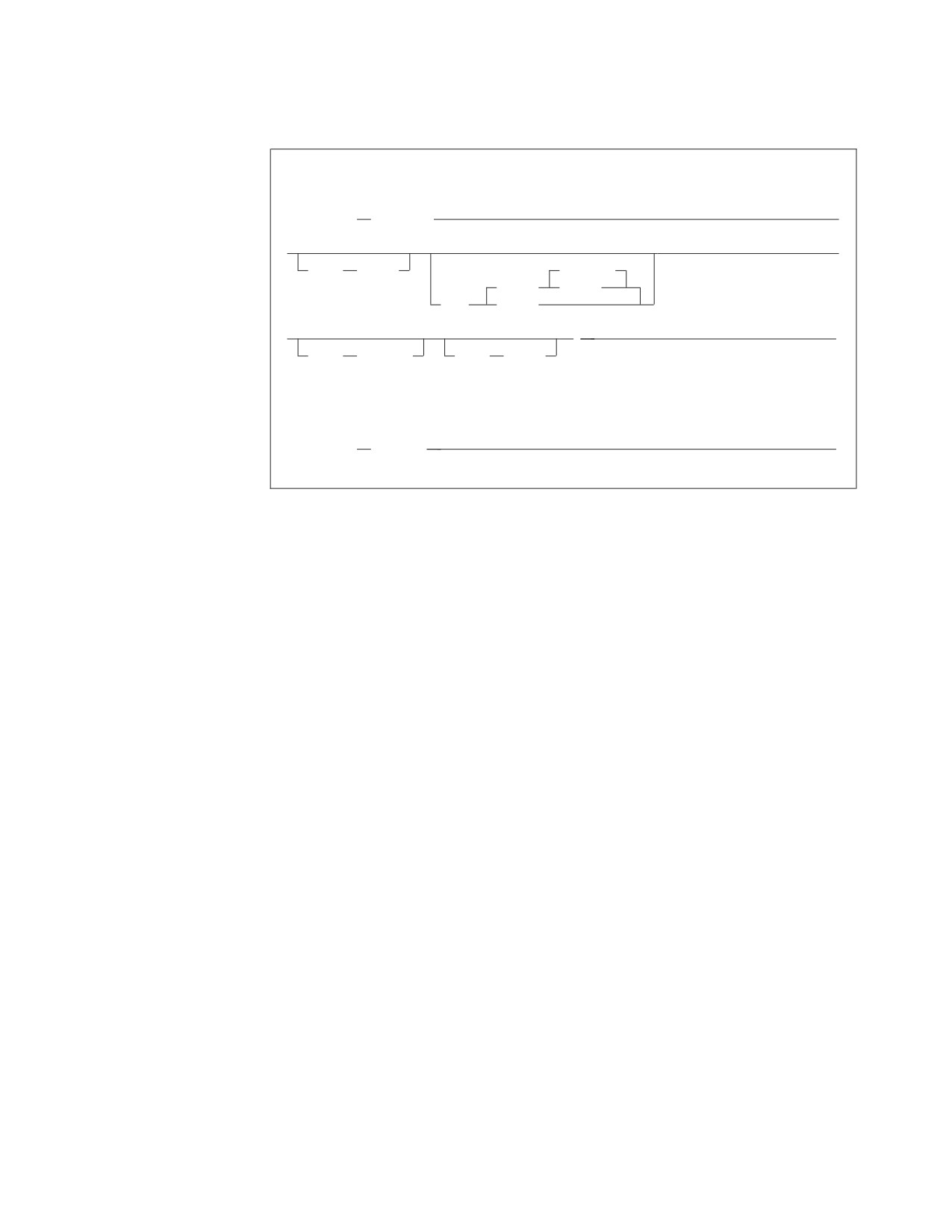
OUTFILE Subcommand
VSE Format:
►► OUTFILE
( ddname
►
►
►
BLKSZ
(size)
NOREWIND
(TAPE)
REWIND
PDEV
(DASD)
►
)
►◄
RECFM
(format)
RECSZ
(size)
VM Format:
►► OUTFILE
(ddname)
►◄
The OUTFILE subcommand identifies the sequential output file that contains the
data referenced by the preceding DATAUNLOAD commands and subcommands. It
tells the utility the file in which to put the data and to begin to unload the data.
The sequential output file can contain fixed, variable-length, or variable-length
spanned records. The records can be blocked or unblocked. If you want variable
length records to be generated, variable-length spanned records must be used if the
total length of the column values to be unloaded exceeds 32752 bytes.
A blank (hex 40) is placed in all positions (bytes) of the output data record before
the data record field values are inserted.
ddname
in DB2 Server for VM: this is the name of the sequential output file defined
with a CMS FILEDEF command. If you define DATAUNLOAD CMS output
files with variable-length spanned records (RECFM=VS or RECFM=VBS), you
must use file-mode number 4. DATAUNLOAD processing changes the record
format from VS or VBS to U. See Appendix B, “FILEDEF Command Syntax
and Notes,” on page 249 for more information about undefined (U) record
format usage. If a tape output file is used, performance can be improved by
using a large block size value (greater than 8244) on the FILEDEF.
The file characteristics specified in the FILEDEF command or the default
FILEDEF specifications are the source of the output record definition
information for the Database Services Utility. Output files with RECFM U, A,
or M are not supported.
Note: The RECFM, RECSZ and BLKSIZE information displayed in the message
ARI0868I depends on the CMS FILEDEF command specifications for the
DATAUNLOAD output file. If you define DATAUNLOAD output files
on CMS as VS or VBS, DATAUNLOAD processing changes the record
format to U and the RECFM, RECSZ and BLKSIZE information
displayed in message ARI0868I will reflect this change. However, the
CMS FILEDEF command that defines the DATALOAD input data file
must still specify RECFM=VBS or VS accordingly. Except for the
Chapter 8. Command Reference
177