DB2 Server for VSE. Operations Guide / Handbooks (2004-2007) - page 35
clarity, but this is not mandatory. Do not, however, use character positions 1
through 4 for output data if you have specified variable-length output records for
the output file. Record positions 1-4 are reserved for the record length control
field.
Figure 36 shows a DATAUNLOAD command sequence using DFI subcommands.
The EMPNO field is to occupy positions 1 through 6 in the output records. The
PROJNO field goes in positions 8 through 13. The EMPTIME field is to take
positions 15 through 21 as data type DECIMAL.
DATAUNLOAD
SELECT EMP_ACT.EMPNO,PROJNO,EMPTIME,JOB
FROM EMP_ACT,EMPLOYEE
WHERE EMP_ACT.EMPNO=EMPLOYEE.EMPNO
ORDER BY EMP_ACT.EMPNO;
EMPNO
1-6
PROJNO
8-13
EMPTIME
15-21
DECIMAL
OUTFILE(OUTPUT1)
Figure 36. DATAUNLOAD Command with DFI Subcommands
To unload data in user-specified output-file format, supply DFI subcommands. Use
the standard method for unloading data in “Unloading Data in System-Defined
Format” on page 63, but supply a DFI subcommand for each column that you
want to unload. To construct a DFI subcommand, use the following format:
column-reference startpos-endpos data-type set-null-clause
v column-reference is usually the name of the table column in the select-list
parameter, but it might be an integer. For more information, see “Data_Field_Id
Subcommand” on page 170.
v startpos-endpos gives the first and last positions of the named table-column data
in the output record. You can omit endpos if the output data is one character
long.
v data-type is the data format to be used in the data field of the output record. For
more information, refer to the sections starting on page 171 in Chapter 8,
“Command Reference,” on page 135.
v set-null-clause is a conditional expression that tells the Database Services Utility
to provide a particular flag, control character, or string in the output record if
the value of the output data is null. The set-null-clause also specifies the start and
end positions in the output record for the flag or string.
Unloading NULL Values
You can use the set-null-clause to instruct the utility to insert a particular value
whenever a null value occurs in a table that you are unloading. In the following
example, you instruct the Database Services Utility to write a question mark in
position 22 of the output record whenever a null field occurs in the table that is
being unloaded.
58
Database Services Utility
DATAUNLOAD
SELECT EMP_ACT.EMPNO,PROJNO,EMPTIME,JOB
FROM EMP_ACT,EMPLOYEE
WHERE EMP_ACT.EMPNO=EMPLOYEE.EMPNO
ORDER BY EMP_ACT.EMPNO;
EMPNO
1-6
PROJNO
8-13
EMPTIME
15-21
DECIMAL
IF NULL SET POS(22) = ’?’
OUTFILE(OUTPUT1)
Figure 37. Unloading NULL Values with DATAUNLOAD Command
As is shown in Figure 37 on page 59, if the value of an EMPTIME column is null,
the utility puts a ? value in output record position 22. For more information about
using the set-null-clause, see page 175 under “Data_Field_Id Subcommand” on
page 170 in Chapter 8, “Command Reference,” on page 135.
Periodic Reports during the Processing of Long Jobs
During DATAUNLOAD processing of a file containing more than 15,000 data
records, the message ARI8995I is written every 15,000 records to inform you
that the job is running normally and that n records have been unloaded. In a
VM system, these messages are written to your workstation, and in a VSE
system, they are written to the system operator’s console. If the number of
records being read from the database is less than 15,000, you do not receive
message ARI8995I.
As the DATAUNLOAD command is executed, the actual command sequence and
messages are written to the report or message file. Figure 38 on page 60 and
Figure 39 on page 60 show report results from running the DATAUNLOAD
command as shown in Figure 36 on page 58.
Chapter 3. Unloading Data with the Database Services Utility
59
1ARI0801I DBS Utility started: 10/05/89 14:54:41.
AUTOCOMMIT = OFF ERRORMODE = OFF
ISOLATION LEVEL = REPEATABLE READ
1ARI0803I ...Extended DBCS (DBCS=YES) processing now in effect.
0-------> DATAUNLOAD
-------> SELECT EMP_ACT.EMPNO,PROJNO,EMPTIME,JOB
-------> FROM EMP_ACT,EMPLOYEE
-------> WHERE EMP_ACT.EMPNO=EMPLOYEE.EMPNO
-------> ORDER BY EMP_ACT.EMPNO;
-------> EMPNO
1-6
-------> PROJNO
8-13
-------> EMPTIME
15-21
DECIMAL
IF NULL SET POS(22) = ’?’
-------> OUTFILE(OUTPUT1)
ARI0852I DATAUNLOAD processing started.
ARI0831I Column JOB data will not be unloaded.
ARI0868I DNAME=OUTPUT1 RECFM=F RECSZ=80 BLKSIZE=80
<— See Note
ARI0835I 74 record(s) written to the output data file.
ARI0855I DATAUNLOAD processing successful.
ARI0802I End of command file input.
ARI8997I ...Begin COMMIT processing.
ARI0811I ...COMMIT of any database changes successful.
ARI0809I ...No error(s) occurred during command processing.
ARI0808I DBS processing completed: 10/05/89 10:54:44.
Figure 38. Database Services Utility Report Output with User-Specified Data Fields
ARI0801I DBS Utility started: 10/05/89 14:54:41.
AUTOCOMMIT = OFF ERRORMODE = OFF
ISOLATION LEVEL = REPEATABLE READ
-------> CONNECT "SQLDBA " IDENTIFIED BY ********;
ARI8004I User SQLDBA connected to database SQLDBA.
ARI0500I SQL processing was successful.
ARI0505I SQLCODE = 0
SQLSTATE = 00000
ROWCOUNT = 0
------->
ARI8003I ...Extended DBCS (DBCS=YES) processing now in effect.
-------> DATAUNLOAD
-------> SELECT EMP_ACT.EMPNO,PROJNO,EMPTIME,JOB
-------> FROM EMP_ACT,EMPLOYEE
-------> WHERE EMP_ACT.EMPNO=EMPLOYEE.EMPNO
-------> ORDER BY EMP_ACT.EMPNO;
-------> EMPNO
1-6
-------> PROJNO
8-13
-------> EMPTIME
15-21
DECIMAL
IF NULL SET POS(22)
= ’?’
-------> OUTFILE(OUTPUT1)
ARI0831I Column JOB data will not be unloaded.
ARI0868I DNAME=OUTPUT1 RECFM=F RECSZ=80 BLKSIZE=80
ARI0835I 74 record(s) written to the output data file.
ARI0855I DATAUNLOAD processing successful.
ARI0802I End of command file input.
ARI8997I ...Begin COMMIT processing.
ARI0811I ...COMMIT of any database changes successful.
ARI0809I ...No error(s) occurred during command processing.
ARI0808I DBS processing completed: 10/05/89 14:54:44.
Figure 39. Database Services Utility Message File Output with User-Specified Data Fields
Note: The RECFM, RECSZ, and BLKSIZE information displayed in the message
ARI0868I depends on the CMS FILEDEF command specifications for the
output file OUTPUT1.
60
Database Services Utility

The Database Services Utility does not unload data for which no DFI subcommand
exists (unless all DFIs are omitted), but the report or message file does show you
the columns that are not unloaded.
The records in the output data file are formatted according to your specifications.
Table 2 shows the data field format resulting from the DATAUNLOAD command
specification shown in Figure 36 on page 58.
Table 2. Output Record Format That is User Determined
Data Value Source
(Column or
Record Position
Other)
Output Record Field Data Type
1-6
EMPNO
CHAR
7
(blank)
CHAR
8-13
PROJNO
CHAR
14
(blank)
CHAR
15-21
EMPTIME
DECIMAL
22
EMPTIME
CHAR
(null indicator)
Unloading a View
A view is a virtual table that is derived from one or more tables, from other views,
or from combinations of views and tables. When views are processed and
displayed or printed, they are indistinguishable from tables; they have rows and
columns and, like tables, views have no inherent order of rows.
You can use the DATAUNLOAD command to unload views as if they were tables.
Once unloaded, the output data of a view is the same as the data from a table.
To use the DATAUNLOAD command to unload a view, use the same procedure
that you use to unload a table, but specify a view name instead of a table name in
the SQL SELECT statement. You can select all the columns of the view (SELECT *),
or use the select-list parameter. If you use this parameter, specify the names of
view columns.
Suppose you create a view such as this:
CREATE VIEW TOSPIFFY (NUMBER,NAME,MANAGER)
AS SELECT DEPTNO,DEPTNAME,MGRNO
FROM DEPARTMENT
WHERE ADMRDEPT = ’A00’
To unload the view, construct a DATAUNLOAD command like this:
DATAUNLOAD
SELECT * FROM TOSPIFFY;
NUMBER
1-3
NAME
6-42
MANAGER
45-50 IF NULL SET POS (45-50) = ’
’
OUTFILE(SUBSPIF)
The DATAUNLOAD command uses the view column names, not the column
names of the founding table, and null entries in the MANAGER column are
represented by 6 blanks in the output data file.
Chapter 3. Unloading Data with the Database Services Utility
61
Using File Definitions with the DB2 Server for VM
DATAUNLOAD Command
The DATAUNLOAD command uses three files: the control file, the message file,
and the data output file. You must define all three files, either with the SQLDBSU
EXEC or a FILEDEF command. Figure 40 on page 62 shows the relationship of the
three files and the appropriate definition facility (FILEDEF or SQLDBSU) for each.
Message
Control File
DATAUNLOAD
File Output
Input (Use the
(Use the SQLDBSU
SQLDBSU EXEC)
Processing
EXEC)
Data File Output
(Use a CMS
FILEDEF Command)
Figure 40. DATAUNLOAD Files
For more information on FILEDEF parameters and options, see Appendix B,
“FILEDEF Command Syntax and Notes,” on page 249.
FILEDEFs Supporting DATAUNLOAD Command Processing
In the FILEDEF command defining the Database Services Utility DATAUNLOAD
command output data file, all record format (RECFM) values are supported except
for undefined (U) or carriage controls (A or M). If you define CMS output files
with variable-length spanned records (RECFM=VS or VBS), you must use the
file-mode number 4. In this case, DATAUNLOAD processing changes the record
format to U. See Appendix B, “FILEDEF Command Syntax and Notes,” on page
249 for more information about undefined (U) record format usage.
Note: If the message ARI0868I, generated using DATAUNLOAD command
processing, identified RECFM=U for an output file defined with
RECFM=VBS or VS, the CMS FILEDEF command that defines the
DATALOAD input data files must still specify RECFM=VBS or VS
accordingly. CMS FILEDEF command information for DATALOAD
command processing must be identical to the information in the FILEDEF
command that was used when DATAUNLOAD command processing
created the file.
A sample CMS FILEDEF command defining a CMS file for DATAUNLOAD
command processing is:
FILEDEF DBSFILE DISK DBSFILE DATA A (RECFM FB LRECL 800 BLOCK 1600
where DBSFILE is the ddname used in the DATAUNLOAD command, and it refers
to the output file DBSFILE DATA A.
If you want to print some of the data in a table, use the FILEDEF statement to
specify the printer as the output device:
FILEDEF PRINTOUT PRINTER
62
Database Services Utility
where PRINTOUT is the ddname that you use in the DATAUNLOAD command.
UNLOAD Procedures
This section describes the UNLOAD commands provided by the Database Services
Utility.
Unloading Data in System-Defined Format
Database Services Utility UNLOAD TABLE and UNLOAD DBSPACE processing
allows you to unload tables and views to a sequential file. You can later use this
file as input to Database Services Utility RELOAD TABLE and RELOAD DBSPACE
processing (described in Chapter 4, “Reloading Data with the Database Services
Utility,” on page 71). With the UNLOAD commands, you cannot unload data in a
user-defined format.
Note: You cannot use the UNLOAD DBSPACE and UNLOAD TABLE commands
if you are using DRDA flow.
The following is a brief description of the two UNLOAD commands:
v UNLOAD DBSPACE unloads all tables in a particular dbspace to an output file.
v UNLOAD TABLE is more specific than UNLOAD DBSPACE; it unloads a
specific table into an output file.
Unloading a Dbspace or Table That You Do Not Own
To unload dbspaces and tables that you do not own, concatenate the owner’s
user ID to the dbspace name (for example, SMITH.PERSONNEL). You must
have the SELECT privilege on all tables in the dbspace you want to unload.
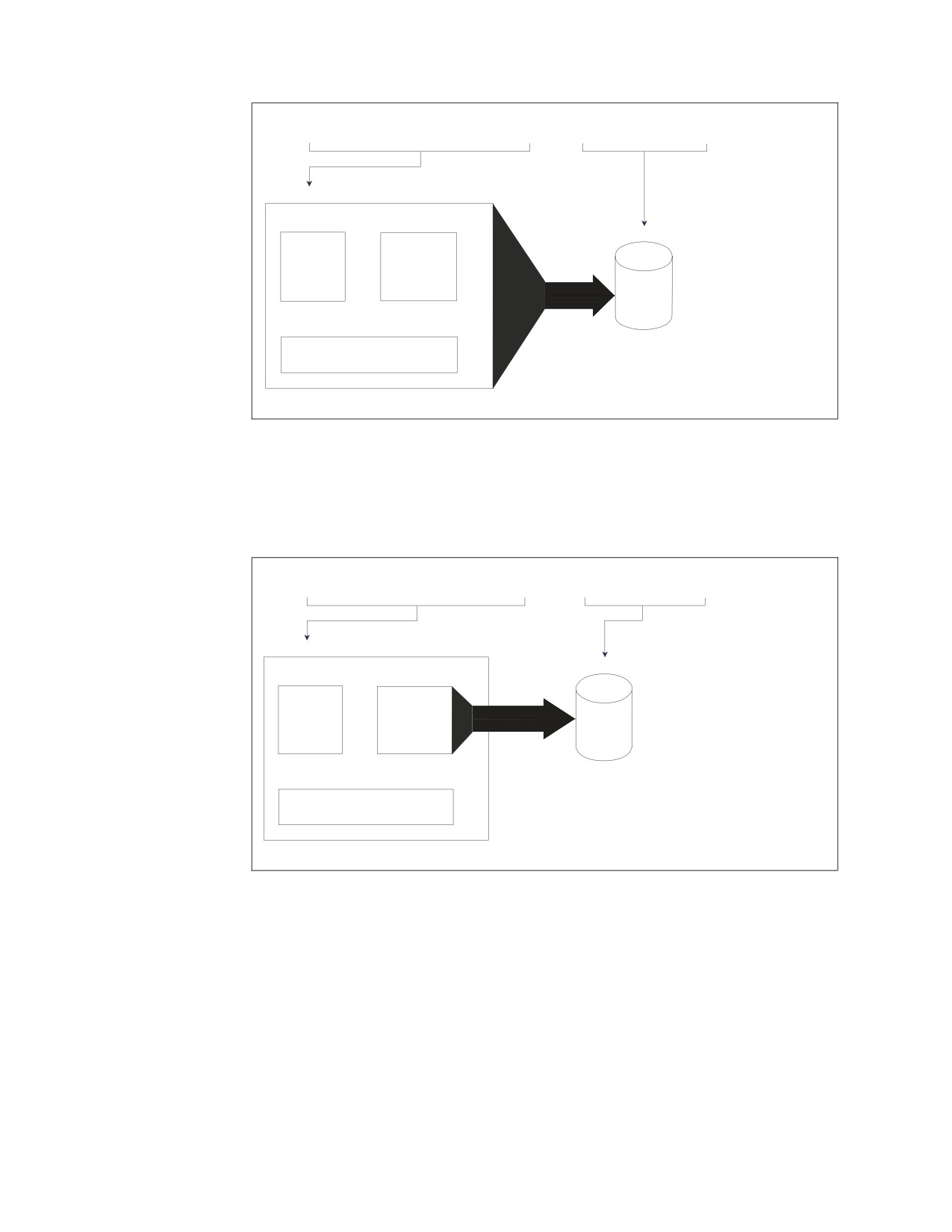
Figure 41 on page 64 shows how the parts of an UNLOAD DBSPACE command
relate to the dbspace and output file. In the figure, the command:
UNLOAD DBSPACE (SMITH.PERSONNEL) OUTFILE (SAVE)
unloads the dbspace called SMITH.PERSONNEL to the file SAVE.
Chapter 3. Unloading Data with the Database Services Utility
63
UNLOAD DBSPACE
(SMITH.PERSONNEL)
OUTFILE (SAVE)
SMITH.PERSONNEL
EMPLOYEE
DEPARTMENT
SAVE
PROJECT
(DBSPACE)
Figure 41. Diagram of the UNLOAD DBSPACE Command
The format of the UNLOAD TABLE command is the same as UNLOAD DBSPACE,
but instead of a dbspace, specify a table name. In Figure 42, the UNLOAD TABLE
command unloads a single table called SMITH.DEPARTMENT to the output file
SAVE.
UNLOAD TABLE
(SMITH.DEPARTMENT)
OUTFILE (SAVE)
SMITH.PERSONNEL
SAVE
EMPLOYEE
DEPARTMENT
PROJECT
(DBSPACE)
Figure 42. Diagram of the UNLOAD TABLE Command
The Database Services Utility UNLOAD processing writes all rows from a table or
all rows from all tables in a dbspace as individual records to the sequential output
file. Before producing these records, the utility writes records that contain
information supporting the RELOAD function. The Database Services Utility
RELOAD processing with the NEW parameter uses this information for creating
the table(s).
64
Database Services Utility
Attention:
In RELOAD processing with the parameter NEW, the Database Services Utility
must create the table. The table is not created if the CREATE TABLE statement
used by the Database Services Utility is greater than 8192 bytes. If the statement is
greater than 8192 bytes, you can use the RELOAD command only with the PURGE
parameter and only if the table already exists.
The CREATE TABLE statement used by the Database Services Utility will be longer
than the statement that you initially issue if:
v You do not specify the column clauses in the column definition of the table.
v You use the ALTER TABLE statement to add columns to the table.
UNLOAD Processing Uses Indexes
The Database Services Utility unloads table data in the sequence identified by
the first index created for the table. This first index is also known as the
clustering index. The CLUSTER column of the SYSINDEXES catalog table
indicates the index for a given table that is the first, or clustering, index. (The
CLUSTER column contains an F or W value. See DB2 Server for VSE & VM
Database Administration for more information on SYSINDEX and clustering
indexes.) The data is ordered by the clustering index before it is selected for
unloading.
If a table has no indexes, the data is not put in order before it is unloaded;
table rows are unloaded in a system-determined order.
The UNLOAD command does not unload any indexes, primary or foreign keys, or
constraint definitions. Additionally, a package (preprocessed program) that depends
on the unique constraint indexes is invalidated when unique constraints are
dropped. All packages dependent on the table are invalidated when a unique
constraint is added to the table because they might have UPDATE statements that
cause multiple-row updates. Packages are also invalidated when unique constraints
are activated or deactivated. When using the Database Services Utility RELOAD
command with PURGE OPTION, however, you should ACTIVATE the unique
constraints (in the ALTER TABLE statement) rather than re-create them because it
is more efficient.
Furthermore, the Database Services Utility is sensitive to the tagging of character
and graphic data (single byte, double byte, and mixed), which identify the format
of the data, such as US or Kanji. The tags are maintained when you use the
UNLOAD and RELOAD commands.
Attention:
Operate under isolation level repeatable read (the default Database Services Utility
processing mode) when you use the UNLOAD command to ensure a consistent
state of the database during backup or migration.
Chapter 3. Unloading Data with the Database Services Utility
65
Using the UNLOAD DBSPACE Command
The command statements UNLOAD DBSPACE and UNLOAD TABLE are much
simpler than the DATAUNLOAD statement because the UNLOAD commands do
not specify the output fields. The lack of specifications leads to very long output
records.
Such long output records make it difficult to locate specific data or to edit the
output file. The UNLOAD commands are designed to provide output files for
backup or subsequent reloading at remote sites (or locally, for purposes of
reorganizing DB2 Server for VSE & VM data structures). Consequently, unloaded
data should be used only for reloading purposes. The following UNLOAD
DBSPACE command unloads all tables in a dbspace named PERSONNEL. The
tables are placed in an output file called SAVE:
UNLOAD DBSPACE (PERSONNEL) OUTFILE (SAVE)
The syntax is simple, requiring only:
v The command name
v The name of the dbspace to be unloaded
v The name of the output file. (In VM this is specified in the FILEDEF command.)
To unload an entire dbspace for backup or subsequent reloading, follow the
procedure in “Unloading Data in System-Defined Format” on page 52, but use the
UNLOAD DBSPACE command instead of the DATAUNLOAD command. The
UNLOAD DBSPACE command uses the following structure:
UNLOAD DBSPACE (dbspace-name)
where dbspace-name is the name of the dbspace.
Using the UNLOAD TABLE Command
You can use UNLOAD TABLE to specify the table you want to unload. UNLOAD
DBSPACE unloads all the tables in a dbspace.
For example, if you make regular backups of the inventory table of a small
company, you unload the table frequently. The table is in a dbspace with other
tables that you do not need to backup as often. Use the UNLOAD TABLE
command to backup only the inventory table. If your system fails, you can reload
the table by using the RELOAD TABLE command, which is discussed in the next
chapter.
The syntax of the UNLOAD TABLE command is similar to that of the UNLOAD
DBSPACE command, requiring only:
v The command name
v The name of the table to be unloaded
v The name of the output file. (Specified in the FILEDEF command in VM.)
To unload a table for backup or subsequent reloading, use the same procedure
given in “Unloading Data in System-Defined Format” on page 52, but use the
UNLOAD TABLE command instead of the DATAUNLOAD command. The
UNLOAD TABLE command has the following structure:
UNLOAD TABLE (table-name)
where table-name is the name of the table.
66
Database Services Utility
Unloading Views
You can unload a view (virtual table) with UNLOAD TABLE processing. The
Database Services Utility processes views in the same manner as a table
without indexes.
In DB2 Server for VSE
Each file of a multiple-file tape volume must be identified with the correct file
name and file sequence number of the TLBL statement for each tape file. Tape
rewind processing is controlled by the VSE job control statements.
In DB2 Server for VM
If you want to do a simple Database Services Utility command, such as unload one
table to a DASD file, and you are not going to repeat this command regularly, use
the utility interactively to avoid creating a control file and specifying a message
file.
If you have to execute several UNLOAD TABLE commands or use the same
command again, use message and control files. For example, to unload the
organization tables that are in the same dbspace as personnel tables, you need
several UNLOAD TABLE commands to specify each organization table. To unload
project activity tables for managers who have different dbspaces, you again need
several UNLOAD TABLE commands. Putting the Database Services Utility
commands in a control file enables you to use the commands again. Also, if any
command fails, you can refer to the message file repeatedly to deal with each error
message and correct the mistake in the control file without retyping all of the
UNLOAD commands.
Using File Definitions with the DB2 Server for VM UNLOAD
DBSPACE and UNLOAD TABLE Commands
The UNLOAD DBSPACE and UNLOAD TABLE commands use at least three files:
the control file, the message file, and one or more data output files.
Multiple Output-File Possibilities
You can have more than one UNLOAD TABLE or UNLOAD DBSPACE
command within a single invocation of the utility; each command must
unload data to a separate file, or the data is lost.
You can unload data to a multiple-volume tape file. You can also unload data
to multiple files on a single tape volume in one execution of the Database
Services Utility. Each UNLOAD operation must unload to a separate file. The
Database Services Utility does not rewind the tape when each file is opened
for output.
Figure 43 on page 68 shows the relationship between the UNLOAD files and the
appropriate definition facility (FILEDEF or SQLDBSU) for each.
Chapter 3. Unloading Data with the Database Services Utility
67

Message
Control File
UNLOAD
File Output
Input (Use the
(Use the SQLDBSU
SQLDBSU EXEC)
Processing
EXEC)
Data File Output
(Use a CMS
FILEDEF Command)
Figure 43. UNLOAD Files
Each file of a multiple-file tape volume must be identified with the correct ddname
and label specification in the CMS FILEDEF command issued for it. Tape rewind
processing is controlled by FILEDEF command specifications and performed by
CMS OS/QSAM.
Specify VBS Record Format in the UNLOAD FILEDEFs
Always specify a record format (RECFM) of VBS for UNLOAD processing.
UNLOAD processing changes the record format to U if the system required
logical record length is greater than the specified block size (BLOCK) value
minus 4. Otherwise, UNLOAD processing changes the record format to VB.
See Appendix B, “FILEDEF Command Syntax and Notes,” on page 249 for
more information about undefined (U) record format usage.
A block size (BLOCK) greater than 8 244 is recommended for tape output files
created by UNLOAD processing.
An example of a FILEDEF statement defining a tape output file is:
FILEDEF SAVE2 TAP1 (RECFM VBS BLOCK 8244
where SAVE2 is the ddname that you used in the UNLOAD command.
FILEDEFs Supporting UNLOAD Command Processing
The FILEDEF command defining the UNLOAD output data file can identify a
CMS file with 4 appended to the file mode letter (for example, A4) or a sequential
tape file supported by CMS OS/OSAM. Always specify a record format of VBS or
a block size value (or both) in the FILEDEF command defining the data file.
UNLOAD processing changes the record format to U if the system-required logical
record length is greater than the specified block size (BLOCK) value minus 4.
Otherwise, UNLOAD processing changes the record format to VB. See Appendix B,
“FILEDEF Command Syntax and Notes,” on page 249 for more information about
undefined (U) record format usage.
Note: The message ARI0868I identifies the file characteristics used in the Database
Services Utility’s processing. If message ARI0868I, generated during
UNLOAD command processing, identified RECFM=U or VB for the
UNLOAD output file, the CMS FILEDEF command that defines the
68
Database Services Utility
RELOAD input data file must still specify RECFM=VBS. CMS FILEDEF
command information for RELOAD command processing must be identical
to the information in the FILEDEF command used when UNLOAD
command processing created the file. If message ARI0868I indicates
RECFM=U for a tape output file, you can obtain significant performance
improvements by increasing the block size value specified in the FILEDEF
command that defines the ddname.
An example of a FILEDEF command defining a CMS file for UNLOAD processing
is:
FILEDEF DBSFILE DISK DBSFILE DATA A4 (RECFM VBS BLOCK 2048
where DBSFILE is the ddname used in your UNLOAD command, and DBSFILE
refers to the output file DBSFILE DATA A4.
For more information on FILEDEF parameters and options, see Appendix B,
“FILEDEF Command Syntax and Notes,” on page 249.
Release Coexistence Considerations for DB2 Server for VM
Changes were required in Version 7 Release 1 to handle file I/O correctly when
using CMS 15 and later. These changes affect the format of data that is unloaded
and reloaded by the UNLOAD and RELOAD commands of the DBS Utility. If you
use the DBS Utility’s UNLOAD and RELOAD commands with databases at
different release levels, you must ensure that the code changes have been applied
at all release levels. For releases prior to Version 7 Release 1, you must apply the
following APARs:
Release
APAR
3.5
PQ28584
5.1
PQ28583
6.1
PQ27957
Chapter 3. Unloading Data with the Database Services Utility
69
70
Database Services Utility
Chapter 4. Reloading Data with the Database Services Utility
The Database Services Utility RELOAD commands work in conjunction with the
UNLOAD commands. You can reload a dbspace or a table, and you can reload the
data into tables that already exist or create new tables as you reload. This chapter
explains how to use RELOAD DBSPACE and RELOAD TABLE and describes the
table information that is preserved after the data is reloaded.
Refer to the appropriate sections of the earlier chapters for details about invoking
the Database Services Utility and defining files.
RELOAD Procedures
Reloading Data in System-Defined Format
The RELOAD commands, like their UNLOAD counterparts, do not support
user-defined data formats. System-defined format is the only option. You must use
the OUTFILE output of the UNLOAD DBSPACE or UNLOAD TABLE commands
as input to the RELOAD DBSPACE and RELOAD TABLE commands.
Note: For a VM application requestor, the RELOAD DBSPACE and RELOAD
TABLE commands can only be used if a DB2 Server for VM application
server is used and the protocol is either SQLDS or AUTO. For a VSE
application requestor, the RELOAD DBSPACE and RELOAD TABLE
commands can only be used if a DB2 Server is running on the same VSE
system as the Database Services Utility or if the DB2 Server for VM is on
VM and is accessed through Guest Sharing.
Assuming that you have output from UNLOAD processing, and you want to use it
as input to a DB2 Server for VSE & VM database, you must now decide whether
to use the RELOAD DBSPACE or the RELOAD TABLE command.
Note: Use the UNLOAD command, not the DATAUNLOAD command. The unit
of output of the DATAUNLOAD command is the table row whereas the
UNLOAD commands have the table as their unit of output.
RELOAD DBSPACE is usually associated with UNLOAD DBSPACE, and RELOAD
TABLE is associated with UNLOAD TABLE. In practice, this is the most frequent
pairing, but all four commands use identical data formatting. Sometimes changing
the object when you go from UNLOAD to RELOAD is appropriate. Briefly, the
objects that each command manipulates are:
v UNLOAD DBSPACE unloads an entire dbspace.
v UNLOAD TABLE unloads just one table.
v RELOAD DBSPACE reloads an entire dbspace.
v RELOAD TABLE reloads just one table.
You might want to use RELOAD DBSPACE with UNLOAD TABLE if you unload a
single table and want to reload it into a dbspace. If you do not want to specify
where the table goes in the dbspace, the RELOAD DBSPACE command achieves
the same result as the RELOAD TABLE command. RELOAD DBSPACE is even
more convenient because it has fewer parameters to specify.
71
You might want to use RELOAD TABLE with UNLOAD DBSPACE if you unload
an entire dbspace and want to reload just one of its tables into another dbspace.
Using the RELOAD DBSPACE command reloads the entire UNLOAD output file,
not just the desired table.
Processing Multiple Tables or Multiple Files
The Database Services Utility’s RELOAD processing does not support the
concurrent loading of multiple tables. Sequential loading, however, is
supported, as long as the tables are in the same file.
During one invocation of the Database Services Utility, you can reload data
from a multiple-volume tape file or from a multiple-file tape volume.
In DB2 Server for VSE, to reload data from a multiple-file tape volume, you
must specify the correct file name and file sequence number on the TLBL
statement for each tape file. Because the Database Services Utility rewinds the
tape when each file is opened for input, this information is necessary to locate
the correct file on the tape.
RELOAD DBSPACE processing loads tables serially in the order that they appear
in the input file. Use the RELOAD DBSPACE command to supply four pieces of
information to the Database Services Utility:
v The name of the command
v The identity of the dbspace to be loaded
v The replacement method (NEW or PURGE) to use
v The identity of the data input file.
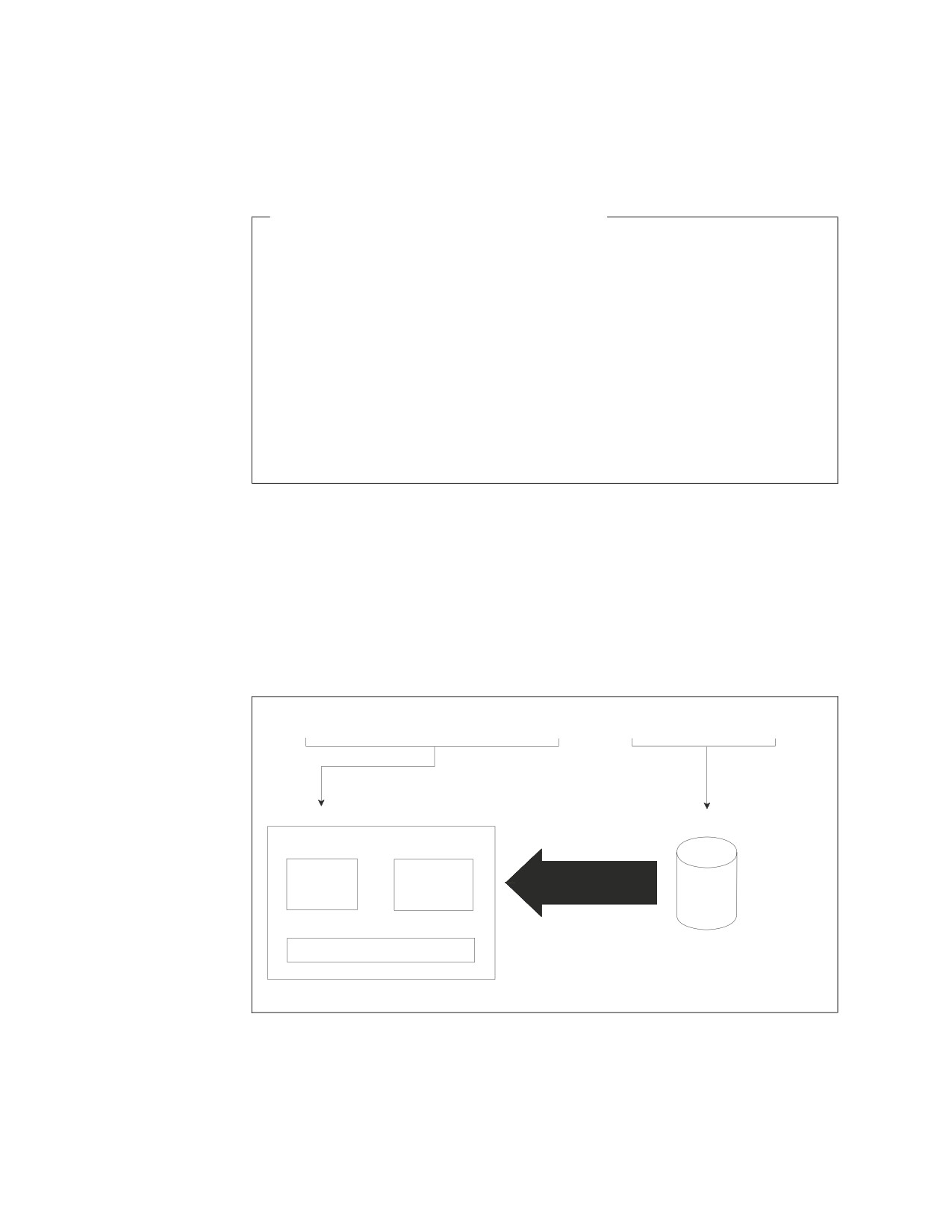
Figure 44 shows the command flow.
RELOAD DBSPACE
(RESOURCES)
NEW INFILE (HISTORY)
RESOURCES
HISTORY
EMPLOYEE
ACTIVITY
EMP_ACT
(DBSPACE)
Figure 44. Diagram of the RELOAD DBSPACE Command
This figure shows a RELOAD DBSPACE operation on the RESOURCES dbspace,
and the creation of new tables from the input file called HISTORY.
The RELOAD TABLE command is more precise than the RELOAD DBSPACE
command. RELOAD TABLE specifies that you want to reload only one table no
72
Database Services Utility
matter how many exist in the input file. In the RELOAD TABLE command, you
give the following five pieces of information to the Database Services Utility:
v The name of the command
v The identity of the target table to be loaded
v The replacement method (NEW or PURGE) to use
- If NEW, the identity of the dbspace in which the table is to be created.
v Optionally, the identity of the source table being loaded
v The identity of the data input file.
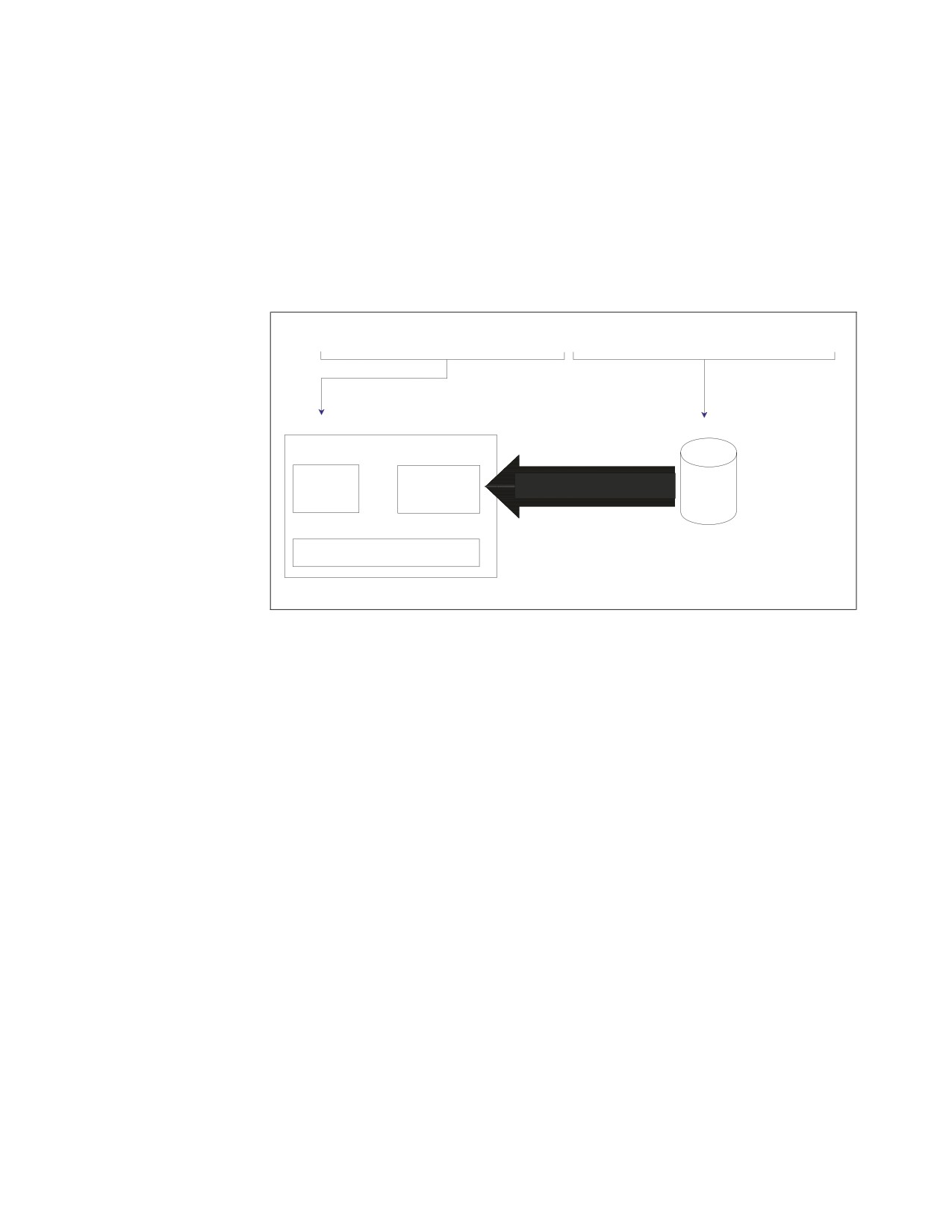
Figure 45 shows the command flow.
RELOAD TABLE
(SMITH.DEPARTMENT)
PURGE INTABLE (DEPARTMENT) INFILE (SAVE)
SMITH.PERSONNEL
SAVE
EMPLOYEE
DEPARTMENT
PROJECT
(DBSPACE)
Figure 45. Diagram of the RELOAD TABLE Command
This figure shows a RELOAD TABLE operation on Smith’s DEPARTMENT table,
which must be purged first. The SAVE file is used as input.
If the UPDATE STATISTICS setting is ON, the RELOAD command automatically
causes table statistics to be generated while the data is being reloaded.
Chapter 4. Reloading Data with the Database Services Utility
73
Indexing Notes
With the PURGE Parameter:
When a table is purged, the default clustering rules are used because all
indexes for the purged table are dropped.
With the NEW Parameter:
When a new table is created, the column definitions are identical to the
definitions of the table contained in the input file, except the keys and unique
constraints are not reproduced. The new table also does not have any indexes
defined for it. You must construct them yourself by issuing subsequent SQL
CREATE INDEX statements.
Using the NEW Parameter with Field Procedures:
When a new table is created, the field procedures are not reproduced. Thus,
using the reload ’NEW’ parameter is not recommended for tables with field
procedures. To reload tables with field procedures, use the ’PURGE’
parameter.
When reloading a dbspace or a table, you must either create new tables for the
RELOAD input or purge old tables before reloading them. A particular table in the
input file replaces the like-named table in the target dbspace if the PURGE
parameter is specified, but it remains unloaded if the NEW parameter is in effect.
Similarly, under the NEW option, a particular table in the input file remains
unloaded when a like-named table with that name exists in any dbspace of the
entire database; if no table with that name exists, however, the Database Services
Utility creates a table into which the given input is loaded.
Referential Integrity and the RELOAD Commands
Referential integrity might affect the RELOAD commands. Specifically, if you
create an unloaded file when there is no primary key, and there is a primary
key on the target table at the time of RELOAD PURGE, the primary key
becomes active after the RELOAD PURGE operation. If you do not want the
primary key active, you must drop the primary key manually by using the
ALTER TABLE statement.
If the table being reloaded has an active primary key, the Database Services Utility
records this fact and issues an ALTER TABLE table-name DEACTIVATE PRIMARY
KEY command. The Database Services Utility also saves the active foreign key
names, unique constraints, and their owner’s name, before issuing an ALTER
TABLE table-name DEACTIVATE FOREIGN KEY or DEACTIVATE UNIQUE KEY
command. After the data has been loaded, the Database Services Utility reactivates
the keys.
For more information about referential integrity, see the DB2 Server for VSE & VM
Database Administration manual.
74
Database Services Utility
The Database Services Utility also preserves the tags for character and graphic data
(single byte, double byte, and mixed) that identify the data format, such as US or
Kanji. The tags are reloaded with the data when you use the RELOAD command.
A user is allowed to use a DBSU module from one release to connect to a database
server containing a DBSU package at a different release. Specifically, in an
UNLOAD TABLE/DBSPACE and RELOAD TABLE/DBSPACE scenario, there are 4
objects being used that may all be at different releases. For Data Capture, it is only
necessary to consider whether the R750 release of the object is being used or a
pre-R510 release is being used. In the chart below, ″Unload Module″ refers to the
release of the DBSU module which the user is accessing when performing the
unload operation. This may not be the same as the release of the database server
which the user is connecting to. Similarly, ″Reload Module″ refers to the release of
the DBSU module which the user is accessing when performing the reload
operation. This may not be the same as the release of the database server which
the user is connecting to. ″Unload P/S″ refers to the release of the database server
and the release of the DBSU package contained in the database server in which the
table is being unloaded. Similarly, ″Reload P/S″ refers to the release of the
database server and the release of the DBSU package contained in the database
server in which the table is being reloaded. The release of the DBSU package must
be equal to the release of the database server where it is contained. Mixed releases
are not supported.
In the most general case, a user can use a DBSU module at release A to unload a
table from a database server which is at release B. Then, the user can use a DBSU
module at release C to reload the table to another database server at release D. The
chart below can be used to determine whether the DATA CAPTURE setting for the
table will be restored.
Table 3. DATA CAPTURE settings and DBSU RELOAD and UNLOAD
Unload
Reload
Unload P/S
Module
Reload P/S
Module
Comments
pre-R510
n/a
n/a
n/a
Tables in a pre-R510 server do not
contain a Data Capture setting.
R730
pre-R510
n/a
n/a
The pre-R510 unload module
does not save the Data Capture
setting so the setting will not be
restored on the reload.
R730
R730
pre-R510
n/a
Data Capture setting will be
saved in the unload file but
pre-R510 servers do not allow a
Data Capture setting for tables so
the setting will not be restored on
the reload.
R730
R730
R730
pre-R510
Data Capture setting will be
saved in the unload file but the
pre-R510 reload module does not
restore the Data Capture setting
so the setting will not be restored
on the reload.
R730
R730
R730
R730
Data Capture setting will be
saved in the unload file and will
be restored by the reload module.
Chapter 4. Reloading Data with the Database Services Utility
75
Using the PURGE Parameter
The PURGE keyword tells the Database Services Utility that the target table exists,
and that all rows must be deleted from it before RELOAD TABLE processing
begins. (If the target table does not exist, you receive an error message.) Of course,
the column definitions of the target table must be identical to those of the source
table.
The Database Services Utility, as part of PURGE processing, drops the clustering
index, deactivates any active primary keys, active foreign keys, and active unique
keys, and deletes all indexes on the target table before deleting and reloading the
data. Therefore, you must have DBA authority to do a RELOAD with the PURGE
option if the target table or any of its indexes are not yours. After all tables have
been reloaded, the Database Services Utility reactivates the clustering index,
primary key and unique keys, and re-creates the remaining indexes. It ensures that
the first index that was created for the table (as recorded at PURGE time) is also
the first index re-created. After all the tables are processed, the Database Services
Utility reactivates all the foreign keys that it deactivated. DB2 Server for VSE &
VM packages are invalidated because of table index deletions, but are
automatically preprocessed the next time someone attempts to execute the package.
The following example illustrates the PURGE parameter:
RELOAD DBSPACE (RESOURCES) PURGE INFILE(HISTORY)
PURGE tells the Database Services Utility to delete all the rows of the table before
loading the data. The table must, however, exist in the specified dbspace. Note also
that fully qualified table names are always used internally for RELOAD DBSPACE.
That is, if you unload JONES.EMP_ACT and use RELOAD DBSPACE with a
PURGE option, JONES.EMP_ACT is the only table affected by the reload.
Using the NEW Parameter
The specified dbspace must already exist before you can reload tables into it. The
NEW parameter causes the utility to create tables, not dbspaces. If you are using
UNLOAD and RELOAD processing to duplicate an existing dbspace (as for testing
application programs), first acquire an appropriate dbspace. The SQL ACQUIRE
DBSPACE statement is described in the DB2 Server for VSE & VM SQL Reference. If
the table you are reloading does not replace a table already in the dbspace, the
Database Services Utility can create the target table for you. In the following
example, the source table EMPTABLE is not in the target dbspace:
RELOAD TABLE(EMPTABLE) NEW(PRODUCTION)
INTABLE(EMPLOYEE)
INFILE(SAVE)
The NEW parameter in the above command tells the Database Services Utility that
the table (EMPTABLE) to be loaded does not exist and must be created. It also
identifies the dbspace (PRODUCTION) where you want the table created. The
Database Services Utility creates the EMPTABLE, finds the EMPLOYEE table on
the input file (SAVE), and loads the data. The new table is created in a private
dbspace, PRODUCTION, that the current user owns. If the current user does not
own a private dbspace with the specified name, the table is created in a public
dbspace with this name. If you want to have the new table created in a particular
dbspace, specify:
NEW (dbspace-name)
where dbspace-name is the name of the dbspace.
76
Database Services Utility
In another example, suppose that user ID BOB is the current Database Services
Utility user. BOB issues this command:
RELOAD DBSPACE (RESOURCES) NEW INFILE(HISTORY)
Suppose, also, that one of the tables in the HISTORY file is called
BOB.EMPLOYEE. If BOB already owns a table called BOB.EMPLOYEE in any
other dbspace, the table cannot be created and loaded in the RESOURCES dbspace.
The user ID concatenated to the table name uniquely identifies a table within the
database. Thus, if BOB.EMPLOYEE already exists, it is impossible for the utility to
create another BOB.EMPLOYEE anywhere else in the database.
Using the RELOAD DBSPACE Command
Percent Free Space
During RELOAD processing, the current percent free value for the dbspace being
loaded, or for the dbspace where the table being loaded resides, can be critical.
Before RELOAD processing begins, increase the percent free space value to reserve
free space for additional rows inserted after the RELOAD process is completed.
Immediately after RELOAD processing is completed, reduce the percent free value
to allow the reserved free space to be used for the new rows. Refer to the DB2
Server for VSE & VM Database Administration for more information on the dbspace
percent free specification.
Reloading Several Tables into a Dbspace Where They Are
Already Defined
To reload multiple tables into a dbspace where they already exist, proceed as
follows:
In VSE
1.
Provide the following Database Services Utility command:
RELOAD DBSPACE (dbspace-name)
where dbspace-name is the name of the dbspace.
2.
On the same record as the RELOAD DBSPACE command, leave one space and
put the replacement method for existing tables:
PURGE
3.
Also on the same record, leave one space and put:
INFILE(ddname)
where ddname identifies the input file. Use the same ddname in a TLBL or DLBL
statement, depending on whether the data is stored on tape or in a DASD file.
4.
Submit the job to run.
In VM
1.
Issue the SQLINIT command to initialize the user machine. If you have already
done this, proceed to Step 2.
2.
Create a control file to contain the command you construct in the following
steps. See “Working with a Control File in DB2 Server for VM” on page 13 for
detailed information on creating a control file.
3.
Enter the command and dbspace name. Type:
RELOAD DBSPACE (dbspace-name)
where dbspace-name is the name of the dbspace.
Chapter 4. Reloading Data with the Database Services Utility
77
4. On the same line as the RELOAD DBSPACE command, enter the replacement
method for existing tables. Leave one space; then type:
PURGE
5. On the same line, leave one space; then type:
INFILE(ddname)
where ddname identifies the input data file. You need to use the same ddname
when you specify the FILEDEF statement for the input file.
6. Store the control file.
7. In CMS, specify the necessary FILEDEF statements. For general information
about FILEDEF statements, see “Using File Definitions” on page 14. For
command specific information, see “Using File Definitions with DB2 Server for
VM RELOAD DBSPACE and RELOAD TABLE Commands” on page 81.
8. Specify an SQLDBSU EXEC statement; if you did not specify FILEDEFs for the
control and message files, use the default values in the SQLDBSU EXEC. For
more information on the SQLDBSU EXEC, see “Using the SQLDBSU EXEC” on
page 15.
Reloading Several Tables into a Dbspace Where They Do Not
Exist
To reload multiple tables into a database where they do not exist, follow the
procedure given in “Reloading Several Tables into a Dbspace Where They Are
Already Defined” on page 77, but substitute NEW for PURGE. NEW indicates the
replacement method for new tables.
Loading a Single Table with the RELOAD DBSPACE Command
If you have just one table to load into a dbspace (that was unloaded with an
UNLOAD TABLE command), use the RELOAD DBSPACE command. Follow the
procedure in “Reloading Several Tables into a Dbspace Where They Are Already
Defined” on page 77, and use the appropriate replacement method (PURGE or
NEW) for the table to be loaded.
Note: If your input file contains multiple tables but you do not want to reload all
of them, use the RELOAD TABLE command.
Using the RELOAD TABLE Command
The reason for using the RELOAD TABLE command rather than the RELOAD
DBSPACE command is to reload one particular table into a dbspace. The RELOAD
DBSPACE command loads an entire input file of table data into a dbspace (subject
to the constraints imposed by the NEW or PURGE parameters). Although
RELOAD processing follows the input order of the data, UNLOAD output is
unpredictable: you have no way of knowing the sequence of tables in the
UNLOAD DBSPACE output file. In general, if you use output from an UNLOAD
DBSPACE as input to RELOAD TABLE processing (meaning that you want to
reload a specific table), use the INTABLE parameter with the RELOAD TABLE
command.
Reloading a Single Table into a Dbspace Where It Is Already
Defined
To reload a single table into a dbspace where it already exists, proceed as follows:
In VSE
1. Provide the following Database Services Utility command:
RELOAD TABLE (table-name)
78
Database Services Utility
where table-name is the name of the table.
2.
On the same record as the RELOAD TABLE command, leave one space and
put:
PURGE
3.
Also on the same record, leave one space and put:
INFILE (ddname)
where ddname identifies the input file. Use the same ddname in a TLBL or DLBL
statement, depending on whether the data is stored on tape or in a DASD file.
4.
Submit the job to run.
In VM
1.
Issue the SQLINIT command to initialize the user machine to the application
server where the data is to be reloaded. If you have already done this, proceed
to Step 2.
2.
Create a control file to contain the command you construct in the following
steps. See “Working with a Control File in DB2 Server for VM” on page 13 for
detailed information on creating a control file.
3.
Enter the command and table name. Type:
RELOAD TABLE (table-name)
where table-name is the name of the table.
4.
On the same line as the RELOAD TABLE command, enter the replacement
method for existing tables. Leave one space; then type:
PURGE
5.
On the same line, leave one space; then type:
INFILE(ddname)
where ddname identifies the input data file. You need to use the same ddname
when you specify the FILEDEF statement for the input file.
6.
Store the control file.
7.
In CMS, specify the necessary FILEDEF statements. When you specify the
FILEDEF statement for the input data file, use the same ddname you assigned to
the INFILE in this procedure. For general information about FILEDEF
statements, see “Using File Definitions” on page 14. For command specific
information, see “Using File Definitions with DB2 Server for VM RELOAD
DBSPACE and RELOAD TABLE Commands” on page 81.
8.
Specify an SQLDBSU EXEC statement; if you did not specify FILEDEFs for the
control and message files, use the default values in the SQLDBSU EXEC. For
more information on the SQLDBSU EXEC, see “Using the SQLDBSU EXEC” on
page 15.
Nonrecoverable Storage Pools
Before RELOAD PURGE table insert processing begins, the message:
ARI8990I The table table-name is in a
nonrecoverable storage pool.
is written if one of the tables you are reloading is found in a nonrecoverable
storage pool. This message indicates that changes made to this table by the
RELOAD command are not deleted by a ROLLBACK statement if an error
occurs.
Chapter 4. Reloading Data with the Database Services Utility
79
Reloading Views
You can also reload views if the view meets the restrictions defined under the
RELOAD TABLE command description (see “RELOAD TABLE” on page 196). Use
the PURGE parameter to reload a view that was previously unloaded. Using
PURGE makes use of an existing view definition and does not violate the rule that
a view is a virtual table. The only difference between reloading a table and
reloading a view is that statistics are not collected for a view.
Reloading a Single Table into a Dbspace Where It Does Not Exist
To reload a single table into a dbspace where it is not defined, follow the
procedure in “Reloading a Single Table into a Dbspace Where It Is Already
Defined” on page 78, but use the following replacement method instead of
PURGE:
NEW (dbspace)
where dbspace is the name of the dbspace where you want to create a new table.
Reloading a Specific Table from a Multitable Input Source
The multitable input source referred to in this section is the output file from an
UNLOAD DBSPACE command. If you do regular backups of a dbspace, and the
data in one table is lost or modified incorrectly, reload the one table with the
RELOAD TABLE command. Use the procedure in “Reloading a Single Table into a
Dbspace Where It Is Already Defined” on page 78, but with the following
differences:
v Use the appropriate replacement method, NEW or PURGE.
v After providing the replacement method, leave one space, and then put:
INTABLE(table)
where table is the name of the source table.
v Leave one space and put:
INFILE (ddname)
where ddname identifies the input data file.
If you are reloading DB2 Server for VSE data from magnetic tape, identify each file
of a multiple-file tape volume with the correct file name and file sequence number
on the TLBL statement for each tape file. Because the Database Services Utility
rewinds the tape when each file is opened for input, this information is necessary
to locate the correct file on the tape.
Notification of Records Reloaded
If you are reloading more than 15,000 data records, messages (ARI8995I) are
written to your terminal after every 15,000 records to inform you that a
multiple of 15,000 records has been loaded.
Suppose that a dbspace was unloaded and the dbspace contained two tables
named EMPLOYEE. One of these EMPLOYEE tables was originally created by
SCOTT, the other by MIKE. If you want to reload the EMPLOYEE table that was
created by SCOTT, you should identify the table by prefixing the table name
EMPLOYEE with the owner SCOTT in the INTABLE parameter:
80
Database Services Utility

RELOAD TABLE(EMPTABLE) NEW(PRODUCTION)
INTABLE(SCOTT.EMPLOYEE)
INFILE(SAVE)
If you do not, the Database Services Utility reloads the data of the first table it
finds in the input file that has the same name. If you omit the INTABLE parameter
completely, the utility uses the data of the first table it finds in the input file,
regardless of the table name and owner.
Using File Definitions with DB2 Server for VM RELOAD
DBSPACE and RELOAD TABLE Commands
RELOAD processing requires a control file and a data file for input, and a message
file for output.
Use the Same File Definition for RELOAD As for UNLOAD
CMS FILEDEF command information for RELOAD command processing
should be identical to the information in the FILEDEF command you used
when UNLOAD command processing created the file.
Figure 46 shows the relationship of the RELOAD files and the appropriate
definition facility (FILEDEF or SQLDBSU) for each.
Control File
Output
Input
Message File
(Use the SQLDBSU
(Use the SQLDBSU
EXEC)
EXEC)
RELOAD
Processing
Input
Data File
(Use a FILEDEF
Command)
Figure 46. RELOAD DBSPACE and RELOAD TABLE Files
The default record format for RELOAD processing is variable-length blocked
spanned (VBS). If you specify a RECFM value other than VBS or a LRECL value
with the CMS FILEDEF command, it is ignored and overridden. RELOAD
processing changes the record format from VBS to VB. The message ARI0868I
identifies the file characteristics used by Database Services Utility processing.
Isolation Level for RELOAD Operations
Set the isolation level to repeatable read when you reload data to ensure a
consistent state of the database during backup or migration.
Chapter 4. Reloading Data with the Database Services Utility
81

Identify each file of a multiple-file tape volume with the ddname and label
specifications in the CMS FILEDEF command that you issue for each tape file. The
Database Services Utility does not perform any tape rewind processing. Tape
rewind processing is controlled by FILEDEF command specifications and
performed by CMS OS/QSAM.
Use the UNLOAD and RELOAD commands (RELOAD with the PURGE option) to
reorder the data records to match the indexes. Use the FILEDEF to specify a DISK
file for quick and easy unloading and reloading. This reordering improves the
efficiency of queries performed on your tables.
FILEDEFs Supporting RELOAD Command Processing
The FILEDEF command defining the Database Services Utility RELOAD output
data file identifies a CMS file with 4 appended to the file mode letter (for example,
A4) or a sequential tape file supported by CMS OS/QSAM. Always specify a
record format of VBS or a block size value (or both) in the FILEDEF command
defining the data file. RELOAD processing changes the record format from VBS to
VB.
A sample of a FILEDEF command defining a CMS file for RELOAD processing is:
FILEDEF DBSFILE DISK DBSFILE DATA A4 (RECFM VBS BLOCK 2048
where DBSFILE is the ddname used in your RELOAD command and DBSFILE
DATA A4 is the name of the input file.
For more information on FILEDEF parameters and options, see Appendix B,
“FILEDEF Command Syntax and Notes,” on page 249.
Release Coexistence Considerations for DB2 Server for VM
Changes were required in Version 7 Release 1 to handle file I/O correctly when
using CMS 15 and later. These changes affect the format of data that is unloaded
and reloaded by the UNLOAD and RELOAD commands of the DBS Utility. If you
use the DBS Utility’s UNLOAD and RELOAD commands with databases at
different release levels, you must ensure that the code changes have been applied
at all release levels. For releases prior to Version 7 Release 1, you must apply the
following APARs:
Release
APAR
3.5
PQ28584
5.1
PQ28583
6.1
PQ27957
Statistics Collection
If SET UPDATE STATISTICS is on, table statistics are automatically generated
while the data is reloading. This method of creating statistics avoids a dbspace
scan and a separate scan of the index pages, which occurs when an UPDATE
STATISTICS statement is issued. If SET UPDATE STATISTICS is off, the statistics
are not updated.
Note: Consider using SET UPDATE STATISTICS ON for all RELOAD processing
to update the table statistics while the data is reloading.
82
Database Services Utility
Chapter 5. Unloading and Reloading Packages with the
Database Services Utility
This chapter explains how to use the UNLOAD and RELOAD PACKAGE
commands to distribute packages to connected application servers that use the
Database Services Utility. The two commands work together to transport a package
from one application server to another. When the package is reloaded, you have a
choice of purging the old package or creating a new one in the database. Finally,
the owner of the package has to authorize the people who will use the package.
Refer to the appropriate sections of the earlier chapters for details about invoking
the Database Services Utility and defining files.
Package Procedures
This section describes SQL preprocessing the PACKAGE commands.
Preprocessing
SQL statements in an application program are preprocessed (that is, analyzed and
converted) by the system before the program is compiled (or assembled).
DB2 Server for VSE & VM preprocessors do the following:
v Generate a modified version of the source code
v Convert SQL statements into a package and save the package in the application
server
v Verify that the current user has authority to access the data and, if so, grant the
user the privilege to use the package generated
v Update the database catalogs.
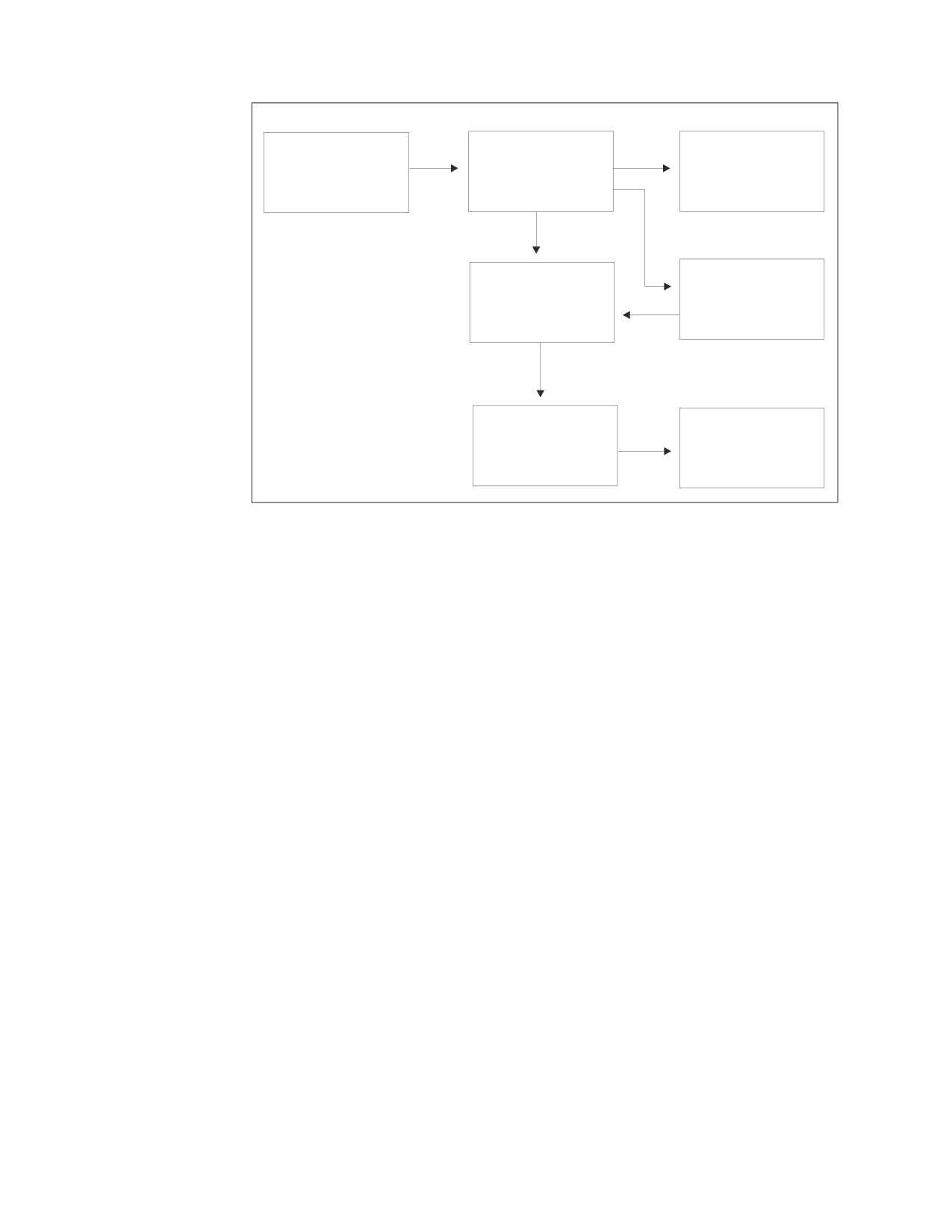
The preprocessor action is shown graphically below.
83
Host language
Preprocessor
Updates to the
source code
routine for the host
catalog in the SQL
with embedded
language
application server
SQL statements
Host language
Package in the
source code
database manager
with package calls
application server
(in place of the
embedded SQL)
Normal compilation
Executable code
(or assembly) for the
of the application
host language
Figure 47. Preprocessing
A package contains code for the SQL statements used in the program. The access
path is based on available data statistics and applicable table indexes.
A package is available when its program needs it; moreover, because it is stored in
a database, a package is monitored by database manager security mechanisms and
change-management facilities.
You must preprocess an application program that switches between application
servers on every application server that it accesses. To avoid distributing the
program source code and preprocessing it on multiple systems, distribute packages
to the connected (local or remote) application servers using the Database Services
Utility.
To prevent you from unintentionally running an updated program against an old
package, when you preprocess the package, a consistency token is generated and
stored in both the program and the package. If the SQL request is to succeed when
you run the program, the consistency token, which is based on a timestamp, must
match the one in the package.
Each time that you preprocess a program, a consistency token is generated. You
can choose to generate a blank consistency token. If you are running the program
against multiple application servers, the package for that program, which is stored
in all the application servers, must have the same consistency token as the
program. If the consistency tokens do not match, the program cannot be run on the
application server, or an error may occur. To ensure that the consistency tokens
match, preprocess the program once in a DB2 Server for VSE & VM environment
and distribute the package to other application servers using the UNLOAD
PACKAGE command and the RELOAD PACKAGE command.
The PROGRAM command is a synonym for PACKAGE. The RELOAD or
UNLOAD PROGRAM, and RELOAD or UNLOAD PACKAGE are therefore
equivalent commands.
84
Database Services Utility
The UNLOAD PACKAGE and RELOAD PACKAGE commands are
complementary: UNLOAD PACKAGE copies a package to a sequential file and
RELOAD PACKAGE reads the package back into an application server.
To ensure that only authorized users manipulate packages in the database, only
owners of programs and database administrators are entitled to unload or reload
packages.
Keep Interconnected Databases at the Same Level
If you move a package between application servers at different release levels,
and a facility of the database manager used by the reloaded package is not
available on the new application server, an error occurs. The error occurs
when the unloaded package is dynamically preprocessed again during the
RELOAD.
When RELOAD processing is completed, the system updates the TIMESTAMP
column of the SYSACCESS catalog table to the date and time of the RELOAD.
Using the UNLOAD PACKAGE Command
The UNLOAD PACKAGE command generates output records that contain:
v Preprocessing information
v Each SQL statement used in the associated program
v Information about its corresponding host variables.
In using the UNLOAD PACKAGE command, you must be either the owner of the
program whose package you are unloading or a database administrator. Supply the
following information to the Database Services Utility:
v Name of the command
v Identity of the package to be unloaded
v Optionally, the name of the application server containing the package
v Identity of the output file.
Note: The UNLOAD PACKAGE command is not supported if you are using
DRDA flow.
Unloading a Package
Your system must have database switching capability to access other application
servers.
To unload a package for backup or to transfer to another application server,
proceed as follows:
In VSE
1. Provide the following Database Services Utility command:
UNLOAD PACKAGE (owner.package-name)
where owner is the name of the owner of the associated package, and
package-name is the name of the package. If you omit owner, the database
manager uses your user ID but still checks to ensure that you have the RUN
privilege for the named package.
2. If the package resides in an application server other than the one you are
accessing, leave one space and type:
FROM (server-name)
Chapter 5. Unloading and Reloading Packages with the Database Services Utility
85
where server-name is the name of the other application server.
3. On the same record, leave one space and type:
OUTFILE (ddname)
where ddname identifies the sequential output file on tape. Use the same ddname
in a TLBL statement. If the output file is on DASD, specify PDEV(DASD) after
the ddname and use the same ddname in a DLBL statement. Do not use SYSPCH
as the ddname, because the output file content may be invalid and may cause
the RELOAD PACKAGE command to fail.
4. Submit the job for processing.
An example of the UNLOAD PACKAGE command is:
UNLOAD PACKAGE(MARCY.PROG3) OUTFILE(PROGOUT3) FROM(server-name)
where PROG3 is the name of the package, MARCY is the owner, PROGOUT3 is
the output data file, and server-name is the name of the other application server.
In VM
1.
Issue the SQLINIT command to initialize the user machine to the application
server where the package to be unloaded resides. If you have already done this,
proceed to Step 2.
2.
Create a control file to contain the command you construct in the following
steps. See “Working with a Control File in DB2 Server for VM” on page 13 for
detailed information on creating a control file.
3.
Enter the command and the package name. Type:
UNLOAD PACKAGE (owner.package-name)
where owner is the name of the owner of the associated package, and
package-name is the name of the package. If you omit owner, the system uses
your user ID but still checks to ensure that you have the RUN privilege for the
named package.
4.
If the package resides in an application server other than the one you are
logged on to, leave one space and type:
FROM(server-name)
where server-name is the name of the other application server.
Note: The use of FROM always ignores any preceding CONNECT operations
and uses the VM user ID as a default. In some situations, the user ID
received at the target application server is different from your VM user
ID. For example, an entry in the COMDIR might change the user ID, or
the target system might change it. If you find this procedure
unacceptable, issue the explicit CONNECTs as required, and use the
UNLOAD command without the FROM parameter.
5.
On the same line, leave one space and type:
OUTFILE(ddname)
where ddname identifies the output data file.
6.
Store the control file.
7.
In CMS, specify the necessary FILEDEF statements. When you specify the
FILEDEF statement for the output data file, use the same ddname you assigned
to the OUTFILE in this procedure. For general information about FILEDEF
statements, see “Using File Definitions” on page 14. For command specific
information, see “Using File Definitions with DB2 Server for VM UNLOAD and
RELOAD PACKAGE Commands” on page 92.
86
Database Services Utility

8. Specify an SQLDBSU EXEC statement; if you did not specify FILEDEFs for the
control and message files, use the default values in the SQLDBSU EXEC. For
more information on the SQLDBSU EXEC, see “Using the SQLDBSU EXEC” on
page 15.
An example of the UNLOAD PACKAGE command is:
UNLOAD PACKAGE(MARCY.PROG3) FROM(PAYROLL) OUTFILE(PROGOUT3)
where PROG3 is the name of the package, MARCY is the owner, the package is in
the PAYROLL database, and the output data file is PROGOUT3.
Using the RELOAD PACKAGE Command
For a VM application requestor, the RELOAD PACKAGE can be used against a
DB2 Server for VM application server or any non-DB2 Server for VM application
server that uses DRDA flow. For a VSE application requestor, the RELOAD
PACKAGE can be used against a DB2 Server for VSE running on the same VSE
system as the Database Services Utility, a VM Database via Guest Sharing, or any
non-DB2 Server for VSE application server that uses DRDA flow.
The following tables show the different package migration scenarios:
Table 4. Different Reload Package Scenarios in DB2 Server for VM
Reloading To
Unloaded From
Application
Unloaded Using
Reloading Using
Application
Server Release
DBSU Release
DBSU Release
Server Release
Using Protocol
Result
2.2
2.2, 3.1 or later
2.2, 3.1 or later
2.2, 3.1 or later
SQLDS
No Error
3.1 or later
2.2, 3.1 or later
2.2, 3.1 or later
2.2
SQLDS
Error
3.1 or later
2.2
2.2
3.1 or later
SQLDS
No Error
3.1 or later
2.2
3.1 or later
3.1 or later
SQLDS
Error
3.1 or later
3.1 or later
2.2,3.1 or later
3.1 or later
SQLDS
No Error
3.1 or later
3.1 or later
3.1 or later
3.1 or later
SQLDS
No Error
2.2
2.2,3.1 or later
3.3 or later
3.3 or later
DRDA
Error
2.2
2.2,3.1 or later
3.3 or later
Non DB2 for VM
DRDA
Error
3.1 or later
2.2
3.3 or later
3.3 or later
DRDA
Error
3.1 or later
2.2
3.3 or later
Non DB2 for VM
DRDA
Error
3.1 or later
3.1 or later
3.3 or later
3.3 or later
DRDA
No Error
3.1 or later
3.1 or later
3.3 or later
Non DB2 for VM
DRDA
No Error
2.2, 3.1 or later
2.2, 3.1 or later
3.3 or later
2.2, 3.1 or 3.2
DRDA
Error
Table 5. Different Reload Package Scenarios in DB2 Server for VSE
Reloading To
Unloaded From
Application
Unloaded Using
Reloading Using
Application
Server Release
DBSU Release
DBSU Release
Server Release
Using Protocol
Result
2.2
2.2, 3.1 or later
2.2, 3.1 or later
2.2, 3.1 or later
SQLDS
No Error
3.1 or later
2.2, 3.1 or later
2.2, 3.1 or later
2.2
SQLDS
Error
3.1 or later
2.2
2.2
3.1 or later
SQLDS
No Error
3.1 or later
2.2
3.1 or later
3.1 or later
SQLDS
Error
3.1 or later
3.1 or later
2.2,3.1 or later
3.1 or later
SQLDS
No Error
Chapter 5. Unloading and Reloading Packages with the Database Services Utility
87

Table 5. Different Reload Package Scenarios in DB2 Server for VSE (continued)
Reloading To
Unloaded From
Application
Unloaded Using
Reloading Using
Application
Server Release
DBSU Release
DBSU Release
Server Release
Using Protocol
Result
3.1 or later
3.1 or later
3.1 or later
3.1 or later
SQLDS
No Error
2.2
2.2,3.1 or later
7.1
7.1
DRDA
Error
2.2
2.2,3.1 or later
7.1
Non DB2 for VSE
DRDA
Error
3.1 or later
2.2
7.1
7.1
DRDA
Error
3.1 or later
2.2
7.1
Non DB2 for VSE
DRDA
Error
3.1 or later
3.1 or later
7.1
7.1
DRDA
No Error
3.1 or later
3.1 or later
7.1
Non DB2 for VSE
DRDA
No Error
2.2,
3.1
or later
2.2, 3.1 or later
7.1
7.1
DRDA
Error
Notes:
1. You cannot reload a portable package created under SQL/DS Version 2 Release
2 using the DRDA flow because it does not have the necessary information
required for RELOAD PACKAGE command processing using DRDA flow.
2. Backward migration is also not possible; that is, you cannot reload DB2 Server
for VSE & VM Version 7 Release 5 or later portable package with SQL/DS
Version 2 Release 2.
3. Modifiable packages created using Extended dynamic statements cannot be
reloaded using DRDA flow.
4. Fortran, and any other packages created using Extended dynamic statements
that were originally preprocessed using SQLDS protocol, cannot be reloaded
using DRDA flow.
5. Fortran, and any other packages created using Extended dynamic statements
that were originally preprocessed using DRDA flow, cannot be reloaded using
SQLDS protocol.
In using the RELOAD PACKAGE command, you must be either the owner of the
program whose package you are trying to reload or a database administrator. DB2
Server for VSE & VM authorization checking grants the owner the RUN privilege
after the following information is supplied to the Database Services Utility:
v The name of the command
v The identity of the package to be reloaded
v The replacement method (NEW or REPLACE) to use
- If REPLACE, the disposition of previous package user privileges (KEEP or
REVOKE)
v Optionally, in VSE only, the identity of additional application servers where the
package is to be reloaded
v The identity of the input file.
Reloading a Package into an Application Server in Which Its
Application Does Not Exist
To reload a package ported from another application server or from backup,
proceed as follows:
In VSE
1. Provide the following Database Services Utility command:
88
Database Services Utility
RELOAD PACKAGE (ownerpackage-name)
where owner is the name of the owner of the associated package, and
package-name is the name of the package. If you omit owner, the database
manager uses your user ID but still checks to ensure that you have the RUN
privilege for the named package.
2. Specify the replacement method. Because the application associated with the
package to be loaded does not exist for the application server (or application
servers) being loaded, leave one space, and type:
NEW
3. On the same record, enter the names of any additional application servers onto
which the package is to be reloaded. Leave one space and put:
TO (server-name)
where server-name is the name of the other application server. If the package is
to be reloaded onto several application servers, leave one space, then type:
TO (application server1,application server2,application server3...)
4. On the same record, identify the input file. Leave one space, and type:
INFILE (ddname)
where ddname identifies the sequential input file on tape. Use the same ddname
in a TLBL statement. If the input file is on DASD, specify PDEV(DASD) after
the ddname and use the same ddname in a DLBL statement.
5. Submit the job to run.
An example of the RELOAD PACKAGE command is:
RELOAD PACKAGE(MARCY.PROG3) NEW INFILE(PROGOUT3) TO(server-name)
where PROG3 is the name of the package, MARCY is the owner, and server-name
is the name of the other application server. The input data file PROGOUT3 is on
tape.
In VM
1. Issue the SQLINIT command to initialize the user machine to the application
server where the package is to be reloaded. If you have already done this,
proceed to Step 2.
2. Create a control file to contain the command you construct in the following
steps. See “Working with a Control File in DB2 Server for VM” on page 13 for
detailed information on creating a control file.
3. Enter the command and package name. Type:
RELOAD PACKAGE (owner.package-name)
where owner is the name of the owner of the associated package, and
package-name is the name of the package. If you omit owner, the database
manager uses your user ID as the owner.
4. Indicate that you are loading a new package since the application associated
with the package does not exist on the application server (or application
servers) being loaded, by leaving one space and typing:
NEW
5. On the same line, enter the names of any additional application servers to be
reloaded. Leave one space; then type:
TO(server-name)
where server-name is the name of the other application server. If several
application servers are to be reloaded, leave one space; then type:
TO(application server1,application server2,application server3...)
Chapter 5. Unloading and Reloading Packages with the Database Services Utility
89
Notes:
a. Your system must have database switching capability to access other
application servers.
b. The use of TO means that any preceding CONNECT operations are not
used, and TO uses the VM user ID as a default. In some situations, the user
ID received at the target database is different from your VM user ID. For
example, an entry in the COMDIR may change the user ID, or the target
system may change it. If you do not want to use the TO clause procedure,
issue the explicit CONNECT command as required, and use the RELOAD
command without a TO clause. If the TO clause is not specified, the
package is reloaded onto the currently connected application server only.
6.
On the same line, enter the identity of the input file. Leave one space; then
type:
INFILE(ddname)
where ddname identifies the input data file.
7.
Store the control file.
8.
In CMS, specify the necessary FILEDEF statements. When you specify the
FILEDEF statement for the input data file, use the same ddname you assigned to
the INFILE in this procedure. For general information about FILEDEF
statements, see “Using File Definitions” on page 14. For command specific
information, see “Using File Definitions with DB2 Server for VM UNLOAD and
RELOAD PACKAGE Commands” on page 92.
9.
Specify an SQLDBSU EXEC statement; if you did not specify FILEDEFs for the
control and message files, use the default values in the SQLDBSU EXEC. For
more information on the SQLDBSU EXEC, see “Using the SQLDBSU EXEC” on
page 15.
An example of the RELOAD PACKAGE command is:
RELOAD PACKAGE(MARCY.PROG3) NEW TO(HOLIDAY) INFILE(PROGOUT3)
where PROG3 is the name of the package, and MARCY is the owner. The package
is created in the HOLIDAY database and the input data file is PROGOUT3.
Reloading a Package into an Application Server to Update an Existing
Application: Your system must have the capability to switch to other application
servers.
To reload a package into an application server where a package with the same
name already exists, proceed as in “Reloading a Package into an Application
Server in Which Its Application Does Not Exist” on page 88, but type:
REPLACE
or
REPLACE REVOKE
where REPLACE indicates that the existing package is to be replaced by the input
package with previous user privileges intact, and REPLACE REVOKE indicates
that the existing package is to be replaced by the input package with previous user
privileges revoked. An example of the RELOAD PACKAGE command is:
RELOAD PACKAGE(MARCY.PROG3) REPLACE REVOKE TO(PAYROLL) INFILE(PROGOUT3)
90
Database Services Utility
where PROG3 is the name of the package, and MARCY is the owner. The package
exists in the PAYROLL database; therefore, you use REPLACE to replace it and
REVOKE to revoke user privileges on the package. The input data file is
PROGOUT3.
Authorizing the Use of Packages
When a package is reloaded, the owner of the package is assigned the appropriate
run privilege. If NEW or REPLACE REVOKE is one of the RELOAD parameters,
the only privilege for the package is the owner’s run privilege. The user ID for the
owner of the reloaded package must exist so that the necessary privileges can be
granted. A user with DBA authority can reload a package without being the owner
and can grant the RUN privileges to other users. For more information on package
privileges, see the DB2 Server for VSE & VM Application Programming manual.
Errors with RELOAD
The Database Services Utility SET ERRORMODE CONTINUE command can
be used with the RELOAD PACKAGE command. If an error occurs during
reloading of the package on an application server, RELOAD processing ends
on that application server. RELOAD processing then continues on subsequent
application servers listed in the TO clause if ERRORMODE CONTINUE
processing is in effect and the error is not severe.
Example of Authorizing the Use of Packages
Gene writes an application program GENE.TTIME to display each employee’s
working hours to date. The table containing this information is
HOURS.TOTAL. This program is to be distributed to all the offices and
installed by a user with DBA authority at each site.
When the DBA reloads this new package, only the owner (GENE) possesses
the RUN privilege. This privilege is granted during the RELOAD. The user
ID GENE must exist for the DBA to be able to grant the RUN privilege for
the package GENE.TTIME. GENE must also have the necessary table
privileges to run the package successfully.
Preprocessing and Distributing an Application
To preprocess and distribute the SQL application created by Gene in the above
example, the company proceeds as follows:
1. The person with the user ID HOURS grants the SELECT privilege on
HOURS.TOTAL to user ID GENE.
2. Gene creates the application program TTIME.
3. Gene unloads the package TTIME.
Setting Up to Run an Application
To set up and run the application described in “Preprocessing and Distributing an
Application,” the company proceeds as follows:
1. Tom, a DBA, grants the CONNECT privilege to user ID GENE.
2. Tom connects as HOURS.
Chapter 5. Unloading and Reloading Packages with the Database Services Utility
91
3. Tom (connected as HOURS) grants the SELECT privilege on HOURS.TOTAL to
user ID GENE.
4. Tom connects as GENE.
5. Tom (connected as GENE) reloads the package GENE.TTIME.
6. Tom (connected as GENE) grants the RUN privilege on GENE.TTIME to
USERA, USERB, and USERC.
7. USERA, USERB, and USERC can now run the package GENE.TTIME to display
each employee’s total working hours to date.
Using File Definitions with DB2 Server for VM UNLOAD and RELOAD
PACKAGE Commands
Use the Same File Definition for RELOAD as for UNLOAD
CMS FILEDEF command information for package RELOAD processing
should be identical to the information in the FILEDEF command used when
the file was created by the package’s UNLOAD command processing.
Figure 48 shows the relationship of the load-program files and the appropriate
definition facility (FILEDEF or SQLDBSU) for each.
Control File Input
UNLOAD
Output “Data” File
(Use the SQLDBSU
Processing
(Use a FILEDEF
EXEC)
Command)
Message File Output
(Use the SQLDBSU
EXEC)
Control File Inout
RELOAD
Message File Output
(Use the SQLDBSU
Processing
(Use the SQLDBSU
EXEC)
EXEC)
Input “Data” File
(Use a FILEDEF
Command)
Figure 48. File Definition Diagram—UNLOAD PACKAGE and RELOAD PACKAGE
92
Database Services Utility
FILEDEFs Supporting UNLOAD and RELOAD PACKAGE
CMS FILEDEF commands must be used to define the input or output data files
processed by these commands.
Except for the ddname, CMS FILEDEF command information for RELOAD
command processing should be identical to the information in the FILEDEF
command used when the file was created by the UNLOAD command processing.
If either a RECFM value other than FB or an LRECL value is specified by the CMS
FILEDEF command, the value is ignored and overridden.
A sample CMS FILEDEF command defining a CMS file for UNLOAD or RELOAD
command processing is:
FILEDEF DBSFILE DISK DBSFILE DATA A
For more information on FILEDEF parameters and options, see Appendix B,
“FILEDEF Command Syntax and Notes,” on page 249.
Chapter 5. Unloading and Reloading Packages with the Database Services Utility
93
94
Database Services Utility
Chapter 6. Interpreting the Output of the Database Services
Utility
You can encounter two types of Database Services Utility output: the information
that the Database Services Utility feeds back to the report or message file, and the
data and control information that you unload for backup or eventual reloading.
Most often, you must understand the report output because it shows you what
happened during the Database Services Utility processing. This chapter describes
report and message file output.
This chapter builds on material presented in the foregoing chapters. Refer to the
appropriate sections of the earlier chapters for basic concepts and procedures.
Understanding the Report and Message File Output
The report is a log of Database Services Utility processing activity on DB2 Server
for VSE. You can use JCL to assign the output to a variety of output devices:
printer, tape, or disk.
The message file is a log of Database Services Utility processing activity on DB2
Server for VM. The SQLDBSU EXEC or the CMS FILEDEF command can direct the
message file to a variety of output devices; you can display or print its contents in
three distinct forms.
Everything in a report or message file belongs in one of three categories:
v Command input
v System output
v Data.
Command Input (DB2 Server for VSE & VM)
All parts of a set of commands, SQL or Database Services Utility, are considered
command input. Even the data embedded in a DATALOAD TABLE statement is
command input. Record for record or line for line, this type of output matches the
format of the (input) control file. A command-input record in the report starts with
an arrow (------>).
System Output (DB2 Server for VSE & VM)
Except when suppressed by a Database Services Utility control parameter in a
calling application program, all system messages, SQL and Database Services
Utility, are sent to either the report or message file. A system-output record or line
starts with a message identifier beginning with ARI.
Inclusion of Data in a Report (DB2 Server for VSE)
To include data in a report, use the LIST (YES) parameter in DATALOAD’s INFILE
subcommand. You can identify data in the report by the absence of arrows
(------>) or message identifiers (ARI...). Figure 49 on page 96 shows a simulated
report printout.
95
Inclusion of Data in a Message File (DB2 Server for VM)
To include data in a message file, use the LIST (YES) parameter in DATALOAD’s
INFILE subcommand. Through the SELECT statement, the Database Services
Utility allows a limited amount of system-user interaction. Do not use the utility as
an alternative to ISQL, but if you are in a Database Services Utility session, you
can enter SQL commands to query the database from your workstation (assigned
as control file) without leaving the utility. You can identify data in the message file
by the absence of arrows (------>) or message identifiers (ARI...). Figure 49
shows
a simulated message-file printout.
ARI0801I DBS Utility started: 07/24/89 17:38:53.
AUTOCOMMIT = OFF ERRORMODE = OFF
ISOLATION LEVEL = REPEATABLE READ
------> CONNECT "TARA
" IDENTIFIED BY ********;
ARI8004I User TARA connected to database SQLDBA.
ARI0500I SQL processing was successful.
ARI0505I SQLCODE = 0
SQLSTATE = 00000
ROWCOUNT = 0
------> ACQUIRE PRIVATE DBSPACE NAMED TARASPACE;
ARI0500I SQL processing was successful.
ARI0505I SQLCODE = 0
SQLSTATE = 00000
ROWCOUNT = 0
------> CREATE TABLE DEPARTMENT (DEPTNO CHAR(3)
NOT NULL,
------>
DEPTNAME VARCHAR(36) NOT NULL,
------>
MGRNO
CHAR(6)
,
------>
ADMRDEPT CHAR(3)
NOT NULL,
------>
PRIMARY KEY (DEPTNO)) IN TARASPACE;
ARI0500I SQL processing was successful.
ARI0505I SQLCODE = 0
SQLSTATE = 00000
ROWCOUNT = 0
------> DATALOAD TABLE (DEPARTMENT)
------>
DEPTNO
1-3
------>
DEPTNAME 5-32
------>
MGRNO
34-39
NULL IF POS (34-39)=’
’
------>
ADMRDEPT 41-43
------> INFILE(*)
ARI0852I DATALOAD TABLE processing started.
ARI8981I Dynamic statistic accumulation was disallowed
for table ’TARA’.’DEPARTMENT’,
reason code = 01.
------> A00 SPIFFY COMPUTER SERVICE DIV. 000010 A00
------> B01 PLANNING
000020 A00
------> C01 INFORMATION CENTER
000030 A00
------> D01 DEVELOPMENT CENTER
A00
------> E01 SUPPORT SERVICES
000050 A00
------> D11 MANUFACTURING SYSTEMS
000060 D01
------> D21 ADMINISTRATION SYSTEMS
000070 D01
------> E11 OPERATIONS
000090 E00
------> E21 SOFTWARE SUPPORT
000100 E00
------> ENDDATA
ARI0875I 9 row(s) loaded into table TARA.DEPARTMENT.
ARI8996I ...Begin UPDATE STATISTICS for TARA.DEPARTMENT.
ARI0855I DATALOAD processing successful.
------> SELECT * FROM DEPARTMENT;
Figure 49. Sample Output
In Figure 49, note that the arrows show command input. Each arrow corresponds
to either a record in the input control card file or a line in the control file. Note
also that the rest of the records or lines start with ARI, denoting messages.
96
Database Services Utility
Figure 50 illustrates the next part of the simulated report or message file printout.
SELECT * FROM DEPARTMENT
PAGE
1
DEPTNO DEPTNAME
MGRNO ADMRDEPT
------ ------------------------------------ ------ --------
A00
SPIFFY COMPUTER SERVICE DIV.
000010 A00
B01
PLANNING
000020 A00
C01
INFORMATION CENTER
000030 A00
D01
DEVELOPMENT CENTER
A00
E01
SUPPORT SERVICES
000050 A00
D11
MANUFACTURING SYSTEMS
000060 D01
D21
ADMINISTRATION SYSTEMS
000070 D01
E11
OPERATIONS
000090 E00
E21
SOFTWARE SUPPORT
000100 E00
ARI0850I SQL SELECT processing successful: Rowcount = 9
Figure 50. Sample Output Containing Data
The output is formatted such that the data in columns and rows as a normal table.
Figure 50 is an example of the column (or tabular) form of output. No message- or
command-input designations appear at the start of data records. Figure 51 shows
the end of the simulated report printout.
ARI0802I End of command file input
ARI8997I ...Begin COMMIT processing.
ARI0811I ...COMMIT of any database changes successful.
ARI0809I ...No error(s) occurred during command processing.
ARI0808I DBS processing completed: 07/24/89/17:38:55.
Figure 51. Concluding Messages
Every Database Services Utility job ends with messages from the Database Services
Utility that summarize the errors, if any, that occurred and give the completion
timestamp, the system status, and a return code. For a complete listing of
messages, see the DB2 Server for VM Messages and Codes manual.
If either command-file input or query results data has record or line lengths too
wide for the page or screen, the Database Services Utility automatically switches to
a block-form presentation. Figure 52 on page 98 shows a simulated printout in
block form.
Chapter 6. Interpreting the Output of the Database Services Utility
97