DB2 Server for VSE. Operations Guide / Handbooks (2004-2007) - page 33
Trademarks
The following terms are trademarks of International Business Machines
Corporation in the United States, or other countries, or both:
CICS
CICS/VSE
DataPropagator
DATABASE 2
DB2
DRDA
IBM
QMF
OS/390
SQL/DS
VM/ESA
VSE/ESA
Microsoft, Windows, Windows NT, and the Windows logo are trademarks of
Microsoft Corporation in the United States, other countries, or both.
Other company, product, and service names may be trademarks or service marks
of others.
Notices
221
222
Performance Tuning Handbook
Bibliography
This bibliography lists publications that are
v DB2 Server for VSE System Administration,
referenced in this manual or that may be helpful.
SC09-2981
v DB2 Server for VSE & VM Performance Tuning
DB2 Server for VM Publications
Handbook, GC09-2987
v
DB2 Server for VSE & VM Application
v DB2 Server for VSE & VM SQL Reference,
Programming, SC09-2889
SC09-2989
v
DB2 Server for VSE & VM Database
Administration, SC09-2888
Related Publications
v
DB2 Server for VSE & VM Database Services
v DB2 Server for VSE & VM Data Restore,
Utility, SC09-2983
SC09-2991
v
DB2 Server for VSE & VM Diagnosis Guide and
v DRDA: Every Manager's Guide, GC26-3195
Reference, LC09-2907
v IBM SQL Reference, Version 2, Volume 1,
v
DB2 Server for VSE & VM Overivew, GC09-2995
SC26-8416
v
DB2 Server for VSE & VM Interactive SQL Guide
v IBM SQL Reference, SC26-8415
and Reference, SC09-2990
VM/ESA Publications
v
DB2 Server for VSE & VM Master Index and
Glossary, SC09-2890
v
VM/ESA: General Information, GC24-5745
v
DB2 Server for VM Messages and Codes,
v
VM/ESA: VMSES/E Introduction and Reference,
GC09-2984
GC24-5837
v
DB2 Server for VSE & VM Operation, SC09-2986
v
VM/ESA: Installation Guide, GC24-5836
v
DB2 Server for VSE & VM Quick Reference,
v
VM/ESA: Service Guide, GC24-5838
SC09-2988
v
VM/ESA: Planning and Administration,
v
DB2 Server for VM System Administration,
SC24-5750
SC09-2980
v
VM/ESA: CMS File Pool Planning,
v
DB2 Server for VSE & VM Performance Tuning
Administration, and Operation, SC24-5751
Handbook, GC09-2987
v
VM/ESA: REXX/EXEC Migration Tool for
v
DB2 Server for VSE & VM SQL Reference,
VM/ESA, GC24-5752
SC09-2989
v
VM/ESA: Conversion Guide and Notebook,
GC24-5839
DB2 Server for VSE Publications
v
VM/ESA: Running Guest Operating Systems,
v DB2 Server for VSE & VM Application
SC24-5755
Programming, SC09-2889
v
VM/ESA: Connectivity Planning, Administration,
v DB2 Server for VSE & VM Database
and Operation, SC24-5756
Administration, SC09-2888
v
VM/ESA: Group Control System, SC24-5757
v DB2 Server for VSE & VM Database Services
v
VM/ESA: System Operation, SC24-5758
Utility, SC09-2983
v
VM/ESA: Virtual Machine Operation, SC24-5759
v DB2 Server for VSE & VM Diagnosis Guide and
v
VM/ESA: CP Programming Services, SC24-5760
Reference, LC09-2907
v
VM/ESA: CMS Application Development Guide,
v DB2 Server for VSE & VM Overivew, GC09-2995
SC24-5761
v DB2 Server for VSE & VM Interactive SQL Guide
v
VM/ESA: CMS Application Development
and Reference, SC09-2990
Reference, SC24-5762
v DB2 Server for VSE & VM Master Index and
v
VM/ESA: CMS Application Development Guide for
Glossary, SC09-2890
Assembler, SC24-5763
v DB2 Server for VSE Messages and Codes,
v
VM/ESA: CMS Application Development Reference
GC09-2985
for Assembler, SC24-5764
v DB2 Server for VSE & VM Operation, SC09-2986
223
v
VM/ESA: CMS Application Multitasking,
v IBM VSE/ESA Guide to System Functions,
SC24-5766
SC33-6511
v
VM/ESA: CP Command and Utility Reference,
v IBM VSE/ESA Installation, SC33-6504
SC24-5773
v IBM VSE/ESA Messages & Codes, SC33-6507
v
VM/ESA: CMS Primer, SC24-5458
v IBM VSE/ESA Networking Support, SC33-6508
v
VM/ESA: CMS User’s Guide, SC24-5775
v IBM VSE/ESA Operation, SC33-6506
v
VM/ESA: CMS Command Reference, SC24-5776
v IBM VSE/ESA Planning, SC33-6503
v
VM/ESA: CMS Pipelines User’s Guide, SC24-5777
v IBM VSE/ESA System Control Statements,
v
VM/ESA: CMS Pipelines Reference, SC24-5778
SC33-6513
v
VM/ESA: XEDIT User’s Guide, SC24-5779
v IBM VSE/ESA System Macros User’s Guide,
SC33-6515
v
VM/ESA: XEDIT Command and Macro Reference,
SC24-5780
v IBM VSE/ESA System Macros Reference,
SC33-6516
v
VM/ESA: Quick Reference, SX24-5290
v IBM VSE/ESA System Utilities, SC33-6517
v
VM/ESA: Performance, SC24-5782
v IBM VSE/ESA Unattended Node Support,
v
VM/ESA: Dump Viewing Facility, GC24-5853
SC33-6512
v
VM/ESA: System Messages and Codes, GC24-5841
v IBM VSE/ESA Using IBM Workstations,
v
VM/ESA: Diagnosis Guide, GC24-5854
SC33-6509
v
VM/ESA: CP Diagnosis Reference, SC24-5855
v
VM/ESA: CP Diagnosis Reference Summary,
CICS/VSE Publications
SX24-5292
v
CICS/VSE Application Programming Reference,
v
VM/ESA: CMS Diagnosis Reference, SC24-5857
SC33-0713
v
CP and CMS control block information is not
v
CICS/VSE Application Programming Guide,
provided in book form. This information is
SC33-0712
available on the IBM VM/ESA operating
v
CICS Application Programming Primer (VS
system home page (http://www.ibm.com/
COBOL II), SC33-0674
s390/vm).
v
CICS/VSE CICS-Supplied Transactions, SC33-0710
v
IBM VM/ESA: CP Exit Customization, SC24-5672
v
CICS/VSE Customization Guide, SC33-0707
v
VM/ESA REXX/VM User’s Guide, SC24-5465
v
CICS/VSE Facilities and Planning Guide,
v
VM/ESA REXX/VM Reference, SC24-5770
SC33-0718
v
CICS/VSE Intercommunication Guide, SC33-0701
C for VM/ESA Publications
v
CICS/VSE Performance Guide, SC33-0703
v
IBM C for VM/ESA Diagnosis Guide, SC09-2149
v
CICS/VSE Problem Determination Guide,
v
IBM C for VM/ESA Language Reference,
SC33-0716
SC09-2153
v
CICS/VSE Recovery and Restart Guide, SC33-0702
v
IBM C for VM/ESA Compiler and Run-Time
v
CICS/VSE Release Guide, GC33-1645
Migration Guide, SC09-2147
v
CICS/VSE Report Controller User’s Guide,
v
IBM C for VM/ESA Programming Guide,
SC33-0705
SC09-2151
v
CICS Transaction Server for VSE/ESA V1R1.0
v
IBM C for VM/ESA User’s Guide, SC09-2152
Resource Definition Guide, SC33-0709
Virtual Storage Extended/Enterprise Systems
v
CICS/VSE Resource Definition (Online),
Architecture (VSE/ESA) Publications
SC33-0708
v IBM VSE/ESA Administration, SC33-6505
v
CICS/VSE System Definition and Operations
Guide, SC33-0706
v IBM VSE/ESA Diagnosis Tools, SC33-6514
v
CICS/VSE System Programming Reference,
v IBM VSE/ESA General Information, GC33-6501
SC33-0711
v IBM VSE/ESA Guide for Solving Problems,
v
CICS/VSE User’s Handbook, SX33-6079
SC33-6510
v
CICS/VSE XRF Guide, SC33-0704
224
Performance Tuning Handbook
CICS/ESA Publications
v IBM Distributed Data Management (DDM)
Architecture, Architecture Reference, Level 4,
v CICS/ESA General Information, GC33-0803
SC21-9526
VSE/Virtual Storage Access Method (VSE/VSAM)
v IBM Distributed Data Management (DDM)
Publications
Architecture, Implementation Programmer’s Guide,
SC21-9529
v VSE/VSAM Commands and Macros, SC33-6532
v VM/Directory Maintenance Licensed Program
v VSE/VSAM Introduction, GC33-6531
Specification, GC20-1836
v VSE/VSAM Messages and Codes, SC24-5146
v IBM Distributed Relational Database Architecture
v VSE/VSAM Programmer’s Reference, SC33-6535
Reference, SC26-4651
v IBM Systems Network Architecture, Format and
VSE/Interactive Computing and Control Facility
Protocol Reference, SC30-3112
(VSE/ICCF) Publications
v SNA LU 6.2 Reference: Peer Protocols, SC31-6808
v VSE/ICCF Administration and Operation,
SC33-6562
v Reference Manual: Architecture Logic for LU Type
6.2, SC30-3269
v VSE/ICCF Primer, SC33-6561
v IBM Systems Network Architecture, Logical Unit
v VSE/ICCF User’s Guide, SC33-6563
6.2 Reference: Peer Protocols, SC31-6808
VSE/POWER Publications
v Distributed Data Management (DDM) General
Information, GC21-9527
v VSE/POWER Administration and Operation,
SC33-6571
CCSID Publications
v VSE/POWER Application Programming,
v Character Data Representation Architecture,
SC33-6574
Executive Overview, GC09-2207
v VSE/POWER Networking, SC33-6573
v Character Data Representation Architecture
v VSE/POWER Remote Job Entry, SC33-6572
Reference and Registry, SC09-2190
Distributed Relational Database Architecture
DB2 Server RXSQL Publications
(DRDA) Library
v DB2 REXX SQL for VM/ESA Installation and
v Application Programming Guide, SC26-4773
Reference, SC09-2891
v Architecture Reference, SC26-4651
v Connectivity Guide, SC26-4783
C/370 Publications
v DRDA: Every Manager's Guide, GC26-3195
v IBM C/370 Installation and Customization Guide,
GC09-1387
v Planning for Distributed Relational Database,
SC26-4650
v IBM C/370 Programming Guide, SC09-1384
v Problem Determination Guide, SC26-4782
Communication Server for OS/2 Publications
C/370 for VSE Publications
v Up and Running!, GC31-8189
v IBM C/370 General Information, GC09-1386
v Network Administration and Subsystem
Management Guide, SC31-8181
v IBM C/370 Programming Guide for VSE,
SC09-1399
v Command Reference, SC31-8183
v IBM C/370 Installation and Customization Guide
v Message Reference, SC31-8185
for VSE, GC09-1417
v Problem Determination Guide, SC31-8186
v IBM C/370 Reference Summary for VSE,
SX09-1246
Distributed Database Connection Services
(DDCS) Publications
v IBM C/370 Diagnosis Guide and Reference for
VSE, LY09-1805
v DDCS User’s Guide for Common Servers,
S20H-4793
VSE/REXX Publication
v DDCS for OS/2 Installation and Configuration
v VSE/REXX Reference, SC33-6642
Guide, S20H-4795
Other Distributed Data Publications
VTAM Publications
Bibliography
225
v VTAM Messages and Codes, SC31-6493
v VS COBOL II Application Programming Guide,
SC26-4045
v VTAM Network Implementation Guide, SC31-6494
v VS COBOL II Application Programming
v VTAM Operation, SC31-6495
Debugging, SC26-4049
v VTAM Programming, SC31-6496
v VS COBOL II Installation and Customization for
v VTAM Programming for LU 6.2, SC31-6497
CMS, SC26-4213
v VTAM Resource Definition Reference, SC31-6498
v VS COBOL II Installation and Customization for
v VTAM Resource Definition Samples, SC31-6499
VSE, SC26-4696
v VS COBOL II Application Programming Guide for
CSP/AD and CSP/AE Publications
VSE, SC26-4697
v Developing Applications, SH20-6435
v CSP/AD and CSP/AE Installation Planning Guide,
Data Facility Storage Management
GH20-6764
Subsystem/VM (DFSMS/VM) Publications
v Administering CSP/AD and CSP/AE on VM,
v DFSMS/VM RMS User’s Guide and Reference,
SH20-6766
SC35-0141
v Administering CSP/AD and CSP/AE on VSE,
Systems Network Architecture (SNA)
SH20-6767
Publications
v CSP/AD and CSP/AE Planning, SH20-6770
v SNA Transaction Programmer’s Reference Manual
v Cross System Product General Information,
for LU Type 6.2, GC30-3084
GH23-0500
v SNA Format and Protocol Reference: Architecture
Logic for LU Type 6.2, SC30-3269
Query Management Facility (QMF) Publications
v SNA LU 6.2 Reference: Peer Protocols, SC31-6808
v Introducing QMF, GC27-0714
v SNA Synch Point Services Architecture Reference,
v Installing and Managing QMF for VSE,
SC31-8134
GC27-0721
v QMF Reference, SC27-0715
Miscellaneous Publications
v Installing and Managing QMF for VM,
v IBM 3990 Storage Control Planning, Installation,
GC27-0720
and Storage Administration Guide, GA32-0100
v Developing QMF Applications, SC27-0718
v Dictionary of Computing, ZC20-1699
v QMF Messages and Codes, GC27-0717
v APL2 Programming: Using Structured Query
v Using QMF, SC27-0716
Language, SH21-1056
v ESA/390 Principles of Operation, SA22-7201
Query Management Facility (QMF) for Windows
Publications
Related Feature Publications
v Getting Started with QMF for Windows,
v DB2 for VM Control Center Operations Guide,
SC27-0723
GC09-2993
v Installing and Managing QMF for Windows,
v DB2 for VSE Control Center Operations Guide,
GC27-0722
GC09-2992
v DB2 Replication Guide and Reference, SC26-9920
DL/I DOS/VS Publications
v DL/I DOS/VS Application Programming,
SH24-5009
COBOL Publications
v VS COBOL II Migration Guide for VSE,
GC26-3150
v VS COBOL II Migration Guide for MVS and
CMS, GC26-3151
v VS COBOL II General Information, GC26-4042
v VS COBOL II Language Reference, GC26-4047
226
Performance Tuning Handbook
DB2 Server for VSE & VM
IBM
Database Services Utility
Version 7 Release 5
SC09-2983-03
Contents
About This Manual
vii
Chapter 2. Loading Data with the
Who Should Use This Manual
vii
Database Services Utility
27
How to Use This Manual
vii
DATALOAD Command Components
27
Utilization
. vii
DATALOAD Procedures
31
Organization
vii
Using the DATALOAD Command with a
Components of the Relational Database
Separate Data Input File
31
Management System
viii
Using the DATALOAD Command with
Prerequisites
. x
Embedded Data
32
Knowledge
x
Data Format Support
34
Publications
. xi
JCL for the DB2 Server for VSE DATALOAD
Highlighting Conventions
xi
Command
34
Using File Definitions with the DB2 Server for
Syntax Notation Conventions
xiii
VM DATALOAD Command
35
General Loading Procedures
36
Comparison Operators
36
SQL Reserved Words
xvii
Loading Null Values
36
Loading CURRENT DATE, CURRENT TIME,
Summary of Changes
xix
and CURRENT TIMESTAMP Values
37
Summary of Changes for DB2 Version 7 Release 5
xix
Loading Data into Multiple Tables
38
|
Enhancements, New Functions, and New
Combining Records to Load Multiple Table Rows
41
|
Capabilities
. xix
Committing Work While Loading Data
44
Restarting the Loading Process
46
Part 1. User’s Guide
1
Statistics Collection
48
Chapter 1. Getting Started
3
Chapter 3. Unloading Data with the
Introducing the Database Services Utility
3
Database Services Utility
51
Loading Data into a Database
4
DATAUNLOAD Procedures
51
Starting and Using the Database Services Utility .
7
Unloading Data in System-Defined Format . .
52
Multiple User Mode
7
Unloading Data in User-Specified Format . .
57
Single User Mode
7
Unloading NULL Values
58
Overview of Database Services Utility Files . .
8
Unloading a View
61
Working with an Input Control Card File in DB2
Using File Definitions with the DB2 Server for
Server for VSE
9
VM DATAUNLOAD Command
62
Creating a Control Card File
9
UNLOAD Procedures
63
Working with a Report
9
Unloading Data in System-Defined Format . .
63
Working with a Control File in DB2 Server for VM
13
Using the UNLOAD DBSPACE Command . .
66
Using a Control File
13
Using the UNLOAD TABLE Command
66
Creating a Control File
13
Using File Definitions with the DB2 Server for
Defining Input and Output Requirements
13
VM UNLOAD DBSPACE and UNLOAD TABLE
Using File Definitions
14
Commands
67
Using the SQLDBSU EXEC
15
Working with a Message File
17
Chapter 4. Reloading Data with the
Using the Database Services Utility on Remote
Database Services Utility
71
Application Servers Which Support DRDA Flow . .
19
RELOAD Procedures
71
Using SQL Statements within the Database Services
Reloading Data in System-Defined Format . .
71
Utility
19
Using the PURGE Parameter
76
CONNECT
20
Using the NEW Parameter
76
SELECT
22
Using the RELOAD DBSPACE Command . .
77
COMMIT
24
Using the RELOAD TABLE Command
78
Using SQL Comments
24
Using File Definitions with DB2 Server for VM
Querying the Current Status in DB2 Server for VM
25
RELOAD DBSPACE and RELOAD TABLE
Canceling a DB2 Server for VM Command
25
Commands
81
Exiting from the Database Services Utility
26
FILEDEFs Supporting RELOAD Command
Processing
82
iii
Release Coexistence Considerations for DB2 Server
Using the Database Services Utility from a
for VM
82
COBOL Program
114
Statistics Collection
82
Using the Database Services Utility from a PL/I
Program
114
Chapter 5. Unloading and Reloading
Using the Database Services Utility Application
Program Interface
114
Packages with the Database Services
Utility
83
Chapter 8. Command Reference . .
135
Package Procedures
83
Command Processing
135
Preprocessing
83
COMMENT
137
Using the UNLOAD PACKAGE Command . . . 85
COMMENT Format
138
Using the RELOAD PACKAGE Command . . . 87
REORGANIZE INDEX
138
Authorizing the Use of Packages
91
REORGANIZE INDEX Format .
138
Preprocessing and Distributing an Application. . 91
SCHEMA
140
Using File Definitions with DB2 Server for VM
SCHEMA Format
140
UNLOAD and RELOAD PACKAGE Commands . . 92
SQL Statement Processing
143
FILEDEFs Supporting UNLOAD and RELOAD
SELECT and Arithmetic Exceptions
143
PACKAGE
93
Processing Summary
144
Load-Data Commands
145
Chapter 6. Interpreting the Output of
DATALOAD TABLE
145
the Database Services Utility
95
DATALOAD TABLE Format . .
145
Understanding the Report and Message File Output
95
Table_Column_Id Subcommand .
148
Command Input (DB2 Server for VSE & VM) . . 95
INFILE Subcommand
159
System Output (DB2 Server for VSE & VM) . . 95
ENDDATA Subcommand
164
Inclusion of Data in a Report (DB2 Server for
DATAUNLOAD
168
VSE)
95
DATAUNLOAD Format
168
Inclusion of Data in a Message File (DB2 Server
Data_Field_Id Subcommand . .
170
for VM)
96
OUTFILE Subcommand
177
Using the LIST Parameter on a DATALOAD
RELOAD DBSPACE
191
Command
99
RELOAD DBSPACE Format . .
191
Reading Report and Message-File Output in
Release Coexistence Considerations for DB2
Error Recovery
100
Server for VM
195
RELOAD TABLE
196
RELOAD TABLE Format
196
Part 2. Reference
103
Release Coexistence Considerations for DB2
Server for VM
200
Chapter 7. Using the Database
UNLOAD DBSPACE
201
Services Utility from Application
UNLOAD DBSPACE Format . .
201
Programs
105
Release Coexistence Considerations for DB2
In DB2 Server for VSE
105
Server for VM
203
Single User Mode Job Control
106
UNLOAD TABLE
204
Multiple User Mode Job Control
108
UNLOAD TABLE Format
204
In DB2 Server for VM
109
Release Coexistence Considerations for DB2
Names and Identifiers
110
Server for VM
206
General Rules for Naming Data Objects . .
110
Load-Package Commands
207
Qualifying Object Names
110
Processing for the Load-Package Commands
207
Using Special Characters and Blanks within
RELOAD PACKAGE
208
Identifiers
111
RELOAD PACKAGE Format
208
Reserved Words
111
UNLOAD PACKAGE
211
SQL Reserved Words
111
UNLOAD PACKAGE Format
211
Database Services Utility Reserved Words . .
111
REBIND PACKAGE
213
Using Reserved Words as Identifiers
111
REBIND PACKAGE Format
213
Using the Database Services Utility from
Set-Item Commands
214
Programming Languages
112
SET AUTOCOMMIT
214
Addressing Mode
112
SET AUTOCOMMIT Format
214
Register Contents for Database Services Utility
SET ERRORMODE
215
Dynamic Startup
113
SET ERRORMODE Format
215
Using the Database Services Utility from an
SET FORMAT
217
Assembler Program
113
SET FORMAT Format
217
Using the Database Services Utility from a C
SET ISOLATION
218
Program
114
SET ISOLATION Format
218
iv Database Services Utility
SET LINECOUNT, SET LINEWIDTH . .
219
Appendix A. Sample Tables . .
235
SET LINECOUNT (LINEWIDTH) Format .
219
DEPARTMENT Table
235
SET UPDATE STATISTICS
220
Relationship to Other Tables
236
SET UPDATE STATISTICS Format
220
EMPLOYEE Table
237
Relationship to Other Tables
240
Chapter 9. Error Handling and
PROJECT Table
241
Debugging
223
Relationship to Other Tables
242
ACTIVITY Table
242
Types of Errors
223
Relationship to Other Tables
243
Return Codes
224
PROJ_ACT Table
243
Storage Dumps
225
Relationship to Other Tables
245
Dumps Initiated by the Database Services
EMP_ACT Table
245
Utility
225
Relationship to Other Tables
247
Debugging
225
IN_TRAY Table
247
CL_SCHED Table
247
Chapter 10. Improving Performance
227
Nonrecoverable Storage Pool
227
Appendix B. FILEDEF Command
Tape-File Support in DB2 Server for VM . .
227
Tape File Support Considerations
227
Syntax and Notes
249
Locking Considerations
227
Specifying ddname
251
DATALOAD and RELOAD Locking
Specifying Device Type
251
Considerations
228
SELECT, DATAUNLOAD, and UNLOAD
Notices
255
Locking Considerations
228
Programming Interface Information
257
UNLOAD and RELOAD PACKAGE
Trademarks
257
Considerations
229
Update Statistics Considerations
229
Bibliography
259
Reorganizing Indexes
229
Double-Byte Character Set
230
Index
263
Basic Support
230
Extended Support
231
Contacting IBM
269
Product information
269
Part 3. Appendixes
233
Contents v
About This Manual
This manual is intended to help DB2 Server for VSE & VM users use the Database
Services (DBS) utility; it contains descriptions of the tasks connected with the use
of the Database Services Utility in a Virtual System Extended/Enterprise Systems
Architecture (VSE/ESA™) environment and in a Virtual Machine/Enterprise
Systems Architecture (VM/ESA®) environment. It also contains a reference section
for database users or application programmers who need more information about
the Database Services Utility. This manual follows the convention that VM refers to
the VM/ESA system unless otherwise specified and VSE refers to the VSE/ESA
system unless otherwise specified.
Who Should Use This Manual
This manual is a guide and reference for users of the Database Services Utility.
Any user of the DB2 Server for VSE & VM product is a potential user of this
manual; it is, however, particularly useful to database users who want to use batch
processing in their database operations.
How to Use This Manual
This manual describes and explains what the Database Services Utility is, how it
functions, and when to use it.
Utilization
This manual contains two parts. Each chapter in Part 1 has a task area, for
example, loading data or interpreting output. Within each task area, member subtasks
are grouped according to their importance or in order of performance.
To use the user-guide part of this manual, select the chapter that corresponds to
the general type of Database Services Utility activity that you want to perform.
Within that chapter, find the procedure that provides specific instructions for the
subtask that you want. Supplementary information, alternative procedures, and
examples are in boxes within the text. Perform the procedure’s numbered steps
and refer to the supplementary text within frames, figures, and examples as
necessary.
To use the reference part of this manual, find the general or specific topic of
interest in the table of contents or index and refer directly to its listed page or
pages.
Organization
The Summary of Changes summarizes the changes made to DB2 Server for VSE &
VM Version 7 Release 5.
Part 1 contains the following chapters:
Chapter 1, “Getting Started,” on page 3,
introduces the Database Services Utility and explains its use. It also
provides an example of a Database Services Utility job.
Chapter 2, “Loading Data with the Database Services Utility,” on page 27,
shows how to load tables with data specified by the user.
vii
Chapter 3, “Unloading Data with the Database Services Utility,” on page 51,
shows how to unload tables in a format specified by the user or in a
format provided by the Database Services Utility.
Chapter 4, “Reloading Data with the Database Services Utility,” on page 71,
shows how to reload tables with data in a format provided by the
Database Services Utility.
Chapter 5, “Unloading and Reloading Packages with the Database Services
Utility,” on page 83,
shows how to unload and reload packages.
Chapter 6, “Interpreting the Output of the Database Services Utility,” on page
95,
describes VSE report output or VM message-file output, how to read it,
and how to understand it.
Part 2 contains the following chapters:
Chapter 7, “Using the Database Services Utility from Application Programs,” on
page 105,
contains rules for naming objects, lists reserved words, describes the
procedures required to initiate Database Services Utility processing from
application programs, and describes how to use the Database Services
Utility application program interface.
Chapter 8, “Command Reference,” on page 135,
describes command processing and contains complete descriptions of all
Database Services Utility commands.
Chapter 9, “Error Handling and Debugging,” on page 223,
describes the processing undertaken by the Database Services Utility
whenever errors are encountered and supplies information on the
processing of debug-type errors.
Chapter 10, “Improving Performance,” on page 227,
describes measures that could help improve the Database Services Utility’s
processing speed or efficiency.
Appendix A, “Sample Tables,” on page 235,
shows the contents of the sample tables supplied with the DB2 Server for
VSE & VM product.
Appendix B, “FILEDEF Command Syntax and Notes,” on page 249,
presents a syntax diagram and usage notes on the Conversational Monitor
System (CMS) FILEDEF command as it relates to the Database Services
Utility.
The Bibliography lists the publications that are related to this book.
Components of the Relational Database Management System
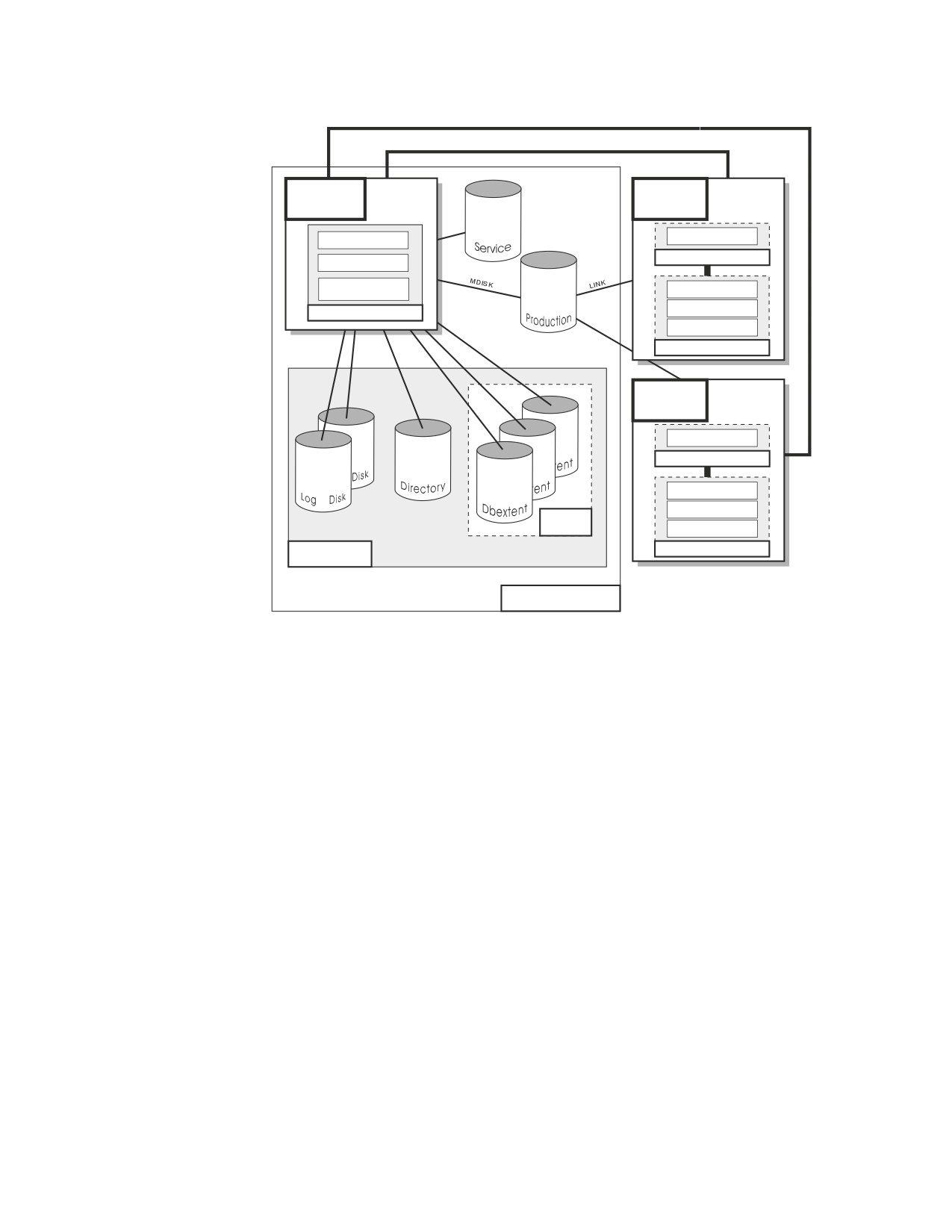
Figure 1 on page ix depicts a typical configuration with one database and two
users.
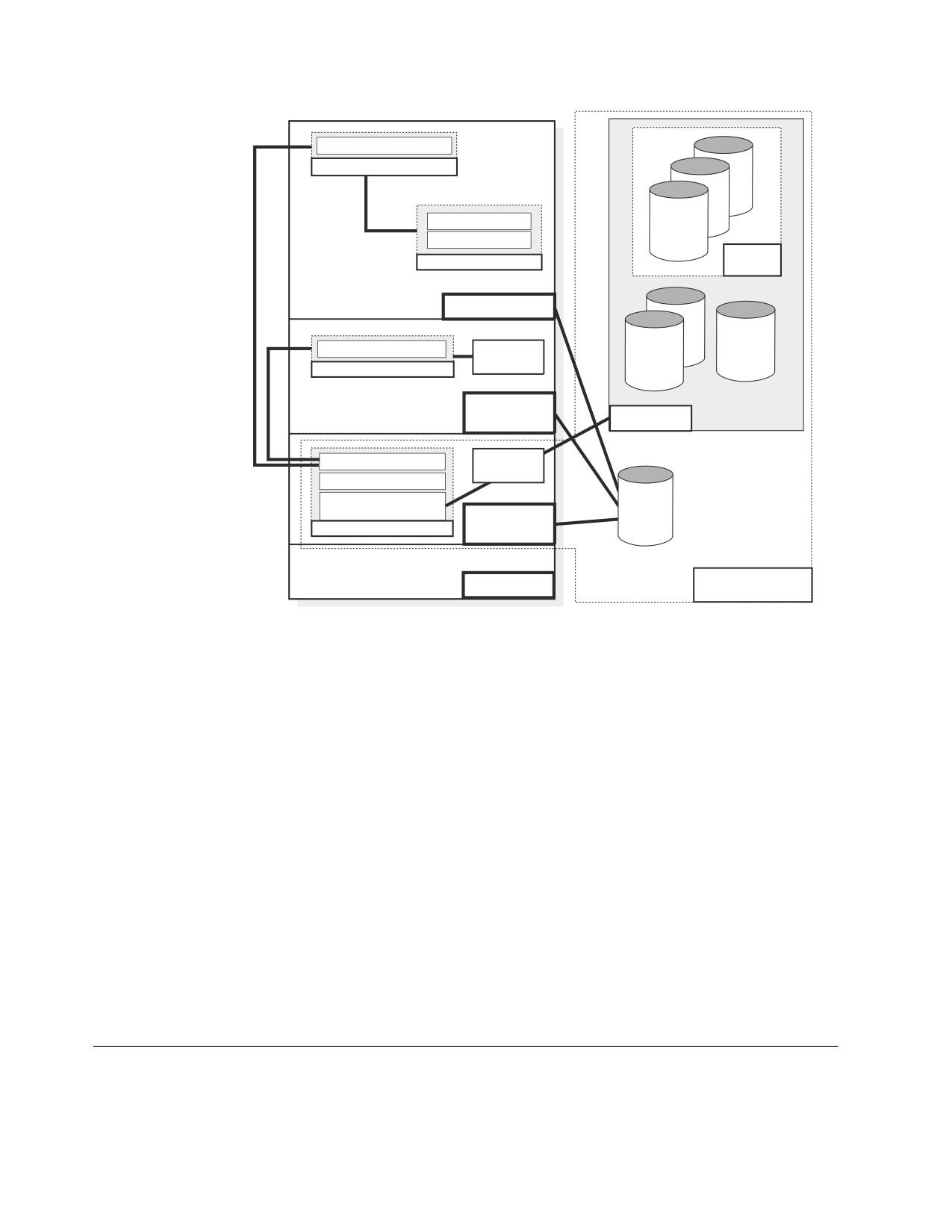
Figure 2 on page x depicts a typical configuration with one database, one batch
partition user, and a CICS® partition with several interactive users.
viii Database Services Utility
Communication Link
(IUCV, APPC/VM or TCP/IP)
Database
User
Machine
Machine
Data System Control
Resource Adapter
Application Requester
Relational Data System
Database Storage
Subsystem
Interactive SQL
Preprocessors
Database Manager
DBS Utility
Applications
User
Machine
Resource Adapter
Application Requester
Interactive SQL
Preprocessors
Storage
Pool
DBS Utility
Applications
Database
Application Server
Figure 1. Basic Components of the RDBMS in VM/ESA
About This Manual ix
Online Resource Adapter
Application Requester
ent
Interactive SQL
ent
CICS Application
Dbextent
Storage
Applications
Pool
CICS Partition
Batch Resource Adapter
Application
Program
Directory
Application Requester
Log
VSE Batch
Partition
Database
Data System Control
VSAM
Relational Data System
Database Storage
DB2
Subsystem
Database
for VSE
Database Manager
Partition
Library
VSE
Application Server
Figure 2. Basic Components of the RDBMS in VSE/ESA
The database is composed of :
v A collection of data contained in one or more storage pools, each of which in turn
is composed of one or more database extents (dbextents). A dbextent is a VM
minidisk or a VSE VSAM cluster.
v A directory that identifies data locations in the storage pools. There is only one
directory per database.
v A log that contains a record of operations performed on the database. A database
can have either one or two logs.
The database manager is the program that provides access to the data in the
database. In VM it is loaded into the database virtual machine from the production
disk. In VSE it is loaded into the database partition from the DB2 Server for VSE
library.
The application server is the facility that responds to requests for information from
and updates to the database. It is composed of the database and the database
manager.
The application requester is the facility that transforms a request from an
application into a form suitable for communication with an application server.
Prerequisites
Knowledge
This manual assumes the following:
x Database Services Utility
v You have read the manuals listed under the heading “Publications” that follows
and understand the way the database manager works.
v You have a working knowledge of the IBM VSE/ESA environment and are
acquainted with job control language (JCL).
v You have a working knowledge of the VM Conversational Monitor System and
are acquainted with CMS commands.
v You know basic terms and concepts used in the DB2 Server for VSE System
Administration and DB2 Server for VM System Administration manuals.
v You have access to the manuals listed in the Bibliography.
Publications
This manual assumes that you are familiar with the information in the following
manuals:
DB2 Server for VSE & VM Interactive SQL Guide and Reference, SC09-2990
DB2 Server for VSE & VM Overview, GC09-2995
DB2 Server for VSE System Administration, SC09-2981
DB2 Server for VM System Administration, SC09-2980.
Highlighting Conventions
This manual observes the following text highlighting conventions:
Convention
Meaning
Italics
Italic type denotes command variables, parameter values
and their symbolic equivalents, titles of stand-alone
documents, and strings of characters referred to as such.
Boldface
Bold type is used for emphasis or for an important term that
is being defined.
Monospace Type
Monospace type indicates material that is entered at a
display station, displayed on a screen, coded, or printed on
a computer printing device.
ALL CAPS
Capital letters indicate keytop nomenclature, for example,
PFn, ENTER, CLEAR, INSERT, and DELETE. In addition,
the following situations call for all caps:
v Acronyms and other all-cap abbreviations
v Names of programs and other coded entities
v Names of files, tables, libraries, logs, and so forth
v Command, statement, and parameter names or constants
v Keyword and option names
v Data area and storage names.
“Quotation Marks”
Quotation marks (double) enclose the headings of parts,
chapters, and lesser sections of stand-alone documents when
they are referenced; to designate specific, lengthy passages
of text (at least a sentence in length); and to denote
figurative and other special usage, such as jargon.
As Displayed
Panel names, menu titles, and other display headers are
shown in uppercase or mixed case, as displayed.
About This Manual xi

Syntax Notation Conventions
Throughout this manual, syntax is described using the structure defined below.
v Read the syntax diagrams from left to right and from top to bottom, following
the path of the line.
The ►►─── symbol indicates the beginning of a statement or command.
The ───► symbol indicates that the statement syntax is continued on the next
line.
The ►─── symbol indicates that a statement is continued from the previous line.
The ───►◄ symbol indicates the end of a statement.
Diagrams of syntactical units that are not complete statements start with the
►─── symbol and end with the ───► symbol.
v Some SQL statements, Interactive SQL (ISQL) commands, or database services
utility (DBS Utility) commands can stand alone. For example:
►► SAVE
►◄
Others must be followed by one or more keywords or variables. For example:
►► SET AUTOCOMMIT OFF
►◄
v Keywords may have parameters associated with them which represent
user-supplied names or values. These names or values can be specified as either
constants or as user-defined variables called host_variables (host_variables can only
be used in programs).
►► DROP SYNONYM synonym
►◄
v Keywords appear in either uppercase (for example, SAVE) or mixed case (for
example, CHARacter). All uppercase characters in keywords must be present;
you can omit those in lowercase.
v Parameters appear in lowercase and in italics (for example, synonym).
v If such symbols as punctuation marks, parentheses, or arithmetic operators are
shown, you must use them as indicated by the syntax diagram.
v All items (parameters and keywords) must be separated by one or more blanks.
v Required items appear on the same horizontal line (the main path). For example,
the parameter integer is a required item in the following command:
xiii

►► SHOW DBSPACE integer
►◄
This command might appear as:
SHOW DBSPACE 1
v Optional items appear below the main path. For example:
►► CREATE
INDEX
►◄
UNIQUE
This statement could appear as either:
CREATE INDEX
or
CREATE UNIQUE INDEX
v If you can choose from two or more items, they appear vertically in a stack.
If you must choose one of the items, one item appears on the main path. For
example:
►► SHOW LOCK DBSPACE
ALL
►◄
integer
Here, the command could be either:
SHOW LOCK DBSPACE ALL
or
SHOW LOCK DBSPACE 1
If choosing one of the items is optional, the entire stack appears below the main
path. For example:
►► BACKWARD
►◄
integer
MAX
Here, the command could be:
BACKWARD
or
BACKWARD 2
or
BACKWARD MAX
xiv Database Services Utility
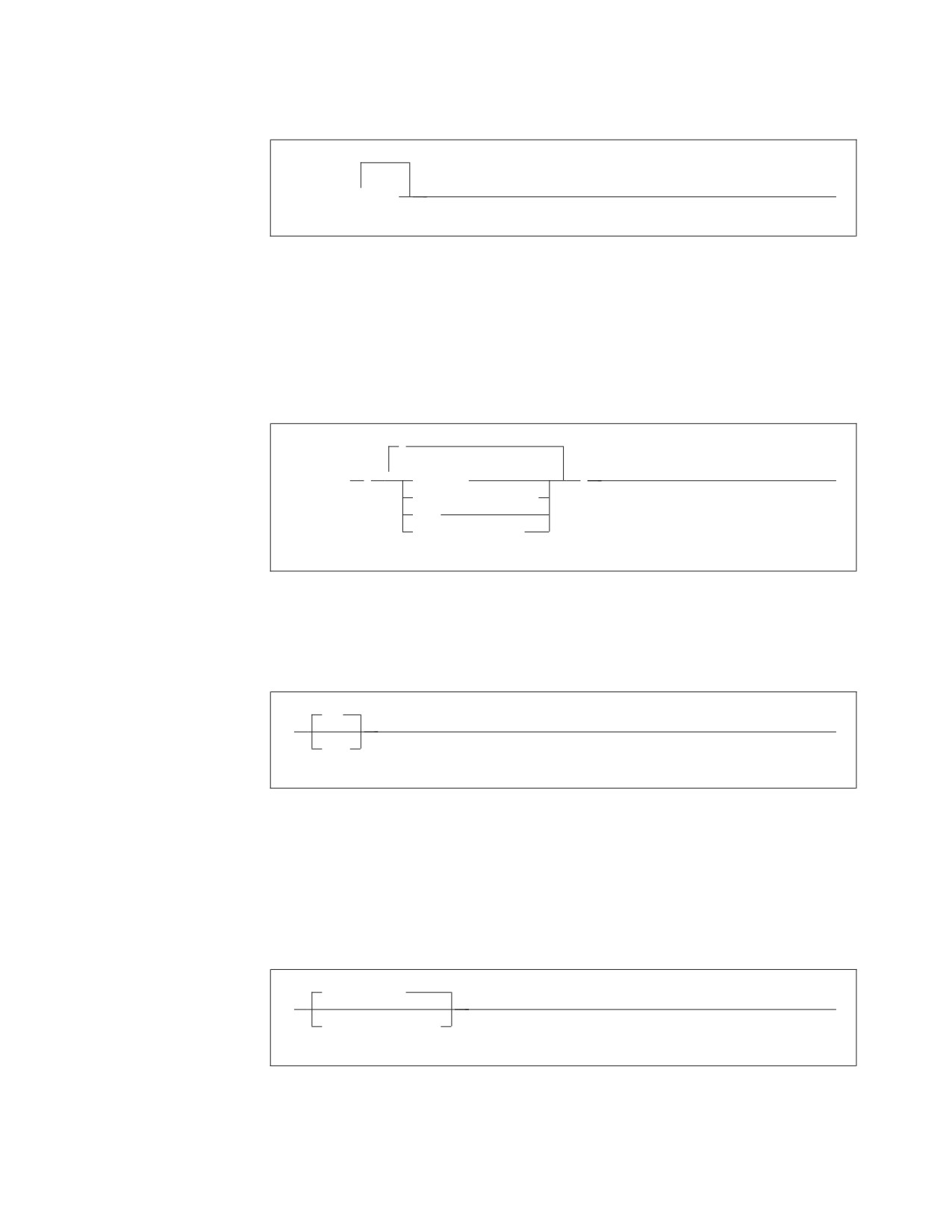
v The repeat symbol indicates that an item can be repeated. For example:
►► ERASE
▼
name
►◄
This statement could appear as:
ERASE NAME1
or
ERASE NAME1 NAME2
A repeat symbol above a stack indicates that you can make more than one
choice from the stacked items, or repeat a choice. For example:
,
▼
►► VALUES
(
constant
)
►◄
host_variable_list
NULL
special_register
v If an item is above the main line, it represents a default, which means that it will
be used if no other item is specified. In the following example, the ASC keyword
appears above the line in a stack with DESC. If neither of these values is
specified, the command would be processed with option ASC.
ASC
►►
►◄
DESC
v When an optional keyword is followed on the same path by an optional default
parameter, the default parameter is assumed if the keyword is not entered.
However, if this keyword is entered, one of its associated optional parameters
must also be specified.
In the following example, if you enter the optional keyword PCTFREE =, you
also have to specify one of its associated optional parameters. If you do not
enter PCTFREE =, the database manager will set it to the default value of 10.
PCTFREE = 10
►►
►◄
PCTFREE = integer
v Words that are only used for readability and have no effect on the execution of
the statement are shown as a single uppercase default. For example:
Syntax Notation Conventions xv

PRIVILEGES
►► REVOKE ALL
►◄
Here, specifying either REVOKE ALL or REVOKE ALL PRIVILEGES means the
same thing.
v Sometimes a single parameter represents a fragment of syntax that is expanded
below. In the following example, fieldproc_block is such a fragment and it is
expanded following the syntax diagram containing it.
►►
fieldproc_block
►◄
NOT NULL
UNIQUE
PRIMARY KEY
fieldproc_block:
FIELDPROC program_name
,
▼
(
constant
)
xvi Database Services Utility
SQL Reserved Words
The following words are reserved in the SQL language. They cannot be used in
SQL statements except for their defined meaning in the SQL syntax or as host
variables, preceded by a colon.
In particular, they cannot be used as names for tables, indexes, columns, views, or
dbspaces unless they are enclosed in double quotation marks (").
ACQUIRE
GRANT
RESOURCE
ADD
GRAPHIC
REVOKE
ALL
GROUP
ROLLBACK
ALTER
ROW
AND
HAVING
RUN
ANY
AS
IDENTIFIED
SCHEDULE
ASC
IN
SELECT
AVG
INDEX
SET
INSERT
SHARE
BETWEEN
INTO
SOME
BY
IS
STATISTICS
STORPOOL
CALL
LIKE
SUM
CHAR
LOCK
SYNONYM
CHARACTER
LONG
COLUMN
TABLE
COMMENT
MAX
TO
COMMIT
MIN
CONCAT
MODE
UNION
CONNECT
UNIQUE
COUNT
NAMED
UPDATE
CREATE
NHEADER
USER
CURRENT
NOT
NULL
VALUES
DBA
VIEW
DBSPACE
OF
DELETE
ON
WHERE
DESC
OPTION
WITH
DISTINCT
OR
WORK
DOUBLE
ORDER
DROP
PACKAGE
EXCLUSIVE
PAGE
EXECUTE
PAGES
EXISTS
PCTFREE
EXPLAIN
PCTINDEX
PRIVATE
FIELDPROC
PRIVILEGES
FOR
PROGRAM
FROM
PUBLIC
xvii
Summary of Changes
|
This is a summary of the technical changes to the DB2 Server for VSE & VM
|
database management system for this edition of the book. Several manuals are
|
affected by some or all of the changes discussed here. For your convenience, the
|
changes made in this edition are identified in the text by a vertical bar (|) in the
|
left margin. This edition may also include minor corrections and editorial changes
|
that are not identified.
This summary does not list incompatibilities between releases of the DB2 Server
for VSE & VM product; see either the DB2 Server for VSE & VM SQL Reference, DB2
Server for VM System Administration, or the DB2 Server for VSE System
Administration manuals for a discussion of incompatibilities.
Summary of Changes for DB2 Version 7 Release 5
Version 7 Release 5 of the DB2 Server for VSE & VM database management
system is intended to run on the Z/VM Version 5 Release 2 or later environment
and on the Z/VSE(®) Version 3 Release 1 or later environment.
|
Enhancements, New Functions, and New Capabilities
|
The following have been added to DB2 Version 7 Release 5:
|
Explain Option on DBSU REBIND PACKAGE Command
|
This new functionality allows the EXPLAIN(YES/NO) option on REBIND
|
PACKAGE command. If EXPLAIN(YES) is issued, then all four update tables
|
(structure, plan, cost, reference) will be updated. If EXPLAIN(NO) is issued, then
|
none of the four update tables will be updated.
|
For more information, see the following DB2 Server for VSE & VM documentation:
|
v DB2 Server for VSE & VM Database Services Utility
|
v DB2 Server for VSE & VM Performance Tuning Handbook
|
v DB2 Server for VSE & VM Quick Reference
|
v DB2 Server for VSE & VM SQL Reference
|
For Fetch only
|
This new functionality accepts the ″FOR FETCH ONLY″ clause after a cursor select
|
statement. It causes a cursor to become read-only (no UPDATEs or DELETEs are
|
permitted using this cursor). If a read-only cursor is referenced in an UPDATE or
|
DELETE statement, SQLCODE -510 will be issued and the statement is not
|
processed. In addition, under the SBLOCK preprocessor option, ″FOR FETCH
|
ONLY″ forces blocking to be used on the read-only cursor regardless of whether
|
there is a COMMIT. If there is no ″FOR FETCH ONLY″ clause, under SBLOCK,
|
blocking would only be done if a COMMIT was absent.
|
For more information, see the following DB2 Server for VSE & VM documentation:
|
v DB2 Server for VM Messages and Codes
|
v DB2 Server for VSE & VM Application Programming
|
v DB2 Server for VSE & VM Performance Tuning Handbook
|
v DB2 Server for VSE & VM Quick Reference
xix
|
v DB2 Server for VSE & VM SQL Reference
|
Application Message Formatter
|
This functionality provides an Application Programming Interface (API) that
|
retrieves the descriptive text for an SQLCODE, given an SQLCA input parameter.
|
The API will be available for Assembly, COBOL, C, PL/I and FORTRAN.
|
In DB2 for VM and DB2 for VSE Online, the user may specify the language of the
|
returned text. The languages supported by DB2 for VSE/VM are American English
|
(AMENG), uppercase English (UCENG), German (GER), French (FRANC) and
|
Japanese (KANJI). VSE Batch does not support switching to another language.
|
Therefore the default will be used regardless of the user’s specification. The values
|
of SQLCODE, SQLSTATE, SQLERRD1 and SQLERRD2 will be automatically
|
appended to the returned text. The user may also specify to have the entire
|
SQLCA included. If the SQLCODE could not be found in the repository, the entire
|
SQLCA will be returned in the buffer.
|
If the SQLCA was set by another product (such as DB2 UBD), the descriptive text
|
is retrieved if the SQLCODE exists in the DB2 for VM/VSE repositories. However,
|
the token substitutions may not be correct.
|
For more information, see DB2 Server for VSE & VM Application Programming.
|
Convert buffer read/write to compiler macro
|
The DRDA code has over 100 small modules. Each call to an external module has a
|
certain amount of overhead associated with it. Certain modules are called very
|
frequently and this can add up to a significant amount of time. This functionality
|
improves the performance by converting few modules to macros or internal
|
procedures, to reduce this overhead.
|
Modify Build Tree Creation
|
This functionality modifies Build Tree creation used by DRDA parsing and
|
generation. It is built in such a way that every code point that is used to search
|
through the tree must be converted to a different format before the search can be
|
done. If modified build tree was created with the converted point, then the code
|
point would not have to be converted every time the tree must be searched. This
|
improves the performance of the DRDA code path length with the minimal search.
|
Split code point search routines
|
When parsing a data stream within each parser action routine, a binary search is
|
done to find the specific code point. Some action specific routines are quite large,
|
so the binary search can be long. Splitting and spreading the code point evenly
|
among other modules would reduce the overheads and improves the performance
|
of the DRDA code path length.
|
DRDA Multi-Row Insert
|
Multi Row insert is a means of caching homogenous insert statements and sending
|
them as a block to the server for processing. This reduces the overhead of sending
|
a large number of singular inserts and receiving as many responses.
|
Buffering of homogenous inserts eliminates the need to send an SQL statement to
|
the DB2 server every time an insert is made, thereby improving performance over
|
DRDA.
|
For more information, see the following DB2 Server for VSE & VM documentation:
|
v DB2 Server for VSE & VM Application Programming
xx
Database Services Utility
|
v DB2 Server for VSE & VM Database Administration
|
v DB2 Server for VM System Administration
|
v DB2 Server for VSE & VM Performance Tuning Handbook
|
v DB2 Server for VSE & VM Quick Reference
|
v DB2 Server for VSE & VM SQL Reference
|
Connection Pooling for DRDA TCP/IP in Online Resource
|
Adapter
|
Connection pooling is a technique that allows multiple users to share a cached set
|
of pre-established connections that provide access to a database. Establishing a
|
connection between a user and a server takes a sizeable time. Users who have
|
validated their entry to a database once need not establish a connection every time
|
a request is submitted. Instead, they can use a pre-established connection from a
|
pool of such connections and get their results much faster.
|
From the user’s point of view, there is a considerable improvement in response
|
time after this line item is implemented.
|
For more information, see the following documentation on DB2 Server for VSE &
|
VM:
|
v DB2 Server for VSE System Administration
|
v DB2 Server for VSE & VM Application Programming
|
v DB2 Server for VSE & VM Operation
|
v DB2 Server for VSE & VM Performance Tuning Handbook
|
IBM DB2 Server for VSE, Client Edition
|
This feature allows the customer the flexibility to install and use only the client
|
(run-time support) component of DB2 Server for VSE without the requirement to
|
buy and install the server component during the installation process of DB2 server
|
for VSE product. The client-only installation enables customers to reduce the total
|
cost of ownership when they have their databases residing on a non-local platform
|
(like VM, z/OS, LUW) and have a large number of their DB2 applications on VSE
|
(like ISQL on CICS, DBSU on VSE, other online/batch applications on VSE).
|
For more information, see the following DB2 Server for VSE & VM documentation:
|
v DB2 Server for VSE System Administration
|
v DB2 Server for VSE Program Directory
|
IBM DB2 Server for VM, Client Edition
|
This feature allows the customer the flexibility to install and use only the client
|
(run-time support) component of DB2 Server for VM without the requirement to
|
buy and install the server component during the installation process of DB2 server
|
for VM product. The client-only installation enables our customers to reduce the
|
total cost of ownership when they have their databases residing on a non-local
|
platform (like VM, z/OS, LUW) and have a large number of their DB2 applications
|
on VM (like ISQL, DBSU, other user applications on VM).
|
For more information, see the following DB2 Server for VSE & VM documentation:
|
v DB2 Server for VM System Administration
|
v DB2 Server for VM Program Directory
Summary of Changes xxi
|
Handling Commit Responses from DB2 UDB Stored Procedures
|
This feature will allow DB2 Resource Manager on VSE/VM to accept and process
|
results of a stored procedure running in a UDB server with a COMMIT statement
|
in the stored procedure.
|
Currently, DB2 for VM/VSE client does not handle responses from ’COMMIT’
|
statements coded in DB2 UDB stored procedures. Implementation of this feature
|
will enable handling responses of COMMIT statements in DB2 UDB stored
|
procedures and thus allow users to have COMMIT statements in their stored
|
procedures, while using DB2 for VM/VSE client.
|
COMMIT statements, however, are not allowed in stored procedures on the DB2
|
Server for VM/VSE.
|
For more information, see DB2 Server for VSE & VM Application Programming.
|
Make on-line programs AMODE 31 RMODE ANY
|
This feature converts DB2 server for VSE online program which presently operate
|
under 24 bit addressing mode from AMODE 24, to AMODE 31 RMODE ANY.
|
Presently, all the online programs are loaded below 16M line. Implementation of
|
this line item ensures that all the online program will be loaded above the 16M
|
line, which results in more virtual storage below the line, which can be utilized by
|
other applications.
|
For more information, see the following DB2 Server for VSE & VM documentation:
|
v DB2 Server for VSE System Administration
|
v DB2 Server for VSE Program Directory
|
Provide BIND File Support in VM and in VSE Batch Environments
|
This feature provides the facility of binding packages across servers. The process of
|
binding is achieved by dividing the program preparation method into two steps.
|
The first step does the precompilation of the embedded SQL programs with the
|
prep parameter ’BIND’. Invocation of VSE/VM preprocessor creates a ’bindfile’.
|
The bindfile can be bound against any DB2 server using VSE/VM binder. During
|
this process, the access path is generated, SQL statements are verified,
|
authorization checks are performed, and package on the target server is created.
|
This line item eliminates the need of re-prepping the source code or porting of
|
packages across DB2 servers.
|
For more information, see the following DB2 Server for VSE & VM documentation:
|
v DB2 REXX SQL for VM/ESA Installation and Reference
|
v DB2 Server for VM Messages and Codes
|
v DB2 Server for VSE & VM Application Programming
|
v DB2 Server for VSE & VM Database Administration
|
v DB2 Server for VM Program Directory
|
v DB2 Server for VSE Program Directory
|
Convert TCP/IP LE/C interface to EZASMI API
|
The feature of converting TCP/IP LE/C interface to EZASMI API intends to
|
replace the current LE/C interface and implement the EZA Assembler Interface
|
(EZASMI)to enhance performance in DB2 Client/Server for VSE over DRDA.
|
Currently, either LE/C interface or CSI Assembler Interface is used for TCP/IP
|
functions. The EZASMI interface makes the code all Assembler.
xxii Database Services Utility
Part 1. User’s Guide
This part of the manual presents procedures for performing the tasks provided by
the Database Services Utility, which is a part of the DB2 Server for VSE & VM
product. The major task areas covered are as follows:
v Familiarizing yourself with the DBS Utility
v Loading data into a DB2 Server for VSE & VM database
v Unloading data stored in a DB2 Server for VSE & VM database
v Reloading data into a DB2 Server for VSE & VM database in a format provided
by the DBS Utility
v Interpreting the output of the DBS Utility
v Unloading and reloading packages.
Examples and reference material necessary to perform these tasks are framed in
boxes with the procedures themselves. For additional reference information, see
Part 2, “Reference.”
Usual operation of the Database Services Utility is accessing the database in
multiple user mode; therefore, the task descriptions and procedures in this part of
the manual mainly address operation of the Database Services Utility with multiple
user mode.
1
Chapter 1. Getting Started
This chapter gives a brief overview of the Database Services (DBS) Utility and
explains how to start it. The fundamentals of using the utility are also described,
such as defining input and output requirements, working with a report in VSE, a
message file in VM, and using SQL statements within the utility. Finally, this
chapter describes how to exit from the utility.
Introducing the Database Services Utility
The Database Services Utility is an application program that supplies a user
interface to the IBM DB2 Server for VSE & VM product and that, with some
limitations, also works with other relational databases that use DRDA flow.
Consider using it to load or reload data into, or unload data from, a database. If
the amount of data to be processed is large, or if exact sequences of database
commands are to be used on a periodic basis, consider using the utility.
You usually employ the Database Services Utility for DB2 Server for VSE & VM for
large-scale processing of relational databases in a batch environment. Input to the
utility, as well as its reported output, is in the form of sequential files. In VM, you
have another way of using the Database Services Utility. Although DB2 Server for
VM batch processing is the utility’s usual operating mode, you can also use it
interactively by specifying a terminal as its input file. You can also direct its output
to a terminal instead of storing the output as a physical file.
In addition to loading data into and unloading it from a database, you can use the
utility to process SQL statements and to transfer packages into or out of databases.
You can do these operations in either single or multiple user mode.
The four primary Database Services Utility control commands are DATALOAD,
DATAUNLOAD, UNLOAD, and RELOAD. The UNLOAD and RELOAD
commands are qualified by the object they manipulate:
UNLOAD
RELOAD
____________________________________________________
UNLOAD DBSPACE
RELOAD DBSPACE
UNLOAD TABLE
RELOAD TABLE
UNLOAD PACKAGE
RELOAD PACKAGE
The DATALOAD command inserts data from a sequential file into a DB2 Server
for VSE & VM table. You specify the format of the sequential file.
The DATAUNLOAD command selects data from tables and copies it to a
sequential file. You specify the format of the sequential file.
The UNLOAD commands provide a backup function for existing tables, dbspaces,
and packages. These control commands are also useful for distributing copies of
data to other sites that use the database manager. The output of each UNLOAD
command is a sequential file formatted for the use of its corresponding RELOAD
command.
The RELOAD commands restore information previously backed up with UNLOAD
commands. The RELOAD commands are also useful for reorganizing database
tables or dbspaces and for receiving tables and packages from other sites. With the
3
RELOAD TABLE command, you can create new tables from logical views
previously unloaded from existing tables. You can then build an index for each
newly created table. The RELOAD package can be used to distribute packages to
other sites that use the DB2 Server for VSE & VM application server or other
application servers that support DRDA flow.
The Database Services Utility provides other commands for your convenience:
v A COMMENT command documents your Database Services Utility command
input.
v A REBIND PACKAGE command preprocesses existing packages.
v A REORGANIZE INDEX command efficiently reorganizes a table’s index in one
step.
v A SCHEMA command executes the SQL statements CREATE TABLE, CREATE
VIEW, and GRANT in a schema file. A schema file contains an authorization ID
and a list of table, view, and privilege definitions.
v A number of SET commands control various processing, environmental, and
formatting characteristics. The SET commands turn on or regulate certain SQL
statements.
Loading Data into a Database
You can use the Database Services Utility DATALOAD command to load or add
rows from a user-defined sequential file. The input to DATALOAD processing
consists of a set of Database Services Utility commands and input data records.
The utility commands identify:
v tables to be loaded
v Location of tabular column data in an input record
v Format of input-record fields
v Sequential file containing the input records.
You can specify how often DATALOAD processing commits insertions to the
database. Specify a number of input data records, and the insertions are committed
each time the DATALOAD command processes the specified number of records. If
a subsequent error occurs, the database manager only has to undo the database
changes made since the last commit point. The committing and restarting
capabilities of the database manager are useful when you are loading large
amounts of data with the utility.
Referential constraints (rules that require all values in dependent tables to match
corresponding values in parent tables) are enforced during DATALOAD
processing. This means that primary key rows must be loaded before their foreign
key rows. You can improve the utility’s performance by deactivating the
constraints before loading the data and activating them again afterwards. For
descriptions and instructions on DATALOAD processing, see Chapter 2, “Loading
Data with the Database Services Utility.”
Unloading Data from a Database
The DATAUNLOAD command allows you to selectively unload data from a
database to a sequential access method (SAM) output file. You can:
v Create a file for transporting data from a DB2 Server for VSE & VM to a
non-DB2 Server for VSE & VM processing environment
v Create a sequential file, modify it, and reload it into tables with the DATALOAD
command.
4
Database Services Utility
You can use the other Database Services Utility unload-data commands (UNLOAD
DBSPACE and UNLOAD TABLE) to:
v Create a backup for specific data
v Move data to another DB2 Server for VSE & VM database manager.
You can also use these UNLOAD commands, immediately followed by their
RELOAD counterparts, to:
v Reclaim fragmented disk space
v Reorder data records to match indexes.
The main difference between the DATAUNLOAD and UNLOAD commands is that
DATAUNLOAD allows you to specify more about the data you unload than the
UNLOAD commands allow. Consequently, the UNLOAD commands are simpler,
but it is easier to work with output data from a DATAUNLOAD command. For
descriptions and instructions on DATAUNLOAD and UNLOAD processing, see
Chapter 3, “Unloading Data with the Database Services Utility.”
Reloading Data into a Database
DATALOAD and RELOAD are essentially the same kind of operation: they both
insert data into databases; however, RELOAD inserts data that was previously
unloaded using the UNLOAD command while DATALOAD uses a user-defined
file of data, or the output file of a DATAUNLOAD command.
RELOAD processing can purge existing tables before reloading them (from
previously unloaded information). Similarly, you can unload a view as if it were a
table and reload it as a new table. When RELOAD creates a new table, it does not
automatically re-create all the entities associated with the old table; you must
specify views, indexes, keys, and access privileges. For descriptions and
instructions on RELOAD processing, see Chapter 4, “Reloading Data with the
Database Services Utility.”
Unloading Packages from a Database
You can use the Database Services Utility to unload a package from a DB2 Server
for VSE & VM database to a portable file. A package consists of the internally
optimized application SQL statements stored in (bound to) the database at
preprocessing time and used by the database with the application at execution
time. A portable file is one that contains an unloaded DB2 Server for VSE & VM
package that is ready for distribution to another application server. You can unload
a package to a file to:
v Create a backup of the package before making changes to it
v Reload a package to another application server.
The UNLOAD PACKAGE command unloads the package, along with information
about the way it was created, to a portable file. You can then send the file to the
application server that requires it. It is unnecessary to distribute source programs
or to preprocess and compile source code at the receiving location. For descriptions
and instructions on unloading packages, see Chapter 5, “Unloading and Reloading
Packages with the Database Services Utility,” on page 83.
Reloading Packages into a Database
You can use the Database Services Utility to load a package from a file into a DB2
Server for VSE & VM database. You can do this to achieve the following:
v Restore a previous version of a package
v Install an application that is distributed in a portable file.
Chapter 1. Getting Started
5
The database manager preprocesses reloaded packages to ensure that all
dependencies are satisfied on the installing system.
When a RELOAD PACKAGE command loads a package into an application server,
the module can replace another package with the same name. The new package
can carry over the run-privileges previously granted to users of the replaced
version. You can reload a package created and unloaded on a VM system, and use
it on a VSE system; or you can reload a package created and unloaded on a VSE
system, and use it on a VM system. For descriptions and instructions on reloading
packages, see Chapter 5, “Unloading and Reloading Packages with the Database
Services Utility.”
Processing SQL Statements with the Database Services Utility
The Database Services Utility executes SQL statements against the database. You
can use most SQL statements in a VM utility control file or a VSE utility input
control card file. SQL statements not supported by the Database Services Utility are
those used only in application programs (SELECT statements with INTO clauses,
cursor management commands, DESCRIBE, EXECUTE, INCLUDE, PREPARE, and
WHENEVER).
A Database Services Utility Job
DB2 Server for VM Components
A basic job has five components that control the input and output of data. All five
are discussed in more detail later in this chapter:
Control File The control file contains Database Services Utility commands and
SQL statements that the utility processes. The control file must
have a fixed format and a record length of 80 characters.
Message File This output file contains a list of all commands executed, as well as
the results of these commands. These results can be messages to
indicate whether the command was executed successfully, as well
as data that was obtained by a SELECT statement.
Input/Output File
Either this file contains data to be loaded or copied to a database,
or it is the file to which data is written. Its use depends on the
Database Services Utility command you are using.
File Definitions
File definitions specify input and output requirements for the
above three files.
SQLDBSU EXEC
This EXEC starts a Database Services Utility job. You can also use
the SQLDBSU EXEC to specify the input and output requirements
for the control and message files.
DB2 Server for VSE Files
A basic job has three components that control the input and output of data. All
three are discussed in more detail later in this chapter:
Input Control Card File
The input control card file contains Database Services Utility
commands and SQL statements that the utility processes. The input
control card file must have a fixed format and a record length of 80
characters.
Report
The report contains a list of all commands executed, as well as the
6
Database Services Utility
results of these commands. These results can be messages to
indicate whether the command was executed successfully, as well
as data that was obtained by a SELECT statement.
Input/Output File
Either this file contains data to be loaded or copied to a database,
or it is the file to which data is written. Its use depends on the
Database Services Utility command you are using.
Starting and Using the Database Services Utility
The Database Services Utility can be started to access the database in either
multiple user mode or single user mode.
Multiple User Mode
Multiple user mode is the usual way of running the application server. It permits
multiple users to access a DB2 Server for VSE & VM application server
simultaneously. Unless you have database maintenance to perform or another task
requiring a dedicated database, run the utility with multiple user mode.
DB2 Server for VSE:
For more information about starting the Database Services Utility with multiple
user mode, see “Multiple User Mode Job Control” on page 108.
DB2 Server for VM:
The DB2 Server for VM Database Services Utility with multiple user mode cannot
run either in the CMS/DOS environment, or in CMS subset.
In preparation for running the Database Services Utility with multiple user mode,
initialize the user machine by specifying defaults using the SQLINIT EXEC. On the
CMS command line, type:
SQLINIT DBNAME(server-name)
where server-name is the name of the application server to be accessed. Press
ENTER.
For more information on the SQLINIT EXEC in multiple user mode, see “Running
the DB2 Server for VM Database Services Utility with Multiple User Mode” on
page 128.
Single User Mode
Run the Database Services Utility with single user mode to prevent concurrent
access of a DB2 Server for VSE & VM application server by other users. Unless you
have database maintenance to perform, are the sole user of an application server,
or are performing a task requiring a dedicated database, run the utility with
multiple user mode.
DB2 Server for VSE:
For more information on running the Database Services Utility with single user
mode, see “Single User Mode Job Control” on page 106.
Chapter 1. Getting Started
7
DB2 Server for VM:
In DB2 Server for VM single user mode, the SQLINIT EXEC is unnecessary; the
Database Services Utility and the application server are executed in the same
virtual machine, and you specify the desired application server with the DBNAME
parameter of the SQLDBSU EXEC.
For more information on using the SQLDBSU EXEC with single user mode, see
Chapter 7, “Using the Database Services Utility from Application Programs,” on
page 105 and “SQLDBSU EXEC Format” on page 129.
Note: Because usual operation of the Database Services Utility is with multiple
user mode, the task descriptions and procedures in this part of the manual
largely address operation of the utility with multiple user mode.
Overview of Database Services Utility Files
The Database Services Utility is a general purpose utility that requires two or three
files to run: one for Database Services Utility command or SQL statement input,
one for message output, and one for data output or input.
The required DB2 Server for VSE input file is the input control card file, and it is
assigned to SYSIPT. The input control card file contains utility control commands,
which are described in the following section.
The Database Services Utility creates a report; it is assigned to SYSLST. The report
lists the input control card file records, messages, and results.
The DB2 Server for VM control file and message file are usually CMS files. You can
define the control file to any sequential tape or DASD file supported by CMS
OS/QSAM, to a virtual reader file, or to the terminal. You can define the message
file to any sequential tape file supported by CMS OS/QSAM, to a virtual print file,
or to the terminal.
Often you require an additional file for Database Services Utility input or output.
The Database Services Utility commands that use additional files for input or
output contain a data definition name (ddname) parameter that you must specify to
identify the additional input or output file. In DB2 Server for VSE, the ddname
refers to the file name specified in the applicable DLBL or TLBL system control
statement. In DB2 Server for VM, this parameter refers to the ddname defined in a
CMS FILEDEF command. A ddname can be from one to eight characters. The first
character of a ddname must be alphabetic (or a national character). For more
information about file definition, see the relevant command description or refer to
Appendix B, “FILEDEF Command Syntax and Notes,” on page 249.
The required DB2 Server for VM input file is the control file (or command file),
and it is assigned to the ddname SYSIN. The control file contains utility control
commands, which are described in the following section.
The required DB2 Server for VM output file is the message file; it is assigned to the
ddname SYSPRINT. The utility lists the control file records, writes messages, and
prints results in the message file.
8
Database Services Utility
Note: You do not need an additional file when you use the DATALOAD command
if you place the data input information in the command file. You do require
an additional input or output file with all other commands that have a
ddname parameter.
The Database Services Utility supports the use of multiple-volume tape files and
variable-length, spanned records in either environment. For additional information
on tape support, refer to the DB2 Server for VM System Administration or the DB2
Server for VSE System Administration manual.
Working with an Input Control Card File in DB2 Server for VSE
Creating a Control Card File
Create a control file as follows.
1. Provide the following commands and statements shown in Figure 3
with the
JCL statements needed to run the job.
// JOB DBS UTILITY EXAMPLE VSE MULTIPLE USER MODE JOB CONTROL
// EXEC PROC=ARIS62PL
>——DB2 Server for VSE Production Library Definition
// EXEC ARIDBS, SIZE=AUTO
>——invoke DBS Utility
CONNECT your user ID IDENTIFIED BY your password;
SELECT * FROM SQLDBA.DEPARTMENT;
SELECT * FROM SQLDBA.PROJECT;
/*
/&
Figure 3. Example of a Simplified Input Control Card File
The following statement runs the Database Services Utility:
// EXEC ARIDBS,SIZE=AUTO
2. Ensure that the input control card file has a fixed record length.
3. Store the input control card file.
Working with a Report
The Database Services Utility creates a report on the device that your installation
assigned to SYSLST.
After you submit the Database Services Utility job that you created in Figure 3, and
it finishes processing the input control card file, look at the results in the report
shown in Figure 4 on page 10.
Note: The report may contain error messages if errors occurred when the Database
Services Utility was processing the commands in the input control card file.
Chapter 1. Getting Started
9
ARI0801I DBS Utility started: 07/18/89 16:10:31.
◄────────────▌1▐
AUTOCOMMIT = OFF ERRORMODE = OFF
◄────┬────▌2▐
ISOLATION LEVEL = REPEATABLE READ
◄────┘
──────► CONNECT "SQLDBA " IDENTIFIED BY ********;
ARI8004I User SQLDBA connected to database SQLDBA.
ARI0500I SQL processing was successful.
ARI0505I SQLCODE = 0
SQLSTATE = 00000
ROWCOUNT = 0
──────►
──────► SELECT * FROM SQLDBA.DEPARTMENT;
◄────────────▌3▐
SELECT * FROM SQLDBA.DEPARTMENT
PAGE
1
DEPTNO DEPTNAME
MGRNO ADMRDEPT
───┐
────── ───────────────────────────── ────── ────────
│
A00
SPIFFY COMPUTER SERVICE DIV.
000010 A00
│
B01
PLANNING
000020 A00
│
C01
INFORMATION CENTER
000030 A00
│
D01
DEVELOPMENT CENTER
A00
├─────▌4▐
D11
MANUFACTURING SYSTEMS
000060 D01
│
D21
ADMINISTRATION SYSTEMS
000070 D01
│
E01
SUPPORT SERVICES
000050 A00
│
E11
OPERATIONS
000090 E01
│
E21
SOFTWARE SUPPORT
000100 E01
│
ARI0850I SQL SELECT processing successful: Rowcount = 9
───┘
──────► SELECT * FROM SQLDBA.PROJECT;
◄────────────▌5▐
Figure 4. Database Services Utility: Example Report Output (Part 1 of 2)
10
Database Services Utility
SELECT * FROM SQLDBA.PROJECT
PAGE
2
PROJNO PROJNAME
DEPTNO RESPEMP PRSTAFF PRSTDATE
PRENDATE
──┐
────── ─────────────────── ────── ─────── ─────── ──────────
──────────
│
AD3100 ADMIN SERVICES
A00
000010
6.50 1982─01─01
1983─02─01
│
MA2100 WELD LINE AUTOMATIO D01
000010
12.00 1982─01─01
1983─02─01
│
AD3111 PAYROLL PROGRAMMING B01
000020
2.00 1982─01─01
1983─02─01
│
PL2100 WELD LINE PLANNING B01
000020
1.00 1982─01─01
1982─09─15
│
IF1000 QUERY SERVICES
C01
000030
2.00 1982─01─01
1983─02─01
│
IF2000 USER EDUCATION
C01
000030
1.00 1982─01─01
1983─02─01
│
OP1000 OPERATION SUPPORT
E01
000050
6.00 1982─01─01
1983─02─01
│
OP2000 GEN SYSTEMS SERVICE E01
000050
5.00 1982─01─01
1983─02─01
│
MA2110 W L PROGRAMMING
D11
000060
9.00 1982─01─01
1983─02─01
│
AD3110 GENERAL AD SYSTEMS
E11
000090
6.00 1982─01─01
1983─02─01
│
OP1010 OPERATION
E11
000090
5.00 1982─01─01
1983─02─01
├──▌6▐
OP2010 SYSTEMS SUPPORT
E21
000100
4.00 1982─01─01
1983─02─01
│
MA2112 W L ROBOT DESIGN
D11
000150
3.00 1982─01─01
1982─12─01
│
MA2113 W L PROD CONT PROGS D11
000160
3.00 1982─02─15
1982─12─01
│
MA2111 W L PROGRAM DESIGN D11
000220
2.00 1982─01─01
1982─12─01
│
AD3112 PERSONNEL PROGRAMMG D21
000250
1.00 1982─01─01
1983─02─01
│
AD3113 ACCOUNT.PROGRAMMING D21
000270
2.00 1982─01─01
1983─02─01
│
OP2011 SCP SYSTEMS SUPPORT E21
000320
1.00 1982─01─01
1983─02─01
│
OP2012 APPLICATIONS SUPPOR E21
000330
1.00 1982─01─01
1983─02─01
│
OP2013 DB/DC SUPPORT
E21
000340
1.00 1982─01─01
1983─02─01
│
ARI0850I SQL SELECT processing successful: Rowcount = 20
──┘
ARI0802I End of command file input.
◄────────────▌7▐
ARI8997I ...Begin COMMIT processing.
─xxxxx┐
ARI0811I ...COMMIT of any database changes successful.
|
ARI0809I ...No error(s) occurred during command processing.
├──▌8▐
ARI0808I DBS processing completed: 07/18/89 16:10:33.
─xxxxx┘
Figure 4. Database Services Utility: Example Report Output (Part 2 of
2)
Notes for Figure 4 on page 10:
▌1▐
The Database Services Utility start message.
▌2▐
The Database Services Utility default values. See “Set-Item Commands” on
page 214 in Chapter 8, “Command Reference,” on page 135 for details on
changing these defaults.
▌3▐
The first SELECT statement that the Database Services Utility is to process.
▌4▐
Results of the Database Services Utility processing the SELECT statement
show the rows retrieved from the table, a message to indicate that the
SELECT statement was successful, and the number of rows retrieved.
▌5▐
The next SELECT statement that the Database Services Utility is to process.
▌6▐
Results of the Database Services Utility processing the SELECT statement
show the rows retrieved from the table, a message to indicate that the
SELECT statement was successful, and the number of rows retrieved.
▌7▐
Database Services Utility has processed all commands in the input control
card file.
▌8▐
Database Services Utility completion messages.
If you encounter the following message, look at the report to find the error or
errors:
ARI0807E ...Error(s) occurred during command processing.
Chapter 1. Getting Started
11
Error types are listed and discussed in Chapter 9, “Error Handling and
Debugging,” on page 223. Item ▌6▐ in Figure 5 shows an example of an error
found in a report.
ARI0801I DBS Utility started: 07/18/89 16:10:47.
◄────────────▌1▐
AUTOCOMMIT = OFF ERRORMODE = OFF
◄────┬────▌2▐
ISOLATION LEVEL = REPEATABLE READ
◄────┘
──────► CONNECT "SQLDBA " IDENTIFIED BY ********;
ARI8004I User SQLDBA connected to database SQLDBA.
ARI0500I SQL processing was successful.
ARI0505I SQLCODE = 0
SQLSTATE = 00000
ROWCOUNT = 0
──────►
──────► SELECT * FROM SQLDBA.DEPARTMENT;
◄────────────▌3▐
SELECT * FROM SQLDBA.DEPARTMENT
PAGE
1
DEPTNO DEPTNAME
MGRNO ADMRDEPT
───┐
────── ───────────────────────────── ────── ────────
│
A00
SPIFFY COMPUTER SERVICE DIV.
000010 A00
│
B01
PLANNING
000020 A00
│
C01
INFORMATION CENTER
000030 A00
│
D01
DEVELOPMENT CENTER
A00
├─────▌4▐
D11
MANUFACTURING SYSTEMS
000060 D01
│
D21
ADMINISTRATION SYSTEMS
000070 D01
│
E01
SUPPORT SERVICES
000050 A00
│
E11
OPERATIONS
000090 E01
│
E21
SOFTWARE SUPPORT
000100 E01
│
ARI0850I SQL SELECT processing successful: Rowcount = 9
───┘
──────► SELECT * FROM SQLDBA.PROJJECT;
◄────────────▌5▐
ARI0503E An SQL error has occurred.
──┐
SQLDBA.PROJJECT was not found in the system catalogs.
│
ARI0505I SQLCODE = ─204
SQLSTATE = 52004
ROWCOUNT = 0
├──▌6▐
ARI0504I SQLERRP: ARIXOCA SQLERRD1: ─100 SQLERRD2: 0
│
ARI0851E SQL SELECT processing unsuccessful: Rowcount = 0
──┘
ARI8998I ...Begin ROLLBACK processing.
────┐
ARI0811I ...ROLLBACK of any database changes successful.
|
ARI0813I ...Suspend command execution:
├─────▌7▐
AUTOCOMMIT = OFF ERRORMODE = ON
│
ARI0802I End of command file input.
────┘
ARI0807E ...Error(s) occurred during command processing. ◄───┬─────▌8▐
ARI0808I DBS processing completed: 07/18/89 16:10:47.
◄───┘
Figure 5. Example of a Database Services Utility Error
Notes for Figure 5:
▌1▐
The Database Services Utility start message.
▌2▐
The Database Services Utility default values. See “Set-Item Commands” on
page 214 in Chapter 8, “Command Reference,” on page 135 for details on
changing these defaults.
▌3▐
The first SELECT statement that the Database Services Utility is to process.
▌4▐
Results of the Database Services Utility processing the SELECT statement
shows the rows retrieved from the table, a message to indicate that the
SELECT statement was successful, and the number of rows retrieved.
▌5▐
The next SELECT statement that the Database Services Utility is to process.
▌6▐
Messages indicating that the SELECT statement could not be successfully
processed. The message indicates that the SQLDBA.PROJJECT table could
12
Database Services Utility
not be found in the database; PROJJECT is misspelled. You should now
correct the spelling in the input control card file and run the job again.
▌7▐
Indicates that the Database Services Utility encountered an error and
cannot process any commands that follow. This message is not relevant to
the present example because no more commands follow. If commands
followed this one in error, they would not be processed.
Note: This command suspension can be controlled by the user; see “SET
ERRORMODE” in Chapter 8, “Command Reference,” on page 135.
▌8▐
Completion messages.
Working with a Control File in DB2 Server for VM
Using a Control File
The control file contains a group of SQL statements and Database Services Utility
commands to be executed. Grouping these commands in one file gives you the
option of saving the file for periodic execution of the sequence of commands in it;
you do not have to retype these commands. Use a control file when running a
batch job, testing statements or commands, or when you expect to use the same or
similar utility commands again.
Creating a Control File
Create a control file by using an editor program as follows.
1. Give your control file a file name, file type, and file mode and start the editor.
If you are doing this exercise to learn about the Database Services Utility, call
your control file COMMANDS DBSU A (if you are using your A-disk), and set
the width of the file to 80.
2. Type the desired utility commands and SQL statements. You must use
uppercase; for example, you can type:
SELECT * FROM SQLDBA.DEPARTMENT;
SELECT * FROM SQLDBA.PROJECT;
Note: Always end SQL statements with a semicolon.
3. If your editor program is set to variable length record format, set it to a fixed
length record format.
Note: This step sets the record length of the control file to a fixed length. If the
default of the editor is set to variable length record format, you must
repeat this step each time you edit the file.
4. Store the control file and leave the editor.
For more information on Database Services Utility commands, see Chapter 8,
“Command Reference,” on page 135. For more information on SQL statements, see
the DB2 Server for VSE & VM SQL Reference.
Defining Input and Output Requirements
You must define I/O requirements to the Database Services Utility for the control
file, the message file, and any input or output data files.
You define your input and output requirements to the Database Services Utility by
using FILEDEF commands. The SQLDBSU EXEC generates standard FILEDEF
Chapter 1. Getting Started
13
statements for the control and message files; if you are using an additional file for
data input or output, or need parameters not supplied by the SQLDBSU EXEC,
you must use a FILEDEF statement to supplement the EXEC. When you specify
options other than the SQLDBSU EXEC default options, the EXEC defaults are
overridden.
Because you use a data file for input or output with the RELOAD,
DATAUNLOAD, UNLOAD and SCHEMA commands, you must write a FILEDEF
statement for these commands. The DATALOAD command does not require a
FILEDEF statement when the input data is in the command file. For further details
about command specific FILEDEF information, see the section about using file
definitions for the particular command.
You should use a FILEDEF statement as an addition to the FILEDEF statements
issued by the SQLDBSU EXEC, not as a replacement. When you do use customized
FILEDEF statements in addition to the SQLDBSU EXEC, the FILEDEFs precede the
SQLDBSU EXEC.
Using File Definitions
Use a FILEDEF command to identify a CMS file, a virtual reader file, a virtual
printer file, or any sequential tape or DASD file supported by CMS/QSAM. The
FILEDEF command assigns a name to the file and specifies the file’s device type
and file options.
Figure 6 illustrates the syntax of a FILEDEF statement:
Format:
►► FIledef ddname
Terminal
►◄
PRinter
( Options
Reader
)
DISK fn_ft_fm
TAPn
Figure 6. FILEDEF Statement Syntax
ddname (data definition name)
Identifies the name of the input or output file that you are defining.
Device type can be one of the following parameters:
Terminal
Your workstation
PRinter
The spooled printer available to you
Reader
The spooled reader available to you
DISK fn ft fm Virtual direct access storage device (DASD) CMS file
TAPn
Magnetic tape drive, where n can be 1, 2, 3, or 4, representing
virtual units 181, 182, 183, and 184, respectively.
Options: To avoid error messages, specify only those options that are valid for a
particular device. Table 19 on page 251 shows valid options for each device type.
14
Database Services Utility
The message ARI0868I (in the message file) identifies the file characteristics used
by Database Services Utility processing.
The following shows a FILEDEF statement that defines an input data file. In this
example, DBSFILE is the name of the input file as it is referred to in your Database
Services Utility command.
FILEDEF DBSFILE DISK DBSFILE DATA A (RECFM F LRECL 800
DBSFILE is a file on DASD called DBSFILE DATA A. It has a fixed record length of
800.
For an explanation of FILEDEF parameters and options, see Appendix B, “FILEDEF
Command Syntax and Notes,” on page 249.
Using the SQLDBSU EXEC
If you have simple, straightforward I/O needs for the control and message files,
the SQLDBSU EXEC, without supplementary FILEDEF commands, is probably all
you need. You can choose only one of the following input control file options:
v A named CMS file for which SQLDBSU issues this FILEDEF:
FILEDEF SYSIN DISK file-name file-type file-mode
(RECFM FB LRECL 80 BLOCK 800
v A virtual reader file for which SQLDBSU issues this FILEDEF:
FILEDEF SYSIN READER (RECFM F LRECL 80
v A workstation as control file for which SQLDBSU issues this FILEDEF:
FILEDEF SYSIN TERMINAL (RECFM F LRECL 80
You can choose only one of the following output message file options with the
SQLDBSU EXEC.
v A named CMS file for which SQLDBSU issues this FILEDEF:
FILEDEF SYSPRINT DISK file-name file-type file-mode
(RECFM FBA LRECL 121 BLOCK 1210
v A virtual printer for which SQLDBSU issues this FILEDEF:
FILEDEF SYSPRINT PRINTER (RECFM FA LRECL 121
v A workstation as message file for which SQLDBSU issues this FILEDEF:
FILEDEF SYSPRINT TERMINAL (RECFM F LRECL 120
If, for example, your control file is COMMANDS DBSU and you want to have the
message file displayed on your terminal, your SQLDBSU EXEC statement is:
SQLDBSU SYSIN (COMMANDS DBSU A) SYSPRINT (T)
Note: When the control file is assigned as TERMINAL, do the following:
v Use the same character positions and same command syntax as if entering
commands or data into a CMS file; end all commands with a semicolon.
v Use uppercase or lowercase because CMS converts your input to
uppercase. If your input entered from the terminal must contain lowercase
values, you must issue the following FILEDEF before issuing the
SQLDBSU EXEC without the SYSIN parameter specification:
FILEDEF SYSIN TERMINAL (RECFM F LRECL 80 LOWCASE
If this FILEDEF is issued, all the Database Services Utility command and
SQL statement keywords must be entered in uppercase.
Chapter 1. Getting Started
15
v Do not submit command records with sequence numbers in positions
73-80 when you are using the READ FILE command. (When
SYSIN=TERMINAL, positions 73-80 are used for command information.)
Note: With single user mode, the SQLDBSU statement has additional parameters.
For detailed information on the SQLDBSU EXEC and startup of the Database
Services Utility, see Chapter 7, “Using the Database Services Utility from
Application Programs,” on page 105. For usage notes and syntax of the CMS
FILEDEF command, see Appendix B, “FILEDEF Command Syntax and Notes,” on
page 249.
Sample Startup
This procedure uses the control file you created in “Using the SQLDBSU EXEC” on
page 15 to startup the Database Services Utility with the SQLDBSU EXEC.
Note: Consider using the same file name for both the control and message files to
identify the input and output as belonging to the same job. Use different file
types for the control and message files to prevent the output data and
messages from overwriting the control file contents.
On the CMS command line, type:
SQLDBSU SYSIN (COMMANDS DBSU A) SYSPRINT (COMMANDS RESULT A)
Press ENTER to start the Database Services Utility. The commands in your
COMMANDS DBSU A file are now executed. The utility processes the commands
and displays the results as shown in Figure 7.
ARI0717I Start SQLDBSU EXEC: 07/18/89 16:09:52 EST◄──────────▌1▐
ARI0662I EMSG function value reset to: ON.
ARI0659I Line─edit symbols reset:
LINEND=# LINEDEL=OFF CHARDEL=OFF ESCAPE=OFF TABCHAR=OFF
ARI0655I Input file (SYSIN): COMMANDS DBSU A
◄──────┐
ARI0656I Message file (SYSPRINT): COMMANDS RESULT A
│
ARI0320I The default database name is SQLDBA.
│
ARI0663I FILEDEFS in effect are:
├────▌2▐
ARISQLLD DISK
ARISQLLD LOADLIB Q1
│
SYSIN
DISK
COMMANDS DBSU
A1
│
SYSPRINT DISK
COMMANDS RESULT
A1
◄──────┘
ARI0809I ...No errors occurred during command processing.◄───────────▌3▐
ARI0808I DBS processing completed: 07/18/89 16:09:55.◄──────────┐
ARI0660I Line─edit symbols restored:
│
LINEND=# LINEDEL=OFF CHARDEL=OFF ESCAPE=ó TABCHAR=ON
│
ARI0657I EMSG function value restored to: TEXT.
│
ARI0796I End SQLDBSU EXEC: 07/18/89 16:09:56 EST◄───────────────┴────▌4▐
Figure 7. Messages Displayed during Processing
Notes for Figure 7:
▌1▐
Informs the user that the Database Services Utility started.
▌2▐
Shows the input (or control) file name, the message file name, the database
being accessed, and the FILEDEFs in effect.
▌3▐
Identifies any errors that occur when Database Services Utility processes
the commands in the control file.
16
Database Services Utility
▌4▐
Indicates that the Database Services Utility is finished processing.
You may receive the following message instead of the message displayed at ▌3▐:
ARI0807E ...Error(s) occurred during command processing.
This message indicates that an error occurred when the Database Services Utility
was processing the commands in the control file. Error types are listed and
discussed in Chapter 9, “Error Handling and Debugging,” on page 223.
Working with a Message File
The Database Services Utility automatically creates a message file with the name
you supplied in the SQLDBSU EXEC parameter. If a file already exists with the
same name, it is overwritten.
After the utility is run and finishes its processing, view the message file to see the
results of processing the control file commands. Figure 8 on page 18 shows the
contents of message file COMMANDS RESULT A.
Chapter 1. Getting Started
17