Volkswagen New Beetle. Manual - part 443
 

  Index      Volkswagen     Volkswagen New Beetle 1998-2008 year - service repair manual


Search            


Content   ..  441  442  443  444   ..


Volkswagen New Beetle. Manual - part 443


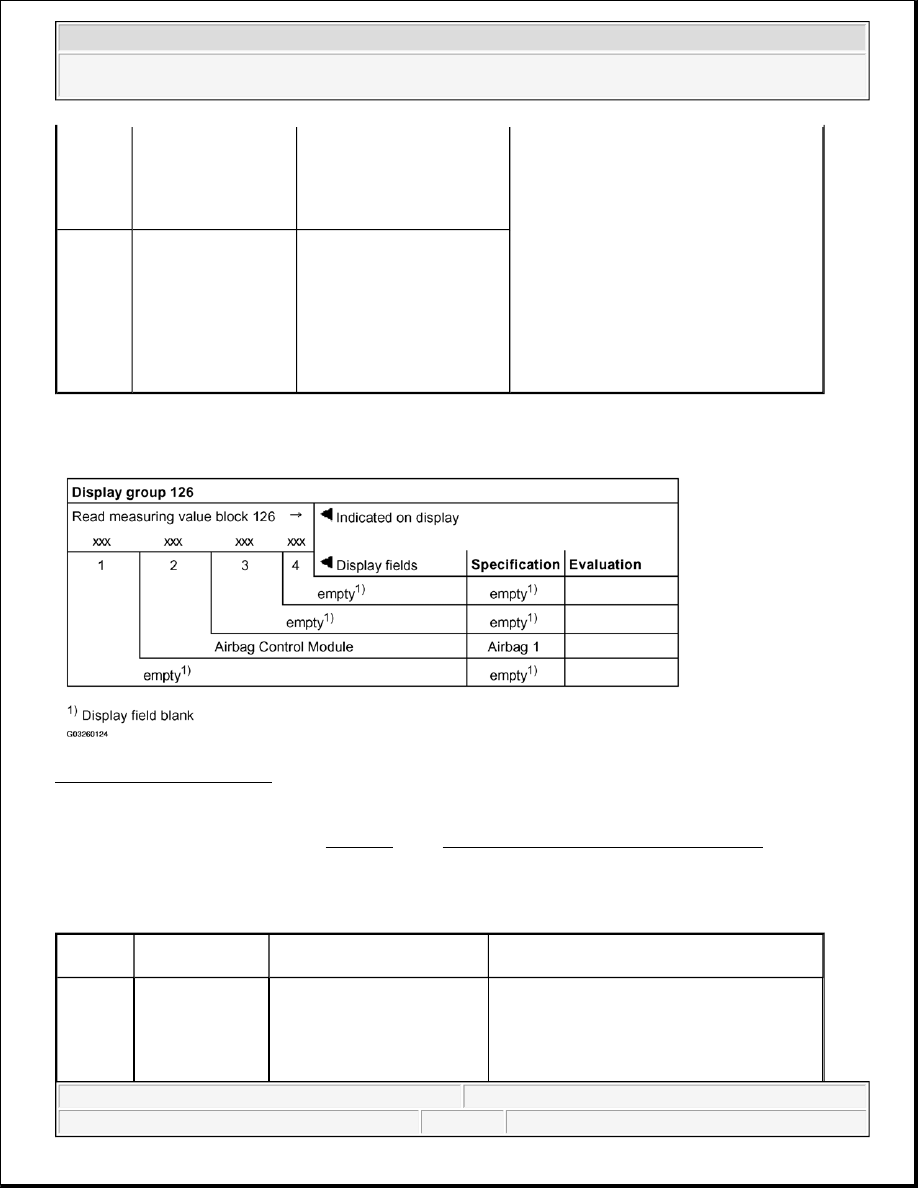
Display group 126 

Fig. 225: Display Group 126 
Courtesy of VOLKSWAGEN OF AMERICA, INC. 

Evaluating display group number 126 

EVALUATING DISPLAY GROUP NUMBER 126 

Data Bus network OK 

ABS 0 = not OK 

No data transfer from ABS 

control module over CAN 

Data Bus network

z

Check wiring and connections for 

CAN Data Bus to applicable control 

module using wiring diagram 

4

Airbag Control 

Module -J234-

Airbag 1 = OK 

Data transfer from airbag 

control module over CAN 

Data Bus network OK 

Airbag 0 = not OK, 

No data transfer from airbag 

control module over CAN 

Data Bus network

NOTE:

For evaluation of Fig. 225 , see Evaluating display group number 126 .

Display 
field

Description

Display

Corrective actions

2

Airbag control 

module -J234-

Airbag 1 = OK 

Data transfer from airbag 

control module over CAN 

Data Bus network OK 

Airbag 0 = not OK 

No data transfer from sensor or control 

module over CAN Data Bus network (code 

0): 

z

Check wiring and connections for 


2003 Volkswagen New Beetle GLS 

1998-2004 ACCESSORIES & EQUIPMENT On Board Diagnostic (OBD) - New Beetle (Instrument Cluster, Data Bus & 

Anti-theft Immobilizer)


ANTI-THEFT IMMOBILIZER, ON BOARD DIAGNOSTIC (OBD) 

GENERAL INFORMATION 

Anti-theft immobilizer system/component description and repairs: See ANTI-THEFT IMMOBILIZER .

No data transfer from airbag 

control module over CAN 

Data Bus network

CAN Data Bus to airbag control 

module using wiring diagram 

NOTE:

All anti-theft immobilizer OBD program functions must be performed using the 
VAS 5051 Vehicle Diagnostic Testing and Information System in operating 
mode "Guided Fault Finding" or "Vehicle Self-Diagnosis".


2003 Volkswagen New Beetle GLS 

1998-2004 ACCESSORIES & EQUIPMENT On Board Diagnostic (OBD) - New Beetle (Instrument Cluster, Data Bus & 

Anti-theft Immobilizer)


1998-2004 ACCESSORIES & EQUIPMENT

Radio, Telephone, Navigation, Trip Computer - New Beetle 

RADIO SYSTEM "PREMIUM V" AND "PREMIUM V - MONSOON", ON 
BOARD DIAGNOSTIC (OBD) 

GENERAL INFORMATION 

Radio system "Premium V" is installed from start of production. 

Radio system "Premium V - Monsoon" is installed as optional equipment from 10.00 production. 

Before troubleshooting or servicing, technicians must be familiar with the functions and operation specifics of 
the applicable standard or optional radio system. Always read the radio owner's manual and review all radio, 
tape player and CD changer functions. 

The radio is controlled by an internal microprocessor with On Board Diagnostic (OBD) capability. If 
malfunctions occur in monitored components, Diagnostic Trouble Codes (DTC) will be stored in memory 
together with an indication of malfunction type. A maximum of 4 DTCs can be stored simultaneously. 

Sporadic malfunctions (indicated in the readout by "SP") are automatically cancelled if not repeated in the next 
50 engine starts. 

Before performing any troubleshooting or inspection, always begin by checking for DTCs using the On Board 
Diagnostic (OBD) program. DTCs stored in memory are retrieved/checked with VAG 1551/1552 Scan Tools 
(ST) or VAS 5051 Vehicle Diagnostic Testing and Information System. 

Notes on exchanging radio 

z

Do not disassemble radio.  

z

When the replacement of a malfunctioning radio is necessary, follow exchange part procedures.  

z

Complete the report form and return together with radio.  

z

Use the original packaging from the new radio when returning.  

Additional information: 

z

Complaint/symptom based Technical Bulletins ("Service Fixes"):  

z

Technical Bulletins  

z

Radio system descriptions. See Radio, "Premium V" .  

VAG 1551 SCAN TOOL (ST), CONNECTING, SELECTING FUNCTIONS & CHECKING CONTROL 
MODULE VERSIONS 

NOTE:

The following description deals only with the VAG 1551 scan tool.


2003 Volkswagen New Beetle GLS 

1998-2004 ACCESSORIES & EQUIPMENT Radio, Telephone, Navigation, Trip Computer - New Beetle


2003 Volkswagen New Beetle GLS 

1998-2004 ACCESSORIES & EQUIPMENT Radio, Telephone, Navigation, Trip Computer - New Beetle


Connecting VAG1551 scan tool and selecting functions

Requirements 

z

All fuses OK according to wiring diagram  

z

Battery (B+) voltage at least 9.0 V  

Special tools and equipment 

z

VAG1551 Scan Tool (ST)  

z

VAG1551/3B adapter cable  

Check control module version (function 01) 

The Data Link Connector (DLC) is located under the instrument panel to the left. 

z

Connect VAG1551 scan tool using VAG1551/3B adapter cable.  

Indicated on display. Operating modes 1 and 2 are displayed alternately. 

Fig. 1: VAG 1551 Scan Tool Display - Connecting VAG 1551 Scan Tool (1 Of 10) 
Courtesy of VOLKSWAGEN UNITED STATES, INC. 

NOTE:

z

If the display remains blank, check VAG1551 voltage supply according to 
wiring diagram.  

z

Additional operating instructions can be printed out by pressing the HELP 
button.  

z

The --> button is used to advance through the program sequence.  


2003 Volkswagen New Beetle GLS 

1998-2004 ACCESSORIES & EQUIPMENT Radio, Telephone, Navigation, Trip Computer - New Beetle


Content   ..  441  442  443  444   ..