Volkswagen New Beetle. Manual - part 404
 

  Index      Volkswagen     Volkswagen New Beetle 1998-2008 year - service repair manual


Search            


Content   ..  402  403  404  405   ..


Volkswagen New Beetle. Manual - part 404


Fig. 95: Removing Cable Connections From Roof
Courtesy of VOLKSWAGEN UNITED STATES, INC.
 

z

Remove nut -2- and remove antenna. 

Fig. 96: Removing Antenna Nut 
Courtesy of VOLKSWAGEN UNITED STATES, INC. 

Installing 

Install in reverse order of removal, noting the following: 

z

Ensure gasket is properly oriented in relation to relief areas -arrows- on antenna base 


2003 Volkswagen New Beetle GLS 

1998-2004 ACCESSORIES & EQUIPMENT Radio, Telephone, Navigation, Trip Computer - New Beetle


Fig. 97: Installing Gasket On Antenna Base 
Courtesy of VOLKSWAGEN UNITED STATES, INC. 

z

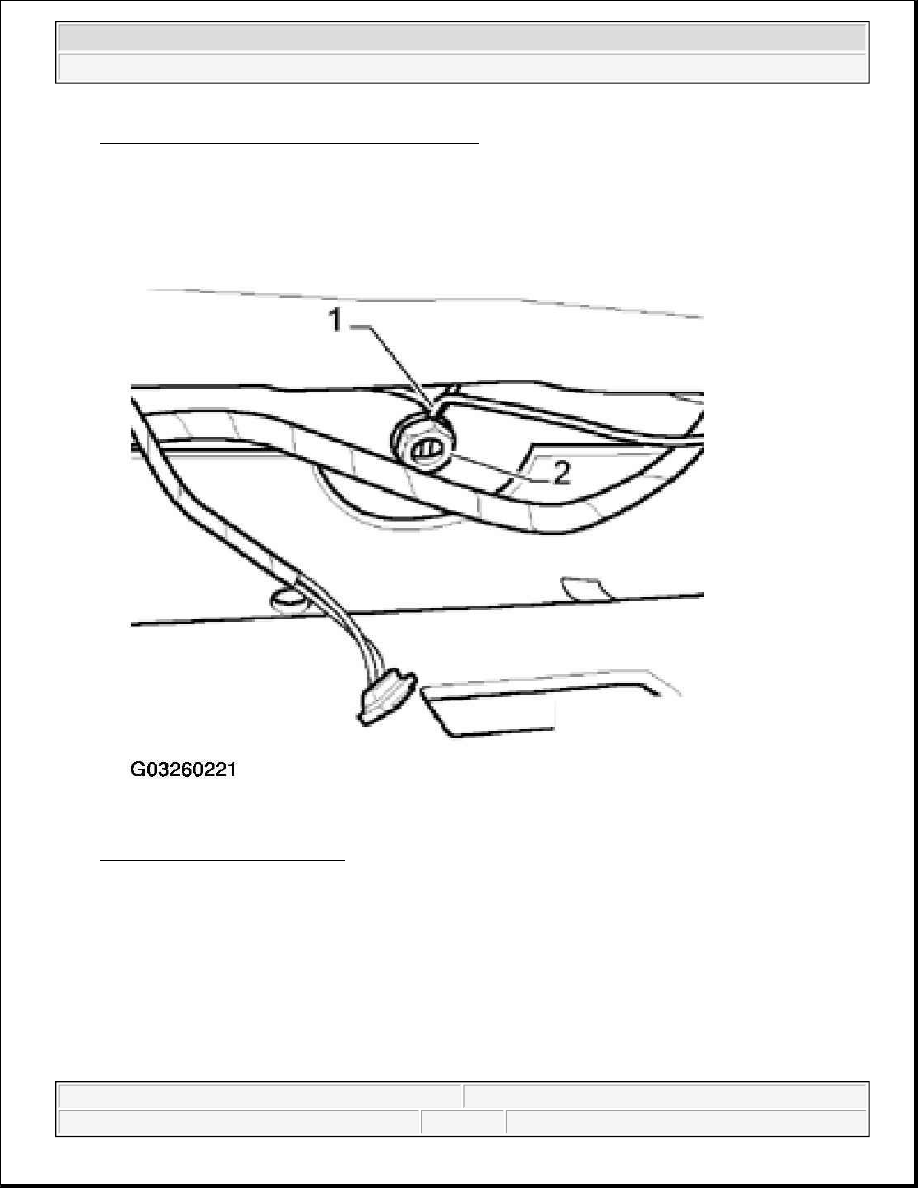
Ensure stress free routing of antenna cables -1- through nut -2-.  

z

Apply contact grease in area where nut/serrated washer contacts roof sheet metal. 


2003 Volkswagen New Beetle GLS 

1998-2004 ACCESSORIES & EQUIPMENT Radio, Telephone, Navigation, Trip Computer - New Beetle


Fig. 98: Installing Antenna Cables Nut 
Courtesy of VOLKSWAGEN UNITED STATES, INC. 

TELEPHONE MICROPHONE -R38-, REMOVING AND INSTALLING 

Telephone Microphone -R38- is integrated with the interior rear view mirror and cannot be removed or serviced 
separately. 

Removing 

z

Remove interior rear view mirror 

See INTERIOR REAR VIEW MIRROR, REMOVING AND INSTALLATION . 

Installing 

Install in reverse order of removal. 


2003 Volkswagen New Beetle GLS 

1998-2004 ACCESSORIES & EQUIPMENT Radio, Telephone, Navigation, Trip Computer - New Beetle


TELEMATICS SYSTEM, TROUBLESHOOTING USING TELEMATICS INDICATOR LAMP

The following allows technicians to perform an initial evaluation of Telematics system operation status for 
troubleshooting using the OnStar(R) telematics indicator lamp (and pre-recorded system messages where 
applicable). 

The telematic indicator lamp LED is located in the telematic control head. LED indications are red or green, 
lighting continuously, blinking slowly or quickly. 

Telematic system status can be determined via the LED with the ignition switched on and referenced from 
TELEMATICS LED INDICATION CHART table: 

TELEMATICS LED INDICATION CHART 

Indications, overview: 

z

LED is off when ignition is off.  

z

The green LED comes on after a self-check routine is performed (approx. 10- 15 seconds after ignition is 
switched on). Sending or receiving voice communication with the OnStar(R) call center is now possible. 
LED remains on even in areas without cellular coverage.  

z

The green LED slowly blinking indicates a communication request has taken place and the system is in 
the process of establishing a cellular connection.  

z

The red LED indicates a malfunction in the telematics hardware was determined during the self check.  

Condition - telematics indicator lamp "green" plus: 

z

message "unable to contact OnStar(R) and disconnect, 

NOTE:

This serves only as an initial evaluation only and is not meant to supercede 
detailed OBD program procedures carried out with VAS 5051 Vehicle Diagnostic 
Testing and Information System in operating mode "Guided Fault Finding"

LED indication

System status:

Off

No connection, no malfunction

Red - continuously

No connection, malfunction in telematics hardware

Green -continuously

After completion of self-test or when OBD program is performed

Red - blinking slowly

Establishing connection, malfunction in telematics hardware

Red - blinking quickly

Connection active, malfunction in telematics hardware

Green - blinking slowly

Establishing connection, no malfunction

Green - blinking quickly

Connection active, no malfunction

NOTE:

After pressing either the OnStar(R) or Emergency button, a recorded message 
announces: "connecting to OnStar," followed by progression tones. Normal 
connection time is 10 - 15 seconds. However, due to local cellular/GPS 
conditions, making a connection could take up to three minutes. Be patient.


2003 Volkswagen New Beetle GLS 

1998-2004 ACCESSORIES & EQUIPMENT Radio, Telephone, Navigation, Trip Computer - New Beetle


Content   ..  402  403  404  405   ..