Volkswagen New Beetle. Manual - part 2336


  Index      Volkswagen     Volkswagen New Beetle 1998-2008 year - service repair manual


Search            


Content   ..  2334  2335  2336  2337   ..


Volkswagen New Beetle. Manual - part 2336
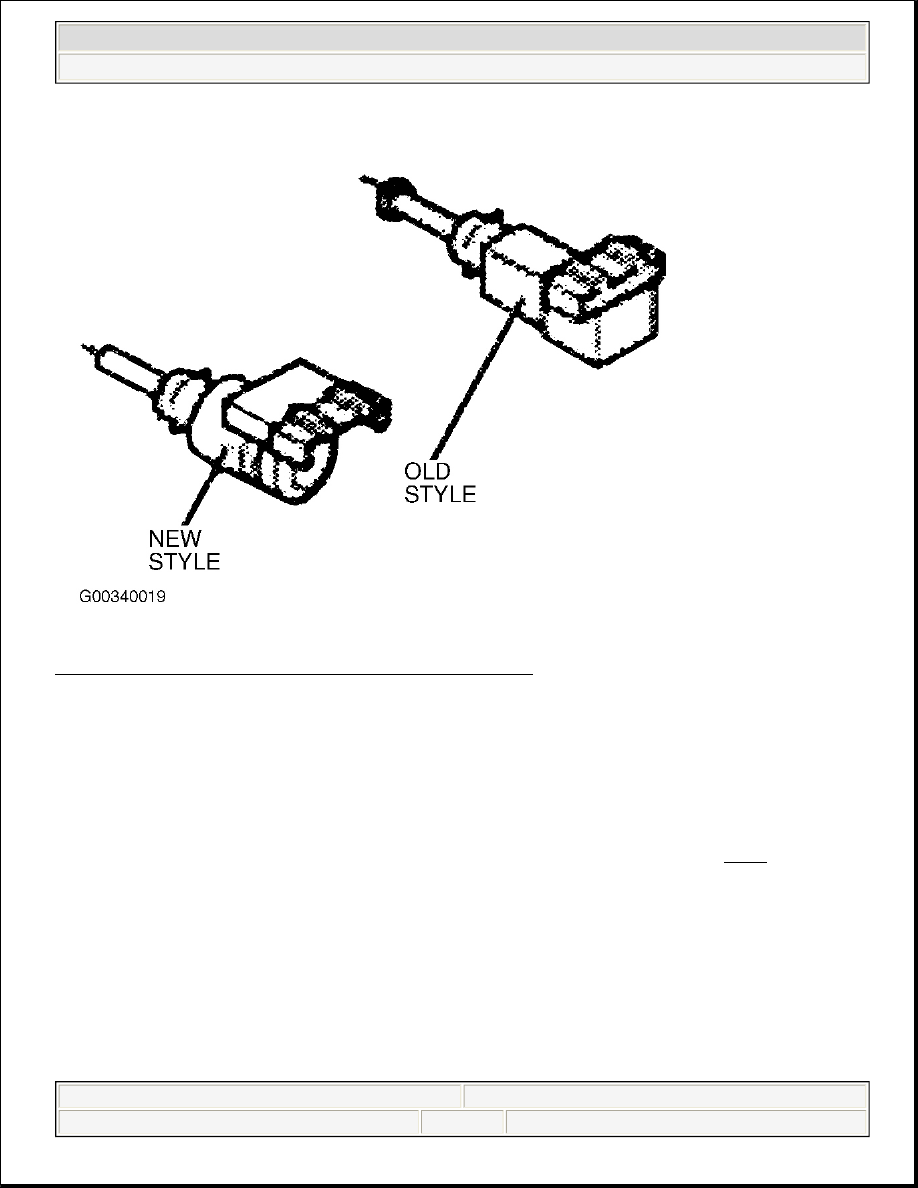


Fig. 3: Identifying "New Style" & "Old Style" Brake Switches 
Courtesy of VOLKSWAGEN UNITED STATES, INC. 

Brake Light Switch (Old Style) 

1. Remove driver's lower instrument panel cover. Disconnect brake light switch harness connector. Turn 

switch counterclockwise 90 degrees. Pull switch out from retainer mounting hole. See Fig. 4 .  

2. Pull plunger out completely. Depress and hold brake pedal in down position. Note orientation of retainer 

tabs on switch, and carefully insert switch into retainer mounting hole. Secure switch, by turning 
clockwise 90 degrees. Slowly release brake pedal to stop. This will automatically adjust switch plunger 
travel. Connect brake light switch harness connector. Check function of brake light switch. 

NOTE:

The following applies only to an existing, functional "old style" switch that is 
removed, reinstalled/adjusted. 


2003 Volkswagen New Beetle GLS 

2002-04 CLUTCHES Clutches - New Beetle (5 & 6 Speed, 02M)


Helpmelearn Repair Manuals 


Wednesday, December 14, 2005 9:05:53 AM

Page 5 

© 2004 Mitchell Repair Information Company, LLC. 

Fig. 4: Removing Brake Light Switch (Old Style) 
Courtesy of VOLKSWAGEN UNITED STATES, INC. 

Brake Light Switch (New Style) 

1. Remove driver's lower instrument panel cover. Disconnect brake light switch harness connector. Turn 

switch counterclockwise 45 degrees. Pull switch out from retainer mounting hole. Pull plunger 
completely out (arrow). See Fig. 5 .  

CAUTION: "New style" switches have an internal switch mechanism that will be 

damaged if not installed and adjusted accordingly. DO NOT depress 
switch plunger or otherwise rotate retaining collar of switch prior to 
installation. Brake pedal must be held in Up position (not depressed) 
during switch installation. 


2003 Volkswagen New Beetle GLS 

2002-04 CLUTCHES Clutches - New Beetle (5 & 6 Speed, 02M)


Helpmelearn Repair Manuals 


Wednesday, December 14, 2005 9:05:53 AM

Page 6 

© 2004 Mitchell Repair Information Company, LLC. 

2.  

Hold brake pedal in Up position (against stop). Note orientation of retainer tabs (1 and 2) on switch. 
Carefully insert switch into retainer mounting hold. Push switch in and seat fully into opening (pressing 
plunger against brake pedal to adjust). Once seated, secure switch by turning clockwise 45 degrees. This 
action turns plunger shoe into correct orientation to make electrical contacts in switch operate, as well as 
locks in plunger adjustment against brake pedal. Connect brake switch connector. Check function of 
brake light switch.  

Fig. 5: Adjusting Brake Light Switch (New Style) 
Courtesy of VOLKSWAGEN UNITED STATES, INC. 

SELECTOR MECHANISM 

CAUTION: When installing, switch must be rotated until it is fully locked and 

electrical connector is in horizontal position. Inspect to ensure 
internal stop pin on retaining collar is fully seated against outer shell. 

NOTE:

To ensure correct gear selector adjustment, moving parts of selector 
mechanism and transmission elements must be in proper condition. Selector 
mechanism must move freely. See Fig. 6 . Transmission, clutch and clutch 
mechanism must also be in proper condition. Transmission is in Neutral 
position. 


2003 Volkswagen New Beetle GLS 

2002-04 CLUTCHES Clutches - New Beetle (5 & 6 Speed, 02M)


Helpmelearn Repair Manuals 


Wednesday, December 14, 2005 9:05:53 AM

Page 7 

© 2004 Mitchell Repair Information Company, LLC. 

Fig. 6: Identifying Gear Selector Mechanism Components 
Courtesy of VOLKSWAGEN UNITED STATES, INC.


2003 Volkswagen New Beetle GLS 

2002-04 CLUTCHES Clutches - New Beetle (5 & 6 Speed, 02M)


Helpmelearn Repair Manuals 


Wednesday, December 14, 2005 9:05:53 AM

Page 8 

© 2004 Mitchell Repair Information Company, LLC. 


Content   ..  2334  2335  2336  2337   ..