Volkswagen Golf Variant / Jetta. Manual - part 510
 

  Index      Volkswagen     Volkswagen Golf Variant (2007), Jetta (2005) - service repair manual


Search            


Content   ..  508  509  510  511   ..


Volkswagen Golf Variant / Jetta. Manual - part 510


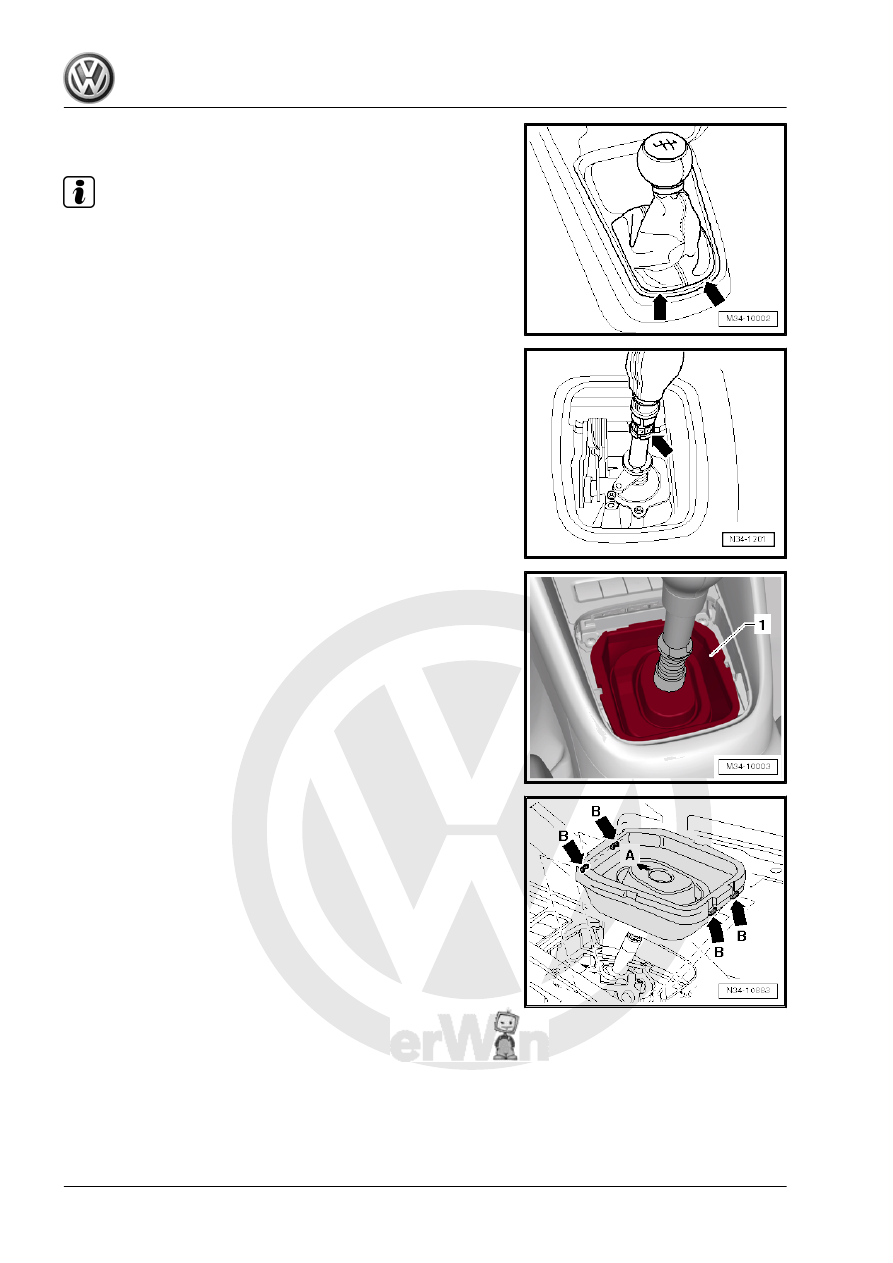
console or pry it out carefully -arrows-.

Note

On some equipment versions, the boot must be pryed out at the

front area.

– Fold the boot with the center console cover up over the shifter

knob.

– Open the clamp -arrow- and remove the shift knob and boot.
In some equipment versions, the center console cover remains in

the center console.
– Pull the center console cover out or pry it out carefully.

– Remove the noise insulation -1-.
Installing
– Install the noise insulation.

Installation Location, Noise Insulation:
• -Arrow A- points in direction of travel.
• The tabs -arrows B- must latch into the center console.
– Press the center console cover into the center console.
– Then turn inner side of boot toward outside.
Install the shift knob all the way on.

56

clamp -arrow- together.

– Press the boot and the cover into the center console or press

the boot into the cover.

1.5

Overview - Gearshift Lever and Gearshift Housing, through 10/2006

Note

Lubricate the bearing areas and the sliding surfaces. Refer to the Parts Catalog for the grease allocation.

1 - Lock Washer

❑ Removing and instal‐

ling. Refer to

⇒ Fig. ““Removing and

Installing the Lock

Washer”“ , page 59

 .

2 - Bushing
3 - Pressure Spring
4 - Bushing
5 - TORX® Bolt

❑ 5 Nm

6 - Cover
7 - Insulation
8 - Insulation
9 - Bearing Shell
10 - Gearshift Lever Guide
11 - Washer
12 - Seal

❑ Between the gearshift

housing and the under‐

body

❑ Self-adhesive
❑ Affix to the gearshift

housing

13 - Gearshift Lever
14 - Gearshift Housing
15 - Bearing Bushing
16 - Mounting Pin
17 - Guide Bushing
18 - Pressure Spring

❑ Installing. Refer to 

⇒ Fig. ““Installing the Pressure Spring”“ , page 59

 .

1. Shift Mechanism, Servicing    

57

❑ 5 Nm

21 - Seal

❑ Replace after removing

22 - Base Plate

❑ Bend the tabs in order to remove
❑ Replace after removing

23 - Selector Cable

❑ To the selector bracket
❑ Removing and installing. Refer to

⇒ Fig. ““Detaching from the Selector Cable and the Shift Cable and Attaching”“ , page 58

 .

24 - Gearshift Cable

❑ Removing from the shift lever guide and attaching to the shift lever guide. Refer to

⇒ Fig. ““Detaching from the Selector Cable and the Shift Cable and Attaching”“ , page 58

25 - Lock Washer

❑ Replace after removing

26 - Nut

❑ M 8: 25 Nm
❑ M 6: 8 Nm
❑ Quantity: 4

27 - Bearing Bushing

❑ Fits in one position only

28 - Lock Washer

❑ Replace after removing

Detaching from the Selector Cable and the Shift Cable and At‐

taching
– Remove the lock washer from the shift cable -A- and the se‐

lector cable -B-.

Lift the tab with a screwdriver -arrow 1- and remove the lock

washer -arrow 2-.
– Remove the shift cable -A- from the gearshift lever mount.
– Remove the selector cable -B- from the selector bracket

mount.

58

-arrow C- and remove or install the lock washer -arrow A-.

Note

Do not tilt the bushing when pushing it down.

The slot in the lever for the circlip must be visible.

Carefully release the tension on the spring.

Installing the Pressure Spring
– Install the compression spring so that the brace -A- contacts

upper part of pin -arrow-.

– Pull the brace -B- downward so that it reached the bottom of

the pin -arrow-.

1.6

Gearshift Lever and Gearshift Housing,

from 11/2006

⇒ “1.6.1 Overview - Gearshift Lever and Gearshift Housing, from

11/2006”, page 59
⇒ “1.6.2 Selector Mechanism, Disassembling and Assembling”,

page 61

1.6.1

Overview - Gearshift Lever and Gearshift Housing, from 11/2006

Note

Lubricate the bearing areas and the sliding surfaces. Refer to the Parts Catalog for the grease allocation.

Gearshift Mechanism, Disassembling and Assembling. Refer to

⇒ “1.6.2 Selector Mechanism, Disassembling and Assembling”, page 61

 .

1. Shift Mechanism, Servicing    

59


Content   ..  508  509  510  511   ..