Volkswagen Golf Variant / Jetta. Manual - part 492
 

  Index      Volkswagen     Volkswagen Golf Variant (2007), Jetta (2005) - service repair manual


Search            


Content   ..  490  491  492  493   ..


Volkswagen Golf Variant / Jetta. Manual - part 492


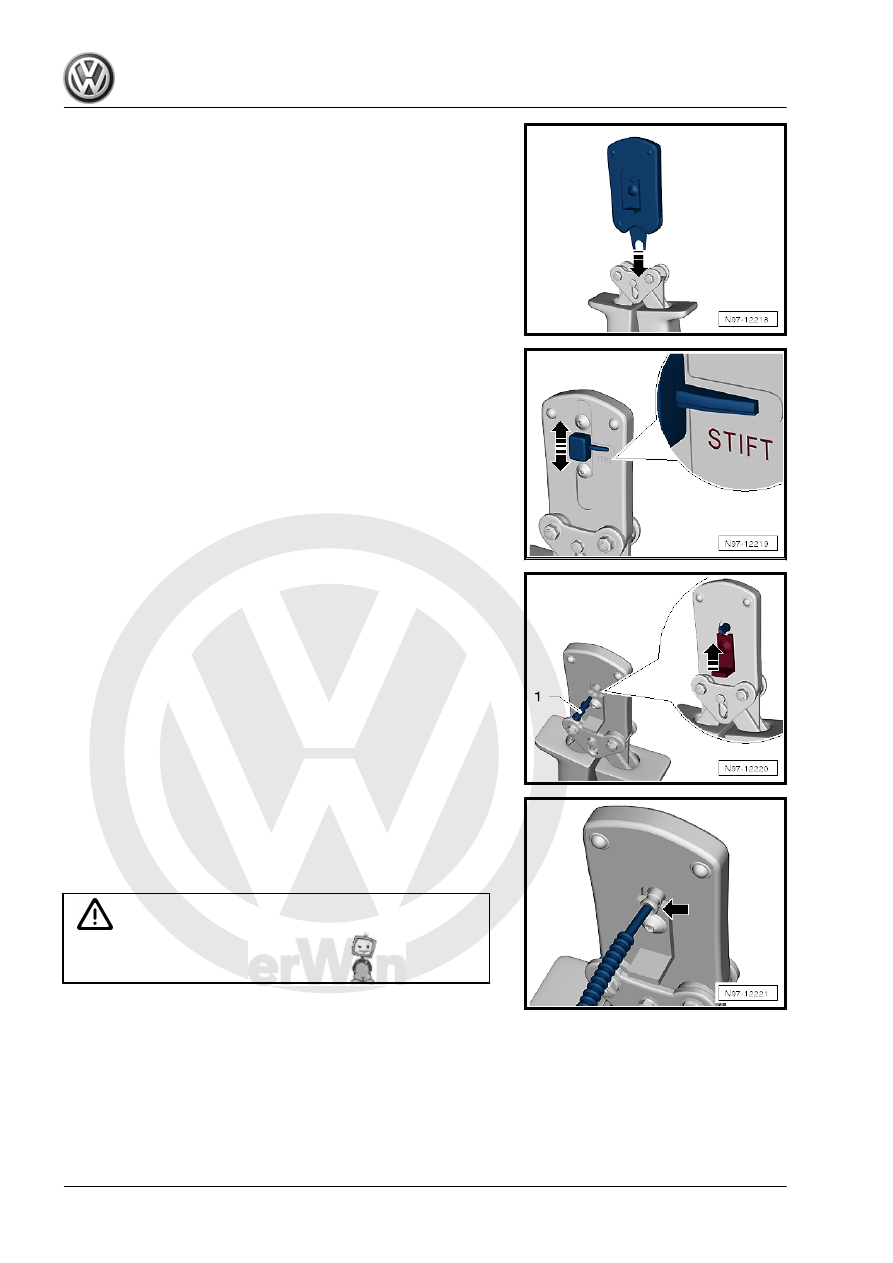
– Slide the safeguard on the Fiber-Optic Repair Set - Pliers -

VAS6223/1- in direction of the -arrow- so that the word

“Stift” (pin) is legible.

– Insert a brass pin contact -1- in the mount.
– Close the securing lever on the Fiber-Optic Repair Set - Pliers

- VAS6223/1- in the direction of the -arrow-.

– Insert the fiber-optic cable into the brass pin contact -arrow-

all the way up to the threaded stop and then close the Fiber-

Optic Repair Set - Pliers - VAS6223/1- .

– Open the fiber-optic cable pliers and remove the fiber-optic

cable along with the brass contact pin.

Caution

Do not excessively bend or kink the fiber-optic cables (mini‐

mum bending radius 25 mm).

Beetle 2012 ➤ , Golf 2015 ➤ , Golf Variant 2007 ➤ , Golf Variant 2010 ➤ ...

128

fiber-optic cable -1-.

• 4 crimped points must be visible on the brass connecting pin.
• The brass pin contact must not be able to be removed by hand

from fiber-optic cable.

• The front surface of the fiber-optic cable is 0.01 to 0.1 mm

behind the brass pin contact (visual check).

Note

Connector couplings are available for connecting the fiber-op‐

tic cables. Refer to Parts Catalog.

To install the new fiber optic cable in wiring harness connector.

Refer to

⇒ “6.3 Fiber-Optic Cable, Disconnecting from Wiring Harness

Connector”, page 130

 .

Corrugated Tube, Install on Fiber Optic Cable.

– Cut the corrugated tube to the fitting length using Hose Cutting

Pliers - VAS6228- .

• The corrugated tube must be cut on the wave peak -arrow-,

not in the wave trough.

• Use the Hose Cutting Pliers - VAS6228- or a sharp knife for

cutting.

• The corrugated tube must not be cut using a side cutter under

any circumstances.

• The corrugated tube must audibly engage in the fiber-optic

cable housing when installing.

– Guide the fiber-optic cable into the Fiber-Optic Repair Set -

Tube Tool - VAS6223/10- .

– Position corrugated tube assembly pliers on slot on the tube.
– Position crimping pliers for fiber-optic cable at slot of corruga‐

ted tube. The fiber optic cable is then routed in the corrugated

tube.

Beetle 2012 ➤ , Golf 2015 ➤ , Golf Variant 2007 ➤ , Golf Variant 2010 ➤ ...

6. Fiber-Optic Cable    

129

Fiber-Optic Cable, Disconnecting from

Wiring Harness Connector

Removing
– Unplug connector for fiber optic cable from appropriate control

unit.

– Release the locking mechanism in the fiber-optic cable con‐

nector -1- by pushing on it.

– Release the secondary lock -2- with a small screwdriver.
– Remove the fiber-optic cable.

Caution

♦ Install the cap on the trunk, in order to protect the fiber-

optic cable from dust and dirt.

♦ Use a new housing since it is likely that the secondary lock

was damaged during the removal of the fiber-optic cable.

♦ Note the arrows on the base module for allocation “IN” and

“OUT”.

Installing
Install in the reverse order of removal. Note the following:
– Install the fiber-optic cable according to the markings.

Note

Push the corrugated tube into the connector housing until it

audibly engages.

Seal open fiber-optic cable connector -2- with Fiber-Optic Re‐

pair Set - Connector Protective Caps - VAS6223/9- -item 1-.

The protective cap prevents contamination of or mechanical

damage to front surface of fiber optic cable which would impair

signal transmission.

Beetle 2012 ➤ , Golf 2015 ➤ , Golf Variant 2007 ➤ , Golf Variant 2010 ➤ ...

130

Heated Oxygen Sensor, Replacing

⇒ “7.1 Heated Oxygen Sensor, Replacing, 4-Pin Universal Oxy‐

gen Sensor”, page 131
⇒ “7.2 Heated Oxygen Sensor, Replacing, 6-Pin Universal Oxy‐

gen Sensor”, page 131
⇒ “7.3 Oxygen Sensor Unit Protective Pipes”, page 132

7.1

Heated Oxygen Sensor, Replacing, 4-

Pin Universal Oxygen Sensor

Use the faulty sensor as a guide for installing all of the accompa‐

nying attachments, cable ties or marking bands.
Do not repair the heated oxygen sensor wires. Repairing may re‐

sult in malfunctions.
Procedure
– Remove the faulty heated oxygen sensor.
– Lay both of the heated oxygen sensors next to each other so

the sensor housings are the same level.

– Tie the excess length of the sensor (approximately 50 to 250

mm) back so it is the same length as the faulty sensor and

secure it with cable ties -1-.

– Check if the heated oxygen sensor connector housing is com‐

patible with the vehicle electrical system side.

– Replace the vehicle electrical system connector with the pro‐

vided heated oxygen sensor connector housing. Refer to

⇒ “3.2 Connector Housings and Connectors, Repairing”, page

112

 .

Note

Only replace the connector housing on older vehicles. The

connector housing is correct on new vehicles.

Check the pin assignment. The individual pins in the new con‐

nector housing are marked with colors.

The packaging for the new heated oxygen sensor contains

additional information.

– Install the new heated oxygen sensor in the vehicle.

7.2

Heated Oxygen Sensor, Replacing, 6-

Pin Universal Oxygen Sensor

Use the faulty sensor as a guide for installing all of the accompa‐

nying attachments, cable ties or marking bands.

Beetle 2012 ➤ , Golf 2015 ➤ , Golf Variant 2007 ➤ , Golf Variant 2010 ➤ ...

7. Heated Oxygen Sensor, Replacing    

131


Content   ..  490  491  492  493   ..