Volkswagen Golf Variant / Jetta. Manual - part 103
 

  Index      Volkswagen     Volkswagen Golf Variant (2007), Jetta (2005) - service repair manual


Search            


Content   ..  101  102  103  104   ..


Volkswagen Golf Variant / Jetta. Manual - part 103


tion Position:
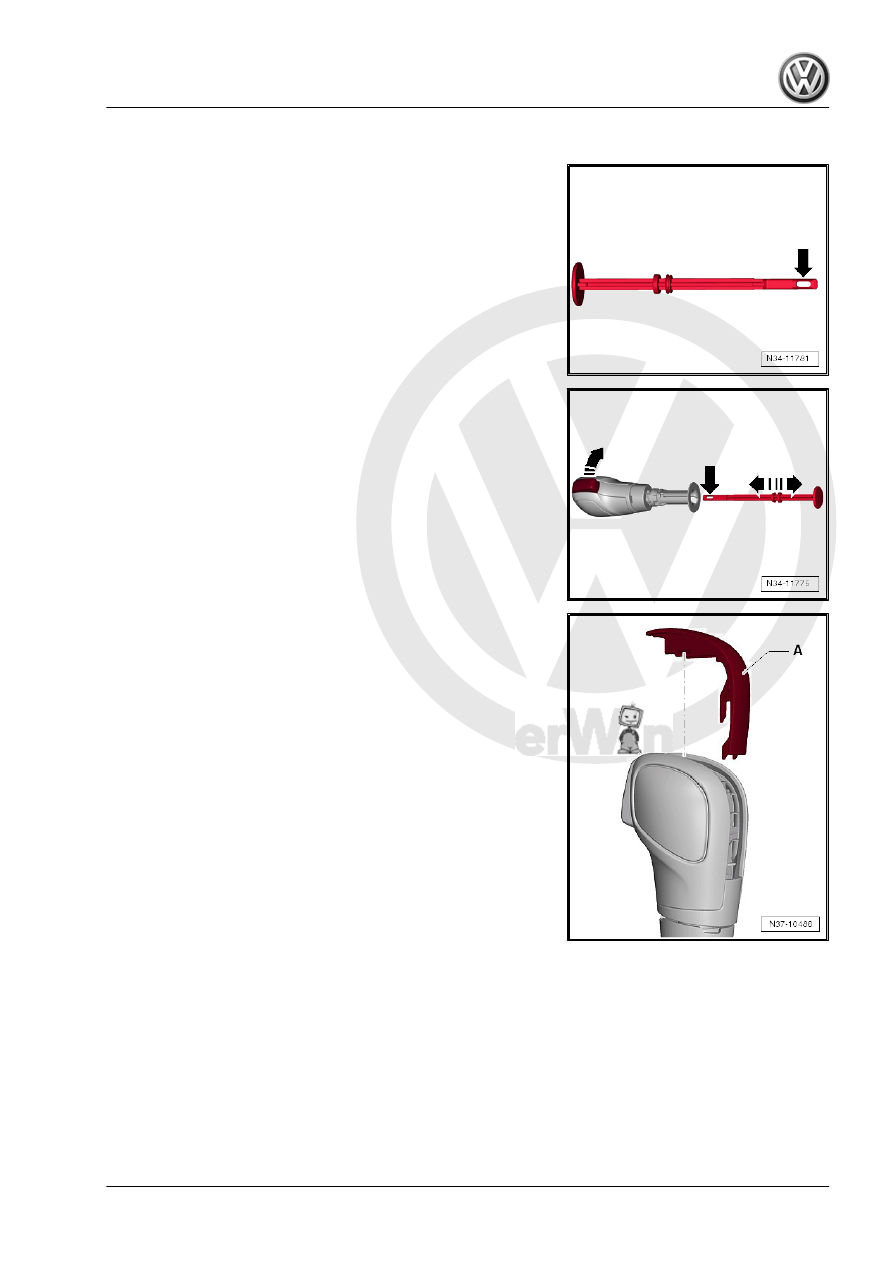
When using an assembly fastener, make sure that it has an eye

-arrow- at the front. Other assembly fasteners are not suitable.

– With the button pressed and push the assembly fastener (with

the eye) -arrow- all the way in until it latches into the assembly

fastener. Then release the button. The button locks into the

installation position when the assembly fastener is pulled out.

Moving the Handle »without« an Assembly Fastener into the In‐

stallation Position:

– Carefully unclip the handle trim -A- upward.

4. Selector Mechanism through 02/2009    

43

a screwdriver. This pushes the button -3- into the installation

position.

-I- the button is in the pressed position
-II- the button is in the installation position

Note

Push the lever into the groove and no farther.

Clip the handle trim back onto the selector mechanism only

after the handle is installed. This way it is possible to see if the

small lever engages into the pull rod when the button is push‐

ed.

4.9

Selector Mechanism, Checking

⇒ “4.9.1 Selector Lever in P and Ignition Switched On”,

page 44
⇒ “4.9.2 Selector Lever in N and Ignition Switched On”,

page 44
⇒ “4.9.3 Selector Level in Tiptronic Position”, page 45
⇒ “4.9.4 Ignition and Lights Switched On”, page 45
⇒ “4.9.5 Transmission Range Display”, page 45

Starter must not be able to be operated in selector lever positions

“R”, “D”, “S” and in tiptronic position.
Over 5 km/h (3.1 mph)
The shift lock solenoid must not block the selector lever when the

lever is in “N” position. The selector lever can be moved back into

a another driving mode.
Below 5 km/h (3.1 mph)
In the selector lever is moved into the “N” position the shift lock

solenoid can block the selector lever after approximately one sec‐

ond. The selector lever can only be moved out of “N” when the

brake pedal is pressed.

4.9.1

Selector Lever in “P” and Ignition

Switched On

• If the brake pedal is not depressed:
The selector lever is locked and cannot be moved out of “P” when

the button is pressed. The shift lock solenoid blocks the selector

lever.
• If the brake pedal is depressed:
The shift lock solenoid releases the selector lever. It is possible

to select a gear. Move the selector lever slowly from “P” through

“S”; while doing this, check whether the selector lever position

displayed in instrument cluster matches actual selector lever po‐

sition.

4.9.2

Selector Lever in “N” and Ignition

Switched On

• If the brake pedal is not depressed:

44

the button is pressed. The shift lock solenoid blocks the selector

lever.
• If the brake pedal is depressed:
The shift lock solenoid releases the selector lever. It is possible

to select a gear.

4.9.3

Selector Level in “Tiptronic” Position

• Move the selector lever into the tiptronic gate:
The “D” symbol illumination must go out in the selector mecha‐

nism cover and the “+” and “-” symbols must turn on.
The selector lever position display in the instrument cluster must

change from “P R N D S” to “6 5 4 3 2 1” when the selector lever

is moved into the tiptronic gate.

4.9.4

Ignition and Lights Switched On

The respective symbol is being lit up in the selector mechanism

cover.

4.9.5

Transmission Range Display

Simultaneous lighting of all segments on the transmission range

display indicates the transmission is in emergency mode.

4. Selector Mechanism through 02/2009    

45

Selector Mechanism from 03/2009

⇒ “5.1 Overview - Selector Mechanism from 03/2009”,

page 46
⇒ “5.2 Selector Mechanism, Removing and Installing, Vehicles

from 03/2009”, page 47

WARNING

Move the selector lever into “P” and set the parking brake be‐

fore working with the engine running.

Gearshift mechanism, vehicles through 02/2009. Refer to

⇒ “4 Selector Mechanism through 02/2009”, page 24

 .

5.1

Overview - Selector Mechanism from 03/2009

1 - Shift Cover with Handle

❑ Do not remove the han‐

dle unnecessarily. Un‐

clip only the cover for

the emergency release.

Refer to

⇒ “4.6 Selector Lever,

Emergency Release”,

page 39

 .

❑ Removing and instal‐

ling. Refer to

⇒ “4.7 Selector Lever

Handle, Removing and

Installing”, page 40

 .

2 - Selector Lever and Selector

Mechanism with Selector Lev‐

er Cable

❑ With integrated Selector

Lever Sensor System

Control Module - J587-

with Selector Lever -

E313- , Tiptronic Switch

- F189- , Selector Lever

Park Position Lock

Switch - F319- and Shift

Lock Solenoid - N110- .

❑ The selector lever cable

can only be replaced to‐

gether with the selector

mechanism. Refer to

⇒ “5.2 Selector Mecha‐

nism, Removing and In‐

stalling, Vehicles from

03/2009”, page 47

 .

❑ Do not grease the selec‐

tor lever cable.

❑ Removing and instal‐

ling. Refer to

⇒ “5.2 Selector Mechanism, Removing and Installing, Vehicles from 03/2009”, page 47

 .

❑ Checking. Refer to 

⇒ “4.4 Selector Lever Cable, Checking”, page 37

 .

❑ Adjusting. Refer to 

⇒ “4.5 Selector Lever Cable, Adjusting”, page 38

 .

46


Content   ..  101  102  103  104   ..