Mercedes-Benz ML320. Service manual - part 715
 

  Index      Mercedes     Mercedes-Benz ML320 - service and repair manual 1997-2005 year


Search            copyright infringement  


Content   ..  713  714  715  716   ..


Mercedes-Benz ML320. Service manual - part 715


AR54.30-P-6031GH

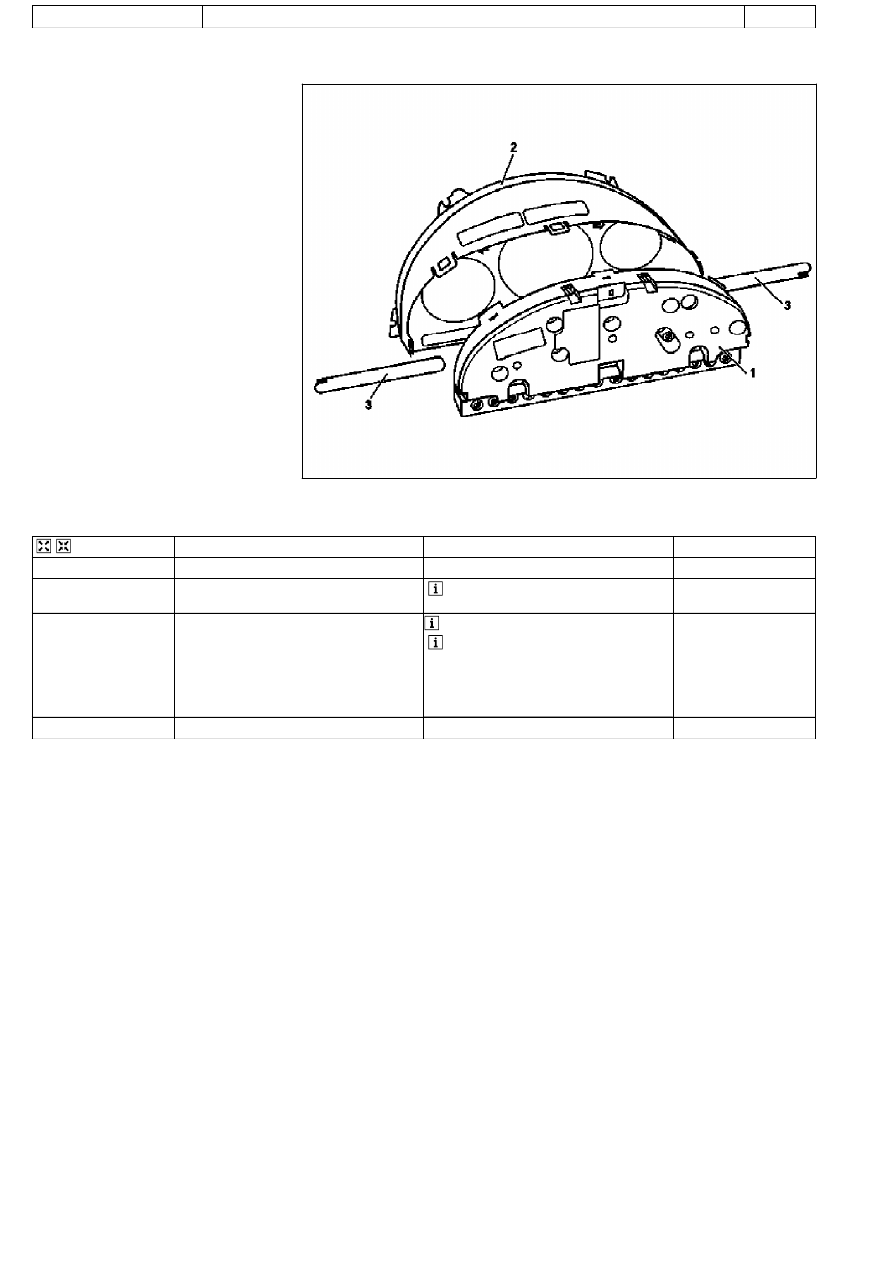
Removing and installing instrument cluster housing

21.1.97

MODEL 

163

P54.30-0631-06

1

Cover

2

Instrument cluster housing

3

Symbol strip


Removing, installing

1

Remove instrument cluster

AR54.30-P-6015GH

2

Unclip retaining lugs (arrows)


Installation: The retaining lugs must lock 

fully in position.

3

Remove cover (1) from instrument cluster 
housing (2)

 The symbol strips (3) may fall out sideways.


Installation: 

Pay attention to vehicle equipment when 
replacing symbol strips.
Ensure the adjusting knobs for the odometer 
and electronic clock are seated correctly.

4

Install in reverse order

Copyright DaimlerChrysler AG  09.05.2006 CD-Ausgabe G/10/04 . This WIS print-out will not be recorded by Modification services.

Page 1

AR54.30-P-6015GH

Remove instrument cluster

20.1.97

MODEL 

163.113 /128 /136 /154 /157 /172 /174 /175

P54.25-2680-06

Steering wheel removed for clarity

3

Upper steering column cover

12

Side covering

P54.30-0630-06

Steering wheel removed for clarity

4

Clips

5

Frames

6

Hook

7

Lug

8

Mount

9

Screw

10

Spreading clips

11

Connector

13

Mount

A1

Instrument cluster


Remove, Install

1

Disconnect ground cable of battery


To prevent unintended contact, insulate 

the ground lead cable lug.

AR54.10-P-0003A

2

Unlock steering wheel and move to its lowest 
position

 See Operating Instructions

3

Remove upper steering column cover (3)

 Risk of fracturing! Do not scratch the 

steering wheel.

 Only as of VIN A145273, X708319: 

Loosen clips on the side and front. Gently 
squeeze the cover together and pull out 
between the steering wheel and instrument 
panel.

Copyright DaimlerChrysler AG  09.05.2006 CD-Ausgabe G/10/04 . This WIS print-out will not be recorded by Modification services.

Page 1

4

Remove side covers (12)

 Danger of breaking retaining lugs. Do not 

damage instrument panel.


Up to VIN A145272, X708318: 3 covers: 

Remove side covers first. Detach center 
cover from instrument panel and rotate so 
that the retaining lugs point upwards. Then 
pull out to the right.
As of VIN A145273, X708319: 2 covers: First 
remove the right cover, then the left. It is not 
necessary to detach the connectors. The 
covers can remain attached to the wiring 
harness.


Long wedge

*115589035900

5

Remove frame (5) of instrument cluster

 Lift clips carefully, risk of fracture.

 Push the clips (4) outwards (arrow 

direction A) and ease the frame down towards 
the footwell (arrow direction B) until the top of 
the frame disengages.

Installation: Insert the hooks (6) of the 

frame into the bracket (13) and push the 
frame upwards until the clips snap into place.

Installation: Insert the lugs (7) on the 

frame into the receptacles (8) on the 
instrument cluster.

6

Unscrew screws (9)

7

Remove expanding clips (10)

8

Pull instrument cluster (A1) forwards

9

Unlock, open and pull off connector (11)

10

Remove instrument cluster

 Make sure the steering wheel is not 

scratched.

 Tilt the upper edge of the instrument 

cluster towards the steering wheel and move 
to the right out of the instrument panel.

11

Install in the reverse order

12

Perform function check

a


Instrument cluster (IC) diagnosis operational 
check

AD54.30-P-3000A

Assembly wedge

115 589 03 59 00

Copyright DaimlerChrysler AG  09.05.2006 CD-Ausgabe G/10/04 . This WIS print-out will not be recorded by Modification services.

Page 2


Content   ..  713  714  715  716   ..