Mercedes-Benz ML320. Service manual - part 90
 

  Index      Mercedes     Mercedes-Benz ML320 - service and repair manual 1997-2005 year


Search            copyright infringement  


Content   ..  88  89  90  91   ..


Mercedes-Benz ML320. Service manual - part 90


187

Controls in detail

Useful features

Compass

The compass displays the direction the ve-
hicle is traveling. The display 3 will show 
you N, NE, E, SE, S, SW, W or NW.

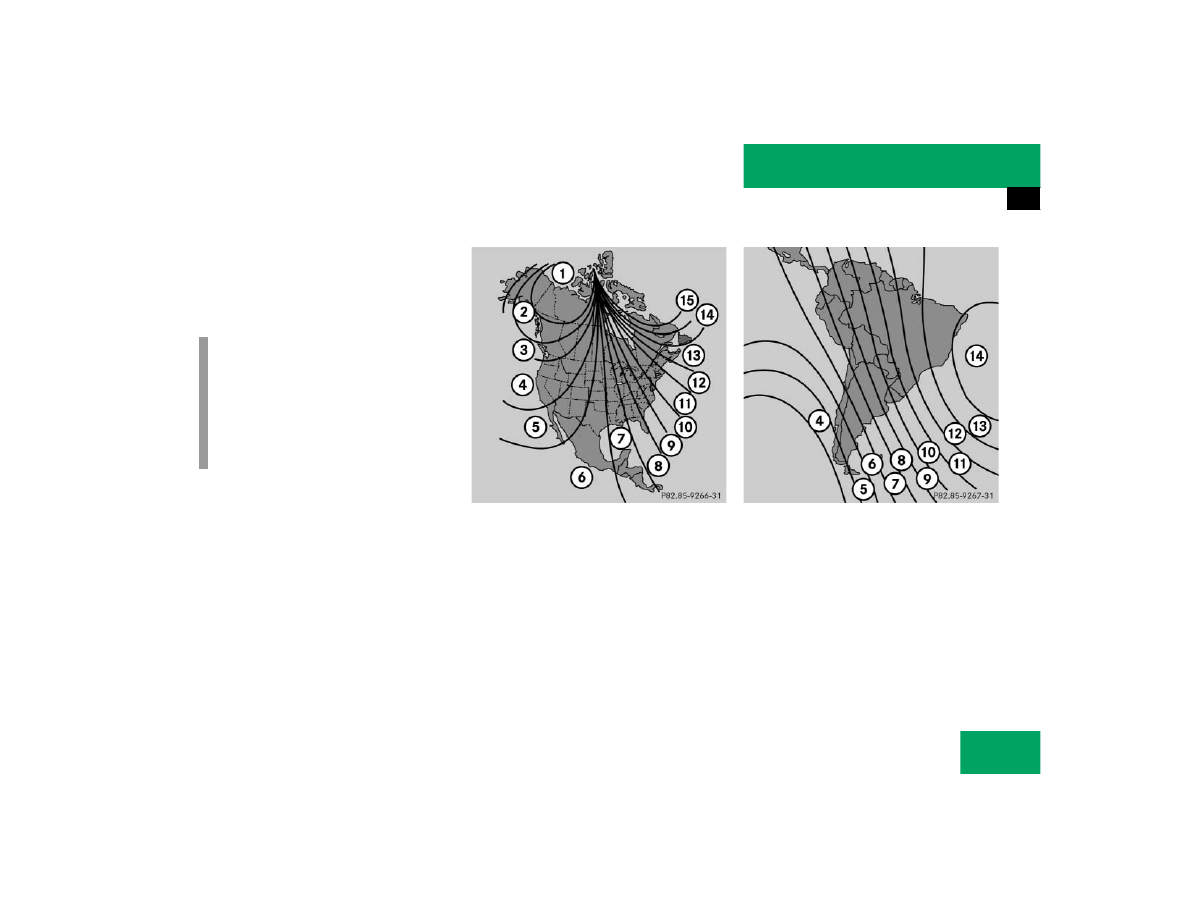
To ensure the display is correct, the com-
pass must be set to the proper geographic 
zone (

page 188). It may also be neces-

sary to calibrate the compass 
(

page 188).

Zone map North America

Zone map South America

i

The presence of buildings, bridges, 
power lines and large antenna masts 
can influence the displayed values. Me-
tallic or magnetic objects in or on the 
vehicle can influence the accuracy of 
the compass.

188

Controls in detail

Useful features

Setting the compass zone

Determine the geographical point of 
the vehicle with the aid of the zone 
maps.

Switch on the ignition.

Press MODE 2 (

page 186) repeat-

edly until the compass display appears 
in the trip computer display 3.

Press RESET 1 (

page 186) to select 

the compass zone mode.

The zone selected last is shown in the 
display.

Press RESET 1 repeatedly until the 
correct compass zone, as determined 
from the zone map, is shown in the dis-
play.

Press MODE 2 twice.

The new compass zone is activated and 
the compass display will be shown.

Calibrating the compass

If the vehicle was exposed to a significant 
magnetic zone, such as high voltage power 
lines, the compass may have to be calibrat-
ed.

To calibrate the compass correctly, ob-
serve the following:

Calibrate the compass in an area free 
of steel superstructures and power 
lines.

Switch off all electrical consumers (e.g. 
exterior lamps, climate control, rear 
window defroster etc.).

Do not open or close the 
sliding/pop-up roof.

Close doors and liftgate.

Start and run the engine.

Press MODE 2 (

page 186) repeat-

edly until the compass display appears 
in the trip computer display 3.

Press RESET 1 and afterwards press 
MODE 2.

In the display appears 

CAL–

.

Press and hold RESET 1 for approxi-
mately two seconds.

The calibration mode is activated and 
the display shows 

CAL

.

Drive without interruption two full cir-
cles at a speed between 3 mph 
(5 km/h) and 7 mph (10 km/h).

The message 

CAL

 goes out after a short 

time. The calibration is now complete.

i

An open liftgate triggers the 
display

- - -

.

189

Controls in detail

Useful features

Stop watch

Press MODE 2 (

page 186) repeat-

edly until the stop watch display ap-
pears in the trip computer display 3.

Counting

Press RESET 1 (

page 186) to start 

counting.

Stopping

Press RESET 1 again to stop counting.

Resetting

Press and hold RESET 1 until the dis-
play shows “0:00”.

Average fuel consumption

Press MODE 2 (

page 186) repeat-

edly until the average fuel consumption 
display appears in the trip computer 
display 3.

Distance remaining with fuel presently 
in tank

Press MODE 2 (

page 186) repeat-

edly until the distance remaining dis-
play appears in the trip computer 
display 3.

i

If 

CAL

 remains in the display, calibration 

was not successfully completed. You 
have to recalibrate:

Remove the key from the steering 
lock.

Start the vehicle and start the cali-
bration procedure described previ-
ously.

We recommend that you have the com-
pass calibrated at a Mercedes-Benz 
Light Truck Center.

i

When the fuel supply drops to reserve 
level the display flashes distance re-
maining.

USA only:
The display alternates between 

FUEL

 and distance remaining until 

supply is consistently below the re-
serve level. When the fuel supply is 
very low [approximately 1.5 gal 
(5.5 l)] 

FUEL

 is displayed 

continuously.

190

Controls in detail

Useful features

Country

Press MODE 2 (

page 186) repeat-

edly until the country display appears 
in the trip computer display 3.

Press and hold RESET 1 a minimum of 
five seconds to change the country unit 
system.

Canada units system selection

You can choose between CAN-English or 
CAN-French.

Setting CAN-English

Press RESET 1 repeatedly until CAN is 
displayed.

Press MODE 2 to select 

–ENG

.

Press MODE 2 again to set CAN-En-
glish.

Setting CAN-French

Press RESET 1 repeatedly until CAN is 
displayed.

Press MODE 2.

–ENG

 is displayed.

Press RESET 1 to select 

–Fr

.

Press MODE 2 to set CAN-French.

The language selected determines how the 
various displays are presented, see table.

Display

Language

Date

Cardinal points

Fuel consumption

Distance remaining

GEr

German

DD.MM

Süd, Nord, Ost, West

l/100 km

Kilometer

GB

English

MM.DD

South, North, East, West mi/gal (Imperial)

Miles

ESP

Spain

DD.MM

Sur, Norte, Este, Oeste

l/100 km

Kilometer

Fr

French

DD.MM

Sud, Nord, Est, Ouest

l/100 km

Kilometer

USA

American

MM.DD

South, North, East, West mi/gal (US)

Miles

CAN-ENG

American

MM.DD

South, North, East, West l/100 km

Kilometer

CAN-Fr

French

DD.MM

Sud, Nord, Est, Ouest

l/100 km

Kilometer

GEr

German

DD.MM

Süd, Nord, Ost, West

l/100 km

Kilometer


Content   ..  88  89  90  91   ..