Mercedes-Benz ML320. Service manual - part 87
 

  Index      Mercedes     Mercedes-Benz ML320 - service and repair manual 1997-2005 year


Search            copyright infringement  


Content   ..  85  86  87  88   ..


Mercedes-Benz ML320. Service manual - part 87


175

Controls in detail

Useful features

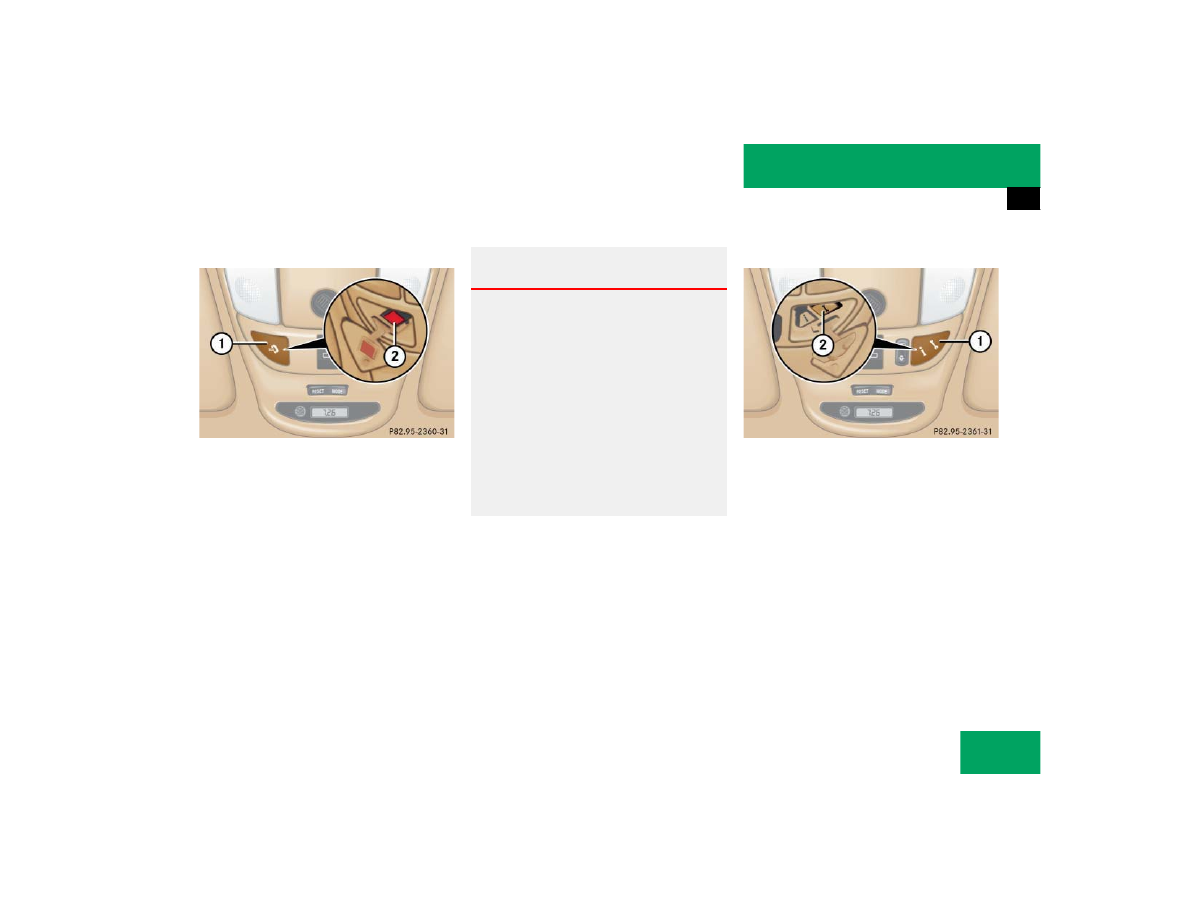
Initiating an emergency call manually

1 Cover
2 SOS button

Briefly press on cover 1.

The cover will open.

Press SOS button 2 briefly.

The indicator lamp in SOS button 2 
will flash until the emergency call is 
concluded.

Wait for a voice connection to the Re-
sponse Center.

Close cover 1 after the emergency 
call is concluded.

Roadside Assistance button

1 Cover
2 Roadside Assistance button •

Briefly press on cover 1.

The cover will open.

Press and hold the button 2 (for long-
er than two seconds).

A call to a Mercedes-Benz Roadside As-
sistance dispatcher will be initiated. 
The button will flash while the call is in 
progress. The message 

ROADSIDE 

ASSISTANCE – CONNECTING CALL

 will 

appear in the MCS display.

Warning!

G

If you feel at any way in jeopardy when in the 
vehicle (e.g. smoke or fire in the vehicle, ve-
hicle in a dangerous road location), please 
do not wait for voice contact after you have 
pressed the emergency button. Carefully 
leave the vehicle and move to a safe loca-
tion. The Response Center will automatically 
contact local emergency officials with the 
vehicle’s approximate location if they re-
ceive an automatic SOS signal and cannot 
make voice contact with the vehicle occu-
pants.

176

Controls in detail

Useful features

When the connection is established, the 
message 

ROADSIDE ASSISTANCE – 

CALL CONNECTED

 appears in the MCS dis-

play. The Tele Aid system will transmit data 
generating the vehicle identification num-
ber, model, color and location (subject to 
availability of cellular and GPS signals).

A voice connection between the Roadside 
Assistance dispatcher and the occupants 
of the vehicle will be established. When a 
voice connection is established the audio 
system mutes and the message 

TELE AID 

– ROADSIDE ASSISTANCE CALL ACTIVE

 ap-

pears in the MCS display.

Describe the nature of the need for as-
sistance.

The Mercedes-Benz Roadside assistance 
dispatcher will either dispatch a qualified 
Mercedes-Benz technician or arrange to 
tow your vehicle to the nearest 
Mercedes-Benz Light Truck Center. For 
services such as labor and/or towing, 
charges may apply. Refer to the Roadside 
Assistance manual for more information.

These programs are only available in the 
USA:

Sign and Drive services: Services such 
as jump start, a few gallons of fuel or 
the replacement of a flat tire with the 
vehicle spare tire are obtainable,

Remote Vehicle Diagnostics: This func-
tion permits the Mercedes-Benz Road-
side Assistance dispatcher to 
download malfunction codes and actu-
al vehicle data.

i

While the call is connected you can 
change to navigation menu by pressing 
NAVI button on the MCS unit.

i

The indicator lamp in the Roadside As-
sistance button

• remains illumi-

nated in red for approx. ten seconds 
during the system self-check after turn-
ing the key in the steering lock to 
position 2 (together with the SOS but-
ton and the Information button

¡).

See system self-check (

page 172) 

when the indicator lamp does not light 
up in red or stays on longer than ap-
proximately ten seconds.

177

Controls in detail

Useful features

Information button

¡

1 Cover
2 Information button ¡

Briefly press on cover 1.

The cover will open.

Press and hold the button (for longer 
than two seconds).

A call to the Customer Assistance Cen-
ter will be initiated. The button will 
flash while the call is in progress. The 
message 

INFO – CONNECTING CALL

 will 

appear in the MCS display.

When the connection is established, the 
message 

INFO – CALL CONNECTED

 appears 

in the MCS display. The Tele Aid system 
will transmit data generating the vehicle 
identification number, model, color and lo-
cation (subject to availability of cellular 
and GPS signals).

A voice connection between the Customer 
Assistance Center representative and the 
occupants of the vehicle will be estab-
lished. When a voice connection is estab-
lished the audio system mutes and the 
message 

TELE AID – INFO CALL ACTIVE


appears in the MCS display. Information 
regarding the operation of your vehicle, the 
nearest Mercedes-Benz Light Truck Center 
or Mercedes-Benz USA products and ser-
vices is available to you.

If the indicator lamp in the Roadside 
Assistance button

• is illuminated 

continuously and there was no voice 
connection to the Response Center es-
tablished, then the Tele Aid system 
could not initiate a Roadside Assis-
tance call (e.g. the relevant cellular 
phone network was not available). The 
message 

ROADSIDE ASSISTANCE – 

CALL FAILED

 appears in the MCS dis-

play.

Roadside Assistance calls can be ter-
minated using the END Button on the 
MCS unit.

i

While the call is connected, you can 
change to navigation menu by pressing 
NAVI button on the MCS unit.

178

Controls in detail

Useful features

For more details concerning the Tele Aid 
system, please visit www.mbusa.com and 
use your ID and password (sent to you sep-
arately) to learn more (USA only).

Upgrade signals

The Tele Aid system processes calls using 
the following priority.

Automatic emergency – First priority

Manual emergency – Second priority

Roadside assistance – Third priority

Information – Fourth priority

Should a higher priority call be initiated 
while you are connected, an upgrade (al-
ternating) tone will be heard and the ap-
propriate indicator lamp will flash. If 
certain information such as vehicle identi-
fication number or customer information is 
not available, the operator may need to re-
transmit.

During this time you will hear a beep and 
voice contact will be interrupted. Voice 
contact will resume once the retransmis-
sion is completed. Once a call is conclud-
ed, a beep will be heard and the respective 
indicator lamp will stop flashing. The MCS 
system operation will resume.

i

The indicator lamp in the Information 
button

¡ remains illuminated in red 

for approx. 10 seconds during the sys-
tem self-check after turning key in the 
steering lock to position 2 (together 
with the SOS button and the Roadside 
Assistance button

•).

See system self-check (

page 172) 

when the indicator lamp does not light 
up in red or stays on longer than ap-
proximately ten seconds.

If the indicator lamp in the Information 
button

¡ is illuminated continuous-

ly and there was no voice connection to 
the Response Center established, then 
the Tele Aid system could not initiate 
an Information call (e.g. the relevant 
cellular phone network is not avail-
able). 

The message 

INFO CALL FAILED

 ap-

pears in the MCS display.

Information calls can be terminated us-
ing the END button on the MCS.

!

If the indicator lamps do not start flash-
ing after pressing one of the buttons or 
remains illuminated (in red) at any 
time, the Tele Aid system has detected 
a fault or the service is not currently ac-
tive, and may not initiate a call. Visit 
your Mercedes-Benz Light Truck Cen-
ter and have the system checked or 
contact the Response Center at 
1-800-756-9018 (in the USA) or 
1-888-923-8367 (in Canada) as soon 
as possible.


Content   ..  85  86  87  88   ..