Mercedes-Benz ML320. Service manual - part 81
 

  Index      Mercedes     Mercedes-Benz ML320 - service and repair manual 1997-2005 year


Search            copyright infringement  


Content   ..  79  80  81  82   ..


Mercedes-Benz ML320. Service manual - part 81


151

Controls in detail

Driving systems

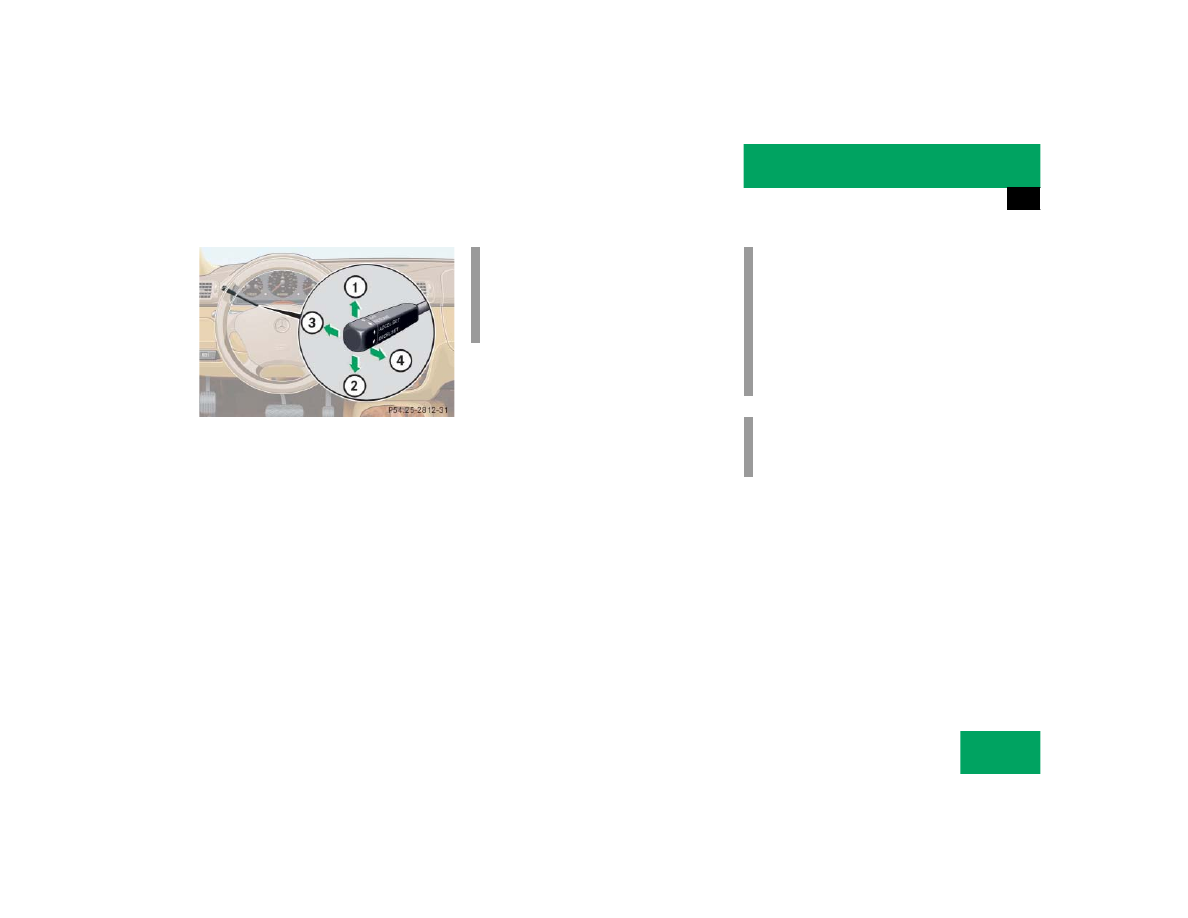
1 Set current or higher speed
2 Set current or lower speed
3 Cancel cruise control
4 Resume at last set speed

Setting current speed

Accelerate or decelerate to the desired 
speed.

Briefly lift 1 or depress 2 the cruise 
control lever.

The current speed is set.

Remove your foot from the accelerator 
pedal.

Cruise control is activated.

Canceling cruise control

There are several ways to cancel cruise 
control:

Step on the brake pedal.

or

Briefly push the cruise control lever to 
position 3.

Cruise control will be canceled. The 
last speed set will be stored for later 
use.

i

On uphill or downhill grades, cruise 
control may not be able to maintain the 
set speed. Once the grade eases, the 
set speed will be resumed.

!

Moving gear selector lever to 
position N while driving also cancels 
cruise control. However, the gear se-
lector lever should not be moved to 
position N while driving except to coast 
when the vehicle is in danger of skid-
ding (e.g. on icy roads).

i

The last stored speed is canceled when 
you turn off the engine.

152

Controls in detail

Driving systems

Setting a higher speed

Lift the cruise control lever to 
position 1 and hold it up until the de-
sired speed is reached.

Release the cruise control lever.

The new speed is set.

Setting a lower speed

Depress the cruise control lever to 
position 2 and hold it down until the 
desired speed is reached.

Release the cruise control lever.

The new speed is set.

Fine adjustment in 1 mph (Canada: 
1 km/ h) increments

Faster

Briefly tip the cruise control lever in the 
direction of arrow 1.

Slower

Briefly tip the cruise control lever in the 
direction of arrow 2.

Setting to last stored speed (“Resume” 
function)

Briefly push the cruise control lever to 
position 4.

Cruise control will resume the last set 
speed.

Remove your foot from the accelerator 
pedal.

Transmission in LOW RANGE mode

i

Depressing the accelerator pedal does 
not deactivate the cruise control. After 
brief acceleration (e.g. for passing), 
cruise control will resume the last 
speed set.

i

When you use the cruise control lever 
to decelerate, the transmission will au-
tomatically downshift if the engine’s 
braking power does not brake the vehi-
cle sufficiently.

Warning!

G

The speed stored in memory should only be 
set again if prevailing road conditions per-
mit. Possible acceleration or deceleration 
differences arising from returning to preset 
speed could cause an accident and/or seri-
ous injury to you and others.

i

The cruise control should not be used 
during off-road driving.

153

Controls in detail

Driving systems

Parktronic system* (Parking assist)

The Parktronic system assists the driver 
during parking maneuvers. It visually and 
audibly indicates the distance between the 
vehicle and an obstacle.

With the ignition on, the Parktronic system 
engages automatically at speeds up to ap-
proximately 10 mph (15 km/h) and deac-
tivates during higher speeds.

Parktronic system monitors your vehicle’s 
environment by means of six sensors in 
the front bumper and four sensors in the 
rear bumper.

1 Sensors located in front bumper

Warning!

G

Parktronic is a supplemental system. It is 
not intended to nor does it replace the need 
for extreme care. The responsibility during 
parking and other critical maneuvers rests 
always with the driver.

Make sure that no persons or animals are lo-
cated in the area in which your are maneu-
vering. They could otherwise be injured.

Special attention must be paid to objects 
with smooth surfaces or low silhouettes 
(e.g. trailer couplings, painted posts, or 
street curbs). Such objects may not be de-
tected by the system and can damage the 
vehicle.

The operational function of the Parktronic 
system can be affected by dirty sensors, es-
pecially at times of snow and ice. For notes 
on cleaning the Parktronic system sensors 
(

page 237).

Interference caused by other ultrasonic sig-
nals (e.g. working jackhammers or the air 
brakes of trucks) can cause the system to 
send erratic indications, and should be tak-
en into consideration.

154

Controls in detail

Driving systems

Monitoring reach of sensors

The sensors must be free of dirt, ice and 
snow or they will be unable to function 
properly. Clean the sensors regularly with-
out scratching or damaging them.

Front sensors

Rear sensors

Minimum distance

When an obstacle is located in this area, all 
warning displays will light up and a warning 
tone will sound. If the vehicle moves closer 
than the minimum distance to an object, 
the distance may no longer be displayed.

Center

approx. 39 in (100 cm)

Corners

approx. 24 in (60 cm)

Center

approx. 47 in (120 cm)

Corners

approx. 32 in (80 cm)

i

During parking maneuvers, pay special 
attention to objects located above or 
below the height of the sensors (e.g. 
planters or trailer hitches). The Parktro-
nic system will not detect such objects 
at close range and damage to your ve-
hicle or the object may result.

Ultrasonic signals from outside sourc-
es (e.g. truck air brakes or jackham-
mers) may impair the operation of the 
Parktronic system.

Center

approx. 8 in (20 cm)

Corners

approx. 6 in (15 cm)


Content   ..  79  80  81  82   ..