Infiniti QX80 (2023 year). Manual in english - page 4
 

  Index      Manuals     Infiniti QX80 (2023 year). Manual in english


Search            copyright infringement  


Content      ..     2      3      4      5     ..


Infiniti QX80 (2023 year). Manual in english - page 4


2-6

Instruments and controls

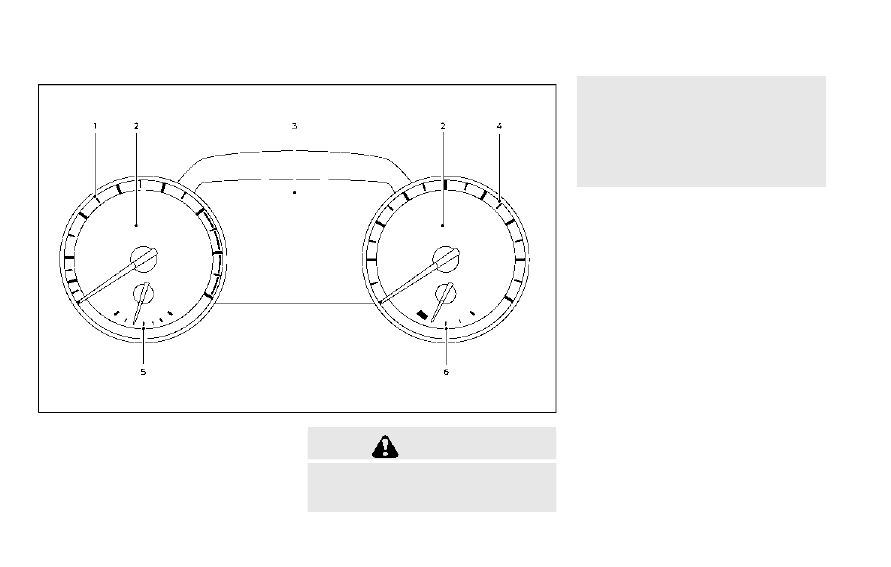
JVC1182X

1.

Tachometer

2.

Warning and indicator lights

3.

Vehicle information display

4.

Speedometer

5.

Engine coolant temperature gauge

6.

Fuel gauge

CAUTION

.

For cleaning, use a soft cloth, dam-
pened with water. Never use a rough
cloth, alcohol, benzine, thinner or any

kind of solvent or paper towel with a
chemical cleaning agent. They will
scratch or cause discoloration to the
lens.

.

Do not spray any liquid such as water
on the meter lens. Spraying liquid
may cause the system to malfunction.

METERS AND GAUGES

CarManuals2.com

-------------------------------------------------------------------------------------------------------------------------------------------------------------

JVI1770X

Speedometer

SPEEDOMETER AND OD-
OMETER

Speedometer

The speedometer indicates vehicle speed in
miles per hour (MPH) and kilometers per
hour (km/h).

WAC0217X

Odometer/twin trip odometer

Odometer/twin trip odometer

The odometer/twin trip odometer

is

displayed on the vehicle information display
when the ignition switch is in the ON
position.
The odometer displays the total distance the
vehicle has been driven.
The twin trip odometer displays the distance
of individual trips.

Changing the display:

Pushing the TRIP RESET switch

at the left

of the combination meter panel changes the
display as follows:

TRIP A

?

TRIP B

?

Odometer

?

TRIP A

Resetting the trip odometer:

Pushing the TRIP RESET switch

for more

than 1 second to reset the trip odometer to
zero.
Average fuel economy and distance to
empty information is also available. (See
“Vehicle information display” (P.2-20).)

Instruments and controls

2-7

CarManuals2.com

-------------------------------------------------------------------------------------------------------------------------------------------------------------

2-8

Instruments and controls

JVI1772X

TACHOMETER

The tachometer indicates engine speed in
revolutions per minute (RPM).

Do not rev

the engine into the red zone

.

CAUTION

When engine speed approaches the red
zone, shift to a higher gear or reduce
engine speed. Operating the engine in
the red zone may cause serious engine
damage.

JVI1773X

ENGINE COOLANT TEMPERA-
TURE GAUGE

The gauge indicates the engine coolant
temperature.
The engine coolant temperature is within the
normal range when the gauge needle points
within the zone

shown in the illustration.

The engine coolant temperature varies with
the outside air temperature and driving
conditions.

CAUTION

If the gauge indicates engine coolant
temperature near the hot (H) end of the
normal range, reduce vehicle speed to
decrease temperature. If gauge is over
the normal range, stop the vehicle as
soon as safely possible. If the engine is
overheated, continued operation of the
vehicle may seriously damage the engine.
See “If your vehicle overheats” (P.6-14)
for immediate action required.

CarManuals2.com

-------------------------------------------------------------------------------------------------------------------------------------------------------------

WAC0218X

FUEL GAUGE

The gauge indicates the

approximate

fuel

level in the tank.
The gauge may move slightly during braking,
turning, acceleration, or going up or down
hills.
The gauge needle returns to 0 (Empty) after
the ignition switch is pushed to the OFF
position.

Refill the fuel tank before the gauge
registers “0” (Empty).

The Low Fuel warning

appears on the

vehicle information display when the fuel
tank is getting low. Refuel as soon as it is
convenient, preferably before the gauge

reaches “0”. There will be a small reserve of
fuel in the tank when the fuel gauge needle
reaches “0”.
The

indicates that the fuel-filler door is

located on the driver’s side of the vehicle.

CAUTION

.

If the vehicle runs out of fuel, the
malfunction indicator light (MIL) may
come on. Refuel as soon as possible.
After a few driving trips, the
light should turn off. If the light
remains on after a few driving trips,
have the vehicle inspected. It is
recommended you visit an INFINITI
retailer for this service.

.

For additional information, see “Mal-
function Indicator Light (MIL)” (P.2-
17).

WAC0219X

ENGINE OIL PRESSURE GAUGE

The gauge indicates the engine lubrication
system oil pressure while the engine is
running. When the engine speed is high, the
engine oil pressure is also high. When it is
low, the gauge indicates the low (L) oil
pressure.
The engine oil pressure is normal when the
gauge points within the zone

shown in the

illustration.

CAUTION

.

This gauge is not designed to indicate
low engine oil level. Use the dipstick

Instruments and controls

2-9

CarManuals2.com

-------------------------------------------------------------------------------------------------------------------------------------------------------------

2-10

Instruments and controls

to check the oil level. (See “Engine oil”
(P.8-6).)

.

If the gauge does not move with the
proper amount of engine oil, have the
vehicle checked. It is recommended
you visit an INFINITI retailer for this
service. Continued vehicle operation
in such a condition could cause ser-
ious damage to the engine.

WAC0220X

VOLTMETER

When the ignition switch is pushed to the
ON position, the volt meter indicates the
battery voltage. When the engine is running,
it indicates the generator voltage.
While cranking the engine, the volt drop
below the normal range

. If the gauge is

not in the normal range (10.5 to 15.5 volt)
while the engine is running, it may indicate
that the charging system is not functioning
properly. Have the system checked. It is
recommended you visit an INFINITI retailer
for this service.

CarManuals2.com

-------------------------------------------------------------------------------------------------------------------------------------------------------------

Warning indicator light (red)

Warning indicator light (yellow)

Vehicle Dynamic Control (VDC) off in-
dicator light

Automatic Transmission (AT) oil tem-
perature warning light

Adaptive Front lighting System (AFS)
indicator light (if so equipped)

Vehicle Dynamic Control (VDC) warning
light

Automatic Transmission (AT) park
warning light

Anti-lock Braking System (ABS) warning
light

Warning indicator light (other)

Exterior light indicator

Brake warning light

Automatic transmission check warning
light

Front fog light indicator light

Charge warning light

Check suspension indicator light

High beam assist indicator light

Engine oil pressure warning light

Four-Wheel Drive (4WD) warning light
(4WD models)

High beam indicator light

Master warning light

Forward Emergency Braking (FEB) sys-
tem warning light

TOW mode indicator light

Seat belt warning light and chime

Low tire pressure warning light

Turn signal/hazard indicator lights

Security indicator light

Malfunction Indicator Light (MIL)

Supplemental air bag warning light

Master warning light

Instruments and controls

2-11

WARNING LIGHTS, INDICATOR
LIGHTS AND AUDIBLE REMINDERS

CarManuals2.com

-------------------------------------------------------------------------------------------------------------------------------------------------------------

2-12

Instruments and controls

CHECKING LIGHTS

With all doors closed, apply the parking
brake, fasten the seat belts and place the
ignition switch in the ON position without
starting the engine. The following lights (if
so equipped) will come on:

or

,

,

,

,

The following lights (if so equipped) will
come on briefly and then go off:

,

or

,

,

,

,

,

,

,

If any light does not come on or operates in a
way other than described, it may indicate a
burned-out bulb and/or a system malfunc-
tion. Have the system checked. It is recom-
mended you visit an INFINITI retailer for this
service.
Some indicators and warnings are also
displayed on the vehicle information display
between the speedometer and tachometer.
(See “Vehicle information display” (P.2-20).)

WARNING/INDICATOR LIGHTS
(red)

See “Vehicle information display” (P.2-20).

Automatic Transmission (AT)

oil temperature warning light

This light illuminates when the Automatic
Transmission (AT) oil temperature is too
high. If the light illuminates while driving,
reduce the vehicle speed as soon as safely
possible until the light turns off.

CAUTION

Continued vehicle operation when the
AT oil temperature warning light is on
may damage the AT.

Automatic Transmission (AT)

park warning light (4WD models)

This light indicates that the Automatic
Transmission (AT) parking function is not
engaged. If the transfer control is not
secured in any driving position while the AT
shift lever is in the P (Park) position, the
transmission will disengage and the wheels
will not lock.

If the AT park warning light illuminates with
the shift lever in the P (Park) position, shift
the Four-Wheel Drive (4WD) shift switch
to the AUTO, 4H or 4L position again with
the shift lever in the N (Neutral) position.

(See “INFINITI all-mode 4WD

®

” (P.5-116).)

or

Brake warning light

This light functions for both the parking
brake and the foot brake systems.

Parking brake indicator:

When the ignition switch is in the ON
position, the light comes on when the
parking brake is applied.

Low brake fluid warning light:

When the ignition switch is in the ON
position, the light warns of a low brake fluid
level. If the light comes on while the engine is
running with the parking brake not applied,
stop the vehicle and perform the following:
1. Check the brake fluid level. If brake fluid

is low, add fluid and have the system
checked. It is recommended you have this
service performed by an INFINITI retai-
ler. (See “Brake fluid” (P.8-9).)

2. If the brake fluid level is correct, have the

warning system checked. It is recom-
mended you have this service performed
by an INFINITI retailer.

CarManuals2.com

-------------------------------------------------------------------------------------------------------------------------------------------------------------

Low hydraulic pressure warning indicator:

If the brake warning light illuminates when
the engine is running, or while driving with
the parking brake is released, check the
brake fluid level. If the brake fluid level is
sufficient, it may indicate low hydraulic
pressure in the brake booster. Have the
brake system checked. It is recommended
you have this service performed by an
INFINITI retailer.

Anti-lock Braking System (ABS) warning
indicator:

When the parking brake is released and the
brake fluid level is sufficient, if both the
brake warning light and the Anti-lock Brak-
ing System (ABS) warning light illuminate, it
may indicate the ABS is not functioning
properly. Have the brake system checked,
and if necessary repaired. It is recommended
you visit an INFINITI retailer for this service.
(See “Anti-lock Braking System (ABS) warn-
ing light” (P.2-15).)

WARNING

.

Your brake system may not be work-
ing properly if the warning light is on.
Driving could be dangerous. If you
judge it to be safe, drive carefully to
the nearest service station for re-

pairs. Otherwise, have your vehicle
towed because driving it could be
dangerous.

.

Pressing the brake pedal with the
engine stopped and/or low brake
fluid level may increase your stopping
distance and braking will require
greater pedal effort as well as pedal
travel.

.

If the brake fluid level is below the
minimum or MIN mark on the brake
fluid reservoir, do not drive until the
brake system has been checked. It is
recommended you visit an INFINITI
retailer for this service.

Charge warning light

When the ignition switch is in the ON
position, the charge warning light illuminates
and then turns off.
If the light comes on while the engine is
running, it may indicate the charging system
is not functioning properly. Turn the engine
off and check the alternator belt. If the belt is
loose, broken, missing or if the light remains
on, have your vehicle serviced immediately. It
is recommended you visit an INFINITI re-
tailer for this service.

CAUTION

Do not continue driving if the alternator
belt is loose, broken or missing.

Engine oil pressure warning

light

This light warns of low engine oil pressure. If
the light flickers or comes on during normal
driving, pull off the road in a safe area, stop
the engine

immediately

and call an INFINITI

retailer or other authorized repair shop.

The engine oil pressure warning light is not
designed to indicate a low oil level. Use the
dipstick to check the oil level.

(See “Engine

oil” (P.8-6).)

CAUTION

Running the engine with the engine oil
pressure warning light on could cause
serious damage to the engine almost
immediately. Such damage is not cov-
ered by warranty. Turn off the engine as
soon as it is safe to do so.

Instruments and controls

2-13

CarManuals2.com

-------------------------------------------------------------------------------------------------------------------------------------------------------------

2-14

Instruments and controls

Master warning light

When the ignition switch is in the ON
position, the master warning light illumi-
nates when a warning message appears in
the vehicle information display.
See “Vehicle information display” (P.2-20).

Seat belt warning light and

chime

For driver and front passenger:

The light and chime remind you to fasten the
driver and front passenger seat belts.
The light illuminates whenever the ignition
switch is pushed to the ON position, and will
remain illuminated until the front seat belts
are fastened.
When the vehicle speed exceeds approxi-
mately 10 MPH (15 km/h), the light will blink
unless the front seat belts are securely
fastened.
When the ignition switch is pushed to the
ON position, the chime will sound for
approximately 6 seconds unless the driver’s
seat belt is securely fastened.
When the vehicle speed exceeds approxi-
mately 10 MPH (15 km/h), the chime will
sound unless the front seat belts are securely
fastened. The chime will continue to sound

for approximately 95 seconds until the front
seat belts are fastened.

For rear passengers:

The seat belt warning light for the rear
passengers will illuminate whenever the
ignition switch is pushed to the ON position,
and will remain illuminated until the rear
passenger’s seat belts are fastened.
For approximately 65 seconds after the
ignition switch is in the ON position, the
system does not activate the warning light
for the rear passengers.
If a rear passenger seat belt is fastened then
unfastened at a vehicle speed less than
approximately 10 MPH (15 km/h), the
warning light will illuminate. When the
vehicle speed exceeds approximately 10
MPH (15 km/h), the warning light will blink
and the chime will sound.
The warning will turn off when a rear
passenger seat belt is fastened or automa-
tically turn off approximately 65 seconds
after the seat belt is unfastened.
See “Seat belts” (P.1-18) and “42. Rear Seat
Belt warning” (P.2-33).

Security indicator light

The light blinks when the ignition switch is in
the ACC, OFF and LOCK position. This
function indicates the security system

equipped on the vehicle is operational.
If the security system is malfunctioning, this
light will remain on while the ignition switch
is in the ON position. For additional informa-
tion, see “Security systems” (P.2-37).

Supplemental air bag warning

light

After pushing the ignition switch to the ON
position, the supplemental air bag warning
light will illuminate. The supplemental air bag
warning light will turn off after about 7
seconds if the air bag and/or pretensioner
systems are operational.
If any of the following conditions occur, the
air bag and/or pretensioner systems needs
servicing.

.

The supplemental air bag warning light

remains on after approximately 7 sec-
onds.

.

The supplemental air bag warning light

flashes intermittently.

.

The supplemental air bag warning light

does not come on at all.

It is recommended you visit an INFINITI
retailer for these services.
Unless checked and repaired, the supple-
mental restraint system (air bag system)
and/or the pretensioners may not function
properly.

CarManuals2.com

-------------------------------------------------------------------------------------------------------------------------------------------------------------

For additional information, see “Supplemen-
tal restraint system” (P.1-51).

WARNING

If the supplemental air bag warning light
is on, it could mean that the front air
bag, side air bag, curtain air bag systems
and/or pretensioner systems will not
operate in an accident. To help avoid
injury to yourself or others, have your
vehicle checked by a retailer as soon as
possible.

WARNING/INDICATOR LIGHTS
(yellow)

See “Vehicle information display” (P.2-20).

Adaptive Front lighting Sys-

tem (AFS) indicator light (if so
equipped)

When the ignition switch is pushed to the
ON position, the Adaptive Front lighting
System (AFS) indicator light will illuminate.
The light will turn off in about 1 second if the
AFS is operational.
If the AFS indicator light blinks, it may
indicate the AFS is not functioning properly.

Have the system checked. It is recommended
you visit an INFINITI retailer for this service.
See “Adaptive Front lighting System (AFS)”
(P.2-50).

or

Anti-lock Braking

System (ABS) warning light

When the ignition switch is in the ON
position, the Anti-lock Braking System
(ABS) warning light illuminates and then
turns off. This indicates the ABS is opera-
tional.
If the ABS warning light illuminates while the
engine is running, or while driving, it may
indicate the ABS is not functioning properly.
Have the system checked. It is recommended
you visit an INFINITI retailer for this service.
If an ABS malfunction occurs, the anti-lock
function is turned off. The brake system then
operates normally, but without anti-lock
assistance. (See “Brake system” (P.5-133).)

Automatic transmission check

warning light

When the ignition switch is pushed to the
ON position, the light comes on for 2
seconds. If the light comes on at any other
time, it may indicate the transmission is not
functioning properly. It is recommend you

visit an INFINITI retailer to check and repair
the transmission.

Check suspension indicator

light

When the ignition switch is placed in the ON
position, the light comes on for 2 seconds.

Four-Wheel Drive (4WD)

warning light (4WD models)

The

warning light comes on when the

ignition switch is pushed to ON. It turns off
soon after the engine is started.
If the 4WD system malfunctions, or the
diameter of the front and the rear wheels are
different, the warning light will either remain
illuminated or blink. (See “INFINITI all-mode
4WD

®

” (P.5-116).)

CAUTION

.

If the warning light comes on while
driving there may be a malfunction in
the 4WD system. Reduce the vehicle
speed and have your vehicle checked
as soon as possible. It is recom-
mended you visit an INFINITI retailer
for this service.

Instruments and controls

2-15

CarManuals2.com

-------------------------------------------------------------------------------------------------------------------------------------------------------------

2-16

Instruments and controls

.

If the 4WD warning light turns on
when driving on dry or hard surfaced
roads:

— in the 4H(I) position, shift the

4WD shift switch to AUTO

— in the 4L(O) position, stop the

vehicle and shift the transmission
shift lever to the N (Neutral)
position and shift the 4WD shift
switch to AUTO

.

If the warning light is still on after the
above operations, have your vehicle
checked as soon as possible. It is
recommended you visit an INFINITI
retailer for this service.

Forward Emergency Braking

(FEB) system warning light

This light comes on when the ignition switch
is placed in the ON position. It turns off after
the engine is started.
This light illuminates when the Forward
Emergency Braking (FEB) with Pedestrian
Detection system is set to OFF in the vehicle
information display.
If the light illuminates when the FEB with
Pedestrian Detection system is ON, it may
indicate that the system is unavailable. See

“Forward Emergency Braking (FEB) with
Pedestrian Detection system” (P.5-95) for
more details.

Low tire pressure warning light

Your vehicle is equipped with a Tire Pressure
Monitoring System (TPMS) that monitors
the tire pressure of all tires except the spare.
The low tire pressure warning light warns of
low tire pressure or indicates that the TPMS
is not functioning properly.
After the ignition switch is pushed ON, this
light illuminates for about 1 second and
turns off.

Low tire pressure warning:

If the vehicle is being driven with low tire
pressure, the warning light will illuminate. A
"Tire Pressure Low Add Air" warning also
appears in the vehicle information display.
The tire pressure for each tire will also be
displayed.
When the low tire pressure warning light
illuminates, you should stop and adjust the
tire pressure to the recommended COLD tire
pressure shown on the Tire and Loading
Information label. The low tire pressure
warning light may not automatically turn
off when the tire pressure is adjusted. After
the tire is inflated to the recommended
pressure, the vehicle must be driven at

speeds above 16 MPH (25 km/h) to activate
the TPMS and turn off the low tire pressure
warning light. Use a tire pressure gauge to
check the tire pressure.
The "Tire Pressure Low Add Air" warning
appears each time the ignition switch is
placed in the ON position as long as the
low tire pressure warning light remains
illuminated.
For additional information, see “Vehicle
information display” (P.2-20), “Tire Pressure
Monitoring System (TPMS)” (P.5-5) and
“Tire Pressure Monitoring System (TPMS) ”
(P.6-3).

TPMS malfunction:

If the TPMS is not functioning properly, the
low tire pressure warning light will flash for
approximately 1 minute when the ignition
switch is pushed ON. The light will remain on
after 1 minute. Have the system checked. It
is recommended you visit an INFINITI re-
tailer for this service. The "Tire Pressure Low
Add Air" warning does not appear if the low
tire pressure warning light illuminates to
indicate a TPMS malfunction.
For additional information, see “Tire Pres-
sure Monitoring System (TPMS)” (P.5-5).

CarManuals2.com

-------------------------------------------------------------------------------------------------------------------------------------------------------------

WARNING

.

If the light does not illuminate with
the ignition switch pushed ON, have
the vehicle checked as soon as possi-
ble. It is recommended you visit an
INFINITI retailer for this service.

.

If the light illuminates while driving,
avoid sudden steering maneuvers or
abrupt braking, reduce vehicle speed,
pull off the road to a safe location
and stop the vehicle as soon as
possible. Driving with under-inflated
tires may permanently damage the
tires and increase the likelihood of
tire failure. Serious vehicle damage
could occur and may lead to an
accident and could result in serious
personal injury. Check the tire pres-
sure for all four tires. Adjust the tire
pressure to the recommended COLD
tire pressure shown on the Tire and
Loading Information label to turn the
low tire pressure warning light OFF.
If the light still illuminates while
driving after adjusting the tire pres-
sure, a tire may be flat or the TPMS
may be malfunctioning. If you have a
flat tire, replace it with a spare tire as
soon as possible. If no tire is flat and
all tires are properly inflated, it is

r e c o m m e n d e d y o u c o n s u l t a n
INFINITI retailer.

.

Since the spare tire is not equipped
with the TPMS, when a spare tire is
mounted or a wheel is replaced, the
TPMS will not function and the low
tire pressure warning light will flash
for approximately 1 minute. The light
will remain on after 1 minute. Have
your tires replaced and/or TPMS
system reset as soon as possible. It
is recommended you visit an INFINITI
retailer for these services.

.

Replacing tires with those not origin-
ally specified by INFINITI could affect
the proper operation of the TPMS.

CAUTION

.

The TPMS is not a substitute for the
regular tire pressure check. Be sure to
check the tire pressure regularly.

.

If the vehicle is being driven at speeds
of less than 16 MPH (25 km/h), the
TPMS may not operate correctly.

.

Be sure to install the specified size of
tires to the four wheels correctly.

Malfunction Indicator Light

(MIL)

If the malfunction indicator light comes on
steady or blinks while the engine is running,
it may indicate a potential emission control
malfunction.
The malfunction indicator light may also
come on steady if the fuel-filler cap is loose
or missing, or if the vehicle runs out of fuel.
Check to make sure the fuel-filler cap is
installed and closed tightly, and that the
vehicle has at least 3 US gallons (14 liters) of
fuel in the fuel tank.
After a few driving trips, the

light should

turn off if no other potential emission
control system malfunction exists.
If this indicator light remains on for 20
seconds and then blinks for 10 seconds
when the engine is not running, it indicates
that the vehicle is not ready for an emission
control system inspection/maintenance test.
(See “Readiness for Inspection/Mainte-
nance (I/M) test” (P.10-34).)

Operation:

The malfunction indicator light will come on
in one of two ways:

.

Malfunction indicator light on steady —

An emission control system malfunction
has been detected. Check the fuel-filler

Instruments and controls

2-17

CarManuals2.com

-------------------------------------------------------------------------------------------------------------------------------------------------------------

2-18

Instruments and controls

cap if the Loose Fuel Cap warning
appears in the vehicle information dis-
play. If the fuel-filler cap is loose or
missing, tighten or install the cap and
continue to drive the vehicle. The
light should turn off after a few driving
trips. If the

light does not turn off

after a few driving trips, have the vehicle
inspected. It is recommended you visit an
INFINITI retailer for this service. You do
not need to have your vehicle towed to
the retailer.

.

Malfunction indicator light blinking — An

engine misfire has been detected which
may damage the emission control sys-
tem.
To reduce or avoid emission control
system damage:
1) Do not drive at speeds above 45

MPH (72 km/h).

2) Avoid hard acceleration or decelera-

tion.

3) Avoid steep uphill grades.
4) If possible, reduce the amount of

cargo being hauled or towed.

The malfunction indicator light may stop
blinking and remain on.
Have the vehicle inspected. It is recom-
mended you visit an INFINITI retailer for
this service. You do not need to have
your vehicle towed to the retailer.

CAUTION

Continued vehicle operation without
having the emission control system
checked and repaired as necessary could
lead to poor driveability, reduced fuel
economy, and possible damage to the
emission control system.

Master warning light

When the ignition switch is in the ON
position, the master warning light illumi-
nates when a warning message appears in
the vehicle information display.
See “Vehicle information display” (P.2-20).

Vehicle Dynamic Control

(VDC) off indicator light

When the ignition switch is in the ON
position, the Vehicle Dynamic Control
(VDC) off indicator light illuminates and then
turns off.
The light comes on when the vehicle dynamic
control off switch is pushed to OFF. This
indicates that the vehicle dynamic control
system is not operating.
When the 4L position is selected with the

Four-Wheel Drive (4WD) shift switch, the
VDC system is disabled and the VDC off
indicator light illuminates. (4WD models)
For additional information, see “Vehicle
Dynamic Control (VDC) system” (P.5-135).

Vehicle Dynamic Control

(VDC) warning light

The light will blink when the VDC system or
the traction control system is operating, thus
alerting the driver that the vehicle is nearing
its traction limits. The road surface may be
slippery.
When the VDC warning light illuminates
when the VDC system is turned on, this light
alerts the driver to the fact that the VDC
system’s fail-safe mode is operating, for
example the VDC or hill start assist system
may not be functioning properly. Have the
system checked. It is recommended you visit
an INFINITI retailer for this service. If a
malfunction occurs in the system, the VDC
system function will be canceled but the
vehicle is still driveable. For additional
information, see “Vehicle Dynamic Control
(VDC) system” (P.5-135).

CarManuals2.com

-------------------------------------------------------------------------------------------------------------------------------------------------------------

WARNING/INDICATOR LIGHTS
(other)

See “Vehicle information display” (P.2-20).

Exterior light indicator

This indicator illuminates when the headlight
switch is turned to the AUTO,

or

position and the front parking lights, instru-
ment panel lights, rear combination lights,
license plate lights or headlights are on. The
indicator turns off when these lights are
turned off.

Front fog light indicator light

The front fog light indicator light illuminates
when the front fog lights are on. (See “Fog
light switch” (P.2-52).)

High beam assist indicator

light

The high beam assist indicator light illumi-
nates when the high beam assist system is
turned on and it is operational. (See “High
beam assist” (P.2-47).)

High beam indicator light

This light comes on when the headlight high
beam is on and goes out when the low beam

is selected.

TOW mode indicator light

This light will illuminate when the TOW
mode is selected while the engine is running.
(See “TOW mode” (P.5-125).)

Turn signal/hazard indicator

lights

The light flashes when the turn signal switch
lever or hazard switch is turned on.

AUDIBLE REMINDERS

Key reminder chime

A chime will sound if the driver side door is
opened while the ignition switch is pushed to
the ACC position. Make sure the ignition
switch is pushed to the OFF position, and
take the Intelligent Key with you when
leaving the vehicle.

Light reminder chime

A chime will sound when the driver side door
is opened with the headlight switch in the

or

position and the ignition switch in

the ACC, OFF or LOCK position.
Turn the headlight switch to the OFF (if so
equipped) or the AUTO position when you
leave the vehicle.

Parking brake reminder chime

The chime will sound if the vehicle is driven
at more than 4 MPH (7 km/h) with the
parking brake applied. Stop the vehicle and
release the parking brake.

Brake pad wear warning

The disc brake pads have audible wear
warnings. When a brake pad requires repla-
cement, it will make a high pitched scraping
sound when the vehicle is in motion. This
scraping sound will first occur only when the
brake pedal is depressed. After more wear of
the brake pad, the sound will always be
heard even if the brake pedal is not
depressed. Have the brakes checked as soon
as possible if the warning sound is heard.

Instruments and controls

2-19

CarManuals2.com

-------------------------------------------------------------------------------------------------------------------------------------------------------------

2-20

Instruments and controls

JVI1272X

The vehicle information display

is located

between the tachometer and the speed-
ometer, and it displays the warnings and
information. The following items are also
displayed if the vehicle is equipped with
them:

.

Odometer/twin trip odometer

— “Odometer/twin trip odometer” (P.2-

7)

.

Automatic Transmission (AT)

— “Driving the vehicle” (P.5-17).

.

Four-Wheel Drive (4WD)

— “INFINITI all-mode 4WD

®

” (P.5-116)

.

Cruise control

— “Cruise control” (P.5-62)

.

Intelligent Cruise Control (ICC)

— “Intelligent Cruise Control (ICC)” (P.5-

64)

.

Distance Control Assist (DCA)

— “Distance Control Assist (DCA)” (P.5-

85)

.

Intelligent Key system

— “Intelligent Key system” (P.3-7)
— “Push-button ignition switch” (P.5-

12)

.

Lane Departure Warning (LDW)

— “Lane Departure Warning (LDW)”

(P.5-22)

.

Lane Departure Prevention (LDP)

— “Lane Departure Prevention (LDP)”

(P.5-27)

.

Blind Spot Warning (BSW)

— “Blind Spot Warning (BSW)” (P.5-34)

.

Blind Spot Intervention

®

(BSI)

— “Blind Spot Intervention

®

(BSI)” (P.5-

42)

.

Back-up Collision Intervention (BCI)

— “Back-up Collision Intervention (BCI)”

(P.5-53)

.

Driver Attention Alert (DAA)

— “Driver Attention Alert (DAA)” (P.5-

112)

.

Forward Emergency Braking (FEB) with

Pedestrian Detection system
— “Forward Emergency Braking (FEB)

with Pedestrian Detection system”
(P.5-95)

.

Predictive Forward Collision Warning

(PFCW)
— “Predictive Forward Collision Warning

(PFCW)” (P.5-104)

VEHICLE INFORMATION DISPLAY

CarManuals2.com

-------------------------------------------------------------------------------------------------------------------------------------------------------------

WAC0613X

HOW TO USE THE VEHICLE IN-
FORMATION DISPLAY

The vehicle information display can be
changed using the buttons located on the
steering wheel.

OK - change or select an item in the
vehicle information display

- navigate through the items in

vehicle information display

- go back to the previous menu

- change from one display

screen to the next (i.e. trip, Fuel econ-
omy)

The OK

, and

buttons

also

control audio and control panel functions in
some conditions. Most screens and menus
offer instruction prompts of the buttons to
indicate how to control the vehicle informa-
tion display. The OK

button changes the

audio source and the

buttons

also

control voice recognition manual mode. The
OK

button can be used to change the

audio source when the audio screen is
displayed. The

buttons

can be used

when controlling voice recognition prompts
manually. (See INFINITI InTouch

®

Owner’s

Manual.)

STARTUP DISPLAY

When the ignition switch is placed in the ON
position, the vehicle information display may
display the following screens if the vehicle is
equipped with them:

.

Home

.

Speed

.

Drive Computer

.

Fuel Economy

.

Navigation

.

Audio

.

CRUISE

.

Driving Aids

.

TPMS

Warnings will only display if there are any
present. (See “Operational indicators” (P.2-
28).)

To control what items display in the vehicle
information display, see “Settings” (P.2-21).

SETTINGS

The setting mode allows user to change the
information displayed in the vehicle informa-
tion display and some settings:

.

Driver Assistance

.

TPMS Setting

.

Clock

.

Vehicle settings

.

Maintenance

.

Customize Display

.

Unit/Language

.

Factory Reset

Driver Assistance

To change the status, warnings or turn on or
off any of the systems/warnings displayed
in the “Driver Assistance” menu, use the
buttons

to select and change a menu item:

.

Emergency Brake

.

Forward

.

Lane

.

Blind Spot

.

Intervention(BCI)

.

Driver Attention Alert

.

Timer Alert

Instruments and controls

2-21

CarManuals2.com

-------------------------------------------------------------------------------------------------------------------------------------------------------------

2-22

Instruments and controls

.

Low Temp. Alert

Emergency Brake:

.

Front

Allows user to turn the Forward Emer-
gency Braking (FEB) with Pedestrian
Detection system and Predictive For-
ward Collision Warning (PFCW) system
ON/OFF.

(See “Forward Emergency Braking (FEB)
with Pedestrian Detection system” (P.5-95)
and “Predictive Forward Collision Warning
(PFCW)” (P.5-104).)

Forward (if so equipped):

.

Distance Control Assist

Allows user to turn the Distance Control
Assist on or off. (See “Distance Control
Assist (DCA)” (P.5-85).)

Lane:

.

Warning(LDW)

Allows user to turn the Lane Departure
Warning (LDW) system ON/OFF.

.

Prevention(LDP)

Allows user to turn the Lane Departure
Prevention (LDP) system ON/OFF.

(See “Lane Departure Warning (LDW)” (P.5-
22) and “Lane Departure Prevention (LDP)”
(P.5-27).)

Blind Spot:

.

Warning(BSW)

Allows user to turn the Blind Spot
Warning (BSW) system ON/OFF.

.

Intervention(BSI)

Allows user to turn the Blind Spot
Intervention

®

(BSI) system ON/OFF.

(See “Blind Spot Warning (BSW)” (P.5-34)
and “Blind Spot Intervention

®

(BSI)” (P.5-

42).)

Intervention(BCI):

Allows user to turn the Back-up Collision
Intervention (BCI) on or off. (See “Back-up
Collision Intervention (BCI)” (P.5-53).)

Driver Attention Alert:

Allows user to turn the Driver Attention
Alert (DAA) on or off. (See “Driver Attention
Alert (DAA)” (P.5-112).)

Timer Alert:

Allows user to adjust the Timer Alert or
reset.

.

(Current Time)/(Set Time)

.

Reset

Low Temp. Alert:

Allows user to turn the Low Temperature
Alert function ON/OFF.

TPMS Setting

The following submenu appears.

Tire Pressure Unit:

The unit for tire pressure that is shown in the
vehicle information display can be changed
to:

.

kPa

.

psi

.

bar

.

kgf/cm2

Use the

buttons

and the OK

button

to select and change the unit.
If necessary, refer to the following table to
convert between units.

CarManuals2.com

-------------------------------------------------------------------------------------------------------------------------------------------------------------

JVI0938X

Clock

Allows user to adjust the clock settings and
time within the vehicle information display.

.

Clock Mode

.

Clock Format

.

Daylight Saving

.

Time Zone

.

Set Clock Manually

The clock may also be set in the touch screen
display. For additional information, refer to
the separate INFINITI InTouch

®

Owner’s

Manual.

Vehicle settings

The vehicle settings allow user to change
settings for the following menus.

.

Lighting

.

Locking

.

Driving Position (if so equipped)

.

Rear Door Alert

The vehicle settings can be changed using
the

buttons

and the OK

button.

Lighting:

The “Lighting” menu has the following
options:

.

Auto Room Lamp

The interior light can be set to be ON or

OFF. Use the OK

button to turn this

feature ON or OFF.

.

Auto Headlight

The sensitivity of the autolight can be
adjusted. From the “Lighting” menu,
select “Auto Headlight”. Use the
buttons

and the OK

button to select

the required sensitivity. The following
options are available:
— Turn on earliest
— Turn on earlier
— Turn on standard
— Turn on later

.

Light Off Delay

The duration of the automatic headlights
can be changed from 0 to 180 seconds.
Use the OK

button to change the

duration.

Locking:

The “Locking” menu has the following
options:

.

Ext. Door Switch

When this item is turned on, the request
switch on the door is activated. Use the
OK

button to activate or deactivate

this function.

.

Selective Unlock

When this item is turned on, and the door
handle request switch is pushed, only the
corresponding door is unlocked. All the

Instruments and controls

2-23

CarManuals2.com

-------------------------------------------------------------------------------------------------------------------------------------------------------------

2-24

Instruments and controls

doors can be unlocked if the door handle
request switch is pushed again within 1
minute. When this item is turned to off,
all the doors will be unlocked when the
door handle request switch is pushed
once. Use the OK

button to activate or

deactivate this function.

Driving Position:

.

Exit Seat Slide

This allows user to turn the entry/exit
function ON or OFF. Use the OK
button to turn this function ON or OFF.
(See “Memory seat” (P.3-39).)

.

Exit Steering Up

This allows user to turn the entry/exit
function ON or OFF. Use the OK
button to turn this function ON or OFF.
(See “Memory seat” (P.3-39).)

Rear Door Alert:

The “Rear Door Alert” feature allows user to
customize the Rear Door Alert options. Use
the OK

button to change the mode.

.

Horn & Alert

When selected, the alert is displayed and
the horn sounds.

.

Alert Only

When selected, only the alert is dis-
played.

.

OFF

When selected, no alert or horn will be
active.

(See “Rear door alert” (P.2-59).)

Maintenance

The maintenance mode allows user to set
alerts for the reminding of maintenance
intervals. To change an item:
Select “Maintenance” using the

buttons

and press the OK

button.

.

Oil and Filter

.

Tire

.

Other

Oil and Filter:

This indicator appears when user set dis-
tance comes for changing the engine oil and
filter. You can set or reset the distance for
checking or replacing these items. For
scheduled maintenance items and intervals,
refer to the “9. Maintenance and schedules”
section.

Tire:

This indicator appears when the user set
distance comes for replacing tires. You can
set or reset the distance for replacing tires.

WARNING

The tire replacement indicator is not a
substitute for regular tire checks, includ-
ing tire pressure checks. (See “Changing
wheels and tires” (P.8-35).) Many fac-
tors including tire inflation, alignment,
driving habits and road conditions affect
tire wear and when tires should be
replaced. Setting the tire replacement
indicator for a certain driving distance
does not mean your tires will last that
long. Use the tire replacement indicator
as a guide only and always perform
regular tire checks. Failure to perform
regular tire checks, including tire pres-
sure checks could result in tire failure.
Serious vehicle damage could occur and
may lead to a collision, which could result
in serious personal injury or death.

Other:

This indicator appears when the user set
distance comes for checking or replacing
maintenance items other than the engine oil,
oil filter and tires. Other maintenance items
can include such things as air filter or tire
rotation. You can set or reset the distance
for checking or replacing the items.

CarManuals2.com

-------------------------------------------------------------------------------------------------------------------------------------------------------------

Customize Display

The display settings allows user to choose
from the various meter selections.
The display settings can be changed using
the

buttons

.

Main Menu Selection:

Displays available screens that can be shown
in the vehicle information display.

Route Guidance:

To change the setting, use the

buttons

and press the OK

button.

.

Alerts

The “Alerts” allows user to turn the Route
Guidance alerts on or off.

Welcome Effect:

The “Welcome Effect” displays the available
welcome effect settings.

.

Gauges

.

Animation

Unit/Language

The units that are shown in the vehicle
information display can be changed:

.

Mileage/Fuel

.

Temperature

.

Language

Use the

buttons

and the OK

button

to select and change the units of the vehicle
information display.

Mileage/Fuel:

The unit for the mileage that is shown in the
vehicle information display can be changed.

.

km, l/100km

.

km, km/l

.

miles, MPG(US)

Use the

buttons

and the OK

button

to select and change the unit.

Temperature:

The temperature that is shown in the vehicle
information display can be changed from:

.

°C

.

°F

Use the OK

button to toggle choices.

Language:

The language of the vehicle information
display can be changed.
Use the

buttons

and the OK

button

to select and change the language of the
vehicle information display.

Factory Reset

The settings in the vehicle information dis-
play can be reset back to the factory default.
To reset the vehicle information display:

1. Select “Factory Reset” using the

buttons

and press the OK

button.

2. Select “Yes” to return all settings back to

default by pushing the OK

button.

Instruments and controls

2-25

CarManuals2.com

-------------------------------------------------------------------------------------------------------------------------------------------------------------

2-26

Instruments and controls

WAC0221X

CarManuals2.com

-------------------------------------------------------------------------------------------------------------------------------------------------------------

WAC0773X

Instruments and controls

2-27

CarManuals2.com

-------------------------------------------------------------------------------------------------------------------------------------------------------------

2-28

Instruments and controls

OPERATIONAL INDICATORS

1. No Key Detected

This warning appears when the Intelligent
Key is left outside the vehicle with the
ignition switch in the ON position. Make
sure the Intelligent Key is inside the vehicle.
See “Intelligent Key system” (P.3-7) for more
details.

2. Key ID Incorrect

This warning appears when the ignition
switch is pushed from the OFF position
and the Intelligent Key is not recognized by
the system. You cannot start the engine with
an unregistered key.
See “Intelligent Key system” (P.3-7).

3. Key Battery Low

This indicator appears when the Intelligent
Key battery is running out of power.
If this indicator appears, replace the battery
with a new one. (See “Intelligent Key battery
replacement” (P.8-21).)

4. Key System Error: See Owner’s
Manual

This warning appears if there is a malfunc-
tion in the Intelligent Key system. If this
warning appears while the engine is

stopped, it may be impossible to start the
engine.
If this warning appears while the engine is
running, you can drive the vehicle. However
in these cases, have the system checked. It is
recommended you visit an INFINITI retailer
for this service.

5. Key Registration Complete

This indicator appears when a new Intelli-
gent Key is registered to the vehicle.

6. Push brake and start switch to
drive

This indicator appears when the shift lever is
in the P (Park) position.
This indicator also appears when the vehicle
has been started using the Remote Engine
Start function (if so equipped).
This indicator means that the engine will
start by pushing the ignition switch with the
brake pedal depressed. You can start the
engine from any position of the ignition
switch.

7. Push Ignition to OFF

After the Shift to Park warning illuminates,
the warning will illuminate if the ignition
switch is placed in the ACC position when
the shift lever moves into the P (Park)
position.

To turn off the warning, place the ignition
switch in the ON position and then in the
LOCK position.

8. Shift to Park

This warning appears when the ignition
switch is pushed to stop the engine with
the shift lever in any position except the P
(Park) position.
If this warning appears, move the shift lever
to the P (Park) position or push the ignition
switch to the ON position.
An inside warning chime will also sound. (See
“Intelligent Key system” (P.3-7).)

9. Engine start operation for Intel-
ligent Key system indicator (if I-Key
battery level is low)

This indicator appears when the Intelligent
Key battery is running out of power and
when the Intelligent Key system and vehicle
are not communicating normally.
If this indicator appears, touch the ignition
switch with the Intelligent Key while depres-
sing the brake pedal. (See “Intelligent Key
battery discharge” (P.5-14).)

10. Release Parking Brake

This warning appears when the vehicle
speed is above 4 MPH (7 km/h) and the

CarManuals2.com

-------------------------------------------------------------------------------------------------------------------------------------------------------------

parking brake is applied. Stop the vehicle and
release the parking brake.

11. Low Fuel

This warning appears when the fuel level in
the tank is getting low. Refuel as soon as it is
convenient, preferably before the fuel gauge
reaches the 0 (Empty) position.

There is a small reserve of fuel remaining in
the tank when the fuel gauge reaches the 0
(Empty) position.

12. Low Washer Fluid

This warning appears when the washer tank
fluid is at a low level. Add washer fluid as
necessary. (See “Window washer fluid” (P.8-
10).)

13. Loose Fuel Cap

This warning appears when the fuel-filler
cap is not tightened correctly after the
vehicle has been refueled. (See “Fuel-filler
cap” (P.3-26).)

14. Tire Pressure Low Add Air

This warning appears when the low tire
pressure warning light in the meter illumi-
nates and low tire pressure is detected. The
warning appears each time the ignition
switch is placed in the ON position as long
as the low tire pressure warning light

remains illuminated. If this warning appears,
stop the vehicle and adjust the tire pressure
to the recommended COLD tire pressure
shown on the Tire and Loading Information
label. (See “Low tire pressure warning light”
(P.2-16) and “Tire Pressure Monitoring
System (TPMS)” (P.5-5).)

15. SNOW mode indicator

This indicator appears when SNOW mode is
selected by the SNOW mode switch. (See
“SNOW mode” (P.5-125).)

16. Four-Wheel Drive (4WD) shift
indicator (4WD models)

This indicator shows the Four-Wheel Drive
(4WD) driving mode (AUTO, 4HI or 4LO)
that is selected by the 4WD shift switch.
(See “INFINITI all-mode 4WD

®

” (P.5-116).)

17. Door/liftgate open warning
(ignition switch is in the ON posi-
tion)

This warning appears if any of the doors
and/or the liftgate are open or not closed
securely. The vehicle icon indicates which
door or the liftgate is open on the display.

18. Power will turn off to save the
battery

This warning appears after a period of time
if the ignition switch is in ACC or ON
position.

19. Power turned off to save the
battery

This warning appears after the ignition
switch is automatically turned OFF to save
the battery.

20. Light reminder warning

This warning appears when the driver side
door is opened with the headlight switch is
left ON and the ignition switch is placed in
the OFF or LOCK position. Place the head-
light switch in the OFF (if so equipped) or
AUTO position. For additional information,
see “Headlight and turn signal switch” (P.2-
44).

21. Vehicle ahead detection indica-
tor

This indicator shows the status of the
following systems, if the vehicle is equipped
with them.

.

Forward Emergency Braking (FEB) with

Pedestrian Detection system

Instruments and controls

2-29

CarManuals2.com

-------------------------------------------------------------------------------------------------------------------------------------------------------------

2-30

Instruments and controls

.

Predictive Forward Collision Warning

(PFCW)

.

Distance Control Assist (DCA)

For more details, see “Forward Emergency
Braking (FEB) with Pedestrian Detection
system” (P.5-95), “Predictive Forward Colli-
sion Warning (PFCW)” (P.5-104) or “Dis-
tance Control Assist (DCA)” (P.5-85).
The figure and color of these indicators will
change depending on the conditions of the
above systems.

22. LDW indicator

This indicator shows the status of the
following systems, if the vehicle is equipped
with them.

.

Lane Departure Warning (LDW)

.

Lane Departure Prevention (LDP)

See “Lane Departure Warning (LDW)” (P.5-
22) and “Lane Departure Prevention (LDP)”
(P.5-27).
The figure and color of these indicators will
change depending on the conditions of the
above systems.

23. BSW indicator

This indicator shows the status of the
following systems, if the vehicle is equipped
with them.

.

Blind Spot Warning (BSW)

.

Blind Spot Intervention

®

(BSI)

For more details, see “Blind Spot Warning
(BSW)” (P.5-34) or “Blind Spot Intervention

®

(BSI)” (P.5-42).
The figure and color of these indicators will
change depending on the conditions of the
above systems.

24. Malfunction

This warning appears when one or more of
the following systems (if so equipped) is not
functioning properly:

.

Forward Emergency Braking (FEB) with

Pedestrian Detection system

.

Predictive Forward Collision Warning

(PFCW)

.

Lane Departure Warning (LDW)

.

Lane Departure Prevention (LDP)

.

Blind Spot Warning (BSW)

.

Blind Spot Intervention

®

(BSI)

.

Back-up Collision Intervention (BCI)

.

Distance Control Assist (DCA)

If one or more of these warning appears,
have the system checked. It is recommended
you visit an INFINITI retailer for this service.

25. Wiper Mode Guidance

This indicator shows the wiper and washer
switch position.

The selected position is illuminated in orange
when the wiper switch position is changed.

26. Lights Mode Guidance

This indicator shows the headlight switch
position.
The selected position is illuminated in orange
when the headlight switch position is chan-
ged. (The display of the light position varies
depending on the models.)

27. Intelligent Cruise Control (ICC)
indicators (if so equipped)

These indicators show the Intelligent Cruise
Control (ICC) system status. For additional
information, refer to “Intelligent Cruise Con-
trol (ICC)” (P.5-64).

28. Stop vehicle and Apply parking
brake (if so equipped)

This warning may appear when the battery
charge is low.
Park the vehicle as soon as possible. It is
recommended that you visit an INFINITI
retailer.

CarManuals2.com

-------------------------------------------------------------------------------------------------------------------------------------------------------------

29. Cruise indicator

Models without Intelligent Cruise Control
(ICC) system:

This indicator shows the cruise control
system status. The status is shown by the
color.
See “Cruise control” (P.5-62) for details.

Models with Intelligent Cruise Control (ICC)
system:

This indicator shows the conventional (fixed
speed) cruise control mode status. The
status is shown by the color.
See “Conventional (fixed speed) cruise con-
trol mode display and indicators” (P.5-82)
for details.

30. Not Available: High Camera
Temp (if so equipped)

This message appears when the Lane De-
parture Warning (LDW)/Lane Departure
Prevention (LDP) (if so equipped)/Blind Spot
Intervention

®

(if so equipped) systems be-

come unavailable because a camera detects
an interior temperature of more than 104°F
(40°C).
For additional information, refer to “Lane
Departure Warning (LDW)” (P.5-22), “Lane
Departure Prevention (LDP)” (P.5-27), or
“Blind Spot Intervention

®

(BSI)” (P.5-42).

31. Unavailable: Side Radar Ob-
struction (if so equipped)

This message appears when the Blind Spot
Warning (BSW)/Blind Spot Intervention

®

(BSI) (if so equipped)/Back-up Collision
Intervention (BCI) systems become unavail-
able because a radar blockage is detected.
For additional information, refer to “Blind
Spot Warning (BSW)” (P.5-34), “Blind Spot
Intervention

®

(BSI)” (P.5-42) or “Back-up

Collision Intervention (BCI)” (P.5-53).

32. Unavailable: High Accelerator
Temperature

This message appears when the Back-up
Collision Intervention (BCI) system and/or
the Distance Control Assist (DCA) system
becomes unavailable because of an interior
temperature greater than approximately
104°F (40°C). For additional information,
refer to “Back-up Collision Intervention
(BCI)” (P.5-53) or “Distance Control Assist
(DCA)” (P.5-85).

33. Forward Driving Aids tempora-
rily disabled Front Sensor blocked
warning

This message appears when the sensor area
of the front bumper is covered with dirt or is
obstructed, making it impossible to detect a

vehicle ahead.
The following systems will be automatically
canceled.

.

Intelligent Cruise Control (ICC) system (if

so equipped)

.

Distance Control Assist (DCA) system (if

so equipped)

.

Forward Emergency Braking (FEB) with

Pedestrian Detection system

.

Predictive Forward Collision Warning

(PFCW) system

For more details, see “Intelligent Cruise
Control (ICC)” (P.5-64), “Distance Control
Assist (DCA)” (P.5-85), “Forward Emer-
gency Braking (FEB) with Pedestrian Detec-
tion system” (P.5-95) or “Predictive Forward
Collision Warning (PFCW)” (P.5-104).

34. Shipping Mode On Push Sto-
rage Fuse (if so equipped)

This warning may appear if the extended
storage fuse switch is not pushed in
(switched on). When this warning appears,
push in (switch on) the extended storage
fuse switch to turn off the warning. For
more information, see “Extended storage
fuse switch” (P.8-20).

Instruments and controls

2-31

CarManuals2.com

-------------------------------------------------------------------------------------------------------------------------------------------------------------

2-32

Instruments and controls

35. Headlight System Error

This warning appears if the LED headlights
are malfunctioning. It is recommended you
have the system checked by an INFINITI
retailer.

36. Lane Departure Prevention
(LDP)/Blind Spot Intervention

®

(BSI)/Distance Control Assist
(DCA) ON indicator (if so equipped)

This indicator appears when one or more of
the following systems (if so equipped) is
activated.

.

Lane Departure Prevention (LDP)

.

Blind Spot Intervention

®

(BSI)

.

Distance Control Assist (DCA)

For more details, see “Lane Departure Pre-
vention (LDP)” (P.5-27), “Blind Spot Inter-
vention

®

(BSI)” (P.5-42), or “Distance

Control Assist (DCA)” (P.5-85).

37. Not Available: Poor Road Con-
ditions (if so equipped)

This warning may appear when the Blind
Spot Intervention

®

(BSI), the Lane Depar-

ture Prevention (LDP), Distance Control
Assist (DCA) or the Intelligent Cruise Control
(ICC) system is engaged.
Under the following conditions, the BSI,

LDP, DCA or the ICC system is automatically
canceled:

.

When the Vehicle Dynamic Control

(VDC) operates

.

When a wheel slips

The above system cannot be used in some
situations. (VDC operates and a wheel slips.)

38. Currently unavailable/Currently
not available (if so equipped)

This message appears and the Blind Spot
Intervention

®

(BSI) system, the Lane Depar-

ture Prevention (LDP) system, Intelligent
Cruise Control (ICC) and Distance Control
Assist (DCA) system will be turned off
automatically under the following condi-
tions:

.

When the VDC system is turned off.

.

When the SNOW mode is selected.

.

When the 4WD shift switch is in the 4H

or 4L position. (4WD models).

“Vehicle Dynamic Control (VDC) system”
(P.5-135), “SNOW mode” (P.5-125),
“INFINITI all-mode 4WD

®

system” (P.5-

117), “Blind Spot Intervention

®

(BSI)” (P.5-

42), “Lane Departure Prevention (LDP)”
(P.5-27), “Intelligent Cruise Control (ICC)”
(P.5-64) and “Distance Control Assist
(DCA)” (P.5-85).

39. Automatic Transmission (AT)
position indicator

This indicator shows the transmission shift
position.
See “Automatic transmission” (P.5-18) for
further details.

40. Rear Door Alert is activated

When the system is enabled, this message
appears when the Rear Door Alert system is
active and can remind the driver to check the
rear seat.

.

Using the steering switch, the driver can

select “Dismiss Message” to clear the
display for a period of time.

.

Using the steering switch, the driver can

select “Disable Alert” to disable the horn
alert for the remainder of the current
trip.

See “Rear door alert” (P.2-59).

WARNING

Selecting “Dismiss Message” during a
stop within a trip temporarily dismisses
the message for that stop without turn-
ing the system off.

Alerts can be provided for other stops
during the trip. Selecting “Disable Alert”

CarManuals2.com

-------------------------------------------------------------------------------------------------------------------------------------------------------------

turns off the Rear Door Alert system for
the remainder of a trip and no audible
alert will be provided.

NOTE:

This system is disabled until the driver
enables it using the settings menu. See
“Vehicle settings” (P.2-23).

41. Check Rear Seat for all articles

When the rear door alert system is enabled,
this message appears when the vehicle
comes to a complete stop, the shift lever is
moved from the D (Drive) or R (Reverse)
position to P (Park) position, and the driver
exits the vehicle. This message alerts the
driver, after a period of time, to check for
items in the rear seat after the audible alert
has been provided.

NOTE:

This rear door alert system is disabled until
a driver enables it using the vehicle infor-
mation display.

For more details, see “Rear door alert” (P.2-
59).

42. Rear Seat Belt warning

This rear seat belt warning appears after the
ignition switch is pushed to the ON position.
If any of the rear passenger’s seat belts is

not fastened, the seat icon illuminates in red
to show which seat belt is not fastened. The
seat icon illuminates in red until the corre-
sponding rear passenger’s seat belt is fas-
tened. The warning will automatically turn
off after approximately 65 seconds. If so
equipped, the seat icon will turn gray (or
green, depending on the models) if the seat
is occupied and the passenger is buckled. If a
rear passenger seat belt is fastened then
unfastened at a vehicle speed less than
approximately 10 MPH (15 km/h), the seat
icon will illuminate. When the vehicle speed
exceeds approximately 10 MPH (15 km/h),
the seat icon will blink and the chime will
sound. The warning will turn off when a rear
passenger seat belt is fastened or automa-
tically turn off approximately 65 seconds
after the seat belt is unfastened. For
precautions on seat belt usage, see “Seat
belts” (P.1-18).
The display of the rear seat belt warning
varies depending on the number of seats.

43. Take a Break?

This indicator appears when the Driver
Attention Alert (DAA) system detect that
the driver attention is decreasing. (See
“Driver Attention Alert (DAA)” (P.5-112).)

44. Driver Attention Alert (DAA)
malfunction

This warning appears when the Driver
Attention Alert (DAA) system malfunctions.
(See “Driver Attention Alert (DAA)” (P.5-
112).)

Instruments and controls

2-33

CarManuals2.com

-------------------------------------------------------------------------------------------------------------------------------------------------------------

2-34

Instruments and controls

WAC0774X

CarManuals2.com

-------------------------------------------------------------------------------------------------------------------------------------------------------------

WAC0616X

TRIP COMPUTER

The trip computer switch is located on the
left side of the steering wheel. To operate
the trip computer, push the switch.
Each time the left or right side of the

button is pushed, the display will

change.

1. Home

The Home mode shows the following in-
formation.

.

Vehicle speed

.

Navigation

.

Audio

2. Audio

The audio mode shows the status of audio
information.
For more details, see the INFINITI In-
Touch

TM

Owner’s Manual.

3. Compass

This display indicates the heading direction
of the vehicle.

4. Navigation

When the route guidance is set in the
navigation system, this item shows the
navigation route information.
For more details, see the INFINITI In-
Touch

TM

Owner’s Manual.

5. Vehicle speed (MPH or km/h)

The vehicle speed mode shows the current
vehicle speed and the average vehicle speed
since the last reset.
Resetting is done by pushing the left or right
side of the

button for longer than 1

second.

Average vehicle speed:

The average vehicle speed display is updated
every 30 seconds. The first 30 seconds after
a reset, the display shows “———”.

6. Elapsed time and trip odometer
(mile or km)

Elapsed time:

The elapsed time mode shows the time since
the last reset. The displayed time can be
reset by pushing the left or right side of the

button for longer than 1 second.

(The trip odometer is also reset at the same
time.)

Trip odometer:

The trip odometer mode shows the total
distance the vehicle has been driven since
the last reset. Resetting is done by pushing
the left or right side of the

button

for longer than 1 second. (The elapsed time is
also reset at the same time.)

7. Current fuel consumption and
average fuel consumption (MPG, l
(liter)/100 km or km/l)

Current fuel consumption:

The current fuel consumption mode shows
the current fuel consumption.

Average fuel consumption:

The average fuel consumption mode shows
the average fuel consumption since the last
reset. Resetting is done by pushing the left
or right side of the

button for longer

Instruments and controls

2-35

CarManuals2.com

-------------------------------------------------------------------------------------------------------------------------------------------------------------

2-36

Instruments and controls

than 1 second.
The display is updated every 30 seconds. At
about the first 1/3 mile (500 m) after a
reset, the display shows “——”.

8. Intelligent Cruise Control (ICC)
system (if so equipped)

This mode shows the operating condition for
the Intelligent Cruise Control (ICC) system.
(See “Intelligent Cruise Control (ICC)” (P.5-
64).)

NOTE:

If the ICC system is in a standby state, this
screen is automatically displayed.

9. Driving aids (if so equipped)

The driving aids mode shows the operating
condition for the following systems, if the
vehicle is equipped with them.

.

Forward Emergency Braking (FEB) with

Pedestrian Detection system

.

Predictive Forward Collision Warning

(PFCW)

.

Lane Departure Warning (LDW)

.

Lane Departure Prevention (LDP)

.

Blind Spot Warning (BSW)

.

Blind Spot Intervention

®

(BSI)

.

Distance Control Assist (DCA)

For more details, see “Forward Emergency
Braking (FEB) with Pedestrian Detection

system” (P.5-95), “Predictive Forward Colli-
sion Warning (PFCW)” (P.5-104), “Lane
Departure Warning (LDW)” (P.5-22), “Lane
Departure Prevention (LDP)” (P.5-27),
“Blind Spot Warning (BSW)” (P.5-34), “Blind
Spot Intervention

®

(BSI)” (P.5-42), or “Dis-

tance Control Assist (DCA)” (P.5-85).

10. Tire pressures

The tire pressure mode shows the pressure
of all four tires while the vehicle is driven.
When the “Tire Pressure Low Add Air”
warning appears, the display can be
switched to the tire pressure mode by
pushing the left or right side of the

button.

The tire pressure unit can be changed using
the “TPMS Setting” menu displayed in the
vehicle information display. (See “TPMS
Setting” (P.2-22).)

NOTE:

After the ignition switch is placed in the ON
position, it may take a period of time for the
tire pressure to be displayed while the
vehicle is driven. Depending on the radio
wave circumstance, tire pressure may not
correctly be displayed.

WAC0225X

11. Auxiliary gauges

The auxiliary gauges consist of the battery
voltage gauge and the engine oil pressure
gauge.

The engine oil pressure gauge indicates
current engine oil pressure. (See “En-
gine oil pressure gauge” (P.2-9).)
The battery voltage gauge indicates
current battery voltage. (See “Volt-
meter” (P.2-10).)

CarManuals2.com

-------------------------------------------------------------------------------------------------------------------------------------------------------------

WAC0226X

CLOCK AND OUTSIDE AIR TEM-
PERATURE

The clock

and outside air temperature

are displayed on the upper side of the vehicle
information display.

Clock

For clock adjustment, see “Clock” (P.2-23) or
the INFINITI InTouch

®

Owner’s Manual.

Outside air temperature (°F or °C)

The outside air temperature is displayed in °F
or °C in the range of −40 to 140°F (−40 to
60°C).
The outside temperature sensor is located in

front of the radiator. The sensor may be
affected by road or engine heat, wind
directions and other driving conditions. The
display may differ from the actual outside
temperature or the temperature displayed
on various signs or billboards.

SIC2133

Your vehicle has two types of security
systems, as follows:

.

Vehicle security system

.

INFINITI Vehicle Immobilizer System

The security condition will be shown by the
security indicator light.

Instruments and controls

2-37

SECURITY SYSTEMS

CarManuals2.com

-------------------------------------------------------------------------------------------------------------------------------------------------------------


Content      ..     2      3      4      5     ..