Infiniti QX55 (2023 year). Manual in english - page 10
 

  Index      Manuals     Infiniti QX55 (2023 year). Manual in english


Search            copyright infringement  


Content      ..     8      9      10      11     ..


Infiniti QX55 (2023 year). Manual in english - page 10


SYSTEM MALFUNCTION

If the LDP system malfunctions, it will cancel
automatically. The LDP indicator (orange)
will illuminate in the display. If the LDP indi-
cator (orange) illuminates in the display, pull
off the road to a safe location and stop the
vehicle. Turn the engine off and restart the
engine. If the LDP indicator (orange) contin-
ues to illuminate, have the LDP system
checked. It is recommended that you visit an
INFINITI retailer for this service.

SYSTEM MAINTENANCE

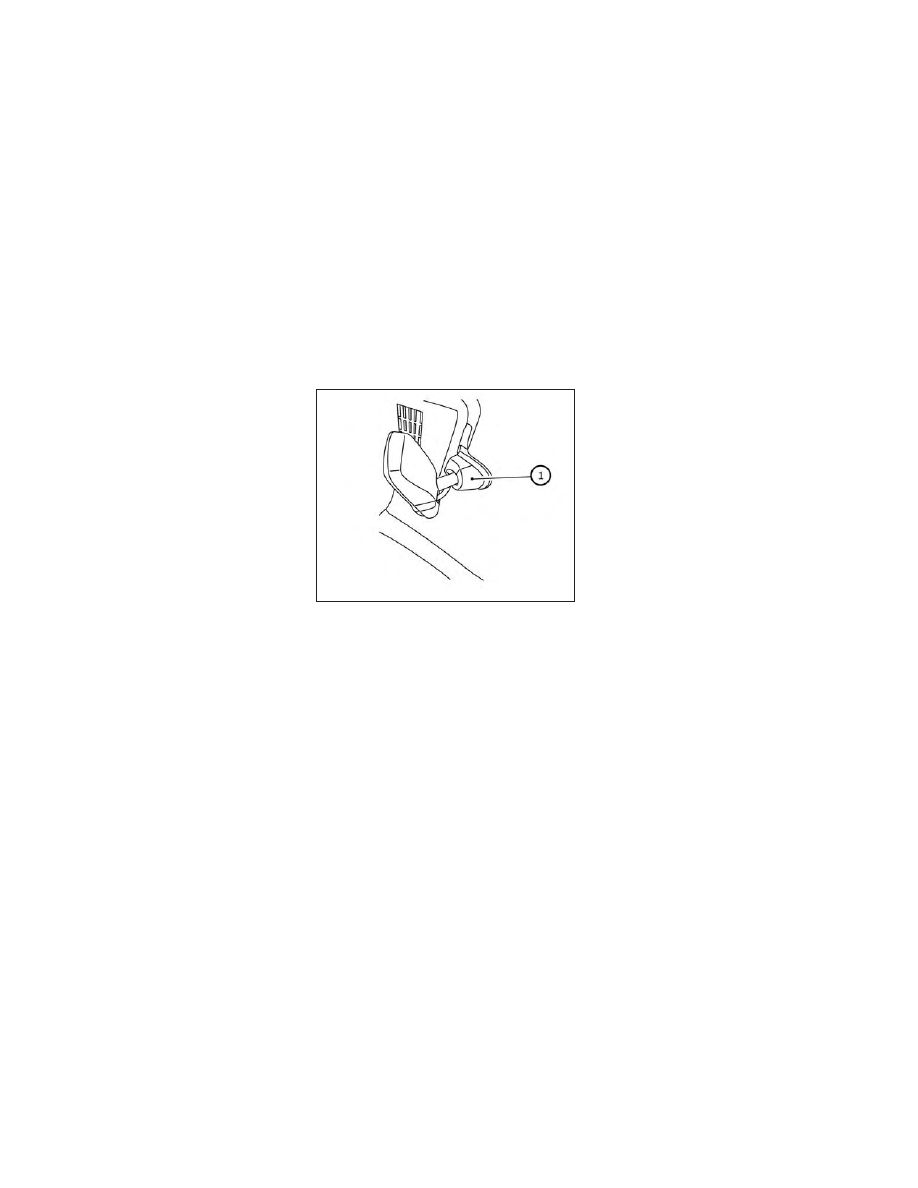
The lane camera unit

O

1

for the LDP system

is located behind the inside mirror. To keep
the proper operation of the LDP system and
prevent a system malfunction, be sure to ob-
serve the following:
• Always keep the windshield clean.
• Do not attach a sticker (including transpar-

ent material) or install an accessory near
the camera unit.

• Do not place reflective materials, such as

white paper or a mirror, on the instrument
panel. The reflection of sunlight may ad-
versely affect the camera unit’s capability
of detecting the lane markers.

• Do not strike or damage the areas around

the camera unit. Do not touch the camera
lens or remove the screw located on the
camera unit. If the camera unit is damaged
due to an accident, it is recommended that
you visit an INFINITI retailer.

LSD3075

5-44

Starting and driving

CarManuals2.com

-------------------------------------------------------------------------------------------------------------------------------------------------------------

WARNING

Failure to follow the warnings and instruc-
tions for proper use of the BSW system
could result in serious injury or death.

The BSW system is not a replacement for
proper driving procedures and is not de-
signed to prevent contact with vehicles
or objects. When changing lanes, always
use the side and rear mirrors and turn
and look in the direction your vehicle will
move to ensure it is safe to change lanes.
Never rely solely on the BSW system.

The BSW system helps alert the driver of
other vehicles in adjacent lanes when chang-
ing lanes.

The BSW system uses radar sensors

O

1

in-

stalled near the rear bumper to detect other
vehicles in an adjacent lane.

The radar sensors can detect vehicles on ei-
ther side of your vehicle within the detection
zone shown as illustrated. This detection
zone starts from the outside mirror of your
vehicle and extends approximately 10 ft (3.0
m) behind the rear bumper, and approxi-
mately 10 ft (3.0 m) sideways.

LSD4092

SSD1030

Detection zone

BLIND SPOT WARNING (BSW)

Starting and driving

5-45

CarManuals2.com

-------------------------------------------------------------------------------------------------------------------------------------------------------------

1. Side Indicator Light

2. BSW Indicator

BSW SYSTEM OPERATION

The BSW system operates above approxi-
mately 20 mph (32 km/h).

If the radar sensors detect a vehicle in the
detection zone, the side indicator light

O

1

illuminates. If the turn signal is then activated,
the system chimes (twice) and the side indi-
cator light flashes. The side indicator light
continues to flash until the detected vehicle
leaves the detection zone.

The side indicator light illuminates for a few
seconds when the ignition switch is placed in
the ON position.

The brightness of the side indicator light is
adjusted automatically depending on the
brightness of the ambient light.

If a vehicle comes into the detection zone
after the driver activates the turn signal, then
only the side indicator light flashes and no
chime sounds. For additional information, see
“BSW driving situations” (P. 5-49).

LSD2921

5-46

Starting and driving

CarManuals2.com

-------------------------------------------------------------------------------------------------------------------------------------------------------------

HOW TO ENABLE/DISABLE THE

BSW SYSTEM

Perform the following steps to enable or dis-
able the BSW system.

1. Press the MENU button below the lower

display screen.

2. Select “Driver Assistance.”

3. Select “Blind Spot Assist.”

4. Select “ON” to turn the “Blind Spot

Warning” system on or off.

NOTE:

• When enabling/disabling the system, the

system will retain current settings even if
the engine is restarted.

• The RCTA system is integrated into the

BSW system. There is not a separate se-
lection in the lower display for the RCTA
system. When the BSW is disabled, the
RCTA system is also disabled.

LSD3936

Starting and driving

5-47

CarManuals2.com

-------------------------------------------------------------------------------------------------------------------------------------------------------------

BSW SYSTEM LIMITATIONS

WARNING

Listed below are the system limitations for
the BSW system. Failure to operate the
vehicle in accordance with these system
limitations could result in serious injury or
death.

The BSW system cannot detect all ve-
hicles under all conditions.

The radar sensors may not be able to de-
tect and activate BSW when certain ob-
jects are present such as:

Pedestrian, bicycles, animals.

Vehicles such as motorcycles, low

height vehicles, or high ground clear-
ance vehicles.

Oncoming vehicles.

Vehicles remaining in the detection

zone when you accelerate from a
stop.

A vehicle merging into an adjacent

lane at a speed approximately the
same as your vehicle.

A vehicle approaching rapidly from

behind.

A vehicle which your vehicle over-

takes rapidly.

A vehicle that passes through the de-

tection zone quickly.

When overtaking several vehicles in a

row, the vehicles after the first ve-
hicle may not be detected if they are
traveling close together.

The radar sensors’ detection zone is de-
signed based on a standard lane width.
When driving in a wider lane, the radar
sensors may not detect vehicles in an ad-
jacent lane. When driving in a narrow
lane, the radar sensors may detect ve-
hicles driving two lanes away.

The radar sensors are designed to ignore
most stationary objects; however, ob-
jects such as guardrails, walls, foliage
and parked vehicles may occasionally be
detected. This is a normal operation
condition.

The following conditions may reduce the
ability of the radar to detect other ve-
hicles:

Severe weather

Road spray

Ice/frost/snow/dirt build-up on the

vehicle

Do not attach stickers (including trans-
parent material), install accessories or
apply additional paint near the radar
sensors. These conditions may reduce
the ability of the radar to detect other
vehicles.

Excessive noise (for example, audio sys-
tem volume, open vehicle window) will
interfere with the chime sound, and it
may not be heard.

5-48

Starting and driving

CarManuals2.com

-------------------------------------------------------------------------------------------------------------------------------------------------------------

BSW DRIVING SITUATIONS

Indicator on

Indicator off

Indicator flashing

Another vehicle approaching from
behind

Illustration 1:

The side indicator light illumi-

nates if a vehicle enters the detection zone
from behind in an adjacent lane.

NOTE:

The radar sensors may not detect vehicles
which are approaching rapidly from behind.

Illustration 2:

If the driver activates the turn

signal when another vehicle is in the detec-
tion zone, then the system chimes (twice) and
the side indicator light flashes.

NOTE:

• The radar sensors may not detect vehicles

which

are

approaching

rapidly

from

behind.

• If the driver activates the turn signal be-

fore a vehicle enters the detection zone,
the side indicator light will flash but no
chime will sound when the other vehicle is
detected.

LSD2299

Illustration 1 – Approaching from behind

LSD2300

Illustration 2 – Approaching from behind

Starting and driving

5-49

CarManuals2.com

-------------------------------------------------------------------------------------------------------------------------------------------------------------

Overtaking another vehicle

Illustration 3:

The side indicator light illumi-

nates if you overtake a vehicle and that ve-
hicle stays in the detection zone for approxi-
mately 2 seconds.

Illustration 4:

If the driver activates the turn

signal while another vehicle is in the detection
zone, then the system chimes (twice) and the
side indicator light flashes.

NOTE:

• When overtaking several vehicles in a row,

the vehicles after the first vehicle may not
be detected if they are traveling close
together.

• The radar sensors may not detect slower

moving vehicles if they are passed quickly.

• If the driver activates the turn signal be-

fore a vehicle enters the detection zone,
the side indicator light will flash but no
chime will sound when the other vehicle is
detected.

LSD2302

Illustration 3 – Overtaking another vehicle

LSD2303

Illustration 4 – Overtaking another vehicle

5-50

Starting and driving

CarManuals2.com

-------------------------------------------------------------------------------------------------------------------------------------------------------------

Entering from the side

Illustration 5:

The side indicator light illumi-

nates if a vehicle enters the detection zone
from either side.

Illustration 6:

If the driver activates the turn

signal while another vehicle is in the detection
zone, then the system chimes (twice) and the
side indicator light flashes.

NOTE:

• If the driver activates the turn signal be-

fore a vehicle enters the detection zone,
the side indicator light will flash but no
chime will sound when the other vehicle is
detected.

• The radar sensors may not detect a vehicle

which is traveling at about the same speed
as your vehicle when it enters the detec-
tion zone.

SYSTEM TEMPORARILY
UNAVAILABLE

When radar blockage is detected, the system
will be deactivated automatically. The “Un-
available: Side Radar Obstruction” warning
message will appear in the vehicle informa-
tion display.

The system is not available until the condi-
tions no longer exist.

The radar sensors may be blocked by tempo-
rary ambient conditions such as splashing
water, mist or fog. The blocked condition
may also be caused by objects such as ice,
frost or dirt obstructing the radar sensors.

NOTE:

If the BSW system stops working, the RCTA
system will also stop working.

Action to take:

When the above conditions no longer exist,
the system will resume automatically.

LSD2305

Illustration 5 – Entering from the side

LSD2308

Illustration 6 – Entering from the side

Starting and driving

5-51

CarManuals2.com

-------------------------------------------------------------------------------------------------------------------------------------------------------------

Malfunction

If the BSW system malfunctions, it will turn
off automatically. The system malfunction
warning message will appear in the vehicle
information display.

NOTE:

If the BSW system stops working, the RCTA
system will also stop working.

Action to take:

Stop the vehicle in a safe location, place the
vehicle in the P (Park) position, turn the en-
gine off and restart the engine. If the mes-
sage continues to appear, have the system
checked. It is recommended that you visit an
INFINITI retailer for this service.

SYSTEM MAINTENANCE

The two radar sensors

O

1

for the BSW sys-

tem are located near the rear bumper. Always
keep the area near the radar sensors clean.

The radar sensors may be blocked by tempo-
rary ambient conditions such as splashing
water, mist or fog.

The blocked condition may also be caused by
objects such as ice, frost or dirt obstructing
the radar sensors.

Check for and remove objects obstructing
the area around the radar sensors.

Do not attach stickers (including transparent
material), install accessories or apply addi-
tional paint near the radar sensors.

Do not strike or damage the area around the
radar sensors. It is recommended that you
visit an INFINITI retailer if the area around
the radar sensors is damaged due to a
collision.

Radio frequency statement

For USA

FCC: OAYSRR3B

This device complies with part 15 of the FCC
Rules.

Operation is subject to the following two
conditions: (1) This device may not cause
harmful interference, and (2) this device must
accept any interference received, including
interference

that

may

cause

undesired

operation.

FCC Warning

Changes or modifications not expressly ap-
proved by the party responsible for compli-
ance could void the user’s authority to oper-
ate the equipment.

LSD4092

5-52

Starting and driving

CarManuals2.com

-------------------------------------------------------------------------------------------------------------------------------------------------------------

For Canada

Applicable law: Canada 310

This

device

contains

licence-exempt

transmitter(s)/receiver(s) that comply with
Innovation, Science and Economic Develop-
ment Canada’s licence-exempt RSS(s). Op-
eration is subject to the following two condi-
tions:

(1)

This

device

may

not

cause

interference. (2) This device must accept any
interference, including interference that may
cause undesired operation of the device.

Radiofrequency radiation exposure informa-
tion: This equipment complies with radiation
exposure limits set forth for an uncontrolled
environment. This equipment should be in-
stalled and operated with minimum distance
of 20 cm between the radiator and your
body.

L’émetteur/récepteur exempt de licence
contenu dans le présent appareil est con-
forme aux CNR d’Innovation, Sciences et Dé-
veloppement économique Canada appli-
cables aux appareils radio exempts de licence.
L’exploitation est autorisée aux deux condi-
tions suivantes: (1) L’appareil ne doit pas
produire de brouillage. (2) L’appareil doit ac-
cepter tout brouillage radioélectrique subi,
même si le brouillage est susceptible d’en
compromettre le fonctionnement.

Informations sur l’exposition aux rayonne-
ments radiofréquences: Cet équipement est
conforme aux limites d’exposition aux rayon-
nements définies pour un environnement non
contrôle. Cet équipement doit être installé et
utilisé avec un minimum de 20 cm de distance
entre la source de rayonnement et votre
corps.

WARNING

Failure to follow the warnings and instruc-
tions for proper use of the BSI system could
result in serious injury or death.

The BSI system is not a replacement for
proper driving procedure and is not de-
signed to prevent contact with vehicles
or objects. When changing lanes, always
use the side and rear mirrors and turn
and look in the direction you will move to
ensure it is safe to change lanes. Never
rely solely on the BSI system.

There is a limitation to the detection ca-
pability of the radar or the sonar. Not
every moving object or vehicle will be de-
tected. Using the BSI system under some
road, ground, lane marker, traffic or
weather conditions could lead to im-
proper system operation. Always rely on
your own operation to avoid accidents.

The BSI system helps alert the driver of other
vehicles in adjacent lanes when changing
lanes and helps assist the driver to return the
vehicle to the center of the traveling lane.

BLIND SPOT INTERVENTION® (BSI)

Starting and driving

5-53

CarManuals2.com

-------------------------------------------------------------------------------------------------------------------------------------------------------------

The BSI system uses radar sensors

O

2

in-

stalled near the rear bumper to detect other
vehicles in an adjacent lane. In addition to the
radar sensors, the BSI system uses a camera

O

1

installed behind the windshield to monitor

the lane markers of your traveling lane.

The radar sensors can detect vehicles on ei-
ther side of your vehicle within the detection
zone shown as illustrated. This detection
zone starts from the outside mirror of your
vehicle and extends approximately 10 ft (3.0
m) sideways.

LSD4093

SSD1030

Detection zone

5-54

Starting and driving

CarManuals2.com

-------------------------------------------------------------------------------------------------------------------------------------------------------------

BSI SYSTEM OPERATION

1. Side indicator light

2. BSW indicator

3. BSI ON indicator

4. ProPILOT Assist switch

The BSI system operates above approxi-
mately 37mph (60 km/h).

If the radar sensors detect a vehicle in the
detection zone, the side indicator light (1)
illuminates. If the turn signal is then activated,
the system chimes (twice) and the side indi-
cator light flashes. The side indicator light
continues to flash until the detected vehicle
leaves the detection zone.

If the BSI system is on and your vehicle ap-
proaches a lane marker while another vehicle
is in the detection zone, the system chimes
(three times) and the side indicator light
flashes. The BSI system activates to help re-
turn the vehicle back to the center of the
driving lane. The BSI system operates regard-
less of turn signal usage.

NOTE:

BSI warning and system application will
only be activated if the side indicator light
is already illuminated when your vehicle
approaches a lane marker. If another ve-
hicle comes into the detection zone after
your vehicle has crossed a lane marker, no
BSI warning or system application will be
activated. For additional information, see
“BSI driving situations” (P. 5-59 
).

LSD3899

Starting and driving

5-55

CarManuals2.com

-------------------------------------------------------------------------------------------------------------------------------------------------------------

The BSI system is typically activated ear-
lier than the Lane Departure Prevention
(LDP) system when your vehicle is ap-
proaching a lane marker.

The BSI system turns on when the ProPILOT
Assist switch on the steering wheel, is pushed
when the “Blind Spot Intervention” is enabled
in the “Driver Assistance” menu in the lower
display. The BSI ON indicator on the instru-
ment panel illuminates when the BSI system
is turned on. The BSI system provides a chime
and turns on or flashes the side indicator light
even if the BSW system is off.

HOW TO ENABLE/DISABLE THE
BSI SYSTEM

When the BSI system is enabled in the lower
display, the system can be turned off tempo-
rarily by pushing the ProPILOT Assist switch
on the steering wheel.

LSD3936

5-56

Starting and driving

CarManuals2.com

-------------------------------------------------------------------------------------------------------------------------------------------------------------

Perform the following steps to enable or dis-
able the BSI system:

1. Press the MENU button below the lower

display screen.

2. Select “Driver Assistance.”

3. Select “Blind Spot Assist.”

4. Select “ON” to turn the “Blind Spot Inter-

vention” system on or off.

• Select “Blind Spot Indicator” and set it to

either “Standard”, “Bright” or “Dark.”

NOTE:

Turning on the ProPILOT Assist system will
turn on the BSI and LDP system at the same
time. For additional information, see “Lane
Departure Prevention (LDP)” (P. 5-39 
).

BSI SYSTEM LIMITATIONS

WARNING

Listed below are the system limitations for
the BSI system. Failure to operate the ve-
hicle in accordance with these system limi-
tations could result in serious injury or
death.

The BSI system cannot detect all vehicles
under all conditions.

The radar sensors may not be able to de-
tect and activate BSI when certain ob-
jects are present such as:

Pedestrians, bicycles, or animals.

Vehicles such as motorcycles, low

height vehicles, or high ground clear-
ance vehicles.

Vehicles remaining in the detection

zone when you accelerate from a
stop. For additional information, see
“BSI driving situations” (P. 5-59).

Oncoming vehicles.

A vehicle merging into an adjacent

lane at a speed approximately the
same as your vehicle. For additional
information, see “BSI driving situa-
tions” (P. 5-59).

A vehicle approaching rapidly from

behind. For additional information,
see “BSI driving situations” (P. 5-59).

A vehicle which your vehicle over-

takes rapidly. For additional infor-
mation, see “BSI driving situations”
(P. 5-59).

A vehicle that passes through the de-

tection zone quickly.

The radar sensor’s detection zone is de-
signed based on a standard lane width.
When driving in a wider lane, the radar
sensors may not detect vehicles in an ad-
jacent lane. When driving in a narrow
lane, the radar sensors may detect ve-
hicles driving two lanes away.

The radar sensors are designed to ignore
most stationary objects; however, ob-
jects such as guardrails, walls, foliage
and parked vehicles may occasionally be
detected. This is a normal driving
condition.

The following conditions may reduce the
ability of the radar to detect other ve-
hicles:

Severe weather

Road spray

Ice/frost/dirt build-up on the vehicle

Do not attach stickers (including trans-
parent material), install accessories or
apply additional paint near the radar
sensors. These conditions may reduce
the ability of the radar to detect other
vehicles.

Starting and driving

5-57

CarManuals2.com

-------------------------------------------------------------------------------------------------------------------------------------------------------------

The camera may not detect lane markers
in the following situations and the BSI
system may not operate properly:

On roads where there are multiple

parallel lane markers; lane markers
that are faded or not painted clearly;
yellow painted lane markers; non-
standard lane markers; lane markers
covered with water, dirt, snow, etc.

On roads where discontinued lane

markers are still detectable.

On roads where there are sharp

curves.

On roads where there are sharply

contrasting objects, such as shad-
ows, snow, water, wheel ruts, seams
or lines remaining after road repairs.

On roads where the traveling lane

merges or separates.

When the vehicle’s traveling direction

does not align with the lane markers.

When traveling close to the vehicle in

front of you, which obstructs the lane
camera unit detection range.

When rain, snow or dirt adheres to

the windshield in front of a lane cam-
era unit.

When the headlights are not bright

due to dirt on the lens or if aiming is
not adjusted properly.

When strong light enters a lane cam-

era unit (e.g., light directly shines on
the front of the vehicle at sunrise or
sunset).

When a sudden change in brightness

occurs (e.g., when the vehicle enters
or exits a tunnel or under a bridge).

Do not use the BSI system under the fol-
lowing conditions because the system
may not function properly:

During bad weather (for example:

rain, fog, snow, etc.).

When driving on slippery roads, such

as on ice or snow, etc.

When driving on winding or uneven

roads.

When there is a lane closure due to

road repairs.

When driving in a makeshift lane.

When driving on roads where the lane

width is too narrow.

When driving with a tire that is not

within normal tire conditions (for ex-
ample: tire wear, low tire pressure,
installation of spare tire, tire chains,
nonstandard wheels).

When the vehicle is equipped with

non-original brake parts or suspen-
sion parts.

Excessive noise (for example: audio sys-
tem volume, open vehicle window) will
interfere with the chime sound, and it
may not be heard.

5-58

Starting and driving

CarManuals2.com

-------------------------------------------------------------------------------------------------------------------------------------------------------------

BSI DRIVING SITUATIONS
Another vehicle approaching from
behind

Illustration 1: The side indicator light illumi-
nates if a vehicle enters the detection zone
from behind in an adjacent lane.

However, if the overtaking vehicle is traveling
much faster than your vehicle, the indicator
light may not illuminate before the detected
vehicle is beside your vehicle. Always use the
side and rear mirrors and turn and look in the
direction your vehicle will move to ensure it is
safe to change lanes.

Illustration 2: If the driver activates the turn
signal then the system chimes a sound (twice)
and the side indicator light flashes.

NOTE:

If the driver activates the turn signal before
a vehicle enters the detection zone, the side
indicator light will flash but no chime will
sound when the other vehicle is detected.

Illustration 3: If the BSI system is on and your
vehicle is approaching a lane marker and a
vehicle is in the detection zone, the system
chimes a sound (three times), and the side
indicator light flashes. Then the BSI system
slightly applies the brakes on one side to help
return the vehicle back to the center of the
driving lane.

SSD1026

Illustration 1 – Approaching from behind

SSD1031

Illustration 2 – Approaching from behind

LSD2048

Illustration 3 – Approaching from behind

Starting and driving

5-59

CarManuals2.com

-------------------------------------------------------------------------------------------------------------------------------------------------------------

NOTE:

Illustration 4: If you accelerate from a stop
with a vehicle in the detection zone, the
other vehicle may not be detected.

Overtaking another vehicle

Illustration 5: The side indicator light illumi-
nates if you overtake a vehicle and that ve-
hicle stays in the detection zone for approxi-
mately 3 seconds.

The radar sensors may not detect slower
moving vehicles if they are passed quickly.

Illustration 6: If the driver activates the turn
signal while another vehicle is in the detection
zone, then the system chimes a sound (twice)
and the side indicator light flashes.

SSD1032

Illustration 4 – Accelerate from a stop

SSD1033

Illustration 5 – Overtaking another vehicle

SSD1034

Illustration 6 – Overtaking another vehicle

5-60

Starting and driving

CarManuals2.com

-------------------------------------------------------------------------------------------------------------------------------------------------------------

Illustration 7: If the BSI system is on and your
vehicle approaches a lane marker while an-
other vehicle is in the detection zone the sys-
tem chimes a sound (three times) and the side
indicator light flashes. Then, the BSI system
slightly applies the brakes on the appropriate
side to help return the vehicle back to the
center of the driving lane.

NOTE:

Illustration 8: When overtaking several ve-
hicles in a row, the vehicles after the first
vehicle may not be detected if they are trav-
eling close together.

LSD2072

Illustration 7 – Overtaking another vehicle

SSD1036

Illustration 8 – Overtaking several vehicles

Starting and driving

5-61

CarManuals2.com

-------------------------------------------------------------------------------------------------------------------------------------------------------------

Entering from the side

Illustration 9: The side indicator light illumi-
nates if a vehicle enters the detection zone
from either side.

NOTE:

The radar sensors may not detect a vehicle
which is traveling at about the same speed as
your vehicle when it enters the detection
zone.

Illustration 10: If the driver activates the turn
signal while another vehicle is in the detection
zone, then the side indicator light flashes and
a chime will sound twice.

NOTE:

If the driver activates the turn signal before
a vehicle enters the detection zone, the side
indicator light will flash but no chime will
sound when another vehicle is detected.

Illustration 11: If the BSI system is on and
your vehicle approaches the lane marker
while another vehicle is in the detection zone,
the side indicator light flashes and a chime
will sound three times. Then, the BSI system
slightly applies the brakes on the appropriate
side to help return the vehicle back to the
center of the driving lane.

LSD2050

Illustration 9 – Entering from the side

SSD1038

Illustration 10 – Entering from the side

SSD1094

Illustration 11 – Entering from the side

5-62

Starting and driving

CarManuals2.com

-------------------------------------------------------------------------------------------------------------------------------------------------------------

NOTE:

• Illustration 12: The BSI system will not op-

erate if your vehicle is on a lane marker
when another vehicle enters the detection
zone. In this case, only the BSW system
operates.

• BSI braking will not operate or will stop

operating and only a warning chime will
sound under the following conditions:

– When the brake pedal is depressed.
– When the vehicle is accelerated during

BSI system operation.

– When steering quickly.

– When the PFCW or FEB with Pedes-

trian Detection warnings sound.

– When the hazard warning flashers are

operated.

– When driving on a curve at a high speed.

SYSTEM TEMPORARILY
UNAVAILABLE

When any of the following messages appear
on the vehicle information display, a chime
will sound and the BSI system will be turned
off automatically.
• “Not Available Poor Road Conditions”:

When the VDC system (except traction
control system function) or ABS operates.

• “Currently Not Available”:

When the VDC system is turned off.

• “Not Available: High Camera Temp”:

When the camera detects that the interior
temperature is high (over approximately
104°F [40°C]).

• “Unavailable: Side Radar Obstruction”:

When side radar blockage is detected.

Turn off the BSI system and turn it on again
when the above conditions no longer exist.

SYSTEM MALFUNCTION

When the BSI system malfunctions, it will be
turned off automatically, a chime will sound
and the warning message will appear in the
vehicle information display.

Action to take:
Stop the vehicle in a safe location, place the
vehicle in the P (Park) position, turn the en-
gine off and restart the engine. If the warning
light (orange) continues to illuminate, have
the system checked. It is recommended that
you visit an INFINITI retailer for this service.

LSD2051

Illustration 12 – Entering from the side

Starting and driving

5-63

CarManuals2.com

-------------------------------------------------------------------------------------------------------------------------------------------------------------

SYSTEM MAINTENANCE

The lane camera unit

O

1

for the BSI system is

located above the inside mirror. The two ra-
dar sensors

O

2

for the BSI system are located

near the rear bumper. To keep the proper
operation of the BSI system and prevent a
system malfunction, be sure to observe the
following:
• Always keep the windshield and the area

near the radar sensors clean.

• The radar sensors may be blocked by tem-

porary ambient conditions such as splash-
ing water, mist or fog. The blocked condi-
tion may also be caused by objects such as
ice, frost or dirt obstructing the radar sen-
sors. Check for and remove objects ob-
structing

the

area

around

the

radar

sensors.

• Do not attach stickers (including transpar-

ent material), install accessories or apply
additional paint near the camera unit or
radar sensors.

• Do not place reflective materials, such as

white paper or a mirror, on the instrument
panel. The reflection of sunlight may ad-
versely affect the camera unit’s capability
of detecting the lane markers.

• Do not strike or damage the area around

the radar sensors. Do not touch the camera
lens or remove the screw located on the
camera unit. It is recommended that you
visit an INFINITI retailer if the camera unit
and/or area around the radar sensors is
damaged due to a collision.

Radio frequency statement

For USA

FCC: OAYSRR3B

This device complies with part 15 of the FCC
Rules.

Operation is subject to the following two
conditions: (1) This device may not cause
harmful interference, and (2) this device must
accept any interference received, including
interference

that

may

cause

undesired

operation.

FCC Warning

Changes or modifications not expressly ap-
proved by the party responsible for compli-
ance could void the user’s authority to oper-
ate the equipment.

For Canada

Applicable law: Canada 310

This

device

contains

licence-exempt

transmitter(s)/receiver(s) that comply with
Innovation, Science and Economic Develop-
ment Canada’s licence-exempt RSS(s). Op-
eration is subject to the following two condi-
tions:

(1)

This

device

may

not

cause

interference. (2) This device must accept any
interference, including interference that may
cause undesired operation of the device.

LSD4093

5-64

Starting and driving

CarManuals2.com

-------------------------------------------------------------------------------------------------------------------------------------------------------------

Radiofrequency radiation exposure informa-
tion: This equipment complies with radiation
exposure limits set forth for an uncontrolled
environment. This equipment should be in-
stalled and operated with minimum distance
of 20 cm between the radiator and your
body.

L’émetteur/récepteur exempt de licence
contenu dans le présent appareil est con-
forme aux CNR d’Innovation, Sciences et Dé-
veloppement économique Canada appli-
cables aux appareils radio exempts de licence.
L’exploitation est autorisée aux deux condi-
tions suivantes: (1) L’appareil ne doit pas
produire de brouillage. (2) L’appareil doit ac-
cepter tout brouillage radioélectrique subi,
même si le brouillage est susceptible d’en
compromettre le fonctionnement.

Informations sur l’exposition aux rayonne-
ments radiofréquences: Cet équipement est
conforme aux limites d’exposition aux rayon-
nements définies pour un environnement non
contrôle. Cet équipement doit être installé et
utilisé avec un minimum de 20 cm de distance
entre la source de rayonnement et votre
corps.

WARNING

Failure to follow the warnings and instruc-
tions for proper use of the RCTA system
could result in serious injury or death.

The RCTA system is not a replacement
for proper driving procedures and is not
designed to prevent contact with ve-
hicles or objects. When backing out of a
parking space, always use the side and
rear mirrors and turn and look in the di-
rection your vehicle will move. Never rely
solely on the RCTA system.

The RCTA system will assist you when back-
ing out from a parking space. When the ve-
hicle is in reverse, the system is designed to
detect other vehicles approaching from the
right or left of the vehicle. If the system de-
tects cross traffic, it will alert you.

REAR CROSS TRAFFIC ALERT
(RCTA)

Starting and driving

5-65

CarManuals2.com

-------------------------------------------------------------------------------------------------------------------------------------------------------------

RCTA SYSTEM OPERATION

1. Side indicator light

The RCTA system can help alert the driver of
an approaching vehicle when the driver is
backing out of a parking space.

When the shift position is in R (Reverse) and
the vehicle speed is less than approximately 5
mph

(8

km/h),

the

RCTA

system

is

operational.

If the radar detects an approaching vehicle
from either side, the system chimes (once)
and the side indicator light flashes on the side
the vehicle is approaching from.

LSD3608

5-66

Starting and driving

CarManuals2.com

-------------------------------------------------------------------------------------------------------------------------------------------------------------

The RCTA system uses radar sensors

O

1

in-

stalled on both sides near the rear bumper to
detect an approaching vehicle.

The radar sensors

O

1

can detect an ap-

proaching vehicle from up to approximately
66 ft (20 m) away.

LSD2216

LSD4092

Starting and driving

5-67

CarManuals2.com

-------------------------------------------------------------------------------------------------------------------------------------------------------------

HOW TO ENABLE/DISABLE THE

RCTA SYSTEM

Perform the following steps to enable or dis-
able the RCTA system.

1. Press the MENU button below the lower

display screen.

2. Select “Driver Assistance.”

3. Select “Blind Spot Assist.”

4. Select “ON” to turn the “Blind Spot

Warning” system on or off.

NOTE:

• The RCTA system is integrated into the

BSW system. There is not a separate se-
lection in the vehicle information display
for the RCTA system. When the BSW is
disabled,

the

RCTA

system

is

also

disabled.

• When enabling/disabling the system, the

system setting will be retained even if the
engine is restarted.

LSD3936

5-68

Starting and driving

CarManuals2.com

-------------------------------------------------------------------------------------------------------------------------------------------------------------

RCTA SYSTEM LIMITATIONS

WARNING

Listed below are the system limitations for
the RCTA system. Failure to operate the
vehicle in accordance with these system
limitations could result in serious injury or
death.

Always check surroundings and turn to
check what is behind you before backing
up. The radar sensors detect approach-
ing (moving) vehicles. The radar sensors
cannot detect every object such as:

Pedestrians, bicycles, motorcycles,

animals or child-operated toy ve-
hicles

A vehicle that is passing at speeds

greater than approximately 19 mph
(30 km/h)

A vehicle that is passing at speeds

lower than approximately 5 mph (8
km/h)

The radar sensors may not detect ap-
proaching vehicles in certain situations:

Illustration

O

A

:

When

a

vehicle

parked next to you obstructs the
beam of the radar sensor.

Illustration

O

B

: When the vehicle is

parked in an angled parking space.

Illustration

O

C

: When the vehicle is

parked on inclined ground.

Illustration

O

D

: When an approaching

vehicle turns into your vehicle's park-
ing lot aisle.

Illustration

O

E

: When the angle

formed by your vehicle and ap-
proaching vehicle is small.

LSD3195

Starting and driving

5-69

CarManuals2.com

-------------------------------------------------------------------------------------------------------------------------------------------------------------

The following conditions may reduce the
ability of the radar to detect other ve-
hicles:

Severe weather

Road spray

Ice/frost/snow/dirt build-up on the

vehicle

Do not attach stickers (including trans-
parent material), install accessories or
apply additional paint near the radar
sensors. These conditions may reduce
the ability of the radar to detect other
vehicles.

Excessive noise (e.g., audio system vol-
ume, open vehicle window) will interfere
with the chime sound, and it may not be
heard.

NOTE:

In the case of several vehicles approaching in
a row (Illustration 1) or in the opposite direc-
tion (Illustration 2), a chime may not be
sounded by the RCTA system after the first
vehicle passes the sensors.

LSD2043

Illustration 1

LSD2044

Illustration 2

5-70

Starting and driving

CarManuals2.com

-------------------------------------------------------------------------------------------------------------------------------------------------------------

SYSTEM TEMPORARILY

UNAVAILABLE

When radar blockage is detected, the system
will be deactivated automatically. The “Un-
available: Side Radar Obstruction” warning
message will appear in the vehicle informa-
tion display.

The systems are not available until the condi-
tions no longer exist.

The radar sensors may be blocked by tempo-
rary ambient conditions such as splashing
water, mist or fog.

The blocked condition may also be caused by
objects such as ice, snow, frost or dirt ob-
structing the radar sensors.

NOTE:

If the BSW system stops working, the RCTA
system will also stop working.

Action to take

When the above conditions no longer exist,
the system will resume automatically.

Malfunction

When the RCTA system malfunctions, it will
turn off automatically. The system malfunc-
tion warning message will appear in the ve-
hicle information display.

LSD3609

Starting and driving

5-71

CarManuals2.com

-------------------------------------------------------------------------------------------------------------------------------------------------------------

NOTE:

If the BSW system stops working, the RCTA
system will also stop working.

Action to take

Stop the vehicle in a safe location, place the
vehicle in the P (Park) position, turn the en-
gine off and restart the engine. If the mes-
sage continues to appear, have the system
checked. It is recommended that you visit an
INFINITI retailer for this service.

SYSTEM MAINTENANCE

The two radar sensors

O

1

for the BSW and

RCTA systems are located near the rear
bumper. Always keep the area near the radar
sensors clean.

The radar sensors may be blocked by tempo-
rary ambient conditions such as splashing
water, mist or fog.

The blocked condition may also be caused by
objects such as ice, frost or dirt obstructing
the radar sensors.

Check for and remove objects obstructing
the area around the radar sensors.

Do not attach stickers (including transparent
material), install accessories or apply addi-
tional paint near the radar sensors.

Do not strike or damage the area around the
radar sensors. It is recommended that you
visit an INFINITI retailer if the area around
the radar sensors is damaged due to a
collision.

Radio frequency statement

For USA

FCC: OAYSRR3B

This device complies with part 15 of the FCC
Rules.

Operation is subject to the following two
conditions: (1) This device may not cause
harmful interference, and (2) this device must
accept any interference received, including
interference

that

may

cause

undesired

operation.

FCC Warning

Changes or modifications not expressly ap-
proved by the party responsible for compli-
ance could void the user’s authority to oper-
ate the equipment.

LSD4092

5-72

Starting and driving

CarManuals2.com

-------------------------------------------------------------------------------------------------------------------------------------------------------------

For Canada

Applicable law: Canada 310

This

device

contains

licence-exempt

transmitter(s)/receiver(s) that comply with
Innovation, Science and Economic Develop-
ment Canada’s licence-exempt RSS(s). Op-
eration is subject to the following two condi-
tions:

(1)

This

device

may

not

cause

interference. (2) This device must accept any
interference, including interference that may
cause undesired operation of the device.

Radiofrequency radiation exposure informa-
tion: This equipment complies with radiation
exposure limits set forth for an uncontrolled
environment. This equipment should be in-
stalled and operated with minimum distance
of 20 cm between the radiator and your
body.

L’émetteur/récepteur exempt de licence
contenu dans le présent appareil est con-
forme aux CNR d’Innovation, Sciences et Dé-
veloppement économique Canada appli-
cables aux appareils radio exempts de licence.
L’exploitation est autorisée aux deux condi-
tions suivantes: (1) L’appareil ne doit pas
produire de brouillage. (2) L’appareil doit ac-
cepter tout brouillage radioélectrique subi,
même si le brouillage est susceptible d’en
compromettre le fonctionnement.

Informations sur l’exposition aux rayonne-
ments radiofréquences: Cet équipement est
conforme aux limites d’exposition aux rayon-
nements définies pour un environnement non
contrôle. Cet équipement doit être installé et
utilisé avec un minimum de 20 cm de distance
entre la source de rayonnement et votre
corps.

WARNING

Failure to follow the warnings and instruc-
tions for proper use of the ProPILOT Assist
system could result in serious injury or
death.

ProPILOT Assist is not a self-driving
system. Within the limits of its capabili-
ties, as described in this manual, it helps
the driver with certain driving activities.

The ProPILOT Assist system is not a re-
placement for proper driving procedures
and is not designed to correct careless,
inattentive or absent-minded driving.
ProPILOT Assist will not always steer
the vehicle to keep it in the lane. The Pro-
PILOT Assist system is not designed to
prevent loss of control. It is the driver’s
responsibility to stay alert, drive safely,
keep the vehicle in the traveling lane, and
be in control of the vehicle at all times.

There are limitations to the ProPILOT
Assist system capability. The ProPILOT
Assist system does not function in all
driving, traffic, weather, and road condi-
tions. It is the driver’s responsibility to
stay alert, drive safely, keep the vehicle
in the traveling lane, and be in control of
the vehicle at all times.

PROPILOT ASSIST

Starting and driving

5-73

CarManuals2.com

-------------------------------------------------------------------------------------------------------------------------------------------------------------

The ProPILOT Assist system is only an
aid to assist the driver and is not a colli-
sion warning or avoidance device.

The ProPILOT Assist system is for high-
way use only and is not intended for city
driving. Failure to apply the brakes or
steer the vehicle when necessary may re-
sult in a serious accident.

Always observe posted speed limits and
do not set the speed over them.

Never take your hands off the steering
wheel when driving. Always keep your
hands on the steering wheel and drive
your vehicle safely.

Never unfasten your safety belt when
using ProPILOT Assist. Doing so auto-
matically cancels the ProPILOT Assist
system.

The ProPILOT Assist system does not
react to stationary and slow moving
vehicles.

Always drive carefully and attentively
when using the ProPILOT Assist system.
Read and understand the Owner’s
Manual thoroughly before using the
ProPILOT Assist system. To avoid seri-
ous injury or death, do not rely on the
system to prevent accidents or to control
the vehicle’s speed in emergency situa-
tions. Do not use the ProPILOT Assist
system except in appropriate road and
traffic conditions.

The ProPILOT Assist system is intended to
enhance the operation of the vehicle when
following a vehicle traveling in the same lane
and direction.
The ProPILOT Assist system uses a multi-
sensing front camera

O

A

installed behind the

windshield and a radar sensor located on the
front of the vehicle

O

B

to measure the dis-

tance to the vehicle ahead in the same lane
and to monitor the lane markers. If the vehicle
detects a slower moving vehicle ahead, the
system will reduce the vehicle speed so that
your vehicle follows the vehicle in front at the
selected distance. The system will also help
keep the vehicle centered in the traveling lane
when clear lane markings are detected.

LSD4096

5-74

Starting and driving

CarManuals2.com

-------------------------------------------------------------------------------------------------------------------------------------------------------------

PROPILOT ASSIST SYSTEM
OPERATION

1

Steering-wheel-mounted control (left)

2

Vehicle information display

3

Steering-wheel-mounted control (right)

4

ProPILOT Assist switch

The ProPILOT Assist system has the follow-
ing two functions:

1.

Intelligent Cruise Control (ICC)

The ICC system can be set to one of two
cruise control modes:

Conventional (fixed speed) cruise control
mode:

For cruising at a preset speed

NOTE:

Steering assist is not available in the conven-
tional (fixed speed) cruise control mode.

Vehicle-to-vehicle distance control mode:

The ICC system maintains a selected dis-
tance from the vehicle in front of you within
the speed range of 0 to 90 mph (0 to 144
km/h) up to the set speed. The set speed
can be selected by the driver between 20 to
90 mph (30 to 144 km/h). When the ve-
hicle ahead slows to a stop, your vehicle
gradually decelerates to a standstill. When
the vehicle is stopped, the ICC system
maintains braking force to keep your ve-
hicle stopped.

NOTE:

When your vehicle is stopped for less than 3
seconds and the vehicle ahead begins to
move, your vehicle will start moving again
automatically.

LSD2996

Starting and driving

5-75

CarManuals2.com

-------------------------------------------------------------------------------------------------------------------------------------------------------------


Content      ..     8      9      10      11     ..