FM 1-02 (FM 101-5-1) MCRP 5-12A OPERATIONAL TERMS AND GRAPHICS (SEPTEMBER 2004) - page 11
FM 1-02/MCRP 5-12A________________________________________________________________
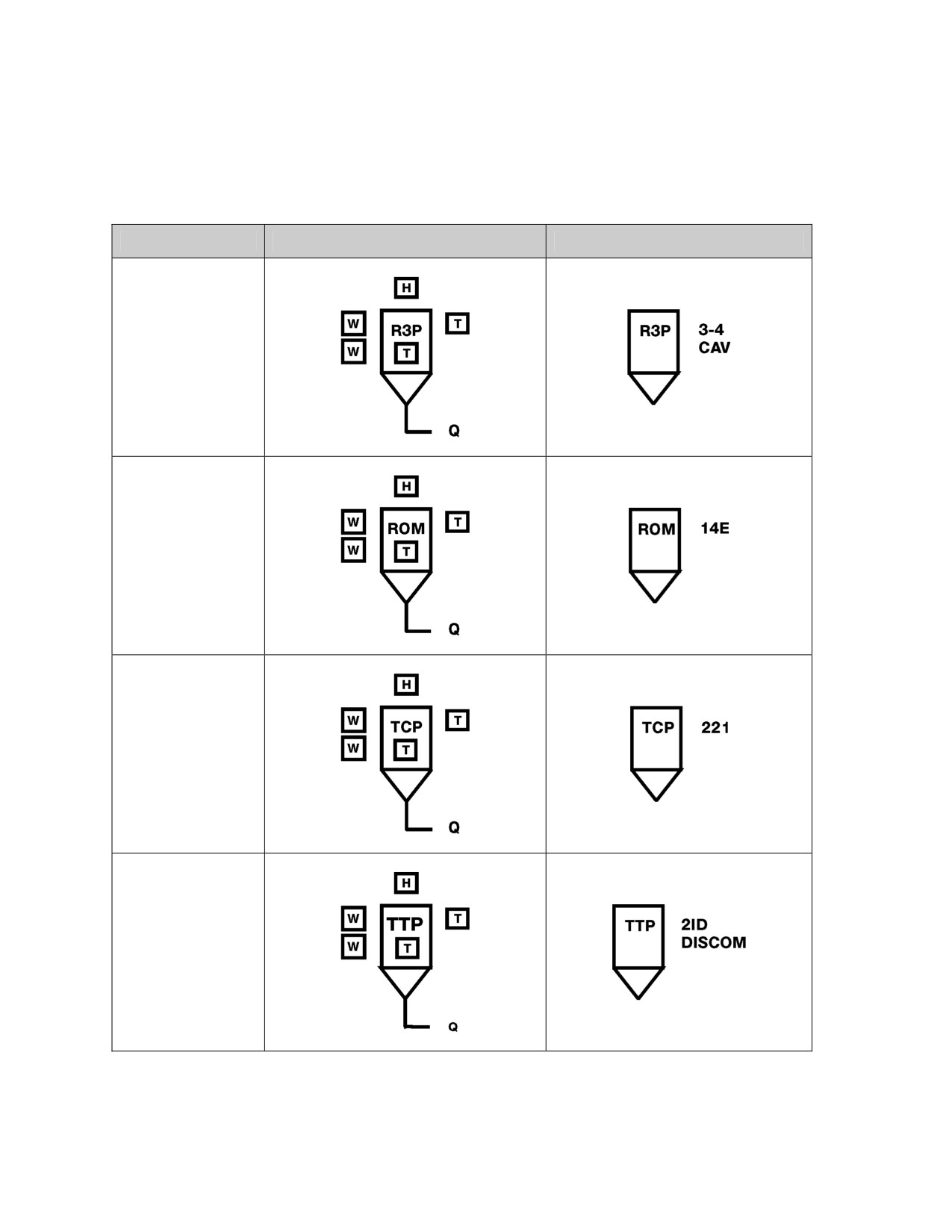
Table 7-17. Examples of Combat Service Support Control Measures
Control Measure
Graphic
Example
Rearm, Refuel, and
Resupply Point
(R3P).
(See page 1-157
for definition.)
Refuel on the Move
Point (ROM).
(See page 1-159
for definition.)
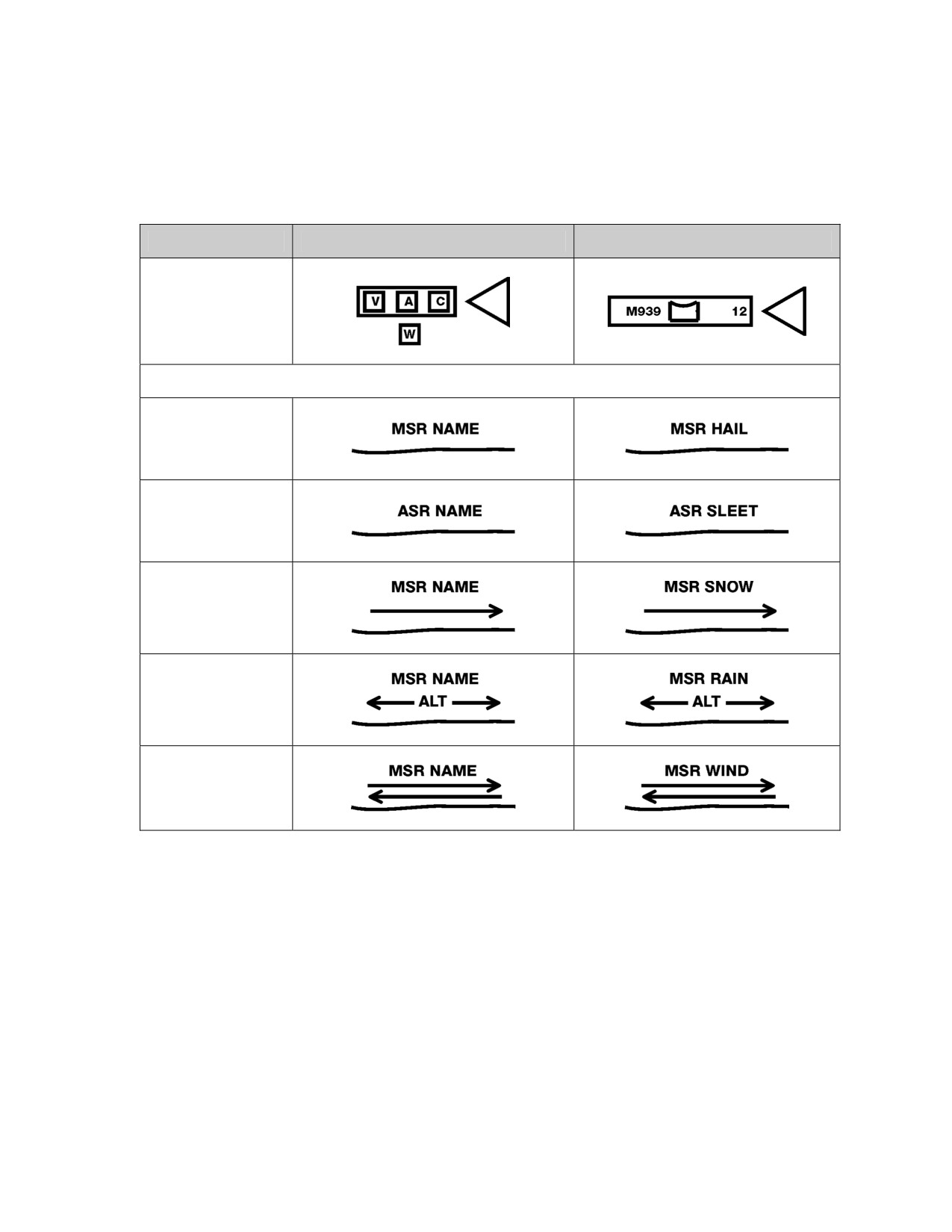
Traffic Control Post
(TCP).
(See page 1-191
for definition.)
Trailer Transfer
Point (TTP).
(See page 1-191
for definition.)
7-64
___________________________________________________________Graphic Control Measures
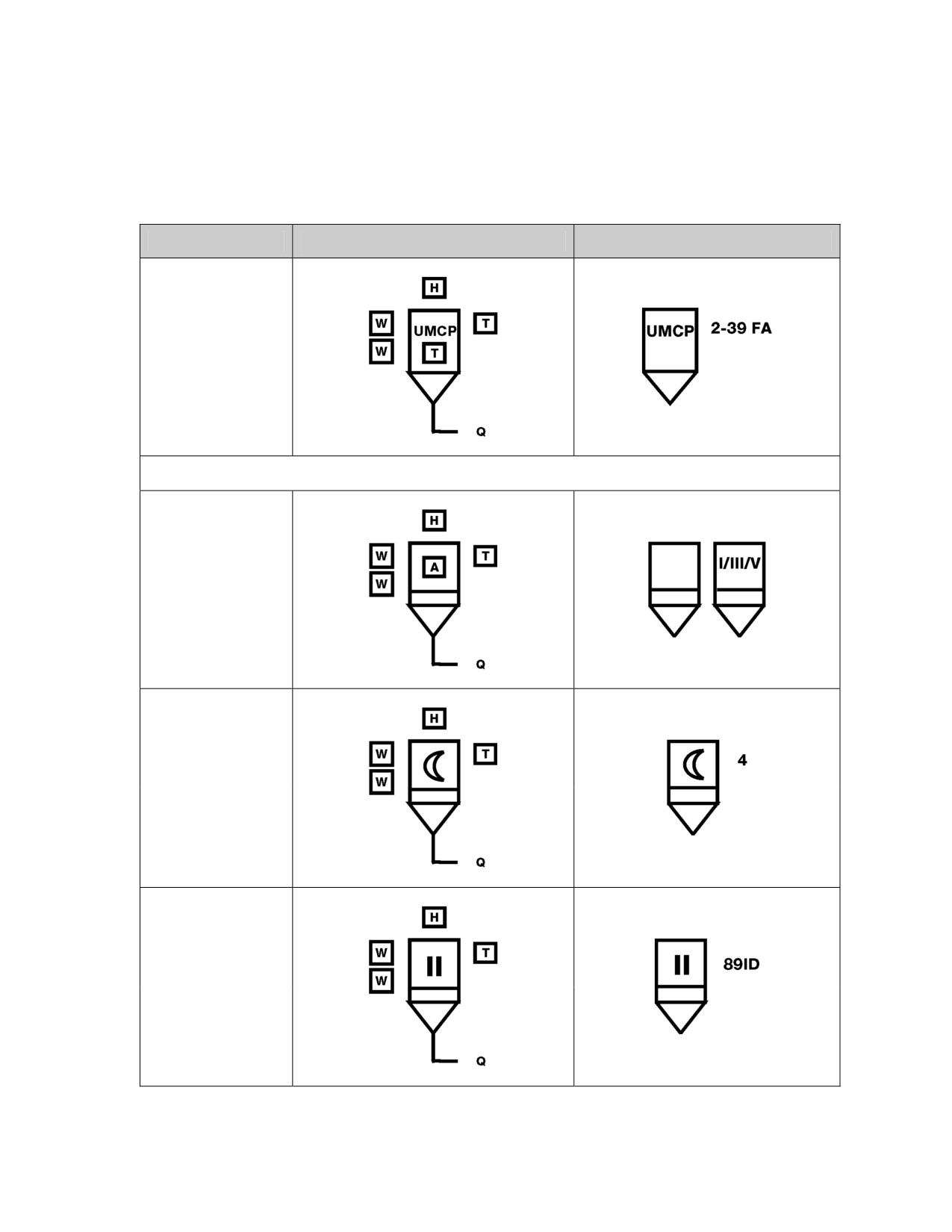
Table 7-17. Examples of Combat Service Support Control Measures
Control Measure
Graphic
Example
Unit Maintenance
Collection Point
(UMCP).
(See page 1-194
for definition.)
Supply Points (US only) (See page 1-178 for definition.)
General/Multiple
Classes.
(See page 1-31 for
definition.)
Class I
NATO Class I
Class II
NATO Class II
7-65
FM 1-02/MCRP 5-12A________________________________________________________________
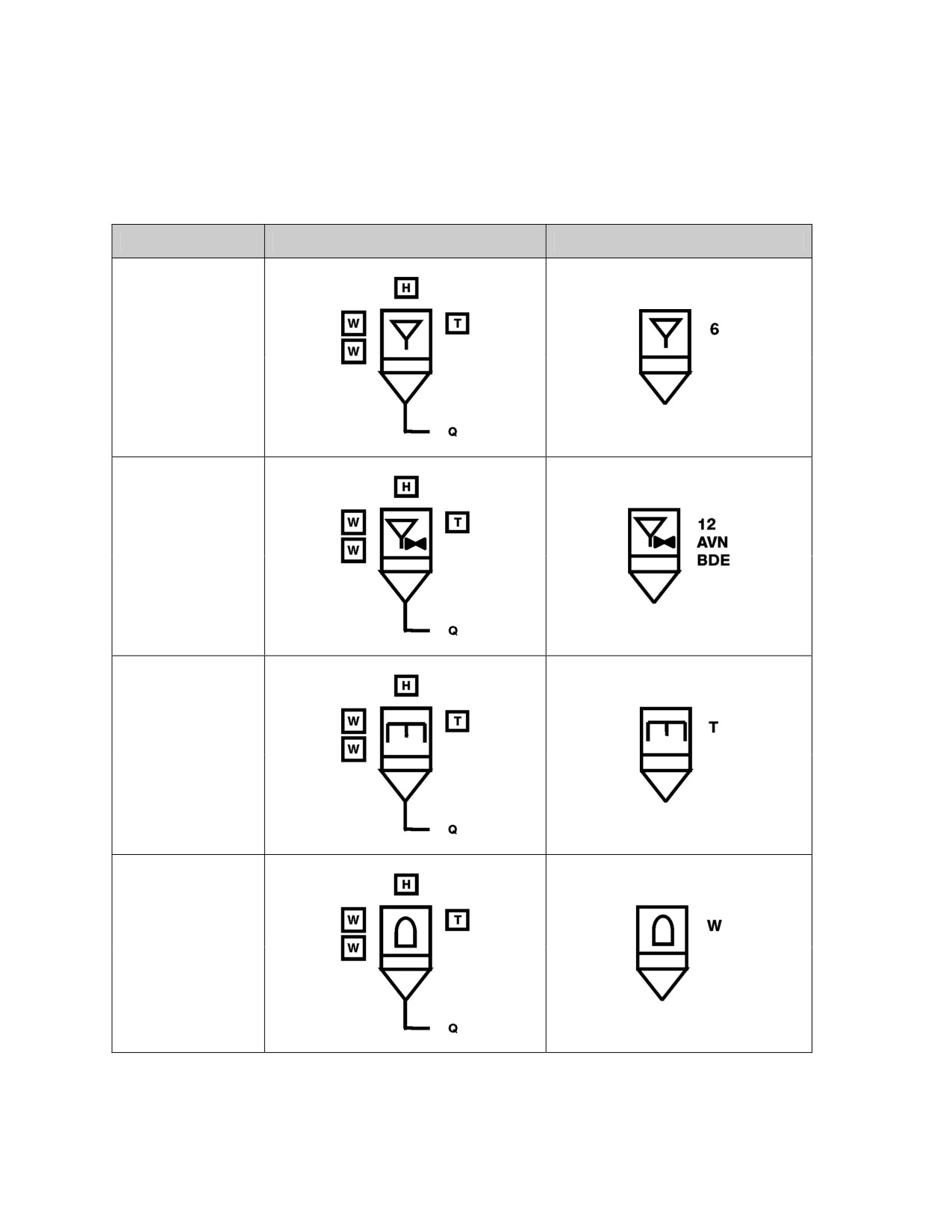
Table 7-17. Examples of Combat Service Support Control Measures
Control Measure
Graphic
Example
Class III
NATO Class III
Class III Aviation
NATO Class III
Class IV
NATO Class IV
Class V
NATO Class V
7-66
___________________________________________________________Graphic Control Measures
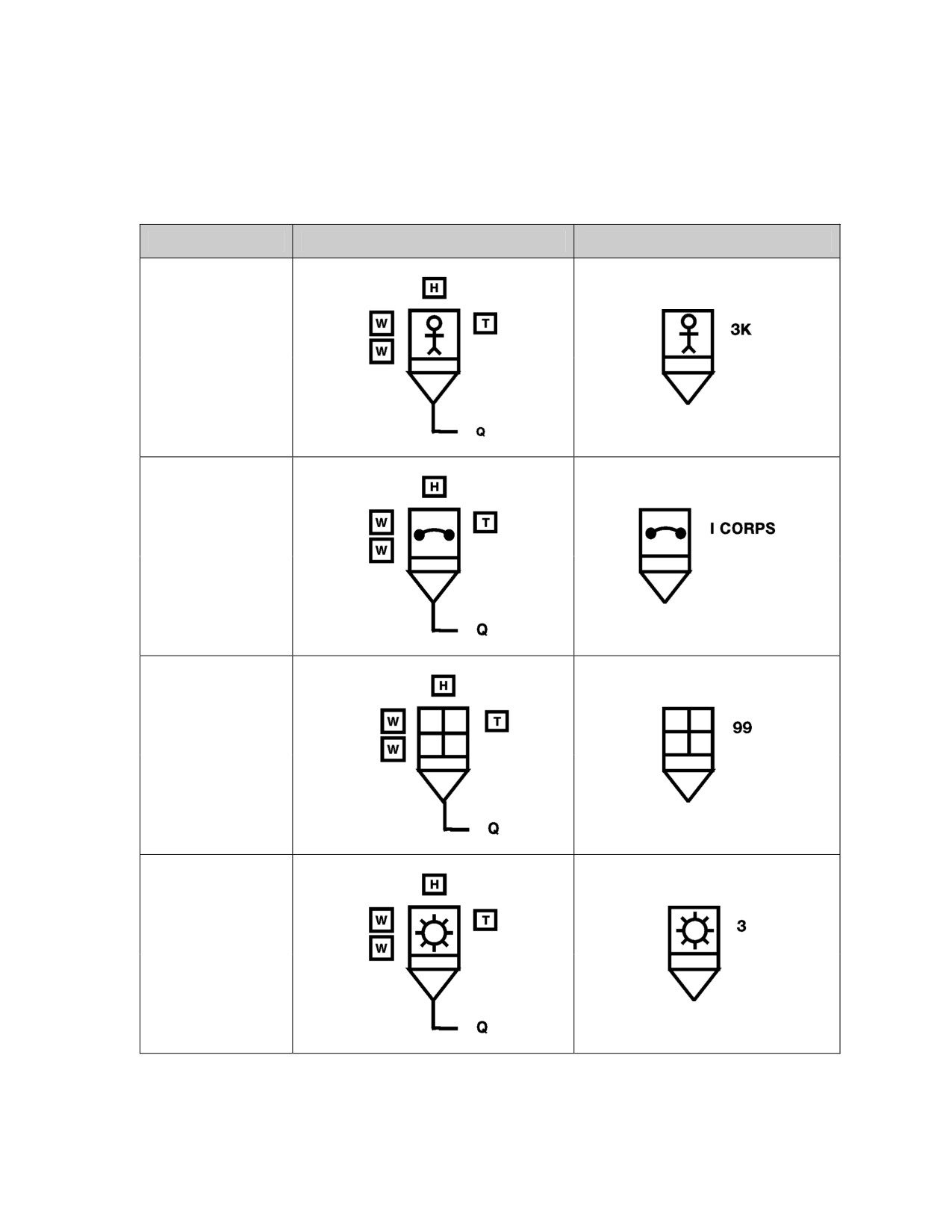
Table 7-17. Examples of Combat Service Support Control Measures
Control Measure
Graphic
Example
Class VI
NATO Class I
Class VII
NATO Class II
Class VIII
NATO Class II
Class IX
NATO Class II
7-67
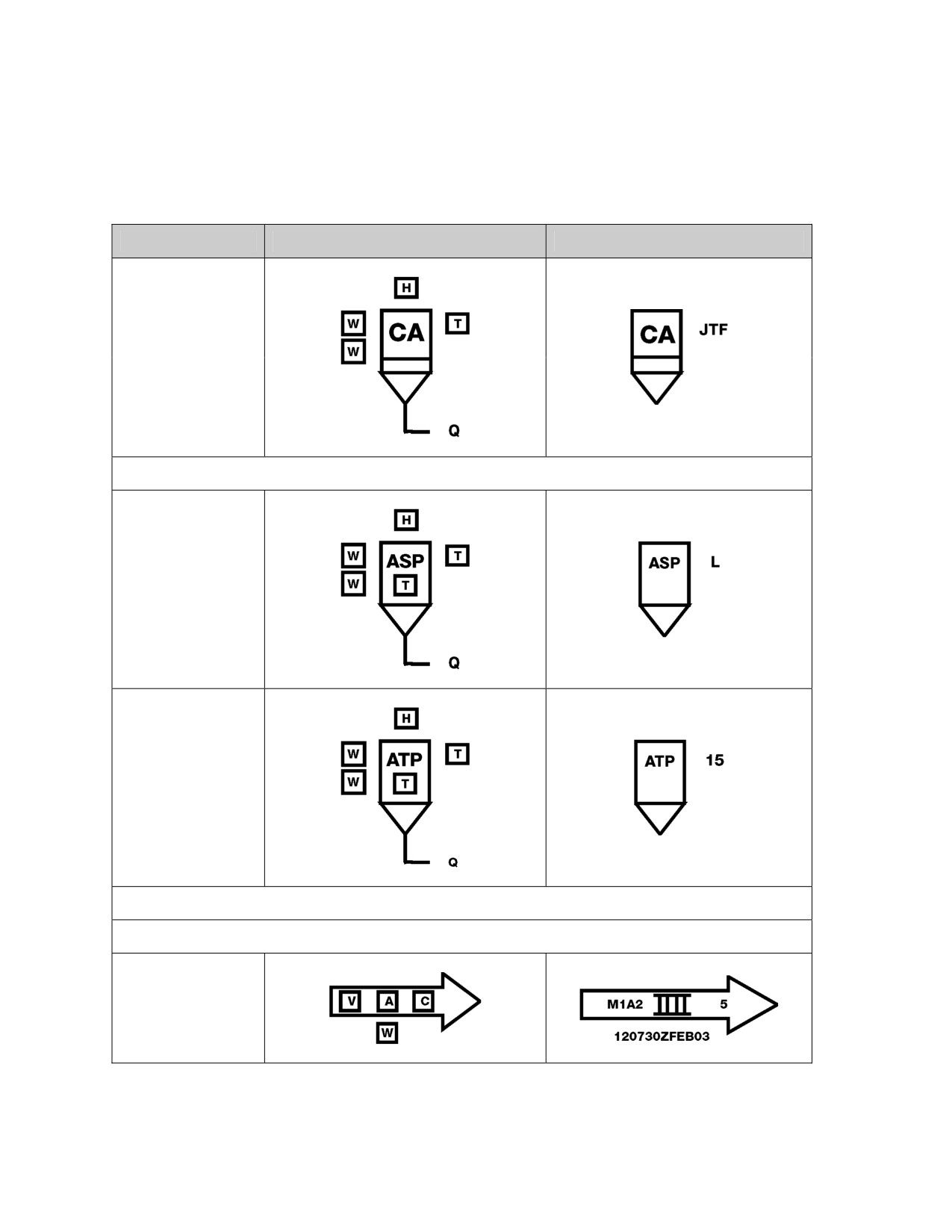
FM 1-02/MCRP 5-12A________________________________________________________________
Table 7-17. Examples of Combat Service Support Control Measures
Control Measure
Graphic
Example
Class X
NATO Class IV
Ammunition Points
Ammunition Supply
Point (ASP).
(See page 1-10 for
definition.)
Ammunition
Transfer Point
(ATP).
(See page 1-10 for
definition.)
Lines
Convoys (See page 1-45 for definition.)
Moving Convoy
7-68
___________________________________________________________Graphic Control Measures
Table 7-17. Examples of Combat Service Support Control Measures
Control Measure
Graphic
Example
Halted Convoy
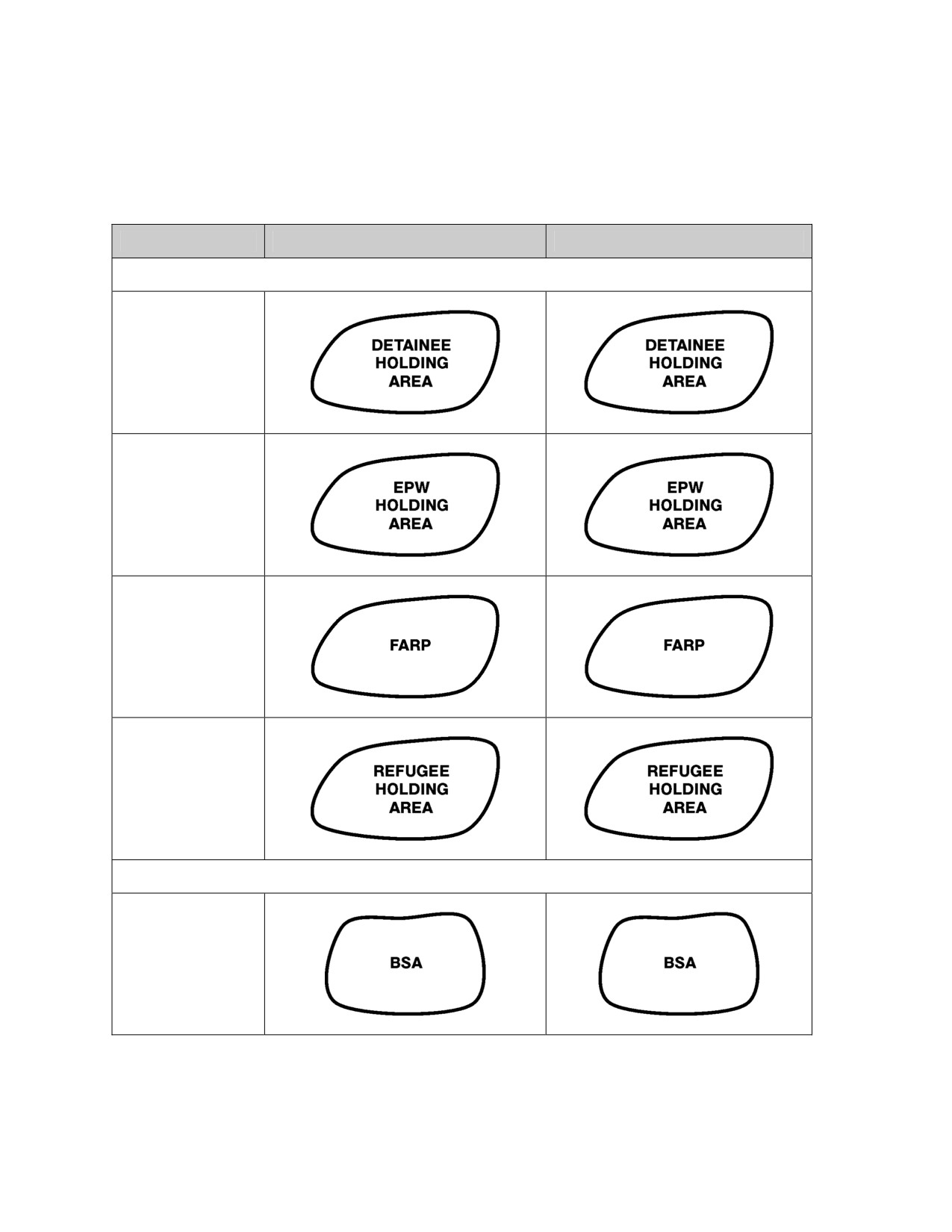
Supply Routes
Main Supply Route
(MSR).
(See page 1-117
for definition.)
Alternate Supply
Route (ASR).
(See page 1-9 for
definition.)
One-Way Traffic
Alternating Traffic
Two-Way Traffic
7-69
FM 1-02/MCRP 5-12A________________________________________________________________
Table 7-17. Examples of Combat Service Support Control Measures
Control Measure
Graphic
Example
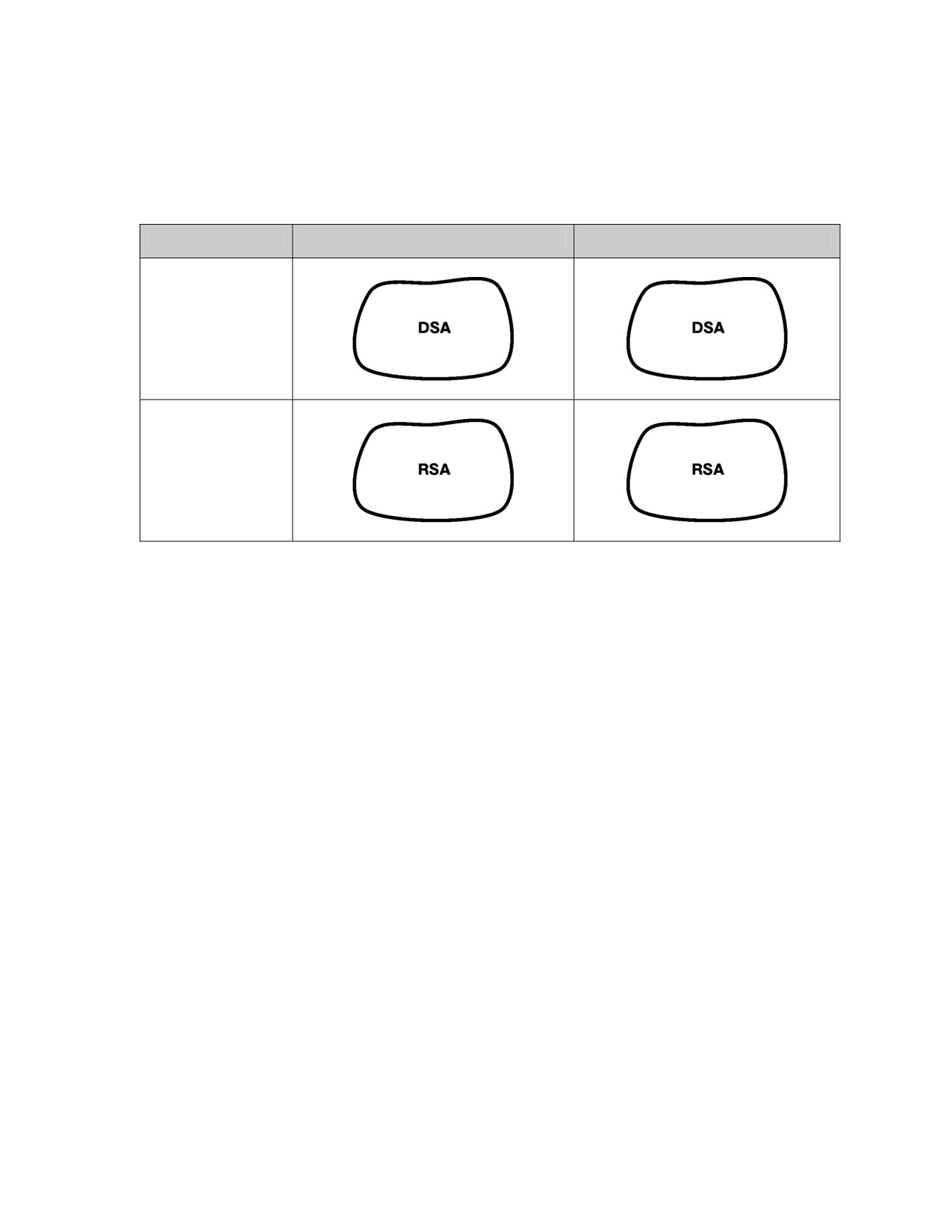
Areas
Detainee Holding
Area
Enemy Prisoner of
War (EPW) Holding
Area
Forward Arming
and Refuel Point
(FARP)
(See definition on
page 1-84.)
Refugee Holding
Area
Support Areas (See page 1-179 for definition.)
Brigade Support
Area (BSA).
(See page 1-25 for
definition.)
7-70
___________________________________________________________Graphic Control Measures
Table 7-17. Examples of Combat Service Support Control Measures
Control Measure
Graphic
Example
Division Support
Area (DSA).
(See page 1-65 for
definition.)
Regimental
Support Area
(RSA)
7-71
This page intentionally left blank.
Chapter 8
Installation Symbols
Installations are sites that incorporate permanent, semi-permanent, and
temporary structures. This chapter establishes a single standard system
for the development of a variety of installation symbols. Avoid using any
symbols, or combinations and modifications of symbols different from
those in this manual. If, after searching the doctrinal symbols and modifi-
ers in this manual, a new symbol must be created, explain it in an accom-
panying legend.
COMPOSITION OF INSTALLATION SYMBOLS
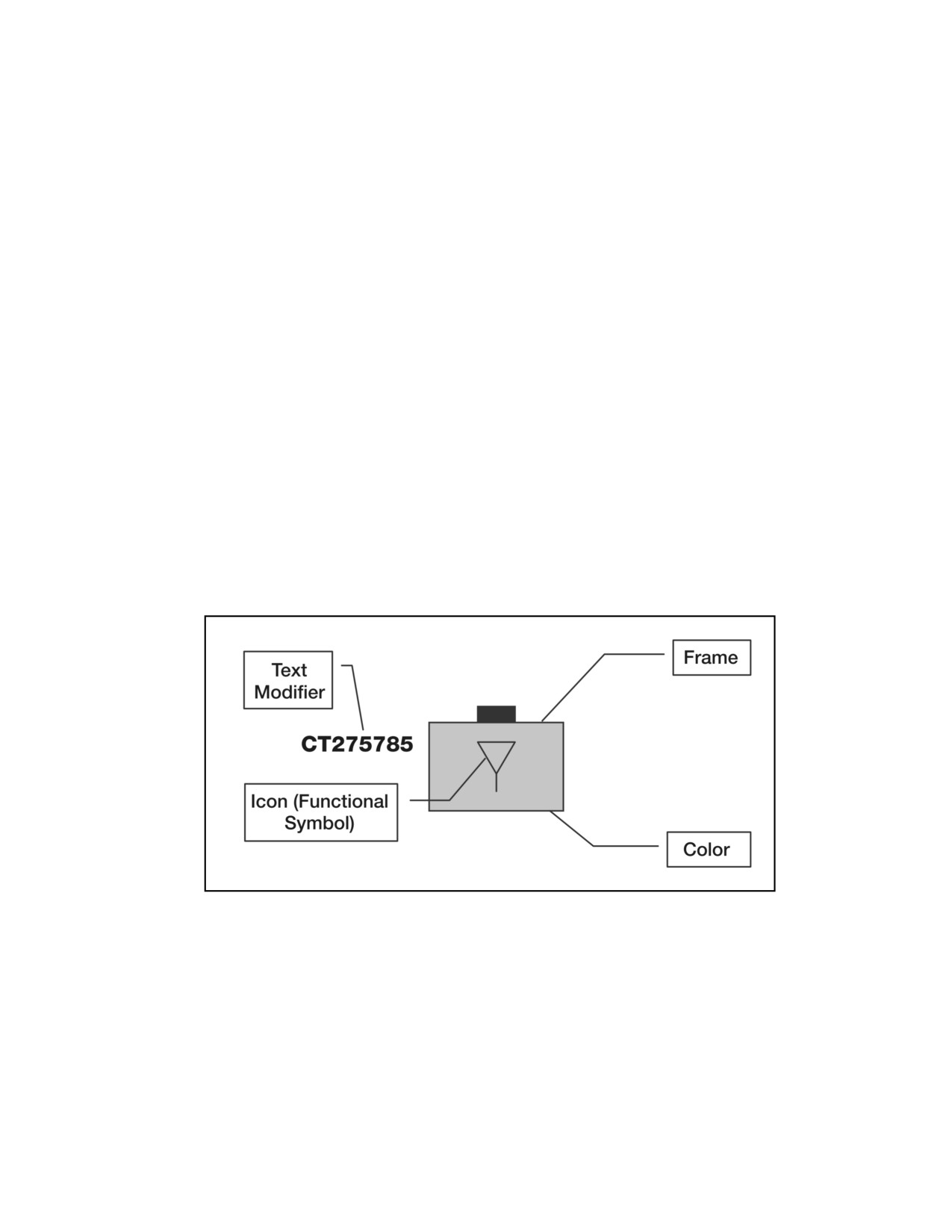
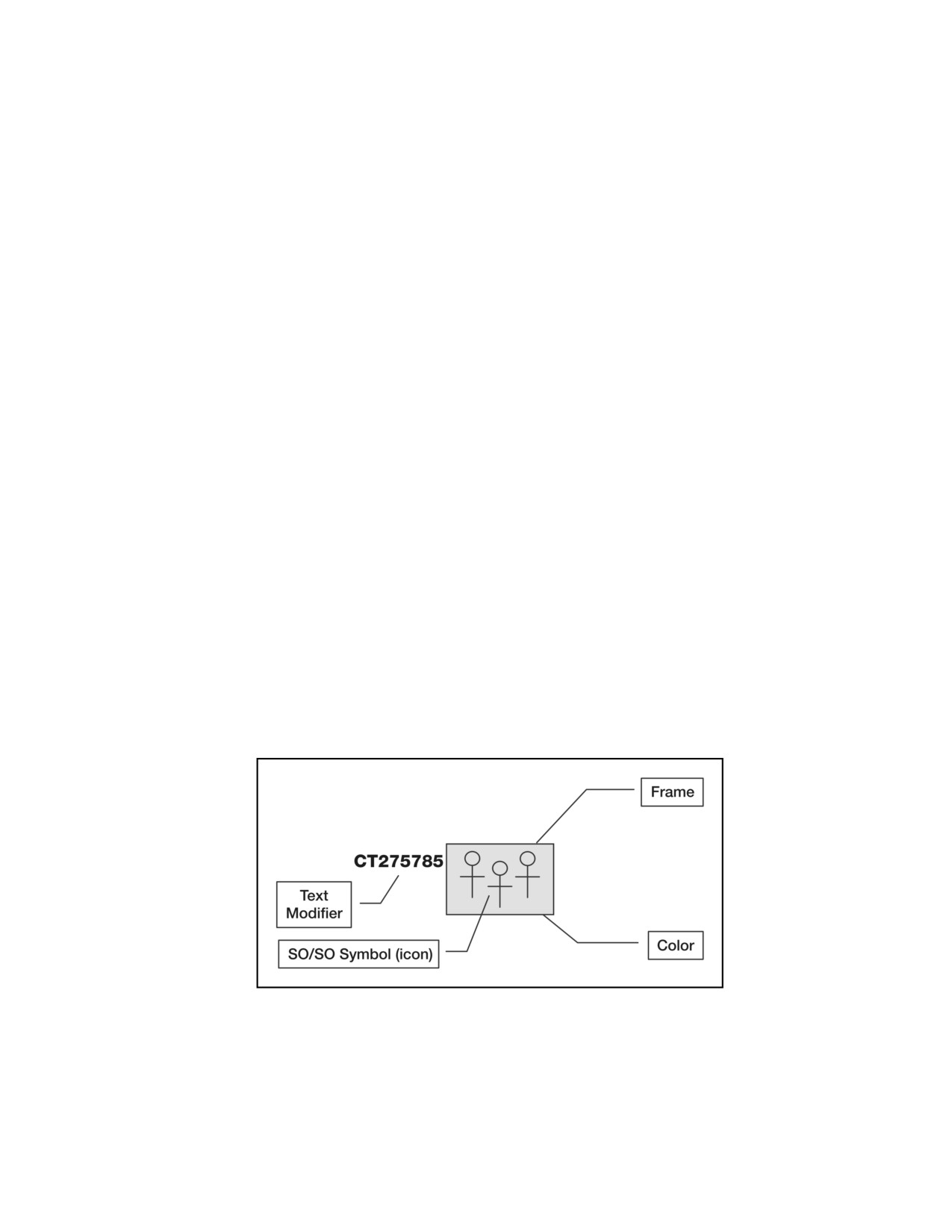
8-1. An installation symbol is composed of a frame, color (fill), functional
symbol(s) (icon), and text or graphic modifiers (figure 8-1). (See table 8-1,
page 8-2, for the steps used to build installation symbols.)
Figure 8-1. Installation Symbol Components
8-1
FM 1-02/MCRP 5-12A________________________________________________________________
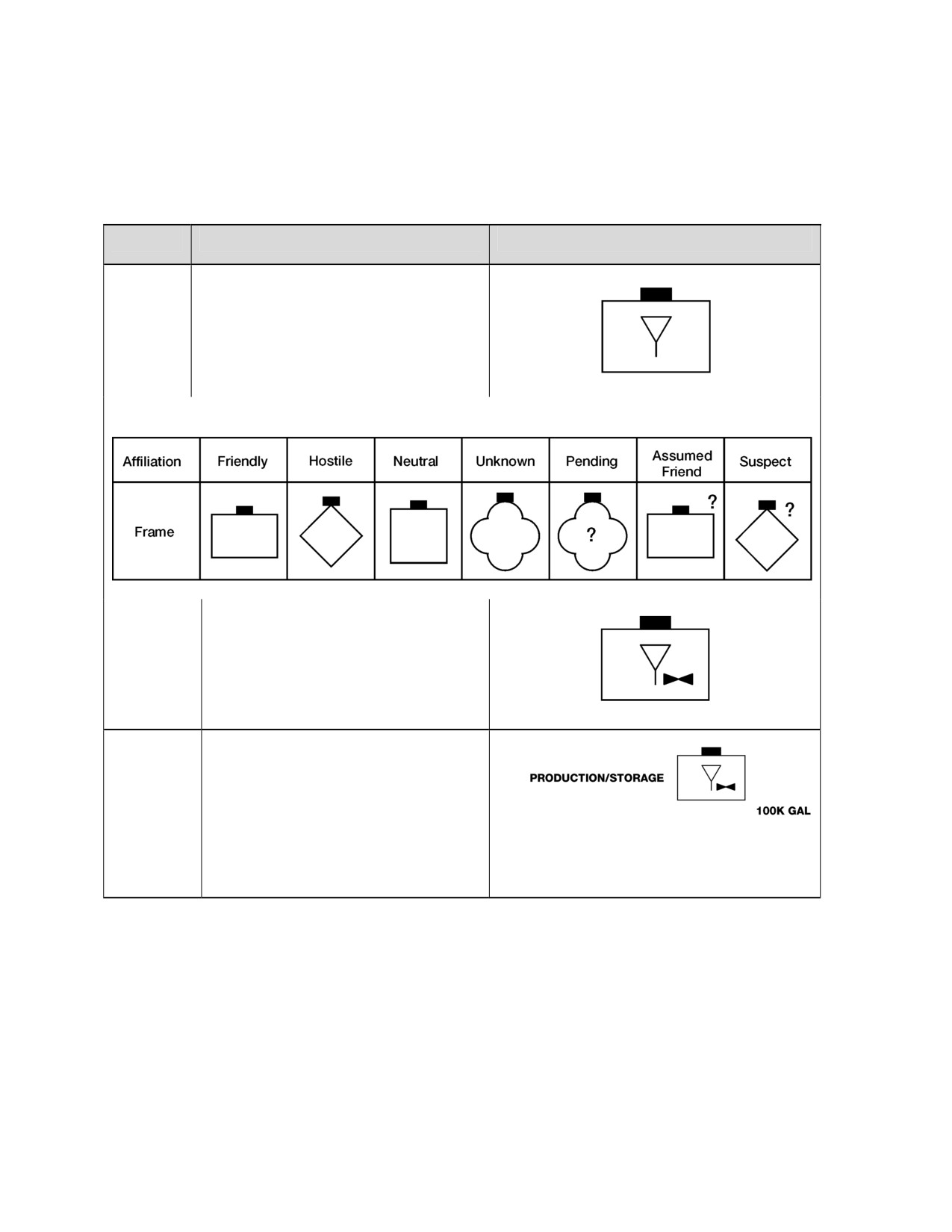
Table 8-1. Building Installation Symbols
Step #
Step
Example
Step 1.
First, choose the frame that matches the
affiliation of the installation (friendly,
hostile, neutral). Then choose a
functional symbol for field “A.” In this
example, the affiliation is friendly and the
function is petroleum/gas/oil.
Friendly Petroleum/Gas/Oil
Installation Frame Shapes and Affiliation
Steps 2-4.
Choose the second/third/fourth
functional symbol modifier that further
explains the capability of that
installation, modifying field “A.” In this
example, the second functional symbol
modifier is “aviation.”
Friendly Aviation Petroleum/Gas/Oil
Step 5.
Choose text or graphic symbol modifier
as necessary to provide further
amplifying information. In this example,
there are two text modifiers, the first is
installation composition (field “AI”),
which is PRODUCTION/STORAGE,
Friendly Aviation Petroleum/Gas/Oil
and the second is capacity of
Production/Storage Installation
installation (field “K”), which is 100,000
gallons (100K GAL).
INSTALLATION SYMBOL MODIFIER FIELDS
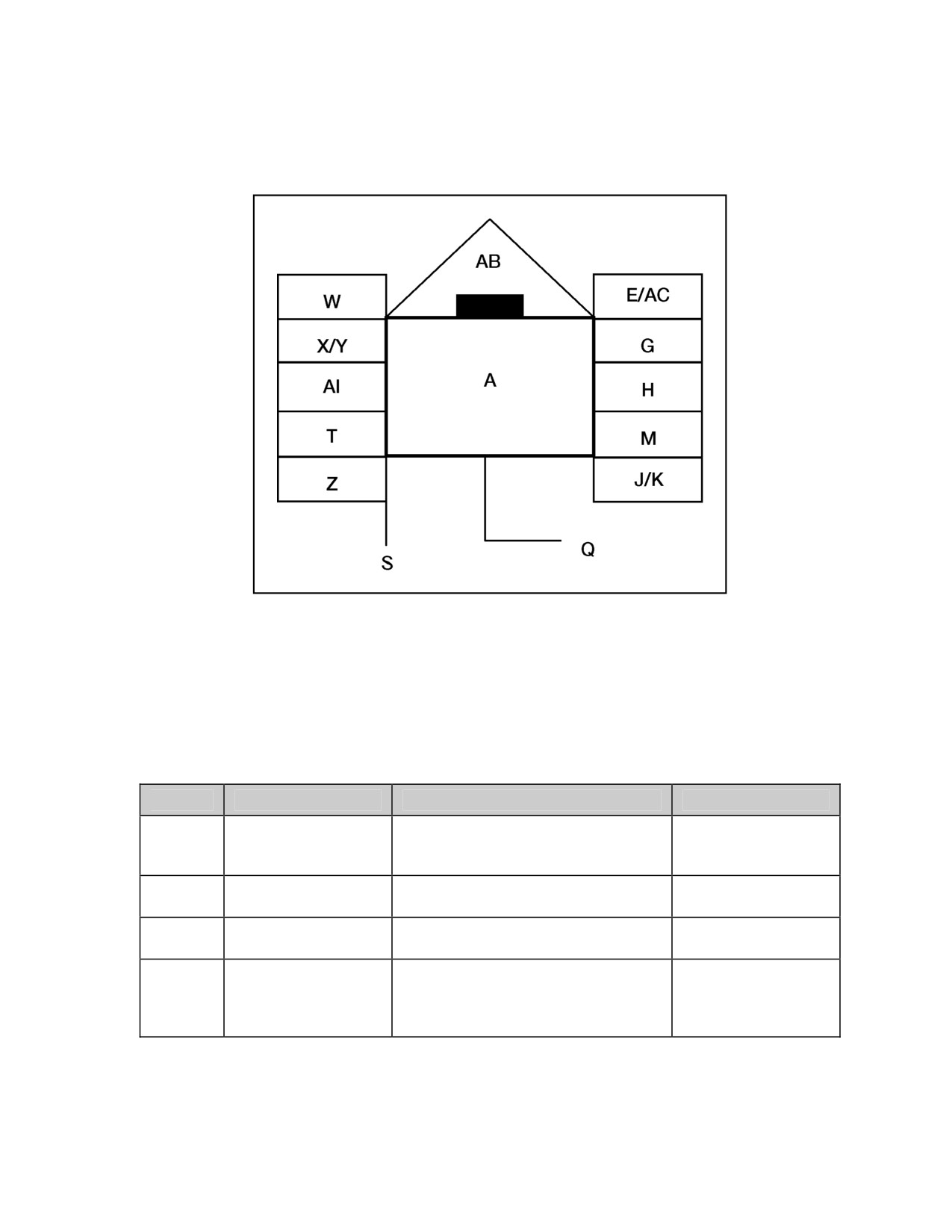
8-2. Figure 8-2 shows the placement of installation labeling fields around the
friendly land installation symbol frame. The placement of installation symbol
modifier fields is the same regardless of frame shape or affiliation.
8-2
________________________________________________________________Installation Symbols
Figure 8-2. Installation Symbol Modifier Fields
8-3. Table
8-2 provides a description of each of the installation symbol
modifier fields as shown in figure 8-2.
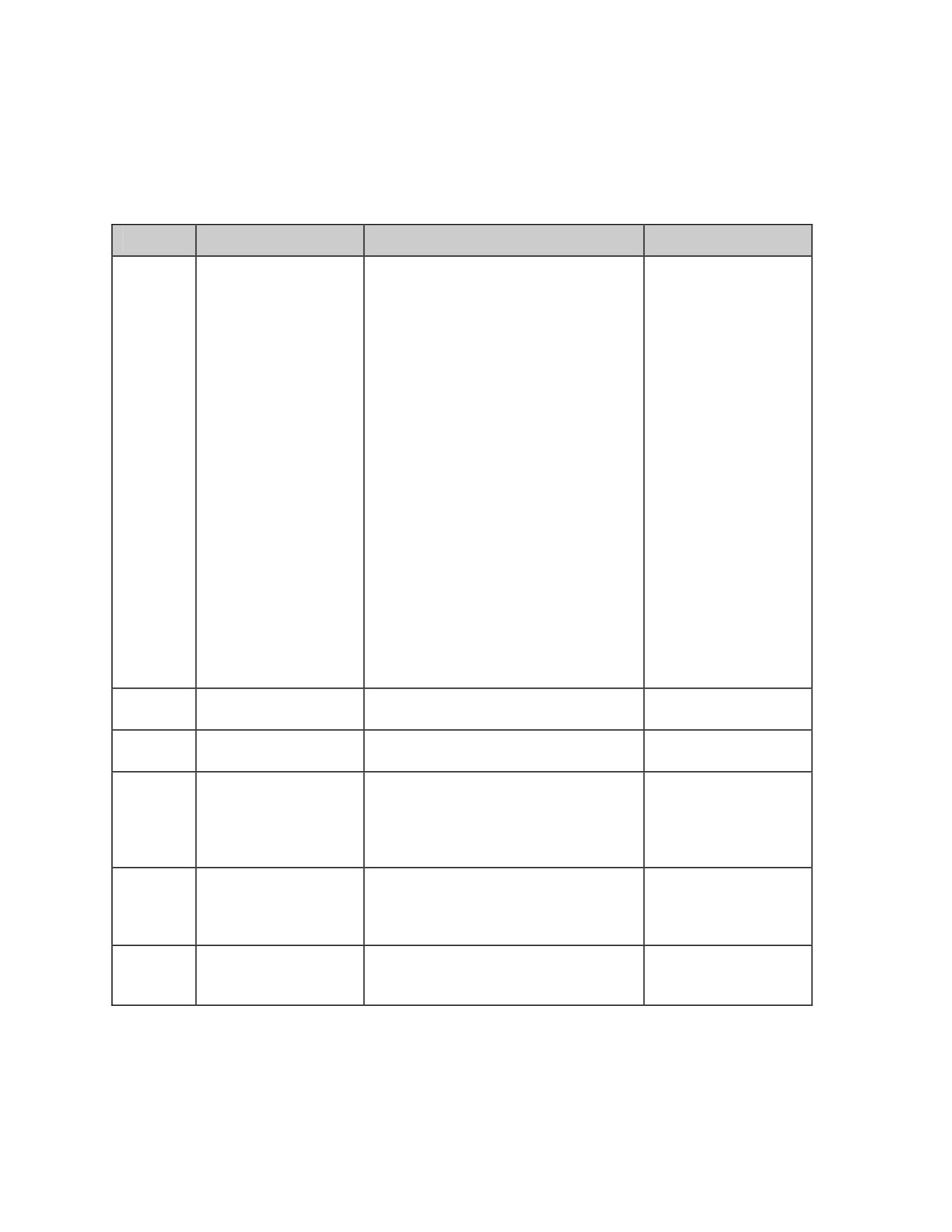
Table 8-2. Graphic Modifiers for Installation Symbols
Field
Field Title
Description
Text/Graphic
Basic installation symbol that can
A
Symbol
include capability modifiers. (See
Both
table 8-3, page 8-6.)
Suspect or Assumed
Question mark “?” represents
E
Text
Friend
suspect or assumed friend.
Free text. Can be used by staff for
G
Staff Comments
Text
information required by commander.
Free text. For installations, this field
Additional
is used to describe the specific
H
Text
Information
nature of the installation, such as
production, processing, or storage.
8-3
FM 1-02/MCRP 5-12A________________________________________________________________
Table 8-2. Graphic Modifiers for Installation Symbols
Field
Field Title
Description
Text/Graphic
Degree of confidence that may be
placed on the information
represented by the symbol. It is
shown as one letter and one number
made up of Reliability of Source and
Credibility of Information.
Reliability of Source:
A. Completely reliable
B. Usually reliable
C. Fairly reliable
J
Evaluation Rating
D. Not usually reliable
Text
E. Unreliable
F. Reliability cannot be judged
Credibility of Information:
1. Confirmed by other sources
2. Probably true
3. Possibly true
4. Doubtful
5. Improbable
6. Truth cannot be judged
Capacity of
Capacity of installation displayed.
K
Text
Installation
Number or title of higher echelon
M
Higher Formation
Text
command.
Used to denote precise location of
installation or to declutter multiple
Offset Location
Q
installation locations (see chapter 5,
Graphic
Indicator
figure 5-6, page 5-42), except for
headquarters (see field S).
Used to indicate precise location of
Headquarters Staff
headquarters or to declutter multiple
S
Indicator/Offset
Graphic
headquarters locations (see figure
Location Indicator
5-7, page 5-42).
An alphanumeric designator that
T
Unique Designation
uniquely identifies a particular
Text
installation (name).
8-4
________________________________________________________________Installation Symbols
Table 8-2. Graphic Modifiers for Installation Symbols
Field
Field Title
Description
Text/Graphic
An alphanumeric designator for
displaying a date-time group
(DDHHMMSSZMONYY) or “O/O” for
on order. The date-time group is
composed of a group of six numeric
digits with a time zone suffix and the
standardized three-letter abbreviation
for the month followed by two digits.
W
Date-Time Group
Text
The first pair of digits represents the
day; the second pair, the hour; the
third pair, the minutes. The last two
digits of the year are after the month.
For automated systems, two digits
may be added before the time zone
suffix and after the minutes to
designate seconds.
Height in feet of equipment or
X
Altitude/Depth
Text
structure on the ground.
Latitude and longitude or grid
Y
Location
Text
coordinates.
Displays speed in nautical miles per
Z
Speed
Text
hour or kilometers per hour.
Feint or Dummy
Indicates that it is a dummy for
AB
Graphic
Indicator
deception purposes.
A two-letter code that indicates the
country of origin of the unit. This field
AC
Country Indicator
Text
can be used also for factions or
groups in SO/SO.
Indicates the composition of the
Installation
AI
installation, such as production,
Text
Composition
service, storage, research, or utility.
8-5
FM 1-02/MCRP 5-12A________________________________________________________________
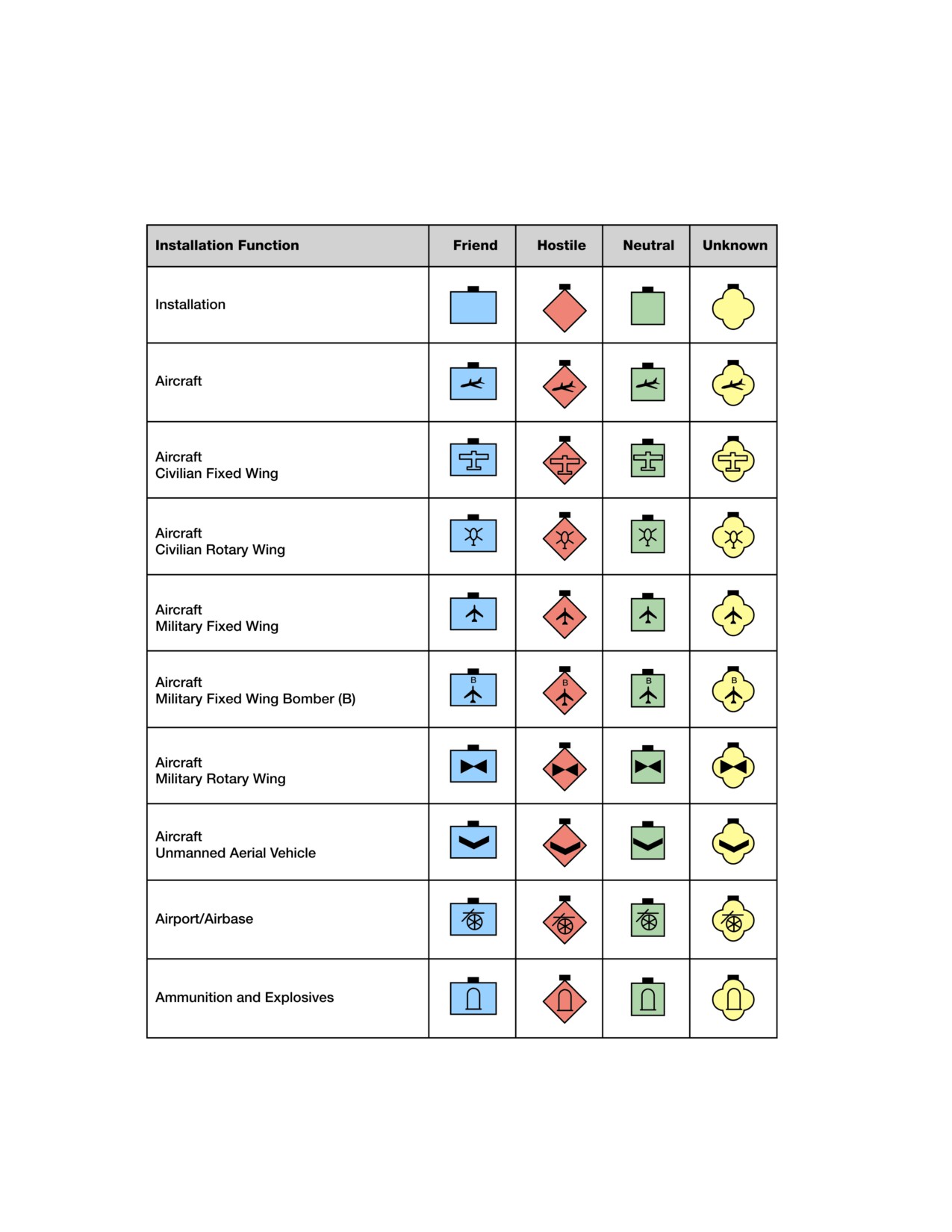
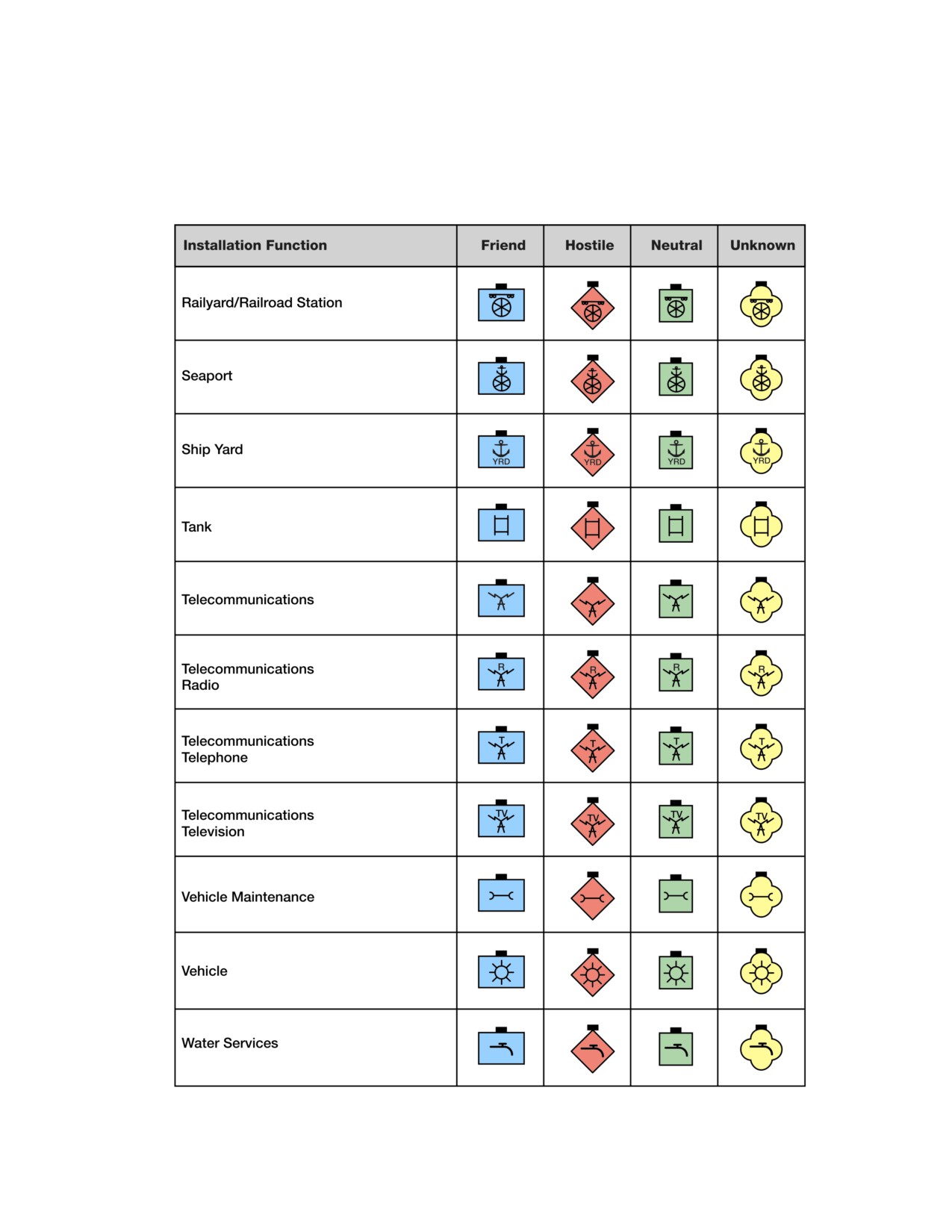
Table 8-3. Field A: Installation Function
8-6
________________________________________________________________Installation Symbols
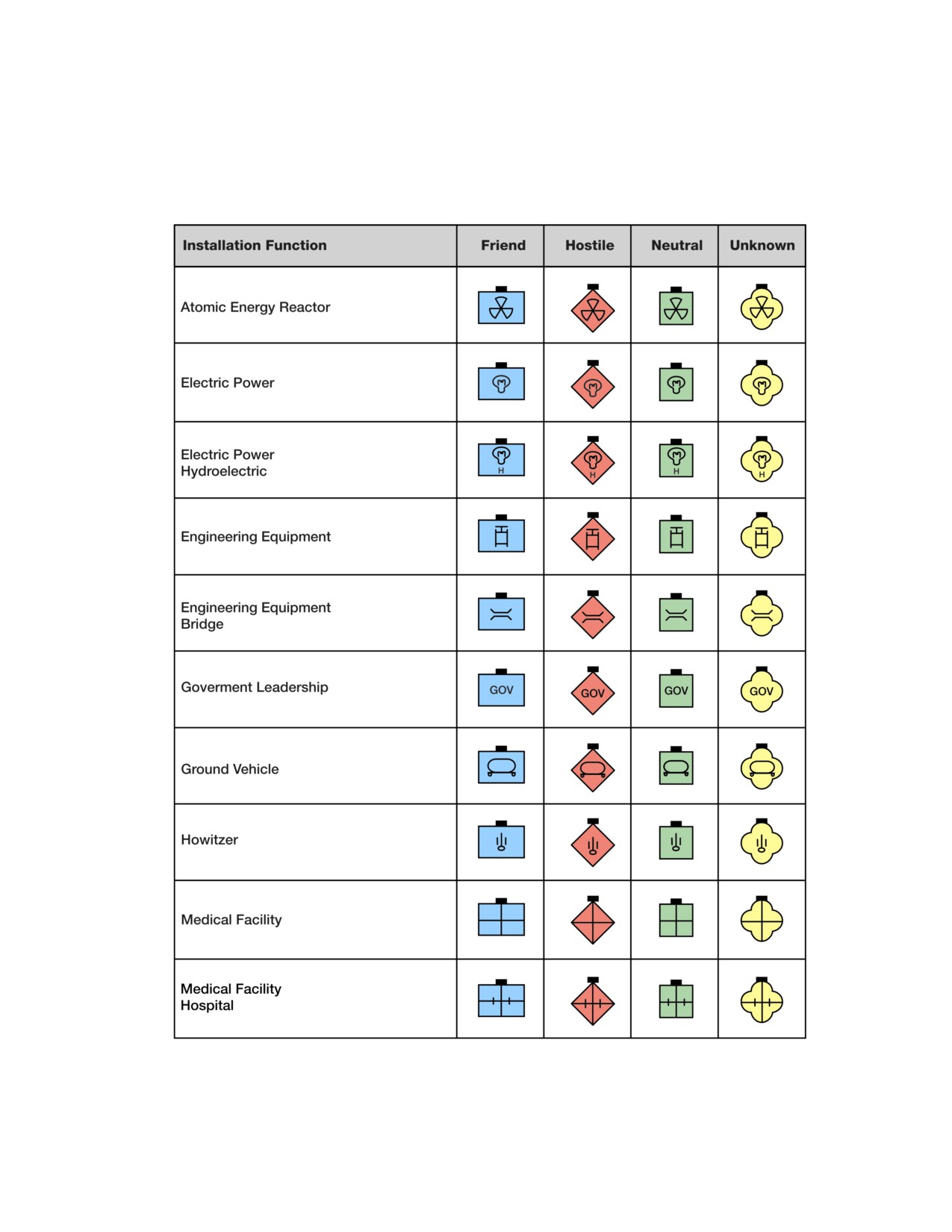
Table 8-3. Field A: Installation Function
8-7
FM 1-02/MCRP 5-12A________________________________________________________________
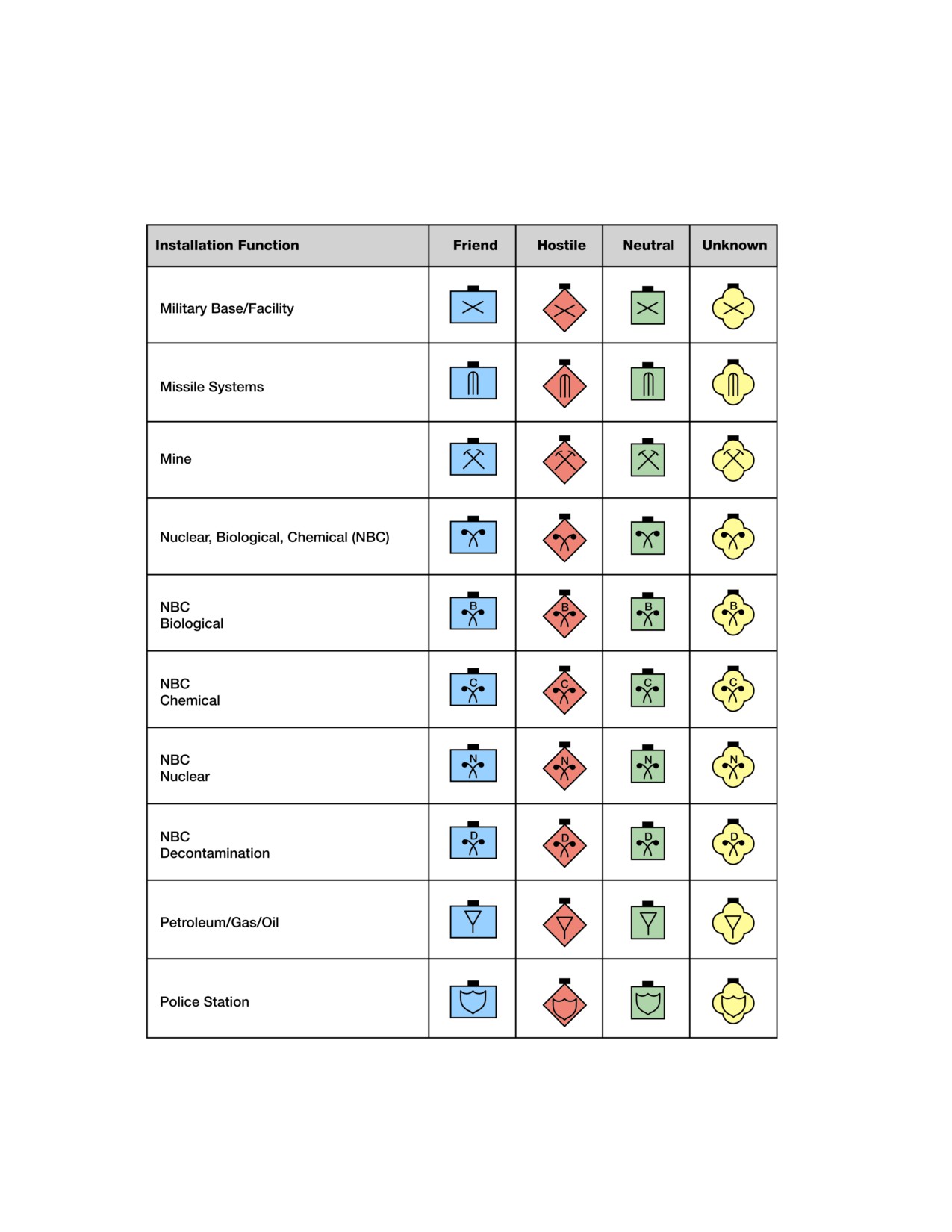
Table 8-3. Field A: Installation Function
8-8
________________________________________________________________Installation Symbols
Table 8-3. Field A: Installation Function
8-9
This page intentionally left blank.
Chapter 9
Stability Operations and Support Operations Symbols
This chapter establishes a single standard for the development of stability
operations and support operations symbols. Joint doctrine uses the term
“military operations other than war (MOOTW)” and NATO uses the term
“Non-Article 5 Crisis Response Operations (CRO)” for stability operations
and support operations. These symbols represent stability operations and
support operations activities, locations, and nonmilitary organizations.
This chapter includes a wide variety of stability operations and support
operations symbols. Avoid using any symbols, or combinations and modi-
fications of symbols, different from those in this manual. If, after search-
ing doctrinal symbols and modifiers, a new symbol must be created,
explain it in an accompanying legend. Computer-generated systems may
have difficulty in passing nonstandard symbols.
COMPOSITION OF STABILITY OPERATIONS AND SUPPORT
OPERATIONS SYMBOLS
9-1. A stability operations and support operations symbol is composed of a
frame, color (fill), stability operations and support operations symbol (icon),
and text or graphic modifiers (see figure 9-1). See table 9-1, page 9-2, for the
steps used to build stability operations and support operations symbols.
Figure 9-1. Stability Operations and Support Operations Symbol Components
9-1
FM 1-02/MCRP 5-12A________________________________________________________________
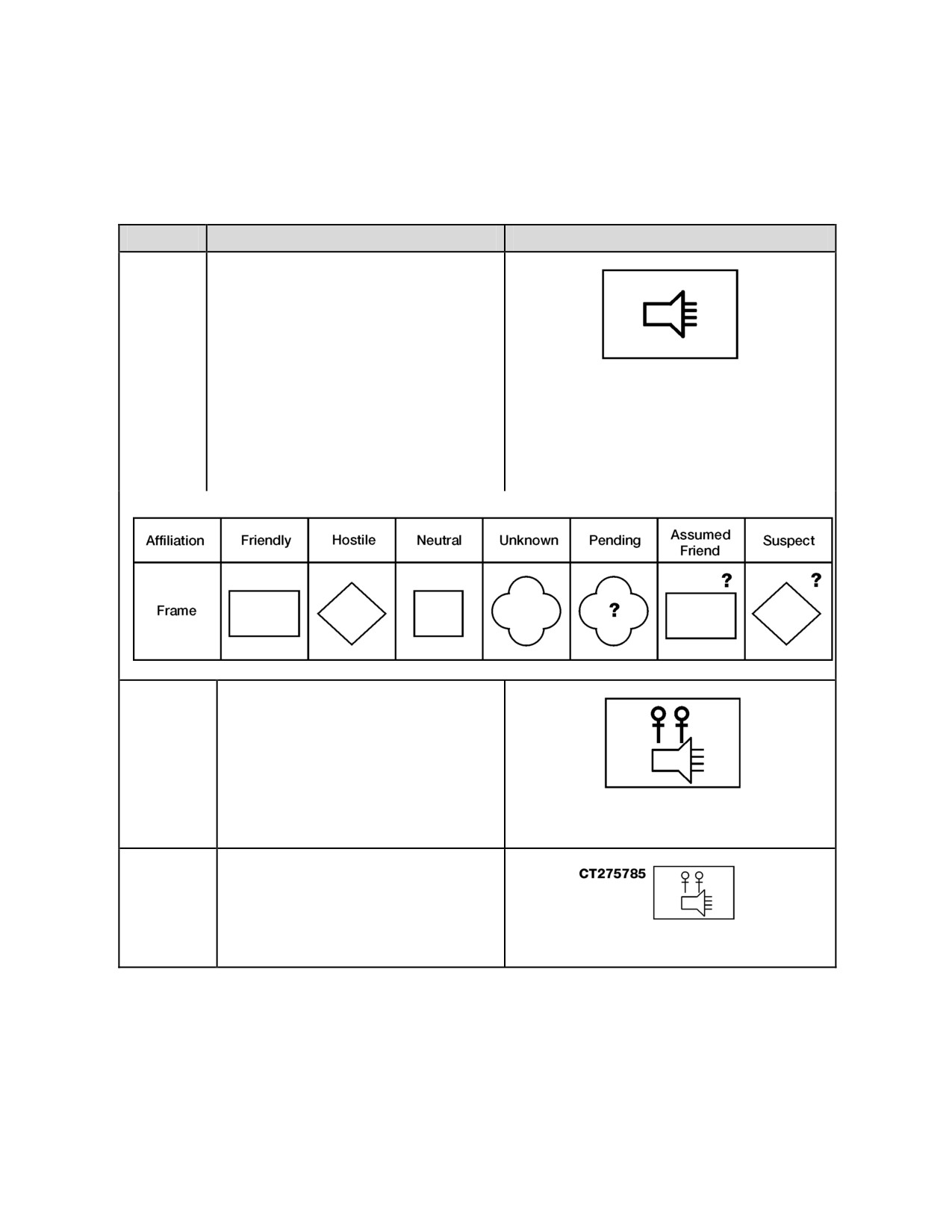
Table 9-1. Building Stability Operations and Support Operations Symbols
Step #
Step
Example
Step 1.
First, choose the frame that matches the
affiliation of the stability operations and
support operations organization or
situation (friendly, hostile, neutral). Then
choose the basic stability operations and
support operations symbol for field “A”
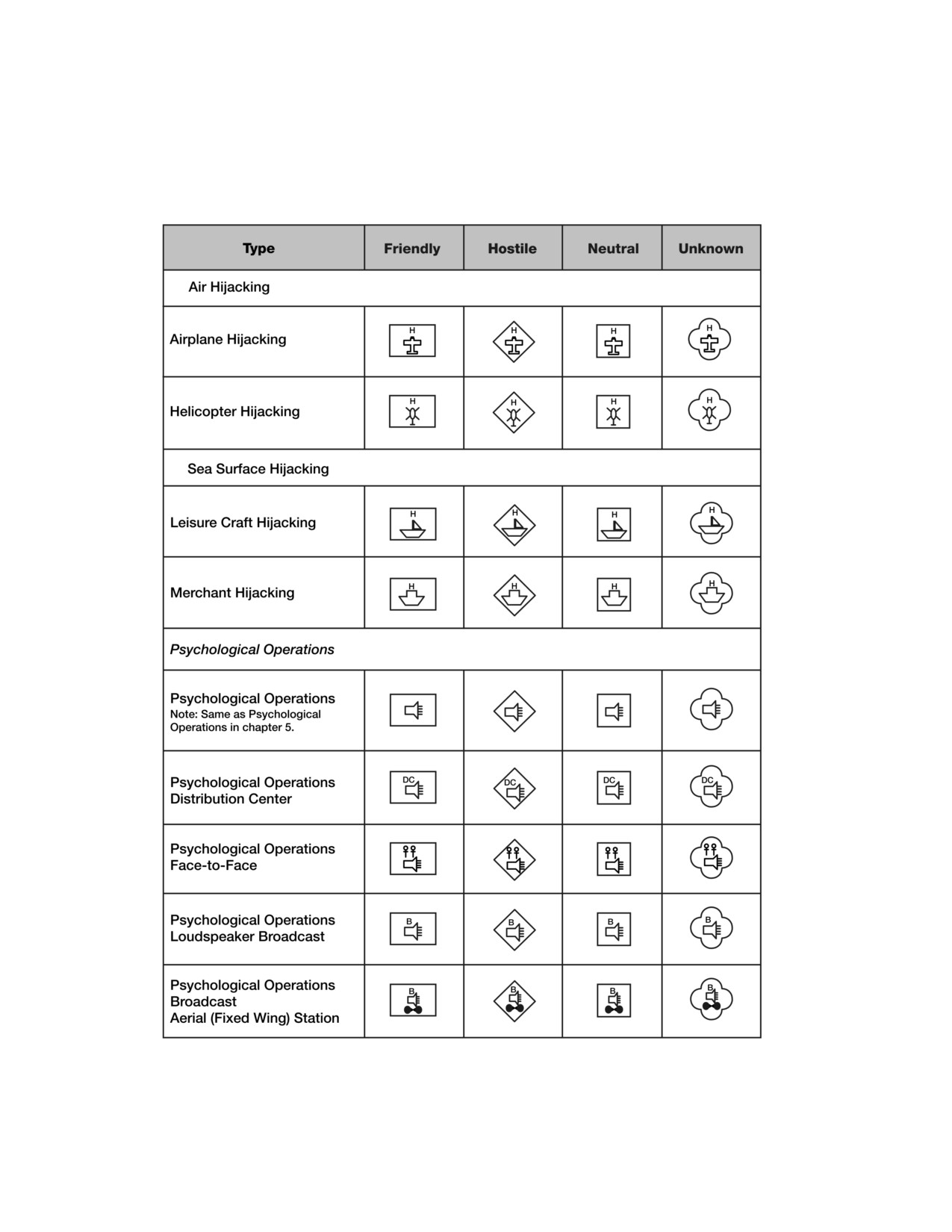
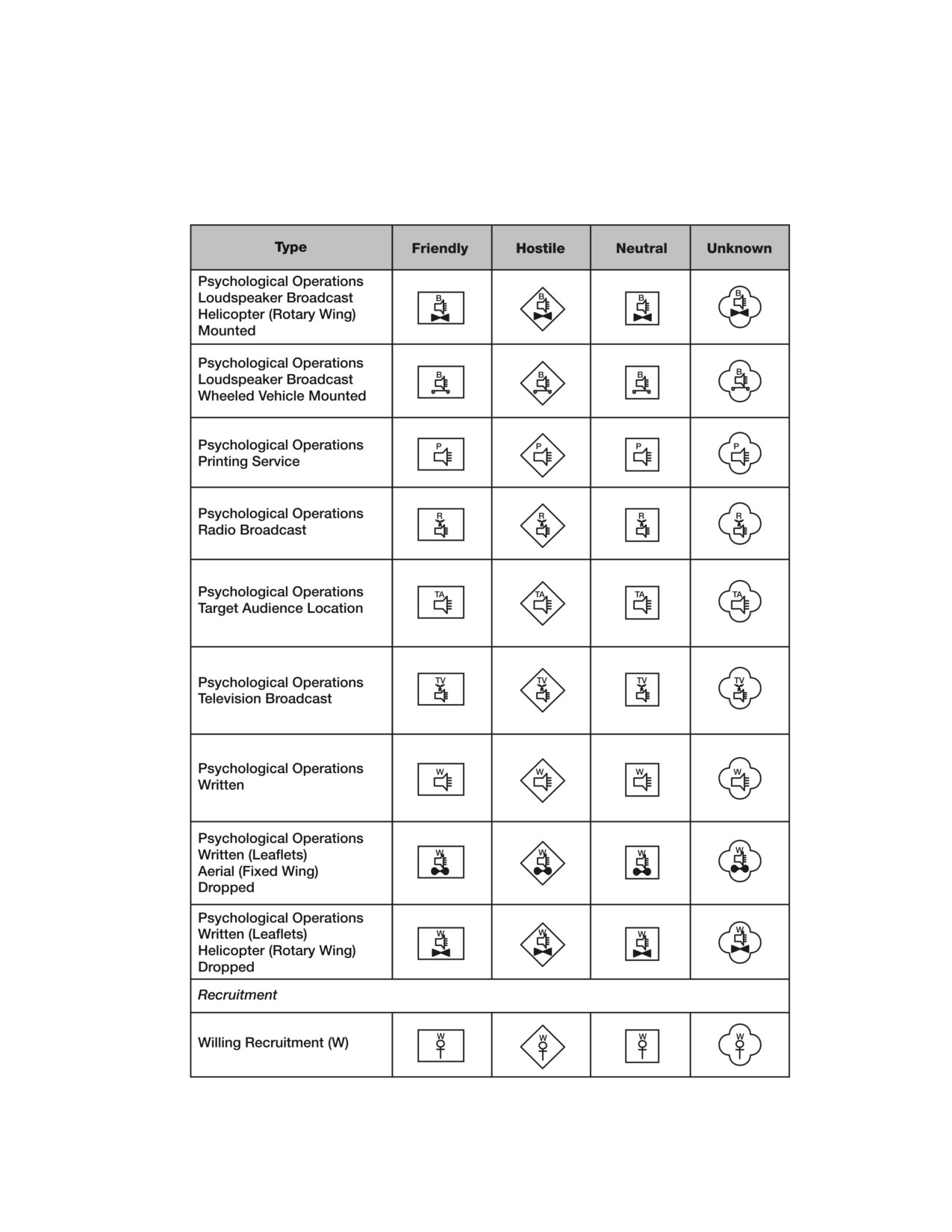
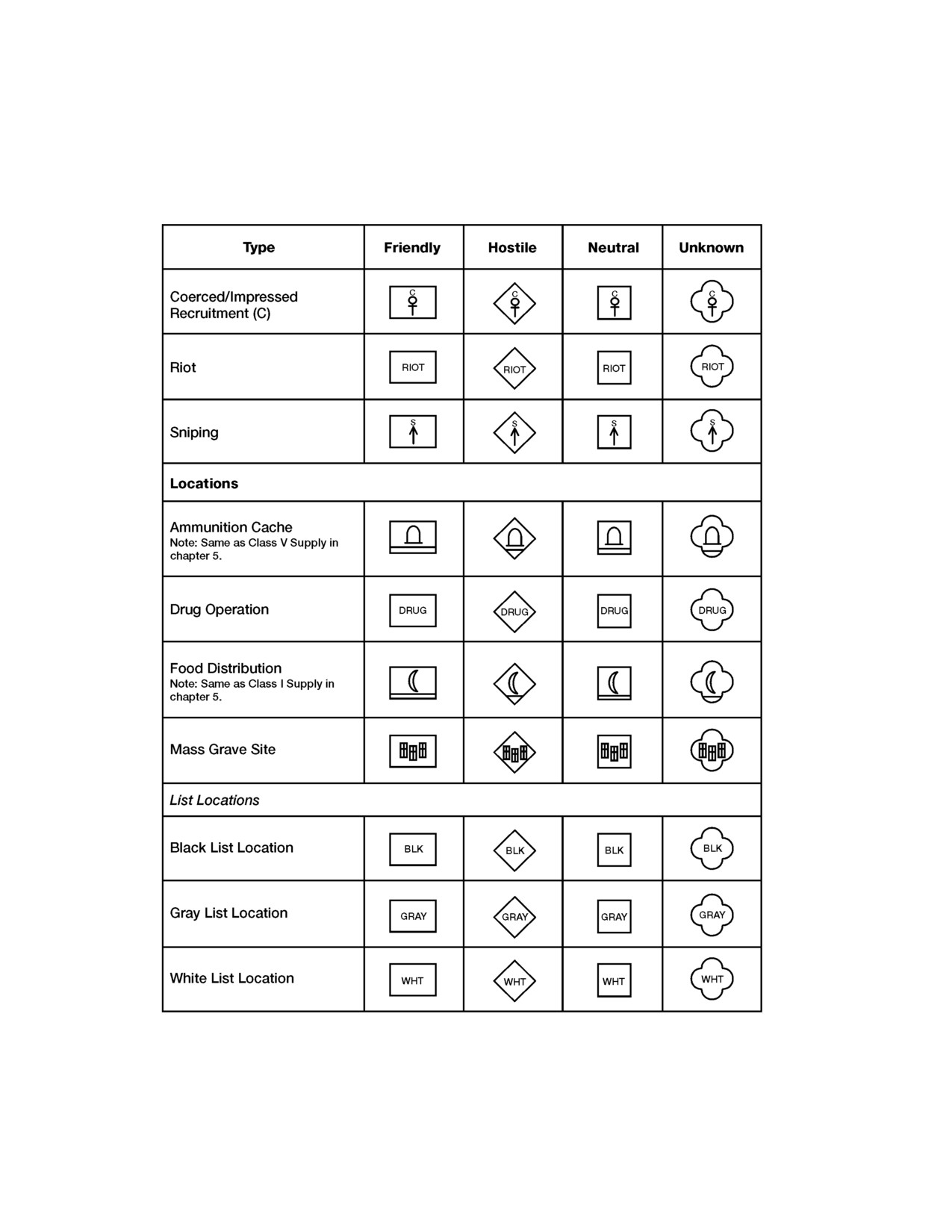
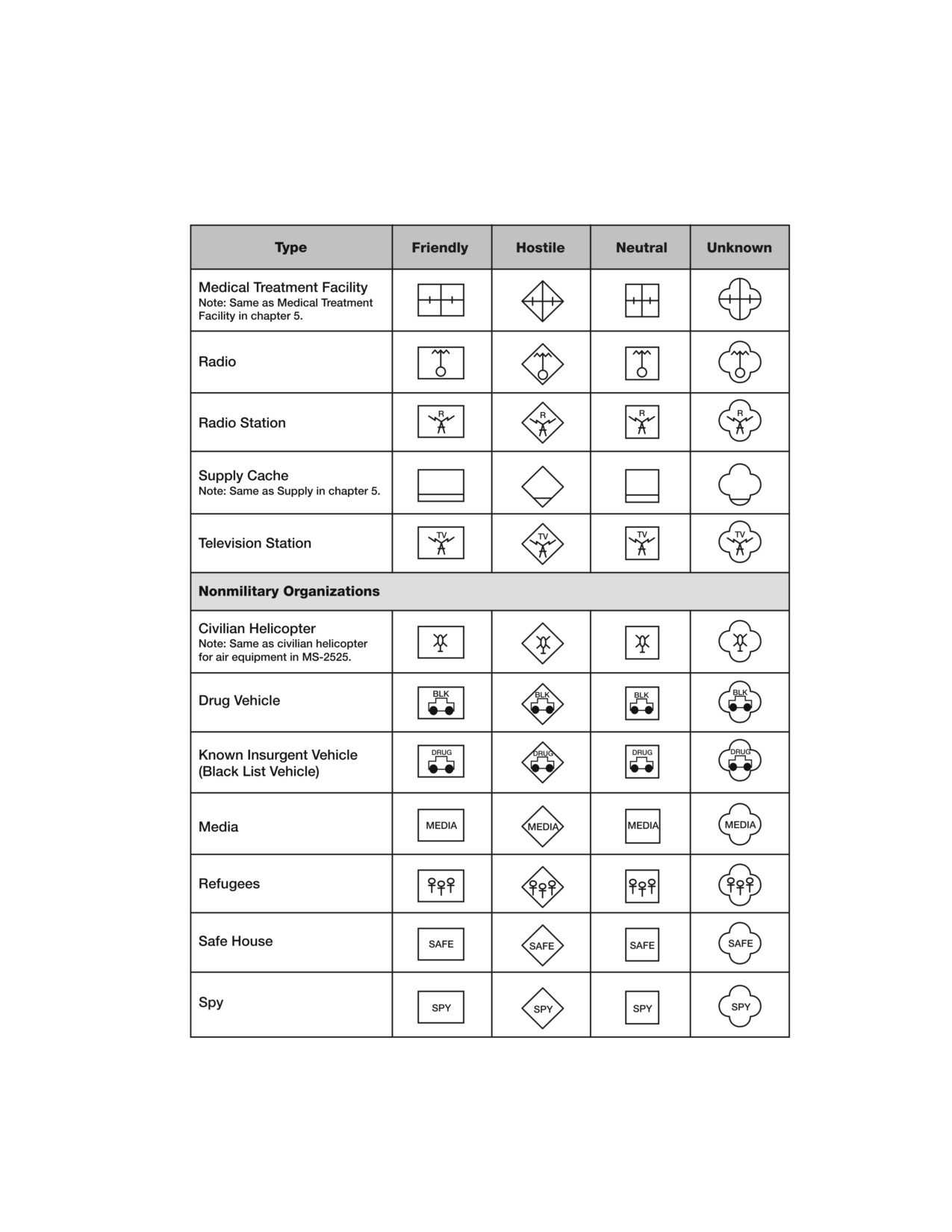
(see figure 9-2; table 9-2, page 9-3; and
Friendly Psychological Operations
table 9-3, page 9-6). In this example, the
affiliation is friendly and the situation is
“psychological operations.” (See the
following stability operations and support
operations land frame shapes and
affiliations.)
Stability Operations and Support Operations Land Frame Shapes and Affiliation
Steps 2-4.
Choose the second/third/fourth
functional symbol modifier that further
explains the capability of that stability
operations and support operations
symbol, modifying field “A.” In this
example, the secondary function
symbol modifier is “person-to-person
psychological operations” (see table 9-
Friendly Person-to-Person Psychological
3, page 9-6).
Operations
Step 5.
Choose text modifiers as necessary to
provide further amplifying information.
In this example, the text modifier is the
location (field “Y”) of where the person-
to-person psychological operations are
Friendly Person-to-Person Psychological
being conducted.
Operations
STABILITY OPERATIONS AND SUPPORT OPERATIONS SYMBOL
MODIFIER FIELDS
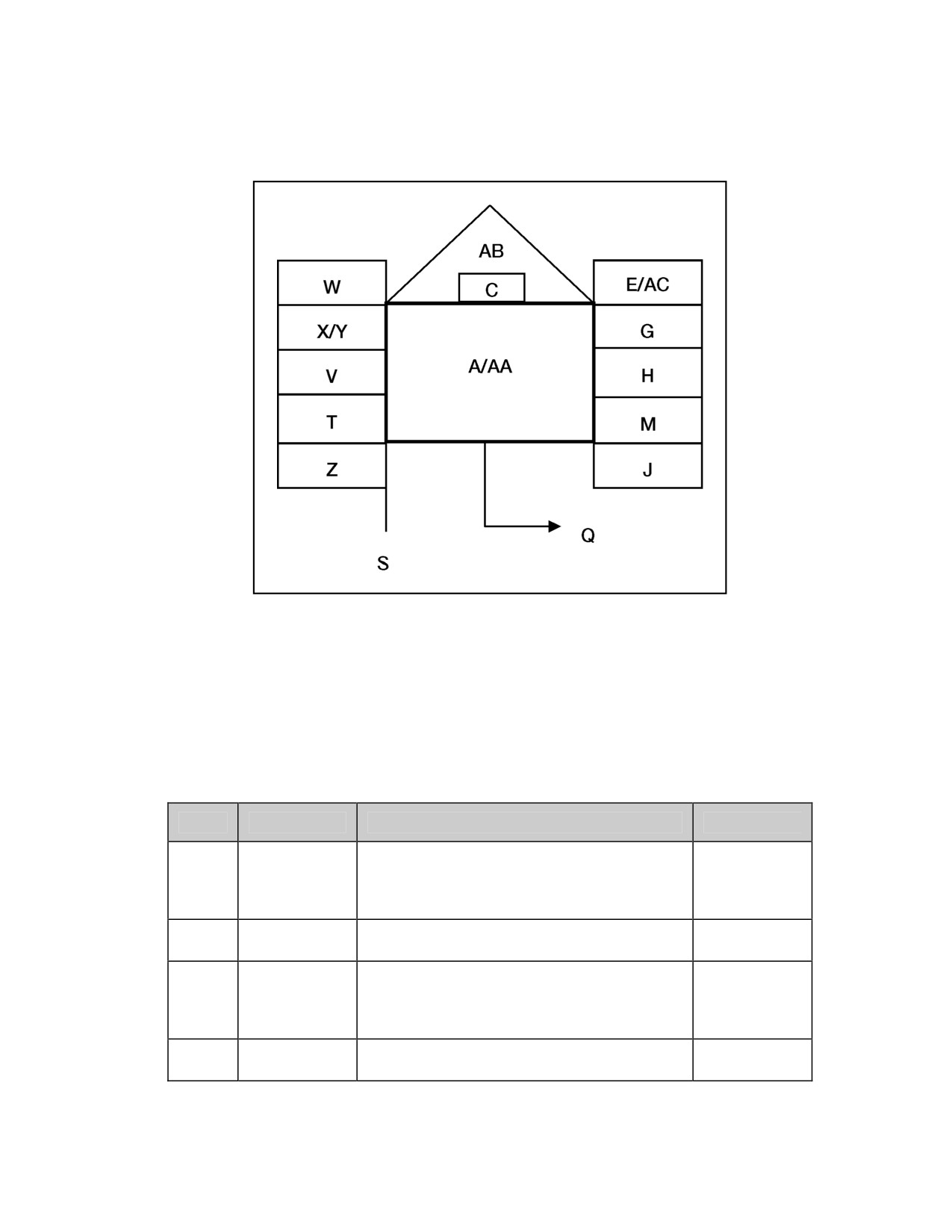
9-2. Figure
9-2 shows the placement of stability operations and support
operations labeling fields around the friendly land stability operations and
support operations symbol frame. The placement of unit symbol modifier
fields is the same regardless of frame shape or affiliation.
9-2
______________________________________Stability Operations and Support Operations Symbols
Figure 9-2. Stability Operations and Support Operations Symbol Modifier Fields
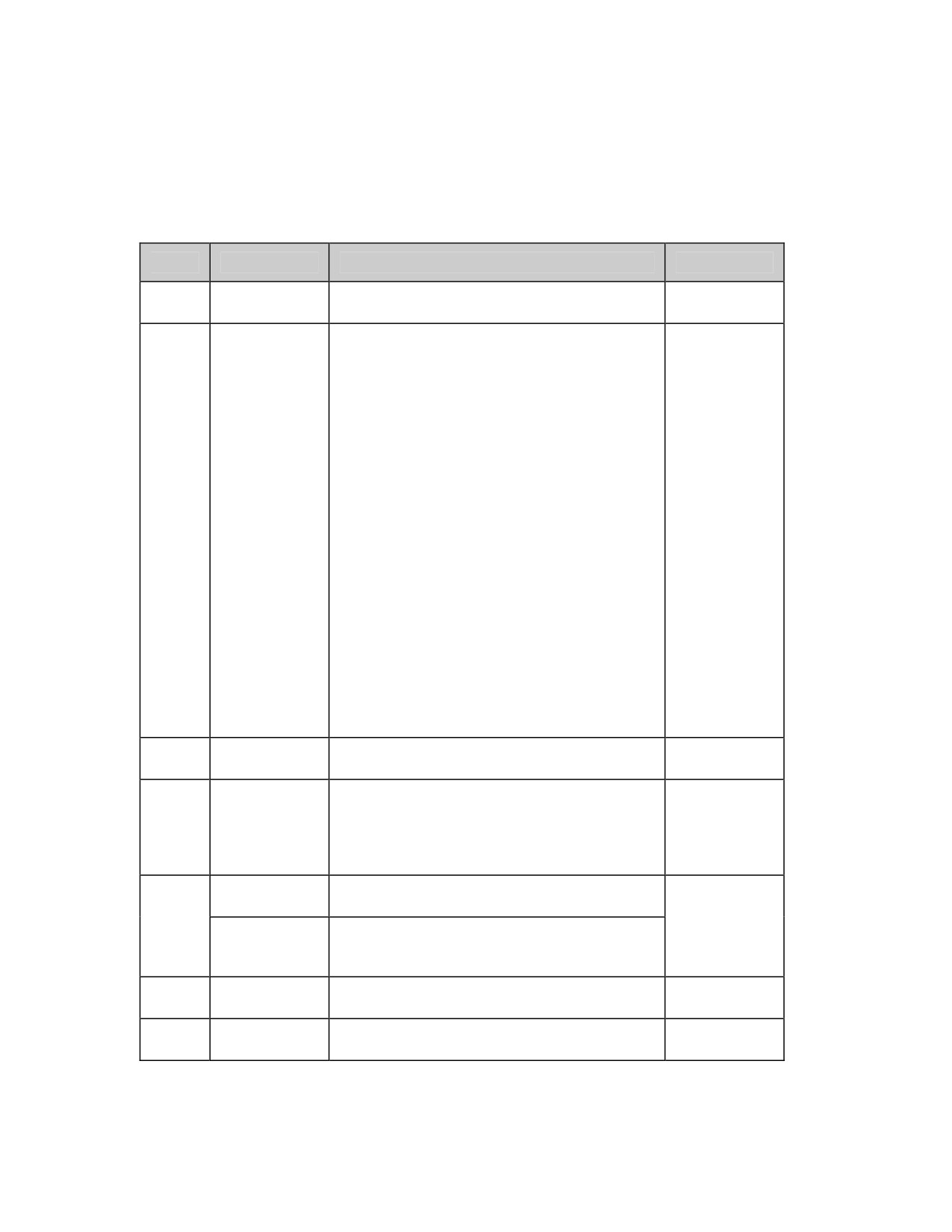
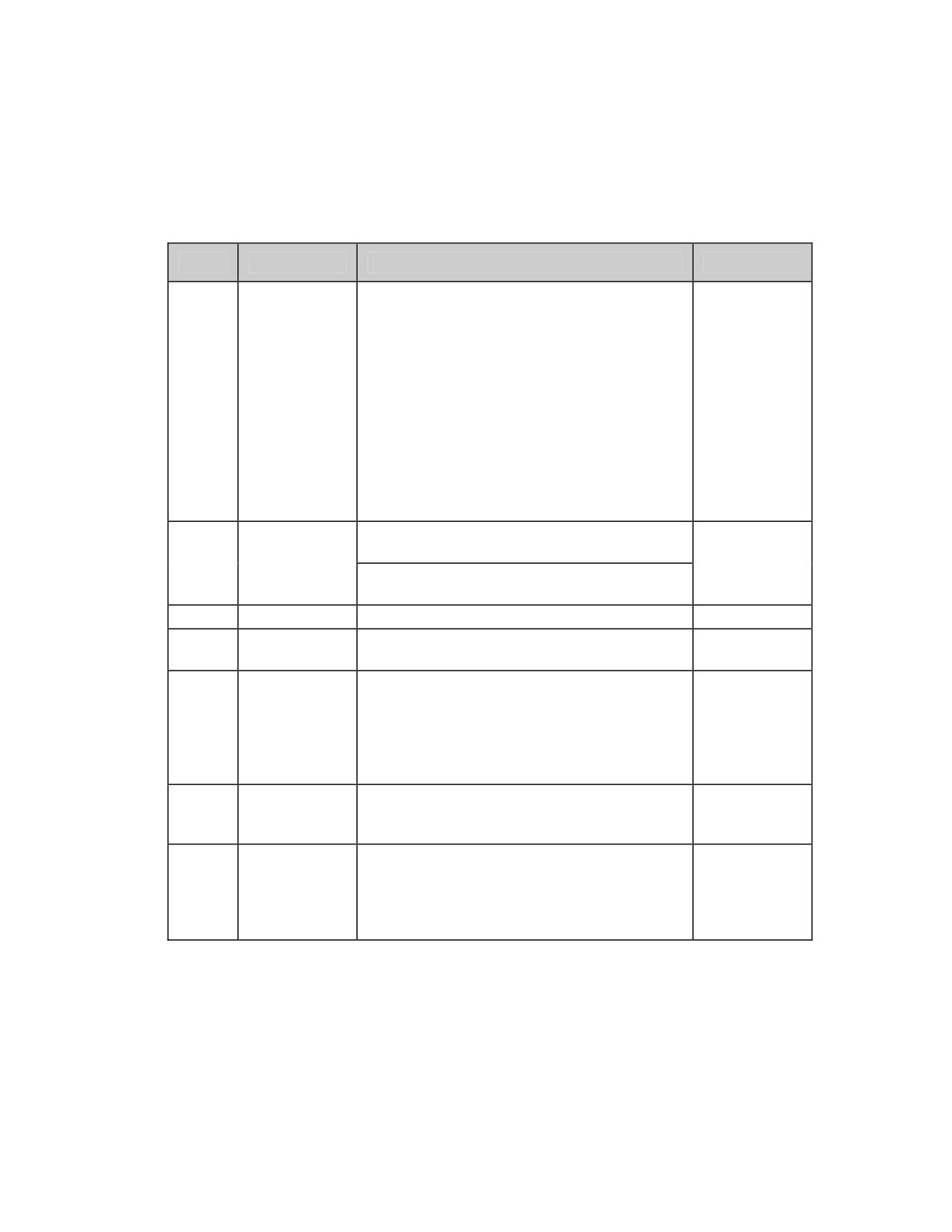
9-3. Table
9-2 describes each of the stability operations and support
operations symbol modifier fields as shown in figure 9-2.
Table 9-2. Descriptions of Fields for Text or Graphic Modifiers for
Stability Operations and Support Operations Symbols
Field
Field Title
Description
Text/Graphic
Basic stability operations and support
operations symbol describing the function of
A
Symbol
Both
the SO/SO activities, locations, and
nonmilitary organizations.
Identifies the number of activities at that
C
Quantity
Text
location.
Helps determine affiliation or battle
Frame Shape
dimension of symbol. “U” represents
E
Text
Modifier
unknown battle dimension. Question mark “?”
represents suspect or assumed friend.
Staff
Free text. Can be used by staff for
G
Text
Comments
information required by commander.
9-3
FM 1-02/MCRP 5-12A________________________________________________________________
Table 9-2. Descriptions of Fields for Text or Graphic Modifiers for
Stability Operations and Support Operations Symbols
Field
Field Title
Description
Text/Graphic
Additional
Free text. Additional information not covered
H
Text
Information
by other fields.
Degree of confidence that may be placed on
the information represented by the symbol. It
is shown as one letter and one number made
up of Reliability of Source and Credibility of
Information.
Reliability of Source:
A. Completely reliable
B. Usually reliable
C. Fairly reliable
Evaluation
D. Not usually reliable
J
Text
Rating
E. Unreliable
F. Reliability cannot be judged
Credibility of Information:
1. Confirmed by other sources
2. Probably true
3. Possibly true
4. Doubtful
5. Improbable
6. Truth cannot be judged.
Higher
Title of a higher level or affiliated organization
M
Text
Formation
being represented.
Direction of
With arrow, it denotes the direction symbol is
Movement
moving or will move. Without arrow, it is used
Q
Arrow/Offset
to denote precise location or to declutter.
Graphic
Location
(See figure 5-7, page 5-42.)
Indicator
Headquarters
Identifies symbol as a headquarters.
Staff Indicator
S
Offset
Used to indicate precise location of
Graphic
Location
headquarters or to declutter multiple
Indicator
headquarters locations (see chapter 5).
Unique
An alphanumeric title that uniquely identifies
T
Text
Designation
a particular symbol.
Type of
Identifies unique designation.
V
Text
Equipment
9-4
______________________________________Stability Operations and Support Operations Symbols
Table 9-2. Descriptions of Fields for Text or Graphic Modifiers for
Stability Operations and Support Operations Symbols
Field
Field Title
Description
Text/Graphic
An alphanumeric designator for displaying a
date-time group (DDHHMMSSZMONYY) or
“O/O” for on order. The date-time group is
composed of a group of six numeric digits
with a time zone suffix and the standardized
three-letter abbreviation for the month
Date-Time
W
followed by two digits. The first pair of digits
Text
Group
represents the day; the second pair, the hour;
the third pair, the minutes. The last two digits
of the year are after the month. For
automated systems, two digits may be added
before the time zone suffix and after the
minutes to designate seconds.
Altitude as displayed on the global
positioning system (GPS).
X
Altitude/Depth
Text
Height in feet of equipment or structure on
the ground.
Y
Location
Latitude and longitude or grid coordinates.
Text
Displays speed in nautical miles per hour or
Z
Speed
Text
kilometers per hour.
Can be used to indicate international
Named
organizations (UN) or (ICRC/RC),
SO/SO
nongovernment organizations (NGO),
AA
Text
Nonmilitary
national governmental agencies (USAID), or
Organizations
regional intragovernmental organizations
(EU).
Feint or
Indicates that it is a dummy or a feint for
AB
Dummy
deception purposes.
Graphic
Indicator
A two-letter code that indicates the country of
origin of the unit. (See chapter 2.) This field
Country
AC
can be used also for factions or groups in
All
Indicator
SO/SO. (Names of factions or groups must
be spelled out.)
9-5
FM 1-02/MCRP 5-12A________________________________________________________________
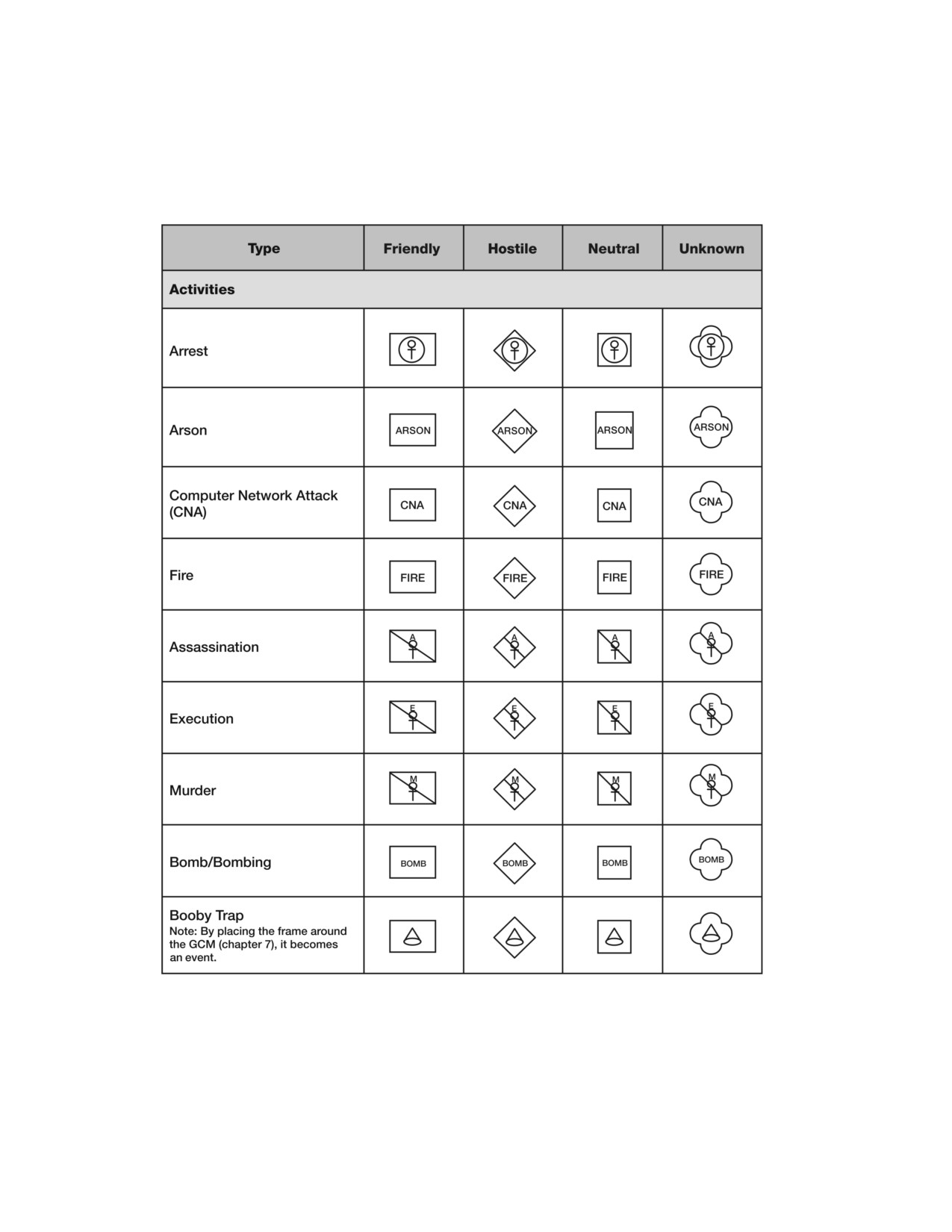
Table 9-3. Field AA: Stability Operations and Support
Operations Activities, Locations, and Nonmilitary Organizations
9-6
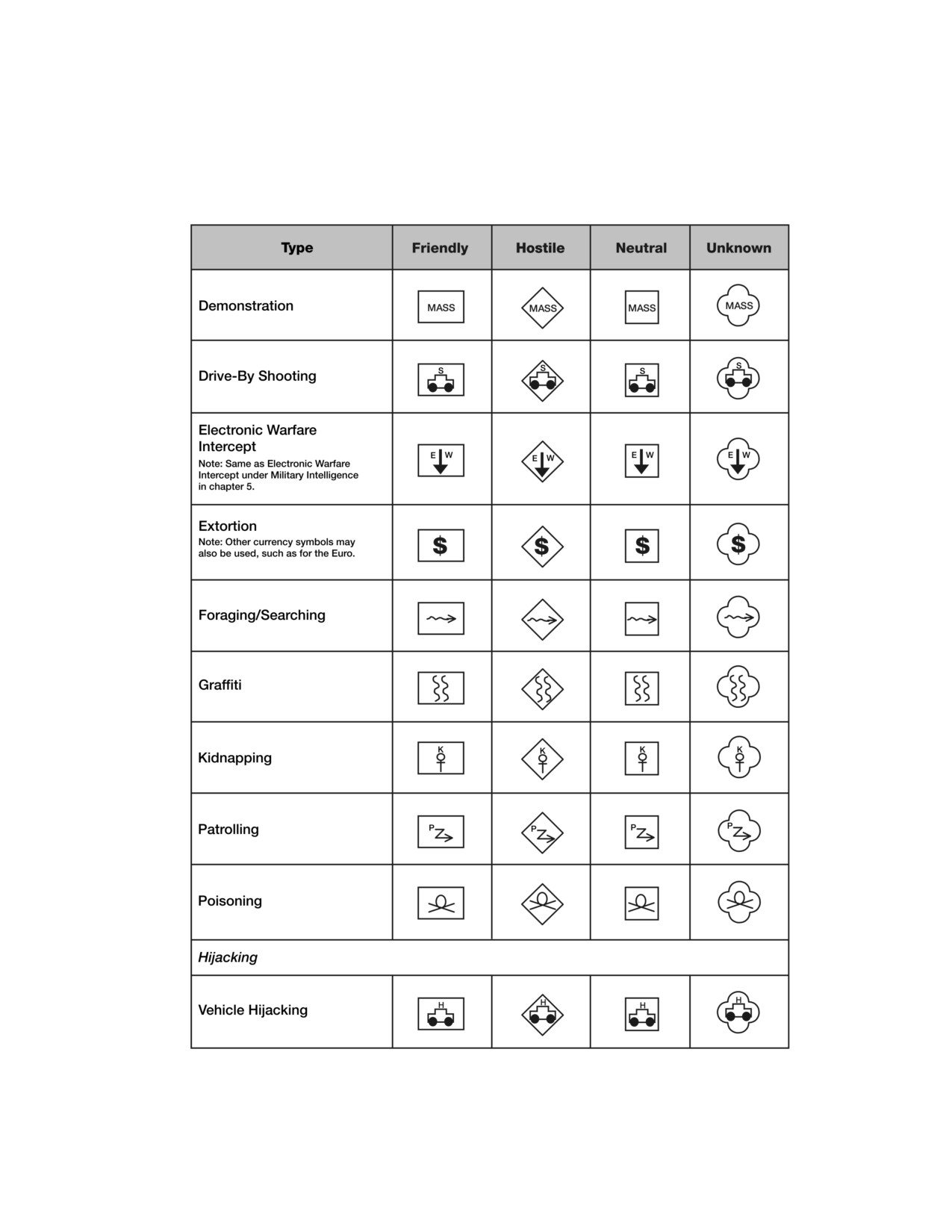
______________________________________Stability Operations and Support Operations Symbols
Table 9-3. Field AA: Stability Operations and Support
Operations Activities, Locations, and Nonmilitary Organizations
9-7
FM 1-02/MCRP 5-12A________________________________________________________________
Table 9-3. Field AA: Stability Operations and Support
Operations Activities, Locations, and Nonmilitary Organizations
9-8
______________________________________Stability Operations and Support Operations Symbols
Table 9-3. Field AA: Stability Operations and Support
Operations Activities, Locations, and Nonmilitary Organizations
9-9
FM 1-02/MCRP 5-12A________________________________________________________________
Table 9-3. Field AA: Stability Operations and Support
Operations Activities, Locations, and Nonmilitary Organizations
9-10
______________________________________Stability Operations and Support Operations Symbols
Table 9-3. Field AA: Stability Operations and Support
Operations Activities, Locations, and Nonmilitary Organizations
9-11
This page intentionally left blank.
Appendix A
Tactical Mission Graphics
Tactical mission graphics are used in course-of-action sketches, synchro-
nization matrixes, and maneuver sketches. They do not replace any part
of the operation order. The graphics in this appendix are representations
of many of the tactical mission tasks. Not all tactical mission tasks have
an associated graphic. Tactical mission graphics should be scaled to fit the
map scale and size of unit for which they are used. Where practical, the
tactical mission graphic should connect with the decision graphic at the
center of the left or right side of the symbol or at the center of the bottom
of the symbol, depending on the orientation of the graphics. See figure
A-1, page A-7, for an example of decision graphics and tactical mission
graphics used together. For information on building decision graphics, see
appendix D. In the examples shown in table A-1, the hostile force
would be located to the right of the symbol. However, these
graphics can be oriented in any direction relative to the position
of hostile forces.
Note: Those tactical mission graphics that are defined in the terminology sec-
tion of this manual are identified with a page number where the definition
can be found. A detailed explanation of each tactical mission task can be
found in FM 3-90.
A-1
FM 1-02/MCRP 5-12A________________________________________________________________
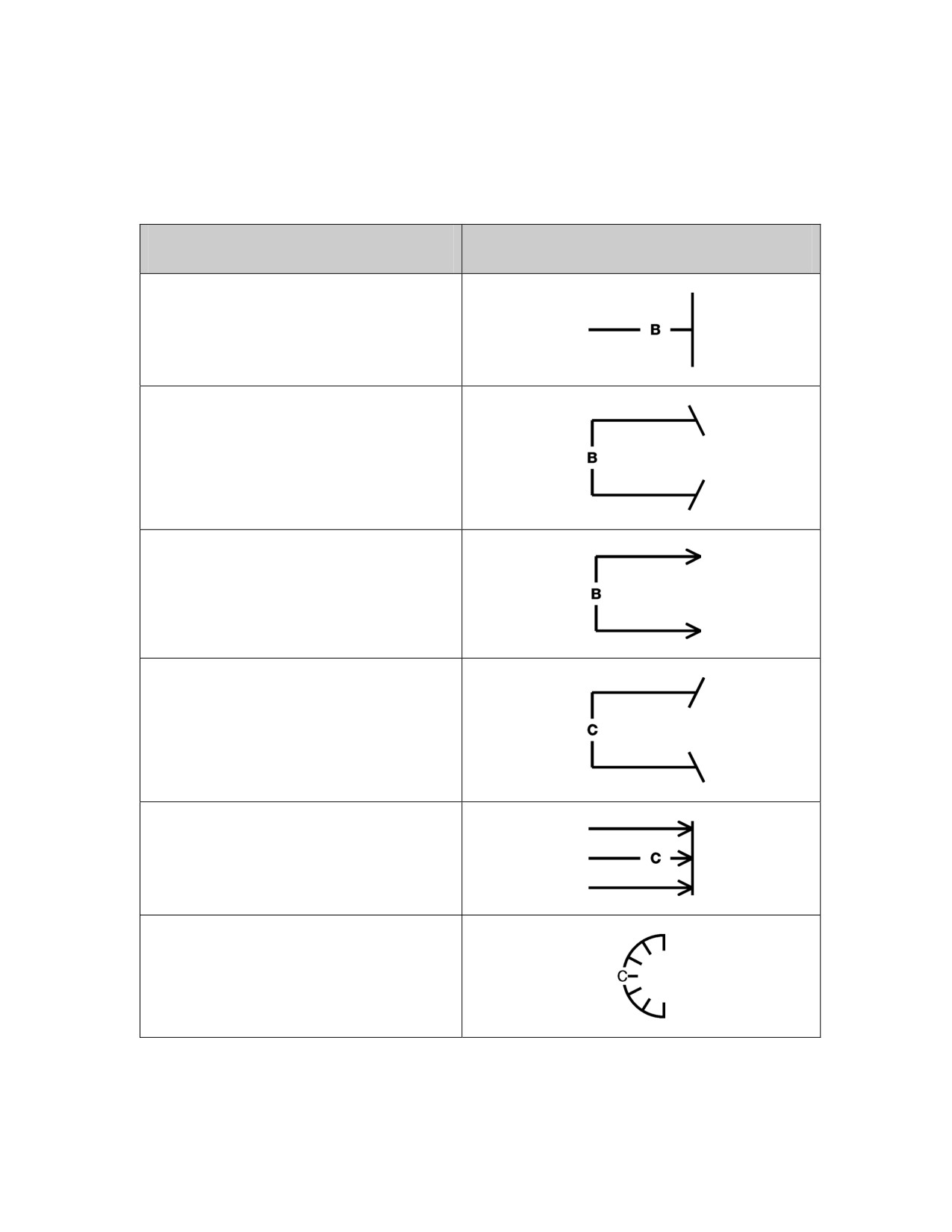
Table A-1. Examples of Tactical Mission Graphics
Tactical Mission Task
Graphic
Block. (See page 1-23 for definition.)
Breach. See page 1-24 for definition.)
Bypass. (See page 1-26 for definition.)
Canalize. (See page 1-27 for definition.)
Clear. (See page 1-32 for definition.)
Contain. (See page 1-43 for definition.)
A-2
___________________________________________________________Tactical Mission Graphics
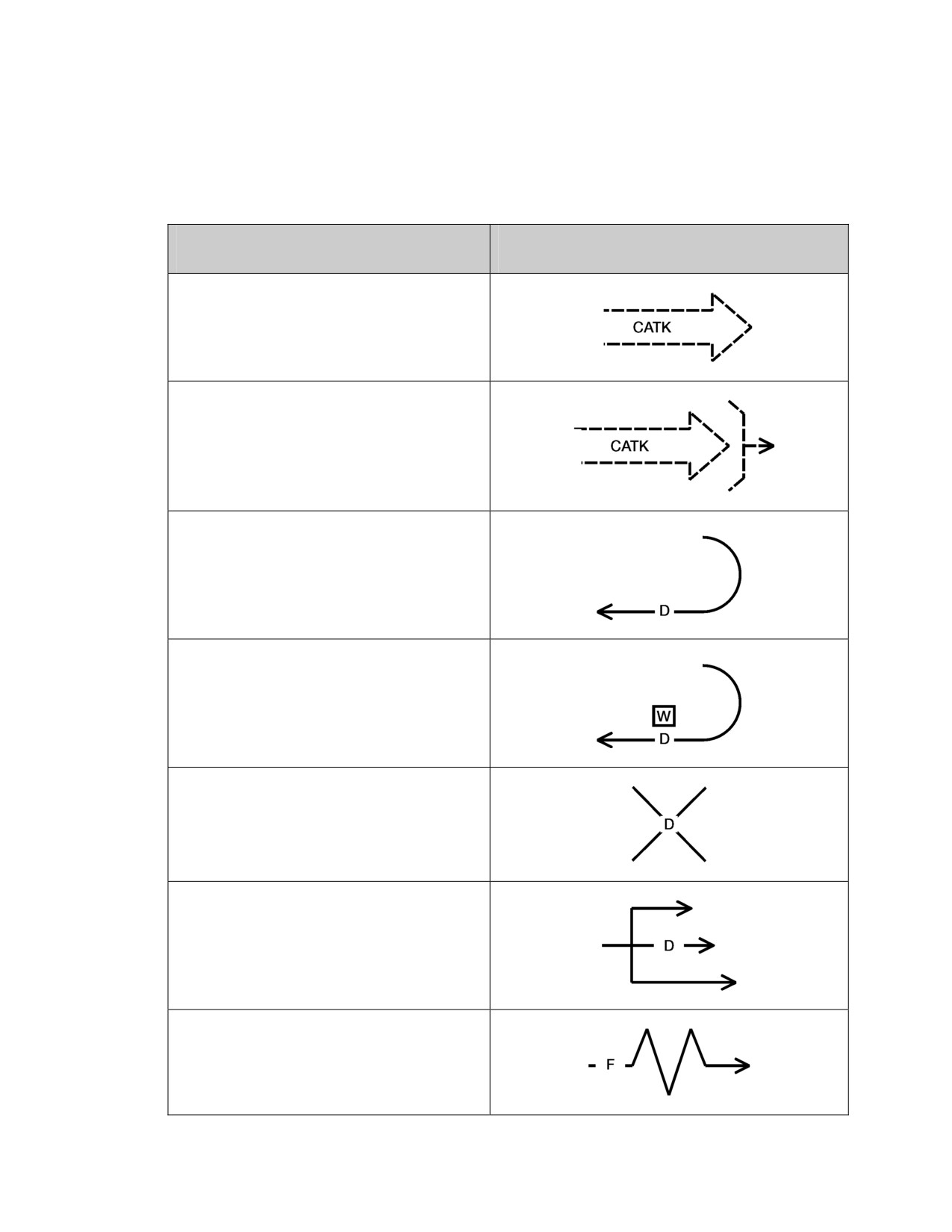
Table A-1. Examples of Tactical Mission Graphics
Tactical Mission Task
Graphic
Counterattack (CATK). (See page 1-46 for
definition.)
Counterattack By Fire
Delay.
(See page 1-56 for definition.)
Delay (until a specified time)
Destroy.
(See page 1-59 for definition.)
Disrupt.
(See page 1-63 for definition.)
Fix.
(See page 1-81 for definition.)
A-3
FM 1-02/MCRP 5-12A________________________________________________________________
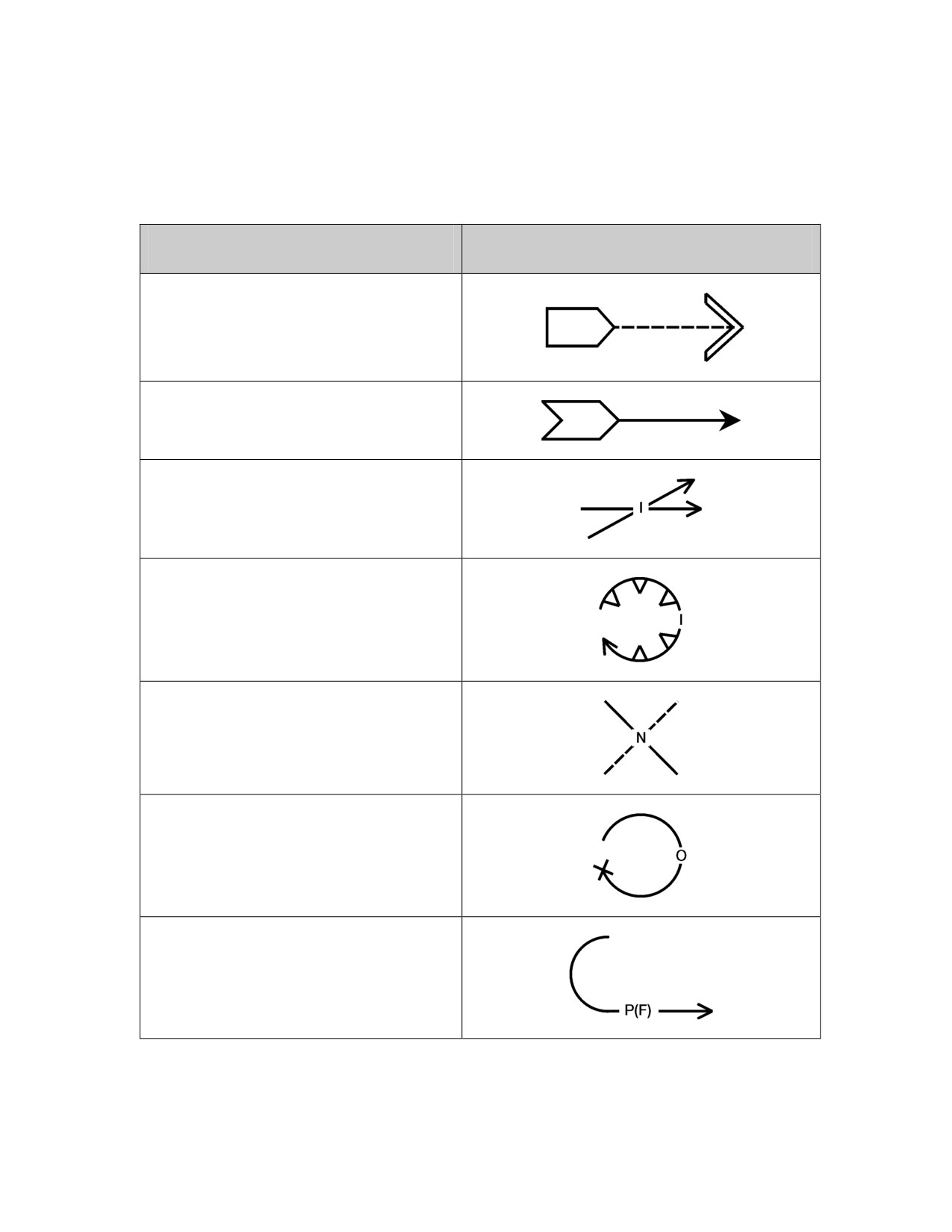
Table A-1. Examples of Tactical Mission Graphics
Tactical Mission Task
Graphic
Follow and Assume.
(See page 1-82 for definition.)
Follow and Support.
(See page 1-82 for definition.)
Interdict.
(See page 1-103 for definition.)
Isolate.
(See page 1-105 for definition.)
Neutralize.
(See page 1-132 for definition.)
Occupy.
(See page 1-136 for definition.)
Passage of Lines (Forward).
(See page 1-142 for definition.)
A-4
___________________________________________________________Tactical Mission Graphics
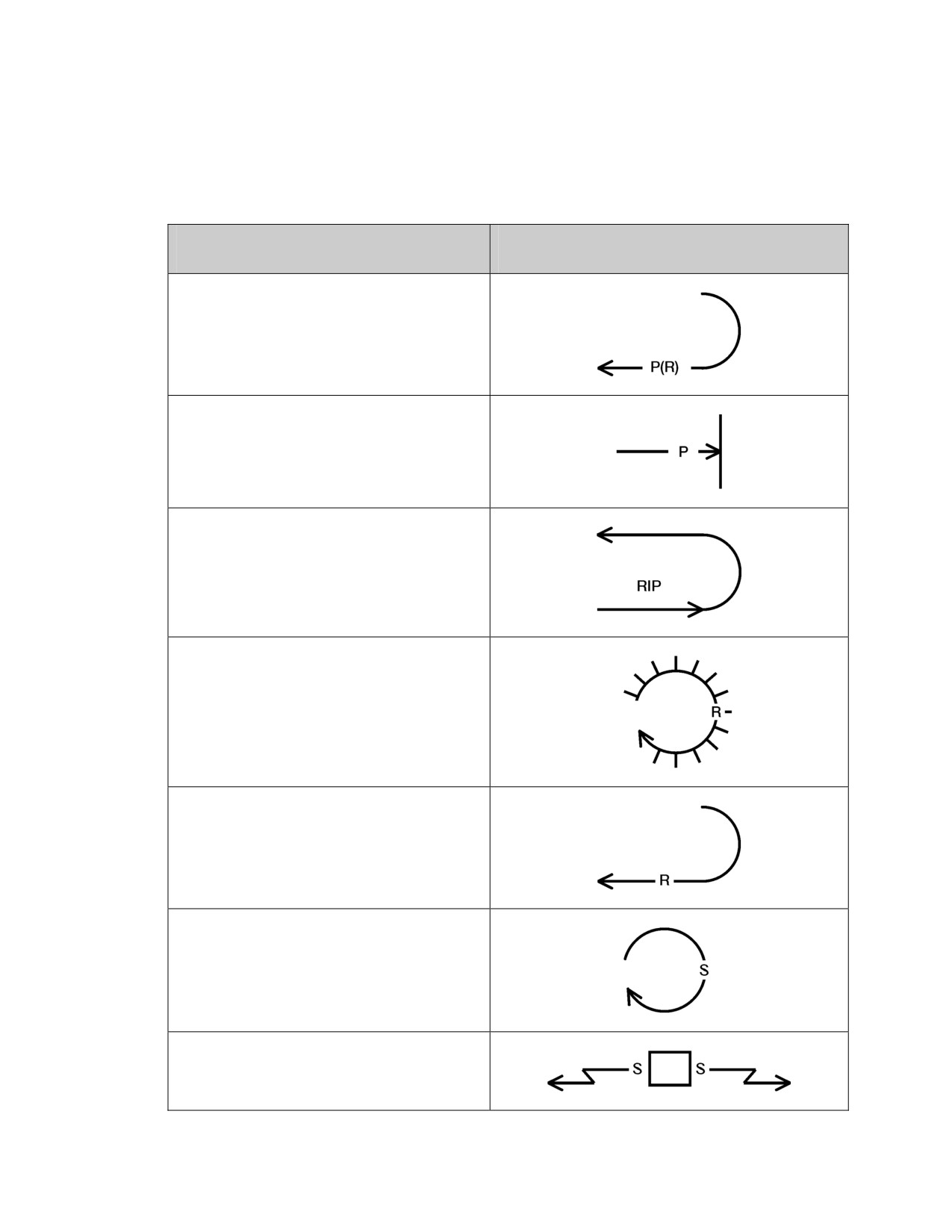
Table A-1. Examples of Tactical Mission Graphics
Tactical Mission Task
Graphic
Passage of Lines (Rearward)
Penetration.
(See page 1-145 for definition.)
Relief In Place (RIP).
(See page 1-160 for definition.)
Retain.
(See page 1-163 for definition.)
Retirement.
(See page 1-163 for definition.)
Secure.
(See page 1-168 for definition.)
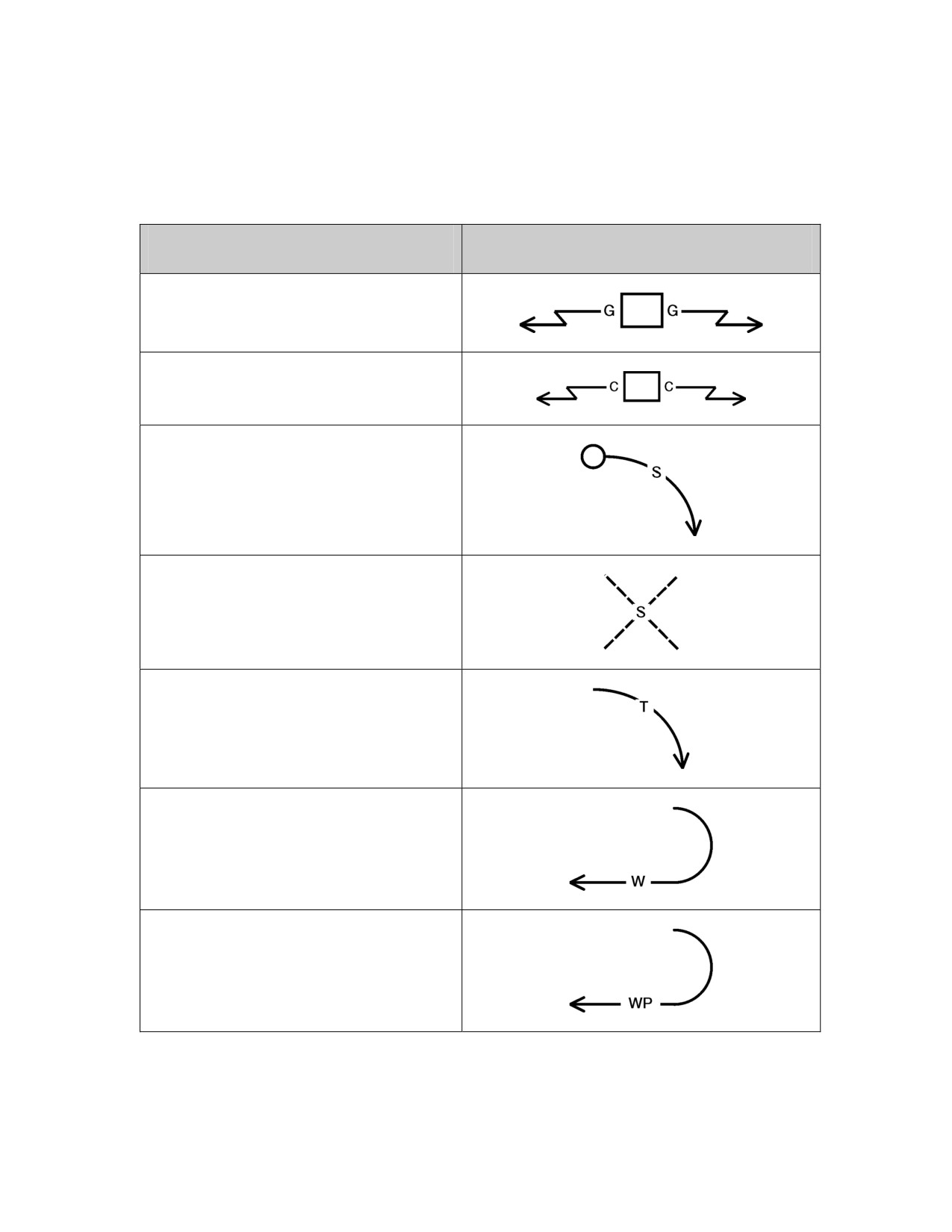
Security (screen).
(See page 1-167 for definition.)
A-5
FM 1-02/MCRP 5-12A________________________________________________________________
Table A-1. Examples of Tactical Mission Graphics
Tactical Mission Task
Graphic
Security (guard).
(See page 1-90 for definition.)
Security (cover).
(See page 1-48 for definition.)
Seize.
(See page 1-168 for definition.)
Suppress.
(See page 1-179 for definition.)
Turn.
(See page 1-192 for definition.)
Withdraw
Withdraw Under Pressure
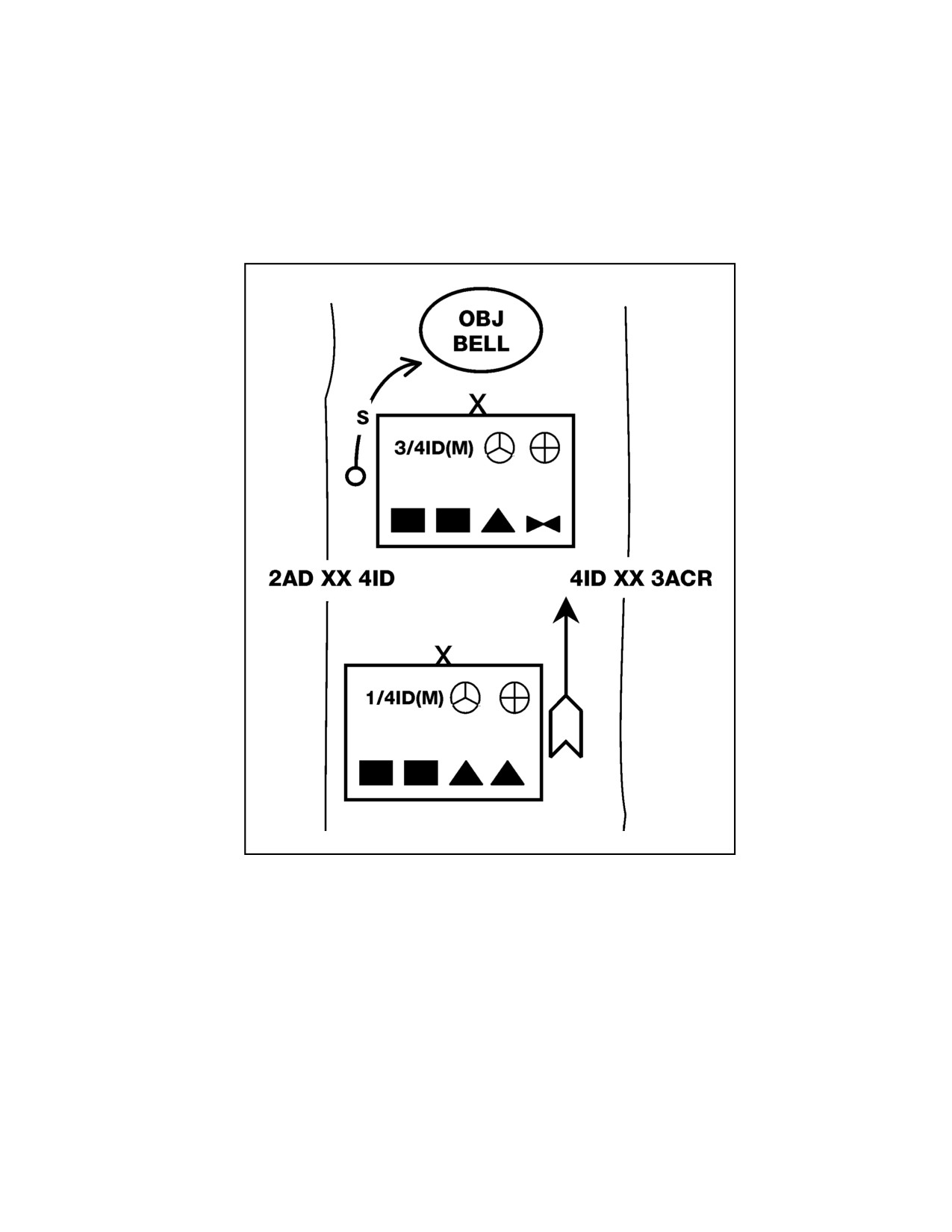
A-1. Figure A-1 is an example of the use of decision graphics and tactical
mission graphics. Figure A-1 displays the 3d Brigade, 4th Infantry Division
(mechanized), task-organized with two mechanized infantry battalions, an
armor battalion, and an attack helicopter battalion. It has no problems. Its
A-6
___________________________________________________________Tactical Mission Graphics
task is to seize Objective Bell. It also displays the 1st Brigade, 4th Infantry
Division
(mechanized), task-organized with two mechanized infantry
battalions and two armor battalions. It has no problems. Its task is to follow
and support the 3d Brigade.
Figure A-1. Example of Decision Graphics and Tactical Mission Graphics
A-7
This page intentionally left blank.
Appendix B
Examples of Military Symbols
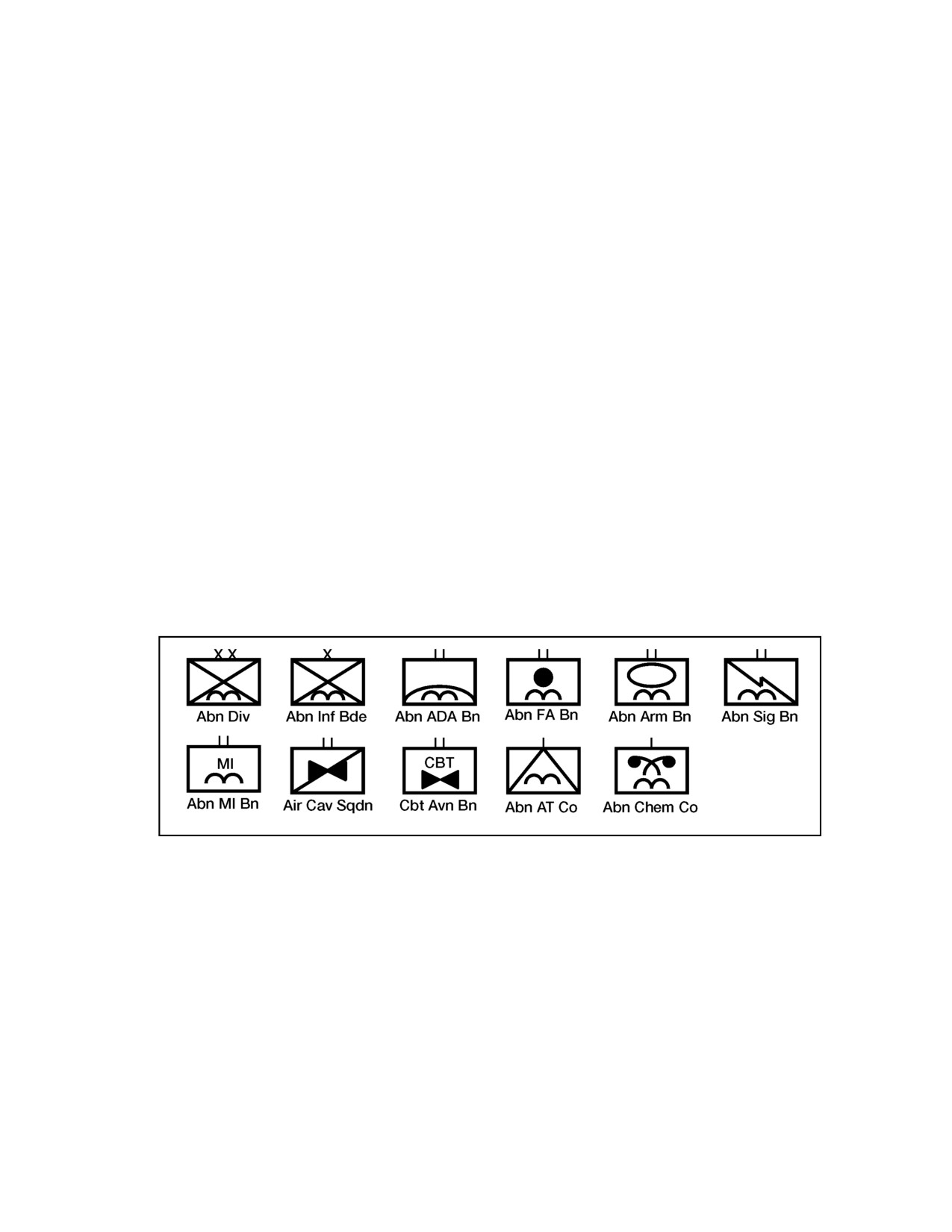
The figures in this appendix show examples of unit symbols:
• Figures B-1 through B-6—symbols for divisions.
• Figure B-7—symbols for Marine divisions.
• Figure B-8—symbols for Stryker brigade combat teams.
• Figure B-9—symbols for supply sites.
• Figure B-10—symbols for combat service support units.
• Figure 11—unit symbols with labeling fields.
• Figure B-12—equipment symbols with labeling fields.
• Figure B-13—installation symbols with labeling fields.
• Figure B-14—stability operations and support operations symbols
with labeling fields.
Figure B-1. Airborne Infantry Divisions
B-1