ARMY FM 4-20.117 RIGGING HIGH-MOBILITY MULTIPURPOSE WHEELED VEHICLES (October 2001) - page 6
FM 4-20.117/TO 13C7-1-111
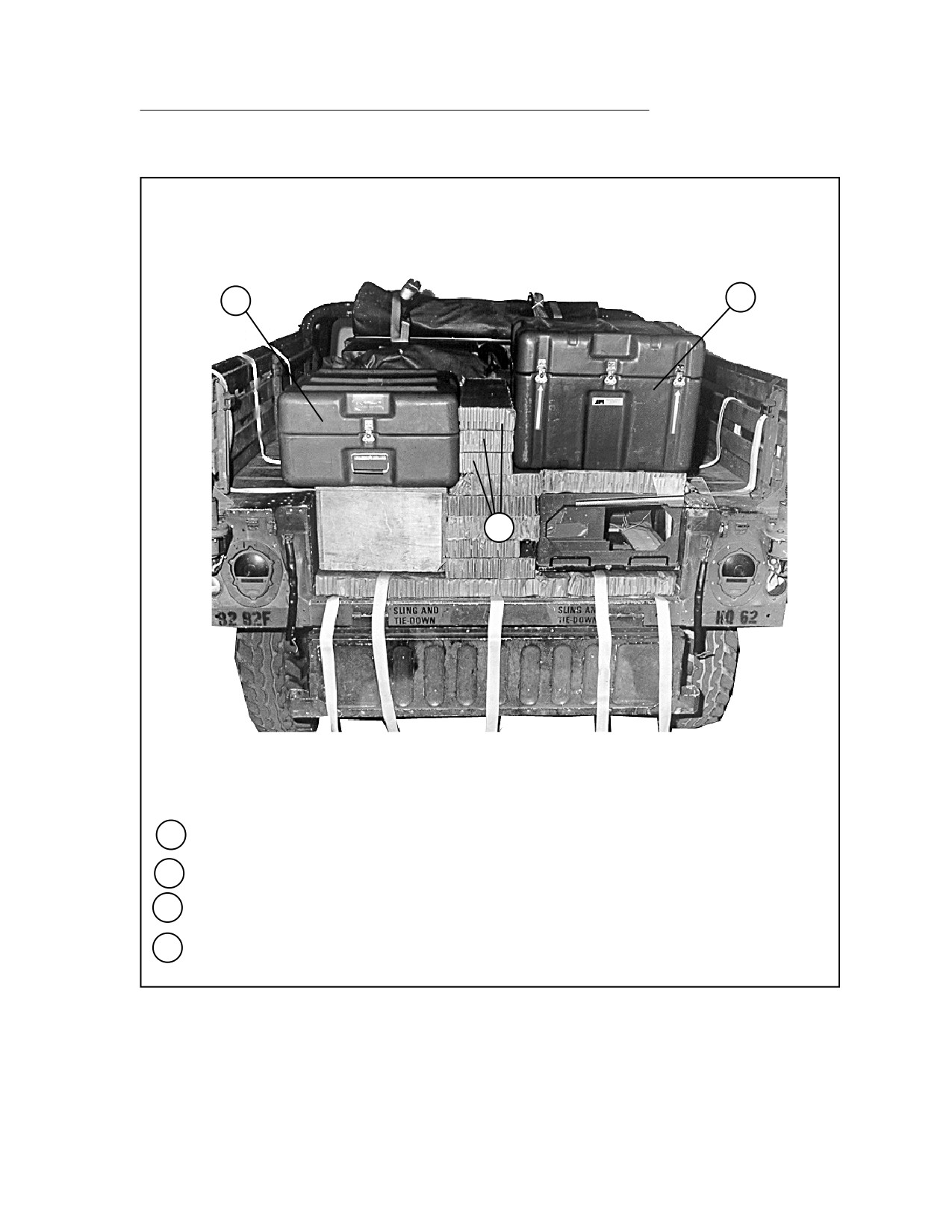
RIGGING LIGHTWEIGHT TACTICAL FIRE DIRECTION CONTROL SYSTEM (LTACFIRE)
IN M998 TRUCK
5-9. Use the procedures shown in Figure 5-9 to rig the components of the
LTACFIRE and accompanying equipment. The LTACFIRE system consists of a
syncgar radio system mounted in a rack. The upper rack has a program load
unit (PLU), a power distribution box (PDB), and a digitizer mounted in it. The
printer and monitor have their own containers. A keyboard requires a container
to be made of honeycomb. Miscellaneous items include, but are not limited to, a
map board, field desk, footlocker, camouflage net and poles, and two folding
chairs.
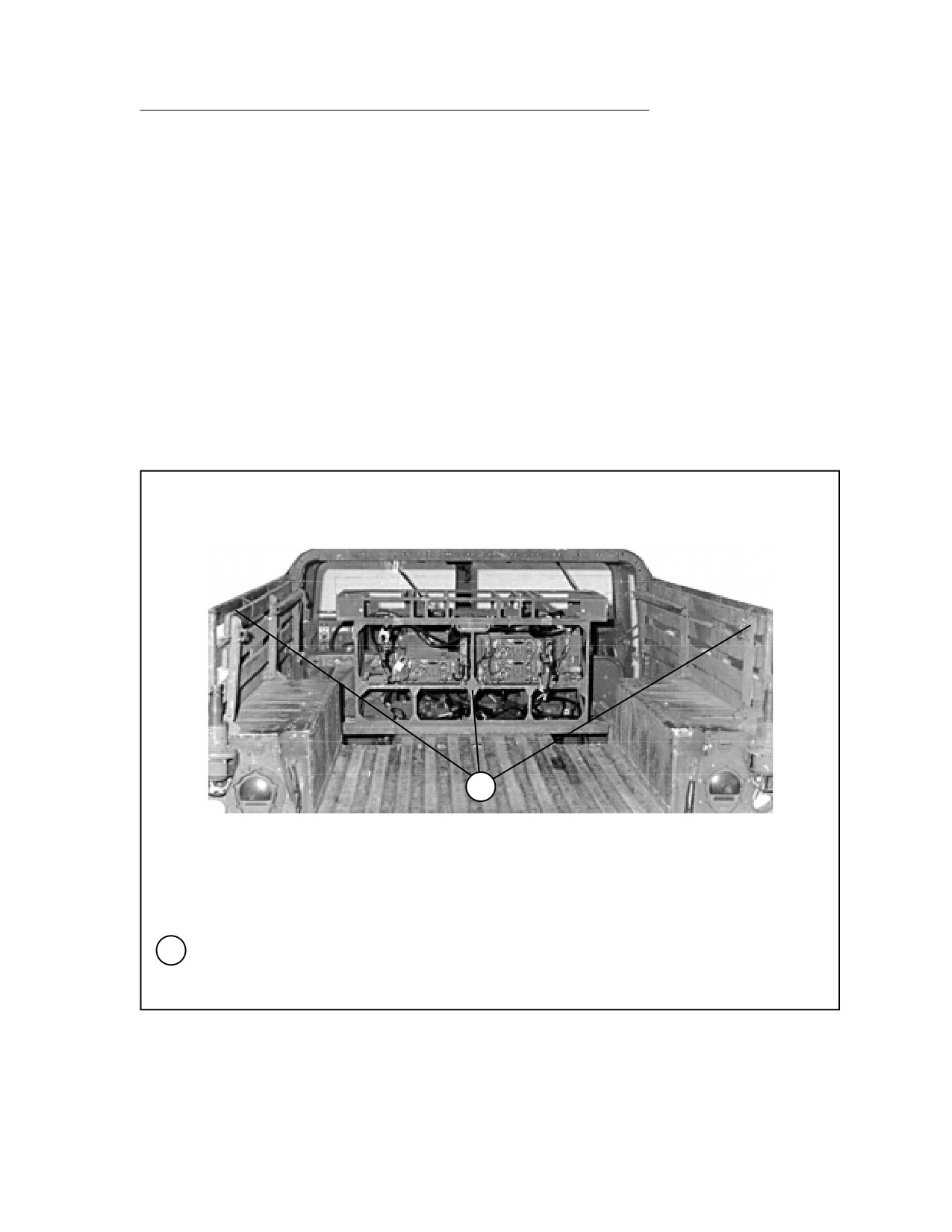
1
1
Remove all components of the LTACFIRE system and accompanying equipment from the
truck except the sincgar radios mounted in their rack bolted to the bed of the carrier. Raise and
secure the left and right side troop seats.
Figure 5-9. LTACFIRE and Accompanying Equipment Rigged in M998 Truck
5-45
FM 4-20.117/TO 13C7-1-111
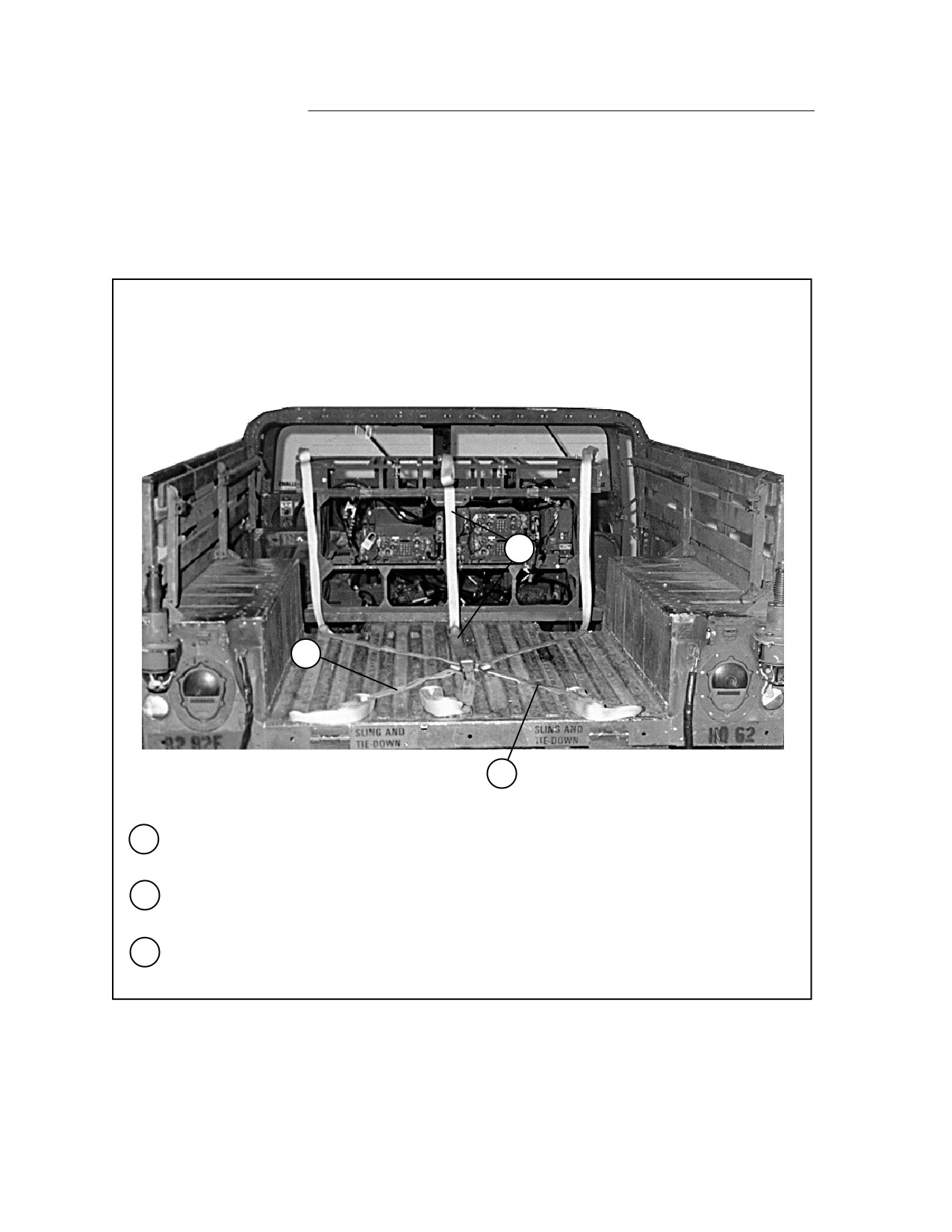
4
3
2
2
Place a 30-foot lashing through the right rear cargo bed tie-down ring and the left front cargo
bed tie-down ring. Place the joined D-rings at the center of the cargo bed.
3
Place another 30-foot lashing as outlined in step 2, but from the left rear to the right front
cargo bed tie-down ring.
4
Place another 30-foot lashing with the joined D-rings in the center of the bed. Run the lashing
through the front and rear center tie-down rings, and up over the radio rack.
Figure 5-9. LTACFIRE and Accompanying Equipment Rigged in M998 Truck (continued)
5-46
FM 4-20.117/TO 13C7-1-111
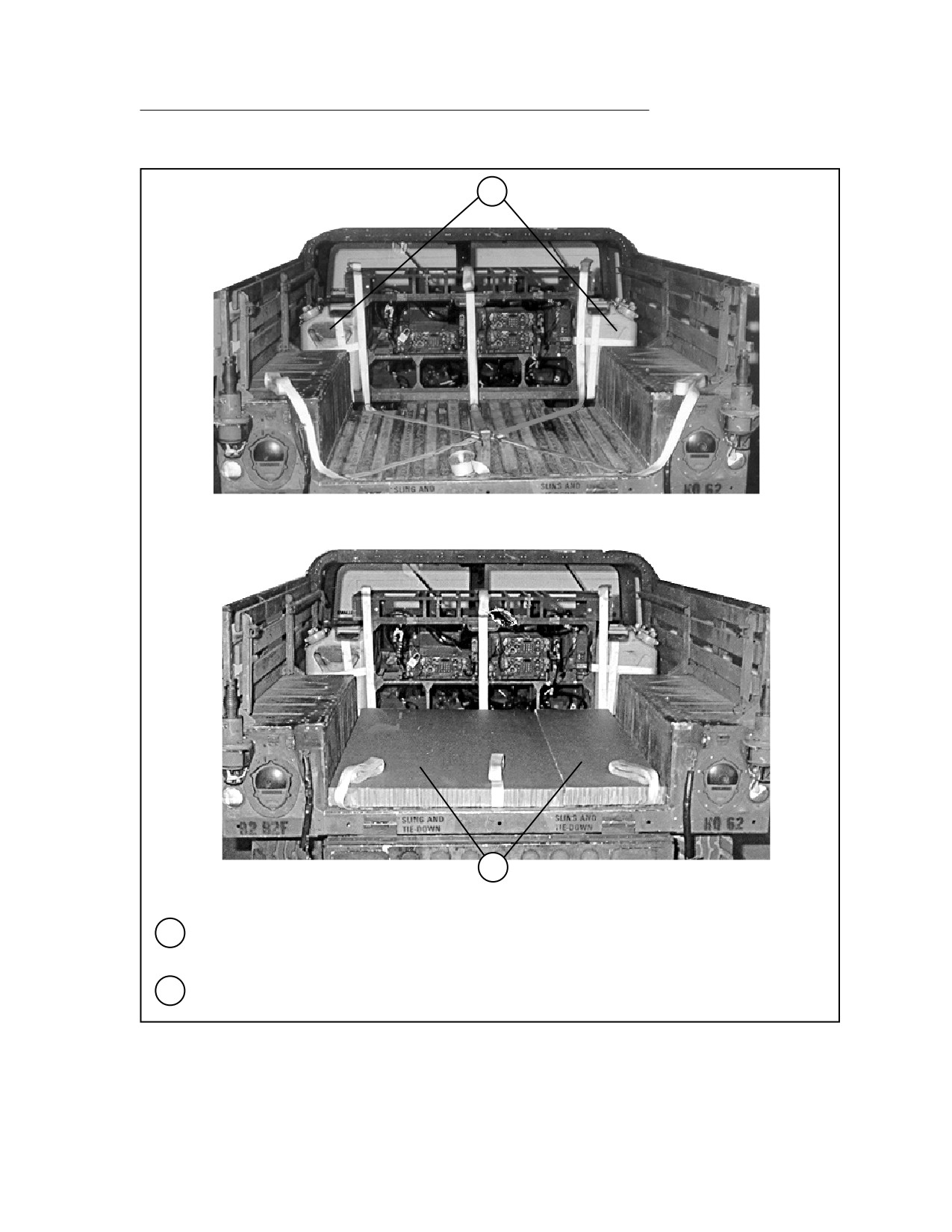
5
6
5
Bind three 5-gallon cans together with 15-foot lashings. Secure a group of three cans to the
radio rack on each side with a 15-foot lashing. Place the load binders on the front side.
6
Cover the cargo bed with a single layer of honeycomb.
Figure 5-9. LTACFIRE and Accompanying Equipment Rigged in M998 Truck (continued)
5-47
FM 4-20.117/TO 13C7-1-111
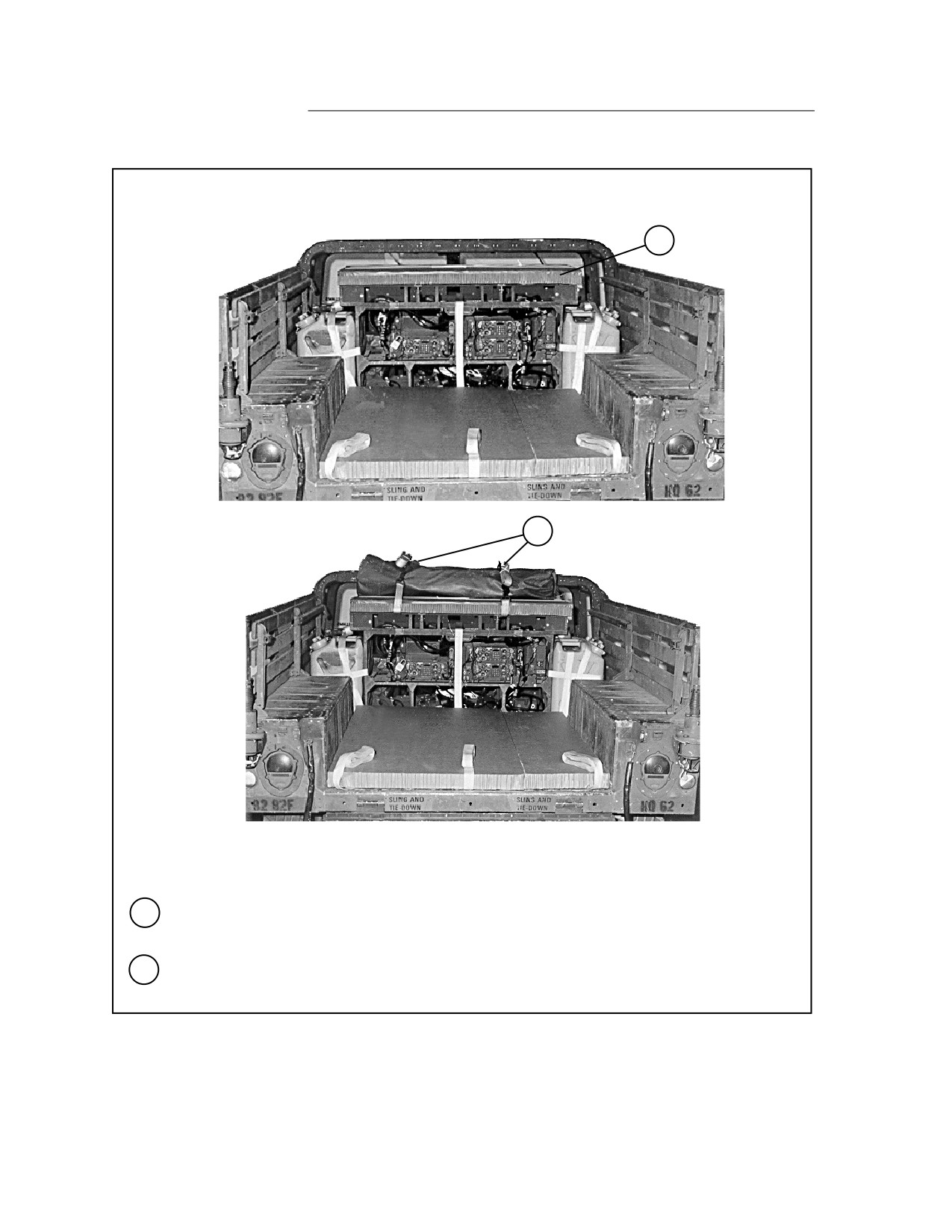
7
8
7
Move any prepositioned lashings aside, and place a 24- by 54-inch piece of honeycomb on top
of the radio rack and secure it with type III nylon cord.
8
Place one camouflage net pole bag on top of the honeycomb placed in step 7 above. Secure
the bag to the radio rack with two 15-foot lashings.
Figure 5-9. LTACFIRE and Accompanying Equipment Rigged in M998 Truck (continued)
5-48
FM 4-20.117/TO 13C7-1-111
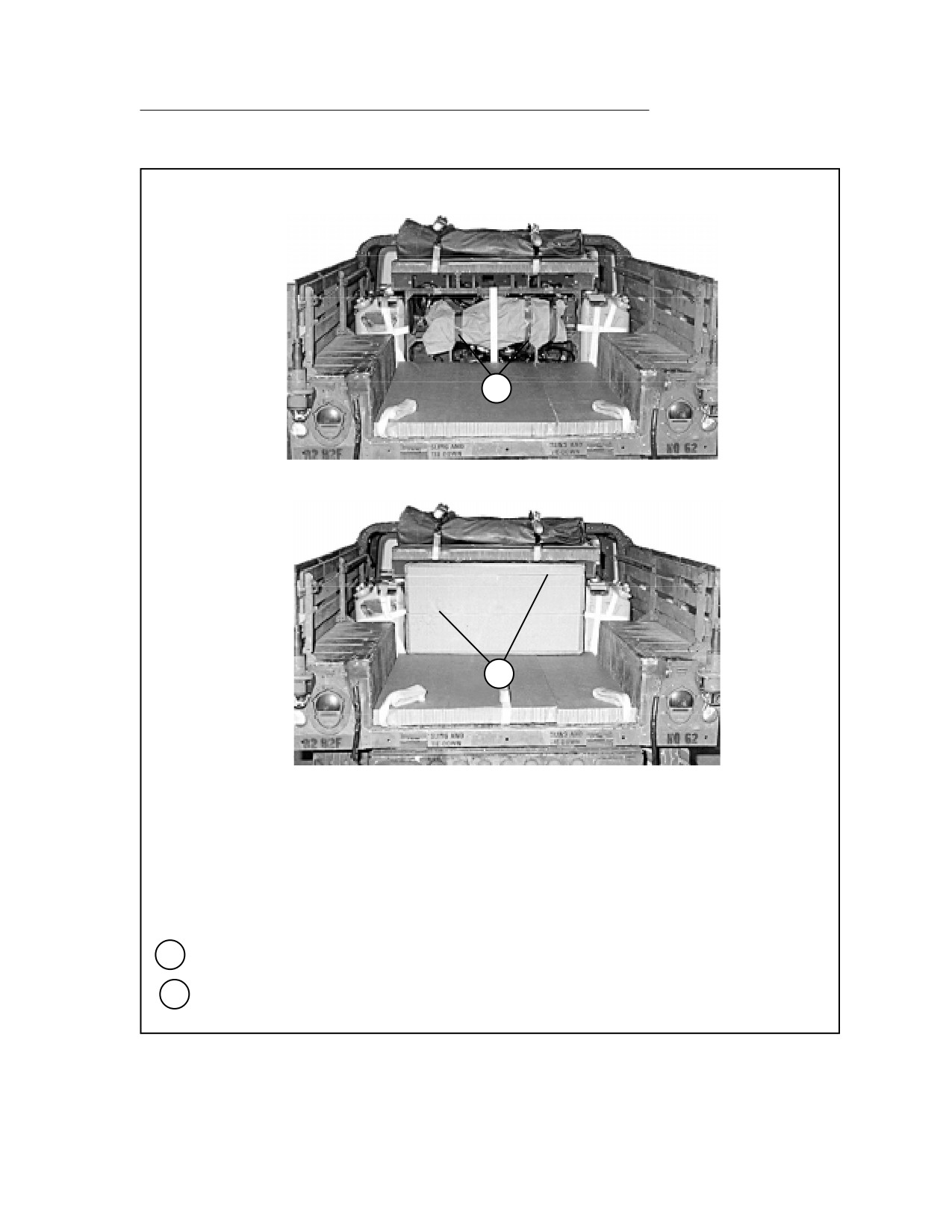
9
10
9
Pad the radio with cellulose wadding. Tape the wadding in place.
10
Place a 24 1/2- by 47-inch piece of honeycomb against the radio rack and secure it in place
with type III nylon cord.
Figure 5-9. LTACFIRE and Accompanying Equipment Rigged in M998 Truck (continued)
5-49
FM 4-20.117/TO 13C7-1-111
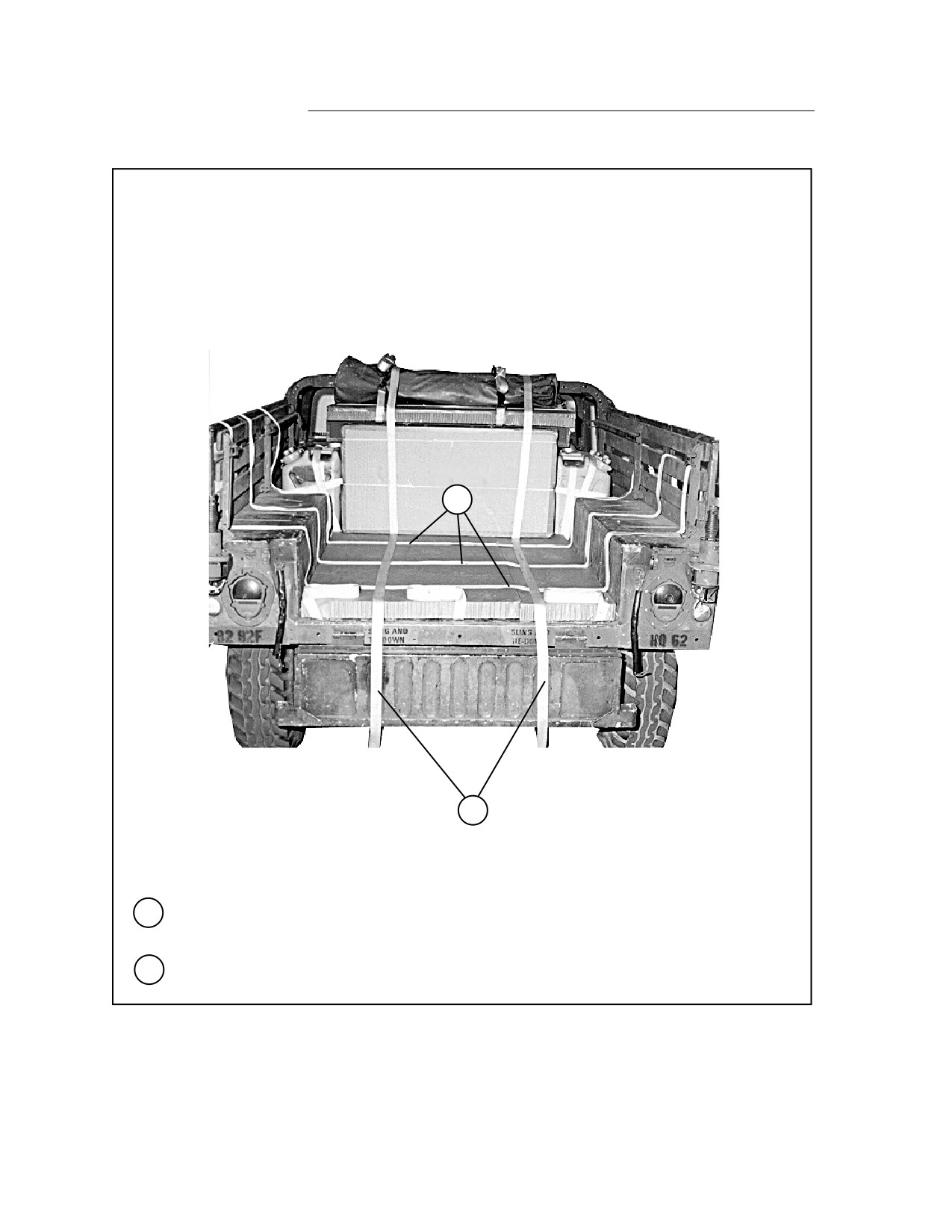
11
12
11
Place three 15-foot lashings evenly spaced from right to left on the honeycomb placed in step
6.
12
Place two more 15-foot lashings on the honeycomb running from front to rear.
Figure 5-9. LTACFIRE and Accompanying Equipment Rigged in M998 Truck (continued)
5-50
FM 4-20.117/TO 13C7-1-111
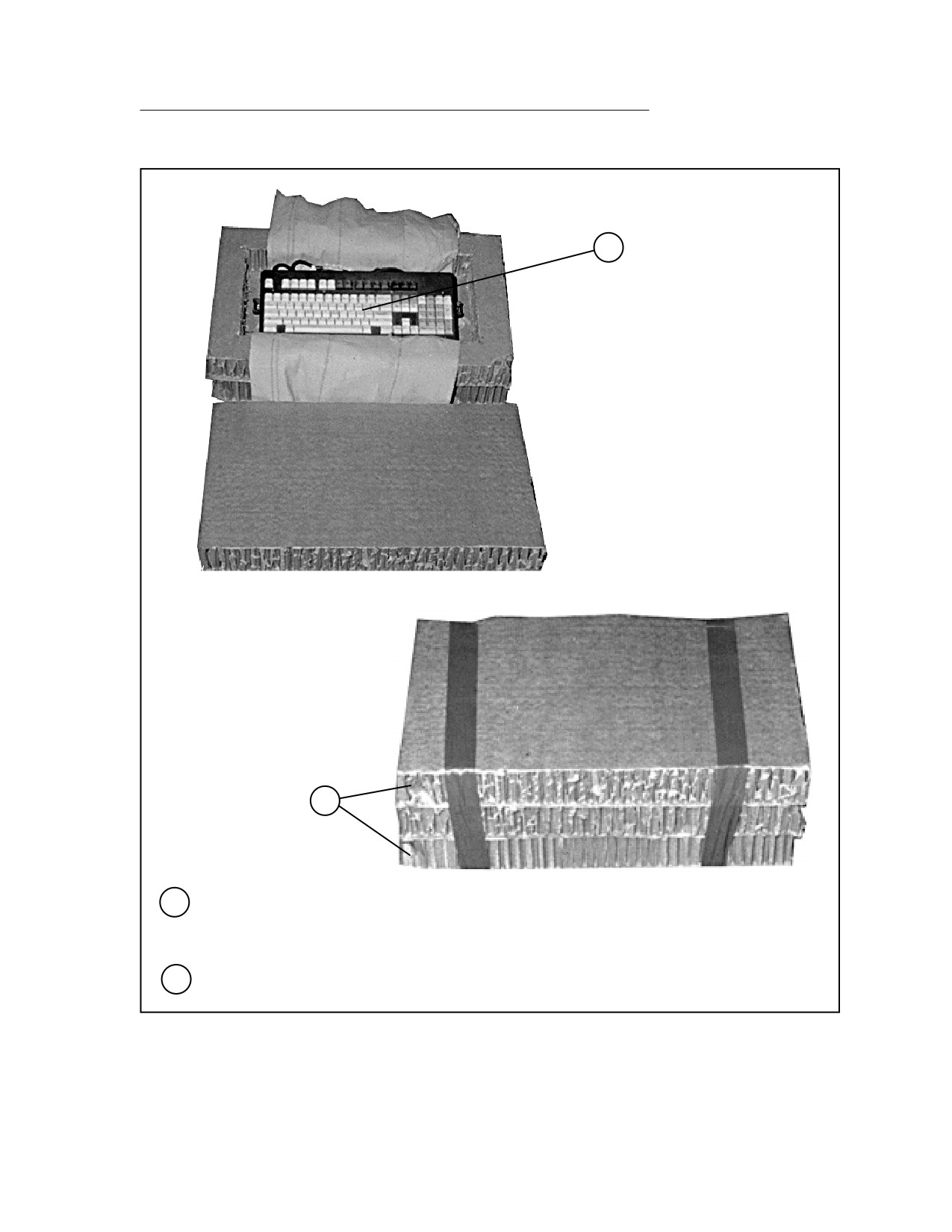
13
14
13
Build a container for the keyboard with three 16- by 26-inch pieces of honeycomb. Center a 10
1/2- by 20 1/2-inch hole in the center piece, wrap the keyboard with cellulose wadding, and
place the keyboard in the cutout.
14
Tape the solid pieces of honeycomb to the top and bottom of the container.
Figure 5-9. LTACFIRE and Accompanying Equipment Rigged in M998 Truck (continued)
5-51
FM 4-20.117/TO 13C7-1-111
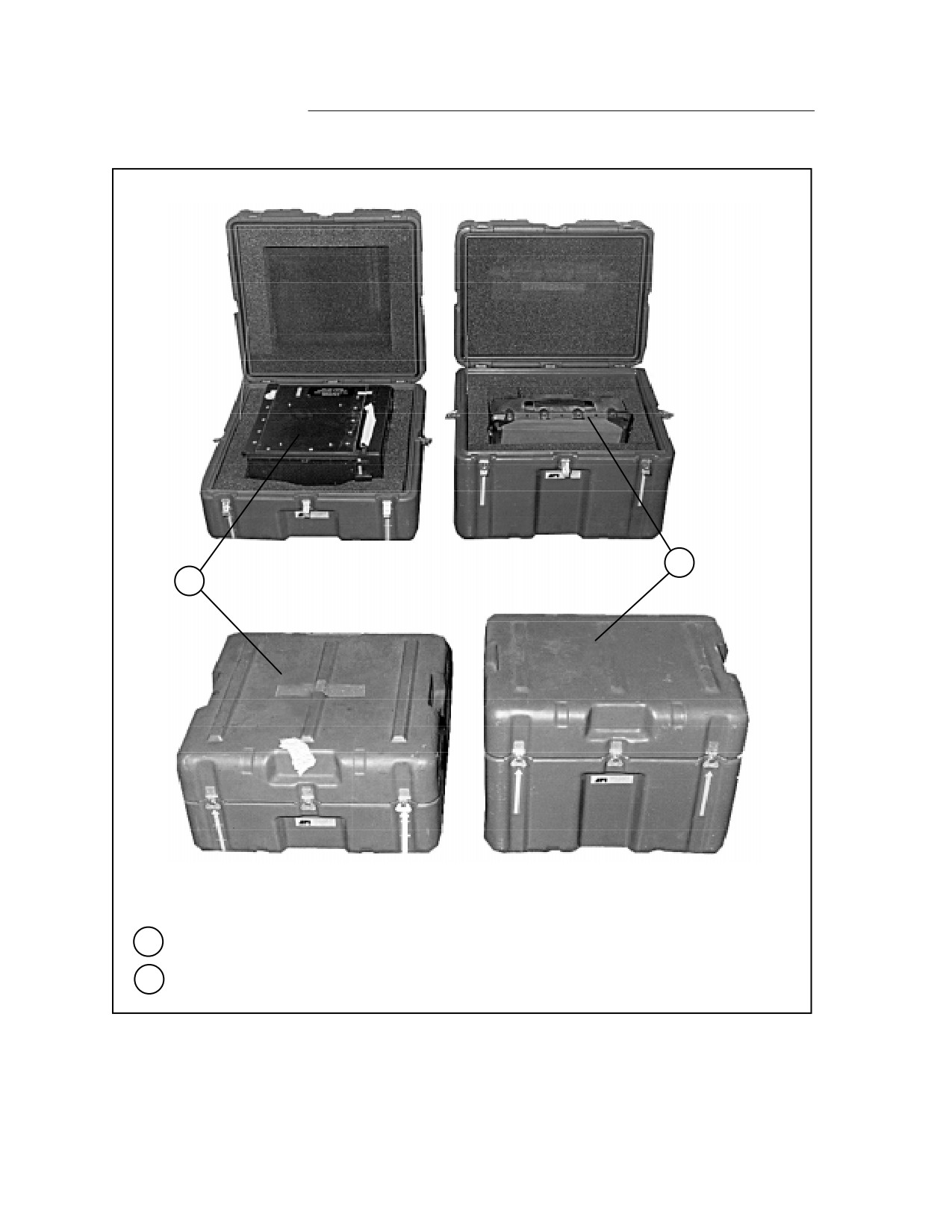
15
16
15
Place the monitor in its container and close the latch.
16
Place the printer in its container and close the latch.
Figure 5-9. LTACFIRE and Accompanying Equipment Rigged in M998 Truck (continued)
5-52
FM 4-20.117/TO 13C7-1-111
17
18
17
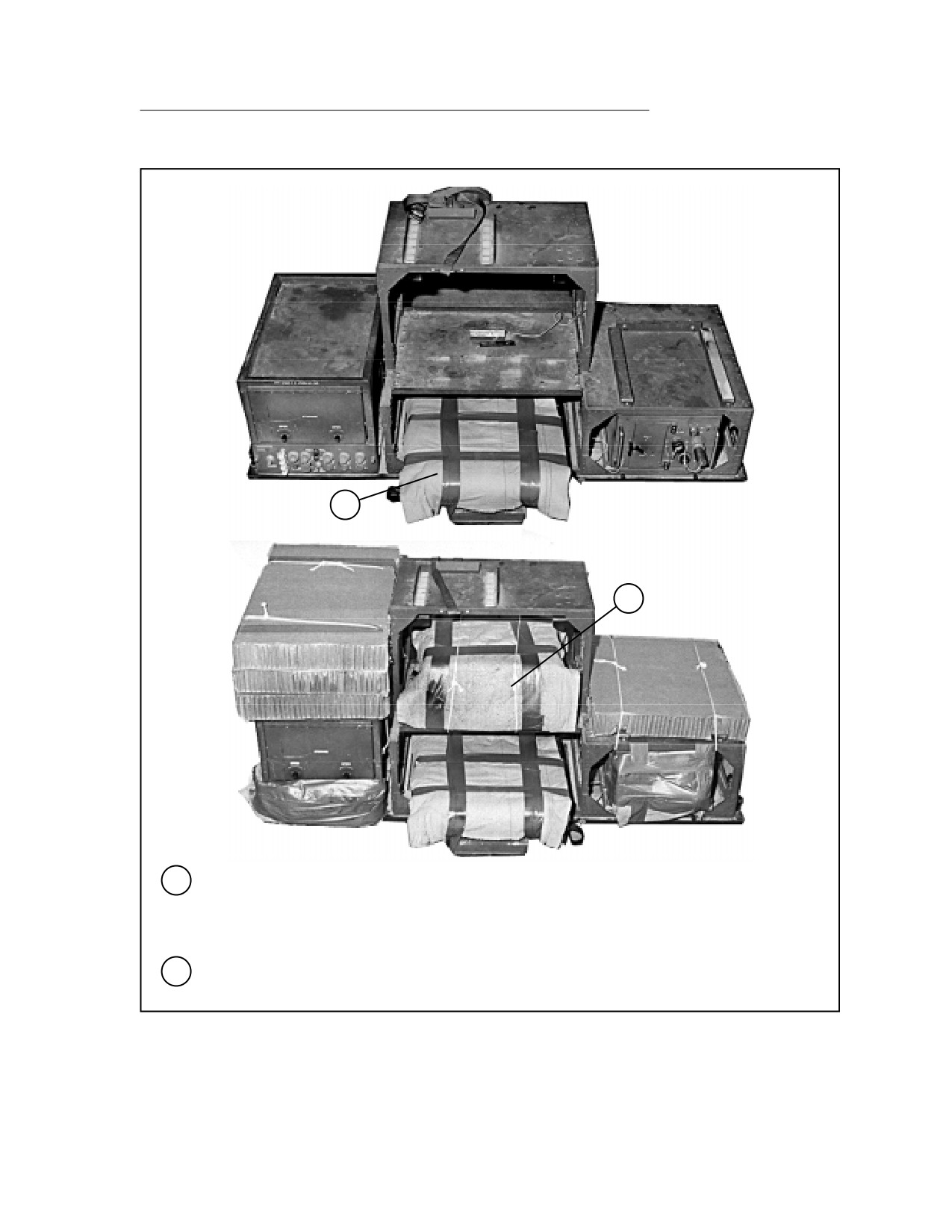
Turn the digitizer around in the upper rack, pad it with cellulose wadding, and secure the
wadding with tape.
Note: This rack is not installed in the truck at this time.
18
Cover the printer cover with cellulose wadding, and place it in the center space on the rack.
Secure it to the rack with type III nylon cord.
Figure 5-9. LTACFIRE and Accompanying Equipment Rigged in M998 Truck (continued)
5-53
FM 4-20.117/TO 13C7-1-111
21
20
19
19
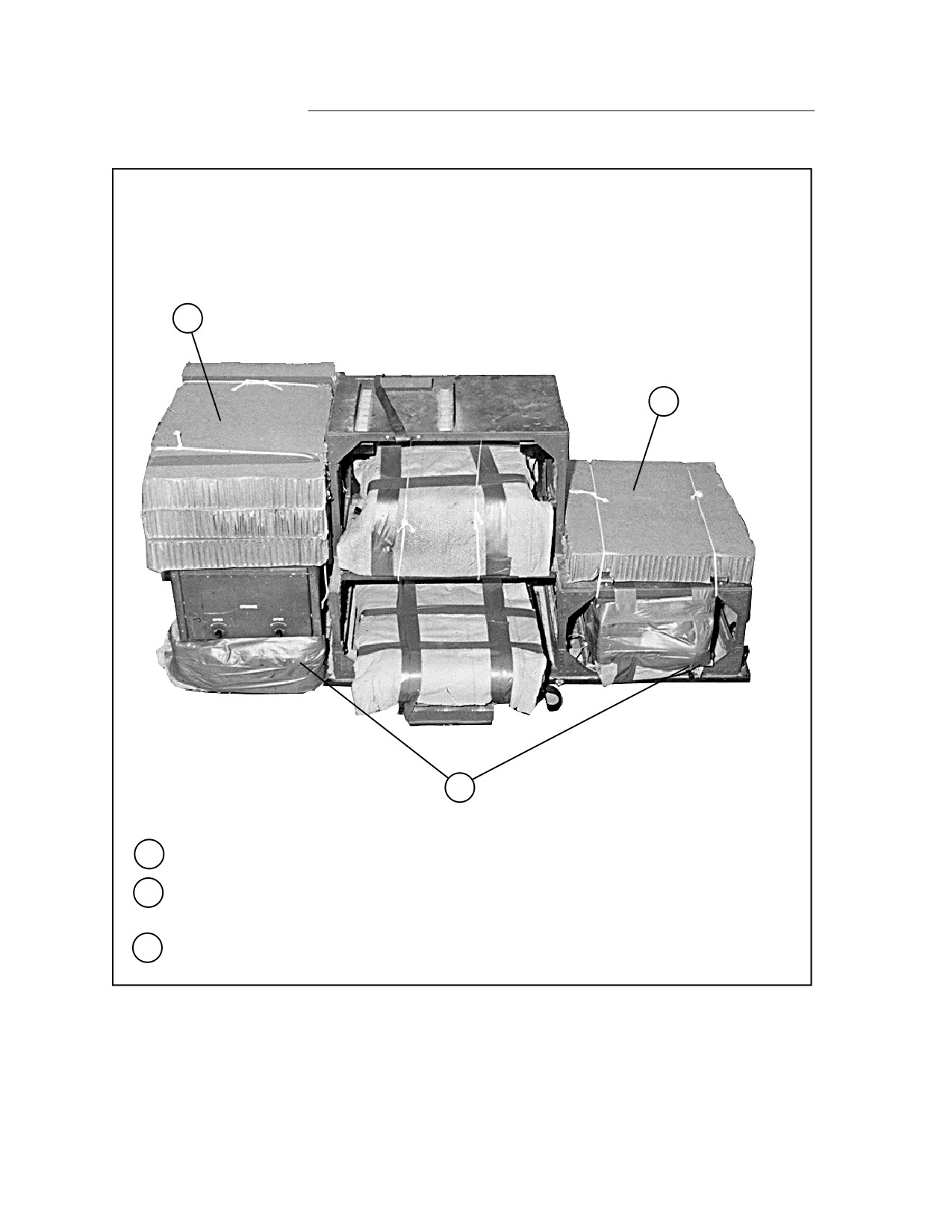
Pad the face of the PDB and the PLU with cellulose wadding taped in place.
20
Place a 17- by 19 1/2-inch piece of honeycomb on top of the PLU. Crush the honeycomb to
allow for the printer mount and tie the honeycomb to the PLU with type III nylon cord.
21
Place the keyboard container made in steps 13 and 14 on top of the PDB, and tie it in place
with type III nylon cord.
Figure 5-9. LTACFIRE and Accompanying Equipment Rigged in M998 Truck (continued)
5-54
FM 4-20.117/TO 13C7-1-111
22
26
25
24
23
22
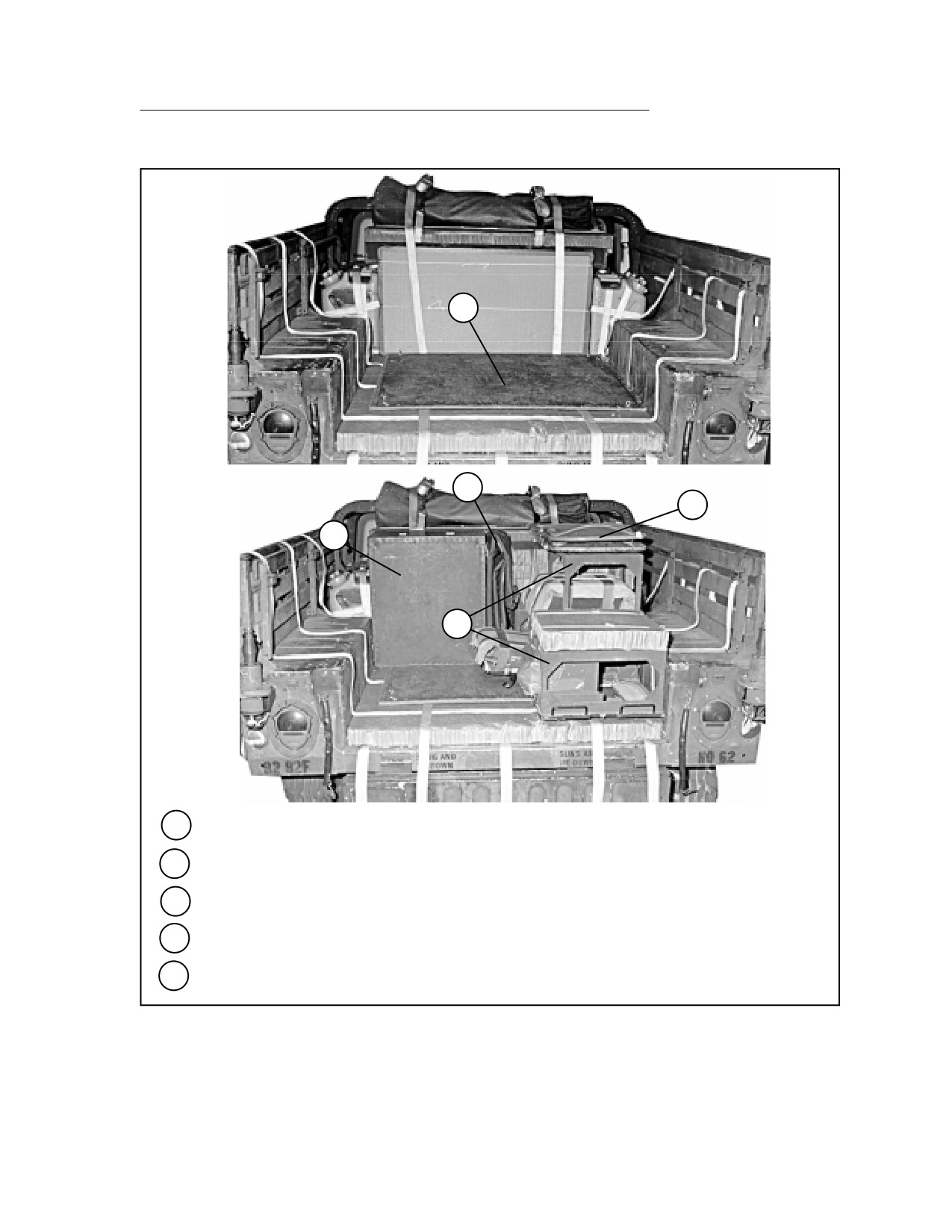
Place the map board face down on the honeycomb in the truck cargo bed.
23
Place the upper rack in the truck cargo bed as shown.
24
Place one field desk in the truck cargo bed.
25
Place the two folding chairs on the upper rack.
26
Place the truck cab cover between the field desk and upper rack.
Figure 5-9. LTACFIRE and Accompanying Equipment Rigged in M998 Truck (continued)
5-55
FM 4-20.117/TO 13C7-1-111
27
28
29
27
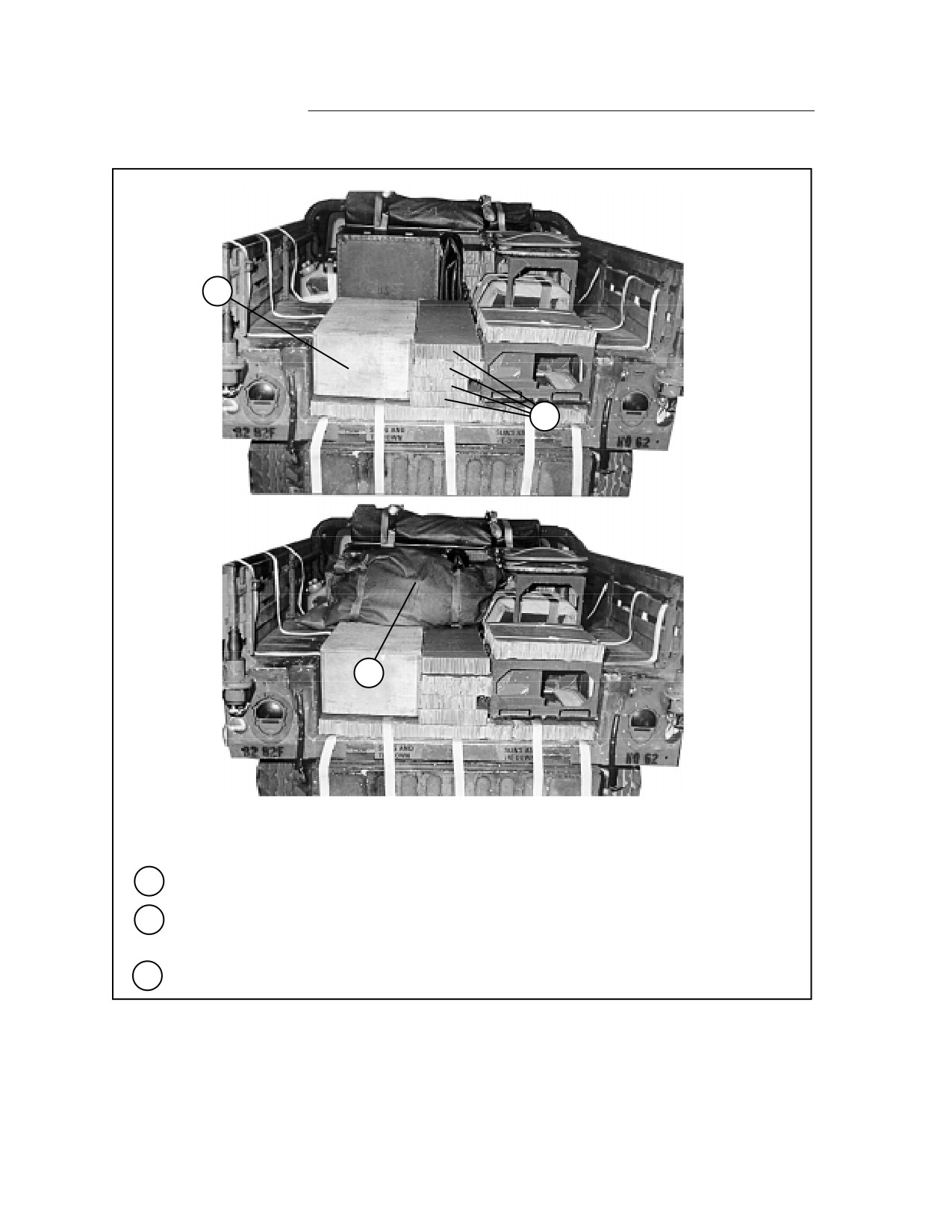
Place the footlocker (containing antenna mounts and any other small items) in the cargo bed.
28
Fill the space between the footlocker and the PLU section of the upper rack with four pieces of
honeycomb cut to fit.
29
Place the camouflage net bag on the footlocker and honeycomb, against the field desk.
Figure 5-9. LTACFIRE and Accompanying Equipment Rigged in M998 Truck (continued)
5-56
FM 4-20.117/TO 13C7-1-111
31
30
32
30
Place the monitor case on the upper rack.
31
Place the printer case on the footlocker.
32
Fill the space between the printer and monitor cases with three pieces of honeycomb cut to fit.
33
Tape the antennas together and tie them to the upper radio rack with type III nylon cord (not
shown).
Figure 5-9. LTACFIRE and Accompanying Equipment Rigged in M998 Truck (continued)
5-57
FM 4-20.117/TO 13C7-1-111
34
36
35
38
37
34
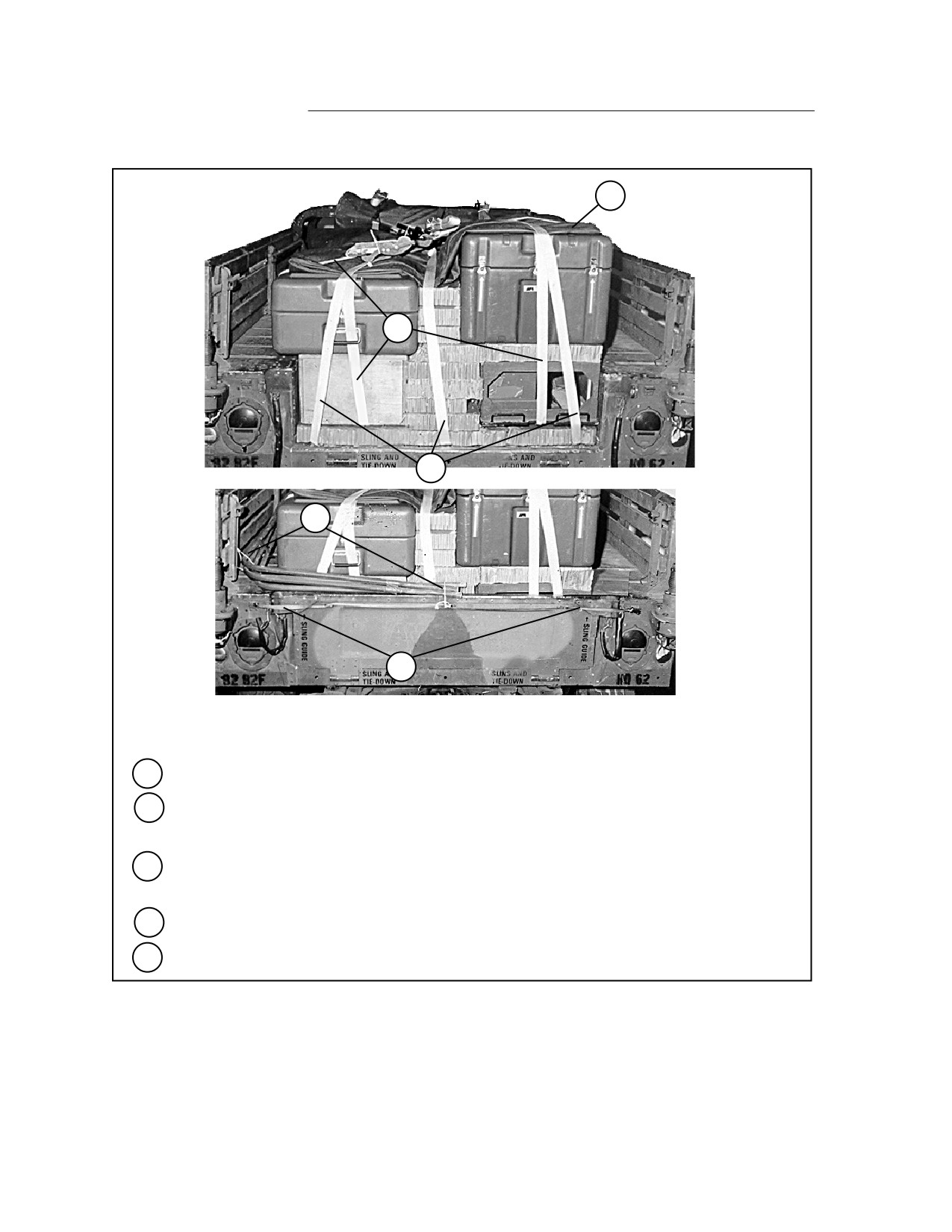
Cover the items with the folded truck cargo bed cover.
35
Secure the three lashings pre-positioned under the honeycomb in steps 2 through 4 over the
load.
36
Secure the lashings placed in steps 11 and 12 over the load, passing them through box
carrying handles whenever possible.
37
Close the tailgate and secure it with 1/2-inch tubular nylon webbing.
38
Tie the bows together and secure them to convenient points with type III nylon cord.
Figure 5-9. LTACFIRE and Accompanying Equipment Rigged in M998 Truck (continued)
5-58
FM 4-20.117/TO 13C7-1-111
RIGGING INITIAL FIRE SUPPORT AUTOMATED SYSTEM (IFSAS) IN M998 TRUCK
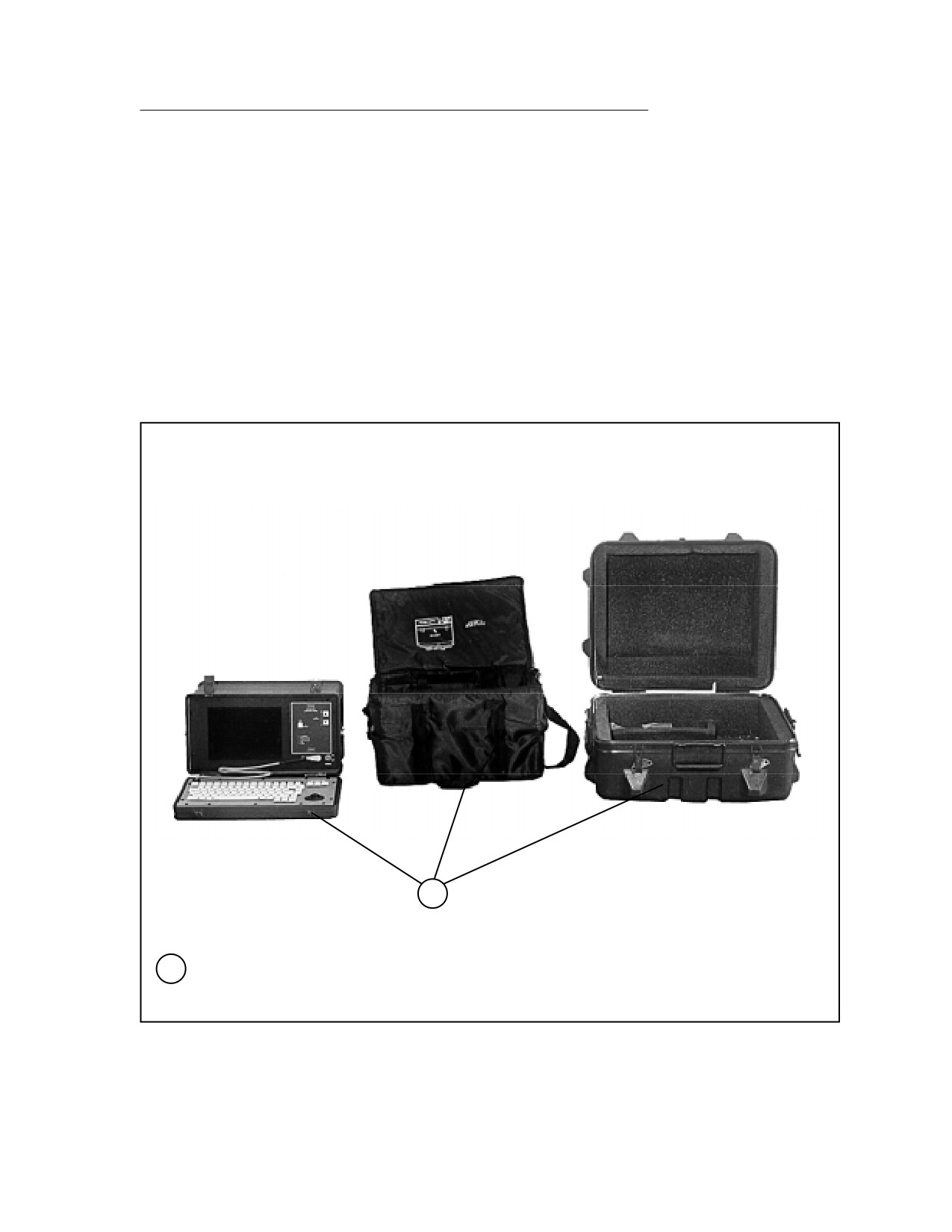
5-10. Use the procedures shown in Figure 5-10 to rig the IFSAS in a cargo/troop
carrier-configured truck. An additional 500 pounds of equipment must be added
to the items shown to meet the minimum weight requirement of 800 pounds for
the accompanying load. Boxes of 105-millimeter ammunition are shown here,
but other items weighing the same or more may be used.
1
1
Place the computer unit in its soft carrying bag. Place the bag in the hard case and secure
the case.
Figure 5-10. IFSAS Rigged in M998 Truck
5-59
FM 4-20.117/TO 13C7-1-111
2
3
2
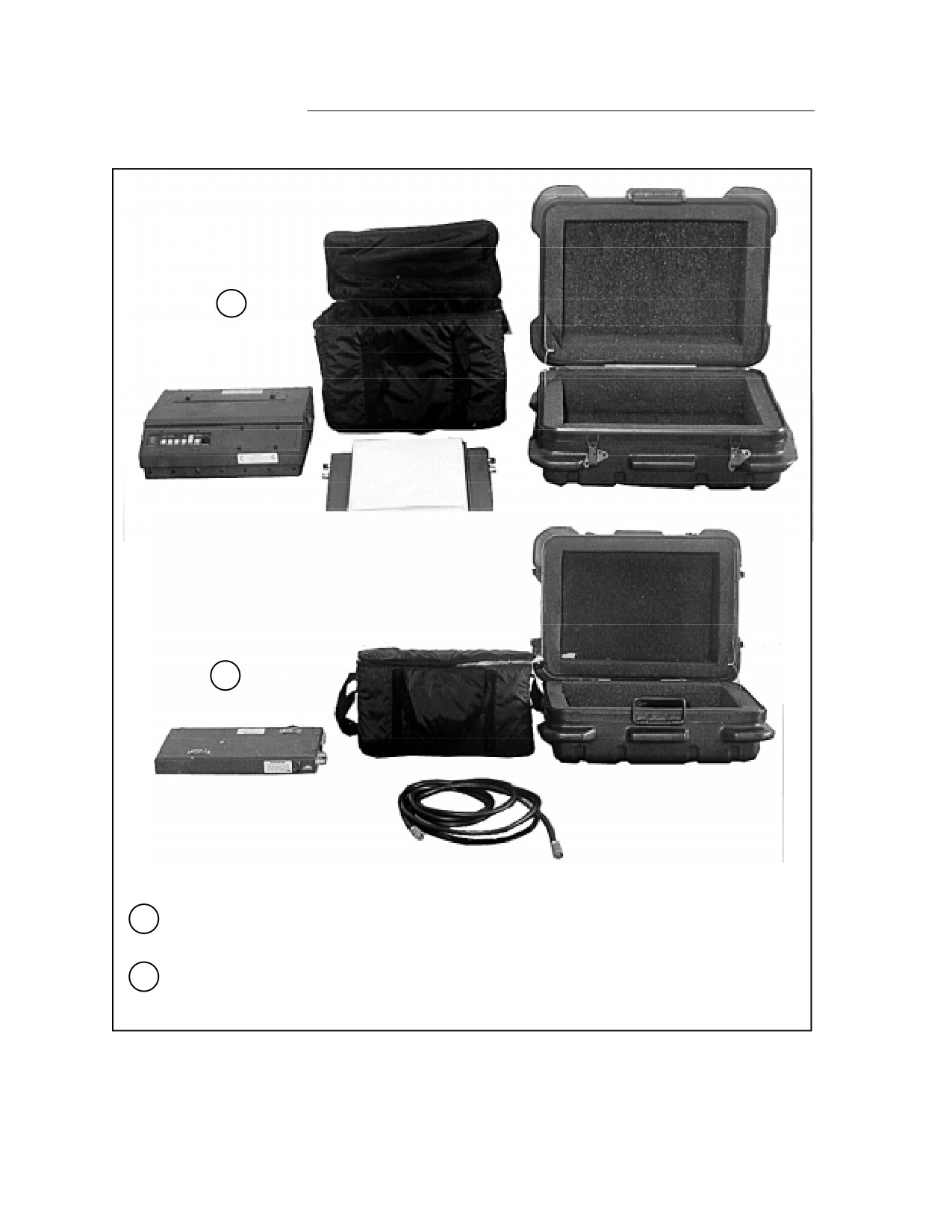
Place the printer and the paper tray in the soft carrying bag. Place the bag in the hard case
and secure the case.
3
Place the power supply and the power cable in the soft carrying bag. Place the bag in the hard
case and secure the case.
Figure 5-10. IFSAS Rigged in M998 Truck (continued)
5-60
FM 4-20.117/TO 13C7-1-111
5
4
6
4
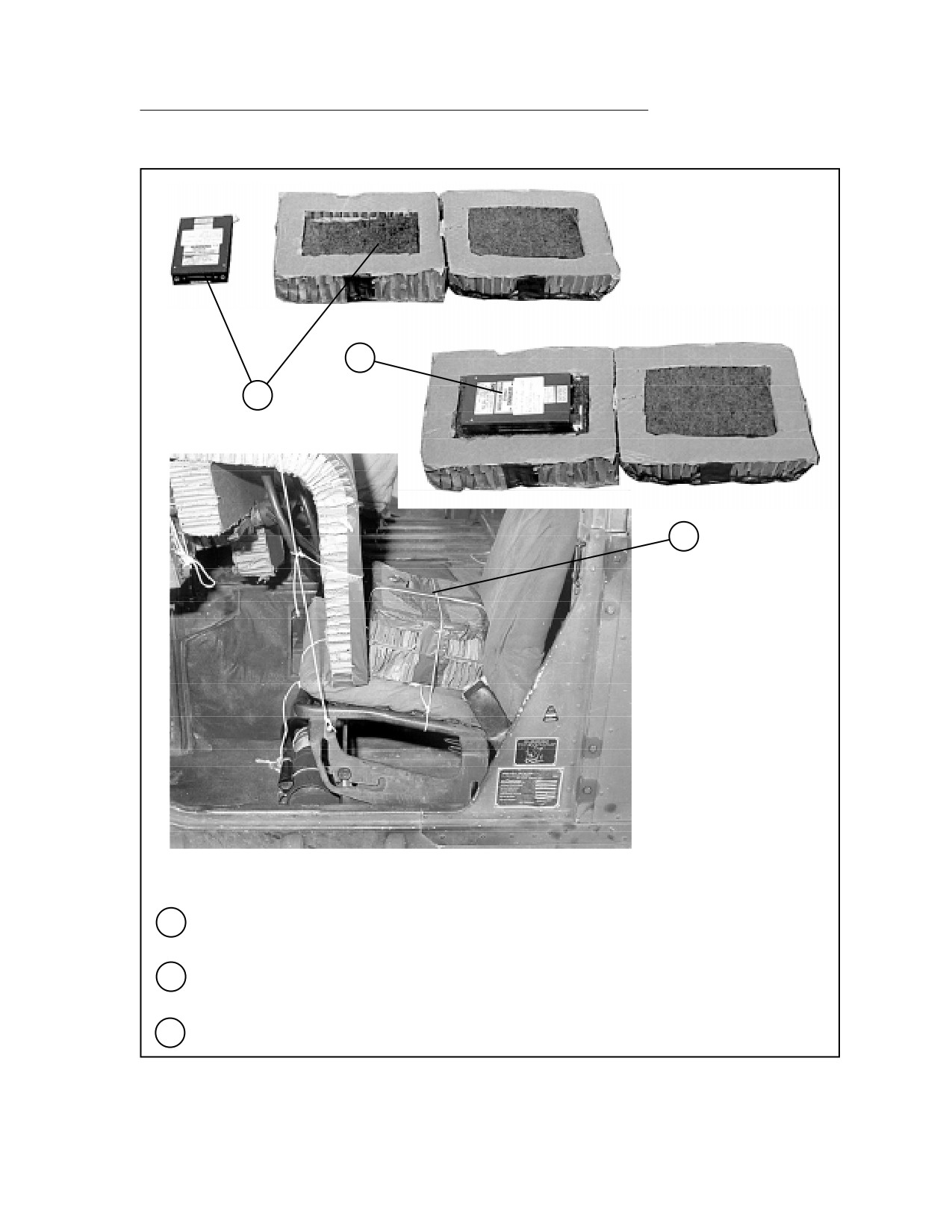
Center an indentation with the dimensions of the hard drive in two 8- by 12-inch pieces of
honeycomb. Place felt or a cellulose wadding pad of the same dimensions in each indentation.
5
Place the hard drive in the indentations and tape the second piece of honeycomb over the first
as a cover.
6
Tie the hard drive box to the seat frame with type III nylon cord.
Figure 5-10. IFSAS Rigged in M998 Truck (continued)
5-61
FM 4-20.117/TO 13C7-1-111
9
7
8
9
10
7
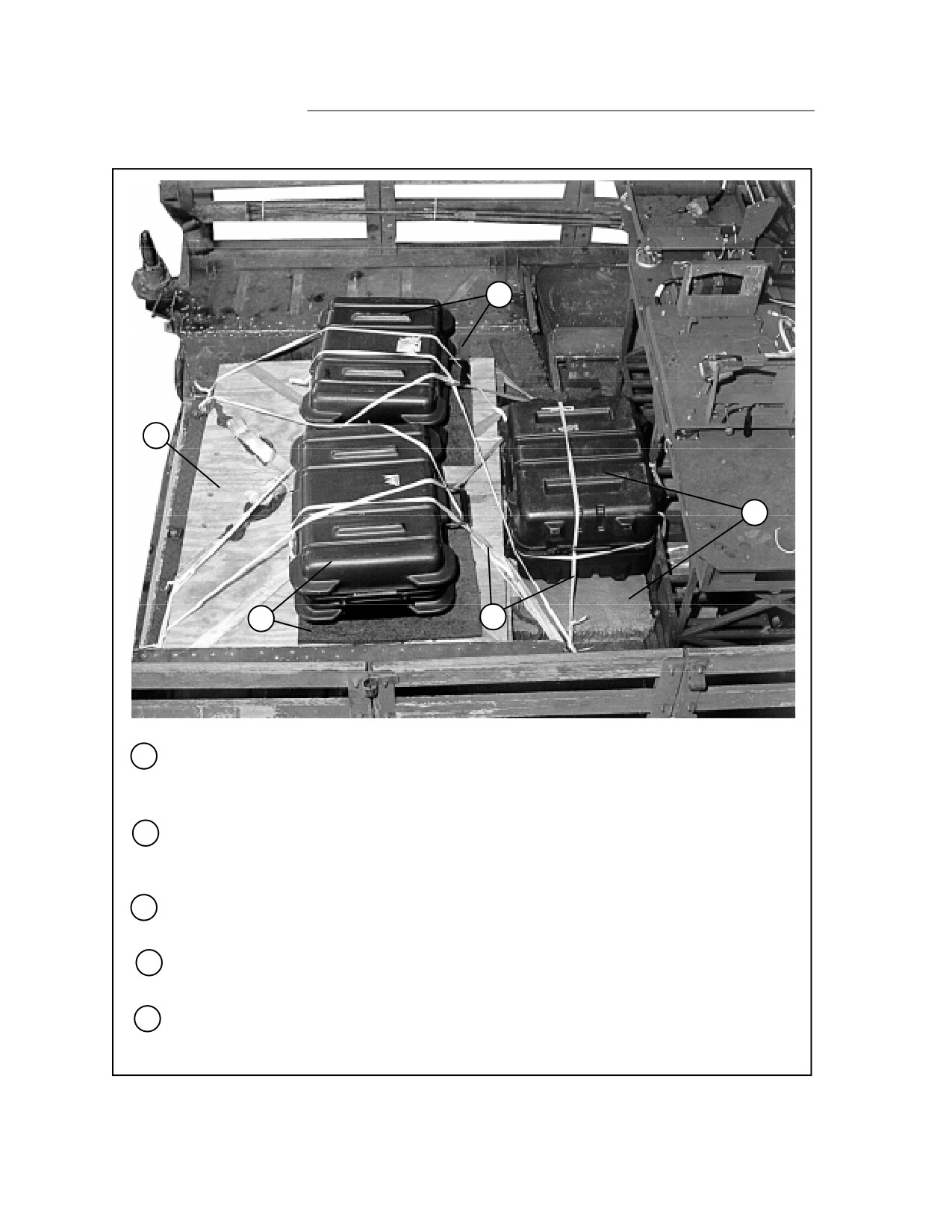
Stow unit equipment or ballast sufficient to meet the minimum load weight of 800 pounds.
Boxes of ammunition are placed on a layer of honeycomb and under the plywood shown in
this figure.
8
Place a 16- by 36-inch piece of honeycomb on the floor between the ammunition boxes and
the front equipment racks. Center the computer case on the honeycomb with the handle facing
the front.
9
Evenly space two 19- by 21-inch pieces of felt 6 inches from the front edge of the plywood.
Place the two remaining hard cases on the felt with the carrying handles facing the front.
10
Secure the cases to tie-down rings and equipment racks with 1/2-inch tubular nylon webbing.
Pass the webbing through the case carrying handles whenever possible.
11
Stow additional unit equipment as the mission dictates and according to FM 4-20.102/TO
13C7-1-5. Cover the load with a canvas load cover secured to convenient points with type III
nylon cord.
Figure 5-10. IFSAS Rigged in M998 Truck (continued)
5-62
FM 4-20.117/TO 13C7-1-111
RIGGING SEMI-AUTOMATIC METEOROLOGICAL SENSOR (SMS) IN M998 TRUCK
5-11. Use the procedures shown in Figure 5-11 to rig the SMS in a cargo/troop
carrier-configured truck. Additional equipment must be added to the items
shown to meet the minimum weight requirement of 800 pounds for the accom-
panying load.
2
1
3
1
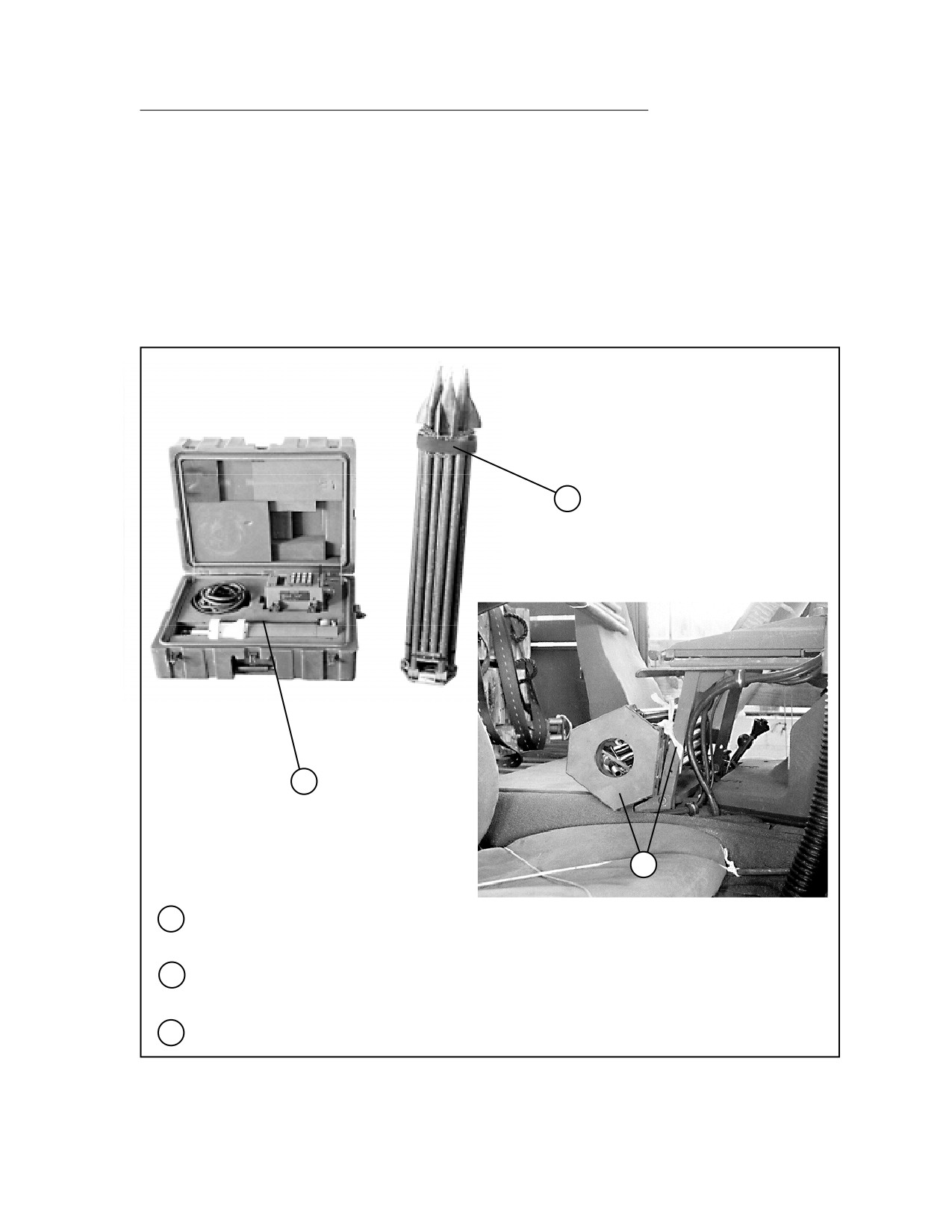
With the assistance of the unit owning the SMS, be sure that the SMS is complete and
properly padded in its case.
2
Fold the tripod and secure its parts together with the straps provided.
3
Tie the tripod to the rear of the cab radio mount with 1/2-inch tubular nylon webbing.
Figure 5-11. Rigging SMS in Cargo/Troop Carrier
5-63
FM 4-20.117/TO 13C7-1-111
6
4
5
6
4
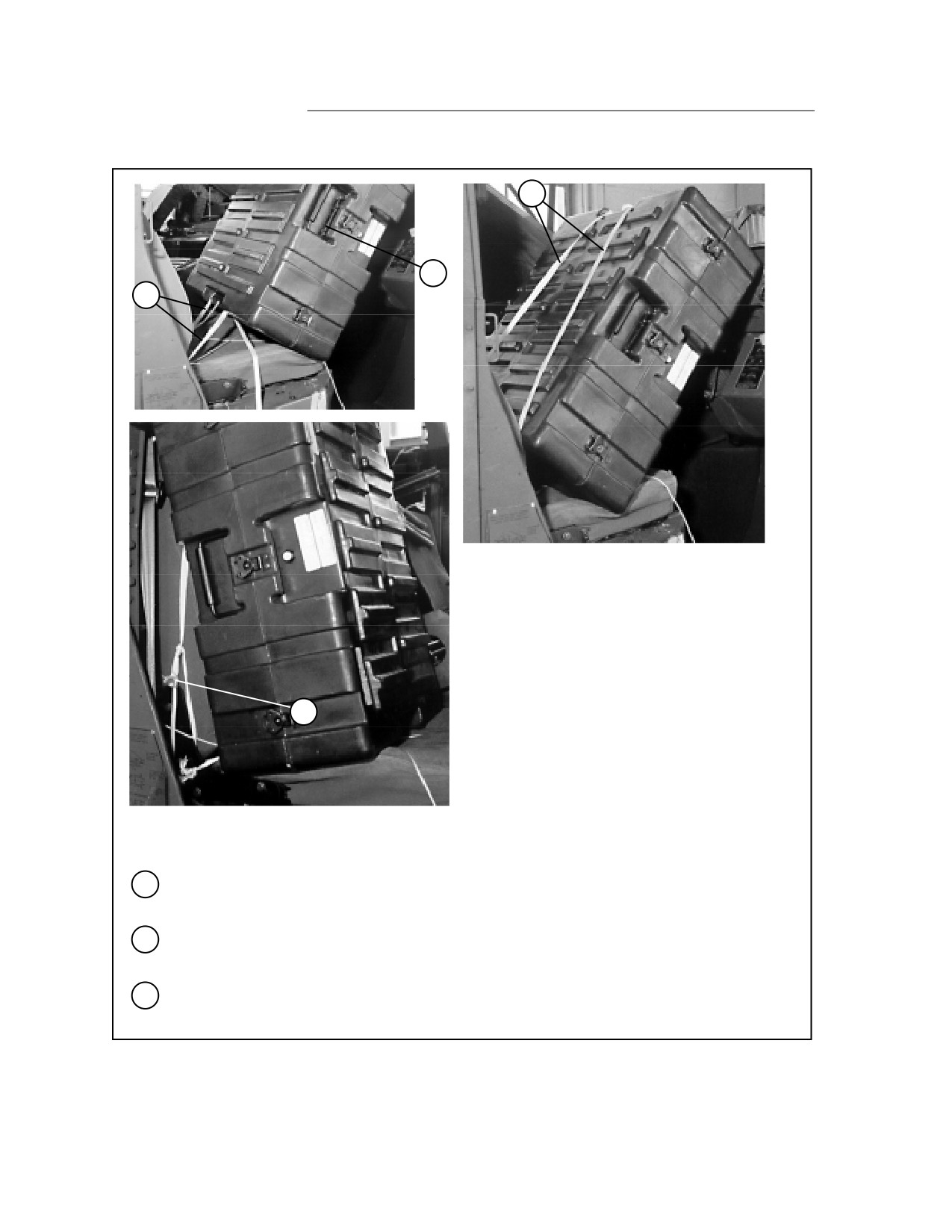
Place the SMS case on the passenger seat with the top carrying handle facing toward the
passenger door.
5
Route two lengths of 1/2-inch tubular nylon webbing through the carrying handle that is now on
the case bottom. Tie each length of webbing to the passenger seat frame on each side.
6
Tie two lengths of 1/2-inch tubular nylon webbing to the top case handle. Secure this nylon
webbing to the passenger seat frame on each side with a trucker's hitch.
Figure 5-11. Rigging SMS in Cargo/Troop Carrier (continued)
5-64
FM 4-20.117/TO 13C7-1-111
7
7
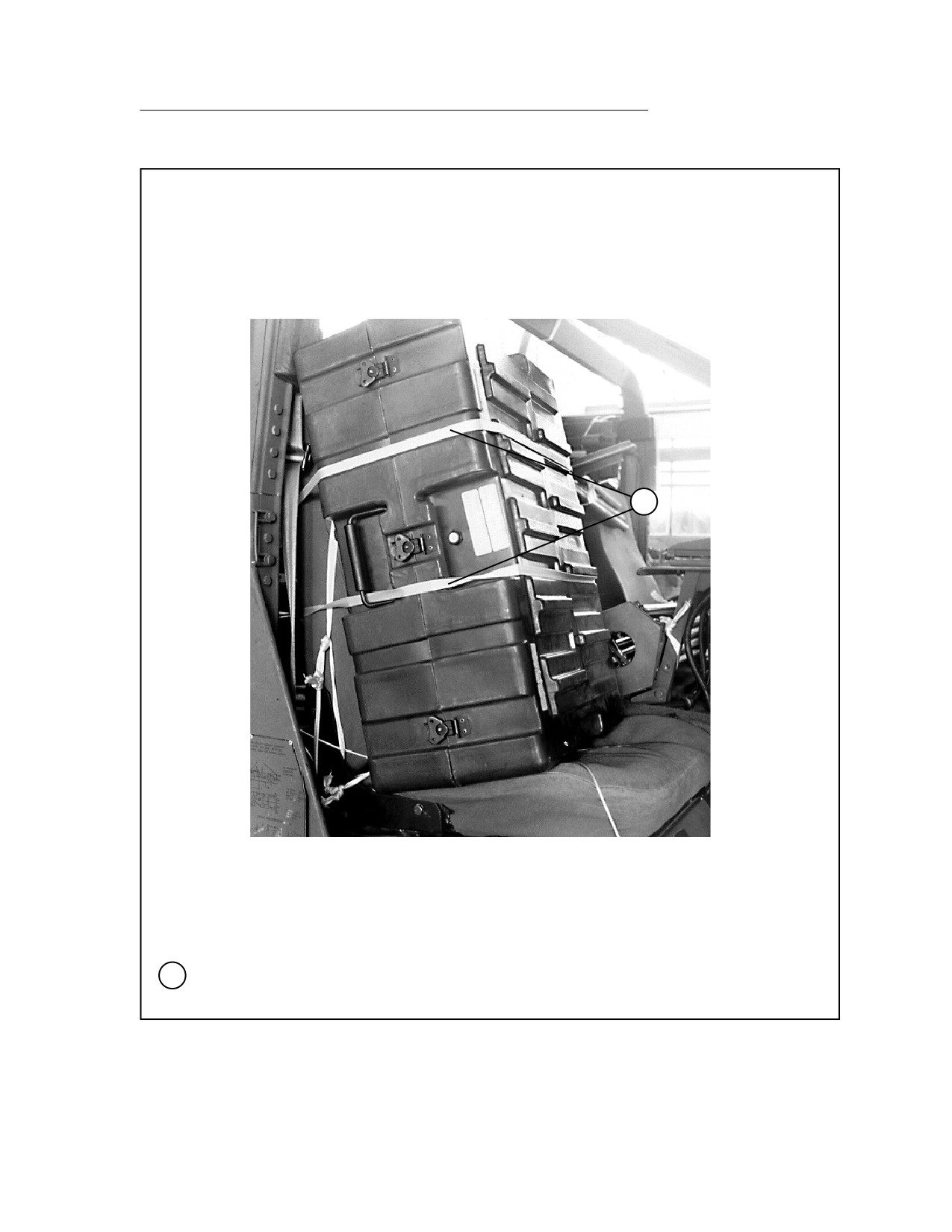
Tie two lengths of 1/2-inch tubular nylon webbing around the case and the seat back. Tie one
length above the outside carrying handle, and tie the other length through the carrying handle.
Figure 5-11. Rigging SMS in Cargo/Troop Carrier (continued)
5-65
FM 4-20.117/TO 13C7-1-111
RIGGING GUN LAYING POSITIONING SYSTEM (GLPS) IN M998 TRUCK
5-12. Use the procedures shown in Figure 5-12 to rig the GLPS in a cargo/troop
carrier-configured truck (the M1056 truck outfitted as an artillery prime mover
is shown). The GLPS consists of four components, each in its own case. The
components are the gyro, theodolite, charger, and winterization kit. Additional
equipment must be added to the items shown to meet the minimum weight
requirement of 800 pounds for the accompanying load.
1
2
1
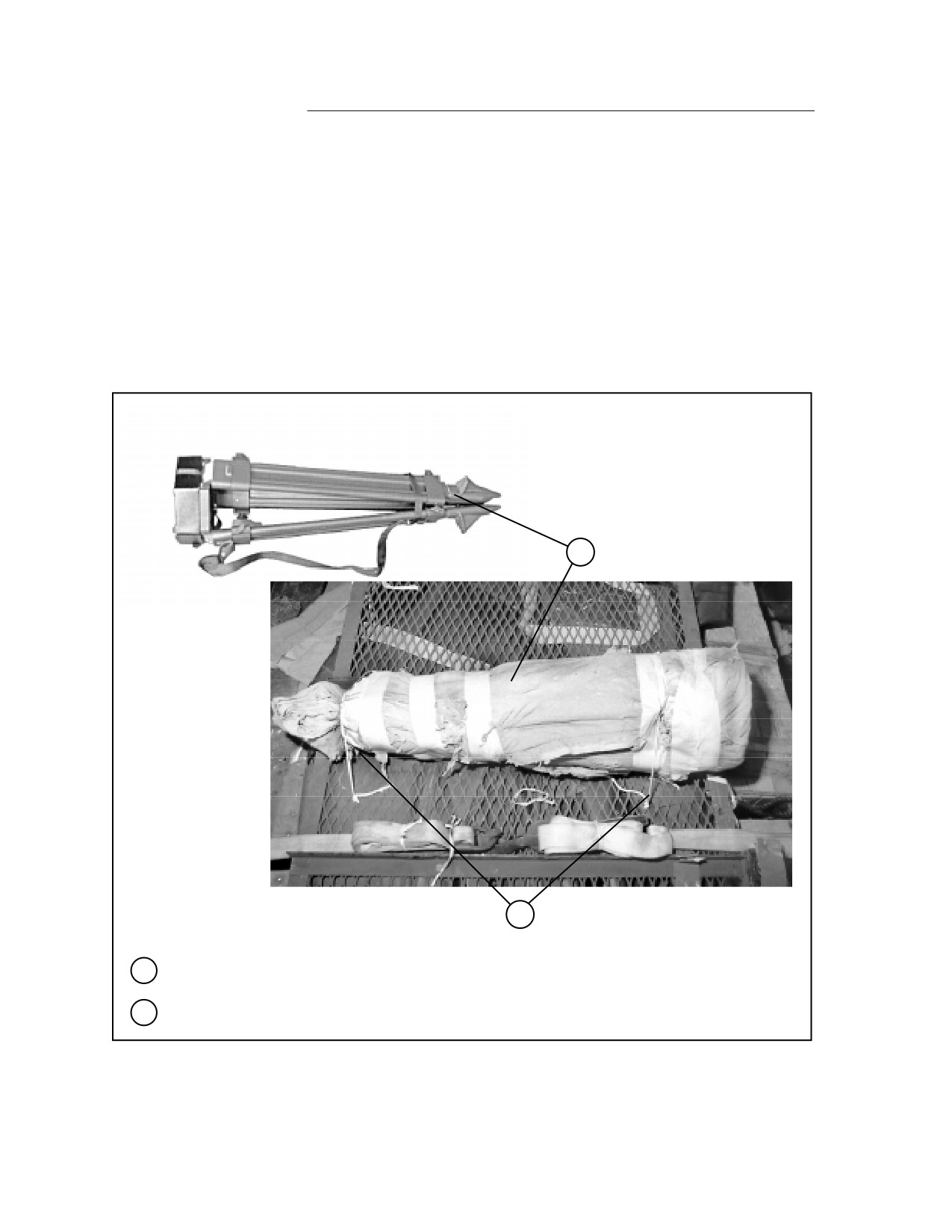
Wrap the tripod with cellulose wadding. Tape the wadding in place.
2
Tie the tripod to the truck cargo bed rack with type III nylon cord.
Figure 5-12. GLPS Rigged in M1056 Truck
5-66
FM 4-20.117/TO 13C7-1-111
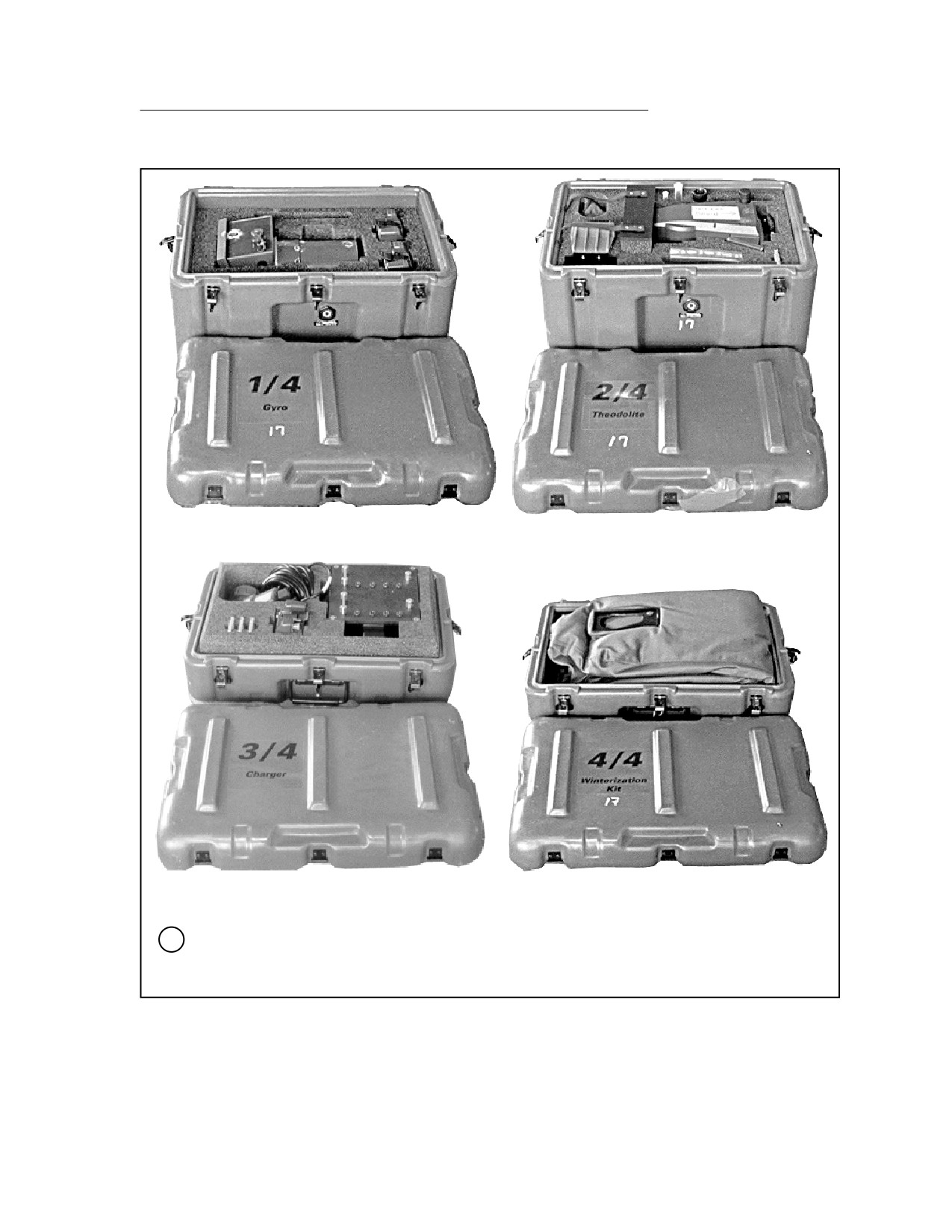
Case 1 Gyro
Case 2 Theodolite
Case 3 Charger
Case 4 Winterization Kit
3
With the assistance of the unit owning the equipment, be sure the individual components are
complete and cushioned in their cases.
Figure 5-12. GLPS Rigged in M1056 Truck (continued)
5-67
FM 4-20.117/TO 13C7-1-111
5
4
6
4
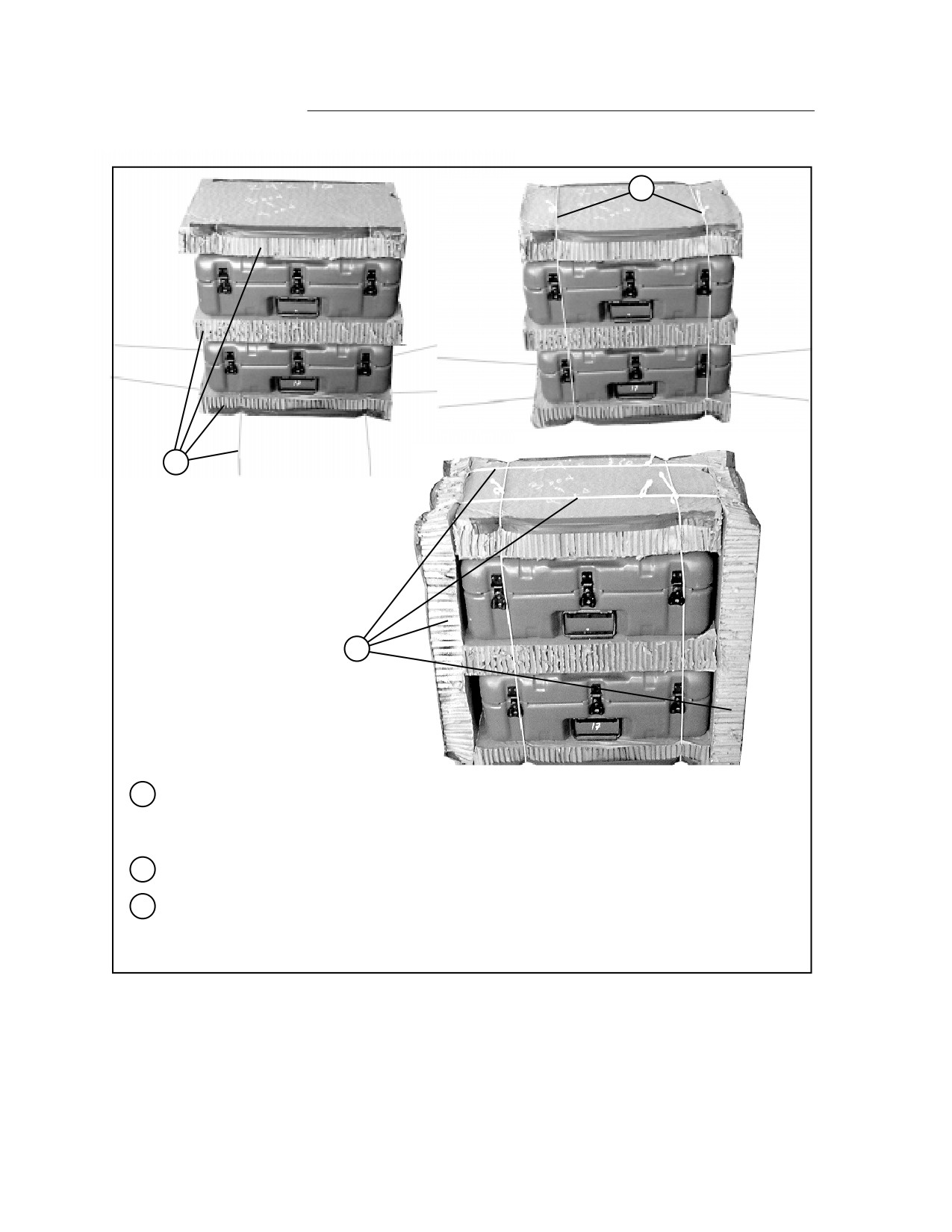
Alternate three 24- by 16-inch pieces of honeycomb with cases 3 and 4 as shown. Tape the
outside long edges of the honeycomb. Place type III nylon cord of sufficient length for ties
under the stack.
5
Secure the front-to-rear ties around the cases and honeycomb.
6
Place a 26- by 16-inch piece of honeycomb against each side of the stack. Tape the outside
top and bottom edges of the honeycomb. Secure the honeycomb to the sides of the cases with
the remaining lengths of type III nylon cord.
Figure 5-12. GLPS Rigged in M1056 Truck (continued)
5-68
FM 4-20.117/TO 13C7-1-111
7
8
7
8
7
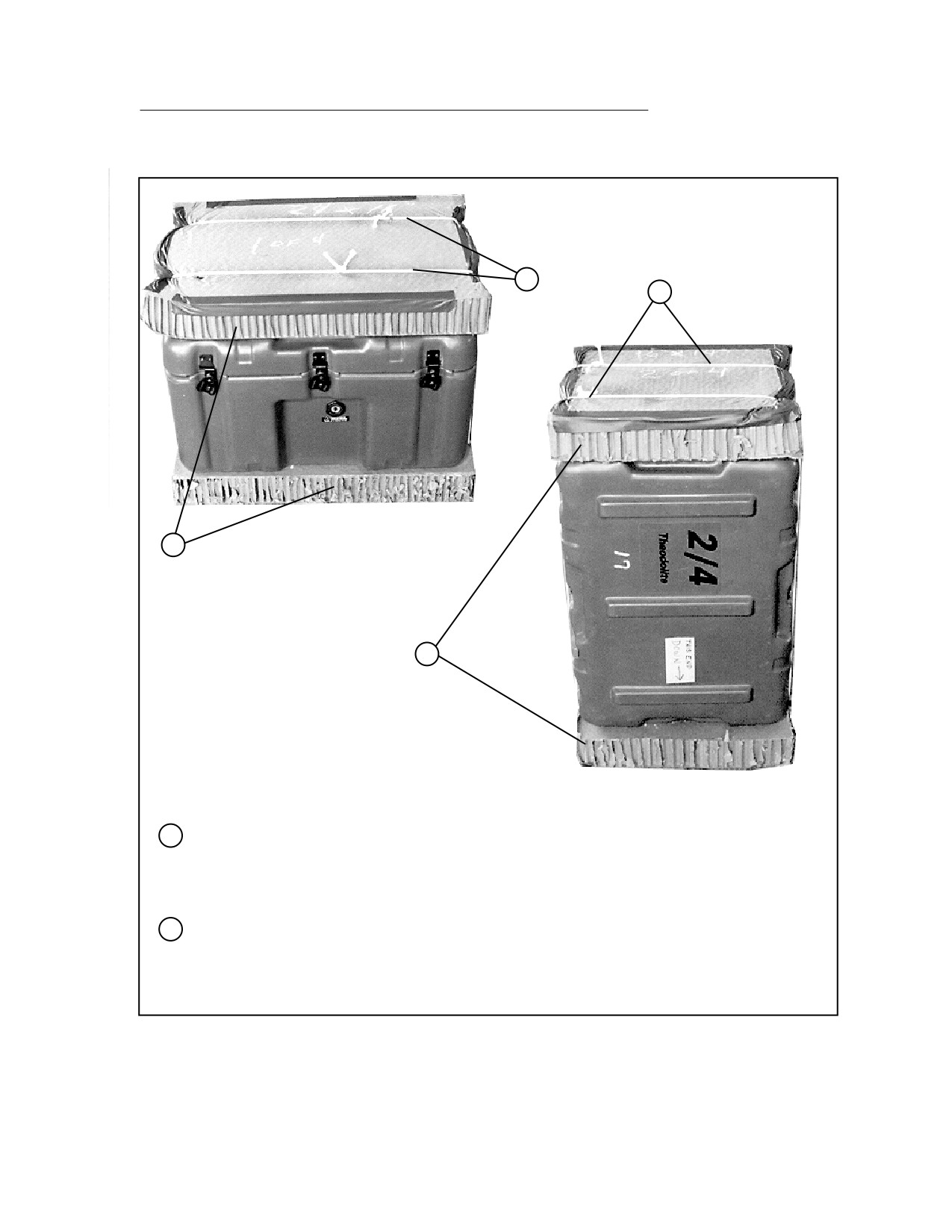
Place a 26- by 16-inch piece of honeycomb over two lengths of type III nylon cord placed
lengthwise. Place case 1 and an additional 26- by 16-inch piece of honeycomb on top of the
bottom piece. Tape the outside edges of the honeycomb and tie the type III nylon cord over the
package.
8
Place case 2 on end as shown and leave it in this position. Place a 16- by 14-inch piece of
honeycomb over two lengths of type III nylon cord placed lengthwise. Place case 2 and an
additional 16- by 14-inch piece of honeycomb on top of the bottom piece. Tape the outside
edges of the honeycomb and tie the type III nylon cord over the package.
Figure 5-12. GLPS Rigged in M1056 Truck (continued)
5-69
FM 4-20.117/TO 13C7-1-111
9
10
11
9
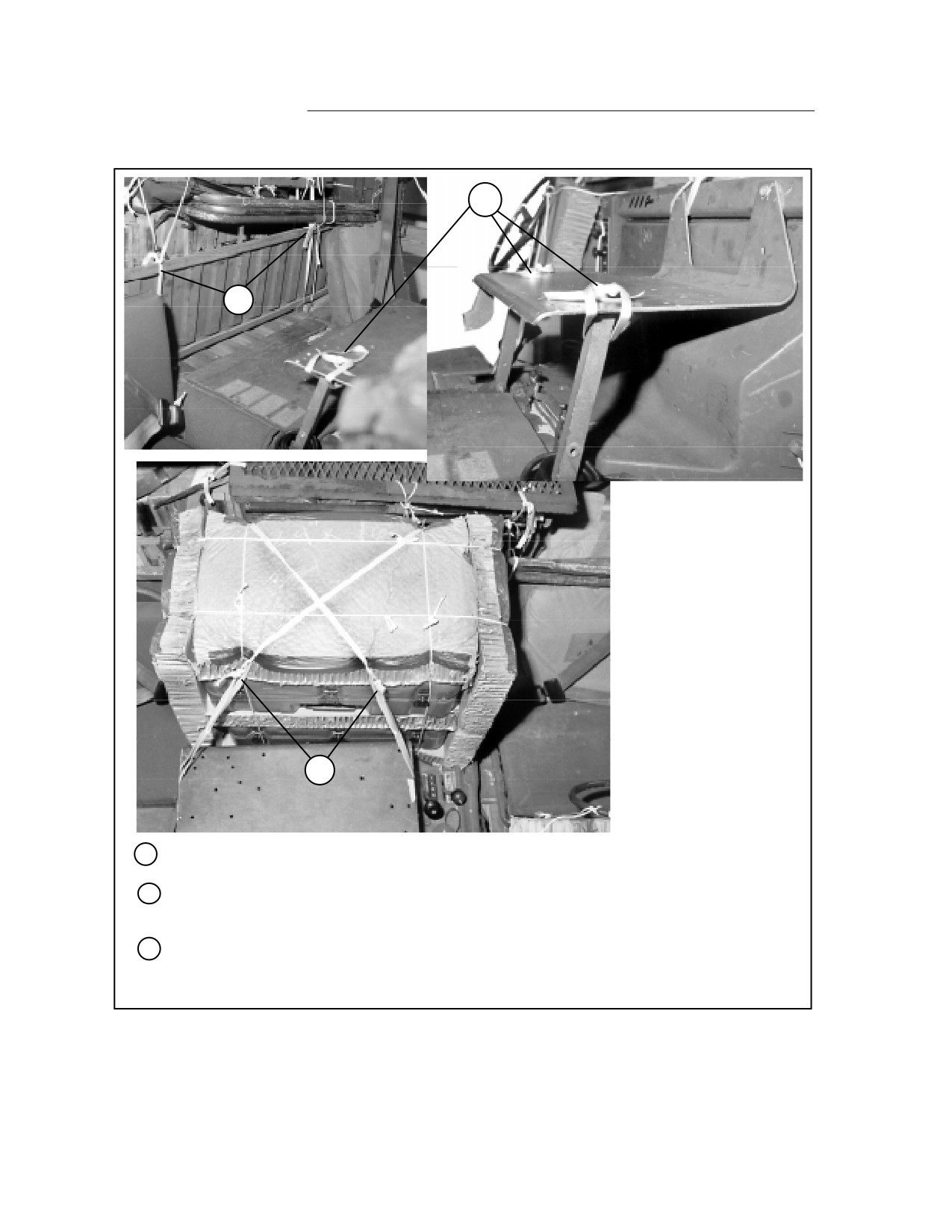
Tie two loops of 14-inch lengths of 1/2-inch tubular nylon webbing to the radio mount supports.
10
Tie a 10-foot length of 1/2-inch tubular nylon webbing to each of the tie provisions on the front
edge of the cargo bed.
11
Place cases 3 and 4 to the rear of the radio mount. Tie the 1/2-inch tubular nylon webbing
placed in step 10 above to the loops placed in step 9 above, crossing over the boxes as
shown. Tie off with a trucker's hitch.
Figure 5-12. GLPS Rigged in M1056 Truck (continued)
5-70
FM 4-20.117/TO 13C7-1-111
13
12
15
14
12
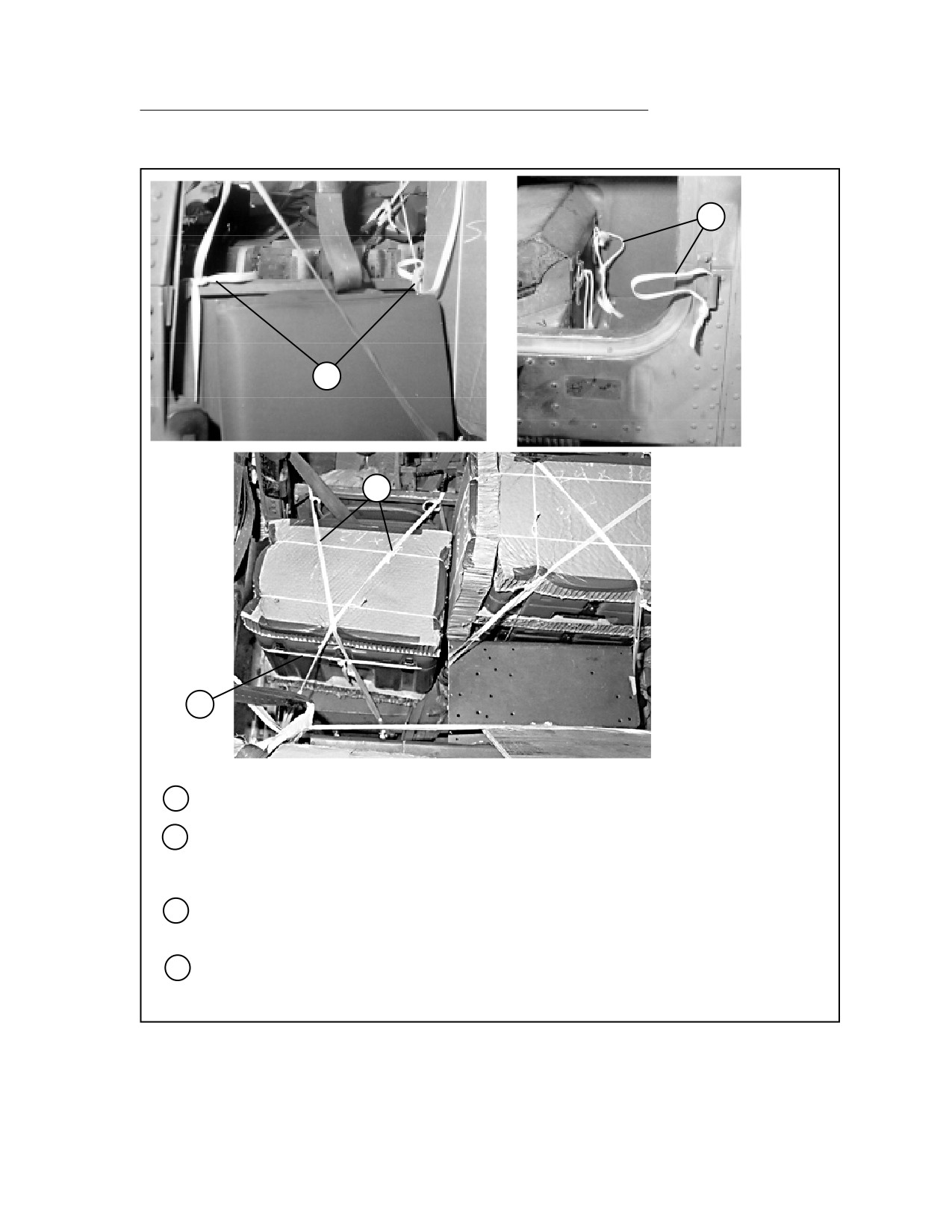
Tie two 10-foot lengths of 1/2-inch tubular nylon webbing to points behind the passenger seat.
13
Form a 14-inch loop of 1/2-inch tubular nylon webbing through the lower passenger side door
hinge. Form a second 14-inch loop of 1/2-inch tubular nylon webbing through the inside passen-
ger seat hinge.
14
Place case 1 in the passenger seat, and tie the case to the seat back with a length of 1/2-inch
tubular nylon webbing.
15
Tie the 1/2-inch tubular nylon webbing placed in step 12 above to the loops placed in step 13
above, crossing over the boxes as shown. Tie off with a trucker's hitch.
Figure 5-12. GLPS Rigged in M1056 Truck (continued)
5-71
FM 4-20.117/TO 13C7-1-111
16
17
19
18
16
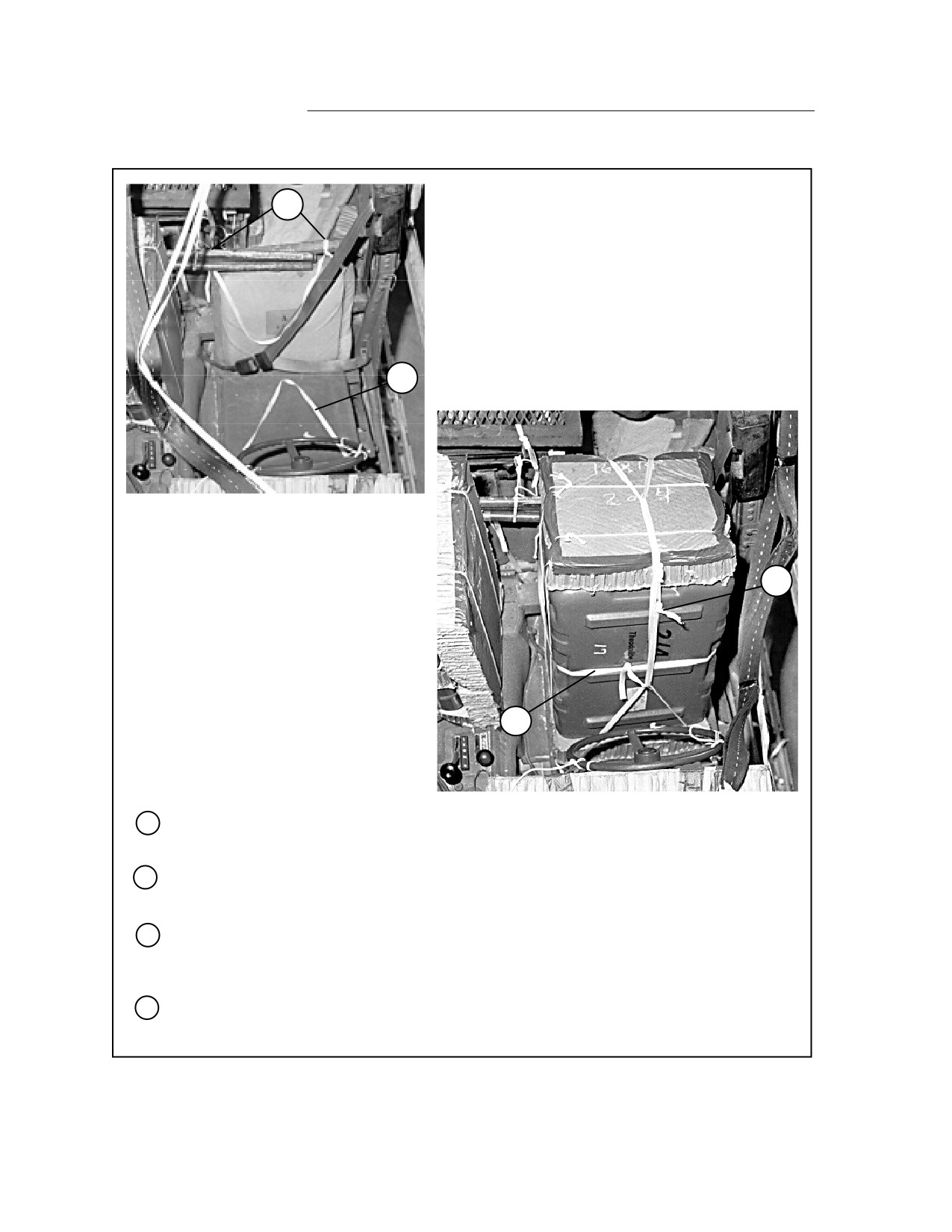
Tie a length of 1/2-inch tubular nylon webbing to the front cargo bed wall behind the driver's
seat in two places, forming a loop as shown.
17
Tie a length of 1/2-inch tubular nylon webbing to the front of the seat frame, forming a loop as
shown.
18
Place case 2 arrow side down in the driver's seat. Place the loops made in steps 16 and 17
above to the outside of the case. Tie case 2 to the driver's seat back with a length of 1/2-inch
tubular nylon webbing.
19
Run a length of 1/2-inch tubular nylon webbing though both of the loops made in steps 16 and
17 above. Draw the loops taut and tie the webbing using a trucker's hitch.
Figure 5-12. GLPS Rigged in M1056 Truck (continued)
5-72
FM 4-20.117/TO 13C7-1-111
20
21
20
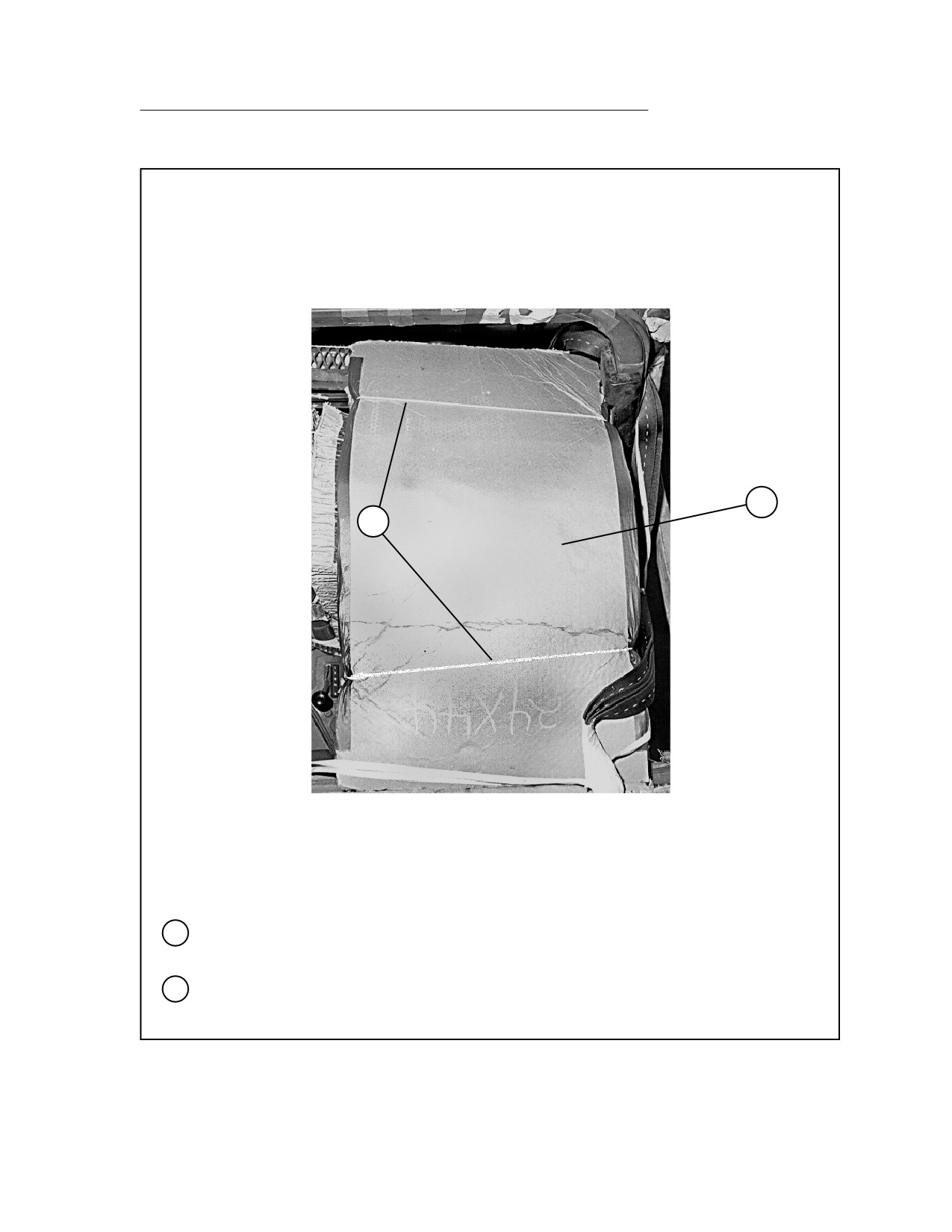
Bend a 44- by 24-inch piece of honeycomb over the steering wheel and case 2. Tape the
outside edges of the honeycomb.
21
Tie the honeycomb to convenient points in the truck with type III nylon cord.
Figure 5-12. GLPS Rigged in M1056 Truck (continued)
5-73
FM 4-20.117/TO 13C7-1-111
RIGGING MECHANIC SHOP KIT IN M998 TRUCK
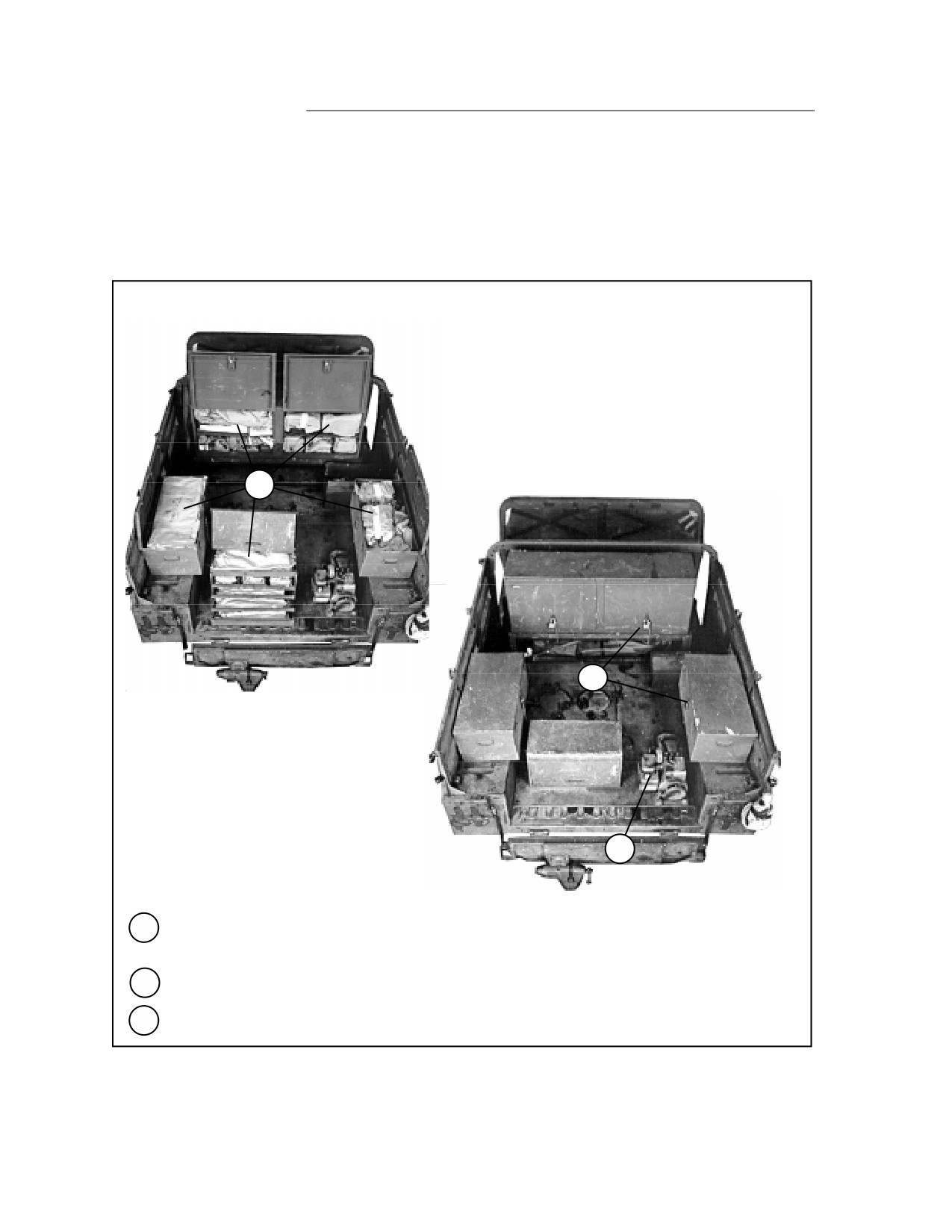
5-13. Use the procedures shown in Figure 5-13 to rig the Mechanic Shop Kit in
a cargo/troop carrier-configured truck. The load shown weighs 980 pounds.
1
3
2
1
Pad loose tools, parts, and small items of equipment, and stow them in the permanently
mounted toolboxes.
2
Drain all fuel from the generator. Be sure the generator is mounted securely to the load bed.
3
Close and lock all drawers and doors.
Figure 5-13. Mechanic Shop Kit Rigged in M998 Truck
5-74
FM 4-20.117/TO 13C7-1-111
4
6
8
5
7
4
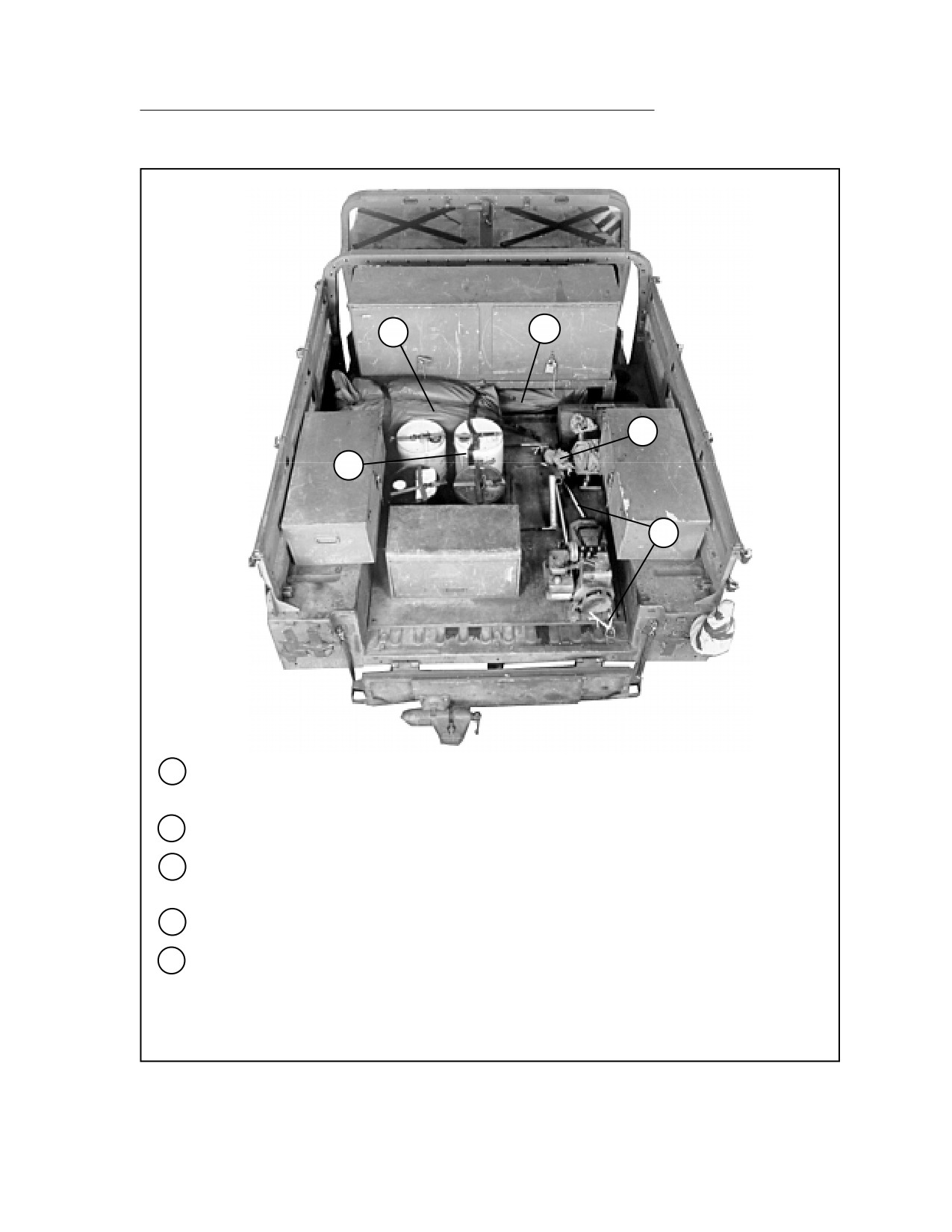
Lay the sledgehammer and pry bars under the front cabinet. Cover them with the truck tarp
and the camouflage net pole bag. Secure them with the straps provided.
5
Place the four oilcans in the bed cutouts, and secure them with the straps provided.
6
Place the camouflage net bag between the front cabinet and the oilcans. Secure the bag with
the straps provided.
7
Tie the generator frame to the closest tie-down rings with 1/2-inch tubular nylon webbing.
8
Tie the engine lifting sling to the front tie-down ring with type III nylon cord. Pad the sling with
cellulose wadding where it touches the toolboxes.
Note: If acetylene tanks are included, secure them to the right of the cabinet with the
tie-down straps provided.
Figure 5-13. Mechanic Shop Kit Rigged in M998 Truck (continued)
5-75
FM 4-20.117/TO 13C7-1-111
10
9
10
12
13
14
11
9
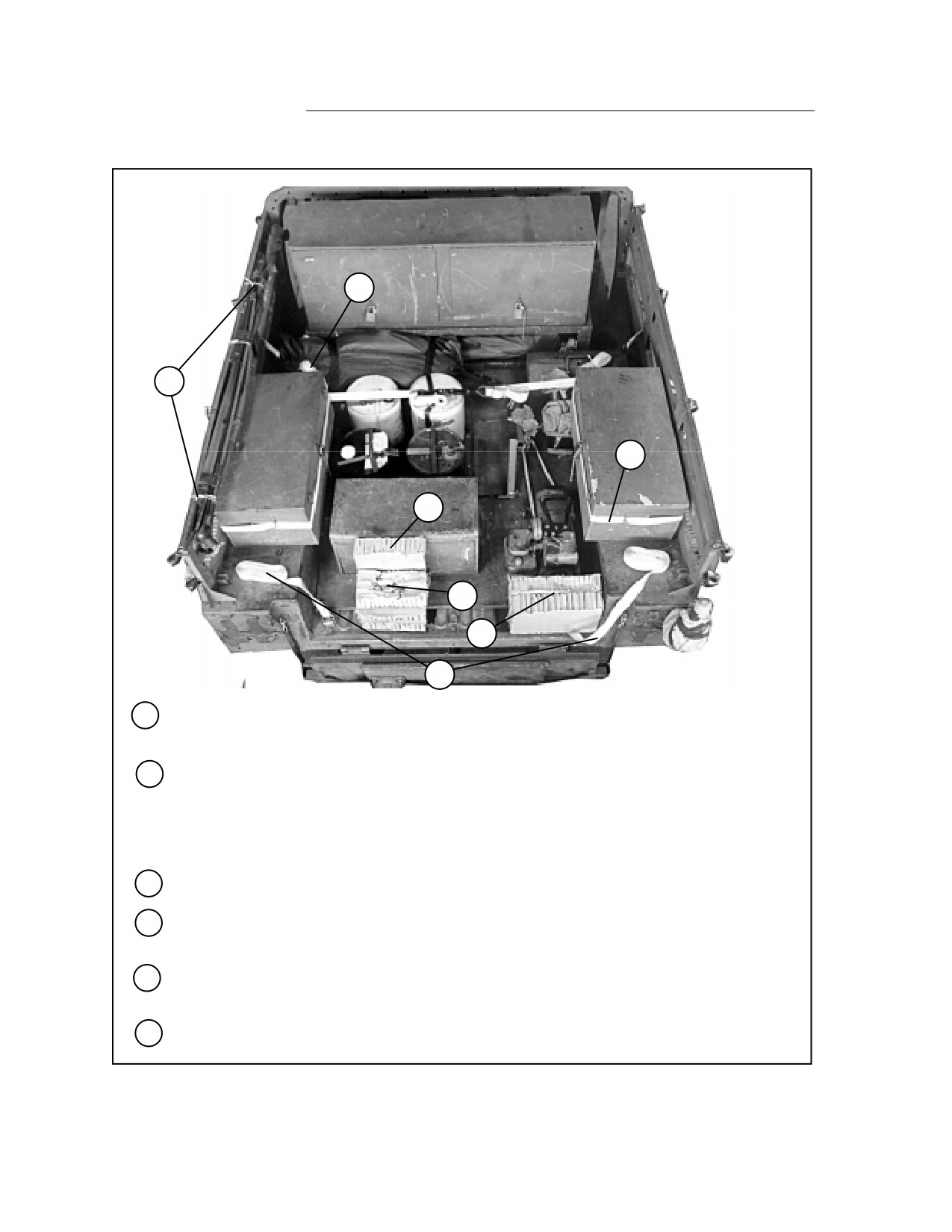
Tape the antenna sections together. Tie them to the left side rail in three places with type III
nylon cord.
10
Pass a 15-foot lashing around each side toolbox and around the second and third vertical side
rail supports. Secure each lashing with a D-ring and a load binder.
Note: The lashing shown running across the cargo body over the oilcans is used to
secure the body side boards.
11
Pass a 15-foot lashing through each rear tie-down ring and through its own D-ring.
12
Set a 10- by 12-inch piece of honeycomb on edge against the rear toolbox with a 12-inch side
down.
13
Center a 12- by 5-inch piece of honeycomb on top of two 12- by 10-inch pieces. Set the stack
against the honeycomb placed in step 12 above.
14
Set two 14- by 11-inch pieces of honeycomb on edge against the generator with the 14-inch
sides down.
Figure 5-13. Mechanic Shop Kit Rigged in M998 Truck (continued)
5-76
FM 4-20.117/TO 13C7-1-111
15
16
18
17
15
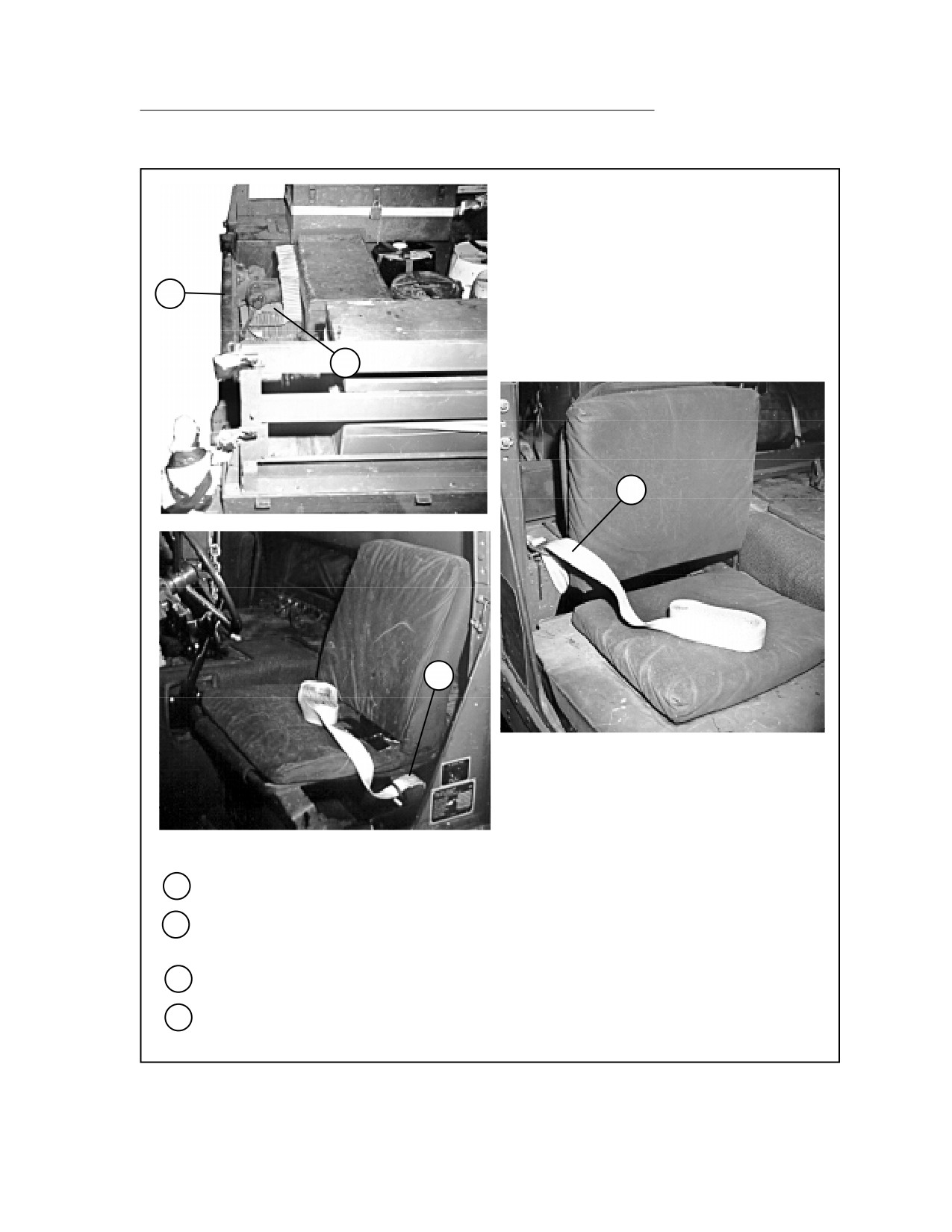
Close the tailgate.
16
Allow the vise to crush the honeycomb placed in steps 12 and 13. Be sure the honeycomb
fully supports the vise.
17
Run a 15-foot lashing around the driver's seat support and through its own D-ring.
18
Run a 15-foot lashing through the opening behind the front passenger seat and up though the
hole behind the B-pillar. Pass the lashing through its own D-ring.
Figure 5-13. Mechanic Shop Kit Rigged in M998 Truck (continued)
5-77
FM 4-20.117/TO 13C7-1-111
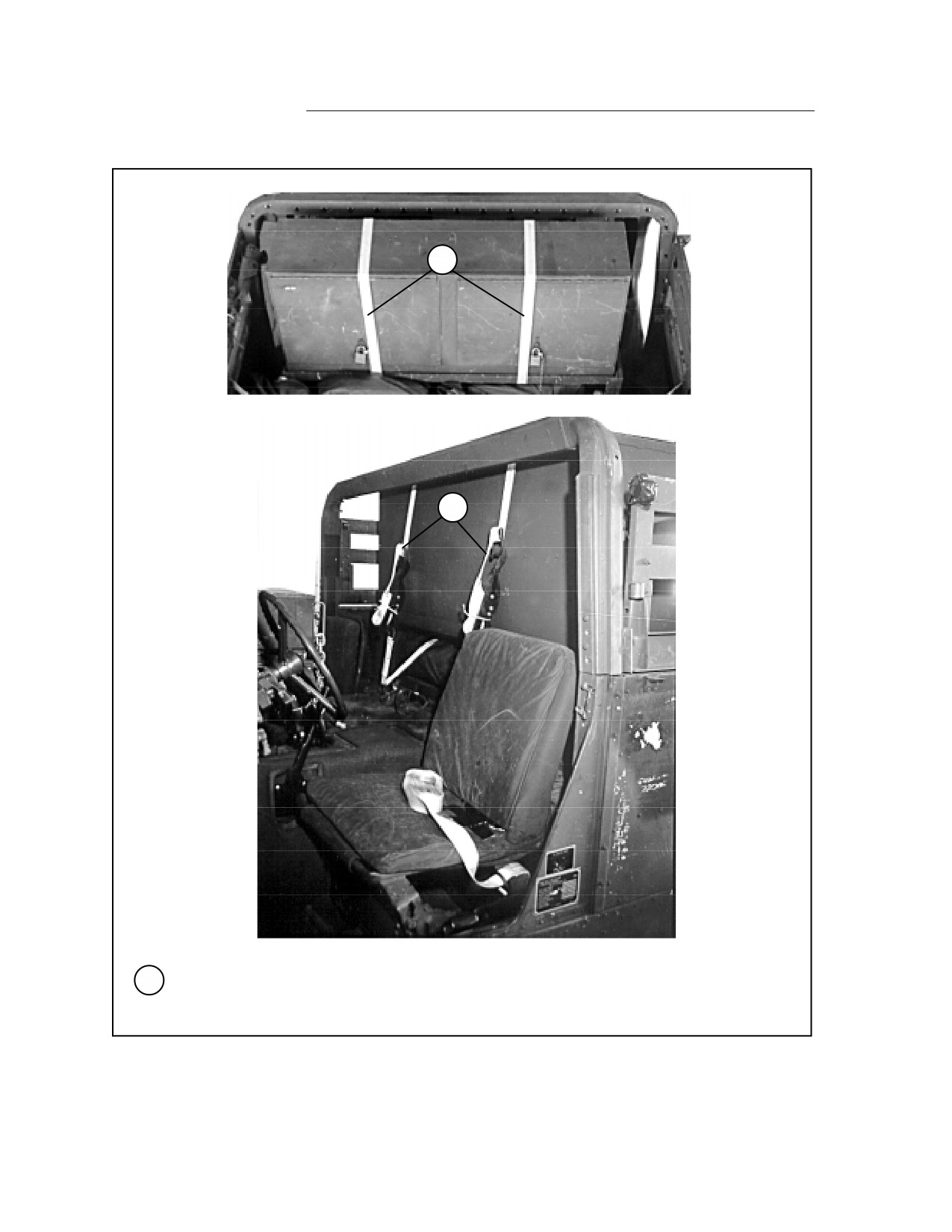
19
19
19
Pass a 15-foot lashing through each tie-down ring behind the seats. Bring each lashing over the
top of the tool cabinet, over the doors, and under the cabinet. Fasten each lashing with a D-ring
and a load binder behind the cabinet.
Figure 5-13. Mechanic Shop Kit Rigged in M998 Truck (continued)
5-78
FM 4-20.117/TO 13C7-1-111
20
23
25
24
22
21
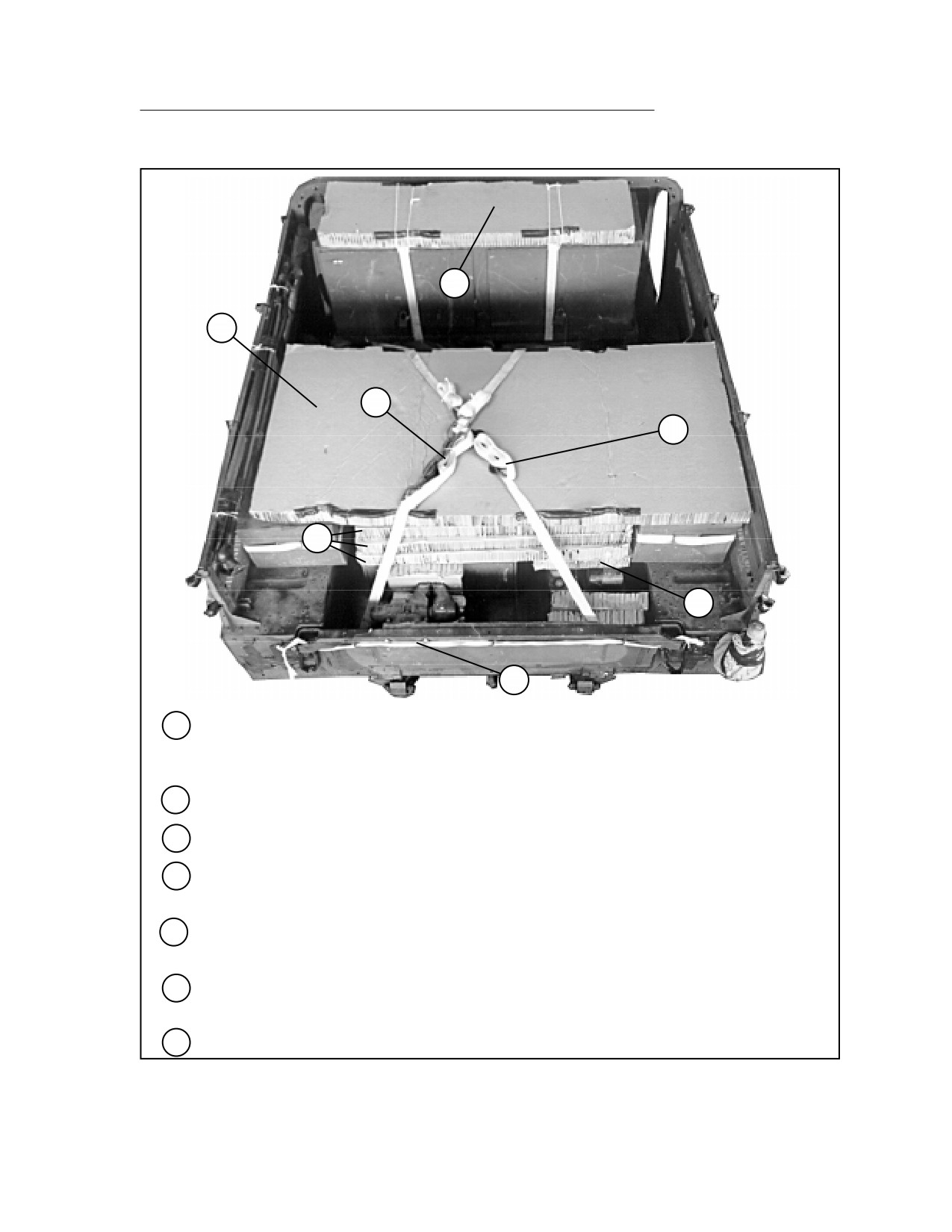
26
20
Place a 60- by 15 1/2-inch piece of honeycomb over the top of the tool cabinet. Tape the front
and rear edges of the honeycomb. Tie the honeycomb to the lashing below it with type III
nylon cord.
21
Place a 16- by 22-inch piece of honeycomb over the generator.
22
Place three 46 1/2- by 36-inch pieces of honeycomb between the two side toolboxes.
23
Place a 75 1/2- by 36-inch piece of honeycomb over the toolboxes and the honeycomb placed
in step 22 above. Tape the front and rear edges of the honeycomb.
24
Secure the lashing placed in step 17 and the right rear lashing together with two D-rings and a
load binder.
25
Secure the lashing placed in step 18 and the left rear lashing together with two D-rings and a
load binder.
26
Secure the tailgate closed with 1/2-inch tubular nylon webbing.
Figure 5-13. Mechanic Shop Kit Rigged in M998 Truck (continued)
5-79
FM 4-20.117/TO 13C7-1-111
RIGGING DENTAL OPERATIVE FIELD SET IN M998 TRUCK
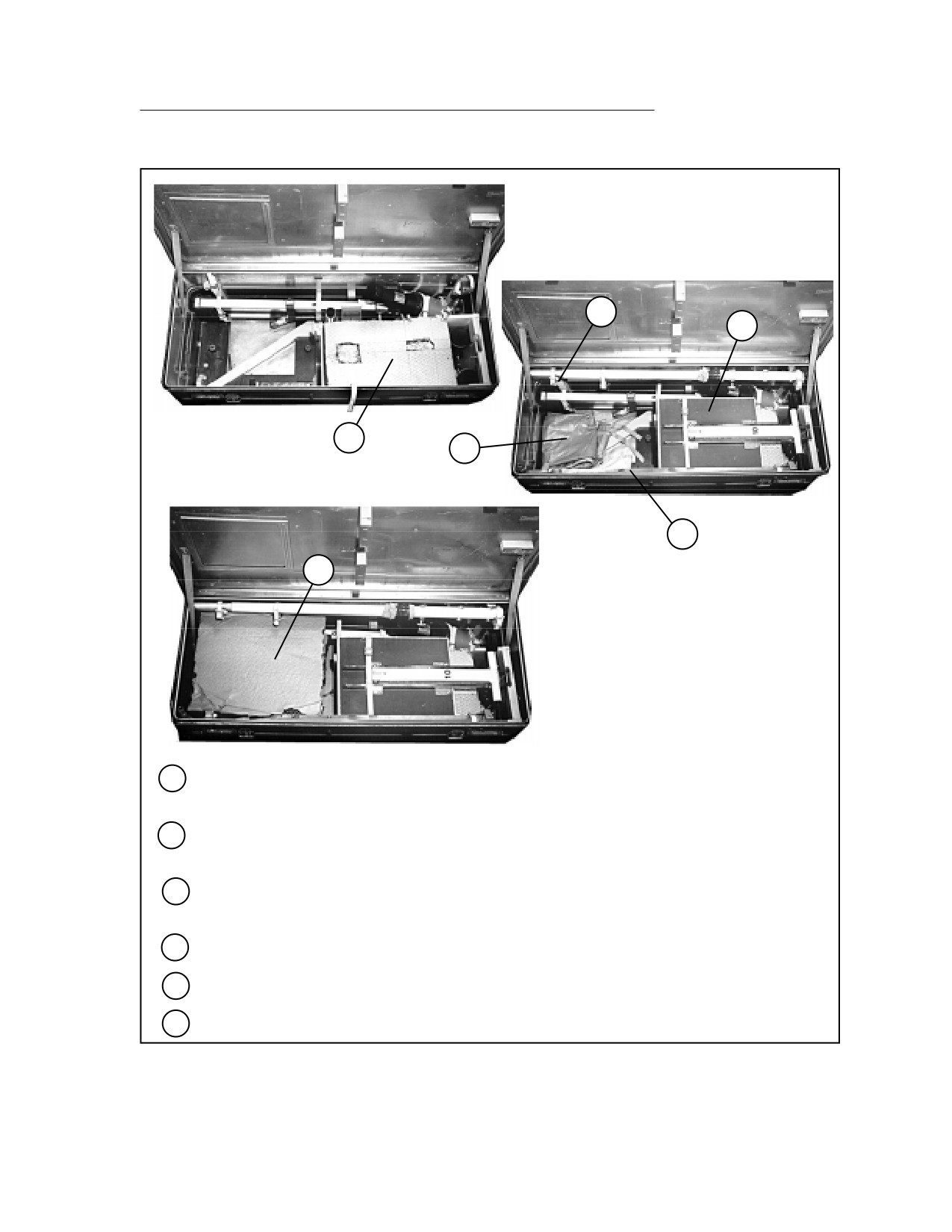
5-14. Use the procedures shown in Figure 5-14 to rig the dental operative field
set in a cargo/troop carrier-configured truck. The dental operative field set
consists of an X-ray unit, ultrasonic scaler, air compressor, light set, dental
equipment cart, and dental chair. Each component fits into its own case. The
load shown weighs 834 pounds.
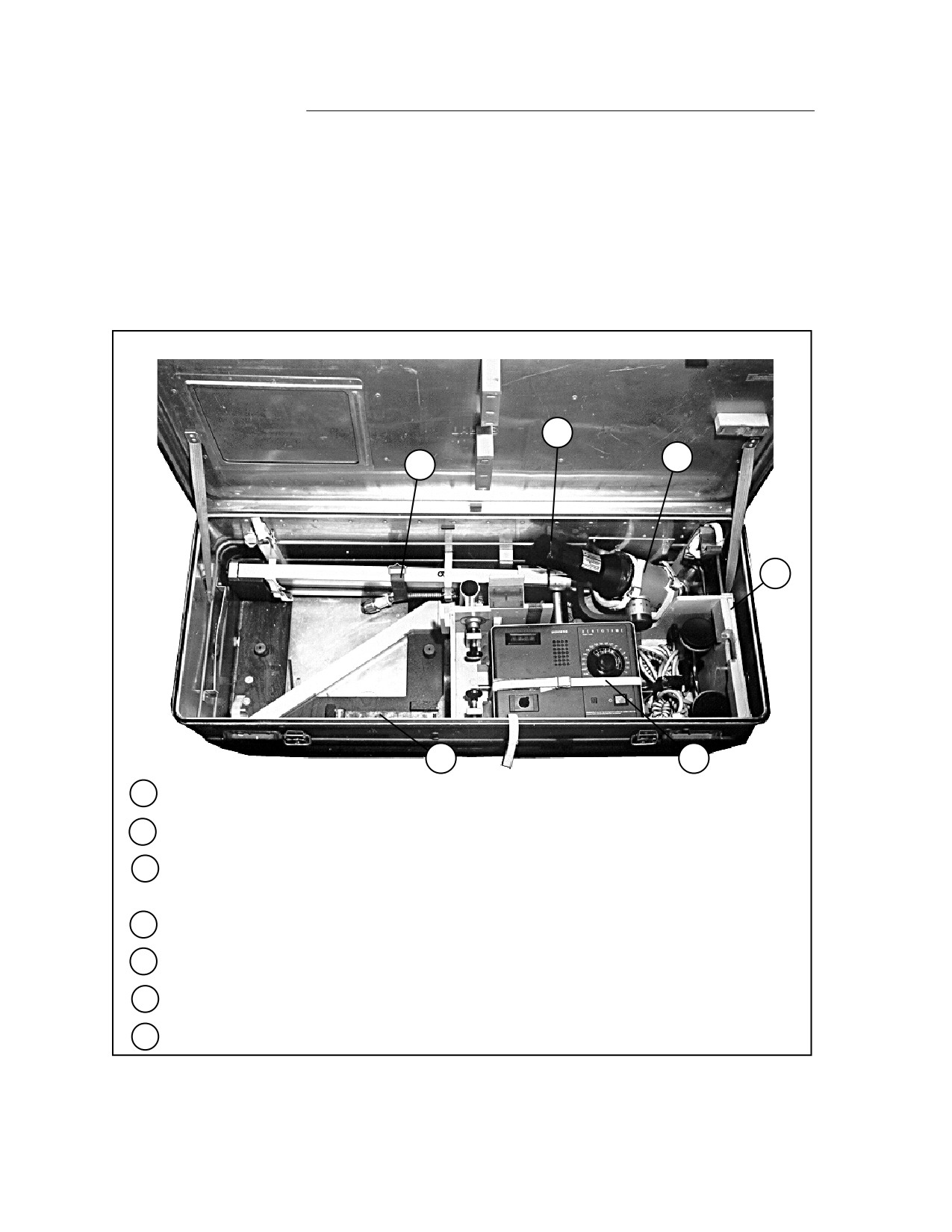
6
7
5
3
1
4
1
Place the seat support rod in its bracket.
2
Cover the right half of the bottom of the box with cellulose wadding (not shown).
3
Place the wooden insert in the right side of the box. Secure the headrest and foot support in
the insert with the fitting provided. Tighten the fitting with light pressure only.
4
Secure the timer unit with the strap provided.
5
Secure the scissor arm of the X-ray unit with the strap provided.
6
Tape the cap on the end of the X-ray unit.
7
Place the X-ray unit in the box as shown, and secure it with the straps provided.
Figure 5-14. Dental Operative Field Set Rigged in M998 Truck
5-80
FM 4-20.117/TO 13C7-1-111
10
9
8
12
11
13
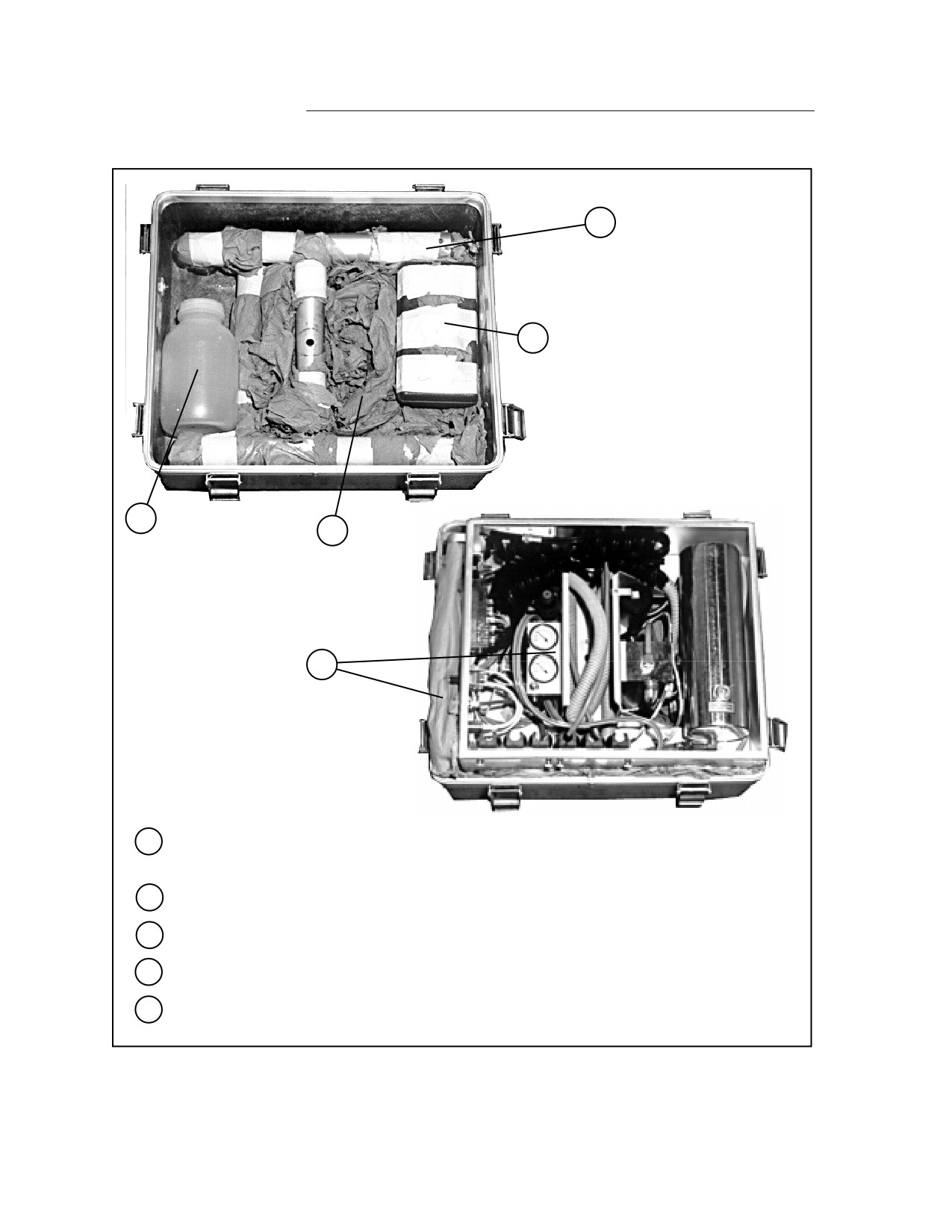
8
Place an 11- by 18 1/2-inch piece of honeycomb over the timer unit. Crush the honeycomb to
make it lie flat.
9
Fold the seat and place it over the honeycomb placed in step 8 above. Cut the honeycomb to
allow for the knobs on the seat.
10
Secure the mounting rod in its bracket with the straps provided. Pad the rod with cellulose
wadding where it touches the X-ray unit. Tape the cellulose wadding in place.
11
Secure the smaller mounting rod in the front of the box with the straps provided.
12
Place the protective aprons in the bottom of the box.
13
Fill the empty space in the box with honeycomb. Close and latch the box.
Figure 5-14. Dental Operative Field Set Rigged in M998 Truck (continued)
5-81
FM 4-20.117/TO 13C7-1-111
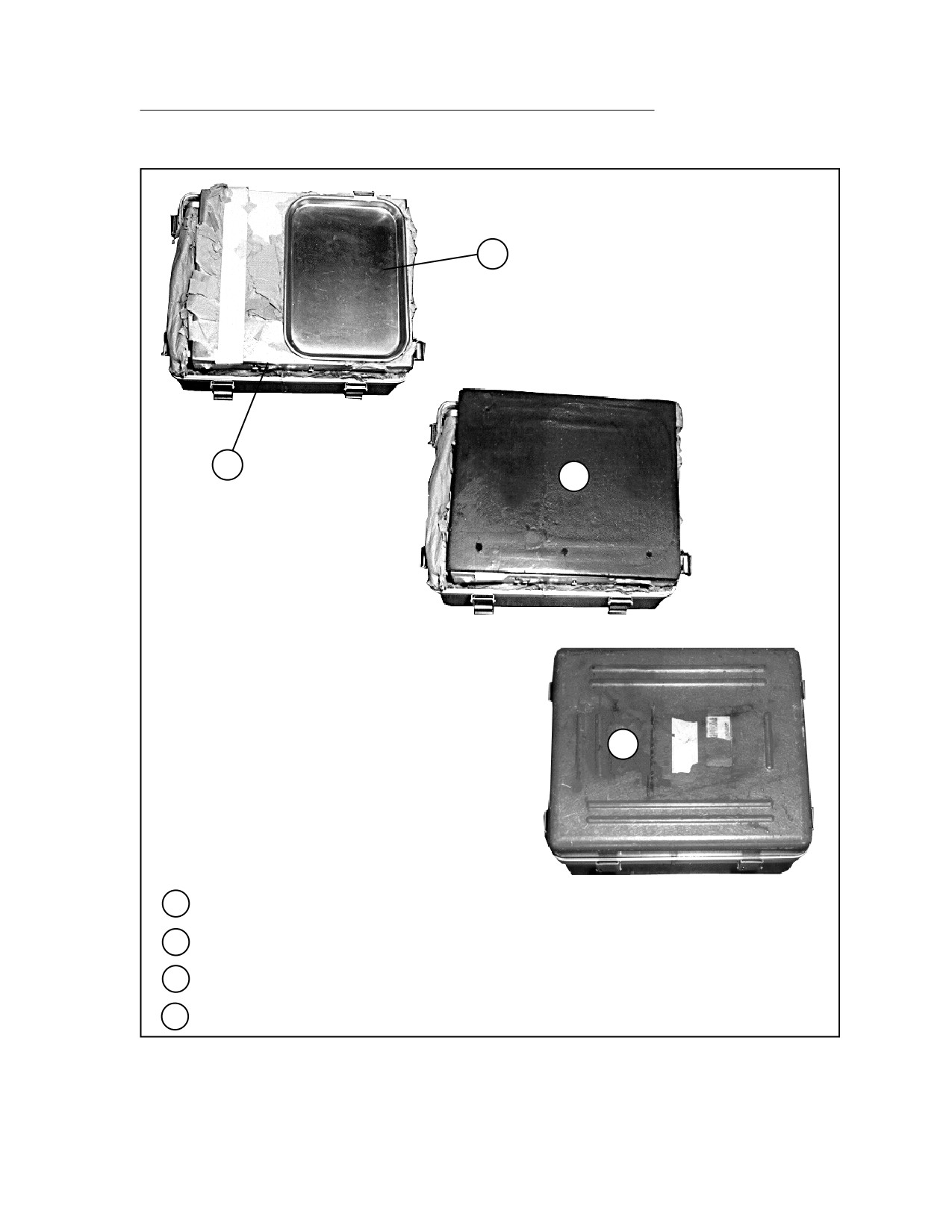
14
16
17
15
18
14
Pad the frame base and post assembly with cellulose wadding taped in place. Place them in
the bottom of the box.
15
Pad the bottom of the box with cellulose wadding.
16
Tape the toolbox and place it on the right side.
17
Place the waste container on the left side.
18
Place the control unit wires and hoses inside the control unit. Place the control unit in the box.
Pad the control panel with cellulose wadding.
Figure 5-14. Dental Operative Field Set Rigged in M998 Truck (continued)
5-82
FM 4-20.117/TO 13C7-1-111
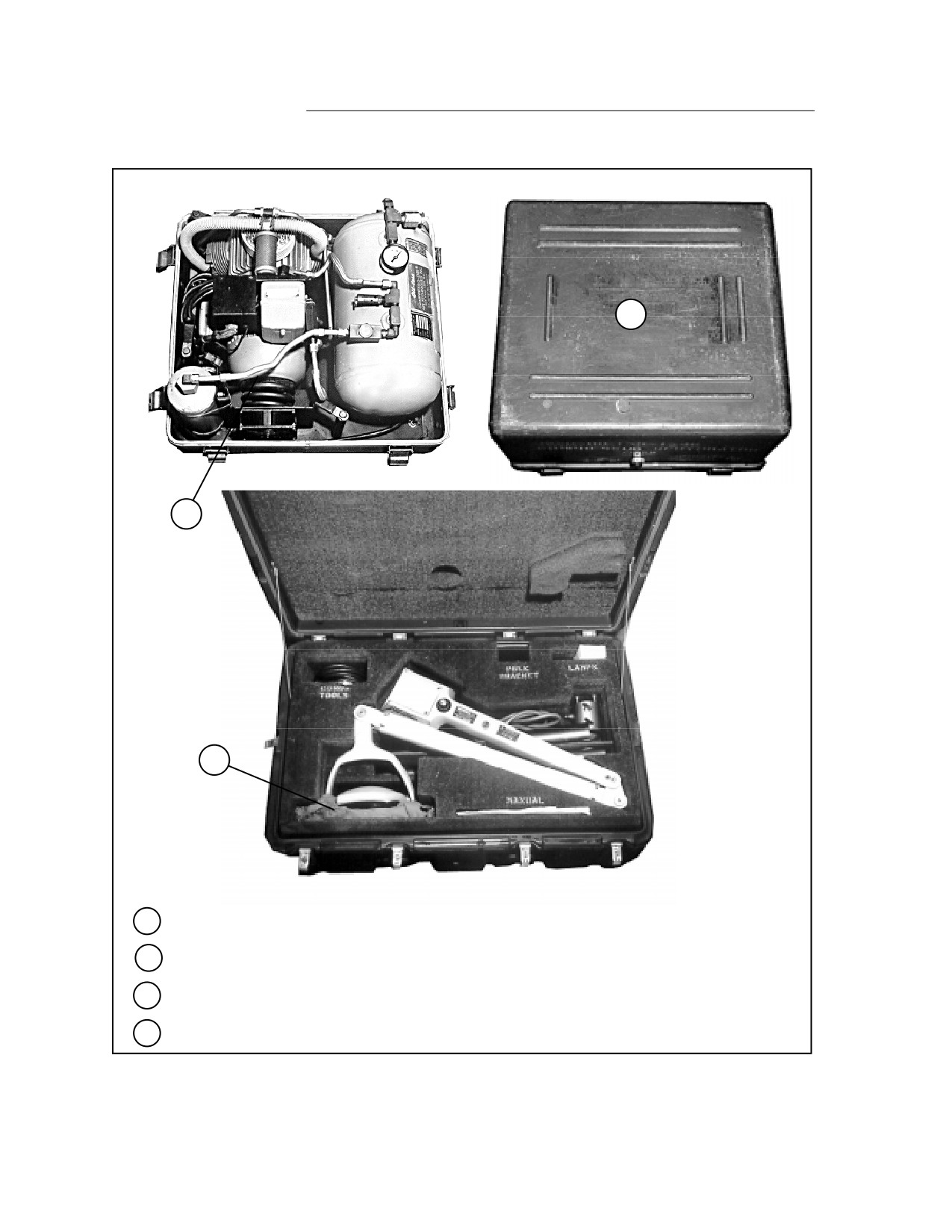
20
19
21
22
19
Place the top on the control unit. Pad the top with cellulose wadding.
20
Place the tray on the right side of the control unit top.
21
Place the foam pad over the tray and control unit.
22
Close and latch the box.
Figure 5-14. Dental Operative Field Set Rigged in M998 Truck (continued)
5-83
FM 4-20.117/TO 13C7-1-111
24
23
25
23
Drain the air compressor and fold its cord and hose.
24
Close and latch the box.
25
Pad the light lens with cellulose wadding.
26
Close and latch the box (not shown).
Figure 5-14. Dental Operative Field Set Rigged in M998 Truck (continued)
5-84