FM 3-22.32 IMPROVED TARGET ACQUISITION SYSTEM, M41 (July 2005) - page 6
FM 3-22.32
D-2. GENERAL PROCEDURES
Before a gunner can prepare a range card, he must have certain information provided to
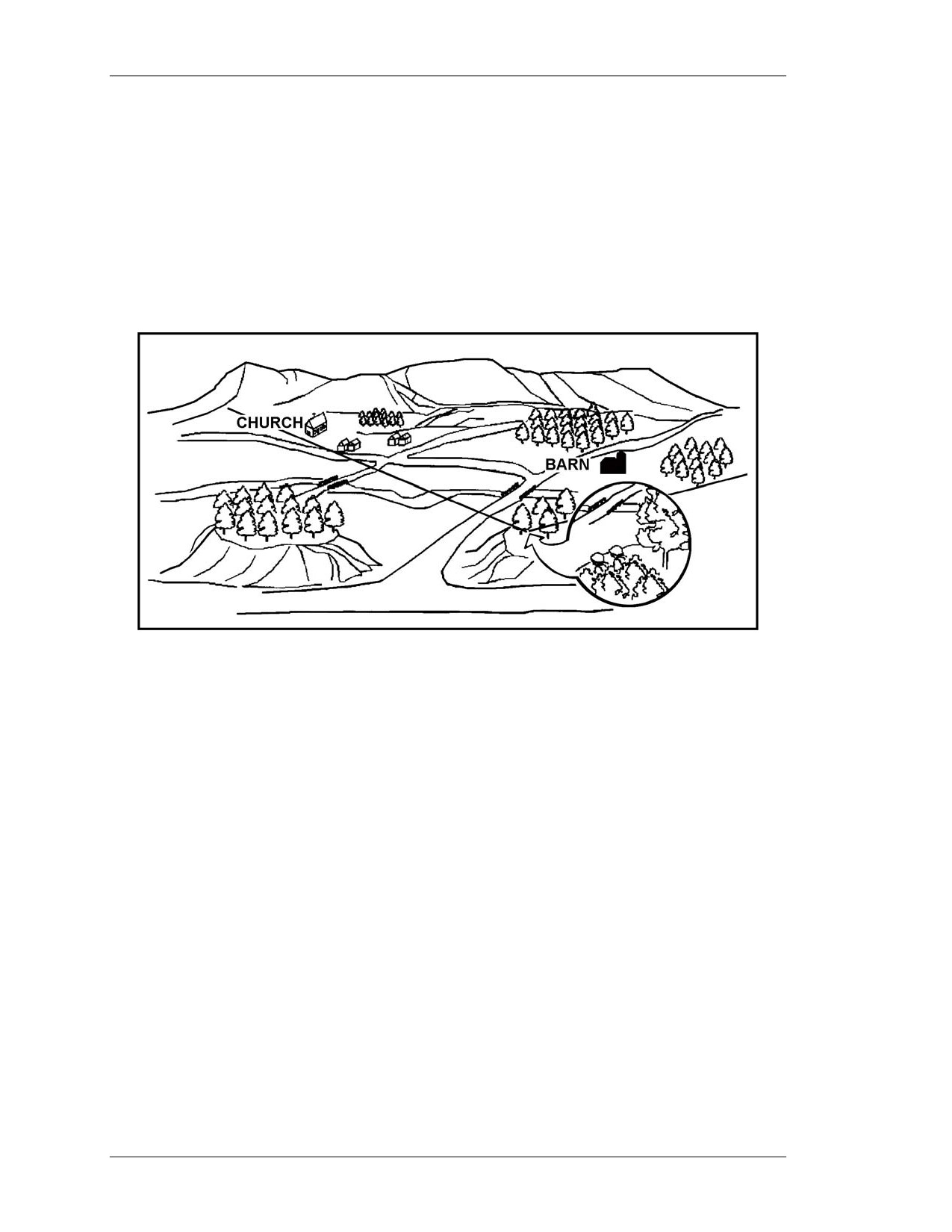
him. The leader usually briefs the gunner on that information (Figure D-2) including:
• Firing position.
• Left and right limits of fire.
• Maximum engagement line (MEL).
• Avenues of approach (AAs).
• Target reference points (TRPs).
Figure D-2. Gunner’s sector of fire.
EXAMPLE OF A SECTION LEADER BRIEFING A GUNNER
“I want you to cover a sector of fire that begins here at your firing
position and goes to a point about 500 meters beyond that church
on the left, moves to the right along the high ground at 200 meters
behind the houses, through the wood line, behind the hill, barn and
orchard until it reaches a point about 300 meters beyond the right
leading edge of the orchard, and returns to your firing position. The
enemy is approaching from the north so they will probably use
those two roads to enter your sector. Plan to engage the enemy’s
armor as soon as it comes within range on the road behind the barn
and orchard. Engage the enemy targets as soon as they appear on
the second road as they approach from the left side of that large
hill. There are two target reference points within your sector so
copy them down: the church is TRP AB1670 and the barn is
TRP AB1677.”
D-3. MARGINAL INFORMATION
Use the following procedures to complete the marginal information at the top of the range
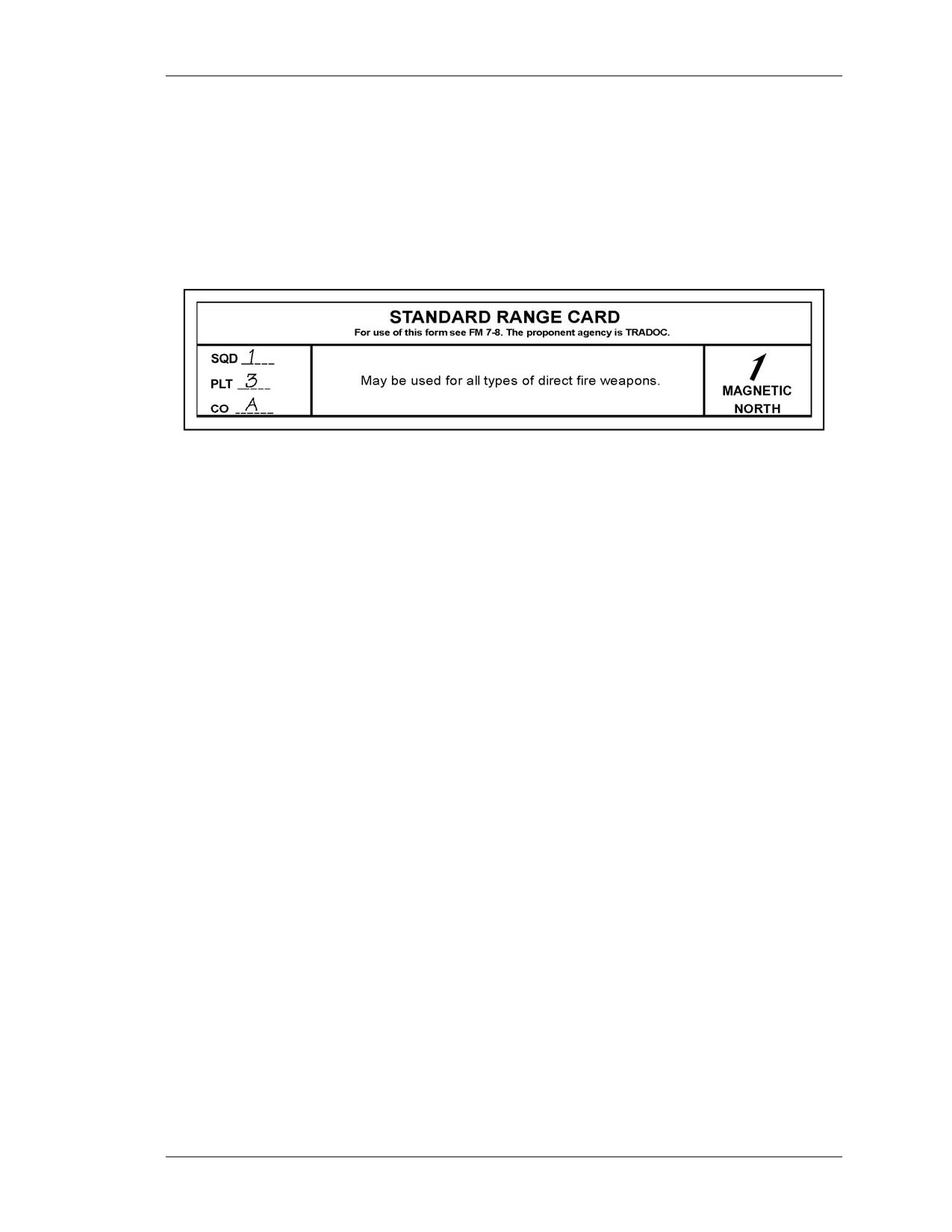
card (Figure D-3).
D-2
8 July 2005
FM 3-22.32
a. Magnetic North. Orient the range card with the assigned sector of fire. Use a
lensatic compass to determine magnetic north. Keeping the range card oriented to the
sector of fire, draw the magnetic north symbol in the appropriate direction in the
magnetic north box.
b. Unit Description. Use squad, platoon, and company designations. Do not list any
designation for units higher than company level (Figure D-3).
Figure D-3. Example of marginal information.
D-4. CALCULATE
Calculate the number of meters each circle represents.
NOTE: Remember, the TOW’s maximum effective range is 3,750 meters.
a. Using a map or leader-provided range data, determine the farthest point from the
designated firing position to the MEL. (See paragraph D-5d for a discussion on how to
determine MEL.)
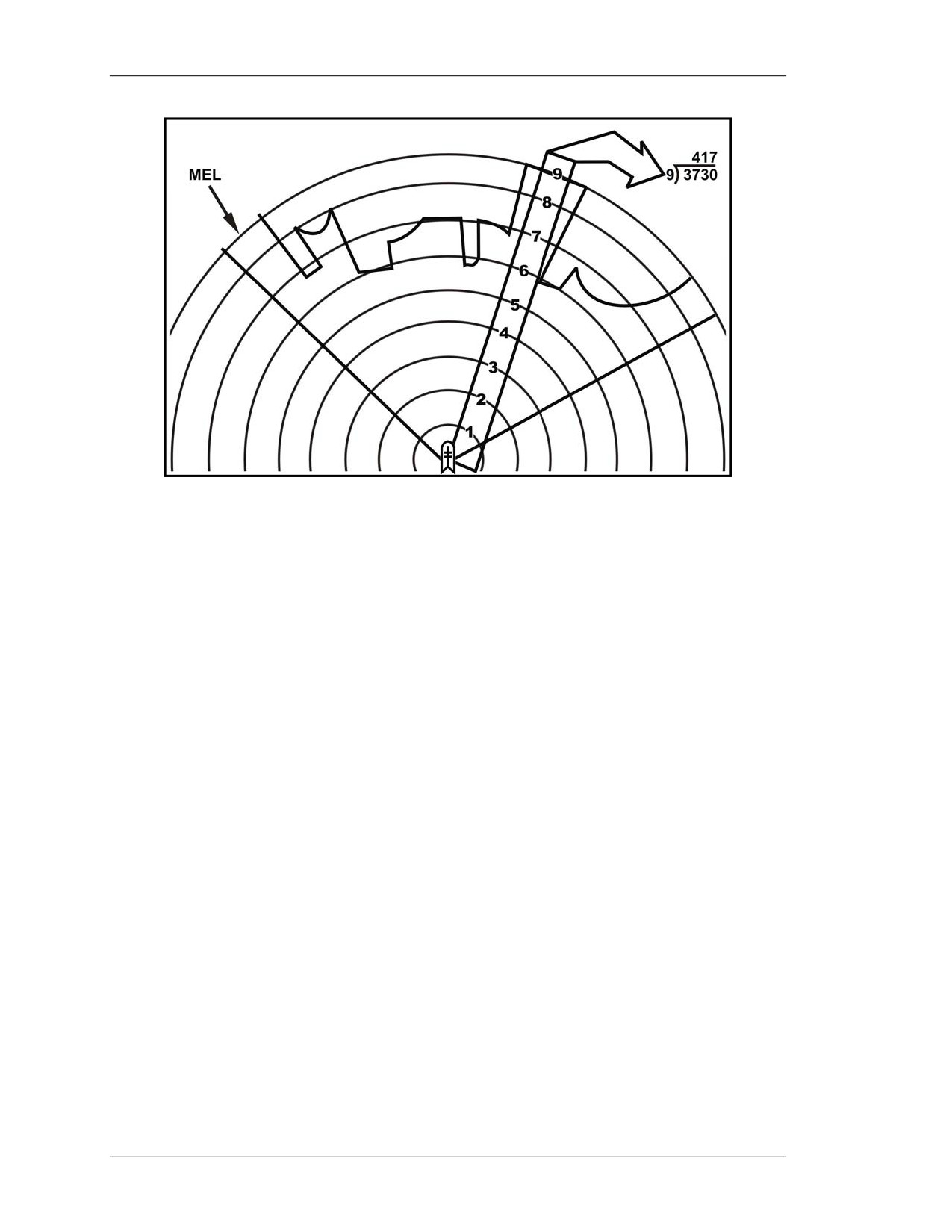
b. Divide the number of circles on a range card (9) into the distance. Round the
result to the nearest 10 meters. Enter this number in the data section. (See paragraph
D-6). The following are examples:
(1) Example 1. If the distance of the farthest point from the designated firing position
to the MEL is 3,750 meters, then 9 intervals into 3,750 meters = 416.666 meters rounded
up to 420. Therefore, each circle equals 420 meters (Figure D-4, page D-4).
(2) Example 2. If the distance of the farthest point from the designated firing position
to the MEL is 1,500 meters, then 9 intervals into 1,500 meters = 166.667 meters rounded
up to 170 meters.
8 July 2005
D-3
FM 3-22.32
Figure D-4. Determination of distance between circles.
D-5. SECTOR SKETCH SECTION DEVELOPMENT
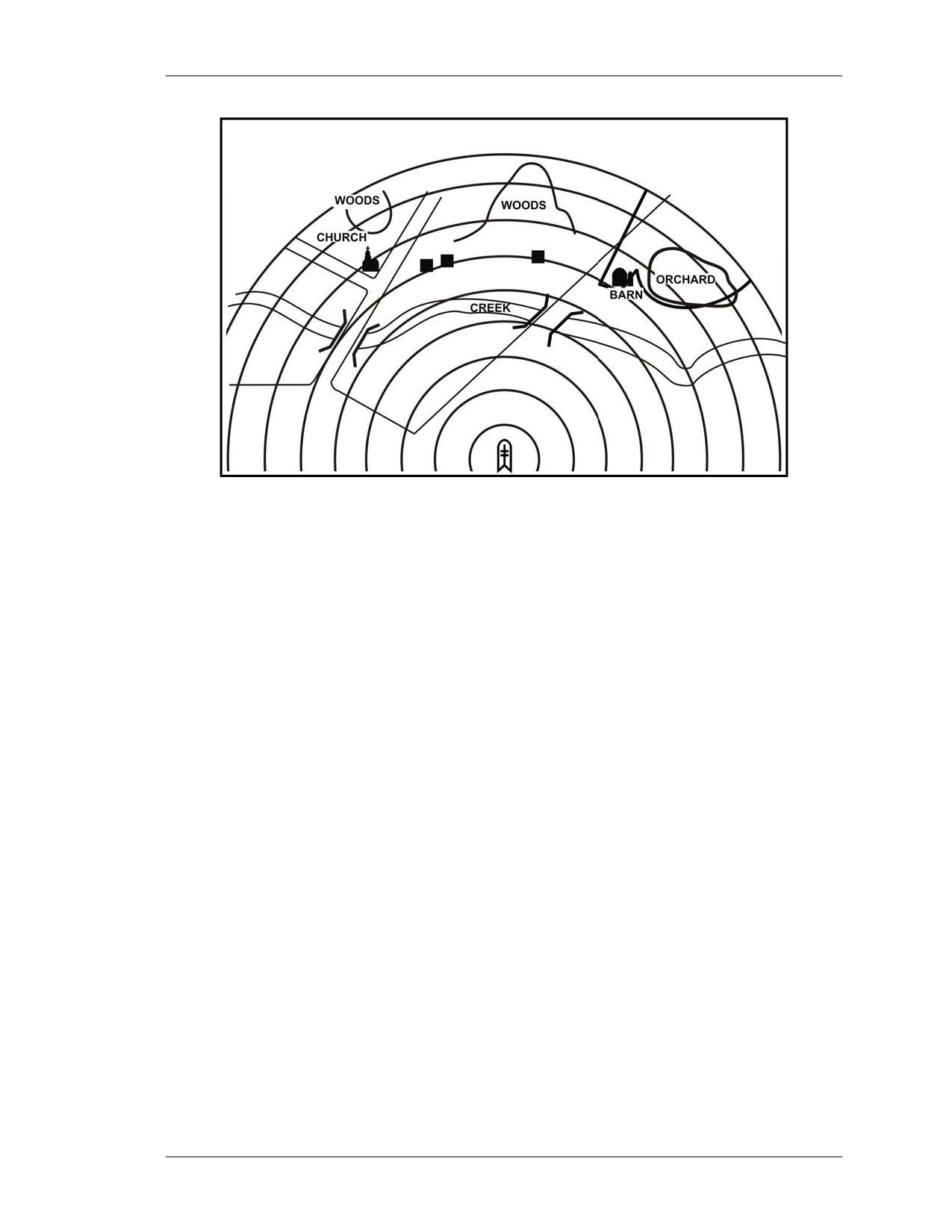
The sector sketch section is a graphic representation of a gunner’s sector of fire
(Figure D-5). The sector sketch of the terrain should be a good representation since it
becomes vital during periods of limited visibility.
NOTE: A gunner may be assigned more than one sector of fire. A separate range card
is prepared for each sector.
a. Sketches. The sketch should cover the entire assigned sector if possible. Make the
sketch as large as possible, but do not exceed the limits of the largest circle. When
depicting large natural objects
(forests, hills, and so forth) or man-made objects
(buildings, bridges, and so forth), draw the outline of the object and label it appropriately
(Figure D-5). When sketching objects in the sector, locate them on or near the
corresponding circle to denote range to the object.
NOTE: Do not try to depict contour lines on the sector sketch section.
b. Gunner’s Firing Position. The gunner’s firing position is designated by the black
dot in the center of the smallest circle of the range card. Draw a symbol of the TOW over
the black dot to designate that this range card is for a TOW.
D-4
8 July 2005
FM 3-22.32
Figure D-5. Sector sketch.
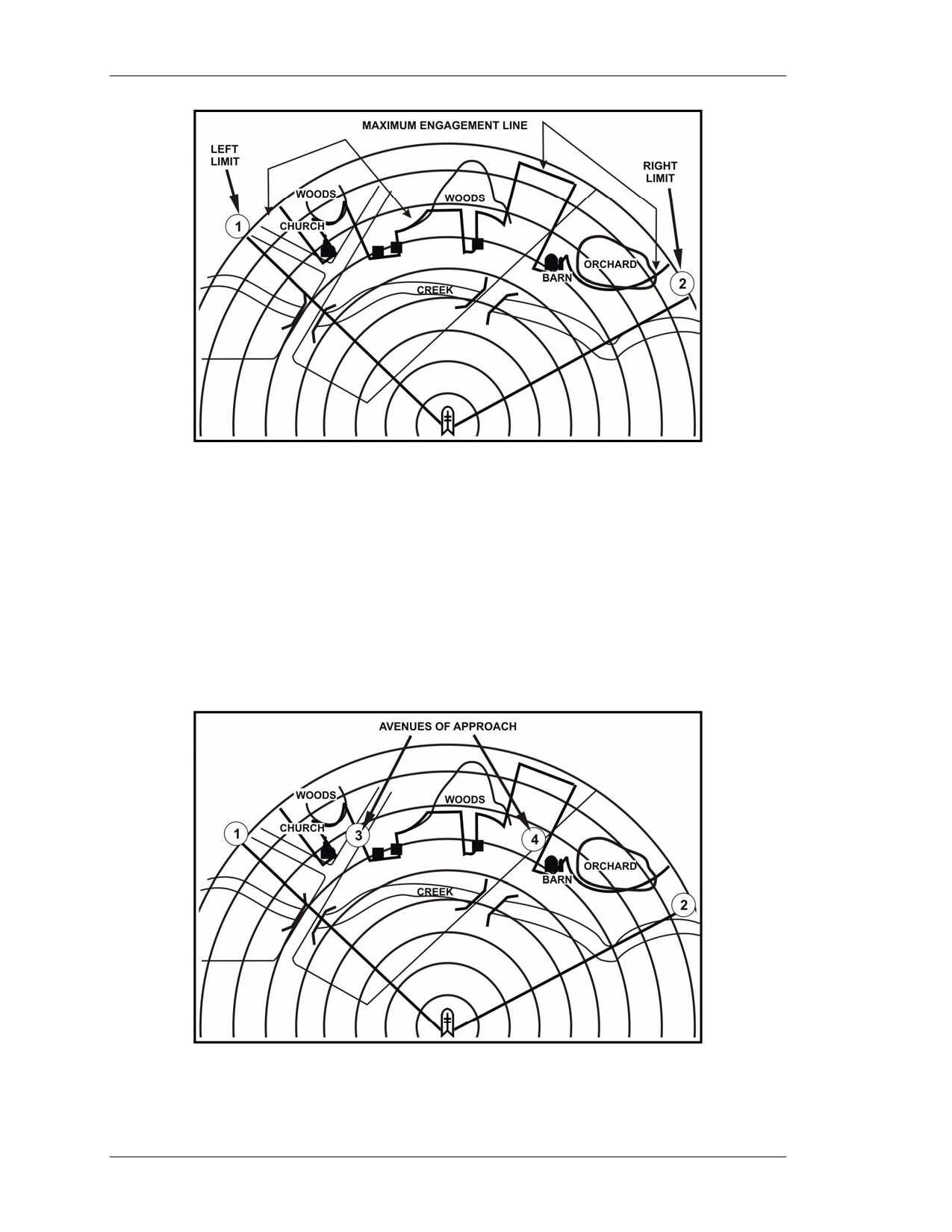
c. Left and Right Limits. Left and right limits are imaginary lines from the
gunner’s firing position to a designated point on the ground (Figure D-6). Use terrain
features when possible to designate left and right limits. Other recognizable objects, such
as a building or other man-made structures, can be used. The area between the left and
right limits depicts the gunner’s sector of fire or area of responsibility. Lines are drawn
from the designated firing position to the MEL in the area of the designated limits.
Number the left limit as No. 1, number the right limit No. 2, and place a circle around
each number. Record the azimuth and distance of each limit in the data section.
d. Maximum Engagement Line. The MEL designates the maximum effective
range of a weapon (TOW) and the gunner’s line-of-sight limitations due to the terrain in
his given sector of fire (Figure D-6, page D-6).
(1) If there are no limitations, draw the MEL along the last circle in the sector sketch
section. The line should connect with the left and right limit labels.
(2) If there are limitations, starting at the left limit, draw the MEL in front of the
limiting terrain features. The MEL should extend in front of and follow the limitations
until it reaches the right limit.
8 July 2005
D-5
FM 3-22.32
Figure D-6. Left and right limits of sector of fire
and maximum engagement line.
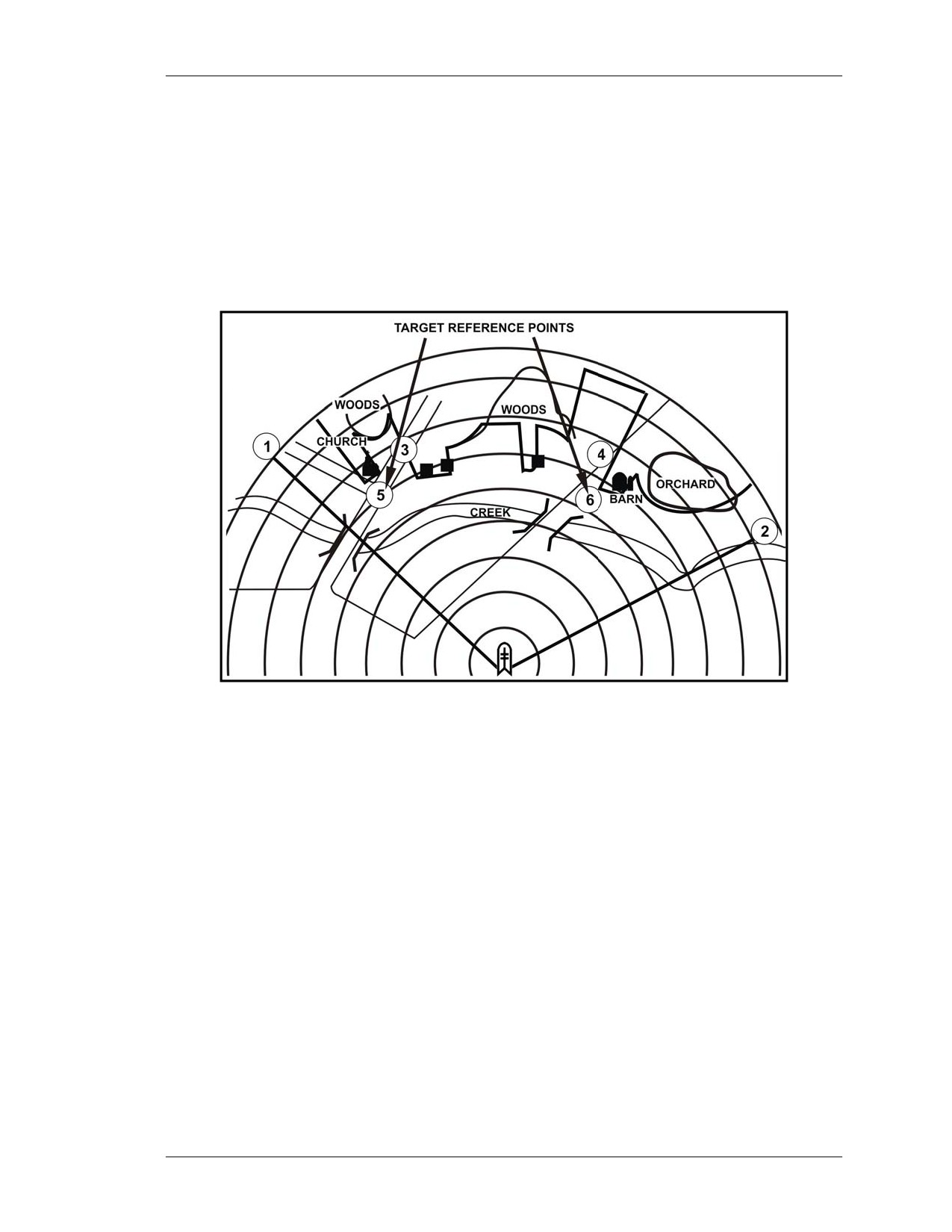
e. Avenues of Approach. Avenues of approach are areas where a target is most
likely to appear or most likely to travel. This area can be a natural line of drift or a road.
Tracked and wheeled vehicles may or may not use the same AA. Starting from the left
and working to the right, number the areas where targets are likely to appear. Start with
the number three since the numbers one and two have already been used to mark the left
and right limits. Place a circle around each number. Continue until all identified AAs
have an assigned number (Figure D-7). Record the azimuth and distance to each AA in
the data section.
Figure D-7. Avenues of approach.
D-6
8 July 2005
FM 3-22.32
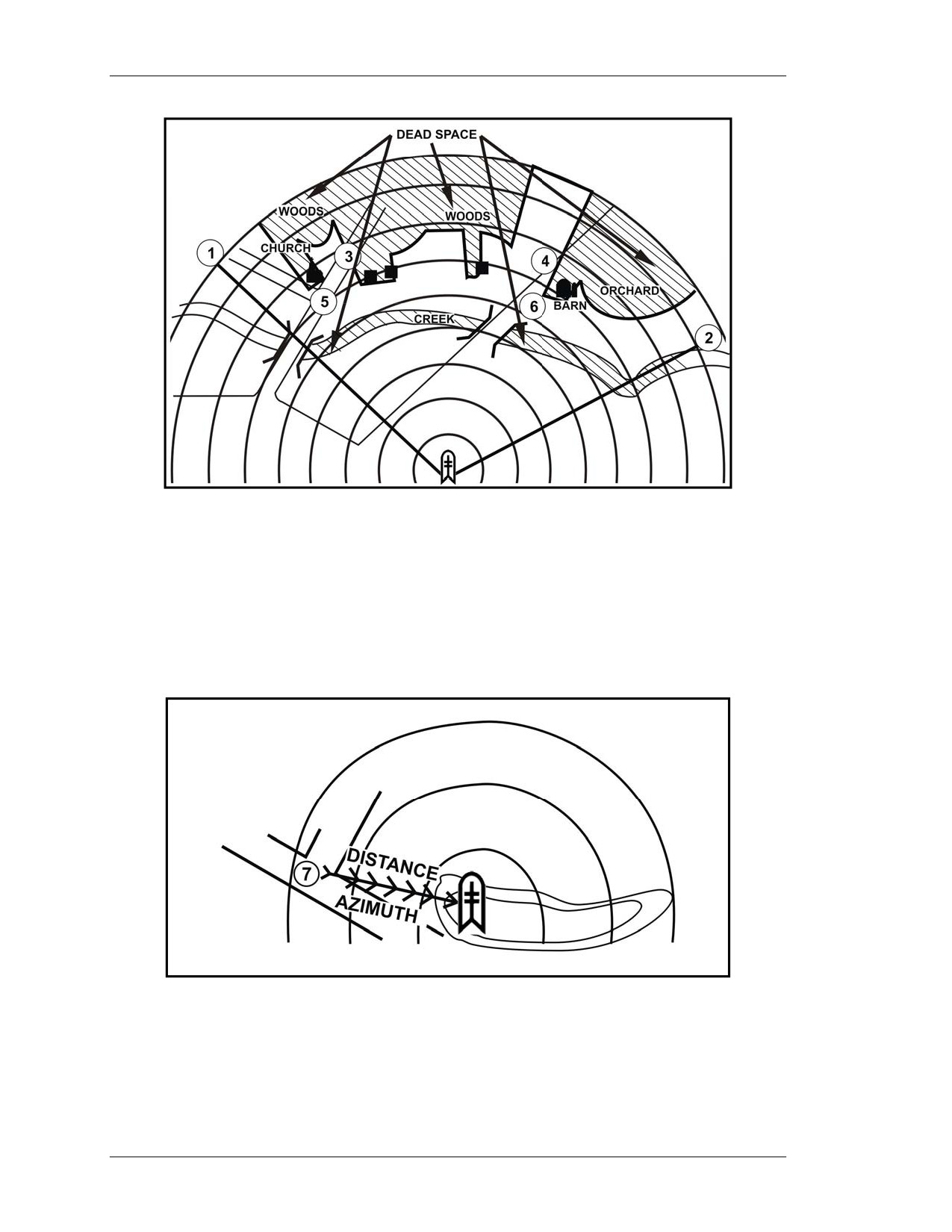
f. Target Reference Points. Prominent terrain features and or easily recognizable
man-made objects (for example, road intersections, buildings, bridges, and so forth) are
used as TRPs (Figure D-8). TRPs are used to locate targets and adjust direct or indirect
fires. Normally, the sector has at least one TRP, but no more than three. Number each
TRP and place a circle around each number starting with the next available number after
AA numbers. In Figure D-8, there are two AAs and two TRPs—numbers 5 and 6 are
assigned to the TRPs for this example. Record the azimuth and distance to each TRP in
the data section.
Figure D-8. Target reference points.
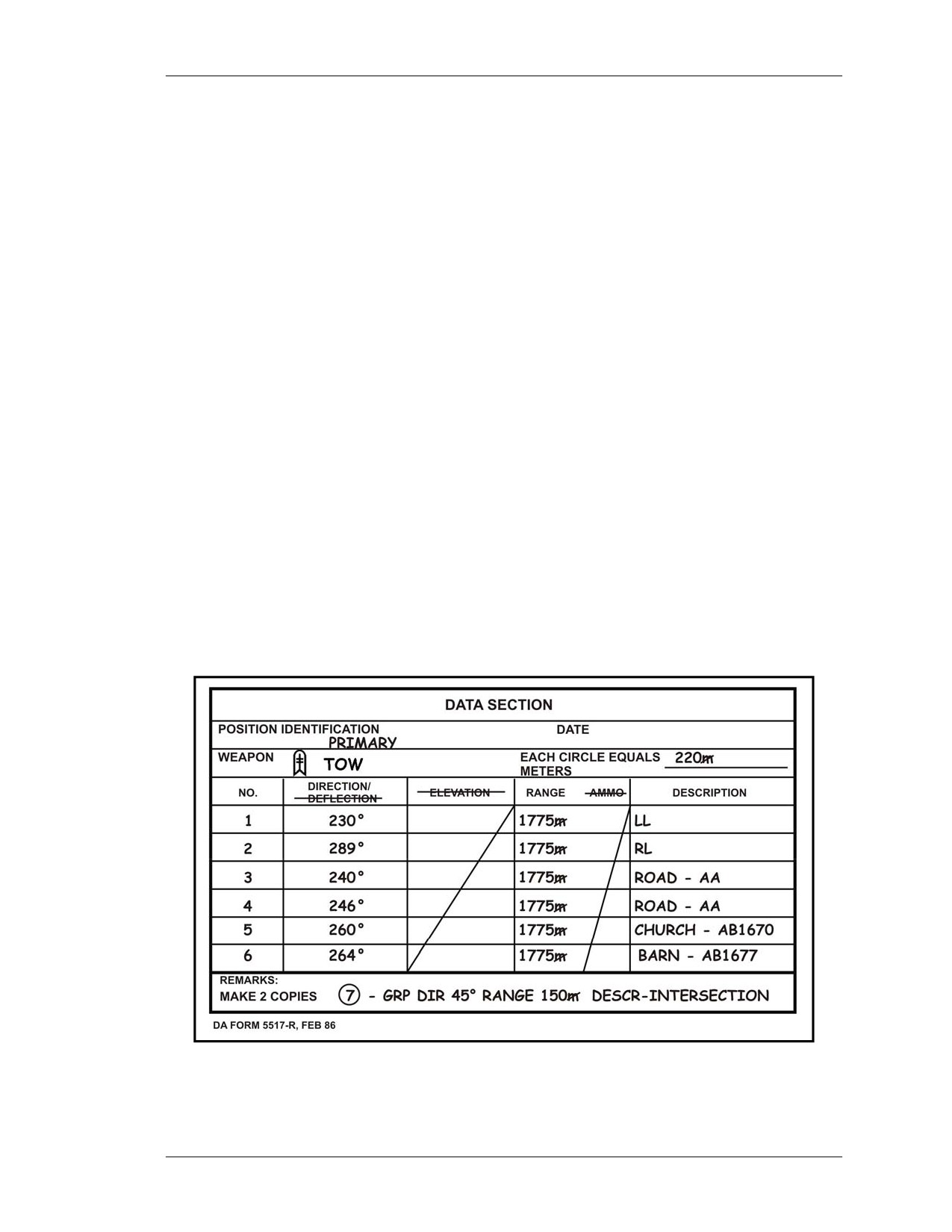
g. Dead Space. Dead space is an area inside a gunner’s sector of fire and inside the
range of his weapons system where he can neither observe nor place direct fire. Any area
in which a gunner does not have line of sight is considered dead space (Figure D-9,
page D-8). Buildings, trees, hills, or other terrain features can cause dead space. Shade
these areas using diagonal lines to indicate significant dead space in the sector. These
areas can then be identified as areas for indirect fire weapons.
8 July 2005
D-7
FM 3-22.32
Figure D-9. Dead space.
h. Gunner’s Reference Point. The gunner’s reference point (GRP) serves as a point
of reference when one unit is being replaced by another (Figure D-10). The gunner
locates a nearby recognizable terrain feature (such as hilltop, road junction, and so forth)
to the right, left, or rear of his firing position to use as his GRP. Label the GRP and draw
an arrow between it and the firing position. The direction of the arrow determines which
azimuth to use. Record the azimuth and distance in the data section.
Figure D-10. Gunner’s reference point and firing position.
D-8
8 July 2005
FM 3-22.32
D-6. DATA SECTION
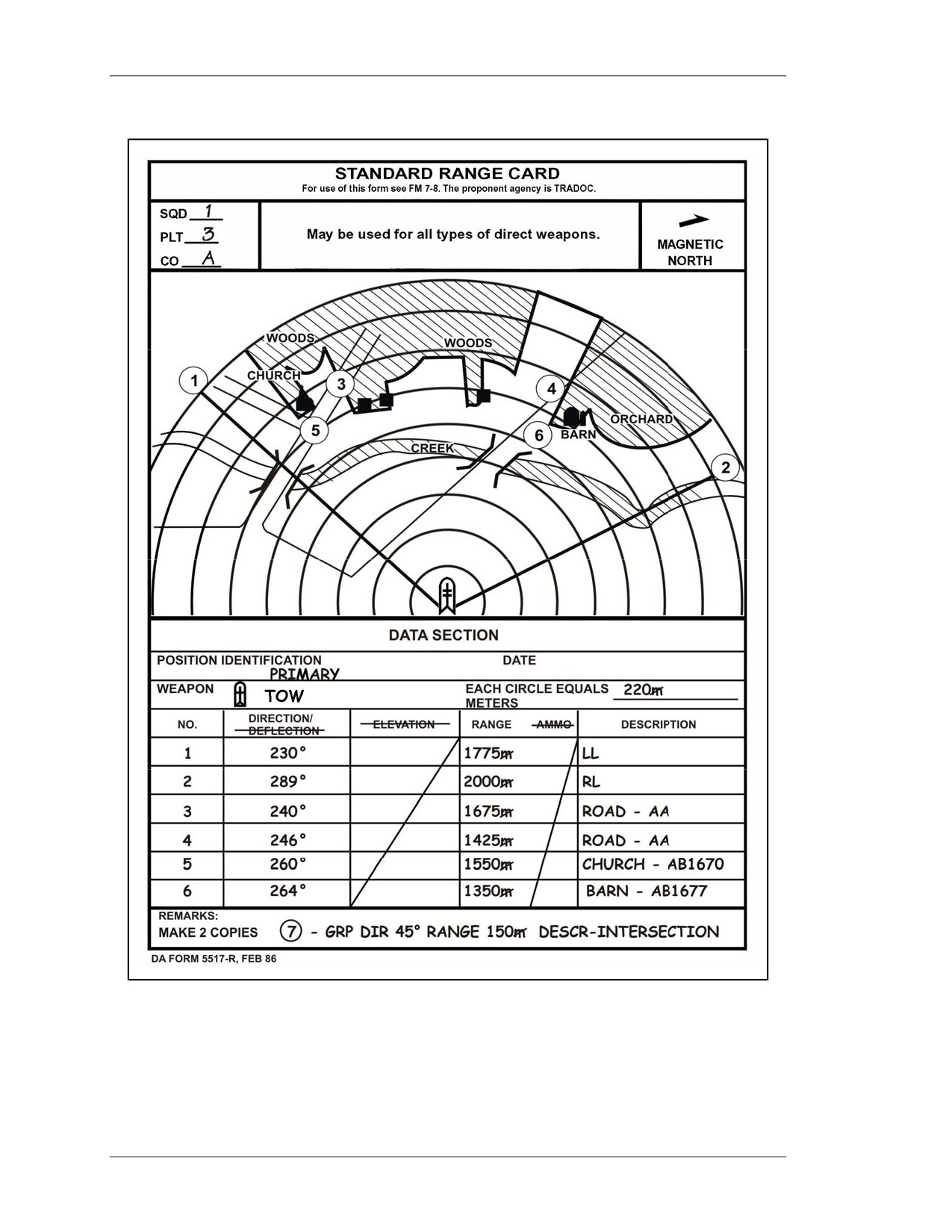
Use the following procedures to fill in the DATA SECTION (Figure D-11). (Figure
D-12, page D-10, shows an example of a completed range card for a TOW position.)
a. POSITION IDENTIFICATION. Identify the position as either primary,
alternate, or supplementary.
b. DATE. Indicate only the day and month.
c. WEAPON. Enter TOW.
d. NO. (number). Use the numbers 1 and 2 to represent the left and right limits.
Starting with the subsequent numbers, designate AAs and then TRPs as designated in the
sector sketch section.
e. DIRECTION/DEFLECTION. List only the DIRECTION, in degrees, for the
appropriate item in the number (NO.) column. Line through the word DEFLECTION
since it is not applicable.
f. ELEVATION. Line through the word ELEVATION since it is not applicable.
Draw a diagonal line through the boxes pertaining to ELEVATION.
g. RANGE. Range is measured in meters from the designated firing position to the
target or target engagement area. The most accurate way to measure range is the laser
range finder.
h. AMMO. Line through the word AMMO since it is not applicable. Draw a
diagonal line through the columns pertaining to AMMO.
i.
DESCRIPTION. Write the name of the item listed in the corresponding NO.
column (for example, road intersection, barn, church, and so forth). If the object is a TRP,
list the TRP number; if left limit or right limit, enter LL or RL.
j.
REMARKS. Enter any information that is considered useful in helping
understand the range card. Enter the GRP data here if the data section does not have
sufficient room.
Figure D-11. TOW range card (DA Form 5517-R)―data section.
8 July 2005
D-9
FM 3-22.32
Figure D-12. Example completed DA Form 5517-R, TOW range card.
D-10
8 July 2005
FM 3-22.32
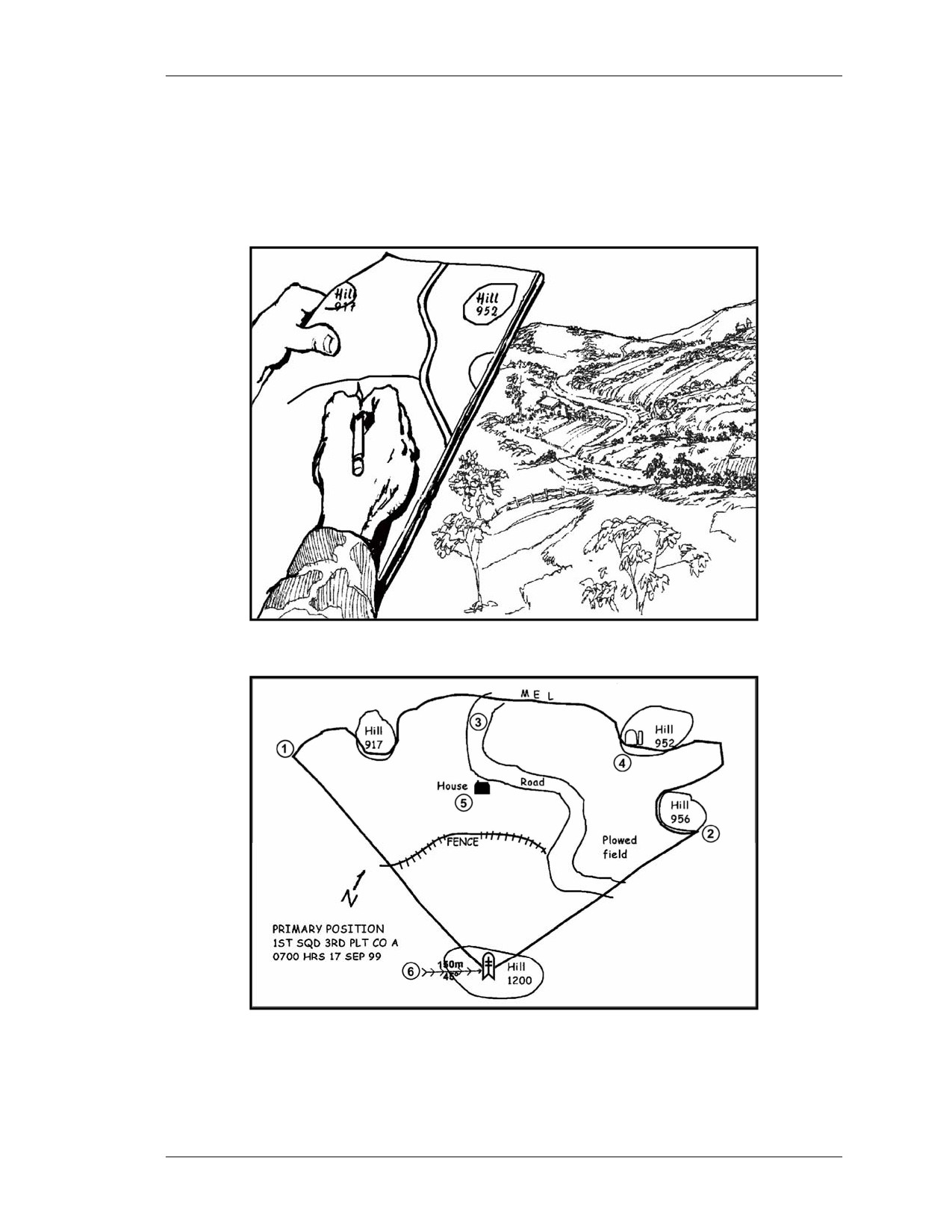
D-7. FIELD-EXPEDIENT RANGE CARD
Use a field-expedient range card when DA Form 5517-R is not available. Preparation of a
field-expedient range card is basically the same as for a standard range card. The gunner
can use almost anything to draw on as long as the data is recorded. As one example, a
discarded MRE box works well (Figures D-13 and D-14).
Figure D-13. Terrain presentation.
Figure D-14. Field-expedient range card showing the terrain.
8 July 2005
D-11
This page intentionally left blank.
FM 3-22.32
APPENDIX E
SYSTEM MESSAGES, WARNINGS,
AND MALFUNCTIONS
As with any piece of equipment, at times it does not operate. During
normal operations the gunner may see system messages and warnings that
require him to stand by or proceed with steps to correct the problem.
Understanding the proper procedures to correct malfunctions is an
essential gunner skill. Different indicators on the TAS display require the
gunner to perform some type of action.
Section I. SYSTEM MESSAGES
System messages and warning indicators appear during normal ITAS operation. These
messages and warnings indicate that a system failure can occur if actions are not taken to
correct the warning indicator. Some messages are displayed to the gunner through
symbols on the TAS display as well as through text messages.
E-1. BORESIGHT MESSAGES
The following messages and warnings may appear on the ITAS during boresighting
procedures.
a. BORESIGHTING - DO NOT SLEW OR CAUSE VEHICLE MOTION.
This message occurs throughout the boresighting process. It is not an indication of a
malfunction, but a warning not to slew the TU or cause vehicle motion during
boresighting procedures. Any motion of the TAS will cause the readings taken by the
FCS to vary and will slow the boresighting process.
NOTE: Only in an emergency should the gunner attempt to engage a target while this
message is displayed.
b. UNABLE TO BORESIGHT - MAINTENANCE REQUIRED. This message
appears upon completion of boresighting if there is a malfunction (the FCS cannot get
stable readings). To correct, verify that the front window cover is over the lenses and
repeat the boresighting process. If this message again, replace the TAS. If the message
appears after replacing the TAS, replace the FCS.
c. REDO BORESIGHT - EXCESSIVE MOTION. This message appears when
too much motion of the vehicle occurs while boresighting is in progress. To correct, press
the MENU switch to select CANCEL. Ensure no one is moving around in the HMMWV
(or touching the system when on the tripod). Close the HMMWV doors to minimize wind
effects. Perform the boresighting procedures again.
d. BORESIGHT COMPLETE. This message is displayed for five seconds after
completion of boresighting. After five seconds the boresighting menu disappears from the
TAS display. No corrective action is necessary.
8 July 2005
E-1
FM 3-22.32
E-2. BATTERY POWER SOURCE MESSAGES
These messages concern the battery power source (BPS).
a. CHARGE BPS NOW. The vehicle battery voltage sensor in the BPS constantly
monitors the BPS power output. When the sensor detects a level that corresponds to
approximately 30 minutes of BPS operating time remaining, this message will appear.
When this message appears, no more than 30 minutes of operating time in surveillance
mode or 15 minutes of operation with the tracker can be expected, and only two or three
missiles may be fired. To correct, recharge the BPS at the earliest opportunity.
b. BPS INTERNAL. A sensor in the BPS constantly compares the HMMWV
voltage with the BPS voltage. When the sensor detects the HMMWV voltage is lower
than the BPS voltage, the system will switch over to the BPS and the BPS INTERNAL
message will appear.
CAUTION
The ITAS will power down if corrective action is not
taken. This power down action is an over-discharge
protection feature, which protects the batteries from
deep discharge and subsequent damage.
(1) To correct, start the HMMWV to recharge its batteries, if the mission allows. The
BPS INTERNAL message will disappear within two minutes after starting the HMMWV
engine and the mission may be continued.
(2) If the HMMWV engine cannot be started because of the mission, turn the BPS
function switch to BIT. If the BPS BIT FAIL message appears, repeat the power down,
power up sequence.
(a) If the BPS passes the BIT, ensure the BPS INTERNAL message disappears from
the TAS display.
(b) If the BPS passes the BIT, but the BPS INTERNAL message is displayed while
the engine is running, the vehicle charging system requires maintenance.
(c) If the BPS still fails the BIT, turn the it in for maintenance.
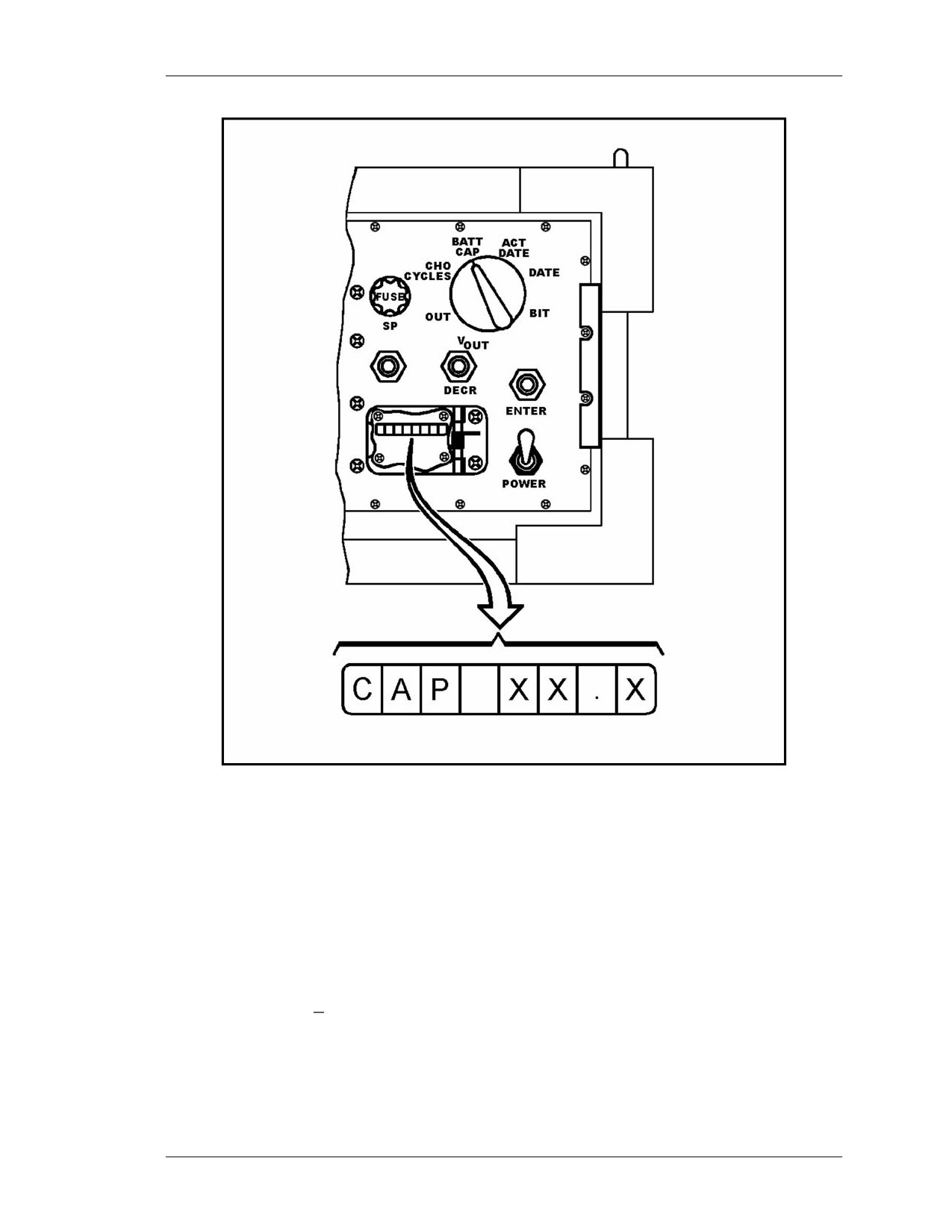
c. CHECK BPS OUTPUT. This message appears when the BPS loses
communication with the TAS. The messages BPS INTERNAL and CHARGE BPS NOW
cannot be provided to alert the gunner to charge the BPS. To correct, the gunner checks
the battery capacity periodically on the BPS Display by turning the function switch to
BATT CAP, opening the BPS display door, and reading the BPS display (Figure E-1).
E-2
8 July 2005
FM 3-22.32
Figure E-1. BPS capacity.
E-3. SYSTEM OPERATION MESSAGES
These system operation messages may appear at any time. They can be displayed in the
TAS display in conjunction with other system or training messages due to the potential
for mission-critical failure.
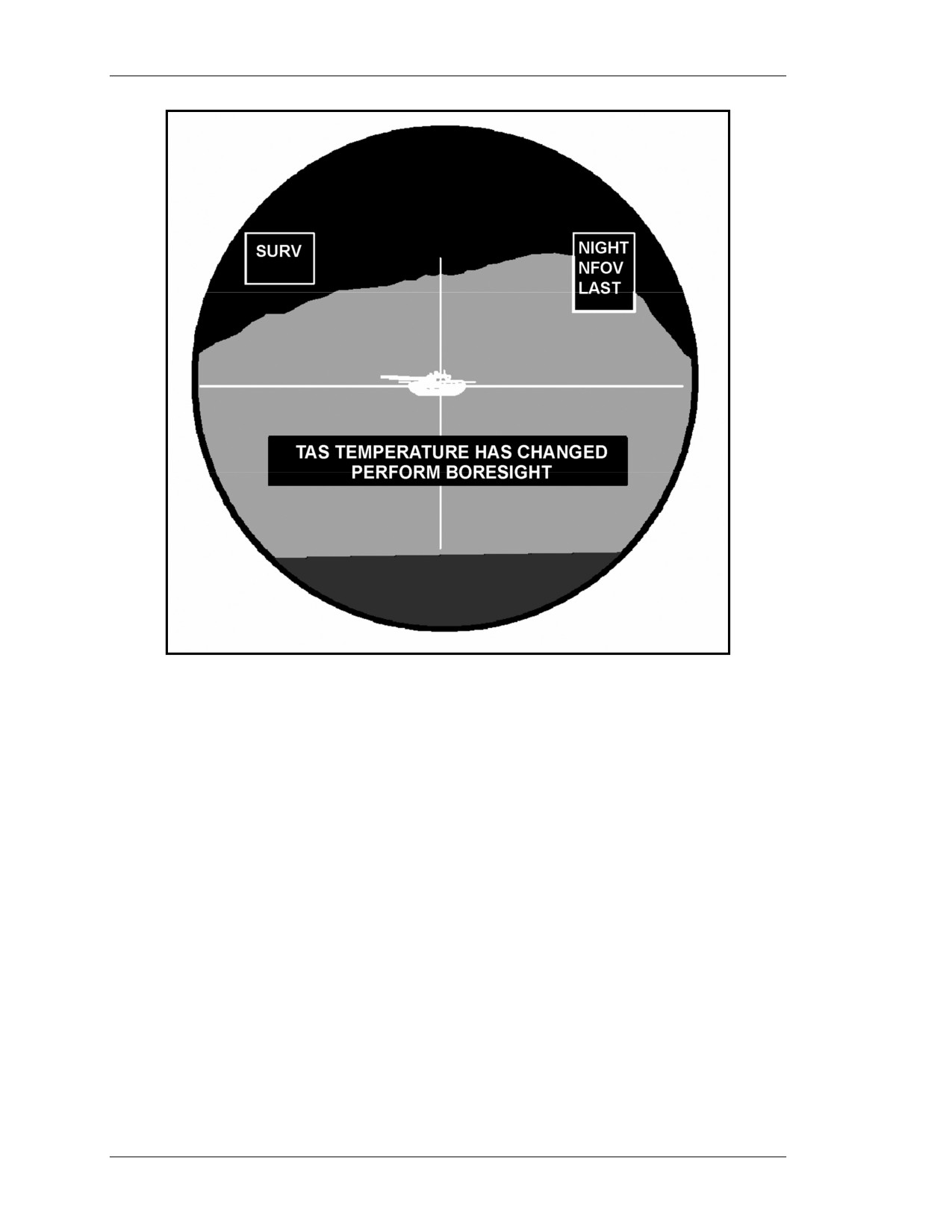
a. TAS TEMPERATURE HAS CHANGED - PERFORM BORESIGHT. As
the temperature changes, optical assemblies within the TAS expand or contract and the
daysight, NVS, LRF, and Xenon beacon tracker may no longer be aligned. The ITAS
records the ambient temperature when the last boresight task was performed. When the
temperatures vary + 18 degrees Fahrenheit, the TAS displays the temperature change
message (Figure E-2, page E-4). To correct, if the message appears during a target
engagement, complete the engagement, then boresight the system again. If not in the
process of engaging a target, boresight immediately.
8 July 2005
E-3
FM 3-22.32
Figure E-2. Boresight message.
b. FCS OVERHEAT - ATTEMPT FCS COOLDOWN. This message appears
when a temperature sensor in the FCS indicates the FCS is getting too hot. To correct,
ensure there is adequate airflow around the FCS. Power down the TOW ITAS (TAS,
FCS, and BPS) and try to find shade. Wait two hours and then power the system up
again. If this message appears during a target engagement, complete the engagement and
then turn the FCS off to prevent permanent damage. If this message appears during any
of the training modes, discontinue training.
(1) If the system fails PBIT, discontinue the mission and turn the FCS in for
maintenance as soon as possible (ASAP).
(2) If the system passes PBIT and this message reappears at any time thereafter,
discontinue mission and turn FCS for maintenance ASAP.
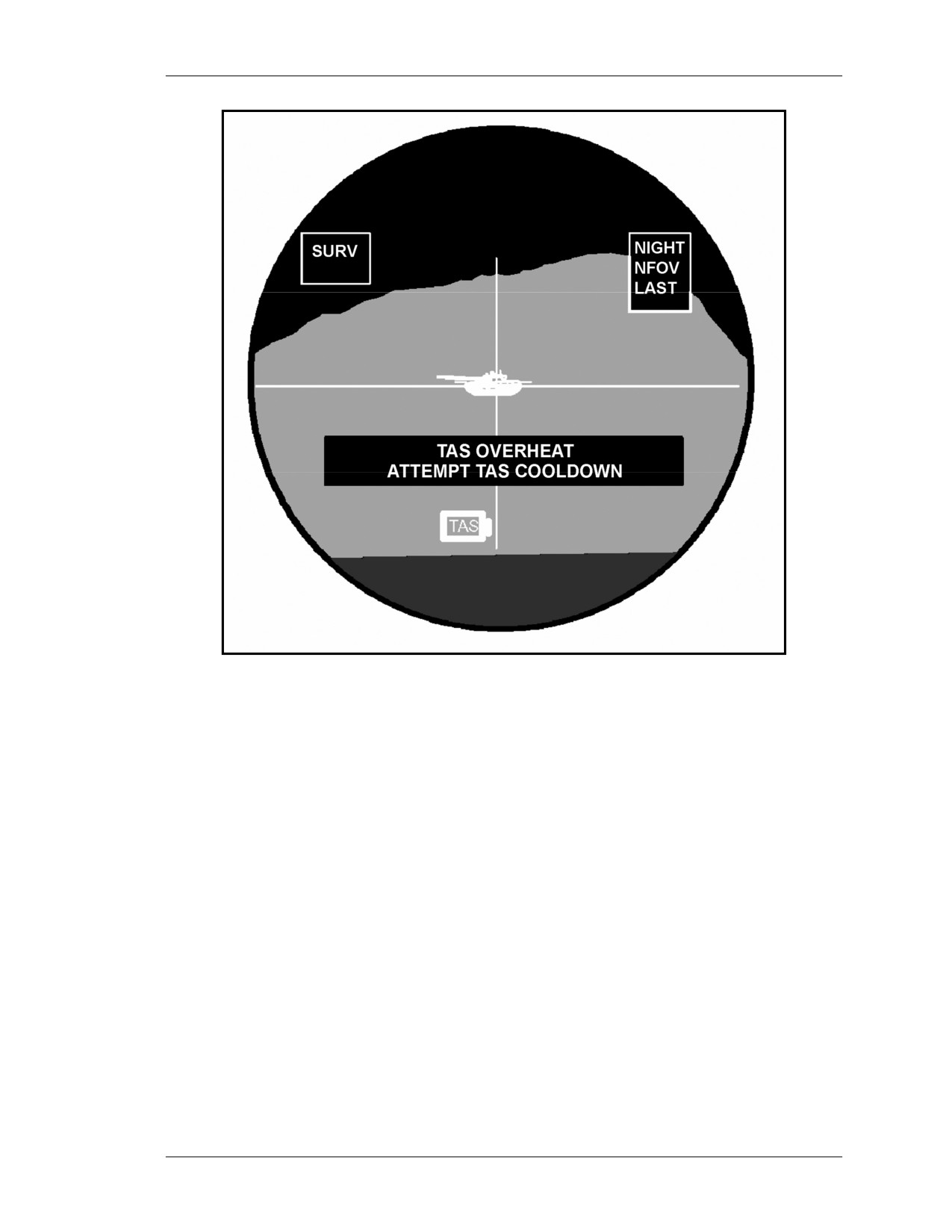
c. TAS OVERHEAT - ATTEMPT TAS COOLDOWN. This message appears
when a temperature sensor in the TAS says the TAS is getting too hot (Figure E-3).
Follow the same corrective procedures as for the FCS.
E-4
8 July 2005
FM 3-22.32
Figure E-3. TAS overheat message.
d. SELECT NVS BEFORE SELECTING TARGET TRACKER. This message
appears when the TRK GATE switch is pressed in the daysight mode. To correct, select
the NVS mode before attempting to use the TRK GATE switch.
NOTE: The FCS tracker uses NVS video to form its contour map. When the gunner
views NVS video, he can specify exactly what the target should be with the
track gates.
e. FOV CHANGE NOT ALLOWED DURING TARGET TRACKER USE.
This message will only appear after tracker lock-on. The gunner attempts to change the
field of view by pressing the FOV switch after lock on. To correct, train the gunner not to
change the FOV after the track gates are locked on a target.
NOTE: The contour mapping tracker in the FCS assumes that the target thermal
features will remain mostly the same throughout its tracking mission. If the
field of view is changed, the target thermal features will change and cause a
break lock.
8 July 2005
E-5
FM 3-22.32
E-4. BIT MESSAGES
The gunner must not attempt to operate any switch while any of these messages are
displayed.
a. PBIT IN PROGRESS. This message is displayed anytime the gunner places the
TAS power switch in the ON position. No corrective action is necessary.
b. PBIT COMPLETE. This message is displayed when the PBIT has run to its
completion. The gunner verifies that no malfunction indicators are on in the TAS display.
(1) If no indicators are ON in the TAS display, the gunner proceeds with the mission.
(2) If this message doesn’t appear after 15 seconds or a malfunction indicator is on,
follow the System Checkout Procedures.
c. IBIT IN PROGRESS. This message appears when the gunner selects BIT on the
main menu and then selects IBIT from the BIT menu. No corrective action is necessary.
d. IBIT COMPLETE. This message is displayed when IBIT has run to its
completion. The gunner verifies that no malfunction indicators are on.
(1) If no indicators are ON in the TAS display, proceed with mission.
(2) If this message does not appear after 45 to 60 seconds or a malfunction indicator
is on, follow the system checkout procedures.
E-5. TRAINING MESSAGES
The following training messages are described herein.
a. TRAINING PBIT FAIL. This message appears if the training software cards in
the FCS are not getting enough power after raising the arming lever. No menu will be
displayed on the TAS display.
NOTE: This failure does not preclude the FCS from performing its tactical mission.
(1) Verify the failure if accessing the training mode for the first time.
(2) If the message appears during any subsequent raising of the arming lever while in
any training mode, discontinue training. The FCS must be turned in for maintenance.
b. SWITCH TO TNG MODE. This message appears during use of the FTT. The
gunner has raised the arming lever with a TMT loaded without selecting a training mode
(TES). To correct, the gunner must call up the main menu, select TNG, then select TES
from the training menu.
c. ALL TEST IN PROGRESS. This message is displayed during FTT operations
to indicate the ALL test is in progress. Upon completion of the ALL test either the ALL
TEST COMPLETE or the ALL TEST FAIL message will be displayed. No corrective
action is necessary.
(1) ALL TEST COMPLETE. This message is displayed when the ALL test has run
to its completion and did not detect any faults in the ET cards or TMT. The gunner
should proceed with the mission.
(2) ALL TEST FAIL. This message is displayed when the ALL test has run to its
completion and has detected a fault in the ET cards or TMT.
(a) To correct, the gunner should check and reseat the FTT W2 and W7 cables, then
repeat the ALL test.
(b) If the ALL TEST FAIL message repeats, the gunner discontinues the FTT
preoperational checks.
E-6
8 July 2005
FM 3-22.32
d. TMT TEST IN PROGRESS. This message is displayed during FTT operations
to indicate the TMT test is in progress. Upon completion of the TMT test either the TMT
TEST COMPLETE or the TMT TEST FAIL message will be displayed.
(1) TMT TEST COMPLETE. This message is displayed when the TMT test has run
to its completion and did not detect any malfunction in the TMT. The gunner should
proceed to the next operation.
(2) TMT TEST FAIL. This message is displayed when the TMT test has run to its
completion and has detected a fault in the TMT.
(a) To correct, the gunner should check and reseat the FTT W2 and W7 cables, then
repeat TMT test.
(b) If the TMT TEST FAIL message repeats, the gunner discontinues the FTT
preoperational checks and replaces the TMT.
e. TES MODE CONNECT TMT. This message is displayed during FTT
operations when TES MODE is selected from the training menu and the FTT software
does not detect the presence of a TMT.
(1) To correct, the gunner should check and reseat the FTT W2 and W7 cables, then
again select TES from the training menu. The gunner then exits the training menu, selects
TNG menu again from the main menu and TES from the training menu.
(2) If the TES MODE, CONNECT TMT message repeats, discontinue FTT
operations and replace the TMT.
E-6. GRIPS TEST MESSAGES
GRIPS test messages are exclusive to system checkout procedures along with
maintenance messages used by maintenance personnel to repair and maintain the
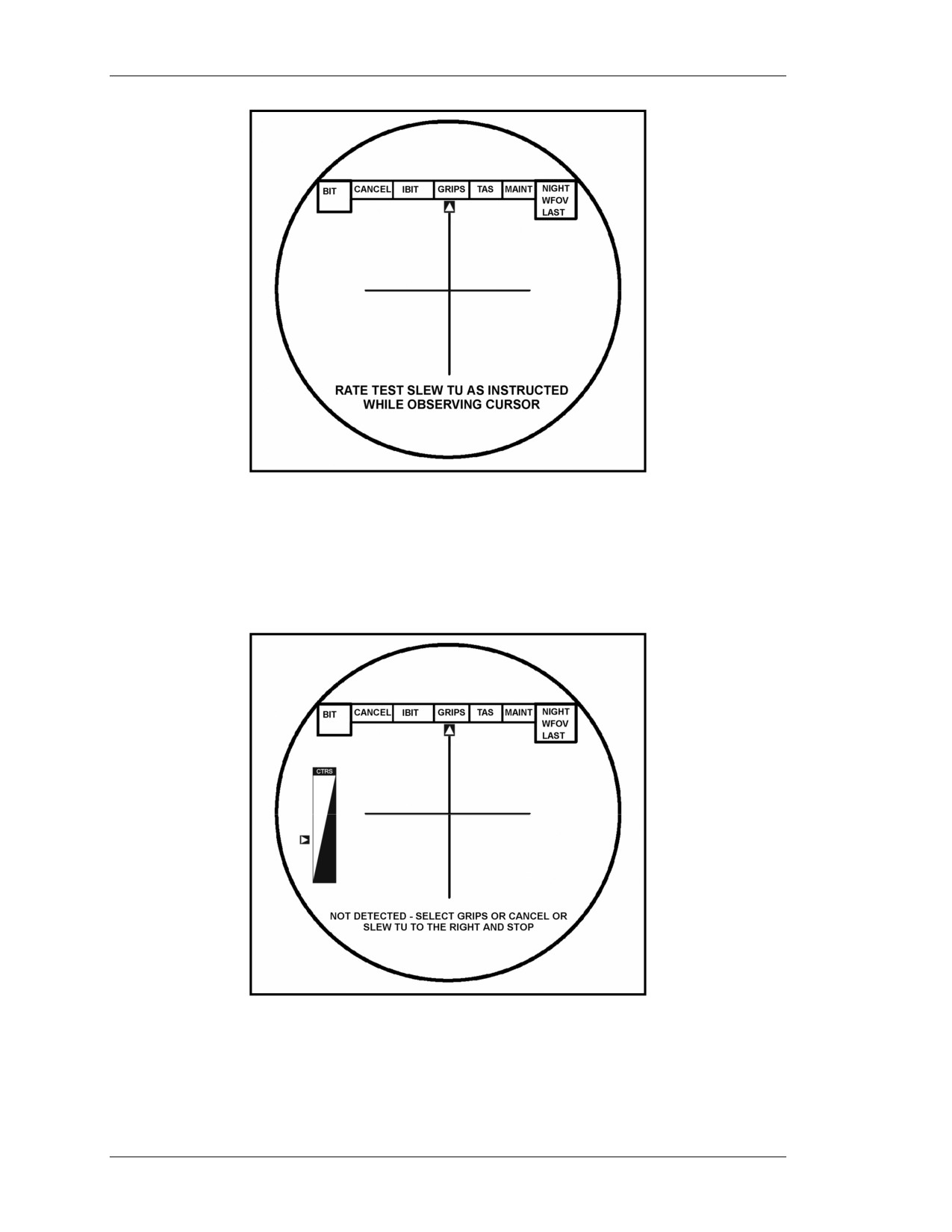
equipment. The azimuth and elevation rate test is a gunner interactive test that makes a
software check of the rate generators. The example in Figure E-4 (page E-8) is the first
prompt for the azimuth and elevation rate test. (Refer to TM 9-1425-923-12 for more
details on GRIPS test.)
8 July 2005
E-7
FM 3-22.32
Figure E-4. GRIPS test prompt.
a. A message similar to the one in Figure E-5 will appear if the software does not
detect the action required by each prompt. This message will display indefinitely until the
gunner either selects GRIPS or CANCEL or performs the action requested.
Figure E-5. Action not detected by software.
E-8
8 July 2005
FM 3-22.32
b. Selecting GRIPS tells the system that the action was performed but the software
did not detect it and signals the software to continue the GRIPS test.
c. Selecting CANCEL will abort the GRIPS test.
Section II. MALFUNCTIONS
Messages and indicators in the TAS indicate malfunctions in the TOW ITAS system.
System malfunctions are defined as a failure of a hardware component or a part of a
hardware component to operate in its intended manner.
E-7. SYSTEM BUILT-IN-TEST CAPABILITIES
Built-in tests run automatically and can be initiated by the gunner. These tests check the
system and send the gunner messages indicating that the system is operating correctly.
They identify components that are malfunctioning, and display a text message on the
TAS display, or turn on an icon that the gunner must react to appropriately.
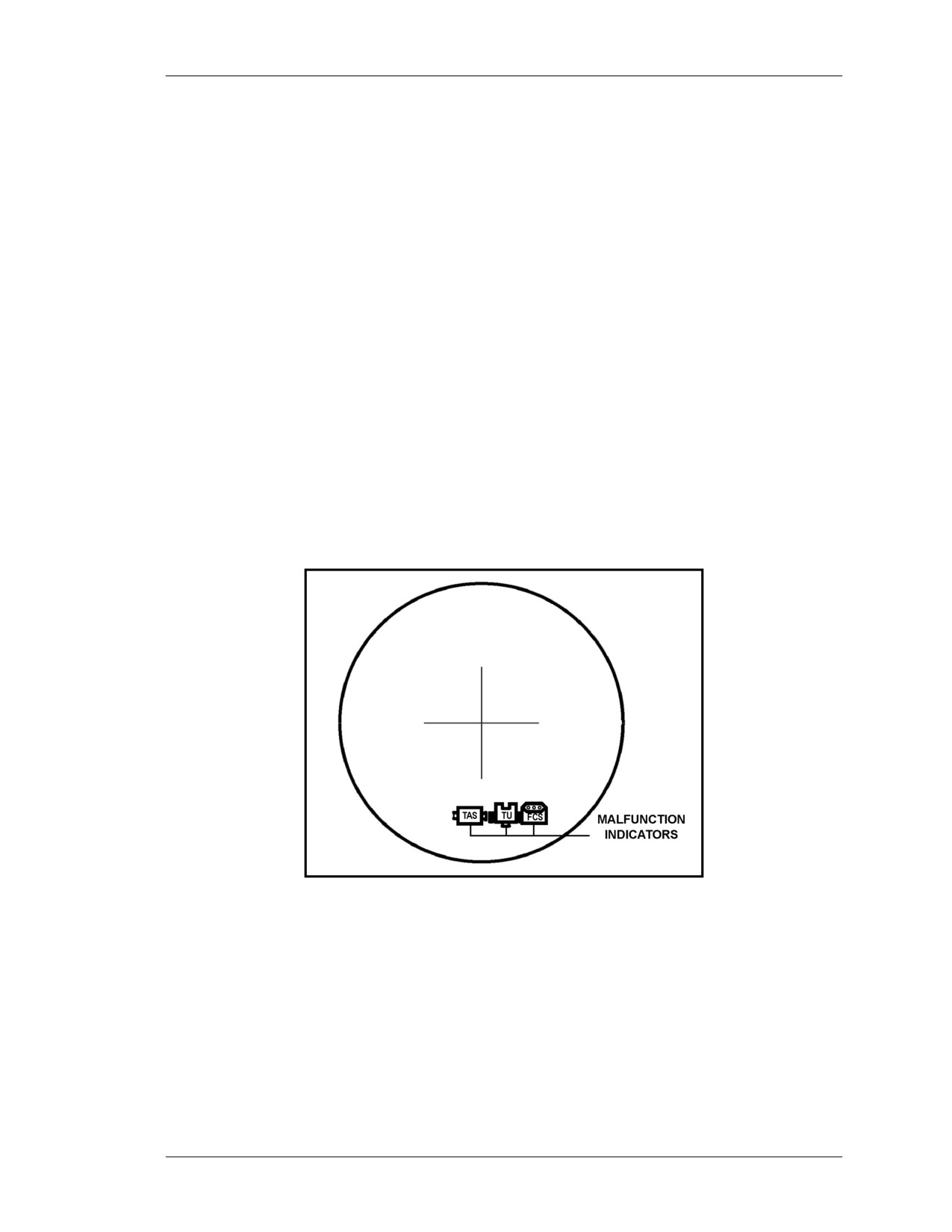
a. Power Up Built-In Test (PBIT). When the TOW ITAS is first powered up, the
PBIT procedure is automatically initiated and checks the TAS, FCS, and BPS to see if the
power supplied to each is correct. The test lasts for approximately fifteen seconds and
shows the results on the TAS display upon completion. A PBIT failure will be indicated
when the appropriate indicator on the TAS display is illuminated (Figure E-6).
Figure E-6. Malfunction indicators.
b. Initiated BIT (IBIT). After selecting BIT from the main menu, the gunner selects
IBIT from the BIT menu. The IBIT test performs a detailed check of the TAS and FCS
components lasting 45 to 60 seconds. The TAS cannot conduct the IBIT if a missile is
loaded and armed. The gunner must lower the arming lever to conduct IBIT with a
missile loaded.
c. Continuous Built-In Test (CBIT). While the TOW ITAS is in operation, the
CBIT monitors the functions of the TOW ITAS components. All failures detected by the
CBIT are indicated by lighting the appropriate indicator on the TAS display.
8 July 2005
E-9
FM 3-22.32
E-8. TAS MALFUNCTIONS AND CORRECTIVE ACTIONS
This paragraph describes the causes of various problems with the TAS and ways to
correct them.
a. TAS Indicator on in the TAS Display. If the TAS indicator is ON in the TAS
display, CBIT has detected a TAS fault during system operation. It may also be a false
indicator.
(1) Based on the tactical situation and the squad leader’s guidance, the gunner
complies with the corrective actions described to verify the problem. If it is a false
indicator, one of the corrective actions will correct the problem. If at the end of all
corrective actions the indicator remains ON, then the system is deadlined.
(2) Corrective actions for this problem are as follows:
(a) Place the power switch in the STANDBY position, then back to ON. If after
completion of PBIT the indicator is OFF, continue with the mission. If after completion
of PBIT the indicator is still ON, proceed to the next step.
(b) Perform the IBIT.
• If the TAS indicator remains ON at the completion of IBIT, discontinue the
mission. Notify the squad leader that you have a TAS failure.
• If TAS indicator is not ON at the completion of IBIT, proceed to
boresighting.
(c) Perform boresighting procedures.
• If the TAS indicator comes back on at the completion of boresighting, or if the
system fails boresighting for any reason, notify the squad leader that you have
a TAS failure.
• If the TAS indicator is not ON at the completion of boresighting, proceed to
GRIPS test.
(d) Perform the GRIPS test.
• If the TAS indicator comes back on at the completion of the GRIPS test or if
the system fails the GRIPS test for any reason, notify the squad leader that
you have a TAS failure.
• If the TAS indicator is not ON at the completion of the grips test, continue the
mission.
b. No TAS Display. If there is no TAS display, the TAS is not getting power. Check
the TAS installation on the TU and the FCS and BPS cable connections. If there is still no
display, notify the squad leader.
c. Degraded TAS Display. On a degraded TAS display, the video may be too light,
too dark, or distorted, or the symbols may be wrong.
(1) If the NVS video is too light, too dark, or distorted the NVS is not optimized.
Take the following corrective actions:
• Adjust the brightness and contrast.
• Use the daysight if visibility conditions permit.
• Replace the TAS at the earliest opportunity.
NOTE: In an emergency, during daylight hours, the target can still be engaged if the
daysight crosshairs are present.
E-10
8 July 2005
FM 3-22.32
(2) If the NVS video is OK but the symbols are not right, the symbology circuits are
not working. Take the following corrective actions:
• Use the daysight if visibility conditions permit.
• Replace the TAS at the earliest opportunity.
d. NVS NOT COOL Indicator Stays On and the TAS Indicator is Lit. If the
NVS NOT COOL indicator takes longer than 15 minutes to go out and the TAS indicator
is lit, the SADA II cooler is not cooling the NVS detectors down to their operating
temperature. Take the following corrective actions:
• Check to see if the sun is shining directly on the SADA II cooler or if the
airflow around the SADA II cooler is blocked. Shade the SADA II cooler and
remove any object blocking the airflow around it.
• If the NVS has not cooled by the end of 15 minutes, replace the TAS.
NOTE: If the NVS cools but it takes longer than 15 minutes, the system will work
with the TAS indicator on, but the TAS will soon reach the point where it will
never cool down and it should be replaced at the earliest opportunity.
e. TOW ITAS Powers Down Due to Low BPS Power. Failure to charge the BPS
within 30 minutes after receiving the message CHARGE BPS NOW or defective internal
batteries will cause the ITAS to power down. Take the following corrective actions:
(1) Power down the ITAS, start the vehicle’s engine, and repeat the power-up
procedures.
(2) Turn the BPS function switch to BIT.
• If the BIT FAIL message is displayed, turn the BPS in for maintenance.
• If the BIT PASS message is displayed, turn on the FCS and TAS.
(3) After TAS power-up—
• Check to ensure the BPS INTERNAL message is not displayed. If it is, the
HMMWV’s charging system needs maintenance.
• Read the BPS capacity, then wait 10 minutes to ensure BPS capacity is
increasing.
• Read BPS capacity again in 20 minutes to ensure capacity is still increasing. If
it is not, the BPS has a defective internal battery and needs to be replaced.
f. TAS OVERHEAT - ATTEMPT TAS COOLDOWN. If this message appears,
the TAS is getting too hot. For corrective actions, refer to paragraph E-3.
g. TAS TEMPERATURE HAS CHANGED - PERFORM BORESIGHT. If this
message appears, a temperature change of more than 18 degrees Fahrenheit (10 degrees
centigrade) has occurred. For corrective actions, refer to paragraph E-3.
h. UNABLE TO BORESIGHT - MAINTENANCE REQUIRED. If this message
appears, the FCS cannot obtain a stable reading. For corrective actions, refer to
paragraph E-3.
E-9. FCS MALFUNCTIONS AND CORRECTIVE ACTIONS
This paragraph describes the causes of various problems with the FCS and ways to
correct them.
8 July 2005
E-11
FM 3-22.32
a. FCS Indicator on in the TAS Display. If the FCS indicator is on in the TAS
display, the CBIT has detected an FCS fault during system operation. It may also be a
false indicator.
(1) Based on the tactical situation and the squad leader’s guidance, the gunner
complies with the corrective actions described to verify the problem. If it is a false
indicator, one of the corrective actions will correct the problem. If at the end of all
corrective actions the indicator remains ON, then the system is deadlined.
(2) Corrective actions for this problem are as follows:
(a) Place the power switch in the STANDBY position, then back to ON. If after
completion of PBIT the indicator is OFF, continue with the mission. If after completion
of PBIT the indicator is still ON, proceed to the next step.
(b) Perform the IBIT.
• If the FCS indicator remains ON at the completion of IBIT, discontinue the
mission. Notify the squad leader that you have an FCS failure.
• If the FCS indicator is not ON at the completion of IBIT, proceed to
boresighting.
(c) Perform boresighting procedures.
• If the FCS indicator comes back on at the completion of boresighting, or if the
system fails boresighting for any reason, notify the squad leader that you have
an FCS failure.
• If the FCS indicator is not ON at the completion of boresighting, proceed to
the GRIPS test.
(d) Perform the GRIPS test.
• If the FCS indicator comes back on at the completion of the GRIPS test or if
the system fails the GRIPS test for any reason, notify the squad leader that
you have an FCS failure.
• If the FCS indicator is not ON at the completion of the GRIPS test, continue
the mission.
b. No TAS Display, FCS BIT Lamp Comes On and Stays On. If there is no TAS
display or the FCS BIT lamp comes on and stays on, a fault has been detected in the FCS.
To correct, replace the FCS.
c. FCS OVERHEAT - ATTEMPT FCS COOLDOWN. If this message appears,
there is inadequate air circulation or a heat sensor has malfunctioned. For corrective
actions, refer to paragraph E-3.
E-10. BPS MALFUNCTIONS AND CORRECTIVE ACTIONS
This paragraph describes the causes of various problems with the BPS and ways to
correct them.
a. CHARGE BPS NOW. If this message appears, the BPS has 30 minutes of power
remaining. For corrective actions, refer to paragraph E-3.
b. BPS Will Not Power Up. If the BPS will not power up, possible causes could be
a blown fuse, a faulty internal battery, or a faulty circuit card. To correct, remove and
replace fuse F1 and attempt to power up the system again. Discontinue operations and
replace the BPS if it still does not power up.
E-12
8 July 2005
FM 3-22.32
c. Results of BIT Not Passed to Gunner. If results of BIT cannot be passed to the
gunner, no power is being provided to the TAS, or the system has failed BPS PBIT or
system PBIT. Take the following corrective actions:
(1) Power down the TOW ITAS. Power up following the correct procedure.
(2) Check all cable connections.
• Ensure the TAS mount coupling clamp is closed and TAS mount locking
collar is engaged.
• Ensure the TU coil cable is connected to the FCS J2 connector.
• Ensure the interface cable is connected to the FCS J1 and BPS J2 connectors.
(3) Attempt to power up again. If there is still no power, report to the squad leader.
E-11. TRAVERSING UNIT MALFUNCTIONS AND CORRECTIVE ACTIONS
This paragraph describes the causes of various problems with the TU and ways to correct
them.
a. TU Indicator on in the TAS Display. If the TU indicator is on in the TAS
display, the CBIT has detected a TU fault during system operation. It may also be a false
indicator.
(1) Based on the tactical situation and the squad leader’s guidance, the gunner
complies with the corrective actions described to verify the problem. If it is a false
indicator, one of the corrective actions will correct the problem. If at the end of all
corrective actions the indicator remains ON, then the system is deadlined.
(2) Corrective actions for this problem are as follows:
(a) Place the power switch in the STANDBY position, then back to ON. If after
completion of PBIT the indicator is OFF, continue with the mission. If after completion
of PBIT the indicator is still ON, proceed to the next step.
(b) Perform the IBIT.
• If the TU indicator remains ON at the completion of IBIT, discontinue the
mission. Notify the squad leader that you have a TU failure.
• If the TU indicator is not ON at the completion of IBIT, proceed to
boresighting.
(c) Perform boresighting procedures.
• If the TU indicator comes back on at the completion of boresighting, or if the
system fails boresighting for any reason, notify the squad leader that you have
a TU failure.
• If the TU indicator is not ON at the completion of boresighting, proceed to the
GRIPS test.
(d) Perform the GRIPS test.
• If the TU indicator comes back on at the completion of the GRIPS test or if
the system fails the GRIPS test for any reason, notify the squad leader that
you have a TU failure.
• If the TU indicator is not ON at the completion of the GRIPS test, continue
the mission.
b. Handgrip Switches Do Not Respond. If the handgrip switches do not respond
when activated during LRF use, BCF adjustments, or track gate adjustments, the TAS
software has not received the switch activation. Take the following corrective actions:
(1) Lower the arming lever if it is raised.
8 July 2005
E-13

FM 3-22.32
(2) Turn the TAS power switch to STANDBY momentarily and then back to ON to
initiate the PBIT.
(3) If PBIT passes, perform the GRIPS test. If the GRIPS test passes, continue the
mission. If the GRIPS test fails, notify the squad leader
and refer to Table E-1 for
guidance.
(4) If PBIT fails, turn the system in.
ORGANIZATIONAL
HANDGRIP
OPERATOR ACTION
DETECTED
GUIDANCE
SWITCH
(IF NOT DETECTED
(IF NOT DETECTED)
FLTR
YES / NO
Proceed to operator checks; notify
N/A
squad leader.
FOV
YES / NO
Proceed to operator checks; notify
Targets can still be engaged in the
squad leader.
FOV available. Selection between
wide and narrow FOVs is not
available.
SGT SEL
YES / NO
Proceed to operator checks; notify
Targets can still be engaged using
squad leader.
the available sight. Selection
between the daysight and NVS is
not available.
BCF
YES / NO
Proceed to operator checks; notify
Targets can still be engaged with
BCF Up
YES / NO
squad leader.
the NVS if the display is
BCF Down
satisfactory, or can be engaged
YES / NO
with the daysight. BCF cannot be
adjusted and zoom capability is not
available.
LRF
YES / NO
Proceed to operator checks; notify
Targets can still be engaged if
squad leader.
range to target can be determined
using passive ranging capabilities.
Conformation of active laser
ranging is not available.
FIRST/ LAST
YES / NO
Proceed to operator checks; notify
Targets can still be engaged if
squad leader.
range to target can be determined
using passive ranging capabilities.
Conformation of active laser
ranging is not available.
TRK GATE
YES / NO
Proceed to operator checks; notify
Targets can still be manually
squad leader.
engaged. Aided target tracking
capabilities are not available.
GATE ADJ
Proceed to operator checks; notify
Targets can still be manually
Right
YES / NO
squad leader.
engaged. Aided target tracking and
GATE ADJ
passive ranging capabilities are
Left
YES / NO
not available.
GATE ADJ
Up
YES / NO
GATE ADJ
Down
YES / NO
L and R
YES / NO
Proceed to operator checks; notify
Targets can still be engaged if
Handgrip
squad leader.
handgrips can be adjusted
Release
satisfactorily for the operator to
perform tracking.
Fire Trigger
YES / NO
Discontinue system checkout.
Replace traversing unit. Missile
launch capability not available.
Table E-1. Traversing unit handgrip switch test guidance.
E-14
8 July 2005
FM 3-22.32
E-12. MISSILE FAULT
A missile fault is a missile malfunction that occurs after the fire trigger is pressed. The
missile faults are hangfire and misfire.
a. Hangfire Procedures. A hangfire is an unexpected delay in the functioning of a
series of ammunition components. It may occur anywhere in the series of events, from
pulling the firing trigger to launch motor ignition. After the trigger is pulled, the
distinctive impulse of the squibs firing to activate the missile batteries and gyro and the
gyro spin noise can be heard.
(1) If the missile fails to fire, alert the crew by announcing HANGFIRE.
(2) Continue to track the target for one minute.
(3) Lower the arming lever.
(4) Lock the ITAS in the 8-degree down position.
(5) Open the bridge clamp and remove the missile from the launch tube.
(6) Keeping the missile pointed toward the engagement area, move the missile a safe
distance away from the firing position (minimum 100 meters).
(7) Hangfire procedures for training only are:
(a) Wait 30 minutes before attempting to remove the missile.
(b) On a firing range keep the missile pointed downrange at all times. Move the
missile a safe distance away
(minimum 100 meters) and place it on the ground,
preferably in a dud pit. Notify EOD personnel.
b. Misfire Procedures. A misfire (complete failure to fire) occurs if the launch
motor fails to ignite after the fire trigger is pressed. This type of failure may be caused by
a faulty firing circuit, a failure of electrical power, poor electrical connections, short
circuits, or by faulty components in the ignition or propellant systems. When the missile
fails to launch and the prefire functions are not heard, the condition is misfire.
NOTE: The elevation brake makes a sound during missile launch. Do not confuse this
sound with a hangfire indication.
(1) If the missile fails to fire, pull the fire trigger again and continue to track the
target for one minute.
(2) Alert the crew by announcing MISFIRE.
(3) Continue to track the target for one minute.
(4) Lower the arming lever.
(5) Lock the ITAS in the 8-degree down position.
(6) Check the FCS to ensure the coil cable connector is properly attached to the J1
connector on the FCS. Turn the coil cable connector locknut clockwise until tight to
make sure it is locked in place.
(7) Check the bridge clamp to verify it is seated.
(8) Check the backblast area to ensure no personnel are in the danger zone.
(9) Raise the arming lever. Ensure the umbilical connector makes contact with the
missile electrical connector.
(10) Pull the fire trigger again.
(11) If the missile still fails to launch, announce MISFIRE and continue to track the
target for one minute.
(12) Lower the arming lever.
8 July 2005
E-15
FM 3-22.32
(13) Lock the ITAS in the 8-degree down position.
(14) Open the bridge clamp.
(15) Remove the missile from the launch tube.
(16) Keeping the missile pointed toward the engagement area, move the missile a
safe distance away from the firing position (minimum 100 meters).
(17) Misfire procedures for training only are:
(a) Wait 30 minutes before attempting to remove the missile.
(b) On a firing range, keep the missile pointed downrange at all times. Move the
missile a safe distance away
(minimum 100 meters) and place it on the ground,
preferably in a dud pit. Notify EOD personnel.
E-13. DESTRUCTION PROCEDURES
ITAS crewmembers must recognize and overcome performance problems and limitations
to survive in battle. Each unit develops and maintains an SOP for the proper destruction
of ammunition, dunnage, and weapon systems.
E-16
8 July 2005
FM 3-22.32
GLOSSARY
AA
avenue of approach
AAR
after-action review
AC
alternating current
ADA
air defense artillery
APC
armored personnel carrier
ASAP
as soon as possible
ASP
ammunition supply point
ATGM
antitank guided missile
ATT
aided target tracking
ATWESS
antitank weapon effect signature simulator
BCF
brightness, contrast, focus
BDA
battle damage assessment
BDU
battle dress uniform
BIT
built-in test
BPS
battery power source
BST
basic skills trainer
CARC
chemical agent resistant coating
CBIT
continuous built-in test
CGP
commander’s ground pointer
CMF
career management field
DA
Department of the Army
DC
direct current
DNFOV
daysight narrow field of view
DWFOV
daysight wide field of view
EFP
explosively formed projectile
EOD
explosive ordnance disposal
ET
embedded training
FCS
fire control system
FM
field manual
FOSD
fly over/shoot down
FOV
field of view
FTT
field tactical trainer
GRP
gunner’s reference point
GST
Gunner’s Skill Test
HIC
HMMWV interface cable
HMMWV
high mobility, multiwheeled vehicle
8 July 2005
Glossary-1
FM 3-22.32
I2R
imaging infrared
IBIT
initiated built-in test
IR
infrared
ITAS
Improved Target Acquisition System
LOS
line of sight
LRF
laser range finder
MBT
main battle tank
MEL
maximum engagement line
METL
mission-essential task list
METT-TC
mission, enemy, terrain, time, troops, civil considerations
MGS
missile guidance set
MILES
Multiple Integrated Laser Engagement System
MRE
meals ready-to-eat
MSR
missile simulation round
MWO
modification work order
NBC
nuclear, biological, and chemical
NCO
noncommissioned officer
NCOES
Noncommissioned Officer Education System
NFOV
narrow field of view
NVG
night vision goggles
NVS
night vision sight
OES
Officer Education System
OSUT
one-station unit training
PBIT
power up built-in test
PMCS
preventive maintenance checks and services
POI
program of instruction
ROE
rules of engagement
SADA
standard advanced dewar assembly
SAO
sensor acquired object
SFCS
simulated fire control system
SOP
standing operating procedures
STAS
simulated tactical acquisition system
STX
situational training exercise
Glossary-2
8 July 2005
FM 3-22.32
TES
target engagement simulation
TEWT
tactical exercise without troops
TFTT
TOW field tactical trainer
TM
technical manual
TMDE
test, measurement, and diagnostic equipment
TMT
training missile tube
TOW
tube-launched, optically tracked, wire-guided
TRP
target reference point
TU
traversing unit
U.S.
United States
V
volt
WFOV
wide field of view
8 July 2005
Glossary-3