FM 3-22.32 IMPROVED TARGET ACQUISITION SYSTEM, M41 (July 2005) - page 2
FM 3-22.32
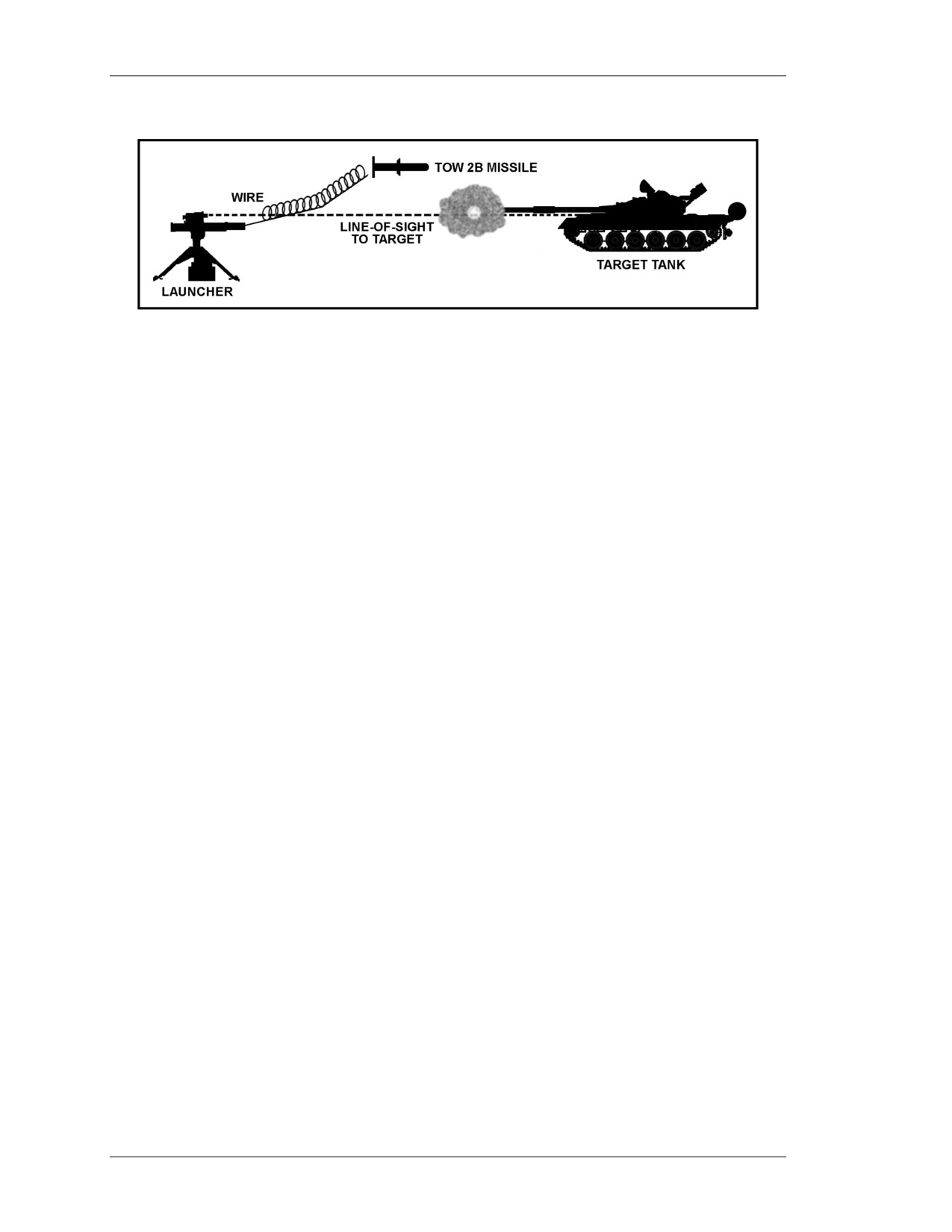
Figure 1-35. FOSD missile flight path.
(2) The Improved Target Acquisition System
(ITAS) and Improved Bradley
Acquisition System (IBAS) launchers can fly the TOW 2B on the line of sight, allowing
the missile to be used as a direct attack missile. If this mode is selected by the gunner
while using the ITAS or IBAS, the gunner must still maintain the crosshairs on the center
of mass of the target.
c. Summary. The TOW gunner must always keep the crosshairs on the center of
mass of the target, no matter which TOW missile is being used.
1-11. OPERATION UNDER UNUSUAL CONDITIONS
Knowing how environmental conditions will affect the operation and performance of the
TOW missile is important.
a. Cold Weather. Check for ice and snow on the encased missiles. Ice and snow
should not be allowed to collect on the encased missile. The missiles should remain in the
overpack or under cover before loading onto the tactical vehicle.
NOTE: The TOW Weapon System will not operate properly below -31.7 degrees
Centigrade (-25 degrees Fahrenheit).
b. Hot Weather. Avoid exposing the encased missiles to prolonged direct sunlight
during hot weather. The TOW missiles should be protected from heat and direct sunlight.
Tarpaulins, brush, and anything that provides shade may be used as protection if shelter is
not available.
NOTE: The TOW Weapon System will not operate properly above +60 degrees
Centigrade (+140 degrees Fahrenheit).
c. High Humidity. The TOW missile will operate regardless of the humidity.
However, moisture must be kept out of the encased missile. Checking the humidity
indicator at prescribed intervals ensures no moisture is in the encased missile. Avoid
exposing the encased missiles to rain, snow, or hail when not engaged in operations.
Avoid getting moisture into the electrical connector.
d. Air Pressure. The air is thinner at higher altitudes, which will require more time
for the missile to correct for a steering error than for the same steering error at a lower
altitude. Since the launcher automatically adjusts for altitude, the gunner only has to tack
1-36
8 July 2005
FM 3-22.32
the target through the sighting system. The TOW missile will operate properly up to an
altitude of 10,000 feet (3,048 meters).
e. High Winds. Firing a missile into a high crosswind can cause slight guidance
problems. The TOW Weapon System will automatically adjust for the effects of
crosswinds on the TOW missile. If possible, targets should be selected that are up- or
downwind of the launcher. The TOW missile should not be fired in winds that exceed
45 miles per hour, if at all possible.
f. Over Water. The range of the TOW missile is limited when firing over water or
if the guide wires are close to or in the water. The more wire that lays in the water, the
shorter the range of the missile will be. If firing over water is required, firing the missile
from an elevated position is best—the height of the launcher will keep more of the wire
out of the water as the missile flies to the target. The higher the firing position, the greater
the range will be. TOW 2 missiles may be fired over 800 meters of water with a range to
target of 3,350 meters. If 1,100 meters of wire is in the water, the range will be limited to
1,300 meters.
g. Smoke and Fire Areas. Smoke does not limit the range or accuracy of the TOW
missiles. A fire, on the other hand, can burn through the command wire causing loss of
control of the missile. Avoid firing through or over fires if there is a chance of the
command wire being damaged before missile impact.
h. Side Slope. Do not fire the TOW missile if the side slope of the launcher is
greater than 10 degrees—missile guidance will not be as accurate.
WARNING
Do not fire the TOW missile so that the command
wires come in contact with electrical wires. If the
command wires touch an electrical power line,
injury to personnel or damage to the launcher
may occur.
1-12. DESTRUCTION
Refer to TM 9-1410-470-34 for demolition of TOW missiles under controlled conditions,
and to TM 750-244-4-2 for demolition to prevent enemy use. After a TOW missile
reaches the specified shelf life, return the missile to the ammunition control point for
disposition.
1-13. DUTIES AND RESPONSIBILITIES
The three-man crew consists of the squad leader, the gunner, and the driver-loader. The
duties and responsibilities of each crewmember are discussed herein.
a. Squad Leader. The squad leader is responsible for the combat readiness and
tactical employment of his squad, which includes discipline, health and welfare, training,
and maintenance of equipment and weapons. Other specific duties include:
• Directing the driver over the exact route.
• Detecting and identifying targets.
• Issuing fire commands.
8 July 2005
1-37
FM 3-22.32
• Controlling fire and movement.
• Supervising and assisting in dismounting and assembly of the M41 ITAS.
• Employing the squad according to the orders of the section leader.
• Selecting primary, alternate, and supplementary firing positions.
• Requesting squad resupply.
• Informing the section leader of events that affect the tactical situation and of
the status of his crew.
• Carrying the tripod, launch tube, and binoculars when the ITAS is used in the
ground mode.
• Acting as the gunner, when needed.
• Assisting the gunner in system check-out procedures.
• Supervising construction of the ITAS firing position.
• Determining the direction of fire.
b.
Gunner. Specific duties of the gunner include:
• Conducting system check-out procedures.
• Acquiring, recognizing, and identifying targets.
• Determining if a target can be engaged.
• Engaging targets.
• Recognizing and eliminating firing-angle limitations.
• Adjusting the gunner’s platform before stowing the FCS.
• Mounting the FCS, TAS, and traversing unit.
• Preparing range cards for the ITAS.
• Removing the TAS, launch tube, traversing unit, and FCS when the ITAS is
used in the ground mode.
• Carrying the FCS and TAS to the firing position when the ITAS is used in the
ground mode.
c.
Driver-Loader. The driver-loader is a dual-purpose position in the M1121 ITAS
squad. Specific duties of the driver-loader include:
• Driving the M1121.
• Maintaining the vehicle.
• Camouflaging the vehicle.
• Carrying the traversing unit, encased missile, and BPS to the firing position
when the ITAS is used in the ground mode.
• Securing the area.
• Stowing BPS, encased missiles, and tripod on the M1121 with the assistance
of the squad leader.
• Maintaining radio equipment.
• Removing misfired missiles.
• Loading encased missile.
1-38
8 July 2005
FM 3-22.32
Chapter 2
CONTROLS AND INDICATORS
The ITAS controls and indicators allow the gunner to perform and
monitor all operations of the system. This chapter is an overview of these
controls and indicators.
2-1.
TRIPOD INDICATORS
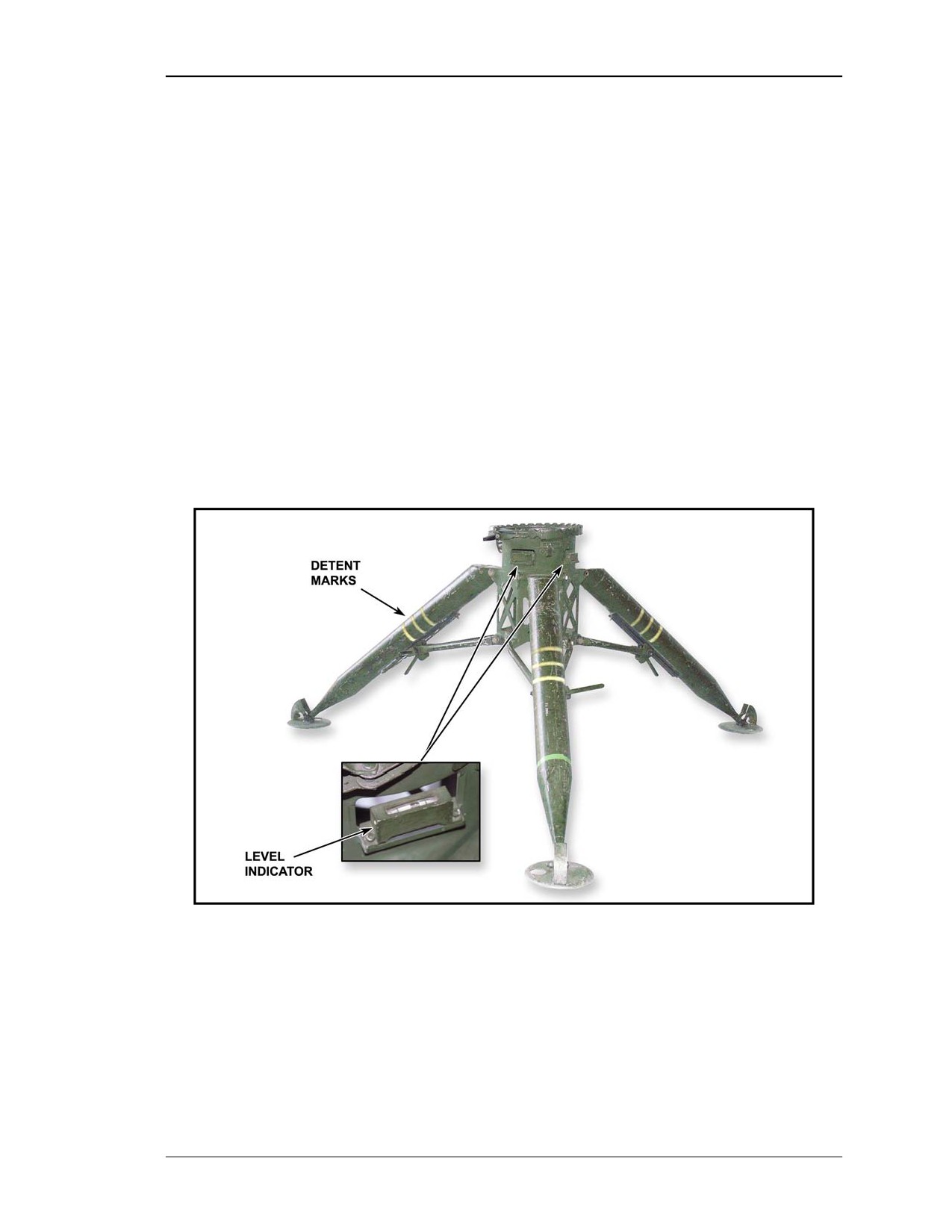
Tripod indicators include the level indicators and the detent stop markings.
a. Level Indicators. The two level indicators on the tripod indicate when the tripod
is level. They are helpful when trying to set up the system on uneven terrain.
(Figure 2-1).
b. Detent Stop Markings. These markings on each leg denote three adjustable
height positions for assembly. The detent automatically locks into each position,
beginning with the lowest, as the operator lifts up on the tripod body to adjust the height
(Figure 2-1).
Figure 2-1. Tripod indicators.
8 July 2005
2-1
FM 3-22.32
2-2.
TRAVERSING UNIT CONTROLS
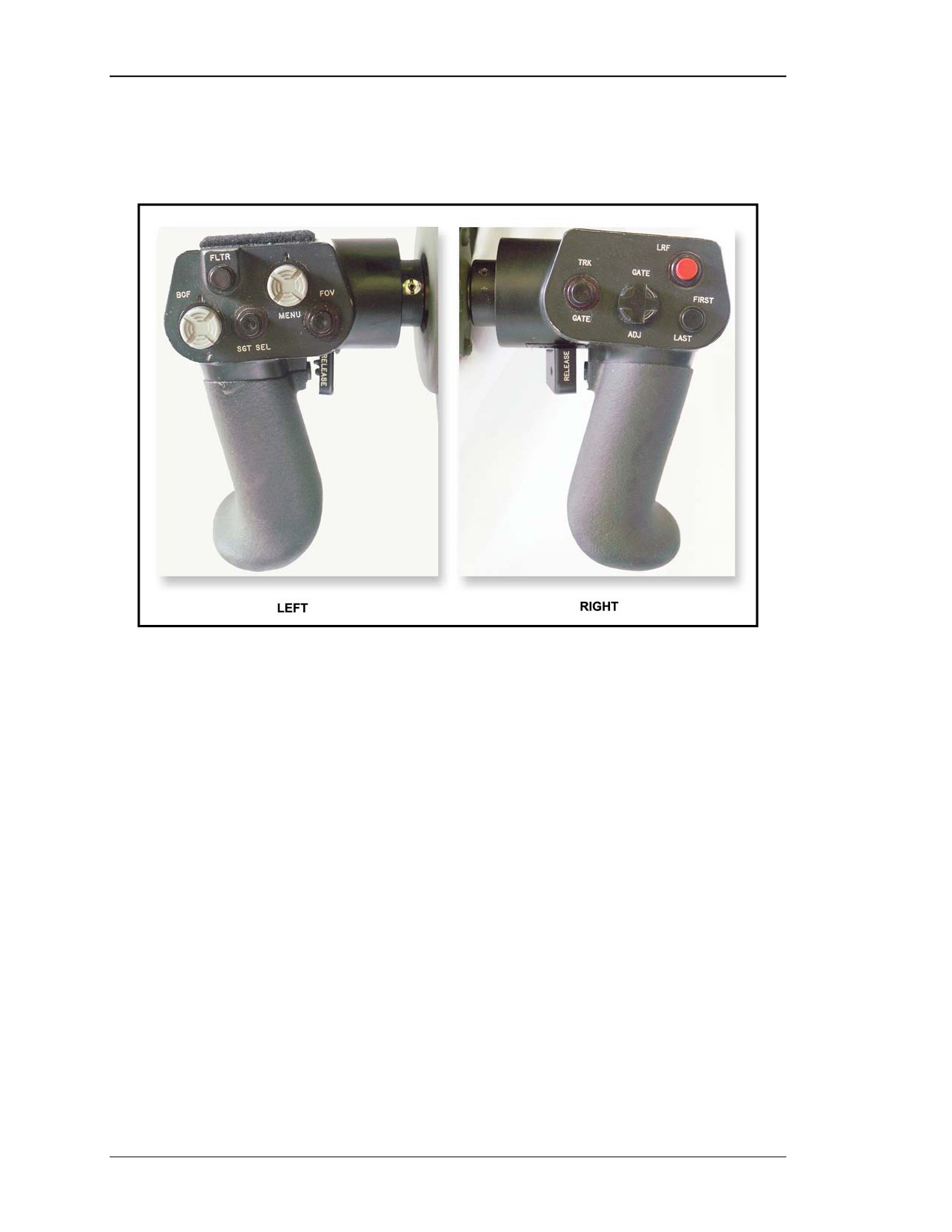
The TU has a left and a right handgrip, which together house the control switches for
gunner operation of the ITAS (Figure 2-2).
Figure 2-2. Left and right handgrips.
a. Left Handgrip Controls. The top of the left handgrip has five control switches,
which allow the gunner to conduct surveillance, activate the filter system, and adjust the
NVS brightness, contrast, and focus.
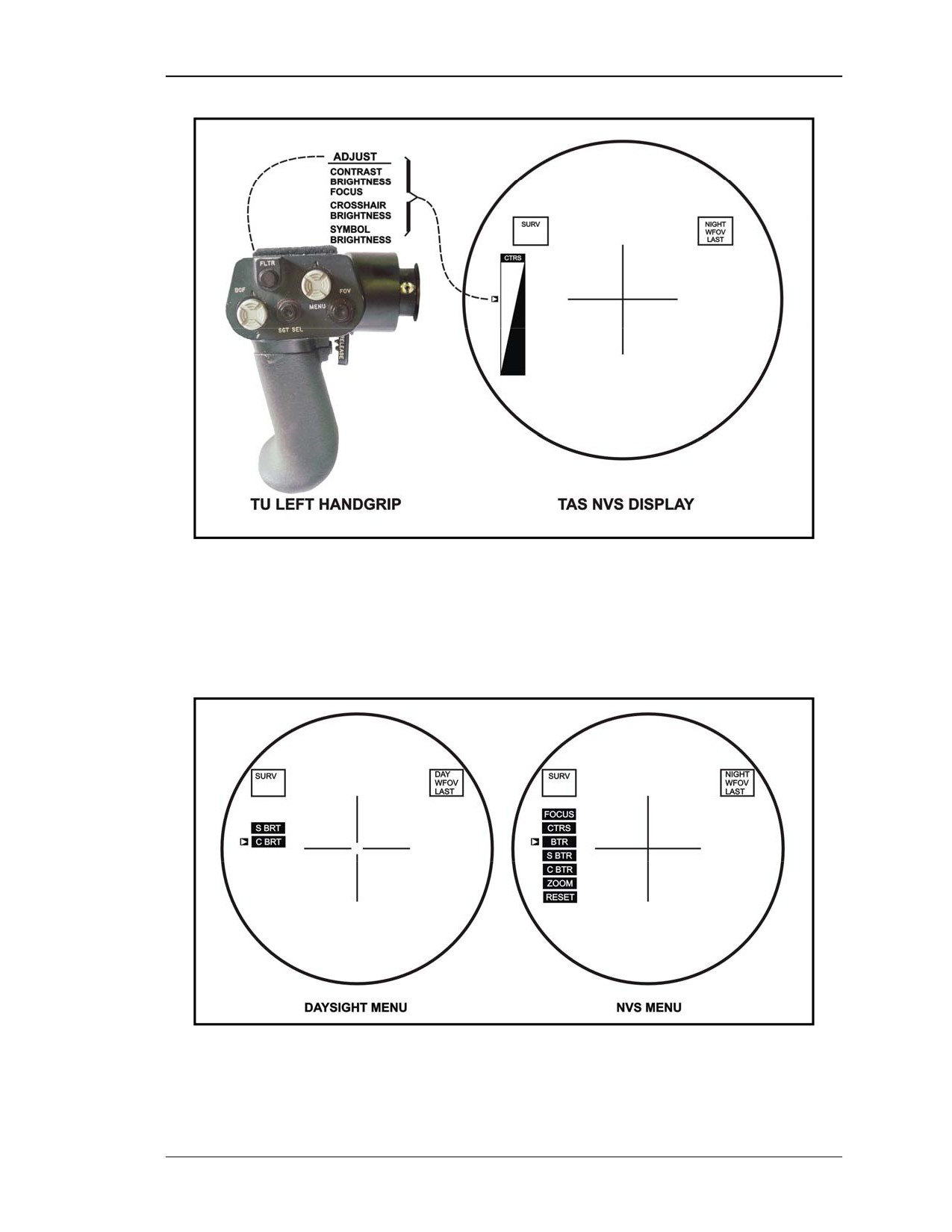
(1) Brightness, Contrast, and Focus (BCF) Switch (Figure 2-3). The BCF switch is
a push-button toggle used to adjust the symbol brightness and the crosshair brightness
when using the daysight. When using the NVS, the BCF is used to adjust the TAS display
brightness, contrast, and focus. Symbol brightness, crosshair brightness, zoom, and
adjustment reset can be selected.
2-2
8 July 2005
FM 3-22.32
Figure 2-3. BCF switch and TAS display.
(a) Pressing the BCF switch one time will bring up the BCF menu (Figure 2-4).
Toggling the BCF switch up or down moves the selection cursor up or down in the menu.
This menu will terminate after five seconds if no input is received.
Figure 2-4. BCF menu.
8 July 2005
2-3
FM 3-22.32
(b) When the desired adjustment is indicated, pushing the switch again will select the
adjustment. After selecting the function for adjustment, toggling the BCF switch up
increases the adjustment and toggling the switch down decreases the adjustment. The
BCF adjustment indicator is shown on the left side of the display with a small cursor
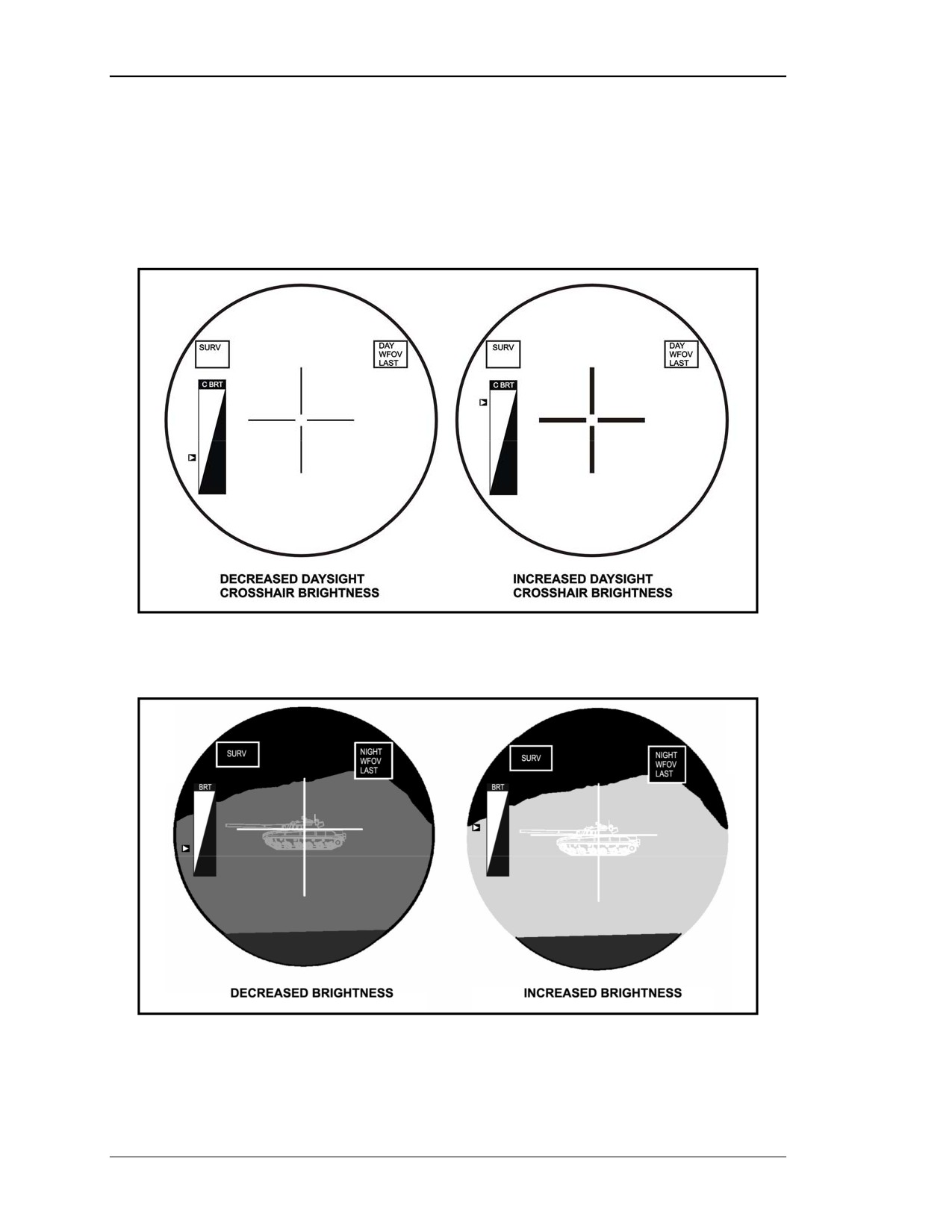
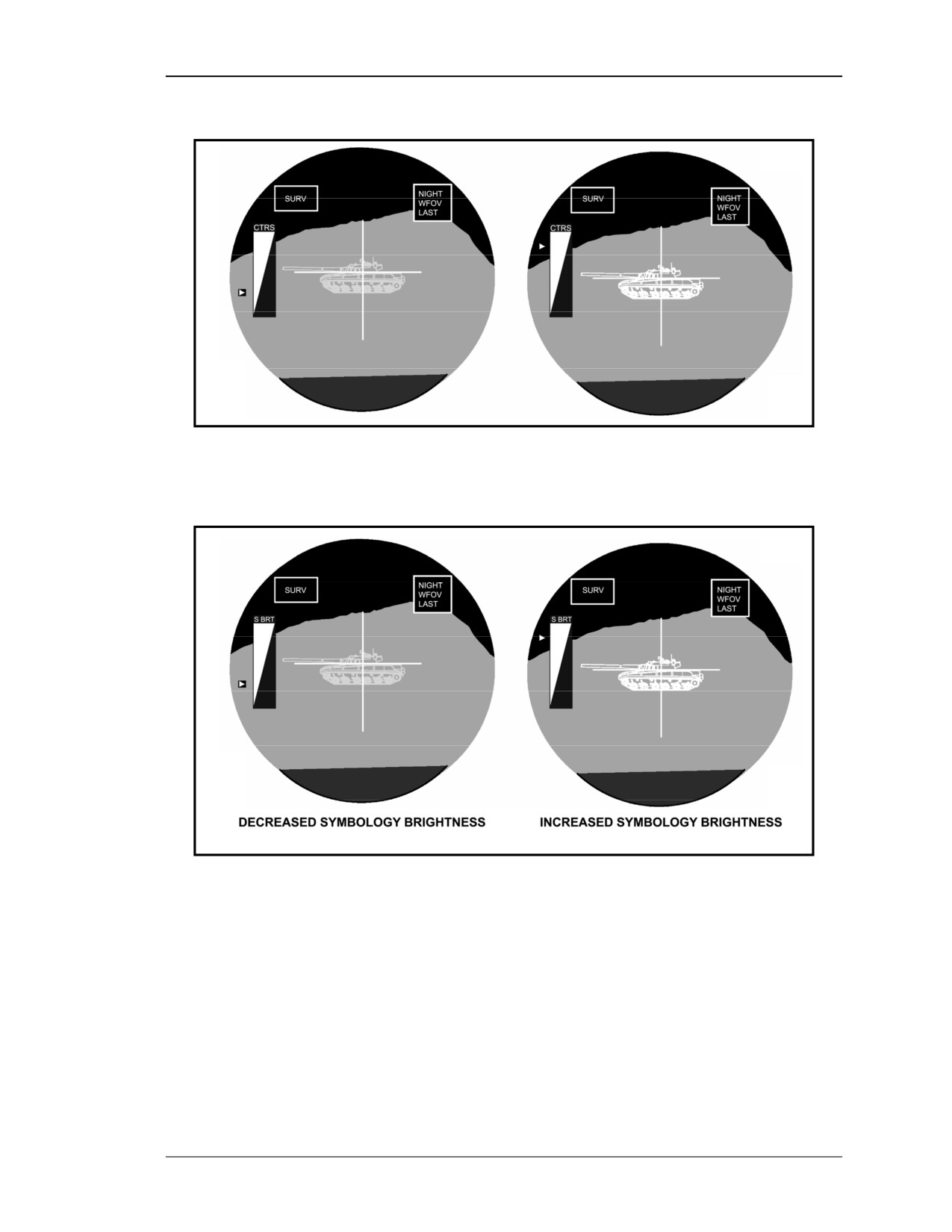
moving up or down along the side of the scale. Figures 2-5 through 2-8 show the effect of
different types of adjustments.
Figure 2-5. Crosshair brightness indicator.
Figure 2-6. NVS brightness indicator.
2-4
8 July 2005
FM 3-22.32
Figure 2-7. Contrast indicator.
Figure 2-8. Symbol brightness indicator.
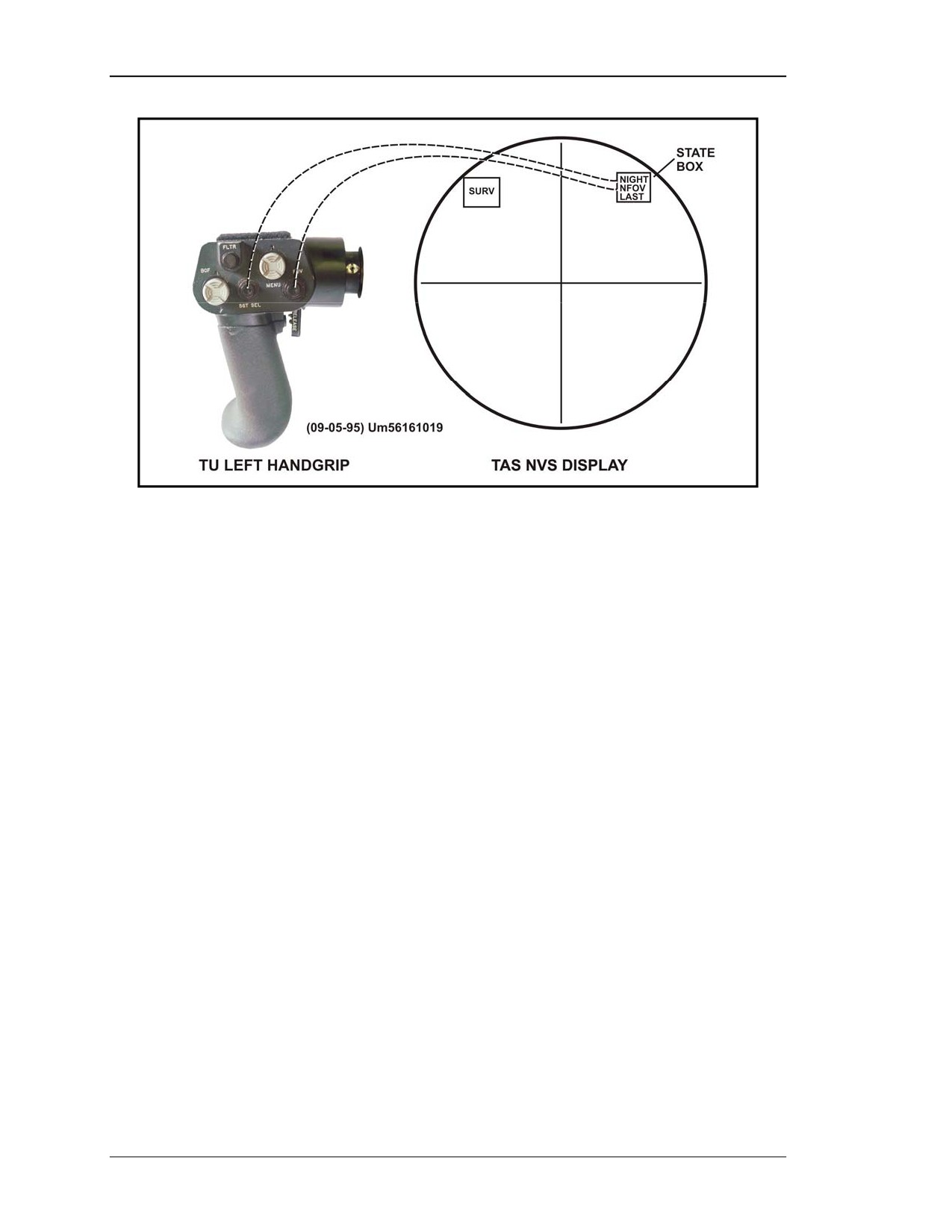
(2) Sight Select (SGT SEL) Switch. The SGT SEL switch is a push-button switch
that is only operable after the NVS has cooled down. The gunner uses this switch to
select between daysight and NVS. The STATE BOX in the TAS display will indicate
which sight the gunner has selected (Figure 2-9, page 2-6).
8 July 2005
2-5
FM 3-22.32
Figure 2-9. SGT SEL, FOV switch, and TAS display.
(3) Field of View (FOV) Switch. The FOV switch is a push button that allows the
gunner to choose between WFOV and NFOV for either sight (daysight or NVS). The
STATE BOX in the TAS display will indicate which field of view has been selected
(Figure 2-9).
(4) ITAS Filtering System. The ITAS has a built-in filtering system as a
counter-countermeasure.
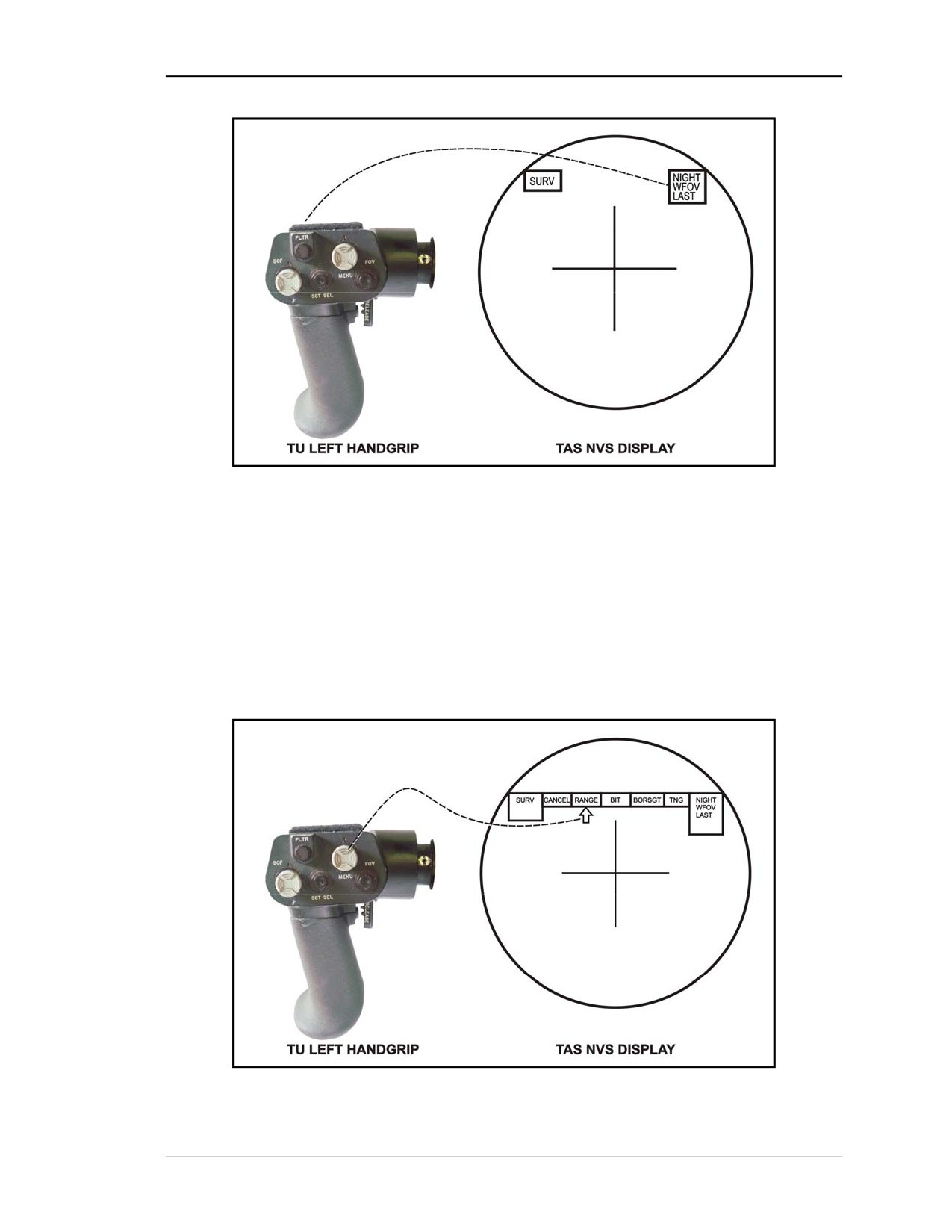
(a) Filter (FLTR) Switch. The FLTR switch is a push button used to activate an
optical countermeasure by physically placing a filter into the optical path during NVS
use. When the filter is inserted, the gunner will see a slight darkening of the display, and
the word FLTR will show in the state box. This filter is not available when using the
daysight (Figure 2-10).
2-6
8 July 2005
FM 3-22.32
Figure 2-10. FLTR switch and TAS display.
(b) Daysight Filters. A slight green tint on the daysight provides limited protection
for the gunner at all times. Also, two clip-on filters are stored in the TAS stow bag.
(5) MENU Button. The MENU button is a three-position push button. Pressing down
on the center of switch calls up the main menu on the TAS display. Pressing down on the
left or right side of the switch moves the cursor to the functions available. Pressing down
on the center of menu switch while the cursor is on a function selects that function
(Figure 2-11).
Figure 2-11. MENU switch and TAS display.
8 July 2005
2-7
FM 3-22.32
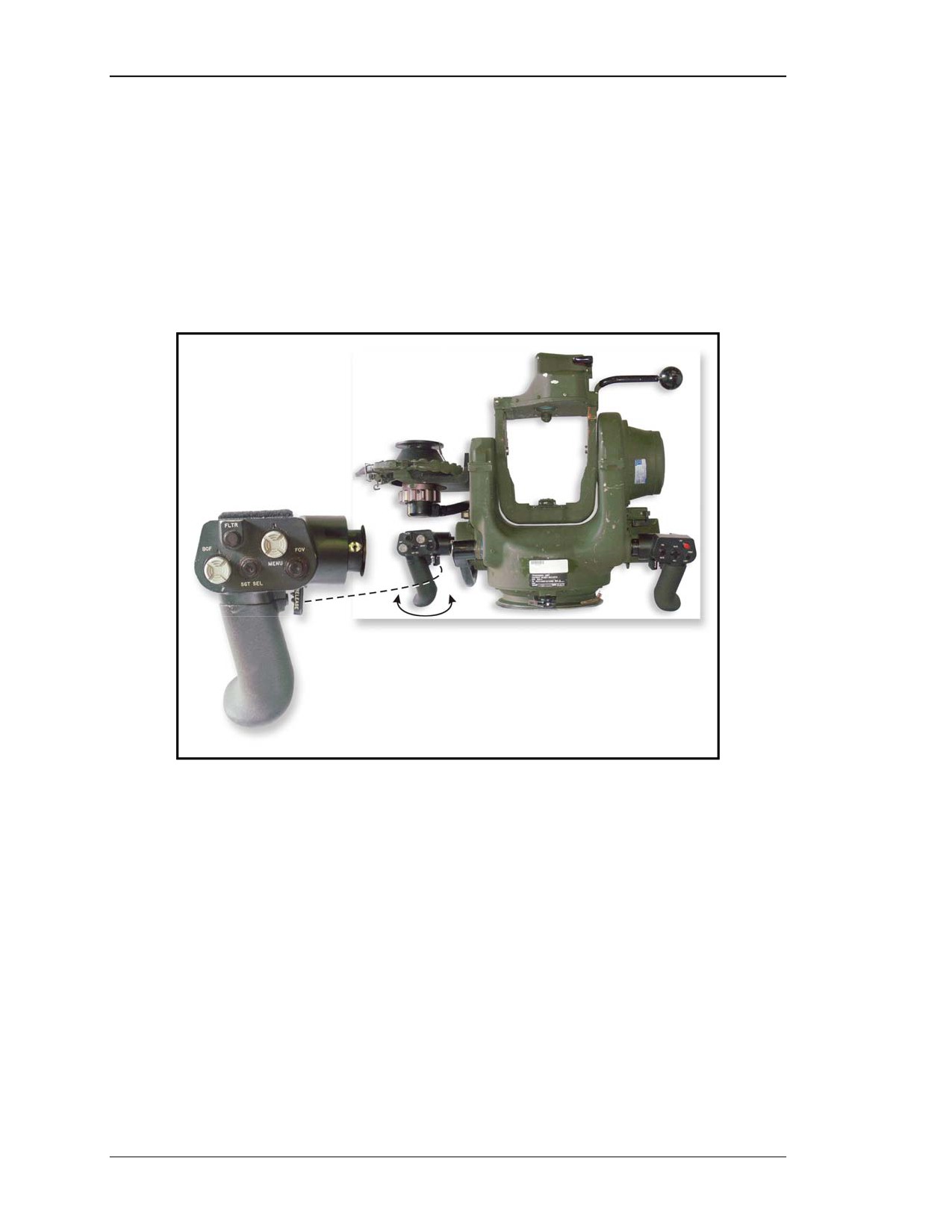
(6) Release Lever. A release lever is located on the inside of the left handgrip. It is
used to rotate the gunner handgrips from the operating position to the stow position (or
vice versa). In the operating position, the gunner can adjust either handgrip for comfort
and ease of use (Figure 2-12).
NOTE: Using both the left and right release levers at the same time engages the TU
elevation brake, allowing the gunner to adjust the handgrips without moving
the TU and launch tube elevation angle.
Figure 2-12. Release lever (left handgrip).
b. Right Handgrip Controls. The top of the right handgrip has four controls, and
the fire trigger is located on the backside of the handgrip. The switches on the right
handgrip allow the gunner to activate, adjust, and lock the track gates on a target;
determine range; verify range; and fire the missile.
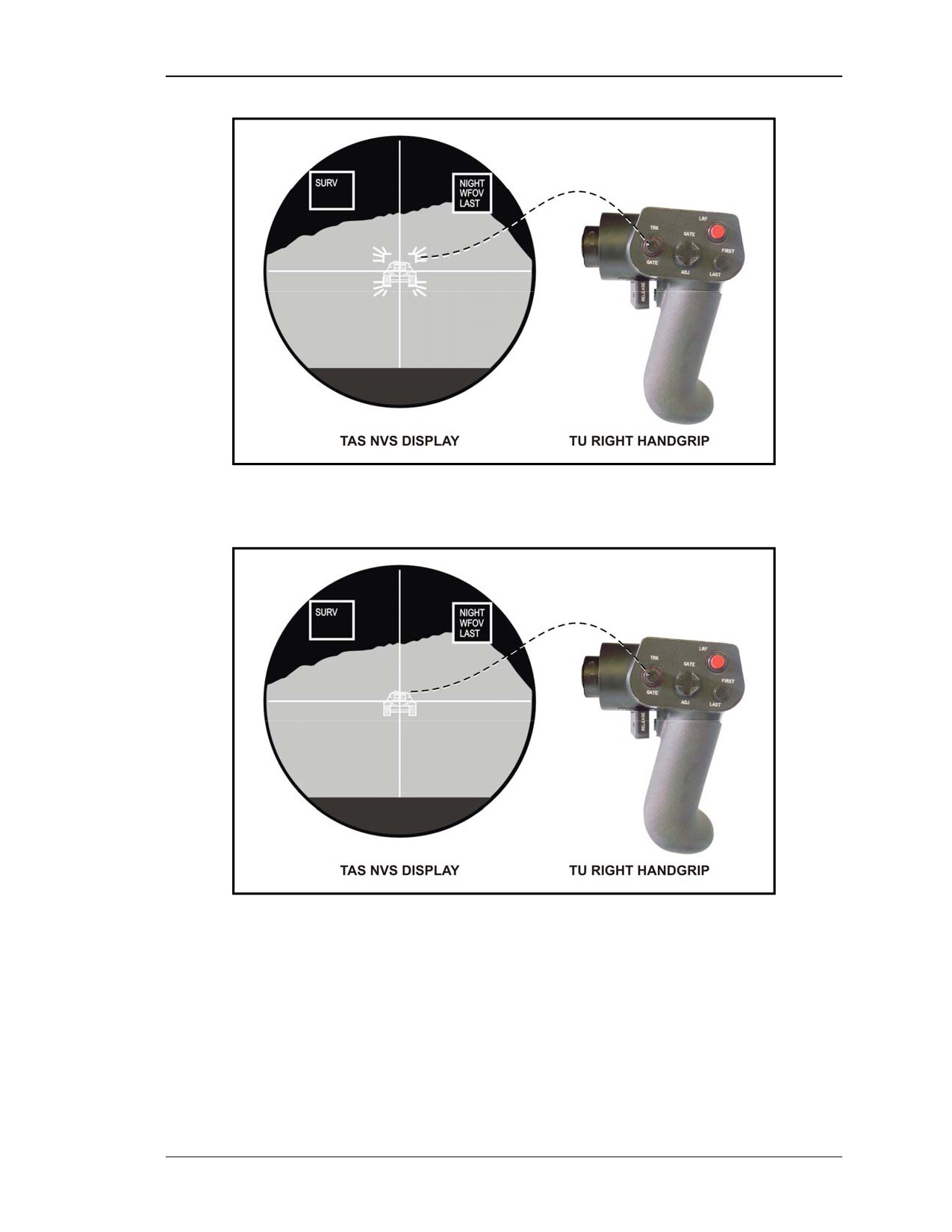
(1) Track Gate (TRK GATE) Switch. The TRK GATE switch is a three-function
button that, when first pressed, activates the track gates
(flashing) around a target
centered in the crosshairs (Figure 2-13). After adjusting the track gates around the target
with the gate adjustment (GATE ADJ) switch, the TRK GATE switch is pressed a second
time to lock the track gates on the target (Figure 2-14). If the TRK GATE switch is
pressed after lock-on and the crosshairs are within the track gates, the track gates will be
removed.
2-8
8 July 2005
FM 3-22.32
Figure 2-13. TRK GATE switch and TAS display (flashing track gates).
Figure 2-14. TRK GATE switch and TAS indicator (solid track gates).
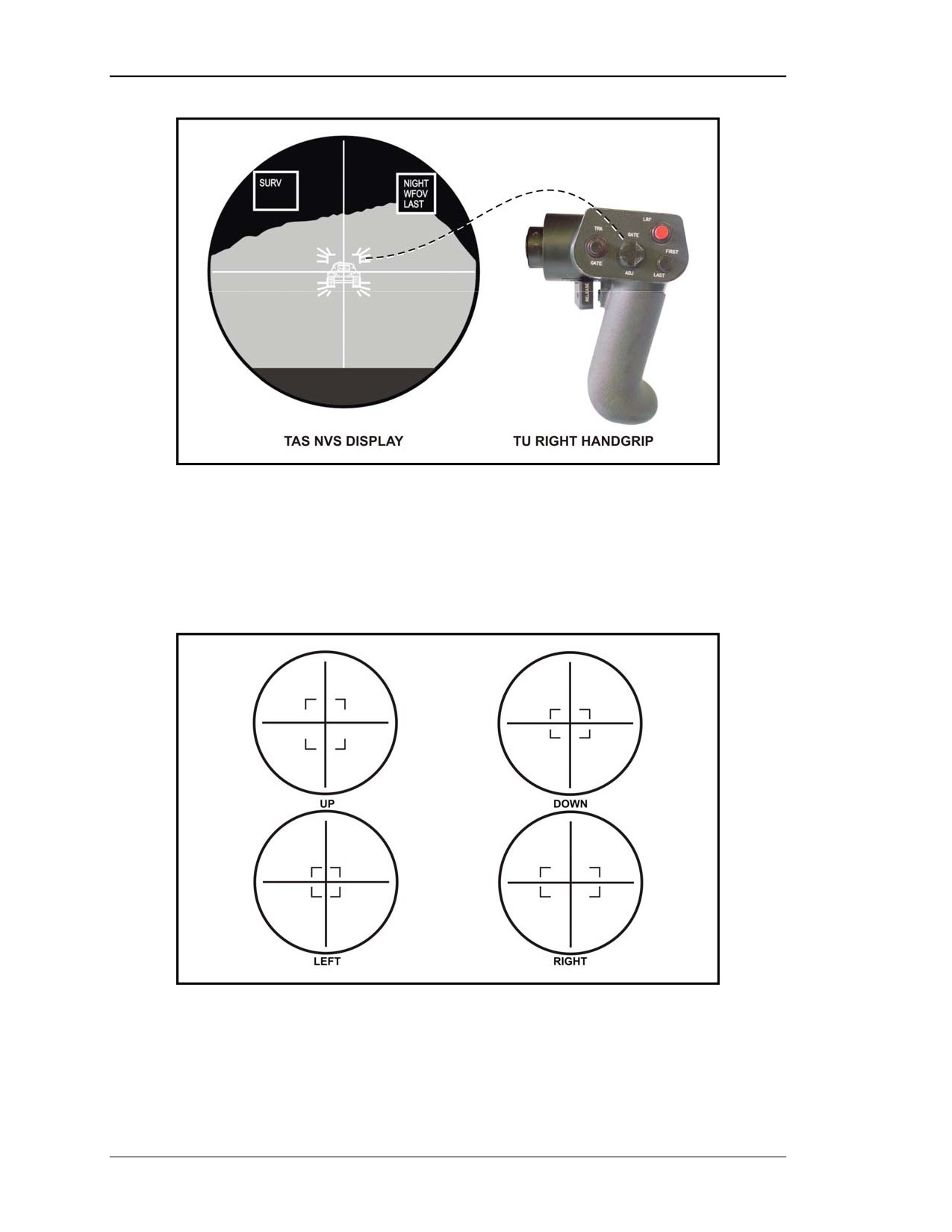
(2) Gate Adjust Switch (GATE ADJ). The GATE ADJ switch is a self-centering,
four-position switch (up and down, left and right) used to adjust the size of the track gates
around the target during a tracker engagement, and to adjust the passive range
box (Figure 2-15, page 2-10).
8 July 2005
2-9
FM 3-22.32
Figure 2-15. GATE ADJ switch and TAS display.
(a) Up and Down. Up moves the track gates apart vertically and down moves the
track gates together vertically (Figure 2-16).
(b) Left and Right. Left moves the track gates in horizontally and right moves the
track gates out horizontally (Figure 2-16).
Figure 2-16. Track gate adjustments.
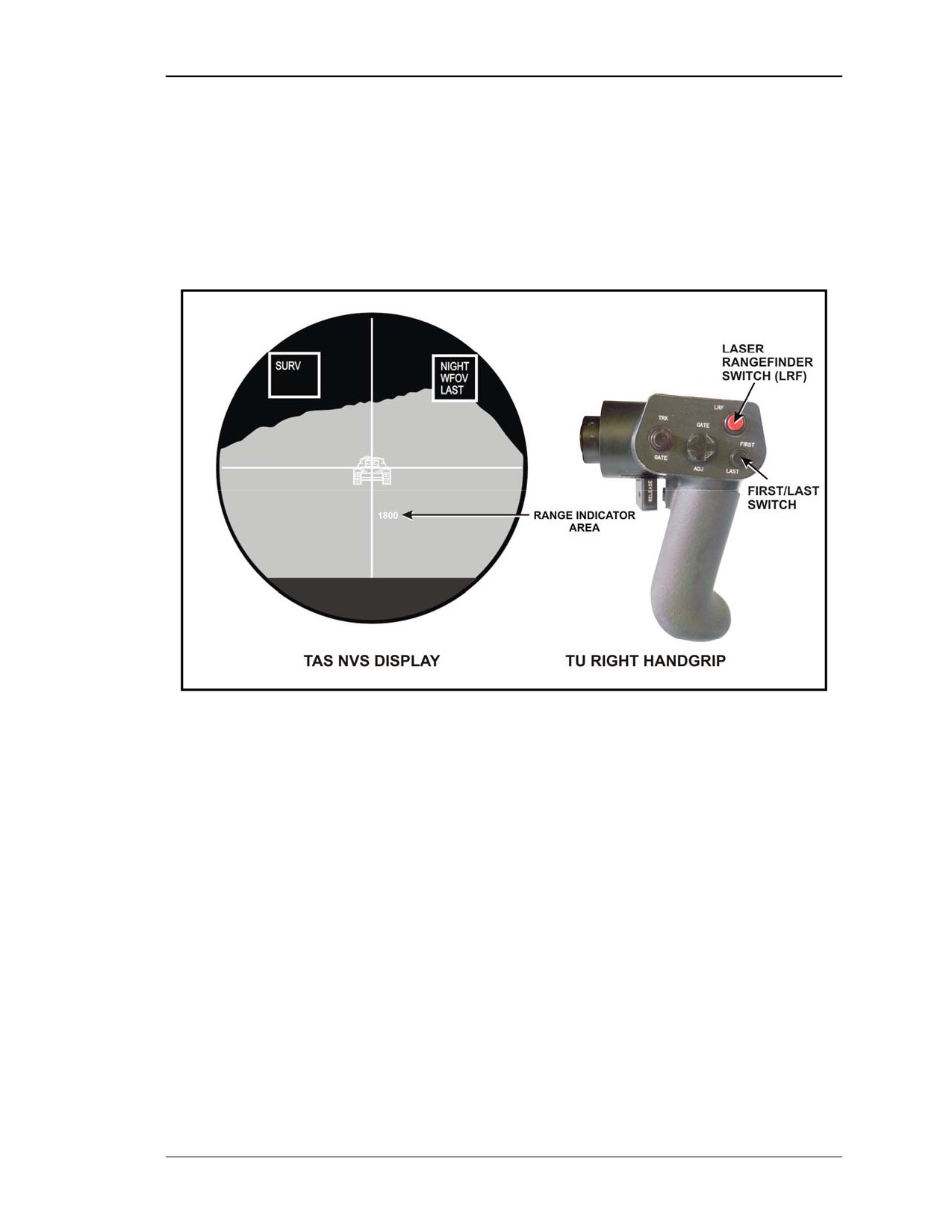
(3) Laser Range Finder (LRF) Switch. The LRF switch is a push button that, when
pushed, provides the range (in meters) to the target. The gunner must have the crosshairs
2-10
8 July 2005
FM 3-22.32
on the target to get this range. The range return from the target is shown in the range
indicator area (Figure 2-17).
(4) FIRST/LAST Switch. The FIRST/LAST switch is a push-button switch that
provides range verification in conjunction with use of the LRF (Figure 2-17). Selection of
FIRST displays range from the nearest object in the LRF beam path. Selection of LAST
(default setting) displays range from the most distant object in the LRF beam path. The
FIRST/LAST switch will operate in either daysight or NVS.
Figure 2-17. LRF switch and TAS display.
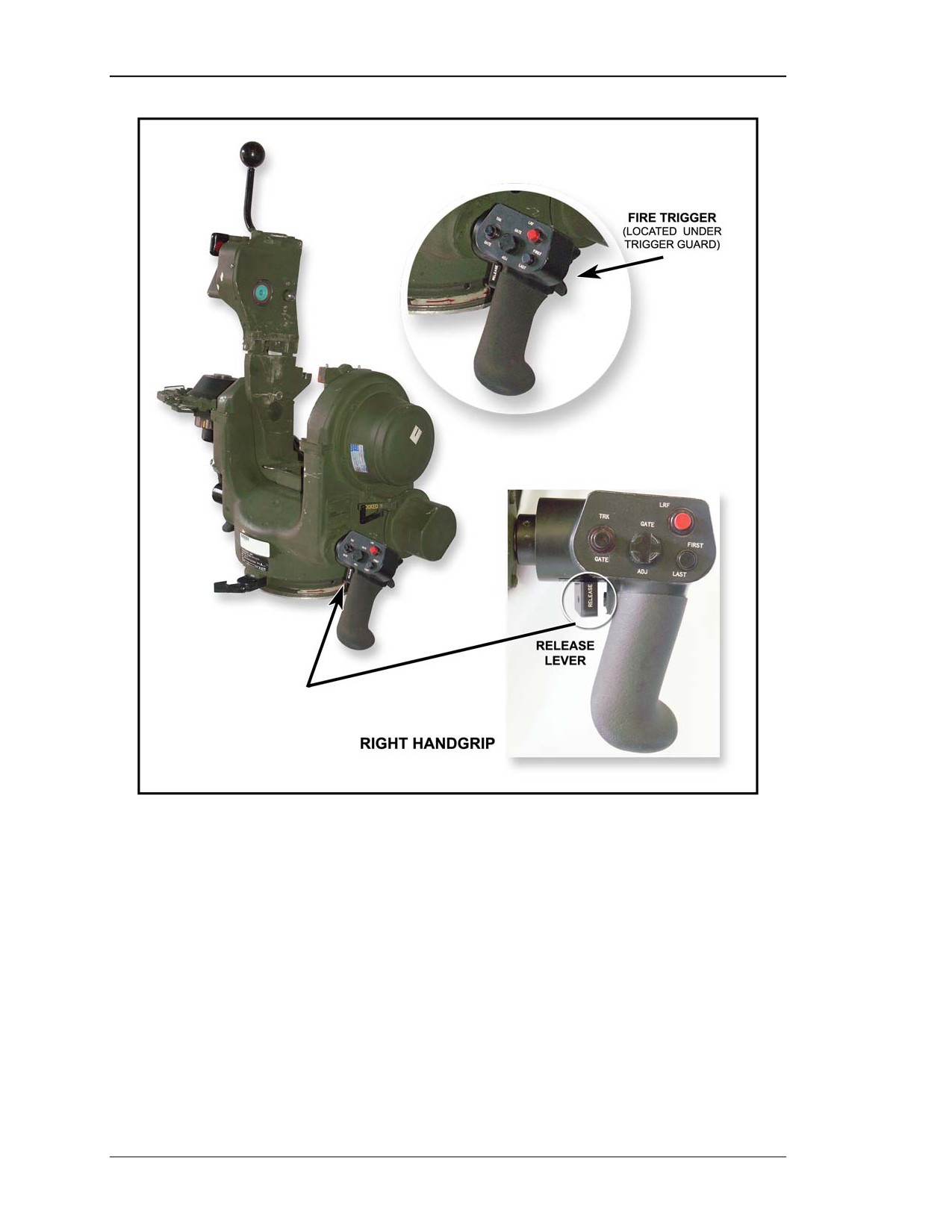
(5) Release Lever. A release lever is located on the inside of the right handgrip. The
release lever is used to rotate the gunner handgrips from either the operating position to
the stow position (or vice versa). In the operating position, the operator can adjust either
gunner handgrip for comfort and ease of use (Figure 2-18, page 2-12).
NOTE: Using both the left and right release levers at the same time engages the TU
elevation brake, allowing the gunner to adjust the handgrips without moving
the TU and launch tube elevation angle.
(6) Fire Trigger. The fire trigger is located under the trigger guard on the backside of
the right handgrip at the index finger position. The fire trigger is pulled to begin the
missile launch sequence (Figure 2-18, page 2-12).
8 July 2005
2-11
FM 3-22.32
Figure 2-18. Release lever (right handgrip) and fire trigger.
2-3.
TARGET ACQUISITION SYSTEM CONTROLS
The TAS controls allow the gunner to govern all ITAS operations. All the controls and
indicators are located on the TAS and the TU left and right handgrips with the exception
of the POWER switch located on the FCS and the POWER switch on the BPS.
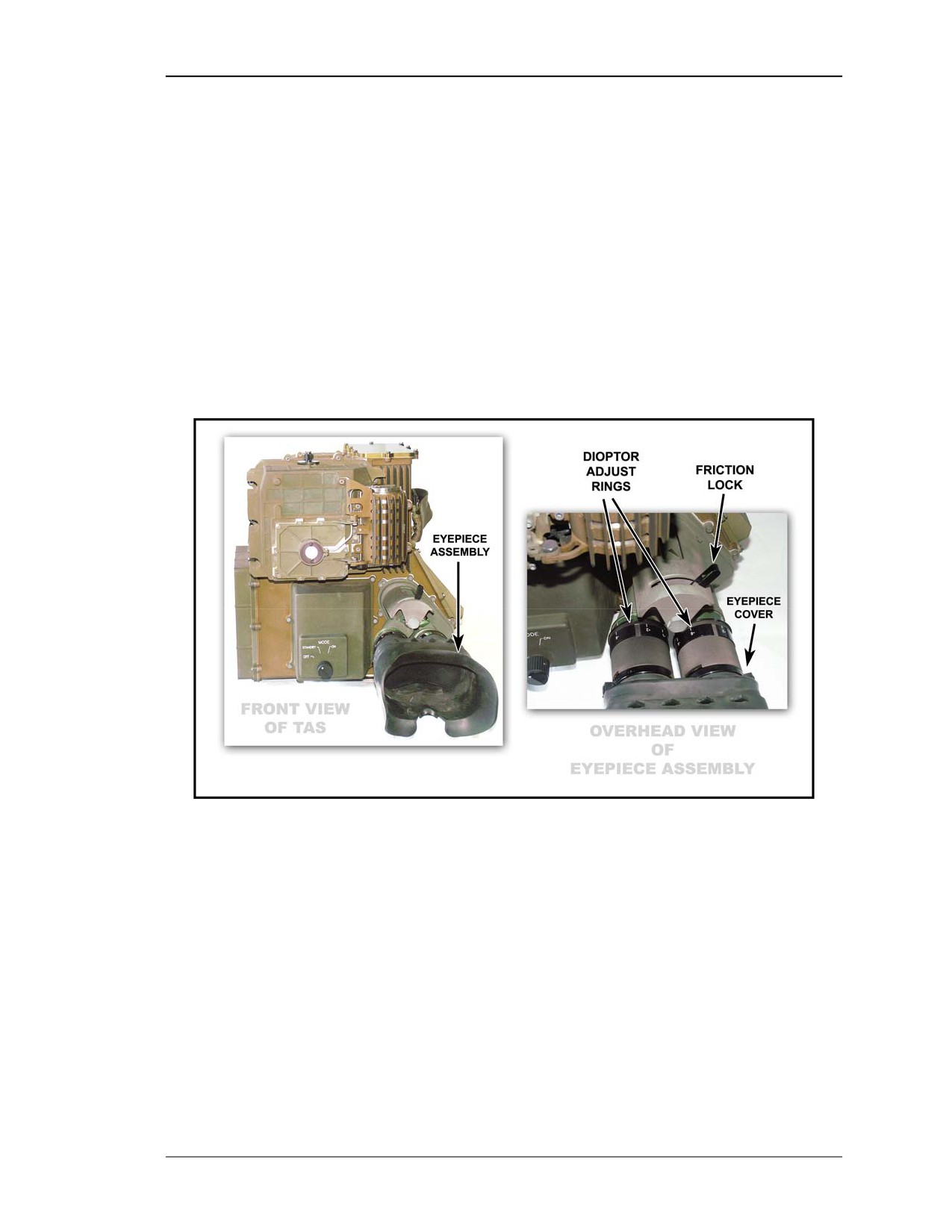
a. Eyepiece Assembly. The eyepiece assembly consists of diopter adjustment rings,
the friction lock, and the eyepiece cover (Figure 2-19).
(1) Diopter Adjust Rings. A diopter ring is located on each of the TAS eyepieces. It
is a hand-rotated ring the gunner uses to adjust the focus of the TAS crosshairs and
symbols. The adjustment compensates for individual differences in vision. The rings are
calibrated in steps, known as diopters, with an adjustment range from +2 to -6, which
means that any gunner with vision correctable to 20/20 can use the TAS and see an
2-12
8 July 2005
FM 3-22.32
in-focus image without using glasses. Once the gunner adjusts the diopter adjust ring,
there is no need to readjust it until a different gunner uses the TAS.
(2) Friction Lock. The friction lock is located on top of the eyepiece assembly. It is a
metal lever that the gunner uses to lock the eyepieces after adjusting for eye separation.
Move the lever to the left to loosen the lock, which allows the eyepieces to be moved
closer together or farther apart to fit the gunner’s eyes. Move the lever to the right to
tighten the lock after adjusting.
(3) Eyepiece Cover. The eyepiece cover surrounds the lens on each of the TAS
eyepieces. It is a one-piece rubber assembly that blocks out unwanted light when viewing
through the TAS. Inside the eyepiece cover is a flap that covers the eyepiece when it is
not being used to prevent light from escaping during hours of darkness. Push in on the
eyepiece cover to view through the TAS, and pullout on the eyepiece cover when the
TAS is not in use.
Figure 2-19. Eyepiece assembly.
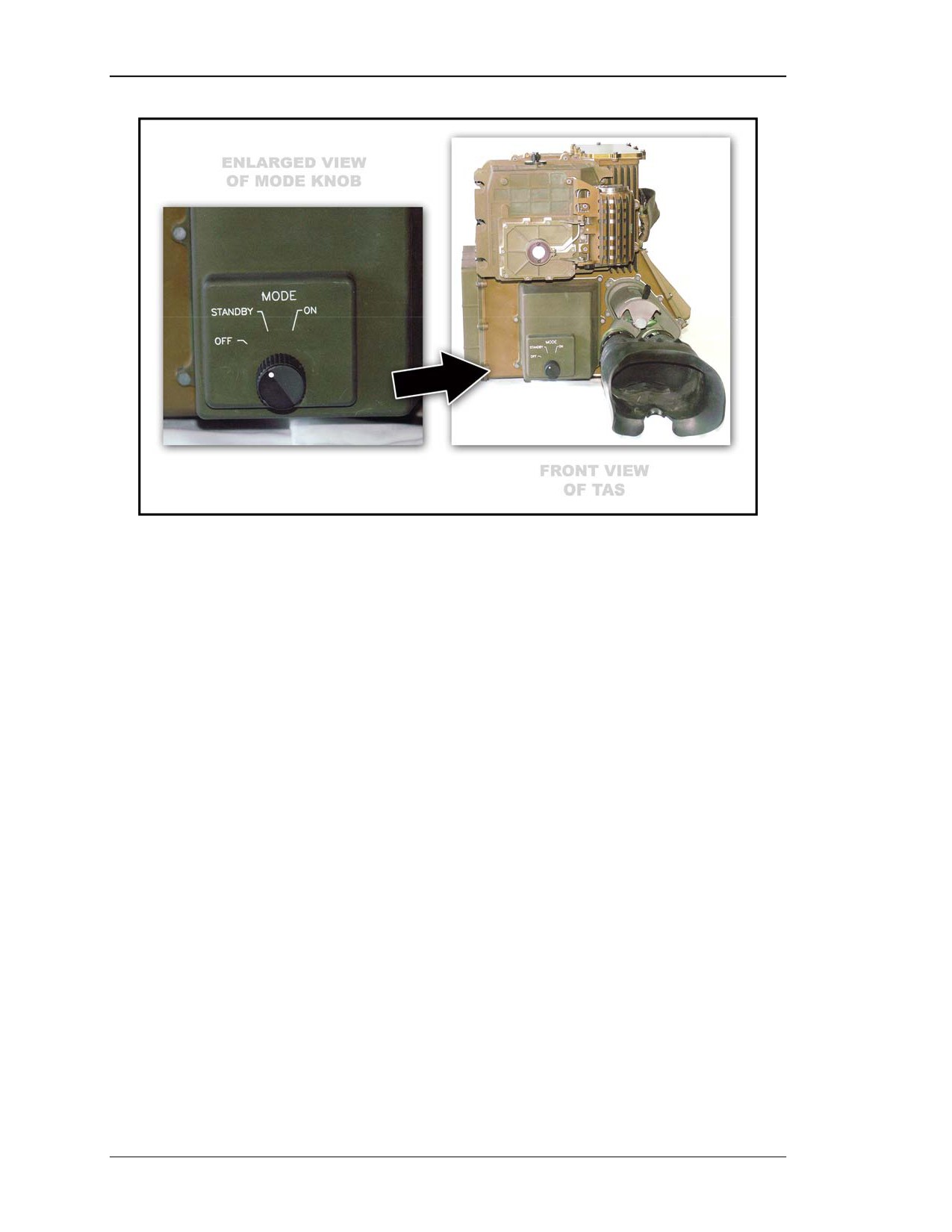
b. Power Switch. The TAS power switch contains a three-position rotary MODE
knob that controls the TAS mode of operation by its position (OFF, STANDBY, and ON)
(Figure 2-20, page 2-14). Each position brings different components of the TAS into
operation.
8 July 2005
2-13
FM 3-22.32
Figure 2-20. TAS power switch with MODE knob.
(1) OFF Position. When the power switch is in the OFF position, no power is applied
to the TAS. Area surveillance can be made using the last day FOV the TAS was in, wide
or narrow, when it was turned off. The missile cannot be launched.
(2) STANDBY Position. When the power switch is in the STANDBY position, the
ITAS is in the STANDBY mode. This mode is used to conserve power while keeping the
NVS cooled down.
(a) In this mode the gunner can also conduct surveillance using the daysight only.
The NVS is not available and the missile cannot be launched.
(b) If the system is being operated using the BPS and power needs to be conserved,
the gunner can move the power switch back to the STANDBY position so the detectors
will stay cool and allow immediate operation when needed. If vehicle power is being
used, most gunners will leave the switch in the ON position.
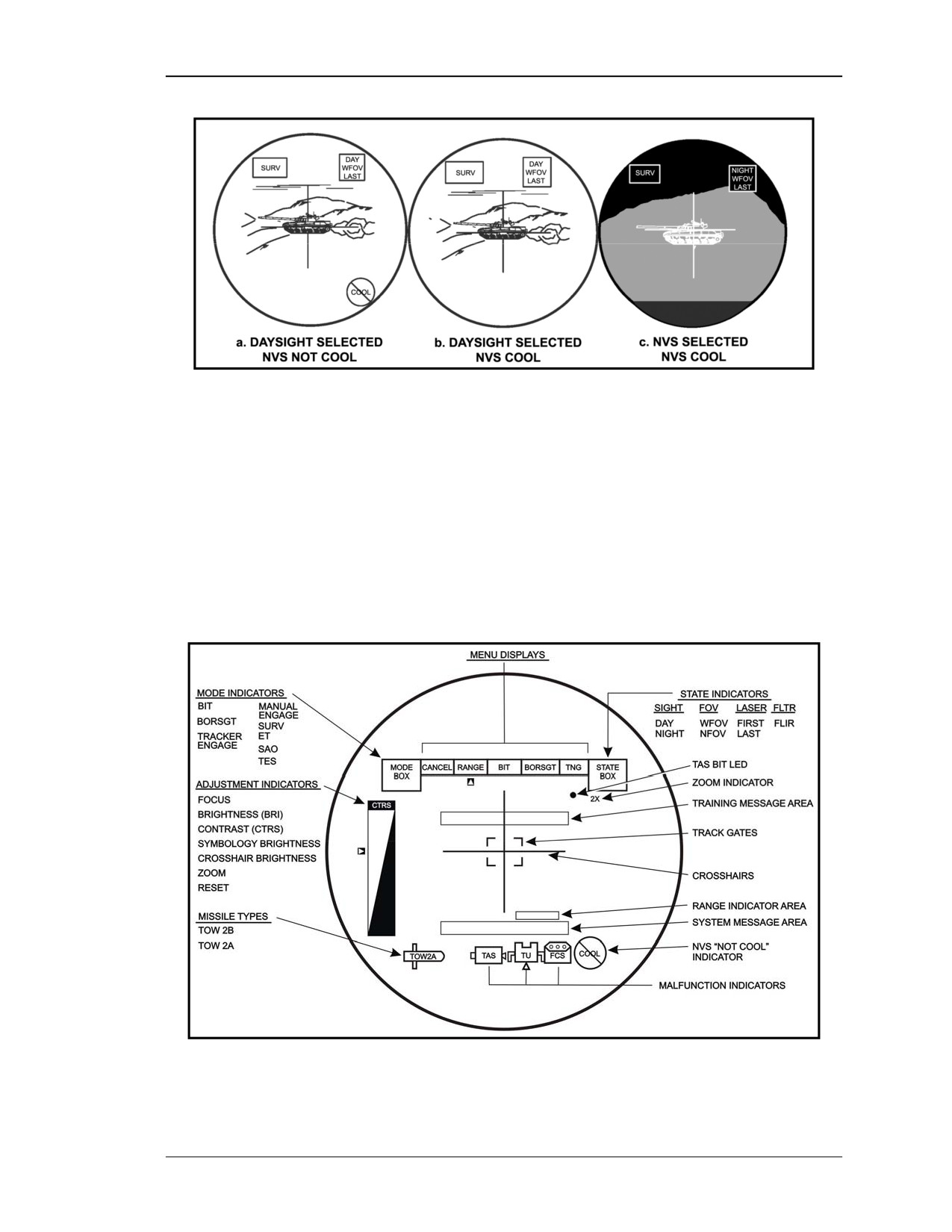
(3) ON Position. When the power switch is placed in the ON position, a PBIT is
automatically activated. After completion of PBIT, daysight capability is immediately
available to the operator (A, Figure 2-21).
(a) Daysight. The gunner may switch between daysight WFOV and NFOV using the
FOV switch. The gunner can range and engage targets; however, ATT capabilities are not
available.
(b) NVS. The gunner can engage targets with the NVS after cool down
(approximately
10 minutes) and the NVS NOT COOL indicator has gone off
(C, Figure 2-21). After the NVS cools, the operator can select NVS operations by
pressing the SGT SEL switch or remain in daysight until NVS capabilities are required
(B, Figure 2-21).
2-14
8 July 2005
FM 3-22.32
Figure 2-21. Power switch—ON position.
2-4.
TARGET ACQUISITION SYSTEM INDICATORS
The TAS indicators update the gunner on any changes occurring during system
operations. The indicators offer a variety of information to the gunner about the system.
For instance, if the gunner presses one of the handgrip control switches, he should see an
indicator light on the TAS display that corresponds to the switch he presses or operates.
Other indicators will light on the TAS display warning the gunner of malfunctions or
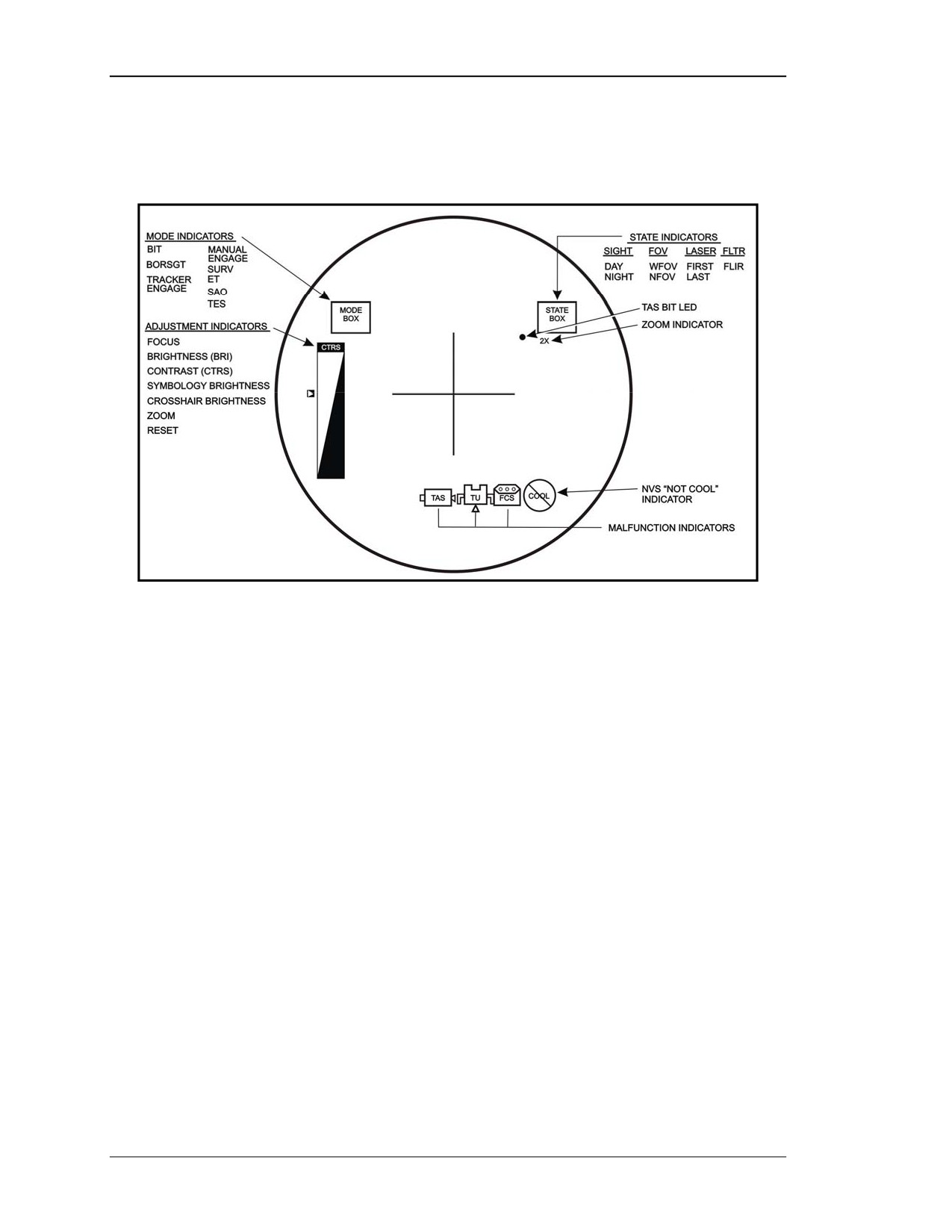
certain maintenance actions he should perform. All of the ITAS indicators are shown in
Figure 2-22. The gunner, depending on the operational state of the ITAS, may see one or
more of the indicators. Each category of indicator is discussed below.
Figure 2-22. TAS indicators.
8 July 2005
2-15
FM 3-22.32
a. STATUS Indicators. These indicators identify ITAS operational modes,
condition, and malfunctions. All of the status indicators are shown in Figure 2-23. The
gunner, depending on the status of the ITAS, will see one or more of the status indicators.
Figure 2-23. Status indicators.
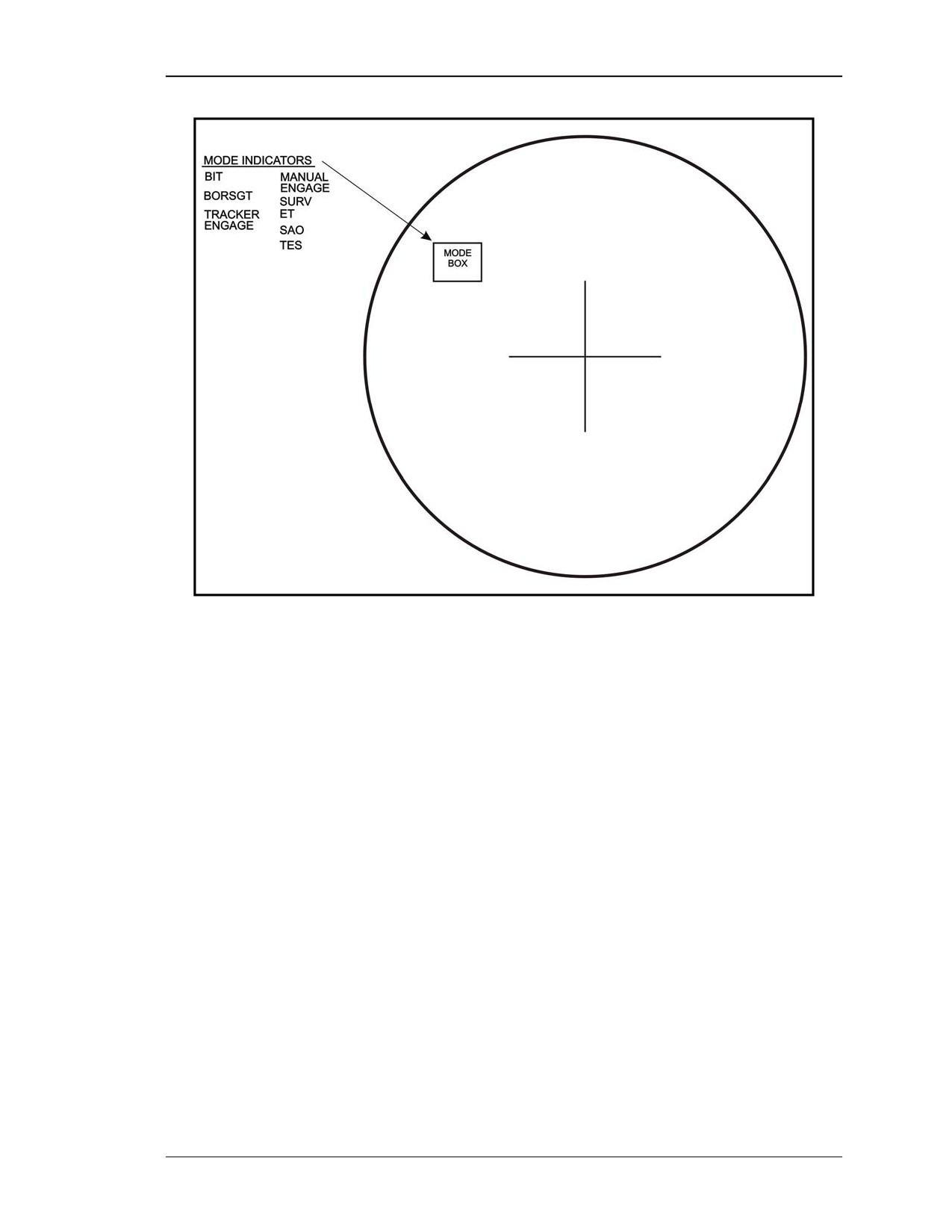
(1) MODE Indicators. The ITAS has five operational modes and three training
modes. The operational or training mode selected by the gunner will be shown in the
mode box on the TAS display (Figure 2-24). Modes of operation and training include:
• Built-in-test (BIT)—allows the gunner to verify proper operation of the ITAS.
• Boresight (BORSGT)—aligns the NVS, daysight, and LRF to the same point.
• Tracker engage (TRACKER ENGAGE)—tells the gunner the track gates are
locked on.
• Manual engage (MANUAL ENGAGE)—indicates the missile is armed but
the track gates are not activated.
• Surveillance (SURV)—indicates the missile is not armed and the track gates
are not activated.
• Embedded training (ET)—indicates that embedded training has been initiated.
Simulated missile fly out will occur.
• Sensor acquired objects
(SAO)—indicates that embedded training was
initiated and use of a missile simulation round is not required.
• Tactical engagement simulation (TES)—indicates that TES has been initiated,
This is the mode used during force-on-force engagements and requires a field
tactical trainer (FTT).
• Maintenance (MAINT)-indicates that the operator has chosen to view line
replacement unit (LRU) codes and error codes.
2-16
8 July 2005
FM 3-22.32
Figure 2-24. Mode indicators and mode box.
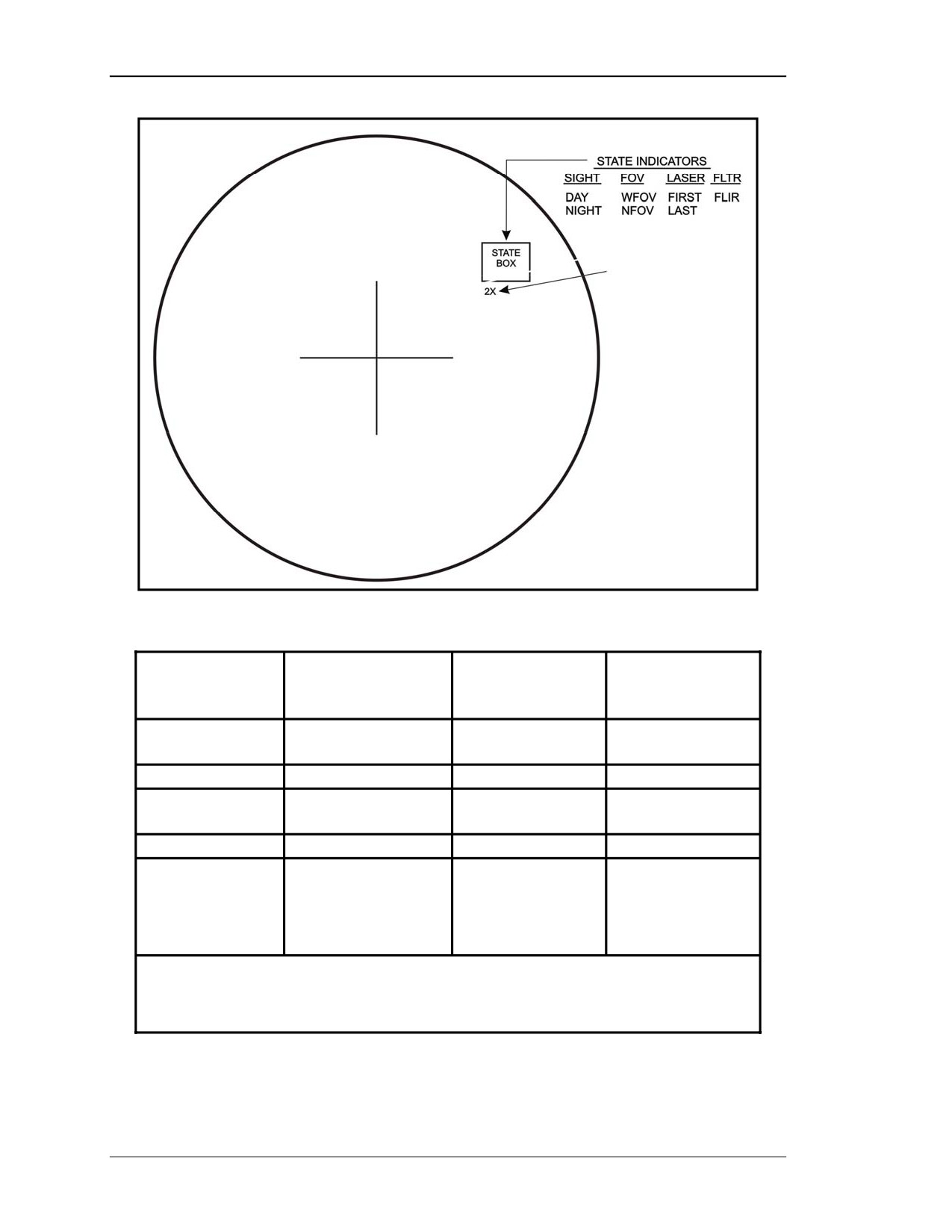
(2) STATE Indicators. The ITAS has four state indicators (Figure 2-25, page 2-18)
that provide status information on the system once its is placed into operation.
Information about what state the system is currently operating in can be found in the state
box of the TAS display. The gunner can change the system state by using the respective
switches on the left handgrip control (Table 2-1, page 2-18).
8 July 2005
2-17
FM 3-22.32
Figure 2-25. State indicators.
STATE
LEFT
INDICATOR
FUNCTION
HANDGRIP
STATE BOX
SWITCH
SIGHT
DAY (daysight)
SGT SEL
DAY or NIGHT
NIGHT (NVS)
FOV
WFOV or NFOV
FOV
WFOV or NFOV
LASER
FIRST or LAST
FIRST/LAST *
FIRST or LAST
RETURN
FLTR 1
FILTER
FLTR
FLTR 1
ZOOM
DOUBLES
BCF1
2X
MAGNIFICATION OF
FIELD OF VIEW
* Right handgrip control
1 Selected BCF menu
Table 2-1. State indicators and corresponding left handgrip switch.
2-18
8 July 2005
FM 3-22.32
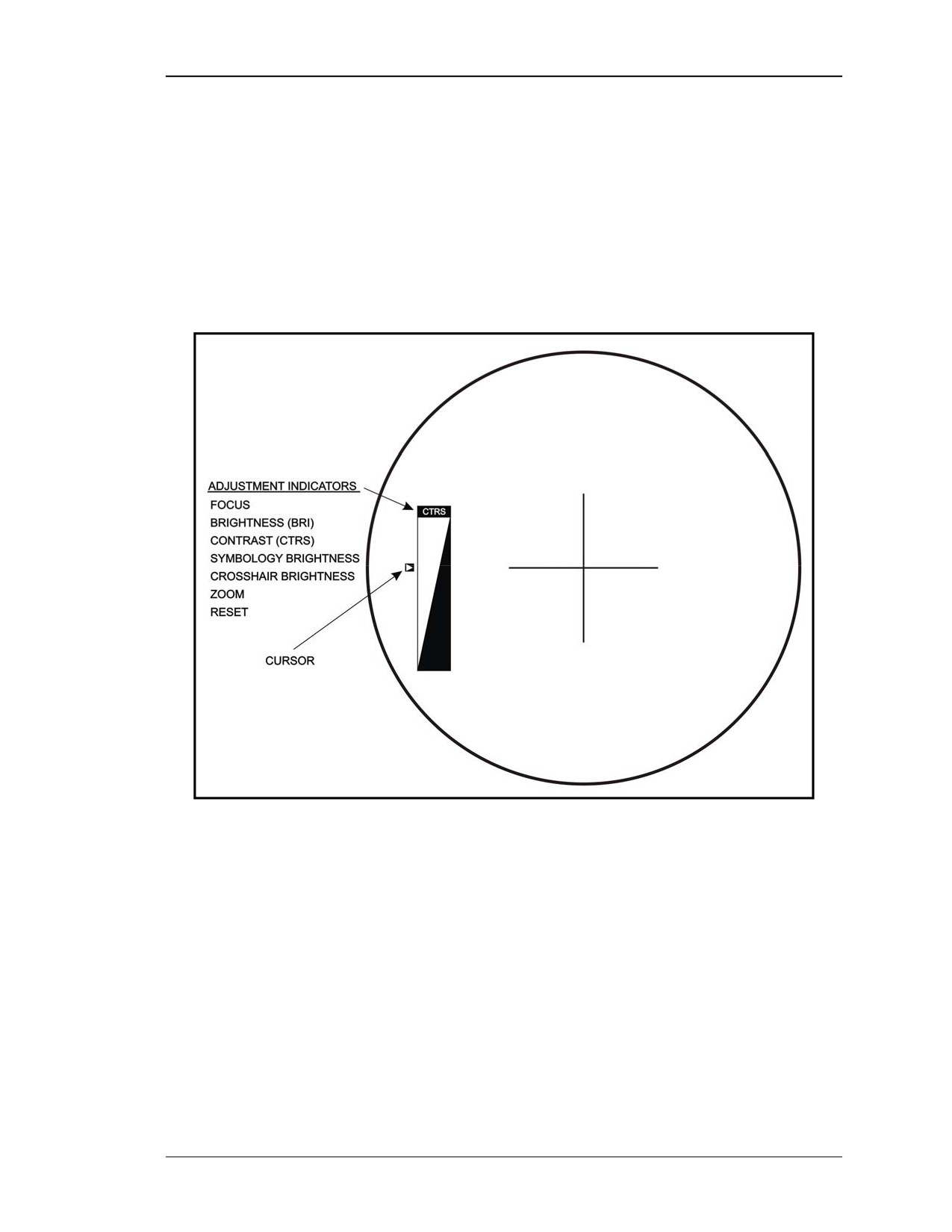
(3) Adjustment Indicators. These indicators give the gunner an indication of what
adjustments he is making to the brightness, contrast, and focus of the NVS image; the
brightness of the crosshairs; and the brightness of the TAS display symbols (Figure 2-26).
The gunner can change the adjustments by using the BCF switch on the left handgrip
control. The BCF switch is only operational with the TAS power switch in the ON
position. NVS adjustments cannot be made until after the NVS has cooled down. Any
change to the adjustments will be shown in the adjustment indicator box on the TAS
display. A small cursor on the left side of the adjustment indicator box will indicate to the
gunner whether he is increasing or decreasing the function selected for adjustment.
Figure 2-26. Adjustment indicators with cursor.
(a) Focus indicator (FOCUS) adjusts the focus of the NVS to compensate for the
range to the target. The depth of field on the daysight is large enough that it does not need
a range focus.
(b) Brightness indicator (BRT) adjusts the level of the NVS signal going to the TAS
display to compensate for the coldest object of interest in the field of view.
(c) Contrast indicator (CTRS) adjusts the amplitude (gain) of the NVS signal going to
the TAS display to compensate for the hottest object of interest in the field of view.
(d) Symbol brightness indicator (S BRT) adjusts the intensity of the text and symbols
in the TAS display.
8 July 2005
2-19
FM 3-22.32
(e) Crosshair brightness indicator
(C BRT) adjusts the intensity of the daysight
crosshairs when the daysight is selected and the intensity of the NVS crosshairs when
NVS is selected.
(f) Zoom (ZOOM) doubles the magnification of the NVS when it is in surveillance
mode. If the track gates are selected or the missile is armed, the zoom will automatically
revert to the NVS FOV listed in the state box.
(g) Reset
(RESET) returns all NVS adjustments to their preset positions before
power up.
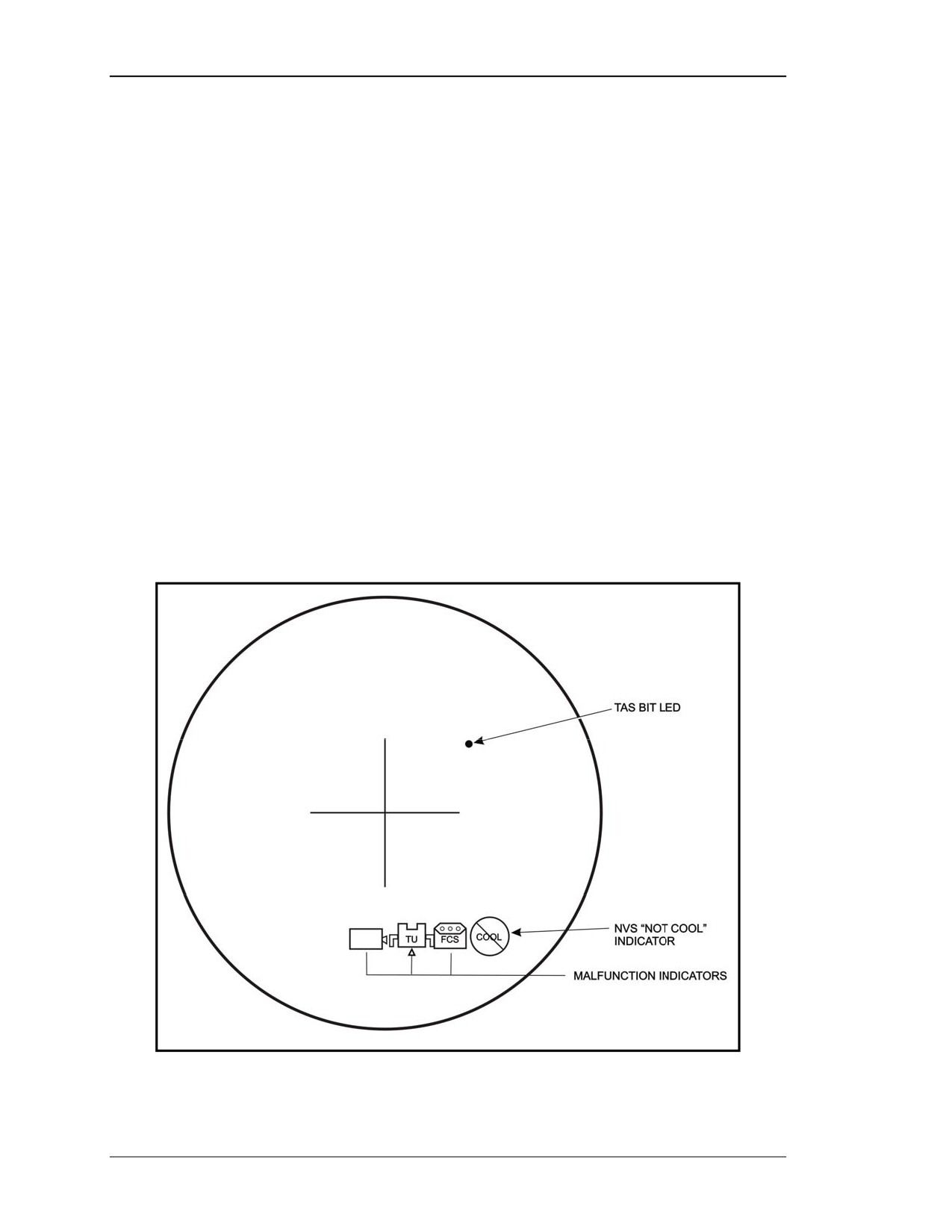
(4) Malfunction Indicators. These indicators are NOT normally on during system
operation (Figure 2-27). If, however, one of the systems built-in-tests finds a faulty
component, the appropriate indicator will light on the TAS display.
(a) TAS indicator turns on if a malfunction occurs in the TAS.
(b) TU indicator turns on if a malfunction occurs in the TU.
(c) FCS indicator turns on if a malfunction occurs in the FCS.
(d) NVS NOT COOL indicator is located on the lower right corner of the TAS
display. Once the TAS power switch is set to ON this symbol will come on and remain
on until the NVS has cooled down (within 10 minutes). This is normal and does not
indicate a malfunction unless it stays on longer than 10 minutes
(e) TAS BIT LED indicator illuminates when the power switch is moved from
STANDBY to ON and remains illuminated during system PBIT. (This is not a
malfunction.)
Figure 2-27. Malfunction indicators.
2-20
8 July 2005
FM 3-22.32
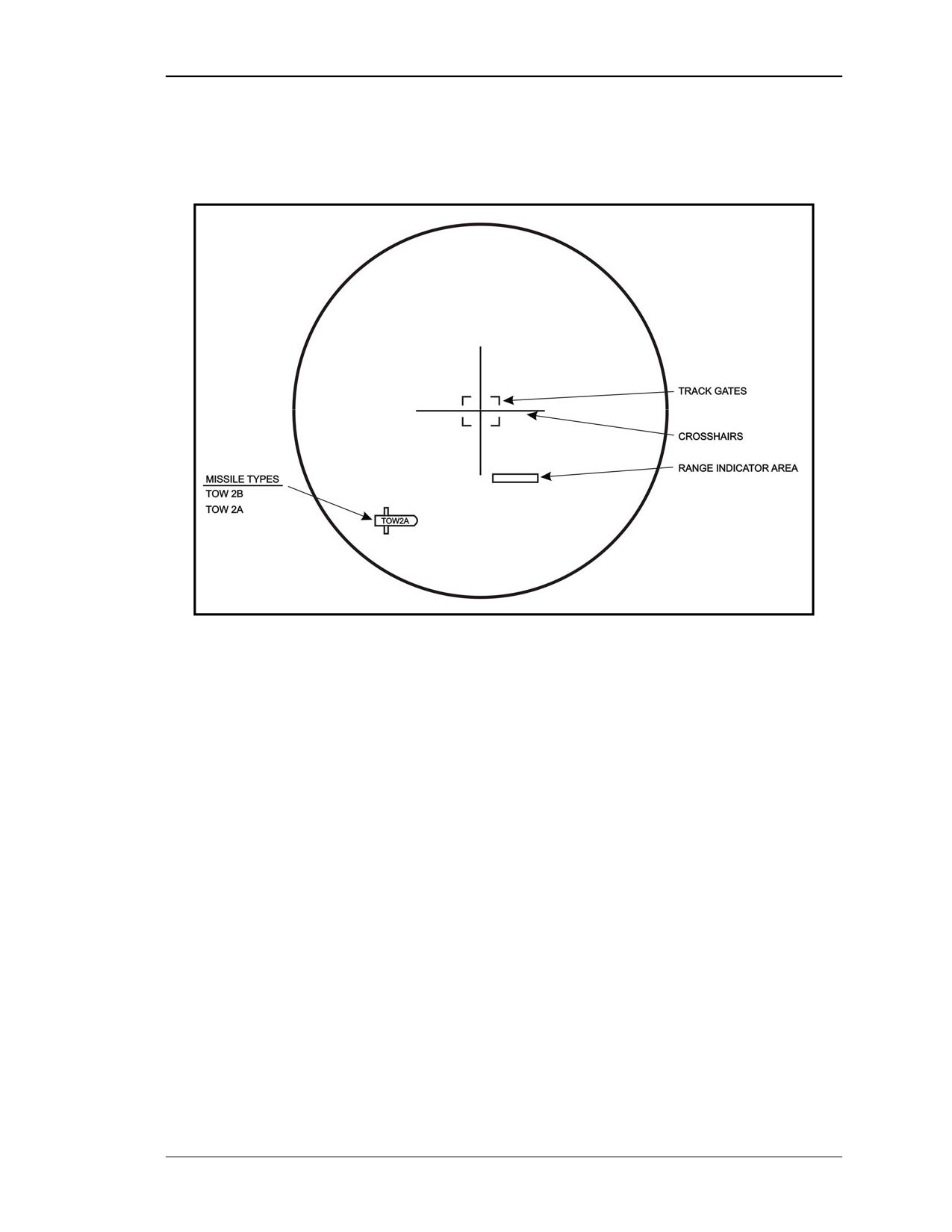
b. Display Indicators. The display indicators are used during target engagement
both in manual and tracker mode. Display indicators for the TAS include missile types,
range indicator area, crosshairs, and track gates (Figure 2-28).
Figure 2-28. Display indicators.
(1) Missile Types Indicator. This indicator tells the gunner what type of missile has
been loaded and armed in the launch tube. A missile type indicator is displayed on the
lower left side inside the TAS as a symbol of a TOW missile (Figure 2-28).
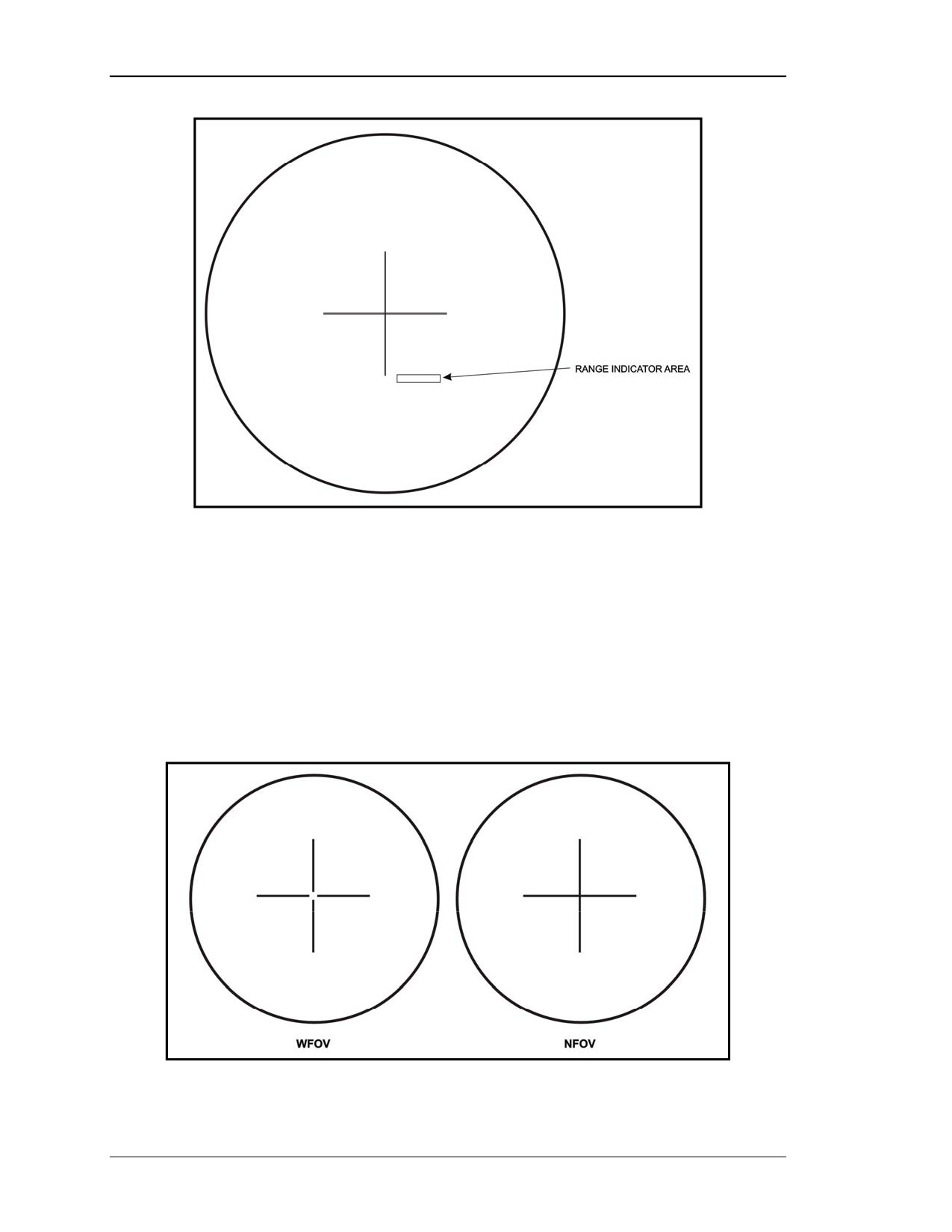
(2) Range Indicator Area. The range to the target (in meters) is displayed in this area
whenever the gunner uses either active or passive ranging (Figure 2-29, page 2-22).
8 July 2005
2-21
FM 3-22.32
Figure 2-29. Range indicator area.
(3) Crosshairs. Crosshairs provide the gunner a reference point to align the TAS with
a target. In the daysight, the crosshairs are generated using backlighting in the TAS. In
NVS, the crosshairs are part of the symbols generated by the FCS.
(a) WFOV Crosshairs. The WFOV crosshairs cover one third of the display and
indicate the area that will be shown when the gunner switches to NFOV (Figure 2-30).
The crosshairs intersect at the point where the missile will hit.
(b) NFOV Crosshairs. The NFOV crosshairs cover the whole display and intersect at
the point where the missile will hit (Figure 2-30).
Figure 2-30. Crosshairs.
2-22
8 July 2005
FM 3-22.32
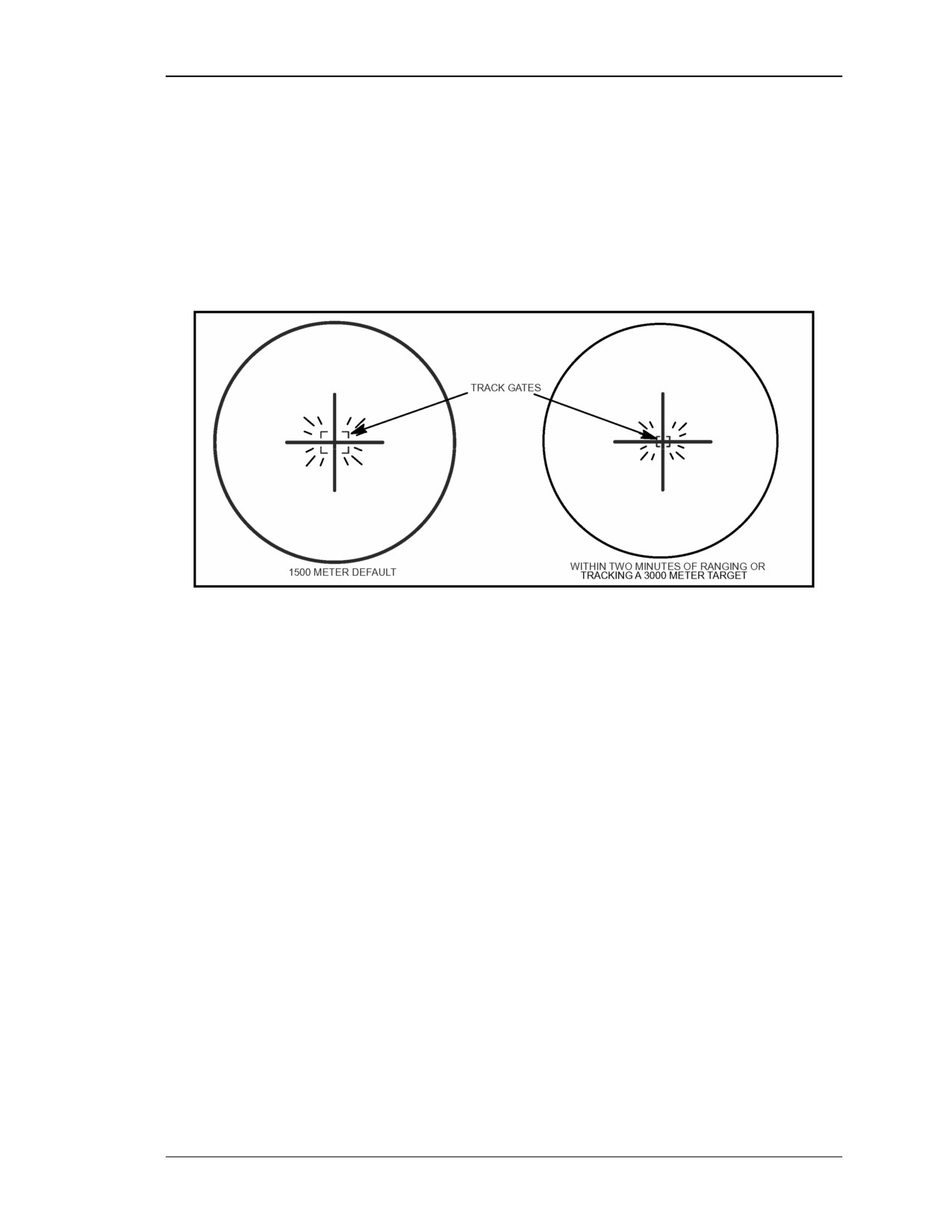
(4) Track Gates. When the gunner presses the TRK GTE switch, four box corners
called track gates appear on the TAS display (Figure 2-31). The tracker located in the
FCS generates the track gates. The gunner adjusts the track gates around the target and
commands the tracker to lock onto the target. The track gates first come up flashing and
sized for a tank at 1,500 meters unless a target has been ranged or tracked within the past
two minutes. The track gates will stop flashing and become solid after the gunner
commands lock on.
Figure 2-31. Track gates.
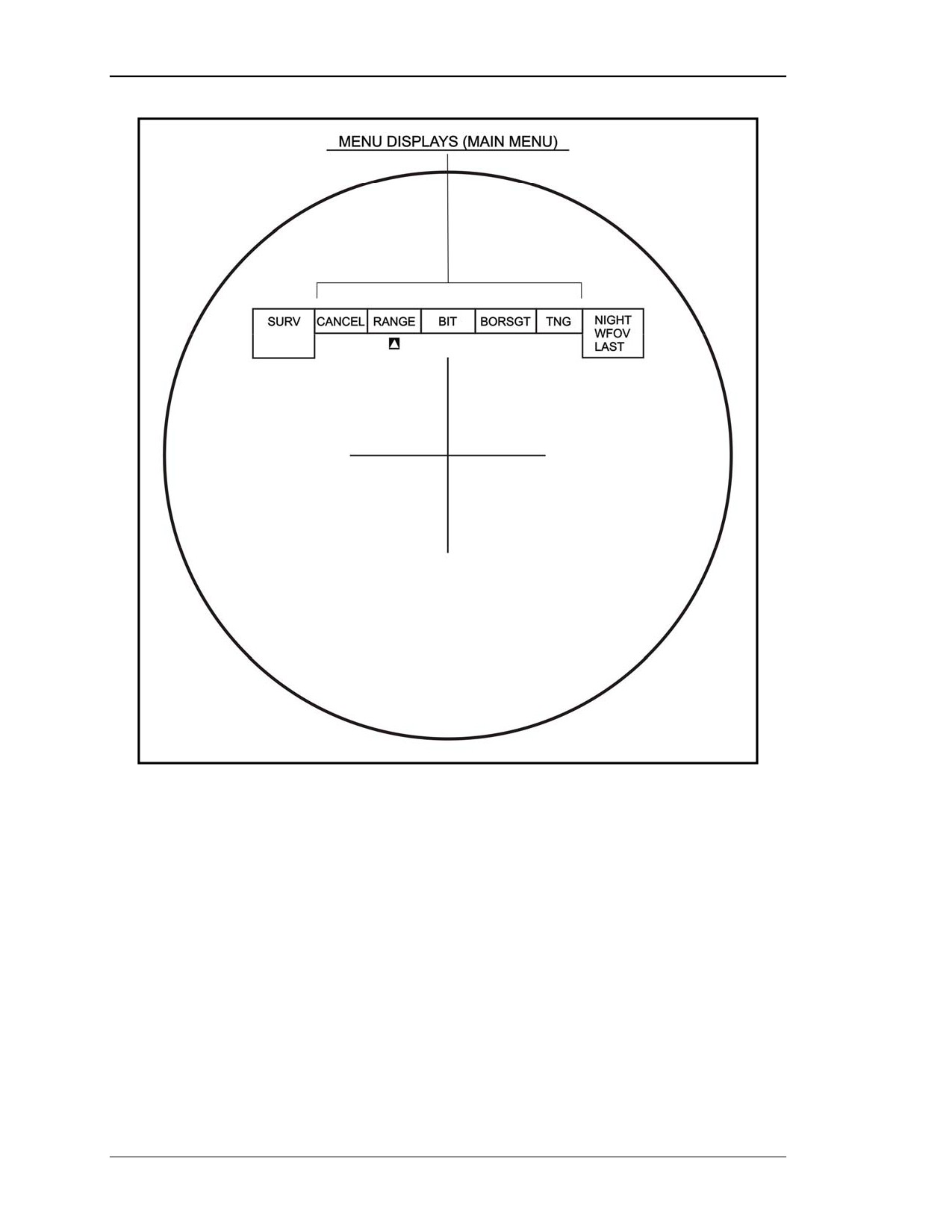
c. Menu Display Area. During system operations in combat or training, various
menus can be displayed on the TAS display by pressing the MENU switch on the left
handgrip control. After a menu is displayed (Figure 2-32, page 2-24), the gunner can
select any of the options displayed by moving the menu switch left or right, causing a
cursor to move to that function. The gunner then presses the MENU switch again to
activate the function selected.
(1) Main Menu. The main menu is the first menu the gunner will see when he presses
the MENU switch (Figure 2-32, page 2-24). The main menu has five options:
• CANCEL. Selecting cancel will remove the main menu from the TAS display.
• RANGE. Selecting RANGE brings up the range menu, which allows the
gunner to determine range to a target without using the LRF.
• BIT. Selecting BIT brings up the BIT menu.
• Boresighting (BORSGT). Selecting BORSGT brings up the boresight menu.
• Training (TNG). Selecting TNG brings up the training menu.
8 July 2005
2-23
FM 3-22.32
Figure 2-32. Menu display area/main menu.
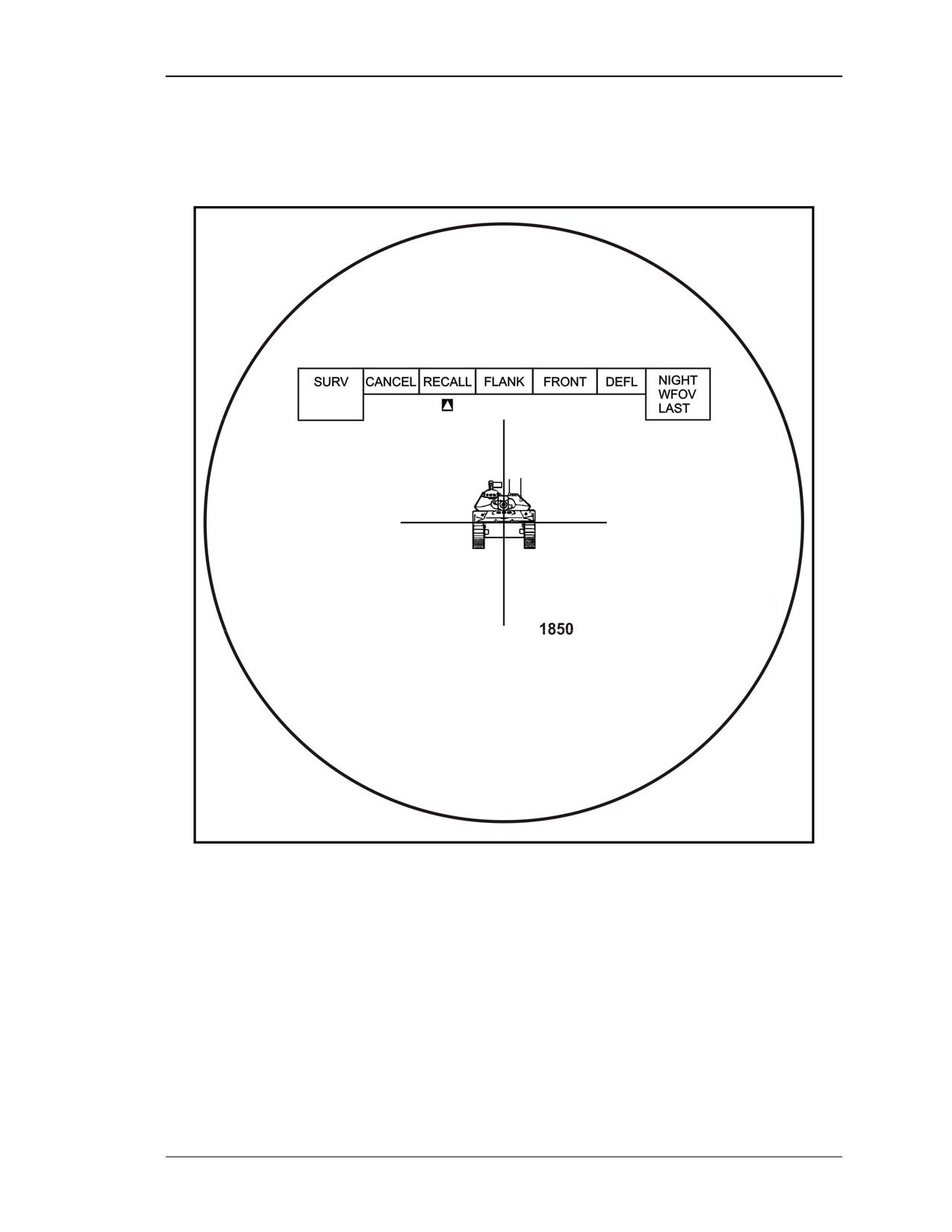
(2) Range Menu. The range menu is displayed when the gunner selects RANGE
from the MAIN MENU. The primary purpose of this menu is to give the gunner the
capability to passively determine range to a target without using the LRF (Figure 2-33).
The gunner can determine the range for flank, front/rear, and hull defilade targets. The
range menu has five selections:
• CANCEL. Selecting CANCEL will remove the range menu from the TAS
display.
• RECALL. Selecting RECALL recalls the last LRF ranging in meters (active)
stored in the FCS memory (for example, 1,850 meters as in Figure 2-33). If
more than two minutes have passed since the last ranging, the range indicator
area will display zero (0).
• FLANK. Selecting flank determines range to a flank target.
2-24
8 July 2005
FM 3-22.32
• FRONT. Selecting front determines the range to a frontal or rear view target.
• DEFIL. Selecting DEFIL (defilade) determines the range to a target in a hull
defilade position.
Figure 2-33. RANGE menu selections.
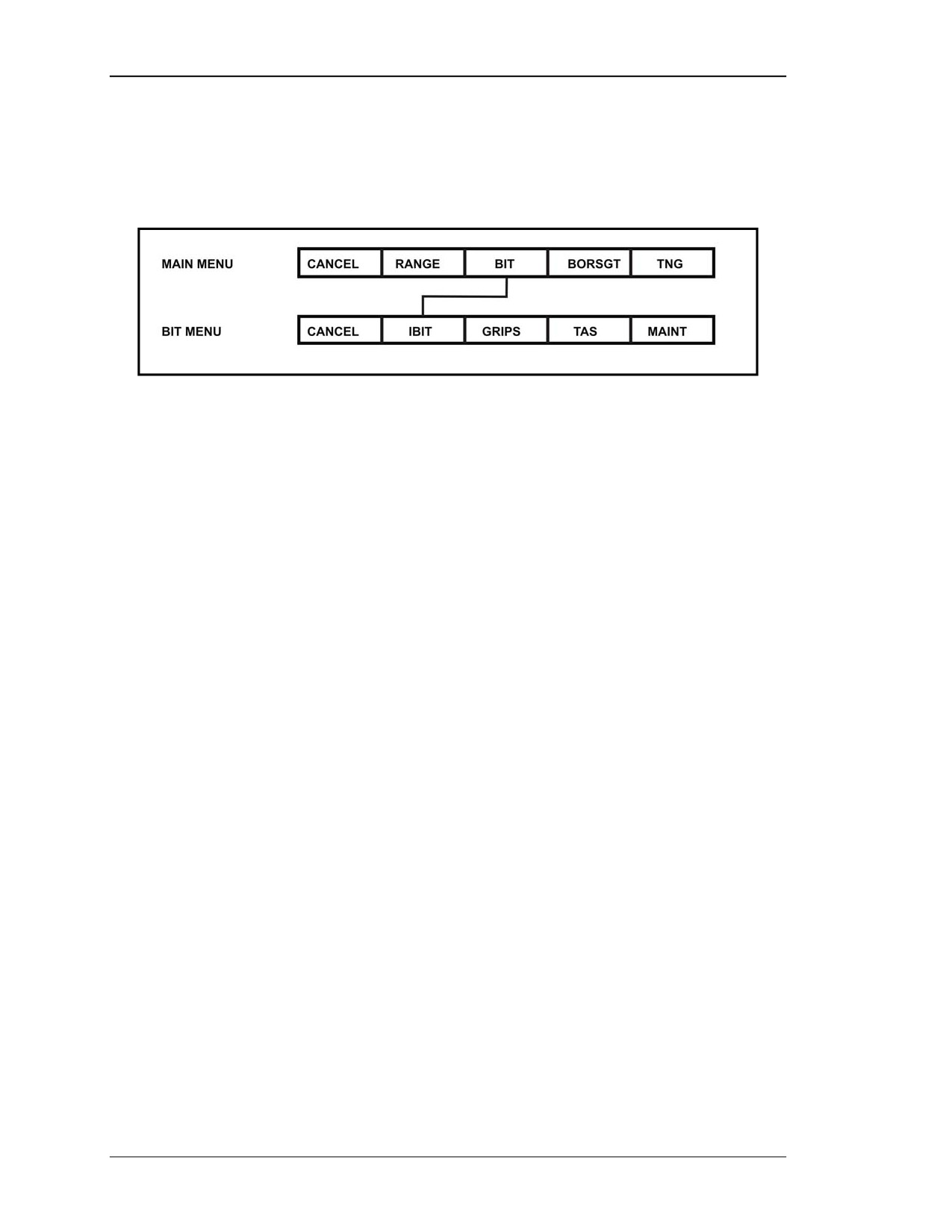
(3) BIT Menu. The BIT menu displays when the gunner selects BIT from the MAIN
MENU. The primary purpose of this menu is to conduct the initiated built-in test (IBIT)
during system checkout procedures (Figure 2-34, page 2-26). The BIT menu has five
selections:
• CANCEL. Selecting CANCEL will remove the BIT menu from the TAS
display.
• IBIT. Selecting IBIT will run the initiated built-in test.
• GRIPS. Selecting GRIPS will display on-screen instructions for the gunner to
follow in testing selected ITAS components.
8 July 2005
2-25
FM 3-22.32
• TAS. Maintenance personnel use this selection.
• MAINT. Selecting MAINT will bring up a maintenance menu. The gunner
uses this selection when entering mission critical and non-mission critical
faults on DA Form 2404 (Equipment Inspection and Maintenance Worksheet).
Figure 2-34. BIT menu tree.
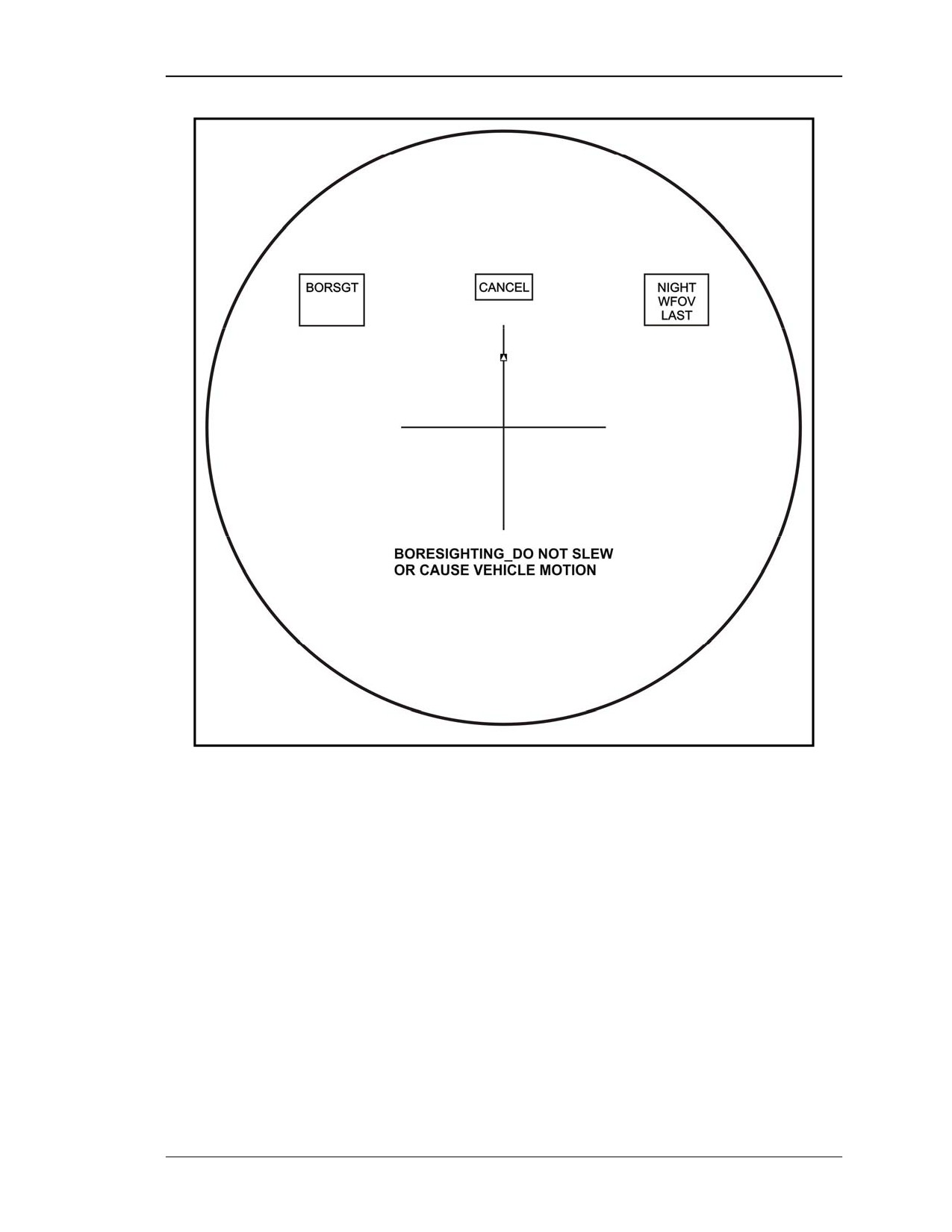
(4) BORSGT Menu. Automatically boresight the daysight, the NVS, and the LRF
when BORSGT is selected from the main menu.
NOTE: Boresighting is normally done during system checkout. However, during
extreme temperature changes, ±18 degrees Fahrenheit, the message TAS
TEMP HAS CHANGED - PERFORM BORESIGHT may appear requiring
the gunner to boresight the ITAS again.
(a) Selecting BORSGT from the main menu initiates the automatic boresighting.
Once the gunner selects the boresight procedure, the word BORSGT will appear in the
mode box, and the boresighting process starts.
(b) While boresighting is in progress, the message BORESIGHTING - DO NOT
SLEW OR CAUSE VEHICLE MOTION is displayed in the TAS system message area
(Figure 2-35).
2-26
8 July 2005
FM 3-22.32
Figure 2-35. BORSGT message.
(c) When boresighting is completed, the message BORESIGHT COMPLETE will be
displayed for five seconds and the TAS display will return to the FOV being used before
boresighting was initiated.
(d) If excessive motion is detected, the message REDO BORESIGHT EXCESSIVE
MOTION will be displayed.
(e) If the system cannot boresight itself, the message UNABLE TO BORESIGHT
MAINTENANCE REQUIRED will appear. The gunner turns notifies his chain of
command so that the ITAS can be turned in for maintenance as soon as possible.
NOTE: The CANCEL menu box remains up to allow the gunner to abort at any time
during the boresighting procedures.
(5) TNG Menu. The training menu is displayed when the gunner selects TNG from
the main menu. This menu displays and provides access to the built-in ITAS training
8 July 2005
2-27
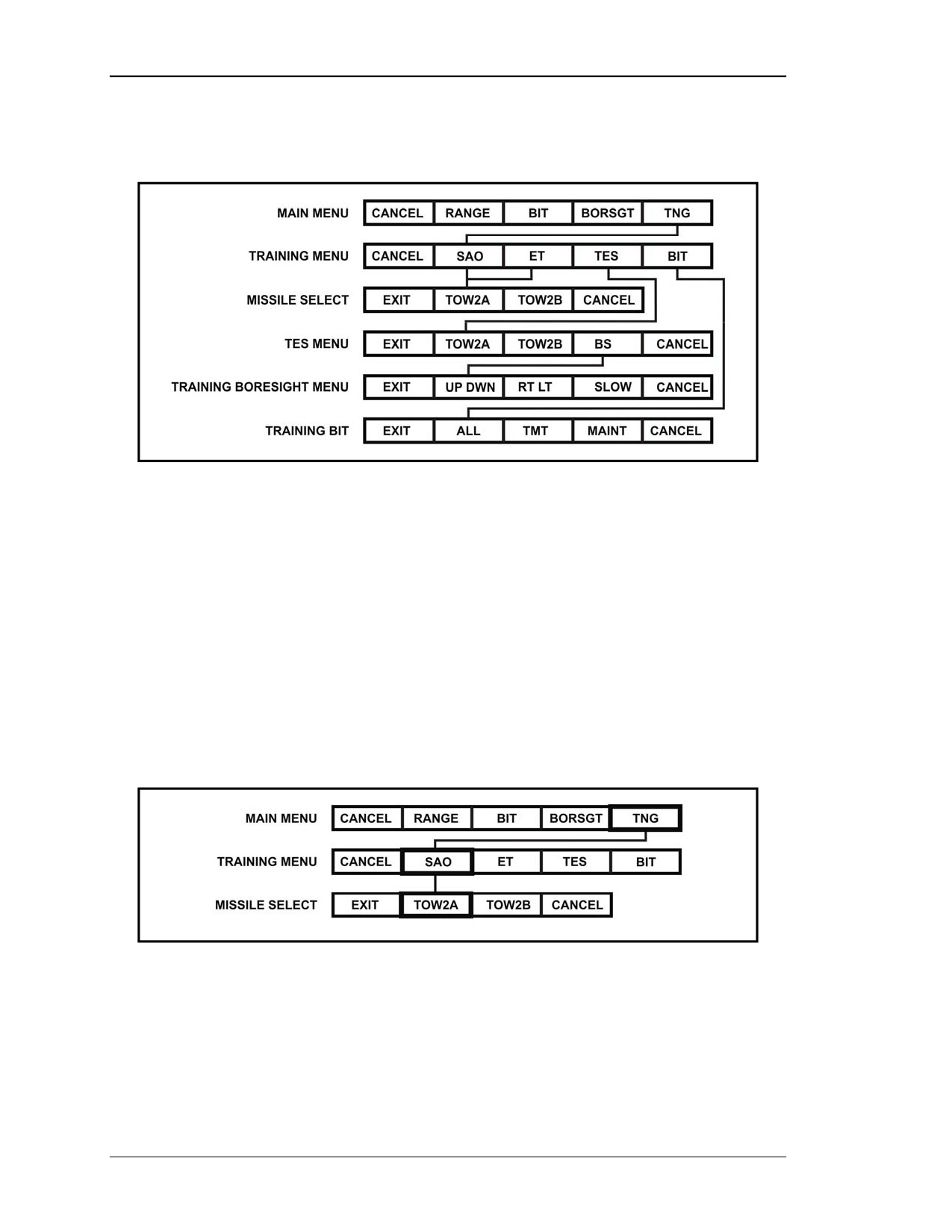
FM 3-22.32
modes. The training menu consists of CANCEL and four other selections (Figure 2-36).
From left to right they are: SAO, ET, TES, and BIT.
Figure 2-36. Training menu tree.
(a) CANCEL. Selecting CANCEL removes the training menu and cancels the training
mode.
(b) SAO. The SAO mode allows training without a missile simulation round in the
launch tube. The selection of SAO from the training menu calls up a lower-level menu,
missile select, with the following options: EXIT, TOW2A, TOW2B, and CANCEL
(Figure 2-37).
• EXIT will return the gunner to the training menu and cancel the SAO mode
selection.
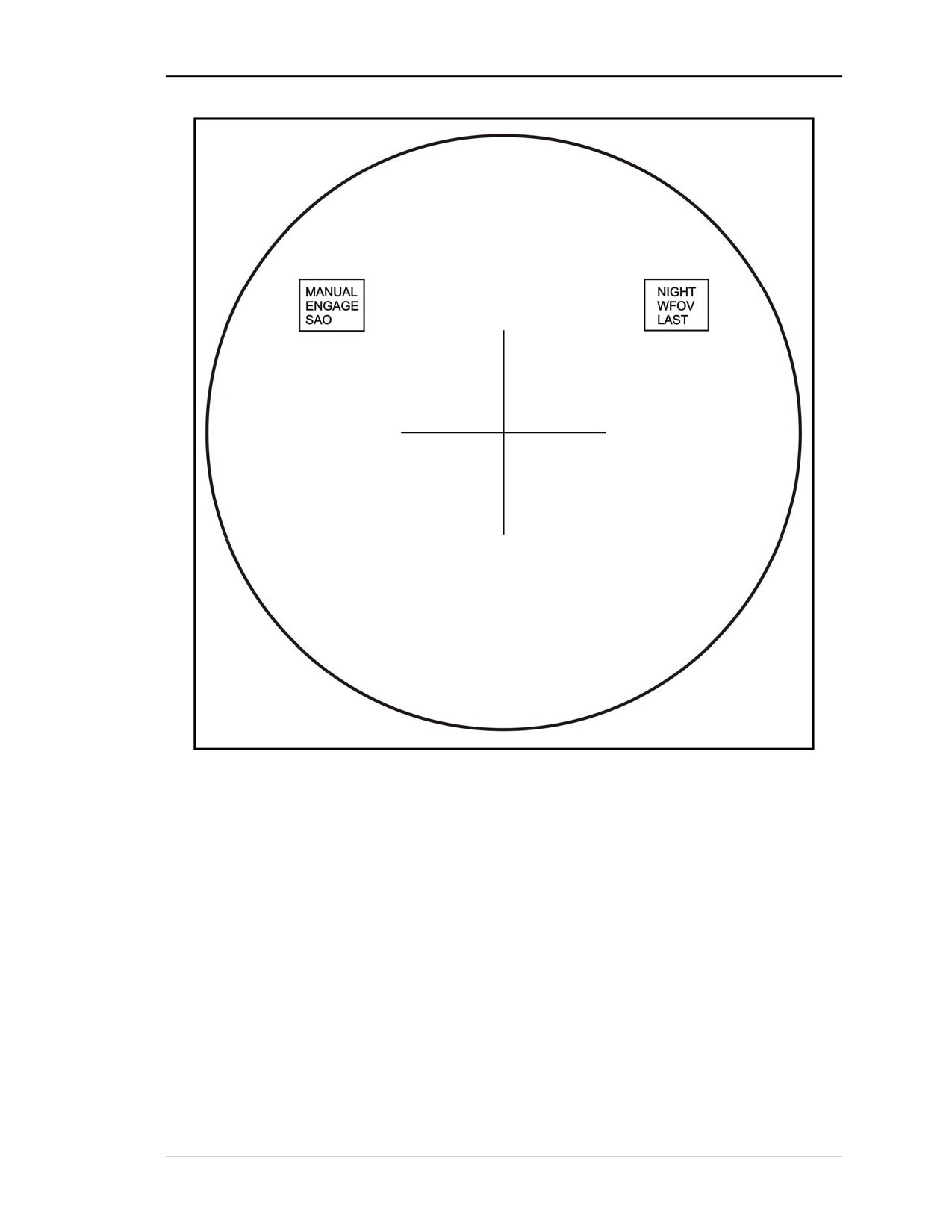
• TOW2A or TOW2B will initiate the SAO mode, remove the training menu,
and place SAO in the mode box (Figure 3-38).
• CANCEL will remove the missile select menu from the TAS display.
Figure 2-37. SAO training menu selections.
2-28
8 July 2005
FM 3-22.32
Figure 2-38. SAO display.
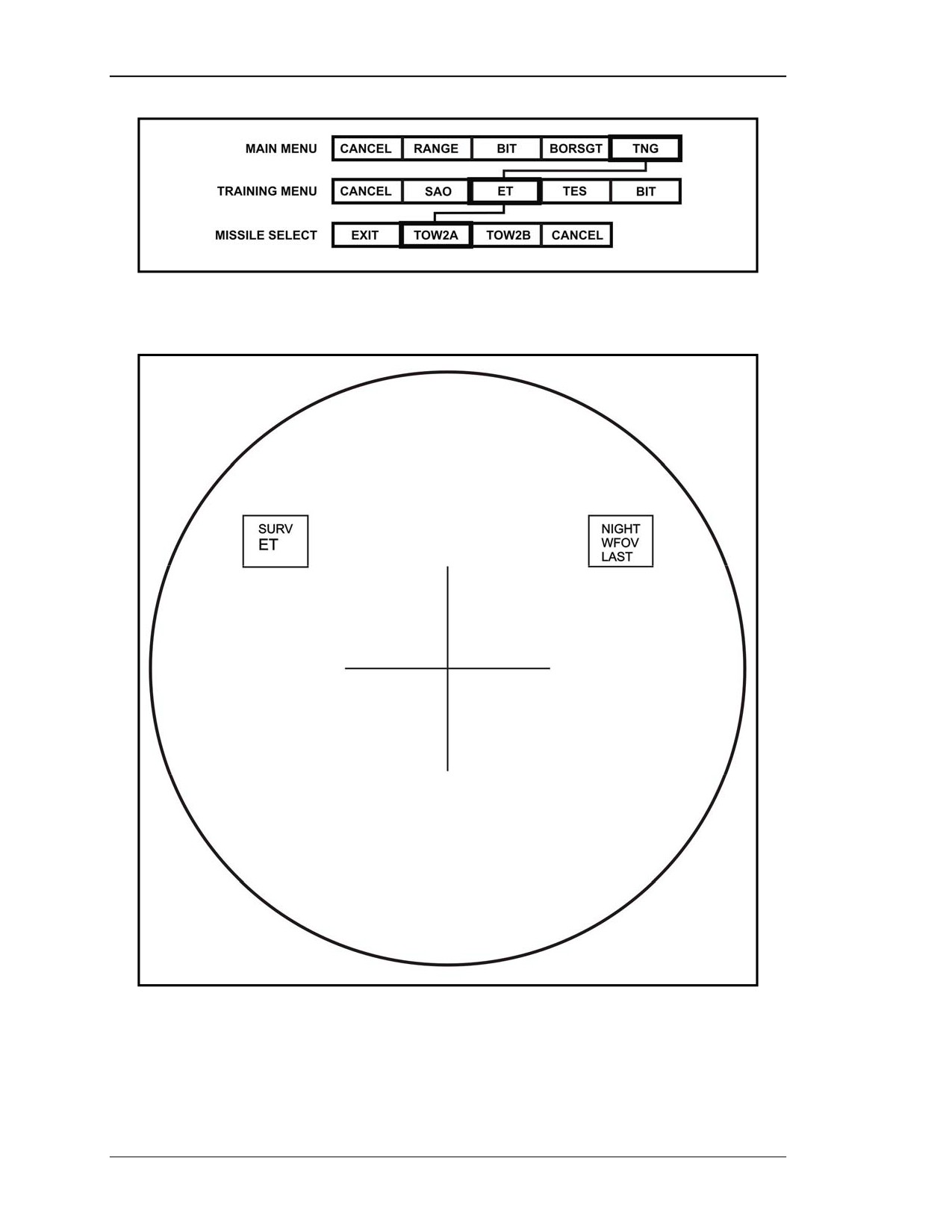
(c) ET. This mode allows training with a missile simulation round in the launch tube.
The selection of ET from the training menu calls up a lower-level menu, missile select,
with the following options: EXIT, TOW2A, TOW2B, and CANCEL (Figure2-39,
page 2-30).
• EXIT will return the gunner to the training menu and cancel the ET mode
selection.
• TOW2A or TOW2B will initiate the ET mode, remove the training menu, and
place ET in the mode box (Figure 2-40, page 2-30).
• CANCEL will remove the missile select menu from the TAS display.
8 July 2005
2-29
FM 3-22.32
Figure 2-39. ET training menu selections.
Figure 2-40. ET display.
(d) TES. This mode allows force-on-force training with the use of a training missile
tube in the launch tube. The selection of TES from the training menu calls up a
2-30
8 July 2005
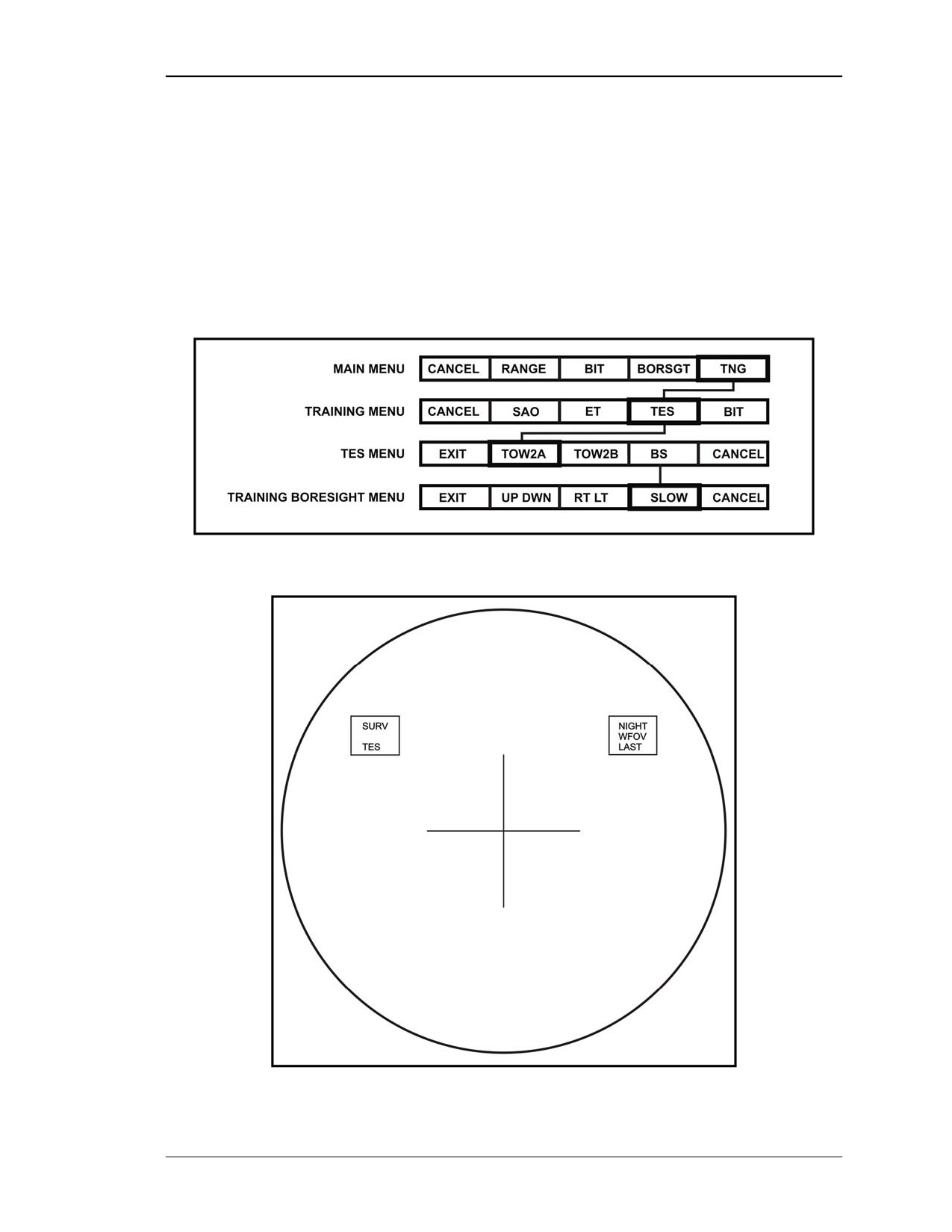
FM 3-22.32
lower-level menu, TES, consisting of EXIT, TOW2A, TOW2B, BS (boresight), and
CANCEL (Figure 2-41).
• EXIT will return the gunner to the training menu and cancel the training BIT
mode selection.
• TOW2A or TOW2B will initiate TES, remove TES menu, and cause TES to
appear in the mode box (Figure 2-42).
• BS calls up the training boresight menu, a lower level menu consisting of
EXIT, UP DWN, RT LT, SLOW, and CANCEL.
• CANCEL will remove the TES menu from the TAS display.
Figure 2-41. TES training selections.
Figure 2-42. TES display.
8 July 2005
2-31
FM 3-22.32
NOTE: See TM 9-6920-721-10 for detailed information on use of the TES mode in
conjunction with force-on-force training.
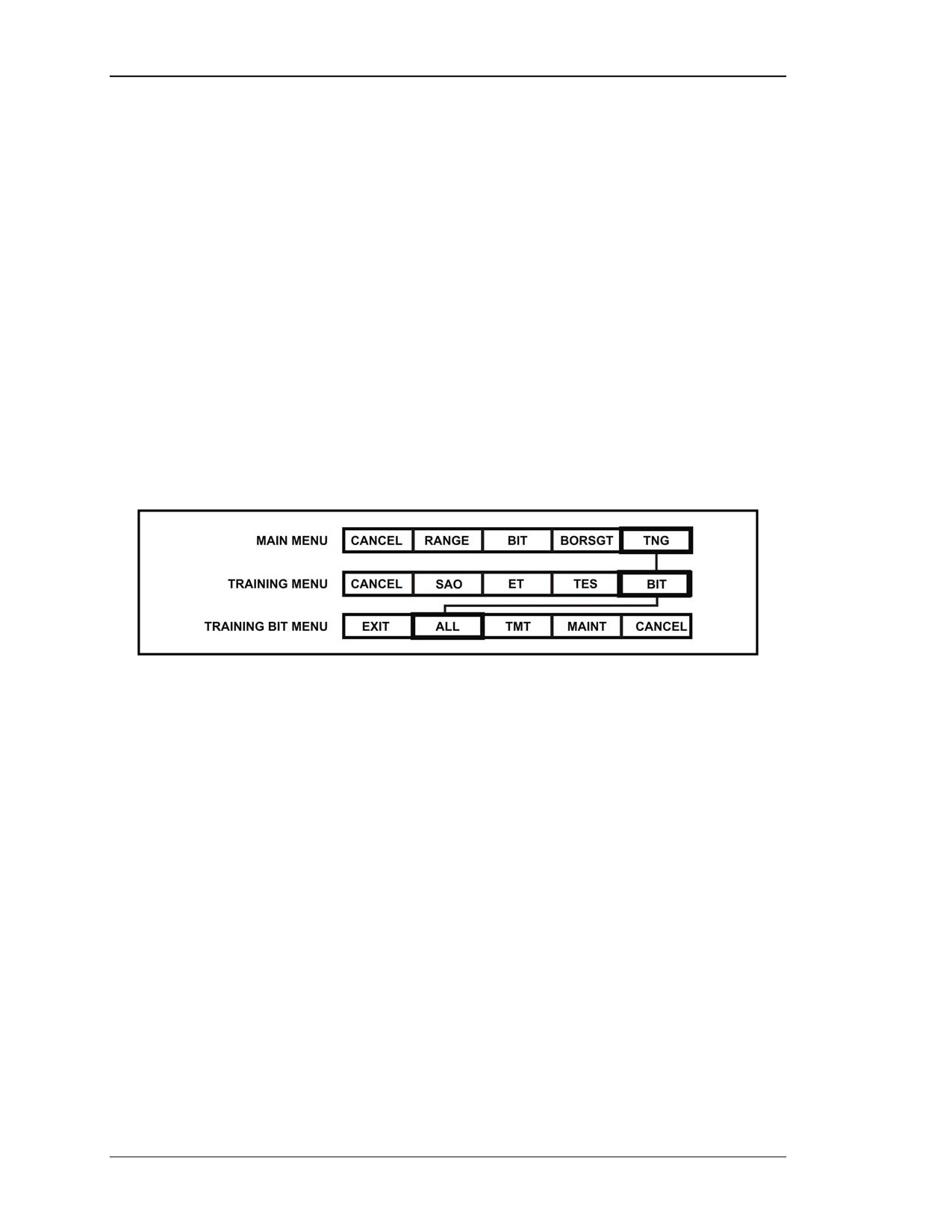
(e) BIT. This mode allows built-in checks of the training missile tube (TMT) when
installed in the launch tube. This mode is used before placing the FTT into operation. The
selection of BIT from the training menu calls up a lower-level menu, training BIT,
consisting of EXIT, ALL, TMT, MAINT, and CANCEL (Figure 2-43).
• EXIT will return the gunner to the training menu and cancel the TES BIT
mode selection
• ALL or TMT will initiate FTT BIT check, highlight the appropriate BIT menu
box, and place TNG BIT in the mode box (Figure 2-44). If BIT passes, the
menu transitions to the training menu and TNG BIT is removed from the
mode box. If either BIT fails, the BIT menu is retained, the highlight is
removed, and the cursor is positioned at the MAINT box
• MAINT is not to be selected by the gunner or crewmembers.
• CANCEL will remove the training BIT menu from the TAS display.
Figure 2-43. Training BIT menu selections.
2-32
8 July 2005
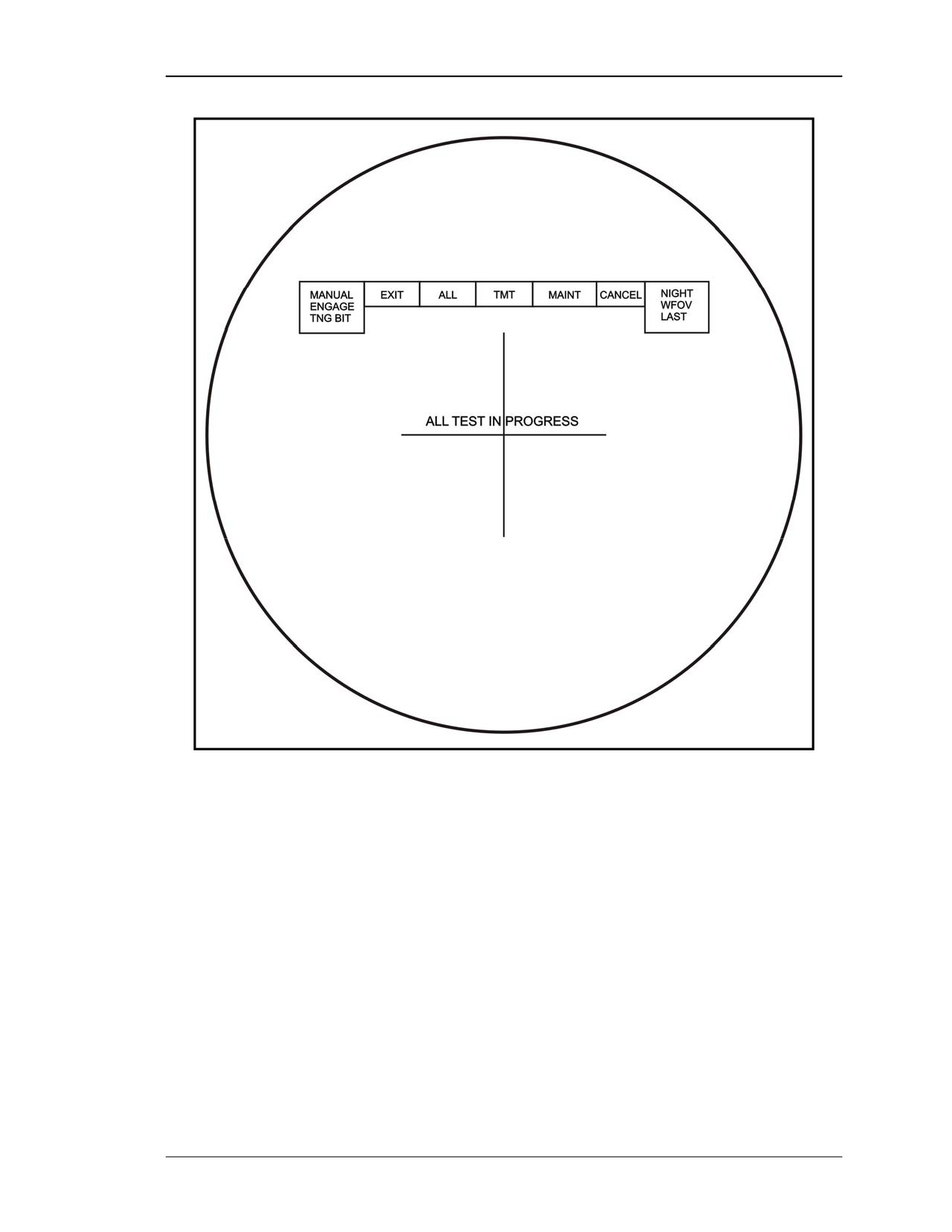
FM 3-22.32
Figure 2-44. TAS display.
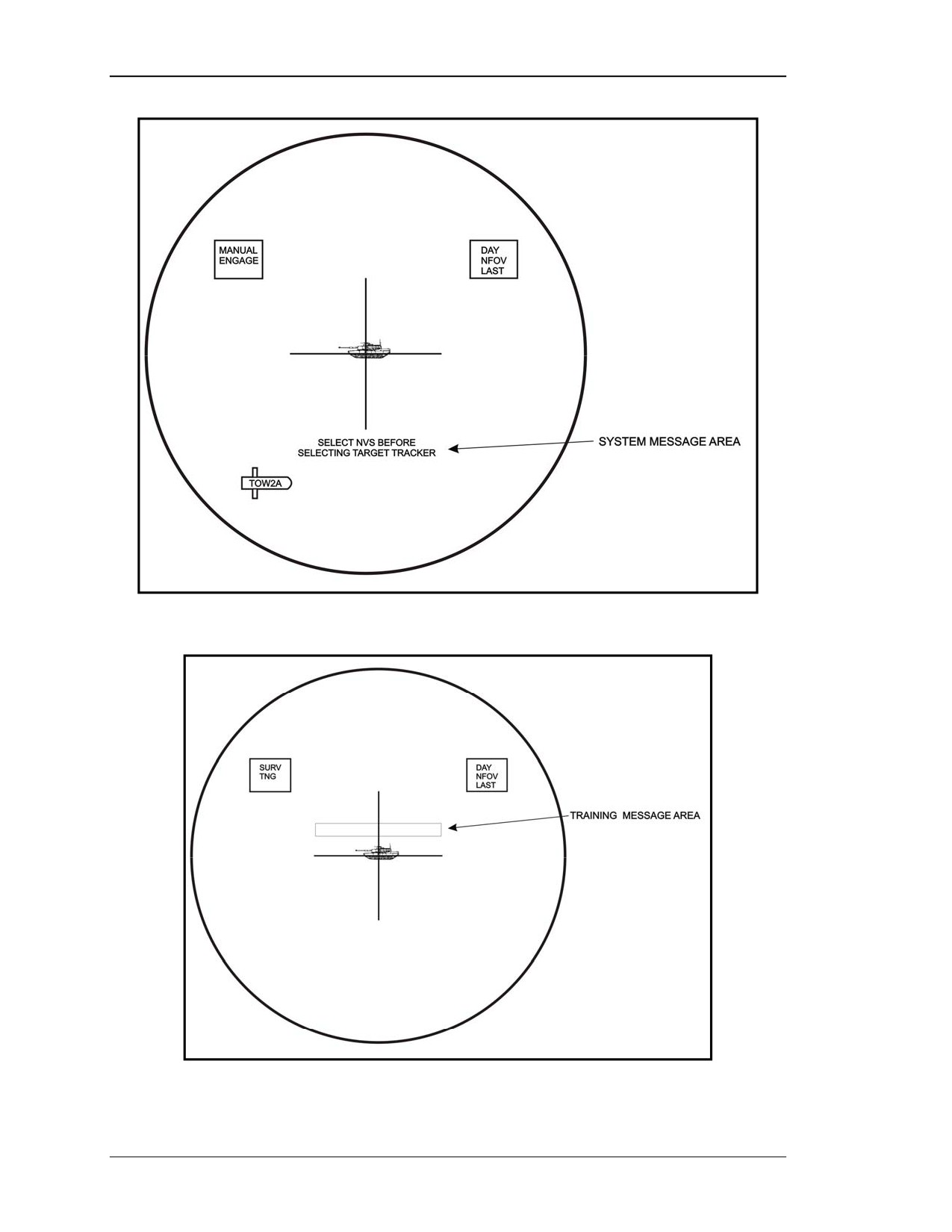
(6) Message Display Area. The TAS display shows two types of messages: system
and training.
(a) System Messages. At the lower center of the TAS display is a line for messages
that are generated by the FCS. The ITAS has instructions loaded into its computer that
can be sent to the gunner as operational and maintenance messages that indicate
information or actions to take. An example of a message the gunner may receive during a
target engagement is SELECT NVS BEFORE SELECTING TARGET TRACKER
(Figure 2-45, page 2-34).
(b) Training Messages. The gunner can also receive training messages. Training
messages are in a separate area to prevent a training message from overwriting a system
message; however, training messages can only appear if the training mode has been
selected (Figure 2-46, page 2-34).
8 July 2005
2-33
FM 3-22.32
Figure 2-45. System message display area.
Figure 2-46. Training message display area.
2-34
8 July 2005
FM 3-22.32
2-5.
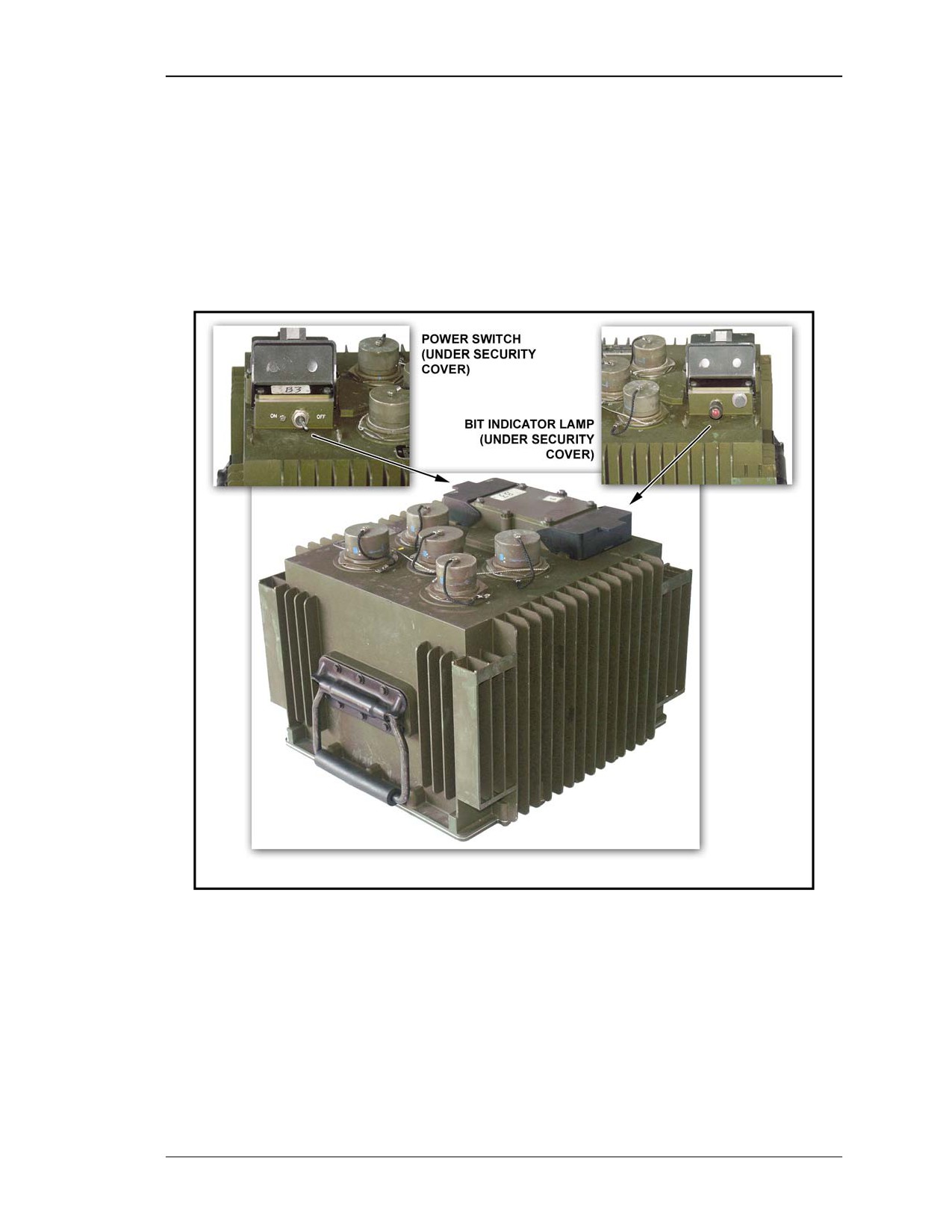
FIRE CONTROL SYSTEM CONTROLS AND INDICATORS
The FCS contains the ITAS computer and associated control electronics (Figure 2-47).
a. FCS Power Switch. The power switch is located under a cover to protect it from
being accidentally turned off. The FCS power switch is turned on after the BPS power
switch in the ITAS power-up procedures.
b. FCS BIT Indicator Lamp. The FCS BIT indicator lamp will come on if the FCS
malfunctions. Turning the lamp bezel controls the brightness of the lamp.
Figure 2-47. FCS power switch and BIT indicator lamp.
2-6.
BATTERY POWER SOURCE CONTROLS AND INDICATORS
The BPS operates the ITAS when it is mounted on a tripod, and acts as a power
conditioner for the vehicle power when mounted on the M1121 HMMWV. When vehicle
power drops below 23.5 volts BPS internal power, the TAS and BPS INTERNAL will be
displayed inside the TAS.
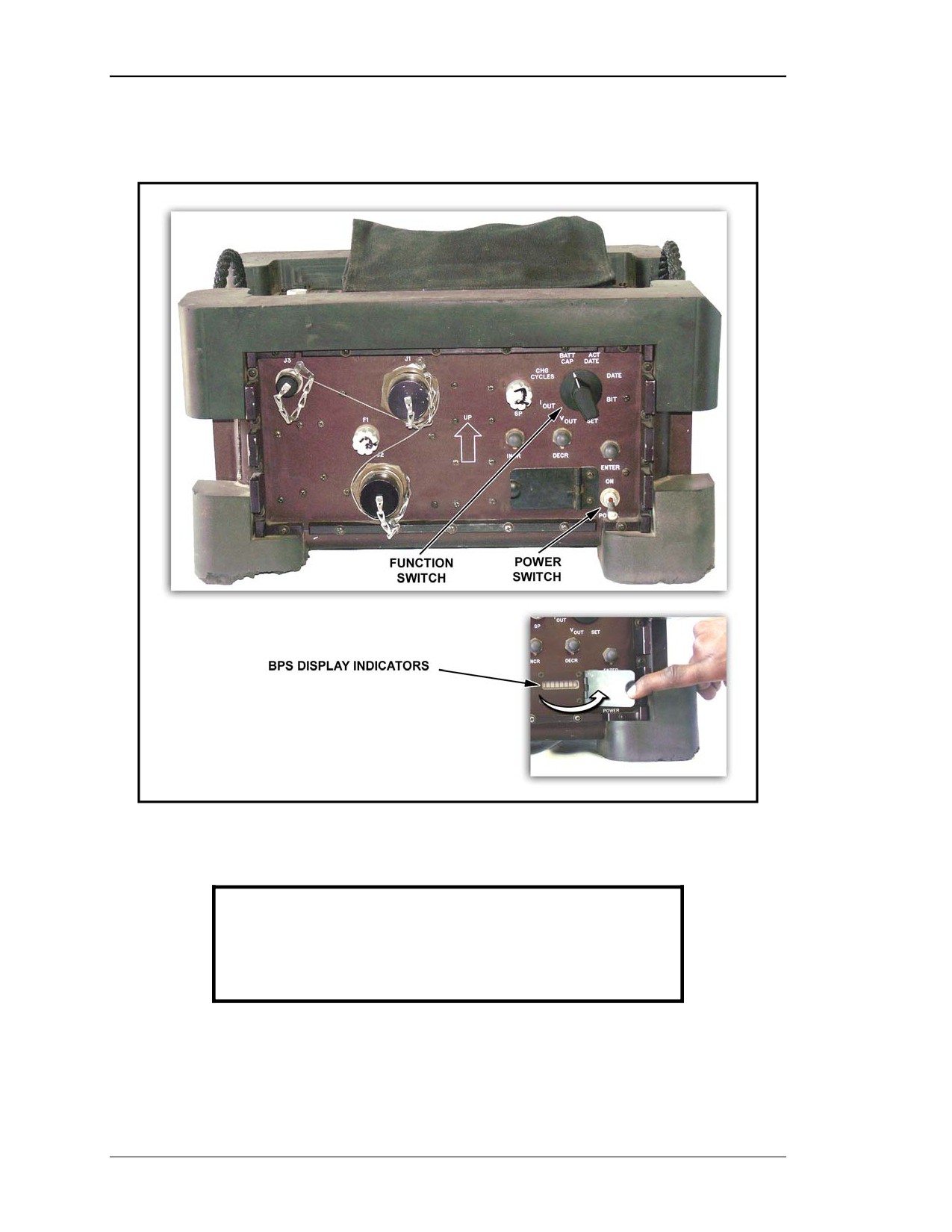
a. BPS Display. The BPS display is located in the lower right corner of the BPS.
This display provides readouts for operator and maintenance personnel. The display
brightness is varied by pressing the INCR switch to increase the brightness and the
8 July 2005
2-35
FM 3-22.32
DECR switch to decrease the brightness when the function switch is in any position
except SET or BIT (Figure 2-48).
Figure 2-48. Battery power source controls and indicators.
CAUTION
Setting the BPS in any orientation other than that
indicated by the UP arrow may cause the battery
electrolyte to leak out causing injury to personnel and
damage to equipment.
b. BPS Controls. Located on the front of the BPS are five control switches. The
operator uses these controls to determine the status and capacity of the batteries within
the BPS.
2-36
8 July 2005
FM 3-22.32
(1) Function Switch. The function switch controls what is displayed on the BPS
display. The function switch is an eight-position rotary switch located in the upper right
corner of the BPS (Figure 2-48).
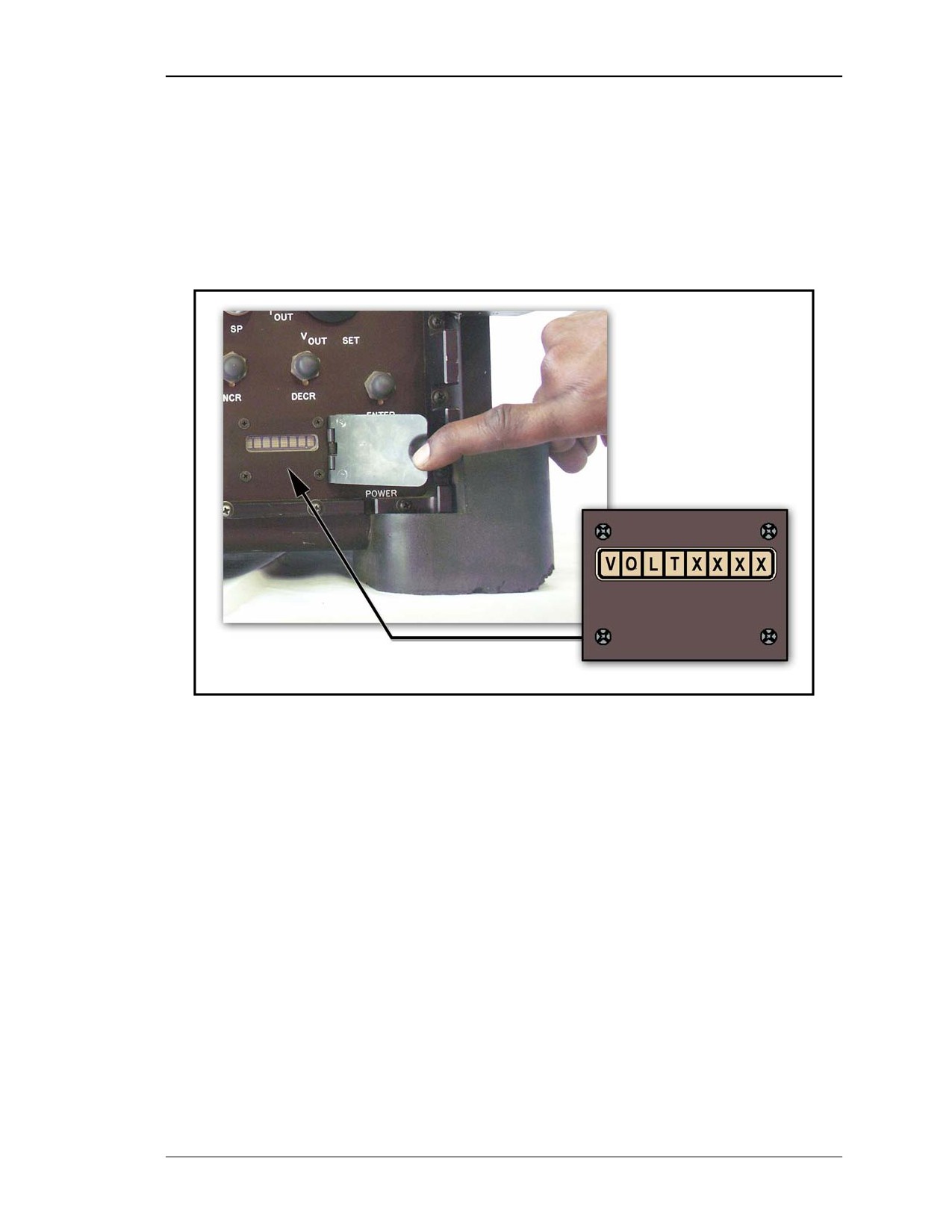
(a) VOUT . When the function switch is placed in the VOUT position, the amount of
output voltage available can be checked. VOUT should read between 24 to 31 VDC when
the BPS batteries are charged. The BPS display window will display the current voltage
of the BPS (Figure 2-49).
Figure 2-49. BPS displays current voltage.
(b) IOUT.. When the function switch is placed in the IOUT position, the amount of
current being supplied to the ITAS can be checked. The BPS display window will display
the current power output to the ITAS (Figure 2-50, page 2-38).
NOTE: IOUT is a maintenance function check.
8 July 2005
2-37