Vauxhall Corsa F (2023 year). Manual in english - page 7
 

  Index      Manuals     Vauxhall Corsa F (2023 year). Manual in english


Search            copyright infringement  


Content      ..     5      6      7      8     ..


Vauxhall Corsa F (2023 year). Manual in english - page 7


198

Driving and operating

Fault

If there is a fault in the system, the

control indicator 

J

 illuminates

continuously, a message appears in

the Driver Information Centre and a

warning chime sounds. The system is

not operational.
Have the cause of the fault remedied

by a workshop.

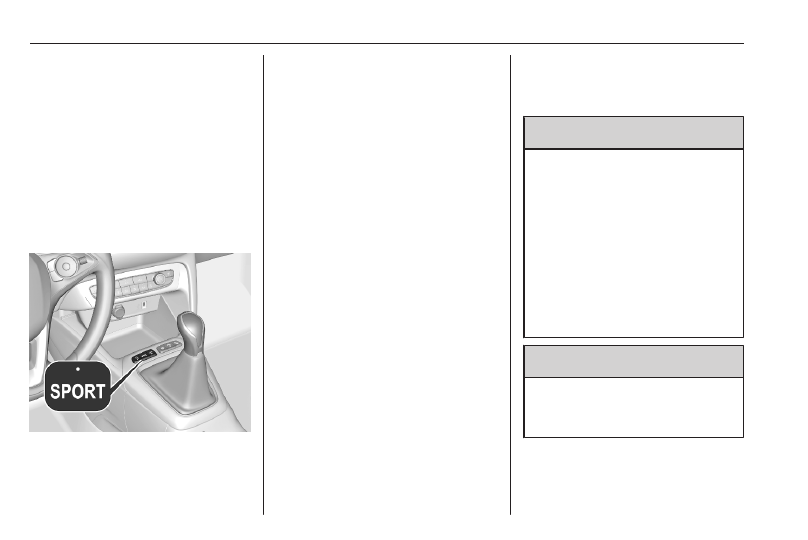
Sport mode

Sport mode adapts the settings of

some vehicle systems to a sportier

driving style:

● The engine reacts more quickly

to accelerator pedal changes.

● Steering support is sportier.

Activation

Press SPORT when engine is

running.
The LED in the button illuminates

when sport mode is active.

Deactivation

Briefly press SPORT. The LED in the

button extinguishes when sport mode

is deactivated.

Driver assistance

systems

9

Warning

Driver assistance systems are

developed to support the driver

and not to replace the driver's

attention.
The driver accepts full

responsibility when driving the

vehicle.
When using driver assistance

systems, always take care

regarding the current traffic

situation.

9

Warning

Do not use a license plate support

on the front bumper to ensure

proper radar unit functionality.

Cruise control

The cruise control can store and

maintain speeds above 25 mph.

Driving and operating

199

Additionally, at least the third gear

must be engaged on some manual

transmissions.
On automatic transmission, position

D or the second or a higher gear in

position M must be selected.
Deviations from the stored speeds

may occur when driving uphill or

downhill.
The system maintains the vehicle

speed at the preset speed by the

driver, without any action on the

accelerator pedal.
The preset speed can be exceeded

temporarily by pressing the

accelerator pedal firmly.
The status and preset speed is

displayed in the Driver Information

Centre.
Do not use the cruise control if it is not

advisable to maintain a constant

speed.

Switching on the system

Press 

v

.

Symbol 

v

 and a message are

displayed in the Driver Information

Centre. The system is still not active.

Activation of the functionality

Setting speed by the driver

200

Driving and operating

Accelerate to the desired speed and

move thumb wheel once briefly to

SET/-. The current speed is stored

and maintained. Accelerator pedal

can be released.
The preset speed can then be

changed by moving thumb wheel to

RES/+ to increase or SET/- to

decrease the speed. Move thumb

wheel repeatedly to change speed in

small steps, move and hold to change

speed in large steps.

Speed value is indicated in the Driver

Information Centre.

Adopting speed by the speed limit

recognition

The intelligent speed adaptation

informs the driver when a speed limit

is detected by the speed limit

recognition. The detected speed limit

can be used as new value for the

cruise control.
Using the camera at the top of the

windscreen, this system detects and

reads speed limit and end of speed

limit signs.
With active cruise control the

recognised speed limit will be

displayed in the Driver Information

Centre and MEM illuminates if the

difference between set speed and

speed limit is more than 6 mph.
Press MEM on the steering wheel to

request saving of the suggested

speed.
Press MEM on the steering wheel

once more to confirm and save the

new speed setting.
This speed is the new value for the

cruise control.

The function can be deactivated or

activated in the vehicle

personalisation 

3

 80.

Exceeding the set speed

Vehicle speed can be increased by

depressing the accelerator pedal.

When the accelerator pedal is

released, the previously stored speed

is resumed.

Deactivation of the functionality

Press 

i

, cruise control is in pause

mode and a message is displayed.

The vehicle is driven without cruise

control.
Cruise control is deactivated, but not

switched off. Last stored speed

remains in memory for later speed

resume.
Cruise control is deactivated

automatically in the following cases:

● The brake pedal is depressed.
● Vehicle speed is below 25 mph.
● The traction control system or

electronic stability control is

operating.

Driving and operating

201

● The selector lever is in N

(automatic transmission) or the

first or second gear (on some

manual transmissions) is

engaged.

● The clutch pedal has been

depressed for a few seconds

(depending on the manual

transmission).

Resume stored speed

Move thumb wheel to RES/+ at a

speed above 25 mph. The stored

speed will be obtained.

Switching off the system

Press 

v

, the cruise control mode is

deselected and the cruise control

indication extinguishes in the Driver

Information Centre.
Pressing 

5

 to activate the speed

limiter deactivates cruise control.
Switching off the ignition cancels any

programmed speed value.

Fault

In the event of a cruise control fault,

the speed is cleared resulting in

flashing of the dashes.
The speed limit recognition may not

operate correctly if traffic signs do not

comply with the Vienna Convention

on Road Signs and Signals.

Speed limiter

The speed limiter prevents the

vehicle from exceeding a preset

maximum speed.
The maximum speed can be set at

speeds above 18 mph.
The driver can accelerate the vehicle

up to the preset speed. Deviations

from the limited speed may occur

when driving downhill.
The preset speed can be exceeded

temporarily by pressing the

accelerator pedal firmly.
The status and preset speed limit are

displayed in the Driver Information

Centre.

Switching on the system

Press 

5

.

5

 and a message are displayed in

the Driver Information Centre. The

system is still not active.

202

Driving and operating

Activation of the functionality

Setting speed by the driver

The preset maximum speed can be

set by pressing thumb wheel to

RES/+ to increase or SET/- to

decrease the desired maximum

speed. Move thumb wheel repeatedly

to change speed in small steps, move

and hold to change speed in large

steps.

Speed value is indicated in the Driver

Information Centre.

Press 

i

 to activate speed limiter.

Adopting speed by the speed limit

recognition

The intelligent speed adaptation

informs the driver when a speed limit

is detected by the speed limit

recognition. The detected speed limit

can be used as new value for the

speed limiter.
Using the camera at the top of the

windscreen, this system detects and

reads speed limit and end of speed

limit signs.
If the speed limiter is active, the

recognised speed limit will be

displayed in the Driver Information

Centre and MEM illuminates if the

difference between set speed and

speed limit is more than 6 mph.
Press MEM on the steering wheel to

request saving of the suggested

speed limit.
Press MEM on the steering wheel

once more to confirm and save the

new speed setting.
This speed is the new value for the

speed limiter.

Driving and operating

203

The function can be activated or

deactivated in the vehicle

personalisation 

3

 80.

Exceeding the speed limit

In the event of an emergency, it is

possible to exceed the speed limit by

depressing the accelerator pedal

firmly to the final point. In this case,

the preset speed value flashes.
Release the accelerator pedal and

the speed limiter function is

reactivated once a speed lower than

the limit speed is obtained.

Deactivation of the functionality

Press 

i

, speed limiter is in pause

mode and a message is displayed.

The vehicle is driven without speed

limiter.
Speed limiter is deactivated, but not

switched off. Last stored speed

remains in memory for later speed

resume.

Resume limit speed

Press 

i

, the stored speed limit will

be obtained.

Switching off the system

Press 

5

, the speed limiter mode is

deselected and the speed limit

indication extinguishes in the Driver

Information Centre.
Pressing 

v

 to activate cruise control

deactivates speed limiter.
The preset speed remains in the

memory when the ignition is switched

off.

Fault

In the event of a speed limiter fault,

the speed is cleared resulting in

flashing of the dashes.
The speed limit recognition may not

operate correctly if traffic signs do not

comply with the Vienna Convention

on Road Signs and Signals.

Adaptive cruise control

The adaptive cruise control is an

enhancement of the cruise control

with the additional feature of

maintaining a certain following

distance to the vehicle ahead.

It uses radar and camera sensors to

detect the vehicles ahead. If no

vehicle is detected in the driving path,

the adaptive cruise control will

behave like a conventional cruise

control.
The adaptive cruise control

automatically decelerates the vehicle

when approaching a slower moving

vehicle. It then adjusts the vehicle

speed to follow the vehicle ahead at

the selected following distance. The

vehicle speed increases or decreases

to follow the vehicle ahead, but will

not exceed the set speed. It may

apply limited braking with activated

brake lights.
If the vehicle ahead accelerates or

changes lane, the adaptive cruise

control progressively accelerates the

vehicle to return to the stored set

speed. If the driver operates the turn

lights to overtake a slower vehicle, the

204

Driving and operating

adaptive cruise control allows the

vehicle to temporarily approach the

vehicle ahead to help passing it.

However, the set speed will never be

exceeded.
If the vehicle ahead is moving too

slowly and the selected following

distance cannot be maintained

anymore, a warning chime is given

and a message is displayed in the

Driver Information Centre on vehicles

with manual transmission. The

message prompts the driver to take

back control of the vehicle.
On vehicles with automatic

transmission, the system can brake

the vehicle until a full stop.

9

Warning

The complete driver attention is

always required while driving with

adaptive cruise control. The driver

stays fully in control of the vehicle

because the brake pedal, the

accelerator pedal and the button

Ñ

 have priority over any adaptive

cruise control operation.

Switching on the system

Press 

w

.

w

 is indicated in the Driver

Information Centre. The system is still

not active.

Activation of the functionality

Setting speed by the driver

The adaptive cruise control has to be

switched on manually at a speed

between 25 mph and 112 mph.
Accelerate to the desired speed and

move the thumb wheel to SET/-. The

current speed is stored and

maintained.

Driving and operating

205

The speed value is indicated in the

Driver Information Centre.
The preset speed can then be

changed by moving thumb wheel to

RES/+ to increase or SET/- to

decrease the speed. Move thumb

wheel repeatedly to change speed in

small steps, move and hold to change

speed in large steps.
When the adaptive cruise control is

operating, the stop-start system is

automatically deactivated.

Adopting speed by the speed limit

recognition

The intelligent speed adaptation

informs the driver when a speed limit

is detected by the speed limit

recognition. The detected speed limit

can be taken over as new set speed

for the adaptive cruise control.
Using the camera at the top of the

windscreen, this system detects and

reads speed limit and end of speed

limit signs.
If the adaptive cruise control is active,

the recognised speed limit will be

displayed in the Driver Information

Centre and MEM illuminates if the

difference between set speed and

speed limit is more than 6 mph.
Press MEM on the steering wheel to

request saving of the suggested

speed.
Press MEM on the steering wheel

once more to confirm and save the

new speed setting.
This speed limit is now the new set

speed of the adaptive cruise control.

The function can be activated or

deactivated in the vehicle

personalisation 

3

 80.

Overriding set speed

It is always possible to drive faster

than the selected set speed by

depressing the accelerator pedal.

When the accelerator pedal is

released, the vehicle returns to the

stored speed. If a slower moving

vehicle is ahead, the following

distance selected by the driver is

restored.
If the set speed is exceeded, the

indicated speed setting disappears

and a warning message is displayed.

9

Warning

Accelerating by the driver

deactivates automatic braking by

the system. This is indicated as a

pop-up warning in the Driver

Information Centre.

206

Driving and operating

Resuming stored speed

Move the thumb wheel to RES/+ at a

speed above 25 mph. The adaptive

cruise control is activated with the

stored set speed.

Adaptive cruise control on

vehicles with automatic

transmission

For vehicles with automatic

transmission, adaptive cruise control

allows to maintain the selected

distance behind a braking vehicle

until a complete stop is reached.
If the system has stopped your

vehicle behind another vehicle, then

the set speed is replaced by a green

control indicator 

.

. This symbol

notifies, that the vehicle is hold

automatically in stop position.
When the vehicle ahead drives away

within some seconds and the traffic

conditions allow a restart of the

vehicle, then active cruise control is

resumed automatically.
If the stopped vehicle ahead was

stopped for a longer time and then

begins to move forward, the green

control indicator 

.

 will flash and a

warning chime will sound as a

reminder to check traffic before

resuming.
When the vehicle ahead drives away,

depress the accelerator pedal or

press 

i

 to resume adaptive cruise

control.
If the vehicle stays stopped for more

than 5 minutes or if the driver's door

is opened and the driver's seat belt is

unfastened, then the electric parking

brake is applied automatically to hold

the vehicle. Control indicator 

j

 will

illuminate. To release electric parking

brake, press the accelerator pedal.
Electric parking brake 

3

 193.

9

Warning

When the system is deactivated or

cancelled, the vehicle will no

longer be held at a stop and can

start moving. Be always prepared

to manually apply the brake to hold

the vehicle stationary.

Do not leave the vehicle while it is

being held at a stop by adaptive

cruise control. Always move

selector lever to park position P

and switch off the ignition before

leaving the vehicle.

Setting the following distance

When adaptive cruise control detects

a slower moving vehicle in the driving

path, it will adjust the vehicle speed to

maintain the following distance

selected by the driver.
The following distance can be set to

close (1 bar), normal (2 bars) or far (3

bars).
If the engine is running and the

adaptive cruise control is enabled

(grey) or active (green), you can

modify the following distance setting:
Press 

V

, the current setting is

shown in the Driver Information

Centre.
Press 

V

 again to change the

following distance: The new setting is

displayed in the Driver Information

Centre.

Driving and operating

207

The selected following distance is

indicated by full bars in the adaptive

cruise control page.

9

Warning

The driver accepts full

responsibility for the appropriate

following distance based on traffic,

weather and visibility conditions.

Following distance must be

adjusted or the system switched

off when required by the prevailing

conditions.

Detecting the vehicle ahead

If the system detects a vehicle in the

driving path, the adaptive cruise

control symbol displayed in the Driver

Information Centre changes from 

-

to 

w

.

Deactivation of the functionality

Press 

i

, the adaptive cruise control

is in pause mode and a message is

displayed. The vehicle is driven

without adaptive cruise control.
The adaptive cruise control is

deactivated, but not disabled. The

last stored set speed remains in

memory for later usage.
The adaptive cruise control is

deactivated automatically in the

following cases:

● The brake pedal is depressed.
● The vehicle accelerates above

112 mph.

● The vehicle with manual

transmission slows down below

25 mph.

● The electric parking brake is

applied.

● The traction control system or

electronic stability control is

deactivated or operating.

● The selector lever is neither in D

nor in M.

● A fault is detected in the

electronic stability control or the

radar system.

● Immediately after the clutch

pedal has been depressed or a

few seconds after the clutch

pedal has been depressed

(depending on the manual

transmission).

Switching off the system

Press 

w

, the adaptive cruise control

mode is disabled and the adaptive

cruise control indication extinguishes

in the Driver Information Centre.
Pressing 

5

 to activate the speed

limiter deactivates adaptive cruise

control.

208

Driving and operating

Switching off the ignition deletes the

stored set speed.

Driver's attention

● Use the adaptive cruise control

carefully on bends or mountain

roads, as it can lose the vehicle

ahead and needs time to detect it

again.

● Do not use the system on

slippery roads as it can create

rapid changes in tyre traction

(wheel spinning), so that you

could lose control of the vehicle.

● Do not use the adaptive cruise

control during rain, snow or

heavy dirt, as the radar sensor

can be covered by a water film,

dust, ice or snow. This reduces or

suppresses completely the

visibility. In case of sensor

blockage, clean the sensor

cover.

● Do not use the system when the

spare wheel is in use.

System limits

9

Warning

The system's automatic brake

force does not permit hard braking

and the braking level may not be

sufficient to avoid a collision.

● After a sudden lane change, the

system needs a certain time to

detect the next preceding

vehicle. So if a new vehicle is

detected, the system may

accelerate instead of braking.

● The adaptive cruise control only

considers traffic driving in the

same direction.

● The adaptive cruise control does

not consider pedestrians and

animals for braking and driving

off.

● The adaptive cruise control

considers stopped vehicles only

at low speed.

● Do not use the adaptive cruise

control when towing a trailer.

● Do not use the adaptive cruise

control on roads with an incline of

more than 10%.

As the radar's field of detection is

quite narrow, it is possible that the

system may not detect:

● vehicles of reduced width, e.g.

motorcycles, scooters

● vehicles not running in the middle

of the lane

● vehicles entering a corner
● vehicles suddenly pulling out

Bends

The adaptive cruise control calculates

a predicted path based on the

centrifugal force. This predicted path

considers the current bend

characteristic, but cannot consider a

Driving and operating

209

future bend change. The system may

lose the current vehicle ahead or

consider a vehicle which is not in the

actual lane. This can happen when

entering or exiting a bend or if the

bend gets stronger or weaker. If it no

longer detects any vehicle ahead,

then 

w

 will extinguish.

If the centrifugal force is too high in a

bend, the system slows down the

vehicle slightly. This braking level is

not designed to avoid spinning-off the

bend. The driver is responsible for

reducing the selected speed before

entering a bend and in general to

adapt the speed to the road type and

to existing speed limits.

Motorways

On motorways, adapt the set speed

to the situation and the weather.

Always consider that adaptive cruise

control has a limited visibility range, a

limited braking level and a certain

reaction time to verify if a vehicle is on

the driving path or not. Adaptive

cruise control may not be able to

brake the vehicle in time to avoid a

collision with a much slower vehicle or

after a lane change. This is

particularly true while driving fast or if

the visibility is reduced due to weather

conditions.
While entering or exiting a motorway,

adaptive cruise control may lose the

vehicle ahead and accelerate up to

the set speed. For this reason,

decrease the set speed before the

exit or before the entry.

Vehicle path changes

If another vehicle enters your driving

path, adaptive cruise control will first

consider the vehicle when it is

completely in your path. Be ready to

take action and depress the brake

pedal if you need to brake more

quickly.

Hill considerations

9

Warning

Do not use the adaptive cruise

control on steep hill roads.

System performance on hills depends

on vehicle speed, vehicle load, traffic

conditions and the road gradient. It

may not detect a vehicle in your path

while driving on hills. On steep hills,

you may have to use the accelerator

pedal to maintain your vehicle speed.

When going downhill you may have to

brake to maintain or reduce your

speed.
Note that applying the brake

deactivates the system.

210

Driving and operating

Radar unit

The radar unit is located in the middle

of the front bumper.

9

Warning

The radar unit was aligned

carefully during manufacture.

Therefore, in the event of a front-

end impact, do not use the system.

The front bumper may appear to

be intact, however the sensor

behind may be affected and react

incorrectly. After an accident,

consult a workshop to verify and

adjust the radar unit position.

9

Warning

Do not use a license plate support

on the front bumper to ensure

proper radar unit functionality.

Fault

In the event of an adaptive cruise

control fault, a warning light is

illuminated in the instrument cluster

and a warning message is displayed

in the Driver Information Centre

accompanied by an audible signal.
The adaptive cruise control may not

operate correctly if traffic signs do not

comply with the Vienna Convention

on Road Signs and Signals.
Have the system checked by a dealer

or a qualified workshop.
As a safety measure, do not use the

system if the brake lights are faulty.

Do not use the system if the front

bumper is damaged.

Forward collision alert

The forward collision alert may help to

avoid or reduce the harm caused by

front-end crashes.

The forward collision alert uses the

front camera in the windscreen and

depending on the vehicle

configuration a radar unit located

behind the front bumper to detect a

vehicle directly ahead, in the path.
If a vehicle directly ahead is

approached too quickly, a warning

chime sounds and a message is

displayed in the Driver Information

Centre.

Driving and operating

211

9

Warning

Forward collision alert is just a

warning system and does not

apply the brakes. When

approaching a vehicle ahead too

rapidly, it may not provide you

enough time to avoid a collision.
The driver accepts full

responsibility for the appropriate

following distance based on traffic,

weather and visibility conditions.
The complete attention of the

driver is always required while

driving. The driver must always be

ready to take action and apply the

brakes.

Activation

The forward collision alert operates

from 3 mph to vehicle's maximum

speed.

Alerting the driver

The driver is warned by following

alerts:

● A warning message is displayed

in the Driver Information Center,

when the distance to the vehicle

ahead gets too small.

● A warning message is displayed

in the Driver Information Center

and a warning chime sounds,

when a collision is imminent and

immediate driver's action is

required.

● In some cases, the system

performs a short braking, when a

collision is imminent and

immediate driver's action is

required.

Selecting the alert sensitivity

Three alert sensitivities can be

selected in the settings of the active

emergency braking within the vehicle

personalisation 

3

 80.

The chosen setting will be memorised

when the ignition has been switched

off. The alert timing will vary based on

selected alert setting.

Deactivation

The system can only be deactivated

by deactivating the active emergency

braking in the vehicle personalisation

3

 80. When ignition is switched on

next time, system is activated.

System limitations

Forward collision alert is designed to

warn on vehicles, pedestrians and

cyclists, but may react also to other

objects.
In the following cases, forward

collision alert may not detect a vehicle

ahead or sensor performance is

limited:

● driving on winding or hilly roads
● driving during nighttime
● weather limits visibility, such as

fog, rain, or snow

● the sensor in the windscreen or

the radar unit behind the front

bumper are blocked by snow, ice,

slush, mud, dirt etc.

212

Driving and operating

● the windscreen is damaged or

affected by foreign objects, e.g.

stickers

● the bumper is damaged or

affected by foreign objects, e.g.

license plate support

Active emergency braking

Active emergency braking can help to

reduce the damage and injury from

crashes with vehicles and

pedestrians directly ahead, when the

driver does not actively take action

either by manual braking or by

steering. For vehicles equipped with

camera and radar, active emergency

braking also detects cyclists. Before

the active emergency braking

applies, the driver is warned by the

forward collision alert.
Forward collision alert 

3

 210.

Front pedestrian protection 

3

 215.

Active emergency braking can be

deactivated in the vehicle

personalisation 

3

 80. Depending on

version, this is only possible at a

standstill. If deactivated, 

m

illuminates in the Driver Information

Centre. When ignition is switched on

next time, system is automatically

activated.
The feature uses various inputs (e.g.

camera sensor, radar sensor) to

calculate the probability of a frontal

collision.

9

Warning

This system is not intended to

replace the driver's responsibility

for driving the vehicle and looking

ahead. It warns the driver if the

vehicle is at risk of a collision with

the preceding vehicle, a

pedestrian or a cyclist. Just before

the imminent collision, it reduces

the vehicle's speed to avoid a

collision or to limit its severity.
The system may not react to

animals. After a sudden lane

change, the system needs a

certain time to detect the next

preceding vehicle.
The driver must always be ready

to take action and apply the brakes

and steer to avoid collisions.

Functionality

Depending on the vehicle

configuration and the detected

objects, there are several operational

speed ranges.
Active emergency braking operates

up to 50 mph when a pedestrian has

been detected.
On vehicles equipped with radar

sensor and front camera, the active

emergency braking operates up to

50 mph when a stationary vehicle or

a cyclist has been detected.
On vehicles equipped only with front

camera, the active emergency

braking operates from 3 mph to

50 mph or 87 mph when a moving

vehicle has been detected.
On vehicles equipped with radar

sensor and front camera, the active

emergency braking operates from

3 mph to 87 mph when a moving

vehicle has been detected.
The system includes:

● brake preparation system
● emergency automatic braking
● smart brake assist

Driving and operating

213

● forward collision alert
● front pedestrian protection

Brake preparation system

When approaching a vehicle ahead

or a pedestrian so quickly that a

collision is likely, the brake

preparation system slightly

pressurises the brakes. This reduces

the response time, when braking is

requested.
The pressurisation of the brakes may

produce a noise in the brake system.

Emergency automatic braking

After activation of brake preparation

system and just before the imminent

collision, this function automatically

applies braking to reduce the impact

speed of the collision or prohibit a

crash.
If active emergency braking is

applied, 

m

 flashes in the Driver

Information Centre. If active

emergency braking is finished, 

m

flashes for a few seconds. During this

time, active emergency braking

cannot be applied if there is a risk of

a further collision.
Forward collision alert 

3

 210.

Front pedestrian protection 

3

 215.

Depending on version, below a speed

of 19 mph or 31 mph, emergency

automatic braking may slow down the

vehicle to a complete stop. If the

speed exceeds this limit, emergency

automatic braking reduces the speed.

However, the driver must apply the

brake to come to a complete stop.

● Automatic transmission: If the

vehicle comes to a complete

stop, automatic braking is

maintained for a certain time.

Keep the brake pedal depressed

to prevent the vehicle from

starting off again.

● Manual transmission: If the

vehicle comes to a complete

stop, the engine may stall. Keep

the brake pedal depressed to

prevent the vehicle from rolling

away.

Cruise control and adaptive cruise

control will be deactivated when an

emergency automatic braking occurs.
In some cases, the active emergency

braking system may provide an

automatic braking in situations that

seem to be unnecessary. Firmly apply

the accelerator pedal or firmly turn the

steering wheel to override the

automatic braking if the situation and

the surroundings permit.

9

Warning

Do not rely on the system to brake

the vehicle. Emergency automatic

braking is only applied just before

the collision and it will not brake

outside of its operating speed

range. It only responds to detected

vehicles and pedestrians. For

vehicles equipped with camera

and radar, it also responds to

detected cyclists.

Antilock brake system 

3

 193.

214

Driving and operating

Smart brake assist

If the driver brakes, but not sufficiently

to avoid a collision, this system will

supplement the braking. This

assistance will only be provided if the

driver presses the brake pedal.
Smart brake assist will automatically

disengage when the brake pedal is

released.
Forward collision alert 

3

 210.

Front pedestrian protection 

3

 215.

Operation conditions

Active emergency braking only works

when

● the seat belts of the front seats

and depending on version of the

rear seats are fastened

● the brake system is operational
● Electronic Stability Control and

Traction Control system are

activated

Active emergency braking is

automatically deactivated in the

following cases:

● A spare wheel with smaller

diameter is detected.

● A fault with the brake pedal

switch or with the left or right

brake light is detected.

● A fault in the active emergency

braking system, in the electronic

or in the brake system is

detected.

● A severe crash, e.g., with airbag

deployment was detected.

System limitations

The system performance may be

degraded or not available in the

following cases:

● sensor covered with snow, ice,

slush, mud or dirt

● windscreen damaged or

smeared, with blurred view or

covered with foreign items, e.g.

stickers,

● damaged or deformed front

bumper or front bumper covered

with foreign items, e.g. stickers

● radar unit is out of its regular

position resulting from an impact

of the front bumper

● front camera out of its regular

position

● automatic braking not available,

e.g. brake discs cooling going on

● brake pedal continuously used

for a long time, e.g. on a long

downhill road

● winding or hilly roads
● during initialisation of the system,

e.g. after the vehicle battery has

been disconnected

● sun or lights shining into the front

camera lens

● adverse environmental

conditions, e.g. rain, fog, or snow

● vehicle ahead creating road

spray

After an impact or when damages are

visible have the vehicle checked by a

workshop.

Driving and operating

215

The system performance may be

affected by:

● electronic stability control and

traction control system in

operation

● vehicle battery out of normal

operation voltage

● wet road reflecting lights
● close vehicles ahead
● tractors, muddy vehicles or

vehicles with a trailer

● banked roads
● poor lighting conditions
● sudden lighting changes
● vehicle modifications, e.g. tyres
● vehicle overloaded

If a sensor is covered, a message is

displayed indicating that the sensors

have to be cleaned.
If the system is temporarily affected

and no driver action is required, no

message is displayed.
Complete attention is always required

while driving, and be ready to take

action to avoid crashes.

We recommend to deactivate the

system in the vehicle personalisation

in the following cases:

● when towing a trailer or caravan
● when carrying long objects on

roof bars or a roof rack

● when the vehicle is being towed
● when performing any

maintenance with ignition on

● when the vehicle is fitted with

snow chains

● when a spare wheel is fitted that

is smaller than the other wheels

● before using an automatic car

wash

● before placing the vehicle on a

rolling road in a workshop

● if the windscreen has been

damaged close to the camera

● if the front bumper has been

damaged or deformed

● if the radar unit is out of its regular

position resulting from an impact

of the front bumper

● if the brake lights are not working

Fault

If the system has a fault, 

m

illuminates in the Driver Information

Centre, a message is displayed and

an audible signal is given. Consult a

workshop.
If the system does not work properly

or is not available, e.g. during the

initialisation, 

m

 illuminates in the

Driver Information Centre.
If 

m

 and 

C

 illuminate in the Driver

Information Centre after the engine

has been switched off and then

restarted, consult a workshop.
Vehicle messages 

3

 79.

Front pedestrian protection

Front pedestrian protection may help

to avoid or reduce the harm caused

by front-end crashes with pedestrians

when driving forward.

216

Driving and operating

The system uses the front camera in

the windscreen and depending on the

vehicle configuration a radar unit in

the front bumper to detect a

pedestrian directly ahead in the path.

9

Warning

Do not use a license plate support

on the front bumper to ensure

proper radar unit functionality.

Front pedestrian protection can

detect and alert to pedestrians in a

forward gear at speeds between

3 mph and 37 mph. Additionally, it can

automatically brake the vehicle.

During nighttime driving, system

performance is limited.

9

Danger

Front pedestrian braking does not

provide an alert or automatically

brake the vehicle, unless it detects

a pedestrian.
The system may not detect

pedestrians, including children,

when the pedestrian is not directly

ahead, not fully visible, not

standing upright, or when part of a

group.

The system can only be deactivated

by deactivating the active emergency

braking in the vehicle personalisation

3

 80. When ignition is switched on

next time, system is activated.

Front pedestrian alert

When approaching a detected

pedestrian too quickly, a warning

message is displayed in the Driver

Information Centre. A warning chime

is provided.

Cruise control may be disengaged

when the front pedestrian alert

occurs.

System limitations

In the following cases, front

pedestrian protection may not detect

a pedestrian ahead or sensor

performance is limited:

● driving on winding or hilly roads
● driving in the dark
● weather limits visibility, such as

fog, rain, or snow

● the sensor in the windscreen or

the radar unit behind the front

bumper is blocked by snow, ice,

slush, mud, dirt or by foreign

objects, e.g. stickers or a license

plate support

● the windscreen is damaged
● the bumper is damaged

Driving and operating

217

Parking assist

General information

The rear system is deactivated when

a plug is connected to the power

outlet of the trailer hitch.

9

Warning

The driver bears full responsibility

for the parking manoeuvre.
Always check the surrounding

area when driving backwards or

forwards while using parking

assist system.

Rear parking assist

The system warns the driver with

audible signals and a display

indication against potentially

hazardous obstacles behind the

vehicle while the reverse gear is

engaged.

The system operates with ultrasonic

parking sensors in the rear bumper.

Activation

After engaging the reverse gear, an

audible signal is given from the rear

speakers and a display indication will

be shown. If no audible signal is

given, the display indication is not

shown or a warning message

appears, the system has a failure.

Depending on version the system is

ready to operate when the LED in the

parking assist button 

e

 is not

illuminated. The state of the system is

memorised when the ignition is

switched off.

Deactivation

The system is switched off when

reverse gear is disengaged.

218

Driving and operating

Press 

e

 to deactivate the system

manually. The LED in the button

illuminates when the system is

deactivated. If the system has been

deactivated manually, it is not

reactivated automatically the next

time the ignition is switched on.

Indication

As soon as an obstacle gets closer to

the vehicle, an audible signal is given

and the symbol 

1

 may flash. The

interval between the sounds

becomes shorter as the vehicle gets

closer to that obstacle. When the

distance is less than approx. 30 cm,

the sound is continuous.

If the vehicle stops for more than

three seconds, if the automatic

transmission is in P position, or if no

further obstacles are detected, no

audible signals are given.

Notice

An audible signal is not given if the

sound has been muted or if the

display of the rear view camera

indicated on the Info Display has

been switched off.

Additionally, the distance to rear

obstacles is displayed by changing

distance lines in the Info Display

3

 77. When the obstacle is very close,

+

 for danger is displayed.

Muting the sound / closing the display

indication

If the audible signal is muted or the

display of the rear view camera is

closed and an obstacle gets closer,

only the 

1

 flashes.

When engaging the forward gear and

driving more than 6 mph the sound

and the display are automatically

resumed.

Front-rear parking assist

Depending on the ammount of

installed ultrasonic parking sensors,

the system operates differently:

Activation

When a forward gear has been

engaged, the front parking assist is

triggered, as soon as an obstacle is

detected in the front and the speed of

the vehicle is below 6 mph.
When the reverse gear has been

engaged, the front parking assist is

triggered additionally to the rear

parking assist.
After engaging the reverse gear, an

audible signal is given from the rear

speakers and a display indication will

Driving and operating

219

be shown. If no audible signal is

given, the display indication is not

shown or a warning message

appears, the system has a failure.

Depending on version the system is

ready to operate when the LED in the

parking assist button 

e

 is not

illuminated. The state of the system is

memorised when the ignition is

switched off.

Deactivation

The system is switched off when

reverse gear is disengaged.
The system is deactivated by

pressing the parking assist button 

e

.

When the system is deactivated

manually, the LED in the button

illuminates or 

e

 illuminates in the

Driver Information Centre together

with a warning message and

accompanied by a warning chime.
If the system has been deactivated

manually, it is not reactivated

automatically the next time the

ignition is switched on.
Press 

e

 or apply the electric parking

brake to deactivate the system

manually. When the system is

deactivated manually, the LED in the

button illuminates. If the system has

been deactivated manually, it is not

reactivated automatically the next

time the ignition is switched on.

Muting the sound / closing the display

indication

If the audible signal is muted or the

display of the rear view camera is

closed and an obstacle gets closer,

only the 

1

 flashes.

When engaging the forward gear and

driving more than 6 mph the sound

and the display are automatically

resumed.

8 ultrasonic parking sensors

If the vehicle is equipped with four

ultrasonic parking sensors each in

both the rear and front bumper, the

front-rear parking assist measures

the distance between the vehicle and

obstacles in front and behind the

vehicle. It informs and warns the

driver by giving warning audible

signals and display indication.

Indication

The system warns the driver with

audible signals against potentially

hazardous obstacles in front of the

vehicle and behind the vehicle.
The interval between the sounds

becomes shorter as the vehicle gets

closer to that obstacle. When the

distance is less than approx. 30 cm,

the sound is continuous.

220

Driving and operating

Additionally, the distance to rear and

front obstacles is displayed by

changing distance lines in the Info

Display 

3

 77.

If the vehicle stops for more than

three seconds in a forward gear, if the

automatic transmission is in P

position or the vehicle speed exceeds

6 mph, no audible signals are given

and no viual feedback is displayed in

the Info Display.

12 ultrasonic parking sensors

If the vehicle is equipped with six

ultrasonic parking sensors each in

both the rear and front bumper, the

system warns the driver by display

indication and audible signals.

However, the display indication can

vary depending on version.

If the obstacle (1) is within the driving

path and might lead to a collision, an

audible signal is given.
Obstacles (2) that are close to the

vehicle, but not within the calculated

driving path are indicated in the Info

Display, but no audible signal is

given.

Side protection

If the obstacle is alongside the vehicle

and within the driving path and might

lead to a collision, an audible signal is

given. Obstacles alongside the

vehicle are only considered if they

have been previously recognised by

the parking sensors and memorised

by the system.

9

Warning

Only fixed obstacles are indicated

correctly.
Moving obstacles detected at the

beginning of a manoeuvre may be

indicated mistakenly.

Driving and operating

221

Moving obstacles that appear

alongside the vehicle and were not

previously recognised by the

parking sensors will not be

indicated.

Objects memorised during the

manoeuvre will only be considered

during the current ignition cycle.
Side protection on vehicles equipped

with advanced parking assist

On vehicles equipped with advanced

parking assist, this function warns the

driver by audible signals and display

indication in the case of obstacles

alongside the vehicle.

System limitations

In the event of a fault or if the system

does not work temporarily, e.g.

because of high external noise level

or other interference factors, 

C

illuminates in the Driver Information

Centre. A message is displayed in the

Driver Information Centre and a

warning chime sounds.
In the case of a permanent fault, seek

the assistance of a workshop.

9

Warning

Under certain circumstances,

various reflective surfaces on

objects or clothing as well as

external noise sources may cause

the system to fail to detect

obstacles.
Special attention must be paid to

low obstacles which can damage

the lower part of the bumper.

Caution

In the case of a severe failure of

the vehicle with the need to stop

the vehicle, the system is

deactivated.
In the case of a gearbox failure,

the parking assist system is not

active, when reverse gear is

engaged.
In the case of a loudspeaker

failure, the audible signals may not

be given.
Performance of the system can be

reduced when sensors are

covered, e.g. by ice or snow.
If a sensor is covered, a message

is displayed indicating that the

sensors have to be cleaned.
Performance of the parking assist

system may be limited or the

functionality may not be available

at all if 

C

 illuminates or if the

image shown on the Info Display

is frozen or if the screen is black.

222

Driving and operating

Performance of the parking assist

system can be reduced due to

heavy loading.
Special conditions apply if there

are taller vehicles in the vicinity

(e.g. off-road vehicles, mini vans,

vans). Object identification and

correct distance indication in the

upper part of these vehicles

cannot be guaranteed.
Objects with a very small reflection

cross-section, e.g. objects of

narrow size or soft materials, may

not be detected by the system.
Parking assist systems do not

detect objects outside the

detection range, e.g. below the

bumper or underneath the vehicle.
During a reverse parking

manoeuvre, the system does not

consider a mounted coupling ball

bar. The driver has to consider this

additional length.

Notice

It is possible that the sensor detects

a non-existing object caused by

echo disturbance from external

acoustic noise or mechanical

misalignments (sporadic false

warnings may occur).
Make sure that the front number

plate is properly mounted (not bent

and no gaps to the bumper on the left

or right side) and the sensors are

firmly in place. The performance of

the parking assist may be reduced if

the license plate is bent or a license

plate support is used.
Low curbs and surface irregularities,

e.g. on construction zones, are not

detected by the system. The driver

accepts responsibility.

Advanced parking assist

9

Warning

The driver bears full responsibility

for accepting the parking slot

suggested by the system and the

parking manoeuvre.
Always check the surrounding

area in all directions when using

the advanced parking assist.

The advanced parking assist

measures a suitable parking slot

while passing, calculates the

trajectory and automatically steers

the vehicle while parking.
Advanced parking assist provides

assistance for the following

manoeuvres:

● entry into a parallel parking slot
● entry into a perpendicular parking

slot

● exit from a parallel parking slot

The driver must control acceleration,

braking and gear shifting, while

steering is done automatically. The

driver can take control at any time by

gripping the steering wheel.
It may be necessary to move forwards

and backwards more than once.
Instructions are given in the Info

Display 

3

 77.

Advanced parking assist can only be

activated when driving forwards.

Driving and operating

223

Advanced parking assist is always

combined with front-rear parking

assist.
The system has six ultrasonic parking

sensors each in both the rear and

front bumper.

Entry into a parallel parking slot

Activation

Slow down the vehicle speed below

19 mph.

Press 

S

 or activate the system via

the Info Display.
Info Display 

3

 77.

Select the parallel parking slot menu.

S

 is illuminated in the instrument

cluster to confirm the activation of the

system.
The allowed parallel distance

between the vehicle and a row of

parked cars is between 0.5 m and

1.5 m.
The system will not identify slots that

are clearly smaller or larger than the

vehicle.

When a free slot is detected, a visual

feedback on the Info Display and a

first acoustic signal are given.

224

Driving and operating

Drive slowly forwards. When the

second acoustic signal is given, stop

the vehicle, select reverse gear,

release the steering wheel and start

moving slowly. A visual feedback is

given on the Info Display.

Move forwards and backwards while

observing the warnings of the parking

assist until the end of manoeuvre is

indicated.

Entry into a perpendicular parking

slot

Activation

Slow down the vehicle speed below

19 mph.

Press 

S

 or activate the system via

the Info Display.
Info Display 

3

 77.

Select the perpendicular parking slot

menu. 

S

 is illuminated in the

instrument cluster to confirm the

activation of the system.
The allowed parallel distance

between the vehicle and a row of

parked cars is between 0.5 m and

1.5 m.
When several successive slots are

found, the vehicle will be directed

towards the last one.
The system will not identify slots that

are clearly smaller or larger than the

vehicle.

Driving and operating

225

When a free slot is detected, a visual

feedback on the Info Display and an

acoustic signal are given. Stop the

vehicle, select reverse gear, release

the steering wheel and start moving

without exceeding 4 mph.

Move forwards and backwards as

instructed by observing the warnings

of the parking assist and paying

attention to the acoustic signals until

the end of manoeuvre is indicated.
During the parking manoeuvre, the

system is automatically deactivated

once the rear of the vehicle is within

50 cm of an obstacle.

Exiting a parallel parking slot

Activation

Press 

S

 or activate the system via

the Info Display.
Info Display 

3

 77.

Select the exit side in the menu. 

S

 is

illuminated in the instrument cluster to

confirm the activation of the system.
Engage reverse or forward gear,

release the steering wheel and start

moving without exceeding 3 mph.

226

Driving and operating

Move forwards and backwards while

observing the warnings of the parking

assist until the end of manoeuvre is

indicated.
The manoeuvre is complete when the

vehicle's front wheels are out of the

parking slot.
After deactivation ensure to take

control over the vehicle.

Display indication

The instructions on the display show:

● general hints and warning

messages

● the demand to stop the vehicle,

when a parking slot is detected

● the direction of driving during the

parking manoeuvre

● the demand to shift into reverse

or first gear

● the demand to stop or to drive

slowly

● the successful completion of the

parking manoeuvre indicated by

a pop-up symbol and a chime

● the cancelling of a parking

manoeuvre

Deactivation

Do not use the advanced parking

assist when a temporary spare wheel

is mounted. The rear view camera

may not work properly.
The current park assist manoeuvre is

cancelled via the button to return to

the previous screen in the Info

Display. To deactivate the system

completely, press 

S

 in the centre

console.
The system is deactivated

automatically:

● if the ignition is switched off
● if stalling the engine

● if no manoeuvre is started within

5 minutes of selection of the type

of manoeuvre

● after a prolonged stop of the

vehicle during a manoeuvre

● activating the turn light on the

opposite side to that of the

manoeuvre

● if the electronic stability control is

triggered

● if the speed of the vehicle

exceeds the stated limit

● when the driver interrupts

movement of the steering wheel

● after ten manoeuvres to enter or

exit a parallel parking slot or after

seven manoeuvres to enter a

perpendicular parking slot

● by opening the driver's door
● if one of the front wheels

encounters an obstacle

● parking manoeuvre successfully

ended

Deactivation by the driver or by the

system during manoeuvring will be

indicated on the display. Additionally,

a chime sounds.

Driving and operating

227

The system is deactivated when a

plug is connected to the power outlet

of the trailer hitch.
Contact your dealer to switch off the

system for a prolonged period.

Fault

In the event of a fault, a message is

displayed in the Colour Info Display,

accompanied by an acoustic signal.
In the event of a fault in the power

steering, 

C

 illuminates and a

message is displayed in the Driver

Information Centre.

Notice

Advanced parking assist system

may not respond to changes in the

available parking space after

initiating a parking manoeuvre. The

system may recognize an entry, a

gateway, a courtyard or even a

crossing as a parking slot. Take care

regarding the availability of the

suggested parking slot.

Side blind spot alert

Side blind spot alert assist helps to

avoid crashes due to unintentional

lane departures when an object is

detected within a specified blind spot

zone.
The system displays a visual alert in

each exterior mirror, when detecting

objects that may not be visible in the

interior and exterior mirrors.
Side blind spot alert uses some of the

advanced parking assist sensors

which are located in the front and rear

bumper on both sides of the vehicle.

9

Warning

Side blind spot alert is only a lane

changing aid and does not replace

driver vision.
Side blind spot alert does not

detect:

● Vehicles outside the side blind

zones which may be rapidly

approaching.

● Pedestrians or animals.

● Non-moving objects, e.g.

stationary vehicles, street

lights, road signs, etc.

Failure to use proper care when

changing lanes may result in

damage to the vehicle, injury, or

death. Always check the outside

and rearview mirrors, glance over

your shoulder, and use the turn

signal before changing lanes.

Activation

The system can be activated via the

vehicle settings menu in the Info

Display.
Info Display 

3

 77.

228

Driving and operating

Functionality

When the system detects a vehicle in

the side blind zone while driving

forwards, an LED will illuminate in the

relevant exterior mirror. If the turn

lights of the relevant side are

activated, the LED will flash.
The LED comes on immediately when

your vehicle is being passed.
The LED comes on after a delay when

your vehicle is passing another

vehicle slowly.

Operation conditions

The following conditions must be

fulfilled for proper operation:

● all vehicles are moving in the

same direction and in adjacent

lanes

● the speed of your vehicle is

between 7 or 20 and 87 mph

● passing a vehicle with a speed

difference of less than 6 mph

● another vehicle is passing with a

speed difference of less than

15 mph

● the traffic flow is normal
● driving on a straight or slightly

curved road

● no plug is connected to the power

outlet of the trailer hitch

● the sensors are not covered by

mud, ice or snow

● the warning zones in the door

mirrors or the detection zones on

front and rear bumper ar not

covered with adhesive labels or

other objects

No alert will be given in the following

situations:

● in the presence of non-moving

objects, e.g. parked vehicles,

barriers, street lamps, road signs

● in very dense traffic, when

moving vehicles might be

confused with a stationary object

● with vehicles moving in the

opposite direction

● driving on a winding road or a

sharp corner

● when passing or being passed by

a very long vehicle, e.g. lorry,

coach, which is at the same time

detected at the rear in the blind

spot angle and present in the

driver's forward field of vision

● when passing too quickly

Deactivation

The system can be activated via the

vehicle settings menu in the Info

Display.
Info Display 

3

 77.

The state of the system is memorised

when switching off the ignition.

Driving and operating

229

The system is deactivated when a

plug is connected to the power outlet

of the trailer hitch.
Due to adverse weather conditions,

such as heavy rain, false detections

may occur.

Fault

In the event of a fault, 

C

 illuminates

in the instrument panel, accompanied

a display message. Contact a dealer

or a qualified workshop to have the

system checked.

Panoramic view system

This system allows views of the

vehicle's surroundings to be

displayed as a nearly 180° picture in

the Info Display, like a bird's eye view.

9

Warning

The panoramic view system does

not replace driver vision. It will not

display children, pedestrians,

cyclists, crossing traffic, animals,

or any other objects outside of the

camera view area, e. g. below the

bumper, or underneath the

vehicle.
Do not drive or park the vehicle

using only the panoramic view

system.
Always check the surrounding of

the vehicle before and during

driving.
Displayed images may be further

or closer than they appear. The

area displayed is limited and

objects that are close to either

edge of the bumper or under the

bumper are not displayed on the

screen.
Depending on the load of the

vehicle, the inclination of the

vehicle may be changed including

the view of the camera.

The system may use:

● rear camera, installed in the rear

bumper

● ultrasonic parking sensors in the

rear bumper

The screen in the Info display is

divided into two parts. On the right

there is a view from above the vehicle,

and on the left there is the view from

the rear displayed. If the vehicle is

equipped with ultrasonic parking

sensors, they complete the

information on the view from above

the vehicle.

Activation

The panoramic view system is

activated when the reverse gear is

engaged.


Content      ..     5      6      7      8     ..