DB2 Server for VSE. Operations Guide / Handbooks (2004-2007) - page 23
►► SET LANGuage
language
►◄
langid
You must specify the language or a language ID. The language you choose must be
one installed on the application server. If you are using VSE/ESA, you cannot
choose a double-byte character set (DBCS) language, because the VSE operator
console does not support DBCS.
Note: ISQL users can choose a double-byte character set (DBCS) when issuing the
SET LANGUAGE command. KANJI is one example of a language that uses
a double-byte character set.
Keyword
Description
language
is any language installed on the application server. You must
use one of the names in the LANGUAGE column of the
SQLDBA.SYSLANGUAGE catalog table. For more
information on the SYSLANGUAGE table, see Appendix A
of the DB2 Server for VSE & VM Database Administration
manual.
langid
is the language ID of any language installed on the
application server. You must use one of the language IDs in
the LANGID column of the SQLDBA.SYSLANGUAGE table.
You can also use language IDs that CMS supports. Valid
language IDs are:
AMENG
American English
UCENG
Uppercase English
FRANC
French
GER
German
KANJI
Kanji (Japanese)
HANZI
Simplified Chinese
Monitoring Performance
The COUNTER and SHOW commands let you monitor DB2 Server for VSE & VM
performance. When VSE guests in a VM system are accessing the application
server, and the application server is running with CICS, you can also get more
performance data by using the CICS/VSE Monitoring Facility. See the CICS/VSE
Installation and Operations Guide for a description of this facility.
You can use performance data to tune the application server. This manual does not
give guidelines for making decisions on tuning performance; that information is in
the DB2 Server for VSE & VM Performance Tuning Handbook.
You can also use the SHOW commands to find system bottlenecks. The DB2 Server
for VSE & VM Diagnosis Guide and Reference, describes how to use the SHOW
commands for problem determination.
You can enter the COUNTER and SHOW commands from the ISQL facility. The
following sections list and describe the COUNTER and SHOW commands; each
command is followed by an example of the information it displays.
Chapter 3. Operating the Application Server
57
COUNTER
►► COUNTER
*
►◄
▼
name
The application server counts the occurrences of key events. To display all
counters, enter:
COUNTER *
To display specific counters, list them after the command name like this:
COUNTER LOGREAD LOGWRITE
To set the counters to zero, enter the RESET command. Refer to “RESET” on page
61 for a description of the RESET command. Each counter is set to zero when you
start the application server. If a counter reaches its limit (2,147,483,647) and
overflows, it is reset to zero and starts over.
Below are the names of the counters and what they count.
RDSCALL
is the number of Relational Data System (RDS) calls. The RDS
system is a component of the application server that runs in either
the VSE database partition or the VM database machine. The RDS
system supports the relational model of data. The relational model
permits users to see data as though it existed in tables containing
rows and columns. The language that you use to access data is
SQL (Structured Query Language). The RDS system translates all
SQL statements into specific tasks for the Database Storage
Subsystem. (See DBSSCALL.)
RDSCALL represents the number of times that application
programs (including user programs, the ISQL facility, the DBS
Utility, and the preprocessors) access the application server.
DBSSCALL
is the number of Database Storage Subsystem (DBSS) calls. The
DBSS system is a component of the application server that runs in
either the VSE database partition or the VM database machine. The
DBSS system is the storage manager of the application server. It
provides locking mechanisms to prevent concurrent users from
interfering with one another. It also provides all recovery
management, database I/O, and sorting.
The DBSSCALL counter represents the number of times that the
RDS system accesses the DBSS system to satisfy RDS calls.
BEGINLUW
is the number of logical units of work that were started.
ROLLBACK
is the number of logical units of work that were rolled back.
CHKPOINT
is the number of DB2 Server for VSE & VM checkpoints taken.
LOCKLMT
is the number of times the lock escalation process failed (for the
number of successful escalations, see ESCALATE).
Escalation occurs when the application server tries to replace small
locks acquired by a logical unit of work with a single larger lock.
58
Operation
(The larger lock is always a DBSPACE lock.) When an escalation
fails, the usual reason is that the attempt to acquire a DBSPACE
lock causes a deadlock. A logical unit of work that reaches a lock
limit must be rolled back. The process could also fail when an
insufficient number of locks are freed by the acquisition of the
larger lock. (This rarely happens.)
LOCKLMT plus ESCALATE is the number of times that logical
units of work reach the user or system lock limit. You set lock
limits with the NLRBU initialization parameter. You define the lock
limit for the system with the NLRBS initialization parameter.
ESCALATE
is the number of times that the lock escalation process ends
successfully. Escalation succeeds whenever a dbspace lock is
successfully acquired to free lower level locks.
ESCALATE plus LOCKLMT is the number of times that a logical
unit of work reached the user (NLRBU) or system (NLRBS) lock
limit.
WAITLOCK
is the number of lock requests that resulted in waits. When a user
accesses data, the application server acquires a lock on that data to
prevent interference from other users. If someone already has a
lock on the data, the user may have to wait for the lock to be
freed. Every time a user must wait to get a lock, the application
server increases the WAITLOCK counter.
DEADLCK
is the number of deadlocks detected. A deadlock occurs when two
users are each waiting for a resource that the other has locked.
Neither user can continue processing. When the application server
detects a deadlock, it rolls back one of the logical units of work.
The other user can then continue processing.
LPAGBUFF
is the number of times the application server looked in the page
buffer (looked at a dbspace header, data, or index page). The
application server reads from secondary storage only if the page it
requires is not in the page buffer.
PAGEREAD
is the number of DBSPACE page reads.
PAGWRITE
is the number of DBSPACE page writes.
LDIRBUFF
is the number of times the application server looked in the
directory buffer. The application server reads secondary storage
only if the block required is not in the directory buffer.
DIRREAD
is the number of directory block reads.
DIRWRITE
is the number of directory block writes.
LOGREAD
is the number of log page reads.
LOGWRITE
is the number of log page writes.
DASDREAD
is the total number of DASD reads (PAGEREAD + DIRREAD +
LOGREAD).
DASDWRIT
is the total number of DASD writes (PAGWRITE + DIRWRITE +
LOGWRITE).
DASDIO
is the total DASD I/O (DASDREAD + DASDWRIT).
LTIMEOUT
is the number of lock timeouts detected. A lock timeout occurs
when the application server detects that an agent has been in a
Chapter 3. Operating the Application Server
59

lock wait state longer than the time specified by the LTIMEOUT
initialization parameter and rolls back that agents logical unit of
work.
The following examples show the counters displayed when you enter COUNTER
*.
AR
MSG F4
AR 015 1I40I READY
F4 004 ARI0062A SQLDS :
F4-004
Enter a DB2 Server for VSE operator command.
4 counter *
F4 004 Counter values at DATE=’01-10-96’ TIME=’20:59:59’
F4 004 Calls to RDS
RDSCALL :
431
F4 004 Calls to DBSS
DBSSCALL:
2044
F4 004 LUWS started
BEGINLUW:
82
F4 004 LUWS rolled back
ROLLBACK:
9
F4 004 System checkpoints taken
CHKPOINT:
2
F4 004 Maximum locks exceeded
LOCKLMT :
0
F4 004 Lock escalations
ESCALATE:
0
F4 004 Waits for lock
WAITLOCK:
4
F4 004 Deadlocks detected
DEADLCK :
0
F4 004 Looks in page buffer
LPAGBUFF:
4503
F4 004 DBSPACE page reads
PAGEREAD:
370
F4 004 DBSPACE page writes
PAGWRITE:
108
F4 004 Looks in directory buffer
LDIRBUFF:
770
F4 004 Directory block reads
DIRREAD :
23
F4 004 Directory block writes
DIRWRITE:
0
F4 004 Log page reads
LOGREAD :
20
F4 004 Log page writes
LOGWRITE:
19
F4 004 Total DASD reads
DASDREAD:
413
F4 004 Total DASD writes
DASDWRIT:
127
F4 004 Total DASD I/O
DASDIO
:
540
F4 004 Lock timeouts detected
LTIMEOUT:
0
F4 004 ARI0065I Operator command processing is complete.
Figure 25. A Typical COUNTER Display on a VSE Operator Console
counter *
Counter values at DATE=’01-10-96’ TIME=’20:59:59’
Calls to RDS
RDSCALL :
431
Calls to DBSS
DBSSCALL:
2044
LUWS started
BEGINLUW:
82
LUWS rolled back
ROLLBACK:
9
System checkpoints taken
CHKPOINT:
2
Maximum locks exceeded
LOCKLMT :
0
Lock escalations
ESCALATE:
0
Waits for lock
WAITLOCK:
4
Deadlocks detected
DEADLCK :
0
Looks in page buffer
LPAGBUFF:
4503
DBSPACE page reads
PAGEREAD:
370
DBSPACE page writes
PAGWRITE:
108
Looks in directory buffer
LDIRBUFF:
770
Directory block reads
DIRREAD :
23
Directory block writes
DIRWRITE:
0
Log page reads
LOGREAD :
20
Log page writes
LOGWRITE:
19
Total DASD reads
DASDREAD:
413
Total DASD writes
DASDWRIT:
127
Total DASD I/O
DASDIO
:
540
Lock timeouts detected
LTIMEOUT:
0
ARI0065I Operator command processing is complete.
Figure 26. A Typical COUNTER Display on a VM Operator Console or ISQL Terminal
60
Operation
Note: There are several important things to remember about these counters if you
have installed the optional VMDSS code to support VM Data Spaces:
v The database manager does not increment PAGEREAD or PAGWRITE
when the operating system retrieves a page from DASD into a data space,
writes a page from a data space to DASD, or reads or writes a page to or
from the local buffers.
v It does not increment DIRREAD or DIRWRITE when the Directory is
using Data Spaces Support.
RESET
►► RESET
*
►◄
▼
name
The RESET command sets the named counters to zero. Specify RESET * to set all
counters to zero. (See “COUNTER” on page 58 for the counter names.)
Note: You cannot reset the DASDIO, DASDREAD, and DASDWRIT counters
because they are sums of other counters.
You can enter the RESET command only from the DB2 Server for VM or VSE
system operator consoles.
Chapter 3. Operating the Application Server
61

RESET CRR LOGNAMES (VM only)
►► RESET CRR LOGNAMES
►◄
The RESET CRR LOGNAMES command lets the database manager reset its own
log name and the CRR recovery server’s TPN and log name to hex zeros. This
command can be used when log name mismatch situations arise. When issued, it
displays the following message:
ARI0173I The CRR recovery server’s TPN and log name and the database
manager’s log name have been reset. On the next
resynchronization, the database manager’s log status
will be cold.
Notes:
1. This command can be executed when SYNCPNT=N. This is useful to help fix
problems that may arise during resynchronization initialization that cause
SYNCPNT to be reset to N.
2. This command cannot be executed during resynchronization initialization. If
the command is issued, the following message is displayed:
ARI0198E Reset CRR Lognames cannot be issued when
Resynchronization Initialization is active.
3. This command cannot be executed during resynchronization recovery. If the
command is issued, the following message is displayed:
ARI0198E Reset CRR Lognames cannot be issued when
Resynchronization Recovery is active.
RESET HIGHSTOR
►► RESET HIGHSTOR
►◄
The RESET HIGHSTOR command resets the previous high storage values to the
current allocated values; it will also reset the USERID field to show the current
high storage holder. The RESET HIGHSTOR command has no parameters.
The RESET HIGHSTOR command, when used in conjunction with the SHOW
STORAGE command, can aid in determining the maximum storage required to
perform a specific function.
The RESET HIGHSTOR command can be entered only from the VSE system
operator console or the DB2 Server for VM operator console.
62
Operation
RESET INDOUBT
►► RESET INDOUBT
▼
tranid
►◄
The RESET INDOUBT command lets you erase the records of in-doubt LUWs that
have been forced by heuristic actions. This should only be done after being
reconciled with directions from the recovery server.
The operator can specify one or more TRANIDs for the in-doubt LUWs that have
been forced. The value of the TRANIDs are obtained by issuing the SHOW
INDOUBT command. The TRANIDs must be separated by a blank. If several
TRANIDs are entered and one is invalid or not found, the RESET INDOUBT
command continues processing the remaining TRANIDs. If * is specified, all
records of heuristic actions taken since the last cold start of DB2 Server for VSE &
VM will be erased with the RESET INDOUBT command.
A warning message listing the records of the forced in-doubt LUWs to be erased
will be displayed prompting the operator to confirm.
After the forced in-doubt LUWs have been removed from DB2 Server for VSE &
VM by using the RESET INDOUBT command, other participants of the LUW
which are in-doubt will be forced to use a heuristic decision process to resolve the
in-doubt logical unit of work.
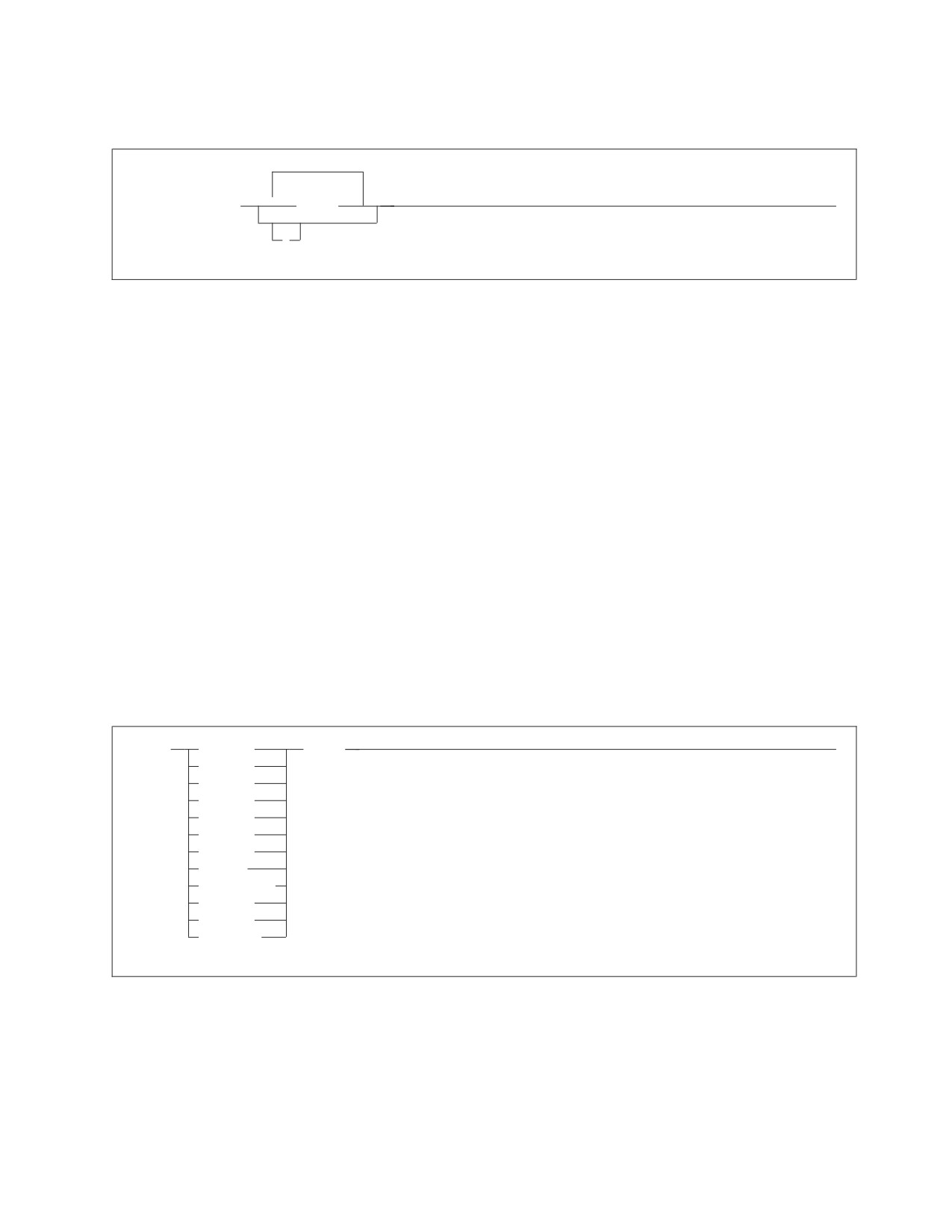
SET
►► SET
CHKINTVL
newval
►◄
DISPBIAS
DSPSTATS
DUMPTYPE
LTIMEOUT
PTIMEOUT
PROCMXAB
TAPEMGR
ARCHTAPE(1)
TCPMAXRT
TCPRETRY
TCPCAN(2)
Note: (1) ARCHTAPE valid for VSE only.
|
Note: (2) TCPCAN valid for VM only.
The SET command lets you change the settings of the CHKINTVL, DISPBIAS,
DSPSTATS, DUMPTYPE, LTIMEOUT, PTIMEOUT, PROCMXAB, TAPEMGR,
ARCHTAPE, TCPMAXRT and TCPRETRY initialization parameters.
Chapter 3. Operating the Application Server
63
newval
is the new value for the specified initialization parameter.
CHKINTVL
A decimal value from 1 to 99999999. The default is 10.
DISPBIAS
A decimal value from 1 to 10. The default is 7.
DSPSTATS
A value indicating how much, if any checkpoint performance data is
displayed. The default is 00, meaning no display at shutdown. The first
character can have a value of 0, 1, or 2. The second character can have a value
of 0 or 1. The first character indicates if checkpoint performance information is
displayed. 0 indicates no display, 1 indicates checkpoint times are displayed, 2
indicates detailed checkpoint performance information is displayed. The
second character indicates if counter information is displayed when the
application server is shutdown. 0 indicates no display and 1 indicates counter
information is displayed at shutdown.
DUMPTYPE
P, F, or N. P indicates partial virtual machine dump, F indicates full virtual
machine dump, and N indicates no dump. F is the default.
LTIMEOUT
A decimal value from 0 to 99999. A value of 0 means that no LTIMEOUT is in
effect. The default is 0.
PTIMEOUT
A decimal value from 0 to 99999. A value of 0 means that no PTIMEOUT is in
effect. The default is 180.
PROCMXAB
An integer between 0 and 255. The default is 0.
TAPEMGR
Y or N. Y indicates that a tape manager is being used and N indicates that no
tape manager is being used. N is the default.
ARCHTAPE (Valid for VSE only)
UNL or REW. UNL indicates that tapes which are part of a multivolume
archive will be unloaded at end of tape. REW indicates that the tapes must be
manually unloaded. The default is REW. This parameter only applies to VSE.
In VM, unloading at end of tape is controlled by the FILEDEFs.
TCPMAXRT
An integer value from 1 to 9999. The default is 158. For a complete description
of TCP/IP support, refer to ″DB2 Server for VM System Administration, Chapter
16, Using TCP/IP with DB2 Server for VM″ or to ″DB2 Server for VSE System
Administration, Chapter 15, Using TCP/IP with DB2 Server for VSE″.
TCPRETRY
Y or N. Y indicates the database manager will try to automatically restart
TCP/IP support if it fails. N indicates the database manager will not try to
automatically restart TCP/IP support if it fails. Y is the default. For a complete
description of TCP/IP support, refer to ″DB2 Server for VM System
Administration, Chapter 16, Using TCP/IP with DB2 Server for VM″ or to ″DB2
Server for VSE System Administration, Chapter 15, Using TCP/IP with DB2 Server
for VSE″.
|
TCPCAN
|
Y or N. Y indicates that the Cancel TCP/IP Agent in VM support is enabled. N
64
Operation

|
indicates that the cancel support is disabled. There is some performance
|
overhead if cancel support is enabled. This overhead may be unacceptable for
|
some users.
See Appendix A, “DB2 Server for VSE & VM Initialization Parameters,” on page
179 for more information on the initialization parameters.
Figure 27 is an example of the SET command.
ARI0045I Ready for operator communications.
SET CHKINTVL 200
ARI0065I Operator command processing is complete.
SET DISPBIAS 7
ARI0065I Operator command processing is complete.
SET DSPSTATS 21
ARI0065I Operator command processing is complete.
SET DUMPTYPE F
ARI0065I Operator command processing is complete.
SET LTIMEOUT 300
ARI0065I Operator command processing is complete.
SET PTIMEOUT 180
ARI0065I Operator command processing is complete.
SET PROCMXAB 1
ARI0065I Operator command processing is complete.
SET TCPMAXRT 50
ARI0065I Operator command processing is complete.
SET TCPRETRY N
ARI0065I Operator command processing is complete.
Figure 27. SET command examples
SHOW ACTIVE
►► SHOW ACTIVE
►◄
The SHOW ACTIVE command displays the status of the active agent structures in
the database partition or machine. An agent structure, or agent, is the internal
representation of an active user. The application server uses these structures to
service SQL requests by users, to process operator commands, and to perform
checkpoints and database archives.
The status of certain agent structures are not displayed by the SHOW ACTIVE
command. They are the operator agent, ready or recovery agent, and the TCP/IP
agent if TCP/IP is active. The operator agent structure and the ready or recovery
agent structure always exist in the application server. The operation agent is used
for operator command processing, and it exists in both multiple and single user
modes. The ready or recovery agent is only used in the VM/ESA operating system
for VSE guests. It exists in multiple user mode only. The TCP/IP agent handles the
coordination of TCP/IP clients. It only exists in multiple user mode and when
TCP/IP is active.
Chapter 3. Operating the Application Server
65
Another agent structure is used only for checkpoint and database archive work.
This structure is called the CHECKPOINT AGENT in the command display. The
checkpoint agent always exists in both single and multiple user modes. The
display shows whether the agent is dormant, waiting to start, or processing. If the
checkpoint agent is waiting to start or is processing, the display also shows if it is
an ARCHIVE checkpoint.
The status of each active agent structure is displayed following this information as
described below:
v The agent number (agent identifier).
v The authorization ID of the person requesting the services represented by the
agent structure. The authorization ID is typically the user’s virtual machine user
ID.
For remote connections, the DB2 Server for VM authorization ID can also be the
ID specified by the userid tag in the communications directory file, or a non-VM
user ID. If the application server is in the process of verifying the authorization
ID, it is not shown. The string null id is displayed instead.
v The work status of the agent structure.
The SHOW ACTIVE command displays:
v
NIW (not in work) when no logical unit of work is in progress
v
R/O for read-only logical units of work
v
R/W for read-write logical units of work
Note: If the logical unit of work is updating only data that resides in a
nonrecoverable storage pool, then R/O is displayed (not R/W).
v
NEW is for logical units of work that have started but have not yet accessed the
application server.
NEW is applicable only when log archiving is starting. NEW units of work may
not continue until the checkpoint that starts a log archive ends. See Figure 33 on
page 69 for an example of NEW agent structures.
v
The state of processing of the agent structure, that is, whether the agent is
dormant, waiting to start, or processing. See Figure 30 on page 68
or Figure 39
on page 76
for an example of state processing information.
v
When a logical unit of work is in progress, a unique internal logical unit of work
identifier is displayed. (See “Forcing Users to End Their Work” on page 51 for
more information on the internal logical unit of work ID.) In Figure 30 on page
68, user agents 1 and 3 are processing logical units 7B4 and 5A4, respectively.
v
All active user-agent structures from VM display APPL (for DB2 Server for VM
application program). User agent structures from VSE guests display APPL for
batch applications, and SUBS for the CICS subsystem.
v
Whether the structure is doing batch or CICS online work. For batch, APPL
(batch application) is displayed; for CICS online, SUBS (representing subsystem)
is displayed. In the VSE console example below, user JONES is an online user
whose requests are coming from the CICS subsystem.
v
Whether a rollback or commit of a logical unit of work is scheduled and the
reason. SHOW ACTIVE displays ROLLBACK|COMMIT SCHEDULED if the
activity has not yet started; it displays ROLLBACK|COMMIT ACTIVE if the
activity is in progress.
v
Whether an SQL request is currently being processed for the user. If it is, you
see AGENT IS PROCESSING. If not, you see AGENT IS NOT PROCESSING.
66
Operation
v The reason the agent structure is waiting. The type of wait can be one of the
following: communication, lock, latch, checkpoint, page buffer (OUT OF PAGE),
block buffer (OUT OF BLOCK), or database I/O.
Note: An agent is in communication wait when it is waiting for an SQL request
from the user, or is waiting for an APPC/VM function to end. An agent is
in latch wait when it is waiting for a latch on a page or block buffer. If the
agent is not waiting, it will display the number of times the database
manager looks in the page buffer (LPAGBUFF) since the beginning of the
logical unit of work.
v If the agent is not waiting, it will display the number of times the database
manager looks in the page buffer (LPAGBUFF) since the beginning of the logical
unit of work is displayed.
v The following information applies only for VSE guests:
If the application server or the CICS system had previously abnormally ended,
some agents may have a display like the following:
User Agent
7 User ID: JONES is prepared
for commit or rollback
VM ID= VSE1
COORDINATOR= DBDCCICS RESOURCE ADAPTER= 0
TRANSACTION= TPSP CICS SIGNON= PETER TERMINAL= L012
Figure 28. A Typical Example of an In-doubt Logical Unit of Work in VM
F4 004
User Agent
7 User ID: JONES is prepared
F4 004
for commit or rollback
F4 004
COORDINATOR= DBDCCICS RESOURCE ADAPTER= 0
F4 004
TRANSACTION= TPSP CICS SIGNON= PETER TERMINAL= L012
Figure 29. A Typical Example of an In-doubt Logical Unit of Work in VSE
In particular, note that the user ID is followed by the message IS PREPARED FOR
COMMIT OR ROLLBACK. This identifies the agent’s logical unit of work as being
in-doubt. (In-doubt logical units of work occur when a system failure happens
while an online user is committing a logical unit of work.) If running under the
CICS subsystem, in-doubt logical units of work will be resolved automatically
the next time you run the CIRB transaction. However, you may want to resolve
in-doubt logical units of work manually. If you enter SHOW ACTIVE and see
that some logical units of work are in-doubt, refer to “Resolving CICS In-Doubt
Logical Units of Work” on page 152.
v When you enter SHOW ACTIVE or SHOW SYSTEM from ISQL, your agent
number is displayed as processing an operator command. See Figure 81 on page
134 for information on the SHOW SYSTEM command.
Following the display of the status of each active agent structure, SHOW ACTIVE
displays the number of inactive (NOT CONNECTED...) agent structures.
The system operator or an ISQL user can enter the SHOW ACTIVE command. An
ISQL user can only enter the SHOW ACTIVE command when connected to an
application server using SQLDS protocol. When you enter SHOW ACTIVE on the
operator console, any agent that starts a logical unit of work becomes forceable.
The agent remains forceable until the logical unit of work ends. You can use the
FORCE command (described on page 51) only on forceable agents and you can
Chapter 3. Operating the Application Server
67
enter the FORCE command only from the operator console. The application server
resets the agent’s forceable indicator when the agent’s logical unit of work commits
or rolls back.
In VM, SHOW ACTIVE shows only the users who currently have an agent
structure. To display all users who are connected to the application server and
their status, the DB2 Server for VM operator or ISQL terminal user can enter the
SHOW USERS command or the SHOW CONNECT command. For further
information on these commands, see Figure 83 on page 137 and “SHOW
CONNECT” on page 73.
AR
MSG F4
AR 015 1I40I READY
F4 004 ARI0062A SQLDS :
F4-004
Enter a DB2 Server for VSE operator command.
4 show active
F4 004 Status of agents:
F4 004
Checkpoint agent is not active.
F4 004
User Agent:
1 User ID: SMITH
is R/W APPL
7B4
F4 004
Agent is
processing and is in I/O
Wait.
F4 004
User Agent:
2 User ID: MICHAEL is R/O SUBS
7B9
F4 004
Agent is not processing and is in communication Wait.
F4 004
User Agent:
3 User ID: JESSICA IS R/O APPL
5A4
F4 004
Agent is processing an SQL/DS operator command.
F4 004
User Agent:
4 User ID: TESTUSER IS R/W APPL
7BB
F4 004
Agent is
processing and is in I/O.
F4 004
User Agent:
5 User ID: MACNIELL IS R/O APPL
7B9
F4 004
Agent is not processing and is in communication Wait.
F4 004
5
agent(s) not connected to an APPL or SUBSYS.
F4 004 ARI0065I Operator command processing is complete.
Figure 30. A Typical SHOW ACTIVE Display on a VSE Operator Console
Figure 30 is a typical SHOW ACTIVE display. Figure 31 shows the display you
might see when R/O or R/W logical units of work are delaying the checkpoint
that starts a log archive. If checkpoints are delayed, the database manager delays
new logical units of work until the checkpoint finishes.
AR
MSG F4
AR 015 1I40I READY
F4 004 ARI0062A SQLDS :
F4-004
Enter a DB2 Server for VSE operator command.
4 show active
F4 004 Status of agents:
F4 004
Checkpoint agent is waiting to start log archive
F4 004
New logical units of work and the log archive
F4 004
process cannot continue until all R/O, R/W,
F4 004
and prepared logical units of work are completed.
F4 004
User Agent:
1 User ID: CHAN
is R/W APPL
106
F4 004
Agent is not processing and is in communication Wait.
F4 004
User Agent:
2 User ID: EWING
is NEW APPL
107
F4 004
Agent is waiting for log archive checkpoint.
F4 004
3
agent(s) not connected to an APPL or SUBSYS.
Figure 31. A Typical Example of Logical Units of Work Delaying a Checkpoint on VSE
68
Operation

show active
Status of agents:
Checkpoint agent is not active.
User Agent:
1 User ID: SMITH
is R/W APPL
7B4
Agent is
processing and is in I/O
Wait.
User Agent:
2 User ID: MICHAEL is R/O SUBS
7B9
Agent is not processing and is in communication Wait.
User Agent:
3 User ID: JESSICA IS R/O APPL
5A4
Agent is processing an SQL/DS operator command.
User Agent:
4 User ID: TESTUSER IS R/W APPL
7BB
Agent is
processing and is in I/O.
User Agent:
5 User ID: MACNIELL IS R/O APPL
7B9
Agent is not processing and is in communication Wait.
0
agent(s) not connected to an APPL or SUBSYS.
ARI0065I Operator command processing is complete.
Figure 32. A Typical SHOW ACTIVE Display on a VM Operator Console or ISQL Terminal
Figure 32 is a typical SHOW ACTIVE display. Figure 33 shows the display you
might see when R/O or R/W logical units of work are delaying the checkpoint
that starts a log archive. If checkpoints are delayed, the application server also
delays new logical units of work until the checkpoint finishes.
show active
Status of agents:
Checkpoint agent is waiting to start log archive
New logical units of work and the log archive
process cannot continue until all R/O, R/W,
and prepared logical units of work are completed.
User Agent:
1 User ID: CHAN
is R/W APPL
106
Agent is not processing and is in communication Wait.
User Agent:
2 User ID: EWING
is NEW APPL
107
Agent is waiting for log archive checkpoint.
3
agent(s) not connected to an APPL or SUBSYS.
ARI0065I Operator command processing is complete.
Figure 33. A Typical Example of Logical Units of Work Delaying a Checkpoint on VM
SHOW ADDRESS
►► SHOW ADDRESS module-name
►◄
The SHOW ADDRESS command displays the load address, compile date and PTF
identifier (if it exists) of CONV, DSC, DBSS, DRRM, RDS, and WUM modules. This
command can help with problem determination. You can use it for debugging. This
command can also be used to determine if a PTF has been applied.
The output of this command is the hexadecimal load address of the module you
specify, or an error message if the module is not found. This load address applies
only to the application server, not to an application requester from which the
command may have been entered (in SQLDS protocol).
Figure 34 on page 70 shows sample output from the SHOW ADDRESS command.
Chapter 3. Operating the Application Server
69

show address ariym00
ARIYM00
97.090 PLX
: 6CDBA0 HEX
Figure 34. A Typical SHOW ADDRESS Display on a VM Operator Console or ISQL Terminal
AR
MSG F4
AR 015 1I40I READY
F4 004 ARI0062A SQLDS :
F4-004
Enter a DB2 Server for VSE operator command.
4 show address ariym00
F4 004 ARIYM00
97.090 PLX
: 6CDBA0 HEX
Figure 35. A Typical SHOW ADDRESS Display on a VSE Operator Console
SHOW BUFFERS
►► SHOW BUFFERS
►◄
The database manager maintains a pool of 4096-byte buffers that contain the most
frequently accessed database pages. It also maintains a set of 512-byte buffers that
contain the most frequently accessed directory blocks. The SHOW BUFFERS
command displays information about the buffer pool size and usage. This
information can be used to tune the database manager.
Figure 36 on page 71 shows the output of the SHOW BUFFERS command.
70
Operation
AR
MSG F4
AR 015
1I40I READY
F4 004
ARI0062A SQLDS :
F4-004
Enter a DB2 Server for VSE operator command.
4 show buffers
F4
004
Only used buffers are displayed.
F4
004
DBSPACE REC
ADDR
FLAGS
FIX
CNT
F4
004
Page Buffers
F4
004
1
000090
00608000
00
0
F4
004
1
000093
00609000
00
0
F4
004
1
00014D
0060A000
00
0
F4
004
1
00014C
0060B000
80
0
F4
004
2
000094
0060C000
00
0
F4
004
2
000091
0060D000
00
0
F4
004
1
00008D
0060E000
00
0
F4
004
1
000088
0060F000
80
0
F4
004
5
00008B
00610000
00
0
F4
004
1
00008F
00611000
00
0
F4
004
2
000080
00612000
00
0
F4
004
1
000092
00613000
80
0
F4
004
1
00015A
00614000
80
0
F4
004
1
00014E
00615000
80
0
F4
004
1
00008E
00616000
00
0
F4
004
1
00008C
00617000
00
0
F4
004
32001
0000FD
00618000
00
1
F4
004
1
000156
00619000
80
0
F4
004
32001
0000F9
0061A000
00
0
F4
004
1
000155
0061B000
80
0
F4
004
1
00014A
0061C000
80
0
F4
004
1
000089
0061D000
00
0
F4
004
1
00008A
0061E000
00
0
F4
004
1
000149
0061F000
80
0
F4
004
1
00014F
00620000
80
0
F4
004
1
00014B
00621000
80
0
F4
004
Directory Buffers
F4
004
1
000001
00622000
80
0
F4
004
0
000079
00622200
80
0
F4
004
1
000002
00622400
80
0
F4
004
2
000001
00622600
80
0
F4
004
2
000002
00622800
00
0
F4
004
2
000003
00622A00
00
0
F4
004
2
000004
00622C00
00
0
F4
004
89
000001
00622E00
00
0
F4
004
0
000004
00623000
00
0
F4
004
88
000001
00623200
00
0
F4
004
ARI0065I Operator command processing
is complete.
Figure 36. A Typical SHOW BUFFERS Display on a VSE Operator Console
Chapter 3. Operating the Application Server
71
show buffers
Only used buffers are displayed.
DBSPACE REC
ADDR
FLAGS
FIX CNT
Page Buffers
1
000090
00608000
00
0
1
000093
00609000
00
0
1
00014D
0060A000
00
0
1
00014C
0060B000
80
0
2
000094
0060C000
00
0
2
000091
0060D000
00
0
1
00008D
0060E000
00
0
1
000088
0060F000
80
0
5
00008B
00610000
00
0
1
00008F
00611000
00
0
2
000080
00612000
00
0
1
000092
00613000
80
0
1
00015A
00614000
80
0
1
00014E
00615000
80
0
1
00008E
00616000
00
0
1
00008C
00617000
00
0
32001
0000FD
00618000
00
1
1
000156
00619000
80
0
32001
0000F9
0061A000
00
0
1
000155
0061B000
80
0
1
00014A
0061C000
80
0
1
000089
0061D000
00
0
1
00008A
0061E000
00
0
1
000149
0061F000
80
0
1
00014F
00620000
80
0
1
00014B
00621000
80
0
Directory Buffers
1
000001
00622000
80
0
0
000079
00622200
80
0
1
000002
00622400
80
0
2
000001
00622600
80
0
2
000002
00622800
00
0
2
000003
00622A00
00
0
2
000004
00622C00
00
0
89
000001
00622E00
00
0
0
000004
00623000
00
0
88
000001
00623200
00
0
ARI0065I Operator command processing
is complete.
Figure 37. A Typical SHOW BUFFERS Display on a VM Operator Console or ISQL Terminal
The columns of the output of SHOW BUFFERS have these meanings:
DBSPACE
is the dbspace number. If the dbspace number is 32001, the page
buffer contains a log page. If the dbspace number is 0, the
directory block contains a system block not related to any dbspace.
REC
is the logical page number in the page buffer. For directory buffers,
it is the relative page map table block number. These blocks
contain logical (dbspace page number) to physical (storage pool
slot) mappings for pages in the dbspace. Block 1 contains the
mappings for pages 1 to 128 of the dbspace, block 2 contains the
mappings for pages 129 to 256, and so on.
ADDR
is the virtual address of the buffer.
FLAGS
indicate the page status:
‘80’ Modified Page
The buffer page has been modified.
72
Operation
‘40’ In Transit The buffer page is being copied to or from DASD.
‘20’ New Page The buffer page is not from DASD; the buffer
contains a new page.
‘10’ Data Space Page
The buffer page is from a data space. This flag will
only appear when the page in the buffer belongs to
a storage pool that is using data spaces. For more
information see the DB2 Server for VSE & VM
Performance Tuning Handbook manual.
‘00’ No Flag
No flag is present.
The above conditions can occur in combination and
will result in the ORing of the individual bit values
to display a FLAGS value for the combination. For
example, you could have a modified page that is in
transit back to DASD. This would combine the ‘80’
and ‘40‘ bits to display a FLAGS value of ‘C0’.
FIX CNT
is the count of concurrent users of the page or directory block.
SHOW CONNECT
ALL
►► SHOW CONNECT
►◄
userid
USERID userid
AGENT agent_no
LUWID luwid
ACTIVE
(1)
WAITING
INACTIVE
Notes:
1
Valid for VM only.
The SHOW CONNECT command displays the status information of all users or
selected users connected to the application server.
The parameters of the SHOW CONNECT command have the following meanings:
ALL gives you information on all active, waiting, and inactive users connected
to the application server.
USERID userid
is the DB2 Server for VSE & VM user ID of the person who is currently
connected to the application server. This parameter limits the display to
only the connected users with the user ID of userid. It is not necessary to
specify the keyword USERID.
AGENT agent_no
is the agent number. This parameter limits the display to only the active
agent specified in agent_no.
Chapter 3. Operating the Application Server
73
LUWID luwid
is the LUWID or some portion of the LUWID starting at the beginning up
to the full length of the LUWID, which is 35 characters. This parameter
limits the display to only the connected users for whom the equivalent
portion of the LUWID matches the specified luwid.
ACTIVE
limits the display to all ACTIVE users.
WAITING (Valid in VM only)
limits the display to all WAITING users.
INACTIVE
limits the display to all INACTIVE users.
Note: The SHOW CONNECT ACTIVE command should be used before issuing
the FORCE or FORCE RMTUSER commands to force users and remote users
to end their work. The SHOW CONNECT INACTIVE command should be
used before issuing the FORCE INACTIVE command to force inactive users
to release their connection.
The following examples show the output of the SHOW CONNECT command.
74
Operation
MSG F4
AR 015
1I40I READY
F4 004
ARI0062A SQLDS :
F4-004
Enter a DB2 Server for VSE operator command.
4 show
connect
F4
004
Status of Connected Users
1998-04-07
16:06:31
F4
004
Checkpoint agent is not active.
F4
004
User Agent:
1
User-ID: SAMUEL SQL-ID: SAMUEL
F4
004
is R/O APPL
12BCF
F4
004
Agent is processing and is in communication wait.
F4
004
State started: 1994-12-02
15:21:22
F4
004
Conversation started: 1996-12-02
15:21:22
F4
004
Task No.: 147
RMID:
32 Term. id: 077D
F4
004
CPU time: 00:00:02
F4
004
Protocol: SQLDS via SNA
F4
004
User Agent:
2
User-ID: MARISSA SQL-ID: MARISSA
F4
004
is R/W APPL
12FC4
F4
004
Agent is processing and is in communication wait.
F4
004
State started: 1996-12-02
15:23:17
F4
004
Conversation started: 1996-12-02
15:23:15
F4
004
CPU time: 00:00:01
F4
004
LUWID: CAIBMOML.OECGW001.A6773D6F8611.0001
F4
004
EXTNAM: MARISSA.1
F4
004
Requester: SQLDS/VM V3.3.0
at TOIVMLB6
F4
004
Rmtuser ID: 2
F4
004
LU name: OMPGW001
F4
004
Task no.: 0000134
F4
004
Protocol: SQLDS via SNA
F4
004
User Agent:
3
User-ID: LAURA
SQL-ID: LAURA
F4
004
is R/O APPL
12FC6
F4
004
Agent is processing and is in I/O wait.
F4
004
State started: 1994-12-02
15:23:24
F4
004
Conversation started: 1994-12-02
15:23:15
F4
004
CPU time: 00:00:01
F4
004
LUWID: CAIBMOML.OECGW001.A6773D6E52C9.0001
F4
004
EXTNAM: LAURA.1
F4
004
Requester: SQLDS/VM V3.3.0
at TOIVMLB6
F4
004
Rmtuser ID: 3
F4
004
LU name: OMPGW001
F4
004
Task no.: 0000133
F4
004
Protocol: SQLDS via SNA
F4
004
User ID: ANDREW
SQL ID: ANDREW
F4
004
User is inactive.
F4
004
State started: 1994-12-02
14:58:18
F4
004
Conversation started: 1994-12-02
14:58:16
F4
004
CPU time: 00:00:00
F4
004
LUWID: CAIBMOML.OECGW001.A67737DC6BEB.0001
F4
004
EXTNAM: ANDREW.1
F4
004
Requester: SQLDS/VM V3.3.0
at TOIVMLB6
F4
004
Rmtuser ID: 1
F4
004
LU name: OMPGW001
F4
004
Task no.: 0000110
F4
004
Protocol: SQLDS via SNA
F4
004
User ID: OLIVER
SQL ID: OLIVER
F4
004
User is inactive.
F4
004
State started: 1999-03-15
10:56:29
F4
004
Conversation started: 1999-03-15
10:56:28
F4
004
CPU time: 00:00:00
F4
004
LUWID: G9151F6D.AE07.02DB15155638.0000
F4
004
EXTNAM: db2bp.exe 324851734 015E017D
F4
004
Requester: DB2 Connect 5.2 (DB2/NT) at BEDROCK
F4
004
Protocol: DRDA via TCP/IP
F4
004
3
remote users are active.
F4
004
2
remote users are inactive.
F4
004
1
agents are available.
F4
004
1
remote connections are available.
F4
004
ARI0065I Operator command processing is complete.
Figure 38. A Typical SHOW CONNECT Display on a VSE Operator Console or ISQL
Terminal
Chapter 3. Operating the Application Server
75
show connect
Status of Connected Users
1996-02-04
10:25:33
Checkpoint agent is not active.
User Agent:
1
User-ID: SHUM
SQL-ID: SHUM
is R/W APPL
7B1
Agent is processing with LPAGEBUFF=1032
State started: 1996-02-04
10:15:30
Conversation started: 1996-02-04
10:12:45
CPU time: 00:00:01
Protocol: SQLDS via SNA
Connection Id: 6
User Agent:
2
User-ID: SQLUSRSS SQL-ID: SQLUSRSS
is R/O APPL
30BD
Agent is not processing and is in communication wait.
State started: 1996-02-04
09:48:28
Conversation started: 1996-02-04
09:48:00
CPU time: 00:00:02
LUWID: CAIBMOML.*IDENT.A532D460755B.0001
EXTNAM: SQLUSRSS.1
Requester: SQLDS/VM V3.3.0
at TORVMLB4
Protocol: SQLDS via SNA
Connection Id: 7
User Agent:
3
User-ID: PETERSON SQL-ID: PETERSON
is R/O APPL
3758
Agent is processing and is in LOCK wait.
State started: 1996-02-04
10:23:11
Conversation started: 1996-02-04
10:22:15
CPU time: 00:00:01
LUWID: CAIBMOML.STLLU.A5241A50FABD.0001
EXTNAM: PETERSON
.BATCH
.PETERSON.DSNESPRR
Requester: DB2
V2.3.0
at IBMREGRDBSTL0012
Protocol: DRDA via SNA
Connection Id: 9
User Agent: 4 User-ID: VSEMCH10 SQL-ID: SQLDBA
is R/O SUBS 1796
Agent is not processing and is in communication wait.
State started: 1996-09-08 10:42:55
Conversation started: 1996-09-08 10:42:43
Task no.: 371 RMID: 12 Term. id: N/A
Connection Id: 16
User-ID: SWAGRMAN SQL-ID: SQLDBA
User is waiting for an agent
State started: 1992-02-04
10:22:11
Conversation started: 1992-02-04
10:03:05
CPU time: 00:00:02
LUWID: IBMNET07.*IDENT.AB457DFF69BC.0001
EXTNAM: SWAGRMAN.1
Requester: SQLDS/VM V3.3.0
at TOROLAB3
Protocol: SQLDS via SNA
Connection Id: 13
User-ID: JAVIER SQL-ID: JAVIER
User is inactive
State started: 1992-02-04
10:02:11
Conversation started: 1992-02-04
09:27:49
CPU time: 00:00:03
LUWID: IBMNET07.*IDENT.AB457DFF6ABC.0001
EXTNAM: JAVIER.1
Requester: SQLDS/VM V3.3.0
at TOROLAB
Protocol: SQLDS via SNA
Connection Id: 62
4
users are active.
1
users are waiting.
1
users are inactive.
0
agents are available.
94
user connections are available.
ARI0065I Operator command processing is complete.
Figure 39. A Typical SHOW CONNECT Display on a VM Operator Console or ISQL Terminal
The SHOW CONNECT output values have these meanings:
Header line
contains a timestamp that identifies when this status is taken.
76
Operation
Agent Status
contains the status of each active agent structure. Refer to “SHOW
ACTIVE” on page 65 for information.
State started
is the timestamp when the current state began.
Conversation started
is the timestamp when the user was connected to the application server.
CPU time
is the CPU time since the user was connected to the application server. It is
only displayed if you start the application server with accounting on
(ACCOUNT=D or ACCOUNT=T in VSE).
LUWID
is a unique identifier associated with each connection. It is composed of
four parts. For SNA connections, they are: network id, LU name, LUW
instance number, and LUW sequence number. For TCP/IP connections,
they are: IP address, port number, LUW instance number, and LUW
sequence number. For VM/ESA local and TSAF connections, the LUWID
will have a real LU name. For VSE/ESA, SNA remote connections, it is the
LUNAME (APPLID) of the local CICS subsystem through which a remote
user can be uniquely identified.
EXTNAM
is the name of the job that is being serviced by the application requester. If
the LUW is initiated from a VM application requester, the external name is
composed of the user’s logon ID and the current CMS work unit number.
Requester
is the identifier of the requesting system. This field is limited to nine
characters.
Protocol protocol via connection
is the protocol that the requester is using.
SQLDS
the non-DRDA (private) protocol is being used.
DRDA
the DRDA protocol is being used with no sync point
manager involvement. This means that the LUW is only
capable of multiple-site read, single-site update activity.
DRDA2 Phase Commit
the DRDA protocol is being used with sync point manager
involvement. This means that the LUW is capable of
multiple-site read, multiple-site update activity.
with the following connection:
SNA
the specified protocol is connected via
SNA.
TCP/IP
the specified protocol is connected via
TCP/IP.
Package
is the name of the package being executed. If the agent is
not processing, this is the last package executed. This line
is only displayed if the work status is R/O or R/W.
Section
is the number of the section in the package being executed.
If the agent is not processing, this is the last section
Chapter 3. Operating the Application Server
77
executed. This line is not displayed when the application is
using modifiable extended dynamic SQL.
RMID
is the Resource Manager ID specified by the CIRB
transaction in VSE, and for VSE guest sharing users in VM.
This identifies which resource adapter is used by the agent,
because multiple resource adapters may exist. The RMID
can be used, along with the CICS task number, to identify
which agent should be forced before terminating a CICS
transaction.
Term. ID
is the CICS terminal ID. This identifies which CICS
transaction is accessed by the CICS user. The terminal ID
can be used, along with the CICS task number and the
RMID, to identify which agent should be forced before
terminating a CICS transaction. The value 'N/A' indicating
that the terminal ID is not available, is displayed if there is
no terminal ID associated with the agent.
Connection ID (Valid in VM only)
The connection identifier. This identification number can be
used in the FORCE INACTIVE operator command to force
a particular inactive user to release their connection.
Rmtuser ID (Valid in VSE only)
The remote user identifier. This identification number can
be used in the FORCE RMTUSER operator command to
force a particular remote user to end their work.
Task No.
This is the CICS task number for CICS users, or the CICS
task number of a connected APPC-to-XPCC Exchange
Transaction (AXE) for remote (DRDA) users. For CICS
users, the task number can be used to identify which agent
should be forced before terminating the CICS transaction.
For remote users, the task number, together with the LU
Name, can be used to stop a particular remote
user-initiated AXE transaction by using the CICS CEMT
transaction, thereby forcing a specific remote user to end
his work and end the conversation. This field is not
displayed if there are no CICS tasks associated with the
agent (for example, when an agent is not in work (NIW)).
Note:
The LUWID, EXTNAM, and Requester lines are not displayed in the
following situations:
1. The agent represents a VSE local user.
2. The agent represents a VSE guest in VM.
3. The application server and the application requester have not yet
exchanged identification. In VSE, the Application Requester (AR)
server class, the AR external name, and possibly the LUWID, may
not yet be known to the Application Server.
4. The agent does not use Distributed Relational Database
Architecture (DRDA) protocol.
5. The following is valid in a VSE environment only:
The State started and the Conversation started timestamps
may be later than the timestamp in the header line. This occurs
because of the multiple tasks that are handled by the application
78
Operation
server. Conversations can be started and states changed while
the SHOW CONNECT command is processing.
SHOW CONNECT Enhancements for CRR in VM/ESA
When DB2 Server for VM is performing resynchronization initialization with the CRR
recovery server, its status may be seen by the SHOW CONNECT. The following
message is displayed:
Recovery Agent is processing Resynchronization Initialization
If the database manager is in a communications wait, waiting for the CRR recovery
server to reply to its exchange log names request, the following message is
displayed:
Recovery Agent is processing Resynchronization Initialization
and is in a communications wait with the CRR Recovery Server
When the CRR recovery server is performing resynchronization recovery with DB2
Server for VM, its status may be seen by the SHOW CONNECT. The following
message is displayed:
Recovery Agent is processing Resynchronization Recovery
If the database manager is in a communications wait, waiting for the CRR recovery
server to acknowledge its exchange log names and compare states replies,
following message is displayed:
Recovery Agent is processing Resynchronization Recovery
and is in a communications wait with the CRR Recovery Server
If the database manager is committing or rolling back the logical unit of work
requested by the CRR recovery server, the following message is displayed:
Recovery Agent is processing Resynchronization Recovery
and is waiting for a <commit|rollback> to complete.
This information is available in tokenized format1.
SHOW CONNECT Enhancements for Stored Procedures
If a stored procedure is executing when the command is invoked, the output
shows the name of the stored procedure, the name of the module or phase
associated with it, the name of the stored procedure package, and the number of
the section that is running. This information is displayed only if the command is
issued from the operator console, or if the user issuing the command has DBA
authority.
If an agent is waiting for a stored procedure server, this is indicated in the output
displayed for that agent.
If an agent is executing a stored procedure when the SHOW CONNECT command
is invoked, any package information displayed will be for the stored procedure
and not the package that issued the CALL statement. Following is an example of
the output you might receive.
1. For more information about tokenized format, see “Appendix A” of the DB2 Server for VSE & VM Diagnosis Guide and Reference
manual
Chapter 3. Operating the Application Server
79
show connect
Status of Connected Users
1997-09-30
08:56:42
Checkpoint agent is not active.
User Agent:
1
User-ID: SQLUSRKJ SQL-ID: SQLUSRKJ
is R/O APPL
1666
Agent is not processing and is in communication wait.
State started: 1997-09-30
08:56:39
Conversation started: 1997-09-30
08:56:12
Protocol: SQLDS
Package: SQLDBA.MAINPGM
Section: 4
Procedure: PROC1
Modname: MYPROC
Procedure Package: SQLDBA.MYPROC
Section: 4
User Agent:
2
User-ID: SQLUSRJR SQL-ID: SQLUSRJR
is R/O APPL
1667
Agent is not processing and is waiting for a stored procedure
server in group GROUP1
State started: 1997-09-30
08:56:39
Conversation started: 1997-09-30
08:56:12
Protocol: SQLDS
Package: SQLDBA.MAINPGM2
Section: 3
User Agent:
3
User-ID: SQLUSRTH SQL-ID: SQLUSRTH
is R/O APPL
1668
Agent is processing with LPAGEBUFF=1032
State started: 1997-09-30
08:56:39
Conversation started: 1997-09-30
08:56:12
Protocol: SQLDS
Package: SQLDBA.MAINPGM3
Section: 4
Procedure: PROC3
Modname: MYPROC3
Procedure Package: SQLDBA.MYPROC3
Section: 2
User Agent:
4
User-ID: SQLUSRJR SQL-ID: SQLUSRTL
is R/O APPL
1669
Agent is not processing and is waiting for stored procedure
PROC4 AUTHID SQLUSRTL to be started
State started: 1997-09-30
08:58:00
Conversation started: 1997-09-30
08:57:35
Protocol: SQLDS
Package: SQLDBA.MAINPGM4
Section: 3
4
Users are active.
0
Users are waiting.
0
Users are inactive.
2
Agents are available.
2
User connections are available.
ARI0065I Operator command processing is complete.
Figure 40. A Typical SHOW CONNECT Display
SHOW CRR LOGNAMES (VM Only)
►► SHOW CRR LOGNAMES
►◄
The SHOW CRR LOGNAMES command can be used when log name mismatch
situations arise between the database manager and VM/CRR. When this command
is issued, the database manager displays:
v The CRR recovery server’s log name found in the DB2 Server for VSE & VM log.
This log name can be up to 64 characters long.
v The CRR recovery server’s TPN found in the DB2 Server for VSE & VM log.
v The database manager’s log name found in its own log.
v The current TPN for the database manager.
v The database manager’s current log status relative to the CRR recovery server.
This can be warm or cold.
80
Operation

Because the CRR recovery server is local to the database manager, the LUNAME is
*IDENT and is not displayed.
Sample output is as follows:
show crr lognames
SHOW CRR LOGNAMES entered at DATE=’mm-dd-yyyy’ TIME=’hh:mm:ss’
Log Name information for the database manager:
TPN:
tpn
LOG NAME: log name
Log Name information for the CRR recovery server:
TPN:
tpn
LOG NAME: log name
At the last Resynchronization Initialization,
the log status was warm|cold.
ARI0065I Operator command processing is complete.
Figure 41. Sample output from SHOW CRR LOGNAMES command (SYNCPNT=Y)
Note: When SYNCPNT=N, this command may still be executed. Sample output is
as follows:
show crr lognames
SHOW CRR LOGNAMES entered at DATE=’mm-dd-yyyy’ TIME=’hh:mm:ss’
Log Name information for the database manager:
TPN:
tpn
LOG NAME: log name
Log Name information for the CRR recovery server:
TPN:
tpn
LOG NAME: log name
There is no log status since SYNCPNT = N
ARI0065I Operator command processing is complete.
Figure 42. Sample output from SHOW CRR LOGNAMES command (SYNCPNT=N)
SHOW DBCONFIG
►► SHOW DBCONFIG
►◄
The SHOW DBCONFIG command displays the database configuration chosen
when the database was originally generated. It can help you to determine whether
you can increase the size of the database, by displaying its potential maximum
size.
Chapter 3. Operating the Application Server
81
AR
MSG F4
AR 015 1I40I READY
F4 004 ARI0062A SQLDS :
F4-004
Enter a DB2 Server for VSE operator command.
4 show dbconfig
F4 004 Current system identification
= DB2 VSE & VM 7.2
F4 004 System identification at DB generation = DB2 VSE & VM 6.1
F4 004
F4 004 DBA specified the following at DB definition:
F4 004
Maximum pools =
32
F4 004
Maximum DBEXTENTS =
64
F4 004
Maximum DBSPACES =
1000
F4 004
F4 004 Computed:
F4 004
Total number of DBSPACE blocks =
3582
F4 004
Total amount of DBSPACE =
916992 K
F4 004
Total number of physical pages =
233472
F4 004
Total amount of physical space =
933888 K
F4 004
Total number of directory blocks =
3800
F4 004
F4 004
Number of DBSPACE blocks left =
400
Figure 43. A Typical SHOW DBCONFIG Display on an Operator Console
show dbconfig
Current system identification
= DB2 VSE & VM 7.2
System identification at DB generation = DB2 VSE & VM 6.1
DBA specified the following at DB definition:
Maximum pools =
32
Maximum DBEXTENTS =
64
Maximum DBSPACES =
1000
Computed:
Total number of DBSPACE blocks =
3582
Total amount of DBSPACE =
916992 K
Total number of physical pages =
233472
Total amount of physical space =
933888 K
Total number of directory blocks =
3800
Number of DBSPACE blocks left =
400
Figure 44. A Typical SHOW DBCONFIG Display on an Operator Console or ISQL Terminal
SHOW DBCONFIG displays this information:
Current system identification
The current version and release level of the database manager. This
number changes after you migrate to a newer version.
System identification at DB generation
The DB2 Server for VSE & VM version number when the database was
originally generated. This version number does not change if you migrate
to a newer version.
Maximum pools
Maximum number of storage pools. A storage pool is made up of one or
more database extents (DBEXTENTs).
Maximum DBEXTENTS
Maximum number of database extents (dbextents). Dbextents are the
physical media in which the database manager stores the data. Internally,
all dbextents appear like a continuous DASD space of physical 4096-byte
(4-kilobyte) pages.
82
Operation
It is possible to reach the maximum physical page limit before reaching the
maximum number of dbextents. For more information, see ″Total number
of physical pages″ below. For information on what to do if you reach the
maximum physical page limit, refer to the DB2 Server for VSE & VM
Database Administration.
Maximum DBSPACES
This is the maximum number of dbspaces (includes public, private, and
internal dbspaces). The dbspaces represent a user-defined amount of
continuous address space. (A user works with dbspaces; the application
server maps dbspaces to physical dbextents.)
These values, which represent the potential database size, are also shown:
Total number of DBSPACE blocks
This value is the total number of database directory blocks minus the
number of blocks used for system control blocks. This number includes
both dbspace blocks that are already allocated, and dbspace blocks
available for adding new dbspaces. The dbspace blocks map the logical
pages of a dbspace to the physical pages of a dbextents in the storage pool
to which the dbspace is assigned. See “Number of dbspace blocks left”,
below, for details on dbspace blocks required for dbspaces.
Total amount of DBSPACE
This is the maximum amount, in kilobytes, of space that you can allocate
to dbspaces in the database.
TOTAL AMOUNT OF DBSPACE = total number of dbspace blocks * 256K
Total number of physical pages
This value, the maximum physical size of the database, is the maximum
amount of dbextent space (in 4-kilobyte pages) that you can allocate to the
database.
Total amount of physical space
This value is the total number of physical pages multiplied by 4 kilobytes.
Total number of directory blocks
This is the total number of 512-byte blocks in the database directory.
Number of DBSPACE blocks left
The number of dbspace blocks left determines the amount of dbspace that
you can add to the database. This is the total number of blocks not yet
allocated to a dbspace, and available for future ADD DBSPACE functions.
Every 128 pages of public or private dbspace defined requires two dbspace
blocks. Every 128 pages of internal dbspace defined requires one dbspace
block.
Chapter 3. Operating the Application Server
83

SHOW DBEXTENT
►► SHOW DBEXTENT
►◄
A dbextent is the physical medium where the database manager stores data.
Internally, all database extents appear like a continuous DASD address space of
physical 4096-byte (4-kilobyte) pages. A storage pool is made up of one or more
database extents.
The SHOW DBEXTENT command displays physical storage information about
each storage pool defined. You can use this command to monitor physical storage
usage. The SHOW DBEXTENT command gives output identical to the SHOW
POOL command with the SUMMARY parameter. For a more detailed display of
the dbextents and pools, refer to “SHOW POOL” on page 118.
The following examples show the output of the SHOW DBEXTENT command.
AR
MSG F4
AR 015 1I40I READY
F4 004 ARI0062A SQLDS :
F4-004
Enter a DB2 Server for VSE operator command.
4 show dbextent
F4 004 POOL
TOTAL
NO. OF
NO. OF
NO. OF
%
NO. OF
F4 004
NO.
PAGES PAGES USED FREE PAGES RESV PAGES USED
EXTENTS SOS
F4 004
1
741
178
563
20
24
1
F4 004
2
171
11
160
20
6
1
F4 004
3
114
0
114
20
0
1
F4 004
4
114
0
114
20
0
1
F4 004 FREE
22500
Figure 45. A Typical SHOW DBEXTENT Display on a VSE Operator Console
show dbextent
POOL
TOTAL
NO. OF
NO. OF
NO. OF
%
NO. OF
NO.
PAGES PAGES USED FREE PAGES RESV PAGES USED
EXTENTS SOS
1
741
178
563
20
24
1
2
171
11
160
20
6
1
3
114
0
114
20
0
1
4
114
0
114
20
0
1
FREE
22500
Figure 46. A Typical SHOW DBEXTENT Display on a VM Operator Console or ISQL Terminal
The columns of the output of SHOW DBEXTENT have these meanings:
POOL NO.
is the number of the storage pool where the dbextents reside. If the value
of the number is positive, the database manager does recovery for the
storage pool through logging all changes to the pool. (This is the usual
situation.) The database manager records all changes to a recoverable pool.
If the value is negative, the storage pool is nonrecoverable. The database
manager does not log changes to a nonrecoverable pool. The database
manager does however, take a checkpoint after every LUW; therefore,
partial recovery is still available. The absolute value of a negative storage
pool number is the number of the storage pool. For example, -54 indicates
that storage pool number 54 is nonrecoverable.
84
Operation
TOTAL PAGES
is the total number of pages in the storage pool.
NO. OF PAGES USED
is the number of pages within the storage pool that have been acquired for
use as data, header, or index pages. This value is the actual number of
physical pages acquired. The number of logical pages required in the
database is usually less than this value.
NO. OF FREE PAGES
is the number of pages within the storage pool that are currently not in
use. The value represents the difference between TOTAL PAGES and NO.
OF PAGES USED.
NO. OF RESV PAGES
is the number of reserved pages in the storage pool. A minimum of 20
pages is always reserved. See the DB2 Server for VSE & VM Diagnosis Guide
and Reference for a description of reserved pages.
% USED
is the percentage of pages in the storage pool that are currently being used.
NO. OF EXTENTS
is the number of dbextents defined for that storage pool.
SOS is the short on storage column. An asterisk (*) appears in this column
when the storage pool is running out of storage (otherwise the column is
blank). The level that sets this flag is the value you used for the
SOSLEVEL parameter when you started the application server.
FREE is the amount of free space in the database directory available for physical
storage.
SHOW DBSPACE
►► SHOW DBSPACE n
►◄
The database manager stores data in logical collections called dbspaces. A dbspace
consists of multiples of 128 pages of linear space. There are three types of pages in
a dbspace: header, data, and index.
Header pages contain control information about the contents of the dbspace. Data
pages contain the tables created in the dbspace. Index pages contain the indexes on
tables created in the dbspace. You choose the number of pages for each type when
you acquire the dbspace. After you specify these numbers, you cannot change
them.
SHOW DBSPACE lets you monitor the number of pages used by any public or
private dbspace. In the SHOW DBSPACE command, n is the number of the
dbspace you want to show. The dbspace number is in the DBSPACENO column of
the SYSDBSPACES catalog. Note that dbspace 1 is the catalog dbspace. The
following is an example of the SQL SELECT statement for obtaining a dbspace
number:
Chapter 3. Operating the Application Server
85

SELECT DBSPACENO FROM SYSTEM.SYSDBSPACES
WHERE DBSPACENAME = <name of desired dbspace>
You can enter this SELECT statement from the ISQL facility or from the DBS
Utility.
The SHOW DBSPACE command may take a long time to be completed if the
dbspace is large.
The columns of output resulting from a SHOW DBSPACE command have the
following meanings:
TYPE OF PAGES
is the type of page: header, data, or index.
NUMBER OF PAGES
is the total number of pages for each type.
NUMBER OF OCCUPIED PAGES
is the number and percentage of currently occupied pages for each type.
% FREE SPACE
is the percentage of free space that exists in currently occupied pages.
NUMBER OF EMPTY PAGES
is the number of pages that are allocated to the dbspace that contain no
data. If the field has a large value, you may want to reorganize the
dbspace to release the empty pages back to the storage pool. You can also
use the SQLRELEP EXEC in VM, or start the database with STARTUP=P in
VSE. See the DB2 Server for VSE & VM Database Administration for
information on reorganizing dbspaces and releasing empty pages.
The following examples show the output of the SHOW DBSPACE command.
AR
MSG F4
AR 015 1I40I READY
F4 004 ARI0062A SQLDS :
F4-004
Enter a DB2 Server for VSE operator command.
4 show dbspace 3
F4 004
TYPE
NUMBER
NUMBER OF
% FREE
NUMBER OF
F4 004 OF PAGES OF PAGES OCCUPIED PAGES
SPACE
EMPTY PAGES
F4 004
HEADER
8
1
( 12 %)
73 %
0
F4 004
DATA
1365
0
(
0 %)
0
F4 004
INDEX
128
27
( 21 %)
79 %
18
F4 004 ARI0065I Operator command processing is complete.
Figure 47. A Typical SHOW DBSPACE Display on a VSE Operator Console
show dbspace 3
TYPE
NUMBER
NUMBER OF
% FREE
NUMBER OF
OF PAGES OF PAGES OCCUPIED PAGES
SPACE
EMPTY PAGES
HEADER
8
1
( 12 %)
73 %
0
DATA
1365
0
(
0 %)
0
INDEX
128
27
( 21 %)
79 %
18
ARI0065I Operator command processing is complete.
Figure 48. A Typical SHOW DBSPACE Display on a VM Operator Console or ISQL Terminal
86
Operation
SHOW INDOUBT
►► SHOW INDOUBT
►◄
The SHOW INDOUBT command displays the heuristic decisions made on in-doubt
LUWs. SHOW INDOUBT displays the TRANID, USERID, LUWID, EXTNAM,
REQUESTER, PACKAGE, STATE, DAMAGE, Prepared-To-Commit state started
timestamp, and Heuristic state started timestamp for all in-doubt LUWs involved
in two phase commits. In a VSE system, SHOW INDOUBT also displays RECTOK
information.
Note: Any guest sharing agents which have been forced will not be displayed in
SHOW INDOUBT outputs.
The following are examples of the SHOW INDOUBT command.
show indoubt
TRANID: 1 User ID: FRED
is prepared for COMMIT or ROLLBACK.
LUWID: CAIBMOML.OMXRCB0A.ACA86699EA6A.0001
EXTNAM: DB2BP.EXE
00940001
Requester: DDCS/2
V2.1.0
at BEDROCK
Package: NULLID.SQLC24D0
Section: 201
PTC State started: 1996-04-02
10:11:18
Heuristic state started: N/A
Damage: No
TRANID: 2 User ID: BARNEY
is COMMITTED-H.
LUWID: CAIBMOML.OMXRCB0A.ACA86699EA6A.0002
EXTNAM: DB2BP.EXE
00940001
Requester: DDCS/2
V2.1.0
at BEDROCK
Package: NULLID.SQLC24D0
Section: 201
PTC State started: 1996-04-02
09:13:27
Heuristic state started: 1996-04-02
09:52:03
Damage: Yes
Figure 49. Sample output from SHOW INDOUBT command on VM
Chapter 3. Operating the Application Server
87
4 show indoubt
F4 004
TRANID: 1 User ID: WILMA
F4 004
is prepared for COMMIT or ROLLBACK.
F4 004
LUWID: CAIBMOML.OMXRCB0A.ACA86699EA6A.0001
F4 004
EXTNAM: DB2BP.EXE
00940001
F4 004
Requester: DDCS/2
V2.1.0
at BEDROCK
F4 004
Package: NULLID.SQLC24D0
Section: 201
F4 004
PTC State started: 1996-04-02
10:11:18
F4 004
Heuristic state started: N/A
F4 004
Damage: No
F4 004
RECTOK: X’AC89520F AB638400’
F4 004
TRANID: 2 User ID: BETTY
F4 004
is ROLLEDBACK-H.
F4 004
LUWID: CAIBMOML.OMXRCB0A.ACA86699EA6A.0002
F4 004
EXTNAM: DB2BP.EXE
00940001
F4 004
Requester: DDCS/2
V2.1.0
at BEDROCK
F4 004
Package: NULLID.SQLC24D0
Section: 201
F4 004
PTC State started: 1996-04-02
09:13:27
F4 004
Heuristic state started: 1996-04-02
09:52:03
F4 004
Damage: Yes
F4 004
RECTOK: X’AC935204 AB637432’
Figure 50. Sample output from SHOW INDOUBT command on VSE
SHOW INDOUBT displays one of the following three messages after the user ID
for each in-doubt LUW:
v IS PREPARED FOR COMMIT OR ROLLBACK for a LUW that completed the
first phase of the two phase commit.
v COMMITTED-H for a LUW that completed the first phase of the two phase
commit and then a heuristic action was performed to commit the updates.
v ROLLEDBACK-H for a LUW that completed the first phase of the two phase
commit and then a heuristic action was performed to rollback the updates.
TRANID
The DB2 Server for VSE & VM transaction ID. TRANID is initialized to 0
when COLDLOG is performed and will be incremented by 1 for each new
LUW. TRANID is unique in DB2 Server for VSE & VM.
USERID
The DB2 Server for VSE & VM user ID of the person who was connected
to the application server for the in-doubt LUW.
LUWID
The SNA LUWID.
EXTNAM
The name of the job (task, process, etc.) that is being serviced by the AR
(same as the SHOW CONNECT output).
REQUESTER
The identifier of the requesting system from the srvnam field, the server
class and version (same as the SHOW CONNECT output).
PACKAGE
The name of package being executed or the name of the last package
executed (same as the SHOW CONNECT output).
SECTION
The section number of the package or the section number of the last
package executed (same as the SHOW CONNECT output).
STATE
C(Commit) or B(Backout) or P(Prepare to Commit)
88
Operation
DAMAGE
Y(Heuristic damage has been done), N(Heuristic damage has not been
done), or U(Unknown).
Prepare-To-Commit state started
Time from Prepare-To-Commit (PTC) log record done. This is a S/390 TOD
clock value.
Heuristic state started
Time when FORCE was performed. This is a S/390 TOD clock value. Note
that this field is displayed only when a heuristic action has been taken.
RECTOK
CICS recovery token. This is only used in the VSE environment.
SHOW INITPARM
►► SHOW INITPARM
►◄
The SHOW INITPARM command displays the current settings of each of the
initialization parameters. This command can be used to decide whether fine-tuning
of these parameters should be performed.
The following are examples of the SHOW INITPARM command.
System:
ARI0045I Ready for operator communications.
User:
show initparm
System:
Initialization parameters at 1996-02-27
15:29:27
AMODE
24
DUALLOG N
PROTOCOL SQLDS
SYNCPNT
N
ACCOUNT N
DBMODE G
DUMPTYPE N
LOGMODE Y
STARTUP W
SYSMODE M
EXTEND N
CHARNAME INTERNATIONAL
DBNAME SQLMACH1
RESID
SQLMACH1
PARMID
TRACDBSS 00000000000
TRACDSC
00
TRACRDS
0002100*
TRACCONV 0
TRACSTG
1
TRACEBUF 0
ARCHPCT
80
CHKINTVL 10
NCSCANS
30
NCUSERS
5
NDIRBUF
30
NLRBS
2520
NLRBU
1000
NPACKAGE 10
NPACKPCT 30
NPAGBUF
30
SLOGCUSH 90
SOSLEVEL 10
DISPBIAS 7
LTIMEOUT 0
DSPSTATS 21
SECALVER N
SECTYPE DB2
SERVICE SQLMACH1
TCPPORT
6100
IPADDR
9.33.33.33
HOST
thehost.system.ibm.com
PTIMEOUT 180
PROCMXAB 0
DB2LEVEL 7.2.0
TAPEMGR Y
TCPMAXRT 158
TCPRETRY Y
ALTLOG N
ARI0065I Operator command processing is complete.
Figure 51. SHOW INITPARM Display for VM
Chapter 3. Operating the Application Server
89

System:
F4-004 ARI0062A SQLDS :
Enter a DB2 Server for VSE operator command.
User:
4 show initparm
System:
F4 004
F4 004 Initialization parameters at 1996-02-27
20:30:20
F4 004
F4 004 DSPLYDEV B
DUALLOG N
SYNCPNT N
F4 004 RMTUSERS 0
ACCOUNT N
DUMPTYPE F
F4 004 LOGMODE Y
STARTUP W
SYSMODE M
F4 004 EXTEND N
CHARNAME INTERNATIONAL
F4 004 DBNAME SQLDS
APPLID SYSARI00
F4 004 PARMID
TRACDBSS 00000000000
TRACDSC
00
F4 004 TRACRDS
0000000
TRACCONV 0
TRACSTG
0
F4 004 TRACEBUF 0
ARCHPCT
80
CHKINTVL 10
F4 004 NCSCANS
30
NCUSERS
5
NDIRBUF
30
F4 004 NLRBS
2520
NLRBU
1000
NPACKAGE 10
F4 004 NPACKPCT 30
NPAGBUF
30
SLOGCUSH 90
F4 004 SOSLEVEL 10
DISPBIAS 7
LTIMEOUT 0
F4 004 DSPSTATS 21
PTIMEOUT 55
PROCMXAB 0
F4 004 TCPPORT
8000
HOST VSEMCH01
IPADDR
9.21.23.104
F4 004 DB2LEVEL 7.2.0
TAPEMGR Y
ARCHTAPE REW
F4 004 TCPMAXRT 158
TCPRETRY Y
ALTLOG N
F4 004
F4 004 ARI0065I Operator command processing is complete.
Figure 52. SHOW INITPARM Display for VSE
Notes:
1. This display is for example purposes only. Some parameters will not be
displayed depending on whether, for instance, the command is processed on a
VM or VSE server, or whether private or DRDA flows are being used.
2. Since tracing can be turned on for all agents or for just a subset of the agents, a
way to distinguish between these two tracing methods is introduced for this
display. If tracing is only turned on for a subset of the agents, the trace value is
followed by the '*' character. If the tracing is for all agents, then no '*' will be
displayed.
SHOW INVALID
►► SHOW INVALID
►◄
The SHOW INVALID command displays the entities in the application server that
are invalid or transient. Only indexes can become invalid or transient.
An index can become invalid (unusable) if a system error occurs that affects the
particular index, or if the application server ends abnormally during an operation
involving an index and the system is restarted without a log.
An index becomes transient when a logical unit of work (LUW) is performing an
operation that puts the index in a temporarily inconsistent state. The index
becomes valid again after the operation or LUW is completed successfully. Some
operations make an index transient for the operation only. Others make an index
transient for the life of the LUW. A transient index should not cause concern,
because the index will become valid during normal processing.
The columns of output from a SHOW INVALID command have the following
meanings:
90
Operation
ENTITY
identifies an index as the entity.
DBSPACE NUMBER
is the number of the dbspace where the index resides.
Note: An index in the system catalog dbspace (SYS0001) cannot be marked
invalid. It can however be marked transient. The application server
will end if an attempt is made to invalidate an index in this
dbspace.
ENTITY ID
is the internal identifier of the index. This corresponds to IID in the
SYSINDEXES catalog. You can obtain the index name and owner from the
SYSINDEXES catalog with this statement:
SELECT A.DBSPACENO, B.IID, B.INAME, B.CREATOR, A.TNAME
FROM SYSTEM.SYSCATALOG A, SYSTEM.SYSINDEXES B
WHERE A.TNAME = B.TNAME AND A.CREATOR = B.CREATOR
AND A.DBSPACENO IN (dbspace-no-list)
AND B.IID IN (index-no-list)
ORDER BY A.DBSPACENO, B.IID
where dbspace-no-list and index-no-list are lists of the invalid index
IDs and their dbspace numbers.
DESCRIPTION
is the reason the entity is invalid or transient.
1. For invalid indexes:
No Room
An index is marked invalid during forward, ROLLBACK or UNDO
processing when an insufficient number of physical or logical
pages are available during an index creation or update. The index
must be dropped and recreated or reorganized.
Incomplete Index because of CREATE or REORGANIZE
If a checkpoint is taken during a CREATE or REORGANIZE
INDEX, a system failure occurs before the end of the statement,
and the application server is restarted without a log, the index is
marked invalid. In this case, the index can appear in the SHOW
INVALID display but not in the catalog.
If an index appears in the SHOW INVALID display but does not
appear in the catalog, the changes to the application server from a
CREATE INDEX command were not recovered after a system
failure.
If an index appears in the SHOW INVALID display and in the
catalog but you cannot drop or reorganize it, the changes to the
application server from a REORGANIZE INDEX command were
not recovered after a system failure.
In both of these instances, either drop and recreate the dbspace
containing the index, or restore a previous database archive.
Duplicates Exist in UNIQUE INDEX
A unique index can become invalid with duplicates in these cases:
Chapter 3. Operating the Application Server
91
v If a checkpoint is taken during a searched UPDATE that is
deferring UNIQUE integrity checking, a system failure occurs
before the end of the statement and the database manager is
restarted without a log, a UNIQUE index might contain
duplicates because the changes could not be rolled back.
v At the end of filtered log recovery, a unique index might contain
duplicates because the combinations of bypass UNDO
processing or rollback of committed work allowed duplicates to
be inserted which were not resolved.
v If an attempt is made to create a unique index during recovery
and duplicate data is encountered. This can occur while rolling
back an LUW, which drops a unique index and inserts duplicate
data into a table in a nonrecoverable storage pool. The
nonrecoverable data inserts cannot be undone, and when the
recoverable index drop is undone (by performing a CREATE
INDEX), the duplicate data is detected. This can also occur when
using filtered log recovery during warmstart or while applying
logs during restore where duplicate values are introduced and a
subsequent attempt is made to create a unique index.
To recover, the user drops the index, removes duplicates from the
table, and recreates the index. After the index is dropped, the
following statement displays the duplicate keys:
SELECT column-name FROM table-name -
GROUP BY column-name -
HAVING COUNT (*) > 1
where:
column-name
is the name of the index column
table-name
is the name of the table.
The user can then remove the duplicates by deleting or updating
the rows. The user can then recreate the index. If the index was
created in support of a primary key or unique constraint, the user
must deactivate the primary key or unique constraint, remove the
duplicates, and then activate the primary key or unique constraint
again.
2. For transient indexes:
Incomplete Index because of CREATE or REORGANIZE
The index is incomplete because it is either being created or
reorganized (using the DBSU REORGANIZE INDEX command).
After the index is successfully created or reorganized, the index
becomes valid again.
Searched UPDATE with Deferring
One or more LUWs are in progress that are using a unique index
during a searched UPDATE where uniqueness checking is being
deferred. This unique index might contain duplicates that will be
resolved by the end of the LUWs.
92
Operation

Note that because an index can become transient for an operation or an
LUW, an index can be transient for more than one reason.
The following examples show the output of the SHOW INVALID command.
show invalid
INVALID ENTITIES: 2
DBSPACE
ENTITY
ENTITY
NUMBER
ID
DESCRIPTION
INDEX
15
-32342
No room
INDEX
11
-32849
Duplicates Exist in UNIQUE INDEX
TRANSIENT ENTITIES: 3
DBSPACE
ENTITY
ENTITY
NUMBER
ID
DESCRIPTION
INDEX
13
-31816
Incomplete Index due to CREATE/REORGANIZE
INDEX
11
-33014
Searched UPDATE with deferring
Incomplete Index due to CREATE/REORGANIZE
INDEX
11
-32849
Searched UPDATE with deferring
ARI0065I Operator command processing is complete.
Figure 53. A Typical SHOW INVALID Display on a VM Operator Console or ISQL Terminal
AR
MSG F4
AR 015 1I40I READY
F4 004 ARI0062A SQLDS :
F4-004
Enter a DB2 Server for VSE operator command.
4 show invalid
F4 004
F4 004 INVALID ENTITIES: 2
F4 004
DBSPACE
ENTITY
F4 004 ENTITY
NUMBER
ID
DESCRIPTION
F4 004 INDEX
15
-32342
No room
F4 004 INDEX
11
-32849
Duplicates Exist in UNIQUE INDEX
F4 004
F4 004 TRANSIENT ENTITIES: 3
F4 004
DBSPACE
ENTITY
F4 004 ENTITY
NUMBER
ID
DESCRIPTION
F4 004 INDEX
13
-31816
Incomplete Index due to CREATE/REORGANIZE
F4 004 INDEX
11
-33014
Searched UPDATE with deferring
F4 004
Incomplete Index due to CREATE/REORGANIZE
F4 004 INDEX
11
-32849
Searched UPDATE with deferring
F4 004
F4 004 ARI0065I Operator command processing is complete.
Figure 54. A Typical SHOW INVALID Display on a VSE Operator Console
See the DB2 Server for VSE & VM Diagnosis Guide and Reference for more
information about invalid and transient indexes.
SHOW LOCK ACTIVE
►► SHOW LOCK ACTIVE
►◄
The SHOW LOCK ACTIVE command displays locking information for agent
structures. An agent structure is the internal representation of an active user (DB2
Server for VSE & VM application program, ISQL user, or system agent such as
checkpoint). The following is shown for each agent structure:
Chapter 3. Operating the Application Server
93
AGENT
is the agent number (identifier).
Note that the agent identifier for the checkpoint agent is C.
USER is the DB2 Server for VSE & VM authorization ID of the person who is
currently using the agent. If the agent is unused, it is represented with
blanks. In VM, the authorization ID is typically the user’s virtual machine
user ID.
Note that the authorization ID of the checkpoint agent is CHECKPT.
If the database manager is in the process of verifying the authorization ID,
it is not shown. The string null id is shown instead.
If you are using the VM/ESA operating systems, a VM user can be
connected to an application server under one or more different
authorization IDs, within separate CMS units of work with one work unit
waiting for another. To see if a user is in this wait state, enter the SHOW
USERS command. See Figure 83 on page 137 for information on what to do
when a VM user is in a wait state for a resource or database under one or
more authorization IDs.
WAIT STATE
can be:
CKPT if the agent is waiting for the application server to do a checkpoint
of the database.
COMM
if the agent is in communication wait then it is waiting for an SQL
request from the user, or is waiting for an APPC/VM function to
end.
COMM
if the agent is waiting for an SQL request from the user. (That is,
the agent is waiting for the user to ask it to do something.)
DSPF if the agent is waiting for a data space page fault to be resolved.2
I/O
if the agent is waiting for database input or output.
LOCK if the agent is waiting for a database resource.
NIW if the agent currently has no logical unit of work in progress (Not
In Work). This agent has no locking activity.
OUTB if the agent is waiting for a block buffer (directory buffer).
OUTP if the agent is waiting for a page buffer.
SLD if the agent is waiting for a data space save list definition block.2
TOTAL LOCKS
is the total number of locks the agent is holding.
LONG LOCKS
is the number of locks that the agent must continue to hold until the user
ends the logical unit of work. (Some locks can be freed before the logical
unit of work ends; LONG LOCKS cannot.)
2. This wait state will only occur when the data spaces are actually being used. For more information, see “Checking the Status of
Users” in the DB2 Server for VSE & VM Performance Tuning Handbook manual. SLD wait only applies to the checkpoint agent.
94
Operation
WANTLOCK TYPE
is the type of lock for which the agent is waiting. If the agent is not
waiting for a lock, this field is blank. If the agent is waiting for a lock, the
database manager indicates the type of lock with one of these terms:
DB for a lock on the database.
DBSP for a lock on an entire dbspace.
IKEY for a lock on a key of an index.
IPAG for a lock on a page of an index.
PAGE for a lock on a page (4096 bytes) of data.
ROW for a lock on a row of data.
SYS for a special internal system lock.
TABL for a lock on an entire table.
Note: A database lock is acquired with long duration in intention exclusive
(IX) mode at the start of each logical unit of work. A special internal
system lock can actually be a latch on a page or block buffer. This
will show as a latch wait if the SHOW ACTIVE command is
entered.
The database lock is for log archive checkpoints. The database manager
always takes a checkpoint before creating a log archive or switching to the
inactive log. The checkpoint agent acquires a database lock with short
duration in exclusive (X) mode when taking the checkpoint. The
checkpoint agent’s acquisition of the database lock ensures that no logical
units of work are active when the checkpoint that precedes the log archive
is in progress. The checkpoint agent releases the database lock when the
checkpoint ends.
For a lock type of SYS, you should use the SHOW ACTIVE command to
display the status of the active agent structures.
WANTLOCK DBSPACE
is the number of the dbspace where the data to be locked resides. If
WANTLOCK TYPE is DB or SYS, blanks appear in this column. dbspace
number 1 contains the catalog tables. The number corresponds to the
DBSPACENO column of SYSTEM.SYSCATALOG and
SYSTEM.SYSDBSPACES. For example, to obtain more information about
the dbspace that the number represents, use this statement:
SELECT * FROM SYSTEM.SYSDBSPACES
WHERE DBSPACENO = n
Specify the number of the dbspace for n.
The following examples show the output of the SHOW LOCK ACTIVE command.
Chapter 3. Operating the Application Server
95

AR
MSG F4
AR 015 1I40I READY
F4 004 ARI0062A SQLDS :
F4-004
Enter a DB2 Server for VSE operator command.
4 show lock active
F4 004
WAIT TOTAL LONG WANTLOCK WANTLOCK
F4 004 AGENT USER
STATE LOCKS LOCKS TYPE
DBSPACE
F4 004 C
CHECKPT NIW
0
0
F4 004 1
JESSICA I/O
140
100
F4 004 2
LEIGH
LOCK
226
220
DBSP
12
F4 004 3
MARY
COMM
97
49
F4 004 4
MIKE
LOCK
108
101
DBSP
12
F4 004 5
BOB
LOCK
107
98
PAGE
14
F4 004 6
IRENE
LOCK
635
623
DBSP
14
F4 004 ARI0065I Operator command processing is complete.
Figure 55. A Typical SHOW LOCK ACTIVE Display on a VSE Operator Console
show lock active
WAIT TOTAL LONG WANTLOCK WANTLOCK
AGENT USER
STATE LOCKS LOCKS TYPE
DBSPACE
C
CHECKPT NIW
0
0
1
JESSICA I/O
140
100
2
LEIGH
LOCK
226
220
DBSP
12
3
MARY
COMM
97
49
4
MIKE
LOCK
108
101
DBSP
12
5
BOB
LOCK
107
98
PAGE
14
6
IRENE
LOCK
635
623
DBSP
14
ARI0065I Operator command processing is complete.
Figure 56. A Typical SHOW LOCK ACTIVE Display on a VM Operator Console or ISQL
Terminal
SHOW LOCK DBSPACE
►► SHOW LOCK DBSPACE
ALL
►◄
n
The SHOW LOCK DBSPACE command displays information about locks within a
public or private dbspace. If you specify ALL, you see information for all public
and private dbspaces that have lock activity. If you want information for a
particular dbspace, specify the number of the dbspace for n. You must specify
either ALL or n.
To display the number of a dbspace, query the DB2 Server for VSE & VM catalog
SYSTEM.SYSDBSPACES. The DBSPACENO column of that table contains the
dbspace number. For example, this SELECT statement finds the dbspace number
for MYSPACE:
SELECT DBSPACENO FROM SYSTEM.SYSDBSPACES
WHERE DBSPACENAME=’MYSPACE’
You can enter this SELECT statement from the ISQL facility or the DBS Utility. If
dbspace number 1 is displayed, the catalog tables are locked.
96
Operation