DB2 Server for VSE. Operations Guide / Handbooks (2004-2007) - page 22
Chapter 2. Managing Online Support
This chapter explains the CIRB, CIRD, CIRT, CIRA, CIRR, and CIRC transactions,
the CMS SET APPCVM command, and the DAXP and DAXT transactions used to
manage DRDA2 TRUE support.
Starting VSE Guest Sharing Support
To give a VSE guest access to a VM application server, specify the SET APPCVM
commands in the VSE IPL procedure. The SET APPCVM command determines the
application server that the VSE guest accesses. Online and batch users can access
any application server.
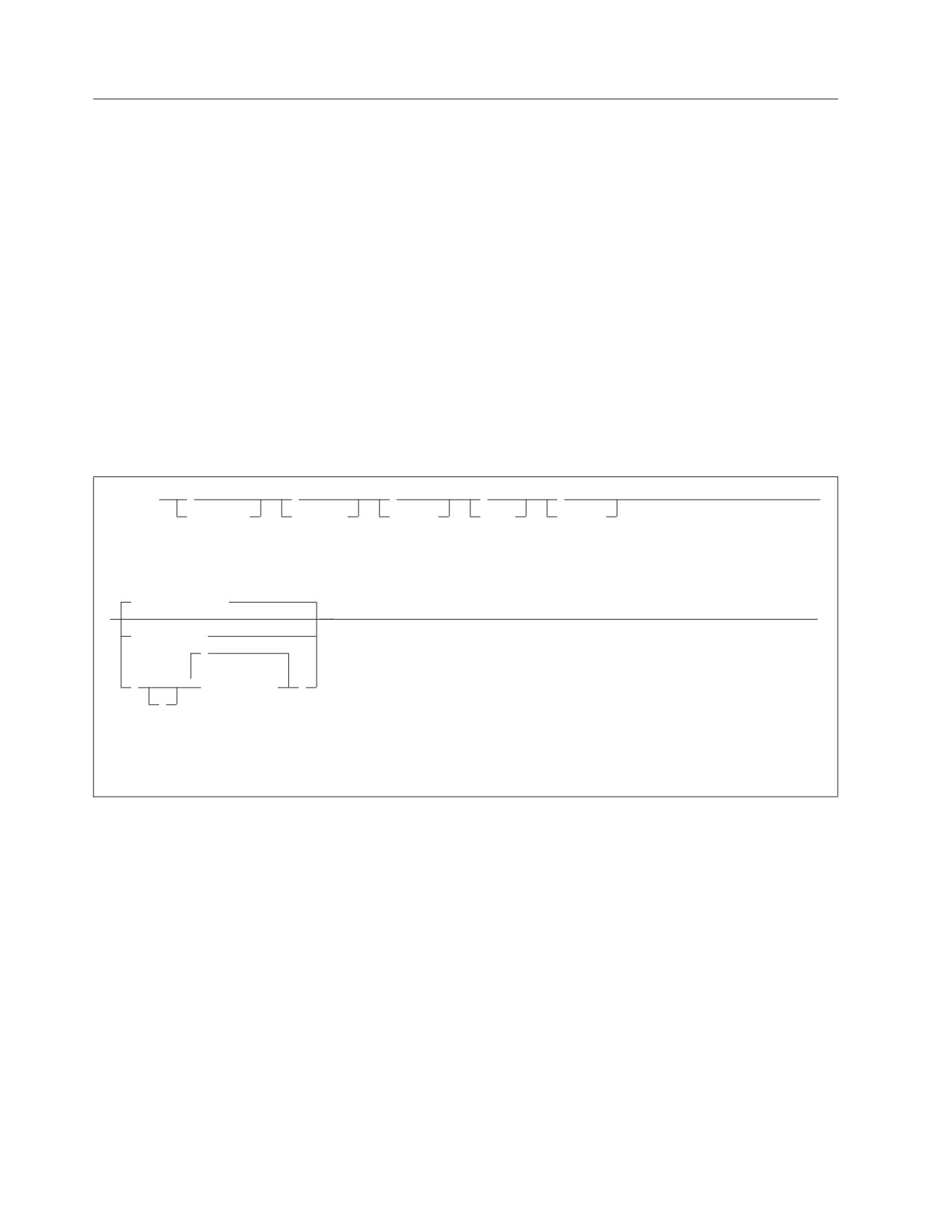
The following diagram illustrates the syntax of the SET APPCVM command:
►► SET APPCVM TARGET
resid
►◄
avs-parameter-block
avs_parameter_block:
resid
(mode_name,gateway_name,target_LU_name)
In the command, the variables have the following meanings:
resid
is the resource identifier of the application server. This name is the
same as the resid variable on the IUCV *IDENT entry in the
application server directory on VM.
avs_parameter_block
specify these variables only when you want the VSE guest to
access an application server in an SNA network. Specify the
parameters in the order shown above. For more information on
specifying for the AVS parameters, see the VM/ESA: CP Command
and Utility Reference.
VSE Guest Sharing Operator Responsibilities
If you have a VSE guest sharing a VM application server, you can use all DB2
Server for VM operator commands to monitor and control VSE guest usage. You
must enter these commands from the DB2 Server for VM operator console on VM.
You can also resolve in-doubt logical units of work.
In-doubt logical units of work can occur if a VSE guest online user is committing a
logical unit of work when the application server or CICS ends abnormally. CICS
tries to automatically resolve in-doubt logical units of work. There are times,
however, when you may want to manually resolve in-doubt logical units of work,
such as when CICS is unable to automatically resolve the in-doubt unit of work or
if you cannot wait for CICS to resolve the in-doubt unit of work.
For more information about resolving in-doubt logical units of work, see
“Resolving CICS In-Doubt Logical Units of Work” on page 152.
17
Starting the Online Support
The online support allows the users at CICS terminals to communicate with the
application server. A major part of the online support is the online resource
adapter, which manages the communications between online (CICS) users and the
application server.
The CICS sequential device support can be used to automatically initiate the CIRB
transaction. See the DB2 Server for VSE System Administration, or DB2 Server for VM
System Administration for more information about automatically initiating the CIRB
transaction.
If the CIRB transaction has not been automatically initiated, to start the online
support:
1. Ensure that the database manager is running.
2. Ensure that CICS is running.
3. Run the CICS transaction named CIRB on a CICS terminal.
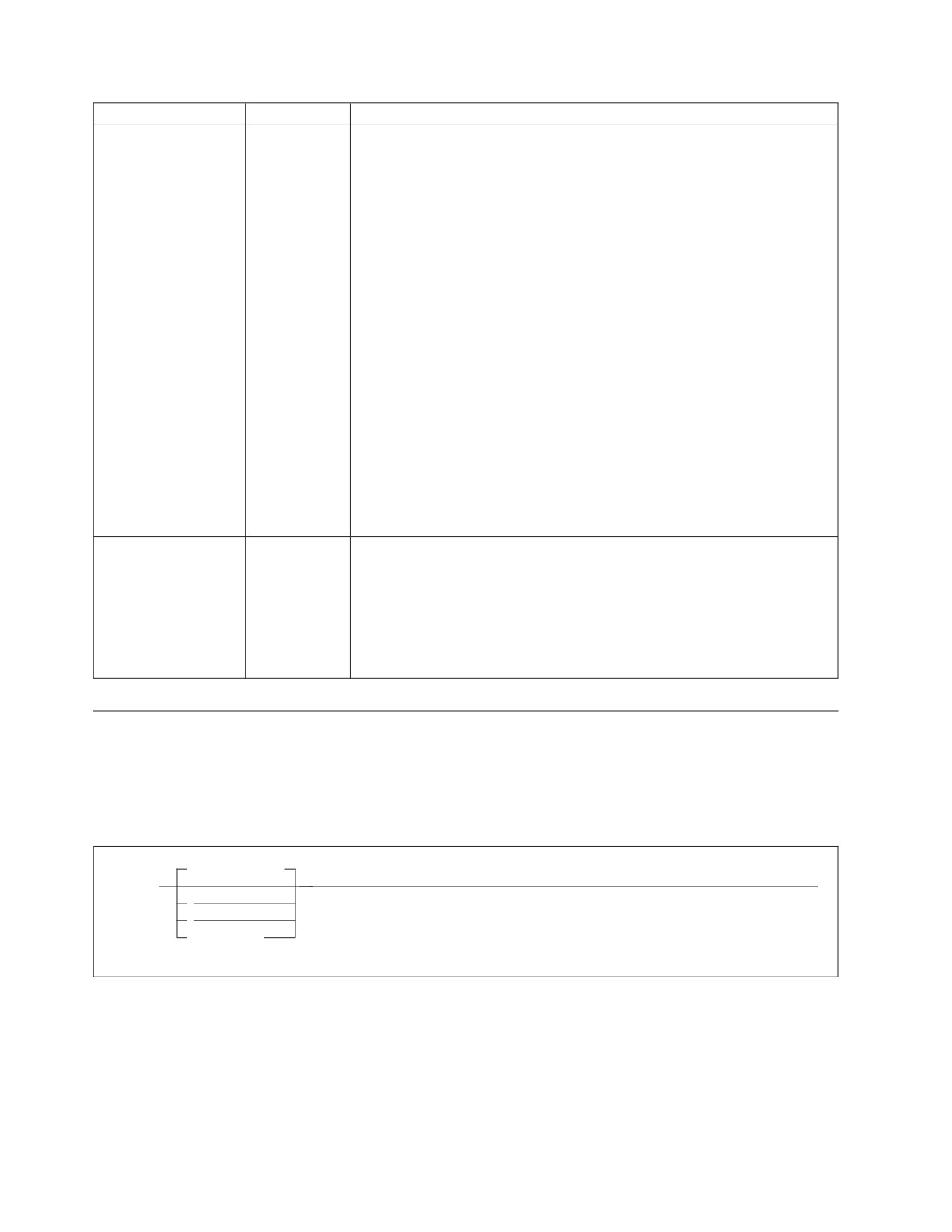
CIRB has six parameters:
►► CIRB
,
,
,
,
,
►
password,
nolinks,
defuid,
rmid,
langid,
(1)
Default_server
►
►◄
server_name
,
▼
(
server_name
)
,
Notes:
1
The default server is determined from the DBNAME directory.
The parameters are described below.
Note: If the CIRB transaction ends abnormally, enter a CIRT QUICK transaction to
end the online resource adapter before re-issuing a subsequent CIRB
transaction.
18
Operation

Parameter
Default
Description
PASSWORD
SQLDBAPW
This parameter establishes the operator’s authority to activate online access
(positional
to the application server. The password identifies the CICS subsystem. The
parameter 1)
user ID of the subsystem is the CICS APPLID, which defaults to
DBDCCICS. The procedure ARIS080D uses the following job control to give
the password and user ID to the application server.
// EXEC ARISQLDS,SIZE=AUTO,PARM=’SYSMODE=S,
X
LOGMODE=N,PROGNAME=ARIDBS’
CONNECT SQLDBA IDENTIFIED BY SQLDBAPW;
GRANT SCHEDULE TO DBDCCICS IDENTIFIED BY CICSPSWD;
COMMIT WORK;
The password chosen (CICSPSWD above) must satisfy DB2 Server for VSE
specifications for a password. This password establishes which password to
use when dropping connections through the CIRR or CIRT commands.
|
NOLINKS
3
This parameter establishes the number of links (paths) that should be
|
(positional
initialized to the local application server or remote applicatation server
|
parameter 2)
connected via DRDA over TCPIP. Specify this parameter as a decimal value
|
between 1 and 64. The number must be less than or equal to the value
|
assigned to the NCUSERS initialization parameter of the application server.
|
(The NCUSERS default is 5.)
DEFUID
CICSUSER
This parameter identifies the default user ID used by the online support
(positional
when it makes an implicit CONNECT to a local application server. This
parameter 3)
parameter must satisfy DB2 Server for VSE specifications for a user ID.
RMID
0
This parameter identifies a unique resource adapter. You must specify it
(positional
only if your installation has multiple CICS partitions active in the same
parameter 4)
VSE/ESA system, and if each CICS partition allows online access to the
application server. For this case, recovery requires that the application
server know the resource adapter it is servicing. You must specify this
parameter as a decimal value between 0 and 63.
If the online support detects that this ID is not unique in the system, it
issues a message. The CIRB transaction then ends without enabling the
resource adapter.
There can be only one resource adapter enabled in a single CICS partition.
An attempt to enable a second resource adapter causes the online support
to issue a message, and the CIRB transaction ends without enabling the
second resource adapter. The first one, however, remains in effect.
Chapter 2. Managing Online Support
19
Parameter
Default
Description
LANGID
specified at
This parameter defines the language the application server uses to display
(positional
installation
error and information messages. The language you specify on this
parameter 5)
transaction becomes the default language for ISQL, CBND, DSQG, DSQU,
DSQQ and DSQD. The ISQL welcome logo always appears in the language
specified on this transaction.
This parameter must take the form of a minimum 1-character, maximum
5-character language ID (in VM, this is consistent with CMS language IDs).
In the case where a national language is not supported by CMS, but it is
supported by the database manager, the database manager has adopted its
own langid for the language. You must use one of the language IDs in the
LANGID column of the SQLDBA.SYSLANGUAGE table. The language ID
must identify a language you have installed on the database manager. To
choose another language, use the SET LANGUAGE command in ISQL. The
following IDs can be specified on the CIRB transaction:
AMENG
American English
UCENG
Uppercase English
FRANC
French
GER
German
KANJI
Kanji (Japanese)
HANZI
Simplified Chinese
If this parameter is omitted, the language defaults to the language chosen
as the default at installation.
SERVER_NAME
Determined
This parameter enables you to specify the application servers that you
(positional
from
want to access. If the list format specifies multiple servers, the first one in
parameter 6)
DBNAME
the list becomes the default server. Only the first server_name in the list
directory or
may be omitted.
"SQLDS."
If this parameter (or the first one in the list) is omitted, the default server is
determined from the DBNAME directory. If the DBNAME directory does
not specify a default server, then SQLDS becomes the default server name.
Displaying the Status of the Online Support
To display status information about active CICS transactions that access the
application server, enter the CICS CIRD transaction. The CIRD transaction has one
parameter. It operates only when the application server has been installed on CICS
with the Restart Resynchronization option.
Default_server
►► CIRD
►◄
?
server_name
The parameter has the following meaning:
20
Operation
Parameter
Default
Description
SERVER_NAME
Determined by
This parameter enables you to specify the application server whose
(positional
CIRB or CIRC
status is to be displayed, or * to display the status of all servers and
parameter
1)
transaction.
the details of transactions accessing the servers, or ? to display a list
of the connected servers without the transaction details.
If this parameter is omitted, the default server_name is the one that
was determined by the CIRB or the CIRC transaction.
You can enter the CIRD transaction from any CICS terminal. You can use it before
a DB2 Server for VSE application is invoked to determine the active CICS
transactions that access the application server. You can use it to determine the
effects on users of disabling online support or shutting down the application
server.
The abnormal termination process of online support automatically invokes the
CIRD transaction. CIRD output is displayed on your operator console (the system
operator console) after the termination error message.
The information that the CIRD transaction displays for transactions that relate to a
local application server varies depending on the types of transactions in process
when CIRD is invoked:
v
The Dbname of the connected server in VSE/ESA only.
v
Transactions waiting to access the application server.
These transactions have issued an SQL request but are waiting because all links
to the application server are busy. For these transactions, CIRD displays the
elapsed time of the wait.
In general, links to the application server are busy because other terminal users
are accessing the application server. However, when online support is being
initialized, the reason for the busy links might be that the database manager (in
a VM/ESA system), or the application server (in a VSE/ESA system) and CICS
logs (in either system) are being resynchronized. Resynchronization of the two
logs usually requires very little time. However, the delay might be longer if
resynchronization causes the rollback of a very large logical unit of work.
v
Transactions currently accessing the application server.
These transactions have established a link to the application server and a logical
unit of work. The application server is also currently processing that logical unit
of work. For these transactions, the CIRD transaction displays the elapsed time
of the current SQL statement and the elapsed time that the link has been held.
The latter indicates the elapsed time of the current logical unit of work.
v
Transactions holding a link to the application server but not using it.
These transactions have established a link to the application server and a logical
unit of work, but the application server is not currently processing that logical
unit of work. Instead, these transactions are doing other work or are waiting for
a response from the CICS terminal user. For these transactions, CIRD displays
the elapsed time since the last application server access was finished.
The CIRD transaction also displays the elapsed time that the link has been held.
Again, this value indicates the elapsed time of the current logical unit of work.
v
Transactions that previously held a link to the application server, but currently
do not.
Chapter 2. Managing Online Support
21
These transactions have finished one or more logical units of work but have not
yet started another. For these transactions, CIRD displays the time elapsed since
the last logical unit of work completed.
For CIRD to display information about a transaction, the transaction must issue an
SQL request. The CIRD transaction displays the following information (where
applicable) for transactions that relate to a local application server:
v
The CICS task number (TASKNO).
v
The CICS transaction identifier (TRANID).
v
The CICS terminal identifier (TERMID).
v
The server_name of the application server connected by the online resource
adapter.
Not all transactions have a terminal identifier. For example, ISQL has a
two-transaction structure. One transaction (default name ISQL) controls the
terminal; the other (default name CISQ) is for access to the application server.
Because the CISQ transaction has no terminal associated with it, CIRD does not
display TERMID for the CISQ transactions. For CISQ, CIRD displays the
terminal identifier in another field called USERDATA. USERDATA is described
below.
Thus, if a transaction accesses the application server, but does not have a
terminal associated with it, CIRD does not display TERMID.
v
The user identifier (USERID) that the application server establishes for the
transaction.
The CIRD transaction does not display this identifier unless an authorization ID
has been established. The authorization ID is established when an application
issues an SQL statement that starts an initial logical unit of work. Thus, the
authorization ID might not be established immediately. (For example, a
transaction might be waiting for a link to the application server.) The
authorization ID remains established after a transaction ends a logical unit of
work, unless the RELEASE option of COMMIT WORK or ROLLBACK WORK
was used.
v
User data (USERDATA) for ISQL transactions.
USERDATA contains the terminal identifier (TERMID) of the terminal that was
used to invoke ISQL. For most other transactions, USERDATA is blank. You can
code an online application to initialize USERDATA. Such an application would
use the online cancel support.
v
The elapsed time intervals (as described above).
The CIRD transaction uses the following format to display time:
hh:mm:ss
where hh is hour, mm is minutes, and ss is seconds.
After displaying the above information, CIRD displays the time of day and date.
The CIRD transaction then ends its processing. The format of the displayed line
is:
TIME=hh:mm:ss DATE=mm/dd/yy
(or dd/mm/yy)
In DATE, mm is month, dd is day, and yy is year. The format of the date
depends on the way it was specified with the DATE parameter of the VSE
STDOPT job control command or statement.
If CIRD determines that no CICS transactions relate to the application server, the
CIRD transaction displays only the time and date, and then ends.
22
Operation
Note: When the connection between an application server and the online support
ends abnormally, the CIRD transaction is invoked automatically. The CIRD
transaction is invoked implicitly to display information about transactions
that were accessing the application server at the time of the failure. This
information is displayed on the operator console or CICS terminal where the
CIRD transaction was entered.
For the following examples, assume that SQLMACH1 is the default local
application server and that connections have been established for the local
application servers SQLMACH1, SQLMACH2 and SQLVM.
Figure 7 shows an example of the information displayed by the CIRD transaction
with no parameters.
2 cird
F2
002
The default server is SQLMACH1.
F2
002
---------------------------------------------------
F2
002
DBDCCICS connected to server SQLMACH1.
F2
002
Status of online DB2 Server for VSE applications:
F2
002
F2
002
Transactions waiting to establish a link to the application server are:
F2
002
F2
002
TASKNO TRANID TERMID USER ID USERDATA WAIT TIME
F2
002
------ ------ ------ -------- -------- ---------
F2
002
000033 MKE2
L222
00:01:32
F2
002
000025 INV
L224
JIM
00:08:32
F2
002
F2
002
Transactions holding a link and now accessing the application server are:
F2
002
F2
002
TASKNO TRANID TERMID USER ID USERDATA TIME USED
TOTAL LUW
F2
002
FOR CURRENT TIME
F2
002
ACCESS
F2
002
------ ------ ------ -------- -------- ------------ ---------
F2
002
000019 CISQ
DEPT222
L199
00:01:32
00:03:48
F2
002
000037 INV
L209
TERRY
00:00:01
00:00:03
F2
002
F2
002
Transactions holding a link to the application server but not using are:
F2
002
F2
002
TASKNO TRANID TERMID USER ID USERDATA TIME SINCE TOTAL LUW
F2
002
LAST ACCESS TIME
F2
002
------ ------ ------ -------- -------- ------------ ---------
F2
002
000003 CISQ
WILLIAM L210
00:07:01
00:10:56
F2
002
F2
002
Transactions which previously accessed the application server (not holding
link):
F2
002
F2
002
TASKNO TRANID TERMID USER ID USERDATA TIME SINCE
F2
002
LAST ACCESS
F2
002
------ ------ ------ -------- -------- ------------
F2
002
000003 MKE2
ROBERT L210
00:20:04
F2
002
F2
002
TIME=14:28:23 DATE=09/01/96
Figure 7. Example of CIRD with Defaults
Figure 8 on page 24 shows an example of the information displayed by the CIRD
transaction with a server_name specified.
Chapter 2. Managing Online Support
23
2 cird
sqlmach2
F2
002
The default server is SQLMACH1.
F2
002
---------------------------------------------------
F2
002
DBDCCICS connected to server SQLMACH2.
F2
002
Status of online DB2 Server for VSE applications:
F2
002
F2
002
Transactions waiting to establish a link to the application server are:
F2
002
F2
002
TASKNO TRANID TERMID USER ID USERDATA WAIT TIME
F2
002
------ ------ ------ -------- -------- ---------
F2
002
000033 MKE2
L222
00:01:32
F2
002
000025 INV
L224
JIM
00:08:32
F2
002
F2
002
Transactions holding a link and now accessing the application server are:
F2
002
F2
002
TASKNO TRANID TERMID USER ID USERDATA TIME USED
TOTAL LUW
F2
002
FOR CURRENT TIME
F2
002
ACCESS
F2
002
------ ------ ------ -------- -------- ------------ ---------
F2
002
000019 CISQ
DEPT222
L199
00:01:32
00:03:48
F2
002
000037 INV
L209
TERRY
00:00:01
00:00:03
F2
002
F2
002
Transactions holding a link to the application server but not using are:
F2
002
F2
002
TASKNO TRANID TERMID USER ID USERDATA TIME SINCE TOTAL LUW
F2
002
LAST ACCESS TIME
F2
002
------ ------ ------ -------- -------- ------------ ---------
F2
002
000003 CISQ
WILLIAM L210
00:07:01
00:10:56
F2
002
F2
002
Transactions which previously accessed the application server (not holding link):
F2
002
F2
002
TASKNO TRANID TERMID USER ID USERDATA TIME SINCE
F2
002
LAST ACCESS
F2
002
------ ------ ------ -------- -------- ------------
F2
002
000003 MKE2
ROBERT L210
00:20:04
F2
002
F2
002
TIME=14:28:23 DATE=09/03/96
Figure 8. Example of CIRD with Server_Name
Figure 9 on page 25 shows an example of the information displayed by the CIRD
transaction with the * specified.
24
Operation
2 cird
F2
002
The default server is SQLMACH1.
F2
002
There are connections to server SQLMACH1.
F2
002
There are connections to server SQLMACH2.
F2
002
There are connections to server SQLVM.
F2
002
---------------------------------------------------
F2
002
DBDCCICS connected to server SQLMACH1.
F2
002
Status of online DB2 Server for VSE applications:
F2
002
F2
002
Transactions waiting to establish a link to the application server are:
F2
002
F2
002
TASKNO TRANID TERMID USER ID USERDATA WAIT TIME
F2
002
------ ------ ------ -------- -------- ---------
F2
002
000033 MKE2
L222
00:01:32
F2
002
000025 INV
L224
JIM
00:08:32
F2
002
F2
002
Transactions holding a link and now accessing the application server are:
F2
002
F2
002
TASKNO TRANID TERMID USER ID USERDATA TIME USED
TOTAL LUW
F2
002
FOR CURRENT TIME
F2
002
ACCESS
F2
002
------ ------ ------ -------- -------- ------------ ---------
F2
002
000019 CISQ
DEPT222
L199
00:01:32
00:03:48
F2
002
000137 INV
L209
BOB
00:17:34
01:24:03
F2
002
F2
002
Transactions holding a link to the application server but not using are:
F2
002
F2
002
TASKNO TRANID TERMID USER ID USERDATA TIME SINCE TOTAL LUW
F2
002
LAST ACCESS TIME
F2
002
------ ------ ------ -------- -------- ------------ ---------
F2
002
000013 CISQ
LARRY
L210
00:03:01
00:11:36
F2
002
F2
002
Transactions which previously accessed the application server (not holding
link):
F2
002
F2
002
TASKNO TRANID TERMID USER ID USERDATA TIME SINCE
F2
002
LAST ACCESS
F2
002
------ ------ ------ -------- -------- ------------
F2
002
000003 MKE2
LOUISA L210
01:57:04
F2
002
F2
002
TIME=14:28:23 DATE=09/03/96
F2
002
---------------------------------------------------
F2
002
DBDCCICS connected to server SQLMACH2.
F2
002
There are no active application server transactions.
F2
002
F2-002
TIME= 14:29:47 DATE= 09/03/96
F2 002
---------------------------------------------------
F2 002
DBDCCICS connected to server SQLVM.
F2 002
There are no active application server transactions.
F2 002
F2 002
TIME=14:30:23 DATE=09/03/96
Figure 9. Example of CIRD with *
Figure 10 on page 26 shows an example of the information displayed by the CIRD
transaction with the ? specified.
Chapter 2. Managing Online Support
25
2 cird ?
F2 002 The default server is SQLMACH1.
F2 002 There are connections to server SQLMACH1.
F2 002 There are connections to server SQLMACH2.
F2 002 There are connections to server SQLVM.
F2 002 ---------------------------------------------------
Figure 10. Example of CIRD with ?
Some extra information can be derived from the displays. In Figure 10 notice that
SQLMACH1 is mentioned as the default server and on the next message that there
are connections to SQLMACH1 also. It is possible, with the CIRR transaction, to
remove the connections to SQLMACH1. The CIRD command would still show that
the default server is SQLMACH1 but the message indicating there are connections
to SQLMACH1 would not be displayed. In this scenario, users connecting to the
default server would receive SQLCODE = -940 on the CONNECT statement. The
CIRA transaction could be used to establish connections to SQLMACH1 again or
the CIRC transaction could be used to change the default server to one of the other
active servers. Either method allows CONNECT statements to access the default
server.
If CIRR or CIRT has been issued to disconnect a server or to shut down the online
resource adapter but cannot complete because there are still active transactions
against the server, the CIRD transaction will show which transactions and which
servers are affected.
Figure 11 on page 27 shows an example of the information displayed by the CIRD
transaction with the ? parameter specified. The attempt to remove the connections
to SQLMACH2 fails because there are still active transactions. Then the CIRD
transaction determines which transactions are still active. The user is found and
asked to complete his work. When the CIRR command is retried it completes
successfully and the connections to SQLMACH2 are shut down.
26
Operation
2 cird ?
F2 002
The default server is SQLMACH1.
F2 002
There are connections to server SQLMACH1.
F2 002
There are connections to server SQLMACH2.
F2 002
There are connections to server SQLVM.
F2 002
---------------------------------------------------
2 cirr ,,1,sqlmach2
F2 002
ARI0463I The DISABLE transaction CIRR must delay for a
1-second interval before attempting the disable.
F2-002
2 cird ?
F2 002
The default server is SQLMACH1.
F2 002
There are connections to server SQLMACH1.
F2 002
Connections to SQLMACH2 are being disabled.
F2 002
There are connections to server SQLVM.
F2 002
----------------------------------------------
F2-002
2 cird *
F2 002
The default server is SQLMACH1.
F2 002
There are connections to server SQLMACH1.
F2 002
Connections to SQLMACH2 are being disabled.
F2 002
There are connections to server SQLVM.
F2 002
----------------------------------------------
F2 002
DBDCCICS connected to server SQLMACH1.
F2 002
There are no active application server transactions.
F2 002
F2 002
TIME= 19:07:43 DATE= 09/20/96
F2-002
F2 002
----------------------------------------------
F2 002
DBDCCICS connected to server SQLMACH2.
F2 002
Status of online DB2 Server for VSE applications:
F2 002
F2 002
Transactions holding a link to the application server but
not using are:
F2 002
F2 002
TASKNO TRANID TERMID USER ID USERDATA TIME SINCE TOTAL LUW
F2 002
LAST ACCESS TIME
F2 002
______
______ ______ ________ ________ ___________ _________
F2 002
0000129 CISQ
CICSUSER L77D
00:00:31
00:00:31
F2 002
F2 002
TIME= 19:07:44 DATE= 09/20/96
F2 002
----------------------------------------------
F2 002
DBDCCICS connected to server SQLVM.
F2 002
There are no active application server transactions.
F2 002
F2 002
TIME= 19:07:45 DATE= 09/20/96
F2-002
2 cirr ,,2,sqlmach2
F2-002
ARI0455I Connections to SQLMACH2 are disabled.
Figure 11. Example of CIRD in a Disable Scenario
Figure 12 on page 28 shows an example of the information displayed by the CIRD
transaction.
Chapter 2. Managing Online Support
27
F4 004 DBDCCIS connected to server SQLDB1_TOR_INV.
F4 004 Status of online application server applications:
F4 004
F4 004 Transactions waiting to establish a link to the application server:
F4 004
TASKNO TRANID TERMID USERID USERDATA WAIT TIME
F4 004
------ ------ ------ -------- -------- ---------
F4 004
000033 MKE2
L222
00:01:32
F4 004
000025 INV
L224
JIM
00:08:32
F4 004
F4 004 Transactions holding a link and now accessing the application server:
F4 004
TASKNO TRANID TERMID USERID USERDATA TIME USED
TOTAL LUW
F4 004
FOR CURRENT TIME
F4 004
ACCESS
F4 004
------ ------ ------ -------- -------- ------------ ---------
F4 004
000019 CISQ
DEPT222
L199
00:01:32
00:03:48
F4 004
000037 INV
L209
TERRY
00:00:01
00:00:03
F4 004
F4 004 Transactions holding a link to the application server and not using it:
F4 004
TASKNO TRANID TERMID USERID USERDATA TIME SINCE TOTAL LUW
F4 004
LAST ACCESS TIME
F4 004
------ ------ ------ -------- -------- ------------ ---------
F4 004
000003 CISQ
WILLIAM L210
00:07:01
00:10:56
F4 004
F4 004 Transactions which previously accessed the application server (not holding a link):
F4 004
TASKNO TRANID TERMID USERID USERDATA TIME SINCE
F4 004
LAST ACCESS
F4 004
------ ------ ------ -------- -------- ------------
F4 004
000003 MKE2
ROBERT L210
00:20:04
F4 004
F4 004 TIME=14:28:23 DATE=03/23/96
Figure 12. Typical Information Displayed by the CIRD Transaction
The CIRD transaction displays the following information (where applicable) for
transactions that relate to a remote application server:
RDBMS
displays the name, class, and release level (version, release, and modification
level) of the application server being accessed.
LU
displays the logical unit name.
TPN
displays the transaction program name. Its character and hexadecimal versions
are both displayed.
TASKNO
displays the number of the task.
TRANID
displays the transaction id.
TERMID
displays the name of the terminal where the transaction was initiated.
USER ID
displays the connected user id.
STATUS
displays the communication state. COMM indicates that the transaction sent an
SQL statement to the database machine and has been waiting for a reply since
the time shown. APPL indicates that the transaction returned control to the
application at the time shown. VRA indicates that the Online Resource Adapter
is processing your request. WAIT indicates that the transaction is waiting for a
session.
28
Operation

TIME
displays the time when the STATUS displayed had begun. For example, task
number 25 has already returned control to the application at 12:17:03, as
indicated by TIME.
LUWID
displays the logical unit of work identifier, which uniquely identifies an LU6.2
or TCP/IP conversation. For LU6.2 (SNA) conversation, its value is
netid.luname.instance_number.sequence_number. For TCP/IP conversation, its
value is ip_address.port_number.instance_number.sequence_number. The netid and
luname and ip_address and port_number are up to 8 characters long,
instance_number is 12 characters long, and sequence_number is 4 characters long.
Figure 13 shows an example of the information displayed by the CIRD transaction
with a remote server-name specified.
User:
2 cird sqlmach8
System: F2 0002 The default server is SQLMACH8.
F2 0002 ----------------------------------------------
F2 0002 Status of online DB2 Server for VSE applications for
F2 0002 RDBMS = SQLMACH8 SQLDS/VM V6.1.0
F2 0002 LU = VMC3
F2 0002 TPN = SQLMACH8
F2 0002
(X’07F6C4C2’)
F2 0002
F2 0002
TASKNO TRANID TERMID USER ID STATUS TIME
F2 0002
______
______ ______ ________
______
___________________
F2 0002
LUWID
F2 0002
______
F2 0002
0000891
DRT1
D080
SYSA
APPL
1998-08-11.09:12:42
F2 0002
CAIBMOML.D08001.E31FE596ADDE.0001
F2 0002
F2 0002
TIME= 09:18:11 DATE= 08/11/98
F2-0002
Figure 13. Example of CIRD with remote server name
Figure 14 shows an example of the information displayed by the CIRD transaction
with a ? specified, where online access to the remote server RMTSERV1 is allowed.
Assume that SQLMACH1 is the default local application server and RMTSERV1 is
a remote application server. Connections have been established for SQLMACH1
and online access to RMTSERV1 through the online support is allowed.
User:
2 cird ?
System: F2 002 The default server is SQLMACH1.
F2 002 There are connections to server SQLMACH1.
F2 002 Online access to remote RMTSERV1 is allowed.
F2 002 ---------------------------------------------------
Figure 14. Example of CIRD with ?
Stopping the Online Support
To end online support, enter the CICS CIRT transaction. The CIRT transaction has
three parameters:
Chapter 2. Managing Online Support
29

►► CIRT
,
,
,
►◄
password,
mode,
interval
After the CIRT transaction is over, online access to the application server is not
possible. The CIRT parameters are positional. Syntax rules are explained in “Using
Syntax Rules for DB2 Server for VSE CICS Transactions” on page 37.
The parameters have the following meanings:
Parameter
Default
Description
PASSWORD
SQLDBAPW
This password establishes the operator’s authority to stop the
(positional
online access to the application server. It must be the same
parameter 1)
password that was supplied for the CIRA or CIRB transaction. See
“Password Implications on Online Resource Adapter Termination”
on page 32 for more details.
MODE
NORMAL
This parameter establishes the shutdown mode: NORMAL or
(positional
QUICK. When remote application servers are accessed by the online
parameter 2)
support, CIRT NORMAL will complete only when all conversations
to the remote application servers are deallocated. When you specify
NORMAL, the CIRT transaction prevents new online users from
accessing the application server. Users who are already doing work,
however, can finish. When all users complete their work, no online
users can use the application server. When you specify QUICK,
online access to local application servers is ended immediately.
Online users accessing a local application server cannot finish their
work. Their current logical units of work are rolled back (unless
they are already processing a COMMIT WORK). You can change
from NORMAL to QUICK. However, once the MODE is QUICK,
you cannot change it back to NORMAL. When remote application
servers are accessed by the online support and you specify QUICK,
online access to the remote application server is not ended
immediately. Online users accessing a remote server can finish their
unit of work, but cannot start a new logical unit of work.
30
Operation

Parameter
Default
Description
INTERVAL
30
The number of seconds that the CIRT transaction should delay
(positional
(seconds)
before freeing the terminal. The value must be an integer value
parameter
3)
between 0 and 3 600. This parameter controls the availability of the
CICS terminal (or operator console) after you enter the CIRT
transaction.
The CICS terminal (or VSE operator console) used to activate the
CIRT transaction is unavailable until the transaction ends. This
could be a long time if the online application is long-running or if a
user left without correctly ending the terminal session. If you enter
CIRT PASSWORD,NORMAL, the terminal is not available until all
online users complete their work. Even with CIRT PASSWORD,
QUICK there may be some delay before the CICS terminal allows
the CIRT terminal to complete its clean-up process.
The value you specify here represents an interval of time measured
in seconds. If the CIRT transaction does not finish immediately, it
waits the amount of time you specify. When this time ends, the
CIRT transaction tries again to finish processing. If the CIRT
transaction does not finish successfully, you receive a message
telling you to retry the CIRT transaction later. After issuing the
message, the CIRT transaction ends. The shutdown mode is still in
effect (the application server is in the process of shutting down),
and the terminal is available for your use.
If links to multiple application servers exist, or if online access to multiple remote
application servers exist they will all be removed. After all the links and/or online
access have been removed, the online support is terminated.
The following example assumes that SQLVM, SQLMACH1 and SQLMACH2 are
local application servers, and SQLMACH8 is a remote application server.
msg f2
AR 015 1I40I READY
2 cirt
F2-002 ARI0455I Connections to SQLVM are disabled.
F2-002 ARI0455I Connections to SQLMACH2 are disabled.
F2-002 ARI0455I Connections to SQLMACH1 are disabled.
F2-002 ARI0455I Online access to SQLMACH8 is disabled.
F2-002 ARI0413I Resource Adapter ARI0OLRM is disabled.
Figure 15. Example of CIRT with Connections to Four Applications Servers
Note that the message “ARI0413I Resource Adapter ARI0OLRM is disabled” is not
displayed until the last application server connections and/or access have been
severed.
When the online resource adapter is not active, the CIRA and CIRR transactions
are incorrect. The online resource adapter needs to be enabled with the CIRB
transaction before the CIRA and CIRR transactions can be used.
Chapter 2. Managing Online Support
31
F2-002 ARI0413I Resource Adapter ARI0OLRM is disabled.
2 cira ,,,sqlmach1
F2-002 ARI0411I Resource Adapter is not enabled.
2 cirr ,,,sqlmach1
F2-002 ARI0411I Resource Adapter is not enabled.
Figure 16. Example of CIRA and CIRR after CIRT
Password Implications on Online Resource Adapter
Termination
The password used on the CIRR and CIRT transactions must be the same one that
was used on the CIRA and CIRB transactions. CIRR and CIRT will only shut down
the connections to servers where the password matches. If the passwords do not
match, that server is not shut down.
Consider the following example:
1. The online resource adapter is started with the command:
CIRB pw1,5,,,,(SQLMACH1,SQLMACH2)
2. Connections to two new servers are added with the command:
CIRA
,,,(SQLMACH3,SQLMACH4)
3. Another connection is added to a fifth server with the command:
CIRA pw2,1,,SQLMACH5
It is not possible to end the online resource adapter with one command in this
scenario. The CIRT or CIRR transactions must be run at least three times before the
online resource adapter is completely shutdown because three different passwords
were used to start it up.
The CIRT transaction entered with no parameters would only shut down the
connections to SQLMACH3 and SQLMACH4 because they were the only servers
that were started with the default password.
To shut down SQLMACH5, you would have to enter the following command:
CIRT pw2
To bring down the remaining servers and stop the online resource adapter you
need to enter:
CIRT pw1 followed by CIRT
The CIRR transaction can also be used, but the server names must be specified.
The following shows the CIRR commands that would be equivalent to the CIRT
commands in this scenario.
CIRT pw1 is equivalent to CIRR pw1,,,(SQLMACH1,SQLMACH2)
CIRT is equivalent to CIRR ,,,(SQLMACH3,SQLMACH4)
CIRT pw2 is equivalent to CIRR pw2,,,SQLMACH5
If the command:
CIRR ,,,(SQLMACH1,SQLMACH2,SQLMACH3,SQLMACH4,SQLMACH5)
were entered only SQLMACH3 and SQLMACH4 would be disconnected.
32
Operation
Message ARI0464E will be issued for servers SQLMACH1, SQLMACH2 and
SQLMACH5 because the passwords do not match.
Similarly, if the command:
CIRR pw1,,,(SQLMACH1,SQLMACH2,SQLMACH3,SQLMACH4,SQLMACH5)
were entered only SQLMACH1 and SQLMACH2 would be disconnected.
Message ARI0464E will be issued for servers SQLMACH3, SQLMACH4 and
SQLMACH5 because the passwords do not match.
Adding Online Connections Support
To add connections to another application server, issue the CICS CIRA transaction.
The CIRA transaction has four parameters:
►► CIRA
,
,
,
server_name
►◄
password,
nolinks,
defuid,
,
▼
(
server_name
)
,
The parameters are described below. For the syntax rules of the transactions, see
“Using Syntax Rules for DB2 Server for VSE CICS Transactions” on page 37.
The parameters have the following meanings:
Note: The PASSWORD, NOLINKS, DEFUID and SERVER_NAME parameters have
the same meanings as on the CIRB command. One exception is that the
SERVER_NAME parameter is required on CIRA, but is optional on CIRB.
Parameter
Default
Description
PASSWORD
SQLDBAPW
This parameter establishes the operator’s authority to activate online access
(positional
to the application server. The password identifies the CICS subsystem. The
parameter 1)
user ID of the subsystem is the CICS APPLID, which defaults to
DBDCCICS. The procedure ARIS080D uses the following job control to give
the password and user ID to the application server.
// EXEC ARISQLDS,SIZE=AUTO,PARM=’SYSMODE=S,LOGMODE=N,PROGNAME=ARIDBS’
CONNECT SQLDBA IDENTIFIED BY SQLDBAPW;
GRANT SCHEDULE TO DBDCCICS IDENTIFIED BY CICSPSWD;
COMMIT WORK;
The password chosen (CICSPSWD above) must satisfy DB2 Server for VSE
specifications for a password. This password establishes which password to
use when dropping connections through the CIRR or CIRT commands. See
“Password Implications on Online Resource Adapter Termination” on page
32 for more details.
|
NOLINKS
3
This parameter establishes the number of links (paths) that should be
|
(positional
initialized to the local application server or remote applicatation server
|
parameter 2)
connected via DRDA over TCPIP.. Specify this parameter as a decimal
|
value between 1 and 64. The number must be less than or equal to the
|
value assigned to the NCUSERS initialization parameter of the application
|
server. (The NCUSERS default is 5.)
Chapter 2. Managing Online Support
33
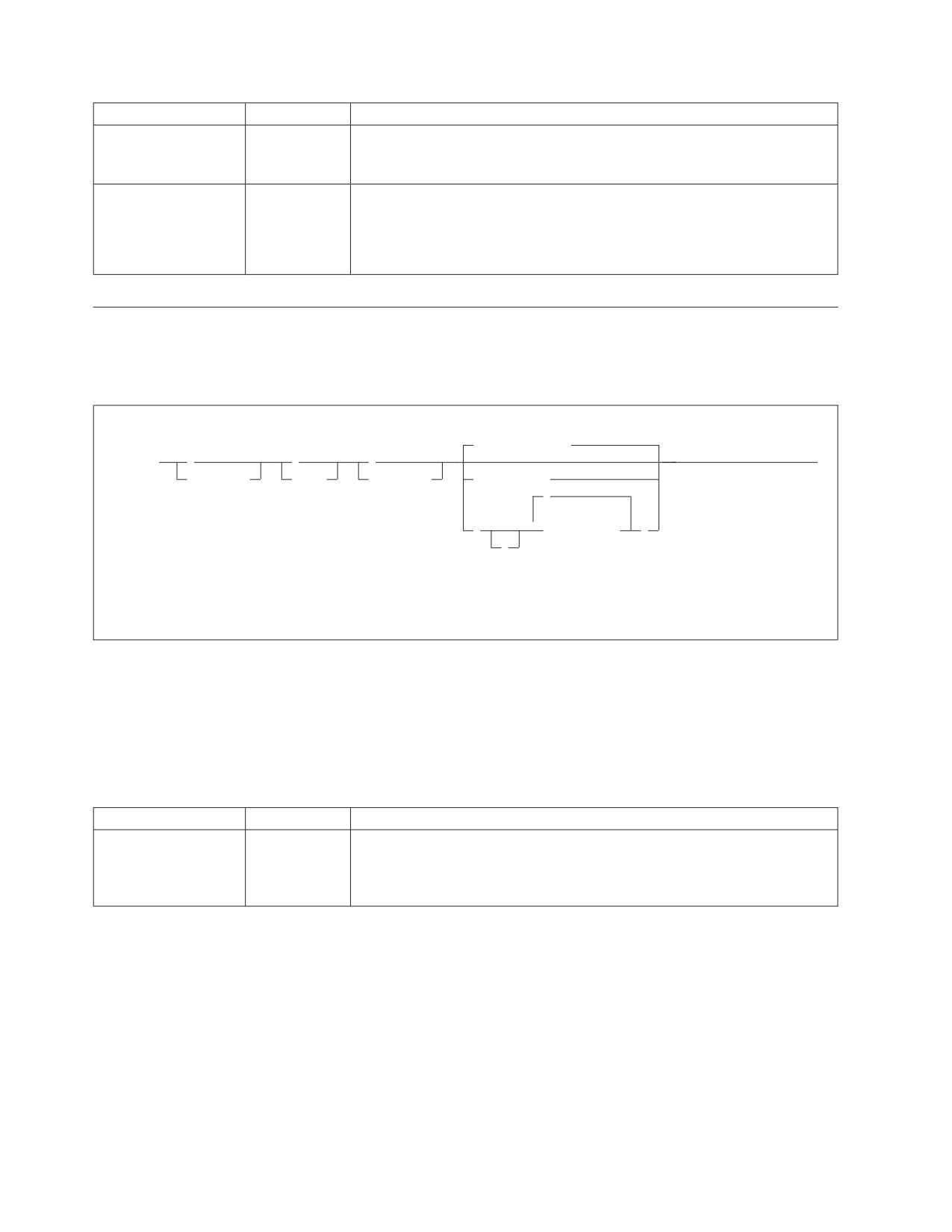
Parameter
Default
Description
DEFUID
CICSUSER
This parameter identifies the default user ID used for the implicit
(positional
CONNECT of the online support to a local application server. This
parameter 3)
parameter must satisfy DB2 Server for VSE specifications for a user ID.
SERVER_NAME
none
This parameter is required and it specifies the additional application
(positional
servers that you want to access.
parameter 4)
If this parameter is omitted, the message ARI0400E is issued indicating that
an incorrect input parameter was entered.
Removing Online Connections Support
To remove connections from an application server, enter the CICS CIRR
transaction. The CIRR transaction has four parameters:
(1)
Default_server
►► CIRR
,
,
,
►◄
password,
mode,
interval,
server_name
,
▼
(
server_name
)
,
Notes:
1
The default server is established by the CIRB or CIRC transaction.
The parameters are described below. For the syntax rules of the transactions, see
“Using Syntax Rules for DB2 Server for VSE CICS Transactions” on page 37.
The parameters have the following meanings:
Note: The PASSWORD, MODE and INTERVAL parameters have the same
meanings as on the CIRT command.
Parameter
Default
Description
PASSWORD
SQLDBAPW
This parameter establishes the operator’s authority to stop the online access
(positional
to the application server. It must be the same password that was supplied
parameter 1)
for the server by the CIRB or CIRA transaction. See “Password Implications
on Online Resource Adapter Termination” on page 32 for more details.
34
Operation

Parameter
Default
Description
MODE
NORMAL
This parameter establishes the shutdown mode: NORMAL or QUICK.
(positional
When you specify NORMAL, the CIRR transaction prevents new online
parameter 2)
users from accessing the specified application server. Users who are already
doing work, however, can finish. When all users complete their work, no
online users can use the specified application server. When you specify
NORMAL for a remote application server, the shutdown of the access to
the remote application server will complete only when all conversations to
the remote application server have been deallocated. When you specify
QUICK for a local application server, online access is ended immediately.
Online users cannot finish their work. Their current logical units of work
are rolled back (unless they are already processing a COMMIT WORK).
You can change from NORMAL to QUICK. However, once the MODE is
QUICK, you cannot change it back to NORMAL. When you specify QUICK
for a remote server, the QUICK mode is changed to NORMAL.
INTERVAL
30
The number of seconds that the CIRR transaction should delay before
(positional
(seconds)
freeing the terminal. The value must be an integer value between 0 and
parameter 3)
3600. This parameter controls the availability of the CICS terminal (or
operator console) after you issue the CIRR transaction.
The CICS terminal (or VSE operator console) used to activate the CIRR
transaction is unavailable until the transaction ends. This could be a long
time if the online application is long-running or if a user left without
correctly ending the terminal session. If you enter CIRR
PASSWORD,NORMAL, the terminal is not available until all online users
complete their work.
The value you specify for interval represents an interval of time measured
in seconds. If the CIRR transaction does not finish immediately, it waits the
amount of time you specify. When this time ends, the CIRR transaction
tries once again to finish processing. If the CIRR transaction does not finish
successfully, you receive a message telling you to retry the CIRR
transaction later. After issuing the message, the CIRR transaction ends. The
shutdown mode is still in effect (the application server is in the process of
shutting down), and the terminal is available for your use.
SERVER_NAME
Determined
This parameter enables you to specify the application servers that you
(positional
by CIRB or
want to remove access. The default server is removed if this parameter is
parameter 4)
CIRC
omitted, or if the first parameter in the server_name list is blank. The
transaction.
default server is the one that was established by the CIRB transaction or by
the CIRC transaction.
The CIRD transaction may be used to display the default server_name in case the
user does not know what the default server_name is.
msg f2
AR 015 1I40I READY
2 cirr
F2-002 ARI0455I Connections to SQLMACH1 are disabled.
F2-002 ARI0460W Connections to the default server SQLMACH1 have
been disabled.
Figure 17. Example of CIRR with Defaults
The above example assumes that there are connections and/or access to more than
one server when the CIRR transaction is entered.
Chapter 2. Managing Online Support
35

If the password, mode and interval are the same then the server_name list can be
used to remove connections from multiple application servers. Since SQLVM was
the last active connection, the online resource adapter was terminated.
msg f2
AR 015 1I40I READY
2 cirr ,,,(sqlmach2,sqlmach8,sqlvm)
F2-002 ARI0455I Connections to SQLMACH2 are disabled.
F2-002 ARI0455I Online access to SQLMACH8 is disabled.
F2-002 ARI0455I Connections to SQLVM are disabled.
F2-002 ARI0413I Resource Adapter ARI0OLRM is disabled.
Figure 18. Example of CIRR with Server_Name List
The CIRR transaction can be used to remove the connections to a local application
server that was established by the CIRB and CIRA transactions. It can also be used
to disable online access to a remote application server. If CIRR removes the last
active connections to the online resource adapter and all active APPC
conversations known to the online resource adapter are deallocated, then the
online resource adapter is terminated. The CIRB transaction would have to be used
to restart it.
The CIRA and CIRR transactions can be entered repeatedly and in any order to
add and remove links to application servers as required.
If CIRR is entered to remove connections to a server to which no connections have
been established, the message “ARI0456I Connections to <server_name> do not exist.”
is displayed.
If the password given on the CIRR transaction does not match the password that
was used to start the connections to the named server, then the connections to that
server are not shut down and processing continues with the next server in the list.
Changing Online Default Support
To dynamically change the default application server, enter the CICS CIRC
transaction. The CIRC transaction has one parameter:
►► CIRC server_name
►◄
The parameters are described below. For the syntax rules of the transactions, see
“Using Syntax Rules for DB2 Server for VSE CICS Transactions” on page 37.
The parameter has the following meaning:
Parameter
Default
Description
SERVER_NAME
none
This parameter is required and it specifies the application server that you
(positional
want to become the default.
parameter 1)
If this parameter is omitted, the message ARI0400E is issued indicating that
an incorrect input parameter was entered.
36
Operation
The server_name specified must already have connections established to it, either
from the CIRB or CIRA transactions. If connections to the specified server do not
exist, message ARI0456I Connections to <server_name> do not exist. is displayed. In
this case the CIRA transaction must first be run to establish the connections, then
the CIRC transaction is run to make it the default server.
For the following example assume that connections exist to SQLMACH1 and
SQLMACH2 and that SQLMACH2 is the current default server.
msg f2
AR 015 1I40I READY
2 circ sqlmach1
F2-002 ARI0459I The new default server is SQLMACH1.
The previous default server was SQLMACH2.
Figure 19. Example of CIRC
For this next example assume that connections exist to SQLMACH1 but not to
SQLMACH2.
msg f2
AR 015 1I40I READY
2 circ sqlmach2
F2-002 ARI0456I Connections to SQLMACH2 do not exist.
2 cira ,,,sqlmach2
F2-002 ARI0454I Connections to SQLMACH2 established.
RMCV at 0055D2E0.
2 circ sqlmach2
F2-002 ARI0459I The new default server is SQLMACH2. The previous
default server was SQLMACH1.
Figure 20. Example of CIRC
It is important to note that if the connections to the default server are lost, that
server is still identified as the default server. The connections can be lost because
the server went down or because the CIRR transaction was used to end the
connection. Users that are trying to connect to the default server in these cases will
receive SQLCODE = -940. If the CIRB or CIRA transaction establishes connections
to a server that is not ready, the message “ARI0418A DB2 Server for VSE server
<server-name> is not ready. Retry the enable transaction <tran> after DB2 Server for VSE
starts.” is displayed. If there is no active online resource adapter the CIRB
transaction must be used. If there is an active online resource adapter the CIRA
transaction must be used.
Using Syntax Rules for DB2 Server for VSE CICS Transactions
The syntax rules for the CIRB, CIRT, CIRA, CIRR, CIRC, CIRD, DAXP and DAXT
transactions are:
v Parameters are positional:
For CIRB--
PASSWORD, NOLINKS, DEFUID, RMID, LANGID,
SERVER_NAME
For CIRT--
PASSWORD, MODE, INTERVAL
For CIRA--
PASSWORD, NOLINKS, DEFUID, SERVER_NAME
For CIRR--
PASSWORD, MODE, INTERVAL, SERVER_NAME
For CIRC and CIRD--
SERVER_NAME
For DAXP-- PASSWORD, LANGID, SERVER_NAME
Chapter 2. Managing Online Support
37
For DAXT-- PASSWORD, MODE, INTERVAL, SERVER_NAME
v PASSWORD and DEFUID can be up to 8 characters.
v SERVER_NAME can be up to 18 characters.
v You must separate all parameters with a blank or comma. A comma causes a
specific parameter to use the default value.
v At least one blank must follow the transaction ID. (For example, CIRBSQLDBAPW is
not valid.)
v DB2 Server for VSE CICS transactions default to the following:
- If you specify only the transaction ID, all the parameters use default values.
- If you specify only the first parameter, the rest of the parameters use default
values.
- If you specify only the first and second parameters, the rest of the parameters
use default values (and so on).
You can also use the default values for parameters in other positions by placing
blanks in the parameter position. Blanks indicate an unspecified parameter. The
following are examples of CIRB and CIRD transactions with unspecified
parameters.
In this transaction, the password defaults to SQLDBAPW:
CIRB ,5,SMITH,2,AMENG,SERVER_NAME
In this transaction, the mode defaults to NORMAL:
CIRT SQLDBAPW,,30
In this transaction, the user ID defaults to CICSUSER:
CIRB SQLDBAPW,5,,2,AMENG,SERVER-NAME
In this transaction, the interval defaults to 30 seconds:
CIRT SQLDBAPW,QUICK
In this transaction, the national language defaults to the language defined as the
default when you installed the database manager.
CIRB SQLDBAPW,5,SMITH,2,,SERVER_NAME
Note: No data can follow the last parameter. This transaction results in an error:
CIRB SQLDBAPW,2,SMITH,0,FRANC,SERVER_NAME,1234
Managing DRDA2 Task-Related User Exits
DB2 Server for VSE servers enable distributed unit of work support when the
parameters RMTUSERS=n, where n>=1, and SYNCPNT=Y are specified at
startup. By specifying SYNCPNT=Y, the DB2 Server for VSE server can participate
in “multiple-site read multiple-site update” logical units of work. This requires the
DRDA task-related user exit to interface with the CICS/VSE Syncpoint Manager.
However if SYNCPNT=N is specified or the DRDA task-related user exit program
is not enabled, then the AXE transaction does not interface with the CICS/VSE
Syncpoint Manager. This restricts the DB2 Server for VSE server to participate in
“multiple-site read single-site update” units of work, where the DB2 Server for
VSE server may be one of the multiple sites where data is only read, or it may be
the single site where data is updated.
38
Operation
Once a DB2 Server for VSE application server is initialized and ready to accept
connections from application requesters, then any DRDA2 DUOW application
requester (such as DDCS Version 2.3, DB2 for MVS Version 3.1 and DB2 for
OS/400 Version 2.3) may distribute units of work to that DB2 Server for VSE
application server.
Note: If SYNCPNT=Y has been specified but the DRDA task-related user exit
program is not enabled, the following message is issued on the DB2 Server
for VSE operator console:
ARI0172E A Sync Point Manager is not available.
ARI0176I The SYNCPNT parameter has been reset to N.
and DB2 Server for VSE runs as if the SYNCPNT startup parameter had
been set to “N”.
Setting Parameters Required to Autostart DRDA TRUE
The DAXP transaction is a CICS transaction used to set the parameters which will
be used when an AXE transaction subsequently autostarts DRDA TRUE support
for an application server.
When the DAXP transaction is re-issued for the same application server, the new
parameters will replace the old parameters. The new values will take effect the
next time DRDA TRUE support is re-enabled for the application server.
The parameters set by DAXP will be effective until CICS is recycled. When CICS is
recycled, it is necessary to redo DAXP for each server, if applicable. This is
different from the way the CIRB or CIRA parameters are handled by the local
Online Resource Adapter. In the local Online Resource Adapter, the CIRB or CIRA
parameters are effective until CICS is recycled or CIRT is issued, whichever comes
first.
When an AXE transaction autostarts DRDA TRUE support for an application
server before the corresponding DAXP transaction was invoked, the AXE
transaction will use the default PASSWORD and the default LANGID.
This transaction has three parameters.
►► DAXP
,
,
server_name
►◄
password,
langid,
The parameters are described below. For the syntax rules of the transactions, see
“Using Syntax Rules for DB2 Server for VSE CICS Transactions” on page 37.
The parameters have the following meanings:
Chapter 2. Managing Online Support
39
Parameter
Default
Description
PASSWORD
SQLDBAPW
This password identifies the CICS subsystem password. It
(positional parameter
establishes the AXE transaction’s authority to activate DRDA
1)
support within CICS on behalf of a DB2 for VSE application server.
When the AXE transaction autostarts DRDA TRUE support, it
connects to a DB2 for VSE recovery agent in order to obtain a list of
LUWs that the database manager must resynchronize with
CICS/VSE, it specifies a userid and password. The userid is the
CICS APPLID. The password must match the password for the
CICS APPLID as defined to DB2 for VSE. If not specified, the
password defaults to SQLDBAPW.
LANGID (positional
specified at
This parameter defines the language the DB2 Server for VSE server
parameter 2)
installation
uses to display error and information messages.
This parameter must take the form of a minimum 1-character,
maximum 5-character language ID. You must use one of the
language IDs in the LANGID column of the
SQLDBA.SYSLANGUAGE table. The language ID must identify a
language you have installed on the DB2 Server for VSE server. The
following IDs can be specified on the DAXP transaction:
AMENG
American English
UCENG
Uppercase English
FRANC
French
GER German
KANJI Kanji (Japanese)
HANZI
Simplified Chinese
If this parameter is omitted, the language defaults to the language
chosen as the default at installation.
SERVER_NAME
none
This parameter is required and specifies the application server for
(positional parameter
which Distributed Unit of Work support is to be enabled.
3)
If this parameter is omitted, the message ARI0400E is issued
indicating that an invalid input parameter was entered.
The following messages may be displayed:
1. When DAXP is re-issued for a server:
ARI4016I The following DRDA TRUE support enabling parameters
have been replaced:
LANGID = langid.
SERVER_NAME = server_name.
SERVER_APPLID = server_applid.
2. When DAXP ended successfully:
ARI4010I The following DRDA TRUE support enabling parameters
have been saved:
LANGID = langid.
SERVER_NAME = server_name.
SERVER_APPLID = server_applid.
These parameters will be used by the AXE transaction
when it autostarts DRDA TRUE support.
40
Operation
Disabling DRDA TRUE Support Within CICS/VSE
The DAXT transaction is a task-related user exit administration routine that is
responsible for disabling DRDA TRUE support within CICS/VSE. It performs
functions similar to the CIRR or CIRT transactions to disable a task-related user
exit. It issues the EXEC CICS DISABLE command to disable the task-related user
exit program.
This transaction is invoked by the task-related user exit program if the task-related
user exit support must be disabled for some reason (e.g., a severe communication
error occurs). It can also be invoked explicitly by the operator. It should be used to
terminate the task-related user exit program after you have finished using it.
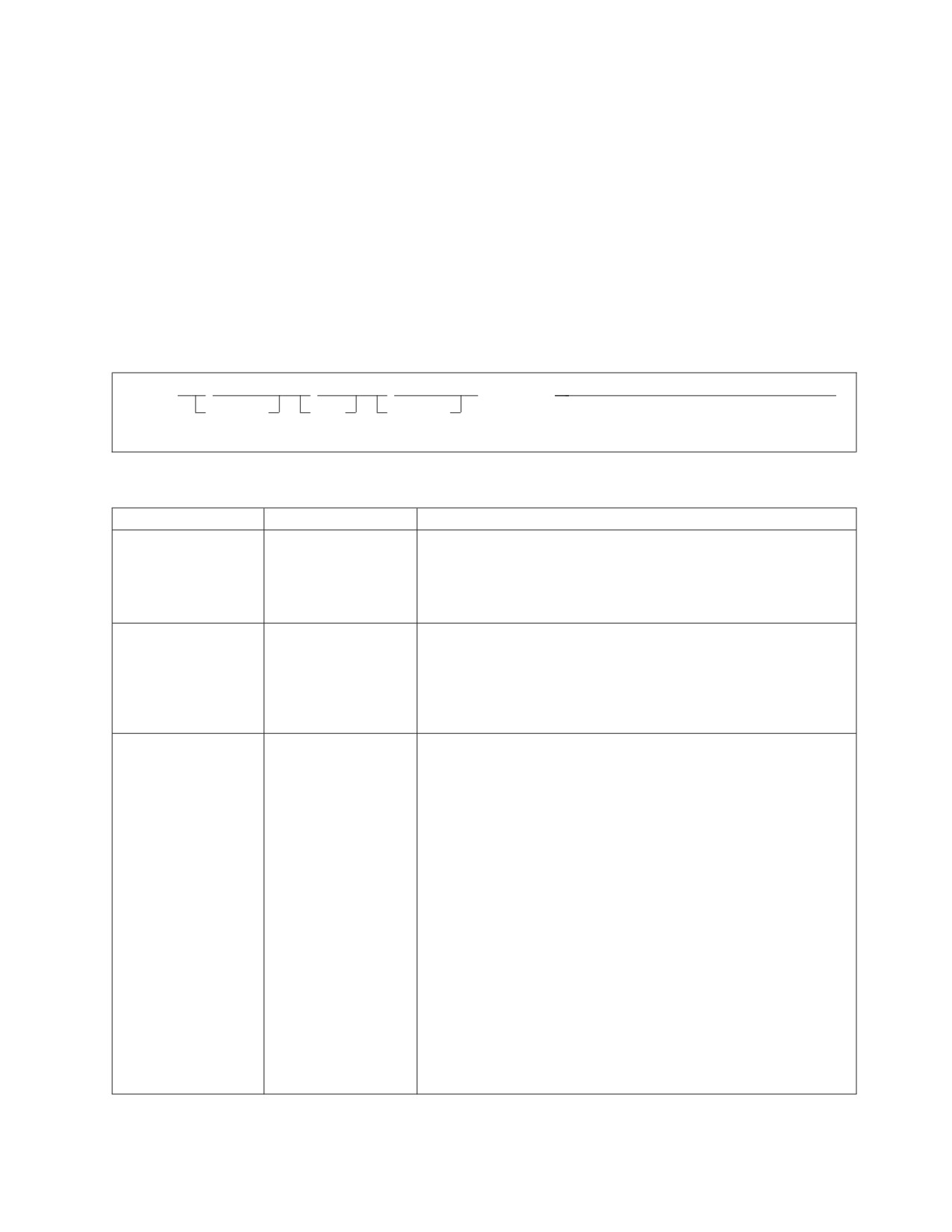
This transaction has four parameters.
►► DAXT
,
,
,
server_name
►◄
password,
mode,
interval,
The parameters have the following meanings:
Parameter
Default
Description
PASSWORD
SQLDBAPW
This password establishes the operator’s authority to terminate
(positional parameter
DRDA support within CICS on behalf of a DB2 for VSE application
1)
server. It must be the same password that was used to start the
DRDA TRUE support. If not specified, the password defaults to
SQLDBAPW.
MODE (positional
NORMAL
This parameter establishes the shutdown mode: NORMAL or
parameter 2)
QUICK. When you specify NORMAL, the DAXT transaction will
not disable the DRDA TRUE when an AXE transaction which has
accessed the DRDA TRUE earlier is still active. When you specify
QUICK, the DAXT transaction will disable the DRDA TRUE
immediately, unless an SQL COMMIT or ROLLBACK is ongoing.
INTERVAL (positional
30
(seconds)
The number of seconds that the DAXT transaction should delay
parameter 3)
before freeing the terminal. The value must be an integer value
between 0 and 3 600. This parameter controls the availability of the
CICS terminal (or operator console) once you issue the DAXT
transaction.
The CICS terminal (or VSE operator console) used to activate the
DAXT transaction is unavailable until the transaction ends. This
could be a long time if the database manager is taking a long time
to process the AXE transaction’s Prepare-to-Commit, Commit or
Rollback SQL request.
The value you specify for interval represents an interval of time
measured in seconds. If the DAXT transaction does not finish
immediately, it waits the amount of time you specify. When this
time ends, the DAXT transaction tries once again to finish
processing. If the DAXT transaction does not finish successfully,
you receive a message telling you to retry the DAXT transaction
later. After issuing the message, the DAXT transaction ends. The
shutdown mode is still in effect, and the terminal is available for
your use.
Chapter 2. Managing Online Support
41
Parameter
Default
Description
SERVER_NAME
none
This parameter is required and specifies the application server from
(positional parameter
which Distributed Unit of Work support is to be removed.
4)
If this parameter is omitted, the message ARI0400E is issued
indicating that an invalid input parameter was entered.
The following messages may be displayed:
1. When the task-related user exit program successfully disables:
ARI0191I TRUE-name is disabled.
2. When the task-related user exit program is currently not enabled, therefore,
disable is not done:
ARI0192I TRUE-name is not currently enabled for DRDA support.
3. When the DAXT transaction must delay before it retries to finish the DAXT
process:
ARI4012I
The disable transaction tran must delay for a
interval- second interval before it retries
EXEC CICS DISABLE for DRDA TRUE TRUE-name.
4. When the operator must retry shutdown later:
ARI4013A
Retry the disable transaction tran.
Application transactions are accessing the DRDA TRUE for
server_name.
42
Operation
Chapter 3. Operating the Application Server
This chapter explains activities usually performed by the DB2 Server for VSE &
VM operator:
v Issuing operator commands
v Handling VSE accounting output
v Archiving the database
v Creating a user archive
v Archiving the log
v Forcing users
v Choosing a default national language for messages
v Monitoring the application server
Issuing DB2 Server for VSE & VM Operator Commands
You can enter DB2 Server for VSE & VM operator commands in multiple user
mode only. When you enter an operator command, a completion message or an
error message is always given.
From the VSE System Operator Console
You can enter any DB2 Server for VSE operator command from the system console.
1. Before entering an operator command, you must enter the VSE operator MSG
command. (See VSE/ESA System Control Statements for information on the MSG
command.)
2. You are prompted to enter a DB2 Server for VSE & VM operator command.
Enter the desired command and it is processed.
3. To enter another command (or reenter an incorrect command), you must again
enter the VSE MSG command. If you specify a partition that is running in
single user mode, the supervisor rejects the VSE Operator MSG command.
4. It is also possible to enter the desired command in the DATA= field of the MSG
command. In this case, you will not be prompted to enter a DB2 Server for VSE
& VM operator command. The desired command will be processed
immediately. For example, MSG F4,DATA=SHOW CONNECT can be entered as a
single command.
From the VM System Console
More than one application server can be running at the same time. Each
application server has its own operator console, the DB2 Server for VM operator
console. The user who operates this console is the DB2 Server for VM operator.
You access the operator console by logging onto the application server. The
operator uses this console to perform I/O operations (such as archives and archive
restores), and to monitor the operation of the application server.
When more than one application server is active, you can have more than one DB2
Server for VM operator. VM facilities, however, allow one person to operate more
than one application server. For example, you can operate many application
servers by running the virtual machines disconnected. You can reconnect to the
various machines as required. You can also use the VM Single Console Image
Facility and the programmable operator facility to run more than one application
server from a single operator console.
43
If you want to have the VM system console serve as the DB2 Server for VM
operator console, use the existing VM facilities. After initialization, disconnect the
database machine and route console communications to the VM system console (or
any other virtual machine) using the Single Console Image Facility (SCIF). For
information on disconnecting from the database machine, see “Disconnecting the
Application Server” on page 11. For additional information on the SCIF, refer to
the VM/ESA: Planning and Administration If you are a VM/ESA user, see the
VM/ESA CP Planning and Administration for 370 or VM/ESA: Planning and
Administration manual.
To use SCIF, the VM directory console control statement for the database machine
must identify a virtual machine as the secondary user to receive DB2 Server for
VM messages. See the VM/ESA: Planning and Administration manual for more
information about the console control statement.
The system operator can enter DB2 Server for VSE & VM commands by entering
the CP SEND command. See the VM/ESA: CP Command and Utility Reference for
information on the CP SEND command.
From the Application Server Operator Console
You can enter any operator command from the DB2 Server for VM operator
console. After initialization finishes, a message is issued indicating that it is ready
for operator communications. At this point, you can enter any appropriate DB2
Server for VM operator command. Whenever the application server has processed
an operator command, it issues a message indicating that processing is complete,
and then the next operator command can be processed.
If you stack commands, they must be valid DB2 Server for VM operator
commands or responses. The application server treats any unexpected response
(because of an incorrectly ordered stack) as an incorrect command or message
reply. The application server continues reading and processing stack entries until
there are no more entries in the stack. To stack commands, type the LINEND
character, usually #, between each command on the same command line. For
example, to stack the SHOW SYSTEM, SHOW POOL, and SHOW USERS
commands, enter the following:
show system#show pool#show users
You can use the CP command Q TERMINAL to determine your setting of the
LINEND character.
From a CICS Terminal
The DB2 Server for VSE product provides an optional component called Interactive
Structured Query Language (ISQL) that allows CICS terminal users to access an
application server. ISQL uses CICS for terminal control and runs as a CICS
transaction.
A user can enter the SHOW and COUNTER operator commands in ISQL. You use
these commands to monitor system performance; this chapter describes them.
The ISQL SHOW and COUNTER commands can be used when the target
application server is either a local or a remote DB2 Server for VSE & VM
44
Operation
application server. For information on using ISQL, consult the DB2 Server for VSE
& VM Interactive SQL Guide and Reference manual.
From User Displays
The DB2 Server for VM product provides a component called Interactive
Structured Query Language (ISQL) that allows CMS terminal display users to
access an application server. The ISQL facility runs as an application of CMS.
Terminal display users can enter the SHOW and COUNTER operator commands
through the ISQL facility; you use these commands to monitor system
performance. While you can enter the SHOW and COUNTER commands from the
operator console when you are using DRDA protocol, you cannot use them with
the ISQL facility. The DB2 Server for VSE & VM Interactive SQL Guide and Reference
manual explains the ISQL facility.
DB2
Server for VSE Accounting
Your procedures for operating the application server might include the use of DB2
Server for VSE accounting. You enable accounting by specifying ACCOUNT=T,E,
or D upon initialization. The default, ACCOUNT=N, indicates that accounting is
not done. (ACCOUNT is an initialization parameter.)
If ACCOUNT=T, the application server writes accounting records to a tape file
identified in the job control for startup. If ACCOUNT=D, the application server
writes accounting records to a DASD file, which you must identify in the job
control. If ACCOUNT=E, the application server writes accounting records to a
VSAM ESDS file, which you must identify in the job control.
If you start the application server and direct accounting output to a tape file, you
are requested to mount a tape and you are prompted for the cuu of the tape drive.
(When accounting information is directed to a DASD file, no prompt is necessary.)
When accounting to tape, the application server avoids overlaying the previous
session’s accounting information by not rewinding the accounting tape at OPEN or
CLOSE time. The next time you startup, another file is written starting after the
previous session’s file. When you direct accounting information to DASD, the
problem of overlaying a previous session’s file exists only if stand-alone sequential
access method (SAM) manages the file. If stand-alone SAM manages the DASD
file, you should refer to the DB2 Server for VSE System Administration manual for
information about setting up job control and operating procedures that avoid the
problem.
When the application server ends either normally or abnormally, it attempts to
close the accounting file. If the accounting file is on tape and, for some reason, the
accounting file cannot be closed, you should manually write a tape mark. Use the
VSE MTC WTM command to write a tape mark. The VSE/ESA System Control
Statements manual describes the MTC WTM command.
Using Alternate Accounting Files
Your procedures for accounting might also include the use of DB2 Server for VSE
alternate accounting file support. The alternate accounting file support lets you
switch to an alternate accounting file in two ways: by using the DB2 Server for
VSE ALTACCT operator command, or by requesting the use of an alternate file in
response to an error message.
Chapter 3. Operating the Application Server
45
The job control for starting the application server must include job control for two
accounting files for the application server to use the alternate accounting file
support. Both files must be either on tape or on DASD. (You cannot have one file
defined on tape and the other on DASD.) The file name on the TLBL or DLBL
statement for the first accounting file is ARIACC1. The file name on the TLBL or
DLBL statement for the second accounting file is ARIACC2. The job control for the
accounting files should already be in the job control procedure that identifies the
application server. If the job control has not been included, see “Setting Up Job
Control for the Accounting Files” in the DB2 Server for VSE System Administration
manual.
You must switch to the alternate accounting file when:
v You direct the accounting output to DASD, and you receive an end-of-extents
message.
v A write error occurs on the current accounting file for which you receive an
error message.
v You want to close the current file (perhaps for processing) but do not want to
shut down the application server.
In the first two cases, you do not need to enter the ALTACCT command. When the
application server detects the error, it issues a message asking whether you want
to:
1. Continue processing with the accounting disabled
2. Switch to the alternate accounting file and continue running
3. End.
Aside from the error conditions, the other reason you would want to switch
accounting files is to close the current file without stopping the application server.
Then one accounting file can be processed while operation continues. In this
situation, enter the ALTACCT command. Note that ALTACCT has no parameters.
►►
ALTACCT
►◄
When you start the application server to use accounting, the ARIACC1 file is
always opened first. When you request that the application server use the alternate
file, it closes the ARIACC1 file and opens the alternate file (ARIACC2).
If you direct the accounting output to tape, the application server prompts you for
the cuu of the alternate file. The cuu of the first accounting file is unassigned.
Thus, until you restart, the cuu of the first accounting file is available for any
purpose, including reuse for an alternate accounting file.
If you enter ALTACCT again, the application server closes ARIACC2 and opens
ARIACC1. You can switch between accounting files any number of times during a
session.
Archiving the Database
There are three ways to archive a database:
46
Operation
v You can start the application server so that it will archive the database
automatically. Specify LOGMODE=A in the DB2 Server for VSE & VM
initialization parameters. The ARCHPCT parameter controls how often a
database archive is created. If you do not specify ARCHPCT, the application
server will use the default (80).
v You can archive the database when stopping the application server. Enter an
SQLEND ARCHIVE or SQLEND UARCHIVE operator command. (See
“Stopping the Application Server” on page 11 for more information on the
SQLEND command.)
v You can explicitly request a database archive while the application server is
running in multiple user mode. Enter the ARCHIVE operator command:
►► ARCHIVE
►◄
FULL
The application server must be running with either LOGMODE=A or L. Automatic
archiving of either the database or the log must already be in effect before you can
explicitly request a database archive. DB2 Server for VSE supports both dynamic
and static tape drive assignment during the archiving process. Dynamic assign, the
default, allows access to one tape drive while archiving, whereas static assign
allows access to multiple tape drives. The use of static tape drive assignment can
decrease the time required to archive the log or database. Startup JCL must include
assign statements to permit static assign. Figure 21 shows an example of startup
JCL required for using static assign.
// JOB SQLUSQL
DB2/VSE FROM (SQLUSR1,ECHO=NO) 02/10/96 15:44:09
// LIBDEF *,SEARCH=(PRD2.SQL340)
// TLBL ARILARC
// TLBL ARILALT
// TLBL ARIARCH
// ASSGN SYS005,cu1
// ASSGN SYS005,cu2,ALT
// EXEC ARISQLDS,SIZE=AUTO,
PARM=’ACCOUNT=T,ARCHPCT=80,DISPBIAS=9,DSPLYDEV=B,LOGMODE*
=L,NCUSERS=05,STARTUP=W,SYSMODE=M’
Note: For cu1 and cu2, specify your installation’s tape devices.
Figure 21. Example of Startup JCL for Static Tape Drive Assign Archive
When the FULL option is used on the ARCHIVE command, these archives may be
used as a starting point for taking incremental archives with Data Restore.
Database manager archives taken with the FULL parameter, will be the associated
full backup for subsequent incremental backups taken with Data Restore.
Implicit archives occur only in LOGMODE=A or LOGMODE=L. In LOGMODE=L,
the database manager will archive the active log. If alternate logging is enabled,
both the inactive log and the active log are archived if the inactive log was not
archived previously. In LOGMODE=A, the database manager will take a database
archive.
When LOGMODE=A, the database is already being archived automatically, so it is
unusual to have to enter an ARCHIVE command. One reason to enter an
Chapter 3. Operating the Application Server
47
ARCHIVE command would be to free log space prior to the next automatic
archive. Note that when LOGMODE=A, the ARCHIVE command causes only a
database archive. Log archiving is not involved.
When LOGMODE=L and alternate logging is not enabled, log archives are
automatically being done, but not database archives. You may want to explicitly
archive the database during long periods of operation with LOGMODE=L. The
time required to restore the database increases as the frequency of log archives
increases. If you enter the ARCHIVE command when LOGMODE=L, the
application server does a log archive if there is information in the log, and then a
database archive. If alternate logging is enabled, both the inactive log and the
active log are archived if the inactive log was not archived previously. The
command is rejected if a database or log archive is already in progress.
As with any archive, the application server requests that you mount the required
tape volume or volumes to contain the database archive (or log archives, if
LOGMODE=L, and you are not archiving the logs to a VM disk). For dynamic
assign, the operator enters the virtual device number (cuu) of the tape drive when
prompted by message ARI0299A; for static assign, the operator enters ’1’ to
indicate that the archive will be written to one or more statically assigned tape
drives (SYS005). If logical device SYS005 is not available, the operator will be
notified by display message ARI2036I that the device is not available. The system
will then re-display message ARI0299A prompting the operator to specify a valid
cuu. For more information on static and dynamic tape drive assign, and the DB2
Server for VSE System Administration manual. The archive or archives are then
created. In a VM system, when the application server prompts you to mount and
ready the archive volume, you should respond with the virtual device number.
Unless you have entered your own CMS FILEDEF command before startup, the
virtual device number for database archives is 181. The virtual device number for
log archives is 183.
Note: When LOGMODE=N, in single user mode, a log for recovery is not
maintained. When LOGMODE=Y, the log is maintained but is not
automatically archived.
Creating a User Archive
In VM/ESA, user archives are database archives created with non-DB2 Server for
VM facilities such as the VM/ESA DASD Dump Restore Service Program (DDR).
In VSE/ESA, user archives are database archives done with non-DB2 Server for
VSE facilities, such as the VSE/VSAM IDCAMS Backup/Restore Feature. User
archives include the DB2 Server for VSE & VM directory and all dbextents, but not
the log.
Because the DB2 Server for VSE & VM code that creates the archives is DASD
independent, it does not take advantage of particular DASD characteristics to
improve performance. Some non-DB2 Server for VSE & VM facilities exploit these
characteristics and can archive and restore your database faster in some cases.
Note: The DB2 Server for VM directory and dbextent minidisks are non-CMS
minidisks.
If you are going to do a non-DB2 Server for VSE & VM archive of your database,
you can only do it when you shut down. Use the following command:
48
Operation
SQLEND UARCHIVE
After all logical units of work finish, the application server indicates in the log that
a user archive will be done. It then reminds the operator to do the archive, and
ends. Figure 22 shows an example of the control statements required to archive a
DB2 Server for VSE database using the VSE/VSAM IDCAMS BACKUP command.
// JOB USERARCH
// ASSGN SYS005,181
// DLBL IJSYSUC,’SQL301C’,,VSAM
// EXEC IDCAMS,SIZE=AUTO
BACKUP (SQL301.BDISK, -
SQL301.DDSK1, -
SQL301.DDSK2, -
SQL301.DDSK3, -
SQL301.DDSK4, -
SQL301.DDSK5, -
SQL301.DDSK6, -
SQL301.DDSK7)
/*
/&
Figure 22. Example of VSE/VSAM Backup Command for a User Archive
The control statements cause VSE/VSAM to archive a database having a directory
(BDISK) and seven dbextents (DDSK1-DDSK7). You do not archive the log data
set(s). For more information about the VSE/VSAM BACKUP command, see the
IBM VSE/VSAM Using Commands and Macros manual. If LOGMODE=L, the system
(VSE or VM) does a log archive before ending if there is information in the log.
After the application server ends, you should archive the DB2 Server for VSE &
VM directory and all the dbextents, but not the logs.
If you specify STARTUP=R or U the next time you start the application server, it
assumes that you have not done the user archive; otherwise, the system sends a
message to the operator console asking if the user archive was done successfully.
If you decide to do user archives, you can do intermediate log archives or
intermediate database archives to free log space while the application server is
running.
For intermediate log archives, set LOGMODE to L when starting the application
server. When LOGMODE=L and alternate logging is not enabled, the system
automatically does a log archive when the log fills to the ARCHPCT value. If
alternate logging is enabled, an attempt will be made to switch to the inactive log
rather than forcing an archive of the active log. If you prefer to schedule your
online log archives, you can periodically enter the LARCHIVE command. If
alternate logging is enabled, you can use LARCHIVE INACTIVE to archive the
inactive log.
For intermediate database archives, set LOGMODE to A. When LOGMODE=A, the
application server automatically archives the database when the log fills to the
ARCHPCT value. Note that database archiving, not user archiving, is performed.
Use the ARCHIVE command if you want to schedule your online database
archives. Refer to “Archiving the Database” on page 46 for more information on
the ARCHIVE command.
Chapter 3. Operating the Application Server
49
You can use the SHOW LOG operator command to monitor available log space
and to assist you in scheduling user archives. See “SHOW LOG” on page 113 for
more information about the SHOW LOG command.
Archiving the Log
Your procedures for recovery can also include archiving the log. A log archive is a
copy of the DB2 Server for VSE & VM log on either a magnetic tape or in VM
only, on a disk.
There are three ways to do a log archive:
v Periodically, as part of the procedure for starting the application server.
Specify LOGMODE=L in the initialization parameters when you start the
application server. If alternate logging is not enabled, the ARCHPCT parameter
controls how often an archive is done. If alternate logging is enabled, an attempt
to switch to the inactive log will be made when ARCHPCT is reached. If you do
not specify ARCHPCT, the default value is used.
v Immediately, as part of the procedure for stopping the application server.
Enter the SQLEND LARCHIVE operator command. See “Stopping the
Application Server” on page 11 for information on the SQLEND command.
v By explicit request, when the application server is running in multiple user
mode.
Use the LARCHIVE operator command.
The syntax of the LARCHIVE operator command is as follows:
►► LARCHIVE
►◄
INACTIVE
The application server must be running with LOGMODE=L. Automatic log
archiving must be in effect before you can request a log archive explicitly. When
LOGMODE=L and alternate logging is not enabled, the application server
automatically does periodic log archives; therefore, it is unusual to have to enter
the LARCHIVE command. One reason to enter the LARCHIVE command is to free
log space before the next automatic log archive. The command is rejected if a
database or log archive is already in progress.
The LARCHIVE command causes only a log archive. The application server does
not archive the database as a result of the LARCHIVE command.
As with any archive, the application server requests that you mount the required
tape volume to contain the log archive. The log is then copied to tape.
You can specify LARCHIVE INACTIVE only when alternate logging is enabled.
This command will attempt to archive the inactive log. If it was previously
archived, an error message will be displayed.
Archiving the Log to Tape in VM/ESA
When you are using a tape for the log archive, and TAPEMGR=N is specified, the
application server requests that you mount the required tape volume to contain it.
The log archive is then copied to tape. When the application server prompts you to
50
Operation
mount and ready the archive volume, respond with the virtual device number
(cuu). Unless you entered your own CMS FILEDEF command before starting the
application server, the virtual device number is 183.
If TAPEMGR=Y is specified, the database manager will automatically perform the
tape assign.
Archiving the Log to Disk in VM/ESA
You can direct a log archive to disk by changing the file definition for the log
archive file with the CMS FILEDEF command.
If you receive message ARI0246D, you can direct a log archive to disk by replying
CHANGE to the message.
Forcing Users to End Their Work
To force users to end their work, you can use either the SHOW ACTIVE, SHOW
SYSTEM or SHOW CONNECT ACTIVE command followed by the FORCE
operator command. The SHOW CONNECT command can be used with its other
parameters, except for the INACTIVE, and in VM only, the WAITING parameters,
which do not enable the FORCE command. You must enter the SHOW ACTIVE,
SHOW CONNECT and FORCE commands from either the DB2 Server for VM
operator console or the VSE system operator console for the force to succeed.
Note: For one example of why you may be required to force users, see “Resolving
CICS In-Doubt Logical Units of Work” on page 152.
The operator of an unlike application server can sever the telecommunication link
at the application server site, causing a rollback. The operator of an application
server can also force unlike application requesters, thus severing the
communication link and causing a rollback.
Suppose you want to force user JESSICA to end her DB2 Server for VSE & VM
work. First, you must determine JESSICA’s agent number. An agent is the
application server’s internal representation for a user. The application server
numbers each agent.
To determine JESSICA’s agent number, enter a SHOW ACTIVE command as
illustrated in Figure 23 on page 51 and Figure 24 on page 52.
AR
MSG F4
AR 015 1I40I READY
F4 004 ARI0062A SQLDS :
F4-004
Enter a DB2 Server for VSE operator command.
4 show active
F4 004 Status of agents:
F4 004
Checkpoint agent is not active.
F4 004
User Agent:
1 User ID: JONES
is R/O APPL
7BA
F4 004
Agent is
processing and is in I/O
WAIT.
F4 004
User Agent:
3 User ID: JESSICA is R/W APPL
5A4
F4 004
Agent is not processing and is in communication WAIT.
F4 004
User Agent:
4 User ID: TESTUSER is NIW SUBS
F4 004
Agent is not processing and is in communication WAIT.
F4 004
1
agent(s) not connected to an APPL or SUBSYS.
Figure 23. A Typical Example of the SHOW ACTIVE Command for Determining an Agent
Number in VSE
Chapter 3. Operating the Application Server
51
show active
Status of agents:
Checkpoint agent is not active.
User Agent:
1 User ID: SMITH
is R/W APPL
7B4
Agent is
processing and is in I/O
Wait.
User Agent:
2 User ID: MICHAEL is R/O SUBS
7B9
Agent is not processing and is in communication Wait.
User Agent:
3 User ID: JESSICA IS R/O APPL
5A4
Agent is processing an SQL/DS operator command.
User Agent:
4 User ID: TESTUSER IS R/W APPL
7BB
Agent is
processing and is in I/O
Wait.
User Agent:
5 User ID: MACNEILL IS R/O APPL
7B9
Agent is not processing and is in communication Wait.
5
agent(s) not connected to an APPL or SUBSYS.
ARI0065I Operator command processing is complete.
Figure 24. A Typical SHOW ACTIVE Display on a VM Operator Console or ISQL Terminal
JESSICA is agent 3. At this time, you might want to note JESSICA’s logical unit of
work identifier. The logical unit of work identifier is the rightmost number on the
line. JESSICA’s is 5A4. You can use the number later to verify that the application
server forced JESSICA’s work.
To force JESSICA to end her work, you enter:
FORCE 3
or
FORCE 3 ROLLBACK
To verify that the application server has forced JESSICA’s work, reenter the SHOW
ACTIVE command. The display either shows that JESSICA is no longer assigned to
the agent or that the agent is not active. It could also show that JESSICA is still
assigned to the agent, but not in work (NIW). If JESSICA started another logical
unit of work, the display shows a new logical unit of work identifier.
If the system rejects the FORCE command, a SHOW ACTIVE displays results
similar to those described above. JESSICA may have disconnected before the
application server processed the FORCE command, or may have ended her logical
unit of work.
The FORCE command does not end the application. For this purpose, use other
system facilities. For example, you can use the CP FORCE command from the VM
system console. If the application is from a VSE guest, you can use the VSE system
operator CANCEL command. For a CICS transaction, you can use CEMT
TRMNAT.
The FORCE operator command has the following syntax:
52
Operation
ROLLBACK
►► FORCE n
►◄
DISABLE
COMMIT
ROLLBACK
DISABLE
The FORCE command causes the logical unit of work identified by agent number
n to be backed out (when you specify ROLLBACK) or committed (when you
specify COMMIT). The COMMIT option is valid only for an in-doubt logical unit
of work. An in-doubt logical unit of work can only come from VSE guests. (An
in-doubt logical unit of work is identified by PREPARED FOR COMMIT OR
ROLLBACK in the SHOW ACTIVE display.) Always specify COMMIT for ISQL
in-doubt logical units of work.
If you specify the DISABLE option, the connection to the application requester is
disabled, the logical unit of work is rolled back, and the application server makes
the connection available for another user (after the rollback completes). You can
use this option to make the agent structure available to other users.
The DISABLE option is valid for VM users and VSE guests or agents connected to
batch or VSE/ICCF applications (identified by APPL in the SHOW ACTIVE
display) or via TCP/IP.
You must use CICS commands to stop long-running CICS transactions. (CICS
transactions are identified by SUBS in the SHOW ACTIVE display.) To break all
online connections, use the CICS CIRT transaction.
When you enter the FORCE command for an in-doubt logical unit of work, the
application server makes the agent structure and connection available for other
users. For in-doubt units, DISABLE is implicit, and you do not have to specify it.
When you enter the FORCE command for an in-doubt agent involved in DUOW, a
warning message is displayed prompting the operator to confirm the force.
When you enter a FORCE command, the application receives a negative SQLCODE
(error code) for the current or next SQL request. If the application server is running
in VM with SQLDS protocol when you enter the FORCE command, the application
will receive either SQLCODE -933 or -948. If the application server is serving only
local requesters in a VSE system, the application will receive either SQLCODE -916
or -948 when you enter the FORCE command. The code is dependent on whether
a DISABLE was issued along with the FORCE. When DRDA is installed, remote
users will receive SQLCODE -30080. For an explanation of these negative
SQLCODES see the DB2 Server for VM Messages and Codes manual.
Forcing DB2
Server for VSE Remote Users to End Their Work
The FORCE RMTUSER operator command can be used to force remote (DRDA)
DB2 Server for VSE users. The command can force users whether they have real
agents or not. Also, the real agent may not be in a logical unit of work when the
FORCE RMTUSER is initiated.
Chapter 3. Operating the Application Server
53

The FORCE RMTUSER operator command can also be used to free up the control
structure for a remote connection. This will then allow other remote users to access
the server.
Note: The FORCE RMTUSER command will roll back the current LUW and will
cause the conversation to end on the next request.
The FORCE RMTUSER operator command has the following syntax:
►► FORCE RMTUSER rmtuser ID
►◄
Before entering the FORCE RMTUSER command, a SHOW CONNECT must be
entered to verify the remote user identifier (rmtuser ID). The output display of the
SHOW CONNECT command will identify each remote user by a unique rmtuser
ID, for example:
:
F4 004
User Agent:
5
User-ID: SQLUDAY1 SQL-ID: SQLUDAY1
F4 004
is R/O APPL
14729
F4 004
Agent is processing and is in communication wait.
F4 004
State started: 1996-10-21
14:23:08
F4 004
Conversation started: 1996-10-21
14:22:57
F4 004
CPU time: 00:00:01
F4 004
LUWID: CAIBMOML.OECGW001.A679B3B27B1E.0001
F4 004
EXTNAM: SQLUDAY1.1
F4 004
Requester: SQLDS/VM V3.3.0
at TOIVMLB6
F4 004
Rmtuser ID: 2
F4 004
LU name: OMPGW001
F4 004
Task no.: 0000046
F4 004
Protocol: DRDA
:
Use of this information will help prevent an operator from mistakenly forcing the
wrong remote user from the system.
Note: If the operator FORCE command does not stop the remote user successfully,
the conversation can be ended by using the CICS master operator
transaction (CEMT) which ends the APPC-to-XPCC Exchange Transaction
(AXE) of the remote user. Forced ending of an AXE transaction by using the
CEMT Terminate Task will result in a de-allocate abend to the application
requester and an XPCC abnormal disconnect to the application server. For
information on the use of the CEMT command, refer to the CICS/VSE
CICS-Supplied Transactions manual.
VM/ESA FORCE Enhancements for CRR
It could occur that during resynchronization initialization or resynchronization recovery,
the database manager waits indefinitely for a response from the CRR recovery
server. If this is the case, the following command may be used to terminate
resynchronization initialization processing:
54
Operation
►► FORCE
RINIT
►◄
RREC
If “FORCE RINIT” is entered, resynchronization initialization processing is
terminated and the SYNCPNT parameter is changed from Y to N. If “FORCE
RREC” is entered, resynchronization recovery is terminated and deallocate (abend) is
performed to terminate the conversation with the CRR recovery server.
Notes:
1.
The operator must issue the SHOW ACTIVE, SHOW CONNECT or SHOW
SYSTEM command prior to the FORCE RINIT/RREC command. Otherwise, the
following message is issued:
ARI0225E System operator must issue SHOW ACTIVE, SHOW CONNECT or
SHOW SYSTEM command prior to FORCE command.
and FORCE processing terminates.
2.
If the database is not performing resynchronization initialization when the FORCE
RINIT command is entered, then the following message is displayed:
ARI2040E FORCE RINIT may only be entered when Resychronization
Initialization is active.
and FORCE processing terminates.
3.
If the database is not performing resynchronization recovery when the FORCE
RREC command is entered, then the following message is displayed:
ARI2040E FORCE RREC may only be entered when Resychronization
Recovery is active.
and FORCE processing terminates.
4.
If the FORCE RINIT command was already issued, the following message is
displayed:
ARI2041E FORCE RINIT is already scheduled.
and FORCE processing terminates. (Note that the scheduled FORCE command
remains!)
5.
If the FORCE RREC command was already issued, the following message is
displayed:
ARI2041E FORCE RREC is already scheduled.
and FORCE processing terminates. (Note that the scheduled FORCE command
remains!)
6.
If extra parameters are entered after “FORCE RINIT/RREC”, then the following
message is displayed:
ARI0229E Too many FORCE command input parameters
and FORCE processing terminates.
Forcing DB2
Server for VM Inactive Users
The FORCE INACTIVE operator command can be used to force inactive DB2
Server for VM users. The FORCE INACTIVE operator command can force users
only when they do not have real agents. The FORCE operator command must be
used for active users with real agents. Active users are those users who are
Chapter 3. Operating the Application Server
55

connected to the database and are in a logical unit of work. They are using a real
agent and can be identified by the SHOW CONNECT ACTIVE operator command.
Inactive users are those users who are connected to the database, but are not in a
logical unit of work. They are not using a real agent and can be identified by the
SHOW CONNECT INACTIVE operator command.
The FORCE INACTIVE operator command can be used to make connections
available to other users or to free connections when necessary. For example, the
SQLEND command will wait until all connections are released before shutting
down the database manager. If there are inactive users that are delaying this, the
operator can use the FORCE INACTIVE command to release those connections and
allow the SQLEND processing to continue.
The FORCE INACTIVE operator command has the following syntax:
►► FORCE INACTIVE connection ID
►◄
Before entering the FORCE INACTIVE command, a SHOW CONNECT or SHOW
CONNECT INACTIVE command must be entered to verify the connection user
identifier (connection ID). The output display of the SHOW CONNECT command
will identify each user by a unique connection ID, for example:
SHOW CONNECT
Status of Connected Users
2002-02-27
15:56:05
Checkpoint agent is not active.
User ID: DB2ADMIN SQL ID: DB2ADMIN
User is inactive.
State started: 2002-02-27
15:52:48
Conversation started: 2002-02-27
15:52:48
LUWID: G91A4EBB.C107.030F27205304.0001
EXTNAM: db2bp.exe
0180018F
Requester: DB2 Connect 7.1 (DB2/NT) at
Protocol: DRDA via TCP/IP
Connection ID: 2
1
Users are active.
0
Users are waiting.
1
Users are inactive.
5
Agents are available.
43
User connections are available.
ARI0065I Operator command processing is complete.
FORCE INACTIVE 2
ARI0065I Operator command processing is complete.
Use of this information will help prevent an operator from mistakenly forcing the
wrong inactive user from the system.
Choosing a National Language
Using the following command, you can choose a national language for messages
on the operator console:
56
Operation