DB2 Server for VSE. Operations Guide / Handbooks (2004-2007) - page 21
Appendix D. Summary of SQL Statements for Interactive Use
For syntax diagrams, semantic descriptions, rules, and situations where you would
use the following SQL statements, refer to the DB2 Server for VSE & VM SQL
Reference manual.
v
ACQUIRE DBSPACE
v
ALTER DBSPACE
v
ALTER TABLE
v
COMMENT ON
v
COMMIT
v
CONNECT
v
CREATE INDEX
v
CREATE SYNONYM
v
CREATE TABLE
v
CREATE VIEW
v
DELETE (searched DELETE only)
v
DROP DBSPACE
v
DROP INDEX
v
DROP PROGRAM
v
DROP SYNONYM
v
DROP TABLE
v
DROP VIEW
v
EXPLAIN
v
GRANT PROGRAM PRIVILEGES
v
GRANT SYSTEM AUTHORITIES
v
GRANT TABLE OR VIEW PRIVILEGES
v
INSERT
v
Interactive select (see SELECT in the DB2
Server for VSE & VM SQL Reference
manual)
v
LABEL ON
v
LOCK DBSPACE
v
LOCK TABLE
v
REVOKE
v
ROLLBACK
v
UPDATE (searched UPDATE only)
v
UPDATE STATISTICS
185
186
Interactive SQL Guide and Reference
Appendix E. Suppressing the ISQL Sign-On Display for DB2
Server for VSE
In addition to typing isql at a CICS terminal, to start ISQL, you can type the
following command at a CICS terminal. This command suppresses the ISQL signon
display and related terminal messages.
ISQL
#r_id#
userid/password
userid/password/server_name
routine_name
(parameter_list)
Where:
r_id
Is a 1-4 character CICS transaction identifier or 1
to 4 blanks.
#
Stands for a hexadecimal byte X'FF' positioned
immediately before and after r_id to mark the
beginning and end of r_id.
userid/password
Is the ISQL signon user ID and password. You
must type the slash (/). Since the server_name is not
specified, the userid/password will be used to
connect to the default server.
userid/password/server_name
Is the ISQL signon user ID, password, and the
server-name. You must type the slash (/). The
userid/password will be used to connect to the
specified server.
routine_name
Is optional. Refer to “Using the ISQL Transaction
Identifier (DB2 Server for VSE)” on page 74.
(parameter_list)
Is optional. Refer to “Using the ISQL Transaction
Identifier (DB2 Server for VSE)” on page 74.
This method of invoking ISQL is primarily designed for VSE system programs:
v Enter into an ISQL session directly from another interactive session. The ISQL
signon display is suppressed so that the user of the interactive session can enter
an ISQL session without doing the formal ISQL signon steps. The user ID and
password supplied in the command are processed as if they were supplied by
the signon display.
v Return to the interactive session when the ISQL session ends, passing any ISQL
ending message to the interactive session. Before ISQL is ended, it starts the
CICS transaction identified by r_id (provided r_id is not all blank characters)
using the CICS START command. Ending messages from ISQL are passed as
data in the START command. ISQL returns to CICS if r_id is blank.
The hexadecimal byte X'FF' is usually not available with terminal keyboards. The
sample program, as shown in Figure 63 on page 188, illustrates one method of
displaying the command on the terminal and prompting the user to start ISQL.
187
TITLE 'STARTING ISQL WITHOUT THE SIGN-ON SCREEN'
****************************************************************
* THIS PROGRAM WRITES 2 LINES TO THE USER TERMINAL (24X80):
* - LINE 1 IS FOR SETTING UP THE INVOCATION OF ISQL WITHOUT
* DISPLAYING THE SIGN-ON SCREEN.
* - LINE 2 PROMPTS THE USER TO EXECUTE LINE 1 WITH THE ENTER
* KEY, OR QUIT WITH THE CLEAR KEY.
****************************************************************
PRINT GEN
DFHEISTG DSECT
INSTRUCT CSECT
SPACE
EXEC CICS SEND FROM(ISQLSTR) FLENGTH(SENDLEN) ERASE
EXEC CICS RETURN
ISQLSTR EQU
LINE1
DC
X'1140401D4D' LINE 1: INVISIBLE, MDT ON,
UNPROTECTED.
DC
C'ISQL'
DC
X'FF'
DELIMITER BYTE
DC
C'TRX0'
TRANS-ID TO BE INVOKED AT ISQL
EXIT.
DC
X'FF'
DELIMITER BYTE
DC
C'SQLDBA/SQLDBAPW'
USER-ID/PASSWORD TO ISQL
Figure 63. Starting ISQL Without the Sign-on Display (Part 1 of 2)
LINE2
DC
X'11C1501D40'
LINE 2: VISIBLE, MDT OFF,
UNPROTECTED.
DC
C'PRESS ENTER KEY TO INVOKE ISQL,'
DC
C' OR CLEAR KEY TO QUIT'
STRLEN EQU
*-ISQLSTR
SENDLEN DC
A(STRLEN)
LTORG
END
Figure 63. Starting ISQL Without the Sign-on Display (Part 2 of 2)
188
Interactive SQL Guide and Reference
Notices
|
IBM may not offer the products, services, or features discussed in this document in
|
all countries. Consult your local IBM representative for information on the
|
products and services currently available in your area. Any reference to an IBM
|
product, program, or service is not intended to state or imply that only that IBM
|
product, program, or service may be used. Any functionally equivalent product,
|
program, or service that does not infringe any IBM intellectual property right may
|
be used instead. However, it is the user’s responsibility to evaluate and verify the
|
operation of any non-IBM product, program, or service.
|
IBM may have patents or pending patent applications covering subject matter
|
described in this document. The furnishing of this document does not give you
|
any license to these patents. You can send license inquiries, in writing, to:
|
IBM Director of Licensing
|
IBM Corporation
|
North Castle Drive
|
Armonk, NY 10594-1785
|
U.S.A.
|
For license inquiries regarding double-byte (DBCS) information, contact the IBM
|
Intellectual Property Department in your country or send inquiries, in writing, to:
|
IBM World Trade Asia Corporation
|
Licensing
|
2-31 Roppongi 3-chome, Minato-ku
|
Tokyo 106, Japan
|
The following paragraph does not apply to the United Kingdom or any other
|
country where such provisions are inconsistent with local law:
|
INTERNATIONAL BUSINESS MACHINES CORPORATION PROVIDES THIS
|
PUBLICATION “AS IS” WITHOUT WARRANTY OF ANY KIND, EITHER
|
EXPRESS OR IMPLIED, INCLUDING, BUT NOT LIMITED TO, THE IMPLIED
|
WARRANTIES OF NON-INFRINGEMENT, MERCHANTABILITY OR FITNESS
|
FOR A PARTICULAR PURPOSE. Some states do not allow disclaimer of express or
|
implied warranties in certain transactions, therefore, this statement may not apply
|
to you.
|
This information could include technical inaccuracies or typographical errors.
|
Changes are periodically made to the information herein; these changes will be
|
incorporated in new editions of the publication. IBM may make improvements
|
and/or changes in the product(s) and/or the program(s) described in this
|
publication at any time without notice.
|
Any references in this information to non-IBM Web sites are provided for
|
convenience only and do not in any manner serve as an endorsement of those Web
|
sites. The materials at those Web sites are not part of the materials for this IBM
|
product and use of those Web sites is at your own risk.
|
IBM may use or distribute any of the information you supply in any way it
|
believes appropriate without incurring any obligation to you.
189
|
Licensees of this program who wish to have information about it for the purpose
|
of enabling: (i) the exchange of information between independently created
|
programs and other programs (including this one) and (ii) the mutual use of the
|
information which has been exchanged, should contact:
|
IBM Corporation
|
Mail Station P300
|
522 South Road
|
Poughkeepsie, NY 12601-5400
|
U.S.A
|
Such information may be available, subject to appropriate terms and conditions,
|
including in some cases, payment of a fee.
|
The licensed program described in this information and all licensed material
|
available for it are provided by IBM under terms of the IBM Customer Agreement,
|
IBM International Program License Agreement, or any equivalent agreement
|
between us.
|
Any performance data contained herein was determined in a controlled
|
environment. Therefore, the results obtained in other operating environments may
|
vary significantly. Some measurements may have been made on development-level
|
systems and there is no guarantee that these measurements will be the same on
|
generally available systems. Furthermore, some measurement may have been
|
estimated through extrapolation. Actual results may vary. Users of this document
|
should verify the applicable data for their specific environment.
|
Information concerning non-IBM products was obtained from the suppliers of
|
those products, their published announcements, or other publicly available sources.
|
IBM has not tested those products and cannot confirm the accuracy of
|
performance, compatibility, or any other claims related to non-IBM products.
|
Questions on the capabilities of non-IBM products should be addressed to the
|
suppliers of those products.
|
All statements regarding IBM’s future direction or intent are subject to change or
|
withdrawal without notice, and represent goals and objectives only.
|
This information may contain examples of data and reports used in daily business
|
operations. To illustrate them as completely as possible, the examples include the
|
names of individuals, companies, brands, and products. All of these names are
|
fictitious and any similarity to the names and addresses used by an actual business
|
enterprise is entirely coincidental.
|
COPYRIGHT LICENSE:
|
This information may contain sample application programs in source language,
|
which illustrates programming techniques on various operating platforms. You
|
may copy, modify, and distribute these sample programs in any form without
|
payment to IBM, for the purposes of developing, using, marketing, or distributing
|
application programs conforming to the application programming interface for the
|
operating platform for which the sample programs are written. These examples
|
have not been thoroughly tested under all conditions. IBM, therefore, cannot
|
guarantee or imply reliability, serviceability, or function of these programs.
190
Interactive SQL Guide and Reference
Trademarks
|
The following terms are trademarks of International Business Machines
|
Corporation in the United States, or other countries, or both:
ACF/VTAM
IBMLink
|
C/370
|
CICS
CICS/VSE
DATABASE 2
DB2
Distributed Relational Database Architecture
DRDA
IBM
|
MVS
QMF
SQL/DS
VM/ESA
VSE/ESA
|
Microsoft, Windows, Windows NT, and the Windows logo are trademarks of
|
Microsoft Corporation in the United States, other countries, or both.
Other company, product, and service names may be trademarks or service marks
of others.
Notices
191
DB2 Server for VSE & VM
IBM
Operation
Version 7 Release 5
SC09-2986-03
Contents
About This Manual
v
Managing DRDA2 Task-Related User Exits
38
Who Should Use This Manual
v
Setting Parameters Required to Autostart DRDA
Conventions Used in This Manual
v
TRUE
39
Components of the Relational Database Management
Disabling DRDA TRUE Support Within
System
v
CICS/VSE
41
Organization of this Manual
vii
Syntax Notation Conventions
viii
Chapter 3. Operating the Application
SQL Reserved Words
xii
Server
43
Related Information
xii
Issuing DB2 Server for VSE & VM Operator
Commands
43
Summary of Changes
xv
From the VSE System Operator Console
43
Summary of Changes for DB2 Version 7 Release 5
xv
From the VM System Console
43
|
Enhancements, New Functions, and New
From the Application Server Operator Console
44
|
Capabilities
. xv
From a CICS Terminal
44
From User Displays
45
Chapter 1. Starting and Stopping the
DB2 Server for VSE Accounting
45
Using Alternate Accounting Files . .
45
Application Server
1
Archiving the Database
46
About the Product
1
Creating a User Archive
48
About Operating the Application Server
1
Archiving the Log
50
Starting the Application Server in a VSE Environment 1
Archiving the Log to Tape in VM/ESA
50
Starting the Application Server in a VM Environment
2
Archiving the Log to Disk in VM/ESA
51
Specifying Initialization Parameters
3
Forcing Users to End Their Work
51
Viewing or Changing the Initialization Parameters. . 4
Forcing DB2 Server for VSE Remote Users to End
Obtaining More Information
4
Their Work
53
Putting Initialization Parameters in VSE Source
VM/ESA FORCE Enhancements for CRR
54
Members or in VM CMS Files
5
Forcing DB2 Server for VM Inactive Users
55
Overriding Parameters in a Source Member
6
Choosing a National Language
56
Overriding a CMS Parameter File
7
Monitoring Performance
57
Using Multiple User Mode and Single User Mode . . 8
COUNTER
58
Starting the Application Server in Multiple User
RESET
61
Mode
8
RESET CRR LOGNAMES (VM only) .
62
Starting the Application Server in Single User
RESET HIGHSTOR
62
Mode
8
RESET INDOUBT
63
Specifying Parameters for User Programs
9
SET
63
Specifying CMS FILEDEF Commands for the
SHOW ACTIVE
65
Application Server
10
SHOW ADDRESS
69
Overriding the Block Size
10
SHOW BUFFERS
70
Specifying an Alternative Tape Drive Address .
11
SHOW CONNECT
73
Overriding CMS FILEDEF Commands
11
SHOW CRR LOGNAMES (VM Only).
80
Disconnecting the Application Server
11
SHOW DBCONFIG
81
Stopping the Application Server
11
SHOW DBEXTENT
84
SHOW DBSPACE
85
Chapter 2. Managing Online Support
17
SHOW INDOUBT
87
Starting VSE Guest Sharing Support
17
SHOW INITPARM
89
VSE Guest Sharing Operator Responsibilities .
17
SHOW INVALID
90
Starting the Online Support
18
SHOW LOCK ACTIVE
93
Displaying the Status of the Online Support . .
20
SHOW LOCK DBSPACE
96
Stopping the Online Support
29
SHOW LOCK GRAPH
98
Password Implications on Online Resource
SHOW LOCK MATRIX
103
Adapter Termination
32
SHOW LOCK USER
106
Adding Online Connections Support
33
SHOW LOCK WANTLOCK
108
Removing Online Connections Support
34
SHOW LOG
113
Changing Online Default Support
36
SHOW LOGHIST
114
Using Syntax Rules for DB2 Server for VSE CICS
SHOW POOL
118
Transactions
37
iii
SHOW PROC
122
Common Parameters
179
SHOW PSERVER
125
Common Tracing Parameters
191
SHOW SQLDBGEN
127
DB2 Server for VSE Parameters
193
SHOW STORAGE
130
DB2 Server for VM Parameters
195
SHOW SYSTEM
133
DB2 Server for VM Data Spaces Support
SHOW USERS (Valid for VM only)
135
Parameters
196
START PROC
137
START PSERVER
138
Appendix B. VMDSS Operator
START TCPIP
140
Commands
199
STOP PROC
141
COUNTER POOL . .
199
STOP PSERVER
143
Syntax
199
RESET POOL
202
Chapter 4. Recovering from System or
Syntax
202
Media Failures
147
SET POOL
203
General Recovery
147
Syntax
203
Resolving DRDA 2 In-Doubt Logical Units of Work
148
SET SAVEINTV . .
205
Useful CRR Commands (Valid for VM only) . . 150
Syntax
205
Resolving CICS In-Doubt Logical Units of Work
152
SET TARGETWS . .
206
Recovery from Media Failure
154
Syntax
206
SHOW ACTIVE . .
206
Chapter 5. Tracing the DB2 Server for
Syntax
206
SHOW BUFFERS . .
207
VSE & VM System
155
Syntax
207
DB2 Server for VSE & VM Tracing
155
SHOW LOCK ACTIVE
208
Specifying CMS FILEDEF for a DB2 Server for
Syntax
208
VM Trace
155
SHOW LOCK GRAPH
209
Specifying Job Control for a DB2 Server for VSE
Syntax
209
Trace
156
SHOW POOL
209
Tracing in Multiple User Mode
157
Syntax
209
Tracing in Single User Mode
158
SHOW SAVEINTV .
211
Tracing to a CMS File
158
Syntax
211
Special Considerations for Multiple Activations
SHOW TARGETWS .
212
of Tracing
159
Syntax
212
Tracing the DB2 Server for VSE Resource
Internal Counters . .
213
Adapter
159
Choosing the Functions to Be Traced
159
Notices
217
Starting a Trace
160
Stopping a Trace
165
Trademarks
219
Formatting DB2 Server for VM Trace Output . . . 166
Formatting DB2 Server for VSE Trace Output. . . 168
Bibliography
221
Trace Formatter Control Statements
170
Format of DB2 Server for VSE & VM Trace
Index
225
Output
174
Isolating Problems
177
Contacting IBM
235
ISQLMAP
177
Product information .
235
ISQL Dumps in DB2 Server for VSE
177
ISQL In-Core Trace
177
Appendix A. DB2 Server for VSE & VM
Initialization Parameters
179
iv Operation
About This Manual
Who Should Use This Manual
This manual describes how to start and stop the DB2 Server for VSE & VM
database manager. It also describes how to monitor the application server after it is
running, and how to restart it if it fails.
This manual is for people who operate the DB2 Server for VSE & VM Version 7
Release 1 database manager in either of the following environments:
v Virtual Machine/Enterprise System Architecture (VM/ESA®) system
v VM/ESA system with VSE running as a guest under VM, and accessing the
application server on VM
v VSE/ESA™.
You should be familiar with operating either a VSE system or VM virtual
machines. Most of the things you must know to operate the DB2 Server for VSE &
VM database manager are in this manual. For additional help, see your system
administrator, or refer to the manuals listed in the bibliography.
This manual can also be useful if you require a reference guide for DB2 Server for
VSE & VM initialization parameters or for operator commands.
Conventions Used in This Manual
The term you within the context of this manual means the operator of a DB2 Server
for VSE & VM relational database management system (RDBMS); user and end user
are the actual users of this system.
All references to CICS® in this manual are references to the CICS/VSE® product. In
SQL/DS Version 3 Release 3 or later (including DB2 Server for VM Version 5
Release 1), you can connect to other IBM relational databases using the Distributed
Relational Database Architecture™ (DRDA®) implementation.
Components of the Relational Database Management System
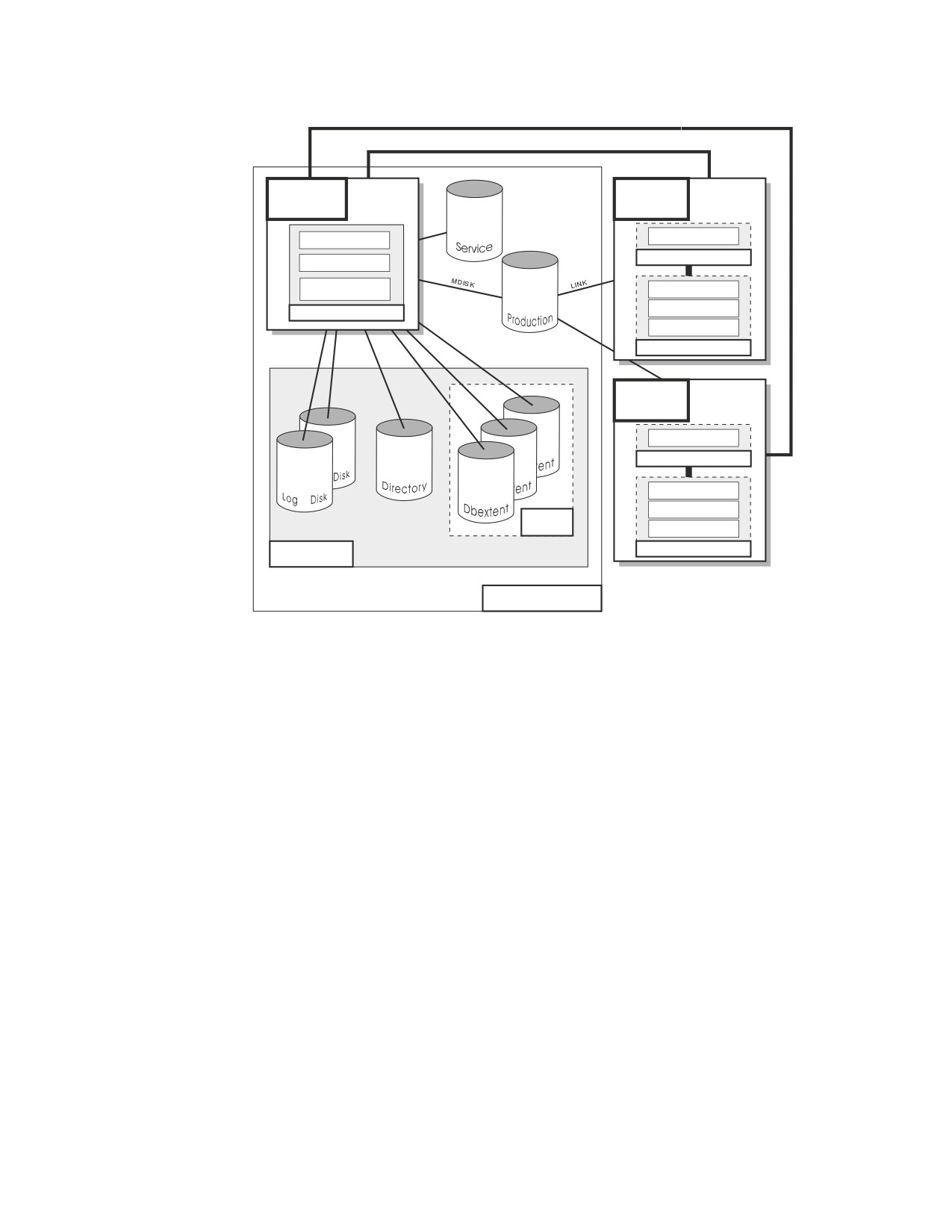
Figure 1 on page vi depicts a typical configuration with one database and two
users.
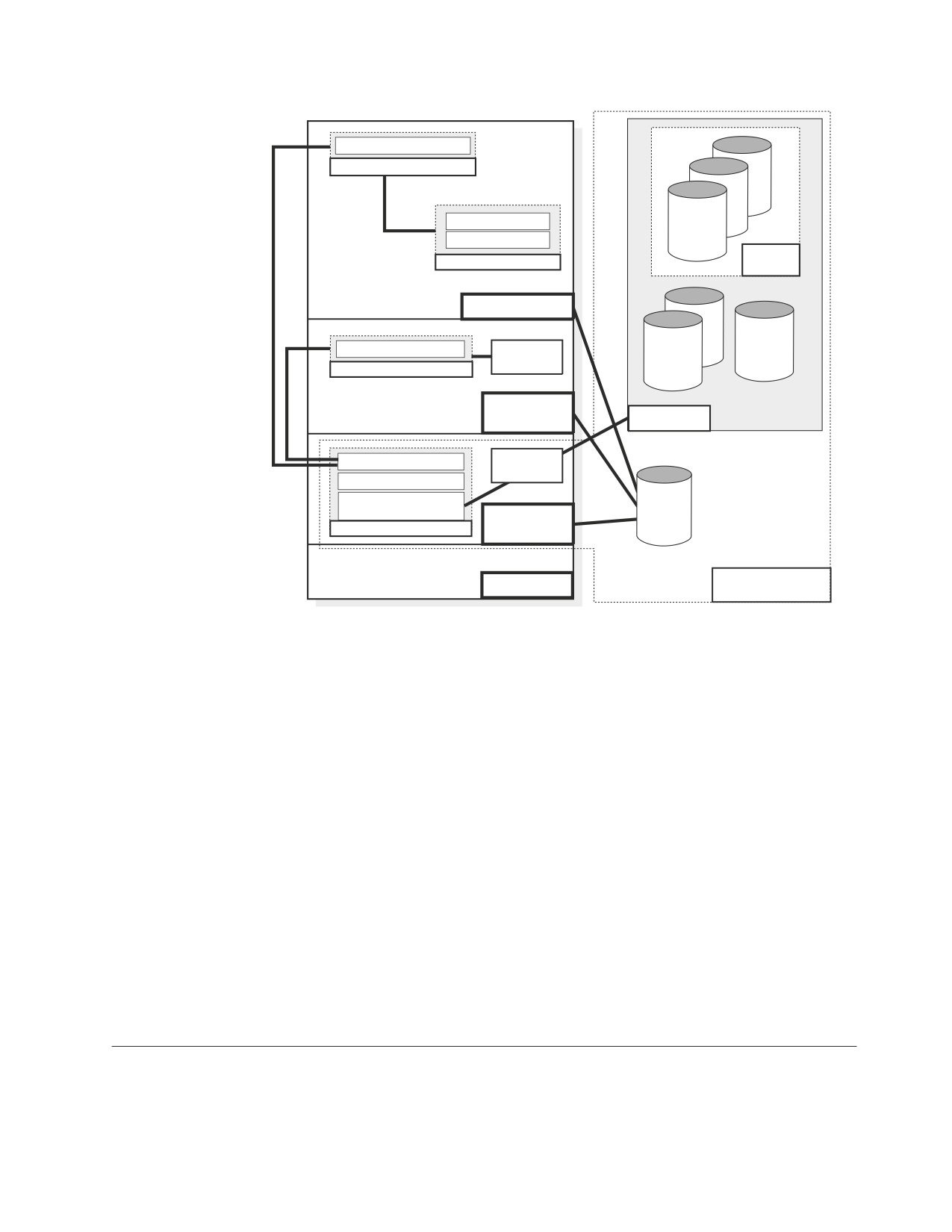
Figure 2 on page vii depicts a typical configuration with one database, one batch
partition user, and a CICS® partition with several interactive users.
v
Communication Link
(IUCV, APPC/VM or TCP/IP)
Database
User
Machine
Machine
Data System Control
Resource Adapter
Application Requester
Relational Data System
Database Storage
Subsystem
Interactive SQL
Preprocessors
Database Manager
DBS Utility
Applications
User
Machine
Resource Adapter
Application Requester
Interactive SQL
Preprocessors
Storage
Pool
DBS Utility
Applications
Database
Application Server
Figure 1. Basic Components of the RDBMS in VM/ESA
vi Operation
Online Resource Adapter
Application Requester
ent
Interactive SQL
ent
CICS Application
Dbextent
Storage
Applications
Pool
CICS Partition
Batch Resource Adapter
Application
Program
Directory
Application Requester
Log
VSE Batch
Partition
Database
Data System Control
VSAM
Relational Data System
Database Storage
DB2
Subsystem
Database
for VSE
Database Manager
Partition
Library
VSE
Application Server
Figure 2. Basic Components of the RDBMS in VSE/ESA
The database is composed of :
v A collection of data contained in one or more storage pools, each of which in turn
is composed of one or more database extents (dbextents). A dbextent is a VM
minidisk or a VSE VSAM cluster.
v A directory that identifies data locations in the storage pools. There is only one
directory per database.
v A log that contains a record of operations performed on the database. A database
can have either one or two logs.
The database manager is the program that provides access to the data in the
database. In VM it is loaded into the database virtual machine from the production
disk. In VSE it is loaded into the database partition from the DB2 Server for VSE
library.
The application server is the facility that responds to requests for information from
and updates to the database. It is composed of the database and the database
manager.
The application requester is the facility that transforms a request from an
application into a form suitable for communication with an application server.
Organization of this Manual
This manual is organized into the following chapters and sections:
About This Manual vii
Summary of Changes
Summarizes the technical and library changes
made for the DB2 Server for VSE & VM Version 7
Release 1 database manager.
Chapter 1
Introduces the DB2 Server for VSE & VM database
manager and explains how to start and stop the
database management system.
Chapter 2
Explains how to:
v start and stop the DB2 Server for VSE online
support in a VSE environment
v starting and stopping the DB2 Server for VSE
online support for VSE Guest Sharing in a VM
environment
Chapter 3
Shows how to do archiving, force users off the
application server, and monitor the usage of the
application server.
Chapter 4
Explains how to recover from system and media
failures.
Chapter 5
Shows how to do a trace. If the database manager
is the cause of a failure, you may have to trace its
operation and format the output of that trace.
Appendix A
Lists and describes the application server
initialization parameters.
Appendix B
Describes the operator commands included with
VMDSS.
Bibliography
Lists manuals that contain information you may
require when operating the database manager.
Syntax Notation Conventions
Throughout this manual, syntax is described using the structure defined below.
v Read the syntax diagrams from left to right and from top to bottom, following
the path of the line.
The ►►─── symbol indicates the beginning of a statement or command.
The ───► symbol indicates that the statement syntax is continued on the next
line.
The ►─── symbol indicates that a statement is continued from the previous line.
The ───►◄ symbol indicates the end of a statement.
Diagrams of syntactical units that are not complete statements start with the
►─── symbol and end with the ───► symbol.
v Some SQL statements, Interactive SQL (ISQL) commands, or database services
utility (DBS Utility) commands can stand alone. For example:
►► SAVE
►◄
Others must be followed by one or more keywords or variables. For example:
viii Operation

►► SET AUTOCOMMIT OFF
►◄
v Keywords may have parameters associated with them which represent
user-supplied names or values. These names or values can be specified as either
constants or as user-defined variables called host_variables (host_variables can only
be used in programs).
►► DROP SYNONYM synonym
►◄
v Keywords appear in either uppercase (for example, SAVE) or mixed case (for
example, CHARacter). All uppercase characters in keywords must be present;
you can omit those in lowercase.
v Parameters appear in lowercase and in italics (for example, synonym).
v If such symbols as punctuation marks, parentheses, or arithmetic operators are
shown, you must use them as indicated by the syntax diagram.
v All items (parameters and keywords) must be separated by one or more blanks.
v Required items appear on the same horizontal line (the main path). For example,
the parameter integer is a required item in the following command:
►► SHOW DBSPACE integer
►◄
This command might appear as:
SHOW DBSPACE 1
v Optional items appear below the main path. For example:
►► CREATE
INDEX
►◄
UNIQUE
This statement could appear as either:
CREATE INDEX
or
CREATE UNIQUE INDEX
v If you can choose from two or more items, they appear vertically in a stack.
If you must choose one of the items, one item appears on the main path. For
example:
►► SHOW LOCK DBSPACE
ALL
►◄
integer
About This Manual ix
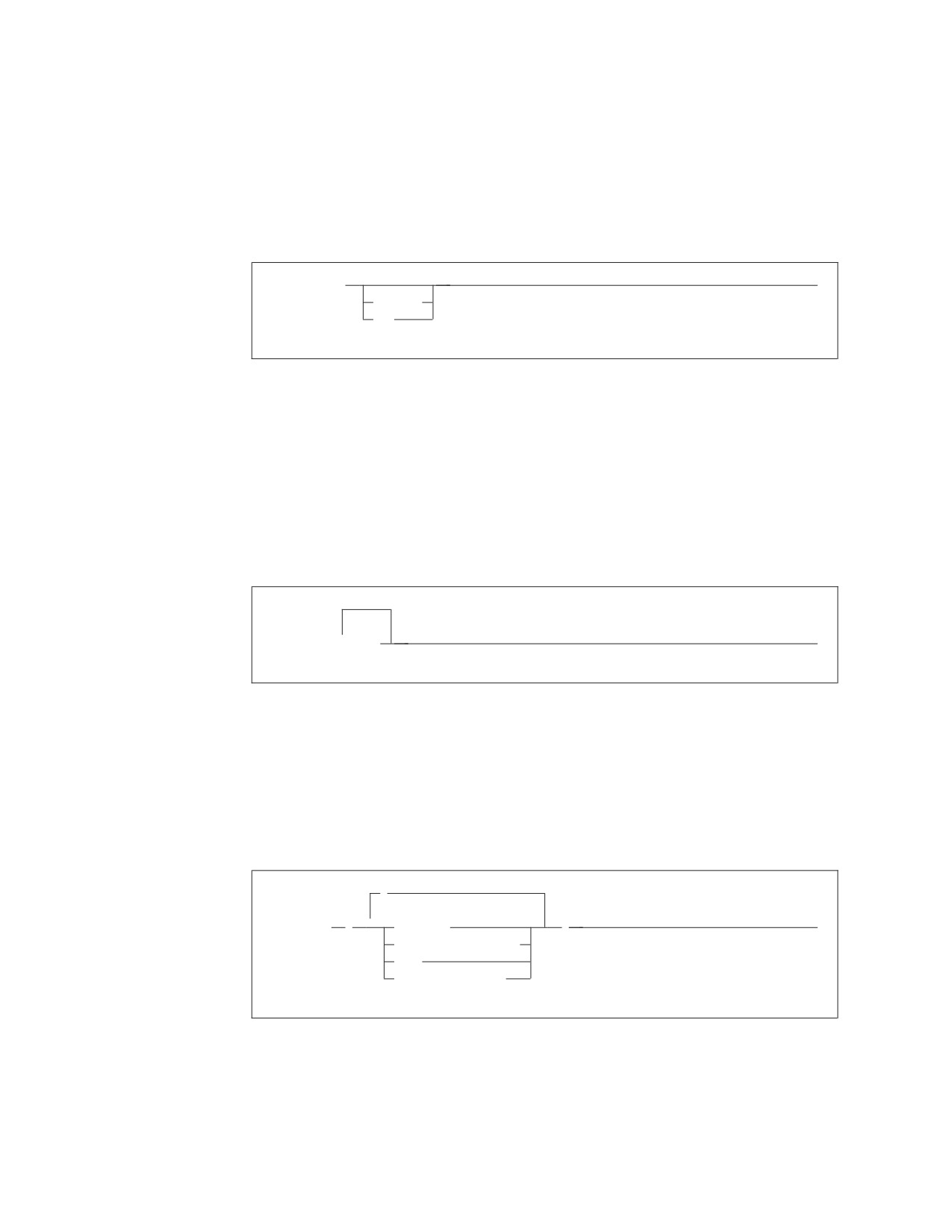
Here, the command could be either:
SHOW LOCK DBSPACE ALL
or
SHOW LOCK DBSPACE 1
If choosing one of the items is optional, the entire stack appears below the main
path. For example:
►► BACKWARD
►◄
integer
MAX
Here, the command could be:
BACKWARD
or
BACKWARD 2
or
BACKWARD MAX
v The repeat symbol indicates that an item can be repeated. For example:
▼
►► ERASE
name
►◄
This statement could appear as:
ERASE NAME1
or
ERASE NAME1 NAME2
A repeat symbol above a stack indicates that you can make more than one
choice from the stacked items, or repeat a choice. For example:
,
▼
►► VALUES
(
constant
)
►◄
host_variable_list
NULL
special_register
v If an item is above the main line, it represents a default, which means that it will
be used if no other item is specified. In the following example, the ASC keyword
appears above the line in a stack with DESC. If neither of these values is
specified, the command would be processed with option ASC.
x Operation

ASC
►►
►◄
DESC
v When an optional keyword is followed on the same path by an optional default
parameter, the default parameter is assumed if the keyword is not entered.
However, if this keyword is entered, one of its associated optional parameters
must also be specified.
In the following example, if you enter the optional keyword PCTFREE =, you
also have to specify one of its associated optional parameters. If you do not
enter PCTFREE =, the database manager will set it to the default value of 10.
PCTFREE = 10
►►
►◄
PCTFREE = integer
v Words that are only used for readability and have no effect on the execution of
the statement are shown as a single uppercase default. For example:
PRIVILEGES
►► REVOKE ALL
►◄
Here, specifying either REVOKE ALL or REVOKE ALL PRIVILEGES means the
same thing.
v Sometimes a single parameter represents a fragment of syntax that is expanded
below. In the following example, fieldproc_block is such a fragment and it is
expanded following the syntax diagram containing it.
►►
fieldproc_block
►◄
NOT NULL
UNIQUE
PRIMARY KEY
fieldproc_block:
FIELDPROC program_name
,
(
▼
constant
)
About This Manual xi
SQL Reserved Words
The following words are reserved in the SQL language. They cannot be used in
SQL statements except for their defined meaning in the SQL syntax or as host
variables, preceded by a colon.
In particular, they cannot be used as names for tables, indexes, columns, views, or
dbspaces unless they are enclosed in double quotation marks (").
ACQUIRE
GRANT
RESOURCE
ADD
GRAPHIC
REVOKE
ALL
GROUP
ROLLBACK
ALTER
ROW
AND
HAVING
RUN
ANY
AS
IDENTIFIED
SCHEDULE
ASC
IN
SELECT
AVG
INDEX
SET
INSERT
SHARE
BETWEEN
INTO
SOME
BY
IS
STATISTICS
STORPOOL
CALL
LIKE
SUM
CHAR
LOCK
SYNONYM
CHARACTER
LONG
COLUMN
TABLE
COMMENT
MAX
TO
COMMIT
MIN
CONCAT
MODE
UNION
CONNECT
UNIQUE
COUNT
NAMED
UPDATE
CREATE
NHEADER
USER
CURRENT
NOT
NULL
VALUES
DBA
VIEW
DBSPACE
OF
DELETE
ON
WHERE
DESC
OPTION
WITH
DISTINCT
OR
WORK
DOUBLE
ORDER
DROP
PACKAGE
EXCLUSIVE
PAGE
EXECUTE
PAGES
EXISTS
PCTFREE
EXPLAIN
PCTINDEX
PRIVATE
FIELDPROC
PRIVILEGES
FOR
PROGRAM
FROM
PUBLIC
Related Information
This manual neither describes how to select parameters that improve the
performance of the DB2 Server for VSE & VM database manager, nor how to
decide the best recovery procedures for your installation. That information is in the
DB2 Server for VM System Administration, and DB2 Server for VSE System
Administration.
xii Operation
After you (or someone at your installation) have made those decisions, you can use
this manual to implement them. For example, after you have chosen parameters to
improve the performance of the database manager, you can use this manual to find
out how to specify the parameters correctly.
For information related to the DRDA environment, see the various manuals in the
Distributed Relational Database Architecture Library, listed in “Bibliography” on
page 221.
About This Manual xiii
xiv Operation
Summary of Changes
|
This is a summary of the technical changes to the DB2 Server for VSE & VM
|
database management system for this edition of the book. Several manuals are
|
affected by some or all of the changes discussed here. For your convenience, the
|
changes made in this edition are identified in the text by a vertical bar (|) in the
|
left margin. This edition may also include minor corrections and editorial changes
|
that are not identified.
This summary does not list incompatibilities between releases of the DB2 Server
for VSE & VM product; see either the DB2 Server for VSE & VM SQL Reference, DB2
Server for VM System Administration, or the DB2 Server for VSE System
Administration manuals for a discussion of incompatibilities.
Summary of Changes for DB2 Version 7 Release 5
Version 7 Release 5 of the DB2 Server for VSE & VM database management
system is intended to run on the Z/VM Version 5 Release 2 or later environment
and on the Z/VSE(®) Version 3 Release 1 or later environment.
|
Enhancements, New Functions, and New Capabilities
|
The following have been added to DB2 Version 7 Release 5:
|
Explain Option on DBSU REBIND PACKAGE Command
|
This new functionality allows the EXPLAIN(YES/NO) option on REBIND
|
PACKAGE command. If EXPLAIN(YES) is issued, then all four update tables
|
(structure, plan, cost, reference) will be updated. If EXPLAIN(NO) is issued, then
|
none of the four update tables will be updated.
|
For more information, see the following DB2 Server for VSE & VM documentation:
|
v DB2 Server for VSE & VM Database Services Utility
|
v DB2 Server for VSE & VM Performance Tuning Handbook
|
v DB2 Server for VSE & VM Quick Reference
|
v DB2 Server for VSE & VM SQL Reference
|
For Fetch only
|
This new functionality accepts the ″FOR FETCH ONLY″ clause after a cursor select
|
statement. It causes a cursor to become read-only (no UPDATEs or DELETEs are
|
permitted using this cursor). If a read-only cursor is referenced in an UPDATE or
|
DELETE statement, SQLCODE -510 will be issued and the statement is not
|
processed. In addition, under the SBLOCK preprocessor option, ″FOR FETCH
|
ONLY″ forces blocking to be used on the read-only cursor regardless of whether
|
there is a COMMIT. If there is no ″FOR FETCH ONLY″ clause, under SBLOCK,
|
blocking would only be done if a COMMIT was absent.
|
For more information, see the following DB2 Server for VSE & VM documentation:
|
v DB2 Server for VM Messages and Codes
|
v DB2 Server for VSE & VM Application Programming
|
v DB2 Server for VSE & VM Performance Tuning Handbook
|
v DB2 Server for VSE & VM Quick Reference
xv
|
v DB2 Server for VSE & VM SQL Reference
|
Application Message Formatter
|
This functionality provides an Application Programming Interface (API) that
|
retrieves the descriptive text for an SQLCODE, given an SQLCA input parameter.
|
The API will be available for Assembly, COBOL, C, PL/I and FORTRAN.
|
In DB2 for VM and DB2 for VSE Online, the user may specify the language of the
|
returned text. The languages supported by DB2 for VSE/VM are American English
|
(AMENG), uppercase English (UCENG), German (GER), French (FRANC) and
|
Japanese (KANJI). VSE Batch does not support switching to another language.
|
Therefore the default will be used regardless of the user’s specification. The values
|
of SQLCODE, SQLSTATE, SQLERRD1 and SQLERRD2 will be automatically
|
appended to the returned text. The user may also specify to have the entire
|
SQLCA included. If the SQLCODE could not be found in the repository, the entire
|
SQLCA will be returned in the buffer.
|
If the SQLCA was set by another product (such as DB2 UBD), the descriptive text
|
is retrieved if the SQLCODE exists in the DB2 for VM/VSE repositories. However,
|
the token substitutions may not be correct.
|
For more information, see DB2 Server for VSE & VM Application Programming.
|
Convert buffer read/write to compiler macro
|
The DRDA code has over 100 small modules. Each call to an external module has a
|
certain amount of overhead associated with it. Certain modules are called very
|
frequently and this can add up to a significant amount of time. This functionality
|
improves the performance by converting few modules to macros or internal
|
procedures, to reduce this overhead.
|
Modify Build Tree Creation
|
This functionality modifies Build Tree creation used by DRDA parsing and
|
generation. It is built in such a way that every code point that is used to search
|
through the tree must be converted to a different format before the search can be
|
done. If modified build tree was created with the converted point, then the code
|
point would not have to be converted every time the tree must be searched. This
|
improves the performance of the DRDA code path length with the minimal search.
|
Split code point search routines
|
When parsing a data stream within each parser action routine, a binary search is
|
done to find the specific code point. Some action specific routines are quite large,
|
so the binary search can be long. Splitting and spreading the code point evenly
|
among other modules would reduce the overheads and improves the performance
|
of the DRDA code path length.
|
DRDA Multi-Row Insert
|
Multi Row insert is a means of caching homogenous insert statements and sending
|
them as a block to the server for processing. This reduces the overhead of sending
|
a large number of singular inserts and receiving as many responses.
|
Buffering of homogenous inserts eliminates the need to send an SQL statement to
|
the DB2 server every time an insert is made, thereby improving performance over
|
DRDA.
|
For more information, see the following DB2 Server for VSE & VM documentation:
|
v DB2 Server for VSE & VM Application Programming
xvi
Operation
|
v DB2 Server for VSE & VM Database Administration
|
v DB2 Server for VM System Administration
|
v DB2 Server for VSE & VM Performance Tuning Handbook
|
v DB2 Server for VSE & VM Quick Reference
|
v DB2 Server for VSE & VM SQL Reference
|
Connection Pooling for DRDA TCP/IP in Online Resource
|
Adapter
|
Connection pooling is a technique that allows multiple users to share a cached set
|
of pre-established connections that provide access to a database. Establishing a
|
connection between a user and a server takes a sizeable time. Users who have
|
validated their entry to a database once need not establish a connection every time
|
a request is submitted. Instead, they can use a pre-established connection from a
|
pool of such connections and get their results much faster.
|
From the user’s point of view, there is a considerable improvement in response
|
time after this line item is implemented.
|
For more information, see the following documentation on DB2 Server for VSE &
|
VM:
|
v DB2 Server for VSE System Administration
|
v DB2 Server for VSE & VM Application Programming
|
v DB2 Server for VSE & VM Operation
|
v DB2 Server for VSE & VM Performance Tuning Handbook
|
IBM DB2 Server for VSE, Client Edition
|
This feature allows the customer the flexibility to install and use only the client
|
(run-time support) component of DB2 Server for VSE without the requirement to
|
buy and install the server component during the installation process of DB2 server
|
for VSE product. The client-only installation enables customers to reduce the total
|
cost of ownership when they have their databases residing on a non-local platform
|
(like VM, z/OS, LUW) and have a large number of their DB2 applications on VSE
|
(like ISQL on CICS, DBSU on VSE, other online/batch applications on VSE).
|
For more information, see the following DB2 Server for VSE & VM documentation:
|
v DB2 Server for VSE System Administration
|
v DB2 Server for VSE Program Directory
|
IBM DB2 Server for VM, Client Edition
|
This feature allows the customer the flexibility to install and use only the client
|
(run-time support) component of DB2 Server for VM without the requirement to
|
buy and install the server component during the installation process of DB2 server
|
for VM product. The client-only installation enables our customers to reduce the
|
total cost of ownership when they have their databases residing on a non-local
|
platform (like VM, z/OS, LUW) and have a large number of their DB2 applications
|
on VM (like ISQL, DBSU, other user applications on VM).
|
For more information, see the following DB2 Server for VSE & VM documentation:
|
v DB2 Server for VM System Administration
|
v DB2 Server for VM Program Directory
Summary of Changes xvii
|
Handling Commit Responses from DB2 UDB Stored Procedures
|
This feature will allow DB2 Resource Manager on VSE/VM to accept and process
|
results of a stored procedure running in a UDB server with a COMMIT statement
|
in the stored procedure.
|
Currently, DB2 for VM/VSE client does not handle responses from ’COMMIT’
|
statements coded in DB2 UDB stored procedures. Implementation of this feature
|
will enable handling responses of COMMIT statements in DB2 UDB stored
|
procedures and thus allow users to have COMMIT statements in their stored
|
procedures, while using DB2 for VM/VSE client.
|
COMMIT statements, however, are not allowed in stored procedures on the DB2
|
Server for VM/VSE.
|
For more information, see DB2 Server for VSE & VM Application Programming.
|
Make on-line programs AMODE 31 RMODE ANY
|
This feature converts DB2 server for VSE online program which presently operate
|
under 24 bit addressing mode from AMODE 24, to AMODE 31 RMODE ANY.
|
Presently, all the online programs are loaded below 16M line. Implementation of
|
this line item ensures that all the online program will be loaded above the 16M
|
line, which results in more virtual storage below the line, which can be utilized by
|
other applications.
|
For more information, see the following DB2 Server for VSE & VM documentation:
|
v DB2 Server for VSE System Administration
|
v DB2 Server for VSE Program Directory
|
Provide BIND File Support in VM and in VSE Batch Environments
|
This feature provides the facility of binding packages across servers. The process of
|
binding is achieved by dividing the program preparation method into two steps.
|
The first step does the precompilation of the embedded SQL programs with the
|
prep parameter ’BIND’. Invocation of VSE/VM preprocessor creates a ’bindfile’.
|
The bindfile can be bound against any DB2 server using VSE/VM binder. During
|
this process, the access path is generated, SQL statements are verified,
|
authorization checks are performed, and package on the target server is created.
|
This line item eliminates the need of re-prepping the source code or porting of
|
packages across DB2 servers.
|
For more information, see the following DB2 Server for VSE & VM documentation:
|
v DB2 REXX SQL for VM/ESA Installation and Reference
|
v DB2 Server for VM Messages and Codes
|
v DB2 Server for VSE & VM Application Programming
|
v DB2 Server for VSE & VM Database Administration
|
v DB2 Server for VM Program Directory
|
v DB2 Server for VSE Program Directory
|
Convert TCP/IP LE/C interface to EZASMI API
|
The feature of converting TCP/IP LE/C interface to EZASMI API intends to
|
replace the current LE/C interface and implement the EZA Assembler Interface
|
(EZASMI)to enhance performance in DB2 Client/Server for VSE over DRDA.
|
Currently, either LE/C interface or CSI Assembler Interface is used for TCP/IP
|
functions. The EZASMI interface makes the code all Assembler.
xviii Operation
Chapter 1. Starting and Stopping the Application Server
This chapter introduces the application server, shows how to specify parameters
when you are starting it, explains how to disconnect the DB2 Server for VM
operator console (leaving the application server running), and describes how to
stop the application server.
About the Product
The DB2 Server for VSE & VM product is a relational database management
system (RDBMS) designed for both end users and data processing professionals. It
is a flexible database management system that can accommodate many different
application requirements. For example:
v Users can store, update, and retrieve information using a display.
v Users can store, update, and retrieve information from an application server.
v Users can restrict or limit access to information stored in a database.
v Users can maintain data integrity, even when an application program or system
fails.
About Operating the Application Server
The application server runs in a partition of your VSE system and in a virtual
machine of your VM system. To operate the application server, you must be able to
start and stop it. If either your VSE installation has CICS, or your VM installation
has VSE Guest Sharing and CICS, you must also be able to start and stop the DB2
Server for VSE & VM online support. The online support allows communication
through CICS. Parameters for the online support for CICS users are explained in
Chapter 2, “Managing Online Support,” on page 17.
When starting the application server in a VM environment, you can specify
parameters that control the way the application server runs. These parameters
control the number of users supported, the amount of virtual storage used, and so
forth. This manual shows how to specify the parameters. Appendix A, “DB2 Server
for VSE & VM Initialization Parameters,” on page 179 and the DB2 Server for VM
System Administration, and DB2 Server for VSE System Administration describe the
meaning of the parameters, and when they should be adjusted.
To view or change the initialization parameters once the application server has
started, see “Viewing or Changing the Initialization Parameters” on page 4.
Starting the Application Server in a VSE Environment
You can start the application server in a VSE system just as you would start any
batch job:
v By a set of job control statements entered with SYSIN (or SYSRDR)
v By job control commands entered from the operator console
v By cataloged procedures that you create.
The following is one example of job control (JCL) used to start the application
server:
1

// JOB START SQL
// EXEC PROC=ARIS75DB
// EXEC PROC=ARIS75PL
// EXEC ARISQLDS,SIZE=AUTO
/*
/&
For procedure ARIS75DB, substitute your own procedure that contains DLBL
statements for your own database. (ARIS75DB identifies a starter database that is
usually generated when you install this product.)
Procedure ARIS75PL contains the LIBDEF statements that refer to the DB2 Server
for VSE libraries used in a production environment. Procedure ARIS75PL is created
when you install this product.
Both procedures ARIS75DB and ARIS75PL are in other examples in this manual. If
you are not sure which procedures you should specify, contact the person who
installed this product.
When starting the application server, you can specify initialization parameters that
determine how the application server operates. If you do not specify parameters,
defaults are used. The previous example shows job control used to start the
application server without specifying initialization parameters. Initialization
parameters are usually specified at startup.
Starting the Application Server in a VM Environment
To start the application server in a VM/ESA system:
1. Log on to an application server. An application server is a virtual machine that
has access to DB2 Server for VM code and a database.
2. Invoke the SQLSTART EXEC.
The SQLSTART EXEC is on the production disk, and the application server has
access to it. This is the format of the SQLSTART EXEC:
►► SQLSTART Dbname
(server_name)
►◄
dcssID(id)
AMODE(nn)
PARM(parameters)
You must type the parentheses in the parameters. The parameters for the
SQLSTART EXEC are:
Dbname(server-name)
is required. It identifies the database that the application server is to access. For
example, to start the application server to access database SQLDBA, enter:
SQLSTART DBNAME(SQLDBA)
The DBNAME parameter must be the first or second parameter specified. For
the DBNAME keyword, you can use any initial substring (such as DBNAM or
DBNA).
2
Operation
dcssID(id)
is optional. Specify this parameter only if your installation has created saved
segments for the DB2 Server for VM code and you want to use them.
Otherwise, omit this parameter. For example, you can enter:
SQLSTART DBNAME(SQLDBA) DCSSID(SAVEDSEG)
If DCSSID is not specified, the id value from the dbname SQLDBN file on the
production disk is used. If neither value is available, SQLDBA is used.
If you do not know what to specify for id, you can ask your VM system
administrator. If specified, DCSSID must be the first or second parameter. You
can specify ID instead of DCSSID for the keyword. No other abbreviation is
valid. Refer to the DB2 Server for VM System Administration for more
information about saved segments.
AMODE(nn)
is optional. AMODE specifies the type of addressing mode (24-bit or 31-bit) the
database manager runs in.
Refer to the DB2 Server for VM System Administration for more information
about this parameter.
PARM(parameters)
is optional. You can use PARM to specify parameters that the DB2 Server for
VM code uses. The application server uses parameters when you start it. These
are called initialization or startup parameters. If you omit PARM, the
application server uses defaults for its initialization parameters. See
Appendix A, “DB2 Server for VSE & VM Initialization Parameters,” on page
179 for a list of parameters and their defaults. If you specify PARM, you must
put it last in the EXEC command. The PARM parameter cannot appear before
DBNAME or DCSSID.
The initialization parameters in PARM define how the application server operates.
For example, if you intend to maintain the log and automatically archive the
database, use the initialization parameter LOGMODE=A.
Because initialization parameters are optional, you can omit the PARM keyword.
For example, you can start the application server to access the SQLDBA database
without specifying initialization parameters:
SQLSTART DB(SQLDBA)
Note that you cannot run the application server in a conversational monitor system
(CMS) batch machine.
Specifying Initialization Parameters
You specify initialization parameters after the PARM keyword in the SQLSTART
EXEC statement. For example, if you want to use the following initialization
parameters:
Chapter 1. Starting and Stopping the Application Server
3

STARTUP=W
LOGMODE=A
DBNAME=SQLDBA
You can specify the parameters on the EXEC statement that invokes ARISQLDS in
a VSE system like this:
// EXEC ARISQLDS,SIZE=AUTO,PARM=’STARTUP=W,LOGMODE=A,DBNAME=SQLDBA’
The PARM keyword identifies a string of initialization parameters. Enclose the
string of parameters in single quotation marks, as shown.
Note: The DBNAME you choose, for example ’SQLDBA’ as shown above, must be
defined in the DBNAME directory. Refer to the DB2 Server for VSE System
Administration for information regarding the DBNAME directory.
You can specify the server name in DBNAME, specify the initialization parameters
in PARM, and start the application server in a VM system like this:
SQLSTART DBNAME(SQLDBA) PARM(STARTUP=W,LOGMODE=A)
In these examples, commas separate the initialization parameters. You can also use
blanks to separate the parameters, but do not put blanks within initialization
parameters.
Viewing or Changing the Initialization Parameters
You can view the initialization parameters using the SHOW INITPARM command
as follows:
►► SHOW INITPARM
►◄
For more information on SHOW INITPARM, see “SHOW INITPARM” on page 89.
You can change the settings of several initialization parameters without having to
stop and restart the application server using the SET command. For more
information on the SET command, seeAppendix A, “DB2 Server for VSE & VM
Initialization Parameters,” on page 179 and “SET” on page 63.
Obtaining More Information
For more information about initialization parameters, talk to your system
administrator, or refer to Appendix A, “DB2 Server for VSE & VM Initialization
Parameters,” on page 179.
If you receive error messages refer to the DB2 Server for VM Messages and Codes.
For more detailed information about starting the application server, refer to the
DB2 Server for VM System Administration, or the DB2 Server for VSE System
Administration.
4
Operation
Putting Initialization Parameters in VSE Source Members or in VM CMS
Files
When starting the application server, you often use the same set of initialization
parameters. You can place the initialization parameters in either a VM CMS file or
in a VSE A-type source member. You can use the CMS file instead of entering the
parameters each time you start the application server, you merely refer to the file.
Or, you can place the initialization parameters in a VSE A-type source member.
Then, instead of entering the parameters each time you start the application server,
you merely refer to the member.
The following is an example of the content of a parameter file in VM.
LOGMODE=A,NDIRBUF=20,
NPAGBUF=20,
DUMPTYPE=F,
COMMENT -- FULL VIRTUAL MACHINE DUMP
NCSCANS=20
Figure 3. Example Parameter File
You can have as many of these parameter files as needed.
Notes:
1. In this example, use spaces in the place of commas when only one parameter
appears on a line. Any text included on the same line, but following the space,
will be interpreted as a comment.
2. When naming a parameter file, use any valid file name.
3. The file type must be SQLPARM and have a fixed record length of 80 bytes.
To refer to a file when running SQLSTART, put PARMID=file name in the PARM
parameter. (PARMID is itself an initialization parameter.) For example, if the file
name is WARMSTRT, and you want to access the SQLDBA application server, you
can enter:
SQLSTART DB(SQLDBA) PARM(PARMID=WARMSTRT)
The application server reads the parameters from WARMSTRT SQLPARM (using *
as the CMS file mode).
When placing initialization parameters in a CMS file, follow these rules:
v A blank following a parameter ends the processing of the line; therefore, do not
put a blank between parameters. The application server ignores any characters
that follow the blank. You can, however, use blanks to put comments in the file,
as shown in Figure 3 on page 5 for the DUMPTYPE parameter.
v The file content must be in UPPERCASE.
v A comma at the end of a line is not needed, but can make the statement easier
to read.
v You cannot put user parameters (those for the application program itself) in the
file. See “Specifying Parameters for User Programs” on page 9 for more
information. If the application server detects parameters other than its own
initialization parameters, it issues error messages and stops processing.
Chapter 1. Starting and Stopping the Application Server
5
The following is an example of a job you might use to catalog a source member in
VSE.
// JOB CATALPRM
// EXEC LIBR
ACCESS SUBLIB=PRD2.SQL340
CATALOG PARMXMPL.A,REPLACE=YES
DSPLYDEV=B,NDIRBUF=20,SYSMODE=S,
PROGNAME=USERPROG,NPAGBUF=20,
DUMPTYPE=F,
COMMENT - FULL PARTITION DUMP
NCSCANS=20
/*
/&
Figure 4. Example Job to Catalog a Source Member
You can have as many source members as you need. The member must be an
A-type source member. Each member specifies a different set of frequently used
parameters.
To refer to the member when starting the application server, specify
PARMID=member_name. (PARMID is itself an initialization parameter.) For example,
if the name of the member is PARMXMPL, you can use:
// EXEC ARISQLDS,SIZE=AUTO,PARM=’PARMID=PARMXMPL’
The application server reads the parameters from the PARMXMPL source member.
Follow these rules when placing initialization parameters in either a CMS file or in
a source member:
v A blank following a parameter ends the processing of the line; therefore, do not
put a blank between parameters. The application server ignores any characters
that follow the blank. You can, however, use blanks to put comments in the file,
as shown in Figure 4 on page 6 for the DUMPTYPE parameter.
v A comma at the end of a line is not needed, but can make the statement easier
to read.
v You cannot put user parameters (those for the application program itself) in the
file. See “Specifying Parameters for User Programs” on page 9 for more
information. If the application server detects parameters other than its own
initialization parameters, it issues error messages and stops processing.
Overriding Parameters in a Source Member
Even if you do not use exactly the same set of parameters every time you start the
application server, it is still convenient to use a source member for parameters. You
can override parameters in the member by specifying them again when you invoke
the application server.
Usually, you would start the application server with the following job control:
6
Operation
// JOB START SQL
// EXEC PROC=ARIS75DB
// EXEC PROC=ARIS75PL
// EXEC ARISQLDS,SIZE=AUTO,PARM=’PARMID=STARTUP’
/*
/&
Now, suppose you want to start the application server, but want to use
NLRBU=1500 instead of NLRBU=1000. You would do this:
// JOB START SQL
// EXEC PROC=ARIS75DB
// EXEC PROC=ARIS75PL
// EXEC ARISQLDS,SIZE=AUTO,PARM=’PARMID=STARTUP,NLRBU=1500’
/*
/&
Any parameter that you specify for the EXEC statement overrides any that occurs
in the referenced member.
When all the values of the initialization parameters have been resolved, the
application server displays the final values as routed by the DSPLYDEV
initialization parameter.
Overriding a CMS Parameter File
Even if you do not use exactly the same set of parameters every time you start the
application server, it is still convenient to use a parameter file. You can override
parameters in the file by specifying them again when invoking SQLSTART.
Suppose file STARTUP SQLPARM contains the following:
NCUSERS=10
ARCHPCT=90
LOGMODE=A
NLRBU=1000
Usually, you would start the application server to access database SQLDBA like
this:
SQLSTART DB(SQLDBA) PARM(PARMID=STARTUP)
Now, suppose you want to start the application server, but want to use
NLRBU=1500 instead of NLRBU=1000. You would enter:
SQLSTART DB(SQLDBA) PARM(PARMID=STARTUP,NLRBU=1500)
Any parameter that you specify for the command overrides any that occurs in the
referenced CMS file.
Chapter 1. Starting and Stopping the Application Server
7
Using Multiple User Mode and Single User Mode
The DB2 Server for VSE & VM application server can run in one of two modes:
v Multiple user mode (MUM)
v Single user mode (SUM).
Usually the DB2 Server for VSE system runs alone in its own partition. Users can
use the application server from their own partitions. The system provides for the
communications between the DB2 Server for VSE partition and user partitions.
This standard mode of operation is multiple user mode. For information on
starting the application server in multiple user mode, refer to “Starting the
Application Server in a VSE Environment” on page 1, and “Starting the
Application Server in a VM Environment” on page 2.
Starting the Application Server in Multiple User Mode
VM users can access the application server from their own virtual machines. The
DB2 Server for VM system provides for the communications between the
application server and the application requester. The standard mode of operation is
multiple user mode. In the VM/ESA system, remote users as well as local users
can access the application server in multiple user mode.
When you enter the SQLSTART command and do not specify any parameters, the
system is in multiple user mode.
Starting the Application Server in Single User Mode
For some applications, there is an advantage to running in single user mode. In
VM, single user mode means that users can access the application server from their
own virtual machines; in VSE it means that applications run in the same partition
as the application server. The system handles the data requests for only that one
application and other users and applications cannot access the application server.
In single user mode, VSE guests in a VM system cannot access a VM database, nor
can they use the DRDA protocol.
To start the application server in single user mode, you must specify the
initialization parameter SYSMODE=S. You must also specify the PROGNAME
parameter. This parameter indicates to the application server the name of the
application to run. The format for the parameter is PROGNAME=name where name
is the name of the user program.
Note: DB2 Server for VM ignores the PROTOCOL parameter when running single
user mode.
If your application is running in VSE and the program requires its own job control
statements (such as TLBL or DLBL statements), you should include those
statements in the job control to start the application server.
8
Operation
// JOB SINGLE
// EXEC PROC=ARIS75PL
// EXEC PROC=DBNAME01
// EXEC PGM=ARISQLDS,SIZE=AUTO,PARM=’SYSMODE=S,PROGNAME=name’
/*
/&
Figure 5. Job Control to Start the Application Server in Single User Mode on VSE
In VM, when the application server is started, it branches to the program specified
in the PROGNAME parameter without first giving CMS control.
If the program has any special requirements, such as CMS FILEDEFs, you must do
them before invoking SQLSTART.
Note: If you do not specify single user mode, the application server defaults to
multiple user mode.
Figure 6 shows the options for starting the application server in single user mode.
SQLSTART DBNAME(server_name) PARM(SYSMODE=S,PROGNAME=name)
Figure 6. Starting the Application Server in Single User Mode on VM
When the user program ends, the application server ends.
Specifying Parameters for User Programs
Some programs require input parameters similar to those that the application
server requires. In multiple user mode, users run their own programs and they
provide whatever parameters the programs require. In single user mode, you must
specify the user parameters when starting the application server.
The following is an example of starting the application server to run program
PATSCAN. To run program PATSCAN, you must specify the following parameters.
COPY,CONT,KEEP
The person who writes the program determines the required parameters and their
format.
You specify the user parameters in PARM; they must follow the DB2 Server for
VSE & VM parameters as shown. The slash (/) separates the DB2 Server for VSE &
VM parameters from the user parameters.
You can specify, at most, 100 characters for the PARM parameter (including blanks
and commas). If you specify many parameters, and user parameters as well, there
might not be enough room on the EXEC statement or command. If there is not
enough room, place all the DB2 Server for VSE parameters in a source member
and just specify PARMID on the command line.
Chapter 1. Starting and Stopping the Application Server
9
Note: You cannot put user parameters in a source member. In the above example,
the DB2 Server for VSE parameter PROGNAME cannot be put in a source
member because it is passing user parameters COPY, CONT, and KEEP to
the program.
To start the application server to run the program in VSE, enter:
// JOB SINGLE
// EXEC PROC=IMAGE
// EXEC PROC=ARIS75PL
// EXEC ARISQLDS,SIZE=AUTO,PARM=’SYSMODE=S,PROGNAME=PATSCAN/COPY,CONT,KEEP’
/*
/&
To start the application server to run the program in VM, enter:
SQLSTART DB(IMAGE) PARM(SYSMODE=S,PROGNAME=PATSCAN/COPY,CONT,KEEP)
If there is not enough room in the CMS input area, place all the DB2 Server for
VM parameters, except for PROGNAME, in a parameter file and specify PARMID
and PROGNAME on the command line. Remember, you cannot put user
parameters in that file.
Specifying CMS FILEDEF Commands for the Application Server
The SQLSTART EXEC issues these CMS FILEDEF commands for the application
server:
FILEDEF ARIARCH TAP1 SL (BLKSIZE 4096 NOCHANGE PERM
FILEDEF ARITRAC TAP2 SL (BLKSIZE 4096 NOCHANGE PERM
FILEDEF ARILARC TAP3 SL (BLKSIZE 4096 NOCHANGE PERM
FILEDEF ARILALT TAP4 SL (BLKSIZE 4096 NOCHANGE PERM
The application server uses them for database archiving, tracing, and log archiving.
Database archiving is described in “Archiving the Database” on page 46. Tracing is
described in 161. Log archiving is described in “Archiving the Log” on page 50.
Overriding the Block Size
You can use the BLKSIZE option of the CMS FILEDEF command to override the
block size for:
v Database archive file output (ARIARCH)
v Log archive file output (ARILARC, ARILALT).
Note: The FILEDEF command must be issued in CMS mode, prior to the startup
of the application server. A 28 kilobyte block size is used for log archive and
database archive file input; you cannot override this value.
You can specify any output block size from 4 kilobytes to 28 kilobytes in multiples
of 4 kilobytes. You must do this before starting the application server by specifying
a new BLKSIZE option that will override the ARIARCH, ARILARC, and ARILALT
FILEDEF commands. For example, you can enter a CMS command similar to this:
10
Operation

FILEDEF ARIARCH TAP1 SL (BLKSIZE 28672 CHANGE PERM
In the above diagram, the block size is 28 kilobytes (28 672 bytes).
Specifying an Alternative Tape Drive Address
You can use the ALT option of the CMS FILEDEF command to specify an
alternative tape drive virtual device number. You can use it, for example, if you do
a log or database archive that uses multiple tape volumes. If you specify an
alternative tape drive address by overriding the FILEDEF command, the archive
switches automatically to the other tape drive when the end of the tape is reached.
To specify an alternative tape drive with the FILEDEF command for the database
archive file, enter the following command:
FILEDEF ARIARCH TAP1 SL (ALT cuu
In the above example, cuu represents the virtual device address of the alternative
tape drive. For more information, refer to the VM/ESA: CMS Command Reference.
Overriding CMS FILEDEF Commands
If you override the FILEDEF commands when running a program in single user
mode, specify the PERM option on your FILEDEF. You can omit the PERM option
if the program is in Assembler language. For all other languages, you must specify
the PERM option.
The DB2 Server for VM System Administration describes reasons you may want to
enter FILEDEF commands for the application server.
Disconnecting the Application Server
To sign off the application server without stopping the DB2 Server for VM
machine, enter these commands:
#CP SET RUN ON
#CP DISCONN
Stopping the Application Server
You can stop the application server when in multiple user mode by issuing the
SQLEND operator command.
In single user mode, the application server stops after the application terminates,
and displays informational messages. In all situations, the database manager closes
the database:
CMS files and trace files (if any are active).
VSE accounting, and trace files (if active).
The syntax of the SQLEND command is as follows:
Chapter 1. Starting and Stopping the Application Server
11
NORMAL
►► SQLEND
►◄
ARCHIVE
DVERIFY
TRCPURGE
FULL
LARCHIVE
UARCHIVE
QUICK
Note:
SHUTDOWN is a valid synonym for SQLEND.
Keyword
Description
NORMAL
indicates that new users cannot access the application server. When
all current users are finished, the application server ends.
Note: New users refers to users who are not currently connected
to the application server. Whether active or not, both types
of users are classified as existing or current users.
(NORMAL is the default.)
ARCHIVE
specifies that new users cannot access the application server. When
all current users are finished, the database manager archives the
entire database and ends. You can specify ARCHIVE when the
application server is running with LOGMODE set to A, Y, or L. If
LOGMODE=L, the active log is archived if there is information in
the log before archiving the database. If alternate logging is
enabled, both the inactive log and the active log are archived if the
inactive log was not archived previously.
If LOGMODE=Y, the application server automatically switches to
LOGMODE=A to create the database archive. To continue to run
with LOGMODE=Y, you must do a COLDLOG to switch back to
LOGMODE=Y from LOGMODE=A.
FULL an archive taken with the FULL option can be used as the
full backup associated with an incremental backup taken
with the Data Restore feature.
LARCHIVE
indicates that new users cannot access the application server. When
all current users are finished, the system archives the active log,
which contains a record of changes made to the database, and
ends. If alternate logging is enabled, both the inactive log and
active log are archived if the inactive log was not archived
previously. You can specify LARCHIVE only when LOGMODE=L.
If you specify LARCHIVE when LOGMODE is not set to L, an
error message is displayed.
UARCHIVE
specifies that new users cannot access the application server. When
all current users are finished, the application server indicates in its
log that a user archive will be done and the application server
ends. Then you must archive the directory and dbextents using
your own backup utilities and procedures. Do not archive the log
with non-DB2 Server for VSE & VM facilities.
You can specify UARCHIVE regardless of the LOGMODE setting.
If LOGMODE=L, the database manager archives the active log
before ending if there is information in the active log. If alternate
12
Operation

logging is enabled, both the inactive log and active log are
archived if the inactive log was not archived previously.
If LOGMODE=Y, the database manager automatically switches to
LOGMODE=A to prepare for the user archive. To continue to run
with LOGMODE=Y, you must do a COLDLOG to switch back to
LOGMODE=Y from LOGMODE=A.
QUICK
causes the database manager to end immediately. All users are
immediately disconnected from the application server or
application server partition.
DVERIFY
causes the application server to verify its directory before ending.
You can specify this keyword with any other SQLEND keyword or
by itself. When SQLEND is specified without keywords, a normal
shutdown is implied. When SQLEND is specified with QUICK, the
application server ignores DVERIFY.
The application server displays a message if it finds an error in its
directory. If there is an error, and you have specified ARCHIVE,
the application server does not archive the database. If you
specified ARCHIVE and LOGMODE to be set to L, the database
manager does the log archive if there is information in the log, but
does not do the database archive.
When you specify LARCHIVE, and there are discrepancies in the
directory, the database manager does the log archive anyway,
because the discrepancies are in the directory, not the log.
If you specified UARCHIVE and there is an error in the directory,
do not archive the database. (A message reminds you not to do the
archive.) If LOGMODE is set to L when you specify UARCHIVE,
the database manager archives the log if there is information in the
log. Refer to the DB2 Server for VSE & VM Diagnosis Guide and
Reference for information on recovering from directory errors.
TRCPURGE
specifies if you want to purge the contents of the trace buffer at
DB2 Server for VSE & VM shutdown. An output trace file will not
be created for the trace buffer in this case. The TRCPURGE
parameter is ignored if there is no trace buffer in use when
SQLEND is issued.
The following table summarizes archive activity at shutdown based on the
SQLEND parameters and the LOGMODE setting. See “Archiving the Database” on
page 46 for an explanation of logmodes N, Y, L, and A.
Table
1. Summary of Archives Done at Shutdown
Logmode
SQLEND
Parameter
N
Y
L
A
NORMAL
Not applicable
None
None
None
QUICK
Not applicable
None
None
None
ARCHIVE
Not applicable
The database manager
The database manager
The database manager
archives the database.1,
does a log archive if
archives the database.1,
2, 3
there is information in
3
the log, and then does a
database archive.1,3
Chapter 1. Starting and Stopping the Application Server
13

Table 1. Summary of Archives Done at Shutdown (continued)
Logmode
SQLEND
Parameter
N
Y
L
A
LARCHIVE
Not applicable
You cannot specify
The database manager
You cannot specify
LARCHIVE when
does a log archive.
LARCHIVE when
LOGMODE=Y. (An
LOGMODE=A. (An
error message is
error message is
displayed.)
displayed.)
UARCHIVE
Not applicable
The operator archives
The database manager
The operator archives
the database after
does a log archive if
the database after
shutdown.1,2
there is information in
shutdown.1
the log; then the operator
archives the database
after shutdown.1
Notes:
1
If you have specified DVERIFY, and DVERIFY is successful, the database manager does the archives shown
in Table 1 on page 13. You should do user archives as appropriate. If DVERIFY fails, the database manager
does all log archives indicated, but not the database archive. Any inconsistency in the database is recorded
in the database archive, and a subsequent restore using that archive will fail. Do not do a user archive
when DVERIFY fails.
2
If LOGMODE is set to Y when you issue the SQLEND command, and you specify either ARCHIVE or
UARCHIVE, LOGMODE is automatically reset to A.
3
If the FULL parameter is specified, the archive can be used as the full backup associated with an
incremental backup taken with the Data Restore feature.
Because NORMAL, ARCHIVE, LARCHIVE, and UARCHIVE let users complete
their work, a delay occurs before the application server ends. After entering
SQLEND with one of these keywords, you can enter the SHOW USERS command
to determine who is still using the application server. For more information about
the SHOW USERS command, see “SHOW USERS (Valid for VM only)” on page
135.
When you specify ARCHIVE or LARCHIVE (or UARCHIVE with LOGMODE=L),
the database manager writes information to tape, unless you are in a VM
environment and you are taking a log archive to disk. After all database manager
activity stops, if TAPEMGR=N, the database manager then requests that you
mount the required tape volume(s) to store the archive. At the same time, it
displays information that you can use to label the tape externally.
If TAPEMGR=N the database manager prompts you to mount and prepare the
archive volume. When using VM, you must respond with the virtual device
number. Unless you have entered your own CMS FILEDEF command before
starting the application server, the virtual device number for database archives is
181. The default virtual device number for log archives is 183. If you are taking a
log archive to disk, you do not have to know the virtual device number. You can
direct the archive to disk during the log archive, or change the FILEDEF command
for the log archive file before starting the application server. For information on
directing the log archive to disk, see your system administrator, or refer to the
description of archiving procedures in the DB2 Server for VM System Administration.
If TAPEMGR=Y, the tape must already be mounted and the tape manager handles
the assign of the tape address.
14
Operation
When you enter SQLEND NORMAL, ARCHIVE, LARCHIVE, or UARCHIVE, the
application server displays a message that indicates the number of agents or agent
structures still active. An agent structure is the internal representation for a user.
As agents become inactive, the application server issues another message with an
updated count.
If you do a quick stop using the SQLEND QUICK command, the application
server immediately inactivates all agents and agent structures. It then displays
return code 508. You can enter an SQLEND QUICK command at any time, even
after issuing an SQLEND with another keyword.
Chapter 1. Starting and Stopping the Application Server
15
16
Operation