DB2 Server for VSE System Administration (Version 7 Release 5) - page 6
Chapter 12. Choosing a National Language and Defining
Character Sets
A national language (as opposed to a programming language) is a language used
in or by a nation. The database manager can work with data in national languages
represented by a single-byte character set (SBCS) or by a double-byte character set
(DBCS). The database manager will also support MBCS data from other platforms,
which will be converted to SBCS and DBCS data. The following are some of the
single-byte character sets that are shipped with the database manager:
v French
v English
v Spanish
v Italian
v German.
Examples of double-byte character sets that are shipped with the database manager
include:
v Japanese
v Chinese.
If you want a complete list of the character sets that are available, review the
SYSTEM.SYSCHARSETS catalog table.
This chapter describes the facilities that the database manager provides for national
languages:
v
CHARNAME specification
This facility allows you to specify character sets and CCSIDs other than the
installation or migration default. The application server default CHARNAME for
a new installation is INTERNATIONAL (CCSID=500). The application server
default CHARNAME for a migrated system is ENGLISH (CCSID=37). The
application requester default CHARNAME is always INTERNATIONAL
(CCSID=500). The database manager can use alternative character sets for
identifying character usage and for folding lowercase characters to uppercase.
This facility provides for the proper interpretation and use of national language
characters not included in the default character set, for example, characters with
umlauts, accents, and tildes.
This facility also provides for the proper interpretation of data from application
requesters or application servers which use different character sets and code
pages. Character conversion is performed on data when the CCSID of the
application requester and the CCSID of the application server are different. The
application server default CCSID is determined from the application server
default CHARNAME.
It is very important that the application server and application requester have
the same CCSID value unless there is a specific reason for them to be different.
When the application server and application requester have different CCSID
values, character conversion cannot be avoided. This conversion has an
associated performance overhead, and causes performance degradation. CCSID
conversion of data also affects the sargability of predicates. For more information
on performance, see the DB2 Server for VSE & VM Performance Tuning Handbook
manual.
v
DBCS option
2007
231
This option, when it is set to YES, allows the database manager to correctly
interpret the shift-out (X'0E') and shift-in (X'0F') characters that delimit EBCDIC
DBCS strings. The DBCS option is set on both the application server and the
application requester.
v Multiple language messages
The database manager provides multiple language message support to allow
users to select the language in which error and informational messages appear
(the language must already be installed). The operator can select the language
for operator messages.
If an ISQL user selects a national language that is different from the national
language set by the operator on the application server, when the ISQL user
issues an operator command the output is in the language set by the operator.
For example, the operator sets the application server national language for
operator messages to ENGLISH. The ISQL users set the application requester to
KANJI. When the user issues an operator command, the result is in ENGLISH.
v Multiple language HELP text.
The database manager provides multiple language HELP text support. ISQL
users can interactively retrieve help information on messages and codes and
command reference information. The help facility allows ISQL users to retrieve
help in the language of their choice (provided that the language version of the
HELP text is installed). Information on DB2 Server for VSE HELP text is
contained in this chapter, and in the DB2 Server for VSE & VM Database
Administration manual.
The database manager also provides graphic data types for use with strings of
DBCS characters, as well as a mixed subtype for character data that contains both
DBCS and SBCS characters. For more information about using graphic and mixed
data, refer to the DB2 Server for VSE & VM SQL Reference manual.
Considerations when changing default CHARNAME and CCSID
If you are not using the default CHARNAME or CCSID during installation or
migration, ensure you consider the following activities:
1. Choosing default CHARNAME and CCSID for the application server
v Installation - see “Choosing the Application Server Default CHARNAME and
CCSID” on page 31.
v Migration - see “Choosing an Application Server Default CHARNAME” on
page 40.
Note: Refer to “CCSID Conversion” on page 245 and “Determining CCSID
Values” on page 248 for more information on CCSIDs.
2. Setting migration CCSID values
v Installation - defaults are adequate.
v Migration - see “Setting Migration CCSID Values” on page 41.
3. Optionally, choosing application server default character subtype
v Installation and migration - see “Choosing the Application Server Default
Character Subtype” on page 33.
4. Optionally, setting the DBCS option for the application server
v Installation and migration - see “Setting the DBCS Option for the Application
Server” on page 254.
232
System Administration

Note: To understand the effect of DBCS options, refer to “Using Double-Byte
Character Set (DBCS)” on page 243.
Changing from pre-Euro CHARNAME to Euro-compatible
CHARNAME
DB2 Server for VSE & VM supports several code pages that are identical to
existing code pages except that they include the Euro currency symbol rather than
the International currency symbol (¤). If you choose to use a CHARNAME that
corresponds to a CCSID for a code page that includes the Euro currency symbol, it
is recommended that your existing character data that is currently tagged with a
non-Euro CCSID be re-tagged with the corresponding Euro-compatible CCSID.
These steps should only be used when changing your CCSID to the corresponding
Euro-compatible CCSID as described in the following table:
Table
19. Non-Euro and Corresponding Euro-compatible CHARNAMEs and CCSIDs
From CCSID
From CHARNAME
To CCSID
To CHARNAME
37
English
1140
E-English
277
Danish-Norweigan
1142
EDanish-Norweigan
278
Finnish-Swedish
1143
EFinnish-Swedish
284
Spanish
1145
E-Spanish
285
UK-English
1146
E-UK-English
297
French
1147
E-French
500
International
1148
E-International
273
German
1141
E-German
280
Italian
1144
E-Italian
Step 1: This step will locate character data that currently represents the
International currency symbol (¤). The Euro-compatible code pages have replaced
the International currency symbol with the Euro symbol. If your database does not
contain character data that represents the International currency symbol, you can
skip this step. If your data does contain character data that represents the
International currency symbol, you must decide how to handle this. You can either
skip this step, in which case character data that currently represents the
International currency symbol will be interpreted as the Euro symbol once the
CCSID is changed, or, you can change the character data that currently represents
the International currency symbol to some other value. The following SELECT
statement will locate columns that are tagged with the non-Euro compatible
CCSID.
SELECT CNAME,TNAME,CREATOR FROM SYSTEM.SYSCOLUMNS WHERE CCSID=current_ccsid
For each column found, run the following SELECT statement:
SELECT * FROM creater.tname WHERE cname LIKE’%cur_symbol%’
Note: If your keyboard cannot generate the International currency symbol, replace
cur_symbol with the hex value X'9F'. In order to do this, you will have to use
an editor that allows hexadecimal characters to be entered.
This command will show you all the rows for column cname that include the
International currency symbol. You can now decide the appropriate value to
change the International currency symbol to for each row.
Chapter 12. Choosing a National Language and Defining Character Sets
233
Step 2: Re-tag existing character data with the new Euro-compatible CCSID. This
step uses the JCL job ARISCSID, which is provided by DB2 Server for VSE & VM.
1. Shut down the database server.
2. If you use any database initialization parameters that must be specified when
the database manager is started in single user mode, specify them in
ARISCSID. Do not delete any parameters that are currently listed.
3. Make any changes to ARISCSID that are necessary for your local installation.
4. Submit ARISCSID for execution.
5. Start the database server using your normal procedures.
// JOB ARICCSID UPDATE CCSID COLUMN OF SYSCOLUMNS
// LIBDEF PROC,SEARCH=(PRD2.DB2730)
// EXEC PROC=ARIS75PL
*-- DB2/VSE PROD. LIBRARY ID PROC
// EXEC PROC=ARIS75DB
*-- DB2/VSE DATABASE ID PROC
// EXEC ARISQLDS,SIZE=AUTO,PARM=’SYSMODE=S,PROGNAME=ARIDBS,SERVAIDS=0000001’
COMMENT ’ Do NOT alter the line above in any way ! ’
COMMENT ’Replace "sqldbapw" with the password for the SQLDBA SQL user ID’
CONNECT SQLDBA IDENTIFIED BY sqldbapw;
COMMENT ’Replace "euro-ccsid" with the CCSID of the
’
COMMENT ’Euro-compatible CHARNAME and replace "current_ccsid with’
COMMENT ’the CCSID of your current CHARNAME
’
UPDATE SYSTEM.SYSCOLUMNS SET CCSID=euro-ccsid WHERE CCSID=current_ccsid;
COMMIT WORK;
/*
/&
Figure 94. ARICCSID - Sample JCL
Using Alternative Character Sets
When the database manager folds keywords and identifiers from lowercase to
uppercase, or folds user-supplied data using the default TRANSLATE scalar
function, it bases the folding on the default character set specified on the
SQLSTART initialization parameter. For information on setting the default
character set, refer to “Choosing an Application Server Default CHARNAME” on
page 40.
Some characters in other national languages must be delimited by double
quotation marks (") before they can be accepted in identifiers. The double
quotation marks indicate that special characters are within the identifier. No
characters within delimited identifiers are folded from lowercase to uppercase. To
get proper folding of these characters and to allow them as part of an unquoted
identifier, you can specify your own character set, which includes both
classification and folding tables. Specify the CHARNAME parameter at startup to
have the database manager use your character set as the default. You can then use
characters such as o-umlaut or n-tilde in identifiers without the use of double
quotation marks.
For information on how to define your own character set, see Appendix E,
“Defining Your Own Character Set,” on page 363.
Hexadecimal Values of the Sample Character Sets
You will probably be able to use one of the IBM-supplied sample character sets
without modification. This section shows the hexadecimal value that is used to
234
System Administration
represent each valid character. If your devices use those hexadecimal values for the
indicated characters, you can use the IBM-supplied samples.
The ENGLISH character set is shown in Figure 95 on page 236. Only those
characters that are identifiable by the database manager are shown. Any
hexadecimal code that does not have a character assigned to it is unusable for DB2
Server for VSE keywords or unquoted identifiers. Such characters are usable in
quoted identifiers and in constants and, of course, can be stored in the database.
For example, many display devices using an English character set assign a cent
sign (¢) to X'4A'. In Figure 95 on page 236, however, no character is shown for the
value X'4A' meaning that X'4A' is unusable for DB2 Server for VSE keywords or
unquoted identifiers. If you want to put a cent sign in an identifier, you must use a
delimited identifier.
Another example is the tilde (~). In most ENGLISH character sets, the tilde is
represented by X'A1'. The matrix shows no entry for X'A1'. So, regardless of what
X'A1' represents in your character set, you must use a delimited identifier.
These rules apply to the matrices for the other character sets as well. An important
point to remember is that the absence of a character in one of the matrices does
not prevent you from using that character set. The characters are not undefined to
the database manager; they merely have limited use (as described above). Often,
this limited use is exactly how you want the hexadecimal code to be handled.
Independent of this qualification, you should almost always be able to find a
CCSID that you can use at your installation. When you decide on a CCSID, try to
avoid using a non-standard CCSID to prevent possible problems in the future
(such as the inability to connect to other application servers because they do not
support your CCSID). If you require a CCSID that is not supplied in the catalog
tables, check the Character Data Representation Architecture Level 1, Registry manual
for other predefined registered CCSIDs.
Chapter 12. Choosing a National Language and Defining Character Sets
235
00
01
10
11
Bits
0
Hex 1
00
01
10
11
00
01
10
11
00
01
10
11
00
01
10
11
2
Bits
4567
0
1
2
3
4
5
6
7
8
9
A
B
C
D
E
F
Hex 0
0000
0
SP
&
-
0
0001
1
/
a
j
A
J
1
0010
2
b
k
s
B
K
S
2
0011
3
c
l
t
C
L
T
3
0100
4
d
m
u
D
M
U
4
0101
5
e
n
v
E
N
V
5
0110
6
f
o
w
F
O
W
6
0111
7
g
p
x
G
P
X
7
1000
8
h
q
y
H
Q
Y
8
1001
9
i
r
z
I
R
Z
9
1010
A
:
1011
B
$
,
#
1100
C
<
%
@
1101
D
(
)
’
1110
E
+
;
>
=
1111
F
|
?
”
Figure 95. ENGLISH Character Set (CCSID=37)
The sample FRENCH character set is shown in Figure 96
on page 237. Translation
from lowercase to uppercase is done as follows:
X'6A' is translated to X'E4'
X'7C'
X'C1'
X'C0'
X'C5'
X'D0'
X'C5'
X'E0'
X'C3'
These characters can be used in unquoted identifiers.
When evaluating the character set for use in your installation, remember that
hexadecimal values that do not have characters assigned to them in Figure 96 on
page 237 can be used in quoted identifiers.
236
System Administration
00
01
10
11
Bits
0,1
Hex 1
00
01
10
11
00
01
10
11
00
01
10
11
00
01
10
11
2,3
Bits
4567
0
1
2
3
4
5
6
7
8
9
A
B
C
D
E
F
Hex 0
0000
0
SP
&
-
é
è
ç
0
0001
1
/
a
j
A
J
1
0010
2
b
k
s
B
K
S
2
0011
3
c
l
t
C
L
T
3
0100
4
d
m
u
D
M
U
4
0101
5
e
n
v
E
N
V
5
0110
6
f
o
w
F
O
W
6
0111
7
g
p
x
G
P
X
7
1000
8
h
q
y
H
Q
Y
8
1001
9
i
r
z
I
R
Z
9
1010
A
ù
:
1011
B
$
,
£
|
1100
C
<
%
à
1101
D
(
)
’
1110
E
+
;
>
=
1111
F
!
?
”
Figure 96. FRENCH Character Set (CCSID=297)
The sample GERMAN character set is shown in Figure 97
on page
238. Translation
from lowercase to uppercase is done as follows:
X'4A' is translated to X'4A'
X'5A'
X'5A'
X'6A'
X'E0'
X'A1'
X'A1'
X'C0'
X'4A'
X'D0'
X'5A'
X'E0'
X'E0'
These characters can be used in unquoted identifiers.
When evaluating the sample character set for use in your installation, remember
that hexadecimal values that do not have characters assigned to them in Figure 97
on page 238 can be used in quoted identifiers.
Some translation from lowercase to uppercase does not cause a change in the
hexadecimal value. For more information, see “Step 3: Determine Translation
Characters” on page 374.
Chapter 12. Choosing a National Language and Defining Character Sets
237
00
01
10
11
Bits
0,1
Hex 1
00
01
10
11
00
01
10
11
00
01
10
11
00
01
10
11
2,3
Bits
4567
0
1
2
3
4
5
6
7
8
9
A
B
C
D
E
F
Hex 0
0000
0
SP
&
-
ä
ü
Ö
0
0001
1
/
a
j
ß
A
J
1
0010
2
b
k
s
B
K
S
2
0011
3
c
l
t
C
L
T
3
0100
4
d
m
u
D
M
U
4
0101
5
e
n
v
E
N
V
5
0110
6
f
o
w
F
O
W
6
0111
7
g
p
x
G
P
X
7
1000
8
h
q
y
H
Q
Y
8
1001
9
i
r
z
I
R
Z
9
1010
A
Ä
Ü
ö
:
1011
B
$
,
#
|
1100
C
<
%
§
1101
D
(
)
’
1110
E
+
;
>
=
1111
F
!
?
”
Figure 97. GERMAN Character Set (CCSID=273)
The sample ITALIAN character set is shown in Figure 98
on page 239. Translation
from lowercase to uppercase is done as follows:
X'5A' is translated to X'C5'
X'6A'
X'D6'
X'79'
X'E4'
X'A1'
X'C9'
X'C0'
X'C1'
X'D0'
X'C5'
X'E0'
X'C3'
These characters can be used in unquoted identifiers.
When evaluating the sample character set for use in your installation, remember
that hexadecimal values that do not have characters assigned to them in Figure 98
on page 239 can be used in quoted identifiers.
238
System Administration
00
01
10
11
Bits
0,1
Hex 1
00
01
10
11
00
01
10
11
00
01
10
11
00
01
10
11
2,3
Bits
4567
0
1
2
3
4
5
6
7
8
9
A
B
C
D
E
F
Hex 0
0000
0
SP
&
-
à
è
ç
0
0001
1
/
a
j
A
J
1
0010
2
b
k
s
B
K
S
2
0011
3
c
l
t
C
L
T
3
0100
4
d
m
u
D
M
U
4
0101
5
e
n
v
E
N
V
5
0110
6
f
o
w
F
O
W
6
0111
7
g
p
x
G
P
X
7
1000
8
h
q
y
H
Q
Y
8
1001
9
ù
i
r
z
I
R
Z
9
1010
A
é
ò
:
1011
B
$
,
£
|
1100
C
<
%
à
1101
D
(
)
’
1110
E
+
;
>
=
1111
F
!
?
”
Figure 98. ITALIAN Character Set (CCSID=280)
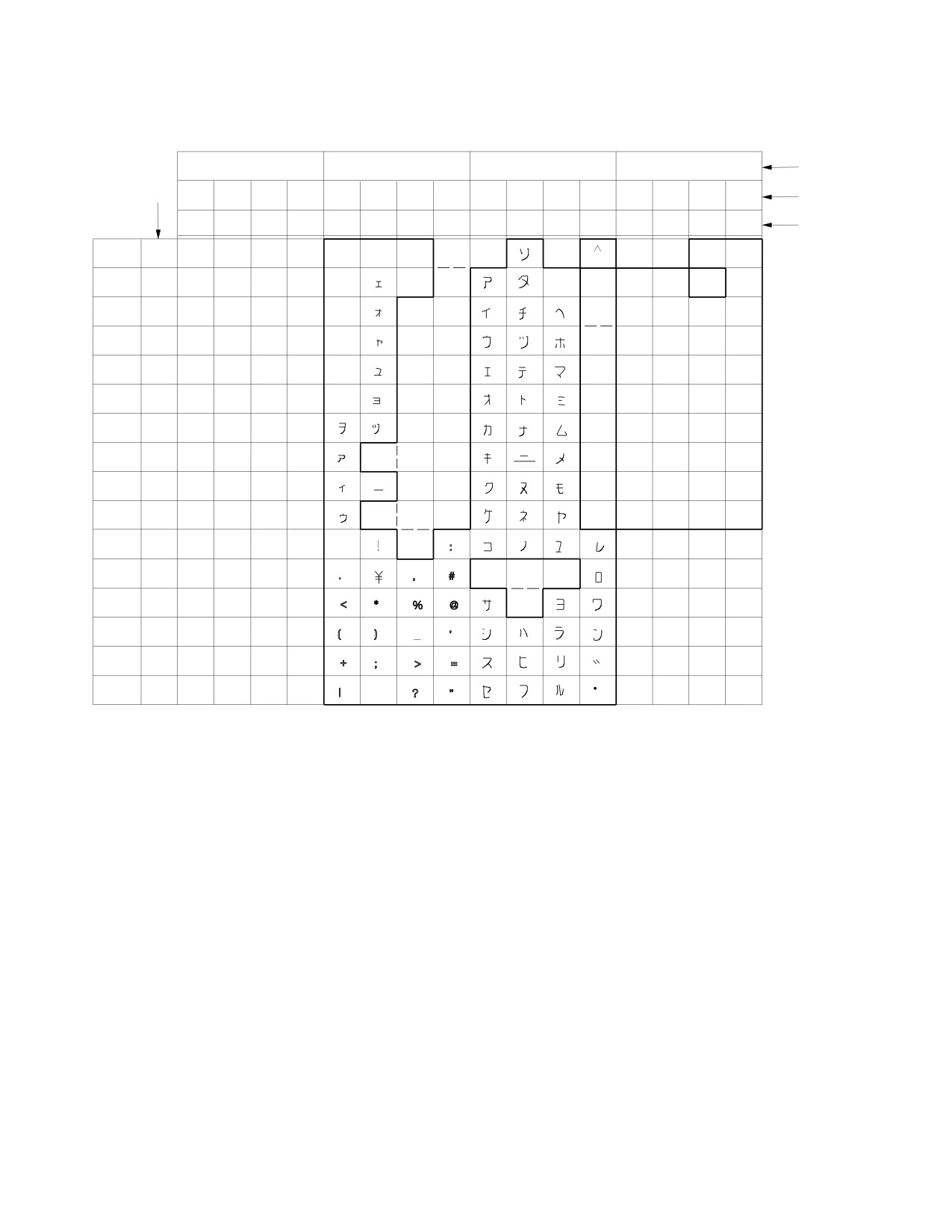
The sample KATAKANA character set is shown in Figure 99 on page
240.
When evaluating the sample character set for use in your installation, remember
that hexadecimal values that do not have characters assigned to them in Figure 99
on page 240 can be used in quoted identifiers.
Chapter 12. Choosing a National Language and Defining Character Sets
239
First
Hex
Char.
Bits
00
01
10
11
0,1
Hex 1
00
01
10
11
00
01
10
11
00
01
10
11
00
01
10
11
2,3
Bits
4567
0
1
2
3
4
5
6
7
8
9
A
B
C
D
E
F
Hex 0
0000
0
SP
&
-
0
0001
1
/
i
A
J
1
0010
2
a
j
B
K
S
2
0011
3
b
k
t
C
L
T
3
0100
4
c
l
u
D
M
U
4
0101
5
d
m
v
E
N
V
5
0110
6
e
n
w
F
O
W
6
0111
7
f
o
x
G
P
X
7
1000
8
g
p
y
H
Q
Y
8
1001
9
h
z
I
R
Z
9
1010
A
:
1011
B
,
#
q
r
s
1100
C
<
%
@
1101
D
(
)
’
1110
E
+
;
>
=
1111
F
|
?
”
˚
Figure 99. JAPANESE (Katakana) Character Set (CCSID=290, the SBCS Component of CCSID
5026)
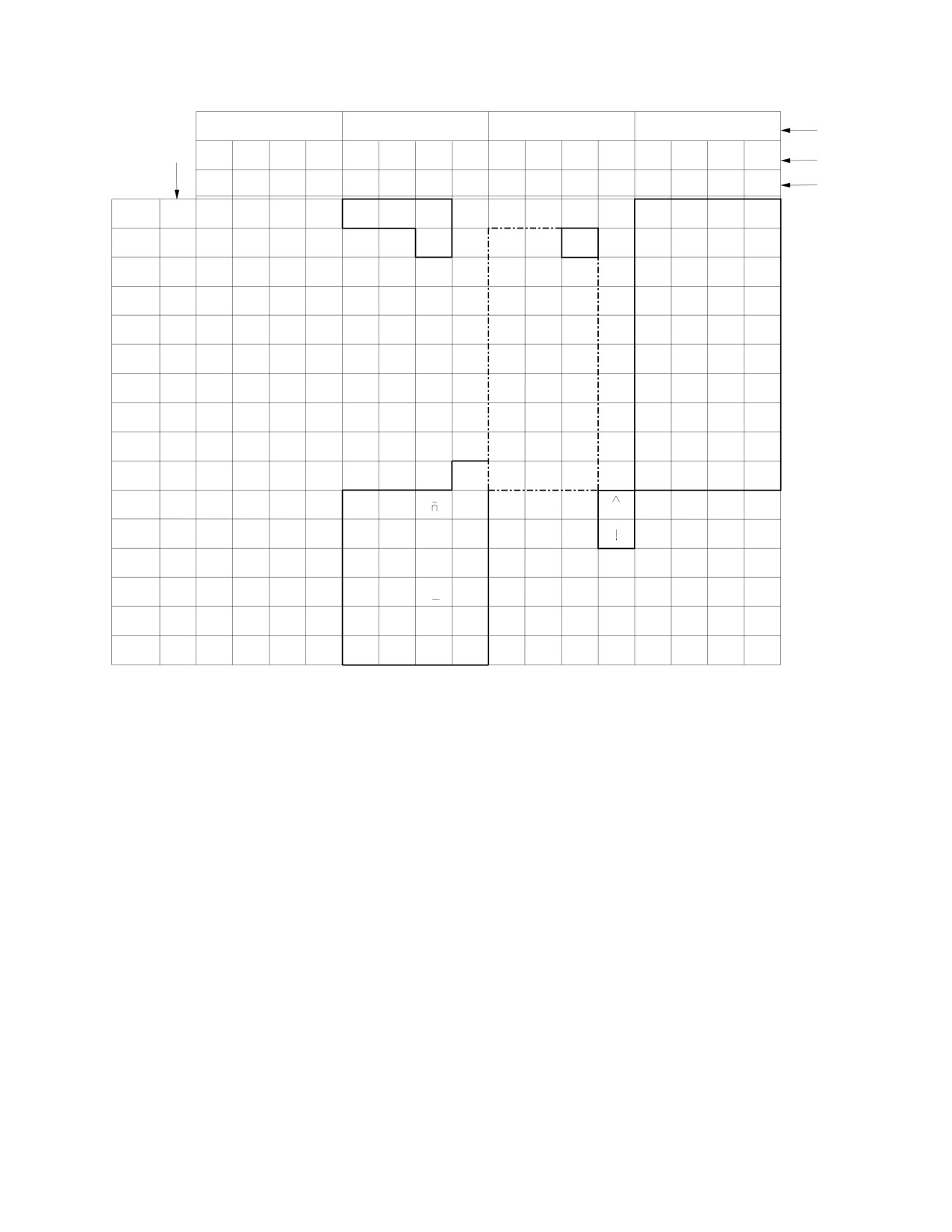
The sample SPANISH character set is shown in Figure 100 on page 241. Translation
from lowercase to uppercase is done as follows:
X'6A' is translated to X'7B'
These characters can be used in unquoted identifiers.
When evaluating the sample character set for use in your installation, remember
that hexadecimal values that do not have characters assigned to them in Figure 100
on page 241 can be used in quoted identifiers.
240
System Administration
00
01
10
11
Bits
0,1
Hex 1
00
01
10
11
00
01
10
11
00
01
10
11
00
01
10
11
2,3
Bits
4567
0
1
2
3
4
5
6
7
8
9
A
B
C
D
E
F
Hex 0
0000
0
SP
&
-
0
0001
1
/
a
j
A
J
1
0010
2
b
k
s
B
K
S
2
0011
3
c
l
t
C
L
T
3
0100
4
d
m
u
D
M
U
4
0101
5
e
n
v
E
N
V
5
0110
6
f
o
w
F
O
W
6
0111
7
g
p
x
G
P
X
7
1000
8
h
q
y
H
Q
Y
8
1001
9
i
r
z
I
R
Z
9
1010
A
:
1011
B
Pts
,
Ñ
1100
C
<
%
@
1101
D
(
)
’
1110
E
+
;
>
=
1111
F
|
?
”
Figure 100. SPANISH Character Set (CCSID=284)
Specifying an IBM-Supplied Character Set at Run Time
If the hexadecimal codes in one of the sample character sets matched those used
by your devices, you can specify the character set at run time. To use a character
set, specify the CHARNAME parameter when starting the application server. The
CHARNAME parameter is valid in both single and multiple user mode. For
information on how to specify the CHARNAME parameter, see “Setting the
Application Server Default CHARNAME and CCSIDs” on page 249. Examples of
IBM-supplied sample character sets are:
v ARABIC
v CYRILLIC
v DANISH-NORWEGIAN
v E-INTERNATIONAL
v ENGLISH
v ESTONIAN
v FINNISH-SWEDISH
v FRENCH
v GERMAN
v GREEK
v GREEK-423
v HEBREW
v ICELANDIC
Chapter 12. Choosing a National Language and Defining Character Sets
241
v INTERNATIONAL
v ITALIAN
v JAPANESE-ENGLISH
v KATAKANA
v KOREAN
v LAO
v S-CHINESE
v SPANISH
v T-CHINESE
v THAI
v UK-ENGLISH
v UKRAINIAN
v VIETNAMESE
v
290
v
833
v
836
v
870
v
930
v
939
v
1027
v
1112
v
28709.
Figure 101 shows example job control to start the application server. The
CHARNAME parameter indicates that the database manager is to use the
FRENCH sample character set, and a CCSID of 297.
// JOB START SQL
// EXEC PROC=ARIS75PL
// EXEC PROC=DBNAME01
// EXEC PGM=ARISQLDS,SIZE=AUTO,PARM=’PARMID=WARM1,CHARNAME=FRENCH’
/*
/&
Figure 101. Starting the Application Server to Use the French Character Set
The default character sets ENGLISH (CCSID=37) and INTERNATIONAL
(CCSID=500) are hard coded into this product. For example, if you specify
ENGLISH for the CHARNAME parameter, the database manager uses the
ENGLISH character set that is coded internally. The internally coded character set
is used even if a row exists in SYSTEM.SYSCHARSETS that has ENGLISH or
INTERNATIONAL in its NAME column. (Neither the sample ENGLISH character
set nor the sample INTERNATIONAL character set is used, although you can load
either into SYSTEM.SYSCHARSETS. They are provided to make the definition of
your own character sets easier.)
If you specify the name of a character set that is not defined in
SYSTEM.SYSCHARSETS, the database manager displays an error message and
uses the character set that was specified previously. If the character set is defined
incorrectly in SYSTEM.SYSCHARSETS, an error message is displayed, and the
database manager uses the character set that was previously specified.
242
System Administration
Using Double-Byte Character Set (DBCS)
The double-byte character set (DBCS) option supports the use of DBCS characters
in identifiers, constants and data. Identifiers can be either:
v Host identifiers (such as host variables), or
v SQL identifiers (such as dbspaces, tables or columns).
Constants and data containing DBCS characters can be either:
v Graphic data, or
v Character data with a mixed subtype (that is, character data containing DBCS
characters).
Setting the DBCS option also ensures that:
v A shift-out character is paired with a shift-in character on output,
v When mixed character data is truncated, truncation does not occur between the
two bytes of a DBCS character.
If your installation uses a double-byte character set, you should consider setting
the DBCS option to YES.
For information on enabling the DBCS option, see “Setting the DBCS Option for
the Application Server” on page 254, and “Setting the Default Application
Requester DBCS Option” on page 254.
If you plan to use the double-byte character set (DBCS) characters, consider the
following:
v PL/I programs using DBCS require no additional preprocessing (the PL/I
compiler supports DBCS).
v DBCS variables and constants are not supported in FORTRAN and Assembler
programs. However, you can use DBCS in dynamically defined SQL statements.
v SQL identifiers, SQL host variables, and SQL labels with DBCS characters can be
used in SQL statements in COBOL II Release 2 or later. The COBOL Kanji
Preprocessor is not required.
When the DBCS option is set to YES, the shift-out (X'0E') and shift-in (X'0F')
delimiters are recognized in both identifiers in SQL statements and mixed data
character string constants. The recognition of the delimiters provides the following
benefits:
v On the application server
- SQL identifiers can contain DBCS characters.
v On the application requester
- Host identifiers can contain DBCS characters.
- The DBS utility processing ensures the pairings of shift-out and shift-in
characters.
- ISQL allows the input, print, and display of DBCS characters and mixed data.
However, setting the DBCS option induces overhead for checking the proper
pairing of shift-out and shift-in characters.
Identifiers Containing DBCS Characters
Identifiers can be either host identifiers or SQL identifiers.
Chapter 12. Choosing a National Language and Defining Character Sets
243
To use host identifiers that contain DBCS characters, the VSE application requester
must have the DBCS option set to YES. For more information, see “Setting the
DBCS Option for the Application Server” on page 254 and “Setting the Default
Application Requester DBCS Option” on page 254.
To use ordinary SQL identifiers that contain DBCS characters, the application
server must have the DBCS option in the SYSTEM.SYSOPTIONS catalog table set
to YES, and must also support DBCS characters and mixed data. The application
server supports DBCS characters and mixed data when a mixed CHARNAME is
specified as an initialization parameter. A mixed CHARNAME has a non-zero
value for the CCSIDMIXED row in the SYSTEM.SYSOPTIONS catalog table. For
more information, see “Choosing the Application Server Default CHARNAME and
CCSID” on page 31.
If the DBCS option is set to YES for the application server, you can use DBCS
characters in ordinary SQL identifiers. The identifier can be DBCS characters, or
can contain a DBCS substring.
Identifiers are recorded in the catalog tables. When the database manager stores
identifiers that contain DBCS characters, it also stores the shift-out and shift-in
delimiters. The delimiters are stored because all columns of the catalog tables that
contain identifiers have a data type of either CHAR or VARCHAR.
The number of bytes required to represent a string of DBCS characters is equal to:
2 x the number of DBCS characters + 2
For more information on how identifiers are used in application programs, see the
DB2 Server for VSE & VM Application Programming manual.
Constants and Data Containing DBCS Characters
Constants and data containing DBCS characters can be either graphic data or
character data with a mixed subtype.
To use graphic and mixed constants or data, the application server and the
application requester must support mixed data. The application server supports
graphic and mixed data when the default CHARNAME is a mixed CHARNAME.
A mixed CHARNAME has a non-zero value for the CCSIDMIXED row in the
SYSTEM.SYSOPTIONS catalog table. For more information, see “Choosing the
Application Server Default CHARNAME and CCSID” on page 31. The VSE
application requester supports graphic and mixed data when a mixed
CHARNAME is set for the application requester. For more information, see
“Setting the Application Requester Default CHARNAME and CCSIDs” on page
251. Using a mixed CHARNAME provides the following benefits:
v On the application server
- Character string constants can contain mixed data consisting of DBCS and
SBCS characters.
- When character string constants containing DBCS characters are used in SQL
statements, the data is correctly interpreted as having a mixed subtype and a
mixed CCSID.
v On the application requester
- Character string constants can contain mixed data consisting of DBCS, SBCS,
and on some platforms, MBCS characters. (The MBCS characters will be
stored as SBCS or DBCS characters by the database manager.)
244
System Administration
The implied data type of all string character constants is VARCHAR. When the
DBCS option is set to YES:
v Constants with only SBCS characters have a subtype of SBCS.
v Constants with a combination of SBCS and DBCS characters have a subtype of
mixed. For example:
’abc<XXYYZZ>’
v Constants containing only DBCS are also of the character data type with a
subtype of mixed. They are not considered to be graphic constants. For example:
’<XXYYZZ>’
When the DBCS option for the application server is set to NO, all character
constants have a subtype of SBCS.
CCSID Conversion
Internally, character data is stored as hexadecimal values called code points. When
a device interprets or displays a code point as a character, it uses a code page,
which is a set of assignments of characters to code points. If two terminals use
different code pages, they can display the same code point as a different character.
For example, in code page 37, the code point X'4F' represents a vertical bar (|), but
in code page 500, the code point X'4F' represents an exclamation mark (!).
As of Version 3 Release 4, the database manager supports Coded Character Set
Identifiers (CCSIDs). The CCSID attribute specifies which code page to use both to
map code points to characters, and to map characters to code points. The CCSID
and the code points are used together to determine the character that the code
point represents.
Note: The default CCSID is implicitly set by the default CHARNAME.
For example, suppose a DB2 Server for VSE online application requester has the
default CHARNAME set to ENGLISH (CCSIDSBCS=37), the remote DRDA DB2
Server for VSE application server has the default CHARNAME set to
INTERNATIONAL (CCSIDSBCS=500). In this case, if the user inserts an
exclamation mark into a character column, the application requester sends X'5A'
(the code point that represents an exclamation mark in the code page used with
CCSID 37). The application server converts X'5A' to X'4F' (because X'4F' represents
an exclamation mark in the code page used with CCSID 500), then stores X'4F' in
the column.
If another application requester using a different CCSID retrieves the character,
X'4F' is converted to the code point that represents an exclamation mark in the
code page specified by the application requester CCSID. The character is
interpreted and displayed correctly, and the hexadecimal value that is stored in the
database is not changed.
For more information on how to decide the default CCSID values you should use,
see “Determining CCSID Values” on page 248.
The sections that follow discuss the following topics:
v How to determine the CCSID values
v How to set the application server default CHARNAME and CCSID values
v How to set the application requester default CHARNAME and CCSID values
v How to set the application server default character subtype
Chapter 12. Choosing a National Language and Defining Character Sets
245

v How to set the DBCS option for the application servers
v How to set the DBCS option for application requesters
v EUC Conversion.
For examples that show the interactions among the different values, see “Examples
of Setting Values for an Installation” on page 256.
If an application requester and an application server do not use the same default
CCSID, CCSID conversion is done during communications between the two.
Note: For an application requester using an ASCII representation of the data,
CCSID conversion always occurs.
The application requester CCSIDs are recognized by the application server when
DRDA support is installed and being used. If DRDA support is not installed, the
application requester CCSIDs are not recognized by the application server.
Table 20 and Table 21 on page 247 show CHARNAMEs and the corresponding
CCSIDs that can be used as system defaults. Table 20 shows the SBCS
CHARNAME CCSIDs, and Table 21 on page 247 shows the mixed CHARNAME
CCSIDs, with the component SBCS and DBCS CCSIDs for each mixed CCSID.
Table 20. SBCS CCSIDs
CCSID
Character Set
Code Page
CHARNAME
Description
37
697
37
ENGLISH
Country/region extended code pages
(CECP): USA, Canada (S/370* system),
Netherlands, Portugal, Brazil, Australia,
New Zealand
273
697
273
GERMAN
CECP: Austria, Germany
277
697
277
DANISH-NORWEGIAN
CECP: Denmark, Norway
278
697
278
FINNISH-SWEDISH
CECP: Finland, Sweden
280
697
280
ITALIAN
CECP: Italy
284
697
284
SPANISH
CECP: Spain, Latin America (Spanish)
285
697
285
UK-ENGLISH
CECP: United Kingdom
290
1172
290
290
Japanese Katakana, extended host single
byte
297
697
297
FRENCH
CECP: France
420
235
420
ARABIC
Arabic (all presentation shapes)
423
218
423
GREEK-423
Greek (Coexistence)
424
941
424
HEBREW
Hebrew
500
697
500
INTERNATIONAL
CECP: Belgium, Canada (AS/400*
system), Switzerland, International Latin-1
833
1173
833
833
Korean, extended host single byte
836
1174
836
836
Simplified Chinese, extended host single
byte
838
1176
838
THAI
Thai, extended host single byte
870
959
870
870
ROECE (Regional Office for East &
Central Europe) Latin-2 Multilingual
871
697
871
ICELANDIC
CECP: Iceland
246
System Administration
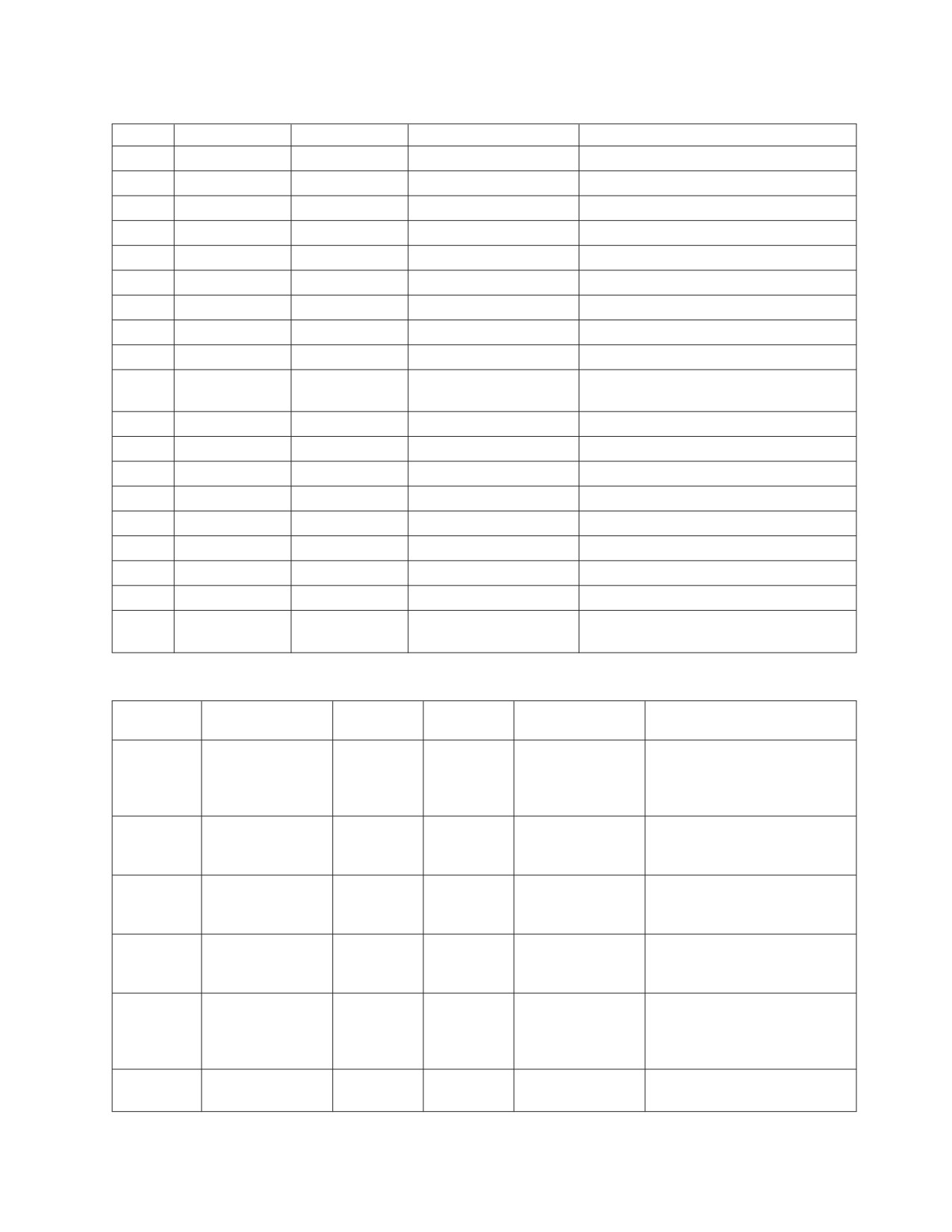
Table 20. SBCS CCSIDs (continued)
CCSID
Character Set
Code Page
CHARNAME
Description
875
925
875
GREEK
Greek
1025
1150
1025
CYRILLIC
Cyrillic Multilingual Turkish Latin 5
1027
1172
1027
1027
Japanese Latin, extended host single byte
1112
1305
1112
1112
Latvian/Lithuanian
1122
1307
1122
ESTONIAN
Estonian
1123
1326
1123
UKRAINIAN
Cyrillic Ukrainian EBCIDIC
1130
1336
1130
VIETNAMESE
EBCIDIC Vietnamese
1132
1341
1133
LAO
EBCIDIC Lao
1137
1137
1137
HINDI
Hindi
1142
697
1142
EDANISH-
Danish and Norwegian Euro CECP
NORWEIGAN
1143
697
1143
EFINNISH-SWEDISH
Finnish and Swedish Euro CECP
1145
697
1145
E-SPANISH
Spanish Euro CECP
1148
697
500
E-INTERNATIONAL
International Euro CECP
1140
697
37
E-ENGLISH
English Euro CECP
1141
697
273
E-GERMAN
German Euro CECP
1144
697
280
E-ITALIAN
Italian Euro CECP
1146
697
285
E-UK-ENGLISH
UK English Euro CECP
1147
697
297
E-FRENCH
French Euro CECP
28709
1175
37
28709
Traditional Chinese, extended host single
byte
Table 21. Mixed CCSIDs
Component
Character
Mixed
CCSIDs
Set
Code Page
CHARNAME
Description
930
290
(SBCS)
300
1172
1001
290
300
930
Japanese (Katakana)-Kanji
(DBCS)
mixed host (including 4370
user-defined characters)
extended single byte
933
833
(SBCS)
834
1173
934
833
834
KOREAN
Korean host mixed (including
(DBCS)
1880 user-defined characters)
extended single byte
935
836
(SBCS)
1174
937
836
837
S-CHINESE
Simplified Chinese host mixed
837(DBCS)
(1880 user-defined characters)
extended single byte
937
28709
(SBCS)
835
1175
935
37
835
T-CHINESE
Traditional Chinese host mixed
(DBCS)
(6204 user-defined characters)
extended single byte
939
1027
(SBCS)
300
1172
1001
1027
300
939
Japanese (Latin)-Kanji mixed
(DBCS)
host (including 4370
user-defined-characters)
extended single byte
1364
833
(SBCS)
834
65535
833
834
KOREAN-1364
Korean host mixed extended
(DBCS)
65535
including 11,172 full hangul
Chapter 12. Choosing a National Language and Defining Character Sets
247

Table 21. Mixed CCSIDs (continued)
Component
Character
Mixed
CCSIDs
Set
Code Page
CHARNAME
Description
1388
836
(SBCS)
837
65535
846
837
S-CHINESE-GBK
S-Ch DBCS-Host Data GBK
(DBCS)
65535
mixed, all GBK character set
and other growing chars
5026
290
(SBCS)
4396
1172
370
290
300
KATAKANA
Japanese (Katakana)-Kanji
(DBCS)
mixed host (including 1880
user-defined characters)
extended single byte
5035
1027
(SBCS)
4396
1172
370
1027
300
JAPANESE-
Japanese (Latin)-Kanji mixed
(DBCS)
ENGLISH
host , (including 1880
user-defined characters)
extended single byte
For more information about CCSIDs, see the Character Data Representation
Architecture Level 1, Registry, and the Character Data Representation Architecture
Reference and Registry manuals.
For information on the types of DBCS conversion that can be done between
CCSIDs, see “Coding Your Own TRANSPROC Exit” on page 284.
Determining CCSID Values
When displaying characters on your terminal display, the default CCSID values for
an application requester must be compatible with the code page that was used to
generate its terminal controller. If the defaults are incompatible, characters will not
be displayed or interpreted as expected, and the results of queries or inserts of
either character or graphic data will be unreliable. Table 20 on page 246 and
Table 21 on page 247 show the code pages that are compatible with each CCSID,
and the CHARNAME value that you should specify. For example, if the controller
was generated with code page 37, you should specify ENGLISH for the
CHARNAME parameter. This value sets the value of CCSIDSBCS to 37, and the
values of CCSIDMIXED and CCSIDGRAPHIC to 0. You can use the CICS DSQG
transaction to set default values for all application requesters. For more
information, see “Setting the Application Requester Default CHARNAME and
CCSIDs” on page 251. The system-wide defaults may not be suitable for all
application requesters: some may have a controller generated to use a code page
incompatible with the system-wide default CHARNAME. In this situation, you
should set the CHARNAME parameter for individual application requesters. For
more information on this topic, see “Setting the Application Requester Default
CHARNAME and CCSIDs” on page 251.
The default CCSID values for the application server can be set to any value you
want, but keep in mind that you may want to set the default CCSIDs for the
application server to values that can be used as defaults by the majority of the
application requesters. This can reduce the amount of CCSID conversion that will
be necessary. Also, consider setting the application server default CCSIDs to values
that are compatible with the code page used to generate the terminal controller of
the operator console. This ensures that data in single user mode applications is
processed correctly (for example, single user mode DBS utility). Table 20 on page
246 and Table 21 on page 247 show the code pages compatible with each CCSID,
and the CHARNAME that should be specified. For example, if the terminal
controller of the operator console was generated with code page 37, you should
248
System Administration
use ENGLISH as the CHARNAME. This value sets the CCSIDSBCS value to 37,
and the CCSIDMIXED and CCSIDGRAPHIC values to 0.
In particular, the CHARNAME INTERNATIONAL (CCSID=500) warrants special
attention. This CHARNAME is composed of a code page that supports all the
characters that are supported by the Latin-1 countries / regions, including
Australia, Austria, Belgium, Brazil, Denmark, Canada, the Faroe Islands, Finland,
France, Germany, Hong Kong, Iceland, Italy, Japan, the Netherlands, New Zealand,
Norway, Portugal, Spain, Latin America, Sweden, Switzerland, the United
Kingdom, and the United States. If all application requesters and application
servers in these countries / regions use this CCSID, then single-byte CCSID
conversion will not be necessary for accessing data from different sites. This may
provide savings because of lower CPU usage.
Often, it may not be appropriate to use CCSID 500 at every site. For example, you
may have to use existing equipment (such as terminal controllers that use other
character sets and code pages), or you may have a large quantity of data that is
stored using a CCSID other than 500. However, if you plan to frequently access
data from other countries / regions, you should consider migrating your data and
hardware to CCSID 500, both for performance reasons, and for the ease of data
management.
Setting the Application Server Default CHARNAME and CCSIDs
The different uses of the default system CCSIDs are shown in “Choosing the
Application Server Default CHARNAME and CCSID” on page 31. Data in columns
which were migrated from a release earlier than Version 3 Release 4 have a CCSID
which is obtained from rows in the SYSTEM.SYSOPTIONS catalog table. These
rows are: MCCSIDSBCS, MCCSIDMIXED and MCCSIDGRAPHIC. For more
information on the SYSTEM.SYSOPTIONS catalog table, see the DB2 Server for VSE
& VM SQL Reference manual. To change either the application server default
CCSIDs or the CCSIDs that are used for data in migrated columns, you must have
DBA authority.
The only way to change the system CCSID is to change the CHARNAME
parameter when you start the application server. This also updates the following
columns of the SYSTEM.SYSOPTIONS catalog table: CCSIDSBCS, CCSIDMIXED
and CCSIDGRAPHIC. For more information, see “Character Set Considerations at
Startup” on page 51.
You may have to use different default CCSIDs for columns that were created
before the migration than for columns created after the migration. For example,
suppose that you are migrating your database and want to use the
INTERNATIONAL character set (CCSID=500) for character columns that were
created after the migration. Character columns that existed before migration were
created with the ENGLISH character set (CCSID=37). To ensure that the data in
existing character columns is displayed and interpreted correctly, (that is, as was
done before the migration), you require an MCCSIDSBCS value of 37, and a
CCSIDSBCS value of 500.
Be very careful when using different default CCSIDs. This should only be done
when there is a specific reason for them to be different. When the application
server and application requester have different CCSID values, character conversion
cannot be avoided. This conversion has an associated performance overhead, and
causes performance degradation. CCSID conversion of data also affects the
Chapter 12. Choosing a National Language and Defining Character Sets
249
sargability of predicates. For more information on performance, see the DB2 Server
for VSE & VM Performance Tuning Handbook.
Note: Use caution when you change the application server default CCSIDs. For
more information, see “Determining CCSID Values” on page 248.
For many characters, the corresponding hexadecimal value in the International
code page is the same as in the English code page. However, this is not true of all
characters. For example, in the English code page the hexadecimal value
corresponding to the exclamation mark (!) is '5A', but in the International code
page the value is '4F'.
Table 22 lists the differences between the International
code page and the English code page.
Table 22. Differences between International Code Page and English Code Page
Character
CCSID=37
CCSID=500
^
X'B0'
X'5F'
¢
X'4A'
X'B0'
!
X'5A'
X'4F'
[
X'BA'
X'4A'
]
X'BB'
X'5A'
|
X'4F'
X'BB'
¬
X'5F'
X'BA'
For more information on code page details, see the Character Data Representation
Architecture Level 1, Registry manual.
Columns must be tagged with the CCSID that corresponds to the code page with
which they were created or the results of queries on these columns will be
unreliable. For example, suppose that the following column was created with the
English character set before migration:
CHARDATA
--------
ABCDEFGH
kjp!
¬ds!
If MCCSIDSBCS is 37 (corresponding to English), and CCSIDSBCS is 500
(corresponding to International), performing a SELECT operation on this column
after the migration gives the results shown above. However, if MCCSIDSBCS is
incorrectly set to 500 (corresponding to the International character set), performing
a SELECT operation on the column produces the following result:
CHARDATA
--------
ABCDEFGH
kjp]
^ds]
In this example, to ensure reliable results, MCCSIDSBCS must be 37, regardless of
the value of CCSIDSBCS.
250
System Administration
Changing the CCSID Attribute of an Existing Column
If you want to change the CCSID attribute of an existing column, use the DBS
utility. For example, to change the default CCSID for data in columns that were
created previous to the migration to Version 3 Release 4, use the DBS utility to do
the following:
1. Unload the data from the existing table.
2. Drop the table.
3. Recreate the table, specifying the new CCSID attribute for the column or
columns that you want to change, or use the default if it is appropriate.
4. Reload the data.
Note: You must use the DBSU ″DATALOAD/DATAUNLOAD″ commands, NOT
the ″UNLOAD/RELOAD″ commands.
Changing the Subtype Attribute of an Existing Column
The subtype attribute is only used when the CCSID attribute is null. If you have
migrated from a release previous to Version 3 Release 4, existing character
columns will have a CCSID value of null. For these columns, the subtype value is
used to indicate their CCSID value. The CCSID value is either the value for
MCCSIDSBCS (for a subtype of “S”) or the value for MCCSIDMIXED (for a
subtype of “M”).
In some cases, columns with a null CCSID could have a subtype of “S” and
contain mixed data. This can occur if the column was created without specifying
the FOR MIXED DATA clause. In this case, the subtype must be changed to “M” in
order for the correct CCSID to be used for this column. Otherwise, conversion
errors can occur (for example, SQLCODE -330, SQLSTATE 22517).
To change the subtype, DBA authority is required to update the
SYSTEM.SYSCOLUMNS table. Change the value in the SUBTYPE column from “S”
to “M” for the required character column.
Setting the Application Requester Default CHARNAME and CCSIDs
VSE application requesters use the CHARNAME that is specified in the SQLGLOB
file, either a specific userid’s value or the global default value as follows:
v Batch applications use the SQLGLOB file ’CHARNAME’ setting associated with
the userid(s) contained on the SQL CONNECT statement(s) used in the
application. If any of these userids are NOT defined in the SQLGLOB file, then
the global CHARNAME will be used.
v The preprocessor is a batch application requester. The userid given by the
’USERID’ preprocessor parameter will be used to determine the CHARNAME
from the SQLGLOB file. If the userid is not defined in the SQLGLOB file, the
global default CHARNAME value will be used.
v The Database Services Utility is a batch application requester. It uses the
SQLGLOB file global CHARNAME setting to determine the input data folding
translation table to be used. Otherwise, it will use the SQLGLOB file
’CHARNAME’ setting associated with the userid(s) contained on the SQL
CONNECT statement(s) used in the application. If any of these are NOT defined
in the SQLGLOB file, then the global CHARNAME will be used.
v ISQL is an online application requester. It has a CICS user ID associated with it.
Therefore, ISQL uses the user setting of the SQLGLOB parameter CHARNAME
Chapter 12. Choosing a National Language and Defining Character Sets
251
if the ISQL user had used the DSQU transaction to override the global setting of
the CHARNAME parameter. Otherwise, ISQL uses the global setting of the
SQLGLOB parameter CHARNAME.
Note: If ISQL is running against a remote DRDA application server, the ISQL
user must ensure that the global and the user setting of the SQLGLOB
parameter CHARNAME are the same. ISQL has a two transaction
structure: ISQL and CISQ. ISQL starts CISQ. The former controls the
terminal and the latter is for access to the application server.
Because CISQ is a transaction started by ISQL, it does not have a CICS
user ID associated with it. Therefore, the online DRDA resource adapter
uses the global setting of the SQLGLOB parameter CHARNAME to
process the SQL requests from CISQ. On the other hand, ISQL, being the
front-end transaction, has a CICS user ID associated with it. Therefore,
ISQL uses the user setting of the SQLGLOB parameter CHARNAME, if
available, to process the same SQL statement it received from the
terminal.
v
All ″started″ CICS transactions that pass SQL requests to a remote DRDA
application server do not have a CICS user ID associated with it. Therefore,
these transactions will use the global setting of the SQLGLOB parameter
CHARNAME.
v
All online DRDA application requesters have a CICS user ID associated with it.
Therefore, they will use the user setting of the SQLGLOB parameter
CHARNAME if the CICS user running the online DRDA transaction had used
the DSQU transaction to override the global setting of the CHARNAME
parameter. Otherwise, they will use the global setting of the SQLGLOB
parameter CHARNAME.
If you want to check the global setting for the SQLGLOB parameter CHARNAME,
use the DSQQ transaction without specifying any parameter. The CHARNAME
displayed is the global setting of the SQLGLOB parameter CHARNAME.
If you want to check the CHARNAME setting for a CICS user, use the DSQQ
transaction and specify the user ID of the CICS user. If the user setting exists, it
will be displayed. If the user setting does not exist, a message will be displayed.
For more information about the DSQQ transaction, see the DB2 Server for VSE &
VM Database Administration.
If you want to use the IBM-supplied default global settings for the SQLGLOB
parameters (including the default for CHARNAME), you must execute the
IBM-supplied job control program ARISGDEF. This program will initialize the
global settings for the SQLGLOB parameters with IBM-supplied default values.
(For more information on the default values for the SQLGLOB parameters, see the
DB2 Server for VSE & VM Database Administration manual.)
If you want to use your own default global settings for the SQLGLOB parameters
(including the default for CHARNAME), you must first execute the IBM-supplied
job control program ARISGDEF and then execute the DSQG transaction.
To specify ENGLISH as the new global setting for the SQLGLOB parameter
CHARNAME, run the DSQG transaction and specify the ENGLISH CHARNAME
value as follows:
DSQG ENGLISH
252
System Administration
The global settings for the SQLGLOB parameters do not apply to online
application requesters that have already run the DSQU transaction (and thereby
have their own user SQLGLOB parameter values).
For more information about the DSQG transaction, see the DB2 Server for VSE &
VM Database Administration.
To specify a user setting for the SQLGLOB parameter CHARNAME which is
different from the default global setting, run the DSQU transaction and specify the
CHARNAME value. This value overrides the global CHARNAME.
For example, to specify ENGLISH as the new user setting for the SQLGLOB
parameter CHARNAME for the CICS user CICSUSER, CICSUSER must sign on to
a CICS session, run the DSQU transaction and specify the ENGLISH CHARNAME
value as follows:
DSQU ENGLISH
For more information about the DSQU transaction, see the DB2 Server for VSE &
VM Database Administration.
The SQLGLOB File Batch Query/Update Program
This program can be used to query and update the SQLGLOB file in batch mode,
using the JCL in library member ARISBGUD.Z. It may be necessary to use this
program to add or change SQLGLOB parameters when CICS and the DSQx
transactions are not available, or for userids that do not exist under CICS, but are
in batch jobs that access remote servers. With this program, any userid’s SQLGLOB
parameters can be queried, inserted, updated or deleted. The Global Default
parameters cannot be deleted. For more information about this batch program, see
the DB2 Server for VSE & VM Database Administration.
Setting the Application Server Default Character Subtype
To set the application server default character subtype, you must update a row in
the SYSTEM.SYSOPTIONS catalog table. You must have DBA authority to do so.
The CHARSUB option specifies the default subtype for a column when SUBTYPE
clause or the CCSID is not specified explicitly (for example, on a CREATE TABLE
or ALTER TABLE statement).
Note: The character subtype is defined for the application server only. It is not
defined for the application requester. The CREATE PACKAGE CHARSUB
option or the preprocessor CHARSUB option defines the default subtype for
a package. For more information on this option, see the DB2 Server for VSE
& VM Application Programming or the DB2 Server for VSE & VM SQL
Reference manuals.
The initial setting of the application server default character subtype is SBCS. To
set it to mixed, issue:
UPDATE SYSTEM.SYSOPTIONS
SET VALUE = ’MIXED’
WHERE SQLOPTION = ’CHARSUB’
To reset the application server default character subtype to SBCS, issue:
UPDATE SYSTEM.SYSOPTIONS
SET VALUE = ’SBCS’
WHERE SQLOPTION = ’CHARSUB’
Chapter 12. Choosing a National Language and Defining Character Sets
253
In both situations, the new setting does not become effective immediately. The new
setting is not in effect until the next time the application server is started.
If anything other than 'MIXED' or 'SBCS' is specified for the application server
default character subtype in the SYSOPTIONS table, SBCS is assumed and an error
message is issued when the application server is started.
The application server default character subtype can only be mixed when the
application server default CHARNAME is mixed. The application server default
character subtype is forced to be SBCS when the application server default
CHARNAME is an SBCS CHARNAME.
Setting the DBCS Option for the Application Server
The DBCS option is set by updating a particular row in the SYSTEM.SYSOPTIONS
catalog table. The initial setting of the DBCS option is NO. To set the DBCS option
to YES, issue:
UPDATE SYSTEM.SYSOPTIONS
SET VALUE = ’YES’
WHERE SQLOPTION = ’DBCS’
To reset the DBCS option to NO, issue:
UPDATE SYSTEM.SYSOPTIONS
SET VALUE = ’NO’
WHERE SQLOPTION = ’DBCS’
You must have DBA authority to issue either of the above commands.
The new setting of the DBCS option will be effective the next time that the
application server is started. The new setting does not become effective
immediately.
If anything other than YES or NO is specified for the DBCS option in the
SYSOPTIONS table, NO is assumed, and an error message is issued during
startup.
For more information, see “Using Double-Byte Character Set (DBCS)” on page 243.
Setting the Default Application Requester DBCS Option
The VSE application requester DBCS option is set by the DBCS option contained in
the SQLGLOB file, as follows:
v Batch applications use the SQLGLOB file ’DBCS’ option associated with the
userid(s) contained on the SQL CONNECT statement(s) used in the application.
If any of these userids are NOT defined in the SQLGLOB file, then the global
DBCS will be used.
v The preprocessor is a batch application requester. The userid given by the
’USERID’ preprocessor parameter will be used to determine the DBCS option
from the SQLGLOB file. If the userid is not defined in the SQLGLOB file, the
global default DBCS value will be used.
v The Database Services Utility is a batch application requester. It uses the
SQLGLOB file global DBCS value.
v ISQL is an online application requester. It has a CICS user ID associated with it.
Therefore, ISQL uses the user setting of the SQLGLOB parameter DBCS if the
254
System Administration
ISQL user had used the DSQU transaction to override the global setting of the
DBCS parameter. Otherwise, ISQL uses the global setting of the SQLGLOB
parameter DBCS.
Note: If ISQL is running against a remote DRDA application server, the ISQL
user must ensure that the global and the user setting of the SQLGLOB
parameter DBCS are the same. ISQL has a two transaction structure: ISQL
and CISQ. ISQL starts CISQ. The former controls the terminal and the
latter is for access to the application server.
Because CISQ is a transaction started by ISQL, it does not have a CICS
user ID associated with it. Therefore, the online DRDA resource adapter
uses the global setting of the SQLGLOB parameter DBCS to process the
SQL requests from CISQ. On the other hand, ISQL, being the front-end
transaction, has a CICS user ID associated with it. Therefore, ISQL uses
the user setting of the SQLGLOB parameter DBCS, if available, to process
the same SQL statement it received from the terminal.
v
All ″started″ CICS transactions that pass SQL requests to a remote DRDA
application server do not have a CICS user ID associated with it. Therefore,
these transactions will use the global setting of the SQLGLOB parameter DBCS.
v
All online DRDA application requesters have a CICS user ID associated with it.
Therefore, they will use the user setting of the SQLGLOB parameter DBCS if the
CICS user running the online DRDA transaction had used the DSQU transaction
to override the global setting of the DBCS parameter. Otherwise, they will use
the global setting of the SQLGLOB parameter DBCS.
If you want to check the global setting for the SQLGLOB parameter DBCS, use the
DSQQ transaction without specifying any parameter. The DBCS displayed is the
global setting of the SQLGLOB parameter DBCS.
If you want to check the DBCS setting for a CICS user, use the DSQQ transaction
and specify the user ID of the CICS user. If the user setting exists, it will be
displayed. If the user setting does not exist, a message will be displayed.
For more information about the DSQQ transaction, see the DB2 Server for VSE &
VM Database Administration.
If you want to use the IBM-supplied default global settings for the SQLGLOB
parameters (including the default for DBCS), you must execute the IBM-supplied
job control program ARISGDEF. This program will initialize the global settings for
the SQLGLOB parameters. (For more information on the default values for the
SQLGLOB parameters, see the DB2 Server for VSE & VM Database Administration
manual.)
If you want to use your own default global settings for the SQLGLOB parameters
(including the default for DBCS), you must first execute the IBM-supplied job
control program ARISGDEF and then execute the DSQG transaction.
To specify YES as the new global setting for the SQLGLOB parameter DBCS, run
the DSQG transaction and specify the YES DBCS value as follows:
DSQG ,,YES
The global settings for the SQLGLOB parameters do not apply to online
application requesters that have already run the DSQU transaction (and thereby
have their own user SQLGLOB parameter values).
Chapter 12. Choosing a National Language and Defining Character Sets
255
For more information about the DSQG transaction, see the DB2 Server for VSE &
VM Database Administration manual.
To specify a user setting for the SQLGLOB parameter DBCS which is different
from the default setting, run the DSQU transaction and specify the DBCS value.
This value overrides the global setting for the user who ran the DSQU transaction.
For example, to specify YES as the new user setting for the SQLGLOB parameter
DBCS for the CICS user CICSUSER, CICSUSER must sign on to a CICS session,
run the DSQU transaction and specify the YES DBCS value as follows:
DSQU ,,YES
For more information about the DSQU transaction, see the DB2 Server for VSE &
VM Database Administration manual.
The SQLGLOB File Batch Query/Update Program can also be used to display or
modify user or global default parameters. For more information, see “The
SQLGLOB File Batch Query/Update Program” on page 253, or the DB2 Server for
VSE & VM Database Administration.
EUC Conversions
Extended UNIX™ Code (EUC) allows for a form of ASCII mixed data. It is an
encoding scheme supported by UNIX in far eastern countries / regions which
allows for MBCS characters. Each EUC codepage is made up of three character
sets, or planes, denoted by G0, G1, and G2 or four character sets, denoted by G0,
G1, G2 and G3. The group in which the data belongs is determined by the range of
its first and second bytes. G0 is comprised of single-byte characters and is the
ASCII invariant coded character set. G1 characters are double-byte characters
within another range. G2 and G3 characters are triple-byte characters,
distinguished by the first byte and the range of the last three bytes.
EUC conversion is supported by the database manager. EUC characters are
converted to SBCS or DBCS characters, or both.
Unicode Conversions
Unicode data cannot be stored in a DB2 Server for VSE & VM database. However,
Unicode data can be received, converted to certain host code pages, and then
stored. To determine which Unicode conversions are supported, refer to the system
catalog SYSTEM.SYSSTRINGS. Each row in SYSTEM.SYSSTRINGS represents a
supported CCSID conversion, where INCCSID is the input CCSID and OUTCCSID
is the CCSID to which it can be converted.
Examples of Setting Values for an Installation
This section discusses two examples of using the application server default
CHARNAME JAPANESE-ENGLISH (CCSID=5035). The first example shows how
to specify this CHARNAME and enable mixed string manipulation. The second
example shows how to specify this CHARNAME without enabling mixed string
manipulation and how to prevent the verification of character strings that contain
mixed data. (Mixed string manipulation is the ability to specify mixed SQL
identifiers, such as columns.)
256
System Administration
Example 1
Suppose that you want to use the mixed JAPANESE-ENGLISH CCSID, 5035, as
your application server default CCSID, and you also want to have the ability to do
mixed string manipulation. To do this, set up your environment as follows:
1.
Ensure that your terminal controllers are generated to use the correct code
pages.
The CCSID you want to use is 5035. You must define the controller to use the
character set 1172 for the SBCS character set, and code page 1027 for the SBCS
code page. For the DBCS characters, specify the character set 370 and the code
page 300.
2.
Install the database manager.
The application server default CCSID for a newly installed database manager is
500
(CHARNAME=INTERNATIONAL). After installation, the
SYSTEM.SYSOPTIONS catalog table contains the following information:
CHARNAME=INTERNATIONAL (the name of 500)
CCSIDSBCS=500
CCSIDMIXED=0
CCSIDGRAPHIC=0
DBCS=NO
CHARSUB=SBCS
3.
Change the value of the application server default CHARNAME to
JAPANESE-ENGLISH
Start the application server. Specify CHARNAME=JAPANESE-ENGLISH.
Message ARI0159D is displayed that informs you that the new CHARNAME
(JAPANESE-ENGLISH) is different from the current default
(INTERNATIONAL). You are prompted to enter either 1 (YES) to change the
default, 0 (NO) to leave the default unchanged, or 111 (QUIT) to shut down the
application server. Type 1 (for YES) and press ENTER.
After the application server is started, the SYSTEM.SYSOPTIONS catalog table
should contain the following information:
CHARNAME=JAPANESE-ENGLISH
CCSIDSBCS=1027
(the single-byte portion of 5035)
CCSIDMIXED=5035
CCSIDGRAPHIC=4396
(the double-byte portion of 5035)
DBCS=NO
CHARSUB=SBCS
4.
To enable mixed string manipulation, change the value for DBCS in
SYSTEM.SYSOPTIONS from NO to YES. You can use either ISQL or the DBS
utility.
5.
Because most of the character columns will contain mixed data, you should
also change the value for CHARSUB from SBCS to MIXED.
6.
To cause the DBCS and CHARSUB values in SYSTEM.SYSOPTIONS to be used
as the new application server defaults, you must stop the application server,
and then restart it.
The changes are now complete. The SYSTEM.SYSOPTIONS catalog table
contains the following information:
CHARNAME=JAPANESE-ENGLISH
CCSIDSBCS=1027
(the single-byte portion of 5035)
CCSIDMIXED=5035
CCSIDGRAPHIC=4396
(the double-byte portion of 5035)
DBCS=YES
CHARSUB=MIXED
Chapter 12. Choosing a National Language and Defining Character Sets
257
7. To set these values for the online DRDA requesters, ISQL and the
preprocessors, run the DSQG transaction. Issue the following command:
DSQG JAPANESE-ENGLISH,,YES
Example 2
Suppose that you want to use the mixed JAPANESE-ENGLISH CCSID, 5035, as
your application server default CCSID. Because you must be able to both store
DBCS characters, and retrieve DBCS characters from graphic columns (GRAPHIC,
VARGRAPHIC, or LONG VARGRAPHIC), you cannot specify an ENGLISH
single-byte CCSID such as 37 or 1027. Also suppose that you do not want the
ability to do mixed string manipulation, and you want to prevent the database
manager from verifying character strings for mixed data. In addition, you also
want character columns that are created without the explicit specification of a
CCSID or a subtype to default to the SBCS subtype and CCSID. To do this, set up
your environment as follows:
1.
Ensure that your terminal controllers are generated to use the correct code
pages.
The CCSID you want to use is 5035. You must define the controller to use the
character set 1172 for the SBCS character set, and code page 1027 for the SBCS
code page. For the DBCS characters, specify the character set 370 and the code
page 300.
2.
Install the database manager.
The application server default CCSID for a newly installed database manager is
500
(CHARNAME=INTERNATIONAL). After installation, the
SYSTEM.SYSOPTIONS catalog table contains the following information:
CHARNAME=INTERNATIONAL (the name of 500)
CCSIDSBCS=500
CCSIDMIXED=0
CCSIDGRAPHIC=0
DBCS=NO
CHARSUB=SBCS
3.
Change the value of the application server default CHARNAME to
JAPANESE-ENGLISH.
Start the application server. Specify CHARNAME=JAPANESE-ENGLISH.
Message ARI0159D is displayed that informs you that the new CHARNAME
(JAPANESE-ENGLISH) is different from the current default
(INTERNATIONAL). You are prompted to enter either 1 (YES) to change the
default, 0 (NO) to leave the default unchanged, or 111 (QUIT) to shut down the
application server. Type 1 (for YES) and press ENTER.
After the application server is started, the SYSTEM.SYSOPTIONS catalog table
should contain the following information:
CHARNAME=JAPANESE-ENGLISH
CCSIDSBCS=1027
(the single-byte portion of 5035)
CCSIDMIXED=5035
CCSIDGRAPHIC=4396
(the double-byte portion of 5035)
DBCS=NO
CHARSUB=SBCS
4.
Because you do not want to enable mixed string manipulation, and you do not
want the database manager to verify character strings for mixed data, leave the
DBCS option set to NO (even though the database manager uses a mixed
CCSID). This still allows you to:
258
System Administration
v Issue CREATE TABLE or ALTER TABLE statements to either add or create
GRAPHIC, VARGRAPHIC, and LONG VARGRAPHIC columns. The CCSID
for these columns will be taken from value for CCSIDGRAPHIC in the
SYSTEM.SYSOPTIONS catalog table.
v Insert into graphic columns from graphic host variables.
v Select graphic columns into graphic host variables.
v Use graphic constants in SQL statements.
5.
Because most character columns will contain SBCS data, leave the value for
CHARSUB as SBCS. When you need to either create or add a mixed character
column, you can specify the FOR MIXED DATA clause or the CCSID clause
explicitly for the CREATE TABLE or the ALTER TABLE statement.
6.
To set these values for all the online DRDA application requesters, ISQL and
the preprocessors, run the DSQG transaction. Issue the following command:
DSQG JAPANESE-ENGLISH,,YES
For an application requester to be able to use graphic data, the application
requester must use a mixed CCSID as the default. One exception exists. If the
application requester is connecting to a local application server, the application
server responds to the application requester with the expectation that the
application requester is using the same mixed CCSID as the application server
is using. If the user specified a different value for the SQLGLOB CHARNAME
parameter, the application server ignores this value. However, folding
performed by the application requester is always based on the application
requester’s CHARNAME setting. For more information on the application
requester’s CHARNAME setting, see “Setting the Application Requester Default
CHARNAME and CCSIDs” on page 251. In this case, if the application
requester CHARNAME and the application server CHARNAME are not the
same, unexpected results can occur.
Identifying Classification and Translation Tables for a CCSID
To identify either the classification table or the translation table that is used for
folding characters to uppercase for a specific CCSID, do the following:
1. Review the CHARNAME column of the SYSTEM.SYSCCSIDS catalog table for
the CHARNAME value of the CCSID.
2. Review the NAME column of the SYSTEM.SYSCHARSETS catalog table for the
value that matches the CHARNAME of the CCSID. That row contains both the
classification table and the translation table for the CCSID.
National Language Support for Messages and HELP Text
The database manager can provide DB2 Server for VSE messages and HELP text in
several national languages. Messages and HELP text come with the product tape.
For more information on HELP text, see the DB2 Server for VSE & VM Database
Administration manual. Installation instructions for HELP text is in the DB2 Server
for VSE Program Directory manual.
When the national language feature tape has been installed, national language
support works this way:
v Users of ISQL, the DBS utility, and the preprocessors can receive messages in the
language they select.
v ISQL users can receive HELP text for commands and messages in the language
they select.
Chapter 12. Choosing a National Language and Defining Character Sets
259
v The DB2 Server for VSE operator can receive messages on the operator console
in the language selected. The VSE operator cannot choose a double-byte
character set (DBCS) language, as the VSE operator console does not support
DBCS.
The national language tape provided contains the following languages:
v Mixed American English
v Uppercase American English
v French
v German
v Japanese
v Simplified Chinese.
When the database manager is installed, you specify a default national language.
This is a second-level default. For online users, the first-level default is the
LANGID supplied on the CIRB transaction. The second-level default is used for
batch/ICCF users, and online users when LANGID is not specified. When one or
more additional national languages have been installed, users can change the
language from the default in the following ways:
v ISQL users can choose the language for messages and HELP text using the SET
LANGUAGE command. For ISQL users to receive HELP text in the language
they choose, the messages and the HELP text for that language must be
installed. To support a national language, you must install the messages for that
language. Installing the HELP text is optional.
The VSE online users can also choose the language they receive messages in by
specifying the LANGID parameter on the CIRB transaction. For an explanation
of the CIRB transaction, see “Starting the Online Resource Adapter -- The CIRB
Transaction” on page 83.
v DBS utility users and preprocessor users receive messages in the language
specified when the database manager was installed. If a user wants to receive
messages in another language, the user should specify the library containing the
desired language in the LIBDEF statement of the job control.
v The operator can choose the language for operator messages using the SET
LANGUAGE command from the operator console. This language is also used to
display the output of the SHOW, RESET, and COUNTER commands. The VSE
operator cannot choose a double-byte character set (DBCS) language, as the VSE
operator console does not support DBCS.
National languages are identified to the database manager by a language name,
and a LANGID (language identifier). These values are in the
SQLDBA.SYSLANGUAGE table. If you have English and French installed on the
database manager, the SQLDBA.SYSLANGUAGE table can look like the example
in Figure 102.
LANGUAGE
LANGKEY REMARKS
LANGID
--------------
-------
---------------------------------------
--------
ENGLISH
S001
ENGLISH VERSION OF HELP TEXT
AMENG
FRANCAIS
S003
TEXTE D’AIDE FRANCAIS
FRANC
Figure 102. Sample SQLDBA.SYSLANGUAGE Table
For the LANGUAGE and REMARKS columns, you can choose values appropriate
for your organization. For the LANGKEY and LANGID columns, you should keep
the values supplied by the database manager.
260
System Administration
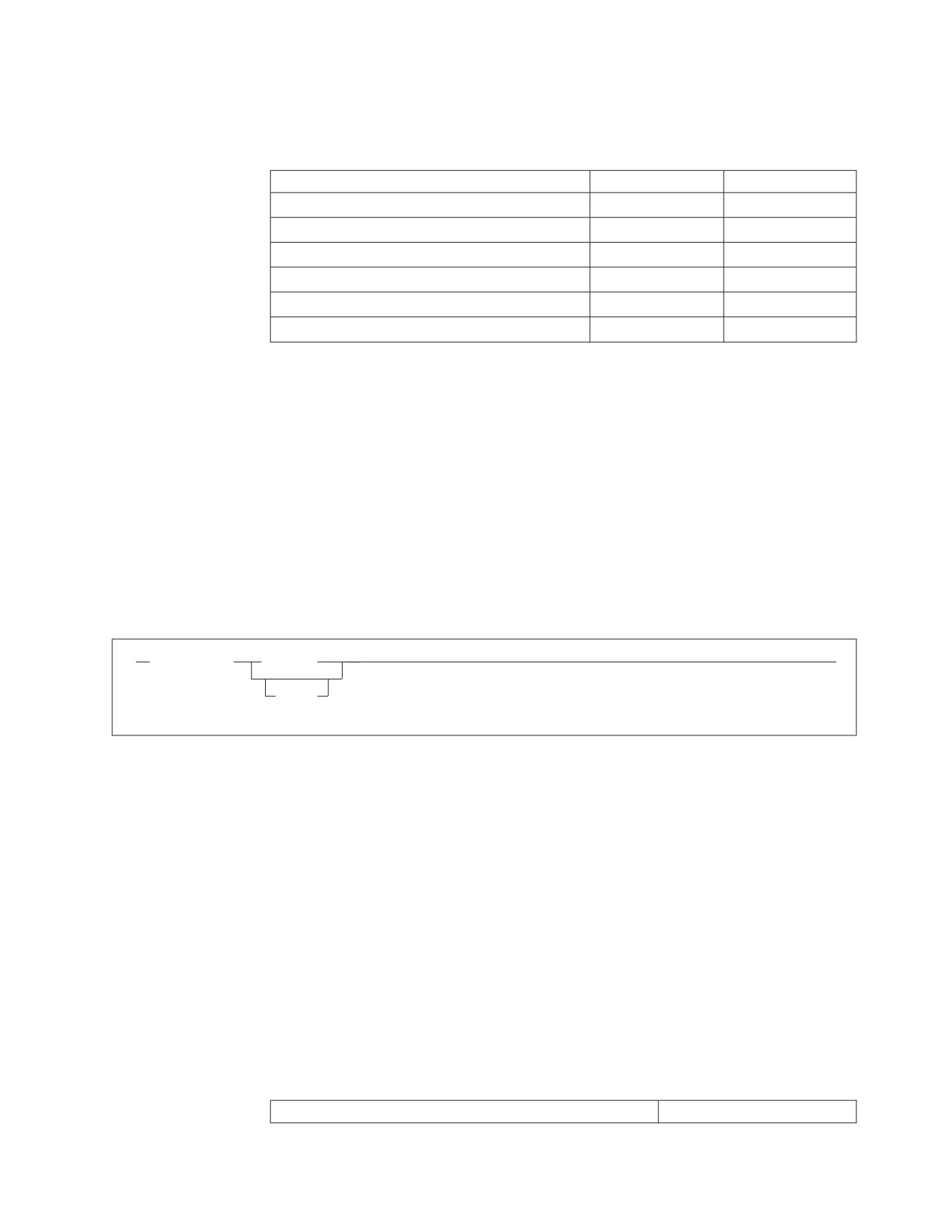
The language keys (LANGKEY) and language identifiers (LANGID) used by the
database manager are shown in Table 23.
Table 23. Language Keys and Language Identifiers
LANGUAGE
LANGKEY
LANGID
ENGLISH (mixed case)
S001
AMENG
ENGLISH (uppercase)
S002
UCENG
FRENCH
S003
FRANC
GERMAN
S004
GER
JAPANESE
D001
KANJI
CHINESE_SIMPLIFIED
D003
HANZI
You should not use the language keys and language identifiers (LANGID) shown
above for other purposes. In addition, the language keys S007-S500 and D003-D500
are reserved for IBM use.
The language key is used to internally identify HELP text for a language. The
LANGID can be used to choose a language for messages and HELP text. You can
also specify the name of the language, as it is stored in the LANGUAGE column of
the SQLDBA.SYSLANGUAGE table.
In ISQL, and on the operator console, you can specify a language or a LANGID on
the SET LANGUAGE command. The VSE operator cannot choose a double-byte
character set (DBCS) language, as the VSE operator console does not support
DBCS. The syntax of the SET LANGUAGE command is shown in Figure 103.
►►
SET LANGuage
language
►◄
langid
Figure 103. The SET LANGUAGE Command
The language or LANGID you specify must match a value in the SYSLANGUAGE
table, and must be installed. If your installation uses a double-byte character set,
you should consider setting the DBCS option to YES. For information on the DBCS
option, see “Using Double-Byte Character Set (DBCS)” on page 243.
When using the LANGID parameter on the CIRB transaction, you can specify only
the LANGID. At startup, messages are displayed in the default national language.
Changing the ISQL Default Language
The default language for ISQL in VSE is set using the LANGID parameter of the
CIRB transaction. If the LANGID parameter is not specified, the default language
for ISQL is the one specified in an internal table structure called LANGBLK. There
is one LANGBLK table structure for each national language. The database manager
uses the language specified in the ARIMLBK TEXT member. A name is assigned to
each LANGBLK table structure for each language, as follows:
Table 24. LANGBLK Table
Mixed case English
ARIMLBKD
Chapter 12. Choosing a National Language and Defining Character Sets
261

Table 24. LANGBLK Table (continued)
Uppercase English
ARIMLBKU
French
ARIMLBKF
German
ARIMLBKG
Japanese
ARIMLBKJ
Simplified Chinese
ARIMLBKC
To change the ISQL default language, rename the member for the language you
want to use to ARIMLBKD, and relink-edit the ARISLKYD link book.
National Language Messages in a VSE Guest Sharing
Environment
If you have VSE guest sharing, you should install all languages on the VSE guest
that you want to support on VSE. Users who use the DBS utility and the
preprocessors from the VSE guest should specify the library containing the desired
language in the LIBDEF statement of the job control.
262
System Administration
Chapter 13. Creating Installation Exits
This chapter discusses installation exits that:
v Supply account numbers for product users
v Define your own datetime format
v Coding your own TRANSPROC exit
v Perform your own cancel exit
v Encode and decode data (Field Procedures).
Supplying Account Numbers for Users
There is no rigid format for entering account or project numbers into accounting
records, because their definition and use vary at each installation. (Some
installations do not use account numbers at all.) Thus, you must devise your own
scheme.
To do this, you replace a module named ARIUXIT with your own version of that
module.
The resource adapter calls ARIUXIT when a user tries to connect to a DB2 Server
for VSE application server either implicitly or explicitly. The database manager
branches to ARIUXIT even before attempting to verify the user.
The database manager allows ARIUXIT to access a control block. In this control
block, ARIUXIT can provide up to 16 bytes of data.
Before calling ARIUXIT, the database manager initializes the 16-byte area. For
batch/ICCF applications, the database manager initializes the area to character
blanks.
The ARIUXIT module does not use the control block (except for the return code
area); it only sets a no-operation return code and branches back to the database
manager, as shown in the following figure.
263

User attempts to connect
to the application server
Branch to
ARIUXIT
ARIUXIT
- Provide a
no-operation
return code
- Return
Continue processing
with normal connect
Figure 104. The Database Manager Branching to ARIUXIT
Because of this, the database manager places blanks (for batch/ICCF) or CICS
information (for online applications) in the installation-dependent field of the
user’s accounting records. If you choose, you can change (write over) this area.
Whatever data is in the 16-byte area is placed on the accounting records of the user
who was trying to connect at the time that ARIUXIT was called.
Your version of ARIUXIT should determine the user’s accounting information for
your installation, verify it, and pass it to database manager which puts it in the
user’s accounting records. You can supply department names as well as account or
project numbers. You can, in fact, supply whatever you like so long as it fits in 16
bytes and meets your own installation’s requirements. The database manager does
no error-checking on the data.
The database manager always branches to ARIUXIT regardless of whether the
connect attempt is from a program, the DBS utility, the preprocessors, or ISQL. You
cannot disable branching. If you want to be able to bypass your accounting
routine, you have to code the routine so that you can turn it on and off.
How the ARIUXIT Module Works
The resource adapter is the component of the database manager that calls
ARIUXIT. In multiple user mode, the resource adapter is in the user partition; in
single user mode, it is in database partition. The ARIUXIT module is called in both
modes.
264
System Administration

When the resource adapter detects any attempt to connect to an application server,
it builds a parameter list for ARIUXIT, sets registers for a proper linkage, and calls
ARIUXIT. It always calls ARIUXIT, even if the accounting facility is not enabled.
The registers are set as follows:
Register 1
The address of the start of the parameter list for
ARIUXIT. The parameter list itself is named
ARIUEXI. The pointer to the parameter list points
to the beginning of ARIUEXI, which is described
below. The first field in ARIUEXI is an eye-catcher
value.
Register 13
Points to a standard register save area.
Register 14
Contains the return address.
Register 15
Contains the entry point of the installation exit
routine.
You must code ARIUXIT to save the DB2 Server for VSE registers in the area
pointed to by Register 13. If ARIUXIT does not save and restore the registers, the
results will be unpredictable.
The resource adapter also builds the parameter list named ARIUEXI. Table 25
shows what is in ARIUEXI.
Table 25. ARIUEXI Parameter List
Length
Description
2 words
Eye-catcher: 'ARIUEXI '
1 word
Length of ARIUEXI parameter list
1 word
Pointer to Exit Number
1 word
Pointer to length of Exit Number
1 word
Pointer to Exit Global Area
1 word
Pointer to length of Exit Global Area
1 word
Pointer to Exit Local User Area
1 word
Pointer to length of Exit Local User Area
1 word
Pointer to Exit Unique Area
1 word
Pointer to length of Exit Unique Area
2 words
Reserved
1 word
Pointer to Environment Dependent Area
1 word
Pointer to length of Environment Dependent Area
1 word
Pointer to Exit Return Code Area
1 word
Pointer to length of Exit Return Code Area
Each area that ARIUEXI points to is described below.
Eye-catcher and Length of List
The resource adapter sets the eye-catcher field to 'ARIUEXI ' and the
following full word to the length of the entire list. (This length includes the
length of the eye-catcher field.)
Exit Number
The exit number is always a full word. The exit number for the accounting
exit is 1. The resource adapter sets the pointer to the exit number with an
Chapter 13. Creating Installation Exits
265
address to a full word area containing a binary 1. The resource adapter sets
the pointer to the length of the exit number with the address of a full word
area containing a binary 4.
Exit Global Area
This area does not apply to the accounting exit. The resource adapter sets
both the pointer to the global area and the pointer to the length of the
global area to binary zeros.
Exit Local User Area
The local user area is 16 bytes long. It is a read/write area that lasts for the
life of the user program.
v For CICS transactions, the area exists for each transaction until the
transaction ends
v For batch or VSE/ICCF applications, the area exists until the end of the
job step.
For each user, the resource adapter obtains the 16-byte storage area and
sets it to binary zeros. The pointer to the local user area is unique for each
user. On subsequent calls by the user, the resource adapter returns the
same pointer; it never resets the area.
The pointer to the length of the local user area always points to a full word
that contains a binary 16.
Exit Unique Area
In this area, you provide the installation-dependent accounting
information. This area is also 16 bytes long. It is obtained and initialized by
the resource adapter. How it is initialized depends on the environment:
v For batch/ICCF applications, it is initialized to character blanks.
v For online CICS transactions, it is initialized as follows:
Bytes 1—4
contain the CICS transaction ID.
Bytes 5—12
contain the CICS sigon ID, if available.
Bytes 13—16
contain the CICS terminal ID, if available. If the transaction does
not have a CICS terminal ID and the user coded the ARIRCAN
cancel support, the first 4 characters of the RMARUDAT data
from the RMAR control block is placed into bytes 13-16.
Otherwise, these bytes are blank.
Note: If the user coded the ARIRCAN cancel support, the RMARUDAT
data from the RMAR control block is placed into bytes 29-36 of
the Environment Dependent area.
Reserved Area
This area is 8 bytes long and reserved. The resource adapter initializes it to
binary zeros.
Environment-Dependent Area
This area is 40 bytes long. It contains information about the environment
where the user is running.
Note: This area identifies environment-dependent information. Some fields
apply only to VM uses of the database manager. For VSE, those
fields are set to character blanks.
266
System Administration
The resource adapter initializes the environment-dependent area as follows:
Byte 1
Character S for single user mode, or M for multiple user mode.
Byte 2
Character D for VSE.
Byte 3
Character B for batch or VSE/ICCF, or O for VSE online.
Byte 4
Character I for implicit connect, or E for explicit connect.
Bytes 5—8
Pointer to CICS transaction control area (TCA) for VSE online. For
batch or VSE/ICCF, binary zeros.
Bytes 9—12
Pointer to CICS save area (CSA) for VSE online. For batch or
VSE/ICCF, this field is set to binary zeros.
Bytes 13—20
Character blanks.
Bytes 21—28
CONNECT user ID for all explicit connections and all online
implicit connections. Blanks for implicit connections.
Bytes 29—36
If the ARIRCAN cancel support is coded, this field is set to
RMARUDAT from the RMAR control block. (For more information
about the contents of this field, see the description of the Exit
Unique Area on page 266.) Otherwise, this field is character blanks.
Bytes 37—40
Binary zeros (reserved).
Exit Return Code Area
The resource adapter initializes this full word area (and the pointer to it),
and sets it to -1. A return code of -1 means that you do not want this exit.
The length field for this area is a full word containing a binary 4. The
resource adapter also ORs a X'80' to the high order byte of the pointer to
the length field of the return code area. The X'80' indicates the end of the
parameter list.
When you code your version of ARIUXIT, you can specify these return codes
before branching back to the database manager:
-1
Means that you do not want this exit (the default). This indicates to the
database manager that the exit is a no-op.
0
The function that the exit called to do a task completed successfully.
Other Any return code other than 0 or -1 causes an -815 SQLCODE to be
returned to the user. (SQLERRD1 contains the return code from the exit.)
You can reject a user’s attempt to connect because the user has incorrect
accounting information.
Figure 105 on page 268 summarizes the ARIUEXI parameter list and the areas
pointed to by the list.
Chapter 13. Creating Installation Exits
267
Register 1
Pointer
Exit Number:
0
Character
Binary 1
Length of
'ARIUEXI'
Exit Number:
8
Binary 68
Binary 4
12
Pointer
16
Pointer
Local User Area:
20
Binary 0
Binary 0s
24
Binary 0
28
Pointer
Length of Local User Area:
32
Pointer
Binary 16
36
Pointer
Exit Unique Area:
40
Pointer
See text
44
Binary
Length of Exit Unique Area:
Zeros
Binary 16
52
Pointer
Environment Dependent Area:
54
Pointer
/
/
See text
58
Pointer
/
/
62
Pointer
Length of Environment Dependent Area:
Binary 40
Return Code Area:
Binary -1
Length of Return Code Area:
Binary 4
Figure 105. Summary of ARIUEXI Parameter List and Associated Areas
Coding Your Own Accounting Exit
Exit routines must always be coded in Assembler language. Your version of
ARIUXIT (and any of the modules it calls) must not use any DB2 Server for VSE
function. In an online environment, imbedded CICS commands (EXEC CICS) are
not allowed.
You can link-edit your accounting exit to run in AMODE 24 or 31 by using the
AMODE parameter in the PARM field of the EXEC LNKEDT statement. Your
268
System Administration
accounting exit will be loaded below 16 megabytes and given control according to
its AMODE. If the AMODEs of the accounting exit and the database manager
differ, the database manager switches AMODEs before transferring control to the
accounting exit. For CICS/VSE applications, you MUST link-edit your accounting
exit to run in AMODE 31.
Figure 106 shows the ARIUXIT module that is included with the database manager.
This sample exit is supplied as an A-type source member named ARIUXIT. Note
that the Exit Return Code Area is set to -1, which means that you are not
interested.
TITLE ’ARIUXIT’
***********************************************************************
* ARIUXIT USER EXIT ROUTER ROUTINE
REGISTER ASSUMPTIONS:
R1
-> PARMLIST
R13 -> SAVE AREA
R14 -> RETURN ADDRESS
R15 -> ENTRY POINT
* ALTHOUGH PROVIDED IN A GENERAL INTERFACE LIBRARY, ARIUXIT IS NOT TO *
* BE USED AS A GENERAL PROGRAMMING INTERFACE. REFER TO PRODUCT
* DOCUMENTATION TO DETERMINE INTENDED USAGE.
***********************************************************************
SPACE 5
ARIUXIT CSECT ,
ARIUXIT AMODE ANY
ARIUXIT RMODE 24
DS
0H
USING *,R15
GET ADDRESSABILITY
B
PROLOG
DC
CL8’ARIUXIT ’
EYECATCHER
PROLOG EQU
STM R14,R12,12(R13)
SAVE CALLER’S REGISTERS
DROP R15
BALR R12,0
R12 IS BASE REGISTER
PSTART EQU
USING PSTART,R12
GET ADDRESSABILITY FOR ROUTINE
ST
R13,UXSAVE+4
STORE BACKWARD POINTER
LA
R9,UXSAVE
ADDRESS OF SAVE AREA
ST
R9,UXSAVE+8
STORE FORWARD POINTER
LR
R13,R9
R13 POINTS TO NEW SAVE AREA
L
R1,0(,R1)
GET POINTER TO PLIST
USING PLIST,R1
GET ADDRESSABILITY TO PLIST DSECT
* Insert your own code here
(and change the return code as appropriate).
*
Figure 106. IBM-Supplied Version of ARIUXIT (Part 1 of 3)
Chapter 13. Creating Installation Exits
269
L
R2,PLRETCD
GET PTR TO EXIT RETURN CODE AREA
L
R3,NEG1RC
LOAD NOOP RET CODE (NEGATIVE ONE)
ST
R3,0(,R2)
STORE RET CODE INTO EXIT RC AREA
L
R13,UXSAVE+4
GET BACKWARD POINTER
LM
R14,R12,12(R13)
RESTORE CALLER’S REGISTERS
BR
R14
RETURN TO CALLER
END
EQU
EJECT
***********************************************************************
DECLARES FOR ARIUXIT ROUTER
***********************************************************************
SPACE 5
UXSAVE DC
18F’0’
SAVE AREA FOR CALLER’S REGISTERS
NEG1RC DC
F’-1’
NEGATIVE ONE RETURN CODE (NO-OP)
SPACE 2
R0
EQU
0
REGISTERS EQUATES
R1
EQU
1
R2
EQU
2
R3
EQU
3
R4
EQU
4
R5
EQU
5
R6
EQU
6
R7
EQU
7
R8
EQU
8
R9
EQU
9
R10
EQU
10
R11
EQU
11
R12
EQU
12
R13
EQU
13
R14
EQU
14
R15
EQU
15
EJECT
Figure 106. IBM-Supplied Version of ARIUXIT (Part 2 of 3)
270
System Administration
***********************************************************************
DSECT FOR ARIUEXI PARAMETER LIST INTERFACE TO ARIUXIT ROUTER
***********************************************************************
SPACE 5
DS
0D
PLIST
DSECT
PLICTCH
DS
CL8
EYECATCHER
PLILENG
DS
F
LENGTH OF PLIST (INCLUDING EYECATCHER)
PLEXNUM
DS
F
PTR TO EXIT NUMBER
PLLXNUM
DS
F
PTR TO LENGTH OF EXIT NUMBER
PLGLOBA
DS
F
PTR TO EXIT GLOBAL AREA
PLLGLOB
DS
F
PTR TO LENGTH OF EXIT GLOBAL AREA
PLUSERF
DS
F
PTR TO EXIT LOCAL USER AREA
PLLUSER
DS
F
PTR TO LENGTH OF EXIT LOCAL USER AREA
PLEUNIQ
DS
F
PTR TO EXIT UNIQUE AREA
PLLUNIQ
DS
F
PTR TO LENGTH OF EXIT UNIQUE AREA
DS
CL8
RESERVED
PLEDEPA DS
F
PTR TO ENVIRONMENT DEPENDENT AREA
PLLDEPA DS
F
PTR TO LENGTH OF ENVIRONMENT DEP AREA
PLRETCD DS
F
PTR TO EXIT RETURN CODE AREA
PLLRETC DS
F
PTR TO LENGTH OF EXIT RETURN CODE AREA
*
END
Figure 106. IBM-Supplied Version of ARIUXIT (Part 3 of 3)
Figure 107 shows a simple example of a user version of ARIUXIT. In this example,
the string HERE IS USERDATA is moved into the exit unique area, and the exit
return code area is set to 0.
Chapter 13. Creating Installation Exits
271
TITLE ’ARIUXIT’
***********************************************************************
* ARIUXIT USER EXIT ROUTER ROUTINE
REGISTER ASSUMPTIONS:
R1
-> PARMLIST
R13 -> SAVE AREA
R14 -> RETURN ADDRESS
R15 -> ENTRY POINT
* ALTHOUGH PROVIDED IN A GENERAL INTERFACE LIBRARY, ARIUXIT IS NOT TO *
* BE USED AS A GENERAL PROGRAMMING INTERFACE. REFER TO PRODUCT
* DOCUMENTATION TO DETERMINE INTENDED USAGE.
***********************************************************************
SPACE 5
ARIUXIT CSECT ,
ARIUXIT AMODE ANY
ARIUXIT RMODE 24
DS
0H
USING *,R15
GET ADDRESSABILITY
B
PROLOG
DC
CL8’ARIUXIT ’
EYECATCHER
PROLOG EQU
STM R14,R12,12(R13)
SAVE CALLER’S REGISTERS
DROP R15
BALR R12,0
R12 IS BASE REGISTER
PSTART EQU
USING PSTART,R12
GET ADDRESSABILITY FOR ROUTINE
ST
R13,UXSAVE+4
STORE BACKWARD POINTER
LA
R9,UXSAVE
ADDRESS OF SAVE AREA
ST
R9,UXSAVE+8
STORE FORWARD POINTER
LR
R13,R9
R13 POINTS TO NEW SAVE AREA
L
R1,0(,R1)
GET POINTER TO PLIST
USING PLIST,R1
GET ADDRESSABILITY TO PLIST DSECT
Figure 107. Sample User Version of ARIUXIT (Part 1 of 3)
272
System Administration
* Here you would place code that gets and verifies your
* user-dependent data. The following code shows moving the data
* into the Exit Unique Area.
* Make sure you check the Exit Number word. If the Exit Number value
* is not a binary 1, you should set the Exit Return Code word to binary
* -1 (NEG1RC) and return to the database manager.
L
R2,PLEUNIQ
GET PTR TO EXIT UNIQUE AREA
MVC
0(16,R2),USERDATA MOVE 16 BYTES OF USER DATA
L
R2,PLRETCD
GET PTR TO EXIT RETURN CODE AREA
L
R3,ZEROS
SET ZERO RETURN CODE
ST
R3,0(,R2)
STORE RET CODE INTO EXIT RC AREA
EXIT
EQU
RETURN TO THE DATABASE MANAGER
L
R13,UXSAVE+4
GET BACKWARD POINTER
LM
R14,R12,12(R13)
RESTORE CALLER’S REGISTERS
BR
R14
RETURN TO CALLER
END
EQU
EJECT
***********************************************************************
DECLARES FOR ARIUXIT
***********************************************************************
SPACE 5
UXSAVE DC
18F’0’
SAVE AREA FOR CALLER’S REGISTERS
ZEROS
DC
F’0’
ZERO RETURN CODE
NEG1RC
DC
F’-1’
NEGATIVE RETURN CODE (NO-OP)
USERDATA DC
CL16’HERE IS USERDATA’
SPACE 2
R0
EQU
0
REGISTERS EQUATES
R1
EQU
1
R2
EQU
2
R3
EQU
3
R4
EQU
4
R5
EQU
5
R6
EQU
6
R7
EQU
7
R8
EQU
8
R9
EQU
9
R10
EQU
10
R11
EQU
11
R12
EQU
12
R13
EQU
13
R14
EQU
14
R15
EQU
15
EJECT
Figure 107. Sample User Version of ARIUXIT (Part 2 of 3)
Chapter 13. Creating Installation Exits
273
***********************************************************************
DSECT FOR ARIUEXI PARAMETER LIST INTERFACE TO ARIUXIT
***********************************************************************
SPACE 5
DS
0D
PLIST
DSECT
PLICTCH
DS
CL8
EYE-CATCHER
PLILENG
DS
F
LENGTH OF PLIST (INCLUDING EYE-CATCHER)
PLEXNUM
DS
F
PTR TO EXIT NUMBER
PLLXNUM
DS
F
PTR TO LENGTH OF EXIT NUMBER
PLGLOBA
DS
F
PTR TO EXIT GLOBAL AREA
PLLGLOB
DS
F
PTR TO LENGTH OF EXIT GLOBAL AREA
PLUSERF
DS
F
PTR TO EXIT LOCAL USER AREA
PLLUSER
DS
F
PTR TO LENGTH OF EXIT LOCAL USER AREA
PLEUNIQ
DS
F
PTR TO EXIT UNIQUE AREA
PLLUNIQ
DS
F
PTR TO LENGTH OF EXIT UNIQUE AREA
DS
CL8
RESERVED
PLEDEPA DS
F
PTR TO ENVIRONMENT DEPENDENT AREA
PLLDEPA DS
F
PTR TO LENGTH OF ENVIRONMENT DEP AREA
PLRETCD DS
F
PTR TO EXIT RETURN CODE AREA
PLLRETC DS
F
PTR TO LENGTH OF EXIT RETURN CODE AREA
END
Figure 107. Sample User Version of ARIUXIT (Part 3 of 3)
After the program is coded, assemble it as you would any other program.
Installing Your Version of ARIUXIT
After assembling your program, you must catalog the ARIUXIT OBJ file into your
private sublibrary. (Your assembled version of ARIUXIT must be named ARIUXIT
OBJ.) Then link-edit the DB2 Server for VSE component DSC; then stop the
application server in order for the change to take effect.
The DSC component, which is described in the DB2 Server for VSE & VM Diagnosis
Guide and Reference manual, contains the IBM-supplied version of ARIUXIT. The
link book name for DSC is ARISLKMD. When doing the link-edit, specify your
private sublibrary ahead of the DB2 Server for VSE sublibrary on the LIBDEF
statement defining the search order. The link-edit will then replace the
IBM-supplied version with your version.
An example of job control to install a user version of ARIUXIT is shown in
Figure 108 on page 275. Here, the ARIUXIT OBJ would be installed in a sublibrary
called LIB.SQL, and the DSC component would be replaced in PRD2.DB2730.
274
System Administration

// JOB INSTALL USER EXIT
// LIBDEF *,SEARCH=(LIB.SQL,PRD2.DB2730),CATALOG=PRD2.DB2730
* ****************************************************************
* INSTALL ARIUXIT USER EXIT ROUTINE
* ****************************************************************
// OPTION CATAL
INCLUDE ARISLKMD
// EXEC LNKEDT,PARM=’MSHP,AMODE=xxx,RMODE=24’
/*
/&
Figure 108. Example Job Control to Install ARIUXIT in the Production Library
AMODE (addressing mode) is the attribute of the entry point of the loaded phase,
and must be one of the following:
24
The exit is invoked in AMODE 24
31
The exit is invoked in AMODE 31
ANY The exit is invoked in the caller’s addressing mode
Note: The accounting exit must always be loaded below 16 megabytes (RMODE
24). If you are running DRDA online CICS transactions, the accounting exit
cannot be linkedited with AMODE 24.
Service Considerations for ARIUXIT
The dummy version of ARIUXIT is not serviceable; other portions of the DSC
component, however, are serviceable. If service is applied to any portion of DSC, it
is link-edited again. If you have coded your own version of ARIUXIT and
completed the previous steps, your version of ARIUXIT will be included in the
DSC component.
Defining Your Own Datetime Format
The database manager supports many datetime formats. This section describes the
datetime formats and how you can add your own by coding your own exit.
Datetime Formats
The database manager supports DATE, TIME, and TIMESTAMP data types and
operations. You can enter a date or a time using many different formats.
Dates can be entered in any of the formats shown in Table 26.
Table 26. Date Formats
Format Name
Abbreviation
Date Format
Example
International Standards
ISO
yyyy-mm-dd
1993-12-31
Organization
IBM USA standard
USA
mm/dd/yyyy
12/31/1993
IBM European standard
EUR
dd.mm.yyyy
31.12.1993
Japanese Industrial Standard
JIS
yyyy-mm-dd
1993-12-31
Christian Era
Site-defined
LOCAL
Any site-defined
—
form
Chapter 13. Creating Installation Exits
275

Times can be entered in any of the formats shown in Table 27.
Table 27. Time Formats
Format Name
Abbreviation
Time Format
Example
International Standards
ISO
hh.mm[.ss]
13.30.05
Organization
IBM USA standard
USA
hh:mm AM or PM
1:30 PM
IBM European standard
EUR
hh.mm[.ss]
13.30.05
Japanese Industrial Standard
JIS
hh:mm[:ss]
13:30:05
Christian Era
Site-defined
LOCAL
Any site-defined
—
form
To define the LOCAL format, you have to code your own date or time exit. For
information about coding your own datetime exit, see “Coding Your Own
Datetime Exit” on page 279.
Default Output Format
When the database manager is installed, the default date and time formats are both
ISO. To change them, you must change the entry in the SYSTEM.SYSOPTIONS
table. You must have DBA authority to do this.
For example, to specify that the date output format is USA, enter:
UPDATE SYSTEM.SYSOPTIONS -
SET VALUE=’USA’ WHERE SQLOPTION=’DATE’
Similarly, to specify that the time output format is JIS, you enter:
UPDATE SYSTEM.SYSOPTIONS -
SET VALUE=’JIS’ WHERE SQLOPTION=’TIME’
Alternatively, you can update the SYSTEM.SYSOPTIONS table by modifying the
IBM-supplied ARISDTM member to specify your datetime defaults, then start the
DBS utility, specifying the ARISDTM member as the control file.
How Datetime Exits Work
Two datetime installation replaceable exits are provided to allow you to convert
datetime values in any installation-defined format into ISO format, or from ISO
format into any installation-defined format. These exits which are link-edited into
the exit router component ARIXSXR, are called ARIUXDT and ARIUXTM for date
and time, respectively.
When the database manager is installed, ARIXSXR is loaded and addressability to
the exits is set.
The entries in the SYSTEM.SYSOPTIONS catalog table are used by the database
manager to determine the default datetime format for output.
If SYSTEM.SYSOPTIONS indicates that local datetime exits are present, the exits
are called during SQL statement processing when conversion between internal and
external forms is required.
The product-supplied exits return a -1 return code, meaning the exits have not
been replaced by the user exits. If a user program issues an SQL statement that
276
System Administration
calls the exits, SQLCODE -185 is returned. Therefore, if the user is to replace the
exits, the -1 return code must not be used.
When Date and Time Exits are Called (Exit Points)
If a program has been preprocessed with the LOCAL format, or if the installation
default is LOCAL, then the datetime exits are called before any interpretation of
the datetime data values. Otherwise, the database manager attempts to interpret
the datetime data values first. In this situation, it calls the local exit only if it does
not recognize the datetime value.
The datetime exits are called at the following times:
v When you convert the external form to an internal form:
- When datetime data is entered by INSERT or UPDATE statements, or by the
DATALOAD commands of the DBS utility, or by the INPUT command of
ISQL.
- When a constant or host variable is compared with a DATE or TIME column.
The constant can be converted during preprocessing time.
- When the DATE or TIME scalar functions are used with a string
representation of a date or time.
The exit should then convert the installation-defined format into ISO format. The
ISO format is then validated and converted into an internal format to be entered
into the column or used in comparisons. If the column is a key column for an
index, the index entry is made in an internal format.
v When you convert the internal form to an external form:
- When data is retrieved from the column by SELECT or FETCH statements, or
by the DATAUNLOAD commands in the DBS utility, and the default format
is local.
- When the CHAR scalar function is used with the LOCAL format specification.
At this point, the exit should convert the value from ISO format into
installation-defined format; then the database manager returns the converted
value. In this situation, the exit is called after any edit routine or sort.
When the exits are called, the registers are set as follows:
Register 0
Undefined.
Register 1
Points to a pointer to the parameter list for
ARIUXDT (or ARIUXTM). The format of the
parameter list is discussed below. The first field in
it is an eye-catcher value.
Register 2—12
Undefined.
Register 13
Points to a standard register save area.
Register 14
Contains the return address.
Register 15
Contains the entry point of the user installation
routine.
Registers 2—13 must be saved and restored by the exit. If this is not done, the
results will be unpredictable.
Table 28 shows what is in the parameter list used by the date and time exits (see
Register 1).
Chapter 13. Creating Installation Exits
277
Table 28. Parameter List Used by Date and Time Exits
Length
Description
2 words
Eye-catcher: ARIUXDT or ARIUXTM
1 word
Length of parameter list
1 word
Pointer to Function Number
1 word
Pointer to length of Function Number
1 word
Pointer to Exit Global Area
1 word
Pointer to length of Exit Global Area
1 word
Pointer to ISO Datetime Area
1 word
Pointer to length of ISO Datetime Area
1 word
Pointer to LOCAL Datetime Area
1 word
Pointer to length of LOCAL Datetime Area
1 word
Pointer to User Work Area
1 word
Pointer to length of User Work Area
1 word
Pointer to Environment Dependent Area
1 word
Pointer to length of Environment Dependent Area
1 word
Pointer to Exit Return Code Area
1 word
Pointer to length of Exit Return Code Area
Each area in the parameter list is described below.
v The Eye-catcher and Length of list is initialized by the database manager.
v The Function Number is a full word number describing the function to be
performed, as follows:
Number
Function
DATE Functions:
00000004
Convert DATE from LOCAL format to ISO format.
00000008
Convert DATE from ISO format to Installation format.
TIME Functions:
00000004
Convert TIME from LOCAL format to ISO format.
00000008
Convert TIME from ISO format to Installation format.
v The EXIT Global Area is not used. Both values are set to zero.
v The length of the ISO Date and Time Areas are 10 bytes and 8 bytes,
respectively.
v The length of the LOCAL Date and Time Areas are as defined in the
SYSTEM.SYSOPTIONS catalog table. The pointer to the length of the area points
to a fullword that contains the value in this table.
v The User Work Area is a 512-byte area.
v The Environment Dependent Area is a 40-byte area. For the datetime exits, only
byte 2 is used. It contains D for VSE, and V for VM.
v The Exit Return Code Area is a full word to be set by the exit to the return code.
The possible return codes are:
-1
The exit supplied by the database manager has not been replaced by a
user exit. The database manager then sets SQLCODE to -185.
0
The function has been performed.
4
Invalid date or time value. The database manager then sets SQLCODE to
-181.
278
System Administration
8
Date or time value not in valid format. The database manager then sets
SQLCODE to -180.
Other Error in exit. The function number of the exit will be stored in
SQLERRD5, and the return code in SQLERRD1. The database manager
then sets SQLCODE to -816.
The exit name, function code and return code are set up as message
tokens in SQLERRM; they are used when the message associated with
SQLCODE -816 is displayed, for example, by the DBS utility and ISQL.
If a program has been preprocessed with the LOCAL format, or if the
installation default is LOCAL, then the database manager evaluates the
output of the datetime exit if the return code is either 0 or 8. Otherwise,
the output is evaluated only if the return code is 0.
Coding Your Own Datetime Exit
User-coded exits must conform to the following:
v The installation replaceable exits must be coded in Assembler language.
v The exits must be reentrant; they must save registers at entry and restore them
before exit.
v The exits (and any of the modules they call) must not use any DB2 Server for
VSE facilities.
v The exits must not use the return code -1.
v When formatting ISO datetime to LOCAL datetime, the user is responsible for
formatting the full buffer (the number of bytes equal to the length of the local
datetime as defined in the SYSTEM.SYSOPTIONS catalog table).
v The exits must support 31-bit addressing (AMODE 31) and be loaded below 16
megabytes (RMODE 24)
In an online environment, imbedded CICS commands (EXEC CICS) are not
allowed.
Figure 109 on page 280 shows the IBM-supplied ARIUXDT module, which is an
A-type source member. You need to modify this source code to support your local
date format requirements.
Chapter 13. Creating Installation Exits
279
TITLE ’ ARIUXDT’
***********************************************************************
* ARIUXDT USER DATE CONVERSION ROUTINE
REGISTER ASSUMPTIONS:
R1
-> PARMLIST
R13 -> SAVE AREA
R14 -> RETURN ADDRESS
R15 -> ENTRY POINT
* ALTHOUGH PROVIDED IN A GENERAL INTERFACE LIBRARY, ARIUXIT IS NOT TO *
* BE USED AS A GENERAL PROGRAMMING INTERFACE. REFER TO PRODUCT
* DOCUMENTATION TO DETERMINE INTENDED USAGE.
***********************************************************************
ARIUXDT CSECT ,
ARIUXDT AMODE 31
ARIUXDT RMODE 24
USING *,R15
ESTABLISH TEMP ADDRESSABILITY
B
PROLOG
BRANCH TO START OF PROGRAM
DC
C’ARIUXDT’
DROP
R15
DROP R15 AND USE OWN ADDRESSABIL-
ITY
PROLOG STM R14,R12,12(R13)
SAVE REGS IN CALLER’S AREA
LR
R12,R15
SAVE BASE REGISTER
PSTART EQU ARIUXDT
START OF PROGRAM
USING PSTART,R12
SET UP BASE REGISTER
L
R1,0(R1)
POINT TO THE PARAMETER LIST
USING PARMLIST,R1
ADDRESSABILITY FOR INPUT PARMS
L
R2,FNPTR
POINT TO FUNCTION TYPE
***********************************************************************
* M A I N L I N E
***********************************************************************
MAINLINE DS
0H
START OF CODE
SPACE
SR
R15,R15
INITIALIZE RETURN CODE TO ZERO
***********************************************************************
* HERE YOU WOULD PLACE CODE THAT GETS AND VERIFIES YOUR
* INPUT DATE AND CONVERTS IT TO EITHER TO LOCAL FORMAT OR ISO FORMAT
* A RETURN CODE OF -1 MEANS AN EXIT IS NOT PROVIDED
* A RETURN CODE OF 0 MEANS CONVERSION WAS SUCCESSFUL
* A RETURN CODE OF 4 MEANS THAT THE DATE VALUE WAS OUT OF RANGE
* A RETURN CODE OF 8 MEANS THAT THE DATE WAS INVALID
***********************************************************************
BCTR R15,R0
EXIT NOT PROVIDED
B
RETURN
CONVERSION COMPLETE
Figure 109. IBM-Supplied Version of ARIUXDT (Part 1 of 2)
280
System Administration